Zoho vs. HubSpot: All-round CRM Comparison Based On Users’ and Experts’ Feedback

Zoho vs. Hubspot — which system is better at amping up your sales? Spoiler: each one has its sway.

Standardizing customer-related business processes is vital to amplifying productivity of your sales, marketing, and customer support units, as well as improving conversion rates. To draw on these and other opportunities that arise from their business development efforts, companies go for CRM implementation and optimization.

The challenge is how to choose a CRM system that fully aligns with your business objectives without draining your budget along the way. The best way to make the right decision is an all-around comparison of different software solutions. 

For this article, which zooms on the Zoho vs. HubSpot standoff, we’ve rounded up the opinions of seven experts with real-world experience in both CRM systems.   

HubSpot vs. Zoho CRM: a tug of war for businesses’ attention

We’ve compared HubSpot vs. Zoho CRM according to a plethora of parameters, from cost, ease of setup, and user experience to customizability, available integrations, reporting options, and tech support accessibility. 

1. Pricing

Both CRM platforms provide freemium options that allow you to get a sneak peek into their features and evaluate which one is the most beneficial for your business. 

Nevertheless, Zoho and HubSpot represent two different pricing models.

Zoho offers four plans to choose from – Standard, Professional, Enterprise, and Ultimate. The cost increases gradually, from $22 to $70 (at the time of publication) per user monthly, so the highest-tier offering is only 3.5 times more expensive than the starting package. Also, consider that you can cancel your subscription anytime.

HubSpot has three pricing plans – Starter, Professional, and Enterprise. The entry-level set will cost you only $18 monthly. This price includes two paid users for Sales Hub, so the offering may look way more advantageous compared to Zoho. 

However, if you need broader CRM capabilities and advanced features, moving to the higher packages will cost you a pretty cent – the Enterprise plan is 200 times more pricey than the Starter. Moreover, HubSpot requires you to sign a one-year subscription agreement. You can pay monthly, but you’ll be able to terminate the contract only after one year. 

HubSpot pricing plans are more expensive, but you can create unlimited free users with the most basic functionality in this CRM. Zoho packages are much more affordable, but you have to pay for each user. 

The true cost of the system depends very much on its configuration. After all, businesses use a CRM solution not only for managing sales and marketing activities. The system is also utilized by administrative users, accounting team members, etc., who don’t need extensive features.

Based on my experience, the richer the functionality of each user has to be, the more unprofitable HubSpot is. Conversely, the simpler the functionality of each role, the more profitable HubSpot will pay off. 

Therefore, if you have a large sales team, Zoho is a clear winner. But if you have just a few sales managers and a variety of other roles that can benefit from the basic free CRM functionality, then HubSpot’s Starter plan looks like a godsend. 

2. Setup and onboarding

Zoho requires devoting a sizable chunk of your time to configuration at the onset of the system implementation. To make the CRM more user-friendly, you have to streamline workflows and organize a slew of existing and custom contact fields in advance to simplify sales activities. It can take your staff up to two months to get used to the new system. 

HubSpot can also require fine-tuning, but compared to Zoho, this CRM can be used right after setup, even by first-time users – onboarding usually takes a day or two. Therefore, here we put a good word for this CRM platform. 

3. Navigation and overall UX

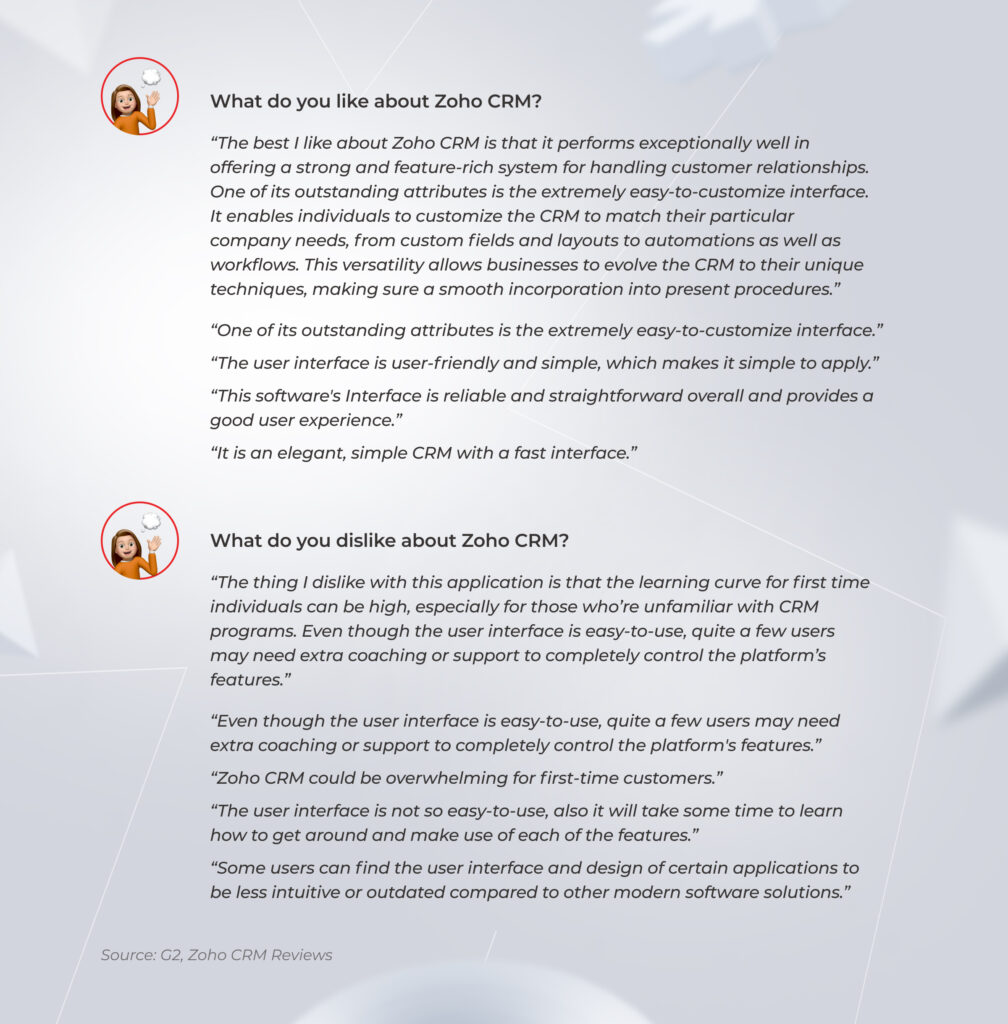
According to reviews on Zoho CRM, users often need extra coaching and support to control the system’s features, albeit with a seemingly clean and straightforward user interface.
Zoho CRM

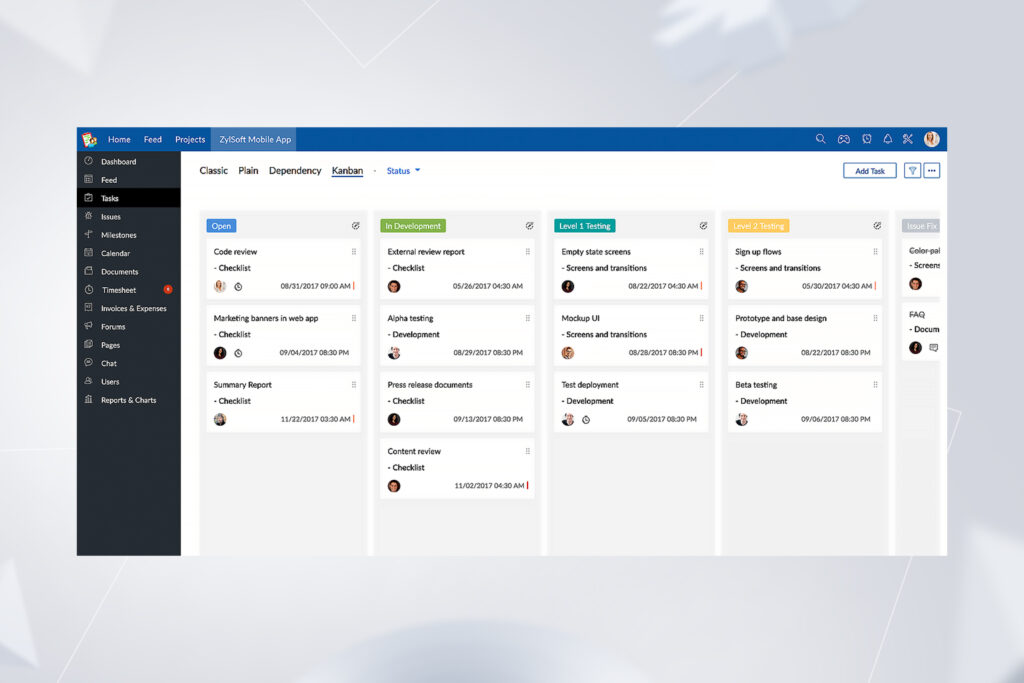
Take a look at the screenshot below. As you can see, there are tons of tabs and icons in the navigation panel. Do you have an intuitive idea of which one you should open to create an automated email? 
Task automation menu in Zoho CRM

That’s the point. The task automation menu is hidden under the “Settings” icon. Such non-obvious steps can increase your employees’ resistance to change, putting successful CRM adoption at stake.  

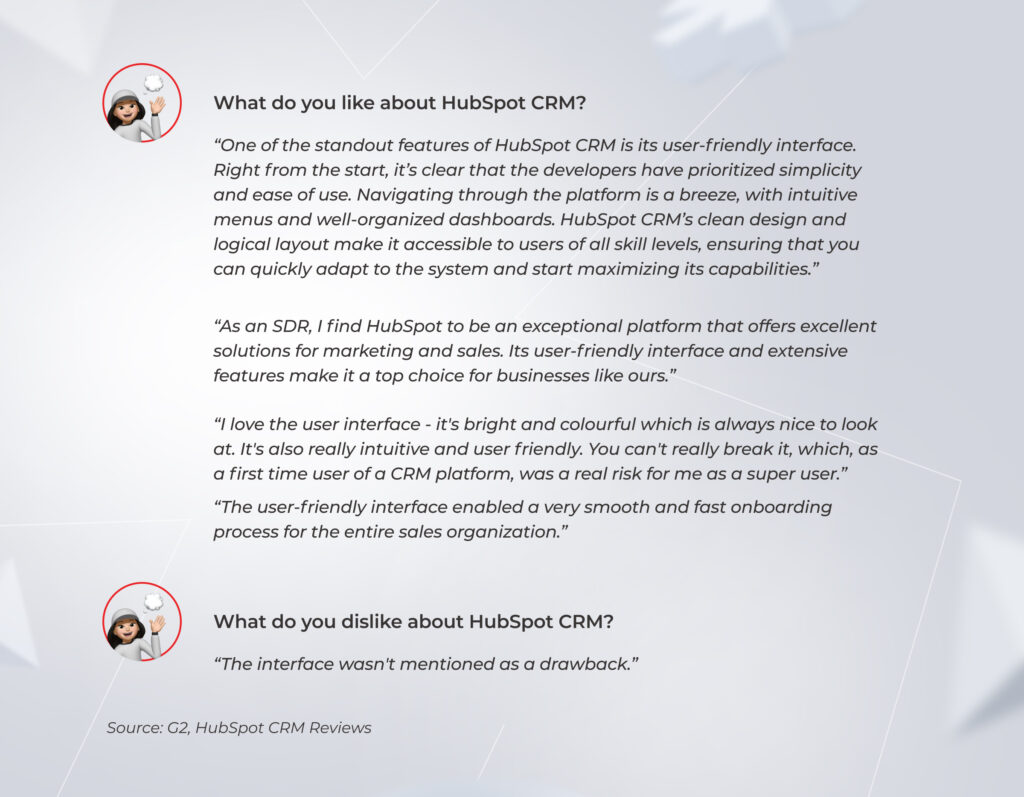
HubSpot user interface is visually driven and, therefore, seems more predictable – you don’t need to wrap your head around finding the option you need. Navigation is obvious and easy to grasp, even for non-tech savvy staff. This system is proactive, it’s designed to cooperate with a user and provide action options based on their behavior. 

Here are the reviews on the HubSpot UI and UX left by independent users.
HubSpot CRM

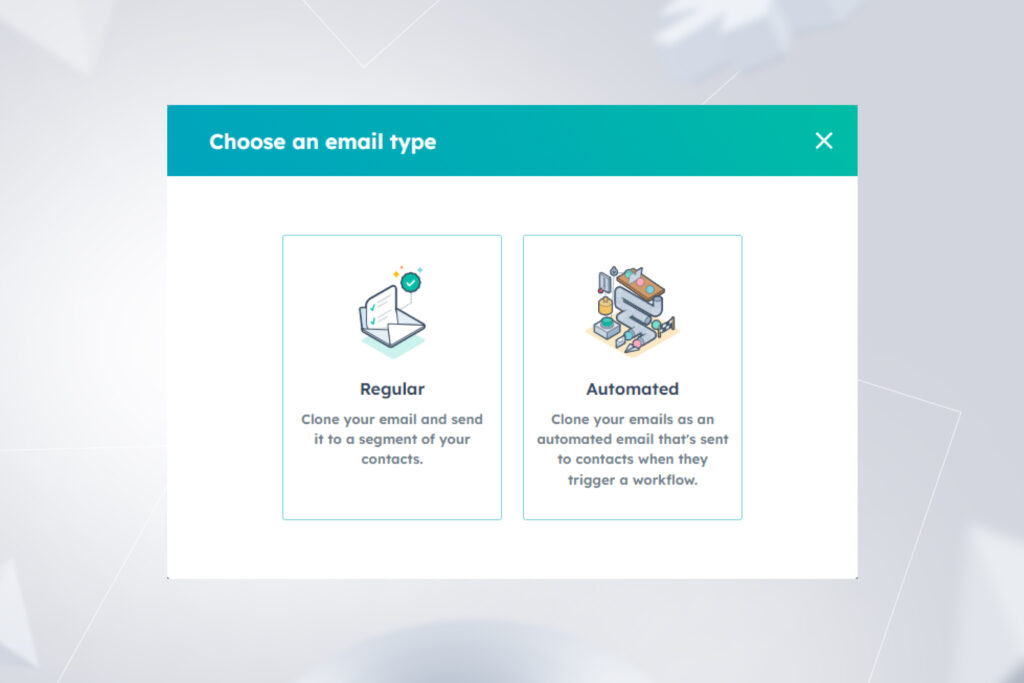
Unlike in Zoho, in HubSpot you don’t need to struggle with finding the feature, as the CRM suggests possible options.
HubSpot

If you are looking for your first CRM, HubSpot can become your heavy hitter on the road to business process standardization. 

As I see it, having experience with both software solutions, HubSpot is an intuitive CRM that is easy to plunge into and grasp from day one. Non-technical staff can deal with it unassisted.

I’d like to add that HubSpot provides its users with a rich and easy-to-understand knowledge base. It’s like an internal Google version of HubSpot where you can find a detailed answer to any question regarding the CRM.

So when we compare Zoho and HubSpot in terms of user-friendliness, the latter is a shoo-in. 

4. Customizability

Zoho usually gets points for its unlimited customization options, and we can bet our bottom dollar that HubSpot won’t beat it in terms of the number of custom fields that can be added and organized the way you wish. However, it’s important to highlight one nuance of the HubSpot CRM vs. Zoho comparison. 

It’s quite easy to over-customize Zoho to the point that the system will become challenging for first-time users.

When it comes to sales activities, Zoho provides detailed contact filtration, but that is a double-edged sword. On the one hand, it’s a benefit you can leverage to manage your contacts efficiently. On the flip side, for employees new to the CRM platform, this will be a showstopper that makes using the system without the guidance of more experienced colleagues pretty tricky. 

Nevertheless, we still give kudos to Zoho here, as experienced users will appreciate the customization options the CRM offers. As for novice employees, you can alleviate their acquaintance with CRM by supporting a culture of mutual training and mentoring within the company. 

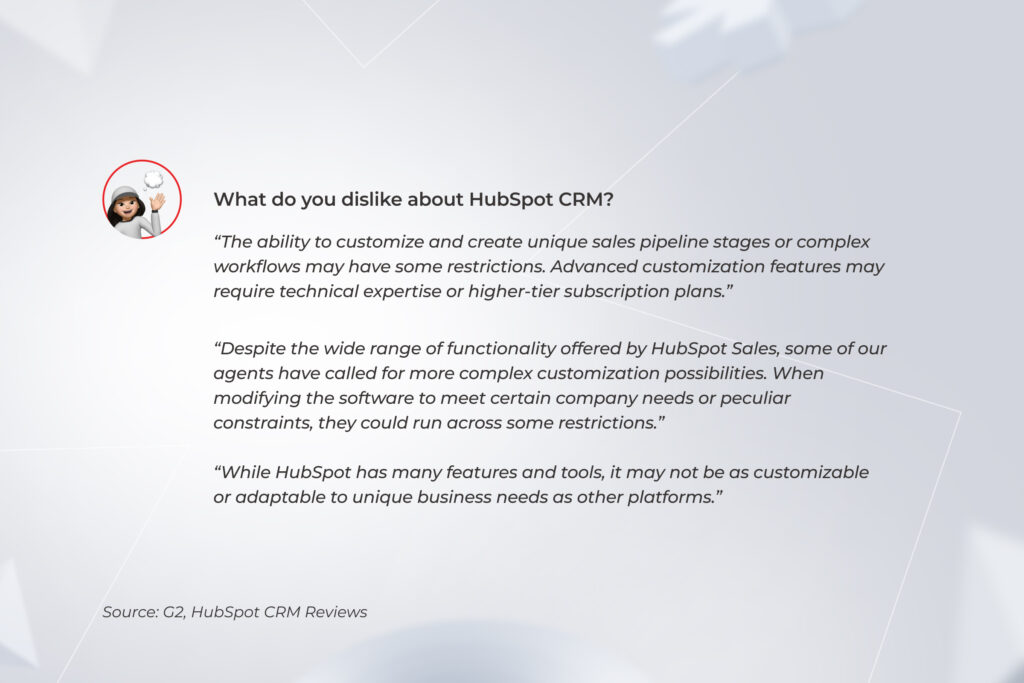
HubSpot is much less flexible in terms of customization. For example, if you can set any statuses for your leads in Zoho, HubSpot supports only internationally accepted MQL-SQL-SAL gradation. Reviews also spotlight this point.
HubSpot

5. Integrations

Zoho has around 800 in-built integrations, and HubSpot provides more than 1,000 to strengthen and push the limits of the CRM’s functionality.

While there is a slight difference in the number of available integrations, user feedback on them varies. Customers praise Zoho for providing seamless integration with popular marketing, sales tools, and accounting software, but they also mention the system’s limitations.

Zoho CRM

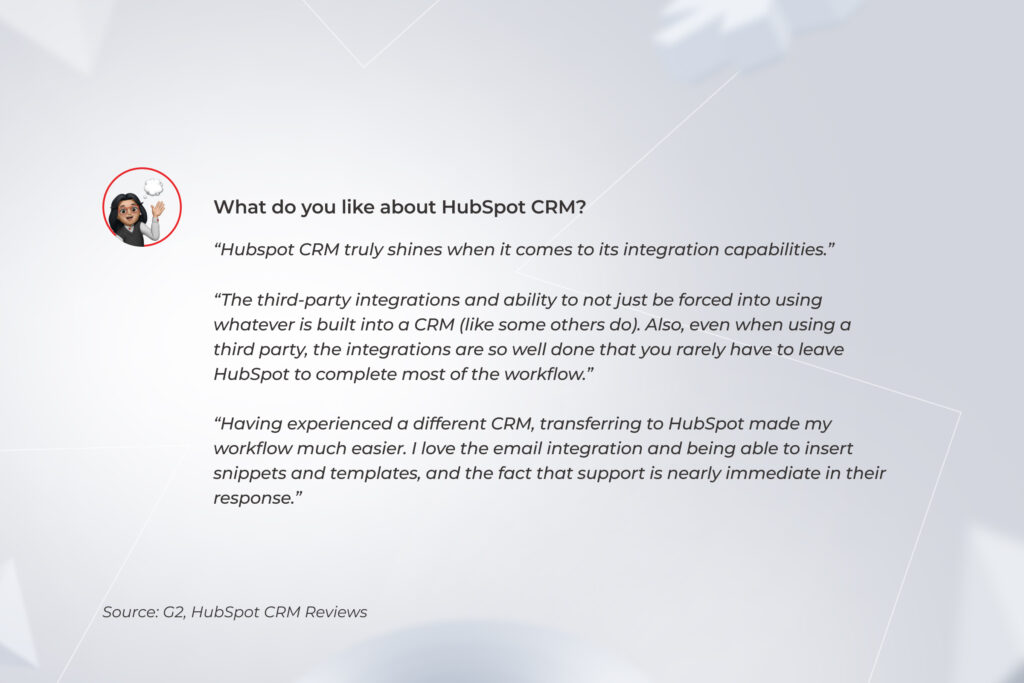
Regarding HubSpot’s in-built integrations, users only mention them as the system’s strengths.
HubSpot

Speaking about custom integrations, you can combine both Zoho and HubSpot with any third-party systems and tools with the help of your custom or off-the-shelf solutions, such as Zapier, Google Scripts, and Node-Red, to name a few. 

You still need third-party tools to implement custom integrations. Therefore, I assume Zoho and HubSpot are similar in this category, with some small nuances. 

There’s one specific integration you may need if switching from the one of the aforementioned CRM platforms to the other — and that is Zoho and HubSpot integration. 

Read about real-life challenges you can face when moving from Zoho to HubSpot in our case study

Dive deep

6. Contact and lead management features

In Zoho, you can collect and organize contact and lead data and score leads to prioritize them efficiently. However, lead segmentation options and transparency are not as comprehensive as in HubSpot.  

HubSpot does a good job if you need complete visibility of actions within the Biz Dev team and want more options to choose from when interacting with contacts and leads. 

Both Zoho and HubSpot have fields that help the lead generation team segment leads. However, HubSpot has more of these fields (200+), making lead segmentation a breeze. For example, in the field “Origin”, you can segregate outbound and inbound leads. Zoho doesn’t have such a field, making filtering leads according to the communication’s initiator tricky.

I personally want to put a good word for HubSpot for its transparency – the CRM records every action taken with a contact, lead, or deal.

Yes, indeed, in HubSpot, you have way more options to interact with the contacts, deals, and companies throughout the funnel – sending emails, passing them to each other within the Biz Dev team, making calls, scheduling meetings, etc. And all these actions are recorded in one place – your CRM solution. 

7. Social listening and omnichannel marketing

If you want to know who your potential customers are and deeply understand their purchasing behavior, you should put a premium on social listening tools and omnichannel interaction with clients. Both CRMs provide such functionality, but which wins — Zoho or HubSpot?

Zoho integrates with Zoho Social – a separate tool for social listening. But, you’ll have to pay extra for it. The pricing starts from $16.50 for one team member per month and can reach $500 for a user monthly.

You can manage a plethora of channels through Zoho Social, such as Instagram, LinkedIn, Facebook, Twitter, Google My Business, TikTok, and Pinterest — quite an impressive list. Also, consider that Forbes named Zoho Social one of the best picks for social media management in 2023. 

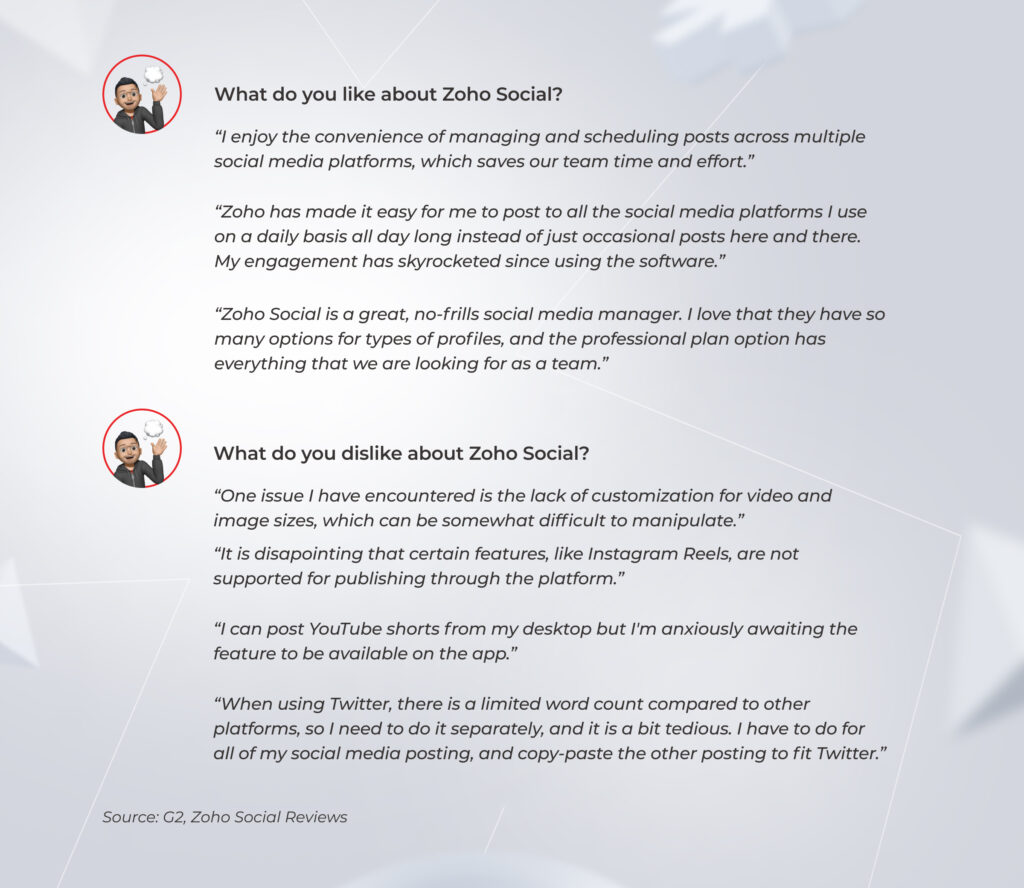
However, some hiccups can undermine the functionality of the tool. Here are the unbiased reviews of businesses that are using Zoho Social in 2023.   
Zoho CRM

HubSpot offers Social Media Management Software that is a default offering on Professional and Enterprise packages (starting at $800/month). Just as with Zoho Social, you can not only track customers’ and prospects’ behavior, but also publish posts, interact with users, place ads, etc., within the CRM’s interface instead of managing a bunch of separate admin panels. 

HubSpot offers fewer channels than Zoho. In 2023, it’s only LinkedIn, YouTube, Instagram, Facebook, and Twitter. Nevertheless, we have to admit that it’s still one step ahead of Zoho when it comes to omnichannel marketing.

HubSpot enables you to integrate different channels via API and build a complex attribution model with the system capturing user behavior across channels. For example, you can connect your newsletters to the CRM and track emails users opened and the links they clicked. Moreover, you can add your LinkedIn, Meta, Twitter, and YouTube accounts and monitor the same user’s behavior across these social networks. Zoho doesn’t have such a broad functionality. 

8. Email marketing

Zoho allows you to gather data about newsletter recipients, visualize it, and automate mundane tasks such as UTM tracking. You can also set up automated emails triggered by certain actions. For example, if a person responds to an email or a lead signs up for your newsletter, they get an auto-reply.

Integration with the calendar simplifies managing email marketing for enterprises that send a plethora of newsletters on various topics. However, this CRM doesn’t go beyond sending letters. 

HubSpot was originally designed as a toolkit specifically for email marketing. With it, you can manage your entire email strategy under one roof, from creating and sending emails to tracking the efficiency of your campaigns. 

Moreover, as HubSpot email marketing management is backed up by the customers’ data from the CRM, you can personalize every email based on the subscriber’s contact record information, such as lifecycle stage, list membership, etc. One significant bonus is that the personalization process doesn’t have to be manual — catchy subject lines and CTAs can be auto-generated.

HubSpot allows you to create topic-based marketing campaigns that can include all sorts of assets, from emails and specific CTAs in them to landing pages and social media posts. More importantly, the CRM is a single point for tracking analytics on these campaigns.

Another boon of HubSpot is that users can choose their topic preferences on the page with checkboxes generated by HubSpot, and then they are automatically saved to certain Lists. 

In addition, the system offers marketers to create new segments, for example, based on data when users open emails. If a group of subscribers opens inbox letters at 6 p.m. (GMT-7), HubSpot will prompt you to create a specific segment of users and send them emails at a certain time to increase the open rate.

In other words, HubSpot is a proactive tool with more features to improve newsletters’ deliverability, discoverability, and clickability. It’s a one-stop shop for email marketing — whatever you want to invent, HubSpot already has it.

The question to ask yourself as a business owner is: “What are you looking for — a software solution that just sends emails or a CRM platform that actively contributes to improving the results of sending emails?”

9. Analytics and reporting

With Zoho, custom reporting can be challenging to set up. 

First, the data for analytics should be extracted from the CRM, which is pretty tedious as it requires manual action. Zoho lacks automation where it’s vital. 

For instance, if you want to check the number of MQLs per week, you can’t simply review the entity “Lead” for the given period. You have to inspect the entity “Task”, look for the leads with MQL status​​, and count them manually. 

Even when dashboards are ready, there is a risk that the displayed data is outdated. So, in fact, they’ll be irrelevant for making timely business decisions. 

The built-in analytics provided by HubSpot are not that different from the ones in Zoho. Despite the wider variety of visualization options in HubSpot, they are of little practical use. 

You still need a comprehensive BI system for solid analytics, custom reports, high-quality data visualizations, and intuitive dashboards. As you can see, both platforms aren’t able to provide flexible real-time analytics. 

Companies interested in deep and up-to-date analytics have to implement specialized tools with advanced features – Power BI, Tableau, Qlik, or open-source solutions.

Neither Zoho nor HubSpot reaches the level of a complete BI system even for high-priced plans. Even if we consider only sales and marketing features, CRM doesn’t allow building end-to-end sales funnels – such systems aren’t designed to cover this functionality.

If you want to consolidate and visualize data not only from the CRM but also from several other systems, such as ERP, financial, inventory, recruiting, etc., you’ll need a powerful BI system. 

10. AI features

Given the news around AI is bubbling up, CRMs also have to keep up with the times and clients’ expectations. Let’s compare Zoho and HubSpot according to the AI features they offer.  

Zoho’s sales assistant Zia is available for the Enterprise and Ultimate plans. Its primary focus is sales forecasting and monitoring. The tool analyzes how your sales representatives use the CRM and makes personalized automation recommendations for them. That way, it simplifies uncovering anomalies in sales trends, predicts the probability of conversion for leads, highlights products or services for cross- and upselling, automatically assigns prospects to sales representatives, etc.

However, all the functionality is limited to sales activities.

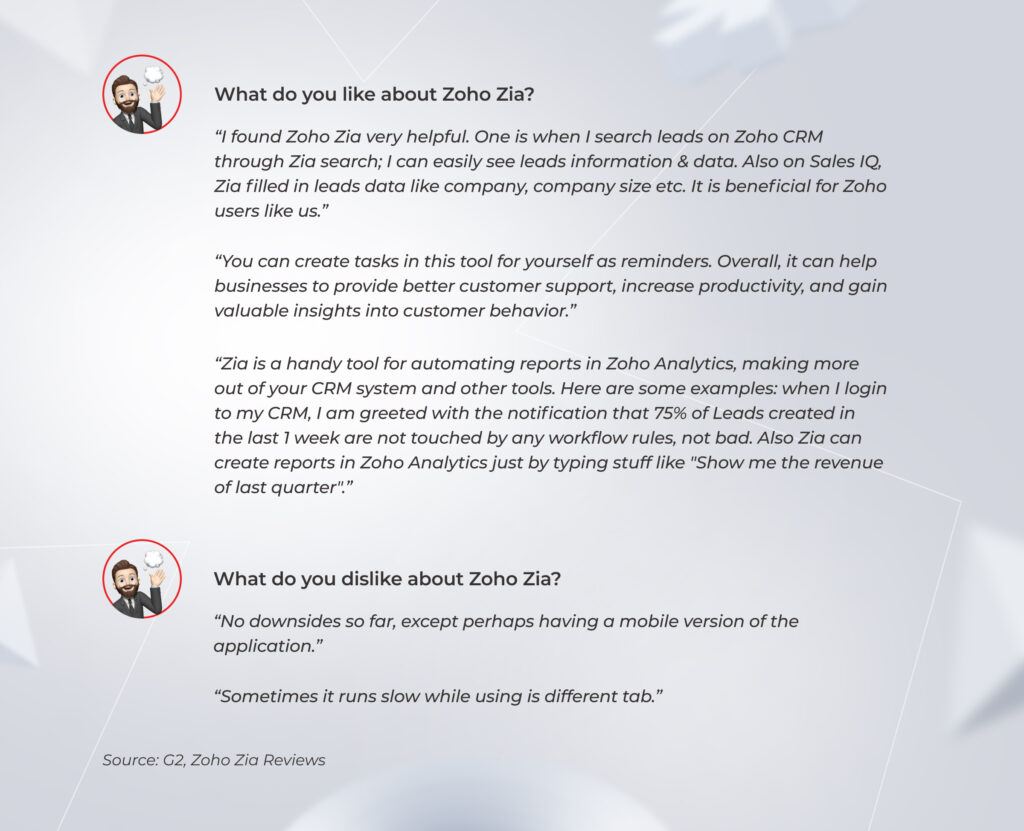
That’s how users spotlight Zia’s strengths and drawbacks.
Zoho Zia

HubSpot offers ChatSpot, which can be integrated with your HubSpot CRM. There’s also a limited free version you can sign up for via chatspot.ai. It’s an OpenAI GPT-3 and Dall-E-powered conversational bot that can boost the productivity of your sales and marketing teams while saving employees time. 

As in Zoho, it includes lead management, reporting, forecasting, and prospecting, adding to this functionality AI-powered SEO features, such as discovering keywords, analyzing phrases, and uncovering your peers’ content strategies. 

In addition, you can interact with the bot just as with ChatGPT. All you have to do is write a question, for example, “How many contacts are assigned to me?” and the system will give you the answer.

11. Tech support

Zoho’s customer support implies email, call, online chat communication, or scheduling a remote assistance session. On low-paid plans, support service is limited to business hours. To get access to round-the-clock support, you have to upgrade to the Enterprise plan. 

I personally experienced multiple times that the answers from tech support were 1–2 days late or didn’t come at all. Such situations make the whole Biz Dev team suffer.

HubSpot’s Starter package provides you with email and live chat support. On the Professional and Enterprise plans, you also can leverage phone support. Besides reaching out via call, email, or chat, you can even get the CRM platform’s support on Twitter. Therefore, in this category, HubSpot blows Zoho away.

Also, as we’ve mentioned in the beginning, HubSpot provides free easy-to-grasp educational materials in their HubSpot Academy. If your staff bank on self-education, they can troubleshoot minor issues independently. 

All hail the results: *instinctools’ final Zoho and HubSpot comparison chart

We’ve created a comparison chart that pits these two CRM systems against each other on 11 parameters. 

CriteriaZohoHubSpot
PricingFour affordable plans with a slight price difference.Three plans, but high-tier options cost way more than the starter package.
Setup and onboardingYour staff might need several months to get used to the system.Onboarding usually takes a day or two. 
Navigation and overall UXThe system’s interface can sometimes puzzle you over what action to take.The highly intuitive interface is easy to grasp, even for non-tech savvy users.
CustomizabilityIt wins if you need extensive customizability for sales operations.The system’s customizability is limited. 
IntegrationsYou can integrate the CRM with most tools and systems you need with the help of third-party tools.Same, but this CRM offers more in-built integrations — 1,000+ in HubSpot’s app ecosystem.
Contact and lead management featuresBasic CRM for collecting and organizing contact data and lead segmentation.Complete transparency of actions within the Biz Dev team, comprehensive lead segmentation, and more options to interact with the contacts and leads.
Social listening and omnichannel marketingZoho Social for managing the company’s Instagram, LinkedIn, Facebook, Twitter, Google My Business, TikTok, and Pinterest profiles.HubSpot Social Media Management Software for building a complex attribution model across the company’s LinkedIn, YouTube, Instagram, Facebook, and Twitter.
Email marketingThe system automates mundane tasks and simplifies managing email marketing, but it’s designed to do no more than send out emails. This CRM is a top pick for email marketing that proactively improves newsletters’ deliverability, discoverability, and clickability.
Analytics and reportingBoth CRMs can’t provide in-depth real-time analytics. 
AI featuresAI assistant for simplifying sales operations. AI bot for covering sales and marketing activities that operates as ChatGPT.
Tech supportEmail, call, online chat communication, and scheduling a remote assistance session are limited to business hours on low-paid plans. You need to level up to the Enterprise plan to get 24/7 support.You can contact support via email, live chat, phone, or Twitter. 

There is no clear winner in HubSpot vs. Zoho matchup: it depends on your business priorities

As there is no one-size-fits-all solution for success, we can’t name one of the CRM as a definite champion. When choosing between Zoho CRM vs. HubSpot, you should consider a medley of criteria, from pricing, ease of onboarding, and overall UX to the system’s customizability, sales and marketing features it provides, and the accessibility of tech support. 

Still in two minds about which tool to use? There’s no need to make an off-the-cuff decision

Consult our experts

FAQ

Is Zoho the same as HubSpot?

Both Zoho and HubSpot are CRM systems. However, if you compare Zoho and HubSpot by different parameters, such as UX, customizability, contact and lead management features, available integrations, accessibility of tech support, etc., you’ll uncover plenty of differences between the two.

Is HubSpot similar to Zoho?

HubSpot is similar to Zoho as both systems are CRMs and provide integrations with third-party tools, analytics and reporting, contact and lead management tools, and AI assistants. Yet, there are many dissimilarities between the two systems. For example, they have different pricing models, customization options, and tools for omnichannel marketing.

What is HubSpot CRM best for?

This CRM is a perfect fit for building a transparent sales funnel and successful omnichannel marketing. Also, if you have just a few sales managers and a variety of other roles that can benefit from the basic free CRM functionality, then HubSpot’s Starter plan looks like a godsend.

What is the main difference between HubSpot and Zoho?

HubSpot is an end-to-end CRM for the entire sales funnel, from lead generation to continuous long-term work with this client, while Zoho is more suitable for lead generation.

Can Zoho integrate with HubSpot?

Zoho and HubSpot integration is possible. Such integration may seem a dubious option at first sight – who would want to pay for two CRMs and take care of their support instead of using one system? Nevertheless, such an integration will be necessary if you transition from the one CRM to the other to ensure correct contact migration between the systems.
16 SaaS Trends to Stay Relevant in 2025: Curated by Our Experts

The SaaS ecosystem  might not be growing at breakneck speed like it used to, but it’s nowhere near hitting the brakes. Valued at ~$273 billion in 2024, the SaaS industry drives a giant share of the overall tech landscape. Big forces are steering this ship: AI and machine learning are weaving into everything, major players are making strategic acquisition moves, and APIs are making it easier than ever to connect the dots. And that’s just scratching the surface (we’ll dig into more SaaS trends for 2025 and beyond soon).

In this blog post, our experts share their perspectives on the upcoming SaaS market trends and cut to the chase on where as-a-service companies should zero in to get a competitive edge.

SaaS industry trends can’t emerge from a vacuum. They stem from a range of important objective factors, which cause changes in how individuals and organizations perceive SaaS businesses.

Customer demand

As the SaaS landscape is maturing, user expectations are settling in. Today, SaaS users are adamant about the experiences they’re seeking, favoring dynamic pricing, personalization, and on-demand SaaS offerings. To fit the bill, SaaS market leaders engage on-demand experts to increase customer satisfaction and retention, revolutionize customer experience, gather user feedback, and iterate on it to release new features.

According to KPMG, SaaS vendors now have to balance personalization with generic features, demonstrate a clear stand on Environmental, Social, and Governance (ESG) issues, and develop a clear understanding of what value means for SaaS customers. It’s not about software anymore, it’s about a branded digital product with a personal, yet subtle touch.

Competitive environment

With market leaders such as Adobe, Salesforce, and Oracle accounting for $221 billion to $325 billion of total market value, it might seem challenging for new businesses to make a statement and try to thrive within a growing SaaS market consolidation trend. However, while certain segments are oversaturated, there is still a market entry for niche products, or vertical SaaS.

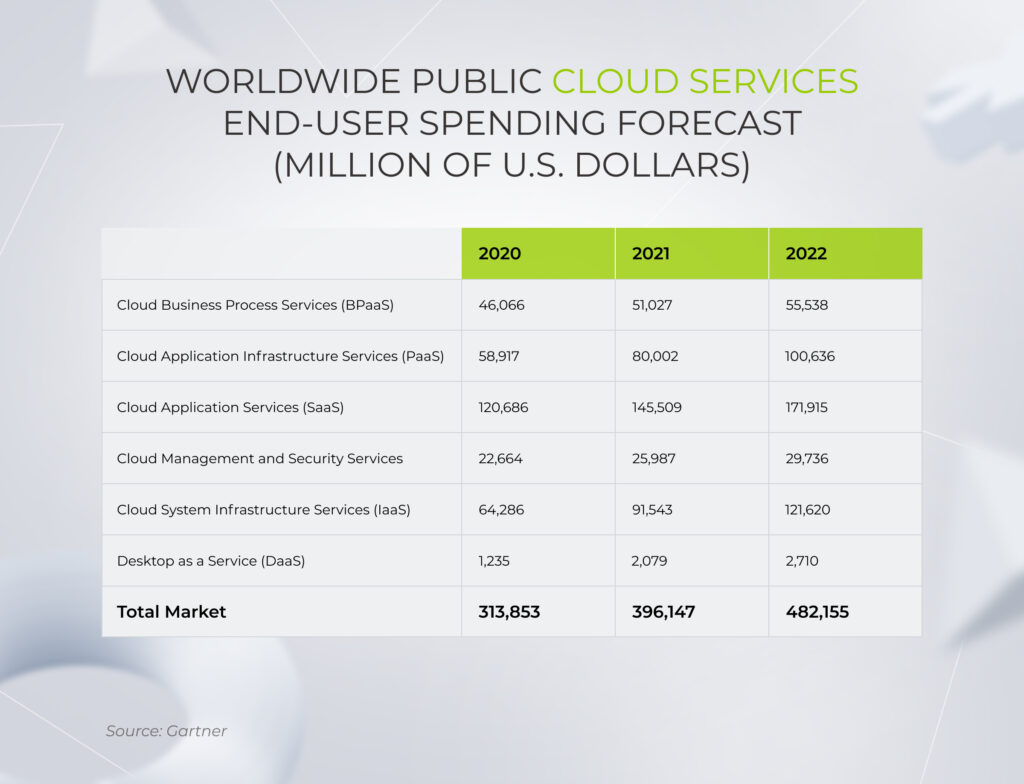
Worldwide public cloud services end-user spending forecast, 2020-2022

Concentrated categories with growth potential also include databases, artificial intelligence, and content management. A micro-SaaS model is another SaaS opportunity to hit it big. Similar to vertical SaaS, it’s tailored to a specific industry, but on a more granular level. Also, micro-SaaS solutions can be paired with existing as-a-service products, enriching their functionality.

Evolving regulatory conditions

A patchwork of compliance regulations and data security standards make it hard for SaaS providers to operate on both local and global scale. Along with well-known regulations such as HIPAA, GDPR, and others, new AI regulations have entered the scene. As a result, security and data governance audits have become more of a legal requirement rather than an optional state of checks and balances for as-a-service companies.

Providers have to comply with customer security requirements first, before any legal audits take place. SaaS clients demand a transparent data policy, records on IT security audits, root cause analysis, and other safeguards. Without thorough regulatory and data security knowledge, providers are likely to lose their grip on this tumultuous landscape.

Technology advancements

Organizations are looking to further their digital transformation agenda and experiment with cutting-edge technologies like generative AI, edge computing, and IoT. Offered over the SaaS model, these technologies become easily accessible, persuading global businesses to choose ready-made solutions over from-scratch software development.

To offer technological advancements as an a la carte option, SaaS companies have to make product design and development their top business priority to embrace cutting-edge tech and improve operational efficiency. By the same token, an impressive 90% of businesses adopt the DevSecOps methodology to create a continuous integration and delivery pipeline apt for fast and secure releases.

Economic factors

It hardly needs saying that the economic landscape has real clout in shaping opportunities and challenges faced by SaaS providers.

During economic upswings, they may have more room to maintain or even increase their prices due to higher demand and market stability. In the same way, favorable market conditions nudge investors to provide more funding to SaaS companies, enabling the latter to expand their operations and develop new features.

Conversely, in tough times of belt-tightening caused by economic shake-ups, SaaS businesses have to deal with difficulties in customer acquisition and retention as well as investors’ concerns.  

That’s why, to facilitate revenue recognition, SaaS providers should better define their offerings and value that comes with the cost of their solutions.

Investor expectations

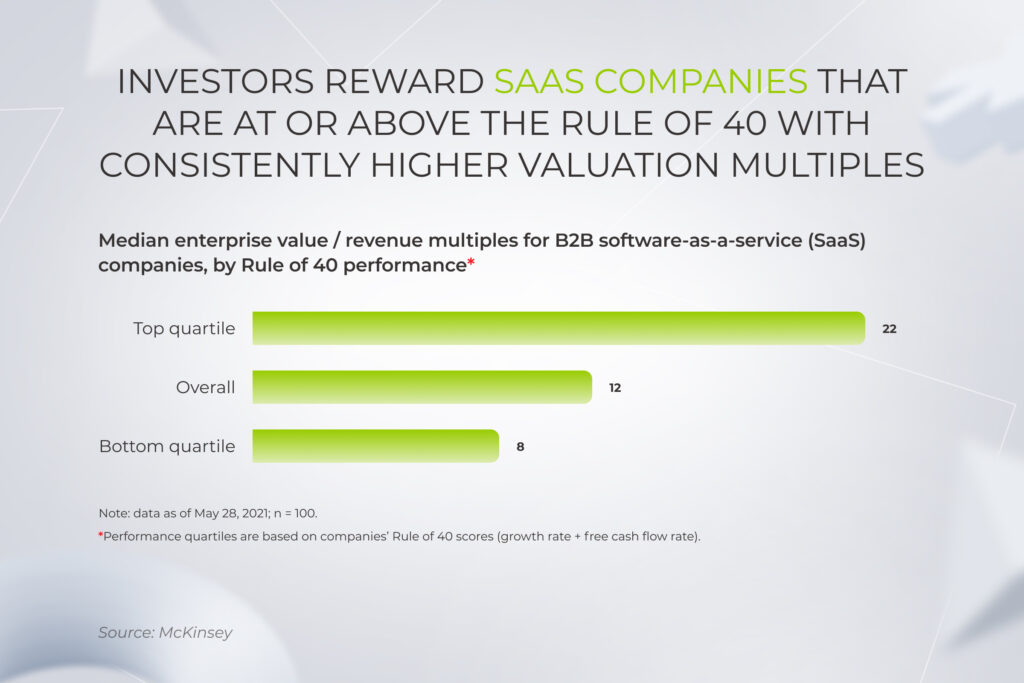
Even though the VC landscape for SaaS in 2024 showed signs of recovery — reaching a five-quarter high of $79 billion in Q2 — after a downturn in previous years, it’s still challenging for SaaS startups to nab investor dollars. Yet, companies that generate profit at a sustainable rate and meet the bar of the Rule of 40 are still of interest to VCs.

According to The Rule of 40, the growth of a software company is deemed sustainable only when its combined revenue growth rate and profit margin equals or surpasses 40%. If the company isn’t able to beat the Rule of 40, then it doesn’t pass the health check and falls into the category of risky software investments.

Median enterprise value multiples for B2B SaaS companies, by Rule of 40 performance

To operate at the Rule of 40, budding businesses have to establish a predictive view of customer health via advanced data analytics and proactively identify cross and upsell opportunities through AI-based analysis.

Moreover, leading players operate at a higher speed-to-market, incubating new ventures faster than competitors. Available tech competence and IT talent are a must to grow fast and resiliently as companies are launching new features and business lines. 

Make the pivot to as-a-service business

Tell us about your project

Over 85% of organizations expect an unprecedented 80 percent of all of their apps to be SaaS in the upcoming years. Let’s see what else the future of SaaS holds and what technologies to adopt now to stay prepared for the times ahead.

1. Vertical SaaS

Being industry-specific, vertical SaaS solutions tackle the problems a generic, ready-made application can’t. As opposed to horizontal SaaS, vertical SaaS providers have a thorough understanding of your business challenges, just like an industry insider, and allow you to consume an off-the-shelf application without complicated customization and plugins.

According to research, the global market for these SaaS platforms is projected to reach $229,7 billion by 2030, at a CAGR of 17.7%. Since the availability of industry-based cloud services is still low, providers can take advantage of the young market and capture promising niches with their SaaS offerings. As for the vertical SaaS trends, healthcare, insurance, and finance are now one of the most popular industries being redefined by vertical as-a-service solutions.

2. Micro-SaaS

Akin to vertical software as a service, micro SaaS products are skewed towards a specific industry, audience, and even specific use case. This business model has emerged in recent years as a response to the overcrowded SaaS market dominated by recognized players. As smaller SaaS businesses have little chance of competing with established solutions, they build add-ons and plugins on the back of larger SaaS players.

Micro-SaaS businesses typically offer a single product or service, which is highly targeted to a specific market segment with unique business operations that are not being covered by more established players in the industry. One of the benefits of micro-SaaS companies is their ability to launch quickly, with minimal investment in time and resources.

Another advantage of micro-SaaS is the flexibility it offers. Because these businesses do not have the overhead costs of larger companies, they can be more agile and responsive to changes in the market, customer needs, and technological advancements.

3. RevOps

Amidst the dramatic shift in market dynamics, SaaS app companies struggle to grow while also maintaining profitability. The significant upfront investment, challenges of net retention, and competitors may take a toll on as-a-service companies unless they are strategic in managing their sales and marketing functions. 

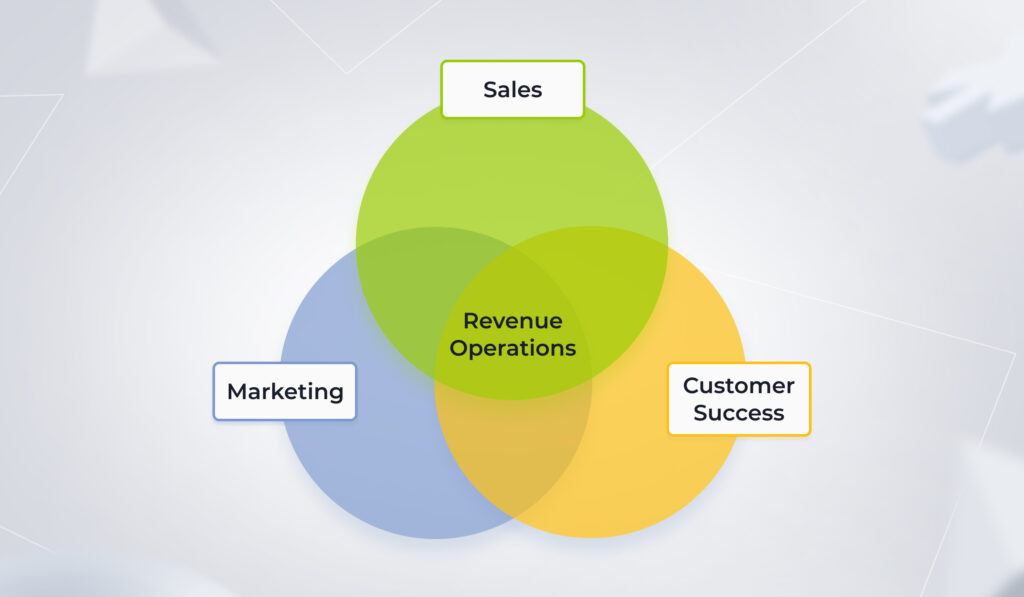
RevOps, or revenue-operations tools, is hailed as the next evolution of sales forecasting, and marketing analytics software — all rolled into one. These platforms provide businesses with a holistic, end-to-end approach to everything related to sales, marketing, and customer success. To achieve that bird’s-eye view, RevOps tools should be weaved into the entire lifecycle of the aforementioned functions and be equipped with AI-powered capabilities.

the basics of RevOps (revenue-operations tools)

Along with the AI integration, the RevOps framework is predicated on the following enablers:

  • Focus on automation to scale demand generation
  • End-to-end visibility through the full sales funnel, marketing, and customer service
  • Equipping sellers and marketers with relevant collateral to boost conversion rates
  • Implementing a data-driven customer success program to measure the value and scale cross- and upselling opportunities 
  • Moving from siloed capabilities to a central hub of efficient solutions
  • Optimizing go-to-market spends through integrated data view

Advanced lead scoring system is one of the RevOps linchpins that leverages ML-based algorithms to evaluate leads based on a wide variety of data points and behavioral indicators. The goal of an advanced lead scoring system is to provide sales teams with a more targeted list of leads, allowing them to focus their efforts on those prospects who are most likely to engage and convert. 

Leading-edge sales funnel automation is another example of the RevOps approach. Using predictive analytics, sales funnel automation solutions offer personalized recommendations to the customer and upsell them on complimentary services or products. The trick here is to establish selling strategies around your product. To achieve that, you can integrate tracking mechanisms at almost every feature level in SaaS tools to identify what capabilities click with the customer the most. 

4. Prioritizing net retention

As consumers hold back on non-essential spending, customer retention becomes one of the strategically important trends in the SaaS industry. Top-performing SaaS businesses are paying due diligence to the existing customers, investing in marketing analytics and follow-up competencies. 

From a technical standpoint, median net retention rates can be increased with granular automation directed toward retention strategies. By relying on SaaS analytics and artificial intelligence, SaaS companies can execute a contextual net retention strategy, including:

  • Applying advanced customer segmentation
  • Identifying the right timeline for upselling or cross-selling maneuvers  
  • Preventing churn based on customer behavior
  • Making personalized offers to customers planning to cancel based on their usage dynamics
  • Promoting account expansion with contextual upgrade modals and in-app messages

Paired with dynamic pricing and product support, a contextual retention ecosystem can cut your churn to a minimum and set a win-win post sale construct in place to maximize revenue growth.

5. Building new products based on a deep understanding of customer personas

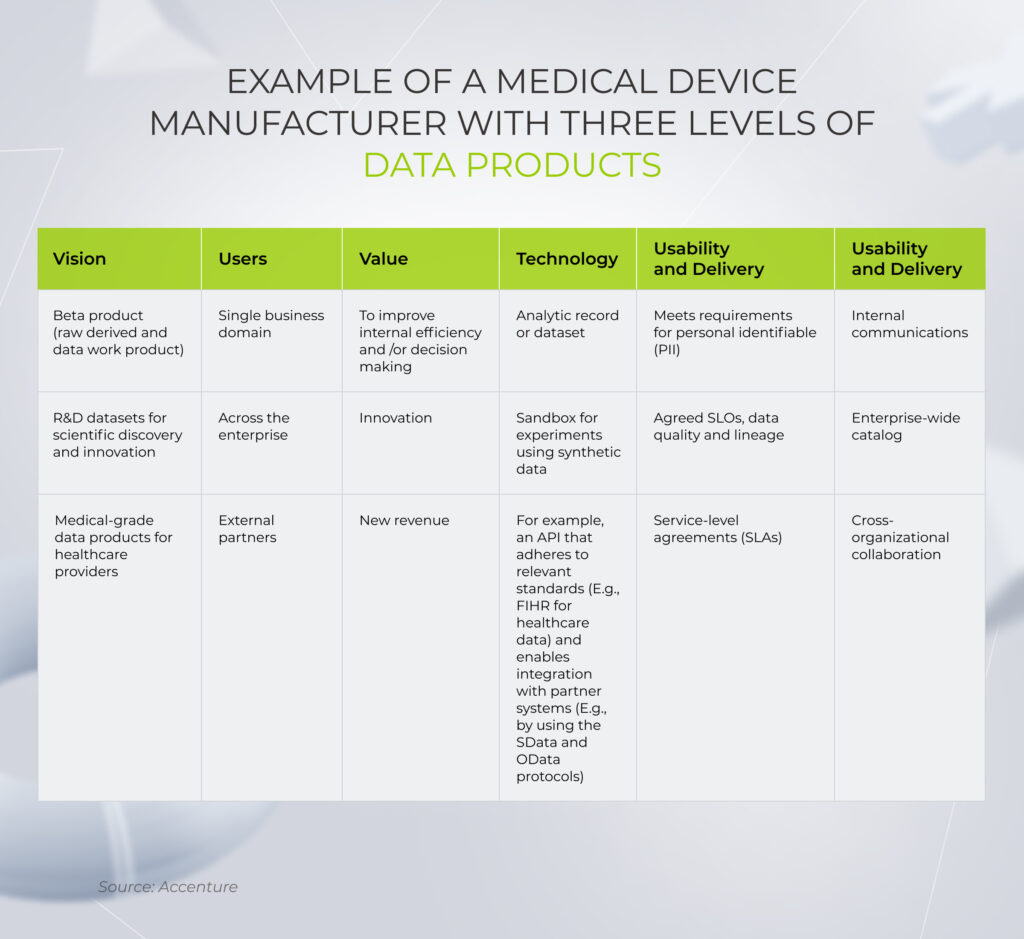
Building new offerings on the back of a company’s existing data is among other SaaS trends in 2025 that differentiate agile, resilient businesses. Market front-runners such as Google and Netflix have based their trending SaaS products around the available customer data, which leads to new revenue streams and more granular products.

Likewise, other companies, irrespective of the domain, can capitalize on the core data assets they already have and branch out into new data products.

data products of a medical device manufacturer

The trick here is to build new lines of business based on a thorough understanding of a customer. To do that, companies must develop and nurture cross-functional capabilities for in-house data product management, including data experts, DevOps engineers, and other skills. The data landscape of an organization should be integrated, interoperable, and transparent as opposed to fragmented, siloed data that sits within an isolated team.

6. SaaS with no exceptions

Although providers still offer a hybrid setup as an intermediate architecture for businesses, the future of SaaS is cloud-native. Born from the roots of cloud computing, this SaaS trend allows users to embrace all advantages of software as a service, including rapid scalability, high availability, and easy maintenance. Full-on SaaS also paves the way for a more holistic cloud migration that doesn’t require any in-between setups. 

We believe in “SaaS with no exceptions”, which means writing truly cloud-native software. Exceptions are the death of pure SaaS because they lead to issues with software maintenance and disrupt customer service.

For a provider, a cloud-native architecture means the independence of each service, which allows for rapid deployment cycles and horizontal scaling. This, in turn, translates into a more swift response to the shifting customer demand and reduced costs of rolling out new features. As a result, cloud-native architecture changes the anatomy of as-a-service solutions, both for a user and provider, supporting the change that comes with the digital transformation of a certain business.

7. Laying the groundwork for scalability from the get-go 

An innate capacity of a SaaS solution implies easier scaling compared to traditional software deployed on premises. However, providers can only seize this benefit when they plan for scalability in the early development stages of their SaaS applications.

In particular, a detailed roadmap should drift development toward flexible, rapid turnarounds focused on problem-solving as opposed to fixed, solution-oriented flows. Flexible product roadmaps don’t stifle product creativity, they are cut out for changing the trajectory of product development based on user feedback. 

Moreover, to achieve seamless growth in the future, you should have clear plans for feature innovation outlined in a roadmap. New releases should be based on explicit KPIs that align with how customers perceive value in your product.

A flexible architecture is also a crucial enabler of friction-free scalability that helps SaaS tools evolve. On the same line, a microservices-based architecture is one of the significant SaaS industry trends that breaks an application into separate components which are then loosely connected via APIs. This allows for high scalability, better fault isolation, and faster time to market.

8. Сontinuous innovation, delivery, and security

To win in a competitive market and over the customer, you need a quality product with the freedom of fast and continuous innovation. DevOps automation is what initiates uninterrupted product delivery, creates a resilient application environment, and brings customer-centered products to the table. By streamlining every environment build, DevOps allows providers to roll out new code as frequently as they need to instead of scheduled releases.

However, today, it’s not enough to combine software development with DevOps.

According to PwC’s 2025 Global Digital Trust Insights survey, 77% of companies are upping their cybersecurity budgets to guard against evolving threats better. Likewise, SaaS providers are bringing security back into DevOps, placing DevSecOps on top of the 2025 SaaS trends.

The DevSecOps approach introduces security testing at every stage of the development process. Bringing developers, security engineers, and operation teams together, this framework promotes product development that is both efficient and secure. Everyone involved in the SDLC has a role to play in building security into the DevOps continuous integration and continuous delivery (CI/CD) workflow.

9. Low-code and no-code platforms

Among other things, the imperative of data democratization also sets the tone for SaaS future trends, shifting the focus to easy access and distribution of SaaS products. More inclusive, accessible, and compatible SaaS products are top of mind for global companies, and providers are scrambling to meet the demand.

In doing so, SaaS businesses rely on microservice architecture that makes as-a-service platforms easily deployable and organized around business capabilities. In an attempt to make digital transformation more accessible, SaaS companies also center their offerings around low- and no-code platforms. The latter allows non-technical users (and businesses) to build and deploy applications without a coding background. 

Low-code products experience a lot of footfall today as they offer a more cost-effective way to innovate, satisfy the rising demand for excellent internal workflow apps, and enhance user experiences. By 2028, the low-code platform market is projected to reach a value of $94 billion.

10. Self-service and self-heal environments

As over 81% of customers are seeking more autonomy, self-service capabilities are becoming a fixture in SaaS trends for 2025. Being a non-intrusive support option, self-service capabilities in SaaS tools give users the freedom to learn, explore and solve issues at their convenience without the need for human agents.

Over the last few years, providers have been gravitating from traditional, static self-service options to more natural, AI-powered customer engagement methods. FAQs, customer portals, and tutorials made way for chatbots and voice-enabled conversational AI. 

AI-enabled self-healing platforms are one of the self-service innovations that help SaaS users navigate the complexity of platforms. Self-healing solutions are designed to automatically detect and fix problems within a system without human intervention. They leverage machine learning, artificial intelligence, and predictive analytics to quickly identify issues before they become major problems, and proactively repair them without any manual effort.

Based on a full-cycle Artificial Intelligence for IT operations (AIOps) process, self-healing environments also reduce downtime and increase productivity by automatically fixing issues, which means that employees can focus on core tasks instead of troubleshooting. 

11. API-first approach

The secret recipe of growth for SaaS companies lies in making their product compatible with the existing app portfolio of their customers. By combining different SaaS solutions, businesses can create a robust, integrated ecosystem that fits their unique requirements. And as companies are doubling down on as-a-service applications, integration has become one of the strategic software as a service trends for providers.

Open APIs play a crucial role in making a combination of compatible SaaS services possible for users. When providers make their offerings available via open APIs, they allow companies to fine-tune the offering and sync it with existing systems, reducing costs and increasing efficiency. A SaaS program with ample integration operational capabilities also eliminates the need for a third party, thus becoming another reason your potential customer can say “yes”.

Conversely, a lack of integrations in a SaaS product means that the adopters have to develop custom APIs and cover additional development costs. Without integration, your SaaS product also becomes another siloed asset for the company that keeps critical data under wraps for other applications.

12. Generative AI 

One of the SaaS opportunities that have got a big word of mouth lately is generative AI and its offshoot – large language models. While AI is not novel to SaaS providers, the introduction of ChatGPT and the like has widened the application area of artificial intelligence in the SaaS model. 

Due to the growing popularity of gen AI models, the global generative AI market size is expected to grow at an impressive CAGR of 35.6% from 2023 to 2030. Touted as a new AI frontier, generative AI brings unprecedented out-of-the-box capabilities to SaaS companies, including content generation, sentiment analysis, market research, customer support, and others. And providers don’t think twice to consume and customize gen AI tools, changing the game for their users.

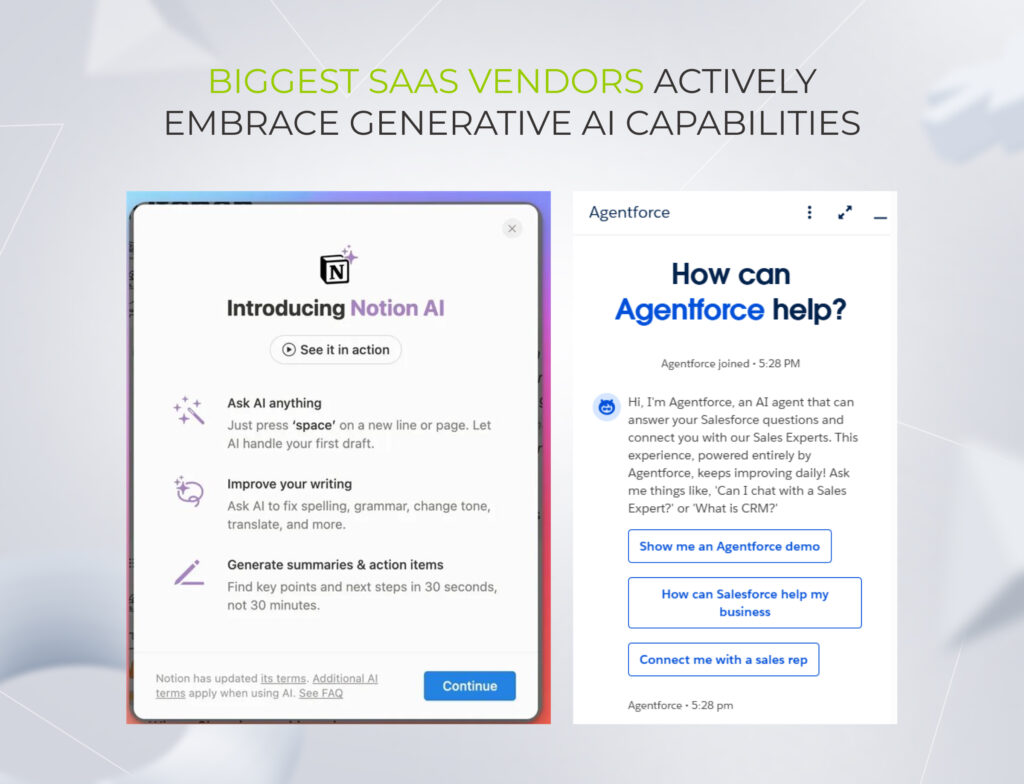
For example, in October 2024, Salesforce announced the public release of Agentforce, a platform that lets companies develop and launch autonomous AI agents across all operational areas, including sales, customer relationship management, marketing, IT, finance and commerce.

Notion, another SaaS giant, has upgraded its Notion AI — it now can pull insights from lengthy PDF docs, suggest schedules based on a proposal, or describe any uploaded images.

Biggest SaaS vendors actively embrace generative AI capabilities

13. BI-powered SaaS 

Today, businesses across industry sectors are guided by big data to improve virtually every aspect of their operations. The increasing reliance on data-driven strategies in the business landscape is what drives the demand for SaaS-based business intelligence solutions. By 2030, the market of SaaS BI solutions is slated to hit over $35.71 billion, ushering in an opportunity with an untapped value for providers.

From a user standpoint, cloud-based analytics platforms, unlike on-premises analytics tools, enable businesses to uncover insights in their data right in the place where this data is generated. Supplemented with built-in AI and machine learning capabilities, SaaS BI platforms let decision-makers use those insights to automatically drive actions.

With cloud-based analytics tools, companies can access their data on the go, analyzing it from a single point of truth.

This trend is not limited to offering SaaS-based BI tools as a standalone tool, it’s more about enriching existing SaaS with analytics capabilities to deliver added value in the form of dashboards and reports to business users. 

14. Mobile first SaaS solutions

Given the nature of a hybrid environment, mobile is becoming the primary interface for many field employees all over the world. This makes mobile-first and mobile-native SaaS solutions pronounced B2B SaaS trends that help address the needs of flexible work settings.

By enabling employees to access business data and applications while on the go, mobile on-demand SaaS helps to improve accessibility and eliminate downtime, allowing employees to work more efficiently. Collaboration is facilitated as team members can access and share data in real time, no matter where they are located.

However, to bring SaaS on mobile, providers need to cover at least the minimum level of complexity necessary to meet their core business process roles. In a perfect case scenario, a mobile as-a-service application should boast unique features that are available on mobile only. In less-than-perfect cases, mobiles might serve as an extension for certain parts of an app or have limited functionality.

15. White-label SaaS

White-label SaaS is gaining traction for a simple reason: not every company needs to reinvent the wheel to offer great software. When the core functionality already exists, the real value often lies in strategic distribution, branding, and customer relationships.

This model gives niche players a fast track to market with fully functional, customizable products.

Ecommerce has become ground zero for the rise of white-label SaaS. Platforms like Shopify, and WooCommerce have shown that retailers don’t need to build their own infrastructure to launch a compelling digital storefront. Instead, they can rebrand and customize pre-packaged platforms to match their unique identity. And go live in days, not months.

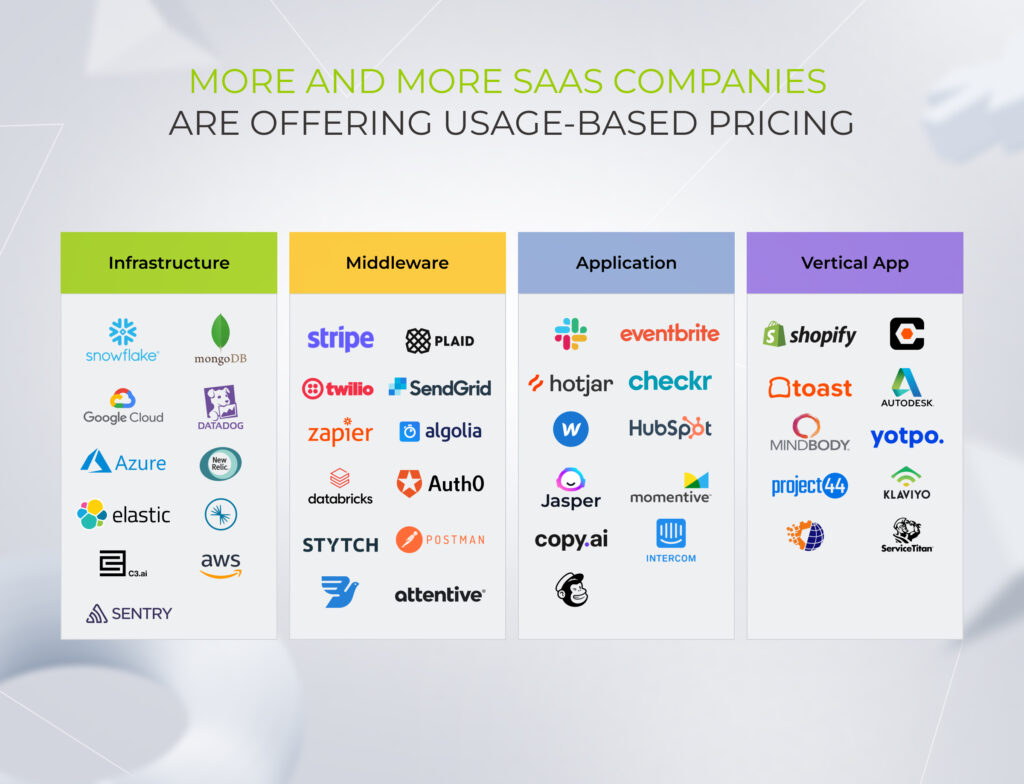
16. Consumption-based pricing

The shift toward usage-based pricing in SaaS is a natural response to how modern software is built and consumed — dynamic, scalable, and tied to actual value. Flat subscription fees (like $X/user/month) made sense when software was a static product, but cloud infrastructure and API-driven tools operate differently.

Alternative pricing strategies, like AWS’s pay-as-you-go, Twilio’s per-message pricing, or OpenAI’s pay-per-token, remove upfront friction by letting customers start small and understand the product’s value. It’s a win for vendors too, as revenue naturally scales with customer success.

More and more SaaS companies are offering usage-based pricing

What makes a SaaS champion?

The share of the SaaS market is growing at a blistering pace driven by increasing cloud based solutions’ adoption and rising infrastructure costs. ​​But despite the glowing potential, launching and growing a software-as-a-service company is not an easy task. Stiff competition, complex regulations, and economic turbulence prevent providers from gaining ground.

But just like opportunities dim for some providers, other forward-looking SaaS businesses can effectively plot a course to success by taking advantage of the top SaaS trends. The proliferation of AI technologies, easily scalable architectures, resilient innovation, and a wealth of integrations will set the standard in the SaaS niche in the upcoming years. 

High performers will achieve business success by focusing on the detailed knowledge of the customer, pursuing high-value features, and adopting the latest tech comforts. To make it happen, SaaS providers should integrate advanced tools and develop tech expertise, supported by domain proficiency and always-on availability of the IT talent.

Let our company make you a SaaS champion

Contact our team today

FAQ

Is the SaaS industry growing?

According to statistics, the SaaS industry is expected to grow at a CAGR of 13.7% from 2023 to 2030. The rising adoption of cloud services, the added overhead of on-premise infrastructures, and the digital imperative of continuous innovation will secure the popularity of as-a-service solutions well into the future. Moreover, as vertical SaaS platforms are still scarce, companies can seize this opportunity to enter the market.

Is SaaS still relevant?

Thanks to advanced scalability, managed security and minimized management challenges, SaaS platforms remain a popular option for fast-growing companies.

What is the future of SaaS?

The next generation of SaaS is all about built-in compliance, plug-and-play adaptability, and seamless integration between apps through API-first design. And while generic platforms still chase scale, niche SaaS applications are pulling ahead by solving real problems, in the language each vertical speaks.

SaaS Product Development Process: Out-and-Out Guide for 2026 and Beyond

Making a foray into SaaS product development seems like a license to print money for both startups and established businesses. The rationale behind this craze is simple: according to Gartner, the global public cloud end-user spending is projected to surpass $850 billion in 2026, with SaaS remaining one of the largest segments alongside IaaS and PaaS.

Composability, flexibility, and 24/7 accessibility make SaaS products a mandate for businesses that want to thrive through disruption and prevent a headlong tumble into the red. So, if you want to benefit from the steady velocity of software-as-a-service, our comprehensive SaaS product development guide is here to answer all of your questions, from what SaaS product development is to how to build an AI-ready solution that can stand out and scaleI.

What is a SaaS product?

Software as a service refers to a software distribution model that is hosted centrally on the cloud and grants users instant access to an application, usually on a subscription or pay-per-use basis. Users can reach software as a service products from multiple devices at their convenience, provided devices have an internet connection. SaaS product development is what brings a SaaS product to life.

AI is rewriting the SaaS playbook

SaaS solutions have grown in demand, with their market size projected to reach $793.1 billion in 2029, but the nature of that demand has shifted.

While earlier SaaS products won customers with their cloud accessibility, composability, and automation, now it’s table stakes, and vendors have to up the ante with architectures that can seamlessly capitalize on AI capabilities and expand automation coverage.  

Pre-AI SaaS could streamline a process, but AI-powered SaaS can act on the user’s behalf, interpreting context, making judgment calls, and executing multi-step workflows that were previously beyond any software’s reach. Gartner predicts that 40% of enterprise applications will integrate task-specific AI agents by the end of 2026, up from under 5% just a year prior, signaling a new product category emerging in real time.

The market is already repricing around this shift. In February 2026, roughly $285 billion in market capitalization was erased from SaaS companies in a 48-hour window the financial press dubbed the “SaaSpocalypse” – a reckoning driven by agentic AI launches. 

While the doomsday narrative writes SaaS off entirely, it misses a practical reality: AI agents don’t operate in a vacuum. They need structured data, permission layers, and reliable process logic to act on. Sounds familiar, right? That’s what well-thought-out SaaS products provide, so the reality is more nuanced than the headlines put it: agents are changing who does the work inside SaaS products, setting a new SaaS solutions development agenda, where software-as-a-service is less of a tool to click through and more of a solid infrastructure for AI agents to operate within. And companies that go deep with tailored, AI-native solutions still have a once-in-a-lifetime opportunity to blaze a trail with tailored solutions.

SaaS development challenges may pave a bumpy road to success

Building a perfect SaaS product becomes less painful when you know what to expect. Below are the recurring challenges in SaaS-based product development across product, engineering, and operations.

Delivering value to customers

The SaaS industry grows exponentially and so do the customer’s expectations. No matter how innovative, feature-packed, or aesthetically pleasing your software solution is, misalignment with your target audience will take its toll.

To overcome this challenge, you should never skimp on conducting market research and analyzing your target users. These will allow for a deep dive into the customers’ requirements, goals, and expectations. A customer-first product SaaS product development strategy is what helps you stand out among competitors and paves the way for a value-packed SaaS product with long-term value.

Service mindset

It’s not enough for your solution to cover the needs of your customers. To strike it rich, your product has to create an impactful experience that develops long-term loyalty. A product-first, service-oriented mindset is what enables you to create that indelible imprint on the user’s mind.

A service-first mindset encourages your product team to thoroughly understand the specifics of the project, the limitations of your product, its current goals, and potential areas for improvement. Everything that can possibly impact the value of the solution should come into the equation.

Scaling

A SaaS product development process is a journey of evolution. As your solution gains traction, it grows an impressive customer base around it. To accommodate new users, your software requires a scalable, easily adjustable architecture.

Therefore, it’s crucial to build a strong foundation early on to handle larger volumes of business with less disruption and cost. Modularity, minimized latency, and system resilience will help you grow pain-free and with less cost.

Information security and privacy

Unlike traditional software, SaaS applications do not have a corporate-security perimeter of firewalls around them. They need a whole lot of security configurations, including encryption, access management, incident response, and more to keep hackers at bay. In 2026, the security surface has expanded further: AI-powered cyberattacks, prompt injection, data poisoning, and model exploitation are now front-and-center threats for any AI-enabled SaaS product. On the governance front, frameworks such as the EU AI Act impose new compliance obligations on how AI collects, processes, and acts on user data.

Also, as this software distribution model often targets a wide audience across geographies, the challenge of meeting local data regulations, industry-specific compliance requirements, and other data standards turn SaaS product development into a never-ending chase.

Knowing the security landscape of your target market and an enhanced focus on data security and AI governance from the get-go will prevent costly violations and keep the data of your users safe and sound.

Tech talent shortage

72% of employers globally report difficulty finding skilled talent, with AI literacy outranking traditional engineering skills on the hardest-to-fill capabilities list.

Due to the competitive and scarce hiring market, finding and employing a local product development team costs business owners time, money, and other valuable resources that a company may not have an abundance of or be willing to risk.

To ease the strain, many companies resort to SaaS outsourcing which offers more flexible models for building development teams. Along with larger talent pools, companies can tap into unique product expertise, including specialized AI and ML engineering skills, and accelerate time to market thanks to the high availability of outsourced talent.

Overcome the complexity of product development with us

Contact our team

4 surefire approaches to building a SaaS product

58% of business leaders are prioritizing new products or services as their top growth strategy for 2026, and software as a service products, among other revenue streams, can put companies on track to increased growth, provided you know how to wrap your arms around this venture. We’ve curated best practices for SaaS product development – pillars of a successful SaaS development methodology.

Rapid test-and-learn cycles

Customer feedback is often deemed to be an input that forms the basis for product requirements. It’s important to establish a deep understanding of customers’ pain points and make them the heart of your SaaS software development life cycle.

From ideation to post-MVP improvements, it’s crucial to iterate based on the voice of your customer before making a full-fledged product. This approach is 101 in Agile, allowing companies to test with real customers and learn what needs to be improved. This way, you build around knowledge, not tasks, and establish a continuous cycle of improvements. Rapid AI prototyping and vibe coding have sped up these cycles, empowering companies to test new products and features with real users in days and weeks instead of months.

Capitalizing on existing digital and data assets

If you’re an established company, chances are you already have all the necessary ingredients to build a value-packed product that targets the needs of your customers. By tapping into existing digital and data assets, you can uncover new opportunities based on customers’ previous interactions with your business and seize them to reduce your costs and effort of development.

To craft products on the back of the existing assets, SaaS companies need a complete and transparent data infrastructure where no silos can stand in the way of innovation. Once isolated, data points become the legacy of select departments and cannot be leveraged in full to create a comprehensive data view. Also, you might need to fill in the data gaps or enrich proprietary data with third-party resources to make it exhaustive for a new product.

This data groundwork is twice as important in the age of AI models and agentic systems that are only as good as the data they’re trained on and the context they can access.

Planning for scale

Easy, on-demand scalability is what makes SaaS platforms emerge from the pack. Building with scalability in mind requires a dynamic and detailed roadmap that matches the pace of changes and allows the team to pivot with ease. Unlike static SaaS product planning, dynamic roadmaps are designed to be adaptive, thriving on real-time feedback from users in order to innovate quickly.

From a tech standpoint, a growth-ready product should rely on flexible architecture based on microservices and APIs that allow for simple interfaces to data, algorithms, and processes. Decoupled architecture is what enables the team to deploy features independently and dynamically allocate resources to services as needed. In 2026, this also means designing your architecture to support autonomous AI agents that can be orchestrated, scaled, and governed independently, much like microservices themselves.

Being responsive to customers’ actual needs

Product development for SaaS is never final. To be successful, your SaaS solution should constantly evolve to match the shifting needs of your customers. Baking tracking and analytics into the software allows you to gain a better view of both high-value and low-value features, doubling down on what matters the most for your customers.

Tracking tools help your product team measure new releases in terms of performance and positive customer response, making your solution customer-first and value-packed.

Set up your product development for success

Schedule a discovery call

From thought to bought: navigating the stages of SaaS development

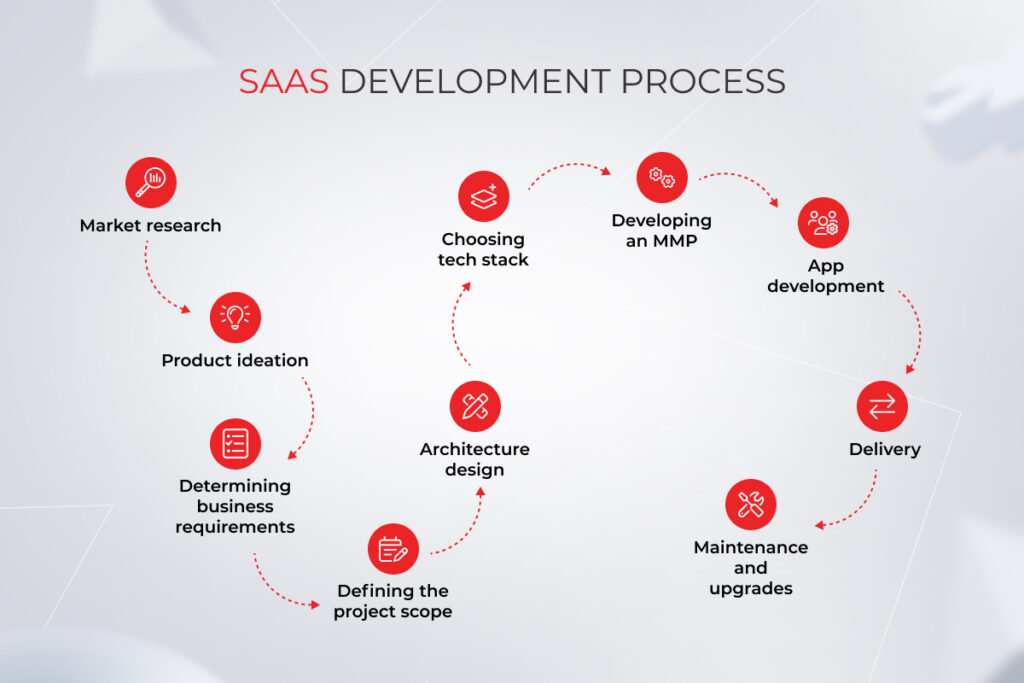
A typical, Agile-first development process encourages development teams to iteratively execute the product vision, breaking each challenge down into smaller, solvable problems. The SaaS development process – sometimes called the SaaS development life cycle or SaaS development workflow – moves through ten clear stages, from market research to maintenance. Following this lifecycle structure helps SaaS product developers avoid scope creep and deliver value at every stage.

SaaS

Market research

Everything starts with an idea, but not every idea is worth pursuing. So before you march forward, it’s important to estimate how your product idea aligns with customer needs, industry trends, and market demand. You should also understand how your future product stacks up against competitors and what makes it stand out in the saturated market. Consider involving a focus group of real customers in the research to gather qualitative data and in-depth insights that would reveal true customer demands and opinions.

During early-stage SaaS product development, this research also involves assessing where generative and agentic AI capabilities can do the heaviest lifting for the users.

Product ideation

With market data on hand, you can further shape your product idea through a prism of different stakeholders steeped in customer needs — from a SaaS product manager to a SaaS product developer to a product designer. An ideation cohort can provide their unique perspectives on how customer insights can be implemented into the product and help you adjust the prototypes correspondingly.

Ideally, participants should be diverse, with representatives from each department or business function to give their relevant experience. At this stage, you and your product team generate and filter out ideas, prioritize user insights to identify opportunities, and group ideas into distinct buckets that may end up in a future product roadmap.

Ideation sessions should also revolve around focus groups, user surveys, and customer interviews whose input can later be aggregated and analyzed. If you are building a SaaS product on top of an existing business, you should pull in user feedback from existing customers, including sales calls, marketing data, and data from other touchpoints. This helps you gain a baseline understanding of the real-world users and potential new customers.

Determining business requirements

Once you’ve gathered customer requirements, it’s time to think of how this software project can bring you closer to your business goals. Business requirements define the strategic path of the project and describe what a system or a solution should do and why. They give a high-level, yet detail-oriented understanding of the scope of your solution, its overriding goal, and project constraints.

Business requirements should be agreed upon and reflected in the Business Requirements Document. Keep in mind that requirements gathering is a dynamic process that can bring new variables into the picture. Therefore, make sure to make space for future requirements gathering early on in the SaaS development lifecycle to keep the scope of the project easily adaptable.

Defining the project scope

A well-defined project scope keeps the project on track and ensures all deliverables are turned in on time, within budget, and up to your expectations. The level of detail on your project scope statement is directly linked to the complexity of your project. Either way, it should consist of three major parts, including project justification, main deliverables, and project objectives.

A scope statement also provides a detailed outline of all aspects of a project, including timelines, key stakeholders, constraints, and other key elements of the SaaS development workflow.

Architecture design

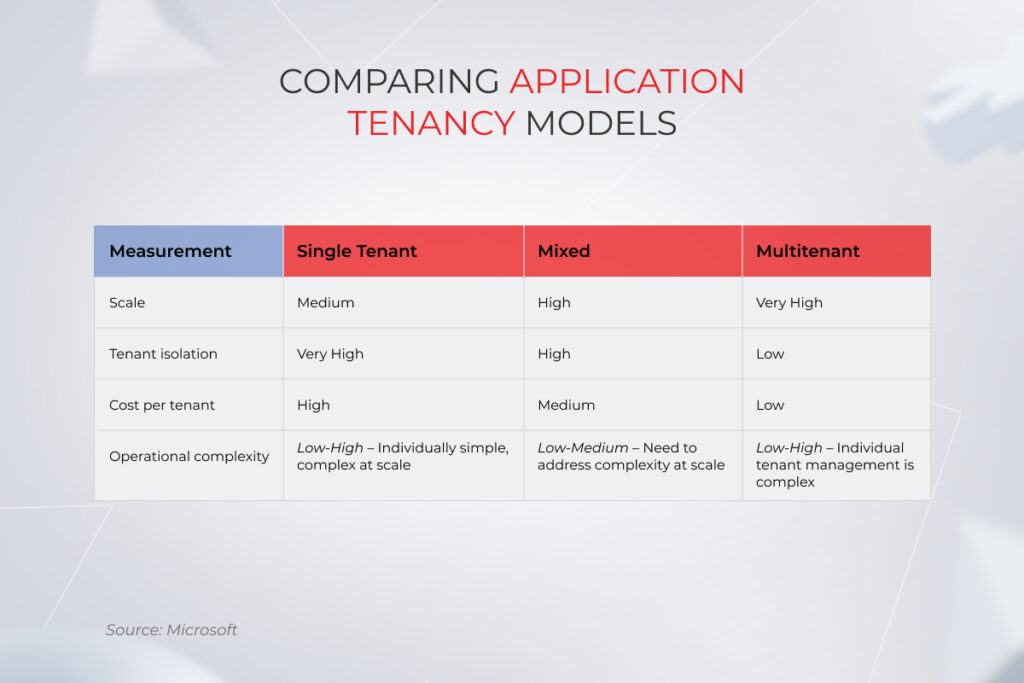
A well-balanced SaaS system architecture is the backbone of a scalable and reliable software-as-a-service solution. Typically, this is dictated by your customer requirements and business goals. For example, a multi-tenant SaaS architecture is a great option for commercial software products as it’s maintenance-free for the customer and requires less upfront infrastructure procurement.

You can also base your solutions on a single-tenant or a mixed-tenant architecture that allows for more dedicated resources deployed for each customer. Overall, the tenancy model makes no difference for the functionality of an application, but it impacts other aspects, such as the number of concurrent customers and operational complexity.

Software as a Service

Mixing these models to cover the diversity of customer needs is on the list too. For example, the basic tier of the solution can run on a multi-tenant architecture, while customers with higher performance needs can be billed for a dedicated service tier based on a single-tenant delivery model.

Architecture decisions now also extend to the AI layer: how agentic workflows will be orchestrated, where context and memory will be stored, which LLM providers to integrate with, and how to design agent-to-agent communication patterns. This layer of SaaS product engineering requires a clear SaaS product development framework for architectural choices, from vector databases for context retrieval to orchestration frameworks that manage multi-agent collaboration.

Choosing tech stack

The tech stack for SaaS solutions development usually includes client-side technologies, server-side technologies, and cloud services. The right combination of tech will secure your product well into the future and enable it to evolve and scale with fewer costs. When choosing your IT stack, our team takes into account your existing IT suite, the complexity of your software, and maintenance requirements. For AI-enabled products, the stack should include LLM platforms, agent orchestration frameworks, vector databases, and observability tooling for monitoring agent behavior and token consumption.

Developing an MMP

Once we lay the groundwork for product development, our team proceeds with identifying high-value features and setting priorities for feature releases. Must-have features are then incorporated into a Minimum Marketable Product or MMP, an upgraded version of an MVP, a product version with minimum functionality that should still be enough to enter the market and gain traction among end users.

MMP development is also preceded by prototyping whereby our UX/UI design teams create a visual representation of your MMP and prepare the final layouts for further development. At this stage, each MMP feature is also thoroughly tested through continuous testing cycles, enabling our team to obtain critical feedback earlier and ensure faster deliveries. AI-assisted prototyping has made rapid SaaS development a reality at this stage, allowing teams to validate products with real users at a fraction of the time it used to take.

App development

Your SaaS product lifecycle follows through with an MMP release that will allow your team to collect valuable customer feedback and chalk out a roadmap for product enhancement. At this stage, your product teams add good-to-have functionalities into the SaaS offering, iterate on an MMP based on the user sentiments, and transform the application into a full-fledged solution ready to offer a plethora of features.

This stage also benefits from continuous integration and testing cycles that enable your team to evaluate the quality of each deliverable as part of a continuous delivery process, by testing early and often. This testing culture determines the quality of your releases, so make sure your team doesn’t skimp on this part.

Delivery and SaaS product commercialization

New features and updates are delivered continuously in small batches which allows your development team to easily troubleshoot issues and release as often as you need. Continuous delivery cycles also increase the speed to market as your team doesn’t have to pause development for releases. As a result, users can enjoy an uninterrupted stream of improvements, with daily enhancements and feature fixes.

Commercialization also involves choosing the right monetization model, as AI features can generate value in ways that don’t map neatly to traditional per-seat pricing. For instance, when a multi-agent system takes over a whole workflow, there’re fewer humans in the loop to apply per-seat pricing to, and usage-based or outcome-based models capture the value better.

Maintenance and upgrades

The development of SaaS products is never final. It’s a continuous engine of improvements delivered through an ongoing effort of your support team. Your product management SaaS unit should monitor customer behavior, unearth valuable insights, and communicate them to a support team that can then transform this feedback into a software upgrade plan.

Moreover, you need a dedicated team for maintaining your SaaS product, ensuring it delivers an impeccable experience to the users and can accommodate the growing workloads. For AI-powered SaaS, software upkeep also includes monitoring agent performance, fine-tuning models as user patterns evolve, managing context drift, and keeping up with the pace of LLM and framework updates.

Get your SaaS product driven from A to Z

Reach out

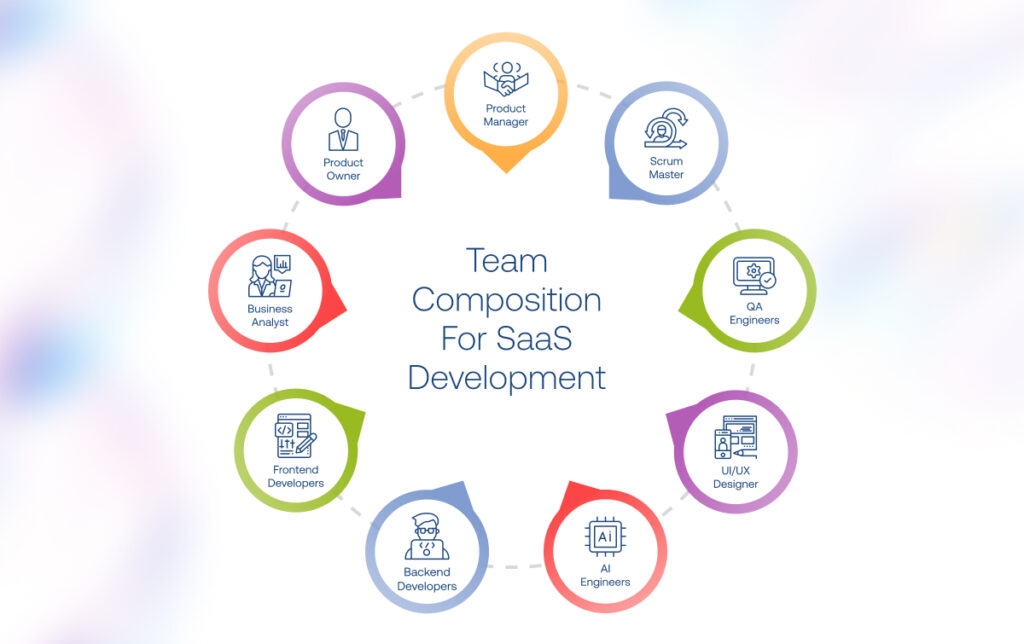
Hiring well isn’t enough, but building an effective SaaS development team is

To build a SaaS product with long-term potential, you need more than just a development team. A close-knit, autonomous squad of high performers with a business mindset and product vision is more likely to fit the bill, holistically growing and elevating your product idea. Here is what a well-balanced product team structure looks like.

Product manager

A SaaS product manager is in charge of the entire SaaS product management process, tackling product-related tasks and communicating product strategy to the engineering, design, and marketing teams. Together with product managers, SaaS product managers oversee the entire cycle of product development, making sure the final deliverables meet business and customer needs.

Project manager

SaaS project management differs from regular software development projects, but you still need a person with an all-seeing eye that can shepherd the project to completion. Project managers oversee the project from start to finish, keeping an eye on the budget, deadlines, and overall project progress. They are doers who maintain SaaS processes for changes in the project and coordinate complex project dependencies and team resources.

Business analyst

Business analysts are field workers who strategize your business idea, conduct market research, and participate in defining the scope of your project. Without thorough business analysis, it’s impossible to elicit project requirements and prepare detailed software documentation for the successful development and delivery of the product.

Solution architect

These specialists come on stage during large-scale projects and map the overall technical vision for your SaaS product. They bridge the chasm between business problems and technology solutions and match the solution with your corporate environment. For well-established companies, a solution architect can pinpoint areas where a SaaS solution can support business goals.

UI/UX designers

A user-centered experience remains a top purchase driver, and your UI/UX team is who makes that happen. From a smooth onboarding process to the ease of use, SaaS product design should cover all touchpoints, mimicking the workflow of your users.

Designers map that workflow, tap into the minds of your users, and create other foundations of the successful design process. Based on the user data, they then create a fully clickable prototype, test it with end-users, and send the final layouts into development.

Software engineers

Software developers are the ones who roll up their sleeves and put your business vision into practice. They set up the front end of your solution, its server-side and backend storage. Software engineers also weigh into creating and maintaining project documentation as well as weed out the bugs in the existing code. The number of software developers and their specialty is directly linked to your project requirements and scope.

AI engineers

With AI now embedded in the majority of new SaaS products, dedicated AI and ML engineers have become essential members of the product team. They handle model selection and fine-tuning, prompt engineering, design agentic workflows, engineer context hierarchies, and ensure AI features perform reliably in production. Depending on the scope, this role may also cover RAG pipeline development and AI governance implementation.

QA

Quality assurance engineers are vigilant gatekeepers of bug-free, user-centered, and business-led software experiences. They check and validate each aspect of your product, running it through multiple functional and non-functional kinds of tests. QAs, worth their salt, run and design automated tests as early as possible and then consistently throughout the entire development process. For AI-enabled features, QA specialists now also include evaluating agent behavior, testing for hallucinations and context drift, and validating that AI outputs meet accuracy and safety thresholds.

DevOps

Faster releases and delivery cycles cannot happen without the hands-on participation of a DevOps team. They design and implement continuous integration and continuous deployment strategies, automate builds and releases as well as take the silos out of your development team. The result of DevOps enablement is a nimble, adaptable, and friction-free development cycle guided by the real needs of users.

Delivery manager

A delivery manager is the ultimate middleman who works closely both with the product and the technology team. While a project manager keeps tabs on the progress of the project, a delivery manager oversees the project team. They keep everyone on the same page, ensure common priorities, participate in project planning, and update stakeholders on the status of product development.

5 reasons to outsource SaaS product development

For many companies, the call to outsource SaaS product development comes after the first hire-and-burn cycle. These five reasons cover what an outsourced SaaS development project actually delivers beyond just headcount.

Faster time to market

The ability to bring a product or service to market quickly and efficiently can give a company a significant competitive advantage. And outsourcing is an excellent catalyst for product development. From faster hiring cycles to 24/7 availability of developer talent, outsourcing gives you a head start on product development and helps snatch leadership in the market by being first. Having a strategic outsourcing partner with a team at the ready also allows you to respond to market demand faster, avoiding fragmentation in releases.

This advantage compounds when your outsourcing partner brings proprietary AI tooling to the table. For example, at Instinctools, we use GENiE, our very own agentic AI accelerator with pre-built context engineering, orchestration patterns, and cost optimization mechanisms that enable us to compress the timeline for AI-powered SaaS solutions development to 6-8 weeks.

Slashed development costs

In most geographies, the cost of hiring an in-house developer can reach twice the size of the base salary with employee costs added up. Not to mention the upfront investment in equipment and infrastructure required to develop a software product.

Outsourcing vendors are usually based in low-cost locations with accessible developer rates. Also, as the outsourced team is on a vendor’s payroll, you don’t have to cover benefits and other administrative costs, but pay exactly for the job done. Office space, infrastructure, software licensing, and other expenditure items are on the vendor as well.

Technological and methodological flexibility

Outsourced IT services give organizations the flexibility they need to deliver a trail-blazing solution based on the custom stack of technologies. Companies that outsource are not locked into limited in-house expertise and can land niche skills to solve problems and create new opportunities. Methodology- and technology-agnostic vendors can also help companies choose the tools and processes that suit the unique requirements of their projects. It becomes a critical advantage for companies building AI-native SaaS, where the landscape of frameworks, models, and orchestration tools shifts rapidly.

Compliance with industry best practices

Partnering with external software engineering companies lets you unleash expertise in a particular business domain or area, such as healthcare or automotive. Experienced technology partners have a time-tested arsenal of practices and workflows that come as a bonus to technological proficiency. You don’t have to delve into regulatory compliance, standards in data sharing, data security requirements, and more — your vendor has got it covered. In the age of AI, this extends to AI governance, responsible AI implementation, and compliance with frameworks like the EU AI Act.

Customer-centricity

The culture of customer-centricity doesn’t just appear out of nowhere, you need years to perfect and hone it. From calibrated market research to high-value features to user-driven design, customer-centricity stems from a batch of competencies that should live in your company. An outsourcing partner already has the skills and talent to focus on customer research and use the data gathered to build products/features your customers want.

Kick-start your SaaS development project

The SaaS model is only going to keep gaining prominence. As exciting as this opportunity is, you need much more than a business idea to gain your footing in the market. Lack of available talent, unfit solution architecture, subpar user experience, and other prerequisites could stand in the way of launching your SaaS business. Instinctools is a leading SaaS product development company with an end-to-end approach, deep AI and agentic expertise, and an exclusive GENiE accelerator that will get you on the track to a successful SaaS product.

Start your SaaS-powered journey to innovation

Book a meeting

FAQ

What is a SaaS product?

It is a business model that consists of software, hosted by the vendor, which is sold to customers. SaaS products don’t have to be downloaded and installed on devices. Instead, they offer instant access to users.

What is SaaS product development?

SaaS product development is the full cycle of designing, building, and improving a cloud-hosted software product. It covers market research, SaaS product planning, architecture design, AI integration, and post-launch iteration.

What is considered a SaaS product?

All SaaS products are hosted by a central provider and delivered to end users through the Internet. Multi-tenancy architecture, subscription-based billing, and elastic infrastructure are also commonly associated with these solutions.

What is SaaS development?

It is the process of designing and developing a complete software solution that can then be sold to customers at scale. Customers buy the right to use the software as a service instead of owning it outright.

What is SaaS product development?

It is an end-to-end process for launching a new SaaS product that requires not only technological expertise but also the knowledge of product development. Here, your team has their eyes on the value of the product, rather than focusing solely on deliverables.

How long does it take to build a SaaS product?

Timelines for developing a SaaS product vary significantly based on complexity, team size, and whether AI capabilities are involved. A focused MVP can be ready for market testing in 3-4 months with an experienced team. Full-featured SaaS products typically take 6-8 months to reach production readiness. AI-powered features may add time for data preparation, model tuning, and agent orchestration, though proprietary accelerators and SaaS product development frameworks, such as Insticntools’ GENiE, can compress these timelines considerably.

What kind of developers are needed to build a SaaS product?

A typical SaaS team includes frontend and backend engineers, a solution architect, UI/UX designers, QA engineers, and DevOps. For AI-powered products, add AI/ML engineers who handle model selection, agentic workflow design, and context engineering. The exact mix depends on your product’s scope. When outsourcing SaaS product development, you can always scale the team up or down to match the project’s needs.

What are the stages of SaaS development?

The process to create a SaaS product starts with meticulous market analysis and user research. Derived insights will allow you to ideate your product, select core features, and distill the unique value of your future product. From there, your development team elicits business and product requirements, plans the development process, and gets down to high-level design. They then develop a Minimum Marketable Product, release it into the wild, and collect feedback for further iterations. Post-release maintenance and support are also essential to guarantee a friction-free user experience and resilient growth.

What gives a SaaS product lasting competitive advantage?

Long-term advantage in SaaS comes from a combination of deep domain expertise, unique data assets, and responsible use of AI capabilities that compound over time. Products built around vertical workflows with domain-specific models and rich operational context are significantly harder to displace than generic horizontal tools.

8 Tech-Enabled Ecommerce Growth Strategies: How to Win Users’ Hearts and Wallets?

Key highlights

  • Attracting new customers and retaining loyal ones becomes more challenging under the pressure of competitors, customers, and tech advances.
  • It’s hardly possible for online retailers to achieve sustainable growth and improve customer satisfaction without adopting advanced analytics.
  • An effective ecommerce strategy is built with multiple priorities in mind, including hyper-personalized customer journey, omnichannel experience, immersive technologies, and more.

Having a holistic ecommerce growth strategy has never been more important than now. Over the last few years, ecommerce sales have hiked and are expected to double again by 2026. To thrive in the upswing and become indispensable to their customers, ecommerce companies need to focus on new, more competitive approaches.

New-age strategies of ecommerce require companies to place tech-enabled commerce at the core of their operations, creating a seamless customer experience that exceeds evolving consumer expectations. But while some companies generate record-breaking profits thanks to digital-first experiences, others fail to boost sales and extend their customer base through digitalization.

Let’s see how to grow an ecommerce business despite a perfect storm of market conditions and, more importantly, how to plug digitally-driven commerce into your new growth strategies.

4 factors driving an ecommerce growth strategy improvement

Back in the day, businesses got by with a bolt-on approach to their ecommerce lines. However, an afterthought strategy for ecommerce has been rendered ineffective as new variables came into the picture.

Competitive pressures

Today, both B2B and B2C companies find themselves in a situation where competition is growing faster than the market is expanding. Digital natives with commerce dexterity and start-ups with innovative business models threaten the status quo, leaving most old-school retailers behind. Old ecommerce growth tactics don’t answer “how to win in ecommerce” anymore.

Fast-changing customer behaviors

Ever since the pandemic, customers have been rewiring. Today’s customers want to be met on their terms, not the reverse. They want companies that are ready for purchases at any time, any place, and any way they want.

Over 70% of customers even shop in micro-moments, while doing something else. It means that high-performing ecommerce growth strategies should help shape this rewired user behavior, offering availability and convenience to always-on shoppers.

Sky-high customer expectations

In a world of disruptions, consumers are seeking less to zero friction. Therefore, successful strategies for ecommerce should identify, isolate and eliminate the many frictions that get in the way of smooth experiences. This includes meeting consumers in both physical stores and digital spaces, optimizing retail prices, covering gaps in supply chains, and reducing delivery costs.

Massive advances in tech and data

The advent of Big data, artificial intelligence (AI), and 5G has reimagined detached customer experience of the past. Modern ecommerce growth solutions now bundle the latest tech advancements that unlock interactive and personalized experiences. 

New technologies also prepared the ground for end-to-end automation that saves costs for both B2C and B2B commerce. And if you’re not adopting any of these, you’re in the back row.

New-age ecommerce strategies should factor in the new reality, enabling easy scalability and adaptability for future disruptions. Technology will become the critical enabler of those experiences.

How to grow ecom business: 8 strategies for ecommerce success

We’ve seen ecommerce players dabbling into the metaverse, with 70% of users making purchases in virtual stores. We’ve also witnessed retailers availing of cost-effective, crypto payment solutions. Let’s see what other technologies promote the ecommerce industry growth and generate windfall profits for retailers.

1. Personalizing customer journey

Tailored services and offerings are the shortcuts to customer loyalty and sustainable growth, while generic, sub-par experiences lead to customer attrition. Statistics prove that over 60% of customers want to keep it personal with the brand, and 92% of retailers employ AI-driven personalization throughout the customer journey to make it happen.

AI drives hyper-personalization at every stage of the customer journey
  • AI-based personalization

By using artificial intelligence to understand user behavior and the individual preferences of potential customers, businesses can provide excellent customer service and boost sales. Smart algorithms analyze customer data to generate product recommendations and content at scale, support marketing strategies for ecommerce success, and enable dynamic pricing.

AI-fueled virtual shopping associates can transform retail into an online activity for customers to experience the ecommerce brand. Big market players such as Amazon, Shopify, and other marketplaces also made their move into generative AI. This innovative technology takes personalization to the next level, unlocking new capabilities for chatbots and customer support in general.

Based on large language models, generative AI tools also support personalization at scale and extend brand messaging to a larger target audience with almost no human input.

  • Other personalization techniques

Along with AI-based personalization capabilities, companies also apply dynamic content, cross-selling approaches, and user-generated content to add a personal touch to their services. Hard work pays off — half of consumers repeat purchases after a personalized experience. Also, hyper-personalization can deliver an 8x return on investment on marketing spend, and ramp up sales by 10%.

Unlock personalization at scale. Serve curated experiences and make more sales

Let’s discuss 

2. Embracing omnichannel commerce

Another way to grow your ecommerce business is through leveraging continuous omnichannel experiences. This way, your customers have unified and consistent journeys across all brand channels, shopping effortlessly via their channel of choice. Each omnichannel ecommerce instance has distinct foundational capabilities that you have to weave into your online growth strategies to reach more customers.

three core omnichannel strategies for ecommerce growth

The main enablers of holistic experiences for omnichannel wannabes include:

  • Analytics engine
  • Visible supply chain
  • Robust web architecture
  • Calibrated processes

It’s the level of adoption that differentiates omnichannel newbies from leaders. Front-runners base their omnichannel strategies on a 360-degree customer view, interoperable ecommerce software, omnichannel inventories via APIs, and state-of-art architectures such as service-oriented solutions and headless ecommerce.

3. Unlocking operational efficiency

Shrinking profit margins make ecommerce companies size up areas for cost optimization. Operational efficiency is one of the main levers of cost reduction. However, it requires a solid analytics powerhouse supported by end-to-end automation.

  • Analytics-based efficiency

Your online store abounds in Big data that can be leveraged for generating detailed insights. Transactional data, social media data, and information from internal business systems can all contribute to operational excellence. All this data can be fed into analytics tools and delivered in the form of comprehensible visuals through analytics systems.
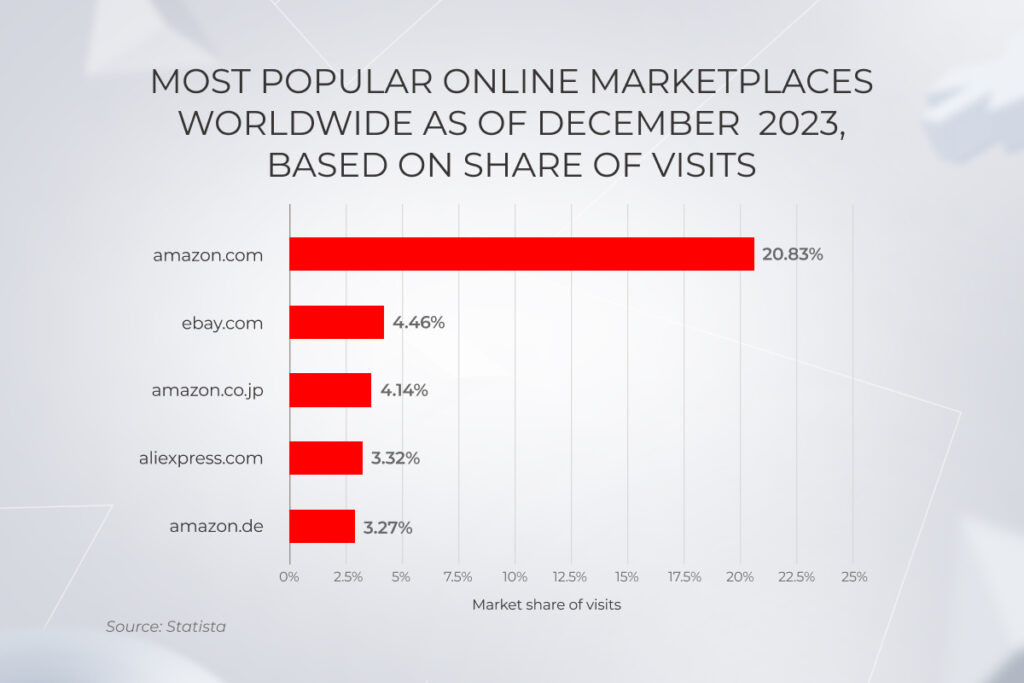
Some analytics use cases, such as inventory forecasting, have been long cemented into the business practices of high performers. Maintaining a keen eye on marketing efforts, best-selling products, and the supply chain as a whole will also help you identify weak links and double down on what works best.

Because of this, retailers can predict seasonal demand and align inventory levels respectively. Demand-driven inventory levels, in turn, lead to reduced costs of fulfillment. To make data analytics work, commerce businesses need to dig data from multiple, often isolated sources and then consolidate it all into an integrated data architecture.

  • Automation-based efficiency

The modern ecommerce landscape mandates automation wherever possible to streamline critical processes and create internal organizational efficiencies. To enable end-to-end automation, you need an integrated IT stack to connect the back end of the ecommerce store with the rest of your IT architecture.

From a tech standpoint, ecommerce automation can be achieved through the integration of ecommerce apps and systems through APIs to create a business workflow.

For example, you can link warehouse management, inventory synchronization, and order handling into a single system with automated workflows. This way, the system will automatically sync inventory levels across multiple distribution platforms, warehouses, and physical stores. This visibility of the entire fulfillment process sets the ground for a demand-driven inventory approach, reducing waste and inventory costs.

You can also make an extra step to achieve the ultimate real-time visibility by connecting the order-management system directly to the rugged tablets used in the fulfillment warehouse.

4. Generating consumer insights with advanced data analytics

A detailed understanding of the customer is another pillar of an effective ecommerce sales strategy and ecommerce business growth as a whole. A thorough walkthrough of your buyers’ behavior, preferences, and engagement patterns helps you tap into the minds of existing and potential customers and spot opportunities to increase customer loyalty and the average purchase value.

To achieve a 360-degree view of the customer, retailers need a mix of core data-related technology components, such as a data warehouse, a CRM system, and a Data Management Platform.

  • Data warehouses

As the amount of data in ecommerce grows, it’s impossible to manually glean customer insights for retailers. Therefore, businesses have to set up data collection, storage, and processing pipelines for generating actionable insights based on unified and accurate data. A data warehouse can address the data needs of ecommerce companies and act as a centralized repository of data from multiple sources.

  • Customer Relationship Management 

A CRM system records and tracks customer interactions with an ecommerce site. CRM data is essential for big-picture understanding as it enables the owner to supercharge segments with known customer identifiers to support targeting efforts.

  • Data Management Platform

A Data Management Platform (DMP) helps retailers build detailed customer profiles based on aggregating data from online and offline sources. DMPs store customer information, demographics, purchasing history, and other input that gives businesses fine-grained insights into their target audience.

Along with a central point of truth, retailers also need business intelligence tools with customized reporting that turns that data into easily digestible dashboards. Keep in mind that a data-driven ecommerce product strategy needs strong data security and compliance practices to protect sensitive customer data.

Put your finger on the pulse of ecommerce

Hire our ecommerce developers

5. Considering open-source solutions

In a quest for speed and flexibility, merchants make a foray into open-source ecommerce technology. Unlike from-scratch software, open-source solutions can be launched in around 2 months, which allows businesses to accommodate evolving requirements faster. The low total cost of ownership and access to ready-made tools also make open-source a viable option for both small companies and enterprises.

comparison of open-source and vendor solutions for ecommerce management

User interface elements such as product catalogs, checkouts, and account management are among the open-source staples for an ecommerce platform. They easily integrate into IT frameworks and seamlessly connect to third-party ERP, CRM, or BI software.

Open-source content management systems and product information management software also eliminate the costs associated with proprietary systems and allow companies to configure the software according to the requirements of the product catalog on any platform.

Also, companies that operate a loosely decoupled architecture tend to reap the biggest benefits in terms of open-source scalability.

However, to achieve growth in ecommerce through open source, companies need access to engineering talent. Developers will help the company customize the software to match its unique needs and address potential security risks.

6. Connecting the dots between your ecommerce store and the rest of your IT infrastructure

Complexities of legacy systems can take a toll on your business growth. Having isolated systems makes it impossible for you to run a unified online strategy that drives sales. Conversely, end-to-end integration brings your in-store, back-office, and online retail systems together, centralizing your critical customer and product data.

The easiest way to achieve the integration objectives is to implement an all-in system with the right set of modules that matches your business workflows. If this is not possible, you can set up a two-way data exchange via APIs.

In the context of retail, three core business systems can change the game when it comes to growing your ecommerce business.

  • Warehouse management system (WMS)

A critical part of the supply chain, WMS software offers visibility into the entire inventory and fulfillment operations. By integrating this system with other internal software, companies can bring their resources into perfect alignment, from high-level decision-making to warehouse-level implementation.

Usually, a warehouse management system interfaces the following data hubs:

  • Inventory management software — creates a faster inventory turnover and improves record accuracy
  • Order management software — enables stock level forecasting, simplifies order routing from a specific warehouse, and updates inventory across all sales channels.
  • Enterprise management software — reduces fulfillment time, improves billing speed, and establishes a straight-through transactional flow.
  • Customer relationship management

Syncing your store with a CRM allows you to reflect all customer interactions with your platform in a centralized location, empowering your digital marketing strategy and sales. By integrating your ecommerce store with a CRM, you can automatically keep track of important customer information, such as purchase history and contact details. This valuable data can then be used to personalize shopping experiences, supplement customer support, and increase a conversion rate and customer retention.

Moreover, analyzing your buyer persona — their buying patterns, payment methods, and more — helps you inform the decision about your product lines and necessary adjustments to the buying process. Combined with inventory data, CRM insights allow for accurate inventory level prediction based on historical turnover.

  • Enterprise resource planning

An ERP ecommerce integration unlocks seamless data flows between a company’s frontend website with its backend ERP system. Real-time communication between the two allows for data syncing on products, orders, shipping, inventory levels, and more.

Integrating ERP, for instance, can make it easier to reward the right salesperson with sales commissions from online purchases. Integration can also remove the hassle of managing inventory data by automatically removing items from inventory after a purchase.

Set your digital transformation in motion

Schedule a call

7. Wading into social commerce

A new ecommerce business strategy, social commerce brings together the highly engaging experience of social media and transactional online shopping. With a predicted sales volume of $1.581 billion, this sales channel might make up a lion’s share of all ecommerce sales.

statistics on the social commerce revenue up to 2030

Considering the number of social media users, this frictionless shopping experience also creates the perfect ground for an interactive and high-grossing purchase journey to flourish.

Social commerce comes in many flavors:

  • Social media checkouts
  • Shopping integrated into social media
  • Shoppable ads
  • Social commerce plugins

No matter the form, each instance requires integration with your main ecommerce website to sync your product and inventory.

Such integration also facilitates tracking, creating comprehensive customer profiles that enhance targeting. Besides, an integrated social buying journey offers a frictionless purchasing experience that compares favorably with scarce selling efforts.

8. Welcoming immersive reality

Immersive technology is another ecommerce expansion strategy with kindling popularity and profit potential.  By 2030, the global immersive reality market size is expected to hit over $134.18 billion, accelerated by the proliferation of smartphones and connected devices.

3D product images, augmented reality, and virtual showrooms gained a footing in the online stores of top retail companies. Other brands like Ulta Beauty dabble into immersive experiences to make their livestream shopping events more immersive for viewers. With consumers hopping between shopping channels on a whim, a commerce strategy-based on the combination of physical and digital realities delivers 200% more engaging experiences.

  • Metaverse

Standing at the intersection of virtual reality, augmented reality, and mixed reality, the metaverse allows your ecommerce brand to connect directly with consumers and bring your sales to a global level. 

Along with the opportunity to sell virtual products to avatars, businesses can use metaverse as an extension to their traditional retail website. For example, a user’s avatar can visit an online store in the metaverse, get a consultation from a virtual sales team, purchase the products, and then get the physical items delivered to their door.

While the metaverse market value is predicted to chalk up $13 trillion by 2030, most retailers still view it as a testing ground or a billboard rather than a valid online sales channel. Nevertheless, this virtual landscape presents a valuable opportunity to reach new customers and attract real-life sales.

  • AR/VR

Both augmented reality and virtual reality make the shopping experience more immersive, allowing shoppers to size up a product from every angle. Over 30% of consumers use VR to test and purchase products, while AR promotes ecommerce success through a 94% higher conversion rate.

The types and forms of immersive shopping experiences vary from virtual showrooms to VR payments and AR try-on tools. To sell through AR/VR, companies need to identify the right immersive reality tools and seamlessly plug them into their ecommerce stores or mobile apps.

Summary

Customer centricity and the test-and-learn mindset spearhead the growth of ecommerce in today’s market. Successful ecommerce expansion and higher customer satisfaction can be achieved through hyper-personalization, informed decision-making, and the company-wide adoption of the latest technology advancements.

On a mission to the new-age ecommerce strategies, companies need to carefully examine the technology, physical infrastructure, and talent capacity to successfully make the leap. While those resources are critical, it’s also the culture of change within the company that facilitates the adoption of a new growth strategy for ecommerce.

Drive profitable growth with ecommerce technology

Contact our team

FAQ

What are the four C’s in ecommerce?

Customer, Cost, Convenience, and Communication are the four C’s in ecommerce that span and impact every ecommerce company. They determine whether a business is likely to succeed or fail in the long run, making it a priority for organizations to double down on these aspects.

What is an ecommerce sales strategy?

Ecommerce sales strategy is the process of planning and executing a plan to increase the visibility of a product or service online, generate more sales, and encourage repeat purchases. 
This strategy can include a variety of tactics: 
– Diversification of distribution channels
– The adoption of new sales channels
– Implementing new technology to support sales units

What is the best strategy to increase ecommerce sales?

Focusing on hyper-personalization, enabling data-informed marketing and sales strategies, and incorporating the latest technology trends increase your odds of generating more sales.

Why has ecommerce grown so rapidly?

The industry’s growth can be attributed to the pandemic shift in selling channels, customers’ demand to shop across channels, and the increasing digital literacy among shoppers.

What is the growth of ecommerce 2030?

The global ecommerce market is projected to reach over $62,415 billion by 2030. The growth is driven by a combination of factors, including the rising preference for online shopping, social media dominance, and advancing digital technology for commerce.

What will be the dominating technology for ecommerce in the next five years? 

Artificial intelligence and machine learning are set to dominate ecommerce growth services in the next five years. 90%+ of retailers already use AI and ML to hyper-personalize customer experience.

PWA vs. Native App: Pros and Cons in 2026. Our Experts Weigh In

Spotify saw a 73% rise in premium subscriptions after launching their PWA. Meanwhile, Amazon and TikTok stay native, and not by accident. The difference between PWA and native apps isn’t about one being better, but rather about each being better at different things.

The PWA vs. native app debate has real stakes: going native gets you top-tier performance but costs more time, money, and dependency on app store approvals. The advantages of PWA over native apps are speed and reach, but they come with trade-offs in UX and device integration.

This guide breaks down the pros and cons of both approaches so you can pick the one that fits your business goals, not just your budget.

Difference between PWA and native app at a glance

The difference between a progressive web app and a native app comes down to trade-offs across cost, capability, and user experience. This table breaks it down point by point:

across cost, capability, and user experience. This table breaks it down point by point:

ParametersPWANative app
InstallationNo download needed; add to Home Screen in two tapsRequires downloading and installation from an app store
Distribution channelOpen web (search engines, direct URL)Apple App Store, Google Play
DiscoverabilitySEO + GEO (search engines and AI)ASO (App Store Optimization)
PerformanceBrowser-level rendering; sufficient for most use casesHardware-level rendering; superior for graphics-heavy apps
Offline modeAvailable via Service Workers cachingFull offline-first capability built into the OS
Push notificationsFull support on Android and desktop; limited on iOSFull support across all platforms
Hardware accessCamera, mic, geolocation supported; Bluetooth and NFC limitedUnrestricted access to all device features
Development costSingle codebase; ×3-4 cheaper than native developmentSeparate iOS/Android codebases; higher investment
Time to marketWeeks; no app store reviewMonths; app store approvals required
Maintenance~10% of development cost~15–20% of development cost

In short, the key difference between PWA and native apps is scope vs. speed. PWAs get you to market faster and cheaper with strong discoverability, while native apps unlock the full potential of the device at a higher cost and longer timeline.

PWA vs. native app: all-round comparison from a business perspective

Time, cost, and security are probably the first things that come to your mind as a business owner when thinking about developing any software. Indeed, speaking of native apps vs PWAs, they are crucial, yet not the only factors to consider during app development requirements elicitation.

1. Development cost 

Since their inception in 2015, progressive web apps have been a hot take, and the mobile app vs. PWA debate often starts with one question: cost. In essence, PWA is a website that offers user experience and visual aesthetic similar to that of a native mobile app, all while costing significantly less. This is achieved by using a single codebase and building a one-stop solution that performs equally across all platforms and devices. For those who already have a web application, migrating it to a progressive one seems like a viable option that can further reduce development costs.

Native apps are developed specifically for an operating system on which they will run. If you plan to create an application for two OS – Android and iOS – double the development cost. You’ll require a team with expertise in the main programming languages – Swift and Objective-C for iOS and Java and Kotlin for Android.

However, if your idea revolves around using Bluetooth connection, location tracking, camera features, etc., mobile development becomes the only option. It doesn’t mean though, that you’ll have to bid a farewell to a fortune. Cross-platform development empowers you to use best-of-the-breed frameworks (Flutter, React Native, Node.js, etc.) and craft native app-like look and feel solutions both for iOS and Android without breaking a bank. 

Check out a robust healthcare platform we’ve created for both Android and iOS using React Native to save the project’s budget

View the case study
Native iOS, Android, and cross-platform development toolkit

If you want to reduce the development cost for both PWA and a native app, look into hiring a remote development team in a more cost-effective and talent-rich location, such as Poland. 

2. Maintenance 

PWAs mean working with one codebase that suits multiple platforms. This alone makes maintaining a progressive web application more manageable and affordable. In our experience, support for PWA requires around 10% of its development cost. 

Native apps: In addition to the impact on the project’s development cost, separate codebases lead to higher maintenance costs for your app. Statistics show you’ll need 15–20% of the development expenses to maintain your native mobile application.

Another nuance of PWA vs. native app maintenance, which often slips the mind in the beginning, is the fact that any changes made to a native application have to be submitted for a review in app marketplaces. Meanwhile, with a PWA, you completely control the delivery of updates and do not need to wait for third-party approvals, making the whole process more efficient and streamlined.

There is one more thing to keep in mind at the start, which applies to both PWAs and native apps. The application code should initially be clear and readable to make updates easier for developers. Maintaining the code written with multiple workarounds to cover the functionality you need will be tricky. Consider this when choosing a technical partner for mobile app development. 

3. Security 

PWAs run under HTTPS protocols that entail browser-to-server encryption. In addition, you can implement JSON Web Tokens (JWT) for authenticating users, Content Security Policy (CSP) to prevent cross-site scripting attacks and malicious code injection, etc. 

As a result, progressive web apps can be as secure or vulnerable as any website is. 

PWAs rely on server-side security measures, leaving no room for local storage. As for native apps, they become an integral part of the operating system, unlocking the ability to securely store data within the app. 

All native apps published in the official store must pass the verification of the Apple App Store or Google Play Store. Only solutions with five-star security are allowed to be published.

One of the basic ways to ensure a proper security level for your application is leveraging Multi-Factor Authentication. Besides this feature, you can incorporate such native-app-specific options as Face ID and Touch ID.

If you want to put a premium on security, you can also build additional features into your mobile app:

  • certificate pinning to prevent man-in-the-middle (MITM) type of security attacks;
  • VPN or SSL tunnel to transfer sensitive information and protect it from data theft;
  • runtime application self-protection (RASP) to monitor all the incoming requests and intercept attackers, etc. 

The boon of a native app is that all these features can be built-in. For example, VPN cannot be integrated directly within a PWA, but in the case of native app development, it can be embedded in the application itself. In fact, we did just that in one of our projects so that the traffic would not be intercepted.

Therefore, if you are going to build a personal finance app, healthcare, or banking solution that constantly has to handle sensitive user data, with a native app you can implement as many advanced security control features as you want to hone the safety of the solution.

Any way you slice it, in the PWA vs. native matchup on security, native apps come out ahead.

But it’s worth remembering that the actual level of application security also depends on the experience and skills of the team responsible for it. Data breaches and vulnerabilities can occur because of human error within the development team. Therefore, battle-proven experts are the bedrock of your solution’s security.

4. Discoverability 

meme on the importance of strategy for a successful software product launch

Unfortunately, building a great product is not enough, and you should take care to adequately promote your solution to users. Both PWA and native apps offer options to do so.

PWAs are essentially websites that can be easily found through search engines. This means that SEO (Search Engine Optimization) and Generative Engine Optimization (GEO) are crucial components in ensuring that your PWA reaches its target audience. As a PWA is web-indexed by nature, its content can be crawled, parsed, and cited by generative AI, making GEO one of the key advantages of PWA for business that didn’t exist even a few years ago.

Among other benefits of progressive web apps is their inherent mobile-first design, so Google’s mobile-first indexing approach naturally favors them. Take the example of BMW, an automotive industry giant, that wanted to improve its website while staying customer-centric. By implementing a PWA, they saw a whopping 49% increase in site visits generated by SEO. On top of that, the PWA loaded 3-4 times faster than the old website, leading to a remarkable 50% increase in the number of mobile users.

In the case of native apps, you should pay attention to ASO (App Store Optimization) to increase the number of people who can find your application. Just as with PWA, where you have to mind SEO in your marketing strategy, you’ll face similar challenges with ASO. It includes putting your app in the correct category, providing quality and relevant screenshots of your app, writing a catchy title, investigating keywords to provide a results-oriented meta description, etc. These efforts should pay off with a higher rank among other similar applications.

Still, the PWA vs. native discoverability picture isn’t one-sided. It’s easier to beat the competition in app stores than to win the race among web applications.Here’s why. Two solutions with identical names cannot exist in an app stores. If a user is looking for your app, they will find exactly that one. Search engines operate differently and imply more hangups. For instance, even if users seek out your web application, there will be the lion’s share of pages not related to your app in search results. Moreover, your rivals can set up paid ads under your solution’s name to occupy the first pages and, thus, make looking for your web app a painstaking experience for customers.

5. Time to market 

When it comes to time to market, the PWA vs. native difference is dramatic. PWAs adapt seamlessly to any platform, significantly reducing development time and effort – no more grappling with the technical nitty-gritty of multiple operating systems and their respective app stores. As a result, you can release your PWA in a timeframe that has never been possible for a native application.

When the pandemic struck and lockdowns became the norm, our team was approached by a US mental health startup that wanted to develop a mobile-friendly solution to connect people with psychological support via text chat. We’ve suggested betting on PWA to craft the application as soon as possible. Our team managed to roll out the progressive web app in just one month, an unimaginable feat when you think about developing a native mobile app for each paticular platform separately.

The fact that the native app should be developed for different operating systems delays the app’s time to market. Add to this the need to wait for approvals from app stores like Apple App Store and Google Play before putting your solution on display. Therefore, be prepared that it will take more than a few months from the start of the development to the point when users can download your app.

Want to join the ranks of companies with successful front-and-center solutions?

Let’s cooperate

Progressive web apps vs. native apps: the user’s standpoint

When choosing how to implement your idea, it’s crucial to keep in mind that the final decision should rest with those, who will ultimately be interacting with the app – end users. Therefore, you need to consider what level of customer experience they may expect from your app when evaluating PWA vs native pros and cons. This refers to the ease of the app installation, updates convenience, functionality, performance, personalization level, required space, and battery consumption.

1. Installation approach 

One of the key benefits of PWA is skipping the download and install altogether. Users need two clicks to bookmark it and add it to their home screen for direct access. Therefore, PWA can boost users’ engagement without the hassle of downloads and installations.

Enhancing readers’ engagement and digital media time is one of the top-of-mind goals for brands like Forbes. Thanks to introducing PWA, they experienced a 100% increase in engagement rates and raised readership by 12%.

Native apps require to be installed from official app stores. If you want to build an app that people will turn to frequently, such as social media or a parking app, then a native application is likely your best bet. But, let’s say you’re creating an app for something that people don’t use every day, like insurance claims. In that case, having to download and install a native app can be a real pain.

Here is a simple visualization to compare the convenience of both options from a user’s perspective. 

native app vs. PWA: the ease of the installation process from a user perspective

2. Required memory space 

PWAs are designed to be lightweight, so they don’t take up as much space as native apps. For example, Starbucks’ PWA consumes 99.84% less space than its iOS app. It’s one of the most tangible advantages of progressive web apps, and there are other spectacular examples. For instance, Trivago PWA is equal to 1,5% of the size of the native app of this hotel search engine.

Starbucks PWA

Native apps require more space as users need to install them on their devices. That’s the price users pay for the extensive functionality a native app can offer and the accessibility of their personal data which is stored on the devices.

3. Battery consumption 

Higher battery consumption is among the notable cons of PWAs. As they run from web browsers, they drain more power than native apps.

Native apps: Native code is the fastest as it’s tied to the underlying OS. Therefore, native mobile applications won’t leave the user device’s battery dry as quickly as PWAs will do. 

In native mobile development, you can create a feature-rich application while making sure it consumes as little battery power as possible. Let’s say, if you build a PWA with the same functionality as a native app, it’ll consume way more battery. That is one of the reasons why PWAs are packed with lighter functionality.

4. Functionality 

PWA: Bounded flexibility and cumbersome access to mobile or desktop device features is one of the main progressive web app limitations.

Although utilizing Bluetooth and accessing the camera and microphone are already well-supported in PWAs, they still fall short on the background GPS tracking, NFC, and deep sensor integration that require persistent OS-level access. That said, the list of functionality-related cons of PWA is getting thinner every year. For use cases that don’t require always-on background hardware access, a PWA can now cover most of what users expect from a native app.

However, you can still use other ways for user engagement, such as push notifications. This feature is not available for iOS, but if most of your customers use Android OS, it’s worth trying PWA.

Native apps: When it comes to hardware interactions (GPS receivers, Bluetooth, camera, etc.), a native application is your best bet. From smart watches to smart houses, all these solutions require Bluetooth connectivity. This function is also vital for healthcare mobile apps such as the one for blood glucose measuring.

The same works for GPS. Bonnet, one of our clients, came up with a solution that helps EV drivers access the public charging infrastructure. Naturally, it requires the user’s geolocation data, so the solution could only be built in a native app. 

Retailers can also benefit from GPS integration, using push notifications to promote in-store deals to nearby customers.

5. Personalization level 

Personalization depends on how long you foster a relationship with a user. If they allow the native application to collect data, you can collect it from sensors and hardware. And in the case of PWA, you can only collect data at the browser level. 

Speaking of other areas where asking “are PWAs better” gets a clear “not yet,” progressive web apps currently can’t offer extraordinary personalization to your users. Yes, you can provide personalized push notifications based on the customer’s activity on the web application, but only until the user resets the browser settings, and you’ll have to start building a personalized experience all over again.

Native apps: If you want to provide users with a first-class personalized experience, it’s better to invest in native app development. For instance, you can send push notifications based on the user’s personal data, location, purchase history, etc., and the only limitation will be the number of messages your users are willing to receive daily. 

Furthermore, you can take advantage of other personalization strategies used in successful native apps, such as detailed segmentation during user onboarding. That’s the method Duolingo and other educational solutions follow. The app onboards a user with a series of questions to generate a curriculum tailored to the person’s learning goals.

Duolingo's personalization process

The democratization of AI technologies has also reshaped the personalization game for both native apps and PWAs, but not equally. Native applications still have the upper hand when it comes to on-device AI that requires persistent access to sensors, health data, or background behavioral signals. However, PWAs in 2026 can tap into cloud-based LLMs, ML-driven recommendation engines, and even run lightweight models on-device via WebAssembly and WebGPU. For use cases like conversational chatbots, content recommendations, or AI-assisted search, a PWA can deliver a compelling personalized experience. Where native approach still wins is hyper-personalization that depends on deep device integration, such as agentic systems that perform actions on the user’s behalf, processes biometric data, or leverages multiple AI agents working with OS-level permissions.

For instance, one of our clients, a Czech bank, leveraged frontline technologies to transform their reactive chatbot into a full-fledged virtual financial advisor. A customer can voice the command to send money to a person from their contact list and click only one button to confirm the operation. 

Another Instinctools’ client went further, creating a powerful travel assistant for GCC countries. Users can entrust the software to find an optimal flight, hotel, attractions, etc., book them, and pay with the customer’s bank card. 

Have a similar project?

Let’s discuss

6. Performance 

PWA: One of the questions our clients, who are curious about the advantages of PWA over native apps, usually ask is “Can progressive web apps be used in offline mode?” Yes, thanks to the Service Workers caching system, PWAs offline capabilities can be used even when you’re not connected to the internet. In fact, PWAs can offer more efficient app experiences in low connectivity areas. Take the example of Flipkart, an ecommerce platform that needed to provide access to the website for users who only had a 2G connection. After introducing PWA, the time-on-site increased threefold, and the re-engagement rate spiked by 40%.

If you’re running a business presented online, you know that every second counts when it comes to application loading times. With progressive web applications, you can drastically improve your app’s loading speed and boost conversion rates. Statistics indicate that even a 0.1-second increase in website loading can result in a 10% increase in conversions.

Real-life examples confirm this observation. Faster loading is a direct benefit of PWA that translates into measurable business results. Pinterest’s old website needed at least 23 seconds to respond to user inputs. With PWA, this time was reduced to six seconds, leading to an immediate performance metric enhancement.

statistics on the performance of Pinterest's PWA

Native apps leverage hardware and device features. Therefore, after installation, they integrate seamlessly as part of the user’s device and are more powerful when speaking about PWA vs native performance.

In terms of UX performance, native apps are vastly superior to PWAs. In a native application, rendering is carried out at the hardware level, while in PWA, it’s performed at the browser level. Since progressive web apps are made for all OSs, their UX needs to be unified and simplified. For example, smooth and responsive scrolling we have in iOS-based apps is beyond the reach for web applications.

7. Updates  

Updates are a textbook example of progressive web app pros and cons at play. For PWAs, the entire process is automated and doesn’t require users’ participation — they always see the latest version in a browser. On a flip side, the customer cannot influence the app’s updates.

Native apps should be updated on both the company and customer sides.

Users can set up auto updates or manage them manually to keep under control. Managing updates manually empowers customers to choose whether to install a new app’s version or stay with the one they find most handy. With PWA, users don’t have such a luxury.

Advantages of PWA over native apps

Having read this far, you already know the details. Here’s a quick recap of the core advantages of PWA that make progressive web apps a compelling choice for business:

  • Cross-platform single codebase. One codebase covers all devices and operating systems – build once, deploy everywhere. No need to maintain separate iOS and Android versions.
  • Lower development cost. Crafting a PWA can cost three to four times less than building native apps for two platforms. For companies with an existing web application, migrating to a PWA reduces that gap even further.
  • Faster time to market. Native apps have to go through app store submissions and platform-specific builds that take months, whereas a PWA can go live in weeks.
  • Instant updates without app store review. With PWAs, you can push changes directly to users, skipping roundabout approval queues.
  • Easier discoverability thanks to SEO and GEO. Unlike native apps locked behind app store walls, PWAs are indexable by search engines and citable by AI.
  • No app store fees. Skip the 15-30% commission that Apple and Google charge on in-app purchases and subscriptions.
  • Smaller storage footprint. PWAs take up a tiny fraction of the space a native app requires.

Each of these advantages of progressive web app development compounds over time: lower costs free up budget for features, faster releases mean quicker feedback loops, and web-native discoverability keeps acquisition costs down.

PWA disadvantages and limitations

No technology is without trade-offs. Here come the most significant PWA disadvantages to factor into your decision:

  • Inconsistent support across platforms. Android offers near-full PWA capabilities, while iOS still lags behind with restrictions on push notifications, no background sync, and limited functionality in the EU.
  • No full hardware access. Web Bluetooth works on Chrome and Edge but is blocked on iOS. NFC, advanced sensor APIs, and HealthKit integration remain native-only territory.
  • Limited Play Store and no App Store presence. PWAs live outside app marketplaces, which means you miss out on this discovery channel. Google Play accepts TWA-wrapped PWAs, but Apple’s App Store does not.
  • Browser-dependent performance. Your PWA is only as capable as the browser running it. Safari’s tighter storage quotas, shorter cache persistence, and missing APIs create a noticeably different experience compared to Chrome.
  • Higher battery consumption. That’s one of the cons of PWA that matters most for high-frequency use cases, as running through a browser layer consumes more power than native code tied directly to the OS.
  • Weaker personalization capabilities. Data collection is limited to the browser level, and resets when the user clears settings. Building a long-term personalized experience is harder without OS-level access to sensors and behavioral signals.
  • Perceived trust gap. Users are accustomed to downloading apps from official stores. “Add to Home Screen” may still feel unfamiliar to many and be a reason behind lower install conversion rates.

Understanding these limitations is essential to an honest progressive web app pros and cons assessment. The goal isn’t to avoid PWAs, but to know exactly where they fall short so you can plan around it.

Native app pros and cons

For a balanced mobile app vs. PWA assessment, here’s a summary of where native apps shine and where they don’t.

ProsCons
Premium security due to various in-built security featuresHigher development cost as you need to develop an app for different OSs and various mobile devices
Efficient visibility with ASOBigger maintenance costs; updates may be tricky
Low battery consumption thanks to the fast native codeSlower time to market because of building solutions for different OSs
Boundless functionality (GPS receivers, Bluetooth, camera access, etc.)Needs to be downloaded and installed by users
Unlimited personalization thanks to collecting user data from sensors and hardwareRequires more space on the customer’s devices
Higher performance due to using hardware and device featuresNeeds to be updated on both the company’s and the customer’s sides

Native app pros and cons

For a balanced mobile app vs. PWA assessment, here’s a summary of where native apps shine and where they don’t.

ProsCons
Premium security due to various in-built security featuresHigher development cost as you need to develop an app for different OSs and various mobile devices
Efficient visibility with ASOBigger maintenance costs; updates may be tricky
Low battery consumption thanks to the fast native codeSlower time to market because of building solutions for different OSs
Boundless functionality (GPS receivers, Bluetooth, camera access, etc.)Needs to be downloaded and installed by users
Unlimited personalization thanks to collecting user data from sensors and hardwareRequires more space on the customer’s devices
Higher performance due to using hardware and device featuresNeeds to be updated on both the company’s and the customer’s sides

Native apps offer capabilities no other approach can match. Factor in the app cons early, and you can plan around them instead of running into them mid-project.

When to choose PWA over native (and vice versa)

The PWA vs. native decision comes down to what your product needs to do and who it needs to reach. Our mobile experts prepared a quick decision framework to rely on.

Choose PWA when:

  • Your product is a content platform, media site, or ecommerce catalog where organic discoverability through SEO and GEO is a key growth driver
  • You’re validating an idea with an MVP and speed to market is the priority
  • Your audience is unlikely to download an app (think one-time or infrequent use cases like insurance claims, event guides, or booking tools)
  • Budget is tight and maintaining separate iOS/Android codebases isn’t feasible
  • You need to reach users in low-connectivity environments where lightweight, offline-capable apps matter most
  • Your product doesn’t depend on hardware features beyond camera, microphone, and geolocation

Go native if: 

  • Your product relies on heavy graphics, real-time rendering, AR/VR, or gaming engines
  • You need persistent access to Bluetooth, NFC, HealthKit, or advanced camera features
  • Your app requires background processing, such as location tracking, data sync, or audio playback
  • Push notifications are central to retention, and you need full reliability across iOS and Android
  • Performance is non-negotiable as the end users expect smooth animations, hardware-level rendering, and platform-specific UX patterns
  • You’re building agentic software that performs actions on the user’s behalf using OS-level permissions

So, are PWAs better? For reach, speed, and cost – often yes. For depth, performance, and device integration, native apps still win. The smartest advantages of PWA for business come from matching the technology to the use case, not picking a side.

PWA and native app examples in 2026

Many of the examples we’ve covered throughout this article speak for themselves. Starbucks, Pinterest, Forbes, BMW, Flipkart, and Trivago all bet on PWAs and saw measurable gains in engagement, load speed, and storage efficiency.

Other companies stay native for good reason. TikTok, Instagram, and Snapchat rely heavily on capabilities that still require full OS-level integration, such as camera access, real-time video processing, and background notifications. The same goes for mobile gaming, where hardware-level rendering isn’t optional.

And then there are companies that choose both. When expanding to new markets, Uber uncovered that they should offer an alternative to their native app for users in locations with 2G low-speed connections. Now, with an m.uber PWA, customers have to wait only two seconds for the app’s content to load, even under the weakest internet connection. As a result, 30% of Uber bookings are made through the web application.

The takeaway is simple: the most successful companies don’t pick sides, they match the technology to the audience. 

Whether you decide to build a PWA or native app, Instinctools is your tech ally

Whichever side you choose in the PWA vs. native app standoff, don’t let any technical challenges hold you back. With vetted expertise in both native apps and PWA web technologies, Instinctools is committed to delivering best-in-class software, and we’re here to share our cutting-edge knowledge with you. With our hands-on guidance and forward-thinking approach to development, you can confidently choose the solution well-suited for your users and your budget.

Remove concerns and roadblocks in your app development journey

Reach out

FAQ

What is the difference between progressive web apps and native apps?

The difference between PWA and native apps comes down to three things: technology, distribution, and capabilities.

A PWA is built on a web stack (HTML, CSS, JavaScript) enhanced with Service Workers for offline caching and a Web App Manifest for installability. It runs in a browser, is distributed via URL, and is discoverable through search engines. Twitter Lite is a well-known example.

A native app is built with platform-specific languages (Swift/Kotlin) or cross-platform frameworks (Flutter, React Native), distributed through the App Store or Google Play, and has full access to device hardware and system APIs. Instagram is a textbook native-first product.

In short, PWAs prioritize reach and speed, while native apps put depth and performance on the front burner.

What are the advantages of PWA over native apps?

The core advantages of PWA over native apps are: ×3-4 lower development cost, faster time to market, instant updates without app store review, SEO and GEO discoverability, smaller storage footprint, and no app store commissions. Pinterest saw +60% engagement after switching to PWA, and Twitter Lite cut data usage by 70%. These benefits of PWA matter most when reach and speed outweigh deep device integration.

What are the disadvantages of PWA over native apps?

The main PWA disadvantages are: inconsistent support across platforms (iOS still limits push notifications and lacks background sync), restricted access to hardware APIs like Bluetooth and NFC, browser-dependent performance, and weaker personalization capabilities compared to native. That said, the list of cons of PWA is getting shorter every year as browser capabilities expand and web standards mature.

When should I choose PWA over a native app?

In the mobile app vs. PWA decision, lean toward PWA if your product relies on organic traffic, targets infrequent use cases, needs a fast MVP, or operates on a tight budget. Go native if you need heavy graphics, AR/VR, Bluetooth/NFC, or background processing.

What is the difference between PWA and a regular web app?

The difference between a PWA and a web app is four additional capabilities: a Service Worker for offline mode and caching, a Web App Manifest for installability on the Home Screen, mandatory HTTPS, and push notifications. A regular web app only works online in a browser tab. A PWA vs. web app comparison is essentially a standard vs. app-like web experience: same technology, different level of engagement.

How much does it cost to develop a PWA vs. a native app?

A PWA MVP typically runs $25,000-$60,000 with one team over 3-4 months; a full-featured PWA falls in the $60,000-$150,000 range. Native development covering both iOS and Android starts at $80,000-$250,000 and can reach $400,000+ for complex products requiring two parallel teams. If you don’t need heavy hardware features, a PWA delivers roughly 80% of the result for 30-40% of the cost, making it one of the clearest advantages of PWA for business.

Is PWA better for SEO than a native app?

Yes. Every screen in a PWA has a URL, is crawlable by search bots, and supports meta tags and Schema.org markup, just like a regular website. In 2026, this extends to GEO as well: PWA content can be cited by AI-powered search platforms, while native app content cannot. For content-driven products and ecommerce, this organic discoverability is one of the most valuable progressive web app benefits.

Can I convert my native app to a PWA (or vice versa)?

Yes, both directions are possible. Converting a native app to a PWA means rebuilding on a web stack (React, Angular, Vue) and adding a Service Worker and Manifest. Going from PWA to native, you can use wrappers like Capacitor or do a full rewrite in Swift/Kotlin/React Native. Most businesses start with a PWA and move to native later when hardware features become a requirement.

Will PWA replace native apps? 

Will cats replace dogs since they both are pets? The same is relevant for the debate regarding PWAs and native mobile apps. Each solution has its pros and cons, so one cannot fully replace the other. However, as a business owner, you should stay in the know of both options to find the golden mean between your budget limitations and users’ needs.

Should I build a PWA or a native app?

Let end-users guide you. If your audience is unlikely to download and install the app, invest in developing a progressive web app that doesn’t require these actions. And if you need to collect data from users’ devices to provide them with a first-class UX and CX, a native app wins. Also, consider building both a PWA and a native app to cover more customer groups.

Why is PWA better than native apps?

There are several advantages of PWA over native apps, such as a no-installation approach, accessibility via any web browser, and platform compatibility without extra development efforts. Nevertheless, the progressive web app is not better than native apps. Each has its strengths and weaknesses. They are tools to achieve different goals and reach different targeted audiences.

B2B Ecommerce Benefits: Meet Your Customers Where They Are

Business-to-business players have been hesitant to embrace the benefits of B2B ecommerce, believing that their customers would never abandon the personal touch of traditional sales methods. However, for the second year in a row, B2B high-performers crown ecommerce as their most effective sales channel.

This once again proves that your customers have long been ready for your online presence. The question is — are you?

In this article, we’ll explore how a B2C-inspired approach can make your B2B company an outperformer in gaining the loyalty of current clients and attracting new ones. 

Find your growth equation with these 12 B2B ecommerce benefits

According to McKinsey, more than 30% of B2B customers prefer a digital self-service channel throughout various stages of the sales process. Induced by the pandemic, this consumer resettlement marked an inflection point for global sellers, catapulting digital commerce into a role of critical importance. Along with the $7 trillion value of digital selling, sellers can reap other B2B ecommerce benefits.

Breakdown of preferred communication forms for B2B buyers at different stages of buying journey

1. Making your mark

If you’re not online, you don’t exist — the harsh truth of the 21st century that can be easily transformed into leverage. So the first obvious benefit of B2B ecommerce is the opportunity to put your brand out there.

Setting up your business online increases your brand’s visibility, expands your horizons, and lets you claim a market niche ahead of your offline competitors. Online visibility, in turn, translates into new visitors that might otherwise go past your brick-and-mortar store.

2. Maximizing sales to their fullest potential

First and foremost, digital presence allows you to reach new customers, automatically boosting your market prospects. The potential for greater share gains can be maximized by the adoption of AI-enabled modules that serve personalized content and offers to your leads. In this case, you can target the customers most likely to purchase your goods or services — the advantage unobtainable for offline sales.

Moreover, B2B ecommerce advantages include always-on access to your digital storefront, making your e-platform a 24-hours-a-day sales team.

3. Increasing the order value and volume

As much as 6% of B2B decision-makers are now ready to spend over $10 million (!) for a new product or service through digital self-service or remote human interactions. An order value this high became easily attainable due to a bundle of engagement mechanisms online selling platforms offer.

The meaningful shopping experience, automated ordering process, and self-service capabilities clear the way for buying a larger volume of products at once. Supported by enhanced upselling and cross-selling, an ecommerce platform can spiral your sales volume to unprecedented heights.

4. Meeting customers’ ever-growing demand

Easy scalability is among core, game-changing B2B ecommerce features that promote seamless growth of your business. Unlike offline points of sale, an online platform can accommodate the evolving needs of your business, including seasonality, budget cycles, or new service lines.

Or better, a built-in analytics engine allows you to predict your scale-ups and rise to the challenge with no stockouts or staff shortages.

5. Reaching new markets

An online sales portal sets your business up to go global and reach fast-growing markets. Although cross-border commerce still implies legal hassle, it’s easier to enter overseas markets without having to set up a physical presence there.

An integrated payment gateway makes it a breeze to accept multiple currencies, while modern global delivery solutions help you reach your customers faster and easier.

6. Making calibrated sales and marketing decisions

Thanks to data centricity gained through the possibility of various integrations, your online store can magnify your marketing efforts and drive improved sales engagement. You can cast your nets as wide as social media, ad platforms, devices, and more to map an accurate customer journey and establish a customer 360° view.

Paired with advanced analytics, this trove of information translates into a wheel of data — a necessary prerequisite for winning customer experience and higher conversions.

7. Cutting down operational costs

Cost efficiency is among other transformative B2B ecommerce advantages. An ecommerce store can help you save money on inventory, slash transactional costs, and reduce other operational expenses while increasing your profit margins.

An ecommerce platform also adds automation to your entire fulfillment process, optimizing supply chain management and distribution. You don’t have to stock hard-to-find parts in the showroom, all orders can be shipped from the warehouse straight to the end consumer.

8. Streamlining business operations for maximum efficiency

Facilitated day-to-day business processes and better decision-making are among the other benefits of B2B integration. With enterprise software baked into your store, you can automate many of the time drains associated with accounting, inventory management, shipping, and reporting. 

In addition, the joined forces of marketing automation and CRM tools further improve the profitability of your venture and allow you to reel in and nurture qualified leads at scale. Product recommendations, retargeting, and personalized content can make your existing customers splurge on complimentary products — all that without manual effort.

9. Growing customer loyalty

These days, don’t count on buyer loyalty — regardless of their location or industry — unless you deliver a seamless omnichannel experience. With clients engaging across many (over 10!) touchpoints, achieving CX excellence across all of them is more critical than ever. Otherwise, you risk losing out. In fact, more than half of B2B buyers say they’re likely to look elsewhere if their experience across channels isn’t smooth.

Number of distinct channels B2B customers use during their decision journey

10. Personalizing your offers

Granular personalization is a significant benefit of B2B commerce that both reduces your customer acquisition costs and boosts your profits. Based on the collected customer data, your sales team can tailor advertising, offers, and communication efforts to fit the needs of each B2B customer.

Also, by embedding automation and personalization software into your store, you can dynamically show content based on individual visitor demographics, interests, history, and other unique parameters.

11. Strengthening offline sales efforts

To get the benefits of B2B ecommerce, you don’t have to commit to an online sales model only. You can use an online selling platform as an intermediary or supplementary channel for your offline business. Unlike your physical point of sale, a digital store can offer comprehensive information about your services and products at all times.

Supported by self-service functions, this purchasing autonomy saves time and effort for your new-gen, busy B2B buyers. Also, by balancing online and offline interactions, you make inroads into the hybrid selling model that drives up to 10% more revenue.

12. Removing friction both from buyers and sellers

Although B2B ecommerce benefits have always been skewed toward the buyer side, digital transformation also oils the wheel for your B2B sales representatives. Along with more informed selling, nurtured leads, and efficient service delivery, the digital model brings win-win automation to the table. 

While your sales team has an easier time managing their day-to-day minutiae, customers can self-serve and call the shots on their interactions with vendors.

Let’s shape your B2B ecommerce future together

Let’s talk

Still on the fence? These myths of B2B ecommerce might be to blame

Although the digitally-enabled mode of selling has rapidly made inroads since the pandemic, there is still some prejudice about it in the B2B world. Deemed the realm of digital natives, business-to-business trading remains uncharted territory for conventional sellers. But that stigma is about to shatter.

Ecommerce isn’t a viable match for the B2B product and service lineup

Not every seller can imagine themselves getting a slice of that ecommerce pie. Complicated products might make the benefits of an ecommerce website feel like a far-off dream. The complexity stems from a typically wide product range in B2B that can include both simple consumable products and highly configured items.
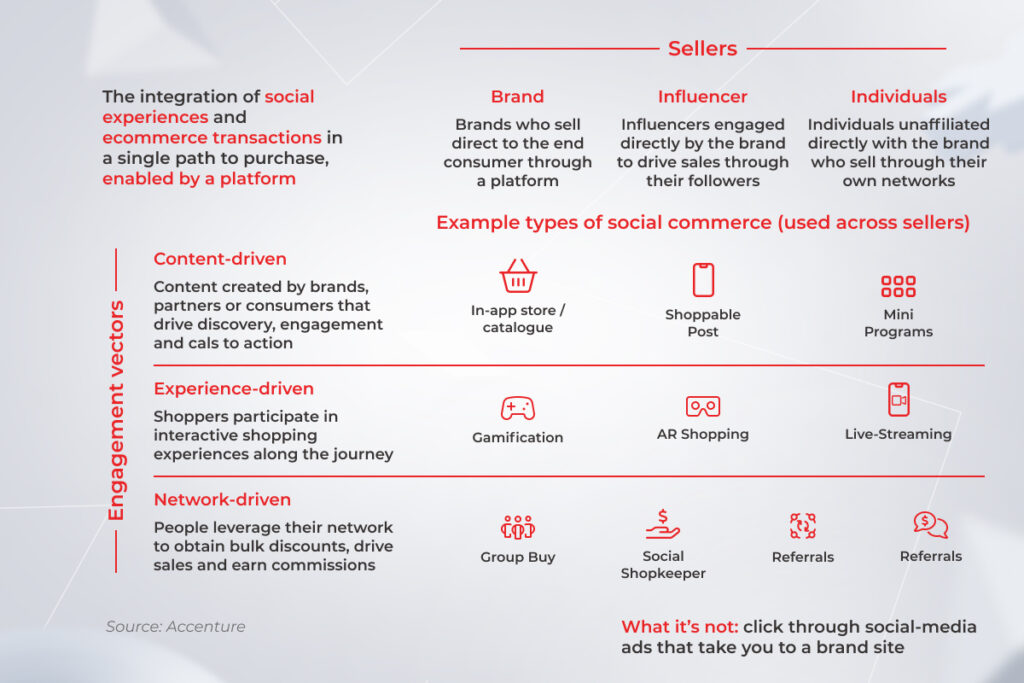
But the complexity of products or services is exactly what makes digital so convenient for corporate sellers. Advanced product attributes, specs, warranty information, and other product data are easily communicated and served through a digital-first channel.

And if the nature of your assets does make opportunities in B2B distribution impossible, this is typically not true for your full portfolio. You can think about offering complimentary products and support services via digital channels.

Ecommerce is ill-suited for the intricate B2B pricing and contracting model

Business-to-business suppliers have multi-tiered buyer-seller agreements. Company-level contracts, volume pricing, bulk buys, geographical factors, and government-preferred supplier arrangements demand the medley of B2B ecommerce pricing strategies.

Thanks to account-based personalization, the majority of ecommerce solutions allow you to construct an accurate algorithm that covers all those price variables. When your B2B customers log into the portal, they can see all buyer-specific pricing based on the negotiations, buying volume, and other factors. This makes even the most intricate buyer cycles easier to manage.

B2B customers cannot do without assistance to complete a purchase

Long gone are the days when corporate buyers preferred the sales representative to take the lead. In fact, last year, revenue generated from in-person sales dropped by 5%, with most of it flowing as you might guess — toward ecommerce. We’re likely to see this trend continue, as the new breed of B2B buyers flock to digital channels that make ordering as simple, fast, and straightforward as possible.

McKinsey’s recent B2B Pulse Survey highlights buyers’ growing comfort with remote and self-service spending:

  • 73% of buyers are ready to place orders worth more than $50,000,
  • 39% are ready to spend over $500,000,
  • 20% are willing to spend over $1 million online.
Maximum order value through digital self-service and remote human interactions for a new B2B product or service, % of respondents

Most B2B companies get by without an ecommerce platform

B2B might take it longer to reset than B2C, but don’t let this curve shadow the importance of digital ordering. As of 2025, 71% of B2B firms have already tapped into ecommerce, with online sales now representing more than a third of their revenue. Plus, ecommerce has been their top-performing channel for four years running.

Statistics showing the effectiveness of B2B ecommerce

To further solidify this point, it’s worth mentioning that the annual US B2B ecommerce sales soared to nearly $2 trillion. So if you’re not here, you cannot catch up to that value.

In-person interactions reign supreme for B2B buyers

There are still many traditional B2B buyers that would prefer picking up the phone and placing an order directly with a sales rep. However, two-thirds of corporate customers intentionally opt for digital engagement. It means that your in-person follow-up or a call might stay in the way of high-ticket purchases.

A basic ecommerce solution is enough for your B2B needs

While you might think that B2B ecommerce has stepped onto the scene only a few years ago, for the majority of B2B companies it has already dethroned in-person sales as the leading money-making channel. In turn, leaders are ramping up their ecommerce investments.

So, to fully embrace the benefits of an ecommerce website, you require a head-on approach to your build-out — bundling service, product, and experience excellence. 

Find your way to online B2B sales or get sidelined

With an estimated third of sales in question, e-commerce is a mainstay for successful B2B sellers. However, the ascent of digital selling won’t send in-person interaction into oblivion. Instead, a mix of selling channels will enable broader, deeper customer engagement and unlock unmatched market opportunities for the B2B sector.

To tap into that double value of hybrid selling, you need a future-proof B2B ecommerce platform that grows in step with your business. We, at *instinctools, help global B2B sellers adjust to the new market dynamics and cultivate tech capabilities that make ecommerce simple and profitable.

Ready to grab the benefits of B2B ecommerce?

Share your project details

FAQ

Why is B2B ecommerce so attractive?

Business-to-business ecommerce offers a number of benefits over traditional brick-and-mortar businesses, including 24/7 operation, global reach, and lower overhead costs. Not to mention, B2B ecommerce is more convenient for both buyers and sellers.

Among other benefits of ecommerce websites are their ability to deliver self-service options, excellent customer experience, and tailored pricing options.

What are the four stages of ecommerce development?

B2B ecommerce development typically includes the following stages:
– Discovery — business analysis, requirements identification, planning, and strategizing.
– Design — system architecture, wireframing, prototyping, design of branded visuals.
– Development — front- and back-end development, integrations, API development, testing.
– Delivery and maintenance — solution deployment, ongoing maintenance, feature updates, and support.

How do I create a B2B ecommerce?

As B2B solutions tend to be more complex compared with B2C, companies usually opt for custom solutions designed with their business needs in mind. To build a bespoke platform, you need to contact an experienced B2B ecommerce development company. Your vendor will analyze your requirements and suggest an optimal solution for your needs.

What is B2B ecommerce with an example?

It is the process of selling products and services between two businesses through a digital platform. Its key feature is that it enables corporate buyers to buy items or order services at scale.

Some platforms, such as Alibaba.com, focus on connecting buyers and suppliers from around the world. Others, such as Amazon Business, focus on providing businesses with a one-stop shop for all their procurement needs.

What are the key capabilities of B2B integration?

In B2B ecommerce, integration refers to a process whereby your ecommerce platform seamlessly exchanges data with other parts of your digital infrastructure. Typically, an ecommerce platform is integrated with inventory, sales, marketing, and accounting software. The key capabilities of such integration depend on the solution your ecommerce platform interfaces with.

6 Steps to Custom Ecommerce Solutions: a Comprehensive Guide

Key highlights

  • Merchants flock to custom ecommerce solutions on a quest for unique brand identity, greater control over features, more satisfied customers, and increased sales.
  • It’s not enough for sellers to offer omnichannel experiences, they also need a tech moat to fit into the next generation of ecommerce.
  • Complex ecommerce platforms require a blend of cross-functional expertise and hands-on experience — consolidated under the care of a trusted vendor.

Over the last few years, custom ecommerce solutions have got a facelift as a crisis response to shrinking customer wallets. Washed over by generative AI, AR/VR, IoT, and advanced data analytics, of-the-moment tailored ecommerce platforms are no longer limited to basic storefronts. Instead, they evolved into complete ecommerce solutions that integrate R&D, logistics, warehousing, and sales. 

To thrive in the market, you need to know what it takes to deliver ecommerce software of such caliber. Today, we’ll crack the code for high-impact custom ecommerce solutions, peering into the technicalities and competitive features that flip the script in 2025.

1. Align the type of store you want to build with your business model

Custom ecommerce development is a complex landscape with a slew of variables. At the onset of your project, the initial focus should be on the high-level image of your ecommerce solution and its interplay with the commercial arena your company operates on:

B2C stores

Business-to-consumer solutions help users complete a task with minimal effort by revolving around simplicity and straightforward sales cycles. From a technical standpoint, this manifests in intuitive UI/UX, distinctive visuals, and an integrated solution core.

To hit their ROIs, B2C companies focus on repeat purchases at a massive scale. This calls for in-depth data analysis, marketing automation, and 24/7 customer support — all folded into a single ecommerce solution. At the same time, B2C platforms employ omnichannel capabilities, which also require corresponding multichannel integrations.

Variety — whether it’s payment options, product demos, or self-service — is also at the front of the mind when building a B2C platform.

B2B portals

If you operate according to the B2B business model, here’s one thing you need to understand: B2B customers’ purchasing journey is not linear. It’s pretzel-shaped. Along with a complex funnel, a B2B company often caters to vendor partners, resellers, or affiliate companies, selling products or services through manifold channels. As B2B customers need to be able to be assigned to multiple accounts, B2B software is often a multi-model interface.

B2B buying journey flowchart illustrating steps from problem identification to supplier selection and purchase decision

Also, customer acquisition costs are notably higher compared to B2C, making high levels of the customer’s experience a crucial success factor. Lead and scoring automation, quote management, forecasting, and enhanced analytics are the features that make sure no high-ticket lead slips through the cracks.

Along with rich business-focused functionality, an ecommerce platform should also integrate easily with essential business software such as ERP, PIM, CRM, and OMS to support an integrated business view. Compliance and data security often enter the equation as the core ingredients of a custom ecommerce platform for business-to-business companies.

Marketplaces

If you are a company that facilitates the exchange of goods between sellers and buyers, a tailored marketplace would marry well with your business model. Typically, it is a three-sided platform with user-specific features for the admin, seller, and buyer.

Bar chart showing the most popular online marketplaces worldwide: amazon, ebay, aliexpress

The selling side of a marketplace should be supported by a robust order management system, product catalog management software, and easy-to-use dashboards. Tools for messaging and communication bridge the gap between sellers and customers.

The buyer side typically bundles a streamlined cart and checkout flow with multiple payment gateways, order tracking, and powerful product discovery with tailored suggestions. General marketplace management tools, sales and marketing analytics and a tax management module help marketplaces operate effectively across regulations.

2. Decide between a platform-based or a fully custom ecommerce solution

With a solid product vision and well-defined target audience at the ready, you should then decide on the development approach to kick-start your custom ecommerce software development.

Custom ecommerce development approach

A fully custom solution is built from the ground up, taking into account even a minute business requirement.

The ecommerce custom development approach allows you to create a unique, fully compliant platform with a custom ecommerce design, aligned with evolving business needs and data standards. The clean and flexible code base of fully custom ecommerce software readily welcomes any extensions or modules you might need down the road. Similarly, it easily merges into your business ecosystem, resulting in data traceability and performance visibility.

On the downside, custom ecommerce development might be more expensive and time-consuming to develop, especially with a lack of qualified experts. To drive down your TCO and increase time-to-market, your development team can tap into an open-source build that can then be customized and upgraded to match your standards.

Here’s when a fully custom ecommerce platform is right up your alley:

  • You operate in a highly regulated market
  • You have complex back-office requirements 
  • You employ various selling channels 
  • You sell to different customer segments
  • You need to connect multiple business systems

Vendor-based ecommerce development

A platform-based ecommerce solution is a viable entryway if you want to reduce your development costs and access out-of-the-box features fast. In this case, your development team builds an ecommerce platform for your business based on the ready-made features from a vendor such as SAP Commerce or Opencart. Although it is not built from the get-go, the platform is still fine-tuned to your needs, albeit with some limitations.

Thus, if your vendor does not offer a particular integration, plugin, or API, you’ll have to settle for what’s available. And although compliance and data security are offered by default, those parameters are not as granular as in fully custom solutions. Also, a vendor-based ecommerce solution places a layer of control between your customers and your business as well as charges recurring fees that can net a tidy sum in the long run.

A vendor-based ecommerce is a valid choice in the following cases:

  • You are a fledgling ecommerce business with a modest customer base
  • You need to hit the market fast
  • Your compliance and data security requirements are moderate

Below, let’s take a closer look at the core differences between the two options.

CriteriaFully custom ecommerce developmentPlatform-based ecommerce development
Cost Considerable upfront investment, lower long-term TCOFewer initial expenses, recurring fees
Speed-to-marketMediumHigh
ScalabilityHighLow
Data security and complianceBuilt based on your unique compliance and data security requirementsGeneric, caters to a broad audience
Customization optionsFully customized to your needsOut-of-the-box features, plugins, extensions, and add-ons
CompatibilityFully compatible with your digital estateLimited integration
Brand imageHelps stand out in the market with distinctive, branded UIsReady-made design templates

Summing up, there’s no universal answer to this dilemma — you should call the shots, minding your business goals and budget expectations. 

Enter the ecommerce market on your own terms

Contact our team

3. Guide your way to an impeccable customer experience

Today, over 73% of customers point to experience as an important factor in their purchasing decisions. A successful transition to the next horizon of customer experience is inseparably linked with the latest technologies. The latter allows you to match the evolving dynamics of shopper preferences and compare favorably with other contestants. 

Omnichannel commerce

The purchase journey is never a straight line. Today, B2B customers are using up to 10 channels to complete their buying journeys. Therefore, the holy trinity of face-to-face, remote, and self-service commerce is not an option, it’s a prompt response to channel plurality. 

The omnichannel model rests on seven pillars — strategy, information flow, the physical flow of products, process automation, and last-mile delivery. From a technical standpoint, this can be supported through integrated marketing, merchandising, accounting, and supply chain management for all channels. 

The ability to easily switch between channels and an integrated customer view are also among the core prerequisites for value-added commerce.

Hyper-personalization

At-scale personalization is a harbinger of high customer satisfaction anticipated by over 70% of customers. Conversely, the lack of personalization results in a bad customer experience and leads to 67% of shoppers getting frustrated with the brand.

Consumers no longer fit into traditional archetypes and buying patterns. What consumers want is changing, too. Hyper-personalization and the connection associated with it allows companies to grasp and respond to the unique needs of each customer, supporting the care-of-one approach that differentiates high-performing ecommerce brands.

— Chad West, USA Managing Director, *instinctools

To deliver on the promise of hyper-personalization, retailers need to orchestrate the four Ds — data, decision, design, and distribution. By using data and analytics to create highly personalized shopping experiences, companies can maximize the value at every stage of the customer life cycle, driving more sales and revenue. 

This paradigm is also supported by dynamically served content that adjusts to users’ behavior, preferences, and interests in real time, relying on ML algorithms. The final stretch in serving personalized interactions is connecting data, a decisioning engine, and design elements to the marketing technology systems that deliver experiences to consumers.

A diagram of a customer data platform (CDP) ecosystem, connecting data from distribution channels with data management tools and a decisioning engine

Advanced technologies

Add a coat of extra customer engagement to the purchasing process, cutting-edge technologies are another building block of a successful shopping experience. In particular, immersive technologies, bundling AR and VR, offer an untapped opportunity for companies in the fast lane. By 2030, the global immersive tech market is projected to grow from $40.64 billion in 2024 to $177.5 billion by 2031.

Ecommerce Solutions
Bar chart showing global immersive tech market growth from $40.64B (2024) to $177.5B (2031) with 22.32% CAGR

From product design to virtual showrooms and try-ons, the immersive reality in ecommerce allows customers to know exactly what they’re getting before they place an order — which is not possible with static product images. Recognizing the potential, established brands such as BMW, Ikea, and others have long embraced immersive techs to diversify shopping experiences.

Retailers like Bloomingdale, Burberry, and Nike parlay immersive technologies into metaverse shopping experiences, where customers’ avatars can interact with branded products.

Leading the pack of cutting-edge ecommerce techs is generative AI that has already made its way into customer experience, supply chain management, and even product design. Leading retail giants, including Walmart, eBay, Amazon, and Target, adopted gen AI to improve product search, power shopping AI agents, and generate product information at-scale.

Global ecommerce businesses also capitalize on the growing opportunities of IoT in ecommerce that stretch from inventory visibility to omnichannel fulfillment. Paired with computer vision, these two can automate stock management and deliver a better in-store experience.

Social commerce

By 2028, the global social retail industry is estimated to account for 21.4% of all ecommerce shopping experiences. The social commerce notion refers to the unique shopping experience that takes place on a social media platform, spanning all stages — from product discovery to the check-out process.

Social commerce overview: sellers (brands, influencers, individuals) with engagement vectors (content, experience, network-driven)

On social media, retailers can engage potential customers via content, experience, or networks. Each of these vectors requires specific levers, be it AR shopping or influencer marketing. For companies, social commerce provides a way to connect with consumers in new ways and unlock untapped revenue streams. 

Take your ecommerce business to new heights

Schedule a call

4. Deliberate on custom ecommerce design

Your custom ecommerce website design is what can lure in or push away your customers. To get it right, you need to focus on several hallmarks.

Optimization for mobile

Mobile phones account for the largest share of commerce website visits, constituting around 77% of retail site traffic globally and generating 68% of online shopping orders. Therefore, making your ecommerce store fit for mobile use automatically helps improve your conversion rates. When building for mobile, your UX/UI design team can take a responsive, mobile-friendly, or mobile-optimized approach.

The mobile-friendly approach does the bare minimum of mobile design, meaning that website developers just scale down the desktop website to fit smaller screens. Responsive ecommerce websites are more user-friendly as they automatically reformat themselves to match all the specs of different mobile devices. Designed for mobile-first searching from the get-go, mobile-optimized platforms are a step above responsive solutions.

— Andrey Haurylau, Senior UI/UX designer, *instinctools

Intuitive navigation

Your ecommerce site visitors ground their interactions on what they find to be well-known. By reinforcing this intuitive approach in your custom ecommerce web development, you can rake in more revenue and give a boost to the customer and user experience.

Simple, straightforward navigation seamlessly guides the user during their entire purchasing journey — through recognized symbols, uniform design elements, cues, simple search, and website taxonomy.

Minimalistic approach

Ecommerce platforms usually carry a lot of content, so a cluttered web page with visually complex designs can make the search even more complicated. Minimalistic designs shed light on key selling points, without disrupting the user experience.

example of minimalistic design

Moreover, no-frills ecommerce websites load a lot faster and more consistently across devices, contributing to better site discoverability on search engines. The key to minimalistic design lies in a thorough understanding of your user goals so no unnecessary elements stay in the way of customer journeys and seamless user experience.

SEO-optimized online store

Ecommerce site development should also be done with search engine optimization in mind. In simple words, it means optimizing the content and structure of your website so that search engines can locate and surface your site high in search.

Examples of ranking signals that your design team can take care of include page load speed, indexable content, user experience metrics such as bounce rate, and website structure. With all those elements mastered, your custom ecommerce site gets the attention and trust of search engines and steers more organic traffic to your store.

5. Take care of integrations

End-to-end integration between your ecommerce platform and business systems is an important tenet of ultimate data visibility and operational efficiency. By baking your digital systems into an interoperable organism, you also enhance customer experience, minimize administrative burden, and improve data accuracy. 

Payment systems

Getting an ecommerce platform to accept payments online implies integrating it with one or multiple payment gateways. The latter facilitates transaction flows between customers and merchants via secure and encrypted pathways. The choice of a payment gateway is based on the currencies you accept, transaction fees, payment methods, and your compliance needs.

a screenshot displaying payment methods on Amazon

The benefits of this integration include flexibility of payment methods, increased security of financial data, faster transactions, and the ability to operate in a global arena.

CRM

A CRM ecommerce integration releases all customer data captured on your website, including purchasing history, browsing data, and others. By getting this data analyzed, you can achieve a holistic view of your customer and feed it into marketing and sales systems for informed activities. 

This integration also provides you with a compass to optimize your inventory levels. Your customers’ buying patterns, spending habits, and others help you decide on the top-selling and high-margin products as well as predict inventory needs. 

ERP

ERP ecommerce syncing leaves you with more time on your hands and links crucial data points together. From customer data to orders to shipping, all information is shared automatically between systems, which minimizes your product management effort, facilitates pricing control, and streamlines order processing.

enterprise resource planning ecosystem

A centralized enterprise resource planning system collates orders across locations (online, showroom, email orders, etc.), indicates inventory availability, and updates product descriptions across channels. Your teams can also generate reports on demand, including Balance Sheets, P/L Statements, Trial Balance, Cash Flow, and more to ensure transparency of web transactions and easy access to financial information.

Logistics software

Logistics software is in charge of ensuring the efficient flow of goods, starting from inventory management to last-mile delivery. Integration of ecommerce and logistics operations allows businesses to manage shipping and fulfillment from one location. Once an order is placed, it gets automatically processed and sent to the nearest warehouse or fulfillment center.

logistics process in ecommerce

Uninterrupted data exchange between the two also helps companies keep track of inventory and ensure that products are always in stock. Additionally, integrating ecommerce with logistics delivers a more seamless experience for customers by allowing them to track their orders from start to finish. 

PIM

Product information management (PIM) is a circulatory system for businesses with a high volume of SKUs, so integrating it with customized ecommerce solutions is crucial. Along with accurate product information across all channels, PIM software helps streamline supplier data, consolidate supply chains, and improves internal collaboration.

product information management system

Social media

With more eyes on social media than ever, not tapping into the market means losing potential customers and sales. This integration bridges data between social media engagement, website visitor behavior, and sales to analyze purchase patterns, campaign performance, and marketing initiatives. Also by connecting with social media platforms, you can dabble in live and shoppable commerce, doubling your revenues and distribution channels.

Accelerate radical growth through end-to-end integration

Let’s get to it

6. Find the right vendor

Delivering high-impact ecommerce software requires cross-functional expertise and hands-on experience in ecommerce development services. To bring a dedicated team of experts on board, you need to make sure the selected B2B ecommerce development company has at least 10 years of experience, a track record of successful custom ecommerce development solutions, and a rich technology stack to implement your ambitious ideas.

Another important consideration is the readiness of your software vendor in providing training, maintenance, and update services to match your evolving needs in custom ecommerce website development. Ideally, this readiness should be supported by on-demand team augmentation services to scale your capacities in a specific development field.

An accomplished custom software development partner also possesses profound advisory expertise and can provide the full picture of your TCO, perform a comprehensive audit of existing business systems, and suggest optimal solutions to your requirements. If you have compliance-heavy business processes, pay attention to the data security standards the vendor works with.

Turn your ecommerce solution into a growth engine

Today, operating a successful ecommerce company requires investing in the right digital capabilities and placing digitally driven commerce at the center of business. Data-first architectures, integrated sales management, and a flexible solution core will guide you to a new performance frontier and create a personalized experience across all channels. 

However, a complex consumer and technology landscape makes it hard for companies to place their bets carefully. To size up the impact on their balance sheets, ecommerce business owners need careful guidance from technology partners, paired with a wide selection of tech solutions and ongoing support.

Sell at the speed of life through our custom ecommerce platforms

Reach out

FAQ

What is a custom ecommerce website?

Custom software development for retail refers to the process of planning, designing, and implementing a web solution that is specifically tailored to solve the challenges of a particular company. A custom ecommerce solution can include a custom look and feel, features, and integrations that are not available in an off-the-shelf solution.

What are ecommerce solutions?

These are platforms that enable businesses to sell their products and services online. These solutions span a variety of tools, including a full-on storefront, payment processing software, product information management systems, and more.

How much does a custom ecommerce website cost?

There is no universal pricing that can apply to all business needs. The cost of custom ecommerce development services hinges on the development approach (platform-based, custom, open-source), the core features, the design, and the hosting and security needs.

How do I create a custom ecommerce website?

You can either choose a ready-made platform or turn to a custom ecommerce web development company. In the second case, a dedicated team of experts takes over the entire development process of your custom ecommerce solution, which helps set your initiatives for success and tap into long-term value.

What are the stages of ecommerce development?

Any custom ecommerce solution goes through the stages of planning, design, development, testing, implementation, and maintenance. Following an Agile-driven approach, our team delivers your custom ecommerce websites iteratively to increase the quality of your solution.

Which is the best ecommerce development platform?

Some of the most popular ecommerce development platforms include SAP Commerce, Opencart, and Zoho. Reach out to our consultants to choose the right one for your needs.

How many hours does it take to build a custom ecommerce website?

The timing varies based on the complexity of your custom ecommerce solution. On average, it may take up to 16 weeks to build a complex custom ecommerce platform from scratch.

A Not-to-Miss Opportunity: How to Build Data Products

Becoming data-driven has been a long-standing ambition for companies since lavish amounts of data came into sight. But the transition to a data-centric company is not that simple. Today, top performers are setting the bar high — thinking of data as a stand-alone product rather than a side activity. 

A data product strategy is hailed as the fastest way to realize near-time value from data and pave the way for new revenue streams. Around 84% of the market value of S&P 500 companies stems from intangible assets, including data and software. 

Any company can build a data product, so why not grasp this opportunity and get the most out of the insights you already have? Let’s dive deep into data product development and its benefits.

Why does a project mindset no longer work?

Over the past few years, companies have changed their perspective on how teams operate to better position them for adopting new technologies. A transition from a project-driven to a product-based mindset takes center stage in this transformation. Why? Because a project approach has been rendered ineffective in managing data assets.

Takes more time than it could

Whenever a business function stumbles, the team kicks off a project to solve the problem through data technologies. The project initiation sets in motion the entire lifecycle of data collecting, cleansing, and aligning it with a specific use case. In this context, each business case requires a separate data preparation cycle.

Focuses on completing tasks rather than delivering value to customers

A project is born and planned to deliver a clearly defined scope, within budget and on time. Rather than focusing on evolving customer needs, it is rooted in a specific business case, task, and process. There is no place for personas or recipients of value, while data products are wired to solve a core user need.

Fails to connect the dots across the company’s data sources

A project mindset supports a silo mentality where data exists in isolated applications and is taken as a necessary step for project needs. Therefore, a project framework neither channels data opportunities to the entire organization nor provides employees from different units with easy access to data.

Conversely, a product-first vision allows teams to set up their data estate as an interoperable organism, with each asset contributing to the whole picture.

Makes it impossible to reuse the outputs to address other use cases

As a project originates as a response to a specific task, its outcomes can hardly be repurposed for other projects. In this case, both data sets and technologies are stored as use case-specific assets instead of becoming a unified hub. This fragmented structure doesn’t accommodate evolving requirements or support multiple outcomes.

data product strategy

Leads to a heavy reliance on the data team and an array of bottlenecks

Within a project framework, data is a luxury kept in the hands of data science teams. Individual teams have to collate the data they need, which results in effort duplication and a raft of dependencies. Most of the time, the input isn’t aligned with business use cases and doesn’t scale to end-user needs.

What is a data product?

A data product is a self-adaptive and versatile power plant built at the intersection of data, industry insights, software engineering, and analytics. The input it produces can fuel the development of brand-new data products designed for other business contexts. Data products are built on top of data management systems such as warehouses or lakes.

data product strategy

Spotting opportunities for new value through different types of data products

Data products come in different forms and shapes. Based on their granularity, organizations can make them available within a specific business unit, hand out to the entire company, or market beyond the company’s settings. Let’s go over these top three data products examples:

Used within a single business unit

This group of products provides data as it is, with some level of processing. The main goal of this product cohort is to improve internal efficiency and augment decision making within a given area of business activity.

Most examples of data products in this category revolve around an analytical record or dataset, such as customer data. For instance, this can be a customer 360 dataset added to your CRM application to support the decision-making process of the sales department.

Cross-organizational

This group of products isn’t limited to a single business domain. With innovation as their core value, such data products make data available to users across the entire organization, enabling them to come up with ideas for other breakthrough products and services. As a result, this product category supports a business unit’s decision making and accelerates time-to-insight for other units.

Data governance plays an important role here as all business units must agree on the right levels of service level objectives, data quality, and lineage. The usability of enterprise-wide data analytics solutions can be enhanced through experiment sandboxes that allow for exploring new data use cases.

Used outside the organization

At this level, an organization gives access to the data product to external or third-party providers to drive new revenue streams. A central data team makes datasets compliant with relevant regulations and governance rules. Authenticated and easy data access is an important prerequisite for an external data product.

For example, a medical device manufacturer can develop a new monetization opportunity by providing device data to healthcare providers via compliant APIs.

Anatomy of a data product: four core components

When building data products, organizations can present them to end users through different types of interfaces and interactions.

Datasets

A dataset is the most basic and well-known type of data product presentation. In this case, it should be a reusable dataset, stream, feed, or API that backs up various business objectives.

Code

Data as a product may come in the form of a transformation code that changes an existing solution or creates the data product on top of the existing basis. You can also pack it into out-of-the-box data models that can be combined to construct flexible, scalable data models for different business domains.

Algorithms and analytics models

Reusable machine learning models are another way to pack data products. Instead of locating a suitable model from an external resource and training it with the data, organizations can apply reusable machine algorithms to solve a variety of different problems. The algorithm feeds on the underlying data foundations while improving the applications.
Dashboards

Most data visualizations and dashboards available through interactive visual interfaces do not cover domain-specific needs, such as a healthcare context. Reusable data visualization components and dashboards, on the contrary, can be customized and extended to meet end users’ specific needs.

Uncork the success of the product-led vision

According to Harvard Business Review, companies with a data-led product vision reduce the time it takes to adopt existing data heritage in new business cases by 90%. But along with accelerated innovation, creating data products allows companies to tap into other, equally essential business benefits.

Drive customer value

The product mindset places customer feedback at the heart of all processes and bases your application on real-time insights, rather than static data sets. Moreover, it enables you to serve data in ways that your customers can leverage, be it a warehouse for a data analyst or dashboards for business users.

Open up new revenue streams

Core data products are based on foundational data aggregated by your company. You can generate incremental revenue for and from every department or derive it from external customers by repurposing this data for other business use cases. For example, Apple shares users’ Health app data with healthcare organizations participating in the Health app.

Speed up time-to-insight

Data products enable more speed and efficiency as they are essentially pre-built. Teams don’t have to spend much time collecting and preparing raw data as it’s available on data platforms in a ready-to-use format.

data product strategy

Leverage real-time data

Data-as-a-product approach reinforces real-time business intelligence, allowing you to analyze data as soon as it’s available. As fresh-baked input is stored in a structured format in an integrated database, companies can both provide a real-time response for operational use cases and get updated about shifting consumer behaviors.

Make data available for everyone in the business who needs it

Product-led is a part of the data mesh architecture that empowers domain teams to perform cross-domain data analysis on their own. This approach democratizes data accessibility, making relevant enterprise data readily accessible for all teams.
Consume data easily

Treating data as a product involves understanding how to make the input easily digestible for the end user. Unlike raw datasets, data products are wrapped into a well-defined interface (e.g. visuals, apps, and others), which improves comprehensibility of insights for both internal teams and external customers.
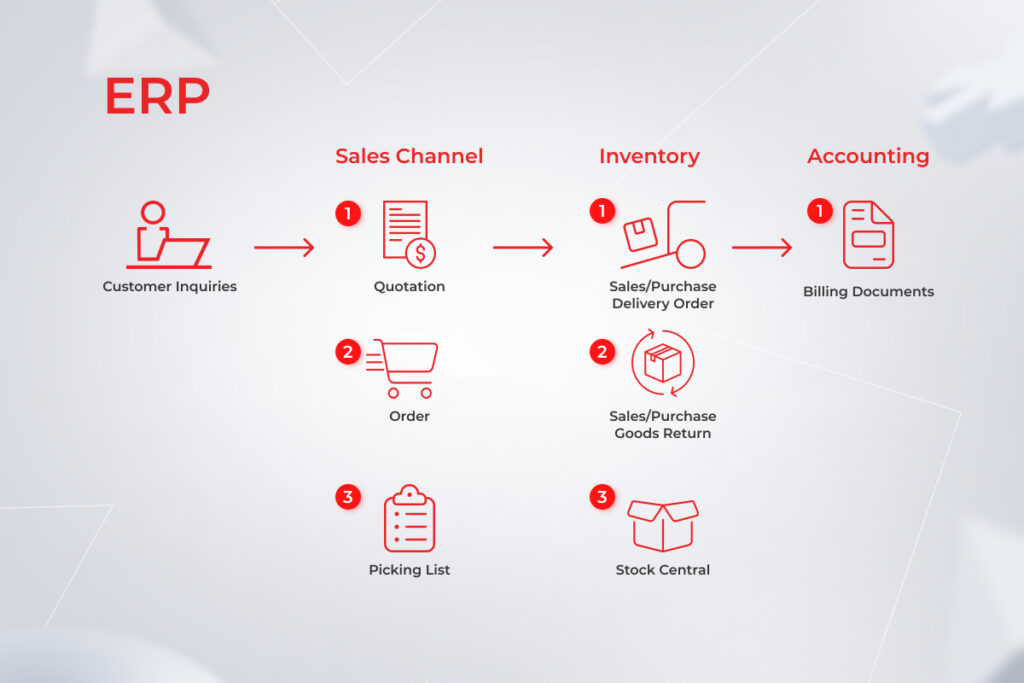
Don’t let your data go to waste – productize it

Find out how

Crafting a data product

A data-as-a-product mindset organizes the data life cycle along the lines of a production process. Just like any other commercial offering, a data-based product follows an iterative path to make sure it delivers the desired business outcome.
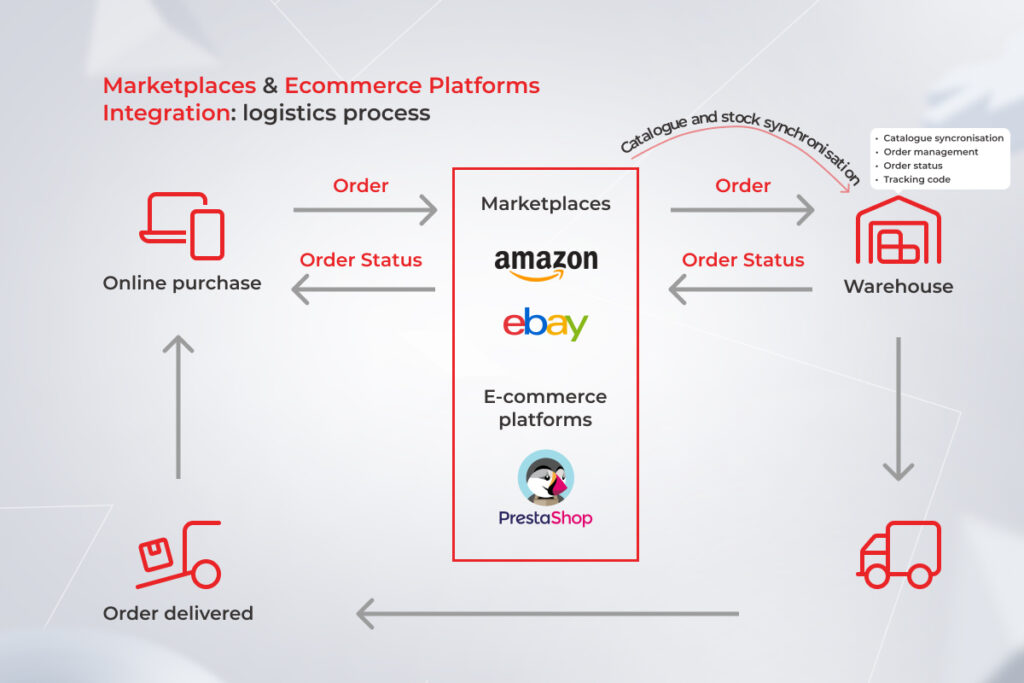
data product strategy

Ideation

The ideation stage in data product development is the first point of entry into the design process. It is where business objectives and requirements are defined, documented, and analyzed. At this stage, a product owner is assigned.

Design

Following the defined requirements, the team decides on whether they are developing a from-scratch foundational product or a derived one based on other core data models. The product’s granularity also plays a central role in defining the high-level design. The more granular it is, the more effort end users have to make to navigate it. This stage also finalizes the creation of a conceptual data model.

Engineering

At this stage, a cross-functional team drives the product from the idea phase to the actual building. This stage results in an MVP, an early product version that collects the feedback of a select group of lighthouse users.

Release

As the team iterates on the users’ feedback, the product gets new features and updates. The new versions, such as MMP, are then rolled out to the customer.

Maintenance

Once the product is out into the wild, a support team is assigned for troubleshooting and ongoing maintenance and support. Center of excellence teams disseminates best practices for easier product adoption, while the support team monitors the data pipelines associated with the product.

The bedrock of effective data products: expertise as the foundation

To create data products, companies need to develop a wide range of data management capabilities supported by data-first technologies, hands-on technological expertise, and profound domain knowledge.

Technology and data governance backbone

An efficient data strategy allows organizations to derive sustainable value from enterprise data and make it easily available for creating data products.

  • Data gathering — systems of records that collect quality and valuable data from internal and external resources.
  • Data storage and integration — domain-agnostic, shared data platforms for both long- and short-term storage, including data warehouses, lakes, and operational data stores.
  • Data product management — a new organizational function to manage data quality, service level objectives, architectural improvements, and more.
  • Data visualization — visuals and dashboards that display a specific data product.
  • Cloud computing — scalable and flexible architectures that distribute data pipeline workloads.
  • Artificial intelligence — ML models that consume data products to assist decision-making.

Cross-functional skills

To create successful and compliant products, an organization also needs a data utility group. The latter includes product managers and stream-aligned domain data teams that provide operational and process assistance to data product teams. Business analysts, DevOps, and product managers, in turn, enable rapid iteration and product alignment with business needs.

Domain knowledge

To execute a high-performing data monetization strategy, you also need profound expertise in the area you’re developing for. This way, you can accurately assess the feasibility and value of use cases in the domain.

The key to sustainable value creation

Data has become on par with financial capital that helps businesses thrive in the digital age. Data products come with greater ROI, fit into multiple use cases, and bring multiple objectives over the goal line — with lower cost-per-use.

But to unleash the potential value, you need to lead with architecture that brings your enterprise data together, makes it traceable and easily accessible. Coupled with the right expertise and operating model, it helps generate reusable data products with future-proof value.

Let’s make your data more valuable

Schedule a call

How Digital Product Engineering Services Help in Growing Your Business

With more eyes on technology innovation than ever before, industry leaders have rapidly cruised toward product engineering. However, having innovative products in your portfolio doesn’t cut it anymore. Today, it’s more about building a perpetual circle of scalable innovation with future-proof digital solutions that grow in lockstep with your business.

This particularly applies to organizations that revolve around technology or have digital products as their main revenue source. So if you’re a digital-first retailer, healthcare provider, or an agriculture techpreneur, you should take no chances when it comes to the quality of your software. 

Let’s see how a digital product engineering company can maximize the value of your digital estate and accelerate your response to shifting industry trends.

What is digital product engineering?

Digital product engineering services mean the full scope of IT architectures, technologies, and development processes to design, implement and adopt high-value digital products in high-load environments. The process takes over the entire development lifecycle — from conception to implementation — and advances in fast iterations. 

This uninterrupted flow ushers in ceaseless innovation, enabling companies to release lasting products and adjust them with added speed.

product engineering

The five Pillars of digital product development services

According to Gartner, worldwide IT spending is on pace to grow by 5.1% in 2023. But not each IT endeavor turns into a profitable venture. Around 70% of digital transformation projects go downhill, falling short of their objectives, which often has a knock-on effect across business operations. 

Having your project implemented within a product engineering framework increases the odds of technology success. Supplemented by quality processes, automation, continuous integration, and deployment, product engineering maximizes the value you get from the development lifecycle.

Velocity: increasing your speed to market for more impact

A double squeeze of scarcity and high rates has made talent sourcing an uphill battle for companies. IT executives list talent shortages as the most significant roadblock to the adoption of 64% of new technologies. 

Long and tiresome hiring cycles prevent companies from hitting the market first and claiming leadership. To overcome this headwind in local markets, businesses either augment their in-house teams with outsourced talent or delegate the entire project to a dedicated team of developers. 

We, at *instinctools, help global organizations get resource elasticity for product engineering by offering on-demand workforce scaling. Talent expandability allows your company to create new products fast and adapt swiftly to evolving goals and market demand.

Accelerate your innovation efforts

Get in touch

Flexibility: holding the door open for new opportunities

A narrow product engineering mindset goes only so far. Conversely, a technology- and methodology-agnostic approach is the crown jewel for product creation as there are a lot of variables that go into the process. Therefore, flexibility as a philosophy is essential to move with the changes that are inevitable during the product development cycle. 

Ultimately, your development team should be able to identify the best methods to achieve the desired results based on mutually clear goals — regardless of their subjective preferences. It means that a team embeds natively into your company, inheriting processes, values, and passion for excellence. 

Quality and reliability: increasing your speed without sacrificing, sometimes even improving, your quality standards

A digital product is not solely in the tech, it’s in the processes and techniques. Your product development team must follow industry-best engineering standards and practices, followed by calibrated management practices. 

A great emphasis in software product engineering should be put on the following aspects: 

  • Ultimate security — threat modeling, compliance, test automation, and vulnerability technologies.
  • DevOps practices — continuous development, integration, delivery, and deployment. 
  • Testing — test-driven development, i.e. writing unit test cases based on software requirements.
  • Compliance — developing products to meet the applicable market compliance requirements.
  • Agile-driven development — iterative frameworks with tools and adaptability to changing requirements.

Paired with the deep expertise of your dev team, these building blocks build a culture of continuous growth and excellence, focused on identifying, prioritizing, and delivering new opportunities.

Cost-efficiency: reducing the complexity and cost of innovation

Along with high quality, digital product engineering should have a value-based pricing structure that aligns the cost of innovation with the benefits it entails for the business. And you can reach the optimal value-cost ratio by cutting costs, increasing value, and leveraging economies of scale.

Setting up an offshore development center for your product engineering is one of the ways to bring down costs while enhancing the quality and speed of innovation. ODCs are not usually packed with the same overhead costs that in-house offices are, and they have access to unlimited talent pools for each skill and technology.

Customer-centricity: putting your business goals at the heart of all processes

Great product management demands a near-obsessive focus on business value and a personalized approach. It’s also about delivering value already in the development process, by enhancing the quality of your solution through experienced delivery management and the team’s concerted effort.

Product engineering teams at *instinctools take an extra step to make the client a focal point of all processes. From long-term collaboration to excellent delivery management to workplace flexibility, our dedicated teams know what it takes to create the best experience for the customer.

Hire a dedicated team of professionals

Book a call

Accelerating reinvention and value-creation for companies of all sizes across multiple industries

As a digital product consulting and development company with 23+ years of experience, *instinctools has been working across all areas of product engineering. Whether it’s automotive, healthcare, or education, we put our knowledge and experience to deliver game-changing solutions — from ideation to delivery and growth.

Create new products

Companies have to continually ideate and deliver new products to cater to changing customer demands and markets. But when software development is not your core, it’s quite challenging to get the bandwidth for product development on-site and manage this process directly.

We get a lot of requests from clients who are looking for a turnkey development team with cross-functional skills to minimize the burden of product engineering. That was precisely the case with one of our recent projects where our experts built a multi-module application for a school. 

Over the course of two years, our team worked side by side with the client to deliver a feature-rich solution with a transportation web dashboard, iOS and Android applications, and other complementary functionality to ensure the safety of students.

Investing in quality product development from the start will also ensure customer satisfaction, loyalty, and success for any fledgling business. Our other project, implemented for the Bonnet company, demonstrated the value of the product engineering mindset for a start-up business. 

Backed by the profound expertise of our mobile app development team, the startup delivered a high-quality solution to the market and carved out a niche with a unique tech application for millions of EV drivers all around Europe.

Transform existing processes

As companies age, so do their products. But you don’t have to create a new product from scratch to inject a new-age technology stack into your services. Sometimes, it’s enough to upgrade an existing legacy product to reclaim market dominance. In this case, you need a skilled team on board that can integrate the new technology into your existing solution.

Some time ago, *instinctools was approached by IPwe, a smart intangible asset management platform, to add new functionality to their existing marketplace. The company wanted to leverage the NFT economy and monetize patents encased in non-fungible tokens. Talent scalability and a swift hiring process were the core consideration points for the IPwe’s project and we gladly offered our on-demand hiring model for a fast team launch.

Our team revamped the existing marketplace and transformed it into a stable and secure web platform with extended, blockchain-based functionality. The new solution contributed to revenue growth for the company and expanded the company’s service line.

Currently, the *instinctools team is providing maintenance services for the platform, enriching it with new functionality and monitoring the solution’s health.

Advance your offerings

Sometimes, your existing solution portfolio needs a little boost or auxiliary service to reach more customers and become more valuable from the user’s perspective. Here, the process of turning an idea into a fully manufacturable product should be aligned with the existing technology stack. 

This was the case for one of our products, where compatibility with a certain technology stack was the primary requirement. Our team was hired by Daimler AG to build the Help and Support System for the GLOBUS user community. The solution had to be integrated with the GLOBUS-native technology and provide different workflows for content creators, editors, and publishers.

To meet all tech requirements, our team decided to premise the solution on the pre-packaged CMS version of the *instinctools’ GateOne framework. It allowed us to reduce the time to market and build a compatible product, adept and responsive to real-time and dynamic customer needs.

On the road to success with digital product engineering services

To deliver a successful and commercially viable product against the odds, you need a consistent, wide-comprehensive development framework. A product engineering mindset improves your chances of creating products with long-lasting value that consumers love.

Keep in mind that the product engineering approach is only possible if you have a self-managed, cross-functional team of experts with deep expertise and solid industry knowledge. Successful product engineering rests on the right talent, calibrated flows, and a framework that leads to consistently great results.

Looking for a product engineering partner?

Reach out

Angular vs. React: Which One Reigns Supreme in 2025?

For years, engineers have been rolling out apps with Angular and React, and to this day, these web technologies remain top of mind, according to the latest Stack Overflow Developer survey. Created by competing giants, Google and Meta, both boast reusable, modular components designed to tackle similar front-end challenges. Yet their paths diverge in implementation and problem-solving, making them, as some say, apples and oranges. 

To help you sort through Angular vs React, our experts with a strong track record in web development have laid out a detailed, head-to-head comparison. Read on to choose the tech stack that fits your next project perfectly. 

Angular and React in brief

Before diving deep into the differences and similarities of Angular vs React, let’s first define the two technologies.

What is Angular?

Angular is a comprehensive JavaScript framework written in TypeScript, and created by Google. With HTML as the template language, developers are more inclined to define components in a clear and simple way. The framework’s rather rigid structure allows for cleaner coding practices that are easily testable and extendable. 

What is React?

React is a JavaScript library, which uses JSX instead of HTML for its templates. Developed by Meta, React focuses on the view layer of an application so developers can create high-performing UIs with ease. Boasting a robust network of supporters, React has rapidly emerged as one of the best choices for constructing user interfaces.

Angular vs React: differences and similarity

In this section, we will look closely at Angular vs React comparison, and examine some of the factors that can help you decide which option is a better fit for your project. 

1. Angular framework vs React library

To begin with, Angular and React are clearly differentiated from one another by their structure: the former is a framework, whereas the latter is a library. Developers may be prone to using the two terms interchangeably, but this distinction is significant.

In essence, a library is a collection of pre-existing code. It is specifically designed for one purpose: creating user interfaces. Libraries offer developers a wide selection of components and functions that can be used to create apps, but developers have to add dependencies to extend a library’s basic functionality. A framework often dictates an app’s architecture and requires developers to think inside its structure. Developers have to adhere strictly to the rules and standards set forth by the framework to utilize it successfully within their projects. 

2. Size and performance 

Given that one is a library, and the other is a framework, it’s quite natural to assume that React-based applications are lighter than Angular-based, but this is not always the case. React necessitates the addition of extra components, which inevitably makes the finished product larger. At the same time, Angular-based apps can be large as well, because they need to pull all the app’s components. It means that, although Angular-based apps may start out larger than React-based ones, the number of additional components added for React can easily negate the difference in size.

When it comes to performance, React stands out among its competitors due to its effective, unique approach to interacting with the DOM. We’ll learn more about this in greater detail as we move through this article.

Nevertheless, when deciding between React or Angular, standard performance benchmarks should not be the primary factor. While React’s architecture is more versatile, beginners are more likely to make mistakes when setting up the structure of an app. This mitigates any potential differences in speed between the two options.

3. Tooling ecosystem 

Both Angular and React offer a plethora of tools for developers. However, depending on the context, the framework may be more suitable over the library or vice versa. React offers developers a broad selection of testing tools such as Jest and Enzyme, together with powerful frameworks like Router for route optimization and Redux for state management.

Angular CLI is what makes Angular stand out, as it inclines users to adhere to the best development practices that simplify and standardize the work, making projects set up fast and requiring less effort from the developer’s side. For server-side rendering, developers may choose Angular Universal, while forms are managed with Reactive Forms.

The aforementioned tools are just the tip of the iceberg when it comes to the extensive tooling ecosystems available for both React and Angular, making it hard to conclude if one is better than the other in this respect — it’s very much a matter of how it’s used, not what it is.

4. Architecture 

First and foremost, when it comes to Angular vs React architecture, it’s important to realize that both hinge on component reusability. However, given that the former is a framework and the latter is a library, in Angular, the relationships between different modules are pre-defined, while React encourages users to be more free when establishing dependency rules. 

It’s common to argue that Angular’s rigid architecture offers less flexibility. However, it is also the preferred option for large projects because the connections between different modules are pre-configured, alleviating the need for developers to manually add modules for every new feature.

In essence, React’s flexibility comes with a price. Without predefined modules, developers are more inclined to make poor architecture-related choices and compromise the efficiency of their applications. Ultimately, both architectures have unique benefits and drawbacks that make them suitable for different scenarios. 

5. Code 

By default, React uses JavaScript, and Angular uses TypeScript. In simple terms, TypeScript is an improved version of JavaScript that significantly enhances developer experience, fosters team collaboration, and streamlines code maintainability. 

Given that Angular mostly relies on class components to get the job done, backend developers find the framework easy enough.

Even though React doesn’t offer native support for TypeScript, it can still be utilized on React projects for static typing. 

6. Data binding 

Data binding is a way of connecting the UI of an application with its data model. While React only uses one-way data binding where child components can affect parent-level elements, Angular supports both one-way and two-way data binding, which means that data can flow from parent elements to child elements and back. 

Types of data binding

Two-way data binding might seem advantageous at first glance, as any changes made to an element’s value will automatically update both the UI and the related underlying model. However, a bidirectional data flow can also make it difficult to detect where problems originate from.

In our experience, two-way data binding can’t play a critical part in choosing Angular framework. Moreover, it’s considered bad practice, rather than a good one.

Get started with React or Angular and build high-performance apps with confidence

Let’s talk 

7. Rendering: virtual DOM vs real DOM

React thrives off virtual Document Object Model (DOM), enabling the tiniest updates to go live while keeping the other elements of the interface intact. On the contrary, Angular relies on conventional DOM that requires a full-tree refresh causing its performance levels to drop drastically every time a change occurs. Additionally, virtual DOM is even more desirable for applications that need to handle multiple data requests – making React a clear winner compared to Angular in such scenarios.

Render process React vs. Angular

8. UI toolkit

Now let’s discuss the UI toolkit of each option. Angular provides an extensive set of elements that are immediately available to use. React has fewer features out-of-the-box and requires developers to add components manually. 

However, both Angular and React have an extensive array of readily available UI component libraries to choose from. This means that it’s hard to conclude that one is superior to the other as each has its own merits depending on what the developer is looking for. Additionally, some companies develop their own branded UI toolkits suitable for either option. This allows them to create tailor-made user interfaces that are perfectly suited for their respective projects. 

9. Version migrations 

There is a common myth that migrating from the old version of Angular to the new one is laborious and cumbersome. At first glance, this may appear to be the case since Angular needs to update all its built-in components, while React is just a library without any dependencies by default. However, most real-world React projects aren’t built with zero dependencies, so the complexity of React’s version update is proportional to the amount of dependencies that it has. 

When examining how Angular and React handle version changes, it’s like comparing apples to oranges. The number of updates is directly proportional to the number of dependencies in a given project.

Therefore, when considering React vs Angular to choose for web development, version migration should not be the deciding factor as both can handle updates relatively well. 

10. Documentation and vendor support 

In terms of documentation and vendor support, Angular and React offer extensive resources for developers. Angular comes with a broad range of official tutorials and guides on its website that can help developers get started with the framework quickly.  Meanwhile, the React ecosystem has grown rapidly in the last few years, with extensive third-party vendor support and continuously improving documentation. Additionally, both options are backed by large communities that have created third-party tutorials and libraries.

At *instinctools, we have observed that Angular currently has slightly better documentation than React. However, React is continuously evolving and updating its documentation to meet developer needs. 

11. Learning curve

React can be comparatively easier to pick up than Angular thanks to its modular approach and the progressive incorporation of libraries as needed. Yet, to become a first-rate specialist, one needs to put in a lot of effort and gain enough relevant experience. 

In contrast, some claim that Angular is more welcoming to newcomers as its documentation provides a comprehensive overview of the framework all at once, while React requires developers to become acquainted with the system in parts. Fortunately, both boast large communities on Stack Overflow that are eager to help those who are new to the front end. 

In a nutshell, React allows beginners to get to development faster because it is a library with fewer dependencies. Nevertheless, with extra libraries and components in the mix, complexity can quickly mount up, making it difficult not to mess things up with React. 

12. Talent pool and popularity 

When it comes to Angular vs React popularity, both have a loyal following of talented developers. However, when drawing conclusions solely from statistics on talent pool and popularity, React clearly holds the lead. The results from Stack Overflow’s 2024 Developer Survey are in, and React is the clear winner with 41,6% of professional developers utilizing it compared to Angular’s 19,4%. Additionally, the lower entry barrier of React makes it a preferred choice for those learning to code; 42% of newcomers choose React, while only 10% select Angular. Therefore, it may be concluded that React is the preferred choice among both professionals and beginners.

The popularity of web frameworks in 2022

The most popular web technologies and frameworks 2024: professional developers
The most popular web technologies and frameworks 2024: learning to code

Furthermore, while there is no concrete data on the matter, it’s safe to say that React is more suitable for smaller projects with shorter development times. Meanwhile, when it comes to enterprise-grade applications requiring larger teams and longer development cycles, it’s important to weigh all the peculiarities of the project as well as dependencies within it to make the right choice between Angular and React. This means that the global number of projects won’t necessarily indicate which framework is more in-demand.

Need assistance with your next Angular-based or React-based project?

We can help
Feature Angular React 
Size and performance Larger app size, opinionated design. Out-of-the-box performance benchmarks may not be the primary factor for improvement.Smaller app size, flexible design. Virtual DOM may lead to improved performance. 
Tooling ecosystemsPredetermined structure with best development practices.Greater flexibility in terms of how components interact, but fewer best practices and official tools.
ArchitectureComponent-based architecture.Component-based architecture.
Code Written in TypeScript (an extension of JavaScript)Written in JavaScript, but increasingly popular to use TypeScript as well.
Data Binding  One-way/Two-wayOne-way
Rendering  Real DOMVirtual DOM 
UI Toolkit A wide range of UI libraries
(Angular Material, Ngx-Bootstrap, Ng-prime, etc.)
A wide range of UI libraries(React Bootstrap, Core UI, MUI, etc.)
Version migration Relatively easy   Proportional to the number of dependencies in the project
Documentation and vendor supportExtensive Resources; Official Tutorials & GuidesExtensive library of components; Large community creating third-party tutorials & libraries
Ease of learningInner workings and RxJS library raise the entry barrier Lower learning curve and smaller entry barrier due to lack of f dependencies
Talent pool & popularity  Quite popular among professional developers;less favored by beginnersWell liked by established experts and junior specialists
Suited projects      Enterprise-grade applications requiring larger teams that allow longer development cyclesSmaller projects with shorter development times

Angular vs React: advantages and disadvantages

Now let’s delve into pros and cons of both Angular and React to get a better understanding of what makes each framework unique and applicable in different contexts. 

What makes Angular stand out?

Let’s figure out what advantages Angular brings to the table. 

  • Dependency injection (DI)

DI offers front-end specialists a straightforward means of introducing components and services into an application, making the code more organized and increasing its maintainability. Distinguishing the business logic from other elements of an application allows users to have more control over inter-component relationships and minimize unexpected outcomes like missing or invalid dependencies. DI also enables back-end developers to get a better grasp of Angular, which can potentially reduce the number of required developers.

  • Readable code

By utilizing TypeScript, Angular adds a layer of syntax conventions that streamline and improve the code’s readability. Subsequently, the code is much more likely to be simpler to maintain.

  • Platform-agnostic 

Angular supports multiple platforms, including web and mobile. The same codebase can be used across different platforms with minor modifications, which streamlines workflows and eliminates the need to hire separate teams for each platform.

  • High performance ensured by built-in tools.

Angular comes with a number of built-in tools and libraries that help developers optimize the performance of their applications. For instance, Angular compiles all code into JavaScript at build time instead of doing it at runtime, which allows for conserving resources while simultaneously improving the app performance.

  • Google-backed

Thanks to Google’s continuing maintenance and expertise, Angular is kept up-to-date and constantly improved by the tech giant. Plus, Google also provides extensive documentation and tutorials to help developers get up to speed with its framework. 

  • Ever-expanding ecosystem

With the ever-expanding universe of Angular, developers can easily access various tools and components to quickly create remarkable applications. Additionally, its highly acclaimed style guide enables developers to communicate more efficiently with one another.

  •  Compatibility with different engineering environments

Angular is compatible with a plethora of engineering tools and CI systems, making it much simpler to integrate the framework into any existing environment. Thanks to Angular Elements, adopting custom web components for other frameworks is a walk in the park. 

Potential pitfalls of Angular

Though Angular is a powerful framework, it also has some shortcomings.

  • Divided community 

While Angular is widely used, it’s not as popular as React. This means that there are fewer developers with experience in Angular, and this can potentially lead to delays and higher costs. In addition, the community is divided between those who prefer the original AngularJS, which was released in 2010, and those who use the modern Angular framework.

  • Complexity 

Mastering Angular takes longer than one would probably like. Projects can require more time to be completed, and the learning curve might be daunting for anyone without experience in the Typescript. Developers should be knowledgeable about the language and its nuances to maximize the potential of all Angular features. This complexity can also manifest in code organization, making development much more challenging. Additionally, developers need to be well-versed in Angular’s architecture and understand component management in-depth. 

React’s strengths

React has a number of features that make it the preferred choice for developers.

  • Keeping reloads to a minimum 

React drastically cuts down on page reloads by only refreshing those UI components which require updates. This allows developers to keep static elements such as navigation menus and sidebars unaffected when updating dynamic elements like forms or data tables. Thanks to its efficient rendering engine, users are more likely to have a smooth experience regardless of the volume of data that needs to be processed.

  • Splitting the complex logic 

React Hooks makes intricate coding a breeze by dividing complex code into smaller, more manageable pieces that can be individually updated and shared across the application. React Hooks offer a way of sharing logic between components without relying on higher-order components or render props. This means that instead of wrapping a component into another component to pass props, developers can freely alter component state with functions and reuse them across the application. 

React’s limitations

Despite its set of unique features, React is not without drawbacks. 

  • Too many extra technologies 

React is a great choice for building web applications, but it requires additional technologies such as Redux, Flow, and React Router to create complex solutions. While these technologies can make development easier, they require extra effort to set up and maintain. Moreover, there is no guarantee that the quality of third-party libraries will be as good as the official React library.

  • Lack of clear, unified roadmap to create web apps 

React doesn’t offer a unified roadmap for creating web apps. This means that developers have to choose from multiple third-party libraries and frameworks to create complex web applications. While this provides more flexibility, it can also be confusing and challenging to keep up with the latest changes in each library. 

  • Excessive code 

React’s flexibility can be a double-edged sword, as it can also lead to over-engineering when used for simpler tasks. This may result in a larger amount of code and can make debugging difficult.

React vs Angular: how to make the right choice for your project?

As we’ve discussed above, choosing between Angular and React can be perplexing as each alternative has its benefits and drawbacks, so here are our top tips to help you make an informed decision. 

Analyze your project requirements

If you want a feature-rich, complex website that requires high scalability, then Angular might be a good choice. If you are looking to develop a simple, user-facing website with minimal interactivity, then React might be more suitable. At the same time, it is worth mentioning that React along with proper piping is also great for creating large applications.

Understand the application architecture

Determine what type of architecture you are looking to develop, such as single-page applications (SPAs) or multi-page applications (MPAs). Angular is better suited for SPAs, while React can be used for both.

Assess the needs of your development team or consider augmenting it

Evaluate the level of expertise and experience within your development team. If you have a team of experienced developers, Angular could be worth considering as it offers more features and scalability than React. However, if your developers are new to web development, they might find React easier to learn and implement. Importantly, following Angular’s established best practices makes integrating new developers into the team or collaborating on projects remotely easier.

Whether it’s a simple, user-facing website or a feature-rich complex application, *instinctools offers experienced developers with both Angular and React who are ready to assist you on your current or ongoing project. 

Take into account the project timeline

If you are aiming to develop the application quickly, then React might be a better choice as it is usually simpler and faster to build with than Angular.

We understand that no two projects are the same, and our experienced consultants have the knowledge and expertise to advise you on which technology is best suited for your project.

Take advantage of our expertise in both Angular and React development

Get in touch 

How our experience with Angular and React has shaped our projects

At *instinctools, we have extensive experience in helping our clients develop successful web applications with both Angular and React. Here are some examples of projects we have implemented with each framework:

React

Our experts developed an energy trading platform on blockchain that connects consumers directly with renewable energy producers. We used React along with around 10 other JavaScript frameworks to build a comprehensive, high-performant, and functionally-rich web application. 

We created an ERP system for a streaming and media company that provides IP television services worldwide. We combined Odoo, a leading open-source business suite, with React to develop a sustainable and scalable software solution. This included an extensive data visualization system as well as seamless integration with third-party services.  ​ 

Angular

Instinctools’ specialists built a web-based CRM solution using Angular along with the object-relational database system PostgreSQL for a marketing and promotions company. Thanks to easy-to-use interface, elaborate inventory management system, and comprehensive online bidding functionality, our client increased employees’ capacity and reduced their workload. 

We developed a cross-browser LMS application using Angular, which allowed users to manipulate multiple elements at the same time, export presentations as printable documents, and customize every asset. This high-performing web application enabled our customers to increase user loyalty and gain new users globally.​ ​​​​​​​​  ​  ​​​​​​​ ​ ​​  ​​​​​​​ ​

No right or wrong in Angular vs React standoff

In a way, choosing between Angular and React is a game of compromises: 

  • React offers more flexibility and improved performance at the expense of higher chances for bloated code and flimsy architecture. 
  • Angular provides a solid structure and easy-to-follow development practices at the expense of limited flexibility. 
  • Angular has a steeper learning curve when compared to React, but once you master Typescript, debugging and maintaining code is much easier.

In a nutshell, the Angular vs React comparison is far from black-and-white. While both options have their advantages and disadvantages, which one to choose for your project will depend on a range of factors such as budget, timeline, complexity, scalability, maintenance requirements, and team skill set. Partnering with a React JS development company can help ensure that your project leverages the full potential of React, optimizing performance and scalability. We encourage you to get in touch with an experienced consultant who can help assess your project and determine the best technology for your specific project.

We know how to unlock the full potential of either React or Angular for your project

Book a call

FAQ

Is Angular better than React?

When it comes to selecting the right framework for your project, unfortunately there isn’t a one-size-fits-all answer. Angular and React are built with different aims in mind. While Angular is an extensive platform that gives you all of the tools needed to create complex applications; React represents a library of JavaScript components, which is great for dynamic content projects or those requiring frequent changes on screen.

Is Angular easier than React?

React is considered easier to learn than Angular. That’s why it can serve as the perfect launching point for new front-end developers. Moreover, mastering Angular demands a higher level of comprehension of TypeScript, which often increases learning duration.

Why choose Angular over React?

If you’re looking for a robust framework to create detailed web and mobile applications, Angular is the go-to choice. Not only does it offer scalability and flexibility while building complex projects, but its wide array of features, such as modularity and dependency injection, make it well-suited for large-scale projects that need to be scaled in the future.

Is React more in demand than Angular?

Yes, React has become increasingly popular in recent years due to its simplicity and flexibility, allowing developers to quickly create interactive user interfaces and dynamic web apps.

Is ReactJS harder than Angular?

No, ReactJS is generally considered to be easier to learn than Angular.

Why is ReactJS more popular than Angular?

Most likely, ReactJS is more popular than Angular because it’s easier to learn and better accommodates smaller projects, which often outnumber large-scale ones.

Anna Vasilevskaya
AI modified real photo
Anna Vasilevskaya
Account Executive

Get in touch

Drop us a line about your project at
[email protected] or via the contact
form below, and we will contact you soon.