Dark Store Management Explained: How to Run a Network of Dark Stores

Dark store management is becoming essential as grocery retailers move inventory closer to customers to support faster delivery. Walmart, for example, continued testing closed-to-the-public micro-fulfillment depots in 2026. Its U.S. ecommerce business had reached nearly $100 billion the previous year, while more than 36% of store-fulfilled orders in Q1 FY2027 arrived in under three hours. But proximity alone does not make a dark store efficient.

Each location still needs accurate inventory, fast picking, timely replenishment, and smooth delivery handoffs. At scale, fragmented tools create costly manual coordination, increasing the risk of stockouts, errors, wasted capacity, and missed delivery windows. 

Having built a custom platform to orchestrate 25+ dark stores across five cities for a major grocery retailer, we’ve distilled what works into this guide. Here’s an insider look at everything from system architecture and core mechanics to the operational factors that determine whether a dark store network can scale profitably.

Key highlights

  • The real value of dark store management software lies in controlling the operational chain end to end, where better coordination can translate directly into fewer errors, less waste and, ultimately, lower cost per order.
  • A comprehensive platform connects inventory, fulfillment, delivery, suppliers, workforce, and customers, while AI adds an intelligence layer to replenishment, pricing, waste prevention, dispatch, and customer support.
  • Choosing between off-the-shelf and custom dark store software means weighing more than upfront cost and launch time. You need to define which option will continue to fit as your processes, integrations, and dark store network evolve.

What is dark store management?

Dark store management is the end-to-end orchestration of micro-fulfillment centers through a centralized software platform. The platform handles everything from inventory control and pick-and-pack workflows to dispatch and last-mile delivery, supported by specialized modules for workforce management and operational analytics.

As quick-commerce unit economics hinge on rapid order-to-dispatch cycles, a high-performing system optimizes store layouts, pick paths, replenishment triggers, inventory slotting, and courier handoffs for speed.

How is managing a dark store different from managing a traditional retail distribution center? 

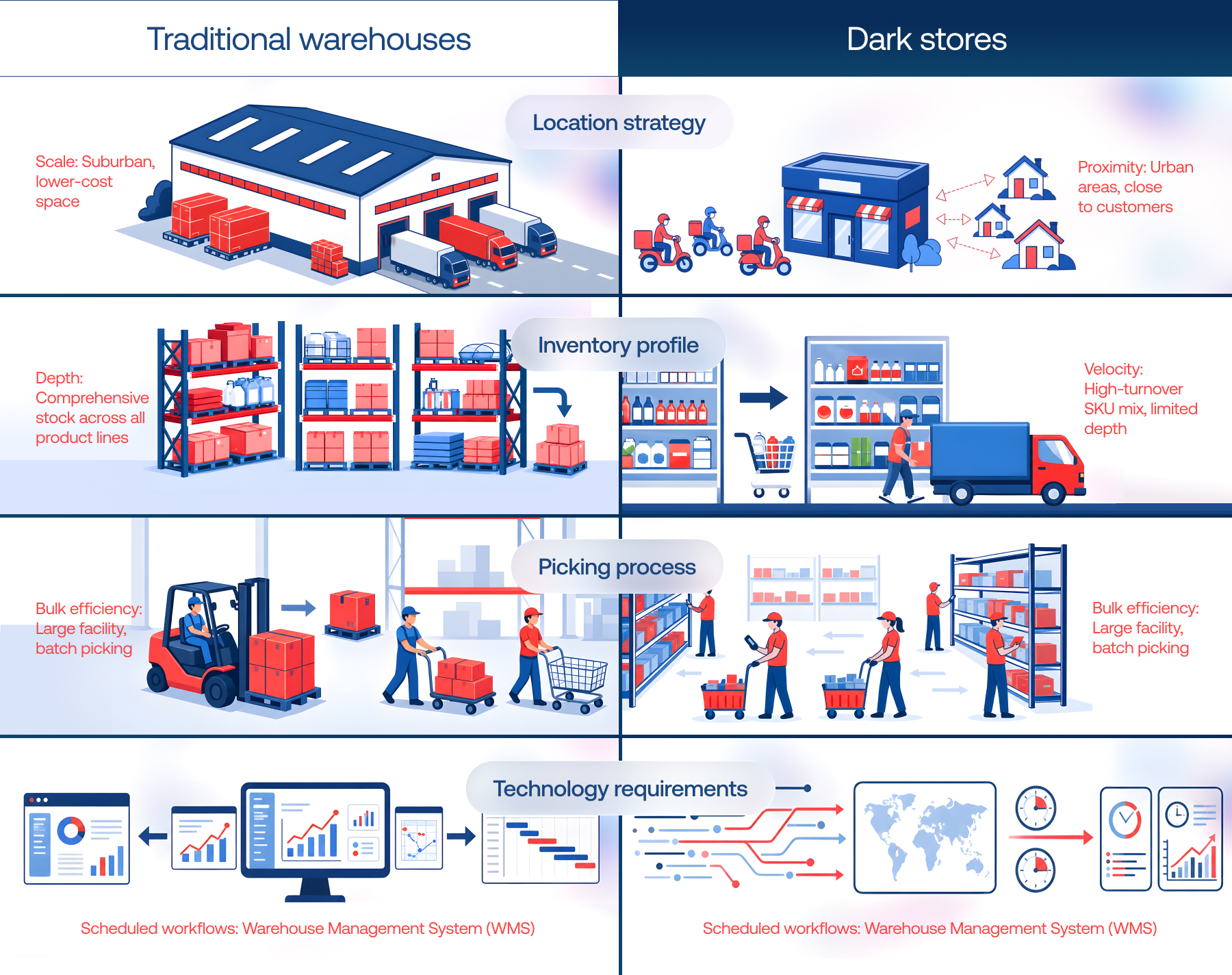
Dark stores and warehouses may look similar: both hold inventory and fulfill orders. Operationally, however, they are built for different jobs. As dark stores handle frequent, small-basket orders under much tighter fulfillment windows, it changes everything from location and inventory strategy to picking workflows and the software needed to orchestrate them.

Location strategy: proximity vs. scale

Traditional warehouses typically occupy large industrial facilities where low-cost space and highway access matter more than proximity to individual customers. Dark stores trade some of that scale for proximity. They are typically located closer to dense residential areas, where higher real-estate costs can be justified by shorter delivery distances and faster fulfillment.

Inventory profile: velocity vs. depth 

If warehouses can hold deep reserves of both slow- and fast-moving products, space-constrained dark stores need a much tighter SKU mix. They put greater emphasis on high-turnover inventory and frequent replenishment from central distribution centers (CDCs) or direct-store-delivery (DSD) vendors.

Picking: speed vs. bulk efficiency

Warehouse operations often optimize for pallets, bulk movements, and batch picking across relatively large facilities. Dark stores are cut out for small baskets and short fulfillment cycles, with pickers typically following system-generated routes that minimize walking time.

The cost of an error is different, too. A dark store mispick can trigger repicking, refunds, customer support work, and even an additional delivery, quickly eating into already thin margins.

Technology requirements: real-time orchestration vs. scheduled workflows

To manage inventory tracking, put-away, and scheduled order release efficiently, traditional retail distribution centers rely primarily on warehouse management systems connected to ERP, transportation software, scanning infrastructure, and automation equipment.

However, dark stores require an event-driven, low-latency technology ecosystem. Since orders arrive continuously and must be dispatched within 10 to 15 minutes, dark store software must balance picker availability, live shelf inventory, packing station queues, and courier proximity in real time.
dark store

The cost of inefficient dark store management

Some dark store failures are impossible to ignore. Others quietly eat into margins one order at a time.

The first kind can require immediate crisis management. For example, the recent suspension of a Blinkit dark store’s food license in Mumbai followed serious hygiene violations, including cockroach infestation and expired stock. 

Far less visible but no less damaging problem is operational leakage. Without well-engineered, end-to-end workflow automation, minor friction points across order picking, shelving, packing, delivery, workforce and customer management compound quickly, which inflates your Cost Per Order (CPO) and erodes margins. Quick commerce’s low-margin structure simply cannot absorb that kind of inefficiency.

AreaErrors caused by lack of proper management and automationDirect financial impact
Order picking and packing• Picking errors (missing, wrong, or extra items)
• No completeness verification
• Packing mistakes (damaged products, incorrect packaging, mixed-up bags)
• Re-picking and re-delivery costs
• Refunds and customer compensation
• Additional workload for customer support teams
Shelf-life management• No FIFO/FEFO control
• Late identification of near-expiry products 
• Expired products reaching customers
• Inventory write-offs
• Product markdowns
• Customer compensation
• Lost repeat purchases
Delivery operations• Inefficient courier assignment
• Poor route optimization
• No dynamic order reassignment
• Empty runs / unnecessary mileage
• Missed delivery time windows
• Higher last-mile delivery costs
• Overtime expenses
• Fewer deliveries per courier
• SLA penalties
Workforce management• Inefficient shift planning
• Uneven employee workload 
• No productivity monitoring
• Excess labor costs
• Idle time
• Overtime expenses
• Lower operational efficiency
Inventory management• Phantom inventory
• Inaccurate demand forecasting
• Delayed replenishment
• Suboptimal reorder points
• Overstocking
• Lost sales
• Inventory write-offs
• Emergency replenishment
• Higher storage costs
Returns and customer claims• Manual handling of customer requests
• No classification of issue types
• No analysis of recurring problems
• Higher cost of claims processing
• Customer refunds and compensation
• Lost repeat purchases

Based on our experience working with retail and ecommerce businesses, the investment in operational control can quickly justify itself through savings across multiple areas. 

After Instinctools developed and implemented our end-to-end dark store management system, the operational ROI exceeded our expectations. Across a single location, we now save roughly $57K/month in logistics by eliminating manual stock and inventory errors, $26K/month by preventing mispicks with continuous QR-scanning, and $36K/month by optimizing near-expiry markdowns and reducing product write-offs.

— Head of Operations, Major Grocery Retailer 

> Explore the case study

What if your next dark store was funded by the savings from your current one? Plug your operational leaks and unlock the capital to scale

Let’s talk 

What dark store management software should cover 

There is no single universal architecture for managing a dark store. The exact software components depend on the retailer’s operating model, SKU mix, automation level, and existing technology stack. However, a mature operational layer typically covers six interconnected domains.

1. Inventory management

The first priority is knowing exactly what stock is available, where it is, and how its status changes. A centralized dark store inventory management layer provides a consistent view of stock as products move through receiving, storage, replenishment, picking, counting, and disposal. It also keeps shelf-life rules such as FIFO and FEFO embedded in day-to-day inventory decisions.

The module closes the gap between physical stock and what the system says is available, which is among the most damaging sources of failed orders and unnecessary write-offs. With accurate stock visibility and controlled replenishment, dark store operators can keep fast-moving products available without overstocking and reduce the risk of stock ending up as lost sales or write-offs.

2. Order fulfillment

Order fulfillment coordinates what happens between an order entering the system and the completed package being handed over for delivery. This includes order routing, picking, batching, picking paths, substitutions, packing, verification, and handoff.

The shorter the promised delivery window, the less room there is for manual coordination. Omnichannel order management capabilities therefore need to determine what should be picked, where it is located, who should pick it, and when it needs to be ready – all while orders continue to arrive.

3. Delivery management

Delivery management connects fulfilled orders with the last-mile network. It can cover courier assignment, dispatch, route planning, delivery status, order prioritization, and dynamic reassignment.

The challenge is that courier availability, traffic, order volumes, delivery windows, and geographic demand can change within minutes, so dispatch decisions need to adjust in real time. Otherwise, a dark store can fulfill an order efficiently and still miss the delivery promise.

4. Supplier collaboration and procurement

Supplier coordination becomes much easier when purchasing decisions, inventory signals, and promotional plans live in the same operational flow. Instead of exchanging updates and purchase orders through email or messengers, suppliers can work through a self-service portal with direct visibility into relevant orders, stock information, and upcoming promotions.

The same layer can automate routine procurement tasks, from purchase order processing to generating barcodes and labels for incoming products. This gives suppliers clearer instructions and retailers better control over what is ordered, promoted, and received, while reducing the manual coordination that tends to slow replenishment down.

5. Workforce management

In a dark store, labor capacity has to move with demand. A quiet afternoon and a sudden evening order surge may require very different staffing levels, while couriers add another layer of constantly changing availability.

A workforce module brings these moving parts into one operational picture. Managers can plan shifts around expected order volumes, track attendance, account for actual hours worked, process payroll, and monitor individual and team performance. Instead of staffing by habit or reacting when queues build up, they can see where capacity is needed, rebalance workloads, and get more output from the workforce already on hand.

6. Sales and customer management

This module covers the commercial side of dark store operations, bringing sales and customer data from mobile apps, POS, marketplaces, CRM, and loyalty programs into one place. As a result, managers gain a clear view of orders and sales activity across channels while seamlessly handling all customer service processes.

Let’s put together the perfect tech solution to power up your dark store strategy, module by module

Contact us

The technology layer behind dark store management

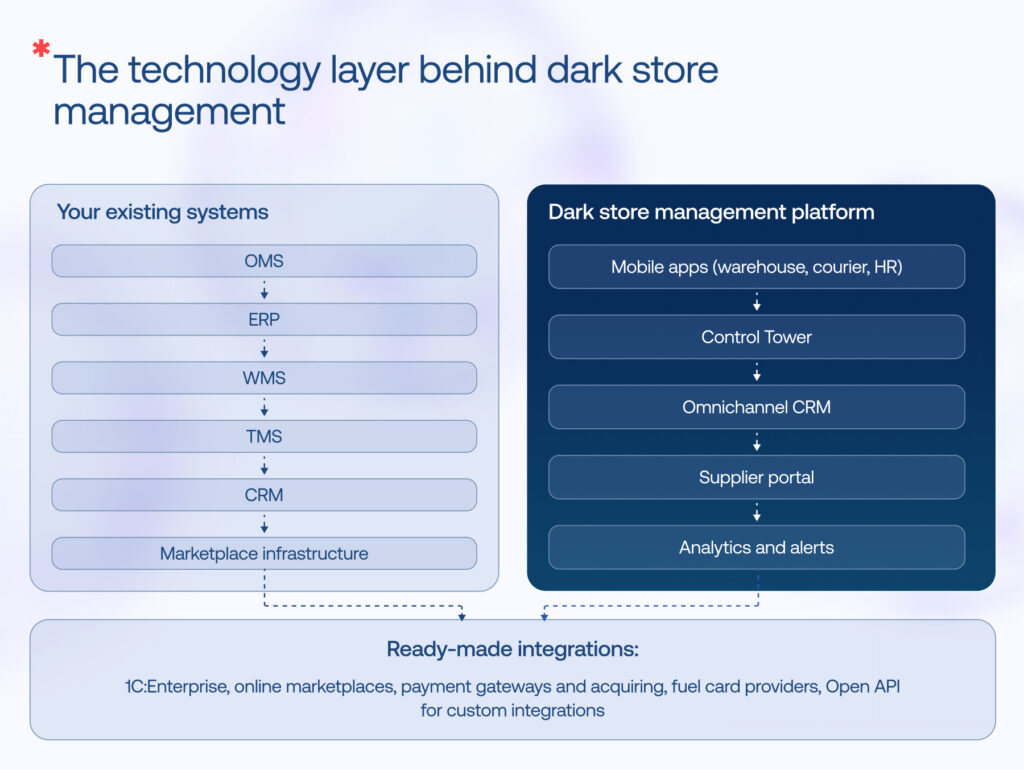
Digitizing dark store operations is hardly uncharted territory. The market already has plenty of capable platforms, such as OrderGrid, Hubler, or ShapeSoft. But when we evaluated available solutions, one limitation became clear:

In our experience designing dark store systems, this makes integration and architectural flexibility just as important as individual features. Rather than forcing every process into a single rigid product, the technology layer needs to connect operational capabilities end to end while fitting into the retailer’s existing ecosystem. Three architectural principles are particularly important:

  • Standardized APIs: Consistent interfaces connect consumer-facing apps, enterprise systems such as SAP or NetSuite, and third-party logistics providers, reducing reliance on custom point-to-point integrations.
  • Asynchronous event processing: Inventory updates, order assignments, and status changes are processed independently of the request-response cycle, preventing integration workloads from blocking operational transactions or slowing picker-facing applications.
  • Loosely coupled modules: Individual capabilities remain independent, allowing new modules and integrations to be added, or existing ones modified, without extensive changes across the rest of the platform.
dark store automation

How our clients use AI to advance dark store automation

Once the operational foundation is connected, AI can move dark store management from reactive automation toward prediction and optimization. In our work with retail clients, we’ve implemented AI-powered workflows that turn live operational signals into concrete actions. Here’s what that looks like in practice:

  • Predictive replenishment: Historical sales velocity and real-time basket trends indicate that a fast-moving SKU is approaching its safety-stock level → the system drafts a supplier purchase order before availability becomes a problem.
  • Waste prevention: A SKU crosses the 7-day expiration threshold → the system automatically applies a 20% markdown in the app to increase sell-through before the product becomes a write-off.
  • Dispatch optimization: Traffic, order weight, and courier proximity change in real time → a VRP engine recalculates assignments and can batch up to three nearby orders onto one rider in under 10 seconds.
  • Dynamic pricing: Available stock for a fast-moving item drops below 15 units during peak hours → the system adjusts the retail price within predefined rules to balance availability and margin.
  • AI-enabled customer support: A customer asks, “Where is my order?” → the system instantly returns live courier location data. A missing-item complaint → the case is escalated to a human agent with the relevant packed-box scan logs already attached.

Explore more AI-powered capabilities in inventory management >>

Level up your micro-fulfillment operations with AI

Get started now

Dark store management software: buy or build?

Off-the-shelf software can cover a lot of ground without the time and cost of building from scratch. But when your processes, integrations, or scale requirements fall outside the standard model, that convenience can come with compromises. 

The right choice ultimately depends on how closely the software needs to fit your operating model, how much control you need over integrations and future development, and how quickly you need to launch. The comparison below puts the key trade-offs side by side.

Evaluation criteriaBuying off-the-shelf platformBuilding a custom solution
Time to launchFaster
(Weeks to 1-2 months)
Slower
(9 to 18+ months, depending on scope)
Fit to operating modelStandardized (best suited to common workflows and established operating pattern)Tailored(designed around your specific workflows and requirements)
Customization ceilingLow to moderate (Configurable via APIs & UI settings)Unlimited (Complete control over code, design, and logic)
Cost modelOpEx(Recurring SaaS fees that increase with usage, users, locations, or order volume)CapEx + OpEx (Development cost + ongoing maintenance)
Data and compliance controlMore vendor-dependent(Vendor cloud, SOC2 compliance delegated)Absolute (100% owned infrastructure and raw data)
Integration effortLow to moderate (Depends on available connectors; custom integrations may still be required)High (Building all APIs and bridges from scratch)
External dependenciesHigh (reliance on the software vendor’s roadmap, pricing, support, and platform capabilities)Low (no core platform vendor lock-in, though dependencies on cloud services, third-party tools, or development partners may remain)
Best fit forEarly-stage dark stores, smaller operators, and businesses entering new markets with relatively standard operationsFast-growing companies and established businesses with unique IP, proprietary hardware, or massive scale

As you can see, turnkey solutions certainly have their place, but real-world execution frequently reveals their glass ceiling. Off-the-shelf platforms are built for average workflows, yet dark store margins are won or lost in the non-standard details – the localized delivery specifics, regional compliance factors, unique supplier collaboration nuances, and more. 

Standard off-the-shelf software couldn’t natively integrate with our local ERPs, regional payment gateways, or custom courier routing rules. Moving to a bespoke system built for our exact architecture changed everything: we reduced our cost per order by 15%, cut picking errors by 68%, and pushed our on-time delivery rate to 95% for bikes and 90% for cars.

— Head of Operations, Major Grocery Retailer 

So, choosing the right path requires stepping back and looking beyond the initial investment. An experienced engineering partner can help you assess how both custom and off-the-shelf approaches will play out over time, balancing faster deployment today against long-term flexibility, operational control, and scalability before you make a foundational technology decision.

Ready to reap the benefits of proper q-commerce automation?

Quick-commerce dark stores are only as effective as the technology backbone powering their operations. Building that backbone means bringing critical micro-fulfillment functions – inventory, order, supplier, workforce, customer, and delivery management – into one connected system, enhancing them with AI-powered capabilities, and integrating the whole stack into your existing operational ecosystem. Having designed and implemented custom dark store management platforms as well as advanced retail and ecommerce solutions, we’re ready to tackle your dark store logistics challenges if you’re looking for a reliable engineering partner.

Your dark store business model needs a robust platform to keep pace with ever-growing demand? We can help

Reach out 

FAQ

What is a dark store?

A dark store is a micro-fulfillment center structured like a conventional supermarket but closed to the public. It is dedicated exclusively to fulfilling online purchases, where staff or automated systems pick, pack, and ship items for quick home delivery or local curbside pickup.

How do dark stores work?

Dark stores operate as compact fulfillment hubs built around online orders. A customer places an order through an app or website, the system routes it to the nearest suitable location, and staff or automated systems pick and pack the items. Delivery is then assigned and dispatched, with inventory updated throughout the process.

Are dark stores automated or run by manual labor?

Mostly manual labor today, with automation layered in selectively. Most dark stores rely on human pickers walking aisles, guided by handheld scanners or picking apps that optimize routes. Some operators add automation – conveyor sorters, robotic picking arms, or micro-fulfillment tech – but full automation is capital-intensive, so it’s typically reserved for larger, high-volume hubs rather than the norm.

What is dark store management?

Dark store management is the digital and physical orchestration of micro-fulfillment centers optimized exclusively for online orders. Driven by dark store management systems, it automates routing, batch picking, and stock replenishment to minimize order-to-delivery latency for rapid ecommerce and quick-commerce operations.

What are dark store operations?

Dark store operations are the day-to-day processes that keep a fulfillment-only location running: receiving and shelving inventory, picking and packing orders, managing staff shifts, syncing stock levels in real time, and coordinating handoffs to delivery riders.

What software do you need to manage a dark store?

A dark store typically needs software for inventory and warehouse management, order processing, picking and packing, delivery orchestration, workforce management, and analytics. These systems should work as one operational layer, connecting orders, stock, staff, and couriers in real time to keep fulfillment accurate, efficient, and responsive.

What is the dark store model, and how many people does one location need?

The dark store model is a retail setup where a dedicated facility holds inventory and fulfills online orders for a defined local area. Staffing depends on store size, SKU count, order volume, operating hours, and automation. A small site may run with a handful of employees per shift, while high-volume locations require larger teams across fulfillment and operations.

Vibe Coding Audit: Why AI-Built Software Needs More Than Code Review

A vibe coding audit is probably the last thing on your mind when you first start exploring Cursor, Lovable, Bolt, Replit, v0, or Claude Code and watch a product idea you’ve been carrying around for months materialize into a working application right before your eyes. But once that thrill wears off, the high-stakes questions start piling up. Is this something I can safely ship? Will it fall apart under real-world load? And did the AI build an architecture that won’t become a bottleneck six months from now?

Pure promptcraft, however, offers no real answers to any of them. Few leaders are reckless enough to ship raw synthetic code straight to real users. Yet almost no one who has experienced that kind of development velocity wants to go back to a six-month development cycle with a full army of developers, business analysts, and QA engineers.

This inevitable production reality check has given rise to a critical new practice: the vibe coding audit, a service now being rolled out by a slew of vibe coding security vendors over the last year. In this article, we break down the entire process of getting from vibe coding to production.

Key highlights

  • A working vibe-coded application can still conceal architectural drift, security gaps,  GDPR/HIPAA compliance violations, fabricated logic, code bloat, and tests that create the appearance of coverage without validating real behavior.
  • A vibe coding audit goes beyond traditional code review. Instead of examining whether an individual change was implemented correctly, it assesses whether an AI-generated codebase can be trusted, maintained, secured, and scaled in production.
  • Moving from vibe coding to production does not automatically mean rebuilding from scratch. A multi-dimensional audit reveals whether the existing foundation is worth rescuing and produces a prioritized roadmap for architecture stabilization, code cleanup, testing, security remediation, performance tuning, and production-ready delivery.

Vibe coding side effects that spawned a new service category 

Every leap in software development productivity has eventually produced a corresponding quality discipline, like unit testing that followed procedural programming or DevOps that emerged once deployments became continuous. 

Vibe coding is following the same pattern. Its side effects are distinct enough to slip past traditional review processes.

Working with AI coding agents every day, our engineers keep running into recurring patterns, ones that may remain invisible in a functional prototype but trigger serious downstream issues if left unaddressed.

  • AI models often favor the happy path, generating code that assumes perfect connectivity and valid payloads while remaining completely unequipped for real-world network latency, aborted transactions, or race conditions.
  • Codebases balloon through additive sprawl because generative models append new logic rather than revisit and refactor what already exists, inflating the repository with dead code and unnecessary abstractions.
  • Architectural drift sets in as context windows grow, causing the model to forget early project conventions and introduce conflicting design patterns, such as three distinct state management approaches inside a single application.
  • Test suites create an illusion of coverage by generating clean 100% metrics through trivial assertions or heavily mocked dependencies that test the scaffold rather than the actual business logic and real system behavior.
  • Security gaps slip in unnoticed, from hallucinated package names vulnerable to typosquatting attacks to hardcoded API keys, unconfigured Row-Level Security (RLS) policies, and active debug authentication routes in production.
vibe coding audit

What is a vibe coding audit?

A vibe coding audit is a systematic evaluation of AI-assisted or heavily AI-generated codebases across security, architectural integrity, performance, data consistency, and long-term maintainability. Unlike a traditional code review, it specifically targets risks unique to AI-generated outputs, such as hallucinated logic, insecure patterns, context gaps, and more, and then, translates those findings into a prioritized roadmap for refactoring, remediation, and production stabilization.

Isn’t a vibe coding audit the same as a traditional code review? 

For decades, software teams have relied on code reviews to catch bugs, uphold engineering standards, and keep fragile code out of production. Those goals haven’t changed simply because developers now write prompts alongside code. What has changed is the nature and the volume of the output under review.

AI coding assistants can generate thousands of lines of production-looking code in minutes. The result is often syntactically correct, well-formatted, and internally consistent, all of which makes its quality easy to overestimate. Reviewers must now look beyond obvious implementation errors: what the model misunderstood, omitted, or confidently fabricated.

That transforms the scope of the review.

A traditional code review focuses on whether a developer implemented a specific change correctly. A vibe coding audit asks a broader question: is this AI-generated code safe, explainable, maintainable, and aligned with the architecture before it becomes part of the product?

DimensionTraditional code reviewVibe coding audit
Primary artifactHuman-written pull requests and code diffsAI-generated features, modules, or entire repositories
Typical scopeIncremental changes (tens to hundreds of lines)End-to-end analysis of generated codebases and system interactions
Main questionWas this implemented correctly?Should this generated code be trusted in production?
Primary risksLogic errors, coding mistakes, style violationsHallucinated logic, hidden security gaps, architectural drift, code bloat, false confidence
Security focusKnown vulnerabilities, dependencies, secretsTraditional risks plus AI-specific issues such as fabricated libraries, insecure generated patterns, unintended data exposure, and mock security logic
Testing reviewCoverage, correctness of unit and integration testsWhether AI-generated tests meaningfully validate behavior rather than inflate coverage metrics
ArchitectureConsistency with existing patternsSystem boundaries, scalability, dependency health, long-term maintainability
Typical outcomeApproved pull requestRisk assessment, prioritized remediation plan, and production-readiness roadmap

In other words, a vibe coding audit extends conventional engineering practices with checks designed specifically for AI-generated software – system-wide architectural analysis, hallucination detection, ownership validation, security verification beyond traditional static analysis, and remediation planning. The objective remains the same: shipping reliable software. The audit simply reflects the new risks introduced by AI-assisted development.

What a vibe coding audit covers

The range of defects outlined above makes one thing clear: AI-generated code rarely suffers from a single, isolated flaw. Issues tend to accumulate across multiple dimensions of the codebase, from architecture and business logic to security and performance. Consequently, a professional audit cannot rely on one review lens. 

The table below outlines the core areas we assess when auditing our clients’ vibe-coded applications.

Audit areaWhat is done
Infrastructure Validating environment provisioningChecking configuration artifacts for exposed credentialsRevoking data-training consentsVerifying backup isolation and disaster recovery runbooks
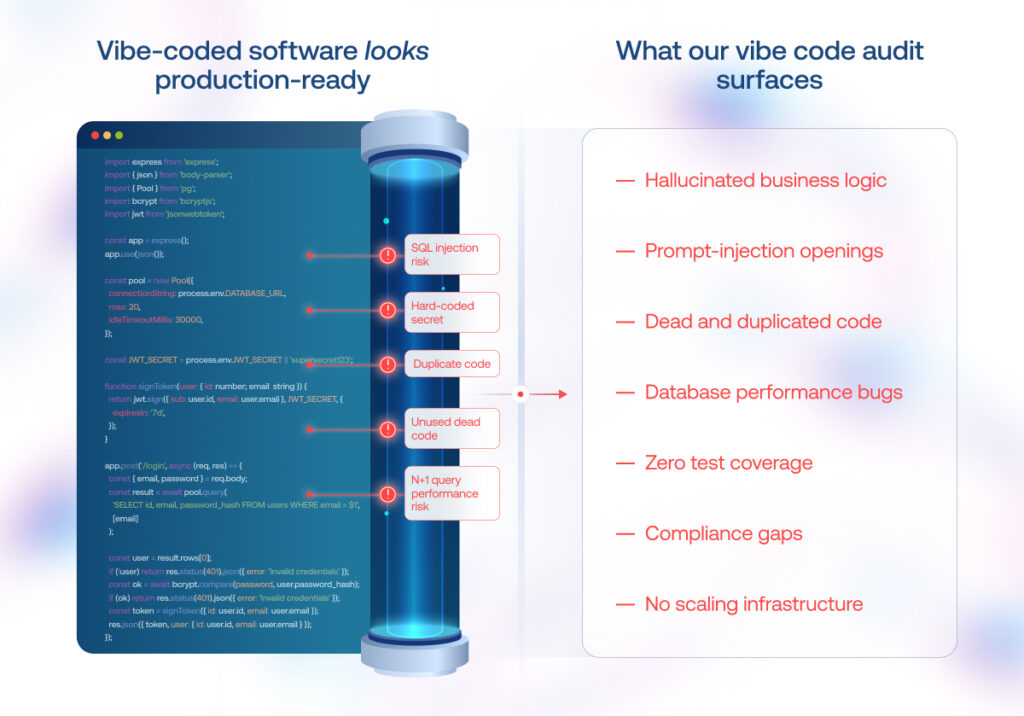
Business logic Identifying instances where AI models invented or hallucinated redundant logic to bypass complex requirementsStress-testing unhappy paths like malformed inputs, duplicate records, or out-of-sequence events
Architecture Reverse-engineering AI-generated structures to uncover:tight couplingleaky abstractionscircular dependencies brittle orchestration that could trigger cascading failures under load
Data model Assessing data normalization, entity relationships, and ingestion pipelinesChecking adherence to compliance standards like GDPR, CCPA, and SOC2
Codebase quality Detecting dead code, over-engineered abstraction layers, spaghetti dependencies, and inconsistent naming conventions to determine necessary refactoring areas
Security Scanning for prompt-injection risks in agentic workflows, hardcoded secrets, weak authentication, unsanitized inputs, and OWASP Top 10 vulnerabilities introduced by AI training patterns
Performance Identifying hidden performance bottlenecks, such as: N+1 query problemsmemory-heavy data transformationsexcessive recursive loops 
Cost-benefit analysisQuantifying accumulated AI technical debt against the effort required to fix it

Upon completing this multi-dimensional evaluation, the client receives a prioritized roadmap for vibe coding cleanup and long-term stabilization.

Sitting on a vibe-coded prototype you need to make production-ready?

Start an audit

So the audit flags a wall of issues. What comes next?

If the audit may uncover vulnerabilities, architectural weaknesses, and accumulated technical debt across the codebase and the cost-benefit analysis shows that remediation is more viable than rebuilding from scratch, the project moves into targeted vibe coding rescue. 

Architecture stabilization

The first priority is rearchitecting the system’s structure so it can carry real weight. AI-generated systems often suffer from tight coupling and leaky abstractions – components that look modular but secretly depend on each other’s internal behavior. Our team usually starts by reverse-engineering whatever rationale the model followed, then decoupling services so failures remain contained. We fix brittle dependency structures early, because in our experience, that’s what turns minor changes into production incidents. 

Codebase health optimization

Once the architecture is stable, attention shifts to code quality. In most vibe coding cleanup projects we handle, the codebase is carrying dead code, duplicated implementations, oversized functions, and generated artifacts that don’t serve any purpose but still get compiled. All of these must be systematically eliminated or refactored to make the codebase easier to understand and maintain.

Test coverage

Our vibe coding rescue specialists rarely rely on a single testing strategy when rehabilitating vibe-coded applications. AI is particularly good at generating broad, repeatable test coverage, so we use it to stress the system and detect regressions at scale. 

Human reviewers then focus on what automation cannot easily determine: whether the product behaves consistently, whether the generated implementation reflects the original intent behind the prompts, whether integrations exchange data correctly, and whether subsequent prompt-driven changes have broken functionality that previously worked.

Security remediation

Security issues uncovered during the audit are addressed according to their severity and potential business impact. This typically includes eliminating exposed secrets, strengthening authentication and authorization, validating inputs, closing common injection vectors, updating vulnerable dependencies, enforcing secure configuration, and applying least-privilege principles throughout the application.

Performance tuning

Performance problems in vibe-coded applications can hide behind redundant middleware, duplicated processing, inefficient queries, and unnecessarily complex execution paths. These patterns may barely register in a prototype but become costly once traffic, data volumes, and integration loads increase.

At the architectural level, we first remove unnecessary processing layers and simplify execution paths that add latency or consume resources without delivering business value. The work then moves to the data layer, where AI-generated implementations may rely on broad fetching patterns, repeated queries, or unnecessary data transfers. We replace them with more precise queries, appropriate caching, and better-structured data access.

By cutting unnecessary overhead early, before user load makes it expensive to fix, we keep the platform responsive and leave headroom for scaling without rewriting the core.

Production-ready CI/CD 

Deploying a vibe-coded application shouldn’t feel like a leap of faith. The final phase in vibe coding rescue is establishing automated, immutable CI/CD pipelines backed by robust recovery runbooks. With automated linting, security scanning, and test suites embedded directly into the deployment gate, code shifts from developer sandboxes to production predictably, safely, and with zero guesswork.

You don’t need to throw away your prototype and start over. Targeted cleanup sprints turn an audited codebase into a secure, scalable, enterprise-grade system

Reach out now

Six rules we’ve learned from auditing and rescuing vibe-coded projects

Once a team experiences a tenfold increase in build speed, there’s no putting that genie back in the bottle. But until AI coding assistants can match the engineering rigor of professional teams, the only path to production is to wrap that speed in layers of clear constraints, disciplined review, and validation pipelines that check outputs against intent.

Having experimented with different LLMs and agent swarms for coding since 2024, our AI Center of Excellence team distilled six core practices that now form the foundation of our proprietary AI-assisted engineering framework and vibe coding as a service model.

1. Running AI inside controlled, policy-bound development environments

One of the harder lessons in scaling vibe coding is that a development environment itself becomes a liability if it operates without guardrails. Letting AI agents write code in an unrestricted environment means prompts, outputs, and sensitive context can leak into model training pipelines or propagate across projects without oversight. The practice we have found effective is running agentic development inside controlled, policy-bound workspaces where the tool stack is explicitly configured rather than inherited from a default installation.

This goes beyond simple access controls. The environment is designed as a multi-agent operating layer that sits between the developer and the underlying models. Tasks are routed to specialized agents based on what needs to happen – architecture decisions go to one channel, implementation to another, security validation to a third – each receiving only the context and tool permissions required for that specific job. This compartmentalization prevents context drift and reduces the surface area for errors.

2. Treating data preparation as the first engineering task

AI models amplify whatever signal they receive, including noise. In practice, this means ambiguous, inconsistent, or poorly structured data becomes the context that shapes every subsequent decision the model makes. So before any AI-assisted development begins, the focus should be on hardening the data layer: cleaning inconsistencies, standardizing formats, locking down schemas, and building ingestion pipelines that validate rather than pass through. The goal is to eliminate ambiguity at the source, because anything left unresolved in the data will be magnified by model behavior rather than corrected by it.

3. Packaging repeatable architectural and coding patterns into reusable context bundles

When two engineers prompt an AI for similar tasks without shared context, the model free-styles, producing different abstractions, naming conventions, and error-handling patterns each time. Architectural drift follows fast.

To prevent this, we treat prompts as code that needs a standard library. Engineers paste context bundles – predefined blocks of project-specific rules, interface contracts, and code patterns – directly into the conversation before asking for implementation. The model then generates within that frame instead of inventing its own structure.

The payoff of this approach is twofold. First, it keeps output consistent across different sessions and different team members. Second, it creates a single maintenance point. When a pattern needs to improve, you update the context bundle once, and every future prompt that includes it inherits the change. 

4. Enforcing automated validation gates

When a model can produce thousands of lines in minutes, manual review alone becomes a bottleneck and a risk. 

We enforce this through a default pipeline of SAST, dependency scanning, secret detection, and SBOM generation, run before any human reviewer opens the file. The codebase then goes through additional testing layers: unit, integration, and behavioral checks. The purpose is to ensure that what ships has the same trust level as code written by a senior engineer who understands the consequences.

5. Constraining AI with strict execution guardrails

AI performs more reliably when the boundaries of acceptable behavior are clearly defined. Establishing architectural north stars, clear ownership rules, and automated compliance gates narrows the range of acceptable solutions, resulting in more consistent code and significantly less rework downstream.

6. Using AI to challenge AI while keeping human experts as the final approval authority

We combine human oversight with a lightweight multi-agent peer review. Our engineers challenge AI assumptions and flag risky logic, while supervising agents verify that execution agents follow the declared approach. One generates, another challenges, a third validates structure and edge cases. This creates several independent perspectives on every output, catching blind spots that a single reviewer – human or machine – would likely miss.

The final authority, however, remains human. Experienced engineers decide whether the implementation reflects the intended business logic, meets architectural and security standards, and is safe to merge or release.

Make your AI-built solution growth-ready with a proper vibe coding audit and cleanup

Vibe coding changes how software is developed, but not what it must withstand. Security, architecture, maintainability, performance, and governance requirements don’t disappear simply because the first working prototype comes together overnight. 

Vibe coding audit and cleanup services, delivered by a trusted engineering partner, preserve the speed advantage while bringing the codebase up to engineering standards.

Have a vibe-coded application that has outgrown the prototype stage? Let’s make it ready for real users and long-term evolution

Contact us

FAQ

Is there a professional who can review vibe-coded things?

Yes. Senior software engineers, enterprise architects, and vibe coding security specialists perform vibe coding code quality reviews and audits. They evaluate AI-generated code for hidden architectural flaws, security vulnerabilities, hallucinated dependencies, and data compliance to ensure the codebase meets enterprise standards before deployment.

What is a vibe coding audit and what does it cover?

A vibe coding audit is a 360-degree review of software built with AI coding tools that identifies technical debt, security risks, architectural flaws, and scalability and maintainability issues before the application moves to production. The outcome is a prioritized remediation roadmap for stabilizing the vibe-coded app.

Vibe coding audit vs traditional code review – what’s the difference?

A traditional code review checks what a human developer intended to write, focusing on logic, style, and team standards. A vibe coding audit treats the output as untrusted until verified: it validates that AI-generated code matches the intended architecture, contains no hallucinated dependencies or hidden vulnerabilities, and meets the same production-ready security, performance, and maintainability standards as human-written code.

How do I take vibe coding to production safely?

Follow field-proven vibe coding best practices: establish all the right guardrails upfront, keep seasoned engineers in the loop, and enforce automated quality and security checks.

Is AI-generated code secure?

AI-generated code can be secure, but it is not secure by default. Whether it is safe depends entirely on the human-in-the-loop oversight, guardrails, and verification steps wrapped around its generation. A reliable vibe coding security vendor enforces a disciplined SDLC around it: embedding automated SAST/DAST scans, mandating human review for critical paths, and validating every dependency and secret exposure.

Can you rescue a broken vibe-coded project?

Yes. Vibe coding rescue is a core component of our vibe coding audit and cleanup services. Beyond rescue operations, we also help teams adopt agentic development safely and effectively through our vibe coding enablement program, or deliver fully managed software through our end-to-end vibe coding services.

What are your vibe coding governance guidelines?

Vibe coding governance hasn’t yet crystallized into an industry-wide standard. However, we’ve established our own vibe coding guidelines that underpin our proprietary AI-assisted engineering framework. These include establishing a solid data foundation upfront, using our technology-agnostic agentic operating system, prompting with predefined context templates, routing all generated code through mandatory quality and security gates, and requiring human engineers to review critical AI-driven decisions.

How long does an audit take?

The vibe coding audit typically takes 1-2 weeks, depending on the size and complexity of the codebase. After the assessment, we usually need about a week to develop a strategic stabilization roadmap. If you decide to move forward, cleanup and remediation sprints typically take 3-6 weeks, followed by ongoing support as needed. So while the audit itself is relatively quick, the full journey from assessment to a secure, stable codebase typically spans 5-9 weeks, with the option to extend into continuous improvement afterward.

What’s in the vibe coding audit report?

The audit report delivers a full-spectrum view of your codebase health, covering architectural soundness, security vulnerabilities, threat modeling, data integrity, test quality, performance bottlenecks, and infrastructure cost efficiency, all wrapped into a prioritized remediation roadmap and a clear refactoring blueprint to guide your next steps.

How to Calculate and Optimize Agentic AI ROI: A Framework for Enterprise Decision-Makers

Every AI ROI calculator on the market will hand you a clean percentage. Almost none will admit it’s fiction, because the number was never anchored to a baseline you captured before the agent went live. That gap is the quiet reason 95% of AI pilots show no measurable P&L impact, and more than 40% of agentic projects are on track to be scrapped by 2027: the math holds up right until finance asks where the baseline came from. Our guide walks you through how to calculate AI ROI for agents in a way that answers that question.

Key highlights

  • Measuring agent ROI means judging the effectiveness and relevance of the actions an agent takes — not grading a finished feature against a fixed spec, the way traditional software ROI does.
  • The ROI case is won before deployment — set a baseline and KPIs first, or the returns become impossible to prove after the fact.
  • The real cost hides after the first draft, in the verification, rework, and compounding chain errors that quietly erode returns.

What agentic AI ROI actually measures?

The answer depends on which of three architectures you’re actually paying for, because the word “agent” covers entities with different cost behavior.

What it is under the hoodHow is its cost calculated
Agentic workflowExisting software with a generative model bolted into a single step.Cost stays bounded per invocation.
Agentic pipelineA predetermined sequence of steps that calls an LLM at fixed points. Most AI chatbots belong to this category.Cost is bounded per call, multiplied by a known count.
AI agentAn autonomous software system that uses artificial intelligence to perceive its environment, make decisions, and take independent actions to achieve specific goals set by a user. Coding assistants are the most common true agents running in production today.Cost is unbounded per task, and running it twice can swing the price by up to 30 times.

The agentic race pushes companies to invest in all three, and calculating ROI for such a mix means budgeting a range instead of a single figure. 

The ROI reality check: why most agentic AI initiatives fail to show return on investment?

Adoption is running well ahead of proof. About 62% of organizations are already experimenting with AI agents, and 23% have moved at least one into production in a business function. Yet more than 40% of agentic AI projects are expected to be canceled by the end of 2027. The distance between those two numbers is the real story — enthusiasm scales faster than the ability to measure what the agents are actually worth.

And remember, nobody deploys just one workflow, one pipeline, or one agent. They spin up dozens, and that’s how you get agent sprawl. When different teams independently deploy autonomous AI, each without a shared owner, the costs tend to surface long after the tools do. 

Why traditional ROI metrics don’t work for AI agents and how you should measure their impact instead?

Software ROI templates grade a shipped feature against a fixed spec. Meanwhile, agents are evaluated based on the effectiveness of the decisions they made under uncertainty. Therefore, an agent is worth deploying when it clears one threshold: how often it succeeds has to exceed the ratio of human verification time to human do-it-yourself time. 

Take a task that needs two hours to complete but only six minutes to verify, like drafting a first-pass contract summary a lawyer can skim against the source, or localizing copy into a language a native speaker can quickly proof. That ratio is about 5%, so the agent only has to succeed five times out of a hundred to be net-positive.

That clean math holds under one condition: a failure leaves the environment unchanged and a bad output simply gets discarded. It collapses the moment failure changes something real, for example, an agent wrongly tells a customer a nonrefundable trip is refundable. Once that happens, two cost factors break the formula above:

  • Recovery cost. When a wrong output changes something in reality, you pay to catch and undo it, and that verification-plus-rework overhead is the agency tax — rarely zero in practice. Because autonomy lets the agent take different paths or retry, the same task can swing up to 30x in cost between runs.
  • Chain length. The more steps there’re in an agent’s workflow, the more places it can go wrong, and small per-step errors compound and turn catastrophic at scale. At 99% per-step accuracy, a 50-step chain succeeds roughly 60% of the time; drop to 95% per step and success falls to about 8%.

An AI adoption workshop is one way to size the probability of success against verification cost  before you commit to a build. 

That upfront work matters because first-draft quality is only part of the picture: judge an agent on its first output alone and you’re tracking maybe 40% of the true cost, while the agency tax accounts for the rest.

— Ivan Dubouski, Head of AI Center of Excellence, Instinctools

None of this means agentic ROI is unmeasurable. It needs its own measurement architecture, built before deployment, not after.

Inside a production-ready agentic AI ROI measurement architecture

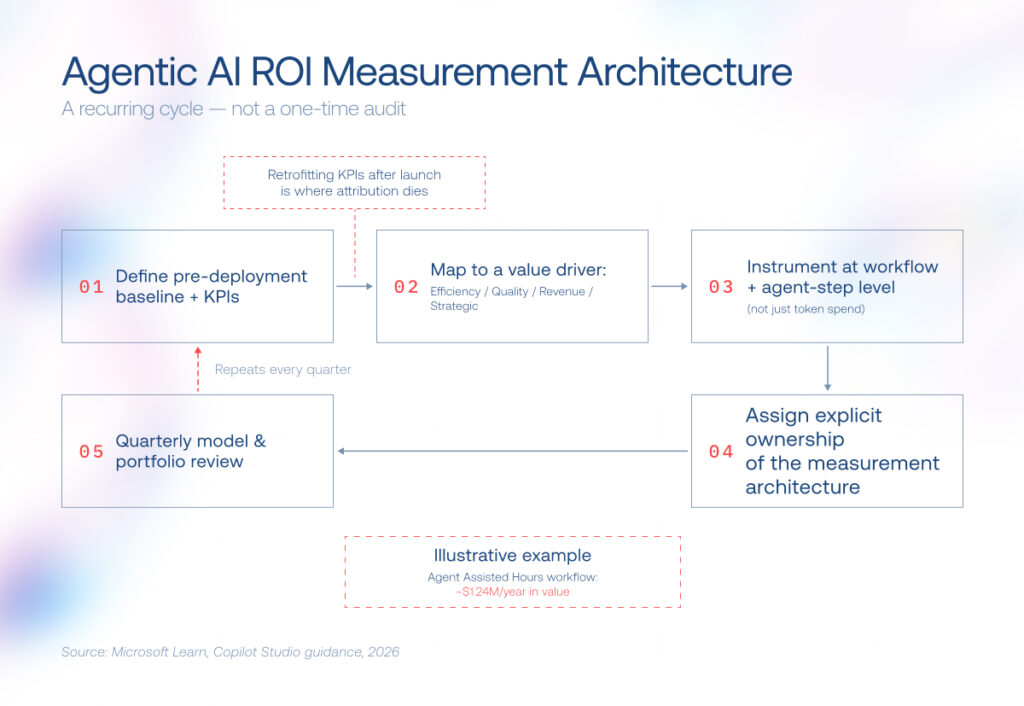
The architecture we use at Instinctools runs as a loop: capture a baseline, instrument against value drivers, convert the result into Agent Assisted Hours, monitor KPIs continuously, then make a fund-or-scale call that feeds the next baseline.

agentic AI ROI measurement architecture

In practice, we structure measurement around four value drivers — Efficiency, Quality, Revenue, and Strategic — each with its own indicators and pricing formula. Together they turn “the agent helped” into a figure finance can check.

Value driverWhat it capturesHow we put a number on it
EfficiencyTime your team wins back and can redirect toward work that genuinely needs a human.Hours freed × fully loaded cost of an hour.
QualityFewer mistakes, steadier output, and tighter compliance.Error-rate improvement × task volume × cost of a single error.
RevenueTop-line gains from the business you keep, grow, or win.Change in conversion or deflection × volume × revenue per unit, discounted for attribution.
StrategicFaster decisions, more confident teams, more room to maneuver, and resilience when things go sideways.Option value of the new capability + value of retained talent + resilience gained.

That collapses into a single number: Agent Assisted Hours (AAH) — the human-equivalent capacity the agent hands back each month. The nuance that keeps it honest is that not every session counts the same. A session where the agent fully resolves a customer’s issue is worth more than one it escalates to a human, so the sessions get weighted by how much work the agent actually took off the team’s plate. 

Run that weighting across a customer-service agent handling 10,000 sessions a month, and it comes out to about 1,440 hours of capacity returned. At a $72 fully loaded hourly rate, those 1,440 hours are worth $103,680 a month — roughly $1.24 million a year. And it’s not abstract capacity: it’s the time a team redirects to complex cases, proactive outreach, coaching, and the judgment-heavy work that actually moves retention. It’s also proof a conversational AI ROI claim can survive finance scrutiny.

Make value drivers built-in for your next agentic AI project?

Talk to our experts

How to calculate AI ROI: a step-by-step framework

We talked architecture, and here’s how to run the math. Get the order below right, and the ROI arithmetic will hold up.

1. Define your pre-deployment baseline and KPIs

Before you write a single prompt, work out what the task costs today: hours, error rate, and rework, calculated with the AAH method above. Set target KPIs against that baseline and tie each one to an existing value driver. 

2. Instrument before launch

Wire up logging at the agent-step level before the first production run: which action the agent took, what it cost in tokens, and what a human would have spent on the same step. Wait until after launch and you’re guessing backward through logs nobody built for the purpose — the baseline and the instrumentation have to share the same units from day one.

3. Run the AAH-style arithmetic

Two calculations do the work here, answering questions of different audiences.

The first is a quick sanity check for the team building the agent — is this thing even worth the tokens?

Model choice moves that denominator fast — top-tier reasoning models cost roughly 24 times as much as small ones — so this tells you quickly whether an agent is even worth its tokens.

The second is the number your CFO and the board care about, because it nets out everything the first one ignores:

Score it across three value vectors: productivity, quality and outcome, and risk aversion. An AI ROI calculator can rough out the first pass, but treat it as a starting estimate rather than the figure you bring to a CFO.

4. Fund and scale against hard value cases

The ROI timeline for AI agents rarely matches the vendor pitch, so fund each agent against a hard value case — a specific, quantified problem with a dollar figure attached rather than a broad vision statement.

In our delivery experience, pilot value shows in four to eight weeks and full deployment lands in two to six months, with payback typically following in six to 18 months. The range depends on how much of the workflow the agent absorbs and how heavy the verification load turns out to be.

— Ivan Dubouski, Head of AI Center of Excellence, Instinctools

Key metrics and KPIs to track before, during, and after deployment

ROI doesn’t hold on its own; you have to track it before deployment, during it, and after.

Before deployment

Set baselines for cycle time, error rate, cost per transaction, and staff hours per case. Define your success criteria in writing before the demo, so nobody can move the goalposts later.

During deployment 

Watch how often a human has to step in, and how you’re checking the agent’s work in the first place. Nearly 70% of agents in production still need a person to intervene within their first handful of steps, and about three-quarters of teams still lean mainly on human review to catch problems.

How you review matters just as much as how often. Agent failures rarely show up in the final output alone; the root cause usually sits several steps upstream, so checking only the end result tends to miss the real problem. That makes intervention frequency and evaluation-method choice your true leading indicators of whether the ROI will hold.

After deployment 

Track outcomes against the four value drivers. Whatever dashboard or AI agent ROI calculator you use, feed it intervention and evaluation data rather than raw completion counts. In our experience, the AI sales agents with the highest ROI are usually lead-qualification and follow-up use cases, since verification cost is low relative to the value of a closed deal.

Which of these metrics matter most depends on a decision most teams make too early: whether to build, buy, or partner for the agent itself.

Build vs. buy: how the decision shapes your ROI math

Where you get the agent — build it, buy it, or have it built for you — shapes your agentic AI ROI more than most teams expect, because it decides who owns the cost structure, the verification layer, and the data the agent generates over time.

Internal development only pays off in four scenarios:

  • Proprietary “glue layers” connecting enterprise-specific data and workflows
  • Differentiated capabilities where the agent itself is the competitive advantage
  • Strategic learning investments a company needs regardless of near-term payback
  • Regulated or data-residency-bound work (HIPAA, SOX, PCI DSS, the EU AI Act), where compliance requires a controlled build, whatever the ROI math says

The thread connecting them is ownership of the data the agent produces. Industry research frames this as “compounded context”: the data an agent captures compounds into a strategic asset over roughly a three-year horizon, but only if you own the pipeline gathering it. That’s why the build case is really a data-ownership case.

Outside those three scenarios, buying usually wins, specifically when:

  • The task is a commodity and well-defined, with no enterprise-specific quirks
  • Speed to value matters more than long-term ownership of context
  • The use case isn’t a source of competitive differentiation
  • You don’t have (or don’t want to tie up) engineering capacity to build and maintain it

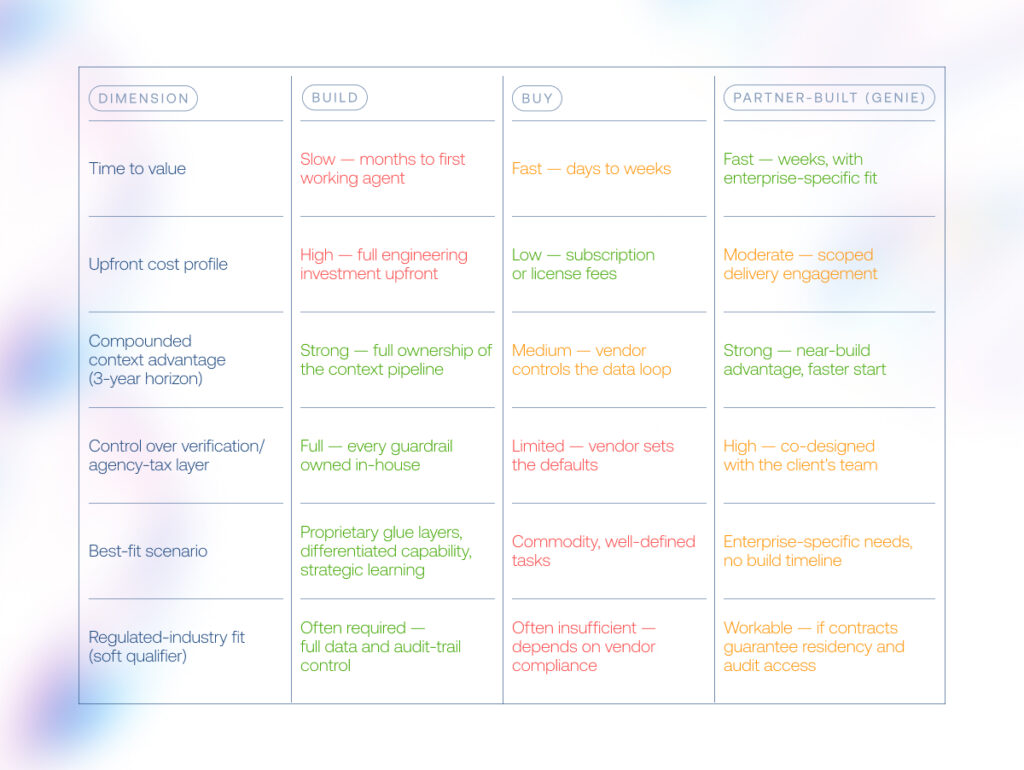
There’s a third path between the two: partner-built. Unlike buying an off-the-shelf product, a partner-built agent is developed around your workflows and data by an outside team, so you get build-level fit and context ownership without standing up and maintaining an in-house AI engineering function. GENiE — Instinctools’ proprietary solution accelerator for building custom AI agents — is one example. The table below compares all three.

agentic AI ROI

In a nutshell, buy wins on speed. Build wins on long-run compounded context, but only in the three scenarios above. Partner-built approaches, like our GENiE model, capture most of the build’s context advantage without its full timeline or risk thanks to being vendor-agnostic by design and fast to stand up.

— Ivan Dubouski, Head of AI Center of Excellence, Instinctools

Real-world agentic AI ROI: how we cut a six-month onboarding to two weeks

A global insurance aggregator hit the wall most enterprises face when they scale into new markets: partner onboarding. Each new one arrived with a different API, schema, language, and regulatory regime, and reconciling that by hand took three to six months per partner, across dozens of countries.

We created a production multi-agent system around an Analyze → Plan → Generate pipeline, using our GENiE framework, so the guardrails that keep agentic ROI from eroding, such as model governance, orchestration, and human-in-the-loop validation, were part of the design from day one. 

The payoff: 

  • Onboarding time fell from three to six months to two weeks, up to 12x faster
  • Operational cost dropped 10x, and repetitive developer work fell by 80–90%
  • Engineers now spend roughly $50–100 and two to three hours of effort per large endpoint, checked by about 20 minutes of human review

Run those figures through the success probability weighed against verification cost ROI formula, and you get exactly this in production: 20 minutes of review time buying back months of manual onboarding work.

Try GENiE for your agetic AI use case

Book a demo

Turn agentic AI ROI from a guess into a number

Agentic AI ROI is won or lost before deployment: in how carefully you baseline the work, scope the verification layer, and tie each agent to a value driver a CFO already recognizes. The model behind the agent matters far less than the measurement wrapped around it. 

Get the baseline, the instrumentation, and the build-buy-partner call right, and every gain you claim traces back to a number finance can check. Get them wrong, and no dashboard will reconstruct the story after the fact. Measure first and deploy second — that order is the whole game.

Want real numbers behind your agents before you commit?

Book a call

FAQ

How long does it typically take to see ROI from agentic AI?

In our delivery experience, pilots surface value in four to eight weeks, full deployment lands in two to six months, and payback typically follows in six to 18 months, but only when the baseline and KPIs are set before launch. Most enterprises plan for returns on a one- to five-year horizon, and the teams that beat that timeline are almost always the ones that started measuring on day one.

What percentage of agentic AI projects fail to show measurable ROI?

Up to 95% of them by the current numbers: the large majority of AI pilots never show measurable P&L impact, and 40% of agentic projects get canceled before they ever scale. But that failure rate rarely indicts the technology itself. In lots of cases we see, it traces back to measurement that started after deployment instead of before it, which leaves no baseline to attribute gains against.

How do you actually measure ROI for an AI agent?

Start with four value drivers — efficiency, quality, revenue, and strategic — each with its own indicators. Convert efficiency into Agent Assisted Hours: productive hours returned multiplied by fully loaded hourly value. Instrument at the workflow-step level before launch, so the numbers track the same units as your baseline.

Should we build, buy, or partner for our agentic AI ROI case?

Build only pays off in four scenarios: proprietary glue layers connecting enterprise-specific data, differentiated capability where the agent itself is your competitive advantage, strategic learning you need regardless of near-term payback, and regulated and data-residency-bound work where the rules leave you no real alternative. Outside those, buying wins on speed. Partner-built approaches, like our GENiE model, capture most of the build’s context advantage without the full timeline or cost.

What are the hidden costs that hurt agentic AI ROI?

The biggest is the agency tax: the verification and rework cost stacked on top of a wrong output, since a large share of an agentic task’s cost sits in refining answers rather than producing the first draft. Add agent sprawl and weak governance, and realized ROI erodes fast even when the underlying model performs perfectly well.

Which KPIs should we track to prove agentic AI ROI to leadership?

Before deployment, monitor baseline cycle time, error rate, cost per transaction, and staff hours per case. During deployment, watch intervention frequency and which evaluation method you’re relying on, as most agents still need a human to step in within their first several steps in production. After deployment, track outcomes against the four value drivers rather than raw task volume or completion counts.

Which use cases show the strongest agentic AI ROI?

Agentic AI platforms show measurable ROI in customer service first, since call volume is high and the value driver is obvious. Back-office workflows with clear audit trails, such as partner onboarding or invoice processing, follow close behind once governance is in place.

AI in Learning and Development Has Come a Long Way From Disconnected Tools to Adaptive Learning Systems

AI learning and development is becoming less about producing more training content and more about using AI to connect learning with skills data, role expectations, knowledge bases, performance signals, manager interventions, compliance requirements, and business priorities. Why? Because, according to the World Economic Forum’s Future of Jobs Report 2025, 39% of workers’ existing skill sets are expected to be transformed or become outdated between 2025 and 2030. For L&D teams, it means that continuous learning has become a must-have, without which employees won’t be able to keep pace with changing roles and execute business strategy

In this context, the old model – build a course, publish it in the LMS, wait for completion data – cannot carry the load on its own. AI for employee training and development gives organizations a chance to rebuild the learning function around continuous adaptation, but only if they stop treating AI as a collection of disconnected tools.

Key highlights

  • AI in learning and development is shifting from isolated content-generation tools to connected systems that support skills, performance, and business adaptability.
  • Besides course creation, the highest-value AI corporate training use cases include skill-gap detection, personalized learning, practice simulations, manager coaching, knowledge retrieval, compliance support, and learning analytics.
  • Enterprise success depends less on the model itself and more on the architecture around it: governance, context, integrations, orchestration, monitoring, and role-specific user experiences.

Where AI in L&D fits today

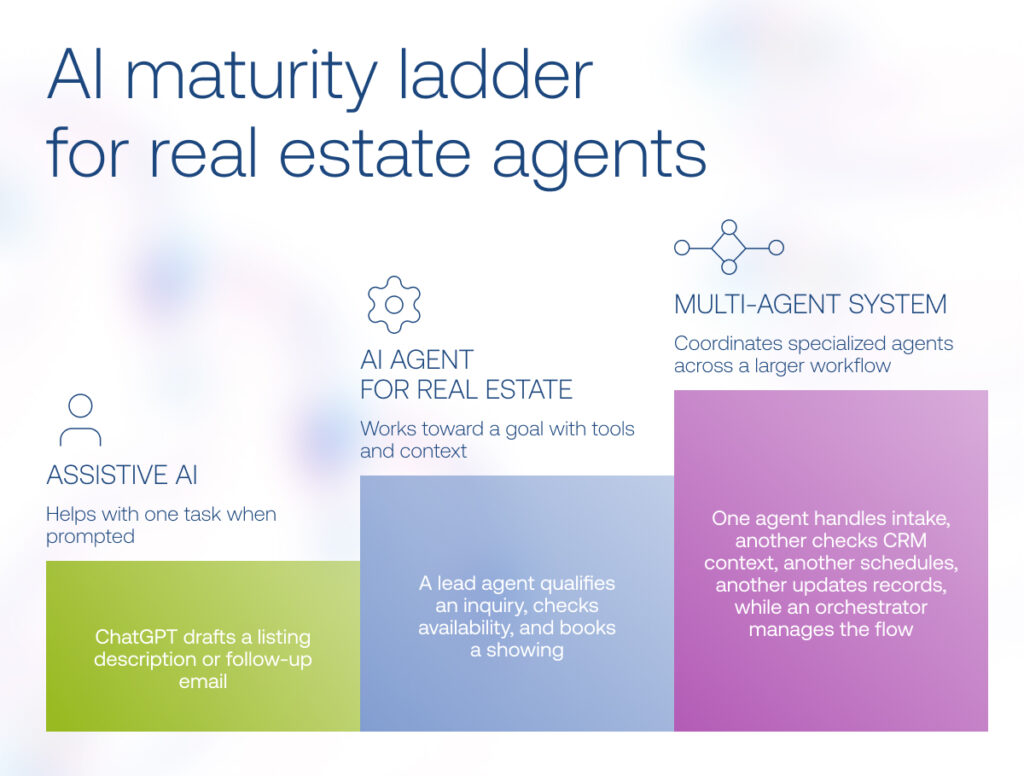
The role of AI for learning and development is easiest to understand as a maturity curve.

At the first level, AI works as a copilot. It drafts, summarizes, and suggests, but a person stays in the loop on every output. In practice that looks like a generative draft of a course module or a quiz built from a short brief, which an instructional designer then reviews before anything reaches a learner.

At the second level, there is a single AI agent. Give it a goal and a set of tools, and it executes one bounded task from start to finish. A working L&D example is an agent that auto-grades assessments and returns structured feedback, while your team sets the guardrails and audits the outcomes.

At the third level, AI supports workflows through multi-agent systems. Specialized agents run a chained workflow under a supervisor: one builds the course, another maps it to your skills graph, all of it gated by human sign-off. Counterintuitively, autonomy does not reduce the human role here. It raises it, because more moving parts demand more governance, not less.

LevelWhat it doesL&D exampleHuman role
Assistive (copilot)Drafts, summarizes, suggests; human in the loop on every outputGenerative draft of a course module or quiz from a briefReviews and approves each output
Single AI agentExecutes a bounded task end-to-end with goals plus toolsAuto-grades assessments and returns structured feedbackSets guardrails, audits outcomes
Multi-agent systemsSpecialized agents under a supervisor run a chained workflowEnd-to-end course build plus skills mapping under human sign-offOwns governance, sign-off gates

Knowing where you sit matters. Most enterprises live on the assistive level, experimenting rather than running production agents. In our delivery work, the jump from assistive to agentic is a governance and data problem long before it is a model problem. Clients who tried to skip straight to autonomous agents, without the orchestration and sign-off layer, stalled. That adoption reality is the whole reason this article argues for orchestrating a supervised workflow over buying autonomous tools. So where does this land across the day-to-day of L&D?

AI corporate training use cases that create measurable value

AI augments five stages of the L&D workflow. Across content, personalization, delivery, skills intelligence, and operations, the same pattern holds: each capability multiplies the others only when orchestrated over shared, clean learning data, not bought as disconnected point tools. Here is what AI actually does at each stage:

  • Faster content production: drafting modules, quizzes, and assessments from a brief in hours instead of weeks.
  • Personalization at scale: adaptive learning paths tuned to each learner’s role, history, and pace.
  • 24/7 tutoring and coaching: an always-on assistant that answers questions and walks learners through hard concepts.
  • Real-time skills visibility: continuous mapping of what your workforce can do against what the business needs.
  • Automated L&D operations: enrollment, scheduling, reminders, and compliance 

The engineering win is wiring these stages to a shared skills graph and learning record so they reinforce one another.

Content and course generation

Generative AI in learning and development has made content creation one of the most common examples of AI in learning and development. L&D teams can use AI to draft course outlines, convert long-form documents into microlearning, generate knowledge checks, adapt examples for different roles, rewrite materials for different reading levels, and localize content across languages or regions.

But there is a trap. An AI-generated lesson can be polished and still be wrong, outdated, too generic, or misaligned with the company’s policies. That is why the strongest content workflows keep humans in the loop. AI drafts, restructures, adapts, or localizes. Subject-matter experts validate accuracy. L&D teams check instructional quality. Governance rules ensure the right version is published.

Used this way, AI for training and development helps teams scale content operations without turning the learning ecosystem into a flood of unverified material.

Personalization and adaptive learning

Adaptive learning turns a static catalog into a path that responds to the individual. The system reads role, prior completions, assessment results, and on-the-job behavior, then sequences what each learner sees next. We built this directly into an EdTech mobile app for an educational ecosystem, where a machine-learning recommendation engine matched learners to the right next module and raised learner engagement 43%. 

It’s important to note that for enterprises, personalization works only when the system has reliable context. If the skills taxonomy is weak, job roles are inconsistent, learning assets are poorly tagged, or performance signals are unavailable, AI recommendations become educated guesses. This is why the knowledge layer matters as much as the model.

AI tutoring, performance support, and knowledge retrieval

Many L&D problems are really knowledge-access problems. The organization already has the answer, but employees cannot find it when they need it.

A grounded AI tutor or learning assistant can help employees ask questions and receive answers based on approved internal sources. It can cite the relevant document, explain the policy, suggest a next step, and escalate low-confidence cases.

For example, a frontline worker could get guidance on handling a specific service exception. A software engineer may need a concept explained through the lens of the company’s internal framework. For a sales rep, the assistant can help position a new feature for a regulated customer. In finance, it can point an employee to the policy that applies to a particular approval scenario. In those environments, people need the right answer at the right moment more than they need another hour-long learning module.

Skills intelligence and analytics

Many companies still struggle to see their workforce capabilities clearly: which skills they have, which are fading, where roles are changing fastest, who could move into adjacent positions, where capability gaps are forming, and which learning investments actually support strategic priorities.

AI in talent development can help by connecting job architecture, skills taxonomies, learning records, project data, manager input, performance signals, and internal mobility patterns.

In this case, AI in HR learning and development becomes strategic, as it can support career pathing, succession planning, workforce planning, project staffing, reskilling, and internal mobility. Instead of offering the same training catalog to everyone, the organization can build more targeted development pathways.

L&D operations automation

The least glamorous stage is often where leaders feel the value first. AI handles enrollment, scheduling, nudge reminders, and certification tracking, and it generates the compliance reports that used to consume coordinator hours. 

In regulated settings, automated certification tracking and audit-ready reporting are not conveniences; they are the difference between passing an inspection and scrambling for evidence. This is where the workflow stops being an internal efficiency story and becomes an enterprise risk-and-compliance story, with stakes high enough to reshape how the whole system gets built.

What a production-ready AI L&D system looks like

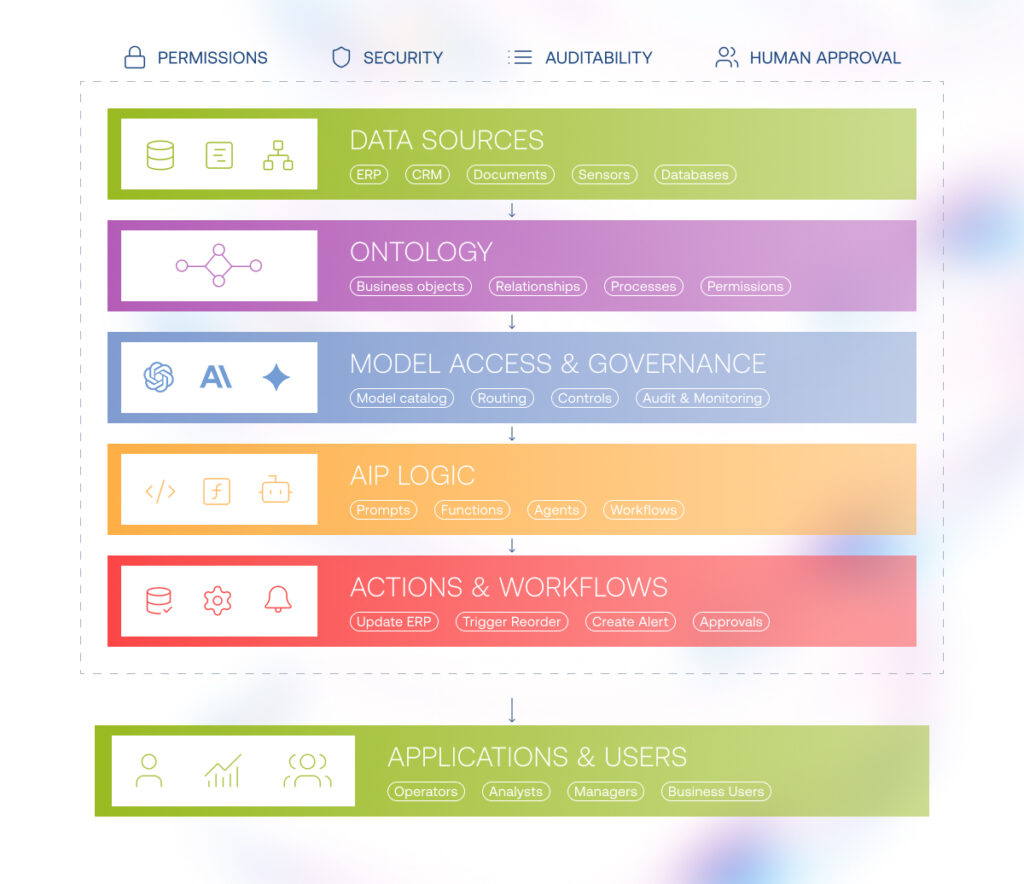
Once AI starts recommending learning paths, interpreting skills data, nudging managers, reinforcing compliance, or updating records in the LMS, it becomes part of the company’s capability infrastructure and needs clear rules, trusted context, secure integrations, coordinated AI workflows, performance feedback, and user experiences built around real L&D work.

These requirements translate into six architecture layers, each answering a specific implementation question and preparing the ground for the next one:

  • what AI is allowed to do,
  • what knowledge it can trust,
  • which systems it can interact with,
  • how AI-enabled steps are coordinated,
  • how performance is monitored,
  • how learners, managers, and L&D teams experience the system.

1. Governance and control layer

Governance should come first because AI in L&D often touches sensitive areas: employee data, learning records, skills profiles, performance signals, compliance status, career recommendations, and manager decisions.

This layer defines what the system is allowed to do, what requires human approval, which data each role can access, and how outputs are reviewed.

It includes role-based permissions, privacy rules, content approval workflows, audit trails, source provenance, bias checks, escalation logic, human-in-the-loop review, and a clear separation between suggestions and decisions.

2. Knowledge and context layer

Once the rules are clear, the system needs reliable context.

This layer brings together the information AI will use to support learning decisions: skills taxonomies, competency models, role profiles, learning content, internal policies, SOPs, knowledge articles, assessment data, employee learning history, manager feedback, and business priorities.

Without it, personalization remains shallow. The system may generate a fluent answer or suggest a polished course, but it may not be relevant, current, approved, or aligned with the employee’s role.

For many companies, applying AI for learning and development becomes difficult because their data is not prepared: content, metadata, skills data, and business context are scattered.

3. Integration and action layer

AI becomes useful at enterprise scale when it connects to the systems where learning and work already happen.

This layer integrates the AI system with LMS, LXP, HRIS, talent marketplaces, collaboration tools, knowledge bases, content repositories, assessment platforms, performance management systems, ticketing tools, CRM systems, and business applications.

The integration layer allows AI to move beyond recommendations. It can assign a learning path, update completion records, trigger manager nudges, schedule coaching, retrieve policy content, recommend practice, create a learning task, or route an item for review.

But action increases risk. Reading from a knowledge base is one thing. Updating an employee record, assigning compliance training, or nudging a manager is another. Actions should be permissioned, logged, reversible where possible, and tied to clear approval paths.

4. Agent orchestration layer

Only after governance, context, and integrations are defined does it make sense to design agents.

Agentic AI in learning and development is useful when the workflow requires multiple steps, changing context, system access, handoffs, and human review. The orchestration layer coordinates how specialized AI capabilities work together across a learning workflow.

For example, an onboarding workflow might involve several agents or AI-enabled steps: a role-context agent identifies what the new hire needs to know, a knowledge agent retrieves approved company materials, a content agent adapts them into a learning path, a practice agent generates realistic exercises, a manager-support agent prepares coaching prompts, and an analytics agent tracks progress.

The value is not in calling everything an agent. The value is coordination. When workflows are simple, orchestration may be unnecessary. When learning depends on multiple systems, approvals, roles, and feedback loops, orchestration prevents AI from becoming another set of disconnected point tools.

5. Monitoring and optimization layer

AI learning systems need continuous monitoring because their quality depends on changing inputs: content, roles, policies, skills, learner behavior, and business needs.

This layer tracks usage, learner engagement, content accuracy, retrieval quality, human overrides, escalation rates, assessment performance, completion, transfer signals, manager adoption, skills progress, business outcomes, drift, and failure patterns.

Every AI-supported workflow should leave a trace: what context was used, what output was produced, what action was taken, whether a human approved it, and what happened next.

Without monitoring, companies manage AI by anecdote. With monitoring, they can manage it as a business capability.

6. User and business interface layer

The interface is the final expression of the architecture.

For learners, it may look like a role-aware assistant, a personalized learning path, a simulation environment, or a support experience embedded in the flow of work. For managers, it may show coaching prompts, team capability gaps, readiness signals, recommended interventions, and conversation guides. For L&D teams, it may provide dashboards for content quality, workflow performance, learner engagement, governance review, and program impact.

How to use AI in learning and development without creating another fragmented stack

The best way to use AI tools for learning and development is to start with one workflow where the business already feels friction.

Begin with the operating problem. 

Here AI adoption needs a strategic pause. Without one, L&D teams can easily end up with a content generator here, a chatbot there, a coaching assistant somewhere else, and no shared logic connecting them to skills, systems, governance, or measurable business outcomes. A structured, tailored AI adoption workshop helps prevent that pattern by bringing business, L&D, HR, and technology stakeholders into the same conversation before tools are selected or pilots are launched.

The goal is to identify the few that are valuable, feasible, and safe enough to move forward and then translate them into a practical roadmap.

A practical rollout has six steps:

  1. Choose one capability domain, such as onboarding, sales enablement, customer support training, compliance, manager development, technical upskilling, or frontline knowledge support.
  2. Map the workflow end to end: triggers, systems, content, approvals, learner struggles, manager interventions, and business outcomes.
  3. Audit the data and knowledge foundation: learning content, skills taxonomy, role profiles, metadata, policies, knowledge bases, HR data, and permissions.
  4. Define human judgment moments: where humans review, approve, coach, or make the final decision.
  5. Build the measurement loop around time to proficiency, search success, learner engagement, manager adoption, reduced support tickets, internal mobility, or performance improvement.
  6. Decide what to buy, extend, or build.

Using AI tools for learning and development effectively does not mean automating everything. It means redesigning the right workflows so AI supports capability development without weakening quality, accountability, or trust.

AI in L&D governance: risks, controls, and responsible adoption

The risks of AI in L&D are not theoretical.

The first failure mode is hallucinated course or compliance content. A model that drafts a safety module from open-web priors will, sooner or later, state something confidently wrong, and in regulated training a wrong answer carries legal weight. The fix is structural: RAG over governed content so the model answers from your curated learning library, paired with human-in-the-loop sign-off on anything that ships. No compliance module reaches a learner without a person approving it.

The second is recommendation bias. Skills-graph and adaptive-path engines learn from historical data, and historical data encodes who got promoted, trained, and sponsored in the past. Left unchecked, the system steers opportunity toward the groups it already favors. The mitigation is routine skills-graph audits and fairness checks on recommendation outputs, treated as a standing process, not a one-time launch task.

The third is employee-data privacy. Learning records are PII: role history, assessment scores, performance signals. Personalization needs that data, but it must stay inside controlled environments with defined PII residency, and it must never enter a public model context. Residency and access boundaries are design constraints set before the first agent runs.

The fourth is a distrust of autonomy, and leaders are right to be cautious. The answer is supervised orchestration with a full audit trail rather than black-box autonomy: agents get bounded authority, sign-off gates, and a logged record of every decision a reviewer can defend later.

The market backs this posture. Only 15% of IT application leaders are considering, piloting, or deploying fully autonomous AI agents. Read that caution as sound judgment about where unsupervised systems belong, rather than a lag to overcome.

Future of AI in learning and development: from content tools to capability infrastructure

The next generation of learning systems will not only recommend courses. They will detect skill gaps, retrieve trusted knowledge, create practice opportunities, support managers, monitor progress, update content, route approvals, and connect learning outcomes to business performance.

Counterintuitively, this makes human work even more important. People still define the skills that matter. Experts still validate knowledge. Managers still coach. Leaders still make workforce bets. Employees still need to practice, reflect, and build judgment.

The generative AI in the learning and development market is already moving beyond content tools toward systems that combine skills intelligence, workflow automation, coaching, analytics, and performance support. In other words, the future of learning and development is a better infrastructure for helping people adapt.

Ready to move from point tools to an orchestrated Lu0026D system?

Let’s scope it

FAQ

What is AI in learning and development?

AI in L&D is the use of generative and agentic AI across the learning workflow: drafting content, personalizing paths, tutoring, mapping skills, and automating L&D operations, layered over an LMS or LXP and clean learning data. According to McKinsey, about 80% of organizations use generative AI somewhere, but fewer than 10% scale AI agents in any function, so most real value today is assistive and supervised, not autonomous.

How is AI used in corporate training?

AI handles content generation, adaptive and personalized paths, 24/7 tutoring, skills intelligence and analytics, and operations automation such as enrollment and compliance reporting.

What are the benefits of AI in L&D?

The benefits compound across the workflow: faster content production, personalization at scale, always-on tutoring, real-time skills visibility, and automated operations. They reinforce one another only when orchestrated over clean data. The energy-corporation compliance LMS is the proof point, where a governed, integrated build drove the task-automation, engagement, and budget gains cited above.

What are the challenges and risks of AI in L&D?

Four risks recur: hallucinated course or compliance content, biased recommendations, employee-data privacy breaches, and leader distrust of autonomy. The mitigations are RAG over governed content with human sign-off, routine fairness audits, strict PII residency, and supervised orchestration with audit trails.

Will AI replace L&D professionals?

No, but it is shifting the work. According to the LinkedIn Workplace Learning Report, 71% of L&D professionals are already exploring, experimenting with, or integrating, which actually raises demand for human-led L&D to design, govern, and review AI-assisted learning rather than reducing it.

Should we build or buy an AI LMS?

Buy off-the-shelf when needs are generic and data is clean; build or extend custom when you need deep HRIS, LMS, and compliance integration, regulated data residency, or orchestration across systems. Gartner predicts over 40% of agentic AI projects will be canceled by end of 2027 on cost, unclear value, and weak risk controls, so readiness and governance decide success more than the tool.

What is the difference between SCORM and xAPI?

SCORM is the legacy, LMS-bound packaging and tracking standard focused on course completion. xAPI (IEEE 9274.1.1-2023) records any learning experience, including mobile, simulations, and on-the-job tasks, as noun-verb-object statements sent to a Learning Record Store (LRS) that can live inside or outside an LMS. xAPI and the LRS are the richer data substrate adaptive AI needs.

AI Real Estate Agent Tools in 2026: Expert’s Guide On What Works Now and What’s Coming Next

Not that long ago an AI real estate agent used to sound like a futuristic replacement for a human realtor. In 2026, the term can describe a single AI tool that helps an agent write a listing description, an AI voice agent for real estate that answers inbound calls, or a more advanced system that qualifies leads, schedules showings, updates a real estate CRM, and keeps the workflow moving with human oversight.

That difference matters. For now, most AI in real estate acts like a helpful assistant, taking care of isolated tasks such as writing, summarizing, transcription, recommendations, and reminders. The next generation of AI tools for real estate agents will go further, helping humans coordinate entire workflows across lead generation, nurturing, showings, transaction tasks, documents, and follow-up.

Built on our experts’ hands-on experience with AI real estate solution implementation, this guide explains which AI tools for real estate agents are useful today, where agentic AI in real estate is heading, and how brokerages, teams, and proptech companies can prepare their data, workflows, and governance for the shift from point tools to coordinated AI-powered operations.

Key highlights

  • The AI real estate agent is no longer a single tool, but a workflow-driven system that connects leads, listings, transactions, and operations into one coordinated process.
  • The real impact of AI in real estate comes from orchestrated execution, where AI moves work across systems, while humans stay in control of judgment, approvals, and client relationships.
  • Companies that want to benefit from AI real estate agents must first redesign their workflows, data, and governance, not just adopt new tools.

What is an AI real estate agent?

An AI real estate agent is software that uses artificial intelligence to support, automate, or coordinate work across the real estate lifecycle. In its simplest form, it may be an AI assistant for real estate agents that drafts emails, writes property listings, summarizes calls, or answers common buyer questions. In their more advanced form, AI agents for real estate can act on a goal: capture a lead, qualify the buyer, book a showing, send reminders, update the CRM, and route exceptions to a licensed agent. In other words, the system takes over parts of the workflow that are repetitive, time-sensitive, or rules-based, while humans stay responsible for fiduciary duty, negotiation, compliance, client trust, and final decisions.

Maturity curve of AI tools for real estate agents

How to use AI for real estate agents: 7 high-impact use cases

The most useful AI tools for real estate agents are defined by the workflow – not just a single task – they improve.

1. Lead response and tour scheduling

Lead response is one of the clearest use cases for an AI real estate agent because the workflow is time-sensitive, repetitive, and easy to measure. When a buyer, renter, or seller inquiry comes in, someone has to answer, qualify intent, collect preferences, check availability, schedule the next step, and update the CRM.

An AI voice agent for real estate can handle the first part of that workflow when a human agent is unavailable. It can answer inbound calls, ask basic qualification questions, capture budget and timeline, transcribe the conversation, and trigger follow-up automation. In text channels, the same role can be played by an AI chatbot that answers website, SMS, or portal inquiries and routes serious prospects to the right person.

For residential agents and brokerages, this is where AI delivers immediate value, as it contributes to fewer missed leads, faster replies, cleaner CRM records, and more consistent follow-up. 

2. Leasing and renewals

Leasing is often treated as a marketing process, but operationally it is a sequence of handoffs, such as inquiry, qualification, availability check, tour scheduling, application support, document collection, approval, move-in, and renewal. Every delay creates friction for the prospect, the leasing team, and the property owner.

A real estate AI agent can support this process by handling routine leasing conversations, answering property questions, collecting applicant details, booking tours, sending reminders, and routing exceptions to a human leasing specialist. For renewals, AI agents can monitor signals such as unresolved maintenance issues, negative feedback, missed appointments, or slower response behavior, then prompt the team to intervene before the tenant decides to leave.

For larger operators, this can become a multi-agent workflow, where a communication agent handles tenant-facing messages, a knowledge agent retrieves policy and lease context, a scheduling agent coordinates tours, a compliance agent checks escalation rules, and a CRM agent logs the result.

3. Maintenance and resident service

Maintenance is one of the strongest examples of agentic AI in real estate because the work rarely ends with answering a question. When a resident reports a problem, the business has to classify the issue, assess urgency, check property rules, coordinate access, dispatch a technician or vendor, communicate updates, approve costs, and close the loop.

A simple AI chatbot for real estate agents can collect a maintenance request. A more capable AI agent can move the ticket through the process: ask clarifying questions, categorize the issue, identify emergency cases, read attached photos, suggest troubleshooting steps, route the job to the right technician, notify the resident, and update the property management system.

4. Transaction coordination and document management

Real estate transactions depend on documents: listing agreements, disclosures, contracts, inspection reports, amendments, financing documents, lease files, closing checklists, and compliance records. Delays usually happen because someone has to find the right document, extract the right detail, confirm the deadline, or chase the next signature.

An AI assistant for real estate agents can summarize a contract or draft an email. A more advanced real estate AI agent can help coordinate the transaction workflow: extract key dates, compare checklist requirements against available documents, flag missing signatures, draft client updates, prepare reminders, and route questions to the licensed agent or transaction coordinator.

For brokerages and proptech companies, this is a strong candidate for custom AI agent development because the workflow often depends on local rules, brokerage-specific processes, document templates, and compliance requirements. The agent should not make legal decisions or interpret obligations without review, but it can reduce the administrative drag around those decisions.

5. Property valuation and market analysis

AI can help collect comparable sales, summarize neighborhood trends, analyze property attributes, identify anomalies, and turn market data into a first draft of a pricing narrative.

But this is not a use case where AI should become the decision-maker. Automated valuation models and predictive analytics can support the analysis, while the licensed agent brings local judgment: property condition, buyer psychology, micro-location, renovations, inventory pressure, seller urgency, and negotiation strategy.

The best AI tools for real estate agents in this area work as decision support. They help agents move faster from raw MLS data, public records, and market signals to a defensible recommendation. They do not remove the need for a professional who understands the market and can explain the pricing logic to a client.

6. Asset management and portfolio operations

In commercial real estate and larger residential portfolios, the AI real estate agent concept expands beyond individual buyer or seller support. Here, AI agents can help asset managers, owner-operators, and property management teams coordinate portfolio-level work.

For example, one agent can extract lease terms and key dates, another can pull operating performance, another can summarize tenant or resident issues, another can prepare a draft investment memo, and another can flag risks that require review.

This use case matters because it shows the enterprise direction of real estate AI agents. The value lies in connecting documents, systems, workflows, and approvals so that teams spend less time rebuilding the facts and more time making judgment calls.

7. Construction, capital projects, and vendor coordination

Construction and capital projects are full of documents, dependencies, approvals, vendors, and exceptions. AI agents can support this domain by organizing RFIs, submittals, meeting notes, bids, permits, change orders, schedules, and closeout documents.

A project-support agent might classify incoming documents, extract action items from meeting minutes, check whether a submittal package is complete, draft a vendor update, flag a change order above an approval threshold, or remind stakeholders about missing closeout materials.

Best AI tools for real estate agents: how to choose

The best AI tools for realtors are the ones that remove bottlenecks in the agent’s actual week.

For solo agents, the best fit is usually a practical stack: a writing assistant, an AI voice or chatbot tool, CRM follow-up automation, transcription, and a simple listing description generator. For teams and brokerages, the decision is different. They need shared data, role-based access, workflow visibility, brand controls, and integrations with the CRM, transaction coordination, document management, and marketing systems.

Before choosing a tool, answer the following questions:

  • Does it connect to the systems where work already happens?
  • Does it improve lead response, follow-up, documentation, or conversion?
  • Can humans review sensitive actions before they happen?
  • Does it leave an audit trail?
  • Can it scale from one agent to a team or brokerage?
  • Does it support your brand voice and compliance requirements?
  • Does it make the CRM cleaner or messier?

What production-ready AI real estate agent architecture looks like

A production-ready AI real estate agent depends on a well-defined architecture, particularly when it interacts with business systems, schedules showings, sends client communications, or updates records in real time. Reliable execution at scale requires these capabilities to be organized across several coordinated layers.

1. User and business interface layer

This is where agents, brokers, property managers, leasing teams, or asset managers interact with the system. It may be a chat interface, CRM sidebar, mobile app, dashboard, or workflow queue.

The interface should match the job: lead response, showing scheduling, transaction coordination, maintenance triage, or portfolio review.

2. Agent orchestration layer

This layer coordinates the work. It decides which agent should act, what context it needs, when to route work to another agent, and when to stop for human review. For simple tasks, orchestration may be unnecessary. Meanwhile, for complex workflows, it prevents AI agents from becoming disconnected point tools.

3. Knowledge and context layer

Weak context produces weak automation. If the data is outdated, duplicated, or disconnected, the AI may sound confident while moving the workflow in the wrong direction. So this layer is designed to provide the system with reliable information: CRM history, property listings, MLS data, client preferences, transaction documents, lease terms, vendor records, policies, and prior communications.

4. Integration and action layer

At this point,  the AI connects to real estate CRM, calendars, email, SMS, transaction management software, document stores, virtual tour tools, property management systems, and marketing platforms. That’s how AI agents can create tasks, update records, schedule showings, trigger reminders, or route approvals.

5. Control layer

This layer defines what the AI is allowed to do. It includes permissions, approval rules, audit trails, escalation logic, compliance checks, and human-in-the-loop controls.

For real estate, AI governance is essential. AI should not make unauthorized promises, change contract terms, approve concessions, or handle sensitive client matters without clear boundaries.

6. Monitoring and optimization layer

AI gets better only when the business can see what happened, why it happened, and where the workflow broke. That’s why it needs to be possible to track whether the system is working: response times, booking rates, lead conversion, CRM accuracy, escalation rates, human overrides, failed actions, and user adoption.

Build vs. buy: AI real estate agents

There is a ceiling on what rented tools can do. Off-the-shelf apps solve isolated tasks well, a chatbot here, a follow-up sequence there, but each one runs in its own silo. A custom AI agent can orchestrate the whole brokerage workflow end to end, moving a lead from first contact through qualification, scheduling, and CRM updates without a human stitching the apps together. That difference is what separates buying a tool from building a system.

For an individual agent, buying is almost always the right call. For a brokerage or a proptech company with volume, its own data, and strict compliance rules, a purpose-built system on a multi-agent framework for real estate workflows can fit the exact process instead of forcing the process to fit the app. The honest answer depends on your size, your data, and how custom your workflow really is. In regulated workflows with sensitive client data, that calculus also has to account for data residency and audit-trail requirements, which can push a team toward building even when an app would be cheaper to start.

FactorBuy (off-the-shelf)Build (custom)
Time to launchFast, ready out of the boxSlower, a real project
CustomizationLimited to the vendor’s roadmapAny workflow you can define
Cost modelPredictable subscriptionHigher upfront, lower long-run at scale
Data and complianceVendor-controlledFull control over data and audit trails
Best fitIndividual agents and small teamsBrokerages and proptech with scale

How brokerages and proptech companies can prepare to use AI as a real estate agent

While individual agents can start with separate, out-of-the-box tools, brokerages and proptech companies need full AI readiness. Here’s the checklist our AI experts suggest following:

  • First, clean the data foundation. AI needs reliable records for leads, clients, properties, listings, transactions, documents, vendors, and communications. If your data is messy, AI will scale the mess.
  • Second, map workflows before automating them. Lead generation, lead nurturing, showing scheduling, transaction coordination, document management, and follow-up automation should be broken into repeatable steps, judgment points, and escalation moments.
  • Third, define governance early. Who can approve AI-sent messages? Which actions require human review? What data can each user access? What gets logged? What happens when confidence is low?
  • Fourth, decide what to buy, extend, or build. Most individual agents should buy. Teams may extend existing platforms. Proptech companies and larger brokerages may build custom AI agents when workflow intelligence, proprietary data, or brand experience becomes a competitive advantage. 

Will AI replace real estate agents?

The short answer is no – at least, not now. 

The question itself confuses tasks with the job. Goldman Sachs estimates that 46% of tasks in office and administrative support roles are exposed to automation by generative AI, the highest share of any occupation group. Much of an agent’s week is exactly that kind of work: paperwork, scheduling, data entry, and first-draft writing. Automating those tasks does not remove the agent. It clears the calendar for the parts of the job a machine cannot do.

Those parts are real, and they are defined in part by law. Under Article 1 of the NAR Code of Ethics, agents pledge to “protect and promote the interests of their client”. A model cannot hold that obligation, carry the license behind it, or answer for a bad outcome. So the question of whether real estate agents will be replaced by AI runs into a wall: accountability has to rest with a person.

Three constraints keep the human in the seat. Licensing ties the transaction to a credentialed individual. Legal liability needs someone who can be held responsible. And the emotional weight of the largest purchase in most people’s lives still calls for a person who can read a room and steady a nervous buyer. So will AI take over real estate agents entirely? Not on any near-term roadmap, which is why that worry is aimed at the wrong target.

The clearest way to see the boundary is to lay the two columns side by side.

What AI can doWhat AI can’t do (yet)
Qualify leads 24/7Negotiate the terms of a deal
Generate listing descriptionsHold fiduciary responsibility
Answer neighborhood questionsRead a buyer’s emotion at a showing
Automate follow-upBuild trust through an in-person meeting
Analyze market dataSign a legal document

The left column is where AI compounds your output. The right column is where your value lives. Human real estate agents who automate the left and double down on the right are the ones who pull ahead.

The future of the AI real estate agent is workflow, not tools

AI automation for real estate agents is not one thing, but a category of tools that has moved from simple assistance to coordinated execution. The most valuable real estate AI agents coordinate full workflows: capturing leads, scheduling showings, updating systems, routing approvals, supporting transaction coordination, and learning from every completed step.

In this landscape, the winning move is to choose the workflow where speed, consistency, and better handoffs matter most, then build the data, integrations, governance, and monitoring around it. For agents, teams, and brokerages, that is where the real advantage starts.

Ready to build your own AI agent for real estate?

Let’s talk

FAQ

What is agentic AI in real estate?

Agentic AI in real estate is software that plans and acts toward a goal instead of just answering a prompt. Given a target, it chains steps together, for example capturing a lead, qualifying it, booking a showing, and updating the CRM, while a human supervises the outcome.

What AI tools do real estate agents use?

They fall into six categories: voice agents, chatbots, listing and marketing generators, AI-powered CRM and lead automation, valuation and market-analysis models, and free general tools like ChatGPT. Per NAR’s 2025 survey, ChatGPT is the most-used, at 58% (NAR, 2025).

What is the best AI voice agent for real estate?

There is no single best AI voice agent for real estate; the right one depends on your CRM and call volume. Widely used options include Structurely, Roof AI, and CINC. The shared value is speed: these tools answer and qualify a lead in seconds rather than hours.

Will AI replace real estate agents?

No, real estate agents will not be replaced by AI as a profession. Generative AI automates routine tasks, yet it cannot hold a license, carry fiduciary responsibility, or build trust in person. Goldman Sachs estimates 46% of office and administrative tasks are exposed to automation (Goldman Sachs, 2023), but the licensed, accountable, and emotional parts of a transaction still require a person under the NAR Code of Ethics. Yet, the agents who automate routine work and focus on judgment and relationships will outperform those who do not.

How do I use AI as a real estate agent?

To use AI as a real estate agent, start small: audit your routine, pick one tool, test it on real work, then integrate it. Begin with high-return tasks like listing copy, lead qualification, and follow-up. Free tiers of ChatGPT, Gemini, and Zapier are a low-risk place to start.

What are the best free AI tools for real estate agents?

The best free AI tools for real estate agents include ChatGPT’s free tier for writing, Canva AI for marketing graphics, Google Gemini for research, and Zapier’s free tier for connecting apps. Together they automate listings, social content, and basic lead handling at no cost.

What Is Palantir AIP? A Deep Dive into Its Architecture, Use Cases, and Alternatives

Palantir AIP has become one of the enterprise AI platforms companies consider when they want to operationalize large language models without building the entire AI infrastructure from scratch. For many organizations, the question is no longer whether LLMs belong in day-to-day operations, but how to connect them securely to business data, workflows, decisions, and actions.

This guide covers what Palantir AIP is, how it works under the hood, what capabilities it provides out of the box, when adopting it can be more practical than building a custom stack, and when a lighter-weight alternative may be the better fit. 

Key highlights

  • AIP’s value comes from the infrastructure around AI, not AI itself.
  • Intertwined with the Ontology, off-the-shelf governance and security mechanisms, and production-proven action layer are the reasons AIP behaves differently from a self-assembled enterprise AI stack.
  • AIP Palantir shines in large-scale operational environments and becomes overkill outside them.

Palantir AIP is an enterprise-targeted Artificial Intelligence Platform businesses can use on top of their existing tech stack without modernizing legacy components. It belongs to Palantir’s enterprise AI operating system, alongside Palantir Foundry (a data operations platform), the Ontology (a living map of a company’s data, logic, and processes), and Apollo (a deployment engine). Thanks to working in concert with these systems, AIP provides decision intelligence and enables AI agents to act on a company’s live operational data, such as updating an order, routing financial transactions for approval, or flagging gaps in patients’ records. 

Palantir AIP at a glance
ParameterDetails
Full formArtificial Intelligence Platform
Launched2023
Built onPalantir Foundry and the Ontology
Supported modelsModel-agnostic: OpenAI GPT, Anthropic Claude, Google Gemini, Meta Llama, xAI, and any open-source, self-hosted, and bring-your-own models
Core building blocksAIP Logic, AIP Chatbot Studio, AIP Evals, AIP Assist, Model Catalog, Actions and Workflows
Deployment​​Cloud (AWS, Azure, GCP) for commercial use; Palantir Federal Cloud, air-gapped and edge environments for government, defense, and other regulated industries
ComplianceFedRAMP High, DoD IL5 and IL6; supports ITAR- and HIPAA-aligned deployments

Palantir AIP is an enterprise-targeted Artificial Intelligence Platform businesses can use on top of their existing tech stack without modernizing legacy components. It belongs to Palantir’s enterprise AI operating system, alongside Palantir Foundry (a data operations platform), the Ontology (a living map of a company’s data, logic, and processes), and Apollo (a deployment engine). Thanks to working in concert with these systems, AIP provides decision intelligence and enables AI agents to act on a company’s live operational data, such as updating an order, routing financial transactions for approval, or flagging gaps in patients’ records. Which companies need Palantir AIP?  

Palantir AIP is a strong fit for companies willing to pay a premium for a platform that has already solved the hardest AI adoption challenges enterprises face:

  • Can’t afford gambling on AI that hasn’t proved reliable and safe in enterprise production, as a single compliance failure, operational mistake, or governance lapse will expose them to multi-million-dollar fees
  • Have software ecosystems with legacy tools that can’t be modernized or replaced without introducing major disruption to business processes 
  • Expect a solution to fit into a complex enterprise software landscape without extensive customization and start delivering value right away

Palantir AIP is designed for enterprises with sprawling operations and fragmented technology landscapes. The bill tends to match the ambition, so the question is more like: Which companies need Palantir AIP and can afford it? 

For mid-size businesses that only want to automate a handful of workflows, deploy AI agents in a specific department, or improve access to internal knowledge, lighter alternatives, like an accelerator for building custom AI agents, will be a better choice. 

— Alexej Spas, CEO, Instinctools

Benefits of Palantir AIP you wouldn’t want to miss

The reasons a business picks AIP over the alternatives come down to the following list:

  • No need to modernize outdated software. The best part of AIP Palantir is that it can be layered over custom-built legacy systems thanks to a large integration framework and enterprise connectors, saving companies from the budget- and time-intensive modernization.
  • No vendor lock-in. Palantir AIP is a technology-agnostic platform in the broadest sense. You can switch between or combine any LLMs and tools they call to perform tasks as the field and business needs shift.
  • Rapid time-to-value. Palantir’s five-day AIP Bootcamp aims to land a working use case in a live environment within days, compared to the months a from-scratch build demands.
  • One platform instead of a toolchain. The capabilities that would otherwise be separate tools you need to integrate and maintain arrive as one system.
  • Operational proactivity over analytics alone. Where BI platforms stop at insight, AIP can execute approved actions directly in ERP, CRM, SCM software, and other systems, updating records or triggering workflows where appropriate.
  • Proven success where the stakes are highest. A customer base spanning defense, national governments, and Fortune Global 500 industrials leaves little doubt it holds up in production.

How Palantir AIP works: platform overview 

Several connected layers make up AIP, each tackling a problem that tends to sink enterprise AI projects, such as a lack of business context, fragmented model access and governance, workflow logic scattered across prompts and scripts, and AI outputs that stop short of controlled operational action.

 Palantir AIP architecture overview

1. The data and semantic layer: the Ontology

This is where AIP parts ways with a generic LLM setup. Instead of pointing a model at bare files, AIP connects it to the Foundry Ontology, a live operational layer that represents the business through objects, properties, relationships, logic, and actions. 

Those business connections are also governed by access controls. In Palantir AIP, permissions can be managed at the Ontology level, so the AI works only with the data, objects, and actions the user is authorized to access.

Consider an insurance claims adjuster reviewing a policyholder’s case. If that employee only has access to claims data for a specific region, an AI agent working on their behalf cannot suddenly pull records from another jurisdiction, access executive reports, or review unrelated customers’ policies. The agent inherits the same permissions as the adjuster and operates within the same boundaries. 

2. The model-access and governance layer

AIP stays model-agnostic, so enterprises are not tied to a single provider. The platform can run GPT, Claude, Gemini, Llama, open-source models, or ones organizations host themselves, and switch hitch-free when a task calls for it. 

The Model Catalog and admin controls handle the governance around those models, deciding: 

  • which models are available
  • how requests are routed between them
  • how much capacity each request gets
  • how model activity is monitored 

Governance plumbing like this sits on most AI roadmaps now – we see it first-hand as on-the-ground AI practitioners. The challenge is that building it from scratch can take months. Meanwhile, with AIP Palantir, much of that foundation is already in place, so the team’s time goes to the use case itself.

— Alexej Spas, CEO, Instinctools

3. The logic layer: AIP Logic 

Every enterprise process needs a set of rules, and AI-driven workflows are no exception. AIP Logic defines what the AI should do for a given task: what information to use, what checks to perform, what conditions to evaluate, and when to act. As a no-code development environment, it allows people like business analysts and operations leads who know the process as much as engineers to build that logic by assembling steps rather than hand-coding them. 

For example, business users might lay out how the AI reads an incoming invoice, compares it against contract terms, flags anything unusual, and routes low-risk items for approval. Developers who want tighter control can write the same logic in code.

4. The action layer: Actions and Workflows

What the AI decides changes nothing until it leads to an action. In Palantir AIP, actions connect AI-assisted decisions back to the systems you run: updating an ERP record, triggering a reorder, issuing a refund, etc. Every action leaves an audit trail, and the high-stakes ones wait for a human reviewer to approve them before execution.

Palantir AIP out-of-the-box capabilities

While ready-made solutions usually come with downsides like limited flexibility, rigid workflows, and vendor-imposed constraints, Palantir AIP cannot be ranked alongside other off-the-shelf tools, as it completely reimagines what “out-of-the-box” delivers. The fastest way to gauge it is to look at what you don’t have to build yourself. The list runs long:

  • Industry-specific templates give you configurable starting points for insurance, manufacturing, supply chain, and other domains, so you adapt a working setup instead of starting from a blank page.
  • A no-code environment enables non-tech users to build and deploy custom AI chatbots and assistants that draw on the company’s data, documents, and tools.
  • Safety guardrails apply content filtering, PII handling, and policy controls to every model call.
  • A testing environment is designed with the LLMs’ non-deterministic nature in mind. It measures how reliably a function gets the right answer across many runs, so you know how much trust you can put into AI outputs and actions.
  • Enterprise compliance is already covered for the most heavily regulated settings. For instance, AIP Palantir is cleared for US federal agencies (FedRAMP) and defense workloads up to classified levels (DoD IL5/IL6), and supports deployments that handle export-controlled defense data (ITAR) and protected health information (HIPAA). Credentials like these can take years to earn on your own.
  • Flexible deployment options include cloud for commercial use and air-gapped or edge environments for defense and other highly regulated industries.
  • Multimodal support lets AIP work across text, tables, documents, and images alike, so an agent can read a scanned contract or a chart as readily as a line of text.

Building these capabilities from the ground up will keep an AI team busy for up to 18 months. The question is: can you afford such a delay in the world of vibe coding and rapid AI prototyping, where new products are sprouting up faster than mushrooms after the rain? While ready-made software has its trade-offs, nothing else can give you a comparable head start. 

— Alexej Spas, CEO, Instinctools

Palantir AIP as an agentic AI platform

Enterprise workflows rarely end with finding information. Someone still has to make a decision, approve the next step, and carry the work forward inside operational systems. That gap between insight and execution is where Palantir AIP’s agentic AI earns its keep.

Palantir AIP agentic AI platform can coordinate multiple specialized agents through multi-agent orchestration. One agent retrieves information, another analyzes it, and a third executes the tasks, while a coordinator agent keeps tabs on the overall process to move toward the same objective.

The easiest way to understand the Palantir AIP end-to-end agentic architecture is to follow a task through the system: from data retrieval and analysis to recommendation, approval, and action.

  1. A user request, business event, or predefined rule triggers a task.
  2. Next, the agent breaks that task into smaller steps and determines what information is needed to carry it out.
  3. It then retrieves the relevant business objects and relationships from the Ontology.
  4. With the context in place, the agent calls the necessary tools, models, and applications to complete each step.
  5. Based on the outcome, it proposes or executes actions in connected enterprise systems, such as ERP, CRM, etc.
  6. Finally, the results feed back into the workflow, allowing the process to continue until the objective is reached.
Palantir AIP

Human oversight remains central to the agentic pipeline. Agents can prepare recommendations, trigger actions, and move work forward, but companies decide where people stay in the approval chain. That balance between autonomy and control is what makes Palantir AIP suitable for operational environments where errors disrupt operations, compliance, or customer experience.

Palantir AIP use cases across industries

Reading a feature list is a bit like judging a Formula 1 car by its spec sheet. The most interesting part starts when the car leaves the garage. The same applies to Palantir AIP. Looking at how organizations already use it in production reveals how the platform fits into real operational workflows.

Finance and professional services

Processing vast amounts of data is all in a day’s work for any business, but when said data is related to money, the margin for error shrinks. Banks, law firms, audit practices, tax advisory firms, and consultancies rely on workflows built around document review, risk assessment, transaction checks, and tightly managed approvals. These processes are often repetitive, but they are rarely simple enough to automate blindly. 

AIP Palantir lightens this burden by handling fraud detection, transaction risk assessment, regulatory checks, and other document-intensive operations. For example, law firm Kirkland & Ellis adopted AIP to support end-to-end private funds workflows, from drafting fund documentation and supporting investor onboarding to obligation tracking, closing commitments, and verifying compliance. 

One of our clients, a leading US life and annuity insurer, also implemented Foundry and AIP combo within their contact center workflows to address peak tax-season inquiries faster and improve overall seasonal staff readiness.

Defense and government

Palantir’s roots are in the defense and government sectors, where AI systems need to operate under strict security and access-control constraints. The company works with organizations like NATO and the U.S. Army, including the TITAN battlefield program for 10 next-gen intelligence and reconnaissance ground stations, and supports deployments in highly restricted environments.

In these settings, Palantir AIP defense use cases include intelligence analysis, mission planning, logistics coordination, and battlefield awareness. Government agencies use the platform for areas such as emergency response, critical infrastructure monitoring, public-sector operations, and interagency coordination.

Healthcare and life sciences

Clinical records, scheduling info, lab results, and treatment plans rarely live in one place, forcing medical staff to assemble the full picture of a patient’s condition and care history piece by piece.

Healthcare organizations apply Palantir AIP capabilities to clinical decision support, clinical-trial operations, resource planning, and patient-flow management, all while keeping access to sensitive data under strict control. Public examples include NHS England, which uses Palantir technology to help hospitals and care providers coordinate resources, manage patient demand, and improve visibility across the healthcare system. By the company’s estimate, the platform returns about five times what it costs. 

Manufacturing

A machine failure on a production line can create quality issues downstream and throw maintenance schedules off course long before it shows up in a dashboard. In the environment where spotting the signals of potential collapse before they cause costly disruptions is vital, Palantir AIP’s digital twin approach comes into its own. By combining production data, asset information, maintenance records, and business context inside the Ontology, AIP can reason about how changes in one part of the system affect the rest.

Companies such as Airbus use Palantir technology in industrial environments. Building on that foundation, Palantir AIP manufacturing use cases include predictive maintenance, production planning, throughput improvement, and scenario modeling before changes reach the factory floor.

Supply chain

One way to judge the efficiency of supply chain operations is to look at its least trackable part. Palantir AIP in supply chain operations builds on the visibility provided by Foundry and the Ontology, allowing AI to reason across that operational context and participate in decisions that previously required teams to piece information together manually.

Rio Tinto offers a real-life example. The mining giant recently renewed its long-term partnership with Palantir and expanded its use of AIP on top of an existing Foundry Ontology. The company applies the platform across plant operations, geotechnical risk monitoring, and the coordination of 53 autonomous ore trains, each with 240 wagons, across the Pilbara rail network.

Many Palantir AIP supply chain use cases follow the same pattern: establish a shared operational picture first, then let AI participate in decisions that previously required teams to piece information together manually.

Build vs. buy: build your own stack or adopt Palantir AIP

There’s a valid argument for each path, and a class of issues where AIP is the wrong call entirely. The clearest way to think about Palantir AIP product market fit is through the build-vs-buy lens. Our AI practitioners prepared a memo on when to build your own, shell out a hefty sum for AIP, or reach for something lighter than Palantir AIP technology.

Cases when building your own AI stack wins over Palantir AIP

Building gives you complete control that none of the off-the-shelf options can fully match, but only if you’re prepared to take full ownership of the company’s operations. 

  • The AI layer is your core product asset. When you offer AI capabilities directly to customers as part of the product, ownership matters more than implementation speed. Handing a core piece of the stack to a third-party platform may limit future flexibility as the product evolves.
  • You already have a mature data and AI foundation. Companies that have invested in building modern data platforms, governance, orchestration, and vector infrastructure may gain little from replacing existing components midway.

Scenarios when it’s wiser to adopt Palantir AIP than invest in building your own enterprise AI layer

AIP carries a substantial price tag, so buying it makes sense only when building your own alternative would cost even more in time, risk, or missed opportunities.

  • Time-to-market outweighs long-term flexibility. Crafting an operational AI layer often means assembling and integrating dozens of moving parts before the first production use case goes live. Businesses under pressure to deliver results within a quarter rather than a year may decide that a ready-made platform is worth the cost.
  • You need operational AI with a proven enterprise track record. Setting up the AI ecosystem is only half of the challenge. The hardest part begins once it starts interacting with live business processes. If the cost of downtime, incorrect actions, or governance failures is high, adopting a platform with years of production experience is a safer path.

When AIP is overkill

Palantir AIP can solve genuinely difficult problems. The question is whether you have ones. Your AI appetite may not require the level of operational infrastructure AIP was built to provide.

  • The platform’s cost can’t be justified at the current scale. AIP is designed for large operational environments with complex processes, extensive integrations, and substantial governance requirements. The AI needs of smaller companies can be met with simpler tools.  
  • The problem doesn’t require an operational model of the business. AIP’s biggest differentiator is the Ontology with its structured representation of business objects, relationships, processes, and actions, making it possible to reason about workflows with many moving parts, such as inventory reallocation, claims processing, or supply-chain coordination. If your use case revolves around simple document search, content generation, coding assistance, knowledge retrieval, or a handful of narrowly scoped agents, a lighter architecture gets the job done.
  • Your business processes aren’t mature enough. AIP works best when the underlying business process already exists, and you have a clear idea of how it should operate. Applying AI to a process that changes every month will only scale confusion.
Build vs. buy in a nutshell
ParameterBuild your own platformAdopt Palantir AIP
Time to first production use case6–18 monthsAs little as five days (AIP Bootcamp)
Data platform setupCustom build requiredFoundry- and Ontology-ready
Agent orchestrationCustom AI-engineering stackAIP Logic + Workflows
Best suited forProprietary AI workflows, companies with a mature AI foundationTangled enterprise-scale workflows, organizations prioritizing speed 
Main advantageFull control and architectural freedomTech stack-agnostic, faster path to production and reduced implementation risk
Main trade-offLonger implementation timelineLicense and adoption costs

The right decision starts with the right diagnosis 

Palantir AIP isn’t a mere wrapper around large language models. Its real value comes from connecting AI to the operational reality of the business through the Ontology, governance controls, and enterprise integrations. That combination can shorten the path to production for companies that need AI to work inside live business processes and act on what it finds.

At the same time, AIP is neither the only option for operationalizing AI nor the right fit for every company. The decision depends on cost, process maturity, implementation timelines, and how closely the platform’s strengths match the problem at hand.

Get the diagnosis right with Instinctools

Reach out

FAQ

What is Palantir AIP, and what does AIP stand for?

Palantir AIP in its full form is an artificial intelligence platform. The company launched it as an AI layer that connects LLMs and AI agents to live enterprise data, workflows, and operational systems via the Ontology (a living map of a company’s data, logic, and processes), enabling AI to understand business context and act within existing processes.

How does Palantir AIP work technically?

AIP combines four layers: the Ontology, model access and governance, AIP Logic, and Actions. Together, they connect AI models to business data, define how tasks are executed, enforce security controls, and enable approved actions in enterprise ecosystems.

What are the core features and out-of-the-box capabilities of Palantir AIP?

The top out-of-the-box capabilities include AIP Logic for low-code function building, AIP Chatbot Studio for agents, AIP Evals for testing, AIP Assist, a model-agnostic Model Catalog, the Ontology integration with built-in access controls, safety guardrails with full audit logs, and pre-built industry templates.

Is Palantir AIP an agentic AI platform?

Yes, AIP supports end-to-end agentic architecture that enables AI agents to retrieve information, reason over business context, call tools, and execute approved actions inside operational systems. Human approval checkpoints remain part of the workflow at critical decision points.

What industries and use cases is Palantir AIP used for?

Public examples of AIP in production include supply chain, manufacturing, defense, healthcare, financial services, and professional services. Common use cases span predictive maintenance, logistics coordination, fraud detection, compliance workflows, clinical operations, resource planning, and operational decision support.

What are the benefits of Palantir AIP over building an in-house AI platform?

The main advantages are speed and reduced implementation risk thanks to enterprise security and governance out of the box. Instead of spending months orchestrating AI tools and setting up governance and security mechanisms from square one, businesses get a production-ready operational AI platform right away.

What is the Palantir Ontology, and how does it connect to AIP?

The Ontology is a real-time representation of business objects, relationships, processes, and actions. AIP uses it as the context layer that allows AI models and agents to understand how the business operates instead of interacting with scattered, isolated datasets.

When should a company choose Palantir AIP instead of building its own AI platform?

Palantir AIP is a game-changer for large-scale operational environments where AI needs to work across multiple systems running on a heterogeneous tech stack, including legacy applications that are impractical to replace and difficult to modernize. AIP is also a sensible investment when implementation speed, operational risk reduction, and a proven enterprise track record outweigh the benefits of full architectural control.

AI Enterprise Governance: A Practical Guide On How to Build AI Reliable by Design

The lack of enterprise AI governance is the ceiling companies hit when adopting and scaling AI. They invest in pilots, deploy tools across teams, but freeze the moment someone in legal or the board asks: who signed off on this?

Without a solid AI governance framework, promising demos are as good as a feast eaten in a dream: impressive at first, but hard to hold onto when it comes to accountability. Only 1 in 5 companies can scale AI without waking up to compliance, security, and reputational consequences.

This guide lays out a practical AI governance framework for enforcing consistent risk management, preventing model bias, and keeping control over your AI projects as they multiply.

Key highlights

  • AI governance becomes the real differentiator in the AI race: how well you govern the technology matters more than how fast you adopt it.
  • Governance cannot survive as a bolt-on measure. Enterprises need centralized oversight covering all stages of the AI lifecycle, from inception to retirement.
  • Agentic AI systems have outgrown static controls, calling for dynamic governance.

What is AI enterprise governance?

Enterprise AI governance is a system of standards, policies, and controls that determines how a company builds, deploys, monitors, and retires AI to keep the technology safe and ethical at scale. Done well, it defines where AI can and can’t be used, manages data and model risks, ensures bias mitigation and explainability, and gives every system a clear owner. In short, AI governance is what turns an experimental capability into a responsible technology. 

AI governance

Why now? Corporate AI governance as a risk factor and a competitive lever

Ask a CTO why AI governance standards matter, and they’ll tell you about scaling faster with confidence. Ask a compliance officer, and you’ll hear about preventing fines and audit failures. Both are right, but each is looking at only part of the picture. Meanwhile, the urgency around AI and governance is being shaped by three forces at once:

  • AI has left the sandbox. The technology has moved past the experimental stage and entered customer service, marketing, product design, finance, procurement, software engineering, HR, and operations. AI-backed decisions now directly affect customers and employees, brand trust, and financial outcomes. 
  • The regulatory pressure keeps building. The regulatory stack is growing on both sides of the Atlantic, with the EU AI Act and Colorado’s AI Act to prepare for, NIST AI RMF as voluntary guidance to follow, and ISO/IEC 42001 as a certification to prove your AI governance is strong. Businesses have to comply, and the penalties for those that don’t are already on the books. 
  • Governance enables AI to scale. Companies with established responsible AI programs report a 42% improvement in business efficiency and a 34% increase in consumer trust. Clear risk tiers, reusable policies, and automated checks let organizations deploy faster without reinventing compliance for every new use case. 

Seven strategic pillars of an enterprise AI governance framework

To get AI right, companies need an AI governance structure that covers strategy, execution, and ongoing oversight. Drawing on our work with enterprise AI programs, we’ve settled on seven components that make responsible AI real.

1. AI strategy alignment and policy architecture

Governance without a business anchor drifts into annoying bureaucracy that only throws a wrench in the works. Strategy alignment starts with leadership defining how AI serves business objectives and how much risk the organization is willing to carry. That direction drives all the downstream actions: 

  • AI use case inventory capturing what AI is in use, where, and for what purpose
  • AI initiatives risk classification from low- to middle- to high-risk categories
  • Company internal AI policies specifying acceptable use of AI tools, safety evaluation criteria for third-party AI models, and procurement standards for them

2. Risk management throughout the entire AI lifecycle

AI risk moves with the AI development cycle. Early on, the concern may be poor training data, weak consent records, or hidden bias. During development, it may be unsafe model behavior or insufficient testing. In production, the risk can shift toward drift, hallucinations, adversarial inputs, or business logic that no longer matches reality.

It’s better to set the bar high early and move risk review left, to the beginning of the project. Security should be involved early, then pulled back in whenever the model, architecture, data, vendor setup, or policy context changes. 

So what to build on? Governance moves from principles to practice through emerging frameworks and standards. For instance, NIST AI RMF guides on-the-ground actions related to AI system inventory, impact assessment, bias testing, performance benchmarks, risk prioritization, incident response plans, ownership, policies, and team training. On the certification side, ISO 42001 is about to follow the ISO 27001 trajectory and become a procurement checkbox enterprise buyers screen for when looking for an AI engineering partner. Companies that already hold ISO 27001 have a head start, as both certifications demand the same organizational groundwork, including documented policies, internal audits, regular management reviews, and risk treatment procedures.

3. Regulatory compliance and cross-jurisdiction alignment

AI regulation is becoming a patchwork. A company operating across markets may have to account for the EU AI Act, GDPR, CCPA, and sector-specific rules. Handling compliance region by region multiplies the cost and complexity with every new market the business enters. The current chaos complicates matters for both software companies and policymakers, and the G7 and OECD push for global AI governance harmonization and moving toward modular compliance. 

In practice, it means building one set of principle-based controls mapped to each jurisdiction’s requirements, and fine-tuning the mapping as new regulations appear, rather than starting the whole effort from scratch.

4. Data quality assurance

Data infrastructure from the pre-AI era was designed for storage and batch processing. Bolting AI governance on top of that foundation and expecting it to support real-time, autonomous AI is building on sand.

Most governance failures we see in the field trace back not to model behavior but to ungoverned data with wrong lineage, missing consent records, and no clear ownership.

– Ivan Dubouski, Head of AI Center of Excellence, Instinctools

A solid data foundation to build enterprise AI compliance on requires:

  • Data lineage to trace where information originated
  • Provenance tracking across transformations
  • Data quality standards for accuracy and completeness
  • Clear consent management
  • Bias screening in training datasets
  • Metadata cataloging
  • Privacy-by-design as a default

5. Accountability and human oversight

As AI spreads across departments, governance responsibility lands in the gaps between existing roles. An engineering team is responsible for the model, a data team manages the pipelines, and a product team defines the workflow. Compliance owns the policy. But when something goes wrong, nobody is quite sure who owns the outcome. The catch is that AI enterprise governance can’t be assigned to a single role and calls for a layered accountability spanning all AI-related activities: 

  • AI and ML engineering teams manage risk at the build level, validating training data, documenting model decisions, and monitoring system behavior in production
  • Risk managers and AI governance officers provide independent oversight, checking whether the controls the engineering teams put in place hold up
  • The internal audit team periodically verifies whether controls at the build and oversight levels work as designed and reports findings to leadership
  • Chief AI Officer sets the direction across all the three layers 

For high-risk AI systems, the EU AI Act mandates human oversight as a legal requirement. It can take two forms depending on the risk level: 

  • Human in the loop, where a person reviews and approves each decision before AI executes it
  • Human on the loop, where AI operates autonomously while a person monitors the process and can intervene when something goes off track

Matching the level of oversight to the risk tier keeps the review useful without slowing every AI-assisted workflow to a crawl.

6. Training and change management

Employees are already using AI, whether the organization has a formal program or not. Some have developed good habits. Others are experimenting in ways that create security, privacy, or quality risks. The aim is to bring everyone onto a shared standard for safe, effective AI use.

Centralized reskilling and training programs close this gap with a shared baseline covering:

  • Policies like approved tool lists and acceptable use guidelines
  • Practices around data privacy and cybersecurity in AI workflows
  • Escalation protocols

A side benefit of such an approach is that people who understand a technology and see how it fits into their work are far less likely to push back against it.  

7. Ongoing monitoring and compliance

AI governance isn’t a set-it-and-forget-it initiative. Your AI tech stack is likely to get updated every few months as models change, vendors update their tools, your AI use cases evolve and new regulations appear, so you’ll have to fine-tune your AI governance tools enterprise compliance standards as well. Ongoing monitoring for drift, hallucinations, bias, security vulnerabilities, and privacy erosion is what AI governance continuous improvement looks like in practice.

A cadence to aim for: 

  • Review policies after every major system change
  • Run internal compliance audits quarterly, with automated monitoring running between cycles
  • Schedule annual external audits if ISO certification is on the agenda
AI governance

Agentic AI governance best practices for enterprises

Three out of four companies have agentic AI on their two-year roadmap. However, a governance playbook written for generative AI won’t be enough for AI systems that make multi-step decisions and act on them across a live business environment. The companies to capture and tame agentic power will be the ones that put governance at the center of their custom AI agent development. 

To avoid risk compounding 24/7 at machine speed, you should raise the bar beyond traditional controls:

  • Risk-tiered autonomy. A knowledge assistant and a procurement agent approving purchases carry different risks. Classify agents by autonomy level, business impact, and risk type, and match governance intensity accordingly.
  • Enforceable guardrails. What happens when guardrails are voluntary? Controls that exist on paper get bypassed, spawning shadow agents. For agentic AI, guardrails like risk-based triage, automated compliance checks, bias monitoring, and factual accuracy verification better be mandatory.
  • Controlled agent-to-agent communication. When agents access tools and data through open-ended channels, the attack surface becomes difficult to govern. Standardized gateways with situational access and policy-enforced permissions keep multi-agent interactions auditable.
  • Agent-level visibility and observability. Every agent needs a clear owner and a verifiable identity. Without that foundation, it becomes impossible to reconstruct the multi-step workflows agents execute across systems. And failures that can’t be investigated can’t be analyzed and prevented in the future.
  • Kill switches and rollback plans. By the time you notice something is wrong, an agent may have already executed transactions, sent emails, or modified records, so the ability to stop it mid-action and undo the damage has to exist before the agent goes live.
  • Human accountability for high-impact decisions. Start with bounded autonomy, keep people accountable for consequential decisions, and expand an agent’s freedom only when monitoring proves its behavior is predictable and safe over time.

Agentic AI requires companies to take care of a lot at once: who the agent is, what it can access, which actions it can take, when a human needs to step in and how to undo mistakes. Building the full control layer from scratch in-house can become a tall order. A partner with a governed agentic AI framework already in place can make the path to production shorter, safer and easier to manage.

AI governance self-diagnosing: where do you stand now?

Before building an agentic and generative AI governance framework, it helps to know your starting point. These ten questions take 60 seconds and will show you where the gaps are.

  • Do you maintain a registry of all AI use cases across the organization?
  • Is accountability for AI governance assigned across layers, with named owners at the build, oversight, and audit levels?
  • Can you trace the lineage of the data feeding your AI systems?
  • Can your compliance team map your AI systems to the risk categories in applicable regulations?
  • Are your governance controls triggered automatically during model development, or do they require manual reviews?
  • Have you defined escalation protocols for unexpected AI behavior in production?
  • Are your AI agents registered with documented identities, owners, and permission boundaries?
  • Can you stop an AI agent mid-action and reverse what it has done?
  • Is there a set cadence for reviewing and updating your AI governance policies?
  • Have your teams received structured training on responsible AI use and approved tool policies?

If you answered “yes” to one or two questions, you’re still at square one. Three-four positive answers suggest you’ve built some initial processes, but governance still lives in silos. Five and more signals you have the bones of an enterprise-wide governance initiative, with the next challenge being consistent, automated, and enforceable controls.

From theory to action: step-by-step enterprise AI governance roadmap

Every company’s starting point is different: some have AI systems in production with no oversight structure, others have policies that don’t keep up with how fast their teams adopt new tools. The AI governance framework development process below works regardless of where you are, breaking AI governance implementation into practical steps to follow.

1. Inventory and classify every AI use case

The first thing to do is to find out what you’re about to govern. Start by building a complete picture of AI use across the organization:

  • Audit every AI tool, model, and agent across the organization
  • Build a central registry that captures what each system does, who owns it, and what data it touches
  • Tag each entry by autonomy level and applicable risk category (unacceptable, high, limited, minimal)

2. Define and codify responsible AI principles

While clear principles set the direction, to make them work, you should transform them into enterprise policies:

  • Establish what responsible AI means for your organization: fairness, transparency, accountability, safety, privacy
  • Translate those principles into an operating discipline teams can follow: acceptable use guidelines, procurement and vendor evaluation standards, data handling requirements, third-party model assessment criteria
  • Get executive and board sign-off, because governance without visible top-down sponsorship stays a memo

3. Create the AI governance operating model

Less than 1% of companies have fully operationalized responsible AI, and one of the reasons behind it are haphazard governance efforts without clear accountability. To avoid that, define who makes decisions, who executes controls, and who verifies that the controls are working.:

  • Appoint a senior AI governance leader with governance as their primary responsibility, rather than a side job stacked on top of existing duties
  • Assemble a cross-functional governance committee bringing together business leaders, data and AI teams, legal and procurement teams to align on policy and oversight decisions
  • Separate delivery from quality assurance at the operational level, so that no one holds unchecked control over all AI processes and assets
  • Start with a centralized governance structure for consistency and accountability, then evolve toward a federated or hybrid model as practices mature and business units develop context-aware oversight

4. Automate governance at enterprise scale

AI governance cannot depend on manual review alone. The goal is to make governance run in the background, much like automated testing does in modern software delivery.

  • Embed governance checkpoints into the CI/CD pipeline so they trigger on every code commit or architecture change, running alongside deployment
  • Automate the routine work: evidence collection for audits, scheduled bias checks, compliance report generation, and explainability logging
  • Set up monitoring dashboards for drift, performance degradation, and policy violations
  • Track governance KPIs, such as time from model submission to production approval, incident rates, and compliance gaps closed per cycle

5. Implement AI-specific testing and validation

Standard software testing doesn’t address the failure modes specific to artificial intelligence. The baseline should cover: 

  • Hallucination testing
  • Prompt-injection resistance
  • Toxicity screening
  • IP and copyright checks

If you want to adopt agentic AI, expand the scope with agent boundary and multi-agent interaction tests. 

6. Set up continuous governance monitoring 

Regulations evolve, and the AI governance compliance framework has to keep pace. These steps prevent your policies from falling behind:

  • Track regulatory changes across all relevant jurisdictions on a continuous basis
  • Map new requirements against existing controls to spot shortfalls early
  • Keep a documented trail of policy updates and make sure they reach everyone affected
  • Review whether current governance controls still satisfy updated regulatory requirements
  • Feed findings from audits and incidents back into the policy update cycle so the framework learns from experience

Either you turn AI governance into your turbo button, or AI becomes the handbrake you forgot to release

AI enterprise governance is still young enough that getting it right now can put you ahead of companies that are still figuring it out. Those that treat governance as a capability to build and refine deploy AI faster, face fewer incidents in production, and pass audits without a fire drill.

You don’t need a perfect framework to start. What you need is an inventory of every AI system in use, a set of principles turned into enforceable policies, and a named human who owns the outcome. Everything else builds from there. An AI development company that already has governance woven into its delivery process can shorten the path.

Let’s get you started on AI governance

Book a free consultation

FAQ

What is the difference between AI governance and AI compliance?

Governance artificial intelligence is the broader discipline that covers how an organization builds, deploys, and oversees AI. That includes principles, policies, roles, and controls. Enterprise AI compliance is narrower. It focuses on proving your AI systems meet specific legal requirements.

What frameworks exist for enterprise AI governance?

The most widely adopted frameworks include NIST AI RMF (risk-based, voluntary), ISO 42001 (certifiable management system), and the EU AI Act (mandatory for companies operating in the EU). Since no single framework provides a complete, ready-made enterprise AI governance program by itself yet, most companies combine elements from several sources, tailoring the mix to their industry and adjusting as new requirements take shape.

How long does it take to implement AI governance?

At Instinctools, we roll out AI governance initiatives in two stages. AI use case inventory, policy drafting, legal review, executive approvals, and team briefings on the policies take 4-6 weeks. Then comes governance infrastructure: automated controls, monitoring, and audit trails built into your existing AI stack. The timeline here depends on how many AI systems are in production and how diverse the technology landscape is, but expect three months at a minimum.

How does the EU AI Act affect enterprise AI governance?

The EU AI Act classifies AI systems by risk category and sets mandatory requirements for high-risk applications, including transparency into how AI systems make decisions, human oversight mechanisms, data quality standards, and technical documentation of system behavior and performance. Companies operating in the EU need to map their AI systems against the Act’s risk tiers and build controls that match each tier’s obligations.

How do you measure ROI from AI governance?

AI governance ROI shows up in three places: avoided costs, operational efficiency, and speed to market. Avoided costs include fines, incident remediation, legal exposure, and reputational damage. Efficiency gains come from automated compliance reporting, fewer manual audits, and reusable evidence trails. Speed-to-market improves when new AI features can move through review, approval, and deployment without every project becoming a one-off governance exercise.

What roles are needed in an AI governance structure?

The exact structure depends on organizations’ AI governance models, but at a minimum, you should have an executive sponsor, a governance lead who owns policy, data stewards, legal or compliance representatives, and risk owners who can assess business impact. If you craft AI-powered products and agents, AI/ML engineers, either in-house or from a tech partner, should stay responsible for model-level controls. As your framework matures, enterprise AI governance platform features like automated monitoring and audit trails can absorb some of the manual workload, but human accountability can’t be automated away.

AI Agent Orchestration: Your Guide On How to Make Agents Work Together

AI adoption at enterprise scale feels like a moving target. Just as companies begin getting their first generative AI applications beyond the prototype stage, the conversation shifts again, this time to AI agent orchestration – the coordination layer that makes multi-agent systems efficient, secure, and governable in real-world enterprise settings. 

Standing still is not an option, and even moving half as fast as the market is still a form of falling behind. Deloitte puts numbers to the gap: only 14% of organizations have deployable agentic AI, and a mere 11% are actively using these systems in production.

The opportunity is there, but what’s missing is the infrastructure that allows multiple agents, tools, and workflows to operate as one coherent system. With years of hands-on experience as an AI development company, Instinctools walks you through what multi-agent orchestration is, why it’s non-negotiable for agentic setups, how it works in practice, and what it takes to implement it right.

Key highlights

  • Artificial intelligence is no longer enough. Coordinated intelligence with a centralized platform to manage multiple AI employees is the new competitive edge for enterprises and anyone considering agents’ adoption.
  • Software built on an AI agent orchestration platform goes from smarter automation to coordinated execution, as a network of specialized autonomous agents can collaborate across complex tasks, fully following workflow-level and overall business context.
  • The biggest obstacles to implementing and scaling AI systems with multiple agents in production are data readiness, workflow redesign, governance gaps, and others.

What is AI agent orchestration? 

AI agent orchestration is the process of coordinating several specialized AI agents within a complex, multi-step workflow. As enterprises move from single agents to multi-agent systems (MASs), orchestration becomes what makes those systems usable in practice. It assigns and sequences tasks, passes context between agents, reroutes work when something fails, and enforces the governance needed for production use, enabling multiple AI agents to operate as a full-scale digital worker. 

Why can’t an AI agent setup do without orchestration?

Agent capabilities without control over how they’re applied are no better than an abstraction. Orchestration is what operationalizes them, making agentic systems observable, governable, cost-controlled, auditable, and maintainable. The key benefits you don’t want to leave on the table include:

  • The ability to handle real-world workflows. Through AI agent task delegation and coordination, the orchestration layer accommodates the imperfections and complexities of enterprise business processes that span multiple systems, departments, and decision points. 
  • A shift from automation to coordinated autonomy. A single AI agent can automate a task. An orchestrated system of agents can own an entire process, making context-aware decisions, adapting to exceptions, and completing multi-step, complex workflows with minimal human intervention.
  • Resilience under failure. If one agent breaks, an AI orchestrator prevents the entire ecosystem from going down with a single weak link, whether by retrying a failed step, rerouting the task to another agent, falling back to a safer predefined response, or escalating to a human when needed.
  • Next-level performance. Our track record of agentic projects proves that with specialized agents handling their subtasks in parallel, multi-agent setups get things done up to 4x faster, boosting overall system performance.
  • Scalability without linear headcount growth. Agents can absorb more routine work as demand rises, as long as they are controlled by a multi-agent orchestrator and paired with human oversight, which can take the form of a human-in-the-loop (approves every action) or human-on-the-loop (only monitors and intervenes on exceptions) model.
  • Compounding adaptability. Multi-agent collaboration via evolving orchestration lets you reshape workflows as business requirements change. Orchestration makes it easier to reassign existing agents, adjust sequencing, as well as add new agents and steps without dismantling the underlying architecture.

Core components of a solid AI agent orchestration system 

What does it take to orchestrate agents at enterprise scale? Spoiler: far more than deciding which tasks each agent performs and in what order. Agent orchestration and management demand a combination of strategic and technological factors, something we learned firsthand while building and fine-tuning GENiE, our infrastructure for AI agents that can function as a full-scale agent operating system. Here’s what holds up.

Multi-agent coordination

As the name suggests, it determines how to coordinate agents: which are invoked, whether they run sequentially or in parallel, how responsibilities are assigned, and how outputs are combined. In GENiE, this means supporting multiple agent orchestration patterns, from straightforward pipelines to dynamic hierarchical orchestration setups where a manager agent delegates work to execution agents on the fly.

Tool integration

Whenever an agent needs to call an API, run a function, trigger a webhook, etc., it relies on a tool. The agent orchestrator manages the tools available to the agents, handles authentication, and helps prevent and resolve conflicts. Enriching that layer with metadata and usage scenarios, as we did in GENiE, improves the accuracy with which agents select the right tools for right subtasks.

Context management

An agent handling step eight needs to understand what happened across multiple interactions in the previous seven. That’s why it’s crucial for the orchestration framework to direct what agents keep in short-term memory, such as conversation state and recent execution history, and what they retain across sessions in long-term memory, for example, user preferences, rules, or persistent workflow context. Done well, this keeps context windows relevant and lean without depriving agents of the information they need to act coherently. 

Governance and compliance

A solid multi-agent orchestrator in place is what helps answer the question agents never will on their own: can you prove this decision is compliant? Without built-in mechanisms of responsible AI, such as bias detection, compliance checks, and dashboards for continuous monitoring of agents’ interactions, performance, and spending, every agent-made decision becomes a liability the moment a regulator stops by.

Cross-vendor flexibility

Very few (if any) enterprises operate in a clean, single-vendor environment. What we usually witness as an AI agent service provider, is a tangle of tools and platforms from different vendors, and locking AI orchestration to yet another one will only compound the mess. An agent orchestration framework has to be vendor-agnostic, leaving companies free to work with whatever agent-building external tools fit across the broader ecosystem, be it frameworks like CrewAI and LangChain, platforms like Azure AI Foundry and AWS Bedrock AgentCore, and more.

How multi-agent orchestration works: a real-world example

Ok, enough theory for now. The easiest way to understand multi-agent orchestration is to look at it in action.

An insurance aggregator operating in a heavily regulated market came to us to optimize their partner onboarding that was slowly suffocating their business growth. Every new member had to pass through compliance verification, document processing, data extraction, and a chain of back-and-forth communications. Managed largely by hand with very limited automation assists, the process used to take three to six months per partner. As the partner network grew by hundreds, even six months became an optimistic scenario.

Instinctools’ AI team mapped the onboarding workflow to its natural stages – document parsing, compliance verification, data extraction, partner communications – then assigned a specialized AI agent to automate tasks at each one. But step-specific agents alone don’t solve much. The part that makes many agents function as one system is the AI agent orchestrator sitting above them. 

When a new partner submission arrives, the central orchestrator reads the documents and routes them to the appropriate agent. Where tasks don’t depend on each other, like extracting financial data while a separate agent verifies licensing, it runs them in parallel to speed up the overall onboarding cycle. Where dependencies matter, the orchestrator queues the agents in sequence, making sure no step begins until the one it depends on is complete and validated. 

When something goes wrong, orchestration carries even more weight. If the compliance agent flags a gap, the orchestrator does not simply pass that flag downstream. It pauses all dependent tasks, escalates the case for human review, and then picks up exactly where it left off once the issue is resolved.

The well-orchestrated multi-agent system proved to be the right call: seamless collaboration between agents compressed onboarding that once stretched across months to roughly two weeks, with every compliance safeguard intact, and operational costs decreased tenfold.

Challenges of implementing multi-agent orchestration and first-hand ways to solve them 

Multi-agent systems promise a lot, but delivering on that promise is where things get complicated. For an AI agent orchestrator to work reliably at enterprise scale, the surrounding layers of infrastructure, data, operations, and overall organizational readiness all have to be in shape. Here’s what we’ve dealt with in practice so far.

Pre-AI data infrastructure can’t meet agentic demands

A multi-agent system is only as capable as the data infrastructure underneath it. If agents that can’t find, access, or trust the enterprise data, their outputs become unreliable, and in a multi-agent workflow, one agent’s bad output cascades into every downstream step. It’s no surprise that 48% of companies considering multi-agent collaboration via evolving orchestration cite data searchability as a top barrier to AI automation. Pre-AI data architecture simply wasn’t built for the kind of real-time, cross-system access that orchestrated agents demand, which is why data readiness becomes the first bottleneck teams hit once they move past the pilot stage.

The practical starting point is a data audit scoped to agentic workflows: 

  • Which data sources will your agents need? 
  • Can they access those sources in real time?
  • Are outputs structured and tagged well enough to enable agents to interpret them without additional human input? 

Teams that skip this step end up retrofitting data pipelines mid-deployment, which is slower and costlier than getting it right upfront.

Context doesn’t move cleanly between agents on its own

Giving agents access to data is one thing, but making sure they understand the task they’re performing is another. In a multi-agent workflow, each agent picks up work the other agents shaped, meaning the workflow context has to travel between them hitch-free, in the right format, at the right moment. Too little context leads to uninformed decisions. Too much context wastes tokens and muddies execution. 

Creating structured workflows requires deliberate context engineering, which means deciding what each agent keeps in short-term memory, what it retains across sessions, and what gets filtered out entirely. 

For instance, in the agent-powered customer support system we built to improve customer experience for a US-based online store, the triage and routing agents handling customer inquiries needed only the current ticket’s text, categorization result, and urgency markers – all short-term context that could be discarded once the ticket was resolved. Everything irrelevant to the active workflow, such as raw product catalog pages, was stripped away. The response drafting agent, on the other hand, needed a persistent profile of the customer with order history, previous complaint resolutions, and communication preferences to tailor a context-aware answer without asking the customer to repeat themselves, so this data landed in the long-term memory.

Workflows built for human minds, not human-agent collaboration

A tempting shortcut both AI beginners and AI explorers fall for is to take an existing workflow, bolt agents on it, and call it an agentic system. Such a strategy worked for chatbot development, where a model owns a single conversational task, but agentic setups operate differently. 

The tricky part is that many business workflows rely on human judgment that was never written down in a structured way. And, to a certain point, that works just fine, since people connect distant signals, read between the lines, and fill in gaps with experience. But, unlike humans, agents can’t replicate those decisions unless the logic behind them is made explicit first. 

AI Agent Orchestration

Orchestration begins with mapping how people reason through each step, then translating that reasoning into structured workflows with crystal clear instructions and decision logic agents can follow reliably. 

AI governance and security lag behind deployment 

In 4 out of 5 companies, the push for ROI and speed gets ahead of solid AI governance, human oversight, and security guardrails. The consequences show up quickly: token consumption isn’t tracked, decisions are made outside the approved scope, and compliance risk is discovered only after the fact. 

On the security side, agents that access sensitive data and call external APIs create attack surfaces that traditional security models weren’t designed for, including prompt injection, data poisoning, adding to AI adoption challenges.

The solution lies in building observability and traceability through centralized orchestration. That means real-time dashboards tracking overall system performance metrics like token consumption and cost breakdowns per workflow, alongside audit trails, standard security controls monitoring, and innovative security measures, such as digital identity for agents. 

Your AI tools don’t speak the same language

With the AI adoption trend dominating software development, you may already have a zoo of AI tools from different vendors. Building agentic systems [with shared context] atop such a diverse tech stack and coordinating all the pieces to perform coherently is no small feat. 

While emerging interoperability standards like the Model Context Protocol (MCP) and Agent-to-agent (A2A) aim to address the challenge, both are still maturing. Until they settle, your best shot at controlling how your AI tech stack behaves under the hood of the MASs is a vendor-agnostic AI agent orchestration platform that provides a shared coordination layer for agents, regardless of what they were built on. 

The future is multi-agentic

Agentic AI is moving fast, and the trajectory is clear: multi-agent systems will become standard enterprise AI infrastructure within the next few years. What’s less clear is how many companies will have a reliable AI agent orchestration layer to keep agentic initiatives controlled and secure. Businesses that treat orchestration as foundational infrastructure rather than a later-stage optimization are the ones to build MASs that can scale across the entire organization and hold up under real-life workflows and scrupulous compliance reviews.

Have a multi-agent system to orchestrate?

Talk to our AI experts

FAQ

What is an AI orchestrator?

An AI agent orchestrator is the coordination layer that manages how multiple AI agents work together within a particular workflow. It handles natural language understanding, task routing, sequencing, context sharing between agents, failure recovery, and governance enforcement, turning a collection of individual agents into a coherent system.

What is LLM orchestration?

LLM orchestration is the process of managing workflows for large language models, including routing prompts, sequencing model calls, selecting the right model for each task, and controlling token budgets.

What is the best agent orchestration tool?

The right AI orchestration platform checks several boxes: vendor-agnostic architecture so you’re free to combine open-source and proprietary tools, support for multiple agent orchestration patterns, built-in governance and observability, and solid context management capabilities. Anything that locks you into a single vendor’s ecosystem will become a liability as your agent landscape evolves. Instinctools’ GENiE was built with these exact principles in mind.

What are the different AI agent orchestration patterns?

There’re four orchestration patterns, and most MASs mix several of them. Sequential orchestration runs agents one after another, best for approval workflows. Concurrent orchestration runs them in parallel, ideal when tasks are independent. Handoff orchestration passes control between agents based on context, like routing a support ticket to a specialist. Group chat orchestration lets agents collaborate in a shared conversation for complex problem-solving.

What Makes Palantir a One-Of-A-Kind Technology?

Few companies that provide enterprise platforms are as famous and misunderstood as Palantir Technologies Inc. The software behind a $370B company powering the US defence sector and the Fortune 500 alike is shrouded in myths. No wonder many tech companies are struggling to figure out whether it belongs in their tech stacks. 

Our Palantir developers break down what’s under the hood of Palantir technologies like Foundry and AIP, and what they can do for commercial enterprises. Buckle up for no-hype, insider perspective.

Key highlights

  • Palantir isn’t a data company, though Palantir software implies working with companies’ big data.
  • What sets Palantir apart from other enterprise-grade SaaS offerings is its non-disruptive approach to large- and broad-scale automation and software modernization.
  • At the core of Palantir’s consumer products is the data-logic-action triad that enables AI to see your data, understand your business rules, and act on them.

What Palantir actually is (and is not)

A data broker selling your information to the highest bidder? A data miner scraping the web? A surveillance company hoarding massive amounts of data in one place? 

All wrong. 

Palantir got misidentified so often, they had to explicitly state that they’re not a data company. Twice for good measure. 

So what is it then? In short, Palantir is an AI-native company offering an operating system that connects enterprise scattered apps, organizes the data coming from them, and helps teams make decisions and take actions in one place. Though they started with government contracts, their products are now available to companies across industries. 

What enterprise never-healing sore does Palantir address?

Enterprise software rarely breaks all at once. More often, it becomes harder and harder to change without disrupting how the business works. It is a bit like renovating a house where you know every creak in every floorboard and can navigate the place with your eyes closed. The contractor updates everything, but now the shelves are in the wrong place, the light switches feel off, and you keep bumping into a new couch that does not quite fit. The house is better on paper, but harder to live in, and you catch yourself thinking: was the old state of things really that bad?

This is what software modernization often feels like at Fortune 500 scale. Decades of homegrown tools, off-the-shelf software, and relic, Stonehenge-like systems duct-taped together into something nobody fully understands. Replacing them is expensive and risky, yet leaving them as they are makes automation and AI coverage much harder. Every SaaS vendor swears a painless fit, but that promise rarely survives contact with reality. 

But what if the contractor worked differently? What if they walked through the house first, studied how you live in it, then fixed only what needed fixing, without rearranging your life and pushing their idea of the “right” on you? And if the old sofa was beyond saving, they built you a custom replica so your toes stayed safe.

That’s a new perspective on enterprise automation and agentization that Palantir developed. The value of their approach is that companies don’t have to rip out and replace existing systems. Instead, Palantir sits on top of those systems as an orchestration layer, modeling how the business actually operates and enabling AI workflows without forcing costly overhauls underneath.

How does Palantir handle enterprise operations? It puts the business context in the spotlight 

Adoption of any enterprise-grade SaaS platform starts with a conversation about data: where it lives, how it is stored, and how it moves between systems. Palantir starts somewhere else entirely: how does your business make decisions? In Palantir’s framing, the answer comes down to three connected elements – data, logic, and actions – that together form a complete picture of how an organization operates.

Data 

Palantir offers over 300 out-of-the-box connectors to set up hitch-free data flows between cloud platforms, databases, file systems, legacy environments, and external applications. 

So far, that might sound like a baseline any SaaS provider offers, just with a longer connector list. However, Palantir takes integration capabilities further with their Multimodal Data Plane (MMDP), an open data and compute architecture. 

Traditional data platforms like Databricks or Snowflake require your data to be ingested into their ecosystem for optimal performance. Palantir’s MMDP flips the script by processing your multi-format data right where it resides, be it public or private cloud, data lakehouses, or edge environments, all without performance trade-offs. 

— Alexey Spas, Instinctools’ CEO

Logic 

If data tells a company what’s happening, then logic determines what organizations should do with that information. Every enterprise already has logic, whether it is described that way or not. It spans the rules, models, and reasoning a business applies before making a decision. 

The sources of logic are usually scattered across the organization: an Excel spreadsheet a procurement team has relied on for years, a rules-based engine inside an ERP, an ML forecasting model built by data scientists, a third-party optimizer for supply chain planning. We bet you know firsthand how abundant and diverse the sources can be. 

Palantir enables companies to register all their logic sources as building blocks that can talk to each other. This way, anyone can chain them together in one workflow. Say, pull a demand forecast from the ML model, cross-check it against inventory thresholds a procurement team set in Excel, and route the result to a supply chain manager for approval. 

— Alexey Spas, Instinctools’ CEO

Action 

Actions are what companies do to affect the real world, such as approving a vendor contract, updating a purchase order in their ERP system, triggering a reorder before stock runs dry, etc. To do them, employees have to switch software windows, which adds unnecessary cognitive load. 

Palantir’s AI-native architecture makes it possible for AI agents to step inand propose actions based on the company’s business rules, stage them for human review, or, where permissions allow, execute them autonomously. MMDP is a central piece of actionable AI, as it connects ML models directly to your operational workflows, so the executed action is written back into the organization’s systems, becomes new data, and the cycle starts again.

— Alexey Spas, Instinctools’ CEO

How it all comes together: the Ontology

Data, Logic, and Actions don’t exist in isolation. Together, they combine into what Palantir calls the Ontology – a dynamic digital twin of the business that serves as a shared source of truth for decision-making across the enterprise. It maps a company’s real-world entities (products, orders, equipment, customers, etc.) to their underlying data sources, connects them through the logic that governs decisions, ties in the actions that execute those decisions, and wraps it all in granular security controls governing who can access, modify, and act on what.

As every decision and action feeds back into Ontology, it compounds, making the digital twin sharper over time.

What solutions does Palantir offer commercial organizations? 

Everything described above – the data connections, the logic layer, the actions, the Ontology – lives inside Palantir’s core products. For commercial companies, three matter most: Palantir Foundry, Artificial Intelligence Platform (AIP), and Apollo. Each addresses a different layer of the same goal: how to run a data-driven, AI-enabled business without tearing apart what already exists. 

Foundry: the operating system for enterprise operations

Palantir Foundry is a data platform that gives different teams a shared environment to work in, each through the lens that fits their role. That way, the data-logic-action triad becomes tangible and useful across the company:

  • Data engineers build and manage pipelines that clean and transform incoming data.
  • Analysts explore the data through interactive dashboards and run ad hoc queries.
  • Operations teams use Workshop, Foundry’s low-code app-building tool, to create custom applications, say, a real-time view of resource allocation, warehouse throughput, or an approval workflow for procurement.
  • Developers who need more flexibility work directly in code repositories. 

And here’s what closes the deal for enterprise buyers: everything operates within the same Ontology, under the same security model, with full audit trails.

AIP: the AI layer that connects models to operations

88% of companies trying to adopt artificial intelligence hit a wall between “an impressive prototype” and “production use that delivered both cost and revenue benefits.” A model may work in a sandbox, but getting it to interact with real business data, respect company-specific rules, and execute decisions inside governed workflows requires specific infrastructure, and Palantir AIP, as the AI layer built on top of Foundry, is that infrastructure. 

  • AIP Logic is a no-code environment for building, testing, and releasing LLM-powered functions that determine how an AI evaluates data and reaches a conclusion. In practice, that means companies can define how AI should reason through a task. For instance, defining how an LLM should check a vendor invoice against contract terms, flag anomalies, and auto-approve anything within policy. 
  • AIP Agent Studio is where organizations create AI agents that handle multi-step tasks spanning several systems, such as investigating a supply delay by checking inventory levels, reading shipping updates, and proposing an alternative supplier.
  • AIP Evals is a testing layer for measuring how AI behaves before it touches production. Thanks to it, LLM outputs are auditable and accountable rather than a black box. 

Apollo: the delivery engine behind the scenes 

Apollo is less visible to end users, but being a control panel for shipping automatic software updates to Foundry and AIP, it’s what keeps everything up and running. 

Here’s a hands-on example. A global manufacturer might have Foundry deployed across a public cloud, several private data centers, and edge devices on factory floors, some in air-gapped environments with limited connectivity. Apollo is used to ship updates, monitor rollouts, support rollbacks if something breaks across dozens of environments without requiring a dedicated DevOps team at the client’s end.

— Alexey Spas, Instinctools’ CEO 

Which companies need and can justify Palantir? 

Not every enterprise needs a digital twin of its entire operation. But for some, a platform like Palantir makes strategic sense. It is best suited to organizations that:

  • Run a maze of software systems accumulated through mergers, acquisitions, and decades of patching, without a complete picture of how they all connect
  • Store data across hundreds of sources, including custom-built legacy systems with little to no documentation
  • Make decisions that influence multiple geographies with different security levels every day
  • Face compliance stakes where a single failure cost starts at eight figures

National security and healthcare, energy, financial services, and global manufacturing are Palantir’s natural habitat, and the price tag reflects it. Walmart, Amazon, ExxonMobil, Bank of America, and Cardinal Health are all Palantir corporate clients, and all rank in the top 20 of the Fortune 500. 

For companies outside that league, say, mid-size businesses that need AI agents for specific workflows rather than modeling the business as a whole, paying for Foundry, AIP, and Apollo is like hiring an architect to hang a shelf. The good news is that there are lighter alternatives, from well-calibrated, AI-powered data analytics to focused accelerators like GENiE for building custom AI agents and multi-agent systems. 

What does Palantir implementation look like? 

The biggest risk with a platform of Palantir’s scale isn’t the technology, but committing to a multi-year license before knowing whether it fits. Instinctools’ delivery model is built to eliminate that risk. 

The implementation process itself follows seven stages:

  1. Discovery and use-case selection. Working with executive and domain leaders to identify where Foundry and AIP can make the most measurable impact.
  2. Data integration and pipeline design. Connecting ERP, CRM, IoT, legacy systems, and other relevant sources into Foundry’s data layer.
  3. Ontology modeling. Mapping your real-world entities, relationships, and business rules into a digital twin.
  4. AIP workflow and agent design. Building AI-powered functions and agents that reason over Ontology and act on the results.
  5. Governance and human-in-the-loop controls. Defining permissions, audit trails, and pre-production review mechanisms.
  6. Rollout and adoption. Migrating to a dedicated client instance, expanding across teams and domains, and embedding change management for long-term adoption.
  7. Support and scaling. Monitoring Foundry and AIP performance, onboarding new data sources, broadening use cases, and optimizing existing workflows based on user feedback.

Don’t take our word for it, look at our projects: how Instinctools helps companies implement Palantir Foundry and AIP

Theory is one thing, here’s what delivery looks like.

One of our clients, a US life and annuity insurer, was drowning in calls every tax season. Their call center staff had to hunt across multiple disconnected systems to piece together answers, as no single source held the complete policy information they needed. The company brought in seasonal contractors to cope with the workload, but this measure wasn’t enough to ensure a consistent customer experience for everyone. 

Instinctools’ team used Foundry and AIP to build an AI assistant that did the hunting for call center specialists, pulling the right policy data in real time, so staff could answer without putting customers on hold. Built-in guardrails ensured the assistant never crossed into actual tax advice, which would be a compliance breach. Within ten weeks, the solution was in production, leading to a double-digit drop in handle time and fewer call transfers.

A very different example comes from a warehouse floor. A global logistics operator was managing thousands of frontline workers across multiple sites with handwritten attendance logs. Every morning, shift leaders spent hours figuring out who was available, certified, and in the right place. 

We brought all of that data into a single Ontology-aware Foundry, then built AIP agents that could rank backfill candidates by certification, proximity, and recent shift load the moment someone called in sick. In eight weeks after kickoff, unfilled critical roles were minimized, and staffing decisions that used to take half an hour were happening in under two minutes.

One AI-native operating system to rule the whole enterprise software ecosystem

As the script goes, “one Ring to rule them all, one Ring to bring them all.” That’s roughly how Palantir software gets talked about – powerful, mysterious, not fully understood. But strip away the mystique, and what you’re looking at is an enterprise operating platform that gives organizations control over their data, logic, and actions at scale, with that power remaining with the company, not the ring bearer. 

So the real question is whether your organization has the right implementation strategy to turn that power into outcomes.

Opt for risk-free and cost-aware Palantir adoption

Let’s talk

FAQ

What does Palantir do?

Palantir is an AI-native software company providing an operating system for enterprises with diverse software landscapes. Their products (Palantir Foundry and AIP) take the data their clients already have and wire it into how those businesses think, decide, and act, all without collecting, reselling, or mining that data for their own purposes.

How does Palantir integrate data?

Palantir offers 300+ ready-made connectors for enterprise systems. On top of that, their Multimodal Data Plane (MMDP) enables processing data right where it already sits (clouds, data lakehouses, edge devices, etc.), eliminating the need for painful enterprise-grade data migration.

What kind of AI is Palantir?

Palantir is decision-centric AI designed to make artificial intelligence operationally useful, not just analytically interesting. The goal is a context-aware, proactive AI that understands how a specific business runs and can participate in decision-making.

Does Palantir use agentic AI?

Yes, Palantir puts agents at the core of their AIP offering. Agents built on the platform can perform multi-step tasks, propose and execute decisions, and write results back into operational systems.

Context Engineering in AI: Techniques, Best Practices, and How It Differs From Prompt Engineering

Blame the model when your AI agent fails… That’s the instinct, but it’s almost always wrong. The model rarely breaks. What underdelivers is the information environment built around it: the wrong data at the wrong time, in the wrong shape, handed to a system with no memory of what came before. That’s a context engineering problem. And until it’s solved, no amount of prompt tuning can bridge the gap. 

Our AI Center of Excellence practitioners break down the context engineering techniques, strategies, and best practices that yield much-coveted results.

Key highlights

  • Context’s components determine what an AI model sees, what it remembers, and what it acts on.
  • Issues like context rot and “lost in the middle” quietly degrade AI systems’ reliability over time, but there are ways to address them.
  • Agentic workflows amplify both good and bad context-related decisions you make. A solid middleware infrastructure can help you keep that under control.

What is context engineering in AI?

Context engineering is the practice of controlling what information an AI model receives before generating a response. It’s about building the infrastructure that dynamically assembles the relevant context for each task, creating an environment where AI agents can work like humans: holding onto relevant conversation history, accessing external knowledge when needed, and adapting on the fly rather than treating each interaction as a blank slate. 

Context in AI: core components

Context goes far beyond the prompt you type. It’s everything the model has access to before generating a response: 

  • System instructions that set the model’s behavior upfront, including guardrails, tone, policies, and rules that shape how the model responds before it even sees your query.
  • User input that sets the immediate task and receives top attention priority from the AI model.
  • Conversation history from the same session, so the model stays consistent throughout the dialog.
  • External knowledge retrieved from documents or databases (RAG) and pulled in whenever the model needs up-to-date information stored outside its parameters, such as customer records for an AI support agent handling tickets.
  • Available Tools and integrations the model can invoke to take action, say, send an email, check inventory, or query real-time APIs. 
  • Structured output constraints like JSON schemas that ensure the model returns data in the format your system can parse and use. 

In practice, though, even the best models have a hard ceiling: they can’t (at least, not yet)  retain unlimited context with equal clarity. Every LLM operates within a finite context window – its active workspace that can contain only a fraction of the current conversation. As new information comes in, older details get pushed out, compressed, or overwritten entirely.  

Honing context’s components is a must, but it isn’t enough. You also need to organize and use them strategically to get the most out of the model capabilities despite the context window limitations.

 – Pavel Klapatsiuk, Lead AI Engineer, Instinctools

A diagram shows “CONTEXT COMPONENTS BEHIND AND WITHIN THE MODEL’S CONTEXT WINDOW.” It lists inputs like instructions, user query, and memory flowing into an LLM’s context window, which holds system prompt, user prompt, and related data.

The benefits of context engineering for GenAI systems

Without context engineering, a large language model can handle isolated queries, but underdelivers when it comes to workflows that stretch across days, teams, or systems. Context engineering is the power behind the models’ shift from mere responsiveness to durable continuity, which enables them to carry intent forward and support complex, multi-step processes.

More accurate and reliable outputs

Reliable AI outcomes don’t come from well-prepared data and clear prompts alone, but from precise context design. Context engineering filters, structures, and prioritizes what the model sees, reducing noise and ambiguity, so outputs stay consistent and grounded.

Less back-and-forth prompting

When the model has user preferences, project history, and available tools baked into its context, you no longer have to waste time explaining the same setup over and over. That way, one well-engineered context replaces multiple clarifying questions, bringing human employees closer to AI-enabled productivity. 

Higher consistency across files and repositories

AI coding assistants like Claude Code, Cursor, etc., work better the longer you use them because they build context about your codebase, naming conventions, architecture patterns, and dependencies between modules. Instead of suggesting solutions from scratch, they align with your style and the bigger picture spanning beyond a single conversation.

Longer flow state

Constant correcting of model outputs or rewriting prompts kills momentum. With context engineering handling the setup work, such as pulling in the right files, remembering your last changes, and understanding project structure, you spend less time micromanaging the model and can switch to strategic oversight mode.

Better token efficiency and AI context understanding 

Without smart contextual engineering, dumping raw information into the prompt dilutes the signal and forces the model to spend attention on irrelevant details. Context engineering improves token efficiency by increasing signal density and keeping the most decision-critical information in view, which reduces context drift, missed constraints, and confident-but-wrong answers.

Context engineering vs. prompt engineering: why prompts are not enough

Prompt engineering and context engineering aren’t rivals. Operating at different layers of the same system, prompt engineering focuses on crafting the perfect query, while context engineering prioritizes the ecosystem that makes that query work. You can wordsmith clear instructions all day, but if the model doesn’t have access to relevant history, external data, or the right tools, even the best prompt falls flat.

Prompt engineeringContext engineering
Focus on crafting individual instructionsFocus on designing systems that manage information flow
Query optimization inside the model’s context window limitShaping what fills the window and when
Separate tasksMulti-step workflows

As models evolve beyond simple Q&A into handling longer workflows and more complex tasks, the bottleneck shifts from “how do I phrase this?” to “how do I assemble and maintain the right context across dozens of interactions?” That’s where prompt engineering stops being enough, and context engineering becomes decisive. 

Core context engineering strategies and techniques 

Since effective context engineering is about deliberately controlling what goes into the model’s limited context window at each step, humans stay in charge of deciding what stays, what gets compressed, and what gets cut. There’re several techniques experienced AI engineers typically rely on to manage context at scale.

  • Tool loadout. The fewer tools a model has to choose from, the lower the decision noise and token consumption is, so instead of exposing it to numerous narrow-focused, likely overlapping tools, limit selection to several versatile, general-purpose ones. 
  • Context pruning. To keep the window focused on what’s relevant right now, continuously remove outdated and conflicting information as new details arrive.
  • Context summarization. Periodically distill accumulated history into a short decision log that preserves key facts, constraints, and rationale in the limited context window. LLM-based tools like Claude code and Cursor have an auto-compact feature, allowing great context compression after you’ve used 95% of the context window. 
  • Context offloading. Rather than holding all potentially useful information in the model’s active workspace, store relevant data outside the LLM’s context using external tools or memory systems and enable the model to reference a knowledge base when needed.

Context engineering best practices to save the day

While you can’t extend the model’s attention beyond its context window, it’s possible to reduce how often that limit becomes a problem. 

Build a memory system that keeps the context relevant by design

Even when stored in a dedicated database, memory tends to degrade over time. As outdated or low-signal entries accumulate, retrieval becomes noisier, and that noise can leak back into the context, distorting outputs. 

The best defense here is preventive: it implies building memory maintenance into your system from the onset. Track recency and retrieval frequency to decide what to keep, what to refresh, and what to retire. 

At Instinctools, we usually distill the conversations worth permanent storage into memory notesthat we can then inject back into the model context when necessary. It proved useful, so we enhanced and reused this approach when creating our own platform for building AI agents with strong context engineering mechanisms at its core. 

– Pavel Klapatsiuk, Lead AI Engineer, Instinctools

Prepare data for AI

Data preparation matters just as much as a well-governed memory system. Before an AI solution can perform reliably, the data it learns from has to be cleaned, structured, and aligned with the task it’s meant to support. That means auditing what you already have, filling gaps, removing errors and bias, and validating that the dataset reflects real-world conditions. Otherwise, even the most advanced model can’t deliver accurate, trustworthy insights if the data feeding it isn’t ready for AI.

Establish MCP-enabled tool usage

It takes tools for the models to go from reasoning to acting, for example, checking live stock prices, sending an email, or booking a flight.

Providing the model access to tools is no longer the hardest part. Open standards like Anthropic’s Model Context Protocol (MCP) provide a consistent way to connect assistants to the systems where data lives and the tools they can call. The real challenge is giving the model clear tool definitions and examples of proper usage to ensure it knows which tool callsto make and how to interpret the results.

– Pavel Klapatsiuk, Lead AI Engineer, Instinctools

Simpler and more reliable AI agent context engineering with a middleware infrastructure layer

Context engineering becomes mandatory when moving from ML models to agentic systems, because agents not only use context, but also create and reshape it through tool outputs, intermediate plans, and stored memories. So, in this loop, the rule of context engineering for AI agents holds true: agentic workflows amplify whatever context-related decisions you make, both good and bad. 

One poorly engineered agent can poison the entire system. In a multi-agent customer support setup, for example, a retrieval agent might pull outdated return policies or documentation for the wrong product. The response agent, trusting that input, will then draft a confident but incorrect answer or trigger an automated action based on the wrong policy. That’s how, in a split second, one bad context decision upstream will cascade into a system-level failure, degrading customer experience.

– Ivan Dubouski, Head of AI Center of Excellence, Instinctools

A dedicated middleware layer, like GENiE, helps keep multi-agent context disciplined and predictable through:

  • Context isolation. Splitting different contexts across sub-agents, each with its own context window, tools, and instructions. Such an approach enables agents to run in parallel and serves as a safeguard: if one fails, the others won’t be affected.
  • Adaptive context hierarchy with hot, warm, and cold layers. Frequently needed information stays in hot working memory for immediate access, warm context sits in near-term storage for quick retrieval, and cold context gets archived but remains accessible when workflows require historical depth.

Context engineering in action: 12× faster insurance partner onboarding with a context-aware agent system

How much faster can partner onboarding become with a well-orchestrated human-AI collaboration? For our client, a global insurance aggregator, we managed to cut it from three-six months to two weeks by adding agentic AI and designing how context is constructed, scoped, verified, and handed off between agents.

We used GENiE, our proprietary middleware infrastructure, to automate partner onboarding, a process that previously required manual data entry and cross-departmental coordination for document validation and compliance checks. The multi-agent system our AI team created handles context across multiple stages, extracting data from partner submissions, cross-referencing compliance databases, flagging missing information, and routing approvals. 

Context engineering was the central pillar of the project, ensuring each agent received only relevant information for its role, preventing document overload and keeping workflows moving. The result lives up to AI productivity promises: partner onboarding time dropped from months to weeks, accuracy improved through pre-validation and structured facts, and the need for manual interventions was kept to a minimum.

Want to try GENiE capabilities yourself?  

Book a demo

Common context engineering challenges (and remedies for them)

Philipp Schmid of Google DeepMind states that 80% of failures in AI agent development stem from context misinformation. Instinctools’ AI practitioners agree that the problem lies not with the models themselves, but with the information environment engineered around them. When context is bloated, contradictory, or poorly organized, even capable models produce garbage. Our AI CoE experts share their perspective on the two major challenges they faced and dealt with firsthand.

Lost in the middle issue

As we’ve mentioned before, LLMs operate on a limited processing bandwidth. The larger your context grows, the more selective their focus becomes. You can technically cram 100,000 tokens into context, but that doesn’t guarantee the model processes all of them equally. Our on-the-ground observations confirm that models pay close attention to what appears first and last in the context window, while the middle tends to be skimmed at best or ignored. 

One of the practical context strategy tips is to put critical information at the edges – up front and at the end. Everything in between should be structured with clear headings and formatting. When context balloons, compress the middle into summaries and keep only what’s immediately actionable in full detail.

– Ivan Dubouski, Head of AI Center of Excellence, Instinctools

Context rot

When AI agents take over longer workflows, context can accumulate faster than it can be curated. Over time, it degrades and starts working against you, leading to a phenomenon called context rot. 

Context rot typeHow it shows upPractical moves to fix it
Context poisoningA hallucination is saved as a reliable fact and then referenced repeatedly in outputs.Run separate context threads for different tasks. When errors surface, quarantine the thread and start clean rather than trying to correct within a contaminated context.
Context distractionOnce context nears 100K tokens, the model starts favoring accumulated history and repeating old patterns instead of focusing on what matters now. Compress ruthlessly. Turn 50,000 tokens of conversation into a 2,000-token summary that captures decisions, constraints, and current state without repetition.
Context confusion Too much extra information and access to too many tools blur the model’s focus and increase wrong or unnecessary actions. Keep the active tool set small and use retrieval techniques to surface only relevant tools for each task.
Context clashInformation arrives in stages, so early assumptions remain in context even after new facts contradict them. Delete outdated statements when new information arrives. Give models a scratchpad workspace, like Anthropic’s “think” tool for experimental reasoning, so it doesn’t pollute the main context thread.

Need expert help to combat context-related issues?

Let’s talk

A field-tested context engineering checklist

Before deploying an AI system, run through this checklist to catch the context failures that quietly derail otherwise capable solutions. 

1. Context design

1.1. Define the core components: system instructions, conversation history, retrieval sources, available tools, and output schemas

1.2. Put critical information at the start and end of the context window; compress the middle into summaries

1.3. Limit tool access to general-purpose tools rather than overlapping narrow-focused ones (under 30 tools, better even fewer)

2. Memory and retrieval

2.1. Build memory maintenance into the system from day one — track recency and retrieval frequency to retire stale entries

2.2. Use RAG to pull external knowledge only when the model needs it, not as a default data dump

3. Ongoing context hygiene

3.1. Prune outdated, conflicting, or irrelevant information as new details arrive

3.2. Summarize accumulated context 

3.3. Delete outdated conclusions the moment new information supersedes them

3.4. Validate information before committing it to memory to prevent context poisoning

3.5. Give agents a scratchpad workspace to process without cluttering the main context thread

4. Agent context architecture

4.1. Isolate context across sub-agents: separate context windows, tools, and instructions per role

4.2. Apply hot/warm/cold context hierarchy to balance long-term memory, speed, and historical depth for more effective AI agents

Make context engineering your competitive advantage 

Context engineering isn’t a one-time configuration. It’s a cross-functional challenge as much as a technical one, calling for understanding your business use case, defining expected outputs, and structuring everything so the model can accomplish the task. 

Сompanies that get this foundation right early build a compounding advantage, since a well-engineered context makes the next interaction faster, more accurate, and less dependent on human correction. It becomes a strategic asset that helps you outperform competitors in the AI adoption race. 

Ready to master context engineering?

Talk to our AI CoE

FAQs

Is context engineering just RAG?

No, retrieval-augmented generation (RAG) is one of the components of context engineering. Broadly, context engineering AI systems go much further, also including user instructions, message history, tools, external knowledge, and structured output.

Do small models benefit from context engineering?

Yes. Any model benefits from contextual engineering, as LLMs of any size are prone to context-related issues, but smaller models benefit the most. When model capacity is limited, disciplined context selection dramatically improves reliability and helps compact models punch above their weight.

How much context is too much?

Too much context is whatever triggers context poisoning, distraction, confusion, or clash. Model performance drops significantly around 32,000 tokens, even with million-token windows available, because the model starts looping through accumulated history instead of reasoning clearly. So context engineering principles like summarization, pruning, and selective injection remain necessary regardless of window size.

How does context engineering improve AI performance?

It improves accuracy by increasing signal density, reliability by reducing contradiction and drift, and efficiency by minimizing back-and-forth prompting. Instead of starting from scratch each turn, the model operates within a curated, task-aligned environment with strong AI context understanding.

How does context engineering improve AI models?

AI context engineering doesn’t change models themselves, but it improves the conditions under which models reason. A well-organized context provides the model with relevant history, precise system prompt, accurate external knowledge, clear tool definitions, and structured output constraints. The result is that the same base models operate with greater precision and accuracy, enabling more reliable, sustainable workflows rather than collapsing under accumulated noise.

Anna Vasilevskaya
AI modified real photo
Anna Vasilevskaya
Account Executive

Get in touch

Drop us a line about your project at
[email protected] or via the contact
form below, and we will contact you soon.