What Makes Palantir a One-Of-A-Kind Technology?

Few companies that provide enterprise platforms are as famous and misunderstood as Palantir Technologies Inc. The software behind a $370B company powering the US defence sector and the Fortune 500 alike is shrouded in myths. No wonder many tech companies are struggling to figure out whether it belongs in their tech stacks. 

Our Palantir developers break down what’s under the hood of Palantir technologies like Foundry and AIP, and what they can do for commercial enterprises. Buckle up for no-hype, insider perspective.

Key highlights

  • Palantir isn’t a data company, though Palantir software implies working with companies’ big data.
  • What sets Palantir apart from other enterprise-grade SaaS offerings is its non-disruptive approach to large- and broad-scale automation and software modernization.
  • At the core of Palantir’s consumer products is the data-logic-action triad that enables AI to see your data, understand your business rules, and act on them.

What Palantir actually is (and is not)

A data broker selling your information to the highest bidder? A data miner scraping the web? A surveillance company hoarding massive amounts of data in one place? 

All wrong. 

Palantir got misidentified so often, they had to explicitly state that they’re not a data company. Twice for good measure. 

So what is it then? In short, Palantir is an AI-native company offering an operating system that connects enterprise scattered apps, organizes the data coming from them, and helps teams make decisions and take actions in one place. Though they started with government contracts, their products are now available to companies across industries. 

What enterprise never-healing sore does Palantir address?

Enterprise software rarely breaks all at once. More often, it becomes harder and harder to change without disrupting how the business works. It is a bit like renovating a house where you know every creak in every floorboard and can navigate the place with your eyes closed. The contractor updates everything, but now the shelves are in the wrong place, the light switches feel off, and you keep bumping into a new couch that does not quite fit. The house is better on paper, but harder to live in, and you catch yourself thinking: was the old state of things really that bad?

This is what software modernization often feels like at Fortune 500 scale. Decades of homegrown tools, off-the-shelf software, and relic, Stonehenge-like systems duct-taped together into something nobody fully understands. Replacing them is expensive and risky, yet leaving them as they are makes automation and AI coverage much harder. Every SaaS vendor swears a painless fit, but that promise rarely survives contact with reality. 

But what if the contractor worked differently? What if they walked through the house first, studied how you live in it, then fixed only what needed fixing, without rearranging your life and pushing their idea of the “right” on you? And if the old sofa was beyond saving, they built you a custom replica so your toes stayed safe.

That’s a new perspective on enterprise automation and agentization that Palantir developed. The value of their approach is that companies don’t have to rip out and replace existing systems. Instead, Palantir sits on top of those systems as an orchestration layer, modeling how the business actually operates and enabling AI workflows without forcing costly overhauls underneath.

How does Palantir handle enterprise operations? It puts the business context in the spotlight 

Adoption of any enterprise-grade SaaS platform starts with a conversation about data: where it lives, how it is stored, and how it moves between systems. Palantir starts somewhere else entirely: how does your business make decisions? In Palantir’s framing, the answer comes down to three connected elements – data, logic, and actions – that together form a complete picture of how an organization operates.

Data 

Palantir offers over 300 out-of-the-box connectors to set up hitch-free data flows between cloud platforms, databases, file systems, legacy environments, and external applications. 

So far, that might sound like a baseline any SaaS provider offers, just with a longer connector list. However, Palantir takes integration capabilities further with their Multimodal Data Plane (MMDP), an open data and compute architecture. 

Traditional data platforms like Databricks or Snowflake require your data to be ingested into their ecosystem for optimal performance. Palantir’s MMDP flips the script by processing your multi-format data right where it resides, be it public or private cloud, data lakehouses, or edge environments, all without performance trade-offs. 

— Alexey Spas, Instinctools’ CEO

Logic 

If data tells a company what’s happening, then logic determines what organizations should do with that information. Every enterprise already has logic, whether it is described that way or not. It spans the rules, models, and reasoning a business applies before making a decision. 

The sources of logic are usually scattered across the organization: an Excel spreadsheet a procurement team has relied on for years, a rules-based engine inside an ERP, an ML forecasting model built by data scientists, a third-party optimizer for supply chain planning. We bet you know firsthand how abundant and diverse the sources can be. 

Palantir enables companies to register all their logic sources as building blocks that can talk to each other. This way, anyone can chain them together in one workflow. Say, pull a demand forecast from the ML model, cross-check it against inventory thresholds a procurement team set in Excel, and route the result to a supply chain manager for approval. 

— Alexey Spas, Instinctools’ CEO

Action 

Actions are what companies do to affect the real world, such as approving a vendor contract, updating a purchase order in their ERP system, triggering a reorder before stock runs dry, etc. To do them, employees have to switch software windows, which adds unnecessary cognitive load. 

Palantir’s AI-native architecture makes it possible for AI agents to step inand propose actions based on the company’s business rules, stage them for human review, or, where permissions allow, execute them autonomously. MMDP is a central piece of actionable AI, as it connects ML models directly to your operational workflows, so the executed action is written back into the organization’s systems, becomes new data, and the cycle starts again.

— Alexey Spas, Instinctools’ CEO

How it all comes together: the Ontology

Data, Logic, and Actions don’t exist in isolation. Together, they combine into what Palantir calls the Ontology – a dynamic digital twin of the business that serves as a shared source of truth for decision-making across the enterprise. It maps a company’s real-world entities (products, orders, equipment, customers, etc.) to their underlying data sources, connects them through the logic that governs decisions, ties in the actions that execute those decisions, and wraps it all in granular security controls governing who can access, modify, and act on what.

As every decision and action feeds back into Ontology, it compounds, making the digital twin sharper over time.

What solutions does Palantir offer commercial organizations? 

Everything described above – the data connections, the logic layer, the actions, the Ontology – lives inside Palantir’s core products. For commercial companies, three matter most: Palantir Foundry, Artificial Intelligence Platform (AIP), and Apollo. Each addresses a different layer of the same goal: how to run a data-driven, AI-enabled business without tearing apart what already exists. 

Foundry: the operating system for enterprise operations

Palantir Foundry is a data platform that gives different teams a shared environment to work in, each through the lens that fits their role. That way, the data-logic-action triad becomes tangible and useful across the company:

  • Data engineers build and manage pipelines that clean and transform incoming data.
  • Analysts explore the data through interactive dashboards and run ad hoc queries.
  • Operations teams use Workshop, Foundry’s low-code app-building tool, to create custom applications, say, a real-time view of resource allocation, warehouse throughput, or an approval workflow for procurement.
  • Developers who need more flexibility work directly in code repositories. 

And here’s what closes the deal for enterprise buyers: everything operates within the same Ontology, under the same security model, with full audit trails.

AIP: the AI layer that connects models to operations

88% of companies trying to adopt artificial intelligence hit a wall between “an impressive prototype” and “production use that delivered both cost and revenue benefits.” A model may work in a sandbox, but getting it to interact with real business data, respect company-specific rules, and execute decisions inside governed workflows requires specific infrastructure, and Palantir AIP, as the AI layer built on top of Foundry, is that infrastructure. 

  • AIP Logic is a no-code environment for building, testing, and releasing LLM-powered functions that determine how an AI evaluates data and reaches a conclusion. In practice, that means companies can define how AI should reason through a task. For instance, defining how an LLM should check a vendor invoice against contract terms, flag anomalies, and auto-approve anything within policy. 
  • AIP Agent Studio is where organizations create AI agents that handle multi-step tasks spanning several systems, such as investigating a supply delay by checking inventory levels, reading shipping updates, and proposing an alternative supplier.
  • AIP Evals is a testing layer for measuring how AI behaves before it touches production. Thanks to it, LLM outputs are auditable and accountable rather than a black box. 

Apollo: the delivery engine behind the scenes 

Apollo is less visible to end users, but being a control panel for shipping automatic software updates to Foundry and AIP, it’s what keeps everything up and running. 

Here’s a hands-on example. A global manufacturer might have Foundry deployed across a public cloud, several private data centers, and edge devices on factory floors, some in air-gapped environments with limited connectivity. Apollo is used to ship updates, monitor rollouts, support rollbacks if something breaks across dozens of environments without requiring a dedicated DevOps team at the client’s end.

— Alexey Spas, Instinctools’ CEO 

Which companies need and can justify Palantir? 

Not every enterprise needs a digital twin of its entire operation. But for some, a platform like Palantir makes strategic sense. It is best suited to organizations that:

  • Run a maze of software systems accumulated through mergers, acquisitions, and decades of patching, without a complete picture of how they all connect
  • Store data across hundreds of sources, including custom-built legacy systems with little to no documentation
  • Make decisions that influence multiple geographies with different security levels every day
  • Face compliance stakes where a single failure cost starts at eight figures

National security and healthcare, energy, financial services, and global manufacturing are Palantir’s natural habitat, and the price tag reflects it. Walmart, Amazon, ExxonMobil, Bank of America, and Cardinal Health are all Palantir corporate clients, and all rank in the top 20 of the Fortune 500. 

For companies outside that league, say, mid-size businesses that need AI agents for specific workflows rather than modeling the business as a whole, paying for Foundry, AIP, and Apollo is like hiring an architect to hang a shelf. The good news is that there are lighter alternatives, from well-calibrated, AI-powered data analytics to focused accelerators like GENiE for building custom AI agents and multi-agent systems. 

What does Palantir implementation look like? 

The biggest risk with a platform of Palantir’s scale isn’t the technology, but committing to a multi-year license before knowing whether it fits. Instinctools’ delivery model is built to eliminate that risk. 

The implementation process itself follows seven stages:

  1. Discovery and use-case selection. Working with executive and domain leaders to identify where Foundry and AIP can make the most measurable impact.
  2. Data integration and pipeline design. Connecting ERP, CRM, IoT, legacy systems, and other relevant sources into Foundry’s data layer.
  3. Ontology modeling. Mapping your real-world entities, relationships, and business rules into a digital twin.
  4. AIP workflow and agent design. Building AI-powered functions and agents that reason over Ontology and act on the results.
  5. Governance and human-in-the-loop controls. Defining permissions, audit trails, and pre-production review mechanisms.
  6. Rollout and adoption. Migrating to a dedicated client instance, expanding across teams and domains, and embedding change management for long-term adoption.
  7. Support and scaling. Monitoring Foundry and AIP performance, onboarding new data sources, broadening use cases, and optimizing existing workflows based on user feedback.

Don’t take our word for it, look at our projects: how Instinctools helps companies implement Palantir Foundry and AIP

Theory is one thing, here’s what delivery looks like.

One of our clients, a US life and annuity insurer, was drowning in calls every tax season. Their call center staff had to hunt across multiple disconnected systems to piece together answers, as no single source held the complete policy information they needed. The company brought in seasonal contractors to cope with the workload, but this measure wasn’t enough to ensure a consistent customer experience for everyone. 

Instinctools’ team used Foundry and AIP to build an AI assistant that did the hunting for call center specialists, pulling the right policy data in real time, so staff could answer without putting customers on hold. Built-in guardrails ensured the assistant never crossed into actual tax advice, which would be a compliance breach. Within ten weeks, the solution was in production, leading to a double-digit drop in handle time and fewer call transfers.

A very different example comes from a warehouse floor. A global logistics operator was managing thousands of frontline workers across multiple sites with handwritten attendance logs. Every morning, shift leaders spent hours figuring out who was available, certified, and in the right place. 

We brought all of that data into a single Ontology-aware Foundry, then built AIP agents that could rank backfill candidates by certification, proximity, and recent shift load the moment someone called in sick. In eight weeks after kickoff, unfilled critical roles were minimized, and staffing decisions that used to take half an hour were happening in under two minutes.

One AI-native operating system to rule the whole enterprise software ecosystem

As the script goes, “one Ring to rule them all, one Ring to bring them all.” That’s roughly how Palantir software gets talked about – powerful, mysterious, not fully understood. But strip away the mystique, and what you’re looking at is an enterprise operating platform that gives organizations control over their data, logic, and actions at scale, with that power remaining with the company, not the ring bearer. 

So the real question is whether your organization has the right implementation strategy to turn that power into outcomes.

Opt for risk-free and cost-aware Palantir adoption

Let’s talk

FAQ

What does Palantir do?

Palantir is an AI-native software company providing an operating system for enterprises with diverse software landscapes. Their products (Palantir Foundry and AIP) take the data their clients already have and wire it into how those businesses think, decide, and act, all without collecting, reselling, or mining that data for their own purposes.

How does Palantir integrate data?

Palantir offers 300+ ready-made connectors for enterprise systems. On top of that, their Multimodal Data Plane (MMDP) enables processing data right where it already sits (clouds, data lakehouses, edge devices, etc.), eliminating the need for painful enterprise-grade data migration.

What kind of AI is Palantir?

Palantir is decision-centric AI designed to make artificial intelligence operationally useful, not just analytically interesting. The goal is a context-aware, proactive AI that understands how a specific business runs and can participate in decision-making.

Does Palantir use agentic AI?

Yes, Palantir puts agents at the core of their AIP offering. Agents built on the platform can perform multi-step tasks, propose and execute decisions, and write results back into operational systems.
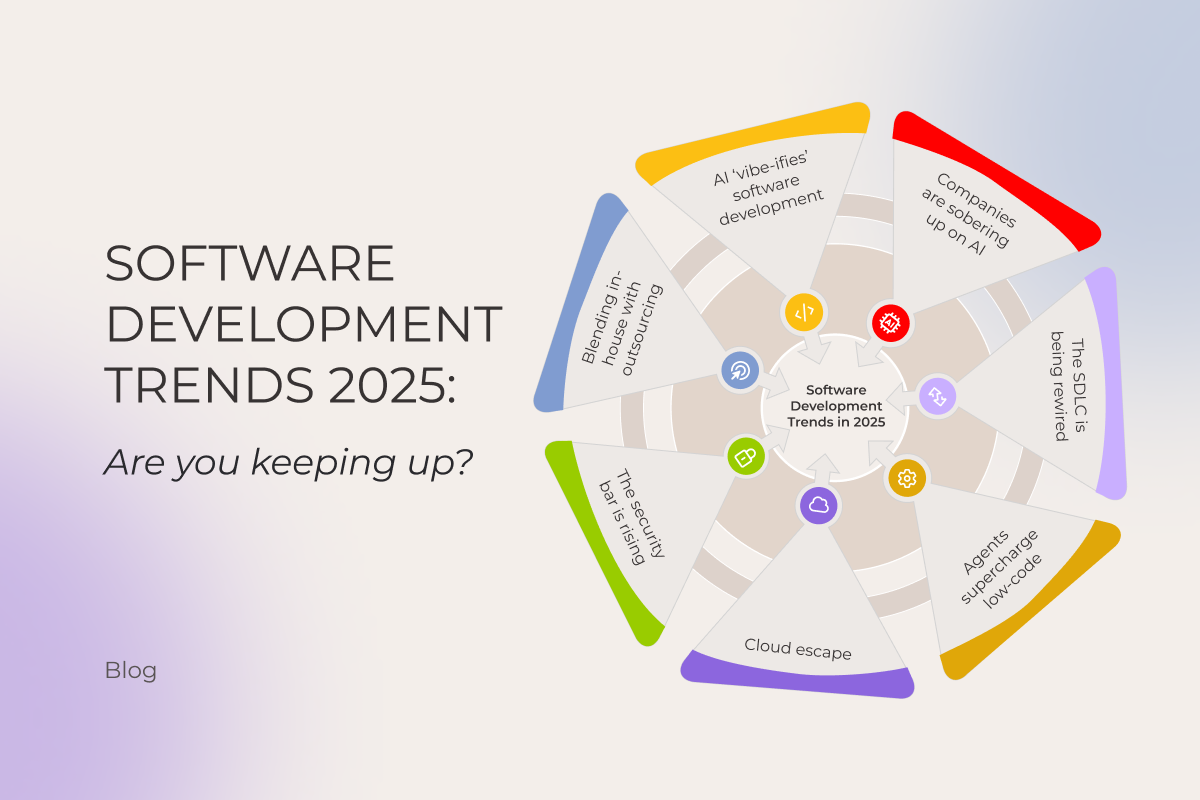
Software development trends 2025: Are you keeping up?

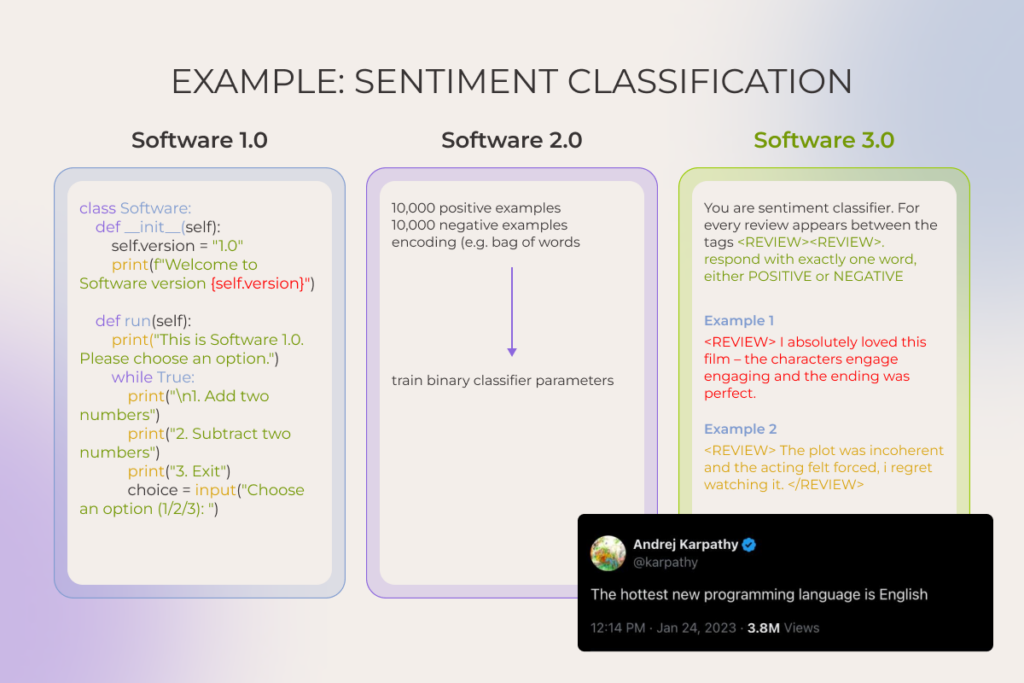
Software development is in the middle of a step-change. Andrej Karpathy’s framing captures it well: we’ve long passed the point where humans explicitly instructed a compiler in different programming languages (≈ Software 1.0) or even where they shipped software programs by training models instead of hand-coding (≈Software 2.0). Today, we’re in Software 3.0, where AI-assisted development takes the stage and the hottest programming language is… English.

Should you care? After all, companies that are used to clinging to old playbooks don’t vanish overnight. But history is brutal: many stuck-in-their-ways teams eventually dump millions into late pivots while faster players eat their lunch.

That’s why it’s essential to stay on top of what’s happening in the software industry, even if only a tiny part of your business touches it, let alone when you have engineering projects underway. Keep reading to see how you measure up against the latest software development trends in 2025.

1. As AI ‘vibe-ifies’ software development, engineers have to drop the boilerplate and own the vision

Artificial intelligence now sits in every developer’s toolbelt (at least among those who bother to notice what’s happening in the tech industry). Forums and tech blogs have been flooded with posts like ‘My AI fixed the bug before I even saw it.’ Chiseling code with AI copilots has become the new baseline. But if just a year ago all eyes were on AI coding assistants speeding up isolated tasks, today it’s vibe coding that takes center stage.

Software development trends

Coined by (again) Karpathy in early 2025, it expresses the idea of ‘setting the vibe’ and, just like that, getting the app. But jokes aside, what’s really going on is more like agentic-powered coding inside tools like Claude Code or Cursor, where developers prompt the product vision and constraints and agents write code, complete PRs, and push to production while a human oversees the whole process.

Honestly, the split view of the community on this one is understandable. In the hands of newbies who can’t navigate the nuances of coding, agentic tools are basically the devil’s plaything. A junior developer, no matter how eager, just doesn’t have the knowledge and experience to feed LLMs with the “don’t do it this way, it’ll bite you later” kind of vibes. They can write something that technically works, sure. But the solution probably won’t fit certain project goals, won’t scale, and will quickly get overrun with technical debt. The funny part is, they can shove that messy code into production without even realizing it’s messy. 

However, in expert hands these tools are a real force multiplier. Ideas buried in the graveyard of “we need $10-100K just to see if this is even feasible” can now get off the ground in days and at a fraction of the cost. But “the capacity to be a good editor is the reward you get from being a good doer,” after all. So it only works if engineers know their stuff and follow best practices. And yes, even though the field’s still pretty green, some rules of thumb are already clear:

  • Breaking tasks down into bite-sized, verifiable chunks and giving crisp, unambiguous instructions
  • Doubling down on context: rich prompts, detailed specs, external context sources. Developers should stay in control of what the system sees
  • Setting up security guardrails, including sandboxed execution, file system restrictions (allowing read/write only to designated databases and blocking access to sensitive files), running linting and security scanners on generated code, human-in-the-loop approvals, and regular commits
  • Acing token math and memory management

In fact, this is arguably what the industry’s future in terms of coding will look like. System architecture design, task planning, context-rich prompt engineering, and orchestration – for the human, mind-numbing drudgery – for AI. It’s a given that most enterprises will run hybrid, pairing AI agents with human engineers in the loop, and such a split in workflow responsibilities and shift in mindset is perhaps one of the standout, can’t-miss trends in software development.

It’s safer to vibe on top of 25+ years of old-school coding. Start now

2. Companies are sobering up on artificial intelligence

In 2019-2022, before the major breakthroughs in natural language processing and generation, AI adoption was mostly feature-level. Hyper-personalized recommendations, fraud detection, demand forecasting powered with machine learning, etc. – that was the flavor of most projects. But ever since ChatGPT went public in late 2022, AI has become a boardroom-level obsession for most enterprises.

Leaders greenlit massive investments in AI, whether for building entirely new digital products, restuffing existing ones, or sprinkling AI assistants into daily workflows to speed things up. 

And now? With some of the dust settling, we are not in the place many hoped. Study after study points to sobering results:

  • The latest and the most viral one from MIT found that despite roughly $30-40B in enterprise investments into generative AI, about 95% of AI pilot projects haven’t come even close to delivering measurable savings or profit gains.
  • Replacing employees with clever bots and agents hasn’t paid off either: 55% of executives regret layoffs made in the name of AI.

So it makes sense that heating talks of an “AI bubble” make investors feel like they’re in troubled waters. Does that signal the end of AI? Hardly. Companies that rushed in headfirst are now moving from hype-driven use to more deliberate, pragmatic AI adoption, and it’s one of 2025’s emerging software development trends.

From our observations and those of industry leaders, two root causes derail AI projects again and again:

  1. Too many companies are chasing AI for its own sake. When businesses start with chasing AI instead of defining the problem, it leads to costly projects with no real link to business needs. By contrast, the small share of success stories tells a very different tale. Some pilots went from zero to $20M in revenue within a year. As the above-mentioned MIT report author put it perfectly: “they chose one clear pain point, executed well, and partnered smartly with companies who use their tools”.
  2. There’s a severe lack of internal expertise. Many organizations simply don’t know how to use AI tools properly or design workflows that capture value while managing risks. Besides, some large firms, especially in regulated industries, felt compelled to build their own software systems for legal or privacy reasons. Such a “control at all costs” mindset, flavoured by flimsy engineering know-how, led to dead-end initiatives and wasted budgets. 

As of 2025, rather than rushing blindly toward AI, more businesses rely on expert support to identify the most profitable AI use cases, confirm data readiness and context, and only then chart a clear journey from prototype to an MVP to scalable rollout.

Schedule a two-day session with experts to build a custom roadmap for AI adoption

Get the details

3. Software supply chains are being seriously rewired

The whole software development process is moving away from what we’re used to. And AI, being a catalyst of this change, is not running the show alone though.

Broad, AI-enabled overhaul of the software development lifecycle

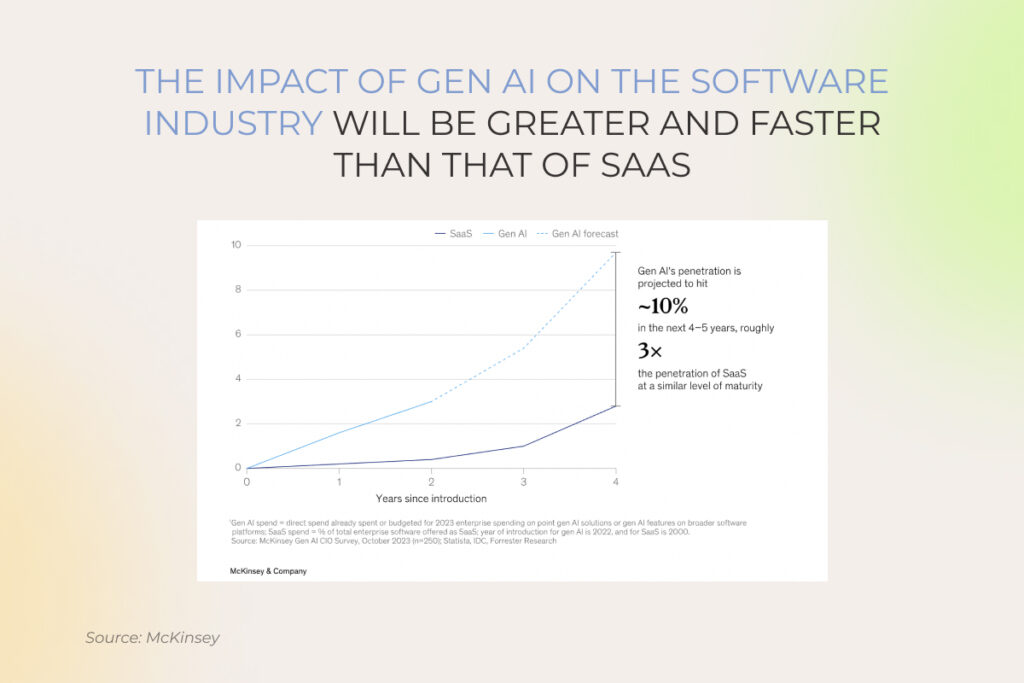
Given how much AI assistants speed up software development and boost the quality of the final product, it’s no wonder companies are shifting from the traditional development process toward what’s being called an AI-driven SDLC.

Rather than just plugging in smart tools here and there, it takes coordinated action across three levels:

  • Strategic: сhoosing the value pools to pursue, defining the outcomes that matter, and deciding where AI will (and won’t) differentiate.
  • Operational: building a strong data foundation (prioritizing sources, improving data quality, etc.), investing in AI-powered tools and integrated orchestration platforms, and redesigning processes to embed the tooling end-to-end.  
  • Organizational: cultivating AI talent and upskilling existing teams to keep up with shifting labour market demands.

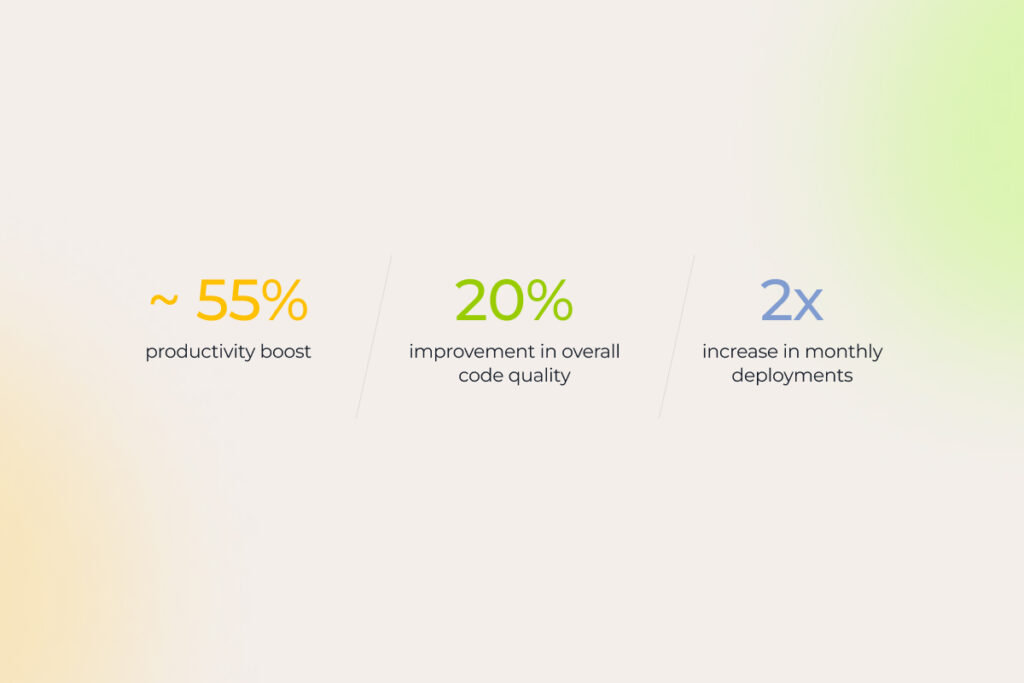
Only such a holistic setup can truly deliver the AI perks everyone’s been buzzing about:

Our experts see, coding is sped up by 60%, drafting docs like user guides or high-level acceptance criteria takes half the time, integration scaffolding slims down by ~80%, and QA reclaims 30-40% to hunt the tricky edge cases.

Enhancing developer experience (DevEx)

Though it definitely plays a role, AI alone can’t dissolve the friction that persists in the SDLC. In 2025, software developers continue to fight against the organizational drag – still getting swallowed by endless email chains, still ping-ponging between pointless meetings, and still digging through scattered documentation to get their work done…. Half of developers lose 10+ hours, while 90% lose 6+ hours, mostly to red tape. For a company with 500 devs, that’s nearly $8M lost annually.

More and more businesses in the software development industry are realizing the need to make life easier for their software developers by cutting through the clutter and putting DevEx front and center. One of the best practices is ramping up platform engineering capabilities via a centralized Internal Developer Platform (IDP), which is basically a hub for APIs, reusable components, infrastructure products, development tooling, documentation, tutorials, demo environments, curated learning paths, and a real-time view of all assets’ statuses, etc.

When a new hire logs in, they click “create project,” pick a ready-made template, and the IDP spins up the environment, hands over API keys, and sets permissions without tickets, meetings, or waiting.

Case in point: After a SaaS provider replaced its patchwork toolchains with a single, secure CI/CD pipeline and baked-in guardrails, 2000 software developers stopped wrestling with infrastructure and started shipping. Code velocity rose 10-20%, the number of critical incidents fell 20%, and security vulnerabilities shrank 15-20 %.

4. Rapid delivery with low-code / no-code tools, now even more rapid with AI capabilities

Gone are the days when a months-long software development cycle was an acceptable price for just an MVP. To be fair, speed has always been table stakes. But what’s different now is that it no longer requires cutting corners on quality.

Against this backdrop, something companies have been desperately waiting for finally hits home: the ability to quickly test whether a software idea actually flies before pouring effort and money into thin air. Prototyping has become lightning-fast.

That’s largely because low-code/no-code platforms (LCNC), once mostly clunky drag-and-drop website builders, have matured and now can assemble complex systems, complete with integrations, APIs, forms, etc., with minimal-to-zero coding required. And they’re quickly embedding AI:

  • Back in 2023, the no-code tool Bubble rolled out its Azure OpenAI Service plugin, letting businesses connect their apps to OpenAI’s models. Soon after, support was added for other popular models such as Claude, Grok, and Gemini.
  • In October 2024, OutSystems brought out Mentor, an AI-powered digital assistant built to step in with context-aware help across the software development workflow, able to carry out sequential tasks and even take entire processes out of users’ hands.
  • And just recently, in July 2025, Microsoft announced a shift in its low-code Power Apps tool toward agent-first app generation, to enable developers to quickly create custom AI agents to manage repetitive tasks. Its integration with Copilot makes the whole process faster by suggesting workflows primed for agentic automation. Yet, this out-of-the-box approach has its limits, and in one of our recent case studies we show how a custom agentic setup helped our client break through those constraints.

Anyway, building a core, heavyweight enterprise system LCNC-only is hardly the wisest strategy. Because the moment a new regulation, merger, or black-swan event forces you to change a core assumption in the solution’s architecture, that change ends up moving at the speed of a full-on manual rewrite anyway. All you can do is export the LCNC-generated code (if the tool even lets you), only to find it’s a spaghetti tangle of platform-specific runtime calls your developers refuse to touch.

But for a lot of non-mission-critical business apps, when there’s no decent off-the-shelf fit, low- and no-code platforms allow getting the job done with a small team of skilled people, who can keep the system evolving, supported, and refined in a low-lift way.

5. Companies are falling out of love with public cloud (hello, giant bills) and moving back to private cloud

A major cloud computing shake-up stands out among the latest software development trends. In the year ahead, we’ll likely see businesses take a hard look at the private cloud again and double down on hybrid stacks (a mix of private – on premises or hosted – infrastructure, edge nodes, and yes, still, some bits of public cloud).

As sweet as cloud providers’  promises of cost efficiency, scalability, and speed sounded made (no wonder forecasts put worldwide public cloud spending near $1.6 trillion by 2028, doubling its 2024 level), the reality of unexpected operational costs hit just as hard.

A recent survey shows 53% of IT decision-makers at companies with 100+ employees overshot their planned cloud storage spend. The main reasons cited are using more storage than planned, migrating more apps and data than expected, and unanticipated egress or API fees.

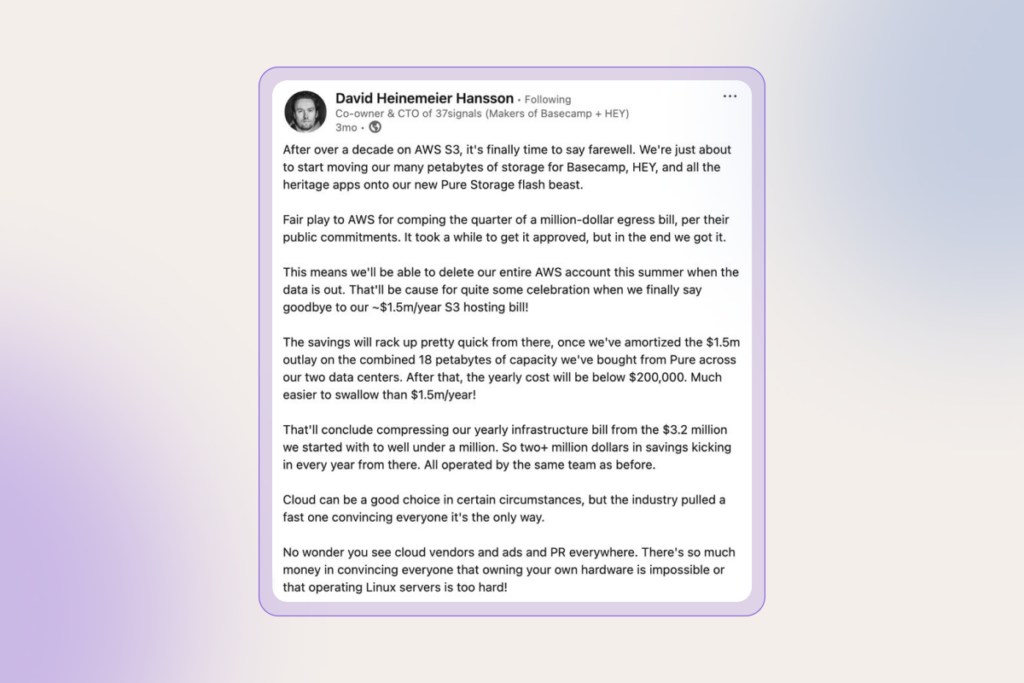
David Heinemeier Hansson, co-owner and CTO of 37signals, publicly shared his ‘exit the cloud’ story (and reasons behind it). Horrified by seven-figure annual bills, their team abandoned AWS S3 in favor of an on-prem setup. By their calculation, it will cost under $200K per year instead of $3.2 million spent on cloud computing.

cloud computing

But it’s not just the cost that is steering companies off the public cloud. The now chronic geopolitical uncertainty has sparked the sovereign-cloud debate in Europe. Public sector and highly regulated industries, such as finance and healthcare, increasingly require digital autonomy, often meaning private cloud and data residency by country or region. 

On top of that, growing demand for AI inference, machine learning, IoT, and autonomous systems that need ultra-low latency is driving the need for edge computing instead of distant mega-clouds.

6. Digital trust and security are still the backbone of enterprise tech

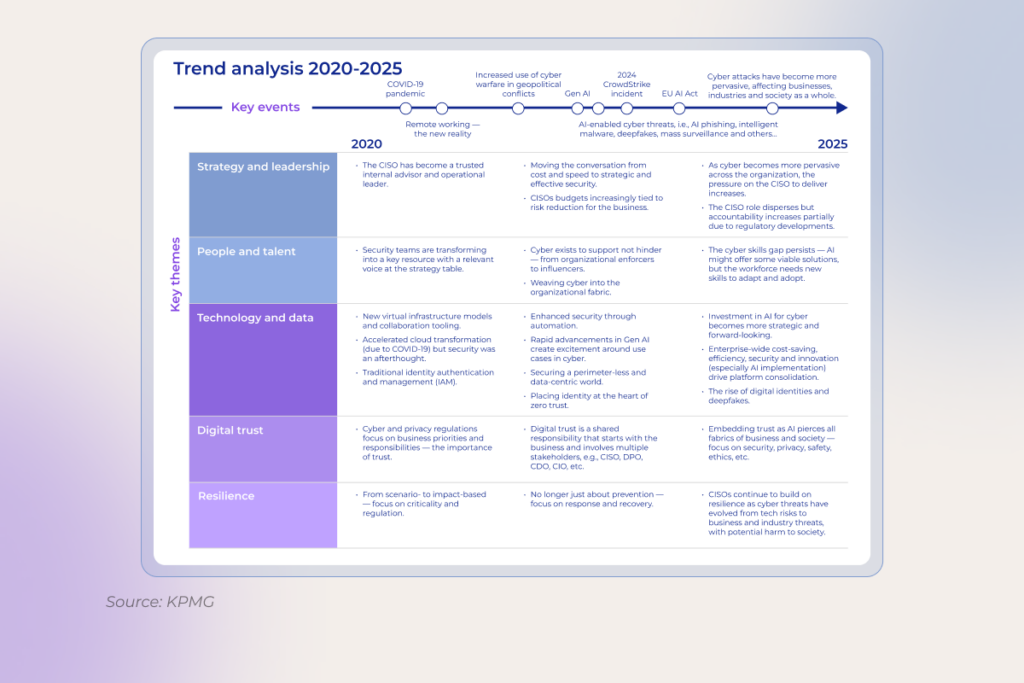
No matter how many times the “cybersecurity is vital” mantra is drilled in, yet – boom – another CrowdStrike-scale mess hits the fan. The stakes are only getting higher with AI, which is bringing new pressure points for security. 

Companies that once dragged their feet on data management now realize that training large language models requires clean, well-governed, and secure data from the start. Storage, processing, and classification all have to be tightened to make the initiative worth it. As Erin Hughes, Head of Cybersecurity Advisory, North America SAP, notes, CISOs often aren’t the data owners, so security and data teams need shared classification definitions and common rules of engagement, especially for AI.

The challenge doesn’t stop there. As enterprises stitch together sprawling ecosystems of third-party software, many overlook the basics of safe usage and resilience. So, lately,  companies have been getting dead serious about their data security posture, normally through:

  • continuous employee education
  • robust tech safeguards like identity and access management or multifactor authentication
  • continuous threat monitoring
  • clear understanding of regulatory obligations and compliance requirements related to the implementation of innovative solutions
  • practiced crisis response and recovery plans

As for software development, one of the most defining shifts is integrating security by design. Practically speaking, that means treating DevSecOps less as a buzzword and more as the baseline.

Read also: DevSecOps: How to Integrate Security into DevOps >>

And once the controls are rolled out everywhere, it’s just the beginning. Security mechanisms must evolve alongside advancements in emerging technologies, ideally a step ahead. 

software development trends

7. Hybrid approach to outsourcing is becoming the default

In 2025, many large corporations still seem convinced they can go back to the “good old days” of office life. They’re tightening their RTO policies, but the toothpaste is already out of the tube. Software engineers who’ve tasted the flexibility of remote work simply aren’t flocking back.

Besides, this whole return-to-office push seems counterproductive for a market where the cohort of senior engineers who can design, debug, and own production-grade AI systems is so tiny that companies struggle to fill those seats.

Regardless of your stance on remote work, one pattern is clear in 2025. When it comes to planning digital transformation initiatives, it is often faster, cheaper, and way more effective to tap into specialized dev shops offering self-managed, distributed development teams with AI-native, best-of-breed technical expertise. 

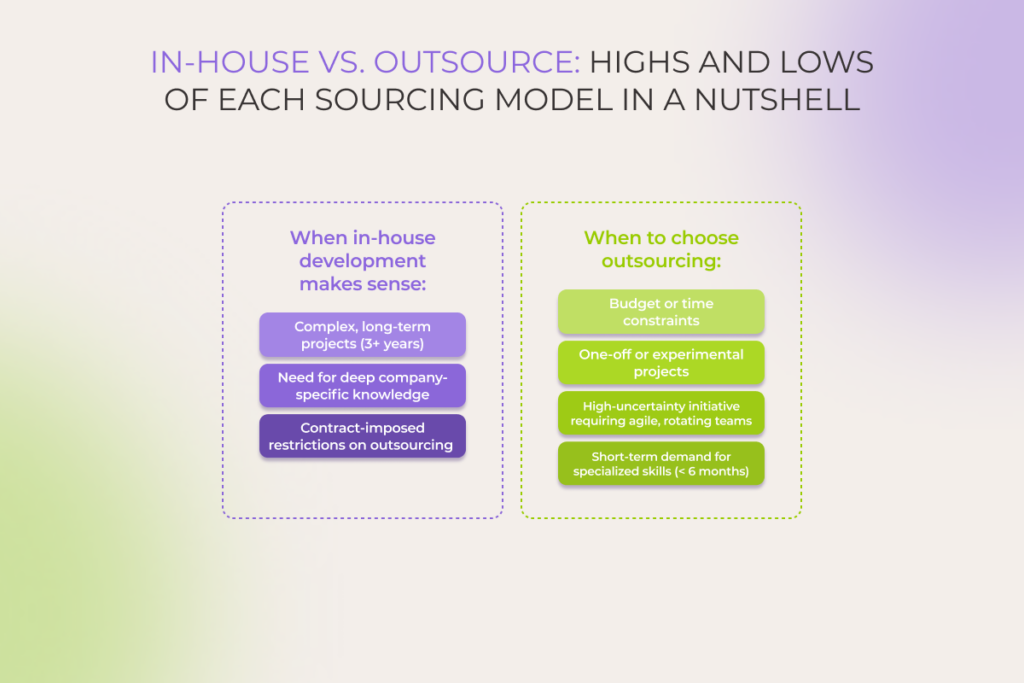
Most Fortune 500s are realizing just how flexible outsourcing has become. Pragmatic leaders now use hybrid models, keeping some projects in-house while handing off routine work to cost-savvy external distributed teams.

The bottom line

The future of the software development industry is rewritten by AI. It’s agent-powered. It’s security-centered. And… It’s nothing like what we’re used to. Those who grasp it and keep pace with these Formula-1-speed changes are best positioned to ride on competitive advantage.

FAQ

How is AI changing the way software is developed?

Artificial intelligence has become a true copilot across the entire software development process, helping with requirements, coding, reviews, testing, and what not. Engineers and managers delegate the tedious yet unavoidable grind to these new tools, keeping their attention locked on the high-impact, strategic work. This way, along with speed, teams squeeze more quality out of the same headcount

Are low-code tools replacing traditional development?

Not replacing – augmenting. Low-code tools are great at prototyping, line-of-business apps, and internal tooling. But when you’re dealing with complex logic, performance constraints, or avoiding vendor lock-in, you still want full-code engineering. The future looks hybrid: using low- and/or no-code development platforms for quick wins at the edges, and sticking with traditional engineering where durability and control matter.

What are the trends for software development jobs?

Job openings are down globally, full-remote roles keep shrinking, and junior seats are tight. All industries demand expertise in AI infrastructure, machine learning operations (MLOps), data analysis, and generative AI applications development, while classic frontend, backend, and mobile dev roles face stiffer competition and longer interview cycles across mid-level and managerial tiers.

What is the next big thing in software development?

Vibe coding and agentic workflows are the biggest emerging trends in software development. They collapse time-to-prototype curve to near-zero, providing the steepest drop in iteration latency software engineers have ever seen. With agentic setups, the cost of throwing code away is lower than the cost of refining it. And when waste becomes cheaper than polish, the entire product-culture flips and that’s why every major platform and VC firm is treating it as the next structural shift in how software gets built. Awesome solutions like Cursor, Claude Code, Windsurf, Lovable, Replit Agent, etc. are increasingly integrated into the tooling stack.

What is a major trend expected in the future of SDLC?

AI assistants will be embedded across all SDLC stages. From shaping user stories and system architecture through coding, automated testing, and deployment, over to continuous re-factoring. Meanwhile, developers’ roles move away from writing code toward curating prompt libraries, setting AI policies, and providing high-level strategic oversight.

Custom Application Development Guide: The Executive’s Playbook to Tech Success

In brief

  • Unlike off-the-shelf software, custom applications are cut out for the specific business needs and tech requirements.
  • The custom application development process follows an iterative, 5-step workflow to deliver a high-quality solution with sustainable value.
  • Finding a trusted tech partner is challenging but crucial, so make sure to look beyond the pitch.

In a world where one-size rarely fits all, custom application development allows organizations to build beyond existing templates. Made just for the company, tailored software solutions inherently accommodate the most unique needs, whether they stem from highly specialized processes or regulatory requirements.

However, this pursuit of a perfect fit also comes with the perennial risk that the final solution might never deliver on its promise. That’s why you need a thoroughly planned development roadmap for custom software application development to tone down the inherent risks.   

What is custom application development?

Custom application development is a process dedicated to conceptualizing, designing, implementing, and deploying web or mobile solutions tailored to the unique needs of an organization. Unlike off-the-shelf software, custom applications are built to fit specific workflows, industry requirements, and long-term business goals.

Benefits of custom app development: why it’s worth the hassle

In 2024, the global custom software development market stood at $43.16 billion. From 2025 to 2030, it is expected to grow at a CAGR of 22.6%. More fast-growing businesses take the plunge into custom software development as it brings a number of benefits to the boardroom table.

  • Greater control over the final solution

When you build custom software, you’re the boss. You own the IP, the source code, and every line of logic baked into the app. It means that you can tweak and twist the app as you need, with no vendor lock-ins or infrastructure headaches.

  • Unmatched scalability

Custom made apps are designed to grow with your business. If you anticipate a sudden increase in users, data volume, and transaction loads, developers can architect the app with that trajectory in mind.

  • Maxed-out efficiency

Off-the-shelf tools often force teams to adapt. But why change what’s already working? Custom software flips the script by being designed to fit the way your team already works and make sense to the people from day one. Since it’s built around your existing workflows, it minimizes friction and maximizes productivity.

  • Made-to-fit security 

From the start, the app can be built with your specific security requirements and compliance standards in mind. Whether it’s attribute-based access controls or an ISO-compliant development process, the dev team behind your software application implements all the necessary safeguards.

  • Competitive advantage

Custom software gives you capabilities your competitors can’t copy-paste from a marketplace. Our project for an eyewear company demonstrated how these capabilities  helped the business not only weather through hard times but also more than double its presence. 

Custom application development vs off-the-shelf solutions 

When organizations are deciding between custom applications and ready-made ones, they often fall into the following thinking pattern: “An off-the-shelf solution can cover 90% of what we need, and then we’ll just adapt the rest”. In reality, not all businesses understand the limitations that come with pre-built options. For this exact reason, our development team has curated the table showing the differences between custom apps and ready-made applications.

Ask yourself…Plug-and-play
(off-the-shelf software)
Built-for-you
(custom development)
What’s the price tag to get started?Lower upfront costs Higher initial investment
What will it really cost over time (TCO)?Cheaper short-term, but may be pricey later due to licensing fees, workarounds, and possible inefficienciesHigher upfront, but optimized long-term ROI due to better alignment and fewer compromises
How fast can we go live?Fast deployment: download, configure, useCrafted timeline: discovery → design → deployment
Will it fit our unique workflows?Generalized functionality that may not fully align with unique processes. Often requires workflow adaptationBuilt to match exact business workflows, industry specifics, and user roles. No compromises on fit
Can it grow when we do?Limited by licensing, architecture, or vendor roadmapEngineered to scale vertically and  horizontally at will
How much can we customize?Minor tweaks only; changes often require workarounds and third-party plug‑insTotal freedom from UI to backend logic, tailored to current and future business needs
Will it connect to our other systems?Pre‑built connectors (if you’re lucky). Custom integrations may be complex or unsupportedDesigned for seamless integration with existing systems, APIs, databases, or legacy tools
How quickly can it pivot with us?Slower to adapt to market shifts or business model pivotsHighly adaptable – new features or modules can be added quickly in response to changes
Who really controls it?Vendor retains control over features, updates, licensing, and pricing. Risk of vendor lock-in.You own the code, data, and roadmap. Complete control over features and long-term direction
Is security tailored to us?No, security model is shared across all usersYes, defenses are tailored to your risk profile and regulations
What happens when we need help?Vendor-provided support; response times and issue prioritization may varyDedicated support (in-house or via an outsourcing partner). Maintenance and updates on your terms.
How much room for innovation?Capped by vendor capabilities and update cyclesHigh. Enables rapid prototyping, integration of emerging tech
Where can we deploy it?Typically cloud/SaaS, with limited deployment optionsAnywhere: cloud, on‑prem, hybrid
Which situations suit it best?Best for standardized processes (e.g., CRM for SMBs)Ideal for complex, differentiated operations (e.g., IoT-based asset management, multi-system ERP replacement)

Sure, off-the-shelf applications are initially cheaper to set up. They offer a decent UX, a sprinkle of customization capabilities, and a couple of integration options. Most likely, they will suffice the instant needs of smaller businesses with a modest IT ecosystem and standard operational demands.

But when it comes to more sophisticated digital product initiatives, the initial allure of cost-effectiveness is not something that should seal the deal. You should estimate the long-term TCO, agility, innovation capacity, and other strategic and growth-oriented factors that can impact the sustainability of your success.

Your off-the-shelf software isn’t cutting it?

Build a custom app

When to opt for custom application development: 6 use cases

Having completed 650+ projects, our software engineers have singled out six specific scenarios where custom software applications make the most sense — either ROI-wise or risk-wise, or both.

1. When your operations are complex or non-standard

Off-the-shelf software is great… if your business runs like a textbook example. But let’s be real: most companies operate in ways that are anything but standard. The moment your workflows start to veer off the beaten path, you’re stuck layering custom features, tweaks, and integrations just to make the software fit. This often results in a costly-to-maintain Frankenstein-esque system that, among other things, spawns data silos.

Custom development is made to your specific operational blueprint, with each software component engineered to fit into your processes and existing systems. That’s why healthcare, manufacturing, finance, and other industries that don’t have the luxury of “almost fits” will find custom development a more cost-effective and future-proof option.

Take a UK oil and gas company, for example, which was grappling with inefficient, rigid offline employee training. So we built them a locally hosted, web-based LMS tailored to their unique curriculum and employee goals. The application automated 84% of training management tasks and led to a 45% increase in employee engagement due to personalized online learning. Read the case study >>

2. When you need multi-system integration

Enterprises running on a combination of legacy software, specialized applications, and proprietary platforms typically have their data scattered and locked behind different systems.  Instead of bothering with complex point-to-point connections, businesses can use custom applications to stitch together the fragmented systems.

In this case, a custom app can either become an integration hub or a middleware layer. As an integration hub, a custom application manages the data flow between the systems. But when it steps in as a middleware layer, it becomes a translator that transforms data from one format to another and orchestrates the business logic of different systems.

3. When customer experience is a competitive differentiator

For ecommerce brands, online learning platforms, or subscription services, good customer experience calls the shots for the bottom line. As for custom applications, nothing can beat them in the flexibility and control of crafting a truly differentiated and superior experience.

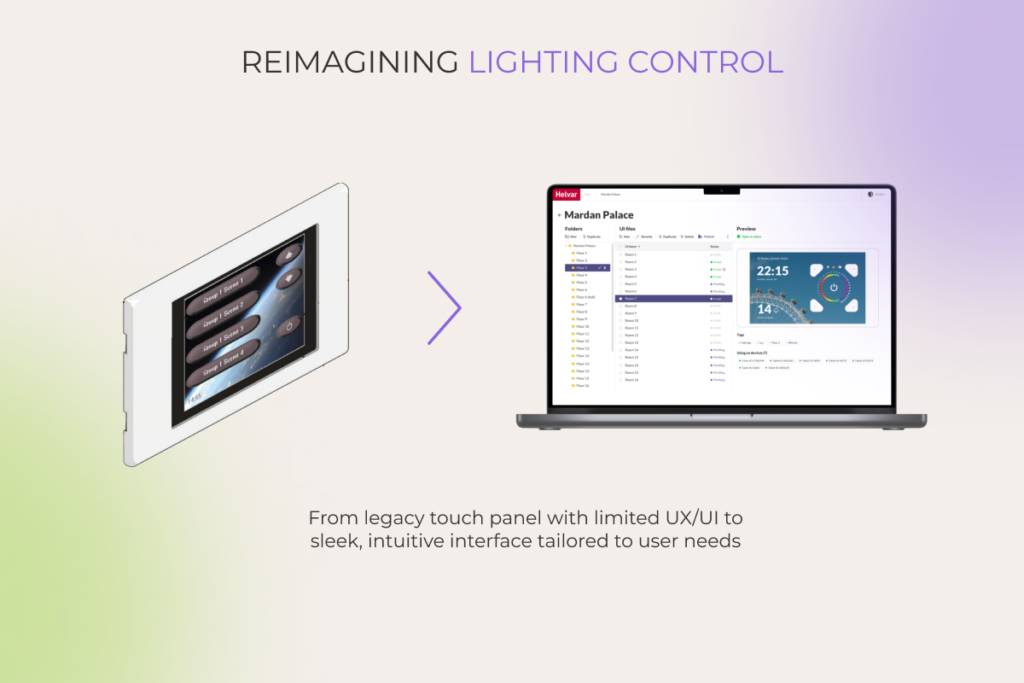
Modern lighting interface on laptop replacing outdated wall-mounted touch panel control system


Our client’s existing intelligent lighting control system wasn’t pulling its weight, blending the company into the market’s background. We solved this problem by designing a web application  that allows users to customize the user interface by up to 90%.
Read the case study >>

4. When you’re building with scalability in mind

If growth is in the cards, your tech needs to keep up with no compromises. Off-the-shelf tools can slow you down when you hit scaling limits, while custom apps are built with expansion in mind.

From the start, developers can architect your app to support horizontal scaling, so it performs just as well with 10 users as it does with 10,000. And when you build it lean, your custom solution uses fewer resources, cutting down infrastructure costs and squeezing more life out of your setup.

5. When data protection and compliance are non-negotiable

In industries like healthcare, finance, and legal, data protection is an imperative. And when compliance is on the line, tailor-made software offers peace of mind you just can’t get from shared platforms. With custom apps, you decide where your data lives, be it on your own servers, in a private cloud, or any secure setup you choose. 

On top of that, custom solutions are designed with the necessary safeguards baked in, facilitating compliance with HIPAA, the FDA, the MDR, GDPR, and other regulations. In particular, such apps are capable of providing detailed audit trails of data access and supporting specific logging mechanisms. 

6. When software is your core product

If your app is your business, you can’t afford to play by someone else’s rules. Shared ownership over the codebase, design, or underlying technology becomes a strategic vulnerability. Engineering the application from scratch gives the company exclusive rights to its innovation, freeing it from someone’s licensing terms, updates, or feature roadmaps.

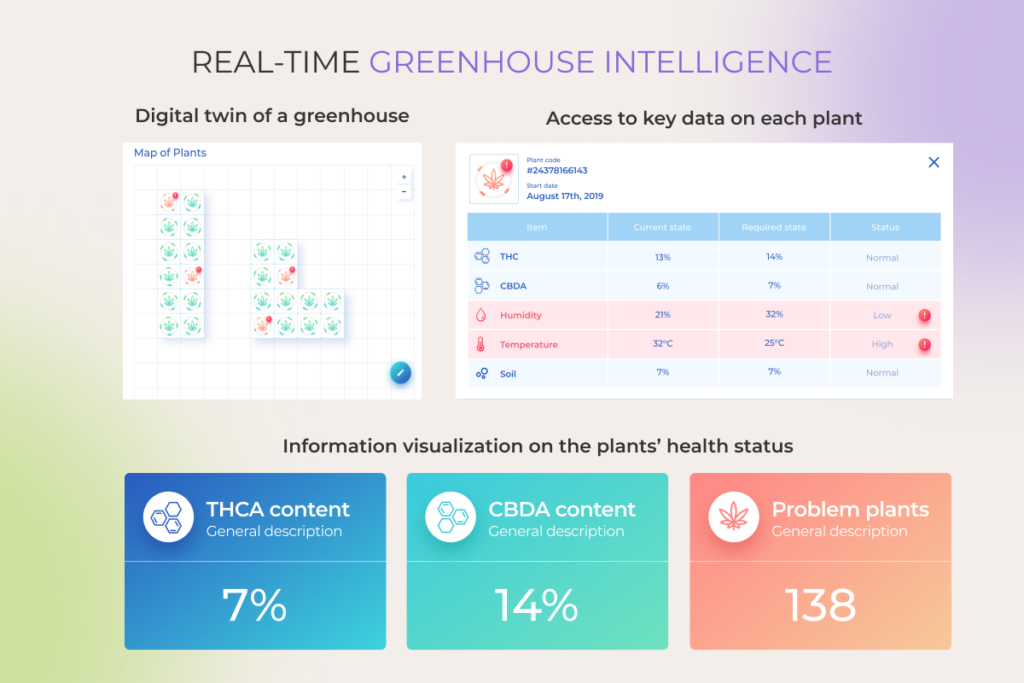
Digital greenhouse map and plant health data with real-time metrics on content and conditions

Lacking a final touch to their AI-driven plant monitoring solution, an innovative AgTech startup approached *instinctools to develop a custom-built web application for data visualization. The delivered app finalized the company’s offering, providing a polished, market-ready product. Read the case study >>

Your business isn’t generic. Your software shouldn’t be either

Reach out

How to create custom applications in 5 steps

Creating a custom app doesn’t have to be overwhelming. With the right process, it’s both efficient and flexible. Here’s how it typically unfolds from idea to launch and beyond.

1. Discovery phase

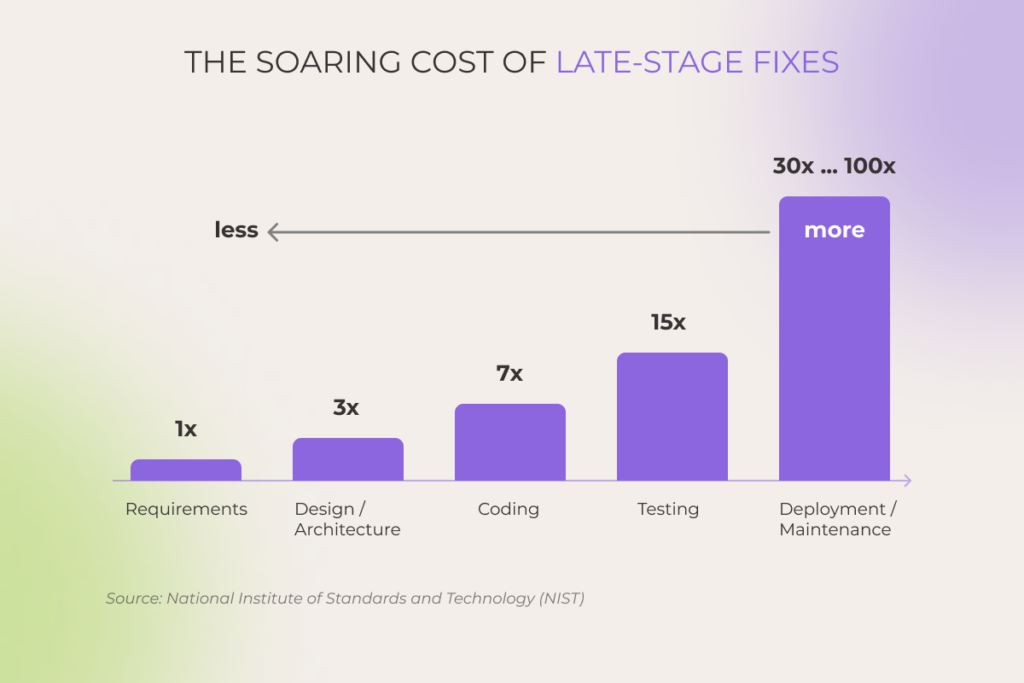
Deloitte points out that many software flops start with small oversights early in the game that later snowball into big problems (and bigger bills). That’s exactly why the discovery phase shouldn’t be skipped. 

Bar chart showing exponential increase in cost of software fixes at later development stages

Through deep business analysis and technical exploration, it lays a solid groundwork for everything that follows, preventing you from blowing the budget or pushing back your launch date. Project discovery usually blends strategic analysis with hands-on deliverables, including mapping the user experience and shaping the technical architecture.

Key aspects:

  • Stakeholder alignment
  • Requirements elicitation
  • As-is analysis
  • Technical feasibility and risk assessment
  • Vision & scope
  • Architecture blueprint
  • UX/UI concepts
  • Budget and time estimates

2. Development 

When all the planning is done, a dedicated development team brings the vision to life, translating designs and architecture into real, working software. It’s where planning meets execution and where quality, scope, and velocity all need to be carefully managed to stay on target.

Key aspects:

  • Feature development
  • Integrations and data work
  • Continuous testing 
  • CI/CD pipeline integration
  • Mid-project adjustments
  • Performance optimization
  • Technical documentation and knowledge transfer

3. Quality Assurance

Although automating as many tests as possible to improve test coverage is a rule of thumb nowadays, QA teams  should also apply manual testing to complement automation. Testers tend to work in parallel with the development team, going over your custom app with a fine-tooth comb to eliminate security flaws and make sure your product meets the predefined exit criteria. 

Key aspects:

  • Test planning
  • Functional testing
  • Regression testing
  • Performance and load testing​
  • Security testing
  • User Acceptance Testing (UAT)
  • Bug fixing
  • Final verification and sign-off

4. Deployment and launch

No matter how pitch-perfect your application is, it won’t run full-bore unless its environment is properly configured. That’s why developers should dedicate special effort to setting up the network configurations, storage solutions, or your internal infrastructure.

Key aspects:

  • Production environment setup
  • Data migration
  • Deployment strategy (big-bang or phased)
  • Go-live execution
  • User training and documentation
  • Post-deployment monitoring

5. Ongoing support and maintenance

Post-launch is where the long game begins. Support teams handle updates, bug fixes, and evolving feature needs, keeping the app aligned with business goals as they grow and shift.

Key aspects:

  • Routine maintenance
  • User support and helpdesk
  • Bug fixes and minor enhancements
  • Performance monitoring and optimization
  • Monitoring success metrics

Crucial considerations for custom app development success

Getting a custom app development project off on the right foot is no small feat. Too many variables, too little certainty, and an overwhelming amount of planning is a perfect storm that can capsize even well-intentioned ventures. Here are a few friendly reminders to keep top of mind.

Know exactly what you want to get exactly what you want

It’s not seldom for companies to approach dev teams with nothing but an idea. However, a nuanced understanding of software requirements and expectations is highly encouraged to accelerate the RFP process and make sure your development team will build the right thing from the very first time.

Give all relevant stakeholders a seat at the table

Engaging end users, executives, business analysts, and other stakeholders early in the development process translates into a fuller image of what the final product should look like. With everyone being skin in the game, companies have higher odds of building a user-centered product and of squeezing maximum ROI thanks to better adoption.

Choose the right tech partner

To successfully outsource your custom web or mobile project, you need to find a development partner that can deliver on your vision. That partner should have prior experience with similar projects and a rich portfolio to corroborate the experience. Also, a great tech partner is small enough to care and big enough to extend your team on demand.

Summary

From greater control over the end product to enhanced security and superior UX, custom software applications meet the unique needs of large-scale organizations in ways an off-the-shelf solution or a no-code platform can’t. But with greater capabilities comes greater responsibility. That’s why choosing a trusted tech partner is as crucial as the technology itself.

If you’re looking for a crack team of custom app developers, *instinctools is up for the challenge

Contact our team 

Extended Software Development Team: Tactical Playbook for Your Business

In brief

  • Outsourcing services keep evolving with business needs, offering new options, such as an extended development team.
  • Whether you extend your existing team with individual experts or request an outsourced team, you get them in days, bypassing the tedious hiring process and eliminating operational overhead.
  • Battle-tested use cases for the development team extension include freeing up your in-house team to accelerate innovation, addressing an unexpected workload spike, testing raw ideas, and more, all without jeopardizing work transparency and security.

Despite a steady trend for remote work and in-house tech talent hiring from budget-friendly regions, companies still struggle with having the right people at the right time. In 2024, when access to the global talent pool was already table stakes, 41% of businesses couldn’t fill in the needed positions.

However, almost no one relies solely on their internal sources anymore. 96% of companies resort to outsourcing. With an extended development team, they get the right experts up for grabs whenever they need them, at a price they are willing to pay.

What are the options within the team extension model, and when does it make the most sense? Our all-out guide backs theory with our clients’ real-life examples. 

What is an extended team?

The extended team is a flexible way of acquiring talents from an outsourcing vendor when you need access to niche skills and on-the-dot scalability without added operational expenses. The individual experts or fully-packed teams act under your complete control or autonomously to support the efforts of your existing IT department — short-term or long-term.   

Many faces of extended teams 

While there are numerous ways to expand the capacity and capabilities of your core team, two options always stay relevant – IT staff augmentation and a dedicated development team.

IT staff augmentation

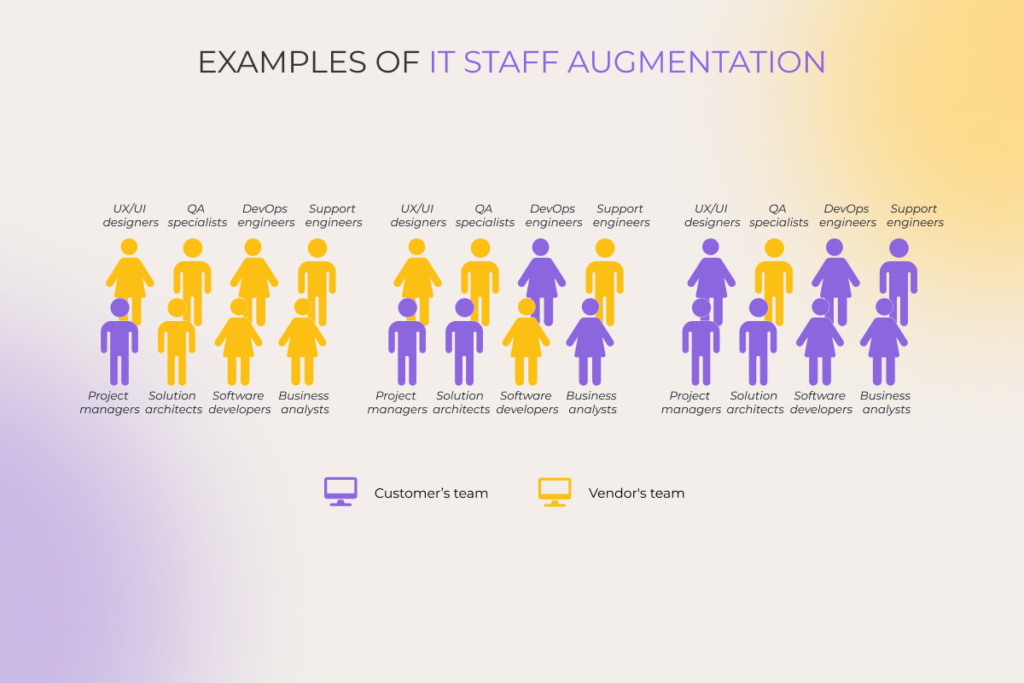
IT staff augmentation is a team extension strategy that implies bringing external specialists as a stopgap or extra hands to supplement your in-house team and take on a specific part of a project. The invited experts blend in with your workforce, adopt your project management tools, and operate under the direct guidance of your project manager.

 IT staff augmentation as a team extension strategy

Dedicated team

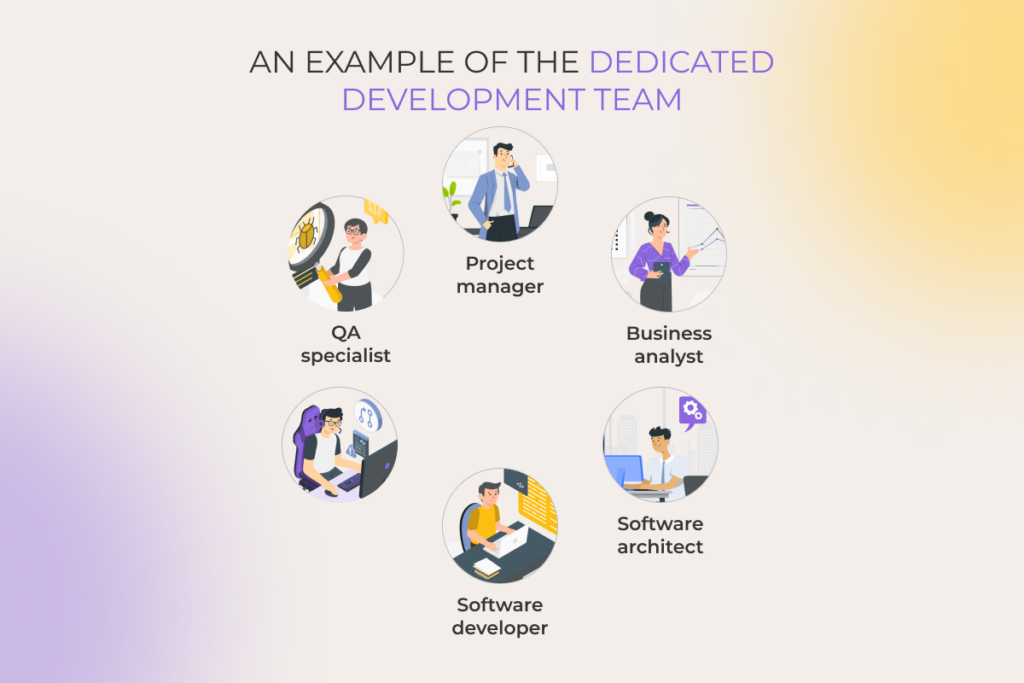
A dedicated team model operates as a self-managed squad of IT professionals, handling a particular project or set of projects. They can undertake the entire development process, from concept analysis to deployment and upkeep. While acting as an independent entity, the external team adopts the same level of work transparency as your in-house unit.  

Extended development team composition
Key factors to considerIT staff augmentationDedicated team
Level of controlYou stay at the helm of a project, managing workflows and mitigating risks Project management is handled entirely by the dedicated extended team, providing updates at agreed intervals
Degree of proactivenessInvited experts offer insights within their assigned tasksThe team contributes at a strategic level, offering insights across the entire project 
ScalabilityBoth models allow for on-demand scaling within days 
Duration of collaborationBoth models support short-term and long-term cooperation

For companies looking to scale beyond a single team, an offshore development center (ODC) offers an opportunity for strategic expansion of their business. Compared to the aforementioned options, this format provides a full-fledged remote engineering hub with top-tier and inimitably secure infrastructure. 

Benefits of the extended team model, explained

The reasons for hiring an extended development team boil down to gaining access to expertise and efficiency, and unlocking opportunities that were off-limits earlier. The highs of this outsourcing approach include: 

  • On-demand flexibility and scalability. When the backlog overflows with must-do mundane tasks, your core team gives its all to put out the fires. Meanwhile, innovative ideas await their turn (no one knows when it will come). 

An extended team can be upsized or, vice versa, shrunk back in days, allowing you to cover both ongoing mandatory tasks and new projects.  

  • Cost-efficiency. Ease the financial burden by paying for what you get, excluding overheads associated with hiring an in-house team, such as sick leaves, employee benefits, training costs, etc. 
  • No time-draining hiring process. On average, you’ll need up to 49 days to find a suitable candidate for a software engineer position. 

If settling on the development team extension, you get cherry-picked specialists for your project in days without screening scads of applications, running background checks on the candidates, and going through several rounds of interviews.  

  • Easy and quick access to niche expertise. Modernizing legacy software without any knowledge keepers of this age-old tech left in the company or developing an innovative solution when you’re short on the experts in a linchpin technology can be challenging, if not impossible. The extended team model implies you can turn to aces with a specific skill set every now and then.  
  • Ability to calibrate the level of your control over a project. Project management involvement depends on the chosen cooperation model. IT staff augmentation requires an in-house manager to guide a mixed team of internal and external experts and monitor their progress on a regular basis. Meanwhile, with a self-managed dedicated development team, the level of control can vary — daily check-ins, bi-weekly demos, or anything in between.  

Extended team advantages are just a call away

Get in touch

7 real-world scenarios suitable for a development team extension

There may be one or a combination of factors to tip the scales in favor of the extended development team model. Backed by decades of experience in the B2B tech market, we can confirm seven most common cases in which businesses benefit from the team extension.   

1. You want to roll out an MVP ahead of competitors

Scouring the market for extra hands is probably the last thing you’d want to add to your plate at crunch time when all your efforts are focused on rolling your software before your competitors do. The extended team is a quick fix that will help you balance the workload of your in-house employees. 

For instance, one of our clients, a robotics manufacturer, wanted to present an innovative, highly maneuverable model of a driverless forklift system at the industry trade show in just six weeks. Outsourcing web development was the only way to meet the tight deadline. Their in-house team was in charge of crafting a service for robot coordination, and developing a service for data presentation was beyond their capacity. With no extra time and margin for error, the client needed a squad of seasoned experts to jump on board in a flash and build a data presentation service right at first try. 

  • They contacted *instinctools for an extended team of senior software developers and UX/UI designers. 
  • Our dedicated team built the service for data presentation ahead of schedule. 
  • However, the client’s core team hit a bottleneck. Their standard practice of testing software on hardware slowed them down, keeping the project in limbo.
  • We suggested temporarily replacing the service for robot coordination with an emulator to have the whole project ready in time, and acted on this idea. An MVP was presented at the LogiMat and proved to be a trailblazing warehouse solution for the SMB segment.

2. Your existing team is too swamped to take on the innovations

If innovative projects keep sinking lower in the backlog under the pressure of routine tasks, they risk going into oblivion eventually. Considering that innovations are the driving force behind progress (and business profit growth), you can’t give up on experimenting. 

Bolstering your in-house IT squad with several external experts or an entire outsourced team is one of the ways to unburden your core personnel of mundane chores.   

3. You have time and budget limitations that can’t be violated

McKinsey highlights that, on average, IT projects run 75% over the initial budget and stretch delivery schedule by 46%. We’ve seen it happen over and over again — tight timelines and shrinking budgets putting businesses in a bind. By opting for the development team extension, you can tackle both challenges in one strategic move.

4. You want to test a raw hypothesis without sacrificing first-priority tasks 

What happens when a promising business idea emerges, but your internal team is already at full capacity and can’t afford to pause their main tasks to test its potential? Stretching your IT department to its limits is far from a good move. This is where an external team can give a hand — handling side projects to assess feasibility without disrupting your primary operations.  

5. Your in-house team can’t tackle an unexpected workload spike 

Last-minute changes in the project scope, bugs that slipped into the customers’ environments, an unplanned system outage, and a myriad of other unforeseen factors can put pressure on your internal IT department.  

Pushing your existing team to work in survival mode might work for a while, but if the workload surge lasts, you risk topping it all with employee burnout. 

Going with the development team extension is the right call when your IT squad operates at capacity, but there’s no need to hire in-house to handle temporary surges. That way, you can bring in seasoned external experts right when it counts, keeping your workload balanced and your projects on track.

6. You don’t have the right expertise on tap

If you need a subject matter expert for a one-off task, going through the hassle of in-house hiring doesn’t seem reasonable. Employing niche specialists on the internal team may also be off the table due to budget constraints. In such cases, the extended team model is a go-to option to expand your capabilities range with any tech knowledge quickly and on budget-friendly terms.

One of our clients, an AgTech startup, created an AI-powered plant monitoring system under strong in-house leadership. However, they lacked professionals to develop a web app with greenhouse visualization. 

  • Instinctools assembled a team of a business analyst, software architect, and product designer who acted under direct guidance and complete control of the product’s CTO.
  • We crafted a solution with a real-time, two-layered map, enabling farmers to track plants’ health status and environmental conditions simultaneously. 
  • By leveraging our MVP development services in USA, the startup successfully built the first software for harmless and seamless plant monitoring for farms with 10,000–15,000 plants.

7. You seek control without micromanagement

Striking the balance between control and trust may be tricky for a manager. Lean too much toward control, and you’ll find yourself micromanaging. Give too much trust, and you might end up with a team that lacks direction and struggles to meet deadlines. 

A practical solution is to bring in experienced professionals who understand their roles and deliver quality work without constant supervision. With self-managed extended teams, you get specialists who are not only experts in their field but also skilled in structured collaboration and accountability.

Do these scenarios sound familiar? We’re ready to help

Let’s solve them

Second-guessing the development team extension? We’ve got all the answers you need

Do the extended team model benefits sound too good, making you suspicious of possible trade-offs? Yes, a murky outsourcing company may promise big but deliver blah. But stalwart vendors welcome open communication and are always ready to walk together through all of your concerns to resolve them. 

Here are the concerns we usually hear from business and product owners, venturing into outsourcing for the first time and puzzling over how to choose the right software development partner. 

  • “What if the extended team doesn’t match our expectations?” 

A trusted outsourcing partner doesn’t wait for a step-by-step guide regarding their clients’ team-related preferences. Don’t get us wrong – it’s great if you have one. But even if you don’t, it’s the vendor’s job to initiate a dialog, unveiling any unwritten expectations about the new team members’ skills, and make sure every specialist checks the right boxes. Some outsourcing companies also offer trial periods, providing you with room for change along the way.

  • “Instead of easing our workload, won’t they just create more hand-holding for our in-house experts?” 

This issue won’t arise if you cooperate with a seasoned outsourcing company that has been in business for a long time. Such vendors offer specialists who have dealt with all kinds of corporate software, development and project management tools, and, therefore, are ready to bring results from day one.

  • “How do we know the extended team isn’t working in the dark?”

Any reliable outsourcing vendor values their hard-earned reputation above all and is interested in turning you into a loyal customer who will seek their services again. That’s why, don’t hesitate to demand full visibility from your development provider — cameras on during meetings, time-tracking tools for accurate billing, and open communication at every step. 

  • “Can an extended development team meet our security standards?”

If security is your top priority, look for a development company, whose services are compliant with major data privacy and software security regulations and whose commitment to delivering high-quality and ultra-secure software is confirmed by ISO 27000 family of standards and NIST 800 certification. 

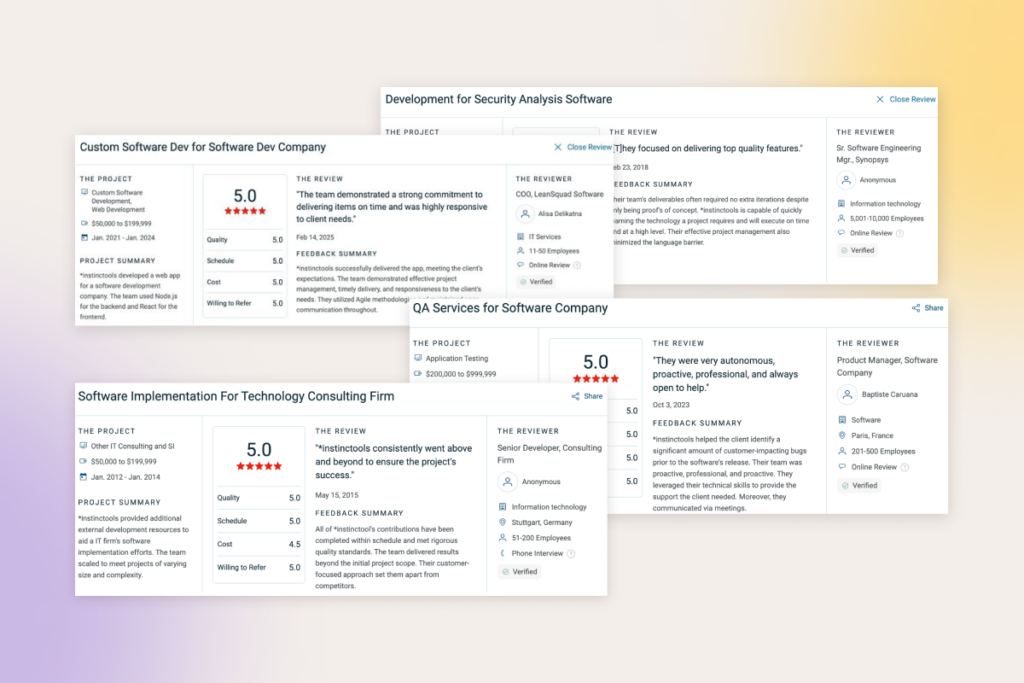
To sift out shady vendors, check their market reputation and study verified client reviews on trusted platforms like Clutch or GoodFirms, to name a few.

Client reviews of a highly-recommended outsourcing vendor with proved expertise

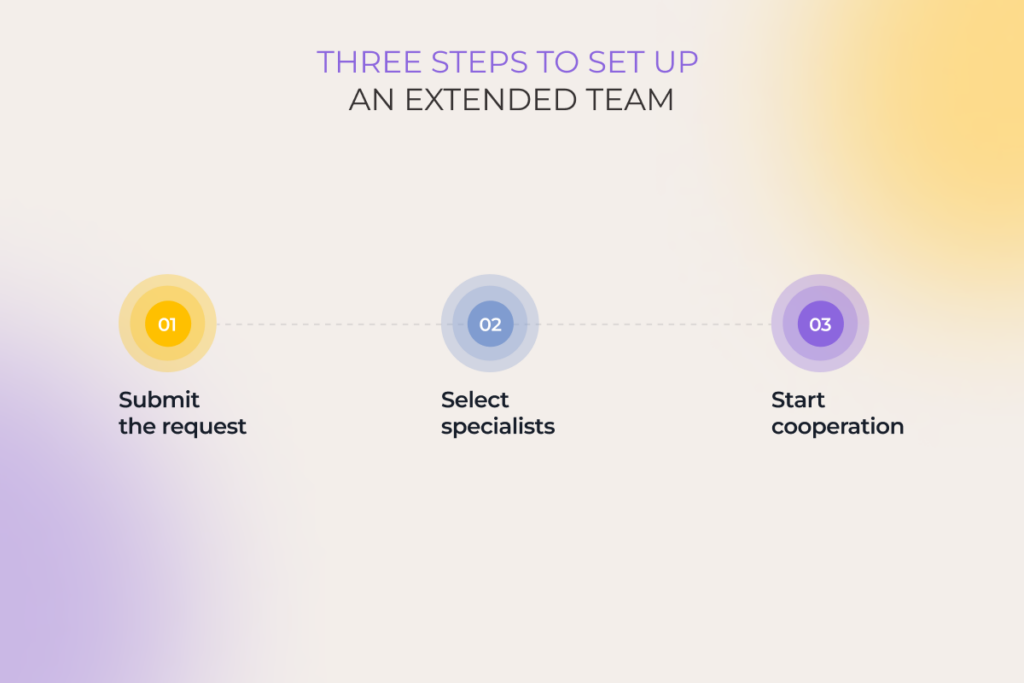
How to set up an extended team in three steps? 

Hiring an external team or filling skill gaps with individual outsourced developers is a piece of cake.   

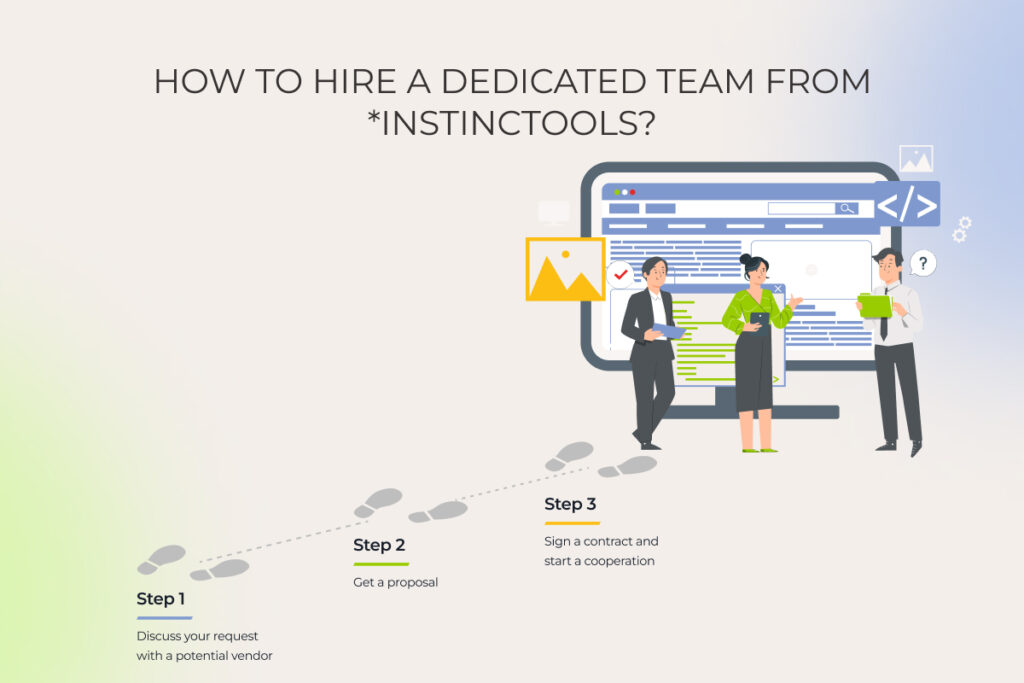
  • Submit the request. Proper resource estimation and a clear understanding of project objectives are prerequisites for fruitful cooperation. Therefore, at the initial stage, the vendor clarifies the details, such as specialists’ hourly rates and location, the number of FTEs, project objectives, timeline, and expected deliverables.  
  • Select specialists. You choose from the list of pre-selected experts, whose tech and communication skills fit your requirements. If you need a full-fledged dedicated development team, the outsourcing provider assembles one. After roles and responsibilities are identified, you make final agreements on the deliverables and KPIs.   
  • Start cooperation. In case of staff augmentation, the time new team members will need to blend into your IT team and adapt to your operational processes depends on the specialists’ experience level — the higher it is, the quicker they settle. The dedicated team sets up tracking and reporting systems and initiates the first sprint independently.
Three steps to set up an extended team

Make the first step

Reach out

Get things done with an extended development team model

Whether you need to free up your core team, tap into specialized skills, beat the clock, stay within the agreed budget, or do all of the above, extended teams are up for the task. IT staff augmentation will be the best fit for product owners who prefer to stay in full control. Those, who’d like to hand off the management hassle, should choose a dedicated team model.

Hire an extended development team from *instinctools

Get a quote

API as a Product: From Middleware to a Strategic Asset for Creating Long-term Business Value

There is a treasure trove of data piled up within enterprises. Often untapped and underutilized, it lies around gathering dust, and business leaders are not even aware of its monetization potential.

Capitalizing on digital assets and multiplying opportunities is possible with the concept of API as a product (or API as a service). For quite some time now, more than just technical utilities, application programming interfaces have connected business ecosystems, opening up new revenue streams. In 2024, over 20% of organizations said APIs generated over 75% of their revenue.

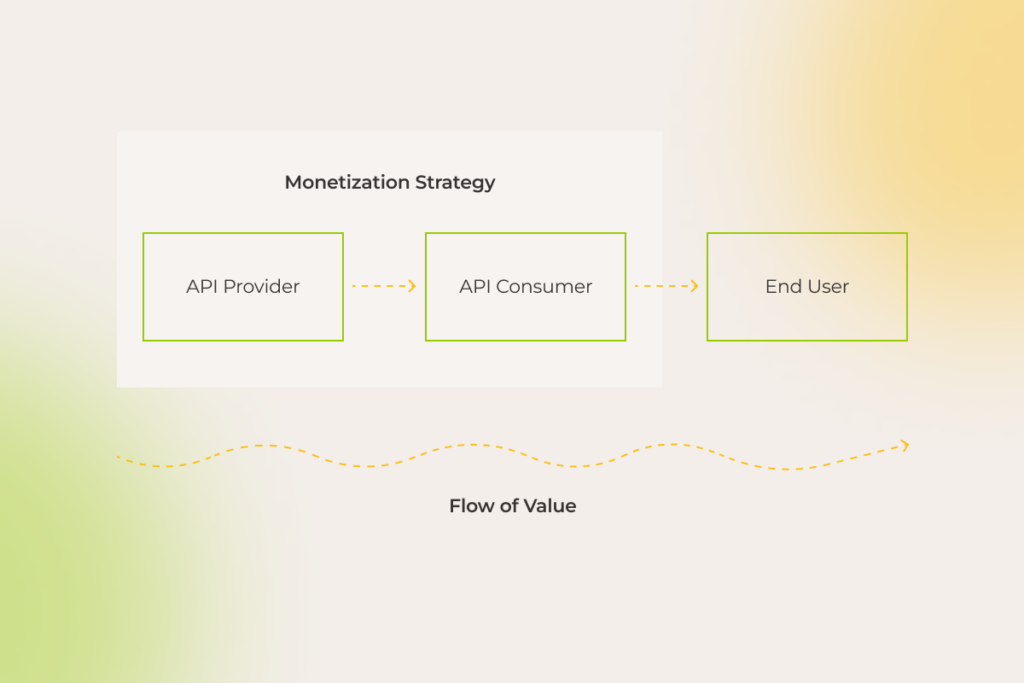
API monetization strategy

However, most companies, even though they get wind of the value APIs can deliver, are frustrated by how to unlock it. This guide was born out of the confusion surrounding this service model. Enjoy the read.

API characteristics to distance your product from the rest of the pack

One of the unique aspects of API products is that they cater to multiple audiences — not just developers enhancing their applications with your API, but also those applications’ end users .

Thus, the success of your API hinges on your ability to create a go-to product for developers and communicate its value to potential partners. 

So, what kind of  application programming interface becomes a top pick?

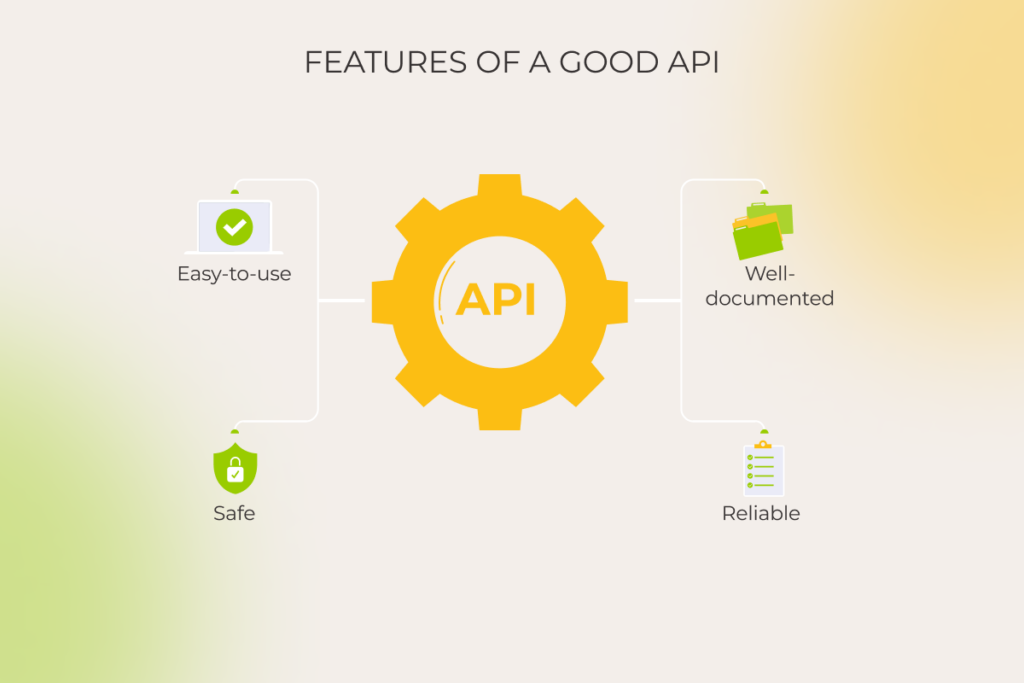
Characteristics of a good API

1. Easy-to-use

Developers want to integrate an API with minimal fuss. The easier it is to use — thanks to intuitive endpoint names, smart defaults, etc. — the faster they’ll reach that “aha” moment. And if they don’t? Well, they may just switch to your competitor’s product.

Google Maps API and Twilio are sound examples of easily consumable web APIs. Their endpoints are logically structured, and operations are generally executed using simple HTTP requests.

2. Safe

Making sure your API is safe to use is all about protecting the sensitive data your users trust you with and keeping your business on the right side of legal requirements. A secure API helps to avoid the headaches of breaches and downtime, which can cost you big time.

3. Well-documented

However big the potential of your API is, it won’t matter much, if developers fail to understand how it works. Clear, comprehensive, scannable documentation that outlines functions, classes, return types, arguments, etc. will encourage developers to use and recommend your API.

Good API documentation is backed up by interactive code samples, step-by-step tutorials, SDKs, use-case scenarios, etc. 

Take Spotify API, for example. Along with in-depth descriptions of each endpoint and its parameters, its well-organized documentation provides an interactive console, where developers can experiment with making API calls and view the responses in real time. The perfect combo of blow-by-blow guidance and practical tools helps developers handle integration more deftly, minimizing the odds of misuse.

4. Reliable

Reliable APIs don’t stagger under the number of requests, whether it’s one user or a thousand. Even under heavy load, be it due to a growing user base, seasonal spikes in usage, or intentional overload attacks, APIs stay available and work consistently.

Building your product that is reliable and performant includes but is not limited to implementing the following:

  • API infrastructure that dynamically allocates additional resources to handle the load without manual intervention;
  • extensive caching strategies to reduce latency;
  • advanced load balancing to distribute traffic across multiple servers and data centers.

For instance, thanks to sophisticated scaling and load balancing technology, Google Maps API’s infrastructure ensures near-perfect uptime, fast response times, and global availability.

API product vs. API project mindset: detailed comparison

The mindset you adopt towards APIs can make all the difference. Considering them as mere afterthoughts — a project mindset — won’t get you far. But when you see them as self-sufficient products, the odds of building revenue-generating powerhouses soar.

Let’s recall the good old Stripe. From the start, they invested heavily in a customer-centric approach. In fact, API was their only product. Treating Stripe API as a product helped the company meet technical and business goals. Stripe is now one of the best payment processing services delivered by a great API that developers adore.

Here’s a detailed comparison of the two mindsets:

API as a ProjectAPI as a product 
PurposeUsually created to solve a specific problem or facilitate internal communication between software componentsDeveloped with a focus on broader market consumption, external use, and monetization
Design and documentationMay have minimal documentation and is designed for a known, limited audience
Comprehensive documentation, SDKs, and robust support for external developers
Lifecycle managementOften has a shorter lifecycle with less emphasis on versioning and backward compatibilityIncludes detailed lifecycle management, version control, deprecation policies, and long-term support via an API management solution
MonetizationTypically not monetized directlyMonetization strategies like subscription model, usage-based pricing, or tiered access levels
Security and complianceSecurity measures may be more basic and internally focusedHigher security standards, compliance with regulations, and robust authentication and authorization mechanisms

What holds companies back from drawing on the value of API products?

“We have all this data. But making money from APIs? That’s been a challenge.”

These concerns are far from rare among our clients. The uncertainty and hesitation touches different parts of API product development, but they hit hardest when it comes to data security. It’s something on the minds of just about everyone considering APIs, no matter the angle.

Be it an automotive giant thinking of opening up their APIs to particular vendors or a leading SaaS company seeking to provide opportunities to build APIs upon their platform, both struggle to set an effective plan in motion due to roughly the same cogs in the wheel.

1. User data at risk

Even the most successful API-first leaders are not immune to security incidents.

The #1 API security hazard, revealed in talks with CTOs and Chief Enterprise Architects, and also backed by industry surveys, lies in improper user authentication, authorization, or access control. Facing additional obstacles like business logic flaws, data overexposure, insufficient rate limits, DoS and DDoS attacks weaken the confidence of complete data protection.

However, despite the multitude of risks, data can still be safeguarded by employing meticulous security strategies such as:

  • Implementing robust authentication and authorization mechanisms. Use multi-factor authentication, follow authentication protocols like OAuth/OpenID Connect in conjunction with transport layer encryption (TLS), etc.
  • Ensuring fine-grade access control. Manage what certain users are allowed to do thanks to role-based or attribute-based access controls. If you provide access to API via API keys and tokens, make sure they are rotated regularly — at least every 90 days.
  • Implementing rate limiting mechanisms. Over 15 million lines of Trello users’ data — emails, full names, etc. — were scraped by bots due to a flaw in the platform’s API rate limiting. Limit how often a user from a single IP address can make API calls within a given timeframe (rate limiting) and slow down API responses after a certain threshold is reached (throttling) to prevent DoS and DDoS attacks. Tools like CloudFlare help guard against bots, their brute-force login attempts, and other API abuse thanks to advanced rate limiting and DDoS protection.
  • Encrypting data with up-to-date security protocols. All API communications should be secured using HTTPS. Given that HTTPS is built on TLS, make sure you use the latest version (currently TLS 1.3), as older versions have vulnerabilities that attackers can exploit.
  • Limiting data exposure. Expose only minimum necessary sensitive data in a tokenized, anonymized way.


2. Puzzling (and costly to neglect) data privacy compliance

Taking care of data security goes beyond implementing security measures at your discretion, as it also involves strict compliance with various regulations. 

Regulations like GDPR make it tricky to collect self-identification data, requiring adherence to specific rules even when data is anonymized. And that’s just the tip of the iceberg — industry-specific regulations impose further obligations.

For instance, companies that manage card payments face substantial financial penalties if they fail to comply with the latest PCI DSS v4.0. 

In other highly regulated industries, such as healthcare, every little thing, right down to the APIs that move sensitive electronic health information between systems, is watched closely. The FTC warns about severe fines for failing to address data privacy risks.

So, rather than being just about protecting data, it’s, on top of that, about playing by the rules — or facing the consequences.

3. Data inconsistency

Companies may encounter issues with duplicate data. 

If we consider the automaker’s case, who’d like to create an API to share information about their vehicles, their knowledge base may potentially have two different values specified for one engine volume in different instances: 1.4 liters and 1.390 liters. The API should be smart enough to detect inconsistencies of that kind and return the correct value.

Eliminating such inaccuracies requires various data transformations, including matching, normalization, outlier detection and removal, etc. For this, business analysts determine the key data attributes transmitted through the API and develop rules to ensure consistency. Failing to do so leads to errors, longer development times, and poor user experience.

Here are some other tips we recommend not to ignore:

  • Choose the appropriate data format (JSON, XML, CSV, etc.) and stick to it to maintain consistency across different API endpoints
  • For live data, include timestamps or version keys to signal API consumers about any data changes

4. Staying resilient at scale

To ensure smooth and reliable API performance, we suggest using scalable cloud services allowing for flexible resource adjustment. 

When it comes to handling traffic spikes or sudden drops, autoscaling, available in cloud computing deployments, is indispensable. By automatically adding or removing capacity on as-needed basis, this approach offers significant wins, including high availability, improved resource utilization, and cost-effectiveness. Besides, you’ll only incur minimal service fees during periods of zero load, based on your subscription plan. 

In the case of a standalone setup, keep an eye on your logs to catch when incoming requests start maxing out your capacity. If you’re anticipating frequent overloads, it’s a good idea to upgrade your machine’s resources to maintain the stability of your API product. Additionally, having DevOps engineers on board from the get-go is non-negotiable for isolated configurations to implement efficient scaling strategies and guarantee your API stays unshakable, no matter how much traffic comes its way.

Beyond technical issues like server overloads, you also need to be prepared for logical errors, caused by API incorrect usage. The impact of unexpected disruptions can be minimized through:

  • Continuously monitoring API usage, performance, and error rates;
  • Setting up alerts to notify relevant teams of critical issues or anomalies;
  • Providing users with informative error messages that clearly indicate the problem cause and suggest potential solutions, using appropriate status codes.

5. Maintaining order and control in the API ecosystem

Managing APIs can be a tough, non-trivial game. Integrating a slew of various systems, safeguarding API data transfer, and making sure performance is on point require dedication and systematic, tailored approach.

Within our API management undertakings, we seamlessly connect to various databases, enable or disable APIs as needed, and monitor metrics, such as performance and usage. Unlike standard platforms, we customize ready-made tools to align perfectly with client expectations, providing pre-configured components and user-friendly documentation. That way, our partners get precisely what they need, without unnecessary complexity.

Secure your data, ensure compliance, and scale with ease with our end-to-end API development services

Book a free call

How to create an API product?

So how to take your buzzing API idea a step further and build a product with not only high profit-making potential but which is also ultra-secure? Here’s a detailed, from-inception-to-launch API development cycle we came up with and polished up while working on similar projects.

1. Define the API product strategy

At that point, you basically need to find out the following about your API:

  • The business goals and objectives it will support
  • Your API’s target audience, including partners and external developers
  • The problem or problems your API will solve and how will it benefit users 

While it might seem like pure product marketing, the implications outlined during this stage are fundamental for making the majority of technical decisions as well, be it defining API architecture or choosing appropriate frameworks or programming languages from a dizzying array of API-related tech. For instance, the selection of standards and protocols (REST, SOAP, gRPC, etc.) is driven by the peculiarities of data routing.

2. Architect your API

Data-related aspects are among the first things you have to focus on. Consider the type of data your API will handle, where it’s stored, and whether it needs cleansing. If you’re going to turn to a software development vendor, decide to what extent third-party engineers can be involved in the data transformation process.

Next, choose an architecture that aligns with your needs. In most cases, REST API is a go-to choice due to its simplicity and performance, but your specific requirements — industry- or project-wise ones — might tip the scales to other, better-suited approaches. For example, in domains like telecom, healthcare, and finance, SOAP is prevalent. The chosen architecture will dictate your tech stack, including programming languages and frameworks.

Once the architecture to build on top of is defined, tools like Swagger, OpenAPI, or Postman are used to automatically generate the API’s interactive documentation, code stubs, or test cases directly within the browser.  

Proceeding with the example of the car manufacturer, let’s say, backend developers, when dealing with a ‘car body type’, which describes the car’s design (like sedan, hatchback, etc.), specify that only a limited set of values can be used for this field. Tools like Swagger can automatically incorporate these constraints into the API documentation, ensuring external developers are aware of the valid options. This helps prevent them from using inappropriate values, thereby reducing errors.

Another big technology decision revolves around the API gateway. Establish its proper governance, as gateways are like a front door to all critical API-related activities. They handle traffic management and analytics and allow developers to ensure the product adheres to security policies.

Remember to consider how you will handle API versioning. When rolling out new product versions, make sure to keep things backward-compatible without compromising the functionality for clients still using older versions. A rule of thumb is to automatically reflect any changes or updates in the API documentation to loop everyone in.

3. Build and test

With architecture in place, you can knuckle down to building your API within an agile, iterative software development lifecycle.

Testing is a make-or-break matter at this stage. Run different types of manual and automated tests to confirm that the product meets the defined specifications:

  • Smoke tests. Conduct a fast preliminary check to ensure the core functionality works as intended.
  • Unit tests. Verify individual functions or methods. 
  • Integration tests. Look into how 1) different components of an API interact and work together and 2) your API interacts with external systems. 
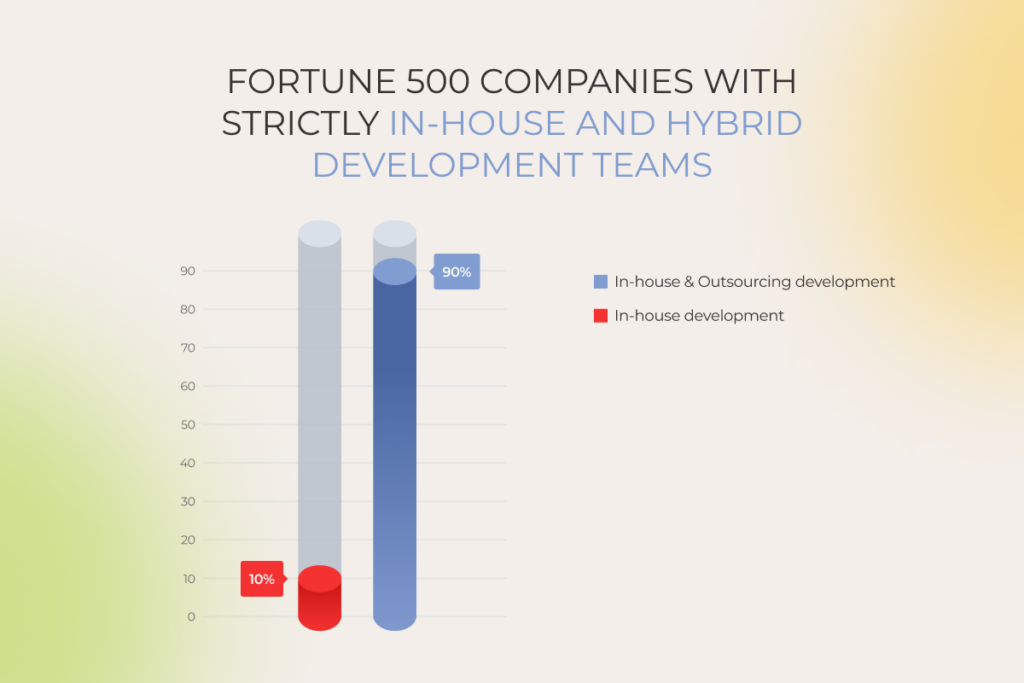
  • Load tests. Evaluate the API’s performance under heavy workloads.
  • Security tests. Spot vulnerabilities using tools like Selenium to protect your product against threats (SQL injections, cross-site scripting (XSS) attacks, and others).

4. Deploy

Make sure your deployment environment can handle multiple languages and follows all the data protection rules, storing data in the right legal jurisdictions. 

Set up a user-friendly developer portal so it’s easy to get hold of documentation (which should cover all aspects of API usage, including a sandbox environment for testing integrations), API keys, and support.

As a reminder of how critical comprehensive guides are for your API product, over half of 40,000 developers worldwide named poor documentation the major snag to consuming APIs.

5. Monitor, manage, and support continuously

Once your API is live, don’t turn a blind eye to continuous monitoring. Implement logging to capture API user activity, errors, and performance metrics. By analyzing user logs, you can reveal typical behavior patterns to identify common interaction scenarios. 

Besides, pay close attention to direct feedback from API users to pin down their needs and pain points. 

These actions will drive ongoing improvements, bug fixing, and the implementation of more calibrated new features. Generally, treat your API as a living product. Regular updates and responsive support will keep it relevant, secure, and useful to your users over time.

Get started with your first-class API product

Many enterprises we work with are eager to build custom APIs that share data with an array of partners, but run into problems they can’t solve on their own. If you’re like them — ready to take that leap but need expert engineering support to bring your vision to life — team up with experts who have the chops and the hands-on experience for end-to-end API product development. 

Looking for experts well-versed in API engineering?

You’ve found them

How to Sell More with Personalization in Ecommerce

Key highlights

  • Online retailers should double down on personalized customer service if they want to stay in the competition.
  • Well-designed ecommerce personalization expands selling opportunities and enables retail brands to grow their loyal customers’ base.
  • Customer’s interests come first  — your personalization efforts mustn’t compromise consumer privacy.

The imperative of delivering the right experiences to the right audience at the right time has modern ecommerce businesses in a chokehold. 

The impact of personalization across key metrics: personalization leaders vs. low maturity brands

With so many ready-made ecommerce personalization bundles available, it seems like any business can deliver granular online shopping experiences. So the real challenge lies in doing personalization efficiently, at a lower cost, and in a more ethical way than competitors.

What is ecommerce personalization?

Ecommerce personalization is the practice of delivering each customer a unique online browsing and shopping experience. Companies leverage users’ purchase data, browsing history, demographics, and psychographics to uncover consumers’ shopping patterns and individual preferences and provide personalized search results, product recommendations, discounts, loyalty programs, etc.  

Benefits of personalization in ecommerce: a match made in profits heaven

The importance of ecommerce personalization cannot be overstated. In fact, for 94% of high-maturity brands, personalized customer engagement is a high-to-critical priority, with plans for a 133% increase in related investments by 2027. The primary driver behind this boom is the promise of higher profits: customers spend 37% more with brands that deliver tailored interactions.

  • Personalization drives ongoing engagement and customer loyalty

According to statistics, 58% of shoppers become repeat customers after a personalized shopping experience with a brand. With numerous personal touchpoints at each stage of the customer journey and tailored loyalty programs, businesses can promote repeat purchases and establish long-term connections with their customers.

  • Personalization supports cross-selling and upselling initiatives

By introducing shoppers to relevant products that complement their initial purchases,  ecommerce sellers can significantly increase customer lifetime value (LTV) and the average order value (AOV). Higher AOV and LTV reduce the need for businesses to constantly reel in new customers and drive higher overall sales from the current customer base.

  • Personalized experiences tap into the untapped value of your VIPs

Almost every established ecommerce business can boast a small cohort of high-value customers, the golden goose of sales that demands special treatment. Personalized, next-level shopping experiences can pamper your VIPs, increasing their retention by up to 10%.  

How to turn browsers into buyers: ecommerce personalization examples

Below, our team has curated a list of the most high-performing examples of personalization in ecommerce, based on the success stories of our clients and analysis of 30+ retail brands.

Product recommendations

Even if your product pages incorporate related product recommendations, basing them on seller-side data and ignoring user context can render your ecommerce personalization ineffective. Supreme recommendation engines vacuum user-centered data, including preferences, demographics, and behavior — and blend this data with factors like time, location, and device for personalized recommendations.

Other best recommendation-related practices include:

  • Using deep learning to tackle the cold-start problem; 
  • Suggesting related higher-priced items;
  • Analyzing visitor’s in-session behavior to correlate shopping activities that span multiple sessions;
  • Highlighting popular products based on sales or customer reviews (e.g. you can create personalized bestseller lists);
  • Incorporating guided product selection quizzes to drill down into customer preferences and needs.
Shopping behavior data analysis

Here is a real-life example of one of our clients, a leading prescription eyewear retailer, who benefited from the analysis of in-session activity: 

  • Our team implemented an AI-augmented personalization solution that combines historical data with in-session activity to recommend the most relevant items.
  • This ecommerce personalization strategy led to a 73% increase in average revenue per user. 

Content and display

Another personalization tactic that can double the impact of the personalized ecommerce experience is fine-tuning content and media to individual preferences and behaviors. Ecommerce personalization trends targeted at creating more engaging experiences that boost sales include:

  • Personalized collections — lumping together product groups based on individual customer preferences, such as browsing history, style choices, or upcoming events, to offer tailored collections that resonate with each shopper.
  • Dynamic user-generated content — displaying user-submitted photos, videos, and reviews that align with the shopper’s persona, interests, or past purchases. For example, if a user is a 40-year-old female, the reviews shown will predominantly come from middle-aged women, enhancing relevance and fostering trust through personalized social proof.
  • Personalized product descriptions — adjusting the description in real-time to align it with the needs of a specific customer. 
  • Personalized shoppable posts in social media — analyzing user’s wishlists, previous interactions, or abandoned cart items, etc. to prioritize hyper-personalised sponsored posts in user’s feeds or stories.
Sephora's personalized product recommendations

Engagement and retargeting

Re-engaging abandoned carts and activating the buying potential of existing customers is paramount for sustainable ecommerce business growth. Here’s how high-performing ecommerce brands use the triple power of artificial intelligence, predictive analytics, and seamless cross-channel integration:

  • Offering well-timed price incentives, such as exit pop-ups or cart abandonment emails, to recover potential sales.
  • Launching re-engagement campaigns at scale to win back past clients with special offers and tailored discounts.
  • Integrating user-specific pop-ups triggered by user actions such as shopping cart amounts or adapted to the unique behavior of an online customer.
  • Retargeting visitors on social media with personalized ads based on their previous interactions.
An example of a re-engagement campaign by Martha & Marley Spoon

Loyalty and sentiment analysis

To make customers heard and seen long after the initial purchase, online retailers double down on brand loyalty initiatives while also proactively monitoring customers’ reviews to spot areas of improvement. In particular, ecommerce brands can supplement their ecommerce personalization strategy with:

  • Tailored rewards for specific customer actions or special dates, further calibrating loyalty programs and offering tiered discounts.
  • Sentiment analysis of customer reviews that allows retail brands to scale responses and offset potentially negative online shopping experiences with tailored offerings.

Collaborate with our AI team to squeeze maximum value out of personalization and watch your ROI soar

Schedule a call

From ecommerce personalization to hyper-personalization with AI

Traditionally, personalization used to rely on historical consumer data along with insights on general customer segments to generate granular experiences. Although this ecommerce personalization strategy could effectively locate purchasing habits and other similarities between shoppers in a given category, it fell short of serving customized experiences to specific customers. Smart, omnichannel, and almost telepathic hyper-personalization fills this gap by tailoring companies’ marketing to individual customers throughout the entire shopping journey.

AI-driven hyper personalization throughout the customer journey

Why go the extra mile, you ask? BCG surveyed 5,000 global consumers, and over 80% of them don’t mind and actually want personalized experiences. Yet two-thirds (!) have dealt with ones that feel off-target, flat, and invasive.

Hyper-personalized customer experiences meet a potential shopper or B2B buyer (if we’re talking about B2B ecommerce personalization) as early as the advertisement stage. By using data from various sources such as ecommerce site behavior, social media, and purchase history, machine learning algorithms help generate custom advertisements, where everything — from messaging to dynamic pricing — is tailor-made to match unique user’s demographics, preferences, and browsing behavior.

Some ecommerce companies can take it up a notch and implement an intelligent conversational interface on their websites and in mobile apps. By building on customer behavior and data, AI chatbots can provide assistance on par with human agents in real time.

But keep in mind that to hit it big, hyper-personalization should be omnichannel, orchestrating a one-to-one experience to customers across all touchpoints, including online, in-store, and mobile.

Drive more revenue for your ecommerce business with AI-driven personalization

Let’s talk

Personalization challenges that can dilute your value

Not every ecommerce personalization platform can suffice the demands of modern customers. Some personalization solutions suffer from limited data handling capabilities, while others have a hard time delivering personalized shopping experiences in real time. So before investing in dedicated tools, run it by our checklist first. 

Interactions with anonymous users

According to statistics, a whopping 90% of ecommerce website visitors are anonymous. That’s why your personalization solution should know its way around tailoring interactions for both identified users and first time visitors with no fingerprints. Some personalization systems tackle this challenge by tapping into referral data and third-party insights that help create a welcoming experience for incognito shoppers.

AI-driven personalization tools pick up on users’ trails by analyzing a treasure trove of non-PII data anonymous visitors leave behind. By analyzing the subtle signals such as users’ network speed, browser extensions, time spent on site, and other clues, ML-powered solutions identify correlations, group anonymous users based on similar actions, and deliver relevant content based on inferred data points.

Automated segmentation tools

Another non-negotiable for your personalization platform is automated segmentation which allows the system to efficiently group customers based on various criteria and update customer segments in real time. To locate high-value customers, your personalization suite should also bank on automated RFM scoring that can automatically group shoppers based on their Recency, Frequency, and Monetary value. 

Support for omnichannel engagement

As we’ve mentioned earlier, personalization doesn’t work to its full potential unless it spans the entire customer journey. Your solution should provide a consistent, tailored customer experience across all devices and channels, based on integrated data and a unified personalization strategy. 

Data-driven approach

The more data, the merrier your offerings are. Your personalization tool should cast its nets wide, wielding a combination of historical and third-party data to peer into a customer’s past behavior along with analyzing additional context such as the customer’s location, weather data, and demographic information. By combining these data points, ecommerce businesses can generate highly customized experiences that strike a chord with customers.

Site layout personalization

The ability to serve dynamic content is another differentiator of top-notch personalized marketing. By incorporating generative AI, personalization tools churn out dynamic content at scale that automatically adjusts to individual user preferences and behaviors. For example, Shopify Plus users can virtually personalize the store for each customer with the Hypersonal tool that aligns headlines, reviews, product Q&As, and other content with the unique preferences and needs of every user — on the fly.

A blend of automation and manual controls

Full-on automation is neat and nice, but sometimes you need human oversight to refine personalization strategies according to specific requirements. Whether it’s A/B testing or product recommendations, your tool should allow for expert knowledge and human judgment, instead of monopolizing all customization capabilities.

Optimization flexibility and scalability

Customer behavior and markets are never static — and your personalization tools should go hand in hand with shifting buying patterns and market gyrations. By combining agility, continuous testing, and seamless integration capabilities, your tool can keep your personalization strategies up to date, no matter what. The ability of AI to learn from data helps with that, too.

Along the same line, the tool should be open to innovation facelifts without limiting you in adopting new technologies or industry-best personalization techniques, such as propensity models or predictive next-best-action algorithms.

System scalability

As your ecommerce business grows, your data processing needs follow suit, exposing your personalization tool to higher data volumes and user numbers. Scalability by design ensures that your system doesn’t crumble under the growing workloads and can deliver personalization in real time, no matter the number of customer interactions.

Microtargeting capability

Microtargeting is one way companies can send out targeted advertisements to specific individuals or small groups. Unlike broader targeting, microtargeting segments your audience based on highly specific criteria, including real-time data, to reach prospects with the highest conversion potential. Microtargeting and one-on-one interactions call for personalization tools that can dig into even the most subtle customer data.

Personalization challenges that can dilute your value

Over 60 percent of companies still struggle to get their one-to-one marketing initiatives right. Here are the common hurdles underperformers might face.

Scalability issues

A good personalization tactic is developed with scalability in mind: 

  1. Building your system upon cloud platforms enables you to automatically ramp up or down your processing resources to handle fluctuating resources and provision additional resources without investing in hardware. 
  2. Microservices architecture is another antidote against stiff and potentially disruptive scalability. As each microservice can be scaled independently, your platform can meet increasing needs without compromising performance.

Modular components run entirely on the server side can also pave the way for localization at-scale — and that’s exactly what we did for an established premium jewelry seller: 

  • The client had already mastered hyper-personalization but decided to up their game by introducing tailored navigation options and personalized homepages. 
  • Our team integrated modular architecture to help the client deliver dynamic content across multiple regions and brands from a single campaign.

Responsible personalization 

Over-personalization can hinder your marketing efforts and damage brand image. That’s why companies should ensure that personal data controls stay in customers’ hands and state explicitly what type of data is being collected and for what purpose. 

Data privacy and compliance can become a point of differentiation and competitive advantage when it comes to personal data collection. Those brands that adhere to a privacy-by-design approach, publicly commit to avoid data collection from third-party services or through questionable means, and comply with commonly accepted standards such as GDPR and CCPA are more likely to see their personalization initiatives pay off.

— Nick Astreika, CMO, *instinctools

Technical complexity 

Hyper-personalization is a technically demanding initiative. An effective personalized ecommerce experience can be compromised by: 

  • Limited integration capabilities of your personalization platform
  • Flimsy algorithms
  • The lack of low-latency processing

To head off this obstacle, make sure your system’s architecture can handle computationally intensive workloads, support real-time processing, and is powered by advanced, highly accurate algorithms for predicting customer preferences.

Customer data concerns

Hyper-personalization hinges on a granular view of the entire customer life cycle to cater to individual needs. To establish this elevated view, personalization systems demand access to a whole lot of data, including: 

  • Customer segments and microsegments
  • Behavioral and transactional data
  • Engagement trends

Integrating these data bits into a single puzzle requires companies to break down data barriers. With an AI-powered, unified consumer data platform, companies can set up a centralized customer database that has all the right types of data in a ready-to-use state.

Balancing ecommerce personalization and privacy policies: gather customer data with caution

While over 80% of consumers expect highly customized experiences, 30,1% are equally concerned about misuse of their personal data. As an ethical business with solid data privacy policies, where do you draw the line between tailoring online shopping services and respecting privacy?

Types of customer data to leverage in ecommerce

Zero-party data

Any insights that customers intentionally and proactively share with a company are classified as customer-provided.

Organizations can extract customer-provided data from surveys, account creation, first-hand feedback, and reviews. Consider explicitly asking users to share their data upon website entry in exchange for personalized offers or offering rewards like bonuses or promo codes to encourage users to provide personal information such as gender, age, and preferences.


CRM systems like Salesforce, HubSpot, or Zoho provide survey tools, feedback widgets, and chatbots that help companies gather and analyze customer communications and feedback.

First-party data

Compared with zero-party data, first-party data is considered to be more accurate, reliable, and insightful as it’s action-based, coming directly from customer interactions with your ecommerce store. First-party data includes past purchase history, search queries, category browsing habits, average spend amount, time of past purchases, and any demographics gathered through interactions. Geospatial data, obtained through services like Google Maps API and MaxMind GeoIP, also falls into this category. 

Speaking about location data, one of our clients whose business focuses on appliance merchandising is a vivid confirmation that localized promotions and loyalty programs can turn out to be a goldmine of insights: 

  • Our team implemented a custom AI-based microsegmentation solution to dive deep into purchase behaviors and geospatial data. 
  • The software enabled at-scale localized personalized experiences in 12 markets and increased the client’s direct-to-consumer revenue by 18%.

Third-party data

Online retailers can also join forces with partner systems as a part of a collaborative effort or business agreement. These include CRM providers, marketing automation platforms, data analytics platforms, and other partner systems whose data is highly relevant to the seller’s specific needs. 

As for the data itself, it can span demographic information, purchase, history, browsing behavior, and CRM data. There are two ways to get hold of this data:

  1. Leverage data integration tools like Zapier or Mulesoft to plug into data from partner systems. 
  2. Use partner-provided APIs and collaborative CRMs with shared access capabilities to access the databases of partner systems.

Personalize or perish: ecommerce personalization best practices in 2025

Mediocre personalization won’t cut it in 2025. Let’s go over the essentials for building a truly exceptional personalization engine.

Know where your customers are and meet them there

Serving customers in their channel of choice is the rule of thumb in the world of personalization, which mandates companies to establish a consistent, omnichannel customer experience across all online and offline touch points.

To replicate this approach, you need an experimental mindset and continuous testing to determine the optimum channel for each message and customer.

Set ambitious goals, take measured actions

In something as incremental as personalization, perfection isn’t essential, but continuous improvement is. So think big, acknowledge the complexity of this endeavor, and take small steps towards it, relying on the culture of experimentation. We recommend getting the following essentials in place to succeed in it:

  1. Develop a strategy — define and prioritize high-impact use cases where personalization can enhance the customer experience.
  2. Audit internal capabilities — analyze the skill sets and tech infrastructure you need to support personalization at scale.
  3. Define how you collect, store, and link customer data —  make sure you have a dedicated, centralized destination, such as a customer data platform (CDP), to orchestrate customer data. Prioritize first-party data ownership and management, focus on customer identity resolution and privacy-compliant data integration.
  4. Build, test, and scale your analytics and modeling capabilities — once your data is in order, leverage robust data analytics to determine what to share, when, and where. 

Marry your CMS with a personalization engine

Integrating your personalization engine with a CMS through data feeds, webhooks, API calls, or elsehow allows you to serve hyper-relevant content at scale and ensure cross-channel content consistency. By connecting the two systems, you can create dynamic content variations that trigger targeting conditions based on specific criteria. Advanced algorithms can then refine these variations over time, making sure each user receives content personalized to a tee.

Summary 

A truly exceptional online shopping experience feels effortless, like finding the perfect pair of jeans the moment you land on a website. To provide something of a comparable hyper-personalized experience and not bust their budgets, ecommerce brands require a triple power of data, AI technology, and personalized content — weaved into a broader strategy and a roadmap.  

Accelerate your ecommerce growth through hyper-personalized experiences

Talk to our team

FAQ

Why is ecommerce personalization important?

The importance of personalization in ecommerce boils down to 71% of consumers expecting personalized interactions and recommendations. If you want to attract and retain more potential consumers, personalization should be your top priority.

What are the 4 D’s of personalization?

Data, Decisioning, Design, and Distribution are the four D’s of personalization and the keys to successful personalization at scale for ecommerce businesses.

What are the differences between B2C and B2B personalization?

While B2C personalization addresses individual customer expectations with tailored content, B2B personalization targets business-level needs with industry-specific content.

What is the role of AI personalization in ecommerce growth?

AI-driven personalization efforts enable online retailers to capture even the subtle trails of anonymous site visitors and deliver tailored shopping experiences for everyone. ML-powered solutions analyze signals such as users’ network speed, browser extensions, time spent on site, and other clues to group anonymous users based on similar actions and display relevant products.

What is the difference between personalization and hyper-personalization?

The main difference between personalization and hyper-personalization is the data and analytics they rely on. Personalization is built on historical data and basic analytics covering the ‘what’ of customers’ behavior. Hyper-personalization leverages past and real-time data and relies on advanced analytics with AI and ML at its core to anticipate upcoming shifts in customer shopping patterns and act accordingly.

How does ecommerce personalization improve customer experience?

Ecommerce personalization empowers businesses to make it personal with every customer, providing a unique customer experience with customized content and tailored offers.

How much does personalization increase revenue?

Well-designed ecommerce personalization can up your revenue by 5–15% while reducing customer acquisition costs by up to 50%.

What impact does personalization have on customer loyalty?

Tailored content suggestions and product offers, personalized promotions and discounts fuel a deep, long-lasting connection with your consumers, 62% of whom are willing to stay and spend more if brands offer personalized experiences.

In-House Development vs. Outsourcing in 2025 | The Good and the Bad of Both Options

Key highlights

  • Having the right talent at the right time at a reasonable cost is usually a pipe dream in workforce management, driving the ongoing challenge of in-house vs. outsource decisions.
  • In-house development provides complete control over your project, but comes at a high cost and often involves staffing challenges.
  • Outsourcing wins at cost, speed to market, expertise diversity, and team scalability, though its benefits can be offset by potentially reduced control and higher exposure to security risks.
  • There’s a third option allowing companies to get the best of both worlds and meet their business needs while minimizing the trade-offs.

Knowing the pros and cons of in-house software development and outsourcing empowers businesses to play their sourcing strategy right. Pick wrong, and you burn time, budget, or, more likely, both. Pick right, and you gain control, speed, and focus exactly where it matters.

Neither in-house software development nor outsourcing software projects is foolproof. Your chances of thriving hinge on a grounded understanding of your capabilities and experience as well as choosing the model that resonates with your business goals and levels out your limitations. This guide will help you match your business needs with the best-fit sourcing approach. 

What is in-house software development?

In-house development, or insourcing, is the practice of relying only on internal teams to analyze, architect, design, test, and maintain software. Companies that adopt this approach take full responsibility for finding the relevant candidates, interviewing them, onboarding new hires, and providing them with the necessary tools and technology to support their work. 

Pros of in-house development 

In-house development offers a range of strategic advantages that can significantly impact product quality, team alignment, and long-term growth.

Complete control over your development team members and the entire project

Direct communication and control are vital if you develop specialized, complex software solutions. Besides predictable quality benchmarks and a fully transparent development process, reliance on the in-house squad allows you to pivot or adjust priorities instantly. 

With no external dependencies, you’re free to move without waiting for third-party approvals. Realigning sprint goals and reshuffling tasks in the backlog to roll out an in-demand feature faster and respond to market shifts in near real-time can be critical for startups chasing product-market fit. It’s also increasingly important for SaaS companies with mature products facing pressure in an AI-heavy landscape, as they need to launch AI-powered versions of existing tools to stay relevant and secure a share of their clients’ AI budgets. 

Security and intellectual property protection

Historically, an internal team provided a higher level of security. This model came with fewer external exposure points, since sensitive data stayed within the company’s internal network and physical perimeter. 

However, with remote work arrangements, this benefit is no longer set in stone. Maintaining overall security and protecting intellectual property now depend more on the measures taken to safeguard it, rather than only on the sourcing model you choose. And when it comes to establishing robust security measures and building defense mechanisms as well as facing the fallout if something goes wrong, the responsibility is yours and yours alone.

Knowledge capture

With an internal team, you may feel safer regarding knowledge capture. Even if you didn’t prepare all-encompassing project documentation from the outset for the sake of a speedy start, the team is still with you, and members can help fill in the gaps whenever they pop up. But this arrangement introduces the problem of overdependency on the in-house knowledge holders. If they quit the company, you’re left empty-handed.   

My 15+ years of working with both in-house and dedicated teams reveal that the key to stable and lasting knowledge retention is a well-oiled system for managing and centralizing information, featuring organized storage for knowledge assets, metadata and tags to simplify search and retrieval, version control, archiving of outdated content, etc. 

And this principle applies to both sourcing approaches. If you prioritize knowledge capture and sufficient project documentation from the start, you’ll always have vision and scope, competitor analysis, target audience, architecture overview, and UX/UI concepts at your fingertips. 

— Konstantin Nikitin, Lead Project Manager & Delivery Manager, *instinctools 

Exclusive focus on your project

With the in-house team, you have experts operating within a single working context, and this setup has its benefits. For instance, having a business analyst who knows your core business functions like the back of their hand and a software architect who understands your system inside out greatly facilitates new feature development.

On the contrary, for an external team, your project is one of many. However, with the right collaboration model, you can get an in-house-like experience. For example, a dedicated team model gives you a group of professionals who focus solely on your project, offering the same level of commitment and continuity as an internal team.

Cons of in-house development

Although insourcing has strong advantages, there’s also a fly – or rather, a few – in the ointment you should take into account. 

High labor costs

Keeping an internal development team gets expensive. As an employer, you have to cover sick leaves, vacations, health insurance, and perks like online course subscriptions or gym memberships. Plus, you need to invest in ongoing training for your team. And don’t forget about recruitment and replacement costs. Let’s do the math.

When filling tech positions, recruitment costs (job postings, agency fees, and the time HR spends on interviews) can amount to 30–50% of the expert’s annual salary. For example, for a software engineer earning $100,000, roughly $40,000 is spent to fill the position. Not to mention that new hires often aren’t fully productive for the first 3–6 months. 

To achieve a positive ROI, companies typically need specialists to stay at least 2–3 years. However, the reality of the job market is that up to 65% of software developers don’t stay put for more than two years, with the whole 18% of new hires leaving during their probationary period. 

Software Developer demographics and statistics in the US

Also, keep in mind the cost of equipment. While the bring-your-own-device (BYOD) approach gained traction during the mass compulsory adoption of remote work in 2020, and now 63% of US enterprises allow their staff to access corporate resources via personal devices, companies are still expected to provide their in-house employees with hardware and licensed software. It adds to the operational expenses of the in-house resources. Moreover, if you support both remote and on-site work options, count in the cost of renting the office space.

Staffing challenges

The cost of recruiting specialists in-house isn’t the only dealbreaker with this insourcing. The recruitment process is also time-consuming and labor-intensive. In-house hiring may take weeks or even months to spot and enlist necessary experts. It makes scaling the team up or expanding expertise areas on short notice practically impossible.

The average time to fill depends a lot on the role. For example, if you get lucky, you may find a valid project manager candidate, move through interviews, and get a ‘yes’ to your offer in 20 to 30 days. But for tech positions, especially hot-commodity roles like AI engineers, it can easily stretch up to 90 days.

— Yanina Sushkova, Head of Recruitment, *instinctools

It also makes it harder to keep up with the technology trends, even major ones, such as company-wide and function-specific adoption of artificial intelligence. For example, FAQ-like chatbots trained on the company’s data are known to be one of the low-barrier gen AI use cases, but you’ll need AI engineers to implement them. There’re two ways to get them on board:

  • If your budget can stretch for another in-house team member, hire an AI engineer
  • If you have data specialists willing to transition to an AI engineer role, invest in their retraining 

As you can see, each option is neither quick nor easy. 

Moreover, don’t forget about the risk of in-house employees resorting to quiet quitting if they grow unsatisfied with you as an employer. McKinsey’s report highlights that while 20% of staff members are vocal about job dissatisfaction, only 7% also express plans to leave the current company. The remaining 13% can gradually slip into underperforming. Outsourcing takes quiet quitting off your radar. With clear SLAs and contractual oversight, vendor teams quickly replace disengaged members to keep delivering on their promises. 

What is software outsourcing? 

Outsourcing software development involves partnering with external vendors who add the necessary expertise to your project and cover some phases of the SDLC or the entire development process. Outsourcing comes in different forms regarding the hiring distance (onshoring, nearshoring, and offshoring) and the cooperation scope (IT staff augmentation, a dedicated team, and the whole development center).

Pros of outsourced development

Where an in-house squad hits a wall, an outsourced development team opens a side door to deliver on time and on budget.  

Cost-effectiveness

You only pay for the work done. All the extra costs related to the outsourced team are on the vendor’s side. Of course, these costs are reflected to a certain extent in the hourly rates. 

However, if your company is based in pricey regions, such as the US, Australia, the Nordic countries, or Western Europe, you can still benefit from a global talent pool in more budget-friendly locations such as Central and Eastern Europe. For instance, tech giants of the IT industry like McKinsey and Deloitte set up their R&D centers in Poland for a reason. The country is known for its high-quality and affordable IT workforce.

Faster time to market 

When time to market is a priority, outsourcing software projects becomes your silver bullet. It enables you to initiate the project within several days. 

Working with an experienced outsourcing company also has well-defined timeline agreements for all development stages, with penalties for downtime on the vendor’s side. This means your contractor is motivated to quickly address any issues that arise. 

Of course, not all outsourcing experiences are created equal. It’s essential to stay away from providers who offer lip service rather than solid software development. An unreliable tech partner can deliver a solution that doesn’t match the original idea and your expectations, or, which is worse, misreads user needs. 

One of our clients – a European venture capital company – reached out to *instinctools after a frustrating experience with an incompetent outsourcing provider. They had a developers-only team, which led to blurred project vision and a deep chasm between expectations and reality. Instead of a top⁠-⁠of⁠-⁠the⁠-⁠line digital fundraising platform they envisioned, they got an Excel-like spreadsheet. We got the project back on track. 

— Konstantin Nikitin, Lead Project Manager & Delivery Manager, *instinctools 

Diverse expertise on tap 

A strong competitive advantage of outsourced teams is their broad range of expertise without long-term commitments. 

Say, you should undergo software modernization and need experts well-versed in both legacy systems and modern technologies. If your internal team doesn’t have the right specialists to ensure a smooth transition, hiring full-time in-house developers with specialized skills for just a few months isn’t cost-effective. That’s where outsourcing really shines.

Unlimited team scalability and flexibility 

The core strength of outsourcing software development lies in its unmatched scalability and flexibility. You can start with a single developer and then expand to a few dozen of them, or set up a ‘nuclear’ team with a business analyst, software architect, and several engineers, integrating other subject matter experts later on. And when those roles are no longer needed, scaling down is just as smooth and swift, if you cooperate with a reputable outsourcing partner. 

Cons of outsourced development

The benefits of outsourcing may be tempting. But to make a well-informed decision when comparing outsourcing vs. in-house, it’s important to weigh the potential drawbacks too. 

Less control over the team (but not necessarily)

Borrowed talents may split focus between clients, and your project’s priorities can fade into the background. Still, that’s not always the case. In fact, with the right setup, the decision to outsource development can turn this risk into a strategic advantage. 

With insourcing, the responsibility for managing the team (coordinating tasks, resolving blockers, maintaining motivation) falls on your shoulders. Meanwhile, with the right outsourcing partner, less direct control can translate into less day-to-day management stress. Because in the case of outsourcing, you can calibrate the level of control:

Well-orchestrated knowledge management is another area extended teams usually excel at. Working for various companies for years, if not decades, they hone their mechanisms for knowledge acquisition, creation, refinement, storage, transfer, sharing, and utilization. As a result of their solid documentation practices, you get well-structured, comprehensive project records.

Higher infrastructure and data security risks (only with a shady outsourcing provider)

Security concerns are another hot-button issue. Insourcing feels safer because it keeps everything behind your firewall. But if we look at companies like Amazon and PayPal, which rely strictly on in-house software development, and giants like Google and Slack, which leverage outsourcing, they all suffer from data leakages nearly every year.

What’s certain is that outsourcing extends your security boundary beyond your organization into the vendor’s environment. Does it always mean security trade-offs? Not really. 

Your project is safe if the outsourcing provider follows key security best practices, such as enforcing strict authorization for access to production data, obfuscating sensitive information, adhering to secure coding standards like the OWASP Top 10, providing employees with individually assigned corporate VPN access, and maintaining strong firewall protection to shield internal systems. 
Moreover, sometimes an outsourcing partner, that operates in a budget-friendly location, can offer security infrastructure that may be too costly or impractical to implement in-house, say, an ODC with a closed physical perimeter with a security frame and an on-site guard, a no-phones policy, limited access to the internet, and mandatory audio and video surveillance within the office space.

In-house vs. outsource: highs and lows of each sourcing model in a nutshell 

This brief table outlines the strengths and weaknesses of in-house and outsourced development, making it easier for you to analyze each option.

ParameterIn-house teamOutsourcing team
Cost HighLow (when outsource development team to low-cost locations)
ScalabilityLowHigh
Time to set up a teamMonthsDays
Time to marketSlow (if you lack project team members and need to hire them)Fast
Level of control over a team and development processesHighLower, but with a decent provider, you can have nearly the same level of control
Expertise diversityLimited to your core activitiesHigh
Communication with a teamDirectDepends on a collaboration model
Cooperation durationFrom 2+ years (to make the cooperation cost-worthy)Any time period
Security and IP safetyDepends on the data security measures in place, not the sourcing model

Not ‘either-or’: hybrid approach to software development

Current Fortune 500 statistics show that most of these companies choose outsourcing and in-house software development rather than in-house versus outsourcing. Indeed, businesses don’t have to clash two sourcing models. A hybrid approach often works best, enabling you to strike a balance between the upsides and downsides of both options. 

With the right partner, your sourcing strategy can steer, not stall

Let’s map it out 

FAQ

How do I decide between in-house and outsourcing software development?

When facing the in-house vs. outsourcing software development dilemma, keep in mind that  in-house makes sense for a complex and long-term (3+ years) development process, while software outsourcing is the right choice if you have budget or time constraints, one-off or experimental projects, need frequent team recalibration, and when the demand for specialized expertise is short-lived (< 6 months).

Can in-house teams collaborate with outsourced developers?

Sure! In fact, strengthening your in-house resources with guest experts or a whole external team is the way 90% of Fortune 500 companies approach software development. Hybrid development is a go-to option when you need to offload your backlog quickly, handle an unexpected workload spike, or want to test a raw hypothesis without sacrificing first-priority tasks.

Is outsourcing cheaper than in-house development?

An outsourced software development team is a more budget-friendly option than hiring, onboarding, and equipping in-house specialists with hardware, not to mention covering healthcare costs or company perks. To be totally honest, though, since outsourcing vendors absorb those overhead costs, a portion of that is reflected in their hourly rates. To make the most of this sourcing approach, look for low-cost locations, such as Central or Eastern Europe, Central and South Asia – Poland, Kazakhstan, and India are good starting points.

Ascending New Heights of Coding with AI in Software Development

Today, every company, irrespective of their focus, is a tech-first company. When technology becomes an integral part of everything your organization does, having the means to master continuous delivery is instrumental to fuelling your business growth. In 2025, AI in software development is billed to become that growth engine.

As an AI-savvy company, we help our clients leverage the power of artificial intelligence in software development, applying it to specific tasks — and we’re sharing our battle-tested expertise and best practices in this guide.

Gen AI and SaaS enterprise penetration rate, % of spending by year since introduction

Benefits of AI for software development go beyond automation

When AI made its debut into mainstream technology, organizations approached it with a cautious mindset. These days, IT-related use cases such as assisted code creation, testing automation, and others are already enjoying high adoption rates and are making the largest share (40%) of planned enterprise gen AI spending. Let’s see what benefits have turned AI software development from faddish to fundamental.

AI assistants' impact: developers' perspective

Cutting costs associated with development efforts

AI-powered software development is one free from time-consuming tasks, such as test cases, exploratory data analysis, small code updates, bug detection, and others. By automating away menial activities, AI tools bring down the number of labor hours, ultimately leading to a more cost-effective development process. Some of our clients wield the sword of machine intelligence to optimize maintenance costs for cloud infrastructure. 

Our client’s team automated repetitive tasks inherent in infrastructure maintenance by employing AI to produce a prewritten set of recommendations for the automated execution of tasks. Bundling the recommendations in a playbook, the team drew up blueprints for repetitive actions, cutting development efforts and associated costs by 30%.

Accelerating developers’ productivity and time-to-value

Software engineers can join forces with an AI pair programmer to tap auto-complete features like code recommendations and context-aware suggestions. The latter eliminates the need to manually search for code snippets or specific function syntax, minimizing context switching for developers.

AI code assistant benefits

AI toolbelts like Github Copilot also keep developers in the zone by offering integrated development environments, summaries for pull requests, and explanations for code blocks.

The majority of professional developers — 82,7%, to be exact — cite increased productivity as the biggest benefit of AI-powered coding assistants.

We’ve seen this firsthand: on average, our clients have achieved a 25% improvement in their development velocity by introducing artificial intelligence into the software development process.

Our client, a prominent bank in the MENAT region, stated: “Embedding AI tools into the development workflows has changed the game for our developers. These tools can produce an entire script based on just a single comment, cutting coding time in half”.

Productivity gains also translate into swifter and more cost-efficient innovation cycles that allow companies to rapidly adapt to shifting customer needs and snap opportunities faster than their competitors.

Improving code quality

AI-powered developer tools leverage natural language processing to dissect context from a user’s existing code and suggest additional lines of code and functions. It means that smart assistants can identify the optimal approach or solution to the development challenge — based on the natural-language prompt from human software engineers. 

AI tools can also improve the debugging process by quickly identifying and rectifying errors, contributing to a higher quality of deliverables. AI-assisted code reviews and static code analysis minimize the code vulnerability surface and improve its consistency. For example, artificial intelligence puts edge cases, which might be hard to spot through manual testing, on sharp display, leading to a more reliable final product. 

Focusing on building and creating vs. repetitive tasks

Artificial intelligence in software engineering helps 25% of developers manage their workloads more effectively, freeing them up to focus on more creative and challenging tasks instead of grinding away at mind-numbing activities like code formatting or documentation updates. Developers then use this headroom to flex their problem solving skills, analyze feedback from end users, and hatch solutions to novel problems.

Speeding up the onboarding process and flattening the learning curve for new hires

Apart from being the wingman for experienced software developers, AI systems can also help junior specialists get up to speed. By training intelligent systems on the company’s software stack, dedicated software development teams can integrate new hires into the fold faster than usual, accelerating their modus operandi. 

Also, these tools can improve the availability of mentorship and support for junior developers. Unlike team leads, AI tools, with their never-ending bandwidth, can provide instant feedback or relevant suggestions 24/7 to lead rookie developers in the right direction. This creates a valuable tool — artificial intelligence is always there to support junior developers, while senior developers can leverage AI’s insights to provide targeted support when new hires need it most. 

Need AI software developers to set up smart coding assistants?

Reach out 

7 ways AI can supercharge your software development process

Name any software engineering task — and chances are good that, supercharged with artificial intelligence, it can be performed at least 50% faster and up to the highest quality standards.

Have no doubt: thanks to the powerful combo of artificial intelligence and software engineering your team can really speed things up, especially when it comes to these seven activities:

1. Writing boilerplate code

Boilerplate code is a developer’s long-time nemesis, forcing engineers to spend an eternity writing the same tedious sections of code over and over. Artificial intelligence software development can eliminate the associated drudgery by streamlining the process of boilerplate code generation:

  • Pattern recognition — once trained on the existing code base, large language models can identify patterns commonly used in boilerplate code, such as database connections, error handling blocks, and other structures.
  • Contextual awareness — intelligent teammates can figure out developers’ intent and fine-tune the boilerplate code to the unique needs of the project.
  • Code completion — AI-enabled virtual assistants can suggest code snippets based on the surrounding code and auto-complete the boilerplate structure for a specific function.

2. Code suggestions

Much like with boilerplate code, AI co-pilots can act as smart code whisperers for developers, offering semantically relevant code snippets based on their deep learning capabilities. These tools can also guide developers toward the right solution by directing them to the relevant libraries and common coding patterns. 

Besides accurate suggestions with comments, developers can pick the AI brains to get their code inline fixed. 

Source: GitHub

3. Code refactoring and modernization

Most codebases get messy over time due to constant fixes and changing project requirements. Generative AI models fed with well-refactored code can highlight code smells in your existing codebase and suggest refactoring techniques or alternative code structures for enhanced system performance. 

Developers can also ask AI tools to explain legacy code — and then feed this explanation, supplemented with additional information, back into the system to modernize the code and facilitate technical debt management.

4. Code translation

Old-school code translation tools fail to understand the underlying purpose of code due to their focus on the code structure. Conversely, AI-enabled models can discern the code semantics to suggest translations that preserve the original functionality. 

Development teams can capitalize on this superpower to streamline code conversion or app modernization projects, such as converting COBOL to Java.

5. Bug detection

Development teams can also harness the duo of software engineering and artificial intelligence to automatically catch bugs early in the software development lifecycle. Thanks to built-in pattern recognition and machine learning anomaly detection trained on historical data from similar codebases, AI coding tools can spot subtle anomalies in the existing code that might otherwise go unnoticed.

AI pair programmers can also perform code reviews in the background, bringing potential issues to the fore and suggesting areas for closer inspection. 

6. Testing

Quality assurance and testing have a significant scope for automation due to inherent redundancy. Although AI can’t take over testing tasks completely, it can significantly improve testing speed and coverage by enhancing the following aspects:

  • Test case generation and execution — following software specifications, generative AI can produce test cases to help testers cover a wider range of scenarios.
  • Data generation for testing — artificial intelligence proves effective in generating edge cases and corner scenarios that might be challenging to create manually.
  • Performance and load testing — AI-powered testing tools can produce load for performance and load testing.
  • Test planning — smart coding tools can suggest test cases based on historical data, identify missing test cases, and map out dependencies to identify the right order of test execution.

Artificial intelligence also acts as a collaborative assistant for visual testing, exploratory testing assistance, and maintenance of test cases.

“Before introducing AI in the testing workflow, our developers haven’t had enough time to create unit, functional, and performance tests for their code. Bug slipped through the cracks, causing issues in production with missing tests snowballing into tech debt. AI tools have tackled this problem by automating repetitive testing tasks and increasing test coverage without developers doubling the code’, — noted a representative from a consulting company, partnering with us on software development initiatives.

7. Preparing documentation

Code is never static — it evolves throughout development cycles, making it challenging for developers to keep up with documentation updates. Based on code comments and function signatures, machine learning models can automatically create a document that accurately outlines system behavior and its functionality. These tools can also account for the implemented tech stack and project-specific functionalities to generate comprehensive documentation aligned with the specific codebase.

Source: GitHub

Train AI on your data and get personalized insights you can’t find elsewhere

Contact our team
AI code assistant's key features

Which tasks AI for software development is failing at?

Now the main question is: can AI replace software engineers? Not in the foreseeable future. While AI and software development are a power couple, their duo is still a far cry from a fully automated software development process. Artificial intelligence development requires human oversight and collaboration to do its best.

1. Handling a combination of legacy and updated code

AI software solutions have a hard time clawing through a repository that contains both legacy and new code due to the fragmentation and incompatibility caused by the former. Legacy codebases may not integrate well with common frameworks or libraries and often lack structure and adherence to current best practices — which makes it challenging for AI to understand its functionality. 

2. Contributing to organizational and project context

Canned AI–based coding tools are know-it-alls, so they are not designed to consider the unique requirements of your project or your business context. It means that unless you train it on your proprietary data, AI output might not meet your specific performance or security needs. 

3. Non-generic architectures

Artificial intelligence coding tools are capable of mustering basic, high-level design blueprints, while more nuanced architectural solutions remain a near-impossible feat for these tools. Also, the innovative potential of AI is limited by the training data, which means that cutting-edge architectural solutions fall under the domain of human ingenuity, not machine intelligence.

4. Navigating tricky coding requirements

While AI coding tools are all for answering basic prompts, they hit a brick wall when faced with more complicated coding challenges. For example, AI-based tools wrestle with combining multiple frameworks with disparate code logic or generating a code suggestion based on the big picture.

Choosing an AI software development assistant: open-source vs proprietary tools

Standing at the AI crossroads, companies usually face two options. They can either leverage open-source tools such as OpenCV, PyTorch, and Codestral or invest in proprietary solutions such as Microsoft Github Copilot and IBM watsonx Code Assistant.

Open-source tools that put AI algorithms, pre-trained models, and data sets up for public use are favored by the community due to their transparency and limitless options for innovation. Proprietary tools hide the source code from the public eye, yet offer support from the vendor, and potentially more advanced features.

So which one should you opt for? Here’s a table from our experts that summarizes the key differences:

CriteriaOpen-source AI toolsProprietary AI tools
Source code accessFreely availableNot publicly available
CostLower upfront costs + potential hidden costs (additional infrastructure, feature development)Higher upfront costs, lower TCO due to pre-built features
SecurityHigher control over data, yet the vulnerability surface is largerLess transparent, vendor is responsible for security updates
CustomizationHighly customizable, can be fine-tuned to suggest code based on best practices in your repositoriesLimited customization with a few configuration options (custom extensions, plugins)

A new era of development empowerment is underway

As AI continues to push the boundaries of software development, it’s important to remember that it’s not a panacea. Artificial intelligence is an augmentation tool whose true potential lies in its ability to automate menial tasks, enable developers to spend more time on problem-solving and empower them to build high-quality software faster. You can’t expect it to work miracles, but you can embrace the technology to ship software solutions more efficiently than ever before.

Take your software development to the next level with AI

Schedule a consultation

How to Hire a Dedicated Software Development Team in 2026

An external dedicated software development team, integrated seamlessly with your in-house operations, remains a default sourcing model for enterprises. And for a good reason. Executives turn to dedicated development teams for predictable results and accelerating technology initiatives.

Yet, their value is conditional. The right fit depends on aligning the team with precise project needs. If you’re weighing how best to structure your development resources, this guide offers a measured, actionable perspective.

At *instinctools, we’ve spent 25+ years helping global companies architect, launch, and scale dedicated teams that consistently produce long-term impact. This guide distills that experience into something you can act on right away:

  • why and when to hire a development team, 
  • when alternative models might serve you better, 

and how to sidestep the traps of managing your own dedicated development team.

Key highlights

  • Dedicated software development teams are cross-functional, adjustable in size and composition, and can be tailored to changing project needs, providing the flexibility of in-house teams without the hiring and management burden.
  • Dedicated teams accelerate time-to-market, reduce development costs, and provide access to a global talent pool. They are best suited for complex, high-stakes projects, tight timelines, evolving requirements, or when internal resources are insufficient.
  • Proper selection of a dedicated engineering team involves careful vendor evaluation, which essentially boils down to methodology, communication, and domain experience assessment, and reputation check.

What is a dedicated team?

A dedicated development team is an engagement model where a group of cross-functional experts put their backs into your project to bring it across the goal line. You can hire either a full or partial team, but in both cases, it works exclusively on your software projects.

Just like an in-house team, a dedicated developer team remains skin in the game throughout the entire development process, except you don’t have to stress over the hiring, onboarding, and daily management. You can have as much or as little involvement in the development and management process as you want. Anyway, a dedicated software development team is capable of taking over the entire process of digital product development. 

Such a team dynamically adjusts to the pace and scale of software development, allowing you to fine-tune the team size and composition based on your evolving needs. Developers, designers, QA engineers, and any other roles can be hand-picked on demand when and as you need them. 

See how our dedicated teams work >>> 

Why companies choose dedicated development teams

The software development outsourcing market is expected to grow from USD 564.22 billion in 2025 to nearly USD 897.44 billion by 2030, with a steady 9.73% CAGR. With strong demand for external digital engineering talent, the rapid adoption of generative AI, and a chronic shortage of senior technology professionals across OECD countries, dedicated development teams, being a tried-and-true engagement model, remain a highly practical solution for enterprises. The reasons for hiring a dedicated engineering team are manifold — our experts have listed the most significant ones below.

Rapid scalability

Adapting to fluctuating project demands and scalability requirements in-house is a challenging endeavor due to resource limitations and the time required for recruitment and onboarding. A dedicated team model is flexible in roles and skills, allowing companies to build up their capabilities on demand to accelerate time-to-market and support evolving project needs. 

Cost efficiency

More than 90% of Fortune 2000 companies outsource at least part of their IT functions to cut costs associated with in-house hiring and development. A dedicated app development team eases the financial burden on companies by relieving them of operational overheads and other costs related to sourcing candidates and employee training. Moreover, you can source tech talent in cost-effective regions such as Central and Eastern Europe to bring down the financial outlay of development.

Stress-free hiring

From long hiring cycles to administrative burden, in-house hiring is not for the faint of heart and is definitely not for the employers in a hurry. Conversely, hiring a dedicated application development team is as easy as proving a job specification and approving the candidates cherry-picked to your requirements.

360-degree visibility into the process, away from the grind

In-house hiring and team management are generally associated with the highest level of visibility. But to build it up, company leaders need to constantly have their fingers on the pulse and mother hen their development team. When it comes to an offshore dedicated development team, a powerful combo of dedicated project managers and project management tools can ensure a high level of visibility into the project progress, minus the supervision fuss. 

Access to a wide talent pool

Talent scarcity keeps 4 in 5 company leaders on their toes, stalling new projects and decreasing the odds of securing a niche or highly-coveted talent. By banking on dedicated development team services, companies enter a global talent pool where they can hire skilled experts at a reasonable price. Better yet, this engagement model helps you develop expertise in adjacent fields or completely different ones, including AI, mobile app development, MVP development services in USA, and other projects.

In-house teamDedicated team
Hiring the team~ 2 months2-10 days
Scaling the team1-2 months1-5 days
Recruitment and hiring costs~ $3500 per hire0
Training costs~ $1100 per employee0
ExpertiseMight be insufficientExactly matches the project’s needs
Level of controlHighHigh

To make an informed call on the most suitable sourcing strategy, check out our detailed comparison of in-house development and an external dedicated team, breaking down the strengths, gaps, and practical implications of both.

Tired of hiring frenzies and project delays? Let’s build your dream tech team in a matter of days

Get in touch

Typical dedicated team structure: roles and responsibilities

dedicated development team

The structure of a software development team is determined by a combination of factors. These include the type and complexity of your software product, your timeline, and the allocated budget. Let’s expand on the bare-bones development team structure:

Project manager

A project manager is the point person behind your project responsible for its day-to-day management. Typically, a software vendor assigns a dedicated project manager to lead the entire team, oversee project cost and resource allocation, define project goals, and keep you updated on the project’s progress. 

Business analyst

Business analysts are guardians of business goals and values that bridge the chasm between the business and technical teams. They are instrumental in planning development activities, validating requirements to ensure alignment with business goals, and standardizing processes to maintain a cohesive workflow, facilitating continual improvement based on stakeholder feedback.

Software architect

Equipped with broad technical knowledge, software architects are the great minds behind your software solution architecture and critical technical decisions. They have a final say in the selection of the technology stack, making sure your solution is functional, performant, resilient, and scalable. 

Software developers

A dedicated backend development team is in charge of building and maintaining the inner mechanisms of your software, including data storage, security, and other server-side functions. Frontend developers focus on building user-facing components of web and mobile applications, making your software easy and engaging to interact with.

DevOps engineers

DevOps engineers are at the wheel of development, testing, and release automation activities. Geared up with special tools and DevOps practices, they enable continuous integration and deployment and ensure smooth collaboration between development and ops teams to speed up development cycles and improve software quality.

QA specialists

Quality assurance engineers inspect every aspect of your software, from code to design, to make sure it meets predefined quality standards and is bug-free. Their turf also spans compliance reviews and security testing to eliminate any potential vulnerabilities in your software solutions.

Depending on your project scope, you may need a different combination of team roles to accommodate your project dynamics.

Project scopeTeam sizeTeam roles
DiscoveryUp to 5 specialistsBusiness analyst, project manager, software architect, UX designer
MVP development6+ specialistsProject manager, business analyst, UX designer, front-end developer, back-end developer, QA engineers
Custom software developmentAround 9 specialistsProject manager, business analyst, UX designer, software architect, front-end developer, back-end developer, QA engineers, DevOps engineer

When to hire a dedicated software development team

Often, it might be not just one, but a whole set of factors that tip the scales in favor of a dedicated team engagement option.

Specialized skill sets across multiple technologies and business domains

Complex projects that implement a variety of technologies, including cutting-edge ones, are a great mesh for an offshore dedicated team. Most companies lack the internal expertise to proceed with the implementation of such projects, while a software development dedicated team has the varied tech knowledge, skills, and hands-on experience to muster it on their own.

High cost of failure

Another scenario fit for a dedicated software team is when your project comes with functional or reputational risks — in other words when you bet big on the software quality. Thanks to their experience, dedicated software development teams know how to build a high-quality solution and they usually go by a mature software quality management framework to do so.

Last-chance-to-get-it-right

When a client’s in-house team is underperforming or their previous vendor has failed to deliver on the promise, dedicated software development teams can pick up the slack in the nick of time. At *instinctools, we’ve seen this scenario many times, providing a team of experts to rescue projects like fintech MVP development and others.

Borrowed expertise

The dedicated team approach also comes in handy when you need to pick the brains of lead software engineers every now and then to identify improvement areas, determine the right development approach, or get actionable advice on the tech architecture. Dedicated experts can provide tech consulting when needed, headache-free. 

Turnkey product development

You can hire a dedicated development team to deliver and launch your custom software product faster and more efficiently. The team focuses solely on your product, selecting the right approach, frameworks, and tools to ensure consistent progress. More importantly, a dedicated remote team is cross-functional, allowing for a one-stop-shop development experience. 

Time to market is critical

If you’re at crunch time for a prototype, an MVP, or a full-fledged product, dedicated teams can offer a shortcut to a successful delivery. Opting for a standby team offers you the double wins of streamlined coordination and specialized expertise, promoting a swift and efficient software development process with no quality trade-offs. So, when time is of the essence, a dedicated team ensures you’re not just fast, but also first-rate.

Complex software development

When it comes to long term projects with an evolving and highly complicated scope, say you’re building an entire ecommerce ecosystem like one of our clients did, a dedicated team runs circles around other engagement models. If you have both a mobile app and a web solution in your backlog, a dedicated team can move from one project to another, being able to deliver results faster thanks to staying in the loop. 

Vague, unclear, ever-changing requirements

Last but not least, you can hire dedicated development teams when you don’t have a good grasp of your software product. A dedicated team can work in lockstep with your changing requirements, developing in small increments to incorporate regular feedback. We’re not advocating for working in the dark though: when your vision is blurred, run a discovery session with your team to solidify your project requirements and map out the roadmap to a successful delivery.

Squash your project challenges with a savvy development team

Hire one at *instinctools

When a dedicated development team might not be the best fit

The dedicated team model brings a wealth of benefits to your table, but only if it marries well with the nature of your project — and this isn’t always the case. For example, if you’re looking to fill specific skill gaps rather than farm out an entire project, then outsourcing software development to a dedicated team is not the right path for you to follow. In this case, staff augmentation will do the trick. 

Staff augmentation does justice to intermittent or short term projects, where you need an extra pair of hands to temporarily augment the capacity of your in-house team, develop a different component of the product, or bridge in-house skill gaps. 

The main difference between hiring a dedicated development team and bringing in augmented experts lies in the level of the vendor’s responsibility, including risk management, process setups, and knowledge transfer.

Vendor’s responsibilityStaff augmentationDedicated team
Providing engineering capacitycheckedchecked
Onboarding and knowledge transfer uncheckedchecked
Project documentationuncheckedchecked
Software development process setup and maintenanceuncheckedchecked
Project, team and risk  managementuncheckedchecked

Keep in mind that neither team extension model can suffice decade-long, strategic initiatives that have very specific requirements in terms of security, tech stack, personnel training, and other essentials. If that’s the case, your company will be better off with an offshore development center — an overseas extension of your company set up and equipped to meet whatever floats your boat. 

Costs of hiring a dedicated software development team

Depending on the team’s seniority and the country the engineers are located in, a 4-6 person team can run anywhere from ~$8,000/month (nearshore/junior bench in lower-cost markets) up to $60,000+/month (US or top-tier enterprise rates).

If you want a clear sense of what a dedicated development team for hire will cost each month, take these factors into account:

  • Dedicated development team structure and seniority mix: number of juniors, mids, seniors, and leads (senior engineers and tech leads increase costs disproportionately).
  • Region: US, Western Europe, Eastern Europe, LATAM, and Asia have very different salary bands and employer taxes.
  • Vendor margin and management: vendor fees, account management, and any bundled managed services like project management, recruitment, HR, etc.
  • Benefits, payroll taxes, and statutory contributions: employer social charges, paid leave, insurance and any local mandatory costs.
  • Contract length, SLAs, and attrition risk: short contracts and high churn push prices up; long engagements often secure better monthly rates.

Want a tailored dedicated development team cost for your project?

Contact us

How to choose a dedicated development team

You might think that the quality of products and services comes first when choosing a software development company. This hallmark certainly carries the day, but other traits such as transparency, trustworthiness, and understanding of your business context also count for a lot when it comes to remote teams. Let us facilitate matters for you by providing an algorithm that will help you choose the right company and set up your collaboration for success.

Step 1: Document the use case

Without a use case, an idea just remains an idea, making it hard for you to describe how a software system can be used to achieve your business goals. So taking the time to document use cases before contacting vendors should be your opening move. You don’t have to get into much detail when describing the use case: try to distill it as best as you can, specifying the general requirements for what’s being built.

Step 2: Decide on a location where to hire a dedicated development team

Back in the day, the location used to be a deal-breaker in choosing a dedicated development team, but the rise of remote work has made it less critical. Nevertheless, some outsourcing locations are easier on your budget and have more time zone overlap with your company’s home country.

You should also take into account other considerations, such as cultural fit, regulatory and legal environment, talent pools, and the skills of local developers. As a popular outsourcing destination, Poland checks all the boxes in terms of service quality, time zone compatibility, and cultural fit. It’s also ranked third among the countries with the best programmers in the world.

Step 3: Make a list of potential vendors

Once you’ve decided on the location, go on a hunt for local software vendors to online directories, review sites, and search engines. You can also ask around for recommendations or visit industry conferences to evaluate potential tech partners. Following your search results, compile a list of potential vendors that have made it through the basic screening. 

Step 4: Pay attention to work methodology

You can reach out to the shortlisted vendors to get more details about how they handle project development, including their methodologies, communication, and project management infrastructure. Keep in mind that a trusted software vendor should be ready to adjust to your requirements and exercise a collaborative approach where they provide regular progress updates for your team.

Step 5: Examine expertise and experience

Make sure your dedicated team can deliver on their promise by checking their previous projects and researching client testimonials. You can ask about their experience with the specific technologies and assess their skills in action during technical interviews. Besides technical proficiency, a top-grade vendor should understand your business context and have hands-on domain experience.

Step 6: Check market reputation

Finally, you should gauge the market perception and image of your software vendor by analyzing their social media presence, noting the insights from past customers, and looking into their rating on industry-specific platforms like Clutch and Goodfirms. A trustworthy outsourcing company should come highly recommended and have a good name in the market.

Client reviews highlighting *instinctools' ERP customization and software development services, with top ratings in quality and reliability.

Don’t settle for average, find a perfect match for your tech project

Reach out to our team

Common concerns about dedicated teams and how to mitigate them

Before you jump into the unexplored terrain, it’s natural to have your doubts about it. Let’s look into the common fears associated with dedicated teams and how you can overcome them. 

Cultural gaps

Different countries have varying communication styles, work expectations, and business practices, which can throw a wrench into project quality, communication, delivery timelines, and even the final development cost. 

Mitigation strategy: Single out countries that have a strong cultural overlap with your company’s base location. For example, if your company is located in the US, UK, or EU, a country like Poland can offer the combined benefits of skilled talent pools and a similar cultural background to your company’s host country.

No visibility

With some outsourcing setups built on the ‘throw-over-the-wall’ approach, you only see the output, not the process. You get irregular updates, limited insight into day-to-day progress, and no early warning when something goes off track. That blind spot makes it hard to steer the project or manage expectations.

Mitigation strategy: Work with a dedicated development team operating under a transparent delivery framework, one that defines workflows, reporting cadence, quality gates, and ownership from day one. Combine that with structured weekly checkpoints and real-time communication channels, and you get full visibility into progress, risks, and decisions as they happen.

Communication hurdles

The lack of consistent communication can get both sides misaligned on the project goals, deliverables, and milestones.

Mitigation strategy: To prevent that from happening, your dedicated team should adapt to your communication framework, including your communication channels and meeting cadence. Also, your software vendor should have a mature governance and escalation infrastructure in place to proactively handle escalation triggers and keep all the aspects of project delivery in check.

Mismatch in expectations

There’s a raft of factors, including miscommunication, inadequate project management, and lack of documentation, that can result in the disconnect between your vision and your dedicated team’s perception of your idea. Unclear requirements, more than anything else, can bring on this disconnect, leading to scope creep and wasted budget.

Mitigation strategy: A comprehensive discovery stage paired with thorough requirement-gathering sessions can bring more clarity to your project vision and project’s requirements, ensuring that each stakeholder is looking in the same direction. And if anything goes awry, Agile methodologies and regular feedback can help your team swiftly adapt to your feedback and right the ship.

Think these troubles are inevitable?

Let’s discuss 

Hire a dedicated software development team from *instinctools in 3 steps

How to hire a dedicated team

Building your dream software requires a lean, dynamic team by your side. At *instinctools, we offer a simple, transparent hiring process to help you land your dream team in mere days and jump-start your software development project.

Step 1: Discuss your request with a potential vendor 

Our collaboration kicks off with carefully studying your project request and seeing how our expertise can benefit your company. This typically takes 1-3 days, depending on how detailed your initial brief is.

If your project vision is limited to a high-level description, our team helps you scope the project by conducting a discovery session. We run discovery workshops with key stakeholders to define the project essentials, including the objectives, deliverables, core technologies, and resources needed. Following the scope, our experts provide accurate time and budget estimations. 

Step 2: Get a proposal 

Building on a detailed project understanding, we pre-select a team and provide a shortlist of best-fit candidates. You can be as involved in the pre-selection as you want, we always encourage our clients to participate in CV selection and interviews to double-check the specialists’ technical skills.  Shortlisting and interviews usually take 2-5 days, depending on the seniority you need and your involvement. 

Once our final candidates get your approval, we prepare a Statement of Work that defines the scope of work being provided, project deliverables, timelines, work location, and payment terms and conditions.

Step 3: Sign a contract and start a cooperation

Before the project launch, we finalize the legal agreements and handle all remaining paperwork, which normally takes 1-3 days.

We brief your dedicated team on your project background and help you effectively onboard the specialists. 

Seal the deal: next steps and guarantees

Gliding through development projects is easier when you have the right development team as your tech wingman. Dedicated teams offer a cost-effective, flexible, and reliable solution for companies seeking tech professionals dedicated to their project’s success. Although this engagement model has a few inherent complexities, you can offset them by teaming up with a mature software vendor well-versed in managing an outsourced team.

Ready to build a thriving remote dev team?

Contact us

FAQ

What is a dedicated development team?

The dedicated team engagement model allows companies to outsource their software development to a remote team of experts who give their undivided attention to their client’s projects.

What is a dedicated team structure?

A dedicated team structure varies based on the nature of your project. Typically, a dedicated team is made up of a project manager, business analyst, frontend and backend developers, and QA engineers. Software architects and DevOps engineers are also essential team players.

How do you manage a dedicated development team?

Usually, your vendor does the heavy lifting of team management by assigning a dedicated Project Manager to your project. Project managers act as a liaison between you and your team, making sure the project flows smoothly and guiding the rest of the team in the right direction.

What are the benefits of hiring a dedicated development team?

Dedicated team development gives you access to skilled talent at a lower cost than in-house hires. Thanks to the specialized expertise, a dedicated team can improve the quality of your software product and work autonomously to deliver it within the shortest possible time. This engagement option also frees up your time for strategic tasks as you don’t have to invest your efforts and resources into grasping something that’s beyond your knowledge.

How do I choose a dedicated development team?

Before you outsource dedicated software development teams, you should clearly define the goals of your project and document the use case for your software. You don’t need a detailed description for your project — high-level requirements are enough to get off on the right foot. With a clear project vision on hand, you can then research potential vendors, filtering them by geography, company size, core technology, and maturity. Shortlist strong candidates and schedule a call with them to pick the one that aligns best with your needs.

Choose Your Fighter: Cross-Platform App Development vs. Native Development

Cross-platform vs. native development — which path will deliver the greatest value? If you got stuck at the crossroads, *instinctools’ Head of Mobile Development compared the ups and downs of both approaches to help you make the right strategic decision. Dive in and see which strategy clicks with yours in different business and project contexts.

What is native development?

Native mobile development implies designing an app for a specific platform or operating system, such as iOS or Android. These applications can seamlessly access the device’s hardware – camera, GPS, Bluetooth, etc. – and, therefore, provide unmatched UX and unbeatable performance. 

What is cross-platform development?

The cross-platform approach revolves around the idea of platform-agnostic applications and a single codebase for different platforms. Cross-platform frameworks usually cover two main mobile operating systems – Android and iOS, as Flutter does, but can go further and span over web and desktop platforms, as React Native and Kotlin Multiplatform do.

Head-to-head comparison of native vs. cross-platform development

To identify which development strategy clicks with your business goals and opportunities, let’s take a close-up of the mobile native vs. cross-platform clash.

Code reusability

Cross-platform development with a single codebase for different operating systems and code reusability as its core benefit sounds appealing as it results in rapid development and easier maintenance. 

If there’s no need for native plugins, you can take full advantage of a single code base. But the moment you add a native plugin to your cross-platform mobile app, you have to take care of three code bases — cross-platform, iOS, and Android ones.

In native development, applications are crafted for Android and iOS platforms separately, so you have two codebases with no code reusability.

Therefore, in this matchup, we give a nod to the cross-platform approach, keeping in mind that this benefit is only relevant until your platform-agnostic software calls for native features. For example, if you want to make your ecommerce solution more interactive and send notifications to users, you’ll have to go for native plugins. 

Time to market

At first glance, cross-platform tools clearly get points for faster development. But here’s a nuance that might catch business owners off guard. 

Crafting cross-platform mobile applications takes less timethan native development (about ⅔ of it) on one condition—if your solution has no native-related functions, which is rarely the case. When native plugins enter the scene, cross-platform development experiences setbacks and spikes in cost.

The backbone of native mobile development is its predictability and steady pace over time. Searching for suitable and secure native plugins while building cross-platform software may turn into looking for a needle in a haystack. With native app development, you don’t have to deal with unexpected workarounds, as iOS and Android platforms provide comprehensive software development kits (SDKs) for crafting feature-rich native mobile applications.

Development and maintenance costs

Cross-platform development is half the price of native development — and that’s what business owners want to hear. Yet, it’s not always the case. You can count on saving that much of your budget if you manage to stay within a single code base. But keep in mind that if you need to add some native-coded features, you’ll have to choose one of the not-so-budget-friendly options:

  • Pay for native app developers on demand to smoothly adopt native plugins and ensure your product runs without a hitch
  • Hire a full-stack engineer experienced in native and cross-platform solutions

Both ways require additional investments and reveal possible volatility in the cost schedule for cross-platform development and software maintenance.

The native approach entails higher expenses as you hire a dedicated team for iOS and Android. However, if we compare native vs. cross-platform in the long run, the former doesn’t hide additional development costs that spring up down the road whenever you need beyond-cross-platform features.

Based on mobile engineers’ salary data, Poland is one of the major destinations for outsourcing software engineering services and compared estimated salaries for developers with four to six years’ experience.

As you see, the numbers are neck-to-neck. Moreover, if you hire two cross-platform developers instead of one to shorten development time, the paychecks will be pretty close.

App’s functionality and performance

In the early days of cross-platform mobile development, platform-agnostic applications had performance glitches and lacked a range of features based on hardware integration with a microphone, camera, GPS, Bluetooth, etc. But as for 2024, there are plenty of plugins and libraries to augment cross-platform solutions with initially native-only functionality.

There can be nuances regarding the quality of these software components and their ability to match the required features and app performance. But you are safe with seasoned experts who know native plugins and libraries like the back of their hands. 

Case in point

Before cooperating with *instinctools, a large European eyewear manufacturer and retailer had a SaaS inventory management system (IMS) for iOS devices. As they wanted to escape the vendor lock-in and dependence on a particular operating system, the client decided to switch to a custom cross-platform IMS. We suggested banking on React Native enriched with native plugins and libraries for Bluetooth-based integration with RFID scanners. 

How did it impact performance? 
The client’s previous native software could have processed 300 tags/sec, while the new cross-platform mobile app handles 600 elements per second seamlessly.

Want to dive deeper and track the whole process of stabilizing third-party libraries and unlocking inventory transparency with custom dashboards?

Check out the full case study

As native mobile apps have direct access to all sensors, cameras, accelerometers, microphones, Bluetooth, and GPS, you won’t face tech setbacks. Moreover, you can build groundbreaking augmented or virtual reality software and machine learning solutions for Android or iOS platforms that are beyond the reach of cross-platform tools.

For instance, these *instinctools’ projects are built around conversational AI and couldn’t have been carried out with cross-platform capabilities:

  1. A highly personalized financial advisor with a voice recognition feature for a bank.
  2. Next-gen travel assistant that not only recommends actions but can act on them on the user’s behalf for a travel and hospitality agency. 
  3. Customer support chatbot that deciphers user queries with 97% accuracy despite typos for a transportation company.

User experience

A cross-platform mobile application, by default, can’t provide the same look and feel as a native solution grants. Platform-independent apps rely on a unified design that can lead to unfamiliar and irritating scenarios for users of a particular operating system. For example, users of iOS apps expect to see a pull-down menu — a basic principle of this OS. Meanwhile, cross-platform applications have drop-down menus that require another way of interaction.

When developing native apps, software engineers follow the Material Design approach for Android and Human Interface Guidelines for iOS to deliver an intuitive flow and seamlessly fit the application into the user’s world. So, when it comes to user experience and design, native mobile apps have the upper hand as you can take full advantage of all the platforms’ design capabilities.

Security

Even though cross-platform development frameworks allow you to build apps for different operating systems, your dedicated team still has to create platform-specific bundles and provide security certificates for each platform to sign the app for release to Play Market and App Store. In this regard, it works exactly the same as for native mobile applications.

Native apps are believed to be more secure thanks to functioning within the OS-specific ecosystem. 

I’d say security depends on the development team and the best practices they follow rather than on the platform you choose. 

Ease of updates

When you enrich your cross-platform app’s functionality with native features, you have to deal with all additional plugins and libraries that provide native functionality. 

As a result, you get a software pie with numerous layers that may be tricky to upgrade because updates of the cross-platform framework and native add-ons are never synchronized. You may also face issues with backward compatibility and user experience on different devices.

multilayered nature of cross-platform frameworks

Adopting the latest framework version while keeping old libraries and plugins can lead to software conflicts and errors. In this situation, here’s what can be done: 

  1. Fine-tune outdated elements by yourself, which is possible only with a strong team of senior and lead-level engineers and software architects by your side.
  2. Take a risk and implement publicly available alpha-stage patch-ups, accepting the high probability of issues in the future.
  3. Wait until the plugin developers fix the issues in the next release.

Any way you slice it, all strategies are time-consuming, meaning you won’t be able to deliver same-level UX for all users until all updates issues are covered. 

Software engineers’ hands-on experience is what matters when handling updates. I’ve seen business owners who thought their cross-platform apps had reached a dead end, and building a native one seemed the only way out. However, the cost of native app development from scratch always exceeds the expenses spent on fine-tuning the existing solution.
From my experience, clients tend to compromise, with the cross-platform app’s core staying the same and the dedicated team covering major pain points via suitable native plugins. 

Native apps deserve kudos for their backward compatibility, empowering the software to run glitch-free on various mobile devices. Furthermore, managing native libraries is way easier compared to cross-platform solutions, as there’s no software pie to deal with.

Still have questions regarding native vs. cross-platform app development?

Let’s talk

Cross-platform vs. native development at a glance

Here’s a round-up of key differences between cross-platform vs. native solutions in a brief table to help you make a well-calculated decision.

CriteriaCross-platform appNative app
Code reusabilityCross-platform app development puts a premium on a single code base and sharing code across multiple mobile platforms.These solutions don’t provide code reusability, so your dedicated team has to write separate native apps for each particular operating system.
Time to marketIf your solution doesn’t require any native features, its development time will be around 30% faster compared to native app development.Native mobile apps require more time but grant stable development speed.
Development and maintenance costsCan be half the price of native app development. But adding native plugins brings hidden development costs.Implies higher expenses, but doesn’t have hidden development costs you can’t foresee at the start.
App’s functionality and performanceMay have slight performance glitches if you have too many native add-ons.Native app development ensures unbeatable performance even for complex AR, VR, and ML-powered software.
User experiencePlatform-agnostic apps rely on unified design, which can confuse those who got used to specific mobile operating systems.Native applications follow platform-specific guidelines to win users with crispy design and predictable use cases.
SecurityIt depends on the reliability and expertise of your tech partner rather than the platform you choose.It depends on the reliability and expertise of your tech partner rather than the platform you choose.
Ease of updates and maintenanceKeeping your cross-platform app updated may be challenging if you have plenty of native plugins and third-party libraries and need to synchronize their updates.Native mobile apps come with backward compatibility, ensuring your software runs smoothly on any device.

Native development is a top pick for these scenarios

We suggest banking on native mobile development if you craft solutions with hardware-related features and want OS-specific UX for various platforms:

  • Apps for advanced audio and video editing. Tasks such as professional video editing and audio mixing definitely demand native methods of implementation. Unlike cross-platform software, native iOS and Android apps can cover a raft of diverse interactions with end users.
  • AR and VR-based applications. These solutions simultaneously use camera, compass, gyroscope, and accelerometer data to immerse users in the alternative reality. Performance level required for top-rate UX is beyond the reach of cross-platform apps.  
  • ML-powered software. Understanding speech, interpreting gestures, and discerning images in real time are basic features needed for a machine learning app, and cross-platform software can’t make up ground on native applications. 

Have a similar project on your mind?

Let’s discuss

Three cases when cross-platform development can fully cover your needs while saving the budget

Cross-platform development frameworks are a go-to option if you want to build one of the following:

  • Projects where speed to market is crucial. Why pony up for native apps if your product doesn’t imply hardware integrations and has to be rolled out ASAP? 
  • Relatively simple apps for internal usage. Going for platform-agnostic software with a limited range of functions is the best bet to accelerate and simplify specific organizational processes. Even if you implement some native plugins, managing add-ons at a small scale won’t snowball into a serious conundrum. 
  • Short-term, one-off projects. Cross-platform software is a perfect match for apps non-scalable by design. For example, if you need a mobile check-in solution with one or two functions for a one-and-done endeavor, React Native, Flutter, Kotlin Multiplatform, and other popular cross-platform frameworks are your fail-safe and budget-friendly options.

Choosing the right path from the get-go drives future success

Solving the native vs. cross-platform equation isn’t that easy, given the number of aspects you should take into account. Evaluating the importance of time to market, functional diversity, UX, development costs, ease of updates, and matching them with your project budget and scalability ambitions is easier with a reliable team by your side.

Do you need expert guidance on your mobile journey?

Book a free consultation

FAQ

What is the difference between native and cross-platform app development?

Native app development requires building OS-specific applications for every platform you aim to cover. In contrast, cross-platform development with code sharing across various platforms allows crafting software that works on both Android and iOS.

Do cross-platform apps provide better performance than native apps?

Cross-platform solutions can keep up with native-level performance and provide hardware-related features on par with native apps, but only if you strengthen them with native plugins and libraries. Yet, complex software with AR, VR, and ML at its core is beyond the reach of cross-platform applications. 

Is cross-platform development worth it?

Is saving up to 35–50% of the project budget worth it? Is building apps faster worth it? If your answer is yes, then cross-platform app development is worth trying. However, the final decision concerning the cross-platform vs. native application dilemma should rather be made together with your trusted software engineering team after evaluating project requirements.

Is cross-platform better than native?

When it comes to development costs and time to market, cross-platform apps can be more budget-friendly and faster to roll out, which is better for projects with a strict timeline and finance limitations. However, you can count on these benefits only if your app stays within cross-platform frameworks’ capabilities, as adding sophisticated native plugins inevitably leads to increased costs and may slow down the development process. 

So, if you have a long-term, feature-complex project and plan on its continuous scaling, native app development beats all popular cross-platform frameworks.

What is the difference between native apps and mobile apps?

Native apps are crafted in the OS-specific environment and target users of particular mobile operating systems. Both Android and iOS apps can access any device hardware by design and provide OS-specific UX. Such an approach enables building complex feature-rich solutions based on AR, VR, and ML technologies. 
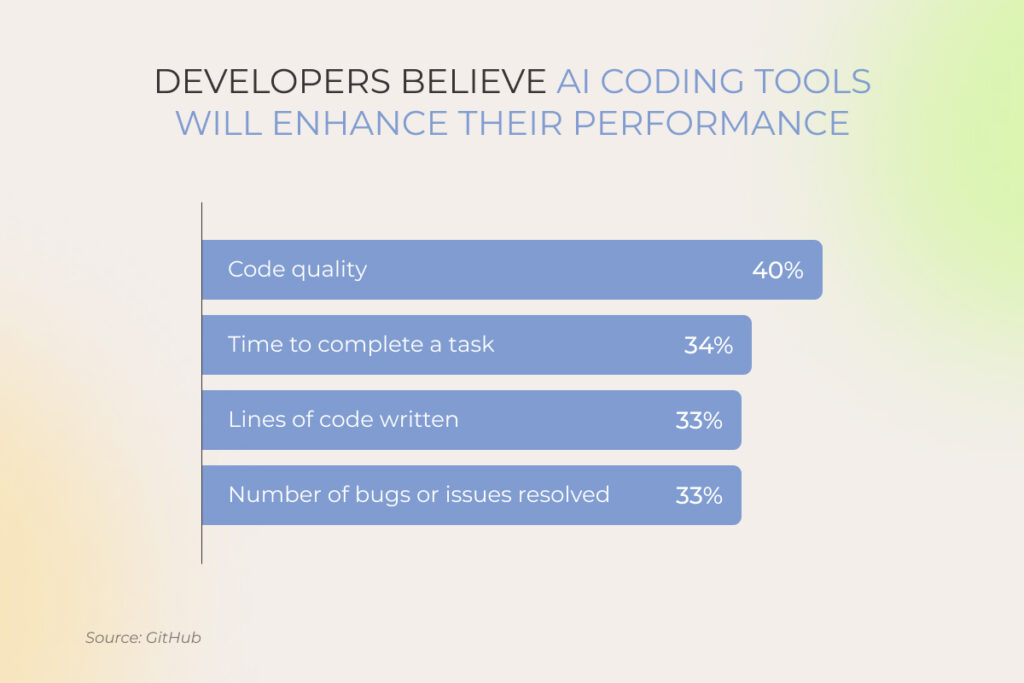
Meanwhile, with a cross-platform app, you can reach users on different platforms. Their functionality won’t be as rich as with native software, but if you need a simple solution with a limited range of features, look into cross-platform frameworks. 
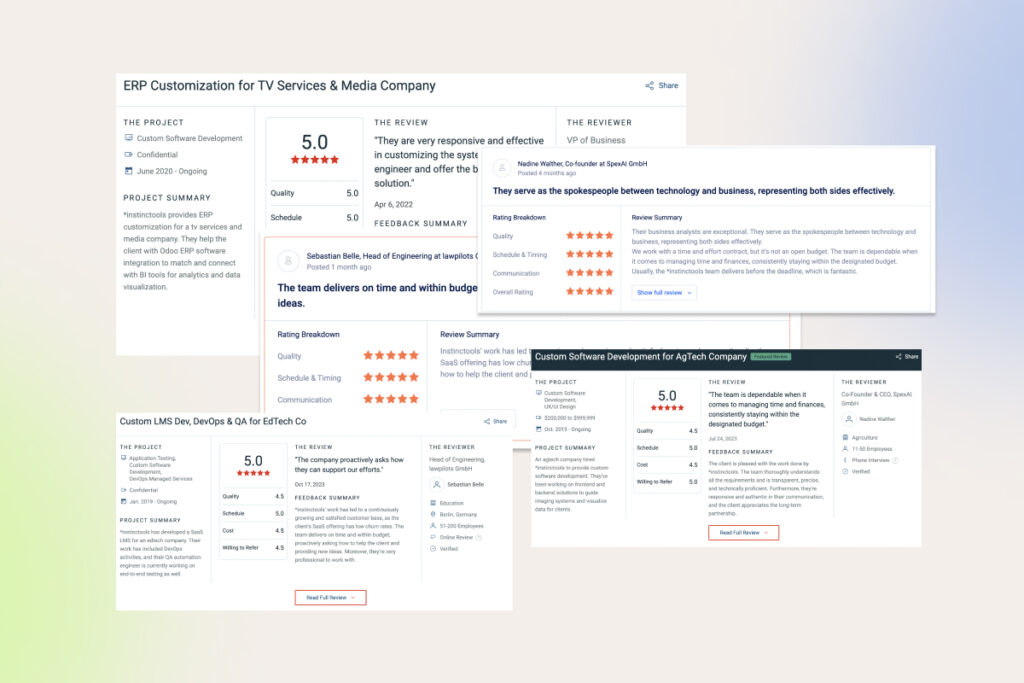
Anna Vasilevskaya
AI modified real photo
Anna Vasilevskaya
Account Executive

Get in touch

Drop us a line about your project at
[email protected] or via the contact
form below, and we will contact you soon.