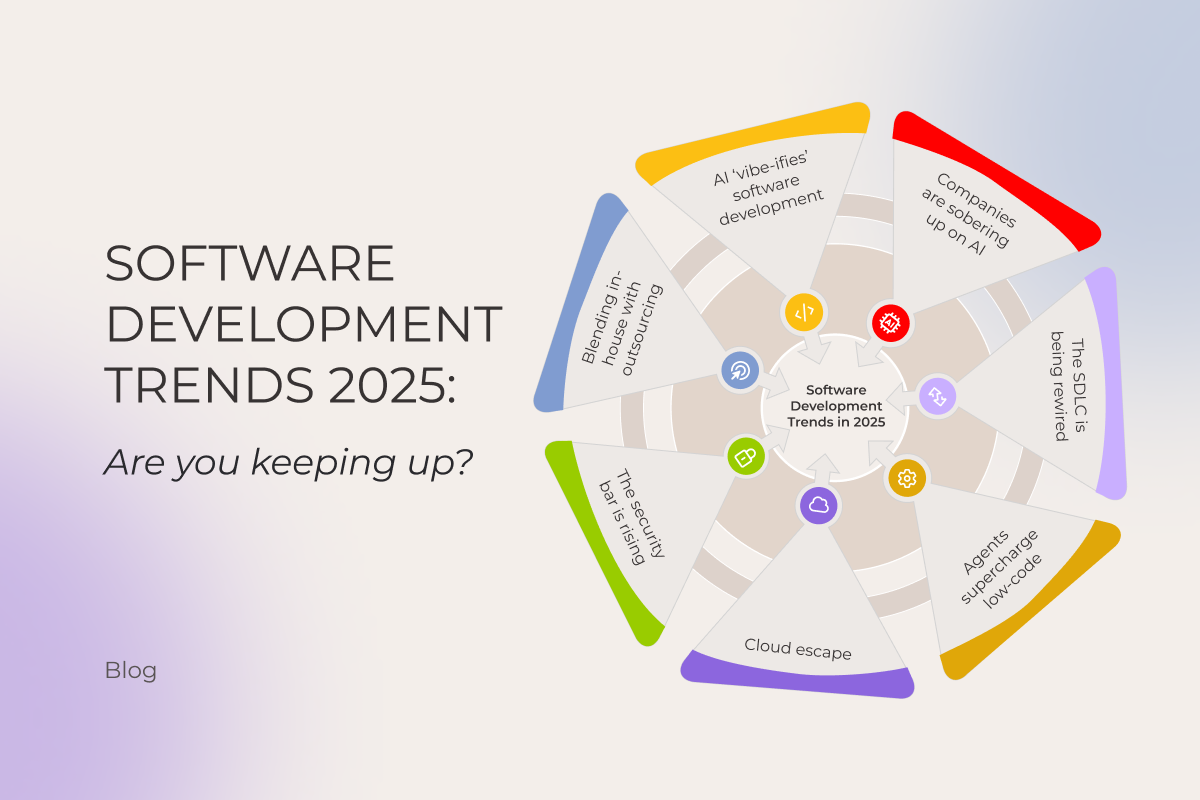
Software development trends 2025: Are you keeping up?

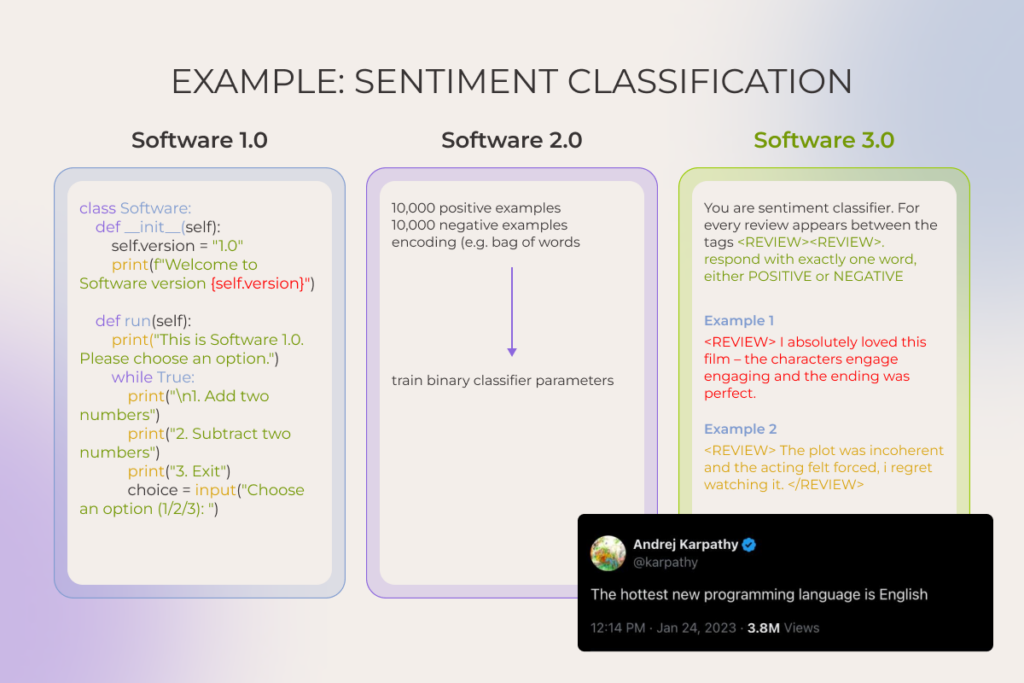
Software development is in the middle of a step-change. Andrej Karpathy’s framing captures it well: we’ve long passed the point where humans explicitly instructed a compiler in different programming languages (≈ Software 1.0) or even where they shipped software programs by training models instead of hand-coding (≈Software 2.0). Today, we’re in Software 3.0, where AI-assisted development takes the stage and the hottest programming language is… English.

Should you care? After all, companies that are used to clinging to old playbooks don’t vanish overnight. But history is brutal: many stuck-in-their-ways teams eventually dump millions into late pivots while faster players eat their lunch.

That’s why it’s essential to stay on top of what’s happening in the software industry, even if only a tiny part of your business touches it, let alone when you have engineering projects underway. Keep reading to see how you measure up against the latest software development trends in 2025.

1. As AI ‘vibe-ifies’ software development, engineers have to drop the boilerplate and own the vision

Artificial intelligence now sits in every developer’s toolbelt (at least among those who bother to notice what’s happening in the tech industry). Forums and tech blogs have been flooded with posts like ‘My AI fixed the bug before I even saw it.’ Chiseling code with AI copilots has become the new baseline. But if just a year ago all eyes were on AI coding assistants speeding up isolated tasks, today it’s vibe coding that takes center stage.
Software development trends

Coined by (again) Karpathy in early 2025, it expresses the idea of ‘setting the vibe’ and, just like that, getting the app. But jokes aside, what’s really going on is more like agentic-powered coding inside tools like Claude Code or Cursor, where developers prompt the product vision and constraints and agents write code, complete PRs, and push to production while a human oversees the whole process.

Honestly, the split view of the community on this one is understandable. In the hands of newbies who can’t navigate the nuances of coding, agentic tools are basically the devil’s plaything. A junior developer, no matter how eager, just doesn’t have the knowledge and experience to feed LLMs with the “don’t do it this way, it’ll bite you later” kind of vibes. They can write something that technically works, sure. But the solution probably won’t fit certain project goals, won’t scale, and will quickly get overrun with technical debt. The funny part is, they can shove that messy code into production without even realizing it’s messy. 

However, in expert hands these tools are a real force multiplier. Ideas buried in the graveyard of “we need $10-100K just to see if this is even feasible” can now get off the ground in days and at a fraction of the cost. But “the capacity to be a good editor is the reward you get from being a good doer,” after all. So it only works if engineers know their stuff and follow best practices. And yes, even though the field’s still pretty green, some rules of thumb are already clear:

  • Breaking tasks down into bite-sized, verifiable chunks and giving crisp, unambiguous instructions
  • Doubling down on context: rich prompts, detailed specs, external context sources. Developers should stay in control of what the system sees
  • Setting up security guardrails, including sandboxed execution, file system restrictions (allowing read/write only to designated databases and blocking access to sensitive files), running linting and security scanners on generated code, human-in-the-loop approvals, and regular commits
  • Acing token math and memory management

In fact, this is arguably what the industry’s future in terms of coding will look like. System architecture design, task planning, context-rich prompt engineering, and orchestration – for the human, mind-numbing drudgery – for AI. It’s a given that most enterprises will run hybrid, pairing AI agents with human engineers in the loop, and such a split in workflow responsibilities and shift in mindset is perhaps one of the standout, can’t-miss trends in software development.

It’s safer to vibe on top of 25+ years of old-school coding. Start now

2. Companies are sobering up on artificial intelligence

In 2019-2022, before the major breakthroughs in natural language processing and generation, AI adoption was mostly feature-level. Hyper-personalized recommendations, fraud detection, demand forecasting powered with machine learning, etc. – that was the flavor of most projects. But ever since ChatGPT went public in late 2022, AI has become a boardroom-level obsession for most enterprises.

Leaders greenlit massive investments in AI, whether for building entirely new digital products, restuffing existing ones, or sprinkling AI assistants into daily workflows to speed things up. 

And now? With some of the dust settling, we are not in the place many hoped. Study after study points to sobering results:

  • The latest and the most viral one from MIT found that despite roughly $30-40B in enterprise investments into generative AI, about 95% of AI pilot projects haven’t come even close to delivering measurable savings or profit gains.
  • Replacing employees with clever bots and agents hasn’t paid off either: 55% of executives regret layoffs made in the name of AI.

So it makes sense that heating talks of an “AI bubble” make investors feel like they’re in troubled waters. Does that signal the end of AI? Hardly. Companies that rushed in headfirst are now moving from hype-driven use to more deliberate, pragmatic AI adoption, and it’s one of 2025’s emerging software development trends.

From our observations and those of industry leaders, two root causes derail AI projects again and again:

  1. Too many companies are chasing AI for its own sake. When businesses start with chasing AI instead of defining the problem, it leads to costly projects with no real link to business needs. By contrast, the small share of success stories tells a very different tale. Some pilots went from zero to $20M in revenue within a year. As the above-mentioned MIT report author put it perfectly: “they chose one clear pain point, executed well, and partnered smartly with companies who use their tools”.
  2. There’s a severe lack of internal expertise. Many organizations simply don’t know how to use AI tools properly or design workflows that capture value while managing risks. Besides, some large firms, especially in regulated industries, felt compelled to build their own software systems for legal or privacy reasons. Such a “control at all costs” mindset, flavoured by flimsy engineering know-how, led to dead-end initiatives and wasted budgets. 

As of 2025, rather than rushing blindly toward AI, more businesses rely on expert support to identify the most profitable AI use cases, confirm data readiness and context, and only then chart a clear journey from prototype to an MVP to scalable rollout.

Schedule a two-day session with experts to build a custom roadmap for AI adoption

Get the details

3. Software supply chains are being seriously rewired

The whole software development process is moving away from what we’re used to. And AI, being a catalyst of this change, is not running the show alone though.

Broad, AI-enabled overhaul of the software development lifecycle

Given how much AI assistants speed up software development and boost the quality of the final product, it’s no wonder companies are shifting from the traditional development process toward what’s being called an AI-driven SDLC.

Rather than just plugging in smart tools here and there, it takes coordinated action across three levels:

  • Strategic: сhoosing the value pools to pursue, defining the outcomes that matter, and deciding where AI will (and won’t) differentiate.
  • Operational: building a strong data foundation (prioritizing sources, improving data quality, etc.), investing in AI-powered tools and integrated orchestration platforms, and redesigning processes to embed the tooling end-to-end.  
  • Organizational: cultivating AI talent and upskilling existing teams to keep up with shifting labour market demands.

Only such a holistic setup can truly deliver the AI perks everyone’s been buzzing about:

Our experts see, coding is sped up by 60%, drafting docs like user guides or high-level acceptance criteria takes half the time, integration scaffolding slims down by ~80%, and QA reclaims 30-40% to hunt the tricky edge cases.

Enhancing developer experience (DevEx)

Though it definitely plays a role, AI alone can’t dissolve the friction that persists in the SDLC. In 2025, software developers continue to fight against the organizational drag – still getting swallowed by endless email chains, still ping-ponging between pointless meetings, and still digging through scattered documentation to get their work done…. Half of developers lose 10+ hours, while 90% lose 6+ hours, mostly to red tape. For a company with 500 devs, that’s nearly $8M lost annually.

More and more businesses in the software development industry are realizing the need to make life easier for their software developers by cutting through the clutter and putting DevEx front and center. One of the best practices is ramping up platform engineering capabilities via a centralized Internal Developer Platform (IDP), which is basically a hub for APIs, reusable components, infrastructure products, development tooling, documentation, tutorials, demo environments, curated learning paths, and a real-time view of all assets’ statuses, etc.

When a new hire logs in, they click “create project,” pick a ready-made template, and the IDP spins up the environment, hands over API keys, and sets permissions without tickets, meetings, or waiting.

Case in point: After a SaaS provider replaced its patchwork toolchains with a single, secure CI/CD pipeline and baked-in guardrails, 2000 software developers stopped wrestling with infrastructure and started shipping. Code velocity rose 10-20%, the number of critical incidents fell 20%, and security vulnerabilities shrank 15-20 %.

4. Rapid delivery with low-code / no-code tools, now even more rapid with AI capabilities

Gone are the days when a months-long software development cycle was an acceptable price for just an MVP. To be fair, speed has always been table stakes. But what’s different now is that it no longer requires cutting corners on quality.

Against this backdrop, something companies have been desperately waiting for finally hits home: the ability to quickly test whether a software idea actually flies before pouring effort and money into thin air. Prototyping has become lightning-fast.

That’s largely because low-code/no-code platforms (LCNC), once mostly clunky drag-and-drop website builders, have matured and now can assemble complex systems, complete with integrations, APIs, forms, etc., with minimal-to-zero coding required. And they’re quickly embedding AI:

  • Back in 2023, the no-code tool Bubble rolled out its Azure OpenAI Service plugin, letting businesses connect their apps to OpenAI’s models. Soon after, support was added for other popular models such as Claude, Grok, and Gemini.
  • In October 2024, OutSystems brought out Mentor, an AI-powered digital assistant built to step in with context-aware help across the software development workflow, able to carry out sequential tasks and even take entire processes out of users’ hands.
  • And just recently, in July 2025, Microsoft announced a shift in its low-code Power Apps tool toward agent-first app generation, to enable developers to quickly create custom AI agents to manage repetitive tasks. Its integration with Copilot makes the whole process faster by suggesting workflows primed for agentic automation. Yet, this out-of-the-box approach has its limits, and in one of our recent case studies we show how a custom agentic setup helped our client break through those constraints.

Anyway, building a core, heavyweight enterprise system LCNC-only is hardly the wisest strategy. Because the moment a new regulation, merger, or black-swan event forces you to change a core assumption in the solution’s architecture, that change ends up moving at the speed of a full-on manual rewrite anyway. All you can do is export the LCNC-generated code (if the tool even lets you), only to find it’s a spaghetti tangle of platform-specific runtime calls your developers refuse to touch.

But for a lot of non-mission-critical business apps, when there’s no decent off-the-shelf fit, low- and no-code platforms allow getting the job done with a small team of skilled people, who can keep the system evolving, supported, and refined in a low-lift way.

5. Companies are falling out of love with public cloud (hello, giant bills) and moving back to private cloud

A major cloud computing shake-up stands out among the latest software development trends. In the year ahead, we’ll likely see businesses take a hard look at the private cloud again and double down on hybrid stacks (a mix of private – on premises or hosted – infrastructure, edge nodes, and yes, still, some bits of public cloud).

As sweet as cloud providers’  promises of cost efficiency, scalability, and speed sounded made (no wonder forecasts put worldwide public cloud spending near $1.6 trillion by 2028, doubling its 2024 level), the reality of unexpected operational costs hit just as hard.

A recent survey shows 53% of IT decision-makers at companies with 100+ employees overshot their planned cloud storage spend. The main reasons cited are using more storage than planned, migrating more apps and data than expected, and unanticipated egress or API fees.

David Heinemeier Hansson, co-owner and CTO of 37signals, publicly shared his ‘exit the cloud’ story (and reasons behind it). Horrified by seven-figure annual bills, their team abandoned AWS S3 in favor of an on-prem setup. By their calculation, it will cost under $200K per year instead of $3.2 million spent on cloud computing.

cloud computing

But it’s not just the cost that is steering companies off the public cloud. The now chronic geopolitical uncertainty has sparked the sovereign-cloud debate in Europe. Public sector and highly regulated industries, such as finance and healthcare, increasingly require digital autonomy, often meaning private cloud and data residency by country or region. 

On top of that, growing demand for AI inference, machine learning, IoT, and autonomous systems that need ultra-low latency is driving the need for edge computing instead of distant mega-clouds.

6. Digital trust and security are still the backbone of enterprise tech

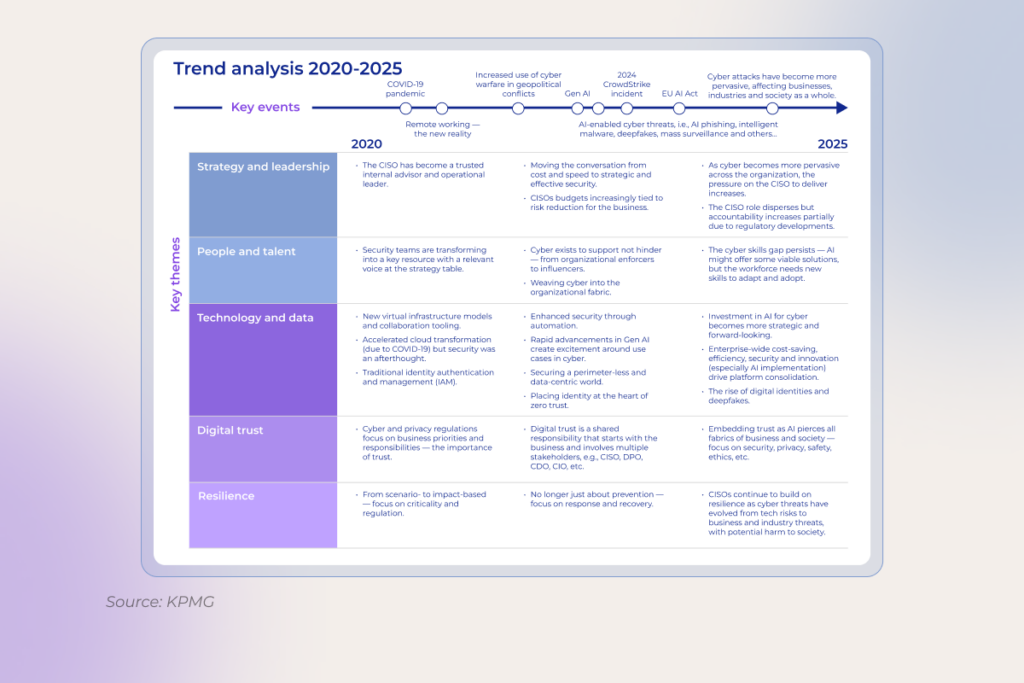
No matter how many times the “cybersecurity is vital” mantra is drilled in, yet – boom – another CrowdStrike-scale mess hits the fan. The stakes are only getting higher with AI, which is bringing new pressure points for security. 

Companies that once dragged their feet on data management now realize that training large language models requires clean, well-governed, and secure data from the start. Storage, processing, and classification all have to be tightened to make the initiative worth it. As Erin Hughes, Head of Cybersecurity Advisory, North America SAP, notes, CISOs often aren’t the data owners, so security and data teams need shared classification definitions and common rules of engagement, especially for AI.

The challenge doesn’t stop there. As enterprises stitch together sprawling ecosystems of third-party software, many overlook the basics of safe usage and resilience. So, lately,  companies have been getting dead serious about their data security posture, normally through:

  • continuous employee education
  • robust tech safeguards like identity and access management or multifactor authentication
  • continuous threat monitoring
  • clear understanding of regulatory obligations and compliance requirements related to the implementation of innovative solutions
  • practiced crisis response and recovery plans

As for software development, one of the most defining shifts is integrating security by design. Practically speaking, that means treating DevSecOps less as a buzzword and more as the baseline.

Read also: DevSecOps: How to Integrate Security into DevOps >>

And once the controls are rolled out everywhere, it’s just the beginning. Security mechanisms must evolve alongside advancements in emerging technologies, ideally a step ahead. 
software development trends

7. Hybrid approach to outsourcing is becoming the default

In 2025, many large corporations still seem convinced they can go back to the “good old days” of office life. They’re tightening their RTO policies, but the toothpaste is already out of the tube. Software engineers who’ve tasted the flexibility of remote work simply aren’t flocking back.

Besides, this whole return-to-office push seems counterproductive for a market where the cohort of senior engineers who can design, debug, and own production-grade AI systems is so tiny that companies struggle to fill those seats.

Regardless of your stance on remote work, one pattern is clear in 2025. When it comes to planning digital transformation initiatives, it is often faster, cheaper, and way more effective to tap into specialized dev shops offering self-managed, distributed development teams with AI-native, best-of-breed technical expertise. 

Most Fortune 500s are realizing just how flexible outsourcing has become. Pragmatic leaders now use hybrid models, keeping some projects in-house while handing off routine work to cost-savvy external distributed teams.

The bottom line

The future of the software development industry is rewritten by AI. It’s agent-powered. It’s security-centered. And… It’s nothing like what we’re used to. Those who grasp it and keep pace with these Formula-1-speed changes are best positioned to ride on competitive advantage.

FAQ

How is AI changing the way software is developed?

Artificial intelligence has become a true copilot across the entire software development process, helping with requirements, coding, reviews, testing, and what not. Engineers and managers delegate the tedious yet unavoidable grind to these new tools, keeping their attention locked on the high-impact, strategic work. This way, along with speed, teams squeeze more quality out of the same headcount

Are low-code tools replacing traditional development?

Not replacing – augmenting. Low-code tools are great at prototyping, line-of-business apps, and internal tooling. But when you’re dealing with complex logic, performance constraints, or avoiding vendor lock-in, you still want full-code engineering. The future looks hybrid: using low- and/or no-code development platforms for quick wins at the edges, and sticking with traditional engineering where durability and control matter.

What are the trends for software development jobs?

Job openings are down globally, full-remote roles keep shrinking, and junior seats are tight. All industries demand expertise in AI infrastructure, machine learning operations (MLOps), data analysis, and generative AI applications development, while classic frontend, backend, and mobile dev roles face stiffer competition and longer interview cycles across mid-level and managerial tiers.

What is the next big thing in software development?

Vibe coding and agentic workflows are the biggest emerging trends in software development. They collapse time-to-prototype curve to near-zero, providing the steepest drop in iteration latency software engineers have ever seen. With agentic setups, the cost of throwing code away is lower than the cost of refining it. And when waste becomes cheaper than polish, the entire product-culture flips and that’s why every major platform and VC firm is treating it as the next structural shift in how software gets built. Awesome solutions like Cursor, Claude Code, Windsurf, Lovable, Replit Agent, etc. are increasingly integrated into the tooling stack.

What is a major trend expected in the future of SDLC?

AI assistants will be embedded across all SDLC stages. From shaping user stories and system architecture through coding, automated testing, and deployment, over to continuous re-factoring. Meanwhile, developers’ roles move away from writing code toward curating prompt libraries, setting AI policies, and providing high-level strategic oversight.
Ecommerce UX Best Practices in 2026: Design Your Way to the Customer’s Heart (And Wallet)

In ecommerce, where revenues shoot through the roof every year, it’s surprising how often user experience (UX) takes a backseat. Maze-like navigation, off-target layouts, and hour-long checkout processes shoo customers away, causing millions of ecommerce businesses to lose millions in revenue.

Growth isn’t just about pouring money into ads and chasing new traffic. To increase your store’s revenue with customers already in your corner, prioritize delivering exceptional user experiences built on the back of ecommerce UX best practices. But contrary to popular opinion, conversion-worthy ecommerce UX goes beyond visual frills.

40+ ecommerce projects later, *instinctools’ team has curated an extensive knowledge base of ecommerce UX dos and don’ts — and we’re laying it all out in this no-fluff guide. 

The value of smooth user experience and the price tag of poor UX in ecommerce

Your marketing team has done a titanic job getting potential customers to your site, all set to buy. But just seconds later, they give up halfway because things like complex navigation or sloth-like page loading drive them up the wall.

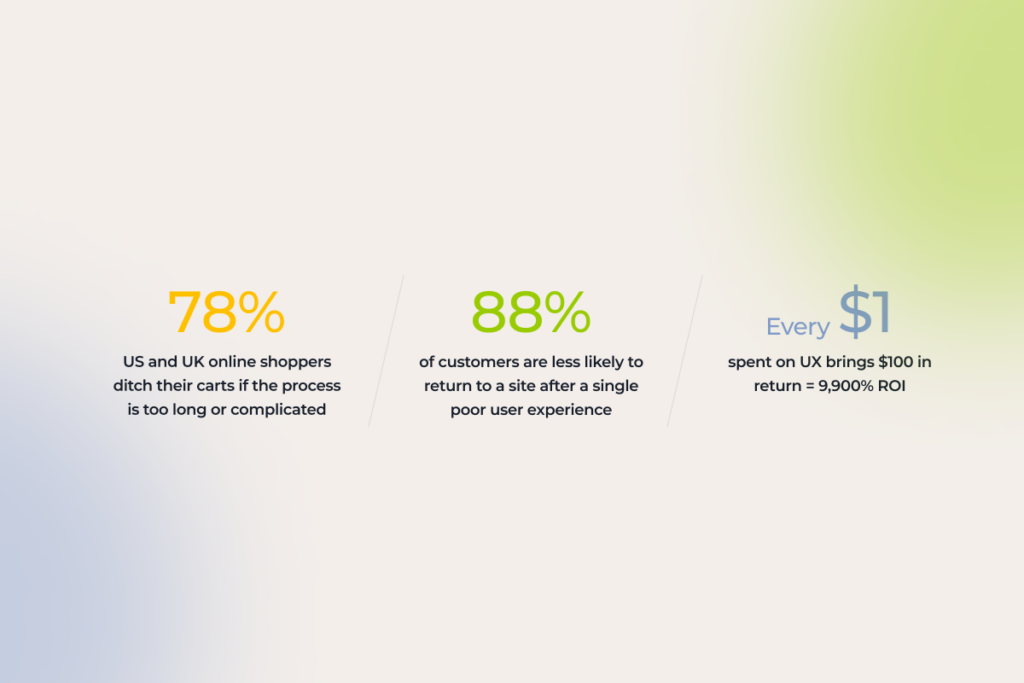
A survey shows that 78% of shoppers in the US and UK tend to ditch their carts if the process is too complicated or takes too long. And it’s not just a lost sale — it’s a lost customer. Friction-filled interactions lead to a huge 88% of users abandoning a site for good.

On the flip side, a smooth, seamless experience can work wonders. Every CX expert will tell you that every $1 spent on UX brings $100 in return, equating to 9,900% ROI. Even a single tweak to your UX can deliver up to a 400% jump in conversions.

Successful ecommerce sites know firsthand the power of user-friendly storefronts. Jeff Bezos invested 100X more into customer experience than ads during the early days of Amazon. Today, this ecommerce giant is known for exemplary conversion rates of around 10%.

Ecommerce UX statistics 2025

UX best practices for ecommerce: dos and don’ts across the website customer journey

It’s no longer about buying a product, ecommerce shoppers are after the end-to-end experience of being a customer — from the initial interaction with a brand to the purchasing process and beyond. For an ecommerce business, it means an enjoyable shopping experience through and through, at every touch point of your customers’ journey.

It’s no secret that ecommerce interaction with your customer begins long before they land on your website. First impressions happen through Google Product feeds, Bing Shopping, a social media post, and even your email newsletters. So, if you care about capturing attention, you’ve got to build sales funnels that start off-site, not on your homepage. 

While we’ll dive into off-site UX best practices soon, today’s focus is all about crafting an exceptional on-site user experience.

1. First interaction with your website

They say that the UX of the homepage of an online store is critical for your business. But what about a shopping card? Or a product page? In reality, users can land anywhere on your site, that’s why prioritizing the UX of every page is crucial to sweep both first-time and regular users off their feet.

1.1 Make sure your website is optimized for mobile devices 

By 2027, mobile commerce is slated to surpass 49% of retail ecommerce sales in the US. Mobile friendly commerce sites with responsive design are no longer a “maybe later” option — unless you want to see your customers spending their dollars elsewhere. 

When it comes to mobile sites, mobile ecommerce UX best practices include:

  • Adapting your website to different screen sizes and orientations
  • Optimizing touch targets by adding finger-friendly, tappable elements 
  • Testing your website on real smartphones and tablets to validate its responsiveness
  • Prioritizing quick loading by optimizing image sizes and leveraging browser caching
  • Focusing on website content that is easily digestible on mobile devices

Here are the UX elements that can hurt mobile optimization:

  • Horizontal scrolling — some elements might be pushed out of the viewport.
  • Cluttered layouts — these can be hard to navigate on mobile devices.
  • Complex visual elements and heavy files — they can overload older and less powerful models. 
  • Formidable forms — typing is more challenging and error-prone on mobile.
example of a contact form not optimized for mobile devices
Contact form is not visible on mobile

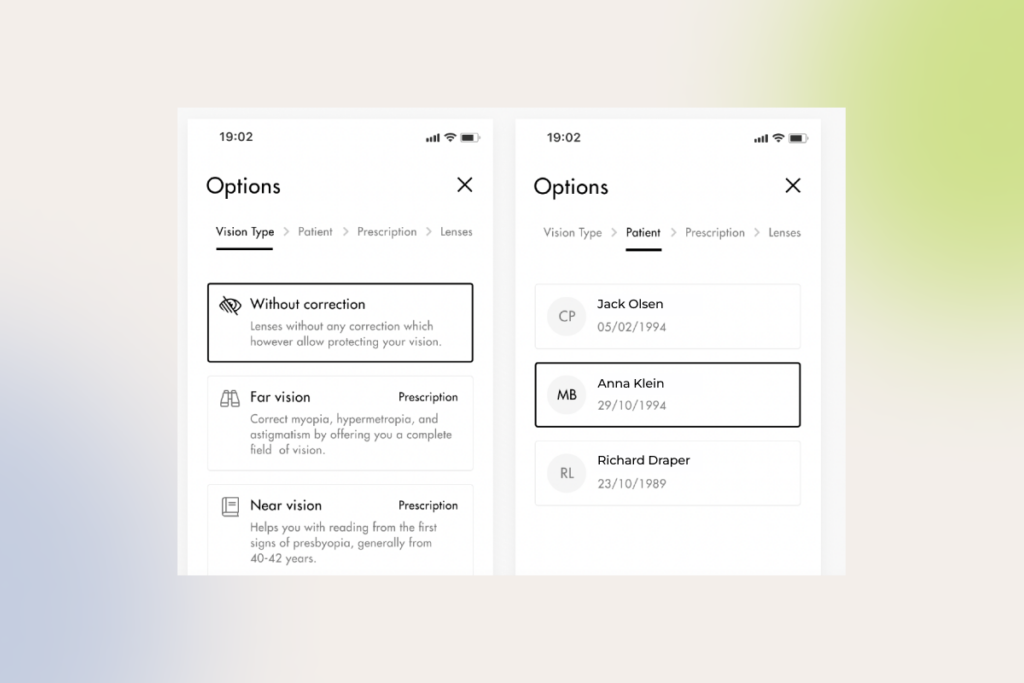
INSTINCTOOLS’ CASE IN POINT: When modernizing an ecommerce solution for one of our long-term clients — a contact lens seller — our UI/UX team spotted an unusual trend: on some product cards, many users were buying lenses only for one eye. Turned out, only the right tab was visible on mobile, which hindered navigation for mobile users and hurt sales. Once we fixed this issue, our client saw an upward trend in sales.

To make sure your website looks flawless on mobile, you can test it with Google’s free Mobile-Friendly Test. If there are any mobile UX flubs cropping up on smartphones, Google’s tool will show you what they are.

1.2 Get your online store navigation right

As many as 76% of ecommerce stores have mediocre-to-poor performance when it comes to category and homepage navigation. To buck this trend, make your online store navigation intuitive, simple, and customary, meaning it taps into familiar patterns and cues.

User-friendly navigation heuristics include:

  • Adopting clear, concise, and consistent labeling across all pages
  • Dividing categories and subcategories into manageable chunks
  • Making sure that categories are distinct and non-redundant to prevent confusion
  • Creating meaningful parent categories that accurately represent their subcategories
  • Implementing tiered navigation to improve findability for users and reduce the cognitive load  
  • Adding breadcrumbs to help users quickly understand where they have landed
  • Making sure your website has an intuitive search functionality (auto-suggestions, voice search)
a navigation menu requiring increased cognitive load
Tiered navigation menu where sub-categories are only exposed upon click
overly complex navigation menu
Mega menu

Conversely, overly complex navigation with hidden elements or inconsistent labeling can end the user journey without starting it.

1.3 Make your ecommerce site accessible to all users

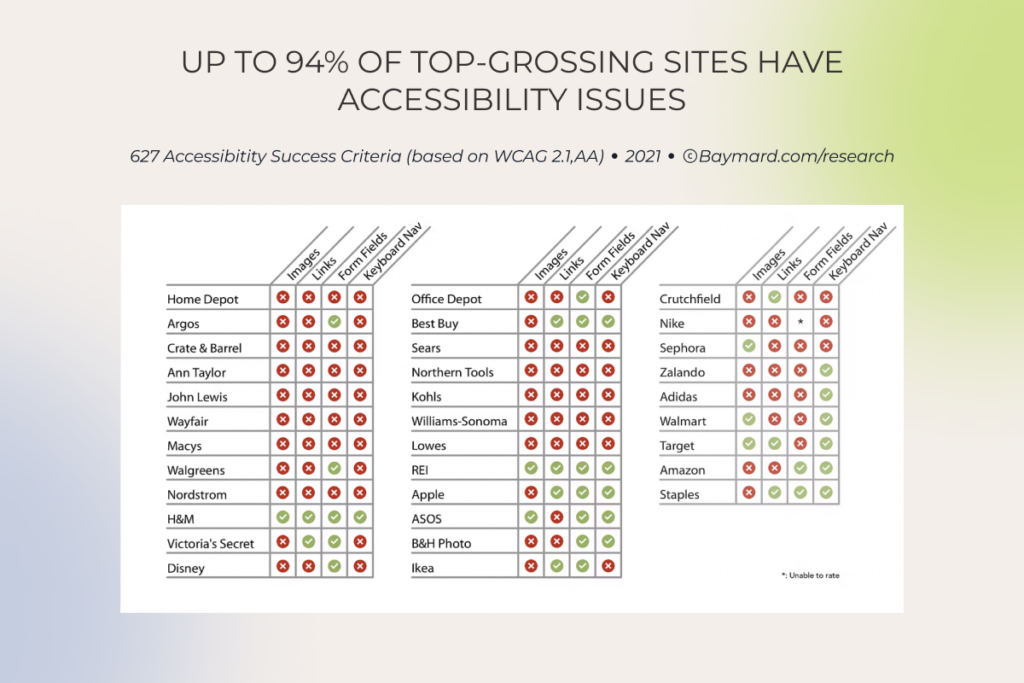
According to the EU Accessibility Act (EAA), any ecommerce business (except for those with fewer than 10 employees and revenue below €2 million) with E.U. customers must ensure a fully inclusive experience starting with June 28, 2025. While compliance requirements vary by region, an ecommerce website must at minimum implement Website Content Accessibility Guidelines (WCAG) 2.1 AA to break down digital barriers.

According to our experience, most ecommerce websites have one or a few of the following accessibility issues:

  • Incompatibility with assistive technologies
  • Low-contrast text or poor color contrast
  • Difficult/poor keyword navigation (navigation is possible only with a mouse)
  • Lack of link styling (links blend into the surrounding text or the background)
  • Lack of visual or auditory signals (headings, labels, captions, and more)
  • Small touch targets
Accessibility issues of top-grossing sites, by type

Along with eliminating the issues we mentioned above, you should also adopt the following ecommerce UX design best practices to promote a better, more accessible experience for your consumers:

  • Allow users to resize any text up to 200% without assistive technology
  • Use simple, consistent terminology throughout the entire customer journey (your UX writer should collaborate with a UX designer to create consistent messaging)
  • Voice-enable your user interface to provide alternative input and search options
  • Keep the number of choices on each page to a minimum
  • Add extensive product information and make it available to AT users
  • Eliminate redundant hyperlinks and add descriptive link text 
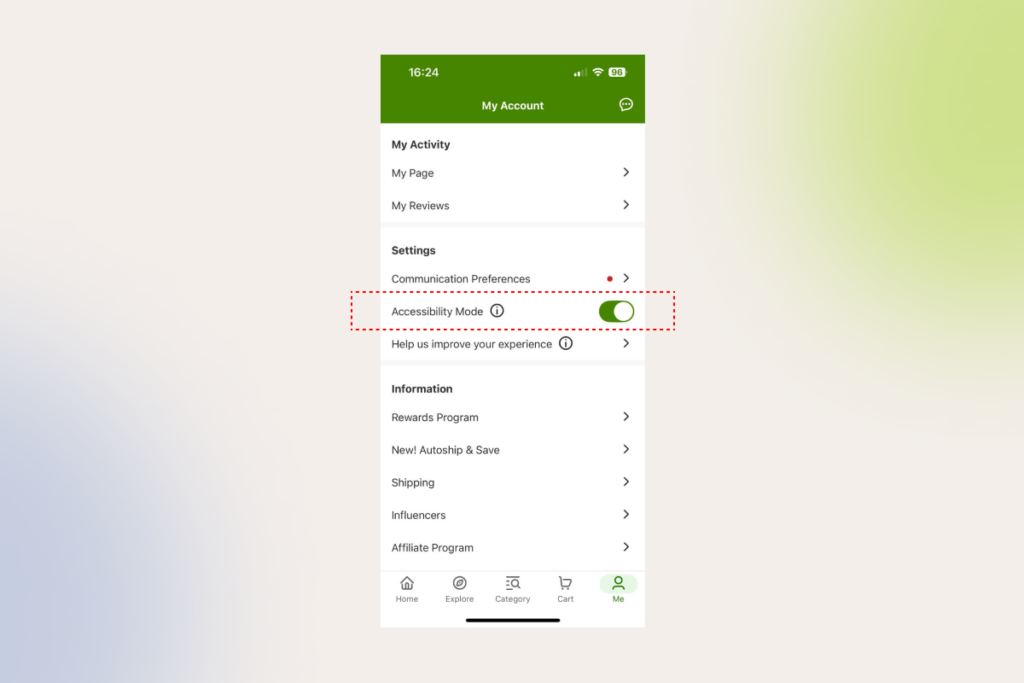
iHerb accessibility mode
iHerb allows users increase font size and use text to speech with its Accessibility mode on

1.4 Keep your ecommerce website lightning-fast

No matter how rad your ecommerce website design is, if your website takes forever to load, your customers will leave faster than a cheetah can sprint. In fact, if an ecommerce site is making $100,000 per day, a 1 second (!!) delay in website speed can result in $2.5 million in lost sales annually.

Keep in mind that a UX designer alone cannot ensure fast loading. However, they can at least prioritize quick loading times and ease of navigation in favor of static images over flashy elements like video backgrounds or interactive elements, which can hinder your website performance.

When an online shopper gets down to the brass tacks, a well-designed product search function will help them find the necessary items in a few clicks. There’s a lot that goes into designing an intuitive and efficient product search journey, that’s why we’ll keep it to the essentials.

2.1 Stick to easy search functionality

There are two types of customers that can pay a visit to your ecommerce store. The first cohort is in the market for something specific, while the other group includes those that came to browse without any direction. Make sure your ecommerce UX covers both groups of customers, helping them make buying choices through straightforward, on-the-nose search features.

Here’s what design elements your customers can benefit from on the quest for the perfect product:

  • Including a pop-up search screen to support one-screen search (one screen = one action)
  • Enabling search by image, barcode, and voice
  • Supporting searches that include one or more product attributes
  • Enabling abbreviation, symbol, and slang searches
  • Ensuring synonym and typo tolerance
  • Supporting problem-oriented keyword search
  • Placing trending queries, bestsellers, and promotions in a search bar 
Shein's search bar with search suggestions for trending items
SHEIN’s search bar provides suggestions for trending items

You can also add an AI product finder that understands natural language queries to take the hassle out of the product search and make it easier for customers shopping online to stumble upon an ideal product.

Beyond the search bar, other product search best practices include:

  • Prioritizing exact matches at the top of search results
  • Displaying the total number of items in the product list
  • Replacing endless scrolling and pagination with “Load More” links
  • Including user rating averages and the number of ratings
  • Adding well-designed, visually appealing, and informative product cards that have just the right amount of information to nudge users to click on them

2.2 Ensure logical product categorization 

When it comes to product categories, you have to keep the right balance between overcategorization and the lack of granularity. To serve a top-notch ecommerce user experience, ecommerce sites should enable users to easily drill down on the products, without going to great lengths.

Here’s what product categorization best practices you can implement to support a hassle-free online shopping experience:

  • Implementing faceted search to organize large inventories
  • Adding visual cues (icons, images, or color-coding) to make filters and facets more intuitive for customers
  • Adopting a consistent visual hierarchy structure with clear levels, including categories, subcategories, and attributes
  • Providing “Sales” and “Deals” filters
  • Including user rating averages and the number of ratings
  • Providing checkboxes for filter options

The most common usability issues we spot on our clients’ commerce sites include:

  • Implementing “Sales” as a category instead of making it a filter (the category silos items, making it impossible to view the broader list of non-sale products).
  • Creating separate categories for product types with shared attributes.
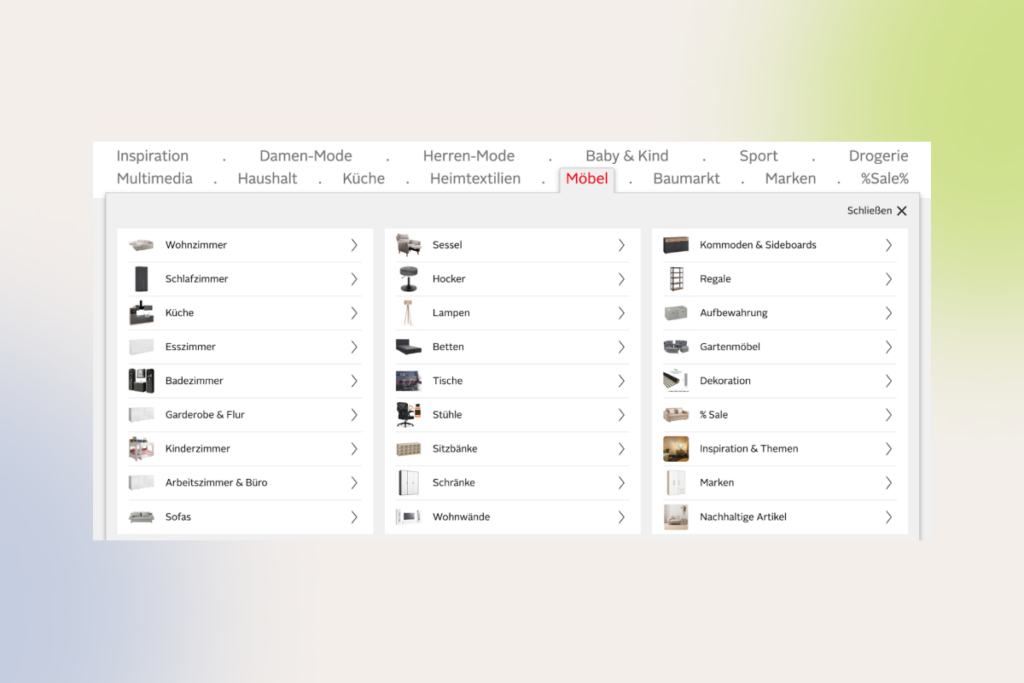
  • Overusing nested categories with many levels.
a menu bar with categorization issues

At American Eagle, “Denim Dresses” are placed in a subcategory of “Dresses” — making it impossible for a user to see a combined list of both “Denim Dresses” and “Mini Dresses”

Otto's mega-dropdown: hover menu with complex navigation
Overcategorization in the “Furniture” category of the German site Otto makes the navigation hard for users. 

3. Home page and product page

As we said, a customer’s journey can commence anyplace. Whether it’s a homepage that will serve as the first point of contact or a product page — each of them should never fail to reel in a buyer.

3.1 Homepage

Besides being pretty, your online storefront should make for a convenient, easily scannable product catalog, pages, and collections to increase buying momentum right out of the gate. To achieve that effect, you should adhere to the following UX ecommerce best practices:

  • Making the search field obvious on the homepage
  • Featuring a broad range of product types on the homepage
  • Avoid auto-rotating carousels on mobile homepages (you can go for a hybrid approach and combine an active slider with static tile images of select categories and products like Amazon or iHerb does) 
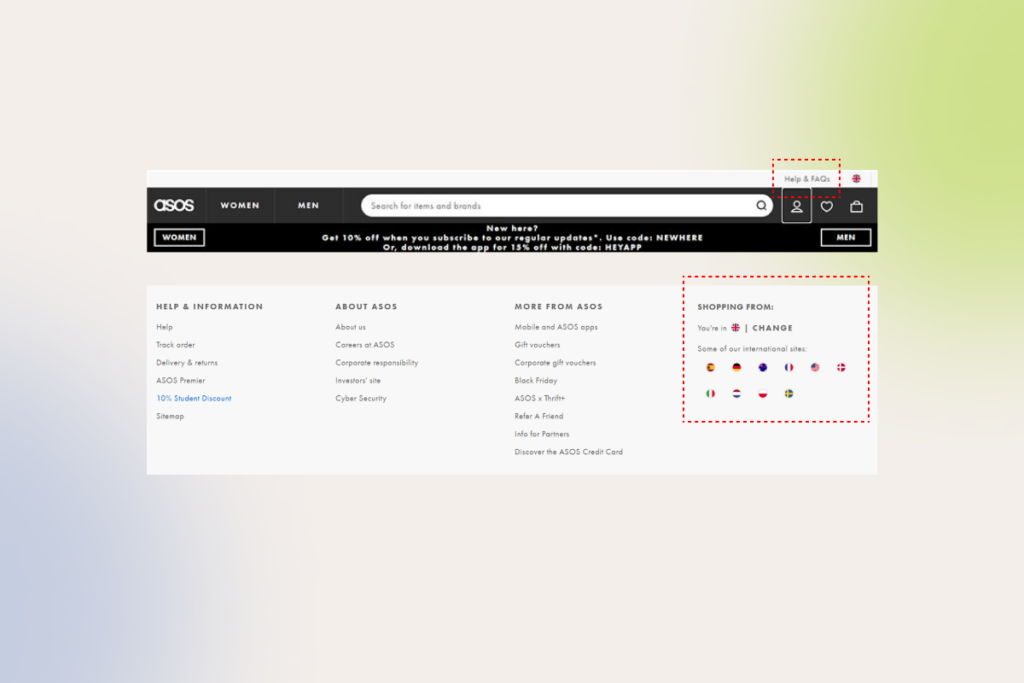
  • Implementing country and language selection thoughtfully (prominent placement, default settings, local shipping and return options, and multilingual customer support)
  • Consolidating key information on the homepage such as delivery options, return policy, and other information
  • Including a link to the FAQs in your header or footer
ASOS's header and footer as an example of clear ecommerce UX design
Link to the FAQs in header and clear country selection on ASOS

3.2 Product page

As your buyers cannot physically try out products, you need to do your best to make your products come alive via high quality images and graphics. Your ecommerce UX should also equip customers with all the necessary product details, thus improving customer satisfaction post-purchase as well.

Here are some good ecommerce UX practices that we’ve helped brands implement to improve product pages and boost conversions:

  • Displaying social proof and user generated content such as reviews, ratings, and customer photos to promote informed buying decisions
  • Communicating product availability
  • Suggesting related products to enhance cart value
  • Using vertically collapsed sections instead of horizontal tabs on product pages to improve discoverability
  • Featuring at least 3 to 5 product images
  • Using product videos or 360-degree photo slider to demonstrate products from every angle
  • Highlighting the primary “Add to Cart” with a prominent and unique design
  • Making return policies and delivery options explicit
  • Adding functionality to compare items and highlight differences in one place without making users jump across multiple pages
vertically collapsed sections on a product page
Vertically collapsed sections layouts on Lowe’s website

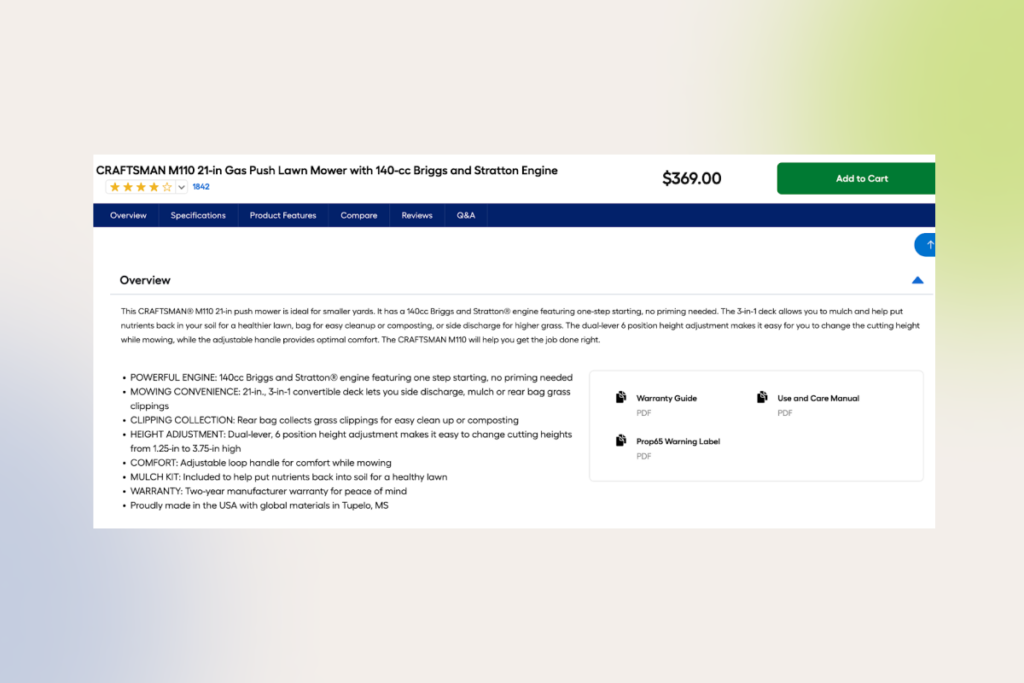
Incomplete or boring product descriptions, bland technical features with a “wall of text” appearance, or ambiguous info about product delivery or return policy can hurt online sales, averting potential customers. The same goes for hidden tabs and call-to-action buttons.

poorly laid out product description
This Lowe’s product detail page of a push lawn mower consists of feature bullet points only, which can cause customers to skip important product details.
step-by-step checkout process
To organize and simplify the buying process within our client’s online store, we’ve divided it into sequential steps.

4. Cart

According to research, the average cart abandonment rate is as high as 70% — and the majority of these lost customers can be attributed to subpar user experience. Almost the final stretch of any customer journey, your cart page design should become a bridge between customers and your business — with products put in the right place, with graphics of the right size, and with the right information.

Based on the hundreds of tests we’ve done for our ecommerce clients, here are the 

non-negotiable building blocks your cart needs to convert ready-to-buy customers: 

  • Cart modification options that allow users to adjust quantities or remove items from the cart
  • Visible cart summary that displays the number of products after moving them to the cart (both on desktop sites and mobile versions)
  • Clear feedback when a buyer adds new items to the cart
  • A consolidated, pared-down, itemized list of products (product names, product images, the quantity of the product, product’s price, estimated delivery dates, subtotal with taxes)
  • Security seals and reassuring elements, such as trust badges, accepted payment options, money-back guarantee to show the legitimacy of your website
  • Motivators to buy in the empty cart
  • Prominent “Checkout” or “Proceed to Checkout” button
Amazon's motivator to fill the cart with items
Amazon motivates users to fill their carts with items.
ASOS's Add to Cart popup
ASOS message when a user adds items to the cart

If your customers add a bunch of items to their cart, but then mysteriously evaporate, make sure your cart page is free from noisy popups and special offers. Incomplete information about shipping and delivery terms, lack of customer support options, and unclear thumbnail images might also drive away your customers.

INSTINCTOOLS’ CASE IN POINT: One of our clients, a premium jewelry seller from Switzerland, noticed their cart abandonment rates increasing. Our UX team analyzed the website’s flow and attributed this trend to an inconvenient checkout process (the website didn’t allow users to add multiple items to the cart). By redesigning the checkout flow and analyzing the metrics post-launch, we saw a 50% increase in conversions across both web and mobile, validating our hypothesis.

5. Checkout page

When your customer is a few clicks away from placing the order, your checkout page should aim to reduce the number of hoops to jump through. Otherwise, you risk losing up to 22% of online shoppers to an overly complicated checkout process.  

Here’s what a rudimentary checkout experience should look like: 

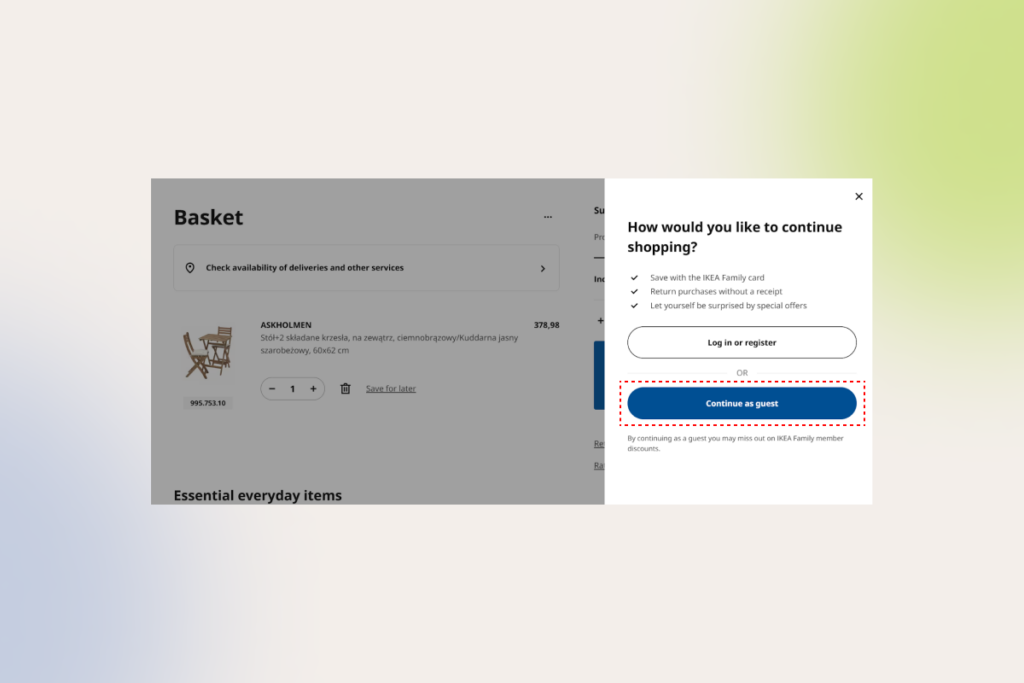
  • Guest checkout option — your website visitors should be able to shop and purchase without account creation
  • Progress indicators — the checkout process should consist of clearly demarcated steps (up to 4 steps)
  • Multiple payment options — offer flexible payment options, including buy now, pay later payment methods
  • Clear order summary — provide detailed summaries, including taxes and shipping
IKEA's checkout process is convenient for both registered and guest users
IKEA’s customers can make purchases without creating an account

We often see ecommerce brands inserting unexpected fees during the checkout process, providing ambiguous shipping information, or asking customers to sign up before placing an order. All these, including excessive checkout flows, can take a toll on your conversion rates and sales.

6. Confirmation

The customer journey does not end with the checkout, but a lot of companies seem to forget about this fact. After finalizing the order, your customers should clearly understand the next steps and how to handle issues post-purchase.

Here’s how you can produce a lasting positive effect on your customer after the purchase (and make the most out of it):

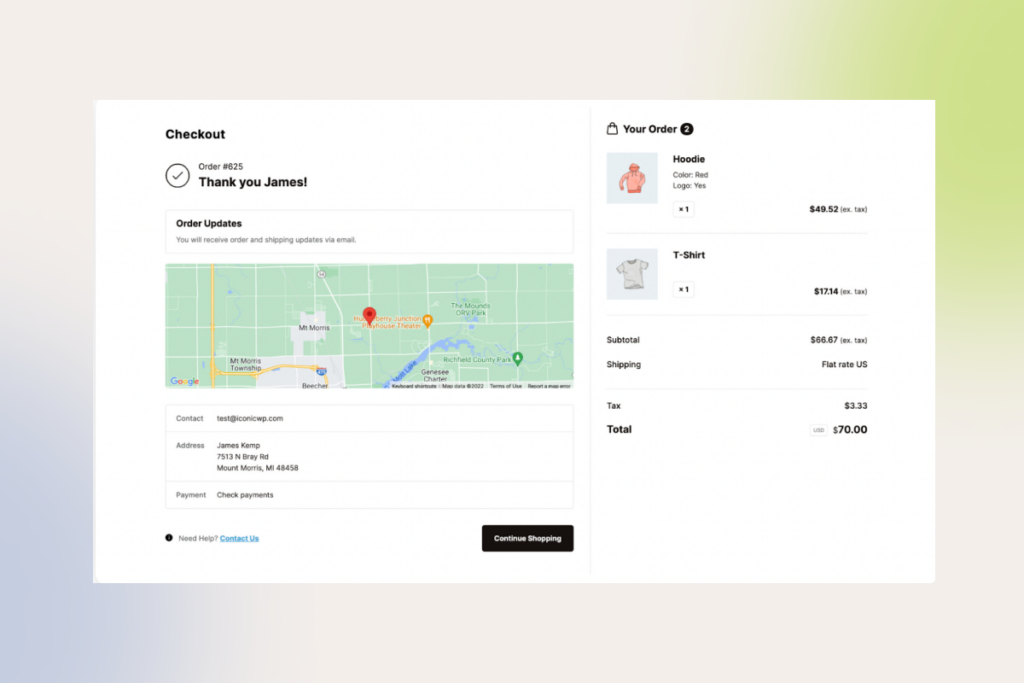
  • Provide a clear (and preferably personalized) confirmation/thank-you message or indicator post-purchase
  • Add cross-sell deals to the confirmation page and make sure your customers can snatch them without having to resubmit any payment data
  • Include informational resources related to the ordered products or services (timeline, courier contact method, order number, etc.)
  • Add customer support options
a well-designed confirmation page
An example of a well-designed confirmation page

However, avoid cluttering your confirmation page with details. Instead, include comprehensive information in an order confirmation email. 

Right all UX wrongs with our seasoned design team and boost your sales

Contact now

How to develop UX for your ecommerce website? Care for happy customers, and the money will follow

Even though we’ve exposed you to the UX best practices in ecommerce, you cannot blindly copy and paste those tips. Each ecommerce website is different and so is your user behavior.

Analyze your unique needs and requirements

At *instinctools, we always start with thorough business analysis where we work hand-in-hand with our ecommerce clients to identify their needs, pain points, and product vision. We also run stakeholder interviews to gather valuable business insights and understand technical constraints that can impact design decisions.

By conducting the initial dive-in, you’ll lay a solid foundation for the UX design project, making sure the final interfaces align with your business objectives.

Performing in-depth research and target audience analysis

To draw up a blueprint for further development, our product design team also consolidates market and competitors’ data to identify areas for improvement and determine competitive design features. By combining this data with thorough target audience analysis (and customer feedback, if possible), we can create a holistic, tailored UX strategy that meets your customer expectations. 

For existing commerce sites, our team peers into the relevant google analytics metrics, including your conversion rates, task completion rates, task success rates, user error rates, and user retention rates. This allows us to analyze the as-is state of the current user experience and put forward a hypothesis for informed design decisions.

At this stage, our UX design team also performs content inventory to visualize the information structure of your website and/or application. Whatever products you’re selling, you need to streamline the flow as much as possible to keep your selling platform user-friendly and conversion-worthy.

User flow mapping is another essential technique in website UX/UI development that allows designers to visualize the steps a user takes from initial awareness to post-purchase. By having the flow laid out, the UX/UI team can empathize with the user, spot gaps and pain points in the current design, and deliver a more efficient purchasing journey. 

Developing wireframes

Wireframing significantly reduces design revisions, enabling to create a user-friendly and efficient system on the first try.

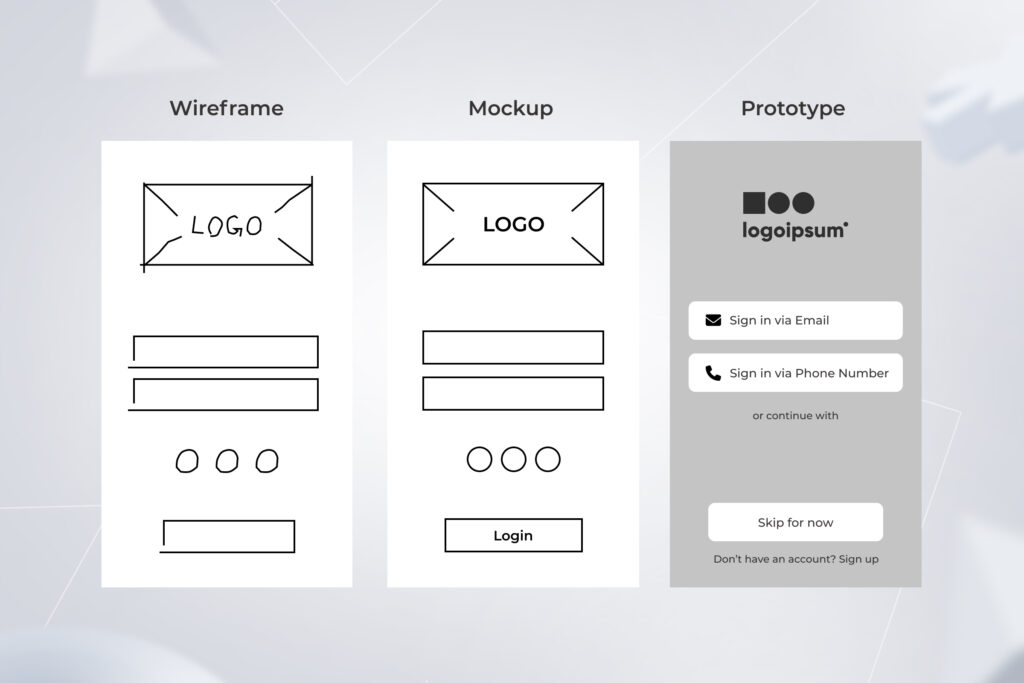
There are two types of wireframes your UX design team can implement. Low-fidelity wireframes serve as skeletons for your future design, demonstrating the high-level logic of interfaces at the early design stages and explaining design concepts to stakeholders. High-fidelity prototypes, on the other hand, are more detailed, replicating the look and feel of the final solution down to subtle elements such as buttons, menus, and links. 

If you have an established design system or an existing website, you can start with high-fidelity wireframes. 

Transforming your wireframes into final designs

Once prototypes are validated, UX designers get down to creating the final screens of your ecommerce solution. Beyond the end points of a user journey, designers also craft screens for intermediate states, such as loading screens, error messages, and confirmation prompts. The final layouts are then handed over to the development team. 

Tip: We always insist on prioritizing user expectations instead of making bold redesign decisions. A sudden, drastic redesign can alienate existing customers, hindering user experience and impacting your sales. That’s why you have to optimize new designs iteratively, helping users absorb change.

User-testing and validating new designs

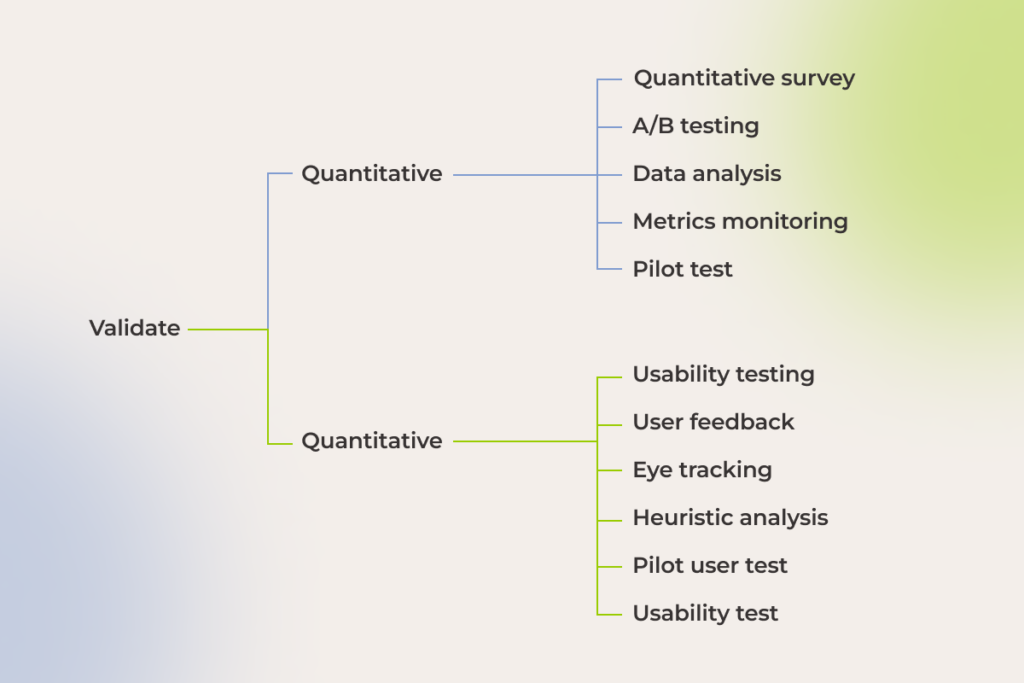
The only way you can find out whether your new design has hit the mark is by analyzing user behavior and other key metrics post-launch. Our team uses a combination of qualitative and quantitative validation methods, user testing and analytics tools that allow us to size up the impact of new interfaces and see which design aspects work.

qualitative and quantitative designs validation methods

Ecommerce UX design can take a good product and multiply its value

Your ecommerce website is the only salesperson that builds up your brand recognition 24/7. Exceptional UX makes sure it does it effectively, no matter how far along your customers are in their shopping journey. A well-designed, selling website puts customers first, showcasing your brand while allowing for a seamless, enjoyable shopping experience.

The job of a perfect design is never done. To ensure a positive user experience, which stays aligned with your customers’ needs, you should continuously experiment, analyze results, and refine your store’s features according to customer feedback.

Have an ecommerce UX design challenge to tackle?

Contact our UX team

API as a Product: From Middleware to a Strategic Asset for Creating Long-term Business Value

There is a treasure trove of data piled up within enterprises. Often untapped and underutilized, it lies around gathering dust, and business leaders are not even aware of its monetization potential.

Capitalizing on digital assets and multiplying opportunities is possible with the concept of API as a product (or API as a service). For quite some time now, more than just technical utilities, application programming interfaces have connected business ecosystems, opening up new revenue streams. In 2024, over 20% of organizations said APIs generated over 75% of their revenue.

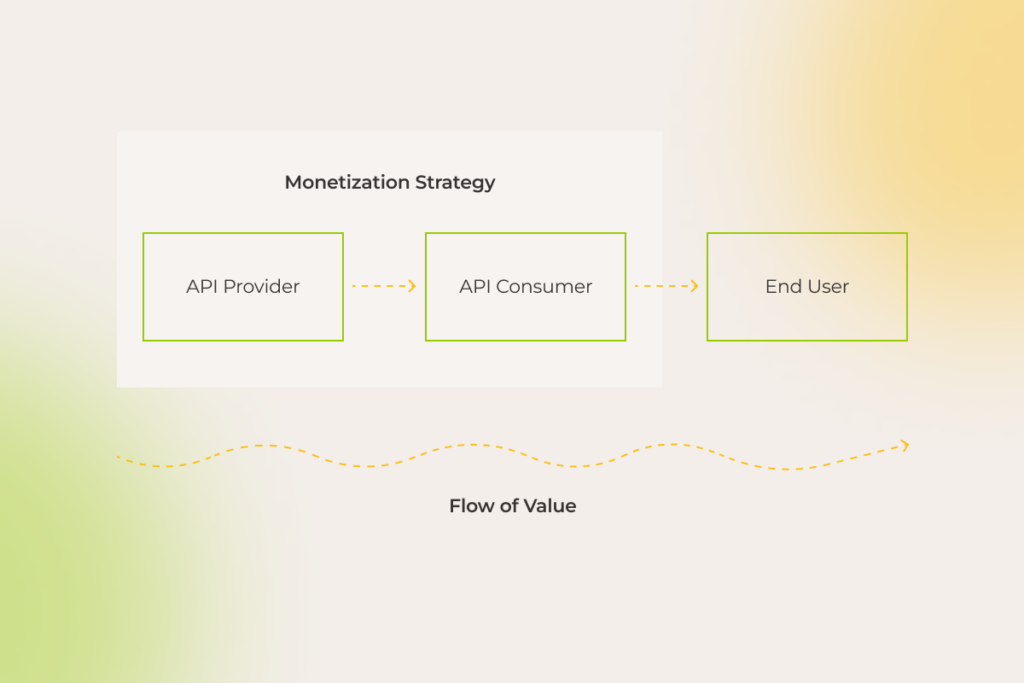
API monetization strategy

However, most companies, even though they get wind of the value APIs can deliver, are frustrated by how to unlock it. This guide was born out of the confusion surrounding this service model. Enjoy the read.

API characteristics to distance your product from the rest of the pack

One of the unique aspects of API products is that they cater to multiple audiences — not just developers enhancing their applications with your API, but also those applications’ end users .

Thus, the success of your API hinges on your ability to create a go-to product for developers and communicate its value to potential partners. 

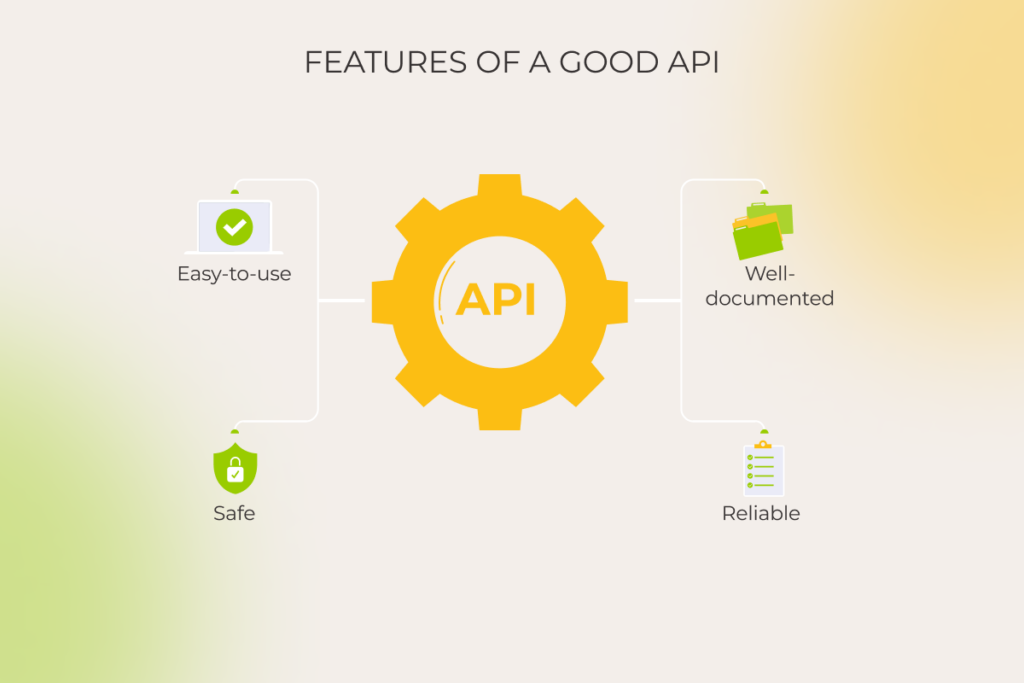
So, what kind of  application programming interface becomes a top pick?

Characteristics of a good API

1. Easy-to-use

Developers want to integrate an API with minimal fuss. The easier it is to use — thanks to intuitive endpoint names, smart defaults, etc. — the faster they’ll reach that “aha” moment. And if they don’t? Well, they may just switch to your competitor’s product.

Google Maps API and Twilio are sound examples of easily consumable web APIs. Their endpoints are logically structured, and operations are generally executed using simple HTTP requests.

2. Safe

Making sure your API is safe to use is all about protecting the sensitive data your users trust you with and keeping your business on the right side of legal requirements. A secure API helps to avoid the headaches of breaches and downtime, which can cost you big time.

3. Well-documented

However big the potential of your API is, it won’t matter much, if developers fail to understand how it works. Clear, comprehensive, scannable documentation that outlines functions, classes, return types, arguments, etc. will encourage developers to use and recommend your API.

Good API documentation is backed up by interactive code samples, step-by-step tutorials, SDKs, use-case scenarios, etc. 

Take Spotify API, for example. Along with in-depth descriptions of each endpoint and its parameters, its well-organized documentation provides an interactive console, where developers can experiment with making API calls and view the responses in real time. The perfect combo of blow-by-blow guidance and practical tools helps developers handle integration more deftly, minimizing the odds of misuse.

4. Reliable

Reliable APIs don’t stagger under the number of requests, whether it’s one user or a thousand. Even under heavy load, be it due to a growing user base, seasonal spikes in usage, or intentional overload attacks, APIs stay available and work consistently.

Building your product that is reliable and performant includes but is not limited to implementing the following:

  • API infrastructure that dynamically allocates additional resources to handle the load without manual intervention;
  • extensive caching strategies to reduce latency;
  • advanced load balancing to distribute traffic across multiple servers and data centers.

For instance, thanks to sophisticated scaling and load balancing technology, Google Maps API’s infrastructure ensures near-perfect uptime, fast response times, and global availability.

API product vs. API project mindset: detailed comparison

The mindset you adopt towards APIs can make all the difference. Considering them as mere afterthoughts — a project mindset — won’t get you far. But when you see them as self-sufficient products, the odds of building revenue-generating powerhouses soar.

Let’s recall the good old Stripe. From the start, they invested heavily in a customer-centric approach. In fact, API was their only product. Treating Stripe API as a product helped the company meet technical and business goals. Stripe is now one of the best payment processing services delivered by a great API that developers adore.

Here’s a detailed comparison of the two mindsets:

API as a ProjectAPI as a product 
PurposeUsually created to solve a specific problem or facilitate internal communication between software componentsDeveloped with a focus on broader market consumption, external use, and monetization
Design and documentationMay have minimal documentation and is designed for a known, limited audience
Comprehensive documentation, SDKs, and robust support for external developers
Lifecycle managementOften has a shorter lifecycle with less emphasis on versioning and backward compatibilityIncludes detailed lifecycle management, version control, deprecation policies, and long-term support via an API management solution
MonetizationTypically not monetized directlyMonetization strategies like subscription model, usage-based pricing, or tiered access levels
Security and complianceSecurity measures may be more basic and internally focusedHigher security standards, compliance with regulations, and robust authentication and authorization mechanisms

What holds companies back from drawing on the value of API products?

“We have all this data. But making money from APIs? That’s been a challenge.”

These concerns are far from rare among our clients. The uncertainty and hesitation touches different parts of API product development, but they hit hardest when it comes to data security. It’s something on the minds of just about everyone considering APIs, no matter the angle.

Be it an automotive giant thinking of opening up their APIs to particular vendors or a leading SaaS company seeking to provide opportunities to build APIs upon their platform, both struggle to set an effective plan in motion due to roughly the same cogs in the wheel.

1. User data at risk

Even the most successful API-first leaders are not immune to security incidents.

The #1 API security hazard, revealed in talks with CTOs and Chief Enterprise Architects, and also backed by industry surveys, lies in improper user authentication, authorization, or access control. Facing additional obstacles like business logic flaws, data overexposure, insufficient rate limits, DoS and DDoS attacks weaken the confidence of complete data protection.

However, despite the multitude of risks, data can still be safeguarded by employing meticulous security strategies such as:

  • Implementing robust authentication and authorization mechanisms. Use multi-factor authentication, follow authentication protocols like OAuth/OpenID Connect in conjunction with transport layer encryption (TLS), etc.
  • Ensuring fine-grade access control. Manage what certain users are allowed to do thanks to role-based or attribute-based access controls. If you provide access to API via API keys and tokens, make sure they are rotated regularly — at least every 90 days.
  • Implementing rate limiting mechanisms. Over 15 million lines of Trello users’ data — emails, full names, etc. — were scraped by bots due to a flaw in the platform’s API rate limiting. Limit how often a user from a single IP address can make API calls within a given timeframe (rate limiting) and slow down API responses after a certain threshold is reached (throttling) to prevent DoS and DDoS attacks. Tools like CloudFlare help guard against bots, their brute-force login attempts, and other API abuse thanks to advanced rate limiting and DDoS protection.
  • Encrypting data with up-to-date security protocols. All API communications should be secured using HTTPS. Given that HTTPS is built on TLS, make sure you use the latest version (currently TLS 1.3), as older versions have vulnerabilities that attackers can exploit.
  • Limiting data exposure. Expose only minimum necessary sensitive data in a tokenized, anonymized way.


2. Puzzling (and costly to neglect) data privacy compliance

Taking care of data security goes beyond implementing security measures at your discretion, as it also involves strict compliance with various regulations. 

Regulations like GDPR make it tricky to collect self-identification data, requiring adherence to specific rules even when data is anonymized. And that’s just the tip of the iceberg — industry-specific regulations impose further obligations.

For instance, companies that manage card payments face substantial financial penalties if they fail to comply with the latest PCI DSS v4.0. 

In other highly regulated industries, such as healthcare, every little thing, right down to the APIs that move sensitive electronic health information between systems, is watched closely. The FTC warns about severe fines for failing to address data privacy risks.

So, rather than being just about protecting data, it’s, on top of that, about playing by the rules — or facing the consequences.

3. Data inconsistency

Companies may encounter issues with duplicate data. 

If we consider the automaker’s case, who’d like to create an API to share information about their vehicles, their knowledge base may potentially have two different values specified for one engine volume in different instances: 1.4 liters and 1.390 liters. The API should be smart enough to detect inconsistencies of that kind and return the correct value.

Eliminating such inaccuracies requires various data transformations, including matching, normalization, outlier detection and removal, etc. For this, business analysts determine the key data attributes transmitted through the API and develop rules to ensure consistency. Failing to do so leads to errors, longer development times, and poor user experience.

Here are some other tips we recommend not to ignore:

  • Choose the appropriate data format (JSON, XML, CSV, etc.) and stick to it to maintain consistency across different API endpoints
  • For live data, include timestamps or version keys to signal API consumers about any data changes

4. Staying resilient at scale

To ensure smooth and reliable API performance, we suggest using scalable cloud services allowing for flexible resource adjustment. 

When it comes to handling traffic spikes or sudden drops, autoscaling, available in cloud computing deployments, is indispensable. By automatically adding or removing capacity on as-needed basis, this approach offers significant wins, including high availability, improved resource utilization, and cost-effectiveness. Besides, you’ll only incur minimal service fees during periods of zero load, based on your subscription plan. 

In the case of a standalone setup, keep an eye on your logs to catch when incoming requests start maxing out your capacity. If you’re anticipating frequent overloads, it’s a good idea to upgrade your machine’s resources to maintain the stability of your API product. Additionally, having DevOps engineers on board from the get-go is non-negotiable for isolated configurations to implement efficient scaling strategies and guarantee your API stays unshakable, no matter how much traffic comes its way.

Beyond technical issues like server overloads, you also need to be prepared for logical errors, caused by API incorrect usage. The impact of unexpected disruptions can be minimized through:

  • Continuously monitoring API usage, performance, and error rates;
  • Setting up alerts to notify relevant teams of critical issues or anomalies;
  • Providing users with informative error messages that clearly indicate the problem cause and suggest potential solutions, using appropriate status codes.

5. Maintaining order and control in the API ecosystem

Managing APIs can be a tough, non-trivial game. Integrating a slew of various systems, safeguarding API data transfer, and making sure performance is on point require dedication and systematic, tailored approach.

Within our API management undertakings, we seamlessly connect to various databases, enable or disable APIs as needed, and monitor metrics, such as performance and usage. Unlike standard platforms, we customize ready-made tools to align perfectly with client expectations, providing pre-configured components and user-friendly documentation. That way, our partners get precisely what they need, without unnecessary complexity.

Secure your data, ensure compliance, and scale with ease with our end-to-end API development services

Book a free call

How to create an API product?

So how to take your buzzing API idea a step further and build a product with not only high profit-making potential but which is also ultra-secure? Here’s a detailed, from-inception-to-launch API development cycle we came up with and polished up while working on similar projects.

1. Define the API product strategy

At that point, you basically need to find out the following about your API:

  • The business goals and objectives it will support
  • Your API’s target audience, including partners and external developers
  • The problem or problems your API will solve and how will it benefit users 

While it might seem like pure product marketing, the implications outlined during this stage are fundamental for making the majority of technical decisions as well, be it defining API architecture or choosing appropriate frameworks or programming languages from a dizzying array of API-related tech. For instance, the selection of standards and protocols (REST, SOAP, gRPC, etc.) is driven by the peculiarities of data routing.

2. Architect your API

Data-related aspects are among the first things you have to focus on. Consider the type of data your API will handle, where it’s stored, and whether it needs cleansing. If you’re going to turn to a software development vendor, decide to what extent third-party engineers can be involved in the data transformation process.

Next, choose an architecture that aligns with your needs. In most cases, REST API is a go-to choice due to its simplicity and performance, but your specific requirements — industry- or project-wise ones — might tip the scales to other, better-suited approaches. For example, in domains like telecom, healthcare, and finance, SOAP is prevalent. The chosen architecture will dictate your tech stack, including programming languages and frameworks.

Once the architecture to build on top of is defined, tools like Swagger, OpenAPI, or Postman are used to automatically generate the API’s interactive documentation, code stubs, or test cases directly within the browser.  

Proceeding with the example of the car manufacturer, let’s say, backend developers, when dealing with a ‘car body type’, which describes the car’s design (like sedan, hatchback, etc.), specify that only a limited set of values can be used for this field. Tools like Swagger can automatically incorporate these constraints into the API documentation, ensuring external developers are aware of the valid options. This helps prevent them from using inappropriate values, thereby reducing errors.

Another big technology decision revolves around the API gateway. Establish its proper governance, as gateways are like a front door to all critical API-related activities. They handle traffic management and analytics and allow developers to ensure the product adheres to security policies.

Remember to consider how you will handle API versioning. When rolling out new product versions, make sure to keep things backward-compatible without compromising the functionality for clients still using older versions. A rule of thumb is to automatically reflect any changes or updates in the API documentation to loop everyone in.

3. Build and test

With architecture in place, you can knuckle down to building your API within an agile, iterative software development lifecycle.

Testing is a make-or-break matter at this stage. Run different types of manual and automated tests to confirm that the product meets the defined specifications:

  • Smoke tests. Conduct a fast preliminary check to ensure the core functionality works as intended.
  • Unit tests. Verify individual functions or methods. 
  • Integration tests. Look into how 1) different components of an API interact and work together and 2) your API interacts with external systems. 
  • Load tests. Evaluate the API’s performance under heavy workloads.
  • Security tests. Spot vulnerabilities using tools like Selenium to protect your product against threats (SQL injections, cross-site scripting (XSS) attacks, and others).

4. Deploy

Make sure your deployment environment can handle multiple languages and follows all the data protection rules, storing data in the right legal jurisdictions. 

Set up a user-friendly developer portal so it’s easy to get hold of documentation (which should cover all aspects of API usage, including a sandbox environment for testing integrations), API keys, and support.

As a reminder of how critical comprehensive guides are for your API product, over half of 40,000 developers worldwide named poor documentation the major snag to consuming APIs.

5. Monitor, manage, and support continuously

Once your API is live, don’t turn a blind eye to continuous monitoring. Implement logging to capture API user activity, errors, and performance metrics. By analyzing user logs, you can reveal typical behavior patterns to identify common interaction scenarios. 

Besides, pay close attention to direct feedback from API users to pin down their needs and pain points. 

These actions will drive ongoing improvements, bug fixing, and the implementation of more calibrated new features. Generally, treat your API as a living product. Regular updates and responsive support will keep it relevant, secure, and useful to your users over time.

Get started with your first-class API product

Many enterprises we work with are eager to build custom APIs that share data with an array of partners, but run into problems they can’t solve on their own. If you’re like them — ready to take that leap but need expert engineering support to bring your vision to life — team up with experts who have the chops and the hands-on experience for end-to-end API product development. 

Looking for experts well-versed in API engineering?

You’ve found them

How to Hire a Dedicated Software Development Team in 2026

An external dedicated software development team, integrated seamlessly with your in-house operations, remains a default sourcing model for enterprises. And for a good reason. Executives turn to dedicated development teams for predictable results and accelerating technology initiatives.

Yet, their value is conditional. The right fit depends on aligning the team with precise project needs. If you’re weighing how best to structure your development resources, this guide offers a measured, actionable perspective.

At *instinctools, we’ve spent 25+ years helping global companies architect, launch, and scale dedicated teams that consistently produce long-term impact. This guide distills that experience into something you can act on right away:

  • why and when to hire a development team, 
  • when alternative models might serve you better, 

and how to sidestep the traps of managing your own dedicated development team.

Key highlights

  • Dedicated software development teams are cross-functional, adjustable in size and composition, and can be tailored to changing project needs, providing the flexibility of in-house teams without the hiring and management burden.
  • Dedicated teams accelerate time-to-market, reduce development costs, and provide access to a global talent pool. They are best suited for complex, high-stakes projects, tight timelines, evolving requirements, or when internal resources are insufficient.
  • Proper selection of a dedicated engineering team involves careful vendor evaluation, which essentially boils down to methodology, communication, and domain experience assessment, and reputation check.

What is a dedicated team?

A dedicated development team is an engagement model where a group of cross-functional experts put their backs into your project to bring it across the goal line. You can hire either a full or partial team, but in both cases, it works exclusively on your software projects.

Just like an in-house team, a dedicated developer team remains skin in the game throughout the entire development process, except you don’t have to stress over the hiring, onboarding, and daily management. You can have as much or as little involvement in the development and management process as you want. Anyway, a dedicated software development team is capable of taking over the entire process of digital product development. 

Such a team dynamically adjusts to the pace and scale of software development, allowing you to fine-tune the team size and composition based on your evolving needs. Developers, designers, QA engineers, and any other roles can be hand-picked on demand when and as you need them. 

See how our dedicated teams work >>> 

Why companies choose dedicated development teams

The software development outsourcing market is expected to grow from USD 564.22 billion in 2025 to nearly USD 897.44 billion by 2030, with a steady 9.73% CAGR. With strong demand for external digital engineering talent, the rapid adoption of generative AI, and a chronic shortage of senior technology professionals across OECD countries, dedicated development teams, being a tried-and-true engagement model, remain a highly practical solution for enterprises. The reasons for hiring a dedicated engineering team are manifold — our experts have listed the most significant ones below.

Rapid scalability

Adapting to fluctuating project demands and scalability requirements in-house is a challenging endeavor due to resource limitations and the time required for recruitment and onboarding. A dedicated team model is flexible in roles and skills, allowing companies to build up their capabilities on demand to accelerate time-to-market and support evolving project needs. 

Cost efficiency

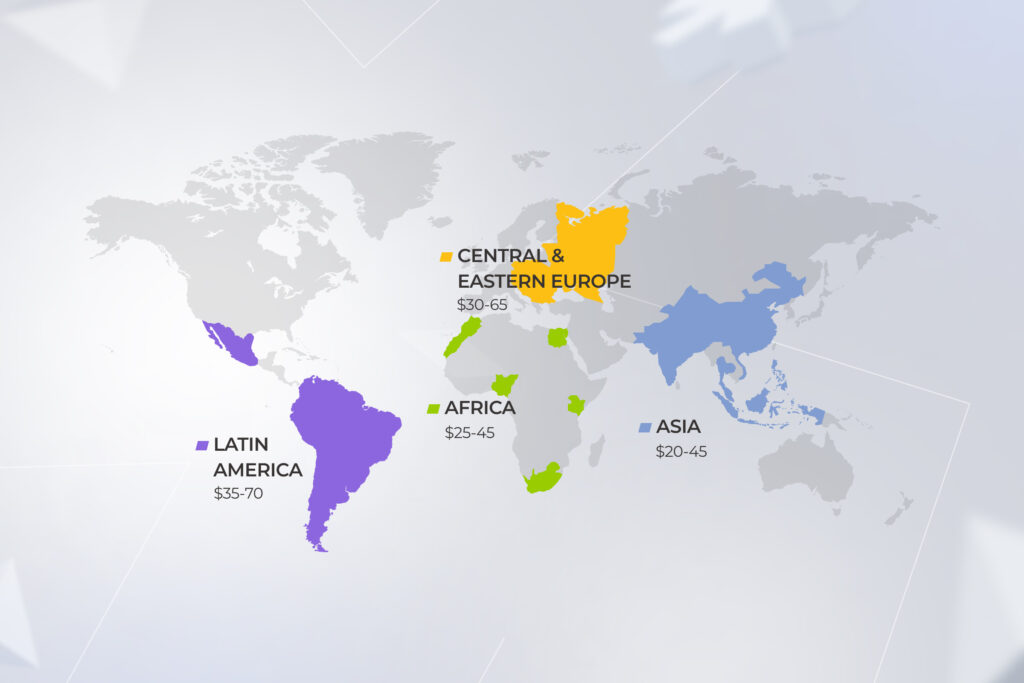
More than 90% of Fortune 2000 companies outsource at least part of their IT functions to cut costs associated with in-house hiring and development. A dedicated app development team eases the financial burden on companies by relieving them of operational overheads and other costs related to sourcing candidates and employee training. Moreover, you can source tech talent in cost-effective regions such as Central and Eastern Europe to bring down the financial outlay of development.

Stress-free hiring

From long hiring cycles to administrative burden, in-house hiring is not for the faint of heart and is definitely not for the employers in a hurry. Conversely, hiring a dedicated application development team is as easy as proving a job specification and approving the candidates cherry-picked to your requirements.

360-degree visibility into the process, away from the grind

In-house hiring and team management are generally associated with the highest level of visibility. But to build it up, company leaders need to constantly have their fingers on the pulse and mother hen their development team. When it comes to an offshore dedicated development team, a powerful combo of dedicated project managers and project management tools can ensure a high level of visibility into the project progress, minus the supervision fuss. 

Access to a wide talent pool

Talent scarcity keeps 4 in 5 company leaders on their toes, stalling new projects and decreasing the odds of securing a niche or highly-coveted talent. By banking on dedicated development team services, companies enter a global talent pool where they can hire skilled experts at a reasonable price. Better yet, this engagement model helps you develop expertise in adjacent fields or completely different ones, including AI, mobile app development, MVP development services in USA, and other projects.

In-house teamDedicated team
Hiring the team~ 2 months2-10 days
Scaling the team1-2 months1-5 days
Recruitment and hiring costs~ $3500 per hire0
Training costs~ $1100 per employee0
ExpertiseMight be insufficientExactly matches the project’s needs
Level of controlHighHigh

To make an informed call on the most suitable sourcing strategy, check out our detailed comparison of in-house development and an external dedicated team, breaking down the strengths, gaps, and practical implications of both.

Tired of hiring frenzies and project delays? Let’s build your dream tech team in a matter of days

Get in touch

Typical dedicated team structure: roles and responsibilities

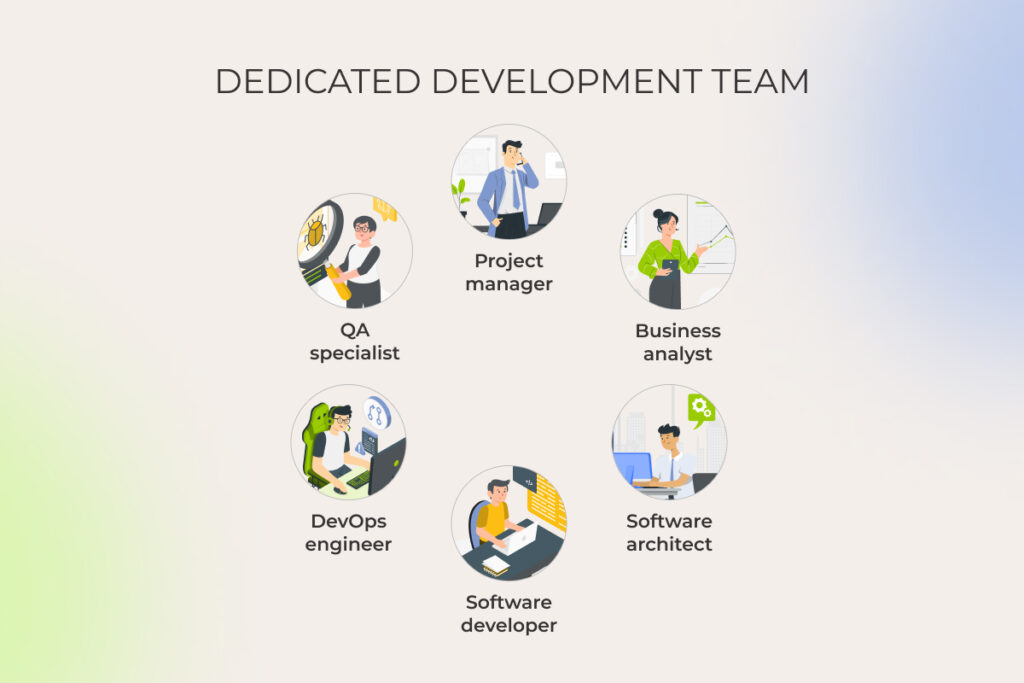
dedicated development team

The structure of a software development team is determined by a combination of factors. These include the type and complexity of your software product, your timeline, and the allocated budget. Let’s expand on the bare-bones development team structure:

Project manager

A project manager is the point person behind your project responsible for its day-to-day management. Typically, a software vendor assigns a dedicated project manager to lead the entire team, oversee project cost and resource allocation, define project goals, and keep you updated on the project’s progress. 

Business analyst

Business analysts are guardians of business goals and values that bridge the chasm between the business and technical teams. They are instrumental in planning development activities, validating requirements to ensure alignment with business goals, and standardizing processes to maintain a cohesive workflow, facilitating continual improvement based on stakeholder feedback.

Software architect

Equipped with broad technical knowledge, software architects are the great minds behind your software solution architecture and critical technical decisions. They have a final say in the selection of the technology stack, making sure your solution is functional, performant, resilient, and scalable. 

Software developers

A dedicated backend development team is in charge of building and maintaining the inner mechanisms of your software, including data storage, security, and other server-side functions. Frontend developers focus on building user-facing components of web and mobile applications, making your software easy and engaging to interact with.

DevOps engineers

DevOps engineers are at the wheel of development, testing, and release automation activities. Geared up with special tools and DevOps practices, they enable continuous integration and deployment and ensure smooth collaboration between development and ops teams to speed up development cycles and improve software quality.

QA specialists

Quality assurance engineers inspect every aspect of your software, from code to design, to make sure it meets predefined quality standards and is bug-free. Their turf also spans compliance reviews and security testing to eliminate any potential vulnerabilities in your software solutions.

Depending on your project scope, you may need a different combination of team roles to accommodate your project dynamics.

Project scopeTeam sizeTeam roles
DiscoveryUp to 5 specialistsBusiness analyst, project manager, software architect, UX designer
MVP development6+ specialistsProject manager, business analyst, UX designer, front-end developer, back-end developer, QA engineers
Custom software developmentAround 9 specialistsProject manager, business analyst, UX designer, software architect, front-end developer, back-end developer, QA engineers, DevOps engineer

When to hire a dedicated software development team

Often, it might be not just one, but a whole set of factors that tip the scales in favor of a dedicated team engagement option.

Specialized skill sets across multiple technologies and business domains

Complex projects that implement a variety of technologies, including cutting-edge ones, are a great mesh for an offshore dedicated team. Most companies lack the internal expertise to proceed with the implementation of such projects, while a software development dedicated team has the varied tech knowledge, skills, and hands-on experience to muster it on their own.

High cost of failure

Another scenario fit for a dedicated software team is when your project comes with functional or reputational risks — in other words when you bet big on the software quality. Thanks to their experience, dedicated software development teams know how to build a high-quality solution and they usually go by a mature software quality management framework to do so.

Last-chance-to-get-it-right

When a client’s in-house team is underperforming or their previous vendor has failed to deliver on the promise, dedicated software development teams can pick up the slack in the nick of time. At *instinctools, we’ve seen this scenario many times, providing a team of experts to rescue projects like fintech MVP development and others.

Borrowed expertise

The dedicated team approach also comes in handy when you need to pick the brains of lead software engineers every now and then to identify improvement areas, determine the right development approach, or get actionable advice on the tech architecture. Dedicated experts can provide tech consulting when needed, headache-free. 

Turnkey product development

You can hire a dedicated development team to deliver and launch your custom software product faster and more efficiently. The team focuses solely on your product, selecting the right approach, frameworks, and tools to ensure consistent progress. More importantly, a dedicated remote team is cross-functional, allowing for a one-stop-shop development experience. 

Time to market is critical

If you’re at crunch time for a prototype, an MVP, or a full-fledged product, dedicated teams can offer a shortcut to a successful delivery. Opting for a standby team offers you the double wins of streamlined coordination and specialized expertise, promoting a swift and efficient software development process with no quality trade-offs. So, when time is of the essence, a dedicated team ensures you’re not just fast, but also first-rate.

Complex software development

When it comes to long term projects with an evolving and highly complicated scope, say you’re building an entire ecommerce ecosystem like one of our clients did, a dedicated team runs circles around other engagement models. If you have both a mobile app and a web solution in your backlog, a dedicated team can move from one project to another, being able to deliver results faster thanks to staying in the loop. 

Vague, unclear, ever-changing requirements

Last but not least, you can hire dedicated development teams when you don’t have a good grasp of your software product. A dedicated team can work in lockstep with your changing requirements, developing in small increments to incorporate regular feedback. We’re not advocating for working in the dark though: when your vision is blurred, run a discovery session with your team to solidify your project requirements and map out the roadmap to a successful delivery.

Squash your project challenges with a savvy development team

Hire one at *instinctools

When a dedicated development team might not be the best fit

The dedicated team model brings a wealth of benefits to your table, but only if it marries well with the nature of your project — and this isn’t always the case. For example, if you’re looking to fill specific skill gaps rather than farm out an entire project, then outsourcing software development to a dedicated team is not the right path for you to follow. In this case, staff augmentation will do the trick. 

Staff augmentation does justice to intermittent or short term projects, where you need an extra pair of hands to temporarily augment the capacity of your in-house team, develop a different component of the product, or bridge in-house skill gaps. 

The main difference between hiring a dedicated development team and bringing in augmented experts lies in the level of the vendor’s responsibility, including risk management, process setups, and knowledge transfer.

Vendor’s responsibilityStaff augmentationDedicated team
Providing engineering capacitycheckedchecked
Onboarding and knowledge transfer uncheckedchecked
Project documentationuncheckedchecked
Software development process setup and maintenanceuncheckedchecked
Project, team and risk  managementuncheckedchecked

Keep in mind that neither team extension model can suffice decade-long, strategic initiatives that have very specific requirements in terms of security, tech stack, personnel training, and other essentials. If that’s the case, your company will be better off with an offshore development center — an overseas extension of your company set up and equipped to meet whatever floats your boat. 

Costs of hiring a dedicated software development team

Depending on the team’s seniority and the country the engineers are located in, a 4-6 person team can run anywhere from ~$8,000/month (nearshore/junior bench in lower-cost markets) up to $60,000+/month (US or top-tier enterprise rates).

If you want a clear sense of what a dedicated development team for hire will cost each month, take these factors into account:

  • Dedicated development team structure and seniority mix: number of juniors, mids, seniors, and leads (senior engineers and tech leads increase costs disproportionately).
  • Region: US, Western Europe, Eastern Europe, LATAM, and Asia have very different salary bands and employer taxes.
  • Vendor margin and management: vendor fees, account management, and any bundled managed services like project management, recruitment, HR, etc.
  • Benefits, payroll taxes, and statutory contributions: employer social charges, paid leave, insurance and any local mandatory costs.
  • Contract length, SLAs, and attrition risk: short contracts and high churn push prices up; long engagements often secure better monthly rates.

Want a tailored dedicated development team cost for your project?

Contact us

How to choose a dedicated development team

You might think that the quality of products and services comes first when choosing a software development company. This hallmark certainly carries the day, but other traits such as transparency, trustworthiness, and understanding of your business context also count for a lot when it comes to remote teams. Let us facilitate matters for you by providing an algorithm that will help you choose the right company and set up your collaboration for success.

Step 1: Document the use case

Without a use case, an idea just remains an idea, making it hard for you to describe how a software system can be used to achieve your business goals. So taking the time to document use cases before contacting vendors should be your opening move. You don’t have to get into much detail when describing the use case: try to distill it as best as you can, specifying the general requirements for what’s being built.

Step 2: Decide on a location where to hire a dedicated development team

Back in the day, the location used to be a deal-breaker in choosing a dedicated development team, but the rise of remote work has made it less critical. Nevertheless, some outsourcing locations are easier on your budget and have more time zone overlap with your company’s home country.

You should also take into account other considerations, such as cultural fit, regulatory and legal environment, talent pools, and the skills of local developers. As a popular outsourcing destination, Poland checks all the boxes in terms of service quality, time zone compatibility, and cultural fit. It’s also ranked third among the countries with the best programmers in the world.

Step 3: Make a list of potential vendors

Once you’ve decided on the location, go on a hunt for local software vendors to online directories, review sites, and search engines. You can also ask around for recommendations or visit industry conferences to evaluate potential tech partners. Following your search results, compile a list of potential vendors that have made it through the basic screening. 

Step 4: Pay attention to work methodology

You can reach out to the shortlisted vendors to get more details about how they handle project development, including their methodologies, communication, and project management infrastructure. Keep in mind that a trusted software vendor should be ready to adjust to your requirements and exercise a collaborative approach where they provide regular progress updates for your team.

Step 5: Examine expertise and experience

Make sure your dedicated team can deliver on their promise by checking their previous projects and researching client testimonials. You can ask about their experience with the specific technologies and assess their skills in action during technical interviews. Besides technical proficiency, a top-grade vendor should understand your business context and have hands-on domain experience.

Step 6: Check market reputation

Finally, you should gauge the market perception and image of your software vendor by analyzing their social media presence, noting the insights from past customers, and looking into their rating on industry-specific platforms like Clutch and Goodfirms. A trustworthy outsourcing company should come highly recommended and have a good name in the market.

Client reviews highlighting *instinctools' ERP customization and software development services, with top ratings in quality and reliability.

Don’t settle for average, find a perfect match for your tech project

Reach out to our team

Common concerns about dedicated teams and how to mitigate them

Before you jump into the unexplored terrain, it’s natural to have your doubts about it. Let’s look into the common fears associated with dedicated teams and how you can overcome them. 

Cultural gaps

Different countries have varying communication styles, work expectations, and business practices, which can throw a wrench into project quality, communication, delivery timelines, and even the final development cost. 

Mitigation strategy: Single out countries that have a strong cultural overlap with your company’s base location. For example, if your company is located in the US, UK, or EU, a country like Poland can offer the combined benefits of skilled talent pools and a similar cultural background to your company’s host country.

No visibility

With some outsourcing setups built on the ‘throw-over-the-wall’ approach, you only see the output, not the process. You get irregular updates, limited insight into day-to-day progress, and no early warning when something goes off track. That blind spot makes it hard to steer the project or manage expectations.

Mitigation strategy: Work with a dedicated development team operating under a transparent delivery framework, one that defines workflows, reporting cadence, quality gates, and ownership from day one. Combine that with structured weekly checkpoints and real-time communication channels, and you get full visibility into progress, risks, and decisions as they happen.

Communication hurdles

The lack of consistent communication can get both sides misaligned on the project goals, deliverables, and milestones.

Mitigation strategy: To prevent that from happening, your dedicated team should adapt to your communication framework, including your communication channels and meeting cadence. Also, your software vendor should have a mature governance and escalation infrastructure in place to proactively handle escalation triggers and keep all the aspects of project delivery in check.

Mismatch in expectations

There’s a raft of factors, including miscommunication, inadequate project management, and lack of documentation, that can result in the disconnect between your vision and your dedicated team’s perception of your idea. Unclear requirements, more than anything else, can bring on this disconnect, leading to scope creep and wasted budget.

Mitigation strategy: A comprehensive discovery stage paired with thorough requirement-gathering sessions can bring more clarity to your project vision and project’s requirements, ensuring that each stakeholder is looking in the same direction. And if anything goes awry, Agile methodologies and regular feedback can help your team swiftly adapt to your feedback and right the ship.

Think these troubles are inevitable?

Let’s discuss 

Hire a dedicated software development team from *instinctools in 3 steps

How to hire a dedicated team

Building your dream software requires a lean, dynamic team by your side. At *instinctools, we offer a simple, transparent hiring process to help you land your dream team in mere days and jump-start your software development project.

Step 1: Discuss your request with a potential vendor 

Our collaboration kicks off with carefully studying your project request and seeing how our expertise can benefit your company. This typically takes 1-3 days, depending on how detailed your initial brief is.

If your project vision is limited to a high-level description, our team helps you scope the project by conducting a discovery session. We run discovery workshops with key stakeholders to define the project essentials, including the objectives, deliverables, core technologies, and resources needed. Following the scope, our experts provide accurate time and budget estimations. 

Step 2: Get a proposal 

Building on a detailed project understanding, we pre-select a team and provide a shortlist of best-fit candidates. You can be as involved in the pre-selection as you want, we always encourage our clients to participate in CV selection and interviews to double-check the specialists’ technical skills.  Shortlisting and interviews usually take 2-5 days, depending on the seniority you need and your involvement. 

Once our final candidates get your approval, we prepare a Statement of Work that defines the scope of work being provided, project deliverables, timelines, work location, and payment terms and conditions.

Step 3: Sign a contract and start a cooperation

Before the project launch, we finalize the legal agreements and handle all remaining paperwork, which normally takes 1-3 days.

We brief your dedicated team on your project background and help you effectively onboard the specialists. 

Seal the deal: next steps and guarantees

Gliding through development projects is easier when you have the right development team as your tech wingman. Dedicated teams offer a cost-effective, flexible, and reliable solution for companies seeking tech professionals dedicated to their project’s success. Although this engagement model has a few inherent complexities, you can offset them by teaming up with a mature software vendor well-versed in managing an outsourced team.

Ready to build a thriving remote dev team?

Contact us

FAQ

What is a dedicated development team?

The dedicated team engagement model allows companies to outsource their software development to a remote team of experts who give their undivided attention to their client’s projects.

What is a dedicated team structure?

A dedicated team structure varies based on the nature of your project. Typically, a dedicated team is made up of a project manager, business analyst, frontend and backend developers, and QA engineers. Software architects and DevOps engineers are also essential team players.

How do you manage a dedicated development team?

Usually, your vendor does the heavy lifting of team management by assigning a dedicated Project Manager to your project. Project managers act as a liaison between you and your team, making sure the project flows smoothly and guiding the rest of the team in the right direction.

What are the benefits of hiring a dedicated development team?

Dedicated team development gives you access to skilled talent at a lower cost than in-house hires. Thanks to the specialized expertise, a dedicated team can improve the quality of your software product and work autonomously to deliver it within the shortest possible time. This engagement option also frees up your time for strategic tasks as you don’t have to invest your efforts and resources into grasping something that’s beyond your knowledge.

How do I choose a dedicated development team?

Before you outsource dedicated software development teams, you should clearly define the goals of your project and document the use case for your software. You don’t need a detailed description for your project — high-level requirements are enough to get off on the right foot. With a clear project vision on hand, you can then research potential vendors, filtering them by geography, company size, core technology, and maturity. Shortlist strong candidates and schedule a call with them to pick the one that aligns best with your needs.

Choose Your Fighter: Cross-Platform App Development vs. Native Development

Cross-platform vs. native development — which path will deliver the greatest value? If you got stuck at the crossroads, *instinctools’ Head of Mobile Development compared the ups and downs of both approaches to help you make the right strategic decision. Dive in and see which strategy clicks with yours in different business and project contexts.

What is native development?

Native mobile development implies designing an app for a specific platform or operating system, such as iOS or Android. These applications can seamlessly access the device’s hardware – camera, GPS, Bluetooth, etc. – and, therefore, provide unmatched UX and unbeatable performance. 

What is cross-platform development?

The cross-platform approach revolves around the idea of platform-agnostic applications and a single codebase for different platforms. Cross-platform frameworks usually cover two main mobile operating systems – Android and iOS, as Flutter does, but can go further and span over web and desktop platforms, as React Native and Kotlin Multiplatform do.

Head-to-head comparison of native vs. cross-platform development

To identify which development strategy clicks with your business goals and opportunities, let’s take a close-up of the mobile native vs. cross-platform clash.

Code reusability

Cross-platform development with a single codebase for different operating systems and code reusability as its core benefit sounds appealing as it results in rapid development and easier maintenance. 

If there’s no need for native plugins, you can take full advantage of a single code base. But the moment you add a native plugin to your cross-platform mobile app, you have to take care of three code bases — cross-platform, iOS, and Android ones.

In native development, applications are crafted for Android and iOS platforms separately, so you have two codebases with no code reusability.

Therefore, in this matchup, we give a nod to the cross-platform approach, keeping in mind that this benefit is only relevant until your platform-agnostic software calls for native features. For example, if you want to make your ecommerce solution more interactive and send notifications to users, you’ll have to go for native plugins. 

Time to market

At first glance, cross-platform tools clearly get points for faster development. But here’s a nuance that might catch business owners off guard. 

Crafting cross-platform mobile applications takes less timethan native development (about ⅔ of it) on one condition—if your solution has no native-related functions, which is rarely the case. When native plugins enter the scene, cross-platform development experiences setbacks and spikes in cost.

The backbone of native mobile development is its predictability and steady pace over time. Searching for suitable and secure native plugins while building cross-platform software may turn into looking for a needle in a haystack. With native app development, you don’t have to deal with unexpected workarounds, as iOS and Android platforms provide comprehensive software development kits (SDKs) for crafting feature-rich native mobile applications.

Development and maintenance costs

Cross-platform development is half the price of native development — and that’s what business owners want to hear. Yet, it’s not always the case. You can count on saving that much of your budget if you manage to stay within a single code base. But keep in mind that if you need to add some native-coded features, you’ll have to choose one of the not-so-budget-friendly options:

  • Pay for native app developers on demand to smoothly adopt native plugins and ensure your product runs without a hitch
  • Hire a full-stack engineer experienced in native and cross-platform solutions

Both ways require additional investments and reveal possible volatility in the cost schedule for cross-platform development and software maintenance.

The native approach entails higher expenses as you hire a dedicated team for iOS and Android. However, if we compare native vs. cross-platform in the long run, the former doesn’t hide additional development costs that spring up down the road whenever you need beyond-cross-platform features.

Based on mobile engineers’ salary data, Poland is one of the major destinations for outsourcing software engineering services and compared estimated salaries for developers with four to six years’ experience.

As you see, the numbers are neck-to-neck. Moreover, if you hire two cross-platform developers instead of one to shorten development time, the paychecks will be pretty close.

App’s functionality and performance

In the early days of cross-platform mobile development, platform-agnostic applications had performance glitches and lacked a range of features based on hardware integration with a microphone, camera, GPS, Bluetooth, etc. But as for 2024, there are plenty of plugins and libraries to augment cross-platform solutions with initially native-only functionality.

There can be nuances regarding the quality of these software components and their ability to match the required features and app performance. But you are safe with seasoned experts who know native plugins and libraries like the back of their hands. 

Case in point

Before cooperating with *instinctools, a large European eyewear manufacturer and retailer had a SaaS inventory management system (IMS) for iOS devices. As they wanted to escape the vendor lock-in and dependence on a particular operating system, the client decided to switch to a custom cross-platform IMS. We suggested banking on React Native enriched with native plugins and libraries for Bluetooth-based integration with RFID scanners. 

How did it impact performance? 
The client’s previous native software could have processed 300 tags/sec, while the new cross-platform mobile app handles 600 elements per second seamlessly.

Want to dive deeper and track the whole process of stabilizing third-party libraries and unlocking inventory transparency with custom dashboards?

Check out the full case study

As native mobile apps have direct access to all sensors, cameras, accelerometers, microphones, Bluetooth, and GPS, you won’t face tech setbacks. Moreover, you can build groundbreaking augmented or virtual reality software and machine learning solutions for Android or iOS platforms that are beyond the reach of cross-platform tools.

For instance, these *instinctools’ projects are built around conversational AI and couldn’t have been carried out with cross-platform capabilities:

  1. A highly personalized financial advisor with a voice recognition feature for a bank.
  2. Next-gen travel assistant that not only recommends actions but can act on them on the user’s behalf for a travel and hospitality agency. 
  3. Customer support chatbot that deciphers user queries with 97% accuracy despite typos for a transportation company.

User experience

A cross-platform mobile application, by default, can’t provide the same look and feel as a native solution grants. Platform-independent apps rely on a unified design that can lead to unfamiliar and irritating scenarios for users of a particular operating system. For example, users of iOS apps expect to see a pull-down menu — a basic principle of this OS. Meanwhile, cross-platform applications have drop-down menus that require another way of interaction.

When developing native apps, software engineers follow the Material Design approach for Android and Human Interface Guidelines for iOS to deliver an intuitive flow and seamlessly fit the application into the user’s world. So, when it comes to user experience and design, native mobile apps have the upper hand as you can take full advantage of all the platforms’ design capabilities.

Security

Even though cross-platform development frameworks allow you to build apps for different operating systems, your dedicated team still has to create platform-specific bundles and provide security certificates for each platform to sign the app for release to Play Market and App Store. In this regard, it works exactly the same as for native mobile applications.

Native apps are believed to be more secure thanks to functioning within the OS-specific ecosystem. 

I’d say security depends on the development team and the best practices they follow rather than on the platform you choose. 

Ease of updates

When you enrich your cross-platform app’s functionality with native features, you have to deal with all additional plugins and libraries that provide native functionality. 

As a result, you get a software pie with numerous layers that may be tricky to upgrade because updates of the cross-platform framework and native add-ons are never synchronized. You may also face issues with backward compatibility and user experience on different devices.

multilayered nature of cross-platform frameworks

Adopting the latest framework version while keeping old libraries and plugins can lead to software conflicts and errors. In this situation, here’s what can be done: 

  1. Fine-tune outdated elements by yourself, which is possible only with a strong team of senior and lead-level engineers and software architects by your side.
  2. Take a risk and implement publicly available alpha-stage patch-ups, accepting the high probability of issues in the future.
  3. Wait until the plugin developers fix the issues in the next release.

Any way you slice it, all strategies are time-consuming, meaning you won’t be able to deliver same-level UX for all users until all updates issues are covered. 

Software engineers’ hands-on experience is what matters when handling updates. I’ve seen business owners who thought their cross-platform apps had reached a dead end, and building a native one seemed the only way out. However, the cost of native app development from scratch always exceeds the expenses spent on fine-tuning the existing solution.
From my experience, clients tend to compromise, with the cross-platform app’s core staying the same and the dedicated team covering major pain points via suitable native plugins. 

Native apps deserve kudos for their backward compatibility, empowering the software to run glitch-free on various mobile devices. Furthermore, managing native libraries is way easier compared to cross-platform solutions, as there’s no software pie to deal with.

Still have questions regarding native vs. cross-platform app development?

Let’s talk

Cross-platform vs. native development at a glance

Here’s a round-up of key differences between cross-platform vs. native solutions in a brief table to help you make a well-calculated decision.

CriteriaCross-platform appNative app
Code reusabilityCross-platform app development puts a premium on a single code base and sharing code across multiple mobile platforms.These solutions don’t provide code reusability, so your dedicated team has to write separate native apps for each particular operating system.
Time to marketIf your solution doesn’t require any native features, its development time will be around 30% faster compared to native app development.Native mobile apps require more time but grant stable development speed.
Development and maintenance costsCan be half the price of native app development. But adding native plugins brings hidden development costs.Implies higher expenses, but doesn’t have hidden development costs you can’t foresee at the start.
App’s functionality and performanceMay have slight performance glitches if you have too many native add-ons.Native app development ensures unbeatable performance even for complex AR, VR, and ML-powered software.
User experiencePlatform-agnostic apps rely on unified design, which can confuse those who got used to specific mobile operating systems.Native applications follow platform-specific guidelines to win users with crispy design and predictable use cases.
SecurityIt depends on the reliability and expertise of your tech partner rather than the platform you choose.It depends on the reliability and expertise of your tech partner rather than the platform you choose.
Ease of updates and maintenanceKeeping your cross-platform app updated may be challenging if you have plenty of native plugins and third-party libraries and need to synchronize their updates.Native mobile apps come with backward compatibility, ensuring your software runs smoothly on any device.

Native development is a top pick for these scenarios

We suggest banking on native mobile development if you craft solutions with hardware-related features and want OS-specific UX for various platforms:

  • Apps for advanced audio and video editing. Tasks such as professional video editing and audio mixing definitely demand native methods of implementation. Unlike cross-platform software, native iOS and Android apps can cover a raft of diverse interactions with end users.
  • AR and VR-based applications. These solutions simultaneously use camera, compass, gyroscope, and accelerometer data to immerse users in the alternative reality. Performance level required for top-rate UX is beyond the reach of cross-platform apps.  
  • ML-powered software. Understanding speech, interpreting gestures, and discerning images in real time are basic features needed for a machine learning app, and cross-platform software can’t make up ground on native applications. 

Have a similar project on your mind?

Let’s discuss

Three cases when cross-platform development can fully cover your needs while saving the budget

Cross-platform development frameworks are a go-to option if you want to build one of the following:

  • Projects where speed to market is crucial. Why pony up for native apps if your product doesn’t imply hardware integrations and has to be rolled out ASAP? 
  • Relatively simple apps for internal usage. Going for platform-agnostic software with a limited range of functions is the best bet to accelerate and simplify specific organizational processes. Even if you implement some native plugins, managing add-ons at a small scale won’t snowball into a serious conundrum. 
  • Short-term, one-off projects. Cross-platform software is a perfect match for apps non-scalable by design. For example, if you need a mobile check-in solution with one or two functions for a one-and-done endeavor, React Native, Flutter, Kotlin Multiplatform, and other popular cross-platform frameworks are your fail-safe and budget-friendly options.

Choosing the right path from the get-go drives future success

Solving the native vs. cross-platform equation isn’t that easy, given the number of aspects you should take into account. Evaluating the importance of time to market, functional diversity, UX, development costs, ease of updates, and matching them with your project budget and scalability ambitions is easier with a reliable team by your side.

Do you need expert guidance on your mobile journey?

Book a free consultation

FAQ

What is the difference between native and cross-platform app development?

Native app development requires building OS-specific applications for every platform you aim to cover. In contrast, cross-platform development with code sharing across various platforms allows crafting software that works on both Android and iOS.

Do cross-platform apps provide better performance than native apps?

Cross-platform solutions can keep up with native-level performance and provide hardware-related features on par with native apps, but only if you strengthen them with native plugins and libraries. Yet, complex software with AR, VR, and ML at its core is beyond the reach of cross-platform applications. 

Is cross-platform development worth it?

Is saving up to 35–50% of the project budget worth it? Is building apps faster worth it? If your answer is yes, then cross-platform app development is worth trying. However, the final decision concerning the cross-platform vs. native application dilemma should rather be made together with your trusted software engineering team after evaluating project requirements.

Is cross-platform better than native?

When it comes to development costs and time to market, cross-platform apps can be more budget-friendly and faster to roll out, which is better for projects with a strict timeline and finance limitations. However, you can count on these benefits only if your app stays within cross-platform frameworks’ capabilities, as adding sophisticated native plugins inevitably leads to increased costs and may slow down the development process. 

So, if you have a long-term, feature-complex project and plan on its continuous scaling, native app development beats all popular cross-platform frameworks.

What is the difference between native apps and mobile apps?

Native apps are crafted in the OS-specific environment and target users of particular mobile operating systems. Both Android and iOS apps can access any device hardware by design and provide OS-specific UX. Such an approach enables building complex feature-rich solutions based on AR, VR, and ML technologies. 
Meanwhile, with a cross-platform app, you can reach users on different platforms. Their functionality won’t be as rich as with native software, but if you need a simple solution with a limited range of features, look into cross-platform frameworks. 

Nearshore vs Offshore: How To Make the Right Call?

Nearshore vs offshore? Although outsourcing has been deeply ingrained in the world of digital engineering, there are still many questions unanswered when it comes to the right outsourcing type. Lots of companies bask under the sun of offshoring, banking on dev talent abroad to deliver their products. But then there’s nearshoring — with its promise to build cost-effective solutions in geographical proximity to your company. 

So which outsourcing model bodes well for your software development?

Outsourcing models: onshore vs nearshore vs offshore

Location-wise, we can distinguish three types of outsourcing — these include onshore, nearshore, and offshore models.

When companies opt for onshoring, they source tech services within the same national borders — for example, a US-based company can outsource to a vendor located in the US too.

In the pre-pandemic times, onshore outsourcing used to stand high with companies due to its convenience. But after 2020, it lost its appeal as remote and hybrid work took over. Coupled with distributed teams becoming the norm, the need to tighten the budgets pushed most businesses to turn to borderless talent. The math was hard to ignore: hiring abroad often means big savings. Developers in the US, for instance, cost 2-5 times higher than their Eastern European counterparts.

As of 2025, though, onshoring seems to be back in vogue. With political tensions rising and global uncertainty shaking things up, leaders are inclined to focus more on domestic hires to cut risks. However, many are struggling to fill the skill gaps due to a shrinking pool of qualified candidates on-site. To that end, in this article, we decided to focus on nearshore and offshore models.

Even if you’re ready to pay double, you might not be able to fill the skill gaps due to a shrinking pool of qualified candidates on-site. To that end, in this article, we decided to focus on nearshore and offshore models. 

The concept behind nearshoring outsourcing involves transferring digital product development to a country that is close to the home base of the company. In this case, vendors are located within or close to the same time zone and have generally lower labor rates compared with those of the client’s home country. An example of nearshoring would be a tech company in the US outsourcing its development operations to Mexico.

Offshoring means offloading development processes to a geographically distant market, typically several time zones away, with significantly lower rates as compared to the home location of the company. Here’s an example of offshoring: a US-based company moves its tech functions to Eastern Europe. 

Nearshoring and offshoring, illustrated

But how to choose between nearshore vs offshore outsourcing? Let’s compare the two options according to the criteria essential to any project.

Nearshore vs offshore competition: choosing the winner in 5 categories

Just by looking at nearshoring and offshoring definitions, it’s hard to pin down the value of each for your specific business case. That’s why, we’re giving the skinny on both models to help you choose the right path.

1. Cost efficiency

When it comes to the price, we don’t have a clear winner in the nearshoring vs offshoring battle: it all comes down to the exact location. If we look at the most popular outsourcing locations, we’ll see that the majority of them fall into the same range of $40-$60 per hour. India and the Philippines seem to offer the best deals for labor cost per hour — $20-$40 — but there’s a catch. 

Custom software development rates by country

The unusually low median rates stem from a large number of junior or underqualified talent in the country. In low-cost Asian countries, the percentage of junior developers is much higher than in Eastern Europe, where software specialists move up the ladder faster. 

Also, the lower price might come at the cost of jerry-built products, broken deadlines, and false expectations, so the price shouldn’t be an overriding factor when choosing a vendor.

2. Communication and collaboration

If we approach the offshore vs nearshore dilemma from the communication perspective, it’s easy to conclude that nearshore outsourcing beats offshoring. 

Indeed, farming out software development to nearby countries allows you to collaborate with nearshore development teams in similar or slightly different time zones. This, in turn, facilitates real-time communication during overlapping working hours.

Conversely, offshore moves your project further away, so differences in time zones are more significant. But despite that, in most cases, you can easily offset the time zone differences for both nearshore and offshore outsourcing. 

Regular check-ins with engineers, a consistent delivery process, a calibrated development flow, and availability of up-to-date collaboration tools help overcome the erstwhile insurmountable hurdles of time difference. This idea is backed up by thousands of effective collaborations between Northern American clients and Eastern European vendors (the size and quality of the Eastern European outsourcing market also proves the point).

3. Visa restrictions and location accessibility

A possibility of regular on-site meetings at your or your vendor’s office might be a critical step in selecting an outsourcing software development service provider. In this context, rather than making the distance-based choice, you should look into the visa requirements for the vendor’s country residents and vice versa as well as the ease and cost of travel and political stability in the region. Ask yourself if you really want to fly there regularly. 

4. Access to talent pool

The difference in access to talent between nearshore and offshore services lies in the availability of tech experts in different areas. Mind that the time zone and geographical proximity come second here, as the level of tech expertise in the area correlates with the level and accessibility of local education.

For example, Poland ranks third among the countries with the best developer talent, while the Polish education system is ranked fifth in Europe and tenth in the world. The country also has the largest pool of technology talent in Europe, with more than 295,000 programmers. See the connection? The Polish talent pool expands thanks to the continuous inflow of university graduates into the labor market.

op 10 countries with the best programmers in the world

5. Security and compliance

It might seem that in this case, the ball is in the onshore court, but not necessarily. Both your offshore and nearshore software development team can meet your stringent security requirements if the vendor’s commitment is confirmed by security certifications such as ISO 27001, ISO 22301, and the like. A dedicated seasoned team and an adequate security approach increase the odds of the vendor addressing your security needs.

Keep in mind that some developing countries have radically different laws about intellectual property rights, offering very little protection against intellectual property theft. Make sure to examine the legal landscape before letting the vendor into your data pipeline.

Adherence to local regulations is another aspect that comes to the fore. If you’re building a product that’s subject to EU regulations such as GDPR, PSD2, and others, it makes perfect sense to choose a tech partner located in the European Union as you’re bound by the financial and legal constraints. But even this factor is arguable as vendors’ hands-on experience with regulatory compliance counts more than their location.

When your project is large and complex or calls for stringent security measures, the offshore vs nearshore showdown doesn’t really matter, as, with the help of your tech partner, you can set up a dedicated development center, regardless of the location. The center comes with private office space, authorized entry, software access control, and built-in network security — an unbeatable combo to ensure full adherence to your company’s quality standards and protocols.

Power your software projects with *instinctools’ proven expertise

Schedule a call

The good and the bad of nearshore vs offshore outsourcing

Nearshoring vs. offshoring: pros and cons of both

It’s difficult to nail down the universal benefits and challenges of nearshore outsourcing and offshore software development as the experience varies depending on a client’s location. For US companies, nearshoring often means partnering with Latin American firms, whereas offshoring might involve collaboration with a software development company in Eastern Europe or Southeast Asia. Conversely, British organizations might find their nearshore options in Eastern Europe, with offshore opportunities in Latin America.

We’ve highlighted the potential advantages and hurdles of each model, focusing on the geographical closeness and remoteness of the outsourcing destination.

Pros of nearshore software development services

  • Real-time communication during your working hours

Working with nearshore outsourcing companies, you can minimize the challenges of coordinating work across different time zones. No midnight calls or unproductive business hours — similar time zones allow communication and decision-making to happen in real time, reducing delays and maximizing the efficiency of the development process. Better yet, if you share a similar cultural background with your nearshore developers, you can connect on a visceral level. 

  • On-site meetings and regular visits

For projects requiring frequent face-to-face interactions or the ability to quickly arrange in-person meetings, nearshoring offers a logistical advantage. For instance, a Canadian tech firm needing regular integration sessions with its development team could choose a nearshore provider in Mexico or Colombia over an offshore provider in Southeast Asia.

Cons of nearshore software outsourcing

  • Limited choice of potential partners

Narrowing down your search to nearby locations, you trim down your pool of vendors to a few nearshore development teams. The unsubstantial supply of expertise might take a toll on projects sensitive to niche skills, leading to unsatisfactory collaboration between the company and the vendor.

  • Risk of backdoor offshoring

Turning to the nearshore software development model, you expect a high level of services and top-grade products. However, this doesn’t mean you eventually get what you paid for. Some vendors contract out some of their development to offshore locations to cut down costs and benefit from the price difference. No benefits for the clients though — backdoor offshoring often results in sub-par deliverables.

Pros of offshore software development

  • The ability to choose the most cost-effective option

Offshore development partners are known for delivering big-time features without big-time investments. That’s probably why Google, Microsoft, Oracle, and other tech giants gravitate towards offshore outsourcing services. Most importantly, offshoring software development allows you to cast your net wide and reel in the vendor that promises the most value for the money.

  • The possibility to scale operations globally

Companies aiming to expand their presence in international markets may use offshore development teams as a heavy hitter on their way to new markets. For example, a European company planning to launch products in Asia might establish an offshore development center in Singapore to gain insights into the Asian market and tailor their offerings accordingly.

  • Extensive choice of workforce

The main difference between nearshore and offshore (and the biggest benefit of the latter) is a great selection of development partners and software engineers. With offshoring, you’re not shackled to specific locations, you can embrace international talent in all its diversity and extend your teams however much you need to. 

Cons of offshore software development

  • Far distance

Naturally, offshoring comes with a large geographical distance which makes on-site visits more difficult compared to nearshoring. Therefore, offshoring may not be the strongest suit for your business if regular face-to-face meetings with your partner are essential.

  • Insufficient time overlaps

If you want to bring it on with an offshore team, you might need to go the extra mile to manage your overseas talent and make up for different time zones. In particular, you should be intentional and consistent in communicating with your offshore company and have dedicated project management tools in place to track the project’s progress. Also, unless you or your partner commit to working outside business hours, real time collaboration will be hard to nail.

Move forward with *instinctools’ team of software development experts

Set up an intro call

Nearshoring vs offshoring: it’s all about the right vendor

Nearshoring vs offshoring: key considerations when choosing

You want to hear the big secret? It makes no big difference whether you work with a nearshore team or an offshore team until you have an experienced tech partner. The right outsourcing company should check all the boxes in terms of process maturity, expertise, cultural compatibility, time zone alignment, and cost efficiency — and that’s the secret recipe for a successful collaboration. Let’s see how you can come across this breed of outsourcing partner.

What to look for at a country level?

Although the right outsourcing location is a story of different strokes for different folks, several important data points hold true for all great outsourcing destinations. 

  • Established outsourcing hub

Prioritize sites featured on the global IT map as frontrunners in the outsourcing industry. Typically, mature outsourcing destinations have an advantageous geographical position, a large base of qualified workforce, a favorable investment climate, and modern business-related infrastructure. When the country’s IT sector is on an upswing, it also means that this sphere is likely supported by the country’s government, resulting in more tax preferences and fewer trade restrictions for foreign companies. 

  • Affordable costs 

You don’t want to trade quality for price, but choosing the right outsourcing location can help you get the best of both worlds. Look toward the country where the cost of living is lower than in developed countries but the quality of talent and services is high. Remember that the more accessible and high-level local education is, the more qualified tech talent is in the area — and you can get it at a fraction of the cost.

  • Compliance with global regulations

When choosing a location for an outsourced software development team, you need to make sure the country recognizes international standards and complies with global regulations such as ISO 27001, PCI DSS, SOX-type regulations, and others. Failing to adhere to the standards and regulations may result in derailed projects, hefty penalties, loss of reputation, data breaches, and other misfortunes.

  • English proficiency

Imagine being not able to communicate your vision to your development team because of the language barriers. To head off this scenario, go for a location with a high level of English proficiency. Poland, for example, is ranked 15th based on English language skills with other European countries following.

  • Security and predictable law system

A key to successful outsourcing is choosing a country with strict data protection and a transparent law system. Ideally, you should contract out your projects to a country where business laws closely match those in your location. But legislation transparency isn’t the only consideration: as a client, you will likely bear the tax costs of an outsourcing transaction, so we recommend choosing a country with fewer tax implications.

What to look for at a company level?

The choice of a tech partner can be kill-or-cure for your outsourcing experience. That’s why calling on the right tech ally is crucial to get your project off on the right foot.

  • Ample and relevant expertise

An ideal outsourcing company should have a proven track record of delivering similar projects, while also possessing the necessary skills and domain knowledge to handle your unique requirements. You can get a broad-strokes idea of their expertise by reviewing references, case studies, and client testimonials. 

  • Comprehensive developers’ skill set

It pays to have a cross-functional development team with the depth and scale of the skill pool in case your project requirements or product vision evolve. Therefore, give priority consideration to tech companies with complementary skills that may come in handy during software development (for example, AI for mobile and web development projects).

  • Adherence to best development practices 

Technical skills aside, the product development outsourcing process has to include an element of trust. Nothing better than a time-tested delivery framework of your tech partner can give you that peace of mind. Best Agile practices, product-first mindset, and DevOps tools are a big green flag for a vendor and an indicator that your outsourcing project is in good hands. And don’t forget information security — your potential tech partner should have multi-layer quality assurance practices, secure coding practices, and other guardrails for Fort Knox-like development.

It’s a toss-up between nearshore and offshore

Both nearshore custom software development and offshore outsourcing open up opportunities for companies looking for high-value cost-effective product development and innovation opportunities. It all depends on the angle you look at both options, your unique objectives, and the outsourcing location. Both collaboration models bring forth a set of benefits that can turn into disadvantages if executed wrong. 

More importantly, the success of both options is contingent on the expertise and commitment of your outsourcing partner. A seasoned, committed vendor can crack the hard nut of outsourcing and make it almost as easy as a cakewalk.

Hire a dedicated software development team you can trust

Contact us

FAQ

What is the nearshore software development model?

The inverse of offshoring, nearshore outsourcing services involve contracting out your software development project to a nearby country. A nearshore software development company is typically located within the same region so that businesses can benefit from the geographical proximity of development teams.

What is an example of nearshore outsourcing?

An example of nearshoring would be a US-based company hiring nearshore software developers from Mexico.

What is the difference between offshore and onshore services?

An onshore company is located in the client’s home region, usually within a 2-5-hour driving distance, while the offshore model means hiring developers from a foreign country.

What is the difference between nearshore and offshore software development?

The main difference between these two models lies in the geographical proximity of the outsourcing location. Nearshore software development teams are usually based close to the company and within similar time zones. Offshore teams operate in an overseas, low-cost location, many time zones away.

Why is nearshore better than offshore?

Both models have their pros and cons. Engaging a nearshore company enables businesses to reduce the costs of development and expand their access to developer talent. This option also allows for on-site visits and real-time collaboration. However, the pool of nearshore talent is limited to a few locations. Outsourcing your project to an offshore dedicated team lets you significantly lower the cost, rely on global talent, and establish your presence in foreign markets.

How to Outsource Web Development: Collaboration Details, Cost Factors, and a Checklist On Choosing a Perfect Vendor

Regardless of your location or business domain, having a web presence is non-negotiable in today’s interconnected world. This realization frequently evokes the question of how to skillfully and efficiently establish and uphold this presence. For many, the answer is to outsource web development.

Web development outsourcing has become a compelling alternative to in-house teams because of an optimal benefit-cost ratio of the former. In fact, an increasing number of companies contracted out their web engineering in 2024 — and the trend persists in 2025. As the IT outsourcing sector is projected to reach $701 billion by 2028, the shift towards outsourcing web development isn’t just a passing fad — it’s a strategic move for companies looking to speed up their growth and refine operational productivity.

As an outsourcing company with 25+ years of experience, *instinctools has collaborated with companies of all sizes to assist them with web and mobile app development. In this blog post, we share tips, hacks, and main considerations that will make outsourcing web development projects easier for your company.

What makes 60% of companies opt for outsourced web development?

3 in 5 organizations turn to outsourcing for software development and that alone is quite an endorsement for this business model. But let’s dive deeper and single out five core reasons for outsourcing web development as stated by our clients.

The urgency to innovate

Over time, outsourcing has evolved into a catalyst for innovation that gives companies access to niche skills and advanced technologies that may not be readily available in-house. Companies that outsource web development pick the brains of lead web engineers and deliver digital products faster, thanks to the added bandwidth. This agility, in turn, fosters a culture of continuous innovation and puts companies ahead of the competition.

The need to cut costs

In the face of economic turbulence and rising talent costs, companies lean toward outsourcing web development projects to reduce the cost of custom software development and innovation in general. According to Deloitte, over 60% of companies choose outsourcing because of its cost-saving potential.

Not only does this approach allow you to hire a web development team at an affordable cost, but it also eliminates expenses related to non-essential resources and infrastructure. 

Tech talent shortage

A large talent pool is usually cited among other core benefits of outsourcing web development services. The tech industry is moving towards more specialized skills, such as artificial intelligence and data science, which are quite expensive and hard to get on-site. This skill shortage can be outflanked by using outsourcing strategies.

Unlike in-house hiring and associated recruiting headaches, outsourcing reduces your time-to-hire and increases the odds of landing the right talent. Considering the growing concern around tech talent shortage, this might be a fine option to beat the talent crunch.

The need for scalability and flexibility

Usually, an outsourcing vendor has developer talent on tap, allowing companies to extend their teams without the financial commitment of hiring in-house employees. So once the busy stage of the project is over, you can easily scale down to a smaller team. It also means that your ideas aren’t limited by the number of employees you have on staff. 

Time to market is critical

In digital product development, “yesterday” is an ideal timeline. When outsourcing website development to a reliable outsourcing partner, you don’t start from scratch or spend much time on hiring and onboarding. Instead, you get your project off the ground within days or weeks, hooking into the capacity needed to speed the heavy lifting of software product development and beat your competitors to market.

the reasons why companies outsource

In most cases, there is no single reason why global companies farm out their engineering initiatives. It’s usually a whole suite of aspects that tip the scales towards outsourcing. At *instinctools, we have asked our clients what seemed to be the determining factor of outsourcing for them. In our case, 55% cited cost reduction along with an easily accessible and competent talent to have the most tangible effect on their operations. Over 25% singled out innovation speed, while the remaining 20% said that faster time-to-market has been the most beneficial for them.

Outsourced web development has many flavors: what engagement model should you go for?

To outsource web development successfully, the right engagement model with the tech partner is important. The engagement model defines project expectations such as the level of scalability, commitments, pricing, and other aspects. 

three collaboration models for outsourced web development

Team augmentation

IT staff augmentation allows you to extend your team temporarily by hiring developers to handle a specific part of the project. Depending on the project’s complexity, scale, and specific needs, you can involve as many individual professionals as you need.

You can bring in additional talent when you need to:

  • Fill skill gaps fast and at a lower cost
  • Tap into specialized tech expertise 
  • Improve your web development process by adopting new practices
  • Increase the productivity of the team when faced with a tight deadline.

The main benefits of hiring web developers based on this engagement model include:

  • Better project control — the vendor’s developers work as a part of your in-house team
  • Cost savings — you just pay for what you require, excluding employee benefit expenses and such
  • Faster project execution — you add additional capacity to your team and can accelerate the project delivery
  • Talent agility — you can respond quickly to business needs, meaning scaling your team up and down, without the burden of in-house hiring

For example, this strategy was a go-to option for an EdTech company that needed only frontend developers to help with their mounting LMS backlog and QA engineers to set up manual and automated software testing. 

Dedicated team

Within this engagement model, you outsource web development services to a cross-functional team of skilled professionals who work exclusively on your project or set of projects. A dedicated team functions as a self-managed unit, responsible for maintaining and improving all the software development processes, from new member onboarding and knowledge sharing to delivery management.

Engaging a dedicated engineering team in your project makes sense when:

  • You need to delegate the implementation of a long-term project with frequent scope modifications
  • You want your product to be developed end-to-end by an outside team
  • If you are a startup and lack technological expertise in-house
  • When software development isn’t included in your core business activities and you want to outsource the entire tech function
  • You need to hire a multi-disciplinary development team at short notice

The dedicated team model brings the following benefits to your table:

  • Consistent software delivery — the team is committed solely to your project and shares responsibility for project outcomes
  • Seamless team integration — the team works closely with the client, allowing for day-to-day interactions and knowledge sharing
  • Flexibility in project scope and timeline — the team easily adapts to changing requirements and priorities 
  • Easy project management — you can stay as involved in product development as you want

This model clicked with our another client, a French eyewear manufacturer and retailer , who wanted to delegate all of their software development and upkeep tasks to a team of cross-functional experts located in a more budget-friendly European region. Instinctools’ Poland-based dedicated team took on their web development projects, speeding up the process while cutting costs.

Offshore development center

This collaboration model is radically different from the other two, as it enables companies to establish an entire setup in another country. An offshore development center (ODC) is usually located in a country that offers low labor costs and a diverse pool of skilled IT professionals. The offshore development center allows you to outsource the whole practice, construct and evolve it according to your product growth strategy. Any specific security procedures and personnel training can be implemented flexibly within this engagement model. 

Companies think of setting up an ODC in an offshore location when:

  • They have special data security requirements
  • The project is huge and the company needs a continuous loop of delivery 
  • They want to expand their operations to another country and/or market

The most common benefits of ODCs include:

  • Reduction of operational and innovation costs — organizations can significantly save on salaries and overhead expenses when transferring their operations to low-cost destinations.
  • Focus on the core business needs — companies can keep their in-house teams busy with high-priority tasks.
  • Full compliance with your requirements — your ODC team is fully aligned with your industry regulations and business processes.

This approach was the only option for a crypto startup that wanted to make crypto transactions as reliable and trustworthy, as traditional fiat operations. The client needed subject matter experts who know crypto-specific security standards and compliance requirements as the back of their hands and can set up a development center with a secure physical perimeter. We met all the requirements, empowering the software to become a hit for EAEU countries.

Below, we’ve summed up the main data points about top outsourcing web development models.

CriteriaTeam augmentationDedicated TeamODC
Cost-efficiencyMediumHighHigh
Control & oversightHigh level of controlMedium level of control Highest level of control
ScalabilityHighHighHigh
Vendor’s responsibilityLowMediumHigh
Commitment/DurationShort-run projects and select tasksMedium and long-termLong-term strategic projects
Project Management communicationOn the client’s sideOn the vendor’s sideFlexible, depending on the specific requirements
Cultural fitLowMediumHigh

As you see, there is no definite answer when it comes to choosing the right engagement model. Everything comes down to your business goals and project specifics.

Having trouble choosing an engagement model?

Schedule a consultation

Let’s talk numbers: what factors influence the cost of outsourcing web development?

However much we’d like to deduce a hard-and-fast formula to calculate the costs of web app development , it’s difficult due to a large number of variables; however, we can follow some general guidelines. 

The web outsourcing team involved, project scope, location, and many other factors influence the costs. Below, our web development outsourcing company has listed the main cost drivers to give you a better grasp of what makes your outsource web development projects.

These are costs directly associated with your solution and with the effort it takes to implement it.

  • The number and complexity of application features.

The more complex your web application is, the more hours it will take your web outsourcing team to build it. For example, you’ll spend less for outsourcing Shopify web app development services compared to a custom blockchain platform. The complexity of your project doesn’t boil down to the number of features and screens only. Unclear requirements and novelty of your idea also increase the development and testing effort required from the team.

  • Requirements to software performance, availability, security, latency, and scalability.

Adapting your web application to meet predefined requirements, whether it’s security or scalability, means that your outsourcing provider has to employ additional expertise, infrastructure, or workforce to hit the mark.

  • The complexity of the application logic and architecture 

Complex software architecture with highly interdependent components implies spending more time on planning, designing, implementing, and debugging the solution. The more technologically diverse your architecture is set to be, the more specialists you need to involve.

  • The number and complexity of integrations with other software

The variety of data formats and communication protocols can make the integration of third-party services, legacy systems, and various data sources more resource-intensive, translating into additional costs. A custom, from-scratch integration is another expenditure item in your development.

  • Cutting-edge technologies (machine learning, gen AI, AR/VR, and others)

If you want to integrate the latest and greatest tech into your application, be ready to cover related hardware, software, and labor costs.

  • The need to migrate data from legacy software

The data you need to migrate can be poorly formatted or incomplete, making your development team clean and process it first. Also, larger datasets require more time to migrate, especially if developers have to write complicated scripts to migrate them.

  • Regulatory compliance requirements 

If your application falls under some kind of regulation such as HIPAA, PCI DSS, GDPR, and others, your project development process must include the implementation of specific data security safeguards, running network and security audits, and other measures that incur additional costs.

  • The uniqueness and complexity of UI design

More sophisticated, fully custom web app design calls for considerable effort from designers and developers, while OS-provided elements trim the development cost. Also, the more screens, platforms, and devices your app is intended to cover, the greater your total is.

It may seem like development and testing expenses are the only cost drivers that shape the web development total. However, some less obvious factors can also lift the costs.

  • The team involved 

Outsourcing your web project to a cross-functional development team with specialized skills will cost you more than augmenting your in-house team with a solo developer. Projects with a large number of stakeholders require more support roles to improve communication, which also makes your initiative more expensive. 

  • The development approach

Some web development companies rely on low-code development platforms or ready-built components to reduce development costs. Conversely, fully custom solutions will cost you a pretty penny.

  • The location of the outsourcing web development company 

Where the development team is based geographically can considerably impact the cost. For example, an outsourcing web development company located in North America or MVP development company in USA will have far higher rates than one positioned in Eastern Europe or Asia. Hold onto this thought — we’ll dwell upon that later.

Three types of pricing models: which one to choose?

Choosing a suitable pricing model is akin to choosing a pricing plan for any digital tool: strike the right balance between dollars paid and outcomes you get. Opting for a plan that doesn’t align with your project scope, duration, and specific business needs can lead to wasted resources, missed opportunities, and unnecessary expenses. 

Let us make this choice easier for you.

Fixed Price

A fixed price contract means that the client and the software development company agree on a fixed price for the custom software development project before it begins. The price is calculated based on the scope of work, requirements, and deliverables agreed upon by both parties.

Advantages of the fixed price contracts include:

  • Predictability — you know the exact cost of the project upfront and can plan your budget accordingly. 
  • Fixed deadline — this model implies certainty in requirements and final deliverables, making it easy to estimate the timeline for the project. 

Cons of the fixed price model include:

  • No flexibility — once defined, product requirements cannot be changed so no modifications are allowed during the development process.
  • Less client involvement — although it may be considered an advantage, less involvement sometimes leads to miscommunication and unmet expectations.

Here’s when it makes sense to engage in this type of contract:

  • When you have a small-scale, one-off project such as an MVP or a PoC. 
  • When your project requirements are rock-solid and unlikely to change.
  • When your web development project budget is limited and/or you’re pressed for time.
pros and cons of the fixed price model and when to use it

Time & Material

This pricing model provides web development services on an ongoing basis, whereby the client pays the vendor for hours spent on the project and reimburses pre-approved expenses. The T&M contract is based on a general scope and time estimates that can evolve.

Advantages of the Time & Material contracts include:

  • Flexibility — you can change the scope based on the project dynamics.
  • Faster time to market — this model allows you to get into app development right away and deliver the product to potential end users faster.
  • Reduced risk of scope creep — you are well aware of the final deliverables and can fine-tune them at each development stage.
  • Scalability — you can scale your team up or down on demand.

Cons of the Time & Material price model include:

  • The risk of going over budget — lack of budget predictability can make it difficult to plan your resources. 
  • Undefined deadline — as the scope is subject to change, you can’t predict an exact release date.

Choose the Time & Material pricing model when:

  • You have a complex project with dynamic requirements. 
  • You expect your project to be long-term and ever-evolving.
  • You want to have more control over what is being developed.
pros and cons of the time and material model and when to use it

Dedicated team

In the dedicated team model, an outsource web development company charges you monthly based on the team size. The total cost is made up of the members’ rates and the vendor’s fee.

Unlike all other pricing models, this option allows you to bring in an entire, cross-functional team to handle your project, including a project manager, business analysts, QA specialists, and others.

Advantages of working under this arrangement include:

  • Reduced cost of development — having an outsourced dedicated team to work on your project is less expensive than hiring an entire development team in-house.
  • Flexibility and scalability — you can easily add or remove team members to adjust workloads and adapt to changing needs.
  • Project knowledge retention — your development team dives deep into the project to study its unique needs and can use this knowledge to introduce new releases.
  • Clear pricing — you know the rates of each team member.

Cons of the fixed price model include:

  • Requires a long-term commitment — the model is not suitable for short-run projects.

Here’s when the dedicated team pricing model is your safe bet:

  • When you want your long-term web project to be delivered end-to-end 
  • When talent retention on the project is of great importance 
  • When you’re at the beginning of an innovative project with an unexplored scope that can benefit from the ability to experiment.
pros and cons of the dedicated team model and when to use it
Fixed PriceTime & MaterialDedicated team
Project sizeSmallMedium and largeLarge
Project durationShortAverage or long-termLong-term
RequirementsDefinedEvolvingEvolving
FlexibilityLittleHighHigh
Project budget and timelineFixedFlexibleFlexible
Client’s level of involvementLittleSignificantHigh
PaymentSingle price for the entire scope of workHourly+MaterialsLabor costs + Fee

Outsource web development on your terms

Get a quote

Cut down risks, dial up value: best practices of web development outsourcing

You can always recognize experienced web developers by the way they approach the development process. Web development teams worth their salt have calibrated project management and quality management frameworks that they incorporate into the development process to reduce development costs by 1.5-2 times, speed up the process, and ensure high quality of the final product as well as meet clients’ expectations. 

Here’s what qualifies as the best practices for outsourcing web development.

Comprehensive delivery

Full-scale web development encompasses a lot of activities aimed at bringing your software to the market, including discovery, design, development, and others. Your development team needs to find an optimal way to link all activities into the same chain and unite each team member around a common goal, while also effectively tackling product development challenges.  

The only way to do that is by putting a trusted delivery model in place that would serve as a guide for the entire software development lifecycle and facilitate collaboration. At *instinctools, the delivery model is anchored in the principles of DAD (Disciplined Agile Delivery) and PMBoK. Thanks to this model, our teams can effectively share project knowledge, reduce development risks, and deliver on the client’s requirements.

Web application delivery process at *instinctools

Web application delivery process at *instinctools

Compulsory discovery phase for projects with vague requirements

You know what stands behind 64% of software defects? Superficial discovery activities. The success of your web product and web development outsourcing in general hugely relies on proper planning and preparation — and that’s why a thorough discovery phase makes all the difference. 

During the discovery phase, your outsource web development company can validate your idea with valuable market and target audience data, refine project scope, prepare solution architecture, and document software requirements specifications. This lays the groundwork for future development and prevents you from investing in unnecessary features.

Commitment to code quality

Readable, easily maintainable, highly efficient — that’s the type of code your web apps need to live a long and prosperous life. A decent outsourcing web development company should have a quality management framework in place and a set of guidelines to standardize code production.

Your vendor should be also well aware of industry-specific coding standards, have a code review system, and know how to proactively manage technical debt. The DevOps methodology and CI/CD should become regular practices for your vendor if you want a high-quality product.

Intellectual property protection

The risks associated with IP theft are intrinsic to outsourcing projects that include proprietary data and code (most projects). To safeguard your intellectual property, you should establish a confidential relationship between your company and the vendor by signing a non-disclosure agreement. Make sure your tech partner has data access controls and encryption to safeguard your sensitive data.

Security and compliance

If you’re building an application for a heavily regulated market such as healthcare or banking, compliance with HIPAA, MDR, GDPR, PCI DSS, and other regulatory requirements should be baked into the development process from the get-go.

Post-implementation maintenance and support

Web development doesn’t end the moment the solution is pushed out into production. To maximize the value of your software and put it up for long-term growth, you should perform regular upkeep and continuously refine the solution based on user and stakeholder feedback. Therefore, post-release maintenance and support should be part of the vendor’s commitment to your company.

There’s no place like….five best countries to outsource web development

The cost of web development depends not only on your team’s skills and seniority, but on where your outsourcing partner is located as well. Onshore outsourcing is contracting the tasks to someone outside your company but within your country at, give or take, the same cost. Nearshore outsourcing web development provides capacity nearby and can save up to 30% in development labor costs depending on your location. Offshore outsourcing is considered to be the most cost-effective solution, as you outsource the development to a low-cost country, yet it’s furthest away, which introduces greater cultural and communication risks.

While geographical proximity is important in some cases (e.g. need for on-site visits), mature processes, expertise, cultural alignment, cost reduction, and security are more critical factors to justify your choice. With that said, let’s take a look at the best places to outsource web development.

a world map with the best countries to outsource web development

Poland

Rate: $40 to $99

Pros: 

  • High concentration of affordable talent
  • Belongs to the Central European time zone
  • High cultural and business affinity with Western Europe 
  • EU-level protection of intellectual property
  • Strong R&D market

Cons:

  • Poland has quite high living standards so it might cost you more to build a web app here compared to low-cost locations.

Ranked seventh among the countries with the best programmers in the world (who also speak fluent English), Poland is an attractive outsourcing destination known for its startup activity, stable economy, and innovation strength (41st in the Global Innovation Index). The country is a leading IT outsourcing center in CEE, whose IT outsourcing market is projected to reach $1.8 billion by 2028.

The Philippines

Rate: $28 to $55

Pros: 

  • Low-cost software development 
  • Reliable infrastructure and technologies
  • Established software outsourcing market

Cons:

  • Cultural differences and communication barriers can impact the collaboration.

The Land of the Morning Sun is a notable market for software outsourcing with a projected volume of $1,140 million by 2028. In terms of developer talent, the Philippines is ranked third. Global businesses outsource web development to the Philippines mainly because of low hourly rates.

Brazil

Rate: $30 to $55

Pros: 

  • Reasonable cost of software development 
  • A great focus on tech education
  • An impressive pool of software developers 

Cons:

  • A complex tax structure that increases the costs of development

Web development projects outsourcing companies located in Brazil offer foreign businesses a chance to tap into a diverse talent pool at an affordable rate. The country ranks 49th in the Global Innovation Index and has a rapidly developing IT outsourcing market with an estimated volume of $9.82 billion by 2028. But you should be ready to pay additional taxes for hiring developers from Brazil.

China

Rate: $25 to $45

Pros: 

  • A solid pool of software developers
  • Supportive government policies
  • Great startup culture

Cons:

  • Different IPR laws
  • Language and culture barriers 

China is the world’s second-largest economy — and the local IT outsourcing market keeps pace with a projected volume of $41.60 billion by 2028. The country is an innovation leader and its immense labor pool has made it a hub for software outsourcing. However, the Chinese legal system differs from most Western countries so it may be hard to navigate the local market.

India

Rate: $20 to $40

Pros: 

  • Favorable government policies
  • Lower labor and infrastructure costs
  • Emerging R&D center

Cons:

  • Cultural misalignment
  • Challenges with communication and project management

The country’s enormous talent pool and low costs have made outsourcing to India increasingly popular in recent years. As a leading tech hub in Southern Asia, India has a mature tech infrastructure and an impressive IT outsourcing market volume of over $10 billion. But low development costs may come at a price here: quality standards and work culture differ greatly from those in Western countries.

Deliver your web development projects, effortlessly

Hire a web development team

The key to unlocking your project success is choosing a reliable outsourcing web development company

The success of your outsourcing rests on a strong partnership, so choosing the right outsourcing partner can be a make-or-break decision. Here are five things you should consider when looking for the right tech partner abroad.  

Optimal size for partnership

“Small enough to care and big enough to scale” is still sage advice. If you want to outsource software development successfully, choose a tech partner with enough resources to handle your product growth. But make sure you’re not just another line item and your partner can provide personalized attention and tailored solutions for your unique project needs. 

A fair balance between cost and quality

In web development outsourcing, it’s not just merely about who provides the cheapest service. Lower costs may indicate a compromise on quality or a lack of specialized expertise. Therefore, seek out companies that provide reasonably priced services and demonstrate a clear understanding of the value they bring to your project.

Specialized technical expertise

Be wary of companies that claim to excel in every technology or service area. Instead, look for a tech partner with proven expertise in the technologies and solutions relevant to your project. Ideally, your outsourcing vendor should be also well-versed in your domain.

Credibility and transparency

Don’t be shy to do a thorough background check to verify your partner’s credibility. A trusted software vendor sports a credible online presence backed up with a professional website, authentic testimonials, and a portfolio that showcases their expertise and past successes. You should also look for a partner that prioritizes transparency in communication, especially regarding pricing, experience, business processes, and software development flow.

Product development experience

If your goal is to build a digital product that delivers value to any market, you will need a tech partner with hands-on expertise in growing products from an idea to a product market fit. It means that your tech partner should cover the entire product development lifecycle, including market research, user testing, user-centric design, and iterative improvements. 

An experienced outsourcer in product development can not only execute the product but also advise you on an optimal business strategy and revenue generation model.

Web development outsourcing made easy with *instinctools

Web development outsourcing can get your project underway with minimal disruption to the core company’s functions. Significant cost reduction, faster time to market, and innovation agility make outsourcing a rewarding experience, if done right.
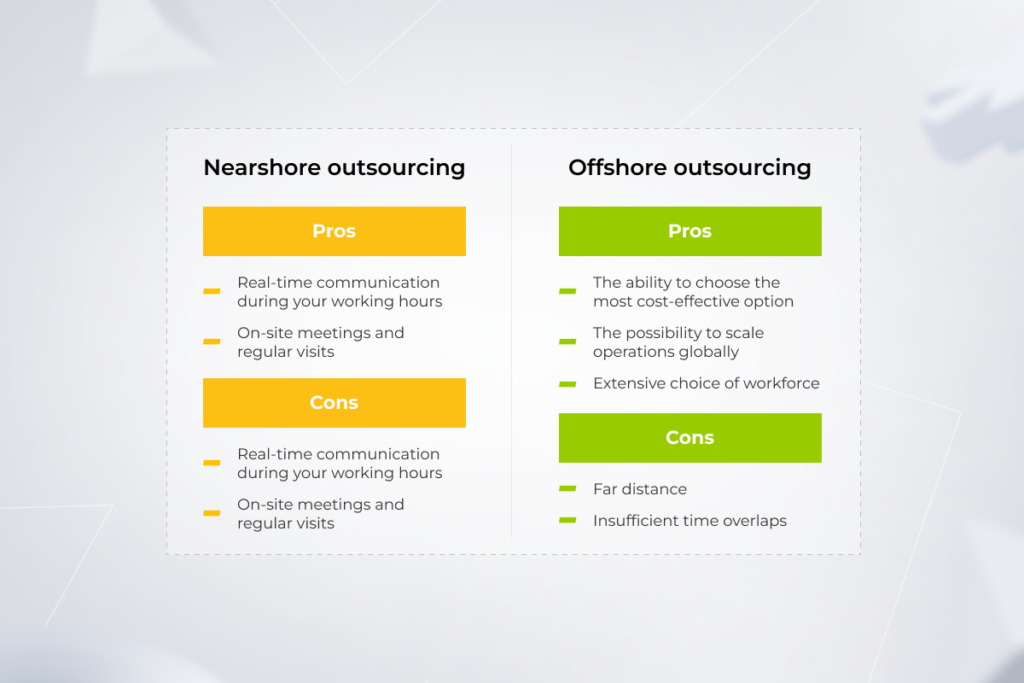
Partnering with *instinctools allows you to tap into 20+ years of tech experience and leverage it for your web development project. From definition and design to development and testing, we pitch in when you don’t have the capacity or expertise in-house.

Get off to a good start with your web outsourcing project

Schedule a free consultation

How to Launch an App: The Ultimate Guide

Let’s end the endless debate on how to launch an app with a single phrase: it depends. If you’re an emerging startup with a nascent app idea, you’re going to start at the very beginning. Get a solid grip on your app idea, create an MVP, acquire lighthouse users, and analyze what you did wrong or right. 
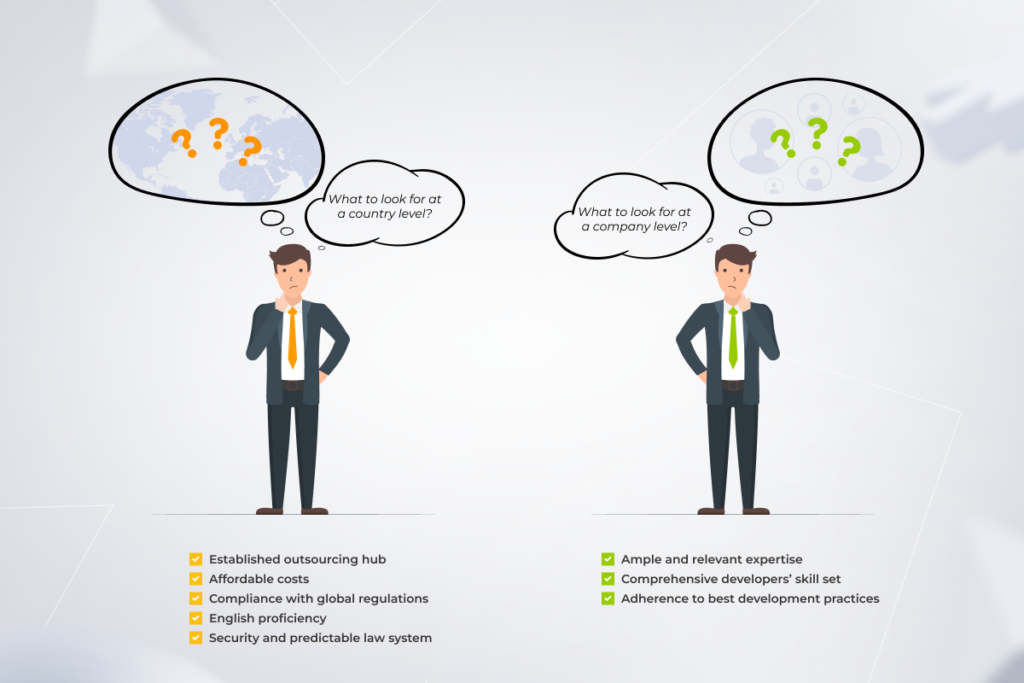
If your product is at its growth stage and you know what you’re doing, you will take a different, more advanced path. Your mobile app should strive to reel in more users, unlock full monetization capabilities, and hopefully secure infinite growth.

Whatever your option is, you may find it challenging to prioritize which fire to address first, and the next best steps to take. That’s why our experts have drawn up a step-by-step checklist that includes the best product launch tips from *instinctools — based on your product maturity.

Round 1: From idea to pilot

If you are a startup with a vague product concept, your idea of a successful mobile app launch boils down to pushing out a pilot solution and testing it in the wild. In your case, you and your mobile app development team are scientists — you hypothesize, test the hypothesis by performing an experiment, and then, assess the obtained results.

Three formative steps to launch an app: hypothesis, experiment, analysis

Hypothesize

A good idea for an app is something that solves the problem your target audience encounters every day. In simple words, your hypothesis is all about finding a nagging problem that exists in an addressable market and solving it with a one-of-a-kind mobile application.

Conceptualizing an app

First, you have to formulate and define the idea behind a mobile application. To do that, your development team works closely with your team to understand the goals, requirements, and vision for the app.

A tangible, viable, and functional app conceptprovides clear guidance to the designers, developers, and other stakeholders involved in the development process. 

Running market research and competitor analysis

If there’s one hard-and-fast rule in mobile app development, it’s to never skimp on the market research — unless you want to build a product no one needs.

Market research blends consumer behavior and target market trends to confirm and improve your app concept. Competitive analysis is a subset of market research that allows you to identify key market players and evaluate competitor apps to see where your product idea fits in.
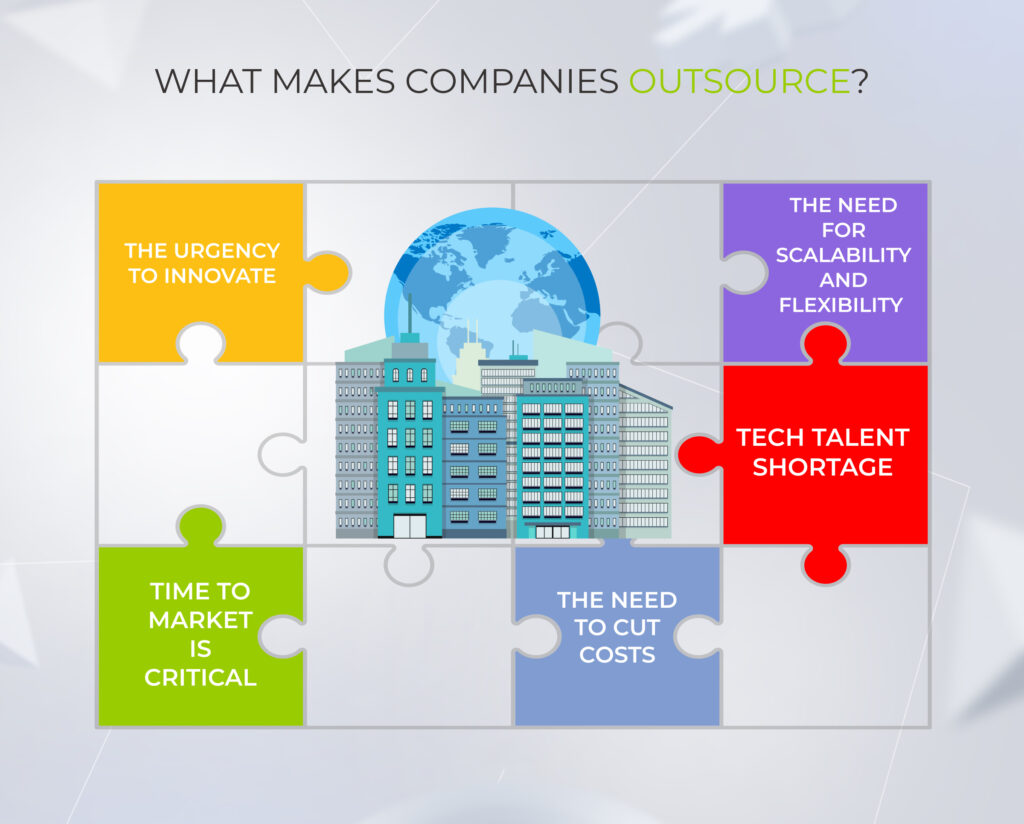
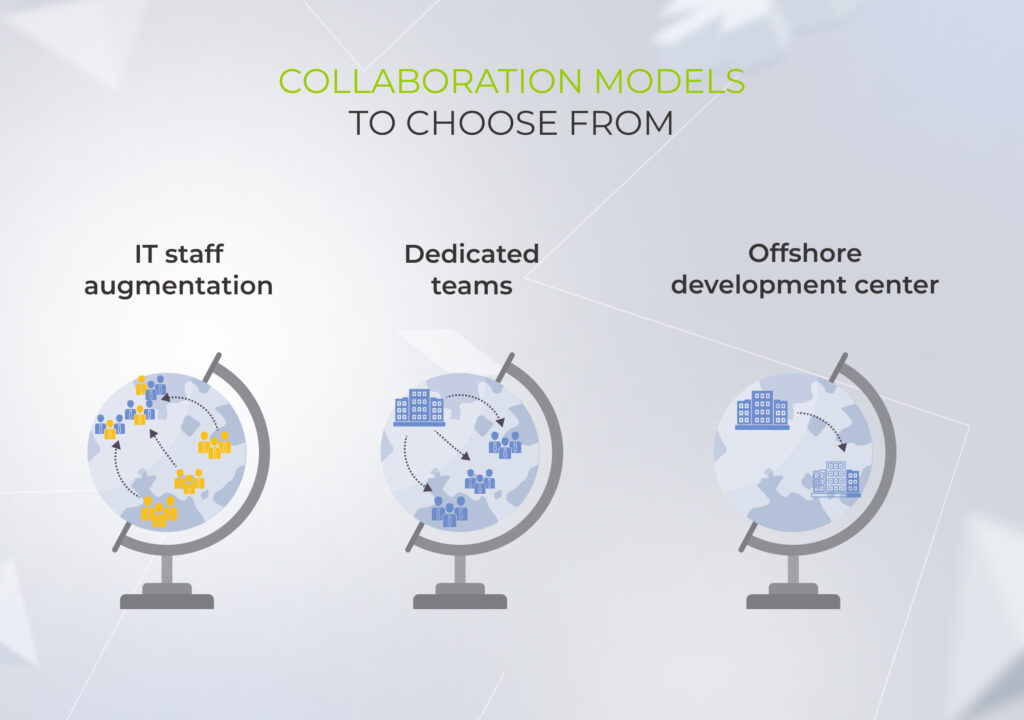
Both market and competitor research are crucial to identify opportunities for differentiation, scope out potential features, spot weaknesses and strengths of direct competitors, and assess go-to pricing and marketing strategy.

Setting your goals

Without understanding the destination, it’s very difficult to reach it. The goal-setting is focused on gaining an understanding of what the business is expecting to get from the project and how the team can contribute to this overriding goal. 

Usually, there are a few high-level goals behind a project that are then broken down into specific, measurable objectives. At this stage, you also set the KPIs specific to your product. These can include the activation rate, the number of app downloads, MAUs, and other success criteria.

Identifying your target audience

According to Statista, most app categories have an average 30-day retention rate of 1.5% to 11.3%. 

To stick around as long as possible, your product should be built with the potential app users in mind. 

Your product team can fall back on the various techniques to study the app’s target audience. Surveys, social media research, focus groups, and even a dedicated landing page can plumb the depths of your customer’s thoughts, demographics, needs, and goals. The design team then develops user flows to define interactions needed to achieve a common goal via your product.

With all of the flows captured, you can assume what app features are required to let the user achieve their goal. In parallel with this stage, your development team gathers functional and non-functional requirements for the application.

Running feasibility check

Next up, the team evaluates the technical feasibility of the project. Testing for technical feasibility, the team gains confidence in the proposed solution and ensures that the solution can be implemented with the available resources, technologies, and architectures. The proposed solutions should also meet the functional and non-functional requirements. 

If the mobile app development team has been part of the discovery efforts, then by this time, they already know whether the solution is feasible.  

Coming up with a unique value proposition

Your mobile app launch strategy is not complete without a unique selling proposition (USP) that embodies the core differentiators of your product. 

Your app’s unique selling point can be easily distilled from the app’s value map and user persona mapping. 

Deciding on a monetization strategy

So many mobile apps fail to generate revenue just because their monetization strategy is off-target. Understanding the preferences, behaviors, and spending habits of your potential users is crucial for choosing the right monetization strategy. The target operating platform should come into consideration as well.

For example, on the Google Play Store, users gravitate towards free mobile apps, while on the App Store, users are more inclined to make in-app purchases and download premium apps.

four best app monetization strategies

Turn your idea into a revenue-generating reality

Get a quote

Experiment

The previous stage is all about mulling over your new app idea. Meanwhile, the next phase is all about putting your hypothesis into practice.

Choosing a type of the app: native, cross-platform, or hybrid

The decision whether to build a native, cross-platform, or hybrid app depends on the app’s complexity, app’s functionality, and target users. Time to market, budget consideration, tech requirements, and other factors also play a role in decision-making.

an algorithm for choosing between native, cross-platform, and hybrid development

Creating mockups, wireframes, prototypes

While the developers are figuring out the best path to implement your app idea, UX/UI designers are keying in on the looks. By leaning on the user flow, designers develop a realistic model of what the application will look like.

Since this is an experiment, there’s no point in creating a full-blown user interface. Instead, designers can envision the look and feel of the future product by developing:

  • A wireframe — a basic, low-fidelity blueprint for UI designs.
  • A mockup — a more detailed, yet static iteration of the wireframe outline with detailed visual elements 
  • A prototype — functional, pixel-perfect simulations of a ready product used for usability testing and user feedback sessions.
examples of every stage of product design, from a wireframe to a mockup to a prototype

In real life, design teams can start anywhere from low-fidelity to high-fidelity models depending on the project specifics and the team’s experience with the product.

Starting small with a Proof of Concept and/or a Minimum Viable Product 

At this stage, you piece together the insights and drafts to give your idea a real turn. There are two popular approaches to giving shape to the hypothesis while also testing the assumptions: you can either start with a PoC or go into developing an MVP. 

If the idea has been implemented before or there is a similar product on the market, your development team can move on to building a Minimum Viable Product. For example, something as tried and tested as a food delivery app or a dating app can start its journey as an MVP.

However, if it’s a unique product concept, your app development team might need to assess whether the tech assumption can be implemented (without consuming excessive resources or time) and will function as envisioned. In this case, your team should resort to a Proof of Concept that would allow verifying the overall idea’s feasibility. For example, this might be true for IoT-based applications that integrate with a variety of smart home systems.

Incorporating analytics instruments into the app

Just like with any scientific experiment, you need enough data about the app’s performance to draw a conclusion. 

That’s why app developers embed analytics tools like Google Analytics, AppsFlyer, and others into your MVP. 

The tools track application data via SDKs and enable you to get a bird’s-eye view of the user journey and drill down into specific metrics like retention rate, engagements, drop-offs, and others. Along with user behavior, you can crunch the numbers to analyze the performance of marketing channels and calculate ROAS.

Testing

Testing your pilot product is another preparation step in the mobile app launch process. Although you create a product for the sake of functionality, you also need to make sure that the product is reliable and usable. In this case, you don’t have to cover all use cases. Usually, manual testing is good enough to validate the product’s usability.

Submitting the app to the stores

Once the MVP is polished, it’s time to debut it to the audience. Advertising campaigns, word of mouth, robust social media presence, and other marketing magic tricks can help you generate more buzz for your product and attract users. 

Analysis

Publishing an MVP on app stores is only half the battle of setting it up for future success. Post-launch, you need to gather user feedback and estimate the app’s performance to see whether your hypothesis has been a dud or a hit.

If your hypothesis is proven right and your pilot solution manages to rally a lighthouse audience, you can move on to growing your MVP into a full-fledged solution. If not, you rinse and repeat. 

Build a mobile product your users will love

Contact our team

Round 2: Growing your product

When your pilot solution has gained some traction and got some admirers, you can up the ante by turning it into a popular, mature, and resilient product with a high Average Revenue Per User (ARPU). 

At this stage, business owners come to us with a well-defined set of requirements and a well-shaped idea of how, where, and why to grow their mobile applications.

 stages of mobile app evolution

Performing business analysis

Business analysts scope your business requirements and translate them into tech requirements. Together with tech experts, they scope and document the limitations, dependencies, major features, business context, and other crucial input to provide a baseline for development.

Developing a solution architecture that checks all the boxes

Following the tech requirements, technical architects design an optimal architecture for your product. The mobile app architecture lays the foundation for your product and defines what data is collected, how it is transferred, etc. An easily scalable and flexible architecture makes product growth simple and minimizes usability challenges and security issues. 

Choosing a development approach

There are many options available when it comes to the development approach. Each differs by the level of flexibility required, the ability to handle change, and the level of collaboration within your team. 

Most common approaches fall under the Agile group and break the development process into small, manageable iterations so your development team can release functional increments more quickly. In most cases, the team doesn’t use a methodology in its pure form. Instead, your developers combine different techniques to create a unique workflow that goes with your project.

Deciding on the tech stack and the app type

When validating a hypothesis, you don’t need a solid foundation for your product. When building for growth, however, it’s important to choose the right tech stack. A tech stack includes languages, frameworks, and tools used to build your app, so it’s crucial to choose your technologies wisely. But keep in mind there’s no silver bullet, it all comes down to your unique needs.

Naturally, the choice of the tech stack also depends on the target operating system. If you’re building for iOS, your development team will rely on languages like Swift or Objective-C, while Android apps are typically built using Java or Kotlin. Cross-platform technologies such as Flutter and React Native make your application fit for both platforms.

Engineering, testing, and managing risks

Although some may assume that mobile apps are a simple facade that doesn’t require substantial engineering effort, the very nature of mobile app development makes it an uphill task. A mobile app developer has to consider many different platforms and devices while creating an application to make sure the app works perfectly across all target devices. 

To prepare for the engineering stage, your development team sets up the development environment, code servers, and testing servers. If your team is going down the Agile path, they divide the entire development phase into short time-boxed sprints. Each sprint is dedicated to developing specific features and functionalities.

At *instinctools, continuous testing is an essential ingredient of our engineering undertakings that allows our team to spot and address issues early on in the development process. Our QA engineers also rely on automated testing tools to streamline this process and maximize the quality of the deliverables. The implementation of various risk management tools makes it easier for us to guard the project against inevitable risks, issues, and changes.

At this stage, app developers also strike the right balance between innovation and compliance, making sure your solution is up to the industry standards and regulations.

Adding a secret ingredient of a successful launch: beta release

Movies have advanced screenings before the big premiere. Software development has beta testing where your development team makes a beta version of your mobile app available to the public. This pre-release exercise allows the team to test the beta version under real conditions, collect end-user feedback, and resolve any remaining issues before the software’s final release. 

A beta release can be open or closed depending on the group of beta testers. In any case, it gives insights into what enhancements should be made before the roll-out and ensures that the final solution meets the desired quality standards. 

Publishing your mobile product on the app marketplace

The stable application version is finally all set up to be published on the app store of your choice. Before submitting the application, your app developers make sure it’s in line with the Google Play Store and App Store guidelines, including the application’s analytics services, third-party SDKs, ad networks, and more. 

To pave the way for a successful launch, make sure your app’s name, icon, description, and app screenshots are ready for your product page. 

Adopting app store optimization to make a splash

According to research, almost 65% of downloads happen directly after a search on the App Store, while 70% of visitors discover apps through search. It means that if you don’t put your product in front of your audience, users might walk past it, carrying their money to your competitors. 

App store optimization (ASO) elements

App store optimization (ASO) helps rank your app higher in the app store listing and makes it more visible to potential customers. ASO includes optimizing your app name and app title, keywords, description, and other elements for search. Other common ASO tactics include paid ads, category rankings, and top charts.

Monitoring app performance

No one likes having lag issues or using a bug-ridden application. However, bug fixing is a significant time suck for developers. That’s why developers integrate real-time crash reporting tools and analytics into the app before publishing it on the store. 

The tools automate collecting, organizing, and prioritizing app crash reports, giving your app team a better idea of how the app fares in the wild. Developers tackle high-severity and high-impact bugs first, while minor issues are put away for later.

Pushing out regular updates

A constant release schedule is a concept that developers incline to as updates positively impact user experience. The rule of thumb is to present 1 to 2 small improvements per month that include minor upgrades, redesigns, and new features. 

However, the cadence may vary depending on your improvement roadmap, user feedback, and stakeholder requirements. All updates are planned and implemented sequentially based on the roll-out roadmap. Usually, developers release new features through a phased approach by gradually increasing the number of users who get the updated version.

Providing continuous support

New features may provide additional value to your updates, but the most important reason to keep an eye on your app post-release is to make sure it has relevant functionality and faultless performance. A dedicated support team keeps your application in step with advances in hardware and makes sure it stays compatible with new OS versions.

You can also implement a tier-based user support structure to improve your user experience management. For example, the first support tier is your defense line which solves basic usage issues and updates users on the issue resolution process. The second support tier serves as the second point of contact that handles more complex issues related to app or server configuration.

Real-life examples of our projects that approached app launch differently and all panned out

What do *instinctools’ clients across different scales and domains have in common? They approach us with innovative ideas, and we find the right way to implement them. 

  1. An AgTech startup dreamed of a real-time AI and IoT-powered app to monitor 10,000+ plants. As they needed investor buy-in, we charted a smart course from a PoC to an MVP. After fine-tuning the app based on real-world feedback, we delivered a polished, feature-rich solution that wowed investors and positioned the startup for growth. 

A transportation company had to make a bold move to conquer a highly competitive taxi app market. We crafted a full-fledged product with conversational AI at the core of customer support, putting our client at the helm of the local market. 

What cutting-edge sprinkles does your app need?

Let’s talk

Give your idea a go with *instinctools

Timing is crucial for emerging companies. If you launch the product too early, you risk releasing a half-baked application that fails to take off. Enter a market too late and you might be stuck competing against more established companies. Along with timing, the right team and execution also determine the success of your idea and make sure it hits big.

At *instinctools, we know exactly when the critical mass point for an opportunity arrives and how you can grab it. Whatever your product maturity stage is, our experts can take it from there and ensure your application the success it deserves.

Hit the ground running with your mobile app project

Schedule a call

FAQ

How do you successfully launch a new app?

The success of your app depends on how well you plan and execute your launch strategy. First and foremost, you need to make sure that your app idea stands a chance in the market and aligns with the needs of target users. You can check the viability of your idea by developing a Minimum Viable Product. If your MVP manages to attract early users, you can gather their feedback and continue transforming your MVP into a full-fledged solution.

How much money does it take to launch an app?

The cost of app launch depends on your application’s complexity, marketing strategy, and maintenance needs. On average, it may cost you between $30,000 to $150,000+ to launch your application. Keep in mind that this estimate includes only development costs.

Dodge the Bumps: Why Do Enterprise Projects Fail and How to Prevent it?

To make sure your large-scale software development initiative is destined for success, you need first to figure out why enterprise projects fail. 

Deloitte reveals that of 82% of companies that miss their target, 50% achieve less than expected and 42% are late on project schedule. So what are the reasons that contribute to an enterprise project’s stall or fail, and how to safeguard big-ticket solutions?

Our experts are pros at dealing with the challenges of enterprise software development and strategizing your success. Read our guide to get the lessons learned first-hand — without projects burnt.

What is considered a failure for a software project?

“The greatest teacher, failure is.” 

However, the degree of failure makes all the difference and when it comes to notable mistakes, it’s better to learn from others’ missteps rather than pay this high-priced teacher out of your own pocket.

Speaking of software development, a project is deemed a failure if it demonstrates one or several of the criteria:

  1. Doesn’t solve the end users’ problem. Mismatching customers’ needs and releasing an undemanded product is the worst scenario possible.
  2. Falls short of its original business objectives. You might end up with a different product if your tech partner wasn’t guided by your goals to provide expected project deliverables. 
  3. Lacks quality. Jerry-built software is a one-way ticket to project failure caused by the inability to fit into your software ecosystem and scale appropriately. 
  4. Fails to bring intended ROI. If the project can’t meet your ROI target and you don’t see a way to give it another shot, it’s time to stop. Run a retrospective and reflect on why the project went wrong to avoid the same pitfalls in the future.  
  5. Messes with a timeline. Rolling out the project on time may win you a competitive advantage over your peers.
factors that drive project failure

Some of these factors, such as budget and due dates, can be considered tolerable for the purpose of creating a top-quality, secure, and scalable product. That’s how challenged yet viable and eventually successful projects rise.

Hurdles that contribute to statistics on project failure

If you made it to the enterprise level, tasks such as resource planning, risk management, choosing appropriate project methodology, etc. aren’t the tough nuts to crack. However, you can still face common project pitfalls stemming from the complexity and longevity of enterprise solutions.

1. Neglected discovery phase

For over two decades, we’ve been witnessing proofs of the principle: 

Shortcuts on the basics always bite you later. 

As an enterprise project is a marathon, mapping out the route is worth it. And a method to avoid project failure is within your grasp — start with a discovery, or an inception phase. At this initial stage, your tech ally digs into your new ideas and aligns your project vision with business context, market trends, and user needs to shape it into a comprehensive roadmap to a top-notch solution.

The discovery phase isn’t a cure-all, but it can help nip most enterprise software development issues in the bud and unveil strategic opportunities that weren’t on your radar before. 

While project deliverables at the inception stage can vary depending on the specific software development services provider, at *instinctools, we bring a lot to the table to minimize the delta between value and cost.

software project deliverables at the inception stage

Our on-field experience in safeguarding large-scale solutions from failure proves that it’s not too late to take another crack, even if it seems that your project has already gone down the drain.

We were once approached by a European venture capital enterprise that wanted to launch a web platform for VC investors and funds. Their trailblazing B2B2C solution was supposed to pull ahead of the competition, but the haphazard implementation approach of the client’s previous tech partner put the product launch at risk. 

Nevertheless, during the discovery workshop, we tackled all issues — clarified organizational priorities and product vision, aligned the development scope and project plan with updated expectations, and outlined the backlog for future releases. These efforts led to decreased time to market and fruitful rollout.  

Check how the imperilled fintech project made it back on track with our support

Read the case study

2. Flawed delivery model

Delivering on time, budget, and, more importantly, on value is a tricky mission. Adherence to the Agile development approach is a table stake, and it alone won’t hand the desirable outcome to you on a silver platter. 

To ward off shoddy code, jerry-rigged architecture, muddled project documentation, non-transparent processes, and failures in project management, you’ll need a solid delivery model encompassing engineering best practices, a tried-and-true architecture approach, and time-tested project management handbook.

Digital product engineering companies that make the grade in enterprise software development usually build up a custom delivery model backed up with their on-field experience — that’s how we do it at *instinctools. Besides following PMBoK (Project Management Body of Knowledge) and DAD (Disciplined Agile Delivery) principles, we amp up these best practices with our 25+ years of hands-on expertise in crafting large-scale solutions and fortifying them from project failure.

Instinctools' custom software delivery model

3. Constantly changing goals cripple the project’s scope

Another nail in the project’s coffin is inconsistent objectives and the consequent scope creep. According to the Project Management Institute study, in 2024, 67% of projects experienced it.

The Vision&Scope document can call for revision if the market conditions and customer needs have transformed. Nonetheless, even advisable changes should be applied appropriately. Regarding the development cycle, if a sprint’s goal changes, the project team stops it and starts another iteration with re-planning and re-assessment to avoid scope creep and rework in the future.

If the ship was heading north and then got the command to change the route and move south, sending there a few lifeboats wouldn’t make a difference. You need to turn the whole ship in a new direction. It works the same way for product development.

However, changes may be driven by the desire to implement some trending features without taking into account the existing backlog. In such a case, they only clutter up the scope, slow down the development process, and bring you closer to becoming a failed project example.

That is another reason why a solid basis such as a discovery phase is vital — it’s easier to stick to the goal and the path to get there when they are clearly defined. To drill down on the project objectives, put a premium on investigating the market, existing solutions, and customers’ uncovered needs.  

4. Not seeing the forest behind the trees

The degree of a project’s success depends on the business’ overall readiness to embrace the digital transformation, which requires equal attention to its all-important dimensions, from people to processes to technologies. 

For example, you can’t adopt cloud-based ‘everything’ to light-speed time to market without taking care of QA automation and honing unit and integration tests. Cloud migration increases the number of releases x20 per day, and such a workload is beyond manual handling.

One of the major project challenges may also lie in delivering software that seamlessly fits into your existing ecosystem. That’s the struggle one of our clients faced. A global software licensing company was looking for a tech partner to deal with a legacy system modernization as a part of its overall digital transformation journey. We offered two options:

  • Moving fast and renovating the existing software to the most up-to-date solution available
  • Going step by step by upgrading the versions of existing software and, eventually, adopting a coveted modern solution

Want to know which option the customer bet on and how it impacted the software’s maintenance costs?

Check the case study

5. Inadequate governance model affects communication at all levels

We’ve seen projects that had failure right on their threshold because of poor communication between the development team and stakeholders on the client’s side. What are the consequences?

  • Insufficient C-level engagement puts additional stumbling blocks on the project’s path

What are your expectations when hiring a dedicated team for enterprise development? Based on our clients’ experiences, this decision is usually driven by a desire to delegate development tasks to industry experts and get top-quality software with minimal risk of the IT project failure. 

No CEO, CTO, CXO, or other company executives want to be engaged in the development process on a weekly basis and resolve operational issues. They expect to receive monthly and quarterly visualized strategic reports with highlighted key metrics that prove the project is moving in the right direction. 

Yet, no matter how much you want all the magic to be happening behind your tech partner’s doors, top-management involvement — clearly, within reasonable limits — is vital, especially at the initial stages. To arrive at the destination set at the start, C-level product vision should be clearly articulated, documented, and treated as the project’s North Star.

  • Discrepancies in product vision fuels constantly changing objectives 

If several stakeholders on the client side haven’t collaborated much before the project, working together on a roadmap can be a point for bridging the gaps in their perspectives and establishing reliable communication.

  • Misalignment between the stakeholders, tech partner’s team members, and end users can derail the whole project

Matching technology with common sense is a top priority that should be covered by close collaboration between the development team and the client. Minor details can take their toll and lead to crafting software your employees won’t even be able to use. 

Your dedicated team can create a five-star app with ample touch and gesture functionality. But what if the warehouse staff works in gloves and won’t be able to leverage all these touch-based features? As always, the devil is in the details, and your tech services provider should uncover and take them into account from the get-go. 

That’s how we deal with it at *instinctools. We have a project governance framework that implies all-encompassing, multi-level collaboration between team members and a client:

Instinctools' engagement governance framework

Our approach addresses issues at different levels so that they are handled by contributors with the relevant competencies. The majority of head-scratchers are resolved at the project level in a matter of days or weeks. Questions of the company level are discussed at quarterly meetings. 

Instinctools' project escalation process

Here’s a real-life example of tackling a project-level issue before it snowballed into an IT project failure. An automation machinery manufacturer approached Instinctools to create a web app for their innovative driverless forklift system. The project had to fit into a seven-week timeline so that the client could present the equipment at the industry trade show.

Initially, the client’s in-house team was in charge of developing a service for the robot coordination, while we took on crafting a user-centered web app for data presentation. 

However, there was only one robot model for both teams to work with, and transporting it back and forth for testing between the development centers would violate the project’s deadline. Therefore, our team wrote an emulator that served as a temporary substitute for the coordination service, making it possible for the client to showcase the trailblazing forklift model at the trade show. 

Check the full case study for more details

Dive in

6. Chase for the quick win

When it comes to enterprises, one of their pain points is a large ecosystem of heterogeneous internal solutions adopted throughout an organization’s existence and, therefore, challenging to manage and maintain. As a software company that faced and overcame these hurdles while working on our clients’ projects, we totally understand the hunger for affordable software. However, a quick route to success isn’t always the go-to option and may actually lead to the failure of IT projects. 

We once got a request from a manufacturing corporation to review their CI/CD processes and fine-tune them so that everything will keep up and running hitch-free over the next decade. 

However, even consulting standard-bearers such as Gartner won’t risk doing horizon scanning for such a distant future and making bold predictions since the IT landscape changes like the wind.  

Enterprises need to accept their fate rather than expect a wow effect from the out-of-the-box solutions that promise to fix things once and for all. My 15-year experience in managing large-scale projects shows that there’s no way to avoid customization of ready-made solutions for established IT landscapes. 

Nevertheless, be aware of the opposite extreme — over customization, which is just as detrimental to the software and can become one of the reasons why projects fail. 

7. Over-reliance on technology instead of business outcomes

It’s important to look under your feet when walking the tightrope, but if you dwell on the road for too long, it’s easy to lose the vision of the final goal. 

Similarly, technology isn’t a destination; it’s a way to bring you there.

Here’s one more case from my practice. A fintech company bet on an out-of-the-box DWH solution with a $60,000 yearly license, hoping it would solve 90% of their data-related problems. However, the cost of software integration into their ecosystem exceeded $1,000,000. 

A feature-rich, out-of-the-box product — just as they wanted. However, building a custom solution from scratch would have cost much less than adjusting an off-the-shelf solution to their IT landscape. 

8. Mismatched expertise

The root of all the previous problems may lie in hiring the wrong team. If a dedicated team lacks the expertise to cover your enterprise-scale projects, it turns into additional risk you have to manage.

Finding a reliable tech partner and leveraging IT staff augmentation to extend your in-house expertise or outsourcing development tasks to a fully-packed dedicated project team is a golden ticket to reaching your high-level goals while ensuring your solution is secure, and the core knowledge won’t leak outside the company.

To cut the chaff at the initial stage and exclude the team factor from the list of potential causes of failure, validate the trustworthiness of the potential vendors:

  • Verify if they are present on business listings, such as Clutch, GoodFirms, Techbehemoths, SelectedFirms, etc.
  • Scrutinize their market reputation by checking testimonials of previous clients
  • Review the company’s case studies to see if its expertise clicks with your project’s needs
Some reviews of the *instinctools services

Save your time and book a safe pair of hands or a whole dedicated team

Reach out now

Pave the road to fail-proof enterprise solutions

Withstanding unclear objectives, unrealistic expectations, and scope creep while keeping your eyes open to new strategic opportunities isn’t an easy road. Yet having a blue-chip partner by your side allows you to rest assured of achieving desired outcomes. 

Let your tech ally run a discovery phase, clarify organizational priorities, draw up a project plan, choose adequate delivery and governance models, keep project leaders on the same page, track due dates, and more, to avoid project failure and deliver the results you are aiming for.   

Race to the finish without worrying about the tech side

Find a team

FAQ

What are the main causes of enterprise project failure?

There are three dimensions that can contribute to the IT project failure — people, processes, and technology. While enterprises are less susceptible to the process-related causes of failure, they still have much to deal with because of the complexity and longevity of large-scale projects. For instance, neglecting the discovery stage can result in unclear objectives and misalignment between stakeholders, choosing the wrong delivery model can lead to jerry-rigged architecture, and constantly changing goals can cripple the project’s scope.

Why do most projects fail?

Project failure statistics remain high year by year as covering users’ needs with a top-quality solution while sticking to your original business objectives and staying within the budget and timeline gets tenfold more challenging when we talk about enterprise software initiatives. Delivering at scale and avoiding project failure is possible with a reliable tech partner, but not everyone has one.

Instinctools History: From Ambitious Start-Up To Tech Partner of Fortune 500 Companies

Parlaying expertise, talent, and commitment into measurable business outcomes since 2000. 

See how an initiative of young IT professionals transformed into a global custom software development company with engineering hubs across three continents.

History milestones

Founding and early years

Founded in 2000 by Alexey Spas and Diethard Sohn, the company originated in Stuttgart, Germany. 

Initially, the start-up focused solely on custom web development of high-loads. In its early years, *instinctools secured a deal with its first client from the Fortune 500 list — Mercedes-Benz Group AG (former Daimler). Crafting a web-based user support system for one of the leading global automotive companies became a turning point for a five-year-old start-up. 

Growth and diversification

Over the next fifteen years, *instinctools expanded its services to include mobile app development, enterprise automation, legacy software modernization, cloud computing, and more. This shift enabled the company to attract mid-sized companies and large enterprises and bring other big-name clients, such as Helvar, Nostrum, CANet, and Fujitsu, among others.

2015 became a tipping point in the company’s history. Instinctools outgrew the boundaries of a strictly outsourcing software development company and presented DITAworks Webtop, their first enterprise-grade SaaS product for technical documentation management. This product helped *instinctools win two top-level clients — SAP and DEIF.

Educational initiatives

At the same time, witnessing the emerging global talent shortage in the software development industry, *instinctools launched several educational projects to share their hands-on knowledge with young specialists. The company established a Growth academy for promising students in IT-related disciplines, organized offline coding competitions, and delivered lectures for adult professionals in Hrodna, Belarus, where one of the development centers was located. In 2021, the company began hosting online conferences “Tech Times”, discussing technological trends with industry leaders from all over the world.

International expansion

The years 2010–2020 were fruitful in many ways. New offices were opened in Minsk, Belarus,  Moscow, Russia, and Warsaw, Poland. Instinctools also kept expanding their partnership network and signed agreements with Google Cloud, OVHcloud, and Odoo. From 2021, *instinctools operates as a trusted Microsoft Partner.

Team: from 7 to 400+

Instinctools brings together proactive, business-like, and determined doers who shape the company’s DNA as an international software product development and consulting company. Starting with a team of seven, *instinctools has grown to over 400+ employees across ten countries. Key team members:

  • Alexey Spas, CEO 
  • Gunthilde Sohn, Managing Director, DACH
  • Chad West, Managing Director, USA
  • Alexey Astakhov, VP of Engineering
  • Tatsiana Astakhava, CFO

Along with the increasing number of tech and business talents on board, the company’s expertise area and hands-on experience in working with various industries also kept expanding. To date, *instinctools provides services over a broad technology stack, including Java, Python, Javascript, React, Angular, Microsoft Azure, Power BI, Odoo, HubSpot, AWS, and more, delivering robust technological solutions for businesses across many industries:

  • Healthcare
  • Fintech
  • Ecommerce
  • Manufacturing
  • Logistics
  • Automotive
  • Energy
  • Entertainment and media
  • Education and e-learning 
  • Technology
  • Ad-tech
  • Cryptocurrency 

Offices

In the middle of 2024, *instinctools had two headquarters on both sides of the Atlantic: in Stuttgart, Germany, and Potomac, MD, USA. The main development hub is located now in Warsaw, Poland. The company has growing development centers in LATAM, Kazakhstan, and India. The offices in Belarus and Russia operated in the 2010th, were closed. To date, the company provides seamless collaboration to customers across the globe and operates within 20+ time zones.

Awards

Instinctools regularly receives awards on the B2B review platforms, such as Clutch, Manifest, TechBehemoths, SelectedFirms, etc. The company’s expertise has been recognized in a number of categories, including but not limited to the following ones: 

  • Top Custom Software Development Company
  • Top Web Development Company
  • Top Mobile App Development Company
  • Top Ecommerce Development Company
Anna Vasilevskaya
AI modified real photo
Anna Vasilevskaya
Account Executive

Get in touch

Drop us a line about your project at
[email protected] or via the contact
form below, and we will contact you soon.