Agentic Commerce: How Buying Behavior Is Being Radically Rewritten

How is AI changing ecommerce? For the first time in history, we are witnessing a paradigm shift in digital commerce that not just redefines the venue of shopping but also assigns a new actor. We’re talking about agentic AI commerce that is slated to have a major impact soon. By 2030, the US B2C retail market alone could see up to $1 trillion in orchestrated revenue from this new shopping mode.

For retailers, this is not the time to play it by ear, because any time soon, a lion’s share of their customers will not be human users but rather AI agents. So how can one prepare for the transformation on the scale of the prior web and mobile-commerce revolutions? Our ecommerce software development company has laid out all the whys and hows of agentic AI in commerce, with clear action points ecommerce companies can start implementing right away.

What is agentic commerce?

Agentic commerce is a retail model where autonomous AI agents can discover products, negotiate prices, and execute transactions on behalf of shoppers. Ecommerce agents rely on three specific capabilities that make them a distinctive category:

  • Reasoning and planning to break down a complex goal into a step-by-step checklist.
  • Cross-platform action to travel across the web to complete the action.
  • Tool usage by leveraging APIs to do specific actions autonomously.
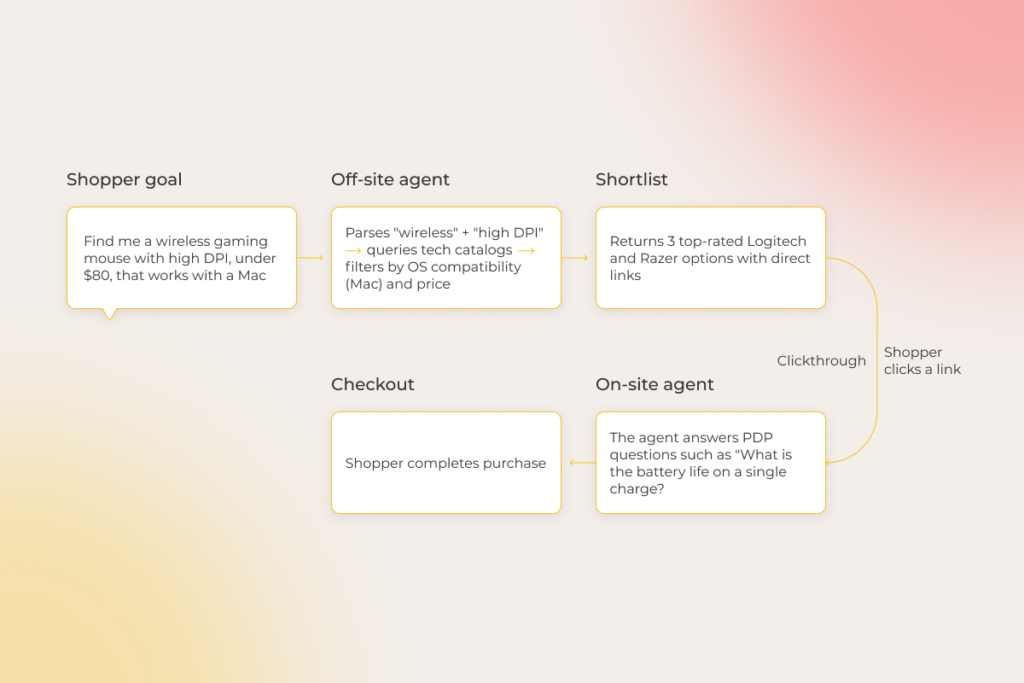
A flowchart on a soft pink-yellow gradient background showing steps to buy a wireless gaming mouse. Boxes labeled Shopper goal, Off-site agent, Shortlist, On-site agent, and Checkout describe the shopper’s process from searching to completing purchase.

Agentic AI commerce isn’t confined to online shopping only and can live within a wide range of commerce experiences, including travel, ticketing, subscriptions, and physical retail integrations.

From the interface point of view, agentic commerce tools come in two forms:

  • сonsumer-facing commerce agents that transact on behalf of the customers.
  • merchant-facing commerce agents designed to streamline retailer and service provider operations. 

As for the specific adoption approach, retailers can make their products and services readable to external agents, like ChatGPT or Perplexity, and also build their own branded agentic ecosystem to have an exclusive right over first-party customer data.

Core differences between agentic shopping and AI-powered commerce 

Earlier generations of retail AI, such as recommendation engines and chatbots, act mainly as a predictive layer whose reactivity is minimal if present at all. Such forms of AI assistance can guide human decision-making during the product discovery, evaluation, and purchase phases, but lack the authority to take the lead in the transaction.

While traditional AI is somewhat peripheral, agentic AI takes the central stage in the shopping journey and can trigger actions across multiple systems on the user’s behalf. Agents can search, compare, negotiate, decide, and transact within limitations set by the user.

FeatureAI-powered commerceAgentic commerce
Control and agencyHuman-first: AI assists, human controlsAI-led: AI acts autonomously with human approval on key decisions
User’s roleActive driverSupervisor
Core scopeA set of standalone tools, with each tool being dedicated to a specific taskAn end-to-end system that executes multi-step workflows from discovery to purchase
ArchitectureOperates on single-model inference embedded in fixed touchpointsRun multiple models, tools, and APIs
Primary purposeOptimize and elevate the traditional shopping journeyRe-engineer and automate the traditional shopping journey
ExampleRecommendation systems, botsAutonomous price-negotiators, cross-retailer personal shoppers.

Right now, both operating styles exist on the ecommerce spectrum, and each of these have their time and place. But if we were to draw a clear line between the two, traditional AI is more about persuading the customer, while agentic AI is about executing for the customer. 

Agentic commerce as a new, beneficial frontier for ecommerce teams

The benefits revealed by agentic commerce tools are as unique as the concept itself, and those who adopt early get to reap the best of them and learn the fastest.

Winning in new sales channels

Traffic to US retail sites from GenAI browsers and chat services soared 4,700% year-over-year in July 2025. The engagement quality of such users is materially higher: they spend 32% more time on site, browse more pages, and bounce less often. 
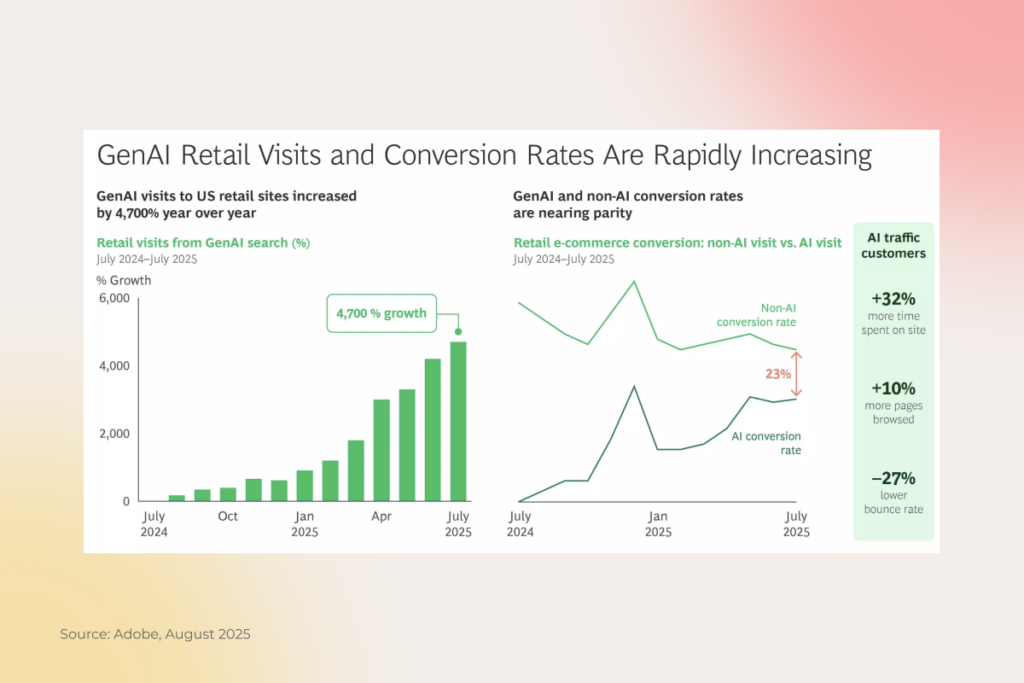
A data graphic shows GenAI retail visits and conversion rates rising. Bar graph: GenAI visits up 4,700% from July 2024 to July 2025. Line graph: AI and non-AI conversion rates converge near 23%. Sidebar: Users spend 32% more time and have a 27% lower bounce rate.

If a retailer doesn’t establish a presence in these sales channels, they risk losing both traffic and decision-making influence on customers in the near future. Conversely, machine-readable and transaction-friendly products will boost AI agent visibility and drive higher conversions. 

Scaling hyper-personalized curation

Having branded commerce agents on hand allows retailers to offer the VIP concierge experience to every customer with no marginal costs. Unlike recommendation systems, agentic transactions make use of the context that goes beyond on-site behavior and includes other cross-platform sources of customer data, such as calendars, emails, wearables, and past receipts. 

So, when the shopper expresses an intent, the agent can return a purchase-ready basket – an all-in configuration that takes into account shipping windows, loyalty benefits, and substitutions. 

Going from reactive support to autonomous service 

Autonomous ecommerce agents don’t need an open ticket to spot a looming issue. Since they have the connection to the customer’s journey and the retailer’s supply chain on speed dial, they can locate friction before it impacts the customer experience. For example, if the package is canceled due to a logistics issue, the agent can proactively suggest a similar in-stock item from another store instead of sending the customer a disappointing cancel notification.

Frictionless checkout 

Agent payments protocols like UCP (Universal Commerce Protocol) and AP2 (Agent Payments Protocol) allow retailers’ systems to securely talk to multiple agents, payment providers, and platforms. Through these protocols, agents can pass along verified payment credentials, shipping information, and identity data to make purchases on behalf of the customer. This gives way to zero-click fulfillment, where customers don’t have to go through endless forms and logins to check out. 

Streamlining backend office tasks

Standard rule-driven automation is pretty much blind to evolving context, which means that it can suffice for repetitive backend office tasks, but needs manual recalibration for out-of-the-box changes. Agentic AI is more capable when it comes to complex inventory management, pricing, and support scenarios, because it can adjust reasoning on the fly based on the changing demand, supply, and customer context.

Ready to bring autonomous agents to your ecommerce?

Contact our AI team

How agentic commerce actually works

On a high level, agentic commerce is a multi-step process that bridges customer intent with the merchant’s data. But this can play out in different ways, because the specific operating pattern of ecommerce agents depends on the interaction model: agent to site, agent to agent, or orchestration agent to site. 
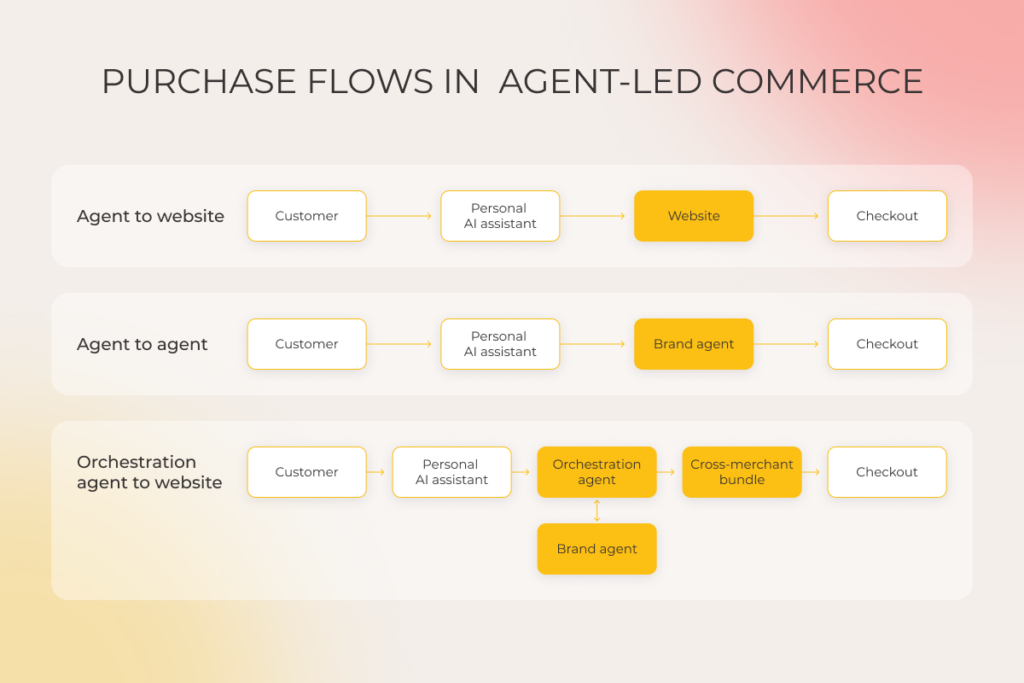
A flowchart titled Purchase Flows in Agent-Led Commerce shows three sequences: Agent to website, Agent to agent, and Orchestration agent to website. Each sequence involves a customer, AI assistant, agents, websites, bundles, and checkout steps in interconnected boxes.

Below, our AI agent development team has described a step-by-step flow of the agent-to-site model, which is enabled by Google’s Unified Commerce Protocol and OpenAI’s Agentic Commerce Protocol.

1. Goal definition 

Users prompt an intermediary system, such as ChatGPT or Google AI Mode, with a shopping brief in natural language. The brief can be anything from a specific technical request (“Find me a 4K OLED monitor with a 144Hz refresh rate”) to a complex lifestyle-driven problem (“I’m going on a 2-day trip to London next week, and I realized I don’t have a waterproof rain jacket”). From that brief, the system’s LLM distills defined parameters, like the size, budget, shipping time, and necessary specs.

If the user’s prompt is too vague or broad, the agent asks a series of follow-up questions to gain a deep understanding of the user’s preferences and hard or soft constraints.

2. Autonomous discovery 

Using protocols such as the MCP (Model Context Protocol) or specialized commerce APIs, the agent heads out to retailers’ databases to query product feeds. The agent can scan dozens of machine-readable stores simultaneously. However, it doesn’t look at marketing banners but goes straight to the retailer’s real-time inventory levels, SKU data, and shipping calculators to fish out accurate information.

3. Reasoning 

The agent studies the discovered options and pits them against the non-negotiables set by the user. If no option has a 100% match with the user’s query, the agent weighs the trade-offs and curates a list of products with the most optimal specifications.

4. Execution 

Once the user approves one of the offered options, the agent closes the loop. Via API, it hands over the order to the merchant’s system, using secure payment gateways like Google Pay to finalize the agent-led transaction. From a technical standpoint, agentic payments take place within the headless checkout environment, which means that the customer doesn’t have to leave the AI interface to have their order placed.

As for the security aspect, sensitive data such as the credit card number, shipping address, and other information is tokenized.
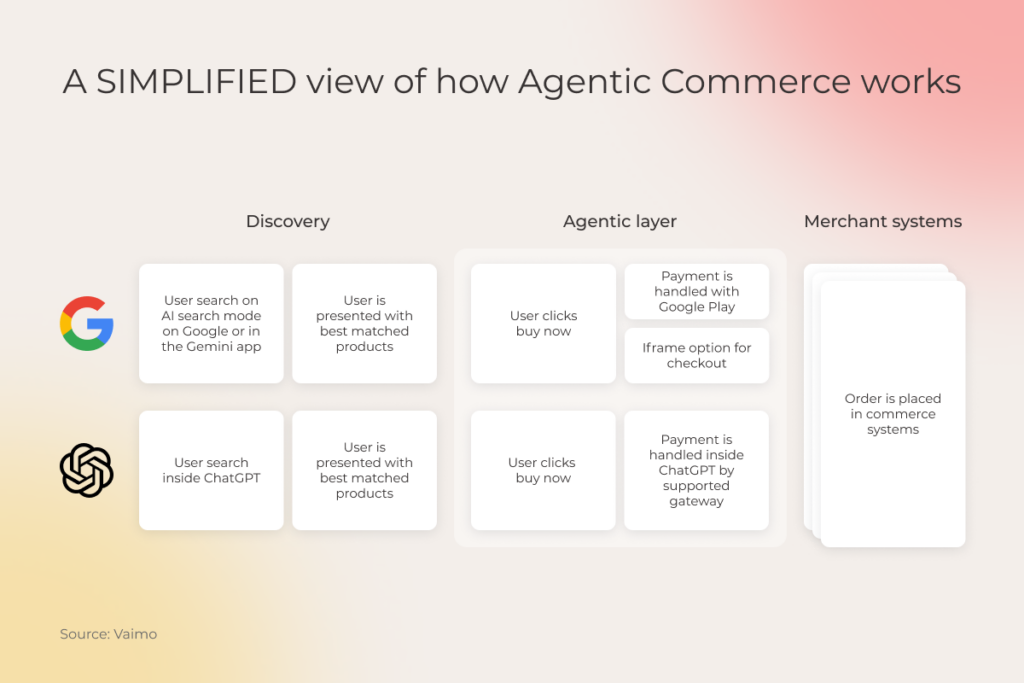
A flowchart explains Agentic Commerce: Users search on Google or ChatGPT, see matched products, click buy, use Google Pay or a ChatGPT-supported payment gateway, and an order is placed in merchant systems. Logos for Google and ChatGPT are shown. Source: Vaimo.

The reality check: current limitations of commerce agents

The workflow we’ve described earlier is a textbook representation of how agentic commerce should work in theory. In practice, though, AI shopping agents face constraints that stem not so much from the technology itself, but rather from an immature ecosystem.

AgentCapabilitiesLimitationsSpecs
GPT Instant CheckoutCan complete full checkout inside ChatGPT (single-item purchases) via the Agentic Commerce Protocol Initially supports single-item transactions; multi-item carts are planned but aren’t fully rolled out; no returns in chat; US only rollout.Needs headless commerce to operate; uses Stripe and OpenAI’s ACP
Perplexity AI shoppingUsers can search, review, and buy products directly in chat via PayPal or Venmo.Only for participating merchants/products; for single-item shopping only; US only/Pro Plan rollout.Payments are processed through PayPal/Venmo; merchants remain the seller of record.
Microsoft CopilotSupports checkout flows inside Copilot conversations across partners; users can complete purchases inside chat.Merchant participation required; supported partners include PayPal and Stripe; US-only rollout.Built on open standards and payment integrations; semi-autonomous flow.
Google Gemini/AI modeAllows users to discover products and complete purchases directly within the Gemini app or Google Search AI Mode using integrated checkout (Google Pay)Available initially in the U.S. only; only eligible merchants participate; requires Google Pay; limited coverage.Powered by Unified Commerce Protocol
Shopify AI agentEnables embedded checkout within AI agents like ChatGPT, Copilot, etc.; users can browse and complete purchases conversationally.Early access feature; merchants must enable it; available for US stores.Merchants see orders in Shopify admin and control data; integrates with broader AI ecosystems.

As you see from the table above, agentic commerce and agentic checkout are currently represented by several platforms in some form, but their availability is limited and conditional due to feature maturity, subscription requirements, and regional availability. 

Most importantly, only a handful of merchants have dabbled in agentic interfaces and made their products machine-readable, so the speed and magnitude of adoption are dependent both on the agent’s functionality and the merchant’s participation. This highlights where early innovators can differentiate by solving for trust, compliance, and integration at scale.

The tech foundation for AI ecommerce agents, four core layers

Retail agents can travel across different retailers without requiring custom integrations with every single shop. This capability of agentic AI tools is fuelled by a universal, interoperable technology stack that allows the participating systems to plug into each other and team up for transactional tasks. 

Function/layerKey componentsCore role
Intelligence Personalization, MemoryWho is buying? User profile, preferences, and needs.
Planning Dynamic Planning, ReasoningHow to buy? Strategy, step-by-step logic, and troubleshooting.
CommunicationMCP, A2AHow do agents/tools negotiate? Shared context, capability exchange, secure collaboration.
Transaction and actionComputer use, Headless APIs, AP2, UCPHow does execution happen? Cart/checkout/order actions, payment initiation, and UI automation when APIs aren’t available.
Infrastructure and governance Middleware infrastructure, orchestration framework How are agents built and controlled? Multi-agent coordination, guardrails, monitoring, and cost management.

The reasoning layer

As the brain behind the brawn, this layer gives the agent the reasoning power to capture the essence of the prompt, keep track of the interactions, and make decisions. Technically, this layer is what allows for zero-click commerce in the first place, because the agent can carry the context, both historical and real-time, and automatically bring it into the transaction. 

The interaction and intelligence tier of the AI agent tech stack is represented by:

  • Contextual AI-driven personalization – thanks to memory-driven architectures like RAG and Vector Databases, agent AI platforms can capture and infer exactly what the user needs based on real-time context. Instead of relying on static tags, the agent can store the user’s preferences as embeddings and form an identity vault for the user, which allows it to persist ground-truth parameters, such as shoe size and specific aesthetic, across different shopping sessions. 
  • Dynamic planning with real-time adjustment – this capability enables agents to adapt in the midst of a multi-step workflow when something changes (e.g., the product goes out of stock) and update the outcomes in real time without going off context. This component is powered by APIs, which allow the agent to regroup without engaging the user.

The interoperability layer

Open-source protocols for programmatic commerce, such as MCP, A2A, AP2, ACP, and UCP, equip ecommerce agents with the ability to communicate with other agents and the outside world in general. Thanks to this layer, agents can all speak a common language.

Key standards shaping this layer:

  • Model Context Protocol (MCP) allows AI agents and systems to exchange context, intent, and data about prior activities across models and tools. 
  • Agent2Agent (A2A) allows different agents to securely exchange capabilities, status, and context through standardized protocols like JSON-RPC and HTTP. 

The transaction and action layer

As the last mile of agentic commerce, this layer provides the digital or physical ways for agents to seal the transaction on the customer’s behalf. 

Two primary ways agents take action:

  • API-first commerce surfaces (headless commerce), which provides a direct, machine-to-machine interface, so that an agent can trigger checkout and inventory via API. 
  • Computer use as a fallback. If a retailer doesn’t have a UCP-compliant API, agents have the option of resorting to computer-use capabilities, such as UI automation, to go through the website. 


Open standards increasingly formalize the commerce and payment steps themselves:

  • Agent Payments Protocol enables semiautonomous and autonomous agents to make secure purchases on behalf of users.
  • Universal Commerce Protocol (UCP)  is designed to unlock seamless commerce journeys between consumer surfaces, businesses, and payment providers. UCP is compatible with AP2.
  • Agentic Commerce Protocol (ACP) for structured commerce conversations and programmatic purchase flows between buyers’ agents and businesses.

The infrastructure and governance layer

Along with other layers, the tech architecture of ecommerce agents can include a separate infrastructural overlay on which agents are built, deployed, and managed. For example, our vendor-agnostic multi-agent framework serves as a home base for all agents, keeps track of context and memory, and helps all agents work together without bumping into each other. 

On the governance side of things, multi-agent platforms also provide built-in guardrails for AI and make it easier for companies to monitor the performance of each agent, along with its interactions, performance, and token burn. 

Strategic use cases of agentic commerce with the highest ROI potential

When retail businesses decide to bring agentic ecommerce AI solutions into the fold, they need to identify the right adoption approach. Some solutions demand an innovation springboard built on the back of brand-new tech structures. Others can slot into the existing technology infrastructure, as long as it’s upgraded to be AI-native. Understanding the difference between the two is important because the winning agentic AI use cases in ecommerce are the ones that align with retailers’ tech readiness, not the ones chasing AI trends.

Customer engagement and product discovery

Use cases from this cohort are often the fastest paths to ROI for agentic commerce, because they revolve around the combination of intent, context, and conversion. In simple words, users already understand what they want, why they want it, and what constraints matter. All agents have to do is read those signals. 

As these use cases draw on existing product catalogs, customer data, and commerce workflows, they don’t require significant transformations in operating workflows from retailers. But that’s the case only when the retailer has accessible, machine-readable data at the ready. Otherwise, this application requires a data foundation setup.

Depending on the interaction model, agents can:

  • Curate product sets from the brand based on the user’s intent
  • Compare offerings based on multiple criteria and shortlist the most fit options
  • Communicate preferences to the brand’s agent to refine and retrieve options
  • Check in with other agents to fine-tune recommendations based on subtle or indirect user preferences

Clienteling and loyalty

Concierge agents are another application of agentic AI in the retail market that is picking up steam. Deploying agents into this area of impact, companies get new-era personal assistants that can:

  • Act as search engines that remember customers’ past purchases, favorite brands, sizing preferences, and style choices across multiple sessions and channels.
  • Proactively show up for customers ​​with timely reminders for upcoming life events, anniversaries, or seasonal needs.
  • Find personalized “just-for-you” offers for select customers based on their purchase history.
  • Negotiate with the shopper’s personal agent about the trade-offs in price, style, availability, or timing.

Here, retailers bake existing clienteling right into the agent’s reasoning to make the customer experience more hyper-personalized, enabling, and predictive. However, if the retailer’s data is fragmented or locked behind legacy systems without APIs, the company will need to revamp the existing data infrastructure before deploying such agents.

Payments and fraud detection

Beyond customer relationships, merchants can make agentic commerce a part of their backend team to make transactions safer, smarter, and more autonomous for all sides. 

For example, agents can:

  • Authenticate and greenlight payments on the user’s behalf according to the set limits and integrate with the merchant’s payment networks.
  • Enable Know Your Agent authentication that verifies whether the user’s agent is authorized and compliant with security policies.
  • Reject suspicious activity by reasoning over transactions in real time and analyzing patterns across devices, locations, and customer behaviors.
  • Automate routine reconciliation and settlement activities. 

The adoption approach varies based on the merchant’s tech readiness and the specific application. Some use cases, such as semi-autonomous transaction agents, can sit on top of the existing payment rails, as long as the company has modern APIs and clean data in its stack. However, as agent autonomy increases, retailers need to build out new capabilities, including agent-aware protocols, headless checkout, and trust layers, to harvest value from the technology.

Core commerce systems

Commerce companies can also fold agents into their pillar systems, such as product catalogs, inventory, checkout, orders, and fulfillment, to automate select processes. In this case, retailers let AI do the thinking and doing on their behalf – safely, at scale, and following all the rules.

Here are some examples of what agents can do without human intervention once deployed into the core commerce software:

  • Validate and complete orders based on the retailer’s business rules and inventory levels.
  • Route tasks across multiple internal and partner systems to select the fastest or cheapest shipping method across multiple warehouses.
  • Keep tabs on stock levels and initiate reallocation between warehouses to avoid overstock or stockouts.
  • Ensure all orders, returns, and transactions comply with internal policies, taxes, and shipping regulations.

Typically, retail companies don’t need to rebuild existing systems to augment them with agentic autonomy. However, retailers still need to make sure that APIs are accessible, data is well-prepared for AI, and business rules are readable by agents,  before they invest in the agentization of core platforms.

In-store point of service

Agentic AI can also go beyond the digital realm into physical commerce to elevate the in-store experience. Brands can equip the staff with agents that can go through multiple sources of information, like inventory, customer history, and such, to serve real-time insights on the shop floor.

For example, in-store agentic AI can:

  • Instantly check if the product is in stock, saving staff from the back-and-forth of searching through multiple systems.
  • Suggest products based on the customer’s past purchases, preferences, and loyalty data. 
  • Speed up checkout by pre-filling customer data and discounts.
  • Support staff with guidance on promotions, store policies, and special requests. 
  • Navigate the on-the-floor team and customers through the store to help them find the right items.

Gain a first-mover advantage in agentic commerce

Book a call

How ecommerce teams can prepare for the agentic AI in the retail market

For existing business models and tech architectures in the industry, ecommerce agents are a clear inflection point, one that pushes companies to disrupt their own processes to stay ahead. To dynamically adapt, ecommerce teams must double down on a small set of foundational readiness areas that determine whether this technological moat can be deployed safely and at scale.

Prepare data, APIs, logic, and architecture

Autonomous, multi-step reasoning places unique demands on data accessibility and system interoperability. Because of that, no matter what the retailer’s starting point is, AI agents almost always require some sort of technical regrouping. 

To build owned agentic capabilities, retailers have to get the following ducks in a row:

  • Make product data both human- and machine-readable
  • Standardize APIs and expose core services, such as inventory, pricing, promotions, and orders
  • Transform tribal knowledge into formalized business rules 
  • Tailor the architecture for the specific application (headless, composable, etc.)

Integrate open APIs to allow seamless cross-agent interactions

Open APIs allow retailers’ agents to communicate not just with the internal ecosystem but also to coordinate with third-party services, partners, and other AI agents. Without these APIs, agents have to use the manual interface, which limits their capabilities. 

Retailers don’t have to embed every open API they know. Instead, they should:

  • Determine high-impact, transaction-critical services (inventory, pricing, orders, etc.)
  • Select protocols based on the needs (e.g., AP2 for internal systems, MCP for marketplaces, etc.)
  • Implement solid authentication (OAuth2.0, API keys), authorization, and audit trails for all API interactions. 

Apply clear guardrails to uphold trust and compliance

When companies bestow AI with execution power, they must level up their security and ethics policies accordingly. We’re talking about a comprehensive trust architecture that consists of multiple dimensions:

  • Adopting identity verification for agents similar to human KYC
  • Embedding human-in-the-loop controls to override agent decisions when necessary
  • Setting up end-to-end encryption for all sensitive data and minimizing data sharing
  • Ensuring compliance with global standards such as GDPR and ISO 27001
  • Defining accountability for every stage of the autonomous transaction

Get your business ready for agentic commerce with Instinctools 

This year offers an early read on new shopping behaviors impacted by generative AI in ecommerce. One thing is clear, though: agentic commerce is a reset, and it’s only a matter of time before its widespread adoption hits home. To redesign around agent-mediated shopping, retailers must rearchitect the existing infrastructure, which, in practice, means making product data machine-readable, adopting transactional APIs, and introducing trust layers that are unprecedentedly comprehensive. 

But architecture alone is not a strategy. Retailers must also locate the right AI ecommerce use cases that tie in with their data maturity, platform, flexibility, and growth priorities. 

If you need help gearing up for the disproportionate value of agentic AI ecommerce, our AI agent development company can help you design, build, and scale production-ready AI agents tailored to your commerce infrastructure and use case.

Retool your business for agentic commerce, now

Talk to our AI team
AI Adoption Challenges: What Keeps Companies From Operationalizing AI In 2026

“AI adoption” is the phrase that simultaneously sends a jolt of excitement and a wave of dread up the spines of even the boldest innovators. But whatever the sentiment, AI and generative AI capabilities have long become a non-negotiable competitive necessity, now wielded by 88% of organizations. On the other hand, the failure rate of such projects is also high because of the ingrained complexity.

As an AI and ML development company that has walked 30+ organizations through AI implementation, we’ve noticed that some AI adoption challenges crop up more often than others. So, our very own AI Center of Excellence (CoE) team has curated the most recurring AI problems and solutions that we’ve addressed over the years. 

Key highlights

  • AI value is lost not in models, but in operations. Most companies fail to adopt and scale the technology because it is forced into environments without the right data foundation, governance guardrails, task-adaptive architecture, and legacy workflows.
  • Successful AI deployment equates to an enterprise-wide transformation, where clear strategy, change management, data hygiene, and cross-functional skills matter more than choosing the right model.
  • Agentic artificial intelligence raises the bar for operational readiness. While agentic AI continues to offer unprecedented scale and autonomy, it also introduces new challenges related to context management, autonomy control, and vendor lock-in.

Value potential versus the value-realization gap of artificial intelligence

AI’s theoretical potential often steals the spotlight in headlines and investor presentations. What is frequently glossed over, though, is the hard, gritty reality of plugging probabilistic AI models into deterministic business processes, which is usually the root cause behind the missing value. As many as 60% of companies report hardly any material value, revenue, and cost gains from the implementations, and that gap is widening.

AI systems are not just smarter software. These are a different beast that runs counter to standard IT playbooks:

  • The “10/90 rule of engineering”. In traditional software, the lion’s share of the work is dedicated to building the core logic. In AI projects, the model code constitutes around 10% of the total codebase, while the other 90% of effort is spent on preparing data, building the infrastructure, and setting up other plumbing. 
  • Integration into deterministic processes. In regulated contexts, AI requires task-adaptive architectures that would tame its probabilistic nature and allow it to operate within strict rules for compliance-critical tasks. Probabilistic reasoning stays reserved for flexible or creative activities. 
  • ROI lies in augmenting the capabilities of experts. AI’s strongest suit is relieving experts of menial tasks. But automation is brought up more often in AI narratives, which makes innovators misjudge the business value from the onset, overlooking human-AI collaboration.

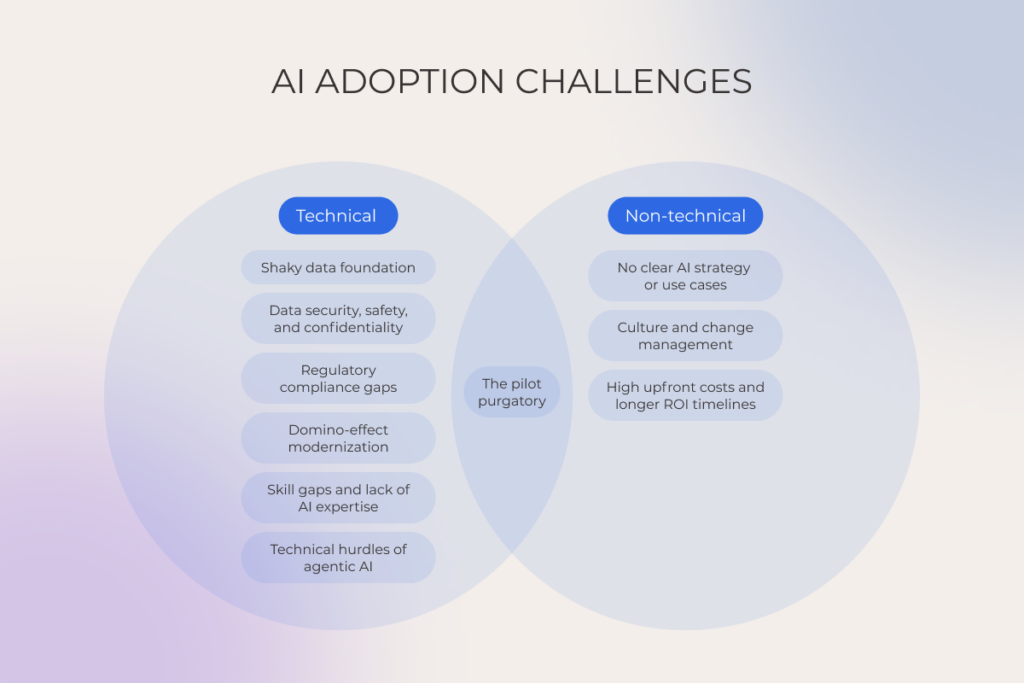
AI projects fail not because of technology alone. More often, failure results from a combination of factors, as operationalizing AI requires companies to rewire virtually every business aspect, from technical processes to organizational structures. Below, we’ve described the ten key barriers to AI adoption that stand between companies and reliable AI, based on our clients’ stories. 

AI adoption challenges

1. No clear AI strategy or use cases

There’s a lot of optics when it comes to agentization and AI-fication, which often makes businesses start from the technology rather than a business problem. For example, a common mistake we see many companies make is assigning AI agents to tasks that demand absolute accuracy or full compliance, such as financial transaction approvals or regulatory reporting. In this case, AI can create more work than it saves, as monitoring and troubleshooting may outweigh any efficiency gains. 

And even if the company has selected an appropriate use case, without a central strategy, the team risks accumulating a random mix of separate AI tools and apps with different data-processing layers that don’t talk to each other. The most successful AI deployments we’ve seen stem from a backward strategy: identifying the specific blocker first and then exploring whether AI can pick up the slack.

If you want to play it safe, AI implementation should be preceded by active exploratory and planning work, which can be held as part of an AI adoption workshop. Such an AI-specific activity will help you locate the right fit, outline the required tech environment, and do the math behind the project.

2. Shaky data foundation

Many organizations tend to over-index the model and skimp on preparing data for the AI leap. When the data is siloed, poor-quality, or scarce, all consequential decisions made by AI can be corrupted by hallucinations, biased outputs, and other systemic flaws that throw a shadow over the quality and reliability of smart solutions. In fact, that’s one of the most common enterprise AI adoption challenges we see across projects.

To avoid falling into the “garbage in, garbage out” trap, make sure your data checks the following boxes before becoming the fuel for AI development:

  • It’s easy to use: you have centralized data lakes and warehouses with ETL pipelines.
  • It’s easy to track: you can trace it through data lineage and see how it changes over time.
  • It’s easy to trust: the data is clean, accurate, and validated, with advanced data governance practices in place.

Gear up your data for the  AI reality

Talk to our AI team
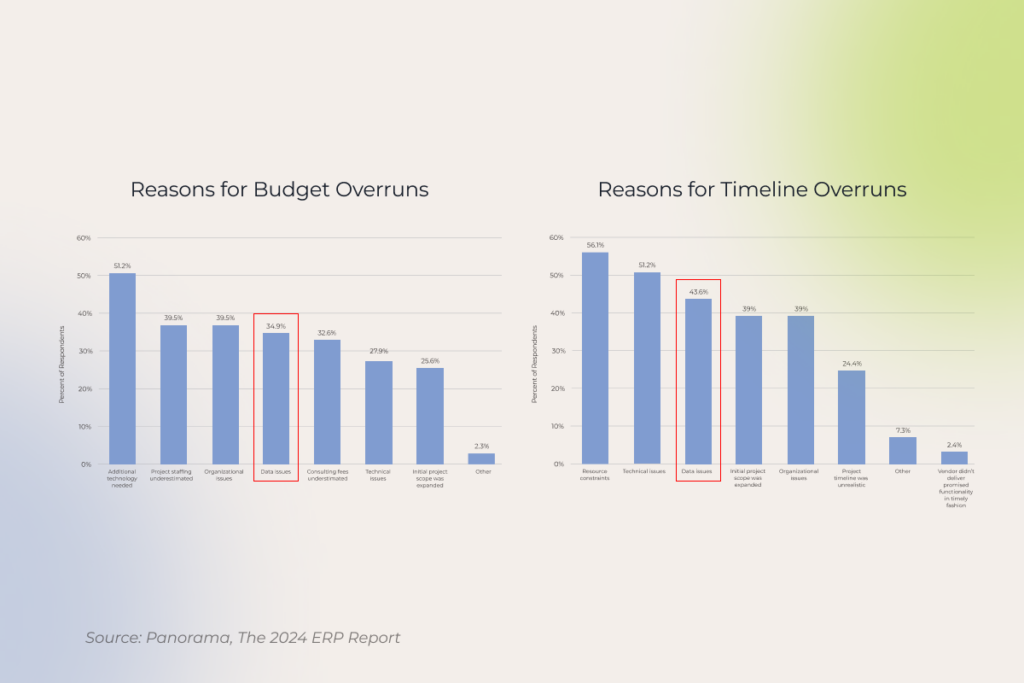
3. Culture and change management

Organizations pilot AI without breaking too much sweat, but when it comes to value generation and following scale-ups, the ambitions hit institutional resistance – an issue faced by 50% of orgs integrating the technology. The natural pushback comes from employee resistance, because up to 20% of workers are concerned that AI could replace their jobs. 

This resistance is also exacerbated by the lack of leadership guidance, training, upskilling, and overall trust between the leaders and the front line. 

We see many companies put change management at the bottom of their priorities. However, it’s arguably one of the main enablers of a successful AI makeover. It lays the ground for open communication, helping everyone, from leaders to front-line employees, understand the bigger ‘why’ behind the transformation.

– Chad West, Managing Director USA, Instinctools

Promoting the adoption of AI across the board requires companies to realize that this technology is an organizational redesign, not a plug-and-play tool. Ethical guardrails, skills-first mentality, data literacy, and the rewiring of middle management – there are fundamentals to address before the “value” can enter the picture.

4. The tightrope of data security, safety, and confidentiality 

The absence of a data governance layer is easily one of the top challenges of AI, causing most pilots to die at the CISO’s desk. Or worse, AI tools can unintentionally leak sensitive data and protected customer information through unsecured prompts, training sets, or third-party model providers.

At Instinctools, we address this risk head-on by developing comprehensive governance frameworks that include data stewardship, security, quality, and metadata. In practice, the majority of these points can be covered by moving the data to a compliant environment or an accredited container. But companies still need to sort out specific layers of defense, such as data classification policies and automated PII masking.

5. Regulatory compliance gaps

Another one of the most painful AI/ML adoption challenges is translating high-level ethical principles outlined by the EU AI Act, NIST AI RMF, ISO/IEC 42001, and other regulations into enforceable, audit-ready mandates. Companies often have a hard time bridging the gap between theory and regulatory reality and struggle to provide the traceability and accountability that regulators expect in AI tools.

While specific safety measures depend on the compliance environment the adopter operates in, an AI Bill of Materials (AIBOM) is almost a universal requisite for establishing the paper trail auditors require. This artifact dives into every component of an AI system, from the model to risk controls, and provides an always-on record of compliance.

6. Domino-effect modernization

Most organizations underestimate the complexity that comes with ushering AI technologies into a legacy tech estate. The brittle business logic of old systems, the data availability, and the stale code under legacy systems snowball into multiple AI implementation challenges that can only be cleared with modernizing the heritage layer. But modernization is expensive and, most importantly, dependent on revamping organizational habits and business functions.

As an AI and machine learning tech partner, we usually advocate for the incremental evolution approach. In this case, AI evolution starts with a single, beachhead modernization targeted at one critical legacy component, which then creates a cascade and can be reused for modernizing downstream use cases. 

For example, in one of our latest projects, our team started with automating a manual reporting process for which we’ve created a standardized, high-fidelity data pipeline from the legacy inventory management system (IMS). This led our client to have a reusable asset that was later leveraged to unlock three downstream AI initiatives in under six months. The investment was justified, the modernization was controlled, and the budget was saved.

7. Skill gaps and lack of AI expertise

One of the most common AI challenges is the lack of in-house expertise. Usually, it doesn’t mean that the organization lacks capable hands – rather, it’s missing the right combination of product, governance, engineering, and deployment skills to take an idea from concept to production.

The most effective, AI-ready companies think of the AI skills gap not as a hiring crisis, but as a strategic capability-building expertise. They don’t rush into hiring a team of PhDs, but they take their time to build out a cross-functional, AI-first operating model that thrives on a mix of external talent and intentional internal upskilling for a certain, real AI project. 

8. The pilot purgatory

According to McKinsey, almost two-thirds of organizations have not yet begun scaling AI across the enterprise. Companies can get stuck in pilots for various reasons, with many of them being connected to strategic, operational, and technical misalignment. Inaccessible data, disconnect with the actual way of working, and a lack of unified step-by-step instructions often cause promising pilots to fizzle out.

AI adoption challenges

To turn their pilots into scalable success stories, companies should plan their AI adoption in phases, with learning and improvement sessions in between. Also, integrating AI into the tools the team is already using will also make it way easier for employees to actually pick up the technology and not leave the pilot to collect dust. Sharing best practices through user-submitted use cases and prompt libraries will further give the team a more tangible understanding of AI’s potential and practicality.

9. High upfront costs and longer ROI timelines

One of the challenges of artificial intelligence that directly impacts the EBIDTA is the combination of hefty initial investment and delayed returns. While high AI costs are a predictable hurdle, the real challenge often lies in the hard-to-quantify ROI. Conventional metrics don’t work for the company’s AI journey, because they measure standalone IT projects with linear returns. AI gains, on the contrary, are iterative, evolving, and often indirect, such as freeing expert time, improving decision quality, or enabling new revenue streams.

The easiest way to bridge this gap is to tie the metrics to broader business outcomes, rather than just implementation targets. Also, companies should look at all angles of AI impact instead of keeping it down to financial outcomes only, as most AI-fit business challenges have 360° value outcomes – financial and non-financial, such as efficiency wins or improved employee experiences. 

10. Technical hurdles of agentic AI

As one of the fastest-moving AI trends in 2026, agentic AI promises autonomy at scale but introduces an entirely new class of technical and governance challenges. Organizations have to solve the foundational challenges of AI, such as bias, data quality, and others, while also grappling with a new layer of agent-specific hurdles when developing AI agents. 

Vendor lock-in

Companies often opt for out-of-the-box agent infrastructure, such as Microsoft Copilot and Salesforce Agentforce, because their data is already in a certain tech stack. However, this convenience is a high-risk trade-off in disguise, because the agent becomes vertically shackled to the vendor’s ecosystem, and there is no easy way to integrate it with the rest of the business IT estate. 

One of our clients encountered this exact integration issue when they were trying to connect Microsoft Copilot Studio with the rest of their stack. Although their core systems were Microsoft-native, critical sales workflows were scattered across HubSpot, Jira, Power BI, and other non-Microsoft tools. Copilot’s native connectors failed to set up real-time context between the systems, so the company reached out to our team for a migration to a vendor-agnostic agent infrastructure.

See how we solved the integration challenge >>

At Instinctools, we have GENiE – our own proprietary AI agent infrastructure with a multi-vendor orchestration layer that connects data across tools and legacy systems with production-grade connectors. It allows companies to swap out underlying LLMs and software providers without rebuilding the entire agent system.

Task adaptivity

The reliability of AI agents and intelligent chatbots for organizations is linked directly to the autonomy balance. Constraining agentic systems too tightly can result in the loss of reasoning power, while granting too much freedom and flexibility can introduce unpredictability tax and the compliance risks that come with it. 

Being able to switch the level of autonomy based on the task will help the company to strike the right balance between determinism and probabilism without jeopardizing the data. For example, GENiE’s orchestration layer dials up LLM reasoning and tones down the rules for creative tasks, while compliance tasks will need the inverse. This makes sure the agent is auditable and explainable when it needs to be and flexible enough when the task calls for it.

Poor context management

Insufficient, poor-quality, and exhaustive grounding behind the underlying LLM is also among the most common agentic AI challenges we see companies grapple with. When an agent is fed the miscellany of data, including irrelevant logs, redundant data, and outdated docs, its reasoning power actually withers, because the agent can’t see the needed instructions behind the data noise.

The best way to account for this AI challenge is to dedicate the time and effort to solid context engineering. Usually, AI developers make sure to integrate tiered agent memory management that allows the agent to keep in mind the most critical information, while less urgent data is filed away till it’s needed. Along with context engineering, our developers also apply the following techniques to prevent context rot:

  • Information density. We apply semantic compression and summarization to smarten up the LLM without taxing its attention.
  • Sliding context windows. These continuously refresh the agent’s focus, making sure that outdated or irrelevant information is decommissioned and the most current goals come to the fore. 
  • Validation mechanisms. Our developers also integrate sanity check layers to keep the context up-to-date and accurate.

Address technical barriers to AI adoption with Instinctools

While the tech sector initially led the charge, the width and breadth of AI adoption by industry have dramatically increased over the last few years. As new business cases pop up and deployments are piloted, expectations are rising just as fast. 

But running AI at scale, especially at enterprise scale, is a different challenge altogether. Integration with outdated systems, ethical considerations, security concerns, and the drought of AI talent throw wrenches into AI adoption and stop pilots in their tracks.

With Instinctools, organizations can move beyond pilots and operationalize AI without the usual hiccups. From building proprietary context to integrating AI into existing ecosystems, our team helps companies design, deploy, and scale AI solutions that never fail to deliver actual business value and lay the reusable foundation for long-term innovation.

Stuck in pilots and proofs of concept? Scale AI into production

Let’s talk

FAQ

What is the biggest challenge with AI?

At the moment, one of the biggest challenges with AI is turning pilots into enterprise-wide scale-ups. Organizations tend to bolt AI onto an old process without redesigning the workflow and operating models around it. As a result, the siloed AI underdelivers and becomes difficult to govern.

What is the biggest barrier to AI adoption?

The biggest barrier to AI adoption is the lack of a solid foundation. While the technology itself is fairly easy to design and implement, fragmented data, legacy infrastructure, and unclear ownership are a heavy lift to overcome for companies.

What are the factors affecting the adoption of AI?

AI projects often stutter due to data quality and accessibility issues, legacy systems, and a shortage of skills needed to build and govern AI solutions. Ethical considerations, regulatory guardrails, and security concerns also add to the challenges in AI, especially for enterprises. To take off, AI initiatives also require alignment at the C-level, clear ownership, and adequate change management to accommodate new ways of working.

Why is AI adoption slow?

As a technology, artificial intelligence and agentic AI have created a precedent. Unlike any other system, AI demands clarity from an organization in terms of decision-making, accountability, and AI governance before it can be trusted at scale. The technology forces companies to bridge the gaps that were historically overlooked, including data hygiene, outdated processes, and fragmented ownership.

Expert Guide on Implementing an AI-based Knowledge Management System

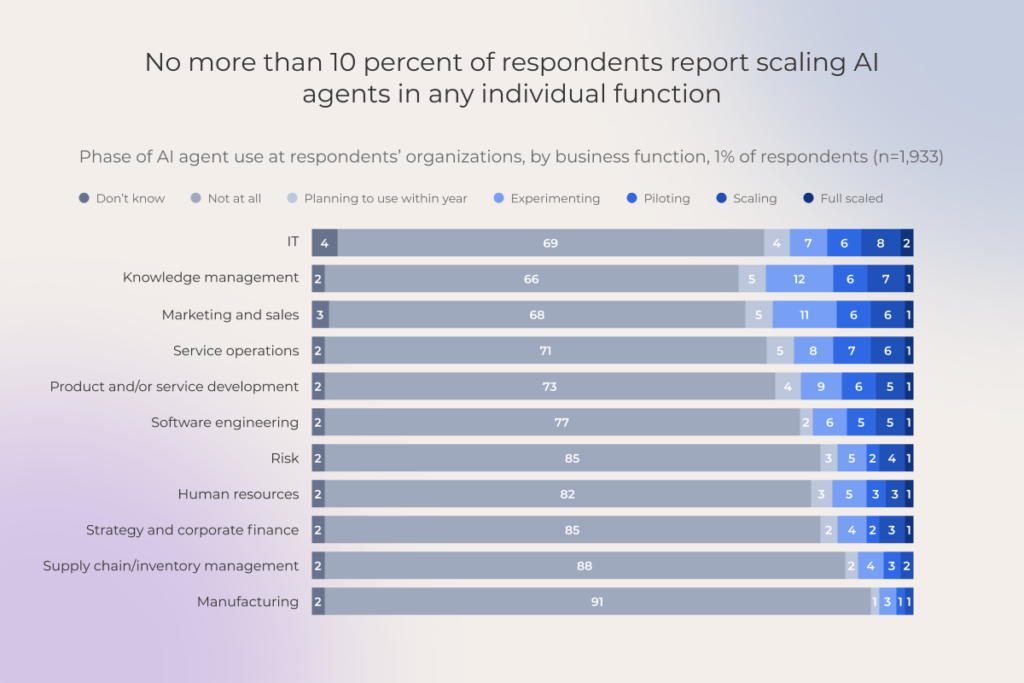
McKinsey’s recent survey shows that AI knowledge management (KM) is emerging as a key focus for implementation and scaling of intelligent agents. And it makes sense: somewhere between SharePoint and Teams, there’s a mountain of document wrangling, summarization, cleanup, and other tedious-yet-unavoidable routine tasks just waiting to be automated. AI is already capable enough to take them off everyone’s plate, giving employees hours back for higher-order work, so the business can actually move faster and more efficiently.

Think your company’s knowledge is a fertile ground for agentic AI perks? It probably is. This guide on implementing an AI-based knowledge management system will show you how to get started and make it work.

Key highlights

  • With knowledge management tools enhanced by AI capabilities, employees access hidden knowledge and get accurate answers instantly. Automating routine tasks in KM reduces expert workload and builds a clear competitive advantage.
  • Some of the key agentic automation areas of KM include intelligent content ingestion, semantic discovery, autonomous curation, and the deployment of multi-agent systems where specialized AI agents handle distinct sub-processes like compliance checks or real-time synthesis.
  • The success of AI and knowledge management depends on a crawl-walk-run approach: audit knowledge sprawl, build a single source of truth, choose fit-for-purpose technologies, and embed governance from day one.

What is AI-powered knowledge management?

AI in knowledge management enables a fundamentally different – compared to traditional knowledge management – level of navigating the vast amounts of information sprawled across a company.

By facilitating interaction through human language, AI helps capture knowledge intelligently, find relevant information fast, and extract key insights from the knowledge base. This draws on advances in:

  • generative AI and large language models that understand context,
  • natural language processing that parses human queries accurately,
  • machine learning that detects patterns across documents,
  • and agentic AI that can autonomously connect, update, and act on organizational knowledge across systems.

Speaking of the most common AI-powered knowledge management software in enterprises, it usually takes three forms:

  • AI agents embedded as add-ons in enterprise software that employees already use: CRMs, ERPs, or other systems,
  • Conversational AI chatbots integrated into collaboration tools like Slack or Teams, or websites to answer routine questions, guide workflows, and surface relevant documentation,
  • Centralized knowledge hubs or portals enhanced with AI-powered search and recommendation engines.

Agentic AI for knowledge management: key automation areas and use cases

While generative AI for knowledge management has served as a smarter way to find relevant search results, agentic AI turns it into something more ambitious: a system that can act on your behalf. Some KM operations practically beg for this kind of automation.

Content curation 

Manual knowledge assets curation burdens every employee’s move or decision with cognitive overhead from the outset. AI absorbs that load.

  • Automated knowledge capture from different kinds of unstructured data, such as meetings, resolved support tickets or internal Q&A chats, change logs in product/engineering systems, etc.
  • Automated content tagging and classification. NLP is used to read, understand, and automatically classify new and existing content, ensuring consistency.
  • Maintenance. AI identifies outdated, redundant, or missing content, flagging it for review or suggesting updates.

Intelligent search and information delivery

Not exactly breaking news – searching for information has changed a lot in the last couple of years. So why make your team members stumble through random AI chatbots, or worse, feeding them with your internal docs, when they could get what they want instantly, all within the boundaries of your knowledge ecosystem?

  • NLP-based semantic search moves beyond keywords to understand natural language queries, providing contextually relevant answers.
  • Summarization condenses long documents or multiple sources into quick summaries.
  • Personalized content delivery recommends relevant articles or snippets to users based on their role, behavior, and current context (e.g., during a support call).

Proactive support and self-service insights

Knowledge that once required digging through documents or asking the right person can now reach the people who need it, as soon as they need it.

  • Generative responses and smart suggestions. Through AI chatbots and virtual agents, organizations can provide 24/7 assistance to customers and answer their FAQs instantly, reducing support load.
  • Knowledge gap analysis. LLMs identify themes in queries that reveal missing or unclear content.
  • Trend and pattern discovery. AI algorithms analyze large datasets to surface hidden knowledge insights.

Audit your enterprise knowledge management for the highest-impact agentic automation use cases

Get expert guidance

Proven benefits of AI in knowledge management, backed by real-life examples

AI-powered knowledge management pulls multiple levers at once. What your team actually gains depends on the concrete use case, but these are some enterprise-wide wins that have already made a habit of appearing across organizations.

BenefitExample
Enhanced employee productivityAn Australian startup partnered with IBM to build an AI-driven enterprise KM platform aimed at content generation. After one year of internal use, their 5-person team plus an AI assistant (KIRA) accumulated ~2,000 articles (~500K words) inside their enterprise knowledge base. Usage stats are striking: on average each employee reads ~9.3 articles and writes ~0.9 articles per day, enabled by having every aspect of business documented. It’s been reported a 3.8x increase in employee productivity since deploying the platform.
Improved knowledge discovery and reuse The electric vehicle maker Rivian has Gemini integrated with Google Workspace, enabling employees to conduct instant research, master complex topics quickly, and accelerate skill-building.
Faster decision-makingThe use of NotebookLM by, again, Rivian, shortens decision loops. By reducing repetitive FAQs and quickly aggregating needed information, employees spend less time gathering facts. This means decisions – from technical troubleshooting to design planning – can be made faster because the underlying knowledge is immediately accessible.
Time and cost efficiencyHanding support ticket triage to a multi-agent AI system allowed a US online retailer to slash processing time by 4x and cut first-response times by 75%, all without adding extra customer support staff.
Faster onboarding and trainingA luxury fashion retailer, Tapestry, created an internal AI knowledge assistant based on AWS Bedrock/Titan models and Claude 3. The solution is now used by six teams and around 300 people, who can quickly access information through a single interface instead of hunting across multiple documents and portals. This effective knowledge management system reduces the load on subject matter experts by handling repetitive questions and empowers both new hires and employees switching teams to get up to speed independently.

Case in point: how we automated knowledge management with agentic AI for ourselves

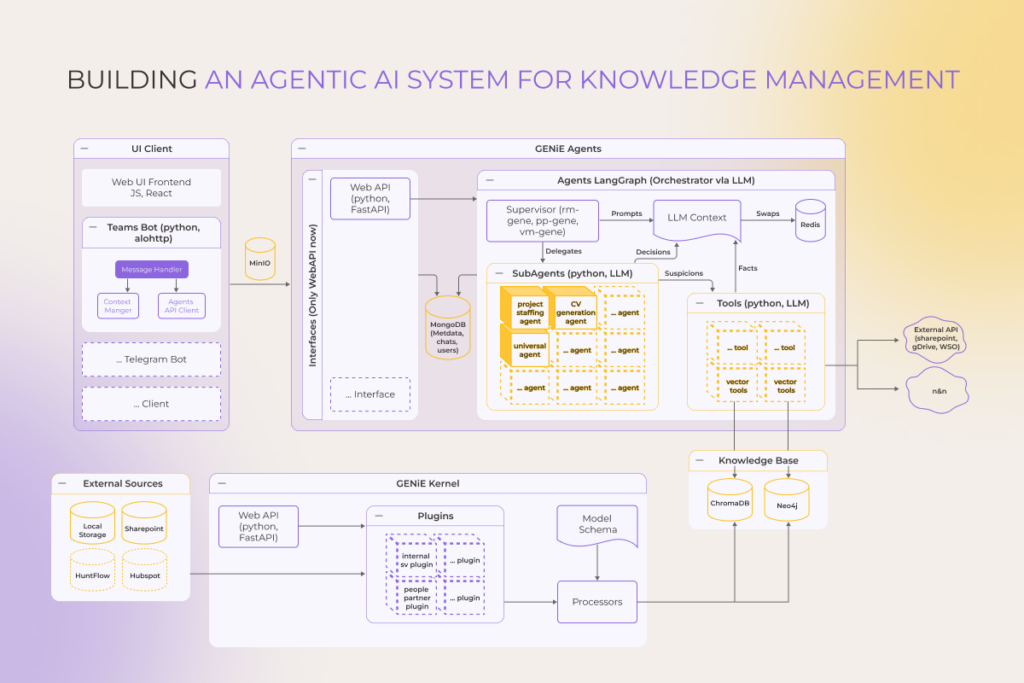
The appeal of automating knowledge-intensive work was too strong to ignore, so at *instinctools, we built a solution that dramatically simplifies one of the most tedious tasks in IT services and consulting – resource management.

Using the GENiE™ platform, our proprietary solution accelerator for building custom AI agents, we’ve developed a Resource Management chatbot, which is basically an AI-powered assistant integrated into Microsoft Teams, designed to automate and streamline resource management, staffing, and team coordination. It serves as a centralized, intelligent interface for tasks like finding available employees, parsing CVs, scheduling meetings, collecting feedback, and more, all through natural language chat interactions.

The platform consists of eight specialized agents, each handling distinct aspects of the resource management value chain:

  • Chat context agent enables our Resource Management platform to understand and retain conversation context, especially when files are shared, allowing it to answer questions based on uploaded documents.
  • Team composition agent helps generate CVs, match skills to roles, align CV formatting, parse job descriptions, and suggest team structures based on historical data.
  • Resource availability agent finds available employees by skills, time periods, or project needs using data from internal availability sheets (e.g., Google Sheets).
  • Meeting creation agent automates the scheduling of meetings by finding free time slots and creating calendar events in MS Teams.
  • History cleanup agent cleans chat history and resets conversation context when the bot is removed or re-added to a chat.
  • Feedback agent collects user feedback automatically and logs it into a structured file for developers and stakeholders.
  • Logging of failed requests agent logs errors, access issues, and out-of-scope requests for troubleshooting and improvement.
  • CV Parser Agent parses uploaded CVs into a standardized company format and allows queries based on CV content.
Building an agentic AI system for knowledge management

Need a similar solution?

Request a demo

How to automate enterprise knowledge management with AI 

The shortcut to disappointment is thinking of AI knowledge management projects as crafting a dumbed-down ChatGPT version with your logo slapped on it and deployed in your corporate IT ecosystem. Achieving a positive ROI, regardless of the use case you pursue, calls for a solution architected for your unique operational realities, grounded in your proprietary data, and implemented with expert oversight throughout.

Step 1. Assess the current state

Start with an audit. Is there already some level of knowledge management automation that AI can extend? Or are knowledge sharing practices undefined, with information scattered and processes improvised? If it’s the latter, take a closer look at where your knowledge assets live. Review collaboration tools, shared folders, and even the informal networks built around a few experienced employees. 

For our clients, this work usually unfolds over a two-day AI adoption workshop. Beforehand, participants fill out a short brief that gives us a quick snapshot of AI readiness across data, technology, and talent while highlighting the pressure points. During the live strategy workshop, either in-person or online, we identify knowledge managementareas where AI can truly drive impact, anchor them in concrete use cases, and outline a direction that reflects current constraints. From there, we work through technical feasibility and shape a roadmap with defined budgets, timelines, and validation steps.

– Chad West, Managing Director USA, *instinctools

Step 2. Prepare your data

This is the unglamorous, yet critical, foundation. Garbage in,gospel truth out is a fantasy. A rigorous data preparation process consists of collecting, labeling, cleaning, and, sometimes, augmenting your raw information. Our experience shows this step often consumes 70-80% of the AI-powered knowledge management automation effort but dictates 100% of the eventual output quality.

If your data already sits in one place – a data warehouse, a data lake, or, even, if you’ve taken it further with a modern data platform – you are definitely ahead of the game. However, just because your data is consolidated doesn’t mean it’s ready for AI. So don’t skip this step if you expect those much-coveted insights to be not just actionable but truly reliable.

Step 3. Choose the best-fit AI tech stack 

While the specific stack can vary depending on whether your solution is a set of lightweight, context-aware agents bolted onto existing tools or a centralized, standalone conversational application, the key technological pillars remain similar:

  • The foundational AI model (e.g., OpenAI’s GPT, Anthropic’s Claude, open-source Llama/Mistral) that powers reasoning and language understanding.
  • Orchestration framework, acting as an architectural layer (e.g., LangChain, LlamaIndex, Semantic Kernel) that manages workflows, tools, and multi-step interactions with the LLM.
  • Knowledge base and retrieval, representing where your company data lives, combined with a system to find it. This is typically a vector database (e.g., Pinecone, Weaviate) for semantic search paired with traditional storage.
  • Application integration layer, aka the interface users interact with (e.g., a web app, chatbot in Slack/Teams) and its backend infrastructure (e.g., FastAPI, cloud functions).

This stage is one of the most time-consuming and demanding, as it calls for deep AI expertise that must be continuously built up and kept current as new bells and whistles roll out. Businesses that do not focus on AI development and lack a strong bench of AI specialists are unlikely to pull this off on their own. 

To speed up the development and delivery of AI agents and get more out of them in practice, we’ve brought our hands-on experience and a solid, battle-tested methodology together in our GENiE™ solution accelerator. It sits on top of your existing software foundation, works with what you already have, and avoids locking you into a broad set of expensive add-ons.

Step 4. Train and govern your AI models 

The AI models you choose don’t magically know your business. They require guardrails before they touch your employees’ workflows and need to be trained on your operational nitty-gritty.

At this stage, you decide whether to go for model fine-tuning or rely on retrieval augmented generation (RAG). 

The choice is usually driven by cost and technical fit: fine-tuning makes sense when you have a stable, well-defined dataset and you need the model to behave in a very specific way, but it can be expensive and time-consuming because every update requires re-training and redeploying.

RAG, on the other hand, is often cheaper and faster to maintain because you can keep the model general and simply update the knowledge base as new information arrives, though it may require more engineering work around indexing, retrieval, and ensuring the system stays reliable when the source documents change.

Either way, the decision shapes how your AI interacts with users and how governance and monitoring are implemented downstream.

Next, set up governance. Define who owns the models and approves changes, and how updates get validated. Track confidence scores and error rates on critical knowledge tasks, and log outputs for auditing. Without this, even a technically capable model becomes a liability.

Step 5. Roll out, monitor, and support

Start small, with a pilot group that’s willing to poke holes in the system and say out loud when something feels off. Watch closely how comfortable people feel using it and whether everyday work actually speeds up or just shifts shape. Besides, track how often the AI confidently gets things wrong. Adjust the system according to early feedback and let it eventually earn its place. Then scale. And, never skimp on employee training. 

AI knowledge managementis as much a change in habits and trust as it is a technical rollout. You’re asking people to rethink how they move work forward. Build this new habit with engaging education formats like interactive workshops, hands-on simulation sandboxes, dedicated help desk channels for real-time support, etc.

– Chad West, Managing Director USA, *instinctools

Challenges of knowledge management automation with AI

Even the most carefully planned projects from the technical perspective can bump into either operational friction or the inherent constraints of underlying AI technologies. Yet, professional AI engineering and consulting teams keep building their chops to push right past them.

LLM hallucinations or inaccuracy

For all their brilliance, LLMs are masters at dressing up authoritative-sounding nonsense as facts, which is a headache for enterprise knowledge systems. Key engineering practices to combat this and polishing up model performance include:

  • implementing RAG architectures to ground outputs in verified sources,
  • establishing comprehensive guardrail and validation frameworks for output filtering,
  • maintaining continuous human-in-the-loop review processes,
  • and applying meticulous prompt engineering alongside fine-tuning on domain-specific, high-quality corpora.

Need for governance 

AI might surface a piece of information that is technically correct but is inappropriate for a specific user, a sensitive internal situation, or a regulated context. Well-planned governance to prevent this is built on practices such as:

  • model update management, prompt governance, and monitoring for unintended behavior,
  • training and awareness programs to ensure users understand responsible AI use rules,
  • role-based access control to limit who sees what, 
  • content classification to flag sensitive or confidential data, 
  • automated compliance checks to enforce regulations, 
  • AI outputs accuracy, relevance, and suitability checks and approvals (if needed),
  • bias checks and safeguards against discriminatory or harmful content,
  • and audit logs to track what was shared, when, and by whom.

Cost management

Workloads used to power up AI-powered KM systems can scale unpredictably, when underlying models and data retrieval workloads grow. Cloud compute, storage, and API token usage all contribute to variable costs that are difficult to forecast without controls.

Managing this process is possible with specialized tools such as AWS Auto Scaling for compute, Datadog or Prometheus for monitoring usage spikes, Kubernetes or Docker Swarm to orchestrate containerized workloads efficiently, and cost-alerting dashboards in platforms like Azure Cost Management or GCP’s Cloud Billing to maintain financial visibility and efficiency.

Change management 

If there’s one thing that can derail even a flawlessly automated knowledge management process, it’s resistance from the people who are supposed to use it. 

Automate enterprise knowledge management with agentic AI

AI changes the equation for how organizations capture, share, and apply what they know. Its payoffs show up in distinct, measurable ways: support tickets that deflate, projects that move without waiting for information, and decisions made with full context at hand. The journey towards implementing agentic, or any other kind of AI in your knowledge management strategy should start with a clear-eyed assessment of your company’s knowledge landscape. From there, it’s a matter of engineering the foundation, assembling the right digital team of AI agents, and guiding your human team to work alongside them. 

Transform knowledge management with agentic AI

Start now

FAQ

What is AI in knowledge management?

It’s the application of artificial intelligence, specifically machine learning, natural language processing, and agentic automation, to intelligently capture, organize, retrieve, and maintain an organization’s knowledge. Static document repositories serve as a basis for interactive and proactive AI-powered systems that understand and act on information.

What is the 30% rule in AI?

A pragmatic guideline, suggesting that to see a 30% improvement in a key metric (e.g., process speed, cost reduction), you typically need to automate about 70% of the process steps with high reliability. It underscores that partial automation can yield significant, but not infinite, returns.

What is the 10-20-70 rule for AI?

A framework for AI investment allocation: roughly 10% of effort/resources on the AI algorithms and models themselves, 20% on the technology and data infrastructure, and 70% on business process integration, change management, and fostering adoption among people. It highlights that the technical model is the smallest piece of the puzzle.

How to measure ROI of AI in knowledge management?

You can measure AI ROI in knowledge management by looking at time saved on searching for the information and support, improved productivity and customer satisfaction, fewer mistakes from outdated data, and lower costs from reduced manual work, all translated into financial value.

How to Build a Modern Data Platform? A Data Engineer’s Perspective for 2026

The surge of interest in artificial intelligence has elevated the importance of building the modern data platform. And here’s why.

As AI sets higher expectations for how businesses use their data, many are growing more uncertain about the strength of their data foundations. Companies still struggle with issues such as integration, security, and data quality and the pace of improvement has not matched the increasing demands of AI/ML initiatives.

Today, a striking 84% of global data and analytics executives agree their data strategies need a ground-up rethink before innovative AI-related undertakings and advanced analytics can live up to their promise. And the surest way towards this is building a modern data platform. In this article, our data experts explain how to build a data platform right.

Key highlights

  • Advanced data analytics and AI/ML initiatives can only succeed on a foundation of clean, well-organized data. A modern data platform, developed in line with a clear data platform strategy, delivers exactly that.
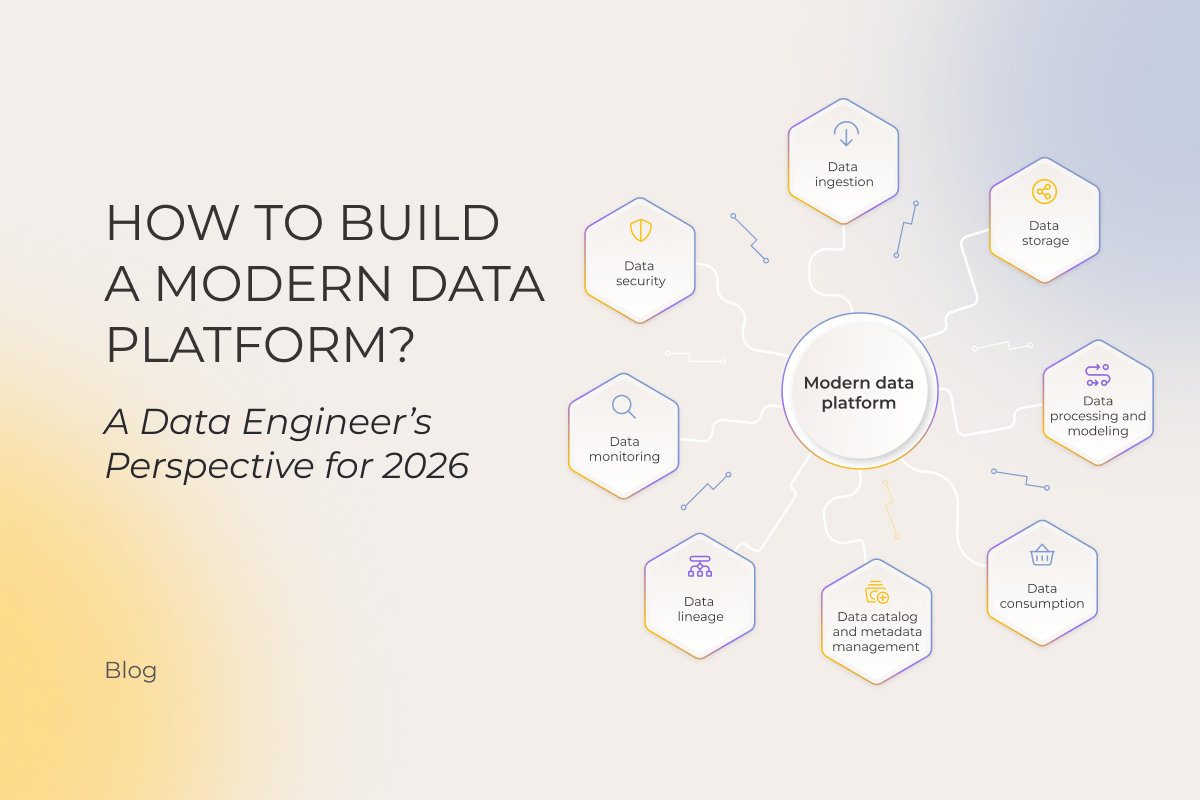
  • Core layers of a modern data platform architecture include data ingestion, data storage, data transformation, data processing, data consumption, and data governance.
  • Without strong governance, even the most elaborate data platforms risk inconsistencies, compliance issues, and limited trust in the insights derived.

What is a modern data platform?

A modern data platform (MDP) is a unified, enterprise-wide data ecosystem of tools that enables the collection, storage, transformation, and consumption of data under transparent governance. Its goal is to move beyond a set of loosely connected components and their chaotic usage toward a cohesive modern data infrastructure that oversees the full data lifecycle end to end. It can be reached either by a collection of best-of-breed, cloud-native tools for data tasks (such as dbt, Fivetran, etc.), commonly referred to as a modern data stack, or a more integrated and often self-service platform built around those modern data ecosystem components.

Why do businesses need a modern data platform?

In fact, 82% of companies are either planning or already implementing a data platform. There’s nothing new about the business goals they are trying to achieve with solutions like this. What is new is how effectively a modern data platform enables organizations to reach them, tipping the balance in its favor over legacy, fragmented, and semi-manual data management environments that offer nothing but slow, brittle, expensive, and hard-to-scale band-aids.

modern data platform

Building a modern data platform dramatically shortens time-to-value and boosts efficiency across the sought-after AI/ML initiativesand augmented analyticsproducing real-time, actionable insights. Other benefits of having well-organized data platform infrastructure include:

  • Lower costs. Even with a solid upfront investment, building a big data platform saves money in the long run by reducing spend on data team headcount needed to manage scattered data sources, as well as on licensing fees for disparate tools.
  • Saving engineering time. To create a new pipeline, there’s no need for intensive coding work as templates and reusable components can be replicated across different use cases. 
  • Democratized usage. Beyond data analysts, the platform’s user-friendly ecosystem makes trusted and governed data accessible to a broader team of business users across the organization.
  • Frictionless data delivery. Data doesn’t get stuck in isolated silos or require complex handoffs between tools. Besides, with standardized schema and governance, different teams can access and interpret the same data without extra cleaning or mapping.

However, a modern data analytics platform is only as effective as the vision behind it. Without a clear data platform strategy, businesses end up duplicating efforts across teams, fragmenting their data ecosystem, and slowing every transformation initiative, whether in business intelligence, advanced analytics, or AI.

When is it better to opt for custom data platform development? Isn’t a ready-made enterprise data platform enough?

Off-the-shelf platforms like Microsoft Fabric or Google BigQuery are fine for fast launch at relatively lower upfront costs or standard needs.

But if you want a data foundation that’s built for your unique playbook, one that scales exactly when and how your business scales, delivers long-term savings, and eventually turns into a genuine competitive edge, you need custom data platform development, also called data platform engineering or data platforming.

Besides, ready-made solutions often come packed with features you don’t need. Or, worse, data platform features that aren’t designed for your actual needs, leaving you to hack your way around their limitations. Those workarounds eat up time and budgets.

With custom data platforming, on the other hand, you:

  • get exactly what you need to achieve your goals
  • gain full control over your data platform architecture and your usage model, which is especially crucial when your data becomes a strategic digital asset
  • have the freedom to rapidly test and deploy advanced AI functionalities, like autonomous AI agents or semantic understanding before they are available in commercial platforms. Plus, these can be tailored exactly to your needs, something ready-made solutions allow only in a very limited way.

How to build core data platform layers?

As a rule, a modern data platform architecture is built on four core layers, including ingestion, storage, processing, and consumption. Each is made up of its own set of tools and technologies. Collectively, components of a modern data ecosystem aim for one simple goal: getting the right data, to the right people, at the right time, in the right shape.

Modern data platform architecture

Data ingestion

Data ingestion is the first step in extracting value from the massive volumes of structured and unstructured data businesses amass from corporate systems like ERP or CRM, financial platforms, third-party providers, social media, and others. 

When data ingestion is well-planned, all relevant data sources are identified and properly integrated, and data flowing into the modern data platform is validated and formatted for reliable storage and efficient downstream processing. Engineers have to wrestle chaos into order, carefully deciding how to handle formats, missing or duplicated data, and temporal alignment, since errors here cascade into analytics, reporting, or AI models, depending on the business use case for the data.

Today, this is made possible by tools like Fivetran, Apache Kafka, and CDC technologies such as Debezium.

Data storage

The choice of a data storage system depends on an organization’s requirements and a variety of data users, and performance expectations. Modern storage architectures can be deployed in both cloud and on-premises environments while leveraging high-resilience databases for modern data platforms to support AI workloads and large-scale data processing. When building a data analytics platform, the following storage options are commonly considered:

  • Data warehouses. A data warehouse is the right choice when the required datasets are well defined, their structure is known, and data-reliant initiatives are already clear.
  • Data lakes. When organizations expect analysis patterns to evolve and need to work across heterogeneous data, a data lake provides the necessary room to explore.
  • Data lakehouses. Pioneered by Databricks, the lakehouse concept makes it possible to use data management features inherent in data warehousing on the raw data stored in a low-cost data lake owing to its metadata layer.

Data processing and modeling

Stored data only becomes useful once it’s been properly transformed. The data processing layer is where cleansing, combining, and structuring data happens to ensure its quality, consistency, and readiness for planned initiatives. Depending on your needs, we integrate different data platform tools in this stage. Just a few examples are:

  • For high-speed, large-scale batch data processing, we suggest using Apache Spark and its integrated modules for SQL, streaming, and machine learning.
  • When a fully managed, serverless ETL service is needed, AWS Glue automatically discovers, prepares, and combines data for analysis.
  • Apache Kafka (with Kafka Streams) powers real-time streaming applications that demand high scalability and fault tolerance.
  • To perform stateful, low-latency computations on unbounded data streams, Apache Flink provides exactly-once processing guarantees.
  • dbt transforms data directly within the warehouse using SQL-centric modeling and documentation.
  • Complex data pipelines are programmatically authored, scheduled, and monitored as directed acyclic graphs (DAGs) with Apache Airflow.

Data consumption

This is where data becomes actionable. From the powerful outputs of machine learning models to sleek, interactive dashboards, all the data platform features you’ve wanted from your development initiative come served on a silver platter.

  • Business intelligence. Curated datasets from the storage system are consumed via drag-and-drop interfaces or direct SQL, producing BI dashboards and reports that inform daily operational decisions and strategic reviews.
  • Machine learning and data science. Here, data fuels predictive engines. Data scientists access organized feature stores and massive datasets to train models, running iterative experiments to deploy services that can, for example, forecast inventory demand or score transaction risk in real time. The toolkit includes solutions like Databricks ML, SageMaker, or Vertex AI.
  • Data as a product. Cleaned, aggregated data can be exposed to other internal systems or customer-facing applications through secure, documented APIs, such as a REST endpoint or an internal GraphQL API.

Let’s stack up your data platform, brick by brick

Contact us

Building trust in your data pipeline through effective governance

Data platform implementation isn’t complete without making the whole system observable, secure, and trustworthy, while keeping all the workflows traceable.

The bitter truth is, no single platform covers all aspects of data governance. To serve the goal, it must be composed of multiple, well-chosen data platform tools. This is how modern data platforms work.

Data catalog and metadata management

Effective data governance is impossible without knowing where the data is and what it means. Think of catalog and metadata management as the map, legend, and compass for your data ecosystem. Metadata tools like DataHub or Unity Catalog act as the Google for your data, indexing schemas, owners, descriptions, and usage stats, while semantic layers (dbt Docs, Cube, Looker semantic model) and tagging engines (Atlas-based catalogs, Purview classifiers) add shared meaning and classify sensitive data.

Data lineage

Data lineage shows how data flows from raw ingestion to consumption. It answers practical governance questions:

  • Where did this data come from?
  • What transformations were applied?
  • What depends on this table or column?

Lineage is captured via tools like OpenLineage, dbt, Spark, Airflow, and Unity Catalog, and visualized in catalogs such as DataHub. This traceability enables impact analysis, root-cause debugging, and safe change management, and is critical for regulatory compliance.

Data monitoring

When data arrives late, duplicates appear, or the data isn’t structured the way the pipeline requires, observability tools surface the issue before users notice.

  • With monitoring and alerting tools (Monte Carlo, Bigeye), data quality becomes measurable and enforceable, answering the question “can we trust this data?”.
  • Freshness, volume, and schema-drift checks (Great Expectations, Soda) reveal when data stops behaving as expected.
  • To keep the data platform fast, reliable, and cost-efficient as usage scales, query performance monitoring tools like Snowflake Query History, or Databricks metrics are added.

That’s how you configure data quality management across your pipelines.

Data security

No business data platform is complete without security built in. This is where you ensure the right people access the right data, all the needed policies are enforced automatically, and sensitive information is protected, while multiple teams can work safely and compliantly. Your security stack should enforce a set of practices, including:

  • Policy enforcement. Define and automate policies that govern who can access data and under what conditions. Policy engines like Apache Ranger, AWS Lake Formation, or Azure Purview can be helpful.
  • Access control management. Apply role-based (RBAC) or attribute-based (ABAC) models to strictly govern user permissions.
  • Data protection. Mask or tokenize sensitive information to minimize exposure while enabling safe data use for teams.
  • Schema integrity control. Apply rules and constraints at the data schema level to prevent unauthorized or invalid data modifications. Thinks Delta Lake constraints or BigQuery policies.

Here’s how to make a data platform matter for the long haul: best practices

For every modern cloud data platform implementation, going live is only the starting line. The expected system’s operation and performance depend on a set of carefully orchestrated follow-up measures. These data platform best practices come from real-world implementations across industries, including high-volume analytics, ML pipelines, and modern cloud-native architectures designed to survive the next AI wave.

  • Run a controlled pilot. Select a single use case or a defined user group for the initial rollout. The objective is to test your core assumptions about usability and utility in a real, but contained, environment. Gather specific feedback on bottlenecks and areas of confusion, then address them.
  • Educate your employees. Embed learning into their workflow rather than forcing formal training. Provide context-sensitive guides, templates, and self-serve notebooks so your team can explore data safely. Pair this with hands-on workshops tied to real projects and create a feedback loop where early adopters mentor others, gradually making usage the default behavior instead of an optional skill.
  • Monitor impact. You need a balanced approach. Tie platform metrics to business outcomes: track adoption, query performance, data freshness, and error rates alongside revenue, product usage, or operational efficiency gains.
  • Scale smartly. Treat your modern data platform as a living system. Adapt it as your business needs evolve and as new data technologies emerge.

Design a data platform that’s tailored to your current data landscape and future innovations

Contact us

Before jumping into building a data platform, get clear on what you really need

It’s always better to step back and define exactly what your use case requires because the wrong architecture or technology choice can lock you into inefficiencies for years. 

Different business needs require fundamentally different solutions. For instance, if your goal is to build real-time recommendation engines, the platform must handle streaming data and low-latency inference, whereas predictive analytics on historical sales data demands batch processing and scalable storage for structured datasets. Each of these needs dictates different architecture choices, and your data platform strategy overall, so defining them early on ensures the platform actually supports your goals and prevents costly redesigns.

At Instinctools, we conduct a discovery phase to reveal the precise requirements upfront and make sure you commit to the right solution, one that delivers today and tomorrow, without resorting to retrofits or overcomplication.

– Ivan Dubouski, AI Lead Engineer, Instinctools

During discovery sessions dedicated to data platform design for our clients, we usually look at a few core things:

  • Defining business objectives and concrete use cases
  • Auditing the state of existing data pipelines
  • Tying goals to success criteria 
  • Validating technology fit for data types, scale, and workloads
  • Mapping governance, security, and regulatory compliance requirements
  • Assessing organizational capabilities, skills, and data maturity

Invest in the data engine that earns its keep

Book a call

What makes a good (and AI-ready) data platform

Sustainable, scalable, AI-optimized architecture of a modern data platform is formed thanks to a set of guiding principles:

  • Unified access. Providing a single, consistent access layer for raw data, derived data, and AI services to reduce fragmentation and operational friction.
  • Semantic context. Embedding business meaning and relationships into data through a rich semantic layer (often powered by knowledge graphs) to make data understandable and actionable.
  • Multimodal by default. Supporting all data types – structured data, text, images, video, audio, and their AI-native derivatives (e.g., embeddings) – as integral components of the platform.
  • Productized data as a foundation. Treating data as reusable, well-documented products with rich metadata to accelerate AI development and enable scalable reuse.
  • Continuous adaptation. Refining data and data products based on system feedback and changing needs, enabling ongoing improvement and new data derivations.
  • Governed and trusted by design. Ensuring all data is secure, compliant, explainable, and validated to build lasting trust and reliability.

How AI gives a nudge to modern data platform development

Rather than acting solely as a consumer of data, AI can also serve as an enabler of more mature data platform design and management practices. It helps establish and maintain semantic consistency, governance controls, and trust across use cases through:

  • Reducing duplicate definitions and improving consistency by automatically identifying similar business terms, recommending standard definitions, and suggesting the right owners for key data assets.
  • Making data classification more accurate and maintainable by combining existing classifications with context from related data, lineage, and past decisions.
  • Assessing the impact of changes before they happen by predicting which reports, applications, or teams may be affected by schema or pipeline updates, and identifying the most likely source of issues.
  • Speeding up data quality issue resolution by connecting anomalies to business impact, responsible teams, and downstream dependencies.
  • Strengthening data governance by detecting where sensitive data restrictions should be applied, flagging uncertain classifications, and highlighting areas that need review.

Building an analytics platform is faster and more reliable than ever with AI-powered development practices

Contact our experts

Start your data platform off on the right foot 

What sets a modern data platform apart from traditional data architectures is that its design is dictated by each specific business task at hand. If your AI or advanced analytics initiatives need a strong, custom-built data foundation to take flight, make sure it’s there for you, crafted from the best technologies and tools the market offers and pieced together by a reliable engineering partner.

From data platform strategy and first production deployments to data platform transformation initiatives, our data engineering services company has guided companies through every stage of modern data platform implementation.

FAQ

What is the modern data platform?

A modern data platform is an integrated set of tools and technologies that supports an enterprise’s data across its entire lifecycle.

What is data platform engineering?

Data platform engineering involves designing, building, and maintaining the infrastructure, pipelines, and tools that enable organizations to collect, store, process, and consume data at scale. It combines software engineering principles with data management expertise to create reliable, scalable data systems.

What does a modern data platform look like?

Often a cloud-native, serverless platform that ingests, stores, transforms and serves data on demand. It typically follows a lakehouse architecture, combining the structured performance of a data warehouse with the flexible storage of a data lake. It also features a centralized governance layer, and self-service access points for data scientists and business users.

What is an example of a data platform?

A good modern data platform example is Microsoft Azure Data Platform, which unifies data ingestion (Azure Data Factory, Event Hubs), data storage (Azure Data Lake, Azure SQL), data processing (Azure Databricks, Synapse Analytics), data governance (Microsoft Purview), data analytics (Power BI) and AI/ML (Azure Machine Learning). Other examples include Google Cloud data platform and AWS data platform.

What are the major data platforms?

The market is dominated by Snowflake, Databricks, and the native stacks from “Big Three” cloud providers: Google BigQuery, Amazon Redshift, and Microsoft Azure Synapse/Fabric. Each offers integrated tools for data engineering, warehousing, and machine learning.

What are the layers of a modern data platform architecture?

The architecture rests on five pillars: ingestion (ELT tools like Fivetran), storage (data lakes / lakehouses / data warehouses), processing (transformation and modeling tools like dbt), consumption (business intelligence tools, AI/ML platforms, APIs), and governance (observability, security, lineage, and cataloging).

How do modern data platforms work?

Modern data platforms combine ingestion, storage, processing, and consumption layers into a unified system. Data flows from operational sources through pipelines into storage (data lakehouse, warehouse), gets transformed by processing engines, then serves analytics, BI tools, and AI/ML workloads. Governance and metadata management run across all layers.

How long does it take to build a modern data platform?

Building a basic modern data platform takes 3-6 months for an MVP and 12-18 months for full enterprise deployment with governance, AI-readiness, and multiple consumption paths. Timeline depends on team size, complexity of data sources, and whether you use ready-made components or go fully custom.

How to modernize your data platform?

Data platform modernization starts with assessing the specific parts of your data stack that create bottlenecks, risks, or unnecessary costs. Every environment is different, so priorities vary. The right approach may involve upgrading tools, redesigning pipelines, improving data architecture, or replacing legacy components to match your business and technology goals.

AI Trends 2026: Where and How to Attain Enterprise Impact in the AI Post-Hype Era

After several years of runaway hype, a fair dose of AI disillusionment has set in. Businesses are recalibrating AI’s role in terms of what it can realistically do and how to leverage it for measurable results.

Which industries are seeing the greatest impact? What methods are proving most effective? And which tools are quietly powering this transformation behind the scenes? Our exploration of these questions has led to a clear set of AI and machine learning trends​ that define the practical boundaries of today’s technology and will shape the path forward in the coming years. 

In this article, we’ve handpicked the latest and most impactful trends of AI technology. Instead of trying to cover every innovation out there, we’re zeroing in on the technologies that matter most for medium and large organizations that have moved past the AI testing phase.

The emerging trends we’re highlighting are based on a survey of experts from our AI Center of Excellence, along with valuable input from leading consulting firms like Deloitte, McKinsey, BCG, S&P, and KPMG.

Quick recap: 2023-2025 breakthroughs leading into 2026

The last few years have been filled with genuine “wow” moments. All of them together have calibrated business expectations towards AI results.

  • The foundation-model shifts

When OpenAI released ChatGPT in late 2022, it shifted the trajectory of the entire AI industry, and, in many ways, global economies. Throughout 2023, a wave of next-gen generative models from multiple labs followed, grabbing business attention. Besides, the first attempts to put guardrails around AI emerged.

  • Multimodal capabilities rise 

Alongside text-only models, multimodal AI made strides in 2024. With LLMs increasingly capable of jointly processing text, images, video, and audio, a larger range of applications and more complex use cases started to appear in enterprises across industries.

  • Agentic AI and its enterprise adoption

Organizations began deploying virtual AI agents to automate processes traditionally handled by human workers, to let the latter focus on higher-level tasks. Over time, it became clear that for complex workflows, coordinated networks of agents deliver greater precision, driving the shift toward multi-agent systems (MAS). Although enterprises are all in on the potential of MAS, foundational constraints in legacy systems and data architectures, as well as governance hurdles stand in the way of full-scale adoption.

Trend 1. Enterprises having hard times choosing from a myriad of AI models

If anything has been certain about AI so far, it’s that as soon as one vendor upgrades, others are hot on their heels.

For example, Claude Opus 4.5 by Anthropic has impressed many technology leaders with a step change in AI-assisted coding and long-horizon reasoning. Against the backdrop of increasingly capable models like Opus, Claude Sonnet, and Google’s Gemini 3, OpenAI went into code-red mode and pushed forward with ChatGPT 5.2, its “best model yet” (as of December 2025), promising notable progress in general intelligence and higher tool-calling performance. All of this happened in just a few weeks, leaving little time for anyone to catch their breath.

With no shortage of top-tier generative AI models to choose from, it might seem that enterprises can simply pick any one and hit the gas. But in practice, the flood of new releases tends to blur the decision rather than sharpen it. Public benchmarks, meant to guide those choices, rarely help. High scores look great on paper, but in practice? Not so meaningful. 

Before building the agentic pipeline for a global insurance aggregator, our AI team ran extensive tests across multiple large language models. Those were executed using reverse-engineered examples from existing API adapters to see which model would truly meet the client’s requirements. Out of GPT, Gemini, Grok, and Anthropic’s Opus and Sonnet, we found Claude Opus 4.1 to be the most reliable and production-ready, especially when paired with structured prompts and step-by-step checkpoints.

– Pavel Klapatsiuk, AI Lead Engineer, *instinctools

Trend 2. Ever-evolving AI capabilities are fanning the flames of AI obsession

Amid the decision paralysis that seems to grip so many enterprises, there’s also a certain awe surrounding what foundation models can now do today. The fascination is fueled by recent breakthroughs in multimodal capabilities. 2025 wraps up as a year where a significant shift occurred in how LLMs can perceive, reason over, and act on information across text, images, audio, and video. 

The release of Sora 2 at the end of September was the ‘GPT-3.5 moment’ for video generation. Likewise, built on the Gemini 3 Pro system, Nano Banana Pro is unnervingly excellent at image generation, bringing it to an entirely new, somewhat scary, level. And now OpenAI has caught up with its latest release, ChatGPT Images 1.5. The pace of progress in multimodal AI isn’t slowing anytime soon.

– Ivan Dubouski, AI Lead Engineer, *instinctools

However, the picture is not all rosy. You’ve probably heard of a huge backlash against AI‑generated ads. Take the recent McDonald’s case, which pulled a “creepy,” AI‑produced Christmas commercial after widespread viewer criticism. Similar consumer pushback affected Coca‑Cola and Valentino campaigns with AI-generated content. But despite these viral incidents, the bottom line for business is that companies are rapidly integrating multimodal AI into workflows and products. According to Gartner, trends in enterprise software point toward 80% of applications being multimodal by 2030.

Trend 3. AI agents proving their value across business functions

Agent-first workflows redesign and multi-agent systems are grabbing headlines as major agentic AI trends 2025. Down on the enterprise floor, the picture is less flashy: while 62% of organizations surveyed by McKinsey are experimenting with AI agents, no more than 10% report scaling them.

The slow pace of adoption tells you a lot about the challenge: it’s one thing to have a capable agent and quite another to plug it into decades-old enterprise infrastructure. Legacy systems create choke points that stop agents from functioning as they’re intended.

Similarly, the architecture of many organizations’ data repositories isn’t set up to let AI agents consume the data smoothly. Deloitte’s 2025 survey shows just how common this is: nearly half of companies say searchable data is a sticking point, and 47% hit walls when trying to reuse it for agentic automation… Which is yet another signal that careful data preparation is non-negotiable.

Gartner predicts that over 40% of agentic AI projects will be canceled by the end of 2027, due to escalating costs, unclear business value, or inadequate risk controls.

Even so, enterprises don’t appear likely to curtail their efforts. Over half of executives now rank agentic AI as their top AI investment priority for 2026. Once adoption barriers are knocked and initiatives are executed thoughtfully, agentic AI projects can move far beyond pilots with blurry potential. 

Using GENiE, our proprietary agentic solution accelerator, to build an autonomous AI worker, an Australian consulting firm processed 20% more leads, boosted upselling and cross-selling by 19%, and cut cost per lead by 15%.

– Vitaly Dulov, AI Solutions Lead, *instinctools

Deloitte predicts that if enterprises orchestrate agents better and thoughtfully address the adoption challenges and risks, the autonomous AI agent market could reach as high as $45 billion by 2030. 

Trend 4. Agentic software engineering marks the beginning of the end for the traditional SDLC

Who’s even coding in late 2025? Jokes aside, recent AI trends in software engineering have really pushed developers out of the trenches of hand-written boilerplate and onto the high ground of system design and careful governance of multi-agent systems.

Truth is, the SDLC isn’t what it used to be. Changes started from AI tools being seamlessly integrated into more and more of its stages. 

The way our dev team’s toolkit looks now shaves serious time off our clients’ projects. With AI-driven prototyping, we validated a business idea in just four days for a French startup, cutting demo costs by 60%. That’s the power of the right setup and the right tricks.

– Ivan Dubouski, AI Lead Engineer, *instinctools

Then, vibe coding took both business and engineering communities by storm. To cut through its chaos, spec-driven development (SDD) emerged as an approach to responsible AI development. Here, specifications serve as a single source of truth guiding what’s being built, boundaries, and how it’s all verified. With SDD in place, forward-thinking teams are finding power in agent swarms – fleets of specialized agents tackling complex engineering problems through decentralized, collaborative effort under human oversight. 

No wonder companies across industries are itching to integrate this into their development workflows to achieve more with less. But as with all innovations, the hard truth is that results come only when teams understand the craft. In inexperienced hands, most projects almost never leave the prototype land.

Our high-end AI practitioners at *instinctools has been doing what is essentially agentic programming since 2024. We’ve set up swarms of agents to back the SDLC, keeping an eye on every move they make without human intervention. Governance is built in. Everything AI does is reviewable, reversible, and compliant from the start.

– Pavel Klapatsiuk, AI Lead Engineer, *instinctools

So, the software development future is being written right before our eyes. Your edge in it depends on how fast you can adapt to new ways of building. The easiest way to get there is by teaming up with AI engineers, who are blazing the trail every day on real projects.

Get professional guidance on operationalizing vibe coding and other cutting-edge engineering practices

Talk to our experts

Trend 5. AI awakening a once-stagnant robotics industry

Thanks to advances in multimodal foundation models and cutting-edge chips, robots are now able to perceive, learn, and operate autonomously in complex environments. Adaptable general-purpose humanoid robots, autonomous vehicles, industrial robots, and drones are coming to life from science fiction books and movies.

  • Waymo continues its rollout of robotaxis.
  • Figure 02 robots have contributed to the production of 30000+ BMW X3 cars.
  • XPeng’s humanoid robot IRON went viral after the company literally cut it open on stage to prove it wasn’t human.
  • R1 from China-based Unitree Robotics, an ultra-agile humanoid robot, caters to researchers, educators, and software developers testing AI and robotics projects.
  • Tesla is preparing to unveil the Optimus Gen 3 as a production-intent prototype in Q1 2026. 

In fact, humanoid robots are expected to enter the mainstream in 2026, thanks in large part to Nvidia, which made several significant breakthroughs in the field this year, from rolling out the Jetson Thor platform to expanding the Omniverse platform for industrial AI simulation.

Looking ahead, the next wave of robotics may bring revolutionary developments like quantum robotics and bio-hybrid robots.

Hyper-digitized, data-packed finance, healthcare, automotive, energy, and consulting are at the frontier of applied AI in 2025. Here’s a peek at AI-powered, intelligent systems already being applied across those industries.

Healthcare

The Future Health Index 2025 survey commissioned by Philips reports that 62% of healthcare professionals associate AI adoption with gains in efficiency, diagnostic accuracy, readmission reduction, and overall patient outcomes. 

  • Leading medical systems, including Mayo Clinic, Northwell Health, Johns Hopkins Medicine, and UNC Health, are scaling the Abridge ambient AI platform to convert patient-clinician conversations into structured clinical notes embedded directly in the EHR.
  • Heavy use of conversational AI is seen across the industry through countless use cases, from appointment scheduling and remote patient monitoring to medication management.
  • Hospitals and imaging centers globally deploy centralized AI platforms to orchestrate and govern multiple imaging algorithms across CT, MRI, X-ray, and ultrasound.
  • Health systems scale AI-driven predictive analytics to unify clinical, claims, and operational data for better population health management, risk prediction, and operational efficiency.
  • Pharmaceutical companies apply AI to whole-genome cancer analysis to identify personalized treatment targets and accelerate drug discovery pipelines.
  • Gen AI tools significantly shorten R&D timelines, enabling faster hypothesis testing, trial design, and molecule optimization.

Automotive and transportation

Leading automakers are keeping pace with AI adoption to drive business growth. According to Volkswagen Group, human-AI collaboration established inside the corporation aids in the development of more competitive vehicles, enhances customer service, and improves production efficiency through better use of energy and materials, lowering costs and carbon emissions. Here are  other AI trends in the automotive industry:

  • Automakers are using digital twins to mirror vehicles and production systems in software so they can design, test, and optimize before anything gets built.
  • Suppliers like ZF have rolled out AI‑based solutions such as TempAI, which uses machine learning to model internal temperatures in electric motors more precisely than conventional methods. 
  • Thanks to hardware advances and lightweight models that enable low-latency inference directly in the vehicle, edge AI is gaining ground, reshaping the market for automotive semiconductors. The latter power infotainment and vehicle comfort systems, end-to-end ADAS systems, and battery electric vehicles (BEVs).

Consulting

Business models are becoming leaner, with smaller, more focused teams. Generative AI tools, predictive algorithms, and synthetic research platforms now handle the tedious research, modeling, and analysis tasks that once took consultants weeks to complete. Initially, human workers were ambivalent about AI, but consulting firms report that it has eventually freed up time for higher-value work. Large-scale partnerships with multiple AI vendors support this shift:

  • Deloitte is going to roll out Anthropic’s Claude to its 470,000 global employees. Companies will co-create compliance products and features for regulated industries including financial services, healthcare, and public services.
  • Deloitte also plans to create different AI agent “personas” to represent the different departments within the company, including accountants and software developers, according to reporting from CNBC. 
  • KPMG adopted the Microsoft AI stack to integrate AI into daily workflows and enable enterprise-wide agent development.
  • Almost 90% of the BCG’s employees use GENE, a GPT-4o-powered chatbot, and about half use it daily. 

Finance and insurance

Faster underwriting and claims processing. Fraud detection and risk modeling. Improving customer service and engagement. These are some of the most widely recognized ways AI has been recently applied in financial services. Others include:

  • A European bank deployed an AI-powered chatbot capable of handling complex inquiries about accounts, loans, and transactions, reducing the load on human agents and improving response times.
  • For a client, we’ve built an agentic system that automates partner integration for a global insurer, handling document parsing, adapter creation, and testing in a guided interface.

Energy 

AI’s impact in the energy sector continues to grow, especially in oil and gas. Notable AI applications include:

  • AI agents used to oversee complex workflows across drilling, production, and logistics and autonomously schedule maintenance.
  • Platforms like Methane.AI identify and quantify emissions sources across operations, enabling upstream companies to implement targeted, cost-effective reduction strategies using drones, sensors, and AI analytics.
  • ExxonMobil leverages machine learning algorithms to simulate refining reactions, optimize output, and minimize waste.
  • BP applies AI for emissions tracking and predictive maintenance, supporting sustainability objectives and operational performance.

Find more real-world examples of how enterprises successfully adopt AI

Explore now

Trend 7. Moving from a gray zone toward certainty in AI regulation, though fragmentation remains 

Many legal frameworks are moving beyond voluntary guidelines, but policies differ by region.

United States

While there is still no comprehensive federal AI law, agencies are enforcing existing statutes and implementing earlier safety and disclosure mandates from the 2023 “safe, secure, and trustworthy AI” executive order. In late 2025, the federal government issued a new executive order to assert a unified national AI policy and curb stricter state rules, even as states like California move ahead with targeted frontier-model transparency laws such as SB 53.

European Union

The EU’s AI regulation is grounded in the EU AI Act, which is already in force with bans on certain “unacceptable risk” uses. Governance and general-purpose AI rules were activated in August 2025, with full applicability expected in 2026. The Commission has also proposed a “Digital Omnibus” to streamline overlapping digital rules and delay high-risk AI obligations until 2027-2028, in response to implementation challenges and industry feedback.

United Kingdom

UK oversight in 2026 will only change significantly if the proposed Artificial Intelligence Bill creating an independent “AI Authority” actually passes, which remains uncertain as of late 2025. If enacted broadly in its current form, the document would centralize and coordinate AI supervision across sectoral regulators and enforce economy‑wide obligations for higher‑risk and frontier AI systems.

Asia

China enforces strict rules like the Interim Measures for Generative AI Services, which require service registration, security reviews, content labeling, and data compliance since 2023. South Korea’s AI Basic Act mandates risk assessments, disclosures, and human oversight for high-impact systems starting in 2026, while Japan maintains a voluntary principles-based approach. India and Australia rely on sectoral laws and privacy rules amid developing frameworks.

Still in flux, AI regulations have moved beyond the “Wild West,” becoming far more enforceable than they were a few years ago. The debate over AI ethics shows no signs of slowing down, evolving as fast as the technology itself. Risks persist and new ones come up daily. IBM put together an entire atlas featuring dozens of potential ones. Tech giants understand that and act accordingly. OpenAI and Microsoft team up with state law enforcers on the AI safety task force. More cooperation is expected in that regard.

Opportunities are still ahead

Shiny new foundational models and enterprise agentic AI systems grab attention, but taking them beyond pilots and trials requires work that doesn’t make headlines: data preparation, workflow integration, governance, and compliance. Even though experiences of 2025 have brought many organizations far up the learning curve, gaps are still glaring when we talk about adoption and scaling. 

Anyways, with a better sense of the key technology trends, it’s easier to see potential areas where AI initiatives can help you meet your ambitious business goals.

Teaming up with a trusted tech ally makes your AI journey safer

Get in touch

FAQ

What is the future of AI in 2026?

The future of AI trends 2026 is all about business-scale transformation, with agentic AI stepping in to handle complex, multi-step workflows on its own. On top of that, advanced multimodal AI will supercharge automation, efficiency, and decision-making across industries, while robotics powered by LLMs and cutting-edge semiconductors are finally going mainstream.

What are the latest trends and issues in information technology?

The latest trends in information technology include AI-driven process automation, cloud-native solutions, cybersecurity advancements, computer vision, edge computing, and the growing adoption of quantum computing, all reshaping how businesses operate and secure data.

Agentic RAG: what it is and its role in truly usable enterprise AI

Large language models are great at synthesizing and less great at knowing. Ask “How did we do on revenue yesterday?” and a base LLM hits its knowledge cutoff, then confidently guesses.  Retrieval Augmented Generation (RAG) fixed part of this by accessing relevant information to produce more accurate responses. Yet, baseline RAG still struggles when queries are ambiguous, multi-step, or spread across systems.

Agentic RAG closes the gap by layering AI agents on top of RAG so the system can plan, decide what to retrieve, where to retrieve it from, how to validate it, and when to try again. In short, it graduates from “search + summarize” to “reason + act.” Instinctools’ AI engineers break it down and give hands-on advice on implementing Agentic RAG architectures.

Quick refresher: what RAG is and where it breaks

RAG is an architecture that lets a language model pull in the information it needs from external knowledge sources. Instead of answering from its own parametric memory, the model with RAG on board guides the prompt straight to the information retrieval component, or retriever. The relevant data, fetched from documents, internal company data, or specialized datasets are then passed to the generator, the second RAG component, which combines it with the model’s own memory to formulate the answer.

RAG architecture

This way, RAG enables LLMs to ground answers in up-to-date knowledge.

In the typical RAG setup for a single app, say, a customer support chatbot, you park all your info in one vector database. Both retrieval and generation operate exclusively within that repository. In such cases, where your knowledge is already under one roof, a simple retrieve-then-generate pipeline is the shortest, cheapest path to production.

— Vitaly Dulov, AI Solutions Engineer, *instinctools

Limitations of traditional RAG 

While RAG systems handle simple, clear-cut questions brilliantly, reasoning-intensive ones still tend to trigger the model’s dreaded hallucinations, due to inherent constraints:

  • Limited reasoning. While LLMs use RAG for reasoning, retrieval alone can’t merge overlapping or conflicting facts from different data sources. Queries that go beyond a single fact (or where the user’s language doesn’t match how the knowledge is stored) often surface gaps or contradictions. 
  • Static, one-pass retrieval. Whatever the retriever pulls is what goes straight into the answer. If it’s wrong or outdated, the system won’t flag it.
  • Fragile traceability. Source citations are not automatic or foolproof because the LLM might paraphrase, merge, or ignore parts of the retrieved content.
  • Context window constraints. In a RAG system, retrieved documents are fed into the model along with the user query. If those are too long or numerous, they may exceed context window limit, and parts of the retrieved content may get truncated or ignored. 

What is Agentic RAG and how does it work? 

When the standard retrieval framework is enriched with different types of AI agents, it takes on the shape of Agentic RAG. The agents’ memory, reasoning and planning capabilities, and context-driven decision-making elevate a RAG pipeline, so that actions and external tool calls (except those that are pre-programmed or rule-based) are guided by explicit reasoning steps.

That way, instead of simply pulling in documents and passing them to the model without much judgment, once the system is fed a query, the flow takes on several distinct turns:

1. Query pre-processing

Before retrieval, thanks to natural language processing capabilities, query planning agents, clarify vague or multi-meaning queries, expand them with synonyms, related terms, or context, segment complex queries into smaller, manageable sub-queries, and inject session or metadata context for more precise retrieval.

2. Routing and retrieval 

Routing agents determine which knowledge sources and external tools (vector stores, SQL databases, calculators, APIs, web search, etc.) are used to address a user query. From here, information retrieval agents rank documents or chunks based on relevance, deduplicate and cluster similar content, and synthesize evidence across multiple sources for coherent context.

3. Multi-step reasoning over retrieved context

Reasoning agents perform higher-order operations on retrieved chunks, such as ranking, clustering, or synthesizing evidence across multiple documents rather than passing raw context directly to the model. It reduces noise and contradictions, so generated answers are better grounded and easier to trust.

4. Validation and control

Validation agents apply consistency checks, source verification, confidence scoring, or other evaluation mechanisms to filter and refine retrieved context before it informs generation. This lowers the risk of hallucinations and reinforces factual correctness in the generated output.

5. Orchestration of output generation

To ensure that the final response is not just a raw aggregation of retrieved content but a cohesive, context-aware answer that leverages multiple sources while minimizing contradictions or hallucinations, agents guide how the LLM produces the final output, structure answers (summaries, step-by-step, bullet points), select which evidence to emphasize, and trigger follow-up retrieval if gaps are detected.

So, with RAG agents folded into retrieval and generation processes, the constraints we talked about earlier lose much of their grip. 

Agentic RAG architecture

It’s worth noting that the division of labor across intelligent agents is an architectural choice. Some Agentic RAG setups rely on a single agent that plans, retrieves, reasons, and validates in sequence. This is called a single-agent RAG system. It keeps the pipeline simple and easier to maintain, though it lacks the modularity and parallelism of multi-agent systems, those with a team of specialized agents, each dedicated to a particular function in the pipeline. It’s usually a task complexity that dictates the breadth of agent involvement. 

For example, in customer support, for FAQs like “How do I reset my password if I’ve lost access to my email?” which can be answered straight from one knowledge base, a single-agent setup does the job just fine. But once a request gets messy, touches multiple systems, or has more than one ask, like: “I was double charged for my subscription last month, and I also need to update my billing address. Can you fix this and tell me when my refund will arrive?” – that’s where you need more than one brain at work. A multi-agent setup can split the load, tackle each piece, and give the customer a cleaner, more accurate answer. 

Map out Agentic RAG architecture for your project

Book a call

Traditional RAG vs. Agentic RAG

Each enhances LLMs’ outputs, but in different ways. While classic RAG provides passive, linear access to external knowledge, agentic RAG operates in a dynamic way as agents perform tasks autonomously. RAG agents become the next logical step to break through the constraints of their predecessor. Here’s exactly how the two techniques stack up:

CapabilitiesTraditional RAG (also known as simple, naive, or vanilla RAG) Agentic RAG
Query pre-processing (an agent autonomously determines, expands, and tailors the user’s raw query into a retrieval-ready form)–+
Access to multiple data sources and external tools
(Vector search engine, web search, calculator, APIs)
–+
Multi-step retrieval (agent reasoning → retrieval → evaluation → refinement → retrieval … → generation)–+
Validation of retrieved information (an agent checks and filters what’s retrieved before it reaches the generator)–
+

See which RAG technique fits your specific tasks

Talk to AI experts

What Agentic RAG brings to the enterprise table 

The ultimate payoff of agentic RAG is response accuracy so high it raises the ceiling for enterprise AI, moving from surface-level questions to nuanced, high-stakes queries. This goes beyond what traditional RAG or RAG-free LLMs can deliver. It comes from agentic-powered iterative, self-directed retrieval, on-the-fly fusion of structured data and unstructured text, autonomous tool usage, and built-in verification.

Besides, agentic RAG is easy to scale. Without overhauling the infrastructure, agents can be brought in for tougher, more complex work requiring extra parallelism or specialized skills and pulled back when tasks lighten. Building on the customer support example we mentioned above: suppose the current multi-agent RAG system has two agents – one handling FAQs (password resets, account setup) and the other managing billing issues (simple refunds, payment verification).

Now, the company launches a loyalty program. Customers soon start asking questions like “How do I redeem my points?” or “Can I combine coupons with loyalty rewards?” This is where a specialized agent can be added quickly, thanks to the system’s modular design.

Each additional agent increases token usage and tool calls. Costs will scale roughly linearly and you’ll eventually run into context-window limits. So it’s ‘easy to scale’ operationally (compute can expand), but not costless or limitless.

— Vitaly Dulov, AI engineer, *instinctools

Where Agentic RAG is already paying off

Delivering faster, highly accurate responses with almost no human hand on the wheel, Agentic RAG is quietly becoming the backbone of reliable AI-powered solutions across industries.

Customer support automation

Agentic RAG is arguably the real breakthrough in hyper-personalized customer support. While reading a client’s intent, mood, and the context behind their issue, agents simultaneously pull in every record from the CRM and unstructured data like emails, PDFs, etc. to build a complete picture of the customer. This context-rich background allows them to craft responses that don’t just tick off a request, but wow the client with the level of service and lock in their loyalty.

Employee support optimization

To level up IT support, enterprises plug a RAG helper into the helpdesk so tickets get answered quicker and employees can get back to work. As soon as IT support bot hears “VPN drops every afternoon,” it decides whether to pull VPN logs, DHCP lease tables, or the user’s laptop event history, then pre-assembles a ticket with the likeliest fix and any sibling issues.

Clinical decision support systems

Retrieval agents help healthcare professionals synthesize vast amounts of medical information, research papers, patient records, and drug databases, to produce more reliable, context-aware recommendations when needed. Simple LLM searches or traditional RAG would struggle with multi-step reasoning, cross-referencing symptoms, treatments, and contraindications.

With Agentic RAG, days-long legal drudge-work shrinks into a ten-minute chat. The agentic-powered LLM dives through statutes, rulings, and filings, surfaces the cases that matter, maps how they hang together, and hands the lawyer a ready-made argument trail.

Investment analysis

Multiple agents pull Form 10-K, the latest Fed minutes, and internal risk models, cross-check trends, and synthesize a one-page brief explaining why spreads are widening. Analysts skim, click “agree,” and move on.

Two ways of implementing Agentic RAG

There are two main approaches to building agentic RAG pipelines: directly via LLM function calling and through orchestrators. Choosing one depends on how complex your use case is and how much visibility you need into what’s happening under the hood.

Function calling in LLMs

Some modern LLMs like GPT-4-turbo or GPT-5 allow the model to invoke external functions during generation. If your use case is all about getting answers the shortest way possible, without extra layers of coordination or heavy orchestration, then direct function calling is the way to go. The big win here is faster responses: the model can fire off those tool calls instantly, without detours.

Minimal orchestration from your side is needed. As soon as you define a set of functions, the LLM itself decides when and which function to call based on the query and intermediate reasoning. After the function returns a result, the LLM continues reasoning using the retrieved data. 

Orchestration frameworks

More complex multi-agent workflows would benefit from deployment within external AI agent frameworks. They shine in scenarios with lots of external tools in play, branching logic, and where you need maximum visibility.

  • LangChain: Widely used for chaining LLMs with tools, planning, and memory. Its LangGraph library supports building agentic RAG flows.
  • LlamaIndex: Provides data connectors and a “Query Engine” abstraction for RAG. It can orchestrate retrieval over multiple indices and supports agentic patterns. 
  • DSPy: A newer framework focused on ReAct-style agents. It supports building multi-agent pipelines with optimization (DSPy’s ReAct agents and “Avatar” prompt optimization).
  • IBM watsonx Orchestrate: This one helps to govern the overall functioning of an AI system, Agentic RAG architectures included.
  • LangGraph: An open-source orchestration graph engine by LangChain developers, tailored for developing multi-agent systems.
  • CrewAI, MetaGPT: Other multi-agent orchestrators for complex workflows. CrewAI enables agent collaboration, while MetaGPT provides templates for engineering tasks.
  • Swarm: An experimental multi-agent framework from OpenAI focusing on ergonomic tool usage and agent cooperation.

Yet some enterprises opt for writing custom orchestration logic from scratch. Often in Python, defining “if/else” routing logic, parallel calls, and aggregation strategies. Not without the higher engineering complexity, though, this gives them total freedom in:

  • swapping retrieval methods, embeddings, or validation steps
  • logging, monitoring, and debugging multi-step retrieval loops
  • supporting multi-agent collaboration

Agentic RAG development by high-end experts is just a line away

Drop one now

Pro tips from the field for implementing an Agentic RAG system (so you don’t learn the hard way)

To lock in better results from your LLM-based enterprise solutions, consider these field-tested guidelines for building Agentic RAG architectures.

  • The key challenge of any RAG implementation is ensuring a robust data pipeline and secure data storage. Always ensure that databases are protected and access to them is tightly controlled.
  • Take the time to provide agents with a full picture of each tool’s capabilities. Explain how it works and what it’s best suited for, enabling agents to choose the right tool for the job.
  • Regularly review a subset of agent decisions to ensure reasoning aligns with expected business logic. If the agent’s confidence in a tool choice or document relevance is low, trigger either a human-in-the-loop review or fallback logic.
  • Remember GIGO: if external data don’t provide clear, detailed context, even the smartest agent will churn out poor results. To enhance response accuracy, look after your data quality and make sure your knowledge base documents pack enough relevant context, so agents pull the accurate information instead of garbage.
  • With more autonomy comes the need for oversight. Set up detailed logging, monitoring, and alerting in your RAG model so you can track agent actions, detect issues, and continuously improve system performance.

No matter how solid your agentic RAG setup is, hallucinations can still pop up. Agents can step on each other’s toes and compete for resources, and the more of them you throw in, the harder it is to keep things running cleanly. As a rule of thumb, keep the agent team as lean as possible for the task at hand.

— Vitaly Dulov, AI Solutions Engineer, *instinctools

Where to take it next

Agentic RAG can already push quality and speed up a noticeable notch, but it still slams into the same ceiling every enterprise AI hits: garbage data, brittle tools, compliance walls, and cost caps. Our team can map an Agentic RAG architecture to your stack (connectors, security, KPIs) and prototype a path to production in weeks, not quarters. 

Planning for an enterprise AI app? Let’s ground it in your enterprise truth

Book a call

FAQ

What is agentic RAG?

Agentic RAG augments the LLM with autonomous, tool-calling loops that retrieve, rank, and inject external knowledge on demand, so it can churn out context-aware responses.

What is the difference between vanilla RAG and agentic RAG?

Vanilla, or traditional RAG systems, pull data once and provide an answer. Agentic RAG keeps asking, “What else do I need?” and calls multiple knowledge tools until its reasoning lands. As a result, RAG agents can execute complex tasks, whereas vanilla RAG is cut out for straightforward, clear-cut Q&A.

What is a RAG agent?

A retrieval augmented generation agent is a program that (1) grabs the chunks of external text that are most relevant to a user’s question and (2) feeds those chunks to a large language model so the final answer is grounded in real, up-to-date knowledge instead of the model’s stale parametric memory.

What is the difference between MCP and agentic RAG?

MCP (Model Context Protocol) is just the spec that standardizes how any tool or data source can plug into any LLM so they can talk to each other without custom glue code. Meanwhile, Agentic RAG is the whole “robot” that uses that “cable” (or any other plug) to decide on its own, which tools to whip out, what to look up, and how to stitch the answers together into a plan it keeps executing until your original task is solved.

What is the purpose of RAG?

As standalone LLMs are frozen in their training data during generation processes, RAG “defrosts” them so that, with the help of intelligent agents, they can retrieve data that’s appeared after the knowledge cutoff date on demand.

Is agentic RAG production-ready for enterprise-scale deployment?

Traditional retrieval-augmented question answering is already in Fortune-500 production, but the “agentic” loop (self-chaining, tool-picking, plan-revising) is still more demo-grade than SLA-grade. Expect to spend months on guardrails, evaluations, and ops glue before you’ll bet the business on it.

Are there open-source tools or libraries to build agentic RAG systems?

Yes. There’re many tools like LangGraph (orchestrate the reasoning loop), LlamaIndex (chunk/store/search), etc. to get an open-source agentic RAG stack you can ship.

How does agentic RAG handle dynamic or frequently changing data?

On each user query, the retrieval step hits the live data store (relational database, search index, API, etc.) and pulls the latest vectors/documents. The agent then reasons over that up-to-the-second context before it generates an answer, so output always reflects the current state.

ERP Implementation Steps: The Be-all and End-all Guide Curated by Experts

Without well-thought-out ERP implementation steps, businesses are bound to face the consequences, such as violated project timelines, high operational costs, and overall process inefficiencies. Gartner indicates that the chances of hitting it big versus hitting the skids are three to seven. Check out our spot-on guide on how to make it to the success cluster. 

When it’s time, it’s time. But when is it for your business?

Businesses without previous experience with ERP usually feel the need to turn the page and adopt new software when scads of disjointed data, overall document chaos, and manual execution of tasks with high automation potential paralyze their processes and ability to move forward. 

For organizations that already have an enterprise resource planning system, the tipping point is marked by a lack of vital functionality, increased downtime, and the inability of a current ERP to handle the amount of data a business operates. That’s when they start considering an upgrade or replacement.

Both groups coincide in what they are after: 

  • Real-time visibility into your company’s data
  • The highest possible level of enterprise process automation to decrease the manual workload on employees
  • Business processes systematization at the company scale

What comes first: the processes or the ERP? The ins and outs of two fundamental approaches 

There are two options to choose from: adjust an ERP to fit your business processes or align your business processes with standard practices at the ERP system’s core. 

In essence, it’s a basic, age-old question of software customization vs. process standardization. But the answer is not that straightforward: there are a lot of pivotal nuances to it. Let’s get to the examples to figure out which scenario works best for you. 

Process-first approach

The most popular ERPs are modular ones, and while some ready-made modules can be used right away, others may call for customization. The latter scenario is especially relevant for industry-specific and regional regulations-enforced processes. 

For instance, the accounting module usually requires at least minor adjustments to seamlessly integrate with your already-in-use accounting tools and match local tax rules and restrictions. Accounting standards and tax procedures in different regions may vary so much that a cookie-cutter solution just won’t cut it. 

In such a case, you may need a tailored module customized in line with the local legislation and accounting principles, such as GAAP for the US, IFRS for the EU countries, and a whole spectrum of them for Asian countries (KASB for South Korea, ASBJ for Japan, HKFRS for Hong Kong, etc.).

ERP-first approach 

Modifying your business processes in accordance with the proven standards is relevant for:

  • Small and midsize companies that can fine-tune their operations without big-deal investments
  • Organizations of any size from low-regulated industries 

Let’s say, if a company manages inventory mostly manually, adjusting to the process of goods scanning in an ERP of their choice won’t be a tough move to pull off. There’s no need to reinvent the wheel by changing the inherent process, considering that you can lighten your team’s workload without major financial infusions. 

ERP standardizationERP customization
+More cost-effective and quicker to implementPerfectly tailored to your industry-specific processes
–Strict boundaries for business processes may narrow down your evolution options over time Takes longer, сosts a pretty cent, can make maintenance challenging and box you in over time

The sweet spot: balancing both

In reality, you should aim for the golden middle between process-first and ERP-first approaches. The share of standardization and customization for each ERP project depends on multiple factors, including the company’s size, the complexity of its business processes, and specific regulatory compliance requirements, to name a few.

Well-trodden path: follow these 9 steps when implementing an ERP system 

Any software adoption initiative is fraught with challenges, so mastering the waves at each of the ERP implementation steps can help ensure smooth sailing for your project. 

*According to Gartner

Here’s our guide on how to implement an ERP system step-by-step and sidestep the common pitfalls along the way.

1. Budgeting 

Take into account all the possible expense categories. It’s safer to plan the budget with a margin for flexibility at the onset and enjoy completing the project with less cost than anticipated than to save up first and tighten your belt later.

The list of expense categories to be factored in your ERP implementation budget includes:

  • Initial purchase price
  • The cost of system configuration, customization, and integration with your software ecosystem
  • Data migration costs
  • Data backups and storage
  • Staff training 
  • Overtime for staff
  • Hardware and network upgrades 
  • ERP software ongoing maintenance and future upgrades cost 
Budget adherence in ERP projects

2. ERP partner selection

Actions speak louder than promises, and trustworthy tech allies go along with this principle. 

Our quick initial assessment helps gauge the reliability of ERP consulting and implementation companies:

  • Start by checking reviews on reputable B2B platforms such as Clutch, GoodFirms, TopDevelopers, etc. 
  • Verify if the company’s case studies showcase its hands-on expertise in ERP implementation.

These are table stakes to sift the wheat from the chaff. Moving forward to clarification calls with the candidates from the filtered list, see how they act at this non-commitment stage. A solid tech partner will put a premium on identifying your needs regarding the processes you want to cover with an ERP, visualizing them, and demonstrating how they align with the system modules to suggest the best-fit software.  

We also suggest looking for not just a software implementation partner but a business transformation advisor who sees your business as a whole, as ERP implementation is usually a fundamental change for a company. And you’ll need a tech ally with the vision to balance technology, processes, and people to ensure your new ERP solution delivers benefits on all fronts.   

3. Current business processes assessment

The chances of finding a needle in a haystack are higher than choosing the right ERP system without mapping out your core business processes. Understanding them down to the last detail is a prerequisite for successful ERP implementation. 

Therefore, don’t put the cart before the horse. Take your time to properly map your business processes, involving stakeholders in this undertaking. A slower yet more keen-eye-for-detail approach at the start will pay off with a smoother, faster finish in the long run.

With all business processes in the palm of your hand, you’ll be able to spot which of them can bring quick wins and should be put first on your ERP implementation plan.

Therefore, you should engage end users early in the project and keep gathering user feedback down the road to provide staff with a system that helps, not burdens them.  

The following example illustrates what can go wrong when rank-and-file employees’ perspective is ignored. 

One of our clients in the government sector decided to take their operations to the next level by replacing their outdated ERP system with a new, sleek, user-friendly one. The C-suite was on board with the idea, but the reality turned out to be very different for the staff using the system daily. 

While the former system was very well-adjusted to handle the client’s specific tasks down to filling out form fields of customs declarations, the new ERP was entirely out of sync with those procedures. What had been taking no more than 5 minutes, started to eat up to 40, hindering staff productivity.  

Seeing that their ERP implementation effort didn’t play out as intended, the client turned to us looking for expert support to get back on the safe old track with minor fine-tuning of their initial ERP to match the company’s growth and scalability pace. 

Unveil any pitfalls you may face in advance with ERP project discovery

Schedule a call

4. Project planning 

After selecting the processes that can provide maximum value when automated, it’s time to chart your ERP implementation plan.

  • Choose an implementation approach. The abrupt and most risky big bang method, when everything goes live at once, works for small companies that adopt or replace up to two ERP modules at a time. The phased approach is the safest and most popular option, when organizations move to the new ERP slowly but surely by modules, business units, or locations. And the hybrid approach, when smaller departments follow the big-bang path while others with more complex processes adhere to the phased one, combines the best of both worlds.
ERP implementation approach
  • Identify mandatory and facultative roles within the ERP implementation team. That way, you can balance your expenses for a full-time core team and facultative members who’ll join part-time. 
  • Outline a well-thought-out change management strategy at the initial stage of your ERP implementation life cycle. Change management isn’t a task you can address ad-hoc and handle on short notice. And don’t be misguided by the company size — startups are just as likely to face change resistance as midsize organizations and enterprises. 
  • Establish clear governance. Knowing your key stakeholders, business process owners, all other roles, and their responsibilities facilitates decision-making and streamlines risk management and issue resolution.  
  • Set a realistic implementation timeline. The typical ERP project timeline is between 6 and 12 months. But keep in mind that a complex, highly custom implementation initiative for several locations, with multiple currencies and languages, may last for years until a full company-wide rollout.
ERP projects timeline

5. ERP selection

As for 2024, 78,6% of companies prefer cloud-based ERP over on-premise systems. When it comes to deployment models, the scales are tipping in favor of SaaS software (over hosted or managed services) chosen by 70,9% of organizations. 

Speaking of SaaS options, they can be divided into three tiers:

  1. Enterprise-targeted ERP systems like SAP and Oracle can cover complex processes across multiple industries. 
  2. Software for midsize and small companies, such as Odoo and Microsoft Dynamics 365, is a good fit for managing several company branches. Smaller organizations can opt for NetSuite ERP or Acumatica. 
  3. Tools for startups, such as Aptean and ECI, help small companies hit the ground running from day one and enable smooth scalability down the road.  

At this stage, your ERP partner compares different software options to draw out the ups and downs of considered systems specifically for your case and make a well-grounded choice.   

At *instinctools, we also look for cost optimization opportunities before going full-scale on the ERP implementation. Therefore, we compare different solutions in terms of licenses and infrastructure optimization to go easier on your budget without compromising the system’s reliability. 

6. System configuration vs. customization

As customization always costs a pretty cent, we suggest solving issues through configuration before customization and making the most of an out-of-the-box user interface and available extensions. 

However, if you already have established processes that don’t match generally accepted principles in the system of your choice, you’ll have to decide whether to keep them that way or reengineer to align with the ERP standard. 

Here’s an example of a non-standard process being a pain in the neck. Let’s say, an ecommerce company has a specific way of managing inventory. Instead of relying on template-based approaches and document-oriented databases to build sales reporting and forecasts in the BI system, they have a set of connectors that link their database with a data normalization tool, ending up with a fragile, layered, and arduous-to-maintain system. 

It’s a common headache for businesses that stray from best practices and have to put up with rickety crutches of their software ecosystem.

After the configuration is done, it’s time for an ERP demo on the mock data to check if the system performs as intended. 

7. Data migration 

No wonder issues with existing data top the list of reasons for ERP projects blow past their budgets and timelines. The amount of data directly influences the cost of software adoption, while its variability contributes to the complexity of the ERP implementation process. 

ERP projects budget overruns

To prevent data-related issues before the system gets in gear, increasing the cost of fixing errors at least seven times, make sense of your legacy data, and decide what information should be moved to the ERP.  

Your data migration strategy should cover three key areas: data model design, data integrity, and data flow. 

Here’s a tip if you can’t let your legacy data go completely. Consider setting up a data archive, which will provide read-only access to the historical information from previous systems without overloading your ERP. We followed this approach while replacing outdated software with Odoo ERP for a European streaming platform provider.

8. Testing 

While ERP system testing might seem like any software functional and non-functional testing, there are best practices to keep in mind. The points listed below may sound basic, but they’re often neglected in real-life projects:

  • Involve actual users
  • Test all business-critical processes
  • Go beyond checking individual tasks in isolation and test how the system handles workflows
  • Provide a robust protocol for future testing after each update

9. User training 

Training isn’t a “nice-to-have” — it’s the backbone of a successful ERP rollout. Therefore, create a continuous learning framework that spans over:

  • Initial role-based training on both systems and processes in various formats (classroom, computer-based training, self-study, blended learning) with a focus on the capabilities and responsibilities of different roles. 
  • Refresher training for the employees who might need extra time to catch up. 
  • Ongoing education to keep your staff updated on new software features and improvements.
  • Feedback mechanism to encourage employees to make suggestions on the training process and adjust methods and formats to their needs. 

At *instinctools, we follow a train-the-trainer approach when our project team members teach critical roles on the client’s side prior to going live, and then they pass the knowledge on to the rest of your team. Along with more efficient knowledge sharing, it also contributes to completing the project with less cost, as you pay for the tech partner-led training only once instead of covering regular training bills. 

Keep building momentum in your ERP journey

Don’t rush to unbuckle your seatbelt — the effort associated with an ERP initiative doesn’t end with hitting the go-live milestone. It’s only half the battle. The ERP implementation life cycle proceeds with regular business process reviews and ongoing support to keep things hitch-free.

Your ERP success is a journey, not a destination

Let us guide you

How to Solve the Most Pressing Challenges of Implementing CRM

Multiple challenges of CRM implementation spill over into project failure rates between 20% and 80%, varying by methodology, year, and focus area surveyed. But what does it mean in the daily grind of businesses? 

Fresh surveys hit us with gut-wrenching figures: 

  • 29% of sales, marketing, service, and IT leaders admit their CRM systems are tough to configure and use,
  • 41% struggles to get essential integrations working,
  • and worse, 31% of CRM admins report data quality issues eat up at least 20% of their annual revenue. 

Plus, there are other facets of a CRM failure like poor user adoption, security breaches, and negative ROI. 

Since 2000, we’ve navigated dozens of CRM projects, each accompanied by a myriad of obstacles and just as many lessons learned. In this article, we share the inside scoop on why CRM projects fail and how to prevent this from happening to you.

1. Choosing the right system to build on top of

With CRMs being around for over two decades, there’s almost no need to reinvent the wheel, developing from scratch. At least, if you’re not functioning within a highly regulated environment with very specific security and compliance requirements or don’t have unique (and we mean it, unique) workflows.

Examples of ready-made CRM software

But does that make choosing a system which would be a perfect fit for your business any easier? Hardly. With hundreds of existing tools and thousands of features, it’s easy to drown in them. An abundance of options requires more effort and knowledge to make the right choice… and increases the odds of making the wrong one. 

The most common mistake — actually, two of them — is that companies either pick the most expensive system, thinking it must be the best one, or they go super budget without considering long-term needs.

Based on our experience, other rookie blunders companies tend to make include:

  • Skipping a proper needs analysis
  • Chasing endless features, viewing the CRM as a be-all and end-all
  • Overlooking user experience, which tanks adoption rates
  • Ignoring scalability, leaving them with a system that won’t grow with the business

Fend off the desire to make a decision of moving to a particular CRM top-down, failing to explain to yourself and others why you do it. One of our clients nearly jumped from Zoho to HubSpot without even assessing flaws in the current setup. We showed them that often — as was the case here — a proper review can bring out the best in what’s already in place. We recommended cleaning up their data, optimizing configurations, and adding several custom modules. So, instead of a hasty switch, they opted for a well-planned fix, avoiding migration risks and saving both time and money.

As you’ve probably noticed, too many things can go wrong unless you start with a solid game plan — one that covers all your technical and business requirements. 

CriteriaKey considerations
ScalabilityThe system should be able to handle increased workloads, users, and data efficiently and without significant input as your business evolves. You don’t want to outgrow your CRM.
Convenience of the mobile versionIf you have a need for accessing your CRM anytime, anywhere, on any device, make sure its mobile version is user-friendly enough.
Integration capabilitiesCheck available APIs or consider the possibility of building custom ones to connect with your corporate systems and tools such as ERP, ecommerce platforms, reporting and analytics software, etc.  
Performance Performant CRM is lightweight, highly responsive, and offers high-speed, lag-free data and workload handling. Check whether the system meets your demands, be it from huge volumes of data, multiple user access, or complex customizations. 
CostDon’t just look at the price tag — what you really need is to get a clear picture of what you’re implementing and zero in on the features that actually matter. Find a pricing plan that fits you best, and make sure you’ll be able to adjust it as your needs evolve. Also, don’t forget to assess how the number of users will affect your CRM expenses  — some systems charge per user, while others offer tiered pricing plans with multiple users bundled.  
SecurityNot only should your CRM properly protect your customer data with the latest security features, such as encryption, multi-factor authentication, but also be compliant with general and industry-specific regulations (e.g., HIPAA, PCI DSS, CAN-SPAM Act, FCC, GIRA etc.)
ResourcesMake sure the vendor offers strong technical support and resources for troubleshooting and system onboarding.

One of our clients was overspending on their CRM until we pointed out: ‘Guys, you’re wasting money on features you’re not even using.’ Luckily, they ended up scaling back the subscription. Always double-check if your package matches your actual needs, otherwise, you might be losing extra thousands monthly.

Try demos for your CRM top picks and jump on discovery calls with sales teams… But if it feels too much, and you need extra hands for this lengthy, intricate process, you can always turn to a reliable CRM consultant. Backed by their expertise, you’ll avoid being misled by overblown promises or flashy brands. Besides, you’ll save many hours and resources on research, all while signing up for a solution that is easily adaptable to your unique business needs.

2. Crafting an implementation plan

You want your CRM to boost profits, not drain them. However, without careful planning, things like unexpected issues, tight deadlines, and poor resource management can quickly spiral out of control, driving up costs. The old saying, “If you fail to plan, you plan to fail,” couldn’t be more true. That’s why you can’t just wing it with CRM projects — they require a well-honed implementation strategy that leaves no stone unturned. 

Yet, industry reports reveal that more than a third of companies struggle to create one. So, where do these companies go wrong?

  • Failing to map out clear objectives and milestones. With no clear understanding of what you want to achieve, deadlines get pushed back, and no one knows who should be involved to meet the goal.
  • Inadequate project scope assessment. If you don’t define the scope from the start, it’s obvious you won’t be able to set realistic deadlines, and there will be endless changes. Gauge how easy/difficult the implementation process will be and how much it might disrupt daily business operations during the system setup. 
  • Overloading the initial rollout with too many CRM features. There’s no point in waiting forever. It’s important to focus on what’s necessary for the launch, so you can start using the system and it’ll begin delivering value and solving business problems. Less critical features can be added later.
  • Underestimating the time needed for testing and fine-tuning. Testing is needed not so much for system configurations (like contact cards and such) but, first of all, to make sure all the automations, for example, workflows or field updates, are working properly. Migration testing is also something not to be neglected if you want the transition from one system to another to go hitch-free. These things can’t be done on the fly — they need to be thoroughly planned.

3. Engaging the right people

You’ve chosen the system, drawn up the plan — now who’s going to execute it? One of the biggest CRM challenges is getting the right people involved. You may assign 5-10-however many people to the project, but unless their roles align with project goals, you won’t get far.

CRM implementation team members

Don’t let the attempt to cut costs, lack of available talent, or a simple oversight imperil your CRM project success. Engage relevant team members, such as:

  • Product owner sees the big picture and balances the needs of different teams — marketing, sales, and beyond. Without this, you’ll have every department pushing their own agenda, and no one pulling it all together. 

There has to be someone with a bird’s-eye view, someone who can sync all these processes and guide how best to implement things so that it works well for everyone. For example, every role uses a contact card in a CRM, but you need to avoid having a million fields while still making sure everyone has enough information. Some of our clients learned this the hard way when each team focused on their own processes, and they had no one to synthesize the overall strategy.

  • Business analyst analyzes business needs and requirements, translates them into functional specifications to guide the implementation of a CRM, and supports data preparation and migration.
  • Project manager oversees the project from initiation to completion, coordinates resources, manages timelines, and ensures that the project aligns with business goals.
  • Data analysts are responsible for auditing, cleaning, and processing datasets to ensure the CRM captures only the right data and in a correct manner. 
  • Developers (backend and frontend) support the CRM tool’s architecture and user interface, facilitate data migration, API configuration, integration with other systems, etc.
  • QA engineers to assess if the CRM system is efficiently managing customer data and aligning with business goals
  • Representatives from sales, marketing, and account management units provide insights and feedback from their respective departments to ensure the CRM meets cross-functional needs and supports overall business objectives.
  • Senior management offers strategic direction for the project.

4. Getting data in order and migrating it without loss

Some still think that data migration is just importing all data from point A (a current CRM or spreadsheets) to point B (a new tool) and that’s it. Except… no.

Reality hits when you realize just how much stuff you’ve collected. Years of scattered customer contacts, siloed notes, and, let’s be real, terabytes of trash. Add to this inconsistent fields, duplicates, mismatched formats, and the infamous rogue Excel sheet created by that one employee, which somehow became the “sacred source of truth” for the entire company. Prior to dumping all this mess into the new system, it needs to be reviewed, cleaned, and reorganized.

Here’s what to avoid:

  • rushing the migration process without thorough validation
  • migrating data ‘as is’ — both critical and useless — all thrown together
  • downplaying the differences in data structure between the old system and the new one

One of the examples of CRM implementation challenges that few people consider is the phase when you’re moving from one CRM to another. During this period, you often have to juggle both systems in parallel, which can result in a lot of duplicate data.

To ensure nothing falls through the cracks, prioritize a flexible data model from the start. Before going all-in, run a trial on a smaller data sample, catching any potential complications early on. Once your new CRM is production-ready, move data in functional blocks — marketing data, sales data, etc. — to minimize disruptions. A critical step here is ensuring a one-way data flow from the old system to the new one, preventing inconsistencies and safeguarding data integrity every step of the way.

5. Integration with other systems

A CRM system’s ability to connect with your other business applications is crucial. 

Marketing automation tools, analytics systems, ERPs, team collaboration software, ticketing tools, ecommerce platforms… Each comes with its own data formats, technologies, and other integration quirks.

The common pitfalls at this point typically boil down to: 

  • Failing to check API compatibility with existing systems 

Most CRMs come with standard APIs that make it easy to integrate with world-known business systems. But if you’re trying to integrate with something low-key, you’ll want to know ahead of time if it’s even possible or if you have to develop custom APIs.

At the same time, don’t overrate the challenges of custom integration. While lacking a standard API can be a hurdle, it’s rarely a reason to abandon a project. For one, the desired API could be released sooner than expected. And secondly, there are plenty of modern tools that enable to quickly build reliable custom synchronizations, making integration feasible even without a pre-existing API.

  • Overlooking the importance of real-time synchronization

Trying to pull the deal into the CRM and getting stuck waiting a couple of hours for it to update across other systems is super frustrating because it interrupts your flow, and you have to juggle everything in your head. In most cases, real-time sync is really important. Take a website — if data from contact forms takes forever to sync with the CRM, you’re delaying your response to the customer, which results in lost opportunities. It’s less crucial for things like reports, though. You just need to agree on how often the data updates. 

6. Striking the balance in customization

As ironic as it may sound, the line between a CRM that feels like it’s built for you and a bloated system that’s impossible to manage is often blurred.  

CRM turns into a counterproductive tool when:

  • Over-customized: excessive customizations, overengineered workflows slow things down, are costly to maintain, and simply frustrate CRM users. Plus, if we consider CRM software version updates, that’s where your patchwork features that can crash in the new release… and they probably will.
  • Under-customized: generic dashboards, undercooked features, restrictions here and there. If the system can’t be personalized enough to fit your specific needs, you might end up feeling like your investment just isn’t worth it.
  • And one more thing: customizing too early before understanding the system’s capabilities prolongs the implementation timeline and strains the budget. 

Narrow down the scenarios crucial for you to start and identify corresponding ready-to-use features or pre-built workflows. Sure, no system is perfect out-of-the-box, and customization is still necessary. But customize strategically, not excessively. Don’t turn your CRM into a Swiss army knife when all you need is a strong tool to manage customer relationships.

7. Establishing security and data protection

Sensitive customer data held in CRM systems becomes a prime target for cyberattacks and privacy breaches. To ward off data breaches and the associated CRM problems of fines and reputational damage, don’t do this:

  • skimping on data security measures
  • giving admin rights negligently and having poor access control
  • using weak authentication methods
  • neglecting encryption for sensitive data
  • missing out on regulatory requirements

Most modern CRM systems offer functionality to maintain compliance with major data security regulations and standards, such as GDPR, HIPAA, ISO 27001, etc. However, full adherence to these regulations requires more than just using a CRM — it often calls for specific configurations, processes, and governance by the company using the software. 

Bring a certified implementation partner on board to get your CRM covered with top-tier quality and unshakable security

Reach out

8. Change management and organizational enablement

No matter how great your CRM is, it’ll inevitably flop if your team doesn’t see the value in it.  

Here’s a list of main reasons why some insist their spreadsheets are “just fine,” while others fear that one wrong click will somehow trigger a major crisis:

  • failing to communicate the value of the new CRM to users
  • insufficient training or implementing the CRM without training at all
  • not involving users in the project (not taking into account their needs and opinions)
CRM user adoption: the biggest challenge

There’s only one way to turn skeptics into advocates, which is to show — not tell — users how the new system will improve their day-to-day business operations. 

When rolling out training for a new CRM system, avoid holding sessions for large groups right from the start. Instead, break the training into smaller, manageable chunks, setting aside enough time for Q&A. As you run these smaller sessions, you’ll create a question bank with queries from participants that may be useful for other teams. This question bank becomes a valuable resource, helping to address various scenarios in future training programs.

It’s crucial to not only offer live training but also provide detailed written documentation, so users can troubleshoot and learn independently. Additionally, share useful links and contacts for further assistance in case they can’t find answers in the training materials or documentation. This multi-faceted approach ensures users have continuous support and access to the right resources when they need them.

9. Post-implementation maintenance and update

With your CRM going live, the work doesn’t stop. Assuming the system is ‘set and forget’ is a dead end, reflected in:

  • ignoring user feedback post-launch
  • failing to stay current with CRM updates
  • lacking a designated manager responsible for handling all internal and external updates

Post-implementation holds as much importance as proper implementation. To keep your CRM up and running, ensure there’s a specialist or even a team (depending on your project complexity) that oversees the following:

  • diagnosing the system and spotting the issues 
  • fixing urgent CRM issues, preventing major malfunctions, and provisioning workarounds
  • gathering user feedback to increase user satisfaction rate
  • tracking all the product opportunities, system updates, and new releases
  • running data security and performance audits

10. Finding the right implementation partner with a proven track-record

Your CRM pipe dreams will turn into dismal reality if implementation is a mess.

We’ve seen it happen too many times… tools get discarded and folded back because of a half-baked CRM strategy and hasty onboarding within the organization. Here is a huge red flag: when a software development vendor promises to transition you to a new system within 1-2 weeks, waving around incomplete, bulky documents and barely diving into the specifics of your case – it’s better to run away.

While choosing a dedicated team for CRM implementation, don’t do the following:

  • making a decision based on price only
  • not verifying the partner’s experience with the CRM you chose
  • not asking references or case studies
  • falling for unrealistic promises
  • ignoring cultural or communication barriers

Get super granular with your “top picks” list to see what they’ve got under the hood. Be it Zoho, HubSpot, Odoo, or other CRM platform, look for real case studies and feedback from actual clients.

Explore how to choose a partner who truly hears your needs and delivers above expectations >>

A good CRM helps you focus on what really matters: customer satisfaction, not on how a single misclick could throw everything off track

As you can tell, when it comes down to CRM implementations, things are more complicated than they seem on the surface — beyond choosing that one magic tool that’ll solve everything in a snap, there’s a whole lot more to it. But now you can spot all possible CRM challenges a mile away and know exactly how to tackle them. 

Address any questions on CRM implementation challenges to our dedicated experts

Schedule a free call

Warehouse Automation: The Ultimate Guide to Maximum Gains

Warehousing is not new to automation. Companies are going all-in on their logistics and fulfillment, with more than a third of capital spending expected to be poured into it.

However, as of today, the majority of warehouses are still run with either low levels of automation or none at all. Only a tiny fraction, about 5%, can boast sophisticated warehouse automation equipment and software.

And even those that do are facing challenges. For example, some experienced players struggle to repurpose automated facilities for omnichannel fulfillment. 

This guide will cut through the confusion, analyzing real-world warehouse automation examples to help you chart your path toward efficient operations.

4 signs your warehouse requires automation

From labor costs spiraling out of control to inventory nightmares, the pressure is on to rethink warehouse operations. Here’re some glaring signs that your warehouse is no longer keeping pace with your business growth and needs a technological makeover.

1. Overworked and understaffed

Coupled with a high risk of human errors and accidents, the intensity of manual labor has a far-reaching crippling effect on operating costs and efficiency. When there’s a sudden spike in demand, staffing enough human workers, especially considering tight labor markets in advanced economies, becomes a big problem, causing delays or racking up costs on overtime.

US job vacancies in terms of their skill components

2. Inventory chaos instead of inventory control

The symptoms are loud and clear: delayed orders, reduced order fulfillment capacity, inaccurate inventory counts, siloed inventory data, etc. Many damaged products or incorrect orders are shipped due to human error and carelessness.

3. Outdated systems impeding your progress

Handling increased order volumes with outdated, frequently breaking software is as dreadful as it sounds. When it’s always a quest to fix or maintain the existing functionality, let alone add advanced features, then you can hardly propel your business to new heights. The data is so siloed that manual handling causes you a nervous tick.

4. Gut-feeling guidance, rather than fact-based decision-making

It’s not just that spreadsheets are old school — they’re holding you back. They miss the boat on real-time, unbiased insights without which you can’t quickly respond to customers’ needs. Not to mention data silos that become one of the major drags on analytics efficiency. Demand forecasting, labor allocation, and other critical processes shouldn’t be shots in the dark. Automation brings much-coveted data consistency and reliability to the table.

Evident and beyond-the-surface ROI of warehouse automation projects

High-performing supply chain leaders never limit their vision of automation success to only immediate, direct benefits.

Instead, they view smart technologies as an investment in overall business health and longevity.

To accurately calculate the ROI of warehouse automation solutions, it’s not enough to look only at upfront gains they deliver. There’s more to automation’s rewards than meets the eye. Our table shows both immediate warehouse automation benefits and bigger-picture advantages, revealing how this lasting impact can transform your business into a leaner, more scalable, and resilient one.

On-the-surface ROIImpact behind the lines
Workforce
Optimized labor costs
and increased productivity
More comfortable working conditionsReduced employee turnoverBetter health and safety coverageMinimized failure and downtime costs
Warehouse facilities

Efficient use of warehouse space,
utility costs slashed
Additional revenue stream from subletting the saved spaceReduced environmental impact, support for lean practices, and improved brand image
Inventory managementAccurate inventory managementEnhanced supplier relationshipsOptimized inventory storageReduced waste (for perishable goods)
ScalabilityHassle-free operation expansionEasy integration of on-demand add-ons Instant resilience and data-backed response to any kind of fluctuations: demand/supplier delays/seasonal/market, etc.

The software-hardware synergy for warehouse automation excellence

Different physical assets are instrumental in optimizing the storage, handling, and movement of goods. Today, businesses have a wealth of options as to reliable, advanced automated warehouse equipment, including:

  • Pick-to-Light Systems
  • Autonomous Mobile Robots 
  • Goods-to-Person Robots
  • Automated Storage and Retrieval Systems 
  • Voice Picking Systems
  • Automated Sortation Systems
  • Palletizing robots 
  • Automatic Guided Vehicles
  • Automated Guided Carts
  • Warehouse drones 
  • Collaborative robots 
Examples of automated warehouse equipment

Physical automation allows to cut labor costs and human errors, streamline manual data entry, and improve the reliability and scalability of warehouse operations.

But if hardware is the heart of your automated warehouse, then software is its brain. Software components send impulses to hardware, which, in its turn, provides the physical muscle to execute the task.

When this symbiotic relationship is misaligned, fancy hardware makes little sense.

Our client struggled to navigate forklift robots using overly complex software, which was designed for tech-savvy users and couldn’t efficiently navigate robots within small facilities. By developing a custom web app for SMB with user-friendly and fully remote robot control, they empowered warehouse operators to complete tasks efficiently.

Another *instinctools’ client replaced a costly SaaS inventory system with a custom, feature-rich IMS. This transition unlocked the full potential of their barcode scanners, doubling RFID scanning speed and tripling tag verification efficiency.

Ready to sync your warehouse's brain and brawn for peak performance?

We are here to help

Which warehouse operations can be automated?

Working as a well-coordinated ecosystem of sensors, robots, and advanced software, automation solutions can perform a bunch of tasks throughout the inventory movement into, within, and out of warehouses.

Into a warehouse

By executing tasks with exceptional accuracy and speed, your automated systems can handle erstwhile manual processes in goods receiving, for example:

  • AGVs unload inbound trucks
  • Receiving robots inspect incoming packages for damage and verify that the actual quantity matches the order 
  • Barcode scanners capture item information and update inventory management systems
  • Automated sortation systems categorize incoming packages based on size, destination, or priority
  • Conveyor systems transport goods from staging to storage areas

Within a warehouse

Here are examples of how different equipment and software track inventory within storage facilities and provide real-time visibility into storing, retrieving, picking, and packing goods:

  • Self-guided vehicles transport goods to designated storage locations
  • Autonomous mobile robots equipped with pick-to-light systems help to sort orders and take them to the right packing stations
  • Automated packaging systems carry out product handling, adapting to different sizes, shapes, and packaging requirements
  • Drones perform regular inventory checks (cycle counting)
  • Sortation scanners help identify each item’s loading dock destination

Out of a warehouse

Automated processes ensure consistent performance in moving items out of a warehouse:

  • Palletizing robots stack items for further shipment
  • Conveyor systems transport boxes, containers, or pallets to loading areas
  • Automated sortation systems sort outgoing packages by destination and direct them to the corresponding shipping lanes 
  • AGVs or AMRs scan barcodes or RFID tags after bringing a package to the outbound area to confirm the delivery
LocusBot demonstrates its capability to autonomously navigate through a warehouse environment. It can identify, pick up, and transport items, improving efficiency in order fulfillment processes.

These lists are far from exhaustive. From the seamless flow of goods to the efficient dispatch out, automation offers sizable gains in the way tasks are done. However, businesses face a number of roadblocks on their way to streamline logistics operations. 

Not all roses: warehouse automation challenges

What does it take to implement warehouse automation? Be aware of the most significant challenges standing in the way of operational excellence.

High upfront investment

All those conveyors, automated guided vehicles, and AMRs, come with a formidable price tag, which goes only up for complex operations or tricky storage requirements. 

In many cases, retrofitting is not an option, so companies are compelled to consider new construction, which is financially risky and time-consuming.

Warehouse management software is far from cheap too. Much off-the-shelf software is often “overspec’d” and, ultimately, more expensive than it might have been. 

Tricky integration

Another major hurdle for warehouse automation solutions is their integration into the existing infrastructure. 

Incompatibility obstructs the smooth flow of information between equipment and warehouse management systems. Additionally, integrating automation systems with company’s  enterprise resource planning software or other systems often demands extensive customization and ongoing maintenance.

When one of our clients decided to switch from an overpriced and feature-limited SaaS inventory management system to a tailor-made IMS, it was challenging to adapt the existing hardware infrastructure functionality to the new solution. 

Some of the client’s inventory processes relied on tabletop RFID scanners which were quite old, and the only artifact left for them was a single configuration program.

Our engineers put their best foot forward in decompiling the program and investigating the code to figure out how to establish clear communication between the new system and existing scanners.

Scalability issues

Most enterprise-grade products are catered to large-scale operations, leaving SMBs with either too complex or not scalable enough systems. Given that, smaller players are often forced to turn to custom solutions development. That’s exactly the challenge Bleichert, the client we’ve already mentioned above, solved for their customers: 

The market is flooded by over-complicated control systems with limited scalability to adapt to small-scale operations. To cover this gap, Bleichert decided to develop an innovative model of their robots that move loads autonomously by following a pre-configured circuit. However, they required a dependable technology partner to develop a user-friendly web application for warehouse staff. After only seven weeks of our collaboration, the client presented an interactive MVP at LogiMAT — the international trade show for intralogistics solutions.

True scalability doesn’t mean having an abundance of features or a cluttered interface. It empowers companies to adapt their ecosystems seamlessly as their requirements or market needs evolve. However, achieving it without profound tech expertise can be a significant barrier for many organizations.

Regulatory compliance

Automated warehouse systems generate vast amounts of data, including inventory location, movement patterns, and employment information. Depending on jurisdiction, warehouses may be subject to robust data security regulations like GDPR to manage these information flows appropriately. This process is rigorous, as it requires regular audits and expert legal support.

Robotics also pose potential collision hazards with human workers, so proper training and a commitment to safety best practices, such as implementing physical barriers, designated walkways, and clear communication protocols within an automated environment, are essential.

Space constraints

With narrow aisles, low ceilings, and tight spaces in smaller warehouses, traditional forklift systems are too bulky, conveyors with impressive lifting heights are pointless, and large machinery eats up warehouse floor capacity. 

Overcoming the complex interplay of space limitations in warehouse automation demands a tailor-made solution for each unique facility.

Break through any automation barriers with a seasoned tech ally at your service

Reach out now

Why do warehouse automation projects fail?

Automation sometimes falls short of its potential. The reasons why automation fails to deliver on its promise are diverse, ranging from underinvestment, overlooking the competition, and talent gaps to employee pushback against innovation.

But it all starts with bad planning. Take a consumer goods company, which invested $150 million into building a fully automated warehouse to handle both online orders and brick-and-mortar store deliveries under one roof. However, they totally misjudged their tiny online orders versus wholesale fulfillment ratio. So the place ended up being primarily a storage place for big bulk orders that don’t need sophisticated automation systems for case and part picking.

Interestingly enough, an oversight in sales and operations planning can make the whole automated warehouse ecosystem pointless. 

By studying automation failures of others, we’ve distilled some insights to make sure you’ll avoid the fate of those who slipped. Grab our expert-proven practices to ward off potential pitfalls.

The what and how of warehouse automation: best practices

Calculating ROI based on quick wins only, opting for one-size-fits-alls, and ignoring how your systems work together are things you should ban while planning warehouse automation technology integration. That’s how to build a strategy doomed to success:

Develop a cohesive vision

First things first: think about your warehouse needs in a holistic way. 

  • Does your niche require smaller, localized distribution centers for faster deliveries or a mega-fulfillment setup?
  • Should you move your warehouse to a closer-to-customer location, or is it already strategically located?
  • What’s the right balance between a one-off process automation endeavor (for instance, automated order picking using pick-to-light systems) and full-scale automation?

Also, before diving headfirst into automation, take a step back and assess your current warehouse processes. If they are overcomplicated and detrimental to overall efficiency, iron out the kinks first and then move to the fancy tech part.

Consider customization: one size is not likely to fit you

Despite the diversity of ready-made automation products, finding the one that fits your budget and completely meets your needs is still an uphill battle. Universal solutions just don’t exist.

The SaaS software our client used to manage inventory was costly and feature-limited, failing to fully cover the company’s operational needs. As their unmet requirements for their inventory management system functionality kept snowballing, the client faced a dilemma, whether to pour money into adding new features to their current system or invest in a custom solution. They decided to involve external expertise to develop a budget-friendly and flexible app tailored to their workflows. Eventually, automation facilitated full transparency and traceability of inventory-related processes.

Tech nuances, vendor comparisons, and battles between ‘owning the technology’ or ‘going for a service model’ should all be viewed through the lens of “what tasks will benefit from automation and how.” Whether you opt for specialized solutions or highly flexible general-purpose hardware-software systems, their functionality must mesh perfectly with your warehouse processes.

Craft a connected ecosystem

Every product tells a story. From the moment it steps into your warehouse to its final departure (or unexpected return), it leaves a trail of data that can be used to improve processes.

That’s why, you need to build a strong data foundation that boils down to three main steps:

  • Collecting comprehensive data on inventory, labor, equipment, and operations
  • Centralizing data storage in the cloud for accessibility and scalability
  • Leveraging advanced analytics to extract timely insights

But to make your warehouse truly smart, data is not enough. You need a powerful platform that will bring together all your warehouse tech — from robots to software. It typically includes the following components:

  • Warehouse Management System (WMS): the backbone of warehouse operations, managing inventory, order fulfillment, and labor.
  • Warehouse Control System (WCS): orchestrates the movement of materials and equipment within the warehouse, often interfacing directly with automation hardware.
  • Warehouse Execution System (WES): acts as a bridge between the WMS and WCS, optimizing workflows and resource allocation.

By implementing these systems and enabling them to work in lockstep, you’ll gain greater visibility and connectivity for warehouse operations, ultimately reducing labor costs as well as saving time.

AI in warehouse automation: next-level consciousness to operations

Hype aside, it’s artificial intelligence that transforms warehouses from static spaces into dynamic, intelligent facilities. When it comes to making most of data, AI literally has a ‘golden touch’, turning every information nugget into a money-saving opportunity, be it bringing down energy bills or predicting equipment failures.

  • Energy consumption management: real-time energy meter monitoring and optimization
  • Intelligent video analytics: SKU recognition, defect detection, equipment monitoring, and alerts on potential hazards
  • Voice picking and tasking: pick-by-voice systems use speech recognition to direct warehouse pickers to the correct picking location
  • AMRs’ route optimization: robots are equipped with decision-making capabilities to plan and adjust routes autonomously, accelerating pick-and-pack processes
  • Dynamic rerouting: tweaking pick paths and reshuffling workflows on the fly to keep up with shifting priorities, inventory updates, or order changes 
  • Demand pattern recognition: advanced algorithms predict future demand, enabling optimization of inventory levels and responsiveness to market changes
  • Warehouse simulation and digital twins: discovering how even small adjustments impact operations before making substantive investments
  • Resource allocation: data-driven tasks distribution and job scheduling decisions, optimized for factors like deadlines, priorities, and resource availability
  • AI-enhanced documentation management: automating data entry, cross-checking invoices against purchase orders, flagging discrepancies in real time

Warehouse automation is no longer a ‘nice-to-have’ but a ‘must-have’

Both B2B and B2C consumers are hungrier than ever for lightning-fast deliveries and endless choices, transforming automation from a ‘nice-to-have’ into a ‘must-have’ for slashing operational costs and streamlining warehouse operations.

Armed with insights into opportunities, challenges, and time-tested best practices, you’re now prepared to make informed decisions regarding your warehouse automation initiatives.

For further guidance on your projects, feel free to reach out to your go-to contact for warehouse automation solutions.

Need help transforming your warehouse into a powerhouse of added value and growth?

Contact us

RPA in Manufacturing: Game-changing Benefits and Use Cases with the Fastest ROI

Industrial owners are losing a fortune and seeing their productivity plummet due to mundane repetitive manual tasks, inevitable human errors, and employees drowning in spreadsheets. RPA in the manufacturing industry helps to root these issues out.

With ever-present budgetary constraints and tight deadlines, RPA stands out as a relatively cost-effective, fast, and low-risk way to strengthen operations. It’s less complex than other enterprise automation technologies, like smart physical robots within production sites or digital twins that mimic factory floors. 

One of the latest members of the World Economic Forum’s Global Lighthouse Network managed to chop nearly 40% of non-value-added work with RPA software and digitized workflows.

It’s far from the only case explaining why spending on robotic process automation software is forecast to grow at a CAGR of 36.6% from 2022 to 2032. 

This is just a small part of why spending on robotic process automation software is forecast to grow at a CAGR of 36.6% from 2022 to 2032. 

Having mastered RPA inside and out, our experts are eager to share hard-won insights distilled from 25+ years on the front lines. Let’s delve into the mechanics of RPA, its transformative benefits, and real-world applications, illustrating how this technology is propelling the industry toward excellence.

Spending on RPA worldwide

What is Robotic Process Automation in manufacturing, and how does it work?

Robotic process automation (RPA) is a technology manufacturing businesses use to automate high-volume, repeatable tasks.

Using scripts that emulate human actions, software robots are there for you to perform repetitive tasks. They log into enterprise applications, move files, open and send emails, fill in forms, and tackle all that white-collar worker’s daily routine.

The sweet spot for RPA lies in automating rule-based, straightforward, and mostly high-volume tasks. Completing them manually is time-consuming, error-prone, and far from creative yet vital to keeping the factory running. Meanwhile, bots do them all way faster and without lapses.

See it in action:

  • Before automation: a manufacturing company receives hundreds of invoices from various suppliers each month. Employees manually input invoice data into the ERP system, verify details, and process payments. The process itself is a bottleneck, often leading to delays and inaccuracies.
  • After automation: an RPA bot handles the end-to-end process in seconds, signaling only in case of exceptions where manual validation is required.

There is also a more advanced form of RPA called cognitive automation. It aims to overcome the limitations of traditional RPA by applying more intelligence to tasks, hence adding some recognition and analysis capabilities.

Four benefits of RPA in manufacturing you can’t ignore

RPA turns out to be a game-changer for the manufacturing industry in many ways. By streamlining complex operations, enhancing precision, and slashing costs, it empowers manufacturers to pivot from routine tasks to strategic innovation.

Lower operational costs

Wiping out costly errors and freeing up staff from mundane duties makes RPA an instrumental add-on to your cost-reduction strategy. 

Typical savings on current operational costs range from 25% to 80%, which can translate into tens of millions of dollars annually for some organizations.

Moreover, the speed and accuracy of automation help reduce administrative, prevention, appraisal, and internal/external failure costs — the list can go on and on. 

Enhanced regulatory compliance

Apart from RPA-driven cost reduction, organizations also reap benefits like improved compliance, recognizing the impact of the technology on enhancing efficiency. 

With RPA’s capability to cross-reference raw materials and testing results against regulatory requirements, update compliance documents in real time, and, overall, facilitate adherence to regulations, meeting even stringent standards, such as FDA’s Current Good Manufacturing Practice (CGMP) or equivalent EU legal guidelines, becomes a breeze.

Our client, a leading manufacturer with production plants across the APAC region, stated: “Taking care of compliance and internal checks from the outset of our RPA journey was a brilliant move. Deploying multiple bots has boosted overall process quality and ensured reliable execution.”

All aspects of the manufacturing process can be automatically tracked for compliance with established standards, safety guidelines, legal requirements, and environmental regulations.

Increased productivity

RPA transforms how dozens of routine but critical tasks are handled. The tireless digital workforce completes these tasks in seconds with near-zero error rates. 

Automation can be especially helpful when organizations experience a labor shortage. With RPA in place, all operations run efficiently even during high-volume activity and peak workloads. 

Up to an 85% improvement in time efficiency and saving over 1000 hours or 199+ FTE days can be achieved simply by replacing humans in data entry tasks. Imagine the productivity gains after automating other tiresome back-office routines. For example, warehouse automation solutions are already revolutionizing how supply chains handle inventory, logistics, and order fulfillment, with speed and precision at scale.

Any way you slice it, the outcome is freeing up thousands of labor hours yearly and increased productivity as workers focus on higher-value, meaningful work.

Improved quality and accuracy

High quality is always a matter of a strong reputation and profitability. Cost of poor quality (COPQ) can amount to 15-20% of sales revenue, with some reaching up to 40% of total operations.

Let’s recall traditional Bill of Material (BOM) management, which often suffers from manual errors. Incorrect quantities or assembly instructions, inconsistent updates, and difficulty tracking changes lead to defective products, wasted resources, and costly rework. Automation software accurately updates BOM data and transfers it into ERP systems, making sure nothing is overlooked, even when changes occur. Zero — that is the number of errors in BOM management you can expect after adopting RPA.

In production lines, RPA maintains stringent quality specifications, reducing defects in final products. Bots consistently perform quality inspections, minimizing the risk of human oversight.

After implementing RPA in their quality assurance processes, most of our clients reported up to a 60% reduction in product defects.

Use cases where RPA in manufacturing pays off

Manufacturers turn to RPA for value-creation opportunities in time-consuming and repetitive processes such as procurement, inventory management, and payment processing. Below, we list examples of RPA manufacturing use cases with the top tasks primed for automation.

RPA use cases in manufacturing

Back-office tasks

Purchase orders (PO), status reports, avoiding duplicates, updating invoice records… The manufacturing back office thrives on documentation. Thanks to RPA, a range of operational activities can be completed fast and flawlessly.

Invoice processing

Instead of manually sifting through files and matching numbers, employees can focus on more strategically significant tasks, leaving the meticulous checks to robots.

RPA bots can automate invoice processing by extracting data, validating information, and routing invoices for approval. Here’s a breakdown of what exactly they are capable of:

  • Downloading and extracting data from supplier invoices using Optical Character Recognition (OCR) technology
  • Verifying data accuracy by comparing it with purchase orders and product catalogs
  • Routing invoices for approval based on predefined rules (for example, amount thresholds)
  • Generating automated payment schedules and sending them to the accounts payable department

Leading manufacturing companies using RPA-enabled invoice processing report that over 80-90% of all invoices are handled without requiring manual inspection. 

Order fulfillment

An automated process of order fulfillment is more accurate, as it fends off errors from the outset. What are the common order-related tasks manufacturing companies can automate?

  • Data entry of customer orders received through various channels (email, website, etc.)
  • Order verification and stock level checks
  • Automatic generation of picking lists and documents from shipping processes
  • Sending order status updates to customers

Data entry

Repetitive data entry tasks across existing systems are the most obvious target for automation. Such RPA examples include:

  • Updating inventory databases with new stock entries (e.g., raw materials)
  • Entering production data from machine logs into relevant software
  • Transferring customer information from web forms to CRM systems

When a fast-growing beverage distributor faced challenges in managing data flows within their newly implemented enterprise application, they turned to us for a solution. To address the client’s data entry and management hurdles, we deployed RPA software, streamlining data quality checks and automating the input of new product versions into their new ERP system. This strategic move replaced a labor-intensive process with a single, highly efficient bot, amping up operational efficiency and setting the stage for scalable growth without increasing the headcount.

After implementing RPA in their quality assurance processes, most of our clients reported up to a 60% reduction in product defects.

Production line support

RPA solutions enhance productivity along production lines, helping to accelerate operational tasks and phase out manual process flaws.

Quality control checks

Automation tools are used widely in manufacturing tasks aiming to ensure the highest quality possible:

  • Collecting data from automated inspection systems, such as vision cameras
  • Identifying potential defects in the extracted data based on predefined parameters
  • Flagging faulty products and generating reports for further investigation

Generating reports

Automation in the manufacturing sector has long outperformed manual processes in gathering relevant data, visualizing all critical production KPIs, and then delivering final reports to the right stakeholders. RPA speeds up the production planning and reporting by:

  • Collecting data from different independent systems on the assembly line, including metrics like machine performance or production output
  • Formatting the data into reports with charts and graphs
  • Sending reports automatically to relevant personnel, such as production managers, quality control teams, and others

Managing inventory levels

Poor inventory turnover rates, overstocking, and stockouts are nightmares for manufacturing operations managers. RPA bots put them back in control by:

  • Monitoring stock levels in real-time based on production data and sales information
  • Automatically generating purchase orders for low-stock items
  • Tracking incoming and outgoing inventory shipments
  • Forecasting & estimating inventory levels

Supply chain management

Due to global geopolitical tensions, a supply chain may become a roller coaster for manufacturers. Automation technologies, including RPA, help companies gain as much control as possible over globally scattered supply chains.

Supplier communication

RPA solutions can streamline repetitive tasks related to supplier communication, including:

  • Sending automated purchase orders to vendors
  • Monitoring supplier performance based on delivery schedules and quality metrics
  • Triggering automated email reminders for overdue deliveries

Order tracking

Automating repetitive tasks in order tracking facilitates transparency in managing the flow of goods from the production line to the warehouse. RPA bots can do the following tasks:

  • Tracking the status of shipments from suppliers in real time using tracking numbers
  • Generating automated alerts for any delays or deviations from expected delivery times
  • Updating internal inventory systems upon receipt of goods

Once again, manufacturing process automation covers various tasks within inventory management, keeping up with regulations, processing documents, streamlining the supply chain, and supporting production needs. The automation potential of these areas delivers the highest business value.

Still wondering what to RPA first? Identify high-impact automation targets in your manufacturing business

Contact our team 

Empowering intelligent automation amidst the industry 4.0

Combined with AI sub-disciplines like machine learning, computer vision, optical character recognition (OCR), and natural language processing (NLP), AI-backed RPA solutions bring more value to the manufacturers’ table. Artificial intelligence helps tackle many complex tasks that RPA alone would struggle to complete.

While RPA can be considered the “doer” of tasks, AI is more about the “thinking” and “learning” sides of things. 

From the shop floor to the top floor, AI-enabled RPA software provides a more advanced level of industrial automation and helps scale your enterprise intelligence. Once you add automation components to certain routines, you can start identifying more complex tasks that require decision-making, pattern recognition, and adaptation to new scenarios. For instance:

  • Procurement: predicting pricing trends, analyzing supplier performance, executing cost-saving strategies like supplier renegotiations or production adjustments, etc.
  • Quality control: processing inspection data, reporting defects and triggering workflows for rework or rejection, identifying defect patterns, predicting equipment failure, etc.
  • Production support: optimizing production schedules & inventory management, forecasting demand fluctuations, etc.
  • Workforce management: automating communication of AI-optimized schedules to team members, systems, and production lines, sending notifications, shift assignments, and other updates to HRM systems, etc.
  • Supply chain management: recommending alternative suppliers, predicting potential disruptions based on historical data, etc. 

RPA journey made easy with these 4 steps to start with

Your RPA implementation should not necessarily start with enterprise-wide automation. Many of our manufacturing clients began with targeted transformations in specific functional areas. Pilot success often fuels wider adoption with far-reaching goals.

Each company moves at its own pace, in its own way. However, there is a set of common steps to ensure all-encompassing RPA implementation regardless of the organization’s maturity level or scalability plans. 

Steps to take while starting with RPA

1. Identify and document recurring tasks and procedures that can be automated

Examine your processes and gather feedback from employees across different departments to comprehensively understand their pain points. 

Look closely at your current workflows and identify time-consuming tasks ripe for automation. Pay special attention to repetitive, rule-based administrative tasks with clear steps and straightforward goals. 

You can explore the above-mentioned robotic process automation examples as a starting point or seek professional guidance to identify additional opportunities for your future automated manufacturing.

2. Determine if cognitive automation is necessary

Are RPA bots enough to cover tasks you’ve defined for automation? Or maybe realizing more advanced capabilities, say, human speech recognition, image detection, unstructured data analysis, or AI chatbot integration is needed? 

If yes, then you have to look for additional AI/ML expertise.

3. Search for a suitable RPA solution

Explore relevant manufacturing automation case studies and examine how your peers approach automation. 

While your specific scenario might require fully custom software or customization of ready-made  RPA products, don’t be discouraged by the lack of internal competencies. 

Consider working with technical partners to bridge any expertise gaps. There is often added value in the form of ongoing maintenance and scaling your solution into a corporate-wide initiative as your needs evolve.

4. Assess the costs of integrating the solution

Once the project scope is defined and the team is assembled, it’s time to estimate the expected timeframe and costs. Then, calculate ROI to determine whether the project aligns with your goals and stays on course with profit projections.

A pure cost reduction exercise or an opportunity to invest in enterprise-wide digital transformation? RPA can do both for your manufacturing business

Implementing RPA requires investment and C-level buy-in, but the payoff can be swift and sweet, assuming you have clear goals and engage the right people in the change process. 

The benefits of manufacturing automation go far beyond merely having a cheap and reliable digital workforce for rule-based tasks. Robotic process automation in the manufacturing industry can become a crucial building block of your company’s digital transformation, paving the way for sustainable growth and long-term success. 

Speed up production, reduce the risk of errors, and grow faster with RPA for manufacturing

Let’s discuss

FAQ

How is RPA used in the manufacturing industry?

RPA in the manufacturing industry acts as digital workers in factories, automating routine tasks and back-office operations, such as invoice processing, inventory management, scheduling maintenance, generating reports, and supply chain management.

What are the benefits of automation in manufacturing?

Companies in the manufacturing industry invest in automation to achieve faster turnaround times, improve product quality, enhance compliance, and drive cost savings. Beyond those, intelligent automation helps redirect employees’ skills to tasks that can’t do without human attention.

Anna Vasilevskaya
AI modified real photo
Anna Vasilevskaya
Account Executive

Get in touch

Drop us a line about your project at
[email protected] or via the contact
form below, and we will contact you soon.