LLM vs. SLM: Key Differences, Advantages, and How to Choose the Right Language Model

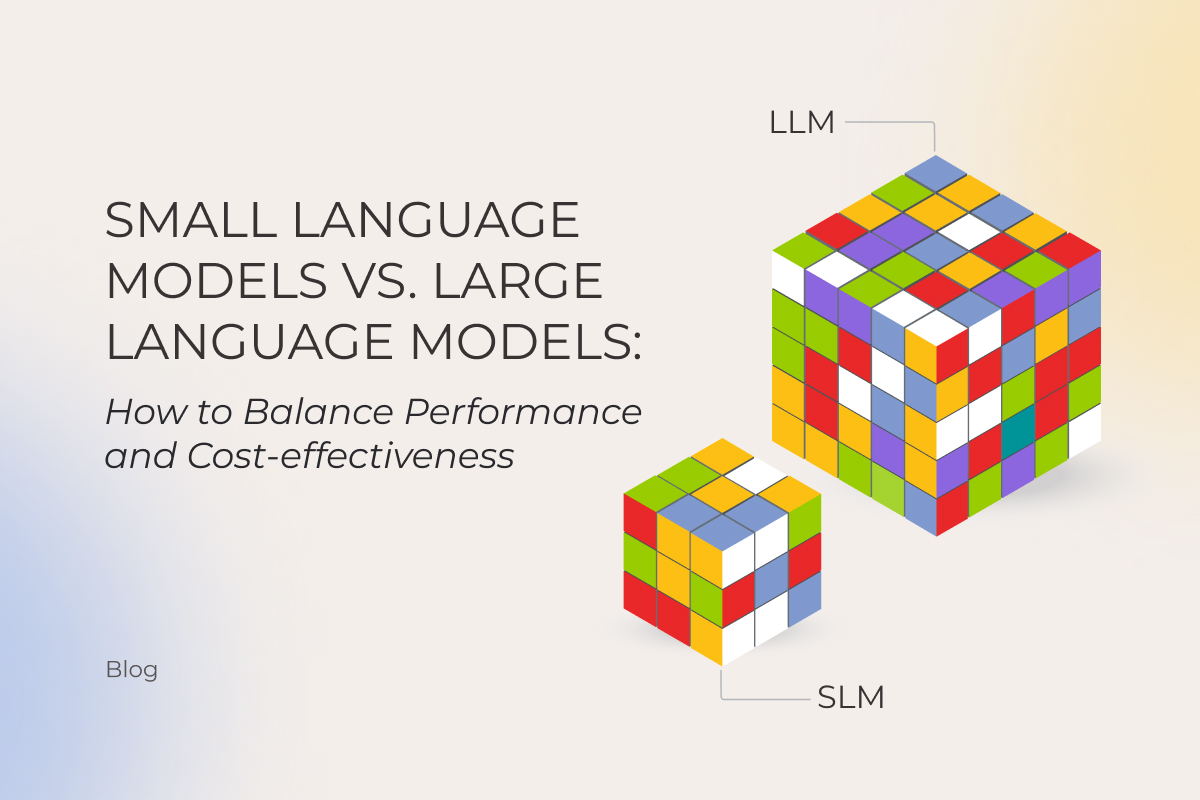
Does size still matter? With AI, the default assumption used to be “yes.” More parameters, better results, end of story. That logic held until small language models (SLMs) started punching above their weight. Gartner’s prediction is that smaller, task-specific models will hit 3× the deployment volume of general-purpose LLMs by 2027, a signal that the LLM vs. SLM question has shapeshifted. Business owners who once asked “which model should I pick?” are now asking how to orchestrate both.

Instinctools’ AI engineers have mapped the SLM vs. LLM comparison as it stands today, underlining when it’s reasonable to downsize to an SLM, and when banking on an LLM pays off. 

What is an LLM and what is an SLM?

Both large and small language models (LLMs and SLMs) are artificial neural networks trained on vast amounts of data and built to process and understand natural language and perform a range of tasks from simple text summarization to taking actions on the user’s behalf. 

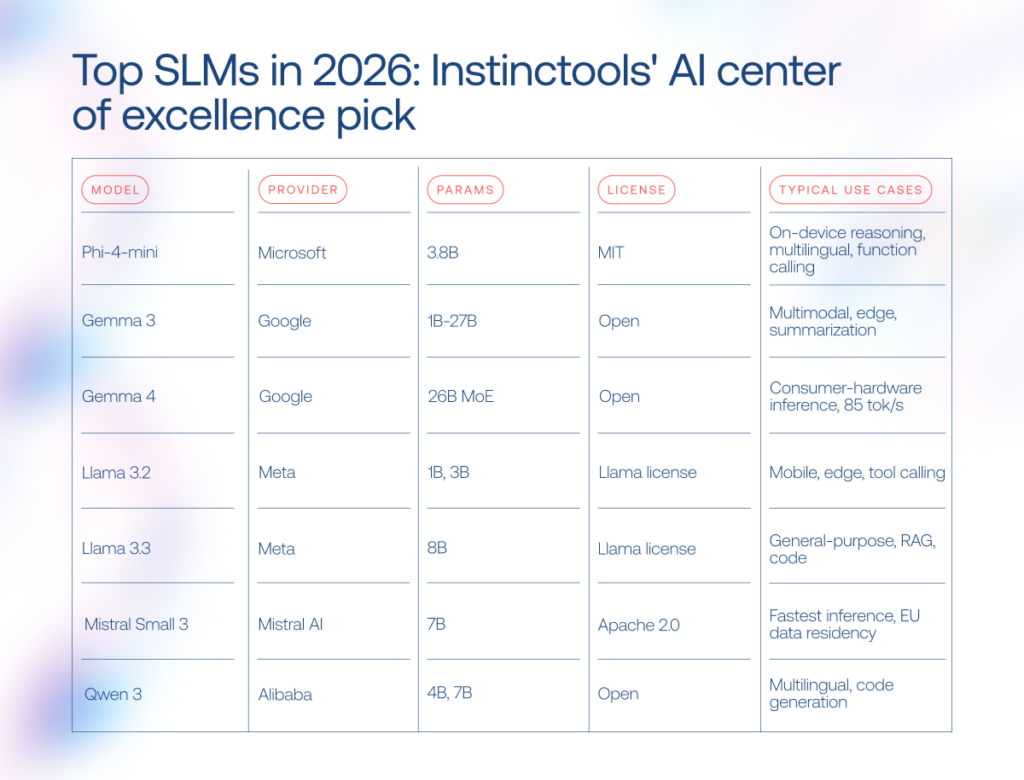
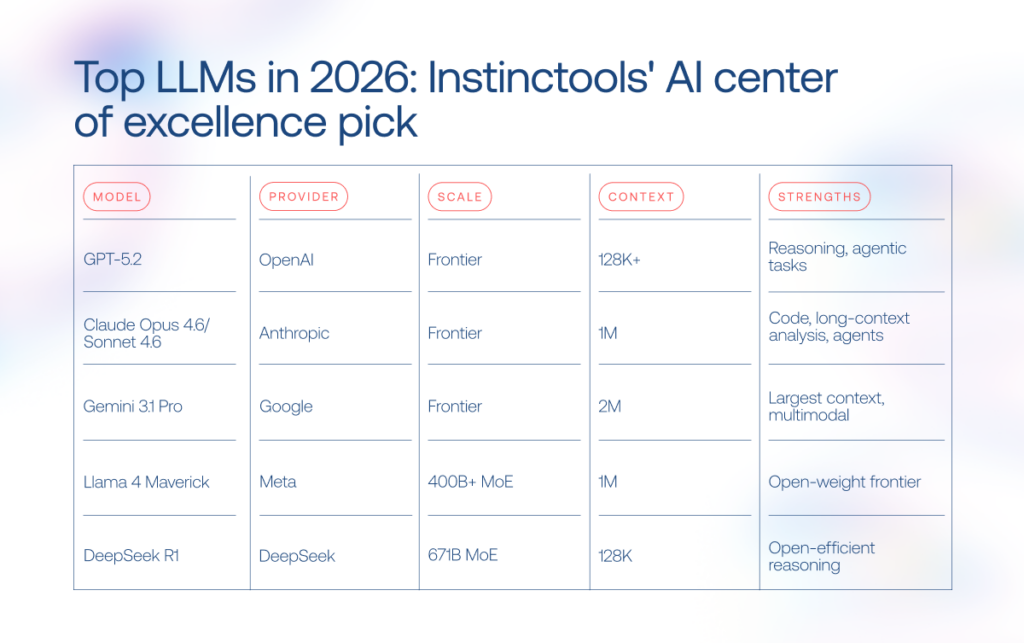
If all language models rest on the same foundation, what is the difference between LLMs and SLMs? Primarily, the number of parameters, which are the internal values a model learns during training. The more parameters it has, the more patterns it can usually capture. SLMs typically range from 1 billion to 15 billion. Phi-4-mini, Mistral 7B, and DistilBERT are some of the go-to picks in this range. LLMs start in the tens of billions and reach into the trillions, with GPT, Claude, and Gemini models leading the pack.

LLM vs. SLM: key differences at a glance

The SLM vs. LLM gap no longer boils down to “small versus powerful.” The tradeoffs stretch across infrastructure costs, latency, deployment flexibility, reasoning depth, and governance overhead. Here’s how both model families compare in production environments.

CriteriaSLMLLM
Resource requirementsRuns on consumer hardware, edge devices, or a single GPURequires high-end GPU infrastructure and large memory footprint
Cost of adoption and usageLower inference costs, but usually requires fine-tuningHigher inference costs, though broader out-of-the-box capabilities reduce customization work
Fine-tuning timeHours to weeks with LoRA/QLoRA on limited hardwareMonths (in rare cases when fine-tuning is necessary)
National specificityDiverse representation of alphabet-specific languages Broader multilingual coverage, but uneven cultural representation
Capabilities rangeStrong in narrow, repetitive, and latency-sensitive tasksBetter at broad reasoning, orchestration, and open-ended workflows
Inference speedFaster response times and lower latencySlower inference, though MoE architectures narrow the gap
Output qualityLower due to a smaller context window More reliable in complex reasoning and long-context tasks
SecurityMight present certain risks (API violation, prompt injection, training data poisoning, confidential data leakage, etc.) and requires clear AI governance

Advantages of SLMs over LLMs

SLMs have earned their spot as a practical alternative to large language models for businesses that want to adopt AI without investing a fortune into the technology. The core advantages of an SLM over an LLM include:

  • Lower inference cost (up to 100 times cheaper per query via API, and zero per query when deployed on-device).
  • Faster response times, especially for short, bounded tasks such as classification, routing, extraction, autocomplete, simple customer support, and local assistants.
  • Reduced vendor lock-in when using open-weight models, as businesses can self-host, fine-tune, quantize, and move models across different infrastructure stacks.
  • Deployable on consumer hardware, edge devices, and smartphones, particularly with quantized models such as Llama 3.2 1B/3B, Phi, and Gemma-family models.
  • Faster and cheaper customization (weeks and a single GPU vs. months and a cluster).
  • Lower energy consumption per inference, a smaller carbon footprint at scale.

When LLMs still win: strengths of large language models

LLMs are broad-spectrum AI language models built for complex tasks that require broad knowledge, multi-step reasoning, and deep contextual understanding. The LLM advantages over their smaller counterparts include:

  • Stronger multi-step reasoning across domains like legal analysis, financial modeling, and scientific research.
  • Much larger context windows, enabling the model to work with long documents, large research corpora, complex conversations, and sometimes substantial portions of codebases or document sets in one pass .
  • Multimodal capabilities covering text, image, audio, and video in a single model.
  • Lower need for task-specific fine-tuning, because frontier LLMs often perform well with prompting, retrieval-augmented generation, tools, and examples. However, production deployments still require evaluation, guardrails, monitoring, and workflow design.
  • The reasoning and planning depth that makes LLMs a natural fit for the orchestrator role in multi-agent systems, where a central model coordinates and routes tasks to specialized smaller models.

An SLM vs LLM comparison across 8 criteria

Building and training models from scratch requires significant investments, often beyond the reach of many businesses. That’s why, in this article, we focus exclusively on pre-trained models, comparing notable LLMs such as ChatGPT, Claude, and Gemini, with SLMs like Mistral, Phi, and Gemma. 

1, Resource requirements

When it comes to SLM vs LLM resource requirements, the gap remains wide. LLMs contain hundreds of billions to trillions of parameters, and high memory consumption makes them a resource-intensive technology. If you target the latest GPT, Claude, or Gemini models, you’ll need NVIDIA H100 or B200 GPUs, which cost $25,000-$35,000 per processor.

SLMs’ compact model size and lower computational power requirements enable them to run on a broader range of devices, including regular computers and smartphones. For instance, Microsoft’s Phi-4-mini needs just 4GB of RAM, so with an SLM as a resource-friendly alternative to LLM, companies can hop on the AI train without upgrading their hardware park.

Instinctools’ verdict: SLM.

2. Cost of adoption and usage

The cost coin has two sides: fine-tuning and inference. LLMs save on fine-tuning since they handle most tasks out of the box, but inference adds up quickly at scale. SLMs need fine-tuning, yet their day-to-day usage is far more affordable.

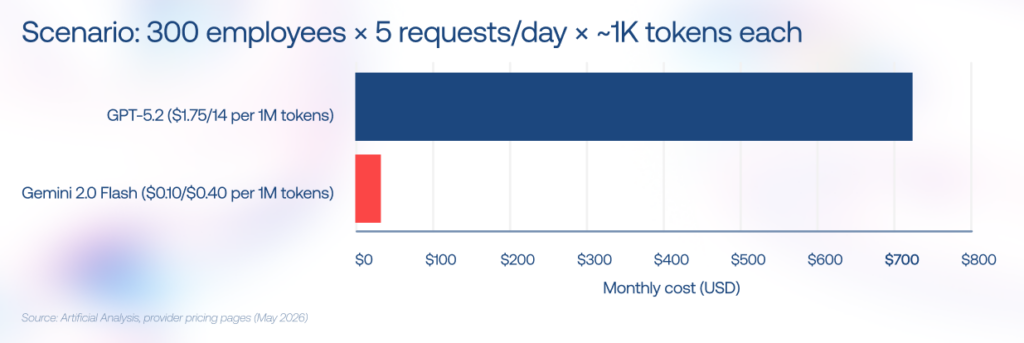
To feel the disparity, consider this scenario: you have 300 employees, each making five small 1K-token requests per day. At the time of writing, a frontier GPT model priced$1.75/$14.00 per 1M tokens, that adds up to around $720/month. Replace it with Gemini Flash at $0.10/$0.40 per 1M tokens, and the same workload drops to roughly $22.50/month. 
Cost of adoption and usage

Instinctools’ verdict: SLM.

3. Fine-tuning time

The logic behind the fine-tuning process is straightforward: the more parameters the model has, the longer it takes to calibrate it. In this regard, adjusting a large language model with trillions of parameters can take months, while fine-tuning an SLM can be completed in weeks.

Parameter-efficient methods like LoRA and QLoRA have shortened the process further. A 7B model can now be fine-tuned on a single GPU in hours, which is how our team compressed a full project with Mistral 7B at its core into just six weeks, stepping up the model’s precision rate from 10% to 75%.

Instinctools’ verdict: SLM.

4. National specificity

The lion’s share of the most well-known LLMs originates from the US and China and doesn’t adequately represent diverse languages and cultures. Studies unveil that LLMs’ outputs skew toward WEIRD societies (Western, Educated, Industrialized, Rich, and Democratic).

Sovereign AI has become a trend, with governments commissioning models trained on local-language datasets. If you compare small language models and LLMs on language coverage, SLMs lead the push with Jais for Arabic, Nanda for Hindi, Typhoon for Thai, and Viking for the Nordic languages. 

Instinctools’ verdict: SLM. 

5. Capabilities range

Both LLMs and SLMs emulate human intelligence but at different levels. LLMs remain the go-to for complex tasks requiring broad knowledge, multi-step reasoning, and deep contextual understanding. Once you move to multi-agent systems, LLMs carry the orchestration work, coordinating several agents, tracking long-horizon objectives, switching tools mid-process, and resolving conflicts between intermediate outputs.

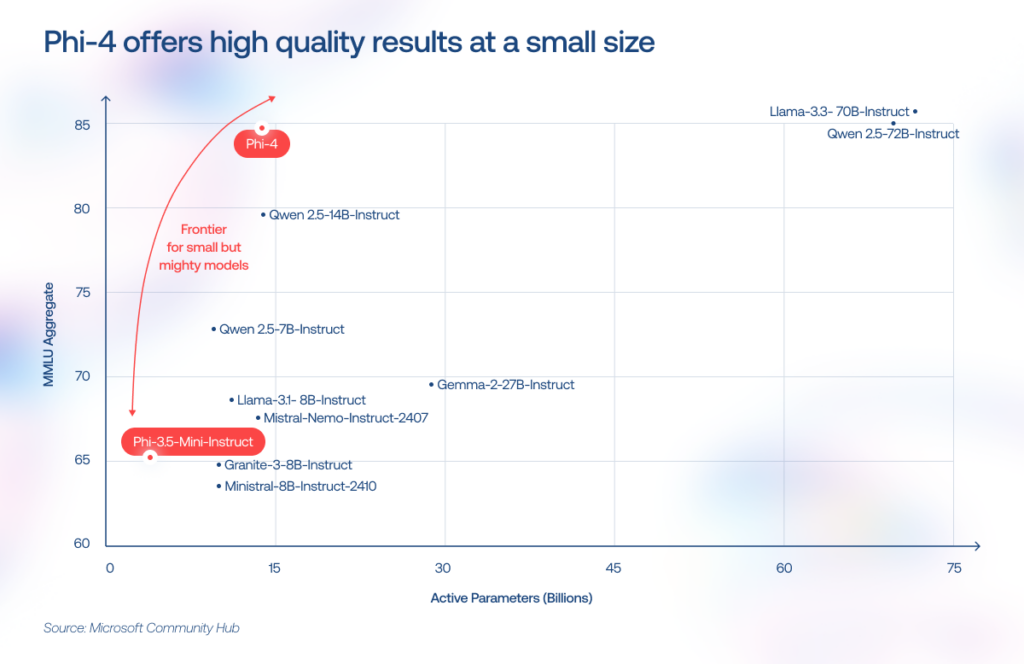
SLMs are narrow-focused models designed for specific tasks like text classification, summarization, and entity extraction. But the gap is narrowing. For example, Phi-4-mini (3.8B parameters) now matches models twice its size on reasoning benchmarks, a gap that would have been unthinkable two years ago. SLMs have also gained 128K context windows, function calling, and vision capabilities. So with strong context engineering, you can squeeze far more out of a compact model than raw parameter counts would suggest.
What we witness on the ground is that enterprise AI stacks now resemble a relay race, when an LLM acts as the planner and coordinator and passes the baton to lightweight SLMs to handle specialized subtasks at lower cost and latency.

— Pavel Klapatsiuk, AI Lead Engineer, Instinctools

Instinctools’ verdict: LLMs and SLMs to get the best of both worlds.

6. Inference speed

LLMs’ power as a broad-spectrum solution comes with performance trade-offs. In dense architectures, more parameters typically mean more computation per generated token, which can make large models slower and more expensive to serve than smaller models.

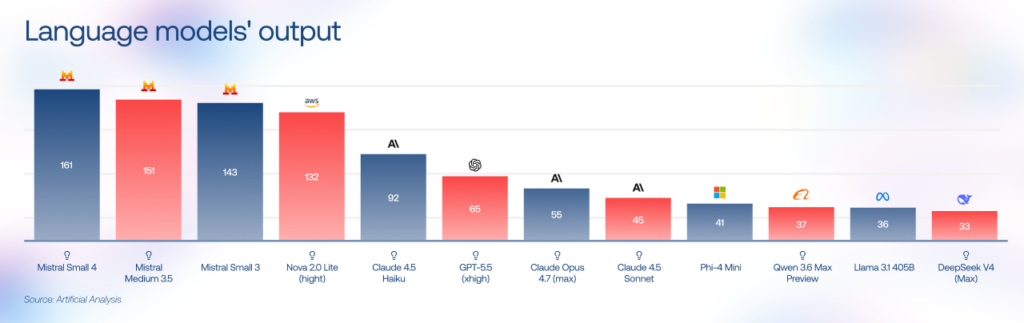
LLM providers address this by switching from dense architectures to sparse Mixture of Experts (MoE) patterns and by releasing their own lightweight tiers (GPT-5 nano, Gemini Flash). On the SLM side, Mistral Small 3 runs at 143 tokens/second on 16GB of RAM, and Gemma 4 (a 26B MoE model) also targets faster local inference with techniques such as multi-token prediction. 

For latency-sensitive SLM vs LLM decisions, smaller models often have the edge, especially for short, repetitive, on-device, or edge workloads.
Instinctools’ verdict: SLM.

7. Output quality

On general reasoning and coding benchmarks such as MMLU-Pro, GPQA, SWE-bench, LiveCodeBench, HumanEval, and MMMU, frontier LLMs outperform smaller models, especially in open-ended reasoning, advanced coding, and multilingual tasks. Their advantage comes not only from broader training data, but also from greater model capacity, stronger post-training, reasoning-focused optimization, tool use, and more mature long-context handling.

SLMs can achieve comparable accuracy on narrow enterprise tasks when the workflow is well-defined and supported by high-quality domain data, retrieval, prompt engineering, constrained outputs, or fine-tuning. But once the task moves beyond a tightly controlled scope, larger models tend to stay more stable and coherent under pressure.

Instinctools’ verdict: LLM.  

8. Security

While the cost and quality of AI solutions often make enterprise leaders scratch their heads, it’s the security concerns that really top the list of hurdles. Any production AI system needs clear governance around what data enters the model, where that data is processed, how long it is retained, who can access it, and how model outputs are logged, monitored, and audited.

For cloud-hosted LLMs, organizations should evaluate vendor terms, data-retention policies, training-data exclusions, API access controls, encryption, logging, data residency, and regulatory compliance before deployment. Many enterprise AI providers now offer strong privacy commitments (for example, API or enterprise customer data is commonly excluded from model training by default), but companies still should validate these guarantees against their own security, legal, and compliance requirements.

SLMs need robust governance just as much, but they give companies far more flexibility in where data gets processed and stored. Small models can run on-premises, on edge infrastructure, or directly on employee devices, giving businesses tighter control over where sensitive information is processed and stored. This setup is particularly attractive for industries handling regulated or proprietary data.

Instinctools’ verdict: SLM. 

When to choose an SLM vs. an LLM: decision framework

Choosing the best AI models in the SLM vs. LLM debate is like hiring a team. You don’t bring in a Nobel-level strategist to sort invoices, and you don’t hand a billion-dollar negotiation to an intern fresh out of onboarding. AI stacks work the same way, routing simple jobs to smaller models and reserving heavyweight reasoning for the few tasks that need it.

Use caseRecommended model typeWhyExample models
Customer support chatbotSLMHigh request volume, predictable workflows, low latency requirementsMistral Small 3, Phi-4-mini
Internal document Q&ASLMEasier on-prem deployment and domain fine-tuningLlama 3.3 8B, Gemma 3
Code copilotLLM or hybrid setupMulti-file reasoning and long-context understandingClaude Sonnet 4.6, GPT-5.2
Edge or IoT deviceSLMMinimal compute footprint and offline operationLlama 3.2 1B, Gemma 3n
Healthcare records processingSLMGreater control over sensitive data handlingFine-tuned Mistral, Phi-4
Multilingual content generationLLM or sovereign SLMBroad language coverage versus local cultural adaptationGemini 3.1 Pro, Qwen 3
Creative or long-form writingLLMBetter narrative consistency and contextual depthClaude Opus 4.6, GPT-5.2
Multi-agent enterprise workflowsBoth Balances cost, speed, and reasoning quality across tasksSLM workers + LLM orchestrator

Frontier LLM, compact SLM, or a hybrid setup?

Let’s talk

Examples of SLMs and LLMs in production for 2026

The AI language model market has become crowded fast. A couple of years ago, most discussions revolved around GPT-4-level systems. Now the field stretches from billion-parameter SLMs running on laptops to LLMs built for multi-agent reasoning and million-token context windows.
SLMs
LLMs

Custom LLM and SLM development with Instinctools

Now that you know where SLMs make sense and where LLMs still dominate, the harder part begins: turning that knowledge into an AI system that survives contact with real production workloads.

Our team helps businesses with custom LLM/SLM development, covering:

  • Model selection based on your business requirements and limitations
  • Fine-tuning on private data 
  • RAG pipeline integration
  • Goal-oriented context engineering to widen the range of AI capabilities
  • Agentic workflow design and orchestration
  • MLOps
  • Fully on-premises deployments

Sometimes the answer is a compact SLM running locally for privacy and latency reasons. Sometimes it’s a tiered architecture combining multiple models behind one orchestration layer.

Our AI engineers are a click away if you need expert advice

Reach out

The future belongs to hybrid AI stacks

After exploring what’s possible, determine what’s practical for your software needs. Both LLMs and SLMs are powerful tools, but they won’t bring the desired benefits on their own. It’s still essential to identify how to effectively integrate them into your business processes, considering industry and national specifics. 

If your resources are limited, you want to test your idea ASAP, or need a model for only a specific type of task, an SLM can help you hit it big without breaking the bank. For deeper reasoning, multi-agent orchestration, or long-context analysis, LLMs hold the advantage. In practice, though, the biggest gains come from combining both: smaller models handling high-volume routine work, larger ones stepping in for the hardest decisions.

Draw on the power of language models with a trusted tech partner

Book a call

FAQ

What is the difference between an LLM and an SLM?

The difference between an LLM and an SLM comes down to scale, training scope, and intended use. LLMs are trained on massive web-scale datasets and usually contain tens or hundreds of billions of parameters, making them better suited for broad reasoning and open-ended tasks. SLMs are smaller, often below 10B parameters, and optimized for focused workloads like classification, summarization, or on-device AI. For example, GPT-5.2 is built for broad reasoning, while Phi-4-mini (3.8B) is designed for efficient local inference. Still, the boundary is getting blurrier with each new model.

What are the advantages of an SLM over an LLM?

The biggest advantages of SLMs over LLMs are lower cost, faster inference, and easier deployment. Smaller models can run 10-50× cheaper than large-scale LLMs. They can also work fully on-premises or on edge devices, keeping sensitive data inside the company infrastructure. In narrow enterprise tasks, a well-trained SLM may also produce fewer hallucinations because its scope stays tightly controlled.

When should I choose an SLM instead of an LLM?

In the SLM vs. LLM standoff, SLMs make more sense when the task is narrow, repetitive, latency-sensitive, or privacy-critical. Common examples include entity extraction, summarization, customer-support routing, and edge AI systems. They also fit workloads with very high query volume, where large-model API costs spiral quickly. If your data cannot leave the company perimeter or the model needs to run locally on limited hardware, an SLM or hybrid setup is the safer bet.

What are examples of small language models?

Popular SLM examples in 2026 include Phi-4-mini (3.8B), Gemma 3, Mistral Small 3, Llama 3.2 1B/3B, TinyLlama 1.1B, and Apple OpenELM. Some focus on multilingual reasoning, others on edge deployment or fast inference on consumer hardware.

Are SLMs as accurate as LLMs?

SLM vs. LLM output quality depends heavily on the task. On broad reasoning benchmarks like MMLU or HellaSwag, larger models still outperform smaller ones, especially when the task requires open-ended reasoning, advanced coding, multilingual understanding, or cross-domain synthesis. But in narrow enterprise workflows, the gap can shrink dramatically after fine-tuning. A well-scoped SLM processing medical records or support tickets, bolstered by high-quality domain data, retrieval, constrained outputs, or fine-tuning can match and sometimes outperform a general-purpose LLM.

How much does it cost to develop a custom SLM or fine-tune an LLM?

The cost of custom LLM/SLM development varies mostly with data quality, infrastructure demands, and deployment complexity. Fine-tuning an open-source SLM like Mistral 7B or Phi-4 on private data usually starts around $15,000. Building a domain-specific model from scratch can reach $80,000-$250,000 or more. A production-grade RAG pipeline around an existing model often falls somewhere in between. If you want a realistic estimate, it’s worth discussing your use case with your AI engineering partner before locking into one architecture.

Can I run an SLM on-premises or on edge devices?

Yes. One of the main reasons companies adopt SLM on-premises setups is that compact models run comfortably on consumer hardware. Models below 7B parameters can work on a single RTX 4090 or even on CPUs with quantization. Lightweight options like Phi-4-mini or Llama 3.2 1B already run on laptops and smartphones. Common deployment tools include Ollama, llama.cpp, MLX, ONNX Runtime, and NVIDIA Triton.
What is enterprise automation: from idea to ROI

Tight labor markets and economic downturns are forcing companies to produce more with fewer resources. Enterprise automation helps global businesses stand up to this challenge and react fast to emerging opportunities. No wonder it has become a big wheel across different industries, projected to take up from $25 to $500 million of capital spending over the next 5 years.

But a path to automation is a thorny one. To pan out, your automation strategy should sit on an enterprise approach and make technology a single fluid experience within your organization. Here’s how to reach this tough bar.
What is enterprise automation? It’s not what you think it is

Enterprise automation is the implementation of a wide range of technologies and tools to streamline, integrate, and automate business workflows, while also reducing the amount of manual work. 

Instead, it implies a comprehensive approach aimed at creating centralized control and strategy over automation as opposed to a bolt-on approach. Automation structures should be designed to scale from the get-go and strategized by something greater than a simple goal of achieving gains in process efficiency and reduced costs.

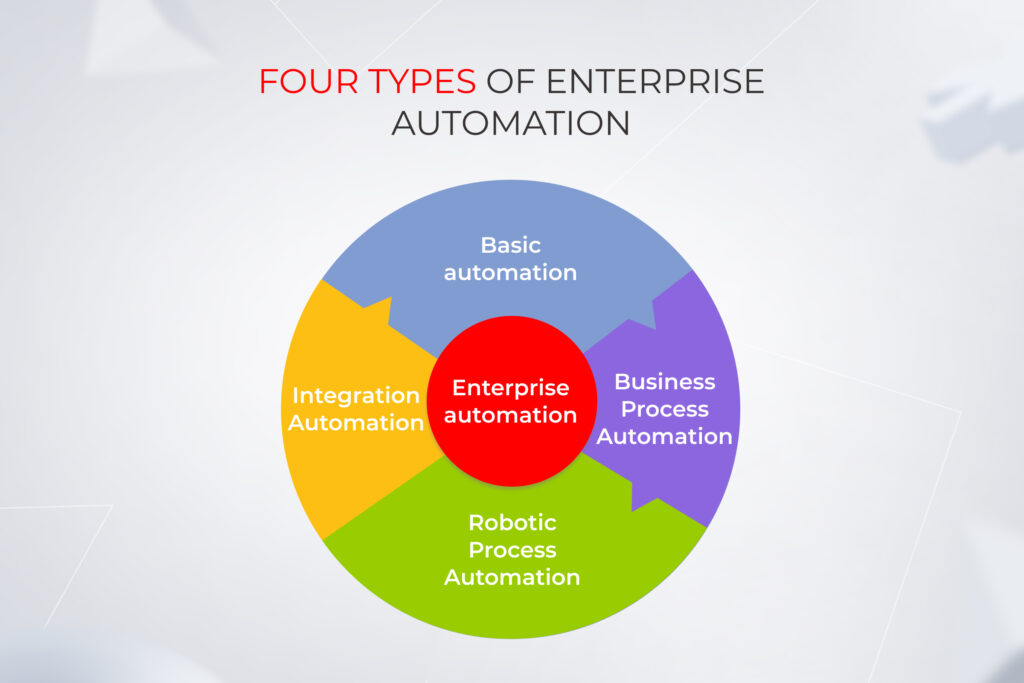
Four types of enterprise automation

An automation toolbox may include a different lineup of enterprise automation solutions, tools, and technologies — from simple low-code platforms to complex human-like bots. An exact mixture depends on the type of enterprise automation you’re up to.

Four types of enterprise automation: basic automation, BPA, RPA, integration automation

Basic automation

This is the less demanding form of enterprise automation that includes automating simple, stand-alone tasks such as automated email threads or report generation. It often relies on low-code or no-code software as a core enabler.
An example of basic automation would be automating the process of generating standard reports from data. For instance, a sales department automatically generates weekly sales reports through a simple software script that pulls data from the sales database, formats it into a predefined template, and then distributes it via email to the relevant stakeholders.

Business Process Automation (BPA)

Unlike basic automation, the turf of BPA spans across entire functions. In particular, process automation streamlines, and orchestrates repetitive business processes, for which it requires a multi-step automation workflow. The main differentiator of enterprise process automation is its reliance on integration, API, and data exchange across internal or external systems.

Automation of a new employee onboarding process is a fine specimen of BPA. In this case, a company deploys a workflow automation tool to manage the entire process from job offer acceptance, document submission, and verification, to provisioning work equipment and scheduling orientation sessions, with minimal human intervention.

Robotic Process Automation (RPA)

Robotic process automation is considered to be one of the approaches to Business Process Automation that includes the implementation of software bots. Following AI insights, bots complete high-volume, rule-based tasks, emulating human interaction with software applications.

Although RPA is technically a form of process automation, its focus is placed on automating the types of tasks traditionally performed by humans. Because of its non-intrusive nature and ease of deployment for specific repetitive tasks, RPA can often serve as a quick and effective automation solution that doesn’t require extensive changes to the existing IT infrastructure.

Robotic process automation is widely implemented in banking for customer-face communication, regulatory compliance, fraud detection, and KYC.

Also, RPA can do the heavy lifting of back-office tasks, production line operations, and supply chain management in the manufacturing industry.

Healthcare, an industry facing significant staff shortages, relies on RPA software to automate patient scheduling, claims processing, reporting, data entry, and other tasks.

Integration automation

Enterprise automation strategies based on the integration-first approach mean connecting different business software systems and using this connectivity to automate manual tasks. In this case, connected business systems operate on shared data, reducing errors and eliminating the need for manual data entry.

For example, ERP systems hinge on integration automation to exchange data with finance, sales, and customer success departments. By connecting it with a CRM platform like Salesforce, businesses can streamline order management and execution. Once an order is added to a CRM, it’s automatically transferred to an ERP system and fed to the warehouse. 

The integration works backward: an ERP then provides sales insight into order statuses right from a CRM dashboard. 

CriteriaBasic automationProcess automationRPAIntegration automation
ComplexityLowMedium to highMediumHigh
ScopeIndividual tasksEnd-to-end processesCross-application tasksSystem-wide integration
Implementation effortLowMedium to highLow to mediumHigh
Main technologies usedSimple scripts, basic software toolsBPM, workflow automation toolsRPA software,
AI capabilities
Middleware, API management, ESB
Integration levelMinimalWithin processesUI-basedDeep, across systems
FlexibilityLowHighMediumHigh
Main benefitsReduces simple repetitive tasksImproves process efficiency, standardize operations Quick wins, high ROI on repetitive tasksEnhances data flow, interoperability 
Typical use casesData entry, simple file transfersComplex workflows like onboarding, invoicing, etc.Data extraction, form filling, application bridgingConnecting disparate systems for real-time data exchange
ScalabilityLowMedium to highMediumHigh
Dependency on ITLowMedium to highMediumHigh
User interactionNone to minimalPossible through workflowsHigh (mimics human actions)Low to none

Count on our enterprise automation services to choose the right automation approach

Schedule a call

Enterprise automation as a vital part of your digital transformation effort

Enterprise automation is a crucial piece of the digital transformation (DT) puzzle. But unlike automation, DT doesn’t boil down to just implementing a new ERP, adding an API into your software solutions or making bots a part of your business processes. 

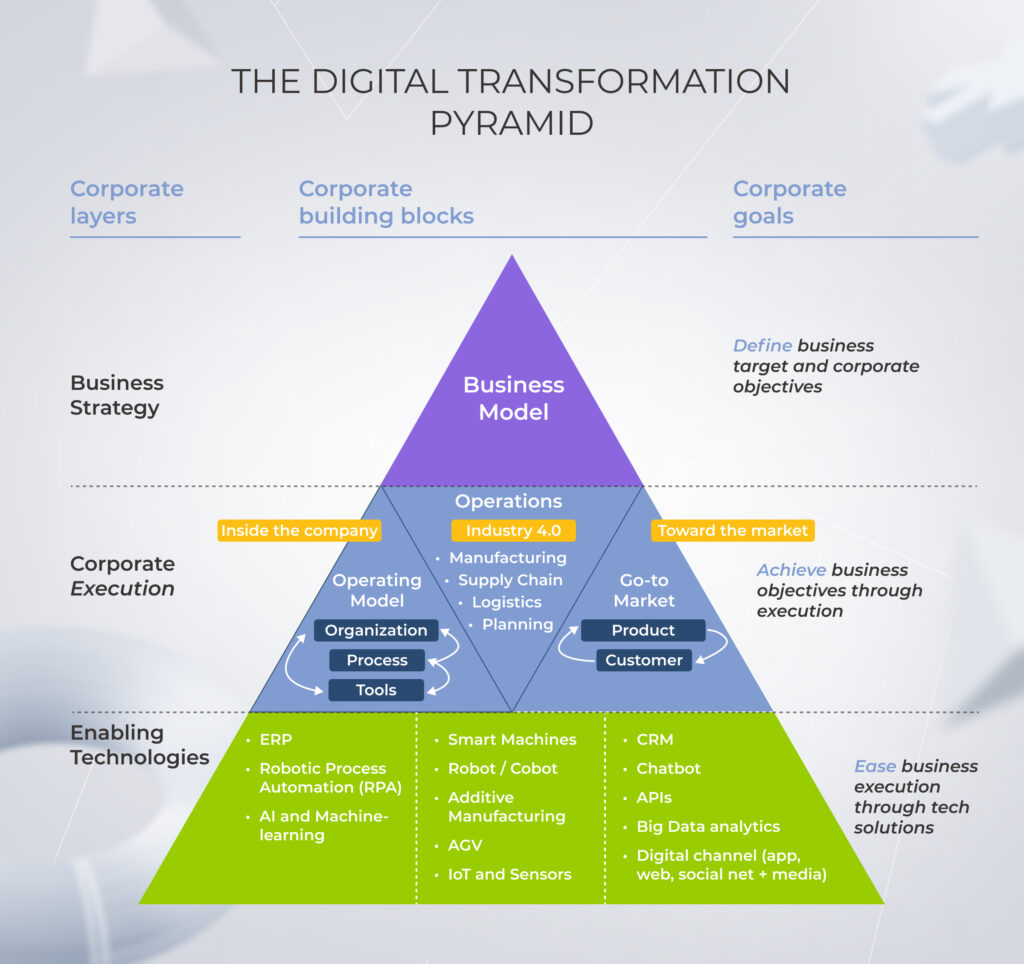
Digital transformation is about rewiring the entire business in a holistic way, rethinking and redesigning existing processes, organizational structures, and customer value — and using technology as a means to achieve that. It’s a much broader effort than enterprise automation, integrating technology into all areas of business and promoting cultural change.

Layers of the digital transformation pyramid: business strategy, corporate execution, enabling technologies

Mapping the benefits of the automated enterprise

According to Gartner, 30% of enterprises will increase their share of automation by 10% and will perform half of operations without manual support by 2026. Respondents paint a positive picture of automation’s impact on their company with benefits ranging from significant improvements in quality control improvements to reduced operating expenses. Let’s look into that.

Cost base improvement

More than anything, enterprise automation platforms are seen as a cost-reduction exercise. But unlike a traditional approach that tells us to calculate the ROI of automation based on the FTE numbers only, it isn’t about solely redistributing head count. Enterprise automation software is instrumental in removing contractors and contingent workers from the equation. 

Using automation, organizations can also save costs indirectly by improving the efficiencies of current technologies deployed.

Shorter cycle times and enhanced throughput

In industries like manufacturing, enterprise automation systems help companies speed up product cycle times in an automated production line, allowing manufacturers to eliminate waiting time and adjust to shifting customer demand. 

Among other key benefits of automated solutions is their ability to improve employee productivity and capacity. Automation allows employees to automate menial, low-value tasks and free up time for more valuable work. Over 90% of workers say using automation software has helped them be more productive at work.

Process and business scalability

Automation solutions can complete the same tasks on different endpoints within different environments. It means that once a process is automated, businesses can reproduce the solution to execute similar or the same tasks in other departments — with low cost and little human input. Along with process scalability, this also introduces an added value of business scalability.

Refined data quality

As a quality improvement mechanism, well-designed enterprise process automation software eliminates inconsistencies and mistakes caused by the human variable. Automated workflows can identify and rectify data quality issues, ensuring data integrity across systems. 

Increased employee satisfaction and retention

Another reason to justify automation investment is its profound effect on employees. According to a report, automation has improved jobs for 50% of workers and unlocked new career opportunities for 48% of them. Absolved from drudgery, employees can dedicate their time to executing strategic initiatives that propel the organization forward.

Straightforward way to insights

Not only does automation facilitate real-time data access, but it also allows for greater visibility into automated processes by providing an audit trail. In this case, you have a set of documents and files that prove the accuracy of your company’s records. Enhanced data transparency also ensures that your organization remains compliant with applicable regulations.

Keep in mind that automation success won’t arrive overnight. To reap the benefits, you need to back up your automation initiatives with an enterprise automation roadmap and solid governance structures.

Need a helping hand with your enterprise automation?

Reach out

Challenges of introducing automation into your organization

Companies that focus on enterprise automation risk facing challenges on their automation journey. Our experts have highlighted the core ones below.

Selecting the right processes to automate enterprise

Most organizations have a hard time understanding the opportunities for automation. Betting on the wrong business case (such as non-standardized tasks) prevents companies from seeing quick returns from automation efforts and, in turn, dampens the enthusiasm of executives.

Dealing with the technical aspects of deploying an enterprise automation system

The truth is that some companies aren’t ripe for becoming a fully automated enterprise. A perfect storm of legacy software, siloed data, integration challenges, and outdated business operations gum up the gears of automation. Before jumping on an automation project, make sure to bring together data locked away in disparate systems and funnel it into a single source of truth.

Managing the organizational change required to adopt new workflows

Organizational change management is a critical enabler of successful automation initiatives and a common missing link in automation strategies. Automation requires involvement from all levels of the workforce and failing to do so may prevent companies from getting employee buy-in.

Lack of a solid governance structure and enterprise automation roadmap

If your automation project lacks a supporting structure, it’ll likely run into difficulties down the road. Long implementation timelines, high costs of implementation, unclear value of automation systems, and narrow efficiency are common side effects of a half-hearted governance framework. 

Make sure your automation initiative is laid out in a strategic blueprint and centered around well-defined goals, KPIs, and value drivers. Putting a solid governance structure in place will help organizations lay hold of exponential ROI. 

How to win enterprise automation: a detailed roadmap

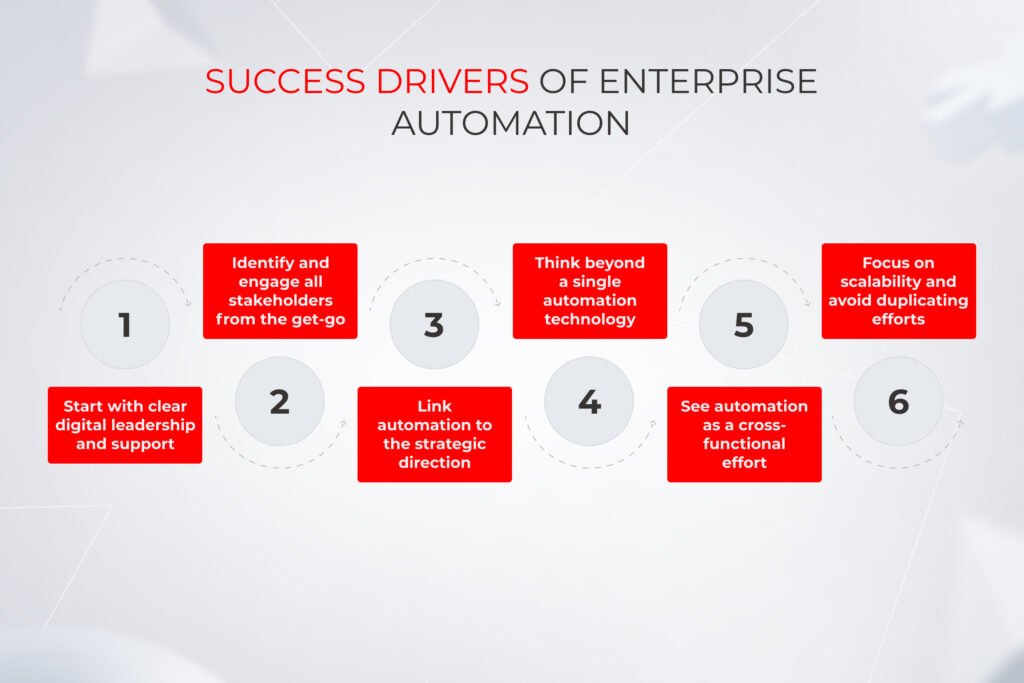
The survey pinpoints that the automation success drivers include clear enterprise automation strategy and goals, well-picked processes for automation, effective change management, seamless technology integration, and scale-ready automation solutions.

More importantly, enterprise automation solutions should align with the three core aspects of every organization: its leadership, its technological capabilities, and its human resources.

Leadership

Most of the time, automation adoption starts with developing pilots to estimate the viability of solutions. But even in this case, organizations need to have a big picture in mind and use pilots as a launchpad for at-scale automation across the enterprise.

  • Identifying problem areas

Organize a working group to map out areas of opportunity for automation. Your working group should include representatives from each relevant department.

  • Finding the fit for automation

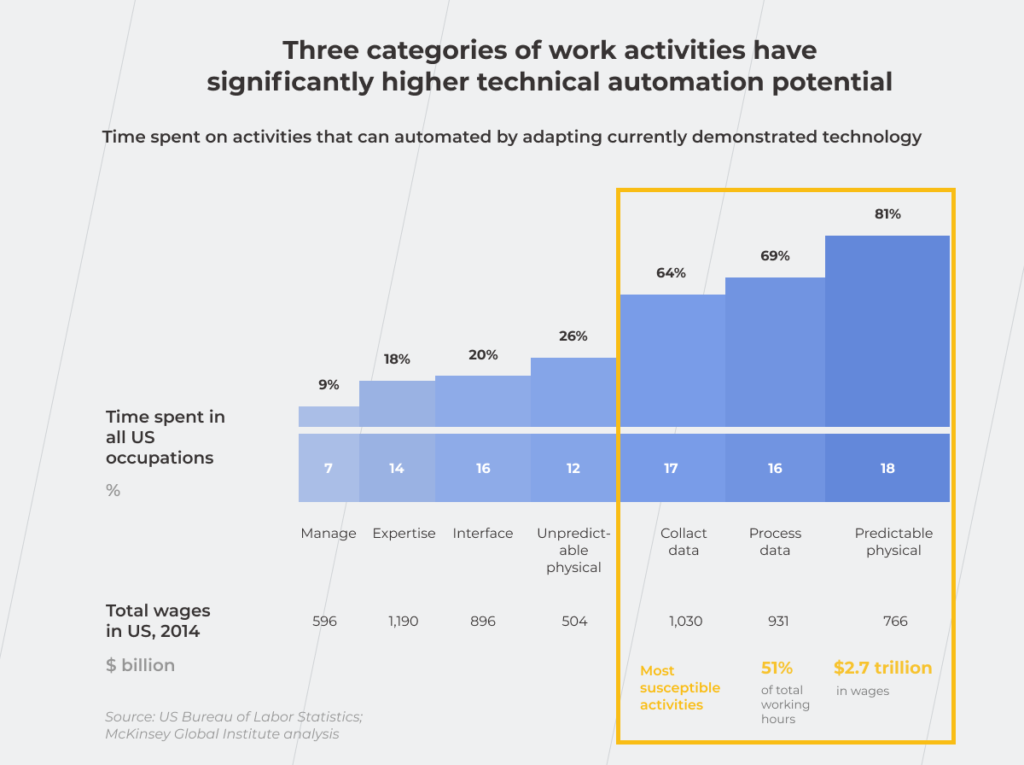
Instead of the big-bang automation, start small by choosing a particular area to automate. The activities most susceptible to automation are the ones in structured and predictable environments, including manual processes, data collection and analysis, standard inputs, rule-based operations, and processes with a high volume of transactions.

  • Prioritizing opportunities

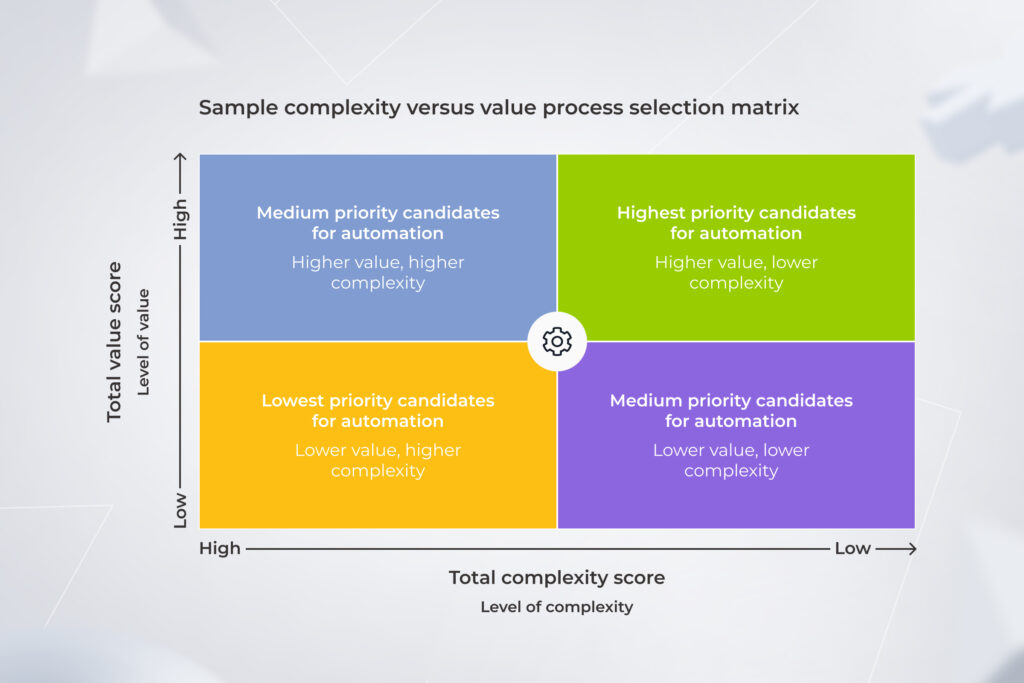
Double down on the opportunities with the greatest potential for success and impact. To reveal the best opportunities, weigh the benefits of automation against the complexity of building the automated process.

matrix for identifying the priority of process automation
  • Optimizing business procedures

Map and audit current processes, including formal and informal ones, to get rid of excessive workflows. Automating a process with 5 steps is easier and cheaper than automating a process with 25 steps.

  • Defining objectives

Set measurable objectives to track your automation progress (added scalability, improved availability, increased operator productivity, and others). Each long-term goal should have one or more specific measurements or indicators.

  • Establishing KPIs

The set of KPIs depends on the process qualified for automation and its key stakeholders (total incidents processed by automation, total cost saved, and others). In any case, your KPIs should be aligned with your business strategy, stakeholder expectations, and industry standards.

  • Securing senior management support

Quantify the potential benefits of automation and present them to executives to build support for the project.

  • Highlighting potential risks

Account for the emerging risks and evolution of existing risks within the organization. Automation may come with new data vulnerabilities, black box problems, culture risks, and regulatory hurdles. 

Technology

The development of technological abilities will determine the pace and extent of your automation efforts. Therefore, you should bank on the right technology resources that can scope, build, and maintain automation processes.

  • Selecting the combination of automation technologies 

Reach out to a tech partner to get advice on your enterprise project and identify the right type of automation for your unique business needs and scope. Then, select an optimal set of technologies and make sure they integrate well with the existing ecosystem. 

  • Integrating the automation solution with your existing ecosystem

Explore the need for API development to bring the systems together and provide access to the organization’s data repositories.

  • Taking care of data quality

Prepare your data for automation by categorizing and sorting it based on accessibility and importance. Make sure you have access to the required source systems and that your input is compliant with your overall data strategy. 

Change management

At this stage, you combine top-down directives with bottom-up support to achieve strategic alignment amongst key stakeholders.

  • Communicating automation goals to the staff

Giving your rank-and-file employees a seat at the table will help you both refine your vision and warm them up to new software. Make sure to be transparent and upfront about the goals of automation and the impact it’ll have on their core responsibilities. 

  • Educating employees

Develop a blueprint for training at-risk employees so they can shift to new roles and build the capabilities they need to transition to higher-value tasks.

  • Embracing Agile working practices

Bring Agile into play to lead change, ushering in the much-needed flexibility for your employees and letting them pivot quickly. By emphasizing meaningful participation, you can iteratively manage the people side of change.

 success drivers of enterprise automation

The missing ingredient for automation success? An experienced tech team

Hire one here

Innovative technologies that expand the possibilities of enterprise automation

Over 60% of organizations are leveraging a combination of cutting-edge tech to expedite their automation efforts. While some technologies deliver an unprecedented level of automation for complex tasks, others are confined in their scale, taking over only straightforward workflows.

Intelligent automation (ML, gen AI, NLP)

Level of automation: high

Whenever you have complex tasks that have intrinsic variability of solutions, intelligent automation is your best bet. By combining AI technologies with RPA, companies can create workflows that trigger immediate automations based on real-time changes. Depending on the nature of your workflows, you can employ machine learning algorithms, natural language processing, or generative AI to create a more intelligent automation environment.

Possible applications: customer service automation, supplier selection automation, vehicle route planning.

Here’s a sneak peek into figures you can achieve, proven by our clients’ projects:

  • A Czech bank enriched their rule-based customer support chatbot with conversational AI functionality. The number of requests that escalated to human support decreased from 37% to 2%. 
  • An Italian transportation company launched a taxi app bolstered by a conversational AI agent. The software resolves 78% of customer support sessions without involving humans.

RPA

Level of automation: medium

Robotic process automation takes the form of software robots or physical robots — with scripts baked into them to emulate human response. Unlike intelligent automation, RPA technologies are incapable of complex decision-making and analysis. Instead, RPA comes into play whenever you need to automate repetitive tasks.

Possible applications: data extraction, form filling, report generation.

Optical character recognition (OCR)

Level of automation: medium

OCR systems automate the process of converting unstructured data into machine-readable, searchable text. ICR software, the successor of OCR systems, ups the ante by enabling the interpretation of various handwriting styles.

Possible applications: loan document management, patient record processing, invoice processing.

Data prep and analysis tools

Level of automation: low

Data preparation tools streamline the entire data preparation process — from data extraction to integration from disparate sources. This automation technology helps organizations gain a coordinated view of their data and transform raw data into a format more suitable for analysis and decision-making. 

Possible applications: self-service data analytics tools.

IoT

Level of automation: high

IoT automation relies on devices equipped with sensors to collect data and transmit it through an interconnected network. This connectivity allows devices to communicate with each other and make informed decisions without manual intervention.

Possible applications: self-driving vehicles, predictive maintenance, delivery requirement management in supply chains.

Augmented/Virtual reality

Level of automation: high

Immersive technologies offer limitless potential for automation in enterprise settings. They can enable interactive training programs, remote equipment monitoring, efficient warehouse management, and assembly line optimization. In most cases, mixed reality applications are used to precisely overlay a digital 3D twin onto a physical object.

Possible applications: digital twins, plant layout planning, design, prototyping.

Winning in automation requires a breadth of view and an at-scale effort

Unlike tactical fixes that are easy for competitors to imitate, enterprise level automation allows for durable forms of value and differentiation with near-limitless potential. To hit it big with automation processes, organizations need to prioritize a human-centered approach and a tech-enabled environment — empowered with strategic leadership. 

More importantly, successful automation initiatives start with a custom approach reflected in every aspect of automation: technology, workforce, and strategy.

Looking for a tailored enterprise automation solution that fits into your system?

Contact us

Dodge the Bumps: Why Do Enterprise Projects Fail and How to Prevent it?

To make sure your large-scale software development initiative is destined for success, you need first to figure out why enterprise projects fail. 

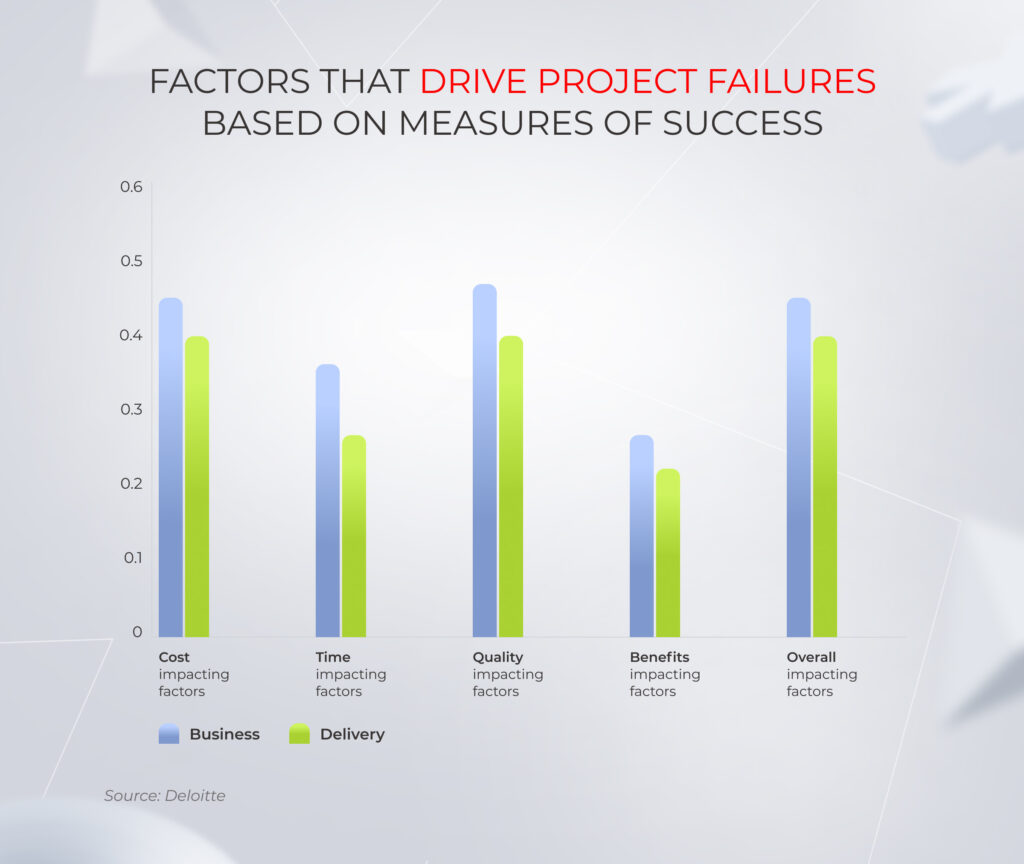
Deloitte reveals that of 82% of companies that miss their target, 50% achieve less than expected and 42% are late on project schedule. So what are the reasons that contribute to an enterprise project’s stall or fail, and how to safeguard big-ticket solutions?

Our experts are pros at dealing with the challenges of enterprise software development and strategizing your success. Read our guide to get the lessons learned first-hand — without projects burnt.

What is considered a failure for a software project?

“The greatest teacher, failure is.” 

However, the degree of failure makes all the difference and when it comes to notable mistakes, it’s better to learn from others’ missteps rather than pay this high-priced teacher out of your own pocket.

Speaking of software development, a project is deemed a failure if it demonstrates one or several of the criteria:

  1. Doesn’t solve the end users’ problem. Mismatching customers’ needs and releasing an undemanded product is the worst scenario possible.
  2. Falls short of its original business objectives. You might end up with a different product if your tech partner wasn’t guided by your goals to provide expected project deliverables. 
  3. Lacks quality. Jerry-built software is a one-way ticket to project failure caused by the inability to fit into your software ecosystem and scale appropriately. 
  4. Fails to bring intended ROI. If the project can’t meet your ROI target and you don’t see a way to give it another shot, it’s time to stop. Run a retrospective and reflect on why the project went wrong to avoid the same pitfalls in the future.  
  5. Messes with a timeline. Rolling out the project on time may win you a competitive advantage over your peers.
factors that drive project failure

Some of these factors, such as budget and due dates, can be considered tolerable for the purpose of creating a top-quality, secure, and scalable product. That’s how challenged yet viable and eventually successful projects rise.

Hurdles that contribute to statistics on project failure

If you made it to the enterprise level, tasks such as resource planning, risk management, choosing appropriate project methodology, etc. aren’t the tough nuts to crack. However, you can still face common project pitfalls stemming from the complexity and longevity of enterprise solutions.

1. Neglected discovery phase

For over two decades, we’ve been witnessing proofs of the principle: 

Shortcuts on the basics always bite you later. 

As an enterprise project is a marathon, mapping out the route is worth it. And a method to avoid project failure is within your grasp — start with a discovery, or an inception phase. At this initial stage, your tech ally digs into your new ideas and aligns your project vision with business context, market trends, and user needs to shape it into a comprehensive roadmap to a top-notch solution.

The discovery phase isn’t a cure-all, but it can help nip most enterprise software development issues in the bud and unveil strategic opportunities that weren’t on your radar before. 

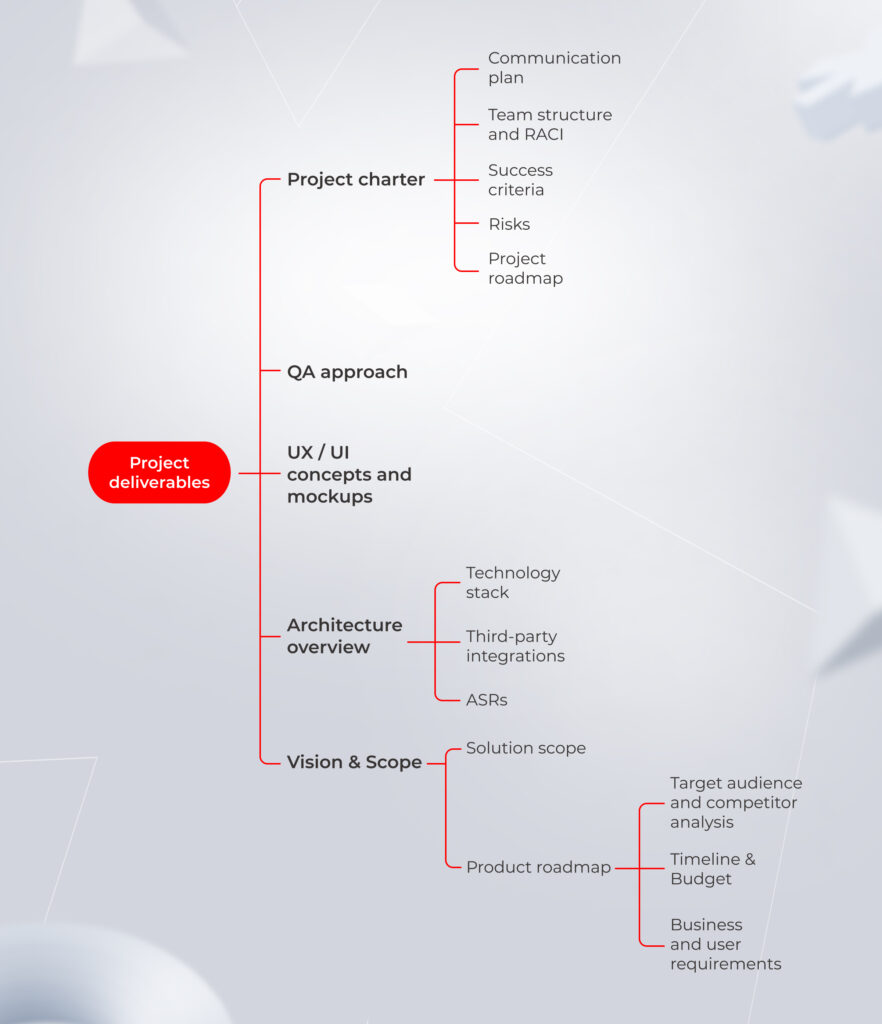
While project deliverables at the inception stage can vary depending on the specific software development services provider, at *instinctools, we bring a lot to the table to minimize the delta between value and cost.

software project deliverables at the inception stage

Our on-field experience in safeguarding large-scale solutions from failure proves that it’s not too late to take another crack, even if it seems that your project has already gone down the drain.

We were once approached by a European venture capital enterprise that wanted to launch a web platform for VC investors and funds. Their trailblazing B2B2C solution was supposed to pull ahead of the competition, but the haphazard implementation approach of the client’s previous tech partner put the product launch at risk. 

Nevertheless, during the discovery workshop, we tackled all issues — clarified organizational priorities and product vision, aligned the development scope and project plan with updated expectations, and outlined the backlog for future releases. These efforts led to decreased time to market and fruitful rollout.  

Check how the imperilled fintech project made it back on track

Read the case study

2. Flawed delivery model

Delivering on time, budget, and, more importantly, on value is a tricky mission. Adherence to the Agile development approach is a table stake, and it alone won’t hand the desirable outcome to you on a silver platter. 

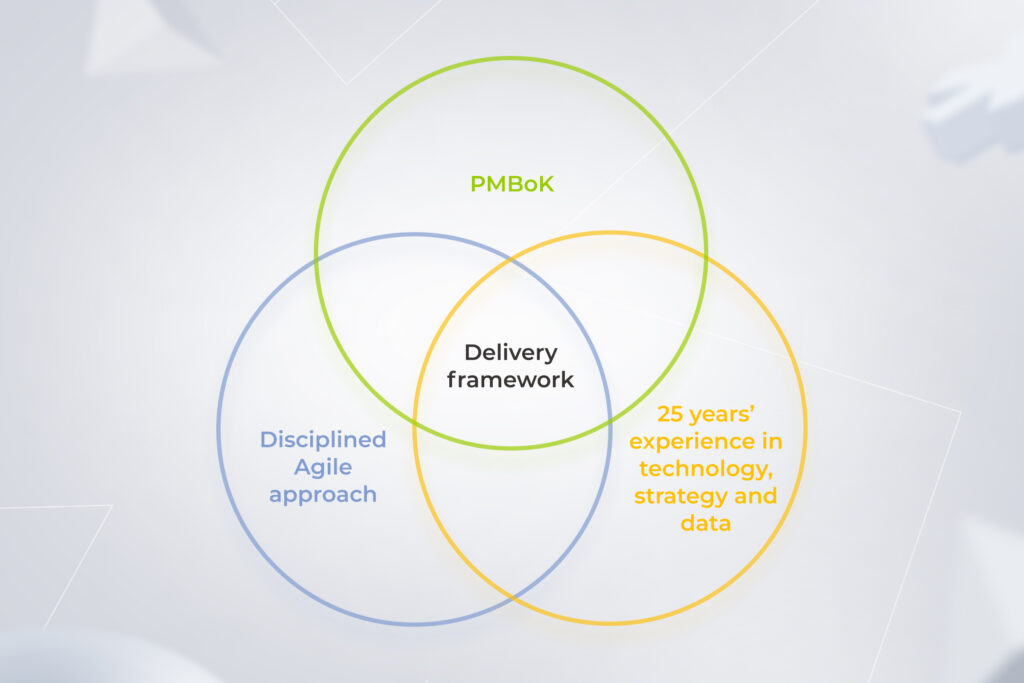
To ward off shoddy code, jerry-rigged architecture, muddled project documentation, non-transparent processes, and failures in project management, you’ll need a solid delivery model encompassing engineering best practices, a tried-and-true architecture approach, and time-tested project management handbook.

Digital product engineering companies that make the grade in enterprise software development usually build up a custom delivery model backed up with their on-field experience — that’s how we do it at *instinctools. Besides following PMBoK (Project Management Body of Knowledge) and DAD (Disciplined Agile Delivery) principles, we amp up these best practices with our 25+ years of hands-on expertise in crafting large-scale solutions and fortifying them from project failure.

Instinctools' custom software delivery model

3. Constantly changing goals cripple the project’s scope

Another nail in the project’s coffin is inconsistent objectives and the consequent scope creep. According to the Project Management Institute study, in 2024, 67% of projects experienced it.

The Vision&Scope document can call for revision if the market conditions and customer needs have transformed. Nonetheless, even advisable changes should be applied appropriately. Regarding the development cycle, if a sprint’s goal changes, the project team stops it and starts another iteration with re-planning and re-assessment to avoid scope creep and rework in the future.

If the ship was heading north and then got the command to change the route and move south, sending there a few lifeboats wouldn’t make a difference. You need to turn the whole ship in a new direction. It works the same way for product development.

However, changes may be driven by the desire to implement some trending features without taking into account the existing backlog. In such a case, they only clutter up the scope, slow down the development process, and bring you closer to becoming a failed project example.

That is another reason why a solid basis such as a discovery phase is vital — it’s easier to stick to the goal and the path to get there when they are clearly defined. To drill down on the project objectives, put a premium on investigating the market, existing solutions, and customers’ uncovered needs.  

4. Not seeing the forest behind the trees

The degree of a project’s success depends on the business’ overall readiness to embrace the digital transformation, which requires equal attention to its all-important dimensions, from people to processes to technologies. 

For example, you can’t adopt cloud-based ‘everything’ to light-speed time to market without taking care of QA automation and honing unit and integration tests. Cloud migration increases the number of releases x20 per day, and such a workload is beyond manual handling.

One of the major project challenges may also lie in delivering software that seamlessly fits into your existing ecosystem. That’s the struggle one of our clients faced. A global software licensing company was looking for a tech partner to deal with a legacy system modernization as a part of its overall digital transformation journey. We offered two options:

  • Moving fast and renovating the existing software to the most up-to-date solution available
  • Going step by step by upgrading the versions of existing software and, eventually, adopting a coveted modern solution

Want to know which option the customer bet on and how it impacted the maintenance costs?

Check the case study

5. Inadequate governance model affects communication at all levels

We’ve seen projects that had failure right on their threshold because of poor communication between the development team and stakeholders on the client’s side. What are the consequences?

  • Insufficient C-level engagement puts additional stumbling blocks on the project’s path

What are your expectations when hiring a dedicated team for enterprise development? Based on our clients’ experiences, this decision is usually driven by a desire to delegate development tasks to industry experts and get top-quality software with minimal risk of the IT project failure. 

No CEO, CTO, CXO, or other company executives want to be engaged in the development process on a weekly basis and resolve operational issues. They expect to receive monthly and quarterly visualized strategic reports with highlighted key metrics that prove the project is moving in the right direction. 

Yet, no matter how much you want all the magic to be happening behind your tech partner’s doors, top-management involvement — clearly, within reasonable limits — is vital, especially at the initial stages. To arrive at the destination set at the start, C-level product vision should be clearly articulated, documented, and treated as the project’s North Star.

  • Discrepancies in product vision fuels constantly changing objectives 

If several stakeholders on the client side haven’t collaborated much before the project, working together on a roadmap can be a point for bridging the gaps in their perspectives and establishing reliable communication.

  • Misalignment between the stakeholders, tech partner’s team members, and end users can derail the whole project

Matching technology with common sense is a top priority that should be covered by close collaboration between the development team and the client. Minor details can take their toll and lead to crafting software your employees won’t even be able to use. 

Your dedicated team can create a five-star app with ample touch and gesture functionality. But what if the warehouse staff works in gloves and won’t be able to leverage all these touch-based features? As always, the devil is in the details, and your tech services provider should uncover and take them into account from the get-go. 

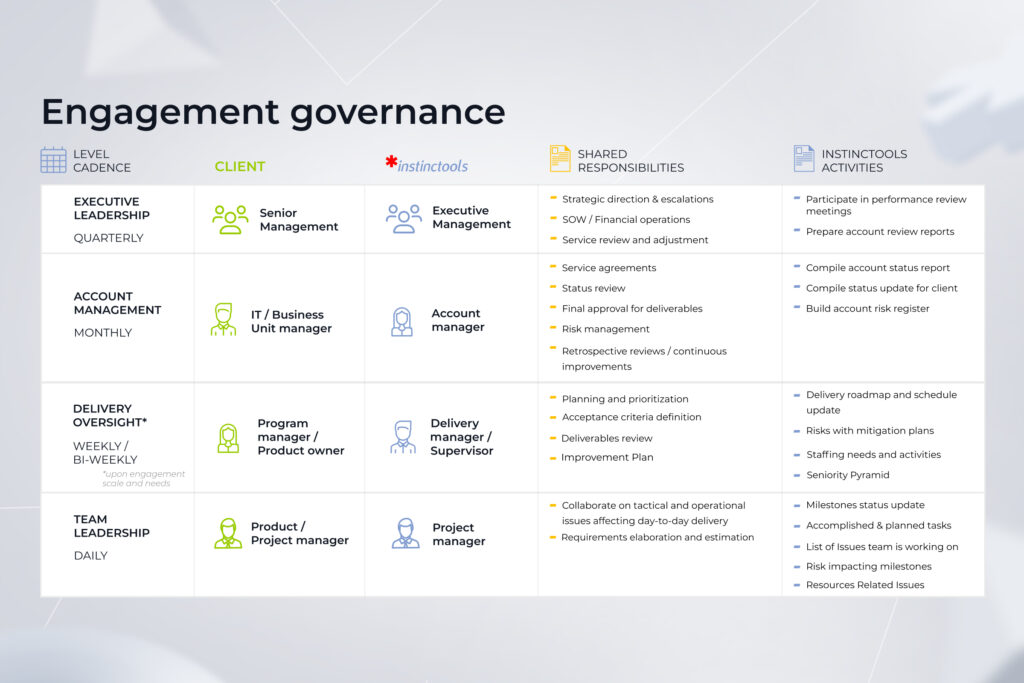
That’s how we deal with it at *instinctools. We have a project governance framework that implies all-encompassing, multi-level collaboration between team members and a client:

Instinctools' engagement governance framework

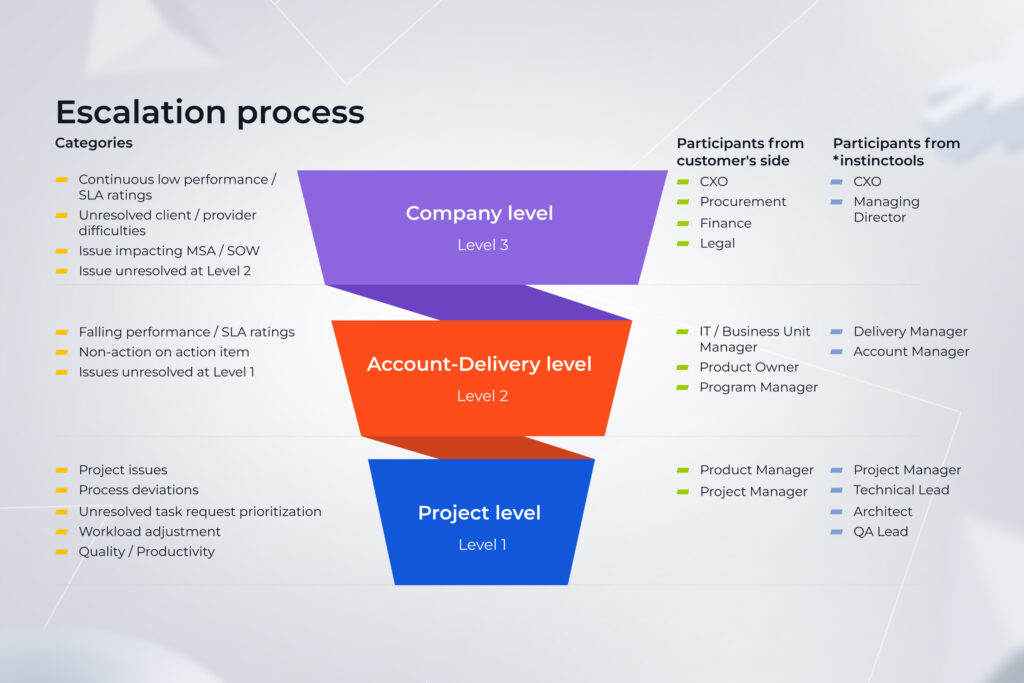
Our approach addresses issues at different levels so that they are handled by contributors with the relevant competencies. The majority of head-scratchers are resolved at the project level in a matter of days or weeks. Questions of the company level are discussed at quarterly meetings. 

Instinctools' project escalation process

Here’s a real-life example of tackling a project-level issue before it snowballed into an IT project failure. An automation machinery manufacturer approached Instinctools to create a web app for their innovative driverless forklift system. The project had to fit into a seven-week timeline so that the client could present the equipment at the industry trade show.

Initially, the client’s in-house team was in charge of developing a service for the robot coordination, while we took on crafting a user-centered web app for data presentation. 

However, there was only one robot model for both teams to work with, and transporting it back and forth for testing between the development centers would violate the project’s deadline. Therefore, our team wrote an emulator that served as a temporary substitute for the coordination service, making it possible for the client to showcase the trailblazing forklift model at the trade show. 

Check the full case study for more details

Dive in

6. Chase for the quick win

When it comes to enterprises, one of their pain points is a large ecosystem of heterogeneous internal solutions adopted throughout an organization’s existence and, therefore, challenging to manage and maintain. As a software company that faced and overcame these hurdles while working on our clients’ projects, we totally understand the hunger for affordable software. However, a quick route to success isn’t always the go-to option and may actually lead to the failure of IT projects. 

We once got a request from a manufacturing corporation to review their CI/CD processes and fine-tune them so that everything will keep up and running hitch-free over the next decade. 

However, even consulting standard-bearers such as Gartner won’t risk doing horizon scanning for such a distant future and making bold predictions since the IT landscape changes like the wind.  

Enterprises need to accept their fate rather than expect a wow effect from the out-of-the-box solutions that promise to fix things once and for all. My 15-year experience in managing large-scale projects shows that there’s no way to avoid customization of ready-made solutions for established IT landscapes. 

Nevertheless, be aware of the opposite extreme — over customization, which is just as detrimental to the software and can become one of the reasons why projects fail. 

7. Over-reliance on technology instead of business outcomes

It’s important to look under your feet when walking the tightrope, but if you dwell on the road for too long, it’s easy to lose the vision of the final goal. 

Similarly, technology isn’t a destination; it’s a way to bring you there.

Here’s one more case from my practice. A fintech company bet on an out-of-the-box DWH solution with a $60,000 yearly license, hoping it would solve 90% of their data-related problems. However, the cost of software integration into their ecosystem exceeded $1,000,000. 

A feature-rich, out-of-the-box product — just as they wanted. However, building a custom solution from scratch would have cost much less than adjusting an off-the-shelf solution to their IT landscape. 

8. Mismatched expertise

The root of all the previous problems may lie in hiring the wrong team. If a dedicated team lacks the expertise to cover your enterprise-scale projects, it turns into additional risk you have to manage.

Finding a reliable tech partner and leveraging IT staff augmentation to extend your in-house expertise or outsourcing development tasks to a fully-packed dedicated project team is a golden ticket to reaching your high-level goals while ensuring your solution is secure, and the core knowledge won’t leak outside the company.

To cut the chaff at the initial stage and exclude the team factor from the list of potential causes of failure, validate the trustworthiness of the potential vendors:

  • Verify if they are present on business listings, such as Clutch, GoodFirms, Techbehemoths, SelectedFirms, etc.
  • Scrutinize their market reputation by checking testimonials of previous clients
  • Review the company’s case studies to see if its expertise clicks with your project’s needs
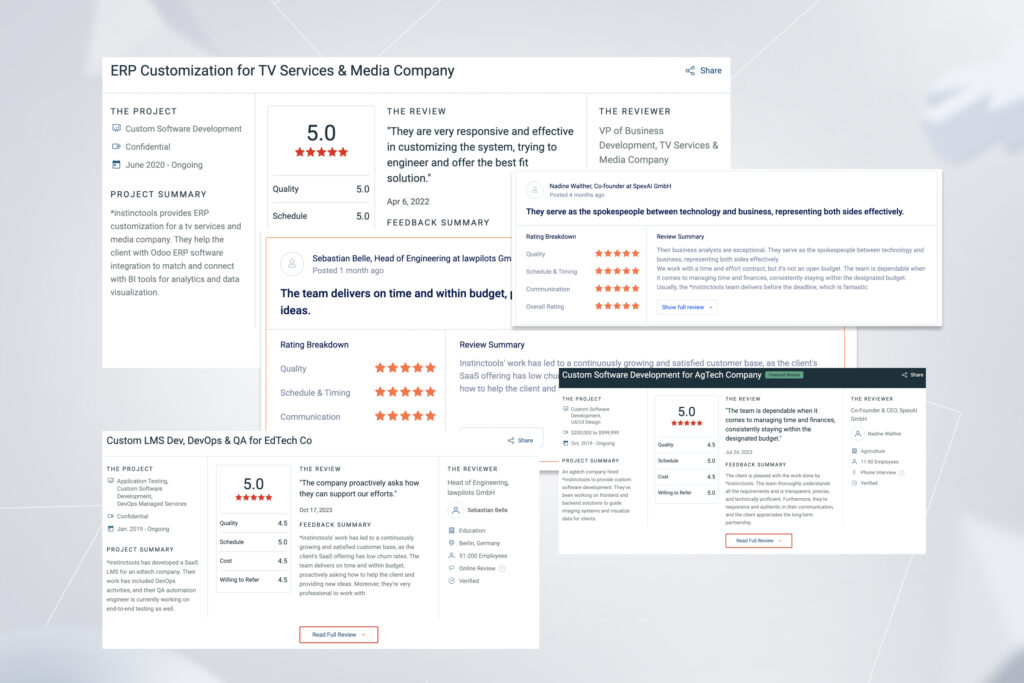
Some reviews of the *instinctools services

Save your time and book a safe pair of hands or a whole dedicated team

Reach out now

Pave the road to fail-proof enterprise solutions

Withstanding unclear objectives, unrealistic expectations, and scope creep while keeping your eyes open to new strategic opportunities isn’t an easy road. Yet having a blue-chip partner by your side allows you to rest assured of achieving desired outcomes. 

Let your tech ally run a discovery phase, clarify organizational priorities, draw up a project plan, choose adequate delivery and governance models, keep project leaders on the same page, track due dates, and more, to avoid project failure and deliver the results you are aiming for.   

Race to the finish without worrying about the tech side

Find a team

FAQ

What are the main causes of enterprise project failure?

There are three dimensions that can contribute to the IT project failure — people, processes, and technology. While enterprises are less susceptible to the process-related causes of failure, they still have much to deal with because of the complexity and longevity of large-scale projects. For instance, neglecting the discovery stage can result in unclear objectives and misalignment between stakeholders, choosing the wrong delivery model can lead to jerry-rigged architecture, and constantly changing goals can cripple the project’s scope.

Why do most projects fail?

Project failure statistics remain high year by year as covering users’ needs with a top-quality solution while sticking to your original business objectives and staying within the budget and timeline gets tenfold more challenging when we talk about enterprise software initiatives. Delivering at scale and avoiding project failure is possible with a reliable tech partner, but not everyone has one.

Digital Twin Tech in Manufacturing: Taking Action with Laser Precision

Decision-making with a high degree of certainty has always been the table stakes for manufacturing companies. That’s why robotic process automation likely played a pivotal role at the beginning of your transformation journey, streamlining tasks and boosting efficiency. But the quest for complete control doesn’t end there.

Digital twin tech in manufacturing has won acclaim for offering a comprehensive look at a digital footprint of products and enabling industrials to keep a close eye on possible risks.

But we’ve seen it already with AI applications and the likes. So what makes digital twin technology the superstar of manufacturing?

What is a digital twin in manufacturing? Detailed breakdown

A digital twin is a near-real-time virtual duplicate of a physical product or process, used to analyze the performance of the physical assets. Manufacturing digital twins can visualize the entire production, including every step of the product life cycle. This allows stakeholders to emulate, simulate, predict, and optimize the product and production system.

By relying on IoT sensors, data analytics, and machine learning capabilities, a digital twin can provide a detailed profile of the historical and current behavior of a physical object, minimizing the need for real-life prototypes. Unlike physical simulations, digital replicas have a larger data pool and are not limited in the number of visualized processes. 

How digital twins in manufacturing work

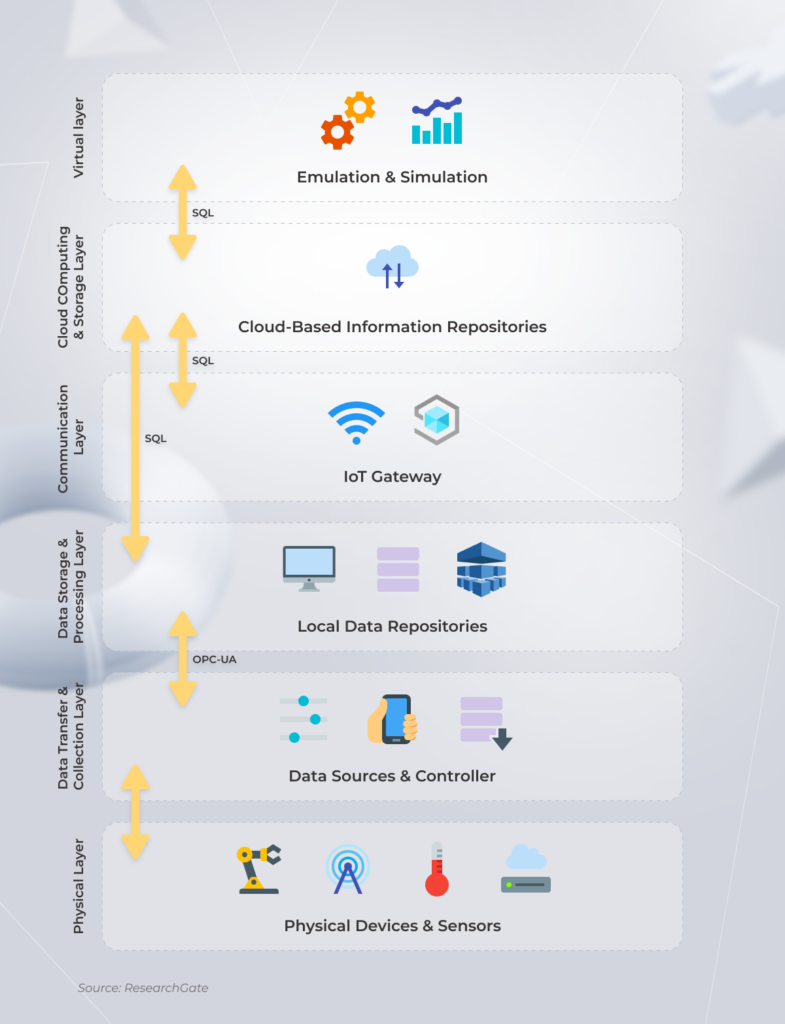
A digital twin of manufacturing is a multi-layer architecture with a combination of components that communicate with each other to execute a specific function. A core differentiator of the digital twin manufacturing framework is its two-way flow of information that returns the insights created by the object sensors to the original source object.

digital twin manufacturing framework

Although the components, relationships, and interfaces vary by the use case, factory digital twins usually include the following building blocks:

Hardware layer

The Internet of Things is the core technology that lies at the heart of digital twin deployment. A whole lot of sensors, actuators, and network devices capture real-world data and send it further for processing and analysis. The choice of the hardware is specific to each deployment.

Middleware layer

This layer comprises all data management infrastructures and solutions that collate and process data from different sources. At this layer, data is also governed, modeled, and visualized to acquire the operational and behavioral awareness needed to simulate, predict, and inform decisions later in the process.

Software layer

The digital twin then uses artificial intelligence to simulate and demonstrate the effects that the changes in design, process, time, or condition would have. Again, manufacturers don’t need to subject real-world objects to those changes, they just simulate them. Likewise, all changes made in the real world are reflected in the real world. The final insights are delivered to the end user via dashboards and applications.

The triple value digital twins bring to your factory

Until recently, a digital twin for manufacturing has been an elusive concept to global enterprises due to the limitations in technology and hefty computing and storage costs. However, the democratization of technology has made an industrial digital twin a sleeper hit. In 2025, the digital twin market is projected to surpass $26.6 billion. Let’s see why global manufacturers are rushing to invest in the concept.

Reduced time to market

In an era where time to market is a critical factor for success, even a tiny mistake made early in the product development process matters. It means you have to get everything right — even the prototype of a new machine — from the get-go. Digital replicas provide a risk-free product development environment, allowing design and development teams to try on different options with no associated cost.

According to McKinsey, the digital twins can yield a 50% faster time to market combined with a 10% revenue uplift. Digital twins in smart manufacturing also accelerate commissioning, facilitate testing via integrated physics engines, and streamline collaboration between different teams involved in product development. 

Emulation and simulation-based development approaches have already gained traction in the automotive and aviation industries. For example, digital twins in the automotive industry allow manufacturers to model mechanical systems on the computer and test them in an emulation or simulation environment.

Improved quality control

A tighter grip on the manufacturing process is among other benefits of digital twins in manufacturing. The technology shows the real-time factory heartbeat – at the process, system, asset, and component layer. That’s why manufacturers can easily spot the improvements to be made, track product performance throughout their lifetime, and monitor product lines and the factory floor. 

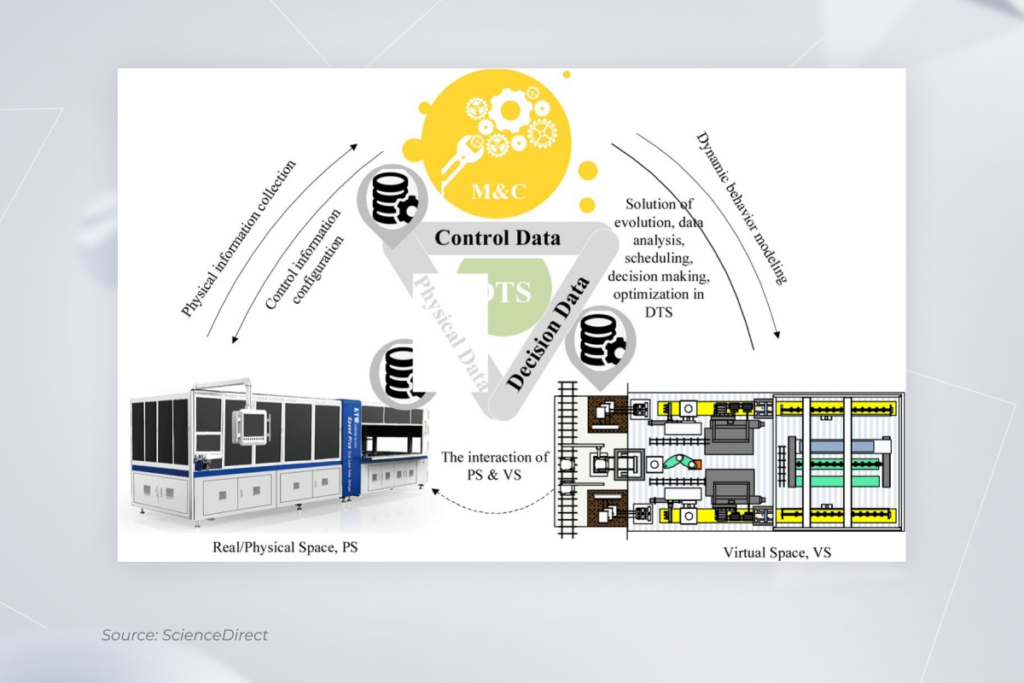
The digital twin of the quality monitoring and control in the series solar cell production line

Digital models can also be used to simulate the performance of products in extreme conditions, which allows engineers to detect flaws and improve product quality.

Preventive and predictive maintenance

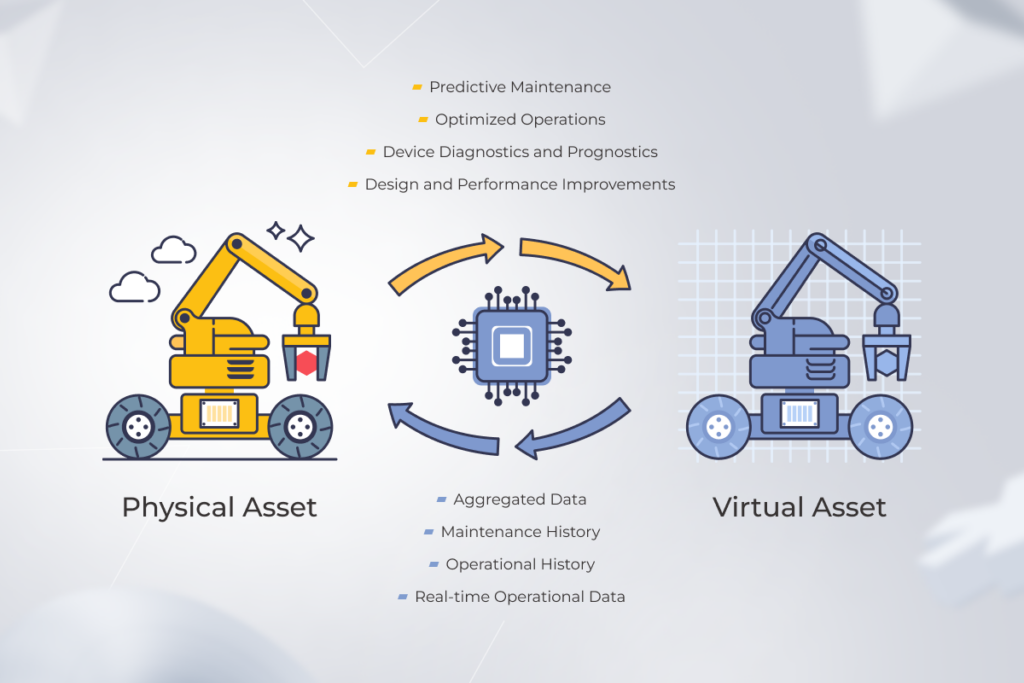
Among other things, digital twins are used to bring out actionable insights related to product behavior and production processes. This way, engineers can see the state of any part of the manufacturing system at any time, meaning that every anomaly will be put on sharp display.

preventive and predictive maintenance with digital twins

Digital twin data allows manufacturers to minimize unplanned downtime, optimize maintenance schedules, enhance asset performance, and extend the lifespan of their equipment, reducing the cost of operating.

Many faces of digital twin applications in manufacturing

The digital twin technology in manufacturing comes in different forms and shapes, based on the level of product analysis. Each type of virtual environment is applied to support different applications, while one factory can have different types of digital twins within a system or process.

Component twins

A component twin is a virtual replica of an individual part of a system or product, such as a motor or a valve. They are considered to be a basic form of digital twins, yet are indispensable in providing detailed information about a component’s historical and real-time behavior.

Asset twins

Asset twins are exact replicas of physical products on your factory floor. These are usually made up of multiple component twins and offer insight into their interaction. Asset twins help identify potential improvements in plant processes and optimize each part to increase efficiency, reduce mean time between failures, and optimize energy or water consumption.

Systems twins

System twins are virtual representations of the interaction between assets. In manufacturing, these types of solutions are used to facilitate collaboration between assets and find new combinations to maximize efficiency. Put simply, system twins allow you to map the ecosystem of assets you have and the relations between them.

Process twins

High-level process twins are used to model the entire factory, including all the associated manufacturing operations. Process twins allow plant managers to drill down into product data, assess the time it takes to build a product, and monitor key business metrics.

Technologies that underpin digital twins

Building twins is far from simple, but once created, they offer near-limitless potential. The powerful quartet of four advanced technologies that comprise digital twins makes sure you can capture the full value hidden in the application.

Internet of things

In the manufacturing industry, a digital twin platform is often based on a conceptual model that leverages a combination of BIM, CAD, or GIS data and IoT data. Therefore, the operational intelligence of the virtual model stems from the real-time collection of sensor data. The bidirectional communication between digital twins and physical IoT devices is what allows companies to instantly monitor the behavior and condition of physical counterparts.

Extended reality

Bolstered by extended reality, digital twins promote manufacturing excellence through virtual factory replication. Put simply, the synergy of the two allows users to interact with machines through real and virtual combined environments and remotely control them. XR components also help manufacturers experiment with parameters and situations to test the machine performance.

Cloud computing

Cloud computing provides an easily scalable infrastructure for implementing a digital twin factory. Also, cloud-based digital twins have the computational resources and storage capacity that match a factory’s data needs, while also reducing tooling and setup costs.

Machine learning

Instead of grinding away at industrial data, manufacturing operators make sense of it with ML algorithms. AI-based models process the piles of sensor data, identity patterns, and provide ready-to-use insights about machine performance, maintenance, emissions levels, and other core metrics.

Revolutionize your manufacturing processes with the latest technology

Contact us

Real-world examples of digital twin use cases in manufacturing

Today, an increasing number of high-flying companies are throwing their hats in the digital twin ring, driven by the need to win the innovation arms race. Let’s have a look at some digital twin manufacturing examples and what benefits industry leaders get from the technology.

Production optimization

Applying a holistic approach to digital twin adoption is what maximizes the value you get from it. In this case, digital replicas can reveal areas of improvement related to the speed of cycle times, efficiency, and machinery utilization. 

That’s what Bosch does. The company accumulates all production sensor data and compares it with a digital twin of a high-efficiency production line to flag deviations and analyze trends. This helped Bosch improve its electronic stability program and automatic braking systems by 25 percent.

After-sales support

The production process doesn’t end with delivering the goods to end users. Manufacturers have to constantly analyze the deliverables to enhance the product quality. 

For example, Tesla creates a digital twin for every vehicle it sells and then gathers real-time data from a vast network of vehicle sensors. By analyzing the data from an individual vehicle, Tesla uploads updates to improve vehicle performance, predict failures, and provide a better user experience for the vehicle owner.

Analysis of assembly-floor behavior

The modern factory floor is often too dense for stakeholders to optimize workflows on a hunch. However, by having real-time production data for every asset, manufacturers can have a 360-degree view to analyze machine performance according to KPIs, schedule workforce, and ensure proper routing of materials.

Case in point, General Motors uses a process digital twin to mimic plant floor behavior. This digital twin implementation example facilitates advanced technology to boost production, improve process efficiency, and ensure the sustainability of operations.

Ready-made digital twin solutions to build on top of

A digital twin created on top of the canned solutions can satisfy your initial needs without spiraling innovation costs. Keep in mind that each of the off-the-shelf solutions is different in their capabilities, operating data types, and complexity of digital twins deployed.

  • IBM Digital Twin Exchange – a one-stop solution for manufacturers, OEMs, and third-party content providers that deal with asset, maintenance, reliability, operating conditions, and other types of operating data. Paired with the IBM Maximo Application Suite, it can enable smart asset management and predictive maintenance capabilities.
  • Oracle IoT Digital Twin Framework – a virtual environment for enterprises that allows for creating simple device models and industrial twins. The infrastructure offers accurate prediction capabilities, what-if analysis, and other functionalities needed to improve efficiency.
  • Azure Digital Twins – a PaaS-based offering that allows manufacturers to create digital models of entire environments, connect IoT devices and existing business systems, and develop 3D visualizations of manufacturing environments.
  • Autodesk Tandem – another ready-made solution that facilitates the process of building BIM-based twins. The platform comprises Twin Building and Insightful Operations features to accelerate deployment and connection building.

No matter the virtual infrastructure, you can’t just go with the flow of an out-of-the-box solution. Digital twins are a representation of your unique operations, processes, and assets so you will need to adjust the analytics engine, connect the solution with your internal business ecosystem, and fine-tune the workloads.

By having a team of cloud engineers, IoT developers, and AI specialists on board, your company can develop the processes and capabilities it needs to develop, integrate, and launch its digital-twin platform.

Take a leaf out of our client’s book: start small with manufacturing digital twins

Here’s a great example of how warehouse automation technologies and digital twin solutions can accelerate development cycles and cut operational costs.

Our client, a warehouse robotics manufacturer, didn’t initially plan to opt for digital twin technology when developing software for their innovative driverless forklift system. Their standard testing workflow implied running new apps directly on the hardware.

Nevertheless, this time, it was a no-go option, as the project’s timeline was limited to seven weeks due to the upcoming trade show, where the new forklift had to be presented. The client’s in-house and dedicated teams were located in different countries, so there was no chance of meeting the deadline if moving a single available robot back and forth between development centers. 

Therefore, we suggested writing a digital emulator that completely imitated the forklift’s behavior and testing software on it. Besides delivering the app on the dot, this approach enabled the client to eliminate expenses associated with system transportation between the two development centers.

Want more details?

Read the full story

There’s no need to “rip out and start all over”. Creating an integrated manufacturing architecture as your way to thrive

It may seem that using digital twins for manufacturing processes requires companies to blow up their current architecture and start over. However, companies don’t have to untether themselves from the holistic and interoperable manufacturing architecture they have now. Instead, manufacturers should connect a digital twin to integrated systems such as ERP, PLCs, and others to jump-start their digital twin journey.

In fact, not only can digital twins capture the data flowing in manufacturing systems, but they can also extract more value from it.

From digital twin to enterprise metaverse

The digital twin is a unique, industry-ready technology that ushers in Industry 4.0 capabilities into conventional manufacturing operations. But the true potential of digital twins comes from establishing connections between them. The interconnected digital twin network can simulate complex relationships between entities, allowing industrials to optimize simulations, scenario planning, and decision-making. 

By adding complementary technologies on top, a network of digital twins can turn into an enterprise metaverse — an immersive environment that connects every aspect of an organization.

Join the smart way of manufacturing with digital twin technology

Talk to us

FAQ

What is a digital twin in manufacturing?

A digital twin is a virtual representation of a physical asset that reflects its physical properties, behavior, and performance. The technology uses a combination of advanced tech such as IoT, AI, and data analytics to process and analyze sensor data.

Why use a digital twin in manufacturing?

In simple words, digital twins drive smart manufacturing. They are beneficial for quality management, production optimization, product lifecycle management, factory design and layout, and even operator training. On a higher level, digital twins provide a competitive advantage to manufacturers, reduce costs, and optimize the supply chain.

What is an example of a digital twin in manufacturing?

A great digital twin in manufacturing example is the use of technology to monitor and optimize the performance of industrial equipment. The system collects data on various parameters such as temperature and energy consumption and extracts relevant insights to understand the current state of the machine.

How to Create an Inventory Management System? | Point-by-point Guide by Tech and Business Experts

Having undigitized or under digitized inventory can be a drag on your company’s financial performance. Want to transform it into a profit booster, even though the chances of succeeding when adopting new software is one in three at best?

You’re in the right place – we know how to chart a vector toward success. Our tech and business experts outline how to draw up a digital inventory management system (IMS) that is destined to thrive.

IMS killer features to ace inventory operations

Building an inventory management system can uplift your technical capabilities with a raft of not-to-miss opportunities.

  • Real-time inventory tracking. Access to the relevant information about inventory levels and items in real-time allows you to prevent stockouts and overstocking, and enables shrewd moves, such as adopting demand-driven pricing.
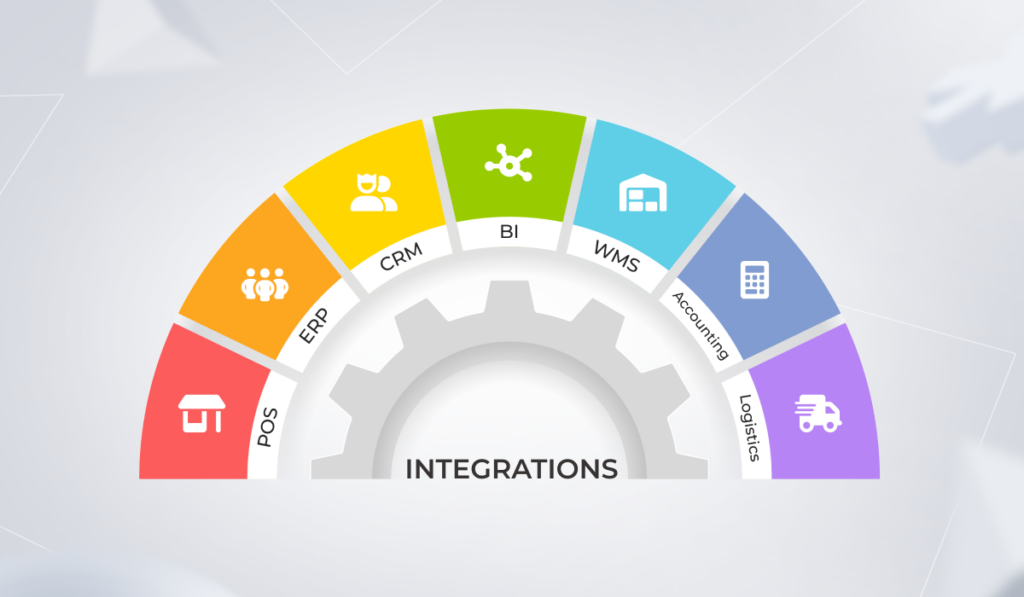
  • Extensive integration capabilities. Linking your IMS with your software ecosystem grants a bird’s eye view of your inventory operations, such as ordering, storing, receiving and their relation to your business processes.
  • User-friendly interface and accessibility. By operating a leading-edge intuitive IMS, you can empower even less tech-savvy employees with easy-to-use data analysis capabilities.
  • Enhanced reporting. No more need to wreck your brain over Excel formulas or outdated inventory management software. Data visualization tools and automated real-time reporting shuffle off the burden of recurrent time-consuming reporting. 

What kind of IMS should you opt for? Let’s take a look at the possibilities. 

A module within an all-in-one solution or standalone inventory-specific software?

There are usually two types of IMS-related requests that come from business owners. They are either looking for special inventory management software that requires integration with other corporate systems, or for an all-inclusive solution, such as ERP, that covers accounting, production, inventory operations, etc.

Adopting an IMS-specific app is an easier step to take than switching to full-fledged multicomponent corporate software. However, if shifting from jerry-built legacy solutions and embracing overall digitalization is your prior focus, implementing an all-in-one software can be a more effective strategy. 

When it comes to “how to code an inventory management system”, there is no notable difference from a technical standpoint. Whether you choose to adopt a single solution and implement modules one by one, including inventory, or bank on specialized software, the core technical task is integrating an IMS with whatever it is – other modules or software.

How to make the grade with creating an inventory system

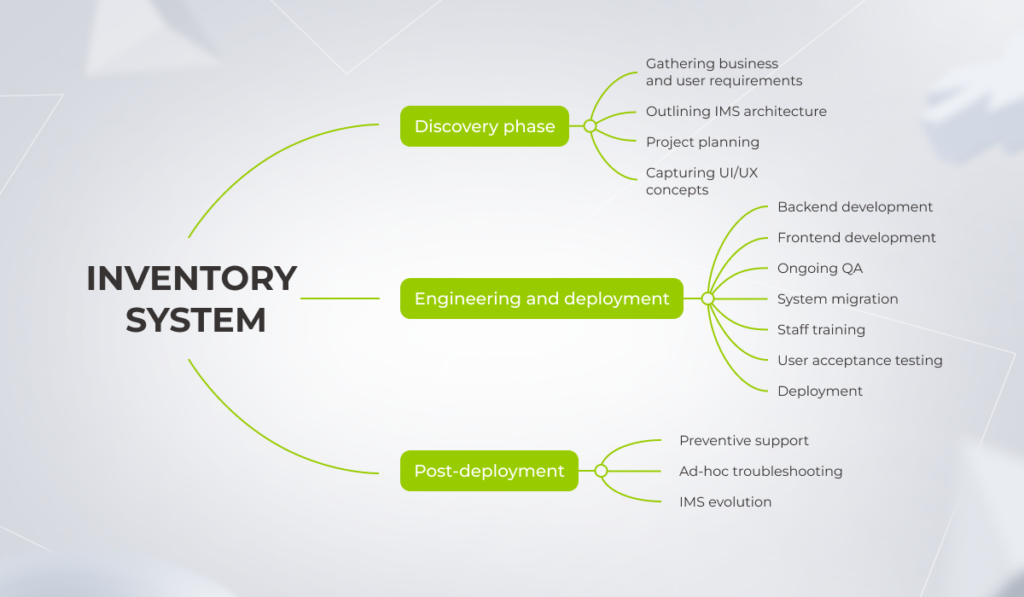
the process of creating an inventory system from discovery to post-deployment

Working according to a comprehensive strategy is a surefire way to help ensure success in any undertaking, and IMS adoption is no exception. Instinctools’ business analyst and solution architect outline the action plan from inception to triumph. 

Discovery phase

To build an inventory management app, start with idea evaluation and validation. At this stage, your tech ally covers a range of tasks.

  • Gathering business and user requirements and compiling them in a comprehensive solution scope.
  • Outlining IMS architecture with tech stack and mandatory integrations based on the collected architecture significant requirements (ASRs).
  • Project planning to shape your IMS vision into a detailed project roadmap, and provide clear success criteria, transparent overview of roles and responsibilities (RACI), communication plan, and more.
  • Capturing UI/UX concepts and preparing initial wireframes and mock-ups to chart a path toward full-blown intuitive design.

Engineering and deployment

The dedicated team’s activities at this stage encompass: 

  • Backend development to provide your solution with a scalable and secure data access layer.
  • Frontend development to craft a sleek graphical user interface (GUI).
  • Ongoing QA with continuous functional and non-functional software tests to move through the IMS development process without any hurdles and release a bug-free system. 
  • System migration in line with your transition plan to prepare accurate data and ensure seamless adoption of new software.
  • Staff training featuring hands-on guidance to minimize employees’ resistance to change.
  • User acceptance testing (UAT) to validate if the IMS handles all the necessary tasks and is convenient for end users.
  • Deployment as a final step in launching your inventory management software in the real-world environment and giving end users full access to the system.

Post-deployment

Keeping your inventory management software up and running is crucial. Tech companies provide multi-level support:

  • Preventive support by nipping issues in the bud and enabling your IMS longevity.
  • Ad-hoc troubleshooting to wipe out any glitches ASAP and prevent downtime.
  • IMS evolution when your partner keeps a close eye on trailblazing IMS trends and adopts those that click with your business needs.

Crafting a five-star software requires care, precision, and a laser focus on the essentials. Among the myriad of tasks that have to be done to draw up a digital inventory management system, there stand three pivotal activities: setting up a project roadmap, planning for integrations, and orchestrating system migration.

1. Planning your IMS

When creating an inventory management system, this universal principle remains valid:

“Whatever you water will grow.”

As inventory is highly interlinked with other company’s systems, insufficient planning can have a crippling effect on the processes’ visibility, business scalability, software maintenance cost, to name a few.

That’s why you have to plan wisely.

Establish your objectives and priorities

Strategy, not technology itself, fuels thriving, high-ROI projects. Therefore, start with the problem your IMS should solve.

KPMG backs this insight with statistics — companies that set clear targets at the onset are 18% more likely to pull off the project.

It’s also crucial to incorporate both short-term goals and long-haul perspectives into your project strategy from the start to hedge against any weak points that could derail your software in the future.

For example, if you aim to operate in different countries, you’ll need regional scalability sooner or later and should take it into account when choosing a tech stack. We suggest a decentralized IMS solution that allows storing inventory data on servers in different legal zones while providing employees across countries with unmatched data accessibility.

Setting the right objectives includes feature prioritization along with identifying software and hardware integrations to save you from getting a hastily-built inventory management application that lacks basic functionality and connections within your software ecosystem. For instance, you can use the MoSCoW method to identify must-have, should-have, and could-have integrations and features to balance the development scope with your budget.

Choose between out-of-the-box and custom solution

Only four cases call for a fully custom, from-scratch IMS:

  • Operating in a highly specific industry, such as aerospace manufacturing
  • Crafting unique products 
  • Requiring integration with a legacy system
  • Covering non-standard business processes 

Otherwise, your business workflows can be standardized and handled with customized off-the-shelf inventory management software. Our business analyst notes:

There are plenty of industry-focused, out-of-the-box IMSs for various business domains. Let’s take healthcare as an example.

Aside from tracking the consumption of inventory items such as medicines and blood for transfusion, such systems need workflows to monitor the use and disposal of disposable syringes and sterilization of reusable surgical instruments. There are specialized ready-made IMS solutions to cover these needs, such as SpaceTRAX, Cardinal Health, and AlinIQ Inventory Manager, among others. 

There is also a nuance about integration with a legacy system and non-standard business processes.

As we notice across our clientele, maintaining legacy systems and holding on to  inadequate business processes are the top two tech hurdles that keep businesses from taking inventory value to the next level.

In the short term, building a custom IMS that can interoperate with your legacy system and cover non-standard processes is a more affordable and fast option. However, these workarounds hold back the system’s scalability when a company grows.

In such cases, we suggest a more forward-looking approach when, along with creating an inventory system that covers the client’s needs here and there, we plan business processes’ transformation and standardization to free the client from legacy constraints in the future.

If you bank on a platform-based solution, remember that it’s not a cure-all either, and you can’t go live with it right away. As ready-made systems are designed to cover the needs of a wide range of customers, they require adjustments to your business processes.

Looking for a stalwart IMS implementation partner?

Request one here

2. Covering integrations

Inventory requires multi-channel integration with your corporate software ecosystem. Our experts mention the most widespread IMS integrations that can maximize business value of the system.

A spectrum of IMS integrations with other corporate systems

Point of sales (POS): 

  • Updating stock in line with customer demand
  • Automating order generation and reordering
  • Implementing dynamic pricing strategies for goods and delivery service
  • Tracking payments

Enterprise resource planning (ERP):

  • Achieving 360-degree visibility of inventory-responsible staff and inventory-related tasks 
  • Syncing manufacturing operations with the product components’ and employees’ availability
  • Simplifying compliance checks due to detailed audit trails 

Customer relationship management (CRM):

  • Up-to-the-minute visibility into stock levels and detailed product information
  • Real-time order status tracking
  • Flexible pricing opportunities

Business intelligence (BI):

  • Inventory processes visualization 
  • Simplified big data analysis of stock levels and their movement
  • Automated planning for product replenishment according to the analytics-based rules
  • Accelerated reporting

Warehouse management system (WMS):

  • Boosting warehouse ​​space efficiency by optimizing item movement between shelves and warehouses
  • Reducing order picking time
  • Tracking proper storage conditions for items that require regular maintenance
  • Decreasing the number of lost orders

Accounting: 

  • Gaining full transparency of the order-to-cash cycle
  • Automating bookkeeping management
  • Delineating the balance sheet of different products, materials, etc.

Shipping and logistics:

  • Establishing efficient goods shipment and receipt
  • Improving tracking and storing of freight
  • Optimizing and speeding up delivery
an example the IMS integrations

3. System migration

Transitioning to the new solution is one of the final moves you have to make to build an inventory management system. It encompasses two activities, migrating data and switching from your legacy or pre-inventory software to the advanced one.

If an IMS is the heart, then data is the blood. Data quality directly impacts your inventory management system’s overall performance and transparency.

IBM research proves that complete inventory visibility remains a pipe dream for 56% of businesses because of inaccurate data. 

To draw up a digital inventory management system that will become a pearl of great price, you should ensure no junk gets into it. Therefore, before transitioning to the new system, review your inventory data to ensure data format standardization across your software ecosystem and the absence of data discrepancies. 

An overall IMS implementation strategy entails a transition plan that facilitates a smooth and bump-free shift to the new IMS without missing a beat in the company’s operations.

Small businesses can switch to the new system right away, but medium and large companies that can’t put business continuity at risk should move gradually, department by department. We usually suggest running old and new systems simultaneously in the first few months to prevent data loss while employees are getting used to the software and updated flow.

Technologies that bolster your IMS

While automation, detailed analytics, and other features are considered the linchpins of any inventory system, there are leading-edge technologies that can shore up and broaden your capabilities.

  • IoT  

Adopting Internet of Things (IoT) technology unlocks stock scanning functionality (barcode, RF, RFID scanners, etc.). IoT devices are one of the go-to options to automate and speed up warehouse-related operations, such as spotting low-stock items and replenishment. 

  • NFC 

Near-field communication can be an alternative to IoT-based scanning operations. This technology enables staff to operate without WMS-specific hardware, such as scanners — employees can cover the tasks with their mobile devices and corporate inventory management application. 

  • Generative AI 

If you want to optimize inventory, warehouse management, and last-mile delivery, weaving generative AI into your software is worth its while. For instance, it unravels capabilities such as intelligent analysis of demand patterns in different areas you operate and optimizing local inventory levels to cut down overstocks and stockouts. 

Case in point: our hands-on experience in building a custom IMS

When a French eyewear manufacturer and retailer outgrew their SaaS inventory management software, they faced a tough choice: upgrade to a pricier plan or embrace the freedom of vendor-free custom software. With a rapidly expanding store chain demanding more flexibility, they chose to break free — and turned to *instinctools to make it happen. 

Instinctools’ dedicated software team built a cross-platform app, putting a premium on:

  • Stabilizing third-party libraries and writing custom ones to ensure smooth integration with barcode and RFID scanners
  • Reconfiguring legacy tabletop RFID readers to perfectly align with the client’s overall hardware ecosystem 
  • Doubling tag processing speed to turbocharge inventory workflows 
  • Bolstering the system with custom dashboards for complete visibility into the inventory state

See the project’s results

Read the story

Take an on-target step towards inventory creation

An inventory management system strengthened with top-tech capabilities is a tidbit. However, it isn’t that easy to bite off. Wise planning, covering numerous integrations, and running final system migration can seem to be mind-boggling steps to take, but having a battle-tested tech partner by your side streamlines the path to beyond-the-reach inventory functionality and the margin uplift.

Want to set up a top-notch inventory management system?

Do it the right way

FAQ

What do I need to create an inventory system?

First, you should identify your inventory problems and put a premium on establishing clear goals of IMS implementation. Run a discovery phase to validate your inventory software idea, work out a unified project vision among stakeholders, and prepare robust documentation. After a proper discovery phase, you can move on to delivery with numerous integrations and system migration, and post-delivery maintenance and support. 
However, by far, the most critical step in creating an inventory system is to find a reliable tech partner, who’ll cover all the head-scratching moments for you.

How do you digitize inventory management?

You can choose from two paths to draw up a digital inventory management system: 
– Adopt a specialized inventory management solution that requires integration with other corporate systems.
– Bank on an all-inclusive software, such as ERP, that covers inventory as well.

How do I create an inventory management app?

To build an inventory management app, act according to a standard SDLC workflow: 
1. Start with gathering requirements, project planning, and capturing IMS architecture and design concepts. 
2. Proceed with backend and frontend development, providing all the necessary integrations, migrating the system, ongoing QA, staff training, and roll-out. 
3. Don’t forget about post-deployment troubleshooting and maintenance.

What makes a good inventory management system?

A good inventory management system is the one that fully meets your needs. Given the plethora of IMS interconnections with other internal company systems, these needs are primarily related to ensuring that all necessary integrations are in place and operate smoothly. 
For example, to build an effective inventory system, you may need integrations with POS, ERP, CRM, BI, WMS, shipping and logistics, accounting software, etc.

How much does it cost to build an inventory management system?

It depends. Custom solutions cost more than customized platform-based IMS. Also, the state of your current inventory software and business processes influences the project’s budget. For instance, if your inventory is spreadsheet-based and relies on manual data entry, there is a lot of work ahead on the processes’ digitization and automation before creating an inventory management system.

Zoho vs. HubSpot: All-round CRM Comparison Based On Users’ and Experts’ Feedback

Zoho vs. Hubspot — which system is better at amping up your sales? Spoiler: each one has its sway.

Standardizing customer-related business processes is vital to amplifying productivity of your sales, marketing, and customer support units, as well as improving conversion rates. To draw on these and other opportunities that arise from their business development efforts, companies go for CRM implementation and optimization.

The challenge is how to choose a CRM system that fully aligns with your business objectives without draining your budget along the way. The best way to make the right decision is an all-around comparison of different software solutions. 

For this article, which zooms on the Zoho vs. HubSpot standoff, we’ve rounded up the opinions of seven experts with real-world experience in both CRM systems.   

HubSpot vs. Zoho CRM: a tug of war for businesses’ attention

We’ve compared HubSpot vs. Zoho CRM according to a plethora of parameters, from cost, ease of setup, and user experience to customizability, available integrations, reporting options, and tech support accessibility. 

1. Pricing

Both CRM platforms provide freemium options that allow you to get a sneak peek into their features and evaluate which one is the most beneficial for your business. 

Nevertheless, Zoho and HubSpot represent two different pricing models.

Zoho offers four plans to choose from – Standard, Professional, Enterprise, and Ultimate. The cost increases gradually, from $22 to $70 (at the time of publication) per user monthly, so the highest-tier offering is only 3.5 times more expensive than the starting package. Also, consider that you can cancel your subscription anytime.

HubSpot has three pricing plans – Starter, Professional, and Enterprise. The entry-level set will cost you only $18 monthly. This price includes two paid users for Sales Hub, so the offering may look way more advantageous compared to Zoho. 

However, if you need broader CRM capabilities and advanced features, moving to the higher packages will cost you a pretty cent – the Enterprise plan is 200 times more pricey than the Starter. Moreover, HubSpot requires you to sign a one-year subscription agreement. You can pay monthly, but you’ll be able to terminate the contract only after one year. 

HubSpot pricing plans are more expensive, but you can create unlimited free users with the most basic functionality in this CRM. Zoho packages are much more affordable, but you have to pay for each user. 

The true cost of the system depends very much on its configuration. After all, businesses use a CRM solution not only for managing sales and marketing activities. The system is also utilized by administrative users, accounting team members, etc., who don’t need extensive features.

Based on my experience, the richer the functionality of each user has to be, the more unprofitable HubSpot is. Conversely, the simpler the functionality of each role, the more profitable HubSpot will pay off. 

Therefore, if you have a large sales team, Zoho is a clear winner. But if you have just a few sales managers and a variety of other roles that can benefit from the basic free CRM functionality, then HubSpot’s Starter plan looks like a godsend. 

2. Setup and onboarding

Zoho requires devoting a sizable chunk of your time to configuration at the onset of the system implementation. To make the CRM more user-friendly, you have to streamline workflows and organize a slew of existing and custom contact fields in advance to simplify sales activities. It can take your staff up to two months to get used to the new system. 

HubSpot can also require fine-tuning, but compared to Zoho, this CRM can be used right after setup, even by first-time users – onboarding usually takes a day or two. Therefore, here we put a good word for this CRM platform. 

3. Navigation and overall UX

According to reviews on Zoho CRM, users often need extra coaching and support to control the system’s features, albeit with a seemingly clean and straightforward user interface.

Zoho CRM

Take a look at the screenshot below. As you can see, there are tons of tabs and icons in the navigation panel. Do you have an intuitive idea of which one you should open to create an automated email? 

Task automation menu in Zoho CRM

That’s the point. The task automation menu is hidden under the “Settings” icon. Such non-obvious steps can increase your employees’ resistance to change, putting successful CRM adoption at stake.  

HubSpot user interface is visually driven and, therefore, seems more predictable – you don’t need to wrap your head around finding the option you need. Navigation is obvious and easy to grasp, even for non-tech savvy staff. This system is proactive, it’s designed to cooperate with a user and provide action options based on their behavior. 

Here are the reviews on the HubSpot UI and UX left by independent users.

HubSpot CRM

Unlike in Zoho, in HubSpot you don’t need to struggle with finding the feature, as the CRM suggests possible options.

HubSpot

If you are looking for your first CRM, HubSpot can become your heavy hitter on the road to business process standardization. 

As I see it, having experience with both software solutions, HubSpot is an intuitive CRM that is easy to plunge into and grasp from day one. Non-technical staff can deal with it unassisted.

I’d like to add that HubSpot provides its users with a rich and easy-to-understand knowledge base. It’s like an internal Google version of HubSpot where you can find a detailed answer to any question regarding the CRM.

So when we compare Zoho and HubSpot in terms of user-friendliness, the latter is a shoo-in. 

4. Customizability

Zoho usually gets points for its unlimited customization options, and we can bet our bottom dollar that HubSpot won’t beat it in terms of the number of custom fields that can be added and organized the way you wish. However, it’s important to highlight one nuance of the HubSpot CRM vs. Zoho comparison. 

It’s quite easy to over-customize Zoho to the point that the system will become challenging for first-time users.

When it comes to sales activities, Zoho provides detailed contact filtration, but that is a double-edged sword. On the one hand, it’s a benefit you can leverage to manage your contacts efficiently. On the flip side, for employees new to the CRM platform, this will be a showstopper that makes using the system without the guidance of more experienced colleagues pretty tricky. 

Nevertheless, we still give kudos to Zoho here, as experienced users will appreciate the customization options the CRM offers. As for novice employees, you can alleviate their acquaintance with CRM by supporting a culture of mutual training and mentoring within the company. 

HubSpot is much less flexible in terms of customization. For example, if you can set any statuses for your leads in Zoho, HubSpot supports only internationally accepted MQL-SQL-SAL gradation. Reviews also spotlight this point.

HubSpot

5. Integrations

Zoho has around 800 in-built integrations, and HubSpot provides more than 1,000 to strengthen and push the limits of the CRM’s functionality.

While there is a slight difference in the number of available integrations, user feedback on them varies. Customers praise Zoho for providing seamless integration with popular marketing, sales tools, and accounting software, but they also mention the system’s limitations.

Zoho CRM

Regarding HubSpot’s in-built integrations, users only mention them as the system’s strengths.

HubSpot

Speaking about custom integrations, you can combine both Zoho and HubSpot with any third-party systems and tools with the help of your custom or off-the-shelf solutions, such as Zapier, Google Scripts, and Node-Red, to name a few. 

You still need third-party tools to implement custom integrations. Therefore, I assume Zoho and HubSpot are similar in this category, with some small nuances. 

There’s one specific integration you may need if switching from the one of the aforementioned CRM platforms to the other — and that is Zoho and HubSpot integration. 

Read about real-life challenges you can face when moving from Zoho to HubSpot

Dive deep

6. Contact and lead management features

In Zoho, you can collect and organize contact and lead data and score leads to prioritize them efficiently. However, lead segmentation options and transparency are not as comprehensive as in HubSpot.  

HubSpot does a good job if you need complete visibility of actions within the Biz Dev team and want more options to choose from when interacting with contacts and leads. 

Both Zoho and HubSpot have fields that help the lead generation team segment leads. However, HubSpot has more of these fields (200+), making lead segmentation a breeze. For example, in the field “Origin”, you can segregate outbound and inbound leads. Zoho doesn’t have such a field, making filtering leads according to the communication’s initiator tricky.

I personally want to put a good word for HubSpot for its transparency – the CRM records every action taken with a contact, lead, or deal.

Yes, indeed, in HubSpot, you have way more options to interact with the contacts, deals, and companies throughout the funnel – sending emails, passing them to each other within the Biz Dev team, making calls, scheduling meetings, etc. And all these actions are recorded in one place – your CRM solution. 

7. Social listening and omnichannel marketing

If you want to know who your potential customers are and deeply understand their purchasing behavior, you should put a premium on social listening tools and omnichannel interaction with clients. Both CRMs provide such functionality, but which wins — Zoho or HubSpot?

Zoho integrates with Zoho Social – a separate tool for social listening. But, you’ll have to pay extra for it. The pricing starts from $16.50 for one team member per month and can reach $500 for a user monthly.

You can manage a plethora of channels through Zoho Social, such as Instagram, LinkedIn, Facebook, Twitter, Google My Business, TikTok, and Pinterest — quite an impressive list. Also, consider that Forbes named Zoho Social one of the best picks for social media management in 2023. 

However, some hiccups can undermine the functionality of the tool. Here are the unbiased reviews of businesses that are using Zoho Social in 2023.   

Zoho CRM

HubSpot offers Social Media Management Software that is a default offering on Professional and Enterprise packages (starting at $800/month). Just as with Zoho Social, you can not only track customers’ and prospects’ behavior, but also publish posts, interact with users, place ads, etc., within the CRM’s interface instead of managing a bunch of separate admin panels. 

HubSpot offers fewer channels than Zoho. In 2023, it’s only LinkedIn, YouTube, Instagram, Facebook, and Twitter. Nevertheless, we have to admit that it’s still one step ahead of Zoho when it comes to omnichannel marketing.

HubSpot enables you to integrate different channels via API and build a complex attribution model with the system capturing user behavior across channels. For example, you can connect your newsletters to the CRM and track emails users opened and the links they clicked. Moreover, you can add your LinkedIn, Meta, Twitter, and YouTube accounts and monitor the same user’s behavior across these social networks. Zoho doesn’t have such a broad functionality. 

8. Email marketing

Zoho allows you to gather data about newsletter recipients, visualize it, and automate mundane tasks such as UTM tracking. You can also set up automated emails triggered by certain actions. For example, if a person responds to an email or a lead signs up for your newsletter, they get an auto-reply.

Integration with the calendar simplifies managing email marketing for enterprises that send a plethora of newsletters on various topics. However, this CRM doesn’t go beyond sending letters. 

HubSpot was originally designed as a toolkit specifically for email marketing. With it, you can manage your entire email strategy under one roof, from creating and sending emails to tracking the efficiency of your campaigns. 

Moreover, as HubSpot email marketing management is backed up by the customers’ data from the CRM, you can personalize every email based on the subscriber’s contact record information, such as lifecycle stage, list membership, etc. One significant bonus is that the personalization process doesn’t have to be manual — catchy subject lines and CTAs can be auto-generated.

HubSpot allows you to create topic-based marketing campaigns that can include all sorts of assets, from emails and specific CTAs in them to landing pages and social media posts. More importantly, the CRM is a single point for tracking analytics on these campaigns.

Another boon of HubSpot is that users can choose their topic preferences on the page with checkboxes generated by HubSpot, and then they are automatically saved to certain Lists. 

In addition, the system offers marketers to create new segments, for example, based on data when users open emails. If a group of subscribers opens inbox letters at 6 p.m. (GMT-7), HubSpot will prompt you to create a specific segment of users and send them emails at a certain time to increase the open rate.

In other words, HubSpot is a proactive tool with more features to improve newsletters’ deliverability, discoverability, and clickability. It’s a one-stop shop for email marketing — whatever you want to invent, HubSpot already has it.

The question to ask yourself as a business owner is: “What are you looking for — a software solution that just sends emails or a CRM platform that actively contributes to improving the results of sending emails?”

9. Analytics and reporting

With Zoho, custom reporting can be challenging to set up. 

First, the data for analytics should be extracted from the CRM, which is pretty tedious as it requires manual action. Zoho lacks automation where it’s vital. 

For instance, if you want to check the number of MQLs per week, you can’t simply review the entity “Lead” for the given period. You have to inspect the entity “Task”, look for the leads with MQL status​​, and count them manually. 

Even when dashboards are ready, there is a risk that the displayed data is outdated. So, in fact, they’ll be irrelevant for making timely business decisions. 

The built-in analytics provided by HubSpot are not that different from the ones in Zoho. Despite the wider variety of visualization options in HubSpot, they are of little practical use. 

You still need a comprehensive BI system for solid analytics, custom reports, high-quality data visualizations, and intuitive dashboards. As you can see, both platforms aren’t able to provide flexible real-time analytics. 

Companies interested in deep and up-to-date analytics have to implement specialized tools with advanced features – Power BI, Tableau, Qlik, or open-source solutions.

Neither Zoho nor HubSpot reaches the level of a complete BI system even for high-priced plans. Even if we consider only sales and marketing features, CRM doesn’t allow building end-to-end sales funnels – such systems aren’t designed to cover this functionality.

If you want to consolidate and visualize data not only from the CRM but also from several other systems, such as ERP, financial, inventory, recruiting, etc., you’ll need a powerful BI system. 

10. AI features

Given the news around AI is bubbling up, CRMs also have to keep up with the times and clients’ expectations. Let’s compare Zoho and HubSpot according to the AI features they offer.  

Zoho’s sales assistant Zia is available for the Enterprise and Ultimate plans. Its primary focus is sales forecasting and monitoring. The tool analyzes how your sales representatives use the CRM and makes personalized automation recommendations for them. That way, it simplifies uncovering anomalies in sales trends, predicts the probability of conversion for leads, highlights products or services for cross- and upselling, automatically assigns prospects to sales representatives, etc.

However, all the functionality is limited to sales activities.

That’s how users spotlight Zia’s strengths and drawbacks.

Zoho Zia

HubSpot offers ChatSpot, which can be integrated with your HubSpot CRM. There’s also a limited free version you can sign up for via chatspot.ai. It’s an OpenAI GPT-3 and Dall-E-powered conversational bot that can boost the productivity of your sales and marketing teams while saving employees time. 

As in Zoho, it includes lead management, reporting, forecasting, and prospecting, adding to this functionality AI-powered SEO features, such as discovering keywords, analyzing phrases, and uncovering your peers’ content strategies. 

In addition, you can interact with the bot just as with ChatGPT. All you have to do is write a question, for example, “How many contacts are assigned to me?” and the system will give you the answer.

11. Tech support

Zoho’s customer support implies email, call, online chat communication, or scheduling a remote assistance session. On low-paid plans, support service is limited to business hours. To get access to round-the-clock support, you have to upgrade to the Enterprise plan. 

I personally experienced multiple times that the answers from tech support were 1–2 days late or didn’t come at all. Such situations make the whole Biz Dev team suffer.

HubSpot’s Starter package provides you with email and live chat support. On the Professional and Enterprise plans, you also can leverage phone support. Besides reaching out via call, email, or chat, you can even get the CRM platform’s support on Twitter. Therefore, in this category, HubSpot blows Zoho away.

Also, as we’ve mentioned in the beginning, HubSpot provides free easy-to-grasp educational materials in their HubSpot Academy. If your staff bank on self-education, they can troubleshoot minor issues independently. 

All hail the results: *instinctools’ final Zoho and HubSpot comparison chart

We’ve created a comparison chart that pits these two CRM systems against each other on 11 parameters. 

CriteriaZohoHubSpot
PricingFour affordable plans with a slight price difference.Three plans, but high-tier options cost way more than the starter package.
Setup and onboardingYour staff might need several months to get used to the system.Onboarding usually takes a day or two. 
Navigation and overall UXThe system’s interface can sometimes puzzle you over what action to take.The highly intuitive interface is easy to grasp, even for non-tech savvy users.
CustomizabilityIt wins if you need extensive customizability for sales operations.The system’s customizability is limited. 
IntegrationsYou can integrate the CRM with most tools and systems you need with the help of third-party tools.Same, but this CRM offers more in-built integrations — 1,000+ in HubSpot’s app ecosystem.
Contact and lead management featuresBasic CRM for collecting and organizing contact data and lead segmentation.Complete transparency of actions within the Biz Dev team, comprehensive lead segmentation, and more options to interact with the contacts and leads.
Social listening and omnichannel marketingZoho Social for managing the company’s Instagram, LinkedIn, Facebook, Twitter, Google My Business, TikTok, and Pinterest profiles.HubSpot Social Media Management Software for building a complex attribution model across the company’s LinkedIn, YouTube, Instagram, Facebook, and Twitter.
Email marketingThe system automates mundane tasks and simplifies managing email marketing, but it’s designed to do no more than send out emails. This CRM is a top pick for email marketing that proactively improves newsletters’ deliverability, discoverability, and clickability.
Analytics and reportingBoth CRMs can’t provide in-depth real-time analytics. 
AI featuresAI assistant for simplifying sales operations. AI bot for covering sales and marketing activities that operates as ChatGPT.
Tech supportEmail, call, online chat communication, and scheduling a remote assistance session are limited to business hours on low-paid plans. You need to level up to the Enterprise plan to get 24/7 support.You can contact support via email, live chat, phone, or Twitter. 

There is no clear winner in HubSpot vs. Zoho matchup: it depends on your business priorities

As there is no one-size-fits-all solution for success, we can’t name one of the CRM as a definite champion. When choosing between Zoho CRM vs. HubSpot, you should consider a medley of criteria, from pricing, ease of onboarding, and overall UX to the system’s customizability, sales and marketing features it provides, and the accessibility of tech support. 

Still in two minds about which tool to use?

Consult our experts

FAQ

Is Zoho the same as HubSpot?

Both Zoho and HubSpot are CRM systems. However, if you compare Zoho and HubSpot by different parameters, such as UX, customizability, contact and lead management features, available integrations, accessibility of tech support, etc., you’ll uncover plenty of differences between the two.

Is HubSpot similar to Zoho?

HubSpot is similar to Zoho as both systems are CRMs and provide integrations with third-party tools, analytics and reporting, contact and lead management tools, and AI assistants. Yet, there are many dissimilarities between the two systems. For example, they have different pricing models, customization options, and tools for omnichannel marketing.

What is HubSpot CRM best for?

This CRM is a perfect fit for building a transparent sales funnel and successful omnichannel marketing. Also, if you have just a few sales managers and a variety of other roles that can benefit from the basic free CRM functionality, then HubSpot’s Starter plan looks like a godsend.

What is the main difference between HubSpot and Zoho?

HubSpot is an end-to-end CRM for the entire sales funnel, from lead generation to continuous long-term work with this client, while Zoho is more suitable for lead generation.

Can Zoho integrate with HubSpot?

Zoho and HubSpot integration is possible. Such integration may seem a dubious option at first sight – who would want to pay for two CRMs and take care of their support instead of using one system? Nevertheless, such an integration will be necessary if you transition from the one CRM to the other to ensure correct contact migration between the systems.

The Perfect Match: Four Time-Tested Pro Tips on Finding a Remote Development Team

Building an in-house software development team is a challenging undertaking. From finding decent specialists to onboarding and managing them, you have to take on tons of things. The talent crunch in the tech industry does not make that any easier. There were only 65 potential candidates for every 100 vacancies in the US last year. 

All these and a number of other factors put remote teams in a favorable light in terms of software development quality, expenses, and time to market. If the idea of hiring a remote development team has crossed your mind, check yourself against our list of actions to pick a reliable technology partner.

What is a remote software development team?

Remote development is a business partnership model in software development. It involves using the services of a technology vendor located in another country. The vendor sets up a remote development team based on your budget and project requirements to solve your IT challenges. Team composition and seniority levels for different roles are determined by your project complexity and the scope of the tasks. 

Engagement model - Dedicated Teams

Work smarter not harder: why hire a remote development team?

Delving into new initiatives becomes easier when we understand the deliverables. When it comes to the remote software development process and remote workers, these are reduced costs, greater flexibility, and a faster time to market. 

Engagement model - Dedicated Teams

Whether you’re a CTO of a large corporation or a small business owner, outsourcing can become your way to kill two birds with one stone, saving your time, and project budget. 

If you hire a remote team, you don’t waste time setting up processes within the team as it’s self-managed. Just take advantage of ready-to-work, talented software engineers embedded into your IT department. 

For instance, tech giants like McKinsey and Deloitte locate their R&D centers in Poland, where the outsourcing framework is flexible, mature, and tax-friendly. You can also take advantage of local talent and hire specialists or an entire team to develop innovative products.

Looking for experienced software developers to meet your project needs?

Get a quote

Collaboration models to choose from

No project can be handled by following the same playbook. Successful remote development calls for flexible collaboration methods, calibrated for your business needs. For a company that wants to launch their own product and has no developers onboard, for an organization that craves extra hands to offload their tech backlog, or a corporation which needs a full-scale development center as its numerous project teams have spiraled out of control, there are different team extension options to benefit from. 

IT staff augmentation

Start scaling your business capacities on demand with staff augmentation. It’s the most affordable way to strengthen your IT department with high-qualified experts in software product development, business analysis, UX/UI design, quality assurance, etc., in a matter of days. However, consider that you’ll have to manage these employees by yourself and have the skills and project management tools to do so.

This model of cooperation may be suitable for different projects. For example, a company with its own IT department may lack a specific role for a project. However, it’s impractical to hire the needed domain specialist full-time, especially if no similar projects are planned any time soon. Or there might be the right specialists in place, but the project deadline is on fire, so the organization needs extra hands for a short time to cope with the workload. 

​​​​Another example is when startups seek maximum benefits at an affordable price and in a short timeframe. An IT staff augmentation model provides them with access to a wide range of skill sets and offers financial adaptability and cost-adequacy, which are critical for resource-constrained newcomers.

The advantage of IT staff augmentation is that you don’t just get industry or technology experts but proactive team members who communicate effectively and strive to find and offer the best solution. This is driven by high competition among technology vendors. Remote software engineers have to be proactive so that you want to hire them again for another project. This is why, you can choose the best of the best without compromising your project budget.

Dedicated team

With dedicated development, you hire a whole agile development remote team, so you won’t have to build it from scratch or worry about fitting new employees into the established squad. The dedicated team works as an independent unit whose activities are transparent. Remote dedicated software development teams can cover the whole software delivery process, including analysis, design, development, deployment, quality assurance, and support.

Such an approach is a good fit for long-term projects with frequently changing requirements. You get domain experts who take on IT tasks if you don’t have your own IT department. And if you have your own IT unit, but they are busy on another project, then you can enlist the help of a dedicated team. Moreover, if you fully entrust your vendor with software solution implementation and delivery, then you don’t even need to participate in technical interviews of candidates for the dedicated remote team.

Offshore development center

When the number of separate remote teams you’ve been hiring is growing, at some point, managing them becomes too big of a challenge, taking a toll on the overall project. 

Instead of dealing with multiple remote teams scattered across the globe, you can establish an offshore development center when an overseas business unit becomes an extension of your organization. This collaboration model suits companies with specific security requirements, the ones that handle sensitive data, and large projects that depend on hardware. 

Engagement model - Dedicated Teams

Still mulling over what collaboration model will be the best fit for your company?

Let’s discuss it

Four factors to consider when looking for a remote development team

Before hiring a development team, there are a number of things to take into account from a business and technical perspective. The more nuances you think through at the initial stage, the smoother the cooperation will be.

1. Identify limitations of your project and expectations from the remote team 

This information will help you find a highly professional remote development team that matches your budget, time-to-market, and security standards. 

  • Define your budget. Calculate the amount of money you are ready to spend on the project of product development before starting the negotiation process. It’s crucial to engage budget approval persons, and the CTO, who will help define the technical requirements that affect the development cost.
  • Spot the specific requirements for your project. For example, if your project necessitates particular security protocols, it may narrow down the number of software companies, from which you can request a team of remote developers. 
  • Decide on the collaboration and payment model type you need. Earlier, we mentioned collaboration models and use cases for each of them. But at this stage, you should also choose between a fixed price, and a time and material payment model.

Fixed price, with its strict costs, timeline limitations, and inflexibility, is a suitable option for well-specified projects with precise time to market. Ensuring that no new requirements or features will appear during development is a mandatory condition. Moreover, this payment model may include the absence of communication with the client.

But startups without complete specifications and complex long-term projects require a flexible time and material payment model, which implies adaptability to ever-changing requirements. 

  • Following coding standards. It’s not that hard to write code that will work for now. But will it be high-quality and consistent code that any developer can work with? 

When you hire remote software developers, especially at a Java development company, make sure they follow coding standards, such as PEP8 for Python, SEI CERT for Java, MISRA for C/C++, etc. It will save you from code refactoring and rewriting inconsistent or poorly written code in the future. Moreover, such an approach ensures easier code migration and integration with other systems.

Unlock the prospects of software development with a remote dedicated team

Get in touch!

2. Think twice before choosing a region where to hire a remote development team

Although the quality of services plays the first fiddle in choosing a team of remote developers, it’s important to think beyond that. The cost of software development, time zone differences, culture and work mentality of the country you’re hiring from, English proficiency level, can greatly impact the success of your project.

  • Quality of software development services. First things first, it makes no sense to hire a team of remote developers from a cheaper location if the software solutions they create cannot maintain acceptable performance levels consistently, show low average Mean Time Between Failure (MTBF) and Mean Time To Repair (MTTR), and have a high number of defects in the code. Quality shouldn’t be compromised, and solutions should be, first and foremost, holistic, reliable, correct, maintainable, and easy to use. 

Therefore, it’s worth choosing remote software developers in countries with a high level of education in IT disciplines. For instance, while only 41% of developers worldwide have a bachelor’s degree, in Poland the figure is almost twice higher,  reaching 73%.

  • Cost. Instead of hiring a remote development team in the USA, where you would pay $130K for each developer, seek the same services in Poland and pay $40K for a senior software engineer working remotely or $24K for a mid-level specialist. Meanwhile, Poland is one of the five countries with the highest level of tech skills. 

This reduces the project’s cost by three to five times without compromising the development quality — looks too attractive to leave it on read, right?

  • Time zone gaps. For example, the time zone difference between San Francisco and a country in Asia may reach up to 13-16 hours. With a time difference of more than ten hours, it will be challenging to sync with a team and ensure smooth communication and collaboration. 

That’s why, opting for a remote team whose time zone aligns with your work hours is the most beneficial solution. For instance, hiring software developers from Europe will be a lifesaver for US-based companies as the time gap between them is about only six hours. 

  • Mentality and work culture differences. The cultural distinctions between the client and contractor’s sides may lead to misunderstandings and misinterpretations, putting the whole software development undertaking at stake. 

In this respect, it is easier for organizations based in the United States and Western Europe to collaborate with developers from European countries with the same company culture, for instance, Poland, to avoid communication problems down the line and ensure both parties have the same expectations from the project. Statista indicates that Poland is one of the leading countries worldwide when it comes to offshore development services and remote work.

  • English language proficiency. Speaking the same language as your remote development team allows you to be on the same page regarding the project. Poland ranks 16 out of 112 as having a high English proficiency level. 

Experienced developers fly off the shelf in a day in your country?

Leverage our talents

3. Check the reliability of the companies that provide dedicated development team services

Are you sure about the trustworthiness of the companies you’re considering? Here are some steps to help you make a wise choice.

  • Check the reviews of the companies on business listings, such as Clutch, GoodFirms, Techbehemoths, SelectedFirms, etc. Read customer reviews to get an idea of what other clients think about the company and its remote workers. Also, look into their ratings and how long they’ve been in business. 
Expertise - Product Software Development
  • Investigate IT providers’ case studies. Check out their skills in a range of industries and their previous work to identify their area of expertise and see if it matches your needs. That way, you can cut the chaff in the initial stage. 

4. Clarify how companies secure the work of remote development teams

Verifying that your project is kept secure is another essential point to consider when you hire remote software developers. Therefore, ask potential vendors about the security protocols they follow and measures they take to protect the data, such as encryption and secure storage solutions. 

Additionally, inquire about their privacy and data access policies to confirm that they meet your company’s standards. With the right security protocols in place, you can rest assured that your data is safe with the remote development team. 

Your technical partner should take into account local legal regulations and security protocols. Moreover, your remote dedicated software development team needs to be certified and audited in line with your specifications to match your compliance requirements fully.

Speaking of Poland, it stands on par with EU- and US-based organizations and sticks closely to international regulations.

Is a remote development team your golden ticket?

Projects with restrictions related to budget, level of security, complexity, and time to market are the first in line to benefit from remote software development teams.

  • Large, long-term projects 

The challenge of large, long-term projects is that their requirements tend to change. In this case, a remote team of profile experts is your opportunity to quickly adjust the team’s skill set to permanently fluctuating requirements. 

The side benefit you get when augmenting your team with outside talents is knowledge transfer. For example, you have mid-level developers working on a project, and you expand the team with senior-level vendor developers. Working together, they will be able to enhance the expertise and skills of your employees.

  • Product development with limited time to market 

A fast start is key when you’re working on a project from scratch. When you come up with an idea that could influence your company’s position among competitors, it’s crucial not to miss the moment and implement it quickly. 

With an agile remote development team and efficient time management, you can get to the project in one to five days instead of investing up to three months to hire the in-house experts

Average time / Different types of development teamIn-house team*instinctools’ remote team
Recruit & hire talents56 days1 – 10 days
Start working on a project30 days1 – 5 days
Scale up the team40 days2 – 3 days
  • Projects with a limited budget

For startups and small companies, renting office space, recruiting and covering vacations, bonuses, and taxes for their IT department can become a significant part of the budget. Moreover, you’ll need to invest a great deal of time and energy into assembling your own team. 

Hiring a remote team of developers in different countries is an alternative to setting up and maintaining your own IT department and an easy way to obtain your goals while keeping development costs moderate. And if your organization is small or medium-sized and software development isn’t a core part of your competence, you may consider not creating an IT department at all and rely solely on the dedicated team.

Why freelance platforms, such as Upwork, Fiverr, etc., aren’t the best options even if you are short on budget? You can’t be confident in freelancers’ level of expertise. Hence, you run the risk of getting low-quality development.

Expertise - Product Software Development
  • Project with special data security requirements

When hiring remote developers in another country, you determine the desired level of security the team must meet. You state the conditions and choose the development unit that will provide built-in network security, private office space, authorized entry, and software access control. 

If security is the cornerstone of your project, you can send keys on flashcards to work with your architecture and even require your provider to have team members tested for substances — the team will follow these rules and ensure compliance.

Expertise - Product Software Development

Take your time choosing a remote software development team provider to find a reliable one you can trust to set up the team. An experienced partner will determine the needed roles and their seniority level to handle the task effectively. 

Instinctools experience in remote development team services

At *instinctools, we understand the challenges and opportunities of working with a remote development team. We capitalize on our 20+ years in software engineering and innovative consulting to build successful and sustainable agile software development remote teams for our clients. However, we don’t measure our experience solely in years. It’s also reflected in 650+ successful projects in more than ten industries. Besides ensuring the quality of development and providing you with proficient tech skills and industry knowledge, we develop our soft skills and adhere to a continuous learning culture.

Instinctools has extensive knowledge and expertise in all aspects of software development and remote work. Our skilled teams are ready to assist with any project at any stage, from ideation to development and ongoing support and maintenance, while ensuring our clients’ projects are completed on time and on budget.

Our core principle is bringing tangible value to your project, and that’s what our clients say after collaborating with us.

Time is now: access a skill set and expertise that you may not have had before

With the world becoming increasingly digital, businesses need to stay on top of technology. Therefore, they need reliable, professional, and experienced tech allies. And taking advantage of remote development teams is one of the ways to get the software development done faster, more efficiently, and, what’s important, cheaper. While searching for a tech partner might seem daunting, our tips will help you find a professional and affordable match for your project.  

Tap into remote software development and scale beyond borders

Get in touch

FAQ

What is a dedicated development team?

A dedicated remote development team is your autonomous tech squad in another country that either strengthens and scales up your in-house IT department or replaces it. It’s fully managed by your tech partner, which frees you from dealing with the paperwork. Just enjoy quick access to the expertise you need.

What is the role of a remote development team?

A remote development team takes on tasks to ease the workload and allow your employees to focus more closely on other undertakings. For example, you are just starting a project, and you need specialists who can manage the process and, at the same time, transfer their core knowledge to your team. Or a large company requires extra hands to sort out tasks in the backlog. Or you are entering a new market and want to hire a full-fledged team in a new location.

What is the advantage of hiring a remote developer?

When you hire a team of remote developers, you save time and money on hiring. You get a whole remote development team that is ready to start working on a project in a few days, while, in the case of in-house developers, you may need up to three months to set up the team and ensure they function in a coordinated way. Moreover, you can scale up your remote development team even by double in just 2-3 days if you need to speed up your time to market.

How to hire remote developers in 2023?

Start by identifying your requirements for a remote software development team. Then check business listings, such as Clutch and GoodFirms, to find companies that provide remote dedicated teams services and have relevant expertise. Dive deeper into their portfolios to narrow down the pool of potential technology partners and interview the remaining applicants.

How do you manage a remote software development team?

Negotiate this concern with your vendor before you start working with a remote development team. For example, you can use tracking tools like Jira and Microsoft Teams to ensure you stay up-to-date on the project’s progress and successful completion. However, working with a dedicated team is convenient precisely because you don’t have to engage in their coordination constantly, as they are self-managed.

Right Here, Right Now: Reap the Benefits of RPA Implementation

It is estimated that a large majority of businesses, roughly 60%, conduct a minimum of a third of their operations and duties manually. Nonetheless, this can be altered through the use of robotic process automation (RPA) – a software solution that has great potential to improve a company’s productivity and efficacy. The benefits of RPA technology extend far and wide. When integrated with traditional business solutions, it can help support digital transformation by helping organizations to enhance end-to-end operations and, at the end of the day, ensure your company’s prosperity. What are some other unsurpassed RPA advantages? To explore how automation can become a critical aspect of your business’ success, let’s look into it further. 

Ensuring uniformity in operations and preventing human error

Can you guarantee that all the staff in each branch of your business adheres to rigid regulations for every process without exception? People tend to customize processes to suit their convenience, which can lead to detrimental results when security is concerned. For instance, omitting the stage of sandbox scanning for all the emails an employee receives makes your organization more susceptible to social engineering attacks. In that regard, RPA technology is of much help as it follows an algorithm ensuring that security requirements are consistently met across all units and offices.

Accurate processing and collecting data, improved analytics

Collecting and processing information can take up a lot of working time. On the bright side, they also have the highest automation potential compared with other time-consuming activities. 

technical automation

Other operations that relate to data, such as data entry, verification, management, sorting, cleansing, integration, and migration can also be simplified thanks to the process automation. 

For instance, during data collection, the main advantages of RPA are accuracy and elimination of human error. At the stage of data cleansing, RPA helps automate data deduplication, data monitoring for anomalies, and data migration between disparate enterprise applications.

Here’s an example of how RPA can be used to improve the analytics of an e-commerce solution: 

Bots collect information about the customers, such as the amount of money being spent, buying habits, etc. to help you personalize customer experience. During the stages that follow data processing, automation can be used to analyze the data, build reports, and compare information from them with the store’s product inventory. Such an approach will help facilitate and accelerate the work of the sales and marketing teams.

RPA technologies also provide organizations with a bonus benefit — task execution data that can enhance analytics. It’s useful for uncovering hidden patterns and drawbacks in your business processes to find an appropriate way to optimize the supply chain. Also, bots notify you about the exceptions they cannot handle within their algorithm during task execution so that you can more efficiently ​​develop the BPM strategy. 

Compatibility with existing systems

Let’s take a real-life example from the healthcare industry. Clinics have Electronic Medical Records (EMR) with patients’ medical history and treatment. They also have Clinical Decision Support (CDS) systems that help doctors predict drug interactions and prepare diagnoses for patients by analyzing data from various systems, including EMR. So it’s crucial to organize an error-free data flow between these systems. RPA technology handles this task faster and more efficiently than a human, who can make mistakes when copying data from EMR to CDS. 

A bot copies human actions. This means it acts just like a human would. With one difference, the technology operates according to a well-designed algorithm and doesn’t make mistakes. It’s also important to acknowledge that it completes these operations even outside business hours. As a result, organizations process data faster and don’t need to replace or reengineer existing systems when implementing RPA because this technology isn’t built into them but layered on them — you can adjust processes in a blink of an eye, and start taking advantage of their agility and efficiency straight away. Such an approach allows companies to adopt process automation in a non-interruptive way, which makes RPA unique among other types of automation. 

Increased productivity and higher efficiency

Productivity is the most noticeable benefit of RPA implementation in any industry, which is not surprising at all. Bots can complete operations more quickly than people, and often at a lower cost. 

RPA benefits

It’s hard for humans to compete with a technology that doesn’t need sick days and vacations and works 24/7. Luckily, there’s no need to measure up. Instead, your staff can use their time and talent for tasks that robots can’t handle. Combine the capabilities of people and machines to obtain better outcomes. The PwC Finance Benchmarking Report reveals that you can save up to 40% of working time thanks to automation. Take eBay with its complicated accounts system as an example. Creating a month-end financial close report manually took up to 10 days, and after RPA adoption this time decreased to three days. Now imagine how helpful RPA technology can be in banking when coupled with another powerful technology such as business intelligence. 

automation potential

When the robotic part of the work is done, the document is reviewed by the person responsible for its preparation. So, adopting automation doesn’t mean you can fully replace an employee with an RPA technology. However, it allows you to free your staff from boring, monotonous operations and use their abilities for advanced tasks where RPA fails. 

RPA automation

Higher security level

Speed is the cornerstone of successful defence against cyberattacks. The faster you identify an invasion of your system, the faster you’ll deal with it and minimize its influence. CISOs and security leaders who were the respondents of the EY Global Information Security Survey stated that they’d seen a clear rise in attacks over the previous 12 months. RPA implementation is a way to cope with this situation because the technology speeds up threat identification and response processes. 

Even if an attack occurs, RPA helps mitigate its impact, creating backup copies of core processes in case of the system’s shutdown is another function that bots perform. They record even small actions with data, so that you always have complete audit trails with every click logged. This way, later it’s easier to find out which part of the system was the weak link and strengthen it. 

RPA contributes to improving security, but human experts still play a key role as most organization would prefer their security analysts to make the final calls about security issues, not a machine. When it comes to shutting down a critical server, who would you trust with the final decision-making — an RPA bot or a person?

Better regulatory compliance

For some industries, being compliant with regulations is vital. For example, high compliance level is a compulsory condition for healthcare where organizations should meet a variety of standards, such as HIPAA, HITECH act, PSQIA, etc. as it’s a matter of profitability, reputation, and legality. In these cases, working without specific software that ensures all the requirements are met is impossible.

The undeniable RPA advantage is that it facilitates business processes in heavily regulated environments. RPA bots are worth looking into as you can hard-code compliance checks in their logic to prevent the possibility of data breaches. The collateral damage for HIPAA violations that vary from $1,000 per mild accident to $100,000 for serious breaches.

Improved customer experience

Customer experience is one of the main areas of competition right now. If you failed to attract a client via a couple of touch-points, then consider you missed them. RPA is exceedingly important in retail, where 63% of consumers expect businesses to know their unique needs and expectations. 

For claims processing, the results of automation adoption are tangible indeed. The faster the reaction to a claim is, the higher customer satisfaction level will be. Think of it in numbers:

Simply checking the claim’s status takes about 85 seconds of the employee’s time. And how many claims do you get every day? Multiply those 85 seconds by the number of requests — that’s how much time your staff waste on a primitive mechanical task. What if you automate this part of the operation to speed up claim processing and give the employees more time to get to the bottom of things and meet customers’ expectations? Care1st Health Plan Arizona also thought about it and decided to use RPA advantages in their practice. The technology allowed the organization to process 20 requests in 1 minute. On a workday scale, such an approach reduced 8-10-hour work to 1 hour. With this approach to improving customer experience, clients get the information they need quickly and easily, and become loyal customers who can recommend your organization.

If it comes to the financial benefits of RPA implementation, McKinsey states that replacing humans with bots for 60-70% of operations related to claims processing leads to a 30% reduction in claims processing costs. 

RPA also helps you personalize the customer experience. For example, in the education sector, you can use robotic algorithms to determine which teaching methods are likely to work on each student.

Increased employee satisfaction

When your staff is engaged in high-value work, which requires a deep dive into the issues surrounding the topic, switching to small routine tasks can give the brain a break — no one can be equally efficient all day long. But what if dealing with those mundane operations takes up most of your employees’ time, slowing them down and hindering their productivity? Will they be satisfied with groundhog-day-like work? Deloitte’s report indicates that 42% of employees who plan to leave their current employer don’t believe their talents and abilities are being used effectively and don’t find their work worthwhile. And being buried under the flurry of repetitive mechanical actions is one of the reasons for it. RPA takes over mundane repetitive operations and helps to keep highly-qualified employees focused on meaningful tasks. 

Since RPA software is user-friendly and flexible enough to allow non-technical employees to adjust the software to their needs, you gain one more advantage of the RPA adoption — it decreases the workload of your IT department.

RPA in business is a way to boost your productivity while decreasing costs

Robotic process automation is a key enabler for digital transformation initiatives within any industry. Implementing RPA you kill two birds with one stone —speed up routine operations and keep your employees engaged in meaningful tasks. The business value of such changes is also obvious — cost savings by industry vary from 40% for operational tasks in manufacturing to 30-70% for processing activities in the banking sector. The general trend is clear — RPA adoptions meet or even exceed expectations in cost reduction for 81% of organizations that have implemented the technology.

Wondering how far you can go by adopting RPA in your business?

Reach out

FAQ

Why do businesses need RPA?

If you think you don’t need RPA, it means you are ready to give up on a number of opportunities this technology offers. RPA helps achieve process standardization, higher efficiency, better security level and regulatory compliance, increased customer experience and improved staff satisfaction. The cherry on top of the cake is cost reduction. If you want to get more by spending less then you need RPA. 

What companies benefit from RPA?

RPA plays an essential role for organizations that want to streamline their processes while reducing their costs. But adopting robotic process automation is especially valuable for industries that have to meet regulatory requirements, such as healthcare and fintech.

All-round ERP Comparison: Odoo vs. SAP

Key highlights

  • ERP systems are a heavy hitter for leveling up your business processes’ transparency and efficiency, with Odoo and SAP being among the leading options on the ERP market.
  • Both software solutions address the same core user needs but cater to different scales: <strong>small to mid-sized businesses</strong> vs <strong>enterprises</strong>.
  • Whether you’re fine-tuning your processes to fit the ERP or customizing the ERP to match your processes, the input of the vetted experts in enterprise resource planning will make your life a lot easier.

Managing inventory, tracking human resources, monitoring equipment performance, ensuring quality control, and reporting — these are all critical factors that directly impact your company’s financial health and operational efficiency and can be addressed by an enterprise resource planning (ERP) system.      

But with so many options out there, how do you choose the right ERP system that strikes the perfect balance between advanced features and user-friendliness? In this article, our ERP experts compare Odoo vs. SAP to help you make a smarter, more informed choice.

What is Odoo?

Odoo comprises a set of versatile open-source business applications designed to facilitate a medley of the company’s processes. With its modular and flexible nature, seamlessly adapts to both on-premise and cloud environments. Odoo covers everything from HR management, accounting, and project management to customer relationship management, ecommerce, and inventory tracking – helping businesses run smoothly across all departments. 

What is SAP?

SAP ERP software is a powerful solution that blends on-premise and cloud capabilities, offering a wide range of functional and technical components. Beyond the core modules, SAP includes business apps for quality control, material management, and plant maintenance. Plus, with tools like NetWeaver, Process Integration, and Enterprise Portal, SAP provides a complete development environment to support your business’s growth and efficiency. 

Nine questions to ask yourself before choosing Odoo vs. SAP ERP

Improved reporting and planning, increased process visibility, and cost reduction are universal benefits of ERP systems. However, just as no size fits all, there are no ERP systems that would be equally perfect for any organization. That’s why, together with a business analyst and team lead developer experienced in ERP implementation, we’ve prepared a list of questions and accompanied them with the answers to help you finally figure out which ERP is best suited for you, or at least which one is not.

1. How many orders do you have to process daily?

Odoo is an optimal solution if you have no more than a hundred orders on a daily basis, and you don’t need to collect and store a mind-boggling amount of data. But if you’ve installed Odoo while a startup, and since then your company has grown, experienced developers can customize the ERP to handle the amount of data you operate.

SAP is designed on a different principle. It’s capable of storing and handling a huge amount of data for enterprises that process thousands or even millions of orders daily. For example, Amazon uses SAP since it has to handle nearly 500,000 orders per hour. However, it takes eternity to process such volumes of information — SAP’s slowness has even become a meme.

Odoo Master Yoda meme about SAP's slowness

2. Would you like to get out-of-the-box ERP functionality for free, or are you ready to shell out the cash from the start for a basic solution?

Odoo has a Community version, which is totally free but has some limitations in particular modules. However, let’s take the full-fledged Odoo Enterprise version for comparison. It’s a cheaper option even if on the other side of the scale is SAP Business One – SAP’s alternative for small and middle-size businesses. 

Software cost depends on the ERP version and modules you need. On average, you’ll pay from $19 to $29 per user monthly. So, in terms of costs, in the competition between Odoo vs. SAP Business One or any other SAP ERP version, Odoo is the winner.

SAP’s implementation and annual costs are high. Even in the case of SAP Business One implementation, you have to pay $149 per user on a monthly basis – this is at least 5 times the price of Odoo Enterprise from the outset. 

Speaking of the application of a full-scale SAP version such as S/4HANA, costs are much higher since this software solution is oriented toward huge organizations with thousands of employees. Note, that even the deployment of the basic functionality requires having deep pockets, let alone customization, that you’ll more likely need. 

Odoo vs. SAP Business One pricing

3. Does the survival of your business depend on its flexibility?

Odoo helps small to medium sized businesses that can operate in one way today and change it tomorrow to stay competitive. This ERP is like a constructor, where you can easily assemble the whole system from the blocks, and if necessary, change the components. For instance, if the company changes the suppliers, their processes, such as the supply chain management, also change. Flexibility is the basis for survival in such companies.

SAP is tailored for organizations whose survival depends on strict adherence to processes, not flexibility. When you have offices or subsidiaries with hundreds or thousands of employees in different countries, following clear business processes is the key to the smooth functioning of the whole enterprise. For example, Coca-Cola has to manage marketing, advertising, manufacturing facilities, and representative offices in more than 70 countries on different continents. 

4. How much time and effort are you ready to invest in your ERP project?

Odoo is open-source software written in Python and made up of modules. You can make use of the ones you need and stay flexible in exploring new Odoo features and solutions. Popular programming language, modular and flexible nature make it easier for you to find developers with an appropriate level of expertise and experience. In this Odoo vs. SAP comparison, Odoo comes first in terms of the speed of ERP implementation.

Consider that the simplicity or complexity of the software user interface also impacts adoption time. Odoo provides a user-friendly interface with drag-and-drop functionality for both on-premise and cloud versions.

Odoo user interface

SAP, albeit consisting of modules, has a more tangled structure since it serves the needs of large international companies from the Fortune 1000 list. The ERP is written in C, C++, Java, and ABAP (a high-level programming language invented by SAP). By and large, it’s not a case where developers can grasp the system’s structure and logic at a mere glance — this ERP requires specialists with at least five years of expertise specifically in SAP, and finding them may become tricky.

Keep in mind that the speed of any ERP implementation depends on the initial data source, from where you’ll transfer information to the new system. Transferring data from third-party systems might be difficult because of their data structure. It will take time to analyze the logic of your third-party systems, match it with the ERP logic, and write a script to transfer the data. For example, if the organization is a manufacturing company, you’ll need to transfer technical processes, products, invoices, etc.

The user interface of SAP’s enterprise software, such as S4/HANA, doesn’t score that many user-friendliness points when it comes to the on-premise option. The ERP may take time and training to get used to. 

SAP S4/HANA user interface

That being said, SAP Business One for small to medium-sized companies offers more intuitive interfaces. Its cloud version is the most user-friendly option you can get from SAP, so don’t write off this ERP software.

 SAP Business One cloud user interface
SAP Business One on-premise user interface

5. What are your hosting server preferences for the ERP system?

Both ERP solutions can be installed on-premise, in a hosted private cloud, and in a public cloud. 

Odoo offers a free solution if you want to install it on your servers. There are no licensing fees.

Going for SAP, you’ll have to pay a license fee except for maintaining servers. You can choose a perpetual, annual subscription, or consumption payment model. 

6. How important to you are simplicity and the low cost of customization?

Odoo is easier and cheaper to customize. However, Odoo and SAP have different customization capabilities. As one size never fits all, no wonder that the off-the-shelf functionality of both is usually not enough. 

In Odoo, modifying the steps of any process, whether it’s package management, product delivery, exchange, or return, is easier than in SAP, where it would either be impossible or very time-consuming and exhausting. SAP requires a very strict tie-in to its processes. In this respect, Odoo greatly outperforms its rival.

SAP ERP vs. Odoo is far more entangled. It offers detailed but also intricate customization, for example, if you need multicurrency functionality, multistage revisions of products, and tangled logistics. Such an approach may be needed if your organization is a global corporation. 

With SAP, you should accept its requirements for the business processes as dogma. SAP doesn’t adjust to your processes. It dictates how you should change to be able to run SAP. It doesn’t mean that customization is impossible, but it’ll require much more resources and expertise. 

If you aren’t ready to rearrange your processes to the requirements of a ready-made ERP, you can choose the alternative option – the development of a custom system. It’ll require more time and investment than fine-tuning the existing one but you’ll get the ERP, initially created for your needs and processes. 

7. Are you ready to start the data migration process quickly and potentially modify the way you work again when a new version of ERP comes out?

Odoo provides you with the scripts for more effortless data transfer, but you still have to handle data and code migration by yourself.

Even if you haven’t changed the basic Odoo modules much, the migration will require a developer’s involvement, not to mention cases where there were many modifications. The scripts help transfer the standard functionality, but if the modules were highly customized, you’d have to spend a lot of time comparing the changes in the module to take them into account in the scripts to make the new ERP version work correctly. Custom functionality requires custom migration scripts. 

SAP has backward compatibility – the feature allows you to avoid code or data migration with version upgrades. On the scale of companies such as BMW, which operate terabytes of information daily, this approach not only saves tons of energy, it makes it possible to migrate in time without a tremendous impact on the processes’ speed.

Consider that each ERP has its data structure, so in any case, you need to make a correct mapping of your data to the data model used in Odoo and SAP.

8. How prepared are you to deal with bug fixing?

Odoo is an open-source ERP with a huge community, and that’s a significant head start. 

The more developers use ERP, the less likely the bugs will go unnoticed. With Odoo, if someone finds a bug, they create an issue about it on GitHub, describe how to fix it, or ask for help. So when other developers encounter a similar bug, they can quickly and easily find a solution. 

SAP, on the contrary, is a closed-source ERP. In such a situation, you have to entirely rely on your development team’s expertise and SAP technical support. 

  • Do you have a technology partner who will promptly adapt the modules to new regulations? 

Regardless of which ERP you choose, the modules will require modification when the regulations change. For example, if invoicing or managing bill requirements change, you’ll need to modify your accounting module accordingly. 

Odoo system flexibility allows you to quickly adapt to new conditions and requirements of different authorities. With dedicated experts who support and maintain your ERP system, all the necessary changes can be addressed quickly and pain-free.  

Here’s an example from my practice of Odoo implementation for a European client. When Germany reduced VAT from 19% to 16% during the COVID-19 pandemic in 2020, our team needed to reconfigure tax settings to avoid issues with the DATEV upload. 

SAP’s modules have a more complex structure, that’s why it’s complicated to adjust them to comply with new regulations. As mentioned before, this ERP has a higher entry threshold for developers — only experts with 5-10 years of relevant experience can change the code. 

SAP vs. Odoo comparison

ParametersOdooSAP
Amount of data the ERP can handleAn optimal option if you have no more than a hundred orders daily.It’s capable of storing and handling a huge amount of data. SAP can process tens of thousands orders daily. Not without a fly in the ointment though: the system is quite slow. 
Free version availableOdoo Community is totally free. Paid Odoo Enterprise offers unlimited possibilities.SAP has only paid options.
FlexibilityIt provides you with the opportunity to easily change blocks and their components to stay flexible and competitive.It’s not really adaptable. You’ll more likely have to adjust to the business logic of SAP than vice versa.
ComplexityThe ERP is written in Python and has a modular structure, making it easier to work with the system and find experienced developers. End users get an intuitive, user-friendly interface ready for use right away.This ERP software is written in C, C++, Java, and ABAP (a high-level programming language invented by SAP). It’s not a case where developers can grasp the system’s structure and logic at a mere glance. The interface is also less user-friendly and may call for extra staff training.  
The license fee for the on-premise optionNo, Odoo is free if you install it on your own servers.Yes, perpetual, annual subscription or consumption payment models are available.
Simplicity of customizationIt’s easier and cheaper to customize.It offers detailed but intricate customization that requires more resources and expertise.
Specifics of the migration to a new ERP versionIt provides you with the scripts for more effortless data transfer, but you still have to handle data and code migration by yourself, especially to transfer the custom functionality.It has backward compatibility, which allows you to avoid code or data migration every time a new version is deployed.
Bug fixing optionsIt’s an open-source ERP with a huge community, thanks to which your developers can find ready-made solutions on GitHub. It’s a closed-source ERP, you can rely only on your development team’s expertise and SAP technical support.
Adaptability to new regulationsOdoo can be easily and quickly adjusted to new regulations if the developers who support the module are experienced.SAP’s modules have a more complex structure, it’s complicated to make them comply with new regulations.

There’s no such thing as “good or bad ERP”, it may be “for you or not for you”

As you can see, Odoo vs. SAP comparison is ambiguous. It’s impossible to say which ERP is better. Both Odoo and SAP have their strengths and weaknesses. The key parameters to pay attention to when choosing a system are the organization’s size and the amount of data the system should handle.

How much does it cost to implement Odoo?

Odoo suits small and midsize companies that want to move from disparate spreadsheets to a unified system. SAP is a more sophisticated system designed for Fortune 1000 companies that need to store and process massive amounts of data. 

Anyway, choosing a suitable ERP between Odoo vs. SAP is only half the battle. No less important is the experience level of the team responsible for its implementation. Get in touch with us to find knowledgeable technical allies.

FAQ

Is SAP better than Odoo?

The answer to Odoo vs. SAP comparison depends on your organization’s size and the number of orders you have to process every day. If you run an international enterprise from the Fortune 1000 list and you have to manage thousands or millions of orders daily, then yes, SAP is better than Odoo since it specializes in processing a tremendous amount of data. But if you run a small to medium-sized company, there’s no reason to overpay for mammoth software.

Can Odoo replace SAP?

When you compare Odoo vs. SAP, consider that they aren’t equal from the start as these ERP systems are designed for different targeted audiences. Odoo is a perfect match for SMEs and enterprises with multiple offices but the same business processes. You can implement this ERP quickly. Meanwhile, SAP is oriented toward huge multinational corporations, whose processes in different offices may vary significantly. SAP can handle the most complicated business requirements of large enterprises, and in this sense, Odoo cannot replace it yet.

Digital Transformation Challenges on Your Path to Growth

It can be grating to keep hearing comments about how important digital transformation (DT) is, but there is still limited understanding of what it actually entails. Does the shift from manual paper processing to report automation mean that your organization is digitalized? We’ve looked at the core of this concept and determined major digital transformation challenges to address on your way to long-term growth.

What exactly is digital transformation?

Digital transformation is an ongoing process of adapting to customer needs by using advanced technologies to overhaul your business, from the way it is marketed to how it is managed. To deal with economic headwinds and fast-changing market conditions, which will be an integral part of the coming year, companies simply can’t freeze in an as-is state.

Digital transformation paves the way for organizations to unveil their full potential – something that could have never been done without innovative technologies.

What would you say if asked which country had the highest share of cashless payments in the world in 2012? The United States? China? The answer is Kenya. It is the country that overtook the world in the percentage of non-cash payments thanks to technology innovation. 

These payments have been made through USSD requests (mobile operator M-Pesa, Vodafone group). The whole Western world went the way of building banking infrastructure – banks, branch banks, ATMs, terminals, bank cards, chips, magnetic stripes – it is a huge amount of money. Kenya didn’t have the opportunity to invest in developing the same infrastructure. That’s why the country followed a different way – adopting new technology. As a result, they surpassed many Western countries in the share of non-cash payments.

Anyway, going all digital straight away is a nonviable delusion even for the most decisive business owners. What will work is taking incremental steps toward digital transformation. You might start with answering a simple question: at what stage of the digital transformation process is your organization right now? If it’s difficult to identify which processes inherent to digitalization you have already implemented and which are still missing, get advice from experts in the field of software development. It may turn out that you have issues in the stages that precede the digital transformation itself, for instance, lack of automation can be one of the most common holdups. Then break these barriers first because unresolved problems tend to turn into a snowball that can wreck your business ambitions.

Five dimensions of digital transformation

According to the IDC survey, digital transformation projects deliver a return on investment in less than 12 months, and these improvements speak for themselves. 

Digital transformation

Decreases in operating and inventory costs and an increase in revenue are one of the main benefits of the DT. However, nothing worth having comes on a silver platter — digital transformation is difficult, and 70% of projects fail to achieve their goals. Which challenges can you face during this period and how to deal with them to stay among 30% of successful digital transformation initiatives? *instinctools experts highlight five transformational dimensions and the challenges you may face in each of them. We use the term ‘dimension’ when speaking about the transformation areas to underline the all-encompassing and multifaceted nature of the process. 

  • Information

As customers’ expectations are the main driver of digital transformation, you can’t start this journey without having detailed and accessible data about your consumers. Leverage and deepen understanding of your audience using Business Intelligence (BI) and Data Analytics services to figure out how the company can make more money. 

Take the gas station chain, which collects and analyzes data about their customers: cars they drive, fuel they fill up and how often they do it, additional services they use, etc. This information will help the organization understand what’s most beneficial for them and how to increase the average check and attract new customers.

The main challenge here is ineffective data management. Handling a mind-boggling data flow is difficult in itself. Couple that with the need to keep data secure and the task becomes several times more complicated. 

The purpose of data management is not to gather as much information as possible but get the right data leading to actionable insights. That’s why the information should be of high quality, categorized, and easily accessible. 

Consider how you collect and organize the information and review your actual data warehousing and quality management as data is a keystone of a digital transformation. Is the level of data accessibility appropriate? Is the customers’ information centralized? One of the ways to unlock the potential of your data is implementing Enterprise Data Management (EDM) within your digital transformation strategy. EDM includes such processes as collecting, organizing, managing, securely storing data sets into your information architecture.

  • Operating model

This dimension is about ‘how’ digital transformation helps work to be done and goals to be accomplished. Unfortunately, inefficient business processes can impede this initiative. 

For example, if your organization wasn’t born digital but you want it to keep up with the new players, can you reach this goal without automating repetitive day-to-day tasks? Unlikely. Automation is a hyper-trend and one of the key areas of technological investments for a reason but to leverage it entirely you need to set clear KPIs you want to achieve thanks to its adoption. Otherwise, if the end goal of the process stays uncertain for different teams, you can barely estimate the automation efficiency. 

To get complete visibility of your business processes use Business Process Management (BPM). Following this approach, you’ll figure out how to re-engineer your business operations for better outcomes. For example, you can benefit from cloud computing services by migrating to the cloud from legacy platforms or taking advantage of cloud optimization if you’ve already moved to the cloud.

Another challenge of this digital transformation dimension is achieving the proper level of security. COVID became a major booster for the digitalization of businesses. But the flip side is a huge security lapse because of remote work. To ensure the appropriate level of security you’ll need the help of agile methodologies, one of which is the practice of DevSecOps. At *instinctools, we integrate security into DevOps services at the beginning of the product delivery lifecycle by default to reduce vulnerabilities faster without impacting the deployment frequency and delivery speed.

  • Organization

Lack of organizational change management is one of the key transformation challenges that put your digitalization plans on hold. Only equal engagement of the C-suite and employees can guarantee that the transformational path is worth taking. 

Digital transformation

All the main stakeholders should be involved in the digital transformation process right from the start. The lack of buy-in support from the beginning can result in employee pushback. A familiar routine made them feel comfortable whereas transformation may look like a threat to their livelihoods. To turn your employees from opponents of new technologies adoption to supporters of innovations, make them confident that they’ll have new, easily adaptable roles in the newly established workflow.

Also, remember that your employees have a limit on the number of changes they can successfully process. Therefore, if there are a lot of changes coming, prioritize them to make your staff less stressed.

Another problem you may face while implementing new technologies such as BI, DevOps, cloud computing, etc. is a skill shortage and lack of expertise among your employees.  

Digital transformation

Take advantage of augmented teams so that your project will be done properly and won’t turn into a weapon against you.

  • Customer experience

Evolving customer needs inspire businesses to move forward but they are also the major challenge. The requirements for companies in terms of customer service are exceptionally high. What was earlier a nice-to-have option, such as an omnichannel experience, now is becoming a necessity. It’s good to deliver offerings targeted at a certain customer segment. But what if you go the extra mile and provide a highly individualized experience to each of your customers? Personalization makes it easier to reduce marketing and sales costs — they can be cut by 10-20%. Additionally, such an approach helps to put your business on the fast track to success by increasing the number of regular customers. Consider that the return on investment from programs that targeted loyal customers is three times higher than that of mass promotions. According to McKinsey, only 15% of retailers have fully implemented personalization strategies — use this advantage to outperform your competitors. 

Aside from getting detailed data on who your customers are you need to be able to make use of this information as quickly and easily as possible, observe the data comfortably to receive information in an intelligible form, and get actionable insights faster. That’s what comprehensible and insightful data visualization is for. You can also invest in marketing research to see what technologies your customers need and get in-depth customer segmentation or directly ask for feedback from your customers to shape your digital transformation strategy according to the answers.

  • Strategy 

Moving somewhere because you intuitively get that you should move is not enough, as not being able to identify the right direction and destination will lead you nowhere. Therefore, one more digital transformation challenge is the lack of a defined strategy. Of course, there might be earth-shattering situations such as the Covid-19 outbreak was, that accelerate digital transformation to incredible speeds making companies that want to stay afloat have to keep up with the pace. Sometimes, considering new market conditions, you should react immediately — there’s no time to take a step back to review whether your plan is thought-out enough. But if you begin your digital transformation journey under more favorable conditions, allow sufficient time to find your reasons for the transformation and your way to fulfill it since the absence of a clear digital transformation strategy may result in budget constraints. Think of your priorities and long-term goals to make decisions that’ll let you respond to customers’ needs without breaking the bank. 

Finding your roadmap to the digital transformation

Digital transformation is a journey rather than a destination, so there’s no need to look for an endpoint. You know how it works in real life — by the time the first half of your wishes come true, the other half will double. The same is with digital transformation — by the time you’ve implemented what you initially intended, there probably will be something new you’ll need to adopt. So don’t throw yourself into a dubious venture clicking on PPC ads that promise to help you remodel your entire business once and for all in several months after which you allegedly will rest on the laurels. Better think of what technologies are the most crucial for your company? Can you move step by step to catch up with and even get ahead of your competitors or do you need an innovative approach from the start? Numerous challenges that accompany transformation may seem insurmountable, but they are manageable with the support of an experienced and reliable partner. If you grapple with the complexity of identifying your digital transformation strategy, get in touch with our experts. They’ll prove that this process isn’t kind of a larger-than-life challenge but a manageable journey instead.

Anna Vasilevskaya
AI modified real photo
Anna Vasilevskaya
Account Executive

Get in touch

Drop us a line about your project at
[email protected] or via the contact
form below, and we will contact you soon.