Immense Potential of ERP in the Manufacturing Industry: Unveiled

The manufacturing industry is no stranger to the challenges of production, inventory management, quality control, and cost containment. As global competition intensifies, manufacturers are struggling to meet customer demands for higher-quality products at lower costs. To gain a competitive edge in an ever-changing market, organizations need to utilize industrial software development solutions to increase efficiency, reduce waste and optimize their operations. 

ERP implementation in the manufacturing industry is a powerful solution that can help manufacturers improve their performance, streamline processes and reduce operating costs. It’s no wonder that 47% of companies looking to buy ERP are manufacturers, according to SelectHub. 

In this article, we will discuss numerous benefits of ERP in the manufacturing industry and outline a few key implementation considerations. 

How is manufacturing ERP different from industry-agnostic ERP?

Manufacturing ERP differs from generic ERP software as it is specifically designed to serve the manufacturing environment. It offers features and capabilities tailored for the manufacturing industry, such as product lifecycle management, recipe management, material resource planning, shop floor control, and inventory tracking.

Given that generic ERPs can be used in any industry, they require much more customization, provide a limited view of important data, and call for investments into add-ons to satisfy your industry-specific needs. In a nutshell, if you want to streamline manufacturing operations with ERP, opting for custom enterprise application development is highly advisable.

Benefits of ERP in the manufacturing industry

With an ERP system, manufacturers can get real-time visibility into every part of their operations, making smarter decisions and maximizing profits. Let’s outline the most important benefits of ERP in the manufacturing industry. 

Process automation

Manufacturing ERP is an invaluable tool that can help automate processes by building a digital workflow that incorporates the entire production cycle, from inventory management and order entry, all the way down to the delivery of goods.

Manufacturers can fully or partially automate work orders, report generation, capacity planning, stock replenishment, and a wide array of other operations. This eliminates the need for human intervention in day-to-day activities, simplifies tracking up-to-date information on the factory floor, and ensures that processes remain consistent while minimizing costs. 

Operational visibility

The most important feature of any ERP system is that it acts as a unified source of truth that can be accessed by anyone involved in the process. It is easy to detect bottlenecks and resolve them with real-time operational data available to decision makers, from factory floor employees to finance departments. 

Whether it’s equipment maintenance, customer purchasing trend analysis, material tracking, inventory monitoring, or supplier relationship management, ERP systems provide manufacturing organizations with a deeper insight into their operations, eliminate the duplication of effort and improve communication between departments. 

Real-time inventory overview

In manufacturing, inventory control often goes beyond routine material reordering when the stock is low. Many components and raw materials have a limited shelf life and require specific handling and storage procedures. Without a proper resource planning system, managing a myriad of stock units across multiple warehouses becomes arduous. 
ERP in the Manufacturing Industry

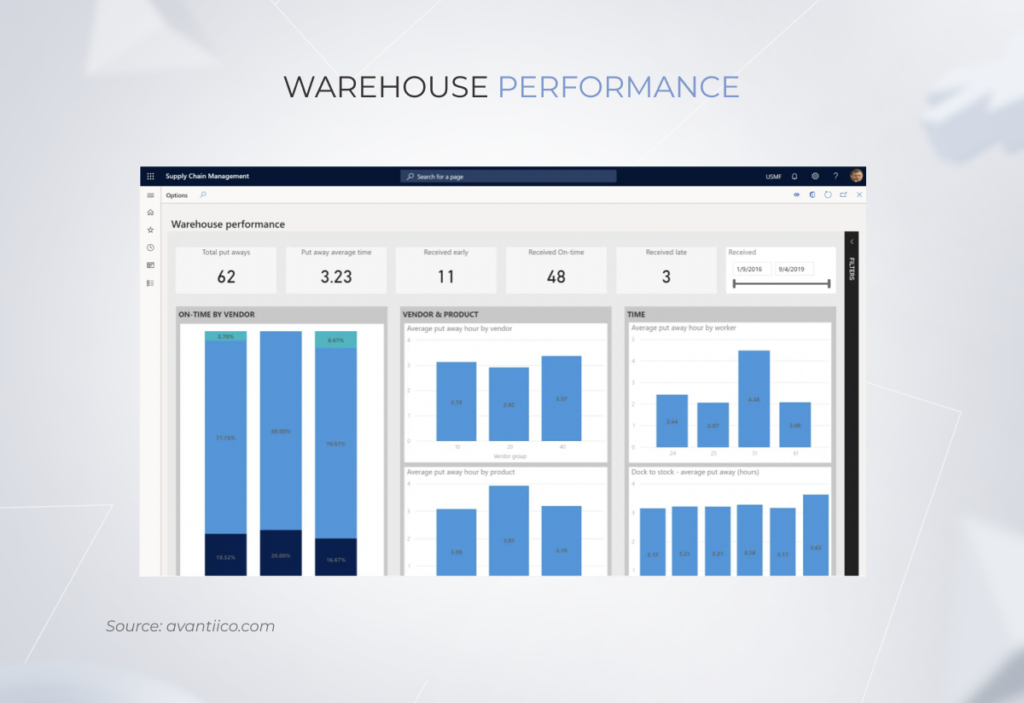
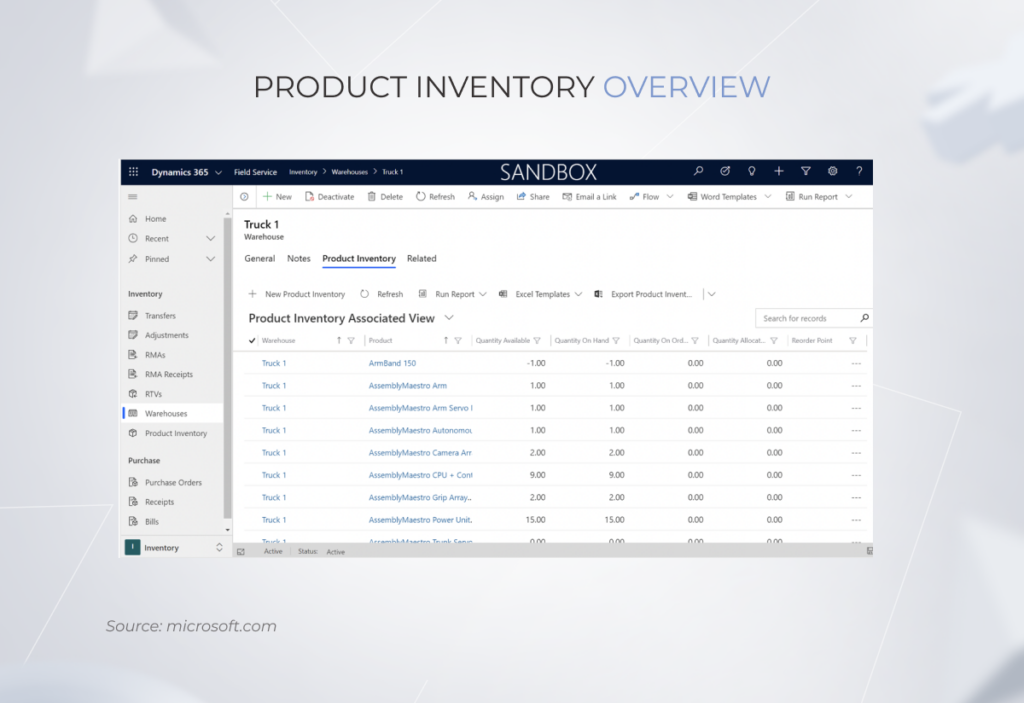
ERP systems can provide real-time information on inventory levels and conditions across all warehouses and distribution channels, allowing manufacturers to stay on top of their current stock, eliminate material wastage, and ensure that orders are shipped on time.
ERP in the Manufacturing Industry

Accurate planning

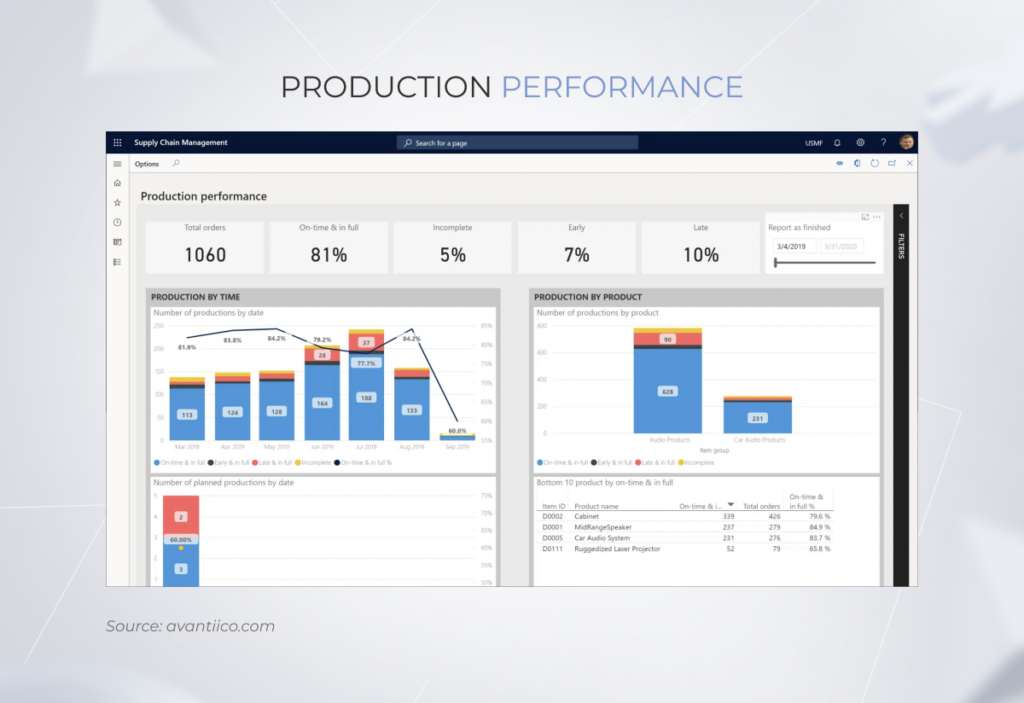
In today’s business climate, accurate planning, and forecasting are among the biggest prerequisites for success in manufacturing. By getting a unified view of traditionally disconnected processes like order tracking, labor distribution, machine availability, and inventory monitoring, ERP allows organizations to allocate resources effectively and plan their production cycles. 

Importantly, advanced ERP systems can automate the analysis of supply chain and historical sales data, which makes demand forecasting more accurate and reliable. This results in more efficient procurement, schedule planning, and inventory management. 
ERP in the Manufacturing Industry

Efficient management of the workforce

ERP systems can play a major role in making workforce management more efficient. By connecting data on inventory items, the factory floor, and employee data, ERP allows manufacturing organizations to track and analyze employee performance and productivity. This can help detect labor gaps and identify areas where training or personnel changes are necessary. 

Second, by automatically syncing quotes and timesheets, teams can proactively manage labor costs, optimize resource usage, and more effectively manage payroll. Third, modern ERP solutions can suggest optimal backfilling by considering skillsets, overtime, employee policies, pay rates, and other factors when making scheduling decisions.

Key considerations before starting ERP implementation in manufacturing

At this point, ERP implementation in manufacturing should be a no-brainer. However, there are a few key questions that every manufacturing organization needs to consider before diving into implementation. Let’s identify the most important ones. 

Custom or platform-based ERP: which one to opt for?

When selecting a new ERP system, it’s paramount to make a well-informed choice between custom and platform-based options. 

In a nutshell, the comparative ease of implementation and lower price of off-the-shelf ERP solutions come at the expense of limited flexibility. Meanwhile, custom ERP systems provide unlimited customization but come at a higher price. Although having the possibility to adjust systems to satisfy one’s unique ERP needs is rarely undesirable, there are certain cases when platform-based ERP implementation just makes more sense. 

For example, small manufacturers who have a few unique business demands, require fast implementation, have a limited budget, and need to solve immediate business challenges might opt for platform-based ERP. However, in most cases, custom ERP proves to be superior to its off-the-shelf counterparts. Custom ERP makes your manufacturing business future-proof, offering much-needed flexibility and scalability. 

Cloud-based vs. on-premise ERP system

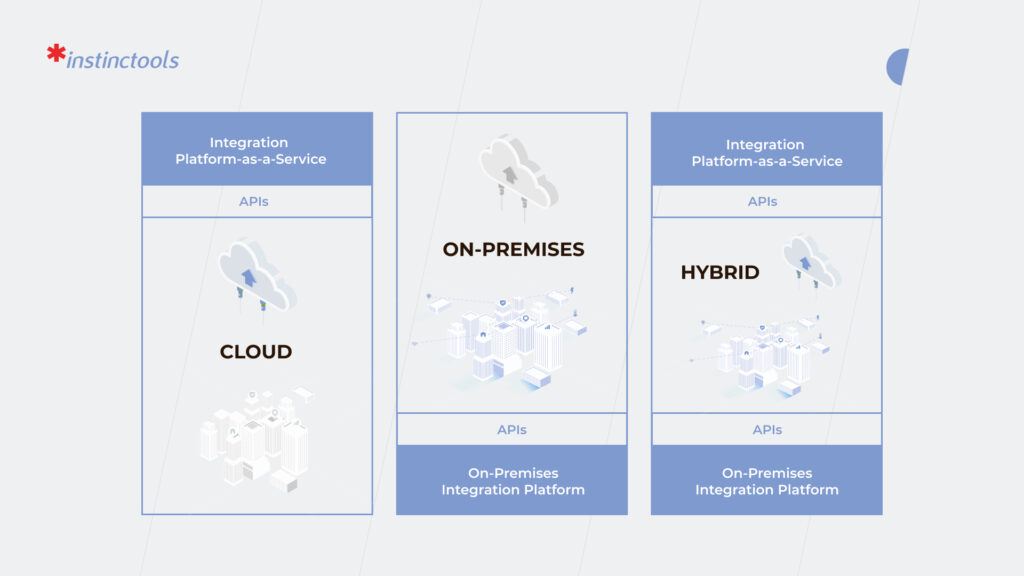
The next critical question is whether to go for a cloud-based or on-premise system. The relationship between them is similar to that of custom and platform-based systems.

Cloud-based ERP systems are hosted by a third-party provider, allowing users to access the software online from any device and enabling manufacturers to quickly respond to production demands. Additionally, cloud-based ERP systems place the burden of maintenance and upkeep as these on third-party providers. At the same time, some might be wary about the safety of data stored in the cloud. However, if not ignored, data security best practices, such as encryption, multifactor authentication, backups, and others, are a great way to prevent data breaches.

On the other hand, the security of on-site software is almost impeccable. On-premise ERP systems are installed directly onto a manufacturer’s hardware, allowing for greater control over data security. This ensures that only authorized personnel have access to sensitive information and reduces the risk of a violation. Yet, on-premise ERP systems are much less flexible, take longer to implement, and put the responsibility for software maintenance on manufacturing companies.

Modules to include in your ERP software

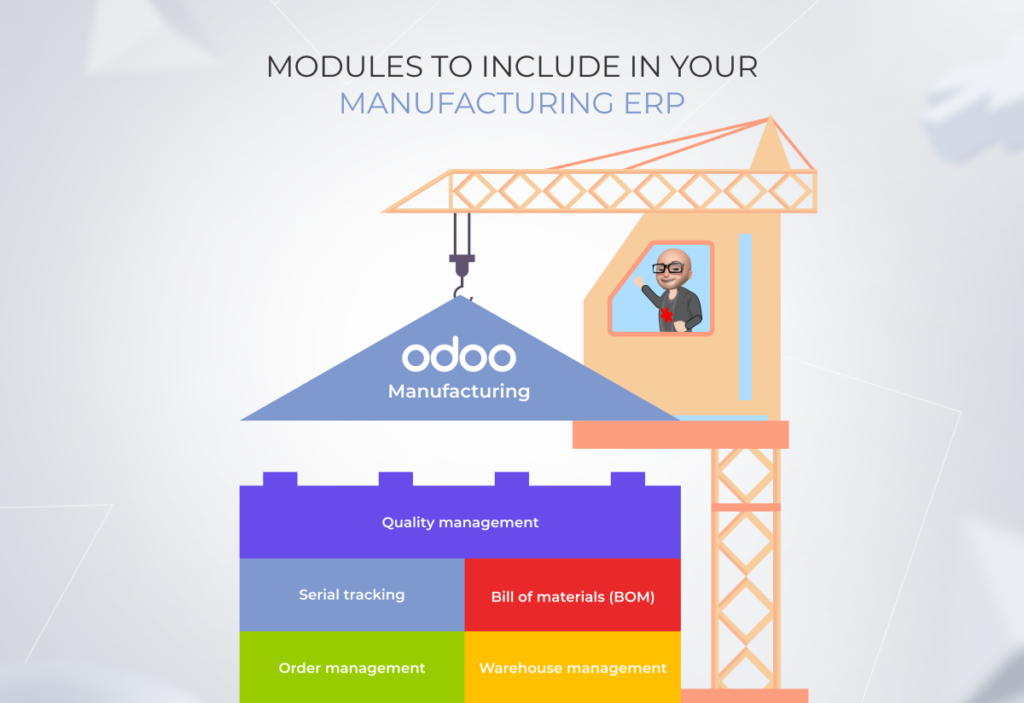
Due to a multitude of nuances within manufacturing operations, companies need to have specific modules to get the maximum value from ERP implementation. While it’s quite ambitious to generalize module selection for such a diverse industry as manufacturing, the following ERP modules are instrumental to any manufacturing niche:

  • Quality management module to automatically perform and record quality checks on materials and current work orders. 
  • Serial tracking module to ensure reliable and optimized product traceability management. 
  • Bill of materials (BOM) to enable efficient planning, revision control, demand forecasting, and product lifecycle planning. 
  • Order management module to streamline sales management, procurement, and shipments. 
  • Warehouse management module to keep track of materials, control inventory, and optimize the distribution process. 
ERP in the Manufacturing Industry

Implementing ERP and figuring out what modules you need for your specific manufacturing needs can be quite a complicated endeavor. With elaborate experience in Odoo development, our team of experts can assist you in consolidating all your data within an ERP system, ensuring all the components interact seamlessly, and significantly increasing efficiency across manufacturing operations. Odoo’s modular design, flexibility, and cost-efficiency distinguish it from the crowd of other enterprise resource planning solutions — check out our Odoo vs. SAP comparison to find out more.

Manufacturing ERP integrations with other business systems

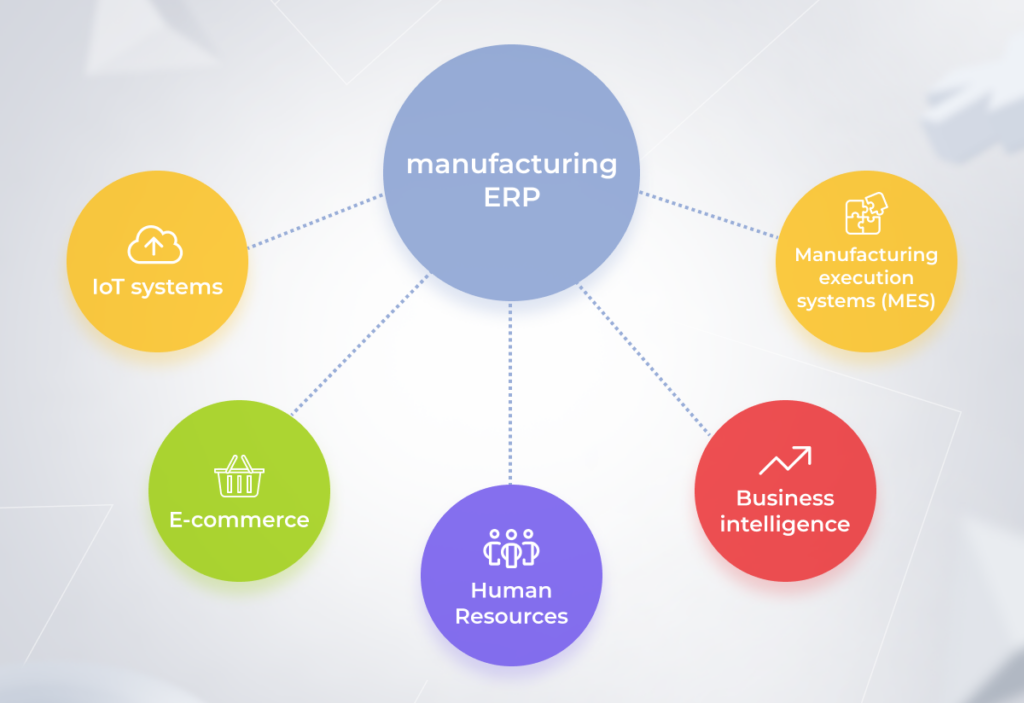
Best-of-breed ERPs can be integrated with your existing systems, which can enhance decision-making and increase operational efficiency. Here are the top 5 ERP integrations in manufacturing. 
ERP in the Manufacturing Industry

IoT systems

With IoT sensors constantly streaming data from shop floors, warehouses, and distribution centers, manufacturers can increase visibility in their operations and gain insights into production processes. 

E-commerce

By connecting ERP with e-commerce systems, manufacturing organizations can have a better view of inventory management and avoid stockouts. 

Human Resources 

ERP integration with HR systems allows manufacturers to optimize onboarding and training, streamline payroll management, and track employee productivity. 

Business intelligence 

Data centralization, provided by ERP, can bolster your Business Intelligence solution with new capabilities, optimize reporting, and allow for discovering new business opportunities. 

Manufacturing execution systems (MES)

Integration with manufacturing execution systems can help orchestrate processes on the factory floor and improve production visibility. 

Choosing a reliable manufacturing ERP vendor

The implementation of such a complex and cross-functional system as ERP entails certain risks and challenges. That’s why partnering with a reliable ERP vendor is crucial – its experience and technical capabilities will play a key role in determining how much value the system implementation can bring. We encourage you to partner with a vendor that has a comprehensive experience in your industry, guarantees post-implementation support, and can provide high levels of customization.
Here, at *instinctools, we tick all these boxes and more. From platform migration to custom module development to staff training, we are committed to helping our clients maximize the ROI of ERP integration and meet their unique business needs. 

Looking for a trusted companion for your ERP journey?

Let’s get in touch!
The Core Elements of Digital Transformation That Increase Your Odds for Business Success

As we’ve entered the Industry 4.0 era, any organization will have to adapt and work on all the core elements of digital transformation (DT).

Gathering political headwinds and lingering economic turmoil, including soaring prices, supply chain disruption, and whatnot – these are the conditions that businesses will have to endure in the coming year and, most importantly, in which they will have to develop. Yes, you read that right – develop. Otherwise, there will be no place for them in this frantically changing world. Digital transformation is the only way for companies to keep the lights on in ‘nothing but ordinary’ circumstances.

Given this fact, which would you prefer – to rely on your gut feeling and grope your way in the dark or to be fully armed and ready to go?

In a situation that constantly requires developing new revenue sources, the digital transformation of your business is the strategic answer. Don’t wait for pigs to fly, take the lead and move fast. Stick to the growth initiative if you want your transformation project to be among the success stories. McKinsey’s research proves that such an approach is more impactful than harsh measures like layoffs, cost cutting, and other slash-and-burn strategies. 

We’ve analyzed the main aspects of digital transformation and their role in your business success. 

Focus on creating a digital customer-centric ecosystem

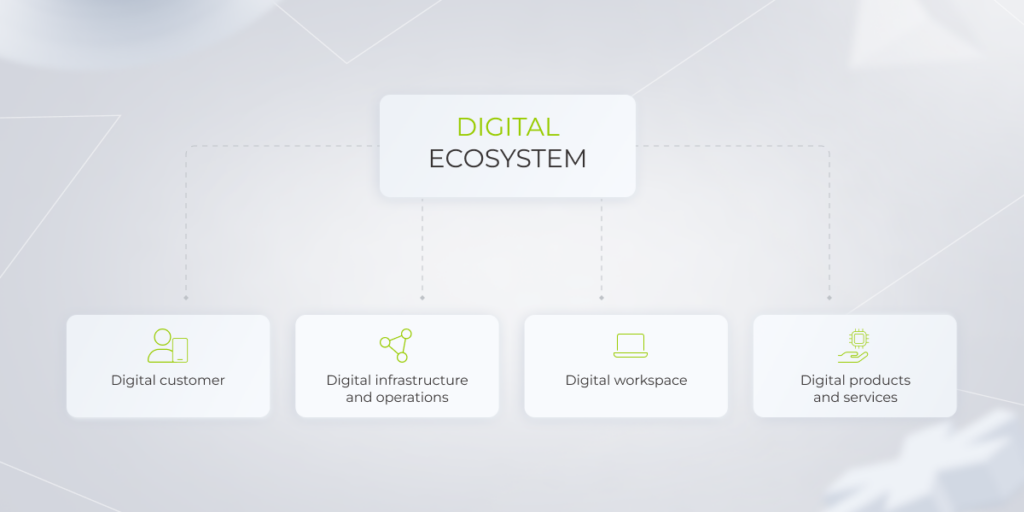
Digital transformation is a process of building an all-inclusive business model and infrastructure, the elements of which work cohesively together to build success. There are four key components of digital transformation you should take into account – digital customer, digital workspace, digital infrastructure and operations, and digital products and services. Let’s dive deeper into each of them. 

digital customer-centric ecosystem

Digital customer

There are constant changes that influence customers’ behavior. Sometimes these changes can be drastic, for example, in 2020 when consumers of all ages began to buy goods and use services online because of the lockdown. The pandemic accelerated organizations’ digitalization across industries, making DT not a distant prospect but a decision to be made urgently. Deloitte’s survey reveals that 77% of CEOs agreed that the COVID-19 pandemic accelerated their plans for digital transformation. 

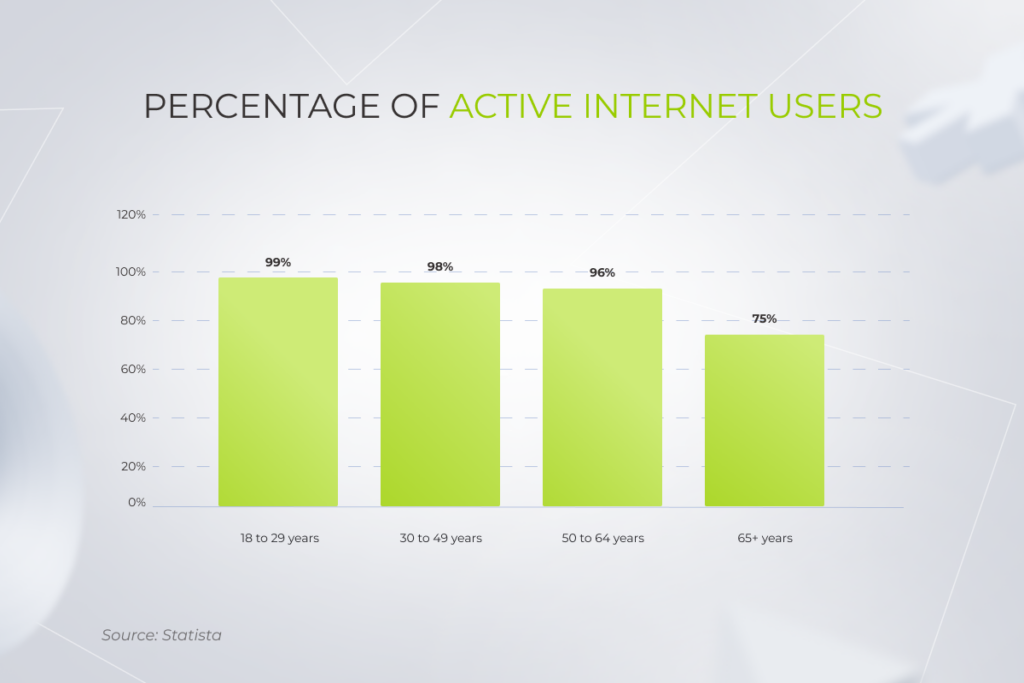
The market is also being shaped by a growing percentage of active internet users of different generations — it’s high among all age groups, and even the difference between the Silent Generation and Gen Z is not as huge as one might think. 

The Core Elements of Digital Transformation

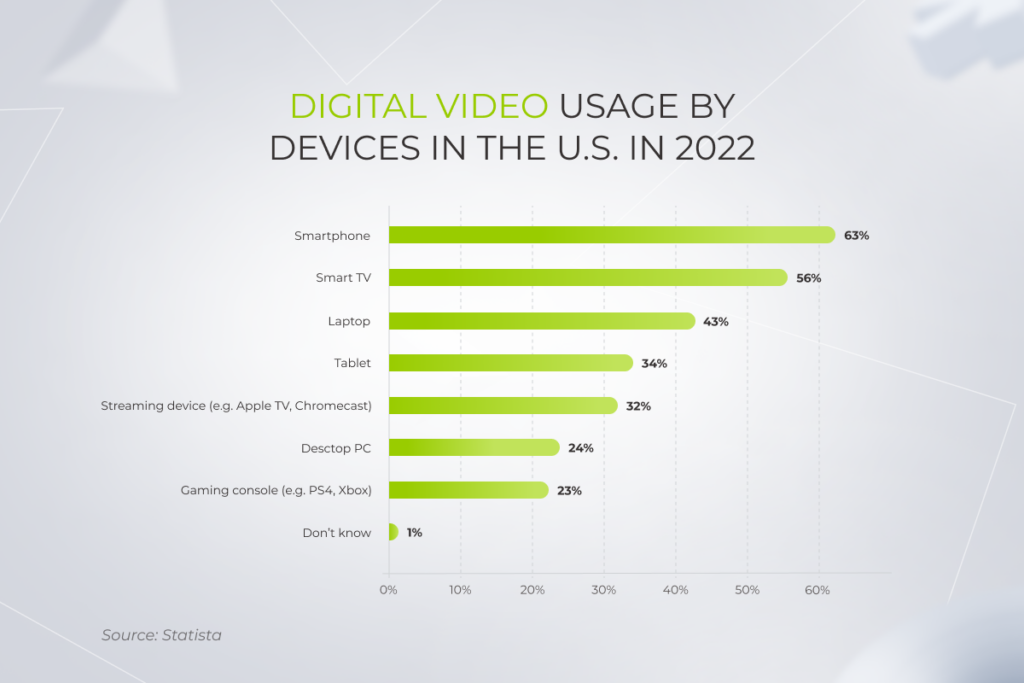
As a result, a new type of modern customer has entered the scene — app-native buyers. Mobility alone reshapes entire industries. For example, 63% of users watch videos on smartphones and 34% on tablets. It can’t but affect streaming services, which need to ensure up-to-par viewing experiences on any device. 

The Core Elements of Digital Transformation

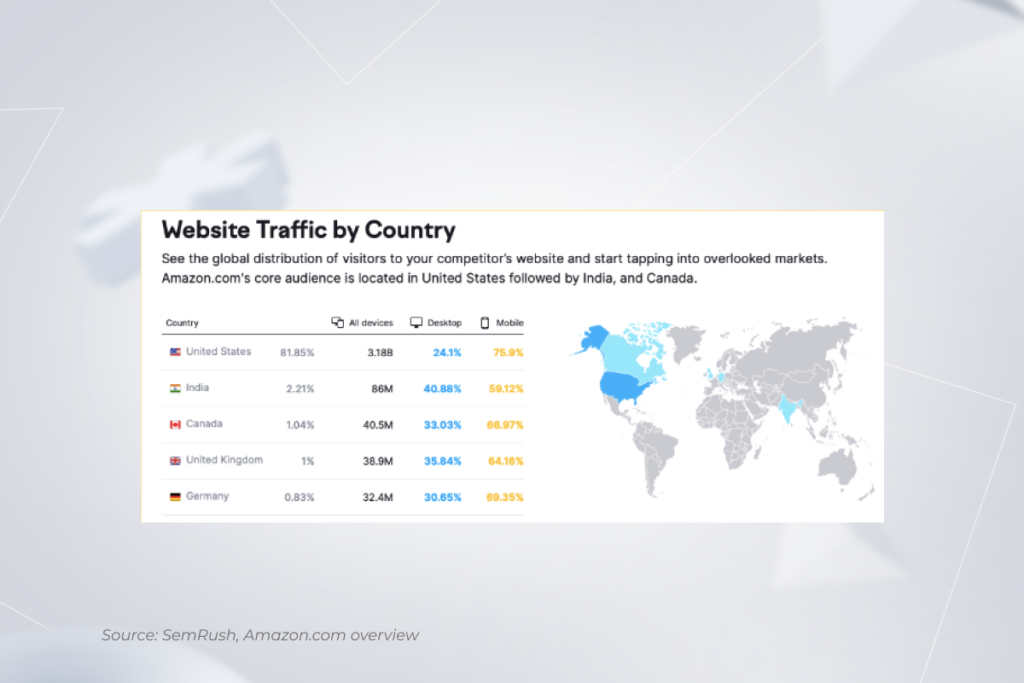
The trend of using mobile devices has an impact not only on the media and entertainment industry. In the e-commerce sphere, the situation is similar. Speaking of Amazon, 59% to 75% of its audience visits the company’s website via smartphones.

The Core Elements of Digital Transformation

To adapt to users’ rising demands, you need to constantly keep your finger on the pulse. One of the current best practices that shouldn’t be overlooked is personalization. By leveraging customers’ uniqueness, you make their experience better and, as a result, increase their lifetime value. It would be unwise not to take advantage of it, especially in industries such as banking, where organizations collect an overwhelming amount of personal data and have the potential to offer users the most accurate personalization. To provide customers with contextually relevant interactions and offerings, leverage: 

  • A real-time customer engagement strategy. In the B2C model, customers make decisions at the speed of light and you need to live up to expectations. Imagine a user visiting an e-commerce website and not being able to request information. To deal with this challenge, you can create a chatbot and leverage artificial intelligence (AI) and machine learning (ML) technologies to analyze users’ messages. That way, the bot will be able to evaluate and answer the most frequently asked questions, or route customers to a designated employee, if the request is complex.
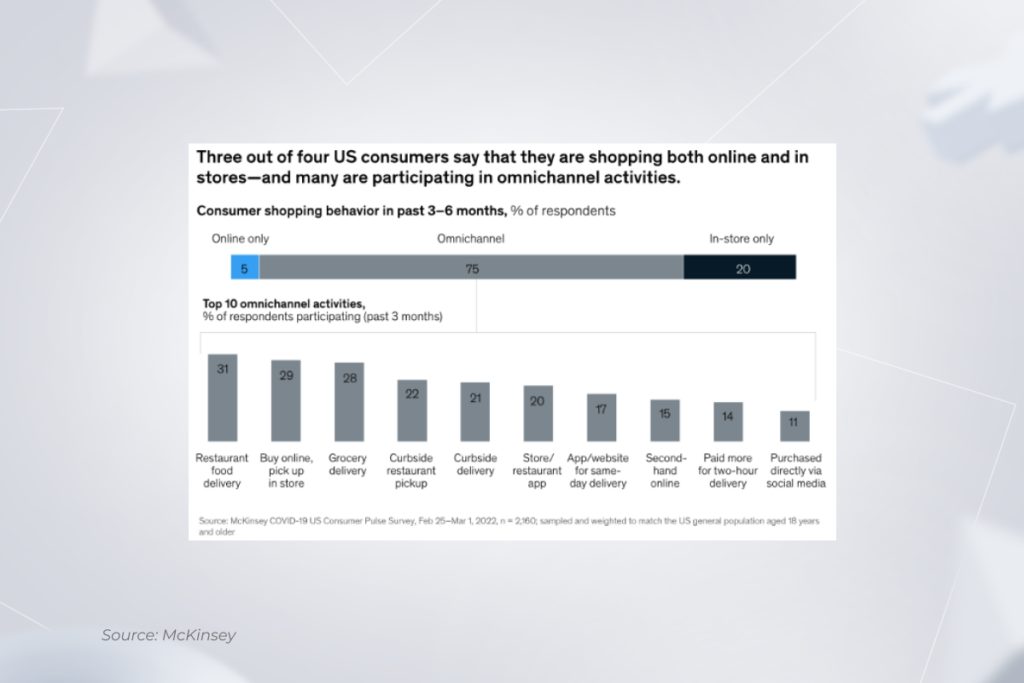
  • An omnichannel experience. McKinsey’s research confirms that omnichannel shopping is becoming a given. It means you need to provide customers with a seamless user experience regardless of the channel through which they reach you. 

Here are a few examples of successful omnichannel practices. Amazon users can put items into the cart on their mobile devices, leave them there, and continue shopping later on the desktop. This is possible thanks to the synchronization of the mobile and desktop versions of the website — where the contents of the shopping cart are displayed identically on different devices. You can go even further and synchronize the online customer experience with the one they get in your brick-and-mortar stores, just as Walgreens did. Their customers can check and refill prescriptions in the company’s app, which reduces the waiting time for in-store pick-ups.   

The Core Elements of Digital Transformation

Thus, to attract digital buyers from different age groups and ensure their customer journey is seamless, you should work on the accessibility and personalization of your services.

Digital workspace

Creating a digital workspace is not limited to adopting state-of-the-art technologies. This process involves other activities that positively influence employee satisfaction and shouldn’t be discarded. 

  • Relieve your staff from monotonous tasks. You can leverage software to automate tedious processes and delegate them to RPA bots. Robotic Process Automation helps businesses speed up operations and minimize the possibility of human error. For example, in banking, RPA technology empowers you with end-to-end document processing as well as simplifies KYC and AML procedures, and regulatory compliance checks.
  • Provide your staff with the possibility to work remotely or choose a hybrid option. McKinsey’s research reveals that after the COVID-19 pandemic, the percentage of employees who opt for a more flexible working model increased from 30% to 52%. Also, consider the generation of your staff – 75% of Gen X, 84% of Millennials, and 66% of Gen Z make remote work a priority. For your employees to feel comfortable and productive when working from home, provide them with efficient information management tools, collaboration tools for communication and task management, and others.
  • Ensure the organization’s data is secure and protected regardless of what devices your employees use. If you allow your staff to work on their own devices, you should also develop a BYOD (bring your own device) policy that establishes particular guidelines that help ensure security. It may include providing employees with SSL certificates for device authentication and automated wiping of company software after failed login attempts 

By providing your employees with a digital workspace, you improve their working conditions and increase their involvement in working together to change your organization. McKinsey states that companies following this approach are 1.4 times more likely to succeed in digital transformation.

Digital infrastructure and operations

To reap the benefits of a full-scale technology-enabled business transformation, you should review both your current infrastructure and operations. Before deploying new, geeky software, it’s necessary to uncover the flaws within the existing systems and processes. Failure to identify areas of improvement is the reason why a quarter of transformational initiatives lose ~23% of their financial benefit. 

Consider technology enablement and process redesign as equally essential interrelated activities. To change the odds in your favor when it comes to digital transformation, make sure you implement particular technologies not for their own sake but to boost operational efficiency. That’s why building a digital infrastructure should depend on the specifics of your business processes. Yet, of course, there are some common elements that are worth paying attention to anyway.

  • Computing infrastructure. To achieve scalability, pay only for the resources you use, and avoid significant upfront investments in the hardware, you should move to the cloud unless you have security requirements under which on-premise hosting becomes the only option. If you’ve already been taking advantage of cloud computing, you can review it to optimize the resources and costs of cloud maintenance.
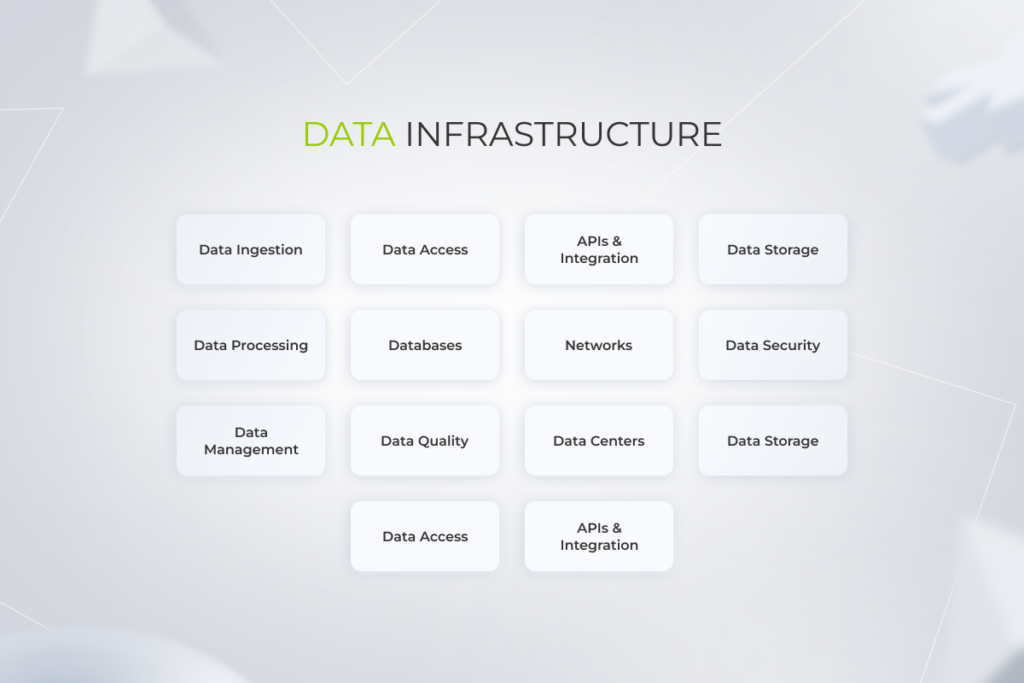
  • A robust data infrastructure. Creating data infrastructure includes setting up data collection processes, building a data repository, taking care of data quality and security, and much more. Solid data infrastructure helps you make the most of advanced analytics technologies such as business intelligence (BI). As the cornerstone of in-depth analysis, together, they provide the possibility to extract the gold of insights from the ore of raw, unstructured data. 
The Core Elements of Digital Transformation
  • Communication network infrastructure. To simplify, optimize, and rationalize existing processes in your organization, you’ll require leading-edge technologies such as 5G, Fifth-Generation Fixed Networks (F5G), IoT, Internet Protocol version 6+ (IPv6+), etc. 

It’s important to keep in mind that when businesses go digital, so do the attackers who want to steal your information. Make sure your infrastructure and operations are “secure by design” by following DevOps best practices.

Digital products and services

Marrying technologies such as cloud computing, IoT, mobile technologies, big data analytics, blockchain, automation, etc., enables you to stay ahead of the curve, adjust to customers’ rising demands, and offer truly innovative products and services.

  • Fundamental changes. Sometimes the changes that digital transformation brings are so significant that they affect entire industries, as it happened with transportation services when Uber was founded. The company broke the idea of taxi service in its classic sense and changed the market context. Besides, Uber went beyond the ride-sharing app stage and began offering food delivery to cover more needs of users. Such an approach forced other players to change their strategies to keep up. 
  • Peripheral changes. Implementing technologies already acknowledged as standard can also have a transformative effect. Take, for example, robotic process automation (RPA) for remote patient monitoring (RPM) in healthcare. With specialized apps, people can document their bio-data and track its changes in case of chronic diseases or the post-surgery period. The widespread adoption of this innovation during the COVID-19 pandemic helped hospitals and nursing staff cope with the huge influx of patients. For instance, a hospital in Belgium used RPM to discharge patients who were on the mend sooner and admit new patients in a more serious condition. Before this approach, patients spent an average of 9-14 days in the hospital. After RPA technology implementation, patients spent only 4 to 9 days in the hospital and then were sent home, where they were monitored remotely for another ten days. 

These examples sound inspiring and encouraging, but keep in mind that in some industries, such as finance, there’s still a huge gap between the front and back office processes. On the one hand, there’s mobile banking where users can transfer funds, pay bills, track spending, etc. On the other hand, in most cases, customers still have to come to the bank’s office and sign papers to get a bank account. You can overcome this gap by digitizing basic operations from the beginning of your customer journey.

The Core Elements of Digital Transformation

The time is NOW: start your digital maturity journey

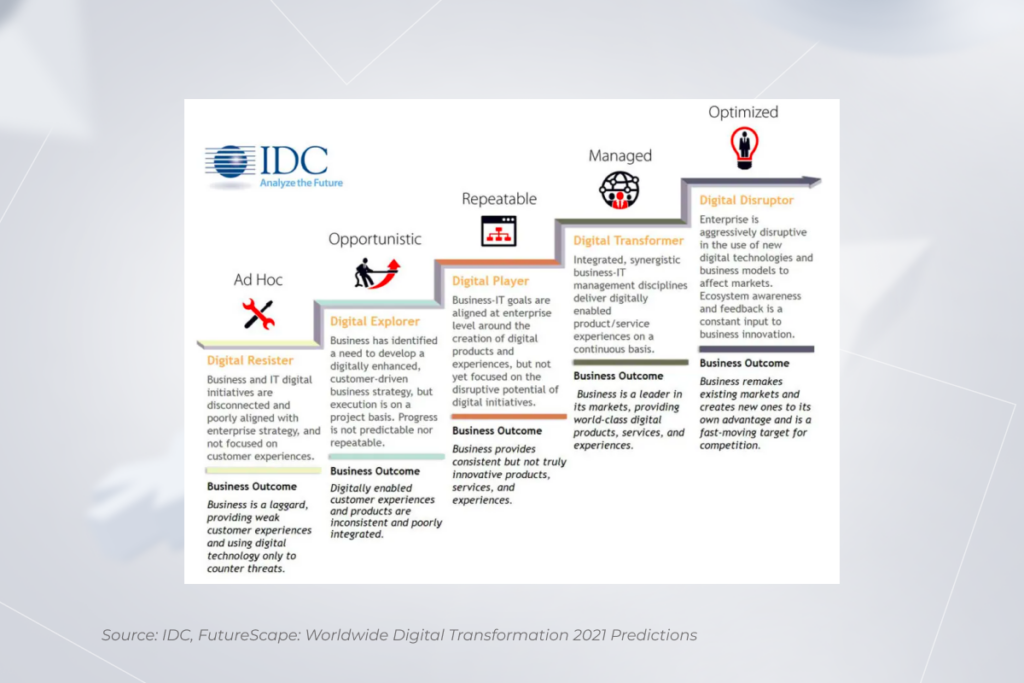
One of the changes we’ve all seen in recent years is the exponential growth of speed at which business shifts are happening. And you have to be prepared for a speedy evolution. There’s no room to postpone working on the digital maturity of your business any longer. IDC research reveals that 75% of companies will have comprehensive DT implementation road maps by 2023, compared to only 27% in 2021. If you want to uncover new revenue sources and be more people-oriented speaking of both customers and employees, it’s high time to take up a transformation initiative.

Want to make your project a success?

We’ll help

Cloud ERP vs. On-Premise ERP: Which One Wins the Duel?| Expert’s Opinion

Over the last few years, ERP systems have become imperative for streamlining enterprise operations and maintaining business resilience. The pandemic-induced shock has also contributed to an upswing in resource planning software. As a result, the global market of ERP digital solutions is projected to hit over $93 billion in 2028. But while the bright prospects of ERP systems are statistically proven, the dilemma of cloud ERP vs on-premise hosting remains unsolved.

Each option has its advantages and limitations, and you have to find a balance between a bunch of factors. You need to consider the cost of ERP ownership, your requirements for system performance, its customizability, and many more. In this article, we’ll look at these and other main debating points of cloud ERP vs. on-premises ERP through an expert prism.

Key considerations before going for cloud vs. on-premise ERP

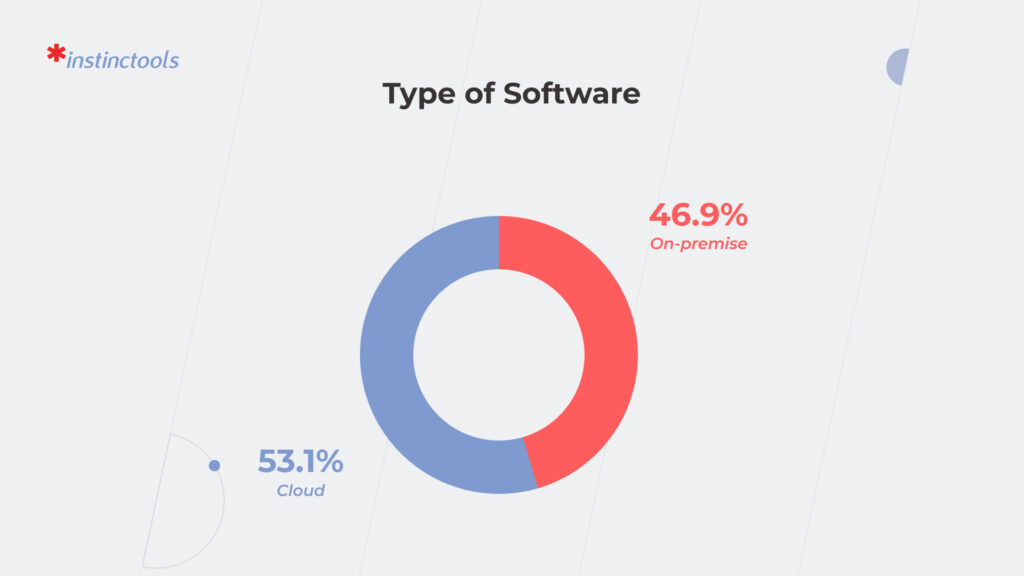
According to Accenture, around 58% of companies prefer private or public cloud-based ERP systems. On-site platforms make up 25% of all ERP software. While these figures may already suggest the winner, the choice of cloud vs on-premise ERP depends on a whole range of factors.

Cost of ownership

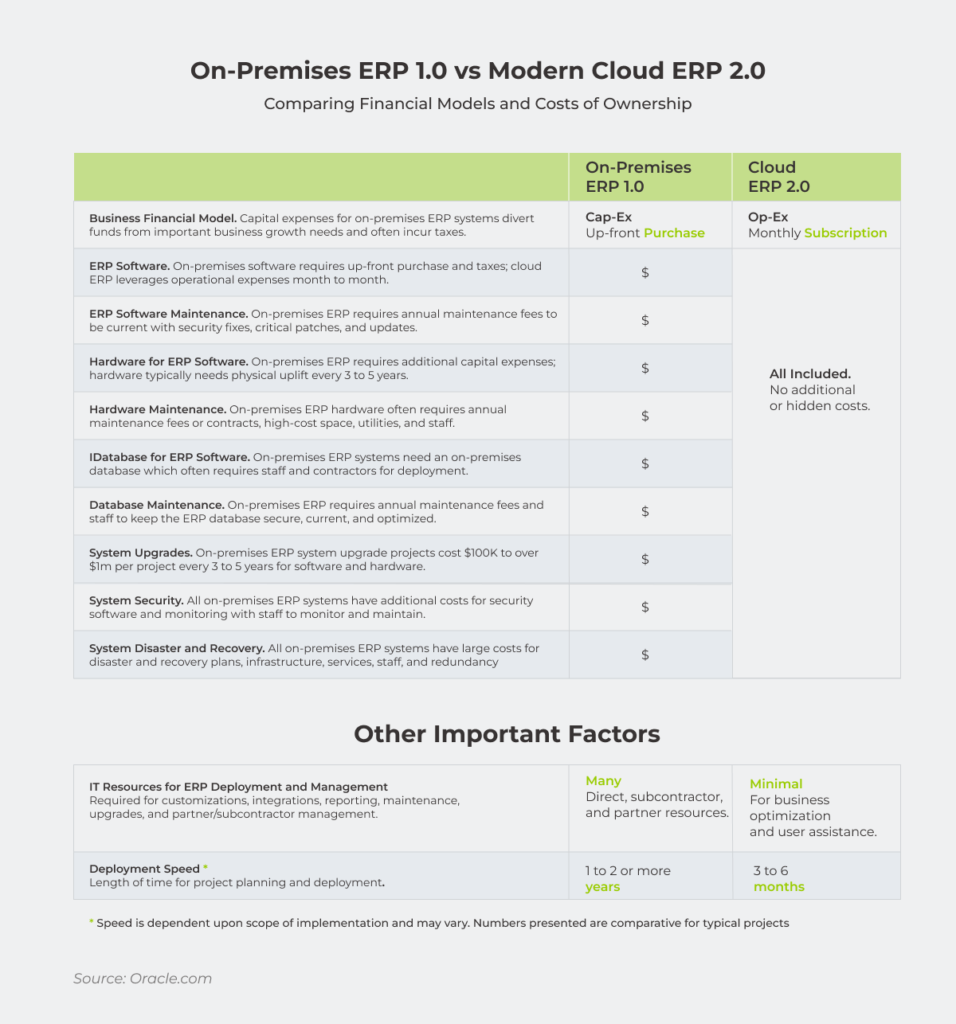
Comparison table on cloud ERP vs. on-premise ERP costs of ownership

The question of costs is one of the first to surface when debating cloud ERP vs on-premise one. Cloud-based enterprise systems can be purchased and governed without large upfront costs. Cloud users are charged a recurring fee which can go up or down based on the resources used and the number of users.

Operating expenses such as infrastructure maintenance, recovery, updates, and others lie on cloud providers as well and are distributed among all cloud adopters. It means that cloud-based ERP software translates into total cost-of-ownership savings thanks to the shared business model.

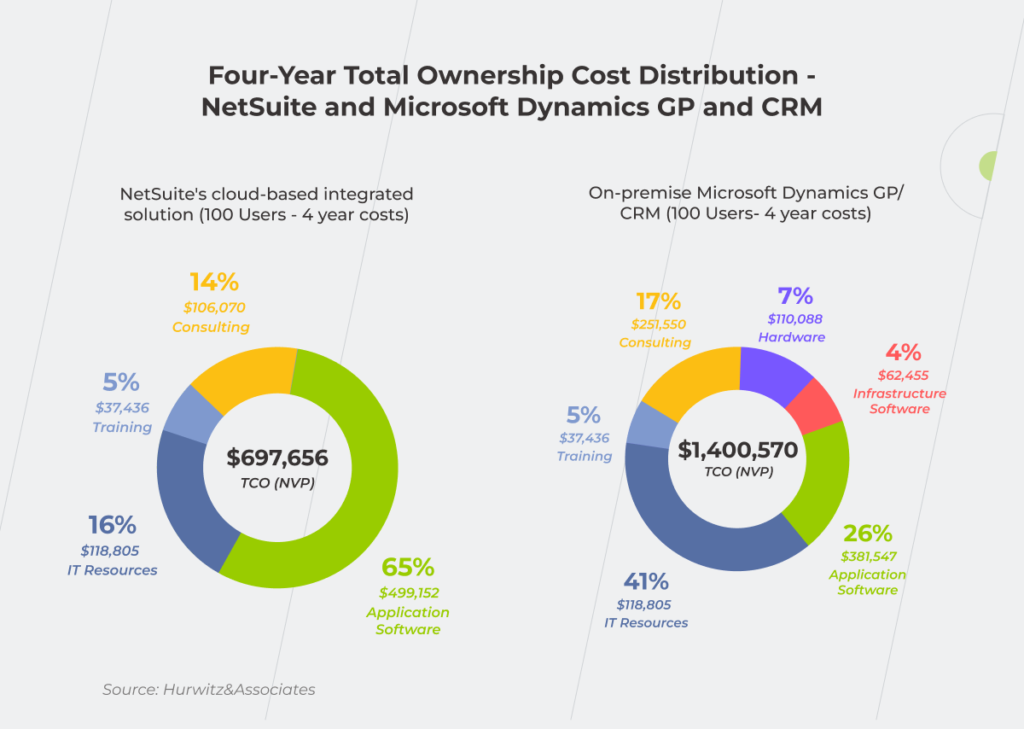
Moreover, the absence of additional IT infrastructure costs for the cloud solution also contributes to the cost-saving potential of a cloud ecosystem. This has been highlighted in the TCO case by NetSuite, where small and medium businesses have seen lower overall TCO for a cloud-based NetSuite system compared to on-premise enterprise platforms.

Statistics on the four-year TCO distribution within cloud-based and on-premise systems

Conversely, local systems imply a higher initial investment for adopters. Companies also cover hardware costs, database maintenance, security, and other capital expenditures, all combined into a significant initial outlay. However, there are more and less cost-efficient options among on-premise ERPs. Let’s take SAP vs. Odoo as an example. When opting for SAP, you have to pay for maintaining servers and a license fee, while on-premise Odoo is license fee-free.

Therefore, cloud solutions are more affordable for businesses looking for a lower initial bid price.

System performance

Critical business applications must be available 24/7, making uptime and reliability paramount for enterprise business management systems. At first sight, cloud servers give odds to on-site systems due to automated monitoring, disaster recovery, easier back-ups, and downtime expectations which are the core prerequisites in cloud SLAs. 

Moreover, data centers scattered across different locations eliminate a single point of failure, making your data accessible even if one of the cloud servers shuts down. 

Unlike cloud-based solutions, with your data backed up by different instances, an on-premise system won’t work if your server crashes. Therefore, an on-site enterprise takes diligence and dedicated resources to ensure minimized downtime and stable performance.

Yet, distributed servers aren’t immune to unplanned outages, leaving business owners at the mercy of connectivity issues. And in this case, an outage or unstable internet connection can knock out your access to important files and enterprise applications.

Security

Companies seem to place a high degree of trust in cloud data security, with 48% of organizations storing their critical data in the cloud. Indeed, cloud ERPs come with in-built advanced security measures beyond what most businesses can afford. Role-based access controls, end-to-end encryption, threat detection, and other safeguards reduce the risk of a data breach or unauthorized data access for cloud adopters, and thus, minimize your data security concerns in general.

However, cloud-based solutions do not grant full control over your software and threat landscape. Also, if any sensitive data spills through the cracks, it’s the business that faces incurring costs and legal repercussions. Cloud misconfigurations also account for 15% of breaches.

With on-premise ERP applications, you are in charge of data governance and the entire infrastructure, which makes it possible to implement tailored security measures and meet strict security requirements relevant to financial institutions or governmental organizations.

Integration

Cloud ERP solutions offer rich integration capabilities that help connect software applications for better visibility and data interoperability. With low maintenance and easy deployment, companies can set up the cloud ERP infrastructure from a variety of stand-alone modules based on their business processes and needs. Odoo-based ERP solutions, for example, allow businesses to join a broad spectrum of business apps into a centralized well-integrated system.

But despite a plethora of integration options, cloud integrations are still tied to a limited number of connectors. Therefore, you might not be able to cover all the integration needs or establish a seamless connection with other internal business systems.

On-premise ERP solutions, on the contrary, bode well for bespoke integrations that do not need an Internet connection. Yet, on-premise data connectivity calls for a dedicated IT team and a significant one-time investment.

Customization

Cloud ERP vendors offer customizable innovation as paid a-la-carte options. Since around 85% of business processes are the same across companies, standard cloud modules and extensions meet the majority of customization needs and best business practices.

But despite their diversity, cloud extensions tend to be more rigid, especially when it comes to individual ERP deployment. The collection of unique design changes, e-forms, integrations, and system dependencies are impossible to take into account with the generic cloud approach.

Local platforms take the lead in terms of customizations since your development team can adjust your ERP system to internal processes. Yet, custom deployments and configurations come at a high cost and require rich tech expertise.

Let’s make your ERP a success together

Get in touch!
Control

Ownership of data is another big rub in the duel of ERP cloud vs on premises. Legal concerns, vendor lock-in, and unpredicted fees incur risks to business operations and a company’s well-being. Since the cloud provider can be legally considered a custodian of the data, your access to data assets can be suspended at the provider’s sole discretion during an investigation of any suspected violation.

On-premise ERP systems are based on single-tenancy infrastructure which keeps your critical data assets away from prying eyes. This way you have higher control over data configuration, security, and management because you can access the data physically. Full data control is especially important for mature enterprises with strict internal security standards.

Compliance with standards and regulations

Data governance and compliance issues have been plaguing cloud systems since the dawn of time. Over 50% of the companies struggle to meet compliance and audit requirements when employing Infrastructure as a Service cloud solutions. The root of compliance worries is often the shared nature of the cloud. Once an organization moves to the cloud, managing access controls or keeping an eye on the available compliance enablers becomes much more difficult.

But despite higher compliance risks, distributed cloud systems cover the majority of data protection regulations, including GDPR, CCPA, HIPAA, and others.

On-premise solutions help meet the evolving regulatory landscape thanks to full control over user access policies, security patches, and other compliance measures. Moreover, data localization regulations prohibit data from being processed in the cloud, making on-premise hosting the only option.

Updates

Dubbed better than on-premise software due to its flexibility, the cloud eliminates the hassle of maintaining software. Cloud ERP providers make sure you’re always running the latest ERP version with cutting-edge functionality, while your IT department can save the time and effort of installing new patches. However, the choice of updates is left to the vendor, putting you in a subjective position.

On-premise infrastructure makes updates more resource-intensive, yet grants full control over the choice of innovation.

Mobility and accessibility

Finally, ERP on premises vs in the cloud differs in how portable they are for users and applications. On-site platforms can usually be accessed locally. Remote access is only possible using VPN or remote desktop technologies. It can complicate the team’s collaboration and limit the accessibility of the system.

Conversely, the cloud is accessible from anywhere provided you have a stable internet connection.

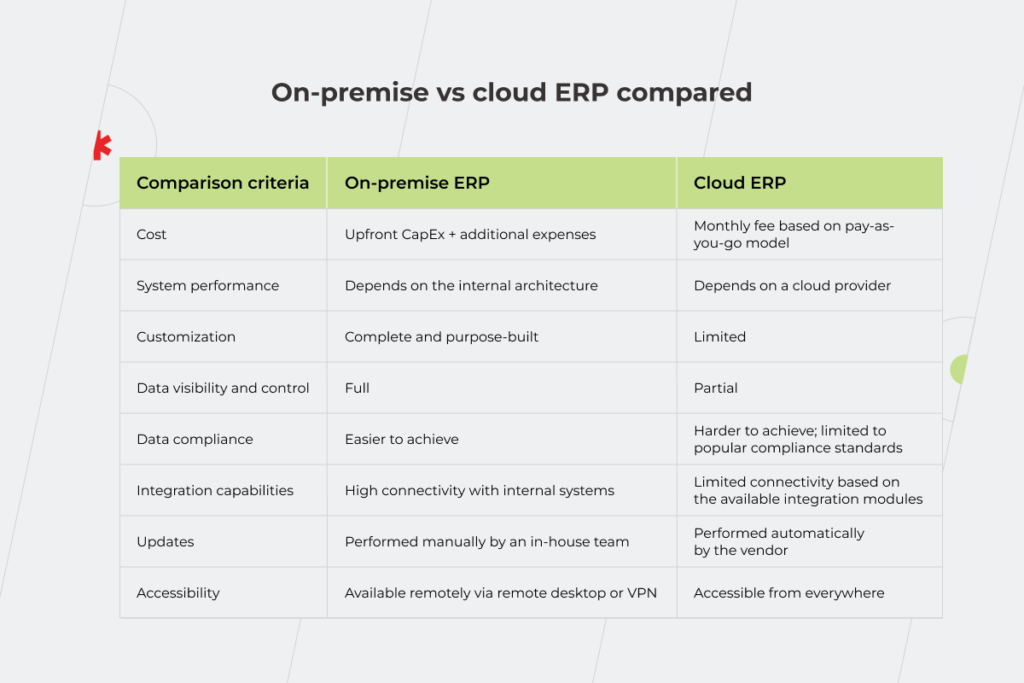
To sum up the differences between both systems, we’ve curated the main differentiators in a concise table below.

On-premise vs cloud ERP compared

Comparing cloud ERP vs on-premise software according to a variety of criteria

On-premise vs. cloud ERP dilemma: three questions to ask

Along with the criteria mentioned above, there are additional factors that should guide your choice.

What project timeline can you sign up for?

Cloud resource planning software is almost a synonym for fast and easy implementation. On average, an experienced development team can get your cloud solution up and running within a few days to a couple of weeks. The specific timeline can vary based on your migration needs and system maturity. On-site infrastructure is more time-consuming since it is built from scratch.

Therefore, if you’re aiming for reduced development time, the cloud is a great tradeoff between fast deployment and decent customization.

Do you need a unique solution?

The next thing to look at is whether the ready-made functionality covers your business and development needs in full. Contacting a team of specialists is the easiest way to validate each building block for your cloud ERP system.

However, if your business vision runs counter to a ready-made suite, a custom on-premise infrastructure is the best way to fill in the functionality gaps.

Should your system be able to scale?

Usually, resource planning platforms do not have ambitions for rapid growth or high workloads. However, scalability is still important to help your enterprise systems adapt to the changing needs and demands of your business.

In this case, cloud elasticity can easily attend to your scalability needs. On-demand cloud scaling allows you to ramp up or down your IT resources without building out more hardware. Conversely, on-site software is more challenging to scale, since it requires additional hardware, CPU, RAM, or other boosters.

In terms of scalability, cloud infrastructure grabs the trophy as an easily scalable enterprise solution.

Cloud vs on-premise ERP: which one is right for you?

The best ERP hosting solution will be unique for each company based on the budget, time constraints, compliance requirements, and other prerequisites. Cloud ERP infrastructure is the preferred solution for a quick and easy take-off that doesn’t need a large upfront investment. Locally installed systems grant full control over your assets along with unmatched customization and integration options.

If you are struggling to choose between on-premise and cloud, our vetted experts are ready to help you make the big decision. We can also take over your deployment needs and set up an ERP platform fully tailored to your business requirements. 

Ready to build an ERP on time and on budget? Reach out.

RPA in Banking: Hop On The Train Before It Gets Too Fast

Automation is the focus of many industries, and banking is surely one of them. Banks are actively implementing Robotic Process Automation (RPA) that can take on tedious tasks. Imagine how much faster and more efficient your work can be, even if you leverage RPA in banking only to automate data entry and report generation. 

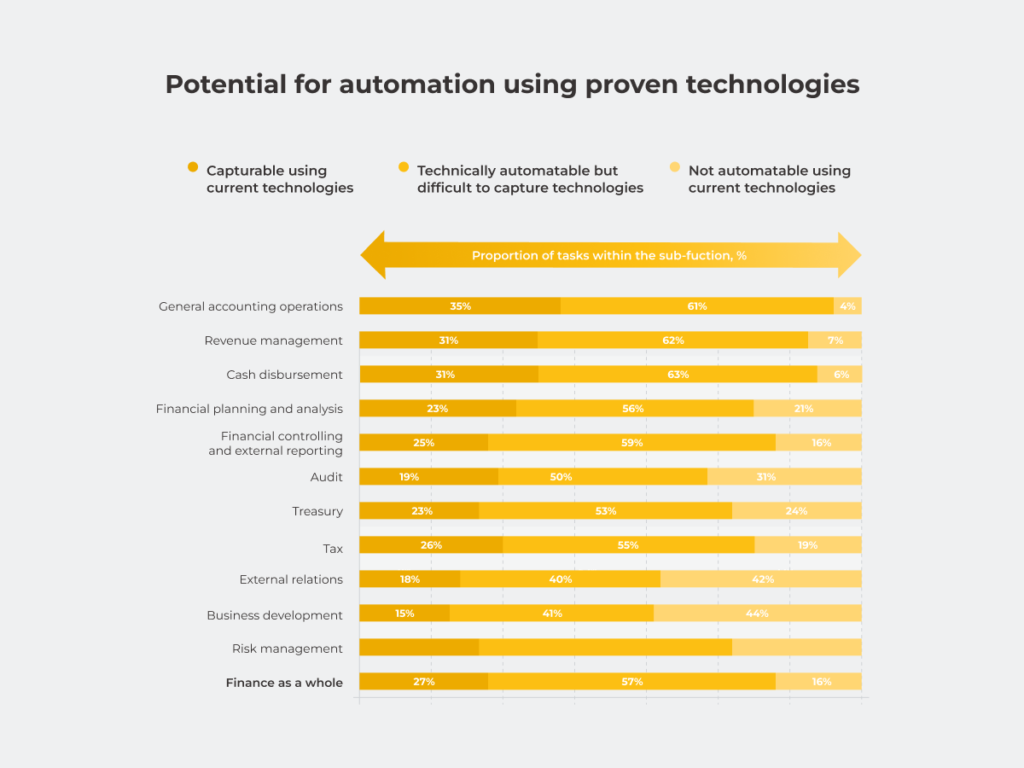
McKinsey’s research reveals that in finance, only 16% of tasks cannot be automated using current technologies. The rest can be safely left to RPA software. And your competitors are already taking advantage of this — RPA has been one of the top technology trends among financial institutions since 2020.

In this article, we review the banking processes and operations, where implementing this technology can bring you the most benefits.

Source: McKinsey, Driving impact at scale from automation and AI

Part of a cost-saving initiative or a step toward a bank’s digital transformation strategy? RPA is your ally either way

If you don’t feel like starting a full-scale digital transformation, you can still tap into robotic process automation in banking. The main benefit of RPA for any industry is that it’s a minimally invasive solution. There’s no need to build a new IT infrastructure and completely reshape your financial institution to leverage multiple advantages of RPA in banking operations, such as lower expenses, boosted productivity, and eliminated the possibility of human error.

There are four main areas in the banking industry where robotic process automation can be used: reporting and audit, risk and compliance, lending and mortgage operations, and customer servicing. Let’s investigate them in detail and uncover RPA use cases in banking. 

Reporting and audit

Streamlining the entire document processing approach is a sore point for the banking system as accurate data and report automation are fundamental to gain operational efficiency and make well-informed financial decisions.

Any bank is constantly coping with a myriad of documents that come from CRM, ERP, and legacy systems. In addition, the documents may not correlate with each other, be of different formats, and along with solving these issues, employees have to keep an eye on security. When done manually, processing unstructured documents, categorizing different document types, validating multiple data points, etc. overwhelm the staff. With this approach, it’s challenging to avoid document inaccuracies that result in financial loss. On average, human error in the banking sector costs $878,000 per year. 

What can you achieve by adopting RPA in banking? Let’s look at how robotic process automation helps save time and unburden your employees who already have a lot of manual work on their plates.

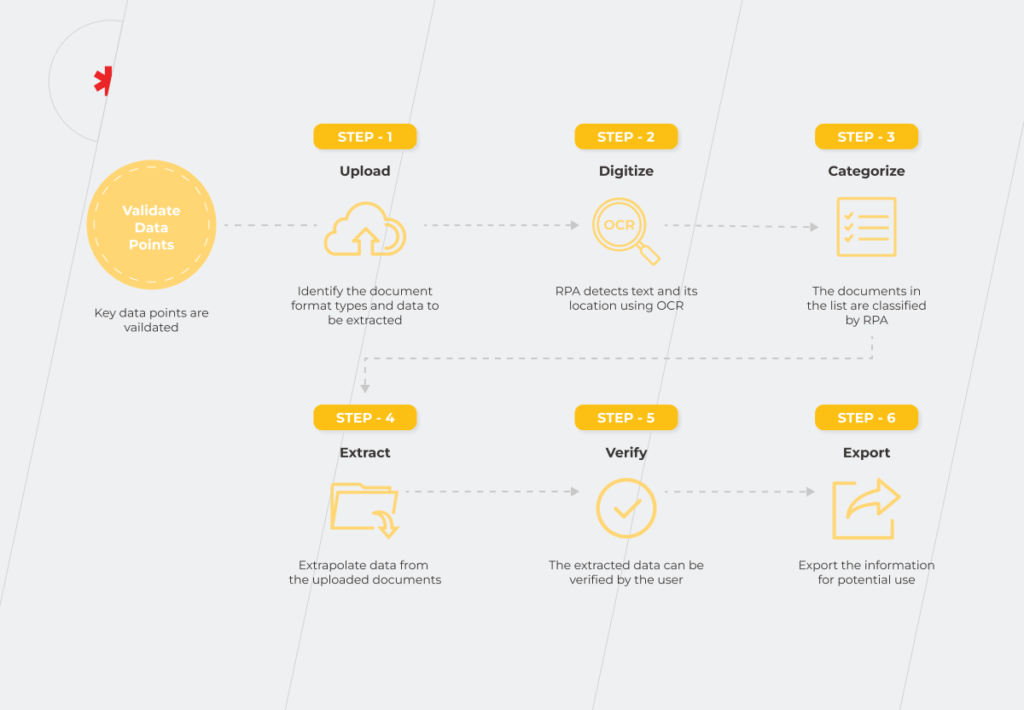
The new technology empowers you with end-to-end document processing. The RPA bot, which extracts data from various documents and interprets them using Optical Character Recognition (OCR) technology, can scan a set of documents in seconds and identify gaps and inconsistencies.

This is how it looks:

Source: Softweb Solutions, Reducing business downtime by RPA implementation in banking

Besides document processing, legal and audit operations include control activities. Digital Workforce research reveals that more than 90% of internal controls, such as data extraction from different IT systems, are still performed manually despite the possibility to easily automate up to 90% of the operations with the help of RPA technology.

Risk and compliance

Banking is one of the most regulated industries, alongside the healthcare sector. It’s no wonder compatibility with tons of compliance requirements is among the top priorities for these types of organizations. Implementing RPA is helpful for:

1. Know Your Customer (KYC) and Suspicious Activity Reporting (SAR)

KYC process is a mandatory standard in the banking sector designed to establish customers’ identities and understand the nature of their activities to prevent threats such as money laundering. Thus, banks do background checks on customer data during customer onboarding. It may require up to a week for the KYC documents to be approved by the KYC Registration Agency.

Another part of the risk mitigation process is an AML (Anti-Money Laundering) investigation process that requires 30-40 minutes for each case and drains your employees’ time if done manually. At the same time, this mundane task easily follows the rules and unfolds into an algorithm, and it takes only three minutes to complete with RPA.

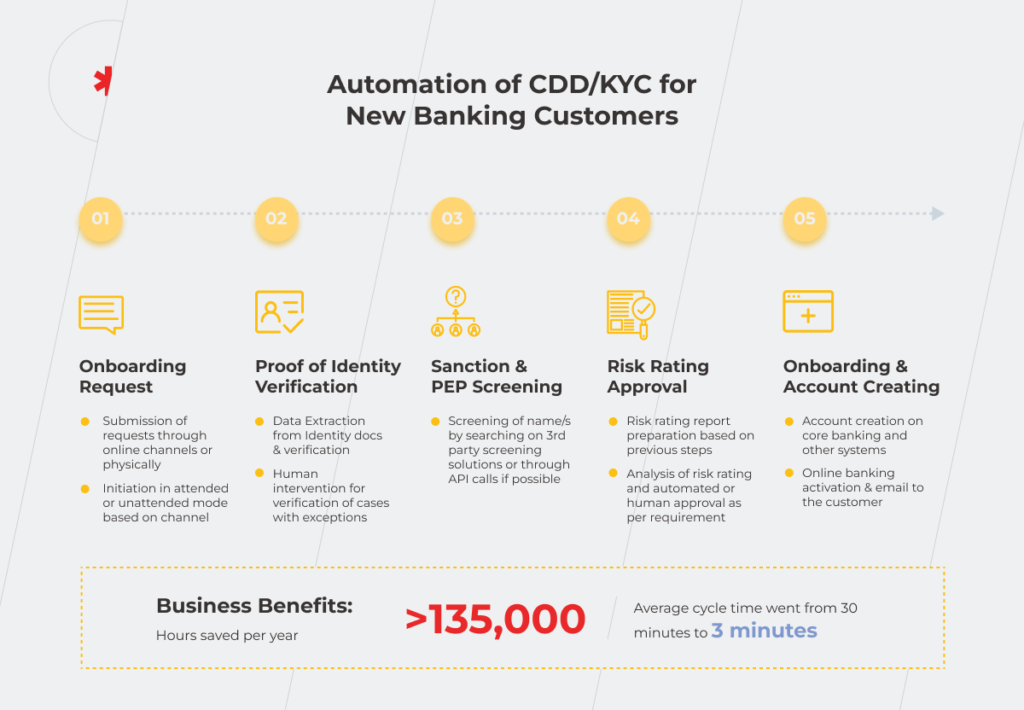
An RPA tool works according to the ‘if-then’ principle. If some activity in a customer’s profile looks like a potential threat, such as making numerous transactions in a short period, the bot flags it and reports it as a suspicious activity (SAR) to the concerned department. With this approach, bank staff only invest time examining and investigating suspicious accounts. Here’s a system that demonstrates the advantage of using RPA in banking and finance.

Source: UiPath, Automate Banking Compliance and Scale Innovation

2. Regulatory compliance 

When aligning business practices with regulations and maintaining records to be ready for audits, RPA in corporate banking comes in handy for such tasks as:

  • Automating audit report generation for regulatory agencies. Bots centralize data collection and create reports in the required format, simultaneously eliminating the influence of human error. The bot can do 6-7 hours of manual work in a minute, saving time for staff.
  • Checking if data is regulatory compliant.  Leverage an RPA software to track regulatory updates in real-time by cross-comparing notifications. In this case, you can react quickly to changes in requirements, avoiding penalties that can put the depth of your pockets to the test.

Moreover, if you marry RPA technology with machine learning (ML) and artificial intelligence (AI), you can benefit from intelligent automation. With such an approach, you create an additional layer of human-like perception and prediction to make accurate decisions faster.

Lending and mortgage operations

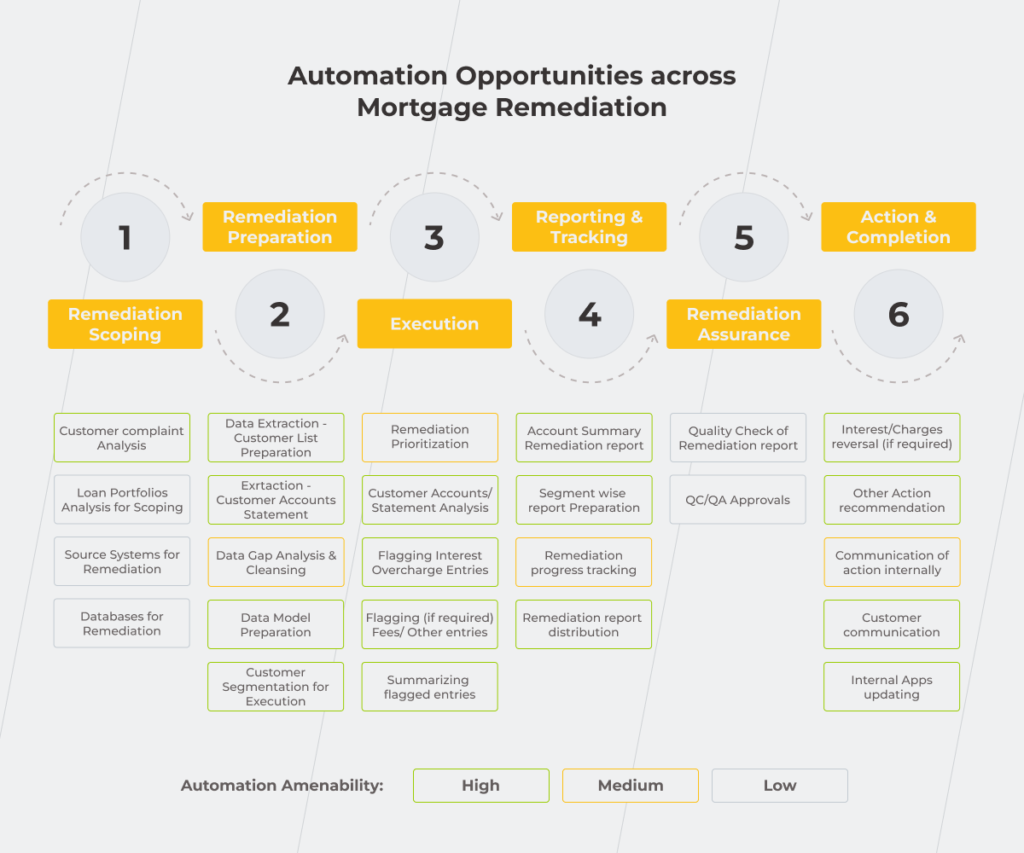
The majority of mortgage operations have a high automation potential. Thanks to RPA, banks can alleviate the burden of the mortgage processing placed on the staff and free them up to deal with more sophisticated tasks and operations that can’t be handled without human involvement.

Source: UiPath, Automate Banking Compliance and Scale Innovation

As for loans, RPA implementation in banking can reduce circle time for a loan by half.

Let’s take a closer look at the loan processing. One of its initial stages is the extraction of the inputs from the loan documents created by the loan officers. It takes 5 minutes per form when done manually. And if you let RPA handle this operation, it will be done ten times faster. 

There’s more to come. Radius Financial Group’s example of RPA in banking reveals how you can achieve positive results thanks to the technology even in unfavorable market conditions, such as the pandemic. Before RPA implementation, employees could take care of 30 loans in their pipeline and felt overwhelmed and stressed. Adoption of the new technology allowed it to almost double the number of processed loans — it reached 50 without affecting the staff’s well-being and, at the same time, cut operational costs by 70%. 

Mortgage loans are tricky both in terms of opening and closing. The latter appears to be more challenging for banking staff. On average, closing a mortgage loan requires 45 to 60 days. It takes quite a bit of time, as before approving an application, bank staff has to check the client’s employment, creditworthiness, etc. Even a minor typo in data submission on the customer’s or bank’s side can lead to a delay, not to mention other complications in the application processing. Banks using RPA can eliminate bottlenecks like this and cut loan processing time by 80%. 

Customer servicing

A customer-centric approach is no longer just desirable but critical if you want to succeed in the banking sector. At the end of the day, even digital transformation is a customer-first process, not technology-first. 

Here are two robotic process automation examples in banking for customer servicing:

  • Automatic classification of emails and auto-reply setup. Opening, copying and pasting contents, and analyzing 60 mails requires 90 minutes of your employees’ time. With RPA, they can finish these tasks 15 times faster.
  • Single automation interface. Your staff doesn’t have to open applications by hand, cut and paste customers’ data from different apps, and manually perform basic calculations — RPA use cases in financial services show that all these operations can be easily devolved to the technology. Moreover, bots complete these tasks four to five times faster than humans, positively impacting the customer experience.

With RPA technology, you can improve the customer experience and save time and money. 

Want to automate your banking processes to accelerate your business growth?

Let's get started today

Augment your employees’ efforts with RPA technology to achieve remarkable results faster

According to McKinsey, the banking industry is now experiencing a second wave of automation. But consider that RPA isn’t a silver bullet — it’ll be only useful if you fix the processes that are non-standardized or broken in the first place. Automation should be done wisely to empower your employees and boost your organization’s productivity and profit. Some banks start implementing RPA without a long-term plan and understanding of their capabilities and resources. Others make a plan, but it can turn out to be ill-conceived. That’s why banks end up with hundreds of bots that were supposed to automate numerous repetitive tasks, but statistics says that 30-50% of RPA projects fail to be effective. Instead, if unsure about how to implement RPA correctly, it’s best to turn to RPA specialists that are proficient in the technology and processes needed to get tangible results.

Ready to outline your automation plan?

Get in touch

FAQ

How does RPA work in finance?

RPA in banking works the same way as it does in other industries — it’s a minimally invasive solution that allows you to lower expenses, boost your productivity, and minimize the possibility of human error without reshaping your IT infrastructure. But consider, the financial sector has its peculiarities, one of which is a long phase of defining requirements. In one of our RPA projects for a bank, developing, testing, implementing, fine-tuning, and fixing bot bugs took about a month. But that month was preceded by half a year of defining requirements.

Why banks must bank on RPA?

RPA is about speed and quality. Robotic process automation in the banking industry helps get work done faster. The implementation of this technology reduces the time required to complete tasks by 4 to 15 times and eliminates the possibility of human error.

Where can RPA be used in the banking industry? 

Almost everywhere. 84% of banking tasks can be entrusted entirely or partially to this technology. You can benefit from RPA adoption for any recurring operations that can be reduced to a sequential algorithm. For instance, there are examples of RPA in banking for customer servicing, lending and mortgage operations, reporting and audit, risk, and compliance.

RPA in Healthcare: How To Save Up to 35% Of Your Clinic Operating Costs

RPA in healthcare refers to process automation via computer-aided services for hospitals, medical laboratories, and clinics of various types, from physical therapy to plastic surgery or dental clinics. 

Collecting and integrating data from multiple external and internal sources is an essential part of the day-to-day routine of healthcare organizations. It eats up tons of time, slows down processes, and increases operational costs if done manually. 

If you are a healthcare provider, efficient automation of your activities is one of the ways to gain new customers and retain them with high-quality services. Moreover, RPA can become your primary step toward digital transformation.

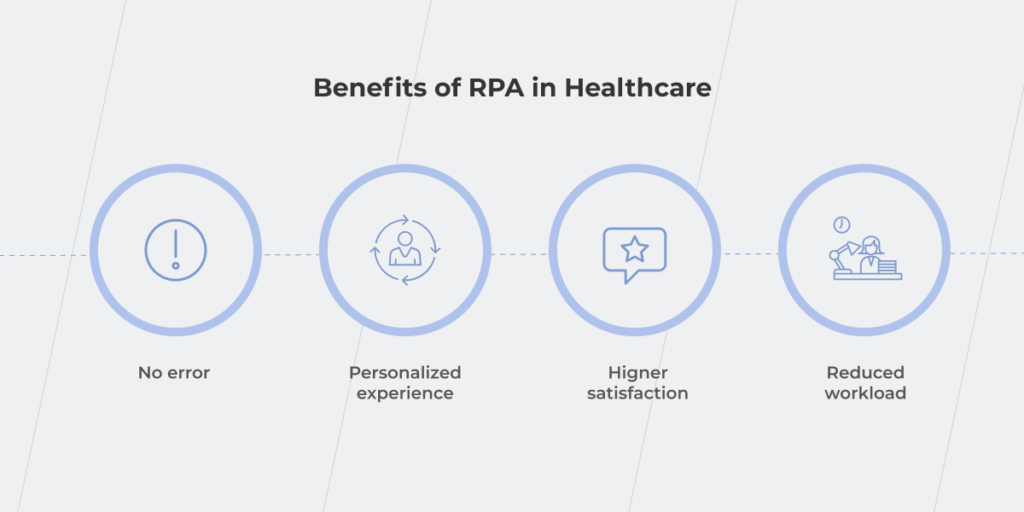
Automation of countless rote activities accelerates processes and helps you reap fast rewards such as devoting more time to patients and providing them with an enhanced service. And the better it is, the higher is your healthcare provider’s rating. Not to mention that by removing a manual component of daily mundane tasks, you can patch up the holes in your operating budget. In this article, we evaluate options on how your organization can reap significant benefits from the automation of routine tasks by implementing RPA.

RPA will become a game changer for your clinic

RPA works for mechanical, logical tasks that operate structured data. The information from the different systems is matched appropriately, and the bots perform a wide array of activities on a pre-thought algorithm without employees’ involvement. 

How does RPA handle challenges in the healthcare industry? Its implementation allows you to:

  • Speed up data-related operations. Healthcare is one of the industries with an extensive document turnover. Performing operations that involve extracting, entering, updating, and transferring data manually is a waste of time and budget. RPA bots will take on routine tasks and perform them 15 times faster than a human. Couple that with the reduction of human error and increased data accessibility for doctors and patients. If you have a private practice, decreasing the possibility of human-caused mistakes may also be a reason to invest in RPA. However, make sure it’s really worth it, considering development costs and the workload in clinics of this size. 
  • Reduce the cost of processing and human labor. According to a Deloitte survey about RPA in MedTech, the application of RPA in healthcare can lower these kinds of costs by up to 80%. 
  • Improve security and compliance. Apart from ensuring compliance with protocols such as GDPR, HIPAA, you have to regulate data access levels for different employees since back-office workers, administrators, and doctors require different rights in sensitive data usage. This problem can be solved thanks to the role-based access implemented with the help of RPA bots. A Protiviti global survey proves that 74% of respondents improved compliance with security regulations thanks to automation.

RPA plays a significant part in enhancing healthcare quality and creating a better patient experience. As you free your employees from paperwork and monotonous, repetitive operations, they can devote more time and attention to patients who get qualified help faster.

RPA in healthcare

Let’s investigate some examples of RPA use cases in healthcare from the perspective of the patient’s pre-visit, visit, and post-visit activities.

Pre-visit activities

Pre-visit activities are all the operations that set the person up for the appointment. How do digitization and automation reinforce this process?

Patients’ scheduling

Now that we are living in a new reality shaped by the pandemic, it’s hard to imagine that two years ago, 88% of appointments used to be booked manually. If you still have assigned staff to collect data on patients’ appointments, probably such an approach requires extra time and effort from both your employees and visitors and results in insufficient and slow processing of requests, and human errors. 

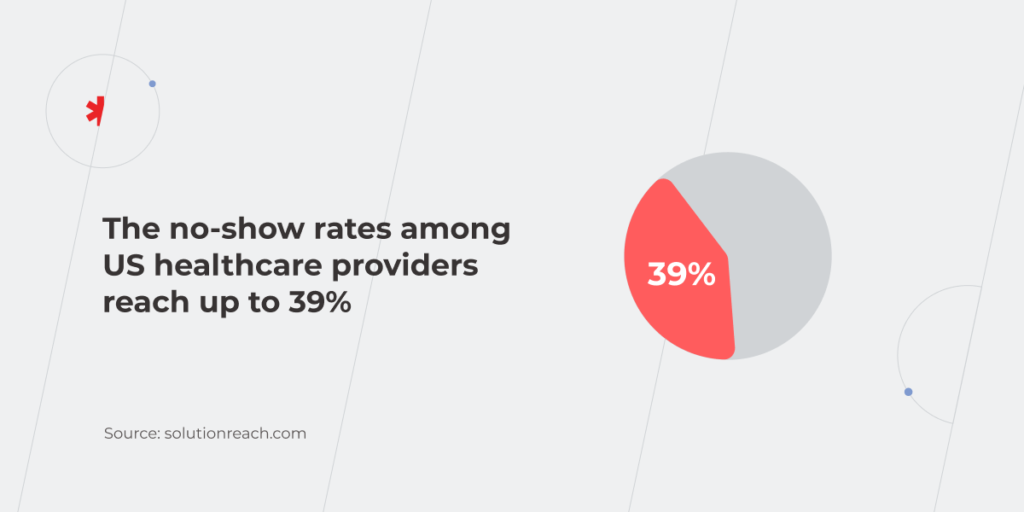
We’ve described the scheduling example in detail in our previous article on the benefits of RPA in different industries. Now let’s focus on the other side of this process. The gap between scheduling an appointment and the actual visit to the doctor could reach up to months or even more than a year. It’s easy to forget about the visit without prior notification. The no-show rates among US healthcare providers reach up to 39% depriving them of $150 billion annually, partially because patients simply forget about their appointments. Therefore, adopting RPA in the healthcare industry to automatically send appointment reminders is primarily about saving your money.

RPA in healthcare

Insurance verification and validation

Does the patient’s insurance cover the appointment and treatment? If this information is still checked manually, it slows down the process and takes a lot of time from employees.

Also, consider that changes in the patient’s insurance policy, such as plan coverage or home address require billing offices to re-start insurance verification. Meanwhile, RPA bots can track if the patient visited the doctor or canceled the appointment and then generate the information on cost and insurance deductibles. The technology runs quickly and consistently according to a well-defined algorithm. You get the up-front process visibility and can check at what stage what actions the bot did. For example, if it’s not clear why the bot billed for a certain cost, you can review a record of its actions.

Visit activities

The main part of the patient’s journey is the appointment itself. People interact live with the clinic or hospital staff at this stage, and their experience influences their perception of the services of your healthcare facility. That’s why making use of RPA to meet your patients’ expectations of convenient service and personal data security is vital.

Security & compliance checks

Collecting and storing information electronically allows laboratories, clinics, and hospitals to greatly fasten and simplify the health information exchange (HIE). The goal of sharing medical records among disparate healthcare systems is all about creating timely and high-quality patient-centered care. But how to ensure data security when it’s moved between different systems? Leverage RPA for security and compliance needs — create bots that automatically:

  • Detect personally identifiable information (PII) and encrypt it to protect patients’ data from cybercriminals. You can add additional functions and make the bot capable of sending an alert if PII doesn’t meet an established policy.
  • Delete personal data after a certain period, as required, for example, by GDPR.

Remote patient monitoring (RPM)

Since most healthcare staff already have a lot on their plate, overloading them with patient monitoring on top of everything else seems like a bad idea. RPA technology can solve the problem with simple, repeatable tasks such as collecting and monitoring the information on the patient’s test results and self-reported adherence. 

For example, if the patient’s blood pressure rose during the clinic visit, the RPA solution can help monitor their condition during the next hours or days. How does it work? The bot sends notifications to measure blood pressure to the patient’s profile in a special application. If it registers a high reading, it will additionally send the person a health questionnaire — what are other symptoms, has the patient used medication, etc. — and will set a reminder to additionally measure the resting pressure. If it’s normal, the application will notify the person that there’s no reason to worry. But if the reading is still high, the system will inform the nurse that this patient needs an extra appointment. In the example described, the patient’s health data is recorded in real-time, and the involvement of doctors and nurses is required only in some cases, while in a system without an RPA, all these activities would be performed by the medical staff and would be recorded asynchronously. Digital technologies free up highly qualified specialists for things that can’t be done without them and still ensure full-fledged care for patients. 

Discharge instructions

How can doctors make sure their patients are taking medications? They can’t. Unless there are specially programmed RPA bots, that send reminders to the patient and, if need be, notify the doctor if the patient doesn’t go to the pharmacy to get the prescribed meds. 

The role of automated discharge instructions is even more important for hospitals and patients after surgery or other serious treatment. Let’s find out what tasks can be left to RPA based on the example of a patient who’s undergoing chemotherapy.

  • Notifying the patient about scheduled appointments
  • Sending prescription pick-up reminders 
  • Reminding to take medical tests
  • Registering the patient’s health state after the session
  • Alerting the doctor if the treatment doesn’t go according to the plan

In case the patient experiences any atypical symptoms, he/she notes them in a special application. The RPA bot receives this information, transfers it to the clinic, and offers to set an appointment with the required doctor. 

Post-visit activities

The payment process is one of the low-hanging fruits that are easy to automate because of a large number of repetitive steps. At this stage, RPA not only streamlines the procedure but also eliminates the probability of a human error. 

Billing

In order to charge for medical services correctly, the clinic’s billing office needs to merge information, such as patient records, disease codes, medications, etc. Baylor Scott & White Health (BSWH), a system with 52 hospitals across the United States, calculated that manual billing takes 5-7 minutes, and its accuracy isn’t 100%. After RPA implementation, hospitals can cope with 70% of estimates without employee involvement and human error.  

Claims processing

McKinsey’s survey among healthcare facilities shows that 72% of respondents believe RPA greatly impacts claims processing. 

What operations can be automated? 

  • Opening and copying data from emails and entering the information into your core system. 
  • Reconciling and verifying claims data.

Such an approach speeds up the back-office services and enables you to provide visitors with a better experience. Implementing automated solutions also impacts employee costs. Avera Health saved $260,000 in staff costs by creating bots to review user account status and alert managers about pending and incomplete claims.

RPA technology is known for being of much use for patient care. RPA bots can send reminders about procedures and tests to the patients as well as automatically create reports for the physicians, keeping them up-to-date on the health state of those they treat. At the same time, COVID-19 uncovered new areas where RPA can be helpful:

  • Bots help monitor employee health in real-time. They track nursing staff’s and doctors’ health status and alert every case of a high body temperature. Such an approach allows hospitals to take appropriate care of their employees.
  • The technology streamlines staff onboarding by 10 times. Bots automate operations such as checking job seekers’ police vetting and their employment status background. 
  • RPA solutions speed up COVID-19 testing by more than 90%. Bots make the initial diagnosis and then collate this information with the patients’ COVID test results and their medical records in the hospital’s EMR. 

Even if it seems like the worst of the coronavirus is over, refusing to equip your hospital with electronic assistants is shortsighted. This pandemic will subside over time, but there is no guarantee that a similar threat won’t arise in the future. The technical readiness of healthcare providers to cope with the hardest challenges is the cornerstone of efficient patient care. Start with RPA implementation to have your hands and minds free for activities that require human involvement. 

Save money and free up time for humans to focus on higher-value tasks

RPA is an easy-to-implement opportunity for healthcare organizations to cut costs and speed up operations across the company. Just imagine the labor time that could be eliminated or minimized with automation. At the same time, you improve care quality and, as a result, increase patient satisfaction. Therefore, the processes in your clinic, hospital, or lab that can be broken down to a set of ‘if/then’ decisions, should be streamlined with the help of RPA.

Reach out to our specialists to discuss which of these examples of RPA in healthcare can be applied to your organization’s practice.

BPM vs RPA: The Duet You Can’t Miss

When you have a huge goal in front of you, approaching it might seem challenging. With digital transformation as your top business concern, how should you start? 

Trying to refine processes you don’t quite understand is the path to nowhere. In other words, improving only certain activities is not enough; you need to see the entire picture behind them to understand how the workflow can be upgraded.

There are many ways to ensure better organizational performance. In this article, we’ll take a closer look at BPM (Business Process Management) and RPA (Robotic Process Automation) and what they mean for your business. 

As a process, BPM can be compared to life. There are a lot of tasks to do within this process. Some of them require your participation, but others can be delegated to a virtual assistant such as a smart house system that facilitates certain operations — just as RPA does. With some of the house system’s sensors, you can adjust the temperature and humidity in the rooms so you can sleep better, or synchronize turning on the electric coffee machine and the multicooker with your alarm clock and breakfast will already be prepared by the time you wake up. Doing these and many other things without manual effort streamlines your routine and helps you focus on more important stuff. The same goes for business. With BPM and RPA at its service, you’ll reap tons of benefits you’ve probably haven’t thought of, yet.

Business process management is a global process-focused approach that forms the skeleton of a procedural flow in a company. BPM establishes the game rules for a particular business — how its parts should perform to produce the right outcomes. Meanwhile, RPA is a task-focused form of automation. It focuses on decreasing the number of dull, repetitive operations. RPA is one of the technologies that put BPM’s ideas into practice. 

Implementing RPA alone won’t put your business on the fast track to success because it just enables processes to run faster and/or makes them frequent, even if the processes themselves are inefficient and need reengineering. On the other hand, BPM determines the processes that need to be streamlined and explains how it could be done to facilitate the whole workflow. 

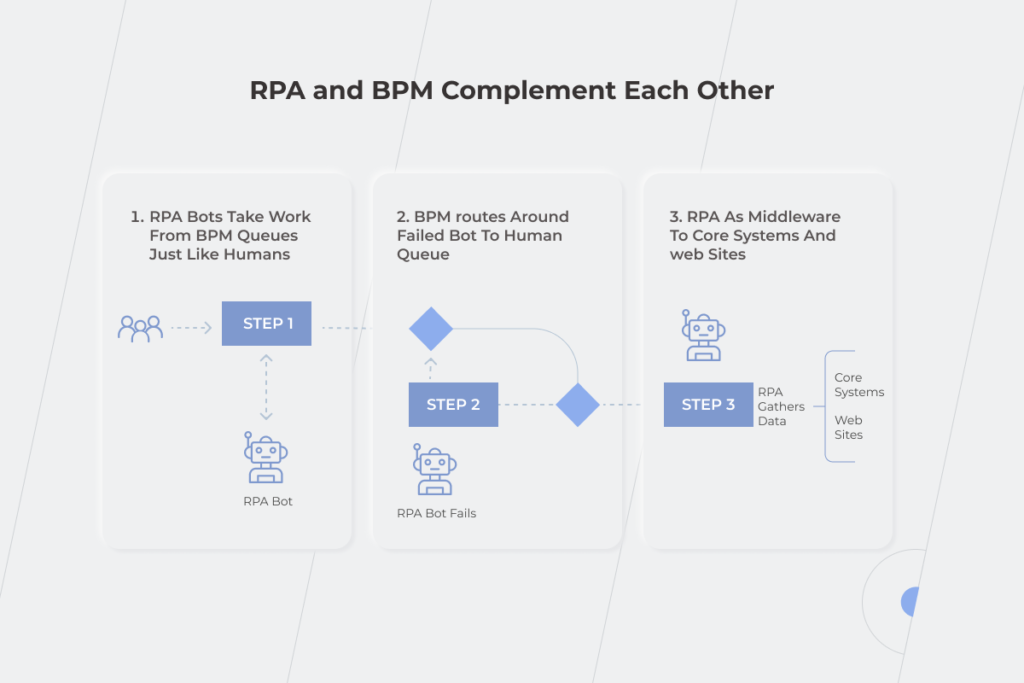
Let’s investigate the relationships between those concepts. In the example, you can see the online appointment registration in a clinic. All the patients have to do is log in, and choose the doctor, date, and time slot. If there are no schedule changes, they’ll receive a pre-appointment reminder from the RPA bot. It’s easy to send notifications when everything goes as planned, you might think, but how to automate unplanned changes? That’s what BPM is for — it controls the whole process and uncovers possible bottlenecks. For instance, if the appointment before yours takes more time than expected, clinic staff has to notify you and other later patients about the schedule changes. However, managing it manually would be exceptionally time-consuming. Thanks to well-established BPM, an RPA bot takes into account several conditions such as patient’s data and available doctors to estimate appointment duration and remove relevant time slots from the doctor’s schedule on the online booking portal.

RPA and BPM

In 2020, the need for RPA technology in healthcare skyrocketed. When the pandemic hit, manual patient registration seemed like a chaotic deadlock that either had to be broken or could break everything else. The situation was remedied by the adoption of RPA bots that managed patient data registration in 14-16 seconds error-free. This is compared to the three minutes it used to take humans to perform the same task.

How do BPM and RPA influence your business?

Replacing tedious manual labor with automation and revamping business processes are crucial components of digital transformation. With 87% of senior business leaders saying digitalization is a priority, its successful completion becomes a predominant concern. You won’t achieve expected results without a holistic view of the company’s workflow and a clear understanding of how to make the best use of your employees’ talents. And here RPA and BPM come to the rescue. RPA helps solve the issue of automating similar actions without human intervention. Meanwhile, BPM provides you with a plethora of opportunities to enhance your organization’s efficiency.

Visualize your business processes and identify their productivity 

At this point, you can also benefit from Business Intelligence (BI) with its data visualization tools. Combine awareness with action – together with BPM, business intelligence increases processes transparency and provides you with analytics, and this is the pillar of prudent decision-making. BPM is a good choice for pinpointing drawbacks, and BI is a great opportunity to predict the potential outcomes after process adjustments. Take advantage of making your business process management more intelligent. 

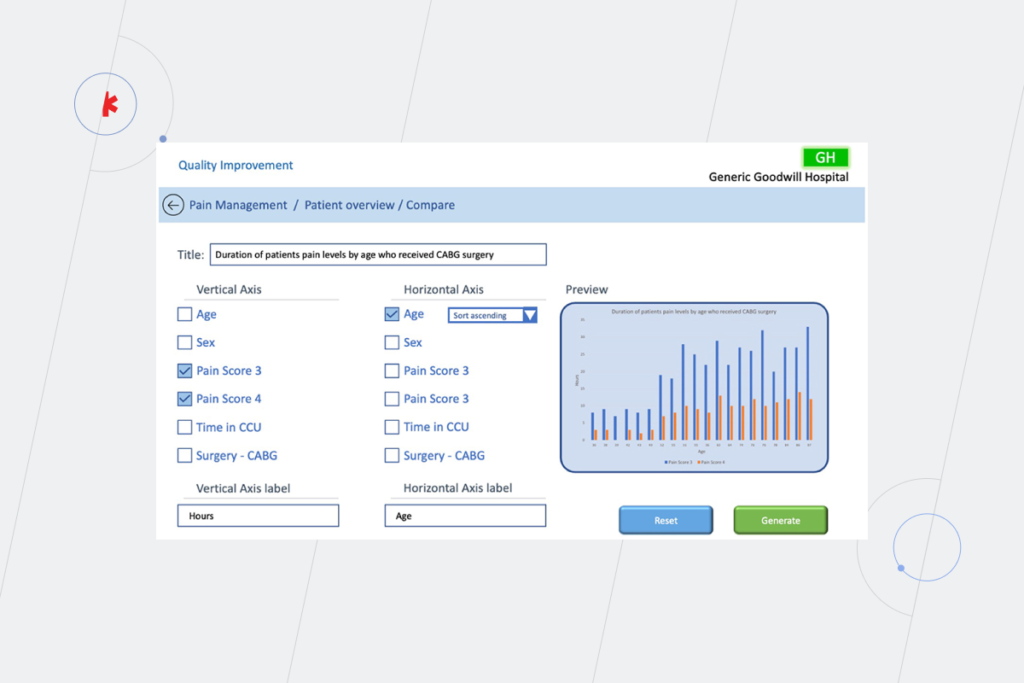
Here’s an example of how BPM approach and BI tools can be united for a deeper understanding of such a healthcare process as a hospital treatment after CABG surgery. Thanks to up-to-date data from BI tools, doctors can predict the need for pain management using patients records and dividing them according to their age and other parameters.

data visualization tools

Find bottlenecks that are hampering the speed of the processes and reducing their efficiency 

Here’s an example of an operational bottleneck caused by people’s inability to match work volume during the multilayered approval process. Imagine that several stakeholders are interested in a set of reports. Employees who work directly on these reports can notify them when the work is done. Still, to avoid wasting employees’ time on minor mechanical tasks, it’s more profitable to set up an automatic notification to email — an RPA bot can easily do this task.

Redesign the processes

After defining the weak points, it’ll be easier to find ways to make them more results-oriented and effective. If we continue with the example from the previous paragraph, set up the RPA bot to resend the notification if the stakeholder didn’t open the email within a certain time period.

Execute automated processes 

Decrease the need for human involvement in drudge operations through robotic process automation. Respondents of the Deloitte RPA Survey Report estimate that RPA bots can deliver at least 20% of capacity in their operations. That said, this number could potentially reach up to 52% in different organizations. 

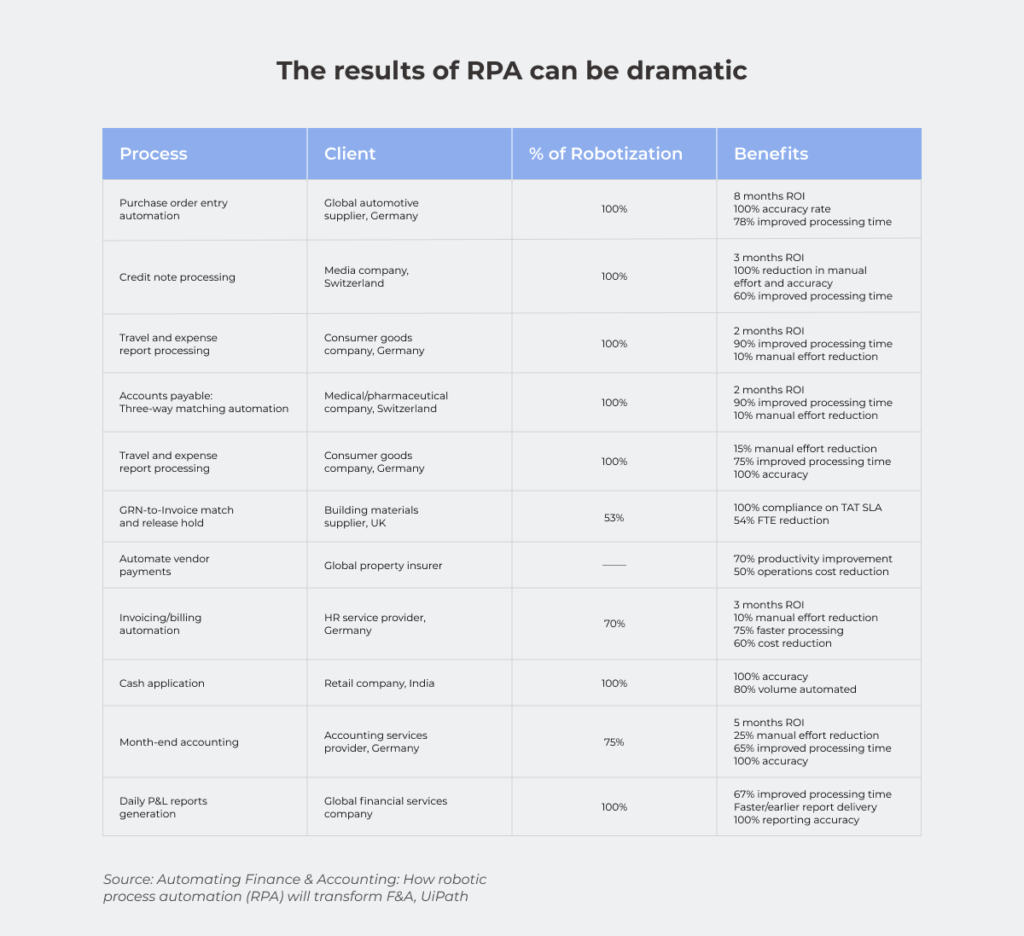
However, the real RPA benefits lie in improving organizational KPIs. According to the UiPath research, robotic automation significantly accelerates processing time (up to 78%), reduces operation cost (50-65%), ensures 100% compliance with regulations and the same level of accuracy.

RPA

Handle specific scenarios 

Robotic process automation can deal with repetitive tasks, but it relies on BPM to manage exceptions to RPA rules. If your RPA bot states that 900 employees should be fired because they worked less than they were supposed to, would you agree with this decision without thought? Or would you rather review the conditions for performance evaluation and set specific KPIs for employees from different departments as, for example, development and sales teams’ tasks can’t be measured in the same way, can they?

In a nutshell, BPM helps you to choose business processes that may be worth improvement, for instance, automating. And RPA is one of the most cost-effective possibilities to put it into action.

How difficult is it to adopt BPM and RPA?

The key issue of BPM implementation is the postponement of the result because it’s a heavyweight solution that should be integrated with the other systems — more than half of BPM projects fail to deliver the results hoped for. Indeed, BPM doesn’t produce an immediate payoff, but it’s never a useless task to understand your business processes clearly and find out how you can enhance them. Implementing RPA as part of your software development plan is easier because it’s a particular technology, but if you implement RPA without BPM, your digital transformation efforts might go down the drain as there is a possibility that you’ll just end up with poorly organized activities.

Another challenge when adopting RPA and BPM is the industry skill shortage. Even if you have an in-house IT department, the responsibilities of your staff may be limited to the system’s maintenance or your employees may think in terms of the tasks instead of processes. That’s why it makes sense to take advantage of a dedicated teams’ expertise.

One more indispensable condition for the success of BPM and RPA adoption is the involvement of all the stakeholders — from C-suite to general employees. You may face resistance to change at some level as employees will be afraid of losing their jobs to robots. So resolve this misunderstanding and turn your specialists from possible digital transformation bottlenecks into the supporters of new processes and technologies before starting your journey. 

When to use BPM and RPA? 

If the employees involved in the process are drowning in operations, this is the primary signal that BPM implementation is needed. Its adoption helps to figure out how effectively the team works, and pinpoint the weak spots.

Thanks to RPA software, you can decrease the overwhelming number of tedious operations. Automate repetitive parts leaving final decision-making to your employees if you don’t trust the robots enough to delegate some processes completely. 

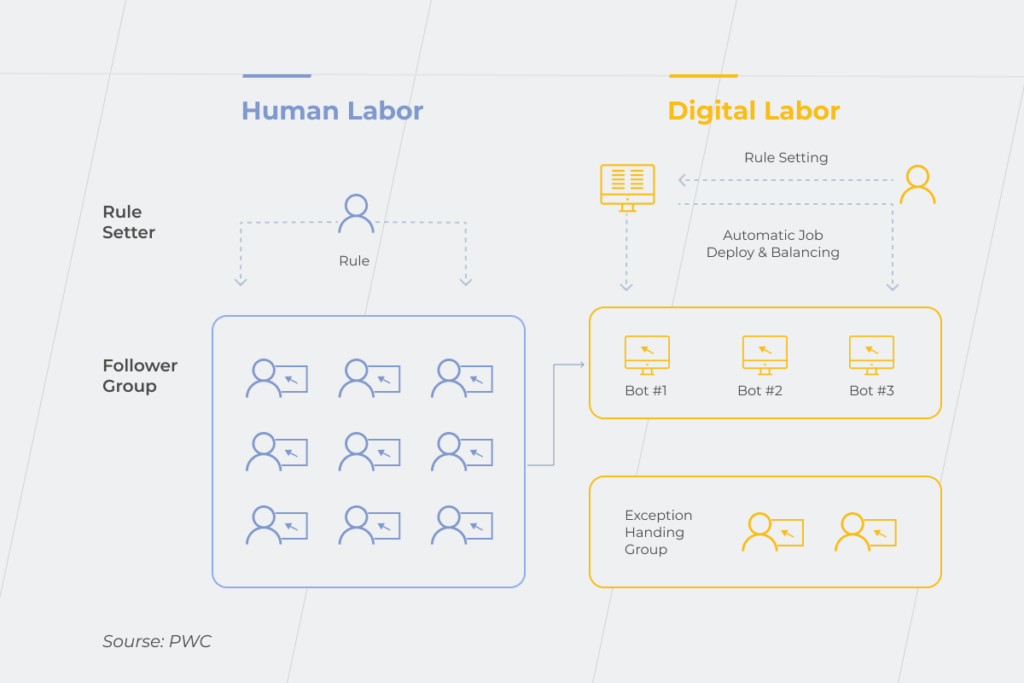
Compare two approaches to the processes execution — without implementing RPA and with it. In the first case, your staff is buried under the workload of similar monotonous actions and eventually experiences burnout that causes slacking, job dissatisfaction, and even depression. The question about the performance level in this situation hardly needs to be asked. In the second case, employees don’t have to waste most of their working time on mundane operations. Thus, they can focus on dealing with higher-value tasks that require their talent and expertise.

RPA implementation

One of the reasons to consider implementing BPM is the necessity to connect your legacy and modern systems. Let’s take a look at an example from the fintech industry. When a person comes to the bank to open a deposit, basic banking legacy systems are sufficient. But what if he/she isn’t ready to waste time going to the bank and wants to open a deposit in a mobile app? In this case, outdated systems have to be connected with modern online banking. BPM uncovers this weak spot, and RPA can solve it by creating a bot that will enable legacy and modern systems to exchange data without a hitch. 

The fruitful partnership of BPM and RPA: a breakthrough in your digital transformation?

RPA and BPM differences don’t make them rivals. It’s cooperation, not competition. Implementing BPM ideas and RPA technologies together can lead you to advanced outcomes and much more profitable business processes with people involved only in activities that require their skills and expertise while the rest is automated. Adopting only RPA makes sense if you have the proper level of confidence in the machines. Going back to the example of firing a huge number of employees because of the automatic analysis of their activity during the working day — are you ready for this level of trust? It’s more advantageous to combine RPA technologies and BPM ideas so that you can supervise the results of the bots’ work. If you are still on the fence about implementing BPM and RPA solutions into your organization, schedule a consultation with our specialists and we’ll be happy to talk you through it.

ERP vs CRM: Which System Should You Bet On?

Trying to find the winner in the ERP vs CRM competition is challenging for many businesses. Understanding how each of these systems works and how it can benefit your company will help you decide which one is right for you.   

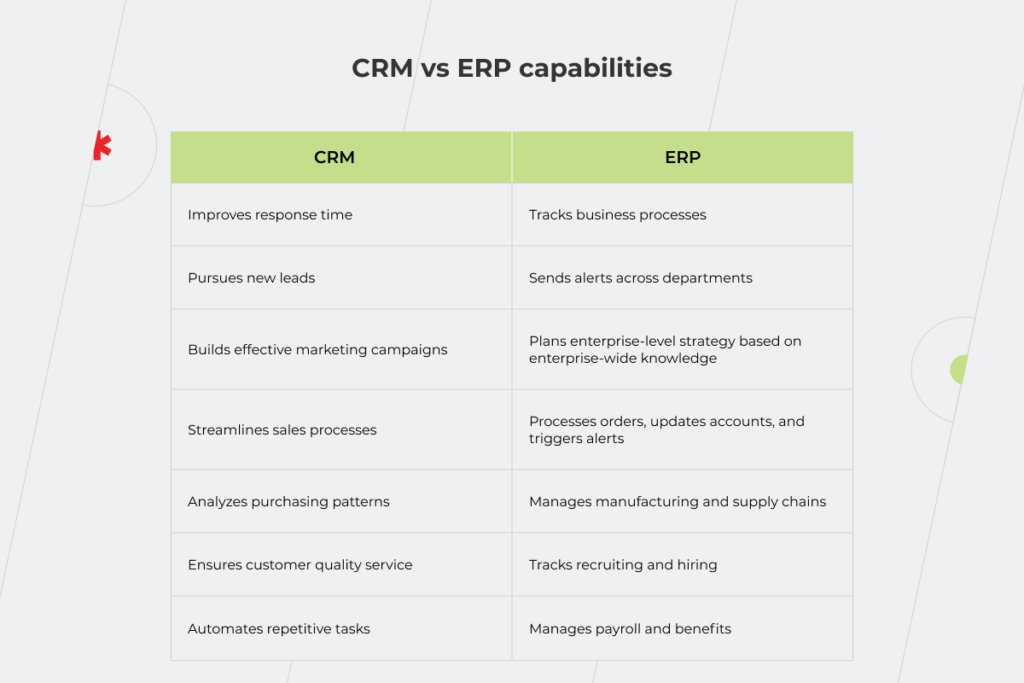
Enterprise Resource Planning (ERP) and Customer Relationship Management (CRM) are two types of powerful software that help businesses handle a number of important tasks, from taking care of back-office workflows — ERP — to customer life cycle management — that’s what CRM covers. Both systems have a lot in common and aim to boost business growth and success. Some of their features overlap, but there are also noticeable distinctions that shouldn’t be ignored when facing a CRM or ERP dilemma. To help you figure out what your business really needs, we will describe the central functions of each system, determine the cases that require CRM, in which ones you’ll need ERP, and when it’s time to adopt both.

CRM at a Glance 

The primary purpose of the Customer Relationship Management software, as the name implies, is to help customer-facing teams manage relationships with the company’s leads and customers. It includes, among others, automating and streamlining repetitive tasks such as tracking purchases and deals, managing tickets, scheduling regular meetings, and preparing customizable analytical reports. As your company grows, so does the complexity of data, making it increasingly difficult to keep track of all the ongoing processes. No wonder, human errors such as forgetting to update a spreadsheet or mistakingly duplicating customer data, become more habitual and can significantly impact businesses. CRM keeps all this information in one accessible place and provides organizations with a 360° customer view, connecting the dots between marketing and sales data, and facilitating collaboration between the customer-facing departments. 

According to Nucleus Research, CRM pays back $8.71 for every dollar spent, leading to impressive ROI with the CRM system. Most businesses view building and maintaining relationships with clients as the number one goal, which prioritizes investing in CRM during the first five years after a company is launched. Grand View Research indicates that around 82% of organizations use CRM systems for sales reporting and process automation. CRM has become an essential business software that enables companies to increase sales through improved customer service and retention. 

ERP at a Glance

While CRM focuses on customer interactions and boosting sales, Enterprise Resource Planning is usually heavy-duty software that unites different aspects of your business such as financial management and accounting, human resources, and supply chain management into one single database accessible to all departments. The main role of ERP is to provide data integrity by tying together all the functions and processes across your business, ultimately leading to a reduction in costs and an increase in the visibility of your operations. Just like CRM, ERP uses real-time information to help management respond to business needs more efficiently. 

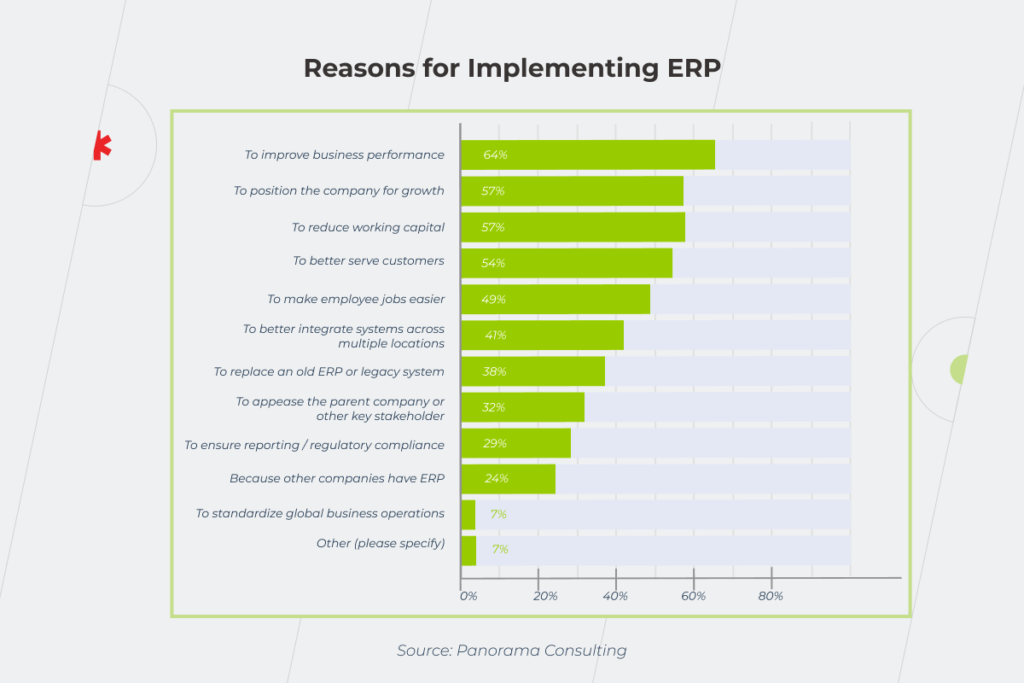
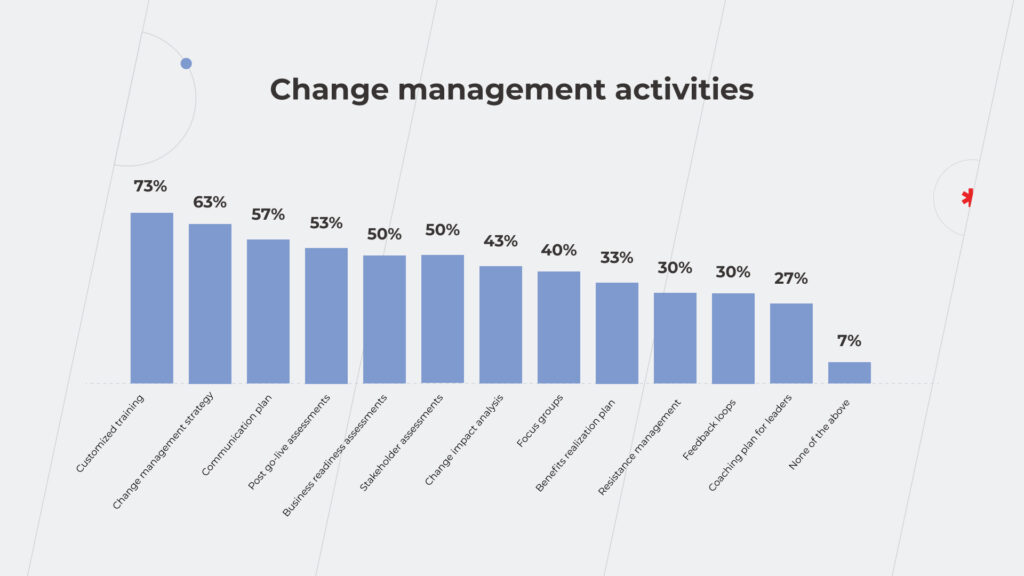
According to the Panorama Consulting Group, 93% of businesses that implement ERP projects consider them a success, naming reduced process time, increased collaboration, and a centralized data system as the top benefits.

In order to make an informed decision between CRM and ERP software, let’s explore each system separately.

When do you need CRM?

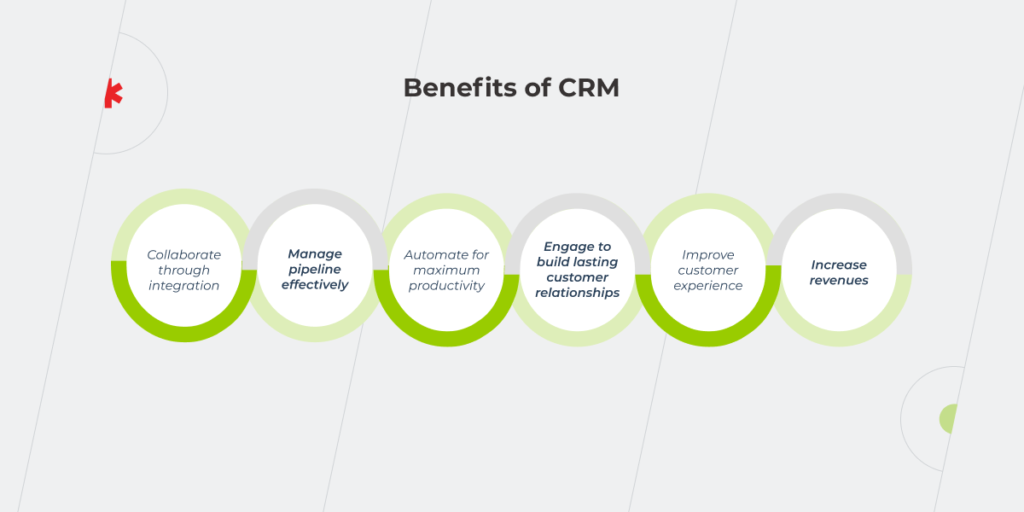
benefits of CRM

The CRM platform is an excellent tool to nurture your interactions with the clientele. Without it, you are unlikely to sustain the relationships with your customers on an appropriate level. Here are the sure signs that your business cries out for a life preserver in the form of CRM.

  • You’re swamped with manual processes

Despite the digitalization that occurs in various types of business, many organizations still manage their data manually, wasting precious time on looking for a particular customer record, keying in new leads by hand, reformatting rows and columns, etc. Instead, they could use this time to convert leads into paying customers and let the CRM system do the job of organizing and pulling the necessary data. 

  • Your customer data is all over the place

Has your data ever been scattered around multiple spreadsheets, emails, or, maybe, post-it notes? Don’t say a word — the answer is probably, yes. The problem with it is that you might need to spend hours or even days looking for the necessary information. Furthermore, with manual data entry, you might encounter many duplicates, typos, and other human-caused mistakes. CRM software helps to avoid them by automating the processes related to entering the information and updating the records. Cloud-based CRM also allows you to share the data among employees in real time, saving you and your colleagues from unnecessary emails and phone calls. 

  • You lose track of your leads

When tracking your sales leads manually, you have fewer chances to turn them into loyal customers due to the lack of a unified, visible sales funnel. So what’s the point in increasing your lead flow, if you can’t keep up with it? Sorting, analyzing, and prioritizing your contacts have to become a priority. CRM is here to help. 

  • There’s little to no interdepartmental collaboration

When your clients and leads interact with your company, they may find themselves bounced around and misinformed because there is no clear vision within your department on how to handle their requests or inquiries. The clients become increasingly dissatisfied with the level of customer service leading to higher levels of complaints. 

Also, without a CRM, you don’t have visibility of what your sales team is doing, so it gets easier to miss out on the opportunities within a pipeline such as bid invitations, prospective sales deals, important new leads, and more. When all the stakeholders can share and exchange purchase history and other relevant customer data, it enables you to deal with customers in a united and cohesive fashion. 

  • You don’t know your clients the way you should

In many instances, customer data is not connected to a focal point, making it difficult to gather statistics and other relevant information on your customers. This results in considerable gaps in information on your leads and clients and misinterpretation of your customer’s preferences. CRM keeps track of all customer information, allowing you to better tailor your products or services to your clients’ needs. 

  • Customer service leaves a lot to be desired

Your customers might communicate with you via a myriad of channels — phone calls, chatbots, social media, messengers, surveys, etc., — and their requests can become increasingly harder to track. If you don’t get comprehensive information on time, it naturally leads to low retention rates. When your customer service lacks automation, response times increase, and service quality declines, irrespective of how intensely your sales department operates. Meanwhile, by getting your data organized and managed by a CRM platform, you have a more centralized and well-controlled two-way relationship with your customers. CRM helps to digitize and automate your company’s outreach, facilitating marketing efforts, sales, and product delivery speed. The system also provides important assistance with personalization – a critical method of keeping customer attention. 

When do you need ERP?

ERP implementation

Unlike CRM, an ERP system mostly focuses on your organization’s internal processes. For example, when you’re under a deadline to submit an accounting report and it takes ages to retrieve the required information, ERP can help. Here are some other issues that could indicate you need an ERP solution:

  • You’re using disparate systems

After your software has been updated, the disparate systems you have might not work well together. For instance, new accounting software isn’t compatible with an old HR system. ERP provides a platform that keeps all these systems under one umbrella, ensuring their full compatibility and easy coordination. 

  • Generating reports takes tons of time

Let us imagine a situation when you need to provide your stakeholders with an all-in-one report that includes your company’s spending, revenue, and the number of new customers for the last three months. Digging into each Excel spreadsheet and combining them into one report will take days.  This is too much effort and precious time wasted on something that could be done automatically. ERP gathers all this data in a single database with convenient and simple reporting options so that you can consolidate the necessary information into a beautiful report within minutes.

  • You’ve outgrown the existing software

If the software sets limits on your market expansion and ability to develop by making it increasingly hard for the staff to complete tasks, chances are that your business has outgrown your legacy software. The good news is that you don’t necessarily have to dump your outdated system. If done carefully, the integration of the existing databases and software with new ERP solutions will become a success — just make sure that you’ve analyzed your current software, discovered any flaws in the processes, and made the necessary fixes.

  • Inaccurate inventory

Keeping track of the inventory, especially in big companies with many remote warehouse locations can be a challenge. When your sales, customer, and inventory data is not synced, the situations wherein you have insufficient or excessive stock will become commonplace and can impact your company. ERP inventory management system keeps all items in one single easily managed database reducing human errors, eliminating guesswork, and helping efficiently manage available resources. 

  • Accounting management is tedious

As you watch your staff spending hours every week manually entering paper-based invoices and sales orders into different accounting and sales systems, you are probably wishing that there could be some system that could simplify and automate the process. Since an ERP keeps all information in a central database, there is no need to enter data into multiple systems. Moreover, with effective electronic document processing available through ERP, paper-based invoices and orders are quickly becoming a thing of the past. 

  • IT management is a nightmare

Managing multiple software systems simultaneously can be quite painful for your business. Customizing these systems, integrating them, and updating with patches and upgrades is complex, costly, and saps critical time. If your patchwork of systems includes on-premise legacy software, system upgrades can be more trouble than they’re worth, whereas having an ERP instead of multiple disparate systems requires way fewer resources spent on its enhancement. Not to mention a cloud-based ERP, which is updated automatically.

CRM or ERP dilemma: three things to consider while making a major business decision

Having explored different features and functionalities of both CRM and ERP software, let’s get back to the same question we posed at the beginning of this article: which one of these two to opt for? We recommend considering several factors:

Business needs. If your business is primarily customer-oriented and you need software that is designed to help your sales and marketing teams handle their work more efficiently, then you should consider CRM. If you are looking for a system with a diverse and broad set of capabilities to automate various processes within your business, such as financial management, accounting, inventory, etc., then you probably need an enterprise-wide solution. You can also integrate a customer relationship management module in your ERP. However, these modules are usually not as effective as an independent solution, so if you focus on sales, you’d better get a separate CRM.

Investment. The amount of money you are willing to pay for the software is another critical issue when hesitating between the two systems. CRM is usually cheaper while ERP needs a larger investment as it’s a bigger piece of software that serves the needs of the entire organization. However, with various solutions offered on the market today, sometimes a detailed, high-quality CRM costs more than a simplistic ERP. Besides, considering CRM and ERP in cloud computing, you need to take into account that the subscription price will rise in direct proportion to the amount of data stored in the system. So if the number of customers is estimated in tens of thousands, you will probably pay more for a CRM rather than an ERP. 

Scale. The size of your business also determines which system would be more beneficial to you: CRM is great at providing benefits to small and mid-size businesses, while ERP is more valuable to large, complex organizations where it can provide potentially huge ROI. For example, if the company’s focus is B2C, then a separate CRM system might be a better solution. For industrial factories, where the organization of internal processes is becoming too complex, ERP is definitely a better choice. If in doubt, you can start off with CRM and then purchase an ERP, integrating one into another. 

The chart below showcases the capabilities of both systems.

CRM vs ERP

If large organizations are equally interested in reducing costs and increasing sales, they can’t do without a high-quality CRM system. At the same time, ERP is not only limited to large-scale enterprises: if a small or medium business is rapidly growing, it most likely will need an ERP. While CRM is synonymous with growth, retention, and customer satisfaction, ERP is effective when it comes to optimizing the resources that you’ve already amassed. In many cases, it’s about growth to the same extent as it is about optimization. In such cases, you may want to consider deploying both systems.   

Even if you can’t implement them simultaneously, there’s always the option to start with the system that meets your major requirements first, and then combine it with another solution later. By CRM integration with ERP, you can exchange information through a single source and collect feedback simultaneously. With all data in one place, you can leverage it easier.

CRM and ERP software is beyond a versus question

As two different systems, CRM and ERP are not direct competition. Each of them performs its own functions and helps your business in its own way. To choose the right platform, you should investigate the issues that your company faces, examine the complexity of your internal processes, analyze the level of your company’s involvement in sales and marketing, and determine the amount of money you are willing to spend. If you think that you might make good use of both, there is no need to limit yourself to just one of the options. ERP and CRM systems can complement each other so that your company will save on costs and expand to new markets at the same time. Both systems can work in sync, and be fully integrated into each other helping your business grow and win more customers. 

Still not sure whether you need CRM or ERP, or even both?

Reach out

E-commerce Solutions: Out-of-the-Box vs Custom Software

As people were trapped indoors under COVID-19 lockdowns, the global monthly number of visits to retail websites rose from 16 billion in January 2020 to 22 billion in June 2020, and there’s no way back — shopping has entered a new era. We let our introvert genies out of the lamps during the pandemic. Although we still miss traveling or spontaneous get-togethers with friends in a bar, shopping has become a part of life that can be left to technology without regret. No wonder there are businesses that have managed to thrive in this environment. For example, Walmart invested in e-commerce to provide their customers with online grocery delivery and pickup, and in the second quarter of 2020 company’s sales were 97% up. So the question of whether or not to go online isn’t really a question anymore. What you really should think about is how you’re going to get there.

Implementing an e-commerce solution is one of the ways to meet your customers’ expectations. There are two options to choose from — custom or out-of-the-box software. What are the benefits and drawbacks of each? Is there an alternative that marries the advantages of these options? We’ll help you solve the build-or-buy dilemma and decide on the most suitable and profitable e-commerce solution for your business.

The key to finding the right answers is asking the right questions

Every business owner who decides to implement e-commerce software wants to get the best thing since sliced bread. But what solution should be considered as the best? Quick? Efficient? Secure? Certainly, but the answer will also depend on the type of your business, the functions you need, and so much more. Our experts have prepared a list of questions you should ask yourself when choosing an e-commerce system and provided unbiased advice according to your responses.

Do you have a solid business plan? How much could your business change or grow in the nearest future?

An out-of-the-box solution is a good way to test how beneficial e-commerce is if you’re only starting your business on the web. Figure out whether your customers are comfortable with ordering online and satisfied with the functionality that an out-of-the-box application offers. You don’t have to invest a fortune to find out how e-commerce software implementation will impact your business regarding the number of new customers and revenue increase. 

A custom solution may not seem as appealing as a ready-made option, due to the high initial costs of software development. It’s also risky if you aren’t sure how your business will develop in the next one or two years. You can benefit from a bespoke e-commerce solution if you’ve already tried an out-of-the-box one and understood that it doesn’t match your organization’s structure and your back-office requirements. For instance, your teams are located across various countries, or each team is responsible for a particular production stage. 

Do you need integrations with your in-house systems?

Out-of-the-box solutions allow integrations with widespread CRMs, ERPs, inventory management systems, etc. It’s critical as integration with an ERP system enables you to optimize your company on an operational level while CRM integration empowers your business to keep better track of customers and create personalized experiences for them to feel special. 

However, according to *instinctools VP of Engineering, Alexey Astakhov, there’s a fly in the off-the-shelf software ointment:

Using custom-made CRM, ERP, or other business systems might be a dealbreaker for their integration with an out-of-the box e-commerce solution. Whether the system is closed source and all the issues have to be handled via the tech support, or it is open source and you are supposed to deal with the code written by someone else. Such an integration will take you a lot of time, effort, and money either way.

A custom solution is unlimitedly flexible regarding integrations as you can adjust it to any of your in-house systems. 

Is time-to-market critical for you?

An out-of-the-box solution is easy and quick to implement. By going for it, you exclude research, development, and testing stages from the process and can enter the market within a few days or a couple of weeks max, depending on the number of goods to upload. This option looks especially attractive to startups that can’t wait to check whether their idea will take off. 

A custom solution usually requires more time since you have to build it from scratch according to your particular business processes and unique requirements. 51% of respondents of the Unilog annual B2B digital commerce report claimed that custom e-commerce solution implementation took them more than nine months. Nevertheless, time-to-market fades into the background if you need a unique solution or an integration with a custom ERP, CRM, BI system without which you can’t run your business efficiently. 

How important is it to create a unique design of the system?

Out-of-the-box solutions offer — surprise, surprise — run-of-the-mill design. It’ll work if your customers just need the product regardless of the UI your offering is wrapped in. Just make sure that the selected solution is good in terms of simplicity and usability. If your customers struggle to find the cart because of an incorrect or difficult-to-use layout, they won’t hesitate to switch to your competitors that give users the possibility to navigate through the online store without a hitch and make a purchase in one click.

A custom solution allows you to create software with unique UX/UI that would stand out from the crowd of similar stores and emphasize brand identity. This is critical, for instance, if you focus on the luxury segment. Targeted at a narrow audience, they can’t put their customers’ loyalty at risk with a sketchy design. So if your offer expands beyond just a product to a lifestyle, you might not find what your customers need among ready-made solutions.

Which payment and delivery solutions do you want to use?

Out-of-the-box solutions work for the territories with similar widespread delivery (FedEx, DPD, etc.) and payment services such as PayPal, Visa, Mastercard, etc.

A custom solution is your choice if you sell goods in countries with different payment and delivery services. For instance, payment via PayPal isn’t available in China and some Eastern European countries. If you don’t want to miss this market, you have to provide an alternative payment method for these regions and integrate it with your e-commerce software. The same works for shipping — there are countries where the delivery service offered within your ready-made solution isn’t available.  

What marketing solutions need to be included in the system? 

An out-of-the-box solution is a nice fit if you plan to use standard marketing activities such as running social media campaigns, giving discounts and coupons to your customers, sending them newsletters, creating promotions, etc. But even if your marketing solutions are more standardized, you have to consider your market. The success of your marketing effort depends on the possible compatibility of the ready-made e-commerce solution and, for instance, your social media. It means, if you sell products to Chinese customers, you should consider integrating your solution with WeChat, which is the most popular messaging app in China.

A custom solution is a better option if, in addition to the standard marketing activities, such as social media integrations, you use specific ones. For example, you may lack a journey builder that allows delivering personalized experiences at every step of the customer lifecycle. Then think of developing a custom solution or customizing a ready-made offer with the help of experienced developers.

Do you need a business intelligence solution to facilitate more informed decision-making? 

An out-of-the-box solution can have built-in BI such as Magento BI that allows you to run RFM (Recency, Frequency, Monetary) analysis for customer segmentation. Also, popular ready-made software such as Magento and Shopify can be easily integrated with the most popular BI tools such as Power BI, Tableau, Qlik, providing real-time information about your customers, marketing, and sales processes.

A custom solution is more favorable if the BI system you plan to incorporate into your e-commerce software is tailor-made. If you need custom dashboards with specific metrics to track or bespoke data analytics features, they might not comply with ready-made software. It doesn’t mean though that you have to give up on an idea of a one-of-a-kind business intelligence solution. Instead, consider the implementation of a made-to-order e-commerce platform. Compare two approaches: you can just track how many customers abandoned their carts or take advantage of full-fledged BI services with good data visualization tools to uncover the reasons for high abandonment rates. For example, if you check where the customers who tend to abandon their carts come from, you may find out in which regions your shipping costs are too high and implement other delivery options. 

Are you planning to offer special pricing for regular customers? 

An out-of-the-box solution is limited in personalizing customers’ experience. But at least you can personalize blocks such as product recommendations according to the customer’s age or based on the products in the same category and price range. 

A custom solution wins if you want to establish a category of regular customers and offer them special pricing and personal discounts or provide customers with extra services such as tracking the order and viewing a report of all their orders during a given period. Take this into account because 80% of consumers are more likely to buy from a company that treats them as individuals with their own needs.

How much support do you expect from the development partner? 

An out-of-the-box solution implies that you discuss a problem with call-center operators, not software developers. Besides, you depend on the speed of your vendor’s business processes, so tasks such as testing SEO-related aspects, website functionality for various user scenarios, security, performance under high loads, integrating an e-commerce solution with other company’s systems, and things like that may take more time because your request gets in a long line of similar requests from other companies that the vendor serves. 

A custom solution entails direct communication with the development team as part of your vendor’s maintenance and support services. If you intend to put the responsibility for the system maintenance and support on your in-house IT department, make sure that the vendor’s developers have transferred the knowledge to your staff and your employees have enough expertise to get the job done well. 

What does it all leave you with? If you still can’t wrap your mind around which option to go for, take a look at the comparative table that summarizes the benefits and drawbacks of ready-made and bespoke software. 

E-commerce solutions

A customized out-of-the-box solution: progressing from what it is to what it could be

You can combine a vendor-supplied solution with customization to make most of both options. Customized e-commerce solutions are popular as they allow you to finetune out-of-the-box software while staying on budget. But don’t confuse minor adjustments that you can make by yourself with real customization that requires professional support. Take Shopify as an example. You may not be satisfied with just changing a theme, which is limited to adding or removing different marketing and conversion blocks such as quick view, recommended products, product reviews, newsletter signup, etc. If you want to make some changes on the back-end side, hire experienced B2B ecommerce developers who will enhance a ready-made solution with a custom zest in terms of:

  • Design. Instead of relying on a standard theme, you can change the site’s visuals.
  • Functionality. Enrich your out-of-the-box solution with custom-built features such as personalized offerings.
  • Integration development. Implement trusted third-party plugins to enter new markets. For instance, you can integrate different shipping options to cover more regions.
  • Extension development. Create specific functionality extensions, for example, implement personalized loyalty campaigns. 

Figuring out the right way to a full-fledged e-business

Don’t let bright and inspiring statistics about e-commerce efficiency blind you. Any solution alone won’t put your business on the fast track to success. First, answer the questions we’ve listed above. Depending on the answers, you may lean towards out-of-the-box or custom software. If, for some reason, you need an e-commerce solution ‘right here right now,’ you’d better choose an out-of-the-box one. But if you are not ready to trade your unique requirements for swift implementation, a custom option will be the better fit.  

Are you still undecided whether to choose out-of-the-box software or a custom solution? Or you have made up your mind but don’t know where to start? In all cases, you can reach out to our software development experts to discuss the pros and cons of each e-commerce solution regarding your business’s needs.

OMG, ERP! Implementation Risks & Challenges You Hadn’t Thought About
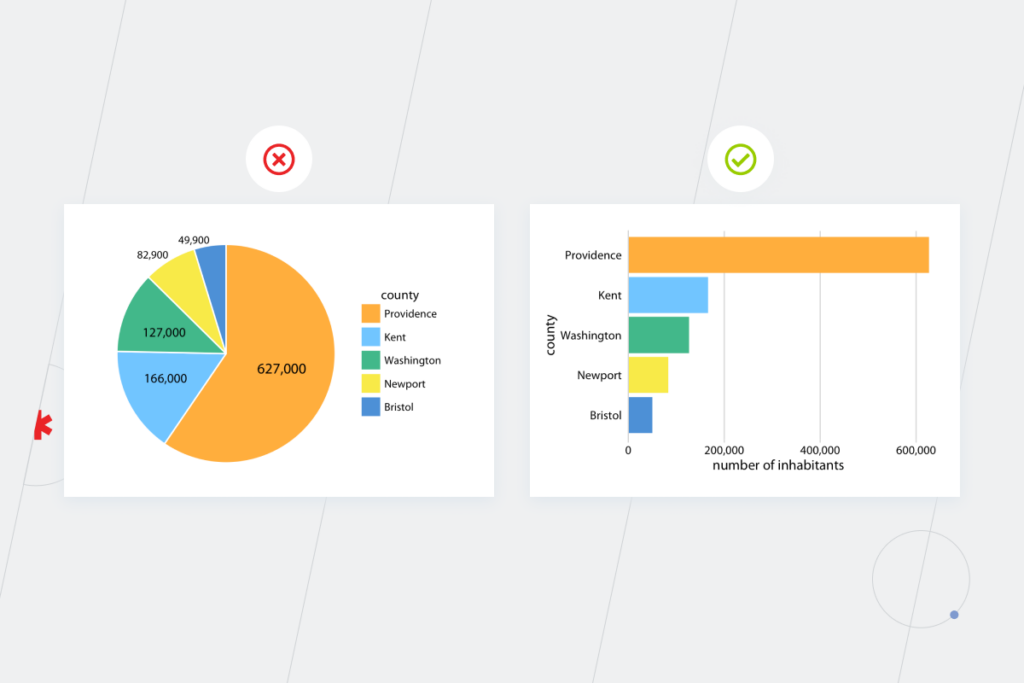
Enterprise resource planning (ERP) implementation offerings are full of reassuring promises about improving the company’s productivity and efficiency, reducing operating and labor costs, getting a single source of truth for all departments and enhancing the customer experience. Computer Weekly study revealed that 53% of respondents consider ERP implementation one of the prime areas for investments. But ERP is a massive undertaking.  No wonder it’s associated with particular risks and challenges. But why do 55% to 75% of all projects fail to meet their objectives and how to avoid common risks of ERP implementation? Our experts in digital transformation provide you with hands-on guidance on how to minimize these risks and meet the challenges the new system brings. 

Selection challenge in implementing ERP

Keep in mind the specificities of your business and which functionalities your organization will need in at least the next couple of years. Being clear about your digital strategy, requirements to the system, and understanding your current and future business goals will help you choose the best fit for the company. You can opt for on-premise, cloud, or hybrid enterprise resource planning solutions depending on your business needs and possibilities. For instance, an organization’s size and its security demands are basic things to consider while choosing an ERP system. 

Cloud ERP

Solutions hosted in the cloud look attractive because you don’t have to spend a lot of money on your software from the start, not to mention that there’s no need for hardware investments. Patching, managing, and updating the software becomes your cloud provider’s business. That’s why the cloud is a good option for organizations that don’t want to freeze resources into servers and prefer a flexible approach in terms of users’ number and software functionality. However, if you decide in favor of a cloud ERP instead of an on-premise one, it still requires a team of experts in ERP consulting services that are aware of all the nuances of your cloud provider and know exactly how to optimize your cloud costs, so that your budget won’t be hit by unexpected costs. 

Thanks to the cloud ERP, your employees can shift their focus from managing IT to more meaningful tasks such as innovation and growth.

A cloud enterprise resource planning system can be secure enough if you choose a reliable cloud provider or a certified cloud partner that will put your cloud solution on the right track.

On-premise ERP

According to the Panorama ERP report, 46.9% of respondents still use on-premise software.

types of software

Companies seek these types of solutions because:

  • Enterprises need the highest level of security. Data-based businesses have very strict security and data storage requirements. They want to ensure only a certain group of employees will have access to the proprietary information. From that standpoint, time and resources spent on installation and maintenance of the on-premise ERP is something you have to put up with anyway.
  • Big organizations want to be confident that the system runs uninterrupted. There are industries, such as healthcare or finances, where information must be available 24/7. In this case, the choice between on-site and cloud solutions gravitates more towards the former option. 

On the one hand, if your software is hosted by a reliable cloud provider, you don’t have to deal with the technical consequences of downtime, system failures, and natural disasters by yourself. Delegating saves you tons of headaches, but on the flip side, if something bad happens in the cloud, all you can do is wait and see. With your own servers, the responsibility is all yours, which is overwhelming but also comforting as you can take action instead of just sitting around. The thing with implementing on-premise ERP is that you should have skilled IT staff to install, manage, and upgrade the system for it to run smoothly. The cost of ownership is also not the last detail that counts. And while on-premise ERPs are more budget-intensive systems than cloud ones, you still have options to choose from. For instance, in the Odoo vs. SAP stand-off, Odoo wins as it doesn’t require a license fee.

Hybrid ERP

The hybrid ERP, which combines the features of both the on-site and cloud software, can be either a destination or a transitional phase while switching between the two solutions. However, the latter option is costly in terms of development and setting up new processes, and it’s possible to get by with an intermediary solution for quite a long time. You can leave the basis as it is and bolster your ERP with some cloud-based integrations, for example, with CRM. It’s more justifiable than trying to modernize an on-premise resource planning with on-premise facilities, which requires additional hardware. Give a hybrid solution a try if your company needs to implement a new business process that can’t be supported by the existing system (you change a product or introduce a new product configuration), but other parts of the process, such as a customer database, remain the same.

Hybrid ERP

Since shifting from an on-premise ERP to the cloud is pricey, it’s important to choose the right technical contractors to ensure all your requirements to the system will be met and its implementation won’t be stretched out endlessly.

Still hesitant about the type of ERP to opt for?

Reach out

Three-headed dragon of ERP: implementation risks

Enterprise resource planning solutions can be deployed on-premise, in the cloud, or by uniting both options, but the risks they face during the implementation are, for the most part, the same for all the system types. These risks can be broken into three groups, namely: organizational, business-related, and technological ones. Let’s dig deeper into each of them. 

Organizational risks

Changing the company’s mindset is always the hardest part of any transformation. Processes and technologies follow people’s changes, not the other way around. You can build perfect technological solutions but if rejected by your employees, they will lead your company nowhere.

  • Unclear goals and unrealistic expectations

Enterprise resource planning isn’t a cure-all. Custom ERP 100% adjusted to your business needs can’t replace basic business logic. If you don’t have a clear idea about the exact business value and outcomes of a new system for your business, it won’t work out.
You’re likely to make quite a number of ERP implementation mistakes if your goals of the system’s adoption or modernization are unsettled. For instance, you risk choosing the wrong vendor or implementation partner or going with an inappropriate implementation approach. 

ERP implementation barriers

Lack of change management 

There is another serious organizational risk of ERP implementation, related to the employees’ desires, or, rather, reluctance, to absorb the associated changes. Naturally, staff would prefer to stay with the habitual system — people don’t understand why to replace or improve something that’s not broken. 

Thus, except for aligning project goals with the organization’s global business strategy and reviewing them through the implementation process, decision-makers have to explain the value of a system implementation or modernization to the employees. 

To persuade your staff that the new or modernized system will simplify their day-to-day tasks:

  • Inform your employees about the novelties and milestones as the project progresses and establish reliable feedback channels. By doing this, you’ll be able to turn the opponents of an ERP project into its strongest advocates. 
  • Give your employees a chance to test the system before the final implementation. Let them get used to the system and understand that switching to a new solution is not as inconvenient as it might initially seem. This approach can also help you uncover ERP implementation mistakes at the early stages.
  • Organize reskilling and role-based training on both systems and processes. That way, you’ll ensure end users can work effectively in the new environment and sustain the implemented changes.
ERP implementation risks

These risks of ERP implementation arise from organizational misunderstandings and lead to costly business consequences. Note them down so that you won’t repeat the story of the National Grid, a utility company that got into huge trouble when 15,000 invoices couldn’t be processed and financial reporting was so bad that the company couldn’t get short-term loans necessary for its cash flow.

  • Misleading cost analysis 

The total cost of ownership (TCO) isn’t equal to the purchase price of a system. Conduct a thorough TCO analysis in advance not to be appalled by overall expenditure. Don’t disregard: 

  • Testing. Putting untested software into production and, then, fixing issues in the already implemented system is more expensive than testing it throughout the entire software development lifecycle and handling problems as they arise. 
  • Employees’ training. The probability that your staff will accept the new system with ease on the first day of ERP implementation is close to zero. That’s why you shouldn’t skimp on your training budget.
  • ERP customization. The more you adjust an out-of-the-box system to your business needs, the more it costs in terms of maintenance and support. Panorama indicates that only 62% of organizations have completed their ERP implementation projects on or under budget. The others experienced overruns of 66% on average.
ERP
  • Over-customization 

Over-customization is a common risk of ERP implementation both for enterprises and mid-size organizations. It can seriously postpone the system’s go-live date and increase its maintenance costs. 

Customization is great as long as it focuses only on areas that are crucial for your business success and doesn’t contribute to the undue complexity of your system. For a manufacturer, such an area might be inventory management that allows tracking raw materials necessary for further work: which do you have on the shelf, how quickly can they be delivered to the manufacturer, and how long does it take to request a new material supply? 

  • Violations of regulatory compliance 

Your data may turn out to be inconsistent with regulatory compliance. For example, some regulations can prohibit storing data about your customers’ gender. In that case, you’ll lose some marketing opportunities, such as the possibility to send targeted letters to your customers.

You’ll have to improve the system at a significant cost if it doesn’t align with all the required laws and obligations at the early stages of the ERP implementation as it happened with Woolworths. The company hadn’t been properly documenting its data for six years, and consequently, had no opportunity to verify whether the data complied with the regulations. What started as a promising $200 million ERP implementation ended a few years later as a tremendous failure that cost the company more than $766 million due to non-compliance with laws and regulations, and other business-related and technological issues. 

Technological risks

Along with operational and business-related risks of ERP implementation, you should pay attention to the technical part of the project. Don’t forget to properly organize the data migration process, set aside enough time for system’s testing, take care of security, and make sure you have experts to maintain the new solution.

  • Data migration issues

Data migration is one of the key things to consider during the ERP implementation process. The problem with it often occurs when the data stored in the source system is represented by both structured and unstructured information. If you transfer unstructured data from the source documents, this information will require additional processing and verification for accuracy and authenticity before being exported to an ERP software. And the more operations you have to perform, the higher the system’s maintenance cost is.

Sometimes the information can’t be transferred to the new ERP in the same format as it doesn’t fit into any category. In that case, the risk of data loss increases. To mitigate it, you should think ahead about the data categories you’ll need for the new system and the data categories you actually have. That’s why working with an experienced partner in enterprise software development is crucial for businesses that haven’t previously encountered the building or modernization of ERP systems.

Another factor that undermines data quality is duplicated data from multiple sources, which is a serious productivity killer and the reason for potential inaccurate reports and wrong business decisions. If you’ve been using different CRMs for company-wide tasks and for the sales department and haven’t sorted out this issue before ERP implementation, the information on your customers can be transferred to the new system twice, badly affecting the accuracy of sales and marketing analysis. 

  • Lack of testing on the pre-production stage

Testing helps keep a finger on the pulse of the system’s workflow and technicalities to leave no room for a mishap and ensure the system is set in line with your company’s needs. Good testing happens when the QA engineer delves deep into your business processes and comes up with relevant tests. For an organization that sells goods, the testing team can check what the system does if a customer takes the product back or how it reacts if a purchase is returned to storage A instead of storage B, etc.

  • Poor security control

The major point about the security challenges in implementing ERP is that segregation of duties should lie at the heart of user access. Such an approach decreases the probability of data breaches because of employees’ ignorance and, as a result, the need for a costly system redesign. Furthermore, establishing strong authentication rules as weak authentication can cause open network shares and, thus, data leakage that might cost you a fortune in terms of money and reputation loss. 

  • Lack of skills 

Just as people become the primary concern when it comes to ERP implementation, they are also the cornerstone regarding the development process. If you are not sure about the technical mastery of your in-house tech team, then it’s worth reaching out to an experienced ERP software company. Working with business analysts and developers who have strong expertise in similar projects will spare you the risk of wasting the time figuring out the nuts and bolts of the system. Also, consider the level of employee turnover in the vendor’s company. The more people are replaced, the more expertise goes away. That’s why at least key team members should stay to guide the others through the challenges in implementing ERP. Even if a new specialist has the same level of expertise as the former team member, it takes time to sort out why the system works the way it does. 

ERP implementation mistakes to avoid from our *instinctools’ expert

The desire to complete the transformation quickly is understandable — organizations want to benefit from the new solution faster. But rush causes shortsightedness which, in its turn, leads to three common mistakes in ERP implementation:

  • Decision-makers are unable to prove the value of change to the staff. It’s always a business idea that drives ERP implementation. But if there’s no agreement between C-suites and other employees, you run the risk of getting a solution that won’t be viable. That’s why discussing the future ERP with the stakeholders throughout all the departments is paramount to succeed in this transformation. 
  • Desire to roll out the system straight into production. Before the ERP is launched, your employees should have the opportunity to get acquainted with the system and to give feedback about it. Is it convenient? Can some parts of it be designed in another way? Using the collective brain power of your team can save you time and money in the future. 
  • System’s inability to scale and change. Your business processes as well as the input data can change and so should your system. It will be more problematic and expensive to rebuild it in the pre-production stage if you don’t make the provision for changes at the beginning of the project. 

Top 3 questions for an ERP consultant

To minimize the number of ERP implementation challenges, ask your vendor the following questions:

  • Can the source code be provided and is it included in the price of ERP development? By having the system’s full source code, you’ll be free from dependency on the vendor that initially provided you with the software. 
  • What programming language is the ERP system written in? There might be two issues here: the first one is an outdated language that is no longer supported by the language developer or ERP system itself. Another problem is a language developed exclusively for the ERP system, so it’s difficult to find an alternative programmer, and chances are that the developed solution won’t be compatible with your software. 
  • How is the technical support organized? Choosing custom ERP development, you have the possibility to keep in touch with the project team as part of maintenance and support services even after the system implementation. Meanwhile, with a ready-made solution, you risk going through the circles of hell being kicked from one operator to another and explaining the essence of the problem multiple times to the people who have nothing to do with the ERP development. 

Start with the people and processes, then get to the  technical part, not the other way around

To get through all the challenges in implementing ERP and reap the benefits the system offers, first handle the issues around your employees’ awareness about the ERP implementation to ensure everyone within the company is on the same page. Then deal with the technical stuff such as security measures, data migration, quality issues, and so on.

If all this seems like too much to have on your plate, *instinctools experts are ready to take it from there — drop us a line.

FAQ

What could be the barriers to ERP implementation?

Challenges in implementing ERP refer to the three types of barriers: organizational, business-related, and technological. Without considering the ERP risks of all three types you won’t succeed in implementing enterprise resource planning. People-related issues are considered to be the most difficult to overcome, so fix them first and then move on to technological challenges.

What is the biggest challenge with ERP systems?

Selecting an ERP type suitable for your business is one of the serious challenges in implementing ERP. There are on-premise, cloud, and hybrid solutions. You should choose an option depending on your organization’s internal processes and the answers to the following questions: How important is data security to you? Can you manage your own server center? Do you have to build a totally new system or is the modernization of the old one enough?

When Data Fails To Tell a Story: Data Visualization Mistakes

A chart should clarify, not confuse. Yet data visualization errors slip into dashboards and reports more often than most teams realize, quietly steering decisions off course. You’ve seen examples of bad data visualization firsthand: truncated axes that dramatize trivial changes, pie charts with too many slices, or color choices obscuring the very patterns they should reveal.

Most of these blunders are preventable, and our data experts are here to share practice-proven tips on how to avoid common pitfalls of data visualization.

Key highlights

  • Real-world data visualization mistakes examples range from the ​​wrong chart type to overloaded graphs to deceptive color schemes and other subtler flaws that are easier to miss but just as damaging.
  • GenAI can produce charts fast, but without a human in the loop it only adds to data visualization errors.
  • Misleading visualizations quietly erode stakeholder trust and undermine informed decision-making across the organization.

What is bad data visualization?

In short, poor data visualization is any graphic that violates core visualization principles, turning data into noise instead of insight.

  • Unclear. Overcrowded visual elements without clear labels make the chart hard to read at a glance.
  • Inaccurate or deceptive. Manipulated scales or omitted context mislead viewers and produce invalid conclusions.
  • Inconsistent. Shifting baselines or clashing color schemes undermine comparison across data points.
  • Overloaded. Trying to cram too much information into a single visualization, overwhelming viewers instead of guiding them to key insights.

What price does your business pay for bad data visualizations?

The thing with bad graphical representation of data is that you can’t say it’s bad until you fail to get anywhere using it. Such a situation is risky: with all these pie charts scattered all over your reports and tons of descriptive text, you may have an illusion that you’ve successfully handled the ever-growing amount of data, whereas, in reality, this data fails to tell the story. Whether you rely on Power BI dashboards or simple spreadsheet charts, the consequences of bad data visualization impact your business routine and decision-making processes in several ways. 

Can’t tell a clear story with your data 

Imagine you’re in a sales meeting, expecting a clear visualization showing revenue across your company’s top five markets so you can decide where to invest. But you get a line chart with all the markets where your company is present instead. It’s virtually impossible to compare data at a glance and quickly get high-level insights when you see 20+ lines. A single chart trying to show everything at once buries the key message instead of revealing it.

You may say that at least some kind of visualization is better than no visualization at all. Not really. Unclear visualization doesn’t carry out its functions, so you still have to dive into the spreadsheets to connect important data points and make sense of your raw data. 

Get invalid insights that lead to wrong decisions

Say you’ve tested several new markets and one region’s profits jumped significantly. Does that make it the best pick? Not necessarily. What about advertising costs there — were they the highest too? Did they pay off? Without factoring in ROI, you’re flying blind. How many customers came through ads versus other channels? If your chart shows revenue but ignores advertising costs, the picture is lopsided. You might pour a huge budget into a region that only looks profitable on the surface, while a cheaper market with better returns gets overlooked.

Still, there’re times when a couple of graphs aren’t enough to get a good grasp of a situation. To make a well-informed decision, you might need as much as a custom dashboard to seamlessly track multiple data metrics in one place and understand trendsover time.  

— Andrei Haurylau, UI/UX Designer, Instinctools

Fail to uncover hidden correlations between different data sets 

Weaknesses to improve, anomalies to correct, unobvious interrelationships won’t be revealed with bad visualizations. For organizations, this means the loss of potential revenue and the inability to change the perspective to see new possibilities for development and growth. With misleading data, you won’t be able to define the room for improvement and notice probable pitfalls. For example, you might overlook ineffective marketing campaigns and keep spending your budget on them. Experienced data analysts know that surfacing these hidden patterns in complex data is one of the core reasons visualization exists in the first place.

Check our list of common misleading data visualization examples that our data visualization specialists have prepared if your relationship with translating data into images is kind of “continually-trying-to-figure-things-out.”

8 examples of common mistakes in data visualization, fixed 

It’s unlikely that you’ll make flawless decisions 100% of the time unless you are The Sorting Hat from “Harry Potter”. But it’s possible to minimize the risk of your data being misleading. Below are the worst data visualizations patterns we see again and again, along with practical fixes.

1. Choosing the wrong visualization method 

There are two tricky moments here. We’ll show them using pie charts as an example:

  • Viewers can’t see the difference between slice sizes and, thus, compare them. When the numbers don’t vary much, it’s better to visualize them in a bar chart.
  • Viewers can’t get the real dependencies between the objects of correlation. Pie charts are usually used for the comparison of the different parts of a whole. They are suitable for survey results or budget breakdowns (the same pie). But if you use them to compare separate datasets (different pies), you get a bad chart, and data becomes misleading. 

For instance, a pie chart isn’t a bright idea for comparing the number of inhabitants in different areas. It’s better to use a bar plot because human perception primarily judges distances and not areas.

The rule of thumb is to choose a visualization technique according to the data’s nature: quantitative data requires charts or histograms, while qualitative information is better presented in pie charts or bar graphs. And make sure the sectors add up to 100% because otherwise viewers will get a math stroke from your visualization.

— Andrei Haurylau, Lead UI/UX Designer, Instinctools

2. Overloading viewers with data

The human brain processes images 6x-600x faster than words. Given the fact that during the next three years, the amount of human-made information is going to triple, the role of a good visualization is only becoming more important. Presenting data in graphics and charts allows us to process huge amounts of information, understand it better, and get insights faster. 

But the processing capacity of our conscious mind is still only 10 bits per second. “And what does it have to do with bad graphs?” you may ask. Such a limit for data traffic means that we can’t properly concentrate on the highly-detailed visualizations for a long time. In the case of charts, if there are too many variables, choose 5-6 more essential ones. Graph views with more than 15 items distract attention and may be as frightening as an Excel table with dozens of rows.

3. Selecting unconventional colors

This mistake comes in three forms.

  • Absolute vs. relative coloring 

The function of color is to add extra meaning or dimension. Going for absolute colors, you may miss meaningful nuances. 

In US presidential elections, maps use red for states won by Republicans and blue for states won by Democrats. Such an approach results in maps like the one on the left. It gives an impression of an unquestionable victory of the Republicans, ignoring the fact that in one state people voted for representatives of both parties. 

Relative coloring allows the viewers to see a more detailed picture. Looking at the map on the right you can see the proportion of the counties that voted for the Republicans or Democrats against the total number of votes in each county. That way, the situation no longer seems so straightforward.

  • Unusual colors 

Green commonly means something positive, while red is used for negative cases. So if you use them in the reverse way, it may become an example of misleading data visualization. 

Check out these two flood hazard maps. The one on the left uses a green palette to show risk zones along a river. At a glance, the area looks harmless since green reads as “safe.” The map on the right shows the same data in shades of blue. The danger zones register immediately, and the darker the shade, the higher the risk.

Map charts usually leverage different shades of one color family: the lighter the shade, the smaller the number, and vice-versa. A solution with different colors instead may confuse the viewers. And take into consideration the chance that viewers may be colorblind, so don’t use misleading colors.

— Andrei Haurylau, Lead UI/UX Designer, Instinctools

  • Invisible color on a white/black background. Don’t choose yellow for crucial metrics in a line graph, as it’s easy to miss them on a white screen. The same is true for the picture on the right, where you can’t properly see the borders of the black area on the gray background.

4. Using uncertain scales

It’s challenging to compare figures with different scales straight away. Inconsistent scale can mislead and confuse viewers. For instance, the visualization on the left is an example of a bad graph because with it, you aren’t able to assess the scope, it’s not immediately obvious that one figure is four times bigger than another. You should look at the Y-axis and count, whereas good visualization should exempt you from unnecessary calculations.

5. Omitting data

Excluding some information, you miss the context. Such an attitude can affect data interpretation. Look at these two graphs: in one case, information is tracked every second year, in another, each year. The left scatter plot is a perfect example of a bad graph because it gives the impression of stable growth, while in reality there’re dips and spikes.

6. Truncating Y-axis

This type of misleading data visualization occurs when the Y-axis doesn’t start from 0. The result of the scale compression is an increasing difference between bars. That way, small variations may look paramount. 

7. Operating 3D graphics in an improper way

3D data visualizations are entertaining and fascinating but the creating them might not be worth the effort. It’s nearly impossible to follow the height of each bar to the correct Y-value on a multidimensional bar chart below. Moreover, you can’t see the values of the bars hidden behind more prominent columns. If these indicators aren’t necessary, exclude them from the data visualization. If they are crucial, use a simple bar chart instead of a 3D one. 

3D donut charts and pie charts are also more like “hmm” than “hooray” solutions for data visualization. Here is an example of a useless pie chart in 3D. Tilting the pie distorts the image of transparent slices. You can’t define the borders of slices and see how each slice relates to the others and the whole. Additionally, you can’t read labels and figure out which one goes with which slice. 

Honestly, if Bear Grylls hosted “Running Wild” in the business analytics world, transcribing this pie chart would be in one of the episodes. But you can benefit from the assistance of seasoned BI experts to beat misleading data visualization and create charts that matter. 

Three-dimensional graphics are rare in visualization since not everyone can easily think in volumes. Such graphs appear mainly in finance, where bubble charts show correlations between funds, stocks, or a stock and the broader market. Financial data often involves more than two data series, calling for a third axis to display additional information.

Since the task is more complex, be especially aware of common data visualization mistakes. Otherwise, you risk ending up with an unreadable bubble chart where it’s difficult to understand if a sphere is larger according to the S-axis or if it seems more prominent because it is closer to the viewers on the Z-axis.

8. Generating visualizations with AI and no human oversight  

GenAI’s ability to produce charts in seconds comes with a caveat – low reproducibility, as taming LLM’s probabilistic nature remains one of the top AI adoption challenges. Even identical prompts can yield different colors, label placements, odd cropping, etc., making it tough to standardize visuals across reports and dashboards. 

A human-in-the-loop approach is essential to engineer the right context for the model, craft precise prompts to keep outputs consistent, and review every final chart before it reaches stakeholders. 

— Pavel Klapatsiuk, AI Lead Engineer, Instinctools

Data visualization best practices checklist

Before publishing any chart or dashboard, run through these questions. They map directly to the mistakes we’ve described and will help you catch problems before your audience does.

  • Does the visualization use the right chart type for the data’s nature (for example, bar chart for comparisons, line chart to understand trends)?
  • Is the chart focused on one key message, or is it trying to show too many things at once?
  • Are the axes consistent, clearly labeled, and starting from an appropriate baseline?
  • Do the colors follow conventional meaning (for example, red for negative, green for positive) with enough color contrast for accessibility?
  • Have you included all relevant time periods and data points without omitting context?
  • Is the visualization free of unnecessary 3D effects that could distort perception?
  • Can a viewer grasp the main takeaway within a few seconds, without diving back into raw data?
  • Does every element on the chart serve a purpose, or can you remove anything without losing meaning?
  • If the chart was generated by AI, has someone reviewed it for reproducibility and visual consistency with your other dashboards?

Fix your charts before they break your decision making

Being aware of widespread mistakes can’t level up your business decision-making power all by itself. But just as good visualization accelerates your organization’s growth, poor charts can quietly derail it. Bad graphs aren’t the kind of failure you learn from; they simply lead to wrong decisions you never see coming. If your calls keep missing the mark, check whether you’re using the right techniques for presenting your data. 

With the right data visualized the right way, you can digest large volumes of data fast, track changes in real time, and gain a fresh perspective on growing your business.

Have difficulties with getting actionable insights from your data?

Drop us a line

FAQ

Which factors can result in a poor data visualization?

Bad data visualization is usually a consequence of avoidable design choices, such as wrong chart types, cluttered layouts, misleading axes, weak labeling, and colors that hide or distort the pattern the chart is supposed to reveal. Among less obvious issues teams tend to overlook is poor data quality due to the lack of attention to data preparation. In other words, what shows up on the dashboard might only be the visible edge of a deeper data problem.

How can data visualization be misleading?

Whether data gives incorrect insights or is just hard to understand, it results in poor business decisions that affect your company’s revenue. Visualizations are bad if they don’t tell a clear story and don’t give the opportunity to uncover unobvious patterns between data sets.

What is the most common data visualization mistake?

Choosing the wrong chart type is one of the most common mistakes to avoid in data visualization. Pie charts used for comparisons across separate datasets, line charts packed with 20+ variables, 3D effects that obscure values are the bad chart examples teams run into most often.

Are misleading charts always unethical?

Not necessarily. Most examples of misleading data visualization stem from inexperience rather than intent. Someone picks a green palette for negative-coded data or skips a few years on the X-axis without realizing the impression it creates. This results in flawed decisions and eroded trust.

Why are truncated axes so problematic?

When the Y-axis doesn’t start at zero, small differences between bars look enormous. A 2% variance can appear as a dramatic gap, leading viewers to misread the scale of change. It’s a classic entry in any list of misleading graph examples. If truncation is genuinely needed for detail, call it out with a clear axis break so viewers aren’t deceived.

How can I tell if a chart is misleading?

Start with the basics: check the axis scales, look for omitted time periods, and see if colors follow conventional meanings. If the chart feels dramatic or too clean, dig into the underlying numbers. The common mistakes to avoid in data visualization, like overloaded visuals, inconsistent scales, and missing context, are also the quickest red flags to scan for.

Anna Vasilevskaya
AI modified real photo
Anna Vasilevskaya
Account Executive

Get in touch

Drop us a line about your project at
[email protected] or via the contact
form below, and we will contact you soon.