Nearshore vs Offshore: How To Make the Right Call?

Nearshore vs offshore? Although outsourcing has been deeply ingrained in the world of digital engineering, there are still many questions unanswered when it comes to the right outsourcing type. Lots of companies bask under the sun of offshoring, banking on dev talent abroad to deliver their products. But then there’s nearshoring — with its promise to build cost-effective solutions in geographical proximity to your company. 

So which outsourcing model bodes well for your software development?

Outsourcing models: onshore vs nearshore vs offshore

Location-wise, we can distinguish three types of outsourcing — these include onshore, nearshore, and offshore models.

When companies opt for onshoring, they source tech services within the same national borders — for example, a US-based company can outsource to a vendor located in the US too.

In the pre-pandemic times, onshore outsourcing used to stand high with companies due to its convenience. But after 2020, it lost its appeal as remote and hybrid work took over. Coupled with distributed teams becoming the norm, the need to tighten the budgets pushed most businesses to turn to borderless talent. The math was hard to ignore: hiring abroad often means big savings. Developers in the US, for instance, cost 2-5 times higher than their Eastern European counterparts.

As of 2025, though, onshoring seems to be back in vogue. With political tensions rising and global uncertainty shaking things up, leaders are inclined to focus more on domestic hires to cut risks. However, many are struggling to fill the skill gaps due to a shrinking pool of qualified candidates on-site. To that end, in this article, we decided to focus on nearshore and offshore models.

Even if you’re ready to pay double, you might not be able to fill the skill gaps due to a shrinking pool of qualified candidates on-site. To that end, in this article, we decided to focus on nearshore and offshore models. 

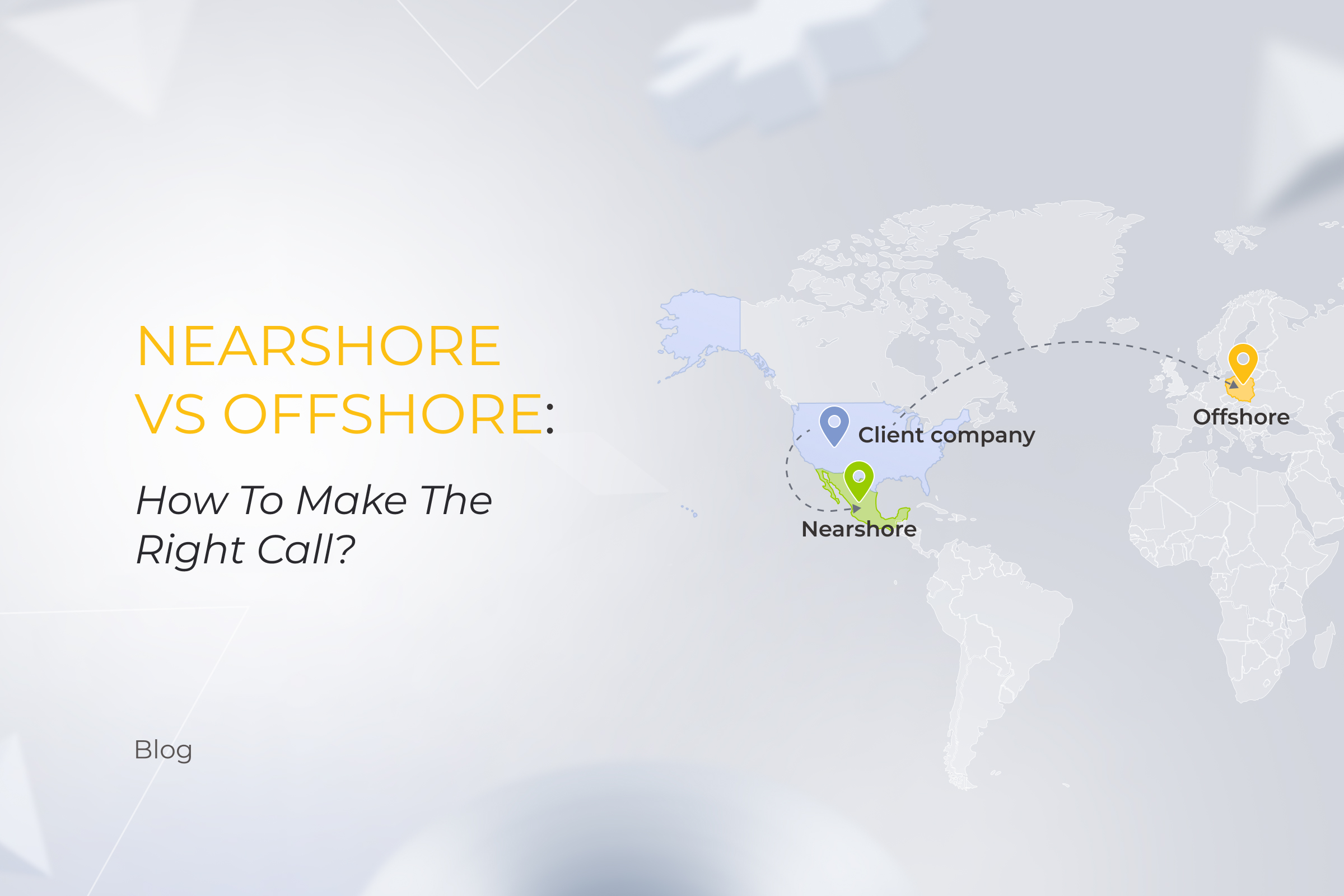
The concept behind nearshoring outsourcing involves transferring digital product development to a country that is close to the home base of the company. In this case, vendors are located within or close to the same time zone and have generally lower labor rates compared with those of the client’s home country. An example of nearshoring would be a tech company in the US outsourcing its development operations to Mexico.

Offshoring means offloading development processes to a geographically distant market, typically several time zones away, with significantly lower rates as compared to the home location of the company. Here’s an example of offshoring: a US-based company moves its tech functions to Eastern Europe. 

Nearshoring and offshoring, illustrated

But how to choose between nearshore vs offshore outsourcing? Let’s compare the two options according to the criteria essential to any project.

Nearshore vs offshore competition: choosing the winner in 5 categories

Just by looking at nearshoring and offshoring definitions, it’s hard to pin down the value of each for your specific business case. That’s why, we’re giving the skinny on both models to help you choose the right path.

1. Cost efficiency

When it comes to the price, we don’t have a clear winner in the nearshoring vs offshoring battle: it all comes down to the exact location. If we look at the most popular outsourcing locations, we’ll see that the majority of them fall into the same range of $40-$60 per hour. India and the Philippines seem to offer the best deals for labor cost per hour — $20-$40 — but there’s a catch. 
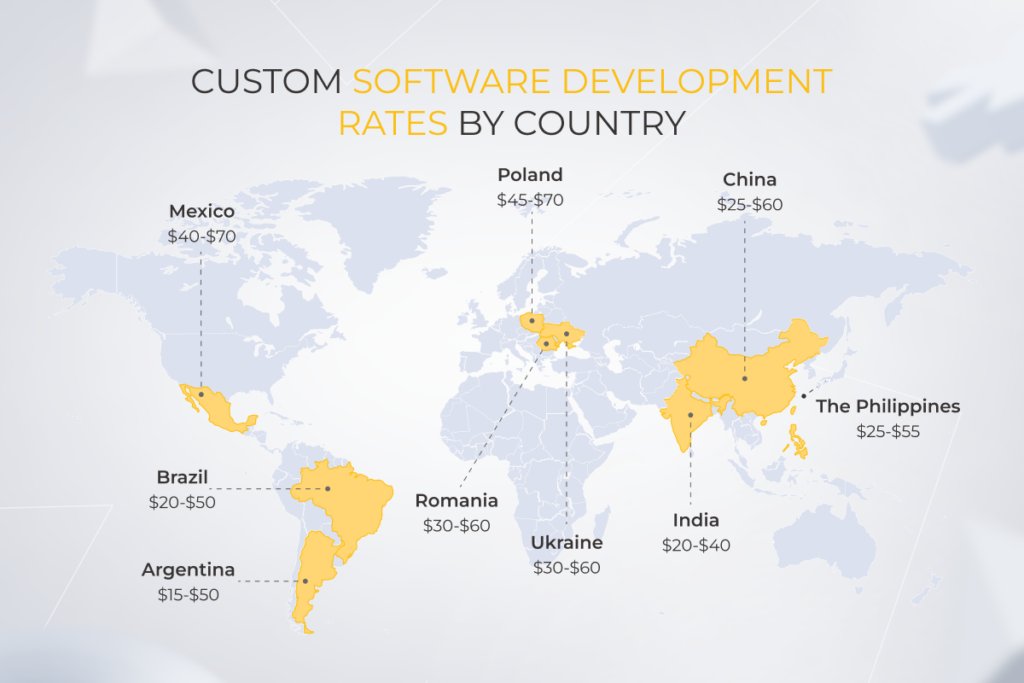
Custom software development rates by country

The unusually low median rates stem from a large number of junior or underqualified talent in the country. In low-cost Asian countries, the percentage of junior developers is much higher than in Eastern Europe, where software specialists move up the ladder faster. 

Also, the lower price might come at the cost of jerry-built products, broken deadlines, and false expectations, so the price shouldn’t be an overriding factor when choosing a vendor.

2. Communication and collaboration

If we approach the offshore vs nearshore dilemma from the communication perspective, it’s easy to conclude that nearshore outsourcing beats offshoring. 

Indeed, farming out software development to nearby countries allows you to collaborate with nearshore development teams in similar or slightly different time zones. This, in turn, facilitates real-time communication during overlapping working hours.

Conversely, offshore moves your project further away, so differences in time zones are more significant. But despite that, in most cases, you can easily offset the time zone differences for both nearshore and offshore outsourcing. 

Regular check-ins with engineers, a consistent delivery process, a calibrated development flow, and availability of up-to-date collaboration tools help overcome the erstwhile insurmountable hurdles of time difference. This idea is backed up by thousands of effective collaborations between Northern American clients and Eastern European vendors (the size and quality of the Eastern European outsourcing market also proves the point).

3. Visa restrictions and location accessibility

A possibility of regular on-site meetings at your or your vendor’s office might be a critical step in selecting an outsourcing software development service provider. In this context, rather than making the distance-based choice, you should look into the visa requirements for the vendor’s country residents and vice versa as well as the ease and cost of travel and political stability in the region. Ask yourself if you really want to fly there regularly. 

4. Access to talent pool

The difference in access to talent between nearshore and offshore services lies in the availability of tech experts in different areas. Mind that the time zone and geographical proximity come second here, as the level of tech expertise in the area correlates with the level and accessibility of local education.

For example, Poland ranks third among the countries with the best developer talent, while the Polish education system is ranked fifth in Europe and tenth in the world. The country also has the largest pool of technology talent in Europe, with more than 295,000 programmers. See the connection? The Polish talent pool expands thanks to the continuous inflow of university graduates into the labor market.
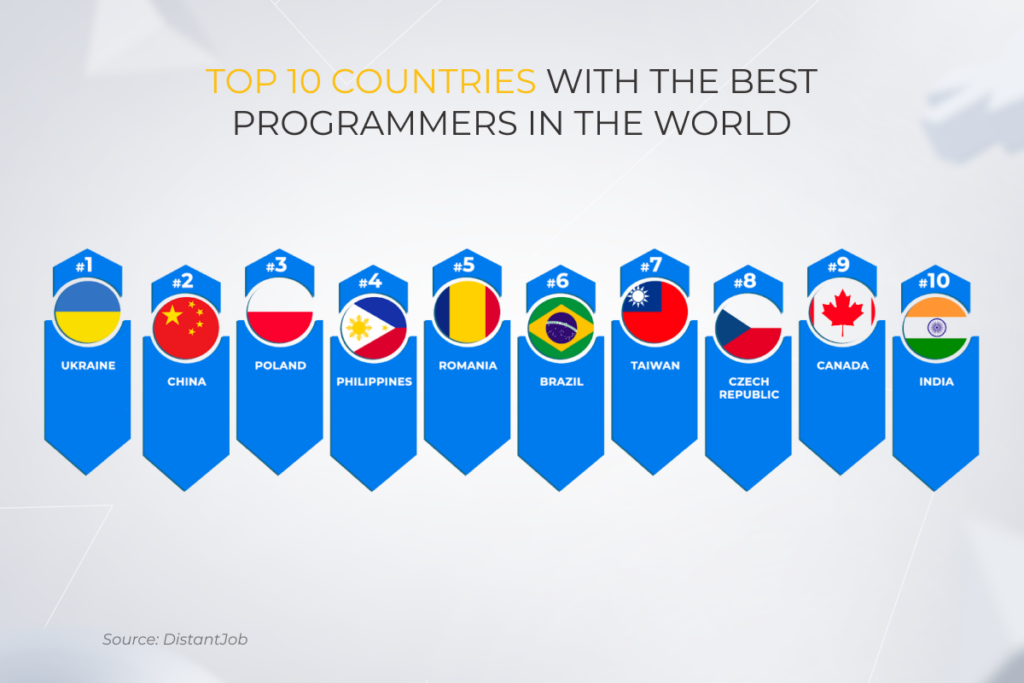
op 10 countries with the best programmers in the world

5. Security and compliance

It might seem that in this case, the ball is in the onshore court, but not necessarily. Both your offshore and nearshore software development team can meet your stringent security requirements if the vendor’s commitment is confirmed by security certifications such as ISO 27001, ISO 22301, and the like. A dedicated seasoned team and an adequate security approach increase the odds of the vendor addressing your security needs.

Keep in mind that some developing countries have radically different laws about intellectual property rights, offering very little protection against intellectual property theft. Make sure to examine the legal landscape before letting the vendor into your data pipeline.

Adherence to local regulations is another aspect that comes to the fore. If you’re building a product that’s subject to EU regulations such as GDPR, PSD2, and others, it makes perfect sense to choose a tech partner located in the European Union as you’re bound by the financial and legal constraints. But even this factor is arguable as vendors’ hands-on experience with regulatory compliance counts more than their location.

When your project is large and complex or calls for stringent security measures, the offshore vs nearshore showdown doesn’t really matter, as, with the help of your tech partner, you can set up a dedicated development center, regardless of the location. The center comes with private office space, authorized entry, software access control, and built-in network security — an unbeatable combo to ensure full adherence to your company’s quality standards and protocols.

Power your software projects with *instinctools’ proven expertise

Schedule a call

The good and the bad of nearshore vs offshore outsourcing
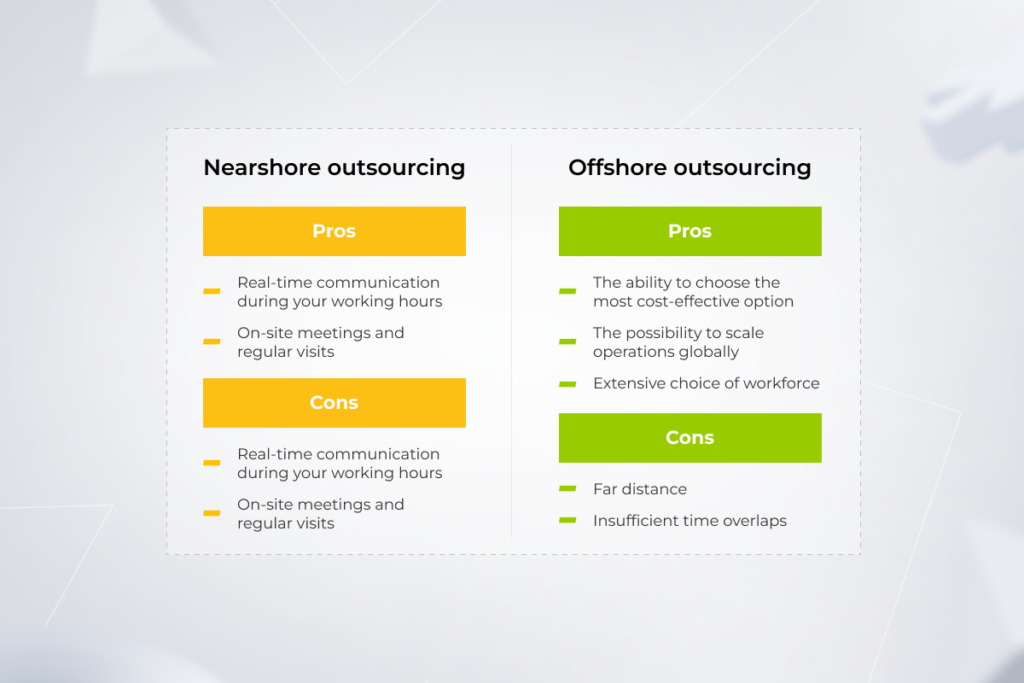
Nearshoring vs. offshoring: pros and cons of both

It’s difficult to nail down the universal benefits and challenges of nearshore outsourcing and offshore software development as the experience varies depending on a client’s location. For US companies, nearshoring often means partnering with Latin American firms, whereas offshoring might involve collaboration with a software development company in Eastern Europe or Southeast Asia. Conversely, British organizations might find their nearshore options in Eastern Europe, with offshore opportunities in Latin America.

We’ve highlighted the potential advantages and hurdles of each model, focusing on the geographical closeness and remoteness of the outsourcing destination.

Pros of nearshore software development services

  • Real-time communication during your working hours

Working with nearshore outsourcing companies, you can minimize the challenges of coordinating work across different time zones. No midnight calls or unproductive business hours — similar time zones allow communication and decision-making to happen in real time, reducing delays and maximizing the efficiency of the development process. Better yet, if you share a similar cultural background with your nearshore developers, you can connect on a visceral level. 

  • On-site meetings and regular visits

For projects requiring frequent face-to-face interactions or the ability to quickly arrange in-person meetings, nearshoring offers a logistical advantage. For instance, a Canadian tech firm needing regular integration sessions with its development team could choose a nearshore provider in Mexico or Colombia over an offshore provider in Southeast Asia.

Cons of nearshore software outsourcing

  • Limited choice of potential partners

Narrowing down your search to nearby locations, you trim down your pool of vendors to a few nearshore development teams. The unsubstantial supply of expertise might take a toll on projects sensitive to niche skills, leading to unsatisfactory collaboration between the company and the vendor.

  • Risk of backdoor offshoring

Turning to the nearshore software development model, you expect a high level of services and top-grade products. However, this doesn’t mean you eventually get what you paid for. Some vendors contract out some of their development to offshore locations to cut down costs and benefit from the price difference. No benefits for the clients though — backdoor offshoring often results in sub-par deliverables.

Pros of offshore software development

  • The ability to choose the most cost-effective option

Offshore development partners are known for delivering big-time features without big-time investments. That’s probably why Google, Microsoft, Oracle, and other tech giants gravitate towards offshore outsourcing services. Most importantly, offshoring software development allows you to cast your net wide and reel in the vendor that promises the most value for the money.

  • The possibility to scale operations globally

Companies aiming to expand their presence in international markets may use offshore development teams as a heavy hitter on their way to new markets. For example, a European company planning to launch products in Asia might establish an offshore development center in Singapore to gain insights into the Asian market and tailor their offerings accordingly.

  • Extensive choice of workforce

The main difference between nearshore and offshore (and the biggest benefit of the latter) is a great selection of development partners and software engineers. With offshoring, you’re not shackled to specific locations, you can embrace international talent in all its diversity and extend your teams however much you need to. 

Cons of offshore software development

  • Far distance

Naturally, offshoring comes with a large geographical distance which makes on-site visits more difficult compared to nearshoring. Therefore, offshoring may not be the strongest suit for your business if regular face-to-face meetings with your partner are essential.

  • Insufficient time overlaps

If you want to bring it on with an offshore team, you might need to go the extra mile to manage your overseas talent and make up for different time zones. In particular, you should be intentional and consistent in communicating with your offshore company and have dedicated project management tools in place to track the project’s progress. Also, unless you or your partner commit to working outside business hours, real time collaboration will be hard to nail.

Move forward with *instinctools’ team of software development experts

Set up an intro call

Nearshoring vs offshoring: it’s all about the right vendor
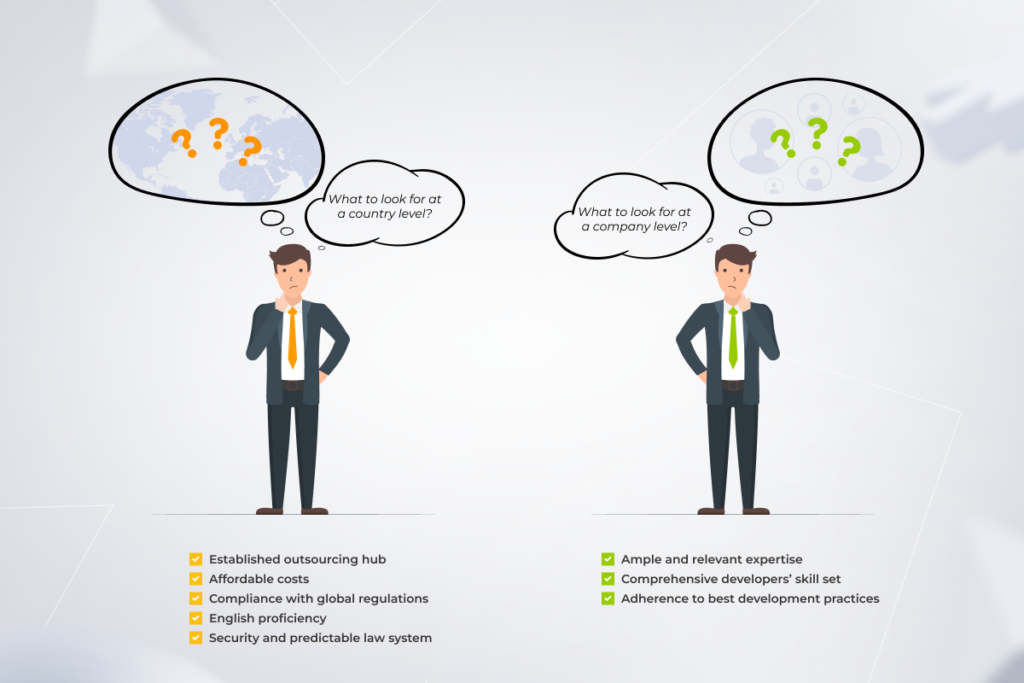
Nearshoring vs offshoring: key considerations when choosing

You want to hear the big secret? It makes no big difference whether you work with a nearshore team or an offshore team until you have an experienced tech partner. The right outsourcing company should check all the boxes in terms of process maturity, expertise, cultural compatibility, time zone alignment, and cost efficiency — and that’s the secret recipe for a successful collaboration. Let’s see how you can come across this breed of outsourcing partner.

What to look for at a country level?

Although the right outsourcing location is a story of different strokes for different folks, several important data points hold true for all great outsourcing destinations. 

  • Established outsourcing hub

Prioritize sites featured on the global IT map as frontrunners in the outsourcing industry. Typically, mature outsourcing destinations have an advantageous geographical position, a large base of qualified workforce, a favorable investment climate, and modern business-related infrastructure. When the country’s IT sector is on an upswing, it also means that this sphere is likely supported by the country’s government, resulting in more tax preferences and fewer trade restrictions for foreign companies. 

  • Affordable costs 

You don’t want to trade quality for price, but choosing the right outsourcing location can help you get the best of both worlds. Look toward the country where the cost of living is lower than in developed countries but the quality of talent and services is high. Remember that the more accessible and high-level local education is, the more qualified tech talent is in the area — and you can get it at a fraction of the cost.

  • Compliance with global regulations

When choosing a location for an outsourced software development team, you need to make sure the country recognizes international standards and complies with global regulations such as ISO 27001, PCI DSS, SOX-type regulations, and others. Failing to adhere to the standards and regulations may result in derailed projects, hefty penalties, loss of reputation, data breaches, and other misfortunes.

  • English proficiency

Imagine being not able to communicate your vision to your development team because of the language barriers. To head off this scenario, go for a location with a high level of English proficiency. Poland, for example, is ranked 15th based on English language skills with other European countries following.

  • Security and predictable law system

A key to successful outsourcing is choosing a country with strict data protection and a transparent law system. Ideally, you should contract out your projects to a country where business laws closely match those in your location. But legislation transparency isn’t the only consideration: as a client, you will likely bear the tax costs of an outsourcing transaction, so we recommend choosing a country with fewer tax implications.

What to look for at a company level?

The choice of a tech partner can be kill-or-cure for your outsourcing experience. That’s why calling on the right tech ally is crucial to get your project off on the right foot.

  • Ample and relevant expertise

An ideal outsourcing company should have a proven track record of delivering similar projects, while also possessing the necessary skills and domain knowledge to handle your unique requirements. You can get a broad-strokes idea of their expertise by reviewing references, case studies, and client testimonials. 

  • Comprehensive developers’ skill set

It pays to have a cross-functional development team with the depth and scale of the skill pool in case your project requirements or product vision evolve. Therefore, give priority consideration to tech companies with complementary skills that may come in handy during software development (for example, AI for mobile and web development projects).

  • Adherence to best development practices 

Technical skills aside, the product development outsourcing process has to include an element of trust. Nothing better than a time-tested delivery framework of your tech partner can give you that peace of mind. Best Agile practices, product-first mindset, and DevOps tools are a big green flag for a vendor and an indicator that your outsourcing project is in good hands. And don’t forget information security — your potential tech partner should have multi-layer quality assurance practices, secure coding practices, and other guardrails for Fort Knox-like development.

It’s a toss-up between nearshore and offshore

Both nearshore custom software development and offshore outsourcing open up opportunities for companies looking for high-value cost-effective product development and innovation opportunities. It all depends on the angle you look at both options, your unique objectives, and the outsourcing location. Both collaboration models bring forth a set of benefits that can turn into disadvantages if executed wrong. 

More importantly, the success of both options is contingent on the expertise and commitment of your outsourcing partner. A seasoned, committed vendor can crack the hard nut of outsourcing and make it almost as easy as a cakewalk.

Hire a dedicated software development team you can trust

Contact us

FAQ

What is the nearshore software development model?

The inverse of offshoring, nearshore outsourcing services involve contracting out your software development project to a nearby country. A nearshore software development company is typically located within the same region so that businesses can benefit from the geographical proximity of development teams.

What is an example of nearshore outsourcing?

An example of nearshoring would be a US-based company hiring nearshore software developers from Mexico.

What is the difference between offshore and onshore services?

An onshore company is located in the client’s home region, usually within a 2-5-hour driving distance, while the offshore model means hiring developers from a foreign country.

What is the difference between nearshore and offshore software development?

The main difference between these two models lies in the geographical proximity of the outsourcing location. Nearshore software development teams are usually based close to the company and within similar time zones. Offshore teams operate in an overseas, low-cost location, many time zones away.

Why is nearshore better than offshore?

Both models have their pros and cons. Engaging a nearshore company enables businesses to reduce the costs of development and expand their access to developer talent. This option also allows for on-site visits and real-time collaboration. However, the pool of nearshore talent is limited to a few locations. Outsourcing your project to an offshore dedicated team lets you significantly lower the cost, rely on global talent, and establish your presence in foreign markets.
Ace the Pricing Game with Intelligent Pricing Analytics

Pricing analytics has become an indispensable tool for businesses on a quest for profitability. 

Even customers root for the use of advanced analytics as a way to get fair pricing — and high-performing businesses don’t think twice about leveraging pricing analytics techniques to achieve that. But does your business need it? And if so, what is the right framework for adopting smart price optimization? Let’s find out.

From optional to table stakes: what makes pricing analytics important for companies?

Back in the day, effective pricing strategies used to be hard to nail. Companies would have to drill down into the spreadsheets, crunch numbers, and, hopefully, locate a few patterns to inform their pricing models. But with data-driven pricing intelligence, it has become a one-click exercise — and that’s not the only thing that makes pricing analytics important.

Improved profit margins

To capture greater margins, companies have to go into the nitty-gritty of price metrics and effectiveness to spot the slightest tendencies. Without pricing analytics models, businesses can only get to the bottom of Average Selling Price by category, Gross Margins by segment, and Gross Margins by customer. But those pricing metrics hide too much discrepancy to be actionable.

Conversely, pricing analytics tools can identify patterns in customer retention rates, loss metrics, and other pricing data at an item level to spot pricing opportunities and margin leakage. According to Accenture, product pricing analysis is able to increase margins by two percentage points.

Reduced pricing-planning times

Usually, it takes a lot of effort to get to grips with financials, especially if the company is in the growth stage. Hundreds of product names sold at different price points, a few pricing tiers, and complex product bundles make companies go with the “sounds about right” pricing strategy as an easier alternative to spending hours manually calculating the medium.

With their drill-down abilities, pricing analysis tools reduce manual effort spent on price optimization and wrap unified data into pricing analytics dashboards that could be then sliced and diced for different departments. Also, the heavy lifting of price planning can be fully automated through smart approval workflows.

Higher pricing performance

To hit it big, a business’s pricing strategy should be based on customer behavior and customer expectations of pricing. In other words, your products should be sold at specific price points that align with the value of your product as seen by a customer. And the shortcut to this value-based pricing is hard data.

By analyzing product pricing data and the impact of past pricing actions, brands can sell items at optimal prices that match customers’ purchasing power. Being in alignment with your customer base also leads to higher customer loyalty and lower customer acquisition costs.

Informed price-setting decisions

No customer is ready to pay extra for your products if other brands retail the same exact items at a lower price. By taking into account your customer, competitor, and company data, predictive pricing analytics software can calculate the price elasticity of demand for your product, making sure you understand all the factors influencing consumer price sensitivity.

As a result, you can set fair and competitive prices, while keeping your customers coming back. Also, most AI-based tools allow you to simulate pricing impact and identify the optimal price points for the products.

Stop losing margins to incompetent pricing

Contact us

Four ways pricing analytics can improve your top and bottom lines

Price testing, competitor analysis, focus groups — one can adopt various approaches to optimize pricing and arrive at maximum profit. But there’s no more efficient and faster way to come across high-value pricing decisions than to wield the sword of predictive data analytics.

Finance, marketing, and sales put under one roof

A pricing structure doesn’t exist in a vacuum. Instead, the adoption of new pricing structures should be done across marketing, sales, and product development.

But you know how it goes in business: sales are chasing volume, marketers are after discount-based promotion, and product development is grappling with increasing supplier prices. The result? Your teams cannot make their mind as one, each having a different understanding of optimal pricing options.

Through price analytics, companies can coordinate pricing and promotions, estimate the outcome of promotions at a product level, and apply customer segmentation to offer tailored promotions.

Also, a unified implementation across teams will help you achieve brand consistency in your discount strategy. Your marketers can implement strategic discounts without making your company lose a high-end brand perception.

Allowing for timely markdowns

Markdowns are the go-to strategy for brands to shed excess inventory. By offering goods at discounted prices, retailers can reel in price-sensitive consumers, boost sales, and bring new customers into their stores. However, the challenge is to mark products down in a way that benefits the business without harming brand perception or profitability.

To make sure all products are bargained for a fair price, retailers need to have a 360-degree view of the following data:

  • Average revenue generated by item to put up the right items for clearance: here, companies need to stack up historical data of each item’s performance during a specific period against the sales plan.
  • Optimal sales channels for a given item: retailers run the item-level analysis for each store to make sure the item is put up for sale in the right place — and adjust discount prices to each channel/store.
  • The timing and frequency of markdowns, which should be based on the merchandise life cycle, seasonality, and customer demand.
  • Clearance price optimized for gross margin and sell-through: drawing on historical consumer pricing behavior, companies should apply differential discounting across items.

If calculated precisely, each markdown factor can contribute to markdown optimization and increase profitability.

Enabling dynamic pricing

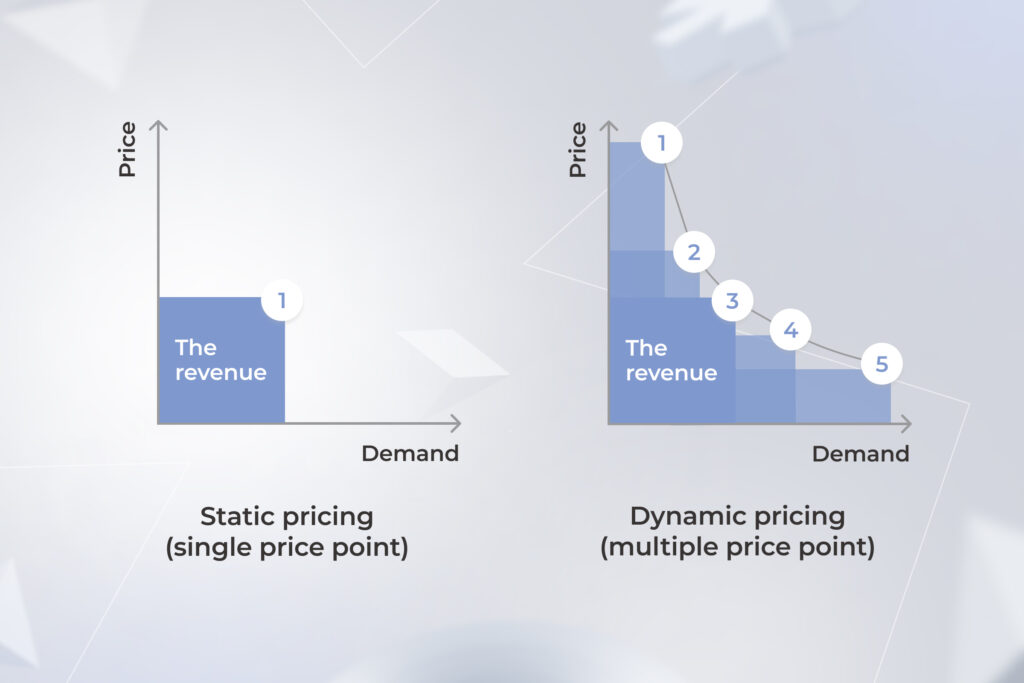
The goal of dynamic pricing is to allow a retailer to adjust prices on the fly to account for changing demand. Companies that implement this technique can change their prices in real-time based on the fluctuations in supply and demand, racking up greater revenues and increasing sales.

Static and dynamic pricing

Customization is a critical component of effective dynamic pricing, that’s why dynamic pricing tools make predictions based on a large number of variables, including:

  • Profitability analysis
  • Price/trend forecasting
  • Competitive pricing analysis
  • Customer analysis for personalized pricing

To execute on differentiated price points, companies should also have price management automation in place that allows for quick, at-scale product price setting. Also, pricing should be dictated by accurate, centralized data — otherwise, price reduction can result in big margin losses.

Empowering your sales with personalized pricing

Personalized pricing allows businesses to adjust prices based on customer demographics, location, purchase, and other customer data. Unlike dynamic pricing, this pricing strategy is specific to each customer, instead of relying on external market factors.

By fine-tuning your prices to each client, you can maximize revenue, improve profitability, and identify the maximum value of a product as perceived by the customer. To make the most out of customized pricing, you need to follow a systematic process that involves:

  • Customer segmentation: grouping customers into cohorts based on similar characteristics.
  • Data collection: collating relevant data about customers, including purchase history, geography, and other customer insights.
  • Competitor analysis: monitoring competitors’ prices to strike the right balance between price customization and profitability.
  • Automation and customization: managing price changes on the go and at scale.

Custom data analytics enables businesses to master all four components at once, fuelling real-time price alterations grounded on unified and complete data.

Find new sales opportunities with our pricing analytics software

Schedule a call

Pricing analytics tools aren’t all-mighty, you need data excellence

Although pricing software can ramp up your operational efficiency and increase revenue, it’s a blunt instrument if its data management capabilities are scanty and half-hearted. Let’s look at the building blocks of a pricing analytics tool that can actually move the needle.

Data collection

The first step towards a data-driven pricing strategy is to collect reliable data from multiple sources. Therefore, your pricing analytics tool should be able to collect and vacuum up data related to transaction data, CRM systems, market research, competitor pricing, and supply chain costs.

Data quality and cleansing

No good can come out of incomplete and erroneous data. That’s why your pricing analytics software should ensure data accuracy and reliability by filtering out anomalies, weeding out errors, and handling missing data points.

Integration capabilities

High-performing pricing software integrates with CRMs, sales platforms, ERPs, and inventory management platforms to pave the way for informed decisions based on a holistic view of business operations.

Data analysis

This is when magic happens. Data analytics pricing models churn through your data and pick up the low-hanging fruit that can create extra revenue. To offer on-point pricing optimization strategies, tools should be able to run multiple types of pricing analyses.

  • Segmentation analysis:

Splitting customers into customer segments based on common characteristics such as purchasing behaviors, preferences, and others, to tailor pricing strategies accordingly.

  • Competitive analysis:

Analyzing the pricing and promotional strategies of your competitors to gain market share.

  • Elasticity analysis:

Determining the optimal price for a product by understanding how price changes impact demand.

  • Cost analysis:

Understanding the rationale and economics of each cost component, from production to distribution, to ensure pricing doesn’t affect profitability.

  • Scenario analysis:

Simulating various pricing strategies to assess the future performance of price changes and their potential impacts on revenue.

  • Promotion and discount analysis:

Identifying the impact of promotional campaigns and discounts on overall profitability and assessing their effectiveness.

Pricing analytics dashboards

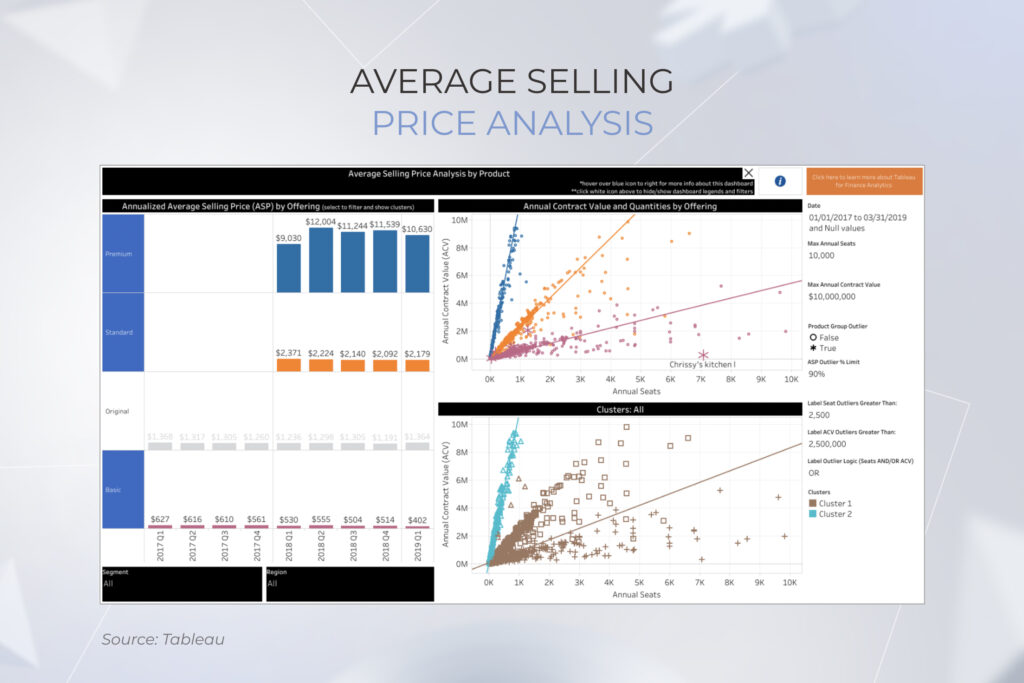
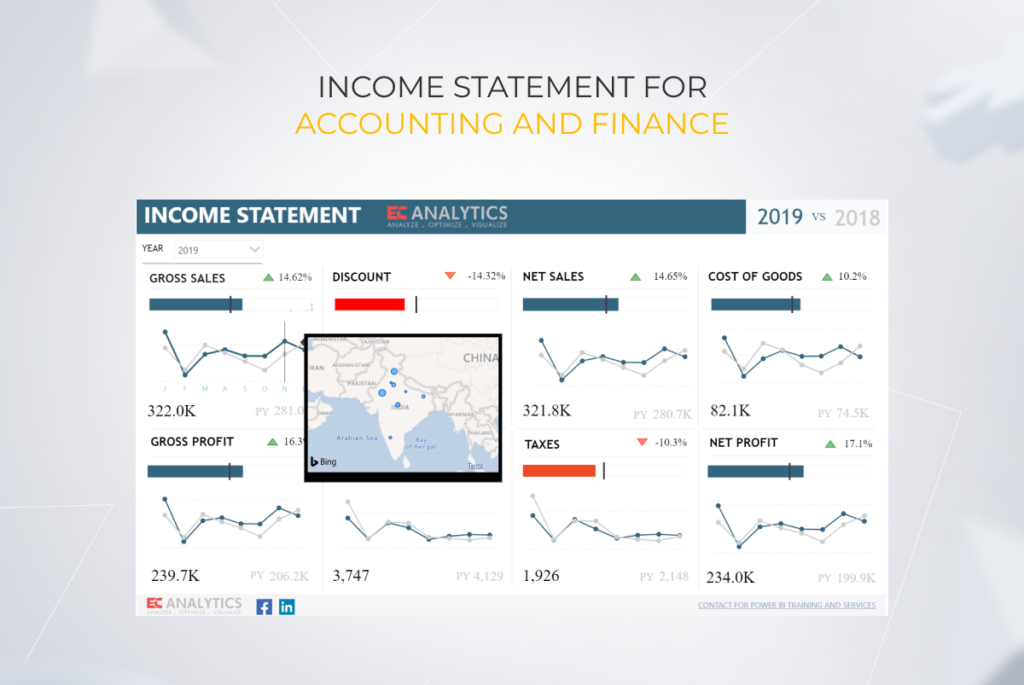
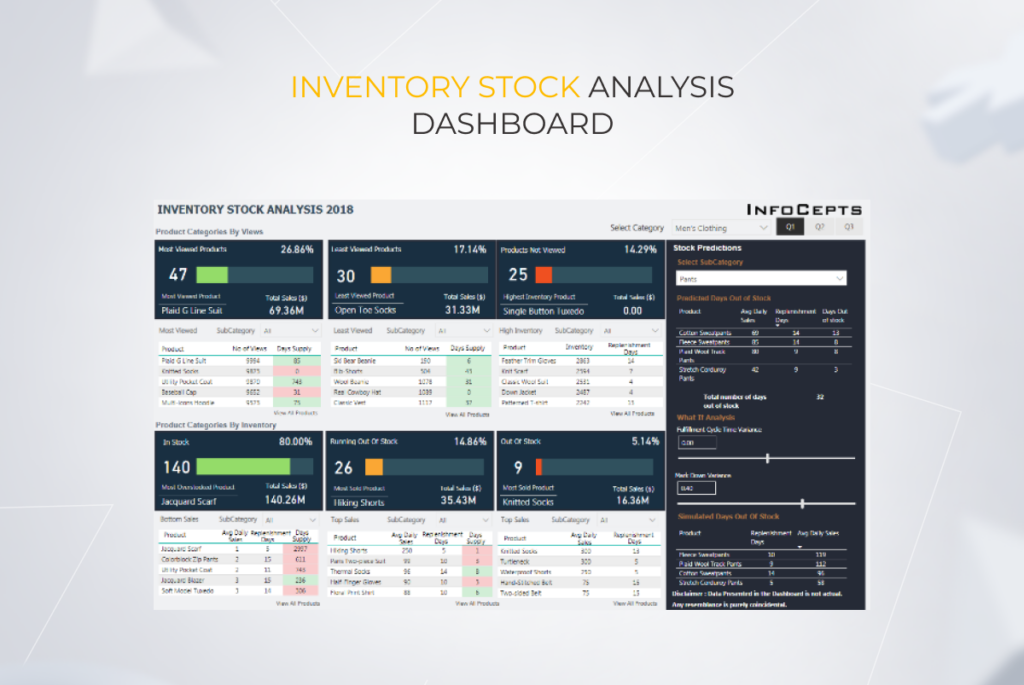
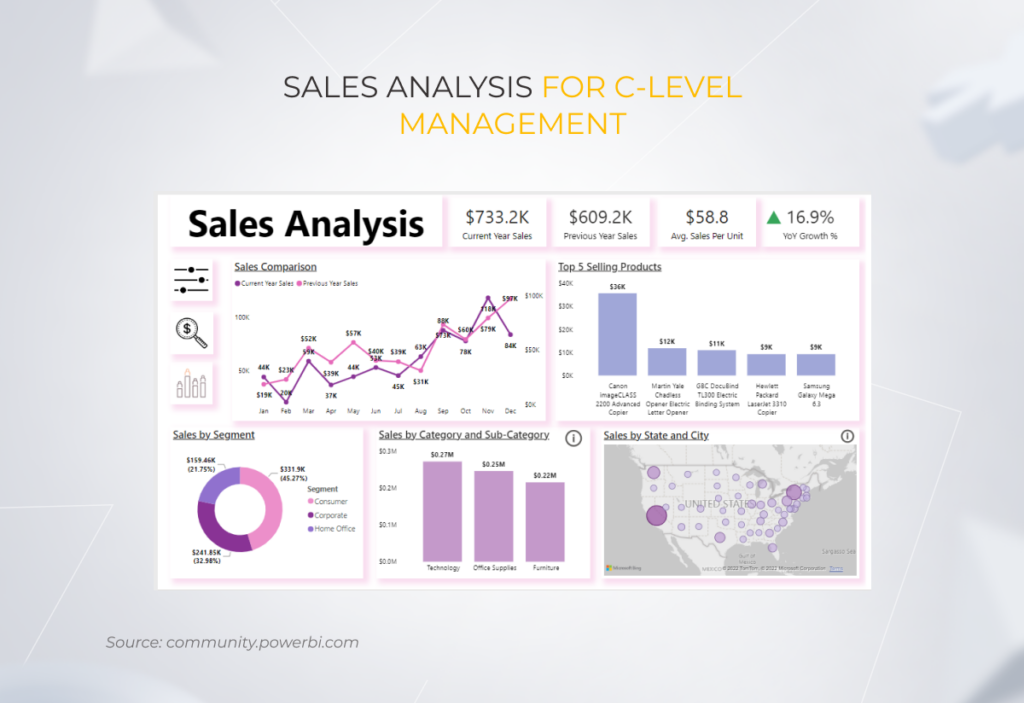
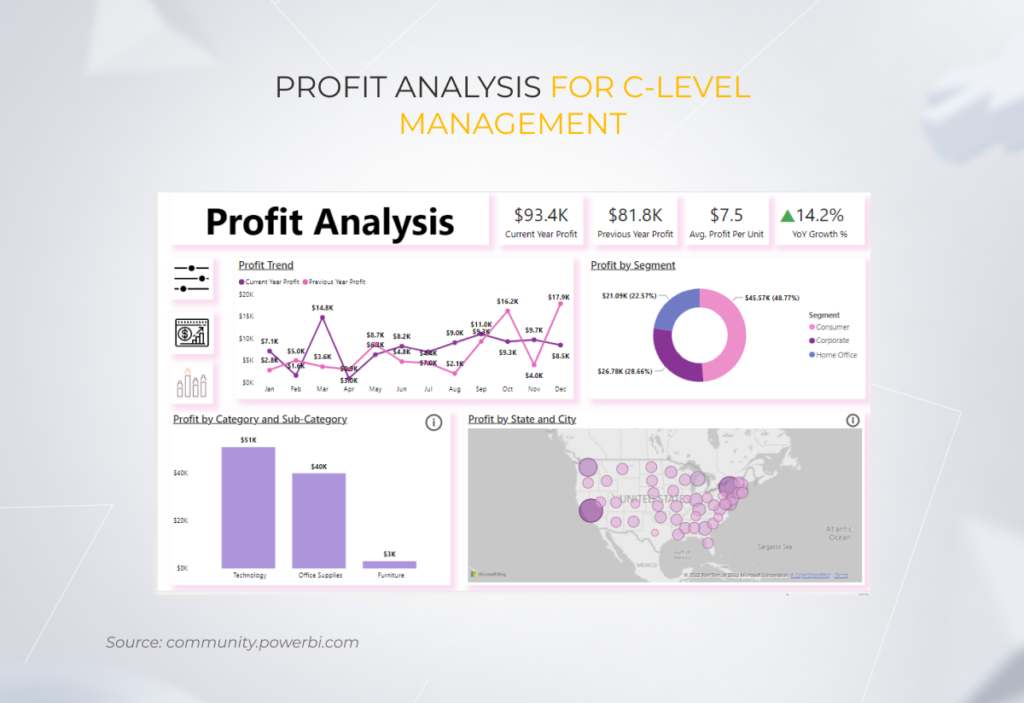
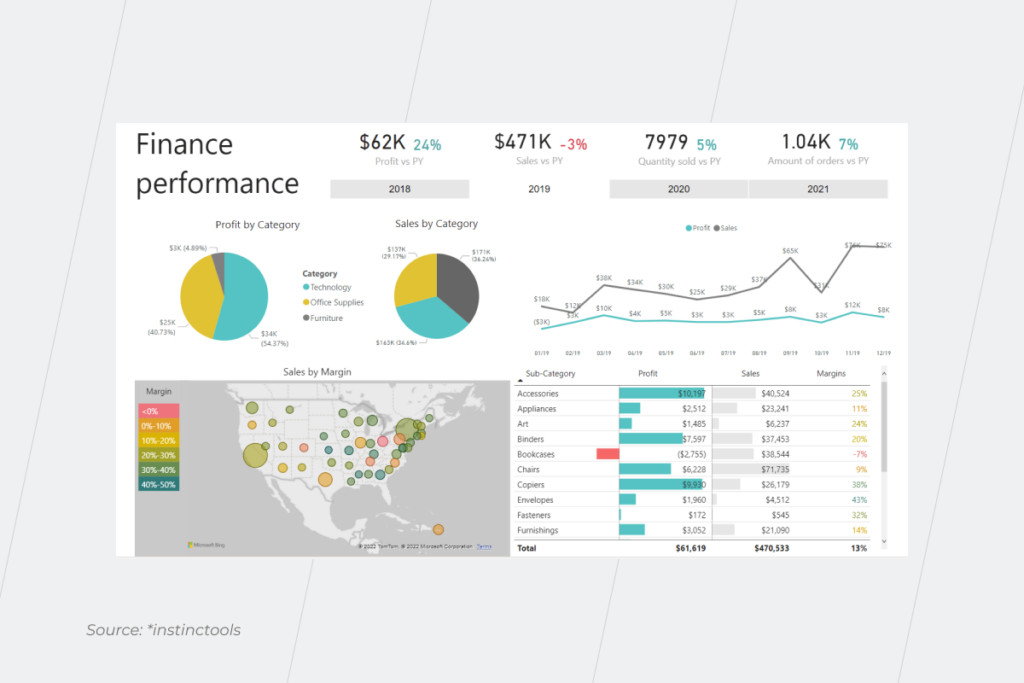
Visualizing data through interactive dashboards will help your team make sense of pricing tendencies, performance, and potential issues or opportunities. From average selling price to discounting strategy, dashboards reflect outliers and trends in your company’s pricing optimization efforts.

average selling price analysis

Also, when business models change, current pricing model, product bundling, and channel-specific strategies are rendered irrelevant. Dashboards with iterative forecasts (like the one you can see below) help you keep up with changes without manually updating data.

interactive dashboards

Turning pricing into smart pricing with AI

Through the use of advanced analytics and artificial intelligence, companies can amplify the capabilities of their pricing analysis tools. Levi’s, for example, has elevated its average unit retail by 10% without negatively impacting demand — all thanks to AI.

Analyzing different data sources, pricing recommendation engines, what-if simulations, and other next-level AI-enabled features give an upper hand to pricing tools, allowing them to create more effective pricing strategies, run more accurate customer segmentation, and recommend optimal price points.

Security and compliance

Last, but not least, your pricing analysis tool should keep your customer data under lock and key to maintain customer privacy. The data processing flow must also meet industry regulations, ensuring compliance excellence at all levels of analysis.

What does it take to brew a successful pricing strategy?

Keeping tabs on customer buying habits, competitor prices, and market conditions can be quite dizzying unless it’s automated. Pricing analytics tools take this burden off your shoulders, revealing a real-time view of every data point that can affect your pricing decisions.

Paired with AI, smart pricing analysis turns from descriptive into predictive, identifying tangible opportunities for revenue growth. But to capitalize on the potential of pricing analytics, your company should first shore up current capabilities, assess data readiness, and make necessary connections in the existing IT ecosystem.

Create a data analytics center of excellence for maximum impact

Get in touch

FAQ

What is the future of pricing analytics?

As the competition is growing and margins are shrinking, pricing analytics will continue to supercharge the pricing strategies of companies. This technology will lead business on the way to optimized pricing aligned across channels, quick pricing wins, and accurate customer insights.

What are the tools for price analysis?

Using pricing analytics software, companies can determine the optimal pricing strategy for their products. Businesses have two options when it comes to price analysis tools: they can either go for platform-based solutions such as systems based on Tableau and Power BI or opt for custom software built from scratch. Each option brings its own benefits to the table so it’s important to know your requirements before going into development.

How do you analyze price data?

A detailed dive into pricing data calls for comprehensive monitoring of pricing history, competitor prices, customer behavior, average revenue per user/ customer, and other data points. Smart pricing tools unify all data and run analysis on input without your manual effort.

Mark Our Words: SaaS Security Checklist for SaaS Vendors in 2025

Key highlights

  • From misconfigurations to regulatory hurdles, there are plenty of SaaS security challenges to deal with, but all of them can be covered if you follow a battle-proven SaaS application security checklist.
  • Security standards for SaaS applications in focus: *instinctools’ tech lead shares the best practices and tips for safeguarding your software.
  • The game-changing role of AI tools in adopting a proactive security strategy.

Threads as trivial as data breaches, data leakage, and unauthorized access keep ranking among the top security incidents the quarter of software as a service providers experienced in 2024. How do you ward off these hurdles in 2025 and beyond?

Our experts in SaaS security posture management highlight common chinks in the armor of the on-demand solutions and share a battle-proven SaaS security checklist for tackling them with industry best practices.

Major SaaS security concerns putting your solution at stake

Just as the chain is only as strong as its weakest link, it plays out the same way for software as a service security in cloud computing. Here are the five most common SaaS threats that can imperil the overall security level of software applications. 

  • Misconfiguration as a primary reason for data breaches remains the biggest cloud security risk organizations have to face. When security teams fail to configure SaaS software appropriately, or too many roles within the company have access to the SaaS security controls, it can lead to exposing customer data, its leakage, or theft.
  • Insecure APIs. Jeopardizing the APIs’ security is the second largest of all OWASP API risks. Session tokens in URLs can be leveraged by cyber attackers, resulting in unauthorized access to SaaS data or a data breach.
  • Unauthorized access. A lack of data encryption and irresponsible key management can also have dire consequences, such as exposing confidential data and personally identifiable information that your customers have entrusted you as their SaaS vendor. Sometimes unauthorized access can take a toll on your business, as happened to LastPass after two security breaches in 2022.
  • Cloud infrastructure issues. Inadequate security of cloud components, such as physical and virtual servers, network perimeter, etc., makes your software an easy target for cyber attacks.
  • Inability to meet regulatory requirements. Сomplying with international and industry-specific regulations is a must for software providers. However, undergoing ISO certification or covering HIPAA SaaS compliance, etc. is easier said than done. Such challenges are usually put off until the eleventh hour.

9 SaaS security best practices to fortify your software

Based on the major SaaS vulnerabilities mentioned earlier, *instinctools’ experts have identified security practices to follow so that your product’s safety won’t hinder customer adoption.

1. Adopt security-first mindset within the company

Keeping an eye on security risks from the very beginning of the product development and monitoring security threats through real-time discovery after the solution’s rollout is the surest way to ward off most of the SaaS security issues.

Shifting security left, to the software development life cycle (SDLC), can be done by leveraging the DevSecOps approach. To hone your security level without sacrificing deployment speed, we advise you to bank on:

  • Threat modeling to uncover weak points and critical vulnerabilities in your solution before they turn into real SaaS threats.
  • Automated security testing to get a static, dynamic, and interactive CI/CD pipeline security analysis.

Adopting a security-first mindset goes beyond integrating DevOps practices right from the start of product development. It’s also about raising security consciousness and regular security awareness training among employees outside security teams. You can minimize the likelihood of data breaches, sensitive data exposure, and other security incidents by educating your staff on malware, phishing, social engineering attacks, etc. 

For instance, make a habit of conducting phishing simulations. Alarming statistics indicate that in 2024, 71% of companies experienced at least one successful phishing attack. Running phishing simulations to check how your staff acts when receiving phishing-like emails is a way to raise their awareness of possible threats and practice the algorithm of identifying and reporting the threat effortlessly.

Strengthening an organization’s overall security posture is especially crucial if you follow the work-from-home trend adopted by 67% of software companies worldwide and allow your staff to work fully or mostly remotely. Software as a service vendors have to monitor employees’ devices and guard their organization’s data with a comprehensive BYOD (bring your own device) policy as part of their SaaS security requirements. For instance, to perfect SaaS data security within the company, the following can be done:

  • Leverage SSL certificates to ensure secure connection for your employees anywhere anytime; 
  • Stipulate automated wiping of data on the staff’s devices after failed login attempts.

Hone your SaaS risk management with our support

Get a quote

2. Stay compliant with all the necessary industry and location-specific regulations 

Legal compliance isn’t just a best practice, it’s a requirement for SaaS providers. Following industry-specific world-wide and local regulations can be worth a thousand words if you want to prove your reliability to potential SaaS customers.  

For example, if US-based vendors offer their software to EU-located clients, they should stay compliant not only with GDPR but also with local regulations, such as the Data Governance Act (DGA), ePrivacy Directive, Open Data Directive, to name a few.

If you provide SaaS industry-specific software, you have to take this into account, as local industry regulations may differ. Let’s take the healthcare sector as an example. In the US, you must add compliance with the HITECH Act and HIPAA SaaS requirements to your security standards as a software provider.

However, if you want to expand your market reach and offer your solution, let’s say, in Canada, you’ll need to follow PIPEDA stipulations. This act is quite similar to HIPAA, but there are still differences, the violation of which can cost you up to $100,000. For instance, PIPEDA applies to all customer data, while HIPAA covers only healthcare-related confidential data.

3. Ensure secure API and authentication

API endpoints’ vulnerabilities and authentication flaws set the stage for unauthorized access to sensitive information.

The fewer API keys you have, the less is the probability of an API-related incident. If this approach is out of options, rotate API keys at least annually. 

What else can be done to derisk customer data? Build multifactor authentication (MFA) in your software. It’s one of the standard SaaS authentication methods that shields personal and sensitive data from falling into the wrong hands. However, going through it every time when opening an app can become a burden for end users.

You can simplify SaaS data protection without compromising security by providing customers with a single sign-on (SSO) option when they can safely log in to the system with their company’s Google, Microsoft, etc. accounts. For instance, OAuth 2.0 protocol is one of the widespread ways to simplify user access to the scads of a company’s apps.

Just as MFA and SSO are must-have preventive measures to implement in your SaaS solution, they’re also critical to adopt within your company, where the software is being crafted. Neglecting these security standards puts the safety of your SaaS users’ data at stake.

For instance, your employees should be aware that cybercriminals can bombard them with fake MFA push notifications to compromise their accounts, as it happened with SolarWinds. The corporation’s security structure was busted because employees routinely approved a push notification — essentially, the company’s staff invited the attackers to the system’s core. Therefore, if your SaaS solution is targeted at companies related to healthcare, finance, or politics, you shouldn’t take MFA lightly or let approving push notifications become staff’s “second nature.”

Keep the bar of your SaaS network security high

Let’s talk 

4. Bring efficient IAM controls

In the SaaS development process, robust authentication goes hand in hand with solid identity and access management (IAM). Efficient IAM controls empower SaaS providers to:

  • Log and monitor all access attempts to have complete visibility across the system and spot attackers right off the bat.
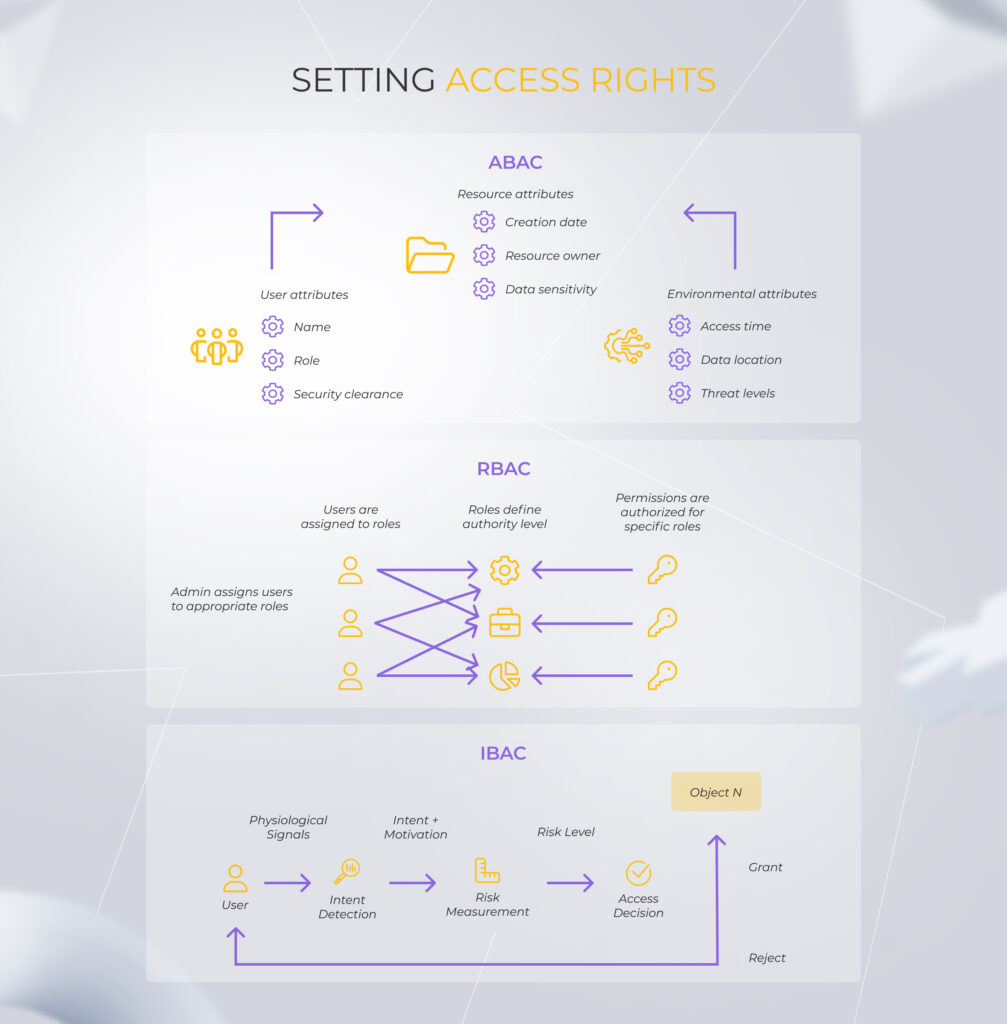
  • Set different user access rights within the company based on their role (RBAC), identity (IBAC), or attributes (ABAC).
Schemes for ABAC, RBAC, and IBAC access control methods

However, consider that any control over data access, processing, and monitoring impacts the system’s performance. More importantly, each security enhancement increases the solution’s complexity for end users. As a SaaS provider, you have to juggle one and the other to provide customers with user-friendly software while keeping their confidential data safe.  

Stop intruders at the front door

Here’s how

5. Make robust data encryption a table stake

Data protection regulations such as GDPR, D-DPA, etc., impose restrictions on using customers’ personally identifiable information for decision-making. Therefore, you’ll need to leverage encryption techniques such as data scrambling and data substitution to ensure users’ anonymity, while still being able to know your customers better. With such an approach, personal data is modified to ensure that it cannot be matched to individuals. However, you still can effectively use this anonymized data to analyze, for example, a product’s popularity in different regions.

SaaS data protection entails a greater responsibility level, than in the IaaS model, where encryption is a customer’s duty.

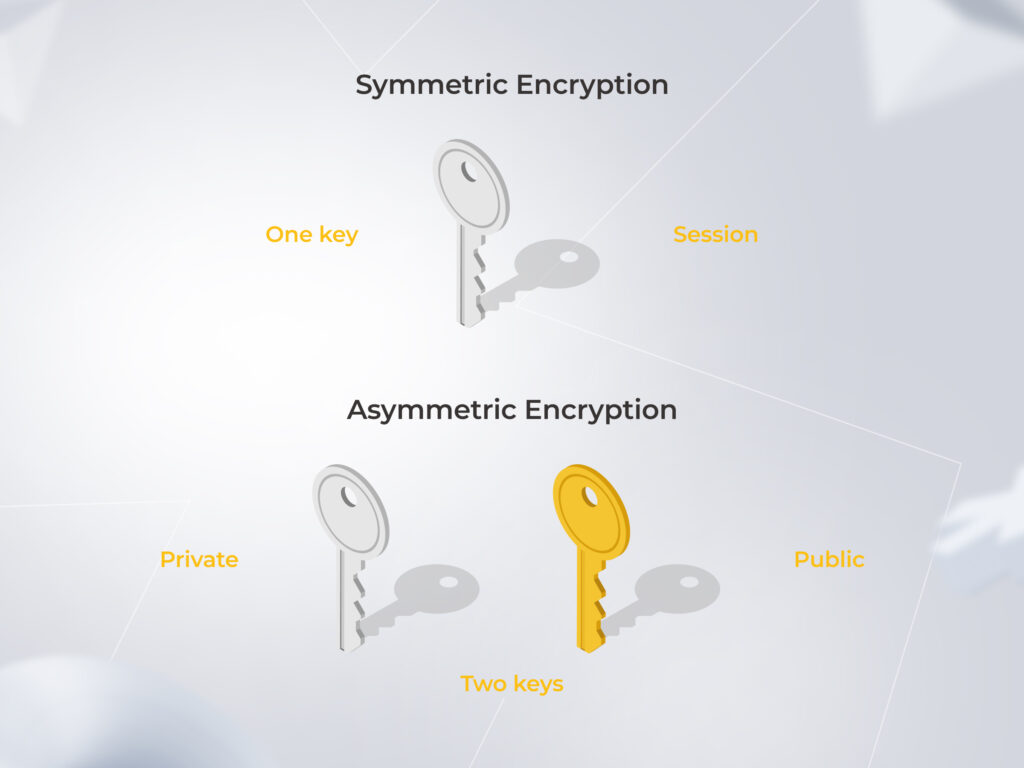
As a SaaS vendor, you should bet on symmetric or asymmetric encryption to get control of sensitive data, whether it’s at rest, in use, or in motion. With symmetric encryption, the same key per session is used for encryption and decryption. While an asymmetric method implies two encryption keys – public for data encryption and private for its decryption. 

The difference between symmetric and asymmetric data encryption

These are the protocols you can leverage to secure data in its different states:

  • TLS (Transport Layer Security) and SSL (Secure Sockets Layer) for the data in motion. Guard emails, files, etc., moved between applications, networks, computers, etc. And no matter how trivial it may seem, if your solution is web-based, use HTTPS (Hypertext Transfer Protocol Secure) protocol to minimize risks.
  • Secure Encrypted Virtualization (SEV) for the data in use. Defend data storage and files that are currently open. 
  • Advanced Encryption Standard (AES) for the data at rest. This protocol is a top choice for safeguarding databases, cloud storage assets, and file archives.

Ensuring timely updates of these encryption protocols should be on your SaaS checklist. 

6. Run regular security audits

Data encryption means performing regular audits, both internal and external, as part of your SaaS data encryption strategy. Knowing the potential risks of your software and understanding how to nip them in a bud can help you become a more reliable vendor for your SaaS customers. Auditing your solution lets you catch sight of minor issues before they turn into a real threat looming over your solution.

What are the vital components of an efficient security audit? Instinctools’ experts gear you up with the most essential steps of a SaaS audit checklist:

  • Review your security policies, standards, and procedures. Inspect the encryption protocols you use for the data in motion, in use, and at rest, and evaluate how well they do their job. For example, if you use DES (Data Encryption Standard) to secure sensitive information at rest, it may be time to switch to a more sophisticated AES protocol. Another best practice is performing malware checks on files before importing or uploading data to the cloud when running a cloud SaaS security assessment.
  • Check your coding. Don’t underestimate the importance of secure coding standards. Measuring code quality is an integral part of SaaS security assessment that implies reviewing its efficiency, security, reliability, and maintainability. If one of these parameters has weak spots, for example, you uncover missing initialization, it puts the whole SaaS solution at risk.
  • Perform various security tests. If you want to comply with regulations such as HIPAA, ISO, IEC, SOC 2, etc., you’ll need to undergo a lot of security tests, including vulnerability scanning, security assessment, penetration tests, and compliance audit. Thereby you’ll prove the solid security level of your solution. 

It’s also important to distinguish between internal and external security audits.

  • Internal audits depend mostly on your capacity – you can run them whenever you have spare time and free hands.

I’d suggest setting an automated trigger for such audits and conducting them before every solution’s update and release of a new feature. 

  • External audits, on the contrary, are performed by specialized third-party organizations, require a sizable chunk of your budget, and take at least several weeks. Therefore, act according to your industry’s SaaS considerations.

As a SaaS provider, who wants to safeguard their solution from external and insider threats, you can require a security audit for any third-party software integrating with your application to mitigate security risks.

7. Provide a comprehensive disaster recovery plan

SaaS risk assessment during a security audit leads to developing incident response and disaster recovery plans as security measures to tackle outages and other issues if they happen. You should ensure data backups are in place and easily accessible to minimize operational disruption when disaster strikes and enable business continuity even in the case of major security blunders. 

As a SaaS vendor, you have to provide your clients with a disaster recovery plan that meets two performance goals agreed upon with the customer:

  • Recovery Point Objective (RPO). This measure determines the amount of data that could be lost in an incident. For example, it can be data for the last 15 minutes.
  • Recovery Time Objective (RTO). This standard describes how much time you’ll need to recover the lost data. For example, you can set one week for the task. 

Having a solid recovery plan doesn’t guarantee that all team members know their roles and responsibilities during an actual incident. Practice makes perfect, that’s why we recommend running disaster recovery drills to test your ability to recover and restore data and systems after a disruption. That way, you minimize downtime and the probability of data loss during a real disaster and ensure compliance with industry standards.

Want to be fully armored for disaster recovery?

Check our webinar

8. Take advantage of AI tools 

Organizations get used to relying on artificial intelligence technology, and SaaS companies are no exception. For instance, AI tools leveled up the ability to spot and analyze suspicious patterns in real time, enabling software providers to adopt a truly proactive security posture.

AI-driven automation became another heavy hitter reshaping the ways vendors perform routine tasks to ensure the security of their SaaS data. As for 2024, 27% of companies entrusted AI with anomaly and incident detection, prevention, investigation, and response.

In my practical experience, AI software is the most efficient in threat detection. With it, tasks such as vulnerability scanning, prioritizing perils depending on their potential impact, and threat reporting can be fully automated, freeing your employees’ working hours for more challenging assignments.

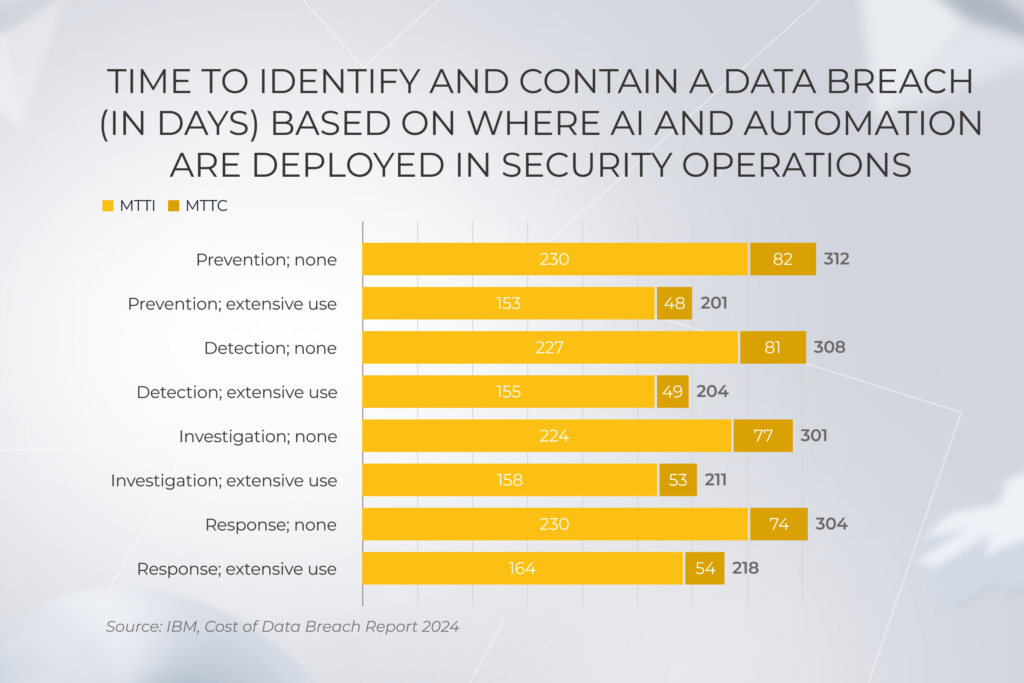
While some companies question the safety of implementing AI automation, others reap its benefits, accelerating time for prevention, detection, investigation, and response to data breaches by a third.

IBM, the outcomes of AI automation for data breach detection

9. Leverage expert support 

93% of organizations are moderately to extremely concerned with the shortage of experienced security aces. Even if you are among the lucky 7% with vetted pros on their in-house IT team, you can lack specific expertise to deal with SaaS security monitoring. Or you may need a safe pair of hands to get over mind-boggling security audits before obtaining compliance with new regulation requirements. Don’t hesitate to reach out to skilled professionals.

Get your SaaS security on lock

Hire vetted experts

Checklist on how to secure SaaS applications: *instinctools edition

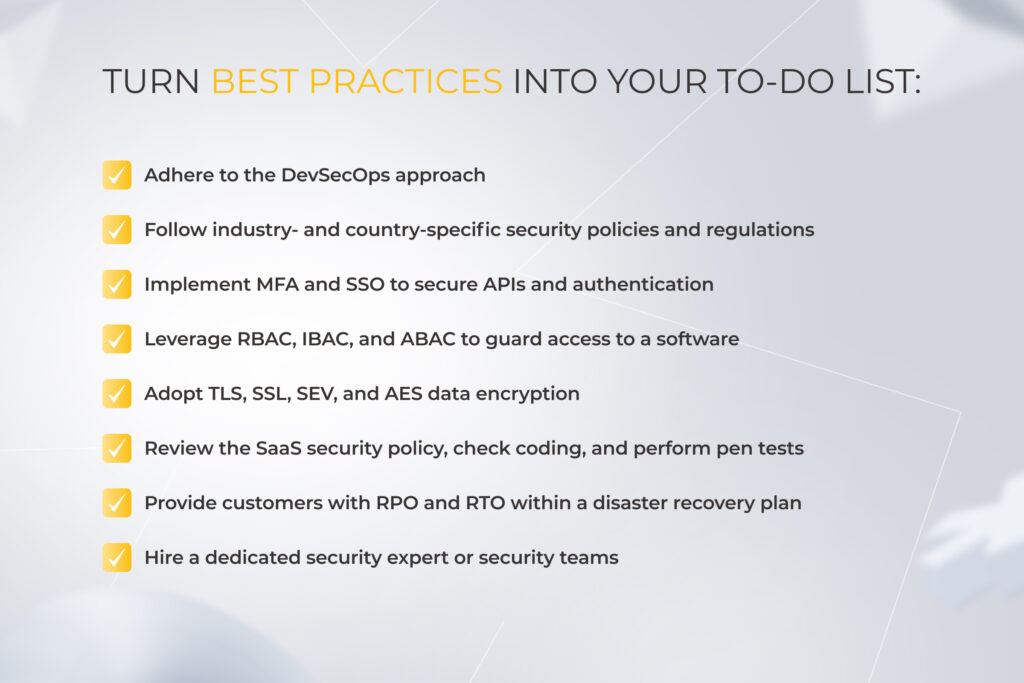
As you can see, once you follow SaaS security best practices and rely on battle-tested expertise, managing SaaS security challenges will no longer seem daunting and overwhelming. We’ve summarized the best practices and security measures to focus on.

SaaS security checklist

SaaS security standards put into action: legacy software modernization for a licensing company

While data security is crucial for any software vendor, it’s a matter of reputation for a global security tech provider. Our client needed to hone SaaS security compliance to obtain ISO 27001 certification stress-free.

The tech stack of their licensing software, created in the aughts, became partly outdated. SOAP API and legacy Apache products, such as the Axis2 framework and the TomEE 7 application server, called for present-day replacements.

We opted for a gradual modernization approach to minimize the resistance to change from the client’s in-house team, which had stayed the same for over 30 years. The shift from TomEE 7 to TomEE 8 and from Axis2 to CXF went smoothly, paving the road to the future adoption of the industry standard, the Spring framework. We also conducted code refactoring and wiped out bugs in the client’s testing system to simplify software upkeep.

Get more details on the story

Check here

Securing SaaS isn’t a one-and-done endeavor — it’s a continuous process

Since security is one of the SaaS trends that are here to stay, as a SaaS vendor, you should amp up the security level of your solution. But consider that the diversity of security requirements for SaaS applications doesn’t allow you to stir risks away one by one. For example, you can’t state providing efficient IAM controls without secure APIs, just as running regular security audits makes no sense if it doesn’t lead to creating a robust disaster recovery plan. Therefore, you should address all these issues holistically. 

Want to get rid of SaaS security concerns and craft fail-safe software?

Drop us a line

FAQ

What should be included in a SaaS security policy?

SaaS security policy covers compliance with security regulations, authentication methods, identity and access management, types of data encryption, security audits frequency, and disaster recovery plan. It should be comprehensive enough to serve as a basis for your SaaS security strategy.

What are the four security issues in SaaS?

The four SaaS security issues you should address in the first place are misconfigurations, insecure APIs, unauthorized access, and reaching regulatory compliance. All of them can be dealt with by following industry standards for data security — security-first mindset, compliance with industry- and country-specific regulations, secure APIs, IAM controls, data encryption, regular audits, AI-powered threat detection, data recovery plan, and reaching out to security professionals.

How is SaaS secured?

Primary measures for securing SaaS applications are: 
– Establishing protected cloud environments
– Having robust security protocols and data encryption algorithms
– Keeping a weather eye on user authentication and access control 
– Providing solid incident response and data recovery plans

6 Steps to Custom Ecommerce Solutions: a Comprehensive Guide

Key highlights

  • Merchants flock to custom ecommerce solutions on a quest for unique brand identity, greater control over features, more satisfied customers, and increased sales.
  • It’s not enough for sellers to offer omnichannel experiences, they also need a tech moat to fit into the next generation of ecommerce.
  • Complex ecommerce platforms require a blend of cross-functional expertise and hands-on experience — consolidated under the care of a trusted vendor.

Over the last few years, custom ecommerce solutions have got a facelift as a crisis response to shrinking customer wallets. Washed over by generative AI, AR/VR, IoT, and advanced data analytics, of-the-moment tailored ecommerce platforms are no longer limited to basic storefronts. Instead, they evolved into complete ecommerce solutions that integrate R&D, logistics, warehousing, and sales. 

To thrive in the market, you need to know what it takes to deliver ecommerce software of such caliber. Today, we’ll crack the code for high-impact custom ecommerce solutions, peering into the technicalities and competitive features that flip the script in 2025.

1. Align the type of store you want to build with your business model

Custom ecommerce development is a complex landscape with a slew of variables. At the onset of your project, the initial focus should be on the high-level image of your ecommerce solution and its interplay with the commercial arena your company operates on:

B2C stores

Business-to-consumer solutions help users complete a task with minimal effort by revolving around simplicity and straightforward sales cycles. From a technical standpoint, this manifests in intuitive UI/UX, distinctive visuals, and an integrated solution core.

To hit their ROIs, B2C companies focus on repeat purchases at a massive scale. This calls for in-depth data analysis, marketing automation, and 24/7 customer support — all folded into a single ecommerce solution. At the same time, B2C platforms employ omnichannel capabilities, which also require corresponding multichannel integrations.

Variety — whether it’s payment options, product demos, or self-service — is also at the front of the mind when building a B2C platform.

B2B portals

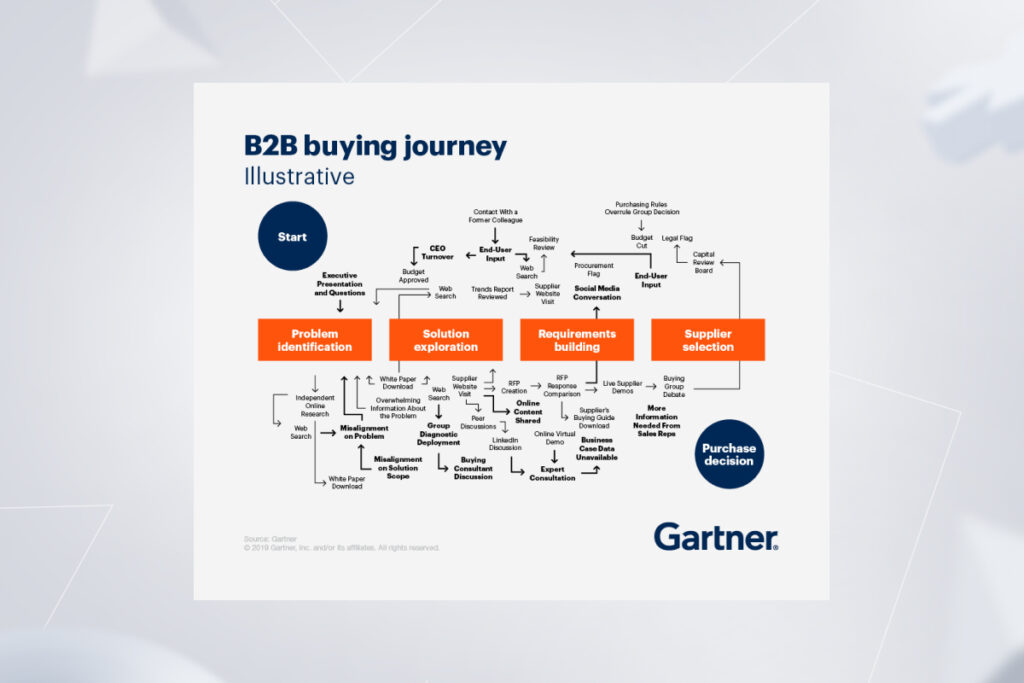
If you operate according to the B2B business model, here’s one thing you need to understand: B2B customers’ purchasing journey is not linear. It’s pretzel-shaped. Along with a complex funnel, a B2B company often caters to vendor partners, resellers, or affiliate companies, selling products or services through manifold channels. As B2B customers need to be able to be assigned to multiple accounts, B2B software is often a multi-model interface.

B2B buying journey flowchart illustrating steps from problem identification to supplier selection and purchase decision

Also, customer acquisition costs are notably higher compared to B2C, making high levels of the customer’s experience a crucial success factor. Lead and scoring automation, quote management, forecasting, and enhanced analytics are the features that make sure no high-ticket lead slips through the cracks.

Along with rich business-focused functionality, an ecommerce platform should also integrate easily with essential business software such as ERP, PIM, CRM, and OMS to support an integrated business view. Compliance and data security often enter the equation as the core ingredients of a custom ecommerce platform for business-to-business companies.

Marketplaces

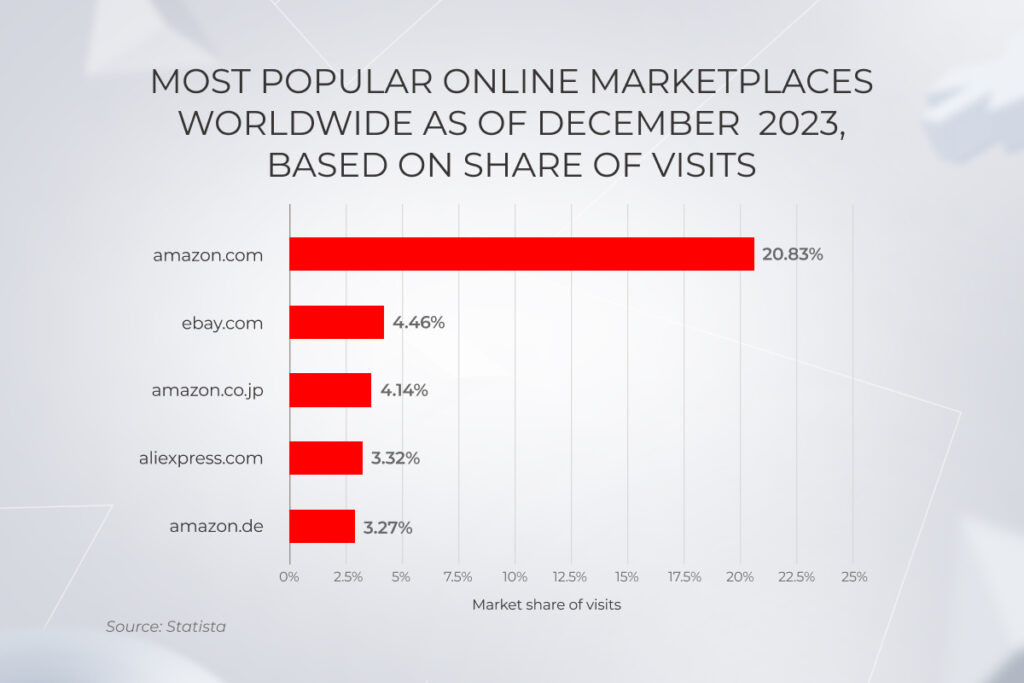
If you are a company that facilitates the exchange of goods between sellers and buyers, a tailored marketplace would marry well with your business model. Typically, it is a three-sided platform with user-specific features for the admin, seller, and buyer.

Bar chart showing the most popular online marketplaces worldwide: amazon, ebay, aliexpress

The selling side of a marketplace should be supported by a robust order management system, product catalog management software, and easy-to-use dashboards. Tools for messaging and communication bridge the gap between sellers and customers.

The buyer side typically bundles a streamlined cart and checkout flow with multiple payment gateways, order tracking, and powerful product discovery with tailored suggestions. General marketplace management tools, sales and marketing analytics and a tax management module help marketplaces operate effectively across regulations.

2. Decide between a platform-based or a fully custom ecommerce solution

With a solid product vision and well-defined target audience at the ready, you should then decide on the development approach to kick-start your custom ecommerce software development.

Custom ecommerce development approach

A fully custom solution is built from the ground up, taking into account even a minute business requirement.

The ecommerce custom development approach allows you to create a unique, fully compliant platform with a custom ecommerce design, aligned with evolving business needs and data standards. The clean and flexible code base of fully custom ecommerce software readily welcomes any extensions or modules you might need down the road. Similarly, it easily merges into your business ecosystem, resulting in data traceability and performance visibility.

On the downside, custom ecommerce development might be more expensive and time-consuming to develop, especially with a lack of qualified experts. To drive down your TCO and increase time-to-market, your development team can tap into an open-source build that can then be customized and upgraded to match your standards.

Here’s when a fully custom ecommerce platform is right up your alley:

  • You operate in a highly regulated market
  • You have complex back-office requirements 
  • You employ various selling channels 
  • You sell to different customer segments
  • You need to connect multiple business systems

Vendor-based ecommerce development

A platform-based ecommerce solution is a viable entryway if you want to reduce your development costs and access out-of-the-box features fast. In this case, your development team builds an ecommerce platform for your business based on the ready-made features from a vendor such as SAP Commerce or Opencart. Although it is not built from the get-go, the platform is still fine-tuned to your needs, albeit with some limitations.

Thus, if your vendor does not offer a particular integration, plugin, or API, you’ll have to settle for what’s available. And although compliance and data security are offered by default, those parameters are not as granular as in fully custom solutions. Also, a vendor-based ecommerce solution places a layer of control between your customers and your business as well as charges recurring fees that can net a tidy sum in the long run.

A vendor-based ecommerce is a valid choice in the following cases:

  • You are a fledgling ecommerce business with a modest customer base
  • You need to hit the market fast
  • Your compliance and data security requirements are moderate

Below, let’s take a closer look at the core differences between the two options.

CriteriaFully custom ecommerce developmentPlatform-based ecommerce development
Cost Considerable upfront investment, lower long-term TCOFewer initial expenses, recurring fees
Speed-to-marketMediumHigh
ScalabilityHighLow
Data security and complianceBuilt based on your unique compliance and data security requirementsGeneric, caters to a broad audience
Customization optionsFully customized to your needsOut-of-the-box features, plugins, extensions, and add-ons
CompatibilityFully compatible with your digital estateLimited integration
Brand imageHelps stand out in the market with distinctive, branded UIsReady-made design templates

Summing up, there’s no universal answer to this dilemma — you should call the shots, minding your business goals and budget expectations. 

Enter the ecommerce market on your own terms

Contact our team

3. Guide your way to an impeccable customer experience

Today, over 73% of customers point to experience as an important factor in their purchasing decisions. A successful transition to the next horizon of customer experience is inseparably linked with the latest technologies. The latter allows you to match the evolving dynamics of shopper preferences and compare favorably with other contestants. 

Omnichannel commerce

The purchase journey is never a straight line. Today, B2B customers are using up to 10 channels to complete their buying journeys. Therefore, the holy trinity of face-to-face, remote, and self-service commerce is not an option, it’s a prompt response to channel plurality. 

The omnichannel model rests on seven pillars — strategy, information flow, the physical flow of products, process automation, and last-mile delivery. From a technical standpoint, this can be supported through integrated marketing, merchandising, accounting, and supply chain management for all channels. 

The ability to easily switch between channels and an integrated customer view are also among the core prerequisites for value-added commerce.

Hyper-personalization

At-scale personalization is a harbinger of high customer satisfaction anticipated by over 70% of customers. Conversely, the lack of personalization results in a bad customer experience and leads to 67% of shoppers getting frustrated with the brand.

Consumers no longer fit into traditional archetypes and buying patterns. What consumers want is changing, too. Hyper-personalization and the connection associated with it allows companies to grasp and respond to the unique needs of each customer, supporting the care-of-one approach that differentiates high-performing ecommerce brands.

— Chad West, USA Managing Director, *instinctools

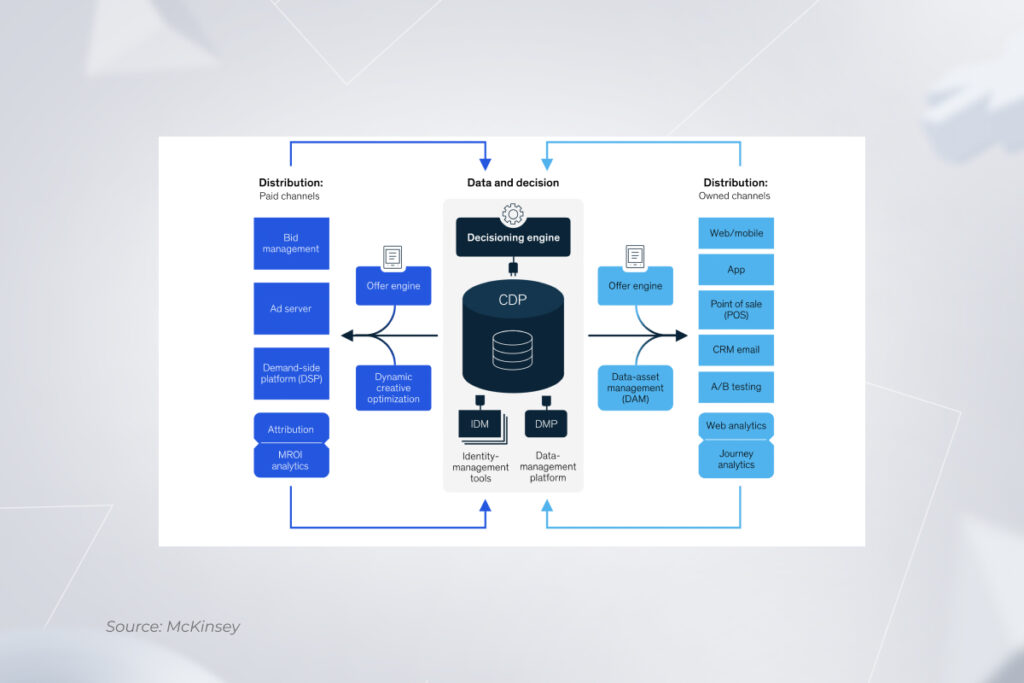
To deliver on the promise of hyper-personalization, retailers need to orchestrate the four Ds — data, decision, design, and distribution. By using data and analytics to create highly personalized shopping experiences, companies can maximize the value at every stage of the customer life cycle, driving more sales and revenue. 

This paradigm is also supported by dynamically served content that adjusts to users’ behavior, preferences, and interests in real time, relying on ML algorithms. The final stretch in serving personalized interactions is connecting data, a decisioning engine, and design elements to the marketing technology systems that deliver experiences to consumers.

A diagram of a customer data platform (CDP) ecosystem, connecting data from distribution channels with data management tools and a decisioning engine

Advanced technologies

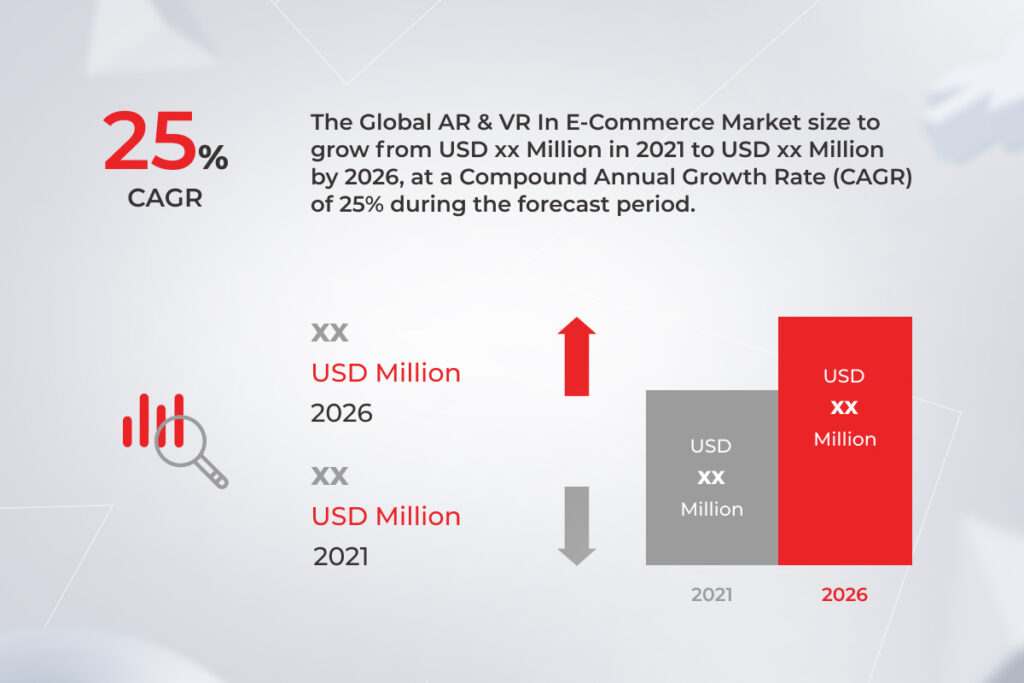
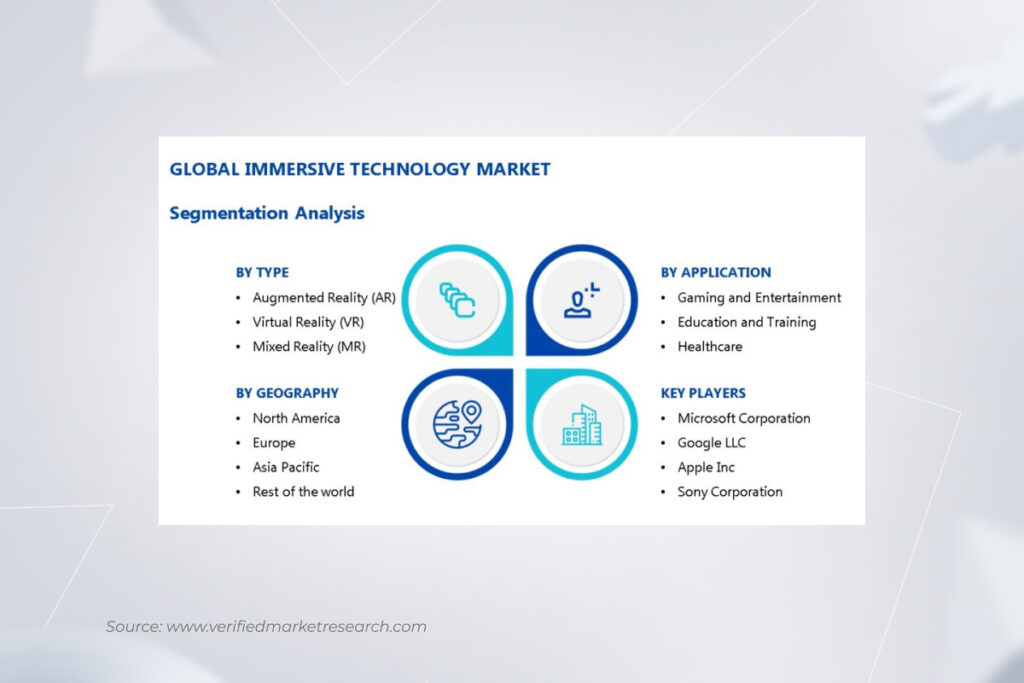
Add a coat of extra customer engagement to the purchasing process, cutting-edge technologies are another building block of a successful shopping experience. In particular, immersive technologies, bundling AR and VR, offer an untapped opportunity for companies in the fast lane. By 2030, the global immersive tech market is projected to grow from $40.64 billion in 2024 to $177.5 billion by 2031.

Ecommerce Solutions
Bar chart showing global immersive tech market growth from $40.64B (2024) to $177.5B (2031) with 22.32% CAGR

From product design to virtual showrooms and try-ons, the immersive reality in ecommerce allows customers to know exactly what they’re getting before they place an order — which is not possible with static product images. Recognizing the potential, established brands such as BMW, Ikea, and others have long embraced immersive techs to diversify shopping experiences.

Retailers like Bloomingdale, Burberry, and Nike parlay immersive technologies into metaverse shopping experiences, where customers’ avatars can interact with branded products.

Leading the pack of cutting-edge ecommerce techs is generative AI that has already made its way into customer experience, supply chain management, and even product design. Leading retail giants, including Walmart, eBay, Amazon, and Target, adopted gen AI to improve product search, power shopping AI agents, and generate product information at-scale.

Global ecommerce businesses also capitalize on the growing opportunities of IoT in ecommerce that stretch from inventory visibility to omnichannel fulfillment. Paired with computer vision, these two can automate stock management and deliver a better in-store experience.

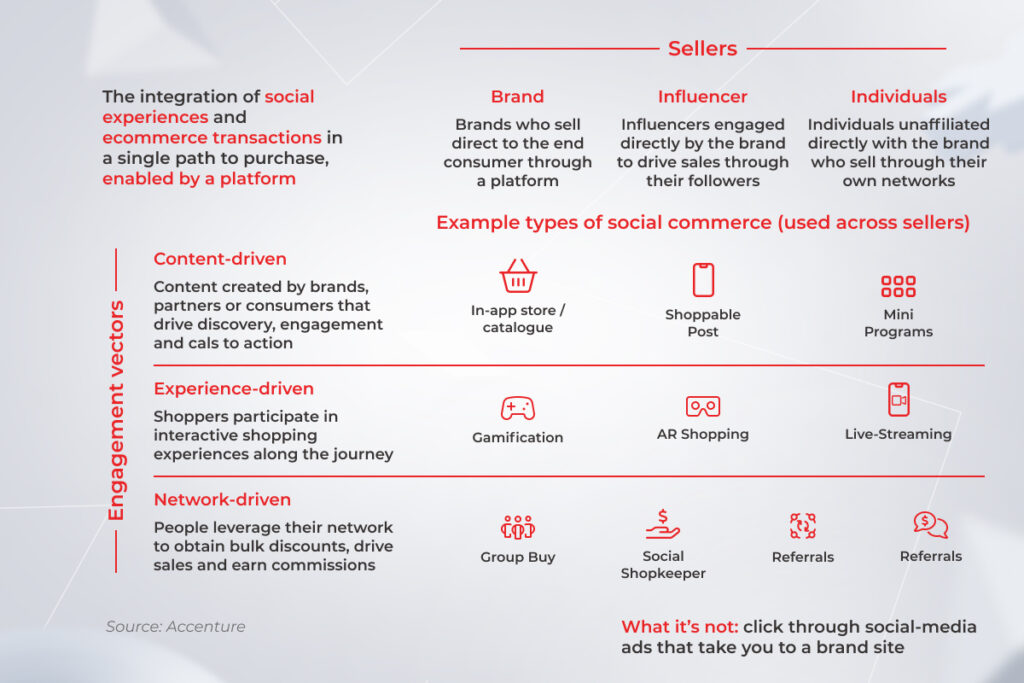
Social commerce

By 2028, the global social retail industry is estimated to account for 21.4% of all ecommerce shopping experiences. The social commerce notion refers to the unique shopping experience that takes place on a social media platform, spanning all stages — from product discovery to the check-out process.

Social commerce overview: sellers (brands, influencers, individuals) with engagement vectors (content, experience, network-driven)

On social media, retailers can engage potential customers via content, experience, or networks. Each of these vectors requires specific levers, be it AR shopping or influencer marketing. For companies, social commerce provides a way to connect with consumers in new ways and unlock untapped revenue streams. 

Take your ecommerce business to new heights

Schedule a call

4. Deliberate on custom ecommerce design

Your custom ecommerce website design is what can lure in or push away your customers. To get it right, you need to focus on several hallmarks.

Optimization for mobile

Mobile phones account for the largest share of commerce website visits, constituting around 77% of retail site traffic globally and generating 68% of online shopping orders. Therefore, making your ecommerce store fit for mobile use automatically helps improve your conversion rates. When building for mobile, your UX/UI design team can take a responsive, mobile-friendly, or mobile-optimized approach.

The mobile-friendly approach does the bare minimum of mobile design, meaning that website developers just scale down the desktop website to fit smaller screens. Responsive ecommerce websites are more user-friendly as they automatically reformat themselves to match all the specs of different mobile devices. Designed for mobile-first searching from the get-go, mobile-optimized platforms are a step above responsive solutions.

— Andrey Haurylau, Senior UI/UX designer, *instinctools

Intuitive navigation

Your ecommerce site visitors ground their interactions on what they find to be well-known. By reinforcing this intuitive approach in your custom ecommerce web development, you can rake in more revenue and give a boost to the customer and user experience.

Simple, straightforward navigation seamlessly guides the user during their entire purchasing journey — through recognized symbols, uniform design elements, cues, simple search, and website taxonomy.

Minimalistic approach

Ecommerce platforms usually carry a lot of content, so a cluttered web page with visually complex designs can make the search even more complicated. Minimalistic designs shed light on key selling points, without disrupting the user experience.

example of minimalistic design

Moreover, no-frills ecommerce websites load a lot faster and more consistently across devices, contributing to better site discoverability on search engines. The key to minimalistic design lies in a thorough understanding of your user goals so no unnecessary elements stay in the way of customer journeys and seamless user experience.

SEO-optimized online store

Ecommerce site development should also be done with search engine optimization in mind. In simple words, it means optimizing the content and structure of your website so that search engines can locate and surface your site high in search.

Examples of ranking signals that your design team can take care of include page load speed, indexable content, user experience metrics such as bounce rate, and website structure. With all those elements mastered, your custom ecommerce site gets the attention and trust of search engines and steers more organic traffic to your store.

5. Take care of integrations

End-to-end integration between your ecommerce platform and business systems is an important tenet of ultimate data visibility and operational efficiency. By baking your digital systems into an interoperable organism, you also enhance customer experience, minimize administrative burden, and improve data accuracy. 

Payment systems

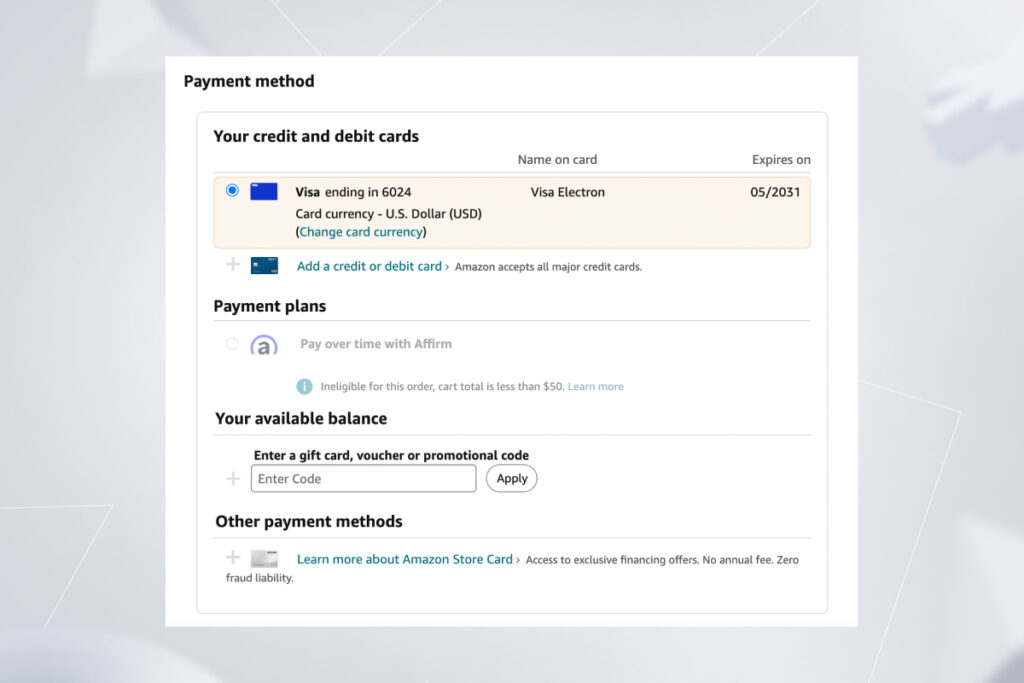
Getting an ecommerce platform to accept payments online implies integrating it with one or multiple payment gateways. The latter facilitates transaction flows between customers and merchants via secure and encrypted pathways. The choice of a payment gateway is based on the currencies you accept, transaction fees, payment methods, and your compliance needs.

a screenshot displaying payment methods on Amazon

The benefits of this integration include flexibility of payment methods, increased security of financial data, faster transactions, and the ability to operate in a global arena.

CRM

A CRM ecommerce integration releases all customer data captured on your website, including purchasing history, browsing data, and others. By getting this data analyzed, you can achieve a holistic view of your customer and feed it into marketing and sales systems for informed activities. 

This integration also provides you with a compass to optimize your inventory levels. Your customers’ buying patterns, spending habits, and others help you decide on the top-selling and high-margin products as well as predict inventory needs. 

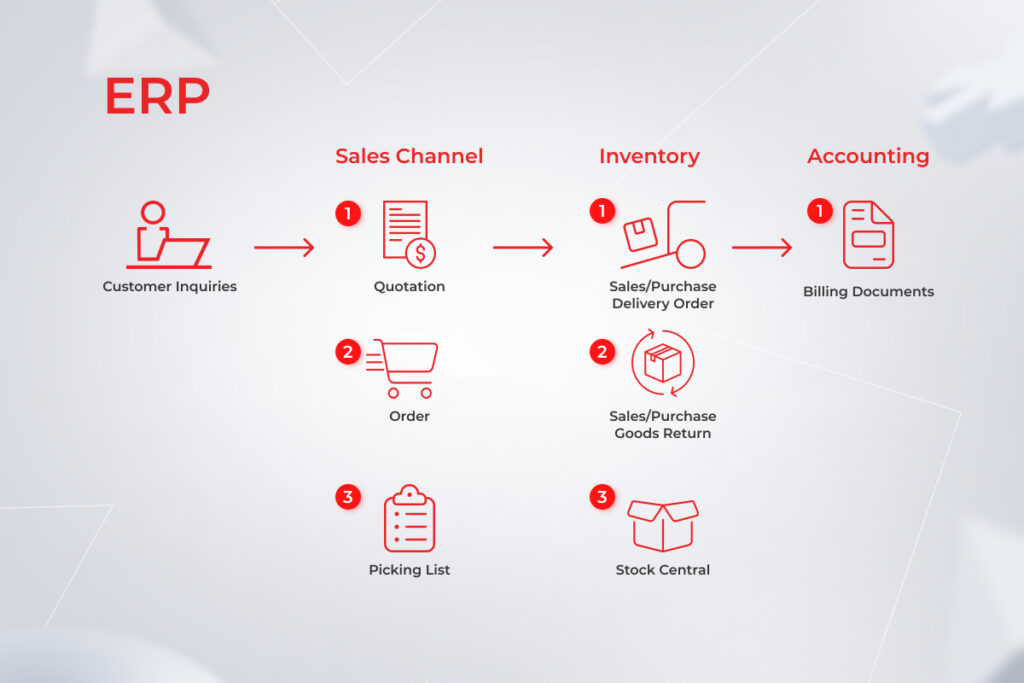
ERP

ERP ecommerce syncing leaves you with more time on your hands and links crucial data points together. From customer data to orders to shipping, all information is shared automatically between systems, which minimizes your product management effort, facilitates pricing control, and streamlines order processing.

enterprise resource planning ecosystem

A centralized enterprise resource planning system collates orders across locations (online, showroom, email orders, etc.), indicates inventory availability, and updates product descriptions across channels. Your teams can also generate reports on demand, including Balance Sheets, P/L Statements, Trial Balance, Cash Flow, and more to ensure transparency of web transactions and easy access to financial information.

Logistics software

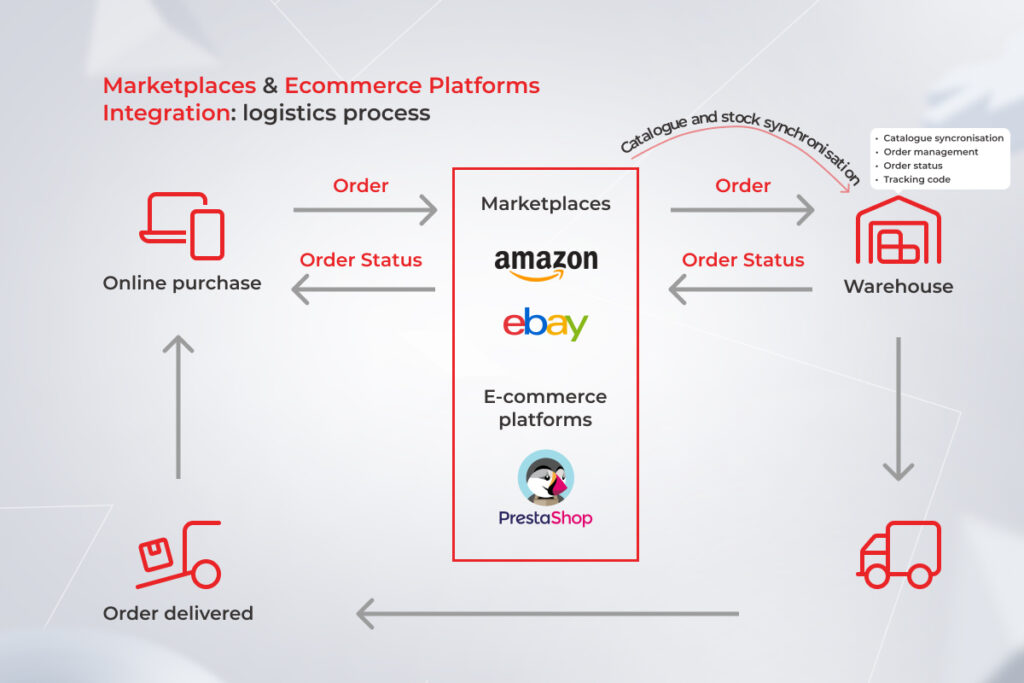
Logistics software is in charge of ensuring the efficient flow of goods, starting from inventory management to last-mile delivery. Integration of ecommerce and logistics operations allows businesses to manage shipping and fulfillment from one location. Once an order is placed, it gets automatically processed and sent to the nearest warehouse or fulfillment center.

logistics process in ecommerce

Uninterrupted data exchange between the two also helps companies keep track of inventory and ensure that products are always in stock. Additionally, integrating ecommerce with logistics delivers a more seamless experience for customers by allowing them to track their orders from start to finish. 

PIM

Product information management (PIM) is a circulatory system for businesses with a high volume of SKUs, so integrating it with customized ecommerce solutions is crucial. Along with accurate product information across all channels, PIM software helps streamline supplier data, consolidate supply chains, and improves internal collaboration.

product information management system

Social media

With more eyes on social media than ever, not tapping into the market means losing potential customers and sales. This integration bridges data between social media engagement, website visitor behavior, and sales to analyze purchase patterns, campaign performance, and marketing initiatives. Also by connecting with social media platforms, you can dabble in live and shoppable commerce, doubling your revenues and distribution channels.

Accelerate radical growth through end-to-end integration

Let’s get to it

6. Find the right vendor

Delivering high-impact ecommerce software requires cross-functional expertise and hands-on experience in ecommerce development services. To bring a dedicated team of experts on board, you need to make sure the selected B2B ecommerce development company has at least 10 years of experience, a track record of successful custom ecommerce development solutions, and a rich technology stack to implement your ambitious ideas.

Another important consideration is the readiness of your software vendor in providing training, maintenance, and update services to match your evolving needs in custom ecommerce website development. Ideally, this readiness should be supported by on-demand team augmentation services to scale your capacities in a specific development field.

An accomplished custom software development partner also possesses profound advisory expertise and can provide the full picture of your TCO, perform a comprehensive audit of existing business systems, and suggest optimal solutions to your requirements. If you have compliance-heavy business processes, pay attention to the data security standards the vendor works with.

Turn your ecommerce solution into a growth engine

Today, operating a successful ecommerce company requires investing in the right digital capabilities and placing digitally driven commerce at the center of business. Data-first architectures, integrated sales management, and a flexible solution core will guide you to a new performance frontier and create a personalized experience across all channels. 

However, a complex consumer and technology landscape makes it hard for companies to place their bets carefully. To size up the impact on their balance sheets, ecommerce business owners need careful guidance from technology partners, paired with a wide selection of tech solutions and ongoing support.

Sell at the speed of life through our custom ecommerce platforms

Reach out

FAQ

What is a custom ecommerce website?

Custom software development for retail refers to the process of planning, designing, and implementing a web solution that is specifically tailored to solve the challenges of a particular company. A custom ecommerce solution can include a custom look and feel, features, and integrations that are not available in an off-the-shelf solution.

What are ecommerce solutions?

These are platforms that enable businesses to sell their products and services online. These solutions span a variety of tools, including a full-on storefront, payment processing software, product information management systems, and more.

How much does a custom ecommerce website cost?

There is no universal pricing that can apply to all business needs. The cost of custom ecommerce development services hinges on the development approach (platform-based, custom, open-source), the core features, the design, and the hosting and security needs.

How do I create a custom ecommerce website?

You can either choose a ready-made platform or turn to a custom ecommerce web development company. In the second case, a dedicated team of experts takes over the entire development process of your custom ecommerce solution, which helps set your initiatives for success and tap into long-term value.

What are the stages of ecommerce development?

Any custom ecommerce solution goes through the stages of planning, design, development, testing, implementation, and maintenance. Following an Agile-driven approach, our team delivers your custom ecommerce websites iteratively to increase the quality of your solution.

Which is the best ecommerce development platform?

Some of the most popular ecommerce development platforms include SAP Commerce, Opencart, and Zoho. Reach out to our consultants to choose the right one for your needs.

How many hours does it take to build a custom ecommerce website?

The timing varies based on the complexity of your custom ecommerce solution. On average, it may take up to 16 weeks to build a complex custom ecommerce platform from scratch.

5 Challenges in Implementing Big Data Analytics Based on Our Client’s Experience

While well-informed decision-making makes all the difference, it comes with certain data analytics challenges which, if ignored, put your efforts at risk.

As data analytics has become increasingly more influential in the business world, organizations everywhere consider it the main objective. In turbulent times to come, it is vital to get a comprehensive image of how an enterprise works and how its resources are allocated. However, in order to make the most of your data, certain issues have to be addressed, or else the data analysis process can be impeded. 

This article will focus on the biggest challenges in data analytics. Here, our customer’s experience is used to illustrate the obstacles on the way to insights, with advice from our business intelligence consultants on how to handle them.

The scary five of big data analytics

Our client is a fashion retailer looking to get their data initiatives across the goal line. However, the company’s digital transformation was put on pause as it struggled to get hold of the right data management strategy and BI tools. 

Here are the challenges highlighted by our client and the pro tips to solve them suggested by our experts.

1. Inability to define user requirements properly

The company in question has been dabbling into the potential of BI tools and data visualizations for a long time. However, our client had no hands-on experience in business intelligence, and so, couldn’t accurately define BI requirements. 

With a requirement brief on hand, it would be easier to suggest a technological solution. But our BI specialists did an amazing job analyzing the business needs and making the most accurate technical adjustments in accordance with them. Essentially transforming their demands into clearly defined objectives. 

Pro tip: If you are new to the BI ecosystem, make sure to get professional advice from an experienced technology partner. In this case, your vendor will do the heavy lifting of requirement elicitation, while you can choose one of the suggested technical solutions.

Challenges in Implementing Big Data Analytics

As it turns out, our client also struggled to communicate the requirements because they did not have a focus area to start with. Instead, the company was trying to encompass each aspect of business performance, from revenue to inventory turnover, and squeeze all the KPIs into one all-in dashboard. While it is certainly possible, the miscellany of metrics makes your reports less digestible.

Pro tip: Start small by identifying a few core metrics to track and visualize. By going with one functional area at a time, you increase the odds of a more successful and consistent BI adoption process and eliminate the lion’s share of data analytics challenges.

Challenges in Implementing Big Data Analytics

2. Carrying out system changes without considering the impact on data of other departments

In most cases, it’s not enough to map out the KPIs for analysis and tracking. For cross-functional teams, it is also important to first clarify and define what these metrics mean. As departments may do calculations in different ways, a shared understanding of KPIs and their calculation prevents the discrepancy in the value of the metrics.

On this line, our client’s another data analytics challenge was the different perspectives on the same metrics across business departments. As such, offline sales managers viewed the sales revenue as everything earned from the sale of the clothing, including the VAT charge added on top. Conversely, the accounting and finance department uses the net revenue of both online and offline sales as the core metric. 

Our team has eliminated this knowledge-sharing gap by introducing a glossary of KPIs for decision-makers. This way, each department gets a fix on the metric in use, associated data sources, and the metric formula. Decision makers also set personal ownership of each performance measure and assign a dashboard owner within a department for a given metric. 

Pro tip: Make sure you have selected the right metrics to display and are fully aware of how KPIs end up in executive and operational dashboards. Consider using separate dashboards for each department to avoid metric ambiguity and overlapping.

Challenges in Implementing Big Data Analytics

3. Lack of a unified corporate picture

While each business unit should get a detailed view of internal metrics, CEOs need a more high-level overview of business performance. A high-level snapshot provides a bird’s eye view of company performance and its bottlenecks. This may be done by providing an executive summary of the top KPIs across business units or by providing high-level reporting dashboards for each department in the company.

The metrics included in an executive dashboard vary by industry and company. Retailers might want to keep tabs on profit and revenue per square foot, logistics costs, profitable marketing channels, top-grossing items, gross margin return on investment, and other vitals.

As for our client, the company needed a unified monitoring report that sources and consolidates predefined values on a company’s performance. The dashboard should offer a quick health check with the possibility of drilling down into a particular metric. As for variables, our client went with three separate screens for sales analysis, profit dynamics, and customer data that demonstrate the YoY (year-over-year) growth.

Challenges in Implementing Big Data Analytics

Pro tip: Bring metrics by a specific department to a common view needed for executives to act on. An executive dashboard should include core, high-level metrics that can be used for a unified business strategy language.

Achieve a unified view of your business

Consult our BI team

4. Collecting meaningful data to the agreed standard

Around 95% of our clients think that it’s enough to compile each piece of business data, send this hoard to the BI tool, and call it a day. While it would be a perfect scenario, in most cases, companies are inundated with scattered data sources that lack administering. This is a textbook example of data management gone wrong.

What are the challenges of data analytics in this case? In the absence of the right data architecture, modeling and administration, your data quality does not stand a chance of producing remotely accurate and meaningful insights for decision-making. As a result, 77% of companies struggle to derive high-quality data, which leads to distrust in the organization’s data and analytics.

Challenges in Implementing Big Data Analytics

Pro tip: According to our big data experts, the issue of data quality cannot be solved at the analytics level. It should be eliminated by introducing a unified data management strategy within the organization. A business intelligence tool can then be used as an acid test for your data quality.

Getting back to our client, the organization had the same problem of missing data values, incomplete input, duplicates, and other snags. Moreover, the company did not have the integration architecture to share information between various subsystems automatically. 

Our team advised the organization on the best practices of collecting, storing, and transforming their data as well as took over the technical aspects of seamless data sharing between the business systems. Our data engineers identified the source of master data within each business unit (CRM, ERP, and others), selected the right data model, and calibrated the sharing process between master sources and data warehouses. 

Whip your data management in shape

Get a free consultation now

5. Staff resistance to adopting a new system

A low adoption level of BI among your employees can also become a significant roadblock to your data analytics efforts. Currently, the ceiling on analytics adoption among its end users stands at an average of 25%, while others favor traditional spreadsheets or gut-based predictions. 

The root cause of this problem can stem from low-level skill training, the complexity of a BI tool, or the fear that automation can displace an employee. Each type of rationale should be approached individually, while the overall value of a reporting system should be clearly communicated and demonstrated to each employee. 

At first, our client struggled to get employee buy-in on having Power BI as an analytics standard. The main reason for the aversion among employees seemed to be people’s natural resistance to change.

Following the unique user needs of each business unit, our BI specialists have adjusted the interfaces to the specific department. The onboarding was followed by internal workshops for each department and facilitated by creating documents with guides on the tool.

Based on our tried-and-true experience, we know that any business transformation initiative, including big data analytics implementation, brings the most value only when process optimization, the deployment of cutting-edge technologies, and cultural shifts in people’s minds move towards each other, not further apart.

Pro tip: Low business intelligence adoption is inevitable if you neglect the role of the people involved in your processes. Build a BI interface with the end user in mind and ensure a smooth take-off by setting up single onboarding training.

Navigating your company through data analytics challenges: the easy way

Just like every house is built on solid ground, insight generation is built on a data foundation. Ironically, data itself is one of the biggest challenges in data analytics that can cripple your BI management and lead you to the wrong decision.

We helped our client to realize the full potential of data analytics and use it to their advantage. By having a unified data architecture and the right technology footing, the company can now get a real-time view of core business operations and act on the data to grow, innovate, and adapt to the fast-past retail market ahead of the competitors. 

Get your data analytics right

Contact our data experts

When Cloud Meets BI: Cloud BI Solutions to Refine Your Business Results

When combined with cloud technology, business intelligence hits its stride in the form of cloud BI solutions.
For quite a while, the cloud has been viewed as the rescuer of business processes. Its speed and scalability are essential to embrace digital business opportunities. Business intelligence is another significant factor that allows organizations to generate value through high-quality and blazingly fast analytics and reporting.
54% of enterprises have already cross-bred these two and claimed that cloud business intelligence solutions are essential to their current and future initiatives. Let’s see why yet another business infrastructure blends well with cloud computing.

What is cloud business intelligence?

Cloud-based business intelligence, or cloud BI, refers to the process of consolidating and crunching data with the help of cloud computing — either partially or fully. With unmatched scalability and processing speed offered by the cloud, companies can pull new meanings from their data across a wide range of devices and applications with none of the overheads associated with locally run infrastructures.

How does cloud BI work? 

When it comes to deploying business intelligence on the cloud, organizations have three options: private, public, or hybrid solutions. While each of the three, abstracts, pools, and shares scalable computing resources across a network, they all differ by the control level over the infrastructures. 

Private

This type of cloud-based analytics business intelligence is premised on rented, vendor-owned data centers. Unlike the popular opinion, privately-run cloud, BI can be located off-premises, yet it’s still dedicated exclusively to the needs of a particular company. 

This type of cloud-based business intelligence software is usually a go-to option for compliance-heavy organizations that have to adhere to regulatory compliances.

Public

Public cloud business intelligence is accessed as an on-demand software-as-a-service solution. Public BI applications cater to multiple companies and are under a full dominion of a cloud provider. As the cost is divided among all tenants, public business intelligence is greatly favored among small- and mid-sized businesses with middle to low regulatory compliance needs.

Hybrid

This access model is the middle ground between private and public environments. A hybrid cloud infrastructure runs business-critical workloads on private clouds, while less sensitive data flows into the public cloud assets. The two environments operate seamlessly side-by-side and allow workloads to move between the two interconnected environments.

Cloud BI Solutions

Cloud-based business intelligence architecture

Cloud BI solutions thrive on an integrated and unified data hub that further sets data analytics in motion. That’s why cloud business intelligence tools need a data warehouse to manage disparate data flows and bring data from various sources under one hood. 

A data warehouse has the upper hand over on-premise warehouses as a more scalable, flexible, and all-in data storage option with less routine management burden and a shared pool of computing resources. Companies are no longer shackled to physical data centers and can dynamically ramp up or down their storages to meet evolving business needs. 

Cloud BI Solutions

But how does all data end up in a warehouse? A cloud BI ETL (extract, transform, load) process is what helps transform raw insights and inject storage-ready bits from multiple points into a single data warehouse. Using cloud-based ETL technology, companies can automate the whole data lifecycle and copy source data to the warehouse destination regularly to facilitate data import.

Besides a data warehouse and ETL, organizations need a few other add-ons to stoke up their cloud BI software. According to a report, users give high marks to relational database support as an element that connects data from different tables (transactions, customer information, etc.) to a cloud data warehouse for a more comprehensive assessment of business performance. 

Compatibility with on-premise digital estates such as ERP and CRM and open client connectors are also critical priorities for seamless data sharing with cloud architecture. NoSQL source support sits on the sidelines of architectural priorities, suggesting that the public cloud is mostly viewed in the context of standalone applications. 

Cloud BI Solutions

Want to build a high-performing BI architecture?

Reach out!

What can you gain from cloud BI solutions?

By 2028, the global cloud analytics market is slated to reach over $86 billion, driven by the data connectivity imperative. Here are the core advantages of cloud BI that contribute to its proliferation.

Fast and easy implementation

Since cloud business intelligence doesn’t require any additional hardware or software installations and cluster set-ups, it takes off faster compared with on-premise ecosystems. A wide range of baked-in features, modules, and governance measures put up to the speed and ease of implementation provided that you know your way around all configurations.

Ease of use 

Cloud BI tools enable self-service insight gathering through simple questions, easy visual analysis, and an intuitive web-based authoring interface. The miscellany of guided workflows suggests minimal adoption barriers for cloud analysis, resulting in higher user buy-in and a low learning curve.

Scalable resources

A cloud architecture auto-scales to growing users with high availability and dynamically allocates resources to match evolving BI initiatives. It means that teams don’t have to build up databases for high workloads immediately, and can easily scale up or down computing resources on an as-needed basis.

Cost savings

The cost reduction potential of cloud BI stems from lower CapEx as you don’t have to spend money on hardware. It gets tricker with operational expenditure where a medley of configurations enters the equation. Without a dedicated team, you risk throwing money down the configuration drain as you fine-tune your cloud domain.

CriterionCloud Business IntelligenceOn-premise BI system
Initial investmentLowHigh
Associated IT costsLowHigh
ImplementationFastLong
Level of customizationMedium to lowMaximum
Data security managementVendorCompany
Total cost of ownershipPredictableEvolving

Advanced data sharing

Cloud analytics is the epitome of collaborative knowledge-sharing and joint workflows as it allows any team member seamless and on-the-go access to the data estate. The infrastructure also allows you to blend data from on-premise and cloud, and augment it with real-time and web-based insights within a single interface.

Automatic updates 

Update management is an irritating inconvenience for on-premise estates that gets hassle-free in a cloud infrastructure. Cloud service providers usually cover hosting, maintenance, and updates so that you can focus on mission-critical tasks.

Rapid data processing

For complex and hefty analysis, companies can leverage high-performance computing available on the cloud. Available at an additional cost, cloud rapid data processing can speed up resource-intensive analysis without a swath of hardware while rechecking your input for maximum accuracy and consistency.

Ease of integration

Although both local and cloud business intelligence boast rich data integration potential, cloud tools still excel at built-in data connectors. Companies can instantly go from data to insight to visual display by integrating all data into a cohesive whole from databases, online services, and other supported data connection types. 

Conversely, on-premise solutions require a more dedicated effort to set up an integrated blanket of data due to the lack of ready-to-go data connectors.

Security & Compliance

Cloud BI compliance benchmarks provide good baseline security as cloud providers focus on the ever-changing regulatory landscape. A BI solution helps you take care of common industry-specific standards and local regulations by offering robust built-in security measures and compliance enablers — gift-wrapped.

Analytics tools keep your guard up with data encryption, automated security updates, multi-tiered caching, and advanced authentication measures. It’s like having a whole team of data security experts at your disposal instead of wading through guidelines and acting on your own.

Learn how to make the most of cloud BI benefits

Drop us a line

What to pay attention to in cloud-based business intelligence software?

A business intelligence tool is an umbrella interface made up of various components to uncover, analyze, and report data from a wide array of data sources. Although the stuffing differs by solution, any BI tool needs four main ingredients to convey the taste of data excellence.

Data management

From data quality to security to governance, an end-to-end data management strategy demands a multidisciplinary approach reinforced by the company, its people, and its digital ecosystem. 

A cloud-based BI tool cannot make up for a holistic data management regimen. But it can become your most integral asset that promotes better data health by integrating, contextualizing, analyzing, and protecting your data assets. 

Some BI solutions provide in-built data management capabilities that help you prepare, model, and bring your data to life within a single interface. The Microsoft BI stack is a prominent example of end-to-end analytics architecture that guides each step of your business intelligence journey with a variety of purpose-built tools.

Advanced analytics

Complex analytics capabilities turn descriptive insights into prescriptive knowledge. This is why your business intelligence system should be premised on built-in AI capabilities, such as image tagging, sentiment analysis, and others, to make every bit of data work to your advantage.

Data visualization and reporting

Visualizations make insights more digestible for all decision-makers and help your data tell stories, instead of throwing puzzles in a spreadsheet of numbers. A BI tool should allow you to slice, filter, highlight, and drill into visualizations with built-in charts, graphs, and maps, along with custom drag-and-drop dashboards. 

Collaboration

Finally, a tool should promote unified team efforts through multiple collaboration channels and sharing options. Some solutions also have a presentation mode to display reports, an embedded functionality for seamless data-sharing, and shared datasets for user-based report creation.

According to a report, other BI mainstays include an ad-hoc query for more niche business questions, production reporting for manufacturing companies, and self-service capabilities for IT-independent business units. The percentage distribution also suggests a direct correlation between the set of features and a user’s job function.

Cloud BI Solutions

Set up your BI initiative for success

Get in touch!

Who can benefit from cloud BI solutions the most?

Over the last few years, business intelligence has emerged as a game changer for different industries. However, some verticals have hit the mark with cloud analysis. 

According to Statista, marketing and sales stand as the biggest gainers of cloud BI, with 50% of respondents marking this asset as critical for their importance. The R&D area has seen a growing importance of BI as well, – with 42.5% of respondents reporting its critical potential. 

Cloud BI Solutions

Another report demonstrates a weighted-mean interest in cloud analytics in higher education and customer services, while healthcare and financial services are still testing the waters of business intelligence.

Cloud BI Solutions

This upward tendency in certain industries implies a tie-in to the growing data in the fields, the demand for greater business flexibility, and the need to measure business performance at scale. All these and more are conveniently packed into cloud business intelligence. 

Which cloud BI provider to choose?

Your business intelligence initiative doesn’t need to be a big bang from the start. You can start small by testing popular SaaS solutions from renowned cloud providers. Microsoft Azure is an acknowledged leader in the field, with 77% of users reporting its critical or very important impact.  

Cloud BI Solutions

The positive user sentiment is well justified for Microsoft Azure as it offers the complete suite of data analytics, BI, and visualization tools on top of its mature, cloud ecosystem. Backed by a multi-layered security approach with 96 compliance offerings, Microsoft Azure helps companies use their data strategically and safely with no back-and-force of third-party tools.

The dominance of Microsoft Azure is indisputable. This ecosystem has your data worries covered on all tracks with data lakes, Power BI, Azure Synapse Analysis, and whatnot can be built with Azure Stack.

As a Microsoft consulting partner, *instinctools helps companies accelerate Power BI adoption and optimize this cloud ecosystem to fit their unique business and data needs. 

Amazon Web Services and Google Cloud Platform also sit on top of leading BI platforms with 66% and 41% combined critical and very important scores, respectively. Both allow users to explore data through interactive dashboards, pattern detection, and outliers powered by machine learning.

The powerful duo of business intelligence and cloud

In an increasingly winner-takes-all business environment, any organization that doesn’t put its data to good use lives on borrowed time. Cloud BI tools help you achieve business impact with data and get a comprehensive perspective — at any time, at reduced costs, and at your convenience. Powered with analytics and visuals, cloud BI solutions give voice to your data and help you translate the language of numbers into the language of action.

Need help with your cloud BI tools?

Contact our experts

Cloud ERP vs. On-Premise ERP: Which One Wins the Duel?| Expert’s Opinion

Over the last few years, ERP systems have become imperative for streamlining enterprise operations and maintaining business resilience. The pandemic-induced shock has also contributed to an upswing in resource planning software. As a result, the global market of ERP digital solutions is projected to hit over $93 billion in 2028. But while the bright prospects of ERP systems are statistically proven, the dilemma of cloud ERP vs on-premise hosting remains unsolved.

Each option has its advantages and limitations, and you have to find a balance between a bunch of factors. You need to consider the cost of ERP ownership, your requirements for system performance, its customizability, and many more. In this article, we’ll look at these and other main debating points of cloud ERP vs. on-premises ERP through an expert prism.

Key considerations before going for cloud vs. on-premise ERP

According to Accenture, around 58% of companies prefer private or public cloud-based ERP systems. On-site platforms make up 25% of all ERP software. While these figures may already suggest the winner, the choice of cloud vs on-premise ERP depends on a whole range of factors.

Cost of ownership

Comparison table on cloud ERP vs. on-premise ERP costs of ownership

The question of costs is one of the first to surface when debating cloud ERP vs on-premise one. Cloud-based enterprise systems can be purchased and governed without large upfront costs. Cloud users are charged a recurring fee which can go up or down based on the resources used and the number of users.

Operating expenses such as infrastructure maintenance, recovery, updates, and others lie on cloud providers as well and are distributed among all cloud adopters. It means that cloud-based ERP software translates into total cost-of-ownership savings thanks to the shared business model.

Moreover, the absence of additional IT infrastructure costs for the cloud solution also contributes to the cost-saving potential of a cloud ecosystem. This has been highlighted in the TCO case by NetSuite, where small and medium businesses have seen lower overall TCO for a cloud-based NetSuite system compared to on-premise enterprise platforms.

Statistics on the four-year TCO distribution within cloud-based and on-premise systems

Conversely, local systems imply a higher initial investment for adopters. Companies also cover hardware costs, database maintenance, security, and other capital expenditures, all combined into a significant initial outlay. However, there are more and less cost-efficient options among on-premise ERPs. Let’s take SAP vs. Odoo as an example. When opting for SAP, you have to pay for maintaining servers and a license fee, while on-premise Odoo is license fee-free.

Therefore, cloud solutions are more affordable for businesses looking for a lower initial bid price.

System performance

Critical business applications must be available 24/7, making uptime and reliability paramount for enterprise business management systems. At first sight, cloud servers give odds to on-site systems due to automated monitoring, disaster recovery, easier back-ups, and downtime expectations which are the core prerequisites in cloud SLAs. 

Moreover, data centers scattered across different locations eliminate a single point of failure, making your data accessible even if one of the cloud servers shuts down. 

Unlike cloud-based solutions, with your data backed up by different instances, an on-premise system won’t work if your server crashes. Therefore, an on-site enterprise takes diligence and dedicated resources to ensure minimized downtime and stable performance.

Yet, distributed servers aren’t immune to unplanned outages, leaving business owners at the mercy of connectivity issues. And in this case, an outage or unstable internet connection can knock out your access to important files and enterprise applications.

Security

Companies seem to place a high degree of trust in cloud data security, with 48% of organizations storing their critical data in the cloud. Indeed, cloud ERPs come with in-built advanced security measures beyond what most businesses can afford. Role-based access controls, end-to-end encryption, threat detection, and other safeguards reduce the risk of a data breach or unauthorized data access for cloud adopters, and thus, minimize your data security concerns in general.

However, cloud-based solutions do not grant full control over your software and threat landscape. Also, if any sensitive data spills through the cracks, it’s the business that faces incurring costs and legal repercussions. Cloud misconfigurations also account for 15% of breaches.

With on-premise ERP applications, you are in charge of data governance and the entire infrastructure, which makes it possible to implement tailored security measures and meet strict security requirements relevant to financial institutions or governmental organizations.

Integration

Cloud ERP solutions offer rich integration capabilities that help connect software applications for better visibility and data interoperability. With low maintenance and easy deployment, companies can set up the cloud ERP infrastructure from a variety of stand-alone modules based on their business processes and needs. Odoo-based ERP solutions, for example, allow businesses to join a broad spectrum of business apps into a centralized well-integrated system.

But despite a plethora of integration options, cloud integrations are still tied to a limited number of connectors. Therefore, you might not be able to cover all the integration needs or establish a seamless connection with other internal business systems.

On-premise ERP solutions, on the contrary, bode well for bespoke integrations that do not need an Internet connection. Yet, on-premise data connectivity calls for a dedicated IT team and a significant one-time investment.

Customization

Cloud ERP vendors offer customizable innovation as paid a-la-carte options. Since around 85% of business processes are the same across companies, standard cloud modules and extensions meet the majority of customization needs and best business practices.

But despite their diversity, cloud extensions tend to be more rigid, especially when it comes to individual ERP deployment. The collection of unique design changes, e-forms, integrations, and system dependencies are impossible to take into account with the generic cloud approach.

Local platforms take the lead in terms of customizations since your development team can adjust your ERP system to internal processes. Yet, custom deployments and configurations come at a high cost and require rich tech expertise.

Let’s make your ERP a success together

Get in touch!

Control

Ownership of data is another big rub in the duel of ERP cloud vs on premises. Legal concerns, vendor lock-in, and unpredicted fees incur risks to business operations and a company’s well-being. Since the cloud provider can be legally considered a custodian of the data, your access to data assets can be suspended at the provider’s sole discretion during an investigation of any suspected violation.

On-premise ERP systems are based on single-tenancy infrastructure which keeps your critical data assets away from prying eyes. This way you have higher control over data configuration, security, and management because you can access the data physically. Full data control is especially important for mature enterprises with strict internal security standards.

Compliance with standards and regulations

Data governance and compliance issues have been plaguing cloud systems since the dawn of time. Over 50% of the companies struggle to meet compliance and audit requirements when employing Infrastructure as a Service cloud solutions. The root of compliance worries is often the shared nature of the cloud. Once an organization moves to the cloud, managing access controls or keeping an eye on the available compliance enablers becomes much more difficult.

But despite higher compliance risks, distributed cloud systems cover the majority of data protection regulations, including GDPR, CCPA, HIPAA, and others.

On-premise solutions help meet the evolving regulatory landscape thanks to full control over user access policies, security patches, and other compliance measures. Moreover, data localization regulations prohibit data from being processed in the cloud, making on-premise hosting the only option.

Updates

Dubbed better than on-premise software due to its flexibility, the cloud eliminates the hassle of maintaining software. Cloud ERP providers make sure you’re always running the latest ERP version with cutting-edge functionality, while your IT department can save the time and effort of installing new patches. However, the choice of updates is left to the vendor, putting you in a subjective position.

On-premise infrastructure makes updates more resource-intensive, yet grants full control over the choice of innovation.

Mobility and accessibility

Finally, ERP on premises vs in the cloud differs in how portable they are for users and applications. On-site platforms can usually be accessed locally. Remote access is only possible using VPN or remote desktop technologies. It can complicate the team’s collaboration and limit the accessibility of the system.

Conversely, the cloud is accessible from anywhere provided you have a stable internet connection.

To sum up the differences between both systems, we’ve curated the main differentiators in a concise table below.

On-premise vs cloud ERP compared

Comparing cloud ERP vs on-premise software according to a variety of criteria

On-premise vs. cloud ERP dilemma: three questions to ask

Along with the criteria mentioned above, there are additional factors that should guide your choice.

What project timeline can you sign up for?

Cloud resource planning software is almost a synonym for fast and easy implementation. On average, an experienced development team can get your cloud solution up and running within a few days to a couple of weeks. The specific timeline can vary based on your migration needs and system maturity. On-site infrastructure is more time-consuming since it is built from scratch.

Therefore, if you’re aiming for reduced development time, the cloud is a great tradeoff between fast deployment and decent customization.

Do you need a unique solution?

The next thing to look at is whether the ready-made functionality covers your business and development needs in full. Contacting a team of specialists is the easiest way to validate each building block for your cloud ERP system.

However, if your business vision runs counter to a ready-made suite, a custom on-premise infrastructure is the best way to fill in the functionality gaps.

Should your system be able to scale?

Usually, resource planning platforms do not have ambitions for rapid growth or high workloads. However, scalability is still important to help your enterprise systems adapt to the changing needs and demands of your business.

In this case, cloud elasticity can easily attend to your scalability needs. On-demand cloud scaling allows you to ramp up or down your IT resources without building out more hardware. Conversely, on-site software is more challenging to scale, since it requires additional hardware, CPU, RAM, or other boosters.

In terms of scalability, cloud infrastructure grabs the trophy as an easily scalable enterprise solution.

Cloud vs on-premise ERP: which one is right for you?

The best ERP hosting solution will be unique for each company based on the budget, time constraints, compliance requirements, and other prerequisites. Cloud ERP infrastructure is the preferred solution for a quick and easy take-off that doesn’t need a large upfront investment. Locally installed systems grant full control over your assets along with unmatched customization and integration options.

If you are struggling to choose between on-premise and cloud, our vetted experts are ready to help you make the big decision. We can also take over your deployment needs and set up an ERP platform fully tailored to your business requirements. 

Ready to build an ERP on time and on budget? Reach out.

How to Make Use of Financial Business Intelligence? (Non-) Obvious Benefits Revealed

What finance departments certainly have an abundance of is data. It comes from everywhere: spreadsheets, invoices, journal entries, and whatnot. A real treasure, right? Unfortunately, a lot of data by itself does not guarantee that you will be able to unlock all its hidden potential without sacrificing operational efficiency. Forrester reports that up to 73% of enterprise data goes unused for analytics. So what can be done to change the status quo and leverage data from heterogeneous data sources for getting actionable insights and your business growth? Financial Business intelligence addresses finance leaders’ needs for dynamic modeling, holistic data analysis, and accurate planning.

What is so wrong with spreadsheets?

Many CFOs are still not ready to trade Excel for BI tools in finance, guided by the logic of not touching a system that already works. But does it? Spreadsheets have been used for keeping records and conducting data analysis for so long that it’s not even questioned whether or not they are worth it.

However, there are plenty of rationales why you should no longer rely on moss-grown solutions for financial reporting and consider tapping into new alternatives, such as business intelligence software.

One of the main reasons for this is susceptibility to human errors. According to various studies, 9 out of 10 spreadsheets contain mistakes, This is not surprising at all, given manual data entry. Even something as small as a misplaced decimal point can lead to huge accounting distortions. 

Another problem with spreadsheets is that they provide a static view of historical data, so putting them to work across complex and dynamic processes is quite a useless idea. A holistic business vision cannot fit into dry financial statements and end-month reports – translating them into actionable insights is a painful undertaking.

The constant changes in the financial landscape leave businesses with no choice but to quickly assess these alterations and act on them. In these conditions, ignoring a wealth of data stored in your enterprise systems is not just unwise but can be devastating. The question is can you take advantage of the raw data locked in spreadsheets? Skimming through hundreds of pages of traditional reports is hardly a good way to gain control over your numbers.

In addition, manual number crunching takes too much time, which, along with taking up your employees’ precious time, leads to the inability to make informed decisions quickly.

Employees might spend 3-5 days a month filling out some crazy Excel spreadsheets. And then, there’s versioning, which, after changing a single digit or moving working files to other shared folders, or after sharing a final presentation file with some links to the working files, involves running through a dozen other files to make sure everything fits. But what if the specifics of your business require you to make well-informed decisions more often than on a monthly or even weekly basis? At the same time, no one is immune to force majeure, which is not scheduled and calls for immediate actions.

Finally, spreadsheets do not correlate with the financial planning process making it hard for the finance office to get a clear perspective of the current situation and to take forward-looking actions.

Conducting plan vs actual analysis, calculating variance, extrapolating data – all this is very challenging to do in Excel. It’s enough to change the slightest detail for the whole thing to collapse instantly. In addition, it’s incredibly inconvenient. If you use Pivot tables, they tend to overlap, so it’s hard to imagine what they will look like in fact. No wonder adding data for new analysis or reporting periods in Excel files and fine tuning all Pivot tables and charts become utterly discouraging.

The explanations above as to why spreadsheets hinder the work of the finance department are already sufficient to lean toward BI in finance. This technology is capable of outstanding things. Keep reading to find out more about how it drives finance and accounting tasks and what exactly makes Business Intelligence so attractive for financial services.

Behind the pretty pictures: a detailed look at the benefits of financial Business Intelligence

There’s an opinion that BI is first and foremost a way to present data. Yet, outstanding data visualization is far from everything financial Business Intelligence tools can offer. To put it clearly, the visuals are just a nice-to-have feature in comparison to another kind of new opportunities and value this technology brings to your organization. 

If it was just a matter of visualization, it wouldn’t be the sticking point at all. For example, Excel’s modeling capabilities allow presenting charts and graphs too. However, compared to Business Intelligence applications in finance, its limits, such as data size restrictions, poor collaborative functions, and others, are quite significant.

What finance departments cry out for is something faster, something ‘click-of-a-button’ to get updates and predictive analytics in next to no time, something like BI tools for finance. When you implement technology using a thoughtful strategy, what can you expect to gain?

1. Deep stakeholder engagement

The incomparable advantage of BI financial services is that they provide a genuine stakeholder involvement in the “process”, namely long-term financial planning, budgeting, forecasting, and comparison with reality. For instance, if a branch manager has a clear understanding between an input (certain indices, plans for sales volumes, etc.) and an output, it allows for more effective conversations within the department. With self-service BI tools, like Power BI, Tableau, or Qlik, that Gartner mentions among the leaders in the field of data analytics, questions that arise in meetings are addressed and answered immediately. There is no need to go back to the analysts to prepare another report and postpone the discussion until the next time. 

Moreover, access to BI solutions via mobile devices and tablets also boosts the business leaders engagement – making financial data analysis more accessible; anytime, anyplace.

2. Time saved. A lot of it

Long gone the time when companies had no other alternatives than to use several Excel files, matching and filtering them manually to get a comprehensive picture of data. Now, the alternative is here and it’s Business Intelligence in finance, which provides incomparably faster report preparation and, thus, operational efficiency. Instead of almost a week to compile the data, it takes no longer than a leisurely cup of coffee and frees up several full days for intellectual work.

Couple that with the fact that there are some businesses where you can’t afford to wait until the end of the month to make a decision. For example, if you’re dealing with fast-moving consumer goods, to survive, you have to keep your finger on the pulse and an eye on your competitors. Otherwise, your analytics are pointless.

BI allows you to see and quickly grasp operational data such as, let’s say, the results of marketing campaigns. The contribution turned out to be twice as much as the investment? Perfect! All you have to do is to analyze exactly what caused this and move forward in the same direction. Whereas an in-the-red campaign serves as an obvious sign to change the strategy or, at least, make some adjustments. There are also such things as tracking bad-selling items, or low-margin ones. It’s difficult to do this in Excel, especially if you have many product lines and ten, fifteen, twenty thousand positions in the assortment.

Financial Business Intelligence

3. Consolidated location for your data

Imagine, how much more value a finance department can bring by analyzing the data and offering solutions, rather than spending eons on scrambling for the information on operations, supply chain, HR, procurement, sales and, well, you name it. Thanks to a full-scale BI system, financial data from all over the company and beyond – speaking of Big Data – is gathered in one place.

There are companies that have to pull raw data from a whole set of disparate systems, which in itself is a pain, not to mention that some of these systems might be outdated. Complete re-engineering of legacy software will take years and cost millions. So working with data is handled in any way possible: somebody uses FTP to transfer files, others upload CSV files into certain folders… But what if the folder is changed or the IT team rebooted the server? No wonder the output is messed up. Meanwhile, a well-designed, full-fledged BI system helps to organize this data correctly with a data warehouse or data lake and an ETL process in one place.

With Business Intelligence for a finance department, employees get the capability to quickly incorporate new data into the data warehouse and interact with all the necessary information in one location without having to search for additional data. Imagine, you can have all your data sources such as the web, SQL Server, Excel, and flat files funneled into a pre-configured solution, where this data is stored, processed, and visualized.

There’s no longer a need to juggle dozens of open tabs and separate reports to tell a story. Whatever data you want to put together, finance business intelligence software allows you to do it without a hitch. For more details, it’s just enough to drill down into the source report.

4. Self-sufficiency

The problem might not even be bringing data from different sources together. You may have a data warehouse and an in-house development team dedicated to helping users with managerial reporting. But that still won’t keep you out of going through all the circles of corporate IT hell while drawing up the terms of reference as many times as it takes for your needs to be understood, and you may still end up with something that doesn’t fully work. BI in finance, on the other hand, helps you unlock the full potential of your data – the kind you never knew you had – without involving the IT department.

5. Effective financial management

By providing robust financial business analytics wrapped in dashboards, the BI tool makes financial management more efficient on all fronts.

  • Cash flow management

Cash flow is crucial in non-ideal conditions in which current business has to function – when one crisis is followed by another. Some clients ask for extended terms, and others just slow down payments… With finance business intelligence, you will have visibility into your cash flow and make accurate forecasts to improve its health.

Oftentimes, companies go bankrupt not because they are unprofitable, but because they have a cash deficit. Cash flow management is the top priority for any CFO. In this way, all businesses that work to order and where the production cycle is long enough are unlikely to be able to do without BI financial services.

For example, with the Cash Overview report in Power BI, you’ll get a grasp of inflows and outflows in system currency, total bank balance and balance by legal entity, today’s actual vs forecasted balance, and more. Meanwhile, cash flow forecasting itself allows you to go into more detail and get daily forecast summaries and actionable data insights.   

  • Revenue management

The mission-critical questions like what, when, and who to sell as well as what price to set can be answered more easily and accurately when the data is collected, interpreted, and visualized by a financial BI system. 

Finance business intelligence offers a 360-degree analysis of pricing, inventory, promotional campaigns, and product launches. BI-driven revenue management helps businesses from a wide array of industries keep the lights on and reach target profitability. Take, for instance, hotel chains that use finance BI software to determine optimal room rates, forecast reservation, staffing needs, inventory levels, and other resources to avoid problems with procurement and staffing during off-seasons and peak seasons.

  • Expense management

For any organization that wants to stay in the business, it’s important to pay the bills on time, which can’t be done without proper expense management. But what makes it so? BI, among other things, is designed to keep track of the company’s expenses. It enables businesses to replace piles of receipts and spreadsheets with insightful dashboards to gain a holistic view of staff spending, ensure compliance with expense policies, and track T&E trends.

The decision to use special software for managing company’s costs and strategic planning is getting even more effective when bolstered with scheduled dashboards and reports email delivery. These tactics help managers keep an eye on their employees, set up alerts and notifications to manage expenses in a timely manner, and connect BI tools to your organization’s expense, billing and online travel reservation systems.

6. Accurate forecasting

Thanks to Business Intelligence applications in finance, you can bring the plan and the fact together on one level of business logic, in a single tool. And if this tool is also able to show what a fact consists of and why it is like that; it’s priceless. 

Let’s say you set up a business unit, so you had to buy extra SAP licenses, or a new production site was added, which entailed additional infrastructure. After a while, it all becomes forgotten – you can, of course, dig up the budget presentation for the required period, but it’s much more convenient, reliable, and faster just to click on the cell with the number, where there’ll be a note with the name of the person who added it and the date when it was done.

If the plan differs from the fact, you can do a drill-down to see what the discrepancies are due to. The data becomes available: you can do both synthesis and analysis without having to look for some emails, going through the tables, or calling a controller.

Forecasting

7. Faultless reporting

The thoughtless manual task of copying and pasting numbers is error-prone and can undermine trust in your financial data. Fortunately, all this heavy lifting can be done for you by financial Business Intelligence. Utilizing BI software for direct data access and report automation saves you time, money, and, most importantly, reputation as a specialist, which “takes decades to build and five minutes to lose”. 

Besides, BI brings more credibility to data by differentiating between good and bad data. Proper analysis is only possible when data is of decent quality. That’s why it’s not enough to simply gather information. The ETL process, which lies in the core of BI systems, is designed to ensure good quality of data in the warehouse through standardization and removing duplicates.

In addition, data health can be maintained by conducting regular audits or working with reliable data experts who know exactly which steps to take to optimize data quality.

8. Visibility of entire organization

What a CFO needs most is a one-stop-shop for all financial information. Armed with calibrated dashboards tracking financial data across the entire company, C-suites can drill down into the reporting to find answers to any financial-related questions. How do the costs of producing similar units at different enterprises compare? Are our production volumes different compared to the same period last year? What are the drivers of the variances? How does our performance correspond to forecast and budget? What are the slow-moving items that should be cut out of the supply chain? Speaking of which, BI does a great job covering that part of the business. 

Now, answering these questions is child’s play. And, on top of that, it has become much easier to explain the correlation between the numbers to non-financial workers.

9. Consumable data

Financial business analytics has never been as crystal-clear as BI technology has made it. Hidden patterns and trends, non-obvious connections, unnoticed opportunities, and underestimated threats – all come to the surface instantly when reflected on a dashboard. In addition to presenting complex concepts in a digestible format, robust data visualization democratizes data and communicates insights throughout the organization by determining why it is performing in a certain way and what you can do to improve numbers.

This way, BI tools for finance are an indispensable constituent of any modern company for analyzing financial KPIs against business performance and presenting a dynamic view of market trends, product interest and customer sentiment to highlight future strategic opportunities.

How does Business Intelligence for a finance department look? An overview of a dashboard example

After having undergone the transformations, the data can be grouped according to the custom pre-built finance report packages, such as CFO dashboard, Event briefing, Benchmarking, etc. Below we’ve prepared an example of the Finance performance dashboard, that summarizes the 10 most relevant KPIs on a single screen.

The top row shows profit, sales, quantity sold, and the number of orders in the current year against the previous year. The second row illustrates profits and sales by category, while the third one displays sales by margin, as well as the profits and margins of various subcategories of goods.

Financial Business Intelligence

To have a closer look and to gain a better understanding, users can drill down on data by clicking the relevant areas, such as sales. This action brings up a specific report that shows the granular details for the KPIs and drivers. The report opens right away and provides a root-cause analysis of the information shown in the dashboard.

It’s not only the head of finance that can benefit from these dashboards. Other specialists with the finance department (e.g. financial controllers) can utilize them to gain insights in their focus areas. 

The BI solution can be also supplemented with Artificial Intelligence (AI) and Machine Learning (ML) technologies to further analyze data and succeed at prescriptive analysis.

Get a head start with BI financial services

All the benefits that financial Business Intelligence brings to organizations, in fact, can be combined into one – a competitive advantage. Being able to automate number crunching, store, and process data in a singular place, and present it in a format understandable to all stakeholders, you save a huge amount of time on deep and holistic analysis and ensure decision-making is driven by data rather than by gut feelings. And this will certainly allow you to feel more comfortable in the market and act confidently, while those who are reluctant to embrace the power of business intelligence software will be flying blind.

Ready to take your business to the whole new level of awareness with financial BI?

Plan your next move

Business Intelligence Challenges Our Experts Faced… and Overcame

The importance of BI solutions is becoming indisputable. Statistics show that 26% of all companies have already adopted BI, and around 33% will do it this year. However, despite the fast growth of the trend, the path from getting started to leveraging its full potential still has some bumps along the way. A great number of business intelligence challenges stem from a system’s limitations, intricate business requirements, human factors, and whatnot. 
How to make BI software work for your organization? Our in-depth understanding of incorporating BI solutions into different industries and corporate levels enables us to articulate business intelligence issues and give practical advice on their resolution.

Stepping into the age of action comes with certain BI challenges

Business intelligence isn’t confined to the big guys anymore. Companies of all sizes can now turn disparate data into a plan of action. However, action-oriented data analytics is premised on multiple precursors, each being a potential challenge for early BI adopters.

dashboard example on finance performance

1. Integrating data from different source systems

BI only makes sense when it can collate and analyze data from multiple sources to present the end user with some solid ground for insights. Otherwise, what’s the point? However, the numerous data sources BI software has to connect to — from a plethora of databases and business apps to big data systems — increase the risk of telling the wrong story.

From the start, it might not seem to be a problem as long as in-built ETL processes allow ready-made BI platforms to directly connect to various data sources and transform data for their own use. As fast and attractive as it sounds, the built-in ETL is not omnivorous. Although some specialized connectors are constantly being finalized for new source systems, a medium to a large organization will at some point face scaling, performance, and maintenance issues if they exclusively use Power BI Data Flows as the ETL tool and DWH storage. 

First, working with raw, unstructured data increases the complexity and number of datasets which makes reporting more time-consuming. If the report integrates data from different sources, the same logic cannot be easily applied to another dataset. Secondly, with multiple versions of the truth across different datasets, the odds of discrepancies across the reporting system are high. Third, if your data amounts to millions of rows, the built-in ETL won’t be able to handle it, leading to slow report responsiveness.

The most rational solution in this situation seems to be the setup of a single repository, where data would be pre-aggregated and stored in a structured way — a data warehouse. By eliminating the confusion within your data, it contributes to the creation of a single version of the truth. Among other significant benefits central repositories bring is the possibility of historical data analysis and faster report preparation. Data warehouse technology allows dealing with an ever-growing amount of data sources without making you spend more on your BI tool maintenance.

Learn how to consolidate all your data under one roof for more reliable insights

Book a free consultation

2. Data quality issues

Data quality is one of the major challenges of business intelligence and stumbling blocks to achieving BI goals, namely, making the right, valuable decisions. Human errors, duplicated and invalid data, and inconsistent data formats do not allow you to acquire any worthwhile insights and can provoke wrongheaded actions on top of it.

A proper data management strategy helps tackle data quality issues. To put it into a nutshell, it deals with the data collected or generated by the company to ensure better decision-making.

Data architecture is a crucial data management component that plays a vital part in delivering high-quality information. Let’s say, a company has multiple sales channels, it’s a nice idea to merge all the information generated by them at the data warehouse level, from which it can be further distributed to different reports, after passing certain clearance algorithms defined by the business rules.

Data modeling is another thing you can’t neglect while trying to make your data eligible for analysis. For example, a visitor to your website, a participant in a survey you’ve conducted, and your client can be one person. However, you might have them presented in different roles in different systems, even if it’s the same entity. That’s why, to avoid data redundancy it should be decided which system (CRM, ERP, etc.) to assign this entity to.

Data management strategy is largely an administrative activity. At the same time, the technical part of building a proper, well-thought-out solution architecture must not be discounted. Work on the strategy should begin with a diagram of all the company’s data flows. Determine the source systems you have, where data is generated and consumed, what entities you have and where they are stored, and then decide on how to implement it technically.

Don’t let poor data quality stand in the way of your decision-making

Consult an expert now

3. Lack of data talent

Skill shortage is among other common business intelligence problems that impede data analytics efforts. In 2020, the United States faced a scarcity of data science talent — companies failed to fill around 250,000 positions. The 2022 Tech Hiring Survey also defined data science as a skill for which demand far outstrips supply. 

It is exacerbated by the looming talent crisis across the entire hiring market, changing demographics, and the ‘Great Resignation’, compacted by what could be another recession. Without dedicated skills, companies fail to make effective use of BI analytics, set up data warehouses for baseline information, or establish the required level of data literacy in general. 

To grapple with the talent crunch, companies tend to leverage outsourced expertise. A dedicated BI team makes up for an entire suite of in-house data experts and helps businesses validate their data initiatives fast and with no hiring hassle.

4. Bad data visualization

The quality of your data and analytics processes tends to steal all the glory. However, the design of your BI dashboards is just as important to communicate complex data to the decision-makers and turning critical insights into action.

If data isn’t presented and argued in a compelling way, it is ignored, or trumped by opinion. The value of having an argument and crafting a story component should never be underestimated.

Lack of interactivity, the inability to pull near real-time data, rigid templates, and even the wrong choice of color may lead to potential challenges in implementing the dashboard. To emphasize proper data values, companies should employ highly customizable dashboards with broad personalization capabilities to meet the unique needs of the organization. 

The right choice of dashboard type can also whip your BI management in shape. Analytical dashboards provide a comprehensive overview of crucial data, while operational dashboards include real-time updates relevant to a specific department. The strategic type delivers a rundown on the essential KPIs to the executives.

dashboard example on finance performance

5. Choosing the right software

Selecting the right BI tool is half the battle when it comes to tackling business intelligence implementation challenges. According to TrustRadius, Tableau, Qlik Sense, and Microsoft Power BI are the leading business intelligence platforms with the largest market shares. But which one clicks with your unique needs? Let’s touch on the main difference between the three.

CriteriaPower BITableauQlik Sense
Popularity (users)Over 5 million usersOver 220,000 data scientists38,000+ customers
Data sources130+ data sourcesConnects to nearly any data repository100+ data connectors 
Data visualizationCustom dashboards, embedded analytics, extensive data visualization toolsCustom visualizations, rich and interactive dashboards, embedded analyticsUnique “associative” data engine, custom visualizations
Cloud compatibilityAWS cloudAWS, Google Cloud Platform, Microsoft Azure, Alibaba CloudAmazon (S3, EC2, RDS, Redshift, EMR), Azure, and Google. 
Customer supportIncluded for Power BI Pro customersFreeFree
Advanced featuresNatural Language Processing, Machine Learning integration, predictive analysisEnhanced data visualization functions, predictive analysis and forecast, augmented analyticsSmart visualizations and analytics, AI and machine learning analytics

As you see from the table, choosing between those three tools is like choosing between Audi, BMW, and Mercedes, about the same quality packed into a slightly different exterior. 

However, in the case of a large-scale adoption, even subtle differences begin to play a role. License type, roles and permissions, discount allocation, and other factors have to be taken into account to optimize your BI experience.

Moreover, generic commercial solutions may not always suffice your visualization needs. For example, B2C startups are better off with open-source BI solutions due to the high analytical needs and the absence of licensing burdens. In some cases, companies opt for a custom BI tool for branded design.

If you’re struggling to choose your BI option, our engineers can recommend the right BI solution based on your infrastructure and unique project needs

Contact us

6. Low adoption levels of BI among employees

After all the money, time, and effort you’ve invested in your analytics software, it still might not work because users won’t accept it. Low adoption levels within organizations remain one of the leading BI problems. If you want a freshly deployed BI tool to be used not only by analysts or data scientists, make sure it is user-friendly, and not intimidating. 

Besides, employees frequently show justifiable — from their standpoint — resistance to new software. Such a BI aversion is entirely understandable as people whose main task has been to manually bring together the company’s analytics are afraid that reporting automation will put them out of the job. That’s why they need to be convinced otherwise. Employees who can embrace business intelligence challenges and opportunities will become more valuable assets to the company as they won’t longer have to waste tons of time on number crunching or worry about the risk of making a mistake. Instead, they will analyze the information from top to bottom and communicate the result of this analysis to their managers. 

The subtle art of dealing with managerial issues related to BI implementation and mindset transformational practices requires even more precision when it comes to Excel. People’s loyalty to this tool should not be ignored. Numbers tend to speak louder than words. Use them to show your employees how beneficial a BI tool can be in terms of saving their time. For instance, it takes financial controllers one or two days to handle ad-hoc requests, three-five days to prepare for monthly meetings, and around three weeks to summarize the year’s results. With the BI system, all reporting is done automatically, at a click of a button.

The main goal is to show a person how to use the dashboard to answer their questions and explore the available data quickly and efficiently. Trends are way easier to spot when data is adequately visualized rather than scattered across spreadsheets.

Yes, we know that Excel is not just about tables, and you can build charts in it, too, but you won’t be able to interact with them on the spot. In a dashboard, you can click on a single segment and see the information you need right away, while in Excel it will take you more time to do the same thing.

An efficient way to deal with business intelligence implementation challenges and an essential component of proper change management designed to soothe users’ pain is staff training. That’s why users shouldn’t be left in the lurch after the system’s deployment. Find BI implementation partners who will prepare the documentation on the new processes and arrange wide-scope training aimed not only at teaching how to work with the software but also at increasing general tech literacy. 

We explore the needs of each stakeholder to deliver tangible results

Let’s talk!

Navigating the path of business intelligence

Failure rates for data science projects loom large at 87%. It attests to the fact that a solid data analysis and visualization architecture cannot be strategized on a hunch unless you want to end up with sporadic and incomplete insights. Awareness, planning, and expertise will help you avoid most BI problems. Below, we’ll touch upon the three pillars of a successful business intelligence strategy.

Define what problem you want to solve

The application area of business intelligence is immense and spans virtually every business operation. Therefore, you should start small by identifying the scope of analysis and linking it with correlating metrics and reports. The reports, in turn, should revolve around a specific selection of KPIs, internal or external, to measure and analyze an organization’s data and improve on it. A BI consulting partner can advise you on the relevant metrics and validate your scope of analysis.

Transform the organization’s mindset with proper change management

As users segue from fragmented tools to an integrated BI system, you should have the correct transformational methods in place to eliminate inertia and promote system acceptance. Establish stable and transparent communication flows, bring leaders from different lines together, and run workshops and training to cultivate collaborative data flows and seamless knowledge sharing for accurate business insights.

Choose a reliable consulting partner

A single unified data warehouse and consistent data strategy lay the ground for fast and accurate data analysis. Without these precursors, your insights will be isolated in data silos, locked within departments as missed opportunities. To avoid data failures, secure an experienced BI consulting team to establish a robust data infrastructure, manage data governance, and connect your data warehouse with the right BI tool.

Hit pay dirt with business intelligence

Data-driven decision-making is no longer an option; it’s a mandate for business longevity and competitiveness. Business intelligence is what nurtures a data-fuelled approach and allows companies to turn their data into action.

BI-enabled vigilance is a collective result of the right data strategy, a unified IT architecture, and a consistent adoption cadence. If even one piece is missing from your BI puzzle, your company will be short-sighted when it comes to data, failing to make the right decision. Enlisting the support of data and BI professionals will help you put your puzzle together and overcome common business intelligence challenges.

Looking for a trusted Business Intelligence partner?

Reach out

Nine Benefits of Managed Cloud Services within OVHcloud

Over the last few years, cloud technology has felt a swell in demand due to increased awareness of its potential. Businesses move closer to the cloud and pass up bulky, on-site set-ups. But unless you’re a tech-savvy company, you may not be familiar with the nuts and bolts of running a cloud ecosystem. That’s when the experts of managed cloud services come in.

Managed cloud services allow companies to hand over (partially or completely) the responsibility for their cloud resources and operations to cloud managed service providers (MSPs). This way, any company can easily tap into the value of cloud computing without having to become an expert or hire a team of cloud pros.

Today, expertise-free access to cloud computing power is a growing field with an increasing number of businesses flocking to MSPs. In 2021, the cloud managed services market size stood at $86.1 billion. Driven by rapid digitization and tech innovation, it is expected to leap to $139.4 billion by 2026. According to other resources, the market will exceed $282 billion by 2023.

Despite the discrepancy in prediction numbers, one thing is certain, the managed cloud landscape will progress in leaps and bounds in the years to come. Today, we’ll lay out the managed cloud computing benefits and drawbacks by looking at one of the best European cloud providers — OVHcloud. 

Next-generation IT managed services for OVHcloud infrastructure

OVHcloud hardly needs an introduction. As the leading cloud provider in Europe, it operates 400,000 servers in 32 data centers across four continents. To simplify the management of this complex infrastructure for the customers, OVHcloud has a wide network of Advanced Partners — certified cloud managed services providers who assist customers in handling cloud challenges by administering various stages of their cloud journey. 

In particular, *instinctools as an Advanced OVHcloud Partner, helps users master the cloud technology by:

  • automating cloud infrastructure and providing built-in tools and services (e.g. managed Kubernetes services);
  • conducting database management and infrastructure, including set-up, backup, scalability, and security within the public cloud;
  • providing 24/7 business support, including critical incidents;
  • accessing turn-key managed infrastructure solutions among others.

This whole layer of governed cloud functions onboards cloud users, making cloud transformation pain-free and accelerated. However, there are more benefits, which prompt companies to leverage managed services within OVHcloud.

Cost reduction

When talking about the cloud advantages and disadvantages, cost concerns often come up as a controversial point.

There’s a common belief among customers that having in-house IT infrastructure is cheaper than leasing cloud capacity. The thing is that they often come to this conclusion by comparing the monthly fees for IaaS (Infrastructure-as-a-Service) against the price of buying the server. What’s the point of moving to the cloud, if the server costs, say, $10,000, and the cloud subscription over a three-year period exceeds that number? 

However, what slips through the cracks in this kind of reasoning is that the upfront purchase price of the server does not reflect its total cost of ownership. Even if you already have a data center to store your servers there are still ongoing operating costs to maintain it.

As a rule, problems with uncontrollable growth of cloud costs are caused by lack of expertise in cloud resource management. In order to maximize the benefits of the cloud and not to overpay, it is necessary to turn to a reliable vendor that delivers managed cloud services and helps optimize your budget.

Experienced MSPs provide you with a good grasp of your cloud efficiency by identifying excessive resources or applications. Moreover, they ensure unprecedented scalability of your cloud resources, enabling you to pay only for the capacity you use. That way, you can automatically scale up and down your infrastructure when the network usage, storage, or traffic is above or below the regular threshold. 

cloud managed services attachment

Round-the-clock support

Continuous support is also among the core cloud computing advantages. The importance of managed services lies in instant guiding and on-demand consulting. MSP support desk is manned 24 hours a day, 7 days a week, 365 days a year with a team of experienced system engineers ready to guide in the shortest time possible. Along with instant response times, users can also expect immediate issue resolution. 

Quick turnaround times are also achieved through constant remote assessment, monitoring, and rectification of your cloud infrastructure by the provider. As a result, you can avoid costly downtimes without dispatching an in-house cloud engineer.

Robust and flexible infrastructure

The lack of flexibility is inexcusable for forward-looking businesses who are looking to deliver great and next-gen user experiences, accelerate development cycles and operate in sync with evolving markets. To do that, enterprises require steadfast and adjustable infrastructure that can run any workload in hours with no forklift upgrades. 
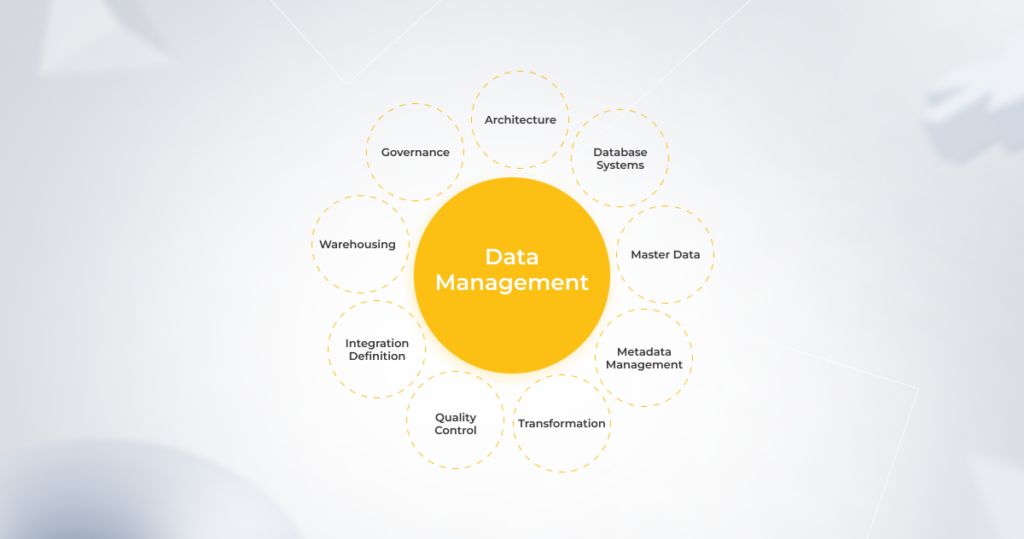
Managed cloud computing enables users to make service changes within minutes, improving uptime and the efficiency of business systems. As-a-service billing, ubiquitous access as well as security compliance also contribute to enhanced flexibility for businesses.

Enhanced change management 

When talking about cloud server advantages and disadvantages, cloud change management is certainly on the bright side. Unlike traditional update management, MSPs promote agile-friendly change enablement thanks to higher transparency and accountability of changes made. Managed cloud changes also allow teams to avoid external authorization (which is often excessive), gaining more autonomy and reducing deployment time for regular changes.

Managed in the cloud, even complex updates like performance improvement can flow seamlessly thanks to a rich built-in selection of automation and deployment tools. MSPs also foster visibility across the infrastructure, which means that low- and medium-risk changes can be performed without lengthy and painstaking approval rounds. 

Automated updates and patch management

With the cloud environment constantly evolving, keeping your infrastructure up-to-date is among the toughest challenges. Managed service providers, however, eliminate the need to manually update your computing resources. Instead, they suggest timely automated system upgrades to prevent costly downtimes, security breaches, and other mishaps.

Speaking of other cloud computing benefits and drawbacks, MSPs also ensure automatic security patches to keep hackers at bay, fix performance issues, and avert other critical issues. Managed cloud computing lets users automate all phases of patch management – from scanning to reporting, offloading the work of on-prem patch management with no costly local patching servers.

This way, users avoid the complexities tied with manual patch management. Automated patch deployment also boosts the security of on- and off-network devices, minimizes downtime, and increases user productivity.

Cybersecurity support

Managed cloud hosting also helps safeguard sensitive and business-critical data by implementing a holistic cybersecurity system. Visibility of your IT infrastructure coupled with a robust set of in-built cybersecurity risk management features and practices allows MSPs to proactively spot malware attacks, API vulnerabilities, and others. Moreover, advanced security measures such as the latest antivirus software, encryption, and multi-factor authentication are also a traditional part of the MSP security ecosystem.

Disaster recovery-as-a-service

No company can remove all risks linked with possible outages and power failures. Instead, business owners need an effective disaster recovery strategy to restore data and get their computer systems back on track. The sooner your data is restored, the less compromised your business processes will be. Yet, the stats are discouraging — over 50% of small and medium-sized businesses don’t have an incident response plan.

Disaster recovery-as-a-service (DRaaS) enables business owners to secure business continuity by quickly eliminating mobility and portability challenges as well as rapidly recovering data in emergencies. Managed DRaaS is completely accountable for the implementation and management of data protection and recovery with no additional spending on software licenses or hardware. 

Automated backup is equally vital to recover your data quickly and without disruption. Sending a database copy to secondary servers further amplifies your cloud security with no additional workload for your tech staff. This way, fully managed cloud backup solutions eliminate the burden of deploying, operating, and maintaining an enterprise backup service every 24 hours with all assets being constantly protected and monitored. 

Comprehensive SLA

A Service Level Agreement (SLA) outlines the mutual responsibilities of both providers and users, while also ensuring availability of the system, latency, component reliability, and necessary warranties. SLAs facilitate a transparent bond between providers and users as well as protect your cloud assets and inform you about the associated risks. In the long run, a transparent level of service and anticipated expectations will save both parties money and drive satisfaction for not only the parties directly involved, but more importantly, the end-users.

Every vendor’s SLA is different. Managed cloud service providers tend to make an exhaustive list of specificities that cover all possible aspects of collaboration. The latter may include but is not limited to, data ownership, cloud hardware, and software, customer responsibilities as well as data recovery and backup, among others. This level of transparency sets your cloud journey up for success and addresses salient issues connected with your organization’s security.

Compliance support

Compliance audits send chills up the spines of online retailers, healthcare providers, financial institutions, and other highly regulated industries. Standards in data security, integrity, and privacy can be tedious to score and maintain in cloud deployments. But, according to IBM, businesses that embraced MSPs benefit from the enhanced capability to meet compliance requirements. That’s why 76% of respondents cite compliance reporting among the key benefits of managed cloud services.

A cloud managed service provider can help data-sensitive companies to define and manage their cloud processes in accordance with legislative regulations, including HIPAA, PCI-DSS, and others. Based on specific standards, MSPs put a range of compliance features in place to help business owners avoid costly regulatory fines. 

Leveraging the synergy of the right cloud provider and MSP

Due to the pandemic-associated impacts, businesses are now more willing than ever to streamline their operations and build a resilient IT infrastructure. The success of your cloud migration and use depends largely on cooperation with an experienced managed services partner certified by your cloud provider. 

Thus, instead of outsourcing emergency response, many companies hand over continuous cloud infrastructure optimization to MSPs. This allows executives to focus on mission-critical tasks while ensuring the safety and cost-efficiency of their cloud assets.
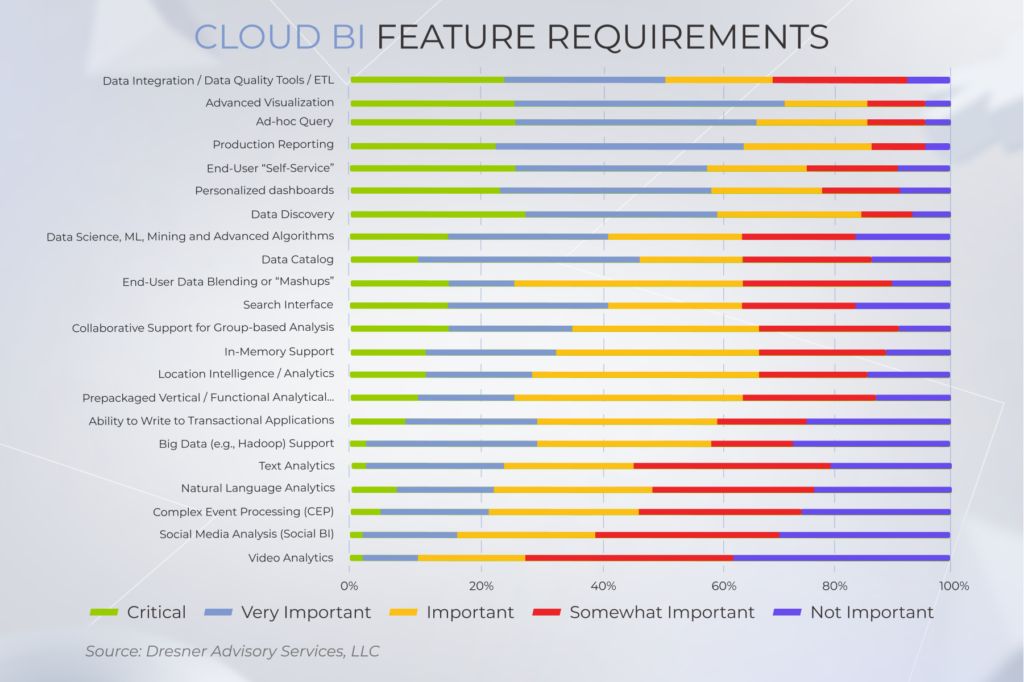
However, not all cloud providers are the same and neither are MSPs. To support your desired business outcome, you need to choose them carefully based on your objectives. Together with one of the best cloud providers in Europe, OVHcloud, *instinctools takes cloud computing services to the next, seamlessly automated level. As an Advanced OVHcloud Partner, we assist our customers in harnessing unrivaled OVHcloud potential and offer a winning price-value ratio, ensuring that you can make the most of managed cloud services. 
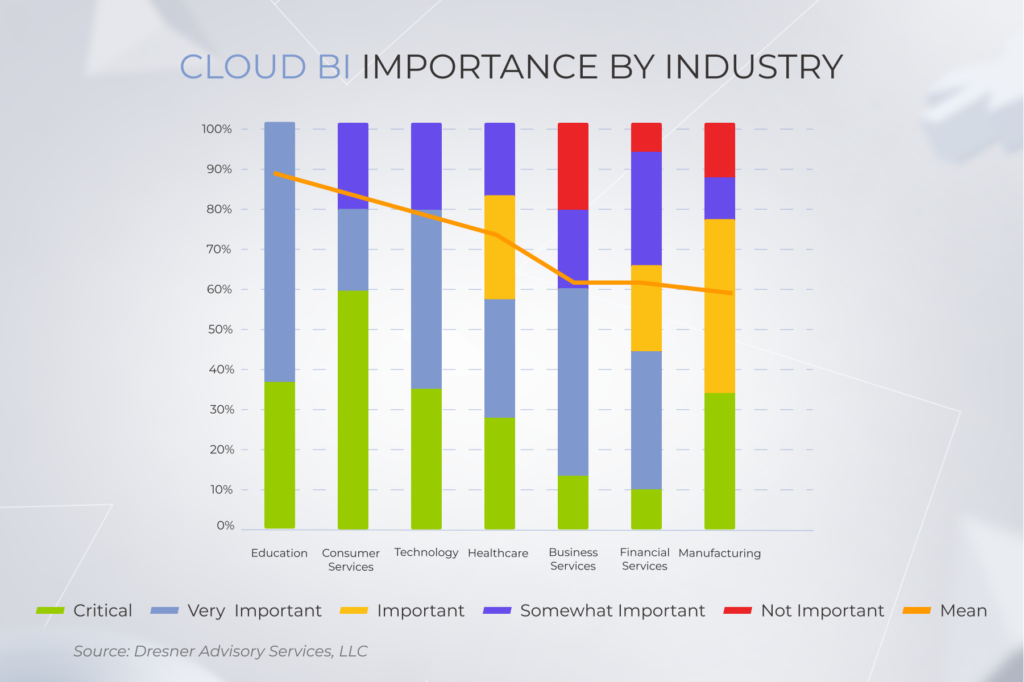
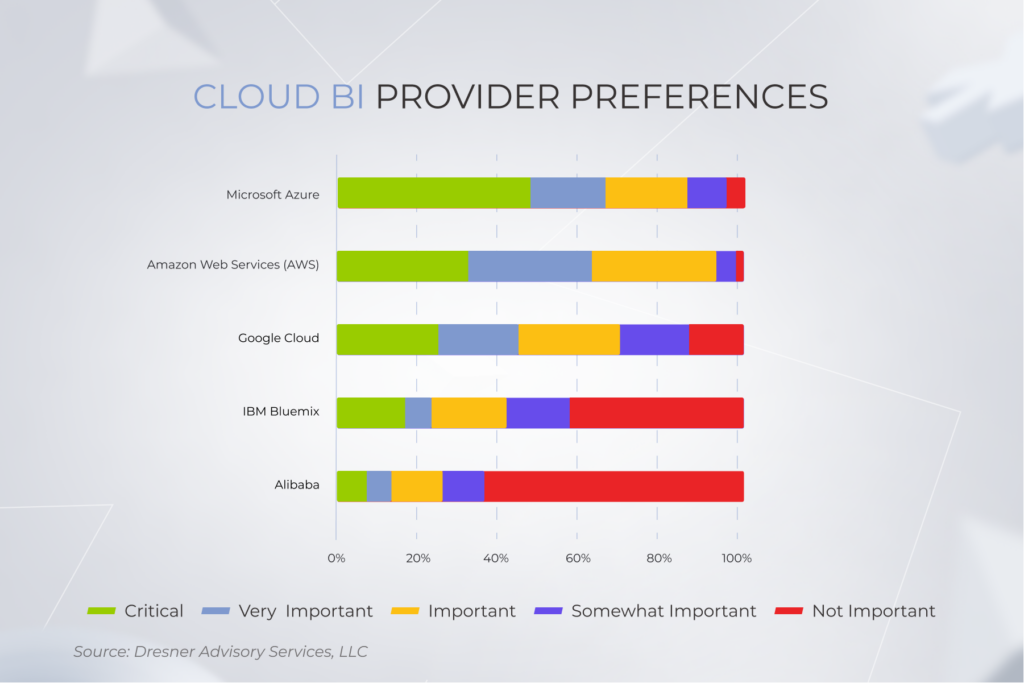
Anna Vasilevskaya
AI modified real photo
Anna Vasilevskaya
Account Executive

Get in touch

Drop us a line about your project at
[email protected] or via the contact
form below, and we will contact you soon.