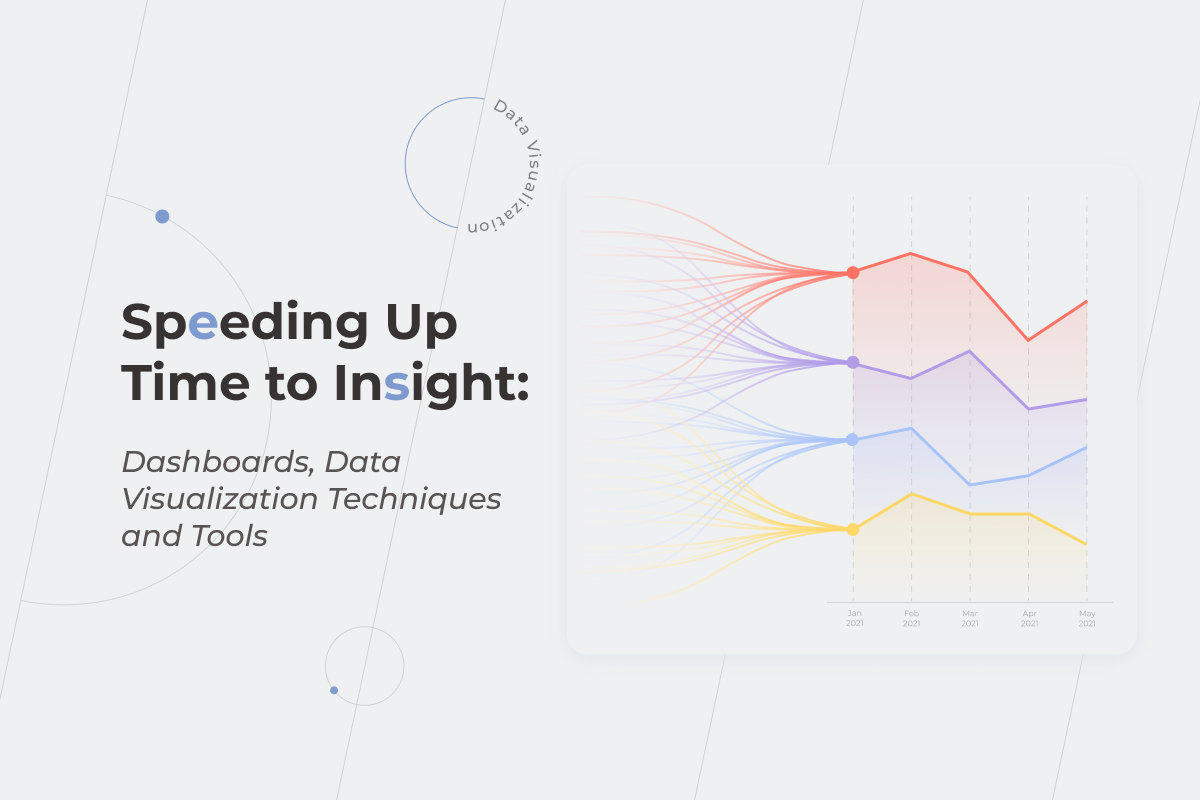
Speeding Up Time to Insight: Dashboards, Data Visualization Techniques and Tools

According to Statista, from 2018 up to 2020, the percentage of worldwide organizations implementing data-driven decision-making grew from 38% to 50%. Despite a substantial increase, it becomes clear that half of the respondents still make decisions based on personal opinions and gut feelings rather than facts. Thus, if you start using business intelligence solutions to encourage data-driven decision-making, you’ll be able to outperform a significant part of your competitors.

We’ve already discussed the importance of data preparation and a robust data infrastructure for accurate analysis, but are they enough to provide moments of genuine insight? To navigate in an uncharted world of boundless data, you need to visualize the information you have. 

Visual analytics play off the idea that the brain is more attracted to process dynamic images than long lists of numbers. But data visualization is not just a colorful alternative for traditional text reports and another way of presenting the information. It is about wrapping large volumes of data in a way that helps you know exactly how to act to help your business thrive. 

Why is data visualization important?

Do you struggle to understand what is hidden behind your reports due to tons of confusing, indigestible numbers they’re flooded with? If the answer is yes, then it’s time to make use of data visualization techniques and tools, which help to bring advanced analytics to non-technical users in an approachable format. Customized dashboards could save your employees from manual monitoring and analyzing the data flow. Instead, the process is automated, and the results are presented in easy-to-understand visual models quickly and efficiently. 

  • Grasping large volumes of data in the blink of an eye

From 2010 to 2020, the volume of data worldwide increased by more than 32 times. In the next five years, it’ll triple. It’s getting tougher not to drown in this enormous amount of information and define which data is overriding and valuable for a particular business, and which can be left behind. With well-thought-out dashboards and appropriate techniques for data visualization, a single graph can perfectly illustrate a complex data set.
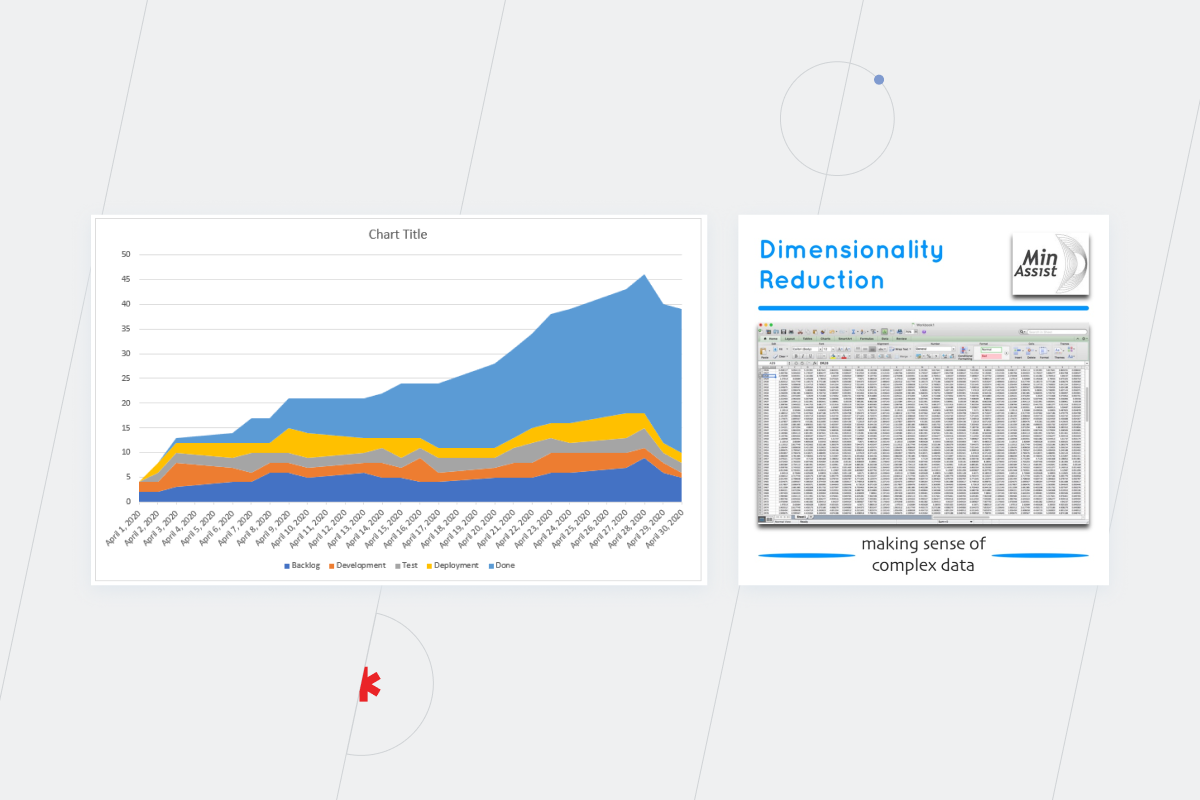
data vizualization

If you want to benefit from big data, make sure that your employees can work with basic visualization models for one/two-dimensional information and complex solutions for multidimensional data.

  • Real-time reporting

There is no need to wait for a monthly or quarterly report to check how things are going on a project or in the company’s departments. You can monitor multiple organizational metrics using real-time analytics techniques to analyze and visualize streaming data. Such transparency enables almost instant decision-making capacity. The faster you understand your data, the quicker you can act and succeed from it.

  • Encouraging communication and collaboration 

Do reports in a raw tabular format appeal to all the stakeholders on your project? The answer is probably no. Visual methods of data presentation will help you be more persuasive, engage all the team members in discussion, and make the viewers feel comfortable speaking and acting. 

  • Improving and accelerating decision-making

Imagine that you are testing a new market with an application and planning to profit from it over a certain period of time. There is no need to wait to understand whether the project is worth continuing to invest in. Using visualization techniques, you can track data changes in near real time and uncover trends and patterns. 

It’s also far easier to analyze dependencies and determine risks at every project stage, even with basic data visualization techniques. You don’t need to waste your time looking through numerous reports with specific categories but, instead, can combine them into one report. Above all, thanks to multidimensional data visualization techniques, you’ll be able to create visualizations of various possibilities and select which one will work for your business. 

  • Uncovering hidden patterns that could be barely deciphered from numerical data

Data in a visual format speaks louder than alternatives. Unobvious interrelationships, weaknesses that need to improve, and anomalies to correct — everything that used to be hidden behind tons of Excel rows becomes crystal clear when visualized in the right way.

What are data visualization techniques and how to choose the right ones?

There are more than 160 types of data visualization techniques out there. The only way not to get lost in such diversity is to know exactly what you are looking for. To choose a data visualization model that fits your requirements and expectations, first, you need to decide on the type of dashboard. 

Types of dashboards: correct choice helps to upswing the effectiveness of each department and employee

Operational, Analytical, Strategic — these are three types of dashboards that can be identified according to a decision-making level. But how do you know which is the best fit for you?

  • Operational dashboards

Employees from different departments within an organization use operational dashboards to track a present state of a project, manage their current activities, etc. Such tasks require detailed visualizations that update in near real-time. E.g., a help desk dashboard can contain the number of tickets for the day, the number of resolved issues, and the percentage of requests by type and channel.
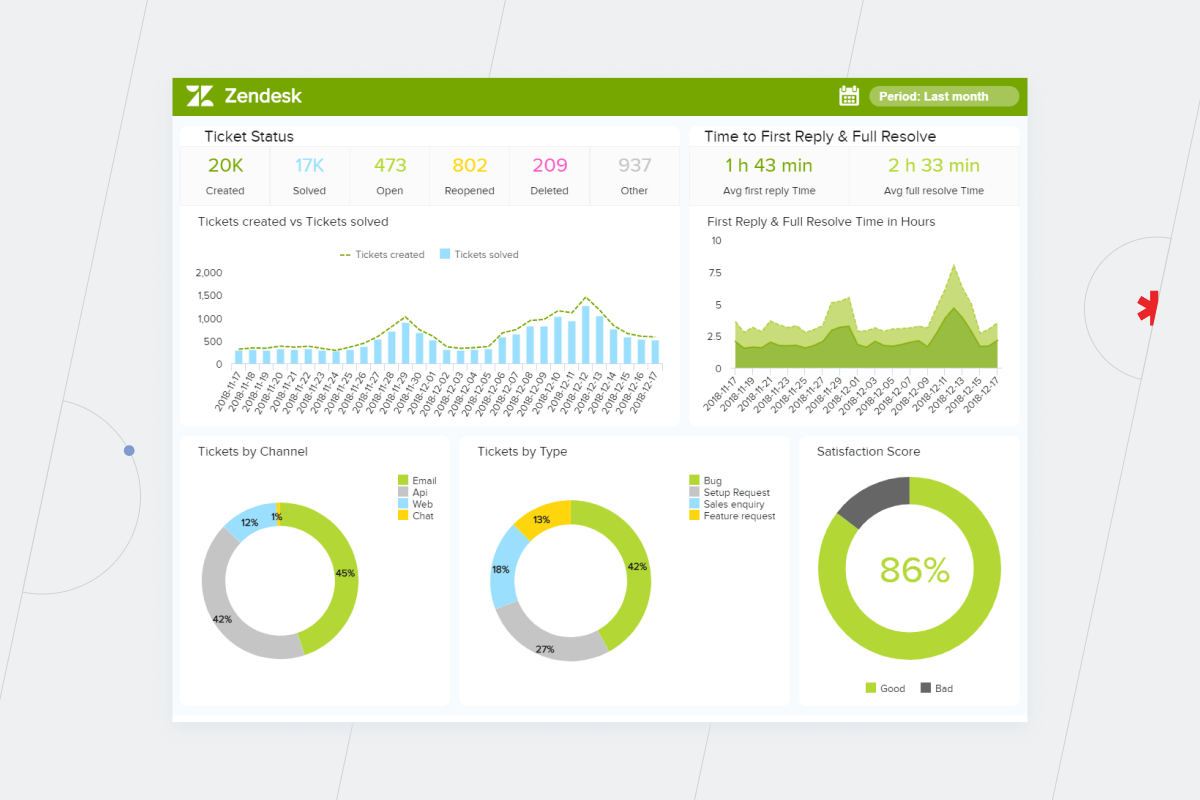
data visualization
  • Analytical dashboards

Analytical dashboards supply a business with a comprehensive overview of crucial data. Without them, the amount of time an analyst wastes on collecting the information grows exponentially. Dmitriy Borovik, a BI analyst at *instinctools, proves the point:

We were approached by a media-services provider about optimizing the speed and flexibility of their report generation. Before deploying self-service BI, an average day in the life of their data analyst was filled with addressing advertisers’ requests for information such as “What types of content are popular and where? How many users came from which countries? When was the viewing peak during a certain period?” 

To give proper answers, the analyst needed to assign a task to the programmer to write a new SQL query into the database. It took forever because every additional query might overload the server. When the data finally arrived, the programmer sent it back to the analyst. And this was still not the end of the highway to hell. After receiving the data, the analyst converted it into Excel and added explanations to the numbers. Altogether, these types of tasks used to take a couple of weeks!

With the custom analytical dashboard that the *instinctools’ team created for our client, these processes were automated, and time spent on the report preparation was reduced to a few minutes. 

Analytical dashboards provide a comparison of periods and categories, so they are more complicated than operational ones. When department leaders make decisions, they might need more elaborate solutions created with multidimensional data visualization techniques.

Expanding the number of dimensions and transforming the perspective from 2D to 3D allows users to see that reality is more complex than it initially seems, so there’s a small chance of making inaccurate decisions or missing key insights.

  • Strategic dashboards

Representatives of senior-level management may be honestly interested in each department’s operational details. Yet, if they run a large enterprise, they are unlikely to have time to delve into them. That’s why C-suites need dashboards that contain only the most important statistics. 

Essentially, the higher the decision-making level is, the less cluttered the data visualization should be. Here is an example of an executive dashboard for a bank with the key metrics such as revenue and expenses by branch, and top-5 branches by profit. The CEO can understand the state of an organization in a bat of an eye and decide which branches are worth investing in for the next quarter.
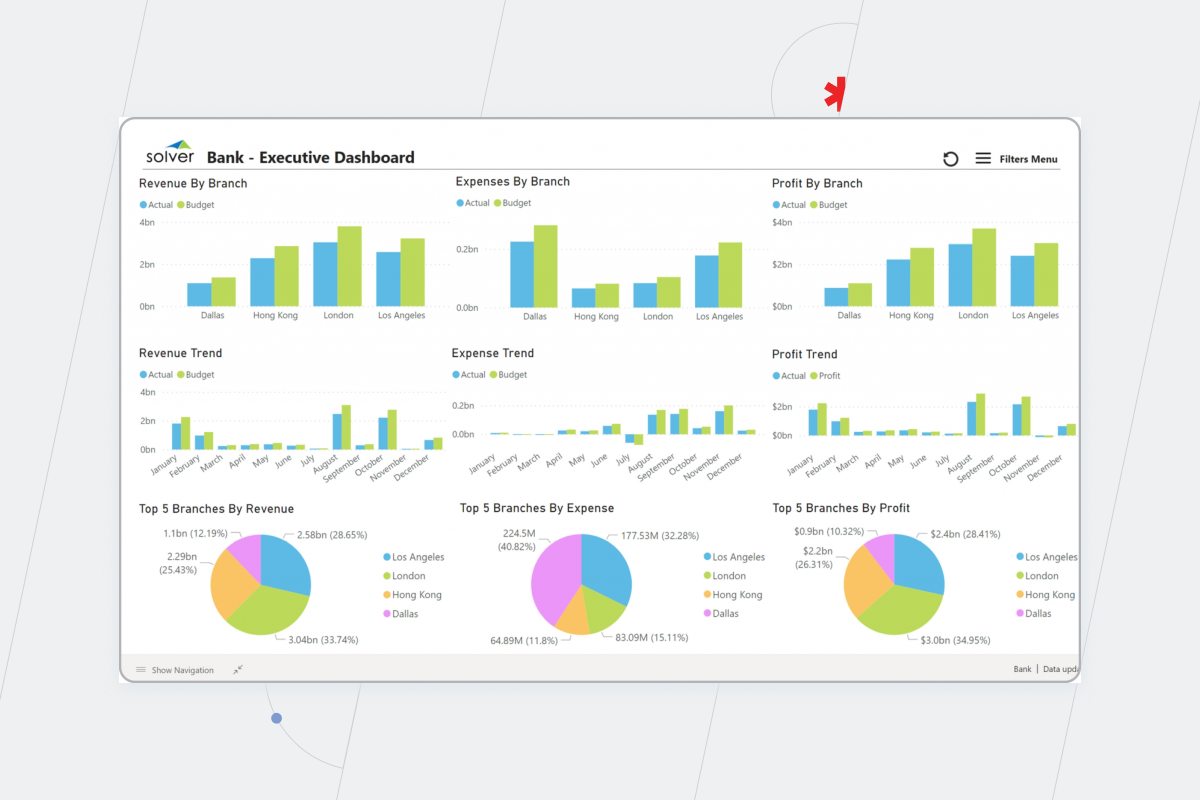
data visualization

Data visualization techniques

Data visualization is only helpful only when it’s thought-provoking and not just filled with data for data’s sake. Take a look at those two data visualization examples of pie charts. 
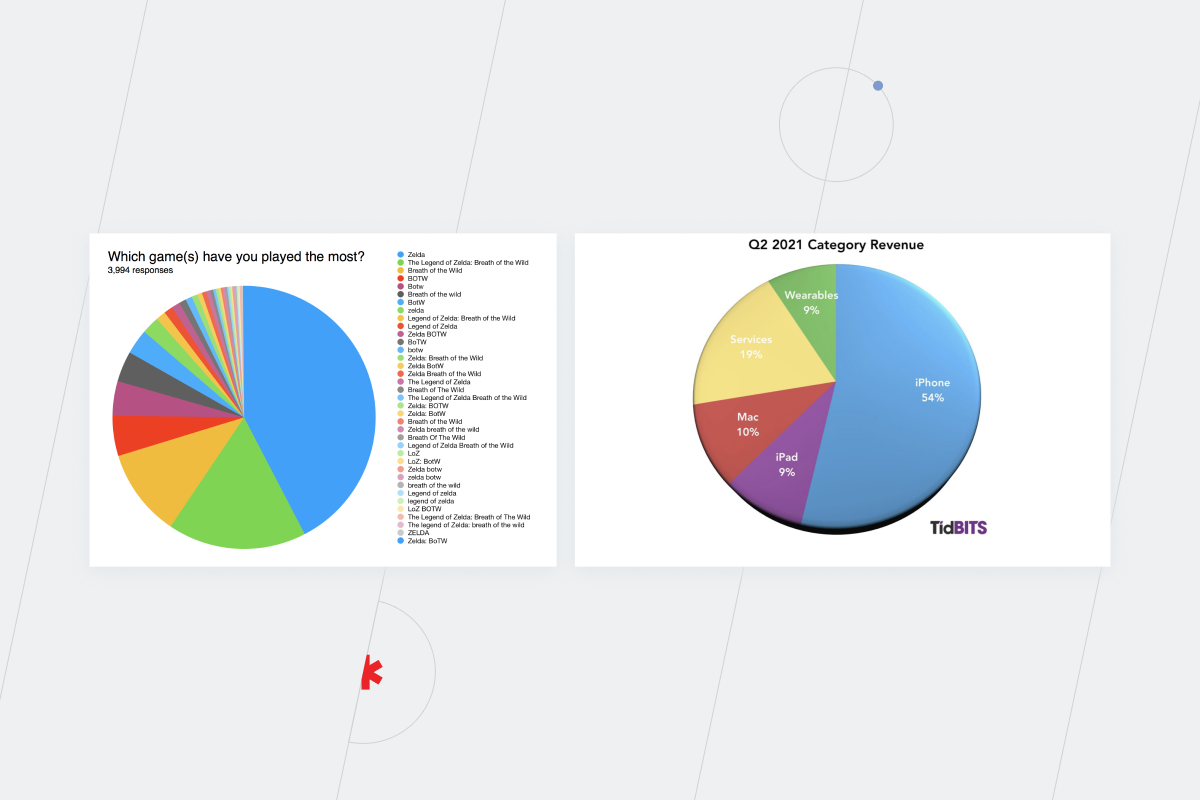
Which games have you played the most

They are both analytical and illustrate the audience by country. However, the first chart contains the most valuable data, while the second visualization tangles the users up with too many variables. The central concept of data visualization is to illustrate only essential information. There is no need to pack your reports with all the data you have. If visualization is inconvenient, it’s incomprehensible and useless. Make sure not to make these common mistakes in data visualization.

Top-3 data visualization tools. *instinctools version

Three BI platforms have been leading in the last four years (2018, 2019, 2020, 2021), according to the Gartner Magic Quadrant for Analytics and BI platforms — Power BI, Tableau, and Qlik.

  • Power BI

Power BI evolved from Excel, which is its fundamental advantage over other data visualization tools. It’s far easier for employees to implement data visualization concepts in their everyday tasks because the Power BI is similar to Excel and integrates with other Microsoft applications. Also, Power BI has a data preparation tool — Power Query, but it is available only inside the Power BI ecosystem. Take into consideration that the maximum amount of data for a premium account is 100 TB, and the maximum number of data points is 3,500 and you’ll see just how powerful it is.

Power BI is a good choice for organizations that are about to start their data-driven journey and need a reliable tool to do the job.

  • Tableau 

Tableau is a powerful and rapidly growing visualization software in its philosophy and architecture. Tableau also has a data preparation tool — Tableau Prep. With it, even non-technical users can select, prepare and visualize data. The information can be uploaded wherever you need it, to Excel or a separate database. 

The tool is unlimited by the number of data points and volume of data but keep in mind that it’s not as intuitive as Power BI. Tableau is a top solution for organizations that regularly work with big data sets and need multidimensional data visualization techniques and tools.

  • Qlik

You can combine different Qlik products to deepen the data discovery process. It also integrates with a broad range of data sources such as Amazon Vectorwise, Redshift, Hadoop, etc.

Qlik Sense can be deployed in the cloud or on-premise. The interface is intuitive; you can drag-and-drop items to manipulate dashboards and apply visualizations instead of writing a code.

The Qlik platform offers a data preparation tool — Qlik Replicate. It provides automated, real-time data integration across data lakes and DWH, databases, streaming, and mainframe systems. 

There are no rigid limitations about how much data Qlik can handle, except two billion distinct values in each field. The number of fields and data tables is limited only by RAM. 

Tips to get started 

  • Determine what kind of information you want to communicate to choose an appropriate technique for presenting your data. Take into account the stakeholders’ needs as well.
  • Understand the data you are going to visualize, including its size and cardinality, and consider (honestly) the data preparation effort that will be required. In the technology stack, data visualization goes after a data warehouse or data lake. So, fast and insightful data visualization is only possible when paired with a solid data infrastructure that supports it.
  • Define the goal you are trying to achieve with your data visualization. For example, a complex analysis requires data to be compiled into controlled, dynamic dashboards, while if you just want to highlight a single data insight every now and then, one graph or chart might be enough. But don’t go to extremes and don’t get in the trap of presenting any information as visualization. Sometimes building a chart or diagram for each tiny table in a report is a waste of time and a simple sheet in Excel is enough.
  • Figure out how your audience processes visual information and adjust data presentation to their needs. Despite all the principles and theories about effective data visualization, the reality is that the most effective visuals are the ones the audience connects with.

A well-thought-out choice of data visualization techniques and tools support building data-driven decision-making

Choosing the proper data visualization techniques from a wide array of options as well as deciding on a suitable tool for their implementation might turn out to be more tricky than it initially seems. You should consider the decision-making level of employees that will use data visualization models, quality and quantity of data, types of visuals that are the simplest for the company’s audience.  

Our designers and data consultants will make an effective contribution to your data visualization project so that you get a high-resolution view of your actual business state.

FAQ:

What are the key components of data visualization?

Data purity is a primary condition for effective data visualization. You can’t appropriately select techniques for data visualization and get actionable insights if data is messy and unstructured. And the proper choice of techniques and tools depends on the type of dashboard according to the decision-making level of a person who will use it — a C-suite, department leader, or an ordinary employee.

Where is data visualization used?

You can use data visualization basic techniques and tools in any department of your organization and on any level of decision-making. Businesses of any size, from start-up to enterprise, need BI solutions. After all, data is the future. The only question that remains is how to choose the appropriate type of dashboard and models of data visualization.
How To Build a Robust Data Infrastructure

The world of data is filled with promising quotes, such as “information is the oil of the 21st century” or “data is becoming the new raw material of business.” However, the value ingrained in data only becomes vivid when analytics solutions come into play. 

Before analytics can start, data needs to be prepared. This stage is a foundation for efficient and effective analysis. And this is where data infrastructure enters the battlefield. 

Consisting of data assets and processes about how to manage these assets, data infrastructure plays a significant role in transforming data into usable information and paves the way for it to turn into insights. 

In this article, we navigate you through the practices that ensure your data infrastructure supports your analytics needs so you save your valuable time and resources.

Break down two significant barriers to your data analysis with a robust data infrastructure

Perhaps, in a unicorn and rainbow-like utopia, data is perfect by default. However, in real life, it’s not like that at all. There are a couple of things that can go wrong even at the very first stages of constructing a data infrastructure, these include:

  • Data accessibility
  • Amount of data 

The second occurs when a company scales up, but the first one is relevant for companies with any scope of data, and crucial to ensuring effective data analytics processes.

Data accessibility 

It doesn’t matter how clean and organized your information is if only the engineers that currently work on the product can retrieve it. In this case, reports tend to take weeks. According to Broadcom’s research on the state of Big Data Infrastructure, over half of respondents have already implemented Big Data projects and 29% are planning to start implementing them.  

When you don’t have a business intelligence (BI) platform in place, the interaction with the data goes like this: your engineers extract the information required from a data lake or a data warehouse, or from somewhere else, and pass the data to analysts. Conversely, with mature BI solutions, this stage is automatized, making it easier to get the data you need when you need it. 

That means, if your goal is a data-driven company, you need to build an infrastructure where everyone in the company has access to a particular data network and can analyze it. 

How do you ensure data readiness? You need a well-thought-out data strategy and a clear understanding of how this data will be handled. Security requirements and security policies should always come first during the project and the implementation phase of the data strategy.

Amount of data

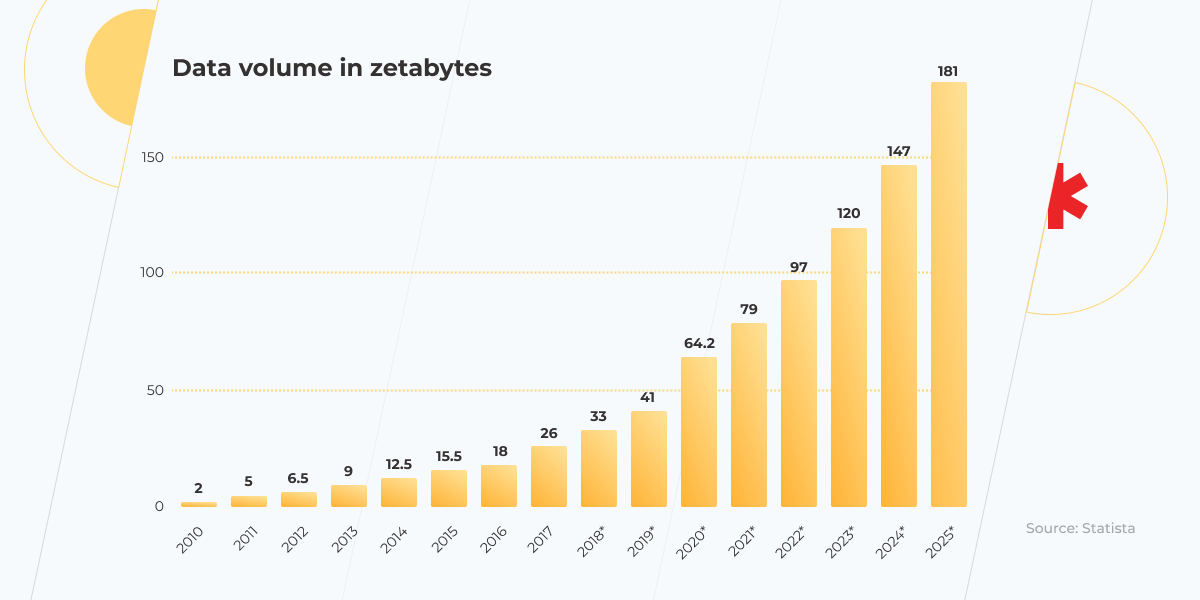
The total amount of data created in 2020 reached 64.2 zettabytes. In 2015 it was only 15.5 zettabytes. The data volume growth during the last year is mind-boggling and has only accelerated due to the pandemic, as more people than ever before have started working and studying from home. This situation became a challenge for data engineers, who were expected to build a new infrastructure to handle such a huge amount of data and get ready for exponential growth in the future in such a short space of time. 

The more information you have, the more complex the architecture of the serving infrastructure will be. Data engineers need to seamlessly combine two tasks: rebuild existing data infrastructure and try not to become buried under the ever-increasing data flow. 

The amount of data will naturally grow over time — that’s a fact! According to Statista, by 2025, data creation all over the world is expected to increase threefold (more than 180 zettabytes). Without implementing a proper data infrastructure in your organization, it will be troublesome to grow and stay competitive among other companies. So the best time to start preparing your data infrastructure is now.

amount of data

Five must-do tips for building a robust data infrastructure

There are no ready-made solutions for data infrastructure, but here are five areas to focus on:

  • Define your data infrastructure strategy. You need to have a clear idea of where you’re going to store your data.
  • Choose a repository to collect data. How do you want the information to be presented? 
  • Clean data and optimize data quality. Be prepared for the fact that it’s not realistic to expect to collect only clean data.
  • Build an ETL pipeline. Take into consideration the constantly increasing requests for analysis of new information and make your pipeline ready not only for basic scripts but for more complicated data challenges. 
  • Take care of data governance. This is a key enabler of your data value.

Define your data infrastructure strategy

A concise data infrastructure strategy will save you a lot of effort in the future. First, think of where you will manage your data: in the cloud or on-premises. 

The prospect of maintaining your own data center may seem unprofitable, but this is only applicable to small companies. If your organization has enough resources to contain hardware, it may even prove to be more cost-effective. In terms of reliability, there is no difference between the two options. Talk to our cloud expert to help you decide which option is better for your organization’s needs. 

Choose a repository to collect data

The right data architecture is the backbone of a technically up-to-date BI platform. Here you have a choice between using a data lake or data warehouse as your available solution. So, what are the differences between them, and should you use only one of the options or explore a hybrid solution? 

Sometimes a data lake is understood as a part of a Big Data infrastructure, whereas a data warehouse is shown as a repository for general data. However, it’s not that simple and they differ in many ways.

data infrastructure

Earlier, when the amount of data wasn’t as huge as it is now, data warehouses were the definitive solution to data storage. This was because it didn’t take data engineers that much time to build a repository that met the needs of a particular business. However, when Big Data came on stage, bringing information that was exponentially growing in quantity and deteriorating quality-wise, the days of the data warehouse monopoly were doomed. 

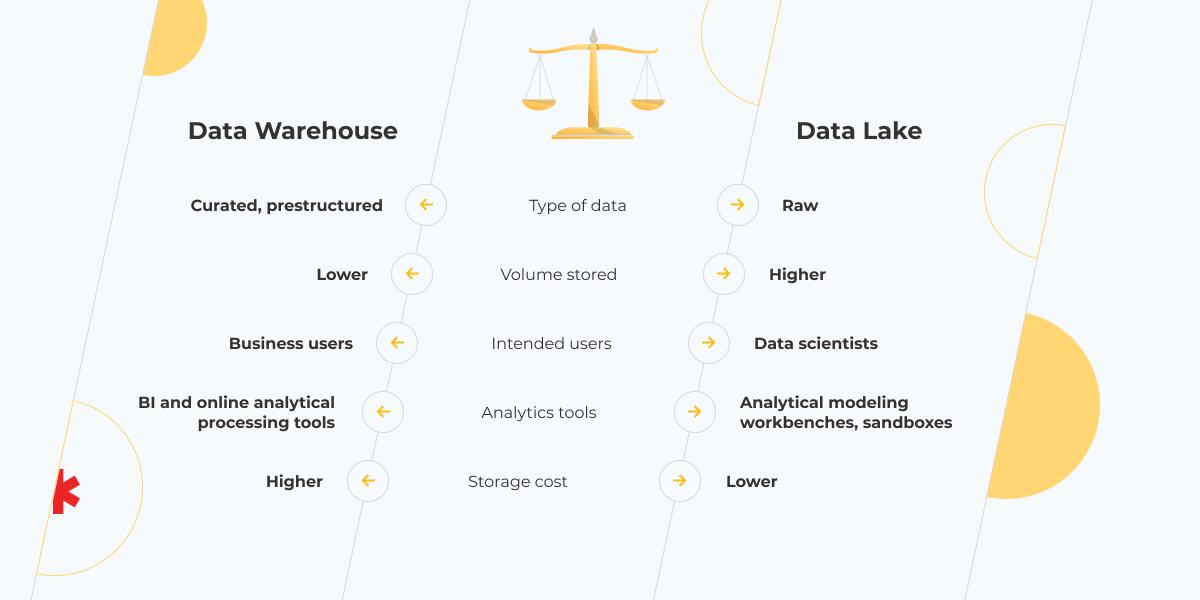
Currently, with so much data generated every day, more time and effort are required to develop a data warehouse solution. Fortunately, you have a choice: invest resources in building a data warehouse that contains structured and certainly easier to analyze data or use a data lake with simpler architecture and raw information.

Indeed, a data lake is oriented more toward big data. Here information is stored in an unstructured format but in much higher volumes. The users of such data are data scientists. This kind of repository is relatively inexpensive, so you can use your data lake not only as a storage space but also for experiments with temporary sandbox areas, where experts can build and train models for any task. It’s genuinely useful when the amount of data scales and you need to deal with it and update the data infrastructure in parallel. Often a data lake solution makes sense for information for use cases that haven’t been defined yet. 

That said, this doesn’t have to be an either-or decision.  There’s also the option to go for a hybrid solution. You can keep the data with minimal business meaning in a lake while storing the useful and relevant data in a warehouse; or use a data lake to collect data and a DWH to structure it. But keep in mind, that these repositories use different technologies: data lake – NoSQL, data warehouse – SQL. So you have to resolve this contradiction when deciding to build your data infrastructure.

Clean the data and optimize data quality

Problems that may arise out of inaccurate data are numerous and the departments within your organization they can affect are no less. That’s why data cleaning must be given the highest priority. To create an appropriate data cleaning process you need to take the following steps:

  • Identify and delete irrelevant and duplicate datasets.
  • Fix errors in the data structure.
  • Come up with organization-wide rules of cleaning incoming data.
  • Invest in data tools that allow you to clean data in real-time.

Last but not least — be aware of your information quality. The data must always satisfy six conditions:

  • Completeness. All data sets and data items must be recorded.
  • Uniqueness. This parameter is kept if data has only been registered once.
  • Timelessness. This is about how useful or relevant your data is according to its age.
  • Validity. The data you’ve recorded must reflect the type of data you set out to record.
  • Accuracy. This metric determines whether the information you hold is correct or not.
  • Consistency. You can compare data across data sets and media, if it’s all recorded in the same way.

Build an ETL (Extract, Transform and Load) pipeline

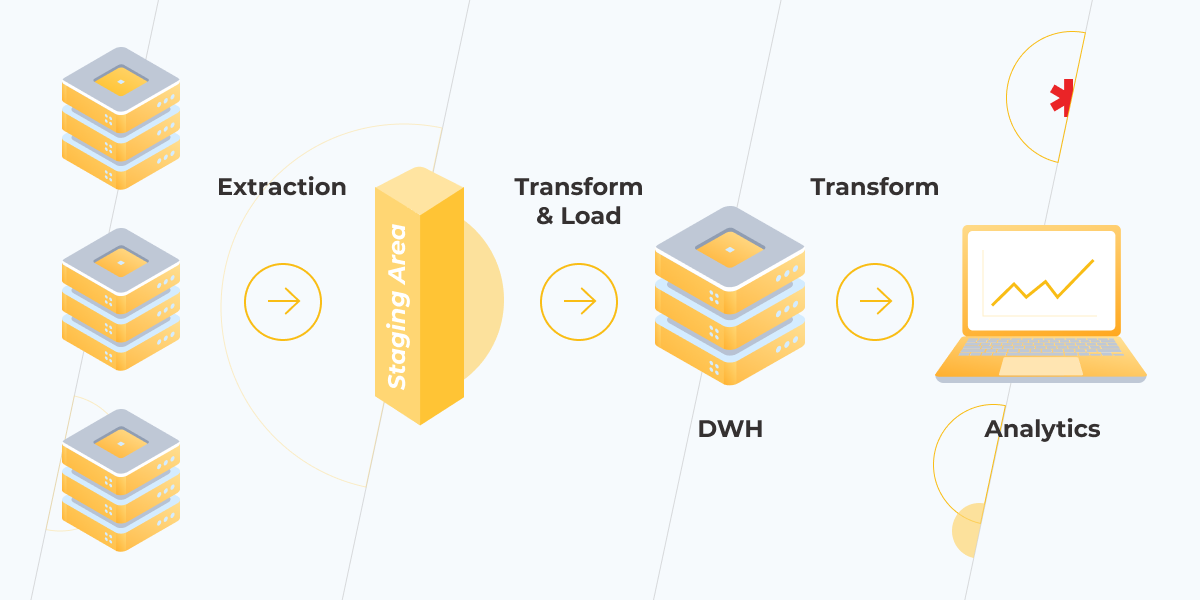
ETL pipeline

The importance of an ETL process to a company’s data warehousing and analysis, in general, can’t be overstated. A well-engineered ETL pipeline brings structure to your information as well as contributes to its clarity, completeness, quality, and velocity. However, there are a lot of challenges you might need to overcome while working on your ETL project. Here are only some of the most prevalent:

  • data formats changing over time;
  • broken data connections;
  • contradictions between systems;
  • addressing the issues of different ETL components with the same technology;
  • not considering data scaling;
  • failing to anticipate future data needs.

Nowadays, the data engineering space is flooded with a plethora of tools that are supposed to automate, accelerate, and take care of ETL processes for you. New technologies pop up nonstop, making the desire to switch from one tool to another almost irresistible: “Everyone’s using Spark! But, what about Apache Airflow?! Let’s try DBT!” The thing is that being on-trend doesn’t matter as much as fundamentals remain the same. So you’d better focus on getting the basics right. Tools come in second. But if you need a well-designed ETL pipeline and some advice on how to build one, our BI experts are ready to help.

Take care of data governance

All the actions above make little sense without proper data governance. It increases efficiency by giving your business a solid database to work from and saving time on correcting the existing data. Besides, it helps to avoid risks associated with dirty and unstructured data and avoid regulatory and compliance issues.
Once you are ready to embrace data governance, make sure that all the stakeholders and data owners are involved in the process and the goals you’d like to achieve are clear, specific, and measurable.
There’s actually one more thing to keep in mind during data governance implementation: it’s not a project but rather a practice that should consistently evolve and develop.

Solid data infrastructure empowers in-depth analysis 

A strong data infrastructure smooths the road for data science efforts. To benefit from it, you need to care about collecting raw data, cleaning it, and making it accessible. Before you go mainstream and start analyzing your data to get perceptive insights, think about who in the organization will have access to the data, how it will be used? Structured information is more accessible and easier to interpret. A clear data infrastructure strategy is key to measurable business success.

Need some expert assistance with building a strong data infrastructure?

Book a free consultation

FAQ:

What does data infrastructure include?

Data infrastructure is a broad concept. Just like physical infrastructure, it includes a number of components. These are data assets, servers, storage as well as processes, policies, and guides on how to manage the data.

What is the importance of data infrastructure?

Data infrastructure provides a solid basis for data analysis You can’t get valuable insights without suitable tools that prepare your data for analysis.  Although the correlation between Data Infrastructure and business benefits is indirect, without a reliable infrastructure you can’t get the right data and properly analyze it to make it work for your business.

Why Your Mid-Sized Business Needs A Scalable IT Solution

Making up one-third of private-sector GDP and jobs, mid-sized businesses are the stable driving force behind the world economy. With revenues of between $10M to $1B, they are the companies that consumers depend upon, the ones that fuel the job market; overall, a success story. However, many find it difficult to take that next logical step in business development—to create a sustainable business scaling strategy and become a large-sized enterprise.

The situation with mid-sized business post-COVID

Alongside the regular challenges of scaling a business, mid-sized companies are also experiencing the impact of the coronavirus crisis. One year on, many find themselves still adjusting to the new normal of the working environment. Before seeking to scale, it’s vital to take into account the unique circumstances posed and how they can be utilized to create the conditions for scalability.  

Changes to employment

During the lockdowns, many companies moved to working remotely. For some businesses, this incurred extra cost to furnish home offices. For others, it meant savings on physical buildings and leases. Some companies were able to take advantage of the scheme to sustain the business during troubling times, such as the US Paycheck Protection Program (PPP) or UK’s furlough scheme. Unfortunately, mid-sized businesses often found themselves unfairly fit, falling through the cracks of government support, which further impacted business and caused layoffs. For those who weathered the storm, it meant adjusting to a new way of working, including culture changes for online cooperation. 

Evolved expectations and values

COVID reminded the business community to expect the unexpected. While risk in business is usually well calculated and measured put in place beforehand to offset any unforeseen difficulties, the appearance of coronavirus and its impact meant companies had to think fast on how to protect their employees and revenue. For many, this was a stark reminder of the inherent risk in business and forced companies to adjust their expectations and values to focus on remote solutions, scalability, and sustainability.  

Showing resilience

business scaling strategy

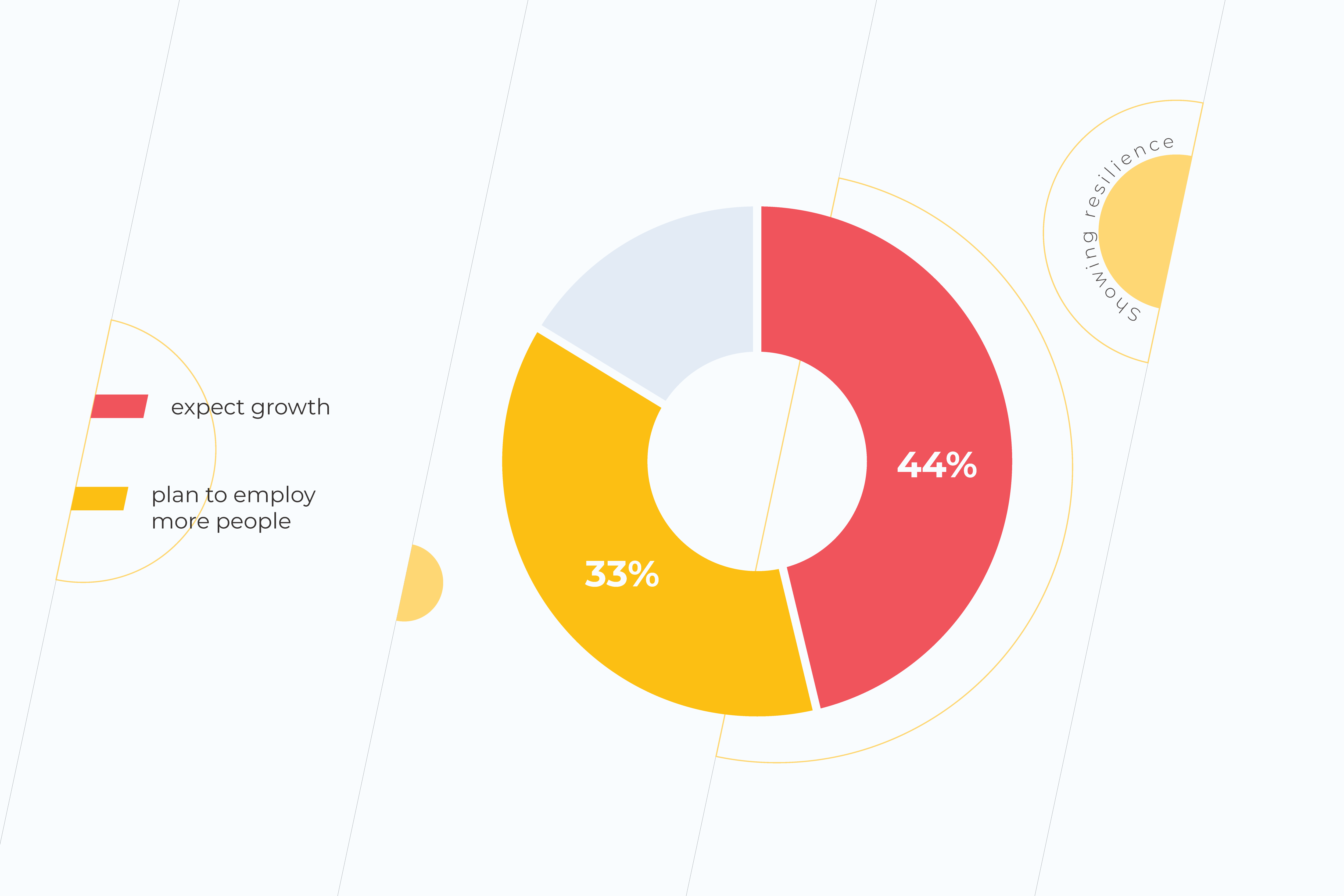
Even though optimism in business is not as high as in previous years, mid-sized companies are showing optimism for the future. 44% of companies expect growth in this coming year, while 33% plan to employ more people, adding to the workforce. While this is down from 2019’s Q4 results (pre-COVID) of 73% and 48%, respectively, all things considered, it is a promising development for the future. This proves that the coronavirus crisis is not a growth blocker. Instead, it serves as a reminder of why scalability is important for any business. 

Why many mid-sized companies struggle when scaling a business for growth

Not quite a start-up and not quite a large-scale enterprise. When it comes to mid-sized businesses, finding the balance between scalability and sustainability is no easy feat. Mid-sized businesses often find themselves grouped in the SME segment, yet the obstacles they face when scaling their business model will be quite different to a start-up. Here are some of the ways. 

Mistaking growth for scaling

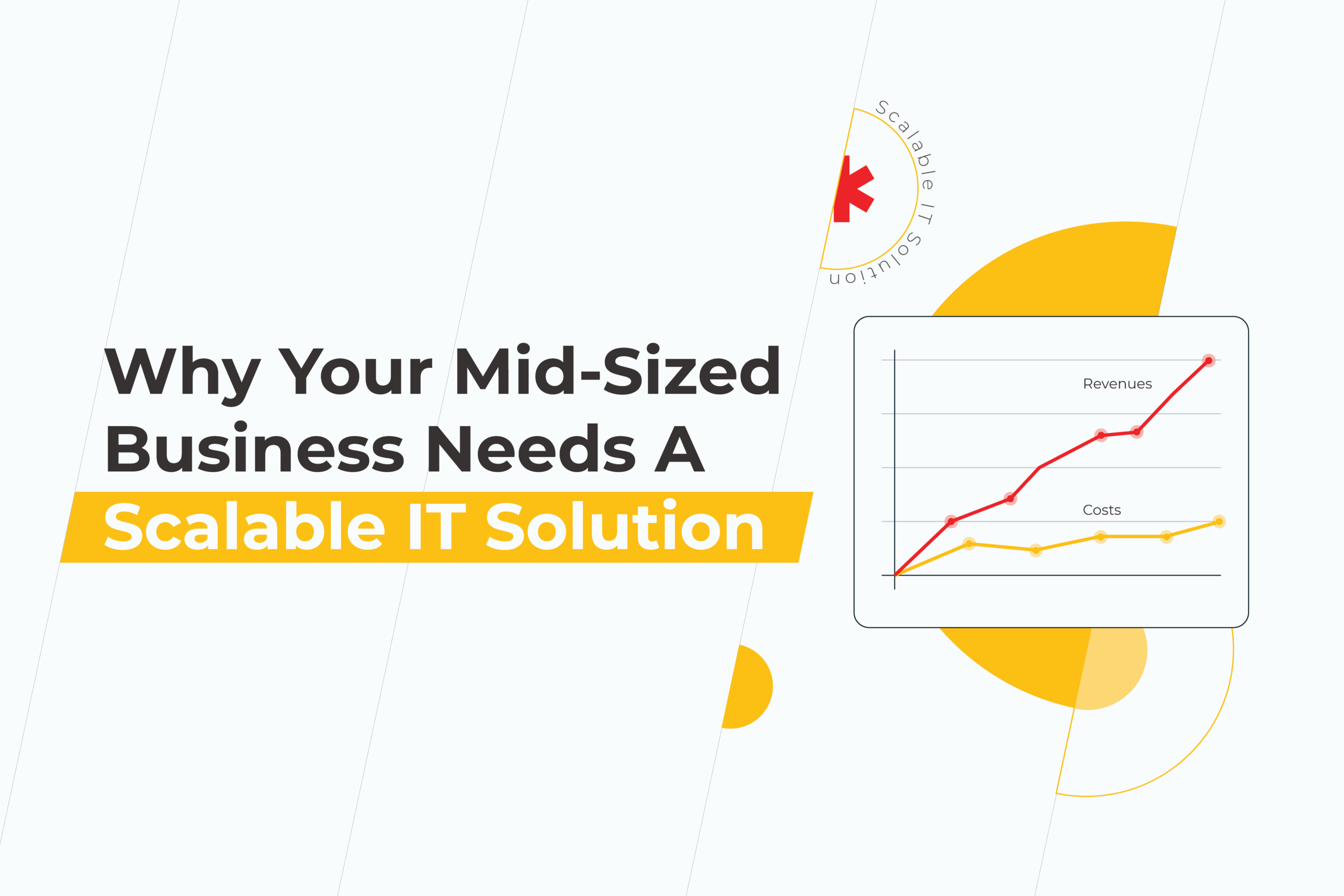
Before diving into scaling, companies should consider the growth scale value definitions and decide which one they are truly seeking at this stage. So, what is the difference? And what is scaling in business? Scaling in business focuses on adding revenue or profit faster than the costs it takes to do so. Meanwhile, growth focuses on increasing revenue in line with the number of resources used. Knowing how to scale and do so effectively is art for business managers who are able to analyze scaling opportunities and implement them effectively. 

Struggling to realize the next step in scaling

For many, it can be difficult to analyze which step is the correct one when it comes to scaling. Alongside mistaking scaling for growth, managers may face difficulties in establishing the right path forward considering the current market conditions. The post-COVID world only makes this riskier. Approaches that work for start-ups or large-scale enterprises don’t always apply to mid-sized companies, so this can make the research ground a little thin when it comes to defining the next steps in scaling a business. 

Find the right solutions for scalability

What is a scalable solution? And which one is suitable for your particular business or industry? When approaching the challenge of scaling, it’s vital that managers examine industry-specific strategies that work within their current field and growth level. Knowing how to employ the right strategies and technology to get results is the key to success.  

What is scaling in business, and what does it mean for you?

business scaling strategy

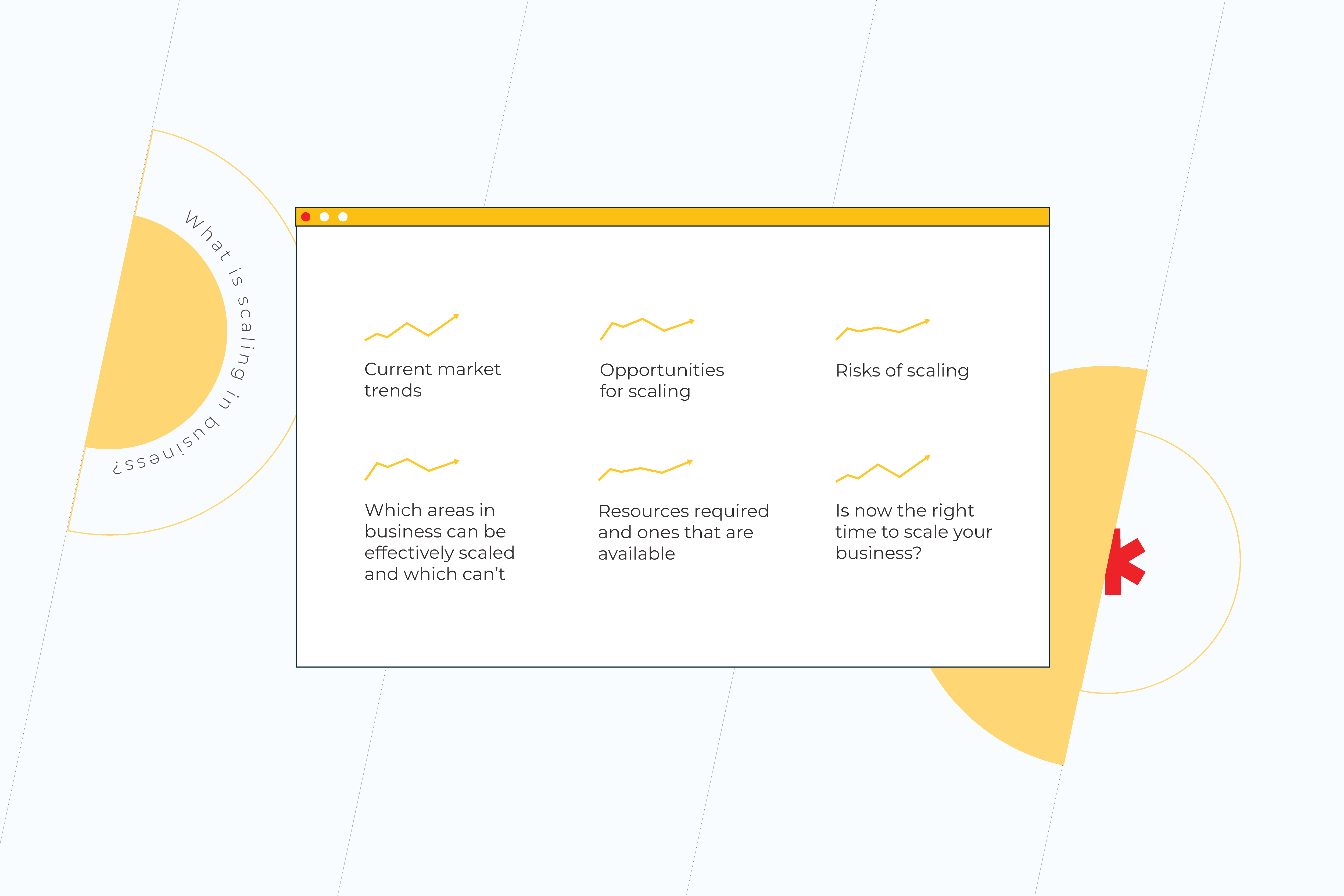
Scaling in business is all about increasing business development while using it effectively to get results. For every company that wants to build scalable business solutions, there is a unique approach. What has worked for another business may not work for yours, and vice versa. That’s why it’s vital at the outset to define what scaling in business looks like for your company. You should take the time to analyze:

  • Current market trends
  • Opportunities for scaling 
  • Which areas in business can be effectively scaled and which can’t
  • Risks of scaling
  • Resources required and ones that are available
  • Is now the right time to scale your business?

By doing so, you will illuminate where your company stands at the moment and if now is the right time to focus on scaling your business.  

How to create your personalized business scaling strategy

As we previously said, there is no singular scale-based strategy example or one-size-fits-all scaling a business solution. Instead, the specific needs of your company will dictate the direction you need to take. That said, there are some common factors that businesses should take into account for starting scaling.

Solidify “real” market value strategically

As a mid-size business, it’s safe to say you made it. You proved your business can be a success, but what’s the next step, and where do you go from here? If your business has reached this stage, you could be primed for scaling. Now it’s all about refining your business and getting it ready to scale. Here’s how:

Define your customer base

Before, you might’ve had a more general idea of who your customers are. Now is the time to dive deep and target. By knowing your customers, you’ll know which areas of your business need to scale to be most effective to them. 

Refine your core values—think product

Now, it’s time to look at what you bring to the market. Why should your customers choose you and not a competitor? Knowing these values means you can focus on building your brand in these areas.

Solve one thing at a time

When we try to multitask, we often find ourselves torn between various areas, and this can be extremely harmful when it comes to scaling a business. It divides your focus and makes any moves ineffective. At this stage, it’s important to define your focus and only tackle one problem at a time. Solved that one? Then move to the next one. 

Use smart metrics

Once you’ve defined which areas of your business to scale, it’s time to decide how you will know your effects were a success. That’s why knowing the scale in business meaning for you matters. Decide which metrics you will use to know if scaling was a success for you and the key milestones you need to achieve to get you there.

Avoid introducing a new product or service

Scaling generally isn’t about introducing a new product or service to your range. Instead, it’s about optimizing what you have and making that work more effectively for your business. However, what this doesn’t mean is being afraid to onboard new methods, systems, or technology that help get you there. Don’t hesitate to research and explore new solutions, technology, or methodologies that could work for your business.  

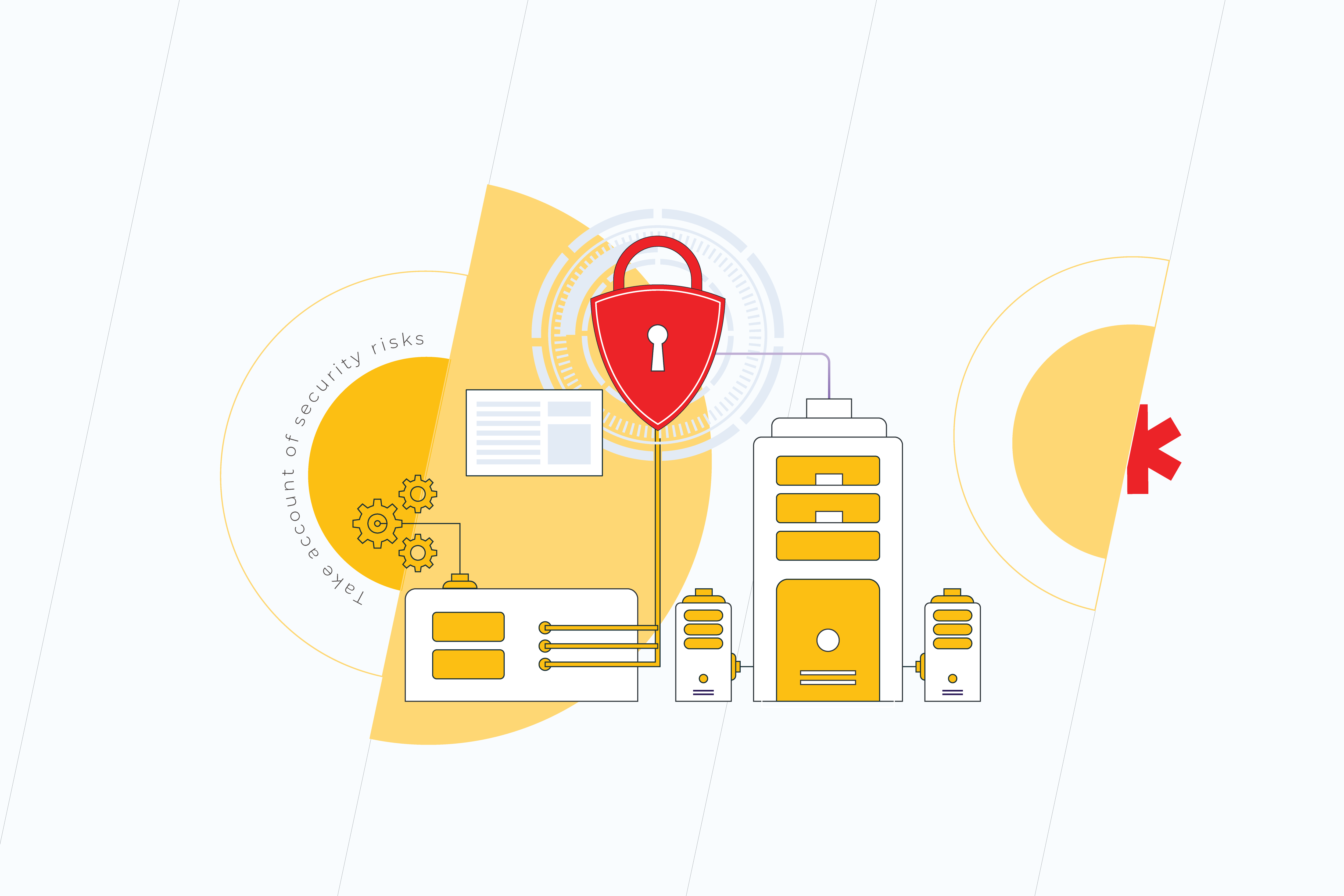
Take account of security risks

business scaling strategy

When scaling, your systems will become larger and more complex. This can lead to issues such as errors or weaknesses in the system’s security, which can cause data leaks or bugs. That’s why, when scaling, it’s essential to take account of security as a priority, and not as an afterthought. Initiate a plan for how you will secure your data and systems before they need protecting.

Unlock the power of the right technology

For many businesses, getting the right technology on board can help scale businesses astronomically. It can automate processes, make things simpler, or even unlock new potential. One of the most popular solutions at the moment is cloud computing. Its various areas can help businesses scale and do so remotely. By unlocking the benefits of scalability in cloud computing, companies can utilize the power of the cloud to allow employees to work from anywhere in the world, access their systems when needed, and increase the scalability of the business by moving it from one fixed location or office to worldwide. Learn more  about how to outsource software development projects.

Keep that growth spirit 

As companies grow, it can be challenging to keep that entrepreneurial spirit that helped them to get this far. Processes may seem routine and stable. But it could not be more essential than at this moment. At this time, it’s vital to adopt an agile mindset to scaling, one that permits you to define a strategy, test it, and adapt it to fit your business needs. 

IT infrastructure scalability—the next steps for your mid-sized business

In the modern business environment, an effective IT infrastructure is one of the most important tools a company can have in its kit. From effective cloud computing to analytics solutions, to automation solutions, having the right technology at your fingertips is key. However, for businesses just starting out or those seeking to scale and fast, it can be confusing to know which solution is best for you. 

At *instinctools, we are the experts in digital transformation. Get in touch with us to find out how we can help you scale, or follow our blog to discover more on how to keep your business up-to-date and primed to scale. 

The top reasons why your e-commerce business needs automation

The e-commerce industry is booming! Partially, due to its convenience and dynamic offerings, and to some extent – because the pandemic has accelerated its growth. Anyway, online retailers are flooded with new orders they might find difficult to deal with. Processing these orders manually includes a lot of work and leaves plenty of room for errors.

But what if there was something that would allow people to spend far less time performing these tasks, and, yet, gain far better results? Too good to be true? Not really. That’s what e-commerce automation is used for in the first place.

E-commerce automation is a set of tools which helps to convert manual or repetitive tasks within your business to automations that are intelligently carried out exactly when needed. With automation, your fulfillment processes will begin as soon as someone places an order.

To make a long story short, it’s how businesses – especially those in B2B ecommerce – can do more in less time. Although saving time is probably among the major advantages of e-commerce automation, it’s definitely not the only one. There are plenty of improvements that automation entails in different aspects of an e-commerce business.

CUSTOMER SERVICE

Elimination of manual data entry

With e-commerce automation, which eradicates the need for manual data entry between your systems,  you won’t need teams who spend their entire day entering data. That’s the job the software could more efficiently handle. ‘Efficiently’ implies that it would be clearly faster and allow your employees to focus on more important tasks. 

Also, if the system is well adjusted, the odds of human error are eliminated. And this protects your business and reputation from the serious damage that can be caused by these errors. Sometimes one mistake – accidentally made and not fixed in time – is enough to lose a customer forever.

Order fulfillment optimization

As a rule, order fulfillment is a long, multi-step process, which can be significantly rationalized by e-commerce automation systems. For example, after an item purchase, the system automatically creates a picking ticket, which pickers can use to match the product SKU. And that kills two birds with one stone. You are cutting down on your order fulfillment costs and customers’ waiting time for their order preparation and shipping.

Keeping your promises to customers

It’s much easier to keep the promises you’ve made to the customer with proper automation. When the right data gets to the right places, you’ll be able to deliver the orders to your customers’ doorsteps on time.

Returns process automation

The thing that definitely improves your customer experience is seamless and easy returns. Customers need to know they can slip up their orders and not be punished by having to spend lots of time trying to get a refund.

Processing customers’ feedback

Staying on top of customers’ satisfaction is key for every business owner. That’s barely possible without minimizing the customers’ unhappiness by dealing with their bad reviews smartly. When the rating is low, the ticket can be automatically created, allowing you to consider the issue in no time.

MARKETING

Creating a highly personalized customer experience

Ironically, e-commerce automation systems can personalize your customers’ experience in a way that a human will hardly ever do. Reaching out to thousands (hundreds of thousands) of customers individually at the same time is impossible… unless this process is automated.  And when it is, the system addresses all of your messages to your customers using their names, and remembers important dates. In addition, it reminds them of the products they’ve left in their baskets and monitors what the customer is clicking on and what they are buying to understand their needs and recommend new products that match their interests.

Instant reporting and testing

Automatically generated reports, which are always at hand, help you see exactly where you’re going with your marketing strategy and refine your campaigns accordingly.

Integration of marketing efforts

Catching up with your customers is possible only if you expand your brand’s digital presence. Keeping in touch with them on platforms they check more often is one of the most credible ways to boost your revenue.

Perfect scheduling

Using a good e-commerce marketing automation solution, you can set up a whole season of marketing campaigns, like social media posts and seasonal PPC ads, to appear whenever you want them to.  For instance, when Christmas is coming, the ads of decorations or everything, considered to be a good present, can be launched. Scheduling sale changes in advance allows marketing teams to come up with better campaign plans, reduce errors, and avoid downtime.

Customized promotional offers

When a customer explores your site and buys a product, your automation system collects and analyzes that data and, based on this information, can build customized promotional offers. For example, the system can automatically trigger certain actions when a customer behaves in a certain way. If your customer buys a product, the system can automatically notify them about related products they may be interested in.

INVENTORY

Regarding large warehouse inventory, e-commerce automation is the best solution a retailer can desire. The stock no longer needs to be manually updated, so there’s no risk of selling items that are already sold out.  Automation software has each product’s unique SKU number to easily track inventory flow. If the product is out of stock, the system recognizes the sale and removes the item’s SKU from the list. 

Moreover, the customers who have shown interest in the products you’re low on can be notified and, thus, be encouraged to make a purchase. Alternatively,  if it’s too late, the customer can add the item to the waiting list and buy it when it restocks.

Marketing teams can also be notified when inventory is running low on specific products. In that case, they can pause promotion and optimize ad spend. And, vice versa, when new products are added to a store, marketing departments get all the product details and can start advertising.

No matter how pretentious sounding it may be, in such a competitive area as e-commerce is, automation is not just the ticket to success but a path to survival. A generation of born shoppers, who are used to getting everything they wish for in just one click won’t agree on anything less than perfect. Neither should you.


Follow us on LinkedIn to keep updated on the most recent company news, interesting case studies, and insights from our experts!

The subtle art of moving to the Cloud: 11 things to consider

Migration to the cloud is like moving to a new house: backbreaking, time-consuming, but pretty satisfying in the end. You pack your life into boxes, deliver them to the new place, and, eventually, after everything is arranged, breathe out a sigh of relief. 

The same goes with cloud computing – you can’t just get there. There’s a lot to think about and get ready for.

1. Proper inventory.

Migration projects start with figuring out what’s in place, if those items are needed and how they will work on the new platform. This preparation stage is always about deciding what is useful enough to keep and what doesn’t make sense to store.

It’s actually pretty simple: if the costs of making your legacy app “cloud-ready” are less than maintaining it on-premises than it’s worth it. To determine if the migration is justified from a cost standpoint, you need to take into consideration the costs of converting, implementing, and integrating the cloud-based app with your existing architecture. 

3. Security.

All the modern IT systems today are invariably connected to the Internet, which makes them vulnerable to hack attacks. The fact that cloud computing is a distributed network also makes it easier for companies to quickly recover from such attacks. What you need to do to minimize, the problem is to examine your cloud provider’s security measures and risk mitigation capabilities. 

4. Migration approaches.

While considering moving to the cloud it’s important to understand not only why but also how to get there. You can choose one of the approaches within the migration strategy which suits your business needs best. There are three of them to consider: rehosting, replatforming, and refactoring.

5. Cloud compatibility.

Another thing you need to figure out in advance is whether it’s possible to host your software on a remote server. Sometimes companies have to replace much of their existing IT infrastructures to make their legacy systems compatible with the cloud. A more cost-effective option might be to use the hybrid cloud, which is capable of addressing most of these compatibility issues.

6. Shift in responsibility.

Although it might be viewed as a totally positive feature, it’s more controversial than it sounds. When something goes wrong at the cloud’s provider’s end, the only thing you can do is to log the issue with the vendor and wait for the resolution. Your IT department becomes powerless to address many problems. It’s actually neither a good thing nor a bad one, but a new reality you should get used to in order to move your business forward. 

7. Data management.

It is another tricky issue in cloud service adoption. Which browsers does the cloud service support, and how does it handle data loss? Can the cloud provider or the user organization recover that data, and what’s the turnaround time? In what locations is customers’ data eventually stored?

8. Downtime. 

Unfortunately, you can’t get away from downtime. But what you can do, is to have applications with offline syncing. This means, if you suffer downtime you can keep working and all your updated files will sync to the cloud automatically once the issue is resolved. 

9. Scalability.

Let’s be honest, there’s little to think about: one of the main reasons for moving to the cloud is its ability to scale to one’s business requirements. The thing is that it can be done without you needing to be forward-thinking and have too many plans. With managed services, it can even be done automatically. With the proper support for scalability in your application, it’s like having a magical house that can be expanded or narrowed down to any size you need at that moment.

10. Automation.

If you want to increase productivity, think of the processes that can be automated. For example, you can schedule automatic updates across your software, so you don’t have to worry about slower operation times. Automation can save so many business hours in productivity.

11. Cloud service management.

There are two options here. You may try to manage the cloud migrations all by yourself, which often turns out to be a painstaking experience. Imagine your house needs repairing. Could you handle it on your own? And, more importantly, would you like to? It’s far more labor-intensive, takes a lot more time, and there’s a higher chance you’re going to get it wrong. Or you can seek the assistance of a vendor to bolster your project. It makes sense if you want to lift a burden of dealing with a massive infrastructure migration off your shoulders. A trusted partner can optimize and re-architect your data, providing a prescribed, personalized cloud solution.

While moving to the cloud, preparation is key. It ensures a smooth transition of your system and its capability to use all the benefits of cloud services. Once you get there, you’ll know… and you’ll breathe out in relief.


Follow us on LinkedIn to keep updated on the most recent company news, interesting case studies, and insights from our experts!

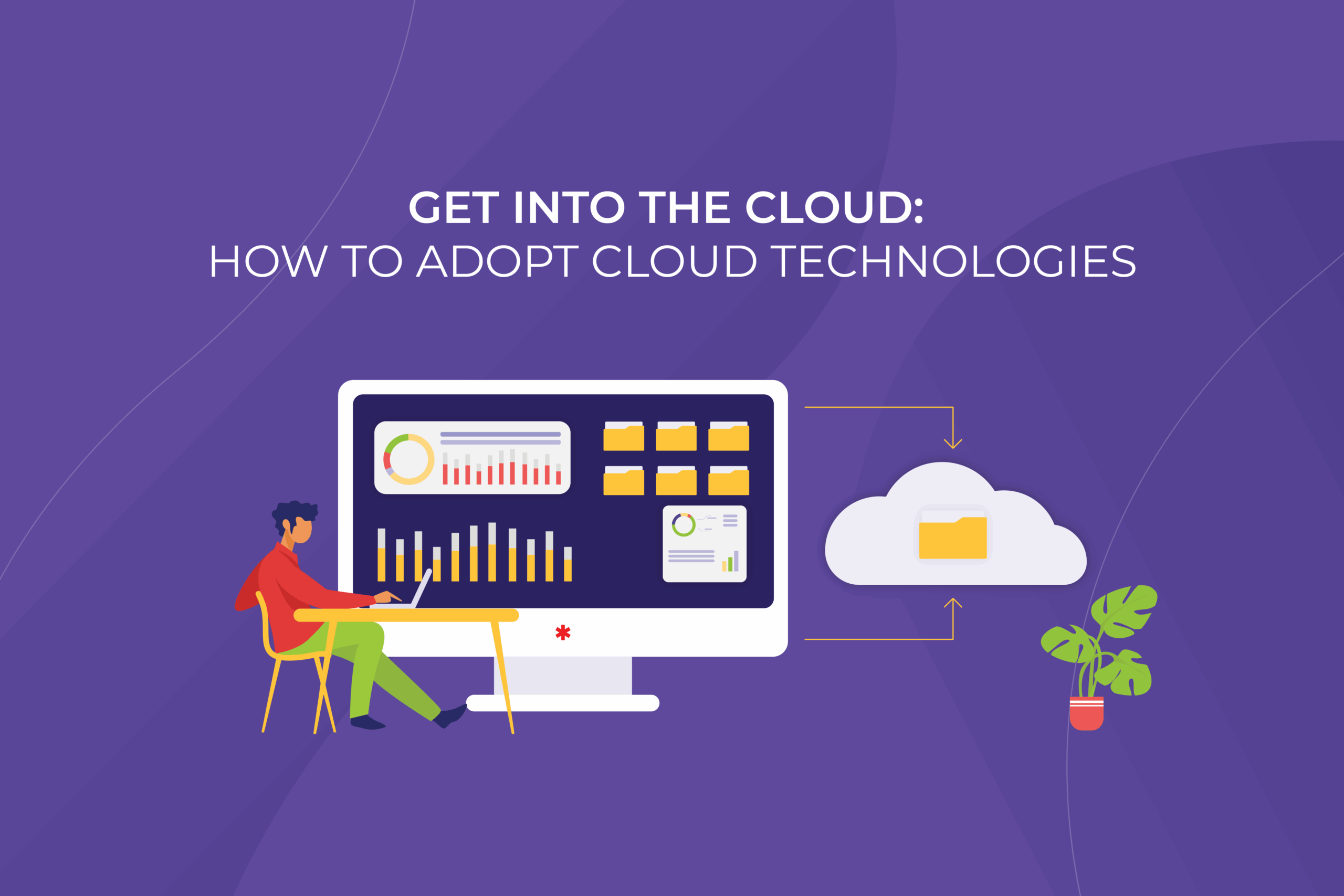
Get into the Cloud: How to adopt Cloud technologies and why do it ASAP

Whether to modernize or not, stops being a question when outdated software systems can’t keep a business afloat. That’s like evolution applied to the technological world: it’s not the strongest or the most intelligent of the species that survives, it’s the one that’s most adaptable to change.

Why move to the Cloud?

Once you admit that your software no longer meets your business needs, don’t lament and fall into despair. You’re not automatically obliged to shut down the old system and build a new one from scratch. Replacement is not the only option. It may make some sense to re-engineer or transfer the original product to new technologies. And it oftentimes does. There are different modernization strategies out there that depend on the problems you’re trying to solve.

Today we’re going to consider the most popular strategy  –  migration to the cloud.  But don’t delude yourself with the term. The migration doesn’t necessarily imply simply moving systems to the cloud. It goes hand in hand with a transformational strategy and frequently includes enhancements to let you get the full value of the benefits the cloud infrastructure can provide.

We won’t lie to you that this way is all that smooth and covered with rose petals. There are some pitfalls you may come across. But, you know what they say: forewarned is forearmed.

Benefits of cloud adoption

The benefits of cloud computing adoption are definitely worth it. They allow a business to:

  • reduce overhead expenditures on testing, integration, and maintenance
  • shorten time to release new features
  • scale the processes up and down according to needs
  • increase the flexibility of the system(s) with the help of sophisticated solutions that cloud-providers are steadily developing 

However tempting the idea to start ‘right here, right now’ may be, any decisions related to software modernization should be based on real data and thorough thoughts, rather than guesswork and sudden impulses. That’s why before starting cloud computing adoption, you need to:

  • Define the current state of your system
    It’s impossible to create a roadmap for modernization without having a clear understanding of each application of yours and its interdependencies. Only a deep insight into your applications, including its running state, processes, infrastructure, business KPI, codebase, etc. will help you to choose the right track and stay on it.
  • Set technological and business goals
    Using the information you’ll get from a detailed analysis of the current state of the system, you can think of improvements in terms of profitability, customer experience, and more. The goals you set should not come up out of nowhere but be based upon the real situation your system is in and the sourcing you can afford. You can’t just expect that everything you want will pop up with a magic wand swish.

Approaches to cloud adoption

Now, having data – not just ‘gut feelings’ – under your belt, you can choose one of the approaches within the migration strategy which suits your business needs best. There are three of them to consider:

  • Rehosting is the technique of the lowest cost and risk. While re-engineering projects can take years, rehosting is faster. It keeps the underlying business logic untouched with no negative impact on the enterprise. As a result, the system operates in exactly the same way.
    On the other hand, rehosting doesn’t generally make use of cloud-native features as some other techniques do.
  • Replatforming includes adjusting the code to a new platform while preserving the existing functionality. Minimal changes like using a managed database offering or adding auto-scaling can help return the basic profit of cloud infrastructure.
  • Refactoring presupposes restructuring and optimizing the existing code without altering its external behavior. Refactoring an application component allows for solving technical problems and improving the component’s features and structure.
    By re-coding some portion of an existing application, companies can fully exploit cloud-native features and maximize operational cost efficiency in the cloud.

The good news is that you can start with one approach, acquire some initial benefits, and then keep on modernizing your systems through other approaches to get even better results. When the primary modernization iteration is accomplished, you can estimate its out-turns by comparing your previous baseline against the current performance, user experience, and business outcome data. Thus, you’ll see the areas where further modernization can be made.

There’re a number of big, powerful players on the market which to a large extent owe their success to cloud technologies. We bet you’ve heard about Netflix or Spotify. These are the companies that have learned the lesson: it’s the one that’s the most adaptable to change who survives.


Follow us on LinkedIn to keep updated on the most recent company news, interesting case studies, and insights from our experts!

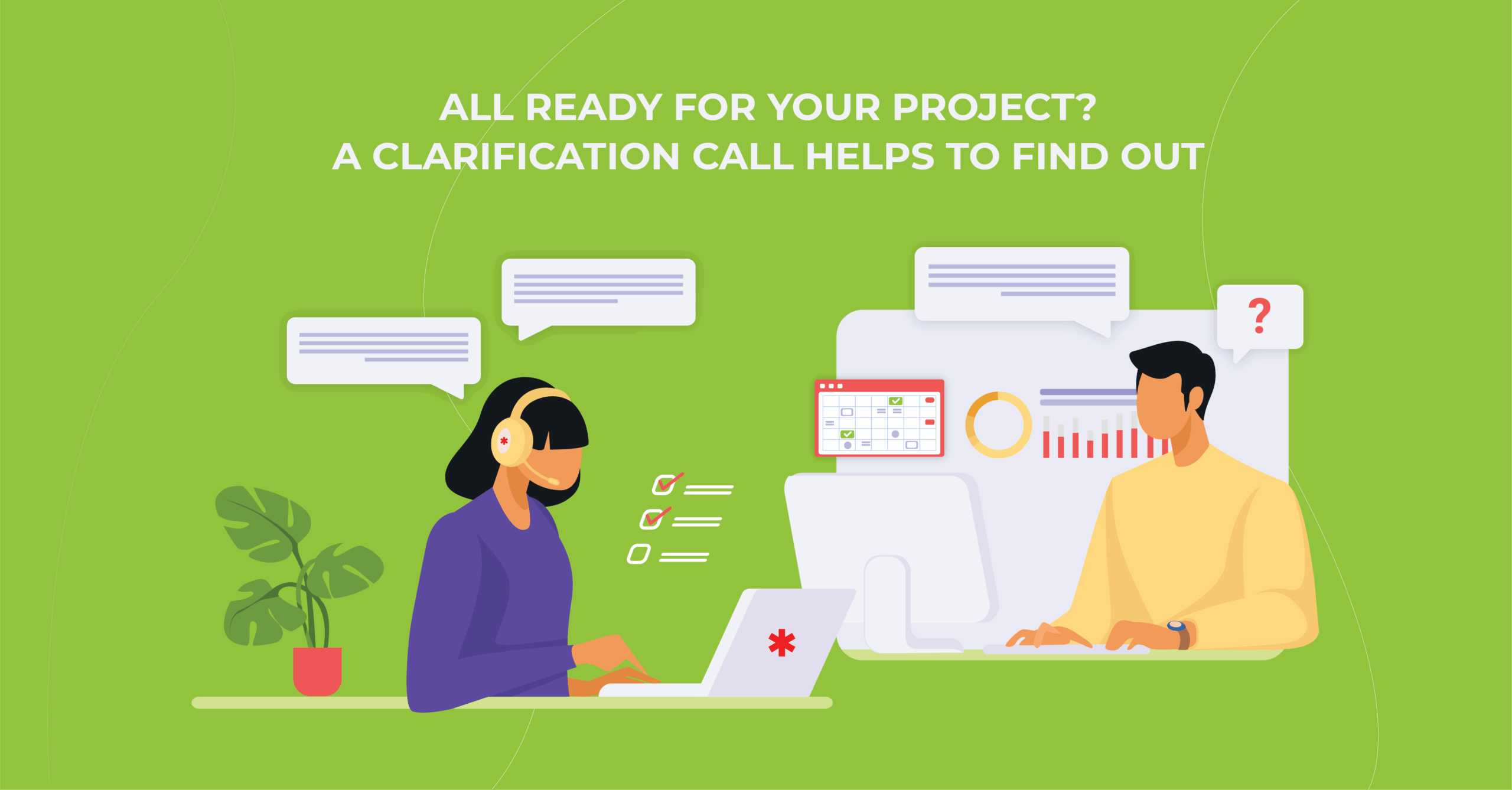
All ready for your project? A clarification call helps to find out

The Clarification Call is a starting point of project delivery. It’s a free, non-commitment though crucial activity, which either defines (clarifies) or, at least, comes close to defining a customer’s needs. That’s like a medical check-up, but in a business sense: you have the opportunity to articulate your pain in the neck and get a preliminary diagnosis.

Before the Clarification Call, if desired, a potential customer gets a checklist with some questions. Answering them is entirely optional. Nevertheless, you may feel free to lay out your major requests in advance.

You may be aware that something needs to be done but all of a sudden (in fact, quite predictably) realize that you don’t know what exactly it is. Breathe out! That’s not a stumbling block at all. We are able to perform your business task not only on a technical level but also on a methodological one, so you can start either with something that bothers you or with an opportunity you would like to bring about. Our team is ready to answer the questions that arise during the call. As well as help navigate you through the processes and stages of the project and relevant cases. You can rest assured that it’s a friendly discussion!

As it’s extremely important for us to be in complete sync with our customers, we meticulously select the team involved in this phase. In general, these are representatives of the Sales Department, Project Manager, Business Analyst, and Solution Architect.  Yet, the structure of the team is pretty flexible and is specified according to each case. 

The team on the customer’s side is not limited to certain positions. Let’s put it this way, not really must-have, but nice-to-have include Product Owner, Product Manager, Project Manager, Chief Technical Officer (or other staff from the technical department). And other key positions are welcomed.

During the discussion, or within 24 hours thereafter, the customer gets expert feedback on their risks and weak points, which require a more thorough investigation. Moreover, we provide them with initial recommendations and next steps plan, if need be, which implies a transition to Pre-Discovery Workshop.

Whether or not to make these steps towards the following phases of the project is up to you. It’s doubtless that after the Clarification Call you’ll get a better idea of current gaps in your business processes and see any possible room for improvement.

Leave us a note if you have any questions or would like to learn more about our project delivery approach. Our sales specialists are ready to provide you with comprehensive advice and to find the right team for your project implementation!

How an IT Pro Makes His Life Easier Using TFS 2015

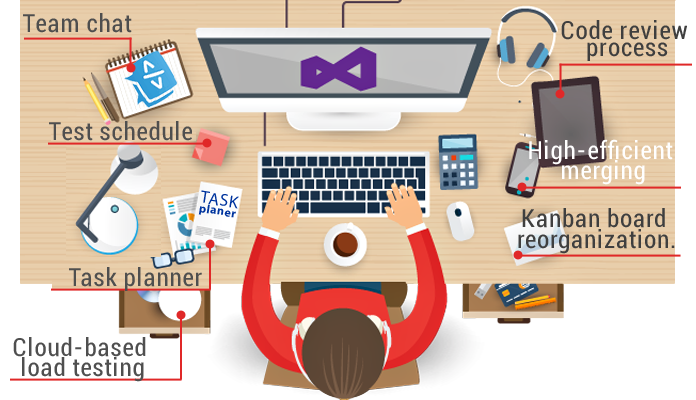
Team Foundation Server 2015 has a variety of options that very few know about. This article will tell you about operation nuances and settings of the product. You will see for yourself that TFS is not only for .NET developers.

Team Foundation Server 2015 is the newest version of platform for managing Microsoft’s applications life cycle.

It facilitates web development by:

  • team chat;

  • task planner;

  • test schedule;

  • code review process;

  • cloud-based load testing;

  • high-efficient merging;

  • kanban board reorganization.

Above all, no more need to build and deliver a new website version to the server manually. Just click one button and your new build is on the server!

Who uses TFS 2015?

The platform is integrated into the Visual Studio environment and has an intuitive interface. It is friendly to .NET teams, yet could it come in handy to others?

Many projects require using several languages and clearly separating responsibilities. You may have a back-end code in C# and a front-end code in Angular. The solution will be Visual Studio for Angular developers.

What about developing mobile applications, with one IDE for iOS and another for Android? Without VS you can only go for additional software to work with TFS. Yes, this means an extra cost, but it is worth it: look how easily you can use the platform now.

How can mobile app developers work with the build?

Let us use Android Application as an example.
To operate successfully you don’t need any additional software: Java, Gradle and Android SDK are already installed on an Android developer’s computer.

1. Creating a build

Click the icon Plus in the left menu. Templates appear in a new window. Choose Empty.
Press the OK button and you have a new build.
The build consists of consecutive steps.

2. Creating a new step

Choose Android Build, press the Add button and close the window. You will see a build step configuration window with self-explanatory fields.

SOLUTION. As you know, there is no direct tool for publishing applications after the Play Market build in TFS. You need to use your imagination and add a Command Line after the Android build. It executes the bit of code written in advance for Google Play publishing: the application will be built and published on a button click!

3. Build configuration

It pays to delve into the build configuration to make your life easier once and for all. The most interesting things are variables and triggers. You need triggers to configure a scheduled build, while variables can be used for tweaking. For instance, a variable responsible for choosing either Demo or Release build mode can be pushed to a build step.

TFS brings developers together and opens up more opportunities. Use your imagination: the platform will give you a tool to realize your idea. Automatize repetitive processes to make coding easier.

Have you used TFS in your projects, or your customers’ ideas in life? What did you think about this solution and workflow for your cases?

As always, your comments are very welcome. We will answer all your questions and suggestions about this topic.

ECM as company’s game rules: Why do you need ECM system, and how to deal with ECM implementation problems.

There are a lot of Enterprise Content Management systems (ECM) on the market nowadays. My company has working experience with Alfresco, EMC Documentum, IBM FileNet, Microsoft SharePoint. In this article I’d like to figure out, how exactly ECM can be useful, what problems can be expected while implementing ECM and how to cope with them.

Our experience has shown, that while choosing an ECM you have to decide first, what options in particular you need at the moment, what options you don’t need at all, and which of them you may need in the future.

We can make a conclusion that ECM should bring following:

  1. Improve the efficiency of business process management thanks to analytical reporting system and performing tasks monitoring system.
  2. Improve employees’ efficiency thanks to the interface adapted to the central tasks, ability to the quick information search, notifications and reminders system, task deadlines control systems, simple interaction of the employees within the work on a single document or a single business process and many other modules of modern ECM.
  3. Improve performance discipline thanks to effective tasks performing control system.
  4. Accounting and long-term storage of documents with the precise control of access to information.
  5. Some reduction of employees’ working time and consumables’ costs.

All these benefits of ECM implementation can be really achieved. However you can face a couple of unexpected difficulties caused by human factor when implementing the system.

Employees reject new way of work. ECM implementation causes changes in usual working environment. Employees can feel suspicious about innovations. To neutralize the negative effect you can try to switch to the new ECM step by step. At the adjustment and testing phase it’s better to show the system to the future users and collect their opinions about the functions’ convenience or inconvenience, involving them to the system creation process. Create trust to the final product. User starts recognizing the system. The feeling of helplessness is getting replaced by the pleasant feeling of control over the system. In our experience people like to see realization of their ideas in the final product. It is though very important not to overdo it. Sometimes it is worth it to spend your time and explain how to make this or that functionality right based on the functioning experience of ECM. This approach though can misfire too. We developed ECM for a political institution, for example. During the ECM development and implementation there appeared a change in the institution management. As a result the team got completely different. New people bring new points of view. And new requirements for the system of course.

Fear of control and job rating. When ECM is implemented you get a precise control over the employees’ activities. The system estimates ratings of job quality uncompromisingly and precisely. We know an employee can be scared by the fact that if he will not be able to affect all his/her urgent tasks at the end of the day, it can have negative influence from management on his/her work. Any employee can have such fears. It is important to explain to people: this situation can display that the work flow is too high and an employee needs an assistant e.g. It is also a great opportunity for the management to notice “chokepoints” in the business process flow.

According to our experience the ECM implementation discloses problems in the document management rules of the company. Instead of the human factor presented by manager you have to deal with a cold task performance system that always operates according to its internal regulations.

In conclusion I’d like to emphasize: despite all known both evident and hidden difficulties of ECM implementation the implementation effect leads to the direct resource saving as well as to improvement in work efficiency and quality. After difficult training or retraining of employees is done ECM implementation brings higher work comfort, satisfaction with work conditions, and higher work quality. In our practice we had situations, when clients who needed only small ECM adaptation began to enjoy this way of work. They started to trust it and now they order more and more improvements.

Anna Vasilevskaya
AI modified real photo
Anna Vasilevskaya
Account Executive

Get in touch

Drop us a line about your project at
[email protected] or via the contact
form below, and we will contact you soon.