When the honeymoon stage is over, you may find your AI model under-deliver on its promises. Model drift, operational inefficiency, and other hitches creep into the system, nullifying the initial gains. That’s why it’s crucial to pour an equal amount of resources both AI development and AI model optimization to maximize the performance of your smart solution and prevent it from going south.
In this article, our AI engineers have curated practical advice about the selection of artificial intelligence optimization techniques along with real-world examples of optimization in artificial intelligence — all grounded in our hands-on experience delivering AI development services.
What is optimization in AI? Turning your models from good to great
Artificial intelligence optimization is a process of refining the performance and efficiency of existing machine learning models. Although fine-tuning is considered to be an optional, after-the-fact step, it’s the brushstroke that turns your pre-trained AI model from a generalist into a niche expert.
More importantly, optimization algorithms allow your model to bypass data, time, and computational limitations, improving its abilities without eating into your resources.
What problems does AI optimization address?
On a high level, AI optimization aims to slash computational load and memory usage along with improving the model’s performance. Beyond this overarching objective, companies can leverage this technique to tackle a raft of other challenges inherent to AI initiatives.
1. High costs of training and running AI models
The power of large and complex deep learning models usually comes at a cost as their sophisticated architecture and formidable data requirements make them expensive to train and run. Optimization techniques can slim down the necessary computational resources, helping companies save money — especially on cloud deployments based on pay-as-you-go models.
2. Slow performance and latency
Low latency is an essential prerequisite for real-time data analysis solutions, such as autonomous vehicles and real-time fraud detection systems. However, increasing prediction accuracy often leads to longer prediction times. AI optimization techniques can enhance model speed and reduce inference time, maintaining both low latency and high prediction precision without compromising either.
3. Overfitting
Overfitting often plagues AI models, hindering their ability to perform well when faced with an unseen set of data. The reasons for that are manifold, including high model complexity, small training data size, and dominance of noisy data.
Optimization techniques such as data augmentation (creating more diverse training data), early stopping (preventing overtraining), and others can offset this defect, improving the model’s ability to generalize to new data. This, in turn, enhances the model’s accuracy for real-world scenarios.
4. Lack of interpretability
The more advanced your model is, the harder it will be to trace its decision-making process. The black-box nature of sophisticated algorithms also makes models hard to debug and undermines trust in their results.
Although AI model optimization isn’t a cure-all solution, this exercise can usher in more transparency into the opaque nature of artificial intelligence. For example, companies can apply rule extraction techniques, gaining more insight into the behind-the-scenes of the model. Combined with explainable AI, these techniques can peer deep into the model and rationalize specific predictions.
5. Deployment challenges
Large deep learning models guzzle a truckload of processing power and device memory, which makes their deployment challenging for resource-constrained environments such as those involving IoT devices. AI fine-tuning makes smart models leaner by trimming away unnecessary parameters and refining the model’s architecture.
Some techniques also enable the model to use lower-precision data types instead of the bulky high-precision formats. Unlike their heavyweight counterparts, lightweight AI models have more deployment options and can integrate with new applications and devices.
Key techniques for AI model optimization
To choose the right optimization technique for your model, you need to analyze several factors, including the model’s type, the deployment environment, and your optimization goals. Below, our data science team has broken down the key optimization techniques along with their ideal use cases.
Model architecture optimization
Whenever your model is facing resource constraints, like limited memory or computational power limitations, it’s in for an architecture touchup. Architecture optimization is also beneficial for the deployment efficiency and the accuracy of predictions.
Pruning
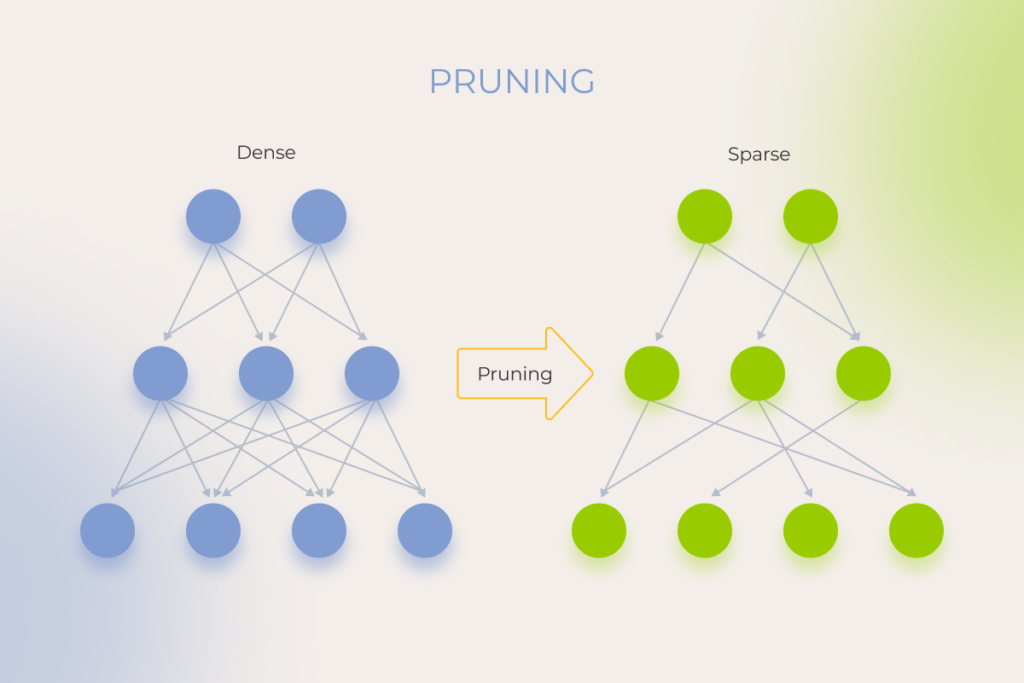
Similar to tree pruning, this technique optimizes the model by selectively removing redundant or unimportant parameters, artificial neurons, weights, or deep learning network layers, thus improving the model’s core structure. A proper prune is an investment in the speed and nimbleness of the model. Pruning can also be used as a regularization technique to prevent overfitting.
When to use? Use pruning when you need to reduce computational complexity and inference time. This is typically the case with tight deployment constraints, such as limited memory or processing power on edge devices. For example, mobile phone manufacturers apply pruning to enable on-device image recognition, reducing battery consumption and improving responsiveness.
Keep in mind that this optimization technique can lead to a slight drop in accuracy.
Quantization
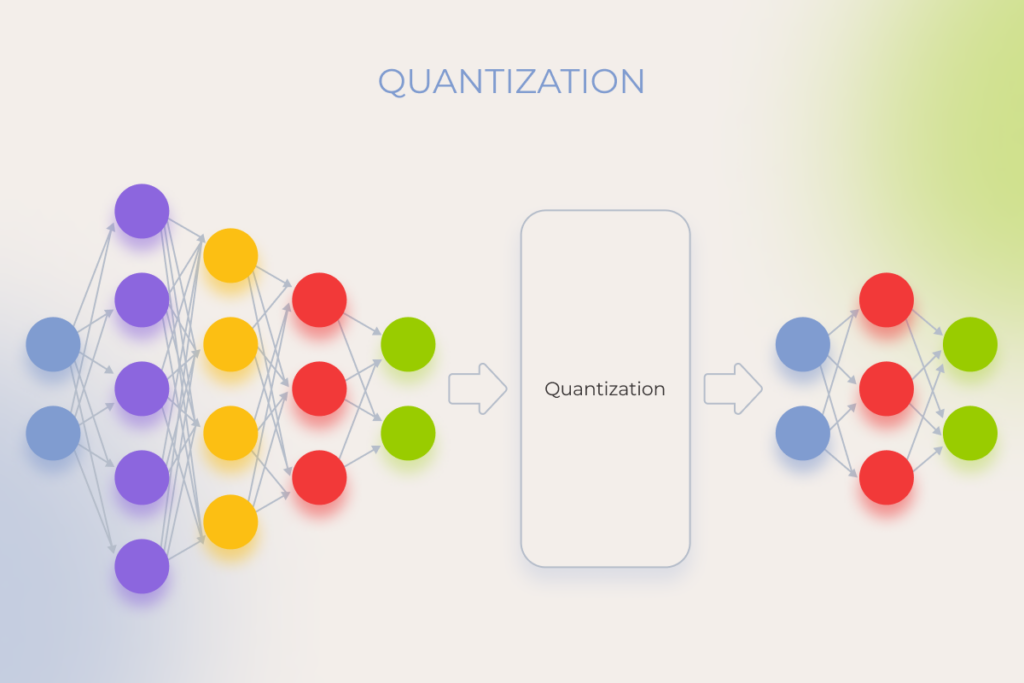
Quantization allows you to substitute floating-point weights and/or activations with low precision compact representations. In simple words, this technique transforms a heavyweight AI model, which employs a lot of numbers to make predictions, into a more agile model with a reduced number of bits used for those numbers.
By paring down the model, quantization makes it faster while also reducing memory footprint. However, the boost in speed may come at the expense of prediction accuracy so you should select this optimization technique for tasks where you can keep the accuracy loss to the minimum.
When to use? Quantization is the go-to option for on-device machine learning tasks, resource-constrained environments, like embedded systems and IoT devices, and cloud-based AI.
For instance, quantization is the secret behind real-time voice interactions on smart speakers that leverage the technique to operate efficiently on low-power hardware.
Knowledge distillation
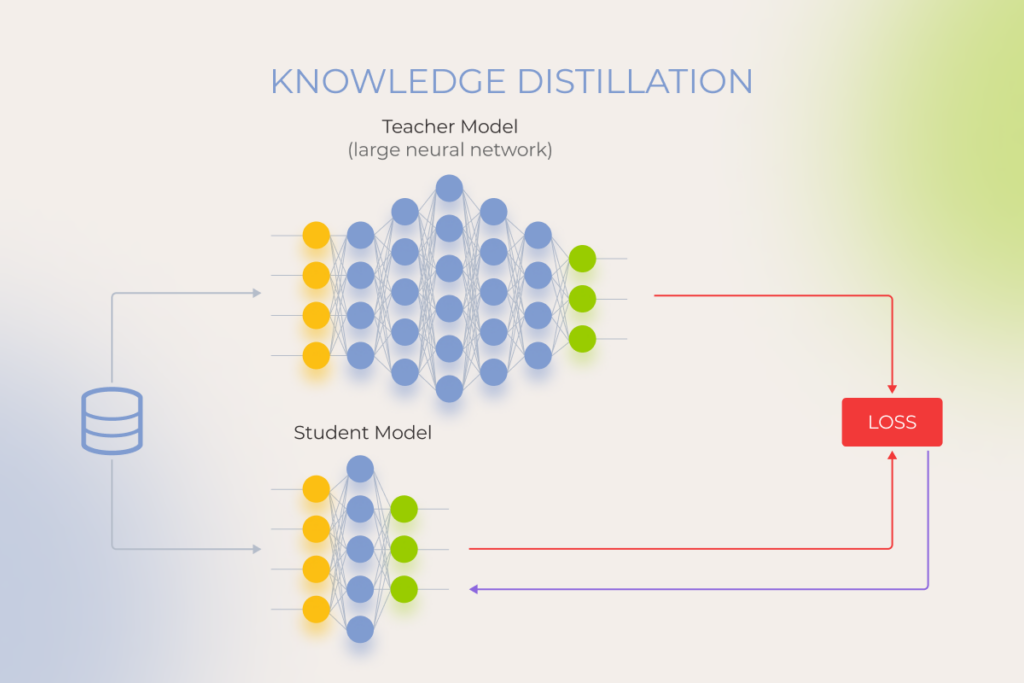
Knowledge distillation is one of the general-purpose optimization algorithms in artificial intelligence popular for model compression. This technique condenses knowledge from a pre-trained, complex ‘teacher’ model into a simpler and smaller ‘student’ model to improve the performance of the latter. By building on the teacher’s wisdom, the optimized model can achieve comparable performance on the same task, but at less cost.
When to use? Knowledge distillation can benefit multiple AI solutions, including natural language processing, speech recognition, image recognition and object detection. You can use this optimization technique for one of these tasks, provided you have a pre-trained, high-performance model that can then power a smaller model for real-time applications.
For example, knowledge distillation enables a small chatbot model to increase response time and refine its conversation flow by using a large, pre-trained language model as a ‘teacher’.
Source code modification
Switching a model’s framework, such as transitioning from TensorFlow to PyTorch, can enhance the development workflow, especially for projects prioritizing fast experimentation and iteration. PyTorch’s dynamic computation graph and developer-friendly design often make it a preferred choice for research and prototyping. However, this AI model optimization technique is applicable only to open-source models, such as BERT, Mixtral, or Llama, where the source code is accessible and modifiable. It’s important to note though that switching frameworks may not directly improve model performance. Actual gains depend on factors like architecture, training data, hyperparameter tuning, and compatibility with your team’s expertise and project goals.
When to use? In most cases, modification of the model’s algorithm is a last-resort step, as source code enhancements require retraining the updated model. You need to have seasoned AI engineers on board to pull off the task smoothly.
Data optimization
In a perfect world, all AI models are fed on accurate, high-quality, and balanced data that lays the ground for impeccable performance. In reality, training data often falls short, causing insufficient model adaptability and subpar performance. Data optimization techniques can alleviate issues caused by poor training data while also promoting better results.
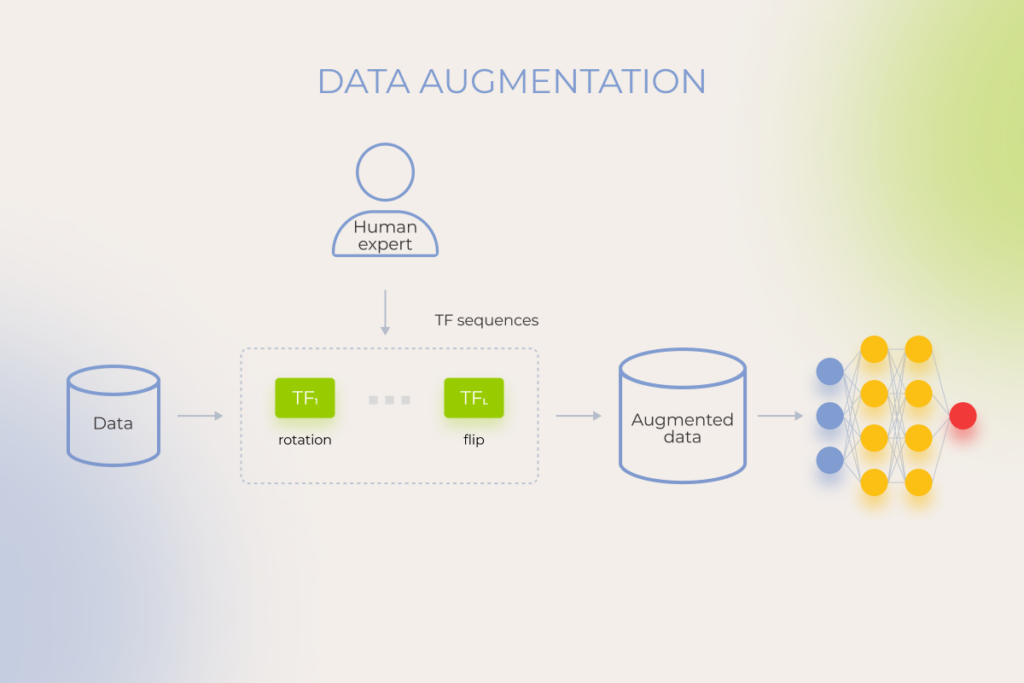
Data augmentation
Data augmentation allows data science teams to artificially ramp up the training set by creating new training data from existing data samples. This technique increases the volume, equality, and diversity of training data, allowing the model to bypass the limitations caused by small or imbalanced datasets. Expanded sets of training data, in turn, mitigate overfitting and reduce data dependency.
When to use? Data augmentation helps your model fare well against the backdrop of limited training data, which is a common issue in tasks like image recognition.
For example, data augmentation makes up for limited data variations, which is a well-known hurdle for medical imaging models targeted at rare disease detection.
Autonomous vehicles also rely on augmented datasets to overcome limitations in real-world data and, ultimately, navigate in diverse weather conditions.
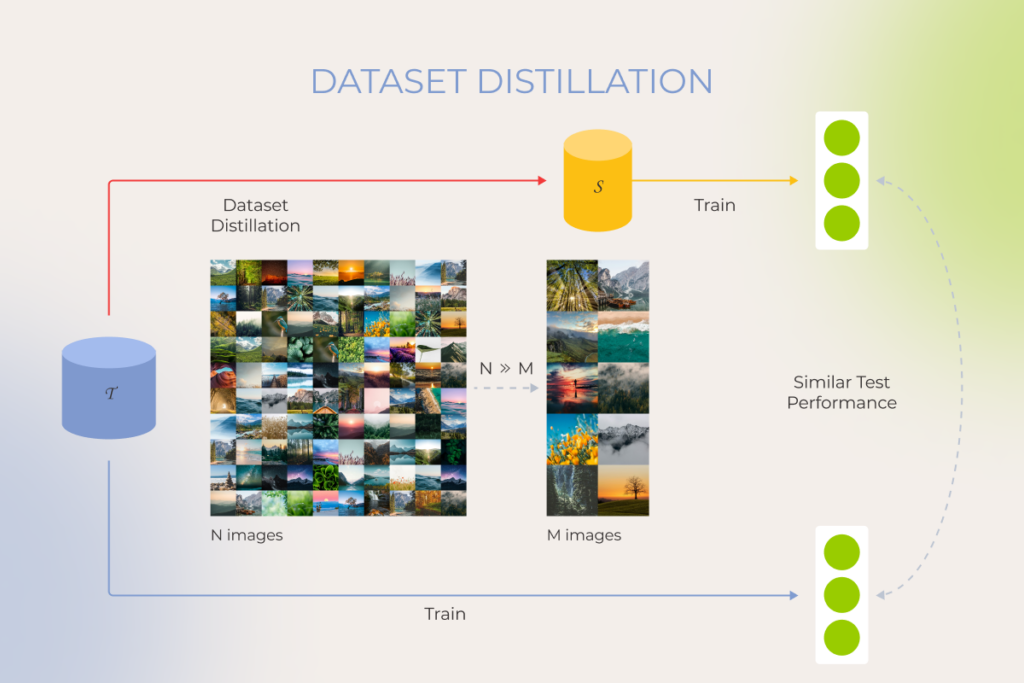
Data distillation
Akin to knowledge distillation for models, dataset distillation helps a smaller model pick the brains of a larger model trained on a massive dataset. This optimization technique allows the smaller model to transfer specific data points, relationships, and internal representations of the data from the larger one, making the smaller model faster and less computationally expensive.
When to use? Data distillation comes to the rescue when you have limited access to a large dataset due to privacy concerns or storage constraints, but you can leverage a pre-trained model, already enriched by a vast dataset on a similar task.
For example, dataset distillation is a game-changer in the development of customer service chatbots that often lack training data due to the dynamic nature of customer interactions.
Training optimization
As our experience shows, companies often look for ways to train a model on a dime due to the limited computational resources and budget considerations. Training optimization techniques help strike a balance between the cost and quality of training, without performance trade-offs.
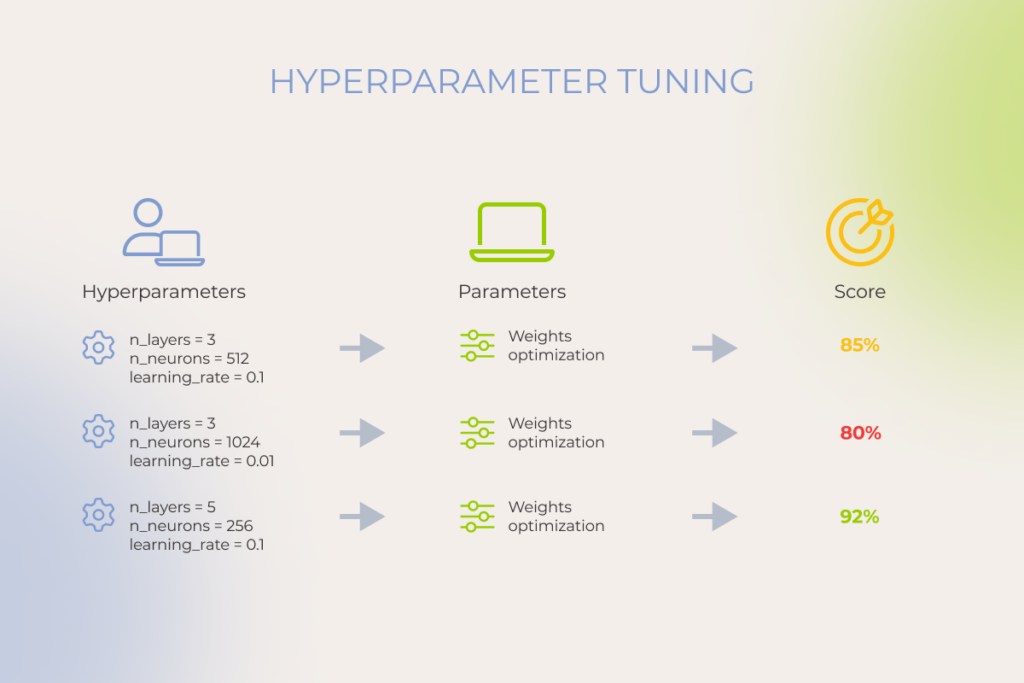
Hyperparameter tuning
Hyperparameter tuning allows you to train your model sequentially with different sets of hyperparameters to increase its training speed, convergence, and generalization capabilities. During this process, the team selects the optimal values for a machine learning model’s hyperparameters, such as learning rate, batch size, number of epochs, and others.
Hyperparameter tuning is an iterative process where data scientists experiment with different hyperparameter settings, assess the model performance, and iterate accordingly.
When to use? You can resort to hyperparameter tuning whenever you need to squeeze out the best possible performance or solve complex optimization problems in artificial intelligence. This optimization technique also allows teams to work around limited datasets and facilitate model adaptation when working with a new dataset.
Hyperparameter tuning proves beneficial for different ML tasks, including stock price forecasting, fraud detection, drug response prediction, and more.
Early stopping
This optimization algorithm helps avoid overfitting that typically occurs when training a learner with an iterative method such as gradient descent. Early stopping monitors the model’s performance on a validation set and shuts down training when the validation accuracy starts to degrade.
When to use? Early stopping helps data science teams deal with complex models or limited training data — when it becomes critical to prevent overfitting.
For example, this fine-tuning technique helps optimize training time for computationally expensive models.
Gradient clipping
During training, the model adjusts its weights based on the calculated gradients. Gradient clipping ‘clips’ the size of the slopes and sets a threshold — maximum value — for them to tackle the exploding gradients problem and improve the stability of the training process. In some cases, this technique can also keep the training process from oscillating and potentially result in faster convergence.
When to use? Gradient clipping is a linchpin technique for any neural architecture that is prone to grow too big.
The application area of gradient clipping is massive, ranging from NLP tasks to reinforcement learning environments and other machine learning techniques. For example, by stabilizing the training process, gradient clipping smooths training for NLP models, enabling them to achieve a nuanced understanding and generation of natural language.
How much does it cost to optimize an AI model?
It’s hard to pin down an exact figure when talking about optimization cost as the final pricing varies greatly based on several variables, including:
The complexity of the AI model — sophisticated deep learning models demand more effort and resources to optimize.
Optimization techniques — some techniques like data distillation require significant computational resources and specific hardware.
Data storage — large datasets require cloud or on-premise storage solutions.
Data labeling — manual labeling can increase your optimization costs.
Instinctools’ data science team employs automation tools within our MLOps approach to reduce the time and effort needed for tasks like data pre-processing or hyperparameter search. We also recommend optimizing for the most important metrics, instead of spreading the optimization efforts too thin, to make the entire process easier on the budget.
AI optimization is a balancing act
While artificial intelligence and optimization make a powerful duo, excessive fine-tuning can lead to diminishing returns and drops in model performance. To get AI model optimization right, you also have to strike the right balance between accuracy and computational demand — or else you’ll end up with longer training times, higher costs, and limited deployment options.
Solve the challenges of AI optimization with an experienced AI team
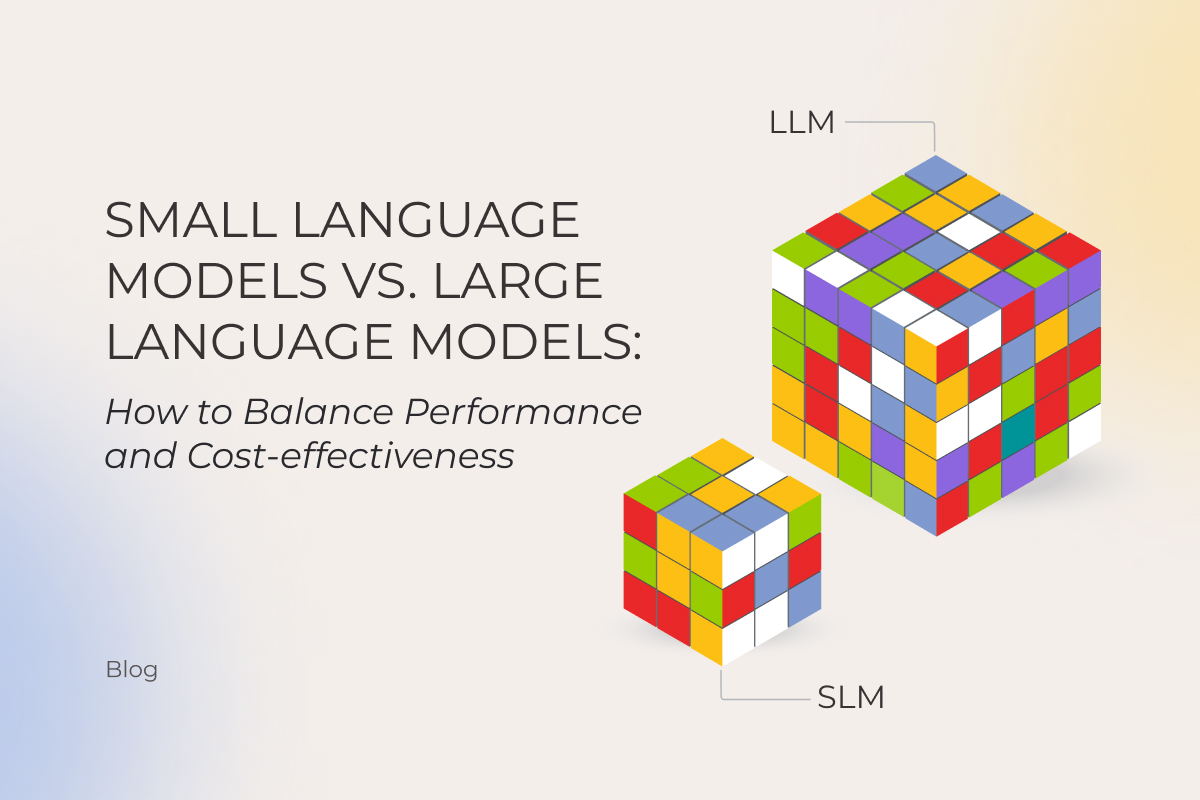
Does size still matter? With AI, the default assumption used to be “yes.” More parameters, better results, end of story. That logic held until small language models (SLMs) started punching above their weight. Gartner’s prediction is that smaller, task-specific models will hit 3× the deployment volume of general-purpose LLMs by 2027, a signal that the LLM vs. SLM question has shapeshifted. Business owners who once asked “which model should I pick?” are now asking how to orchestrate both.
Instinctools’ AI engineers have mapped the SLM vs. LLM comparison as it stands today, underlining when it’s reasonable to downsize to an SLM, and when banking on an LLM pays off.
What is an LLM and what is an SLM?
Both large and small language models (LLMs and SLMs) are artificial neural networks trained on vast amounts of data and built to process and understand natural language and perform a range of tasks from simple text summarization to taking actions on the user’s behalf.
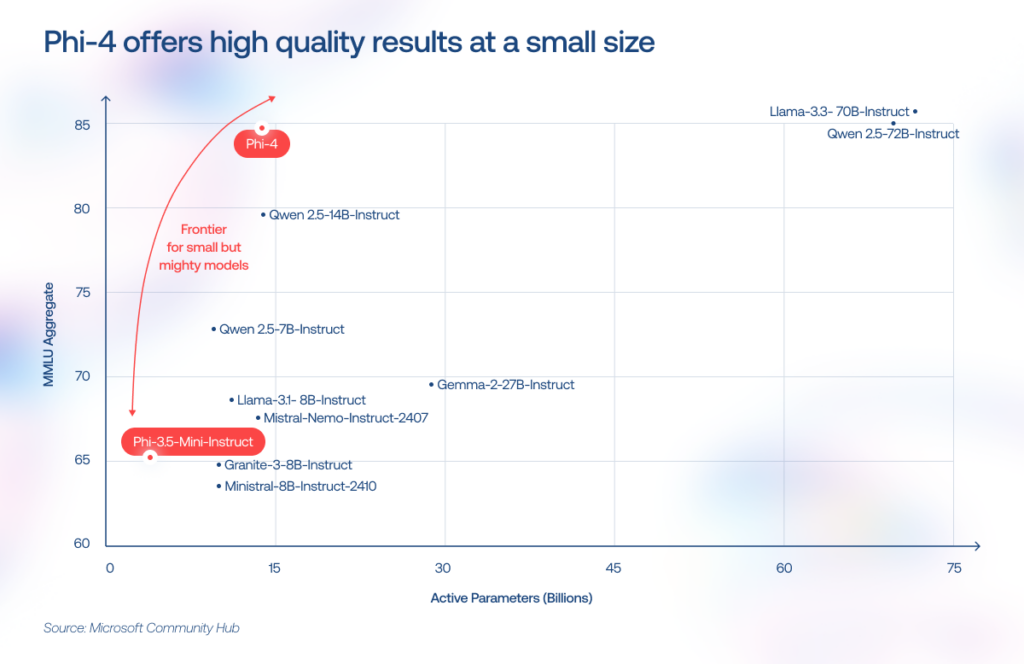
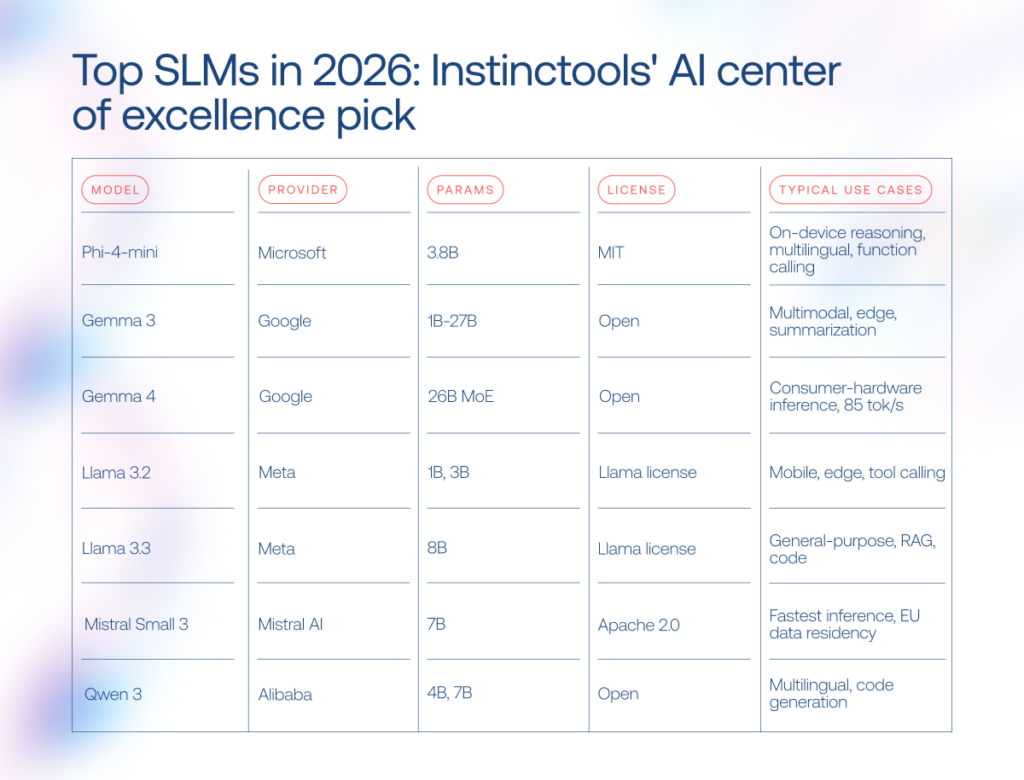
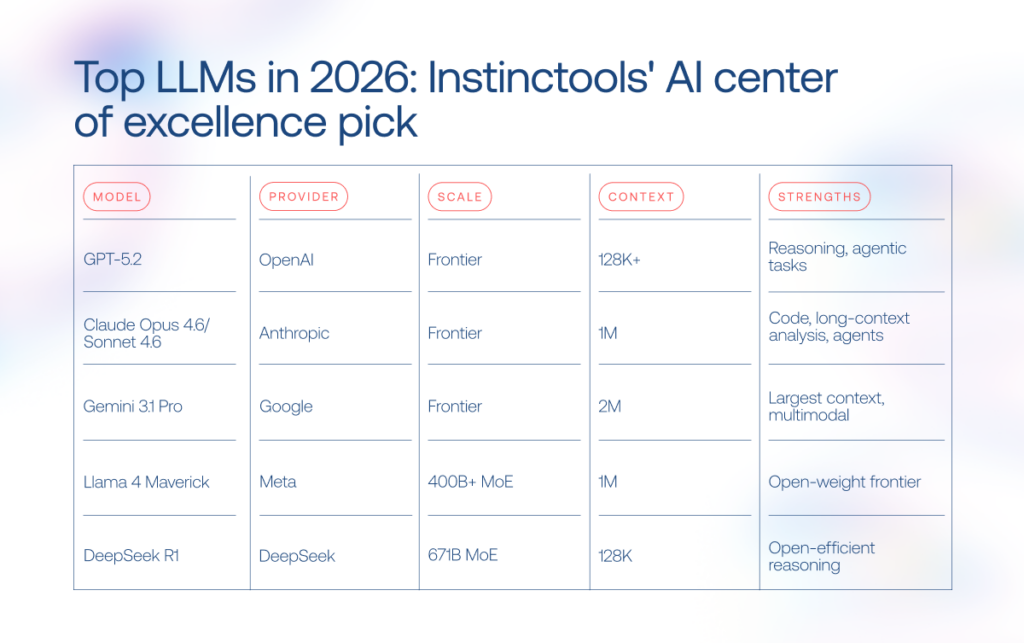
If all language models rest on the same foundation, what is the difference between LLMs and SLMs? Primarily, the number of parameters, which are the internal values a model learns during training. The more parameters it has, the more patterns it can usually capture. SLMs typically range from 1 billion to 15 billion. Phi-4-mini, Mistral 7B, and DistilBERT are some of the go-to picks in this range. LLMs start in the tens of billions and reach into the trillions, with GPT, Claude, and Gemini models leading the pack.
LLM vs. SLM: key differences at a glance
The SLM vs. LLM gap no longer boils down to “small versus powerful.” The tradeoffs stretch across infrastructure costs, latency, deployment flexibility, reasoning depth, and governance overhead. Here’s how both model families compare in production environments.
Criteria
SLM
LLM
Resource requirements
Runs on consumer hardware, edge devices, or a single GPU
Requires high-end GPU infrastructure and large memory footprint
Cost of adoption and usage
Lower inference costs, but usually requires fine-tuning
Higher inference costs, though broader out-of-the-box capabilities reduce customization work
Fine-tuning time
Hours to weeks with LoRA/QLoRA on limited hardware
Months (in rare cases when fine-tuning is necessary)
National specificity
Diverse representation of alphabet-specific languages
Broader multilingual coverage, but uneven cultural representation
Capabilities range
Strong in narrow, repetitive, and latency-sensitive tasks
Better at broad reasoning, orchestration, and open-ended workflows
Inference speed
Faster response times and lower latency
Slower inference, though MoE architectures narrow the gap
Output quality
Lower due to a smaller context window
More reliable in complex reasoning and long-context tasks
Security
Might present certain risks (API violation, prompt injection, training data poisoning, confidential data leakage, etc.) and requires clear AI governance
Advantages of SLMs over LLMs
SLMs have earned their spot as a practical alternative to large language models for businesses that want to adopt AI without investing a fortune into the technology. The core advantages of an SLM over an LLM include:
Lower inference cost (up to 100 times cheaper per query via API, and zero per query when deployed on-device).
Faster response times, especially for short, bounded tasks such as classification, routing, extraction, autocomplete, simple customer support, and local assistants.
Reduced vendor lock-in when using open-weight models, as businesses can self-host, fine-tune, quantize, and move models across different infrastructure stacks.
Deployable on consumer hardware, edge devices, and smartphones, particularly with quantized models such as Llama 3.2 1B/3B, Phi, and Gemma-family models.
Faster and cheaper customization (weeks and a single GPU vs. months and a cluster).
Lower energy consumption per inference, a smaller carbon footprint at scale.
When LLMs still win: strengths of large language models
LLMs are broad-spectrum AI language models built for complex tasks that require broad knowledge, multi-step reasoning, and deep contextual understanding. The LLM advantages over their smaller counterparts include:
Stronger multi-step reasoning across domains like legal analysis, financial modeling, and scientific research.
Much larger context windows, enabling the model to work with long documents, large research corpora, complex conversations, and sometimes substantial portions of codebases or document sets in one pass .
Multimodal capabilities covering text, image, audio, and video in a single model.
Lower need for task-specific fine-tuning, because frontier LLMs often perform well with prompting, retrieval-augmented generation, tools, and examples. However, production deployments still require evaluation, guardrails, monitoring, and workflow design.
The reasoning and planning depth that makes LLMs a natural fit for the orchestrator role in multi-agent systems, where a central model coordinates and routes tasks to specialized smaller models.
An SLM vs LLM comparison across 8 criteria
Building and training models from scratch requires significant investments, often beyond the reach of many businesses. That’s why, in this article, we focus exclusively on pre-trained models, comparing notable LLMs such as ChatGPT, Claude, and Gemini, with SLMs like Mistral, Phi, and Gemma.
1, Resource requirements
When it comes to SLM vs LLM resource requirements, the gap remains wide. LLMs contain hundreds of billions to trillions of parameters, and high memory consumption makes them a resource-intensive technology. If you target the latest GPT, Claude, or Gemini models, you’ll need NVIDIA H100 or B200 GPUs, which cost $25,000-$35,000 per processor.
SLMs’ compact model size and lower computational power requirements enable them to run on a broader range of devices, including regular computers and smartphones. For instance, Microsoft’s Phi-4-mini needs just 4GB of RAM, so with an SLM as a resource-friendly alternative to LLM, companies can hop on the AI train without upgrading their hardware park.
Instinctools’ verdict: SLM.
2. Cost of adoption and usage
The cost coin has two sides: fine-tuning and inference. LLMs save on fine-tuning since they handle most tasks out of the box, but inference adds up quickly at scale. SLMs need fine-tuning, yet their day-to-day usage is far more affordable.
To feel the disparity, consider this scenario: you have 300 employees, each making five small 1K-token requests per day. At the time of writing, a frontier GPT model priced$1.75/$14.00 per 1M tokens, that adds up to around $720/month. Replace it with Gemini Flash at $0.10/$0.40 per 1M tokens, and the same workload drops to roughly $22.50/month.
Instinctools’ verdict: SLM.
3. Fine-tuning time
The logic behind the fine-tuning process is straightforward: the more parameters the model has, the longer it takes to calibrate it. In this regard, adjusting a large language model with trillions of parameters can take months, while fine-tuning an SLM can be completed in weeks.
Parameter-efficient methods like LoRA and QLoRA have shortened the process further. A 7B model can now be fine-tuned on a single GPU in hours, which is how our team compressed a full project with Mistral 7B at its core into just six weeks, stepping up the model’s precision rate from 10% to 75%.
Instinctools’ verdict: SLM.
4. National specificity
The lion’s share of the most well-known LLMs originates from the US and China and doesn’t adequately represent diverse languages and cultures. Studies unveil that LLMs’ outputs skew toward WEIRD societies (Western, Educated, Industrialized, Rich, and Democratic).
Sovereign AI has become a trend, with governments commissioning models trained on local-language datasets. If you compare small language models and LLMs on language coverage, SLMs lead the push with Jais for Arabic, Nanda for Hindi, Typhoon for Thai, and Viking for the Nordic languages.
Instinctools’ verdict: SLM.
5. Capabilities range
Both LLMs and SLMs emulate human intelligence but at different levels. LLMs remain the go-to for complex tasks requiring broad knowledge, multi-step reasoning, and deep contextual understanding. Once you move to multi-agent systems, LLMs carry the orchestration work, coordinating several agents, tracking long-horizon objectives, switching tools mid-process, and resolving conflicts between intermediate outputs.
SLMs are narrow-focused models designed for specific tasks like text classification, summarization, and entity extraction. But the gap is narrowing. For example, Phi-4-mini (3.8B parameters) now matches models twice its size on reasoning benchmarks, a gap that would have been unthinkable two years ago. SLMs have also gained 128K context windows, function calling, and vision capabilities. So with strong context engineering, you can squeeze far more out of a compact model than raw parameter counts would suggest.
What we witness on the ground is that enterprise AI stacks now resemble a relay race, when an LLM acts as the planner and coordinator and passes the baton to lightweight SLMs to handle specialized subtasks at lower cost and latency.
—Pavel Klapatsiuk, AI Lead Engineer, Instinctools
Instinctools’ verdict: LLMs and SLMs to get the best of both worlds.
6. Inference speed
LLMs’ power as a broad-spectrum solution comes with performance trade-offs. In dense architectures, more parameters typically mean more computation per generated token, which can make large models slower and more expensive to serve than smaller models.
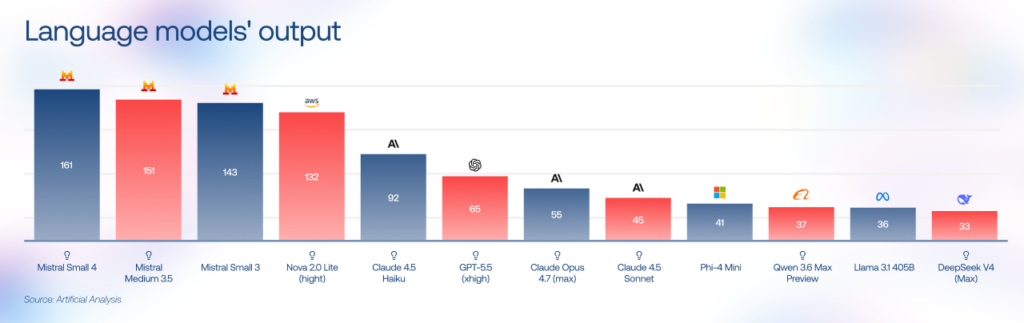
LLM providers address this by switching from dense architectures to sparse Mixture of Experts (MoE) patterns and by releasing their own lightweight tiers (GPT-5 nano, Gemini Flash). On the SLM side, Mistral Small 3 runs at 143 tokens/second on 16GB of RAM, and Gemma 4 (a 26B MoE model) also targets faster local inference with techniques such as multi-token prediction.
For latency-sensitive SLM vs LLM decisions, smaller models often have the edge, especially for short, repetitive, on-device, or edge workloads.
Instinctools’ verdict: SLM.
7. Output quality
On general reasoning and coding benchmarks such as MMLU-Pro, GPQA, SWE-bench, LiveCodeBench, HumanEval, and MMMU, frontier LLMs outperform smaller models, especially in open-ended reasoning, advanced coding, and multilingual tasks. Their advantage comes not only from broader training data, but also from greater model capacity, stronger post-training, reasoning-focused optimization, tool use, and more mature long-context handling.
SLMs can achieve comparable accuracy on narrow enterprise tasks when the workflow is well-defined and supported by high-quality domain data, retrieval, prompt engineering, constrained outputs, or fine-tuning. But once the task moves beyond a tightly controlled scope, larger models tend to stay more stable and coherent under pressure.
Instinctools’ verdict: LLM.
8. Security
While the cost and quality of AI solutions often make enterprise leaders scratch their heads, it’s the security concerns that really top the list of hurdles. Any production AI system needs clear governance around what data enters the model, where that data is processed, how long it is retained, who can access it, and how model outputs are logged, monitored, and audited.
For cloud-hosted LLMs, organizations should evaluate vendor terms, data-retention policies, training-data exclusions, API access controls, encryption, logging, data residency, and regulatory compliance before deployment. Many enterprise AI providers now offer strong privacy commitments (for example, API or enterprise customer data is commonly excluded from model training by default), but companies still should validate these guarantees against their own security, legal, and compliance requirements.
SLMs need robust governance just as much, but they give companies far more flexibility in where data gets processed and stored. Small models can run on-premises, on edge infrastructure, or directly on employee devices, giving businesses tighter control over where sensitive information is processed and stored. This setup is particularly attractive for industries handling regulated or proprietary data.
Instinctools’ verdict: SLM.
When to choose an SLM vs. an LLM: decision framework
Choosing the best AI models in the SLM vs. LLM debate is like hiring a team. You don’t bring in a Nobel-level strategist to sort invoices, and you don’t hand a billion-dollar negotiation to an intern fresh out of onboarding. AI stacks work the same way, routing simple jobs to smaller models and reserving heavyweight reasoning for the few tasks that need it.
Use case
Recommended model type
Why
Example models
Customer support chatbot
SLM
High request volume, predictable workflows, low latency requirements
Mistral Small 3, Phi-4-mini
Internal document Q&A
SLM
Easier on-prem deployment and domain fine-tuning
Llama 3.3 8B, Gemma 3
Code copilot
LLM or hybrid setup
Multi-file reasoning and long-context understanding
Claude Sonnet 4.6, GPT-5.2
Edge or IoT device
SLM
Minimal compute footprint and offline operation
Llama 3.2 1B, Gemma 3n
Healthcare records processing
SLM
Greater control over sensitive data handling
Fine-tuned Mistral, Phi-4
Multilingual content generation
LLM or sovereign SLM
Broad language coverage versus local cultural adaptation
Gemini 3.1 Pro, Qwen 3
Creative or long-form writing
LLM
Better narrative consistency and contextual depth
Claude Opus 4.6, GPT-5.2
Multi-agent enterprise workflows
Both
Balances cost, speed, and reasoning quality across tasks
The AI language model market has become crowded fast. A couple of years ago, most discussions revolved around GPT-4-level systems. Now the field stretches from billion-parameter SLMs running on laptops to LLMs built for multi-agent reasoning and million-token context windows.
Custom LLM and SLM development with Instinctools
Now that you know where SLMs make sense and where LLMs still dominate, the harder part begins: turning that knowledge into an AI system that survives contact with real production workloads.
Our team helps businesses with custom LLM/SLM development, covering:
Model selection based on your business requirements and limitations
Sometimes the answer is a compact SLM running locally for privacy and latency reasons. Sometimes it’s a tiered architecture combining multiple models behind one orchestration layer.
Our AI engineers are a click away if you need expert advice
After exploring what’s possible, determine what’s practical for your software needs. Both LLMs and SLMs are powerful tools, but they won’t bring the desired benefits on their own. It’s still essential to identify how to effectively integrate them into your business processes, considering industry and national specifics.
If your resources are limited, you want to test your idea ASAP, or need a model for only a specific type of task, an SLM can help you hit it big without breaking the bank. For deeper reasoning, multi-agent orchestration, or long-context analysis, LLMs hold the advantage. In practice, though, the biggest gains come from combining both: smaller models handling high-volume routine work, larger ones stepping in for the hardest decisions.
Draw on the power of language models with a trusted tech partner
The difference between an LLM and an SLM comes down to scale, training scope, and intended use. LLMs are trained on massive web-scale datasets and usually contain tens or hundreds of billions of parameters, making them better suited for broad reasoning and open-ended tasks. SLMs are smaller, often below 10B parameters, and optimized for focused workloads like classification, summarization, or on-device AI. For example, GPT-5.2 is built for broad reasoning, while Phi-4-mini (3.8B) is designed for efficient local inference. Still, the boundary is getting blurrier with each new model.
What are the advantages of an SLM over an LLM?
The biggest advantages of SLMs over LLMs are lower cost, faster inference, and easier deployment. Smaller models can run 10-50× cheaper than large-scale LLMs. They can also work fully on-premises or on edge devices, keeping sensitive data inside the company infrastructure. In narrow enterprise tasks, a well-trained SLM may also produce fewer hallucinations because its scope stays tightly controlled.
When should I choose an SLM instead of an LLM?
In the SLM vs. LLM standoff, SLMs make more sense when the task is narrow, repetitive, latency-sensitive, or privacy-critical. Common examples include entity extraction, summarization, customer-support routing, and edge AI systems. They also fit workloads with very high query volume, where large-model API costs spiral quickly. If your data cannot leave the company perimeter or the model needs to run locally on limited hardware, an SLM or hybrid setup is the safer bet.
What are examples of small language models?
Popular SLM examples in 2026 include Phi-4-mini (3.8B), Gemma 3, Mistral Small 3, Llama 3.2 1B/3B, TinyLlama 1.1B, and Apple OpenELM. Some focus on multilingual reasoning, others on edge deployment or fast inference on consumer hardware.
Are SLMs as accurate as LLMs?
SLM vs. LLM output quality depends heavily on the task. On broad reasoning benchmarks like MMLU or HellaSwag, larger models still outperform smaller ones, especially when the task requires open-ended reasoning, advanced coding, multilingual understanding, or cross-domain synthesis. But in narrow enterprise workflows, the gap can shrink dramatically after fine-tuning. A well-scoped SLM processing medical records or support tickets, bolstered by high-quality domain data, retrieval, constrained outputs, or fine-tuning can match and sometimes outperform a general-purpose LLM.
How much does it cost to develop a custom SLM or fine-tune an LLM?
The cost of custom LLM/SLM development varies mostly with data quality, infrastructure demands, and deployment complexity. Fine-tuning an open-source SLM like Mistral 7B or Phi-4 on private data usually starts around $15,000. Building a domain-specific model from scratch can reach $80,000-$250,000 or more. A production-grade RAG pipeline around an existing model often falls somewhere in between. If you want a realistic estimate, it’s worth discussing your use case with your AI engineering partner before locking into one architecture.
Can I run an SLM on-premises or on edge devices?
Yes. One of the main reasons companies adopt SLM on-premises setups is that compact models run comfortably on consumer hardware. Models below 7B parameters can work on a single RTX 4090 or even on CPUs with quantization. Lightweight options like Phi-4-mini or Llama 3.2 1B already run on laptops and smartphones. Common deployment tools include Ollama, llama.cpp, MLX, ONNX Runtime, and NVIDIA Triton.
AI in the oil and gas industry is becoming critical to the sector’s resilience, even as concerns grow around the technology’s own energy demand. With margins tightening and growth under pressure, leading O&G firms are turning to generative and agentic AI to stabilize performance across extraction, refining, and sales.
Recent market analysis of artificial intelligence in the oil and gas industry across the US companies points to increased spending on AI, gen AI, and agentic AI by 40% in 2025. The payoff case is equally strong: BCG estimates that those leaning hardest into AI could lift EBIT by 30-70% over five years, while also minimizing carbon footprint.
Instinctools’ AI CoE members have gathered some of the most notable applications of AI in the oil and gas industry across the value chain.
Key highlights
Beyond enhancing efficiency and driving cost savings, artificial intelligence in the oil and gas industry plays a central role in strengthening operational resilience and supply chain safety.
AI in the oil and gas industry spans the full value chain: upstream exploration and drilling, midstream logistics and leak detection, downstream refining and sales, plus cross-stream asset predictive maintenance and supply chain optimization.
Massive AI adoption in oil and gas is held back by fragmented, poorly governed data, legacy systems that resist integration, and uneven digital readiness across operations.
AI in all its forms to serve the needs of the oil and gas industry
Capturing value from massive amounts of data generated during hydrocarbon exploration and production is made possible with these forms of AI used in the oil and gas industry:
Machine learning: Identifies patterns in large operational and geological datasets to improve predictions and support better decision-making across the oil and gas value chain. Common AI & ML applications in oil and gas industry include reservoir exploration, drilling optimization, production forecasting, and predictive maintenance.
Deep learning: As a subset of machine learning based on multi-layer neural networks, deep learning is especially valuable for complex subsurface analysis. It is used in oil and gas to analyze seismic data, combine seismic insights with well logs and production data, detect subsurface structures, classify geological features, and predict reservoir properties for exploration decisions.
Generative AI: Learning from existing datasets, gen AI-powered systems can help create 3D reservoir models from sparse well data, produce synthetic data samples, map drilling trajectories with associated risks, create emergency response instructions, and summarize complex technical reports, field notes, or maintenance records.
Agentic AI: Grounded in LLM-based reasoning, planning, and tool-use capabilities, AI agents and multi-agent systems execute tasks across workflows. Maintenance triage, inspection planning, pipeline monitoring, supply chain, and finance workflows autonomous execution are just several examples of agentic AI in the oil and gas industry with the strongest near-term value.
Computer vision: Interprets visual data from cameras, drones, satellites, and sensors in real time to accelerate tasks such as equipment inspections and verifying workers’ PPE compliance.
Edge AI: Processes data locally on IoT devices without relying on cloud storage or internet connectivity. This greatly aids in adjusting machinery settings, tracking sensor readings, collecting seismic data, and continuously monitoring operations and safety conditions remotely.
The ways AI in oil and gas optimizes operations across the value chain
Permeating into each stage of the supply chain, AI adoption in the oil and gas industry enables companies to achieve operational efficiency, reduce costs, and come closer to sustainable development and net zero.
Upstream AI use cases in oil and gas exploration and production
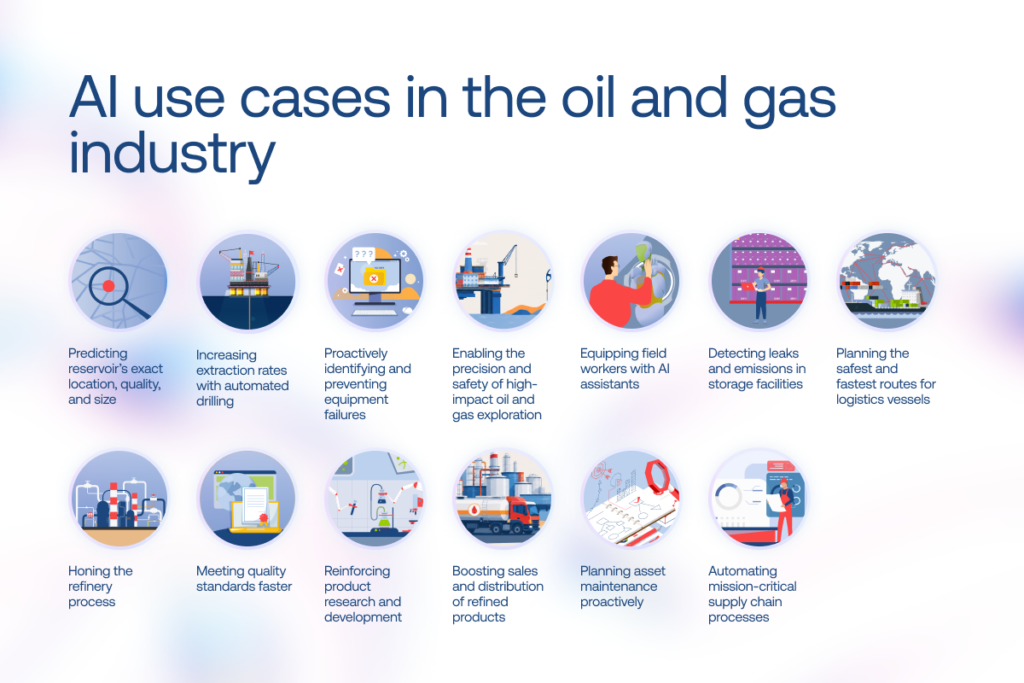
Predicting reservoir’s exact location, quality, and size
Exploration budgets still account for the possibility of drilling dry holes. “That’s the game, and players know the risks,” as Andrew Latham, SVP Energy Research at Wood Mackenzie rightly points out. AI, however, is emerging as one of the tools helping reduce the odds of such costly surprises. Traditional, largely manual and error-prone analysis of vast volumes of electromagnetic and seismic data used to identify new hydrocarbon deposits is increasingly giving way to AI-powered capabilities:
Streamlined access to exploration data: With a single natural language query, explorationists can pull the needed insights from scattered surveys, well logs, images, subsurface analyses, maps, technical reports, and other sources. Chevron, for example, rolled out this concept through its in-house ApEX multi-agent framework, where specialized AI search agents comb through more than a million exploration files and generate recommendations, risk assessments, and next-step actions within seconds. The ApEX’s exploration review agent assesses a drill site’s success potential, while ageospatial agent executes map-related tasks.
Reservoir modeling: To guide the decision-making in the direction of achieving optimal development plans, engineers create geo-models of crude oil or natural gas reserves using generative AI-powered visualization tools. Such models help control fluid movement and predict the long-term performance of a well. Powered with sophisticated ML algorithms, they are constantly refreshed with newly acquired well drilling and production data. Striving to improve access to hydrocarbon resources, Aramco developed its reservoir and basin simulator TeraPOWERS to model the entire hydrocarbon system of the Arabian Peninsula.
Seismic images interpretation: Geo- and data scientists can remove noise, improve resolution, detect subtle features, or even generate additional data samples with AI if imagery quality is poor or incomplete.
Increasing extraction rates with automated drilling
With hefty costs involved, no wonder oil and gas companies seek to hammer drilling operations home on the first try. A helping hand here is drilling optimization, another application of artificial intelligence in the oil and gas industry. It spans multiple stages of the workflow, from planning and execution to real-time risk management:
Pre-drilling layer: Predictive intelligence allows engineers to convert cross-sourced historical and real-time data into actionable insights for drilling preparation.
Drilling parameter optimization: Armed with advanced ML algorithms, geosteering teams analyze terabytes of historical data to configure optimal parameters, such as weight on bit, rate of penetration, rotary speed, mud flow, torque, and drilling angle.
Real-time monitoring and safety intervention: AI in oil refinery leverages real-time drilling data to predict the likelihood of stuck pipe events, enabling proactive measures.
As a result, AI and ML in the oil and gas industry reduce the risk of drill-bit failures and optimize extraction rates.
Proactively identifying and preventing equipment failures
Disruption risk tends to be more pronounced in legacy pipelines, offshore platforms, and refining facilities. And today, even short-lived outages can compress already thinning margins and destabilize supply in already constrained markets. The solution is automated equipment inspections carried out by “zero-touch” sensors, drones, and robots, as well as AI-enabled proactive, self-healing maintenance. Early adopters of these solutions have reported up to a 40% reduction in equipment failures and annual savings of up to $10M. Worth noting, predictive maintenance for heavy machinery has long remained one of the most beneficial use cases of AI in the oil industry, according to oil and gas leaders.
How does it work? Drones and robots with tiny sensors and cameras scan each equipment component with laser precision. Cracks, corrosion, and other potential signs of wear are identified by pre-trained ML models. Thus, AI systems perform 24/7 meticulous real-time inspection without human intervention, minimizing operational risks and expenses.
An example of AI-enabled asset maintenance in action can be found at Shell. They utilize an ML-based predictive analytics solution that helps avoid critical equipment outages and identify cases when maintenance is needed. Now, its staff have more time for engineering instead of analyzing mountains of data, while the company reduces production losses and maintenance costs.
Equipping field workers with AI assistants
High pressures, heat, flammable substances, basic human error, and other factors have led to many tragic safety incidents during gas and oil exploration. With virtual field assistants, drilling rig crews, well operators, and technicians have quicker and easier access to critical information.
Voice-enabled AI assistants are easily integrated into field-friendly devices, guaranteeing round-the-clock availability and proving to be more effective for emergencies than human-staffed call centers.
Enabling the precision and safety of high-impact oil and gas exploration
As the industry faces a potential 300-billion-barrel supply gap by 2050, major oil companies are reviving investment in high-impact exploration. AI-related technologies are transforming ultra-deepwater drilling by enabling autonomous operations, enhancing safety, and optimizing efficiency in challenging environments exceeding 5,000 feet below the ocean surface.
AI-enabled deep-water reservoir development can be seen at operators such as Shell, which uses remotely operated vehicles (ROVs), advanced subsea systems, and state-of-the-art drilling techniques.
— Ivan Dubouski, AI Lead Engineer, Instinctools
Midstream use cases of AI in the oil and gas industry: storage and transportation
Here are practical applications of artificial intelligence in midstream oil and gas leaders should know.
Detecting leaks and emissions in storage facilities
Generative AI tools can sum up large amounts of data captured by optical gas imaging (OGI) cameras installed on inspecting robots or unmanned drones in natural language, saving hours that used to be spent on the manual review of the footage. Those AI-generated assistive summariesenhance the efficiency of oil & gas operations, especially in large industrial facilities or outdoor environments. Moreover, operators can take remedial actions without entering potentially dangerous areas.
With its AI-powered flare monitoring system, Aramco manages to maintain an industry-leading flare volume of below 1% of total raw gas production. It allows the petroleum leader to visualize the entire gas processing system at once and predict when a certain facility is going to exceed its flaring targets so that remedial action can be taken in advance.
— Ivan Dubouski, AI Lead Engineer, Instinctools
Planning the safest and fastest routes for logistics vessels
Advanced analytics help logistics specialists extract insights from vast amounts of data related to weather, route hazards, port congestions, vessel conditions, and other operational factors to plan the most cost-effective tank routes.
Not only do AI optimization algorithms ensure on-time delivery, but they also identify risks and adjust the route on the go without increasing the planned transit time.
A great example of using algorithmic shipping and maritime route optimization can also be observed at Shell. Their LNG Shipping Accelerator gathers all critical infrastructure data in a single place for freight operators to reduce waiting time at ports and fuel usage, resulting in timely and nature-positive energy delivery.
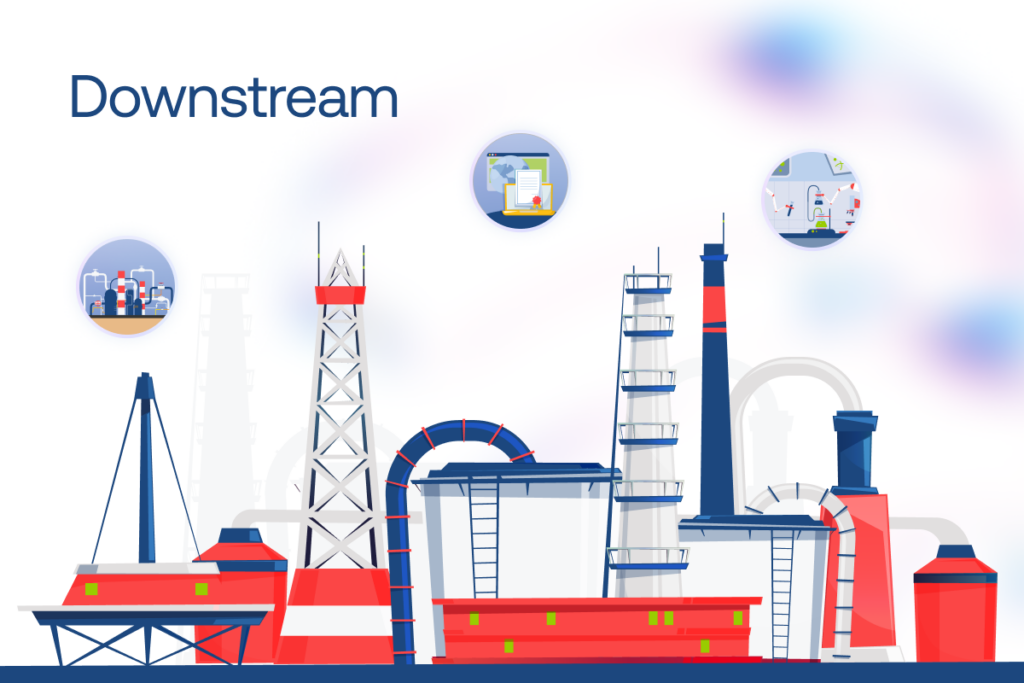
Downstream artificial intelligence applications in the oil and gas industry: refinery and distribution
By embracing AI, downstream firms achieve refinery & distribution cost reduction and reach regulatory compliance faster in several ways.
Honing the refinery process
The application of AI in downstream oil and gas companies involves real-time monitoring systems that optimize refineries. Those systems monitor operations and collect data during distillation, catalytic cracking, and hydrogenation. They also screen data from energy meters and equipment sensors.
All this contributes to boosting petrochemical throughput, minimizing energy consumption, and identifying potential safety hazards.
Meeting quality standards faster
Application of AI in the oil and gas industry aids refinery companies to meet key quality standards, including ISO, API, ASTM, and others.
Straight from the production lines, ML algorithms and predictive AI models analyze the produced diesel, lubricants, jet fuel, natural gas, liquefied petroleum gas, oil petrochemicals, etc., against the standards.
By predicting deviations in product quality before they occur, production specialists can make corrections to minimize waste and ensure production reliability and environmental sustainability.
Furthermore, to turn ESG reporting from a yearly burden into a real-time strategic capability, agentic AI automates data capture, question answering, and other reporting tasks for compliance teams.
Reinforcing product research and development
Generative AI in the oil and gas industry allows petrochemical engineers to accelerate the materials development process and bring down R&D costs by:
designing new chemical compounds with diverse compositions, simulating how these virtual assets behave under different conditions before actual physical production;
establishing the most efficient experimental procedures for probing or optimizing materials;
developing high-entropy alloys (HEAs) with excellent physical, chemical, and mechanical properties.
Boosting sales and distribution of refined products
Beyond pretty standard demand forecasting and pricing, cutting-edge AI in refined oil and gas distribution leverages autonomous agentic systems for real-time, multi-step decision-making across downstream chains. Autonomous AI sales agents streamline workflows such as personalized customer engagement, quote handling, order management, reporting, and documentation.
Besides, advanced analytics is actively used for data-driven sales decision support:
Refinery output optimization aligned with market conditions, adjusting production mix based on real-time crude pricing and margin signals
Integrated demand-supply matching across regions, coordinating fuel production, inventory levels, and downstream logistics to ensure timely delivery to retailers and industrial buyers
Cross-stream AI applications in the oil and gas industry
Some AI use cases in oil and gas are so versatile that they cover more than just one segment, functioning across multiple layers of the industry.
It forecasts failure in pipelines, pump stations, or processing plant equipment to prevent costly repairs. Casting their nets wide, predictive maintenance models optimize performance and extend the infrastructure life across the whole oil and gas supply chain.
With agentic AI layered in, AI agents can autonomously analyze sensor anomalies to generate optimized maintenance schedules, factoring in crew availability, parts inventory, and production impact, then directly execute them through ERP integration, taking on tasks like dispatching work orders, adjusting equipment parameters, and confirming completions with real-time feedback loops.
Apart from eliminating costly downtime and optimizing transits of crude oil or LNG via barges and tankers, advanced analytics algorithms enhance the following:
energy transition via other transportation methods, such as pipelines, trucks, and railroads,
distribution network configuration, including the number and locations of storage facilities, transportation routes, and inventory levels at each facility.
Using gen AI, oil and gas companies and logistics providers automate mission-critical supply chain processes:
procurement: materials demand forecasting, identifying the most suitable suppliers, handling price fluctuations;
on-shore and off-shore inventory management: improving asset tracking;
Here’s a pack with all the examined AI use cases in the oil and gas industry to highlight the impact AI solutions make on different tasks of O&G professionals.
Segment
Operations
Impact
Technologies involved
Upstream
Reservoir exploration
– faster, more informed decision-making – targeted wells placements – reduced environmental impact – enhanced energy efficiency – extended oil field lifecycle
Agentic AI, neural networks, machine learning and AI algorithms, edge AI, generative AI
Optimization algorithms, digital twins, generative AI
A pAI in the sky? What’s holding O&G companies back in adopting artificial intelligence
AI adoption in oil and gas is partly slowed down by the industry’s own constraints: its heavy physical orientation, plus senior leadership often shaped by cautiousness toward digital technologies. On top of that sit the usual, industry-agnostic barriers to AI adoption:
Shaky data foundations. It’s not that oil and gas companies lack data across their various operations. Far from it. But what you do see all too often is a complete mess in how that data is managed and governed. AI-enabled outcomes are only as good as the data foundations beneath them, which makes data readiness a prerequisite for any serious AI initiative.
Legacy software infrastructure. No one wants to touch aging ERPs, CRMs, etc. because “if it ain’t broke, don’t fix it”, except they are broken, just not in ways that show up until you try to plug in a modern AI model. You can’t efficiently run sophisticated multi-agent workflow automation on a foundation of duct tape and despair. The challenge is even greater in oil and gas, where operations depend on close coordination across operators, service companies, suppliers, logistics partners, and regulators. Without integration-ready systems and shared data flows, AI remains trapped in isolated pilots instead of scaling across the value chain.
Safety monitoring and compliance. O&G companies have always adhered to a web of local rules, environmental regulations, and international treaties. Institutional pressures and enormous attention to safety make decision-makers slow to adopt flashy AI-driven tools.
These factors, flavored by geopolitical instability, shifting trade flows and route disruptions, slower production growth, and margin compression, account for decision-making inertia regarding AI use in the oil and gas industry.
3 steps to start your AI project in the oil and gas sector
All the above challenges should not necessarily hold you back.
McKinsey partners state that to generate value post-2030, against the never-before-seen push to balance sustainability, affordability, and supply security, oil and gas companies need to answer a number of questions in their AI strategy, one of which is:
How can the use of new technologies and AI in the oil and gas industry be scaled to deliver tangible business value?
So what should oil and gas executives start with to achieve AI payoffs?
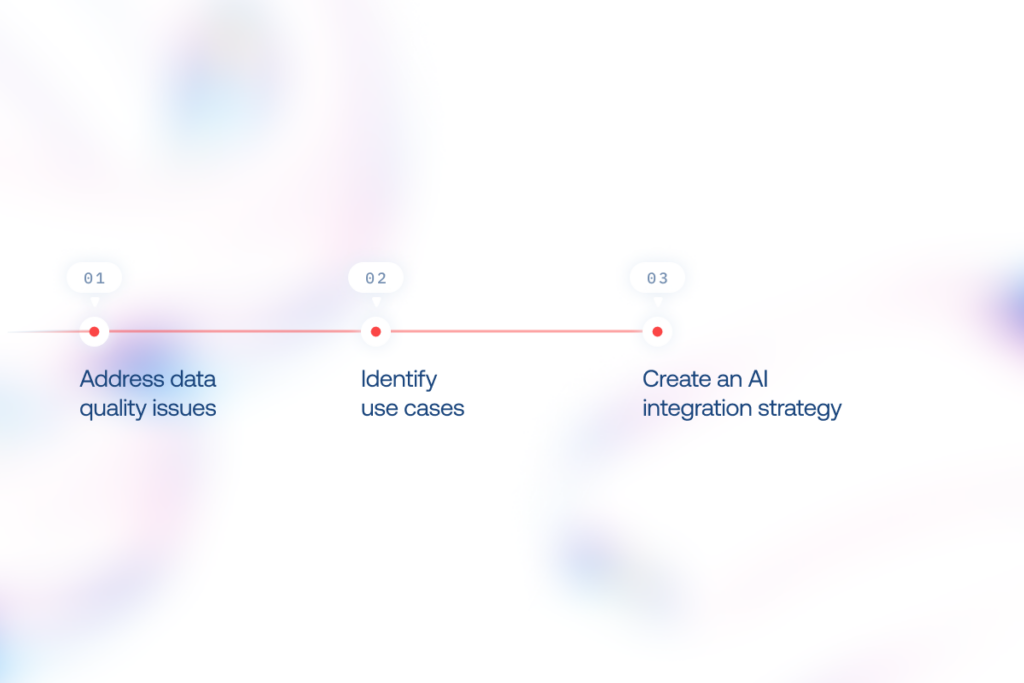
1. Address data quality issues
The most critical factor in laying the solid groundwork for driving AI adoption is high-quality data.
What can you do?
Identify all your raw data sources (equipment, sensors, satellite imagery, etc.).
Review the ways you collect and store geological data, historical maintenance records, etc.
Assess the state of your data pipelines (ingestion latency, schema consistency, transformation logic, orchestration layers, and end-to-end data lineage).
Enrich your data science and big data competencies, if needed, to facilitate security and quality.
2. Identify use cases
While artificial intelligence in the oil and gas industry can be a powerful tool, it won’t be a silver bullet that transforms every process overnight.
Forget the idea of a one-size-fits-all enterprise AI solution that magically fixes everything in your company.
Instead, start with pilot projects focused on business areas that rely on high volumes of raw data and directly impact revenue, costs, risk management, or other crucial aspects.
Quick wins from improving bit-sized processes will create room for larger AI initiatives.
3. Create an AI integration strategy
Deployment of artificial intelligence in oil and gas varies by the industry segment, but these five criteria are universal to consider in your AI strategy:
draw on a cost-benefit analysis
consider the impact on people and operations
create a responsible implementation framework
ensure data integrity
establish effective governance
These considerations help build a win-win deployment strategy for business growth and a sustainable future.
What is the role of AI in the oil and gas industry?
AI models analyze diverse data to predict key parameters and identify pre-configured events, ultimately shaping crucial decisions. Indeed, that’s a fundamental “engine” of nearly all Artificial Intelligence use cases in oil and gas, from reservoir exploration and drilling optimization to automated anomaly detection and supply chain management.
How is generative AI used in oil and gas?
Large language models’ capabilities in data analysis, modeling, reporting, and simulation enhance understanding of operations and provide instant access to actionable AI driven insights. This unlocks numerous generative AI use cases in the oil and gas industry, including seismic data analysis, reservoir characterization, virtual field assistance & safety, storage facilities inspection, materials R&D, asset maintenance planning, and supply chain optimization.
Which oil companies are using AI?
Among oil companies that leverage AI technologies for different needs are industry front-runners , such as Shell (materials discovery), BP (choosing spots for plants), TotalEnergies (conversational AI assistance), Chevron (reservoir images interpretation), ExxonMobil (drilling data collection, vessels tracking), Petronas (predicting equipment failures), and Saudi Aramco (reservoir modeling, oil spills detection).
What are the most common AI use cases in oil and gas?
AI, GenAI, and agentic AI are widely used for predictive maintenance, reservoir modeling, drilling optimization, leak detection, supply chain forecasting, refinery optimization, and ESG reporting automation.
What is agentic AI and how is it applied in oil and gas operations?
Agentic AI refers to systems that can plan, decide, and execute multi-step workflows using tools and enterprise systems. In oil and gas, it powers maintenance scheduling, field assistance, sales operations and compliance reporting automation.
What are the main challenges of AI adoption in oil and gas?
Key challenges of deploying AI for oil and gas infrastructure include legacy infrastructure, poor data quality and storage, weak governance, and integrating AI into safety-critical, physically grounded operations without disrupting existing workflows.
How does AI improve safety and predictive maintenance?
Predictive maintenance models forecast equipment failures before they happen, reducing downtime and accidents. AI also automates inspections in dangerous environments and supports field workers with real-time alerts and decision guidance.
What is the AI adoption rate in EPC oil and gas projects?
While an industry-revealed AI adoption rate in EPC oil and gas projects is not explicitly available, BCG revealed that 72% of O&G companies support adoption of GenAI tools, 47% redesign end-to-end workflows and processes to facilitate agent-led automation, and as much as 22% build new business models and products to drive growth (e.g. personalized AI agents that help retail energy clients optimize consumption, AI tools that support real-time adjustment of prices based on customer behavior and context, AI systems that propose new exploration targets using basin analogs and constraints).
How do oil and gas companies start implementing AI?
Implementation of AI in the petroleum industry unfolds in stages. Companies start by fixing their data foundations, then target high-impact use cases like maintenance, forecasting, or emissions tracking. Next come pilot projects with measurable ROI, followed by integration into core systems. Scaling requires governance, MLOps, and a gradual shift toward automated or agent-driven workflows.
Having undigitized or under digitized inventory can be a drag on your company’s financial performance. Want to transform it into a profit booster, even though the chances of succeeding when adopting new software is one in three at best?
You’re in the right place – we know how to chart a vector toward success. Our tech and business experts outline how to draw up a digital inventory management system (IMS) that is destined to thrive.
IMS killer features to ace inventory operations
Building an inventory management system can uplift your technical capabilities with a raft of not-to-miss opportunities.
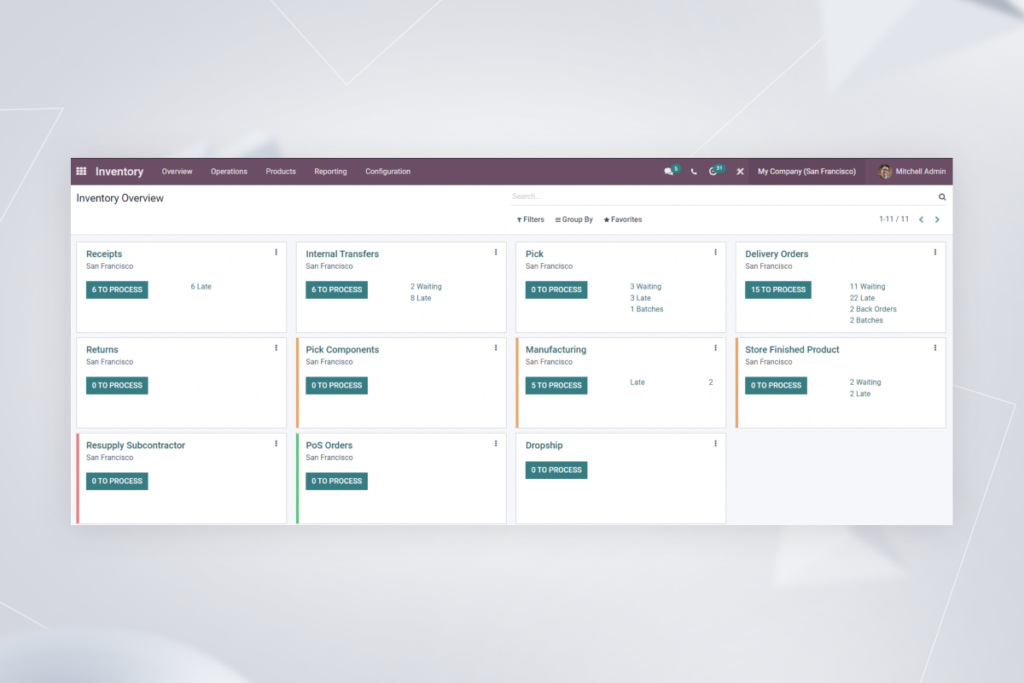
Real-time inventory tracking. Access to the relevant information about inventory levels and items in real-time allows you to prevent stockouts and overstocking, and enables shrewd moves, such as adopting demand-driven pricing.
Extensive integration capabilities. Linking your IMS with your software ecosystem grants a bird’s eye view of your inventory operations, such as ordering, storing, receiving and their relation to your business processes.
User-friendly interface and accessibility. By operating a leading-edge intuitive IMS, you can empower even less tech-savvy employees with easy-to-use data analysis capabilities.
Enhanced reporting. No more need to wreck your brain over Excel formulas or outdated inventory management software. Data visualization tools and automated real-time reporting shuffle off the burden of recurrent time-consuming reporting.
What kind of IMS should you opt for? Let’s take a look at the possibilities.
A module within an all-in-one solution or standalone inventory-specific software?
There are usually two types of IMS-related requests that come from business owners. They are either looking for special inventory management softwarethat requires integration with other corporate systems, or for an all-inclusive solution, such as ERP, that covers accounting, production, inventory operations, etc.
Adopting an IMS-specific app is an easier step to take than switching to full-fledged multicomponent corporate software. However, if shifting from jerry-built legacy solutions and embracing overall digitalization is your prior focus, implementing an all-in-one software can be a more effective strategy.
When it comes to “how to code an inventory management system”, there is no notable difference from a technical standpoint. Whether you choose to adopt a single solution and implement modules one by one, including inventory, or bank on specialized software, the core technical task is integrating an IMS with whatever it is – other modules or software.
How to make the grade with creating an inventory system
Working according to a comprehensive strategy is a surefire way to help ensure success in any undertaking, and IMS adoption is no exception. Instinctools’ business analyst and solution architect outline the action plan from inception to triumph.
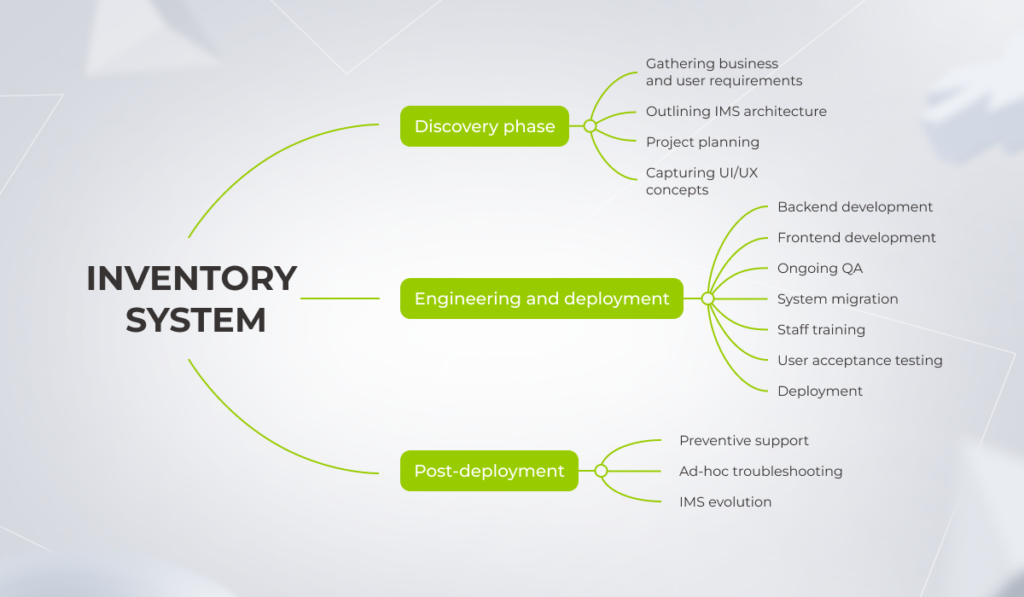
Discovery phase
To build an inventory management app, start with idea evaluation and validation. At this stage, your tech ally covers a range of tasks.
Gathering business and user requirements and compiling them in a comprehensive solution scope.
Outlining IMS architecture with tech stack and mandatory integrations based on the collected architecture significant requirements (ASRs).
Project planning to shape your IMS vision into a detailed project roadmap, and provide clear success criteria, transparent overview of roles and responsibilities (RACI), communication plan, and more.
Capturing UI/UX concepts and preparing initial wireframes and mock-ups to chart a path toward full-blown intuitive design.
Backend development to provide your solution with a scalable and secure data access layer.
Frontend development to craft a sleek graphical user interface (GUI).
Ongoing QA with continuous functional and non-functional software tests to move through the IMS development process without any hurdles and release a bug-free system.
System migration in line with your transition plan to prepare accurate data and ensure seamless adoption of new software.
Staff training featuring hands-on guidance to minimize employees’ resistance to change.
User acceptance testing (UAT) to validate if the IMS handles all the necessary tasks and is convenient for end users.
Deployment as a final step in launching your inventory management software in the real-world environment and giving end users full access to the system.
Post-deployment
Keeping your inventory management software up and running is crucial. Tech companies provide multi-level support:
Preventive support by nipping issues in the bud and enabling your IMS longevity.
Ad-hoc troubleshooting to wipe out any glitches ASAP and prevent downtime.
IMS evolution when your partner keeps a close eye on trailblazing IMS trends and adopts those that click with your business needs.
Crafting a five-star software requires care, precision, and a laser focus on the essentials. Among the myriad of tasks that have to be done to draw up a digital inventory management system, there stand three pivotal activities: setting up a project roadmap, planning for integrations, and orchestrating system migration.
1. Planning your IMS
When creating an inventory management system, this universal principle remains valid:
“Whatever you water will grow.”
As inventory is highly interlinked with other company’s systems, insufficient planning can have a crippling effect on the processes’ visibility, business scalability, software maintenance cost, to name a few.
That’s why you have to plan wisely.
Establish your objectives and priorities
Strategy, not technology itself, fuels thriving, high-ROI projects. Therefore, start with the problem your IMS should solve.
KPMG backs this insight with statistics — companies that set clear targets at the onset are 18% more likely to pull off the project.
It’s also crucial to incorporate both short-term goals and long-haul perspectives into your project strategy from the start to hedge against any weak points that could derail your software in the future.
For example, if you aim to operate in different countries, you’ll need regional scalability sooner or later and should take it into account when choosing a tech stack. We suggest a decentralized IMS solution that allows storing inventory data on servers in different legal zones while providing employees across countries with unmatched data accessibility.
Setting the right objectives includes feature prioritization along with identifying software and hardware integrations to save you from getting a hastily-built inventory management application that lacks basic functionality and connections within your software ecosystem. For instance, you can use the MoSCoW method to identify must-have, should-have, and could-have integrations and features to balance the development scope with your budget.
Choose between out-of-the-box and custom solution
Only four cases call for a fully custom, from-scratch IMS:
Operating in a highly specific industry, such as aerospace manufacturing
Crafting unique products
Requiring integration with a legacy system
Covering non-standard business processes
Otherwise, your business workflows can be standardized and handled with customized off-the-shelf inventory management software. Our business analyst notes:
There are plenty of industry-focused, out-of-the-box IMSs for various business domains. Let’s take healthcare as an example.
Aside from tracking the consumption of inventory items such as medicines and blood for transfusion, such systems need workflows to monitor the use and disposal of disposable syringes and sterilization of reusable surgical instruments. There are specialized ready-made IMS solutions to cover these needs, such as SpaceTRAX, Cardinal Health, and AlinIQ Inventory Manager, among others.
There is also a nuance about integration with a legacy system and non-standard business processes.
As we notice across our clientele, maintaining legacy systems and holding on to inadequate business processes are the top two tech hurdles that keep businesses from taking inventory value to the next level.
In the short term, building a custom IMS that can interoperate with your legacy system and cover non-standard processes is a more affordable and fast option. However, these workarounds hold back the system’s scalability when a company grows.
In such cases, we suggest a more forward-looking approach when, along with creating an inventory system that covers the client’s needs here and there, we plan business processes’ transformation and standardization to free the client from legacy constraints in the future.
If you bank on a platform-based solution, remember that it’s not a cure-all either, and you can’t go live with it right away. As ready-made systems are designed to cover the needs of a wide range of customers, they require adjustments to your business processes.
Looking for a stalwart IMS implementation partner?
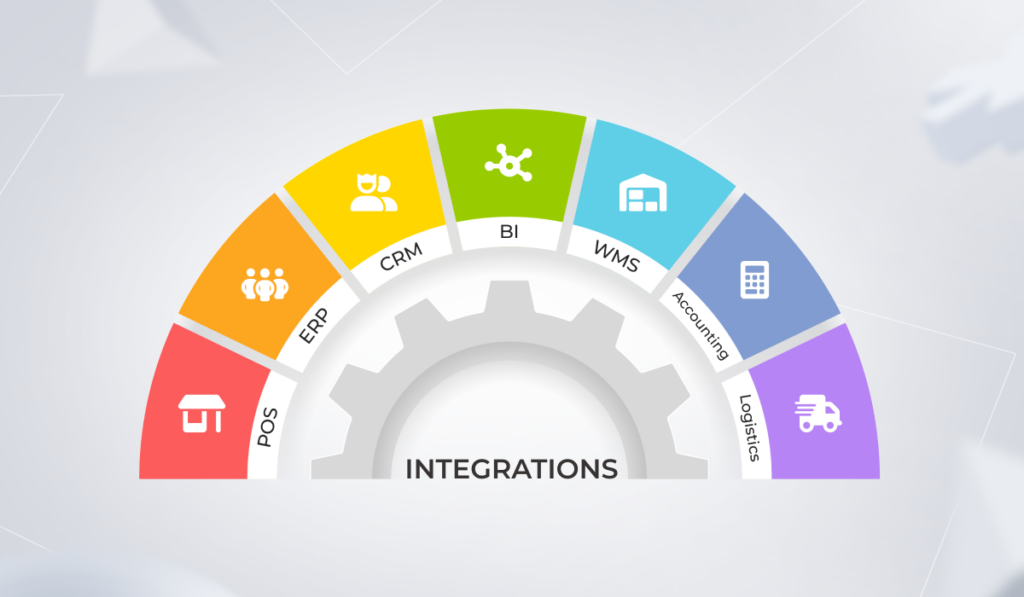
Inventory requires multi-channel integration with your corporate software ecosystem. Our experts mention the most widespread IMS integrations that can maximize business value of the system.
Point of sales (POS):
Updating stock in line with customer demand
Automating order generation and reordering
Implementing dynamic pricing strategies for goods and delivery service
Tracking payments
Enterprise resource planning (ERP):
Achieving 360-degree visibility of inventory-responsible staff and inventory-related tasks
Syncing manufacturing operations with the product components’ and employees’ availability
Simplifying compliance checks due to detailed audit trails
Customer relationship management (CRM):
Up-to-the-minute visibility into stock levels and detailed product information
Real-time order status tracking
Flexible pricing opportunities
Business intelligence (BI):
Inventory processes visualization
Simplified big data analysis of stock levels and their movement
Automated planning for product replenishment according to the analytics-based rules
Accelerated reporting
Warehouse management system (WMS):
Boosting warehouse space efficiency by optimizing item movement between shelves and warehouses
Reducing order picking time
Tracking proper storage conditions for items that require regular maintenance
Decreasing the number of lost orders
Accounting:
Gaining full transparency of the order-to-cash cycle
Automating bookkeeping management
Delineating the balance sheet of different products, materials, etc.
Shipping and logistics:
Establishing efficient goods shipment and receipt
Improving tracking and storing of freight
Optimizing and speeding up delivery
3. System migration
Transitioning to the new solution is one of the final moves you have to make to build an inventory management system. It encompasses two activities, migrating data and switching from your legacy or pre-inventory software to the advanced one.
If an IMS is the heart, then data is the blood. Data quality directly impacts your inventory management system’s overall performance and transparency.
IBM research proves that complete inventory visibility remains a pipe dream for 56% of businesses because of inaccurate data.
To draw up a digital inventory management system that will become a pearl of great price, you should ensure no junk gets into it. Therefore, before transitioning to the new system, review your inventory data to ensure data format standardization across your software ecosystem and the absence of data discrepancies.
An overall IMS implementation strategy entails a transition plan that facilitates a smooth and bump-free shift to the new IMS without missing a beat in the company’s operations.
Small businesses can switch to the new system right away, but medium and large companies that can’t put business continuity at risk should move gradually, department by department. We usually suggest running old and new systems simultaneously in the first few months to prevent data loss while employees are getting used to the software and updated flow.
Technologies that bolster your IMS
While automation, detailed analytics, and other features are considered the linchpins of any inventory system, there are leading-edge technologies that can shore up and broaden your capabilities.
IoT
Adopting Internet of Things (IoT) technology unlocks stock scanning functionality (barcode, RF, RFID scanners, etc.). IoT devices are one of the go-to options to automate and speed up warehouse-related operations, such as spotting low-stock items and replenishment.
NFC
Near-field communication can be an alternative to IoT-based scanning operations. This technology enables staff to operate without WMS-specific hardware, such as scanners — employees can cover the tasks with their mobile devices and corporate inventory management application.
Generative AI
If you want to optimize inventory, warehouse management, and last-mile delivery, weaving generative AI into your software is worth its while. For instance, it unravels capabilities such as intelligent analysis of demand patterns in different areas you operate and optimizing local inventory levels to cut down overstocks and stockouts.
Case in point: our hands-on experience in building a custom IMS
When a French eyewear manufacturer and retailer outgrew their SaaS inventory management software, they faced a tough choice: upgrade to a pricier plan or embrace the freedom of vendor-free custom software. With a rapidly expanding store chain demanding more flexibility, they chose to break free — and turned to *instinctools to make it happen.
An inventory management system strengthened with top-tech capabilities is a tidbit. However, it isn’t that easy to bite off. Wise planning, covering numerous integrations, and running final system migration can seem to be mind-boggling steps to take, but having a battle-tested tech partner by your side streamlines the path to beyond-the-reach inventory functionality and the margin uplift.
Want to set up a top-notch inventory management system?
First, you should identify your inventory problems and put a premium on establishing clear goals of IMS implementation. Run a discovery phase to validate your inventory software idea, work out a unified project vision among stakeholders, and prepare robust documentation. After a proper discovery phase, you can move on to delivery with numerous integrations and system migration, and post-delivery maintenance and support. However, by far, the most critical step in creating an inventory system is to find a reliable tech partner, who’ll cover all the head-scratching moments for you.
How do you digitize inventory management?
You can choose from two paths to draw up a digital inventory management system: – Adopt a specialized inventory management solution that requires integration with other corporate systems. – Bank on an all-inclusive software, such as ERP, that covers inventory as well.
How do I create an inventory management app?
To build an inventory management app, act according to a standard SDLC workflow: 1. Start with gathering requirements, project planning, and capturing IMS architecture and design concepts. 2. Proceed with backend and frontend development, providing all the necessary integrations, migrating the system, ongoing QA, staff training, and roll-out. 3. Don’t forget about post-deployment troubleshooting and maintenance.
What makes a good inventory management system?
A good inventory management system is the one that fully meets your needs. Given the plethora of IMS interconnections with other internal company systems, these needs are primarily related to ensuring that all necessary integrations are in place and operate smoothly. For example, to build an effective inventory system, you may need integrations with POS, ERP, CRM, BI, WMS, shipping and logistics, accounting software, etc.
How much does it cost to build an inventory management system?
It depends. Custom solutions cost more than customized platform-based IMS. Also, the state of your current inventory software and business processes influences the project’s budget. For instance, if your inventory is spreadsheet-based and relies on manual data entry, there is a lot of work ahead on the processes’ digitization and automation before creating an inventory management system.
From customized product visualizations to conversational chatbots and at-scale content generation, generative AI in ecommerce has become a fixture.
Adopting AI solutions for ecommerce takes dedicated effort, scale-ready tech infrastructure, and a careful selection of training and deployment methods to keep sensitive data secure.
The path from LLM to ROI lies through specific use cases and point gen AI solutions that can later be scaled to fit broader business needs and functions.
Retail leaders act like pioneers, diving headfirst into cutting-edge technologies and innovative sales channels to satisfy discerning customers. Generative AI in ecommerce has quickly proved to be yet another powerful and cost-effective tool for them to woo loyal buyers, impress would-be customers, and master the three Rs of top-grade ecommerce — serving the right offer at the right time for the right person.
So here we are, exploring the concept of AI in ecommerce, breaking down the latest proven use cases of gen AI in ecommerce, sharing the secrets of how to boost revenue growth with generative AI, and outlining an implementation roadmap for faster gen AI wins.
What is generative AI in ecommerce?
Where traditional AI finds insights in data, Generative AI acts on them, producing tailored marketing content from product descriptions and ad creatives to email campaigns and landing pages. It also aids in creating personalized product suggestions, real-time chat replies, and even new virtual experiences.
Benefits of adopting generative AI for your ecommerce business
For ecommerce high-performers (those growing at least 10% faster than the industry average) generative AI has become the number one priority. In fact, over a third plan to allocate up to 25% of their budgets toward incorporating generative AI across business operations by the end of 2025. The rationale behind this stems from tangible perks companies anticipate.
Higher customer satisfaction
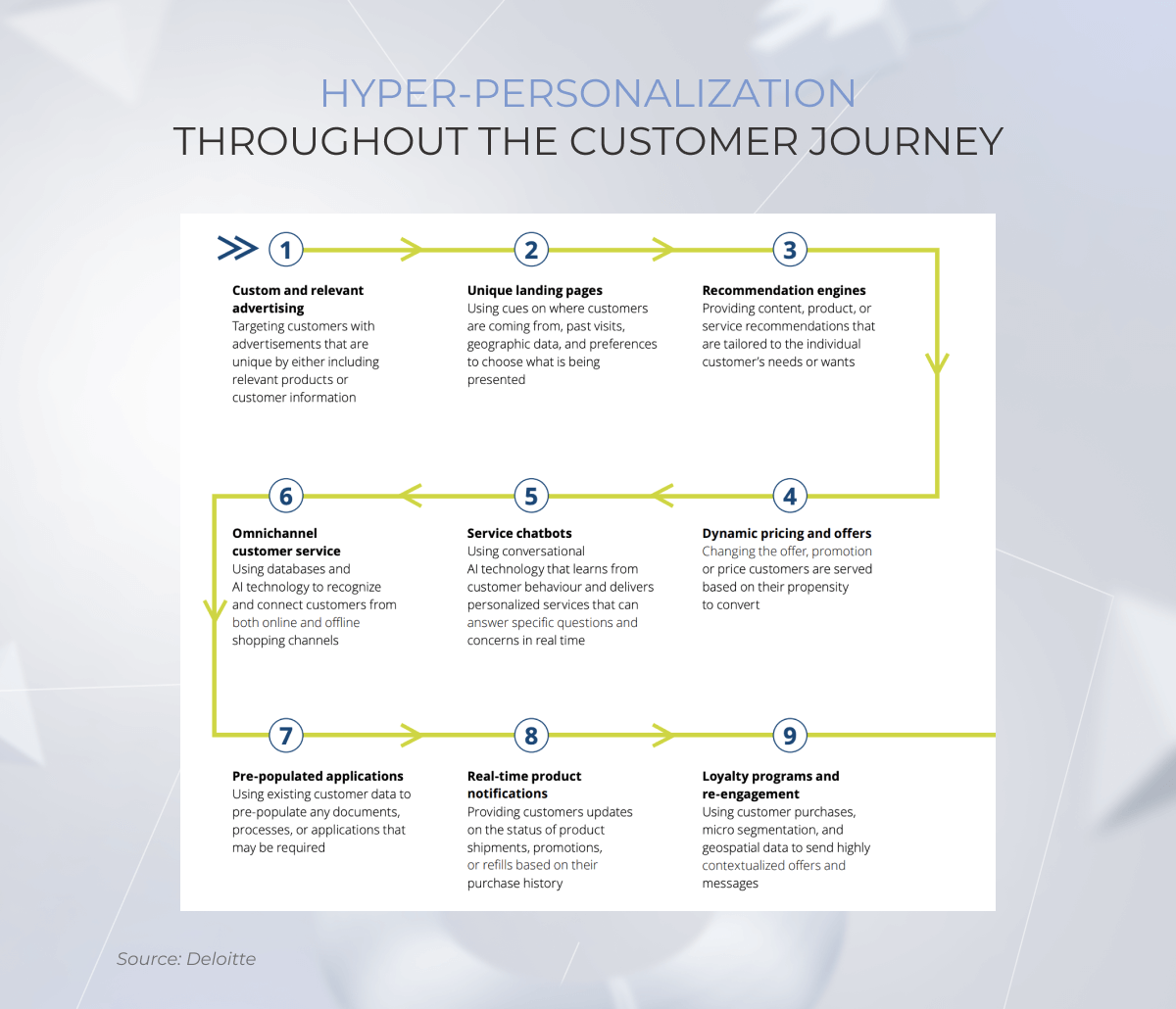
Typically, retailers cover only three of the seven steps of the customer journey, leaving the rest of customer interactions unattended. Ecommerce AI solutions can pick up the slack by turning unstructured data into clear insights about what consumer expectations really are across the entire value chain. With these insights, brands can deliver personalized customer experiences from initial product discovery to after-sales support, helping shoppers:
find what they want faster with tailored product suggestions or detailed, adaptive descriptions based on their queries
easily compare options and choose the best fit thanks to review summarizations and feature-based comparisons
secure better deals as gen AI tools can adjust pricing on the fly based on competitor pricing and customer behavior data
resolve issues more efficiently or get on-point clarifications 24/7 with context-aware AI-powered chat assistance
Faster, error-free operations
Ecommerce businesses can also implement generative AI solutions to automate time-consuming routine tasks such as product data entry, sales reporting, customer assistance, and others. Not only do gen AI tools speed these tasks up, but they also complete them with near 100% precision.
Besides, with drudgery handed off to generative AI algorithms, companies unlock cost savings and shift their focus to perfecting marketing strategies, adding innovative product features, and other profit-driving areas that hinge on the creative process.
Better efficiency
Another reason why businesses are rushing to employ generative AI is its potential to deliver both short- and long-term efficiency gains.
From delivery route planning and inventory management to the generation of product visuals at scale, gen AI-powered tasks execution brings substantial impact with fewer resources.
Before gen AI, running targeted marketing campaigns, for instance, required a full team and weeks of preparation. Now, a single FTE armed with a custom pre-trained generative transformer can ideate and launch a campaign in a day. Whether it’s creating unique concepts, running A/B tests, selecting optimal timing, or refining targeting strategies, generative AI tools handle every task, ensuring conversion rates are maximized.
— Chad West, Managing Director USA, *instinctools
Sharper decision making
Retailers often race against the clock, trying to analyze what caused sales dips, what market trends to gear up for, and what specific smart moves their competitors made to hit it big with their last marketing campaign. And not all of this data is easy and fast to measure and monitor.
Paired with a robust AI core and a comprehensive data engine, generative AI can deliver whatever insights your ecommerce company needs at the moment and do it in a straightforward, conversational, and actionable way.
Many faces of generative AI in ecommerce
According to Precedence Research, the generative AI for ecommerce is expected to grow by over 320% by 2034. The growth this rapid owes much to its cross-modal versatility.
Gen AI content can be delivered in text, images, videos, audio, and even 3D representations. Below, we’ve broken down specific use cases each representation targets in ecommerce.
Modality
Application
Use case
Text
Content production
– Product descriptions – Personalized AI ecommerce marketing – Messaging and notifications
Chatbots
– Ecommerce customer service tasks and support – Personalized online shopping journey
– Video generation for marketing purposes – Video product description – Product tutorials and manuals
3D representation
Product representation
– 3D product catalogs – Virtual fashion design – New product design
Product design
– Turning text descriptions into 3D product models
Although multi-functional, a gen AI model’s application layer fine-tunes it to complete a specific task.
11 generative AI use cases in ecommerce
Retailers juggle too much to boost margins and keep customers happy — inventory glut, fragile supply chains, ever-increasing number of distribution channels. But now, generative AI systems take the complexity and tedium off their plate.
1. Personalized product visualization
Hyper-personalization is the new status quo for the ecommerce industry, with the majority of customers favoring a curated shopping experience in online stores. Generative AI lives up to the demand and allows customers to customize and play with the styles, colors, and fabrics of the products.
Stitch Fix, an online personal styling service, uses its Outfit Creation Model (OCM) to compile and visualize personalized outfit suggestions based on a consumer’s previous purchases, customer preferences, size, budget, and style.
Sephora and Ulta Beauty are using generative AI to develop personalized skincare product recommendations.
2. Virtual try-ons
Around 19% of US beauty consumers say that virtual product try-ons would help them feel more confident purchasing products digitally. Generative AI brings the visual try-on experience to each screen, allowing consumers to create realistic representations of clothes and other products.
Unlike traditional virtual try-on tools, generative AI applications make the fitting experience more mindful of a body shape, skin tone, and personal style.
Google constantly enhances its virtual try-on feature that demonstrates how clothes look on real models with different hair types, body types, skin types, ethnicities, and sizes.
Ulta Beauty uses style transfer technique, another gen AI offshoot allowing the customer to take two images — a self-portrait and a style reference image — and blend them together to offer a virtual hair style and colour try-on experience.
3. Human-like chatbots
Traditional ecommerce chatbots and virtual assistants guide customers through basic linear flows but have a hard time thinking outside the predefined boundaries. With generative AI chatbots, it’s all different. Retailers swap generic responses for human-like interactions and provide accurate 24/7 support to users, boosting customer service efficiency.
Generative AI can also supplement chatbots with natural language processing capabilities, enabling the bots to process natural language inputs (voice or text) and serve up empathetic outputs for after-sales support and issue resolution.
4. Product discovery and search personalization
In product discovery, generative AI can analyze customer preferences, behavior, and past purchase history to offer personalized product suggestions. Helping customers find relevant new products led to higher spend in 69% of instances.
On the same line, gen AI tools reduce search time as they can anticipate user preferences and search intent.
Besides, with more intuitive, conversational search, discovering products gets easier. Instead of browsing hundreds of product names, customers can describe what they are looking for in their own words, and the virtual assistant will make recommendations. Generative AI powered tools can also interpret uploaded images and process short videos.
5. Content generation assistant
Creating accurate product content for thousands of SKUs is not for the faint-hearted. That’s why AI-generated content was among the first use cases that picked up steam in ecommerce. Gen AI powered solutions have simplified content production for product descriptions, listings, tailored marketing messages, and even social media posts.
Amazon was among the first to bridge AI content and ecommerce, helping sellers write product descriptions at scale.
Heinz uses generative AI to create images for advertising.
Shoplazza, an ecommerce website builder, has implemented gen AI models to transform mannequin models into real models.
Whatever it is, AI development services reduce the cost of content creation and streamline manual tasks.
6. Market research
When testing the waters of new markets and customer cohorts, ecommerce businesses need to comb through vast amounts of data to inform their strategies. Customer feedback on social media platforms, extensive customer data, competitors’ ecommerce companies’ moves, and other valuable data have to be made sense of.
Here’s how generative AI can help with analysis-related tasks in ecommerce:
Market intelligence — gen AI can help simulate market scenarios, produce synthetic data to fill data gaps, and forecast customer responses based on historical data.
Information summarization — instead of spending months on research, ecommerce brands can employ AI tools to read and analyze existing material.
Novel market and customer segmentation or product opportunities — gen AI algorithms can uncover untapped market and customer segments as well as identify new product niches within the target market.
7. Planning for promotions and marketing campaigns
Generative AI can supercharge sales and marketing campaigns with personalized loyalty programs and discount structures. Smart generative AI algorithms analyze customer data to create tailored rewards and incentives.
Additionally, gen AI tools can extract valuable insights from EPoS and transactional data using predictive analytics, informing promotional efforts, pricing strategies, and production processes based on expected demand.
8. Boosting retail media networks
Retail media networks rely on loyalty and transaction data to sell ad inventory to third-party brands. By analyzing and deriving insights from customer data, gen AI tools can tell ecommerce businesses what advertiser categories to draw to their RMNs.
Within the network, generative AI tools can help advertisers tie together and optimize their ad spend. Generative artificial intelligence can also
analyze the best-performing offerings of advertisers,
match them to relevant consumers,
and generate campaign configurations to replicate ad success.
It’s a win-win for both: advertisers get the bang for the buck, while retailers get to generate more RMN revenue.
9. Supply chain and inventory management
Out of all industries, retail supply chains are the most dynamic due to ever-evolving customer demand, a large number of products, and rapid product life cycles. Generative AI adds simplicity to supply chain management by taking over the analytics inherent in the process.
AI ecommerce startups today offer many Gen AI tools that can analyze historical and real-time sales data to predict demand, calculate safety stock levels, and identify slow-moving stock. These tools can also assist gen AI ecommerce businesses in:
Running what-if scenarios to get prepared for supply chain disruptions and fluctuations in demand
Evaluating suppliers by analyzing financial reports, performance metrics, and other data
Optimizing logistics routes by analyzing warehouse locations, transport links, and demand patterns
Improving last-mile delivery by selecting the right delivery or pickup routes based on traffic conditions, weather, and other data.
10. Gen AI-driven pricing
Generative AI models support AI-driven tools in identifying the optimal path to a retailer’s sustainable financial health. To do that, AI tools perform price simulations where they create various market scenarios based on: historical data, competitors’ behavior, market trends, etc.
Price simulations also allow ecommerce businesses to locate key-value categories and items in their portfolio, refine their pricing strategy, and spot implicit cross-dependencies between products.
Moreover, with demand-based pricing, ecommerce owners can model demand curves based on seasonality, inflation rates, income levels, and other variables to optimize pricing during spikes or slowdowns in demand.
11. Fraud detection
Generative AI and ecommerce make a powerful combo when it comes to anomaly detection. Traditional methods don’t catch fast-changing fraud tactics. Conversely, generative AI stays adaptive to new fraud patterns by constantly vacuuming up consumer data and analyzing it with past customer interactions.
By understanding genuine past customer behavior and previously detected fraud patterns, generative AI can simulate fraudulent activities and train AI algorithms to detect and counteract them. Paired with a conversational interface, generative AI can also notify fraud engineers about risk flow and give reliable recommendations on what to do next.
Don’t miss a chance to uncover new opportunities with gen AI
Leveraging generative AI for ecommerce takes dedicated effort
The promise of generative AI is enticing. But it can only deliver on its promise if implemented with your unique business strategy, needs, and constraints accounted for.
Get ready for generative AI transformation
A convincing, measurable business case is the foundation for any AI-based adoption. It should define:
a specific business challenge
the outcomes to measure gen AI implementation’s effectiveness
Without a business case outlined, you won’t get a clear understanding of the data needed to train the model and the technical expertise required to set the AI infrastructure in place.
Choose the right model
The choice of a foundational model and the technologies powering it depends on:
your use case,
the type and quality of your data,
and the limitations of your infrastructure.
You might consider implementing Generative Adversarial Networks (GANs) models for image generation, while models like GPT are more suitable for text-only applications.
Gen AI tools aren’t automatically compliant with industry rules, so choose the right training and deployment method to keep customer and sales data safe.
Train, evaluate, and fine-tune the model
The training process begins after collecting and preprocessing data. A lot of back-and-forth identifies the optimal model architecture, hyperparameters, and training algorithm to achieve stable and safe performance. Once the model is trained, you should consistently evaluate its performance and fine-tune the model based on periodic test results.
Deploy and monitor
When the model is up and running, it’s time to make it a part of your ecommerce architecture.
Based on your objectives, you may need to deploy it to a cloud-based service, create a dedicated user interface, or integrate the documents and knowledge databases of your ecommerce business with the model. Once the model is deployed, it needs regular performance monitoring to make sure it lives up to expectations.
Maintain and improve
AI-based models are only as good as the data powering them. Therefore, make sure to refine data patterns to prevent model drifting and update the model as and when necessary. In some cases, your model may need retraining, in other times, new monitoring processes may keep your model up to date. As your ecommerce business grows, be sure to scale the model accordingly.
To see value from generative AI solutions, ecommerce businesses have to take heed of the following considerations.
Data quality and bias
Your gen AI application is only as good as your data. To work effectively, it requires a rich palette of internal and external data that’s accurate, diverse, and representative of real-world scenarios and customer queries.
If any of these boxes are left unchecked, your generative AI solution can perpetuate biases and churn out irrelevant outputs, hurting customer engagement and harming your bottom line.
Scale-ready adoption environment
You may already have a tech estate ready for gen AI adoption, but unless it’s scalable, you will end up with costly gen AI replications that will also be hard to upsize. The optimal gen AI architecture for retailers is function-agnostic and market-agnostic, meaning it can augment various business functions across different markets.
Techwise, an agile generative AI architecture requires the implementation of modular components that will allow for easy LLM swapping and scaling.
Data security and ethical considerations
As generative AI applications thrive on customer data, you must make sure they do it in a secure and responsible way. This includes adherence to relevant data privacy regulations such as GDPR, CCPA, PCI DSS, CalFIPA, and others.
Along with regulation-induced security measures, your gen AI applications must also have data encryption at rest and in transit, role-based access controls, network security, and other data security safeguards if you want your gen AI solutions to be ethically sound and good at maintaining customer trust.
Wrapping up
When powered with AI, an ecommerce business model is more efficient, customer-centric, and future-ready. AI can increase ecommerce sales, deliver unparalleled customer experiences, and more. Instead of getting carried away with the persuasive abilities of AI technologies, retailers should rely on a specific business case to spearhead their gen AI journey focused on fostering customer loyalty.
The right choice of a generative AI model, infrastructure readiness, and dedicated human expertise cracks the code of adoption and makes generative AI a low-risk investment for ecommerce businesses and commerce media professionals.
According to Precedence Research, the global artificial intelligence in ecommerce market size is expected to achieve $22.60 billion by 2032. We can assume that the ecommerce and AI duo will gain even more traction, ushering in new, competitive capabilities.
How is generative AI being used in ecommerce?
In ecommerce, generative AI has taken over a lot of repetitive tasks, including customer support, product descriptions, and ad generation. The technology also assists retailers in forecasting demand, maintaining optimal inventory levels, and providing novel shopping experiences.
How is AI transforming the ecommerce industry today?
Artificial intelligence elevates the customer experience, improves the accuracy of sales forecasts, amplifies marketing with personalized messaging, automates follow-up abandoned cart inquiries, and more.
How can AI boost sales in ecommerce?
Artificial intelligence improves lead retargeting, enhances customer experience, optimizes dynamic pricing strategies, and enables hyper-personalization in marketing. This increases conversion, leading to more sales.
What are the risks of AI in ecommerce?
Before adopting AI models, retailers need to make sure models are compliant with applicable regulations and have enough training data to prevent model bias.
Ever since they entered the mainstream, large language models and LLM use cases have heralded a foundational change in business processes. Eager to rewire their workflows, global companies dived headfirst into LLM adoption, with applications of LLMs and LLM-powered agents featuring everything from field operations to back-office admin.
But as the initial zeal and flurry of activity have cooled off, companies realized that to reap tangible benefits of LLMs, they require something more than incremental improvements. They need an organizational and technological overhaul.
Today, our AI team will break down the best LLM use cases across industries as of 2026 to showcase the potential of large language models in the real world, along with the technological capabilities you need to innovate effectively and at scale.
Key highlights
From customer operations to supply chain management, there is a wide range of LLM use cases, offering significant potential for business automation and cost reduction.
For data-heavy industries such as healthcare, banking, and retail, applications of LLM can become a productivity game-changer, if deployed in accordance with EU AI Act, GDPR, HIPAA, and other necessary regulations and scaled effectively.
The LLM payoff may only come when companies do deeper surgery on enterprise data sets and establish distinctive data capabilities such as vector databases and preprocessing pipelines.
Ever since they entered the mainstream, large language models and LLM use cases have heralded a foundational change in business processes. Eager to rewire their workflows, global companies dived headfirst into LLM adoption, with LLM agent use cases featuring everything from field operations to back-office admin.
But as the initial zeal and flurry of activity have cooled off, companies realized that to score early wins from large language models, they require something more than incremental improvements. They need an organizational and technological overhaul.
Today, our AI team will break down the best LLM use cases to showcase the potential of large language models in the real world and explore the AI development capabilities needed to innovate effectively and scale with confidence.
What is a Large Language Model (LLM)?
LLMs are a class of foundation models that are designed to understand, process, and generate human-like text and other forms of content, making them a core technology behind generative AI.
Built on a transformer neural network architecture and trained on massive amounts of data, large language models excel at modeling sequential dependencies in language and capturing complex statistical patterns across tokens, enabling their application to a wide range of natural language processing tasks.
Large language models are publicly accessible through interfaces such as Anthropic’s Claude Opus and Sonnet, OpenAI’s ChatGPT, Google’s Gemini, xAI’s Grok, and Meta’s Llama family. These prominent products have attained near-universal recognition across both consumer and business contexts.
Key benefits of LLM for enterprises
Despite the challenging road to full-scale adoption, GenAI spending continues to rise, driven by strategic necessity and confidence in its long-term impact. McKinsey’s survey revealed that 92% of US C-suite executives who are already experimenting with AI pilots plan to ramp up investment in generative AI over the next three years. While specific outcomes vary by industry and use case, companies using large language models report significant gains across the board.
Productivity gains
LLMs increase productivity by taking over the repetitive, time-draining work that usually slows teams down: summarizing documents, drafting responses, searching across internal knowledge, generating code snippets, preparing reports, or organizing data. According to OpenAI’s 2025 enterprise report, workers who deeply integrate AI into daily workflows report saving 10+ hours per week in some cases. It drives higher output without increasing headcount, with freed-up time moving into judgment-heavy tasks.
Cost reduction
Along with productivity gains, the compression of marginal costs is among AI’s most fundamental economic effects in many sectors, beginning with industries with a high share of costs associated with cognitive work. The aforementioned survey indicates that 23% of leaders already see favorable changes in costs by delegating time-consuming tasks to LLMs.
Better decision-making
Language models can quickly scan and process vast amounts of both internal and third-party data, including reports, news articles, and customer feedback, to identify patterns and trends. Equipped with a rundown of insights, companies can then take the guesswork out of their strategies and make informed decisions faster, whether it’s the development of a new product or novel market segmentation.
Enhanced customer experience
Hyper-personalized, context-aware, and 24/7 human-like customer support is now available to enterprises thanks to LLMs. They help enhance customer experience by instantly resolving routine queries. For instance, after powering their banking app with GPT-4 capabilities, one European bank lifted customer retention by 7%.
Increased employee satisfaction
45% of companies who regularly use AI at least in one function say it improved employee satisfaction. In corporate environments, large language models can reduce friction in knowledge access, support self-paced training, and help employees learn in ways that match their roles, needs, and preferences. In other words, they make day-to-day work more manageable and professional growth more accessible.
Accelerate the growth of your business with gen AI
To make inroads into gen AI, it’s crucial to know the pragmatic, utilitarian large language model use cases. Let’s have a look at the best LLM use cases and how they can support workloads across different business functions.
1. Customer support
According to McKinsey, 45% of companies scaling applications of LLMs in customer operations have already increased customer satisfaction.
By fine-tuning large language models on its chat logs, customer data, and sector-specific questions and answers, or through RAG, companies can automate interactions with clients and take the workload off the human agents. Virtual text- or voice-enabled self-service assistants powered with emotion and intent recognition, multilingual support, and personalization capabilities can provide instant and accurate help 24/7, escalating to a human representative only when necessary.
2. Sales and marketing
Language models have taken off in marketing and sales functions to streamline communications with customers and drive personalization at scale. Gen AI models can generate tailored messages in multiple languages based on the demographic and purchasing data of your customers. Everything from social media content to brand messaging can be produced with the mighty capabilities of a large language model.
Beyond generic applications, language models can take over customer sentiment analysis, which is the driving force behind social media listening and analysis of customer reviews. Unlike targeted sentiment analysis tools, large language models can better understand more complex nuances of customer sentiment. Also, LLMs can be used for market research, distilling insights from text data to look into consumer behavior and analyzing user preferences.
Moreover, companies can harness the power of gen AI to automate sales. LLMs can move the leads down the sales funnel, facilitate lead scoring, and estimate the number and amount of future sales.
3. Product research and development
LLM-enhanced smart applications have emerged as powerful tools for product ideation and brainstorming. They can provide research proposals, accelerate interdisciplinary research, and store the collective knowledge of researchers for easy retrieval. The technology can also assist researchers with exploratory data analysis, hypothesis testing, and predictive modeling, enabling them to improve their research outcomes.
Multimodal large language models have raised the bar even higher. Not only can they provide product design recommendations, but they can also select cost-efficient production materials, optimize existing designs for manufacturing, and automate the design creation process — and these are only a slew of LLM use cases in manufacturing.
4. Human resource management
In HR, a large language model can pave the way for a more fluid, dynamic approach to skills assessment. Rather than spending hours on resume-by-resume analysis, an HR team can ask the LLM to shortlist the candidates and perform an initial screening of cover letters.
During onboarding, a large language model can act as a corporate guide, referencing the new hire to onboarding materials or providing an informal walk-through of the employee handbook. Other language model use cases in HR include pay and salary analysis, employee experience management, career pathing, and benefits administration.
5. Supply chain management
The application of LLMs is also transforming supply chain management by ushering in more predictability and control over supply-demand balances. Procurement teams rely on generative AI to select vendors, analyze spending data, and gauge supplier performance.
By reaching across datasets, large language models can provide companies with on-the-fly inventory or demand analysis and present findings in digestible formats like graphs and narratives.
Thanks to its contextual learning capability, generative AI can cast its nets even wider by feeding on multiple variables and local context factors to produce detailed, localized forecasting of chain performance in a given environment.
6. Corporate risk management
With a veritable zoo of data points and a large cohort of customers in multiple markets, risk management and compliance monitoring have become a formidable task for enterprises. By prioritizing risks based on the impact and custom criteria, enterprise LLMs enable proactive decision-makers in companies and tackle the heaps of paperwork related to risk assessments.
The model churns out the specs of financial, operational, and reputational risks, possible control measures, and metrics to track potential vulnerabilities. The output serves as a baseline for risk managers to build from and evolve.
7. Software development
Acting as intelligent pair programmers, LLMs in software development accelerate coding by automating routine tasks, generating code from natural language, debugging, and refactoring. More and more companies, whether engineering-focused or not, are building internal LLM-powered workflows and tools to tap into the benefits of LLM in software development.
To enhance their code review process, J.P. Morgan Payments, the B2B and merchant services division of JPMorgan Chase, for instance, have developed an AI-based PRBuddy that generates intelligent feedback and suggestions to streamline the pull requests management. The tool automatically adjusts documentation in accordance with accepted changes. The banking giant says PRBuddy helps accelerate development workflows and maintain higher code quality standards, contributing to more reliable software delivery.
8. Regulatory compliance management
Wrangling with the red tape is a salient part of any organization’s life cycle, a part that can be automated to some extent by LLMs. Not only can such solutions keep up with regulatory changes, but they can also automate the creation of compliance reports and policies.
As for data security, large language models can automatically run DPIAs (Data Privacy Impact Assessments) and notify managers of potential privacy risks. LLMs can also lend a hand in generating incident response reports and automating response procedures.
The unmatched analytics capabilities of large language models also allow them to identify suspicious patterns or anomalies and warn compliance officers about potential regulatory violations.
9. Fraud detection and cybersecurity
Fraud management is yet another of the many LLM use cases for business where the model emulates synthetic data to train fraud detection machine learning models. Fraud detection is among other LLM use cases in cyber security, enabling cyber experts to leverage LLMs to ferret out anomalies in historical data.
On the same line, LM-based fraud detection systems can create new possibilities for high-stakes functions such as claims management, where real-time fraud monitoring is essential to ensure the safety of sensitive customer data and the eligibility of the claimant.
Cybersecurity experts have also made LLMs part of their stack to automate tasks like source-code analysis and vulnerability detection. Thanks to their pattern-finding features, large language models can analyze threat patterns and generate response scripts.
10. Legal management
Besides human language, LLMs can also speak legalese, making sense of fine-print specifics and the Greek of legal code. From contract drafting and analysis to research, LLMs can take over legal management, lightening the load on your in-house lawyers.
By analyzing historical data and precedents, a large language model can also predict possible outcomes and pinpoint potential legal risks.
Let’s make generative AI work for your business case
Applications of LLMs and their value vary from one industry and business area to another, so companies should carefully evaluate where generative AI fits their sector-specific needs. Let’s explore the field notes of how different industries gain from the large language models and analyze common LLM use cases.
LLM use cases in healthcare
With an increasing cost of care, admin workloads, and labor shortages healthcare is a vibrant testing ground for AI-based automation technologies. In particular, LLM use cases in healthcare show promise to transform clinical practice by allowing healthcare providers to spend more time with their patients, thus improving patient outcomes.
Here’s where applications of large language models have made a compelling case:
Back-office automation: Gen AI models can take the admin burden off healthcare professionals by drafting appeal letters, streamlining patient data entry, and categorizing incoming claims and billing. To help their clinicians spend more time focusing on their patients, Mayo Clinic uses ambient AI scribes. These solutions record and summarize patient-physician conversations thanks to speech recognition, natural language processing and large language models.
Patient assistance: LLM-based chatbots and virtual assistants can guide patients through ambulatory care, manage medication schedules, track health metrics, and support communication needs of patients.
Automated compliance management: Gen AI can assist compliance managers in keeping track of regulatory changes and estimating compliance risks.
Medical diagnosis assistance: Along with automating routine tasks, language models can inform medical diagnosis by analyzing patient symptoms based on the medical records analysis.
Clinical trials: Training on raw protein sequences allows the AI to make inferences about molecular and protein structures.
LLM use cases in finance and banking
Large financial institutions such as Wells Fargo, Capital One, and Bank of America have already tested the waters with gen AI and are currently figuring out the best ways to capitalize on applications of LLM and ensure they get scaled enterprise-wide.
High-value LLM enterprise use cases in finance include personalized trading assistance, customer-facing support chatbots, efficient onboarding of new customers, and market predictions. LLMs also enable large-scale report generation and support wealth management workflows by synthesizing financial data and assisting advisors with insights and client reporting.
For example, Morgan Stanley has made a prominent case for LLM-driven financial analysis. The financial services company has launched a gen AI assistant that helps financial advisors sift through a huge database of financial data and extract relevant data in minutes.
Customer support is among other prominent LLM use cases in banking, and the one associated with huge gains. By augmenting the existing chatbot with GPT-4 capabilities, one of our clients, a Czech bank, boosted its Net Promoter Score (NPS) by 34%, and improved its First Contact Resolution (FCR) by 60%.
LLM use cases in retail and ecommerce
In retail and ecommerce, generative AI is already embedded into core workflows, from product discovery to customer engagement and inventory optimization. A clear example is Amazon, which applies AI systems to enhance search relevance, personalize shopping experiences, improve product listings at scale, and facilitate same-day shipping.
The research area of gen AI can be as limited as the company’s internal data or as wide as social media data to enable always-on social media monitoring and listening.
LLM-enhanced customer service and support systems improve user satisfaction, boost sales, and offer 24/7 support to customers. The application area of language models in retail also stretched to procurement management. By digging into seasonality data and customer behaviors, large language models can predict future product demand, thus reducing stockouts and excess inventory.
LLM use cases in education
Learning and education are one of the areas where a tailored approach is key to improve performance and enable better learner engagement. By creating a unique conversation environment, LLMs can bring new ways of personalized learning where each program, quiz, and test is cut out for individual students’ needs, interests, and learning styles.
The model can also become a force multiplier for teachers by taking over menial tasks such as grading and lesson plan development. On a higher level, large language models promote inclusive, equitable learning opportunities for students of all backgrounds by eliminating language barriers and providing multilingual education. Apps like Babbel and Memrise also demonstrate the vast potential of LLMs in language learning and language translation.
LLM use cases in media and entertainment
Generative AI models have also opened up a new set of opportunities for the creative industry. Besides textual data generation, multimodal LLMs can create custom sounds and short-form videos, improve editorial workflows, and fine-tune content of any type to better match the expectations of the intended audience. Netflix has been using machine learning and LLM-driven systems to personalize content recommendations, optimize thumbnails, and improve audience engagement by tailoring content discovery to individual viewer preferences.
They can also empower interactive storytelling to take the audience on an engaging and personalized journey, whether it’s in gaming or in advertising.
LLM use cases in automotive
Recently, language models have also made it into a vehicle’s infotainment system to take voice control to a whole new level. Mercedes-Benz, the undeniable automotive leader, has integrated a GPT-powered model into the voice control system to improve its natural language understanding and level up its responses.
Moreover, gen AI tools can be used in intelligent vehicle production where they co-develop automotive software applications, analyze production data, and brief production employees on safety protocols. Language models can also enable autonomous vehicles to digest complex environment data and make safe driving decisions.
LLM use cases in manufacturing
Manufacturing has long struggled with tribal knowledge, critical operational expertise held by experienced workers and often lost when they leave. LLMs help address this by capturing informal know-how and turning it into SOPs, searchable knowledge bases, and training materials, making expertise reusable across the organization instead of tied to individuals. Siemens has deployed an AI-powered operator assistant that delivers work instructions, microtraining, troubleshooting, and knowledge management for operators and technicians.
Tackle the biggest challenges of your industry with gen AI
What does it take to adapt LLMs to a vertical need?
When companies choose the generative AI path, they are presented with two primary architectural options: augmenting a model’s context at inference time or LLM fine-tuning on proprietary data.
The first approach, LLM RAG (Retrieval-Augmented Generation), has become the dominant enterprise strategy. It keeps the base model frozen and dynamically retrieves relevant information from a company’s knowledge base at query time. This method allows the model to access and cite up-to-date, company-specific context without retraining. The focus has shifted to enhancing RAG with advanced techniques like agentic search, where the system actively manages its own context and iteratively refines its queries for complex, multi-step retrieval.
The second option is LLM fine-tuning, where a pre-trained model is further trained on a curated dataset to update its internal weights. This changes the model’s fundamental behavior and is most effective for instilling a consistent tone, output format, or task-specific reasoning pattern. While full fine-tuning remains costly, parameter-efficient methods like Low-Rank Adaptation (LoRA) are standard, and new hybrid techniques dynamically route training updates to balance performance and efficiency.
A significant 2026 evolution is the rise of hybrid systems that combine both strategies. A domain-specific LLM can be fine-tuned for a particular task or style and then augmented with LLM RAG to retrieve live information, outperforming either method alone.
Challenges and considerations of LLM enterprise use cases
Language models share several well-known AI risks, while also introducing new LLM challenges related to scale, reliability, and natural-language accessibility.
LLM hallucination
The unstructured nature of input being fed into ChatGPT-like tools brings inherent risks of generating irrelevant and off-topic content. A poorly-trained LLM is prone to producing false, functional knowledgenot supported by any training data, as an extrapolation from your prompt.
The reasons for this lapse of judgment are many, from overfitting to poor prompts to complete datasets. That’s why the quality, integrity, and completeness of training data are vital to set the model straight.
Biases
Similar to earlier NLP systems such as statistical models and word embeddings, large language models can inadvertently amplify biases present in the training data. This happens when the data doesn’t represent the entire population, causing your model to produce unreliable results. This, again, puts a special emphasis on accurate curation of training data and ensuring its completeness and versatility.
However, robust validation frameworks and proper AI optimization techniques, like bias detection algorithms and inclusive data collection strategies, can help mitigate these LLM limitations effectively.
Data privacy concerns
A large number of open-source large language models store and process data on the provider’s servers, which goes against enterprise data protection regulations. To introduce a language model into your corporate environment while maintaining data privacy, you have several options:
deploying the model locally on your infrastructure,
running it in a private cloud VPC,
or using confidential computing environments where data remains encrypted even during processing.
Simple API calls to shared cloud models typically violate enterprise data protection regulations, but modern approaches like hardware-attested inference and air-gapped deployments now provide compliant alternatives. This way, your sensitive data will be kept under lock and key.
Cost at scale
As LLM adoption spreads across enterprise teams and customer-facing applications, inference costs, driven by token volume, context length, and request frequency, can scale multiplicatively, quickly eroding projected ROI. Effective containment relies on a layered approach: request caching for repeated queries and routing routine tasks to smaller distilled models while reserving frontier LLMs for genuinely complex reasoning.
Besides caching and routing, prompt compression and context pruning help reduce token waste per call. Furthermore, per-team consumption quotas with automated throttling prevent local spikes from affecting global budgets, and regular audits of usage patterns make it possible to identify and retire redundant or low-value calls before they accumulate.
Compliance and regulatory risk
LLMs can process or generate outputs that unintentionally include sensitive or regulated data (PII, financial info, health data), which can violate laws like GDPR, HIPAA, or sector-specific compliance rules. This is especially relevant when employees paste internal data into external or poorly governed models.
Another related issue is lack of explainability and traceability. Many regulations require organizations to justify decisions (e.g., credit scoring, hiring support). LLMs often behave like black boxes, making auditability harder.
Mitigation usually comes down to tight governance and technical guardrails: restricting what data can be sent to the model, using enterprise or self-hosted LLM setups, and applying PII detection/redaction before prompts are processed.
On top of that, organizations typically add human-in-the-loop review for high-stakes outputs, logging for auditability, and strict policy mapping to regulatory requirements so every LLM use case has a defined compliance boundary.
Does a large language model make it worth a candle for your business?
We’ve seen it multiple times: companies get underway with hyped technologies and not getting their investment paid off. LLM-based innovation, like any other type of AI, calls for careful analysis of your business case and price-value ratio for your company.
The rule of thumb would be estimating the human effort to complete a task manually against the effort spent on fact-checking the gen AI output. Typically, generative AI brings the greatest difference in use cases where human effort is high, while the validation of the output is easy. Mind that a large language model isn’t a fire-and-forget innovation, it requires your constant upkeep and human assistance to succeed.
How to implement LLMs in your business
Ignoring generative AI can put you behind in the productivity race, but adopting large language models just for the sake of it won’t take you anywhere either. McKinsey found that organizations achieving the highest impact from generative AI are more likely to have formal validation processes in place and to invest sufficiently in responsible AI. These two factors are strongly correlated with capturing material EBIT impact.
To capture the leapfrog opportunities of generative AI, companies need a clear LLM strategy, strong technical foundations, and a dedicated team to turn pilots into scalable business outcomes.
Develop an LLM implementation strategy grounded in value
Just like any other type of machine intelligence, gen AI adoption should bestrategic. Your generative AI strategy should align with the existing AI mindset and inherit the same principles as your other AI initiatives. AI governance, risk management, and sensitive data handling are the pillars behind a comprehensive innovation strategy.
Gain guidance from cross-disciplinary teams
The inherent complexity in gen AI projects requires companies to secure cross-disciplinary talent to ideate, develop, and manage the AI lifecycle. Not only will your dedicated team guide you on the gen AI journey, but they will also ensure the right implementation of your data program. Having an experienced tech partner takes the risk out of AI adoption and keeps your gen AI tools compliant with laws and regulations.
Shore up specific tech capabilities
While gen AI doesn’t require fundamental changes in your tech infrastructure (provided it’s AI-ready), you still need to tailor your data architecture to support a broad number of use cases. This includes the collection and curation of proprietary data and distinctive data capabilities such as vector databases and preprocessing pipelines.
Secure enterprise data
Bringing a large language model to your data is not enough to keep it safe and sound. Your company should also have a strong data governance framework in place that includes data encryption, access controls, and regular auditing. Also, your training data should be anonymized and aggregated whenever possible.
To sum it up, your gen AI strategy should be fortified with a crystal-clear vision, a path to value-realization as well as risk and adoption plans. These pillars should align at the adoption, talent, tech, and organizational level.
Exploring generative AI, but unsure where to begin?
Large language models quickly went from being a shiny new toy to a corporate force to be reckoned with. As companies navigated this transition, they caught promising glimpses of the considerable value at stake but also encountered various challenges associated with scaling standalone LLM use cases. To become LLM-ready, you have to revisit your data platforms, polish your existing AI infrastructure, and start with small-scale pilots to iteratively build up the internal LLM capabilities.
As a custom LLM development company, we enable teams to move from pilots to production with end-to-end LLM consulting, custom model fine-tuning and RAG pipeline development, MLOps, and cloud or on-prem deployment.
What are the most valuable LLM use cases for enterprises?
The top five use cases by measurable ROI are document summarization and analysis, customer support automation, internal knowledge search with RAG, content generation, and code generation.
What are the main applications of LLMs?
The most common applications of large language models focus on automating language-heavy and knowledge-intensive workflows. Businesses use LLMs to process unstructured data faster and scale communication without proportional hiring.
The main applications of LLMs include text generation for articles, emails, and product descriptions; summarization of reports, meetings, and customer calls; translation; sentiment analysis; code generation; structured data extraction from documents; and conversational AI assistants. As LLM capabilities evolve, companies increasingly combine them with workflow automation, analytics, and AI agents to support more complex business processes.
What are the benefits of LLMs for businesses?
One of the strongest benefits of LLM AI is productivity improvement. Microsoft Copilot studies showed users completing tasks up to 29% faster. Businesses also report operational cost reductions of 20-30% through support, reporting, and workflow automation. Other measurable benefits of LLMs include faster decision-making through rapid analysis of unstructured data, 24/7 customer support availability, scalable personalization, and easier access to institutional knowledge for junior employees.
Which industries benefit most from LLMs?
The industries seeing the strongest ROI from applications of LLMs across industries are typically the ones handling large volumes of unstructured text data and complex workflows.
Finance and banking lead with fraud detection, compliance automation, and document analysis. Healthcare organizations use LLMs for clinical documentation, patient triage, and drug discovery support. Ecommerce companies apply LLMs to customer support, recommendation systems, and automated product content generation, while legal firms accelerate contract review, due diligence, and e-discovery processes. Manufacturing companies benefit from predictive maintenance, analytics, and technical documentation automation.
What is the best LLM for enterprise use cases?
Different models excel in different enterprise scenarios. OpenAI’s GPT is considered one of the most versatile models for reasoning, automation, and agentic workflows. Anthropic’s Claude Sonnet models are often preferred for long-context analysis, enterprise compliance, and lower hallucination rates. Gemini models from Google DeepMind integrate well with Google Workspace and multimodal workflows. For companies prioritizing data sovereignty or on-prem deployment, Meta’s Llama models remain one of the strongest open-weight options.
How much does it cost to implement an LLM solution?
The cost of custom LLM development depends on the complexity of the solution, integration scope, and infrastructure requirements.
Simple implementations using existing APIs from providers like OpenAI or Anthropic usually cost between $5,000 and $30,000 for setup, plus ongoing inference expenses. A RAG-based system commonly ranges from $30,000 to $120,000.
Fine-tuning domain-specific models often costs between $40,000 and $200,000, while enterprise-grade on-prem AI platforms with governance and MLOps capabilities can exceed $250,000. The most reliable way to estimate LLM implementation costs is to assess your data readiness, integration complexity, compliance requirements, and highest-priority use cases before development begins.
How long does it take to deploy an LLM use case?
The LLM implementation timeline depends on the complexity of the use case, the quality of enterprise data, and the number of systems involved in integration.
Simple chatbots, summarization tools, or AI assistants built on existing APIs can often be deployed within 2-4 weeks. RAG systems connected to large internal knowledge bases typically require 8-12 weeks because of data preparation, indexing, and security reviews. Enterprise-grade AI platforms with governance frameworks, MLOps infrastructure, and on-prem deployment requirements may take 6-12 months to implement fully.
What are the main challenges and risks of using LLMs?
The biggest LLM risks include hallucinations, data privacy issues, bias, high inference costs, and regulatory compliance challenges. In practice, many enterprise AI initiatives fail because of poor data preparation and governance. That is why scalable AI adoption requires equal attention to infrastructure, security, and operational controls.
The SaaS ecosystem might not be growing at breakneck speed like it used to, but it’s nowhere near hitting the brakes. Valued at ~$273 billion in 2024, the SaaS industry drives a giant share of the overall tech landscape. Big forces are steering this ship: AI and machine learning are weaving into everything, major players are making strategic acquisition moves, and APIs are making it easier than ever to connect the dots. And that’s just scratching the surface (we’ll dig into more SaaS trends for 2025 and beyond soon).
In this blog post, our experts share their perspectives on the upcoming SaaS market trends and cut to the chase on where as-a-service companies should zero in to get a competitive edge.
What will shape SaaS trends in 2025 and beyond?
SaaS industry trends can’t emerge from a vacuum. They stem from a range of important objective factors, which cause changes in how individuals and organizations perceive SaaS businesses.
Customer demand
As the SaaS landscape is maturing, user expectations are settling in. Today, SaaS users are adamant about the experiences they’re seeking, favoring dynamic pricing, personalization, and on-demand SaaS offerings. To fit the bill, SaaS market leaders engage on-demand experts to increase customer satisfaction and retention, revolutionize customer experience, gather user feedback, and iterate on it to release new features.
According to KPMG, SaaS vendors now have to balance personalization with generic features, demonstrate a clear stand on Environmental, Social, and Governance (ESG) issues, and develop a clear understanding of what value means for SaaS customers. It’s not about software anymore, it’s about a branded digital product with a personal, yet subtle touch.
Competitive environment
With market leaders such as Adobe, Salesforce, and Oracle accounting for $221 billion to $325 billion of total market value, it might seem challenging for new businesses to make a statement and try to thrive within a growing SaaS market consolidation trend. However, while certain segments are oversaturated, there is still a market entry for niche products, or vertical SaaS.
Concentrated categories with growth potential also include databases, artificial intelligence, and content management. A micro-SaaS model is another SaaS opportunity to hit it big. Similar to vertical SaaS, it’s tailored to a specific industry, but on a more granular level. Also, micro-SaaS solutions can be paired with existing as-a-service products, enriching their functionality.
Evolving regulatory conditions
A patchwork of compliance regulations and data security standards make it hard for SaaS providers to operate on both local and global scale. Along with well-known regulations such as HIPAA, GDPR, and others, new AI regulations have entered the scene. As a result, security and data governance audits have become more of a legal requirement rather than an optional state of checks and balances for as-a-service companies.
Providers have to comply with customer security requirements first, before any legal audits take place. SaaS clients demand a transparent data policy, records on IT security audits, root cause analysis, and other safeguards. Without thorough regulatory and data security knowledge, providers are likely to lose their grip on this tumultuous landscape.
Technology advancements
Organizations are looking to further their digital transformation agenda and experiment with cutting-edge technologies like generative AI, edge computing, and IoT. Offered over the SaaS model, these technologies become easily accessible, persuading global businesses to choose ready-made solutions over from-scratch software development.
To offer technological advancements as an a la carte option, SaaS companies have to make product design and development their top business priority to embrace cutting-edge tech and improve operational efficiency. By the same token, an impressive 90% of businesses adopt the DevSecOps methodology to create a continuous integration and delivery pipeline apt for fast and secure releases.
Economic factors
It hardly needs saying that the economic landscape has real clout in shaping opportunities and challenges faced by SaaS providers.
During economic upswings, they may have more room to maintain or even increase their prices due to higher demand and market stability. In the same way, favorable market conditions nudge investors to provide more funding to SaaS companies, enabling the latter to expand their operations and develop new features.
Conversely, in tough times of belt-tightening caused by economic shake-ups, SaaS businesses have to deal with difficulties in customer acquisition and retention as well as investors’ concerns.
That’s why, to facilitate revenue recognition, SaaS providers should better define their offerings and value that comes with the cost of their solutions.
Investor expectations
Even though the VC landscape for SaaS in 2024 showed signs of recovery — reaching a five-quarter high of $79 billion in Q2 — after a downturn in previous years, it’s still challenging for SaaS startups to nab investor dollars. Yet, companies that generate profit at a sustainable rate and meet the bar of the Rule of 40 are still of interest to VCs.
According to The Rule of 40, the growth of a software company is deemed sustainable only when its combined revenue growth rate and profit margin equals or surpasses 40%. If the company isn’t able to beat the Rule of 40, then it doesn’t pass the health check and falls into the category of risky software investments.
To operate at the Rule of 40, budding businesses have to establish a predictive view of customer health via advanced data analytics and proactively identify cross and upsell opportunities through AI-based analysis.
Moreover, leading players operate at a higher speed-to-market, incubating new ventures faster than competitors. Available tech competence and IT talent are a must to grow fast and resiliently as companies are launching new features and business lines.
Keeping a pulse on top SaaS industry trends: business and tech
Over 85% of organizations expect an unprecedented 80 percent of all of their apps to be SaaS in the upcoming years. Let’s see what else the future of SaaS holds and what technologies to adopt now to stay prepared for the times ahead.
1. Vertical SaaS
Being industry-specific, vertical SaaS solutions tackle the problems a generic, ready-made application can’t. As opposed to horizontal SaaS, vertical SaaS providers have a thorough understanding of your business challenges, just like an industry insider, and allow you to consume an off-the-shelf application without complicated customization and plugins.
According to research, the global market for these SaaS platforms is projected to reach $229,7 billion by 2030, at a CAGR of 17.7%. Since the availability of industry-based cloud services is still low, providers can take advantage of the young market and capture promising niches with their SaaS offerings. As for the vertical SaaS trends, healthcare, insurance, and finance are now one of the most popular industries being redefined by vertical as-a-service solutions.
2. Micro-SaaS
Akin to vertical software as a service, micro SaaS products are skewed towards a specific industry, audience, and even specific use case. This business model has emerged in recent years as a response to the overcrowded SaaS market dominated by recognized players. As smaller SaaS businesses have little chance of competing with established solutions, they build add-ons and plugins on the back of larger SaaS players.
Micro-SaaS businesses typically offer a single product or service, which is highly targeted to a specific market segment with unique business operations that are not being covered by more established players in the industry. One of the benefits of micro-SaaS companies is their ability to launch quickly, with minimal investment in time and resources.
Another advantage of micro-SaaS is the flexibility it offers. Because these businesses do not have the overhead costs of larger companies, they can be more agile and responsive to changes in the market, customer needs, and technological advancements.
3. RevOps
Amidst the dramatic shift in market dynamics, SaaS app companies struggle to grow while also maintaining profitability. The significant upfront investment, challenges of net retention, and competitors may take a toll on as-a-service companies unless they are strategic in managing their sales and marketing functions.
RevOps, or revenue-operations tools, is hailed as the next evolution of sales forecasting, and marketing analytics software — all rolled into one. These platforms provide businesses with a holistic, end-to-end approach to everything related to sales, marketing, and customer success. To achieve that bird’s-eye view, RevOps tools should be weaved into the entire lifecycle of the aforementioned functions and be equipped with AI-powered capabilities.
Along with the AI integration, the RevOps framework is predicated on the following enablers:
Focus on automation to scale demand generation
End-to-end visibility through the full sales funnel, marketing, and customer service
Equipping sellers and marketers with relevant collateral to boost conversion rates
Implementing a data-driven customer success program to measure the value and scale cross- and upselling opportunities
Moving from siloed capabilities to a central hub of efficient solutions
Optimizing go-to-market spends through integrated data view
Advanced lead scoring system is one of the RevOps linchpins that leverages ML-based algorithms to evaluate leads based on a wide variety of data points and behavioral indicators. The goal of an advanced lead scoring system is to provide sales teams with a more targeted list of leads, allowing them to focus their efforts on those prospects who are most likely to engage and convert.
Leading-edge sales funnel automation is another example of the RevOps approach. Using predictive analytics, sales funnel automation solutions offer personalized recommendations to the customer and upsell them on complimentary services or products. The trick here is to establish selling strategies around your product. To achieve that, you can integrate tracking mechanisms at almost every feature level in SaaS tools to identify what capabilities click with the customer the most.
4. Prioritizing net retention
As consumers hold back on non-essential spending, customer retention becomes one of the strategically important trends in the SaaS industry. Top-performing SaaS businesses are paying due diligence to the existing customers, investing in marketing analytics and follow-up competencies.
From a technical standpoint, median net retention rates can be increased with granular automation directed toward retention strategies. By relying on SaaS analytics and artificial intelligence, SaaS companies can execute a contextual net retention strategy, including:
Applying advanced customer segmentation
Identifying the right timeline for upselling or cross-selling maneuvers
Preventing churn based on customer behavior
Making personalized offers to customers planning to cancel based on their usage dynamics
Promoting account expansion with contextual upgrade modals and in-app messages
Paired with dynamic pricing and product support, a contextual retention ecosystem can cut your churn to a minimum and set a win-win post sale construct in place to maximize revenue growth.
5. Building new products based on a deep understanding of customer personas
Building new offerings on the back of a company’s existing data is among other SaaS trends in 2025 that differentiate agile, resilient businesses. Market front-runners such as Google and Netflix have based their trending SaaS products around the available customer data, which leads to new revenue streams and more granular products.
Likewise, other companies, irrespective of the domain, can capitalize on the core data assets they already have and branch out into new data products.
The trick here is to build new lines of business based on a thorough understanding of a customer. To do that, companies must develop and nurture cross-functional capabilities for in-house data product management, including data experts, DevOps engineers, and other skills. The data landscape of an organization should be integrated, interoperable, and transparent as opposed to fragmented, siloed data that sits within an isolated team.
6. SaaS with no exceptions
Although providers still offer a hybrid setup as an intermediate architecture for businesses, the future of SaaS is cloud-native. Born from the roots of cloud computing, this SaaS trend allows users to embrace all advantages of software as a service, including rapid scalability, high availability, and easy maintenance. Full-on SaaS also paves the way for a more holistic cloud migration that doesn’t require any in-between setups.
We believe in “SaaS with no exceptions”, which means writing truly cloud-native software. Exceptions are the death of pure SaaS because they lead to issues with software maintenance and disrupt customer service.
For a provider, a cloud-native architecture means the independence of each service, which allows for rapid deployment cycles and horizontal scaling. This, in turn, translates into a more swift response to the shifting customer demand and reduced costs of rolling out new features. As a result, cloud-native architecture changes the anatomy of as-a-service solutions, both for a user and provider, supporting the change that comes with the digital transformation of a certain business.
7. Laying the groundwork for scalability from the get-go
An innate capacity of a SaaS solution implies easier scaling compared to traditional software deployed on premises. However, providers can only seize this benefit when they plan for scalability in the early development stages of their SaaS applications.
In particular, a detailed roadmap should drift development toward flexible, rapid turnarounds focused on problem-solving as opposed to fixed, solution-oriented flows. Flexible product roadmaps don’t stifle product creativity, they are cut out for changing the trajectory of product development based on user feedback.
Moreover, to achieve seamless growth in the future, you should have clear plans for feature innovation outlined in a roadmap. New releases should be based on explicit KPIs that align with how customers perceive value in your product.
A flexible architecture is also a crucial enabler of friction-free scalability that helps SaaS tools evolve. On the same line, a microservices-based architecture is one of the significant SaaS industry trends that breaks an application into separate components which are then loosely connected via APIs. This allows for high scalability, better fault isolation, and faster time to market.
8. Сontinuous innovation, delivery, and security
To win in a competitive market and over the customer, you need a quality product with the freedom of fast and continuous innovation. DevOps automation is what initiates uninterrupted product delivery, creates a resilient application environment, and brings customer-centered products to the table. By streamlining every environment build, DevOps allows providers to roll out new code as frequently as they need to instead of scheduled releases.
However, today, it’s not enough to combine software development with DevOps.
According to PwC’s 2025 Global Digital Trust Insights survey, 77% of companies are upping their cybersecurity budgets to guard against evolving threats better. Likewise, SaaS providers are bringing security back into DevOps, placing DevSecOps on top of the 2025 SaaS trends.
The DevSecOps approach introduces security testing at every stage of the development process. Bringing developers, security engineers, and operation teams together, this framework promotes product development that is both efficient and secure. Everyone involved in the SDLC has a role to play in building security into the DevOps continuous integration and continuous delivery (CI/CD) workflow.
9. Low-code and no-code platforms
Among other things, the imperative of data democratization also sets the tone for SaaS future trends, shifting the focus to easy access and distribution of SaaS products. More inclusive, accessible, and compatible SaaS products are top of mind for global companies, and providers are scrambling to meet the demand.
In doing so, SaaS businesses rely on microservice architecture that makes as-a-service platforms easily deployable and organized around business capabilities. In an attempt to make digital transformation more accessible, SaaS companies also center their offerings around low- and no-code platforms. The latter allows non-technical users (and businesses) to build and deploy applications without a coding background.
Low-code products experience a lot of footfall today as they offer a more cost-effective way to innovate, satisfy the rising demand for excellent internal workflow apps, and enhance user experiences. By 2028, the low-code platform market is projected to reach a value of $94 billion.
10. Self-service and self-heal environments
As over 81% of customers are seeking more autonomy, self-service capabilities are becoming a fixture in SaaS trends for 2025. Being a non-intrusive support option, self-service capabilities in SaaS tools give users the freedom to learn, explore and solve issues at their convenience without the need for human agents.
Over the last few years, providers have been gravitating from traditional, static self-service options to more natural, AI-powered customer engagement methods. FAQs, customer portals, and tutorials made way for chatbots and voice-enabled conversational AI.
AI-enabled self-healing platforms are one of the self-service innovations that help SaaS users navigate the complexity of platforms. Self-healing solutions are designed to automatically detect and fix problems within a system without human intervention. They leverage machine learning, artificial intelligence, and predictive analytics to quickly identify issues before they become major problems, and proactively repair them without any manual effort.
Based on a full-cycle Artificial Intelligence for IT operations (AIOps) process, self-healing environments also reduce downtime and increase productivity by automatically fixing issues, which means that employees can focus on core tasks instead of troubleshooting.
11. API-first approach
The secret recipe of growth for SaaS companies lies in making their product compatible with the existing app portfolio of their customers. By combining different SaaS solutions, businesses can create a robust, integrated ecosystem that fits their unique requirements. And as companies are doubling down on as-a-service applications, integration has become one of the strategic software as a service trends for providers.
Open APIs play a crucial role in making a combination of compatible SaaS services possible for users. When providers make their offerings available via open APIs, they allow companies to fine-tune the offering and sync it with existing systems, reducing costs and increasing efficiency. A SaaS program with ample integration operational capabilities also eliminates the need for a third party, thus becoming another reason your potential customer can say “yes”.
Conversely, a lack of integrations in a SaaS product means that the adopters have to develop custom APIs and cover additional development costs. Without integration, your SaaS product also becomes another siloed asset for the company that keeps critical data under wraps for other applications.
12. Generative AI
One of the SaaS opportunities that have got a big word of mouth lately is generative AI and its offshoot – large language models. While AI is not novel to SaaS providers, the introduction of ChatGPT and the like has widened the application area of artificial intelligence in the SaaS model.
Due to the growing popularity of gen AI models, the global generative AI market size is expected to grow at an impressive CAGR of 35.6% from 2023 to 2030. Touted as a new AI frontier, generative AI brings unprecedented out-of-the-box capabilities to SaaS companies, including content generation, sentiment analysis, market research, customer support, and others. And providers don’t think twice to consume and customize gen AI tools, changing the game for their users.
For example, in October 2024, Salesforce announced the public release of Agentforce, a platform that lets companies develop and launch autonomous AI agents across all operational areas, including sales, customer relationship management, marketing, IT, finance and commerce.
Notion, another SaaS giant, has upgraded its Notion AI — it now can pull insights from lengthy PDF docs, suggest schedules based on a proposal, or describe any uploaded images.
13. BI-powered SaaS
Today, businesses across industry sectors are guided by big data to improve virtually every aspect of their operations. The increasing reliance on data-driven strategies in the business landscape is what drives the demand for SaaS-based business intelligence solutions. By 2030, the market of SaaS BI solutions is slated to hit over $35.71 billion, ushering in an opportunity with an untapped value for providers.
From a user standpoint, cloud-based analytics platforms, unlike on-premises analytics tools, enable businesses to uncover insights in their data right in the place where this data is generated. Supplemented with built-in AI and machine learning capabilities, SaaS BI platforms let decision-makers use those insights to automatically drive actions.
With cloud-based analytics tools, companies can access their data on the go, analyzing it from a single point of truth.
This trend is not limited to offering SaaS-based BI tools as a standalone tool, it’s more about enriching existing SaaS with analytics capabilities to deliver added value in the form of dashboards and reports to business users.
14. Mobile first SaaS solutions
Given the nature of a hybrid environment, mobile is becoming the primary interface for many field employees all over the world. This makes mobile-first and mobile-native SaaS solutions pronounced B2B SaaS trends that help address the needs of flexible work settings.
By enabling employees to access business data and applications while on the go, mobile on-demand SaaS helps to improve accessibility and eliminate downtime, allowing employees to work more efficiently. Collaboration is facilitated as team members can access and share data in real time, no matter where they are located.
However, to bring SaaS on mobile, providers need to cover at least the minimum level of complexity necessary to meet their core business process roles. In a perfect case scenario, a mobile as-a-service application should boast unique features that are available on mobile only. In less-than-perfect cases, mobiles might serve as an extension for certain parts of an app or have limited functionality.
15. White-label SaaS
White-label SaaS is gaining traction for a simple reason: not every company needs to reinvent the wheel to offer great software. When the core functionality already exists, the real value often lies in strategic distribution, branding, and customer relationships.
This model gives niche players a fast track to market with fully functional, customizable products.
Ecommerce has become ground zero for the rise of white-label SaaS. Platforms like Shopify, and WooCommerce have shown that retailers don’t need to build their own infrastructure to launch a compelling digital storefront. Instead, they can rebrand and customize pre-packaged platforms to match their unique identity. And go live in days, not months.
16. Consumption-based pricing
The shift toward usage-based pricing in SaaS is a natural response to how modern software is built and consumed — dynamic, scalable, and tied to actual value. Flat subscription fees (like $X/user/month) made sense when software was a static product, but cloud infrastructure and API-driven tools operate differently.
Alternative pricing strategies, like AWS’s pay-as-you-go, Twilio’s per-message pricing, or OpenAI’s pay-per-token, remove upfront friction by letting customers start small and understand the product’s value. It’s a win for vendors too, as revenue naturally scales with customer success.
What makes a SaaS champion?
The share of the SaaS market is growing at a blistering pace driven by increasing cloud based solutions’ adoption and rising infrastructure costs. But despite the glowing potential, launching and growing a software-as-a-service company is not an easy task. Stiff competition, complex regulations, and economic turbulence prevent providers from gaining ground.
But just like opportunities dim for some providers, other forward-looking SaaS businesses can effectively plot a course to success by taking advantage of the top SaaS trends. The proliferation of AI technologies, easily scalable architectures, resilient innovation, and a wealth of integrations will set the standard in the SaaS niche in the upcoming years.
High performers will achieve business success by focusing on the detailed knowledge of the customer, pursuing high-value features, and adopting the latest tech comforts. To make it happen, SaaS providers should integrate advanced tools and develop tech expertise, supported by domain proficiency and always-on availability of the IT talent.
According to statistics, the SaaS industry is expected to grow at a CAGR of 13.7% from 2023 to 2030. The rising adoption of cloud services, the added overhead of on-premise infrastructures, and the digital imperative of continuous innovation will secure the popularity of as-a-service solutions well into the future. Moreover, as vertical SaaS platforms are still scarce, companies can seize this opportunity to enter the market.
Is SaaS still relevant?
Thanks to advanced scalability, managed security and minimized management challenges, SaaS platforms remain a popular option for fast-growing companies.
What is the future of SaaS?
The next generation of SaaS is all about built-in compliance, plug-and-play adaptability, and seamless integration between apps through API-first design. And while generic platforms still chase scale, niche SaaS applications are pulling ahead by solving real problems, in the language each vertical speaks.
Making a foray into SaaS product development seems like a license to print money for both startups and established businesses. The rationale behind this craze is simple: according to Gartner, the global public cloud end-user spending is projected to surpass $850 billion in 2026, with SaaS remaining one of the largest segments alongside IaaS and PaaS.
Composability, flexibility, and 24/7 accessibility make SaaS products a mandate for businesses that want to thrive through disruption and prevent a headlong tumble into the red. So, if you want to benefit from the steady velocity of software-as-a-service, our comprehensive SaaS product development guide is here to answer all of your questions, from what SaaS product development is to how to build an AI-ready solution that can stand out and scaleI.
What is a SaaS product?
Software as a service refers to a software distribution model that is hosted centrally on the cloud and grants users instant access to an application, usually on a subscription or pay-per-use basis. Users can reach software as a service products from multiple devices at their convenience, provided devices have an internet connection. SaaS product development is what brings a SaaS product to life.
AI is rewriting the SaaS playbook
SaaS solutions have grown in demand, with their market size projected to reach $793.1 billion in 2029, but the nature of that demand has shifted.
While earlier SaaS products won customers with their cloud accessibility, composability, and automation, now it’s table stakes, and vendors have to up the ante with architectures that can seamlessly capitalize on AI capabilities and expand automation coverage.
Pre-AI SaaS could streamline a process, but AI-powered SaaS can act on the user’s behalf, interpreting context, making judgment calls, and executing multi-step workflows that were previously beyond any software’s reach. Gartner predicts that 40% of enterprise applications will integrate task-specific AI agents by the end of 2026, up from under 5% just a year prior, signaling a new product category emerging in real time.
The market is already repricing around this shift. In February 2026, roughly $285 billion in market capitalization was erased from SaaS companies in a 48-hour window the financial press dubbed the “SaaSpocalypse” – a reckoning driven by agentic AI launches.
While the doomsday narrative writes SaaS off entirely, it misses a practical reality: AI agents don’t operate in a vacuum. They need structured data, permission layers, and reliable process logic to act on. Sounds familiar, right? That’s what well-thought-out SaaS products provide, so the reality is more nuanced than the headlines put it: agents are changing who does the work inside SaaS products, setting a new SaaS solutions development agenda, where software-as-a-service is less of a tool to click through and more of a solid infrastructure for AI agents to operate within. And companies that go deep with tailored, AI-native solutions still have a once-in-a-lifetime opportunity to blaze a trail with tailored solutions.
SaaS development challenges may pave a bumpy road to success
Building a perfect SaaS product becomes less painful when you know what to expect. Below are the recurring challenges in SaaS-based product development across product, engineering, and operations.
Delivering value to customers
The SaaS industry grows exponentially and so do the customer’s expectations. No matter how innovative, feature-packed, or aesthetically pleasing your software solution is, misalignment with your target audience will take its toll.
To overcome this challenge, you should never skimp on conducting market research and analyzing your target users. These will allow for a deep dive into the customers’ requirements, goals, and expectations. A customer-first product SaaS product development strategy is what helps you stand out among competitors and paves the way for a value-packed SaaS product with long-term value.
Service mindset
It’s not enough for your solution to cover the needs of your customers. To strike it rich, your product has to create an impactful experience that develops long-term loyalty. A product-first, service-oriented mindset is what enables you to create that indelible imprint on the user’s mind.
A service-first mindset encourages your product team to thoroughly understand the specifics of the project, the limitations of your product, its current goals, and potential areas for improvement. Everything that can possibly impact the value of the solution should come into the equation.
Scaling
A SaaS product development process is a journey of evolution. As your solution gains traction, it grows an impressive customer base around it. To accommodate new users, your software requires a scalable, easily adjustable architecture.
Therefore, it’s crucial to build a strong foundation early on to handle larger volumes of business with less disruption and cost. Modularity, minimized latency, and system resilience will help you grow pain-free and with less cost.
Information security and privacy
Unlike traditional software, SaaS applications do not have a corporate-security perimeter of firewalls around them. They need a whole lot of security configurations, including encryption, access management, incident response, and more to keep hackers at bay. In 2026, the security surface has expanded further: AI-powered cyberattacks, prompt injection, data poisoning, and model exploitation are now front-and-center threats for any AI-enabled SaaS product. On the governance front, frameworks such as the EU AI Act impose new compliance obligations on how AI collects, processes, and acts on user data.
Also, as this software distribution model often targets a wide audience across geographies, the challenge of meeting local data regulations, industry-specific compliance requirements, and other data standards turn SaaS product development into a never-ending chase.
Knowing the security landscape of your target market and an enhanced focus on data security and AI governance from the get-go will prevent costly violations and keep the data of your users safe and sound.
Tech talent shortage
72% of employers globally report difficulty finding skilled talent, with AI literacy outranking traditional engineering skills on the hardest-to-fill capabilities list.
Due to the competitive and scarce hiring market, finding and employing a local product development team costs business owners time, money, and other valuable resources that a company may not have an abundance of or be willing to risk.
To ease the strain, many companies resort to SaaS outsourcing which offers more flexible models for building development teams. Along with larger talent pools, companies can tap into unique product expertise, including specialized AI and ML engineering skills, and accelerate time to market thanks to the high availability of outsourced talent.
Overcome the complexity of product development with us
58% of business leaders are prioritizing new products or services as their top growth strategy for 2026, and software as a service products, among other revenue streams, can put companies on track to increased growth, provided you know how to wrap your arms around this venture. We’ve curated best practices for SaaS product development – pillars of a successful SaaS development methodology.
Rapid test-and-learn cycles
Customer feedback is often deemed to be an input that forms the basis for product requirements. It’s important to establish a deep understanding of customers’ pain points and make them the heart of your SaaS software development life cycle.
From ideation to post-MVP improvements, it’s crucial to iterate based on the voice of your customer before making a full-fledged product. This approach is 101 in Agile, allowing companies to test with real customers and learn what needs to be improved. This way, you build around knowledge, not tasks, and establish a continuous cycle of improvements. Rapid AI prototyping and vibe coding have sped up these cycles, empowering companies to test new products and features with real users in days and weeks instead of months.
Capitalizing on existing digital and data assets
If you’re an established company, chances are you already have all the necessary ingredients to build a value-packed product that targets the needs of your customers. By tapping into existing digital and data assets, you can uncover new opportunities based on customers’ previous interactions with your business and seize them to reduce your costs and effort of development.
To craft products on the back of the existing assets, SaaS companies need a complete and transparent data infrastructure where no silos can stand in the way of innovation. Once isolated, data points become the legacy of select departments and cannot be leveraged in full to create a comprehensive data view. Also, you might need to fill in the data gaps or enrich proprietary data with third-party resources to make it exhaustive for a new product.
This data groundwork is twice as important in the age of AI models and agentic systems that are only as good as the data they’re trained on and the context they can access.
Planning for scale
Easy, on-demand scalability is what makes SaaS platforms emerge from the pack. Building with scalability in mind requires a dynamic and detailed roadmap that matches the pace of changes and allows the team to pivot with ease. Unlike static SaaS product planning, dynamic roadmaps are designed to be adaptive, thriving on real-time feedback from users in order to innovate quickly.
From a tech standpoint, a growth-ready product should rely on flexible architecture based on microservices and APIs that allow for simple interfaces to data, algorithms, and processes. Decoupled architecture is what enables the team to deploy features independently and dynamically allocate resources to services as needed. In 2026, this also means designing your architecture to support autonomous AI agents that can be orchestrated, scaled, and governed independently, much like microservices themselves.
Being responsive to customers’ actual needs
Product development for SaaS is never final. To be successful, your SaaS solution should constantly evolve to match the shifting needs of your customers. Baking tracking and analytics into the software allows you to gain a better view of both high-value and low-value features, doubling down on what matters the most for your customers.
Tracking tools help your product team measure new releases in terms of performance and positive customer response, making your solution customer-first and value-packed.
From thought to bought: navigating the stages of SaaS development
A typical, Agile-first development process encourages development teams to iteratively execute the product vision, breaking each challenge down into smaller, solvable problems. The SaaS development process – sometimes called the SaaS development life cycle or SaaS development workflow – moves through ten clear stages, from market research to maintenance. Following this lifecycle structure helps SaaS product developers avoid scope creep and deliver value at every stage.
Market research
Everything starts with an idea, but not every idea is worth pursuing. So before you march forward, it’s important to estimate how your product idea aligns with customer needs, industry trends, and market demand. You should also understand how your future product stacks up against competitors and what makes it stand out in the saturated market. Consider involving a focus group of real customers in the research to gather qualitative data and in-depth insights that would reveal true customer demands and opinions.
During early-stage SaaS product development, this research also involves assessing where generative and agentic AI capabilities can do the heaviest lifting for the users.
Product ideation
With market data on hand, you can further shape your product idea through a prism of different stakeholders steeped in customer needs — from a SaaS product manager to a SaaS product developer to a product designer. An ideation cohort can provide their unique perspectives on how customer insights can be implemented into the product and help you adjust the prototypes correspondingly.
Ideally, participants should be diverse, with representatives from each department or business function to give their relevant experience. At this stage, you and your product team generate and filter out ideas, prioritize user insights to identify opportunities, and group ideas into distinct buckets that may end up in a future product roadmap.
Ideation sessions should also revolve around focus groups, user surveys, and customer interviews whose input can later be aggregated and analyzed. If you are building a SaaS product on top of an existing business, you should pull in user feedback from existing customers, including sales calls, marketing data, and data from other touchpoints. This helps you gain a baseline understanding of the real-world users and potential new customers.
Determining business requirements
Once you’ve gathered customer requirements, it’s time to think of how this software project can bring you closer to your business goals. Business requirements define the strategic path of the project and describe what a system or a solution should do and why. They give a high-level, yet detail-oriented understanding of the scope of your solution, its overriding goal, and project constraints.
Business requirements should be agreed upon and reflected in the Business Requirements Document. Keep in mind that requirements gathering is a dynamic process that can bring new variables into the picture. Therefore, make sure to make space for future requirements gathering early on in the SaaS development lifecycle to keep the scope of the project easily adaptable.
Defining the project scope
A well-defined project scope keeps the project on track and ensures all deliverables are turned in on time, within budget, and up to your expectations. The level of detail on your project scope statement is directly linked to the complexity of your project. Either way, it should consist of three major parts, including project justification, main deliverables, and project objectives.
A scope statement also provides a detailed outline of all aspects of a project, including timelines, key stakeholders, constraints, and other key elements of the SaaS development workflow.
Architecture design
A well-balanced SaaS system architecture is the backbone of a scalable and reliable software-as-a-service solution. Typically, this is dictated by your customer requirements and business goals. For example, a multi-tenant SaaS architecture is a great option for commercial software products as it’s maintenance-free for the customer and requires less upfront infrastructure procurement.
You can also base your solutions on a single-tenant or a mixed-tenant architecture that allows for more dedicated resources deployed for each customer. Overall, the tenancy model makes no difference for the functionality of an application, but it impacts other aspects, such as the number of concurrent customers and operational complexity.
Mixing these models to cover the diversity of customer needs is on the list too. For example, the basic tier of the solution can run on a multi-tenant architecture, while customers with higher performance needs can be billed for a dedicated service tier based on a single-tenant delivery model.
Architecture decisions now also extend to the AI layer: how agentic workflows will be orchestrated, where context and memory will be stored, which LLM providers to integrate with, and how to design agent-to-agent communication patterns. This layer of SaaS product engineering requires a clear SaaS product development framework for architectural choices, from vector databases for context retrieval to orchestration frameworks that manage multi-agent collaboration.
Choosing tech stack
The tech stack for SaaS solutions development usually includes client-side technologies, server-side technologies, and cloud services. The right combination of tech will secure your product well into the future and enable it to evolve and scale with fewer costs. When choosing your IT stack, our team takes into account your existing IT suite, the complexity of your software, and maintenance requirements. For AI-enabled products, the stack should include LLM platforms, agent orchestration frameworks, vector databases, and observability tooling for monitoring agent behavior and token consumption.
Developing an MMP
Once we lay the groundwork for product development, our team proceeds with identifying high-value features and setting priorities for feature releases. Must-have features are then incorporated into a Minimum Marketable Product or MMP, an upgraded version of an MVP, a product version with minimum functionality that should still be enough to enter the market and gain traction among end users.
MMP development is also preceded by prototyping whereby our UX/UI design teams create a visual representation of your MMP and prepare the final layouts for further development. At this stage, each MMP feature is also thoroughly tested through continuous testing cycles, enabling our team to obtain critical feedback earlier and ensure faster deliveries. AI-assisted prototyping has made rapid SaaS development a reality at this stage, allowing teams to validate products with real users at a fraction of the time it used to take.
App development
Your SaaS product lifecycle follows through with an MMP release that will allow your team to collect valuable customer feedback and chalk out a roadmap for product enhancement. At this stage, your product teams add good-to-have functionalities into the SaaS offering, iterate on an MMP based on the user sentiments, and transform the application into a full-fledged solution ready to offer a plethora of features.
This stage also benefits from continuous integration and testing cycles that enable your team to evaluate the quality of each deliverable as part of a continuous delivery process, by testing early and often. This testing culture determines the quality of your releases, so make sure your team doesn’t skimp on this part.
Delivery and SaaS product commercialization
New features and updates are delivered continuously in small batches which allows your development team to easily troubleshoot issues and release as often as you need. Continuous delivery cycles also increase the speed to market as your team doesn’t have to pause development for releases. As a result, users can enjoy an uninterrupted stream of improvements, with daily enhancements and feature fixes.
Commercialization also involves choosing the right monetization model, as AI features can generate value in ways that don’t map neatly to traditional per-seat pricing. For instance, when a multi-agent system takes over a whole workflow, there’re fewer humans in the loop to apply per-seat pricing to, and usage-based or outcome-based models capture the value better.
Maintenance and upgrades
The development of SaaS products is never final. It’s a continuous engine of improvements delivered through an ongoing effort of your support team. Your product management SaaS unit should monitor customer behavior, unearth valuable insights, and communicate them to a support team that can then transform this feedback into a software upgrade plan.
Moreover, you need a dedicated team for maintaining your SaaS product, ensuring it delivers an impeccable experience to the users and can accommodate the growing workloads. For AI-powered SaaS, software upkeep also includes monitoring agent performance, fine-tuning models as user patterns evolve, managing context drift, and keeping up with the pace of LLM and framework updates.
Hiring well isn’t enough, but building an effective SaaS development team is
To build a SaaS product with long-term potential, you need more than just a development team. A close-knit, autonomous squad of high performers with a business mindset and product vision is more likely to fit the bill, holistically growing and elevating your product idea. Here is what a well-balanced product team structure looks like.
Product manager
A SaaS product manager is in charge of the entire SaaS product management process, tackling product-related tasks and communicating product strategy to the engineering, design, and marketing teams. Together with product managers, SaaS product managers oversee the entire cycle of product development, making sure the final deliverables meet business and customer needs.
Project manager
SaaS project management differs from regular software development projects, but you still need a person with an all-seeing eye that can shepherd the project to completion. Project managers oversee the project from start to finish, keeping an eye on the budget, deadlines, and overall project progress. They are doers who maintain SaaS processes for changes in the project and coordinate complex project dependencies and team resources.
Business analyst
Business analysts are field workers who strategize your business idea, conduct market research, and participate in defining the scope of your project. Without thorough business analysis, it’s impossible to elicit project requirements and prepare detailed software documentation for the successful development and delivery of the product.
Solution architect
These specialists come on stage during large-scale projects and map the overall technical vision for your SaaS product. They bridge the chasm between business problems and technology solutions and match the solution with your corporate environment. For well-established companies, a solution architect can pinpoint areas where a SaaS solution can support business goals.
UI/UX designers
A user-centered experience remains a top purchase driver, and your UI/UX team is who makes that happen. From a smooth onboarding process to the ease of use, SaaS product design should cover all touchpoints, mimicking the workflow of your users.
Designers map that workflow, tap into the minds of your users, and create other foundations of the successful design process. Based on the user data, they then create a fully clickable prototype, test it with end-users, and send the final layouts into development.
Software engineers
Software developers are the ones who roll up their sleeves and put your business vision into practice. They set up the front end of your solution, its server-side and backend storage. Software engineers also weigh into creating and maintaining project documentation as well as weed out the bugs in the existing code. The number of software developers and their specialty is directly linked to your project requirements and scope.
AI engineers
With AI now embedded in the majority of new SaaS products, dedicated AI and ML engineers have become essential members of the product team. They handle model selection and fine-tuning, prompt engineering, design agentic workflows, engineer context hierarchies, and ensure AI features perform reliably in production. Depending on the scope, this role may also cover RAG pipeline development and AI governance implementation.
QA
Quality assurance engineers are vigilant gatekeepers of bug-free, user-centered, and business-led software experiences. They check and validate each aspect of your product, running it through multiple functional and non-functional kinds of tests. QAs, worth their salt, run and design automated tests as early as possible and then consistently throughout the entire development process. For AI-enabled features, QA specialists now also include evaluating agent behavior, testing for hallucinations and context drift, and validating that AI outputs meet accuracy and safety thresholds.
DevOps
Faster releases and delivery cycles cannot happen without the hands-on participation of a DevOps team. They design and implement continuous integration and continuous deployment strategies, automate builds and releases as well as take the silos out of your development team. The result of DevOps enablement is a nimble, adaptable, and friction-free development cycle guided by the real needs of users.
Delivery manager
A delivery manager is the ultimate middleman who works closely both with the product and the technology team. While a project manager keeps tabs on the progress of the project, a delivery manager oversees the project team. They keep everyone on the same page, ensure common priorities, participate in project planning, and update stakeholders on the status of product development.
5 reasons to outsource SaaS product development
For many companies, the call to outsource SaaS product development comes after the first hire-and-burn cycle. These five reasons cover what an outsourced SaaS development project actually delivers beyond just headcount.
Faster time to market
The ability to bring a product or service to market quickly and efficiently can give a company a significant competitive advantage. And outsourcing is an excellent catalyst for product development. From faster hiring cycles to 24/7 availability of developer talent, outsourcing gives you a head start on product development and helps snatch leadership in the market by being first. Having a strategic outsourcing partner with a team at the ready also allows you to respond to market demand faster, avoiding fragmentation in releases.
This advantage compounds when your outsourcing partner brings proprietary AI tooling to the table. For example, at Instinctools, we use GENiE, our very own agentic AI accelerator with pre-built context engineering, orchestration patterns, and cost optimization mechanisms that enable us to compress the timeline for AI-powered SaaS solutions development to 6-8 weeks.
Slashed development costs
In most geographies, the cost of hiring an in-house developer can reach twice the size of the base salary with employee costs added up. Not to mention the upfront investment in equipment and infrastructure required to develop a software product.
Outsourcing vendors are usually based in low-cost locations with accessible developer rates. Also, as the outsourced team is on a vendor’s payroll, you don’t have to cover benefits and other administrative costs, but pay exactly for the job done. Office space, infrastructure, software licensing, and other expenditure items are on the vendor as well.
Technological and methodological flexibility
Outsourced IT services give organizations the flexibility they need to deliver a trail-blazing solution based on the custom stack of technologies. Companies that outsource are not locked into limited in-house expertise and can land niche skills to solve problems and create new opportunities. Methodology- and technology-agnostic vendors can also help companies choose the tools and processes that suit the unique requirements of their projects. It becomes a critical advantage for companies building AI-native SaaS, where the landscape of frameworks, models, and orchestration tools shifts rapidly.
Compliance with industry best practices
Partnering with external software engineering companies lets you unleash expertise in a particular business domain or area, such as healthcare or automotive. Experienced technology partners have a time-tested arsenal of practices and workflows that come as a bonus to technological proficiency. You don’t have to delve into regulatory compliance, standards in data sharing, data security requirements, and more — your vendor has got it covered. In the age of AI, this extends to AI governance, responsible AI implementation, and compliance with frameworks like the EU AI Act.
Customer-centricity
The culture of customer-centricity doesn’t just appear out of nowhere, you need years to perfect and hone it. From calibrated market research to high-value features to user-driven design, customer-centricity stems from a batch of competencies that should live in your company. An outsourcing partner already has the skills and talent to focus on customer research and use the data gathered to build products/features your customers want.
Kick-start your SaaS development project
The SaaS model is only going to keep gaining prominence. As exciting as this opportunity is, you need much more than a business idea to gain your footing in the market. Lack of available talent, unfit solution architecture, subpar user experience, and other prerequisites could stand in the way of launching your SaaS business. Instinctools is a leading SaaS product development company with an end-to-end approach, deep AI and agentic expertise, and an exclusive GENiE accelerator that will get you on the track to a successful SaaS product.
It is a business model that consists of software, hosted by the vendor, which is sold to customers. SaaS products don’t have to be downloaded and installed on devices. Instead, they offer instant access to users.
What is SaaS product development?
SaaS product development is the full cycle of designing, building, and improving a cloud-hosted software product. It covers market research, SaaS product planning, architecture design, AI integration, and post-launch iteration.
What is considered a SaaS product?
All SaaS products are hosted by a central provider and delivered to end users through the Internet. Multi-tenancy architecture, subscription-based billing, and elastic infrastructure are also commonly associated with these solutions.
What is SaaS development?
It is the process of designing and developing a complete software solution that can then be sold to customers at scale. Customers buy the right to use the software as a service instead of owning it outright.
What is SaaS product development?
It is an end-to-end process for launching a new SaaS product that requires not only technological expertise but also the knowledge of product development. Here, your team has their eyes on the value of the product, rather than focusing solely on deliverables.
How long does it take to build a SaaS product?
Timelines for developing a SaaS product vary significantly based on complexity, team size, and whether AI capabilities are involved. A focused MVP can be ready for market testing in 3-4 months with an experienced team. Full-featured SaaS products typically take 6-8 months to reach production readiness. AI-powered features may add time for data preparation, model tuning, and agent orchestration, though proprietary accelerators and SaaS product development frameworks, such as Insticntools’ GENiE, can compress these timelines considerably.
What kind of developers are needed to build a SaaS product?
A typical SaaS team includes frontend and backend engineers, a solution architect, UI/UX designers, QA engineers, and DevOps. For AI-powered products, add AI/ML engineers who handle model selection, agentic workflow design, and context engineering. The exact mix depends on your product’s scope. When outsourcing SaaS product development, you can always scale the team up or down to match the project’s needs.
What are the stages of SaaS development?
The process to create a SaaS product starts with meticulous market analysis and user research. Derived insights will allow you to ideate your product, select core features, and distill the unique value of your future product. From there, your development team elicits business and product requirements, plans the development process, and gets down to high-level design. They then develop a Minimum Marketable Product, release it into the wild, and collect feedback for further iterations. Post-release maintenance and support are also essential to guarantee a friction-free user experience and resilient growth.
What gives a SaaS product lasting competitive advantage?
Long-term advantage in SaaS comes from a combination of deep domain expertise, unique data assets, and responsible use of AI capabilities that compound over time. Products built around vertical workflows with domain-specific models and rich operational context are significantly harder to displace than generic horizontal tools.
Attracting new customers and retaining loyal ones becomes more challenging under the pressure of competitors, customers, and tech advances.
It’s hardly possible for online retailers to achieve sustainable growth and improve customer satisfaction without adopting advanced analytics.
An effective ecommerce strategy is built with multiple priorities in mind, including hyper-personalized customer journey, omnichannel experience, immersive technologies, and more.
Having a holistic ecommerce growth strategy has never been more important than now. Over the last few years, ecommerce sales have hiked and are expected to double again by 2026. To thrive in the upswing and become indispensable to their customers, ecommerce companies need to focus on new, more competitive approaches.
New-age strategies of ecommerce require companies to place tech-enabled commerce at the core of their operations, creating a seamless customer experience that exceeds evolving consumer expectations. But while some companies generate record-breaking profits thanks to digital-first experiences, others fail to boost sales and extend their customer base through digitalization.
Let’s see how to grow an ecommerce business despite a perfect storm of market conditions and, more importantly, how to plug digitally-driven commerce into your new growth strategies.
4 factors driving an ecommerce growth strategy improvement
Back in the day, businesses got by with a bolt-on approach to their ecommerce lines. However, an afterthought strategy for ecommerce has been rendered ineffective as new variables came into the picture.
Competitive pressures
Today, both B2B and B2C companies find themselves in a situation where competition is growing faster than the market is expanding. Digital natives with commerce dexterity and start-ups with innovative business models threaten the status quo, leaving most old-school retailers behind. Old ecommerce growth tactics don’t answer “how to win in ecommerce” anymore.
Fast-changing customer behaviors
Ever since the pandemic, customers have been rewiring. Today’s customers want to be met on their terms, not the reverse. They want companies that are ready for purchases at any time, any place, and any way they want.
Over 70% of customers even shop in micro-moments, while doing something else. It means that high-performing ecommerce growth strategies should help shape this rewired user behavior, offering availability and convenience to always-on shoppers.
Sky-high customer expectations
In a world of disruptions, consumers are seeking less to zero friction. Therefore, successful strategies for ecommerce should identify, isolate and eliminate the many frictions that get in the way of smooth experiences. This includes meeting consumers in both physical stores and digital spaces, optimizing retail prices, covering gaps in supply chains, and reducing delivery costs.
Massive advances in tech and data
The advent of Big data, artificial intelligence (AI), and 5G has reimagined detached customer experience of the past. Modern ecommerce growth solutions now bundle the latest tech advancements that unlock interactive and personalized experiences.
New technologies also prepared the ground for end-to-end automation that saves costs for both B2C and B2B commerce. And if you’re not adopting any of these, you’re in the back row.
New-age ecommerce strategies should factor in the new reality, enabling easy scalability and adaptability for future disruptions. Technology will become the critical enabler of those experiences.
How to grow ecom business: 8 strategies for ecommerce success
We’ve seen ecommerce players dabbling into the metaverse, with 70% of users making purchases in virtual stores. We’ve also witnessed retailers availing of cost-effective, crypto payment solutions. Let’s see what other technologies promote the ecommerce industry growth and generate windfall profits for retailers.
1. Personalizing customer journey
Tailored services and offerings are the shortcuts to customer loyalty and sustainable growth, while generic, sub-par experiences lead to customer attrition. Statistics prove that over 60% of customers want to keep it personal with the brand, and 92% of retailers employ AI-driven personalization throughout the customer journey to make it happen.
AI-based personalization
By using artificial intelligence to understand user behavior and the individual preferences of potential customers, businesses can provide excellent customer service and boost sales. Smart algorithms analyze customer data to generate product recommendations and content at scale, support marketing strategies for ecommerce success, and enable dynamic pricing.
AI-fueled virtual shopping associates can transform retail into an online activity for customers to experience the ecommerce brand. Big market players such as Amazon, Shopify, and other marketplaces also made their move into generative AI. This innovative technology takes personalization to the next level, unlocking new capabilities for chatbots and customer support in general.
Based on large language models, generative AI tools also support personalization at scale and extend brand messaging to a larger target audience with almost no human input.
Other personalization techniques
Along with AI-based personalization capabilities, companies also apply dynamic content, cross-selling approaches, and user-generated content to add a personal touch to their services. Hard work pays off — half of consumers repeat purchases after a personalized experience. Also, hyper-personalization can deliver an 8x return on investment on marketing spend, and ramp up sales by 10%.
Unlock personalization at scale. Serve curated experiences and make more sales
Another way to grow your ecommerce business is through leveraging continuous omnichannel experiences. This way, your customers have unified and consistent journeys across all brand channels, shopping effortlessly via their channel of choice. Each omnichannel ecommerce instance has distinct foundational capabilities that you have to weave into your online growth strategies to reach more customers.
The main enablers of holistic experiences for omnichannel wannabes include:
Analytics engine
Visible supply chain
Robust web architecture
Calibrated processes
It’s the level of adoption that differentiates omnichannel newbies from leaders. Front-runners base their omnichannel strategies on a 360-degree customer view, interoperable ecommerce software, omnichannel inventories via APIs, and state-of-art architectures such as service-oriented solutions and headless ecommerce.
3. Unlocking operational efficiency
Shrinking profit margins make ecommerce companies size up areas for cost optimization. Operational efficiency is one of the main levers of cost reduction. However, it requires a solid analytics powerhouse supported by end-to-end automation.
Analytics-based efficiency
Your online store abounds in Big data that can be leveraged for generating detailed insights. Transactional data, social media data, and information from internal business systems can all contribute to operational excellence. All this data can be fed into analytics tools and delivered in the form of comprehensible visuals through analytics systems.
Some analytics use cases, such as inventory forecasting, have been long cemented into the business practices of high performers. Maintaining a keen eye on marketing efforts, best-selling products, and the supply chain as a whole will also help you identify weak links and double down on what works best.
Because of this, retailers can predict seasonal demand and align inventory levels respectively. Demand-driven inventory levels, in turn, lead to reduced costs of fulfillment. To make data analytics work, commerce businesses need to dig data from multiple, often isolated sources and then consolidate it all into an integrated data architecture.
Automation-based efficiency
The modern ecommerce landscape mandates automation wherever possible to streamline critical processes and create internal organizational efficiencies. To enable end-to-end automation, you need an integrated IT stack to connect the back end of the ecommerce store with the rest of your IT architecture.
From a tech standpoint, ecommerce automation can be achieved through the integration of ecommerce apps and systems through APIs to create a business workflow.
For example, you can link warehouse management, inventory synchronization, and order handling into a single system with automated workflows. This way, the system will automatically sync inventory levels across multiple distribution platforms, warehouses, and physical stores. This visibility of the entire fulfillment process sets the ground for a demand-driven inventory approach, reducing waste and inventory costs.
You can also make an extra step to achieve the ultimate real-time visibility by connecting the order-management system directly to the rugged tablets used in the fulfillment warehouse.
4. Generating consumer insights with advanced data analytics
A detailed understanding of the customer is another pillar of an effective ecommerce sales strategy and ecommerce business growth as a whole. A thorough walkthrough of your buyers’ behavior, preferences, and engagement patterns helps you tap into the minds of existing and potential customers and spot opportunities to increase customer loyalty and the average purchase value.
To achieve a 360-degree view of the customer, retailers need a mix of core data-related technology components, such as a data warehouse, a CRM system, and a Data Management Platform.
Data warehouses
As the amount of data in ecommerce grows, it’s impossible to manually glean customer insights for retailers. Therefore, businesses have to set up data collection, storage, and processing pipelines for generating actionable insights based on unified and accurate data. A data warehouse can address the data needs of ecommerce companies and act as a centralized repository of data from multiple sources.
Customer Relationship Management
A CRM system records and tracks customer interactions with an ecommerce site. CRM data is essential for big-picture understanding as it enables the owner to supercharge segments with known customer identifiers to support targeting efforts.
Data Management Platform
A Data Management Platform (DMP) helps retailers build detailed customer profiles based on aggregating data from online and offline sources. DMPs store customer information, demographics, purchasing history, and other input that gives businesses fine-grained insights into their target audience.
Along with a central point of truth, retailers also need business intelligence tools with customized reporting that turns that data into easily digestible dashboards. Keep in mind that a data-driven ecommerce product strategy needs strong data security and compliance practices to protect sensitive customer data.
In a quest for speed and flexibility, merchants make a foray into open-source ecommerce technology. Unlike from-scratch software, open-source solutions can be launched in around 2 months, which allows businesses to accommodate evolving requirements faster. The low total cost of ownership and access to ready-made tools also make open-source a viable option for both small companies and enterprises.
User interface elements such as product catalogs, checkouts, and account management are among the open-source staples for an ecommerce platform. They easily integrate into IT frameworks and seamlessly connect to third-party ERP, CRM, or BI software.
Open-source content management systems and product information management software also eliminate the costs associated with proprietary systems and allow companies to configure the software according to the requirements of the product catalog on any platform.
Also, companies that operate a loosely decoupled architecture tend to reap the biggest benefits in terms of open-source scalability.
However, to achieve growth in ecommerce through open source, companies need access to engineering talent. Developers will help the company customize the software to match its unique needs and address potential security risks.
6. Connecting the dots between your ecommerce store and the rest of your IT infrastructure
Complexities of legacy systems can take a toll on your business growth. Having isolated systems makes it impossible for you to run a unified online strategy that drives sales. Conversely, end-to-end integration brings your in-store, back-office, and online retail systems together, centralizing your critical customer and product data.
The easiest way to achieve the integration objectives is to implement an all-in system with the right set of modules that matches your business workflows. If this is not possible, you can set up a two-way data exchange via APIs.
In the context of retail, three core business systems can change the game when it comes to growing your ecommerce business.
Warehouse management system (WMS)
A critical part of the supply chain, WMS software offers visibility into the entire inventory and fulfillment operations. By integrating this system with other internal software, companies can bring their resources into perfect alignment, from high-level decision-making to warehouse-level implementation.
Usually, a warehouse management system interfaces the following data hubs:
Inventory management software — creates a faster inventory turnover and improves record accuracy
Order management software — enables stock level forecasting, simplifies order routing from a specific warehouse, and updates inventory across all sales channels.
Enterprise management software — reduces fulfillment time, improves billing speed, and establishes a straight-through transactional flow.
Customer relationship management
Syncing your store with a CRM allows you to reflect all customer interactions with your platform in a centralized location, empowering your digital marketing strategy and sales. By integrating your ecommerce store with a CRM, you can automatically keep track of important customer information, such as purchase history and contact details. This valuable data can then be used to personalize shopping experiences, supplement customer support, and increase a conversion rate and customer retention.
Moreover, analyzing your buyer persona — their buying patterns, payment methods, and more — helps you inform the decision about your product lines and necessary adjustments to the buying process. Combined with inventory data, CRM insights allow for accurate inventory level prediction based on historical turnover.
Enterprise resource planning
An ERP ecommerce integration unlocks seamless data flows between a company’s frontend website with its backend ERP system. Real-time communication between the two allows for data syncing on products, orders, shipping, inventory levels, and more.
Integrating ERP, for instance, can make it easier to reward the right salesperson with sales commissions from online purchases. Integration can also remove the hassle of managing inventory data by automatically removing items from inventory after a purchase.
A new ecommerce business strategy, social commerce brings together the highly engaging experience of social media and transactional online shopping. With a predicted sales volume of $1.581 billion, this sales channel might make up a lion’s share of all ecommerce sales.
Considering the number of social media users, this frictionless shopping experience also creates the perfect ground for an interactive and high-grossing purchase journey to flourish.
Social commerce comes in many flavors:
Social media checkouts
Shopping integrated into social media
Shoppable ads
Social commerce plugins
No matter the form, each instance requires integration with your main ecommerce website to sync your product and inventory.
Such integration also facilitates tracking, creating comprehensive customer profiles that enhance targeting. Besides, an integrated social buying journey offers a frictionless purchasing experience that compares favorably with scarce selling efforts.
8. Welcoming immersive reality
Immersive technology is another ecommerce expansion strategy with kindling popularity and profit potential. By 2030, the global immersive reality market size is expected to hit over $134.18 billion, accelerated by the proliferation of smartphones and connected devices.
3D product images, augmented reality, and virtual showrooms gained a footing in the online stores of top retail companies. Other brands like Ulta Beauty dabble into immersive experiences to make their livestream shopping events more immersive for viewers. With consumers hopping between shopping channels on a whim, a commerce strategy-based on the combination of physical and digital realities delivers 200% more engaging experiences.
Metaverse
Standing at the intersection of virtual reality, augmented reality, and mixed reality, the metaverse allows your ecommerce brand to connect directly with consumers and bring your sales to a global level.
Along with the opportunity to sell virtual products to avatars, businesses can use metaverse as an extension to their traditional retail website. For example, a user’s avatar can visit an online store in the metaverse, get a consultation from a virtual sales team, purchase the products, and then get the physical items delivered to their door.
While the metaverse market value is predicted to chalk up $13 trillion by 2030, most retailers still view it as a testing ground or a billboard rather than a valid online sales channel. Nevertheless, this virtual landscape presents a valuable opportunity to reach new customers and attract real-life sales.
AR/VR
Both augmented reality and virtual reality make the shopping experience more immersive, allowing shoppers to size up a product from every angle. Over 30% of consumers use VR to test and purchase products, while AR promotes ecommerce success through a 94% higher conversion rate.
The types and forms of immersive shopping experiences vary from virtual showrooms to VR payments and AR try-on tools. To sell through AR/VR, companies need to identify the right immersive reality tools and seamlessly plug them into their ecommerce stores or mobile apps.
Summary
Customer centricity and the test-and-learn mindset spearhead the growth of ecommerce in today’s market. Successful ecommerce expansion and higher customer satisfaction can be achieved through hyper-personalization, informed decision-making, and the company-wide adoption of the latest technology advancements.
On a mission to the new-age ecommerce strategies, companies need to carefully examine the technology, physical infrastructure, and talent capacity to successfully make the leap. While those resources are critical, it’s also the culture of change within the company that facilitates the adoption of a new growth strategy for ecommerce.
Customer, Cost, Convenience, and Communication are the four C’s in ecommerce that span and impact every ecommerce company. They determine whether a business is likely to succeed or fail in the long run, making it a priority for organizations to double down on these aspects.
What is an ecommerce sales strategy?
Ecommerce sales strategy is the process of planning and executing a plan to increase the visibility of a product or service online, generate more sales, and encourage repeat purchases. This strategy can include a variety of tactics: – Diversification of distribution channels – The adoption of new sales channels – Implementing new technology to support sales units
What is the best strategy to increase ecommerce sales?
Focusing on hyper-personalization, enabling data-informed marketing and sales strategies, and incorporating the latest technology trends increase your odds of generating more sales.
Why has ecommerce grown so rapidly?
The industry’s growth can be attributed to the pandemic shift in selling channels, customers’ demand to shop across channels, and the increasing digital literacy among shoppers.
What is the growth of ecommerce 2030?
The global ecommerce market is projected to reach over $62,415 billion by 2030. The growth is driven by a combination of factors, including the rising preference for online shopping, social media dominance, and advancing digital technology for commerce.
What will be the dominating technology for ecommerce in the next five years?
Artificial intelligence and machine learning are set to dominate ecommerce growth services in the next five years. 90%+ of retailers already use AI and ML to hyper-personalize customer experience.
Spotify saw a 73% rise in premium subscriptions after launching their PWA. Meanwhile, Amazon and TikTok stay native, and not by accident. The difference between PWA and native apps isn’t about one being better, but rather about each being better at different things.
The PWA vs. native app debate has real stakes: going native gets you top-tier performance but costs more time, money, and dependency on app store approvals. The advantages of PWA over native apps are speed and reach, but they come with trade-offs in UX and device integration.
This guide breaks down the pros and cons of both approaches so you can pick the one that fits your business goals, not just your budget.
Difference between PWA and native app at a glance
The difference between a progressive web app and a native app comes down to trade-offs across cost, capability, and user experience. This table breaks it down point by point:
across cost, capability, and user experience. This table breaks it down point by point:
Parameters
PWA
Native app
Installation
No download needed; add to Home Screen in two taps
Requires downloading and installation from an app store
Distribution channel
Open web (search engines, direct URL)
Apple App Store, Google Play
Discoverability
SEO + GEO (search engines and AI)
ASO (App Store Optimization)
Performance
Browser-level rendering; sufficient for most use cases
Hardware-level rendering; superior for graphics-heavy apps
Offline mode
Available via Service Workers caching
Full offline-first capability built into the OS
Push notifications
Full support on Android and desktop; limited on iOS
Full support across all platforms
Hardware access
Camera, mic, geolocation supported; Bluetooth and NFC limited
Unrestricted access to all device features
Development cost
Single codebase; ×3-4 cheaper than native development
Separate iOS/Android codebases; higher investment
Time to market
Weeks; no app store review
Months; app store approvals required
Maintenance
~10% of development cost
~15–20% of development cost
In short, the key difference between PWA and native apps is scope vs. speed. PWAs get you to market faster and cheaper with strong discoverability, while native apps unlock the full potential of the device at a higher cost and longer timeline.
PWA vs. native app: all-round comparison from a business perspective
Time, cost, and security are probably the first things that come to your mind as a business owner when thinking about developing any software. Indeed, speaking of native apps vs PWAs, they are crucial, yet not the only factors to consider during app development requirements elicitation.
1. Development cost
Since their inception in 2015, progressive web apps have been a hot take, and the mobile app vs. PWA debate often starts with one question: cost. In essence, PWA is a website that offers user experience and visual aesthetic similar to that of a native mobile app, all while costing significantly less. This is achieved by using a single codebase and building a one-stop solution that performs equally across all platforms and devices. For those who already have a web application, migrating it to a progressive one seems like a viable option that can further reduce development costs.
Native apps are developed specifically for an operating system on which they will run. If you plan to create an application for two OS – Android and iOS – double the development cost. You’ll require a team with expertise in the main programming languages – Swift and Objective-C for iOS and Java and Kotlin for Android.
However, if your idea revolves around using Bluetooth connection, location tracking, camera features, etc., mobile development becomes the only option. It doesn’t mean though, that you’ll have to bid a farewell to a fortune. Cross-platform development empowers you to use best-of-the-breed frameworks (Flutter, React Native, Node.js, etc.) and craft native app-like look and feel solutions both for iOS and Android without breaking a bank.
Check out a robust healthcare platform we’ve created for both Android and iOS
If you want to reduce the development cost for both PWA and a native app, look into hiring a remote development team in a more cost-effective and talent-rich location, such as Poland.
2. Maintenance
PWAs mean working with one codebase that suits multiple platforms. This alone makes maintaining a progressive web application more manageable and affordable. In our experience, support for PWA requires around 10% of its development cost.
Native apps: In addition to the impact on the project’s development cost, separate codebases lead to higher maintenance costs for your app. Statistics show you’ll need 15–20% of the development expenses to maintain your native mobile application.
Another nuance of PWA vs. native app maintenance, which often slips the mind in the beginning, is the fact that any changes made to a native application have to be submitted for a review in app marketplaces. Meanwhile, with a PWA, you completely control the delivery of updates and do not need to wait for third-party approvals, making the whole process more efficient and streamlined.
There is one more thing to keep in mind at the start, which applies to both PWAs and native apps. The application code should initially be clear and readable to make updates easier for developers. Maintaining the code written with multiple workarounds to cover the functionality you need will be tricky. Consider this when choosing a technical partner for mobile app development.
3. Security
PWAs run under HTTPS protocols that entail browser-to-server encryption. In addition, you can implement JSON Web Tokens (JWT) for authenticating users, Content Security Policy (CSP) to prevent cross-site scripting attacks and malicious code injection, etc.
As a result, progressive web apps can be as secure or vulnerable as any website is.
PWAs rely on server-side security measures, leaving no room for local storage. As for native apps, they become an integral part of the operating system, unlocking the ability to securely store data within the app.
All native apps published in the official store must pass the verification of the Apple App Store or Google Play Store. Only solutions with five-star security are allowed to be published.
One of the basic ways to ensure a proper security level for your application is leveraging Multi-Factor Authentication. Besides this feature, you can incorporate such native-app-specific options as Face ID and Touch ID.
If you want to put a premium on security, you can also build additional features into your mobile app:
certificate pinning to prevent man-in-the-middle (MITM) type of security attacks;
VPN or SSL tunnel to transfer sensitive information and protect it from data theft;
runtime application self-protection (RASP) to monitor all the incoming requests and intercept attackers, etc.
The boon of a native app is that all these features can be built-in. For example, VPN cannot be integrated directly within a PWA, but in the case of native app development, it can be embedded in the application itself. In fact, we did just that in one of our projects so that the traffic would not be intercepted.
Therefore, if you are going to build a personal finance app, healthcare, or banking solution that constantly has to handle sensitive user data, with a native app you can implement as many advanced security control features as you want to hone the safety of the solution.
Any way you slice it, in the PWA vs. native matchup on security, native apps come out ahead.
But it’s worth remembering that the actual level of application security also depends on the experience and skills of the team responsible for it. Data breaches and vulnerabilities can occur because of human error within the development team. Therefore, battle-proven experts are the bedrock of your solution’s security.
4. Discoverability
Unfortunately, building a great product is not enough, and you should take care to adequately promote your solution to users. Both PWA and native apps offer options to do so.
PWAs are essentially websites that can be easily found through search engines. This means that SEO (Search Engine Optimization) and Generative Engine Optimization (GEO) are crucial components in ensuring that your PWA reaches its target audience. As a PWA is web-indexed by nature, its content can be crawled, parsed, and cited by generative AI, making GEO one of the key advantages of PWA for business that didn’t exist even a few years ago.
Among other benefits of progressive web apps is their inherent mobile-first design, so Google’s mobile-first indexing approach naturally favors them. Take the example of BMW, an automotive industry giant, that wanted to improve its website while staying customer-centric. By implementing a PWA, they saw a whopping 49% increase in site visits generated by SEO. On top of that, the PWA loaded 3-4 times faster than the old website, leading to a remarkable 50% increase in the number of mobile users.
In the case of native apps, you should pay attention to ASO (App Store Optimization) to increase the number of people who can find your application. Just as with PWA, where you have to mind SEO in your marketing strategy, you’ll face similar challenges with ASO. It includes putting your app in the correct category, providing quality and relevant screenshots of your app, writing a catchy title, investigating keywords to provide a results-oriented meta description, etc. These efforts should pay off with a higher rank among other similar applications.
Still, the PWA vs. native discoverability picture isn’t one-sided. It’s easier to beat the competition in app stores than to win the race among web applications.Here’s why. Two solutions with identical names cannot exist in an app stores. If a user is looking for your app, they will find exactly that one. Search engines operate differently and imply more hangups. For instance, even if users seek out your web application, there will be the lion’s share of pages not related to your app in search results. Moreover, your rivals can set up paid ads under your solution’s name to occupy the first pages and, thus, make looking for your web app a painstaking experience for customers.
5. Time to market
When it comes to time to market, the PWA vs. native difference is dramatic. PWAs adapt seamlessly to any platform, significantly reducing development time and effort – no more grappling with the technical nitty-gritty of multiple operating systems and their respective app stores. As a result, you can release your PWA in a timeframe that has never been possible for a native application.
When the pandemic struck and lockdowns became the norm, our team was approached by a US mental health startup that wanted to develop a mobile-friendly solution to connect people with psychological support via text chat. We’ve suggested betting on PWA to craft the application as soon as possible. Our team managed to roll out the progressive web app in just one month, an unimaginable feat when you think about developing a native mobile app for each paticular platform separately.
The fact that the native app should be developed for different operating systems delays the app’s time to market. Add to this the need to wait for approvals from app stores like Apple App Store and Google Play before putting your solution on display. Therefore, be prepared that it will take more than a few months from the start of the development to the point when users can download your app.
Want to join the list of companies with successful front-and-center solutions?
Progressive web apps vs. native apps: the user’s standpoint
When choosing how to implement your idea, it’s crucial to keep in mind that the final decision should rest with those, who will ultimately be interacting with the app – end users. Therefore, you need to consider what level of customer experience they may expect from your app when evaluating PWA vs native pros and cons. This refers to the ease of the app installation, updates convenience, functionality, performance, personalization level, required space, and battery consumption.
1. Installation approach
One of the key benefits of PWA is skipping the download and install altogether. Users need two clicks to bookmark it and add it to their home screen for direct access. Therefore, PWA can boost users’ engagement without the hassle of downloads and installations.
Enhancing readers’ engagement and digital media time is one of the top-of-mind goals for brands like Forbes. Thanks to introducing PWA, they experienced a 100% increase in engagement rates and raised readership by 12%.
Native apps require to be installed from official app stores. If you want to build an app that people will turn to frequently, such as social media or a parking app, then a native application is likely your best bet. But, let’s say you’re creating an app for something that people don’t use every day, like insurance claims. In that case, having to download and install a native app can be a real pain.
Here is a simple visualization to compare the convenience of both options from a user’s perspective.
2. Required memory space
PWAs are designed to be lightweight, so they don’t take up as much space as native apps. For example, Starbucks’ PWA consumes 99.84% less space than its iOS app. It’s one of the most tangible advantages of progressive web apps, and there are other spectacular examples. For instance, Trivago PWA is equal to 1,5% of the size of the native app of this hotel search engine.
Native apps require more space as users need to install them on their devices. That’s the price users pay for the extensive functionality a native app can offer and the accessibility of their personal data which is stored on the devices.
3. Battery consumption
Higher battery consumption is among the notable cons of PWAs. As they run from web browsers, they drain more power than native apps.
Native apps: Native code is the fastest as it’s tied to the underlying OS. Therefore, native mobile applications won’t leave the user device’s battery dry as quickly as PWAs will do.
In native mobile development, you can create a feature-rich application while making sure it consumes as little battery power as possible. Let’s say, if you build a PWA with the same functionality as a native app, it’ll consume way more battery. That is one of the reasons why PWAs are packed with lighter functionality.
4. Functionality
PWA: Bounded flexibility and cumbersome access to mobile or desktop device features is one of the main progressive web app limitations.
Although utilizing Bluetooth and accessing the camera and microphone are already well-supported in PWAs, they still fall short on the background GPS tracking, NFC, and deep sensor integration that require persistent OS-level access. That said, the list of functionality-related cons of PWA is getting thinner every year. For use cases that don’t require always-on background hardware access, a PWA can now cover most of what users expect from a native app.
However, you can still use other ways for user engagement, such as push notifications. This feature is not available for iOS, but if most of your customers use Android OS, it’s worth trying PWA.
Native apps: When it comes to hardware interactions (GPS receivers, Bluetooth, camera, etc.), a native application is your best bet. From smart watches to smart houses, all these solutions require Bluetooth connectivity. This function is also vital for healthcare mobile apps such as the one for blood glucose measuring.
The same works for GPS. Bonnet, one of our clients, came up with a solution that helps EV drivers access the public charging infrastructure. Naturally, it requires the user’s geolocation data, so the solution could only be built in a native app.
Retailers can also benefit from GPS integration, using push notifications to promote in-store deals to nearby customers.
5. Personalization level
Personalization depends on how long you foster a relationship with a user. If they allow the native application to collect data, you can collect it from sensors and hardware. And in the case of PWA, you can only collect data at the browser level.
Speaking of other areas where asking “are PWAs better” gets a clear “not yet,” progressive web apps currently can’t offer extraordinary personalization to your users. Yes, you can provide personalized push notifications based on the customer’s activity on the web application, but only until the user resets the browser settings, and you’ll have to start building a personalized experience all over again.
Native apps: If you want to provide users with a first-class personalized experience, it’s better to invest in native app development. For instance, you can send push notifications based on the user’s personal data, location, purchase history, etc., and the only limitation will be the number of messages your users are willing to receive daily.
Furthermore, you can take advantage of other personalization strategies used in successful native apps, such as detailed segmentation during user onboarding. That’s the method Duolingo and other educational solutions follow. The app onboards a user with a series of questions to generate a curriculum tailored to the person’s learning goals.
The democratization of AI technologies has also reshaped the personalization game for both native apps and PWAs, but not equally. Native applications still have the upper hand when it comes to on-device AI that requires persistent access to sensors, health data, or background behavioral signals. However, PWAs in 2026 can tap into cloud-based LLMs, ML-driven recommendation engines, and even run lightweight models on-device via WebAssembly and WebGPU. For use cases like conversational chatbots, content recommendations, or AI-assisted search, a PWA can deliver a compelling personalized experience. Where native approach still wins is hyper-personalization that depends on deep device integration, such as agentic systems that perform actions on the user’s behalf, processes biometric data, or leverages multiple AI agents working with OS-level permissions.
For instance, one of our clients, a Czech bank, leveraged frontline technologies to transform their reactive chatbot into a full-fledged virtual financial advisor. A customer can voice the command to send money to a person from their contact list and click only one button to confirm the operation.
Another Instinctools’ client went further, creating a powerful travel assistant for GCC countries. Users can entrust the software to find an optimal flight, hotel, attractions, etc., book them, and pay with the customer’s bank card.
PWA: One of the questions our clients, who are curious about the advantages of PWA over native apps, usually ask is “Can progressive web apps be used in offline mode?” Yes, thanks to the Service Workers caching system, PWAs offline capabilities can be used even when you’re not connected to the internet. In fact, PWAs can offer more efficient app experiences in low connectivity areas. Take the example of Flipkart, an ecommerce platform that needed to provide access to the website for users who only had a 2G connection. After introducing PWA, the time-on-site increased threefold, and the re-engagement rate spiked by 40%.
If you’re running a business presented online, you know that every second counts when it comes to application loading times. With progressive web applications, you can drastically improve your app’s loading speed and boost conversion rates. Statistics indicate that even a 0.1-second increase in website loading can result in a 10% increase in conversions.
Real-life examples confirm this observation. Faster loading is a direct benefit of PWA that translates into measurable business results. Pinterest’s old website needed at least 23 seconds to respond to user inputs. With PWA, this time was reduced to six seconds, leading to an immediate performance metric enhancement.
Native apps leverage hardware and device features. Therefore, after installation, they integrate seamlessly as part of the user’s device and are more powerful when speaking about PWA vs native performance.
In terms of UX performance, native apps are vastly superior to PWAs. In a native application, rendering is carried out at the hardware level, while in PWA, it’s performed at the browser level. Since progressive web apps are made for all OSs, their UX needs to be unified and simplified. For example, smooth and responsive scrolling we have in iOS-based apps is beyond the reach for web applications.
7. Updates
Updates are a textbook example of progressive web app pros and cons at play. For PWAs, the entire process is automated and doesn’t require users’ participation — they always see the latest version in a browser. On a flip side, the customer cannot influence the app’s updates.
Native apps should be updated on both the company and customer sides.
Users can set up auto updates or manage them manually to keep under control. Managing updates manually empowers customers to choose whether to install a new app’s version or stay with the one they find most handy. With PWA, users don’t have such a luxury.
Advantages of PWA over native apps
Having read this far, you already know the details. Here’s a quick recap of the core advantages of PWA that make progressive web apps a compelling choice for business:
Cross-platform single codebase. One codebase covers all devices and operating systems – build once, deploy everywhere. No need to maintain separate iOS and Android versions.
Lower development cost. Crafting a PWA can cost three to four times less than building native apps for two platforms. For companies with an existing web application, migrating to a PWA reduces that gap even further.
Faster time to market. Native apps have to go through app store submissions and platform-specific builds that take months, whereas a PWA can go live in weeks.
Instant updates without app store review. With PWAs, you can push changes directly to users, skipping roundabout approval queues.
Easier discoverability thanks to SEO and GEO. Unlike native apps locked behind app store walls, PWAs are indexable by search engines and citable by AI.
No app store fees. Skip the 15-30% commission that Apple and Google charge on in-app purchases and subscriptions.
Smaller storage footprint. PWAs take up a tiny fraction of the space a native app requires.
Each of these advantages of progressive web app development compounds over time: lower costs free up budget for features, faster releases mean quicker feedback loops, and web-native discoverability keeps acquisition costs down.
PWA disadvantages and limitations
No technology is without trade-offs. Here come the most significant PWA disadvantages to factor into your decision:
Inconsistent support across platforms. Android offers near-full PWA capabilities, while iOS still lags behind with restrictions on push notifications, no background sync, and limited functionality in the EU.
No full hardware access. Web Bluetooth works on Chrome and Edge but is blocked on iOS. NFC, advanced sensor APIs, and HealthKit integration remain native-only territory.
Limited Play Store and no App Store presence. PWAs live outside app marketplaces, which means you miss out on this discovery channel. Google Play accepts TWA-wrapped PWAs, but Apple’s App Store does not.
Browser-dependent performance. Your PWA is only as capable as the browser running it. Safari’s tighter storage quotas, shorter cache persistence, and missing APIs create a noticeably different experience compared to Chrome.
Higher battery consumption. That’s one of the cons of PWA that matters most for high-frequency use cases, as running through a browser layer consumes more power than native code tied directly to the OS.
Weaker personalization capabilities. Data collection is limited to the browser level, and resets when the user clears settings. Building a long-term personalized experience is harder without OS-level access to sensors and behavioral signals.
Perceived trust gap. Users are accustomed to downloading apps from official stores. “Add to Home Screen” may still feel unfamiliar to many and be a reason behind lower install conversion rates.
Understanding these limitations is essential to an honest progressive web app pros and cons assessment. The goal isn’t to avoid PWAs, but to know exactly where they fall short so you can plan around it.
Native app pros and cons
For a balanced mobile app vs. PWA assessment, here’s a summary of where native apps shine and where they don’t.
Pros
Cons
Premium security due to various in-built security features
Higher development cost as you need to develop an app for different OSs and various mobile devices
Efficient visibility with ASO
Bigger maintenance costs; updates may be tricky
Low battery consumption thanks to the fast native code
Slower time to market because of building solutions for different OSs
Boundless functionality (GPS receivers, Bluetooth, camera access, etc.)
Needs to be downloaded and installed by users
Unlimited personalization thanks to collecting user data from sensors and hardware
Requires more space on the customer’s devices
Higher performance due to using hardware and device features
Needs to be updated on both the company’s and the customer’s sides
Native app pros and cons
For a balanced mobile app vs. PWA assessment, here’s a summary of where native apps shine and where they don’t.
Pros
Cons
Premium security due to various in-built security features
Higher development cost as you need to develop an app for different OSs and various mobile devices
Efficient visibility with ASO
Bigger maintenance costs; updates may be tricky
Low battery consumption thanks to the fast native code
Slower time to market because of building solutions for different OSs
Boundless functionality (GPS receivers, Bluetooth, camera access, etc.)
Needs to be downloaded and installed by users
Unlimited personalization thanks to collecting user data from sensors and hardware
Requires more space on the customer’s devices
Higher performance due to using hardware and device features
Needs to be updated on both the company’s and the customer’s sides
Native apps offer capabilities no other approach can match. Factor in the app cons early, and you can plan around them instead of running into them mid-project.
When to choose PWA over native (and vice versa)
The PWA vs. native decision comes down to what your product needs to do and who it needs to reach. Our mobile experts prepared a quick decision framework to rely on.
Choose PWA when:
Your product is a content platform, media site, or ecommerce catalog where organic discoverability through SEO and GEO is a key growth driver
You’re validating an idea with an MVP and speed to market is the priority
Your audience is unlikely to download an app (think one-time or infrequent use cases like insurance claims, event guides, or booking tools)
Budget is tight and maintaining separate iOS/Android codebases isn’t feasible
You need to reach users in low-connectivity environments where lightweight, offline-capable apps matter most
Your product doesn’t depend on hardware features beyond camera, microphone, and geolocation
Go native if:
Your product relies on heavy graphics, real-time rendering, AR/VR, or gaming engines
You need persistent access to Bluetooth, NFC, HealthKit, or advanced camera features
Your app requires background processing, such as location tracking, data sync, or audio playback
Push notifications are central to retention, and you need full reliability across iOS and Android
Performance is non-negotiable as the end users expect smooth animations, hardware-level rendering, and platform-specific UX patterns
You’re building agentic software that performs actions on the user’s behalf using OS-level permissions
So, are PWAs better? For reach, speed, and cost – often yes. For depth, performance, and device integration, native apps still win. The smartest advantages of PWA for business come from matching the technology to the use case, not picking a side.
PWA and native app examples in 2026
Many of the examples we’ve covered throughout this article speak for themselves. Starbucks, Pinterest, Forbes, BMW, Flipkart, and Trivago all bet on PWAs and saw measurable gains in engagement, load speed, and storage efficiency.
Other companies stay native for good reason. TikTok, Instagram, and Snapchat rely heavily on capabilities that still require full OS-level integration, such as camera access, real-time video processing, and background notifications. The same goes for mobile gaming, where hardware-level rendering isn’t optional.
And then there are companies that choose both. When expanding to new markets, Uber uncovered that they should offer an alternative to their native app for users in locations with 2G low-speed connections. Now, with an m.uber PWA, customers have to wait only two seconds for the app’s content to load, even under the weakest internet connection. As a result, 30% of Uber bookings are made through the web application.
The takeaway is simple: the most successful companies don’t pick sides, they match the technology to the audience.
Whether you decide to build a PWA or native app, Instinctools is your tech ally
Whichever side you choose in the PWA vs. native app standoff, don’t let any technical challenges hold you back. With vetted expertise in both native apps and PWA web technologies, Instinctools is committed to delivering best-in-class software, and we’re here to share our cutting-edge knowledge with you. With our hands-on guidance and forward-thinking approach to development, you can confidently choose the solution well-suited for your users and your budget.
Remove concerns and roadblocks in your app development journey
What is the difference between progressive web apps and native apps?
The difference between PWA and native apps comes down to three things: technology, distribution, and capabilities.
A PWA is built on a web stack (HTML, CSS, JavaScript) enhanced with Service Workers for offline caching and a Web App Manifest for installability. It runs in a browser, is distributed via URL, and is discoverable through search engines. Twitter Lite is a well-known example.
A native app is built with platform-specific languages (Swift/Kotlin) or cross-platform frameworks (Flutter, React Native), distributed through the App Store or Google Play, and has full access to device hardware and system APIs. Instagram is a textbook native-first product.
In short, PWAs prioritize reach and speed, while native apps put depth and performance on the front burner.
What are the advantages of PWA over native apps?
The core advantages of PWA over native apps are: ×3-4 lower development cost, faster time to market, instant updates without app store review, SEO and GEO discoverability, smaller storage footprint, and no app store commissions. Pinterest saw +60% engagement after switching to PWA, and Twitter Lite cut data usage by 70%. These benefits of PWA matter most when reach and speed outweigh deep device integration.
What are the disadvantages of PWA over native apps?
The main PWA disadvantages are: inconsistent support across platforms (iOS still limits push notifications and lacks background sync), restricted access to hardware APIs like Bluetooth and NFC, browser-dependent performance, and weaker personalization capabilities compared to native. That said, the list of cons of PWA is getting shorter every year as browser capabilities expand and web standards mature.
When should I choose PWA over a native app?
In the mobile app vs. PWA decision, lean toward PWA if your product relies on organic traffic, targets infrequent use cases, needs a fast MVP, or operates on a tight budget. Go native if you need heavy graphics, AR/VR, Bluetooth/NFC, or background processing.
What is the difference between PWA and a regular web app?
The difference between a PWA and a web app is four additional capabilities: a Service Worker for offline mode and caching, a Web App Manifest for installability on the Home Screen, mandatory HTTPS, and push notifications. A regular web app only works online in a browser tab. A PWA vs. web app comparison is essentially a standard vs. app-like web experience: same technology, different level of engagement.
How much does it cost to develop a PWA vs. a native app?
A PWA MVP typically runs $25,000-$60,000 with one team over 3-4 months; a full-featured PWA falls in the $60,000-$150,000 range. Native development covering both iOS and Android starts at $80,000-$250,000 and can reach $400,000+ for complex products requiring two parallel teams. If you don’t need heavy hardware features, a PWA delivers roughly 80% of the result for 30-40% of the cost, making it one of the clearest advantages of PWA for business.
Is PWA better for SEO than a native app?
Yes. Every screen in a PWA has a URL, is crawlable by search bots, and supports meta tags and Schema.org markup, just like a regular website. In 2026, this extends to GEO as well: PWA content can be cited by AI-powered search platforms, while native app content cannot. For content-driven products and ecommerce, this organic discoverability is one of the most valuable progressive web app benefits.
Can I convert my native app to a PWA (or vice versa)?
Yes, both directions are possible. Converting a native app to a PWA means rebuilding on a web stack (React, Angular, Vue) and adding a Service Worker and Manifest. Going from PWA to native, you can use wrappers like Capacitor or do a full rewrite in Swift/Kotlin/React Native. Most businesses start with a PWA and move to native later when hardware features become a requirement.
Will PWA replace native apps?
Will cats replace dogs since they both are pets? The same is relevant for the debate regarding PWAs and native mobile apps. Each solution has its pros and cons, so one cannot fully replace the other. However, as a business owner, you should stay in the know of both options to find the golden mean between your budget limitations and users’ needs.
Should I build a PWA or a native app?
Let end-users guide you. If your audience is unlikely to download and install the app, invest in developing a progressive web app that doesn’t require these actions. And if you need to collect data from users’ devices to provide them with a first-class UX and CX, a native app wins. Also, consider building both a PWA and a native app to cover more customer groups.
Why is PWA better than native apps?
There are several advantages of PWA over native apps, such as a no-installation approach, accessibility via any web browser, and platform compatibility without extra development efforts. Nevertheless, the progressive web app is not better than native apps. Each has its strengths and weaknesses. They are tools to achieve different goals and reach different targeted audiences.
AI modified real photo
Anna Vasilevskaya
Account Executive
Get in touch
Drop us a line about your project at [email protected] or via the contact form below, and we will contact you soon.
By continuing to use the site, you agree to the use of cookies