Statistics demonstrate that customers’ favorable reviews of an organization’s service can have a positive effect on the business, as 38% of these customers are likely to recommend the company. On the other hand, 80% of customers will turn to your rivals if they are not content with your product or service. This clearly shows that customer experience in eCommerce is just as important as the product or service itself.
With three-quarters of people shopping online at least once a month, businesses need to know how to provide satisfactory online service to their customers.
What can be done to ensure that customers have a top-notch experience while shopping at your online store, and how can you stay competitive in the eCommerce world? Continue reading to find out.
Why is customer experience important?
How much does it cost you to attract a customer? The Customer Acquisition Cost (CAC) among eCommerce platforms ranges from $127 to $462, depending on your industry. From that standpoint, it’s also crucial, alongside attracting buyers, to keep them from leaving your shop after making one $5 purchase.
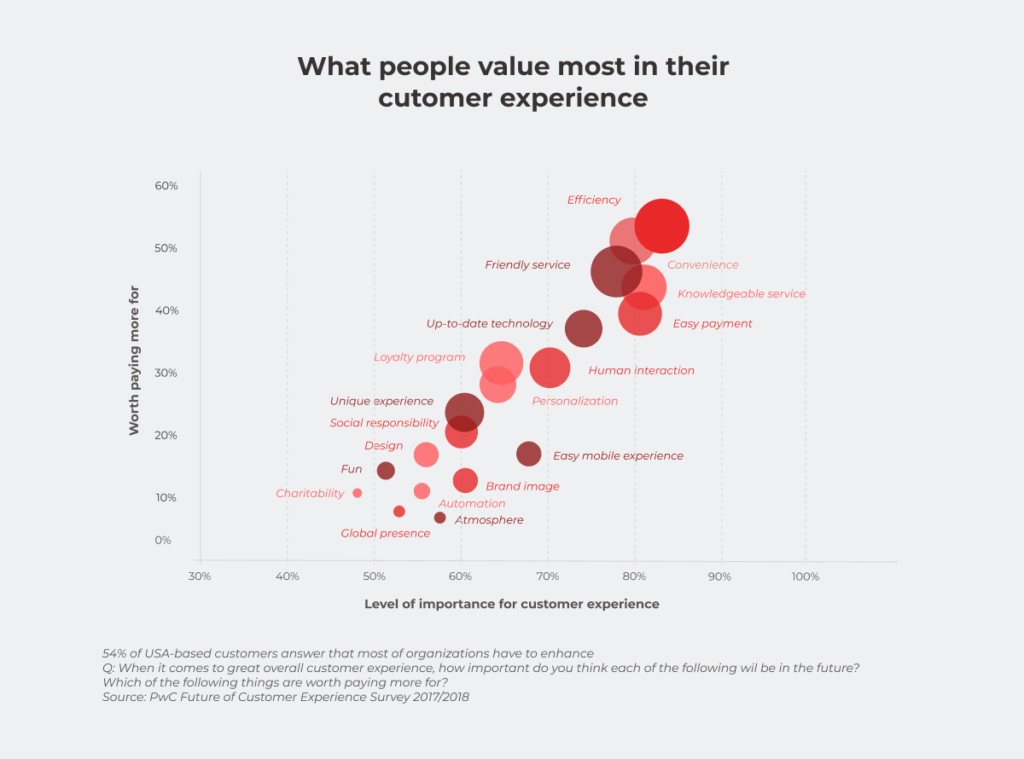
So what can you do to retain customers and increase their lifetime value? McKinsey describes a long-term strategy for collecting customer data. They suggest identifying profitable and high-value consumers and running targeted investments to create a superior level of customer experience. This is one of the factors that drives consumers to use your platform and turns them into loyal customers, providing you as a business owner with a steady cash flow and loyal client base.
However, not everything always goes to plan. We’ve listed some fatal mistakes that may never let this happen. Repeat them at your own risk!
Failing to leverage customers’ uniqueness without affecting customers’ privacy
Everybody appreciates when their concerns are understood, and their issues are resolved quickly. Customizing clients’ interactions with your platform, you make it easier for them to navigate through a wide range of diverse information and, thereby, increase the likelihood of purchase. Customers usually find it convenient, when based on particular characteristics of an item they are looking for, the system recommends similar options and provides a list of goods being bought with that item.
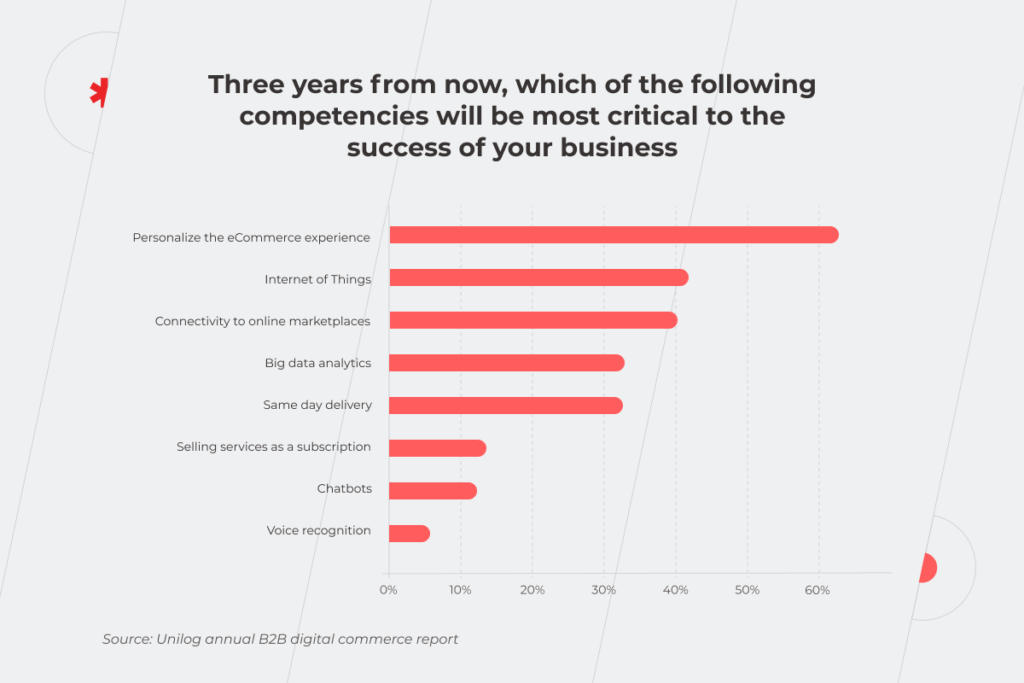
Personalization of the customer experience in eCommerce comes first in the race of competencies essential for your business success, leaving the Internet of Things and Big Data analytics behind in the dust.
To implement true personalization and improve the online shopping experience of your consumers, you need to explore their customer journey. Find out what is essential for each shopper, and what influences their decision to buy.
However, before collecting data on buyers it’s crucial to find a balance between customer experience and customer privacy. PwC study shows that 43% of US-based consumers aren’t willing to give organizations permission to collect information about their age, location, purchase history, lifestyle, preferences, etc. To convince users to share their data, you first need to explain how this data will help enhance the service they get from you and prove that nothing threatens its privacy.
Three things matter to customers most: what data is gathered, how it’s done, and why a seller needs it. Buyers may simply not understand the purposes for which companies need their personal information. According to the BCG survey, more than half of consumers think vendors are selling their data. Therefore, the lack of clear answers to these three questions may be the reason for users’ reluctance to share their information. But, just promising not to sell the data to third-party organizations won’t motivate customers to disclose their info. Offer them data control and appropriate “value exchange” to get more information. Give them a one-time coupon or a permanent personal discount, a free sample of a product saved to favorites, access to the community, etc. to bring additional value to sharing personal data.
Consumers’ data security doesn’t depend only on whether or not you sell it to third parties. You must also protect this information from cybercriminals. How to provide this valuable service considering that 31% of eCommerce platforms visitors are intruders trying to steal the personal data of real people? Here are some best practices that eCommerce platforms should follow to ensure customers’ data security:
Performing regular SQL checks to prevent SQL injections when hackers can access databases and retrieve consumers’ information from them.
Encrypting personal data to make it impossible for cybercriminals to reconnect the information about buyers with real people.
Implementing additional authentication factors to minimize the possibility of a data breach. Multi-factor authentication and two-step verification ensure that only authorized users are logged into the system.
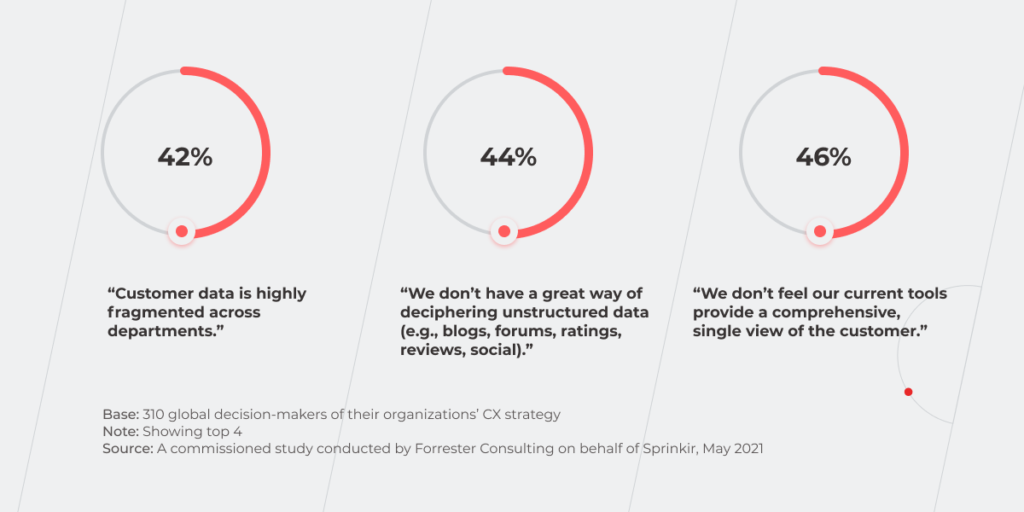
This is great if you managed to get customers’ consent to collect and process their data, and do it securely. But that’s not the last item on the list — you may face the problem of fragmentation of collected data.
Implementation of robust Business Intelligence (BI) technologies and tools can resolve the problem of scattered customer data. Still, only 46% of organizations make use of BI to handle this issue. If you are also among the 36% of companies that are just planning BI adoption, prioritize this task to start making most of your data.
Accessibility issues and user-unfriendly UX/UI
To improve the online shopping experience, above all, create an inclusive design of your solution. Make your site accessible to everybody, including users with special needs. According to the National Center of Birth Defects and Developmental Disabilities, 26% of adult Americans have some form of disability. That’s 64 million potential shoppers with an estimated spending power of $490 billion. From a business perspective, it’s a huge consumer market and prospective customer base. And if you don’t adjust the site to their needs, 69% of them will simply leave your store.
Digital inclusion not only encourages new customers to interact with your brand and purchase your products and services. It also prevents your company from facing web accessibility lawsuits — according to UsableNet research, 74% of lawsuits involve eCommerce sites.
The opportunity to resize any text up to 200% without assistive technology.
The possibility to change written text into alternative formats such as speech, simpler language, braille, or symbols. As for the text supposed to be entered by customers, you need alternative options too. For instance, speech recognition allows clients to perform such basic functions as clicking links and buttons, filling data in a field. Advanced speech recognition tools even can help with copying and pasting text, scrolling the screen, etc.
All functions should be available from a keyboard without using a mouse.
A well-thought-out human-focused design is not limited to accessibility solely. There are other actions you can take to improve customer experience on the website. Don’t miss the opportunity to boost your profits with basic steps such as placing common elements in expected areas. Choosing a unique design for a custom eCommerce solution is okay, but don’t get carried away with over-the-top customization. For instance, users may get lost if you don’t put the shopping cart in the upper right corner.
Also, remember to provide website visitors with a search bar. According to a Forrester report, 68% of customers state that they won’t return to a site with a poorly designed search function.
The location of the search field is also important. The WallMonkeys’ example shows that simply moving it to the center of the screen can boost the conversion rate by 550%.
Omitting the importance of the load speed
If you’re wondering how to improve customer experience online, first ensure any page of your website loads in a few seconds top. The times when consumers were okay with waiting for 20-30 seconds until site loads have long sank into oblivion. Amazon reports that every 100 ms of extra load time costs them 1 percent in sales. From this standpoint, your main threat is a back button.
Also, provide customers with mobile functionality for all the stages of their communication with your business, from browsing to purchase processing and payment as more than two-thirds of Americans use their smartphones to shop on the websites.
If you’re not only working in the US market, where customers change smartphones every 2,5 years, but also in less affluent regions, where users shop from the phones that have been discontinued for five or more years, make sure that your platform adjusts well to the old-model gadgets.
Neglecting omnichannel communication
It may seem that representatives of different generations require different communication channels, but in practice, the use of these channels varies slightly as we are all living at the same time.
The truth is that nowadays online consulting is critical for your customers. The transformation of the eCommerce industry during the pandemic proved that consumers don’t necessarily need personal or face-to-face experience with a company to find and buy the products they’re looking for. Ensure flexibility of digital channels to make it easy and seamless for the customers to get detailed information about the products, discount programs, payment methods, and delivery options.
Apart from standard forms of online consulting in eCommerce such as emails, chatbots, live chats, and phone calls, you can implement cutting-edge technologies, for instance, chatbots based on the RPA and AI technology. Even basic chatbots improve the online shopping experience by dealing with simple user requests 24/7. As for the adoption of AI, intelligent virtual assistants can replace real people in many ways. You can automatically deal not only with FAQ but also enable buyers to handle a wide range of problems related to their orders without having to wait for an answer from a customer service representative.
Disregard for delivery and payment experience
Sending order/payment confirmation emails and timely updates of the shipping details are basic things, but first of all, you have to make sure that information about payment and delivery methods is easy to find. It’s optimal to create a dedicated section on the site. Use the right payment gateway that will be secure and will allow shoppers to easily pay for the items they buy.
If you sell and deliver goods over the globe there may be more complicated issues. For instance, you have to ensure that you offer enough options for payment and delivery to meet the expectations of your customers from different countries. For instance, there are some countries (e.g. China, Turkey) where buyers can’t pay with PayPal, so if you are interested in these markets, you should provide customers with alternative payment methods. Besides using different payment systems, consider the possibility to pay with cryptocurrency, as Amazon does for its gift cards. The same works for shipping too — standard services such as DPD, FedEx, etc. may be unavailable in some countries or be too costly compared to the products.
Forewarned is forearmed: mitigate the risks of losing your customers
Knowing about the most widespread mistakes related to CX and preventing them is the minimum that any company can do to keep afloat in a highly competitive area of eCommerce.
Improving customer experience in eCommerce can be also achieved by proactive integration of cutting-edge technologies. Above all, it’ll help your employees to get rid of mundane tasks and acquire new tools for in-depth analysis of customer needs. However, it’s critical to choose the right technologies, the adoption of which will support your business, rather than to try implementing all the innovations indiscriminately.
How will education evolve in 2025 and beyond, and where does that leave educational institutions and edtech companies? Discover the biggest EdTech trends to shape the industry.
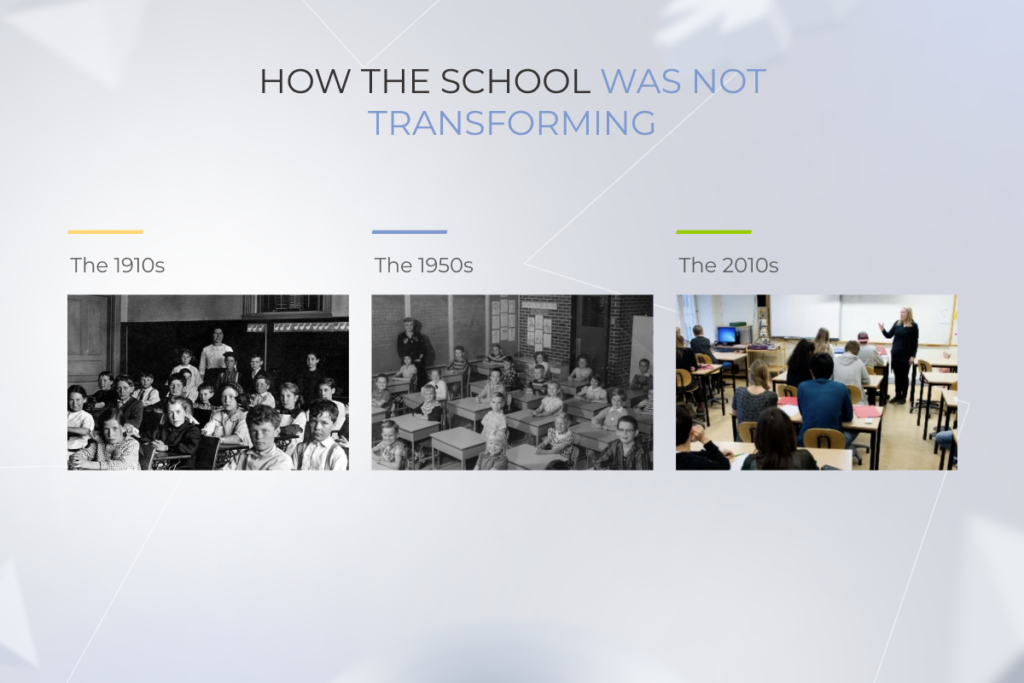
Education is one of the few industries that inimitably resists change and ignores the needs of its stakeholders.
To illustrate this, it is enough to trace how school was adjusting to the ever-transforming world over the last hundred years. In short, it wasn’t. From the early 1900s up to pre-pandemic times — the same designated classrooms, the same teachers towering over the audience, and the same students performing the role of silent listeners.
The situation with higher and postgraduate education was not much better. However, 2020 made the industry develop at an overwhelming pace. On-site learning, the role of the teacher as the main expert and content provider, and one-fits-all approach — all these pillars that had supported education for centuries fell. So what are going to be the next ones to take their place? Here are some of the top trends in education technology to look out for in 2025.
What does the future hold? EdTech ideas
While the world outside classrooms is changing faster and faster, we aim to create a new model of education suited to the needs of the future that’s coming. Technology let the genie out of the bottle, allowing ideas that have been brewing for quite a while, evolve and be implemented at breakneck speed.
1. Hybrid learning is here to stay
Although the idea of hybrid learning gained its momentum back during the first COVID-19 outbreak, it’s naive to think that it’ll go away any time soon. With so much money spent on the transition to eLearning (devices, infrastructure, etc.), educational institutions want to get more out of their investments. So rather than being a fleeting thing just for the pandemic, hybrid learning becomes a long-lasting movement that has provided a new setting for other education technology trends to occur.
Shaping this new landscape for more groundbreaking ideas to be implemented and thrive, hybrid learning is not in a perfect shape itself. At the beginning of 2020, when the world was suddenly awoken to one of the dystopian scenarios of the future, the pain points of education that had remained unnoticed for so long, had to be dealt with immediately. With such a rapid and abrupt shift from in-person to remote learning, making a bunch of mistakes was unavoidable. Some teachers, for example, state that switching to a partially online format has doubled their workload.
“With the amount of stuff we are juggling, it feels like it’s impossible to always kind of keep your head above water. The sort of administrative stuff really piles up. So even if we’re doing our best, we’re still dropping balls left and right,” says Kristine Harootunian, a math teacher at South Burlington High, Williston, Vermont.
Does it mean though that we need to give up on the idea of teaching children outside the classroom? Not at all. One of the possible solutions might be the use of refined learning management systems (LMS). They simplify lesson-building for educators, allow them to consolidate administrative tasks in one place, automate routine, and offer access anywhere. Yet, so far, LMS have been more about management and less about learning, but the balance can be found.
Thanks to technology advancements, the LMS of tomorrow has every chance to turn into truly intelligent learning platforms. Whether we think about employees in a workplace setting, or kids in a classroom talking about a new lesson, people need both social interaction and some solitary work in order to successfully learn everything from a formal course. xAPI (Experience API) makes it possible to measure all types of learning experiences, and it can do so within an LMS. So it’s just a matter of time until xAPI becomes a standard for all learning management systems.
2. Creating life-long learning experience
With the ever-growing demand for new skills conditioned by rapid world changes, learners have been put under pressure of continuous acquisition of new skills. Those who are not agile enough to adjust will end up on the sidelines of their career opportunities.
The problem with the current state of things is that the education levels are absurdly detached from each other. What students are taught in high school barely correlates with what they do at college or university, just as getting a degree doesn’t guarantee that their knowledge will be applicable in the workplace.
But an EdTech company that’ll break these silos and find the way to navigate learners throughout their life-long educational process could become the next Netflix for educational systems. Sounds impossible? Until it’s done.
Most breakthroughs once started with a ‘what if?’ question. So what if there was a system that would ‘meet’ a learner at a pre-school and help acquire the skills (alphabet, numbers, colors, etc.) appropriate for this developmental stage. Imagine that the system can link a kid’s school and home accounts so that the progress could be more easily tracked. The same model can work for K-12, and apart from supporting pupils in their studies, it will be able to track not only what is being learned but also how, and, thus, ensure smooth transition from school classes to assignments done at home. Thanks to predictive analytics, the system will also anticipate the student’s future needs and advise on the right college to apply to, and, when the time comes, all the data gathered in the system could be very helpful to match with employers.
As the range of the user’s devices extends (a smart speaker, smart phone, laptop), all the apps track the learner’s progress collectively, delivering perfectly calibrated lessons via audio mini-lessons, or quizzes, or games.
Once a job has been landed, the person’s account can be connected to the employer’s LMS and ensure appropriate professional development. The best thing about the system is that it evolves along with the user, adjusting to their changing needs.
Machine learning (ML) technology makes it possible to build an educational system that will grow and mature with the user, using the data gathered from them for unprecedented customization. Throughout their whole lives people will be able to leverage a smart system’s assistance, which is especially beneficial for those, who suddenly find themselves needing to switch jobs or even industries.
EdTech companies can start moving in this direction by partnering with a vendor that already has expertise in building strategies for educational system development, data analytics, and experience design.
3. Reversing the lecture-homework routine with flipped learning
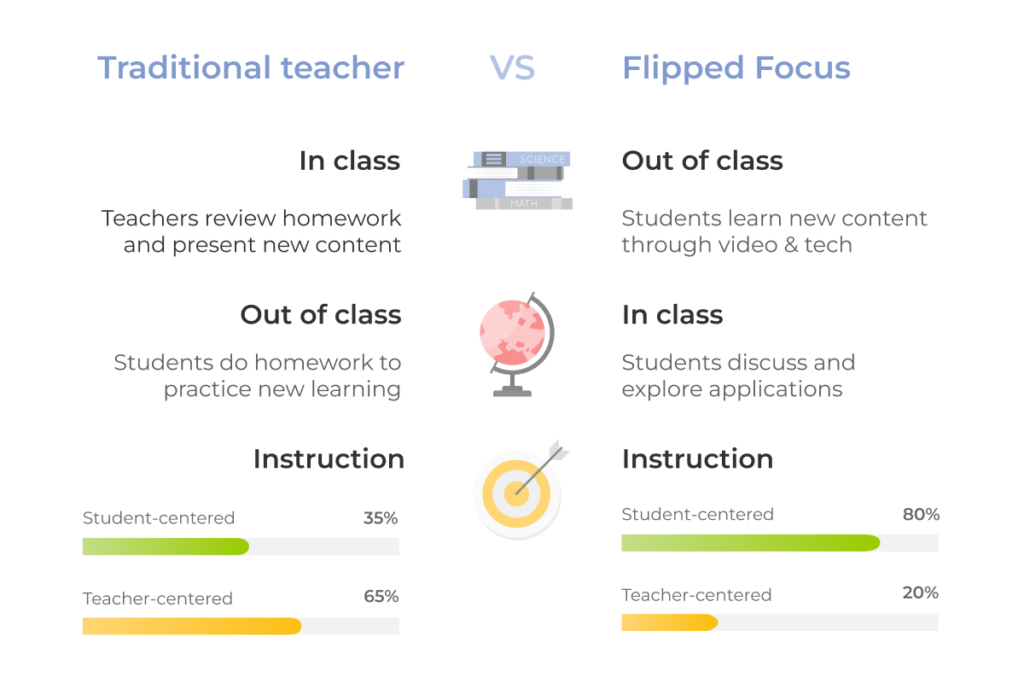
A flipped classroom overturns conventional learning by focusing on practical content that is delivered online and often outside the classroom. It leads to more collaborative environments as students get an opportunity to interact with each other instead of being silent listeners to what their teachers say.
By removing the one-size-fits-all lecture from the classroom and allowing students to have a self-paced lecture at home, they are encouraged to do the actual work in the classroom, interacting with their teacher and classmates.
Technology is used to humanize the classroom.
Such an approach encourages experimentation, whereas the traditional model doesn’t have time for that. It overconcentrates on the result, missing though that the truly great result can’t be achieved without experimentation and failure.
The technology makes flipped learning not only possible but genuinely effective. Its concept is not limited to simply recording videos and letting students watch them as many times as they’d like. The whole idea is that learning should be based on well-thought-out software ideally bolstered with BI dashboards to help teachers track their students’ academic progress. You can convert the entire curriculum along with the data on students’ performance into the form of a dashboard.
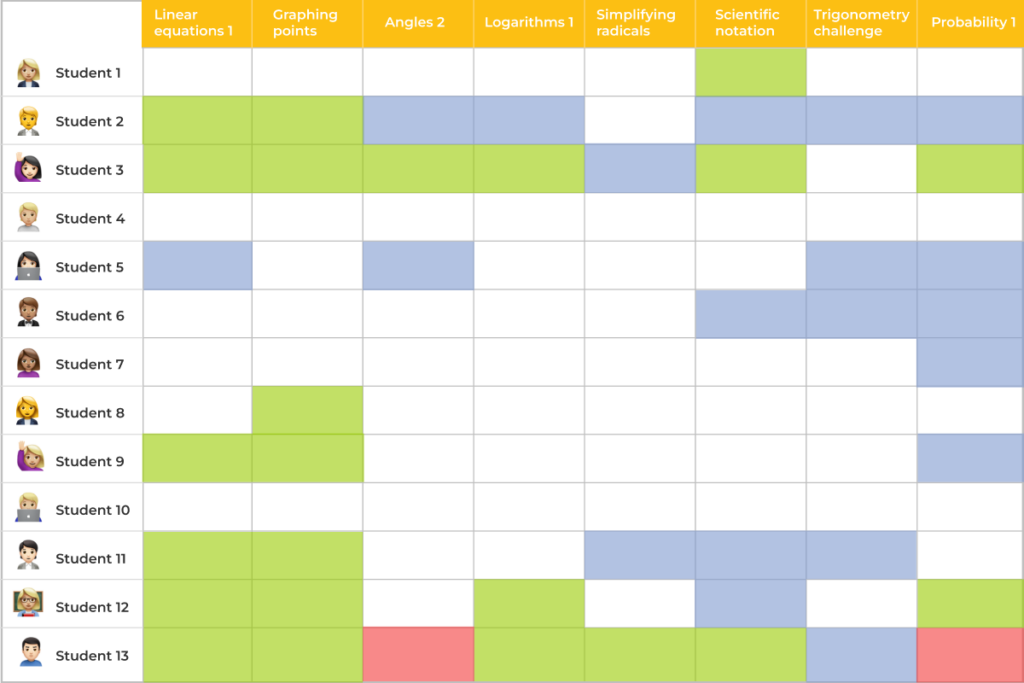
Let’s take a look at how it’s done at Khan Academy.
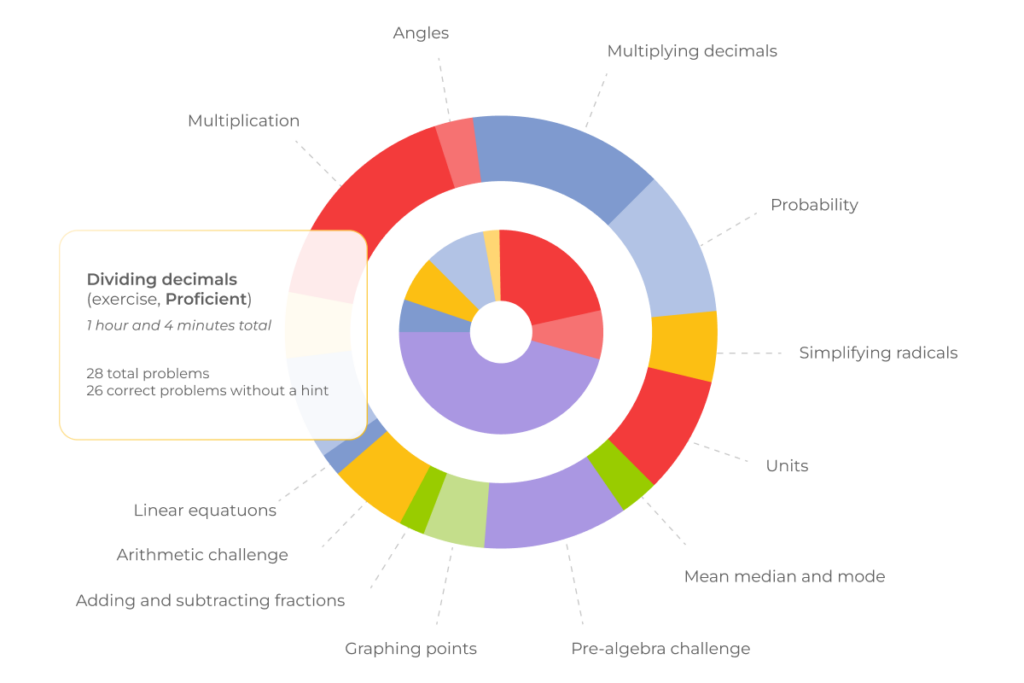
Every row is a student, every column is one of the concepts within a discipline. Green means that students are already proficient, blue means they are working on it, red indicates they are stuck. With this solution, teachers can easily decipher which kids need their active participation or, even better, which can be tutored by their “green-area” peers. Interestingly enough, it seamlessly flows into another education tech trend – peer-to-peer learning. The idea is not cutting-edge in itself, but with the help of technology it has reached a whole new level. Peer-to-peer learning goes beyond the classroom and becomes a global platform where students from different corners of the world can tutor each other, expanding their minds.
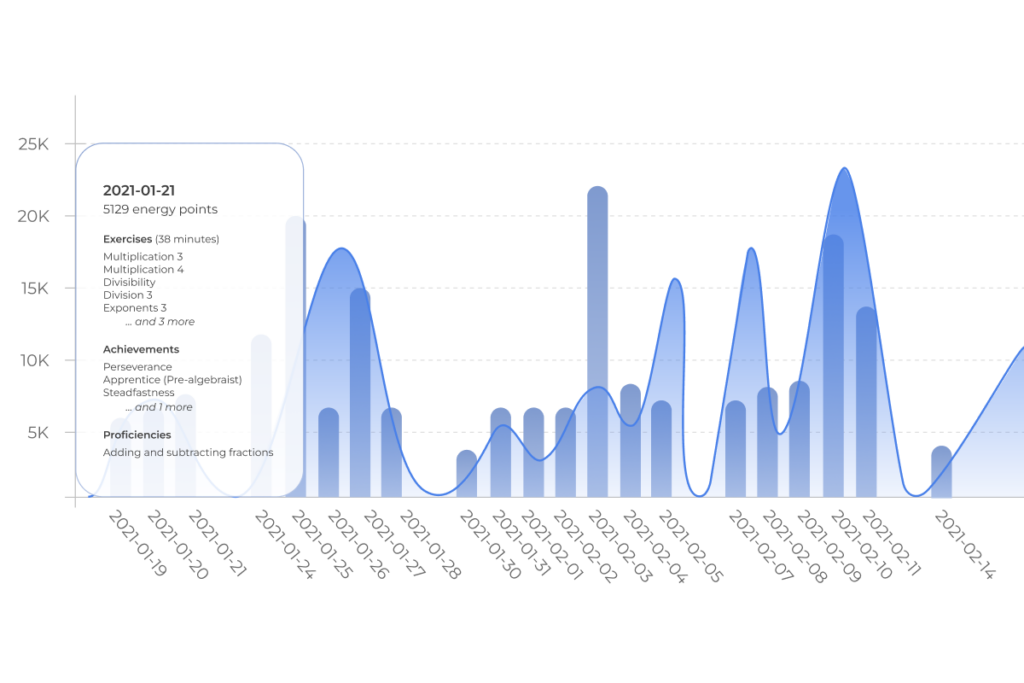
Getting back to flipped learning, it’s worth mentioning that with so much data about students wrapped into comprehensible dashboards, educators can make the process as productive as possible. Teachers know exactly what students are up to: how long they’ve been spending watching videos, when they pause videos, when they stop watching, what exercises they do, the areas they focus on. The data is pretty granular so that the teacher can see where a student’s Achilles’ heel is.
As valuable as this model is at secondary schools, imagine what it does for adult learners who might be embarrassed to learn stuff they think they should have learned ages ago or to a kid from a disadvantaged community, who doesn’t have the opportunity to attend a brick-and-mortar school on a daily basis.
Furthermore, in a traditional model, teachers spend most of their time doing lectures, grading, and whatnot, whereas in a flipped classroom, the student-to-valuable-human-time-with-the-teacher ratio increases.
4. Scaling up personalization with adaptive learning
The model of education we have now is a mass production model, a factory model. It doesn’t provide any individualized experience.
In a personalized school, each child defines their own learning path in a way that feels natural. Technologies play a foundational role here versus a superficial role in a traditional model.
Adaptive learning software uses Artificial Intelligence to move students up and down through a grade’s level content based on their performance.
For example, in AltSchool, there are two main tools that enable personalization. The first one, called “portrait”, is a student’s profile. It is a representation of all things that are important about each child, with the data being constantly updated to curate the day-to-day education experience. The second tool – “playlist” – is kind of a basis for each child’s day. It contains a to-do list and a calendar, and allows each child to decide in what order they want to do things, and, as they get older they are allowed to choose what’s on that playlist.
Apart from significant academic progress validated by national tests, kids advance in their ability to work with others and manage their time, set goals, and think critically so that they can successfully enter a working world that demands these characteristics from them.
Adaptive learning is a win-win both for teachers, who get the possibility to refocus their attention from simply giving instructions to curriculum design, motivation, mentoring, and students as they are given the chance to explore the subject through the prism of their personal interest and abilities.
The idea of eliminating the one-size-fits-all approach and ‘meeting students where they are’ can be applied to learners of different ages. But the earlier it’s integrated in the learning process, the better and faster results can be expected.
“We focus on the practical application of AI in tasks related to scientific work or tasks that students will later perform in their jobs. We can be flexible in the design and launch of programs, meaning that we can respond quickly to student needs for upskilling or reskilling and add to our portfolio of courses,” says Dr. Sven Schütt, CEO of the European university group IU Group (IUG), explaining how they leverage gen AI to fulfill the ‘education-for-all’ principle.
The recipe for a groundbreaking educational platform
The reason why a lot of outstanding education ideas fell on deaf ears was not so much in the reluctance to change something, but rather in the impossibility of realizing the change. After all, it is only a technological breakthrough that makes these ideas feasible.
Unleash the potential of cloud-based infrastructure
Cloud technology gained its momentum in education during the lockdown, as lots of schools didn’t have infrastructure built to support remote learning. Admittedly, cloud-based environments provide hassle-free solutions for deployment, management and safety administration, leaving more room for consistent learning experiences instead.
Speaking of safety, it wouldn’t be amiss to mention that back in the pre-pandemic times, many schools used to store their data in-house in file cabinets, and it was easy enough for someone to take a file and walk out with that data. Now, when adopting the cloud and partnering with reliable cloud vendors who adhere to the strictest security guidelines, school tech directors can be sure that school data is adequately protected.
The up-and-coming EdTech trend of cloud adoption is not likely to stop growing in popularity. On the contrary, it’ll maintain its foothold in education thanks to its ability to access work from any device and the ease of scaling deployed applications to meet students’ needs.
Ensure data privacy
Cybersecurity has been a hot topic in the education sector since the ‘record-breaking’ 2020. Cyberattacks have hit schools and colleges really hard and cost educational institutions millions of dollars.
Some of the most popular cybersecurity tools to surface in response to these cyberattacks are next-generation protections powered by AI and ML. These include endpoint security solutions and next-generation firewalls. Security orchestration, automation and response tools specifically use automation to detect and remediate possible cybersecurity breaches.
The automated component in SOAR (Security Orchestration, Automation, and Response) helps make cybersecurity more manageable for understaffed IT teams in K–12 environments. Incorporating multifactor authentication is also strongly recommended.
Not only has the number of cyberthreats increased greatly, but the requirements to educational institutions in terms of data protection have become more rigid too. As schools and universities process many types of data, they need to comply with requirements that also apply to healthcare, financial, and government organizations. FEPRA, HEOA, PPRA, GDPR are just some of the regulations that educational organizations have to follow. And, yet, the authorities go even further to mitigate the risks of exposing personal data. In October, 2021, the US President Joe Biden signed the K-12 Cybersecurity Act, which is the first cybersecurity-focused law for secondary schools.
This type of regulatory compliance is becoming more challenging for educational institutions of all kinds, which makes it extremely important to choose a tech partner able to protect your software from breaches and data losses as well as develop solutions in strict compliance with the current data management regulations and major quality standards.
Add value to the learning process with Extended Reality (XR)
While more people have got access to knowledge, the current approach to education has two significant problems. First of all, teaching is still based on fact retention, whereas being informed is not the same as being educated. And, secondly, the old ways of providing information make it difficult for some students (especially those with ADHD, that is 10.5% of children in the US according to the latest data) to comprehend it. Struggling to process and memorize large amounts of information can become extremely disengaging. This applies to all types of learners, whether it’s in a school setting, on a workplace training course, or in lifelong learning.
The possibilities of XR, an umbrella term that covers Augmented Reality (AR), Virtual Reality (VR), and Mixed Reality (MR), empower students to stay inside their learning process with full control over their experience.
AR/VR technologies are a promising addition to the EdTech space due to their immersive nature, ability to share information in new and engaging ways, and potential to offer virtual experiences that can mitigate barriers from cost or distance.
The concept of the traditional educational classroom has gone stale and will eventually be swapped with the idea of a ‘global class’. Students will hardly opt against an opportunity to learn science on the International Space Station with their peers from all over the world, or shrinking to the size of a DNA strand to collaboratively manipulate molecules in a virtual hands-on way, or traveling back in time to explore ancient Rome and role-play out important historic events.
The role of XR in K-12 and higher education is going to grow exponentially but it won’t be limited to school or college environments alone. Workplace training will be enhanced due to this technology as well. For example, the Australian company FLAIM Systems has developed a VR learning solution for training firefighters in hazardous and emergency situations. The same works for lifelong learning. Whatever you want to learn in your everyday life, AR or VR could improve the experience. Take public speaking for example. Award-winning VR provider VirtualSpeech has created a VR tool to help people practice public speaking in a near-real way.
Understanding the impact these technologies have on the learning process, EdTech companies spare no expense in VR/AR solutions. According to Statista, the investments in augmented and virtual reality in the education segment will have more than doubled by 2025, and made 700 million dollars, compared to 300 million in 2020. And that’s not to mention, that only in the US, the number of residents who started using VR increased to 65.9 million people in 2023 and the number of AR users jumped to 110.1 million.
If that is not the reason to bolster your education solution with some form of XR, then what is?
Make the educational process easier & more efficient for both teachers and learners with generative Artificial Intelligence (AI)
AI-powered solutions have been among the top EdTech trends for quite a while. A plethora of opportunities, from task automation and smart content creation to personalized learning and 24/7 assistance, have become available for both students and teachers. Despite drastic shifts having already been done so far, Artificial Intelligence, NLP algorithms, and large language models (LLMs) show no signs of slowing down their rapid transformation of education, bringing even more promising developmental perspectives to the table.
Gen AI-assisted immersive classrooms
The combined power of Artificial Intelligence and the technology of extended reality allowed IBM Research and Rensselaer Polytechnic Institute to create a next generation teaching environment, providing a study-abroad-like experience with no travel required. The students learn Mandarin Chinese by conversing with AI avatars that can recognize not only what they say but their gestures and expressions, all against a computer-generated backdrop of Chinese street markets, restaurants and other scenes.
“Students in the immersion lab mastered Mandarin about twice as fast as their counterparts in conventional classrooms,” assures Shirley Ann Jackson, the president of Rensselaer.
Proactive chatbots
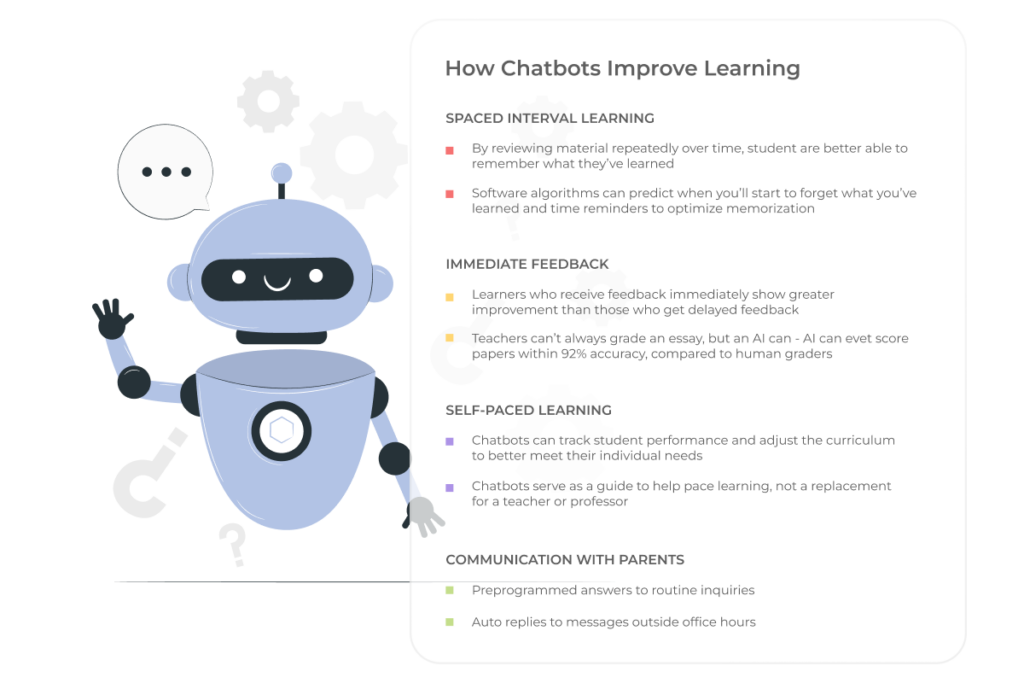
Designed to simplify the interaction between the participants of the educational process, chatbots provide a wide range of benefits, including spaced interval learning, immediate feedback, performance tracking, and, in the case of schoolchildren, communication with parents. AI assistants are also being used to watch for signs that students might be struggling, and to alert their academic advisers.
“If we could catch early signals, we could go to them much earlier and say, ‘Hey, you’re still in the window’ to pass,” says Donna Kidwell, CTO of the university’s digital teaching and learning lab, EdPlus.
Besides shaping a personalized learning experience for schoolchildren and students, tools like virtual assistants help facilities. For instance, data gathered from the gen AI-driven software empowers methodologists to clarify and enhance course materials.
AI grading
NLP algorithms are powerful enough to assess students’ written responses and provide real-time feedback. It can be applied to online courses with thousands of students studying simultaneously.
Stanford researchers built a neural network that spent hours analyzing examples from old exams on computer programming, learning from a decade of possibilities. When given just a handful of extra examples from the new exam offered, it could quickly grasp the task. After the new exam had been taken, the system provided 16,000 pieces of feedback, and students agreed with the feedback 97.9 percent of the time. To compare, students agreed with the feedback from human instructors 96.7 percent of the time.
As you can see, coming up with ideas for leveling up studying and teaching experience with gen AI isn’t challenging. The tricky part is laying a safe, trustworthy, and ethical foundation for technology adoption, omitting AI-related risks. A UNESCO survey unveiled that only 13% of educational institutions worldwide established clear guidance regarding using gen AI applications.
Having an AI-literate tech partner by your side will help you set up a transparent, explainable, and secure AI system and draw up robust policies.
Turn to gamification to engage young learners
Adults are often puzzled as to if children are able to store whole databases in their heads about a universe within a computer game, then why do they have so much trouble with the multiplication table? The trick is in constant practice and gamification, that makes the process truly engaging.
Education has long had, in a sense, elements of a game: good and bad grades for completing an assignment are like points in finishing a quest. And at the end of a school year, everyone has a Level Up, the transition to the next level of difficulty.
Speaking of gamification, as one of the trends in education technology, we no longer mean basic stuff that has existed for quite a while.
In online projects, gamification is much more complex. Originally structured programs, coupled, for example, with a detective story, make the learning process more engaging, children want to return to classes regularly and learn new things. For completing tasks, achieving goals, as in a computer game, they can receive points, additional rewards, and enter new levels.
The theoretical knowledge that students gain in class, can be immediately applied when they complete game challenges. This helps children look at knowledge and learning in general from an entirely different perspective.
The main benefit of gamified online learning is the motivation to learn. Students can see and self-evaluate their progress and achievement of the goals set. This helps nurture such qualities as independence, responsibility, and decision-making. For example, at the
University of California, one study found that students who participated in an educational cybersports program showed much more impressive learning results than their peers, who are not involved in esports.
Drive the mission of learning with mobile technology
According to figures from the tech research company, Technavio, the education apps market is poised to grow by $6.08 billion and is estimated to grow at a CAGR of 14.5% between 2024 and 2029. All signs point to a permanent shift in how people access education.
For Generation Z, also known as generation digital, who learnt how to type before they learnt to write, using smartphones or tablets for their studies is as natural as breathing. They value the freedom that comes with mobile apps to study whenever and wherever, and willingly pay for it with a high level of engagement.
However, the education technology trend of mobile learning applies not only to Zoomers. For the past few years, mLearning has flipped the view of delivering quality content. You’ve probably heard of MasterClass, an online learning platform that allows taking classes from some of the biggest names in the business. It offers a multitude of options to consume their courses, you can watch it on a desktop, TV, phone, or tablet. Still, being more about “edutainment” rather than strictly education, MasterClass is something you’re not going to turn on your computer for (unless it’s already turned on), but are more likely to open on a smartphone or tablet sitting in a traffic jam, lining up in a coffee shop, or passing that quarter of an hour before falling asleep at night. A great-quality mobile application, Android and iOS users have rated the apps with great feedback (4.8 and 4.9 respectively for the platforms), is definitely one of the clues that contributes to the success of this costly platform.
Moreover, mobile learning complements the idea of bite-sized lessons that can seamlessly fit into your schedule, which in turn makes the subscription-based educational model more attractive. When students don’t have to wait for that perfect time (which may never come) to start or continue the course and can study “right here right now”, they won’t feel as if they are blowing their money.
In addition, mobile technology not only makes learning more comfortable for those who can’t imagine their lives without a smartphone or tablet, but also makes it the only option for people who otherwise wouldn’t have access to educational resources.
Education is the mission and mobile is the means.
Smartphones are now available to a large part of the world’s population, in the future perhaps to the majority, even in the least developed countries. The spread and cheapening of technology, as UNESCO notes, “gives marginalized people and communities, people with disabilities, refugees, those out of school, and those living in isolated communities access to appropriate learning opportunities’’, making education global and crisis-resistant.
What’s next? Applying EdTech Trends
Engaging, sophisticated, and, most importantly, effective education will always resonate with learners. But it’s not enough. A VUCA world (short for volatility, uncertainty, complexity, and ambiguity) gives us little faith that things will stay the way they are, which means the only correct strategy is to be flexible and agile. Education – at all levels – must evolve to teach people the skills they need to thrive in our changing world.
Understand students’ needs and adapt to how, what, and where they learn
According to the WHO, 15% of the world’s population experiences some form of disability. In most cases, aware societies strive to balance health disparity so that this population cohort doesn’t feel any barriers to an acknowledged quality of life. And it works just fine until a person with a disability faces a situation when something is out of their reach because of poor mobile app accessibility.
Our developers and UX/UI designers will walk you through what can be done to increase the accessibility of your mobile app and provide time-tested tips on simplifying the task with the help of generative AI.
Why does mobile accessibility matter?
Making your applications inclusive isn’t a matter of social responsibility only. Along with diversity cultivation, accessible mobile applications unlock an additional revenue stream, give your company competitive tailwinds and help meet compliance regulations.
Empathy
As we age, we all face some limitations, be it impaired hearing, lowered sense of vision, or motor impairment. Moreover, situational and temporary disabilities can put all of us into similar settings that individuals with a long-term disability have. Therefore, mobile accessibility is a long-term investment that, among other things, helps us take care of the older generation, our older selves, and those struggling with the temporary condition.
Assistive technology is also an important strategy to better integrate people who face additional challenges into the modern world and online communities.
Competitive advantage
According to statistics, one in six people has a disability. By making your solution inclusive, you cover an additional 61 million users, which expands the user reach of your application.
Besides, tech inclusion is commercially interesting. The buying power of people with disabilities is around $13 trillion. Considering the number of inaccessible apps, your app and mobile device accessibility can reel in this additional revenue stream.
Mobile phone accessibility also reduces the operational costs of your business. A Dutch SNS Bank reduced the number of call center calls and associated expenses by over 15%. The savings are associated with mobile web accessibility changes the bank made earlier.
Accessibility makes better tech for everyone
Tech inclusion is essential to some, but useful for all. Closed captions, virtual assistants, and speech recognition software are the go-to features for all users, including people with disabilities. Voice route directions, for example, are both an accessibility feature and a hand-free option for drivers. Therefore, making your solution all-in will benefit everyone.
Compliance with standards and regulations
In many cases, mobile app accessibility standards are required by law. The Americans with Disabilities Act Standards for Accessible Design, or ADA, mandates the inclusion of all people, in all areas of public life, including web-based businesses and their applications.
The ADA law also works alongside the Web Content Accessibility Guidelines (WCAG) which documents a single shared standard for web content accessibility. The current WCAG version 2.2 was published in October 2023.
By 2025, all EU-based companies must also optimize their services and products for accessibility to comply with the European mobile app accessibility guidelines.
Better brand image
Finally, digital accessibility benefits your brand and creates more opportunities for brand advocates, as up to 73% of customers believe that a company should take a clear stand on social issues.
How to ensure mobile app accessibility?
As of today, Web Content Accessibility Guidelines, or WCAG, are considered to be the benchmark for website accessibility. The guidelines also feature WCAG for mobile, which outlines mobile accessibility best practices. Below, we’ll talk about what your application should be like to be truly accessible according to WCAG.
Keep in mind that each principle includes three levels of conformance, where A is the minimum level and AAA stands for full conformance. Most organizations strive to score AA as a golden mean.
Perceivable
Making your solution perceivable means that users must be able to perceive it with one or a few senses. In simple words, if your app’s content is geared towards a visual experience, it should have an alternative that involves auditory perception or any other sensory modality.
What can be the problem here?
No text alternatives
Some solutions may fail to offer text alternatives for non-text content featured on screen, be it controls or images, in a way that is perceivable by the screen’s reader. It inherently makes the app unreadable for TalkBack or VoiceOver, which are default screen readers on Android and iOS respectively.
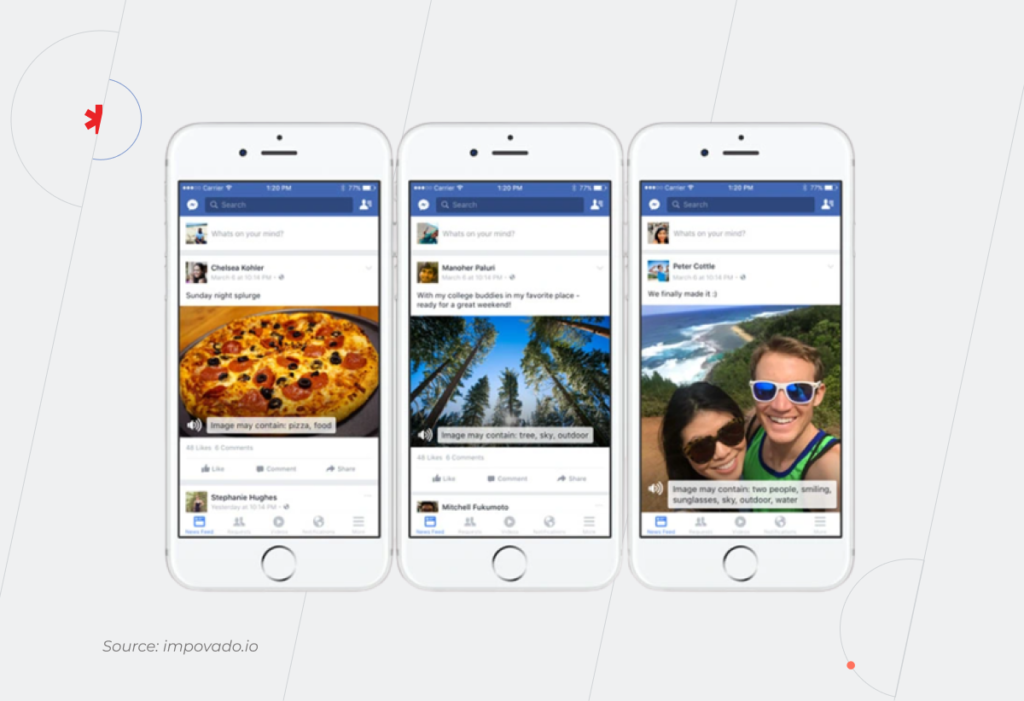
On the contrary, speech descriptions make all non-text data accessible for the blind or people with low or weak vision. Facebook, for example, has rolled out automatic ALT text to describe visual content for screen readers.
No adaptability
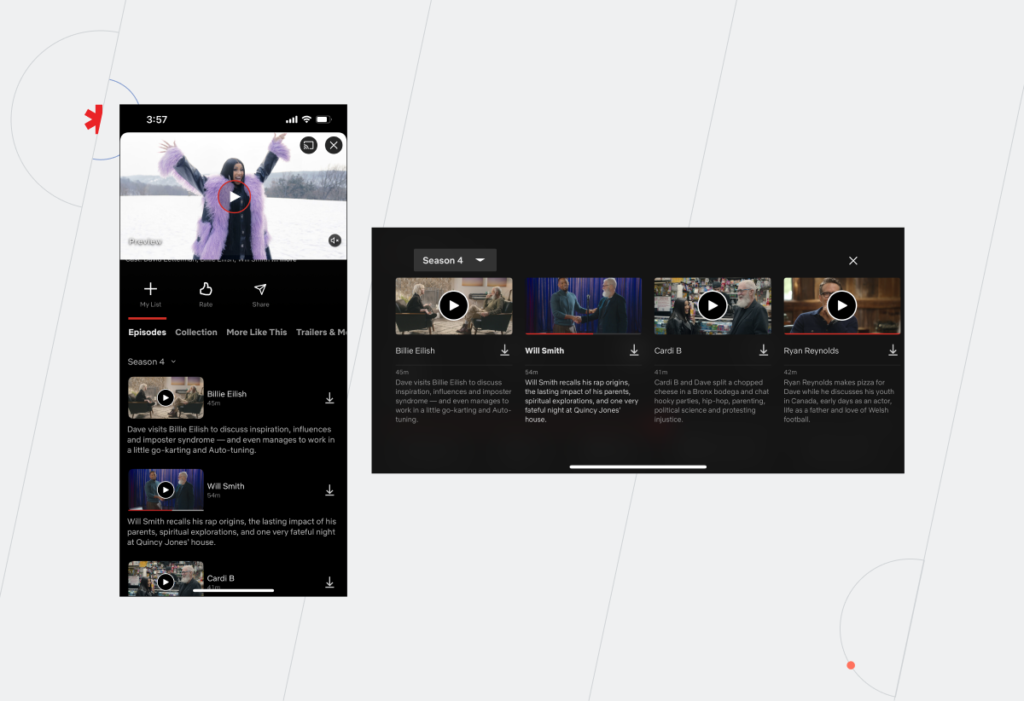
A mobile solution overlooks accessibility when its structure isn’t readily adjustable to different content presentation structures and orientations. In particular, an inclusive product can switch to both landscape and portrait without sacrificing content or elements just like the example below.
Native mobile app accessibility guidelines also require your product to mark up information, structure, and hierarchy between elements. This way, headings, tables, and lists will remain intact when the presentation changes, keeping your layouts simple and consistent.
Adaptability is essential for people with motor impairments, screen reader users, as well as people with learning difficulties and cognitive fatigue.
No distinguishing features
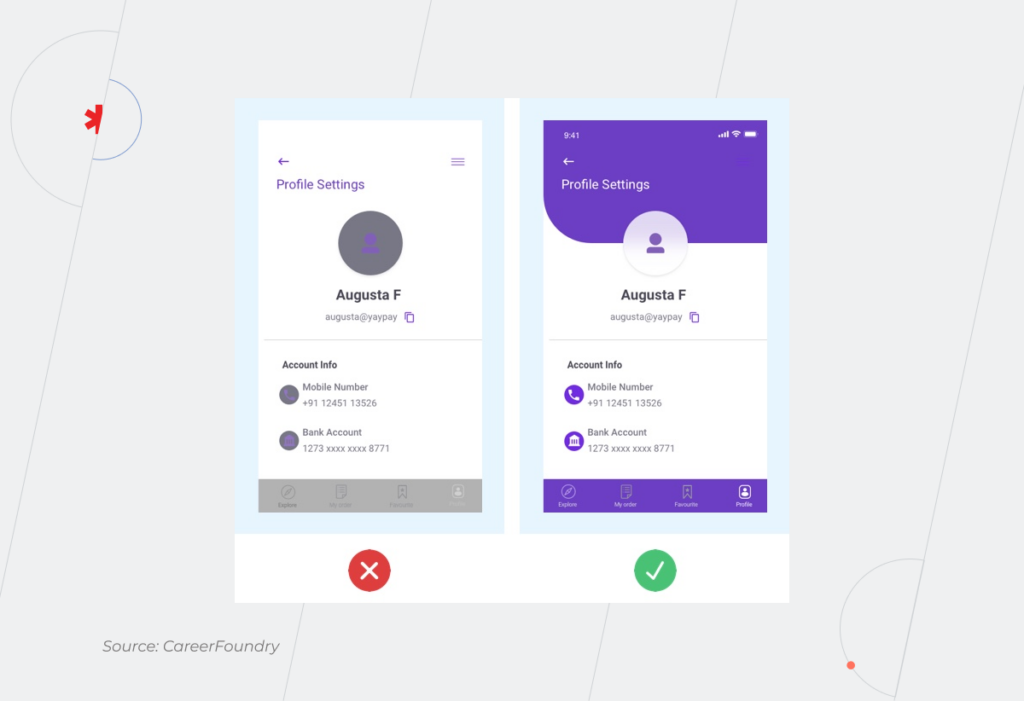
Inadequate contrast, a poor choice of colors, or the absence of text resizing take a toll on users’ perception. For instance, people with color perception issues struggle to distinguish between certain colors. Therefore, colors shouldn’t be the only way to convey differences or prompt action. Instead, combine color and text or character cues to convey information.
Loss of content or functionality is another common accessibility issue that typically occurs when a visually impaired user zooms the text. Your mobile accessibility settings must allow for increasing by up to 200% while retaining all content and elements.
Operable
This principle necessitates your application to include fully-operable interface and navigation elements so that the user can make use of every feature regardless of impairments or disabilities.
What can be the problem here?
Lack of time
Given the diversity among people, it’s difficult to predict how much time it takes to browse through the app or find a specific section. Most banking applications, for example, have a maximum session time as a security measure. However, time limits or time-sensitive content makes it inconvenient for a screen reader or an elderly user to process information.
Flexible time limits or the turn-off option, on the contrary, make your application more friendly to seniors, sight-impaired persons, or foreign speakers.
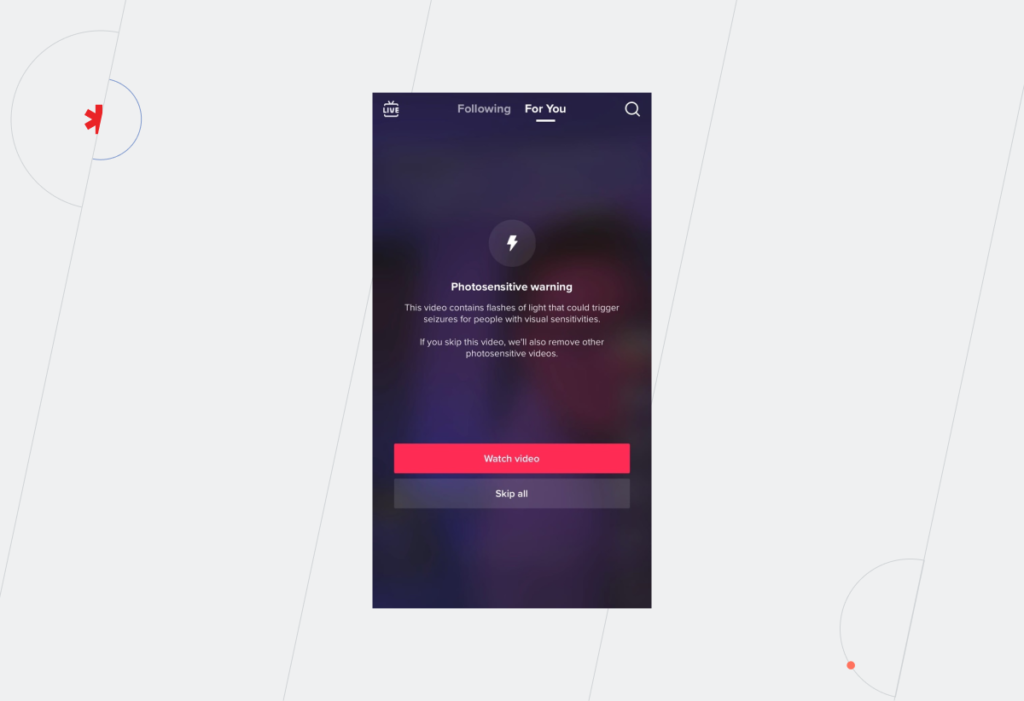
Flashing content
Blinking content is a red flag for inclusive applications as it can provoke seizures or other undesirable effects. Thus, individuals who have photosensitive seizure disorders simply cannot look at flashing lights or contrasting visual patterns without having an adverse physical reaction triggered by them. That’s why it’s important to avoid content that flashes over 3 times in 1 second and limit the area of flashing to a small portion of a smartphone’s screen.
Navigation
Navigation that is neither programmatically tagged nor structured can also prevent a user from consuming the content. It holds especially true for visually disabled users that can only navigate your application with assistive technology as well as people with cognitive and motor disabilities.
Landmark regions, descriptive headers, unique screen titles, and labeled controls enable both users and screen readers to locate the needed section quickly and with fewer keystrokes. The application can also be coded to skip graphics and navigation links when consuming the content with a screen reader.
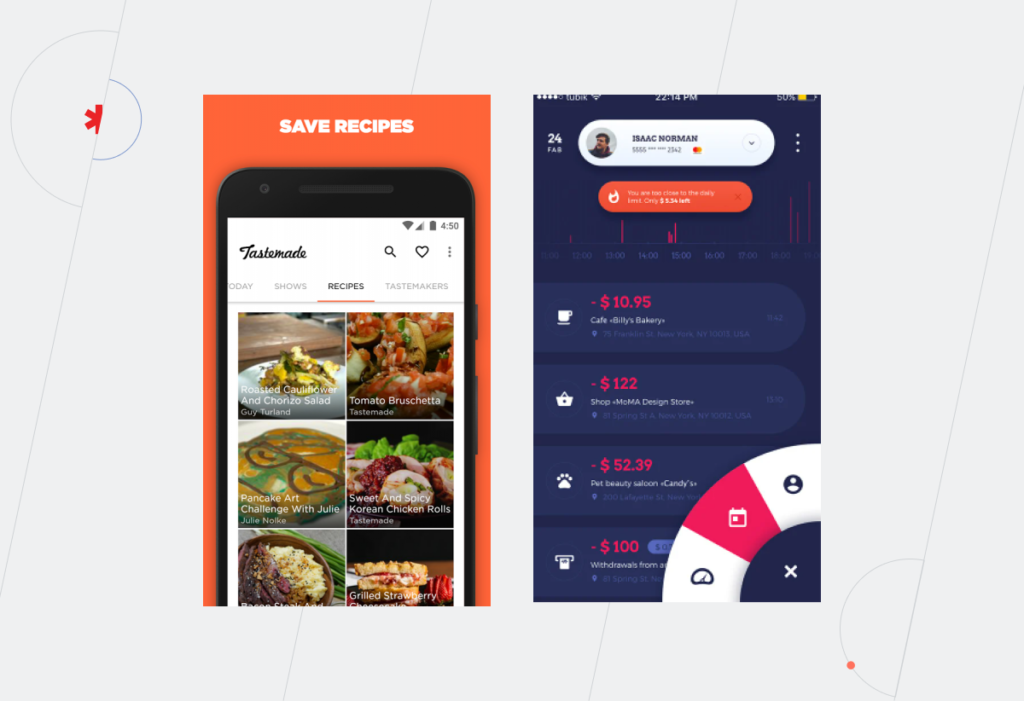
Tastemade, for instance, is a great example of full-screen navigation at work, while the example on the right sacrificed discoverability for a sleek design.
Understandable
According to this accessibility principle, all information and your entire user interface must be easy to grasp for any person regardless of their health status. Simply put, the more intuitive and straightforward your application is, the more chances it has to score the AAA conformance level.
What can be the problem here?
Predictability
Some applications prefer to hide design elements behind sophisticated icons or employ futuristic user flows. While such designs are admirable works of art, they lack clarity.
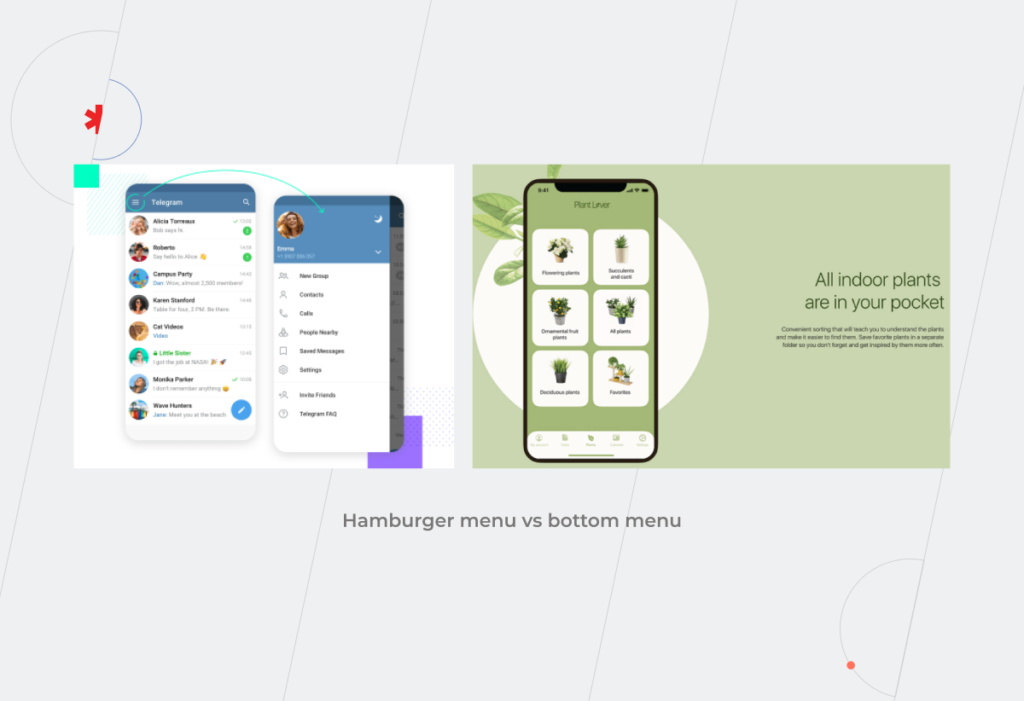
Hamburger menus, for example, are a widely accepted standard for mobile app development that simplifies menus for compact screens. However, they are neither navigable nor predictable for people with visual disabilities, cognitive limitations, motor impairments, and reduced dexterity. The desktop version of Telegram, for example, has a hamburger menu button.
The overriding objective of predictable design is to set accurate expectations about what will happen next through consistent design patterns, standard semantic elements, and ordered information structure. An accessible application should also have all elements easily discoverable on the screen to give an accurate understanding of where the user is now. Bottom navigation, vertical sidebar, or sticky menus play it right.
Input assistance
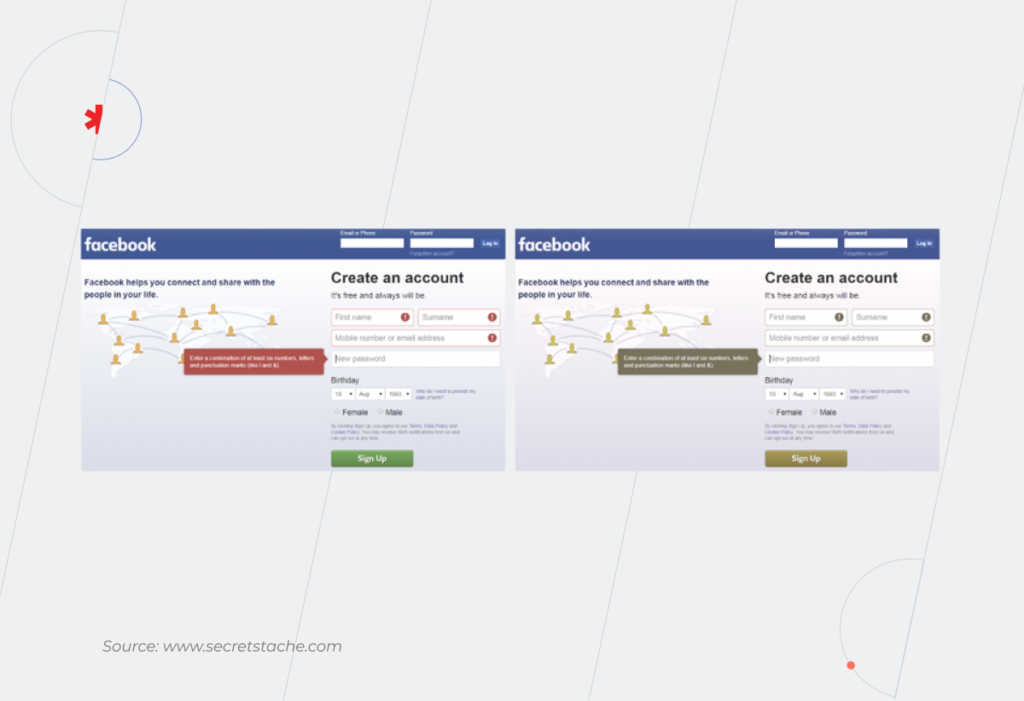
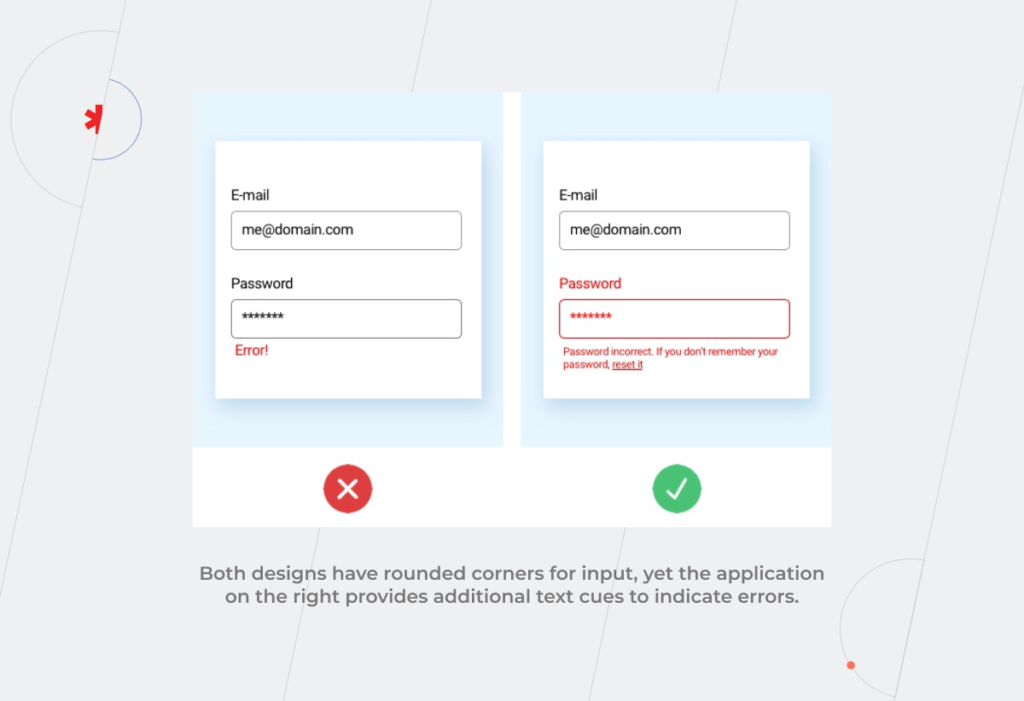
Some users with lower quality vision, and with reading and intellectual disabilities may find it challenging to enter the information error-free or differentiate between mandatory and optional fields. To provide assistance, an application interface can include cues in the fields to reinforce important information.
The cues may range from labeled attributes for screen readers to select states and rounded corners.
Error prevention
On the same note, typical error indication methods may not work for individuals with low or impaired vision or color-blind people. Likewise, users with reading or motor disabilities have a higher chance of entering the wrong input, which can lead to serious consequences, including financial liabilities. Therefore, if the application doesn’t provide user-controllable data, it is not accessible.
Reversible submissions, order confirmation, deleting a record, or unsending a message are some examples of safeguards that will keep users from making a mistake.
Robust
Accessibility features should be seamlessly delivered across platforms and devices, including different versions of screen readers, braille terminals, or text magnification software. In simple words, robust design is immune to coding errors that can distort the content or functions in a web-enabled device or assistive technology.
What can be the problem here?
Poor coding
If the HTML code behind your application lacks complete start and end tags, the app’s content may display differently across devices, not display at all, or be unreadable to assistive technologies. Well-formed HTML code that conforms to all markup language specifications makes sure that the accessible content structure will remain as intended across all platforms and devices.
Can cross-platform development provide a proper level of accessibility?
Cross-platform development is a Swiss army knife that accelerates time to market and kills two platforms with a one-code base. However, the accessibility potential of cross-platform development lags behind native applications. Therefore, cross-platform technologies are a tradeoff between accessibility and cost reduction, which can still guarantee at least a basic level of mobile accessibility on Android and iOS.
Thus, Flutter app development is committed to making apps more accessible and includes built-in support for accessibility combined with the same capabilities of the operating system. Flutter can help you implement such accessibility features as large fonts, screen reader compatibility, sufficient contrast, and more.
But keep in mind that mobile accessibility is a collective result of your whole development team, including Flutter developers. While UX/UI designers are dedicated to building inclusive interfaces, QA specialists make sure your final app version passes accessibility testing.
Trust gen AI tools to review your app for accessibility issues
In the pre-AI era, accessibility excellence required intensive research and know-how from the development team. Tuning together inclusive features and a crispy interface may still be tricky, but the rise of AI-powered tools has fast-tracked resolving accessibility-related issues.
For instance, UX/UI designers don’t have to manually review apps’ interfaces to spot accessibility defects. Software such as Stark, Userway, and Google’s Accessibility Scanner can automate the task.
These tools are indispensable at the product design stage, where they scan Figma, Adobe, or Sketch files for compliance with WGAG and ADA requirements, fix minor issues, and highlight violations that require the UX designer’s input.
There’s no need to decide between accessibility and design
Equal access to technology allows all people to actively participate in society and leverage tech comforts. Along with compliance conformity, mobile accessibility also contributes to a larger user base and competitive edge of your company.
If you struggle to strike a balance between accessibility and design, our company knows how to score on both. Based on your unique requirements and accessibility standards, we seamlessly integrate inclusivity into a top-notch app design. Drop us a line to create a top-grade mobile solution that caters to all.
Creating an application is the next step after your business has gained leverage online. When your customer buys from you once a year or you are a governmental organization, a web page would normally be enough. However, when frequent client engagement is demanded, the necessity for an app occurs organically.
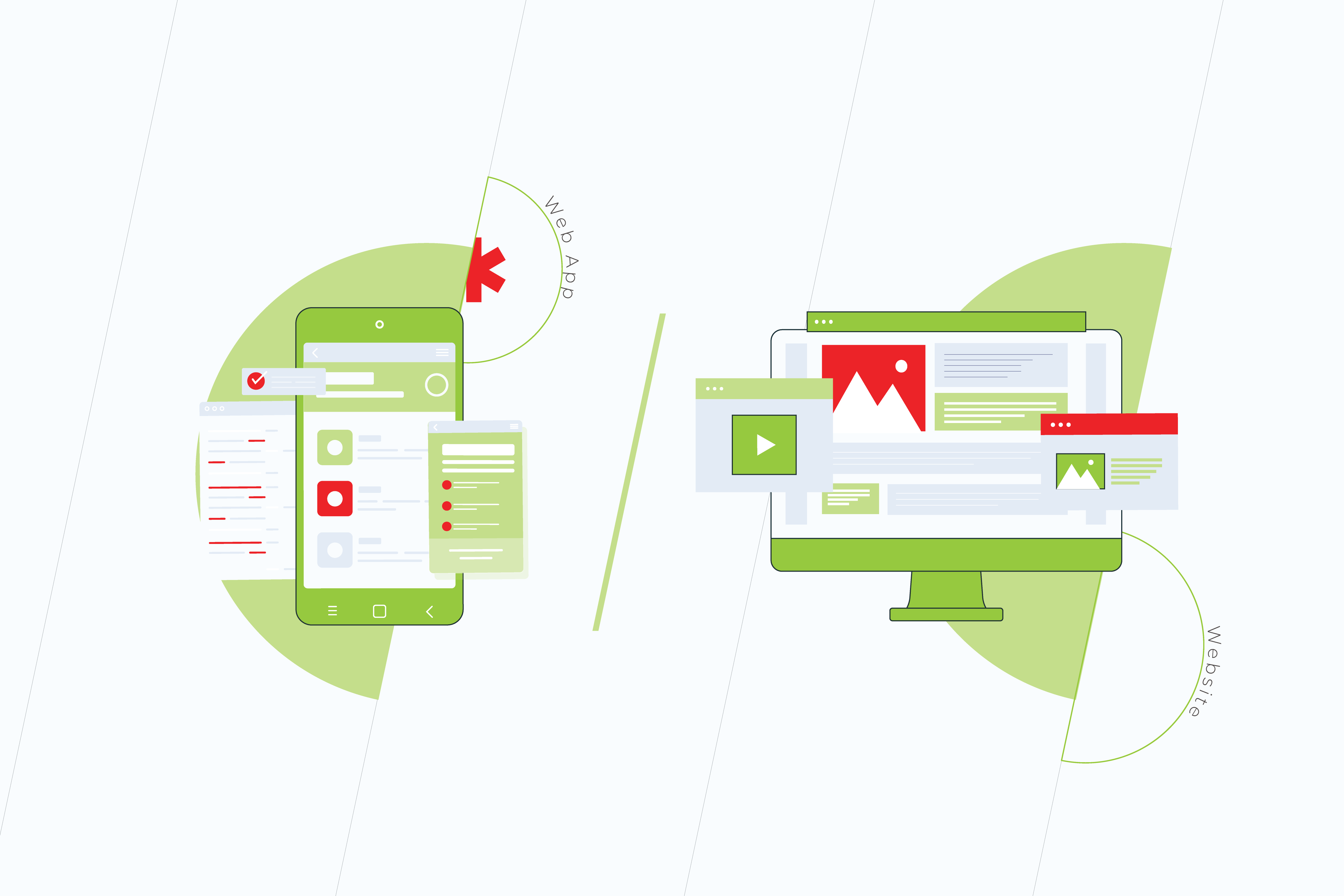
There are two ways of engaging with a customer with the assistance of current technology: either by means of a Web App or through a Mobile Application.
It’s a known indisputable fact that mobile applications have helped many companies increase their sales dramatically. Yet, in some cases, mobile applications aren’t needed, and businesses are absolutely thriving with progressive web apps. Some companies have both web apps and mobile apps ready for their users. In the end, the selection of technology is about meeting customer expectations and staying in your lane.
There’s no secret that the most important distinction between web apps and mobile applications lies in their development costs. So as to work out which of the present technologies is going to become the best investment for your specific business needs, we would look deep into the purposes these applications serve.
Want to discuss the business objectives of a mobile app or a web app?
+ A Progressive Web Application, or a Web App, is a website adapted for mobile. This is often one of the foremost progressive technologies nowadays. It imitates a mobile application and is viewable in most browsers on desktops and mobile phones. It costs less to build a web app than a website.
– An existent web app signifies that a corporation has already gained trust among its audience. However, there’s no requirement for constant involvement with an app. Maximum retention and time spent in the application have zero effect on a webpage and brand awareness.
Pros and Cons of Mobile Apps
+ A mobile application or sometimes it’s called Native Application is a great marketing and sales tool for a variety of consumer-based companies. It involves constant engagement with the product through continuous interactions. Mobile apps collect as much information as possible, studying habits and analyzing user behavior and patterns.
– A mobile app is a more expensive technology as compared to a web app or a website. Its budget is mostly dictated by the availability and price of skilled mobile developers for Android and iOS. While Hybrid applications are also available as a part of the cross-platform solutions, their updates are less frequent.
Web Apps vs Mobile Apps from a User’s Perspective
Both web apps and mobile apps signify the trust level users have for the company. The main difference between them is the quantity and frequency of interactions. Native Apps also offer a more robust personalization. The communication is customized to users, supporting their interests, location, behavior, and more.
People download mobile applications after they use web apps on a regular basis. They do that once they get acquainted with a company’s website and social media. If they like how the application is made, they will stick with it. However, many users prefer PWAs, since they are faster and don’t require memory on their devices. Plus it only takes a few lines of code to make usability amendments in a PWA.
– Volha Marskaya, Sales Specialist
Mobile App vs Web App from a Business Standpoint
The common practice for a lot of companies is in building a website, a PWA, and a mobile application as they expand. The latter is a logical step toward broader market outreach. It is a method of business growth and it drives sales.
There are, however, ways in which it can be cost-effective to work out a novel approach for specific user engagement while also saving on development and maintenance with no effect on sales.
There are general recommendations for many B2Bs to own a branded application. At the same time eCommerce has shown relevant proof for PWAs, which are made to more easily compare goods in a browser.
What are the main criteria that allow the choice between PWA and Mobile Apps?
When choosing between web and mobile applications, it all depends on the goals and technical requirements for the interaction with the API, like accessing user location.
A website adapted for mobile would be sufficient when its purpose is solely the acquaintance and PR of the product with no requirement of further interaction with a client. Speaking of a short-term interaction once a week or a month, a web app would be enough. When one or two basic functions are solved, a mobile application is not needed.
– Eduard Beleninik, Lead of Mobile Development Unit
World Statistics. PWA and Mobile Applications in the Long Run
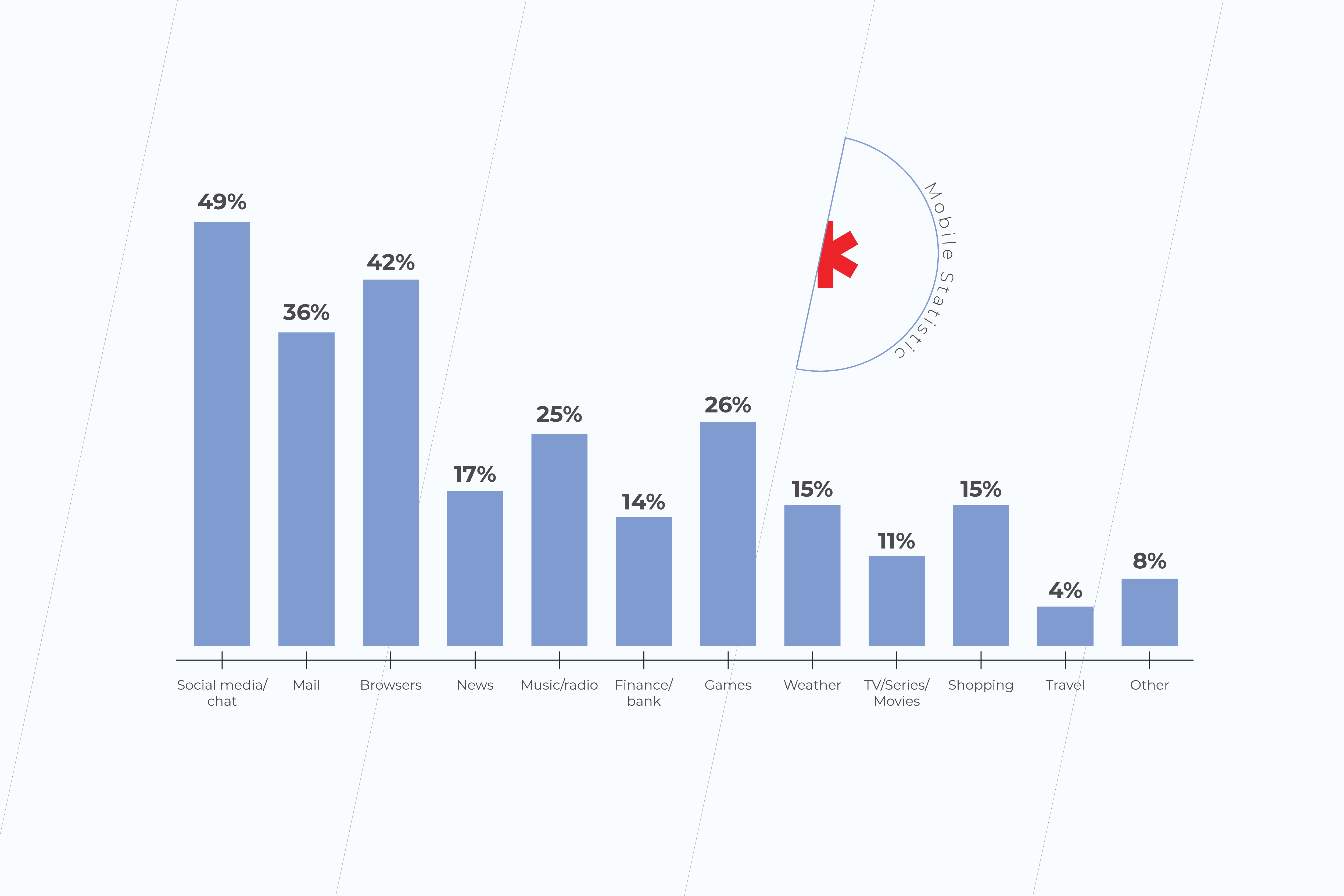
Mobile applications’ downloads have increased in recent years to 218 billion. According to Statista, in 2023 mobile apps will generate more than 935 billion U.S. dollars in revenues through paid downloads and in-app advertising. And word-of-mouth is a very strong factor when deciding what applications to download. Finance, travel, and shopping apps are among those that mobile users in the United States spend the most time on.
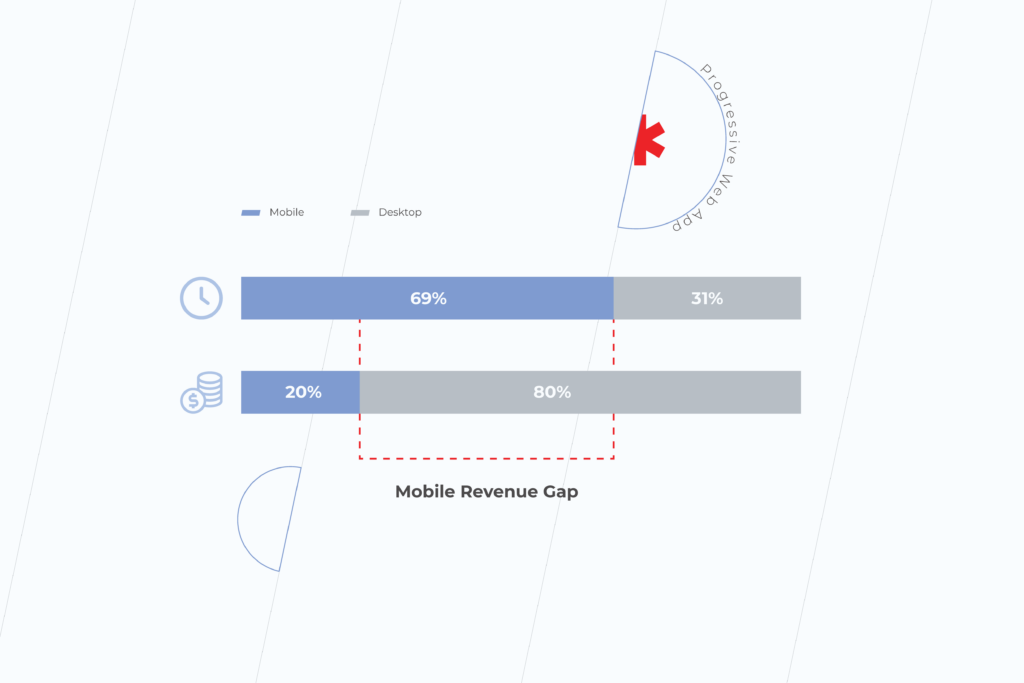
A study has shown that PWAs have 36% higher conversion rates than native apps. The average conversion rate for progressive web apps is higher because mobile traffic and consumer time on mobile is much higher than on the desktop. Many businesses report increased revenue thanks to mobile traffic. For example, the Starbucks PWA has doubled daily active users. And orders on the desktop are nearly the same rate as mobile.
The number of origins with PWAs has grown 170% in 2020. According to the Chrome team, there are tens of millions of installations of WebAPK only on Chrome for Android. However, PWAs are less accessible for Safari and iOS users because of Apple’s policy on a more private web, and more strictly regulated App Store. Following Apple, Mozilla claims deprioritizing progressive web applications soon.
Check other articles on our blog. Subscribe to our social media and get insider information on making your business ready for digital. If you have any questions, get in touch with our expert team or fill in the form below to have your project estimated by progressive web application development company.
Depending on how you want someone to engage with your product or service in the digital world, there are plenty of options available on the market. But to help you start, the first thing you want is to make your online presence apparent. That’s why you may want to build your own website.
A Website is about PR and Accountability
A website is the best means of promotion. And it’s cost-effective to build and design a good website. It’s a great investment in the digitalization of your business. The main advantage of a website is that it gives the same experiences viewing it on any laptop or mobile browser. However, the main setback of a website is that it’s limited interaction-wise. It provides the minimum information about the client and her behavior. And you need a mobile device or a computer to be able to reach it.
Some websites are designed to last for two weeks, others – for years and years, creating leverage for your brand and gathering a community around it. Irrespective of if it’s going to be a temporary thing or not, a website is a storefront for any type of business or happening. It serves as a hub for all of your social networks’ audiences. It drives interest in what you are putting out there. But most importantly, it builds trust.
Website complexity depends on its purpose
Let’s say you are building an MVP for your startup’s first investment round, or you need just a landing page for your beauty salon, or you want to advertise an upcoming event. In all of these cases, various ready-made low-code tools and site-builders are going to come in hand. Their functionality is constantly improving. The technology is aimed at providing a cutting-edge user experience delivered at your door.
When choosing the right technical approach, look at the event horizon and see how scalable you want the website to be. This means you need to know whether your webpage will ever go beyond its informative function. In other words:
Will your customer want to click a button to buy from you online?
Is the nature of your business such that customers will come back to buy your product again?
If both of these answers are ‘yes’ for you, we are talking about PWA.
What is PWA
When your client returns to buy from you for the second time, it’s the next level of website building scenario – a Web App. In broad terms, a Web App can be anything built for more profound user interaction.
You can find information that Web Apps are now being called Progressive Web Apps. This definition was introduced in 2015 to describe web applications that take advantage of modern browsers due to responsive design and a mobile-first approach. This has become a web app standard that is constantly evolving.
PWA is a website wrapped to be fast, interactive and mobile friendly
PWA is the technology that makes a boxed version of a website that is easy, adaptable, and costs less to build. A web app gives the shortcut to reach the parts of the service in no time. This means instant transition and interaction with the relevant part of the website functionality.
Since a mobile-first approach nowadays is a must, a website adapted for mobile may already be a PWA. At their core, PWAs are the Apps that use existing web strategies to provide a rich, native, and simplified application-like user experience. The main difference is the desire to imitate a mobile application, which does not affect anything from a business point of view.
Speaking of what one can appreciate in a PWA as opposed to a website, is definitely its speed. PWAs are designed to include features, such as background sync, caching, and push notifications. They don’t require any space to be installed, despite their name. And they can work offline unlike websites. Google likes Web Apps and ranks them at the top of their search.
PWA works offline and is cheaper to build than website
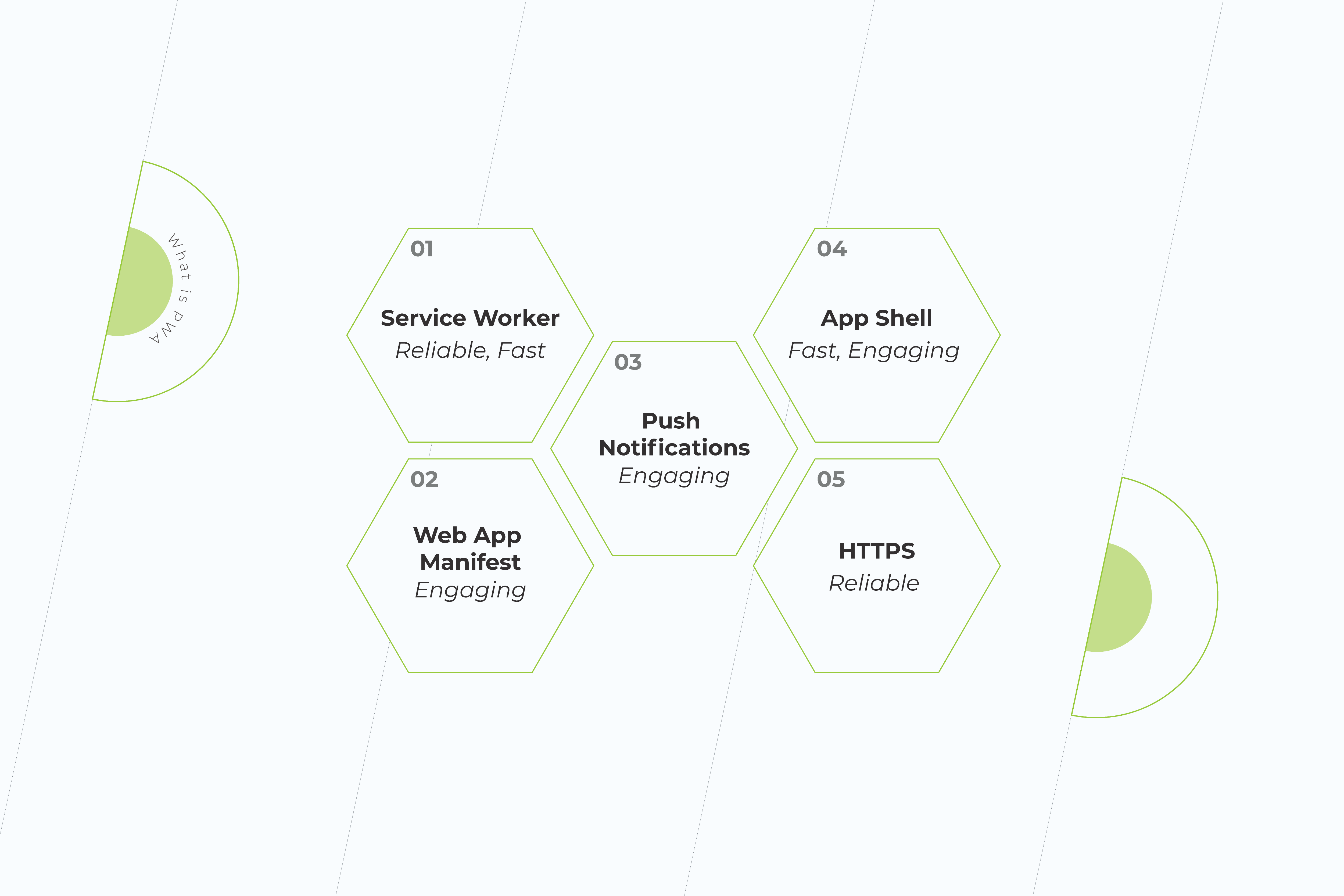
If a web product passes PWA criteria, the browser on both Android and desktop is going to prompt it to be ‘Installed’, and there are icons representing app installation. Responsible for the icon and other basic parameters of the app is Web App Manifest.
Service Worker
Progressive Web Application development is based on a modern technology known as a Service Worker. These are special event-driven scripts with connections to different instances within the domain. These are programmable network proxy servers between the Internet and the page.
These proxies intercept and make or rewrite network requests, support the app offline and provide granular storage. They can be securely downloaded regardless of the network connection. As a result, it facilitates faster navigation and slows downloading speeds.
Shell
A Progressive Web Application demonstrates high performance due to the application Shell. It’s a kind of storage for content. Creating an application Shell is easier, it only takes a few lines of code. The two main elements are the header and the navigation bar. Since it is cached only once, the shell can be accessed by the user even when there is no Internet connection.
PWAs don’t require separate teams of coders to be developed. Given that your website is ready, a Web App is going to improve its performance for a relatively lower price as compared to the cost of building a website from scratch.
Web App takes a brand trust on another level
Progressive Web Apps are accessible through secured HTTPS links and sometimes have an “app.” extension before them. They are SEO-indexed and are compatible with multiple platforms. They provide push notifications and engage with users seamlessly, being updated in the background. A lot of companies use PWAs instead of websites and mobile applications. Think of Pinterest or Whatsapp Web, for example.
With PWA, a business is getting two products priced as one – a website and a mobile app engaging users with news, sales, or other important information via push notifications. Since PWA is designed to be like an application, the UX/UI, speed, and smoothness of such a product will be optimized for most kinds of desktop browsers automatically.
Web App vs Website
Cease inspiration with building your web product. Here’s a comparison of the main features of websites and web applications:
Pros and Cons of Websites
Pros and Cons of Web Apps
There are no requirements for the operating system
They don’t require memory storage
Serve as business cards and first impression of a brand
Work faster than websites and mobile applications
Compete with social networks
Provide user interaction functionality
Cheaper than mobile applications
Depend on the nature of a business
Easy to make amendments with a few lines of code
Serve as a trust level for a company
Don’t require user trust
Cheaper than websites and mobile apps
Easier to compare and select the products on the website rather than in an app
Don’t require downloads and manual upgrades
Don’t provide push notifications
Provide push notifications
Can be insecure
Fully protected
Available and tested on all browser kinds and versions
Compatible with many browsers, since they are optimized for various desktops and smartphones
Online identifiers, including cookie identifiers, internet protocol addresses, and device identifiers cannot be seen by website owners.
Face ID and Touch ID
Can make money through affiliate marketing and pay-per-click advertising
Access to geolocation
May be optimized for desktops but not for smartphones
WebOTP for SMS authentication
Short life-span if a business has a mobile application
Safari and Mozilla are not prioritizing them
There are no general technical requirements to build a website
Desktop PWAs locked to Chromium-based browsers only
Need Internet access to load
Don’t need Internet access
Cannot detect OS or other app functions. However, they can listen to key events via JavaScript.
Cannot share resources or data within themselves because they are quite separate
Final Words
A lot of us are impatient with the actions, but we want to be patient with the results. Your website serves as a brand voice in the vast internet space. When choosing between a website and an app, take their purpose into consideration. While a website is great to get your potential customers acquainted with your product, a web app is a technology made for them to stay engaged. Both websites and web apps are the future of software development.
Read more on our blog. Subscribe to our social media and check the latest tips and tricks in making your business ready for digital. If you have any questions, get in touch with our expert team or fill in the form below to have your project estimated.
A couple of centuries after Charles Babbage’s research of machines that could calculate, we arrived at the Cloud Computing and Distributed Platforms realm. As of 2021, we live out of the technology state, which offers an option for us to interact through an extra domain, such as virtual reality in addition to mobile phones. The latter has unfolded in its own set of development trends, making the mobile-first design approach a software industry standard. Tech progress ultimately breaks down to the evolution of programming languages. The latest technology trends create our observed future, and it’s making its way to the digital-first state of business.
With cognitive automation emerging and other new technology trends rising in 2021, the event horizon of computation is predicted to turn to the spatial web and quantum computing allowing for brain-computer interfaces. The latter technology is making huge progress in areas such as mental health, providing great relief for patients with trauma and disability. The end goal of technological progress, as reported by the World Economic Forum and Deloitte, is to create a more simple, abundant, and intelligent world around us.
Looking closer at what the IT Industry has prepared for us in 2021, we notice the evolution of programming languages, frameworks, and other related platforms and tools. Through a software development survey practice conducted each year, we observe a global spike of interest in emerging technologies in 2021.
As put in the Stack Overflow 2020 Developer Survey, a few pre-pandemic trends were introduced, like seeking the diversity of coders and the correlations of the demographics to the tools they had been using. At the same time, one topic has been excluded from the recent web developer survey, and it’s the popular development environments discussion. Additionally, the DevOps theme remains on the watch list in 2021, as new frameworks are being introduced to it.
Let’s look into the most progressive programming trends from the recent software development survey and see how our company’s own practice supports these numbers.
Top Programming Languages
There’s no secret, applied both for front-end and back-end, the event-driven JavaScript has been the global leader of programming languages for almost 10 years now. HTML/CSS, SQL, Python, and Java sit at the top five respectively. Object-oriented Python is used extensively in machine learning. It has been holding up to the title of the most wanted languages and is one of the most paid technologies in the world. While Rust, designed for performance and safety, has become the most loved programming language in 2020 and further on.
TypeScript, Kotlin and Go are wanted and loved equally by the global community of developers. But what’s been truly highlighted in programming language popularity in 2021 is Go. It heads the top of the most paying technologies both in the United States and globally. How did Go become one of the top most wanted and top most loved technologies?
The Rise of Go
Go is a compiled open-source programming language. It was designed at Google in 2007 to address the efficiency of C and motivated to improve some of the qualities of C++. On the one hand, the main purpose of the language was relative simplicity attained by omitting some of the features that are common in similar languages. On the other hand, it was built with preserving their most useful characteristics in mind, such as static-typing and run-time efficiency, readability and usability, high-performance networking, and multi-processing. Go has quickly become the standard language for the new generation of coders at Google.
Go shares the syntax and environment patterns close to high-level programming languages, which at runtime execute many common behaviors that static programming languages perform during compilation. However, Go has a somewhat distinctive approach to particular problems. First, it has built-in concurrency primitives: light-weight processes (goroutines), channels, and the select statement. Second, it has type embedding instead of non-virtual inheritance. Finally, Go contains a toolchain that produces statically linked native binaries without external dependencies.
According to Go Developer Survey 2020, Golang usage is expanding in the workplace and enterprise with 76% of respondents using Go at work, and 66% saying Go is critical to their company’s success. Furthermore, Go continues to be heavily used for APIs, CLIs, Web, DevOps, and Data Processing. One of the cases where Go has shown excellent results is bidding in real time.
Top Web Frameworks
Web frameworks are designed to support the development of web applications, including web services, web resources, and web APIs. According to Stack Overflow data, JQuery, React.js, Angular, ASP.NET, and Express have been among the leaders of developers’ choices. While ASP.NET Core was the most loved one, React.js and Vue.js had become the most wanted technology. Django also has made it to the top five of the most wanted. Gatsby, Spring, and Flask were reported among the most loved frameworks.
React Goes On
While JavaScript continues to take over the development environments, React.js is its open-source library that was designed specifically for building web and mobile user interfaces. React includes native application front-end libraries written in JS called React Native for iOS, Android, and other mobile platforms. A React JS developer can leverage its native application front-end libraries, such as React Native for iOS, Android, and other mobile platforms. Initially introduced through Facebook, it is actively supported by the community of developers and companies. The major changes to React go through the Future of React repository on the Facebook forum. The community discusses potential features, experimental APIs, and JavaScript syntax improvements. Introduced in 2017, React Fiber is a set of internal rendering algorithms breaking down the animation into segments that can be spread out over multiple frames providing smoother on-screen rendering.
Svelte
Svelte represents one of the game-changers in technology. It’s a front-end compiler, or a component framework, written in TypeScript, which continues the trend of simplified code at build time. It’s a bit different from regular frameworks because it has made rethinking reactivity its objective. Svelte generates imperative code to manipulate the Document Object Model and reduces the size of transferred files. It gives better client startup and run-time performance. Svelte has its own compiler for converting app code into client-side JavaScript, HTML/CSS at build time.
Top Platforms
Linux and Windows have been heading the platforms for a long time. Platforms such as Android, macOS, and Raspberry Pi have also been popular in software development. However, with the popularity of Cloud and DevOps, Docker, AWS, and Kubernetes have strengthened their presence amongst the most sought-after technologies and became the top five.
Kubernetes
DevOps is heading the latest technology trends. And Kubernetes is one of the most popular technologies in DevOps. First, it was created to solve container orchestration problems on a high scale or in mission-critical applications. Nowadays, it has shown an incredibly fast adoption in the Enterprise sector.
Released in June 2014, Kubernetes’s ecosystem included a package manager, dozens of open-source distributions, great monitoring tools, K8s products from all major Сloud providers, and ArgoCD. Kubernetes provides complex features such as container discovery, CNI, pod tainting, stateful sets, auto scalers, and others in a declarative way. All of the above has made it the tool of choice for most distributed applications.
Kubernetes is known for reducing the complexity of production applications. Of course, it’s on the pricey side. While being a great option for mature applications, smaller projects will be made more expensive to launch with K8s. Since you need to scale the platform enough for it to show its strengths. Alternative options in such case could be ECS, DigitalOcean Apps Platform, or simply CI/CD onto an EC2.
— Kirill Danshin, DevOps Architect at *instinctools.
In conclusion, great trends are often continued. Others, like personal preferences in coders’ tools, are put behind. When it comes to the choice of languages, frameworks, and platforms used by developers, these are normally discussed within the teams. Focusing on the project specifications, a proper programming language, or the combination of languages is chosen to better fit the product characteristics.
Speaking of the rebuild tasks, software developers look at the current user requirements compared to those of the past. Choosing from the latest technology trends, we want to make sure they adhere to the end goals of the product.
Read about trends in software development on our blog and choose your favorite technologies. Get your project scoped by filling out the request below. If you are not sure where to start with your product, let us know how we can help. For more updates, follow us on social media.
The e-commerce industry has continued to grow year after year. Not taking this growth into account means lagging behind. As the coronavirus pandemic has clearly shown to most businesses, if you don’t compete online, you don’t compete at all.
However, trying to find the best solution to represent your company on the Internet is extremely challenging. Why? Well, first off, because there are a plethora of options on the market, which a newcomer can get swamped with. Secondly, there is no 100% perfect fit. Even if you found it, your business will evolve, and you’ll have to deal with the limitations you might not have initially considered. To protect you from colossal budgeting mistakes, we’ve come up with a list of things to consider when selecting the right e-commerce platform for your business.
1. Ease of setup and use
As a manager or business owner, perhaps the last thing you want to deal with when launching your e-commerce company is ‘incomprehensible’ technological stuff. To avoid this, make sure the platform offers an easy setup flow, explaining everything you need to do before you launch, including loading in products, domain name registration, payment processing, etc.
2. Navigation
You don’t want potential customers to be mad at you, do you? But that’s exactly what they will feel if they have to navigate through your website for ages looking for the item they need and not being able to find it. Today’s customers expect a quick and seamless shopping experience. And, sure enough, they’ll find it: whether in your store or in somebody else’s. This is especially true for a B2B company website where efficient navigation becomes an integral part of B2B ecommerce web development. So if you have this bag/dress/shoes your customers are itching to spend money on, don’t let them jump off the hook because of the user-unfriendly navigation system. You need the possibility to add categories, tags, and attributes to help customers get what they want.
3. Design
Today’s customers got used to excellent User Interface and will never agree to anything less than perfect. Your site’s design is the face of your business. If it’s not eye-catching enough to click with your customers, don’t expect them to click and buy something from it.
Moreover, it’s important to find a theme or template that is properly customizable for immediate differentiation at launch and for long-term growth over time.
4. Scalability & Customizability
Over time, your business (hopefully) will grow. However, an e-commerce platform that is hard to scale can significantly slow down this process. So choosing a rigid platform that relies on either local servers or poor infrastructure, and trying to customize your systems and requirements to fit this platform – while it should be the other way round – you let the lack of flexibility limit your success.
5. SEO-friendliness
For your site to rank high in search engine results, you need to find a platform that allows you to use your own domain name, get reviews from customers, and add a blog. That’s especially important for new stores or small shops: no one wants to (and barely anyone will) waste their time on looking for your business. Want customers to care about you? Show that you care about them first and make sure that your site is SEO-friendly.
6. Mobile-friendliness
The easier it is for the customer to interact with your store the higher the chances are that they’ll shop with you. Mobile commerce growth has seen an average year-on-year increase of 33.8% since 2016. In fact, three out of four consumers say they carry out purchases on their mobile devices because it saves time. However, there’s always room for improvement. As many as 90% of shoppers say that their experiences with mobile commerce could be better. Ignoring such an audience is not wise of a retailer.
7. Costs
E-commerce platform pricing models differ. Pay special attention to what is included at each price point to capitalize on the most value for your spend.
Find out what your monthly fees will be, whether they are fixed or dependent on traffic/sales, and whether it charges the percentage of your revenue.
You’d better make sure that you can support the cost of an e-commerce platform before you spend the money.
And, finally, if the price is higher than you’d like it to be, don’t rush to eliminate this option: maybe its cost is justified and it would be a good investment for your business.
8. Security
Don’t neglect the security measures. If you can’t protect customers’ proprietary information from cyber-attacks and a breach takes place, they will hardly shop at your store again. Having robust e-commerce security practices in place is crucial to building trust with your customers. Consumers need to know that they can trust your brand before they can shop with you.
9. Hosting options
There are two ways for e-commerce sites to be hosted: self-hosted or cloud-hosted. Self-hosted software requires online retail store developers to deal with installations, maintain, secure, and update their websites manually, which definitely provides you with a better understanding of data security and more control over the platform. However, besides the benefits, there are some drawbacks: self-hosting can turn out to be quite a costly and time-consuming process.
So if your business is not very complex, you may pay attention to cloud-hosted solutions which take on the responsibility of managing your store’s uptime and offer automatic installations.
10. Integration
Sometimes having a great variety of options can be a burden but not when it comes to integration with e-commerce platforms.
If you plan for your business to develop, you need to look for a platform which can integrate with your other systems, marketing channels, and also artificial intelligence and machine learning tools to understand consumer patterns of individual customers and use this data to deliver a personalized service.
11. Analytics
Look for an e-commerce platform that can help you monitor your store’s performance in terms of sales, payment methods, order amounts, etc. and display all this information in an understandable format of dashboards. With all the necessary statistics at hand, you can track what’s making waves and what’s dead in the water.
The bottom line is this: before spending a ton of time, money, and effort on a platform that may not suit you, do thorough research to gather as much relevant information as possible, which then will be considered in your decision and help you make the right one.
The e-commerce industry is booming! Partially, due to its convenience and dynamic offerings, and to some extent – because the pandemic has accelerated its growth. Anyway, online retailers are flooded with new orders they might find difficult to deal with. Processing these orders manually includes a lot of work and leaves plenty of room for errors.
But what if there was something that would allow people to spend far less time performing these tasks, and, yet, gain far better results? Too good to be true? Not really. That’s what e-commerce automation is used for in the first place.
E-commerce automation is a set of tools which helps to convert manual or repetitive tasks within your business to automations that are intelligently carried out exactly when needed. With automation, your fulfillment processes will begin as soon as someone places an order.
To make a long story short, it’s how businesses – especially those in B2B ecommerce – can do more in less time. Although saving time is probably among the major advantages of e-commerce automation, it’s definitely not the only one. There are plenty of improvements that automation entails in different aspects of an e-commerce business.
CUSTOMER SERVICE
Elimination of manual data entry
With e-commerce automation, which eradicates the need for manual data entry between your systems, you won’t need teams who spend their entire day entering data. That’s the job the software could more efficiently handle. ‘Efficiently’ implies that it would be clearly faster and allow your employees to focus on more important tasks.
Also, if the system is well adjusted, the odds of human error are eliminated. And this protects your business and reputation from the serious damage that can be caused by these errors. Sometimes one mistake – accidentally made and not fixed in time – is enough to lose a customer forever.
Order fulfillment optimization
As a rule, order fulfillment is a long, multi-step process, which can be significantly rationalized by e-commerce automation systems. For example, after an item purchase, the system automatically creates a picking ticket, which pickers can use to match the product SKU. And that kills two birds with one stone. You are cutting down on your order fulfillment costs and customers’ waiting time for their order preparation and shipping.
Keeping your promises to customers
It’s much easier to keep the promises you’ve made to the customer with proper automation. When the right data gets to the right places, you’ll be able to deliver the orders to your customers’ doorsteps on time.
Returns process automation
The thing that definitely improves your customer experience is seamless and easy returns. Customers need to know they can slip up their orders and not be punished by having to spend lots of time trying to get a refund.
Processing customers’ feedback
Staying on top of customers’ satisfaction is key for every business owner. That’s barely possible without minimizing the customers’ unhappiness by dealing with their bad reviews smartly. When the rating is low, the ticket can be automatically created, allowing you to consider the issue in no time.
MARKETING
Creating a highly personalized customer experience
Ironically, e-commerce automation systems can personalize your customers’ experience in a way that a human will hardly ever do. Reaching out to thousands (hundreds of thousands) of customers individually at the same time is impossible… unless this process is automated. And when it is, the system addresses all of your messages to your customers using their names, and remembers important dates. In addition, it reminds them of the products they’ve left in their baskets and monitors what the customer is clicking on and what they are buying to understand their needs and recommend new products that match their interests.
Instant reporting and testing
Automatically generated reports, which are always at hand, help you see exactly where you’re going with your marketing strategy and refine your campaigns accordingly.
Integration of marketing efforts
Catching up with your customers is possible only if you expand your brand’s digital presence. Keeping in touch with them on platforms they check more often is one of the most credible ways to boost your revenue.
Perfect scheduling
Using a good e-commerce marketing automation solution, you can set up a whole season of marketing campaigns, like social media posts and seasonal PPC ads, to appear whenever you want them to. For instance, when Christmas is coming, the ads of decorations or everything, considered to be a good present, can be launched. Scheduling sale changes in advance allows marketing teams to come up with better campaign plans, reduce errors, and avoid downtime.
Customized promotional offers
When a customer explores your site and buys a product, your automation system collects and analyzes that data and, based on this information, can build customized promotional offers. For example, the system can automatically trigger certain actions when a customer behaves in a certain way. If your customer buys a product, the system can automatically notify them about related products they may be interested in.
INVENTORY
Regarding large warehouse inventory, e-commerce automation is the best solution a retailer can desire. The stock no longer needs to be manually updated, so there’s no risk of selling items that are already sold out. Automation software has each product’s unique SKU number to easily track inventory flow. If the product is out of stock, the system recognizes the sale and removes the item’s SKU from the list.
Moreover, the customers who have shown interest in the products you’re low on can be notified and, thus, be encouraged to make a purchase. Alternatively, if it’s too late, the customer can add the item to the waiting list and buy it when it restocks.
Marketing teams can also be notified when inventory is running low on specific products. In that case, they can pause promotion and optimize ad spend. And, vice versa, when new products are added to a store, marketing departments get all the product details and can start advertising.
No matter how pretentious sounding it may be, in such a competitive area as e-commerce is, automation is not just the ticket to success but a path to survival. A generation of born shoppers, who are used to getting everything they wish for in just one click won’t agree on anything less than perfect. Neither should you.
Follow us on LinkedIn to keep updated on the most recent company news, interesting case studies, and insights from our experts!
The focus of the final part of this article is not dedicated to the methods of application performance improvement through multithreading. Instead, it examines its degradation using methods of thread synchronization. However, in this case, the application performance degradation is essential, since the processing of the same data in asynchronous threads may lead to unpredictable results and the application will perform poorly.
If you are interested in ways of creating multi-threaded applications in .NET, we invite you to read Part 1, Part 2, and Part 3 of the article.
Why is thread synchronization essential?
Thread synchronization is essential in the case when the same resource (a variable, an object, data source or a file) which is common for the whole application, is used by several threads synchronously as provided in the code below.
using System; using System.Threading; namespace NonSyncExample { classProgram { static int x = 0; // Function, that is sent to a thread public static void Count() { x = 1; for (int i = 1; i < 9; i++) { // In this cycle x is increasing by step = 1 Console.WriteLine("{0}: {1}", Thread.CurrentThread.Name, x); x++; // This operation is executed by 5 threads, so x will have an unpredictable value Thread.Sleep(100); } }
static void Main(string[] args) { for (int i = 0; i < 5; i++) { Thread th1 = newThread(Count); th1.Name = "Thread " + i.ToString(); th1.Start(); }
Console.ReadLine(); } } }
In this example, the variable “x” is common to all five threads ( five threads of Thread class, the Main thread does not perform the Count method()). The Count method searches “x” variables from 1 to 8. But the Count method itself is evoked in five threads. The threads will switch during the application performance. In this case, the “x” value will be unpredictable.
The Lock operator
The Lock operator limits the other threads access to the resource of the other threads, while it is used by the the current thread. The Lock operator identifies the code block which can be referred to by only one thread at any specific moment.
using System; using System.Threading; namespace LockExample { classProgram { // door is an object which can be locked then thread process it // and it will be released then thread is finished his work on it static object door = new object(); static int x = 0;
public static void Count() { lock (door) { // in this section code will be executed by only one thread at the moment x = 1; for (int i = 1; i < 9; i++) { Console.WriteLine("{0}: {1}", Thread.CurrentThread.Name, x); x++; Thread.Sleep(100); } } }
static void Main(string[] args) { for (int i = 0; i < 5; i++) { Thread myThread = newThread(Count); myThread.Name = "Thread " + i.ToString(); myThread.Start(); }
Console.ReadLine(); } } }
An object is issued to the lock operator as a parameter. It can be both a specific variable of the Object type and This – a reference to an object of the current class. The object is locked up, when the code performance reaches the Lock operator. Only one thread gets exclusive access to the object during the lock-up. Another thread can “capture” the object issued to the Lock and get exclusive access to it, when the object is released.
The performance of the monitor objects of the System.Threading.The Monitor class is similar to that of lock operator. Moreover, the lock uses the Monitor in its performance. An example of Monitor performance is provided below:
using System; using System.Threading; namespace MonitorExample
{ classProgram
{ static int x = 0; static object door = new object; public static void Count()
{ Monitor.Enter(door); try
{
x = 1; for (int i = 1; i < 9; i++)
{ Console.WriteLine(“{0}: {1}”, Thread.CurrentThread.Name, x);
x++; Thread.Sleep(100);
}
} finally
{ Monitor.Exit(door);
}
} static void Main(string[] args)
{ for (int i = 0; i < 5; i++)
{ Thread myThread = newThread(Count);
myThread.Name = “Thread “ + i.ToString();
myThread.Start();
} Console.ReadLine();
}
}
The Monitor.Enter() method takes an object as a parameter, just like the Lock operator. The object is blocked, giving access for one thread only. There is a code block in the block try, which is performed by only one thread at any specific moment. The block finally releases the object which was issued to the monitor by means of the Monitor.Exit method() in order to make it accessible to other threads.
The Monitor also provides several methods of lock management:
Wait() unlocks the object and transfers the thread to the wait queue, which allows the next thread from the queue to lock the object;
Pulse() allows the thread to release from the wait queue and lock the object;
PulseAll() allows all of the threads to release from the wait queue and transfer to the ready queue, where one of the treads will be allowed to get the object locking.
This class is a Wrap over WinAPI events. It allows the sending of signals from events to objects, which control the threads synchronization. At the same time, the object AutoResetEvent switches from the non-signal state to the signal state and functions as the sender and the receiver of these signals.
using System; using System.Windows; using System.Windows.Media; using System.Windows.Media.Imaging; using System.Threading; using System.Windows.Threading; namespace MyApp
{ public partial classMainWindow : Window
{ AutoResetEvent ewh; public void consrenew()
{ this.Dispatcher.BeginInvoke(DispatcherPriority.Normal,
(ThreadStart)delegate() { Cons.Text = “City at night”;});
ewh.Reset();
ewh.WaitOne();
}
After creation of the variable of AutoResetEvent type, we may specify that initially the object will be in non-signal or signal state by having transmitted to the constructor true or false.
The ewh.Set() method notifies all of the waiting threads that the object autoResetEvent is in the signal state and one of the threads can capture this object.
The ewh.WaitOne() method locks the object autoResetEvent and prevents other threads’ access to it, until the Set() signal arrives.
The methods WaitAny and WaitAll can be used, if the program uses several objects of the AutoResetEvent. These methods take as a parameter, the array of the AutoResetEvent objects.
The ewh.Reset() notifies all of the threads that the autoResetEvent object is captured by another thread.
In the example above, the access to the WPF application interface (API) and the WPF from another thread is used by means of Dispatcher and the button Cons which is assigned the name “City at night”. After the assignment operation, the reset of the signal state AutoResetEvent occurs by evoking the ewh.WaitOne () function; then the thread performance is suspended until the button Cons is pushed. After the Cons button the thread is signaled by means of the ewh.Set () method and the thread performance continues.
AutoResetEvent performs the method Reset() automatically as soon as the object autoResetEvent is captured by another thread. It is its main advantage over the ManualResetEvent, where the method Reset is to be evoked manually. Otherwise, the AutoResetEvent and ManualResetEvent perform the same methods of thread synchronization by means of events and signals.
Mutex
The System.Threading.Mutex type is a wrap over the object WinAPI Mutex.
using System; using System.Threading; namespace MutexExample
{ classProgram
{ static Mutex mutex = new Mutex(); static int x = 0;
public static void Count()
{
mutex.WaitOne();
x = 1; for (int i = 1; i < 9; i++)
{ Console.WriteLine(“{0}: {1}”, Thread.CurrentThread.Name, x);
x++; Thread.Sleep(100);
}
mutex.ReleaseMutex();
}
static void Main(string[] args)
{ for (int i = 0; i < 5; i++)
{ Thread myThread = newThread(Count);
myThread.Name = “Thread “ + i.ToString();
myThread.Start();
} Console.ReadLine();
}
}
There are only two Mutex methods for thread synchronization: the mutex WaitOne() method suspends the thread performance until the method mutex.ReleaseMutex() is evoked.
However, Mutex can be used not only as the thread synchronization object but also for synchronization between processes. For instance, an application for only one run can be created.
using System; using System.Reflection; using System.Runtime.InteropServices; using System.Threading; namespace SingleAppExample
{ classProgram
{ static void Main(string[] args)
{ bool exist; // we get GUID applications string guid = Marshal.GetTypeLibGuidForAssembly(Assembly.GetExecutingAssembly()).ToString();
Mutex mutex = newMutex(true, guid, out exist);
if (exist)
{ Console.WriteLine(“App is working”);
} else
{ Console.WriteLine(“App is already working. And this copy will be closed now.”); Thread.Sleep(5000); return;
} Console.ReadLine();
}
}
}
The overloaded constructor is used when the Mutex object is created.
The first parameter identifies whether the invoking thread must be the primary operator of the Mutex.
The second parameter receives the unique identificator guid obtained as a GUID application (application unit linking) of .NET.
The third parameter existed of the bool type returns true, if the mutex object has been requested and received successfully. In this case, the Mutex will be requested and received successfully only once. When the second copy of the application is run, it will be closed in 5 seconds.
Semaphore
The System.Threading. Semaphore type is a wrap over the WinAPI Semaphore object. The Semaphore limits the access to the common resource only for a certain number of threads. Only one semaphore can be created in the application, as its constructor is declared to be static.
using System; using System.Threading; namespace SemaphoreExample
{ classReader
{ staticSemaphore sem = newSemaphore(5, 5); Thread thr; int n = 5; // reader’s visit counter
Console.WriteLine(“{0} leave the library”, Thread.CurrentThread.Name);
sem.Release();
n–; Thread.Sleep(500);
}
}
} classProgram
{ static void Main(string[] args)
{ for (int i = 1; i < 10; i++)
{ Reader r = newReader(i);
} Console.ReadLine();
}
}
}
Two parameters are transferred to the semaphore constructor:
The first parameter identifies the number of threads which get access to the semaphore immediately after its creation.
The second parameter shows the maximum number of threads which the semaphore can use.
The example shows the behavior of the readers in the library. Each reader r may visit the library not more than five times within a certain period. In this case, no more than five readers can be in the “sem” library simultaneously. After a while, when one reader leaves the library (sem.Release()), another one replaces him. It does not matter how many threads have been created in the Main method, the Read() function wrapped by the semaphore ‘sem’ will be performed by five threads only.
How the synchronization affects the application performance
It is better to use the synchronization in the extreme case only, when it is truly essential. The use of thread synchronization methods in multi-threaded applications can very often lead to the degradation of application performance. This is due to the fact that only a certain number of threads can be performed at a certain moment, and very often only one thread can be performed.
The use of the Lock operator or Monitor is the most effective. However, this is not always true. The issue is that the Lock operator, Monitor and Mutex have similar parameters and solve the same problem. However, the mutexes are more convenient compared to the critical sections. The speed response of the Mutex is also much higher than the critical section.
The critical sections are simple and effective when there are few competitive threads. However, when their number increases, the number of input and output cycles also increases.
It is more appropriate to use the semaphore when the number of competitive threads is great. The semaphore decreases the number of competitive threads, without changing the program model.
The use of the Event model of synchronization (AutoResetEvent and ManualResetEvent) also decreases the application performance due to the lock-ups. The decrease is minor when the section of the code is chosen correctly.
In terms of performance, it is inappropriate to lock a big object by means of one global lock-up. Any lock-up consumes significant system resources. The reason is not only that very often one thread performs, but that the lock-up (or mutex) itself also takes a lot of time. Therefore, it is recommended to use several different mutexes for different resources which require locking-up and processing by a single thread (or by a limited number of threads). Frequent lock-up and unlocking of the resource also negatively affects the application performance.
Summary
The article, which consists of four parts, considers the principal ways of thread creation and management in .NET.
Thread pool (see Part 1) automates creation, destruction and re-use of the threads.
Low-level thread management with the use of Thread type objects (see Part 2) allows the manual creation of the number of threads needed, call the name of the thread and prioritize the threads.
Asynchronous delegates (see Part 2) use the pool thread when they perform. Therefore, they implement all the peculiarities of the pool use with its advantages and disadvantages.
BackgroundWorker (see Part 2) also uses the pool thread to perform the tasks in an asynchronous mode. BackgroundWorker is intended to perform the tasks in a background mode. It has full access to the visual application interface without the use of Invoke and Dispatcher and supports the inheritance of the user class from it.
Libraries TPL and PLINQ (see Part 3) are used to parallelize separate code snippets or database queries. The libraries fully automate the process of thread creation and destruction.
The methods of thread synchronization (Part 4) are essential when the application resources are used by several threads and it is necessary to get rid of the unpredictable operation results.
Due to their peculiarities, each of the above-mentioned methods can be used effectively, only in certain cases. Despite all of the disadvantages of these methods, the construction of modern computers enables parallel data processing by several processor cores simultaneously. This processing would be impossible without the creation of multi-threaded applications.
This is the third part of the article dedicated to the methods of creating multi-threaded apps in .NET. If you are interested in this topic, then we invite you to read Part 1 and Part 2 first.
This third part is devoted to Task Parallel Library (TPL) and Parallel Language Integrated Query (PLINQ). Though they appeared relatively recently in .NET, they are fully capable of solving complex problems on multi-core processors.
Task Parallel Library (TPL)
Task Parallel Library (TPL) is designed for execution on multi-core processors. It appeared in .NET Framework 4.0 when it became obvious that standard .NET tools for working with threads were not enough to efficiently execute multithreaded programs on multi-core processors. To use TPL’s basic functionality, you only need to add the System.Threading.Tasks namespace to the project.
using System.Threading.Tasks;
This library allows you to perform computationally complex tasks on several processor cores at the same time. Task Parallel Library simplifies the process of creating and destroying threads. The library itself uses a thread pool in its operation. Although apart from TPL, .NET contains many tools for working with threads. But starting with .NET 4.0, Microsoft recommends using TPL for creating multi-threaded applications.
Task class
The Task class is designed to speed up execution of a single, long operation. A task job is executed asynchronously in a separate thread, although TPL supports synchronous execution in the current thread.
Action delegate is passed as a parameter to the Task constructor. This delegate points to a method (function) that has no parameters and does not return a value.
To run a task for execution, the Task.Start() method is used.
When a Task object is executed asynchronously, the method that launched that task does not wait for its completion. Here, you can have such a situation where the method, for example Main, which launched a Task object, has already ended, while the Task object is still executing. To wait until the task is completed in the method that invoked it, the task.Wait() function is invoked.
An array of tasks can be run using the Task.Factory.StartNew() method. Here, we also pass an Action delegate as a parameter. Like the Task constructor, this constructor can take a lambda expression instead of a pointer as a function.
The task.WaitAll() method ensures that the method that launched an array of tasks for execution waits until all tasks are completed.
The Task class supports a number of properties to obtain information about the state of a task being executed:
AsyncState – returns the state object supplied when the Task was created;
CurrentID – returns the identifier of the currently executing Task;
Exception – returns an exception object that occurred during execution of Task;
Status – returns the status of the Task.
Tasks can return results. For this purpose, you need to typify the Task class when invoking the constructor of this class.
Taskint task1 = new Taskint(action);
To get result, you need to invoke the Result property of the Task class object.
int i = task1.Result;
The Task class allows you to create continuation tasks. These tasks will be launched after the tasks that invoked them are completed. To create and run a continuation task, the ContinueWith method needs to be invoked from the task that you want to continue.
Task task2 = task1.ContinueWith(action2);
Thus, by invoking subsequent tasks as continuations of the previous ones, you can build a certain order of execution of tasks.
Parallel class The Parallel class is a significant part of TPL. It allows you to strongly simplify code parallelization.
The Parallel class has three main methods:
Parallel.For
Parallel.ForEach
Parallel.Invoke
Parallel.Invoke method
The Parallel.Invoke method allows you to parallelize a block of consecutively executed operators.
using System; using System.Threading.Tasks; using Threading;
namespace TPLexample { classProgram {
static void Factorial(int x) { int result = 1; for (int i = 1; i <= x; i++) { result *= i; } Console.WriteLine(“Running task {0}”, Task.CurrentId); Thread.Sleep(5000); Console.WriteLine(“Result {0}”, result); }
These methods can be of any number. They will be automatically converted into Tasks and executed asynchronously and in parallel – based on the number of logical processor cores in the system.
Parallel.For method
The Parallel.For method allows you to execute parallel iterations of loops. The method takes three parameters.
The first parameter is int – the first value of loop.
The second parameter is int – the end value of the loop.
The third parameter is Action – a delegate pointing to a method (function) or lambda expressions, separated by a semicolon. The Action delegate will be executed once per iteration.
using System; using Threading; using System.Threading.Tasks;
namespace ForExample { classProgram {
static void Factorial(int x) { int result = 1; for (int i = 1; i <= x; i++) { result *= i; } Console.WriteLine(“Running task {0}”, Task.CurrentId); Console.WriteLine(“Factorial of number {0} = {1}”, x, result); Thread.Sleep(3000); }
In the code given above, the factorials of numbers from 1 to 9 are calculated. In this case, factorial calculation operations are performed not sequentially, but in parallel. Therefore, the factorials of numbers are outputted chaotically as parallel factorial calculation operations are completed. The console output example illustrates this:
Figure 1 Calculating the factorials of different numbers in the Parallel.For loop.
Parallel.ForEach method
This method traverses the collection implementing the IEnumerable interface. Just like the foreach operator, but unlike the classical foreach, it performs parallel access to elements in this collection. This method is parameterized and has the following definition:
where the first parameter represents the collection in which enumeration will be made, the second parameter is an Action delegate (or lambda expression), executed once per iteration of the loop for each element of the IEnumerable collection. Parallel.ForEach returns a ParallelLoopResult structure that contains data about execution of a parallelized loop. The following example illustrates the use of Parallel.Foreach.
using System; using System.Collections.Generic; using System.Threading; using System.Threading.Tasks;
Iterations of the Parallel.Foreach loop are terminated in an order different from the order the numbers in the initial sequence were found. The order of output in the console depends on the execution time of the next iteration of the parallel loop, number of concurrent iterations in the loop, and complexity of calculating the factorial of a number. The more complex the factorial calculation operation is, the longer execution of iteration of the loop as it is found will take, as evidenced by the console output:
Figure 2 Calculating the factorials of numbers in the Parallel.Foreach loop.
Early termination of loop
Just like in classical loops for and foreach, which provide for early exit from the loop using the break operator, the Parallel.For and Parallel.ForEach methods provide for early exit from a loop.
using System; using System.Threading.Tasks;
namespace ParallelBreak { classProgram { static void Factorial(int x, ParallelLoopState pls) { int result = 1;
for (int i = 1; i <= x; i++) { result *= i; if (i == 6) pls.Break(); }
if (!result.IsCompleted) { Console.WriteLine("Loop ended on iteration number {0}", result.LowestBreakIteration); }
Console.ReadLine(); } } }
To exit a loop ahead of time, you need to pass the ParallelLoopState class object as a second parameter to the Parallel.ForEach (or Parallel.For) method used as a second parameter (Action delegate). Then, the Break() method of the parallelLoopState object can be invoked anywhere in the code of the function wrapped in this delegate. When running Parallel.ForEach, once the system encounters the Break method, it will exit this loop at the first opportunity in all threads and return the ParallelLoopResult object.
The ParallelLoopResult object returned by the Parallel.For and Parallel.ForEach loops contains two important loop state properties:
bool IsCompleted – determines whether the loop completed its work or whether its work was interrupted prematurely;
int LowestBreakIteration – returns the smallest index (from the number of indices of iterations being processed in parallel) at which the loop was interrupted.
The result of this example is shown in the console output below.
Figure 3 Early termination of the Parallel loop by a command in the loop code.
There is also a way to abort a loop using CancellationToken. And this method works both with Parallel methods and with the tasks represented by Task objects. This is useful when you need to abort an operation that has taken too long or when the delegate passed to the parallel method (Task, TaskFactory, Parallel.For, Parallel.ForEach, Parallel.Invoke) is represented as a lambda function.
To cancel a parallel operation with CancellationToken, you need to:
Connect the System.Threading namespace (in addition to those already existing in the System and System.Threading.Tasks namespaces in the project);
Create an object of the CancellationTokenSource class; CancellationTokenSource CTS = newCancellationTokenSource();
Obtain a CancellationToken token from the CancellationTokenSource object; CancellationToken token = CTS.Token;
Catch token’s requestion using the following structure:
if (token.IsCancellationRequested)

{

Console.WriteLine("Operation interrupted");

return;

}
Cancel the operation by invoking the Cancel() method of the CancellationTokenSource class object; CTS.Cancel();
The example below illustrates the use of CancellatrionToken.
using System; using System.Threading; using System.Threading.Tasks;
Task task1 = newTask(() => { int result = 1; for (int i = 1; i <= number; i++) { if (token.IsCancellationRequested) { Console.WriteLine("Operation interrupted"); return; }
result *= i; Console.WriteLine("Factorial of {0} = {1}", i, result); Thread.Sleep(5000); } }); task1.Start();
Console.WriteLine("Enter N to cancel the operation or wait for it to finish"); string s = Console.ReadLine(); if (s == "N") { CTS.Cancel(); Console.WriteLine("Cancelled by user. Press any key to exit"); Console.ReadKey(); }
Console.Read(); } } }
This example displays the following console output:
Figure 4 Early termination of the Parallel loop with CancellationToken.
CancellationToken can be passed to an external method as an argument:
In the method itself, you only need to check whether there is already a request to cancel the operation and complete the parallel operation.
if (token.IsCancellationRequested)
 {
 Console.WriteLine("Operation interrupted");
 return
 }
You can override the Parallel.For() and Parallel.Foreach() methods by adding one more parameter to them – the ParallelOptions class object – in which you can install CancellationToken:
But in this case, it will be necessary to catch the operationCancelledException exception, which occurred when the operation was canceled – with the following construction:
In this case, the parallel loop will be terminated, while the resulting exception will not stop the entire application.
Parallel LINQ (PLINQ)
LINQ was designed as a data query interface, which, based on the collection query results, processes them sequentially. Beginning with .NET 4.0, the ParallelEnumerable class appeared in the System.Linq namespace, allowing you to access the collection in parallel – using the capabilities of all the system’s processors.
However, by default, PLINQ processes data sequentially. Transition to parallel processing occurs if it really leads to faster query data processing.
But, as a rule, in parallel data query operations, there are additional costs. In this case, priority is given to sequential data processing. Therefore, PLINQ is usually applied in very large collections or in complex query operations, where it is really possible to achieve benefits when parallelizing operations.
It should also be taken into account that when sharing access to the same data from multiple threads, access blocking will be enabled, which will also have a big impact on PLINQ performance.
AsParallel() method
This method allows parallelizing a query to a data source. When this method is invoked, the data source is divided into parts (if possible) and then, operations are performed on each part as individual thread.
In fact, this is a normal LINQ query, but the AsParallel() method is also applied to the data source.
staticint Factorial(int x) { int result = 1; for (int i = 1; i <= x; i++) { result *= i; } Console.WriteLine("Factorial of {0} = {1}", x, result); return result; }
static void Main(string[] args) { int[] nums = new int[] { -6, -2, 0, 1, 2, 4, 3, 5, 6, 7, 8 }; var factorials = from n in nums.AsParallel() select Factorial(n); }
or
var factorials = nums.AsParallel().Select(x => Factorial(x));
ForAll() method
This method optimizes parallel queries even more. An algorithm like Parallel.Foreach is used to output results in this case. But at the same time, when the ForAll() method is used, delays increase during query execution due to assembly of data received from different threads into one set and enumeration of the data in a loop.
The ForAll() method takes an Action delegate or a lambda function as an argument.
int[] nums = new int[] { -6, -2, 0, 1, 2, 4, 3, 5, 6, 7, 8, };
 (from n in nums.AsParallel()
 where n > 0
 select Factorial(n)).ForAll(n => Console.WriteLine(n));
When executing a parallel query, the resulting selection can be constructed as you like and will be unordered. You can apply the LINQ OrderBy() method or the orderby operator, but this method will sort the sample data in an alphabetical order.
var factorials = from n in nums.AsParallel()
 where n > 0
 orderby n
 select Factorial(n);
However, this order will be different from the order in which they were located in the data source. If you want to organize the data according to the original sequence, then the AsOrdered() operator is used. In this case, this sorting will carry additional costs during query execution. If further manipulations on the set ordered by the AsOrdered() method are required, and the ordering itself is no longer required, the AsUnordered method is used.
var factorials = from n in nums.AsParallel().AsOrdered()
 where n > 0
 select Factorial(n);
 var query = from n in factorials.AsUnordered()
 where n > 100
 select n;
 query.ForAll(n => Console.WriteLine(n));
PLINQ error handling
When a parallel query is executed, the data source is divided into parts, and each part is processed in a separate thread. But if an error occurs in one of the threads, the system will interrupt execution of all threads. This will throw an AgregateException exception. The following code contains not only numbers but also a string in the data source (array). Therefore, an error occurs when you try to calculate the factorial from the row.
factorials = from  n in  nums2.AsParallel()
 let  x = (int )n
 select  Factorial(x);
 try
 {
 factorials.ForAll(n => Console.WriteLine(n));
 }
 catch  (AggregateException ex)
 {
 foreach  (var  e in  ex.InnerExceptions)
 {
 Console.WriteLine(e.Message);
 }
 }
Here, the resulting exception is an AggregateException exception, as in the Parallel class methods. This exception should be caught and its InnerExceptions property should be accessed to determine the type of exceptions that occurred.
Early termination of PLINQ queries
In the event that you need to abort an operation being executed by PLINQ before it finishes (for example, by timeout), you can use the WithCancellation() method in the query, which you can pass to CancellationToken as in the example below.
using System; using System.Linq; using System.Threading; using System.Threading.Tasks;
namespace PlinqCancel { classProgram { static int Factorial(int x) { int result = 1; for (int i = 1; i <= x; i++) { result *= i; } Console.WriteLine("Factorial of {0} = {1}", x, result); Thread.Sleep(1000); return result; }
try { int[] numbers = new int[] { 1, 2, 3, 4, 5, 6, 7, 8, 9, 10 }; var factorials = from n in numbers.AsParallel().WithCancellation(cts.Token) select Factorial(n); foreach (var n in factorials) Console.WriteLine(n); }
catch (AggregateException ex) { if (ex.InnerExceptions != null) { foreach (Exception e in ex.InnerExceptions) Console.WriteLine(e.Message); } }
Figure 5 Early termination of parallel query using CancellationToken.
The cts.Cancel() method, as with the Parallel class, causes the OperationCancelledException exception to be thrown, which must be processed in the try { } catch block, otherwise it will crash the program. The AggregateException exception that will be thrown if any other exception occurs in one of the PLINQ threads should also be handled.
Conclusion
Despite the fact that TPL and PLINQ are relatively new in .NET, they are fully capable of solving complex problems on multi-core processors. TPL, for example, automatically parallelizes tasks between available processor cores, like ThreadPool.
The difference between TPL and ThreadPool is that TPL (like Thread objects) is designed to solve long computationally complex tasks. But if Thread objects need to be created and destroyed manually, then TPL creates threads automatically and exactly as much as is necessary for the most effective solution of the task.
The PLINQ library as a whole is similar to TPL. However, it is optimized for queries to data sources, which cannot always be effectively paralleled. In the next part of the article, we’ll look at the thread synchronization mechanisms. Stay tuned!
If you are interested in ways of creating multi-threaded applications in .NET, we invite you to read Part 1 and Part 2.
AI modified real photo
Anna Vasilevskaya
Account Executive
Get in touch
Drop us a line about your project at [email protected] or via the contact form below, and we will contact you soon.
By continuing to use the site, you agree to the use of cookies