Conversational AI for Healthcare: 10 use cases and real-world examples

Key highlights

  • Conversational AI in healthcare provides a more natural, flexible user experience that can significantly expand areas of use for healthcare chatbots.
  • Conversational AI solutions can introduce gains in a raft of areas, both in the healthcare settings and outside hospitals.
  • To successfully implement the technology, healthcare organizations must tidy up the data, shore up tech foundations, and draw up a risk mitigation strategy.

If there’s one thing to be said about healthcare today, it’s that the healthcare system is buckling under the weight of increasing costs, staff shortages, and growing patient numbers. Against this challenging backdrop, the potential of conversational AI in healthcare is touted as a much-needed lifeline that offers a promising solution to healthcare’s toughest burdens.

However, as healthcare providers consider which conversational AI solution to bank on, it’s important to avoid the shiny object syndrome and invest in resilient tools. So, let’s see what conversational AI healthcare solutions are here to stay. 

What is conversational AI technology in healthcare?

Healthcare conversational AI relies on advanced natural language processing to interact with patients and other healthcare stakeholders in a natural way. The technology can manifest as text-based conversational chatbots, virtual assistants, or voice-enabled interfaces that act as co-pilots, automating various tasks.

Compared with traditional, rule-based chatbots, conversational AI interfaces offer a significant leap forward, providing a more natural, adaptable user experience.

FeatureRule-based chatbotsConversational AI interfaces
TaskNavigation-focusedDialog-focused
Type of input dataCannot directly process unstructured dataCan leverage unstructured data (e.g. purchasing and accounts payable data) to shape outputs 
Language understandingPre-determined and scripted with limited understanding of contextAdvanced natural language processing, understands nuances and context
Response generationPredefined responses, limited flexibilityDynamic response generation, can adapt to various queries
AdaptationLimited learning capabilities, requires explicit trainingContinuous learning, improves over time through machine learning
PersonalizationProvides generic responsesPersonalized responses based on user history and preferences
Complexity of interactionsHandles linear, predictable queriesCan handle complex, multi-turn conversations
Flexibility of deploymentTrained for a specific taskGeneralizable nature, can be integrated into multiple healthcare settings

Proven benefits of healthcare conversational AI

Over 70% of leading healthcare companies are experimenting with or planning to scale generative AI — a core conversational AI enabler — across the enterprise. Let’s probe into the gains they can already reap by implementing conversational AI solutions.

Bringing patient self-service into the practice

Whether it’s due to high costs, inherent stigma, or shortage of healthcare professionals, 29% of the US population choose not to seek needed medical care. Patient-facing conversational AI agents and chatbots can remove the obstacles in the path to healthcare services and give patients the autonomy to manage health on their own terms.

Conversational AI systems interact directly with patients to perform tasks that span from mental health support to appointment scheduling and medication management. With conversational interfaces in tow, individuals can get the necessary support and direction, even when the care organization’s resources are spread thin.

Looking to automate Rx management, a US-based healthcare provider reached out to *instinctools. Our team developed a custom virtual medical assistant that handles repeat prescription refills from patients autonomously and proactively notifies patients when the refill is due. The result was an estimated 120% increase in patient satisfaction and slashed admin costs.

Driving administrative cost-efficiency 

While evaluating the high-value areas lined up for gen AI disruption, 60% of healthcare leaders deem administrative efficiency to be one of them. From automated patient data extraction to medical record management, conversational agents can execute administrative tasks related to revenue cycle, reporting, and approval processes.

By automating these operations, healthcare organizations can potentially save up to 15% to 25% of total healthcare spending.

Making patients feel heard

Patients often waste hours on getting their issues resolved through IVRs and other systems. The lack of contextual understanding, long wait times, and inaccessible interfaces result in low first-call resolution percentages and leave patients feeling abandoned. 

Healthcare conversational AI can flip the script. By building on structured and unstructured patient data, past interactions, and real-time contextual cues, conversational AI interfaces can bring humanity back into the experience and share the workload with human agents.

One of our clients, a health insurance provider, implemented conversational AI to handle a growing volume of claims processing calls. By automating the initial intake, claim status updates, and document verification, our AI-powered solution helped the client decrease resolution time by 40%, increase deflection rate by 25%, and lower costs by 20%.

Enhancing health outcomes

Conversational AI in healthcare wears many hats — with each of them contributing to enhanced patient outcomes. Whether it’s through personalized medication reminders, symptom checking, or billing assistance, human-like AI interfaces can positively transform the way patients interact with existing healthcare systems.

More importantly, conversational AI healthcare solutions help clinicians fill the gaps in patient data — both directly and indirectly — by enabling proactive patient engagement and facilitating comprehensive data collection. Having more validated patient data on hand allows healthcare providers to make more informed decisions about diagnosis, treatment, and preventative measures.

More efficient assistance for patients and doctors, when it matters most

From code to cure: 10 applications of conversational AI in healthcare

While the storm is gathering in the healthcare sector, opportunities abound for private payers, hospitals, and labs to drive conversational AI innovation and usher in a brighter future. Let’s have a look at how conversational artificial intelligence can shake the healthcare status quo for the better.

1. Appointment scheduling

Conversational AI can not only make care easier to find but also easier to schedule. Available 24/7, AI appointment setters and schedulers align patients’ needs with provider-specific data to bring forth a speedier search and scheduling experience.

Along with scheduling appointments, conversational AI interfaces can:

  • Offer a self-reschedule path to patients and alternative time slots.
  • Update patients on the time and location of the upcoming appointment.
  • Automatically serve canceled appointments to other patients on the waitlist.
  • Sync online appointments, digital forms, insurance verification, payments, and patient interactions.
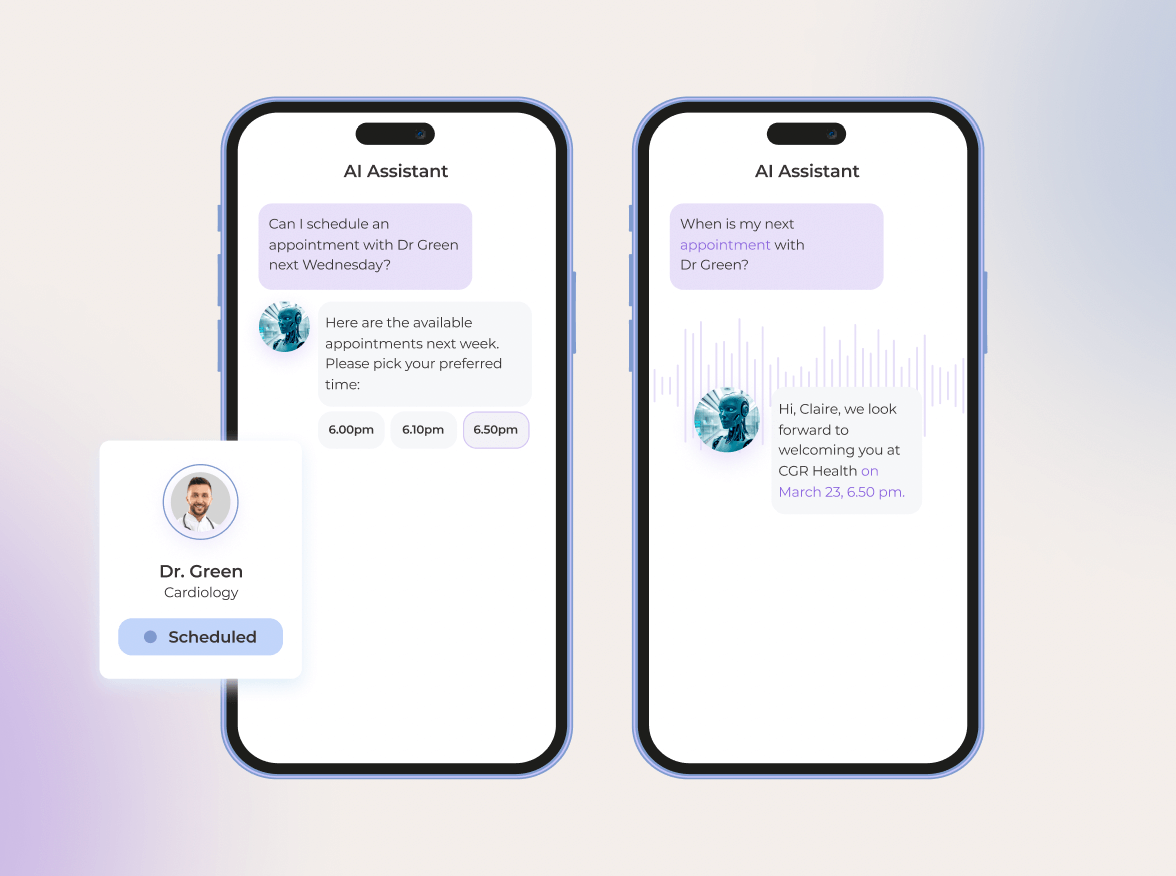
Appointment booking and confirmation with a scheduling AI assistant.

We made the strategic decision to invest in a conversational AI interface to reduce no-shows and keep calendars full without headaches. The solution allowed us to reduce missed appointments by 34 percent and streamline the process of pointing patients to the right care, at the right place and time.

2. Medical triaging 

In the US, primary care doctors deal with an average of 53 patient calls per day — and not all of those calls require immediate medical attention. Alleviating this burden is conversational AI that can streamline patient triage by assessing patient symptoms and determining the level of care they need. An AI chatbot can even defeat doctors at diagnosing illnesses — provided it’s properly prompted.
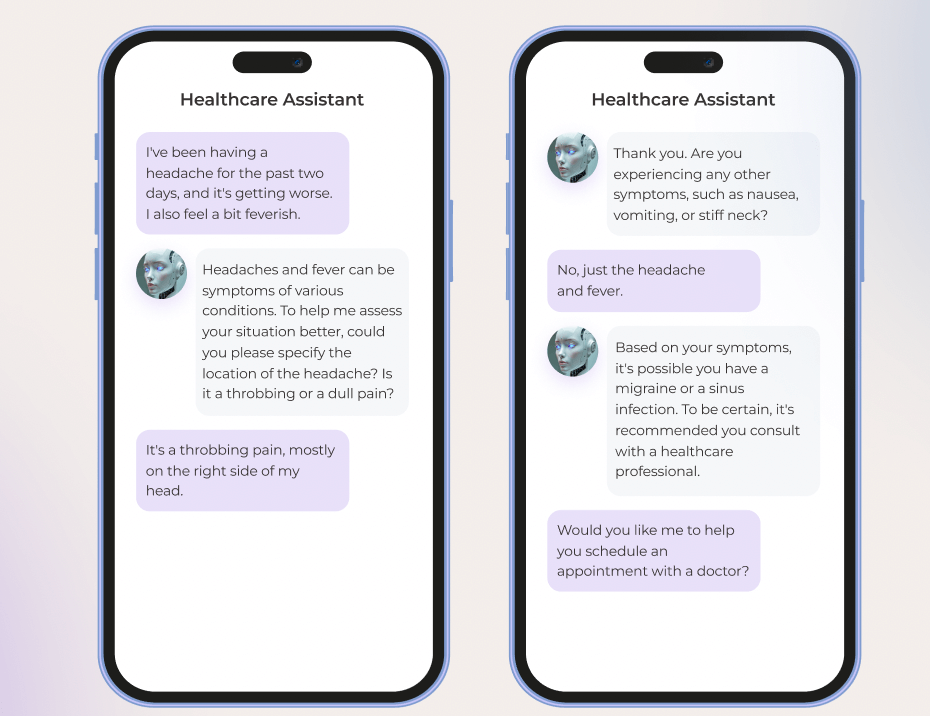
Discussing symptoms of a headache and fever with a healthcare conversational chatbot.

By integrating conversational AI into the triaging process, care providers can create autonomous patient entry points that:

  • Gather symptoms and identify potential diagnoses.
  • Provide patients with the most clinically appropriate care based on the symptoms.
  • Automate the referral process, including scheduling appointments and coordinating with other healthcare providers.
  • Integrate with internal systems, providing triaging nurses with access to relevant patient data.
  • Shift to an accelerated lane for assistance if the patient needs urgent help and/or requests it.

3. Clinical decision support

To give the right clinical recommendation, doctors have to factor in and analyze patient context, clinical guidelines, and research literature. This time-consuming process can take hours upon hours, holding back timely interventions and leading to inappropriate treatments, if any piece of the puzzle is missed. 

No wonder, 76% of doctors reported using general-purpose LLMs in clinical decision-making. While the safety of this very method is dubious, custom healthcare-specific conversational AI solutions can amplify the doctor’s expertise and intuition by delivering real-time, evidence-based insights at the point of care.

For example, AI-powered interfaces can aid doctors in making dosing decisions based on individual patients’ profiles, identify high-risk patients, and determine personalized treatment plans, based on factors such as age, comorbidities, and drug allergies.

Aiming to address the clinical evidence challenge, Atropos Health released ChatRWD, a specialized medical language model that combines chat-to-database capability and AI agents. The model reduces the time needed for high-quality publication-grade real-world evidence from months to 5.23 minutes.

4. Remote patient monitoring

Traditionally, remote patient monitoring is considered a challenging care delivery mode due to logistical hurdles and the amount of data generated. Multimodal conversational agents can minimize the complexity of RPM and aid in monitoring a patient’s health status beyond healthcare settings. 

With the human-in-the-loop, such agents can conduct on-demand automated screening interviews over the phone or web browser and deliver explicit insights into the patient’s progress, risk factors, and treatment adherence — invaluable data for effective chronic disease management.
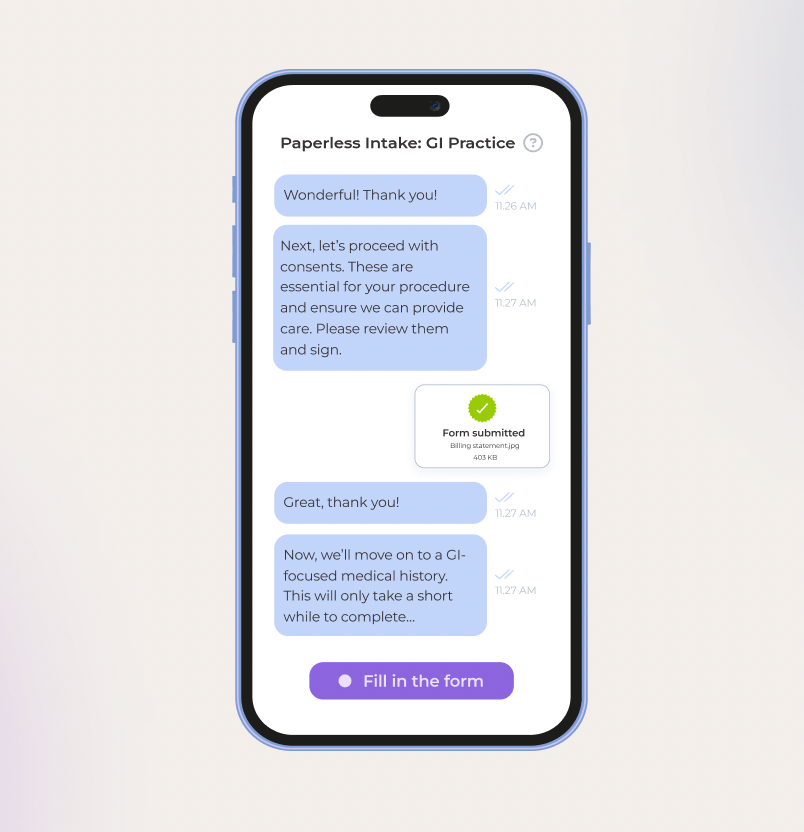
A medical conversational assistant guides a patient through consents, form submission, and medical history intake.

Along with assisted interviews, conversational AI can pitch in to support the following RPM activities:

  • Automated check-ins — conversational agents can check up on a patient’s medication adherence, symptoms, and well-being.
  • Wearable device data collection — AI-powered systems can team up with RPM devices to vacuum and analyze data on vital signs, activity levels, and sleep patterns.
  • Personalized health coaching — conversational AI interfaces can deliver clear, actionable advice tailored to the patient’s specific health conditions, reducing the need for emergency room visits.
  • Early intervention — by analyzing wearable devices, sensors, and patient-reported health data, agents can spot early signs of potential issues and notify care teams of such.
  • Telehealth stunts — smart agents can support patients in between remote consultations and assist doctors during telehealth sessions by jotting down patient interactions, summarizing key points, and updating EHRs.

A healthcare conversational chatbot discusses a patient’s blood sugar levels, diet, exercise, and fatigue concerns.

5. Post-visit patient support and engagement

Lots of patients leave doctor’s offices without understanding how to care for themselves once they get home and what comes next. Disjointed care pathways add to the information divide, making it challenging for patients to navigate further care.

Advanced conversational AI systems can bridge this informational divide and enhance patient engagement post-visit and after discharge by:

  • Integrating visit notes and discharge summaries with insurance coverage information to generate clear action plans for patients.
  • Outlining care summaries for referrals and consolidating healthcare data such as medical records, lab results, and clinical notes.
  • Extracting key information from specialist notes for primary-care physician teams.
  • Estimating out-of-the-pocket costs for patients, including deductibles, copayments, and coinsurance.
  • Walking the patient through insurance coverage and billing process.
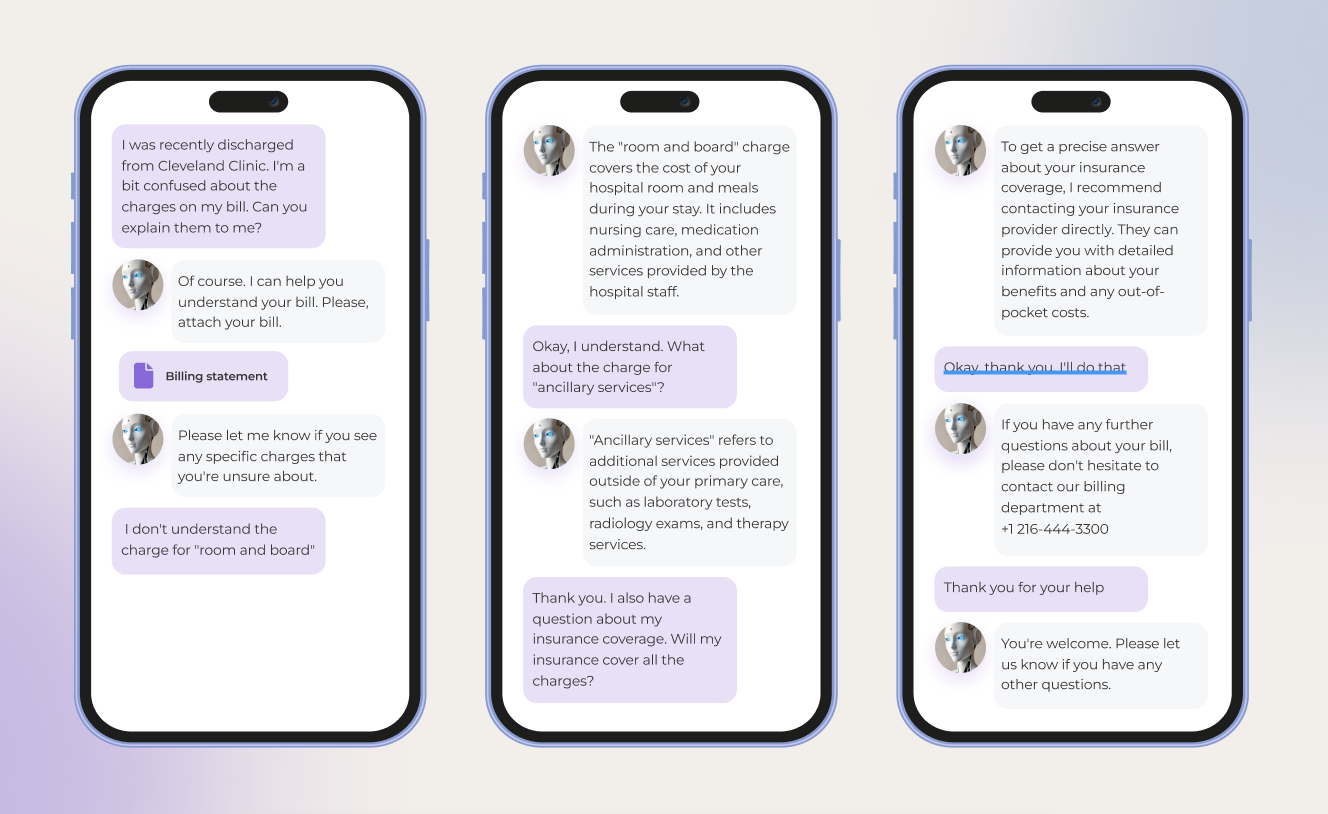
Kaiser Permanente reported that its AI-powered patient messaging system resolved 32% of patient messages with no manual intervention, freeing up physicians’ time and timely attending to patient queries. 

6. Medication management

Only about 50% of patients stick to their prescribed medication regimen, while the other 25% are unsure about their post-prescription next steps. Polypharmacy patients have it the hardest: they have to keep a mental note of multiple medications, dosages, and timing. 

Virtual assistants equipped with conversational AI capabilities can ease the medication management burden for all sides of care: 

  • They can serve as a personalized medication encyclopedia that breaks down information about prescriptions, including dosages, frequency, and potential side effects. 
  • Conversational AI solutions can also send refill reminders, cross-reference medications, and pull patient medical data right from EHRs.
  • They can help pharmacists reconcile medication lists to avoid medication errors.
  • For doctors, such interfaces can provide evidence-based recommendations for medication prescribing, dosage adjustments, and treatment plans.
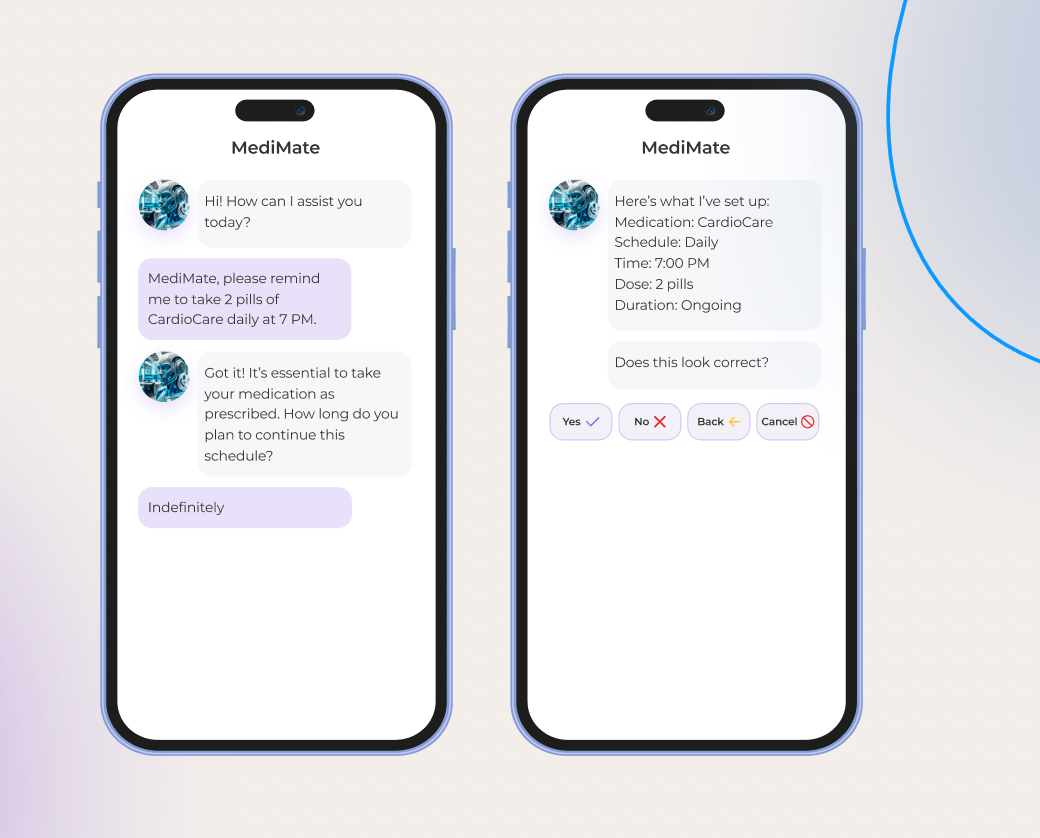
MediMate chatbot helps a user set a daily reminder to take medication, confirming the schedule details.

7. Reimbursement

In healthcare, reimbursement is a field full of speed bumps, with denied claims, complex coding, and inefficient billing processes being chief among them. No wonder this activity lends itself well to conversational AI and its unrivaled automation superpowers.

The technology can take over the following reimbursement tasks:

  • Prioritizing claims for payer follow-up and generating automated responses, using physician’s notes.
  • Automating the process of submitting claims to insurance providers and tracking their status.
  • Verifying codes to improve coding accuracy.
  • Identifying potential appeal opportunities by validating payer contracts.
  • Monitoring payments from insurance providers and updating on any delays.
  • Providing guidance on bills, insurance coverage, and payment options to patients.

8. Clinical operations

Today, doctors have to spend twice as much time on computers as they do with patients. Post-visit notes, patient forms, and other paperwork drain healthcare professionals and leave them with little time on their hands. Much of this paperwork is identical, and therefore redundant.

Clerical tasks are another strong suit for conversational AI in healthcare that can:

  • Churn out post-visit summaries, care summaries for referrals, standardized consent forms, utilization reports, and rate comparisons.
  • Create and organize clinical notes, EMR updates, dictations, and messages.
  • Outline workflow materials and schedules for processes.
  • Develop training materials and personalized learning plans for clinicians.
  • Create educational content on disease diagnosis and treatment.

Conversational solutions can also work alongside a clinician during a patient visit to transcribe the clinician’s dictation into a structured note and auto-populate notes with EHR data. 

9. Clinical trials

With decentralized clinical trials sloping upwards and traditional clinical research grappling with patient maintenance, there’s much on the plate for AI-driven conversational agents. 

Conversational AI can address many shortcomings of both conventional clinical trial execution and decentralized clinical trials:

  • Screening candidates based on eligibility criteria.
  • Handling incoming clinical trial data, marrying it with images and lab results, and adding missing data points.
  • Interacting with patients throughout the trial period to offer guidance on medication and prevent drop-outs.
  • Identifying the right combination of drugs for an indication or the right patients.
  • Fetching relevant data from clinical trial reports to prepare documentation for the FDA.

10. Back-office work and administrative functions

Finance, staffing, legal activities, and other picks and shovels of healthcare keep a hospital system running. However, the majority of healthcare operations in the industry are siloed and rely on manual inputs that lead to errors, gaps, and discrepancies.

Stepping up to the plate, conversational AI can shoulder the burden of repetitive tasks and introduce the following improvements across the board:

  • Automating the onboarding process, enabling self-serve HR functions, and streamlining feedback collection.
  • Optimizing staff schedules based on availability, skills, and workload.
  • Automating invoice processing, payment tracking, and account reconciliation.
  • Validating contracts for compliance with legal and regulatory requirements.
  • Updating on evolving compliance regulations and regulatory changes.

Create a healthier tomorrow, powered by conversational AI

Activate holistic healthcare conversational AI for your organization in 5 steps

Bringing conversational AI to healthcare can alleviate a slew of pressure points, provided HCPs deploy the right tech, operational, and talent resources to develop a robust conversational AI strategy.

Identify the right use case

A successful conversational AI project starts with prioritizing potential use cases based on six key areas, including its impact, function, measurability, permission space, time to market, and extensibility. After identifying promising automation areas, organizations should design AI solutions to implement high-value use cases and determine any functional and technical gaps.

Tackle the 70 percent problem of data readiness

Data wrangling makes up 70% of all AI development efforts. Although healthcare has an edge over other industries in terms of data volume, most of this data is buried across fragmented systems in varying formats. Along with consolidating clinical and patient data, organizations might also need other data points to develop conversational AI solutions, such as PGHD, retail purchases, and wearable data.

Specific use cases such as medication management and clinical decision support also require healthcare organizations to tap into literature and knowledge bases, pharmacy data, and clinical trial data.

Address risks and biases

If mishandled, conversational AI can exacerbate existing data risks in healthcare — as well as usher in new ones, such as its inclination to hallucinate. For example, if the training data skews towards certain patient populations, then the output of the conversational AI solution is likely to be biased, providing patients with inaccurate and potentially harmful insights. 

So, before making headway with the technology, make sure to outline risk and legal frameworks that will govern the use of conversational AI and account for its risks in organizations. 

Plan integrations

If your conversational AI solution needs to interface with other healthcare systems (and it probably does), you need to account for additional layers around it to integrate the solution with EHRs, CDSS, telehealth, and other platforms. Here, you need to identify the integration points, design integration architecture, and determine what types of connectors your solution needs.

Test and iterate

Instead of going all in and scaling your conversational AI solutions to adjacent use cases — test, evaluate, and refine the performance of your initial AI model. Make sure the output of the model is accurate, aligned with the healthcare domains, and performs well across multiple dimensions. If necessary, you can iterate to fine-tune the model performance and revisit your data management strategy.

Challenges of putting conversational AI to work in healthcare

Conversational AI might be one of the most potent technologies to address the gaps in healthcare, but it’s not the easiest to adopt. For example, a mere 10% of patient interactions with healthcare conversational AI turn out to be successful and self-served. The following barriers might be to blame.

Data management

Healthcare notably has a data problem: its data is unstructured, sprinkled across siloed systems, and stored in varying formats. Moreover, many healthcare organizations lack the data maturity muscle, falling behind in data completeness, availability, and governance frameworks. For conversational AI, this data slump is not an option as it demands sufficient data for effective learning and prediction.

To maximize the use of internal data, healthcare organizations must invest in a comprehensive data management strategy, including data standardization, data security, governance, and integration. 

Regulatory compliance

The healthcare sector is a regulation-heavy industry with strict AI compliance standards. To demonstrate commitment to PHI and PII security, your conversational AI solution must comply with HIPAA, GDPR, CCPA, and other applicable regulations. The majority of these regulations require your solutions to integrate specific data security measures, such as data minimization, data encryption at rest and in transit, and other mechanisms.

Technical limitations

Over 73% of healthcare providers still rely on legacy information systems and architectures, making AI scale-ups a tough nut to crack. Complex integrations, data migration challenges, and even staff adoption reluctance — all stem from the tech stone age in healthcare. To break out of the tech rut and effectively leverage any type of artificial intelligence, healthcare leaders require an AI-ready tech infrastructure that includes centralized data repositories, cloud computing set-ups, and data controls and guardrails.

Ethical considerations

When it comes to something as high-stakes as conversational AI in healthcare, consumer trust hangs in the balance. Not all patients are enthusiastic about trading clinician advice for AI wisdom — and you need to address that if you plan to dabble in the technology. To address the skepticism, you can engage clinicians as change agents to demonstrate the credibility and clinical utility of AI.

To warm up customers to the solution, your organization should also be explicit about how it uses conversational AI to assist doctors and what patient data it feeds on. The human-in-the-loop approach is essential in such critical areas as healthcare to mitigate the risks associated with AI and build trust with patients.

Conversational AI in healthcare, a new pill for the future

With the repetitive task burden and the imperative for value-based care, the healthcare industry could benefit from conversational AI implementation. The latter, thanks to its unmatched automation potential and human-like interactions, can revolutionize healthcare delivery, boost operational efficiency, and put patients where they belong — at the center of care.

Around 59% of healthcare leaders are already partnering with third-party vendors providing AI development services in USA to develop customized solutions. Those who succeed with scaling their conversational AI solutions past proof of concepts and to other use cases stand to gain early benefits that turn into long-term, flexible value.

Prescribe a dose of AI innovation to your healthcare organization

Contact our team

FAQ

How is conversational AI used in healthcare?

Conversational AI tools take many forms in healthcare. They can be used to enhance patient care, support clinical decision-making, improve patient experience, streamline insurance claims, analyze patient data, and supplement remote healthcare delivery.

Which is the best conversational AI?

The choice of the model for a conversational AI solution depends on your unique needs. The quantity of training data, computational resources, model complexity, and other variables impact the selection.

Which type of AI is currently being used in medical care?

Machine learning, natural language processing, generative AI, and conversational AI are some of the modalities currently in use in the healthcare industry.

ERP Implementation Steps: The Be-all and End-all Guide Curated by Experts

Without well-thought-out ERP implementation steps, businesses are bound to face the consequences, such as violated project timelines, high operational costs, and overall process inefficiencies. Gartner indicates that the chances of hitting it big versus hitting the skids are three to seven. Check out our spot-on guide on how to make it to the success cluster. 

When it’s time, it’s time. But when is it for your business?

Businesses without previous experience with ERP usually feel the need to turn the page and adopt new software when scads of disjointed data, overall document chaos, and manual execution of tasks with high automation potential paralyze their processes and ability to move forward. 

For organizations that already have an enterprise resource planning system, the tipping point is marked by a lack of vital functionality, increased downtime, and the inability of a current ERP to handle the amount of data a business operates. That’s when they start considering an upgrade or replacement.

Both groups coincide in what they are after: 

  • Real-time visibility into your company’s data
  • The highest possible level of enterprise process automation to decrease the manual workload on employees
  • Business processes systematization at the company scale

What comes first: the processes or the ERP? The ins and outs of two fundamental approaches 

There are two options to choose from: adjust an ERP to fit your business processes or align your business processes with standard practices at the ERP system’s core. 

In essence, it’s a basic, age-old question of software customization vs. process standardization. But the answer is not that straightforward: there are a lot of pivotal nuances to it. Let’s get to the examples to figure out which scenario works best for you. 

Process-first approach

The most popular ERPs are modular ones, and while some ready-made modules can be used right away, others may call for customization. The latter scenario is especially relevant for industry-specific and regional regulations-enforced processes. 

For instance, the accounting module usually requires at least minor adjustments to seamlessly integrate with your already-in-use accounting tools and match local tax rules and restrictions. Accounting standards and tax procedures in different regions may vary so much that a cookie-cutter solution just won’t cut it. 

In such a case, you may need a tailored module customized in line with the local legislation and accounting principles, such as GAAP for the US, IFRS for the EU countries, and a whole spectrum of them for Asian countries (KASB for South Korea, ASBJ for Japan, HKFRS for Hong Kong, etc.).

ERP-first approach 

Modifying your business processes in accordance with the proven standards is relevant for:

  • Small and midsize companies that can fine-tune their operations without big-deal investments
  • Organizations of any size from low-regulated industries 

Let’s say, if a company manages inventory mostly manually, adjusting to the process of goods scanning in an ERP of their choice won’t be a tough move to pull off. There’s no need to reinvent the wheel by changing the inherent process, considering that you can lighten your team’s workload without major financial infusions. 

ERP standardizationERP customization
+More cost-effective and quicker to implementPerfectly tailored to your industry-specific processes
–Strict boundaries for business processes may narrow down your evolution options over time Takes longer, сosts a pretty cent, can make maintenance challenging and box you in over time

The sweet spot: balancing both

In reality, you should aim for the golden middle between process-first and ERP-first approaches. The share of standardization and customization for each ERP project depends on multiple factors, including the company’s size, the complexity of its business processes, and specific regulatory compliance requirements, to name a few.

Well-trodden path: follow these 9 steps when implementing an ERP system 

Any software adoption initiative is fraught with challenges, so mastering the waves at each of the ERP implementation steps can help ensure smooth sailing for your project. 

*According to Gartner

Here’s our guide on how to implement an ERP system step-by-step and sidestep the common pitfalls along the way.

1. Budgeting 

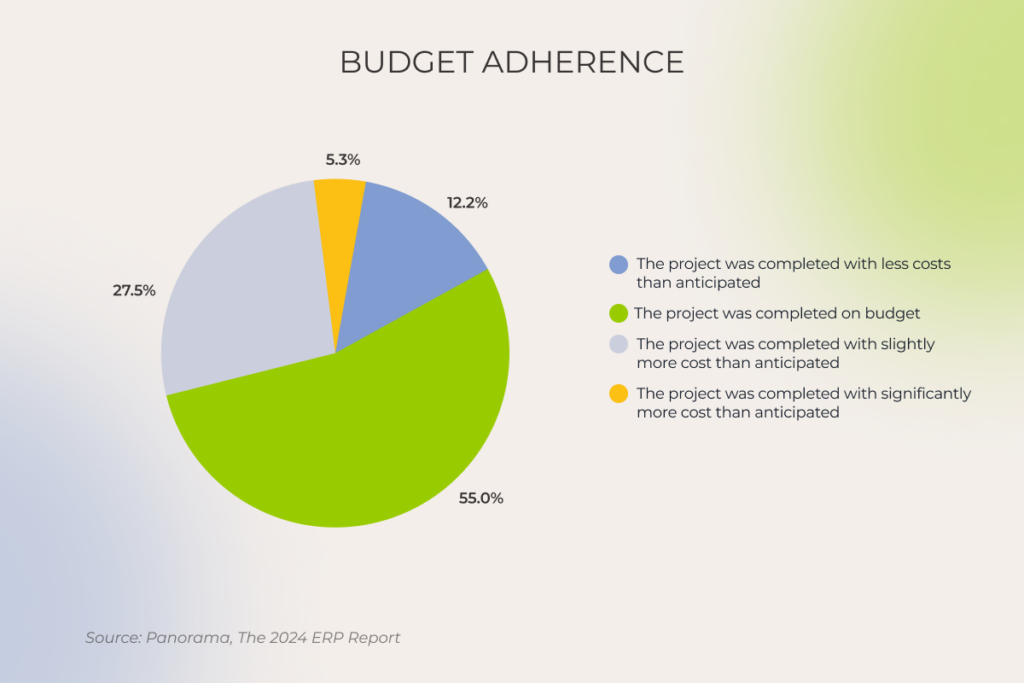
Take into account all the possible expense categories. It’s safer to plan the budget with a margin for flexibility at the onset and enjoy completing the project with less cost than anticipated than to save up first and tighten your belt later.

The list of expense categories to be factored in your ERP implementation budget includes:

  • Initial purchase price
  • The cost of system configuration, customization, and integration with your software ecosystem
  • Data migration costs
  • Data backups and storage
  • Staff training 
  • Overtime for staff
  • Hardware and network upgrades 
  • ERP software ongoing maintenance and future upgrades cost 
Budget adherence in ERP projects

2. ERP partner selection

Actions speak louder than promises, and trustworthy tech allies go along with this principle. 

Our quick initial assessment helps gauge the reliability of ERP consulting and implementation companies:

  • Start by checking reviews on reputable B2B platforms such as Clutch, GoodFirms, TopDevelopers, etc. 
  • Verify if the company’s case studies showcase its hands-on expertise in ERP implementation.

These are table stakes to sift the wheat from the chaff. Moving forward to clarification calls with the candidates from the filtered list, see how they act at this non-commitment stage. A solid tech partner will put a premium on identifying your needs regarding the processes you want to cover with an ERP, visualizing them, and demonstrating how they align with the system modules to suggest the best-fit software.  

We also suggest looking for not just a software implementation partner but a business transformation advisor who sees your business as a whole, as ERP implementation is usually a fundamental change for a company. And you’ll need a tech ally with the vision to balance technology, processes, and people to ensure your new ERP solution delivers benefits on all fronts.   

3. Current business processes assessment

The chances of finding a needle in a haystack are higher than choosing the right ERP system without mapping out your core business processes. Understanding them down to the last detail is a prerequisite for successful ERP implementation. 

Therefore, don’t put the cart before the horse. Take your time to properly map your business processes, involving stakeholders in this undertaking. A slower yet more keen-eye-for-detail approach at the start will pay off with a smoother, faster finish in the long run.

With all business processes in the palm of your hand, you’ll be able to spot which of them can bring quick wins and should be put first on your ERP implementation plan.

Therefore, you should engage end users early in the project and keep gathering user feedback down the road to provide staff with a system that helps, not burdens them.  

The following example illustrates what can go wrong when rank-and-file employees’ perspective is ignored. 

One of our clients in the government sector decided to take their operations to the next level by replacing their outdated ERP system with a new, sleek, user-friendly one. The C-suite was on board with the idea, but the reality turned out to be very different for the staff using the system daily. 

While the former system was very well-adjusted to handle the client’s specific tasks down to filling out form fields of customs declarations, the new ERP was entirely out of sync with those procedures. What had been taking no more than 5 minutes, started to eat up to 40, hindering staff productivity.  

Seeing that their ERP implementation effort didn’t play out as intended, the client turned to us looking for expert support to get back on the safe old track with minor fine-tuning of their initial ERP to match the company’s growth and scalability pace. 

Unveil any pitfalls you may face in advance with ERP project discovery

Schedule a call

4. Project planning 

After selecting the processes that can provide maximum value when automated, it’s time to chart your ERP implementation plan.

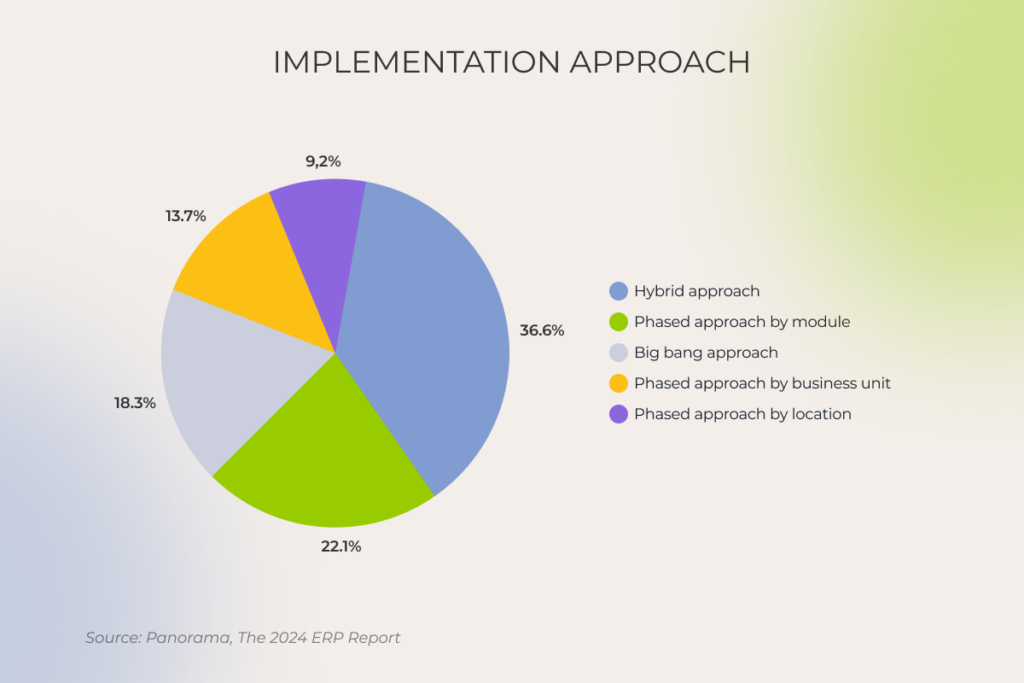
  • Choose an implementation approach. The abrupt and most risky big bang method, when everything goes live at once, works for small companies that adopt or replace up to two ERP modules at a time. The phased approach is the safest and most popular option, when organizations move to the new ERP slowly but surely by modules, business units, or locations. And the hybrid approach, when smaller departments follow the big-bang path while others with more complex processes adhere to the phased one, combines the best of both worlds.
ERP implementation approach
  • Identify mandatory and facultative roles within the ERP implementation team. That way, you can balance your expenses for a full-time core team and facultative members who’ll join part-time. 
  • Outline a well-thought-out change management strategy at the initial stage of your ERP implementation life cycle. Change management isn’t a task you can address ad-hoc and handle on short notice. And don’t be misguided by the company size — startups are just as likely to face change resistance as midsize organizations and enterprises. 
  • Establish clear governance. Knowing your key stakeholders, business process owners, all other roles, and their responsibilities facilitates decision-making and streamlines risk management and issue resolution.  
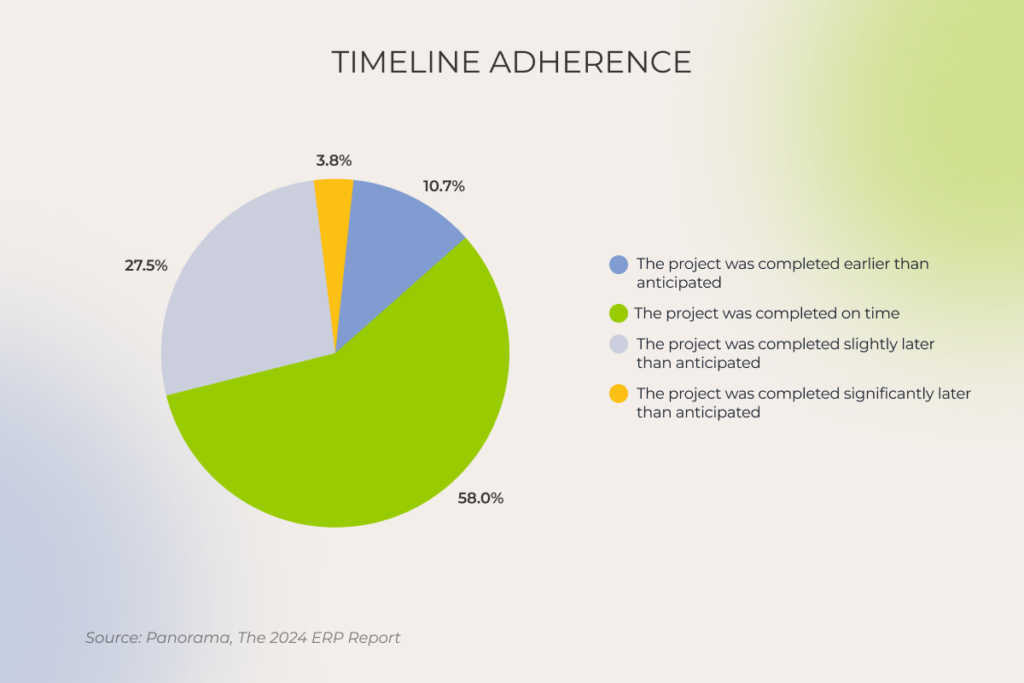
  • Set a realistic implementation timeline. The typical ERP project timeline is between 6 and 12 months. But keep in mind that a complex, highly custom implementation initiative for several locations, with multiple currencies and languages, may last for years until a full company-wide rollout.
ERP projects timeline

5. ERP selection

As for 2024, 78,6% of companies prefer cloud-based ERP over on-premise systems. When it comes to deployment models, the scales are tipping in favor of SaaS software (over hosted or managed services) chosen by 70,9% of organizations. 

Speaking of SaaS options, they can be divided into three tiers:

  1. Enterprise-targeted ERP systems like SAP and Oracle can cover complex processes across multiple industries. 
  2. Software for midsize and small companies, such as Odoo and Microsoft Dynamics 365, is a good fit for managing several company branches. Smaller organizations can opt for NetSuite ERP or Acumatica. 
  3. Tools for startups, such as Aptean and ECI, help small companies hit the ground running from day one and enable smooth scalability down the road.  

At this stage, your ERP partner compares different software options to draw out the ups and downs of considered systems specifically for your case and make a well-grounded choice.   

At *instinctools, we also look for cost optimization opportunities before going full-scale on the ERP implementation. Therefore, we compare different solutions in terms of licenses and infrastructure optimization to go easier on your budget without compromising the system’s reliability. 

6. System configuration vs. customization

As customization always costs a pretty cent, we suggest solving issues through configuration before customization and making the most of an out-of-the-box user interface and available extensions. 

However, if you already have established processes that don’t match generally accepted principles in the system of your choice, you’ll have to decide whether to keep them that way or reengineer to align with the ERP standard. 

Here’s an example of a non-standard process being a pain in the neck. Let’s say, an ecommerce company has a specific way of managing inventory. Instead of relying on template-based approaches and document-oriented databases to build sales reporting and forecasts in the BI system, they have a set of connectors that link their database with a data normalization tool, ending up with a fragile, layered, and arduous-to-maintain system. 

It’s a common headache for businesses that stray from best practices and have to put up with rickety crutches of their software ecosystem.

After the configuration is done, it’s time for an ERP demo on the mock data to check if the system performs as intended. 

7. Data migration 

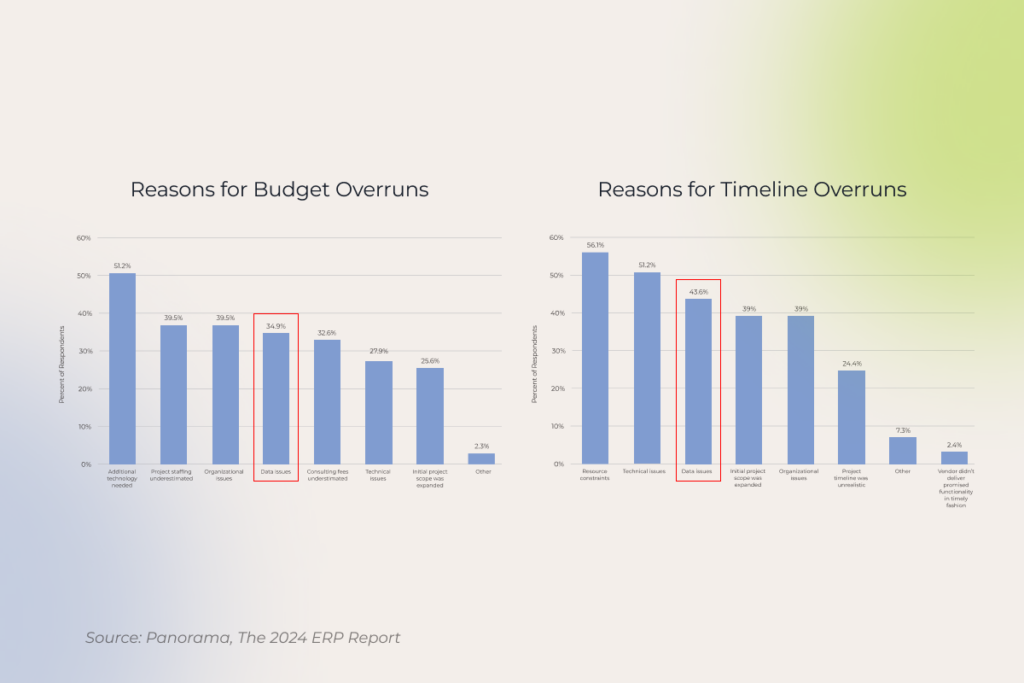
No wonder issues with existing data top the list of reasons for ERP projects blow past their budgets and timelines. The amount of data directly influences the cost of software adoption, while its variability contributes to the complexity of the ERP implementation process. 

ERP projects budget overruns

To prevent data-related issues before the system gets in gear, increasing the cost of fixing errors at least seven times, make sense of your legacy data, and decide what information should be moved to the ERP.  

Your data migration strategy should cover three key areas: data model design, data integrity, and data flow. 

Here’s a tip if you can’t let your legacy data go completely. Consider setting up a data archive, which will provide read-only access to the historical information from previous systems without overloading your ERP. We followed this approach while replacing outdated software with Odoo ERP for a European streaming platform provider.

8. Testing 

While ERP system testing might seem like any software functional and non-functional testing, there are best practices to keep in mind. The points listed below may sound basic, but they’re often neglected in real-life projects:

  • Involve actual users
  • Test all business-critical processes
  • Go beyond checking individual tasks in isolation and test how the system handles workflows
  • Provide a robust protocol for future testing after each update

9. User training 

Training isn’t a “nice-to-have” — it’s the backbone of a successful ERP rollout. Therefore, create a continuous learning framework that spans over:

  • Initial role-based training on both systems and processes in various formats (classroom, computer-based training, self-study, blended learning) with a focus on the capabilities and responsibilities of different roles. 
  • Refresher training for the employees who might need extra time to catch up. 
  • Ongoing education to keep your staff updated on new software features and improvements.
  • Feedback mechanism to encourage employees to make suggestions on the training process and adjust methods and formats to their needs. 

At *instinctools, we follow a train-the-trainer approach when our project team members teach critical roles on the client’s side prior to going live, and then they pass the knowledge on to the rest of your team. Along with more efficient knowledge sharing, it also contributes to completing the project with less cost, as you pay for the tech partner-led training only once instead of covering regular training bills. 

Keep building momentum in your ERP journey

Don’t rush to unbuckle your seatbelt — the effort associated with an ERP initiative doesn’t end with hitting the go-live milestone. It’s only half the battle. The ERP implementation life cycle proceeds with regular business process reviews and ongoing support to keep things hitch-free.

Your ERP success is a journey, not a destination

Let us guide you

Conversational AI Chatbots vs Virtual Assistants: Siblings or Distant Cousins?

Conversational AI has many faces, with virtual assistants and conversational AI chatbots being the most common kins. These two — and the dilemma of conversational AI chatbot vs assistants in particular — spark up the most debates. Some experts say conversational AI chatbots and virtual assistants in the same breath, while others pigeonhole AI chatbots as a rule-driven chat based interface that dates back to the pre-generative and pre-conversational AI era.

So which one is it? Instinctools’ AI experts believe that virtual assistants and AI chatbots are different after all, serving distinct purposes and functions.

Exhibit #1: What is a conversational AI chatbot?

Let’s start from the basics and gradually build up the term. A chatbot is a blanket definition used to describe any software that can simulate human conversation, from traditional rule-based systems to cutting-edge conversational AI. 

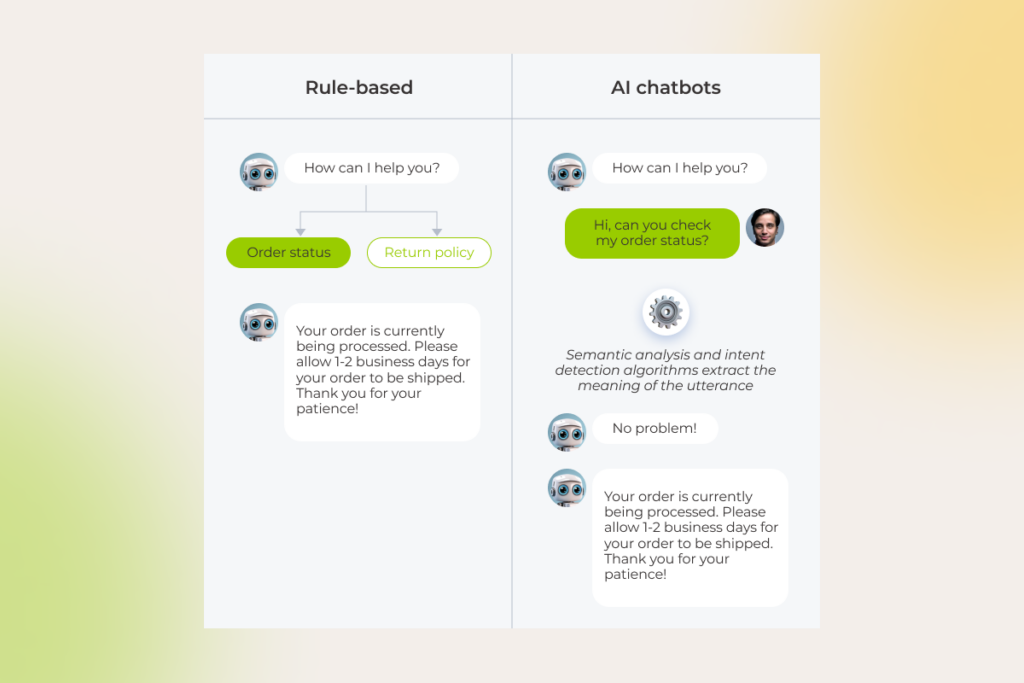
Traditional rule-based chatbots were our first move toward the world of advanced conversational technology we know today. These systems, represented by simple FAQ bots and basic customer support bots, draw on a decision tree structure, where each user input triggers a specific conversation flow, based on predefined rules. The rules may be determined by the keywords, phrases, or specific patterns — whichever is scripted by developers. 

As you might guess, rule-based chatbots are limited to simple tasks, such as notifying the users of the order status or redirecting the user to a menu list.

But once a chatbot is powered by conversational AI, it evolves into a problem solver, capable of cracking more complex tasks and getting to the bottom of user intent. Conversational AI chatbots are an advancement from rule-based systems as they leverage such AI technologies as machine learning and natural language processing to interact with users in a human-like manner. 

Unlike pre-programmed chatbots designed for scripted responses, a conversational chatbot’s user interface can respond to a wider range of out-of-scope user inputs, including complex questions and open-ended sentences, and infer subtle nuances in language.

The comparison between rule-based chatbots and AI chatbots, showing different approaches to processing order status queries

In the last few years, the democratization of large language models spurred a new generation of conversational interfaces. Built on the back of LLMs, generative AI chatbots can not only understand and respond organically to the input but are also capable of generating new content as the output. The output is not limited to high-quality text only as generative AI chatbots can also push out images, videos, and sounds.

Exhibit #2: What is a virtual assistant?

Both virtual assistants and cutting-edge conversational chatbots know who they’re talking to, predict where the conversation is headed, and self-improve over time. What differentiates intelligent virtual assistants from a text-oriented conversational user interface is their ability to act autonomously upon the user’s intent. To become active, virtual assistants use a combination of AI technologies and robotic process automation.

Let’s imagine you’re craving Italian food and looking for a nice Italian restaurant to enjoy your evening. With a traditional chatbot, a user needs to input a specific phrase “List Italian restaurants in the X area” to get the recommendations. With a conversational AI chatbot, the user can type in, “I’m in the mood for Italian food. Where’s a good restaurant nearby?” and the chatbot churns out a list of Italian restaurants in the user’s area. Virtual agents can check out online reviews, suggest five-star restaurants, and even make a reservation for the user.

The devil is in the differences: key functions of conversational AI chatbots vs assistants

If we contrast the two, we’ll find out that both conversational AI chatbots and virtual assistants are adept at processing complex queries due to cutting-edge NLP — hence the overlap in functions. However, the action-oriented nature of virtual assistants makes them well-positioned to address a wider range of functions, unattainable for AI chatbots.

Here’s what conversational AI chatbots are capable of

Conversational interfaces, powered by generative responses from LLMs, are perfect for information-oriented and data-driven tasks. Conversational AI chatbots excel at pulling targeted self-service solutions and tailored guidance to address a specific user query. Such systems comprehend natural language commands, retain context, interpret dynamic user inputs, and enhance their output based on previous user interactions.

As for their data-driven function, AI chatbots can also capture essential user data or feedback, analyze it in real time, and identify trends or patterns that companies can use to improve their services or products.

The core capabilities of virtual assistants

Just like conversational AI, virtual assistants can also take over tasks that require deep analysis capabilities and dynamic, context-based interaction. However, AI personal assistants can go the extra mile and adjust to transactional scenarios. 

Moreover, a virtual AI agent thrives in a setting that requires proactive intelligence whereby the system sets in motion particular mechanisms based on specific triggers or predictive analytics. For example, virtual assistants may automatically schedule maintenance appointments or tasks based on the maintenance history in a CMMS system.

Under the hood of conversational AI chatbots vs assistants

Custom conversational AI chatbots and virtual assistants are like fingerprints — they are unique in their complexity, training data, and industry focus. But what remains consistent is their multi-layered foundation that enables both to fly through the assigned task. 

The plumbing behind conversational AI chatbots

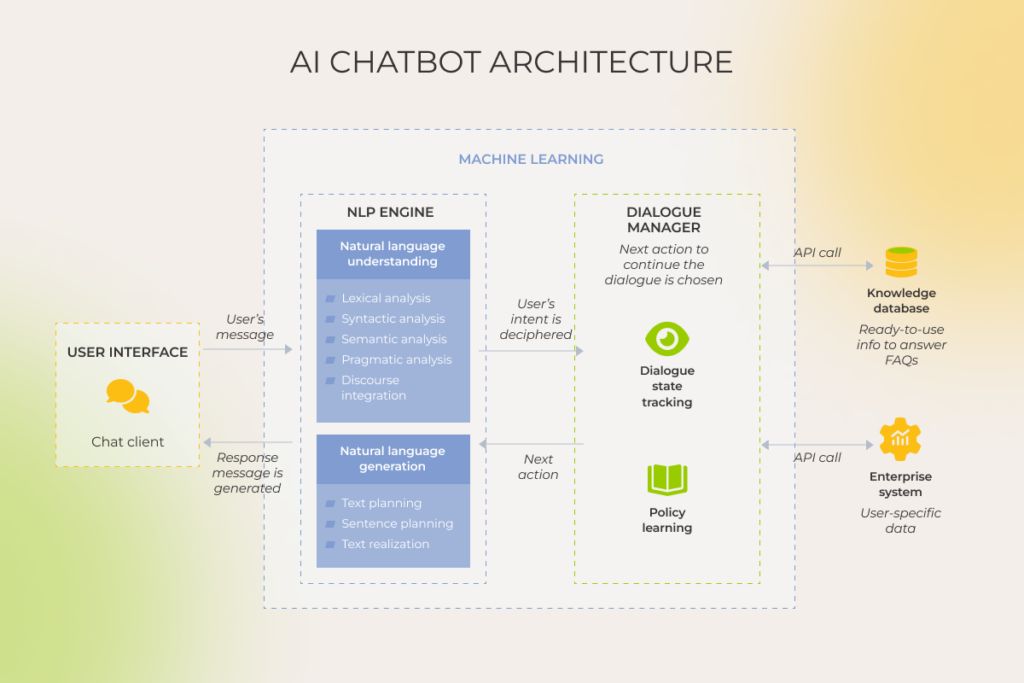
AI chatbots have two sides to them: the one visible to the user and the one hidden in the background. A user interface makes the client side of conversational systems, acting as a bridge and enabling users to communicate and interact with a chatbot. 

Core to the chatbot’s offstage architecture is the NLP engine that comprises advanced Natural Language Understanding (NLU) and Natural Language Generation (NLG) components to establish a free-flowing, two-way communication with the end user. The NLU part is focused on tokenization, part-of-speech tagging, semantic analysis, and other behind-the-scenes mechanisms that allow a chatbot to understand human language in every manifestation. 

The NLG layer builds on pre-trained language models to generate authentic text responses based on the input and the chatbot’s understanding of the context. It’s also where chatbots’ text summarization capabilities come from that allows for accurate and concise summaries from input documents.

The architecture of an AI chatbot, with components like the NLP engine, dialogue manager, and knowledge database

Once the user’s intent is deciphered by the system, an AI chatbot initiates a dialog manager to monitor and update the conversation context. A dialog manager is a building block in conversational interfaces that stores the current intent along with the identified entities throughout the conversation, asking for additional context from the user when needed.

To respond to user queries, intelligent chatbots connect to a dynamic knowledge or backend systems, sourcing relevant data and personalizing the response based on, say, integrated CRM data. Additionally, the conversational system is augmented with machine learning capabilities that allow for continuous learning based on textual data.

The underlying technology behind virtual assistants

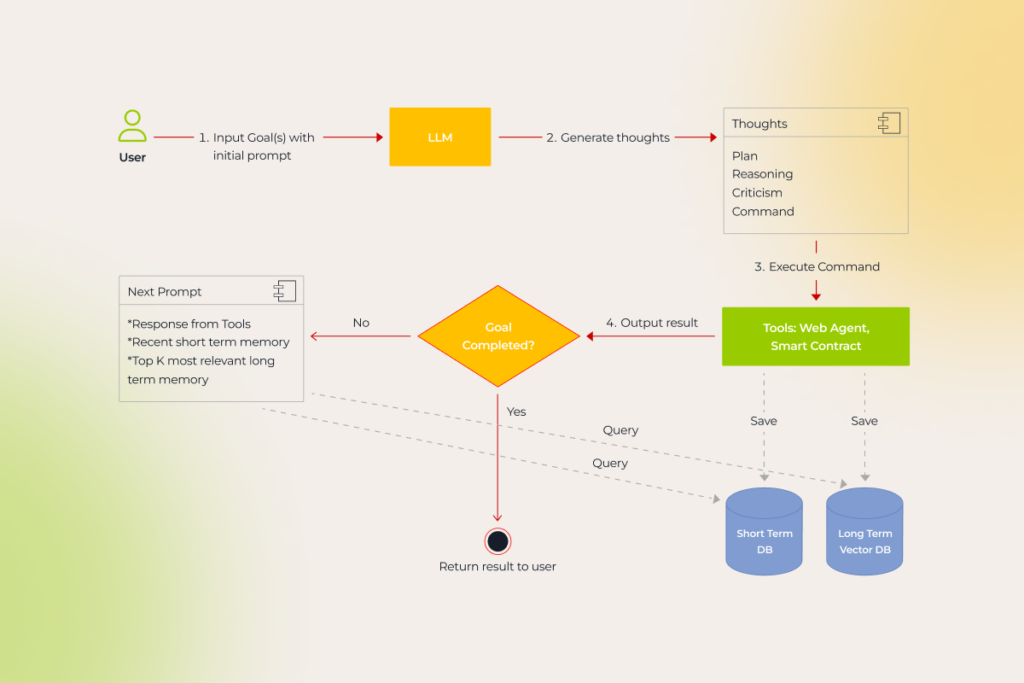
Virtual agents inherit the architecture of conversational AI chatbots, but extend it to the actionable realm with robotic process automation. Unlike talk-only AI chatbots, given a goal, virtual assistants walk the talk, breaking down the task into a sequence of subtasks and acting on them until the mission is completed. 

The process flow of goal completion in a virtual assistant, detailing steps from input to execution and memory management

Besides RPA and machine learning techs, many virtual assistants are also kitted out with reinforcement learning from human feedback (RHFL) and neuro-symbolic AI capabilities to level up their performance and supercharge their decision-making engine.

Unlike chatbots, virtual assistants can also interact with the real world to gather the necessary data and perform actions. For example, enterprise-grade virtual assistants are usually integrated with mission-critical systems, such as CRMs and ERPs, to orchestrate workflows inside and outside of these platforms. So once a new user signs up for a service,  an AI agent can collect their information and create a new contact in the CRM without further human intervention.

FeatureConversational AI chatbotsVirtual assistants
Core functionMainly focused on natural language understanding and generationDesigned to execute specific tasks and automate workflows
PurposeGeneral-purpose or tailored to a specific domainTargeted at specific tasks or industries
Level of autonomyMore limited in terms of decision-making and task executionCan perform autonomous actions on behalf of the user
Learning capabilityLimited to the LLM training dataCan interact with the real world and adapt in real-time
Task complexityResponds to complex input  with a deep understanding of context and user intentPerforms advanced tasks that require decision-making capabilities, proactive assistance, task automation, and/or integration with other systems
Input/output methodRequire a user interface to interact with the userCan function without an interface

Intelligent assistance in action: the difference between chatbots and virtual assistants reflected in five use cases

While both conversational AI chatbots and virtual assistants prove to be effective in the wild, the suitability of these co-pilot technologies for your project depends on the application.

Timely, always-on assistance for customer service

According to Gartner, in 2025, 80% of customer service and support organizations will be employing generative AI technology in some form to reduce the workload on agents and improve customer experience (CX). The surge in demand is predictable: both AI chatbots and virtual assistants allow companies to do more with less, delivering an estimated 94% in cost savings.

Purpose-built for specific use cases, grounded in company data and integrated with backend systems, both technologies can make sense of complex customer queries, enable customer self-service, and support intelligent routing and information capture. By scaling versatile conversational interfaces across all channels and touchpoints, companies can also make their heartfelt presence seen through and through.

But when it comes to specific use cases, these technologies hit different.

Conversational AI chatbots have a flair for customer service tasks that include:

  • Providing information — answering questions about different features, attributes, or plans, offering product recommendations based on customer preferences, sharing company/product/order updates, and redirecting to the company’s resources.
  • Handling routine inquiries — addressing customer concerns and issues, prioritizing queries and escalating them to human agents, and offering self-service solutions and specialized guidance.
  • Gathering feedback — collecting customer feedback and insights.
  • Integration with other systems — obtaining necessary data from the connected business systems.

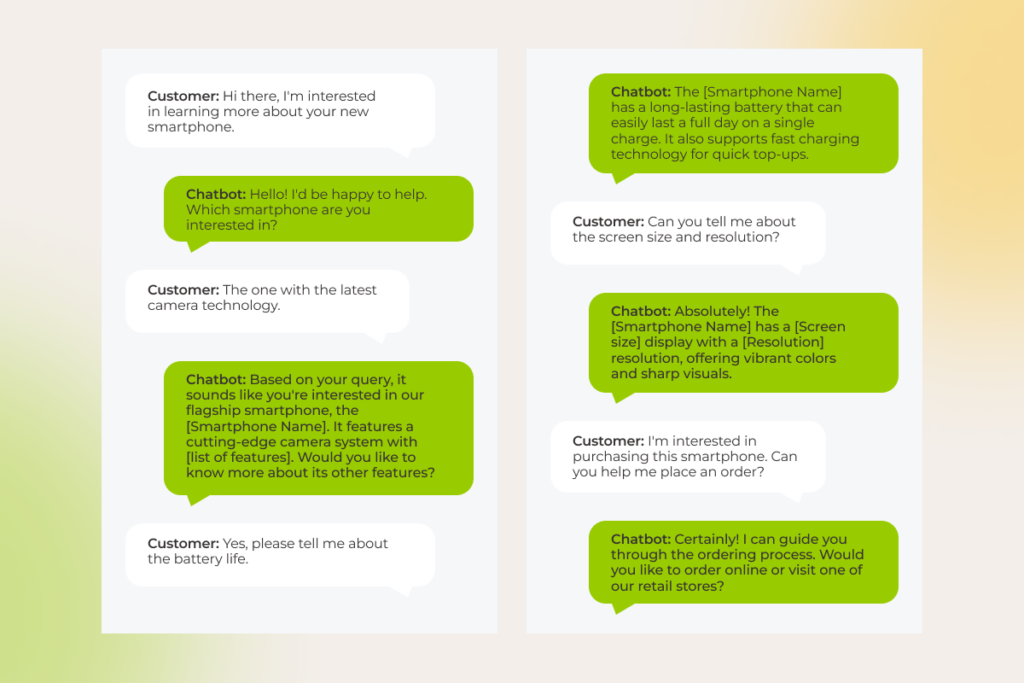
Example: A customer reaches out to a company via chatbot to get comprehensive information about one of their products. The chatbot quickly provides the necessary product specs, recommends alternatives if necessary, and references the customer to the ordering page.

The conversation shows a chatbot helping a customer with smartphone features, including camera tech, screen size, and order placement

As for virtual assistants, they operate in the actionable realm, assisting customers with tasks associated with:

  • Complex interactions — responding to in-depth textual-, audio- and video-based conversations with customers, recognizing the sentiment in customer input, predicting the conversation flow, and offering proactive guidance.
  • Task automation — completing tasks on behalf of the customer, such as placing orders, making appointments, or troubleshooting technical issues.
  • Integration with other systems — performing actions in the connected business systems and applications — either on the customer’s behalf or based on specific triggers. 

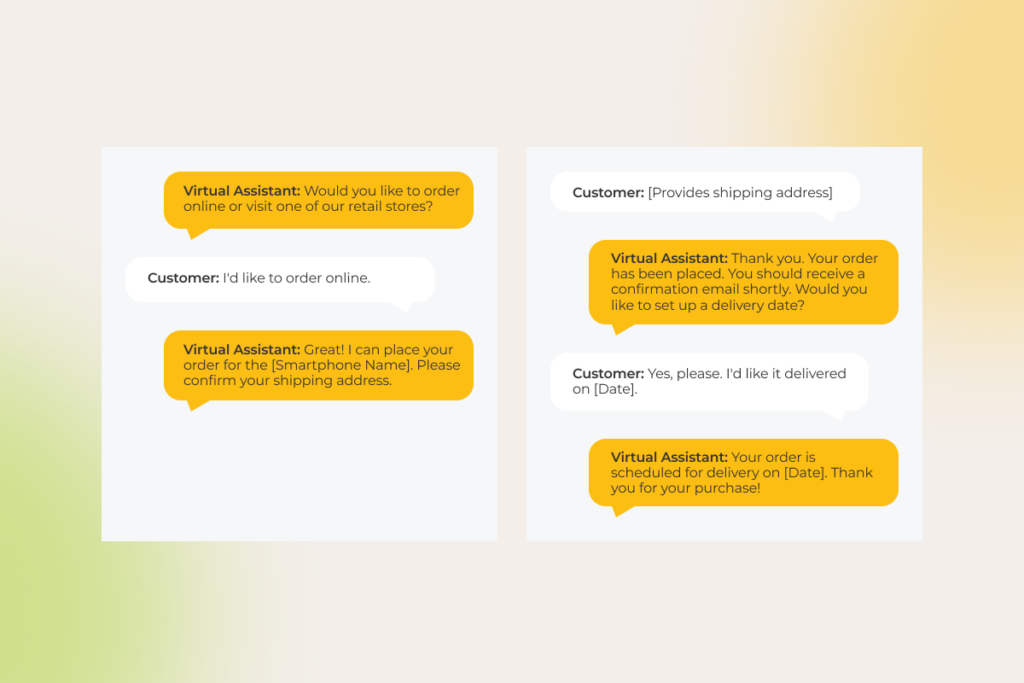
Example: A customer asks the company’s virtual assistant about one of their products. The assistant provides comprehensive product information, recommends alternatives if necessary, and proceeds with ordering the product on the customer’s behalf. 

The conversation shows a virtual assistant helping a customer place an online order, confirm the shipping address, and schedule delivery.

For one of our clients, an Italian transportation company looking to revolutionize their mobile taxi app, we combined natural language understanding with generative AI to build an intelligent virtual assistant. By training the bot on the client’s support manuals, we enabled it to tackle key issues like forgotten items, billing disputes, and ride cancellations — processing over 100 different ways users might phrase their requests. Just a month after launch, the assistant was handling 51% of customer support sessions without human intervention. As it continued to learn and adapt, that number skyrocketed to 78%, significantly cutting support costs while ensuring top-notch service quality.

Personalized recommendations in an ecommerce context

Over 71% of buyers want personalized experiences and companies are responding with personalized searches and product recommendations lined up at the bottom of the page. But what if a company could provide a dedicated shopping assistant that can tap into the customer’s mind? Customer satisfaction would go through the roof. That’s what both conversational AI chatbots and virtual assistants are made for.

By dispatching a conversational shopping assistant chatbot on their sales channels, companies can automate the following tasks: 

  • Product recommendations —  seamless integrations to backend systems enable AI chatbots to inform their recommendations with data on user preferences, search history, previous interactions, cart items, customer location, and purchase history.
  • Data collection — custom layers in conversational chatbots can analyze interactions with customers, gather insights on customer preferences, pain points, blockers, and feedback, and consolidate it in a dedicated system.
  • Action recommendation — after suggesting relevant items, conversational chatbots can list tasks or actions that are relevant to the user’s goals, such as placing an order.
  • Product comparisons — intelligent chatbots can make comparisons on the fly, resort to product databases, pricing information, and other systems to provide up-to-date product comparisons, and drone on specific characteristics.

An AI virtual assistant has no problem completing the same scope of tasks as AI chatbots do, but it also raises the bar, resembling a personal human assistant customers crave when shopping:

  • Actionable product recommendations — providing a hands-off shopping experience where an approved product recommendation is followed by automated order placement.

Personalized to a tee, scaled to the max

Build your AI agent

Marketing and sales automation

If there’s one match made in heaven for automation, it’s marketing and sales. However,  merging artificial intelligence with marketing and sales is a balancing act as teams have to keep it personalized, yet at scale. 

Equipped with unrivaled language understanding superpowers, conversational interfaces can subtly promote company products and services by integrating them into natural conversations with customers. In particular, AI chatbots can:

  • Clock in customer engagement stats and conversational history to inform granular marketing and sales activities.
  • Nurture potential leads by following with prompts about specific company’s offerings.
  • Qualify leads based on predetermined criteria and report this data to a connected system.
  • Support strategic upselling and cross-selling by recommending complementary products or services.

Virtual assistants take up where AI chatbots left off by directly contributing to marketing and sales goals. For example, virtual assistants can automate simple and repetitive tasks such as streamlining follow-ups based on lead quality, distributing campaigns across channels, adding new customers to a CRM, and more.

Example: A customer looking for additional product information is greeted by a virtual assistant on a company’s website. The assistant provides detailed product information, answers the customer’s questions, and offers to compare three products to help the customer make the right choice. The assistant then collects the customer’s email to send them comparison details along with personalized recommendations while also subscribing the customer to a newsletter. After a few days, the virtual assistant follows up with the customer.

Streamlining HR processes

Any company’s journey is peppered with challenges, many of which are rooted in managing human resources. Bringing conversational AI on board allows companies to ease the strain on HR workers and offload routine tasks to smart company based solutions.

Conversational AI chatbots can pick up the slack in a raft of HR areas, including:

  • Onboarding — providing information about company policies and functions, collecting necessary documents, and answering often-asked questions.
  • Employee support — providing round-the-clock assistance for inquiries related to benefits, time off requests, vacations, bank information, accounting data, coverage, and more.
  • Performance management — conducting surveys and helping employees track their milestones
  • Talent acquisition — vetting candidates and collecting basic information.

Following in the footsteps of chatbots, virtual assistants can not only provide and track HR data but also log the changes in the integrated HR and business systems. For example, along with informing employees about their PTO balance, virtual assistants can punch in PTO dates in a PTO tracking software and track the status of the PTO approval.

Tackling the data and task overload in banking and finance

No single industry provides a better foundation to demonstrate conversational AI success than the embattled banking and finance domain that’s grappling with thousands of transactions per month. 

Financial organizations bank on AI banking chatbots for capability building across more than 50 support functions, including:

  • Account management services — empowering customer self-service by handling processes such as verifying and authenticating customers, reviewing account balances, and updating account information.
  • Customer support — handling routine help tasks, such as reporting lost or stolen cards, disputing transactions, checking credit scores, and more.
  • Mortgage and lending — pre-qualifying applicants, checking loan application status, and collecting documents.
  • Trading and investment — providing real-time market analysis, directing customers to educational resources, and offering personalized investment advice based on risk tolerance and other data points.
The conversation shows a chatbot helping a customer learn about upgraded savings benefits and guiding them to sign up

Working backward from the customer, virtual assistants can undertake a similar range of tasks, but besides coming back with a static response, they can also initiate actions on the customer’s behalf: 

  • Account management services — resetting account passwords/PIN, transferring funds, making payments, paying bills, and blocking lost or stolen cards.
  • Customer support — processing refunds and chargebacks, troubleshooting technical issues, and scheduling appointments with financial advisors.
  • Mortgage and lending — making a payment, submitting loan applications, and coordinating the closing process.
  • Trading and investment — placing buy or sell orders, rebalancing and adjusting asset allocation, and acting on investment strategies.
The conversation shows a virtual assistant helping a customer set up autopay by gathering information about frequency and payment amount.

Go from overwhelmed to empowered with smart automation

Get in touch 

Intaking and appointment scheduling for healthcare offices

Understaffed and overstretched, healthcare organizations have to reimagine care delivery ways, with conversational AI being a central piece in redefining patient experiences and boosting operational efficiency.

Dispatched across key digital channels such as websites, online portals, SMS, and email, gen AI-enabled chatbots can provide 24/7 patient support and take on the following critical functions:

  • Patient and symptom intake — jotting down initial patient information, such as symptoms, medical history, and contact details.
  • Triage — sorting and prioritizing patients based on the urgency and severity of their condition.
  • Appointment scheduling — suggesting appointment times based on patient availability and provider schedules
  • Information provision — tailoring treatment options and personalized self-care advice based on specific patient needs and EHR data.
  • Hand-off to medical professionals — referring a patient to a medical professional, when a patient’s condition requires medical evaluation, along with the data logged during the interaction.

Built to take action, rather than reflecting on it, autonomous virtual assistants ease even more burdens healthcare professionals have on their shoulders:

  • Сollecting patient information and recording it in the EHR system.
  • Allocating healthcare resources, such as staff and equipment to meet the needs of the urgent patients. 
  • Sending appointment confirmations to the patient and updating the HCP’s schedule, rescheduling or canceling appointments, if needed.
  • Referring a patient to a medical professional and booking appointments in the EHR appointment scheduling module.

So, who’s talking? It depends on your needs

Both conversational AI chatbots and virtual assistants allow companies to slash cost, improve customer satisfaction, simulate a high-touch experience, and be there for the customers at all times. But while conversational AI chatbots talk your customers through a problem, virtual assistants take direct action to tackle the problem head-on. 

Whichever type of automation you choose, it’s equally important for both solutions to build on precise prompt engineering to enable more human-like conversations. As for data security, we recommend deploying the solution and the LLM behind it on a local server to prevent data sharing with third parties. With data security best practices such as data minimization, encryption, data privacy compliance and others at the core of your software, you can also make sure your AI solution is both effective and secure.

As an ISO 27001:2022 certified artificial intelligence development company, *instinctools specializes in developing secure multimodal AI chatbots and virtual agents rooted in your company’s data and designed to meet your specific needs.

Build conversational AI solutions of any complexity with our team

Reach out 

How to Solve the Most Pressing Challenges of Implementing CRM

Multiple challenges of CRM implementation spill over into project failure rates between 20% and 80%, varying by methodology, year, and focus area surveyed. But what does it mean in the daily grind of businesses? 

Fresh surveys hit us with gut-wrenching figures: 

  • 29% of sales, marketing, service, and IT leaders admit their CRM systems are tough to configure and use,
  • 41% struggles to get essential integrations working,
  • and worse, 31% of CRM admins report data quality issues eat up at least 20% of their annual revenue. 

Plus, there are other facets of a CRM failure like poor user adoption, security breaches, and negative ROI. 

Since 2000, we’ve navigated dozens of CRM projects, each accompanied by a myriad of obstacles and just as many lessons learned. In this article, we share the inside scoop on why CRM projects fail and how to prevent this from happening to you.

1. Choosing the right system to build on top of

With CRMs being around for over two decades, there’s almost no need to reinvent the wheel, developing from scratch. At least, if you’re not functioning within a highly regulated environment with very specific security and compliance requirements or don’t have unique (and we mean it, unique) workflows.

Examples of ready-made CRM software

But does that make choosing a system which would be a perfect fit for your business any easier? Hardly. With hundreds of existing tools and thousands of features, it’s easy to drown in them. An abundance of options requires more effort and knowledge to make the right choice… and increases the odds of making the wrong one. 

The most common mistake — actually, two of them — is that companies either pick the most expensive system, thinking it must be the best one, or they go super budget without considering long-term needs.

Based on our experience, other rookie blunders companies tend to make include:

  • Skipping a proper needs analysis
  • Chasing endless features, viewing the CRM as a be-all and end-all
  • Overlooking user experience, which tanks adoption rates
  • Ignoring scalability, leaving them with a system that won’t grow with the business

Fend off the desire to make a decision of moving to a particular CRM top-down, failing to explain to yourself and others why you do it. One of our clients nearly jumped from Zoho to HubSpot without even assessing flaws in the current setup. We showed them that often — as was the case here — a proper review can bring out the best in what’s already in place. We recommended cleaning up their data, optimizing configurations, and adding several custom modules. So, instead of a hasty switch, they opted for a well-planned fix, avoiding migration risks and saving both time and money.

As you’ve probably noticed, too many things can go wrong unless you start with a solid game plan — one that covers all your technical and business requirements. 

CriteriaKey considerations
ScalabilityThe system should be able to handle increased workloads, users, and data efficiently and without significant input as your business evolves. You don’t want to outgrow your CRM.
Convenience of the mobile versionIf you have a need for accessing your CRM anytime, anywhere, on any device, make sure its mobile version is user-friendly enough.
Integration capabilitiesCheck available APIs or consider the possibility of building custom ones to connect with your corporate systems and tools such as ERP, ecommerce platforms, reporting and analytics software, etc.  
Performance Performant CRM is lightweight, highly responsive, and offers high-speed, lag-free data and workload handling. Check whether the system meets your demands, be it from huge volumes of data, multiple user access, or complex customizations. 
CostDon’t just look at the price tag — what you really need is to get a clear picture of what you’re implementing and zero in on the features that actually matter. Find a pricing plan that fits you best, and make sure you’ll be able to adjust it as your needs evolve. Also, don’t forget to assess how the number of users will affect your CRM expenses  — some systems charge per user, while others offer tiered pricing plans with multiple users bundled.  
SecurityNot only should your CRM properly protect your customer data with the latest security features, such as encryption, multi-factor authentication, but also be compliant with general and industry-specific regulations (e.g., HIPAA, PCI DSS, CAN-SPAM Act, FCC, GIRA etc.)
ResourcesMake sure the vendor offers strong technical support and resources for troubleshooting and system onboarding.

One of our clients was overspending on their CRM until we pointed out: ‘Guys, you’re wasting money on features you’re not even using.’ Luckily, they ended up scaling back the subscription. Always double-check if your package matches your actual needs, otherwise, you might be losing extra thousands monthly.

Try demos for your CRM top picks and jump on discovery calls with sales teams… But if it feels too much, and you need extra hands for this lengthy, intricate process, you can always turn to a reliable CRM consultant. Backed by their expertise, you’ll avoid being misled by overblown promises or flashy brands. Besides, you’ll save many hours and resources on research, all while signing up for a solution that is easily adaptable to your unique business needs.

2. Crafting an implementation plan

You want your CRM to boost profits, not drain them. However, without careful planning, things like unexpected issues, tight deadlines, and poor resource management can quickly spiral out of control, driving up costs. The old saying, “If you fail to plan, you plan to fail,” couldn’t be more true. That’s why you can’t just wing it with CRM projects — they require a well-honed implementation strategy that leaves no stone unturned. 

Yet, industry reports reveal that more than a third of companies struggle to create one. So, where do these companies go wrong?

  • Failing to map out clear objectives and milestones. With no clear understanding of what you want to achieve, deadlines get pushed back, and no one knows who should be involved to meet the goal.
  • Inadequate project scope assessment. If you don’t define the scope from the start, it’s obvious you won’t be able to set realistic deadlines, and there will be endless changes. Gauge how easy/difficult the implementation process will be and how much it might disrupt daily business operations during the system setup. 
  • Overloading the initial rollout with too many CRM features. There’s no point in waiting forever. It’s important to focus on what’s necessary for the launch, so you can start using the system and it’ll begin delivering value and solving business problems. Less critical features can be added later.
  • Underestimating the time needed for testing and fine-tuning. Testing is needed not so much for system configurations (like contact cards and such) but, first of all, to make sure all the automations, for example, workflows or field updates, are working properly. Migration testing is also something not to be neglected if you want the transition from one system to another to go hitch-free. These things can’t be done on the fly — they need to be thoroughly planned.

3. Engaging the right people

You’ve chosen the system, drawn up the plan — now who’s going to execute it? One of the biggest CRM challenges is getting the right people involved. You may assign 5-10-however many people to the project, but unless their roles align with project goals, you won’t get far.

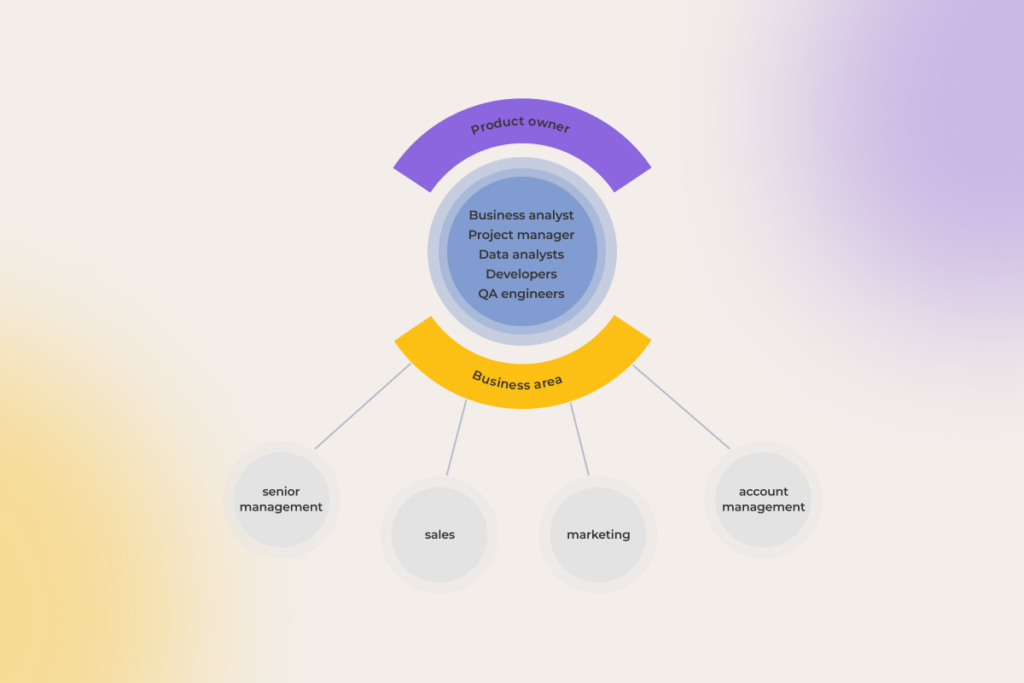
CRM implementation team members

Don’t let the attempt to cut costs, lack of available talent, or a simple oversight imperil your CRM project success. Engage relevant team members, such as:

  • Product owner sees the big picture and balances the needs of different teams — marketing, sales, and beyond. Without this, you’ll have every department pushing their own agenda, and no one pulling it all together. 

There has to be someone with a bird’s-eye view, someone who can sync all these processes and guide how best to implement things so that it works well for everyone. For example, every role uses a contact card in a CRM, but you need to avoid having a million fields while still making sure everyone has enough information. Some of our clients learned this the hard way when each team focused on their own processes, and they had no one to synthesize the overall strategy.

  • Business analyst analyzes business needs and requirements, translates them into functional specifications to guide the implementation of a CRM, and supports data preparation and migration.
  • Project manager oversees the project from initiation to completion, coordinates resources, manages timelines, and ensures that the project aligns with business goals.
  • Data analysts are responsible for auditing, cleaning, and processing datasets to ensure the CRM captures only the right data and in a correct manner. 
  • Developers (backend and frontend) support the CRM tool’s architecture and user interface, facilitate data migration, API configuration, integration with other systems, etc.
  • QA engineers to assess if the CRM system is efficiently managing customer data and aligning with business goals
  • Representatives from sales, marketing, and account management units provide insights and feedback from their respective departments to ensure the CRM meets cross-functional needs and supports overall business objectives.
  • Senior management offers strategic direction for the project.

4. Getting data in order and migrating it without loss

Some still think that data migration is just importing all data from point A (a current CRM or spreadsheets) to point B (a new tool) and that’s it. Except… no.

Reality hits when you realize just how much stuff you’ve collected. Years of scattered customer contacts, siloed notes, and, let’s be real, terabytes of trash. Add to this inconsistent fields, duplicates, mismatched formats, and the infamous rogue Excel sheet created by that one employee, which somehow became the “sacred source of truth” for the entire company. Prior to dumping all this mess into the new system, it needs to be reviewed, cleaned, and reorganized.

Here’s what to avoid:

  • rushing the migration process without thorough validation
  • migrating data ‘as is’ — both critical and useless — all thrown together
  • downplaying the differences in data structure between the old system and the new one

One of the examples of CRM implementation challenges that few people consider is the phase when you’re moving from one CRM to another. During this period, you often have to juggle both systems in parallel, which can result in a lot of duplicate data.

To ensure nothing falls through the cracks, prioritize a flexible data model from the start. Before going all-in, run a trial on a smaller data sample, catching any potential complications early on. Once your new CRM is production-ready, move data in functional blocks — marketing data, sales data, etc. — to minimize disruptions. A critical step here is ensuring a one-way data flow from the old system to the new one, preventing inconsistencies and safeguarding data integrity every step of the way.

5. Integration with other systems

A CRM system’s ability to connect with your other business applications is crucial. 

Marketing automation tools, analytics systems, ERPs, team collaboration software, ticketing tools, ecommerce platforms… Each comes with its own data formats, technologies, and other integration quirks.

The common pitfalls at this point typically boil down to: 

  • Failing to check API compatibility with existing systems 

Most CRMs come with standard APIs that make it easy to integrate with world-known business systems. But if you’re trying to integrate with something low-key, you’ll want to know ahead of time if it’s even possible or if you have to develop custom APIs.

At the same time, don’t overrate the challenges of custom integration. While lacking a standard API can be a hurdle, it’s rarely a reason to abandon a project. For one, the desired API could be released sooner than expected. And secondly, there are plenty of modern tools that enable to quickly build reliable custom synchronizations, making integration feasible even without a pre-existing API.

  • Overlooking the importance of real-time synchronization

Trying to pull the deal into the CRM and getting stuck waiting a couple of hours for it to update across other systems is super frustrating because it interrupts your flow, and you have to juggle everything in your head. In most cases, real-time sync is really important. Take a website — if data from contact forms takes forever to sync with the CRM, you’re delaying your response to the customer, which results in lost opportunities. It’s less crucial for things like reports, though. You just need to agree on how often the data updates. 

6. Striking the balance in customization

As ironic as it may sound, the line between a CRM that feels like it’s built for you and a bloated system that’s impossible to manage is often blurred.  

CRM turns into a counterproductive tool when:

  • Over-customized: excessive customizations, overengineered workflows slow things down, are costly to maintain, and simply frustrate CRM users. Plus, if we consider CRM software version updates, that’s where your patchwork features that can crash in the new release… and they probably will.
  • Under-customized: generic dashboards, undercooked features, restrictions here and there. If the system can’t be personalized enough to fit your specific needs, you might end up feeling like your investment just isn’t worth it.
  • And one more thing: customizing too early before understanding the system’s capabilities prolongs the implementation timeline and strains the budget. 

Narrow down the scenarios crucial for you to start and identify corresponding ready-to-use features or pre-built workflows. Sure, no system is perfect out-of-the-box, and customization is still necessary. But customize strategically, not excessively. Don’t turn your CRM into a Swiss army knife when all you need is a strong tool to manage customer relationships.

7. Establishing security and data protection

Sensitive customer data held in CRM systems becomes a prime target for cyberattacks and privacy breaches. To ward off data breaches and the associated CRM problems of fines and reputational damage, don’t do this:

  • skimping on data security measures
  • giving admin rights negligently and having poor access control
  • using weak authentication methods
  • neglecting encryption for sensitive data
  • missing out on regulatory requirements

Most modern CRM systems offer functionality to maintain compliance with major data security regulations and standards, such as GDPR, HIPAA, ISO 27001, etc. However, full adherence to these regulations requires more than just using a CRM — it often calls for specific configurations, processes, and governance by the company using the software. 

Bring a certified implementation partner on board

Reach out

8. Change management and organizational enablement

No matter how great your CRM is, it’ll inevitably flop if your team doesn’t see the value in it.  

Here’s a list of main reasons why some insist their spreadsheets are “just fine,” while others fear that one wrong click will somehow trigger a major crisis:

  • failing to communicate the value of the new CRM to users
  • insufficient training or implementing the CRM without training at all
  • not involving users in the project (not taking into account their needs and opinions)
CRM user adoption: the biggest challenge

There’s only one way to turn skeptics into advocates, which is to show — not tell — users how the new system will improve their day-to-day business operations. 

When rolling out training for a new CRM system, avoid holding sessions for large groups right from the start. Instead, break the training into smaller, manageable chunks, setting aside enough time for Q&A. As you run these smaller sessions, you’ll create a question bank with queries from participants that may be useful for other teams. This question bank becomes a valuable resource, helping to address various scenarios in future training programs.

It’s crucial to not only offer live training but also provide detailed written documentation, so users can troubleshoot and learn independently. Additionally, share useful links and contacts for further assistance in case they can’t find answers in the training materials or documentation. This multi-faceted approach ensures users have continuous support and access to the right resources when they need them.

9. Post-implementation maintenance and update

With your CRM going live, the work doesn’t stop. Assuming the system is ‘set and forget’ is a dead end, reflected in:

  • ignoring user feedback post-launch
  • failing to stay current with CRM updates
  • lacking a designated manager responsible for handling all internal and external updates

Post-implementation holds as much importance as proper implementation. To keep your CRM up and running, ensure there’s a specialist or even a team (depending on your project complexity) that oversees the following:

  • diagnosing the system and spotting the issues 
  • fixing urgent CRM issues, preventing major malfunctions, and provisioning workarounds
  • gathering user feedback to increase user satisfaction rate
  • tracking all the product opportunities, system updates, and new releases
  • running data security and performance audits

10. Finding the right implementation partner with a proven track-record

Your CRM pipe dreams will turn into dismal reality if implementation is a mess.

We’ve seen it happen too many times… tools get discarded and folded back because of a half-baked CRM strategy and hasty onboarding within the organization. Here is a huge red flag: when a software development vendor promises to transition you to a new system within 1-2 weeks, waving around incomplete, bulky documents and barely diving into the specifics of your case – it’s better to run away.

While choosing a dedicated team for CRM implementation, don’t do the following:

  • making a decision based on price only
  • not verifying the partner’s experience with the CRM you chose
  • not asking references or case studies
  • falling for unrealistic promises
  • ignoring cultural or communication barriers

Get super granular with your “top picks” list to see what they’ve got under the hood. Be it Zoho, HubSpot, Odoo, or other CRM platform, look for real case studies and feedback from actual clients.

Explore how to choose a partner who truly hears your needs and delivers above expectations >>

A good CRM helps you focus on what really matters: customer satisfaction, not on how a single misclick could throw everything off track

As you can tell, when it comes down to CRM implementations, things are more complicated than they seem on the surface — beyond choosing that one magic tool that’ll solve everything in a snap, there’s a whole lot more to it. But now you can spot all possible CRM challenges a mile away and know exactly how to tackle them. 

Address any questions on CRM implementation challenges to our experts

Schedule a free call

Large Action Models Walked So AI Agents Could Run? 

Before AI agents became mainstream, large action models framed the idea of AI that acts –  an action AI model capable of moving from user intent to real-world execution. Conceptually, LAM in AI represents a shift from language generation to autonomous execution, bridging the gap between understanding and action. Popularized by the tech company Rabbit, the term large action model (LAM) was never widely adopted across the broader AI community and carried a certain marketing flavor from the start. It emerged before frontier LLMs had multimodal processing, tool use, intent decoding, or task decomposition capabilities. 

Still, even as the label itself faded from general AI discourse, the underlying concept became foundational to today’s agentic AI systems. Instinctools’ AI experts revisit this idea to assess which LAM capabilities have proven durable and practical in modern AI agents.

What is a large action model?

A large action model is an AI system capable of understanding natural language intent and autonomously translating it into real-world actions across digital or physical environments. The primary focus of a LAM (large action model) is to autonomously execute actions – completing tasks on behalf of the user. Building on the natural language understanding capabilities of Large Language Models (LLMs), interact with software interfaces, trigger workflows, make context-aware decisions, and adapt based on feedback and observed behavior. Unlike robotic process automation (RPA), which follows rigid, pre-programmed scripts, LAMs adapt dynamically to interface changes and unexpected scenarios.

LAM may not be a fashionable term anymore, and current vendor consensus instead converges on a different framing – these systems are usually LLM-based agents, – but Rabbit, the one that put it on the map, never really left it behind. DLAM is their latest pass at it: a plug-and-play controller that carries out tasks on behalf of a user across their computer’s operating system, browser, and applications. They’ve also added voice integration with OpenClaw, a prominent brand in personal agentic AI assistance.

Don’t miss out on the agentic AI, transform your processes

Schedule a consultation

Large action model architecture: key capabilities to move from words into action

Similar to an AI robotics system, LAMs go by the hierarchical approach to action representation and execution. To perform tasks, large action models decompose complex actions into smaller, more manageable sub-actions. The latter can then be reused in different contexts, supercharging the flexibility and planning capability of LAMs.

Processing multimodal input

Large action models are activated by user input, which serves as the starting point for their operations. Made possible in large part by the multimodal capacity of generative AI and foundation models, LAMs can process multimodal data like text, voice, video, audio, code, and more simultaneously.

Decoding human intention

Once user input enters the LAM’s bloodstream, the system infers the meaning behind it, leveraging neuro-symbolic AI – a hybrid approach combining symbolic reasoning with neural networks. This fusion enables LAMs to handle both structured logic and ambiguous human intent. Large action models analyze the whole spectrum of cues, such as language, past behavior, external context, and other signals to determine the underlying human intentions behind the input.

Interpreting user interface

To execute complex tasks and effectively interact with interfaces, large action models need to analyze what they see on screen. Thanks to their GUI automation capability, LAMs get a thorough understanding of buttons, fields, and images in application interfaces to accurately identify the purpose and functionality of UI elements within a given application. After that, the system can seamlessly interact with the appropriate element based on what it has learned.

Decomposing the task and performing action sequencing

Once assigned to action oriented tasks, a large action model first breaks them down into steps, creating a hierarchical structure. Symbolic reasoning allows the system to model actions and determine an optimal sequence of actions that will get the model from point A to point B. 

Based on the analysis of the input and the identified tasks, the LAM generates precise prompts, augmented by data on prior experiences and codified domain knowledge, that guide the subsequent actions and allow the system to draw upon.

Acting

On its final leg, a LAM can execute actions either independently or by connecting to external systems and tools such as web automation frameworks. API orchestration is central to LAM execution. Large action models can use APIs to communicate with third-party systems, for example, they can access a weather API to analyze the current weather conditions. But most importantly, some LAMs can also send commands to devices, while others can interact with web applications by simulating user actions, such as clicking buttons, filling out forms, and navigating between pages.

Analyzing the results and learning from feedback

The best large action models are lifelong learners, always evolving and responding to feedback. Thanks to reinforcement learning, LAMs can create an iterative learning loop that improves by simulating actions, evaluating their outcomes, and adjusting future behavior accordingly.

Also, large action models allow for human oversight that helps drift the model in the right direction and improve their performance over time by injecting feedback into LAMs.

The inner mechanics of LAMs take after those of AI agent systems. However, in agent systems, there is more of a hierarchical structure, where subagents have specific roles, and a manager subagent assigns and coordinates tasks, whereas LAMs typically handle decomposition and planning within a more unified framework.

Large action model architecture
AI agent system scheme

Need proven AI expertise for your upcoming project?

Let’s talk

LAM use cases: where the value is already tangible

The use of AI agents as the primary driver behind enterprise automation overall is broadening within organizations across industries. And although many still struggle to scale agentic automation initiatives enterprise-wide, the number of use cases is staggering.

Healthcare

The sheer volume of admin tasks, patients’ and admissions make the healthcare industry clamor for automation – a demand that previous-generation AI was able to partially satisfy. 

Large action models can further mend some of the mounting problems faced by healthcare providers, in accordance with applicable regulations, care models, reimbursement approaches, and specific organizational blueprints.

Task execution in EHR processes, documentation, and scheduling is one of those areas where LAM systems can take more clerical tasks off the providers’ shoulders. LAMs can handle dynamic scheduling adjustments based on changing circumstances, factoring in patient preferences, doctor availability, and facility resources.

AI agents can also check on elderly patients outside healthcare facilities, assisting them with minor health issues and booking appointments with healthcare professionals, if necessary.

Besides, large action models can support clinical decisions by providing personalized treatment plans based on the interplay of different factors, including specific treatment guidelines, patient data, and patient preferences. Unlike traditional conversational AI, LAM-style systems can reduce the need for tightly predefined conversational integrations by interacting more flexibly with software interfaces and toolchains, though they still require governed access to systems like EHRs via APIs or compliant connectors.

Finance

40% of investors regret their investment decisions. A highly personalized LAM-based support system can prevent those costly investment mistakes by providing tailored investment recommendations based on an investor’s financial situation, risk tolerances, goals, and market data. It can then bring these recommendations into action, i.e. by making trades or transferring funds on behalf of the investor.

For banks and financial institutions, an agentic system bodes well for enhancing customer service. When human agent resources are stretched too thin, LAMs can engage in complex voice interactions to provide immediate support and offer recommendations based on user preferences and prior interactions.

One of our clients, a Czech bank, experienced first-hand the disruptive potential of AI agents. Our custom AI chatbot that has an LLM and actionable AI at the core, supplemented with pattern identification, speech recognition, and advanced deep learning algorithms, delivered a 60% increase in First Contact Resolution and took 98% of customer queries off human agents’ hands.

Read the full case study here.

Loan underwriting is another process that can benefit from the implementation of LAM solutions. To create a credit memo, relationship managers and credit analysts have to sift through 15+ sources on the borrower, loan type, and other factors, and then, after a few more sweats and back-and-forths, write the document.

Credit-risk memos generation with and without gen AI agents

Large action models can relieve managers and analysts of extensive data analysis, enhancing productivity and reducing the time spent on credit-risk memo generation. Leveraging agentic AI, a human user can outline the overall workflow, including specific rules, standards, and conditions, through natural language. The ecosystem of AI agents takes it from there by handling the communication with the borrower, gathering documents, calculating financial ratios, and executing the rest of the leg work.

Supply chain management

The current challenges in supply chain management create a breeding ground for innovation, a task LAMs are up to. As SCM systems usually comprise a whole variety of software, including ERP, WMS, TMS, IoT applications, and others, automation solutions require a whole lot of integrations to access and analyze consolidated real-time data. 

Conversely, multi-agent systems have no problem integrating with industrial control systems and IoT devices. They can execute actions directly, such as collecting data from sensors or triggering maintenance alerts. Here are potential areas for LAM application in supply chains:

  • Predictive maintenance: large action models can accumulate data from sensors and other resources to predict equipment failures and send maintenance alerts.
  • Quality control: using the combination of computer vision, sensor data, machine learning, and reference data, LAMs can flag quality issues and perform immediate corrective actions.
  • Inventory optimization: not only can LAM systems take over complex data analysis tasks, such as recognizing patterns and anomalies in demand data, but they can autonomously respond to changes in demand or supply by adjusting inventory levels, placing orders, and managing transportation. 
  • Industrial robotics: LAMs can transform human robot interaction, enabling automated systems to understand human intentions and work safely alongside humans.

Along with these real world scenarios, agentic capabilities can improve virtually all logistics processes, from route optimization to transportation resource management and vehicle safety systems. For example, agentic AI systems can dynamically adjust routes based on real-time traffic conditions and TMS data. They can then identify the most optimal mode of transportation according to the analyzed data and assign routes to each vehicle based on factors such as vehicle capacity, location, and driver availability.

Literally any enterprise

There is not a single incumbent that wouldn’t benefit from strategic planning capabilities brought into the fold by LAMs. Large action models delve deeper than any other analytics solution, closing the gap between enhanced decision-making and subsequent action.

Let’s have a look at feasible large action model examples that can flip the script in enterprises:

  • Customer experience: LAM-enabled chatbots can automate many routine customer service tasks, providing targeted support in real time. By identifying possible equipment failures or customer concerns before they happen, LAMs can automatically initiate tasks like notifying the maintenance crew or placing orders for replacement parts.
  • Fraud detection: agentic AI systems can detect fraudulent activity in large datasets of transaction data and automatically implement safeguarding measures in case of emergency.
  • Process automation: LAMs can do the heavy lifting of time-consuming tasks, including automated data entry, payment processing, financial analysis, contract management, and document review.
  • IT support: action-oriented systems can act as tech co-pilots, solving troubleshooting technical issues and providing necessary user support. 
  • Compliance management: large action models can streamline routine compliance tasks, such as generating reports, conducting audits, and even updating records.

Take a page from our book: three success stories with an agentic AI linchpin

Give it a few years, and multi-agent systems will be standard enterprise AI infrastructure. And if there are still companies cautiously eyeing the agent-led automation trend, the only ones with a real competitive moat will be those who are not sitting back, but actively exploring how to raise the bar on operational efficiency using the technologies already at hand. Just see how it played out for our recent clients.

  • 12× faster partner onboarding in insurance

For one of our clients, a global insurance aggregator, onboarding new partners across regions was slow, fragmented, and heavily dependent on manual engineering effort. We built a UI-first, multi-agent AI system that ingests partner documentation, interprets heterogeneous API formats, and automatically generates working integration adapters with tests and deployment-ready artifacts. The agentic pipeline, supported by structured validation, model governance, and human-in-the-loop checkpoints, cut partner onboarding from 3-6 months to 2 weeks, while facilitating a 10× decrease in operational costs.

  • Agentic AI sales representative slashing CPL by 15%

An Australia-based consulting firm wanted to automate early-stage sales without losing conversion quality. We developed an autonomous AI virtual worker that engages prospects, qualifies leads, maintains context across conversations, and advances opportunities inside existing CRM and communication tools. The system handles outreach, follow-ups, and basic deal progression with minimal human input, while escalating only high-value cases to sales teams. After deployment, the solutionincreased lead processing capacity by 20%,improved upsell and cross-sell rates by 19%, and reduced cost per lead by 15%.

  • Delegating customer support ticket triage to multi-agent system

Another client, a US online store, serving over 3 million yearly customers faced critical bottlenecks with 5,000-10,000 daily support requests, leading to 12-minute wait times and low CSAT. By implementing a multi-agent system with six specialized microservices, handling tasks from PII removal to policy compliance, we helped the retailer reduce ticket processing time from 6-12 minutes to just 1-3 minutes. This allowed each support specialist to handle 200-250 tickets daily (up from 50-70), achieving 75% faster first responses and a15% CSAT uplift without increasing headcount.

Giving AI the power to act should only be done with a control layer

LAMs are not immune to errors and biases that can creep into the systems as a result of insufficient prompting, inaccurate data quality, or unforeseen circumstances they were not trained to handle. So before entitling agentic AI to automate workflows, make sure you have a solid AI agent orchestration system in place. One with all the essential safeguards, including well-defined unified data standards, access to complete, accurate, and up-to-date data, and data security guardrails such as data minimization, anonymization, and encryption.

Adversarial testing that simulates real-world attacks on a system and identifies its vulnerabilities, can also shield your company from harmful fallout and make sure the output of actionable AI is free from sensitive data, biases, and inaccuracies.

A trusted engineering partner ensures those best practices are fully implemented, so agents operate safely within clear, well-defined boundaries.

Ready to upscale your business with controllable, custom AI agents?

Contact our AI team

FAQ

What is the primary focus of a LAM?

The primary focus of a large action model (LAM) is autonomous action execution — translating user intent into real-world or software-based tasks. Instead of only generating text, it understands context, plans steps, and performs actions across interfaces and applications to complete goals with minimal human intervention.

How does a large action model work?

It begins with input processing, followed by intent inference, where the model maps ambiguous user requests into structured goals. Next, the system performs environment grounding, interpreting UI states, available controls, and API surfaces. Based on this, it generates a task decomposition plan, splitting the objective into ordered, executable sub-steps. Each step is translated into concrete actions such as API calls, UI interactions, or system commands. During execution, the model operates in an iterative feedback loop: it observes system responses, validates intermediate outcomes against the target state, and dynamically replans if discrepancies occur. This continuous perception-action cycle enables LAMs to maintain goal alignment while operating across multi-step workflows.

LAM vs LLM – what’s the difference?

A Large Language Model (LLM) is designed to generate and understand language. It predicts the next token based on context, producing outputs like text, summaries, code, or answers. Its role is primarily descriptive and generative, it responds to prompts but does not inherently act on external systems. A Large Action Model (LAM) extends this idea into execution.

What is the architecture of a large action model?

A large action model architecture combines perception, reasoning, planning, action, and feedback layers into a continuous loop.

What are real-world use cases for large action models?

Real-world use cases for large action models include automating healthcare tasks like scheduling and EHR processes, providing personalized financial investment recommendations, optimizing supply chain management, and enhancing enterprise functions like customer service and fraud detection.

How is a LAM different from an AI agent?

A LAM is generally viewed as an action-oriented model that can interact with interfaces, tools, APIs, or software to perform actions, while an AI agent is the broader autonomous system that reasons, plans, maintains memory, adapts to feedback, and decides which actions to take to achieve a goal.

What is the focus of LAM in AI?

The focus of LAM in AI is autonomous, goal-directed action execution. Triggered by the user’s natural language commands, LAM models navigate interfaces, orchestrate APIs, and complete multi-step tasks with minimal supervision.

Ecommerce UX Best Practices in 2026: Design Your Way to the Customer’s Heart (And Wallet)

In ecommerce, where revenues shoot through the roof every year, it’s surprising how often user experience (UX) takes a backseat. Maze-like navigation, off-target layouts, and hour-long checkout processes shoo customers away, causing millions of ecommerce businesses to lose millions in revenue.

Growth isn’t just about pouring money into ads and chasing new traffic. To increase your store’s revenue with customers already in your corner, prioritize delivering exceptional user experiences built on the back of ecommerce UX best practices. But contrary to popular opinion, conversion-worthy ecommerce UX goes beyond visual frills.

40+ ecommerce projects later, *instinctools’ team has curated an extensive knowledge base of ecommerce UX dos and don’ts — and we’re laying it all out in this no-fluff guide. 

The value of smooth user experience and the price tag of poor UX in ecommerce

Your marketing team has done a titanic job getting potential customers to your site, all set to buy. But just seconds later, they give up halfway because things like complex navigation or sloth-like page loading drive them up the wall.

A survey shows that 78% of shoppers in the US and UK tend to ditch their carts if the process is too complicated or takes too long. And it’s not just a lost sale — it’s a lost customer. Friction-filled interactions lead to a huge 88% of users abandoning a site for good.

On the flip side, a smooth, seamless experience can work wonders. Every CX expert will tell you that every $1 spent on UX brings $100 in return, equating to 9,900% ROI. Even a single tweak to your UX can deliver up to a 400% jump in conversions.

Successful ecommerce sites know firsthand the power of user-friendly storefronts. Jeff Bezos invested 100X more into customer experience than ads during the early days of Amazon. Today, this ecommerce giant is known for exemplary conversion rates of around 10%.

Ecommerce UX statistics 2025

UX best practices for ecommerce: dos and don’ts across the website customer journey

It’s no longer about buying a product, ecommerce shoppers are after the end-to-end experience of being a customer — from the initial interaction with a brand to the purchasing process and beyond. For an ecommerce business, it means an enjoyable shopping experience through and through, at every touch point of your customers’ journey.

It’s no secret that ecommerce interaction with your customer begins long before they land on your website. First impressions happen through Google Product feeds, Bing Shopping, a social media post, and even your email newsletters. So, if you care about capturing attention, you’ve got to build sales funnels that start off-site, not on your homepage. 

While we’ll dive into off-site UX best practices soon, today’s focus is all about crafting an exceptional on-site user experience.

1. First interaction with your website

They say that the UX of the homepage of an online store is critical for your business. But what about a shopping card? Or a product page? In reality, users can land anywhere on your site, that’s why prioritizing the UX of every page is crucial to sweep both first-time and regular users off their feet.

1.1 Make sure your website is optimized for mobile devices 

By 2027, mobile commerce is slated to surpass 49% of retail ecommerce sales in the US. Mobile friendly commerce sites with responsive design are no longer a “maybe later” option — unless you want to see your customers spending their dollars elsewhere. 

When it comes to mobile sites, mobile ecommerce UX best practices include:

  • Adapting your website to different screen sizes and orientations
  • Optimizing touch targets by adding finger-friendly, tappable elements 
  • Testing your website on real smartphones and tablets to validate its responsiveness
  • Prioritizing quick loading by optimizing image sizes and leveraging browser caching
  • Focusing on website content that is easily digestible on mobile devices

Here are the UX elements that can hurt mobile optimization:

  • Horizontal scrolling — some elements might be pushed out of the viewport.
  • Cluttered layouts — these can be hard to navigate on mobile devices.
  • Complex visual elements and heavy files — they can overload older and less powerful models. 
  • Formidable forms — typing is more challenging and error-prone on mobile.
example of a contact form not optimized for mobile devices
Contact form is not visible on mobile

INSTINCTOOLS’ CASE IN POINT: When modernizing an ecommerce solution for one of our long-term clients — a contact lens seller — our UI/UX team spotted an unusual trend: on some product cards, many users were buying lenses only for one eye. Turned out, only the right tab was visible on mobile, which hindered navigation for mobile users and hurt sales. Once we fixed this issue, our client saw an upward trend in sales.

To make sure your website looks flawless on mobile, you can test it with Google’s free Mobile-Friendly Test. If there are any mobile UX flubs cropping up on smartphones, Google’s tool will show you what they are.

1.2 Get your online store navigation right

As many as 76% of ecommerce stores have mediocre-to-poor performance when it comes to category and homepage navigation. To buck this trend, make your online store navigation intuitive, simple, and customary, meaning it taps into familiar patterns and cues.

User-friendly navigation heuristics include:

  • Adopting clear, concise, and consistent labeling across all pages
  • Dividing categories and subcategories into manageable chunks
  • Making sure that categories are distinct and non-redundant to prevent confusion
  • Creating meaningful parent categories that accurately represent their subcategories
  • Implementing tiered navigation to improve findability for users and reduce the cognitive load  
  • Adding breadcrumbs to help users quickly understand where they have landed
  • Making sure your website has an intuitive search functionality (auto-suggestions, voice search)
a navigation menu requiring increased cognitive load
Tiered navigation menu where sub-categories are only exposed upon click
overly complex navigation menu
Mega menu

Conversely, overly complex navigation with hidden elements or inconsistent labeling can end the user journey without starting it.

1.3 Make your ecommerce site accessible to all users

According to the EU Accessibility Act (EAA), any ecommerce business (except for those with fewer than 10 employees and revenue below €2 million) with E.U. customers must ensure a fully inclusive experience starting with June 28, 2025. While compliance requirements vary by region, an ecommerce website must at minimum implement Website Content Accessibility Guidelines (WCAG) 2.1 AA to break down digital barriers.

According to our experience, most ecommerce websites have one or a few of the following accessibility issues:

  • Incompatibility with assistive technologies
  • Low-contrast text or poor color contrast
  • Difficult/poor keyword navigation (navigation is possible only with a mouse)
  • Lack of link styling (links blend into the surrounding text or the background)
  • Lack of visual or auditory signals (headings, labels, captions, and more)
  • Small touch targets
Accessibility issues of top-grossing sites, by type

Along with eliminating the issues we mentioned above, you should also adopt the following ecommerce UX design best practices to promote a better, more accessible experience for your consumers:

  • Allow users to resize any text up to 200% without assistive technology
  • Use simple, consistent terminology throughout the entire customer journey (your UX writer should collaborate with a UX designer to create consistent messaging)
  • Voice-enable your user interface to provide alternative input and search options
  • Keep the number of choices on each page to a minimum
  • Add extensive product information and make it available to AT users
  • Eliminate redundant hyperlinks and add descriptive link text 
iHerb accessibility mode
iHerb allows users increase font size and use text to speech with its Accessibility mode on

1.4 Keep your ecommerce website lightning-fast

No matter how rad your ecommerce website design is, if your website takes forever to load, your customers will leave faster than a cheetah can sprint. In fact, if an ecommerce site is making $100,000 per day, a 1 second (!!) delay in website speed can result in $2.5 million in lost sales annually.

Keep in mind that a UX designer alone cannot ensure fast loading. However, they can at least prioritize quick loading times and ease of navigation in favor of static images over flashy elements like video backgrounds or interactive elements, which can hinder your website performance.

When an online shopper gets down to the brass tacks, a well-designed product search function will help them find the necessary items in a few clicks. There’s a lot that goes into designing an intuitive and efficient product search journey, that’s why we’ll keep it to the essentials.

2.1 Stick to easy search functionality

There are two types of customers that can pay a visit to your ecommerce store. The first cohort is in the market for something specific, while the other group includes those that came to browse without any direction. Make sure your ecommerce UX covers both groups of customers, helping them make buying choices through straightforward, on-the-nose search features.

Here’s what design elements your customers can benefit from on the quest for the perfect product:

  • Including a pop-up search screen to support one-screen search (one screen = one action)
  • Enabling search by image, barcode, and voice
  • Supporting searches that include one or more product attributes
  • Enabling abbreviation, symbol, and slang searches
  • Ensuring synonym and typo tolerance
  • Supporting problem-oriented keyword search
  • Placing trending queries, bestsellers, and promotions in a search bar 
Shein's search bar with search suggestions for trending items
SHEIN’s search bar provides suggestions for trending items

You can also add an AI product finder that understands natural language queries to take the hassle out of the product search and make it easier for customers shopping online to stumble upon an ideal product.

Beyond the search bar, other product search best practices include:

  • Prioritizing exact matches at the top of search results
  • Displaying the total number of items in the product list
  • Replacing endless scrolling and pagination with “Load More” links
  • Including user rating averages and the number of ratings
  • Adding well-designed, visually appealing, and informative product cards that have just the right amount of information to nudge users to click on them

2.2 Ensure logical product categorization 

When it comes to product categories, you have to keep the right balance between overcategorization and the lack of granularity. To serve a top-notch ecommerce user experience, ecommerce sites should enable users to easily drill down on the products, without going to great lengths.

Here’s what product categorization best practices you can implement to support a hassle-free online shopping experience:

  • Implementing faceted search to organize large inventories
  • Adding visual cues (icons, images, or color-coding) to make filters and facets more intuitive for customers
  • Adopting a consistent visual hierarchy structure with clear levels, including categories, subcategories, and attributes
  • Providing “Sales” and “Deals” filters
  • Including user rating averages and the number of ratings
  • Providing checkboxes for filter options

The most common usability issues we spot on our clients’ commerce sites include:

  • Implementing “Sales” as a category instead of making it a filter (the category silos items, making it impossible to view the broader list of non-sale products).
  • Creating separate categories for product types with shared attributes.
  • Overusing nested categories with many levels.
a menu bar with categorization issues

At American Eagle, “Denim Dresses” are placed in a subcategory of “Dresses” — making it impossible for a user to see a combined list of both “Denim Dresses” and “Mini Dresses”

Otto's mega-dropdown: hover menu with complex navigation
Overcategorization in the “Furniture” category of the German site Otto makes the navigation hard for users. 

3. Home page and product page

As we said, a customer’s journey can commence anyplace. Whether it’s a homepage that will serve as the first point of contact or a product page — each of them should never fail to reel in a buyer.

3.1 Homepage

Besides being pretty, your online storefront should make for a convenient, easily scannable product catalog, pages, and collections to increase buying momentum right out of the gate. To achieve that effect, you should adhere to the following UX ecommerce best practices:

  • Making the search field obvious on the homepage
  • Featuring a broad range of product types on the homepage
  • Avoid auto-rotating carousels on mobile homepages (you can go for a hybrid approach and combine an active slider with static tile images of select categories and products like Amazon or iHerb does) 
  • Implementing country and language selection thoughtfully (prominent placement, default settings, local shipping and return options, and multilingual customer support)
  • Consolidating key information on the homepage such as delivery options, return policy, and other information
  • Including a link to the FAQs in your header or footer
ASOS's header and footer as an example of clear ecommerce UX design
Link to the FAQs in header and clear country selection on ASOS

3.2 Product page

As your buyers cannot physically try out products, you need to do your best to make your products come alive via high quality images and graphics. Your ecommerce UX should also equip customers with all the necessary product details, thus improving customer satisfaction post-purchase as well.

Here are some good ecommerce UX practices that we’ve helped brands implement to improve product pages and boost conversions:

  • Displaying social proof and user generated content such as reviews, ratings, and customer photos to promote informed buying decisions
  • Communicating product availability
  • Suggesting related products to enhance cart value
  • Using vertically collapsed sections instead of horizontal tabs on product pages to improve discoverability
  • Featuring at least 3 to 5 product images
  • Using product videos or 360-degree photo slider to demonstrate products from every angle
  • Highlighting the primary “Add to Cart” with a prominent and unique design
  • Making return policies and delivery options explicit
  • Adding functionality to compare items and highlight differences in one place without making users jump across multiple pages
vertically collapsed sections on a product page
Vertically collapsed sections layouts on Lowe’s website

Incomplete or boring product descriptions, bland technical features with a “wall of text” appearance, or ambiguous info about product delivery or return policy can hurt online sales, averting potential customers. The same goes for hidden tabs and call-to-action buttons.

poorly laid out product description
This Lowe’s product detail page of a push lawn mower consists of feature bullet points only, which can cause customers to skip important product details.
step-by-step checkout process
To organize and simplify the buying process within our client’s online store, we’ve divided it into sequential steps.

4. Cart

According to research, the average cart abandonment rate is as high as 70% — and the majority of these lost customers can be attributed to subpar user experience. Almost the final stretch of any customer journey, your cart page design should become a bridge between customers and your business — with products put in the right place, with graphics of the right size, and with the right information.

Based on the hundreds of tests we’ve done for our ecommerce clients, here are the 

non-negotiable building blocks your cart needs to convert ready-to-buy customers: 

  • Cart modification options that allow users to adjust quantities or remove items from the cart
  • Visible cart summary that displays the number of products after moving them to the cart (both on desktop sites and mobile versions)
  • Clear feedback when a buyer adds new items to the cart
  • A consolidated, pared-down, itemized list of products (product names, product images, the quantity of the product, product’s price, estimated delivery dates, subtotal with taxes)
  • Security seals and reassuring elements, such as trust badges, accepted payment options, money-back guarantee to show the legitimacy of your website
  • Motivators to buy in the empty cart
  • Prominent “Checkout” or “Proceed to Checkout” button
Amazon's motivator to fill the cart with items
Amazon motivates users to fill their carts with items.
ASOS's Add to Cart popup
ASOS message when a user adds items to the cart

If your customers add a bunch of items to their cart, but then mysteriously evaporate, make sure your cart page is free from noisy popups and special offers. Incomplete information about shipping and delivery terms, lack of customer support options, and unclear thumbnail images might also drive away your customers.

INSTINCTOOLS’ CASE IN POINT: One of our clients, a premium jewelry seller from Switzerland, noticed their cart abandonment rates increasing. Our UX team analyzed the website’s flow and attributed this trend to an inconvenient checkout process (the website didn’t allow users to add multiple items to the cart). By redesigning the checkout flow and analyzing the metrics post-launch, we saw a 50% increase in conversions across both web and mobile, validating our hypothesis.

5. Checkout page

When your customer is a few clicks away from placing the order, your checkout page should aim to reduce the number of hoops to jump through. Otherwise, you risk losing up to 22% of online shoppers to an overly complicated checkout process.  

Here’s what a rudimentary checkout experience should look like: 

  • Guest checkout option — your website visitors should be able to shop and purchase without account creation
  • Progress indicators — the checkout process should consist of clearly demarcated steps (up to 4 steps)
  • Multiple payment options — offer flexible payment options, including buy now, pay later payment methods
  • Clear order summary — provide detailed summaries, including taxes and shipping
IKEA's checkout process is convenient for both registered and guest users
IKEA’s customers can make purchases without creating an account

We often see ecommerce brands inserting unexpected fees during the checkout process, providing ambiguous shipping information, or asking customers to sign up before placing an order. All these, including excessive checkout flows, can take a toll on your conversion rates and sales.

6. Confirmation

The customer journey does not end with the checkout, but a lot of companies seem to forget about this fact. After finalizing the order, your customers should clearly understand the next steps and how to handle issues post-purchase.

Here’s how you can produce a lasting positive effect on your customer after the purchase (and make the most out of it):

  • Provide a clear (and preferably personalized) confirmation/thank-you message or indicator post-purchase
  • Add cross-sell deals to the confirmation page and make sure your customers can snatch them without having to resubmit any payment data
  • Include informational resources related to the ordered products or services (timeline, courier contact method, order number, etc.)
  • Add customer support options
a well-designed confirmation page
An example of a well-designed confirmation page

However, avoid cluttering your confirmation page with details. Instead, include comprehensive information in an order confirmation email. 

Right all UX wrongs with our seasoned design team and boost your sales

Contact now

How to develop UX for your ecommerce website? Care for happy customers, and the money will follow

Even though we’ve exposed you to the UX best practices in ecommerce, you cannot blindly copy and paste those tips. Each ecommerce website is different and so is your user behavior.

Analyze your unique needs and requirements

At *instinctools, we always start with thorough business analysis where we work hand-in-hand with our ecommerce clients to identify their needs, pain points, and product vision. We also run stakeholder interviews to gather valuable business insights and understand technical constraints that can impact design decisions.

By conducting the initial dive-in, you’ll lay a solid foundation for the UX design project, making sure the final interfaces align with your business objectives.

Performing in-depth research and target audience analysis

To draw up a blueprint for further development, our product design team also consolidates market and competitors’ data to identify areas for improvement and determine competitive design features. By combining this data with thorough target audience analysis (and customer feedback, if possible), we can create a holistic, tailored UX strategy that meets your customer expectations. 

For existing commerce sites, our team peers into the relevant google analytics metrics, including your conversion rates, task completion rates, task success rates, user error rates, and user retention rates. This allows us to analyze the as-is state of the current user experience and put forward a hypothesis for informed design decisions.

At this stage, our UX design team also performs content inventory to visualize the information structure of your website and/or application. Whatever products you’re selling, you need to streamline the flow as much as possible to keep your selling platform user-friendly and conversion-worthy.

User flow mapping is another essential technique in website UX/UI development that allows designers to visualize the steps a user takes from initial awareness to post-purchase. By having the flow laid out, the UX/UI team can empathize with the user, spot gaps and pain points in the current design, and deliver a more efficient purchasing journey. 

Developing wireframes

Wireframing significantly reduces design revisions, enabling to create a user-friendly and efficient system on the first try.
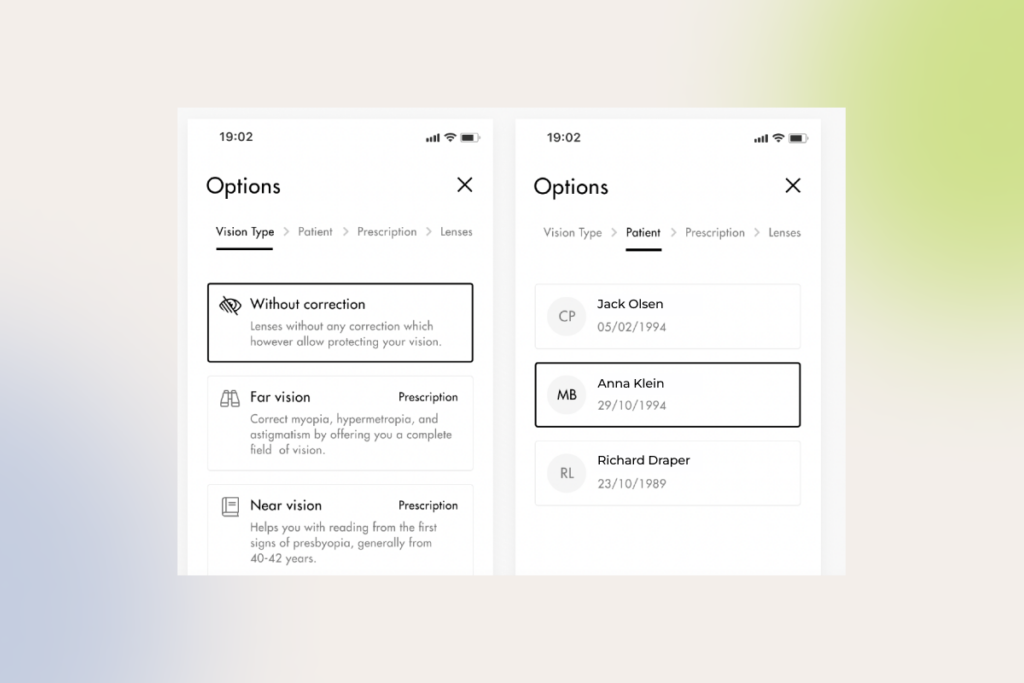
There are two types of wireframes your UX design team can implement. Low-fidelity wireframes serve as skeletons for your future design, demonstrating the high-level logic of interfaces at the early design stages and explaining design concepts to stakeholders. High-fidelity prototypes, on the other hand, are more detailed, replicating the look and feel of the final solution down to subtle elements such as buttons, menus, and links. 

If you have an established design system or an existing website, you can start with high-fidelity wireframes. 

Transforming your wireframes into final designs

Once prototypes are validated, UX designers get down to creating the final screens of your ecommerce solution. Beyond the end points of a user journey, designers also craft screens for intermediate states, such as loading screens, error messages, and confirmation prompts. The final layouts are then handed over to the development team. 

Tip: We always insist on prioritizing user expectations instead of making bold redesign decisions. A sudden, drastic redesign can alienate existing customers, hindering user experience and impacting your sales. That’s why you have to optimize new designs iteratively, helping users absorb change.

User-testing and validating new designs

The only way you can find out whether your new design has hit the mark is by analyzing user behavior and other key metrics post-launch. Our team uses a combination of qualitative and quantitative validation methods, user testing and analytics tools that allow us to size up the impact of new interfaces and see which design aspects work.

qualitative and quantitative designs validation methods

Ecommerce UX design can take a good product and multiply its value

Your ecommerce website is the only salesperson that builds up your brand recognition 24/7. Exceptional UX makes sure it does it effectively, no matter how far along your customers are in their shopping journey. A well-designed, selling website puts customers first, showcasing your brand while allowing for a seamless, enjoyable shopping experience.

The job of a perfect design is never done. To ensure a positive user experience, which stays aligned with your customers’ needs, you should continuously experiment, analyze results, and refine your store’s features according to customer feedback.

Have an ecommerce UX design challenge to tackle?

Contact our UX team

API as a Product: From Middleware to a Strategic Asset for Creating Long-term Business Value

There is a treasure trove of data piled up within enterprises. Often untapped and underutilized, it lies around gathering dust, and business leaders are not even aware of its monetization potential.

Capitalizing on digital assets and multiplying opportunities is possible with the concept of API as a product (or API as a service). For quite some time now, more than just technical utilities, application programming interfaces have connected business ecosystems, opening up new revenue streams. In 2024, over 20% of organizations said APIs generated over 75% of their revenue.

API monetization strategy

However, most companies, even though they get wind of the value APIs can deliver, are frustrated by how to unlock it. This guide was born out of the confusion surrounding this service model. Enjoy the read.

API characteristics to distance your product from the rest of the pack

One of the unique aspects of API products is that they cater to multiple audiences — not just developers enhancing their applications with your API, but also those applications’ end users .

Thus, the success of your API hinges on your ability to create a go-to product for developers and communicate its value to potential partners. 

So, what kind of  application programming interface becomes a top pick?

Characteristics of a good API

1. Easy-to-use

Developers want to integrate an API with minimal fuss. The easier it is to use — thanks to intuitive endpoint names, smart defaults, etc. — the faster they’ll reach that “aha” moment. And if they don’t? Well, they may just switch to your competitor’s product.

Google Maps API and Twilio are sound examples of easily consumable web APIs. Their endpoints are logically structured, and operations are generally executed using simple HTTP requests.

2. Safe

Making sure your API is safe to use is all about protecting the sensitive data your users trust you with and keeping your business on the right side of legal requirements. A secure API helps to avoid the headaches of breaches and downtime, which can cost you big time.

3. Well-documented

However big the potential of your API is, it won’t matter much, if developers fail to understand how it works. Clear, comprehensive, scannable documentation that outlines functions, classes, return types, arguments, etc. will encourage developers to use and recommend your API.

Good API documentation is backed up by interactive code samples, step-by-step tutorials, SDKs, use-case scenarios, etc. 

Take Spotify API, for example. Along with in-depth descriptions of each endpoint and its parameters, its well-organized documentation provides an interactive console, where developers can experiment with making API calls and view the responses in real time. The perfect combo of blow-by-blow guidance and practical tools helps developers handle integration more deftly, minimizing the odds of misuse.

4. Reliable

Reliable APIs don’t stagger under the number of requests, whether it’s one user or a thousand. Even under heavy load, be it due to a growing user base, seasonal spikes in usage, or intentional overload attacks, APIs stay available and work consistently.

Building your product that is reliable and performant includes but is not limited to implementing the following:

  • API infrastructure that dynamically allocates additional resources to handle the load without manual intervention;
  • extensive caching strategies to reduce latency;
  • advanced load balancing to distribute traffic across multiple servers and data centers.

For instance, thanks to sophisticated scaling and load balancing technology, Google Maps API’s infrastructure ensures near-perfect uptime, fast response times, and global availability.

API product vs. API project mindset: detailed comparison

The mindset you adopt towards APIs can make all the difference. Considering them as mere afterthoughts — a project mindset — won’t get you far. But when you see them as self-sufficient products, the odds of building revenue-generating powerhouses soar.

Let’s recall the good old Stripe. From the start, they invested heavily in a customer-centric approach. In fact, API was their only product. Treating Stripe API as a product helped the company meet technical and business goals. Stripe is now one of the best payment processing services delivered by a great API that developers adore.

Here’s a detailed comparison of the two mindsets:

API as a ProjectAPI as a product 
PurposeUsually created to solve a specific problem or facilitate internal communication between software componentsDeveloped with a focus on broader market consumption, external use, and monetization
Design and documentationMay have minimal documentation and is designed for a known, limited audience
Comprehensive documentation, SDKs, and robust support for external developers
Lifecycle managementOften has a shorter lifecycle with less emphasis on versioning and backward compatibilityIncludes detailed lifecycle management, version control, deprecation policies, and long-term support via an API management solution
MonetizationTypically not monetized directlyMonetization strategies like subscription model, usage-based pricing, or tiered access levels
Security and complianceSecurity measures may be more basic and internally focusedHigher security standards, compliance with regulations, and robust authentication and authorization mechanisms

What holds companies back from drawing on the value of API products?

“We have all this data. But making money from APIs? That’s been a challenge.”

These concerns are far from rare among our clients. The uncertainty and hesitation touches different parts of API product development, but they hit hardest when it comes to data security. It’s something on the minds of just about everyone considering APIs, no matter the angle.

Be it an automotive giant thinking of opening up their APIs to particular vendors or a leading SaaS company seeking to provide opportunities to build APIs upon their platform, both struggle to set an effective plan in motion due to roughly the same cogs in the wheel.

1. User data at risk

Even the most successful API-first leaders are not immune to security incidents.

The #1 API security hazard, revealed in talks with CTOs and Chief Enterprise Architects, and also backed by industry surveys, lies in improper user authentication, authorization, or access control. Facing additional obstacles like business logic flaws, data overexposure, insufficient rate limits, DoS and DDoS attacks weaken the confidence of complete data protection.

However, despite the multitude of risks, data can still be safeguarded by employing meticulous security strategies such as:

  • Implementing robust authentication and authorization mechanisms. Use multi-factor authentication, follow authentication protocols like OAuth/OpenID Connect in conjunction with transport layer encryption (TLS), etc.
  • Ensuring fine-grade access control. Manage what certain users are allowed to do thanks to role-based or attribute-based access controls. If you provide access to API via API keys and tokens, make sure they are rotated regularly — at least every 90 days.
  • Implementing rate limiting mechanisms. Over 15 million lines of Trello users’ data — emails, full names, etc. — were scraped by bots due to a flaw in the platform’s API rate limiting. Limit how often a user from a single IP address can make API calls within a given timeframe (rate limiting) and slow down API responses after a certain threshold is reached (throttling) to prevent DoS and DDoS attacks. Tools like CloudFlare help guard against bots, their brute-force login attempts, and other API abuse thanks to advanced rate limiting and DDoS protection.
  • Encrypting data with up-to-date security protocols. All API communications should be secured using HTTPS. Given that HTTPS is built on TLS, make sure you use the latest version (currently TLS 1.3), as older versions have vulnerabilities that attackers can exploit.
  • Limiting data exposure. Expose only minimum necessary sensitive data in a tokenized, anonymized way.


2. Puzzling (and costly to neglect) data privacy compliance

Taking care of data security goes beyond implementing security measures at your discretion, as it also involves strict compliance with various regulations. 

Regulations like GDPR make it tricky to collect self-identification data, requiring adherence to specific rules even when data is anonymized. And that’s just the tip of the iceberg — industry-specific regulations impose further obligations.

For instance, companies that manage card payments face substantial financial penalties if they fail to comply with the latest PCI DSS v4.0. 

In other highly regulated industries, such as healthcare, every little thing, right down to the APIs that move sensitive electronic health information between systems, is watched closely. The FTC warns about severe fines for failing to address data privacy risks.

So, rather than being just about protecting data, it’s, on top of that, about playing by the rules — or facing the consequences.

3. Data inconsistency

Companies may encounter issues with duplicate data. 

If we consider the automaker’s case, who’d like to create an API to share information about their vehicles, their knowledge base may potentially have two different values specified for one engine volume in different instances: 1.4 liters and 1.390 liters. The API should be smart enough to detect inconsistencies of that kind and return the correct value.

Eliminating such inaccuracies requires various data transformations, including matching, normalization, outlier detection and removal, etc. For this, business analysts determine the key data attributes transmitted through the API and develop rules to ensure consistency. Failing to do so leads to errors, longer development times, and poor user experience.

Here are some other tips we recommend not to ignore:

  • Choose the appropriate data format (JSON, XML, CSV, etc.) and stick to it to maintain consistency across different API endpoints
  • For live data, include timestamps or version keys to signal API consumers about any data changes

4. Staying resilient at scale

To ensure smooth and reliable API performance, we suggest using scalable cloud services allowing for flexible resource adjustment. 

When it comes to handling traffic spikes or sudden drops, autoscaling, available in cloud computing deployments, is indispensable. By automatically adding or removing capacity on as-needed basis, this approach offers significant wins, including high availability, improved resource utilization, and cost-effectiveness. Besides, you’ll only incur minimal service fees during periods of zero load, based on your subscription plan. 

In the case of a standalone setup, keep an eye on your logs to catch when incoming requests start maxing out your capacity. If you’re anticipating frequent overloads, it’s a good idea to upgrade your machine’s resources to maintain the stability of your API product. Additionally, having DevOps engineers on board from the get-go is non-negotiable for isolated configurations to implement efficient scaling strategies and guarantee your API stays unshakable, no matter how much traffic comes its way.

Beyond technical issues like server overloads, you also need to be prepared for logical errors, caused by API incorrect usage. The impact of unexpected disruptions can be minimized through:

  • Continuously monitoring API usage, performance, and error rates;
  • Setting up alerts to notify relevant teams of critical issues or anomalies;
  • Providing users with informative error messages that clearly indicate the problem cause and suggest potential solutions, using appropriate status codes.

5. Maintaining order and control in the API ecosystem

Managing APIs can be a tough, non-trivial game. Integrating a slew of various systems, safeguarding API data transfer, and making sure performance is on point require dedication and systematic, tailored approach.

Within our API management undertakings, we seamlessly connect to various databases, enable or disable APIs as needed, and monitor metrics, such as performance and usage. Unlike standard platforms, we customize ready-made tools to align perfectly with client expectations, providing pre-configured components and user-friendly documentation. That way, our partners get precisely what they need, without unnecessary complexity.

Scale securely with our compliant, end-to-end API development

Book a free call

How to create an API product?

So how to take your buzzing API idea a step further and build a product with not only high profit-making potential but which is also ultra-secure? Here’s a detailed, from-inception-to-launch API development cycle we came up with and polished up while working on similar projects.

1. Define the API product strategy

At that point, you basically need to find out the following about your API:

  • The business goals and objectives it will support
  • Your API’s target audience, including partners and external developers
  • The problem or problems your API will solve and how will it benefit users 

While it might seem like pure product marketing, the implications outlined during this stage are fundamental for making the majority of technical decisions as well, be it defining API architecture or choosing appropriate frameworks or programming languages from a dizzying array of API-related tech. For instance, the selection of standards and protocols (REST, SOAP, gRPC, etc.) is driven by the peculiarities of data routing.

2. Architect your API

Data-related aspects are among the first things you have to focus on. Consider the type of data your API will handle, where it’s stored, and whether it needs cleansing. If you’re going to turn to a software development vendor, decide to what extent third-party engineers can be involved in the data transformation process.

Next, choose an architecture that aligns with your needs. In most cases, REST API is a go-to choice due to its simplicity and performance, but your specific requirements — industry- or project-wise ones — might tip the scales to other, better-suited approaches. For example, in domains like telecom, healthcare, and finance, SOAP is prevalent. The chosen architecture will dictate your tech stack, including programming languages and frameworks.

Once the architecture to build on top of is defined, tools like Swagger, OpenAPI, or Postman are used to automatically generate the API’s interactive documentation, code stubs, or test cases directly within the browser.  

Proceeding with the example of the car manufacturer, let’s say, backend developers, when dealing with a ‘car body type’, which describes the car’s design (like sedan, hatchback, etc.), specify that only a limited set of values can be used for this field. Tools like Swagger can automatically incorporate these constraints into the API documentation, ensuring external developers are aware of the valid options. This helps prevent them from using inappropriate values, thereby reducing errors.

Another big technology decision revolves around the API gateway. Establish its proper governance, as gateways are like a front door to all critical API-related activities. They handle traffic management and analytics and allow developers to ensure the product adheres to security policies.

Remember to consider how you will handle API versioning. When rolling out new product versions, make sure to keep things backward-compatible without compromising the functionality for clients still using older versions. A rule of thumb is to automatically reflect any changes or updates in the API documentation to loop everyone in.

3. Build and test

With architecture in place, you can knuckle down to building your API within an agile, iterative software development lifecycle.

Testing is a make-or-break matter at this stage. Run different types of manual and automated tests to confirm that the product meets the defined specifications:

  • Smoke tests. Conduct a fast preliminary check to ensure the core functionality works as intended.
  • Unit tests. Verify individual functions or methods. 
  • Integration tests. Look into how 1) different components of an API interact and work together and 2) your API interacts with external systems. 
  • Load tests. Evaluate the API’s performance under heavy workloads.
  • Security tests. Spot vulnerabilities using tools like Selenium to protect your product against threats (SQL injections, cross-site scripting (XSS) attacks, and others).

4. Deploy

Make sure your deployment environment can handle multiple languages and follows all the data protection rules, storing data in the right legal jurisdictions. 

Set up a user-friendly developer portal so it’s easy to get hold of documentation (which should cover all aspects of API usage, including a sandbox environment for testing integrations), API keys, and support.

As a reminder of how critical comprehensive guides are for your API product, over half of 40,000 developers worldwide named poor documentation the major snag to consuming APIs.

5. Monitor, manage, and support continuously

Once your API is live, don’t turn a blind eye to continuous monitoring. Implement logging to capture API user activity, errors, and performance metrics. By analyzing user logs, you can reveal typical behavior patterns to identify common interaction scenarios. 

Besides, pay close attention to direct feedback from API users to pin down their needs and pain points. 

These actions will drive ongoing improvements, bug fixing, and the implementation of more calibrated new features. Generally, treat your API as a living product. Regular updates and responsive support will keep it relevant, secure, and useful to your users over time.

Get started with your first-class API product

Many enterprises we work with are eager to build custom APIs that share data with an array of partners, but run into problems they can’t solve on their own. If you’re like them — ready to take that leap but need expert engineering support to bring your vision to life — team up with experts who have the chops and the hands-on experience for end-to-end API product development. 

Looking for experts well-versed in API engineering?

You’ve found them

6 UX Best Practices: How to Build High-ROI Software Products

Any way you slice it, we can’t discuss the business success of digital products without bringing user experience (UX) into the equation, as it directly impacts customer experience (CX).

A single bad interaction – that’s what it takes to lose 88% of first-time users. Moreover, 46% of these unsatisfied customers will spread the word about their negative experience with your product, magnifying its failure. 

On the bright side, UX design excellence is within the grasp of every business, and, as we see in our work, 85% of churn cases can be foreseen and prevented. 

Which UX best practices can help you uncover unmet user needs, attract customers to your software product, and retain them? Check out our guide on how to reach high conversion and retention rates, ensure consistent user base growth, and increase customer loyalty and satisfaction — all with business-driven UX design.

Talking money and statistics: how good UX design grows your bottom line

Surveys by McKinsey, Forrester, and UX Planet leave no doubt that well-honed user experience can move the needle: 

statistics on the value of good UX design

The success of UX design-led companies, such as Apple, Netflix, Amazon Prime, etc., only proves this data. The best design performers increase their revenues at nearly twice the rate of their competitors.

Is your UX/UI design a hit or a miss? These metrics will tell

At *instinctools, we’ve polished our UX approach with hundreds of real-life projects and built a solid UX value framework to gauge the worth of the user experience design in a way that matters to businesses. Our framework combines both quantitative and qualitative metrics and ensures every design choice is perfectly calibrated against your business needs: 

  • Conversion rate is the percentage of users who have completed the desired action.
  • Customer satisfaction score shows the number of users who identified the product’s UX as fantastic.
  • Net promoter score unveils how many customers are likely to recommend your product to others.
  • Task completion rate reveals how long it takes users to complete a task successfully. 
  • Task success rate indicates the percentage of people who finished a task.
  • User error rate displays how many mistakes users make while completing an action. 
  • User retention rate highlights the number of customers who have engaged with your product again.
  • Real user feedback is always the primary driver of your UX design strategy. 

There’s no need to track all the metrics to assess the viability of your UX strategy. Monitoring several indicators that align with your project’s goals is enough to evaluate the outcomes. For example, a healthcare startup will likely focus on user retention and average session depth rate, while an ecommerce enterprise will track conversion rate, net promoter score, and industry-specific cart abandonment rate in the first place.  

6 UX best practices for 2025 and beyond

Our senior and lead UX designers listed vital UX best practices to match user-centric design and a business-driven approach to product development and help your software pack a punch. 

Put the user first

Releases of user-ignorant solutions aren’t rare – every fourth project fails because of market mismatch, with even some companies at the top of the Fortune 500 list not being spared from this fate.

For instance, in 2010, Apple introduced iTunes Ping – a social network for finding people with similar music tastes. However, the service didn’t find support among users and was shut down two years later. It’s safe to say that UX limitations played their part in the project’s failure, making the minimum viable product not viable at all. For example, when creating an account, users could select only three favorite music genres from a very limited number of options. And that was, among other things, just one of the deal breakers that averted music lovers.

A music genre selection form with checkboxes. Alternative, Jazz, and Rock are checked. Other options, like Blues, Classical, Hip Hop/Rap, Pop, and more, are unchecked. Instructions above say, Choose up to three.
Choosing music genres in iTunes Ping

Sure thing, rolling out a software product isn’t a one-man show. However, there’s also no doubt that it was under-researching user expectations regarding UX that came back to bite the creators.

If an Apple-scale company can stay on the podium of a market leader even after a costly misstep, smaller companies are less likely to roll with such a punch and should build their products with a customer-centric culture in mind from the onset. 

To drive high user satisfaction scores for your product, double down on market research and analyze user behaviors, documenting findings in user personas and customer journey maps.

An in-depth investigation of user demands can help you spot friction points in the design patterns of currently available products and, thus, find your gold mine. Remember how Uber’s ride-sharing service disrupted the taxi industry? Showing upfront prices and driver ratings and enabling cashless payment was the ultimate step-up in user experience and competitive advantage over traditional taxi services. Thus, discovering and addressing the customers’ desires with a thought-out UX was a secret sauce that assured the startup’s smashing commercial success.  

Create a tailored design system for your product

A UX/UI design system is a collection of standards and reusable elements — ‘building blocks’ — that make designing your product smoother and more cohesive. Common examples of robust design systems you can look at for inspiration are Material Design for Android-targeted mobile apps and Human Interface Guidelines for iOS. It doesn’t mean though, you have to create something as massive as those systems. Your design system can be as simple (or complex) as your project needs.

Be aware of relying on an open-source design system. Although it might seem like a quick win at first, the initial boost often comes with a hidden cost down the line. As your project grows, open-source design systems tend to struggle with seamless scaling. Their code bases can age fast, and the frustrating part is, you’re stuck. You can’t just fix things easily, and you’ll end up creating workarounds that slow development and drive up costs.

Having a single design system improves overall UX/UI consistency and speeds up the development process, as front-end developers don’t have to craft interface components from scratch every single time. Faster time to market, simplified product scalability, and lower development cost in the long run also make a unified design system worth investing in. 

The fundamental elements of a decent design system include but are not limited to:

  • Component library with reusable chunks of code. These smallest atoms are the foundation of the product’s functional and visual elements and can be used alone or seamlessly combined to build more complex items. 
  • Pattern libraries represent the next – molecular – level of your design system. Each pattern is a set of components addressing common UX tasks, such as creating a login flow with buttons and input fields, notifications with progress bars, etc. 
  • Brand style guidelines specify rules related to typography, colors, buttons, images, logo placement, etc., to ensure a consistent look and feel of your brand.
  • Design principles are a searchable archive with all the documentation and libraries relevant to the project. Having one fast-tracks the onboarding of new designers and front-end developers and the entire process.

For one-off projects setting up a full-blown design system is superfluous and might actually slow down the design process. In such cases, having style guidelines and a pattern library is enough.

Nurture UX design consistency

Functional and visual consistency is a heavy hitter for ensuring a seamless user experience, especially if you offer several related products. We suggest utilizing familiarity and following common UX patterns users expect from specific platforms. For example, iPhone users aren’t familiar with the split screen feature typical for Android-based interfaces, and misusing this and other standards contributes to customer dissatisfaction.

There are plenty of design tasks where you don’t need to reinvent the wheel and should stick to the beaten path — not doing so may directly affect business ROI. Here’s a simple example. 

Let’s say you run an ecommerce business, and the goal you want your customers to achieve is a purchase. To make the CX hitch-free, you should follow shopping cart UX best practices and ensure the checkout process is straightforward and short-step. Otherwise, users may get lost halfway and leave the website, upping your cart abandonment rate.    

A lack of consistency can throw a wrench into the product development process. With a standard design system, you have a bunch of ready-to-use parts that developers can just plug in. This makes things a lot easier and faster. But if a designer goes out of the agreed standard to create something completely new, it’s gonna cost more and take longer. Developers have to build those new things from scratch, which can be a real pain. 

Keep navigation and functionality simple

Complex multi-click navigation makes users struggle to find what they need, causing frustration and affecting the software’s bounce rates. Therefore, intuitive navigation with a clear hierarchy and minimum clicks to reach the goal is a must if you want to attract and retain users.  

You can go the extra mile for a brand-new product and provide contextual in-app guidance to help users quickly grasp the unfamiliar interface and get to their goals faster.  

Also, don’t overload the product with fancy but misleading features. Remember the 80/20 ratio – 20% of functionality gets used 80% of the time, so make sure to provide these linchpin product functions. 

description of a UX/UI design project for an AgTech manufacturer
user interface of an agricultural app

Hone product accessibility

As of 2024, 16% of the world’s population have disabilities related to limited hearing, seeing, mobility, or complex mental or emotional conditions. WAI and WCAG standards establish accessibility requirements for mobile and web apps to make them user-friendly without boundaries. The conformance level is measured from the baseline “A” to the highest “AAA”.

The bar is so high that 88% of websites have at least minor accessibility compliance issues related to images, links, keyboard navigation, and form field markup. Even ecommerce top-grossing companies such as Amazon, Ikea, Walmart, and other big names are on the list.

No one is immune to wrong design decisions and consequential accessibility issues. But it doesn’t mean that you should give up on trying to match expectations of the maximum number of potential users. Start by providing “A” accessibility and gradually level it up to “AA” or “AAA” if needed. The minimum requirements prescribe crafting a user-friendly design with: 

examples of user-friendly design requirements

The good thing is that with the current capabilities of generative AI tools, your designers don’t have to deal with accessibility-related tasks manually. Solutions like Stark, Userway, and others empower your UX/UI experts to wipe out design-rooted issues and accelerate overall product development. 

For instance, gen AI software brings the value: 

  • Throughout product design. AI assistants automatically scan Figma, Sketch, or Adobe files and proactively suggest changes to boost accessibility.
  • After a product rollout. AI tools can be trusted to run WGAG and ADA compliance checks to diagnose violations, scan them, fix minor problems, and report the major issues in detail to the team members in charge.  

Make your design responsive

Last but not least, ensure your software is displayed correctly on different devices. 

We usually move from larger to smaller — start with a desktop interface and proceed with a mobile one. However, in line with our UX design best practices, the project’s context comes first. For example, if a client needs a mobile-first solution, we start with it and then widen the responsive layout to a desktop version. 

Walking the talk: 3 UX moves for maximum business gains

As long as knowledge not followed by actions brings zero outcomes, our experts went beyond listing user experience best practices and highlighted three steps you should incorporate in your UX design process to increase the odds of hitting it big for your product. 

Prioritize prototyping and wireframing

86% of customers are willing to pay extra for a better user experience. So, instead of treating UX as an afterthought, which is fraught with extra expenses, broken deadlines, or worse, unmet users’ expectations, you can shape up your product in the right way from the earliest stages of the development process by emphasizing prototyping and wireframing.

Prototyping and wireframing are also the name of the game in identifying 20% of the most used features. To prioritize functionality easily, align user motives with the ease of feature implementation and its value for the product’s success. 

We often face a situation when product owners aim to satisfy all the needs of all the users right away. Nevertheless, these good intentions can lead to a scenario in which the MVP’s scope bloats with features used by only 5% of users once in a while.

assessment and prioritization framework in UX/UI design
Source: PwC, Creating valuable customer experiences

The only time when you can skip the wireframing step is when the product is already in use and you have a stable design system to rely on while adding new features. In this case, you can jump straight into creating high-fidelity and interactive prototypes.

However, the reality faced by development teams can bring challenges, forcing UX designers to be more flexible and resourceful. But you can apply UX design best practices even to projects with burning deadlines and tight budgets when a client can’t afford full-scale prototyping. For instance, you can work on the product design concept and high-fidelity prototype in parallel to decide on the product look and feel faster.  

Run user acceptance testing (UAT) and let early adopters’ feedback guide you

“Keep calm and conduct user testing” should be your motto to seamlessly integrate the product into the real users’ worlds. Gathering early adopters’ feedback is also vital. That way, you can perfect user flow and finetune software functionality before releasing it for the early and late majority.

If the budget does not allow for a full-scale UAT, you can still play your cards right. At the very least, you can run hallway testing to evaluate the usability and clarity of clickable prototypes and overall user flow. 

Keep experimenting to match end user needs’ evolution

You can’t rest on laurels if your product has once gained success, as UX trends aren’t carved in stone and are driven by changes in customer behavior patterns. The best-performing companies continue listening and iterating their products, remaining invested in improving user experiences post-launch. So, if you want to at least maintain the same overall satisfaction rate, not to say raise it, you have to constantly monitor the software against new market data and customer expectations and shape up your product in line with them.  

Run a self-check: are you making the most of UX design?

Assessing your as-is state is mandatory to identify what should be done to achieve the desired outcome. You can start right now by answering the following questions. 

  1. Can you say you put yourself in the users’ shoes when working on the UX?
    A. We primarily rely on the product owner’s vision.
    B. We analyze competitors and create a similar product.
    C. We conduct in-depth market and user research to spot customers’ unmet needs and address them with our product.
  2. How do you speed up the overall development process with the help of UX design?
    A. We skip stages such as low-fidelity prototyping and user acceptance testing.
    B. We shorten the research and prototyping stages.
    C. We craft a single design system with reusable components to fast-track frontend development.
  3. Do you make your UX design accessible for all user personas?
    A. We don’t pay much attention to accessibility.
    B. We analyze target audience expectations regarding product accessibility level to keep up with it.
    C. We provide an AAA level of accessibility.
  4. What’s your prototyping workflow?
    A. We tend to skip early-stage wireframing to save money.
    B. We can work on the concept and prototype in parallel to speed up development.
    C. We start with wireframing and gradually proceed to high-fidelity prototypes to avoid costly edits at the pre-rollout stage.
  5. Is user acceptance testing (UAT) a mandatory part of your UX design workflow?
    A. We skip UAT for the sake of faster time to market.
    B. We perform UAT on the development team members.
    C. We test the product on the early adopters and finetune it based on their feedback before releasing it to a broader audience.
  6. Do you keep enhancing your product after rollout?
    A. We fix bugs as they crop up but nothing more.
    B. We add new features based on the product owner’s ideas.
    C. We analyze the market demand regularly and constantly gather user feedback to align new features with it.

The more “C” answers you’ve got, the more mature your UX framework is and the more chances you have to win and retain loyal customers. Nevertheless, even a low score isn’t the end of the world. Think of it as a starting point. The truth is that none of the companies that reached out to us for UX/UI design services has fully mastered all the UX best practices. So there’s room for improvement for everyone.   

Make UX work both for you and end users

Constantly navigating user experience and balancing it with business value may be draining, as you have to manage everything, from creating customer journey maps and a single design system to prototyping, running UAT, and strategizing product evolution.  

The good news is that you don’t have to bear with it alone. Cooperate with a reliable UX company to delegate design-related tasks and free your head for overall business strategy.

Partner with us to tackle your UX pain points and unlock UX excellence

Let’s discuss 

How to Sell More with Personalization in Ecommerce

Key highlights

  • Online retailers should double down on personalized customer service if they want to stay in the competition.
  • Well-designed ecommerce personalization expands selling opportunities and enables retail brands to grow their loyal customers’ base.
  • Customer’s interests come first  — your personalization efforts mustn’t compromise consumer privacy.

The imperative of delivering the right experiences to the right audience at the right time has modern ecommerce businesses in a chokehold. 

The impact of personalization across key metrics: personalization leaders vs. low maturity brands

With so many ready-made ecommerce personalization bundles available, it seems like any business can deliver granular online shopping experiences. So the real challenge lies in doing personalization efficiently, at a lower cost, and in a more ethical way than competitors.

What is ecommerce personalization?

Ecommerce personalization is the practice of delivering each customer a unique online browsing and shopping experience. Companies leverage users’ purchase data, browsing history, demographics, and psychographics to uncover consumers’ shopping patterns and individual preferences and provide personalized search results, product recommendations, discounts, loyalty programs, etc.  

Benefits of personalization in ecommerce: a match made in profits heaven

The importance of ecommerce personalization cannot be overstated. In fact, for 94% of high-maturity brands, personalized customer engagement is a high-to-critical priority, with plans for a 133% increase in related investments by 2027. The primary driver behind this boom is the promise of higher profits: customers spend 37% more with brands that deliver tailored interactions.

  • Personalization drives ongoing engagement and customer loyalty

According to statistics, 58% of shoppers become repeat customers after a personalized shopping experience with a brand. With numerous personal touchpoints at each stage of the customer journey and tailored loyalty programs, businesses can promote repeat purchases and establish long-term connections with their customers.

  • Personalization supports cross-selling and upselling initiatives

By introducing shoppers to relevant products that complement their initial purchases,  ecommerce sellers can significantly increase customer lifetime value (LTV) and the average order value (AOV). Higher AOV and LTV reduce the need for businesses to constantly reel in new customers and drive higher overall sales from the current customer base.

  • Personalized experiences tap into the untapped value of your VIPs

Almost every established ecommerce business can boast a small cohort of high-value customers, the golden goose of sales that demands special treatment. Personalized, next-level shopping experiences can pamper your VIPs, increasing their retention by up to 10%.  

How to turn browsers into buyers: ecommerce personalization examples

Below, our team has curated a list of the most high-performing examples of personalization in ecommerce, based on the success stories of our clients and analysis of 30+ retail brands.

Product recommendations

Even if your product pages incorporate related product recommendations, basing them on seller-side data and ignoring user context can render your ecommerce personalization ineffective. Supreme recommendation engines vacuum user-centered data, including preferences, demographics, and behavior — and blend this data with factors like time, location, and device for personalized recommendations.

Other best recommendation-related practices include:

  • Using deep learning to tackle the cold-start problem; 
  • Suggesting related higher-priced items;
  • Analyzing visitor’s in-session behavior to correlate shopping activities that span multiple sessions;
  • Highlighting popular products based on sales or customer reviews (e.g. you can create personalized bestseller lists);
  • Incorporating guided product selection quizzes to drill down into customer preferences and needs.
Shopping behavior data analysis

Here is a real-life example of one of our clients, a leading prescription eyewear retailer, who benefited from the analysis of in-session activity: 

  • Our team implemented an AI-augmented personalization solution that combines historical data with in-session activity to recommend the most relevant items.
  • This ecommerce personalization strategy led to a 73% increase in average revenue per user. 

Content and display

Another personalization tactic that can double the impact of the personalized ecommerce experience is fine-tuning content and media to individual preferences and behaviors. Ecommerce personalization trends targeted at creating more engaging experiences that boost sales include:

  • Personalized collections — lumping together product groups based on individual customer preferences, such as browsing history, style choices, or upcoming events, to offer tailored collections that resonate with each shopper.
  • Dynamic user-generated content — displaying user-submitted photos, videos, and reviews that align with the shopper’s persona, interests, or past purchases. For example, if a user is a 40-year-old female, the reviews shown will predominantly come from middle-aged women, enhancing relevance and fostering trust through personalized social proof.
  • Personalized product descriptions — adjusting the description in real-time to align it with the needs of a specific customer. 
  • Personalized shoppable posts in social media — analyzing user’s wishlists, previous interactions, or abandoned cart items, etc. to prioritize hyper-personalised sponsored posts in user’s feeds or stories.
Sephora's personalized product recommendations

Engagement and retargeting

Re-engaging abandoned carts and activating the buying potential of existing customers is paramount for sustainable ecommerce business growth. Here’s how high-performing ecommerce brands use the triple power of artificial intelligence, predictive analytics, and seamless cross-channel integration:

  • Offering well-timed price incentives, such as exit pop-ups or cart abandonment emails, to recover potential sales.
  • Launching re-engagement campaigns at scale to win back past clients with special offers and tailored discounts.
  • Integrating user-specific pop-ups triggered by user actions such as shopping cart amounts or adapted to the unique behavior of an online customer.
  • Retargeting visitors on social media with personalized ads based on their previous interactions.
An example of a re-engagement campaign by Martha & Marley Spoon

Loyalty and sentiment analysis

To make customers heard and seen long after the initial purchase, online retailers double down on brand loyalty initiatives while also proactively monitoring customers’ reviews to spot areas of improvement. In particular, ecommerce brands can supplement their ecommerce personalization strategy with:

  • Tailored rewards for specific customer actions or special dates, further calibrating loyalty programs and offering tiered discounts.
  • Sentiment analysis of customer reviews that allows retail brands to scale responses and offset potentially negative online shopping experiences with tailored offerings.

Collaborate with our AI team to squeeze maximum value out of personalization

Schedule a call

From ecommerce personalization to hyper-personalization with AI

Traditionally, personalization used to rely on historical consumer data along with insights on general customer segments to generate granular experiences. Although this ecommerce personalization strategy could effectively locate purchasing habits and other similarities between shoppers in a given category, it fell short of serving customized experiences to specific customers. Smart, omnichannel, and almost telepathic hyper-personalization fills this gap by tailoring companies’ marketing to individual customers throughout the entire shopping journey.

AI-driven hyper personalization throughout the customer journey

Why go the extra mile, you ask? BCG surveyed 5,000 global consumers, and over 80% of them don’t mind and actually want personalized experiences. Yet two-thirds (!) have dealt with ones that feel off-target, flat, and invasive.

Hyper-personalized customer experiences meet a potential shopper or B2B buyer (if we’re talking about B2B ecommerce personalization) as early as the advertisement stage. By using data from various sources such as ecommerce site behavior, social media, and purchase history, machine learning algorithms help generate custom advertisements, where everything — from messaging to dynamic pricing — is tailor-made to match unique user’s demographics, preferences, and browsing behavior.

Some ecommerce companies can take it up a notch and implement an intelligent conversational interface on their websites and in mobile apps. By building on customer behavior and data, AI chatbots can provide assistance on par with human agents in real time.

But keep in mind that to hit it big, hyper-personalization should be omnichannel, orchestrating a one-to-one experience to customers across all touchpoints, including online, in-store, and mobile.

Drive more revenue for your ecommerce business with AI-driven personalization

Let’s talk

Personalization challenges that can dilute your value

Not every ecommerce personalization platform can suffice the demands of modern customers. Some personalization solutions suffer from limited data handling capabilities, while others have a hard time delivering personalized shopping experiences in real time. So before investing in dedicated tools, run it by our checklist first. 

Interactions with anonymous users

According to statistics, a whopping 90% of ecommerce website visitors are anonymous. That’s why your personalization solution should know its way around tailoring interactions for both identified users and first time visitors with no fingerprints. Some personalization systems tackle this challenge by tapping into referral data and third-party insights that help create a welcoming experience for incognito shoppers.

AI-driven personalization tools pick up on users’ trails by analyzing a treasure trove of non-PII data anonymous visitors leave behind. By analyzing the subtle signals such as users’ network speed, browser extensions, time spent on site, and other clues, ML-powered solutions identify correlations, group anonymous users based on similar actions, and deliver relevant content based on inferred data points.

Automated segmentation tools

Another non-negotiable for your personalization platform is automated segmentation which allows the system to efficiently group customers based on various criteria and update customer segments in real time. To locate high-value customers, your personalization suite should also bank on automated RFM scoring that can automatically group shoppers based on their Recency, Frequency, and Monetary value. 

Support for omnichannel engagement

As we’ve mentioned earlier, personalization doesn’t work to its full potential unless it spans the entire customer journey. Your solution should provide a consistent, tailored customer experience across all devices and channels, based on integrated data and a unified personalization strategy. 

Data-driven approach

The more data, the merrier your offerings are. Your personalization tool should cast its nets wide, wielding a combination of historical and third-party data to peer into a customer’s past behavior along with analyzing additional context such as the customer’s location, weather data, and demographic information. By combining these data points, ecommerce businesses can generate highly customized experiences that strike a chord with customers.

Site layout personalization

The ability to serve dynamic content is another differentiator of top-notch personalized marketing. By incorporating generative AI, personalization tools churn out dynamic content at scale that automatically adjusts to individual user preferences and behaviors. For example, Shopify Plus users can virtually personalize the store for each customer with the Hypersonal tool that aligns headlines, reviews, product Q&As, and other content with the unique preferences and needs of every user — on the fly.

A blend of automation and manual controls

Full-on automation is neat and nice, but sometimes you need human oversight to refine personalization strategies according to specific requirements. Whether it’s A/B testing or product recommendations, your tool should allow for expert knowledge and human judgment, instead of monopolizing all customization capabilities.

Optimization flexibility and scalability

Customer behavior and markets are never static — and your personalization tools should go hand in hand with shifting buying patterns and market gyrations. By combining agility, continuous testing, and seamless integration capabilities, your tool can keep your personalization strategies up to date, no matter what. The ability of AI to learn from data helps with that, too.

Along the same line, the tool should be open to innovation facelifts without limiting you in adopting new technologies or industry-best personalization techniques, such as propensity models or predictive next-best-action algorithms.

System scalability

As your ecommerce business grows, your data processing needs follow suit, exposing your personalization tool to higher data volumes and user numbers. Scalability by design ensures that your system doesn’t crumble under the growing workloads and can deliver personalization in real time, no matter the number of customer interactions.

Microtargeting capability

Microtargeting is one way companies can send out targeted advertisements to specific individuals or small groups. Unlike broader targeting, microtargeting segments your audience based on highly specific criteria, including real-time data, to reach prospects with the highest conversion potential. Microtargeting and one-on-one interactions call for personalization tools that can dig into even the most subtle customer data.

Personalization challenges that can dilute your value

Over 60 percent of companies still struggle to get their one-to-one marketing initiatives right. Here are the common hurdles underperformers might face.

Scalability issues

A good personalization tactic is developed with scalability in mind: 

  1. Building your system upon cloud platforms enables you to automatically ramp up or down your processing resources to handle fluctuating resources and provision additional resources without investing in hardware. 
  2. Microservices architecture is another antidote against stiff and potentially disruptive scalability. As each microservice can be scaled independently, your platform can meet increasing needs without compromising performance.

Modular components run entirely on the server side can also pave the way for localization at-scale — and that’s exactly what we did for an established premium jewelry seller: 

  • The client had already mastered hyper-personalization but decided to up their game by introducing tailored navigation options and personalized homepages. 
  • Our team integrated modular architecture to help the client deliver dynamic content across multiple regions and brands from a single campaign.

Responsible personalization 

Over-personalization can hinder your marketing efforts and damage brand image. That’s why companies should ensure that personal data controls stay in customers’ hands and state explicitly what type of data is being collected and for what purpose. 

Data privacy and compliance can become a point of differentiation and competitive advantage when it comes to personal data collection. Those brands that adhere to a privacy-by-design approach, publicly commit to avoid data collection from third-party services or through questionable means, and comply with commonly accepted standards such as GDPR and CCPA are more likely to see their personalization initiatives pay off.

— Nick Astreika, CMO, *instinctools

Technical complexity 

Hyper-personalization is a technically demanding initiative. An effective personalized ecommerce experience can be compromised by: 

  • Limited integration capabilities of your personalization platform
  • Flimsy algorithms
  • The lack of low-latency processing

To head off this obstacle, make sure your system’s architecture can handle computationally intensive workloads, support real-time processing, and is powered by advanced, highly accurate algorithms for predicting customer preferences.

Customer data concerns

Hyper-personalization hinges on a granular view of the entire customer life cycle to cater to individual needs. To establish this elevated view, personalization systems demand access to a whole lot of data, including: 

  • Customer segments and microsegments
  • Behavioral and transactional data
  • Engagement trends

Integrating these data bits into a single puzzle requires companies to break down data barriers. With an AI-powered, unified consumer data platform, companies can set up a centralized customer database that has all the right types of data in a ready-to-use state.

Balancing ecommerce personalization and privacy policies: gather customer data with caution

While over 80% of consumers expect highly customized experiences, 30,1% are equally concerned about misuse of their personal data. As an ethical business with solid data privacy policies, where do you draw the line between tailoring online shopping services and respecting privacy?

Types of customer data to leverage in ecommerce

Zero-party data

Any insights that customers intentionally and proactively share with a company are classified as customer-provided.

Organizations can extract customer-provided data from surveys, account creation, first-hand feedback, and reviews. Consider explicitly asking users to share their data upon website entry in exchange for personalized offers or offering rewards like bonuses or promo codes to encourage users to provide personal information such as gender, age, and preferences.


CRM systems like Salesforce, HubSpot, or Zoho provide survey tools, feedback widgets, and chatbots that help companies gather and analyze customer communications and feedback.

First-party data

Compared with zero-party data, first-party data is considered to be more accurate, reliable, and insightful as it’s action-based, coming directly from customer interactions with your ecommerce store. First-party data includes past purchase history, search queries, category browsing habits, average spend amount, time of past purchases, and any demographics gathered through interactions. Geospatial data, obtained through services like Google Maps API and MaxMind GeoIP, also falls into this category. 

Speaking about location data, one of our clients whose business focuses on appliance merchandising is a vivid confirmation that localized promotions and loyalty programs can turn out to be a goldmine of insights: 

  • Our team implemented a custom AI-based microsegmentation solution to dive deep into purchase behaviors and geospatial data. 
  • The software enabled at-scale localized personalized experiences in 12 markets and increased the client’s direct-to-consumer revenue by 18%.

Third-party data

Online retailers can also join forces with partner systems as a part of a collaborative effort or business agreement. These include CRM providers, marketing automation platforms, data analytics platforms, and other partner systems whose data is highly relevant to the seller’s specific needs. 

As for the data itself, it can span demographic information, purchase, history, browsing behavior, and CRM data. There are two ways to get hold of this data:

  1. Leverage data integration tools like Zapier or Mulesoft to plug into data from partner systems. 
  2. Use partner-provided APIs and collaborative CRMs with shared access capabilities to access the databases of partner systems.

Personalize or perish: ecommerce personalization best practices in 2025

Mediocre personalization won’t cut it in 2025. Let’s go over the essentials for building a truly exceptional personalization engine.

Know where your customers are and meet them there

Serving customers in their channel of choice is the rule of thumb in the world of personalization, which mandates companies to establish a consistent, omnichannel customer experience across all online and offline touch points.

To replicate this approach, you need an experimental mindset and continuous testing to determine the optimum channel for each message and customer.

Set ambitious goals, take measured actions

In something as incremental as personalization, perfection isn’t essential, but continuous improvement is. So think big, acknowledge the complexity of this endeavor, and take small steps towards it, relying on the culture of experimentation. We recommend getting the following essentials in place to succeed in it:

  1. Develop a strategy — define and prioritize high-impact use cases where personalization can enhance the customer experience.
  2. Audit internal capabilities — analyze the skill sets and tech infrastructure you need to support personalization at scale.
  3. Define how you collect, store, and link customer data —  make sure you have a dedicated, centralized destination, such as a customer data platform (CDP), to orchestrate customer data. Prioritize first-party data ownership and management, focus on customer identity resolution and privacy-compliant data integration.
  4. Build, test, and scale your analytics and modeling capabilities — once your data is in order, leverage robust data analytics to determine what to share, when, and where. 

Marry your CMS with a personalization engine

Integrating your personalization engine with a CMS through data feeds, webhooks, API calls, or elsehow allows you to serve hyper-relevant content at scale and ensure cross-channel content consistency. By connecting the two systems, you can create dynamic content variations that trigger targeting conditions based on specific criteria. Advanced algorithms can then refine these variations over time, making sure each user receives content personalized to a tee.

Summary 

A truly exceptional online shopping experience feels effortless, like finding the perfect pair of jeans the moment you land on a website. To provide something of a comparable hyper-personalized experience and not bust their budgets, ecommerce brands require a triple power of data, AI technology, and personalized content — weaved into a broader strategy and a roadmap.  

Accelerate your ecommerce growth through hyper-personalized experiences

Talk to our team

FAQ

Why is ecommerce personalization important?

The importance of personalization in ecommerce boils down to 71% of consumers expecting personalized interactions and recommendations. If you want to attract and retain more potential consumers, personalization should be your top priority.

What are the 4 D’s of personalization?

Data, Decisioning, Design, and Distribution are the four D’s of personalization and the keys to successful personalization at scale for ecommerce businesses.

What are the differences between B2C and B2B personalization?

While B2C personalization addresses individual customer expectations with tailored content, B2B personalization targets business-level needs with industry-specific content.

What is the role of AI personalization in ecommerce growth?

AI-driven personalization efforts enable online retailers to capture even the subtle trails of anonymous site visitors and deliver tailored shopping experiences for everyone. ML-powered solutions analyze signals such as users’ network speed, browser extensions, time spent on site, and other clues to group anonymous users based on similar actions and display relevant products.

What is the difference between personalization and hyper-personalization?

The main difference between personalization and hyper-personalization is the data and analytics they rely on. Personalization is built on historical data and basic analytics covering the ‘what’ of customers’ behavior. Hyper-personalization leverages past and real-time data and relies on advanced analytics with AI and ML at its core to anticipate upcoming shifts in customer shopping patterns and act accordingly.

How does ecommerce personalization improve customer experience?

Ecommerce personalization empowers businesses to make it personal with every customer, providing a unique customer experience with customized content and tailored offers.

How much does personalization increase revenue?

Well-designed ecommerce personalization can up your revenue by 5–15% while reducing customer acquisition costs by up to 50%.

What impact does personalization have on customer loyalty?

Tailored content suggestions and product offers, personalized promotions and discounts fuel a deep, long-lasting connection with your consumers, 62% of whom are willing to stay and spend more if brands offer personalized experiences.

Warehouse Automation: The Ultimate Guide to Maximum Gains

Warehousing is not new to automation. Companies are going all-in on their logistics and fulfillment, with more than a third of capital spending expected to be poured into it.

However, as of today, the majority of warehouses are still run with either low levels of automation or none at all. Only a tiny fraction, about 5%, can boast sophisticated warehouse automation equipment and software.

And even those that do are facing challenges. For example, some experienced players struggle to repurpose automated facilities for omnichannel fulfillment. 

This guide will cut through the confusion, analyzing real-world warehouse automation examples to help you chart your path toward efficient operations.

4 signs your warehouse requires automation

From labor costs spiraling out of control to inventory nightmares, the pressure is on to rethink warehouse operations. Here’re some glaring signs that your warehouse is no longer keeping pace with your business growth and needs a technological makeover.

1. Overworked and understaffed

Coupled with a high risk of human errors and accidents, the intensity of manual labor has a far-reaching crippling effect on operating costs and efficiency. When there’s a sudden spike in demand, staffing enough human workers, especially considering tight labor markets in advanced economies, becomes a big problem, causing delays or racking up costs on overtime.

US job vacancies in terms of their skill components

2. Inventory chaos instead of inventory control

The symptoms are loud and clear: delayed orders, reduced order fulfillment capacity, inaccurate inventory counts, siloed inventory data, etc. Many damaged products or incorrect orders are shipped due to human error and carelessness.

3. Outdated systems impeding your progress

Handling increased order volumes with outdated, frequently breaking software is as dreadful as it sounds. When it’s always a quest to fix or maintain the existing functionality, let alone add advanced features, then you can hardly propel your business to new heights. The data is so siloed that manual handling causes you a nervous tick.

4. Gut-feeling guidance, rather than fact-based decision-making

It’s not just that spreadsheets are old school — they’re holding you back. They miss the boat on real-time, unbiased insights without which you can’t quickly respond to customers’ needs. Not to mention data silos that become one of the major drags on analytics efficiency. Demand forecasting, labor allocation, and other critical processes shouldn’t be shots in the dark. Automation brings much-coveted data consistency and reliability to the table.

Evident and beyond-the-surface ROI of warehouse automation projects

High-performing supply chain leaders never limit their vision of automation success to only immediate, direct benefits.

Instead, they view smart technologies as an investment in overall business health and longevity.

To accurately calculate the ROI of warehouse automation solutions, it’s not enough to look only at upfront gains they deliver. There’s more to automation’s rewards than meets the eye. Our table shows both immediate warehouse automation benefits and bigger-picture advantages, revealing how this lasting impact can transform your business into a leaner, more scalable, and resilient one.

On-the-surface ROIImpact behind the lines
Workforce
Optimized labor costs
and increased productivity
More comfortable working conditionsReduced employee turnoverBetter health and safety coverageMinimized failure and downtime costs
Warehouse facilities

Efficient use of warehouse space,
utility costs slashed
Additional revenue stream from subletting the saved spaceReduced environmental impact, support for lean practices, and improved brand image
Inventory managementAccurate inventory managementEnhanced supplier relationshipsOptimized inventory storageReduced waste (for perishable goods)
ScalabilityHassle-free operation expansionEasy integration of on-demand add-ons Instant resilience and data-backed response to any kind of fluctuations: demand/supplier delays/seasonal/market, etc.

The software-hardware synergy for warehouse automation excellence

Different physical assets are instrumental in optimizing the storage, handling, and movement of goods. Today, businesses have a wealth of options as to reliable, advanced automated warehouse equipment, including:

  • Pick-to-Light Systems
  • Autonomous Mobile Robots 
  • Goods-to-Person Robots
  • Automated Storage and Retrieval Systems 
  • Voice Picking Systems
  • Automated Sortation Systems
  • Palletizing robots 
  • Automatic Guided Vehicles
  • Automated Guided Carts
  • Warehouse drones 
  • Collaborative robots 
Examples of automated warehouse equipment

Physical automation allows to cut labor costs and human errors, streamline manual data entry, and improve the reliability and scalability of warehouse operations.

But if hardware is the heart of your automated warehouse, then software is its brain. Software components send impulses to hardware, which, in its turn, provides the physical muscle to execute the task.

When this symbiotic relationship is misaligned, fancy hardware makes little sense.

Our client struggled to navigate forklift robots using overly complex software, which was designed for tech-savvy users and couldn’t efficiently navigate robots within small facilities. By developing a custom web app for SMB with user-friendly and fully remote robot control, they empowered warehouse operators to complete tasks efficiently.

Another *instinctools’ client replaced a costly SaaS inventory system with a custom, feature-rich IMS. This transition unlocked the full potential of their barcode scanners, doubling RFID scanning speed and tripling tag verification efficiency.

Ready to sync your warehouse's brain and brawn for peak performance?

We are here to help

Which warehouse operations can be automated?

Working as a well-coordinated ecosystem of sensors, robots, and advanced software, automation solutions can perform a bunch of tasks throughout the inventory movement into, within, and out of warehouses.

Into a warehouse

By executing tasks with exceptional accuracy and speed, your automated systems can handle erstwhile manual processes in goods receiving, for example:

  • AGVs unload inbound trucks
  • Receiving robots inspect incoming packages for damage and verify that the actual quantity matches the order 
  • Barcode scanners capture item information and update inventory management systems
  • Automated sortation systems categorize incoming packages based on size, destination, or priority
  • Conveyor systems transport goods from staging to storage areas

Within a warehouse

Here are examples of how different equipment and software track inventory within storage facilities and provide real-time visibility into storing, retrieving, picking, and packing goods:

  • Self-guided vehicles transport goods to designated storage locations
  • Autonomous mobile robots equipped with pick-to-light systems help to sort orders and take them to the right packing stations
  • Automated packaging systems carry out product handling, adapting to different sizes, shapes, and packaging requirements
  • Drones perform regular inventory checks (cycle counting)
  • Sortation scanners help identify each item’s loading dock destination

Out of a warehouse

Automated processes ensure consistent performance in moving items out of a warehouse:

  • Palletizing robots stack items for further shipment
  • Conveyor systems transport boxes, containers, or pallets to loading areas
  • Automated sortation systems sort outgoing packages by destination and direct them to the corresponding shipping lanes 
  • AGVs or AMRs scan barcodes or RFID tags after bringing a package to the outbound area to confirm the delivery
LocusBot demonstrates its capability to autonomously navigate through a warehouse environment. It can identify, pick up, and transport items, improving efficiency in order fulfillment processes.

These lists are far from exhaustive. From the seamless flow of goods to the efficient dispatch out, automation offers sizable gains in the way tasks are done. However, businesses face a number of roadblocks on their way to streamline logistics operations. 

Not all roses: warehouse automation challenges

What does it take to implement warehouse automation? Be aware of the most significant challenges standing in the way of operational excellence.

High upfront investment

All those conveyors, automated guided vehicles, and AMRs, come with a formidable price tag, which goes only up for complex operations or tricky storage requirements. 

In many cases, retrofitting is not an option, so companies are compelled to consider new construction, which is financially risky and time-consuming.

Warehouse management software is far from cheap too. Much off-the-shelf software is often “overspec’d” and, ultimately, more expensive than it might have been. 

Tricky integration

Another major hurdle for warehouse automation solutions is their integration into the existing infrastructure. 

Incompatibility obstructs the smooth flow of information between equipment and warehouse management systems. Additionally, integrating automation systems with company’s  enterprise resource planning software or other systems often demands extensive customization and ongoing maintenance.

When one of our clients decided to switch from an overpriced and feature-limited SaaS inventory management system to a tailor-made IMS, it was challenging to adapt the existing hardware infrastructure functionality to the new solution. 

Some of the client’s inventory processes relied on tabletop RFID scanners which were quite old, and the only artifact left for them was a single configuration program.

Our engineers put their best foot forward in decompiling the program and investigating the code to figure out how to establish clear communication between the new system and existing scanners.

Scalability issues

Most enterprise-grade products are catered to large-scale operations, leaving SMBs with either too complex or not scalable enough systems. Given that, smaller players are often forced to turn to custom solutions development. That’s exactly the challenge Bleichert, the client we’ve already mentioned above, solved for their customers: 

The market is flooded by over-complicated control systems with limited scalability to adapt to small-scale operations. To cover this gap, Bleichert decided to develop an innovative model of their robots that move loads autonomously by following a pre-configured circuit. However, they required a dependable technology partner to develop a user-friendly web application for warehouse staff. After only seven weeks of our collaboration, the client presented an interactive MVP at LogiMAT — the international trade show for intralogistics solutions.

True scalability doesn’t mean having an abundance of features or a cluttered interface. It empowers companies to adapt their ecosystems seamlessly as their requirements or market needs evolve. However, achieving it without profound tech expertise can be a significant barrier for many organizations.

Regulatory compliance

Automated warehouse systems generate vast amounts of data, including inventory location, movement patterns, and employment information. Depending on jurisdiction, warehouses may be subject to robust data security regulations like GDPR to manage these information flows appropriately. This process is rigorous, as it requires regular audits and expert legal support.

Robotics also pose potential collision hazards with human workers, so proper training and a commitment to safety best practices, such as implementing physical barriers, designated walkways, and clear communication protocols within an automated environment, are essential.

Space constraints

With narrow aisles, low ceilings, and tight spaces in smaller warehouses, traditional forklift systems are too bulky, conveyors with impressive lifting heights are pointless, and large machinery eats up warehouse floor capacity. 

Overcoming the complex interplay of space limitations in warehouse automation demands a tailor-made solution for each unique facility.

Break through any automation barriers with a seasoned tech ally at your service

Reach out now

Why do warehouse automation projects fail?

Automation sometimes falls short of its potential. The reasons why automation fails to deliver on its promise are diverse, ranging from underinvestment, overlooking the competition, and talent gaps to employee pushback against innovation.

But it all starts with bad planning. Take a consumer goods company, which invested $150 million into building a fully automated warehouse to handle both online orders and brick-and-mortar store deliveries under one roof. However, they totally misjudged their tiny online orders versus wholesale fulfillment ratio. So the place ended up being primarily a storage place for big bulk orders that don’t need sophisticated automation systems for case and part picking.

Interestingly enough, an oversight in sales and operations planning can make the whole automated warehouse ecosystem pointless. 

By studying automation failures of others, we’ve distilled some insights to make sure you’ll avoid the fate of those who slipped. Grab our expert-proven practices to ward off potential pitfalls.

The what and how of warehouse automation: best practices

Calculating ROI based on quick wins only, opting for one-size-fits-alls, and ignoring how your systems work together are things you should ban while planning warehouse automation technology integration. That’s how to build a strategy doomed to success:

Develop a cohesive vision

First things first: think about your warehouse needs in a holistic way. 

  • Does your niche require smaller, localized distribution centers for faster deliveries or a mega-fulfillment setup?
  • Should you move your warehouse to a closer-to-customer location, or is it already strategically located?
  • What’s the right balance between a one-off process automation endeavor (for instance, automated order picking using pick-to-light systems) and full-scale automation?

Also, before diving headfirst into automation, take a step back and assess your current warehouse processes. If they are overcomplicated and detrimental to overall efficiency, iron out the kinks first and then move to the fancy tech part.

Consider customization: one size is not likely to fit you

Despite the diversity of ready-made automation products, finding the one that fits your budget and completely meets your needs is still an uphill battle. Universal solutions just don’t exist.

The SaaS software our client used to manage inventory was costly and feature-limited, failing to fully cover the company’s operational needs. As their unmet requirements for their inventory management system functionality kept snowballing, the client faced a dilemma, whether to pour money into adding new features to their current system or invest in a custom solution. They decided to involve external expertise to develop a budget-friendly and flexible app tailored to their workflows. Eventually, automation facilitated full transparency and traceability of inventory-related processes.

Tech nuances, vendor comparisons, and battles between ‘owning the technology’ or ‘going for a service model’ should all be viewed through the lens of “what tasks will benefit from automation and how.” Whether you opt for specialized solutions or highly flexible general-purpose hardware-software systems, their functionality must mesh perfectly with your warehouse processes.

Craft a connected ecosystem

Every product tells a story. From the moment it steps into your warehouse to its final departure (or unexpected return), it leaves a trail of data that can be used to improve processes.

That’s why, you need to build a strong data foundation that boils down to three main steps:

  • Collecting comprehensive data on inventory, labor, equipment, and operations
  • Centralizing data storage in the cloud for accessibility and scalability
  • Leveraging advanced analytics to extract timely insights

But to make your warehouse truly smart, data is not enough. You need a powerful platform that will bring together all your warehouse tech — from robots to software. It typically includes the following components:

  • Warehouse Management System (WMS): the backbone of warehouse operations, managing inventory, order fulfillment, and labor.
  • Warehouse Control System (WCS): orchestrates the movement of materials and equipment within the warehouse, often interfacing directly with automation hardware.
  • Warehouse Execution System (WES): acts as a bridge between the WMS and WCS, optimizing workflows and resource allocation.

By implementing these systems and enabling them to work in lockstep, you’ll gain greater visibility and connectivity for warehouse operations, ultimately reducing labor costs as well as saving time.

AI in warehouse automation: next-level consciousness to operations

Hype aside, it’s artificial intelligence that transforms warehouses from static spaces into dynamic, intelligent facilities. When it comes to making most of data, AI literally has a ‘golden touch’, turning every information nugget into a money-saving opportunity, be it bringing down energy bills or predicting equipment failures.

  • Energy consumption management: real-time energy meter monitoring and optimization
  • Intelligent video analytics: SKU recognition, defect detection, equipment monitoring, and alerts on potential hazards
  • Voice picking and tasking: pick-by-voice systems use speech recognition to direct warehouse pickers to the correct picking location
  • AMRs’ route optimization: robots are equipped with decision-making capabilities to plan and adjust routes autonomously, accelerating pick-and-pack processes
  • Dynamic rerouting: tweaking pick paths and reshuffling workflows on the fly to keep up with shifting priorities, inventory updates, or order changes 
  • Demand pattern recognition: advanced algorithms predict future demand, enabling optimization of inventory levels and responsiveness to market changes
  • Warehouse simulation and digital twins: discovering how even small adjustments impact operations before making substantive investments
  • Resource allocation: data-driven tasks distribution and job scheduling decisions, optimized for factors like deadlines, priorities, and resource availability
  • AI-enhanced documentation management: automating data entry, cross-checking invoices against purchase orders, flagging discrepancies in real time

Warehouse automation is no longer a ‘nice-to-have’ but a ‘must-have’

Both B2B and B2C consumers are hungrier than ever for lightning-fast deliveries and endless choices, transforming automation from a ‘nice-to-have’ into a ‘must-have’ for slashing operational costs and streamlining warehouse operations.

Armed with insights into opportunities, challenges, and time-tested best practices, you’re now prepared to make informed decisions regarding your warehouse automation initiatives.

For further guidance on your projects, feel free to reach out to your go-to contact for warehouse automation solutions.

Need help transforming your warehouse into a powerhouse of added value and growth?

Contact us
Anna Vasilevskaya
AI modified real photo
Anna Vasilevskaya
Account Executive

Get in touch

Drop us a line about your project at
[email protected] or via the contact
form below, and we will contact you soon.