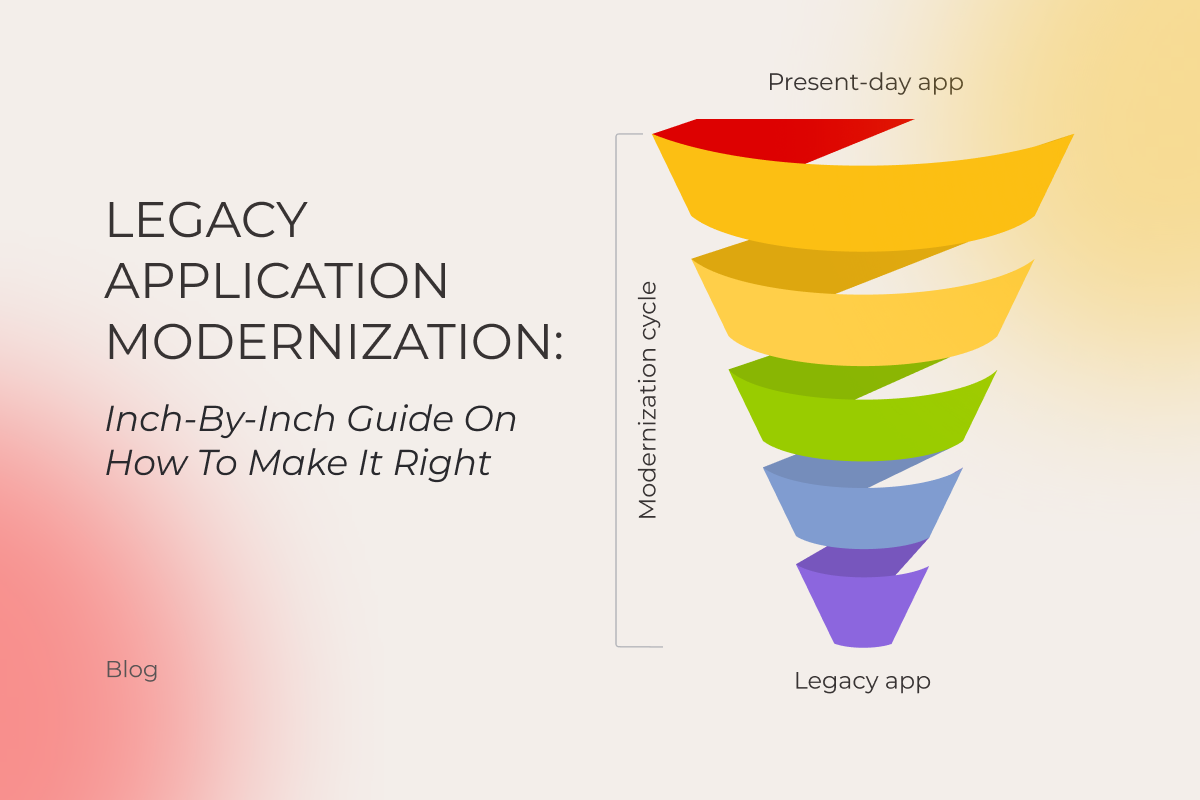
Legacy Application Modernization: Inch-By-Inch Guide On How To Make It Right

When your software does not meet challenges of time, it might be wise to consider legacy application modernization. But here’s the kicker: these initiatives are only successful in 30% of cases. No wonder many business owners cling to the idea of “why fix what’s not completely broken”, delaying necessary upgrades until it’s almost too late.  

Bad news: this mindset won’t cut it anymore. Why? Well, what should we start with? Sluggish performance and glaring security vulnerabilities are just the beginning. Legacy systems drain resources with high maintenance costs and struggle to scale with your growing business.

Fifteen or twenty years ago, you could have used software for up to eight years stress-free. Today, the lifespan of tools and frameworks has halved, forcing companies to go through the cycles of modernizing their apps every four years. 

Good news: we know how to get software back on the right track before it goes south. In this article, *instinctools’ very own head of backend development and lead solution architect will walk you through all of the stages of the modernization journey and legacy system modernization approaches, providing a slew of real-life examples along the way. 

What makes a legacy app?

Our vision of a legacy app isn’t limited to obsolete technology. At *instinctools, we stick with Gartner’s definition, considering any solution outdated if it relies on software, technology, methodology, or process that has become ineffective while remaining critical to daily operations. 

Nine signs your app is screaming for an upgrade

You know what they say: if it looks like a duck, swims like a duck, and quacks like a duck, it’s probably a duck. The same goes for legacy software: if it looks old, runs slowly, and requires a lot of effort to make any improvements, it’s probably outdated. Anyway, to help you make a well-informed choice we’ve curated a list of some blatant indicators, signaling your app needs a makeover. 

  • Skyrocketing infrastructure costs due to an outdated technology stack
  • Obsolete UX/UI failing to meet user expectations
  • Limited scalability that hinders your growth potential
  • Low flexibility, making integration with modern apps impossible
  • Poor performance as your app’s daily norm
  • Numerous security vulnerabilities and compliance risks
  • Inability to find staff with the right skills to support the app
  • Code bloat, making maintenance pricey and challenging 

Spotting the apps calling for legacy modernization isn’t a hard nut to crack. Modernization itself, though, might be — given how deeply your software is embedded in your company’s daily operations. 

Legacy app modernization has many faces

Legacy application modernization comes in various forms: 

  • Encapsulating provides a gain with no pain when you reuse the existing app’s valuable features with minimal changes by making them accessible for other applications through an API.   
  • Rehosting implies keeping the old code and features as they are while redeploying the app component to other infrastructure (on-premise; private, public, or hybrid cloud).
  • Replatforming covers elevating the software performance and scalability and reducing operational costs by migrating to a new platform, while preserving the previous code structure and core functionality.
  • Refactoring includes optimizing the existing code in line with up-to-date coding standards to eliminate technical debt.
  • Rearchitecting entails substantial changes to the application architecture and code by replacing a monolith with microservices or, sometimes, the other way around when the microservices were written at different times by different developers and are easier to maintain if consolidated in a single monolith.
  • Rebuilding involves completely rewriting or redesigning software components while keeping the app’s overall scope and specifications. 
  • Replacing existing systems with new ones is a last-ditch step required when the end users’ needs have completely changed and, to meet them, none of the current app’s components and layers can be reused. 

As you can see, there’s no need to burn your boats, when you can sail smoothly into massive improvements with time-saving, budget-friendly modernization strategies. If identifying the right one feels overwhelming, legacy application modernization services from a trusted software development company provide expert guidance. 

Risk it for the biscuit: measured rewards of legacy modernization

The prospect of IT legacy modernization can look intimidating, but the rewards are well worth the effort. Here’s how transforming your software can benefit you in multiple ways: 

  • Maintenance cost. Aligning your app with current code practices, architecture, design, etc., allows you to trim down the cost of software upkeep by at least 30%*.
  • Quality. Reducing the amount of flawed code in production to less than 1%* sounds valuable, isn’t it? 
  • Speed. Releasing new features up to x50* faster can put you ahead of the pack.
  • Regeneration. Minimizing the downtime with the average mean time to recover (MTTR) of just 2–10 minutes* raises the app’s reliability.
  • Integration. Zero drawbacks when integrating your app with other solutions contribute to the hitch-free functioning of your software ecosystem.

*Based on our client’s legacy modernization projects 

Ready to take a step towards future-proofed, high-performing software?

Schedule a call

The nuts and bolts of the legacy application modernization process: 7 steps to follow

Despite the complexities and peculiarities of software modernization initiatives, there are guaranteed strategies you can follow to tackle legacy modernization challenges head-on.

1. Run an assessment to define the problem areas

The measure-twice-cut-once principle is also valid for legacy modernization.

Revamping a legacy app should start with a thorough assessment that covers all the bases: 

  • Project documentation. Outdated software often lacks solid documentation. Catalog all the data on the app to identify any missing mandatory documents.
  • Technology analysis. Evaluate your current tech stack, and choose the most suitable programming languages, tools, frameworks, integrations, based on the available tech expertise and trends, shaping the landscape in your industry.
  • Architecture audit. Examine the systems’ architecture design, consistency, and quality against industry standards to get an idea of what can be done to achieve seamless scalability, high integration capabilities, and glitch-free maintenance.
  • Code review. Is your source code up to snuff? Compare it against the present-day coding best practices to spot and weed out any spaghetti code.
  • Data quality estimation. Inspect the app’s data layer for consistency, accuracy, and completeness to ensure no junk data sneaks into your updated software database. 
  • UI/UX evaluation. How user-friendly is your app? Analyze overall usability, ease of navigation, element layout, and visual design to identify the areas that need a facelift.
  • Performance testing. Put your app through its paces. Check the app’s stability, scalability, speed, and responsiveness under various workloads to uncover performance bottlenecks.

Prioritizing the assessment stage upfront is your secret weapon against future headaches. If your project vision is blurry or stakeholders aren’t on the same page, consider a discovery workshop. This helps synchronize your modernization strategy with your business context and user demands. 

If you don’t have the capacity or specific experts on board to tackle modernization without affecting your ongoing projects, find a tech partner who can steer the ship and bring you to the next destination of your legacy system modernization journey.

2. Identify the relevant modernization approach and technique

After assessing the existing legacy system, you can chart the right course and choose which of the legacy system modernization approaches works best for you. 

In general, there are two main options for a legacy system transformation —  the big-bang (revolutionary) method and the band-aid (evolutionary) one. Truth be told, business owners tend to choose risk-prone gradual improvements over cliff-jump actions.  

There’s only one situation when you have to put everything on the line and follow the big-bang approach. When major security issues or compliance violations arise, you don’t have the luxury of taking it slow. It’s either go big or go home. You have to act now to avoid losing customers and facing massive fines. 

We’ve put together a comparison chart to help you weigh the pros and cons of each modernization technique we’ve mentioned earlier, in terms of cost, time, complexity, and risk.

TechniqueCostTimeComplexityRisk
EncapsulatingThe lowestThe quickestThe lowestThe lowest
RehostingLowMediumLowMedium
ReplatformingMediumMediumMediumMedium
RefactoringMediumMediumMediumHigh
RearchitectingHighLongHighHigh 
RebuildingHighMediumHighHigh
ReplacingThe highestThe longestThe highestThe highest

An iterative approach lets you mix and match two or more techniques to achieve the highest value for your business. For example, one of our clients, a provider of SaaS personalization engines, started the modernization process with code refactoring of their flagship software and then decided to proceed with the redesign. That way, they were able to move toward simplified product maintenance and design consistency across all of their current solutions. 

3. Update your Vision & Scope and create a roadmap

The reason why 74% of modernization initiatives fail is mismatched project visions among stakeholders. Consistent, well-organized documentation keeps everyone aligned and on track. 

First of all, make sure the app’s vision and scope reflects the latest end-user needs, compliance, and security requirements. 

Second, you should put a premium on creating a project roadmap with the goals and objectives of your legacy system modernization, key project deliverables, business risks, success criteria, a timeline with milestones, and a team lineup. 

4. Set up app modernization team

An all-embracing roadmap, outlining mandatory roles within the team and the number of FTEs, enables you to allocate your resources wisely when arranging a remote dedicated development team for a legacy system modernization. 

However, it’s not carved in stone, and your initial goals may evolve, requiring team decomposition or expansion.

Take, for instance, a SaaS LMS provider that partnered with *instinctools. Initially, they sought our solution architects to rearchitect their current educational platform. However, amid our cooperation, they decided to strengthen their internal team with our senior frontend developers, aiming for a complete system redesign.  

Get the right talents on board

Reach out

5. Execute modernization

At this point, actions you take will hinge on the specifics of your modernization project. For example, redesigning involves prototyping, wireframing, and usability testing, while rehosting requires data and storage migration and database rehosting. 

The common best practice for any modernization technique is moving in small iterations so that you can spot and address any risks in the bud and avoid divergence of vision among team members and stakeholders. 
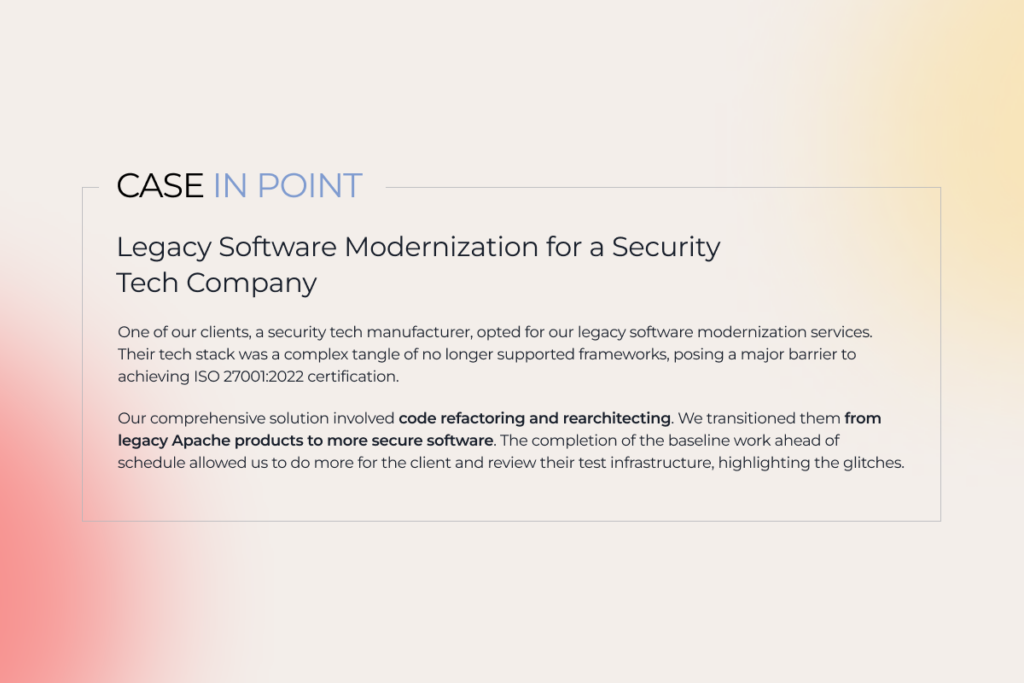
description of a legacy modernization project for a tech company

6. Invest in end-user training

Present-day tools and frameworks, modern platforms, revamped architecture, and top-notch design mean nothing without user support. While consumer demands often drive updates to customer-facing apps, internal technology changes tend to neglect employee feedback. 

How to prevent staff resistance to your modernization efforts? We suggest initiating user training before rolling out the renovated app to familiarize your employees with the new system. For significant software changes or complete replacements, consider implementing a digital adoption platform (DAP) for contextual in-app guidance. 

7. Support and optimize

Ensuring your renewed system runs flawlessly requires continuous proactive monitoring. Regular tech, UX/UI, and performance audits, code reviews, and data quality and security checks before, during, and after modernizing legacy systems increase the odds of their smooth operation. 

Make it easier with gen AI: technology use cases for legacy system modernization

Generative AI reshapes software development, and modernization initiatives are no exception. The technology’s capabilities can be applied to any form of modernization and are game-changing in increasing the share of automation. 

For instance, EY lists the tasks gen AI tools can tackle autonomously with up to 90% accuracy:

  • Reviewing code 
  • Suggesting code snippets aligned with the up-to-date coding standards and compliance policies
  • Converting a legacy code into a more dynamic environment
  • Generating human-readable inline comments for previously undocumented legacy code

Get better software modernization results faster with our support

Let’s talk

It’s time to act

Staying stuck with dust-covered software infrastructure, design, and legacy code means losing out to more agile and innovative competitors. But there’s a way forward through modernizing legacy systems in a well-thought-out, calibrated manner. 

And that’s where we come in. Instinctools is your tech partner for every step of the modernization process. We focus on maximizing what works and fixing the trouble spots, ensuring your app is sturdy and cost-effective.

Ready to make your move? 

We are here to help
AI Privacy Concerns: Profiling Through the Risks and Finding Solutions

Today, artificial intelligence is billed as a superpower that brings about unprecedented technological advancements in virtually every industry — and rightly so. The advent of gen AI and LLMs have put AI on an even higher pedestal, extending its applications and impact on modern organizations. But with this incredible progress comes a growing concern: is AI infringing on our privacy? AI privacy concerns have been the subject of many debates and news headlines lately, with one clear takeaway: protecting consumer privacy in AI solutions must be a top business priority.

Is your privacy governance ready for AI? Let’s find out.

A pulse check on AI and privacy in 2025

The heady growth of generative AI tools has revived concerns about the security of AI technology. The data chills it triggers have been long plaguing AI adopters — except they’re now exacerbated by unique gen AI capabilities. 

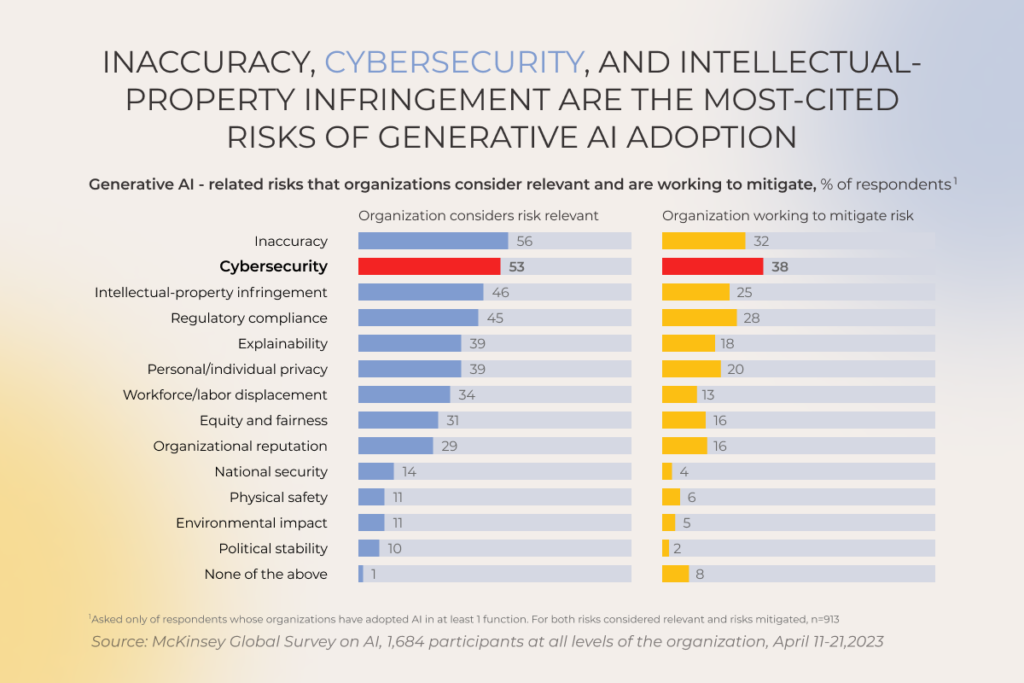
Inaccuracy, cybersecurity problems, intellectual property infringement, and lack of explainability are some of the most common generative AI privacy concerns that refrain 50% of organizations from scaling gen AI responsibly.

Generative AI-related risks firms consider relevant and are working to mitigate

The worldwide community is echoing a security-focused approach of AI leading players, with a sweeping set of new comprehensive regulations, national policies, focused legislations for specific use cases, etc., advocating for more responsible AI development. These global efforts are initiated by actors ranging from the European Commission to the Organization for Economic Co-operation and Development to consortia like the Global Partnership on AI.

For the first time in history we might be prioritizing security over innovativeness, as we should. Microsoft has finally sorted the wheat from the chaff and started to pay deserved attention to security:

“If you’re faced with the tradeoff between security and another priority, your answer is clear: Do security,” Microsoft CEO Satya Nadella said in a memo issued to his employees last month.

“In some cases, this will mean prioritizing security above other things we do, such as releasing new features or providing ongoing support for legacy systems.“

The dark side of AI: how can it jeopardize your organization’s data security?

No matter what type of AI solutions you are integrating into your business, prebuilt AI applications or self-built ones, the adoption of AI systems demands a heightened level of vigilance. When left unattended, AI-related privacy risks can metastasize, potentially causing a range of dire consequences, including regulatory fines, algorithmic bias, and other pitfalls.

Lack of control over what happens to the input data or who has access to it

Once an organization’s data enters the gen AI intelligence stream, it becomes extremely difficult to pinpoint how it is used and secured due to unclear ownership and access rights. Along with black box issues, reliance on third-party AI vendors places companies at the mercy of external data security practices that may not always live up to the company’s standards, potentially exposing business data to vulnerabilities.

Unclear data residency

An overwhelming majority of generative AI applications offer little oversight of data storage and processing destinations, which may be an inconvenient circumstance if your organization has strict requirements around data residency. Your company’s legal or regulatory obligations might conflict with relevant data privacy laws in your jurisdiction, potentially putting you at risk of hefty fines.

So unless you indicate a specific preference or turn to regionally hosted models, your AI solution places your data in the red zone. 

Reuse of your data for training the vendor’s model

When a company signs up for a vendor-owned AI system, they unknowingly consent to a hidden curriculum. Most third-party models collect data and reuse it to train vendor’s foundational models, not just your specific use case. This may raise significant privacy concerns associated with sensitive data. Data reuse also works in reverse, introducing biases into your model’s output. 

Dubious quality of data sources used to fine-tune the model

‘Garbage in, garbage out’ — this adage holds true even for the most advanced AI models. Poor quality of the source data used for fine-tuning can trigger inaccurate outputs. In most cases, there’s little a company can do to head off this pitfall since organizations have limited control over the origin and quality of data used by vendors during fine-tuning.

Personally Identifiable Information (PII) violations

You might think that data anonymization techniques place PII under wraps. In reality, even anonymized and scrubbed of all identifiers data can be effectively re-identified by AI based on users’ behavioral patterns. Not to mention, that some smart models struggle to anonymize information properly, leading to privacy violations and serious repercussions for organizations.

Also, the General Data Protection Regulation, California Consumer Privacy Act, and other bodies set a very high bar, unreachable for most AI models, when it comes to the effectiveness of anonymization.

Security in AI supply chains

Any AI infrastructure is a complex puzzle consisting of hardware, data sources, and the model itself. Ensuring all-around data privacy demands the vendor or the company to introduce safeguards and privacy protections into all components as any breach in the AI supply chain can have a far-flung effect on the entire ecosystem, including poisoned training data, biases, or derailed AI applications.

Leverage our expertise in responsible AI development

Schedule a call

Front-page data breaches involving AI: lessons learned?

If there’s one thing we can learn from the tech news is that even high-profile companies fail to effectively protect user data. And with AI technologies, this mission becomes even more formidable due to the expanded vulnerability surface.

Microsoft’s massive data exposure incident that took place in 2023 is one of the many stark reminders, highlighting AI and data privacy concerns. In this incident, Microsoft’s AI research team accidentally exposed 38 terabytes of data from employee workstations. As a result, a wide range of highly sensitive information slipped through the cracks, including personal computer backups, passwords, secret keys, and other data. Consequently, the attacker gained complete control over the system, including the ability to delete and manipulate existing files at will.

Foundational model owners aren’t immune to data bridges either. Recently, OpenAI faced scrutiny after its ChatGPT model made payment-related and other personal information of 1.2% of users visible to some users. This incident underscored concerns from industry experts who have previously criticized OpenAI’s insufficient data security practices.

Undoubtedly, every A-list company that has been exposed to any kind of data breach was quick to take crucial post-breach responses  — by patching, adjusting cloud configurations, or taking their applications offline. But considering the ever-high cost of data breaches, no measure is more effective than proactive prevention.

Tech players like Accenture, AWS, and IBM take prevention to a whole new level by shoring up capabilities and processes for responsible AI development and use. While specific points in their blueprints may differ, a common thread runs through their strategies — an unwavering commitment to compliance, data privacy, and cybersecurity.

Not all AI products are inherently flawed, some popular solutions like Simplifai, Glean, and Hippocratic AI demonstrate that success can be achieved while meeting privacy regulations and paying due diligence to privacy protection. But we get it: the regulatory landscape is changing fast, making AI development an uncharted territory for first-time technology adopters. 

The good news is there are key principles that can drift your development efforts in the right direction and save you a lot of headaches down the road.

Reducing data usage to the essential minimum

First and foremost, you can get a lion’s share of AI data privacy concerns out of the way by keeping the amount of training and operating data to the necessary minimum from the get-go. 

There’s a lot you can do to achieve minimal data usage in AI applications:

  • Give your data a good scrub — clean and filter the data to get rid of duplicated input, structural errors, and noisy information before training the model. 
  • Double down on the most relevant variables — leverage feature engineering and distill the most useful patterns from the data.
  • Piggyback pre-trained models with larger datasets — turn to transfer learning to train your data on a smaller, specialized dataset.
  • Artificially create new data points — use data augmentation techniques to increase the training dataset without collecting additional input.

Providing understandable explanations of how AI systems function and make decisions

A bad reputation associated with the lack of data privacy demonstrated by AI can be partly attributed to the black-box nature of the latter. Safeguarding data becomes a tall order when there’s little explainability in the decisions of machine learning algorithms and deep learning techniques. That’s why building a transparent and explainable system with clear underlying mechanisms and decision-making processes is crucial for an organization to build trust and confidence in emerging technologies.

Making your AI systems explainable boils down to the main three features, including prediction accuracy, traceability, and decision understanding. 

Incorporating human review mechanisms to oversee AI decisions

Different regulations, the GDPR and EU AI Act in particular, set out certain obligations for human intervention or human oversight as a means of preventing decision-making based solely on machine intelligence. To meet the requirement, organizations should employ robust review practices to avoid perpetual biases.

There are four main ways to put a rein on the outputs of the smart solution. The most common one is a human-in-the-loop system that is often used in high-risk applications. In this case, a human reviewer is directly involved in the decision-making process alongside AI algorithms. Organizations can also apply post-hoc reviews and exception-handling rules, to promote more accurate output and make sure the system doesn’t disclose any personal data.

Identifying and understanding different risk levels associated with AI systems

Just as the old saying goes ‘forewarned is forearmed’, knowing the risks and possible doomsday scenarios beforehand allows companies to devise effective mitigation strategies. 

While there is no one-size-fits-all for conducting a risk assessment for artificial intelligence tools, most frameworks require companies to assign a category of risk to the system and draw up a risk mitigation strategy based on the risk profile.

Ongoing monitoring and system refinement are other non-negotiables of a holistic risk assessment framework that can give you a heads-up about any emerging risks.

Paying special attention to profiling workloads

Some AI applications like facial recognition software or customer services chatbots scan personal user data to create audience profiles based on user’s behavior, preferences, and other criteria. As this exercise involves processing large amounts of personal information, US companies must make sure their profiling is conducted in line with the CCPA, GDPR, DPDP Act, or any other relevant regulation.

When building a conversational AI chatbot for a leading Czech bank, we needed an LLM capable of handling a flood of customer queries (the client’s app serves over 100,000 users). ChatGPT 4.0 was a go-to option, as it can process 12,000+ inquiries and transactions per second, even in peak hours. However, using the open-source model was off the table in such a heavily regulated banking industry.

To meet compliance standards, we deployed a private instance of GPT-4 within the client’s controllable Azure environment. By connecting their initial platform-based chatbot to the LLM through the API, we delivered a secure, high-performing solution fully aligned with GDPR requirements.

In reality, though, users might not be in the know about their data being used for profiling purposes, which is a hard no for ethical and responsible AI use. Also, profiling datasets may become an easy target for hackers, especially if the system has rickety security controls.

Robust safeguards such as anonymization or pseudonymisation as well as technical and organizational security controls are among the go-to safe nets when it comes to shielding profiling data. Also, transparency around profiling methods and data controls in place is important to alleviate users’ concerns.

Ensuring AI systems operate reliably and do not pose risks to users or the environment

According to ISO 42001:2023, AI systems must behave safely under any circumstances without putting human life, health, property, or the environment at risk. To meet these requirements, smart systems shouldn’t operate in silos — they must be weaved into a broader ethical framework that prevents biases in decision-making and mitigates environmental footprint stemming from resource-intensive model training.

Proactive risk management coupled with the explainability of algorithms and traceability in your workloads empowers organizations to shore up capabilities and safeguards instrumental to building trustworthy AI systems that benefit society as a whole.

De-risk your AI development, avoid regulatory roadblocks

Get a free consultation

6 practices to wipe out AI data privacy concerns

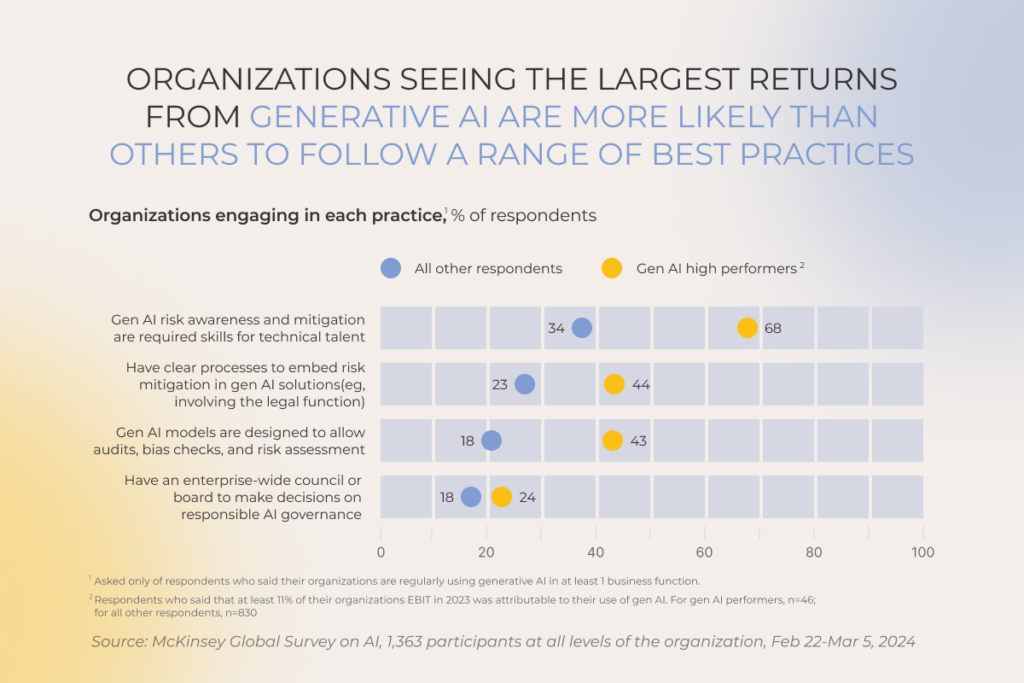
While some companies grapple with AI risk management, 68% of high performers address gen-AI-related concerns head-on by locking risk management best practices into their AI strategies.

Practices of mitigating generative AI-related risks: gen AI high performers vs other respondents

Standards and regulations provide a strong ground zero for data privacy in smart systems, but putting foundational principles in action also requires practical strategies. Below, our AI team has curated six battle-tested practices to effectively manage AI and privacy concerns. 

1. Establish AI vulnerability management strategy

Just like any tech solution, an AI tool can have technology-specific vulnerabilities that spawn biases, trigger security branches, and reveal sensitive data to the prying eyes. To prevent this havoc, you need a cyclical, comprehensive vulnerability management process in place that focuses on the three core components of any AI system, including its inputs, model, and outputs.

  • Input vulnerability management — by validating the input and implementing granular data access controls, you can minimize the risk of the input vulnerability. 
  • Model vulnerability management — threat modeling will help you harden your model by mitigating known documented threats. If you have commercial generative AI models in your infrastructure, make sure to perform close inspection of data sources, terms of use, and third-party libraries to prevent bias and vulnerabilities from permeating your systems.
  • Output vulnerability management — strip the output of sensitive data or hidden code to ensure it can’t be inferred and to mitigate cross-site vulnerabilities.

2. Take a hard stance on AI security governance

Along with vulnerability management, you need a secure foundation for your AI workloads, rooted in the wraparound security governance practices. Thus, your security policies, standards, and roles shouldn’t be confined to proprietary models but also extend to commercial and open-source models.

Water-tight security starts with a strong AI environment, amplified with encryption, multi-factor authentication, and alignment to best industry frameworks such as NIST AI RMF. Just like vulnerability management, effective security requires continuous attention to three components of an AI system:

  • Input security — check applicable data privacy regulations, validate data residency, and establish Privacy Impact Assessments (PIA) or similar processes for each use of regulated data.
  • Model security — make sure you have clear user consent or another reason allowed by law to process data. You can use the PIA framework to evaluate the privacy risks associated with your AI model.
  • Output security — revisit the regulations to see whether the regulated data is available for secondary processing. Your AI system should also have a way to erase data on request.

3. Build in a threat detection program

To defend your AI set-up against cyber attacks, you should apply a three-sided threat detection and mitigation strategy that addresses potential data threats, model weaknesses, and involuntary data leaks in the model’s outputs. Such practices as data sanitization, threat modeling, and automated security testing will help your AI team to pinpoint and neutralize potential security threats or unexpected behaviors in AI workloads.

4. Secure the infrastructure behind AI

Manual security practices might do the trick for small environments, but complex and ever-evolving AI workloads demand an MLOps approach. The latter provides a baseline and tools to automate security tasks, usher in best practices, and continuously improve the security posture of AI workloads.

Among other things, MLOps helps companies integrate a holistic API security management framework that solidifies authentication and authorization practices, input validation, and monitoring. You can also design MLOps workflows to encrypt data transfers between different parts of the AI system across networks and servers. Using CI/CD pipelines, you can securely transfer your data between development, testing, and production environments.

5. Keep your AI data safe and secure

Data that powers your machine learning models and algorithms is susceptible to a broader range of attacks and security breaches. That’s why end-to-end data protection is a critical priority that should be implemented throughout the entire AI development process — from initial data collection to model training and deployment.

Here are some of the data safeguarding techniques you can leverage for your AI projects:

  • Data tokenization — protect sensitive data by replacing it with non-sensitive data tokens as surrogates for the actual information. 
  • Holistic data security — make sure you secure all data used for AI development, including at-rest, in-transit and in-use data.
  • Documented data provenance — create verifiable mechanisms to confirm the origin and history of all data used by the models, especially inference data used for model training. Make sure data lineage and data access in non-production and development regions are in check to stave off data manipulation.
  • Loss prevention — apply data loss prevention (DLP) techniques to prevent sensitive or confidential data from being lost, stolen, or leaked outside the perimeter.
  • Security level assessment — continuously monitor the sensitivity of your model’s outputs and take corrective actions if the sensitivity level increases. Extra vigilance won’t hurt when using new input datasets for training or inference. 

And by no means, do not use data directly as input for commercial pre-trained gen AI models, unless you intend to put sensitive information into the limelight.

6. Emphasize security during AI software development lifecycle

Last but not least, your ML consulting and development team should create a safe, controllable engineering environment, complete with secure model storage, data auditability, and limited access to model and data backups. 

Security scans should be integrated into data and model pipelines throughout the entire process, from data pre-processing to model deployment. Model developers should also run prompt testing locally in their environment and also in the CI/CD pipelines to assess how the model responds to different user inputs and nip potential biases or unintended behavior in the bud.

Balancing innovation and privacy

To remain top of the game amidst the growing competition, companies in nearly every industry are venturing into AI development to tap its innovative potential. But with great power comes great responsibility. As they pioneer AI-driven innovation, organizations must also address the evolving risks associated with AI’s rapid development. 

Responsible AI development demands from organizations a holistic risk management and data privacy approach, paired with a mix of risk-specific controls. By partnering with an experienced AI development company and keeping privacy and ethics in AI development and deployment top of mind, you can enjoy the benefits of AI while prioritizing data privacy and promoting trust and accountability in the use of AI technologies.

Partner with us to build compliant, future-proof AI solutions

Contact our AI team

Polishing Up Your AI Model: Optimization That Drives Success

When the honeymoon stage is over, you may find your AI model under-deliver on its promises. Model drift, operational inefficiency, and other hitches creep into the system, nullifying the initial gains. That’s why it’s crucial to pour an equal amount of resources both AI development and AI model optimization to maximize the performance of your smart solution and prevent it from going south.

In this article, our AI engineers have curated practical advice about the selection of artificial intelligence optimization techniques along with real-world examples of optimization in artificial intelligence — all grounded in our hands-on experience delivering AI development services.

What is optimization in AI? Turning your models from good to great

Artificial intelligence optimization is a process of refining the performance and efficiency of existing machine learning models. Although fine-tuning is considered to be an optional, after-the-fact step, it’s the brushstroke that turns your pre-trained AI model from a generalist into a niche expert.

More importantly, optimization algorithms allow your model to bypass data, time, and computational limitations, improving its abilities without eating into your resources.

What problems does AI optimization address?

On a high level, AI optimization aims to slash computational load and memory usage along with improving the model’s performance. Beyond this overarching objective, companies can leverage this technique to tackle a raft of other challenges inherent to AI initiatives.

1. High costs of training and running AI models

The power of large and complex deep learning models usually comes at a cost as their sophisticated architecture and formidable data requirements make them expensive to train and run. Optimization techniques can slim down the necessary computational resources, helping companies save money — especially on cloud deployments based on pay-as-you-go models.

2. Slow performance and latency

Low latency is an essential prerequisite for real-time data analysis solutions, such as autonomous vehicles and real-time fraud detection systems. However, increasing prediction accuracy often leads to longer prediction times. AI optimization techniques can enhance model speed and reduce inference time, maintaining both low latency and high prediction precision without compromising either.

3. Overfitting

Overfitting often plagues AI models, hindering their ability to perform well when faced with an unseen set of data. The reasons for that are manifold, including high model complexity, small training data size, and dominance of noisy data. 

Optimization techniques such as data augmentation (creating more diverse training data), early stopping (preventing overtraining), and others can offset this defect, improving the model’s ability to generalize to new data. This, in turn, enhances the model’s accuracy for real-world scenarios.

4. Lack of interpretability

The more advanced your model is, the harder it will be to trace its decision-making process. The black-box nature of sophisticated algorithms also makes models hard to debug and undermines trust in their results.

Although AI model optimization isn’t a cure-all solution, this exercise can usher in more transparency into the opaque nature of artificial intelligence. For example, companies can apply rule extraction techniques, gaining more insight into the behind-the-scenes of the model. Combined with explainable AI, these techniques can peer deep into the model and rationalize specific predictions.

​​5. Deployment challenges

Large deep learning models guzzle a truckload of processing power and device memory, which makes their deployment challenging for resource-constrained environments such as those involving IoT devices. AI fine-tuning makes smart models leaner by trimming away unnecessary parameters and refining the model’s architecture. 

Some techniques also enable the model to use lower-precision data types instead of the bulky high-precision formats. Unlike their heavyweight counterparts, lightweight AI models have more deployment options and can integrate with new applications and devices.

Key techniques for AI model optimization

To choose the right optimization technique for your model, you need to analyze several factors, including the model’s type, the deployment environment, and your optimization goals. Below, our data science team has broken down the key optimization techniques along with their ideal use cases.

Model architecture optimization

Whenever your model is facing resource constraints, like limited memory or computational power limitations, it’s in for an architecture touchup. Architecture optimization is also beneficial for the deployment efficiency and the accuracy of predictions.

Pruning

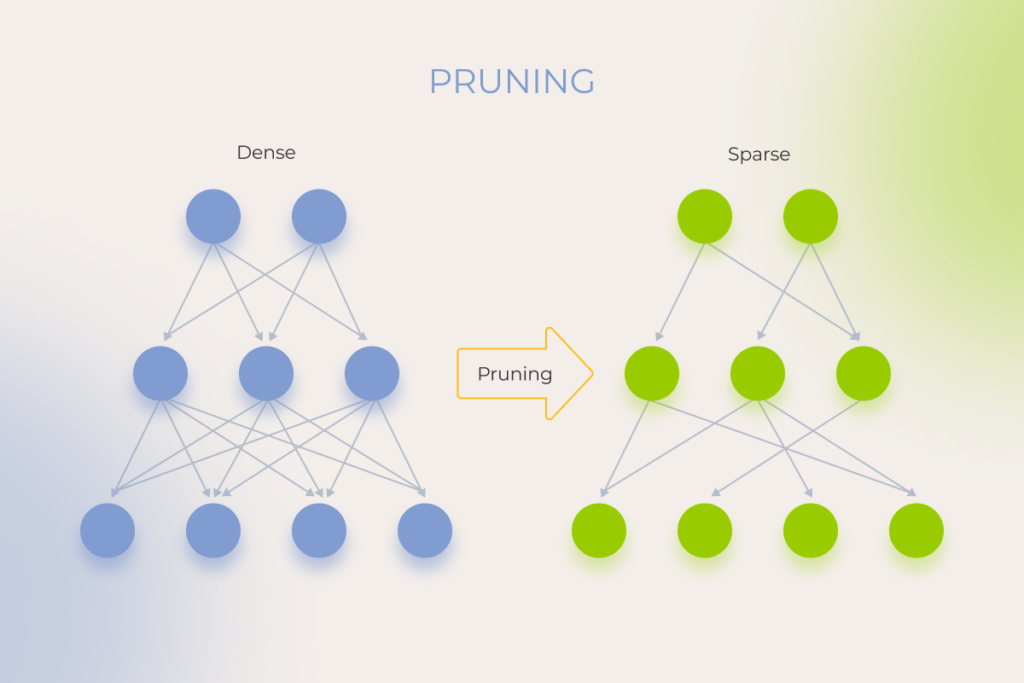
Similar to tree pruning, this technique optimizes the model by selectively removing redundant or unimportant parameters, artificial neurons, weights, or deep learning network layers, thus improving the model’s core structure. A proper prune is an investment in the speed and nimbleness of the model. Pruning can also be used as a regularization technique to prevent overfitting.

pruning as an AI model optimization technique

When to use? Use pruning when you need to reduce computational complexity and inference time. This is typically the case with tight deployment constraints, such as limited memory or processing power on edge devices. For example, mobile phone manufacturers apply pruning to enable on-device image recognition, reducing battery consumption and improving responsiveness.

Keep in mind that this optimization technique can lead to a slight drop in accuracy.

Quantization

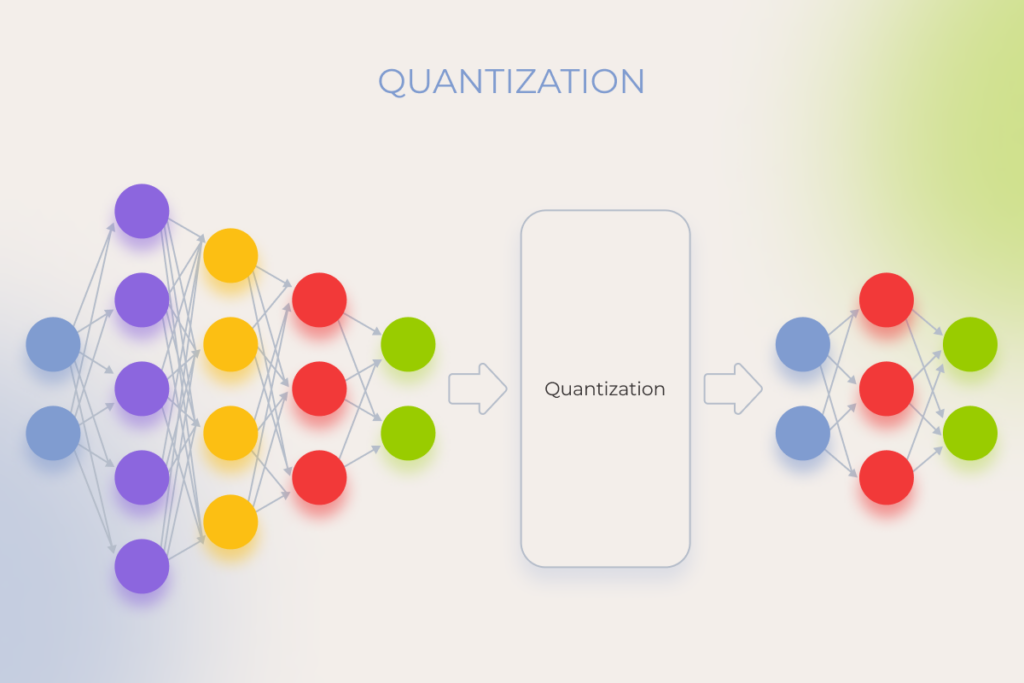
Quantization allows you to substitute floating-point weights and/or activations with low precision compact representations. In simple words, this technique transforms a heavyweight AI model, which employs a lot of numbers to make predictions, into a more agile model with a reduced number of bits used for those numbers. 

By paring down the model, quantization makes it faster while also reducing memory footprint. However, the boost in speed may come at the expense of prediction accuracy so you should select this optimization technique for tasks where you can keep the accuracy loss to the minimum.

Quantization as an AI model optimization technique

When to use? Quantization is the go-to option for on-device machine learning tasks, resource-constrained environments, like embedded systems and IoT devices, and cloud-based AI.

For instance, quantization is the secret behind real-time voice interactions on smart speakers that leverage the technique to operate efficiently on low-power hardware.

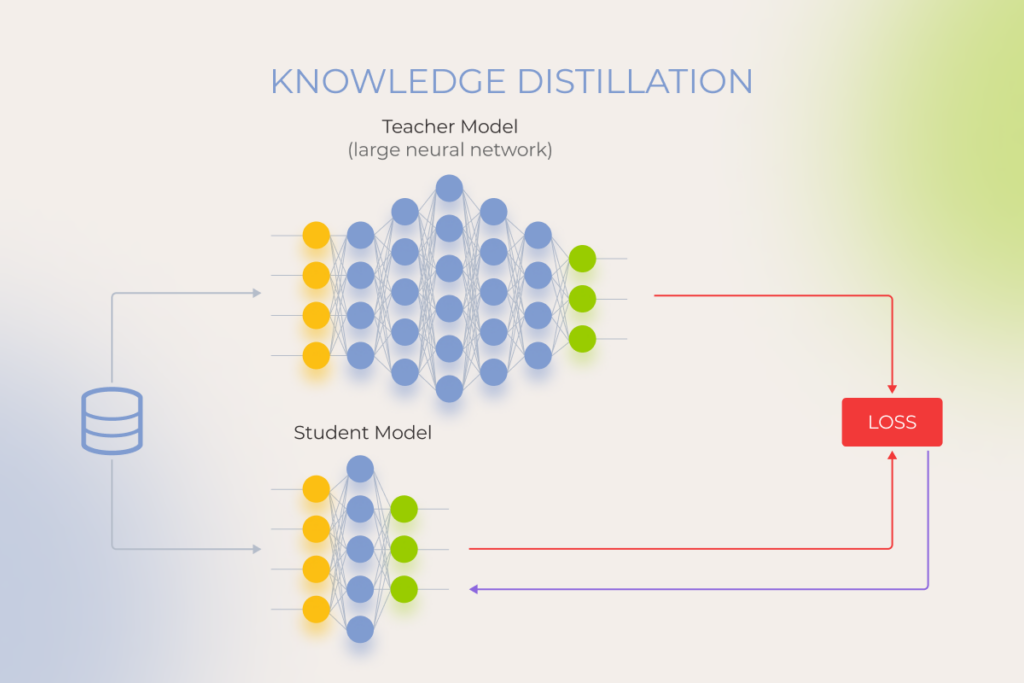
Knowledge distillation

Knowledge distillation is one of the general-purpose optimization algorithms in artificial intelligence popular for model compression. This technique condenses knowledge from a pre-trained, complex ‘teacher’ model into a simpler and smaller ‘student’ model to improve the performance of the latter. By building on the teacher’s wisdom, the optimized model can achieve comparable performance on the same task, but at less cost.

knowledge distillation as an AI model optimization technique

When to use? Knowledge distillation can benefit multiple AI solutions, including natural language processing, speech recognition, image recognition and object detection. You can use this optimization technique for one of these tasks, provided you have a pre-trained, high-performance model that can then power a smaller model for real-time applications.

For example, knowledge distillation enables a small chatbot model to increase response time and refine its conversation flow by using a large, pre-trained language model as a ‘teacher’.

Source code modification

Switching a model’s framework, such as transitioning from TensorFlow to PyTorch, can enhance the development workflow, especially for projects prioritizing fast experimentation and iteration. PyTorch’s dynamic computation graph and developer-friendly design often make it a preferred choice for research and prototyping. However, this AI model optimization technique is applicable only to open-source models, such as BERT, Mixtral, or Llama, where the source code is accessible and modifiable. It’s important to note though that switching frameworks may not directly improve model performance. Actual gains depend on factors like architecture, training data, hyperparameter tuning, and compatibility with your team’s expertise and project goals.

When to use? In most cases, modification of the model’s algorithm is a last-resort step, as source code enhancements require retraining the updated model. You need to have seasoned AI engineers on board to pull off the task smoothly. 

Data optimization

In a perfect world, all AI models are fed on accurate, high-quality, and balanced data that lays the ground for impeccable performance. In reality, training data often falls short, causing insufficient model adaptability and subpar performance. Data optimization techniques can alleviate issues caused by poor training data while also promoting better results.

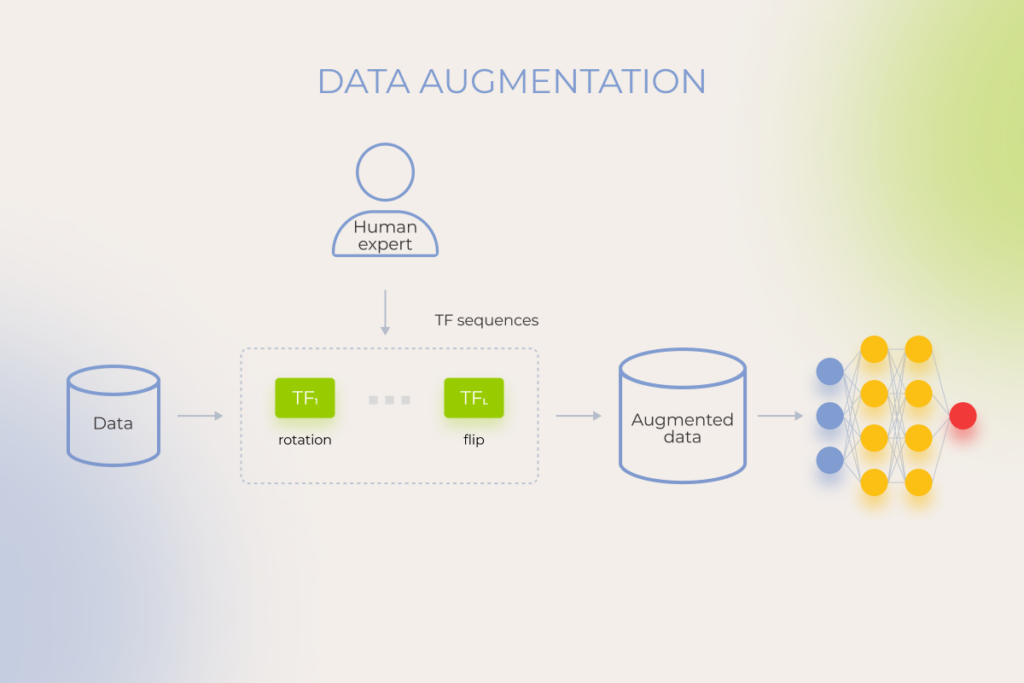
Data augmentation

Data augmentation allows data science teams to artificially ramp up the training set by creating new training data from existing data samples. This technique increases the volume, equality, and diversity of training data, allowing the model to bypass the limitations caused by small or imbalanced datasets. Expanded sets of training data, in turn, mitigate overfitting and reduce data dependency.

data augmentation as an AI model optimization technique

When to use? Data augmentation helps your model fare well against the backdrop of limited training data, which is a common issue in tasks like image recognition.

For example, data augmentation makes up for limited data variations, which is a well-known hurdle for medical imaging models targeted at rare disease detection. 

Autonomous vehicles also rely on augmented datasets to overcome limitations in real-world data and, ultimately, navigate in diverse weather conditions.

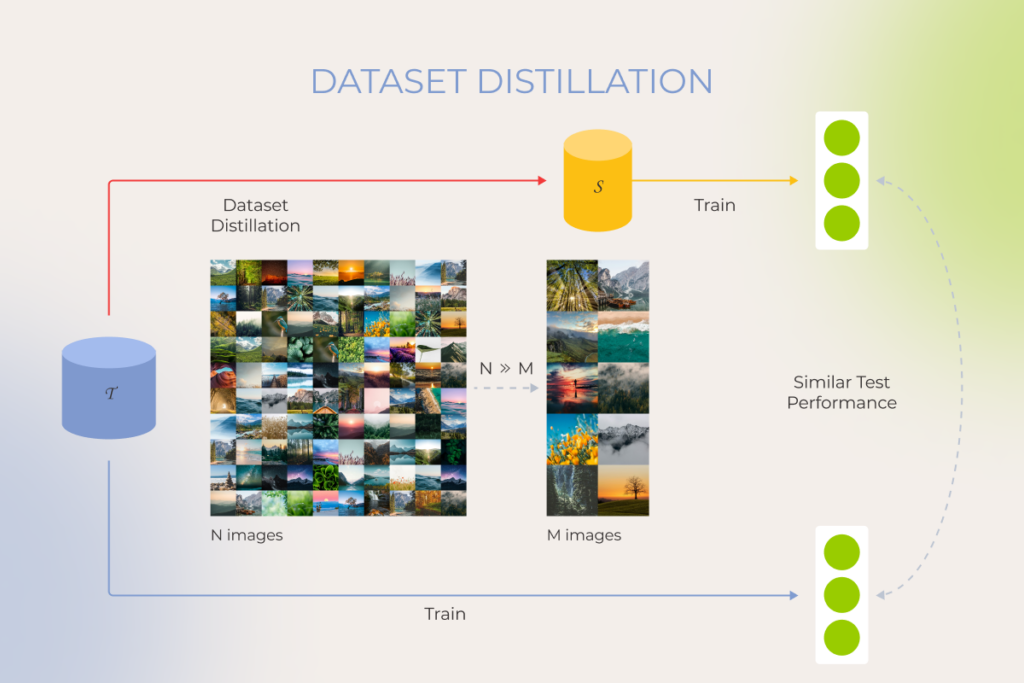
Data distillation

Akin to knowledge distillation for models, dataset distillation helps a smaller model pick the brains of a larger model trained on a massive dataset. This optimization technique allows the smaller model to transfer specific data points, relationships, and internal representations of the data from the larger one, making the smaller model faster and less computationally expensive.

dataset distillation as an AI model optimization technique

When to use? Data distillation comes to the rescue when you have limited access to a large dataset due to privacy concerns or storage constraints, but you can leverage a pre-trained model, already enriched by a vast dataset on a similar task.  

For example, dataset distillation is a game-changer in the development of customer service chatbots that often lack training data due to the dynamic nature of customer interactions. 

Training optimization

As our experience shows, companies often look for ways to train a model on a dime due to the limited computational resources and budget considerations. Training optimization techniques help strike a balance between the cost and quality of training, without performance trade-offs.

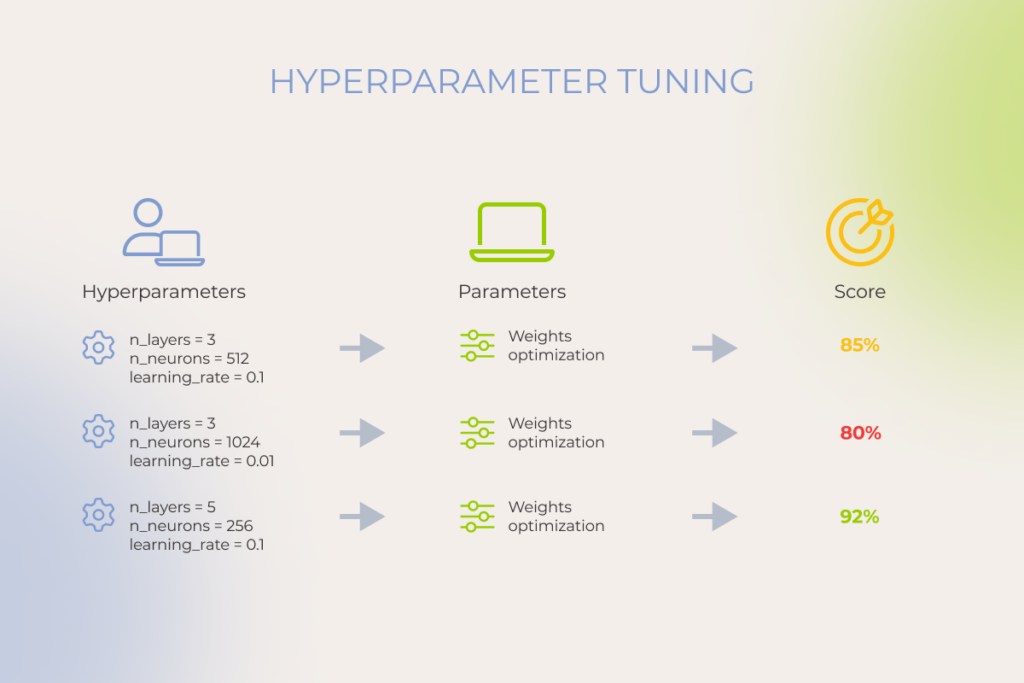
Hyperparameter tuning

Hyperparameter tuning allows you to train your model sequentially with different sets of hyperparameters to increase its training speed, convergence, and generalization capabilities. During this process, the team selects the optimal values for a machine learning model’s hyperparameters, such as learning rate, batch size, number of epochs, and others.

Hyperparameter tuning is an iterative process where data scientists experiment with different hyperparameter settings, assess the model performance, and iterate accordingly.

hyperparameter tuning as an AI model optimization technique

When to use? You can resort to hyperparameter tuning whenever you need to squeeze out the best possible performance or solve complex optimization problems in artificial intelligence. This optimization technique also allows teams to work around limited datasets and facilitate model adaptation when working with a new dataset. 

Hyperparameter tuning proves beneficial for different ML tasks, including stock price forecasting, fraud detection, drug response prediction, and more. 

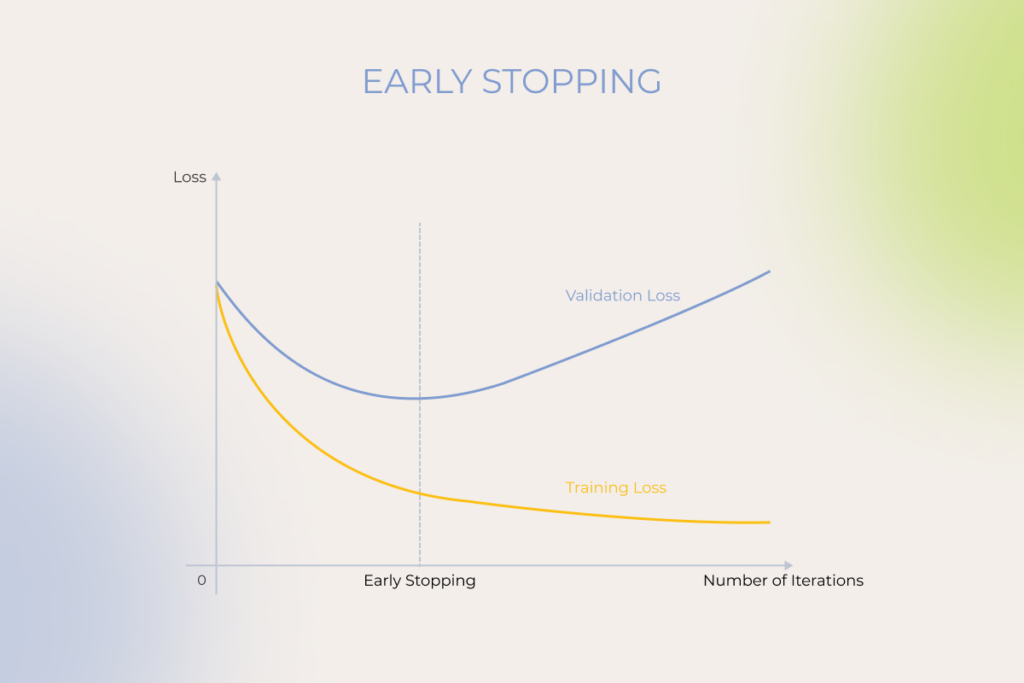
Early stopping

This optimization algorithm helps avoid overfitting that typically occurs when training a learner with an iterative method such as gradient descent. Early stopping monitors the model’s performance on a validation set and shuts down training when the validation accuracy starts to degrade. 

early stopping as an AI model optimization technique

When to use? Early stopping helps data science teams deal with complex models or limited training data — when it becomes critical to prevent overfitting.

For example, this fine-tuning technique helps optimize training time for computationally expensive models.

Gradient clipping

During training, the model adjusts its weights based on the calculated gradients. Gradient clipping ‘clips’ the size of the slopes and sets a threshold — maximum value — for them to tackle the exploding gradients problem and improve the stability of the training process. In some cases, this technique can also keep the training process from oscillating and potentially result in faster convergence.

gradient clipping as an AI model optimization technique

When to use? Gradient clipping is a linchpin technique for any neural architecture that is prone to grow too big.

The application area of gradient clipping is massive, ranging from NLP tasks to reinforcement learning environments and other machine learning techniques. For example, by stabilizing the training process, gradient clipping smooths training for NLP models, enabling them to achieve a nuanced understanding and generation of natural language.

How much does it cost to optimize an AI model?

It’s hard to pin down an exact figure when talking about optimization cost as the final pricing varies greatly based on several variables, including: 

  • The complexity of the AI model — sophisticated deep learning models demand more effort and resources to optimize.
  • Optimization techniques — some techniques like data distillation require significant computational resources and specific hardware.
  • Deployment scale — large-scale deployments increase optimization costs.
  • Data storage — large datasets require cloud or on-premise storage solutions.
  • Data labeling — manual labeling can increase your optimization costs.

Instinctools’ data science team employs automation tools within our MLOps approach to reduce the time and effort needed for tasks like data pre-processing or hyperparameter search. We also recommend optimizing for the most important metrics, instead of spreading the optimization efforts too thin, to make the entire process easier on the budget.

AI optimization is a balancing act

While artificial intelligence and optimization make a powerful duo, excessive fine-tuning can lead to diminishing returns and drops in model performance. To get AI model optimization right, you also have to strike the right balance between accuracy and computational demand — or else you’ll end up with longer training times, higher costs, and limited deployment options.

Solve the challenges of AI optimization with an experienced AI team

Let’s discuss

In-House Development vs. Outsourcing in 2025 | The Good and the Bad of Both Options

Key highlights

  • Having the right talent at the right time at a reasonable cost is usually a pipe dream in workforce management, driving the ongoing challenge of in-house vs. outsource decisions.
  • In-house development provides complete control over your project, but comes at a high cost and often involves staffing challenges.
  • Outsourcing wins at cost, speed to market, expertise diversity, and team scalability, though its benefits can be offset by potentially reduced control and higher exposure to security risks.
  • There’s a third option allowing companies to get the best of both worlds and meet their business needs while minimizing the trade-offs.

Knowing the pros and cons of in-house software development and outsourcing empowers businesses to play their sourcing strategy right. Pick wrong, and you burn time, budget, or, more likely, both. Pick right, and you gain control, speed, and focus exactly where it matters.

Neither in-house software development nor outsourcing software projects is foolproof. Your chances of thriving hinge on a grounded understanding of your capabilities and experience as well as choosing the model that resonates with your business goals and levels out your limitations. This guide will help you match your business needs with the best-fit sourcing approach. 

What is in-house software development?

In-house development, or insourcing, is the practice of relying only on internal teams to analyze, architect, design, test, and maintain software. Companies that adopt this approach take full responsibility for finding the relevant candidates, interviewing them, onboarding new hires, and providing them with the necessary tools and technology to support their work. 

Pros of in-house development 

In-house development offers a range of strategic advantages that can significantly impact product quality, team alignment, and long-term growth.

Complete control over your development team members and the entire project

Direct communication and control are vital if you develop specialized, complex software solutions. Besides predictable quality benchmarks and a fully transparent development process, reliance on the in-house squad allows you to pivot or adjust priorities instantly. 

With no external dependencies, you’re free to move without waiting for third-party approvals. Realigning sprint goals and reshuffling tasks in the backlog to roll out an in-demand feature faster and respond to market shifts in near real-time can be critical for startups chasing product-market fit. It’s also increasingly important for SaaS companies with mature products facing pressure in an AI-heavy landscape, as they need to launch AI-powered versions of existing tools to stay relevant and secure a share of their clients’ AI budgets. 

Security and intellectual property protection

Historically, an internal team provided a higher level of security. This model came with fewer external exposure points, since sensitive data stayed within the company’s internal network and physical perimeter. 

However, with remote work arrangements, this benefit is no longer set in stone. Maintaining overall security and protecting intellectual property now depend more on the measures taken to safeguard it, rather than only on the sourcing model you choose. And when it comes to establishing robust security measures and building defense mechanisms as well as facing the fallout if something goes wrong, the responsibility is yours and yours alone.

Knowledge capture

With an internal team, you may feel safer regarding knowledge capture. Even if you didn’t prepare all-encompassing project documentation from the outset for the sake of a speedy start, the team is still with you, and members can help fill in the gaps whenever they pop up. But this arrangement introduces the problem of overdependency on the in-house knowledge holders. If they quit the company, you’re left empty-handed.   

My 15+ years of working with both in-house and dedicated teams reveal that the key to stable and lasting knowledge retention is a well-oiled system for managing and centralizing information, featuring organized storage for knowledge assets, metadata and tags to simplify search and retrieval, version control, archiving of outdated content, etc. 

And this principle applies to both sourcing approaches. If you prioritize knowledge capture and sufficient project documentation from the start, you’ll always have vision and scope, competitor analysis, target audience, architecture overview, and UX/UI concepts at your fingertips. 

— Konstantin Nikitin, Lead Project Manager & Delivery Manager, *instinctools 

Exclusive focus on your project

With the in-house team, you have experts operating within a single working context, and this setup has its benefits. For instance, having a business analyst who knows your core business functions like the back of their hand and a software architect who understands your system inside out greatly facilitates new feature development.

On the contrary, for an external team, your project is one of many. However, with the right collaboration model, you can get an in-house-like experience. For example, a dedicated team model gives you a group of professionals who focus solely on your project, offering the same level of commitment and continuity as an internal team.

Cons of in-house development

Although insourcing has strong advantages, there’s also a fly – or rather, a few – in the ointment you should take into account. 

High labor costs

Keeping an internal development team gets expensive. As an employer, you have to cover sick leaves, vacations, health insurance, and perks like online course subscriptions or gym memberships. Plus, you need to invest in ongoing training for your team. And don’t forget about recruitment and replacement costs. Let’s do the math.

When filling tech positions, recruitment costs (job postings, agency fees, and the time HR spends on interviews) can amount to 30–50% of the expert’s annual salary. For example, for a software engineer earning $100,000, roughly $40,000 is spent to fill the position. Not to mention that new hires often aren’t fully productive for the first 3–6 months. 

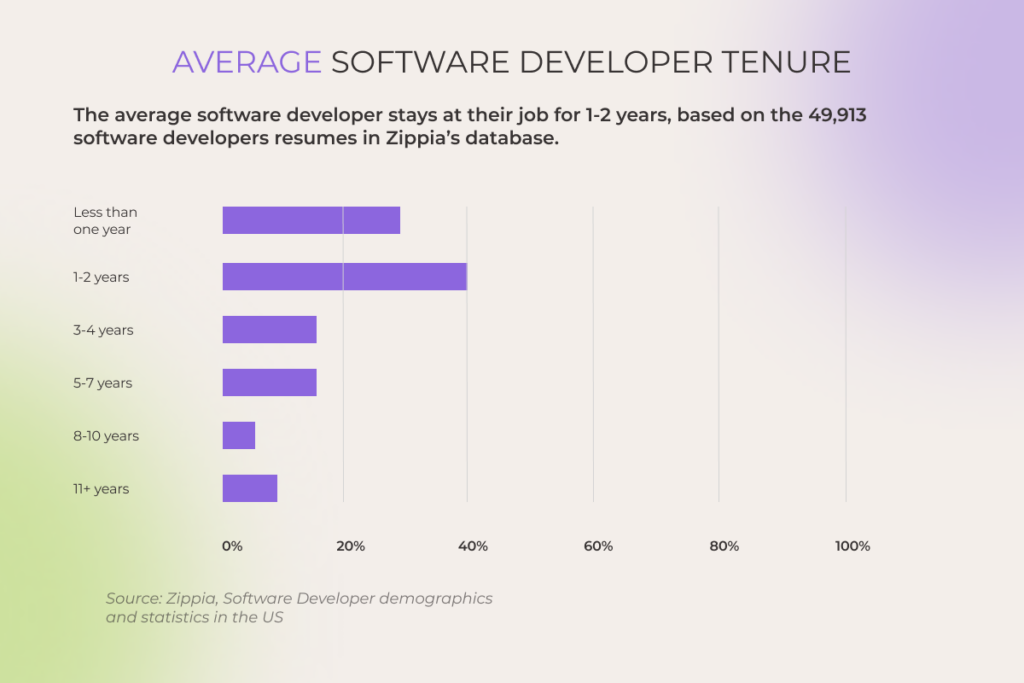
To achieve a positive ROI, companies typically need specialists to stay at least 2–3 years. However, the reality of the job market is that up to 65% of software developers don’t stay put for more than two years, with the whole 18% of new hires leaving during their probationary period. 

Software Developer demographics and statistics in the US

Also, keep in mind the cost of equipment. While the bring-your-own-device (BYOD) approach gained traction during the mass compulsory adoption of remote work in 2020, and now 63% of US enterprises allow their staff to access corporate resources via personal devices, companies are still expected to provide their in-house employees with hardware and licensed software. It adds to the operational expenses of the in-house resources. Moreover, if you support both remote and on-site work options, count in the cost of renting the office space.

Staffing challenges

The cost of recruiting specialists in-house isn’t the only dealbreaker with this insourcing. The recruitment process is also time-consuming and labor-intensive. In-house hiring may take weeks or even months to spot and enlist necessary experts. It makes scaling the team up or expanding expertise areas on short notice practically impossible.

The average time to fill depends a lot on the role. For example, if you get lucky, you may find a valid project manager candidate, move through interviews, and get a ‘yes’ to your offer in 20 to 30 days. But for tech positions, especially hot-commodity roles like AI engineers, it can easily stretch up to 90 days.

— Yanina Sushkova, Head of Recruitment, *instinctools

It also makes it harder to keep up with the technology trends, even major ones, such as company-wide and function-specific adoption of artificial intelligence. For example, FAQ-like chatbots trained on the company’s data are known to be one of the low-barrier gen AI use cases, but you’ll need AI engineers to implement them. There’re two ways to get them on board:

  • If your budget can stretch for another in-house team member, hire an AI engineer
  • If you have data specialists willing to transition to an AI engineer role, invest in their retraining 

As you can see, each option is neither quick nor easy. 

Moreover, don’t forget about the risk of in-house employees resorting to quiet quitting if they grow unsatisfied with you as an employer. McKinsey’s report highlights that while 20% of staff members are vocal about job dissatisfaction, only 7% also express plans to leave the current company. The remaining 13% can gradually slip into underperforming. Outsourcing takes quiet quitting off your radar. With clear SLAs and contractual oversight, vendor teams quickly replace disengaged members to keep delivering on their promises. 

What is software outsourcing? 

Outsourcing software development involves partnering with external vendors who add the necessary expertise to your project and cover some phases of the SDLC or the entire development process. Outsourcing comes in different forms regarding the hiring distance (onshoring, nearshoring, and offshoring) and the cooperation scope (IT staff augmentation, a dedicated team, and the whole development center).

Pros of outsourced development

Where an in-house squad hits a wall, an outsourced development team opens a side door to deliver on time and on budget.  

Cost-effectiveness

You only pay for the work done. All the extra costs related to the outsourced team are on the vendor’s side. Of course, these costs are reflected to a certain extent in the hourly rates. 

However, if your company is based in pricey regions, such as the US, Australia, the Nordic countries, or Western Europe, you can still benefit from a global talent pool in more budget-friendly locations such as Central and Eastern Europe. For instance, tech giants of the IT industry like McKinsey and Deloitte set up their R&D centers in Poland for a reason. The country is known for its high-quality and affordable IT workforce.

Faster time to market 

When time to market is a priority, outsourcing software projects becomes your silver bullet. It enables you to initiate the project within several days. 

Working with an experienced outsourcing company also has well-defined timeline agreements for all development stages, with penalties for downtime on the vendor’s side. This means your contractor is motivated to quickly address any issues that arise. 

Of course, not all outsourcing experiences are created equal. It’s essential to stay away from providers who offer lip service rather than solid software development. An unreliable tech partner can deliver a solution that doesn’t match the original idea and your expectations, or, which is worse, misreads user needs. 

One of our clients – a European venture capital company – reached out to *instinctools after a frustrating experience with an incompetent outsourcing provider. They had a developers-only team, which led to blurred project vision and a deep chasm between expectations and reality. Instead of a top⁠-⁠of⁠-⁠the⁠-⁠line digital fundraising platform they envisioned, they got an Excel-like spreadsheet. We got the project back on track. 

— Konstantin Nikitin, Lead Project Manager & Delivery Manager, *instinctools 

Diverse expertise on tap 

A strong competitive advantage of outsourced teams is their broad range of expertise without long-term commitments. 

Say, you should undergo software modernization and need experts well-versed in both legacy systems and modern technologies. If your internal team doesn’t have the right specialists to ensure a smooth transition, hiring full-time in-house developers with specialized skills for just a few months isn’t cost-effective. That’s where outsourcing really shines.

Unlimited team scalability and flexibility 

The core strength of outsourcing software development lies in its unmatched scalability and flexibility. You can start with a single developer and then expand to a few dozen of them, or set up a ‘nuclear’ team with a business analyst, software architect, and several engineers, integrating other subject matter experts later on. And when those roles are no longer needed, scaling down is just as smooth and swift, if you cooperate with a reputable outsourcing partner. 

Cons of outsourced development

The benefits of outsourcing may be tempting. But to make a well-informed decision when comparing outsourcing vs. in-house, it’s important to weigh the potential drawbacks too. 

Less control over the team (but not necessarily)

Borrowed talents may split focus between clients, and your project’s priorities can fade into the background. Still, that’s not always the case. In fact, with the right setup, the decision to outsource development can turn this risk into a strategic advantage. 

With insourcing, the responsibility for managing the team (coordinating tasks, resolving blockers, maintaining motivation) falls on your shoulders. Meanwhile, with the right outsourcing partner, less direct control can translate into less day-to-day management stress. Because in the case of outsourcing, you can calibrate the level of control:

Well-orchestrated knowledge management is another area extended teams usually excel at. Working for various companies for years, if not decades, they hone their mechanisms for knowledge acquisition, creation, refinement, storage, transfer, sharing, and utilization. As a result of their solid documentation practices, you get well-structured, comprehensive project records.

Higher infrastructure and data security risks (only with a shady outsourcing provider)

Security concerns are another hot-button issue. Insourcing feels safer because it keeps everything behind your firewall. But if we look at companies like Amazon and PayPal, which rely strictly on in-house software development, and giants like Google and Slack, which leverage outsourcing, they all suffer from data leakages nearly every year.

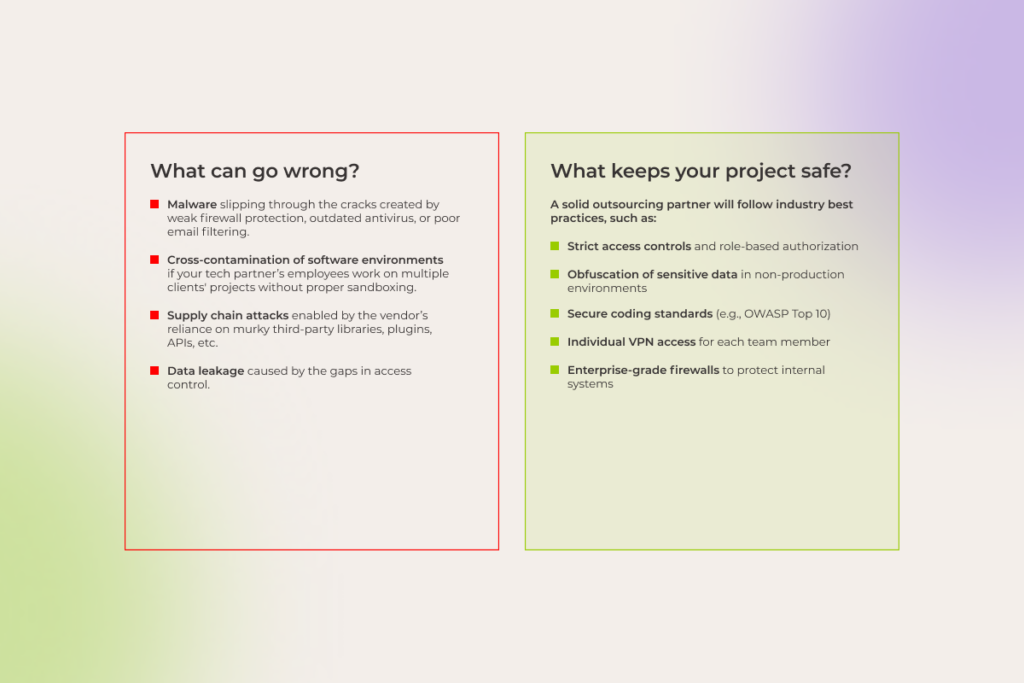
What’s certain is that outsourcing extends your security boundary beyond your organization into the vendor’s environment. Does it always mean security trade-offs? Not really. 

Your project is safe if the outsourcing provider follows key security best practices, such as enforcing strict authorization for access to production data, obfuscating sensitive information, adhering to secure coding standards like the OWASP Top 10, providing employees with individually assigned corporate VPN access, and maintaining strong firewall protection to shield internal systems. 

Moreover, sometimes an outsourcing partner, that operates in a budget-friendly location, can offer security infrastructure that may be too costly or impractical to implement in-house, say, an ODC with a closed physical perimeter with a security frame and an on-site guard, a no-phones policy, limited access to the internet, and mandatory audio and video surveillance within the office space.

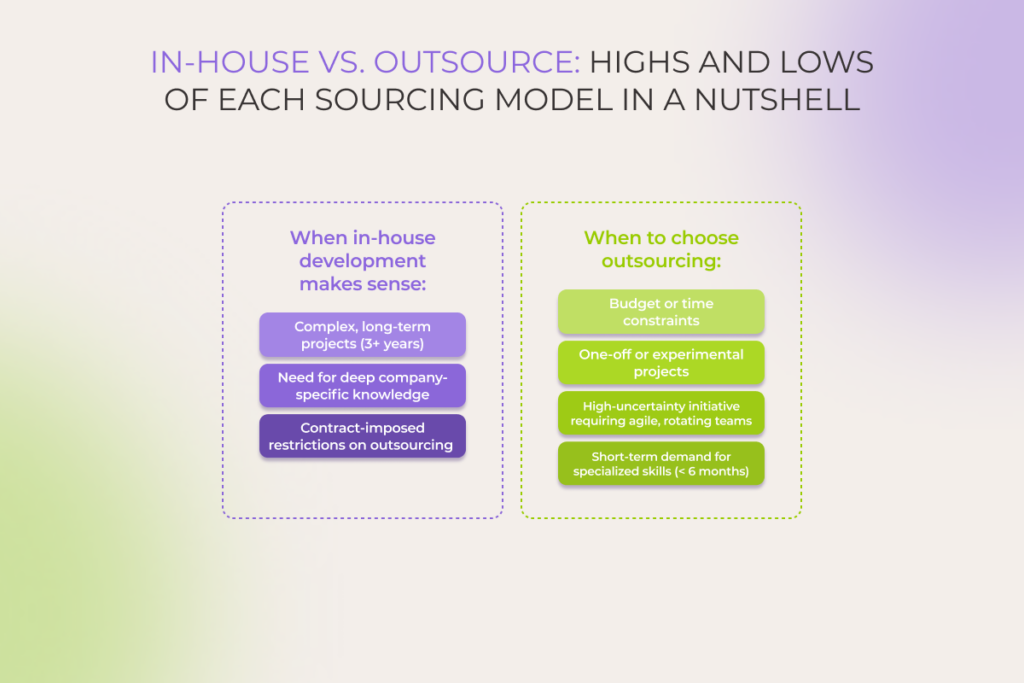
In-house vs. outsource: highs and lows of each sourcing model in a nutshell 

This brief table outlines the strengths and weaknesses of in-house and outsourced development, making it easier for you to analyze each option.

ParameterIn-house teamOutsourcing team
Cost HighLow (when outsource development team to low-cost locations)
ScalabilityLowHigh
Time to set up a teamMonthsDays
Time to marketSlow (if you lack project team members and need to hire them)Fast
Level of control over a team and development processesHighLower, but with a decent provider, you can have nearly the same level of control
Expertise diversityLimited to your core activitiesHigh
Communication with a teamDirectDepends on a collaboration model
Cooperation durationFrom 2+ years (to make the cooperation cost-worthy)Any time period
Security and IP safetyDepends on the data security measures in place, not the sourcing model

Not ‘either-or’: hybrid approach to software development

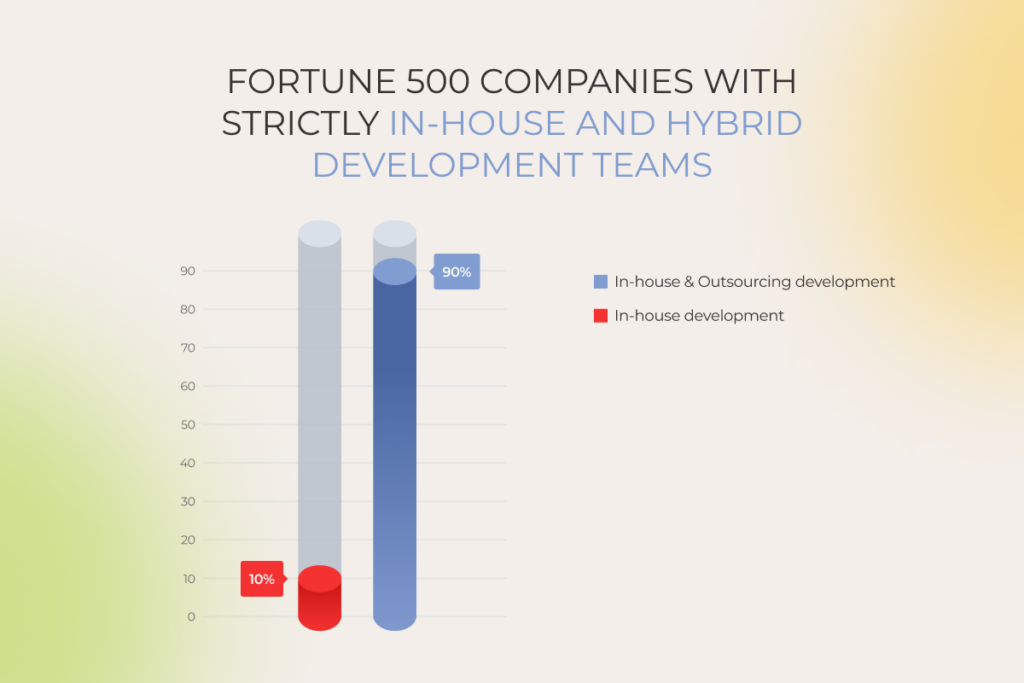
Current Fortune 500 statistics show that most of these companies choose outsourcing and in-house software development rather than in-house versus outsourcing. Indeed, businesses don’t have to clash two sourcing models. A hybrid approach often works best, enabling you to strike a balance between the upsides and downsides of both options. 

With the right partner, your sourcing strategy can steer, not stall

Let’s map it out 

FAQ

How do I decide between in-house and outsourcing software development?

When facing the in-house vs. outsourcing software development dilemma, keep in mind that  in-house makes sense for a complex and long-term (3+ years) development process, while software outsourcing is the right choice if you have budget or time constraints, one-off or experimental projects, need frequent team recalibration, and when the demand for specialized expertise is short-lived (< 6 months).

Can in-house teams collaborate with outsourced developers?

Sure! In fact, strengthening your in-house resources with guest experts or a whole external team is the way 90% of Fortune 500 companies approach software development. Hybrid development is a go-to option when you need to offload your backlog quickly, handle an unexpected workload spike, or want to test a raw hypothesis without sacrificing first-priority tasks.

Is outsourcing cheaper than in-house development?

An outsourced software development team is a more budget-friendly option than hiring, onboarding, and equipping in-house specialists with hardware, not to mention covering healthcare costs or company perks. To be totally honest, though, since outsourcing vendors absorb those overhead costs, a portion of that is reflected in their hourly rates. To make the most of this sourcing approach, look for low-cost locations, such as Central or Eastern Europe, Central and South Asia – Poland, Kazakhstan, and India are good starting points.

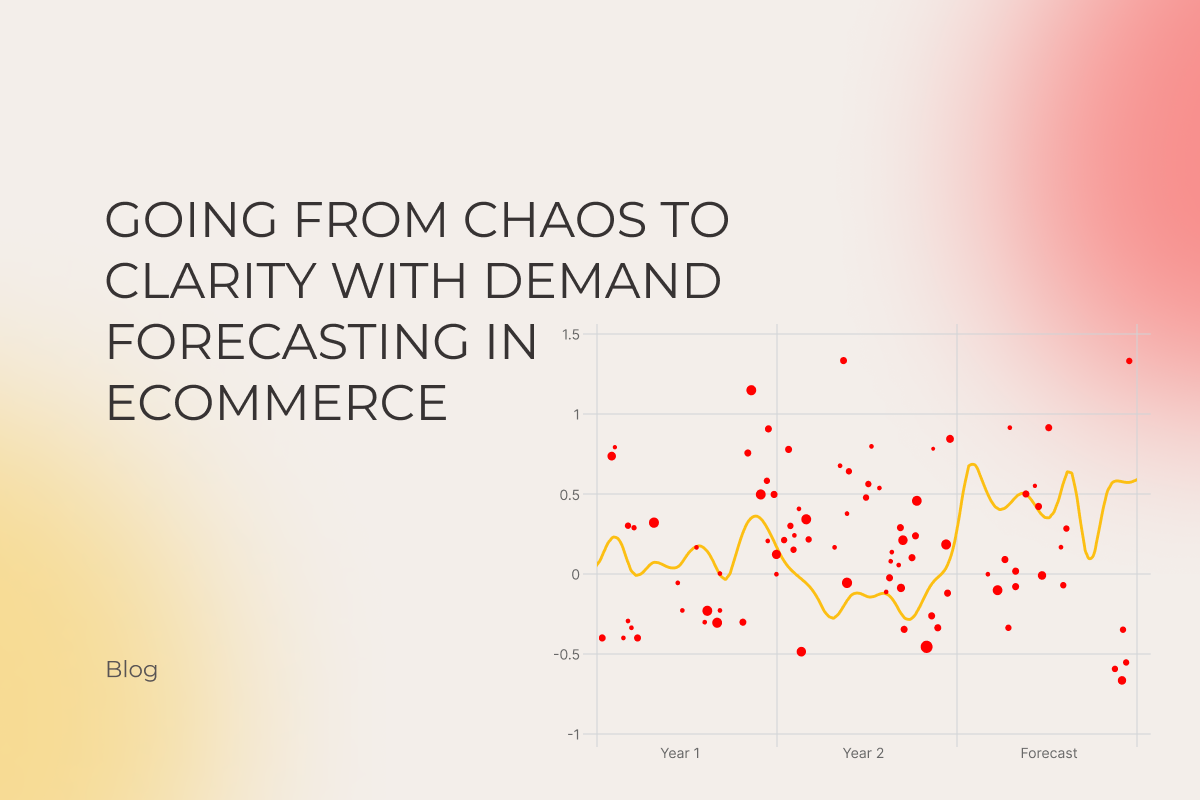
Going From Chaos to Clarity With Demand Forecasting In Ecommerce

Key highlights

  • Accurate demand forecasting enables companies to meet customer demand without facing budgeting, supply chain, and other issues.
  • Proper demand forecasting relies on different demand forecasting methods and predicts future sales based on past sales data, customer demand patterns, overall market trends, and external factors.
  • ML-based systems for ecommerce demand planning predict consumer behavior with greater accuracy, helping you boost customer satisfaction.

The way ecommerce used to work isn’t working anymore. Traditional supply chain planning technologies and processes fail to adjust to global and local black swan events. In 10 out of 10 cases, outdated forecasts backfire, setting ecommerce businesses up for lost sales, excess inventory levels, and dissatisfied customers.
How growth-oriented online retailers can become reality-ready? Our guide has all the answers you need.

What is demand forecasting in ecommerce?

Demand forecasting in ecommerce is an adaptive process that uses historical and real-time demand data to identify patterns in consumer behavior and predict future trends. It helps businesses stabilize sales, optimize inventory management, allocate resources effectively, and ensure high customer satisfaction even under the influence of economic downturns and other external factors.

How accurate demand forecasting can save the day for your ecom operations

Ecommerce forecasting tools cannot predict future demand with surgical precision, but that’s not what they’re designed for. By combining historical sales data with market trends, product information, and other insights, ecommerce demand forecasting provides the intelligence needed for business owners to decrease unnecessary expenses, regardless of the variables.

Optimizing inventory supply levels

Ideally, ecommerce businesses should have an agile supply chain and a balanced amount of raw materials or manufactured products on hand — enough to satisfy demand without increasing inventory and warehousing costs. In reality, 70% to 80% of retailers’ cash is tied up in inventory.

Accurate ecommerce inventory forecasting provides full visibility. Merchants can see into their inventory data and demand fluctuations and act on them to cut costs without sacrificing customer satisfaction:

  • Get a heads-up about peak periods
  • Prevent overstocking on slow-moving items
  • Reduce stockouts
  • Maintain safety stock levels

Whenever you’re dabbling into new products, forecasting tools can analyze historical sales data on similar products and offer granular replenishment recommendations.

Budgeting and ecommerce financial forecasting

Demand forecasting solutions build on historical data and consumer preferences to predict future sales and expected revenue. Along with incoming cash flows, business owners can leverage demand data to size up upcoming expenses associated with fulfillment and procurement — and, say, decrease their overhead spending by negotiating discounts with suppliers. 

Ecommerce sales forecasting tools also outline periods of high demand and times of cash flow blues, allowing ecommerce businesses to optimize expenses and pricing strategies.

Advertising and marketing optimization

Merchants can combine demand planning with market research to identify the right target audience and focus marketing efforts on the most-likely-to-purchase customers. Demand forecasting tools for peak periods and slowdowns also enable companies to optimize their marketing strategies and budgets and align campaign timing with commerce demand upticks.

Take your demand forecasting for ecommerce to the next level

Contact our team

What ecommerce forecasting challenges can you face?

Shifting customer behavior, market volatility, supply chain disruptions, and data hiccups can all cloud the judgment of your forecasting efforts. Let’s look into the most significant obstacles that influence demand forecasting accuracy.

Inaccurate or incomplete data

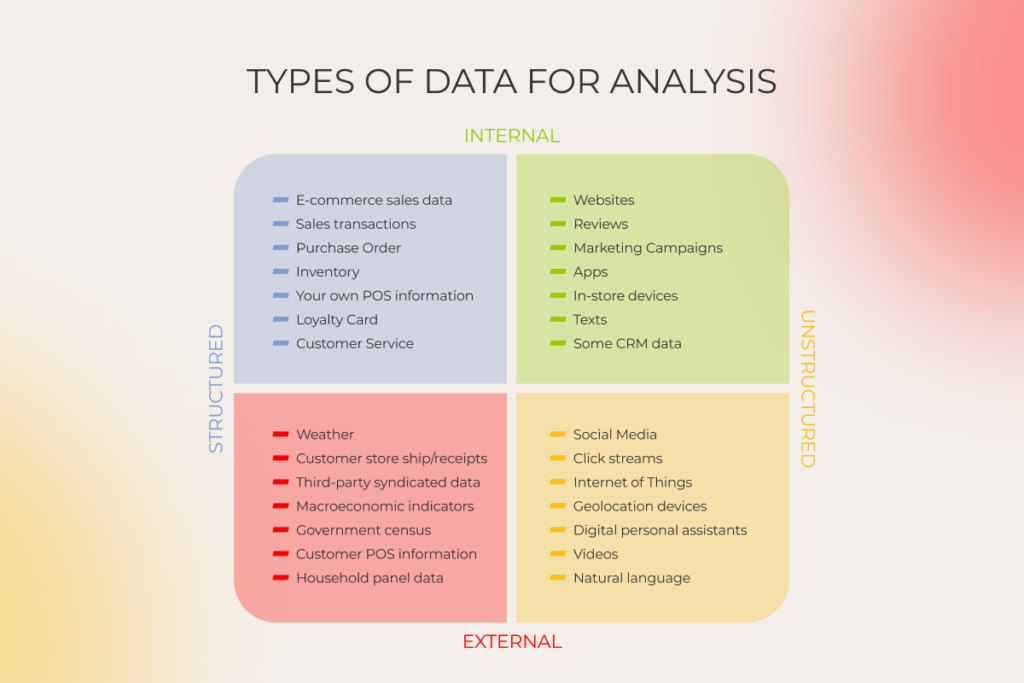
Accurately predicting customer demand is only possible when hinged on comprehensive data input, including previous sales data, market trends, consumer surveys, and any other indicators at your disposal. Limited data scope that ignores purchase history, demand patterns, broader economic indicators, and other drivers can lead to unreliable insights.

Data management issues

The more data is scattered across teams and systems, the harder it is to produce reliable predictions. Inconsistent data management practices, mergers, and data latency can also hinder the forecasting process, causing discrepancies.

Biases in data collection

Biased data selection along with confirmation bias can jeopardize the outcome. For example, sales data tends to be overly optimistic at most times as salespeople, eager to hit quotas, often report idealistic predictions, skewing the forecasts towards a higher number. 

On the same note, customer input is often skewed, as people with average experiences rarely give feedback, while extreme cases speak up more. 

Inadequate historical records

Accurate predictions depend on consistent historical data compatible with forecasting technology. Few ecommerce businesses can brag about it. 

Most companies just throw their historical data to the back shelf, with no intention of analyzing it afterward or keeping it in check for later. As a result, poorly maintained data complicates reliable predictions, leaving businesses with a modest basis for forecasting.

Rapid strategic changes

Frequent strategy pivots make it challenging to forecast and meet customer demand as forecasting tools struggle to align consumer needs with company actions. In simple words, every time a business calls an audible, they render their historical data ineffective, which can result in meaningless predictions.

Stop guessing, start predicting — with demand forecasting for ecommerce

Let’s discuss

Which demand forecasting method should you choose?

All demand forecasting methods fall into two groups based on the nature of data: qualitative and quantitative. Each category has its strengths and applications — it all comes down to a particular context and available data.

Qualitative methods

Whenever there’s a lack of historical data to build on, companies turn to qualitative forecasting methods that leverage judgment from experts along with market research and other non-numerical data. 

Qualitative methods also fit the bill when a company is entering new markets or debuting products. Examples of qualitative forecasting include: 

  • Scenario planning
  • Delphi method
  • Customer surveys

Quantitative methods

Quantitative methods rely on historical data and statistical techniques to generate long-term forecasts. Hailed as the most precise forecasting approach, these methods are contingent upon the availability of historical data. 

  • Time series analysis
  • Regression analysis
  • Causal analysis

Companies usually employ a combination of quantitative and qualitative approaches to factor in subjective or unpredictable aspects and forecast demand with greater accuracy.

What ecommerce demand forecasting techniques fit your needs?

Depending on their technological maturity and availability of external and internal data, ecommerce companies can lean into one of the three demand forecasting methods stated below — or combine them for better results.

Spreadsheets

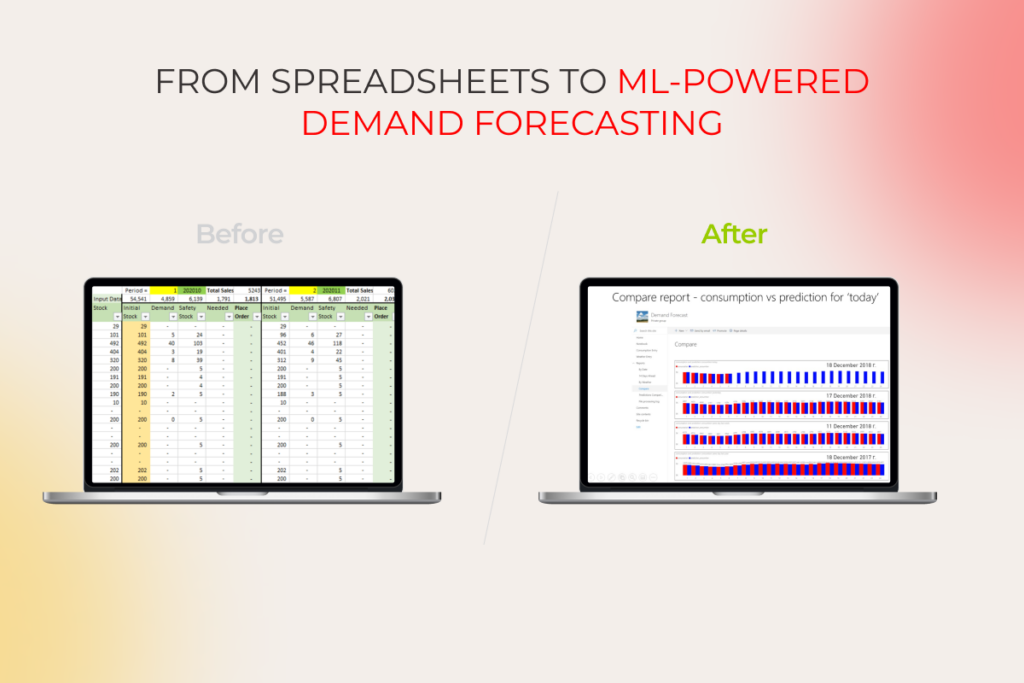
Small businesses with limited data and simple forecasting needs usually use spreadsheets like Microsoft Excel and Google Sheets for basic statistical analysis and back-of-the-envelope demand forecasts. 

However, they are time-intensive and error-prone due to manual data entry, provide limited scalability, and narrow down your analytical capabilities.

Based on our tests, Excel can easily manage around 200-300 thousand rows without breaking a sweat, and a single sheet can handle just over a million rows. But, if you want to go beyond that, you’ll need to juggle data across multiple sheets, which is a real hassle and takes up a lot of time.

BI-enabled forecasting

Business intelligence tools take ecommerce demand forecasting a step further by providing automated data collection and processing, advanced data visualization, historical data analysis, and reporting capabilities, all while minimizing the need for human intervention. 

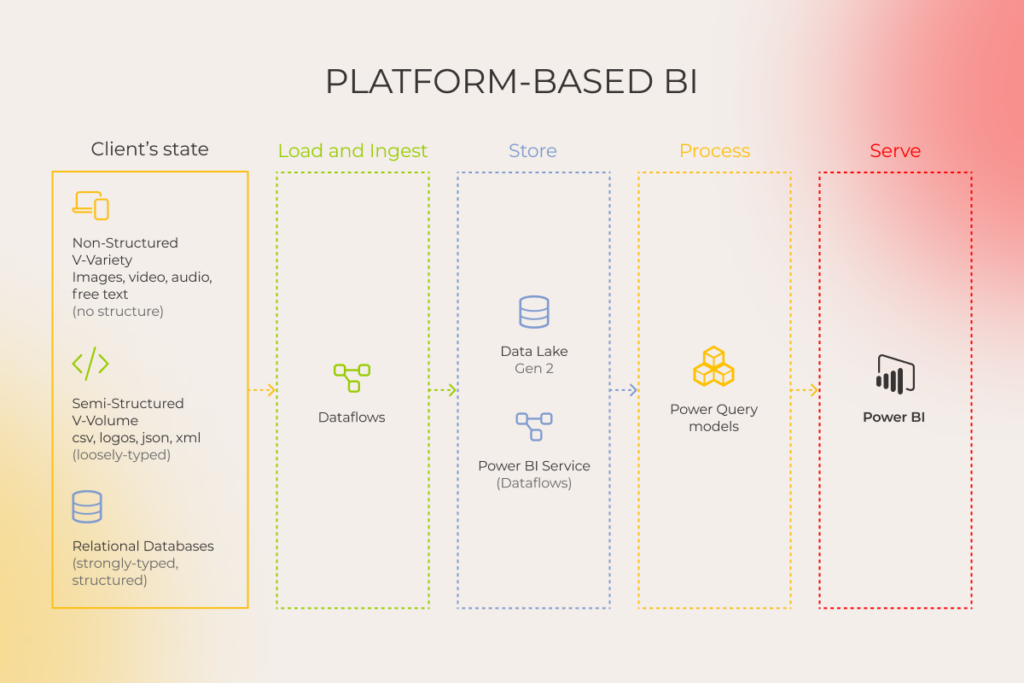
BI solutions, such as Tableau, Power BI, or QlikView, seamlessly combine internal insights into sales, customer behavior, and inventory with third-party data like ecommerce benchmarks, market trends, and other sources. The software grants better visibility into crucial business performance and transforms complex datasets into straightforward charts, tailored to their specific KPIs. 

Power BI is a powerhouse when dealing with large datasets. It smoothly processes up to 50-100 million rows – that’s a whopping 100-200 times more than what Excel can handle! So, if you’re working with massive amounts of data, Power BI is definitely the way to go for efficiency and convenience.

However, business intelligence tools have a significant downside. Their decisions are rooted in historical data and cannot account for unpredictable events or trends. Also, BI tools are designed for structured data and ill-disposed to unstructured insights such as social media posts, images, and videos — which can lead to one-sided predictions.

The architecture of platform-based BI
The architecture of open-source BI

ML-enabled forecasting

An ML-enabled demand forecasting important distinction is its ability to go beyond traditional methods that rely solely on historical or statistical data. Instead, it leverages sophisticated analytics models to combine past and real-time data (both structured and unstructured) and predict demand more precisely.

Types of data for analysis: internal, external, structured, unstructured

Thanks to its continuous learning capabilities and broader data scope, ML forecasting excels where other methods struggle. For example, unlike conventional methods, machine learning can predict demand for brand-new products by analyzing sales performance data on similar products.

Whenever new data becomes available, the ML model fine-tunes its approach to align predictions with evolving insights. These tools can also streamline the data management workflow by automating the data preparation efforts of analytics teams.

ML-based Demand Forecasting on AWS

ML-powered forecasting requires commitment though, as companies need significant upfront investment to get started on the ML technology and establish in-house expertise. This type of forecasting is also associated with complexities in implementation and maintenance — but not if you join your efforts with a dedicated ecommerce development company.

Let’s take a look at a comparison chart that outlines the main differences between the spreadsheets, BI tools, and ML-driven demand forecasting.

Forecasting methodSpreadsheetsBusiness intelligence toolsML-enabled forecasting
AccuracyLow (limited to basic forecasting models)Medium
(improved accuracy due to larger historical dataset analysis)
High (sophisticated analysis algorithms)
Data sourcesMost often only internalStructured internal historical data and third-party dataStructured and unstructured internal and third-party data
Amount of data handledSmall datasetsLargeLarge
AutomationNoneHighHigh
Maintenance complexityLowMediumHigh
Technology requirementsLowMediumHigh
Technical expertiseMinimal tech knowledge requiredRequires basic data analytics skillsRequires extensive  data science expertise 
Use casesBasic demand planning for small businesses, initial estimates, quick calculationsSales forecasting, inventory planning, budget planning, trend analysisComplex demand planning, new product forecasting, personalization, risk mitigation, prescriptive analytics

Gain full visibility into supply and demand

Talk to our expert

How to do advanced demand forecasting? 5 crucial steps

If you need to solve the forecasting problem with something more robust than spreadsheets, here’s your roadmap to setting up a smart data-based forecasting process.

Step 1: How to collect and aggregate data?

An efficient forecasting method is contingent upon a wide selection of relevant and accurate data points. Here’s what data you need to lay the groundwork for a successful prediction model:

  • Transaction sales data, including SKUs, location, unit sold, and other information.
  • Metadata of an item, including its color, size, and more.
  • Price data with timestamps.
  • Promotional impact with detailed data on past promotions
  • Inventory availability, including in-stock or out-of-stock for each SKU at specific time intervals.
  • Location data.

Most forecasting models also call for website traffic data, search term insights, social media data, and weather information to supercharge prediction veracity.

Step 2: How to get your data in order?

Defects in the input like missing values, duplicates, etc. take a toll on the accuracy of an ecommerce data forecasting model, blocking its ability to spot patterns and trends over time.

Common tasks involved in data preparation include: 

  • Identifying and filling missing entries with standardized values.
  • Ensuring data consistency in units, dates, and data types across all datasets.
  • Weeding out outliers
  • Creating new variables to enhance the model’s prediction capabilities
  • Merging datasets to promote more nuanced predictions

Once the data is clean and ready, data science teams divide it into training and testing groups. 

Step 3: How to create a demand forecasting model?

Based on the complexity of your problem and the availability of historical data, a forecasting model can be powered by different techniques, such as ARIMA, regression, random forest, and others. The development team then uses the training data to teach the forecasting model to predict the necessary outcome. 

At this stage, developers also experiment with hyperparameters to mold the learning behavior of the model and maximize its performance.

Step 4: How to evaluate the model?

When the model is up and running, the team evaluates its performance by making predictions on the testing data, comparing the output to the actual values, and calculating the relevant accuracy metrics. The quality of a demand forecast usually hinges on two metrics: 

  • Forecast accuracy determines how a given forecast stacks up against actual sales.
  • Forecast bias describes whether the forecast is over or under the actual sales.

Keep in mind that it’s easier to achieve a high prediction accuracy for products with consistent historical sales and little seasonal fluctuations. The inherent volatility of trend-driven and weather-dependent products makes it harder to anticipate demand. So, in some cases, models can capture the general demand trends and potential shifts rather than outlining exact values.

After evaluating the results, developers spot areas for improvement and calibrate the model by adjusting hyperparameters, applying different techniques, or adding more data to the pipeline.

Step 5: How to generate and use forecasts for decision making?

When the model fits the predefined accuracy threshold, your team deploys it in the cloud and gears it up for forecast generation. Keep in mind that your forecasting model doesn’t operate on autopilot as it needs a constant stream of relevant data — both historical and current — to stay in shape. 

You can export forecasts to the analytic tool of your choice and leverage them for strategic ecommerce demand planning.

Instinctools’ expertise in setting up ML-driven ecommerce demand forecasting

A Canadian clothing manufacturer and online retailer was struggling with inventory management and stock levels planning. They wanted to switch from primitive Excel-based demand forecasting to advanced analytics. 

  • Instinctools replaced spreadsheets with an ML-powered demand forecasting system.
  • Our ML team trained the new system on the company’s data to ensure predicting future customer purchases with 90%+ accuracy. 
  • We also integrated the new forecasting solution with Power BI to make accurate forecasts accessible across departments.
  • The system elevated inventory forecasting: stockouts are reduced to 10% and overstocks stay below 5%.
an ecommerce company replaced Excel-based demand forecasting with an ML-powered system

Want more details?

Read the full case study

Summary

Ever-shifting times prompt companies to move from reactive to proactive ecommerce demand planning. A combination of quality data, machine intelligence, and visualization tools are spearheading the way of new-age demand prediction, helping ecommerce businesses translate forecasts into higher revenue and stay afloat even in the direst of times. 

Predict future trends with up to 99% accuracy for improved decision-making

Get a project estimate

FAQ

Why should I use demand forecasting?

Demand forecasting plays a crucial role in providing clear micro and macro views of your sales and inventory, enabling you to make informed decisions and plan both short and long-term with up to 99% accuracy.

How can I get started with ecommerce demand planning?

Collect historical data, such as sales, inventory, pricing, promotions, and logistics data, and get it in order. Internal and external data without duplicates, missing values, or other discrepancies is a good start for accurately predicting demand.

How can I tell if my demand forecasting is failing?

You can’t forecast demand with high accuracy if you rely only on historical data. While it serves as a valuable foundation, ignoring current influences that can significantly impact demand — like economic conditions, market shifts, consumer behavior changes, or unexpected supply chain disruptions — lead to inaccurate forecasts.

How to do ecommerce demand forecasting right?

The secret of accurate yet flexible demand forecasting lies in balancing:
– Historical and real-time data
– Qualitative and quantitative forecasting methods 

How can I improve demand forecasting with machine learning?

Traditional demand forecasting methods use only structured data, which accounts for 10% of total company data. ML forecasting can process unstructured data, such as social media posts and emails, images and videos, etc., unlocking the value of the rest 90%. The more data you use, the more accurate peek into the future customer demand you get.

RPA in Manufacturing: Game-changing Benefits and Use Cases with the Fastest ROI

Industrial owners are losing a fortune and seeing their productivity plummet due to mundane repetitive manual tasks, inevitable human errors, and employees drowning in spreadsheets. RPA in the manufacturing industry helps to root these issues out.

With ever-present budgetary constraints and tight deadlines, RPA stands out as a relatively cost-effective, fast, and low-risk way to strengthen operations. It’s less complex than other enterprise automation technologies, like smart physical robots within production sites or digital twins that mimic factory floors. 

One of the latest members of the World Economic Forum’s Global Lighthouse Network managed to chop nearly 40% of non-value-added work with RPA software and digitized workflows.

It’s far from the only case explaining why spending on robotic process automation software is forecast to grow at a CAGR of 36.6% from 2022 to 2032. 

This is just a small part of why spending on robotic process automation software is forecast to grow at a CAGR of 36.6% from 2022 to 2032. 

Having mastered RPA inside and out, our experts are eager to share hard-won insights distilled from 25+ years on the front lines. Let’s delve into the mechanics of RPA, its transformative benefits, and real-world applications, illustrating how this technology is propelling the industry toward excellence.

Spending on RPA worldwide

What is Robotic Process Automation in manufacturing, and how does it work?

Robotic process automation (RPA) is a technology manufacturing businesses use to automate high-volume, repeatable tasks.

Using scripts that emulate human actions, software robots are there for you to perform repetitive tasks. They log into enterprise applications, move files, open and send emails, fill in forms, and tackle all that white-collar worker’s daily routine.

The sweet spot for RPA lies in automating rule-based, straightforward, and mostly high-volume tasks. Completing them manually is time-consuming, error-prone, and far from creative yet vital to keeping the factory running. Meanwhile, bots do them all way faster and without lapses.

See it in action:

  • Before automation: a manufacturing company receives hundreds of invoices from various suppliers each month. Employees manually input invoice data into the ERP system, verify details, and process payments. The process itself is a bottleneck, often leading to delays and inaccuracies.
  • After automation: an RPA bot handles the end-to-end process in seconds, signaling only in case of exceptions where manual validation is required.

There is also a more advanced form of RPA called cognitive automation. It aims to overcome the limitations of traditional RPA by applying more intelligence to tasks, hence adding some recognition and analysis capabilities.

Four benefits of RPA in manufacturing you can’t ignore

RPA turns out to be a game-changer for the manufacturing industry in many ways. By streamlining complex operations, enhancing precision, and slashing costs, it empowers manufacturers to pivot from routine tasks to strategic innovation.

Lower operational costs

Wiping out costly errors and freeing up staff from mundane duties makes RPA an instrumental add-on to your cost-reduction strategy. 

Typical savings on current operational costs range from 25% to 80%, which can translate into tens of millions of dollars annually for some organizations.

Moreover, the speed and accuracy of automation help reduce administrative, prevention, appraisal, and internal/external failure costs — the list can go on and on. 

Enhanced regulatory compliance

Apart from RPA-driven cost reduction, organizations also reap benefits like improved compliance, recognizing the impact of the technology on enhancing efficiency. 

With RPA’s capability to cross-reference raw materials and testing results against regulatory requirements, update compliance documents in real time, and, overall, facilitate adherence to regulations, meeting even stringent standards, such as FDA’s Current Good Manufacturing Practice (CGMP) or equivalent EU legal guidelines, becomes a breeze.

Our client, a leading manufacturer with production plants across the APAC region, stated: “Taking care of compliance and internal checks from the outset of our RPA journey was a brilliant move. Deploying multiple bots has boosted overall process quality and ensured reliable execution.”

All aspects of the manufacturing process can be automatically tracked for compliance with established standards, safety guidelines, legal requirements, and environmental regulations.

Increased productivity

RPA transforms how dozens of routine but critical tasks are handled. The tireless digital workforce completes these tasks in seconds with near-zero error rates. 

Automation can be especially helpful when organizations experience a labor shortage. With RPA in place, all operations run efficiently even during high-volume activity and peak workloads. 

Up to an 85% improvement in time efficiency and saving over 1000 hours or 199+ FTE days can be achieved simply by replacing humans in data entry tasks. Imagine the productivity gains after automating other tiresome back-office routines. For example, warehouse automation solutions are already revolutionizing how supply chains handle inventory, logistics, and order fulfillment, with speed and precision at scale.

Any way you slice it, the outcome is freeing up thousands of labor hours yearly and increased productivity as workers focus on higher-value, meaningful work.

Improved quality and accuracy

High quality is always a matter of a strong reputation and profitability. Cost of poor quality (COPQ) can amount to 15-20% of sales revenue, with some reaching up to 40% of total operations.

Let’s recall traditional Bill of Material (BOM) management, which often suffers from manual errors. Incorrect quantities or assembly instructions, inconsistent updates, and difficulty tracking changes lead to defective products, wasted resources, and costly rework. Automation software accurately updates BOM data and transfers it into ERP systems, making sure nothing is overlooked, even when changes occur. Zero — that is the number of errors in BOM management you can expect after adopting RPA.

In production lines, RPA maintains stringent quality specifications, reducing defects in final products. Bots consistently perform quality inspections, minimizing the risk of human oversight.

After implementing RPA in their quality assurance processes, most of our clients reported up to a 60% reduction in product defects.

Use cases where RPA in manufacturing pays off

Manufacturers turn to RPA for value-creation opportunities in time-consuming and repetitive processes such as procurement, inventory management, and payment processing. Below, we list examples of RPA manufacturing use cases with the top tasks primed for automation.

RPA use cases in manufacturing

Back-office tasks

Purchase orders (PO), status reports, avoiding duplicates, updating invoice records… The manufacturing back office thrives on documentation. Thanks to RPA, a range of operational activities can be completed fast and flawlessly.

Invoice processing

Instead of manually sifting through files and matching numbers, employees can focus on more strategically significant tasks, leaving the meticulous checks to robots.

RPA bots can automate invoice processing by extracting data, validating information, and routing invoices for approval. Here’s a breakdown of what exactly they are capable of:

  • Downloading and extracting data from supplier invoices using Optical Character Recognition (OCR) technology
  • Verifying data accuracy by comparing it with purchase orders and product catalogs
  • Routing invoices for approval based on predefined rules (for example, amount thresholds)
  • Generating automated payment schedules and sending them to the accounts payable department

Leading manufacturing companies using RPA-enabled invoice processing report that over 80-90% of all invoices are handled without requiring manual inspection. 

Order fulfillment

An automated process of order fulfillment is more accurate, as it fends off errors from the outset. What are the common order-related tasks manufacturing companies can automate?

  • Data entry of customer orders received through various channels (email, website, etc.)
  • Order verification and stock level checks
  • Automatic generation of picking lists and documents from shipping processes
  • Sending order status updates to customers

Data entry

Repetitive data entry tasks across existing systems are the most obvious target for automation. Such RPA examples include:

  • Updating inventory databases with new stock entries (e.g., raw materials)
  • Entering production data from machine logs into relevant software
  • Transferring customer information from web forms to CRM systems

When a fast-growing beverage distributor faced challenges in managing data flows within their newly implemented enterprise application, they turned to us for a solution. To address the client’s data entry and management hurdles, we deployed RPA software, streamlining data quality checks and automating the input of new product versions into their new ERP system. This strategic move replaced a labor-intensive process with a single, highly efficient bot, amping up operational efficiency and setting the stage for scalable growth without increasing the headcount.

After implementing RPA in their quality assurance processes, most of our clients reported up to a 60% reduction in product defects.

Production line support

RPA solutions enhance productivity along production lines, helping to accelerate operational tasks and phase out manual process flaws.

Quality control checks

Automation tools are used widely in manufacturing tasks aiming to ensure the highest quality possible:

  • Collecting data from automated inspection systems, such as vision cameras
  • Identifying potential defects in the extracted data based on predefined parameters
  • Flagging faulty products and generating reports for further investigation

Generating reports

Automation in the manufacturing sector has long outperformed manual processes in gathering relevant data, visualizing all critical production KPIs, and then delivering final reports to the right stakeholders. RPA speeds up the production planning and reporting by:

  • Collecting data from different independent systems on the assembly line, including metrics like machine performance or production output
  • Formatting the data into reports with charts and graphs
  • Sending reports automatically to relevant personnel, such as production managers, quality control teams, and others

Managing inventory levels

Poor inventory turnover rates, overstocking, and stockouts are nightmares for manufacturing operations managers. RPA bots put them back in control by:

  • Monitoring stock levels in real-time based on production data and sales information
  • Automatically generating purchase orders for low-stock items
  • Tracking incoming and outgoing inventory shipments
  • Forecasting & estimating inventory levels

Supply chain management

Due to global geopolitical tensions, a supply chain may become a roller coaster for manufacturers. Automation technologies, including RPA, help companies gain as much control as possible over globally scattered supply chains.

Supplier communication

RPA solutions can streamline repetitive tasks related to supplier communication, including:

  • Sending automated purchase orders to vendors
  • Monitoring supplier performance based on delivery schedules and quality metrics
  • Triggering automated email reminders for overdue deliveries

Order tracking

Automating repetitive tasks in order tracking facilitates transparency in managing the flow of goods from the production line to the warehouse. RPA bots can do the following tasks:

  • Tracking the status of shipments from suppliers in real time using tracking numbers
  • Generating automated alerts for any delays or deviations from expected delivery times
  • Updating internal inventory systems upon receipt of goods

Once again, manufacturing process automation covers various tasks within inventory management, keeping up with regulations, processing documents, streamlining the supply chain, and supporting production needs. The automation potential of these areas delivers the highest business value.

Still wondering what to RPA first? Identify high-impact automation targets in your manufacturing business

Contact our team 

Empowering intelligent automation amidst the industry 4.0

Combined with AI sub-disciplines like machine learning, computer vision, optical character recognition (OCR), and natural language processing (NLP), AI-backed RPA solutions bring more value to the manufacturers’ table. Artificial intelligence helps tackle many complex tasks that RPA alone would struggle to complete.

While RPA can be considered the “doer” of tasks, AI is more about the “thinking” and “learning” sides of things. 

From the shop floor to the top floor, AI-enabled RPA software provides a more advanced level of industrial automation and helps scale your enterprise intelligence. Once you add automation components to certain routines, you can start identifying more complex tasks that require decision-making, pattern recognition, and adaptation to new scenarios. For instance:

  • Procurement: predicting pricing trends, analyzing supplier performance, executing cost-saving strategies like supplier renegotiations or production adjustments, etc.
  • Quality control: processing inspection data, reporting defects and triggering workflows for rework or rejection, identifying defect patterns, predicting equipment failure, etc.
  • Production support: optimizing production schedules & inventory management, forecasting demand fluctuations, etc.
  • Workforce management: automating communication of AI-optimized schedules to team members, systems, and production lines, sending notifications, shift assignments, and other updates to HRM systems, etc.
  • Supply chain management: recommending alternative suppliers, predicting potential disruptions based on historical data, etc. 

RPA journey made easy with these 4 steps to start with

Your RPA implementation should not necessarily start with enterprise-wide automation. Many of our manufacturing clients began with targeted transformations in specific functional areas. Pilot success often fuels wider adoption with far-reaching goals.

Each company moves at its own pace, in its own way. However, there is a set of common steps to ensure all-encompassing RPA implementation regardless of the organization’s maturity level or scalability plans. 

Steps to take while starting with RPA

1. Identify and document recurring tasks and procedures that can be automated

Examine your processes and gather feedback from employees across different departments to comprehensively understand their pain points. 

Look closely at your current workflows and identify time-consuming tasks ripe for automation. Pay special attention to repetitive, rule-based administrative tasks with clear steps and straightforward goals. 

You can explore the above-mentioned robotic process automation examples as a starting point or seek professional guidance to identify additional opportunities for your future automated manufacturing.

2. Determine if cognitive automation is necessary

Are RPA bots enough to cover tasks you’ve defined for automation? Or maybe realizing more advanced capabilities, say, human speech recognition, image detection, unstructured data analysis, or AI chatbot integration is needed? 

If yes, then you have to look for additional AI/ML expertise.

3. Search for a suitable RPA solution

Explore relevant manufacturing automation case studies and examine how your peers approach automation. 

While your specific scenario might require fully custom software or customization of ready-made  RPA products, don’t be discouraged by the lack of internal competencies. 

Consider working with technical partners to bridge any expertise gaps. There is often added value in the form of ongoing maintenance and scaling your solution into a corporate-wide initiative as your needs evolve.

4. Assess the costs of integrating the solution

Once the project scope is defined and the team is assembled, it’s time to estimate the expected timeframe and costs. Then, calculate ROI to determine whether the project aligns with your goals and stays on course with profit projections.

A pure cost reduction exercise or an opportunity to invest in enterprise-wide digital transformation? RPA can do both for your manufacturing business

Implementing RPA requires investment and C-level buy-in, but the payoff can be swift and sweet, assuming you have clear goals and engage the right people in the change process. 

The benefits of manufacturing automation go far beyond merely having a cheap and reliable digital workforce for rule-based tasks. Robotic process automation in the manufacturing industry can become a crucial building block of your company’s digital transformation, paving the way for sustainable growth and long-term success. 

Speed up production, reduce the risk of errors, and grow faster with RPA for manufacturing

Let’s discuss

FAQ

How is RPA used in the manufacturing industry?

RPA in the manufacturing industry acts as digital workers in factories, automating routine tasks and back-office operations, such as invoice processing, inventory management, scheduling maintenance, generating reports, and supply chain management.

What are the benefits of automation in manufacturing?

Companies in the manufacturing industry invest in automation to achieve faster turnaround times, improve product quality, enhance compliance, and drive cost savings. Beyond those, intelligent automation helps redirect employees’ skills to tasks that can’t do without human attention.

LLM vs. SLM: Key Differences, Advantages, and How to Choose the Right Language Model

Does size still matter? With AI, the default assumption used to be “yes.” More parameters, better results, end of story. That logic held until small language models (SLMs) started punching above their weight. Gartner’s prediction is that smaller, task-specific models will hit 3× the deployment volume of general-purpose LLMs by 2027, a signal that the LLM vs. SLM question has shapeshifted. Business owners who once asked “which model should I pick?” are now asking how to orchestrate both.

Instinctools’ AI engineers have mapped the SLM vs. LLM comparison as it stands today, underlining when it’s reasonable to downsize to an SLM, and when banking on an LLM pays off. 

What is an LLM and what is an SLM?

Both large and small language models (LLMs and SLMs) are artificial neural networks trained on vast amounts of data and built to process and understand natural language and perform a range of tasks from simple text summarization to taking actions on the user’s behalf. 

If all language models rest on the same foundation, what is the difference between LLMs and SLMs? Primarily, the number of parameters, which are the internal values a model learns during training. The more parameters it has, the more patterns it can usually capture. SLMs typically range from 1 billion to 15 billion. Phi-4-mini, Mistral 7B, and DistilBERT are some of the go-to picks in this range. LLMs start in the tens of billions and reach into the trillions, with GPT, Claude, and Gemini models leading the pack.

LLM vs. SLM: key differences at a glance

The SLM vs. LLM gap no longer boils down to “small versus powerful.” The tradeoffs stretch across infrastructure costs, latency, deployment flexibility, reasoning depth, and governance overhead. Here’s how both model families compare in production environments.

CriteriaSLMLLM
Resource requirementsRuns on consumer hardware, edge devices, or a single GPURequires high-end GPU infrastructure and large memory footprint
Cost of adoption and usageLower inference costs, but usually requires fine-tuningHigher inference costs, though broader out-of-the-box capabilities reduce customization work
Fine-tuning timeHours to weeks with LoRA/QLoRA on limited hardwareMonths (in rare cases when fine-tuning is necessary)
National specificityDiverse representation of alphabet-specific languages Broader multilingual coverage, but uneven cultural representation
Capabilities rangeStrong in narrow, repetitive, and latency-sensitive tasksBetter at broad reasoning, orchestration, and open-ended workflows
Inference speedFaster response times and lower latencySlower inference, though MoE architectures narrow the gap
Output qualityLower due to a smaller context window More reliable in complex reasoning and long-context tasks
SecurityMight present certain risks (API violation, prompt injection, training data poisoning, confidential data leakage, etc.) and requires clear AI governance

Advantages of SLMs over LLMs

SLMs have earned their spot as a practical alternative to large language models for businesses that want to adopt AI without investing a fortune into the technology. The core advantages of an SLM over an LLM include:

  • Lower inference cost (up to 100 times cheaper per query via API, and zero per query when deployed on-device).
  • Faster response times, especially for short, bounded tasks such as classification, routing, extraction, autocomplete, simple customer support, and local assistants.
  • Reduced vendor lock-in when using open-weight models, as businesses can self-host, fine-tune, quantize, and move models across different infrastructure stacks.
  • Deployable on consumer hardware, edge devices, and smartphones, particularly with quantized models such as Llama 3.2 1B/3B, Phi, and Gemma-family models.
  • Faster and cheaper customization (weeks and a single GPU vs. months and a cluster).
  • Lower energy consumption per inference, a smaller carbon footprint at scale.

When LLMs still win: strengths of large language models

LLMs are broad-spectrum AI language models built for complex tasks that require broad knowledge, multi-step reasoning, and deep contextual understanding. The LLM advantages over their smaller counterparts include:

  • Stronger multi-step reasoning across domains like legal analysis, financial modeling, and scientific research.
  • Much larger context windows, enabling the model to work with long documents, large research corpora, complex conversations, and sometimes substantial portions of codebases or document sets in one pass .
  • Multimodal capabilities covering text, image, audio, and video in a single model.
  • Lower need for task-specific fine-tuning, because frontier LLMs often perform well with prompting, retrieval-augmented generation, tools, and examples. However, production deployments still require evaluation, guardrails, monitoring, and workflow design.
  • The reasoning and planning depth that makes LLMs a natural fit for the orchestrator role in multi-agent systems, where a central model coordinates and routes tasks to specialized smaller models.

An SLM vs LLM comparison across 8 criteria

Building and training models from scratch requires significant investments, often beyond the reach of many businesses. That’s why, in this article, we focus exclusively on pre-trained models, comparing notable LLMs such as ChatGPT, Claude, and Gemini, with SLMs like Mistral, Phi, and Gemma. 

1, Resource requirements

When it comes to SLM vs LLM resource requirements, the gap remains wide. LLMs contain hundreds of billions to trillions of parameters, and high memory consumption makes them a resource-intensive technology. If you target the latest GPT, Claude, or Gemini models, you’ll need NVIDIA H100 or B200 GPUs, which cost $25,000-$35,000 per processor.

SLMs’ compact model size and lower computational power requirements enable them to run on a broader range of devices, including regular computers and smartphones. For instance, Microsoft’s Phi-4-mini needs just 4GB of RAM, so with an SLM as a resource-friendly alternative to LLM, companies can hop on the AI train without upgrading their hardware park.

Instinctools’ verdict: SLM.

2. Cost of adoption and usage

The cost coin has two sides: fine-tuning and inference. LLMs save on fine-tuning since they handle most tasks out of the box, but inference adds up quickly at scale. SLMs need fine-tuning, yet their day-to-day usage is far more affordable.

To feel the disparity, consider this scenario: you have 300 employees, each making five small 1K-token requests per day. At the time of writing, a frontier GPT model priced$1.75/$14.00 per 1M tokens, that adds up to around $720/month. Replace it with Gemini Flash at $0.10/$0.40 per 1M tokens, and the same workload drops to roughly $22.50/month. 

Cost of adoption and usage

Instinctools’ verdict: SLM.

3. Fine-tuning time

The logic behind the fine-tuning process is straightforward: the more parameters the model has, the longer it takes to calibrate it. In this regard, adjusting a large language model with trillions of parameters can take months, while fine-tuning an SLM can be completed in weeks.

Parameter-efficient methods like LoRA and QLoRA have shortened the process further. A 7B model can now be fine-tuned on a single GPU in hours, which is how our team compressed a full project with Mistral 7B at its core into just six weeks, stepping up the model’s precision rate from 10% to 75%.

Instinctools’ verdict: SLM.

4. National specificity

The lion’s share of the most well-known LLMs originates from the US and China and doesn’t adequately represent diverse languages and cultures. Studies unveil that LLMs’ outputs skew toward WEIRD societies (Western, Educated, Industrialized, Rich, and Democratic).

Sovereign AI has become a trend, with governments commissioning models trained on local-language datasets. If you compare small language models and LLMs on language coverage, SLMs lead the push with Jais for Arabic, Nanda for Hindi, Typhoon for Thai, and Viking for the Nordic languages. 

Instinctools’ verdict: SLM. 

5. Capabilities range

Both LLMs and SLMs emulate human intelligence but at different levels. LLMs remain the go-to for complex tasks requiring broad knowledge, multi-step reasoning, and deep contextual understanding. Once you move to multi-agent systems, LLMs carry the orchestration work, coordinating several agents, tracking long-horizon objectives, switching tools mid-process, and resolving conflicts between intermediate outputs.

SLMs are narrow-focused models designed for specific tasks like text classification, summarization, and entity extraction. But the gap is narrowing. For example, Phi-4-mini (3.8B parameters) now matches models twice its size on reasoning benchmarks, a gap that would have been unthinkable two years ago. SLMs have also gained 128K context windows, function calling, and vision capabilities. So with strong context engineering, you can squeeze far more out of a compact model than raw parameter counts would suggest.

What we witness on the ground is that enterprise AI stacks now resemble a relay race, when an LLM acts as the planner and coordinator and passes the baton to lightweight SLMs to handle specialized subtasks at lower cost and latency.

— Pavel Klapatsiuk, AI Lead Engineer, Instinctools

Instinctools’ verdict: LLMs and SLMs to get the best of both worlds.

6. Inference speed

LLMs’ power as a broad-spectrum solution comes with performance trade-offs. In dense architectures, more parameters typically mean more computation per generated token, which can make large models slower and more expensive to serve than smaller models.

LLM providers address this by switching from dense architectures to sparse Mixture of Experts (MoE) patterns and by releasing their own lightweight tiers (GPT-5 nano, Gemini Flash). On the SLM side, Mistral Small 3 runs at 143 tokens/second on 16GB of RAM, and Gemma 4 (a 26B MoE model) also targets faster local inference with techniques such as multi-token prediction. 

For latency-sensitive SLM vs LLM decisions, smaller models often have the edge, especially for short, repetitive, on-device, or edge workloads.

Instinctools’ verdict: SLM.

7. Output quality

On general reasoning and coding benchmarks such as MMLU-Pro, GPQA, SWE-bench, LiveCodeBench, HumanEval, and MMMU, frontier LLMs outperform smaller models, especially in open-ended reasoning, advanced coding, and multilingual tasks. Their advantage comes not only from broader training data, but also from greater model capacity, stronger post-training, reasoning-focused optimization, tool use, and more mature long-context handling.

SLMs can achieve comparable accuracy on narrow enterprise tasks when the workflow is well-defined and supported by high-quality domain data, retrieval, prompt engineering, constrained outputs, or fine-tuning. But once the task moves beyond a tightly controlled scope, larger models tend to stay more stable and coherent under pressure.

Instinctools’ verdict: LLM.  

8. Security

While the cost and quality of AI solutions often make enterprise leaders scratch their heads, it’s the security concerns that really top the list of hurdles. Any production AI system needs clear governance around what data enters the model, where that data is processed, how long it is retained, who can access it, and how model outputs are logged, monitored, and audited.

For cloud-hosted LLMs, organizations should evaluate vendor terms, data-retention policies, training-data exclusions, API access controls, encryption, logging, data residency, and regulatory compliance before deployment. Many enterprise AI providers now offer strong privacy commitments (for example, API or enterprise customer data is commonly excluded from model training by default), but companies still should validate these guarantees against their own security, legal, and compliance requirements.

SLMs need robust governance just as much, but they give companies far more flexibility in where data gets processed and stored. Small models can run on-premises, on edge infrastructure, or directly on employee devices, giving businesses tighter control over where sensitive information is processed and stored. This setup is particularly attractive for industries handling regulated or proprietary data.

Instinctools’ verdict: SLM. 

When to choose an SLM vs. an LLM: decision framework

Choosing the best AI models in the SLM vs. LLM debate is like hiring a team. You don’t bring in a Nobel-level strategist to sort invoices, and you don’t hand a billion-dollar negotiation to an intern fresh out of onboarding. AI stacks work the same way, routing simple jobs to smaller models and reserving heavyweight reasoning for the few tasks that need it.

Use caseRecommended model typeWhyExample models
Customer support chatbotSLMHigh request volume, predictable workflows, low latency requirementsMistral Small 3, Phi-4-mini
Internal document Q&ASLMEasier on-prem deployment and domain fine-tuningLlama 3.3 8B, Gemma 3
Code copilotLLM or hybrid setupMulti-file reasoning and long-context understandingClaude Sonnet 4.6, GPT-5.2
Edge or IoT deviceSLMMinimal compute footprint and offline operationLlama 3.2 1B, Gemma 3n
Healthcare records processingSLMGreater control over sensitive data handlingFine-tuned Mistral, Phi-4
Multilingual content generationLLM or sovereign SLMBroad language coverage versus local cultural adaptationGemini 3.1 Pro, Qwen 3
Creative or long-form writingLLMBetter narrative consistency and contextual depthClaude Opus 4.6, GPT-5.2
Multi-agent enterprise workflowsBoth Balances cost, speed, and reasoning quality across tasksSLM workers + LLM orchestrator

Frontier LLM, compact SLM, or a hybrid setup?

Let’s talk

Examples of SLMs and LLMs in production for 2026

The AI language model market has become crowded fast. A couple of years ago, most discussions revolved around GPT-4-level systems. Now the field stretches from billion-parameter SLMs running on laptops to LLMs built for multi-agent reasoning and million-token context windows.

SLMs
LLMs

Custom LLM and SLM development with Instinctools

Now that you know where SLMs make sense and where LLMs still dominate, the harder part begins: turning that knowledge into an AI system that survives contact with real production workloads.

Our team helps businesses with custom LLM/SLM development, covering:

  • Model selection based on your business requirements and limitations
  • Fine-tuning on private data 
  • RAG pipeline integration
  • Goal-oriented context engineering to widen the range of AI capabilities
  • Agentic workflow design and orchestration
  • MLOps
  • Fully on-premises deployments

Sometimes the answer is a compact SLM running locally for privacy and latency reasons. Sometimes it’s a tiered architecture combining multiple models behind one orchestration layer.

Our AI engineers are a click away if you need expert advice

Reach out

The future belongs to hybrid AI stacks

After exploring what’s possible, determine what’s practical for your software needs. Both LLMs and SLMs are powerful tools, but they won’t bring the desired benefits on their own. It’s still essential to identify how to effectively integrate them into your business processes, considering industry and national specifics. 

If your resources are limited, you want to test your idea ASAP, or need a model for only a specific type of task, an SLM can help you hit it big without breaking the bank. For deeper reasoning, multi-agent orchestration, or long-context analysis, LLMs hold the advantage. In practice, though, the biggest gains come from combining both: smaller models handling high-volume routine work, larger ones stepping in for the hardest decisions.

Draw on the power of language models with a trusted tech partner

Book a call

FAQ

What is the difference between an LLM and an SLM?

The difference between an LLM and an SLM comes down to scale, training scope, and intended use. LLMs are trained on massive web-scale datasets and usually contain tens or hundreds of billions of parameters, making them better suited for broad reasoning and open-ended tasks. SLMs are smaller, often below 10B parameters, and optimized for focused workloads like classification, summarization, or on-device AI. For example, GPT-5.2 is built for broad reasoning, while Phi-4-mini (3.8B) is designed for efficient local inference. Still, the boundary is getting blurrier with each new model.

What are the advantages of an SLM over an LLM?

The biggest advantages of SLMs over LLMs are lower cost, faster inference, and easier deployment. Smaller models can run 10-50× cheaper than large-scale LLMs. They can also work fully on-premises or on edge devices, keeping sensitive data inside the company infrastructure. In narrow enterprise tasks, a well-trained SLM may also produce fewer hallucinations because its scope stays tightly controlled.

When should I choose an SLM instead of an LLM?

In the SLM vs. LLM standoff, SLMs make more sense when the task is narrow, repetitive, latency-sensitive, or privacy-critical. Common examples include entity extraction, summarization, customer-support routing, and edge AI systems. They also fit workloads with very high query volume, where large-model API costs spiral quickly. If your data cannot leave the company perimeter or the model needs to run locally on limited hardware, an SLM or hybrid setup is the safer bet.

What are examples of small language models?

Popular SLM examples in 2026 include Phi-4-mini (3.8B), Gemma 3, Mistral Small 3, Llama 3.2 1B/3B, TinyLlama 1.1B, and Apple OpenELM. Some focus on multilingual reasoning, others on edge deployment or fast inference on consumer hardware.

Are SLMs as accurate as LLMs?

SLM vs. LLM output quality depends heavily on the task. On broad reasoning benchmarks like MMLU or HellaSwag, larger models still outperform smaller ones, especially when the task requires open-ended reasoning, advanced coding, multilingual understanding, or cross-domain synthesis. But in narrow enterprise workflows, the gap can shrink dramatically after fine-tuning. A well-scoped SLM processing medical records or support tickets, bolstered by high-quality domain data, retrieval, constrained outputs, or fine-tuning can match and sometimes outperform a general-purpose LLM.

How much does it cost to develop a custom SLM or fine-tune an LLM?

The cost of custom LLM/SLM development varies mostly with data quality, infrastructure demands, and deployment complexity. Fine-tuning an open-source SLM like Mistral 7B or Phi-4 on private data usually starts around $15,000. Building a domain-specific model from scratch can reach $80,000-$250,000 or more. A production-grade RAG pipeline around an existing model often falls somewhere in between. If you want a realistic estimate, it’s worth discussing your use case with your AI engineering partner before locking into one architecture.

Can I run an SLM on-premises or on edge devices?

Yes. One of the main reasons companies adopt SLM on-premises setups is that compact models run comfortably on consumer hardware. Models below 7B parameters can work on a single RTX 4090 or even on CPUs with quantization. Lightweight options like Phi-4-mini or Llama 3.2 1B already run on laptops and smartphones. Common deployment tools include Ollama, llama.cpp, MLX, ONNX Runtime, and NVIDIA Triton.

Ascending New Heights of Coding with AI in Software Development

Today, every company, irrespective of their focus, is a tech-first company. When technology becomes an integral part of everything your organization does, having the means to master continuous delivery is instrumental to fuelling your business growth. In 2025, AI in software development is billed to become that growth engine.

As an AI-savvy company, we help our clients leverage the power of artificial intelligence in software development, applying it to specific tasks — and we’re sharing our battle-tested expertise and best practices in this guide.

Gen AI and SaaS enterprise penetration rate, % of spending by year since introduction

Benefits of AI for software development go beyond automation

When AI made its debut into mainstream technology, organizations approached it with a cautious mindset. These days, IT-related use cases such as assisted code creation, testing automation, and others are already enjoying high adoption rates and are making the largest share (40%) of planned enterprise gen AI spending. Let’s see what benefits have turned AI software development from faddish to fundamental.

AI assistants' impact: developers' perspective

Cutting costs associated with development efforts

AI-powered software development is one free from time-consuming tasks, such as test cases, exploratory data analysis, small code updates, bug detection, and others. By automating away menial activities, AI tools bring down the number of labor hours, ultimately leading to a more cost-effective development process. Some of our clients wield the sword of machine intelligence to optimize maintenance costs for cloud infrastructure. 

Our client’s team automated repetitive tasks inherent in infrastructure maintenance by employing AI to produce a prewritten set of recommendations for the automated execution of tasks. Bundling the recommendations in a playbook, the team drew up blueprints for repetitive actions, cutting development efforts and associated costs by 30%.

Accelerating developers’ productivity and time-to-value

Software engineers can join forces with an AI pair programmer to tap auto-complete features like code recommendations and context-aware suggestions. The latter eliminates the need to manually search for code snippets or specific function syntax, minimizing context switching for developers.

AI code assistant benefits

AI toolbelts like Github Copilot also keep developers in the zone by offering integrated development environments, summaries for pull requests, and explanations for code blocks.

The majority of professional developers — 82,7%, to be exact — cite increased productivity as the biggest benefit of AI-powered coding assistants.

We’ve seen this firsthand: on average, our clients have achieved a 25% improvement in their development velocity by introducing artificial intelligence into the software development process.

Our client, a prominent bank in the MENAT region, stated: “Embedding AI tools into the development workflows has changed the game for our developers. These tools can produce an entire script based on just a single comment, cutting coding time in half”.

Productivity gains also translate into swifter and more cost-efficient innovation cycles that allow companies to rapidly adapt to shifting customer needs and snap opportunities faster than their competitors.

Improving code quality

AI-powered developer tools leverage natural language processing to dissect context from a user’s existing code and suggest additional lines of code and functions. It means that smart assistants can identify the optimal approach or solution to the development challenge — based on the natural-language prompt from human software engineers. 

AI tools can also improve the debugging process by quickly identifying and rectifying errors, contributing to a higher quality of deliverables. AI-assisted code reviews and static code analysis minimize the code vulnerability surface and improve its consistency. For example, artificial intelligence puts edge cases, which might be hard to spot through manual testing, on sharp display, leading to a more reliable final product. 

Focusing on building and creating vs. repetitive tasks

Artificial intelligence in software engineering helps 25% of developers manage their workloads more effectively, freeing them up to focus on more creative and challenging tasks instead of grinding away at mind-numbing activities like code formatting or documentation updates. Developers then use this headroom to flex their problem solving skills, analyze feedback from end users, and hatch solutions to novel problems.

Speeding up the onboarding process and flattening the learning curve for new hires

Apart from being the wingman for experienced software developers, AI systems can also help junior specialists get up to speed. By training intelligent systems on the company’s software stack, dedicated software development teams can integrate new hires into the fold faster than usual, accelerating their modus operandi. 

Also, these tools can improve the availability of mentorship and support for junior developers. Unlike team leads, AI tools, with their never-ending bandwidth, can provide instant feedback or relevant suggestions 24/7 to lead rookie developers in the right direction. This creates a valuable tool — artificial intelligence is always there to support junior developers, while senior developers can leverage AI’s insights to provide targeted support when new hires need it most. 

Need AI software developers to set up smart coding assistants?

Reach out 

7 ways AI can supercharge your software development process

Name any software engineering task — and chances are good that, supercharged with artificial intelligence, it can be performed at least 50% faster and up to the highest quality standards.

Have no doubt: thanks to the powerful combo of artificial intelligence and software engineering your team can really speed things up, especially when it comes to these seven activities:

1. Writing boilerplate code

Boilerplate code is a developer’s long-time nemesis, forcing engineers to spend an eternity writing the same tedious sections of code over and over. Artificial intelligence software development can eliminate the associated drudgery by streamlining the process of boilerplate code generation:

  • Pattern recognition — once trained on the existing code base, large language models can identify patterns commonly used in boilerplate code, such as database connections, error handling blocks, and other structures.
  • Contextual awareness — intelligent teammates can figure out developers’ intent and fine-tune the boilerplate code to the unique needs of the project.
  • Code completion — AI-enabled virtual assistants can suggest code snippets based on the surrounding code and auto-complete the boilerplate structure for a specific function.

2. Code suggestions

Much like with boilerplate code, AI co-pilots can act as smart code whisperers for developers, offering semantically relevant code snippets based on their deep learning capabilities. These tools can also guide developers toward the right solution by directing them to the relevant libraries and common coding patterns. 

Besides accurate suggestions with comments, developers can pick the AI brains to get their code inline fixed. 

Source: GitHub

3. Code refactoring and modernization

Most codebases get messy over time due to constant fixes and changing project requirements. Generative AI models fed with well-refactored code can highlight code smells in your existing codebase and suggest refactoring techniques or alternative code structures for enhanced system performance. 

Developers can also ask AI tools to explain legacy code — and then feed this explanation, supplemented with additional information, back into the system to modernize the code and facilitate technical debt management.

4. Code translation

Old-school code translation tools fail to understand the underlying purpose of code due to their focus on the code structure. Conversely, AI-enabled models can discern the code semantics to suggest translations that preserve the original functionality. 

Development teams can capitalize on this superpower to streamline code conversion or app modernization projects, such as converting COBOL to Java.

5. Bug detection

Development teams can also harness the duo of software engineering and artificial intelligence to automatically catch bugs early in the software development lifecycle. Thanks to built-in pattern recognition and machine learning anomaly detection trained on historical data from similar codebases, AI coding tools can spot subtle anomalies in the existing code that might otherwise go unnoticed.

AI pair programmers can also perform code reviews in the background, bringing potential issues to the fore and suggesting areas for closer inspection. 

6. Testing

Quality assurance and testing have a significant scope for automation due to inherent redundancy. Although AI can’t take over testing tasks completely, it can significantly improve testing speed and coverage by enhancing the following aspects:

  • Test case generation and execution — following software specifications, generative AI can produce test cases to help testers cover a wider range of scenarios.
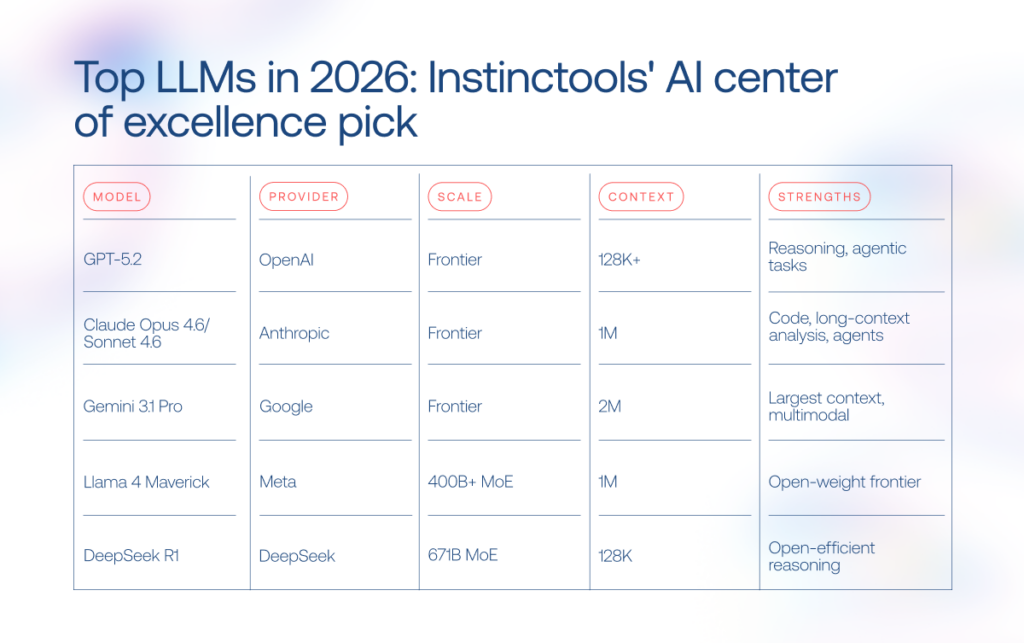
  • Data generation for testing — artificial intelligence proves effective in generating edge cases and corner scenarios that might be challenging to create manually.
  • Performance and load testing — AI-powered testing tools can produce load for performance and load testing.
  • Test planning — smart coding tools can suggest test cases based on historical data, identify missing test cases, and map out dependencies to identify the right order of test execution.

Artificial intelligence also acts as a collaborative assistant for visual testing, exploratory testing assistance, and maintenance of test cases.

“Before introducing AI in the testing workflow, our developers haven’t had enough time to create unit, functional, and performance tests for their code. Bug slipped through the cracks, causing issues in production with missing tests snowballing into tech debt. AI tools have tackled this problem by automating repetitive testing tasks and increasing test coverage without developers doubling the code’, — noted a representative from a consulting company, partnering with us on software development initiatives.

7. Preparing documentation

Code is never static — it evolves throughout development cycles, making it challenging for developers to keep up with documentation updates. Based on code comments and function signatures, machine learning models can automatically create a document that accurately outlines system behavior and its functionality. These tools can also account for the implemented tech stack and project-specific functionalities to generate comprehensive documentation aligned with the specific codebase.

Source: GitHub

Train AI on your data and get personalized insights you can’t find elsewhere

Contact our team
AI code assistant's key features

Which tasks AI for software development is failing at?

Now the main question is: can AI replace software engineers? Not in the foreseeable future. While AI and software development are a power couple, their duo is still a far cry from a fully automated software development process. Artificial intelligence development requires human oversight and collaboration to do its best.

1. Handling a combination of legacy and updated code

AI software solutions have a hard time clawing through a repository that contains both legacy and new code due to the fragmentation and incompatibility caused by the former. Legacy codebases may not integrate well with common frameworks or libraries and often lack structure and adherence to current best practices — which makes it challenging for AI to understand its functionality. 

2. Contributing to organizational and project context

Canned AI–based coding tools are know-it-alls, so they are not designed to consider the unique requirements of your project or your business context. It means that unless you train it on your proprietary data, AI output might not meet your specific performance or security needs. 

3. Non-generic architectures

Artificial intelligence coding tools are capable of mustering basic, high-level design blueprints, while more nuanced architectural solutions remain a near-impossible feat for these tools. Also, the innovative potential of AI is limited by the training data, which means that cutting-edge architectural solutions fall under the domain of human ingenuity, not machine intelligence.

4. Navigating tricky coding requirements

While AI coding tools are all for answering basic prompts, they hit a brick wall when faced with more complicated coding challenges. For example, AI-based tools wrestle with combining multiple frameworks with disparate code logic or generating a code suggestion based on the big picture.

Choosing an AI software development assistant: open-source vs proprietary tools

Standing at the AI crossroads, companies usually face two options. They can either leverage open-source tools such as OpenCV, PyTorch, and Codestral or invest in proprietary solutions such as Microsoft Github Copilot and IBM watsonx Code Assistant.

Open-source tools that put AI algorithms, pre-trained models, and data sets up for public use are favored by the community due to their transparency and limitless options for innovation. Proprietary tools hide the source code from the public eye, yet offer support from the vendor, and potentially more advanced features.

So which one should you opt for? Here’s a table from our experts that summarizes the key differences:

CriteriaOpen-source AI toolsProprietary AI tools
Source code accessFreely availableNot publicly available
CostLower upfront costs + potential hidden costs (additional infrastructure, feature development)Higher upfront costs, lower TCO due to pre-built features
SecurityHigher control over data, yet the vulnerability surface is largerLess transparent, vendor is responsible for security updates
CustomizationHighly customizable, can be fine-tuned to suggest code based on best practices in your repositoriesLimited customization with a few configuration options (custom extensions, plugins)

A new era of development empowerment is underway

As AI continues to push the boundaries of software development, it’s important to remember that it’s not a panacea. Artificial intelligence is an augmentation tool whose true potential lies in its ability to automate menial tasks, enable developers to spend more time on problem-solving and empower them to build high-quality software faster. You can’t expect it to work miracles, but you can embrace the technology to ship software solutions more efficiently than ever before.

Take your software development to the next level with AI

Schedule a consultation

How to Hire a Dedicated Software Development Team in 2026

An external dedicated software development team, integrated seamlessly with your in-house operations, remains a default sourcing model for enterprises. And for a good reason. Executives turn to dedicated development teams for predictable results and accelerating technology initiatives.

Yet, their value is conditional. The right fit depends on aligning the team with precise project needs. If you’re weighing how best to structure your development resources, this guide offers a measured, actionable perspective.

At *instinctools, we’ve spent 25+ years helping global companies architect, launch, and scale dedicated teams that consistently produce long-term impact. This guide distills that experience into something you can act on right away:

  • why and when to hire a development team, 
  • when alternative models might serve you better, 

and how to sidestep the traps of managing your own dedicated development team.

Key highlights

  • Dedicated software development teams are cross-functional, adjustable in size and composition, and can be tailored to changing project needs, providing the flexibility of in-house teams without the hiring and management burden.
  • Dedicated teams accelerate time-to-market, reduce development costs, and provide access to a global talent pool. They are best suited for complex, high-stakes projects, tight timelines, evolving requirements, or when internal resources are insufficient.
  • Proper selection of a dedicated engineering team involves careful vendor evaluation, which essentially boils down to methodology, communication, and domain experience assessment, and reputation check.

What is a dedicated team?

A dedicated development team is an engagement model where a group of cross-functional experts put their backs into your project to bring it across the goal line. You can hire either a full or partial team, but in both cases, it works exclusively on your software projects.

Just like an in-house team, a dedicated developer team remains skin in the game throughout the entire development process, except you don’t have to stress over the hiring, onboarding, and daily management. You can have as much or as little involvement in the development and management process as you want. Anyway, a dedicated software development team is capable of taking over the entire process of digital product development. 

Such a team dynamically adjusts to the pace and scale of software development, allowing you to fine-tune the team size and composition based on your evolving needs. Developers, designers, QA engineers, and any other roles can be hand-picked on demand when and as you need them. 

See how our dedicated teams work >>> 

Why companies choose dedicated development teams

The software development outsourcing market is expected to grow from USD 564.22 billion in 2025 to nearly USD 897.44 billion by 2030, with a steady 9.73% CAGR. With strong demand for external digital engineering talent, the rapid adoption of generative AI, and a chronic shortage of senior technology professionals across OECD countries, dedicated development teams, being a tried-and-true engagement model, remain a highly practical solution for enterprises. The reasons for hiring a dedicated engineering team are manifold — our experts have listed the most significant ones below.

Rapid scalability

Adapting to fluctuating project demands and scalability requirements in-house is a challenging endeavor due to resource limitations and the time required for recruitment and onboarding. A dedicated team model is flexible in roles and skills, allowing companies to build up their capabilities on demand to accelerate time-to-market and support evolving project needs. 

Cost efficiency

More than 90% of Fortune 2000 companies outsource at least part of their IT functions to cut costs associated with in-house hiring and development. A dedicated app development team eases the financial burden on companies by relieving them of operational overheads and other costs related to sourcing candidates and employee training. Moreover, you can source tech talent in cost-effective regions such as Central and Eastern Europe to bring down the financial outlay of development.

Stress-free hiring

From long hiring cycles to administrative burden, in-house hiring is not for the faint of heart and is definitely not for the employers in a hurry. Conversely, hiring a dedicated application development team is as easy as proving a job specification and approving the candidates cherry-picked to your requirements.

360-degree visibility into the process, away from the grind

In-house hiring and team management are generally associated with the highest level of visibility. But to build it up, company leaders need to constantly have their fingers on the pulse and mother hen their development team. When it comes to an offshore dedicated development team, a powerful combo of dedicated project managers and project management tools can ensure a high level of visibility into the project progress, minus the supervision fuss. 

Access to a wide talent pool

Talent scarcity keeps 4 in 5 company leaders on their toes, stalling new projects and decreasing the odds of securing a niche or highly-coveted talent. By banking on dedicated development team services, companies enter a global talent pool where they can hire skilled experts at a reasonable price. Better yet, this engagement model helps you develop expertise in adjacent fields or completely different ones, including AI, mobile app development, MVP development services in USA, and other projects.

In-house teamDedicated team
Hiring the team~ 2 months2-10 days
Scaling the team1-2 months1-5 days
Recruitment and hiring costs~ $3500 per hire0
Training costs~ $1100 per employee0
ExpertiseMight be insufficientExactly matches the project’s needs
Level of controlHighHigh

To make an informed call on the most suitable sourcing strategy, check out our detailed comparison of in-house development and an external dedicated team, breaking down the strengths, gaps, and practical implications of both.

Tired of hiring frenzies and project delays? Let’s build your dream tech team in a matter of days

Get in touch

Typical dedicated team structure: roles and responsibilities

dedicated development team

The structure of a software development team is determined by a combination of factors. These include the type and complexity of your software product, your timeline, and the allocated budget. Let’s expand on the bare-bones development team structure:

Project manager

A project manager is the point person behind your project responsible for its day-to-day management. Typically, a software vendor assigns a dedicated project manager to lead the entire team, oversee project cost and resource allocation, define project goals, and keep you updated on the project’s progress. 

Business analyst

Business analysts are guardians of business goals and values that bridge the chasm between the business and technical teams. They are instrumental in planning development activities, validating requirements to ensure alignment with business goals, and standardizing processes to maintain a cohesive workflow, facilitating continual improvement based on stakeholder feedback.

Software architect

Equipped with broad technical knowledge, software architects are the great minds behind your software solution architecture and critical technical decisions. They have a final say in the selection of the technology stack, making sure your solution is functional, performant, resilient, and scalable. 

Software developers

A dedicated backend development team is in charge of building and maintaining the inner mechanisms of your software, including data storage, security, and other server-side functions. Frontend developers focus on building user-facing components of web and mobile applications, making your software easy and engaging to interact with.

DevOps engineers

DevOps engineers are at the wheel of development, testing, and release automation activities. Geared up with special tools and DevOps practices, they enable continuous integration and deployment and ensure smooth collaboration between development and ops teams to speed up development cycles and improve software quality.

QA specialists

Quality assurance engineers inspect every aspect of your software, from code to design, to make sure it meets predefined quality standards and is bug-free. Their turf also spans compliance reviews and security testing to eliminate any potential vulnerabilities in your software solutions.

Depending on your project scope, you may need a different combination of team roles to accommodate your project dynamics.

Project scopeTeam sizeTeam roles
DiscoveryUp to 5 specialistsBusiness analyst, project manager, software architect, UX designer
MVP development6+ specialistsProject manager, business analyst, UX designer, front-end developer, back-end developer, QA engineers
Custom software developmentAround 9 specialistsProject manager, business analyst, UX designer, software architect, front-end developer, back-end developer, QA engineers, DevOps engineer

When to hire a dedicated software development team

Often, it might be not just one, but a whole set of factors that tip the scales in favor of a dedicated team engagement option.

Specialized skill sets across multiple technologies and business domains

Complex projects that implement a variety of technologies, including cutting-edge ones, are a great mesh for an offshore dedicated team. Most companies lack the internal expertise to proceed with the implementation of such projects, while a software development dedicated team has the varied tech knowledge, skills, and hands-on experience to muster it on their own.

High cost of failure

Another scenario fit for a dedicated software team is when your project comes with functional or reputational risks — in other words when you bet big on the software quality. Thanks to their experience, dedicated software development teams know how to build a high-quality solution and they usually go by a mature software quality management framework to do so.

Last-chance-to-get-it-right

When a client’s in-house team is underperforming or their previous vendor has failed to deliver on the promise, dedicated software development teams can pick up the slack in the nick of time. At *instinctools, we’ve seen this scenario many times, providing a team of experts to rescue projects like fintech MVP development and others.

Borrowed expertise

The dedicated team approach also comes in handy when you need to pick the brains of lead software engineers every now and then to identify improvement areas, determine the right development approach, or get actionable advice on the tech architecture. Dedicated experts can provide tech consulting when needed, headache-free. 

Turnkey product development

You can hire a dedicated development team to deliver and launch your custom software product faster and more efficiently. The team focuses solely on your product, selecting the right approach, frameworks, and tools to ensure consistent progress. More importantly, a dedicated remote team is cross-functional, allowing for a one-stop-shop development experience. 

Time to market is critical

If you’re at crunch time for a prototype, an MVP, or a full-fledged product, dedicated teams can offer a shortcut to a successful delivery. Opting for a standby team offers you the double wins of streamlined coordination and specialized expertise, promoting a swift and efficient software development process with no quality trade-offs. So, when time is of the essence, a dedicated team ensures you’re not just fast, but also first-rate.

Complex software development

When it comes to long term projects with an evolving and highly complicated scope, say you’re building an entire ecommerce ecosystem like one of our clients did, a dedicated team runs circles around other engagement models. If you have both a mobile app and a web solution in your backlog, a dedicated team can move from one project to another, being able to deliver results faster thanks to staying in the loop. 

Vague, unclear, ever-changing requirements

Last but not least, you can hire dedicated development teams when you don’t have a good grasp of your software product. A dedicated team can work in lockstep with your changing requirements, developing in small increments to incorporate regular feedback. We’re not advocating for working in the dark though: when your vision is blurred, run a discovery session with your team to solidify your project requirements and map out the roadmap to a successful delivery.

Squash your project challenges with a savvy development team

Hire one at *instinctools

When a dedicated development team might not be the best fit

The dedicated team model brings a wealth of benefits to your table, but only if it marries well with the nature of your project — and this isn’t always the case. For example, if you’re looking to fill specific skill gaps rather than farm out an entire project, then outsourcing software development to a dedicated team is not the right path for you to follow. In this case, staff augmentation will do the trick. 

Staff augmentation does justice to intermittent or short term projects, where you need an extra pair of hands to temporarily augment the capacity of your in-house team, develop a different component of the product, or bridge in-house skill gaps. 

The main difference between hiring a dedicated development team and bringing in augmented experts lies in the level of the vendor’s responsibility, including risk management, process setups, and knowledge transfer.

Vendor’s responsibilityStaff augmentationDedicated team
Providing engineering capacitycheckedchecked
Onboarding and knowledge transfer uncheckedchecked
Project documentationuncheckedchecked
Software development process setup and maintenanceuncheckedchecked
Project, team and risk  managementuncheckedchecked

Keep in mind that neither team extension model can suffice decade-long, strategic initiatives that have very specific requirements in terms of security, tech stack, personnel training, and other essentials. If that’s the case, your company will be better off with an offshore development center — an overseas extension of your company set up and equipped to meet whatever floats your boat. 

Costs of hiring a dedicated software development team

Depending on the team’s seniority and the country the engineers are located in, a 4-6 person team can run anywhere from ~$8,000/month (nearshore/junior bench in lower-cost markets) up to $60,000+/month (US or top-tier enterprise rates).

If you want a clear sense of what a dedicated development team for hire will cost each month, take these factors into account:

  • Dedicated development team structure and seniority mix: number of juniors, mids, seniors, and leads (senior engineers and tech leads increase costs disproportionately).
  • Region: US, Western Europe, Eastern Europe, LATAM, and Asia have very different salary bands and employer taxes.
  • Vendor margin and management: vendor fees, account management, and any bundled managed services like project management, recruitment, HR, etc.
  • Benefits, payroll taxes, and statutory contributions: employer social charges, paid leave, insurance and any local mandatory costs.
  • Contract length, SLAs, and attrition risk: short contracts and high churn push prices up; long engagements often secure better monthly rates.

Want a tailored dedicated development team cost for your project?

Contact us

How to choose a dedicated development team

You might think that the quality of products and services comes first when choosing a software development company. This hallmark certainly carries the day, but other traits such as transparency, trustworthiness, and understanding of your business context also count for a lot when it comes to remote teams. Let us facilitate matters for you by providing an algorithm that will help you choose the right company and set up your collaboration for success.

Step 1: Document the use case

Without a use case, an idea just remains an idea, making it hard for you to describe how a software system can be used to achieve your business goals. So taking the time to document use cases before contacting vendors should be your opening move. You don’t have to get into much detail when describing the use case: try to distill it as best as you can, specifying the general requirements for what’s being built.

Step 2: Decide on a location where to hire a dedicated development team

Back in the day, the location used to be a deal-breaker in choosing a dedicated development team, but the rise of remote work has made it less critical. Nevertheless, some outsourcing locations are easier on your budget and have more time zone overlap with your company’s home country.

You should also take into account other considerations, such as cultural fit, regulatory and legal environment, talent pools, and the skills of local developers. As a popular outsourcing destination, Poland checks all the boxes in terms of service quality, time zone compatibility, and cultural fit. It’s also ranked third among the countries with the best programmers in the world.

Step 3: Make a list of potential vendors

Once you’ve decided on the location, go on a hunt for local software vendors to online directories, review sites, and search engines. You can also ask around for recommendations or visit industry conferences to evaluate potential tech partners. Following your search results, compile a list of potential vendors that have made it through the basic screening. 

Step 4: Pay attention to work methodology

You can reach out to the shortlisted vendors to get more details about how they handle project development, including their methodologies, communication, and project management infrastructure. Keep in mind that a trusted software vendor should be ready to adjust to your requirements and exercise a collaborative approach where they provide regular progress updates for your team.

Step 5: Examine expertise and experience

Make sure your dedicated team can deliver on their promise by checking their previous projects and researching client testimonials. You can ask about their experience with the specific technologies and assess their skills in action during technical interviews. Besides technical proficiency, a top-grade vendor should understand your business context and have hands-on domain experience.

Step 6: Check market reputation

Finally, you should gauge the market perception and image of your software vendor by analyzing their social media presence, noting the insights from past customers, and looking into their rating on industry-specific platforms like Clutch and Goodfirms. A trustworthy outsourcing company should come highly recommended and have a good name in the market.

Client reviews highlighting *instinctools' ERP customization and software development services, with top ratings in quality and reliability.

Don’t settle for average, find a perfect match for your tech project

Reach out to our team

Common concerns about dedicated teams and how to mitigate them

Before you jump into the unexplored terrain, it’s natural to have your doubts about it. Let’s look into the common fears associated with dedicated teams and how you can overcome them. 

Cultural gaps

Different countries have varying communication styles, work expectations, and business practices, which can throw a wrench into project quality, communication, delivery timelines, and even the final development cost. 

Mitigation strategy: Single out countries that have a strong cultural overlap with your company’s base location. For example, if your company is located in the US, UK, or EU, a country like Poland can offer the combined benefits of skilled talent pools and a similar cultural background to your company’s host country.

No visibility

With some outsourcing setups built on the ‘throw-over-the-wall’ approach, you only see the output, not the process. You get irregular updates, limited insight into day-to-day progress, and no early warning when something goes off track. That blind spot makes it hard to steer the project or manage expectations.

Mitigation strategy: Work with a dedicated development team operating under a transparent delivery framework, one that defines workflows, reporting cadence, quality gates, and ownership from day one. Combine that with structured weekly checkpoints and real-time communication channels, and you get full visibility into progress, risks, and decisions as they happen.

Communication hurdles

The lack of consistent communication can get both sides misaligned on the project goals, deliverables, and milestones.

Mitigation strategy: To prevent that from happening, your dedicated team should adapt to your communication framework, including your communication channels and meeting cadence. Also, your software vendor should have a mature governance and escalation infrastructure in place to proactively handle escalation triggers and keep all the aspects of project delivery in check.

Mismatch in expectations

There’s a raft of factors, including miscommunication, inadequate project management, and lack of documentation, that can result in the disconnect between your vision and your dedicated team’s perception of your idea. Unclear requirements, more than anything else, can bring on this disconnect, leading to scope creep and wasted budget.

Mitigation strategy: A comprehensive discovery stage paired with thorough requirement-gathering sessions can bring more clarity to your project vision and project’s requirements, ensuring that each stakeholder is looking in the same direction. And if anything goes awry, Agile methodologies and regular feedback can help your team swiftly adapt to your feedback and right the ship.

Think these troubles are inevitable?

Let’s discuss 

Hire a dedicated software development team from *instinctools in 3 steps

How to hire a dedicated team

Building your dream software requires a lean, dynamic team by your side. At *instinctools, we offer a simple, transparent hiring process to help you land your dream team in mere days and jump-start your software development project.
Step 1: Discuss your request with a potential vendor 

Our collaboration kicks off with carefully studying your project request and seeing how our expertise can benefit your company. This typically takes 1-3 days, depending on how detailed your initial brief is.

If your project vision is limited to a high-level description, our team helps you scope the project by conducting a discovery session. We run discovery workshops with key stakeholders to define the project essentials, including the objectives, deliverables, core technologies, and resources needed. Following the scope, our experts provide accurate time and budget estimations. 

Step 2: Get a proposal 

Building on a detailed project understanding, we pre-select a team and provide a shortlist of best-fit candidates. You can be as involved in the pre-selection as you want, we always encourage our clients to participate in CV selection and interviews to double-check the specialists’ technical skills.  Shortlisting and interviews usually take 2-5 days, depending on the seniority you need and your involvement. 

Once our final candidates get your approval, we prepare a Statement of Work that defines the scope of work being provided, project deliverables, timelines, work location, and payment terms and conditions.

Step 3: Sign a contract and start a cooperation

Before the project launch, we finalize the legal agreements and handle all remaining paperwork, which normally takes 1-3 days.

We brief your dedicated team on your project background and help you effectively onboard the specialists. 
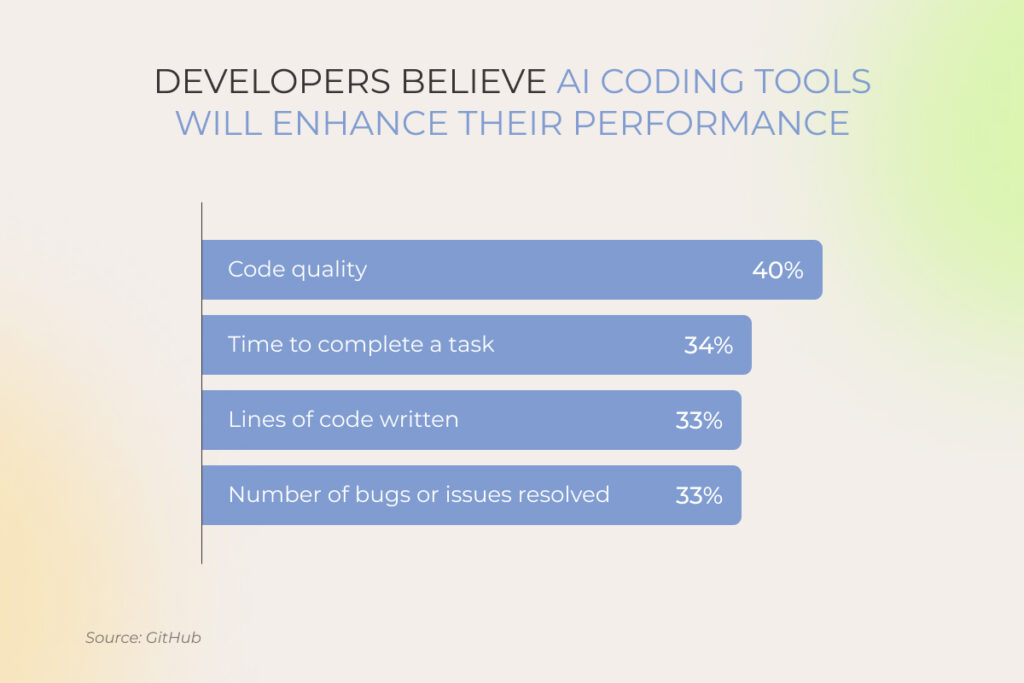
Seal the deal: next steps and guarantees

Gliding through development projects is easier when you have the right development team as your tech wingman. Dedicated teams offer a cost-effective, flexible, and reliable solution for companies seeking tech professionals dedicated to their project’s success. Although this engagement model has a few inherent complexities, you can offset them by teaming up with a mature software vendor well-versed in managing an outsourced team.

Ready to build a thriving remote dev team?

Contact us

FAQ

What is a dedicated development team?

The dedicated team engagement model allows companies to outsource their software development to a remote team of experts who give their undivided attention to their client’s projects.

What is a dedicated team structure?

A dedicated team structure varies based on the nature of your project. Typically, a dedicated team is made up of a project manager, business analyst, frontend and backend developers, and QA engineers. Software architects and DevOps engineers are also essential team players.

How do you manage a dedicated development team?

Usually, your vendor does the heavy lifting of team management by assigning a dedicated Project Manager to your project. Project managers act as a liaison between you and your team, making sure the project flows smoothly and guiding the rest of the team in the right direction.

What are the benefits of hiring a dedicated development team?

Dedicated team development gives you access to skilled talent at a lower cost than in-house hires. Thanks to the specialized expertise, a dedicated team can improve the quality of your software product and work autonomously to deliver it within the shortest possible time. This engagement option also frees up your time for strategic tasks as you don’t have to invest your efforts and resources into grasping something that’s beyond your knowledge.

How do I choose a dedicated development team?

Before you outsource dedicated software development teams, you should clearly define the goals of your project and document the use case for your software. You don’t need a detailed description for your project — high-level requirements are enough to get off on the right foot. With a clear project vision on hand, you can then research potential vendors, filtering them by geography, company size, core technology, and maturity. Shortlist strong candidates and schedule a call with them to pick the one that aligns best with your needs.

AI in the Oil and Gas Industry: 15+ Use Cases Across Upstream, Midstream, and Downstream

AI in the oil and gas industry is becoming critical to the sector’s resilience, even as concerns grow around the technology’s own energy demand. With margins tightening and growth under pressure, leading O&G firms are turning to generative and agentic AI to stabilize performance across extraction, refining, and sales. 

Recent market analysis of artificial intelligence in the oil and gas industry across the US companies points to increased spending on AI, gen AI, and agentic AI by 40% in 2025. The payoff case is equally strong: BCG estimates that those leaning hardest into AI could lift EBIT by 30-70% over five years, while also minimizing carbon footprint.

Instinctools’ AI CoE members have gathered some of the most notable applications of AI in the oil and gas industry across the value chain.

Key highlights

  • Beyond enhancing efficiency and driving cost savings, artificial intelligence in the oil and gas industry plays a central role in strengthening operational resilience and supply chain safety.
  • AI in the oil and gas industry spans the full value chain: upstream exploration and drilling, midstream logistics and leak detection, downstream refining and sales, plus cross-stream asset predictive maintenance and supply chain optimization.
  • Massive AI adoption in oil and gas is held back by fragmented, poorly governed data, legacy systems that resist integration, and uneven digital readiness across operations.

AI in all its forms to serve the needs of the oil and gas industry

Capturing value from massive amounts of data generated during hydrocarbon exploration and production is made possible with these forms of AI used in the oil and gas industry:

  • Machine learning: Identifies patterns in large operational and geological datasets to improve predictions and support better decision-making across the oil and gas value chain. Common AI & ML applications in oil and gas industry include reservoir exploration, drilling optimization, production forecasting, and predictive maintenance.
  • Deep learning: As a subset of machine learning based on multi-layer neural networks, deep learning is especially valuable for complex subsurface analysis. It is used in oil and gas to analyze seismic data, combine seismic insights with well logs and production data, detect subsurface structures, classify geological features, and predict reservoir properties for exploration decisions.
  • Generative AI: Learning from existing datasets, gen AI-powered systems can help create 3D reservoir models from sparse well data, produce synthetic data samples, map drilling trajectories with associated risks, create emergency response instructions, and summarize complex technical reports, field notes, or maintenance records.
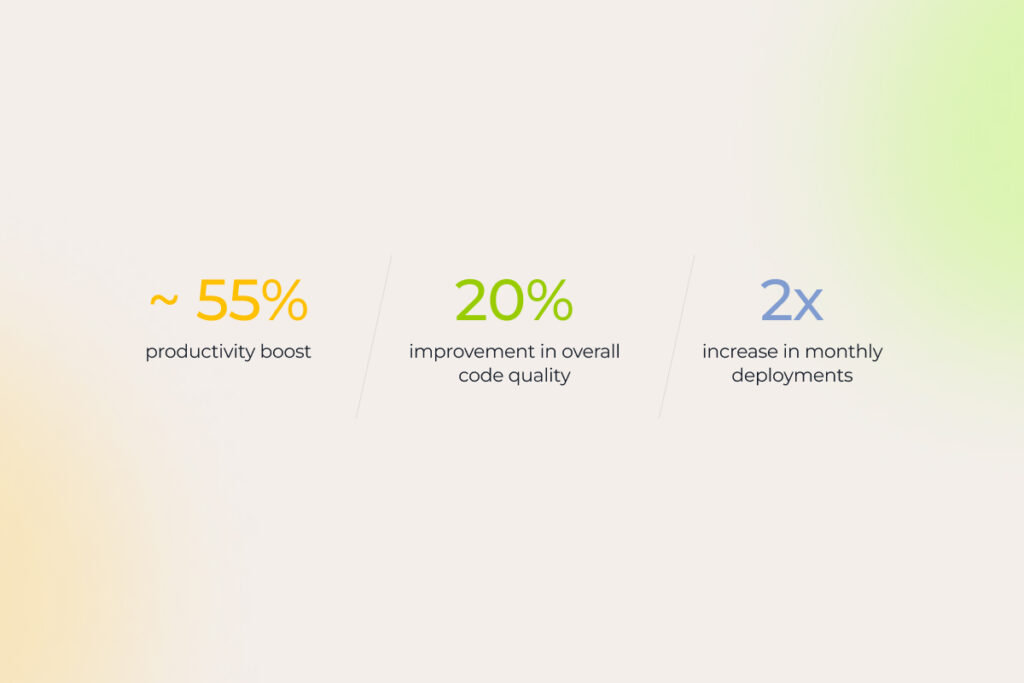
  • Agentic AI: Grounded in LLM-based reasoning, planning, and tool-use capabilities, AI agents and multi-agent systems execute tasks across workflows. Maintenance triage, inspection planning, pipeline monitoring, supply chain, and finance workflows autonomous execution are just several examples of agentic AI in the oil and gas industry with the strongest near-term value.
  • Computer vision: Interprets visual data from cameras, drones, satellites, and sensors in real time to accelerate tasks such as equipment inspections and verifying workers’ PPE compliance.
  • Edge AI: Processes data locally on IoT devices without relying on cloud storage or internet connectivity. This greatly aids in adjusting machinery settings, tracking sensor readings, collecting seismic data, and continuously monitoring operations and safety conditions remotely.

The ways AI in oil and gas optimizes operations across the value chain

Permeating into each stage of the supply chain, AI adoption in the oil and gas industry enables companies to achieve operational efficiency, reduce costs, and come closer to sustainable development and net zero.

Upstream AI use cases in oil and gas exploration and production

Upstream

Top-tier oil and gas producers are claiming major gains from AI adoption in upstream operations, already compressing exploration timelines by weeks and saving billions in related spending.

Predicting reservoir’s exact location, quality, and size

Exploration budgets still account for the possibility of drilling dry holes. “That’s the game, and players know the risks,” as Andrew Latham, SVP Energy Research at Wood Mackenzie rightly points out. AI, however, is emerging as one of the tools helping reduce the odds of such costly surprises. Traditional, largely manual and error-prone analysis of vast volumes of electromagnetic and seismic data used to identify new hydrocarbon deposits is increasingly giving way to AI-powered capabilities:

  • Streamlined access to exploration data: With a single natural language query, explorationists can pull the needed insights from scattered surveys, well logs, images, subsurface analyses, maps, technical reports, and other sources. Chevron, for example, rolled out this concept through its in-house ApEX multi-agent framework, where specialized AI search agents comb through more than a million exploration files and generate recommendations, risk assessments, and next-step actions within seconds. The ApEX’s exploration review agent assesses a drill site’s success potential, while a geospatial agent executes map-related tasks.
  • Reservoir modeling: To guide the decision-making in the direction of achieving optimal development plans, engineers create geo-models of crude oil or natural gas reserves using generative AI-powered visualization tools. Such models help control fluid movement and predict the long-term performance of a well. Powered with sophisticated ML algorithms, they are constantly refreshed with newly acquired well drilling and production data. Striving to improve access to hydrocarbon resources, Aramco developed its reservoir and basin simulator TeraPOWERS to model the entire hydrocarbon system of the Arabian Peninsula. 
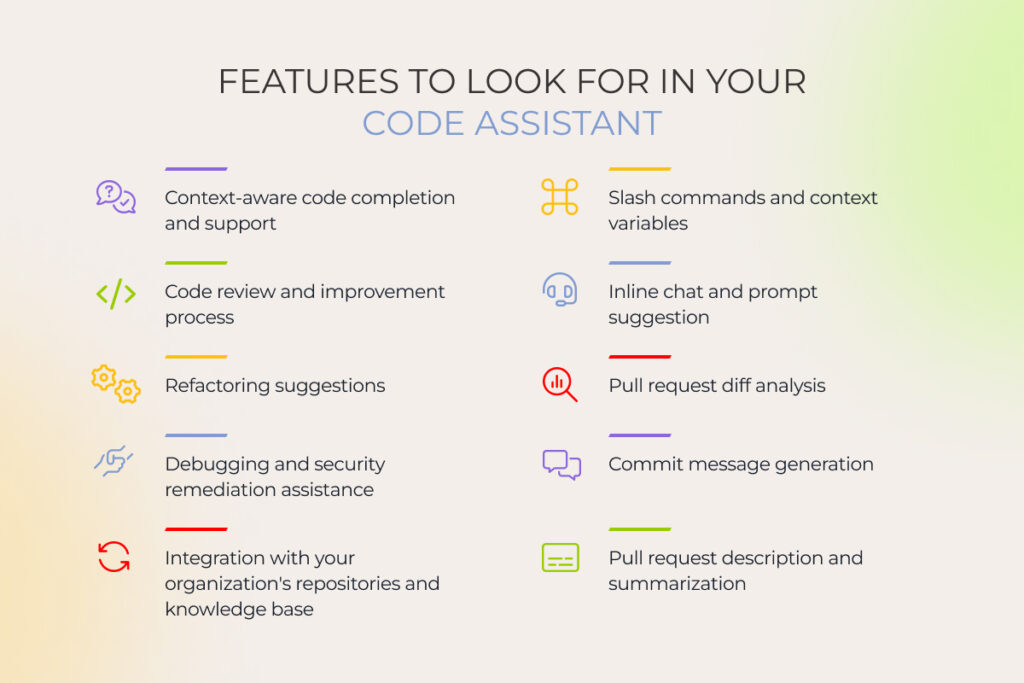
  • Seismic images interpretation: Geo- and data scientists can remove noise, improve resolution, detect subtle features, or even generate additional data samples with AI if imagery quality is poor or incomplete.

Increasing extraction rates with automated drilling

With hefty costs involved, no wonder oil and gas companies seek to hammer drilling operations home on the first try. A helping hand here is drilling optimization, another application of artificial intelligence in the oil and gas industry. It spans multiple stages of the workflow, from planning and execution to real-time risk management:

  • Pre-drilling layer: Predictive intelligence allows engineers to convert cross-sourced historical and real-time data into actionable insights for drilling preparation. 
  • Drilling parameter optimization: Armed with advanced ML algorithms, geosteering teams analyze terabytes of historical data to configure optimal parameters, such as weight on bit, rate of penetration, rotary speed, mud flow, torque, and drilling angle.
  • Real-time monitoring and safety intervention: AI in oil refinery leverages real-time drilling data to predict the likelihood of stuck pipe events, enabling proactive measures. 

As a result, AI and ML in the oil and gas industry reduce the risk of drill-bit failures and optimize extraction rates.

Proactively identifying and preventing equipment failures

Disruption risk tends to be more pronounced in legacy pipelines, offshore platforms, and refining facilities. And today, even short-lived outages can compress already thinning margins and destabilize supply in already constrained markets. The solution is automated equipment inspections carried out by “zero-touch” sensors, drones, and robots, as well as AI-enabled proactive, self-healing maintenance. Early adopters of these solutions have reported up to a 40% reduction in equipment failures and annual savings of up to $10M. Worth noting, predictive maintenance for heavy machinery has long remained one of the most beneficial use cases of AI in the oil industry, according to oil and gas leaders.

How does it work? Drones and robots with tiny sensors and cameras scan each equipment component with laser precision. Cracks, corrosion, and other potential signs of wear are identified by pre-trained ML models. Thus, AI systems perform 24/7 meticulous real-time inspection without human intervention, minimizing operational risks and expenses.

An example of AI-enabled asset maintenance in action can be found at Shell. They utilize an ML-based predictive analytics solution that helps avoid critical equipment outages and identify cases when maintenance is needed. Now, its staff have more time for engineering instead of analyzing mountains of data, while the company reduces production losses and maintenance costs.

Equipping field workers with AI assistants 

High pressures, heat, flammable substances, basic human error, and other factors have led to many tragic safety incidents during gas and oil exploration. With virtual field assistants, drilling rig crews, well operators, and technicians have quicker and easier access to critical information.

For field staff, bpx, bp’s nimble US onshore oil and gas business, is piloting an AI-powered agent called Perfect Lap Xecute or PLX. It can generate daily to-do checklists and summaries of key production insights, so nothing slips through the cracks, reducing the chance of missed steps in environments where small oversights can quickly become safety incidents.

— Ivan Dubouski, AI Lead Engineer, Instinctools

Voice-enabled AI assistants are easily integrated into field-friendly devices, guaranteeing round-the-clock availability and proving to be more effective for emergencies than human-staffed call centers.

Enabling the precision and safety of high-impact oil and gas exploration

As the industry faces a potential 300-billion-barrel supply gap by 2050, major oil companies are reviving investment in high-impact exploration. AI-related technologies are transforming ultra-deepwater drilling by enabling autonomous operations, enhancing safety, and optimizing efficiency in challenging environments exceeding 5,000 feet below the ocean surface.

AI-enabled deep-water reservoir development can be seen at operators such as Shell, which uses remotely operated vehicles (ROVs), advanced subsea systems, and state-of-the-art drilling techniques.

— Ivan Dubouski, AI Lead Engineer, Instinctools

Midstream use cases of AI in the oil and gas industry: storage and transportation

midstream

Here are practical applications of artificial intelligence in midstream oil and gas leaders should know.

Detecting leaks and emissions in storage facilities

Generative AI tools can sum up large amounts of data captured by optical gas imaging (OGI) cameras installed on inspecting robots or unmanned drones in natural language, saving hours that used to be spent on the manual review of the footage. Those AI-generated assistive summaries enhance the efficiency of oil & gas operations, especially in large industrial facilities or outdoor environments. Moreover, operators can take remedial actions without entering potentially dangerous areas.

With its AI-powered flare monitoring system, Aramco manages to maintain an industry-leading flare volume of below 1% of total raw gas production. It allows the petroleum leader to visualize the entire gas processing system at once and predict when a certain facility is going to exceed its flaring targets so that remedial action can be taken in advance.

— Ivan Dubouski, AI Lead Engineer, Instinctools

Planning the safest and fastest routes for logistics vessels

Advanced analytics help logistics specialists extract insights from vast amounts of data related to weather, route hazards, port congestions, vessel conditions, and other operational factors to plan the most cost-effective tank routes.
Not only do AI optimization algorithms ensure on-time delivery, but they also identify risks and adjust the route on the go without increasing the planned transit time.

A great example of using algorithmic shipping and maritime route optimization can also be observed at Shell. Their LNG Shipping Accelerator gathers all critical infrastructure data in a single place for freight operators to reduce waiting time at ports and fuel usage, resulting in timely and nature-positive energy delivery.

Downstream artificial intelligence applications in the oil and gas industry: refinery and distribution

downstream

By embracing AI, downstream firms achieve refinery & distribution cost reduction and reach regulatory compliance faster in several ways.

Honing the refinery process

The application of AI in downstream oil and gas companies involves real-time monitoring systems that optimize refineries. Those systems monitor operations and collect data during distillation, catalytic cracking, and hydrogenation. They also screen data from energy meters and equipment sensors.

All this contributes to boosting petrochemical throughput, minimizing energy consumption, and identifying potential safety hazards.

Meeting quality standards faster

Application of AI in the oil and gas industry aids refinery companies to meet key quality standards, including ISO, API, ASTM, and others.

Straight from the production lines, ML algorithms and predictive AI models analyze the produced diesel, lubricants, jet fuel, natural gas, liquefied petroleum gas, oil petrochemicals, etc., against the standards. 

By predicting deviations in product quality before they occur, production specialists can make corrections to minimize waste and ensure production reliability and environmental sustainability.

Furthermore, to turn ESG reporting from a yearly burden into a real-time strategic capability, agentic AI automates data capture, question answering, and other reporting tasks for compliance teams.

Reinforcing product research and development 

Generative AI in the oil and gas industry allows petrochemical engineers to accelerate the materials development process and bring down R&D costs by:

  • designing new chemical compounds with diverse compositions, simulating how these virtual assets behave under different conditions before actual physical production;
  • establishing the most efficient experimental procedures for probing or optimizing materials;
  • developing high-entropy alloys (HEAs) with excellent physical, chemical, and mechanical properties.

Boosting sales and distribution of refined products

Beyond pretty standard demand forecasting and pricing, cutting-edge AI in refined oil and gas distribution leverages autonomous agentic systems for real-time, multi-step decision-making across downstream chains. Autonomous AI sales agents streamline workflows such as personalized customer engagement, quote handling, order management, reporting, and documentation.
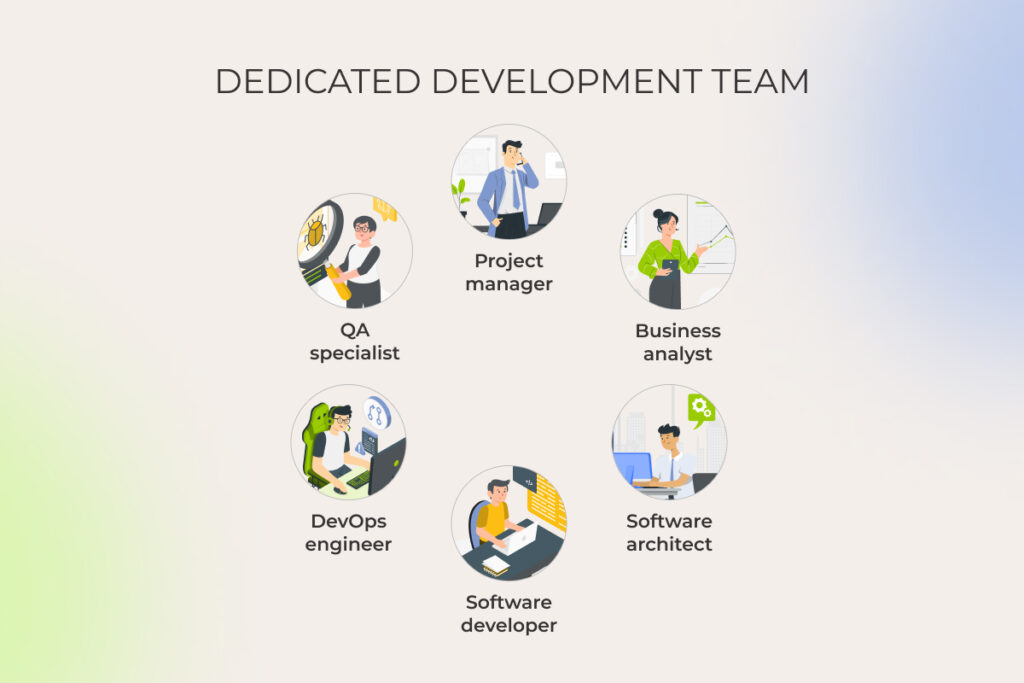
Besides, advanced analytics is actively used for data-driven sales decision support:

  • Refinery output optimization aligned with market conditions, adjusting production mix based on real-time crude pricing and margin signals
  • Integrated demand-supply matching across regions, coordinating fuel production, inventory levels, and downstream logistics to ensure timely delivery to retailers and industrial buyers

Cross-stream AI applications in the oil and gas industry

Some AI use cases in oil and gas are so versatile that they cover more than just one segment, functioning across multiple layers of the industry.

Planning asset maintenance proactively

AI-powered predictive maintenance goes beyond upstream. 

It forecasts failure in pipelines, pump stations, or processing plant equipment to prevent costly repairs. Casting their nets wide, predictive maintenance models optimize performance and extend the infrastructure life across the whole oil and gas supply chain. 

With agentic AI layered in, AI agents can autonomously analyze sensor anomalies to generate optimized maintenance schedules, factoring in crew availability, parts inventory, and production impact, then directly execute them through ERP integration, taking on tasks like dispatching work orders, adjusting equipment parameters, and confirming completions with real-time feedback loops.

Automating mission-critical supply chain processes

Apart from eliminating costly downtime and optimizing transits of crude oil or LNG via barges and tankers, advanced analytics algorithms enhance the following:

  • energy transition via other transportation methods, such as pipelines, trucks, and railroads,
  • distribution network configuration, including the number and locations of storage facilities, transportation routes, and inventory levels at each facility.

Using gen AI, oil and gas companies and logistics providers automate mission-critical supply chain processes:

  • procurement: materials demand forecasting, identifying the most suitable suppliers, handling price fluctuations;
  • on-shore and off-shore inventory management: improving asset tracking;
  • route planning: identifying current traffic conditions, tuning optimal delivery timing, vehicle tracking, fuel-efficient routing;
  • contingency planning: running what-if scenarios in a digital twin environment to develop custom multi-purpose mitigation strategies.
11 remarkable AI use cases in oil and gas industry

Overall, application of AI in the oil and gas industry improves planning resilience and helps keep supply chain operations more predictable.

Explore smarter, produce more efficiently, and predict end users needs’ like never before by wielding AI power

Rewire to win

AI for oil and gas: impact at a glance

Here’s a pack with all the examined AI use cases in the oil and gas industry to highlight the impact AI solutions make on different tasks of O&G professionals.

SegmentOperationsImpactTechnologies involved
UpstreamReservoir exploration– faster, more informed decision-making
– targeted wells placements
– reduced environmental impact
– enhanced energy efficiency
– extended oil field lifecycle
Agentic AI, neural networks, machine learning and AI algorithms, edge AI, generative AI
Drilling automation– minimized drilling costs
– increased extraction rates
Predictive analytics and decision trees, digital twins, machine learning
Automated fault detection– extended equipment lifetime
– minimized disruptions
– reduced expenses
– automated maintenance scheduling
Computer vision and convolutional neural networks
Field workers’ support– reduced operational costs
– 24/7 availability
– enhanced safety
NLP, generative AI
Ultra-deepwater exploration– automated operations
– enhanced safety
Computer vision, machine learning algorithms
MidstreamLeak/emission detection– accelerated anomaly detection
– automated safety measures
– reduced environmental impact
Computer vision, edge AI, generative AI
Routes planning– reduced delivery delays
– lower fuel usage
– enhanced safety
Optimization algorithms, ML, generative AI
DownstreamRefinery optimization– increased output
– minimized energy consumption
– enhanced safety
– improved risk management
AI-powered monitoring systems, IoT & smart sensors
Quality control– accelerated compliance 
– minimized waste
Agentic AI, ML algorithms, predictive models, IoT & smart sensors
Product R&D– reduced experiment consumables
– minimized guesswork
– greater scope for experimentation
Generative AI
Boosting sales and distribution of refined products– enhanced decision-making
– increased revenue
Agentic AI, generative AI, predictive algorithms, ML
Cross-streamAsset maintenance planning– extended equipment lifetime
– minimized disruptions
– reduced expenses
– automated maintenance scheduling
Agentic AI, Edge AI, predictive algorithms, generative AI
Supply chain optimization– reduced delivery delays
– lower fuel usage
– automated risk mitigation 
– enhanced operational efficiency
Optimization algorithms, digital twins, generative AI

A pAI in the sky? What’s holding O&G companies back in adopting artificial intelligence

AI adoption in oil and gas is partly slowed down by the industry’s own constraints: its heavy physical orientation, plus senior leadership often shaped by cautiousness toward digital technologies. On top of that sit the usual, industry-agnostic barriers to AI adoption:

  • Shaky data foundations. It’s not that oil and gas companies lack data across their various operations. Far from it. But what you do see all too often is a complete mess in how that data is managed and governed. AI-enabled outcomes are only as good as the data foundations beneath them, which makes data readiness a prerequisite for any serious AI initiative.
  • Legacy software infrastructure. No one wants to touch aging ERPs, CRMs, etc. because “if it ain’t broke, don’t fix it”, except they are broken, just not in ways that show up until you try to plug in a modern AI model. You can’t efficiently run sophisticated multi-agent workflow automation on a foundation of duct tape and despair. The challenge is even greater in oil and gas, where operations depend on close coordination across operators, service companies, suppliers, logistics partners, and regulators. Without integration-ready systems and shared data flows, AI remains trapped in isolated pilots instead of scaling across the value chain.
  • Safety monitoring and compliance. O&G companies have always adhered to a web of local rules, environmental regulations, and international treaties. Institutional pressures and enormous attention to safety make decision-makers slow to adopt flashy AI-driven tools.

These factors, flavored by geopolitical instability, shifting trade flows and route disruptions, slower production growth, and margin compression, account for decision-making inertia regarding AI use in the oil and gas industry.

Want to fast-track your AI readiness? Let’s start with a tailored, two-day AI adoption workshop

Request details

3 steps to start your AI project in the oil and gas sector

All the above challenges should not necessarily hold you back.

McKinsey partners state that to generate value post-2030, against the never-before-seen push to balance sustainability, affordability, and supply security, oil and gas companies need to answer a number of questions in their AI strategy, one of which is:

So what should oil and gas executives start with to achieve AI payoffs?

1. Address data quality issues

The most critical factor in laying the solid groundwork for driving AI adoption is high-quality data.

What can you do? 

  • Identify all your raw data sources (equipment, sensors, satellite imagery, etc.). 
  • Review the ways you collect and store geological data, historical maintenance records, etc.
  • Assess the state of your data pipelines (ingestion latency, schema consistency, transformation logic, orchestration layers, and end-to-end data lineage).
  • Enrich your data science and big data competencies, if needed, to facilitate security and quality.

2. Identify use cases

While artificial intelligence in the oil and gas industry can be a powerful tool, it won’t be a silver bullet that transforms every process overnight.

Forget the idea of a one-size-fits-all enterprise AI solution that magically fixes everything in your company.

Instead, start with pilot projects focused on business areas that rely on high volumes of raw data and directly impact revenue, costs, risk management, or other crucial aspects.

Quick wins from improving bit-sized processes will create room for larger AI initiatives.

3. Create an AI integration strategy

Deployment of artificial intelligence in oil and gas varies by the industry segment, but these five criteria are universal to consider in your AI strategy:

  • draw on a cost-benefit analysis 
  • consider the impact on people and operations 
  • create a responsible implementation framework 
  • ensure data integrity 
  • establish effective governance

These considerations help build a win-win deployment strategy for business growth and a sustainable future.

3 steps to start implementing artificial intelligence in oil and gas industry

If AI adoption seems a hassle, you can always rely on an experienced tech partner to make things easier and more predictable

Request a free consultation

FAQ

What is the role of AI in the oil and gas industry?

AI models analyze diverse data to predict key parameters and identify pre-configured events, ultimately shaping crucial decisions. Indeed, that’s a fundamental “engine” of nearly all Artificial Intelligence use cases in oil and gas, from reservoir exploration and drilling optimization to automated anomaly detection and supply chain management.

How is generative AI used in oil and gas?

Large language models’ capabilities in data analysis, modeling, reporting, and simulation enhance understanding of operations and provide instant access to actionable AI driven insights. This unlocks numerous generative AI use cases in the oil and gas industry, including seismic data analysis, reservoir characterization, virtual field assistance & safety, storage facilities inspection, materials R&D, asset maintenance planning, and supply chain optimization.

Which oil companies are using AI?

Among oil companies that leverage AI technologies for different needs are industry front-runners , such as Shell (materials discovery), BP (choosing spots for plants), TotalEnergies (conversational AI assistance), Chevron (reservoir images interpretation), ExxonMobil (drilling data collection, vessels tracking), Petronas (predicting equipment failures), and Saudi Aramco (reservoir modeling, oil spills detection).

What are the most common AI use cases in oil and gas?

AI, GenAI, and agentic AI are widely used for predictive maintenance, reservoir modeling, drilling optimization, leak detection, supply chain forecasting, refinery optimization, and ESG reporting automation.

What is agentic AI and how is it applied in oil and gas operations?

Agentic AI refers to systems that can plan, decide, and execute multi-step workflows using tools and enterprise systems. In oil and gas, it powers maintenance scheduling, field assistance, sales operations and compliance reporting automation.

What are the main challenges of AI adoption in oil and gas?

Key challenges of deploying AI for oil and gas infrastructure include legacy infrastructure, poor data quality and storage, weak governance, and integrating AI into safety-critical, physically grounded operations without disrupting existing workflows.

How does AI improve safety and predictive maintenance?

Predictive maintenance models forecast equipment failures before they happen, reducing downtime and accidents. AI also automates inspections in dangerous environments and supports field workers with real-time alerts and decision guidance.

What is the AI adoption rate in EPC oil and gas projects?

While an industry-revealed AI adoption rate in EPC oil and gas projects is not explicitly available, BCG revealed that 72% of O&G companies support adoption of GenAI tools, 47% redesign end-to-end workflows and processes to facilitate agent-led automation, and as much as 22% build new business models and products to drive growth (e.g. personalized AI agents that help retail energy clients optimize consumption, AI tools that support real-time adjustment of prices based on customer behavior and context, AI systems that propose new exploration targets using basin analogs and constraints).

How do oil and gas companies start implementing AI?

Implementation of AI in the petroleum industry unfolds in stages. Companies start by fixing their data foundations, then target high-impact use cases like maintenance, forecasting, or emissions tracking. Next come pilot projects with measurable ROI, followed by integration into core systems. Scaling requires governance, MLOps, and a gradual shift toward automated or agent-driven workflows.

Anna Vasilevskaya
AI modified real photo
Anna Vasilevskaya
Account Executive

Get in touch

Drop us a line about your project at
[email protected] or via the contact
form below, and we will contact you soon.