Legacy Application Modernization: Inch-By-Inch Guide On How To Make It Right

When your software does not meet challenges of time, it might be wise to consider legacy application modernization. But here’s the kicker: these initiatives are only successful in 30% of cases. No wonder many business owners cling to the idea of “why fix what’s not completely broken”, delaying necessary upgrades until it’s almost too late.  

Bad news: this mindset won’t cut it anymore. Why? Well, what should we start with? Sluggish performance and glaring security vulnerabilities are just the beginning. Legacy systems drain resources with high maintenance costs and struggle to scale with your growing business.

Fifteen or twenty years ago, you could have used software for up to eight years stress-free. Today, the lifespan of tools and frameworks has halved, forcing companies to go through the cycles of modernizing their apps every four years. 

Good news: we know how to get software back on the right track before it goes south. In this article, *instinctools’ very own head of backend development and lead solution architect will walk you through all of the stages of the modernization journey and legacy system modernization approaches, providing a slew of real-life examples along the way. 

What makes a legacy app?

Our vision of a legacy app isn’t limited to obsolete technology. At *instinctools, we stick with Gartner’s definition, considering any solution outdated if it relies on software, technology, methodology, or process that has become ineffective while remaining critical to daily operations. 

Nine signs your app is screaming for an upgrade

You know what they say: if it looks like a duck, swims like a duck, and quacks like a duck, it’s probably a duck. The same goes for legacy software: if it looks old, runs slowly, and requires a lot of effort to make any improvements, it’s probably outdated. Anyway, to help you make a well-informed choice we’ve curated a list of some blatant indicators, signaling your app needs a makeover. 

  • Skyrocketing infrastructure costs due to an outdated technology stack
  • Obsolete UX/UI failing to meet user expectations
  • Limited scalability that hinders your growth potential
  • Low flexibility, making integration with modern apps impossible
  • Poor performance as your app’s daily norm
  • Numerous security vulnerabilities and compliance risks
  • Inability to find staff with the right skills to support the app
  • Code bloat, making maintenance pricey and challenging 

Spotting the apps calling for legacy modernization isn’t a hard nut to crack. Modernization itself, though, might be — given how deeply your software is embedded in your company’s daily operations. 

Legacy app modernization has many faces

Legacy application modernization comes in various forms: 

  • Encapsulating provides a gain with no pain when you reuse the existing app’s valuable features with minimal changes by making them accessible for other applications through an API.   
  • Rehosting implies keeping the old code and features as they are while redeploying the app component to other infrastructure (on-premise; private, public, or hybrid cloud).
  • Replatforming covers elevating the software performance and scalability and reducing operational costs by migrating to a new platform, while preserving the previous code structure and core functionality.
  • Refactoring includes optimizing the existing code in line with up-to-date coding standards to eliminate technical debt.
  • Rearchitecting entails substantial changes to the application architecture and code by replacing a monolith with microservices or, sometimes, the other way around when the microservices were written at different times by different developers and are easier to maintain if consolidated in a single monolith.
  • Rebuilding involves completely rewriting or redesigning software components while keeping the app’s overall scope and specifications. 
  • Replacing existing systems with new ones is a last-ditch step required when the end users’ needs have completely changed and, to meet them, none of the current app’s components and layers can be reused. 

As you can see, there’s no need to burn your boats, when you can sail smoothly into massive improvements with time-saving, budget-friendly modernization strategies. If identifying the right one feels overwhelming, legacy application modernization services from a trusted software development company provide expert guidance. 

Risk it for the biscuit: measured rewards of legacy modernization

The prospect of IT legacy modernization can look intimidating, but the rewards are well worth the effort. Here’s how transforming your software can benefit you in multiple ways: 

  • Maintenance cost. Aligning your app with current code practices, architecture, design, etc., allows you to trim down the cost of software upkeep by at least 30%*.
  • Quality. Reducing the amount of flawed code in production to less than 1%* sounds valuable, isn’t it? 
  • Speed. Releasing new features up to x50* faster can put you ahead of the pack.
  • Regeneration. Minimizing the downtime with the average mean time to recover (MTTR) of just 2–10 minutes* raises the app’s reliability.
  • Integration. Zero drawbacks when integrating your app with other solutions contribute to the hitch-free functioning of your software ecosystem.

*Based on our client’s legacy modernization projects 

Ready to take a step towards future-proofed, high-performing software?

Schedule a call

The nuts and bolts of the legacy application modernization process: 7 steps to follow

Despite the complexities and peculiarities of software modernization initiatives, there are guaranteed strategies you can follow to tackle legacy modernization challenges head-on.

1. Run an assessment to define the problem areas

The measure-twice-cut-once principle is also valid for legacy modernization.

Revamping a legacy app should start with a thorough assessment that covers all the bases: 

  • Project documentation. Outdated software often lacks solid documentation. Catalog all the data on the app to identify any missing mandatory documents.
  • Technology analysis. Evaluate your current tech stack, and choose the most suitable programming languages, tools, frameworks, integrations, based on the available tech expertise and trends, shaping the landscape in your industry.
  • Architecture audit. Examine the systems’ architecture design, consistency, and quality against industry standards to get an idea of what can be done to achieve seamless scalability, high integration capabilities, and glitch-free maintenance.
  • Code review. Is your source code up to snuff? Compare it against the present-day coding best practices to spot and weed out any spaghetti code.
  • Data quality estimation. Inspect the app’s data layer for consistency, accuracy, and completeness to ensure no junk data sneaks into your updated software database. 
  • UI/UX evaluation. How user-friendly is your app? Analyze overall usability, ease of navigation, element layout, and visual design to identify the areas that need a facelift.
  • Performance testing. Put your app through its paces. Check the app’s stability, scalability, speed, and responsiveness under various workloads to uncover performance bottlenecks.

Prioritizing the assessment stage upfront is your secret weapon against future headaches. If your project vision is blurry or stakeholders aren’t on the same page, consider a discovery workshop. This helps synchronize your modernization strategy with your business context and user demands. 

If you don’t have the capacity or specific experts on board to tackle modernization without affecting your ongoing projects, find a tech partner who can steer the ship and bring you to the next destination of your legacy system modernization journey.

2. Identify the relevant modernization approach and technique

After assessing the existing legacy system, you can chart the right course and choose which of the legacy system modernization approaches works best for you. 

In general, there are two main options for a legacy system transformation —  the big-bang (revolutionary) method and the band-aid (evolutionary) one. Truth be told, business owners tend to choose risk-prone gradual improvements over cliff-jump actions.  

There’s only one situation when you have to put everything on the line and follow the big-bang approach. When major security issues or compliance violations arise, you don’t have the luxury of taking it slow. It’s either go big or go home. You have to act now to avoid losing customers and facing massive fines. 

We’ve put together a comparison chart to help you weigh the pros and cons of each modernization technique we’ve mentioned earlier, in terms of cost, time, complexity, and risk.

TechniqueCostTimeComplexityRisk
EncapsulatingThe lowestThe quickestThe lowestThe lowest
RehostingLowMediumLowMedium
ReplatformingMediumMediumMediumMedium
RefactoringMediumMediumMediumHigh
RearchitectingHighLongHighHigh 
RebuildingHighMediumHighHigh
ReplacingThe highestThe longestThe highestThe highest

An iterative approach lets you mix and match two or more techniques to achieve the highest value for your business. For example, one of our clients, a provider of SaaS personalization engines, started the modernization process with code refactoring of their flagship software and then decided to proceed with the redesign. That way, they were able to move toward simplified product maintenance and design consistency across all of their current solutions. 

3. Update your Vision & Scope and create a roadmap

The reason why 74% of modernization initiatives fail is mismatched project visions among stakeholders. Consistent, well-organized documentation keeps everyone aligned and on track. 

First of all, make sure the app’s vision and scope reflects the latest end-user needs, compliance, and security requirements. 

Second, you should put a premium on creating a project roadmap with the goals and objectives of your legacy system modernization, key project deliverables, business risks, success criteria, a timeline with milestones, and a team lineup. 

4. Set up app modernization team

An all-embracing roadmap, outlining mandatory roles within the team and the number of FTEs, enables you to allocate your resources wisely when arranging a remote dedicated development team for a legacy system modernization. 

However, it’s not carved in stone, and your initial goals may evolve, requiring team decomposition or expansion.

Take, for instance, a SaaS LMS provider that partnered with *instinctools. Initially, they sought our solution architects to rearchitect their current educational platform. However, amid our cooperation, they decided to strengthen their internal team with our senior frontend developers, aiming for a complete system redesign.  

Get the right talents on board

Reach out

5. Execute modernization

At this point, actions you take will hinge on the specifics of your modernization project. For example, redesigning involves prototyping, wireframing, and usability testing, while rehosting requires data and storage migration and database rehosting. 

The common best practice for any modernization technique is moving in small iterations so that you can spot and address any risks in the bud and avoid divergence of vision among team members and stakeholders. 
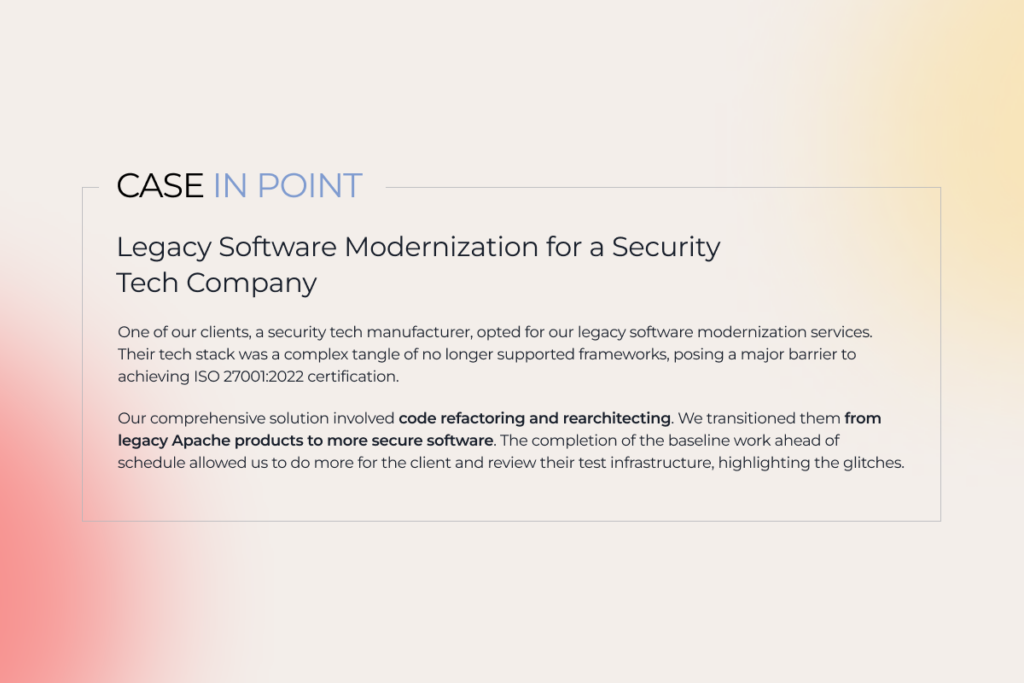
description of a legacy modernization project for a tech company

6. Invest in end-user training

Present-day tools and frameworks, modern platforms, revamped architecture, and top-notch design mean nothing without user support. While consumer demands often drive updates to customer-facing apps, internal technology changes tend to neglect employee feedback. 

How to prevent staff resistance to your modernization efforts? We suggest initiating user training before rolling out the renovated app to familiarize your employees with the new system. For significant software changes or complete replacements, consider implementing a digital adoption platform (DAP) for contextual in-app guidance. 

7. Support and optimize

Ensuring your renewed system runs flawlessly requires continuous proactive monitoring. Regular tech, UX/UI, and performance audits, code reviews, and data quality and security checks before, during, and after modernizing legacy systems increase the odds of their smooth operation. 

Make it easier with gen AI: technology use cases for legacy system modernization

Generative AI reshapes software development, and modernization initiatives are no exception. The technology’s capabilities can be applied to any form of modernization and are game-changing in increasing the share of automation. 

For instance, EY lists the tasks gen AI tools can tackle autonomously with up to 90% accuracy:

  • Reviewing code 
  • Suggesting code snippets aligned with the up-to-date coding standards and compliance policies
  • Converting a legacy code into a more dynamic environment
  • Generating human-readable inline comments for previously undocumented legacy code

Get better software modernization results faster with our support

Let’s talk

It’s time to act

Staying stuck with dust-covered software infrastructure, design, and legacy code means losing out to more agile and innovative competitors. But there’s a way forward through modernizing legacy systems in a well-thought-out, calibrated manner. 

And that’s where we come in. Instinctools is your tech partner for every step of the modernization process. We focus on maximizing what works and fixing the trouble spots, ensuring your app is sturdy and cost-effective.

Ready to make your move? 

We are here to help

The Future of Software Development in 2021 and Beyond

The year 2020 stormed into our lives, bringing changes that most of us were not ready for. Businesses had to either take the path of overwhelmingly rapid digitalization or put their very existence at risk. We reached an unprecedented milestone when technologies were once and for all to become the heart of even very traditional businesses. 

While organizations were flying blind through the dark times of the lockdown, software development came under the spotlight – helping companies to embrace agility and resilience. Considering massive shifts that happened last year, a lot of which are going to stay with us forever, more software innovations are likely to be seen in the near future.

So what’s going to be in the software engineering news in the coming years? Let’s take a stab at it.

Digital skills will remain in high demand

The Covid-19 pandemic has accelerated digital transformation. It resulted in a rapid embrace of technologies and, in the meantime, revealed a shortage of people whose job it is to deliver them – software developers. 

According to the US Bureau of Labor Statistics (BLS), demand for this role is projected to grow 22% by 2029. Today, not only tech companies cry out for software engineers. Many organizations have shifted their business processes online and started to launch services on the Internet from scratch. They are in need of technical talent. As more and more companies want to renew their services and develop new technologies to meet their customers’ fast-evolving needs, the lack of specialists will get even bigger. Furthermore, the skills recruiters are expecting from the applicants now are different from those before the quarantine. 

All this is likely to put small and mid-sized businesses, looking for candidates with the right skill set, into a difficult position. No wonder 41% of organizations intend to increase their spending on software outsourcing, as a Harvey Nash/KPMG CIO survey shows. Not to lose in the race of constantly changing demands, partnering with software development experts sounds like a pretty wise plan – it’ll help businesses to be better equipped with new tools in the software industry to keep the pace of digitization.

Remote work is here to stay

remote work

For the past one and a half years, a number of companies have adopted – not by choice – unprecedented workplace flexibility with all the advantages and drawbacks it entails. What once seemed like a temporary situation is now clearly the new normal and won’t be going anywhere. Since the genie can’t be put back in the bottle, there’s nothing we can do but learn how to effectively deal with more people working remotely.

The Terminal-commissioned research finds the vast majority of employees love the benefits that remote work offers and don’t want to get back to the old ways. The top reported advantages of remote work for software engineers include a lack of a commute, enhanced work-life balance, and increased autonomy. 

At the same time, a lot of respondents admit that it’s become harder to collaborate or feel part of a team. Indeed, no matter how difficult it is to imagine developers’ work without over-the-shoulder reviews, yet here we are – this form of collaboration has become a thing of the past. But if code reviews can be completed through a specialized tool, unstructured, organic interactions that occur due to the physical proximity of employees in the office are difficult to recreate. 

The way software engineering has changed is especially tough for managers and new hires. The former are more likely to face burnout; the latter suffer from the lack of valuable team building and learning that takes place at natural moments of “collision.” New ways of encouraging team collaboration are likely to be found to build more inclusive remote environments for employees.

Proprietary software will be outnumbered by open-source 

Since its emergence in the ’90s and up until recently, open-source software has been disparaged as lower in quality and security than proprietary solutions. With time, these myths were dispelled though, and the situation has changed drastically. Today, business use of open-source software is soaring. 

Although proprietary software providers still dominate the market, open-source software plays an equally important role. Moreover, a number of factors show that more is yet to come for open-source development. The first one is that it’s fast. Increasing the speed of time-to-market and pushing out updates on a frequent basis are no longer issues. Secondly, open-source software is decentralized. As long as open-source projects have multiple backers and stakeholders, businesses won’t suffer from vendor lock-in. Finally, since the code is open, this software is easy to customize, which means that the solution can be tailored to meet customers’ specific needs.

A Red Hat report shows that about 80% of IT departments plan to increase their use of open-source software over the next year, with 95% of IT specialists saying that open-source has become strategically important to their business. While proprietary software use is expected to be down to 32%, the use of open-source, in contrast, will increase to 44%. Using open-source solutions is a software trend for a reason – they offer companies powerful capabilities without having to invest heavily straight away. 

Low-code platforms will be taken more seriously

low-code platforms

High demand for software solutions and the lack of qualified developers have brought low-code platforms to the forefront. These platforms help businesses quickly react to the changes and rapidly deploy new solutions due to the simplification of the development process. Instead of laboring over raw code forever and a day, engineers can focus on adding more value to the product.

Taking into account the growing gap between developer supply and demand, it’s expected that low-code tools will get even more popular as their adoption doesn’t require any special qualifications. Writing “everything” or “almost everything” from scratch is no longer relevant merely because “almost everything” is already there. Does it mean, however, that programming we got used to will vanish into thin air? Not at all. It’ll just transform from a kind of craft into an act of art. 

The significance of developers is still rising because they are not swamped with low-level programming and integration and have an opportunity to concentrate more on customers’ problems rather than snags in the code. For the past two years, a lot of companies across industries have optimized their business processes, cut development costs, and scaled fast with the help of low-code platforms. 

Because of the pandemic, businesses started massively switching to online operations and needed suitable instruments for that. Creating applications in a traditional way could lead customers to bankruptcy. Meanwhile, with low-code, development has become several times faster and cheaper. Solutions based on low-code are more flexible, which means that companies can effortlessly adapt their software to any changes.

Taking advantage of future software development technologies

The last year put us on a fast track to a completely new world. The future of software development turned into the present in the blink of an eye. Far from everybody was ready to keep afloat – the rest is history. 

Do you want to leverage the changes that the future holds? Contact us for a free consultation on choosing the best software development strategy for your business.

Hidden costs of legacy software

Holding onto legacy software may seem like a cheap and easy approach. You don’t need to change anything, just support the existing infrastructure, and hope for the best. However, deciding against a modernization approach and maintaining aging systems comes with significant costs that you might not be aware of.

Infrastructure issues

Legacy systems often require a specific technical environment, including hardware. The cost of ownership of such software solutions is very high due to operational and administrative expenses. On average, cloud solutions allow you to save about 65 percent of your IT infrastructure costs over the first 3 years. And the more servers your systems require, the bigger your cloud benefit is.

Furthermore, with your apps in the cloud, you can use only the computing power you need at the moment, unlike with high-priced hardware, which, in case of downtime, is a complete waste.

Another issue that roots from outdated software and problems in its configuration is security. Legacy systems are vulnerable to malware and breaches, and they are less resistant to cyber-attacks. What was secure a decade ago, might not be reliable now.

Legacy software updates and changes

Due to the outdated technology stack or overcomplicated inner architecture (often expressed in a “spaghetti code” and a technical debt), legacy systems can be hard or even impossible to change or expand to greater capabilities. Thus, any change or update to the legacy software requires time and effort, neither of which come cheap.

Staff training

Legacy software is typically not user-friendly and difficult to work with. Training your new employees to work with old-school software seems unreasonable since it makes the staffing process harder and more expensive. Outdated software with unoptimized, awkward interfaces can significantly slow down your operations. At the same time, modern business systems have powerful informational architecture, rich navigation options, and strictly defined visual elements and style.

Integration problems

No matter how old your software is. It has to be able to integrate well with other tools and applications that you use to run your business more efficiently and effectively. The problem is that old-fashioned systems have a monolithic structure. As a result, they require an excessive amount of custom-code to make them work with new technologies, modules, and tools. Therefore, you need a system that is capable of handling integrations in a manner that does not break your processes.

If you are hog-tied by your decade-old legacy systems, it will blow up in your face someday. Your competitors might have already integrated those new tools and have been taking advantage of their benefits. That means you will continue to lose your customers and revenue, putting your business’s existence at risk. 

Modern technologies, though, are integration-ready by default. Why reinvent the wheel, when you can use an existing, tried and true solution?

Missed business opportunities

It is almost impossible to calculate the true cost of managing your business processes with legacy software. Why? Because there is something called lost opportunity cost, which is usually involved with most legacy applications.

Your software must be able to keep up with changes in your business model, processes, or simply the scale of operations. Having the systems which lack this ability and no longer solve your business problems, you will end up adapting your business to your software while it should be the other way round.

Furthermore, if you want your business to evolve and grow, you will require a better throughput capacity and a completely new multi-tenant architecture to manage all your operations.

Lack of agility and efficiency

Time is money. Actually, time is more than money. Your business success depends on how fast you can respond to the market challenges and how long it takes you to adopt new technologies. In this respect, legacy systems hold back innovation, which results in significant losses. On top of that, being less efficient, outdated software influences employee productivity in a negative way.

You see, there are plenty of obstacles that get in the way of your business success if you run legacy software. Yet, there are even more: Employee satisfaction. Customer loyalty. Your brand image, which, by the way, is not “nothing” as Sprite’s slogan claims, but “everything”. Just ask Starbucks.

9 traps on the way to software modernization

Nothing lasts forever. Software is no exception. Something that once was a solution, suddenly or gradually – depending on your luck – turns into a problem. We’re all going digital and agile, while those big old dusty back-office systems hold us back, becoming a hindrance, not a help.

We have already discussed the reasons to get rid of legacy software.  Now, it’s time to look at the pitfalls which are scattered about the way to modernization.

  • Procrastination

We tend to put off the changes for as long as we can because we’re afraid of them. Terrified, really. The last thing any CEO wants is to be the person who spent a fortune on an IT overhaul. But it’s almost impossible to predict whether some unusual or unexpected combination of activities will one day cause a catastrophic crash of the super complex software your business relies upon.

The “do-not-touch-the-bomb” approach doesn’t work all that well, as the explosion is inevitable anyway. And then, will you be ready to deal with the damage? Once you realize that keeping the old system as it becomes a bigger risk and a greater cost than changing it, it’s time to take action.

  • Lack of understanding of your current state

Before taking on such a significant and costly process as software modernization, you need to make sure your decisions will not be mere guesswork but based on solid facts. To pinpoint the root causes of the problems and define the critical steps for fixing them, you need to have a proper diagnostic view of your system. 

The main metrics you have to pay attention to while assessing your system are its efficiency, robustness, security, changeability, transferability, compliance, technical debt, and size. Moreover, find out the major risks by identifying the most critical resiliency and performance vulnerabilities. 

  • Acting without a plan

Instant decision-making is one of the most common mistakes when it comes to software modernization. Thinking that “it’s too simple to be carefully planned” is another one. In fact, a good plan allows you to set measurable objectives and doesn’t let the details (which may turn out to be crucial for the project) slip your mind.

  • Being TOO agile

Agility is everything, or so they say. Go for it and never look back, they prod.

Well, yeah, an agile approach helps to make smarter and more creative decisions. However, over-the-top obsession on it provokes unnecessary hesitation on each stage of the project. Constant changes ‘here and there’ ‘every now and then’ might take you so far off track that you can easily get lost in your good intentions which are the direct way to a technical hell. This means at some point, you need to stop just generating great ideas and actually start implementing them.

  • Losing the focus

The desire to handle more than was initially planned can be pretty tempting. Sometimes making unscripted fixes is the right choice. Other times it can lead to unfavorable consequences in terms of quality or deadline. To avoid them you need to be aware of the impact of different reengineering or architectural changes.

  • Underestimating the power of testing

Users are unlikely to tolerate disruptions in the software they use. Proper testing at each stage helps to detect regressions before a roll-out and ensures alignment and accuracy.

  • Losing touch with the team

Legacy software modernization requires constant communication with the entire team. Forcing employees to change their habits is not the best policy. Instead, try to get them involved in new routines. Updates to the stakeholders, memos, and short staff meetings are an essential part of accepting the changes.

  • Not taking into account the impact of data 

When starting the software modernization process, companies usually pay close attention to functionality and code, ignoring the underlying data. Well, they shouldn’t, actually. Inappropriate data structures can make the necessary changes impossible, or a new code more complex. On the other hand, restructuring data may also have an unexpected impact on the existing code or performance. So don’t let this issue catch you off guard, and make sure to consider all the options in advance.

  • Thinking that re-engineering is not that big of a deal

As we’ve already mentioned, re-engineering is not about writing “a piece of code.” There needs to be a set of tasks and guidance to perform each step, as well as an understanding of how the whole fits together. In addition, it’s necessary to take a broad reengineering-in-the-large view that integrates the processes and work products for the entire project. The best way to do this is to find an experienced IT partner who will guide you through the process ‘one step at a time,’ avoiding the pitfalls and complementing your in-house abilities.

This is not the full list of sticking points you may have when deciding on legacy software modernization. However, if any of them seem familiar to you and your company, we are here to clear up all the doubts and help you to analyze your current system performance, provide high-level consultancy and make up a perfect team for re-engineering or legacy software update.

Hail or fail: 10 reasons to say goodbye to legacy software

Isn’t this “it’s-not-about-the-age” philosophy just adorable? So affirmative, so promising and yet… so untrue? You know what? Age matters. At least when it comes to technologies.

Here are some points, which clearly show how using outdated software may, someday, lay waste to your projects in an epic display of mass destruction.

1. DIFFICULTIES WITH INTEGRATION AND COMPATIBILITY

Just take it: running your business efficiently is impossible without the ability to integrate your software with other tools or applications. If your business isn’t flexible enough in technological terms, your customers will probably find another provider, leaving you high and dry.

2. SLOW AND POOR PERFORMANCE

You see, spending oodles of time to perform a standard task is not okay for both your team and your business. However, it’s inevitable if your software is either outdated or of low-quality. Are you sure you have enough time to waste?

3. INSECURITY

Outdated systems are vulnerable to malware and breaches, and they’re less resistant to cyber attacks. What was secure a decade ago, is unlikely to be all that reliable now.

4. ABSENCE OF VENDOR SUPPORT

Using third-party software implies dependence on the vendor for an update and maintenance.
You’re putting a lot at stake here, as anything can happen to the vendor (bankruptcy? acquisition by another company?..), that could affect your business in a negative way. If the vendor stops the support for the software you are using, you will be neither receiving updates nor getting the assistance fixing any issues. And that’s what will be a technological nail into your business’s coffin. Plus, if the system fails or data is lost, you will definitely want to be able to use your warranty. But that becomes absolutely impossible since your third-party provider no longer exists.

5. DEVICE-DEPENDENCY

goes together with point

6. LOUSY MOBILE USABILITY

Succeeding in today’s market is tough. Constant development – that’s where breakthrough opportunities reside. But a breakthrough is impossible without using up-to-date technologies. Here’s the truth: if your software can only be accessed from office computers, you’re lagging far behind, as it deprives users of the flexibility they’ve got used to. For the past decade, the workplace has been narrowed – or expanded? – to the mobile device. For better or for worse, we take our offices with us while traveling, commuting or parked at home on the couch.

7. USER-UNFRIENDLY TECHNOLOGIES

Clarity and simplicity are definitely not the words that can describe legacy software.
Today’s business systems are, on the contrary, intuitive and easy to interact with, which significantly decreases the time spent on training your employees to actually use it.

8. YOUR BUSINESS REQUIREMENTS ARE NOT BEING MET

Yeah, we get it! People tend to stick to old stuff out of habit. Nevertheless, if you want your company to evolve, you can’t adapt the business to the software. It should be the other way around.
Here’s the shortest checklist ever of the tasks your software must fulfill:

  • increase productivity;
  • have the possibility to expand;
  • be able to scale and change.

9. MAINTENANCE COSTS ARE HIGHER

Do you think that the modernization of your systems will cost you a fortune? Well, the cost of legacy system maintenance is incomparably higher. And the neglect of it is not an option as it results in outages and, eventually, costs you even more. A vicious cycle indeed.

10. ONCE AGAIN: IT IS EXPENSIVE. NO, REALLY! IT IS!

Inefficiency, staff training, outages… We’ve just mentioned plenty of obstacles, which get in the way of your business’s success. Yet, there are some hidden costs you might not be aware of. We’d better put them in separate sentences so that you’ll understand all the significance. Employee satisfaction. Customer loyalty. Your brand image, which, by the way, is not “nothing” as Sprite’s slogan claims, but “everything.” Go ask Starbucks.

There are domains (e.g. construction, warehouse control, oil and gas production, logistics, etc.) that can hardly exist without a proper revamp. Even if you think your company is not ready to dive deep into the modernization process, a good idea is to consider a step-by-step approach. Sometimes an all-or-nothing attitude can be really dangerous, as the odds of doing nothing are too high.

Everything changes. Whether we like it or not. Whether we accept it or not.

Transformation of legacy systems is significantly less expensive than losing customers and precious time while dealing with prehistoric software solutions. So wouldn’t it be better to embrace new things instead of resisting them? Just in case: this is a rhetorical question;)

Why QA Is So Important For Software Project

The Consequences Of Lack Of Testing

Far back in 1999, NASA lost its Mars Climate Orbiter, which came too close to Mars, entered the atmosphere and disintegrated because of atmospheric stresses. While investigating the causes of this accident, it was found that one of the company’s contractors – when developing one of the terrestrial modules of the software serving the satellite – used the English units of measurement as the output values ​​instead of the expected more conventional metric system used by the agency’s team. This mistake led to the failure of the $327.6 million mission. One of the reasons for this discrepancy was that the device systems were not tested enough.

There is a saying that It’s only those who do nothing who make no mistakes. Learning from your own mistakes gives you experience and wisdom. But in software, it is too expensive to learn from your own mistakes. The price of such errors is not only in the higher cost of developing the product or in the need to rework an already finished product. You will also lose your orders, your business reputation will be damaged and user confidence will decrease.

How costly is an error?

In 2002, a study commissioned by the US Department of Commerce’s National Institute of Standards and Technology showed that software errors cost the US economy an estimated $59.5 billion annually.

In 2004, NASA conducted a study to determine the relative cost of fixing errors discovered at different phases of a project life cycle. The results of this study, carried out via three different approaches, showed that the cost of fixing an error in the product escalates at the stage of mass use of the product compared to the initial stage of setting, collecting and validating the requirements.

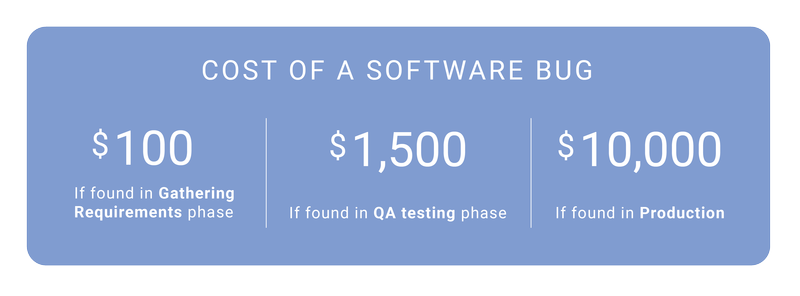
In one article posted on Celerity Blog, the following example is given: a software bug error detected in the gathering requirements phase can cost $100. A bug found at the testing stage can cost $1,500. An error detected after release can cost the customer $10,000.

All this suggests that to reduce the huge costs that come with software bugs in the finished product, it is necessary to make efforts to find such bugs at the earliest phases of the software development life cycle (SDLC). After all, these costs are borne by users in one way or the other – for example, in the form of increased cost of subscribing to a product. Ultimately, such factors can create customer dissatisfaction, weak competitiveness of the product, and, consequently, loss of target audience.

The job of a tester

When it comes to software development, nobody is immune to errors, no matter how well-weighed the project is, how detailed the technical task is and how competent the project manager is. There are just things that cannot be controlled. That’s why software companies test their products to reduce the number of errors and the financial losses that come with these errors.

The main tasks of a software tester are:

  • checking whether the product meets the customer’s requirements
  • detecting errors, thereby minimizing customers’ risks of using the product
  • providing maximum information about the current state of the product.

Thus, software testers enable managers to make timely decisions and release the product on time. After all, the purpose of development is precisely to provide the customer with a suitable and efficient product within a specific deadline.

If you’re interested in more, read Mobile application automated testing

What does a tester do?

A tester performs diverse functions, from planning the testing of separate product modules, to evaluating the finished product as a whole and detecting errors.

  • He checks the product for compliance with the requirements specifications.

It is really important that the product is exactly in the form in which it was conceived, so as to solve the customer’s problems.

  • He checks the product in rare or improbable conditions of use.

Testers find faults in a product which can be detected only in special cases or years of use. For example, it is important to check how the application will behave on February 29 – this day appears every four years in the calendar. Will the reports be properly generated? Can different calculations be carried out? Errors in such “bottlenecks” that were not detected during testing and which did not immediately reveal themselves, could subsequently lead to financial losses, and even to rejection of the product and reduction in the product audience.

  • He explores non-obvious ways of using the product.

A software tester finds areas of the product that need improvement. He does so by performing non-typical actions, that, under the industrial use of the product, can disrupt embedded business processes or the overall performance of the product.

  • He checks data security and product safety.

This is necessary in order to avoid outside interference or unauthorized access to confidential information.

  • He checks the product performance on different devices and platforms.

It is often a requirement that a product works efficiently on different devices and platforms: desktop, mobile apps, different browsers, and, moreover, different versions of browsers. This is typically a rather large task, and it is simply inefficient and unprofitable for developers to spend resources on such a task. A software tester performs this task.

  • He studies interactions with other products.

During testing, the tester checks the interaction between the product and the other products of the customer. Integration with popular social networks, payment aggregators, multimedia portals, etc. is checked, depending on the product requirements.

  • He prepares and submits a product status report to stakeholders.

By so doing, stakeholders receive information about the state of the product. This information enables them to take further decisions on product development and release.

Why can’t developers be good testers?

At first glance, it may seem that developers can test their own product, and this would be an opportunity to save costs on recruiting testers. But actually, this is not the case – developers alone cannot test a product sufficiently.

  • It’s very difficult to check yourself. Certainly, you wouldn’t be objective when you check your own work. In testing his own code, the developer often focuses on the positive aspects, not paying due attention to the negative and problematic side. After all, the task of a tester is to focus on product risks and to search for errors and discrepancies. The developer finds it more difficult to do this, for psychological reasons.
  • Testers have special expertise that developers do not have. Testers know and use various methods and testing techniques, and they prepare sets of typical test cases or checklists, which then help to detect errors or discrepancies with project documentation. Often it is the tester, as an independent party, who discovers bugs in a software product, arising from the fact that the developer initially misinterpreted the requirements.
  • A tester is cheaper than a developer. Therefore, the use of testers is also a cost-saving measure for the customer.

If you’re interested in more, read Automated Testing ROI

How to organize work efficiently?

Engaging a tester for your project after completion of development and before the release of the product may not be sufficient to ensure that the product is delivered exactly as the customer wants and within the agreed timeframe. For efficient testing of a complex and multifaceted process, there is a need for close interaction between the tester and developers, project managers, business analysts, technical writers and other specialists. Therefore, it is important to involve testers in the early stages of development, which will help to avoid discrepancies and ambiguity of requirements, and to introduce a critical view of the product at all its life stages.

Testers should also participate in trials at the end of testing. Problems can be identified based on customer feedback. Testers could take part in addressing such problems: they will reproduce situations and errors that the users encountered, test bug fixes to make sure that these fixes did not create new errors in other places, etc. These specialists have knowledge of the entire complex application and business process.

So, do we test or not?

Testing is a compulsory phase in a product’s life cycle. Both the designer and the builder of a new aircraft, who want to test their creation by themselves, risk their lives. Test pilots solve this problem. They do this before mass production starts and pilots start flying the aircraft.

Both in business and in everyday life, people achieve their goals by taking certain steps and assessing their progress. If your goal were to get an effective, high-quality product, then impeccable organization and testing would enable you to achieve this goal.

Automated Testing ROI

Part 1. When is Automated Testing More Profitable Than Manual One?

What are the major objectives of automated testing? How can you bring the costs and number of running cycles down and coverage and effectiveness up? And finally, does automated testing always pay off better than manual testing?

When is Automated Testing More Profitable Than Manual One?

Automated testing is sure not a сure-all solution. It often implies considerable expenses in the beginning which should be considered rather as a long-term investment into your project under development. But at some point in this ballgame this investment will start covering the expenses spent on manual testing.

Where exactly is this very point? How can you catch it?

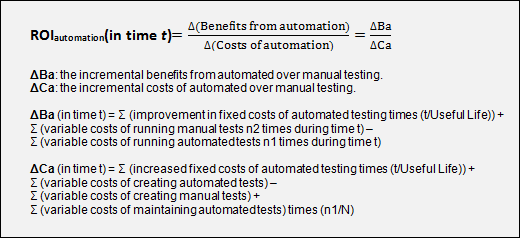
To get this question answered, we may compare ROI (return on investment) in automated and manual testing and make our mind what is better for us.

roi-formula

For starters, we should determine the crucial parameters of our project.

Example 1: Basic Test Set Usage

Let’s fancy we have a regular task to work out a set of basic tests which we are going to perform in every new product build. Our goal is a minimal quality assessment and Non-GUI tests running.

For instance, assumptions for our project are:

  • Daily builds and test runs (5 times a week)
  • Manual tests take 20 days to design, 8 hours to run
  • Only half the manual tests would be run on any given day (4 hours) with the other half run the following day
  • Automated tests take 60 days to design and implement, automatically run (zero cost)
  • Automation is done with batch scripts and integrated into the build process. Test server requires $1,500 in added hardware, with a useful life of 3 years
  • Automated tests need to be maintained every 20 runs, 3 days of work required
  • Periods of time (t) selected: 6 months (125 days) and 18 months (375 days)
  • Average instinctools QA engineer cost for our client $14 per hour = $112 per day = $26880 per year

ΔBa (in 6 months) = 0 + (4 hours * 125) – (0 * 125) = ($14 * 500) = $7000
ΔBa (in 18 months) =0 + (4 hours * 375) – (0 * 375) = ($14 * 1500) = $21000
ΔCa (in 6 months) =($1,500 * (6/36)) + (60 * $112) – (20 * $112) + (3 *$112 * (125/20)) =
= $250 + $6720 – $2240 + $2100
= $6830
ΔCa (in 18 months) =($1,500 * (18/36)) + (60 * $112) – (20 * $112) + (3*$112 * (375/20)) =
= $750 + $6720 – $2240 + $6048
= $11530

ROI (in 6 months) = $7000 / $6830 = 1.025 [about break even]
ROI (in 18 months) = $21000 / $11530 = 1.821 [~80% return]

As we see above, the investment made in an automated testing approach starts paying off already in the 6th month.

Example 2: the Full-Scale Set of GUI Tests

Let’s presume we have a goal to quality test the product functionality via GUI.

In this case our assumptions will look like the following:

  • A new product with all new tests
  • 1 people-years developing manual tests, 3 for automated tests
  • 1 person maintenance after 1st year for automated tests
  • 3 people full time running manual tests, 1 person for automated
  • Fixed costs for automated tests (new hardware, tools licenses) of $15,000 with useful life of 3 years
  • Periods of time (t) selected: 12 months (250 days) and 24 months (500 days)
  • People cost $14 per hour = $112 per day = $26880 per year
ΔBa (in 12 months) =0 + (3 people * $26880) – (1 person * $26880) =$53760
ΔBa (in 24 months) =0 + (3 people * 2 * $26880) – (1 person * 2 * $26880) = $107520
ΔCa (in 12 months) =($15000 * (1/3)) + (3 * $26880) – (1 * $26880) + $0 =
= $5000 + $80640 – $26880 =
$58760
ΔCa (in 24 months) =($15000 * (2/3)) + (3 * $26880) – (1 * $26880) + (1 * $26880) =
= $10,000 + $80640 – $26880 + $26880 =
$90640
ROI (in 12 months) = $53760 / $58760 = 0.915 [small loss]
ROI (in 24 months) = $107520 / $90640 = 1.186 [~20% return]

In this case, even one year later manual testing stays more profitable and effective.

The bottom line

We have specially reviewed 2 examples in order to show that sometimes ROI starts in the 6th month after the work went underway, sometimes even 1 year is not enough. The calculation above shows how much the assumptions and input parameters influence ROI.

We hope our examples and experience will help you calculate your ROI and build up more effective solutions.

Anna Vasilevskaya
AI modified real photo
Anna Vasilevskaya
Account Executive

Get in touch

Drop us a line about your project at
[email protected] or via the contact
form below, and we will contact you soon.