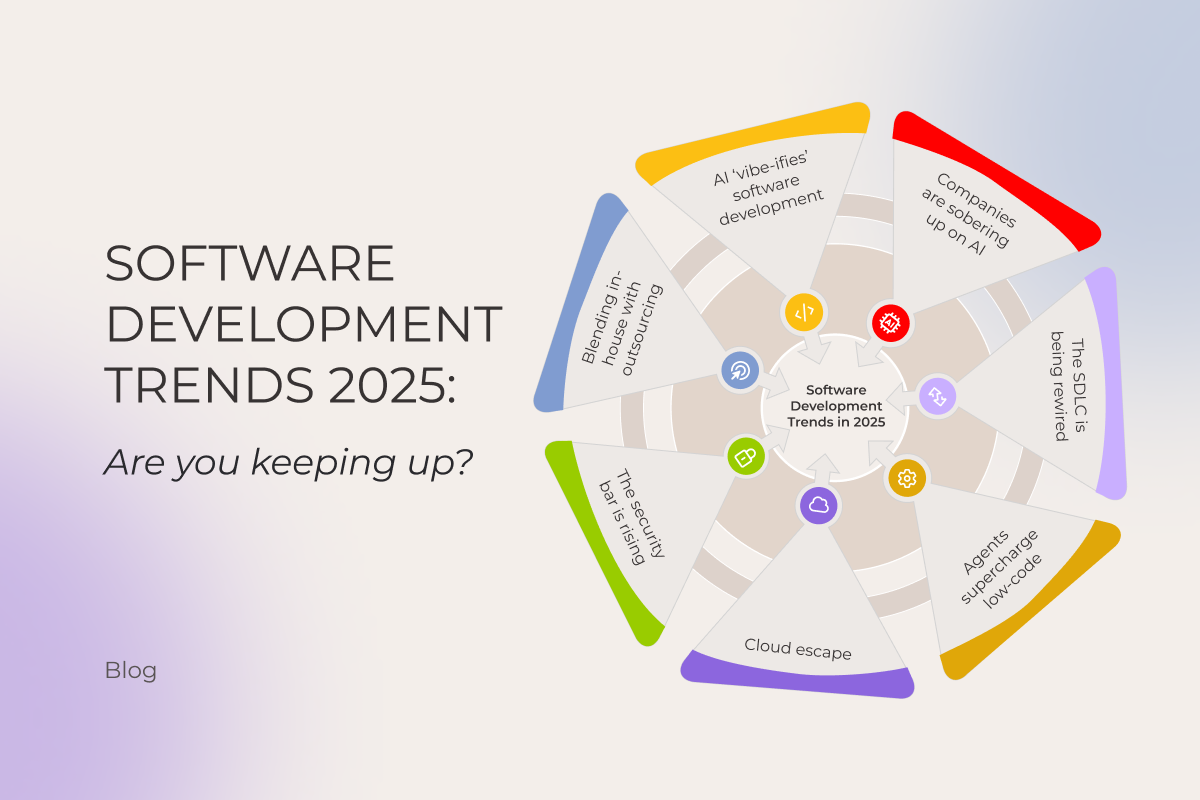
Software development trends 2025: Are you keeping up?

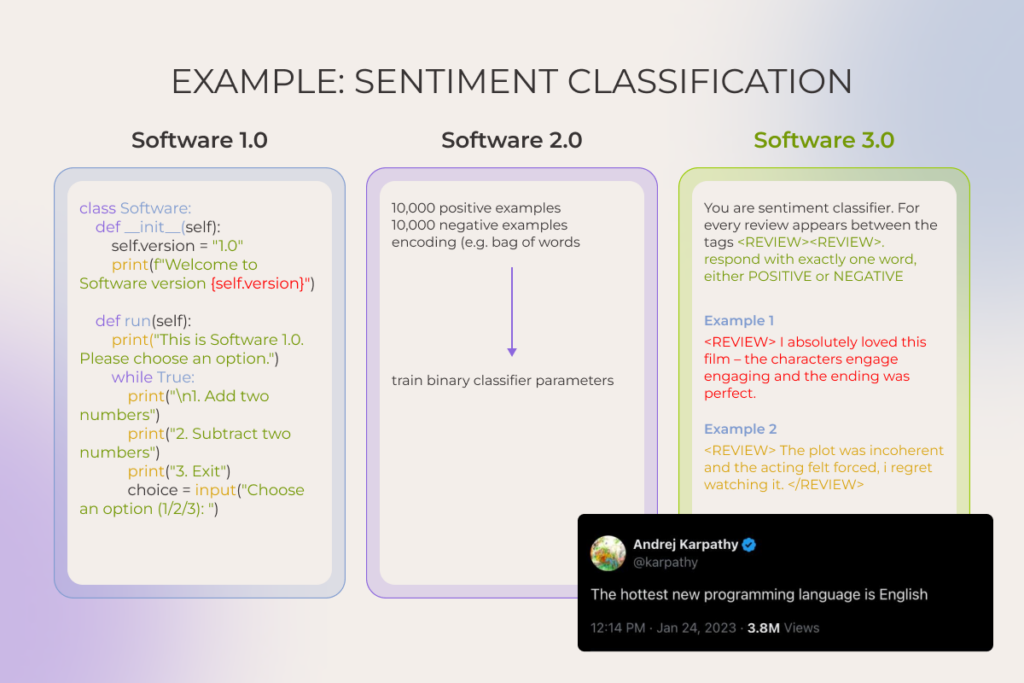
Software development is in the middle of a step-change. Andrej Karpathy’s framing captures it well: we’ve long passed the point where humans explicitly instructed a compiler in different programming languages (≈ Software 1.0) or even where they shipped software programs by training models instead of hand-coding (≈Software 2.0). Today, we’re in Software 3.0, where AI-assisted development takes the stage and the hottest programming language is… English.

Should you care? After all, companies that are used to clinging to old playbooks don’t vanish overnight. But history is brutal: many stuck-in-their-ways teams eventually dump millions into late pivots while faster players eat their lunch.

That’s why it’s essential to stay on top of what’s happening in the software industry, even if only a tiny part of your business touches it, let alone when you have engineering projects underway. Keep reading to see how you measure up against the latest software development trends in 2025.

1. As AI ‘vibe-ifies’ software development, engineers have to drop the boilerplate and own the vision

Artificial intelligence now sits in every developer’s toolbelt (at least among those who bother to notice what’s happening in the tech industry). Forums and tech blogs have been flooded with posts like ‘My AI fixed the bug before I even saw it.’ Chiseling code with AI copilots has become the new baseline. But if just a year ago all eyes were on AI coding assistants speeding up isolated tasks, today it’s vibe coding that takes center stage.
Software development trends

Coined by (again) Karpathy in early 2025, it expresses the idea of ‘setting the vibe’ and, just like that, getting the app. But jokes aside, what’s really going on is more like agentic-powered coding inside tools like Claude Code or Cursor, where developers prompt the product vision and constraints and agents write code, complete PRs, and push to production while a human oversees the whole process.

Honestly, the split view of the community on this one is understandable. In the hands of newbies who can’t navigate the nuances of coding, agentic tools are basically the devil’s plaything. A junior developer, no matter how eager, just doesn’t have the knowledge and experience to feed LLMs with the “don’t do it this way, it’ll bite you later” kind of vibes. They can write something that technically works, sure. But the solution probably won’t fit certain project goals, won’t scale, and will quickly get overrun with technical debt. The funny part is, they can shove that messy code into production without even realizing it’s messy. 

However, in expert hands these tools are a real force multiplier. Ideas buried in the graveyard of “we need $10-100K just to see if this is even feasible” can now get off the ground in days and at a fraction of the cost. But “the capacity to be a good editor is the reward you get from being a good doer,” after all. So it only works if engineers know their stuff and follow best practices. And yes, even though the field’s still pretty green, some rules of thumb are already clear:

  • Breaking tasks down into bite-sized, verifiable chunks and giving crisp, unambiguous instructions
  • Doubling down on context: rich prompts, detailed specs, external context sources. Developers should stay in control of what the system sees
  • Setting up security guardrails, including sandboxed execution, file system restrictions (allowing read/write only to designated databases and blocking access to sensitive files), running linting and security scanners on generated code, human-in-the-loop approvals, and regular commits
  • Acing token math and memory management

In fact, this is arguably what the industry’s future in terms of coding will look like. System architecture design, task planning, context-rich prompt engineering, and orchestration – for the human, mind-numbing drudgery – for AI. It’s a given that most enterprises will run hybrid, pairing AI agents with human engineers in the loop, and such a split in workflow responsibilities and shift in mindset is perhaps one of the standout, can’t-miss trends in software development.

It’s safer to vibe on top of 25+ years of old-school coding. Start now

2. Companies are sobering up on artificial intelligence

In 2019-2022, before the major breakthroughs in natural language processing and generation, AI adoption was mostly feature-level. Hyper-personalized recommendations, fraud detection, demand forecasting powered with machine learning, etc. – that was the flavor of most projects. But ever since ChatGPT went public in late 2022, AI has become a boardroom-level obsession for most enterprises.

Leaders greenlit massive investments in AI, whether for building entirely new digital products, restuffing existing ones, or sprinkling AI assistants into daily workflows to speed things up. 

And now? With some of the dust settling, we are not in the place many hoped. Study after study points to sobering results:

  • The latest and the most viral one from MIT found that despite roughly $30-40B in enterprise investments into generative AI, about 95% of AI pilot projects haven’t come even close to delivering measurable savings or profit gains.
  • Replacing employees with clever bots and agents hasn’t paid off either: 55% of executives regret layoffs made in the name of AI.

So it makes sense that heating talks of an “AI bubble” make investors feel like they’re in troubled waters. Does that signal the end of AI? Hardly. Companies that rushed in headfirst are now moving from hype-driven use to more deliberate, pragmatic AI adoption, and it’s one of 2025’s emerging software development trends.

From our observations and those of industry leaders, two root causes derail AI projects again and again:

  1. Too many companies are chasing AI for its own sake. When businesses start with chasing AI instead of defining the problem, it leads to costly projects with no real link to business needs. By contrast, the small share of success stories tells a very different tale. Some pilots went from zero to $20M in revenue within a year. As the above-mentioned MIT report author put it perfectly: “they chose one clear pain point, executed well, and partnered smartly with companies who use their tools”.
  2. There’s a severe lack of internal expertise. Many organizations simply don’t know how to use AI tools properly or design workflows that capture value while managing risks. Besides, some large firms, especially in regulated industries, felt compelled to build their own software systems for legal or privacy reasons. Such a “control at all costs” mindset, flavoured by flimsy engineering know-how, led to dead-end initiatives and wasted budgets. 

As of 2025, rather than rushing blindly toward AI, more businesses rely on expert support to identify the most profitable AI use cases, confirm data readiness and context, and only then chart a clear journey from prototype to an MVP to scalable rollout.

Schedule a two-day session with experts to build a custom roadmap for AI adoption

Get the details

3. Software supply chains are being seriously rewired

The whole software development process is moving away from what we’re used to. And AI, being a catalyst of this change, is not running the show alone though.

Broad, AI-enabled overhaul of the software development lifecycle

Given how much AI assistants speed up software development and boost the quality of the final product, it’s no wonder companies are shifting from the traditional development process toward what’s being called an AI-driven SDLC.

Rather than just plugging in smart tools here and there, it takes coordinated action across three levels:

  • Strategic: сhoosing the value pools to pursue, defining the outcomes that matter, and deciding where AI will (and won’t) differentiate.
  • Operational: building a strong data foundation (prioritizing sources, improving data quality, etc.), investing in AI-powered tools and integrated orchestration platforms, and redesigning processes to embed the tooling end-to-end.  
  • Organizational: cultivating AI talent and upskilling existing teams to keep up with shifting labour market demands.

Only such a holistic setup can truly deliver the AI perks everyone’s been buzzing about:

Our experts see, coding is sped up by 60%, drafting docs like user guides or high-level acceptance criteria takes half the time, integration scaffolding slims down by ~80%, and QA reclaims 30-40% to hunt the tricky edge cases.

Enhancing developer experience (DevEx)

Though it definitely plays a role, AI alone can’t dissolve the friction that persists in the SDLC. In 2025, software developers continue to fight against the organizational drag – still getting swallowed by endless email chains, still ping-ponging between pointless meetings, and still digging through scattered documentation to get their work done…. Half of developers lose 10+ hours, while 90% lose 6+ hours, mostly to red tape. For a company with 500 devs, that’s nearly $8M lost annually.

More and more businesses in the software development industry are realizing the need to make life easier for their software developers by cutting through the clutter and putting DevEx front and center. One of the best practices is ramping up platform engineering capabilities via a centralized Internal Developer Platform (IDP), which is basically a hub for APIs, reusable components, infrastructure products, development tooling, documentation, tutorials, demo environments, curated learning paths, and a real-time view of all assets’ statuses, etc.

When a new hire logs in, they click “create project,” pick a ready-made template, and the IDP spins up the environment, hands over API keys, and sets permissions without tickets, meetings, or waiting.

Case in point: After a SaaS provider replaced its patchwork toolchains with a single, secure CI/CD pipeline and baked-in guardrails, 2000 software developers stopped wrestling with infrastructure and started shipping. Code velocity rose 10-20%, the number of critical incidents fell 20%, and security vulnerabilities shrank 15-20 %.

4. Rapid delivery with low-code / no-code tools, now even more rapid with AI capabilities

Gone are the days when a months-long software development cycle was an acceptable price for just an MVP. To be fair, speed has always been table stakes. But what’s different now is that it no longer requires cutting corners on quality.

Against this backdrop, something companies have been desperately waiting for finally hits home: the ability to quickly test whether a software idea actually flies before pouring effort and money into thin air. Prototyping has become lightning-fast.

That’s largely because low-code/no-code platforms (LCNC), once mostly clunky drag-and-drop website builders, have matured and now can assemble complex systems, complete with integrations, APIs, forms, etc., with minimal-to-zero coding required. And they’re quickly embedding AI:

  • Back in 2023, the no-code tool Bubble rolled out its Azure OpenAI Service plugin, letting businesses connect their apps to OpenAI’s models. Soon after, support was added for other popular models such as Claude, Grok, and Gemini.
  • In October 2024, OutSystems brought out Mentor, an AI-powered digital assistant built to step in with context-aware help across the software development workflow, able to carry out sequential tasks and even take entire processes out of users’ hands.
  • And just recently, in July 2025, Microsoft announced a shift in its low-code Power Apps tool toward agent-first app generation, to enable developers to quickly create custom AI agents to manage repetitive tasks. Its integration with Copilot makes the whole process faster by suggesting workflows primed for agentic automation. Yet, this out-of-the-box approach has its limits, and in one of our recent case studies we show how a custom agentic setup helped our client break through those constraints.

Anyway, building a core, heavyweight enterprise system LCNC-only is hardly the wisest strategy. Because the moment a new regulation, merger, or black-swan event forces you to change a core assumption in the solution’s architecture, that change ends up moving at the speed of a full-on manual rewrite anyway. All you can do is export the LCNC-generated code (if the tool even lets you), only to find it’s a spaghetti tangle of platform-specific runtime calls your developers refuse to touch.

But for a lot of non-mission-critical business apps, when there’s no decent off-the-shelf fit, low- and no-code platforms allow getting the job done with a small team of skilled people, who can keep the system evolving, supported, and refined in a low-lift way.

5. Companies are falling out of love with public cloud (hello, giant bills) and moving back to private cloud

A major cloud computing shake-up stands out among the latest software development trends. In the year ahead, we’ll likely see businesses take a hard look at the private cloud again and double down on hybrid stacks (a mix of private – on premises or hosted – infrastructure, edge nodes, and yes, still, some bits of public cloud).

As sweet as cloud providers’  promises of cost efficiency, scalability, and speed sounded made (no wonder forecasts put worldwide public cloud spending near $1.6 trillion by 2028, doubling its 2024 level), the reality of unexpected operational costs hit just as hard.

A recent survey shows 53% of IT decision-makers at companies with 100+ employees overshot their planned cloud storage spend. The main reasons cited are using more storage than planned, migrating more apps and data than expected, and unanticipated egress or API fees.

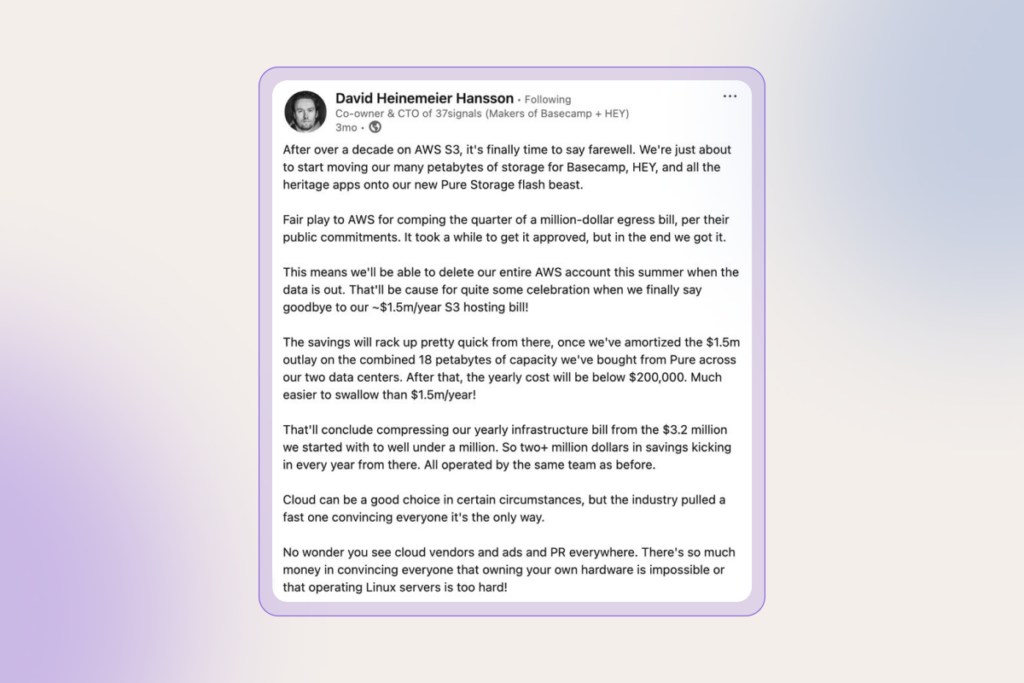
David Heinemeier Hansson, co-owner and CTO of 37signals, publicly shared his ‘exit the cloud’ story (and reasons behind it). Horrified by seven-figure annual bills, their team abandoned AWS S3 in favor of an on-prem setup. By their calculation, it will cost under $200K per year instead of $3.2 million spent on cloud computing.
cloud computing

But it’s not just the cost that is steering companies off the public cloud. The now chronic geopolitical uncertainty has sparked the sovereign-cloud debate in Europe. Public sector and highly regulated industries, such as finance and healthcare, increasingly require digital autonomy, often meaning private cloud and data residency by country or region. 

On top of that, growing demand for AI inference, machine learning, IoT, and autonomous systems that need ultra-low latency is driving the need for edge computing instead of distant mega-clouds.

6. Digital trust and security are still the backbone of enterprise tech

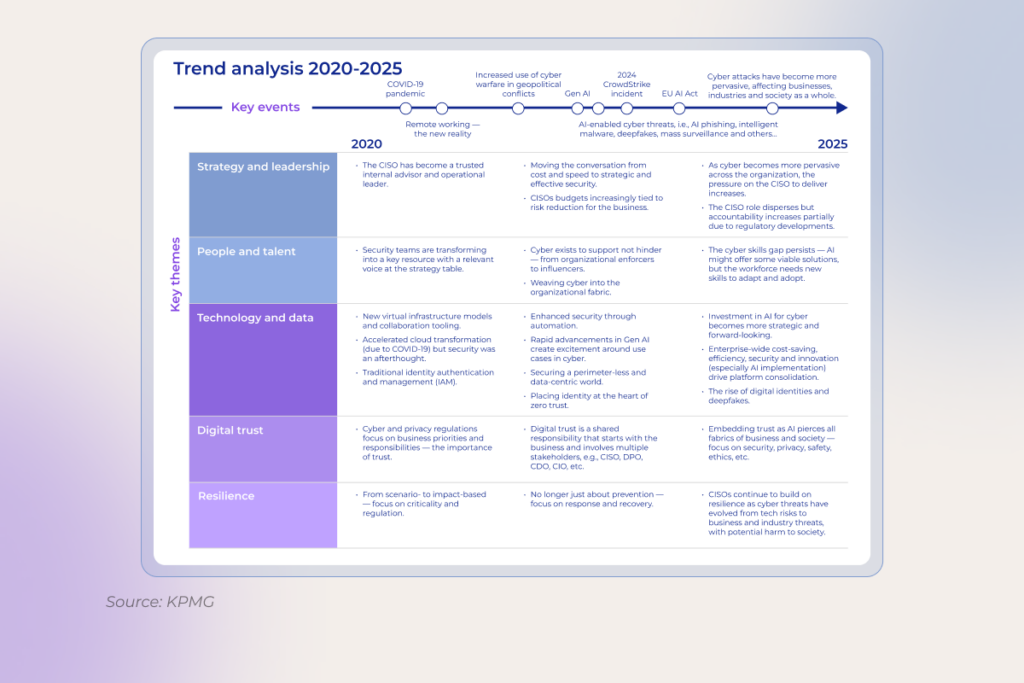
No matter how many times the “cybersecurity is vital” mantra is drilled in, yet – boom – another CrowdStrike-scale mess hits the fan. The stakes are only getting higher with AI, which is bringing new pressure points for security. 

Companies that once dragged their feet on data management now realize that training large language models requires clean, well-governed, and secure data from the start. Storage, processing, and classification all have to be tightened to make the initiative worth it. As Erin Hughes, Head of Cybersecurity Advisory, North America SAP, notes, CISOs often aren’t the data owners, so security and data teams need shared classification definitions and common rules of engagement, especially for AI.

The challenge doesn’t stop there. As enterprises stitch together sprawling ecosystems of third-party software, many overlook the basics of safe usage and resilience. So, lately,  companies have been getting dead serious about their data security posture, normally through:

  • continuous employee education
  • robust tech safeguards like identity and access management or multifactor authentication
  • continuous threat monitoring
  • clear understanding of regulatory obligations and compliance requirements related to the implementation of innovative solutions
  • practiced crisis response and recovery plans

As for software development, one of the most defining shifts is integrating security by design. Practically speaking, that means treating DevSecOps less as a buzzword and more as the baseline.

Read also: DevSecOps: How to Integrate Security into DevOps >>

And once the controls are rolled out everywhere, it’s just the beginning. Security mechanisms must evolve alongside advancements in emerging technologies, ideally a step ahead. 
software development trends

7. Hybrid approach to outsourcing is becoming the default

In 2025, many large corporations still seem convinced they can go back to the “good old days” of office life. They’re tightening their RTO policies, but the toothpaste is already out of the tube. Software engineers who’ve tasted the flexibility of remote work simply aren’t flocking back.

Besides, this whole return-to-office push seems counterproductive for a market where the cohort of senior engineers who can design, debug, and own production-grade AI systems is so tiny that companies struggle to fill those seats.

Regardless of your stance on remote work, one pattern is clear in 2025. When it comes to planning digital transformation initiatives, it is often faster, cheaper, and way more effective to tap into specialized dev shops offering self-managed, distributed development teams with AI-native, best-of-breed technical expertise. 

Most Fortune 500s are realizing just how flexible outsourcing has become. Pragmatic leaders now use hybrid models, keeping some projects in-house while handing off routine work to cost-savvy external distributed teams.

The bottom line

The future of the software development industry is rewritten by AI. It’s agent-powered. It’s security-centered. And… It’s nothing like what we’re used to. Those who grasp it and keep pace with these Formula-1-speed changes are best positioned to ride on competitive advantage.

FAQ

How is AI changing the way software is developed?

Artificial intelligence has become a true copilot across the entire software development process, helping with requirements, coding, reviews, testing, and what not. Engineers and managers delegate the tedious yet unavoidable grind to these new tools, keeping their attention locked on the high-impact, strategic work. This way, along with speed, teams squeeze more quality out of the same headcount

Are low-code tools replacing traditional development?

Not replacing – augmenting. Low-code tools are great at prototyping, line-of-business apps, and internal tooling. But when you’re dealing with complex logic, performance constraints, or avoiding vendor lock-in, you still want full-code engineering. The future looks hybrid: using low- and/or no-code development platforms for quick wins at the edges, and sticking with traditional engineering where durability and control matter.

What are the trends for software development jobs?

Job openings are down globally, full-remote roles keep shrinking, and junior seats are tight. All industries demand expertise in AI infrastructure, machine learning operations (MLOps), data analysis, and generative AI applications development, while classic frontend, backend, and mobile dev roles face stiffer competition and longer interview cycles across mid-level and managerial tiers.

What is the next big thing in software development?

Vibe coding and agentic workflows are the biggest emerging trends in software development. They collapse time-to-prototype curve to near-zero, providing the steepest drop in iteration latency software engineers have ever seen. With agentic setups, the cost of throwing code away is lower than the cost of refining it. And when waste becomes cheaper than polish, the entire product-culture flips and that’s why every major platform and VC firm is treating it as the next structural shift in how software gets built. Awesome solutions like Cursor, Claude Code, Windsurf, Lovable, Replit Agent, etc. are increasingly integrated into the tooling stack.

What is a major trend expected in the future of SDLC?

AI assistants will be embedded across all SDLC stages. From shaping user stories and system architecture through coding, automated testing, and deployment, over to continuous re-factoring. Meanwhile, developers’ roles move away from writing code toward curating prompt libraries, setting AI policies, and providing high-level strategic oversight.
Autogen vs LangChain vs CrewAI: Our AI Engineers’ Ultimate Comparison Guide

Do you even need frameworks for AI agents in the first place? Not necessarily. You can build a capable AI agent from scratch: one that uses an LLM, performs complex tasks, and interacts with other modules. With Python, queues, async logic, direct calls to vLLM, it’s all possible.

But the moment you need to move fast, let’s say, ship a prototype, plug in retrieval, manage agent coordination, or just avoid reinventing the wheel, frameworks start pulling their weight. They give you ready-made pieces: memory modules, agent logic, chains, integrations… Everything that makes your life a whole lot easier.

Still, one question hangs in the air: which framework is worth  using? Our AI engineers put CrewAI vs LangChain vs AutoGen head to head to answer that. 

At-a-glance overview of AI agent frameworks: LangChain vs AutoGen vs CrewAI

All three frameworks are designed to take the pain out of AI agent development, but each of them takes a drastically different route to get there.

  • AutoGen lends itself well to structured multi-agent collaboration. 
  • LangChain hands a huge, flexible toolbox to developers, which fares well in complex, multi-step workflows, but can get bloated fast.
  • CrewAI keeps things lean, which is a good match for rapid prototyping or small-to-mid-scale agent setups.
Quick AI agent framework overview
FeatureAutoGenLangChainCrewAI
Best forMulti-agent conversationsLLM apps and agent chainsMulti-role automation crews
Multi-agent supportYesEnabled by LangGraphNative
Open-sourceYes (MIT)Yes (MIT)Yes (MIT)
Commercial licenseNoYesYes
Enterprise suiteNoYesYes

Now, let’s zoom in on CrewAI vs AutoGen vs LangChain, breaking down their architecture, core capabilities, and trip-ups. 

AutoGen: the engine behind multi-agent capabilities

In our work developing multi-agent systems, we’ve found AutoGen to be one of the most flexible and developer-friendly agent frameworks. It’s conversation-centric, comes with a low-code interface for agent prototyping, and it’s cut out for building multi-agent systems. 

AutoGen allows developers to compose conversational agents that chat with each other to complete tasks. What’s unique about this framework is that agents turn out to be both highly customizable and well-suited for natural interaction, which enables them to run across modes and integrate with LLMs, human inputs, and tools. Thanks to their nature, AutoGen agents can operate both in deterministic and dynamic, LLM-driven workflows.

On the flip side, building with AutoGen doesn’t eliminate orchestration, which means the developer has to manually design the way agents interact and take care of the decision flow between them. 

LangChain: a multitool with a learning curve

When you first do a spike on LangChain, it looks like a set of pretty basic abstractions. In practice, LangChain is more like a universal, modular SDK that gives developers building blocks for linking LLMs to tools, APIs, memory, retrievers, and structured reasoning flows.

Recently, the ecosystem has been supplemented with LangGraph and LangSmith. LangGraph allows developers to define agent workflows as stateful graphs, which steers the framework towards multi-agent systems, iterative refinement loops, and deterministic task orchestration. LangSmith is a debugging and tracing layer for when your project grows beyond a prototype.

Overall, LangChain is a Swiss army knife of AI agent frameworks – yet, it has no prescribed workflows, which leaves the developer to design the agent logic or flow. Also, it tends to overengineer simple tasks, unnecessarily pushing them through all the layers of abstractions.

CrewAI: the new kid on the block that keeps it simple

CrewAI is a shiny new framework that has gained traction thanks to a lower learning curve and extensive documentation. Called an enabler of multi-agent automation, it’s made to let developers engineer teams of intelligent agents that work in tandem. 

Unlike LangGraph, CrewAI runs at a higher level of abstraction, allowing developers to double down on role assignment and goal specification. The multiagent orchestration framework also comes with a set of built-in functionalities for task delegation, sequencing, and state management.

Architecture and design differences

The way the framework structures the interaction and the level of developer control are different for LangChain vs AutoGen vs CrewAI. AutoGen gives you the bricks, LangChain puts a toolkit on the table, and CrewAI lends you the crew and a mission briefing.

  • AutoGen’s architecture consists of a low-level Core for event-driven messaging and orchestration and a high-level AgentChat interface for developing conversational agents. AutoGen’s design prefers conversation orchestration over structured flowcharts, which adds flexibility, but at the cost of growing complexity.  AutoGen agents own outcomes, while developers watch and refine. 
  • Initially, LangChain was a modular framework with two core orchestration modes, including Chains and Agents. Thanks to LangGraph, the architecture became graph-based, enabling multi-agent workflows where each node is an agent with its own prompt, tools, and logic. This addition delivered finer control and outcome ownership, but backfired in terms of state management overhead for developers.
  • CrewAI uses a two-layer architecture, consisting of Crews and Flows, which balances out high-level autonomy with low-level control. Crews are responsible for dynamic, role-based agent collaboration, while Flows ensure deterministic, event-driven task orchestration. In other words, developers can start with simple agent teams and layer in control logic as they progress.

Integrations capabilities

Among all contenders, AutoGen stands out thanks to its impressive flexibility at the tool and LLM level. LangChain lives up to its ‘Swiss army knife’ label with broad integrations out of the box. Striking the middle ground, CrewAI features both canned tools for common use cases and an easy way to define custom ones, plus Python function calls.

  • AutoGen is known for its mix-and-match ability, letting developers easily combine agents using different LLMs (OpenAI + Claude), supplement them with tools (Code Exec + DB Access + Web Surfing), and even include human input. AutoGen offers essential pre-built extensions (OpenAI, Docker execution, WebSurfer), but its library is younger compared to LangChain.
  • LangChain has over 600+ integrations and can connect to virtually every major LLM, tool, and database via a standardized interface. The framework easily beats other frameworks due to the sheer breadth of ready-to-use integrations.
  • CrewAI takes a hybrid approach to integration. On the one hand, CrewAI offers the Tools package with ready-made tools. On the other hand, CrewAI’s Flows allows for more complex integrations through custom logic, branching, and external Python functions.

Performance, scalability, and flexibility

Microsoft AutoGen vs Langchain vs CrewAI each takes a different approach to managing concurrency, orchestration, and runtime efficiency, which impacts the way they scale in real-world deployments.

  • The core philosophy of AutoGen is centered around scalability, with an asynchronous event loop and RPC extensions to back up low-overhead, high-throughput multi-agent workflows. Although there are no exhaustive hard numbers to support its resilience, AutoGen has already proven its durability in production use cases. For example, at Novo Nordisk, AutoGen powers production-grade agent orchestration in data science environments, with the team extending it to meet strict pharmaceutical data compliance standards. 
  • LangChain pulls its weight within basic, straightforward flows. However, the overhead is inevitable once you start chaining multiple agents or tools. The LangGraph extension makes up for the setback with stateful agent loops and more efficient graph execution. For enterprise-grade deployments, you’ll want to either go with the hosted LangChain platform or calibrate your deployment.
  • Since CrewAI operates with minimal abstractions, it beats other frameworks in raw speed and simplicity. CrewAI runs fast, marries well with async flows, and can handle concurrent agents by default. You can scale it from a local script to a full-on enterprise cluster, with observability and deployment flexibility built in.

Security and reliability

Like with other criteria, the Langchain vs CrewAI vs AutoGen trio each brings a different mindset to safety nets. AutoGen’s autonomy inherently leads to larger potential risks, especially in critical applications, yet baked-in isolation and kill switches stave off the risks. LangChain offers composability with guardrails you build in, and CrewAI pushes for enterprise-grade discipline from the start.

  • By confining the high-risk code to Docker containers, AutoGen makes sure the main system is surrounded by a moat. Unlike other frameworks, AutoGen lets developers set custom termination conditions for multi-agent loops, so no runaway agent behavior can creep in. Also, the event-driven nature enables fine-grained error handling, though you have to DIY it. Open-source and self-hosted, it leaves security entirely to the developer, but with Microsoft’s backing as a stand-in.
  • LangChain’s flexibility means your agents are only as safe and reliable as the rules you define. LangChain leans on ecosystem tools like LangSmith for tracing and guardrails, but sandboxing is on the developer. Reliability patterns such as output parsers, retries, and callback hooks are available to the developer, but LangChain doesn’t enforce them.
  • CrewAI ships with role-based access control, encrypted data, and on-prem deployment options by default. The framework doesn’t sandbox code out of the box, so the developer has to isolate risky operations in their own tools or containers. CrewAI allows for real-time agent monitoring, task limits, and fallbacks, which makes it solid for production and mission-critical workflows.

Pricing

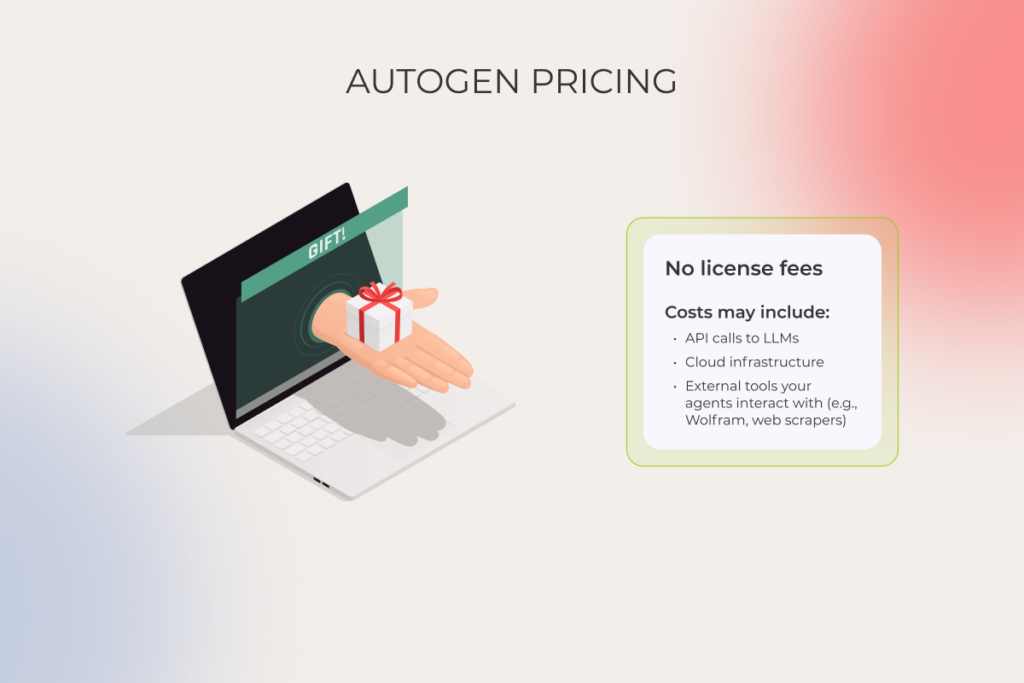
The core orchestration engine of each of the three frameworks is open-source – free to use and ripe for tinkering. However, in some cases, a developer will have to pony up for accessing premium features or multiple tools.

  • AutoGen. The only out-of-pocket costs a developer covers are for the infrastructure they deploy it on and any API calls to LLM providers. AutoGen is a great option for teams that need deep, no-cost customization as long as they can roll up their sleeves.
AutoGen pricing
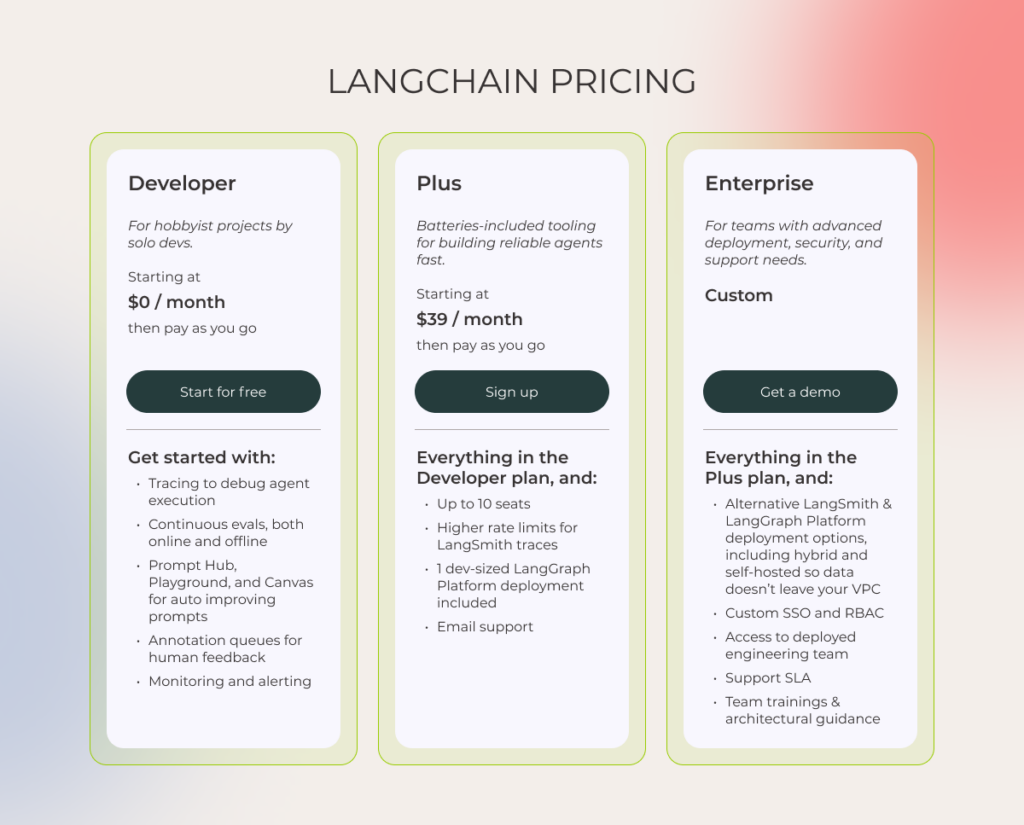
  • LangChain. While the framework core is entirely free, with no usage limits at the library level, developers will have to fork out for LangChain commercial products. Both LangSmith and LangGraph have free tiers but scale with usage or team size. For example, if the team needs more than 5K traces per month, they’ll have to upgrade the pricing from free to around $39/month per seat.
LangChain pricing
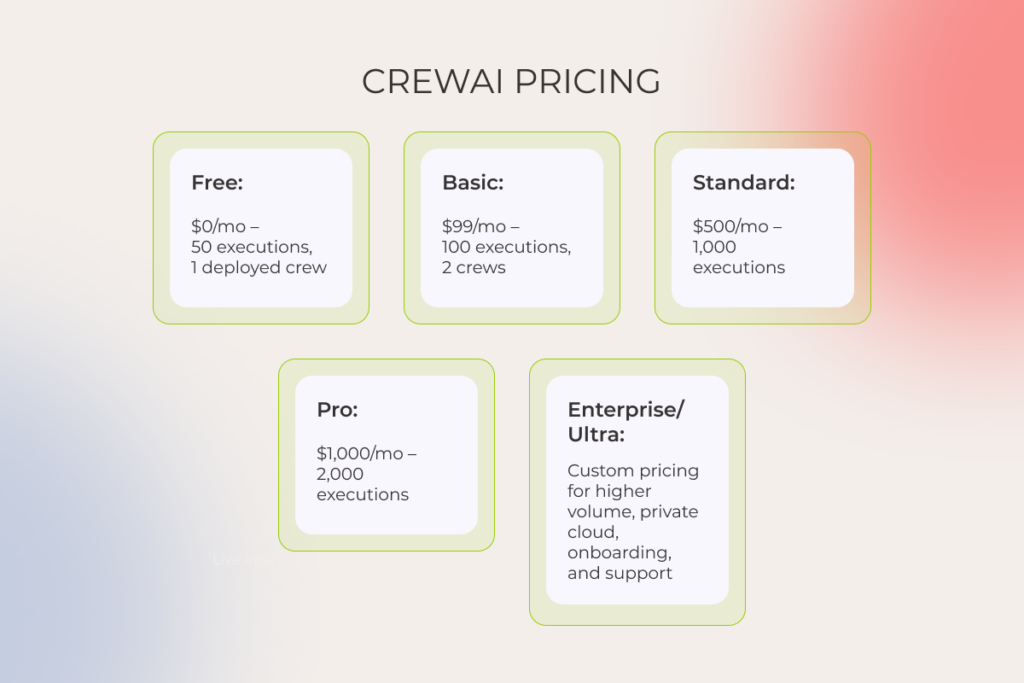
  • CrewAI. Paid plans start at $99/month for 100 executions and scale up to Enterprise and Ultra tiers advanced features and heavy usage. Low-frequency tasks like occasional reports fall into the Standard plan with 1,000 monthly executions. However, if your agents run in real-time pipelines or at scale, you will need a higher-tier plan with increased execution limits.
CrewAI pricing

Ease of use: developer experience

Most developers look past LangChain’s complexity because of its unmatched control over the code. AutoGen generally gets high marks from developers for its quick setup and the drag-and-drop interface. The sentiment around CrewAI is somewhat mixed, with documentation gaps putting a damper on the overall experience.

  • As the most beginner-friendly framework out of the three, AutoGen’s web-based UI makes it easy to experiment with agents, even for those less tech-savvy. The learning curve for AutoGen is moderate, but if you’re a Python developer familiar with async patterns, you’ll have no problem finding your way around the framework. However, the documentation is scattered.
  • Many developers like LangChain the way they like a starter repository, because it gives a basic foundation for getting from zero to prototype fast. Its learning curve is pretty steep, especially if you’re dabbling in custom agent orchestration, but you can tap community support to get the hang of it. That said, the documentation is ever-evolving. Also, many criticize it for being over-engineered due to excessive dependencies and unnecessary complexity.
  • CrewAI’s well-documented API and a straightforward developer workflow aim to keep things simple and rookie-friendly, which seems to suffice for rapid prototyping and small-to-mid-scale projects. However, the black-box feel and its relative newness mean that production-grade agents might become a headache to manage.

Where each framework shines (or fails) across use cases

Choosing between multi-agent frameworks comes down to how well the framework’s design philosophy marries with your specific industry demands, workflow DNA (linear, dynamic, or modular), and collaboration patterns (hierarchical, equal-peer debate, human-in-the-loop). Let’s break down the optimal use cases for each framework.

1. Technology

Use cases: developer assistants, CI/CD analyzers, automated testing agents, and release note generation.

  • AutoGen is ideal for code-heavy tasks, such as developer assistants, thanks to automated code execution, debugging, and multi-agent collaboration. However, you’d want to combine it with LangChain for full CI/CD coverage.
  • LangChain shines for building API-driven assistants and workloads focused on Retrieval Augmented Generation. 
  • CrewAI’s rigid workflows are more suitable for approval-heavy pipelines, so the framework conflicts with iterative dev workflows.

2. Customer service

Use cases: ticket triage, escalation handling, LLM-powered helpdesk agents, and sentiment-based routing.

  • AutoGen is not a good fit for customer-facing communication, yet it can be leveraged for internal support automation, such as analyzing error logs submitted via tickets.
  • LangChain is a top choice for automated FAQ bots, semantic search over knowledge bases, and dynamic response generation, since it easily integrates with third party services and external tools like CRMs and databases.
  • CrewAI performs well in tiered support systems, where you model agents as Level 1, Level 2, or Supervisor roles.

3. Sales and marketing

Use cases: campaign planning, lead scoring, personalized outreach, content generation, and sales funnel optimization.

  • AutoGen is not a natural fit for sales and marketing tasks, unless it’s used for internal tooling, like report generation or iterative optimization loops.
  • Although LangChain falls short in collaborative, multi-agent campaign planning, it can be used for developing standalone content generation apps or research bots that summarize competitors, spot trends, or generate ideas through external APIs.
  • CrewAI has an edge here thanks to its role-based agent model, which organically aligns with a standard marketing team structure.

4. Human resources

Use cases: Employee onboarding automation, report scheduling, and leave processing bots.

  • AutoGen can do the heavy lifting of backend HR workflows, such as data parsing or automated reporting, but is a bit of a stretch because of its lower-level orchestration.
  • LangChain makes sense for building HR assistants that fetch policy information or automate structured requests, but is usually too taxing for approvals or multi-role processes.
  • CrewAI’s role-based design and built-in task orchestration make it a nice fit for HR workflows that have to do with onboarding, scheduling, and multi-step approvals.

5. Financial services

Use cases: regulatory report generation, data validation, scenario modeling, and automated financial briefings.

  • AutoGen works wonders in scenario modeling with multi-agent simulations that demand dynamic data validation and iterative analysis.
  • LangChain can generate reports or pull live data from APIs, but lacks out-of-the-box capabilities for multi-agent validation, auditable workflows, and business rule enforcement.
  • CrewAI is an organic match for automating regulatory compliance and approval chains.

6. Supply chain

Use cases: shipment tracking bots, demand forecasting, supplier performance comparison, and delay predictions.

  • Overall, AutoGen misses the mark here, but has a moderate fit for demand forecasting, provided it’s done via Python-based statistical agents.
  • LangChain plays to its strength in analytical dashboards or assistants that feed on live supply chain data.
  • CrewAI is a logical choice for tiered, role-based workflows, such as Supplier Analyst → Risk Evaluator → Procurement Approver.

7. Healthcare and life sciences

Use cases: research support, clinical document summarization, internal knowledge agents, and care plan automation.

  • AutoGen is well-suited for peer-review-style workflows common in life sciences. Also, AutoGen’s support for human-in-the-loop and dynamic back-and-forth uniquely positions it for research-heavy tasks.
  • LangChain leads in clinical document summarization using RAG on medical databases.
  • CrewAI hasn’t gained traction in the industry because of absent compliance tooling and fine-grained error validation.

Use cases: contract review, clause extraction, policy drafting, and redline automation.

  • AutoGen can be used to support interactive, conversation-driven tasks, such as simulating internal consultations.
  • LangChain is right for the mission when paired with data retrieval tools for advanced search and semantic analysis.
  • CrewAI is a debatable choice since the framework has fewer ready-made compliance features.

Pros and cons of AutoGen vs CrewAI vs LangChain from our AI engineering team

Summing up, here’s how our artificial intelligence team sizes up each framework after hands-on experience building production-ready multi-agent systems: 

FrameworkSummary ProsCons
CrewAIRole-based agent framework with collaborative agents (a “crew”). Built for simplicity.– Easy to pick up
– Role-based abstraction
– Beginner-friendly 
– Can feel opinionated or rigid
– Hidden abstractions make deep control harder
LangChain / LangGraphModular agent/toolchain framework with graph-based workflow support. Best for structured workflows with heavy external tool usage.– Highly flexible
– Good for RAGs and DAGs
– Ecosystem size
– Explicit control and monitoring
– Complexity and steep learning curve
– Verbose wrappers lead to developers’ frustration
– Overengineering risk for simple tasks
– A moving target in terms of tool compatibility
AutoGenMicrosoft-backed multi-agent framework focused on LLM-to-LLM collaboration and orchestration.– Supports multi-agent chats natively
– Good for autonomous multi-agent collaboration and task management
– Ideal if you’re deep in the Microsoft ecosystem
– Not beginner-friendly
– Challenges with documentation consistency
– Needs manual orchestration

FAQ

Can you combine these frameworks in one project?

Yes, you can build a hybrid setup to accommodate complex interactions. For example, in customer service agents, you can use LangChain for sentiment analysis, while CrewAI will be responsible for triage and escalation capabilities. AutoGen can be integrated to enable human escalation with code-backed diagnostics and context-based insights.

Are these tools open-source?

AutoGen, LangChain, and CrewAI are all open-source, but have different levels of commercial licensing and support.

How mature is the community support?

As LangChain is the most adopted framework out of all, it has high ecosystem gravity, backed up with integrations, community support, and community channels. AutoGen benefits from Microsoft’s backing – its GitHub repo is active, but the intel outside the core Microsoft team is limited. CrewAI’s community is still nascent, so when things break, you may have to comb through the code yourself.

How fast are new features released?

LangChain gets updated daily to weekly. AutoGen’s release cadence is slower compared to LangChain – roughly monthly or per milestone. CrewAI gets a facelift every week, with fast iteration on core APIs and bug fixes.

Leveraging Data Analytics in Construction for Smarter Projects

Key highlights

  • In 2025, advanced data analytics in construction is a must-have, given the industry’s fragmented data landscape and its effect on construction productivity.
  • Implemented strategically, construction data analysis can introduce improvements across the entire value chain from design to post-project evaluation.
  • Scale and value come from targeting high-impact, limited-scope projects that can be replicated across sites and projects.

Talk to five general contractors, and four will bring up lagging productivity as the most significant industry challenge today. Globally, engineers and constructors are struggling to complete projects even in their current pipeline, and a myopic approach to data is one of the reasons why. 

While data analytics in construction cannot single-handedly prevent schedule slippage and budget blowouts, it can at least shine a light on early warning signs, bringing prospective indicators into focus before issues escalate.

What is сonstruction analytics?

Construction analytics builds upon historical and real time data from BIM, ERP, sensors, wearables, drones, and project management tools to drive smarter decisions across construction projects. When it comes to advanced construction data analytics, it doesn’t just track and store data in data lakes and warehouses. It interprets the data and connects the dots, using NLP, ML models, GenAI, and other cutting-edge tech.

That data then flows into dashboards or digital twins to signal issues, such as schedule slips or safety risks, and debrief decision-makers on project performance, resource utilization, and risk areas.

Why data analytics in the construction industry matters

A shortfall in construction output looms in the built environment. The worries about the

Architectural, Engineering, and Construction (AEC) industry’s prospects are understandable: labor shortages and productivity challenges may lead to a dip in construction output of up to $40 trillion. Digital technologies, and data analytics tools, in particular, can flip the script in the high-stakes construction industry.

Improved decision-making

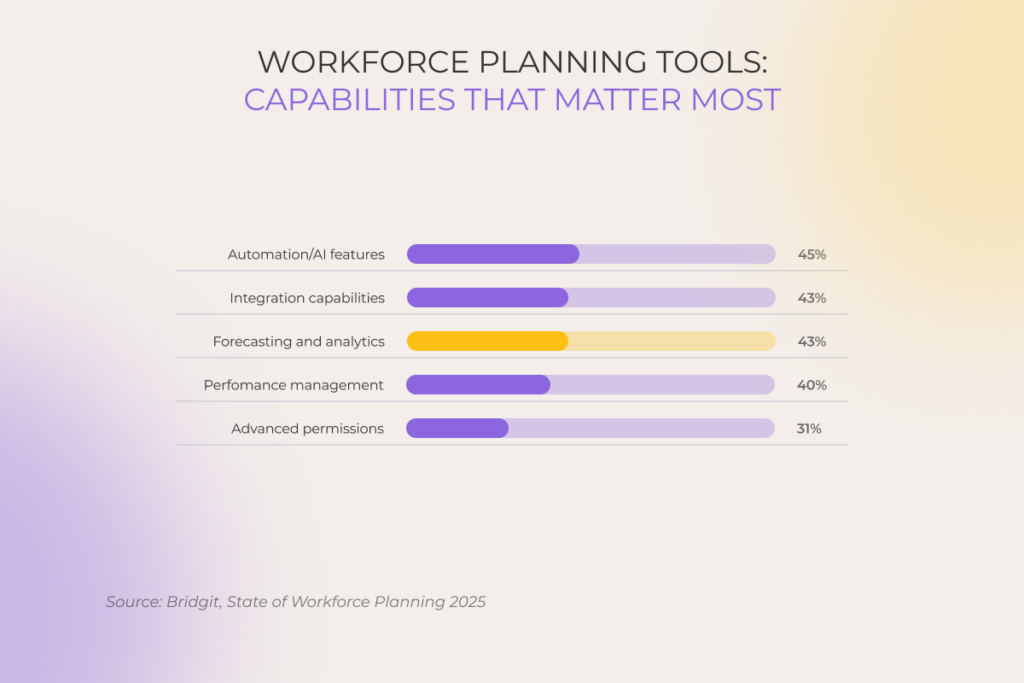
Over 43% of engineering and construction (E&C) leaders say they urgently need forecasting and analytics to anticipate labor needs and optimize teams.

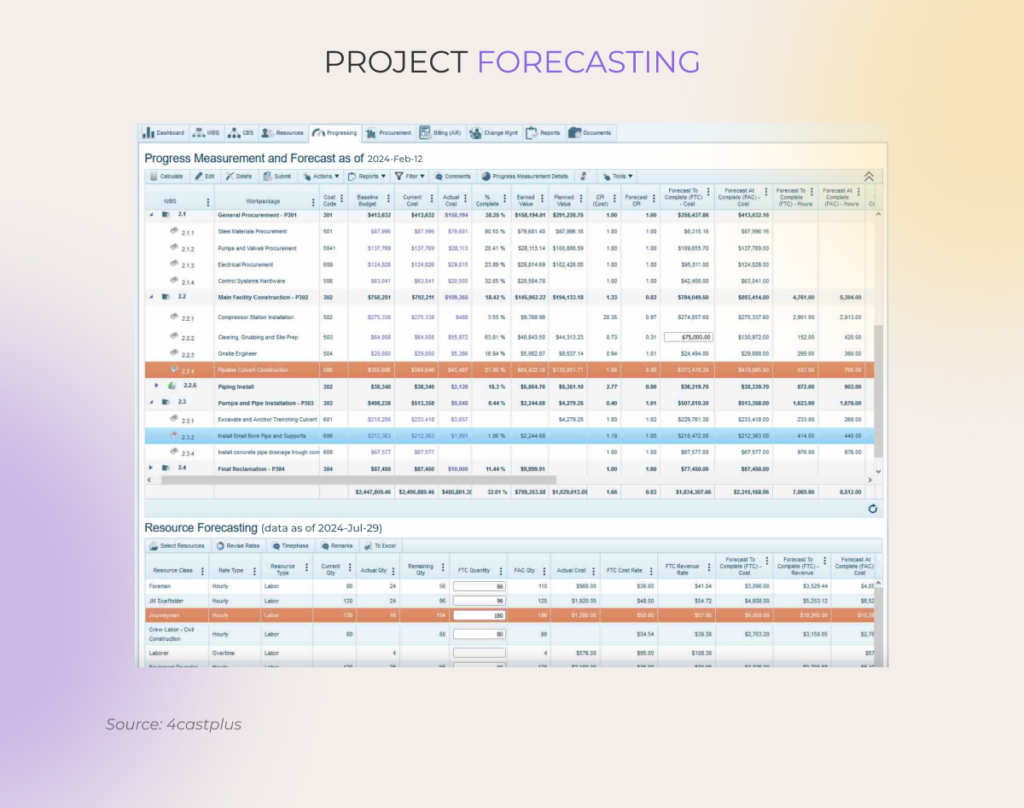
Insights distilled by data analytics for construction go a long way, from fewer costly delays and rework to better resource allocation and on-site efficiency. With real-time visibility across sites, E&C firms can orchestrate labor, materials, and equipment with more precision, long before delays and cost overruns eat into the project timeline or budget.

For example, Bechtel, a global engineering and construction leader, deployed 60,000 RFID tags to track 100,000+ components for three LNG plants, which cut material tracking time by 50% and sped up logistics.

Increased productivity

Construction companies have been trapped in a productivity rut forever. In fact, the industry will need to double its growth rate to meet the optimistic projections for 2040. By advancing construction analytics, AEC teams can automate routine decisions like auto-adjusting crew schedules, spotting equipment underuse, and predicting material shortage, keeping the project moving without stalls.

Cost savings

Under the traditional linear engineering, procurement, and construction (EPC) model, the design is finished when the construction is already underway, resulting in costly late-stage changes and bloated expenses. Predictive analytics allows teams to layer schedules and costs early in the project, which connects design intent to execution and mitigates budget risks.

To that end, historical data analysis can also circle back to former construction projects to develop more accurate estimates for future projects. 

During the construction of the Lusail Iconic Stadium (Qatar 2022 FIFA World Cup), the team leveraged predictive algorithms to analyze procurement patterns and site logistics. This helped them cut material waste by 25% through just-in-time deliveries and optimized placement.

Enhanced safety

The annual number of fatalities in the construction process (1075 work-related deaths in 2023) is the highest among industries. By analyzing real-time data feeds from wearables, connected equipment, drones, and sensors, data-based risk analysis tools can catch unsafe conditions on the spot. ML models can also predict high-risk scenarios, while computer vision systems can keep an eye on using the appropriate PPE.

Optimized project outcomes

Analytics in the construction industry isn’t just about reacting faster, it’s about building smarter from the start. When longitudinal data is integrated across all project phases, analytics tools ensure that construction management reflects real field conditions rather than isolated static plans developed in a vacuum. 

Instead of leading with initial estimates and firefighting, teams can make evidence-based decisions in real time, reallocating resources, rerouting materials, and adjusting timelines in line with site performance. 

While working on 3 projects spanning 51,375 sqm (552,975 sqft), one of our clients relied on our custom performance-data tool to evaluate each subcontractor’s completion rates against the original plan. This not only helped our client stay ahead of issues like delays in material deliveries for the electrical teams but also allowed them to keep the overall project timeline on track.

Be one step ahead of your project pipeline with our custom data analytics development

Get a quote

Built intelligence in action: real-world construction analytics examples

A single construction project generates millions of data points. Equipment usage logs, material deliveries, supply chain lead times, and other operational data snowball into a tangle of insights. Being able to collect, process, and make sense of that farrago gives E&A companies the potential to realize value throughout the entire project lifecycle.

Project planning and budgeting: “Are we setting ourselves up for overruns?”

Construction data analytics tools inherit their intelligence from past performance, including internal unstructured data on things like RFIs, change orders, and weather delays, along with external data such as commodity prices. This combination of data allows forecasting systems to come up with more accurate project plans that factor in recurring risks and on-the-ground conditions.

For example, if HVAC procurement or permit approval timelines led to delays in the majority of past hospital projects, planning tools can embed those patterns into the timeline of a new build. This also gives a heads-up to companies to adjust their milestone targets or pre-order long-lead items. 

Additionally, sophisticated forecasting tools can plug into BIM to simulate project scenarios and optimize resource allocation and sequencing, long before construction begins.

Resource allocation: “Do we have the right people, equipment, and materials for that?”

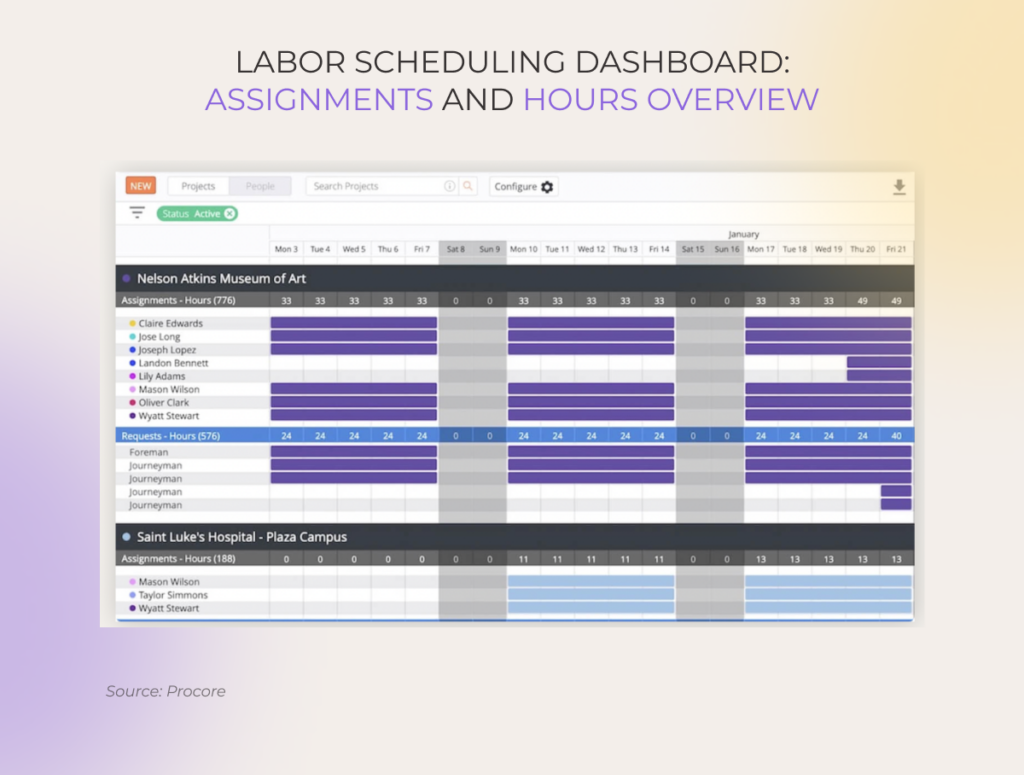
At the workforce level, digital analytics tools can compare labor capacity against active and upcoming project needs, breaking down roles, timelines, and workload projections. For example, if the analytics suite detects a surplus of superintendents, project managers can re-assign them to other struggling sites or proactively line up new work by bidding on upcoming projects.

Advanced analytics systems can also comb through historical equipment usage rates, idle time, fuel consumption, and material delivery patterns to highlight areas for optimization in future projects. For instance, if telematics data shows a crane sits idle 30% of the time on similar projects, project managers can rotate equipment across sites to maximize utilization. 

Bidding: “Should we bid on this project, and if so, how much?”

Data-driven bidding tools tie historical data such as labor types, contract arrangements, local spending trends, win/loss ratios, and other retrospective information to project profitability and the right contingency cushion. Over time, such insights can support long-haul forecasting of workload and financial performance, allowing construction executives to match bidding strategies with financial and operational goals.

For one of our clients, data analysis of over 100 past projects demonstrated that less obvious factors like unionization rates and contract types (not just region or sector) have the strongest impact on profit margin. The revealed insights helped the company to overhaul its bidding strategy and skew it toward higher-margin project profiles.

Predictive equipment maintenance: “What equipment do we service now before it goes down later?”

Unlike operator logs and anecdotal evidence, sensors and telematics provide a real-time pulse check on machine health by collecting data on engine temperature, vibration levels, and other performance parameters. Analytics solutions ingest that real-time data and flag subtle signals of wear or potential failure. 

Based on the configuration, data-driven maintenance systems can either alert teams to anomalies or autonomously schedule maintenance orders. For example, if the vibration data from a bulldozer’s sensors surpasses a predefined threshold, the system can trigger a maintenance request months before downtime instead of waiting for it to fail.

Since they recommend service based on condition data rather than fixed intervals, maintenance tools extend the lifespan of assets, save thousands of dollars in maintenance costs, and ensure that machinery is serviced exactly when needed: no sooner, no later.

Subcontractor performance analysis: “Are our subcontractors walking the talk?”

Because of paper-based processes and inconsistent reporting, construction companies can’t get a handle on subcontractor performance until it’s too late. Let’s say the electrical subcontractor is scheduled to finish rough-ins this week. Ideally, a company should be able to access data like their daily reports, inspection issues, and budget tracking in real time to spot potential drag-ons in their track.

With manual tracking, this level of traceability would be lost for good in cryptic paper logs, email threads, and evasive verbal updates. But thanks to big data analytics in the construction industry, field updates, labor logs, cost codes, and other subcontractor-generated data are synced automatically in one central platform. This allows construction firms to proactively monitor KPIs and easily spot if the electrical subcontractor underperforms on daily productivity goals.

Sustainability and waste reduction: “Where are we generating avoidable waste?”

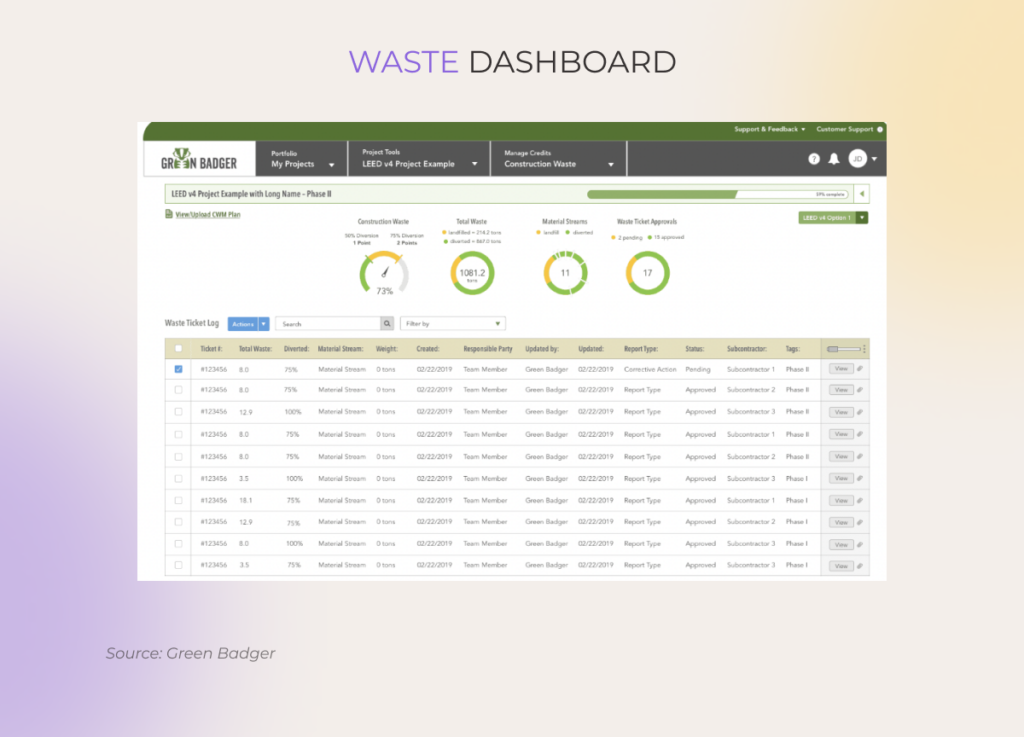
On the path to their green objectives, E&A companies resort to construction waste management tools that capture ESG data from LEED-certified projects, including metrics on carbon, water, energy, and material usage. The data is centralized and communicated through intuitive dashboards that zoom in and out on waste indicators, recycling rates, and M/WBE metrics.

Combined with predictive alerts, ESG analytics tools also warn teams when waste thresholds are approaching and how they can optimize their procurement strategies to reduce excess. Project-level insights roll up into corporate ESG reports, LEED documentation, and other sustainability compliance programs.

A clear 4-step roadmap to successful construction analytics implementation 

If your construction company is at the very dawn of adopting digital analytics tools, you need a solid foundation, similar to that of any well-built structure on construction sites.

1. Assess your data infrastructure 

Break the ground by estimating the quality and availability of your existing data sources, even if you don’t have formal systems like construction planning systems and risk management tools. This will help you and your data analytics partner lay the ground for a tailored roadmap, including tech stack selection, data integration strategy, and more.

2. Kick the tires by starting with small-scale, high-value use cases

Start with focused, easily measurable pilot projects that would deliver quick gains and easily scale into bigger initiatives. Examples include projects like construction planning solutions, predictive maintenance for select machinery, material inventory management, and crew scheduling optimization.

3. Integrate construction-specific systems within a unified data hub

Connect BIM, ERP, IoT sensors, and other data-generating construction technology into a centralized platform. Through API-driven integrations and real-time data pipelines, this unified data hub will enable precise analysis of construction data at the organizational and project levels.

4. Employ advanced technologies for precise analysis

Machine learning, natural language processing, computer vision, and generative AI add new dimensions to data analysis by extracting insights from different data modalities. Whether it’s structured sensor data, unstructured text from reports, or camera feeds, these technologies can reveal insights that traditional analytics methods overlook.

5. Focus on data governance and security

Make sure to establish defined data governance protocols to ensure data accuracy, consistency, and compliance across construction data sources like BIM, ERP, and others. Use industry frameworks such as ISO 19650 as a reference point and supplement your strategy with solid data security measures such as RBAC, end-to-end encryption, and other fit-for-purpose safeguards.

Put your construction data to work

Data analytics in construction has taken on a strategic, compound mission of driving performance, clarifying complex insight narratives, and giving E&A companies a decisive edge. But to pull its weight, data analytics tools demand clean, connected, and contextualized data, paired with the right tech stack and a clear roadmap. 

Partner with our ISO-certified, AI-driven software engineering company to transform your raw construction data into real-time insights that keep your projects on schedule and under budget.

Construct your data-driven edge with *instinctools’ big data and AI expertise

Schedule a call

Logistics Analytics: How to Achieve Smarter Supply Chains in 2025

Key highlights

  • In 2025, advanced logistics analytics is picking up speed with AI at the helm. Companies like Amazon and DHL are automating insights, slashing delays, and adapting on the fly.
  • From predictive ETA and smart warehouse slotting to lane-level forecasting and automated returns, logistics analytics is solving T&L’s biggest challenges with measurable ROI.
  • Fragmented systems, legacy tech, and talent gaps can block your progress with analytics adoption.

People in the logistics industry know better than anyone how even small disruptions like a road closure on a secondary route can ripple through the entire supply chain, leading to empty shelves and failed SLAs. That’s why data analytics in logistics is mission-critical — it helps anticipate such issues before they wreak havoc.

In 2025, logistics analytics has become smarter than it’s ever been. With advanced AI in tow, it enables companies to create supply chains that think and match the market’s dynamics autonomously. But these smarts come with unique complexities.

What is logistics analytics?

Logistics data analytics allows companies to collect, analyze, and interpret data to gain the intelligence necessary to optimize costs, improve efficiency, and inform decision-making across all operations.

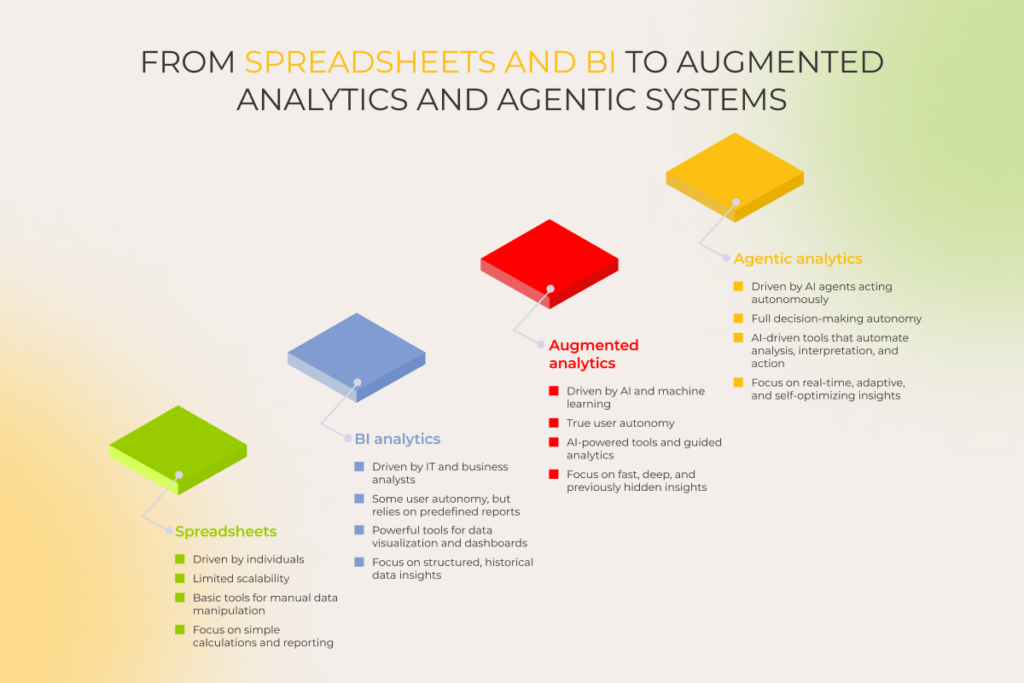
Historically, logistics data analysis came in four flavors, including descriptive, diagnostic, predictive, and prescriptive analytics. These days, however, such classification has gone out of style, as current logistics heavyweights run on analytics solutions that blend multiple approaches.

For example, AWS Supply Chain suite doesn’t separate between the types and offers an integrated AI analytics platform with real-time dashboards for tracking package movements, warehouse inventory, etc., demand forecasting models, dynamic warehouse picking schedules and delivery route optimization, and other tools. 

Why ignoring advanced data analytics in logistics is a fast track to failure 

By 2032, the global supply chain analytics market is expected to surpass $32 billion — almost a threefold surge from $11.08 billion in 2025. It’s easy to see why things are taking off that fast. Advanced analytics has become a GPS for T&L companies, and without it, they’re flying blind.

Manual data analysis brings critical operations to a grinding halt

If a supply chain and logistics team relies on a patchwork of spreadsheets, documents, and Industry 3.0 systems, they are doomed to a lifetime of manual errors and delays. Customer service reps can waste hours reconciling critical data only to send an irrelevant response to the wrong customer. Perishable cargo goes to waste because temperature logs are buried in someone’s inbox.

Due to the lack of insight into thousands of nodes, teams also spend the majority of their time firefighting. Inventory updates get recorded days after demand shifts, reactive spot-market purchases trigger markups — every hour of reactive management is multi-million, self-inflicted damage.

No real-time visibility, no effective risk management

Without advanced transportation logistics analytics, companies have no ears and eyes to spot or predict a delay before it turns into a costly escalation. This lack of foresight also means acting based on historical data or, in the worst-case scenario, uncovering the problem well after customers complain. 

One of our global manufacturing clients experienced it for themselves. Their legacy solution frequently failed to detect delays early enough, meaning issues were often uncovered too late in the delivery process (sometimes by their own customers) leaving little time to respond or re-route. The new system allows their teams to monitor shipments as they happen and inform customers before issues escalate. As a result, the fallout from late deliveries has been significantly reduced, while customer satisfaction — preserved, even in the face of unexpected disruptions.

Market twists can’t be handled without timely data-backed insights 

Black swans throw a wrench into the way logistics companies operate. Without a data-driven heads-up, T&L businesses are caught up in rapid and sometimes extreme swings in supply and demand alongside limited transportation resources. 

For instance, during the pandemic, one of our clients experienced a stark 7x increase in freight lead times. A solution that forecasts port closures and capacity shortages in real-time could’ve staved off this scenario, so the company made a strategic decision to build one with our team to anticipate and mitigate similar incidents in the future.

Transportation and logistics analytics help companies cushion the blow of such systemic shocks. By unifying historical and real-time data across multiple sources, analytics tools uncover risks in their tracks, allow companies to simulate multiple scenarios, and help businesses regroup way ahead of the market.

The path towards a net-zero supply chain is data-driven

Holding a logistics company to its GHG commitment, emission standards regulations, and customer demand for greener shipping requires a thorough understanding of Scope 3 emissions. But when businesses grapple with 10,000+ products and an army of suppliers, the low-carbon transition becomes a far-fetched goal unless there are advanced analytics tools in the mix.

Data analytics in logistics and supply chain management makes sure companies can track carbon emissions and identify GHG-friendly suppliers. Additionally, this visibility lets teams optimize delivery routes for fewer GHG output, avoid breakdowns before they become a high-emission catastrophe, and bake in GLEC, DEFRA, or EPA standards into every operation.

Don’t just move goods — move them smarter with our data analytics solutions

Contact us

12 use cases of logistics analytics in the T&L industry

From reducing transportation costs to improving inventory management and achieving the perfect last mile, here are twelve high-impact logistics analytics use cases transforming supply chain operations end to end.

1. Tariff scenario modeling

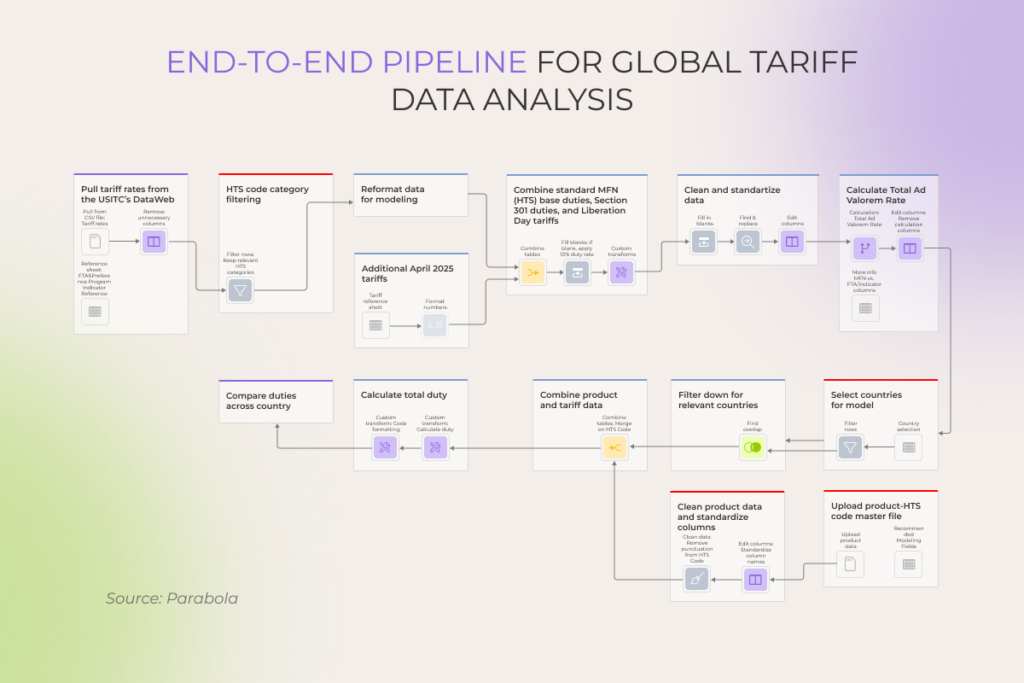
The current tariff environment is anything but predictable, so it ushers in a lot of volatility into landed costs. Tariff simulators and AI-driven modeling enable businesses to apply hypothetical tariff changes, quantify margin impacts, and understand the operational trade-offs early on. 

For example, companies can run Monte Carlo simulations to model the combined impact of potential tariffs on imported components and use decision tree analysis to determine an optimal response strategy in this case.

End-to-end pipeline for global tariff data analysis

2. Predictive ETA estimation and AI-based network re-routing to minimize delays and empty miles

Like the rest of the industry, one of our clients often faced unexpected increases in fuel costs due to unforeseen delays and empty backhauls. To counter this challenge, many companies — our client included — resort to AI-based routing tools to optimize multi-stop and multimodal networks. 

More optimized networks lay the foundation for ETA precision, which is then enhanced with AI/ML models to take into account dynamic, real-time conditions like traffic or weather. This also solves the issues of empty backhauls: for our client, network optimization led to a 64% reduction in empty miles and a 23% trimming in drivers’ mileage.

3. Lane-level demand forecasting and capacity allocation for freight efficiency

Around 43% of truckloads are going about partially empty. The origins of this deadweight are often traced back to an imbalance between supply and demand across lanes. Logistics analysis tools give companies data driven insights into the freight demand at the lane level and help predict how it’ll flex based on seasonality or market shifts.

Lane-level demand forecasting and capacity allocation for freight efficiency

With this granularity of insight, companies can dispatch the right number of trucks and trailers per lane and reduce the number of deadhead miles. Moreover, advanced technologies, like mixed deep learning models, can predict lane speeds with surgical accuracy by capturing spatiotemporal traffic patterns. This allows CAV networks to make lane-selection decisions in real time.

4. Continuous AI-driven warehouse slotting for high-throughput order fulfillment

When it comes to high-volume fulfillment, one-time slotting is not enough, so companies resort to AI and analytics to dynamically arrange storage units. Working in tandem with IoT, smart slotting optimization tools feed on real-time order data, SKU velocity, and storage limitations to strategically house items where they’re needed most.

This living layout can update hourly, allowing warehouses to reshuffle inventory closer to the picker location. For example, Walmart’s AI-driven fulfillment system organizes inventory by department and groups palletized loads, allowing the ecommerce giant to get products onto shelves at its more than 4,700 stores faster.

5. Automated order grouping and route planning to minimize travel time

Almost two-thirds of global shoppers want their orders delivered within 24 hours. However, delivering that fast requires getting all ducks in a row, including smart order bundling and perfectly timed route planning. 

Analytics-driven agentic systems can take on this challenge by automatically grouping orders according to delivery locations, windows, and vehicle capacities. They can also constantly fine-tune routes based on real-time traffic, weather, and order-priority data, so that the order ends up in the right location and within the requested time window.

6. Machine learning-based demand forecasting and multi-echelon inventory optimization

Accurate demand forecasting is a non-negotiable for lean supply chains and a heavy lift for companies with traditional tools. By analyzing historical sales data, seasonal trends, market shifts, and other variables, advanced analytics tools can predict future demand at a product, location, or time-period level.

Some ecommerce titans, like Amazon, for example, take it up a notch and pair demand forecasting with multi-echelon inventory optimization. This way, companies can optimize inventory levels across multiple tiers and set buffer stocks across their layered fulfillment networks. 

7. Workforce and robotic system planning aligned to predicted inbound and outbound volumes

When there’s an upcoming Black Friday sale, Cyber Monday, or a generally high-demand season, logistics operations highly depend on operational efficiency, specifically, effective workforce and robotic system planning. Data input, like historical order volumes and upcoming promotions, enables analytics solutions to predict inbound and outbound flows to help companies handle the spike.

Based on the actionable insights, a warehouse can ramp up robot deployment during a sales night, fit in extra night shifts for holiday rushes, or set conveyor belts at 50% speed during low-demand periods.

8. Real-time equipment health monitoring and predictive maintenance 

Changing tires too late or letting overheated conveyor components go unnoticed can easily equate to people getting hurt and shipments getting delayed. Together with IoT sensors, predictive maintenance constantly keeps tabs on forklifts, tires, and other equipment and creates real-time health scores.

Based on the score, the system can predict failures up to 72 hours in advance and self-schedule maintenance workshops to fix the issue.

That’s exactly how our client, a European cold-chain logistics provider, avoided $850,000 in potential downtime. Our predictive maintenance system scheduled a work order 68 hours before the conveyor’s score dropped to 62/100.

9. Dynamic traffic-aware last-mile routing based on real-time prioritization rules

As the most variable leg of the supply chain, last-mile delivery accounts for over 50% of total shipping costs. This variability can be chalked up to traffic, including urban congestion, road closures, accidents, and other circumstances.

Analytics-powered systems leverage real-time data, such as GPS feeds, traffic congestion levels, and road restrictions, to dynamically reroute delivery vehicles. FedEx’s Global Delivery Prediction Platform also factors in street-level geography, package-level data, and updates like delays and detours.

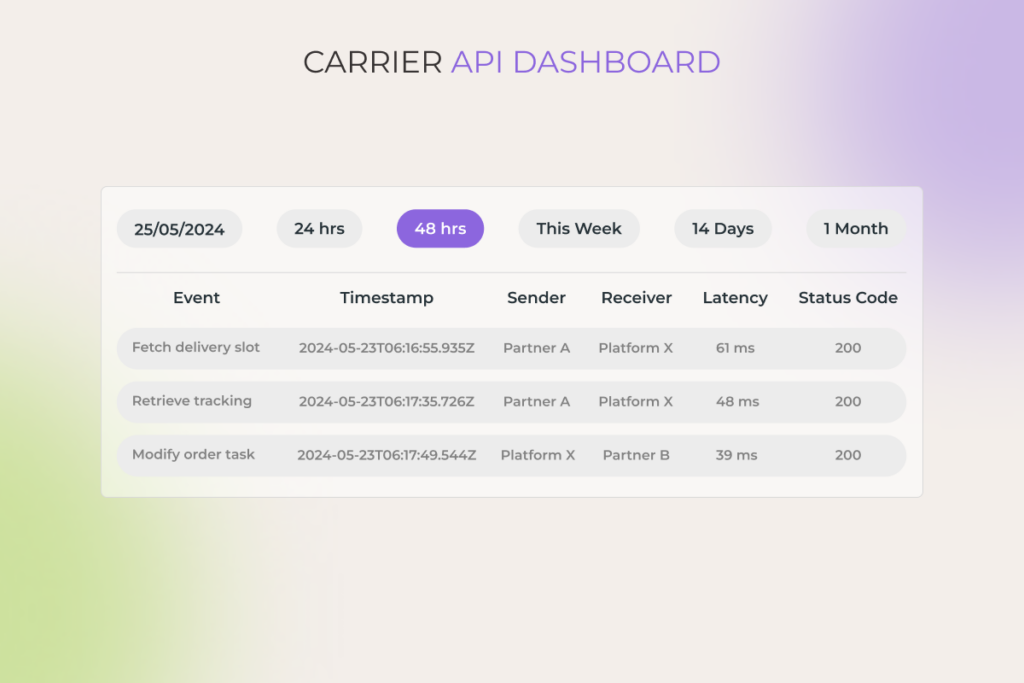
10. Unified multi-carrier visibility with predictive exception management

Shippers working with a bunch of carriers have to jump between tracking systems just to get a snapshot of their shipment whereabouts. Unified data platforms bring data feeds from all carriers under one roof, so that shippers can access the entirety of shipment data from a single dashboard.

For one of our clients, we’ve also combined multi-carrier visibility with smart allocation rules, enabling the system to self-assign shipments to the optimal carrier based on destination, cost, service level, and historical reliability. Layered with predictive exception management, this platform also flags shipments at risk of delays and missed SLAs.

Carrier API Dashboard

11. Geozone-specific delivery capacity planning and dynamic driver allocation

Area-based delivery planning is one of the most high-value and often underrated transportation analytics use cases. These solutions break down delivery areas into smaller zones and then predict the order volume for each zone depending on the time or certain products.

Logistics analytics makes sure that companies don’t over- or underallocate drivers and vehicles in any given zone. With real-time analytics integration, companies can also assign gig drivers from crowdsourcing platforms to pick up the slack of immediate delivery needs.  

12. Return logistics optimization through pattern analysis and route scheduling

Many T&L businesses work in reverse, with an average manufacturer spending around 9% to 15% of total revenue on return logistics, according to UPS. Logistics analytics helps cut those costs by giving detailed breakdowns of returns by product types, customer segments, regions, or seasons. 

Say, a certain SKU consistently gets returned in a specific metropolitan area. Seeing that, the system can suggest pick-up route tweaks so that returns from the same areas or of similar product types are lumped together. Some systems also allow customers to self-schedule in-home returns within pre-set geozones to make returns more convenient for both sides. 

Build logistics intelligence that sees around corners

Contact our team

Well intentions that won’t pay off: what blocks logistics companies from leveraging advanced analytics

Although many logistics companies are eager to tap into advanced analytics, they often see their projects hit structural and operational roadblocks that can’t be overcome by enthusiasm or investment alone.

Logistics data remains trapped in isolated, disconnected systems

78% of supply-chain executives say their companies still run a hodgepodge of systems for inventory, ordering, logistics, and planning. It means that the ERP, TMS, WMS, and partner data are locked behind standalone software, creating a fragmented view that stonewalls advanced analytics. 

The solution to that fragmentation lies in data consolidation — creating data warehouses that house unified data and setting up API integrations for seamless data flows between systems.

Legacy systems can’t support modern analytics demands

Outdated systems run on stale data formats, rigid architectures, and batch-focused workflows. They can’t handle sensor data, they lack role-based access control, and they don’t have cloud-native compatibility by default. In simple words, they aren’t built for that sub-second intelligence advanced analytics is aiming for.

Unless modernized with APIs, middleware, edge gateways, or overhauled completely, legacy systems can never cover the needs of competitive analytics solutions.

Logistics teams lack internal data science expertise

According to a global research study, the lack of internal expertise is the third most cited barrier to technology implementation. Logistics data analytics is no exception — no amount of analytics can fix bad inputs and T&L companies need data scientists to prep those inputs for AI models. 

As on-site data science talent is often too expensive or limited to secure, many logistics companies turn to third-party data analytics partners to bridge the talent gap.

How *instinctools can help with adopting logistics analytics

Marrying logistics and analytics is not just about tools. To make analytics work for your T&L business, you need a solid data foundation and analysts who speak both data and supply chains. As a data analytics partner of 25+ years, *instinctools brings in tech experts who understand both and can take over the end-to-end process:

  • Data preparation — performing automated cleansing, normalization, and feature engineering to make sure your logistics data is high-quality.
  • Data integration/consolidation — setting up ETL pipelines that bring disparate data sources onto a centralized control tower.
  • ML algorithms implementation and fine-tuning — developing or customizing machine learning models for predictive analytics. 
  • Visualization — building interactive, straightforward dashboards for real-time monitoring and insight exploration based on BI tools.

With ISO-certified processes in place, we also make sure that your data infrastructure is based on watertight data governance frameworks to promote the quality, consistency, and compliance of your logistics solution. 

Summary

Rising customer expectations and perennial supply chain disruptions have put an unprecedented strain on transportation and logistics companies. Advanced analytical techniques help T&L businesses stand up to those challenges with demand forecasting, route optimization, dynamic last-mile routing, and predictive maintenance.

But smarter analytics starts with smarter data. And that’s where most T&L companies get stuck. Siloed data sources, legacy tech, and the shortage of internal tech talent make advanced analytics near-impossible to implement. If you too are experiencing similar roadblocks or generally need an advanced analytics tool for your T&L company, *instinctools is ready to help.

Turn your operations into a competitive advantage with logistics analytics

Reach out

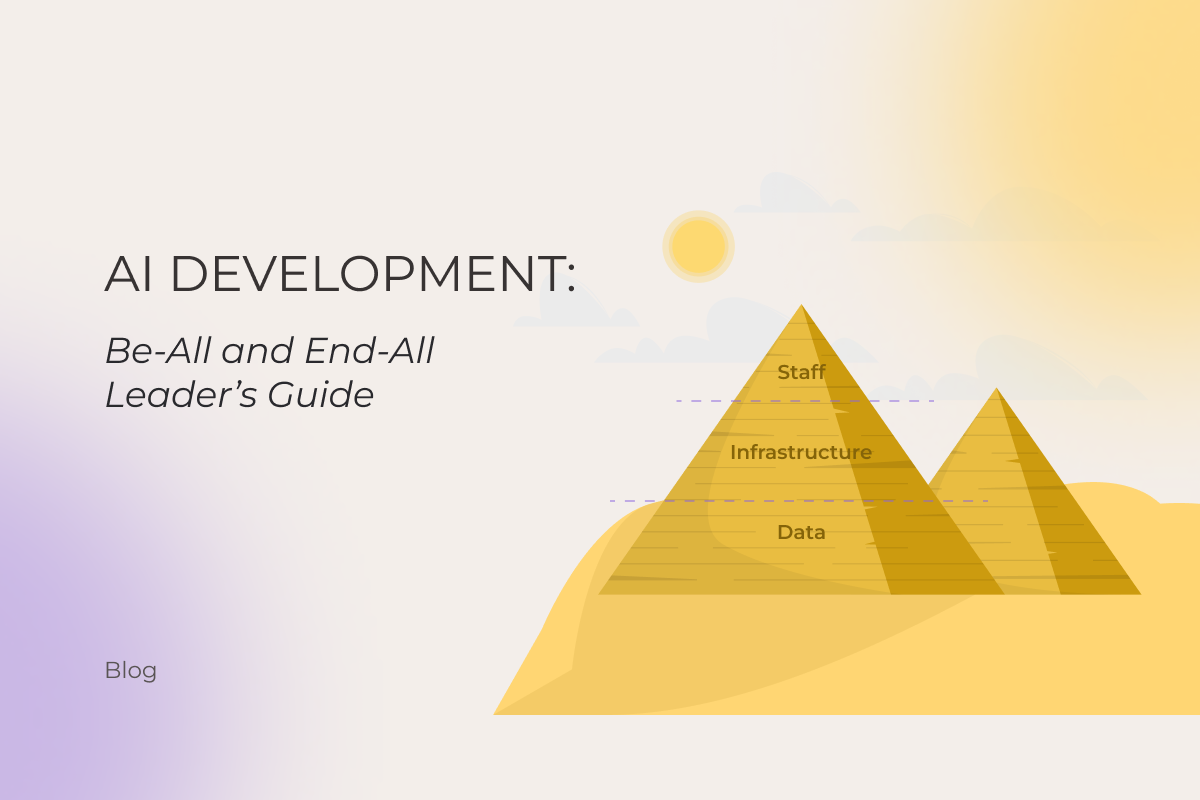
AI Development: Be-All and End-All Leader’s Guide

Key highlights

  • AI development has moved to the stage where it shows measurable results across industries.
  • Artificial intelligence (AI) can meet your transformational expectations if your data, infrastructure, and workforce are ready.
  • Machine learning algorithms work better and safer with an AI governance framework in place.

Artificial intelligence is becoming more powerful and omnipresent day by day. 78% of companies already use artificial intelligence in at least one business function to minimize costs, speed up processes, reduce complexity, transform customer engagement, fuel innovation, and unlock new revenue streams. However, only 1% of these organizations describe their AI developing efforts as “mature.”

How to do AI development right on the first try and avoid the AI adoption plateau? This guide summarizes a decade of our hands-on AI expertise, as we were providing our clients with scalable, value-focused AI solutions long before LLMs hit the headlines. 

Read this comprehensive AI development guide to get the answers that spark action, and move from small-scale pilots to deploying AI at scale in a way that is sustainable, secure, and aligned with your business goals.

What is AI development?

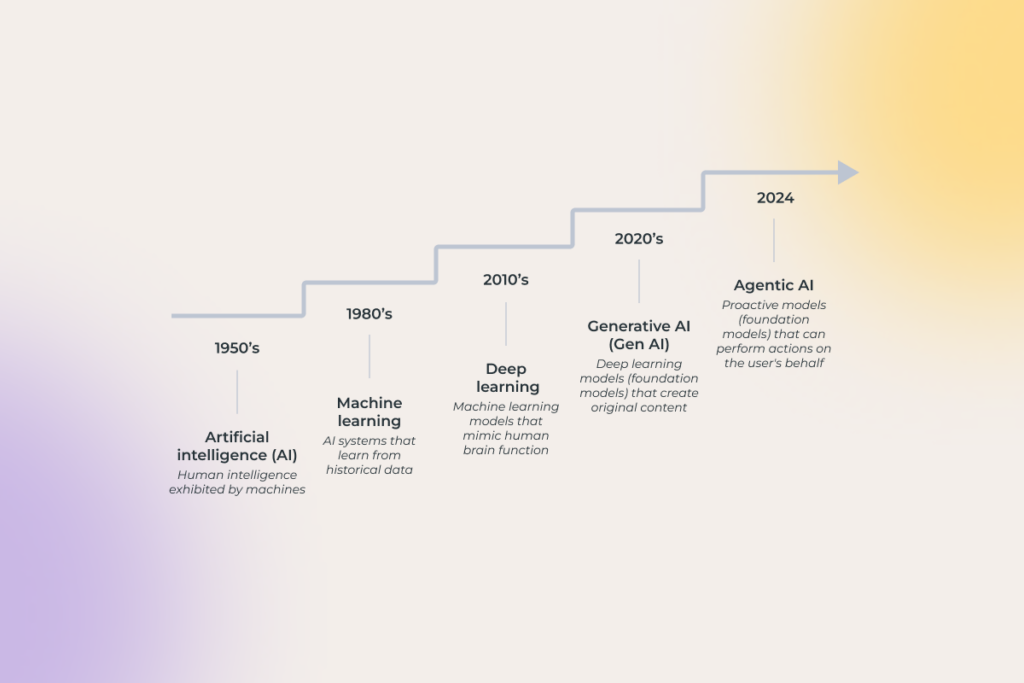
AI development is the process of creating intelligent systems that can mimic human cognitive skills such as learning, comprehension, reasoning, problem solving, decision making, and creativity. Underpinned by capabilities like natural language processing, image and speech recognition, computer vision, machine learning, deep learning, and generative AI, these systems can create various types of content, analyze data, identify patterns, and make predictions faster than humanly possible. For companies looking to leverage these capabilities, professional artificial intelligence services development can provide the specialized expertise needed to navigate this complex undertaking.

 the evolution of AI development

Does AI development pay off? The true return on artificial intelligence investment

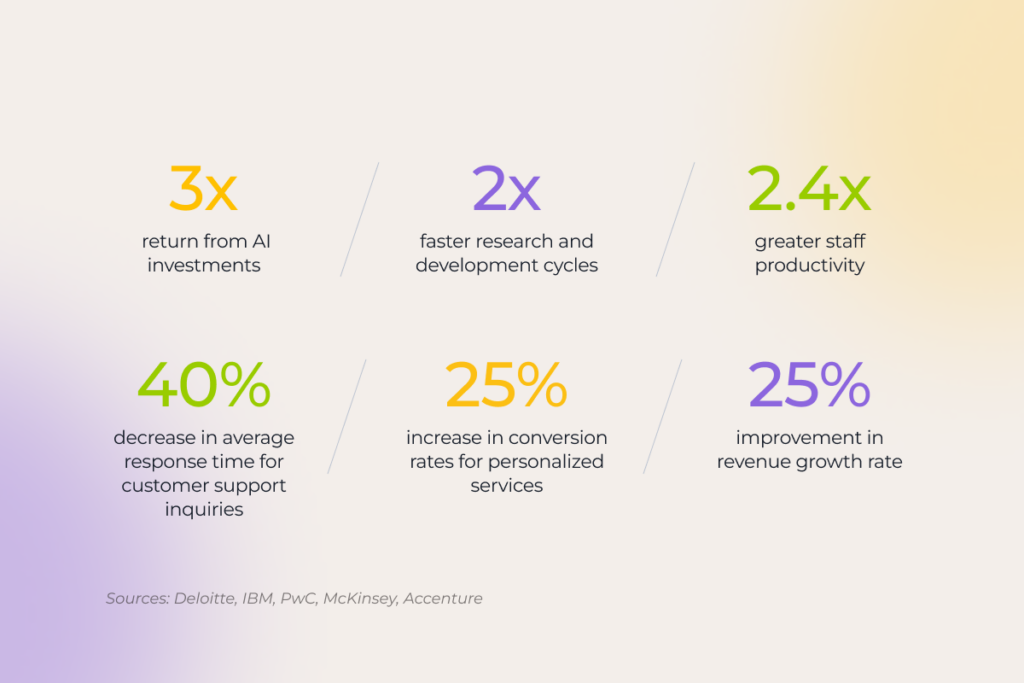
While AI technologies have generated years of hype and expectations of high ROI, there was little evidence to prove this promise. In 2026, however, the technology’s potential is backed by hard data.

statistics on the success of AI development initiatives

Yet, unlocking this value is only possible with a thoughtful approach, which starts with identifying relevant business use cases. That’s why, before rushing into AI-based development, companies often choose to invest in AI adoption workshops — intensive exploratory and planning activities which set the right project trajectory from day one.

Where is AI making the biggest impact?

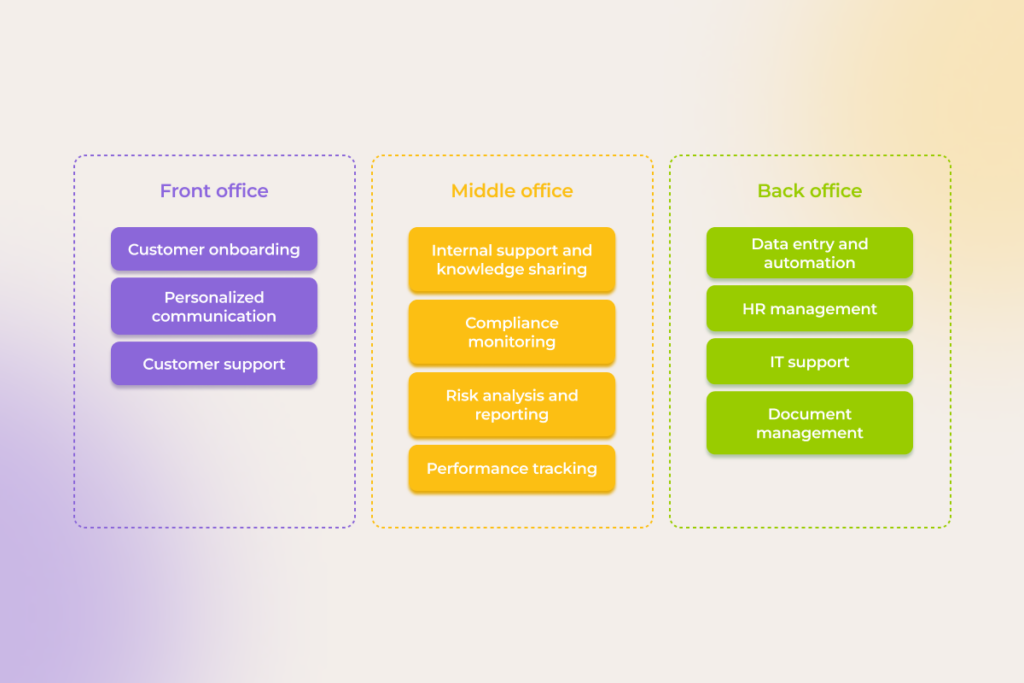
Recent developments in AI empower companies to accelerate and enhance their front, middle, and back office processes by automating repetitive tasks within workflows, enriching them with personalization and problem-solving capabilities, and eliminating human errors.

AI makes an impact on front, middle, and back office processes

The shift toward action-oriented AI 

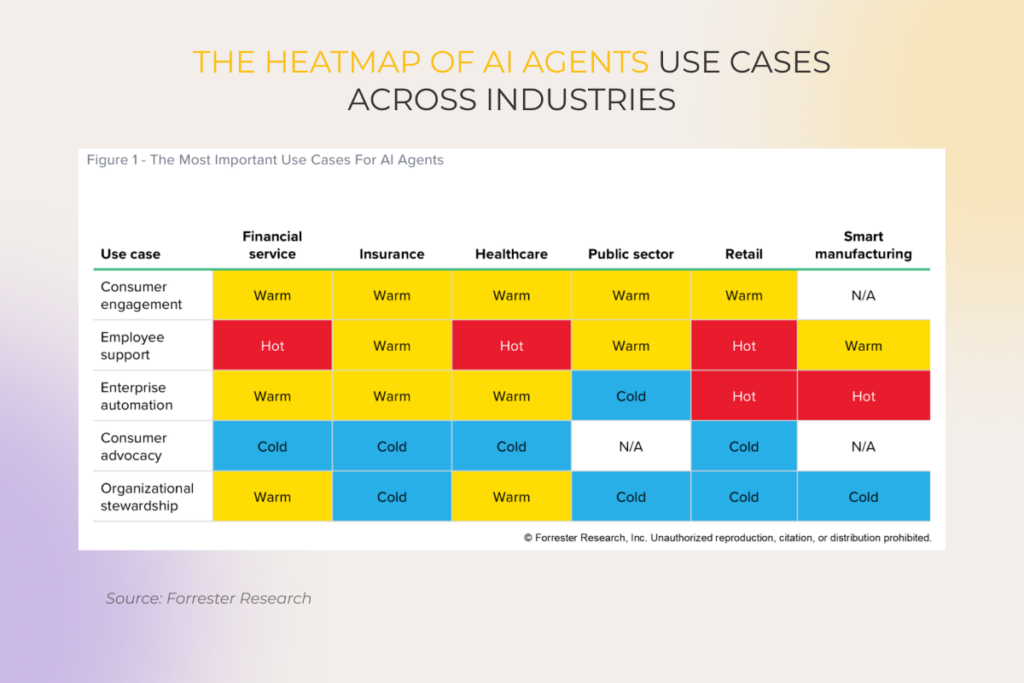
In 2023-2024, a new trend started gaining traction — large action models (LAM), better known as AI agents. This marked a fundamental shift from generative to actionable AI, where AI algorithms moved beyond providing output to performing tasks on the user’s behalf.    

However, so far, the potential of AI development technologies is still largely untapped —  only 11% of companies involved in the development of AI move from piloting to deploying AI agents.

AI Agents Will Advance AI From Decisioning To Action

Take the legal world. Our client, a global law firm, wanted to implement AI to analyze stacks of M&A data and extract key points in one click. A multimodal AI agent now interprets legal language, tables, and images, saving the client 47,000 hours of manual work annually.

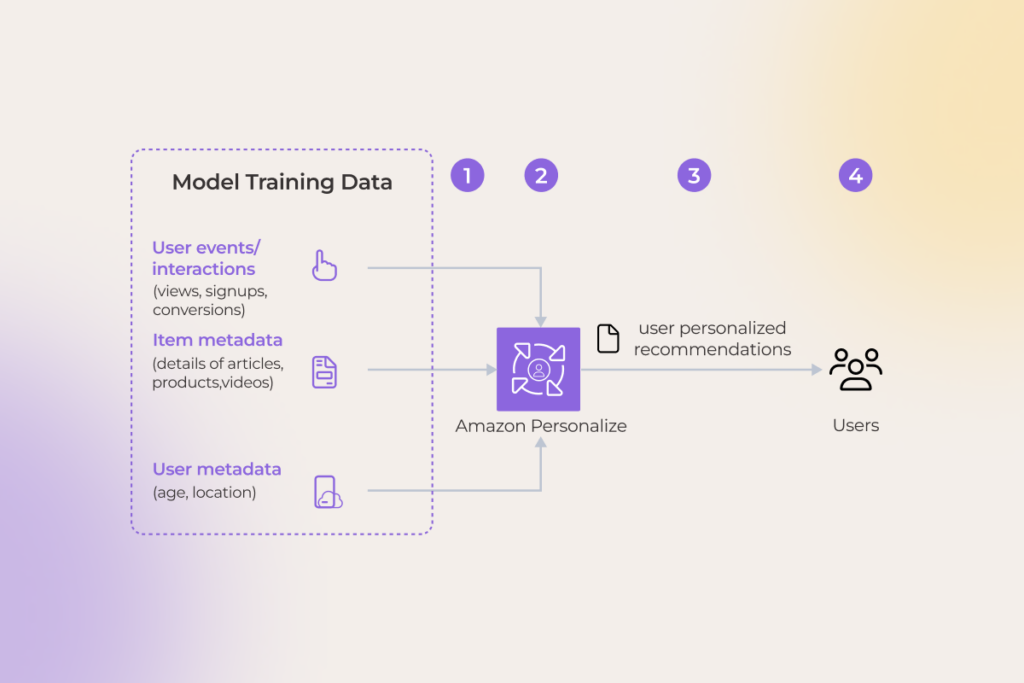
On the retail side, Amazon is setting the standard, simplifying and streamlining the entire shopping journey. Its AI agents power highly personalized recommendations, automate fulfillment workflows, and even complete purchases across third-party sites via a “buy for me” feature. 

AI Development

Meanwhile, an organization from the travel sector partnered with our chatbots development company to overhaul their booking app by replacing a rule-based chatbot with a proactive virtual assistant that can handle all bookings and payments and track expenses on the user’s behalf. This upgrade spiked the annual retention rate from 28% to 41%.

Predictive equipment maintenance is another area where AI agent development solutions drive significant efficiency gains. Deploying them to orchestrate machinery maintenance for an electronics manufacturer led to a 20% drop in maintenance costs and a 15% boost in production uptime. 

Proven high-impact use cases across industries 

If you can imagine it, AI can do it. Moreover, chances are someone is already leveraging it. But with all the hype, many use cases can feel more like marketing fiction than practical solutions to real business needs. 

Indeed, artificial intelligence (AI) development promises are huge on a full-blown Midas scale, with everything it touches supposed to turn to gold, or rather, a fully autonomous workflow. We’ve cut through the noise and gathered real-world examples of our clients’ projects across industries and functions.

This list isn’t final, as there’s more to AI than meets the eye, and valid use cases keep multiplying, but it offers surefire ways to nail AI development right here, right now. 

AI Development

Ecommerce

IBM survey pinpoints that AI’s contribution to revenue growth in retail will more than double by 2027. The technology has permeated all ecommerce functions to some degree:

Most popular AI use cases in ecommerce

Tried and true generative AI applications in ecommerce include:

  • Hyper-personalization of every step of the customer journey, from custom advertising and recommendations to unique loyalty programs  
  • Virtual try-ons with computer vision and augmented reality under their hood
  • Human-like intelligent chatbots for accurate 24/7 customer support
  • Market research with AI combing through the vast amounts of customer data, feedback on social media platforms, competitors’ moves, and other valuable data
  • ML-powered demand forecasting backed by the EPoS and transactional data for 90%+ accurate predictions
  • Ad spend optimization by matching best-performing offerings to relevant consumers 
  • Supply chain and inventory data analysis carried by neural networks evaluating suppliers, optimizing logistics routes, improving last-mile delivery, and running what-if scenarios to foresee demand fluctuations
  • Gen AI-driven pricing based on customers’ behavior, market trends, seasonality, inflation rates, and other variables
  • Enhanced fraud detection thanks to simulating fraudulent activities and training AI algorithms to detect and counteract them

Technology

Gen AI-powered automation is the primary driver of changes in how software engineering companies deliver their services. Projects that earlier called for niche expertise can now be done automatically and at a way lower cost. Let’s take COBOL as an example. Our experience proves that by using generative AI tools to translate legacy COBOL code into Java, you can cut software modernization costs by 70%.

The range of time-tested AI usage in software development spans: 

  • Writing robust boilerplate code thanks to pattern recognition, contextual awareness, and code suggestion.
  • Explaining legacy code 
  • Computer code refactoring and modernization
  • Code translation aligned with the project’s specific coding style, patterns, and software libraries
  • Early-stage bug detection when fixing anomalies costs next to nothing and doesn’t affect your project budget
  • Testing where neural networks take over test planning, synthesizing test data, and generating and executing test cases 
  • Preparing comprehensive documentation and keeping it updated

Logistics 

The volatility of trade controls and reciprocal tariffs, with consequent supply chain disruptions and ambiguous tax regulations, introduces an uncertain business environment as a new normal.

Our AI center of excellence is developing an AI-driven strategic response to minimize the impact of tariff-associated risks. Here’re two solutions we’ve already tried with our clients:

  • A bill of materials analyzer built with the use of machine learning techniques can predict potential Harmonized Tariff Schedule (HTS) classifications, flag high-duty components, and recommend duty-efficient alternatives.
  • Thanks to natural language processing, fine-tuned LLMs can read CAD files and PDF spec sheets and suggest product specification optimizations to help classify items under lower-rate tariff categories. Early adopters of this approach report 3–5 % duty savings. 

The implications of AI in the logistics industry aren’t limited to the tariffs’ context. For instance, generative and conversational AI successfully cover the high-impact operational areas: 

  • Inventory management and demand planning, when ML-based predictive data analytics enables highly accurate stock replenishment
  • Real-time route optimization enabled by deep learning models analyzing the weather conditions, traffic density, and road restrictions
  • Real-time vehicle route optimization depending on the weather conditions, traffic density, and road restrictions
  • Customer service with AI chatbots handling routine customer queries
  • Finance and risk management, where artificial neural network monitors regulatory changes and factors in operational cost trends, such as rising fuel prices and increasing inflation, to suggest relevant budget adjustments
a chart of generative AI use cases in transportation

Our client, an Italian transportation company, used conversational AI within their mobile taxi booking app to provide smart, human-like customer support with 97% accuracy of intent recognition. This approach empowered them to resolve 78% of support requests without the involvement of human workers and gain a 4.8-star app rating.

Automotive

75% of automotive manufacturers already use gen AI at all stages of the R&D process and report up to a 30% productivity gain.  

Once confined to the pages of science fiction, autonomous vehicles are now a tangible reality, with generative AI and deep learning techniques working in tandem to process vast amounts of sensor data in real time. The rise of self-driving cars has pushed manufacturers to harness gen AI’s ability to create infinite synthetic driving scenarios, allowing models to train on millions of edge cases that would be too dangerous or rare to capture on real roads.

CarMax, the largest used car retailer in the United States, demonstrates another use case. Their GenAI tool scans and summarizes thousands of real customer reviews and updates the related section on the vehicle’s page, enabling buyers to instantly grasp the pros and cons of a particular car highlighted by other drivers. 

Finance

Banks, insurance agencies, accounting and tax firms, and mortgage companies benefit from adopting conversational AI tools for front, core, and back-office operations, increasing staff productivity by up to 35% while reducing cost-to-serve by 20%.

For instance, high-impact conversational AI use cases in banking include:

  • Customer onboarding with AI-powered image recognition taking care of ID validation checks and submitting the customers’ documents
  • Customer support with 60% of trivial inquiries, such as activating a card, resetting PINs or account passwords, and updating account information, being handled by AI bots 
  • Deep neural networks analyze customer data, identify patterns in saving and expense behavior to distill tailored insights delivered by personalized virtual financial advisors
  • Assistance to C-level executives to save them from spending ⅓ of their time on chasing down metrics from the management information systems team
  • Employee onboarding and training with a single AI chatbot trained on the company’s data instead of slogging through the corporate wiki

Manufacturing

AI and machine learning are the driving forces of Industry 4.0, and the speed of their adoption is accelerating by the day. 

Common real-world applications of AI in manufacturing cover:

  • Digital twins allowing for optimizing production lines, supply chains, and whole-factory workflows without disrupting physical assets 
  • Predictive machinery maintenance backed with deep learning models and IoT sensor data prevents failures before they occur, eliminating unexpected downtime
  • Advanced quality control systems powered by computer vision spot product defects in real time
  • Mass product customization becoming scalable, with artificial intelligence adjusting product designs on the fly based on customer feedback
  • Demand forecasting relying on augmented analytics helps maintain optimal stock levels and reduce carrying costs

Healthcare 

GenAI-driven solutions, from text-based chatbots to voice-enabled interfaces, reshape user experience for both patients and healthcare providers by making medical care more affordable while driving operational cost-efficiency. For instance, AI-based claims processing speeds up resolution time by 40%, creating a better patient experience. At the same time, delegating this and other administrative, repetitive tasks to AI saves up to 25% of total healthcare spending.

Key use cases for AI in healthcare including conversational tools are:

  • Proactive appointment scheduling
  • Medical triaging to take symptoms gathering and identifying diagnoses off the shoulders of over-loaded primary care doctors
  • Clinical decision support, where even general-purpose LLMs can cut hours of preparing the clinical recommendations down to minutes 
  • Remote patient monitoring
  • Post-visit patient support and engagement, for instance, outlining care summaries, estimating out-of-the-pocket costs for patients, walking them through the insurance coverage and billing process, and other complex tasks
  • Medication management with an AI assistant serving as a personalized medication encyclopedia
  • Reimbursement, where AI prioritizes claims, submits them to insurance providers, monitors payments from providers, and offers guidance on bills to patients  
  • Clerical operations, like churning out post-visit summaries, organizing clinical notes, and creating personalized learning plans for clinicians
  • Clinical trials with AI handling a broad range of tasks, from candidate screening to checking for missing data points in incoming clinical trial data and lab results
  • Back-office work and administrative functions, such as finance, staffing, and legal activities

Oil & gas 

The margin for error in the oil and gas industry is razor-thin. A delayed maintenance check, a misjudged drill path, or a supply chain hiccup can lead to millions lost. In such a high-stakes environment, AI adoption is your chance to stay on top of your game.  

The range of AI use cases in the oil and gas:

  • Reservoir exploration with AI augmenting human fieldwork by interpreting seismic images and creating geo-models of hydrocarbon reservoirs in hours instead of months
  • Drilling optimization, when ML algorithms and neural networks are used to prevent drill-bit failures 
  • Automated E&P equipment scanning with computer vision at its core to schedule maintenance on time and decrease operational expenses
  • Field workers’ support with virtual assistants proves to be more efficient than human-staffed call centers
  • By using robots with OGI cameras and summaries generated by AI, operators can perform tasks typically done through dangerous manual entries, such as inspecting storage facilities and taking remedial actions
  • Route planning and adjustments can be done on the go without increasing the planned transit time
  • Refinery optimization with AI systems monitoring distillation, catalytic cracking, and hydrogenation to spot safety hazards 
  • Quality control done by AI models ensures that fuels and petrochemicals meet key standards, such as ISO, ASTM, and API
  • Accelerated and cheaper product R&D thanks to AI-based simulations
  • Supply chain automation, as ML algorithms take over configuring distribution networks, monitoring inventory levels at each facility, and optimizing transportation routes

3 questions to assess your AI readiness 

Everyone is talking AI, a medley of use cases prove its efficiency… And here comes the ‘but’: is your data, infrastructure, and employees ready for artificial intelligence?

Business owners tend to feel optimistic hearing that developing artificial intelligence can take something between a few months and a year. However, the reality shows there are quite a lot of things to be taken care of prior to AI technology development, and they take time too.

47% of C-suite respondents believe that overcoming AI adoption barriers, such as data concerns, trust issues, risk management, governance, regulatory compliance, and workforce training, can be achieved within 12+ months. Meanwhile,  Deloitte’s AI research indicates a 1–2 year timeline as more realistic, with some challenges extending up to five years. 

an approximate timeline for resolving different AI adoption challenges

Is your data AI-ready? 

Lack of easy access to data from different systems, incorrect and missing data, bias, and other issues increase the AI development and maintenance costs, not to mention affecting the solution’s quality. 

Since data is the difference maker, 75% of companies have already increased their investments in organizing, streamlining, and protecting their data. How can you strengthen your data lifecycle management to keep up with them? Building on experience gained through delivering professional data preparation services, we’ve listed data-related challenges standing in the way of AI adoption and shared practical tips for addressing them.

Inadequate data quality 

Clean and validate data regularly to spot and remove duplicates and incomplete records before they affect the accuracy of machine learning models. The frequency depends on the data type and its importance for decision-making:

  • High-velocity data, like financial transactions, should be validated daily. 
  • Operational business data, such as supply chain and inventory records, can be checked weekly.
  • Customer data, like CRM records and customer profiles, can be reviewed for inaccuracies once a month. 

Use resources like the Great Expectations data quality framework, dbt tests, or the Deequ library to automate and schedule validation checks for each type of your data. 

Lack of data 

If you don’t have enough proprietary data to fine-tune deep learning models or cannot use real data because of privacy concerns, your limited dataset may fail to reflect the reality and result in an algorithmic bias. 

Discriminatory outcomes lead to missed business opportunities and severe legal and regulatory penalties, as it was with UnitedHealth Group. The health insurance provider used a faulty AI tool for post-acute care predictions that denied elderly patients coverage for extended care. 

To combat these risks:

  • Augment your existing data with its modified versions if your dataset lacks diversity. Say, you are training a customer sentiment classifier on a limited set of customer reviews. You can diversify the dataset by replacing some words in reviews with synonyms. Changing ‘fast shipping’ to ‘quick delivery’ doesn’t compromise the original review, but is essential for training a highly accurate AI classifier.
  • Generate synthetic data that mimics the characteristics of the existing data without jeopardizing its privacy. This is a silver bullet for accelerating medtech R&D efforts without exposing patients’ information. 

Generating synthetic data is also a go-to option for simulating rare events. For example, a traffic management company may not have enough data on accidents to create a solid AI-driven accident prediction and prevention system. Synthetic data empowers them to immediately get realistic scenarios in any weather and lighting conditions for different road types, traffic density, and driver behavior.   

  • Use bias-detection tools like AI Fairness 360, Fairlearn Aequitas, etc., to ensure you have a diverse, equitable dataset. In cases when there’s no quick way to get more high-quality data on the underrepresented group, you can oversample minority classes to balance the dataset.

Data privacy 

With the EU Artificial Intelligence Act going into effect in 2026 and the shifting status of AI-specific legislation in the US (Colorado and Virginia AI Acts), companies have to stay alert about how their AI systems store and use personal data and other confidential information. 

Better safe than sorry (and on the front pages) — confront data privacy concerns by embedding privacy-by-design principles in data collection, storage, and usage processes:

  • Reduce data usage to the essential minimum
  • Encrypt sensitive data at rest 
  • Anonymize private data before feeding it into AI models
  • Incorporate human review mechanisms to oversee AI decision-making

No data governance 

AI can’t scale without robust governance guardrails. Therefore, the development of artificial intelligence requires an end-to-end data lifecycle strategy, from secure data gathering to its safe disposal.

  • Implement data quality monitoring procedures
  • Establish clear data ownership 
  • Impose strict data access rules
  • Develop data privacy policies to protect data from misuse 
  • Set up templates to enable data traceability
  • Ensure you have a centralized data storage
  • Arrange data inventory mechanisms
  • Enforce clear data disposal practices

Is your infrastructure AI-ready? 

Infrastructure to support the AI development process includes cloud services, data storage, and network security. Our AI engineers share insights on optimizing each component.

Cloud services 

The type of model you pick directly affects cloud costs and storage needs. And that’s the reason behind 77% of companies using smaller models (13B parameters and below) rather than large ones. 

The challenge of using the right tool for the right job is especially valid when choosing between LLMs and SLMs. LLMs shine when it comes to answering general queries. But SLMs can be quickly trained on a small, ​​highly curated dataset to address your specific use cases.

Apart from so-called narrow AI, designed for a specific task or limited set of tasks, organizations can also use industry-specific models tailored to the needs of a particular domain. There’s already a whole range, from BloombergGPT for finance to BioNeMo for biotech to ClimateBERT for climate change research.

— Pavel Klapatsiuk, AI Lead Engineer, *instinctools

There’s also a question of API-based vs. self-hosted models. When accessing AI capabilities via API, you avoid costly infrastructure investments, but lack control. Self-hosting AI models, on the other hand, come with high compute demands but offer complete control over the model and airtight-secure data pipelines. 

Data storage 

Traditional data lakes and warehouses fall short in supporting the agility, governance, and scalability requirements of AI initiatives. New architectures like data lakehouses, data mesh, and data fabric have brought AI development from hype to reality. 

Each data architecture type has its highs and lows, and choosing the right one involves balancing various trade-offs, including limited scalability and flexibility, weaker data governance capabilities, lower data security, and higher cost.

Data storage

Our AI projects show that a data lakehouse often meets most business needs — single data storage with built-in data governance controls for different kinds of big data, seamless scalability, and adequate functional security.

— Ivan Dubouski, Head of AI CoE, *instinctools

Network security 

Last but not least in your infrastructure assessment is network security. Robust policies and controls are vital for protecting your resources (data storage, models, APIs) from external or internal threats, such as data exfiltration, model poisoning, adversarial inputs, unauthorized API access, etc.

Our recommendations for secure AI development include:

  • Adopting a zero trust security posture with granular access controls and centralized identity management (IAM)  
  • Integrating network security tools (SIEM, SOAR, or XDR) to centralize signals from an automated anomaly detection system and enable fast, coordinated incident response across your AI infrastructure.

Can your staff take on AI roles?

IBM pinpoints that 84% of companies considering AI development lack AI-specific technical competence and resort to augmenting their team as they don’t have months to hunt for and win over top talents in computer science, data science, ML engineering, and other AI-specific areas. 

The AI roles companies need most to close the expertise gap

Raising strong in-house AI expertise isn’t a weekend bootcamp. While some professionals can pivot into AI-related roles relatively quickly, upskilling takes time. 

For instance, given the widespread use of Python in deep learning, ML, and NLP, your in-house Python developers already have a head start. With focused upskilling, they can transition into roles like prompt engineers or AI/ML engineers. In my experience, the first option will require 3+ weeks of full-scale training, and the second will take 3+ months of full-time learning and hands-on practice. 

So the question is: can you afford investing in the employees’ reskilling without compromising the momentum of your current projects? 

— Ivan Dubouski, Head of AI CoE, *instinctools

Struggling with data, infrastructure, or talent?

Delegate it

Navigating AI development risks

The same AI software that can increase your revenue by more than 10% can also expose the company to various data, model, operational, and ethics risks. While many consulting firms warn about AI dangers in vague terms, we draw from hands-on project experience and offer targeted, actionable ways to handle them, all aligned with the NIST AI risk management framework.

Cybersecurity threats

Only 24% of AI initiatives are secured against AI-related threats, such as data poisoning, data tampering, API security breaches, model inversion attacks, prompt injections, etc.  

a chart of AI security threats by complexity and potential impact

Secure all the stages of the AI pipeline to enable the safe development of AI solutions. 

  • Data collection and handling. Data encryption at rest and in transit and strict access controls are the basic best practices.
  • ML model training. If you access open-source models via APIs, use strong authentication protocols like OAuth, OpenID Connect, etc. 
  • ML model usage. Use a machine learning detection and response (MLDR) solution to monitor the models’ behavior and quickly detect and quarantine or disconnect compromised models.  

Data privacy issues 

Inform users about data collection practices for your AI system, such as what personally identifiable information (PII) you want to collect, for what purposes, how it’ll be stored and used, Then, let customers decide if they want to share their data. 

In highly regulated industries like finance and healthcare, where companies are obliged to comply with specific regulatory acts, such as HIPAA and GLBA, organizations should consider replacing real information with synthetic data.  

Intellectual property infringement 

Even though AI-centered copyright laws, such as the Generative AI Copyright Disclosure Act in the US, the EU AI Act, and the Generative AI Training Licence in the UK, are still in the legislative process, you’d better play it safe. 

To weed out the possibility of intellectual property violation while developing AI systems:

  • Check your datasets for potential copyrighted content with copyright detection software, such as DE-COP for text, Google Vision AI for images, Audible Magic for audio, etc.
  • Use publicly available data or data that’s explicitly licensed for use, distribution, modification, and commercial use (for example, has a Creative Commons BY license).

Lack of explainability and transparency 

The complex nature of machine learning algorithms is a double-edged sword. On the bright side, it contributes to delivering highly accurate outputs. On the dark side, the logic behind these algorithms is challenging to understand and explain. 

If you want neural networks and deep learning algorithms to be an open book, adopt explainable AI techniques tailored to your model type:

  • Feature importance, LIME, and SHAP for simpler machine learning models, such as decision trees, gradient boosting, and random forests.
  • DeepLIFT and integrated gradients for more complex deep neural networks with deep learning and neural networks at their core.

Misinformation and manipulation 

AI hallucinations are one of the examples of misinformation that damages the reputation of AI systems. Malicious manipulations, like reverse engineering and model hacking, are even more harmful, as attackers can expose sensitive or confidential information or poison your ML model with bias. 

Safeguard your AI development process by:

  • Using high-quality data for model training
  • Rigorously testing your ML model
  • Continually evaluating and refining the ML model 
  • Keeping humans in the loop to review and validate the accuracy of the model’s outputs

AI-specific technical debt 

Quickly patched data pipelines, rushed model deployments, and poorly documented feature engineering slow down future iterations of your AI software, raise its maintenance costs, and increase the risk of model failures. 

To minimize the amount of AI-related tech debt that builds up around data, models, and infrastructure, strengthen all of the weak points:

  • Set up automated data validation, standardize data pipelines, and track data lineage to get high-quality, consistent, and reliable data.
  • Use monitoring tools with auto alerts to catch model drift immediately.
  • Prioritize building solid MLOps pipelines and scalable infrastructure that support deployment, monitoring, and retraining to ensure consistent behavior of the ML model in production.

Can’t wrap your head around all possible AI risks?

We’ve got you covered

Solid AI governance as your clear-cut to risk-free, responsible AI

AI governance should be established from day one rather than tabled and taken care of later.  Without well-documented rules and standards for aligning your AI development with ethical and human values, your AI initiatives are doomed to face the aforementioned risks. 

Deloitte’s AI research highlights that the lack of a sound AI governance framework is one of the most widespread roadblock companies bump into when adopting artificial intelligence. Another survey pinpoints the chasm between what organizations declare about AI governance and what they actually do. If you’re in the same boat as 79% of businesses that don’t have a robust AI governance framework yet, mind that the boat is rocking, and it’s time to act. 

an infographic illustrating the gap between stated and implemented AI governance

Here’s a set of responsible-by-design AI principles to use as a blueprint for your AI governance framework:

  1. Build an AI ethics code around principles, such as fairness, interpretability, and human oversight.
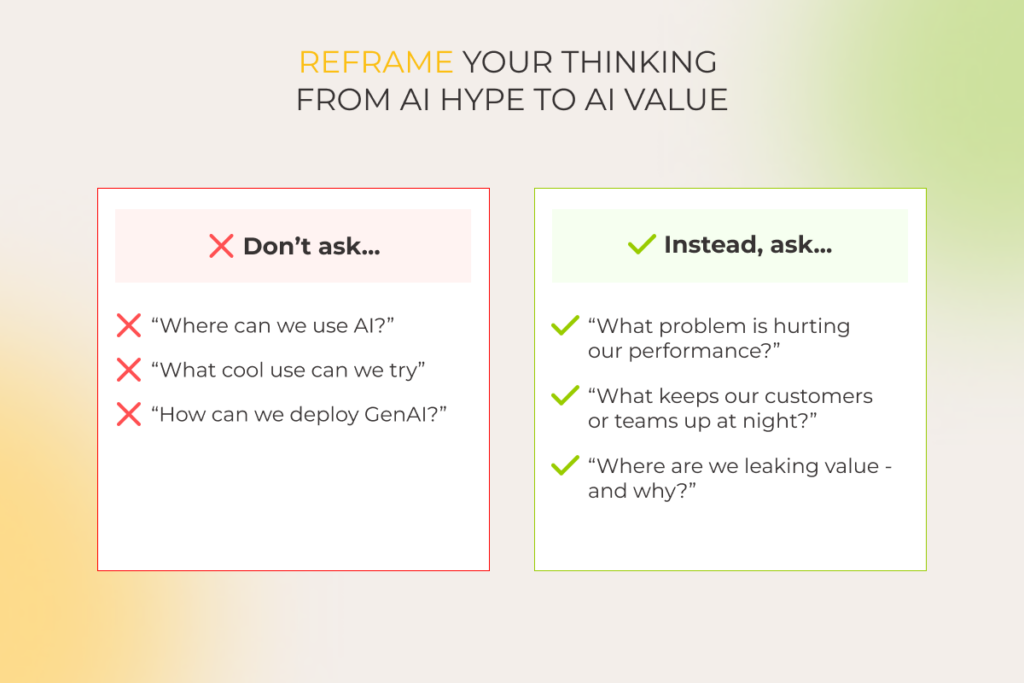
  2. Keep an eye on local and global AI regulations and align your internal AI policies with new standards before they come into force.  
  3. Raise in-house data stewards and risk officers who’ll be in charge of overseeing AI development and deployment. 
  4. Create a compliance checklist and run regular audits to ensure policy adherence — quarterly for AI systems used in finance and healthcare, and annually for less regulated cases.
  5. Address AI-specific failure scenarios, such as model bias, drift, misuse, etc., with on-point risk mitigation practices (AI model optimization, pre-deployment bias audit, automated drift detection, detailed audit logs).
  6. Incorporate responsible AI best practices, such as model explainability, data encryption and anonymization, bias monitoring, etc.

These AI development principles should be established from day one. Yet, keep in mind that your AI governance policies aren’t set in stone. You should review and refresh them whenever you add new machine learning models to your tech stack, spot even minor incidents or failures, and if new AI regulations emerge.

— Pavel Klapatsiuk, AI Lead Engineer, *instinctools

Stages of the AI development lifecycle

As tempting as it is to jump straight into the development of AI technology, selecting ML models, and fine-tuning them on your data, the right place to start is by defining your business problem. Only then can you clearly see high-value, low-risk AI use cases capable of moving the needle. 

That’s why AI projects should begin with an exploratory and planning workshop focused on the following:

  • Articulating your business problem to set clear goals and requirements for your AI development project
  • Identifying low-barrier, high-impact use cases and establishing their success metrics
  • Creating technology and business risk profiles for selected AI use cases

After strategic preparation is done, move to the development steps:

  • Selecting an AI model compatible with your existing infrastructure and matching your performance metrics
  • Customizing the AI model to tailor it to your particular use case 
  • Integrating the fine-tuned model into your infrastructure by connecting it to relevant databases, data pipelines, and APIs
  • Verifying the model’s performance under production conditions and fine-tuning it further with model distillation techniques if needed
  • Deploying your AI solution and monitoring its performance in real-world scenarios
  • Continuously improving the software’s performance by collecting user feedback and retraining or updating the underlying model to enhance output quality and accuracy 

Here’s a thing. You don’t need to reinvent the wheel with every new use case. If you invest in robust MLOps practices, you’ll always have a scalable, low-friction AI development process.

— Ivan Dubouski, Head of AI CoE, *instinctools

Get your AI initiative rolling

Schedule a call

How to decrease AI development cost? Bonus cheat sheet from our AI engineers 

AI development doesn’t have to break the bank. Our AI development company in the USA has battle-tested tips for building high-performing and accurate AI solutions at half the cost.

  • Use API-based foundation models instead of self-hosted ones. This way, you pay as you go instead of investing in computing power upfront. If you decide on self-hosting, you can still save by adopting optimized inference engines (vLLM, TensorRT) to slash inference costs by up to 60–80%.
  • Apply transfer learning instead of full training and use PEFT techniques (LoRA, QLoRA, or QDoRA) for cost-efficient fine-tuning.
  • Use SLMs whenever possible to pay a lower per-token cost.
  • Store and reuse model outputs for solutions like AI-powered FAQ bots to avoid paying for the same answer 1000 times. This way, you cut API costs by 30–60% and improve response speed.

AI becomes valuable when it is strategic

Just like the cloud changed the game last decade, artificial intelligence is set to define the next, completely rewriting the rules of how businesses operate. If you’re wondering when to explore AI development, the answer is yesterday. And the next best time is now, with a clear strategy, not scattered experimentation.  While tackling individual use cases is a natural starting point, long-term success comes from embedding AI development into your broader business strategy. Adoption at scale isn’t just a tech upgrade, but rather a company-wide transformation spanning data, infrastructure, and workforce.

If you struggle to move from planning and scattered experimentation to structured execution and scaling, it’s time to bring in expert guidance from a trusted artificial intelligence development company.

Ready to start your AI journey?

Let’s strategize

FAQ

Which industries does AI benefit the most?

From our experience, AI development delivers most benefits in ecommerce, finance, healthcare, manufacturing, transportation, energy, media, and telecommunications sectors. However, there are a lot of low-barrier, high-impact AI applications across other industries.

What is the timeline for implementing AI?

Depending on the current state of your data, infrastructure, and workforce readiness, AI implementation takes 12 to 36 months.

How can I accelerate my AI adoption?

To accelerate the development of AI you can use API-based foundation models to kick off your project quickly. But to speed up the evolution of your AI initiative in the long run, you should invest in building solid MLOps pipelines and regular staff reskilling and upskilling programs.

What is the smartest AI right now?

New developments in AI, such as AI agents, are considered the smartest and most advanced AI form, as agentic systems can initiate and perform complex tasks, including multi-step ones, within a diverse software ecosystem without human intervention.

What to expect from AI in the next 5 years? 

Recent development in artificial intelligence indicates that AI’s level of responsibility and autonomy will increase. That means that AI agents will keep dominating the AI industry in the foreseeable future, causing a shift from application architecture to AI agent architecture.
Current trends, such as further domain and industry customization of the foundational models and exponential evolution of generative AI, conversational AI, and edge AI use cases, will keep unfolding. 

AI Adoption Workshop: From Curiosity to Real Business Value In Just Two Days

Key highlights

  • AI democratization makes the technology more accessible, but AI adoption itself can still be tricky.
  • An AI adoption workshop is a way to decide how to address your AI pain points right here, right now.
  • The workshop goes beyond brainstorming with AI experts — you get a realistic, documented plan for technology implementation.

Let’s be honest, AI today can feel like a solution in search of a problem. Endless tools, sudden hype, and scattered experimentation make it hard to know where to begin or how to push beyond a prototype, what’s worth building, and how to make it all work.

That’s why we’ve designed an AI Adoption Workshop that starts from the only place that matters: your business goals. In just two days, *instinctools’ experts transform siloed ideas into structured, ROI-driven plans tailored to your business goals and tech environment. It’s a working session designed to move you from interest to action to value, with realistic planning, cross-functional expertise, and clear deliverables that are ready to implement.

A shortcut to sustainable AI adoption 

When you hear “workshop,” you probably think of ready-made templates, generic frameworks, and pointless toy projects. We do it differently: you get direct, high-touch collaboration from a multidisciplinary team centered around your goals, your data, and your constraints.

An AI adoption workshop is a two-day exploratory and planning activity during which your tech partner cooperates with your company’s stakeholders. The aim is to identify how artificial intelligence can serve your current needs, catalog and calibrate relevant use cases.  

 AI adoption

Led by senior AI practitioners, including the head of our AI Center of Excellence, and digital transformation experts, the workshop brings up high-value, low-risk opportunities for responsible AI adoption. With a detailed action plan, you can either go further with us or choose any other AI service provider.  

Our clients want practical advice and concrete steps to confidently release internal and market-facing AI products to their employees and customers sooner, with less risk and waste.

— Ivan Dubouski, Head of AI CoE

Common AI adoption challenges we help you solve

Here’s what we hear from clients before the workshop and how we help them move forward: 

1. “We build prototypes, but they never make it to MVP” 

94% of companies are good at developing AI prototypes, but only 21% can distill high-potential ones and carry them forward to MVPs.   

An AI adoption workshop is a way to break you free from AI limbo and quicken AI development lifecycle, as your tech partner:

  • Catalogs your current AI prototypes
  • Evaluates and prioritizes them based on ROI, feasibility, and corporate strategy
  • Identifies the most promising ones to invest in
  • Prepares a high-level backlog for the chosen AI prototypes

2. “We don’t know where to start” 

You’ve got AI FOMO, but are overwhelmed by all the available AI capabilities and tools. Or maybe you’ve launched some experiments, but nothing has really worked. We help you pinpoint the right starting point based on your business context, available data, and ROI goals.

One of our clients, a Canadian clothing retailer, wanted to replace their Excel-based analytics with an ML-powered system, but a vast selection of suitable ML tools paralyzed their decision-making. We analyzed their current tech stack and opted for Azure ML to keep it consistent and easy to maintain. 

3. “We’re working with a tight budget”

You want to explore AI, but need to make every dollar count. We help you validate what’s feasible within your budget by calculating ROI across CapEx and OpEx for each viable use case so you can invest where it pays off most.

For a French eyewear manufacturer and retailer, we pinpointed a high-value, low-cost use case — a virtual frame fitting feature for their app. It enabled them to run a lean AI experiment that immediately set them apart from competitors. 

4. “We want to play it safe” 

It’s natural to be cautious about AI — 54% of companies are still wary about trusting AI systems for multiple reasons, such as data privacy issues, misinformation, model bias, and cybersecurity threats.

Moreover, these concerns can be topped with the company’s own unique challenges, such as innovation maturity, legacy infrastructure, or operating in heavily regulating industries like healthcare and finance. 

The AI adoption workshop is also a quick intro to solid AI governance and risk mitigation frameworks. Thoughresponsible AI isn’t built overnight, you can make meaningful progress in this direction during a two-day workshop.

For example, our client, a Czech bank, wanted to move beyond AI-driven customer support and offer their clients hyper-personalized financial advisors. To do this safely, our team proposed deploying a private instance of GPT-4 within their Azure tenant, ensuring data control and compliance. 

5. “We lack AI expertise” 

You may have a budget for AI adoption, but without hands-on expertise, your initiatives either wouldn’t move an inch or go south before you realize it. At the workshop, you get access to senior and lead-level experts with practical knowledge of AI development, who not only guide you during the workshop but can support implementation too.  

Ready to make your next AI move?

Let’s talk

What happens in the AI adoption workshop? | *instinctools’ experience

At *instinctools, we provide virtual and in-person workshops. Whichever the format and wherever you are on your AI journey (just starting with a single use case, scaling across departments, or introducing AI capabilities to the market), our flexible, modular approach adapts to your timeline, goals, and level of readiness.

Pre-workshop: strategic preparation

We don’t walk in blind. After signing an NDA, we do the homework by: 

  • Diving into your business context by interviewing key stakeholders to see your challenges and opportunities. 
  • Assessing your as-is state, including overall AI readiness and current AI prototypes, if there are any.
  • Exploring meaningful processes and areas of potential impact where AI can add value
  • Drafting an initial vision of your future AI-enabled to-be state. 

Day 1: finding the right fit for AI

With your business context in hand, we spend the first day:

  • Translating your business objectives and pain points into visual mind maps to reveal AI opportunities
  • Presenting our ideas of the to-be state with a chart of relevant high-value, low-barrier AI use cases
  • Defining clear success criteria for your AI initiative to measure results
  • Running a validation session to see if everyone is on the same page after a day of discussions

Day 2: making it real

On the second day, we focus on turning ideas into tangible artifacts:

  • Outlining the required tech environment
  • Preparing a prioritized project backlog 
  • Drafting  an initial architecture vision 
  • Sharing UX/UI concepts
  • Creating a strategic roadmap
  • Outlining project timelines and budget
  • Planning for market or employee validation through a pilot program

And because every organization is different, our workshops are truly agile. We can recalibrate the program on the go to cover what brings value to your unique business, such as staff AI upskilling programs, or the basics of establishing an AI center of excellence if a client has an in-house software development team and wants to raise internal AI expertise. What matters most to you always makes it into the room.

What you’ll walk away with: AI workshop’s deliverables to act on

Even a structured, facilitated AI discussion is of little value if the insights go undocumented. Practical, no-fluff takeaways are what drive companies to turn their AI ambitions into actions.

The list of deliverables may vary from provider to provider. Here’s what *instinctools’ clients get:

  • Vision&Scope provides an all-encompassing breakdown of your AI-related business problems, objectives and risks, opportunities for AI implementation, success metrics, and the scope and roadmap of your AI initiative. 
  • An architecture overview includes a review of your current tech infrastructure and an outline of an AI system’s architecture. It covers data lifecycle management, ML model training, and integration into your existing software ecosystem. 
  • UX/UI concepts are initial wireframes that can be later used for AI development.
  • Budget and time estimates comprise a high-level cost of AI adoption (data cleansing, model fine-tuning, etc.) and delivery timeline.

Get your AI wheels turning in just two days

You don’t need another presentation. You need a clear path from where you are to where AI can take you. We’ll help you find it…and build it.

You leave the AI adoption workshop with a clarified vision, evaluated business opportunities, and a realistic, documented plan for technology implementation.

Get a head start or revive your current AI initiative

Book a free consultation 

Custom Application Development Guide: The Executive’s Playbook to Tech Success

In brief

  • Unlike off-the-shelf software, custom applications are cut out for the specific business needs and tech requirements.
  • The custom application development process follows an iterative, 5-step workflow to deliver a high-quality solution with sustainable value.
  • Finding a trusted tech partner is challenging but crucial, so make sure to look beyond the pitch.

In a world where one-size rarely fits all, custom application development allows organizations to build beyond existing templates. Made just for the company, tailored software solutions inherently accommodate the most unique needs, whether they stem from highly specialized processes or regulatory requirements.

However, this pursuit of a perfect fit also comes with the perennial risk that the final solution might never deliver on its promise. That’s why you need a thoroughly planned development roadmap for custom software application development to tone down the inherent risks.   

What is custom application development?

Custom application development is a process dedicated to conceptualizing, designing, implementing, and deploying web or mobile solutions tailored to the unique needs of an organization. Unlike off-the-shelf software, custom applications are built to fit specific workflows, industry requirements, and long-term business goals.

Benefits of custom app development: why it’s worth the hassle

In 2024, the global custom software development market stood at $43.16 billion. From 2025 to 2030, it is expected to grow at a CAGR of 22.6%. More fast-growing businesses take the plunge into custom software development as it brings a number of benefits to the boardroom table.

  • Greater control over the final solution

When you build custom software, you’re the boss. You own the IP, the source code, and every line of logic baked into the app. It means that you can tweak and twist the app as you need, with no vendor lock-ins or infrastructure headaches.

  • Unmatched scalability

Custom made apps are designed to grow with your business. If you anticipate a sudden increase in users, data volume, and transaction loads, developers can architect the app with that trajectory in mind.

  • Maxed-out efficiency

Off-the-shelf tools often force teams to adapt. But why change what’s already working? Custom software flips the script by being designed to fit the way your team already works and make sense to the people from day one. Since it’s built around your existing workflows, it minimizes friction and maximizes productivity.

  • Made-to-fit security 

From the start, the app can be built with your specific security requirements and compliance standards in mind. Whether it’s attribute-based access controls or an ISO-compliant development process, the dev team behind your software application implements all the necessary safeguards.

  • Competitive advantage

Custom software gives you capabilities your competitors can’t copy-paste from a marketplace. Our project for an eyewear company demonstrated how these capabilities  helped the business not only weather through hard times but also more than double its presence. 

Custom application development vs off-the-shelf solutions 

When organizations are deciding between custom applications and ready-made ones, they often fall into the following thinking pattern: “An off-the-shelf solution can cover 90% of what we need, and then we’ll just adapt the rest”. In reality, not all businesses understand the limitations that come with pre-built options. For this exact reason, our development team has curated the table showing the differences between custom apps and ready-made applications.

Ask yourself…Plug-and-play
(off-the-shelf software)
Built-for-you
(custom development)
What’s the price tag to get started?Lower upfront costs Higher initial investment
What will it really cost over time (TCO)?Cheaper short-term, but may be pricey later due to licensing fees, workarounds, and possible inefficienciesHigher upfront, but optimized long-term ROI due to better alignment and fewer compromises
How fast can we go live?Fast deployment: download, configure, useCrafted timeline: discovery → design → deployment
Will it fit our unique workflows?Generalized functionality that may not fully align with unique processes. Often requires workflow adaptationBuilt to match exact business workflows, industry specifics, and user roles. No compromises on fit
Can it grow when we do?Limited by licensing, architecture, or vendor roadmapEngineered to scale vertically and  horizontally at will
How much can we customize?Minor tweaks only; changes often require workarounds and third-party plug‑insTotal freedom from UI to backend logic, tailored to current and future business needs
Will it connect to our other systems?Pre‑built connectors (if you’re lucky). Custom integrations may be complex or unsupportedDesigned for seamless integration with existing systems, APIs, databases, or legacy tools
How quickly can it pivot with us?Slower to adapt to market shifts or business model pivotsHighly adaptable – new features or modules can be added quickly in response to changes
Who really controls it?Vendor retains control over features, updates, licensing, and pricing. Risk of vendor lock-in.You own the code, data, and roadmap. Complete control over features and long-term direction
Is security tailored to us?No, security model is shared across all usersYes, defenses are tailored to your risk profile and regulations
What happens when we need help?Vendor-provided support; response times and issue prioritization may varyDedicated support (in-house or via an outsourcing partner). Maintenance and updates on your terms.
How much room for innovation?Capped by vendor capabilities and update cyclesHigh. Enables rapid prototyping, integration of emerging tech
Where can we deploy it?Typically cloud/SaaS, with limited deployment optionsAnywhere: cloud, on‑prem, hybrid
Which situations suit it best?Best for standardized processes (e.g., CRM for SMBs)Ideal for complex, differentiated operations (e.g., IoT-based asset management, multi-system ERP replacement)

Sure, off-the-shelf applications are initially cheaper to set up. They offer a decent UX, a sprinkle of customization capabilities, and a couple of integration options. Most likely, they will suffice the instant needs of smaller businesses with a modest IT ecosystem and standard operational demands.

But when it comes to more sophisticated digital product initiatives, the initial allure of cost-effectiveness is not something that should seal the deal. You should estimate the long-term TCO, agility, innovation capacity, and other strategic and growth-oriented factors that can impact the sustainability of your success.

Your off-the-shelf software isn’t cutting it?

Build a custom app

When to opt for custom application development: 6 use cases

Having completed 650+ projects, our software engineers have singled out six specific scenarios where custom software applications make the most sense — either ROI-wise or risk-wise, or both.

1. When your operations are complex or non-standard

Off-the-shelf software is great… if your business runs like a textbook example. But let’s be real: most companies operate in ways that are anything but standard. The moment your workflows start to veer off the beaten path, you’re stuck layering custom features, tweaks, and integrations just to make the software fit. This often results in a costly-to-maintain Frankenstein-esque system that, among other things, spawns data silos.

Custom development is made to your specific operational blueprint, with each software component engineered to fit into your processes and existing systems. That’s why healthcare, manufacturing, finance, and other industries that don’t have the luxury of “almost fits” will find custom development a more cost-effective and future-proof option.

Take a UK oil and gas company, for example, which was grappling with inefficient, rigid offline employee training. So we built them a locally hosted, web-based LMS tailored to their unique curriculum and employee goals. The application automated 84% of training management tasks and led to a 45% increase in employee engagement due to personalized online learning. Read the case study >>

2. When you need multi-system integration

Enterprises running on a combination of legacy software, specialized applications, and proprietary platforms typically have their data scattered and locked behind different systems.  Instead of bothering with complex point-to-point connections, businesses can use custom applications to stitch together the fragmented systems.

In this case, a custom app can either become an integration hub or a middleware layer. As an integration hub, a custom application manages the data flow between the systems. But when it steps in as a middleware layer, it becomes a translator that transforms data from one format to another and orchestrates the business logic of different systems.

3. When customer experience is a competitive differentiator

For ecommerce brands, online learning platforms, or subscription services, good customer experience calls the shots for the bottom line. As for custom applications, nothing can beat them in the flexibility and control of crafting a truly differentiated and superior experience.

Modern lighting interface on laptop replacing outdated wall-mounted touch panel control system


Our client’s existing intelligent lighting control system wasn’t pulling its weight, blending the company into the market’s background. We solved this problem by designing a web application  that allows users to customize the user interface by up to 90%.
Read the case study >>

4. When you’re building with scalability in mind

If growth is in the cards, your tech needs to keep up with no compromises. Off-the-shelf tools can slow you down when you hit scaling limits, while custom apps are built with expansion in mind.

From the start, developers can architect your app to support horizontal scaling, so it performs just as well with 10 users as it does with 10,000. And when you build it lean, your custom solution uses fewer resources, cutting down infrastructure costs and squeezing more life out of your setup.

5. When data protection and compliance are non-negotiable

In industries like healthcare, finance, and legal, data protection is an imperative. And when compliance is on the line, tailor-made software offers peace of mind you just can’t get from shared platforms. With custom apps, you decide where your data lives, be it on your own servers, in a private cloud, or any secure setup you choose. 

On top of that, custom solutions are designed with the necessary safeguards baked in, facilitating compliance with HIPAA, the FDA, the MDR, GDPR, and other regulations. In particular, such apps are capable of providing detailed audit trails of data access and supporting specific logging mechanisms. 

6. When software is your core product

If your app is your business, you can’t afford to play by someone else’s rules. Shared ownership over the codebase, design, or underlying technology becomes a strategic vulnerability. Engineering the application from scratch gives the company exclusive rights to its innovation, freeing it from someone’s licensing terms, updates, or feature roadmaps.

Digital greenhouse map and plant health data with real-time metrics on content and conditions

Lacking a final touch to their AI-driven plant monitoring solution, an innovative AgTech startup approached *instinctools to develop a custom-built web application for data visualization. The delivered app finalized the company’s offering, providing a polished, market-ready product. Read the case study >>

Your business isn’t generic. Your software shouldn’t be either

Reach out

How to create custom applications in 5 steps

Creating a custom app doesn’t have to be overwhelming. With the right process, it’s both efficient and flexible. Here’s how it typically unfolds from idea to launch and beyond.

1. Discovery phase

Deloitte points out that many software flops start with small oversights early in the game that later snowball into big problems (and bigger bills). That’s exactly why the discovery phase shouldn’t be skipped. 

Bar chart showing exponential increase in cost of software fixes at later development stages

Through deep business analysis and technical exploration, it lays a solid groundwork for everything that follows, preventing you from blowing the budget or pushing back your launch date. Project discovery usually blends strategic analysis with hands-on deliverables, including mapping the user experience and shaping the technical architecture.

Key aspects:

  • Stakeholder alignment
  • Requirements elicitation
  • As-is analysis
  • Technical feasibility and risk assessment
  • Vision & scope
  • Architecture blueprint
  • UX/UI concepts
  • Budget and time estimates

2. Development 

When all the planning is done, a dedicated development team brings the vision to life, translating designs and architecture into real, working software. It’s where planning meets execution and where quality, scope, and velocity all need to be carefully managed to stay on target.

Key aspects:

  • Feature development
  • Integrations and data work
  • Continuous testing 
  • CI/CD pipeline integration
  • Mid-project adjustments
  • Performance optimization
  • Technical documentation and knowledge transfer

3. Quality Assurance

Although automating as many tests as possible to improve test coverage is a rule of thumb nowadays, QA teams  should also apply manual testing to complement automation. Testers tend to work in parallel with the development team, going over your custom app with a fine-tooth comb to eliminate security flaws and make sure your product meets the predefined exit criteria. 

Key aspects:

  • Test planning
  • Functional testing
  • Regression testing
  • Performance and load testing​
  • Security testing
  • User Acceptance Testing (UAT)
  • Bug fixing
  • Final verification and sign-off

4. Deployment and launch

No matter how pitch-perfect your application is, it won’t run full-bore unless its environment is properly configured. That’s why developers should dedicate special effort to setting up the network configurations, storage solutions, or your internal infrastructure.

Key aspects:

  • Production environment setup
  • Data migration
  • Deployment strategy (big-bang or phased)
  • Go-live execution
  • User training and documentation
  • Post-deployment monitoring

5. Ongoing support and maintenance

Post-launch is where the long game begins. Support teams handle updates, bug fixes, and evolving feature needs, keeping the app aligned with business goals as they grow and shift.

Key aspects:

  • Routine maintenance
  • User support and helpdesk
  • Bug fixes and minor enhancements
  • Performance monitoring and optimization
  • Monitoring success metrics

Crucial considerations for custom app development success

Getting a custom app development project off on the right foot is no small feat. Too many variables, too little certainty, and an overwhelming amount of planning is a perfect storm that can capsize even well-intentioned ventures. Here are a few friendly reminders to keep top of mind.

Know exactly what you want to get exactly what you want

It’s not seldom for companies to approach dev teams with nothing but an idea. However, a nuanced understanding of software requirements and expectations is highly encouraged to accelerate the RFP process and make sure your development team will build the right thing from the very first time.

Give all relevant stakeholders a seat at the table

Engaging end users, executives, business analysts, and other stakeholders early in the development process translates into a fuller image of what the final product should look like. With everyone being skin in the game, companies have higher odds of building a user-centered product and of squeezing maximum ROI thanks to better adoption.

Choose the right tech partner

To successfully outsource your custom web or mobile project, you need to find a development partner that can deliver on your vision. That partner should have prior experience with similar projects and a rich portfolio to corroborate the experience. Also, a great tech partner is small enough to care and big enough to extend your team on demand.

Summary

From greater control over the end product to enhanced security and superior UX, custom software applications meet the unique needs of large-scale organizations in ways an off-the-shelf solution or a no-code platform can’t. But with greater capabilities comes greater responsibility. That’s why choosing a trusted tech partner is as crucial as the technology itself.

Looking for a crack team of custom app developers?

Contact our team 

Extended Software Development Team: Tactical Playbook for Your Business

In brief

  • Outsourcing services keep evolving with business needs, offering new options, such as an extended development team.
  • Whether you extend your existing team with individual experts or request an outsourced team, you get them in days, bypassing the tedious hiring process and eliminating operational overhead.
  • Battle-tested use cases for the development team extension include freeing up your in-house team to accelerate innovation, addressing an unexpected workload spike, testing raw ideas, and more, all without jeopardizing work transparency and security.

Despite a steady trend for remote work and in-house tech talent hiring from budget-friendly regions, companies still struggle with having the right people at the right time. In 2024, when access to the global talent pool was already table stakes, 41% of businesses couldn’t fill in the needed positions.

However, almost no one relies solely on their internal sources anymore. 96% of companies resort to outsourcing. With an extended development team, they get the right experts up for grabs whenever they need them, at a price they are willing to pay.

What are the options within the team extension model, and when does it make the most sense? Our all-out guide backs theory with our clients’ real-life examples. 

What is an extended team?

The extended team is a flexible way of acquiring talents from an outsourcing vendor when you need access to niche skills and on-the-dot scalability without added operational expenses. The individual experts or fully-packed teams act under your complete control or autonomously to support the efforts of your existing IT department — short-term or long-term.   

Many faces of extended teams 

While there are numerous ways to expand the capacity and capabilities of your core team, two options always stay relevant – IT staff augmentation and a dedicated development team.

IT staff augmentation

IT staff augmentation is a team extension strategy that implies bringing external specialists as a stopgap or extra hands to supplement your in-house team and take on a specific part of a project. The invited experts blend in with your workforce, adopt your project management tools, and operate under the direct guidance of your project manager.

 IT staff augmentation as a team extension strategy

Dedicated team

A dedicated team model operates as a self-managed squad of IT professionals, handling a particular project or set of projects. They can undertake the entire development process, from concept analysis to deployment and upkeep. While acting as an independent entity, the external team adopts the same level of work transparency as your in-house unit.  

Extended development team composition
Key factors to considerIT staff augmentationDedicated team
Level of controlYou stay at the helm of a project, managing workflows and mitigating risks Project management is handled entirely by the dedicated extended team, providing updates at agreed intervals
Degree of proactivenessInvited experts offer insights within their assigned tasksThe team contributes at a strategic level, offering insights across the entire project 
ScalabilityBoth models allow for on-demand scaling within days 
Duration of collaborationBoth models support short-term and long-term cooperation

For companies looking to scale beyond a single team, an offshore development center (ODC) offers an opportunity for strategic expansion of their business. Compared to the aforementioned options, this format provides a full-fledged remote engineering hub with top-tier and inimitably secure infrastructure. 

Benefits of the extended team model, explained

The reasons for hiring an extended development team boil down to gaining access to expertise and efficiency, and unlocking opportunities that were off-limits earlier. The highs of this outsourcing approach include: 

  • On-demand flexibility and scalability. When the backlog overflows with must-do mundane tasks, your core team gives its all to put out the fires. Meanwhile, innovative ideas await their turn (no one knows when it will come). 

An extended team can be upsized or, vice versa, shrunk back in days, allowing you to cover both ongoing mandatory tasks and new projects.  

  • Cost-efficiency. Ease the financial burden by paying for what you get, excluding overheads associated with hiring an in-house team, such as sick leaves, employee benefits, training costs, etc. 
  • No time-draining hiring process. On average, you’ll need up to 49 days to find a suitable candidate for a software engineer position. 

If settling on the development team extension, you get cherry-picked specialists for your project in days without screening scads of applications, running background checks on the candidates, and going through several rounds of interviews.  

  • Easy and quick access to niche expertise. Modernizing legacy software without any knowledge keepers of this age-old tech left in the company or developing an innovative solution when you’re short on the experts in a linchpin technology can be challenging, if not impossible. The extended team model implies you can turn to aces with a specific skill set every now and then.  
  • Ability to calibrate the level of your control over a project. Project management involvement depends on the chosen cooperation model. IT staff augmentation requires an in-house manager to guide a mixed team of internal and external experts and monitor their progress on a regular basis. Meanwhile, with a self-managed dedicated development team, the level of control can vary — daily check-ins, bi-weekly demos, or anything in between.  

Extended team advantages are just a call away

Get in touch

7 real-world scenarios suitable for a development team extension

There may be one or a combination of factors to tip the scales in favor of the extended development team model. Backed by decades of experience in the B2B tech market, we can confirm seven most common cases in which businesses benefit from the team extension.   

1. You want to roll out an MVP ahead of competitors

Scouring the market for extra hands is probably the last thing you’d want to add to your plate at crunch time when all your efforts are focused on rolling your software before your competitors do. The extended team is a quick fix that will help you balance the workload of your in-house employees. 

For instance, one of our clients, a robotics manufacturer, wanted to present an innovative, highly maneuverable model of a driverless forklift system at the industry trade show in just six weeks. Outsourcing web development was the only way to meet the tight deadline. Their in-house team was in charge of crafting a service for robot coordination, and developing a service for data presentation was beyond their capacity. With no extra time and margin for error, the client needed a squad of seasoned experts to jump on board in a flash and build a data presentation service right at first try. 

  • They contacted *instinctools for an extended team of senior software developers and UX/UI designers. 
  • Our dedicated team built the service for data presentation ahead of schedule. 
  • However, the client’s core team hit a bottleneck. Their standard practice of testing software on hardware slowed them down, keeping the project in limbo.
  • We suggested temporarily replacing the service for robot coordination with an emulator to have the whole project ready in time, and acted on this idea. An MVP was presented at the LogiMat and proved to be a trailblazing warehouse solution for the SMB segment.

2. Your existing team is too swamped to take on the innovations

If innovative projects keep sinking lower in the backlog under the pressure of routine tasks, they risk going into oblivion eventually. Considering that innovations are the driving force behind progress (and business profit growth), you can’t give up on experimenting. 

Bolstering your in-house IT squad with several external experts or an entire outsourced team is one of the ways to unburden your core personnel of mundane chores.   

3. You have time and budget limitations that can’t be violated

McKinsey highlights that, on average, IT projects run 75% over the initial budget and stretch delivery schedule by 46%. We’ve seen it happen over and over again — tight timelines and shrinking budgets putting businesses in a bind. By opting for the development team extension, you can tackle both challenges in one strategic move.

4. You want to test a raw hypothesis without sacrificing first-priority tasks 

What happens when a promising business idea emerges, but your internal team is already at full capacity and can’t afford to pause their main tasks to test its potential? Stretching your IT department to its limits is far from a good move. This is where an external team can give a hand — handling side projects to assess feasibility without disrupting your primary operations.  

5. Your in-house team can’t tackle an unexpected workload spike 

Last-minute changes in the project scope, bugs that slipped into the customers’ environments, an unplanned system outage, and a myriad of other unforeseen factors can put pressure on your internal IT department.  

Pushing your existing team to work in survival mode might work for a while, but if the workload surge lasts, you risk topping it all with employee burnout. 

Going with the development team extension is the right call when your IT squad operates at capacity, but there’s no need to hire in-house to handle temporary surges. That way, you can bring in seasoned external experts right when it counts, keeping your workload balanced and your projects on track.

6. You don’t have the right expertise on tap

If you need a subject matter expert for a one-off task, going through the hassle of in-house hiring doesn’t seem reasonable. Employing niche specialists on the internal team may also be off the table due to budget constraints. In such cases, the extended team model is a go-to option to expand your capabilities range with any tech knowledge quickly and on budget-friendly terms.

One of our clients, an AgTech startup, created an AI-powered plant monitoring system under strong in-house leadership. However, they lacked professionals to develop a web app with greenhouse visualization. 

  • Instinctools assembled a team of a business analyst, software architect, and product designer who acted under direct guidance and complete control of the product’s CTO.
  • We crafted a solution with a real-time, two-layered map, enabling farmers to track plants’ health status and environmental conditions simultaneously. 
  • By leveraging our MVP development services in USA, the startup successfully built the first software for harmless and seamless plant monitoring for farms with 10,000–15,000 plants.

7. You seek control without micromanagement

Striking the balance between control and trust may be tricky for a manager. Lean too much toward control, and you’ll find yourself micromanaging. Give too much trust, and you might end up with a team that lacks direction and struggles to meet deadlines. 

A practical solution is to bring in experienced professionals who understand their roles and deliver quality work without constant supervision. With self-managed extended teams, you get specialists who are not only experts in their field but also skilled in structured collaboration and accountability.

Do these scenarios sound familiar? We’re ready to help

Let’s solve them

Second-guessing the development team extension? We’ve got all the answers you need

Do the extended team model benefits sound too good, making you suspicious of possible trade-offs? Yes, a murky outsourcing company may promise big but deliver blah. But stalwart vendors welcome open communication and are always ready to walk together through all of your concerns to resolve them. 

Here are the concerns we usually hear from business and product owners, venturing into outsourcing for the first time and puzzling over how to choose the right software development partner. 

  • “What if the extended team doesn’t match our expectations?” 

A trusted outsourcing partner doesn’t wait for a step-by-step guide regarding their clients’ team-related preferences. Don’t get us wrong – it’s great if you have one. But even if you don’t, it’s the vendor’s job to initiate a dialog, unveiling any unwritten expectations about the new team members’ skills, and make sure every specialist checks the right boxes. Some outsourcing companies also offer trial periods, providing you with room for change along the way.

  • “Instead of easing our workload, won’t they just create more hand-holding for our in-house experts?” 

This issue won’t arise if you cooperate with a seasoned outsourcing company that has been in business for a long time. Such vendors offer specialists who have dealt with all kinds of corporate software, development and project management tools, and, therefore, are ready to bring results from day one.

  • “How do we know the extended team isn’t working in the dark?”

Any reliable outsourcing vendor values their hard-earned reputation above all and is interested in turning you into a loyal customer who will seek their services again. That’s why, don’t hesitate to demand full visibility from your development provider — cameras on during meetings, time-tracking tools for accurate billing, and open communication at every step. 

  • “Can an extended development team meet our security standards?”

If security is your top priority, look for a development company, whose services are compliant with major data privacy and software security regulations and whose commitment to delivering high-quality and ultra-secure software is confirmed by ISO 27000 family of standards and NIST 800 certification. 

To sift out shady vendors, check their market reputation and study verified client reviews on trusted platforms like Clutch or GoodFirms, to name a few.

Client reviews of a highly-recommended outsourcing vendor with proved expertise

How to set up an extended team in three steps? 

Hiring an external team or filling skill gaps with individual outsourced developers is a piece of cake.   

  • Submit the request. Proper resource estimation and a clear understanding of project objectives are prerequisites for fruitful cooperation. Therefore, at the initial stage, the vendor clarifies the details, such as specialists’ hourly rates and location, the number of FTEs, project objectives, timeline, and expected deliverables.  
  • Select specialists. You choose from the list of pre-selected experts, whose tech and communication skills fit your requirements. If you need a full-fledged dedicated development team, the outsourcing provider assembles one. After roles and responsibilities are identified, you make final agreements on the deliverables and KPIs.   
  • Start cooperation. In case of staff augmentation, the time new team members will need to blend into your IT team and adapt to your operational processes depends on the specialists’ experience level — the higher it is, the quicker they settle. The dedicated team sets up tracking and reporting systems and initiates the first sprint independently.
Three steps to set up an extended team

Make the first step

Reach out

Get things done with an extended development team model

Whether you need to free up your core team, tap into specialized skills, beat the clock, stay within the agreed budget, or do all of the above, extended teams are up for the task. IT staff augmentation will be the best fit for product owners who prefer to stay in full control. Those, who’d like to hand off the management hassle, should choose a dedicated team model.

Hire an extended development team from *instinctools

Get a quote

Focus On Results Not Process: Augmented Analytics Guide

Key highlights

  • Augmented analytics takes business intelligence to the next level by automating data analysis and generating insights.
  • AI-powered analytics solutions transform how organizations interact with data, making insights accessible, intuitive, and action-oriented.
  • To fully leverage augmented analytics, businesses must ensure data quality, implement strong governance, and build an AI-ready culture.

Data is now like air. It’s all around us. Every manager, front-line employee, and business user needs to be able to breathe it in, break down its composition, and leverage it to inform their decision making. Most importantly, they need to do it fast and organically to capitalize on fleeting opportunities.

Augmented analytics makes it easier for data scientists to nail transformational discoveries — while also accelerating decision intelligence for everyone, without a data background. With 50% of business decisions predicted to be augmented or automated by AI agents by 2027, the early adopters stand to reap the biggest rewards.

What is augmented analytics and why is it a step above traditional analytics?

Augmented analytics is the type of advanced data analytics that builds on artificial intelligence and machine learning to democratize business insights, take on busywork from data science teams, and provide tailored suggestions to users based on their roles, preferences, and past behaviors. Augmented analytics also automatically generates such complex capabilities as forecasting and model building.

Unlike conventional analytics, augmented analytics tools don’t just follow instructions. They go out of their way to anticipate your needs based on the contextual and behavioral cues pulled over time and offer you the insights you never knew you needed. This transformative approach to business intelligence stems from the following enabling technologies:

  • Machine learning — as the core engine for augmented analytics, machine learning sets the overall framework for intelligent automation, allowing such tools to autonomously level up based on new structured and unstructured data. Machine learning is also where advanced analytics functions like predictive analytics come from.
  • Conversational AI — the combination of natural language processing (NLP) and natural language generation (NLG), enhanced by detailed prompt-engineering, enables analytics solutions to build on internal and external context (RAG), turn complex data into a clear, concise narrative digestible for anyone, and go out of their way to offer insights proactively.
  • Automation — the final piece of the puzzle that enables these solutions to handle routine tasks across the data analytics lifecycle, such as data preparation, cleaning, and integration.

Augmented analytics grows up: agentic analytics

Augmented analytics is an ever-evolving field that has lately collided with AI agents, programs capable of autonomously performing tasks on behalf of a user or another system. While augmented analytics is focused on enhancing human decision intelligence, agentic analytics tools aim to proactively identify problems, generate solutions, and even take action based on the insights — and do so with no or minimal human intervention.

Also, agentic analytics solutions can actively go out and tap external environments beyond their initial training set to handle complex, multi-step analytics tasks.

The comparison of four analytics systems: Spreadsheets, BI, augmented analytics, and agentic analytics with key traits

Automate your analytics like never before

Develop AI agents

Watch augmented analytics software in action

Your CRM system, accounting software, ERP platform, and other business software jot down real-time actions and changes. They are awash with data that could help you save money and boost profits. But that’s not happening because traditional analytics tools are a tough lift for everyone but its savvy users. AI augmented analytics fixes that.

Automating data management

To become insights, your data — that comes from a variety of sources — needs to be consistently formatted and cleaned. But if it comes in wildly different forms and shapes, your data analytics team will spend days scrambling to understand the structure before they can get down to analysis.

One of the biggest benefits of augmented analytics is that it introduces automations throughout the entire data management lifecycle:

  • Collecting data from multiple, sometimes complex sources, automatically identifying different data types and relevant attributes within datasets, including outliers. 
  • Cleaning and preparing the data (filling in missing values, identifying outliers, removing duplicate records, etc.).
  • Indexing and clustering data (semantic indexing, patterns/trends/segments identification).
  • Revealing hidden connections in datasets, generating hypotheses from these connections, and automatically building predictive models.

Democratizing access to data

When strategizing their efforts, every company grapples with three core questions: What happened? Why? What’s next? Classical analytics with its learning curve makes finding those answers, let alone easily accessible ones, a challenge. Not every person on your team can boast the knowledge of statistical or analytical methods — or SQL commands.

Augmented data analytics allows users to ask questions in plain English instead of writing a complex query. The NLP engine inside acts as a translator and intermediary, making data insights more intuitive, approachable, and accessible to everyone. In simple words, the interaction boils down to the user asking the tool, “What were our sales in Q3?” and the system breaking down the stats in response.

Data analysis dashboards with a revenue chart and an 'Analyze' option selected, highlighting 'Pattern recognition'

Giving recommendations to users

Another reason why big data and augmented analytics tools are billed as the new era of insight generation is because they speak your industry semantics and can broadly track user behaviors. It means that over time, they sync with the user’s chain of thought and proactively suggest actionable insights, metrics, and insights that matter most to them and their work, curated into a custom digest.

Users might not ask explicitly, but augmented analytics solutions anticipate their needs and surface relevant information before they even ask. It’s less about asking the right question and more about the platform already knowing what you might need. 

Visualizing data

Augmented analysis systems don’t just explain the why behind certain trends. If married with multimodal systems, they can also visualize data on demand, choosing visualizations that best communicate the key insights. Not only that, but visualizations in this case can incorporate deeper insights across multiple modalities, such as images of popular products and snippets of customer reviews.

With augmented analytics, you can also endlessly get into the nitty-gritty details of your data with no pre-defined drill paths or data aggregation required.

Breaking down the what, why, and how with no effort

100% automated insights, 0% busywork — that’s likely the biggest benefit you can gain from augmented analytics. It redefines the way companies approach analytics, making the whole process hassle-free. Users can simply ask the system for insights and let it determine the best approach to dissect data. 

Whether it’s forecasting, goal seeking, scenario analysis, or any other data task, augmented analytics takes the heavy lifting from a human and returns insights in a ready-to-use form. And if the system comes across any complementary data, it’ll surface it, too.

What augmented analytics can do that BI cannot

Essentially, traditional BI tools empower users to analyze data, while augmented analytics tools empower users to understand it, with or without the necessary technical background. 

Augmented analytics platformsBusiness intelligence platforms
User proficiencyAccessible to business users with no coding or statistical knowledge neededRequires the involvement of technical experts (analysts, data scientists)
Data explorationEnables free-form data exploration with natural language processing and AI-powered guidanceRelies on pre-defined reports and dashboards
Insights generationAutomated discovery of insights, patterns, anomalies, and trendsManual, time-consuming process
Data preparationAutomated data preparation and cleansingExtensive data modeling and preparation required
Output formatStatic reports, charts, and dashboardsInteractive visualizations, narratives, and recommendations

Enhance your business intelligence for better results with our AI team

Book a call

The mechanics of augmented analytics tools 

The foundation of augmented analytics is a complex orchestra of interconnected components that parlay into a holistic system, uniting data, technology, and human understanding. It all begins with a robust data integration layer that connects a myriad of structured and unstructured data sources, including SQL/NoSQL databases, CRMs, ERPs, streaming data sources, IoT devices, external systems, and more. The system retrieves the relevant data points and transforms them into a consistent and usable format on its own.

Augmented analytics relies on AI and machine learning to automate data exploration, build predictive models, and generate deeper insights. Based on the insights and predictions, the system can recommend an optimal decision path — or even automate decisions based on the analysis if it’s operating within well-defined and repetitive scenarios.

Data flow diagram from sources to insights using augmented analytics, including ML, NLP, dashboards, and predictive analytics

Who can benefit from augmented analytics?

Regardless of the use case, augmented analytics capabilities do not aim to replace human judgment — they amplify it. In this case, the entire paradigm is being shifted: instead of dealing with the tedium of data collection, data analysis, and insight explanation, humans become strategic supervisors.

  • Business users like marketing teams can shorten the time-to-insight, improve their data literacy by tapping into insights previously locked behind technical expertise, and focus on taking action. For example, marketers can monitor social media sentiment along with website traffic to see how their campaign is faring.
  • Instead of requesting a report from other departments, executives can ask their augmented analytics platform about sales trends, conversion rates, and campaign performance.
  • Data analysts can leverage augmented analytics features to reduce the iteration loop in their data analysis activities, automating time-consuming tasks like data prep, model building, and report generation.

One of our clients, a wealth management firm, spent months exploring the reason behind quarterly customer churn. Our developers built a custom augmented analytics solution that allows the VP of wealth management to peer into the trends on their own and give the data analytics team more time to focus on higher-value initiatives like strategic recommendations. The time-to-insight reduced from months to days, and data preparation time decreased from weeks to minutes.

Augmented intelligence — augmented challenges?

Although augmented analytics ushers in a new era of accessible data insights, it brings in new challenges, too. Some of the challenges are conditional and purely mechanical, while others occur due to the technology’s ongoing evolution and refinement.

Maintaining data quality

The accuracy and strategic potential of your augmented analytics solution hinges on the accuracy and reliability of the underlying data. But the sheer scale and variety of such data requires a significant manual effort from companies to cleanse, tag, and enrich it.

Although the lion’s share of tagging and cleansing is automated, data teams still need to actively participate in the process — like developing tagging and cleansing strategies to deal with the subjective nature of data such as customer sentiment or product reviews. 

Privacy and bias concerns

As data analytics transitions from fact-finding to conversation, companies enter the grey zone of data ethics. More underlying data means more potential biases, higher risks of data inference and profiling, as well as expanded vulnerability surface.

Augmented analytics companies should take a multi-faceted approach to address the ethics risks that includes robust data governance frameworks, bias detection and mitigation strategies, and human-in-the-loop oversight. Adversarial conversational AI solutions can also improve the robustness of augmented analytics solutions against malicious attacks. 
Expensive conversion processes 

Although companies get an AI data-savvy assistant, this capability comes with a hefty subscription fee. Cloud infrastructure, increasing networking costs, and the dedicated effort required to enable augmented analytics capabilities, although not overweighing the ROI, calls for substantial money injections. So does the ongoing need for LLM recalibrating, model retraining, and system updates. 

Good news is that companies can at least bring down the cost of solution development and model retraining. For example, augmented analytics vendors can build off pre-trained models and leverage AutoML tools to reduce development time and costs. MLOps tools like AWS SageMaker, Azure Machine Learning, or Google Cloud AI Platform can automate the entire model retraining workflow.

Non-determinism of the model

Less of a challenge, more of a consideration, the non-determinism of an augmented analytics solution occurs when the same input leads to different results each time. It doesn’t inherently cause less accurate insights, but may jeopardize the credibility of the solution and difficulties in reproducibility. 

When non-determinism is not intentional, it could signal a bug or default in the system. In other cases, varying results crop up due to contextual changes, real-time updates, or stochastic algorithms at the solution’s core.

New roles and capabilities

Sometimes, augmented analytics projects go off track simply because companies fail to build up their own capabilities or repurpose necessary skills. Whether it’s a lack of AI and machine learning capabilities, solid data infrastructure, or even the meager organizational capacity, the result is often the same: companies abandon the initiative without unlocking “alpha”.

Solutions with this level of promise require companies both to supplement existing AI and data roles with skills like DataOps, vector database development, and others — and acquire new talents such as AI ethics stewards, prompt engineers, or unstructured data specialists. 

New and expanded data roles for generative AI, including AI ethics stewards, prompt engineers, and unstructured-data specialists

Build augmented analytics solutions with ease and speed

Contact our team

How to put your best foot forward with augmented analytics

Whether you’re in for quick wins or want to lay a foundation for broader-scale transformation, augmented analytics necessitates a strategic roadmap.

Customizing models

To make sure you can bet your bottom dollar on your augmented solution, you need to train the underlying LLM or SLM on your data grounds and fine-tune it through prompt engineering. Keep in mind that however advanced, this analytics type is only as good as the data it’s fed. Ensure the foundational data is clean, consistent, accurate, and reflects the up-to-date business context.
Establishing data governance and compliance strategies

Augmented analytics tools can benefit any industry, even compliance-heavy ones like finance and healthcare, provided data governance considerations have been properly addressed. Role-based access control, comprehensive data security strategy, metadata management, and a clear data lineage framework are crucial for building trust in the insights generated.
Since many regulations push for transparency in AI systems, organizations also need to set up XAI techniques to make the model’s decision-making process more understandable and traceable.

Explainability in AI helps technologists improve systems, business professionals trust AI outputs, and legal teams ensure compliance

Treating augmented analytics as an engineering discipline 

If you value long-term success, treat augmented analytics as an engineering discipline, not just a business project with defined budgets and timelines. Focus on a robust and easily scalable foundation with modular components that can be reused for other use cases and support the multitude of business needs over the long term.

Embracing a culture of continuous improvement will enable your team to enhance the solution over time and easily calibrate it to your evolving business needs.

Promoting AI-enabled, but data-literate culture

Although augmented analytics bestows users with unmatched self service capabilities, the final decision is on humans. Keeping the potential non-determinism of the augmented analytics technology in mind, it’s important to instill a data-literate culture where your teams can challenge AI insights instead of just going with them. 

This level of discernment can only stem from an AI-ready organizational culture, supportive of change management — including training and upskilling, stakeholder engagement, and augmented analytics advocacy team to navigate the human side of the innovation. 

AI is the new BI

Regardless of economic headwinds, companies that can swiftly translate data into insights will not just survive, they will tower above others. This makes augmented analytics technology by far one of the most salient capabilities for high performers. 

Despite its imminent benefits, augmented analytics is more than just flipping a switch. The technology itself is only part of the equation. The real challenge lies in beefing up the necessary technical skills and updating the organizational AI governance roadmap. 

Not sure where to start with augmented analytics?

Talk to our AI team

FAQ

What is augmented data analysis?

Augmented data analysis is the type of analytics enhanced by AI and ML technologies to automate various aspects of the analytical process. These technologies make augmented analytics work better than any other type of analytics, enabling more valuable insights, faster data preparation, better data discovery, and automated predictive insights.

What is an example of augmented analytics?

Examples of augmented analytics include automated demand forecasting based on the user’s natural language queries, such as “Predict the demand for our flagship offering next quarter, based on the upcoming marketing campaign”. Other augmented analytics examples include smart data profiling, automated data integration, automated data discovery, and more.

Conversational AI In Banking: Real-World Use Cases and Challenges

Key highlights

  • Over the decades conversational tools in banking went from reactive to proactive servicing, driving personalization and customer satisfaction while reducing cost-to-serve. 
  • There are numerous go-to conversational AI use cases for financial institutions to drive customer and employee experience, from the front to the back office and core banking products.
  • Data, cloud, and APIs are the tech basics you should cover to hit it big with conversational AI.

Conversational AI in banking holds the promise of transforming customer experiences by reducing Customer Effort Score (CES) while boosting Customer Lifetime Value (CLV) and Net Promoter Score (NPS). A clear win… on paper. Yet, for many banks, the road from potential to payoff is riddled with obstacles.

Capgemini highlights that 39% of banking institutions can’t get AI software development right and end up dissatisfied with adoption outcomes. In our guide, we’ll show you how to move beyond experimenting with conversational AI for banks to implementing it at scale — unlocking its capabilities and delivering real, lasting value. 

The evolution of human-free communication within the banking sector: from reactive servicing to proactive conversations 

The history of conversational tools used by financial institutions starts with inglorious automated voicemails, that left customers more annoyed than satisfied. But how far have we come since those days? Let’s dive through the three major eras of conversational banking:

  • Traditional script-based chatbots and automated voice assistants marked the rise of conversational banking. While they were supposed to make dealing with customer requests easier, their rule-based nature often left users frustrated and seeking help from customer service representatives. Those early solutions were characterized by inefficient communication, a lack of memory for past interactions, and limited personalization value.   
  • AI chatbots backed by machine learning algorithms made a breakthrough in addressing basic queries without involving human agents. Along with saving time (and headaches) for both customers and bank staff, AI-driven chatbots excel at gathering customer data. By analyzing user needs, spending habits, and behavior patterns, banks can level up personalization of their offerings and services. However, these chatbots serve mainly as trusted information sources and can’t act on the customer’s behalf.
  • Intelligent virtual assistants became the next frontier of banking conversational AI. Akin to large action models (LAM) that have been gaining momentum since 2024, their capabilities go beyond understanding natural language queries and providing instant, relevant responses. Powered by multiagent architectures, virtual assistants can execute tasks for users, like transferring funds, creating savings accounts, and setting up investments. With machine learning at their core, they deliver hyper-personalized experiences, proactively offering suggestions and solutions that align with individual financial goals. 
The evolution of conversational banking before the era of conversational AI and after it

From human-like chatting to ROI: top 5 conversational AI use cases in banking 

Initially, conversational AI usage in the banking sector was limited to front-office operations, covering customer support and personalized offerings for customers. However, since generative AI hit the mainstream in late 2022, the technology gradually made it to core banking services and back-office activities. 

Conversational AI use cases across banking front, core, and back office operations

1. Customer onboarding 

You snooze, you lose — that’s how it works with customers who are getting harder to impress than ever. For banking institutions’ online services, customer engagement and retention are pressing challenges, especially since banks naturally lag behind other industries like, let’s say, ecommerce, where the average visit to an app lasts twice as long as to a banking app. 

Therefore, rethinking interactions with users at every touchpoint is vital, and conversational AI can improve your statistics. Harnessing the technology to guide users through the onboarding process is one of the scenarios. Be it opening a first bank account for a B2C user or registering an e-signature for a B2B customer, an AI-driven bot or virtual assistant ensures a smooth experience by: 

  • Requesting IDs for initial validity checks 
  • Walking customers through document submission step-by-step or submitting the documents by itself
  • Providing real-time updates on account setup progress     
screenshots of a banking app with onboarding process guided by an AI chatbot

2. Customer support  

First-rate customer support is another pillar for ROI-boosting user retention and building consumer loyalty. Implementing AI-powered solutions on the front line of customer interactions benefits both sides:

  • Consumers get human-like, instant support 
  • Banking institutions cut costs by covering more requests with automated customer service 

Statistics indicate that up to 60% of customer interactions can be seamlessly handled by digital assistants. For instance, conversational AI tools shine in areas like account management and credit card services, freeing up your app support and call center specialists from dealing with numerous trivial inquiries, such as:

  • Updating account information
  • Transferring funds
  • Disputing transactions
  • Checking credit scores
  • Resetting account passwords
  • Activating card
  • Resetting PINs
  • Reporting lost or stolen cards

The more accurate the chatbot, the higher the ROI from the technology, and this approach applies to any industry. When crafting an AI-powered customer support solution for a mobile taxi app, we achieved 97% accuracy in answers thanks to training an underlying LLM on a dataset that also included user queries with foreseeable common typos.  

3. Advisory services for personal finances

In-depth, fulfilling individualization of customer experience with the help of financial assistants ignites the growth of customer engagement in two directions:

  • Longer sessions in a banking app
  • More interactions with the app

AI-powered assistants actively decode customer behavior, predicting their needs and making relevant, proactive nudges before they even ask. For example, if a customer has a deposit for traveling, a bot can initiate a conversation, offering a timely deal on travel insurance. This way,  the customer gets insurance on favorable terms, and the bank cross-sells their partner’s products. 

“Companies must establish a ‘responsible by design’ framework to maintain trust and compliance. Implementation should include robust user consent management systems and clear data retention and deletion policies,” – said Alexey Spas, Founder and CEO at Instinctools.

Another real-world example of how financial organizations drive greater value for users comes from Bank of America. They trained their chatbot to jump in when a customer’s credit score drops, offering tailored advice to improve it. 

While AI systems provide extensive opportunities for ordinary customers, they truly shine when it comes to enhancing investment experience. For instance, chatbots and virtual assistants can analyze market events and prepare risk profiles for traders. 

4. Assistance to C-level executives

Along with personal assistants stepping up customer convenience, conversational AI tools are changing the game for C-suites. Assistants to high-level managers empower them to make informed, error-free decisions faster.

Let’s take a virtual assistant to a chief experience officer (CXO) as an example. PwC survey highlights that a third of the time in this role is spent on operations, related routine tasks, and follow-ups. In fact, up to 60% of that time goes into chasing down metrics from the management information systems team. But with an AI assistant, all those hours could be saved for focusing on strategy, not on tracking down information.   

Instead of diving into endless reports or sifting through folders on the company drive, what if the CXO could just ask the AI for the latest insights on sales, partner performance, customer profitability, market benchmarks, customer lifecycle, or even the NPS across different channels? Now that’s what we call efficiency.

A summary of the customer feedback on the eKYC offering, highlighting strengths, improvement areas, and insights by channel

5. Employee onboarding and training

Onboarding just got a whole lot easier, thanks to conversational AI. Gone are the days of employees drowning in a sea of tabs and apps to find answers. Now, new hires can get up to speed on core banking systems and processes with a simple chat — no more endless searching. The AI chatbot becomes their go-to source for all things info-related, reducing mental load and making their transition smoother.  

Besides onboarding, banking conversational AI takes employee training to a whole new level. Let’s say you have established customer personas that require different communication styles and strategies. With an educational chatbot, you can simulate interactions with all these personas to train sales and customer service staff for high-stakes conversations beyond the reach of AI-powered customer support. 

Conversational AI in action: charting a new frontier for a Czech bank 

Financial institutions aim to rewire customer services by relying on advanced data analytics and technologies such as natural language processing and AI (be it generative AI, conversational AI, or both). Our client — a next-gen Czech bank — decided to transform their traditional in-app chatbot into a powerful text- and voice-based sidekick to boost customer retention and satisfaction. 

Instinctools’ team deployed a private instance of GPT-4 and worked on two features with different levels of access to banking and customer data:

1. By default, the chatbot has access only to a sanitized dataset of internal banking data, such as answers to the FAQs, information about bank offerings, instructions for performing various operations, etc. It’s enough to guide customers through basic card management, transactions, insurance claims, etc. 

voice interface of a banking AI customer support chatbot

2. When the chatbot is given explicit customer consent to access some of their profile data, it turns into a full-scale personalized financial advisor ready to proactively help users and provide tailored insights on any banking topic. 

the pipeline of a banking AI voice assistant handling the lost card query

How has conversational AI implementation influenced our client’s metrics?

See for yourself 

Risk it for a biscuit… But is the biscuit worth it? 

Can conversational AI deliver much-coveted ROI? A closer look into possible financial and operational benefits, backed by Deloitte and McKinsey surveys, indicates the benchmarks to look up to:  

  • Up to 35% increase in front-office staff productivity
  • Up to 15% improvement in the cost-income ratio over the five after conversational AI adoption
  • 40% to 50% reduction in service interactions
  • 20% to 30% lower incident rate 
  • 20% reduction in cost-to-serve

Tech foundation and challenges of adopting conversational AI in banking: remedies provided 

As you see, the rewards of implementing conversational AI are high. But so are the risks. You cannot magic away challenges such as source code deficiency, data security issues, LLMs’ bias, limited visibility into the AI system’s function, AI privacy concerns, inadequate scalability of legacy software, intellectual property violations, or maintenance difficulties. However, recognizing the perils upfront makes dealing with them easier. 

The core of most of these hurdles boils down to three pillars of software development: data, cloud, and APIs. Rewarding conversational AI adoption is off the table while this bottom line isn’t covered. 

statistics on banks spendings driven by the use of generative AI

The good news is that the future of your solution is yours to shape: 

  • Data. Your AI engine is only as good as the data it’s trained on. Therefore, clean, comprehensive, and bias-free data is fundamental when it comes to crafting an accurate and trustworthy AI solution. Prioritize top-notch data management to create a single source of truth and provide role-based access that empowers every team member, from entry-level employees to the C-suite.
  • Cloud. There’s a reason why companies with the highest profit margins are the ones with 30+% of their workloads running in the cloud infrastructure. The resilience, scalability, and budget savings cloud computing offers are too enticing to ignore. 
    Imagine being able to set up a new environment for your AI-driven chatbot or assistant in minutes instead of days and how it may speed up time to market for your software. Not to mention cloud automation and the ease of maintenance when it’s delegated to a trusted cloud implementation partner. 
  • API. Well-documented APIs are easy to use and empower banks to seamlessly integrate conversational AI tools with their other products. 

When the baseline is covered, make sure to address other important aspects of your risk management plan. For instance, adopting a responsible AI (RAI) framework is one of the best practices for safeguarding your AI-powered banking software. This approach spans over six risk categories — put all of them on the front burner when implementing conversational AI. 

  • Set up a human feedback mechanism for reviewing automated decisions to ensure fruitful human-machine collaboration.
  • Keep documentation on implemented conversational AI tools in order to make their usage transparent and traceable.
  • Source and scrutinize training data properly and adopt a mechanism like Reinforcement Learning with Human Feedback (RLHF) to wipe out the probability of biased outcomes.
  • Safeguard end-user confidentiality by separating sensitive information from public data and anonymizing and/or encrypting it to ensure top-level privacy.
  • Organize your AI computational resources the way to impact the environment as little as possible. 
6 responsible AI principles for successful adoption of conversational AI in banking

Don’t miss the chance to hop on the conversational AI express – get your ticket to the future of banking 

The era of conversational AI in banking is here, and it’s moving fast. If you want to keep up and be truly customer-oriented, you cannot opt out of it. 

However, conversational AI isn’t a simple plug-and-play technology. You need subject matter experts with battle-proven experience to hit it big with a next-gen chatbot or digital assistant.  

No in-house AI expertise? No problem

Talk to our AI team

FAQ

What is conversational AI in banking?

Any artificial intelligence technology that enables financial institutions to communicate with customers falls under the conversational AI umbrella. The two most widespread examples are: 

– Chatbots focused on answering FAQs and providing accurate information about bank offerings for consumers and reports-based insights for bank employees.
– Proactive digital assistants that can take actions on the user’s behalf, such as transferring money in a customer-facing app or booking a meeting for the company’s top managers.

What are the benefits of AI chatbots in banking?

Conversational AI is the quickest and most successful way to deliver a highly personalized customer experience, deepen relationships with your consumers, and boost overall customer satisfaction and engagement while reducing the cost of user support.  

Besides enhancing the customer journey with round-the-clock availability of human-like assistance, conversational AI can reshape banks’ internal processes and routine tasks, such as employee onboarding and training. 

What is the future of conversational AI in banking?

The future of conversational AI in such a regulated industry as banking depends on the strictness of AI legislation in different countries and customers’ willingness to share their data with financial institutions. However, it’s already safe to say that AI will keep revolutionizing banking processes from front to back office. 

The capabilities of chatbots and virtual assistants with secure access to user personal and financial data are unlimited, with the potential to make AI tools a go-to conversation option for consumers and the ultimate player in service personalization. 

Anna Vasilevskaya
AI modified real photo
Anna Vasilevskaya
Account Executive

Get in touch

Drop us a line about your project at
[email protected] or via the contact
form below, and we will contact you soon.