The Ultimate Guide on Software Product Development Process 2025

The journey to a market-winning product rarely goes down a linear path. Unclear objectives, vague user persona, scarce documentation, and other snags haunt enthusiastic businesses. As a result, around 26% of projects make a nosedive, unable to weather the hectic development process.

However, there’s a way to simplify the lion’s share of your software product development process. A methodical approach combined with the right team structure will set up your project for success and increase the odds of high-grade deliverables.

What is software product development and how does it differ from software development?

While both processes revolve around software deliverables, they differ in goals, stages, and even team composition. The software product development strategy is anchored in customer needs. This often involves creating prototypes and running market analysis to determine the viability of the future product. Hence, along with traditional design and development steps, software product development stages also include product ideation, prototyping, and pilot production.

Software product development challenges that shackle your project

Building a consumable product is the ultimate challenge of the software product development process. The thing is, it implies a myriad of other significant roadblocks that might imperil your undertaking right from the get-go. 
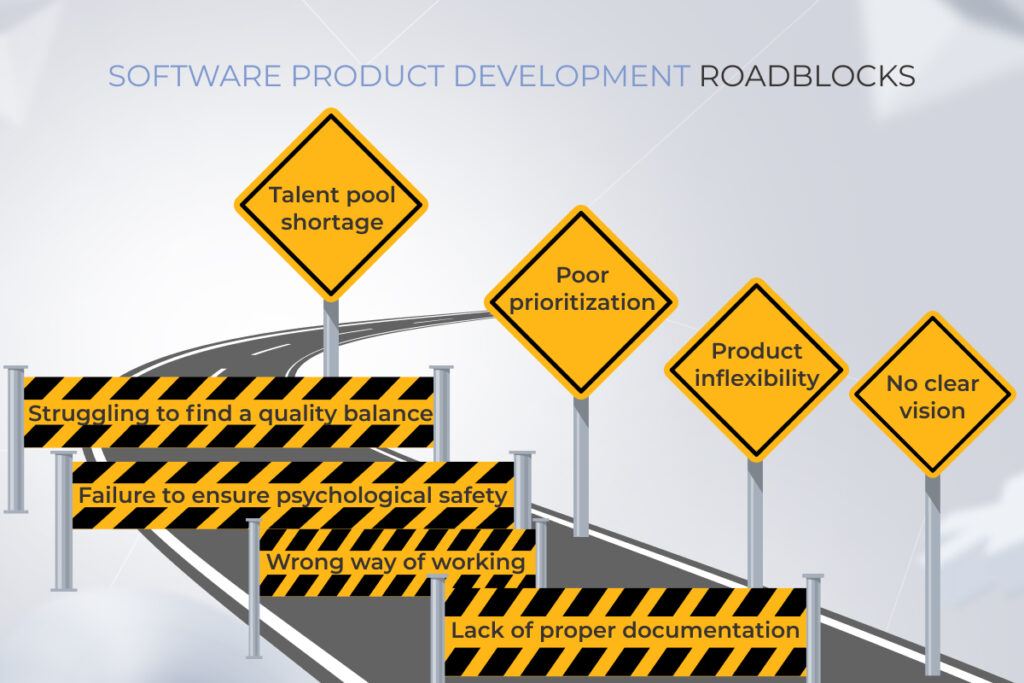
a list of software product development roadblocks

No clear vision

A vague understanding of the end product is a typical pitfall for both startups and well-established businesses. To create a value-packed solution, a team should know the purpose of building a product and the problems it should solve. This long-term mission of the product should be clarified in a product development plan and supported by accurate deliverables and estimates.

Lack of proper documentation

Poorly made software documentation can end up being an expensive headache down the road. From budget overruns to stretched deadlines to irrelevant features, the lack of a unified process for each step directly results from documentation gaps. Also, document inconsistency makes it far more difficult to switch software vendors.

Wrong way of working

Although Agile is billed as a de-facto standard for project management, it can’t be successfully applied by following one-size-fits-all guidelines. And when textbook Agile planning goes awry, teams get frustrated. But the art of Agile adoption lies in understanding the core principles of this management approach and adjusting an Agile-based framework of your choice to fit your unique project needs.

Product inflexibility

New and innovative products usually come with evolving requirements. And if the system design is inflexible and monolithic, you won’t be able to add new features or modify the existing functionality. This also applies to your project management techniques, unless open to change, they won’t let you respond to changing project assumptions safely and effectively.

Poor prioritization

Requirement prioritization is critical for planning, budget control, and scheduling software projects. Therefore, the project backlog should clearly list tasks by priority for the development team. Otherwise, you’ll end up with wasted resources and increased costs of development.

Failure to ensure psychological safety

The central pillar of the agile approach is neither Scrum nor Kanban, but a healthy dialogic process for your development team. Unless fostered positively, intellectual friction will not drive innovation or collaboration. Instead, each team member will be afraid to speak up and suggest new solutions to the problem.

Talent pool shortage

As 1 in 4 organizations are having trouble finding tech talent, skill scarcity can adversely impact your project’s progress. This problem becomes even more critical in competitive domestic markets and is typical for niche skills, meaning that you may spend a large portion of time seeking mythical unicorn staff.

Struggling to find a quality balance

Failed attempts to strike the right quality-cost ratio can also lead to project flops. That’s why teams may struggle to allocate the right amount of resources to prevent product defects or, conversely, spend too many resources on polishing their product. The key here is to reach a compromise between the cost of quality and a usable product.

Supercharge your product development process

Book a call

The four constituents of a well-organized software product development process

Planning a consistent product development journey requires a holistic approach where all variables — from team to technology — operate for the benefit of your product. Here are the four elements that can energize your success potential in the product field. 
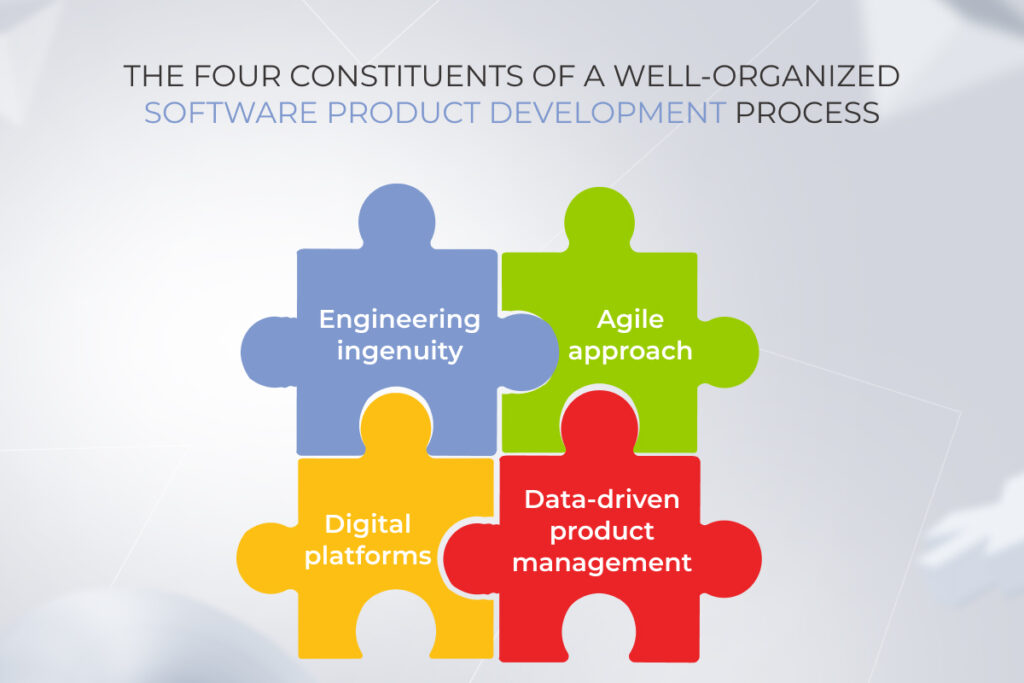
The four constituents of a well-organized software product development process

Engineering ingenuity

Developing an innovation-friendly culture calls for a collaboration-ready environment where self-managed teams are encouraged to generate out-of-the-box ideas. An engineering culture helps drive your product forward and creates a breeding ground for trailblazing solutions.

Agile approach

Adopting an Agile mindset is paramount for building from-scratch products with evolving requirements. This approach prioritizes value and achieves it through dynamic, customer-focused practices. But keep in mind that Agile cannot operate in silos, it thrives when viewed as a collective effort.

Digital platforms

Besides agile process management, your technology stack should also support changeability and give your team the freedom to make any alterations into production in a safe and sustainable manner. Microservices architecture, cloud, and open-source APIs are prominent examples of highly adaptable digital components.

Data-driven product management

Finally, your development team should be autonomous, yet KPI-driven and aligned. This includes tracking and visually representing software product development metrics that measure delivery performance (deployment frequency, lead time, and others).

Agile software product development lifecycle to build great products

Agile software product development cycle and user-centricity go together like bread and butter. An iterative sequence of development steps helps you meet user expectations by delivering products quickly, yet in a predictable way. Below, you will find the common software product development phases present in Agile. 
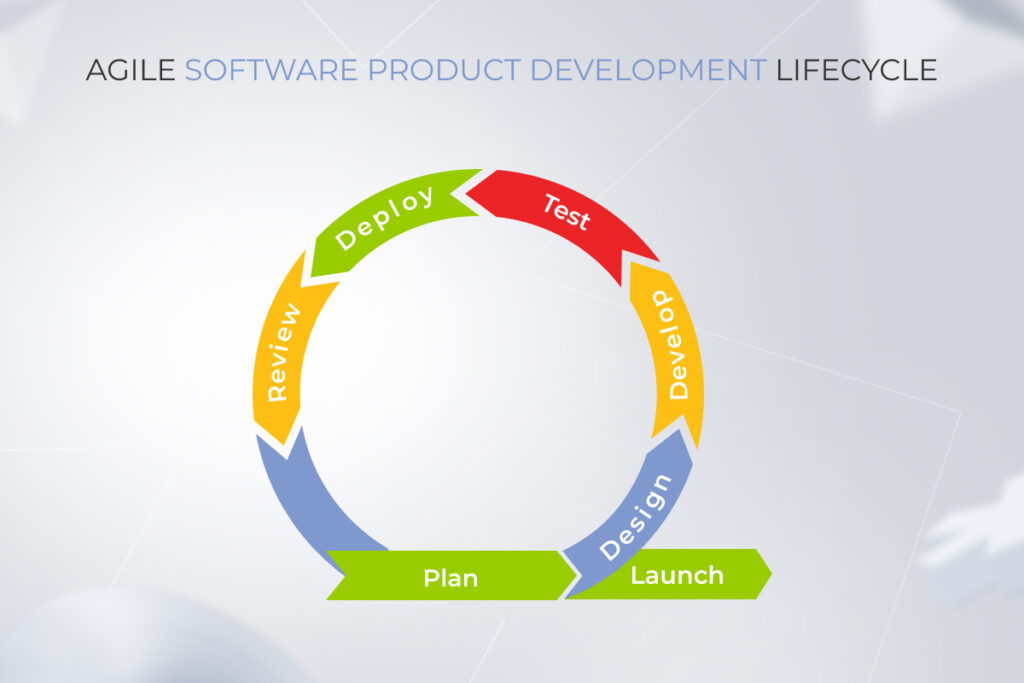
software product development steps in Agile

Product ideation

Everything starts with an idea, but a software product development roadmap kicks off with a crystal clear vision. Working closely with stakeholders, developers, and even future product users, the team first puts together a comprehensive overview of the project. 

From the long-term mission of your product to more detailed business analysis, the ideation process is used to provide clarity around the development of product software and nurture a business concept.

Discovery phase

The Discovery phase also focuses on research-based activities. But unlike ideation, this phase not only delivers hypotheses, but also takes them to the market for a reality check.  During the Discovery phase, you and your team determine business requirements, define the project scope, and suggest possible solutions to validate your product-market fit in the real world.

Below, you will find the milestones of the Discovery phase.

  • Proof of concept

All software product development ideas are worthy until proven otherwise. Therefore, a theoretical demo, or a proof of concept, is required to validate the feasibility of your solution. A PoC is an empirical exercise focused on demonstrating the viability of your solution — from market top-heaviness to risky features.

Once your idea is validated, your team identifies the development scope and proceeds with the design. 

  • Product UX/UI design

In collaboration with business analysts, UX/UI designers create a high-level product prototype, based on customer research. The prototype is then tested with the users, approved by a client, and refined if needed. After that, the final designs are distributed to production.

  • MVP development

A Minimum Viable Product (MVP) is the final destination of your idea verification. An MVP is an early version of your product with just enough features to make it usable for real customers. It helps the product team glean user feedback as quickly as possible to iterate the product. By leveraging MVP development services in USA, businesses can efficiently build, test, and refine their products based on real user feedback, ensuring a faster path to market success.
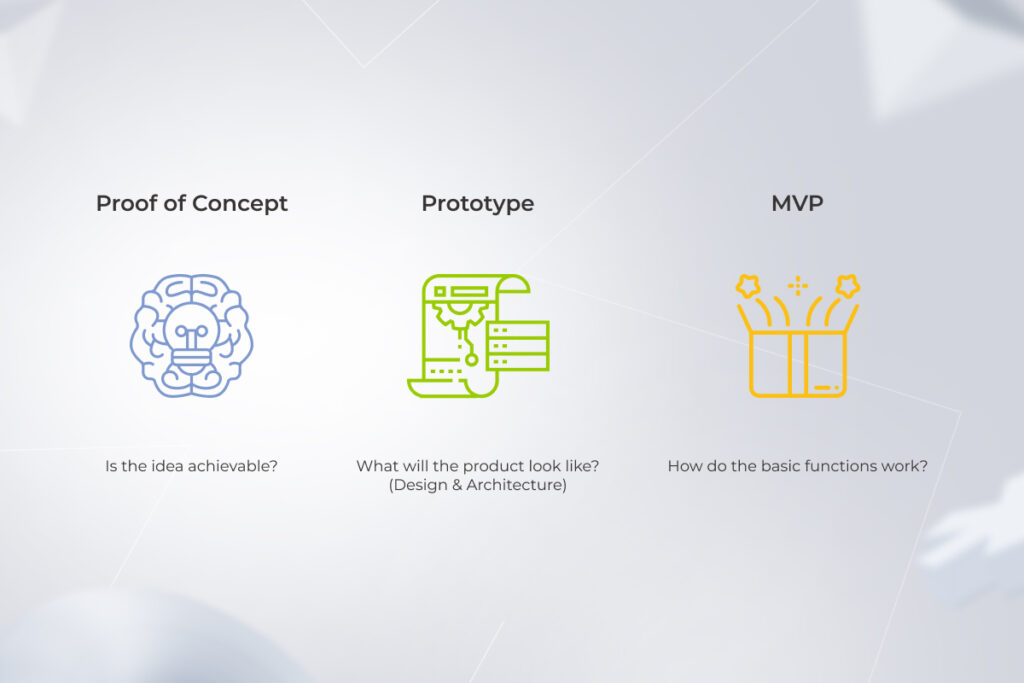
three milestones of a discovery phase in software product developpment

Development

The Development stage helps enhance your MVP with other, nice-to-have features empowering you to turn it into MMP later. In Agile, it’s an iterative, cyclical process that consists of smaller, more manageable increments. Iteration by iteration, your development team builds up the features. Testing happens continuously as new features are added. 

Maintenance and upgrades

Once your product is released into the wild, your development team monitors its health and performs troubleshooting and necessary upgrades. Perfective maintenance is also important at the post-production stage as it allows you to change existing product functionality by refining, deleting, or adding new features

Let’s build great products together

Contact us

The many faces of Agile software product development

The agile software development process is mostly an umbrella term that refers to applying Agile-driven frameworks during development. However, it’s all about matching the development methodology to the project, not fitting the project to the methodology. Below, we flesh out some of the most popular Agile frameworks and techniques to guide your software development lifecycle.

Well-defined system requirements are a luxury commodity for new software products. Frameworks based on the Agile methodology give project teams the platform, culture, and tools to manage changing requirements.

Scrum

According to the report, Scrum gets the highest marks in software development with 63% of teams leveraging it. This framework helps teams deliver value incrementally in short sprints which typically last 2-4 weeks during which the product is designed, coded, and tested. Scrum doesn’t stray from Agile philosophy, instead, it enriches it with rules, roles, events, and artifacts to facilitate the Agile way of development.
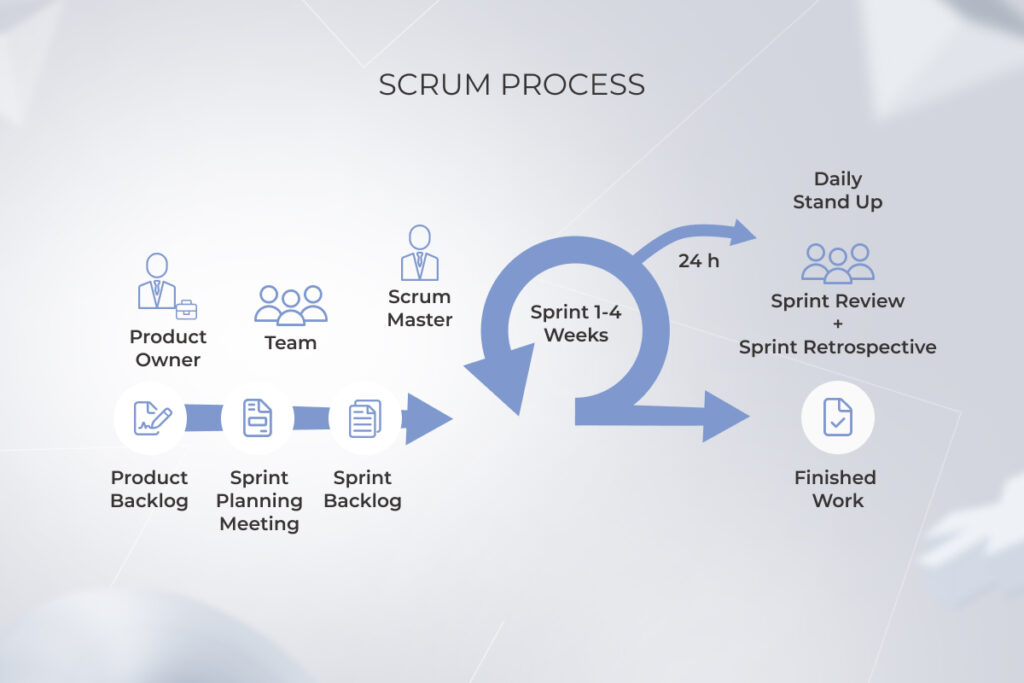
Scrum process in software product development

Scaled agile frameworks (SAFe)

Scaled Agile frameworks are Scrum for enterprises, based on 10 Lean-Agile principles. While Scrum is used to organize small teams, the SAFe framework applies to the whole organization or large, multi-geography teams. The basic construct of SAFe is the Agile Release Train.

Kanban method

Kanban is a popular workflow optimization method that adds more visualization to almost all software development processes — from feature prioritization to testing. Many Scrum teams also use select principles of Kanban as a visual process and project management tool. 

Extreme programming

Extreme programming is a software engineering paradigm that improves the quality and efficiency of your software development process. It is based on a set of values and principles that prioritize customer satisfaction, teamwork, and continuous improvement. 

extreme programming (XP) methodology for software product development

Lean

This Agile framework prioritizes addressing what must be worked on at the time, leavingno room for multitasking. With a linchpin idea of cutting waste in mind, product development teams book general meetings only if the issue can’t be resolved otherwise, set a straightforward approval process, and put features prioritization on the front burner to pack software with the most coveted functionality.

Crystal

Crystal is a highly adjustable framework that works for teams of 10 to 1000 people. It banks on osmotic communication, promoting background information sharing among team members. Fundamental rules of this approach imply using development cycles less than 4 months long and running reflection workshops to regulate the methodology with the project priorities.

Other Agile practices

Due to the emerging requirements, Agile teams often bake additional Agile practices into frameworks. Here are a few examples of curated techniques:

  • Test-driven development (TDD) — writing unit test cases for the software before writing the code itself.
  • Code review — involving one or more developers checking another developer’s work.
  • Pair programming — includes two developers teaming up together on one workstation. 
  • Prioritization techniques (MoSCoW) — a four-step technique that ranks project requirements by priority.

How to decide on a software product development team structure?

The right software product development team structure will determine how well your product is built. But although you need a cross-functional squad of software professionals, a mixed assembly of characters doesn’t automatically drive you to success. Here’s how to select your team members strategically.

Typical software product development team

To facilitate a dynamic development process, you’ll need to have the following professionals on board:

  • Product Owner — holds the voice of the customer and keeps the team backlog aligned with customer and stakeholder needs (usually on the client’s side).
  • Delivery Manager/Scrum Master — caretakers that ensure the project is delivered on time and within budget, while also enforcing the best Agile practices.
  • Development Team (Developers, QA, Designers, Solution Architect, DevOps specialist) — hands-on front players that turn requirements into a fully functional software product.

What does a product team structure depend on?

The set of roles in your development team does not fluctuate much from project to project. The only variable is the number of developers and QA engineers that can differ based on the volume of tasks and deadlines. 

Therefore, before you go into hiring, you have to define the scope of your project. So, if you’re in for a proof of concept, your development team will not be bigger than five specialists (PM, Product Owner, business analyst, software architect, UI/UX designer).  Conversely, full-blown product development requires up to nine specialists to complete as software engineers and testers step onto the scene.

Need a team of product development pros?

Reach out!

Key artifacts of efficient product management

To ship the right product successfully to users, your team has to be guided by lighthouses, or artifacts, that refer to project documents, outputs, and specific deliverables. Let’s see the core landmarks that indicate your product management is on the right track.

ArtifactMeaningDocument contents
Competitive analysisDescription of your business’s target market.– Direct/indirect competitors
– Market share and average revenues
– Industry benchmarks
– Monetization models, etc.
Product visionOutlines the long-term mission of your product. – Business goals
– Target audience and needs
– High-level product description
OKRs and KPIsIncludes performance measurement values.– KPI description and measures
– Objectives and Key Results 
Product roadmapDescribes a detailed vision and direction for a product. 

– Product features
– Release schedule
– Short- and long-term goals
– Product features and milestones
Customer Journey MapIllustrates the stages users go through when interacting with your product.– User persona
– User actions
– Touchpoints
– Pain points
Product Requirements DocumentDefines the necessary features and functionality of a product.– MVP features list
– Engineering implementation details
– Functional requirements
– Product development timeline
Product designs and prototyping documentsCovers all aspects of your product design.– User flow and design
– User stories
– Project specifics
Product release planProvides details of all the features of an upcoming product release.– Upcoming features and enhancements
– Timeline

Back in the day, product development firms managed the entire process from ideation to delivery onshore. But supporting the entire process from A to Z is becoming increasingly expensive and counter-productive. As a result, 79% of companies outsource their IT projects.

With offshore software product development, businesses access a global pool of talent at lower costs. Besides getting expertise that might not be available in your country, you can also tap into the latest technologies to ensure the best quality for your product. 

We at *instinctools take over end-to-end product development projects, allowing you to leverage leading-edge expertise, drive down development costs, and build a high-quality product hassle-free.

Mastering software product development process: from ideation to excellence

It takes a lot to create impactful products that win over customers. A properly structured software product development process is half the battle when it comes to success. An Agile-first, customer-centered, and client-oriented workflow, managed by a dedicated development team, grants you better control, improves project predictability, and saves your resources.

Deliver innovative products with ease

Get in touch!

FAQ

What is the product development process in software?

It’s a multi-step process designed to take a product from the initial concept to the final market launch.

What is Agile software product development?

It is an incremental approach to software development that focuses on shipping digital products in a timely and effective manner. The Agile-based process is characterized by short development cycles, or sprints, that allow for quick feedback and constant evolution of the product.

Is Agile only for product development?

This philosophy isn’t limited to building products. The Agile mentality and Agile-driven methods are also helpful in the development and management of services.

What are the 4 pillars of Agile?

This management approach is founded on four key principles:
1. Processes and tools are no replacement for individuals.
2. A functional product is more important than detailed documentation.
3. A collaborative solution is better than a rigid contract.
4. The team should welcome change.

What is the Agile software development life cycle?

The software product development process flow flow can be roughly divided into five phases, including conceptualization, inception, development, release, and maintenance. Each phase leads to the creation of numerous software iterations.

Offshore Development Center: Taking Offshoring to the Next Level

When economic turmoil takes a toll on the outlook of business innovation, an offshore development center appears to be the backbone of cost-efficient technological advancements. 

The already tough situation gets even more complicated due to huge IT skill gaps. Out of about four million job openings in the US tech market, 200.000 positions remain unfilled. The lack of talent goes hand in hand with the rising costs of technological innovation. To battle all-time high salaries and a talent crunch, organizations move technology production to other, more cost-efficient locations.

Outsourcing has been a well-established practice in pre-pandemic times and will continue its reign for years beyond. The rationale is simple: why would you pay $125K to get your software built in the US if you can hire a developer for $36K in Poland? After all, 2020 forced all of us to switch to remote collaboration mode.

But can an offshore development team suffice multiple long-term innovation imperatives? Unfortunately, the answer is probably no, so you might need another option.

What is an offshore development center?

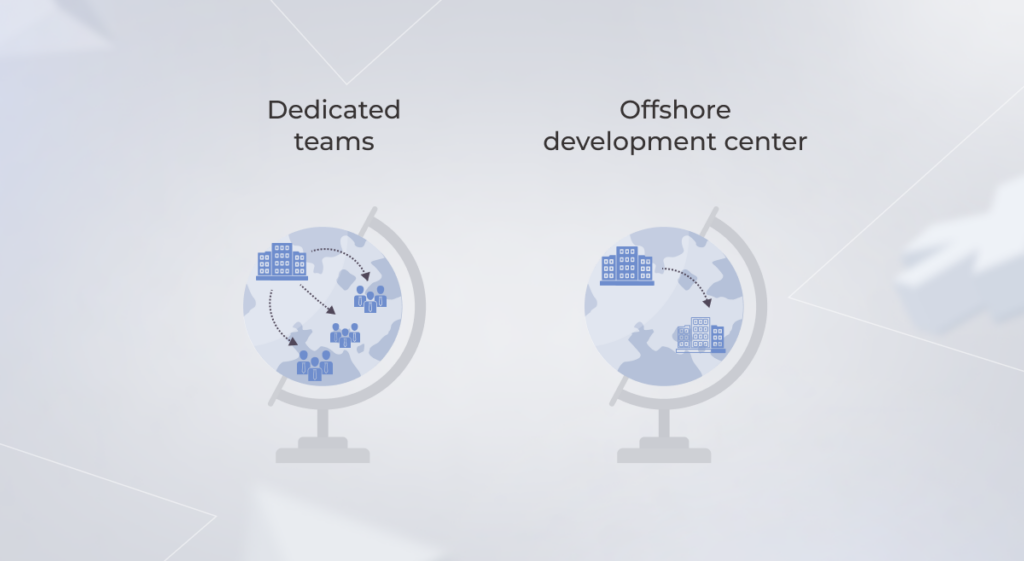
An offshore development center (ODC) refers to an overseas development facility with a cross-functional team, the required office equipment and amenities, and fully managed processes — all tailored to the needs of a client. Opening an overseas development center allows you to save development budgets, accelerate time to market, and grow your market reach even if you face a lack of talent in your country.

Dedicated team as your first step to the offshore development center

Most companies don’t have the need to commit to full-grown centers in the early days of outsourcing. In this case, the dedicated team model can act as the middle ground between an IT staff augmentation and offshore software center. A dedicated team helps you counter the headwinds of talent shortages and skill scarcities, but with fewer resources compared to a full-scale offshore development branch.

offshore development center

A dedicated team carries the development process from ideation to completion as an autonomous agile squad allocated exclusively to your business needs and development tasks. This hiring model can cover both end-to-end development and specific processes such as design, testing, or business analysis.

Regardless of the area of competence, a dedicated development team brings to the table the following value:

  • Self-management and process setup;
  • Relevant expertise and domain knowledge;
  • Focused approach and transparent collaboration;
  • The flexibility and ease of hiring;
  • Bespoke hiring according to your unique job requirements;
  • Reduced cost of innovation as the vendor takes over overhead expenses, hiring costs, training, and employee benefits.

As you see from the impressive list of advantages, this collaboration option works best for long-term software projects with dynamic requirements. But what if you have specific security requirements or have to handle sensitive health or finance data? Or your project is hardware-dependent? In this case, you might find yourself grappling with a whole lot of security, equipment, and other overheads.

The bright prospects of dedicated development also dim when you need a whole software development hub to address your large-scale project needs. Managing a motley crew of 20 dedicated teams across different geographies and time zones becomes more trouble than it is worth. Outsourcing doesn’t seem like such a win-win solution anymore.

Make software dev outsourcing a breeze

Contact the right vendor

When is an offshore development center your best bet?

So how can you build up your outsourcing capabilities and take the hassle out of team management? Go one step further and switch a dedicated team for a dedicated offshore development center. Along with the ease of crewing, an ODC extends your production capacity without increasing the risks.

Here’s when offshore development services can help you reap the biggest benefits.

Your business has special data security requirements

An offshore development center is like a new offshoot of your company, except that it is premised overseas. Therefore, it has everything you’d need in a traditional office to meet the required level of security. A private office space, authorized entry, software access control, and built-in network security make your ODC space the guarded fortress of product development.

As you have a single development unit, you won’t have to hire multiple management security information officers or compliance officers to track compliance adherence and security.

You require bespoke tech expertise

Niche skills might be expensive to secure or nurture unless trained in a more affordable location. Offshore dev centers allow you to set up a training center without spending your resources on third-party upskilling programs. 

In this case, the training course contents are customized to meet company-specific goals and do not expose your organization to additional security risks. In-house training also guarantees the right level of knowledge and is a perfect match for existing technology gaps.

Your project is huge

One-time or minor projects are often better off with a dedicated development unit, while large-scope development initiatives require continuous support, updates, and limitless scaling. An offshore center allows you to establish a continuous loop of delivery and scale your development facilities for multiple projects — all in one place.

You want to achieve more by spending less

If software development is not the core competence of your company, an offshore development location becomes the best option to keep your development costs moderate. ODCs are not typically packed with the same overhead costs that internal offices are. This way you get to reduce expenses such as office space rent, infrastructure, electricity bills, office maintenance, and, most importantly, salaries and taxes.

Unbeatable triad: benefits of offshore development services

You know there’s something to it when A-list companies resort to offshore development offices. Google, Microsoft, Apple Inc, and other giants have their technology development sites located in other countries, far away from their head offices. So, why do forward-looking businesses flock to offshore teams? We have the answer.

Providing domain expertise and vetted specialists at a lower cost

Offshore development services allow you to tap into the global talent pool, whatever the niche or domain knowledge you need. While your in-house candidate base is limited by geography, an ODC vendor has access to an infinite supply of vetted candidates from a rich, local talent database.

As ODC offices are typically premised in low-cost economies, a vendor helps you secure a local team of professionals at the fraction of the price you’d pay in-house. You don’t also have to deal with the pain of hiring and onboarding a new team, leave, insurance, and other employee costs, which significantly lowers your bill.

Taking care of complex administrative functions

From a legal standpoint, establishing an offshore development center requires you to create a new legal entity. However, you don’t need a degree in Legal Studies to make that happen. Instead, your local ODC partner does the heavy lifting of legal regulations, taxes, HR-related issues, and other administrative burdens.

It also means that you don’t have to dispatch operational resources overseas to solve issues like office renovations and payroll taxes or wade through the jungle of local laws and business processes.

Ensuring full compliance with your requirements

An offshore software team operates in full compliance with your industry regulations following documented development processes. As the team augments your in-house unit, you have full control over its performance and every operation of your projects. Moreover, an offshore software development office gets certified and audited in line with your specifications.

Investing in your own offshore development center: is the game worth the candle?

Offshore development centers have got a lot in store for fast-growing companies. However, you must go a long way to create a development center in an overseas location, especially if you decide to go on your own.

offshore development center

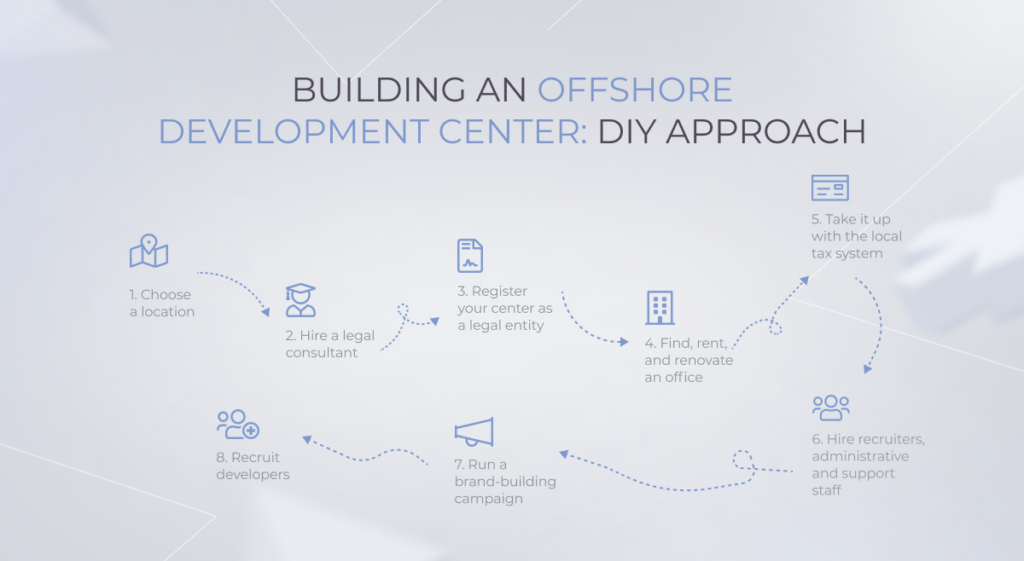
Choose your ODC destination

You first need to decide on the optimal location of your offshore development center. There are a lot of factors to take into consideration — from the tax policy to the English language proficiency.

A professional consultant is needed to help you look into the legalities of a business entity and select the right legal structure.

Once you’ve decided on a legal form, you need to submit a package of documents to the territorial registration authority for state registration.

Find, rent, and renovate an office

After all the paperwork is done, you have to find a workspace for your offshore unit. In most cases, the office will need renovation, new equipment, and other office materials.

Grapple with the local tax system

Now it’s time to dive into the tax mystery and find out more about your tax liabilities.

Hire recruiters, administrative, and support staff

As it’s a full-fledged office, your center requires trained personnel to take care of the workspace and handle your business processes.

Run a brand-building campaign

When you’re all set, your new branch needs some exposure to establish its market presence and get a headstart in the unknown business landscape.

Recruit and retain developers

And now, if you’re persistent enough to complete this arc, you get the final prize — the never-ending dread of hiring local specialists from the uncharted local market.

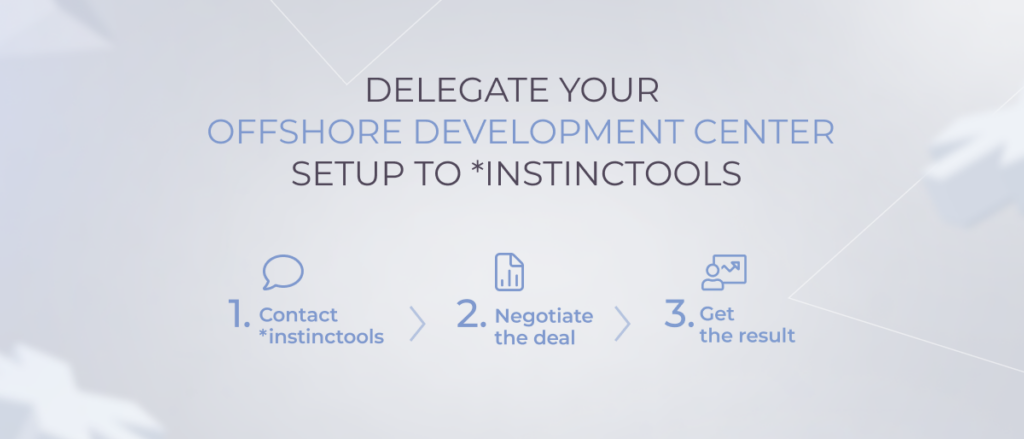
By this time, you might think that initiating an overseas office is an overlong, expensive, and challenging endeavor. You’re right, it is. But it doesn’t have to be if you have a trusted ODC vendor onboard that has a decade-long experience in setting up offshore centers. In this case, your responsibility area (and expenses) shrinks down to choosing your ODC location and validating completed tasks.

offshore development center

Looking for an experienced ODC vendor?

You’ve got one

What location to choose for your offshore software development center?

When scaling beyond borders with an ODC, the location choice can either make or break your undertaking. An ideal destination should offer a sizable talent market not to limit the growth of your center. The price-value ratio is also important to gain from the new office and innovate at lower costs. Moreover, your ODC team must be on the same wavelength as you, which is impossible with cultural and language gaps.

Eastern and Central Europe is traditionally considered to be a cost-affordable offshoring mecca. This is why Bulgaria, Romania, and Poland are among the most favored offshoring locations where all criteria are aligned. So let’s have a closer look at one of the leaders — Poland.

Extensive developers’ skill sets

Poland is home to software developers with high proficiency in multidisciplinary fields. The expertise and knowledge of Polish software engineers have earned them third place among locations with top developers. Moreover, Poland hosts the largest IT talent pool in Europe with over 400,000 IT professionals on the market, which makes this location a key IT powerhouse.

offshore development center

Dynamically growing IT market

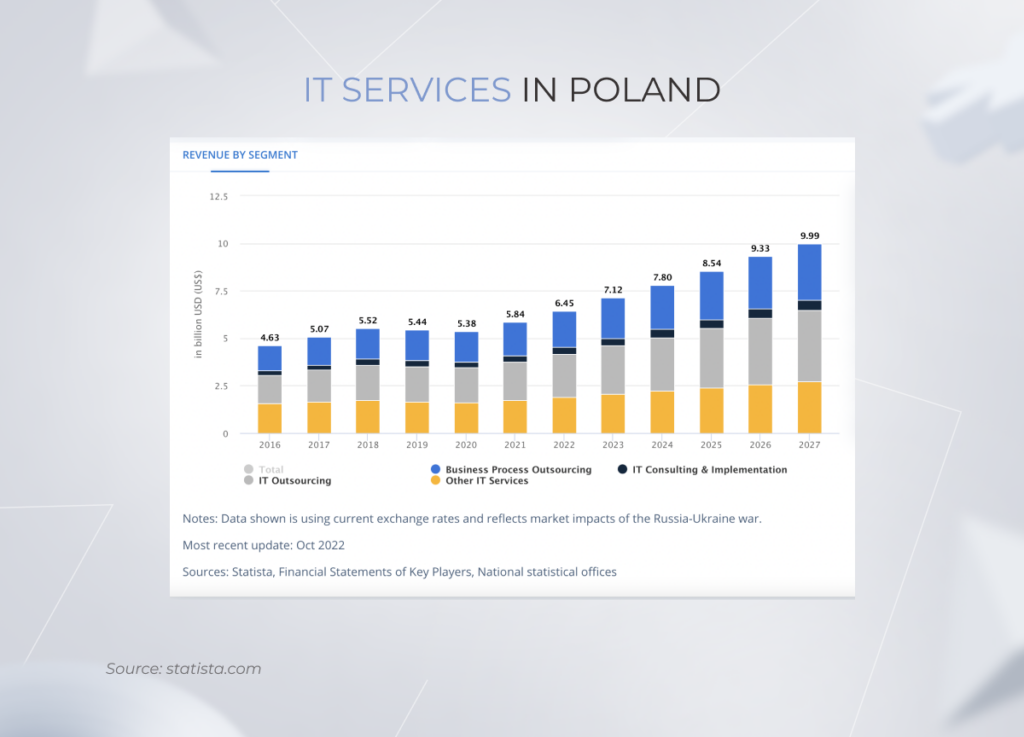
While being a mature outsourcing market, Poland continues to gain more steam in the IT sector. According to Statista, the revenue in both IT and IT outsourcing markets has followed the growth trajectory over the last few years.

offshore development center

The country’s IT services market increased to a projected $6.45 billion in 2022, with outsourcing being the largest segment, valued at $2.29 billion. The resilient economy of Poland contributes to the overall image of a breeding business ground.

Strategic location in Europe

Poland’s EU positioning translates into a convenient time zone. Warsaw has a six-hour time difference from New York, which allows software providers to deal with their clients’ requests without delay. To put it into perspective, India is up to 12 hours away from the USA. As for other countries, such as the UK and the rest of Europe, Poland’s prime location allows for frictionless communication with no time lags.

Low development costs

Unlike other Western European countries, Poland offers vetted talent at affordable rates. According to PayScale, the average yearly rate for Poland-based software engineers stands at over $21,000 per year, while the average US developer is paid x6 times more. 

However, lower rates do not come at the cost of lower quality. Instead, the quality of software development is on the same or higher level than in top-paid locations. 

Compliance with EU and US data protection standards

Due to its strategic location, Poland is subject to the same data protection regulations as other EU countries, such as Germany or the Netherlands. Hence, the data protection regime in Poland is mostly governed by the General Data Protection Regulation or GDPR, a well-known compliance standard for EU companies.

HIPAA certification is also commonplace in the country, validating the skills of Certified HIPAA Professionals (CHPs), Certified HIPAA Administrators (CHAs), and Certified HIPAA Security Specialists (CHSSs). This means that compliance-wise, Poland stands on par with EU- and US-based organizations, suggesting high compliance literacy of local developers.

No communication gaps

Poland is a part of European culture, so there’s no cultural gap between the team and the client. The influence of European culture in Poland is combined with the global mindset of operating businesses. Therefore, business operations aren’t compromised when local teams communicate with people from different backgrounds.

Moreover, the country is well-known for its outstanding English proficiency. According to the EF English Proficiency Index, Poland ranks 11th out of 100 counties in the world for the knowledge of the English language. So as long as you speak English, you’ll be fully aligned with your Poland-based ODC team.

Mature R&D hub

Global tech leaders, including Microsoft, Google, Oracle, and others have located their research and development centers (R&Ds) in Poland. It proves that this ODC location offers a mature, affordable, and tax-friendly outsourcing framework that encourages foreign investment for the development of innovative products.

However, even the best setting can be rendered ineffective with the wrong team onboard. Therefore, the choice of a reputable and experienced partner is yet the most important success factor for establishing your foreign presence.

Setting up an ODC in Poland?

Consult an expert

What to look for when choosing a vendor for offshore development services?

The stakes are high when it comes to confiding a fully functional business unit to a third party. It means that your ODC partner should act as an extension of your company, know the ins and outs of your domain, and keep your business bar high.

And the easiest way to forecast the reliability of your offshore development center vendor is to look at its track record. The more ODC projects they have under their belt, the more likely your initiative to pan out. Here are some other ways you can validate the credibility of your partner.

Evaluate IT expertise

Besides English, your team should speak the language of innovation to power your products with the latest technologies. Usually, the main reason for one business to resort to a third party is the lack of high costs of technical knowledge and domain expertise on site. For instance, a company wanting to drive digital transformation doesn’t have what it takes to build a BI and analytics system, so they farm out the function to the vendor.

On this front, you should consider the particular tech stack and the focused domains that you are interested in. For example, *instinctools is a great fit for cloud-based projects (with Google Cloud, Microsoft Azure, and OVHcloud partnerships under our belt), custom enterprise software development, and Business Intelligence powered by Power BI, Tableau, and Qlik. On top of our tech expertise, we also offer a wide array of consulting services crowned with an end-to-end technology-enabled business transformation.

Besides the broad and in-depth technical knowledge, your partner should know the ins and outs of your industry to align technology with business value. With domain expertise, developers can also contribute on a conceptual level and minimize development risks. We, at *instinctools, have accumulated extensive industry proficiency that spans virtually all domains — from manufacturing to healthcare to entertainment.

Investigate relevant experience

No matter how far and wide your vendor’s technology command spans, it’s feeble without real-world experience. Therefore, the best way to set up your initiative for success is to drill down into the vendor’s portfolio. 

Ideally, the portfolio should feature similar projects in the same or an adjacent domain. Make sure that your selected partner also boasts hands-on experience in establishing offshore development centers and associated processes.

You can also reach out to the partner directly if you cannot find relevant projects — not all projects end up in the Clients section due to confidentiality issues. Client testimonials on Clutch, GoodFirms, and other directories can also give you an idea of the vendor’s maturity.

Focus on cost-effectiveness, not cost

A fully managed operational center holds great promise in terms of lower development expenses and ease of management. However, only a few deals grow into worthwhile investments, and the ODC model is no exception. Low-cost labor is often a key element of price calculations, yet is not the only one to help assess the viability of the offshore development center idea.

In some cases, procurement, project management, travel, and other hidden costs may backfire and get your cost gains to zero. So, the key to landing the right development partner is to understand the value you expect to generate from the offshore center and to correlate this value with the involved effort and investment.

Going beyond cost borders with offshore software development center

The competitive market dynamic cripples any business that isn’t fast enough to adapt and accelerate growth. To maintain a competitive edge, companies accelerate their technological initiatives and supplement traditional services with digital-first experiences. 

However, digital transformation is a costly journey unless taken to a more affordable setting. Offshore development centers help companies innovate and scale their technological offers at lower costs and less administrative hassle.

But despite the outward glitter, an ODC idea has a specific application area and doesn’t cater to all needs. Large-scale projects, niche skills, high-security requirements, and clear economic gain in your particular situation should be the main precursors to setting up a fully operational center in another country.

Scale beyond borders

Contact an ODC partner

Accessibility For Apps: Guidelines, Examples, and Best Practices of How to Care About the User

According to the WHO, 15% of the world’s population experiences some form of disability. In most cases, aware societies strive to balance health disparity so that this population cohort doesn’t feel any barriers to an acknowledged quality of life. And it works just fine until a person with a disability faces a situation when something is out of their reach because of poor mobile app accessibility. 

Our developers and UX/UI designers will walk you through what can be done to increase the accessibility of your mobile app and provide time-tested tips on simplifying the task with the help of generative AI.

Why does mobile accessibility matter?

Making your applications inclusive isn’t a matter of social responsibility only. Along with diversity cultivation, accessible mobile applications unlock an additional revenue stream, give your company competitive tailwinds and help meet compliance regulations.

Empathy

As we age, we all face some limitations, be it impaired hearing, lowered sense of vision, or motor impairment. Moreover, situational and temporary disabilities can put all of us into similar settings that individuals with a long-term disability have. Therefore, mobile accessibility is a long-term investment that, among other things, helps us take care of the older generation, our older selves, and those struggling with the temporary condition.

Assistive technology is also an important strategy to better integrate people who face additional challenges into the modern world and online communities.

Competitive advantage

According to statistics, one in six people has a disability. By making your solution inclusive, you cover an additional 61 million users, which expands the user reach of your application. 

Besides, tech inclusion is commercially interesting. The buying power of people with disabilities is around $13 trillion. Considering the number of inaccessible apps, your app and mobile device accessibility can reel in this additional revenue stream.

Mobile phone accessibility also reduces the operational costs of your business. A Dutch SNS Bank reduced the number of call center calls and associated expenses by over 15%. The savings are associated with mobile web accessibility changes the bank made earlier.

Accessibility makes better tech for everyone

Tech inclusion is essential to some, but useful for all. Closed captions, virtual assistants, and speech recognition software are the go-to features for all users, including people with disabilities. Voice route directions, for example, are both an accessibility feature and a hand-free option for drivers. Therefore, making your solution all-in will benefit everyone.

Compliance with standards and regulations 

In many cases, mobile app accessibility standards are required by law. The Americans with Disabilities Act Standards for Accessible Design, or ADA, mandates the inclusion of all people, in all areas of public life, including web-based businesses and their applications.

The ADA law also works alongside the Web Content Accessibility Guidelines (WCAG) which documents a single shared standard for web content accessibility. The current WCAG version 2.2 was published in October 2023.

By 2025, all EU-based companies must also optimize their services and products for accessibility to comply with the European mobile app accessibility guidelines.

Better brand image

Finally, digital accessibility benefits your brand and creates more opportunities for brand advocates, as up to 73% of customers believe that a company should take a clear stand on social issues.

How to ensure mobile app accessibility?

As of today, Web Content Accessibility Guidelines, or WCAG, are considered to be the benchmark for website accessibility. The guidelines also feature WCAG for mobile, which outlines mobile accessibility best practices. Below, we’ll talk about what your application should be like to be truly accessible according to WCAG.

Keep in mind that each principle includes three levels of conformance, where A is the minimum level and AAA stands for full conformance. Most organizations strive to score AA as a golden mean. 

Perceivable

Making your solution perceivable means that users must be able to perceive it with one or a few senses. In simple words, if your app’s content is geared towards a visual experience, it should have an alternative that involves auditory perception or any other sensory modality.

What can be the problem here?

  • No text alternatives 

Some solutions may fail to offer text alternatives for non-text content featured on screen, be it controls or images, in a way that is perceivable by the screen’s reader. It inherently makes the app unreadable for TalkBack or VoiceOver, which are default screen readers on Android and iOS respectively. 

On the contrary, speech descriptions make all non-text data accessible for the blind or people with low or weak vision. Facebook, for example, has rolled out automatic ALT text to describe visual content for screen readers.

an example of automatic ALT text describing visual content on Facebook
  • No adaptability

A mobile solution overlooks accessibility when its structure isn’t readily adjustable to different content presentation structures and orientations. In particular, an inclusive product can switch to both landscape and portrait without sacrificing content or elements just like the example below.

an example of an adaptable user interface

Native mobile app accessibility guidelines also require your product to mark up information, structure, and hierarchy between elements. This way, headings, tables, and lists will remain intact when the presentation changes, keeping your layouts simple and consistent.

Adaptability is essential for people with motor impairments, screen reader users, as well as people with learning difficulties and cognitive fatigue.

  • No distinguishing features

Inadequate contrast, a poor choice of colors, or the absence of text resizing take a toll on users’ perception. For instance, people with color perception issues struggle to distinguish between certain colors. Therefore, colors shouldn’t be the only way to convey differences or prompt action. Instead, combine color and text or character cues to convey information.

a juxtaposition of two illustrations highlighting the importance of text and character cues for interface accessibility
a juxtaposition of two illustrations highlighting the importance of a right choice of colors

Loss of content or functionality is another common accessibility issue that typically occurs when a visually impaired user zooms the text. Your mobile accessibility settings must allow for increasing by up to 200% while retaining all content and elements.

Operable

This principle necessitates your application to include fully-operable interface and navigation elements so that the user can make use of every feature regardless of impairments or disabilities.

What can be the problem here?

  • Lack of time

Given the diversity among people, it’s difficult to predict how much time it takes to browse through the app or find a specific section. Most banking applications, for example, have a maximum session time as a security measure. However, time limits or time-sensitive content makes it inconvenient for a screen reader or an elderly user to process information.

Flexible time limits or the turn-off option, on the contrary, make your application more friendly to seniors, sight-impaired persons, or foreign speakers.

  • Flashing content 

Blinking content is a red flag for inclusive applications as it can provoke seizures or other undesirable effects. Thus, individuals who have photosensitive seizure disorders simply cannot look at flashing lights or contrasting visual patterns without having an adverse physical reaction triggered by them. That’s why it’s important to avoid content that flashes over 3 times in 1 second and limit the area of flashing to a small portion of a smartphone’s screen.

an example of a flashing content warning
  • Navigation

Navigation that is neither programmatically tagged nor structured can also prevent a user from consuming the content. It holds especially true for visually disabled users that can only navigate your application with assistive technology as well as people with cognitive and motor disabilities.

Landmark regions, descriptive headers, unique screen titles, and labeled controls enable both users and screen readers to locate the needed section quickly and with fewer keystrokes. The application can also be coded to skip graphics and navigation links when consuming the content with a screen reader.

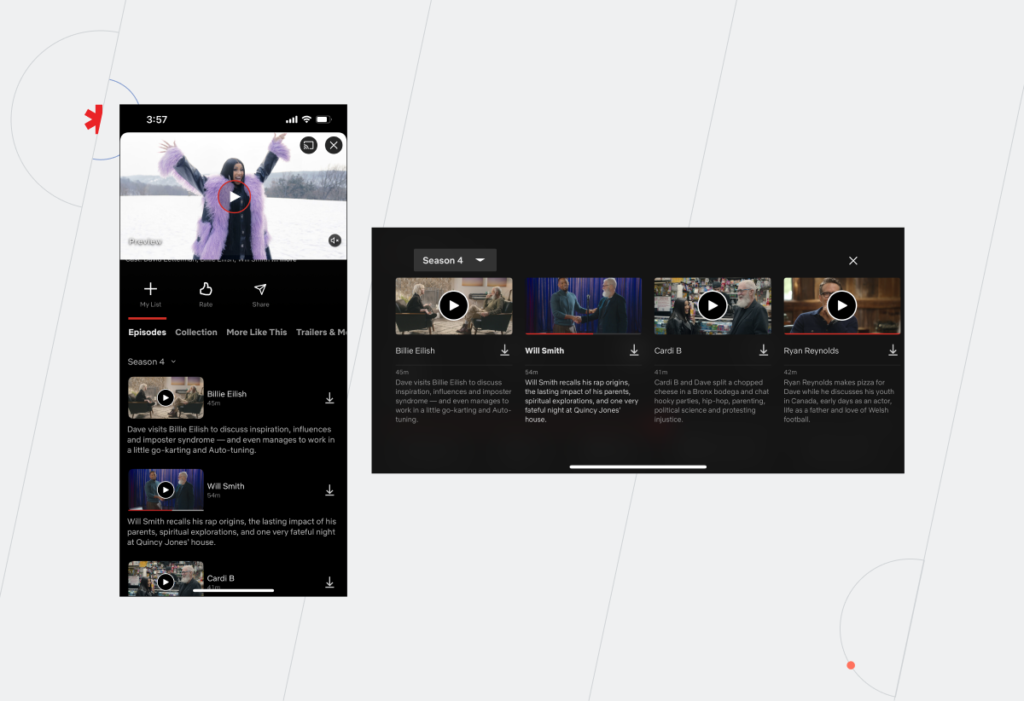
Tastemade, for instance, is a great example of full-screen navigation at work, while the example on the right sacrificed discoverability for a sleek design.

an illustration pointing the importance of a full-screen navigation

Understandable 

According to this accessibility principle, all information and your entire user interface must be easy to grasp for any person regardless of their health status. Simply put, the more intuitive and straightforward your application is, the more chances it has to score the AAA conformance level.

What can be the problem here?

  • Predictability

Some applications prefer to hide design elements behind sophisticated icons or employ futuristic user flows. While such designs are admirable works of art, they lack clarity. 

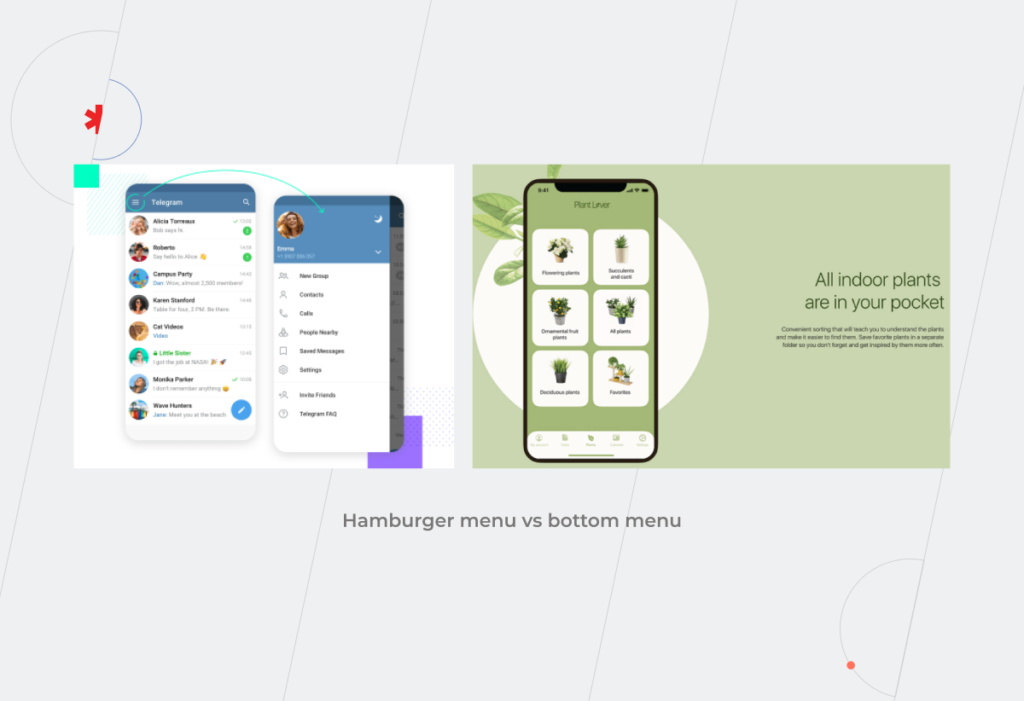
Hamburger menus, for example, are a widely accepted standard for mobile app development that simplifies menus for compact screens. However, they are neither navigable nor predictable for people with visual disabilities, cognitive limitations, motor impairments, and reduced dexterity. The desktop version of Telegram, for example, has a hamburger menu button.

Hamburger menu vs bottom menu

The overriding objective of predictable design is to set accurate expectations about what will happen next through consistent design patterns, standard semantic elements, and ordered information structure. An accessible application should also have all elements easily discoverable on the screen to give an accurate understanding of where the user is now. Bottom navigation, vertical sidebar, or sticky menus play it right.

  • Input assistance

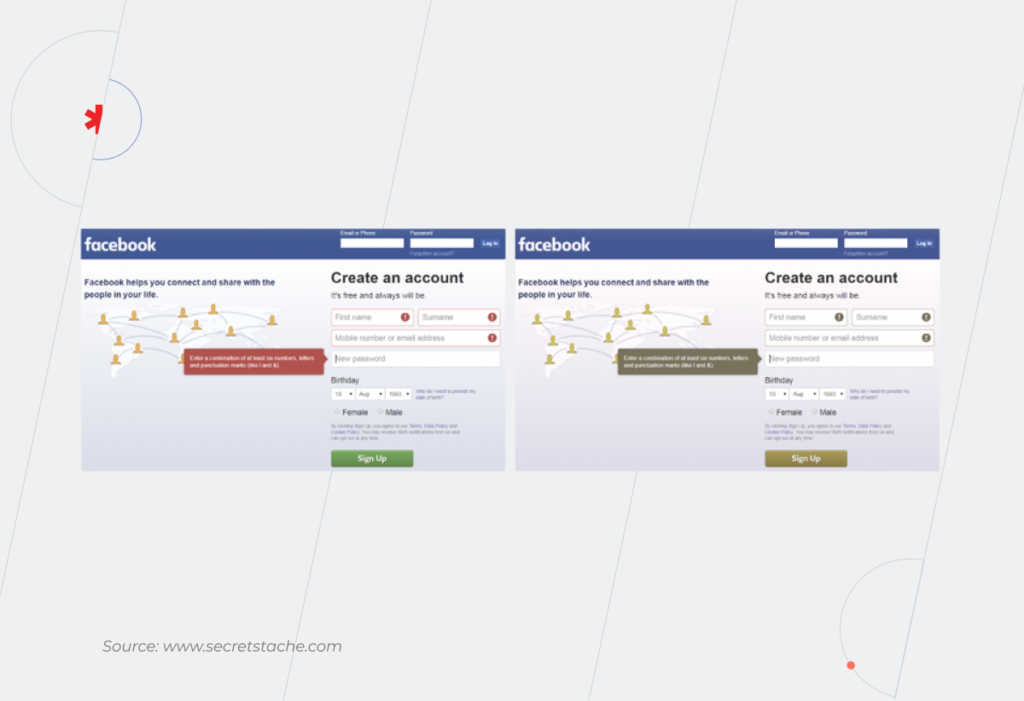
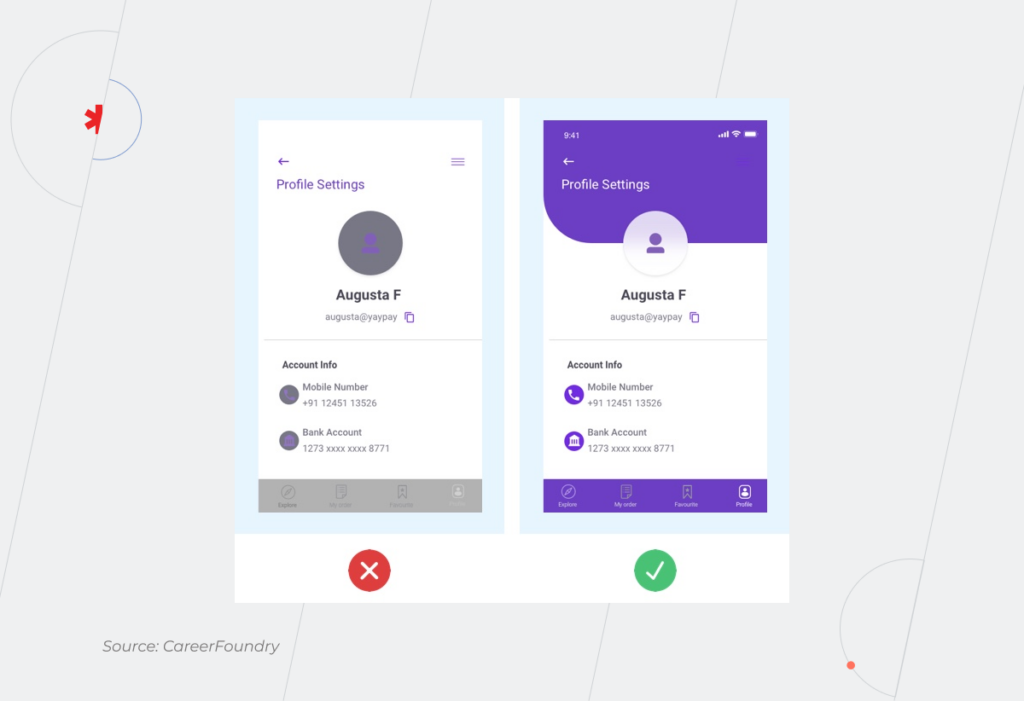
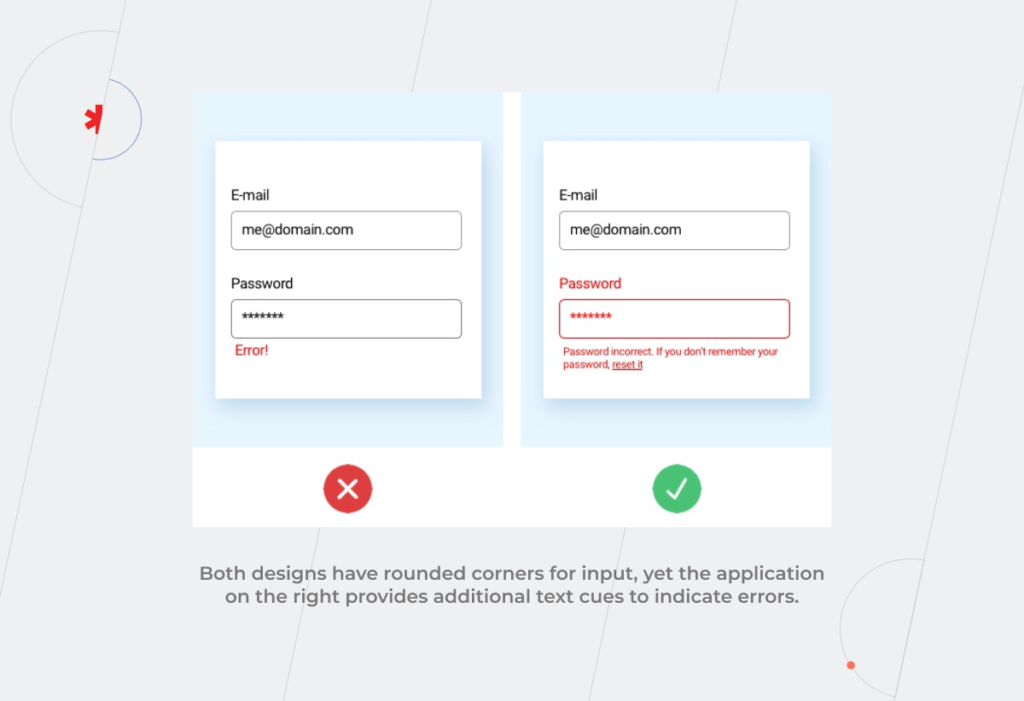
Some users with lower quality vision, and with reading and intellectual disabilities may find it challenging to enter the information error-free or differentiate between mandatory and optional fields. To provide assistance, an application interface can include cues in the fields to reinforce important information.

The cues may range from labeled attributes for screen readers to select states and rounded corners. 

examples of bad and good design in terms of input assistance
  • Error prevention

On the same note, typical error indication methods may not work for individuals with low or impaired vision or color-blind people. Likewise, users with reading or motor disabilities have a higher chance of entering the wrong input, which can lead to serious consequences, including financial liabilities. Therefore, if the application doesn’t provide user-controllable data, it is not accessible.

Reversible submissions, order confirmation, deleting a record, or unsending a message are some examples of safeguards that will keep users from making a mistake.

Robust

Accessibility features should be seamlessly delivered across platforms and devices, including different versions of screen readers, braille terminals, or text magnification software. In simple words, robust design is immune to coding errors that can distort the content or functions in a web-enabled device or assistive technology. 

What can be the problem here?

  • Poor coding

If the HTML code behind your application lacks complete start and end tags, the app’s content may display differently across devices, not display at all, or be unreadable to assistive technologies. Well-formed HTML code that conforms to all markup language specifications makes sure that the accessible content structure will remain as intended across all platforms and devices.

Can cross-platform development provide a proper level of accessibility?

Cross-platform development is a Swiss army knife that accelerates time to market and kills two platforms with a one-code base. However, the accessibility potential of cross-platform development lags behind native applications. Therefore, cross-platform technologies are a tradeoff between accessibility and cost reduction, which can still guarantee at least a basic level of mobile accessibility on Android and iOS. 

Thus, Flutter app development is committed to making apps more accessible and includes built-in support for accessibility combined with the same capabilities of the operating system. Flutter can help you implement such accessibility features as large fonts, screen reader compatibility, sufficient contrast, and more. 

But keep in mind that mobile accessibility is a collective result of your whole development team, including Flutter developers. While UX/UI designers are dedicated to building inclusive interfaces, QA specialists make sure your final app version passes accessibility testing. 

Trust gen AI tools to review your app for accessibility issues

In the pre-AI era, accessibility excellence required intensive research and know-how from the development team. Tuning together inclusive features and a crispy interface may still be tricky, but the rise of AI-powered tools has fast-tracked resolving accessibility-related issues. 

For instance, UX/UI designers don’t have to manually review apps’ interfaces to spot accessibility defects. Software such as Stark, Userway, and Google’s Accessibility Scanner can automate the task. 

These tools are indispensable at the product design stage, where they scan Figma, Adobe, or Sketch files for compliance with WGAG and ADA requirements, fix minor issues, and highlight violations that require the UX designer’s input. 

There’s no need to decide between accessibility and design

Equal access to technology allows all people to actively participate in society and leverage tech comforts. Along with compliance conformity, mobile accessibility also contributes to a larger user base and competitive edge of your company. 

If you struggle to strike a balance between accessibility and design, our company knows how to score on both. Based on your unique requirements and accessibility standards, we seamlessly integrate inclusivity into a top-notch app design. Drop us a line to create a top-grade mobile solution that caters to all. 

Whenever, Wherever: Keep On Top of Your Data With Mobile BI

From tech-heavy reporting projects to dedicated analytics tools, business intelligence has come a long way to becoming an industry standard among companies. However, despite the present proliferation of BI, businesses still struggle to seek out analytics excellence. The isolation of traditional BI tools continues to pose challenges, resulting in a mere 24% of data-driven organizations.

But why limit business intelligence to a desktop version, when your employees can leverage advanced analytics literally in the palm of their hand? Just like fitness or financial trackers, mobile business intelligence can seamlessly support existing data pathways and produce actionable insights on the go.

What is mobile business intelligence?

Mobile BI is software that extends desktop business intelligence applications and makes analytics accessible on a mobile device. Mobile BI software allows users to access and evaluate business metrics, and reports from smartphones and tablets.

Stepping into the age of action: ultimate benefits of mobile BI

Driven by increasing Bring-Your-Own-Device workplace practices and mobile computing, mobile business intelligence has experienced unbelievable growth over the last few years. In 2021, the mobile BI market size stood at over $11 billion. By 2030, it is expected to rack up over $38 billion. Let’s see which advantages of mobile business intelligence have secured their pride of place among adopters.

Real-time data access on the go

Traditional business intelligence solutions tie BI users to tools that are specifically allocated to corporate environments. When away, decision-makers cannot access valuable data, which hampers proactive response. Conversely, mobile BI provides the ability to make fast, well-informed decisions even when you are away from your desk, which is especially vital in industries such as finance and healthcare.

Offline access to data is among other differentiating mobile business intelligence benefits. Since mobile devices have wide in-memory caching capabilities, all data visualizations can be explored with no internet connection provided it’s a native mobile app.

Increased team collaboration

Since mobile BI directly reaches the hands of BI users, it ensures easier knowledge-sharing. On-the-go data analytics also matches well with growing remote practices, making sure each employee is in sync with other remote team members. 

Mobile BI also allows for permanent, intermediary, or temporary access, which keeps your controls on par with desktop enterprise software.

Rich user experience

Supreme user experience is among other core benefits of mobile business intelligence. While smartphones come with inherent constraints such as small screens, tablets can pick up the slack as user-friendly mobile business intelligence solutions. Tablets make the best of both mobile design and desktop design, offering portable, always-on, and touch-capable analytics.

Compared to static desktop reports, portable BI solutions also usher in more interactivity, allowing the user to zoom, pinch, and swipe their way through insights. Moreover, native mobile applications can tap into device-specific features such as GPS, calendar integration, and QR-code scanning to expand analytical capabilities.

Maximized value of BI adoption

According to mobile business intelligence trends, CEOs that make data-driven decisions are 77% more likely to cultivate a company’s success. Cloud and big data mobile business intelligence confers accurate governing capabilities to other levels of the business hierarchy.

It means that a larger number of employees can have access to high-quality data, which facilitates the digital transformation of the company, gives the whole organization a vantage point, and increases operational efficiency.

Don't miss out on the benefits of mobile BI

Reach out

Who can benefit from mobile BI the most?

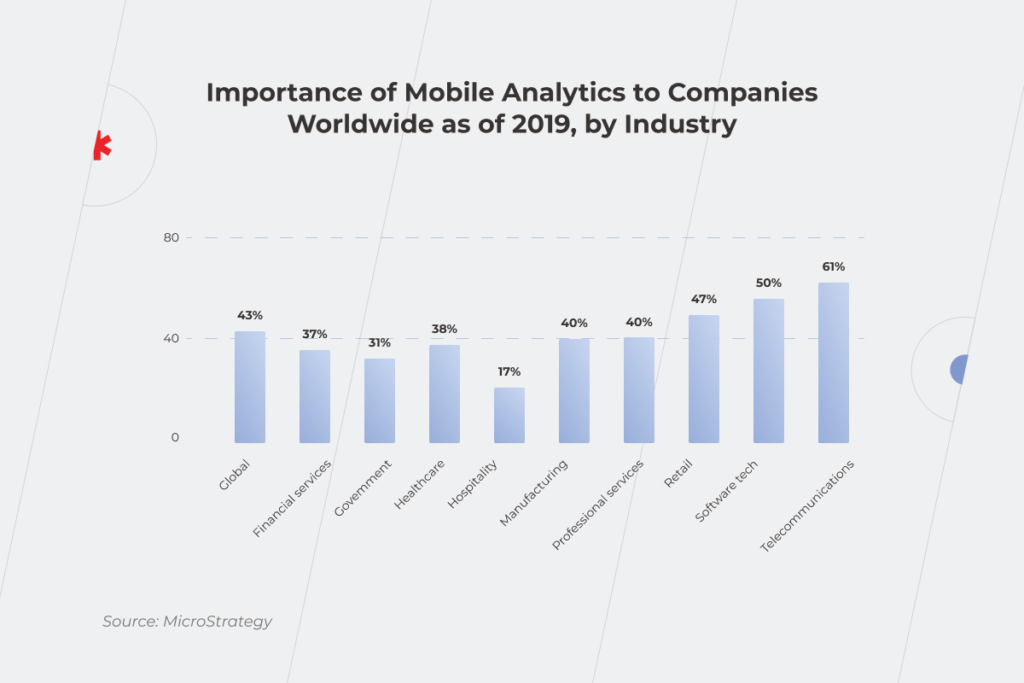
Businesses of all types and sizes can benefit from mobile business intelligence applications. However, according to the Mordor Intelligence report, the telecommunications and the software tech industries stand to gain the most benefits due to the presence of large corporations like Apple, Facebook, IBM, and Google.

Beyond the software market, retail, healthcare, and manufacturing are among other major players in the world of portable BI. Around 47% of retail respondents attest to the growing importance of mobile BI applications with 38% of healthcare providers sharing the enthusiasm. High adoption rates of mobile BI apps in these industries stem from increased demand for rapid data processing and high volumes of operational data.

 Statistics that shows importance of mobile business intelligence by industry

For example, retailers can use mobile augmented data analytics for on-the-move warehouse management, customer profiling, or store layout optimization. Healthcare providers use data analytics to support clinical decision-making, provide more personalized treatments, and increase healthcare accessibility for rural areas. Ultimately, a mobile BI strategy can both support the bottom line and boost customer satisfaction.

On a broader level, mobile analytics can support the following application matrix:

  • Fraud and security management;
  • Sales and marketing optimization;
  • Predictive asset maintenance;
  • Risk and compliance management;
  • Customer relationship management;
  • Supply chain analytics, and others. 

Which roles are among those likely to be adopters of mobile BI solutions?

As for corporate levels, each employee — from decision makers to employees — can leverage all the necessary data without the hassle of corporate back and forth.

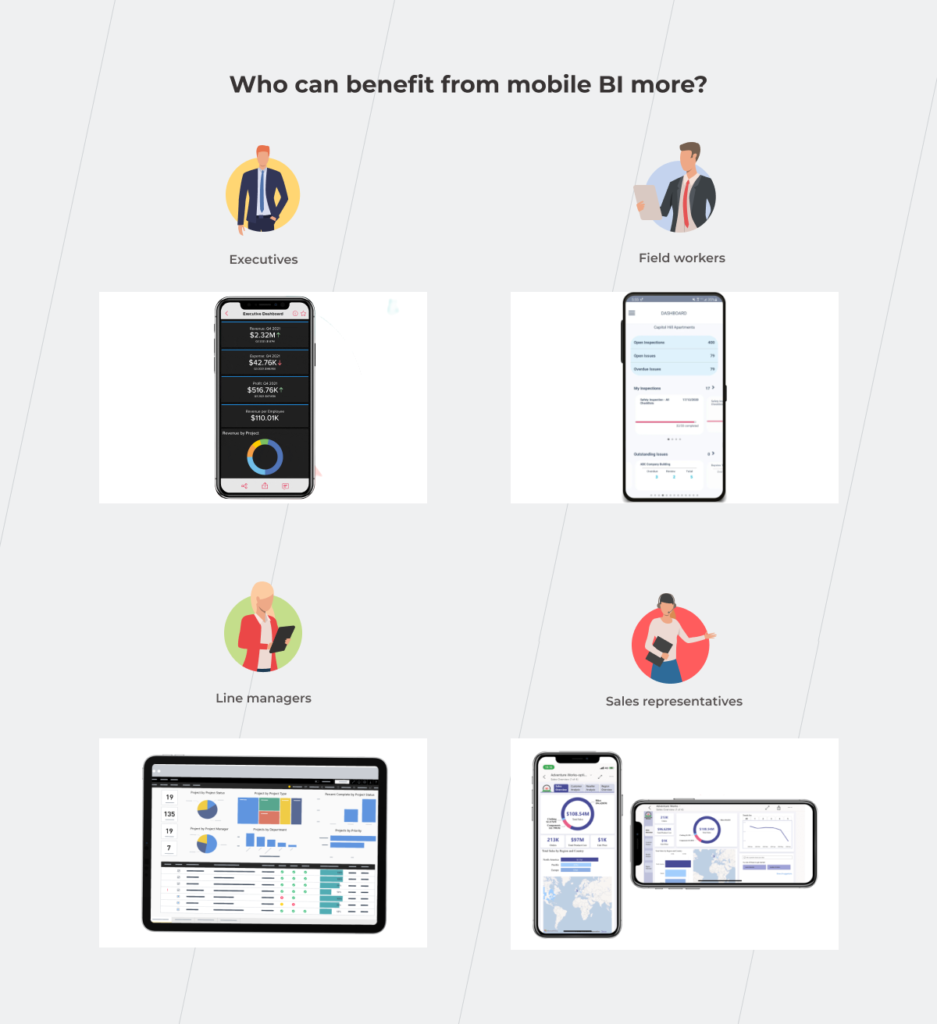
  • Executives

Executives and senior-level managers spend a lot of time either in meetings or traveling for business, away from their desks and enterprise software. Having mission-critical information always on hand helps upper management explore data on business performance from any part of the world and make data-driven decisions, be it high-level forecasts or current business operations.

  • Field workers

Field engineers and technicians have lots of projects on their plates — from company infrastructures such as railways and utility stations to customer sites. On-demand and on-the-go access to unified data analytics from all facilities helps field workers better prioritize tasks and keep an eye on prospective and current customers. Moreover, mobile analytics can be amplified with sensor and GPS data to schedule predictive maintenance activities or optimize routes.

  • Line managers

Supervisors and team leaders can benefit from mobile data visualizations to get handy insights about staff, production lines, and ongoing operational activities. Lightweight visibility also helps first-line managers to respond proactively to any emergency and make important decisions faster and smarter.

  • Sales representatives

Equipped with decision management and predictive analytics capabilities, a mobile BI tool can provide the latest sales information such as deal status or prospects to help salespeople prepare for the meeting or run analyses in any setting. All-in-one business intelligence mobile can also give salespeople a head start in customer data before any sales call. 

Sales representatives in the retail sector, for example, can rely on a portable BI solution to predict the profitability of a new store without close supervision from the head management. In this case, the salesperson can calculate and select the correct location for new stores on the go, based on various parameters, including geography, demand, and others. If the input parameters meet the predefined benchmark, the BI solution greenlights the new location. Otherwise, the solution notifies the salesperson of the low profitability of the new sales point.

Executives, field workers, line managers, and sales representative using mobile BI to make well-informed decisions on the go

Any flies in the ointment? Yes, several. But they can be extracted.

Just like any technology, mobile business intelligence has a flip side. In this case, the core challenges of deploying portable analytics resonate with desktop BI. This is why accurate forecasting, data governance, and reporting need to be balanced against data security and quality followed by end-user training and cultural shifts.

However, mobile business intelligence software also poses some specific challenges that arise from the portable nature of analytics and mobile devices. With the right tech expertise though, you can make mobile work to your advantage and overcome general BI constraints.

Security issues

The smaller your device is, the easier it gets to misplace or forget it. Mobile devices also tend to get stolen or hacked, which increases the risk of a data breach. On average, hackers get their hands on 6.85 million accounts every day.

When away, mobile users can also expose their devices to data leaks through non-secure channels such as public Wi-Fi.

To keep hackers at bay, companies should embed robust data encryption, two-factor authentication, and biometrics-based access into portable enterprise devices. Mobile hardware should also meet both industry and internal security standards to ensure a consistent security policy on all company-owned devices.

Poor design

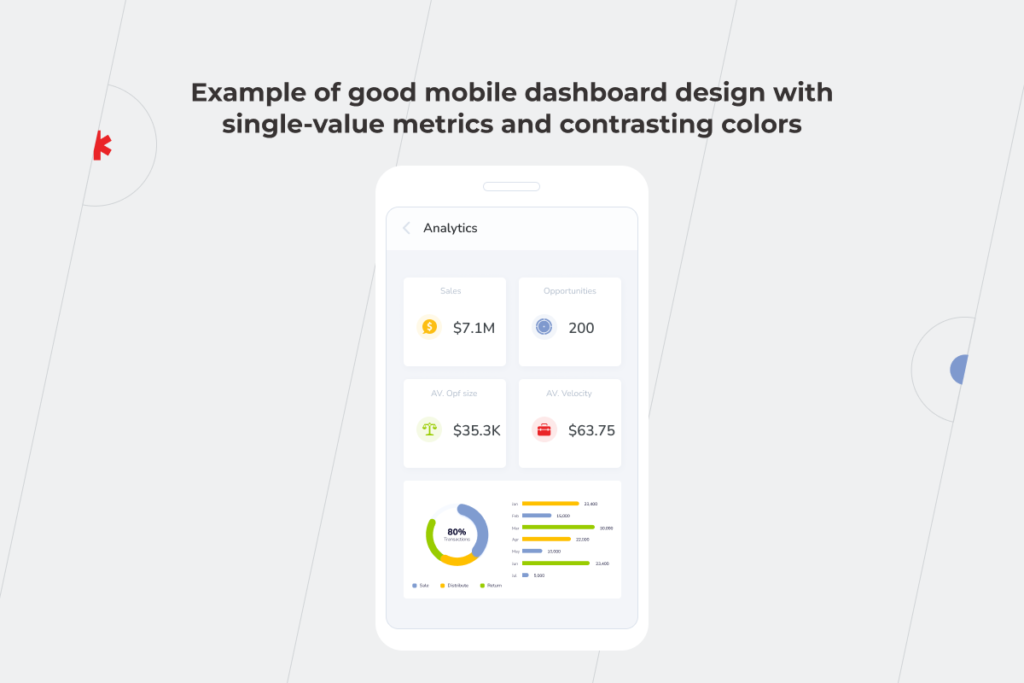
Although mobile BI is a natural extension of your desktop analytics software, a mobile version shouldn’t blindly replicate the desktop experience. You can keep the user experience consistent on both platforms, but wrap your solution into a mobile-focused experience.

Example of good mobile dashboard design with single-value metrics and contrasting colors

To recreate a typical mobile user flow, we recommend:

  • Including app notifications and alerts;
  • Employing voice recognition to access certain options hands-free;
  • Equipping your applications with in-app guidance prompts;
  • Tapping into native touch controls, including swiping, pinching, zooming, and others.
  • Integrating the application with other communication channels to boost team collaboration;
  • Embedding in-app analytics for further enhancements.

It might seem that achieving this kind of native-like user experience is a costly undertaking. However, a mobile BI version for a specific platform doesn’t require many resources compared to a standalone solution with multi-platform compatibility.

Neglecting the needs of your audience

By default, hand-held devices and desktop applications cannot deliver the same level of functionality. Therefore, you should adjust your mobile application according to the screen size and mobile constraints. While the main BI solution can provide visibility into data-rich charts and detailed reports, the portable solution should be optimized to display key metrics and alerts as well as share data via messages and emails.

Mobile BI apps: the power of BI, as and when it’s needed

As the world is quickly moving towards mobile, enterprise software also steps in to deliver better access and data visibility through mobile business intelligence. Mobile BI applications combine the analytical capabilities of desktop data processing and portability of mobile devices to equip companies with on-the-go data usage, risk management, and forecasting.

Although mobile business intelligence brings unique advantages to the table, its flexibility can play against you if handled irresponsibly. You should pay due diligence to necessary safeguards and user interfaces to eliminate risks and maximize mobile benefits.

Want us to take care of your mobile BI application? Get in touch.

BPM vs RPA: The Duet You Can’t Miss

When you have a huge goal in front of you, approaching it might seem challenging. With digital transformation as your top business concern, how should you start? 

Trying to refine processes you don’t quite understand is the path to nowhere. In other words, improving only certain activities is not enough; you need to see the entire picture behind them to understand how the workflow can be upgraded.

There are many ways to ensure better organizational performance. In this article, we’ll take a closer look at BPM (Business Process Management) and RPA (Robotic Process Automation) and what they mean for your business. 

As a process, BPM can be compared to life. There are a lot of tasks to do within this process. Some of them require your participation, but others can be delegated to a virtual assistant such as a smart house system that facilitates certain operations — just as RPA does. With some of the house system’s sensors, you can adjust the temperature and humidity in the rooms so you can sleep better, or synchronize turning on the electric coffee machine and the multicooker with your alarm clock and breakfast will already be prepared by the time you wake up. Doing these and many other things without manual effort streamlines your routine and helps you focus on more important stuff. The same goes for business. With BPM and RPA at its service, you’ll reap tons of benefits you’ve probably haven’t thought of, yet.

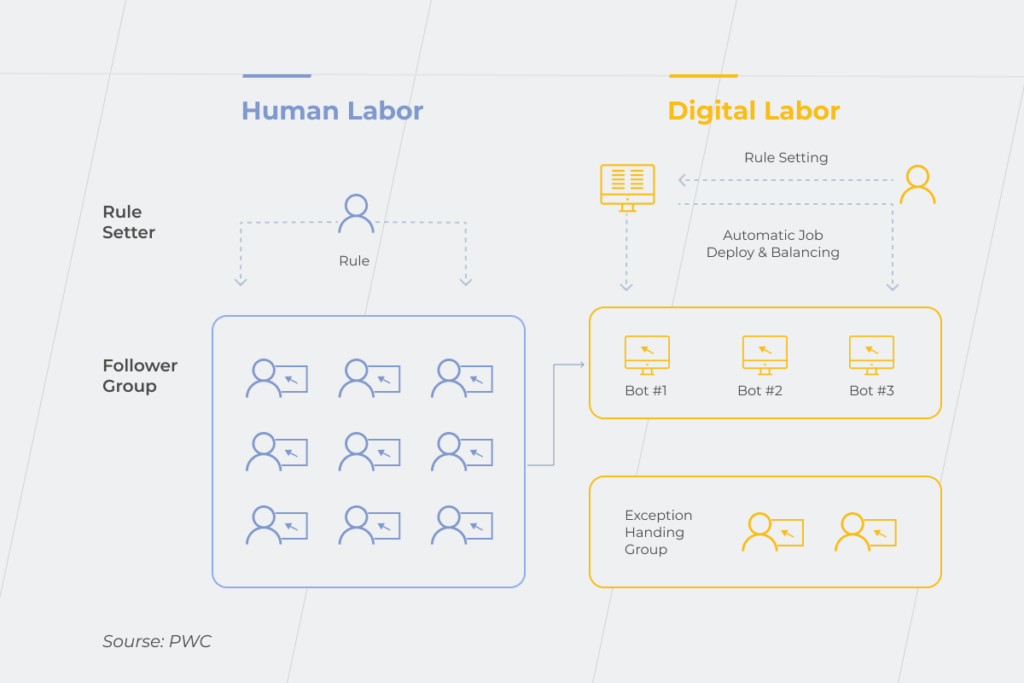
Business process management is a global process-focused approach that forms the skeleton of a procedural flow in a company. BPM establishes the game rules for a particular business — how its parts should perform to produce the right outcomes. Meanwhile, RPA is a task-focused form of automation. It focuses on decreasing the number of dull, repetitive operations. RPA is one of the technologies that put BPM’s ideas into practice. 
Implementing RPA alone won’t put your business on the fast track to success because it just enables processes to run faster and/or makes them frequent, even if the processes themselves are inefficient and need reengineering. On the other hand, BPM determines the processes that need to be streamlined and explains how it could be done to facilitate the whole workflow. 

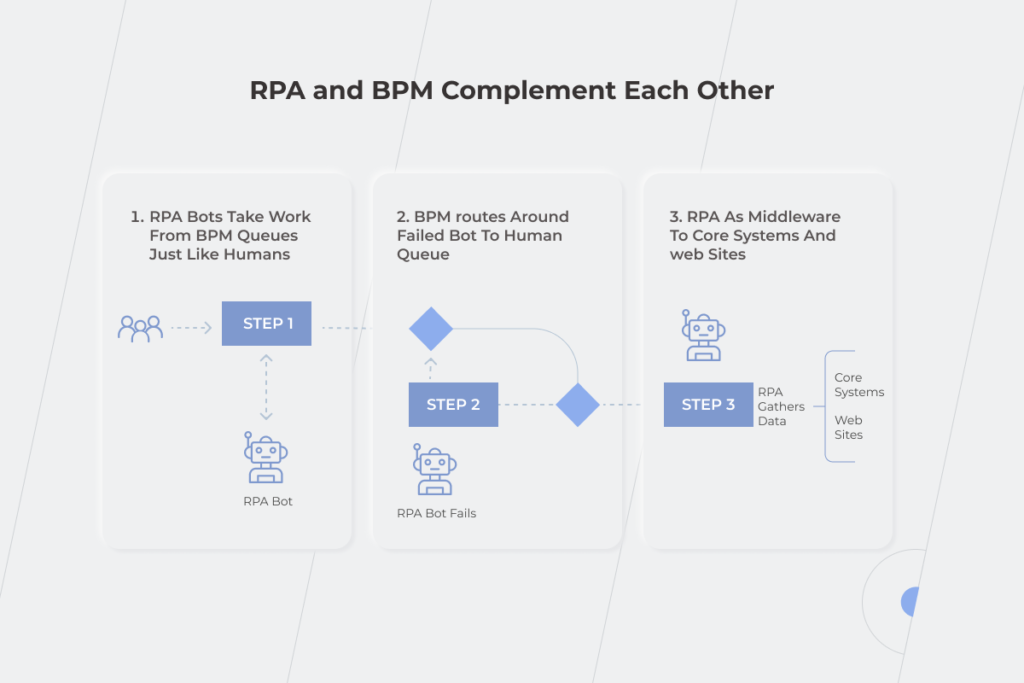
Let’s investigate the relationships between those concepts. In the example, you can see the online appointment registration in a clinic. All the patients have to do is log in, and choose the doctor, date, and time slot. If there are no schedule changes, they’ll receive a pre-appointment reminder from the RPA bot. It’s easy to send notifications when everything goes as planned, you might think, but how to automate unplanned changes? That’s what BPM is for — it controls the whole process and uncovers possible bottlenecks. For instance, if the appointment before yours takes more time than expected, clinic staff has to notify you and other later patients about the schedule changes. However, managing it manually would be exceptionally time-consuming. Thanks to well-established BPM, an RPA bot takes into account several conditions such as patient’s data and available doctors to estimate appointment duration and remove relevant time slots from the doctor’s schedule on the online booking portal.

RPA and BPM

In 2020, the need for RPA technology in healthcare skyrocketed. When the pandemic hit, manual patient registration seemed like a chaotic deadlock that either had to be broken or could break everything else. The situation was remedied by the adoption of RPA bots that managed patient data registration in 14-16 seconds error-free. This is compared to the three minutes it used to take humans to perform the same task.

How do BPM and RPA influence your business?

Replacing tedious manual labor with automation and revamping business processes are crucial components of digital transformation. With 87% of senior business leaders saying digitalization is a priority, its successful completion becomes a predominant concern. You won’t achieve expected results without a holistic view of the company’s workflow and a clear understanding of how to make the best use of your employees’ talents. And here RPA and BPM come to the rescue. RPA helps solve the issue of automating similar actions without human intervention. Meanwhile, BPM provides you with a plethora of opportunities to enhance your organization’s efficiency.

Visualize your business processes and identify their productivity 

At this point, you can also benefit from Business Intelligence (BI) with its data visualization tools. Combine awareness with action – together with BPM, business intelligence increases processes transparency and provides you with analytics, and this is the pillar of prudent decision-making. BPM is a good choice for pinpointing drawbacks, and BI is a great opportunity to predict the potential outcomes after process adjustments. Take advantage of making your business process management more intelligent. 

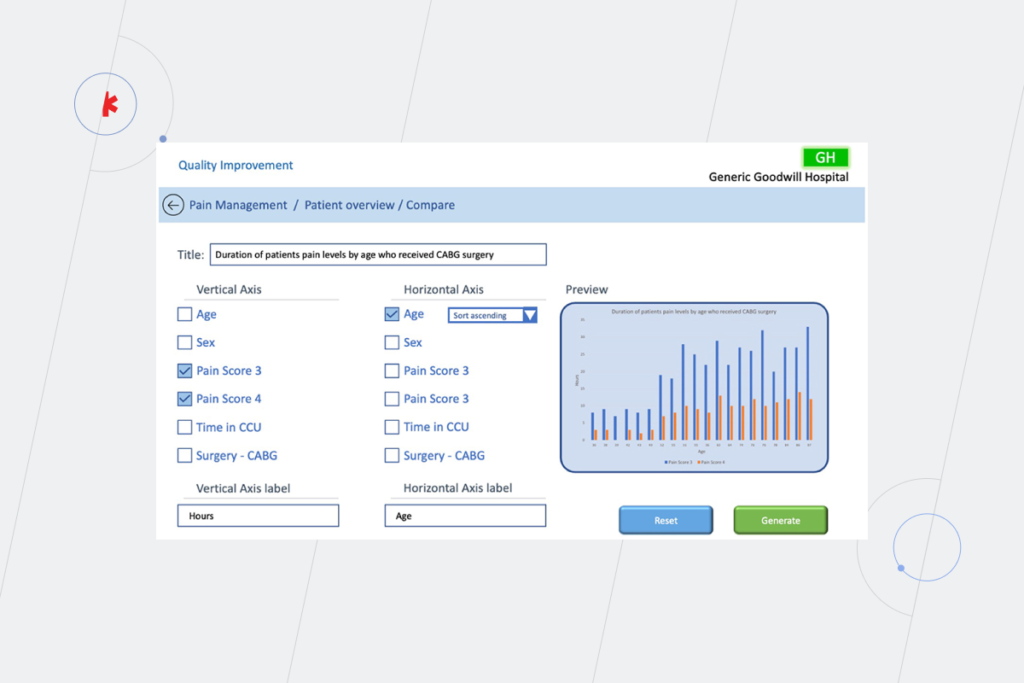
Here’s an example of how BPM approach and BI tools can be united for a deeper understanding of such a healthcare process as a hospital treatment after CABG surgery. Thanks to up-to-date data from BI tools, doctors can predict the need for pain management using patients records and dividing them according to their age and other parameters.

data visualization tools

Find bottlenecks that are hampering the speed of the processes and reducing their efficiency 

Here’s an example of an operational bottleneck caused by people’s inability to match work volume during the multilayered approval process. Imagine that several stakeholders are interested in a set of reports. Employees who work directly on these reports can notify them when the work is done. Still, to avoid wasting employees’ time on minor mechanical tasks, it’s more profitable to set up an automatic notification to email — an RPA bot can easily do this task.

Redesign the processes

After defining the weak points, it’ll be easier to find ways to make them more results-oriented and effective. If we continue with the example from the previous paragraph, set up the RPA bot to resend the notification if the stakeholder didn’t open the email within a certain time period.

Execute automated processes 

Decrease the need for human involvement in drudge operations through robotic process automation. Respondents of the Deloitte RPA Survey Report estimate that RPA bots can deliver at least 20% of capacity in their operations. That said, this number could potentially reach up to 52% in different organizations. 
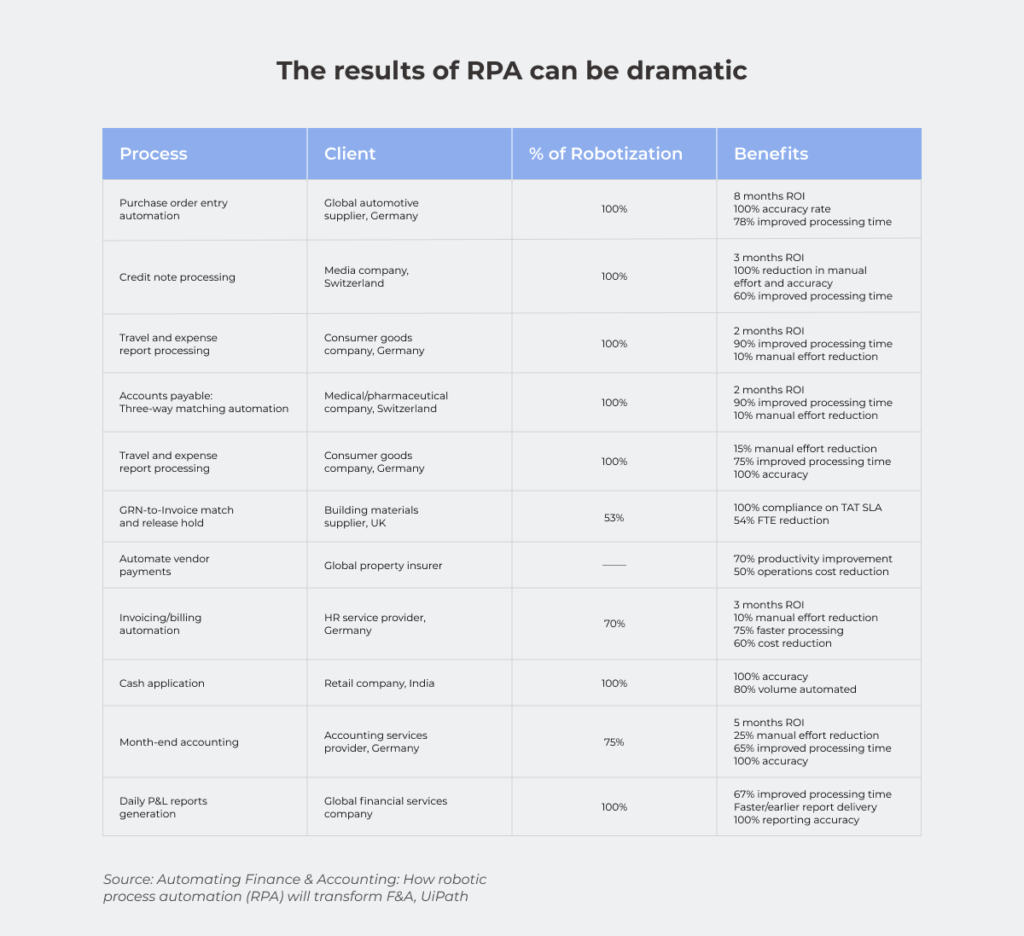
However, the real RPA benefits lie in improving organizational KPIs. According to the UiPath research, robotic automation significantly accelerates processing time (up to 78%), reduces operation cost (50-65%), ensures 100% compliance with regulations and the same level of accuracy.

RPA

Handle specific scenarios 

Robotic process automation can deal with repetitive tasks, but it relies on BPM to manage exceptions to RPA rules. If your RPA bot states that 900 employees should be fired because they worked less than they were supposed to, would you agree with this decision without thought? Or would you rather review the conditions for performance evaluation and set specific KPIs for employees from different departments as, for example, development and sales teams’ tasks can’t be measured in the same way, can they?

In a nutshell, BPM helps you to choose business processes that may be worth improvement, for instance, automating. And RPA is one of the most cost-effective possibilities to put it into action.

How difficult is it to adopt BPM and RPA?

The key issue of BPM implementation is the postponement of the result because it’s a heavyweight solution that should be integrated with the other systems — more than half of BPM projects fail to deliver the results hoped for. Indeed, BPM doesn’t produce an immediate payoff, but it’s never a useless task to understand your business processes clearly and find out how you can enhance them. Implementing RPA as part of your software development plan is easier because it’s a particular technology, but if you implement RPA without BPM, your digital transformation efforts might go down the drain as there is a possibility that you’ll just end up with poorly organized activities.

Another challenge when adopting RPA and BPM is the industry skill shortage. Even if you have an in-house IT department, the responsibilities of your staff may be limited to the system’s maintenance or your employees may think in terms of the tasks instead of processes. That’s why it makes sense to take advantage of a dedicated teams’ expertise.

One more indispensable condition for the success of BPM and RPA adoption is the involvement of all the stakeholders — from C-suite to general employees. You may face resistance to change at some level as employees will be afraid of losing their jobs to robots. So resolve this misunderstanding and turn your specialists from possible digital transformation bottlenecks into the supporters of new processes and technologies before starting your journey. 

When to use BPM and RPA? 

If the employees involved in the process are drowning in operations, this is the primary signal that BPM implementation is needed. Its adoption helps to figure out how effectively the team works, and pinpoint the weak spots.

Thanks to RPA software, you can decrease the overwhelming number of tedious operations. Automate repetitive parts leaving final decision-making to your employees if you don’t trust the robots enough to delegate some processes completely. 
Compare two approaches to the processes execution — without implementing RPA and with it. In the first case, your staff is buried under the workload of similar monotonous actions and eventually experiences burnout that causes slacking, job dissatisfaction, and even depression. The question about the performance level in this situation hardly needs to be asked. In the second case, employees don’t have to waste most of their working time on mundane operations. Thus, they can focus on dealing with higher-value tasks that require their talent and expertise.

RPA implementation

One of the reasons to consider implementing BPM is the necessity to connect your legacy and modern systems. Let’s take a look at an example from the fintech industry. When a person comes to the bank to open a deposit, basic banking legacy systems are sufficient. But what if he/she isn’t ready to waste time going to the bank and wants to open a deposit in a mobile app? In this case, outdated systems have to be connected with modern online banking. BPM uncovers this weak spot, and RPA can solve it by creating a bot that will enable legacy and modern systems to exchange data without a hitch. 

The fruitful partnership of BPM and RPA: a breakthrough in your digital transformation?

RPA and BPM differences don’t make them rivals. It’s cooperation, not competition. Implementing BPM ideas and RPA technologies together can lead you to advanced outcomes and much more profitable business processes with people involved only in activities that require their skills and expertise while the rest is automated. Adopting only RPA makes sense if you have the proper level of confidence in the machines. Going back to the example of firing a huge number of employees because of the automatic analysis of their activity during the working day — are you ready for this level of trust? It’s more advantageous to combine RPA technologies and BPM ideas so that you can supervise the results of the bots’ work. If you are still on the fence about implementing BPM and RPA solutions into your organization, schedule a consultation with our specialists and we’ll be happy to talk you through it.

Web App vs Mobile App: Which One is Best for Your Business?

Creating an application is the next step after your business has gained leverage online. When your customer buys from you once a year or you are a governmental organization, a web page would normally be enough. However, when frequent client engagement is demanded, the necessity for an app occurs organically. 

There are two ways of engaging with a customer with the assistance of current technology: either by means of a Web App or through a Mobile Application.

It’s a known indisputable fact that mobile applications have helped many companies increase their sales dramatically. Yet, in some cases, mobile applications aren’t needed, and businesses are absolutely thriving with progressive web apps. Some companies have both web apps and mobile apps ready for their users. In the end, the selection of technology is about meeting customer expectations and staying in your lane.

There’s no secret that the most important distinction between web apps and mobile applications lies in their development costs. So as to work out which of the present technologies is going to become the best investment for your specific business needs, we would look deep into the purposes these applications serve.

Want to discuss the business objectives of a mobile app or a web app?

Book a free consultation

Web Application vs Mobile Application

Pros and Cons of Web Apps

+ A Progressive Web Application, or a Web App, is a website adapted for mobile. This is often one of the foremost progressive technologies nowadays. It imitates a mobile application and is viewable in most browsers on desktops and mobile phones. It costs less to build a web app than a website.

– An existent web app signifies that a corporation has already gained trust among its audience. However, there’s no requirement for constant involvement with an app. Maximum retention and time spent in the application have zero effect on a webpage and brand awareness. 

Pros and Cons of Mobile Apps

+ A mobile application or sometimes it’s called Native Application is a great marketing and sales tool for a variety of consumer-based companies. It involves constant engagement with the product through continuous interactions. Mobile apps collect as much information as possible, studying habits and analyzing user behavior and patterns. 

– A mobile app is a more expensive technology as compared to a web app or a website. Its budget is mostly dictated by the availability and price of skilled mobile developers for Android and iOS. While Hybrid applications are also available as a part of the cross-platform solutions, their updates are less frequent.
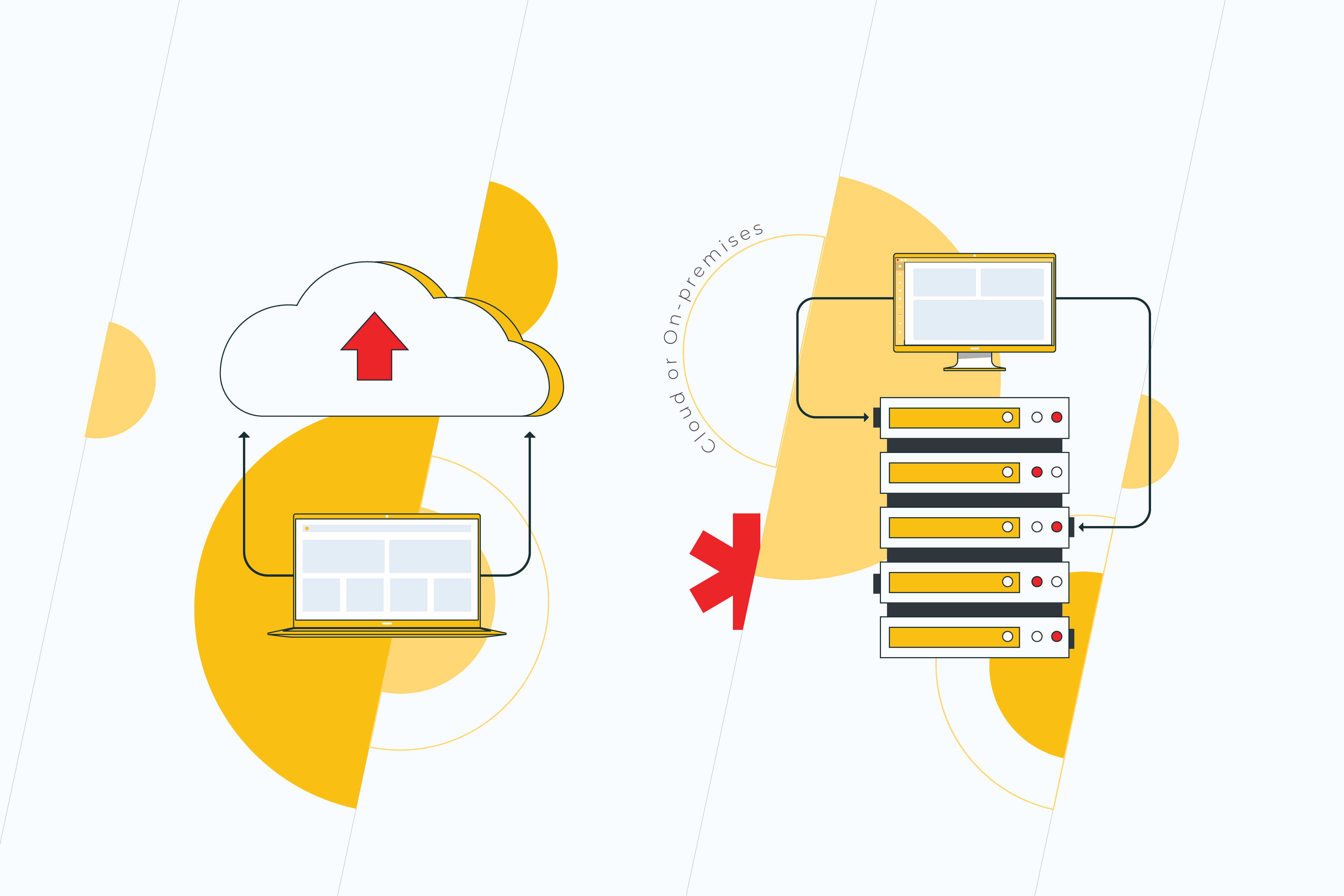
Web Apps vs Mobile Apps from a User’s Perspective

Web Application vs Mobile Application

Both web apps and mobile apps signify the trust level users have for the company. The main difference between them is the quantity and frequency of interactions. Native Apps also offer a more robust personalization. The communication is customized to users, supporting their interests, location, behavior, and more.

People download mobile applications after they use web apps on a regular basis. They do that once they get acquainted with a company’s website and social media. If they like how the application is made, they will stick with it. However, many users prefer PWAs, since they are faster and don’t require memory on their devices. Plus it only takes a few lines of code to make usability amendments in a PWA.

– Volha Marskaya, Sales Specialist

Mobile App vs Web App from a Business Standpoint

The common practice for a lot of companies is in building a website, a PWA, and a mobile application as they expand. The latter is a logical step toward broader market outreach. It is a method of business growth and it drives sales. 

There are, however, ways in which it can be cost-effective to work out a novel approach for specific user engagement while also saving on development and maintenance with no effect on sales. 

There are general recommendations for many B2Bs to own a branded application. At the same time eCommerce has shown relevant proof for PWAs, which are made to more easily compare goods in a browser.

What are the main criteria that allow the choice between PWA and Mobile Apps?

When choosing between web and mobile applications, it all depends on the goals and technical requirements for the interaction with the API, like accessing user location.

A website adapted for mobile would be sufficient when its purpose is solely the acquaintance and PR of the product with no requirement of further interaction with a client. Speaking of a short-term interaction once a week or a month, a web app would be enough. When one or two basic functions are solved, a mobile application is not needed.

– Eduard Beleninik, Lead of Mobile Development Unit

World Statistics. PWA and Mobile Applications in the Long Run

Web Application vs Mobile Application

Mobile applications’ downloads have increased in recent years to 218 billion. According to Statista, in 2023 mobile apps will generate more than 935 billion U.S. dollars in revenues through paid downloads and in-app advertising. And word-of-mouth is a very strong factor when deciding what applications to download. Finance, travel, and shopping apps are among those that mobile users in the United States spend the most time on.

Web Application vs Mobile Application

A study has shown that PWAs have 36% higher conversion rates than native apps. The average conversion rate for progressive web apps is higher because mobile traffic and consumer time on mobile is much higher than on the desktop. Many businesses report increased revenue thanks to mobile traffic. For example, the Starbucks PWA has doubled daily active users. And orders on the desktop are nearly the same rate as mobile.

The number of origins with PWAs has grown 170% in 2020. According to the Chrome team, there are tens of millions of installations of WebAPK only on Chrome for Android. However, PWAs are less accessible for Safari and iOS users because of Apple’s policy on a more private web, and more strictly regulated App Store. Following Apple, Mozilla claims deprioritizing progressive web applications soon.

Check other articles on our blog. Subscribe to our social media and get insider information on making your business ready for digital. If you have any questions, get in touch with our expert team or fill in the form below to have your project estimated by progressive web application development company.

How Mobile Apps Can Grow Your Business

As a founder, you are always looking for the next step to take your business higher. It’s possible now you are happy with how your workers are handling the internal routine. You have set up the whole marketing team with gemstones found at a local talent market and on the Internet. People start discovering your brand, and they love to come back. 

Although you are a fearless leader, catering to the robust needs of the community can sometimes get overwhelming. New clients are waiting to interact with your brand and to start buying from you more often than ever. They can’t wait to test run your product and leave reviews. Loyal customers are happy with discounts. They would like to follow you on all social media and interact with other adepts of your brand. It makes sense that you would like to make your entire customer interaction intelligent and easy. Wondering how to make your business grow, you feel the need to invest in something that has a lasting effect. 

And the answer is technology. Adopting Smart Technology is one of the long-standing business growth factors. Technology fertilizes your business. It solves a lot of problems, helping save on labor costs and streamlining processes. As you select the right tools for your specific company goals, you aim for staying in digital domain outreach for a longer time. Maybe you have already built a website and a PWA. But as your company matures, having a native app to help promote your business is an absolute necessity, especially if you sell on-demand services or products. 

How mobile apps help businesses

Mobile apps for business

There are millions of apps available on the App Store (iOS) and Google Play Store (Android). The majority of them are written using programming languages, such as Objective-C and Swift (iOS), and Java and Kotlin (Android). The applications that are built for the two mobile platforms are called Native Apps. There are also Hybrid or Cross-Platform Apps. They are developed using a separate framework, and the code is later being edited for each of the two platforms by hand.

Mobile apps are all the software we download on our smartphones, tablets, or digital watches. The software miraculously combines the latest tech, marketing, and design solutions and gets constantly updated. An application has access to the device’s API, GPS, Camera, and Microphone, etc. Artificial Intelligence and other latest technologies help set individual user preferences. An entire community of mobile application users has an instant connection to businesses through their push notifications. 

Mobile apps for business are the assets that work for you while you rest. The software serves clients at night, on weekends, and on holidays. There are two powerful functions of mobile applications in the grand scheme of your company growth: 

  • They drive user traffic. New traffic expands the user base, meaning more new interactions with a business. 
  • Personalized user experience establishes trust between a company and their customer. This means more sales.

How mobile applications drive sales

mobile apps

Mobile apps exist as something more than just an awesome technology. It all depends on how creative the company gets. While there are still a lot of free applications on the market, some of them are the source of the company’s direct sales in addition to traditional channels. That’s why mobile apps are good for business.

A number of app-based businesses generate profits from only application market downloads. Some of them have fixed prices for as low as one dollar. Others come with Pro or Premium features that users pay for after downloading from the store. Some apps come with a monthly subscription payment. All of these scenarios help companies sell their product, bring new customers, and generate direct sales using a single tap of a finger.   

Mobile applications increase sales for Internet-based businesses too. E-Commerce apps are a good example of how a pre-existent web customer base drives bigger sales through mobile channels. Or vice versa, a mobile app advertised through an app distribution platform helps build brand awareness by driving customer traffic through it. Great digital marketing skills come in hand with this type of mobile sales.

Offline retail definitely benefits from having a custom-coded brand app in a lot of ways. Reports say it creates a twofold customer shopping frequency. Additionally, the practice of some brick-and-mortar companies shows that building a mobile app helps raise revenue by a third of their gross income. These companies also state that while mobile applications help earn additional money, they also reduce operational costs. Paper, energy, and other savings help them grow and innovate. 

UX/UI as a means of innovation and business growth 

User Experience technology

User Experience technology applied in mobile design describes how to make your business grow better than anything else. An application is born out of a collaboration between stakeholders, business analysts, UXers, and users. Some bring vision and data, others – their mobile development or custom Java development expertise to the table. UX/UI process is boosted by a constant creativity flow aimed at making your mobile application intuitive and engaging. 

One of the many ways to create an original application is to incorporate cutting-edge technologies that are not there yet into your project. Technologies, such as animation and machine learning, are all part of modern UI practices. UX can build infographics and streamline charts in real-time. The choice of technology will depend on the end-user’s needs.

What makes a great app people use, is when it has the features they always want. An app that solves a serious pain in a user’s daily life or business is the kind of app that will remain relevant. A lot of examples of good mobile applications are focused around one or two main features that are also the goals of business sales and customer engagement.

Developing an app that has all the features crucial for the growth of your company, but not for your users, is never a good idea. You want to make sure that people have it on their main screen and make no plan of uninstalling it anytime soon. It feels great when a mobile application has a beautiful design and is easy to use. The best-rated apps consume as little of the battery as possible. They are fast, responsive, and have 24/7 customer support. 

The takeaway

Making mobile apps for business is a complex but entertaining process. Depending on your project it can take several weeks up to months to build a solution that is right for you. It’s going to be constantly maintained and updated with the latest features and releases. It may sound as if you need to revisit the business practices that you are used to. Well, somewhat yes. Growth means choosing happiness over history. What you get in the end is the evolution of everyone involved. 

As one of the top app development companies, we are ready to help you expand your business with a top-tier mobile solution. If you want your app to stand out and become truly attractive to customers, feel free to drop us a line.

Website or Web App: Which Suits Your Business Better?

What is a Website?

Depending on how you want someone to engage with your product or service in the digital world, there are plenty of options available on the market. But to help you start, the first thing you want is to make your online presence apparent. That’s why you may want to build your own website.

A Website is about PR and Accountability 

A website is the best means of promotion. And it’s cost-effective to build and design a good website. It’s a great investment in the digitalization of your business. The main advantage of a website is that it gives the same experiences viewing it on any laptop or mobile browser. However, the main setback of a website is that it’s limited interaction-wise. It provides the minimum information about the client and her behavior. And you need a mobile device or a computer to be able to reach it.

Some websites are designed to last for two weeks, others – for years and years, creating leverage for your brand and gathering a community around it. Irrespective of if it’s going to be a temporary thing or not, a website is a storefront for any type of business or happening. It serves as a hub for all of your social networks’ audiences. It drives interest in what you are putting out there. But most importantly, it builds trust.

Website complexity depends on its purpose

Let’s say you are building an MVP for your startup’s first investment round, or you need just a landing page for your beauty salon, or you want to advertise an upcoming event. In all of these cases, various ready-made low-code tools and site-builders are going to come in hand. Their functionality is constantly improving. The technology is aimed at providing a cutting-edge user experience delivered at your door.

When choosing the right technical approach, look at the event horizon and see how scalable you want the website to be. This means you need to know whether your webpage will ever go beyond its informative function. In other words: 

Will your customer want to click a button to buy from you online? 

Is the nature of your business such that customers will come back to buy your product again?

If both of these answers are ‘yes’ for you, we are talking about PWA.

What is PWA

PWA

When your client returns to buy from you for the second time, it’s the next level of website building scenario – a Web App. In broad terms, a Web App can be anything built for more profound user interaction. 

You can find information that Web Apps are now being called Progressive Web Apps. This definition was introduced in 2015 to describe web applications that take advantage of modern browsers due to responsive design and a mobile-first approach. This has become a web app standard that is constantly evolving.

PWA is a website wrapped to be fast, interactive and mobile friendly

PWA is the technology that makes a boxed version of a website that is easy, adaptable, and costs less to build. A web app gives the shortcut to reach the parts of the service in no time. This means instant transition and interaction with the relevant part of the website functionality.

Since a mobile-first approach nowadays is a must, a website adapted for mobile may already be a PWA. At their core, PWAs are the Apps that use existing web strategies to provide a rich, native, and simplified application-like user experience. The main difference is the desire to imitate a mobile application, which does not affect anything from a business point of view. 

Speaking of what one can appreciate in a PWA as opposed to a website, is definitely its speed. PWAs are designed to include features, such as background sync, caching, and push notifications. They don’t require any space to be installed, despite their name. And they can work offline unlike websites. Google likes Web Apps and ranks them at the top of their search.

PWA works offline and is cheaper to build than website

If a web product passes PWA criteria, the browser on both Android and desktop is going to prompt it to be ‘Installed’, and there are icons representing app installation. Responsible for the icon and other basic parameters of the app is Web App Manifest.

  • Service Worker

Progressive Web Application development is based on a modern technology known as a Service Worker. These are special event-driven scripts with connections to different instances within the domain. These are programmable network proxy servers between the Internet and the page.

These proxies intercept and make or rewrite network requests, support the app offline and provide granular storage. They can be securely downloaded regardless of the network connection. As a result, it facilitates faster navigation and slows downloading speeds.

  • Shell

A Progressive Web Application demonstrates high performance due to the application Shell. It’s a kind of storage for content. Creating an application Shell is easier, it only takes a few lines of code. The two main elements are the header and the navigation bar. Since it is cached only once, the shell can be accessed by the user even when there is no Internet connection.

PWAs don’t require separate teams of coders to be developed. Given that your website is ready, a Web App is going to improve its performance for a relatively lower price as compared to the cost of building a website from scratch.

Web App takes a brand trust on another level

Progressive Web Apps are accessible through secured HTTPS links and sometimes have an “app.” extension before them. They are SEO-indexed and are compatible with multiple platforms. They provide push notifications and engage with users seamlessly, being updated in the background. A lot of companies use PWAs instead of websites and mobile applications. Think of Pinterest or Whatsapp Web, for example.

With PWA, a business is getting two products priced as one – a website and a mobile app engaging users with news, sales, or other important information via push notifications. Since PWA is designed to be like an application, the UX/UI, speed, and smoothness of such a product will be optimized for most kinds of desktop browsers automatically.

Web App vs Website

pros and cons of pwa

Cease inspiration with building your web product. Here’s a comparison of the main features of websites and web applications:

Pros and Cons of WebsitesPros and Cons of Web Apps
There are no requirements for the operating systemThey don’t require memory storage
Serve as business cards and first impression of a brandWork faster than websites and mobile applications
Compete with social networksProvide user interaction functionality
Cheaper than mobile applicationsDepend on the nature of a business
Easy to make amendments with a few lines of codeServe as a trust level for a company
Don’t require user trustCheaper than websites and mobile apps
Easier to compare and select the products on the website rather than in an appDon’t require downloads and manual upgrades
Don’t provide push notificationsProvide push notifications
Can be insecureFully protected
Available and tested on all browser kinds and versions Compatible with many browsers, since they are optimized for various desktops and smartphones
Online identifiers, including cookie identifiers, internet protocol addresses, and device identifiers cannot be seen by website owners.Face ID and Touch ID 
Can make money through affiliate marketing and pay-per-click advertisingAccess to geolocation
May be optimized for desktops but not for smartphonesWebOTP for SMS authentication
Short life-span if a business has a mobile applicationSafari and Mozilla are not prioritizing them
There are no general technical requirements to build a websiteDesktop PWAs locked to Chromium-based browsers only
Need Internet access to loadDon’t need Internet access
Cannot detect OS or other app functions. However, they can listen to key events via JavaScript.Cannot share resources or data within themselves because they are quite separate

Final Words

A lot of us are impatient with the actions, but we want to be patient with the results. Your website serves as a brand voice in the vast internet space. When choosing between a website and an app, take their purpose into consideration. While a website is great to get your potential customers acquainted with your product, a web app is a technology made for them to stay engaged. Both websites and web apps are the future of software development.

Read more on our blog. Subscribe to our social media and check the latest tips and tricks in making your business ready for digital. If you have any questions, get in touch with our expert team or fill in the form below to have your project estimated.

5 Steps You Need to Take to Modernize Your Core Applications

Are you advancing your business using technology or simply trying to keep things chugging along smoothly? If you answered with the latter, then you’re part of the majority of companies whose IT investment primarily goes toward ensuring their services stay up and running. But what if there was a better way? A path to modernize your core applications while ensuring those essential components stay functional? There is, and below, we’ll tell you the ins and outs of why modernizing core applications is a business-need, challenges you may face along the way, and the five essential steps you need to take to do it right.

Challenges and roadblocks to modernizing applications

When faced with the question, “to modernize applications or not to modernize applications?” Many C-level executives and managers are reluctant to dive in and update, and rightfully so. There are a number of issues that should be considered before diving into any technology investment. Here are some of the challenges and roadblocks before even getting started.

Confusing information

Cloud or on-premises? DevOps or traditional software development? In-house or outsource? These are just some of the questions that executives face when venturing into the modernization of core applications. Conflicting approaches create confusion, and this can be a roadblock in and of itself. That’s why before setting off, it’s essential to research first and act later.  

Legacy software

No matter what area a business operates in, it’s likely to have some technology already in place. And it is this very legacy software that forms the basis of your organization’s technical debt. While right now, it may seem that your current solutions function properly, in the future, they will become outdated, and the longer you haven’t updated, the more technical debt you will have incurred, making it harder to deal with. That’s why the golden rule when it comes to legacy software is “out of sight should not mean out of mind.”

Fear of the unknown

Unknown future

This stems from technical debt. Often, heading into modernization of applications process, it can be difficult to estimate the costs and results that will occur. One small change to a core application could potentially lead to the need to change further software, and eventually, these costs add up. That’s not to mention the risk that one piece of code could be essential to something else. That said, failure to update means fear of progression, and this is crucial to business viability in the long-term. 

Why do you need to modernize core applications?

In 2021, global businesses are predicted to spend $3.8 trillion on their IT needs, a growth of 4% from 2020. And it’s no surprise that the market is growing. In the wake of the COVID-19 crisis, more businesses are considering how technology can improve the services they offer. However, many still find themselves battling outdated systems, legacy software, and other issues along the way. In spite of the challenges, there are some compelling reasons to start investing in your technology stack now. 

Shift to remote-first

The Global Workplace Analysis Survey suggests that between 25-30% of roles could stay remote, even after COVID-19 restrictions end. What this means for companies is the investment in IT will increase to ease the process of at-home working. However, this doesn’t mean a loss in profit overall. On the contrary, it is estimated that a business could save up to $11,000 per year for an at-home worker as compared to in-office staff.

Improvements in the cloud

Improvements

Migrating to the cloud can seem scary, but there are some great benefits to doing so, including increased capabilities to managing data, reduction in storage costs, efficiency, and scalability. In recent years, cloud technology has improved immensely, allowing businesses to complete more processes remotely and securely.

The competition

This isn’t about keeping up with the Joneses. It is about ensuring that your business is viable long-term. The fact is if your competition is updating their technology, then you will fall behind and quickly. Staying ahead and making your business efficient means embracing appropriate solutions for modernizing applications. And this is especially vital when it comes to core applications. These are the backbone of your business. 

5 Must-do steps to modernize your core applications

Starting out on the application modernization journey can be confusing. That’s why we’ve created these five must-do steps to get you started on the right foot.

1. Analyze the current situation

Just as you start out on any venture, when beginning to modernize core applications, it’s vital you analyze and evaluate both your current software, what your competitors are doing, and which solutions will be appropriate for your needs. If you lack the in-house staff, then, at this stage, it’s best to engage some outside specialists with expertise in modernizing core applications to advise which is the best route to take. Break down this enormous challenge into more manageable steps, as you would do with any project. By doing so, the process will not seem so insurmountable, and your team will be better able to tackle the modernization. 

2. Plan and ask the right questions

Now that you have some understanding of what needs to happen, it’s time to dive deeper and ask the right questions about your application modernization. If you are working in-house, these questions should be dealt with by your IT team, or if you have chosen to outsource, your provider will advise you. Start by considering:

  • What concrete results do I need from core application modernization?
  • Is cloud appropriate for my business needs?
  • How will data be managed?
  • How will we verify if the application modernization process has been successful?
  • What happens if the scope changes during the modernization process?
  • How will existing applications be integrated with the newer ones?
  • How will we balance the investment in new technologies while dealing with legacy software?

Setting concrete aims and objectives and how you will achieve them creates a manageable pathway to success. 

3. Deal with tech debt

Yes, tech debt is tedious, and it’s likely those who wrote the original code for your applications have long left your company. However, keeping legacy software is no way to go about it. Alongside your team, it’s essential that you identify which areas of legacy software should remain as they are and which you will update this time around. By taking a gradual approach, you are better equipped to upgrading your technology and lowering the risks of any converse effects, such as bugs, from appearing. This constant approach to modernization allows you to update software on a continuous basis without affecting the overall business which may still be using legacy software. Attempting to upgrade everything at once often runs the risk of unpredicted consequences, including application downtime, bugs, and other blockers.  

4. Deciding between cloud or on-premises infrastructure

Cloud

Both cloud-based and on-premises software infrastructures have their benefits. Before you decide how to modernise your core applications, you’ll need to decide which infrastructure they will have. On-premises services offer in-house security, so you are always aware of where your data is and when it’s being accessed. On-premises services are often robust, which is necessary for some core applications. On the other hand, you will need the physical space to store such systems and will bear the maintenance costs. Meanwhile, cloud systems are often flexible and suitable for many-core application functions. In this case, you won’t be responsible for maintenance or storage. As an added benefit, cloud services often offer subscription-based plans allowing you to expand as needed.

5. Choose an approach to suit your business

The world of technology is constantly changing, and it’s likely your needs as a business are too. Engaging in an agile approach from the very beginning gives you the power to rapidly adapt to changes you need as a company. The agile approach means you constantly develop, test, and release software, getting it to the market faster. 

However, it’s not suitable for everyone. Some businesses may benefit from the transparent and linear process of the waterfall method, especially if they have a clear view of which particular updates they need.

Bonus: Don’t neglect security

No matter how you approach your application modernization, there is one element you can’t afford to skimp on—and that’s security. Ensuring the security of your customer’s data and that of your business is a priority and should be top of your modernization checklist. No matter which method you choose to upgrade, it’s vital that you and your team take this into account at all stages.  

The time to modernize is now 

When it comes to modernizing core applications, there is no one-size-fits-all solution. Instead, you will find that the solution you require is unique to your business. While similar approaches and software tools can be used across many enterprises, it’s vital that before you begin modernizing your core applications, you take the time to plan for the long-term. Starting out might seem daunting, however, as they say, the proof is in the pudding (of customer satisfaction).

Major benefits and risks of modernizing your business applications

Applications play a crucial role in the way we work and interact. They help businesses expand the functionality of the product, improve productivity, optimize costs, and so much more. However, achieving results with obsolete tools, which are not adaptable to the changing business environment, isn’t possible. This is where application modernization comes in.  

It would be naive to think that the way from a legacy application to a modern variant is covered with rose petals. Nothing of the kind! In fact, it’s quite thorny. But forewarned is forearmed. That’s why before deciding to opt for something new, it is vital to evaluate the risks and challenges that may crop up in the process. 

Challenges 

Cost overrun 

There are a bunch of reasons why not everyone rushes into modernization. But the main one is its cost. Deciding to modernize your application can be a financial challenge, and delving into it without an adequate evaluation of the possible expenses can cause issues in the future. For this reason, it’s crucial to understand the transformation processes that you’d possibly go through, make a thorough assessment of the workload, and anticipate possible additional expenses.

Outsourcing components of the project can also reduce the costs and let your internal team focus on the most important code. So, not to get stuck with a half-completed project, make sure that you collaborate with qualified partners who have enough successful cases under their belts.

Tackling the technical debt

Technical debt

Technical debt is a metaphor that refers to the consequences of poorly written code. The most virulent kind of technical debt is code that is difficult to change. 

Many teams know about their tech debt and ‘spaghetti’ code, but they are reluctant to do anything to fix it. As time passes, the situation only deteriorates: the debt increases, while development slows down. It gets even worse when team members leave, taking their knowledge with them. That might seem unfair, but it’s not those who walk off into the sunset that pay the interest on tech debt. It’s those who stay. The idea of dealing with technical debt often becomes a dealbreaker, and many prefer to choose the ever-tempting ‘out of sight, out of mind’ approach. 

Unfortunately, the longer you wait before repaying the debt, the more it will eventually cost. And that’s not to mention inefficiencies in running the app and frequent bugs.

So, whether you like it or not, managing technical debt needs to be done in any case. And, if carefully planned, it can be fairly trouble-free. You should involve the stakeholders in this process to create a shared understanding of a debt elimination plan and outline the next steps of the project.

The adoption of cloud computing is a good opportunity to address technical debt issues. Cloud providers allow companies to shuffle off the burden of maintaining and upgrading the underlying infrastructure of data centers. This means that your in-house team can focus on developing new solutions rather than dealing with bugs.

Lack of knowledge and technical experts

Many legacy applications are really old, which means that employees who have built them either no longer work in the company or are about to retire. Thus, maintenance of these apps becomes a problem, but it still comes in second to their enhancement. The current teams are usually reluctant to ‘touch’ the code because they are unsure about the side effects of any changes. 

Besides, the shortage of modernization experts is real. This position requires a challenging set of skills, from conducting legacy asset analysis, code restructuring, and refactoring to contributing to designing, developing, and potentially leading other specialists. 

There is a variety of needs to evaluate when selecting vendors. These are must-have requirements your vendor needs to meet to ensure the seamless transition from legacy to modernization:

  • keeping their finger on the pulse of the latest technologies;
  • understanding the desired business outcomes, and aligning the application environment to those. Not the other way around;
  • having expertise in the solutions your company depends on, such as ERP, CRM, etc., so that you know your critical systems will be in good hands.

Impact on business processes 

While working with legacy code, the necessity for constant bug fixes and enhancements is almost inevitable. Add to this users’ initially reduced productivity, caused by significant changes in the UX of the application, and you’ll understand the anxiety businesses usually feel in the face of modernization.

A gradual approach to modernization might be a problem-solver. It includes using a code freeze to reduce risks and avoid disruptions to a stable system. Also, step-by-step modernization allows business users to take their time to get to know the new application better.

Quality assurance 

Stakeholders get cold feet at the thought of the modernized app not running well or not being functionally equivalent to its old version. And, to be honest, their fears are not completely unreasonable. Dealing with IT products naturally implies a high level of risk. There’s a linear relationship between the project’s technical complexity and the risks it entails. Essentially, the more difficult the modernization process is, the more risks can show up.

Experienced vendors can highlight the most likely issues to avoid adverse consequences. It’s also important to make sure that all possible test scenarios are well-defined and planned in advance of the testing phase. 

Another guarantee of success is business users’ involvement in the modernization process right from the discovery phase, which allows the contractor to be on the same page with the customer and deliver better results.

Personnel stuck in old technologies

The staff might be reluctant to trade the systems they’ve been using for ages for new technologies. Accepting new things means expanding the comfort zone. And it seems quite difficult for most of us, even if the changes are for the better.

Curiously enough, it isn’t always the employees that show resistance. Sometimes, decision-makers—the main drivers of a company—aren’t excited about upgrading and migrating to newer technologies either. They are afraid that modernization will undermine conventional work processes. One of the most effective ways to change such a myopic approach is to emphasize the benefits of modernizing legacy applications.

Benefits

Cost reduction

Although modernization is not a low-cost process, its price is definitely justifiable. By moving your application to the cloud, you can significantly reduce the maintenance cost, as the data centers will no longer be sustained on-premises. You won’t have to worry about old code, bugs, system failures, and outages. It’ll be the cloud provider that will take responsibility for keeping your systems up and running.

Agility

Legacy applications might be hard or impossible to expand to increased capabilities. Thus, companies paint themselves into a corner with technologies that aren’t flexible enough to grow. Any update to the legacy system requires time and effort, neither of which come cheap. But, really, is there any use in having an app that cannot adapt to your business? Obviously, the answer is no.

On the contrary, modernized systems can be transformed incomparably faster than the old ones, allowing you to respond instantly to the market dynamics.

Enhanced security

Security

The older your application is, the less reliable it becomes. Outdated systems are vulnerable to malware and breaches, and they are less resistant to cyber-attacks. Thus, modernization might help you to reduce the risks and cut the losses related to the faults of the system.

Facilitation of remote work 

The COVID-19 pandemic has forced an abrupt shift to working from home. Just like that, in an instant, remote work has become our new normal. However, not all businesses were ready to set up effective collaboration across teams under altered conditions, as it’s impossible without up-to-date apps and cloud computing.

Today digital transformation is not an option you might either go after or deny. It’s more likely the only chance to keep the lights on when the ‘legacy’ world is falling apart. By modernizing legacy applications, you do yourself a huge favor and ensure that your business can keep going no matter where your employees work from.

Remote work

Time to upgrade your legacy software?

Do you want to enjoy the benefits of a modernized application?  Then don’t give up in the face of the challenges that might stand in the way. As Mark Zuckerberg once said, “in a world that’s changing really quickly, the only strategy that is guaranteed to fail is not taking risks.” So, keep calm, repeat the above-mentioned quote like a mantra and look for a qualified, trustworthy technical partner to get you on the right track of cutting-edge technology.

Anna Vasilevskaya
AI modified real photo
Anna Vasilevskaya
Account Executive

Get in touch

Drop us a line about your project at
[email protected] or via the contact
form below, and we will contact you soon.