The First Steps of DevOps Implementation

If you have ever wondered how to implement DevOps in your scale-up and don’t know where to start, this article will help. You will explore the difference between traditional development and DevOps, learn how to prepare for it, and investigate the first steps. So, let’s get started.

In short, DevOps is all about breaking down the barriers between people, technology, and delivery processes, and making these three work together effectively.

So you decided to adopt DevOps at your organization. To pull this off, you’d need to have all three critical elements (people, technology, and processes) prepared for the transformation changes to come. 

But how do you know you’ve reached a turning point where you can delay no longer?

When Is the Right Time?

According to Atlassian, in 2020, there were almost twice as many companies enjoying the benefits of DevOps implementation in the last three years than those that have done so in the previous five years. Considering such a quick-paced increase in the DevOps adoption, the question “when” is clearly out of the debate. The time is now!
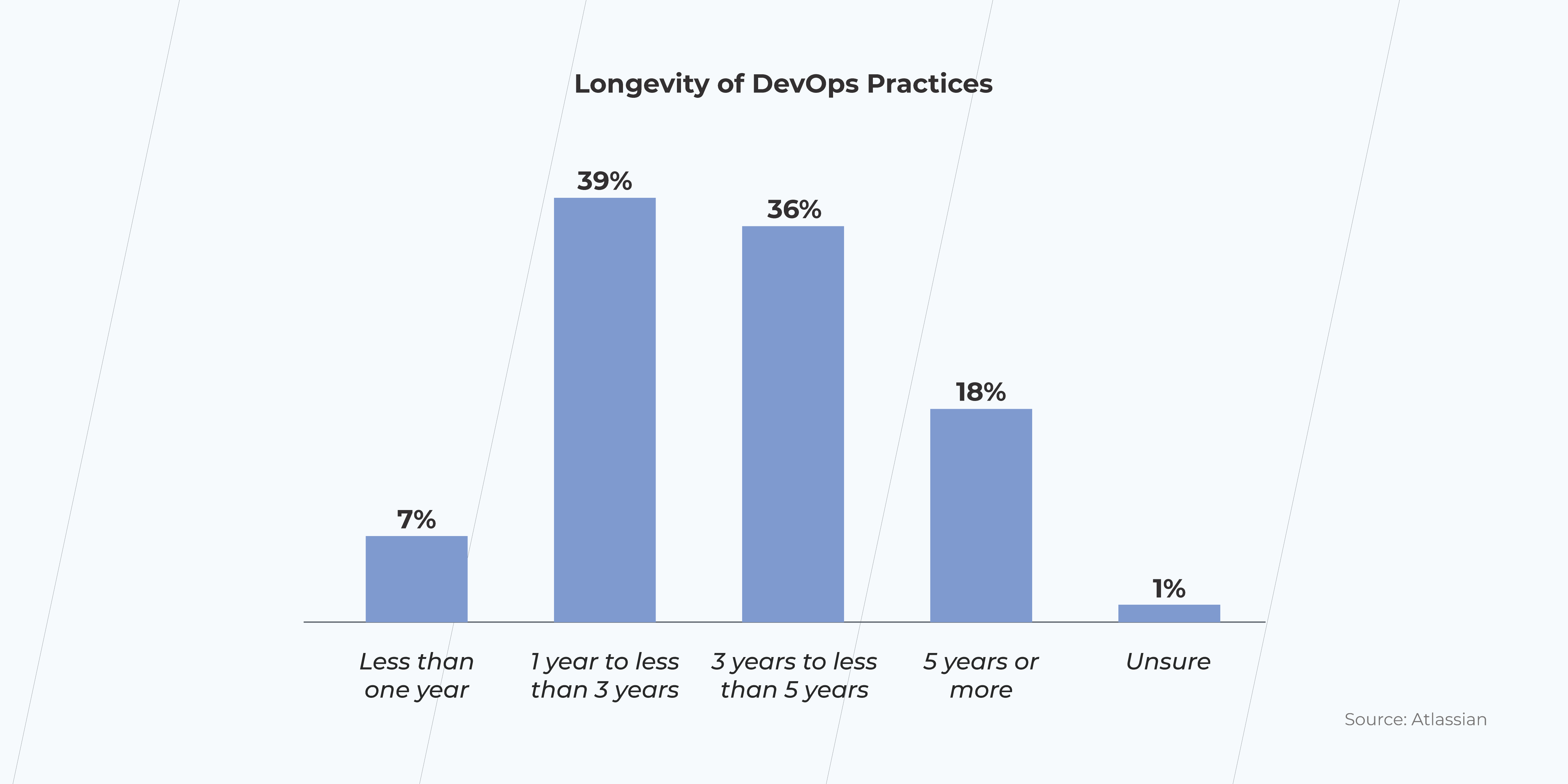
DevOps practices

Traditional Software Development vs. DevOps

How well does DevOps do when compared to the old way of doing things? As a matter of fact, pretty well. Atlassian says: 99% of respondents marked the positive impact on their organizations. 

DevOps is rising in popularity and hasn’t even reached its prime yet. In light of this, the traditional software development life-cycle (SDLC) might seem a little bit retro. Now let us explain why.
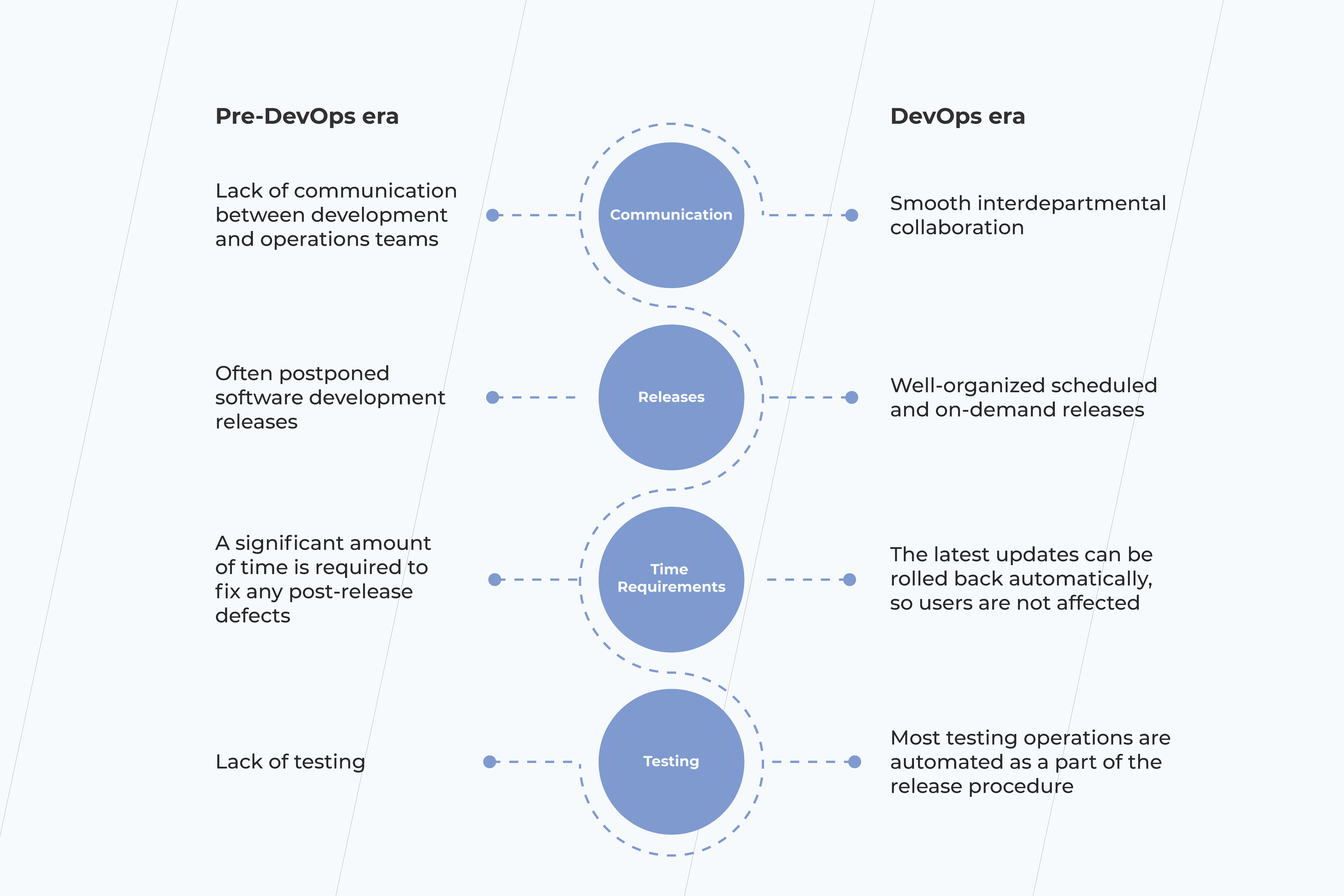
pre DevOps
Table 1. Old school SDLC vs. DevOps: the key differentiating points

The traditional SDLC

In the pre-DevOps era, you typically had separate departments responsible for developing, testing, and delivery. As a result, the successful project delivery heavily relied on effective interdepartmental collaboration. That could be particularly difficult to achieve if you outsourced some of your operations to third-party vendors.

You used to have a single staging environment where all pre-release preparations took place. After deployment to production, merge conflicts were far more likely to appear, resulting in irregular and long release cycles with a high probability of post-production defects. 

Here is a case that happened during the pre-DevOps times. In 2011, Facebook released the Timeline feature. Back then, the gradual release was not an option on the table, so the feature became available to all users at once. The result was that 500 million users tried a new functionality, causing a significant server breakdown. Had Facebook made their release steadily, they would have more time to gather feedback and predict a possible peak load. 

DevOps

In DevOps, all departments are responsible for the release procedure. It leads to an open collaboration culture, close interdepartmental ties, and better team spirit instead of an individual mindset. Dealing with third-party vendors can still be quite challenging; however, a relaxed environment tends to work more effectively than strict release guidelines and rules. 

A set of DevOps practices, known as continuous integration, deployment, and delivery, ensures that you have a ready-to-go deployment build. All software changes are automatically merged, tested, and deployed to a production environment with fewer efforts required to coordinate various departments.

The Agile mindset is the cornerstone of DevOps practitioners. Scrum methodology allows more frequent product releases, including unplanned ones. All changes are versioned and can be implemented as you go. 

A great example of a company that recently became a DevOps adept is Adobe. Back in 2016, they made a shift from on-premise software to a SaaS subscription model, dealing with issues they had never experienced before. To overcome such challenges, they started using a ​​CloudMunch platform which allowed them to increase the frequency of their releases. The result is astonishing: the app development demand is covered 60% more!

Roadmap for DevOps practices implementation

When you decide to incorporate DevOps in your business processes, the first step is to develop a roadmap of this procedure. You start with defining very high-quality actionable items, such as:

  • A general overview of the release pipeline; 
  • The team’s priorities and responsibilities; 
  • How results will be measured and shared;
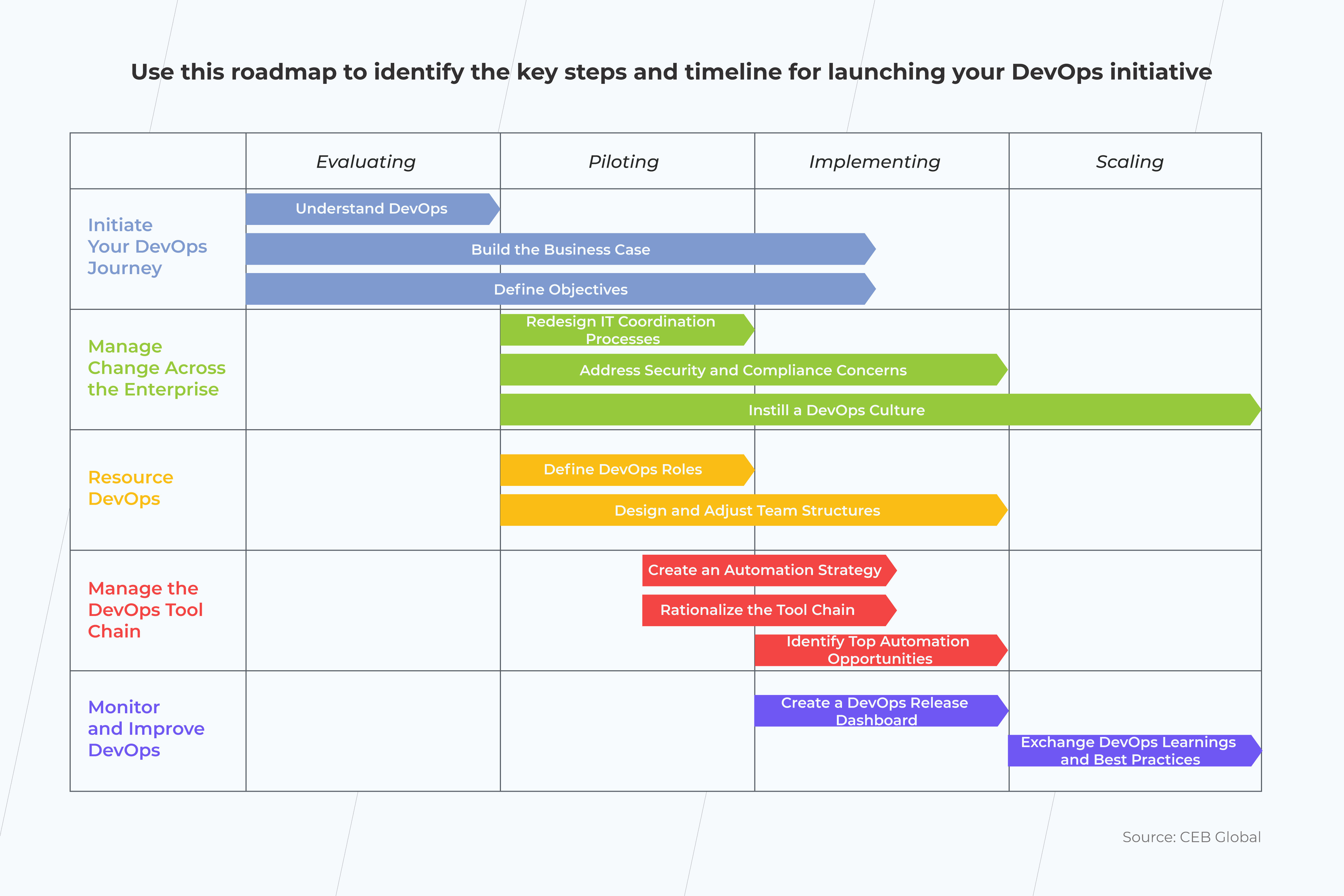
roadmap for devops

The DevOps roadmap can be used as a reference point for stakeholders. It will also help you better judge how effective collaboration between the engineering and operations department is and whether the internal processes show clear indications of improvement.  

Embracing DevOps Culture: What Do You Need to Get Prepared for the First DevOps Implementation Steps?

Once you have developed a DevOps roadmap, assure your team is ready to implement the new approach.

The ultimate goal of any DevOps transformation is to change the established attitude and connect people. There are several ways you can go about doing this:

  • Encourage people to develop personal connections. People are more likely to cooperate if they know each other. So make sure to get people to socialize, and don’t limit your team-building activities only within separate departments. The more, the merrier.
  • Develop empathy and a knowledge-sharing process. When people understand each other’s jobs, they tend to value each other and develop mutual respect. 
  • Use the proper communication means. People don’t like to use low-quality tools. That can be another reason that leads to poor communication, as simple as that. Instead, invest in effective collaboration tools like Slack that open up great communication possibilities. 
  • Establish regular sync-ups and standup meetings. Again, there’s no need to involve all team members. Get each department’s representatives instead (engineering and operations team leads will do just fine). 
  • Mentor your employees on how to write business stories and tasks.  This has to do with something we discussed previously, effective communication between departments. Make sure your employees can write clear requirements. 
  • Idea meritocracy. Blame-free culture emperors collective responsibility and encourages people to express their ideas openly. After all, it’s good ideas that should win, regardless of personalities.

Now that you have established a DevOps implementation plan with clear values, it’s time to put them to good use. The DevOps pillars, outlined by the “The Phoenix Project” DevOps adoption book, suggest incorporating critical acceptance and continuous learning/improving as a part of your cultural DevOps transformation values. 

Final Thoughts

DevOps is gaining momentum, and it’s not too late to jump on that train.

Embracing DevOps means so much more than just changing a particular delivery pipeline. It’s the mindset that matters most. So we suggest starting your journey with DevOps implementation steps as essential yet straightforward cultural changes and a clear DevOps roadmap.

All in all, that might be too much to process all at once. Get in touch with us if you need some help with getting your head around it. Together, we’ll design the DevOps implementation strategy that will meet your needs.
How to Make a Successful IT Integration Strategy for Mergers and Acquisitions

Mergers and acquisitions aren’t just all about dotting the i’s and crossing the t’s when it comes to your legal documents and finances. The success of the M&A depends on how quickly and efficiently you can integrate IT systems, data and processing workflow.

According to a Harvard Business Review report, between 70 and 90% of M&A projects fail. One of the reasons is the neglect of a proper IT integration strategy for mergers and acquisitions—an essential step for any business to ensure a flawless transition. Planning for IT integration in advance minimizes the risks of downtime, interruption to business processes, ensures data integrity throughout the process, and, in general, makes for a smoother transformation. Unfortunately, many enterprises do not adequately prepare.  

Pre-M&A due diligence and preparation steps

Before you start your M&A, you’ll need to follow a few steps to start off on the right track. Here are some of the stages you should adhere to get your merger and acquisition started right:

Collect all the relevant information

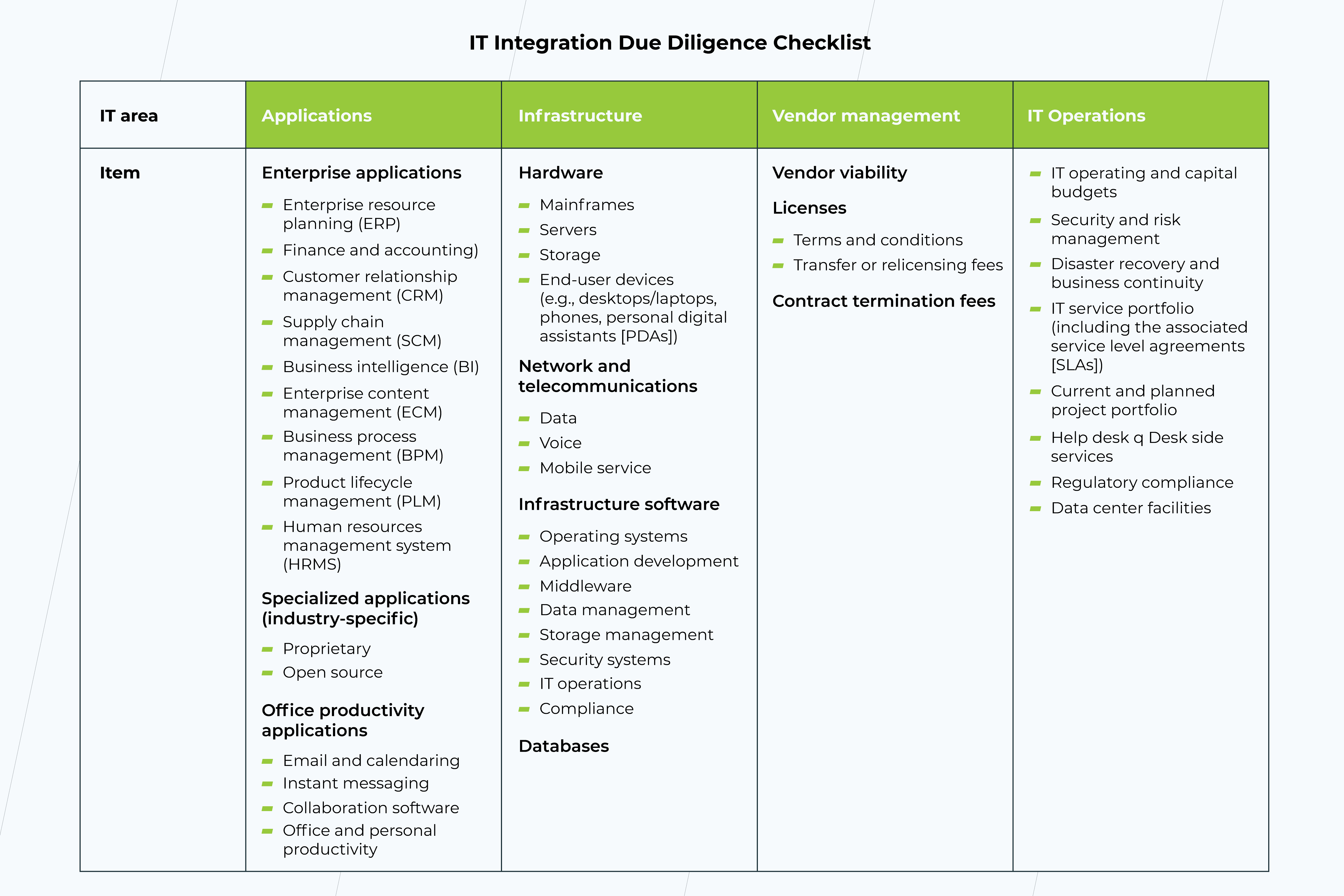
Time to look under the technology hood. This may include collecting the information about applications, infrastructure, vendors, and IT operations. Delving into a technical due diligence process is crucial both for the seller – to identify the issues that might affect the deal – and for the buyer – to make sure that none of the critical areas have been overlooked.

it integration due diligence checklist
Source: M&A Information Technology Best Practices, Edited by Janice M. Roehl-Anderson

Analyze the situation 

Where do you stand in terms of IT? At this stage, you should take note of the current resources and systems that you have. And what needs to happen to make this integration successful? Here, you don’t need to have a full integration plan, it’s enough to know the basic steps to take next. Consider if you need to make any changes to your systems to get them ready. Now, think about if you will need any additional resources to make your M&A transition successful. Here you should consider whether you have sufficient internal resources or you need to onboard an outsourcing provider to help you. 

Be transparent

By being transparent about the current risks, situation, and expected challenges, you allow your team and the one involved in your M&A to address them more effectively. Hidden or undeclared information can jeopardize an M&A before it gets off the ground.

Weigh up the risks

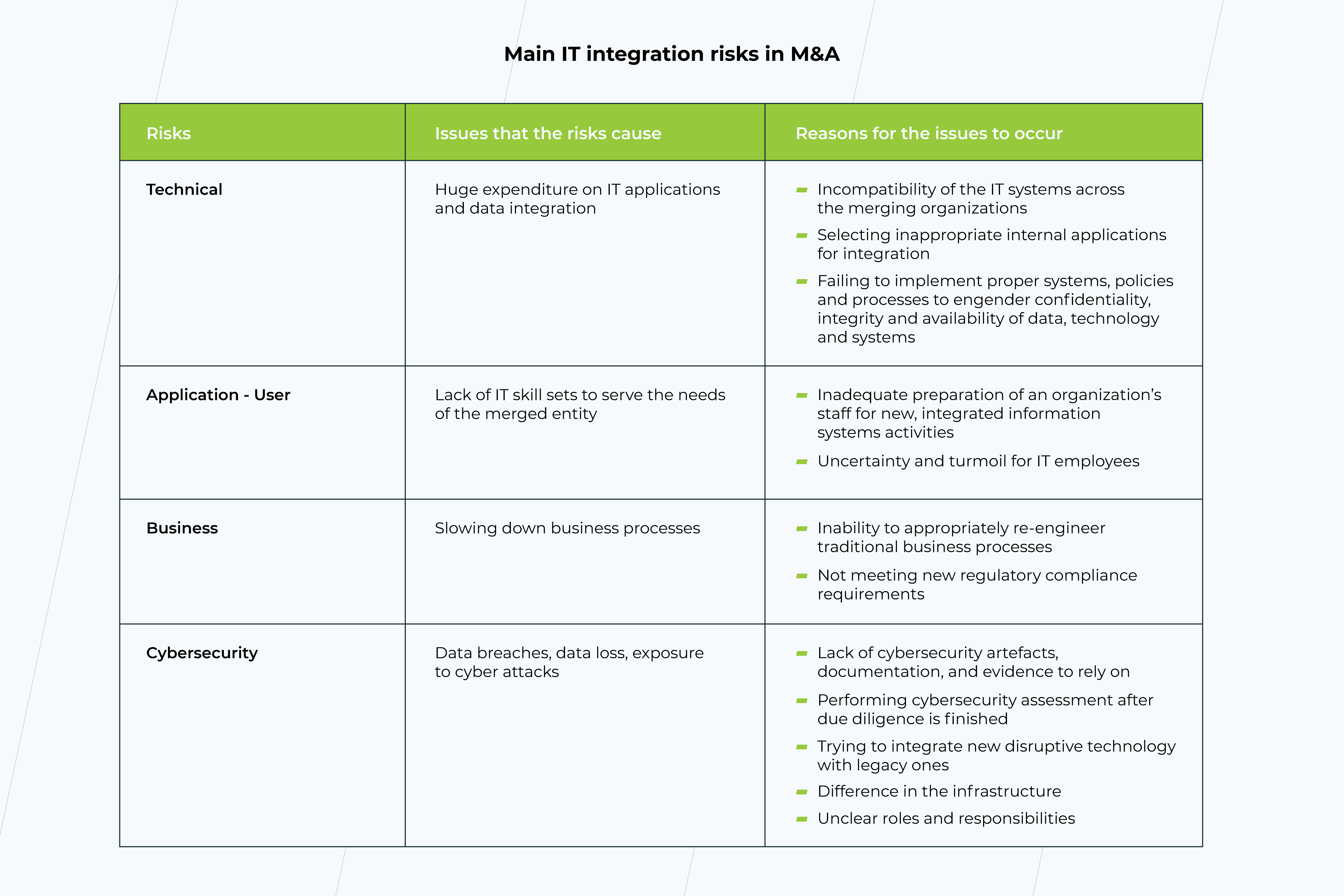
Risks are a normal part of any business process, by noting them in advance, you will best set yourself up for resolving challenges before they happen. Open and transparent risk assessment is one of the key factors that make for successful M&A integrated solutions. However, often businesses fail to address these risks adequately and unexpected issues might occur. This can be anything from incompatible software to conflicts between PC and Mac, tech debt, or even human factors. One of the main benefits of engaging a special M&A IT team for integration is more accurate risk prediction.

IT integration risks

Take account of your assets

From your human resources to finances to expertise, knowing your assets will help you map out your integration strategy and identify any areas of weakness that you may need external help for. For example, during the integration process, you may notice that a system, crucial to the integration, was skipped at the inventory stage. This could cause the entire process to slow down or even change the trajectory of the integration. Taking account of assets in advance and doing a full inventory, puts you in the best position to get started while minimizing the risk.

Allocate roles and responsibilities 

While you may have outlined these at the previous stage, it’s essential that the roles and responsibilities within your M&A are well outlined and defined. Any M&A is a time of change, and that’s true for your team too. Their roles may be changing, at least temporarily, or they may need to cooperate with outside providers. In any case, you’re likely to need these specialists to your team:

  • Integration Manager;
  • Integration Architect;
  • Integration Engineers (+ SysAdmins);
  • Integration Analyst;
  • Integration QAs.

They will ensure the work is completed to the highest standards when it comes to IT integration. Note, that by managing the process from the very beginning, you set your team up for success. 

Do you need a team of IT experts?

Book a call

Create a strategy 

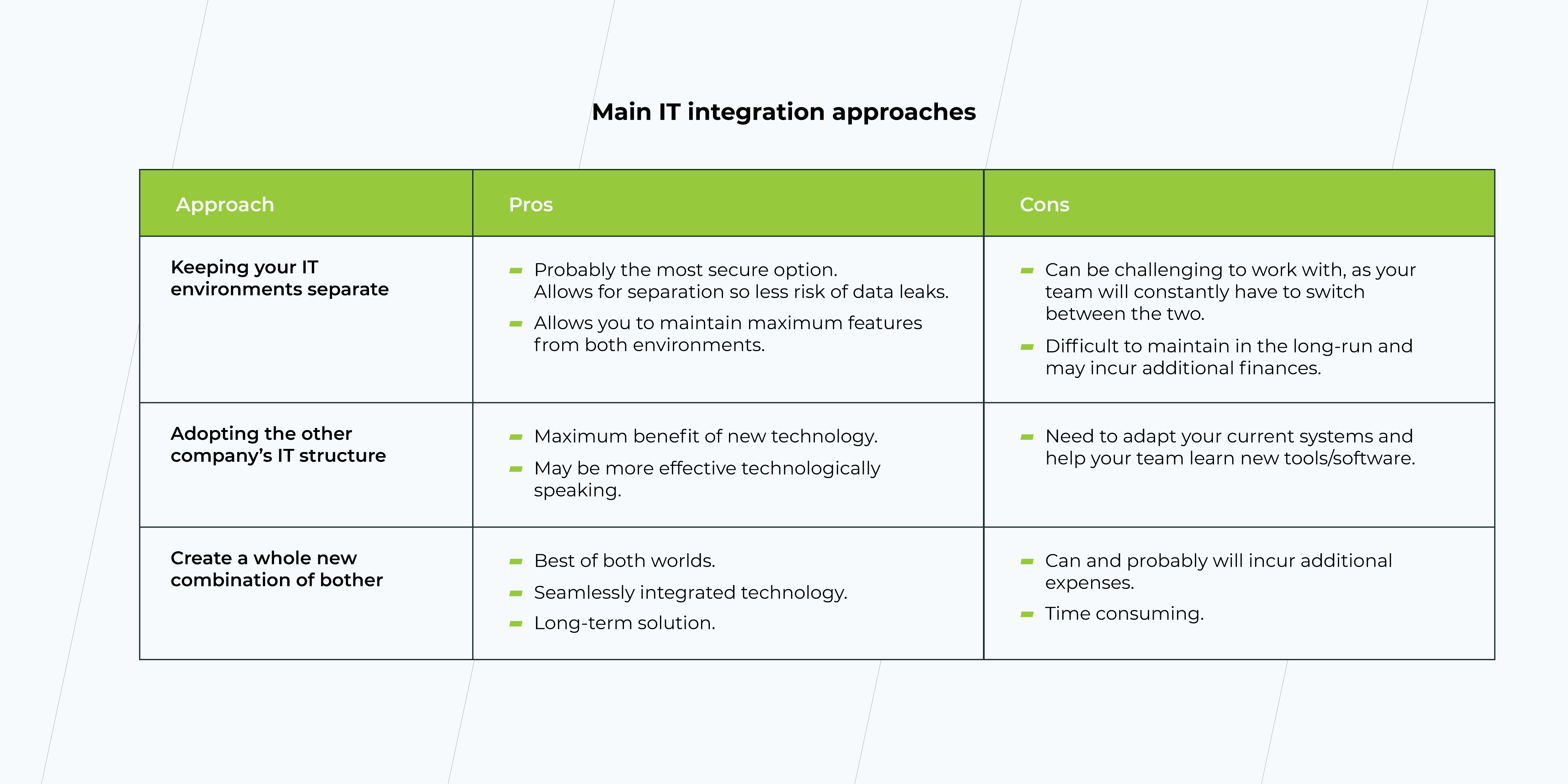
Now that you know the risks and your assets, it’s time to start forming a strategy on paper. This should be a well-mapped-out and achievable plan to integrate your IT assets in the most effective way, and include all the points above. Here you will need to make some decisions. For example, you may choose to:

  • Keep your IT environments separate
  • Adopt the other company’s IT structure
  • Create a whole new combination of both

There is no ideal answer here. Your solution will depend on your individual business needs and your assets. Note: Don’t forget to ensure you include who or what team is responsible for what, during an M&A this is essential to ensure that everyone knows their role.

IT integration approaches

As they say, the proof is in the pudding. Before you kick your IT integration strategy into action, it’s vital you validate it first, use well-established business tools and metrics, such as risk assessments, business planning, stakeholder analyses, and TCO analysis, to ensure your plan will work.   

Planning the budget

According to Deloitte IT M&A Study, approximately half of the transaction implementation budget is associated with IT activities. Thus, getting IT costs right becomes a crucial component of the overall deal, whereas failing to estimate them might result in significant IT integration delays, cost overruns, and, ultimately, post-deal disputes.

Successful IT budget planning starts at the target screening phase. Although at this point, it relies partly on notably limited information, partly, as a rule of thumb, the initial forecast still needs to be done to support early-stage deal evaluation and negotiation efforts.

The target screening integration cost estimates are to be refined during the due diligence phase. The accuracy of the cost analysis here is in direct proportion to how meticulously the due diligence has been performed. A complete and thorough analysis of the entire IT ecosystem, including applications, infrastructure, etc., is required so that all the possible cost-related issues will be identified and addressed early on. It may turn out that you’ll have to replace legacy systems or invest in additional infrastructure resources, like servers, network equipment, etc. By taking care of all that in advance and focusing on longer-term needs rather than ‘quick wins,’ you have a great chance to avoid unexpected costs down the line.  

What makes successful integration when acquiring tech start-ups?

Now that you know the essentials of what to prepare for when it comes to an M&A IT integration let’s talk specifics. Today, one of the most common requests we receive in terms of mergers and acquisitions is when it comes to companies seeking to purchase tech start-ups. Often this happens because a company wants to acquire some cutting-edge technology or innovation, which should be fully integrated into their systems to become a prized asset to their business. 

These types of M&As come with both technological and cultural nuances that enterprises need to be aware of. Here are our top tips for start-up M&As:

  • Consider the tech implications. When companies acquire tech start-ups, it can be difficult to assess the resources needed due to the technology’s proprietary nature. In this case, it’s vital to get the other team on-board at the start to see how they believe their technology can be best integrated, how long it will take, or if it even can be fully integrated or will remain a standalone feature.
  • Be prepared to allow autonomy to your M&A team. Tech start-ups, by nature, are agile environments and subject to constant change—this is what makes them so good at what they do. Often, they are used to autonomy and making decisions. Even during an M&A, it can be challenging to give up these characteristics, and in fact, can impact the work of the team post-M&A. By allowing a certain level of defined autonomy in decision-making, you set yourself up for a better working relationship long-term.
  • Develop goals and strategies for everyone. An M&A shouldn’t be two teams working in parallel. It should be two teams working together. Creating shared goals, strategies, and processes for achieving these means that everyone feels involved and can use their expertise effectively to advance your business without engaging in in-fighting.
  • Expect complications. Nothing worth having comes without hard work, and this is particularly true for start-up M&As. Proprietary technology is by nature unique, and the typical IT processes won’t always work. Use the knowledge and expertise. You must ensure a tailored approach is taken for ultimate M&A success.  

Your M&A IT integration checklist

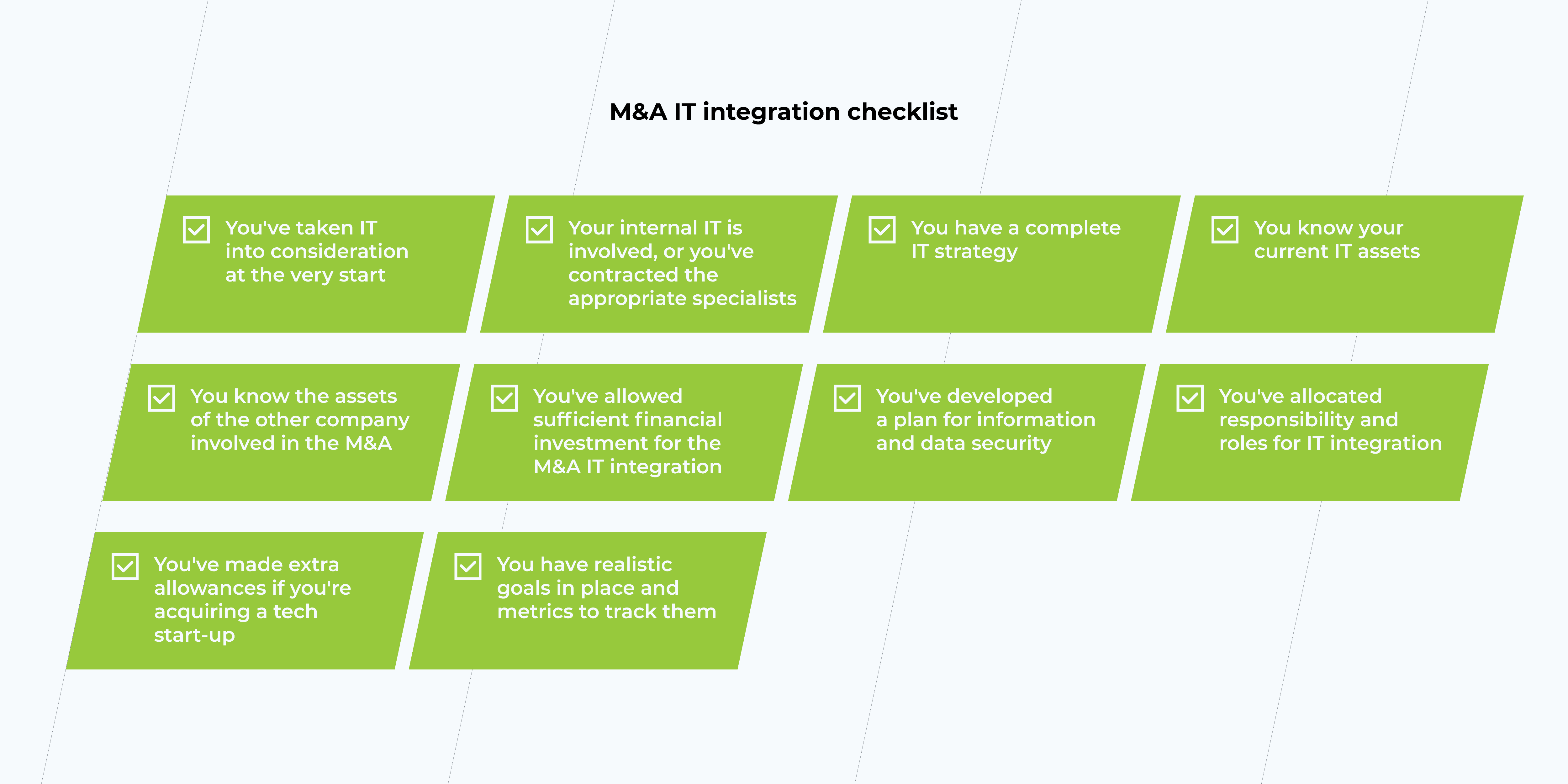
To help you keep your M&A as seamless as possible and ensure your IT strategy will work for you, we’ve created this easy-to-follow checklist for any business entering into an M&A.

IT integration checklist

Getting started with your M&A the right way

Mergers and acquisitions can be a stressful time for any business, no matter how many times you’ve done this before, or even if it’s the first time. Each M&A requires a lot of work and coordination for various departments to get it done in a way that works for you. When it comes to your IT assets and your newly acquired ones, it’s essential that you ensure that all is in order before the merger begins. Getting the right specialists involved at the get-go if you don’t have them on your team, ensures that your M&A will be completed right. Avoid errors before they happen and tick those boxes when it comes to your M&A IT integration.

Learn more about the role of BI in Mu0026A deals

Register to our online meet-up

Cloud Migration Team: Why Build It and Whom to Include

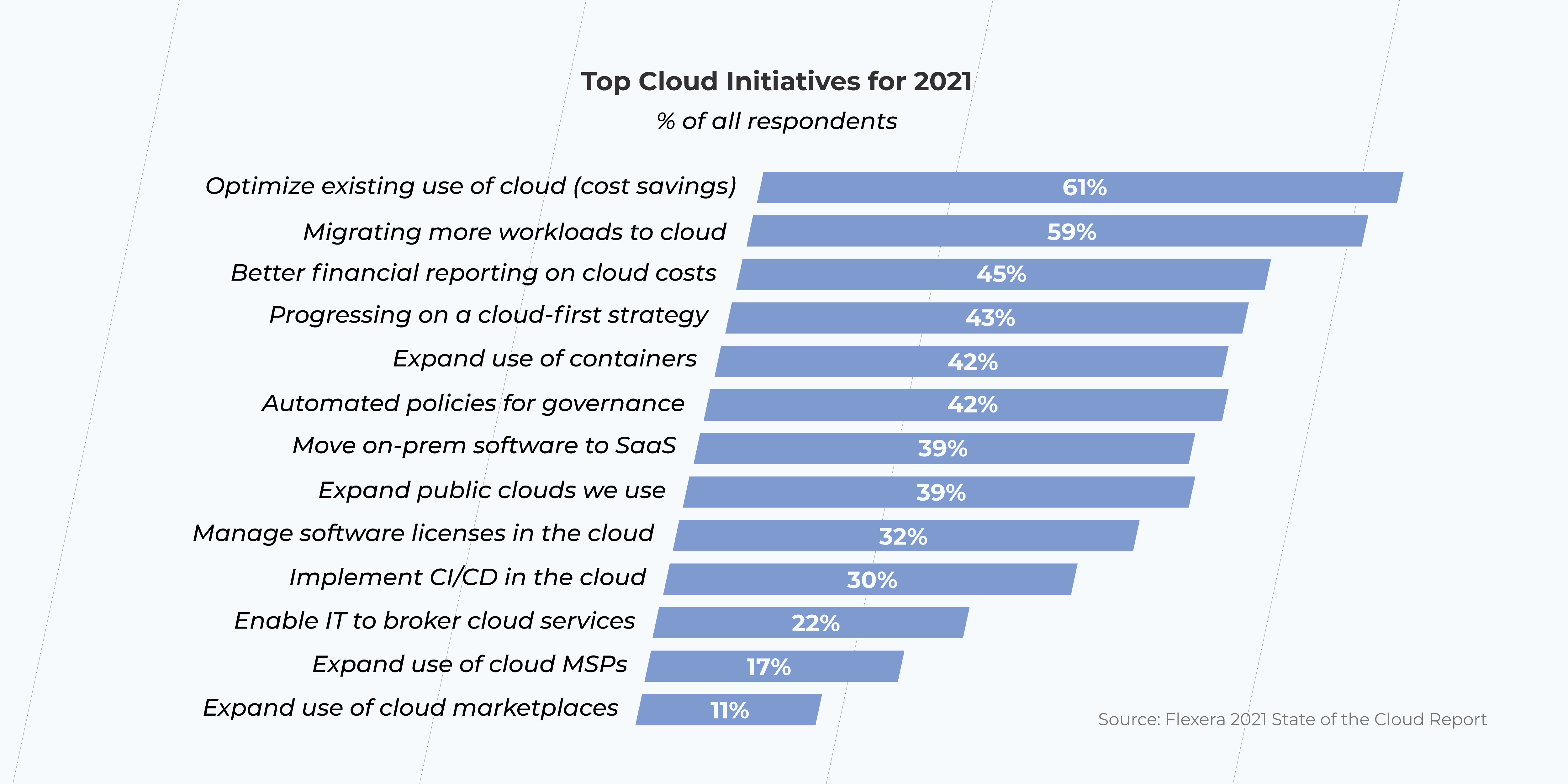
With the global shift to remote work, cloud migration has turned from a distant prospect to the indisputable reality for most businesses. According to Flexera 2021 State of the Cloud Report, 59% of organizations plan to focus on cloud migration. At the same time, Cloud Guru survey (2020) shows that more than 80% of cloud leaders point out lack of internal talent as a top barrier to cloud success. Not only do these numbers indicate the growing need for strong cloud migration teams, but also make it absolutely clear that cloud adoption gets nowhere without the people who execute it.

We’ve already discussed the benefits of cloud migration, highlighted the hidden costs it might entail, and deep dived into the cloud models to help you choose the right one for your business. Now it’s high time to talk about the importance of having dedicated cloud experts who will bring your cloud-related ambitions to life.

Why do you need an experienced cloud migration team?

  • Saving money, time, and tons of headaches

You take your car to the service when your transmission is blown, and hire a construction team to build a house for a reason – you believe that experts know best. It’s nice to apply the same principle to cloud migration, as there are many nuances your in-house team might be unaware of. For example, do you know what size of the Virtual Machine (VM) is optimal for your workload? Selecting the VM which is more powerful than you actually need is fraught with unnecessary expenses. It’ll turn out that you’ll spend a fortune and believe that the cloud is “too expensive,” when the trick is that you just need to approach it wisely.

Cloud migration

The biggest misconception regarding cloud migration is to think that it’s a piece of cake, whereas it’s definitely not for people with no relevant experience. We’ve recently had a client who reached out to us to figure out what was wrong with their cloud expenses. It turned out that they’d been testing Azure Databricks and had written a test script to see how the platform worked and what data could be analyzed. But to make the script work, it was necessary to create a Databricks cluster, which implied using Virtual Machines. However, the user can’t have known that, because those VMs were configured in Databricks interface not Azure itself. Eventually, without realizing it, our customer created an auto-scaling cluster that made them blow 50% of their total cloud costs and, on top of that, wasn’t even used for production needs.
– Petr Spirichkin, Cloud Engineer at *instinctools

Those, who aren’t experienced in cloud computing, will barely pay due attention to Service Level Agreements (SLA), however, they really should. SLA is the document where both the client and the provider agree to the terms and conditions for provisioning and consuming the cloud service. It defines the level of services to be delivered by the provider and compensation in case the specifications are not met. Although to the untrained eye, cloud services might seem quite forthright, with little variations, there are always areas to customize and details to negotiate, such as data retention, or pricing and compensation.

Cloud migration

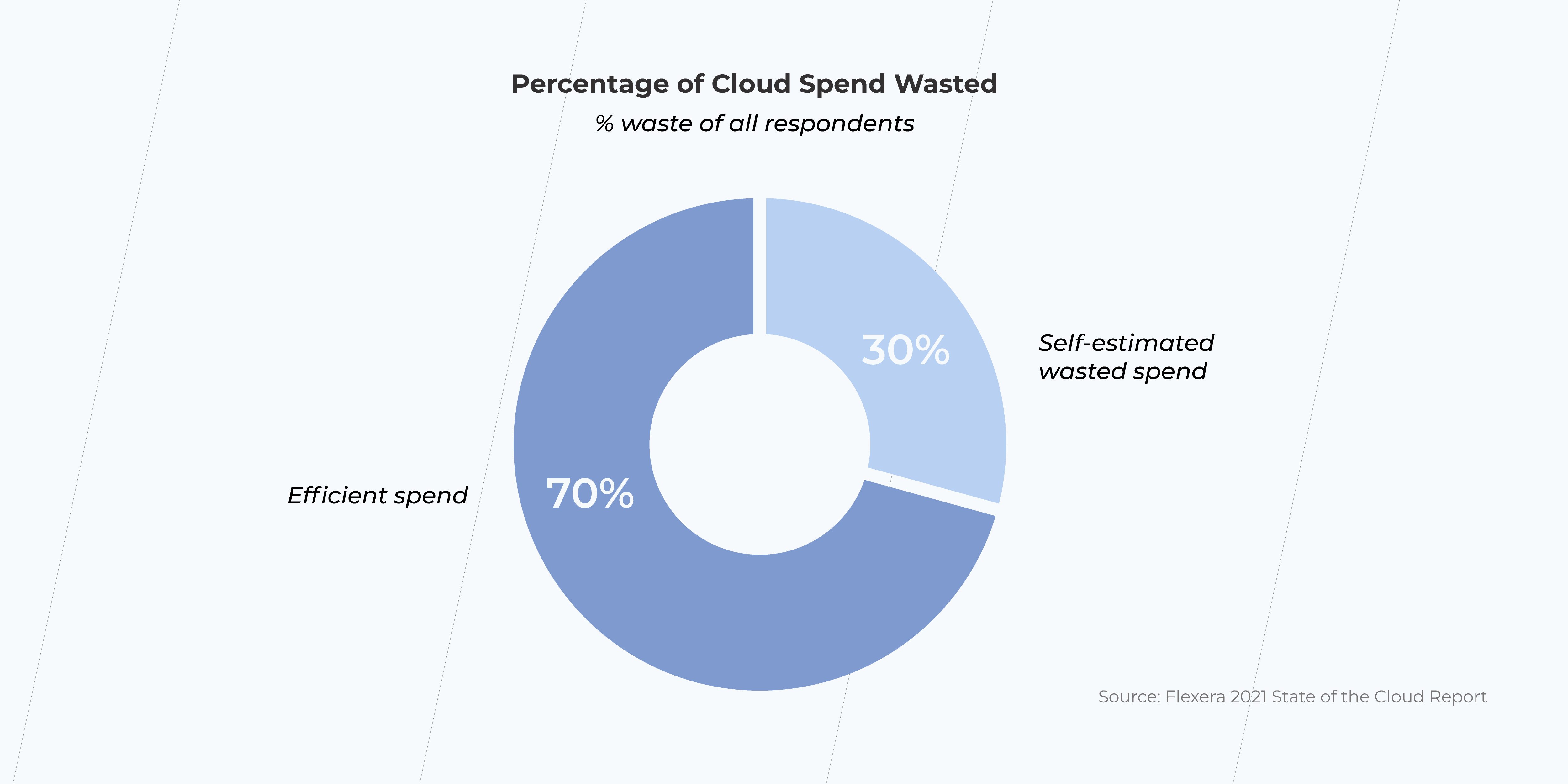
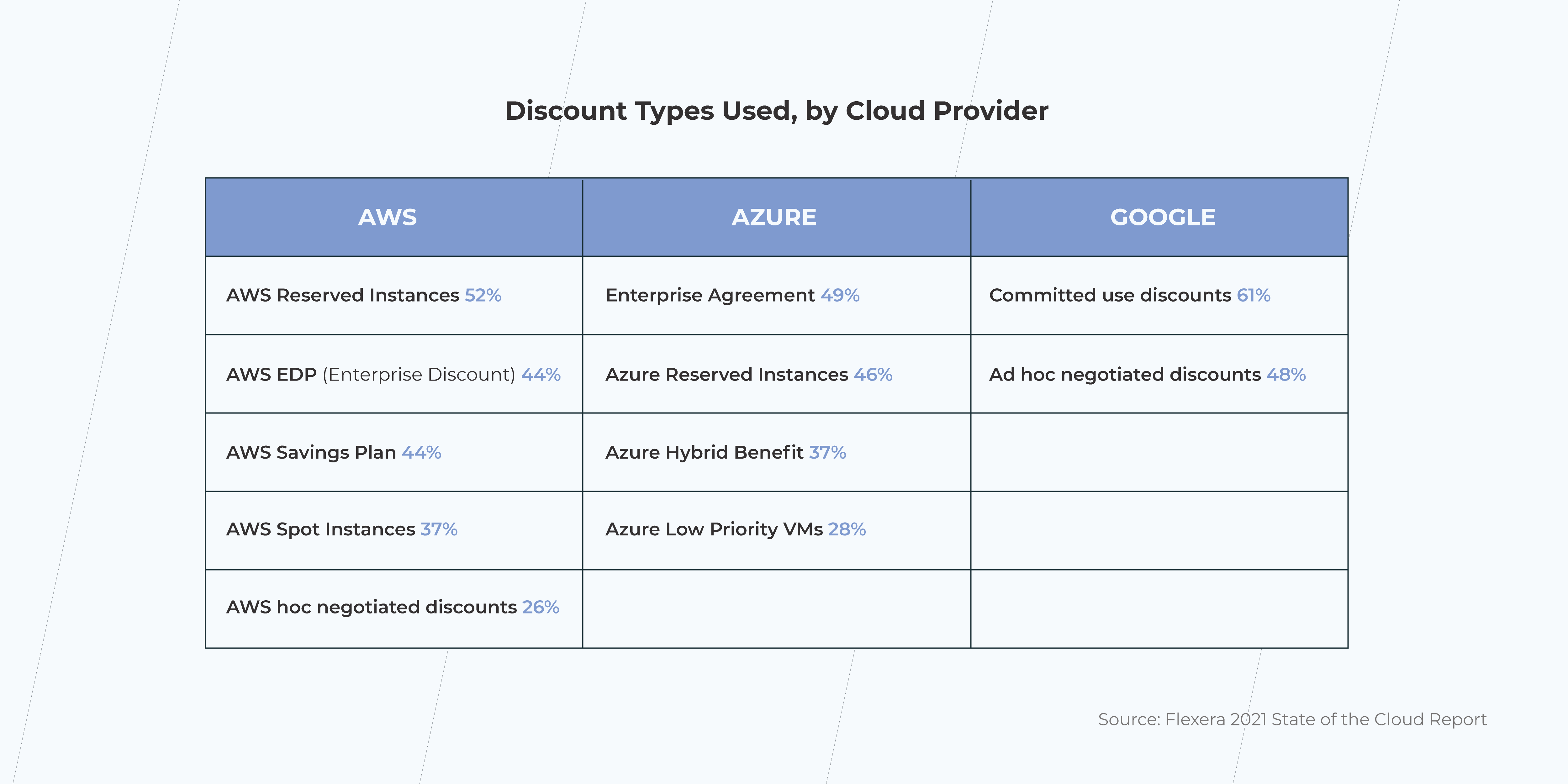
For 61% of companies, optimizing cloud spend is the top initiative for the year ahead (Flexera 2021 State of the Cloud Report). Meanwhile, 30% of users admit to wasted cloud spend. Indeed, cloud provider pricing structure might seem confusing and difficult to decode, but careful examination of the discounts can uncover opportunities to reduce costs.

discount types
  • Ensuring security

If losing the chance to decipher cost reduction opportunities is unpleasant, yet bearable, dealing with security issues is another story. Cloud migration means shifting to a completely new operational model, so it’s natural that not only does the approach to security needs to change but the expertise itself has to be different as well.

Ensuring your organization’s cloud security becomes only possible if your team knows how API and CLI tools work, understands the principles of cloud identity and container security, and, in general, has a clear, undistorted vision of your cloud state.

You might not know about replication, failover, and a recovery plan and think everything is ok until it’s not and the data center goes down. Datacenter outages result in downtimes, financial costs, and, sometimes, even data loss. As frightening as it sounds, this issue can be tackled by replicating your Virtual Machine to a different region. For example, Microsoft offers a built-in recovery service – Azure Site Recovery, that helps ensure business continuity by keeping business apps and workloads running during outages.

– Petr Spirichkin, Cloud Engineer at *instinctools
  • Staying on track

It’s easy to get off track if the route is not mapped out. The same goes with cloud migration – without a careful plan, there’s a high probability to get caught up in the maze of a completely new operational model. That’s why a well-defined cloud migration strategy is a must. It outlines all the key stages of the cloud adoption process and addresses the risks that may occur on the way. Developing a solid plan is not that simple at all and you are unlikely to do it without the help of experienced specialists, as there’s no universal solution – one common method cannot be used to move all your IT assets to the cloud. A coherent strategy aims to answer the questions of what, how, and in what order has to migrate.

  • Preventing delays in business

Keeping a relentless eye on your cloud migration project is great unless it’s to the detriment of your company, that still has to be run. Losing focus on your direct responsibilities may end up with some serious delays in business. Turning to a cloud migration consultant, you buy yourself time to concentrate on what matters most and eliminate the risk of dealing with migration issues on your own. 

What is a cloud migration team structure?

cloud migration team

The structure of the team varies according to many factors, like cloud migration approaches, which, in their turn, depend on the size of the company and the data you want to migrate. So let’s put it this way – if you just want to give it a try and shift a couple of applications to the cloud, hiring a whole squad isn’t necessary – one cloud engineer will probably be enough. On the other hand, shifting the entire workload to the cloud requires a solid team of experienced specialists.

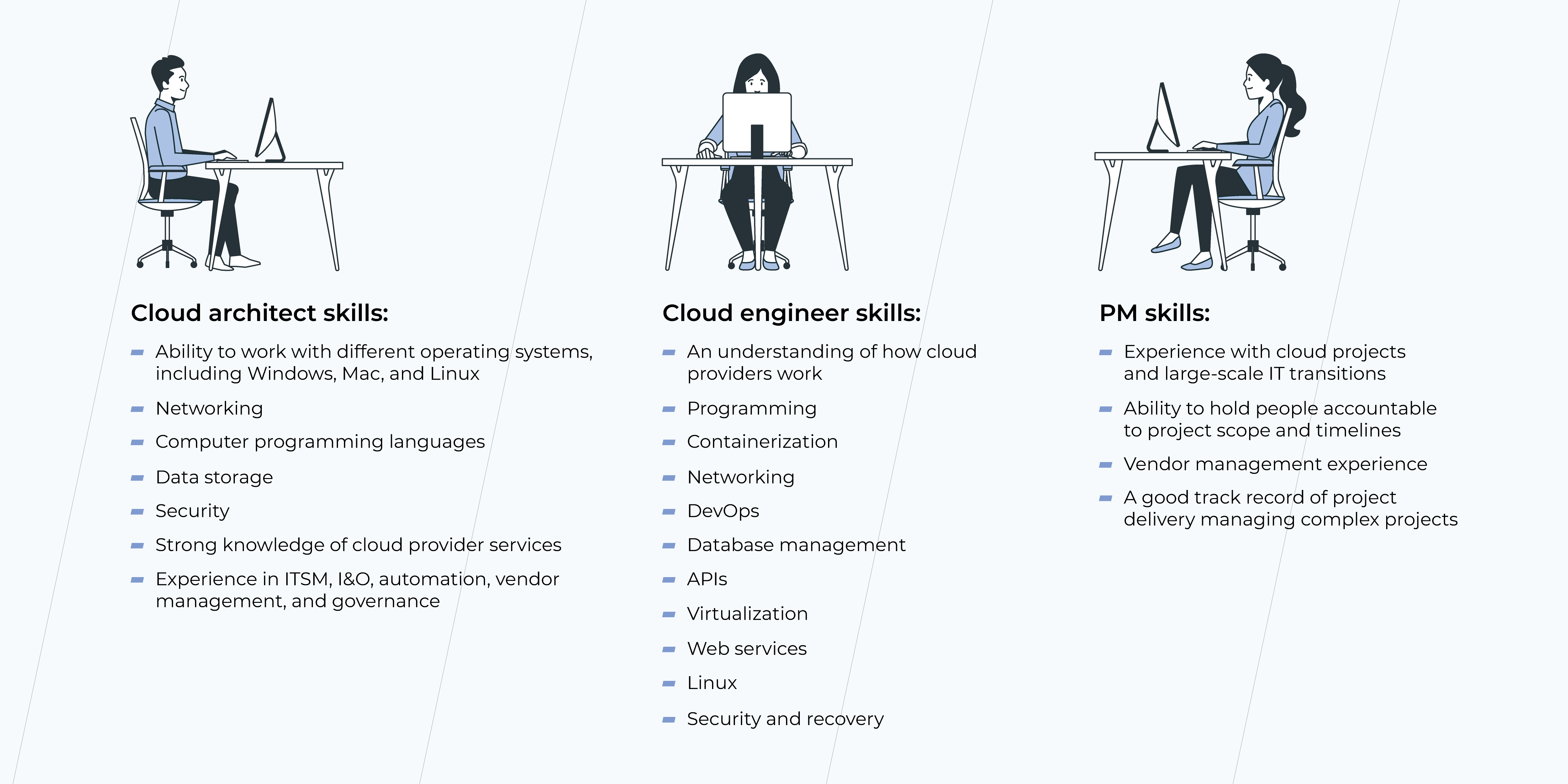
Aside from the people on your end responsible for major decision-making, here are the experts that will pull your cloud adoption off.

Cloud architect

It wouldn’t be an exaggeration to say that a cloud architect plays a vital part in cloud success. It’s the person responsible for designing and building environments in the cloud. Someone, who not only has in-depth knowledge of cloud technology but can also look at the project from above to see a full picture of it. 

What does a cloud architect do:

  • Develops a cloud strategy
  • Develops and coordinates cloud architecture
  • Evaluates cloud infrastructure costs
  • Designs cloud infrastructure
  • Supervises security in terms of privacy and incident response planning

Being aware of the options and limitations of cloud services, a cloud architect will help you to dodge ‘gotcha’ moments during your migration journey.

Cloud engineer

A Cloud engineer is a universal soldier who performs technical duties related to cloud computing. 

What does a cloud engineer do:

  • modifies and improves existing systems
  • develops and maintains software to run on virtual systems
  • manages software and hardware connected with the use of cloud-based services
  • investigates, creates, and recommend technologies that will provide security for cloud-based digital platforms

Smaller businesses are likely to get by with a cloud engineer as a generalist, whereas larger organizations need specialists with more specific expertise. Accordingly, the role of a cloud engineer can be broken down into several positions with their own responsibilities each: cloud software engineers, cloud systems engineers, cloud network engineers, and cloud security engineers. 

Project manager

There are plenty of possible snags that can prevent you from staying on time and on budget during your cloud migration project. Dealing with obstacles and keeping the team to milestones and timelines is the project manager’s job.

What does a project manager do:

  • creates a cloud migration project plan
  • delivers cloud migration within scope, schedule, and budget
  • manages the process of translating IT strategic goals, roadmaps, and business requirements into future state architectures
  • identifies roadblocks to migrating and offers solutions
  • ensures alignment across teams

Should I migrate to the cloud with my team?

If you are a lucky devil with a proficient, committed team of the experts above – go ahead! But if you lack cloud specialists or doubt their skills you’d better either table your migration plans or hire a cloud migration consultant.

Sticking to the DIY concept during cloud migration can lead to tons of wasted time at best. While at worst…Wait, let’s not even go there.

Not having a team with a decent plan results in stumbling over many problems companies don’t initially expect to face. That being the case, there’s a long shot to get everything done properly on the first try.

However, cloud migration is fast, safe, and cost-effective for those who have the right team with the right skills. 

Looking for highly qualified professionals to support your cloud initiatives?

Cloud Migration Strategy: The Decisions to Be Made

When rationalizing cloud migration, the first question all CEOs encounter is the risks and benefits of migrating. A lot has been said about the added value, speed, and competitiveness acquired along with cloud technology. Yet, some of the doubts that need to be addressed firsthand, are infrastructure compatibility, staff cloud-training, public cloud visibility, data security and encryption, keys to the cloud and storing your user data, etc. 

As you weigh all the pros and cons of cloud migration, it’s time to get to a cloud migration strategy. Let’s find out what exactly it is, how to prepare one, and what personnel is needed from your side.

What is a Cloud Migration Strategy? 

cloud migration

A cloud migration strategy is a master document that describes the purpose, business outcomes, and key stakeholders of the cloud within an organization. It contains the decision points of the cloud migration strategy, involving applications, IT systems, and infrastructure migration. The document also incorporates the key takeaways on the technology pathways and decisions from the cloud adoption and cloud migration plans. However, it’s just different from them and plays a very important role in the whole process of migration.

Why Do You Need a Cloud Migration Strategy?

A cloud migration strategy defines the roles and decisions about the cloud in your organization. It identifies the key services consumed by the cloud provider and determines the amount of code to be written and refactored. 

A cloud migration strategy serves as a guidebook for cloud service adoption, addressing technology silos, non-standard solutions, non-optimized costs, and exposing risks from poorly configured environments.

A cloud migration strategy document is a bible project shared between all the stakeholders, tech staff, and other key decision-making personnel, serving as a go-to resource when aligning with the current state of the company’s technology, and projecting the state of the cloud for the years to come. It’s a living document that reflects the digitalized company’s growth factors. 

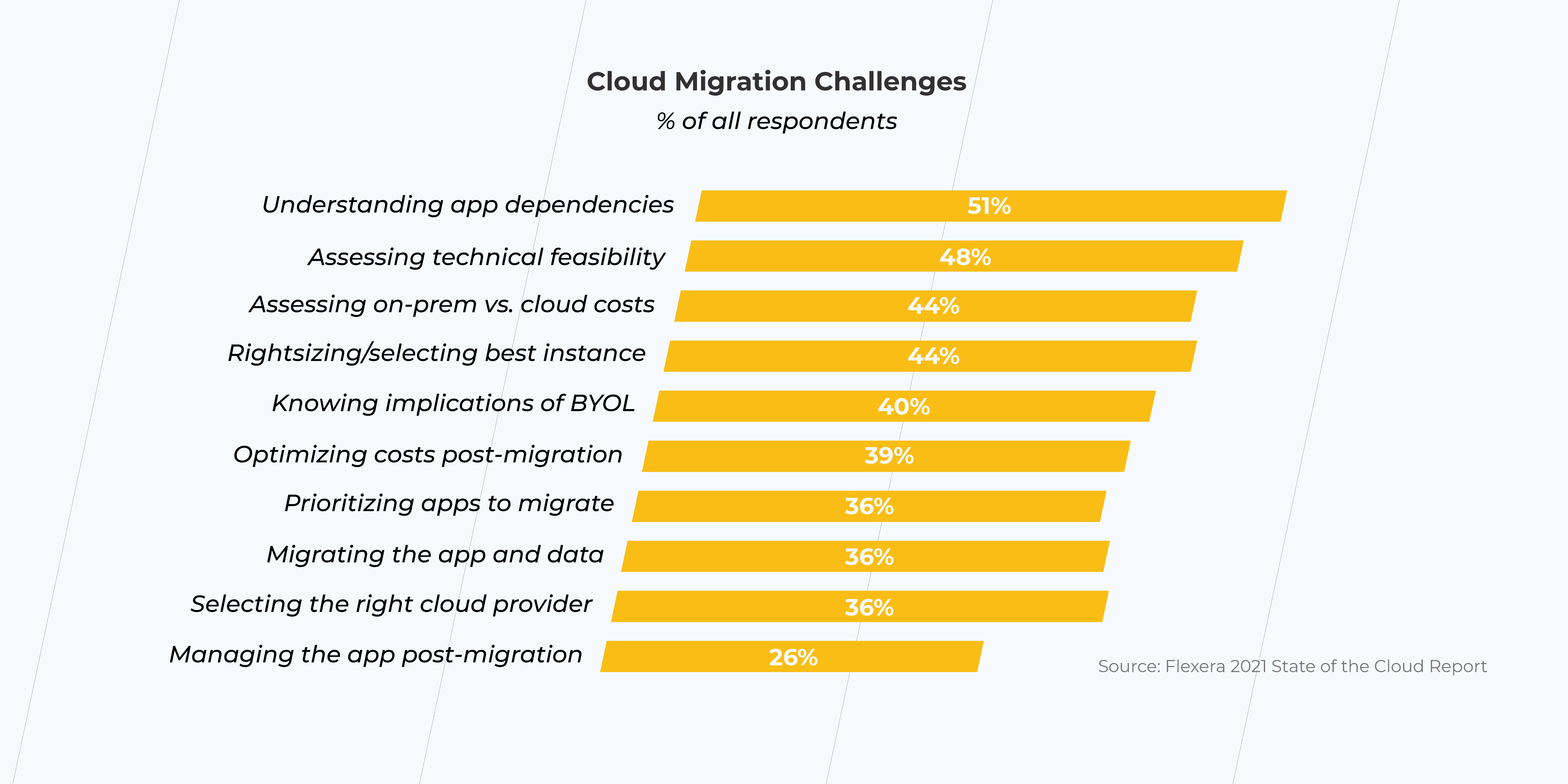
That being said, a lack of cloud migration strategy will leave the team with little to no coherent guidance for cloud service adoption in your organization. This can result in a number of challenges.

cloud migration challenges

What Should a Cloud Migration Strategy Include?

When elaborating on the cloud migration strategy document, here are a few suggestions that would be beneficial to include for everyone in your company to stay on the same page. The list we are sharing below is meant to give you a general idea of what belongs to the cloud migration strategy. Feel free to add some crucial elements and decisions pertaining to your company’s unique culture and evolutionary path to accommodate more positive development scenarios in the long term. Your experience, vision, and gut feeling are the best guidance in this process. Here’s where you can start:

1. An Overview

State the larger purposes of the transition, such as new business objectives, and allocation of the funding, and the consumer requirements. Reveal the motivation behind the move, including new business perspectives and goals supported by the novel technology.

2. Business Outcomes

Narrow the business goals down to which application innovations are going to improve what customer experience and how it’s going to affect the growing market share seen in figures. Include predictions, statistics, and examples for data, IoT, and AI-driven innovations and experiments. 

3. Projected State of The Cloud for the next 2-5 years

The list of the cloud services which currently support your company’s infrastructure will likely vary quarterly based on the experiments and analysis of the cloud consumption, patterns, and security updates. This section is meant to provide a clear vision of what practices can be validated and supported further based on the performance criteria.

4. Additions

Introduce the list of the required documents crucial for successful cloud adoption and management. For example, data classification and governance, cloud environment policies, and ‘IT chargeback’ and ‘showback’ models.

5. Migration Specifications & Technology Dependencies

Include the data that needs to be re-hosted, code that needs refactoring, and every other thing that has to be re-architected, rebuilt, and replaced. Choose the small batch for your first migration cycle. Define technology dependencies for the IT department to look up and synchronize to.

6. Timing

It’s necessary to outline the milestones for migration by marking important business events and some end dates, like contracts terminations and renewals. Any cycles related to technology release, up and running for end purpose need to be clear-view displayed for successful migration planning. 

6. Cloud Roles & Responsibilities

Include the key decision-makers to request, consult, and sign-off the cloud services. Assign the roles for the in-house IT team and cloud consulting vendors, such as assessing, migrating, optimizing, securing, and managing the process of migration. State the chosen cloud partners, so that the IT department could work with their tools and configure the features using best practices.

Who is Going to Make the Decisions and About What?

Your cloud team is going to be the specialists, vendors, partners, and decision-makers and will be centered around Cloud Architect. A Cloud Architect is the IT specialist who defines and communicates a chosen cloud strategy. They work with leadership, business units, security, and technology teams. 

However, for the needs of the cloud migration strategy, we will identify the stakeholders and their responsibilities. Their roles and names can vary from business to business. And here are some hints to help you determine the main actors for the cloud migration strategy and people who are going to reinforce your team. The three pillars of the decision-making process for the cloud will typically be: 

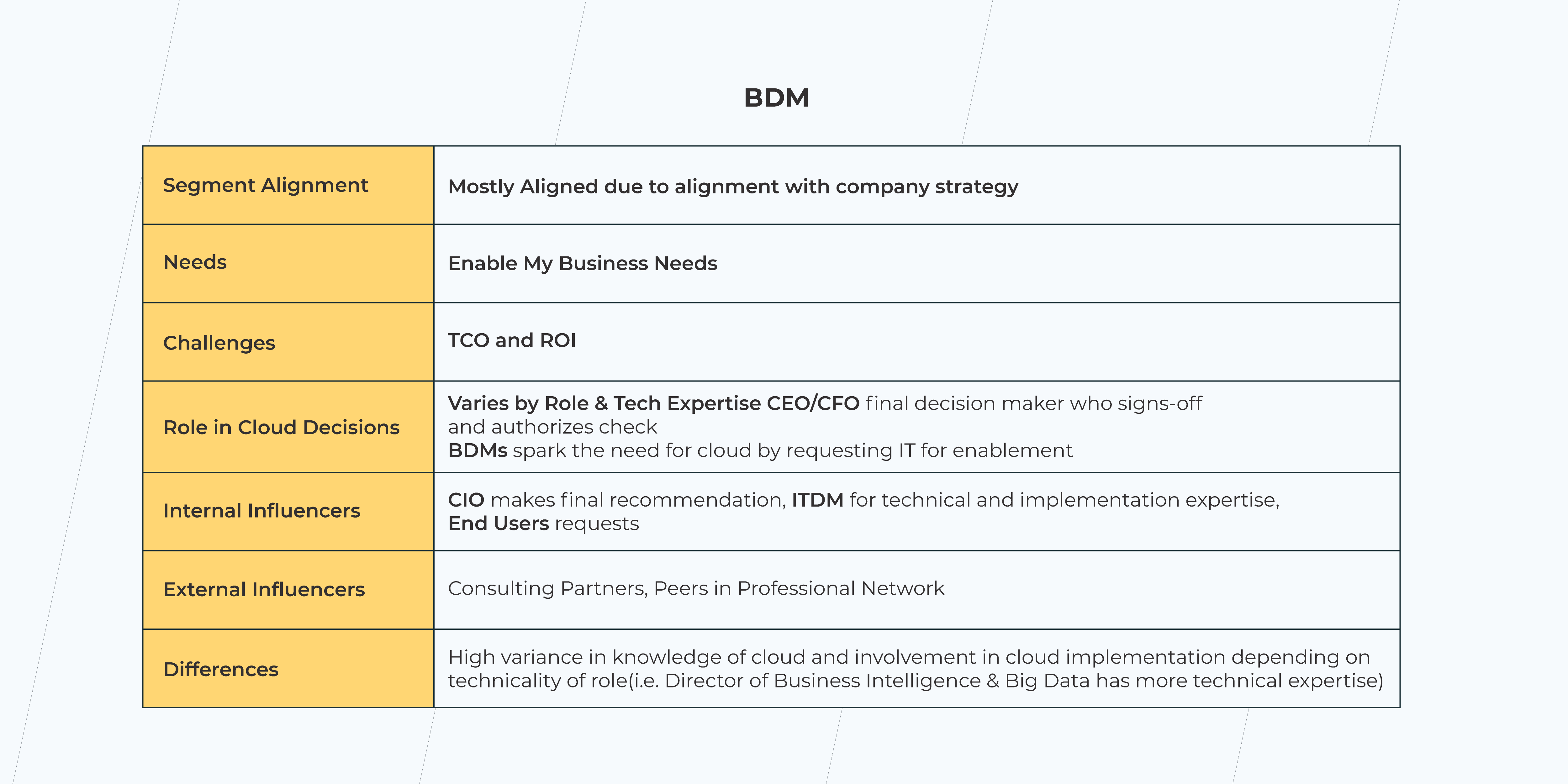
  • Business Decision Maker (BDM). The Final Decision Maker.

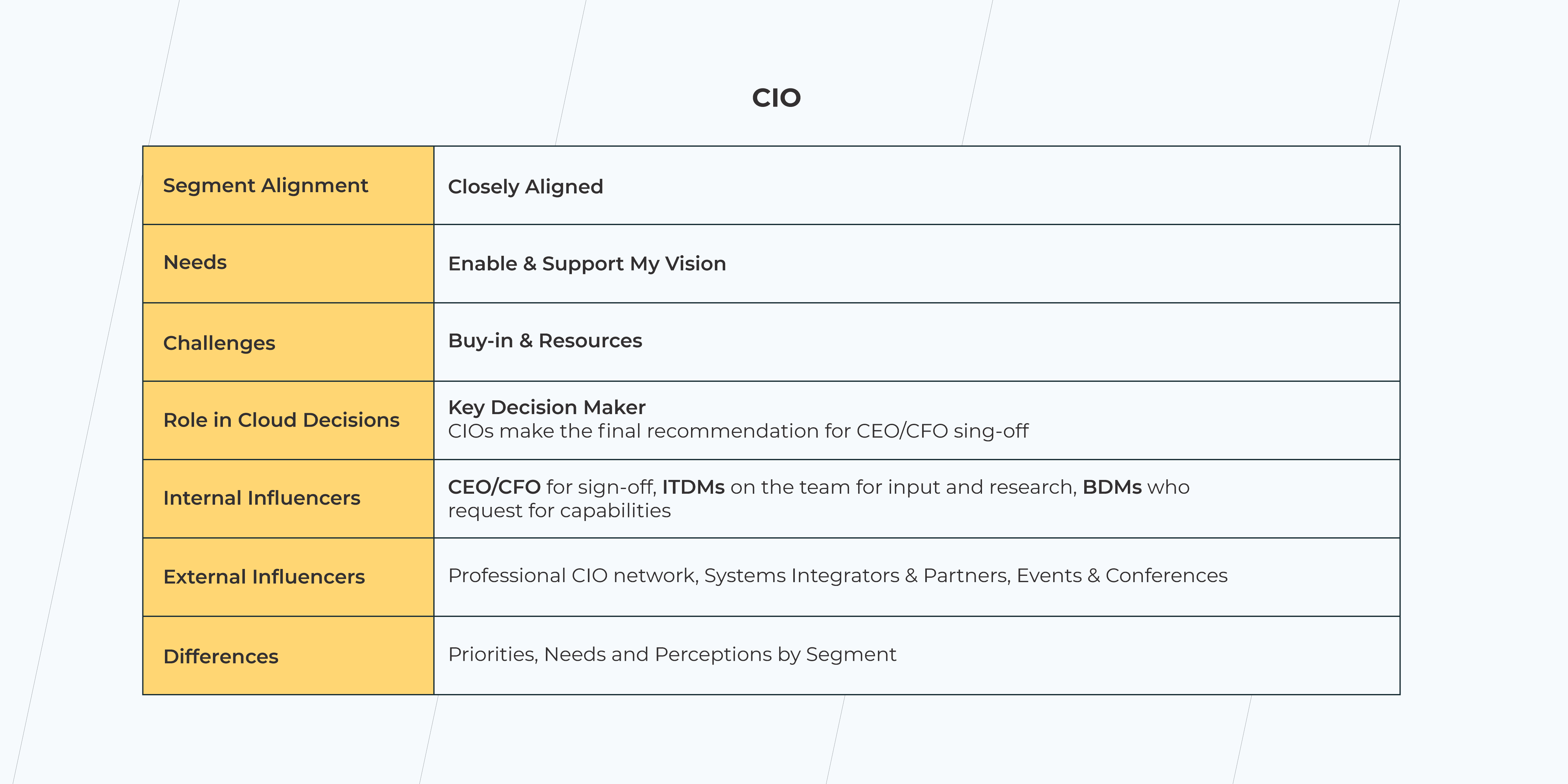
A Business Decision Maker is also a CEO/CFO, the person who is in charge of the TCO and ROI. Their decisions are influenced by end-user requests. While a CIO makes final recommendations for BDM, IT Decision Maker (ITDM) supplies ideas and advice on technical implementation, based on their expertise.

business decision maker
  • Chief Information Officer (CIO). The Key Decision Maker.

The Chief Information Officer is responsible for Buy-ins & Resources. They make final recommendations for the CEO/CFO. Their decisions are influenced by ITDM in terms of input and research and BDM’s requests for capabilities.

chief information officer
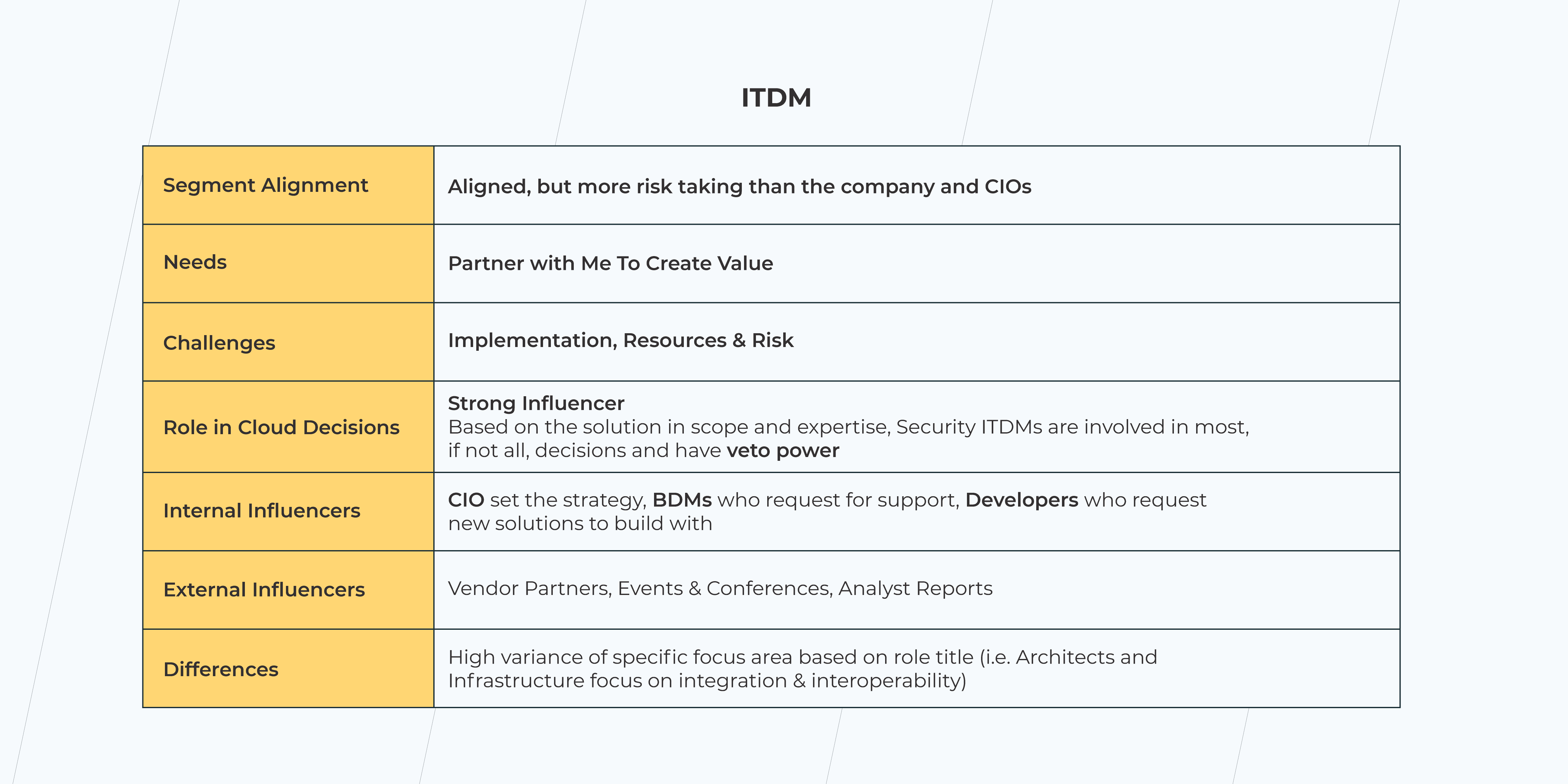
  • IT Decision Maker (ITDM). Holds Veto Power.

An IT Decision Maker is involved in most cloud decisions. They are responsible for implementations and work on resources and risks. Their decisions are influenced by the CIO who sets the strategy, BDM who requests support, and Developers who request new solutions to build with.

ITDM

Conclusion

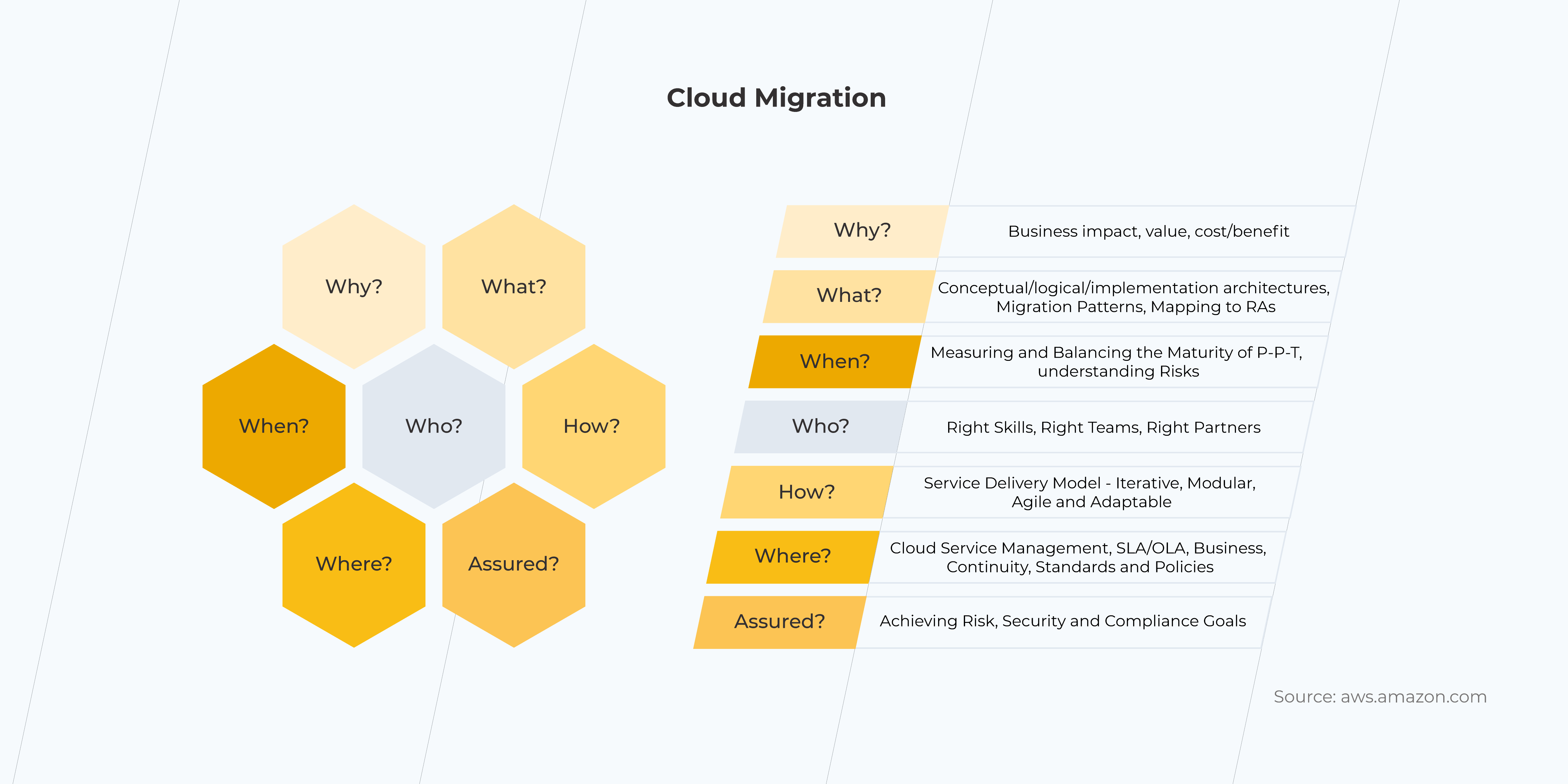
A cloud migration strategy is a document that defines the ‘why’, ‘who’, ‘what’, and ‘how’ of the cloud migration. It serves as the guide to a successful legacy infrastructure modernization and scaling up your business. 

If your company has the decision-makers to take the roles in the cloud migration process, the next logical step is to have your cloud consultant on board. A dedicated cloud team will help with your initial applications’ assessment and will identify the challenges associated with cloud adoption in your organization.

Looking for help with cloud migration strategy?

Web App vs Mobile App: Which One is Best for Your Business?

Creating an application is the next step after your business has gained leverage online. When your customer buys from you once a year or you are a governmental organization, a web page would normally be enough. However, when frequent client engagement is demanded, the necessity for an app occurs organically. 

There are two ways of engaging with a customer with the assistance of current technology: either by means of a Web App or through a Mobile Application.

It’s a known indisputable fact that mobile applications have helped many companies increase their sales dramatically. Yet, in some cases, mobile applications aren’t needed, and businesses are absolutely thriving with progressive web apps. Some companies have both web apps and mobile apps ready for their users. In the end, the selection of technology is about meeting customer expectations and staying in your lane.

There’s no secret that the most important distinction between web apps and mobile applications lies in their development costs. So as to work out which of the present technologies is going to become the best investment for your specific business needs, we would look deep into the purposes these applications serve.

Want to discuss the business objectives of a mobile app or a web app?

Book a free consultation

Web Application vs Mobile Application

Pros and Cons of Web Apps

+ A Progressive Web Application, or a Web App, is a website adapted for mobile. This is often one of the foremost progressive technologies nowadays. It imitates a mobile application and is viewable in most browsers on desktops and mobile phones. It costs less to build a web app than a website.

– An existent web app signifies that a corporation has already gained trust among its audience. However, there’s no requirement for constant involvement with an app. Maximum retention and time spent in the application have zero effect on a webpage and brand awareness. 

Pros and Cons of Mobile Apps

+ A mobile application or sometimes it’s called Native Application is a great marketing and sales tool for a variety of consumer-based companies. It involves constant engagement with the product through continuous interactions. Mobile apps collect as much information as possible, studying habits and analyzing user behavior and patterns. 

– A mobile app is a more expensive technology as compared to a web app or a website. Its budget is mostly dictated by the availability and price of skilled mobile developers for Android and iOS. While Hybrid applications are also available as a part of the cross-platform solutions, their updates are less frequent.

Web Apps vs Mobile Apps from a User’s Perspective

Web Application vs Mobile Application

Both web apps and mobile apps signify the trust level users have for the company. The main difference between them is the quantity and frequency of interactions. Native Apps also offer a more robust personalization. The communication is customized to users, supporting their interests, location, behavior, and more.

People download mobile applications after they use web apps on a regular basis. They do that once they get acquainted with a company’s website and social media. If they like how the application is made, they will stick with it. However, many users prefer PWAs, since they are faster and don’t require memory on their devices. Plus it only takes a few lines of code to make usability amendments in a PWA.

– Volha Marskaya, Sales Specialist

Mobile App vs Web App from a Business Standpoint

The common practice for a lot of companies is in building a website, a PWA, and a mobile application as they expand. The latter is a logical step toward broader market outreach. It is a method of business growth and it drives sales. 

There are, however, ways in which it can be cost-effective to work out a novel approach for specific user engagement while also saving on development and maintenance with no effect on sales. 

There are general recommendations for many B2Bs to own a branded application. At the same time eCommerce has shown relevant proof for PWAs, which are made to more easily compare goods in a browser.

What are the main criteria that allow the choice between PWA and Mobile Apps?

When choosing between web and mobile applications, it all depends on the goals and technical requirements for the interaction with the API, like accessing user location.

A website adapted for mobile would be sufficient when its purpose is solely the acquaintance and PR of the product with no requirement of further interaction with a client. Speaking of a short-term interaction once a week or a month, a web app would be enough. When one or two basic functions are solved, a mobile application is not needed.

– Eduard Beleninik, Lead of Mobile Development Unit

World Statistics. PWA and Mobile Applications in the Long Run

Web Application vs Mobile Application

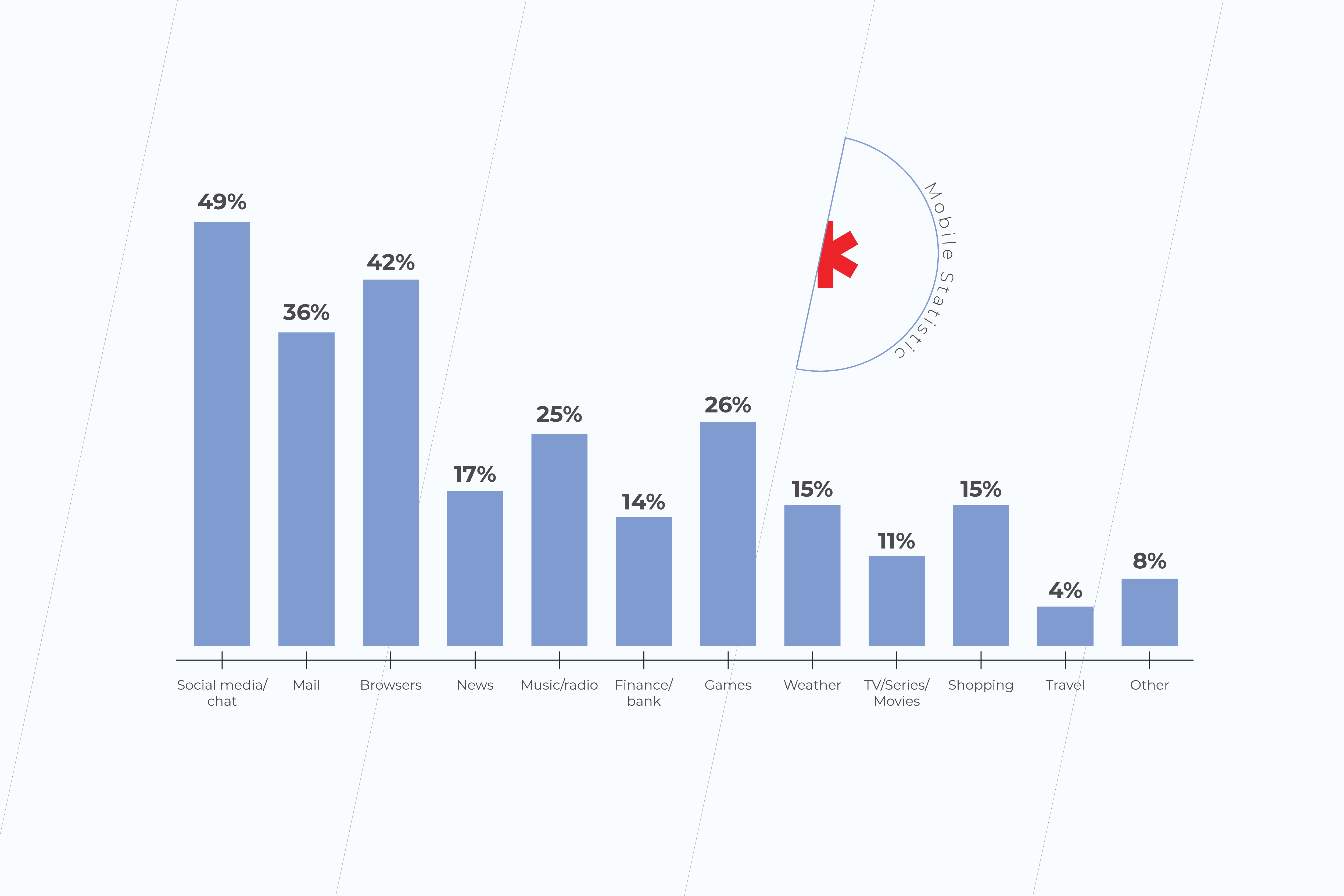
Mobile applications’ downloads have increased in recent years to 218 billion. According to Statista, in 2023 mobile apps will generate more than 935 billion U.S. dollars in revenues through paid downloads and in-app advertising. And word-of-mouth is a very strong factor when deciding what applications to download. Finance, travel, and shopping apps are among those that mobile users in the United States spend the most time on.

Web Application vs Mobile Application

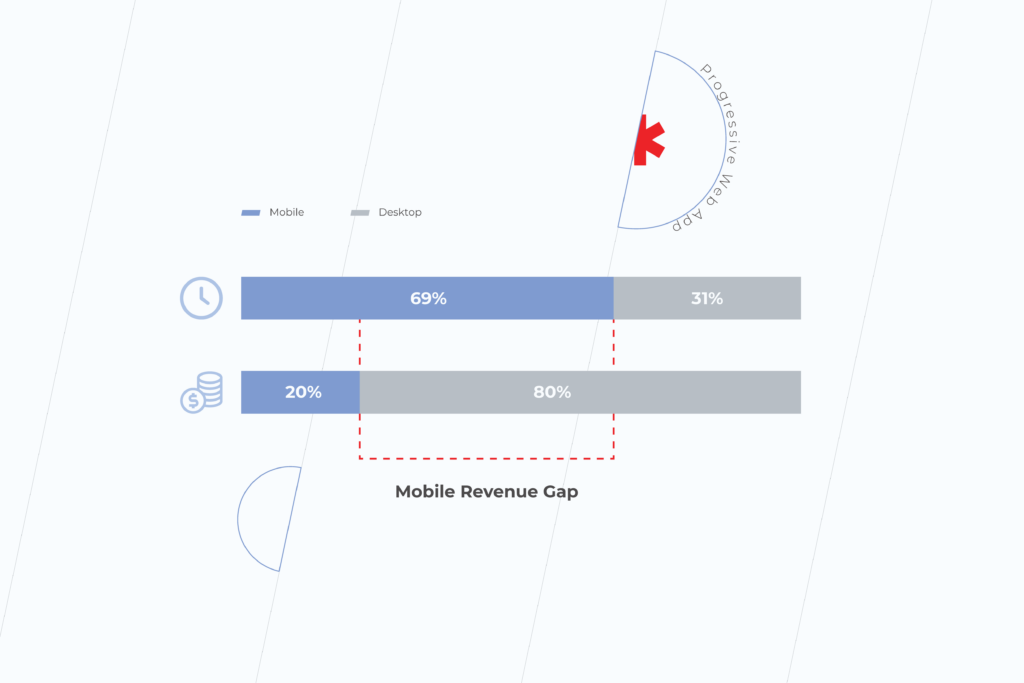
A study has shown that PWAs have 36% higher conversion rates than native apps. The average conversion rate for progressive web apps is higher because mobile traffic and consumer time on mobile is much higher than on the desktop. Many businesses report increased revenue thanks to mobile traffic. For example, the Starbucks PWA has doubled daily active users. And orders on the desktop are nearly the same rate as mobile.

The number of origins with PWAs has grown 170% in 2020. According to the Chrome team, there are tens of millions of installations of WebAPK only on Chrome for Android. However, PWAs are less accessible for Safari and iOS users because of Apple’s policy on a more private web, and more strictly regulated App Store. Following Apple, Mozilla claims deprioritizing progressive web applications soon.

Check other articles on our blog. Subscribe to our social media and get insider information on making your business ready for digital. If you have any questions, get in touch with our expert team or fill in the form below to have your project estimated by progressive web application development company.

Why You Can’t Skip the Data Preparation Process in Data Discovery

In the modern world, data is king. It tells us everything we need to know about, well, just about everything. Data finds its usage in all spheres, from governmental processes to business, multinational enterprises, and more. But how does one go about analyzing data? Despite all the technology available, it’s not as simple as inserting some digits into a computer and getting all the answers you need. There are a few stages in between. Below we’ll talk you through data discovery and data preparation as part of it.

What is data discovery?

Before we get into the ins and outs of the data preparation steps, let’s backtrack a little and look at what the overall process of data discovery is. The data discovery process is a vital step in the business problem-solving framework or any data-requiring solution, and data preparation is a step within data discovery. 

Data discovery is often connected with business intelligence, meaning it is used to help companies make smarter, data-based decisions. But what happens in the data discovery steps? At this stage of data processing, data discovery tools compile multiple data sources together, creating a singular unified base of data. 

From there, the company undertaking the data discovery process develops its initial data model. It then utilizes it to test various hypotheses or discover valuable insights. One data discovery example would be a company using the power of data discovery in big data to uncover vital company insights that would help the project progress and meet market needs. For instance, a new feature to be added to an app, or designing an entirely new piece of software. 

How is data discovery generally done?

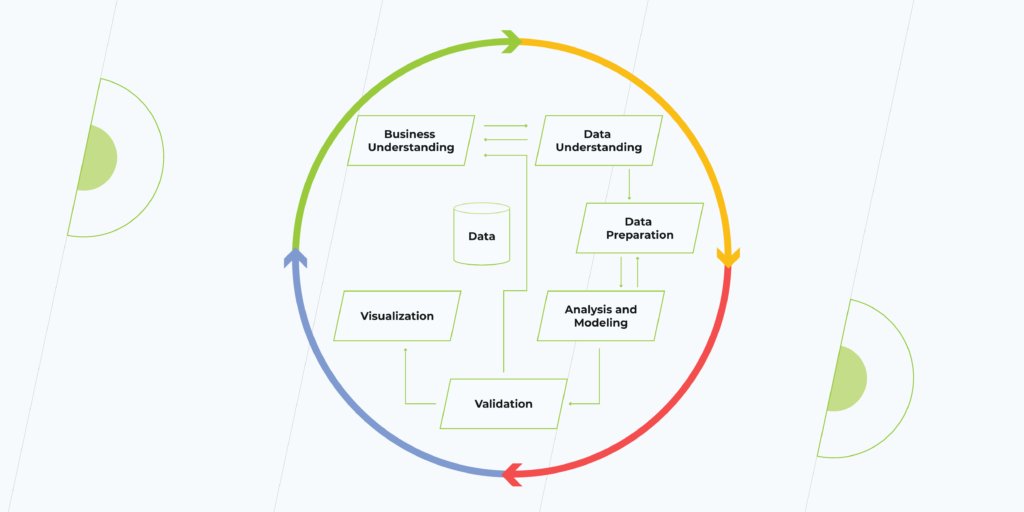
As we said previously, data discovery is a process undertaken in the broader problem-solving framework. Here’s how it fits:

  • Business issue understanding — at this stage, the issue at hand is defined. This allows the data scientists to refine which questions they need to answer from the data they will use. If done right, the data will support the project. If not, then it might be time to start from scratch.
  • Data understanding — here, all the required is defined and brought together from various databases to be collected and used for further processing.  
  • Data preparation — at this stage, data becomes refined and prepared for further analysis.
  • Analysis and modeling — using the prepared data, the first round of analysis is undertaken, and models built for data analysis.
  • Validation — the trained model is tested using a defined data set to check if the model is valid.
  • Visualization and presentation — here, the final results of the analysis are available and ready for data scientists to present them. Visualization tools help make data more understandable and readable to the human eye.

Can any data be used for data discovery, or do I need big data?

Data processing can be used at almost any stage of the company’s growth process, and you don’t need big data to get started—although it does help. In theory, to begin analyzing data, all you need are a few hundred rows of data, which can be collected via customer surveys, company dashboards, Google analytics, and more. What’s important here is the quality of the data, and that is where the data preparation comes into play.

What is data preparation?

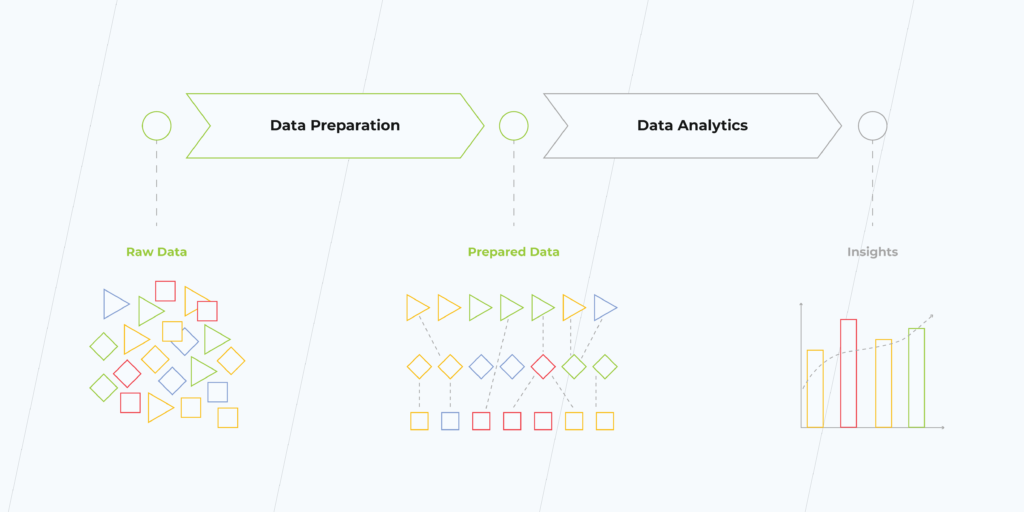
Data preparation is one of the most time-consuming phases of a data-based project. According to studies, it covers 70%-90% of all project time. With automation, however, and we’ll talk a little bit more on that later, this can be reduced to around 50%. Automating then leaves more time to polish data models and focus on getting the best analysis from the data. 

So, what is data preparation anyway? Data preparation is a process of enriching and cleansing data, making it more useful to give quality analytics. One way to look at it is by thinking of a diamond in the rough. When it comes out of the mine, it’s rough, dirty, but once polished. It becomes a beautiful stone that can be used to make a valuable piece of jewelry. But in this data preparation example, the diamond in the rough is data, and the polishing is the data preparation process. The result is valuable insights.

Why do you need data preparation?

Data processing and preparation may seem time-consuming, and indeed it is. However, that doesn’t mean it isn’t worthwhile. Quite the opposite. Instead, many companies find that employing the right data processing tools gives them the insights they require. Some of the benefits they boast are:

  • Improved decision-making capabilities
  • Easier data access on the whole
  • Increased analytical efficiency and flexibility
  • Time saved for making decisions
  • Comprehensive view of relevant data

Although it’s important to note that data science is an evolving profession, and as technology advances, so do the results. As we continue to refine the available data using the latest methods, more information will become available. 

What are the steps involved in data preparation?

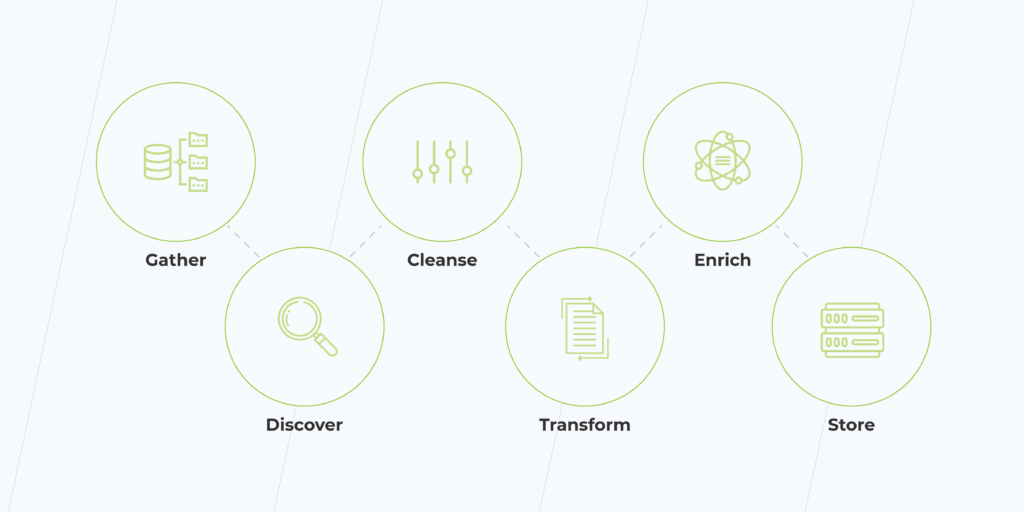
When it comes to data science, the tools involved are only as powerful as the quality of the data, and that’s what makes data preparation so essential. So what’s involved in data preparation? To understand that, let’s take a look at the data process steps:

1. Collecting the data. While this is closely associated with data understanding, it’s also the first step in data preparation—getting the data you need to do the work.

2. Assessing the data. Each dataset within the data should be discovered. This means knowing its purpose and context before you go any further.

3. Cleansing and validating the data. Now the hard work begins. In this time-consuming process, data is cleaned, and gaps are uncovered. Using manual and automated tools, such as machine learning (ML), data scientists can remove outliers, fill in data gaps, check if data conforms to a pattern, or review if data-protection issues have occurred.

4. Transforming and enriching data. At this stage, data may be formatted or further defined to ensure a better analytical outcome. Enriching may also occur, which means adding data or connecting the dots to unveil hidden insights for analysis.

5. Storing data for future usage. Once the data has been prepared, it must be stored the right way. Taking into account data protection requirements, such as GDPR, and the future usage of this data, it’s essential to store it correctly.  

What are the challenges of data preparation?

No technology or process is without its challenges. Here are some of the issues companies find when engaging in data preparation and processing.

Companies remain unsure how to use the data

Data is great, and having lots of it can empower your business with market conquering insights, but only if you know how to use it in the right way. Many businesses struggle to define the exact data they need, what it shows, and how to effectively implement it in business decisions. Getting the right people on board at the beginning can help your business make better use of the data it has to support your business goals and get that competitive edge. 

Biased data can slip through the cracks

Although AI technology has come on in leaps and bounds, it is built by humans, and therefore the algorithms it uses may be subject to bias. For example, exclusion bias means holding back info from the data set, leaving it incomplete. This means the data assessment will be flawed. Or consider selection bias. For example, data collected may differ from the target group, making data meaningless. Addressing these challenges means undertaking comprehensive data preparation to ensure data is suitable for use. 

Planning to take advantage of your data?

Request a consultation

How to do data the right way?

  • Collaborate. Data science isn’t a one-team job. By collaborating between departments, for example, IT and business, companies find themselves getting results that are closer to actual business needs, not data for data’s sake.
  • Ensure good data governance. Data management is key, and this isn’t just a question of data security. Effectively managing your data means putting into action processes for data storage, data use and clearly defining the responsibilities of the teams that use the data. A little bit of organization goes a long way to getting the best results.
  • Get the right tools at your fingertips. The world of data has grown in recent years, far beyond Excel spreadsheets. Instead, it often requires advanced software or tools to help complete increasingly complex tasks. But that shouldn’t mean fear of technology. Getting the right tools on board early boosts the chances of good data and analytic outcomes. 

How to get the most from your data for your business?

With data science specialists some of the most elusive IT specialists on the market and vacancies set to grow by an estimated 15%, it may seem that getting the right person on your team is next to impossible. But there is a solution. Data discovery services can be covered by a skilled outsourcing provider. At the same time, you search for your data superstar, or perhaps you’d like to continue to outsource and take advantage of access to a team of knowledgeable data professionals.

How Mobile Apps Can Grow Your Business

As a founder, you are always looking for the next step to take your business higher. It’s possible now you are happy with how your workers are handling the internal routine. You have set up the whole marketing team with gemstones found at a local talent market and on the Internet. People start discovering your brand, and they love to come back. 

Although you are a fearless leader, catering to the robust needs of the community can sometimes get overwhelming. New clients are waiting to interact with your brand and to start buying from you more often than ever. They can’t wait to test run your product and leave reviews. Loyal customers are happy with discounts. They would like to follow you on all social media and interact with other adepts of your brand. It makes sense that you would like to make your entire customer interaction intelligent and easy. Wondering how to make your business grow, you feel the need to invest in something that has a lasting effect. 

And the answer is technology. Adopting Smart Technology is one of the long-standing business growth factors. Technology fertilizes your business. It solves a lot of problems, helping save on labor costs and streamlining processes. As you select the right tools for your specific company goals, you aim for staying in digital domain outreach for a longer time. Maybe you have already built a website and a PWA. But as your company matures, having a native app to help promote your business is an absolute necessity, especially if you sell on-demand services or products. 

How mobile apps help businesses

Mobile apps for business

There are millions of apps available on the App Store (iOS) and Google Play Store (Android). The majority of them are written using programming languages, such as Objective-C and Swift (iOS), and Java and Kotlin (Android). The applications that are built for the two mobile platforms are called Native Apps. There are also Hybrid or Cross-Platform Apps. They are developed using a separate framework, and the code is later being edited for each of the two platforms by hand.

Mobile apps are all the software we download on our smartphones, tablets, or digital watches. The software miraculously combines the latest tech, marketing, and design solutions and gets constantly updated. An application has access to the device’s API, GPS, Camera, and Microphone, etc. Artificial Intelligence and other latest technologies help set individual user preferences. An entire community of mobile application users has an instant connection to businesses through their push notifications. 

Mobile apps for business are the assets that work for you while you rest. The software serves clients at night, on weekends, and on holidays. There are two powerful functions of mobile applications in the grand scheme of your company growth: 

  • They drive user traffic. New traffic expands the user base, meaning more new interactions with a business. 
  • Personalized user experience establishes trust between a company and their customer. This means more sales.

How mobile applications drive sales

mobile apps

Mobile apps exist as something more than just an awesome technology. It all depends on how creative the company gets. While there are still a lot of free applications on the market, some of them are the source of the company’s direct sales in addition to traditional channels. That’s why mobile apps are good for business.

A number of app-based businesses generate profits from only application market downloads. Some of them have fixed prices for as low as one dollar. Others come with Pro or Premium features that users pay for after downloading from the store. Some apps come with a monthly subscription payment. All of these scenarios help companies sell their product, bring new customers, and generate direct sales using a single tap of a finger.   

Mobile applications increase sales for Internet-based businesses too. E-Commerce apps are a good example of how a pre-existent web customer base drives bigger sales through mobile channels. Or vice versa, a mobile app advertised through an app distribution platform helps build brand awareness by driving customer traffic through it. Great digital marketing skills come in hand with this type of mobile sales.

Offline retail definitely benefits from having a custom-coded brand app in a lot of ways. Reports say it creates a twofold customer shopping frequency. Additionally, the practice of some brick-and-mortar companies shows that building a mobile app helps raise revenue by a third of their gross income. These companies also state that while mobile applications help earn additional money, they also reduce operational costs. Paper, energy, and other savings help them grow and innovate. 

UX/UI as a means of innovation and business growth 

User Experience technology

User Experience technology applied in mobile design describes how to make your business grow better than anything else. An application is born out of a collaboration between stakeholders, business analysts, UXers, and users. Some bring vision and data, others – their mobile development or custom Java development expertise to the table. UX/UI process is boosted by a constant creativity flow aimed at making your mobile application intuitive and engaging. 

One of the many ways to create an original application is to incorporate cutting-edge technologies that are not there yet into your project. Technologies, such as animation and machine learning, are all part of modern UI practices. UX can build infographics and streamline charts in real-time. The choice of technology will depend on the end-user’s needs.
What makes a great app people use, is when it has the features they always want. An app that solves a serious pain in a user’s daily life or business is the kind of app that will remain relevant. A lot of examples of good mobile applications are focused around one or two main features that are also the goals of business sales and customer engagement.

Developing an app that has all the features crucial for the growth of your company, but not for your users, is never a good idea. You want to make sure that people have it on their main screen and make no plan of uninstalling it anytime soon. It feels great when a mobile application has a beautiful design and is easy to use. The best-rated apps consume as little of the battery as possible. They are fast, responsive, and have 24/7 customer support. 

The takeaway

Making mobile apps for business is a complex but entertaining process. Depending on your project it can take several weeks up to months to build a solution that is right for you. It’s going to be constantly maintained and updated with the latest features and releases. It may sound as if you need to revisit the business practices that you are used to. Well, somewhat yes. Growth means choosing happiness over history. What you get in the end is the evolution of everyone involved. 

As one of the top app development companies, we are ready to help you expand your business with a top-tier mobile solution. If you want your app to stand out and become truly attractive to customers, feel free to drop us a line.

How to Integrate Data from Multiple Sources: 5 Challenges to Overcome

Most businesses deal with a gigantic amount of data on a daily basis. The question is how to make the most of it. It turned out the biggest issues associated with Big Data are not really analytical ones. In many cases, these problems refer to data integration.

Why is data integration important?

Perhaps, the only thing worse than a shortage of information is an overflow of information, which is inaccurate or useless. Although the lack of data makes one flying blind, at least, it provokes taking actions, while a number of low-quality pieces of information can lull businesses into a false sense of security. Intelligent decisions can only be based on trustworthy and relevant data – data, which is integrated from multiple sources into a single, unified, bird’s-eye view. This process, however, involves certain challenges, and to tackle them successfully, enterprises should be perfectly aware of what these challenges are. 

Data integration challenges

Data compatibility

integration issues

Databases, web applications, CRM systems, and many more – there are tons of sources that enterprise data is coming from. As long as each source has its own interaction rules, no wonder extracting, transforming, and making data compatible with a destination system becomes time and resource-consuming. Besides, it’s only getting worse with time since the number of data sources grows along with the company.

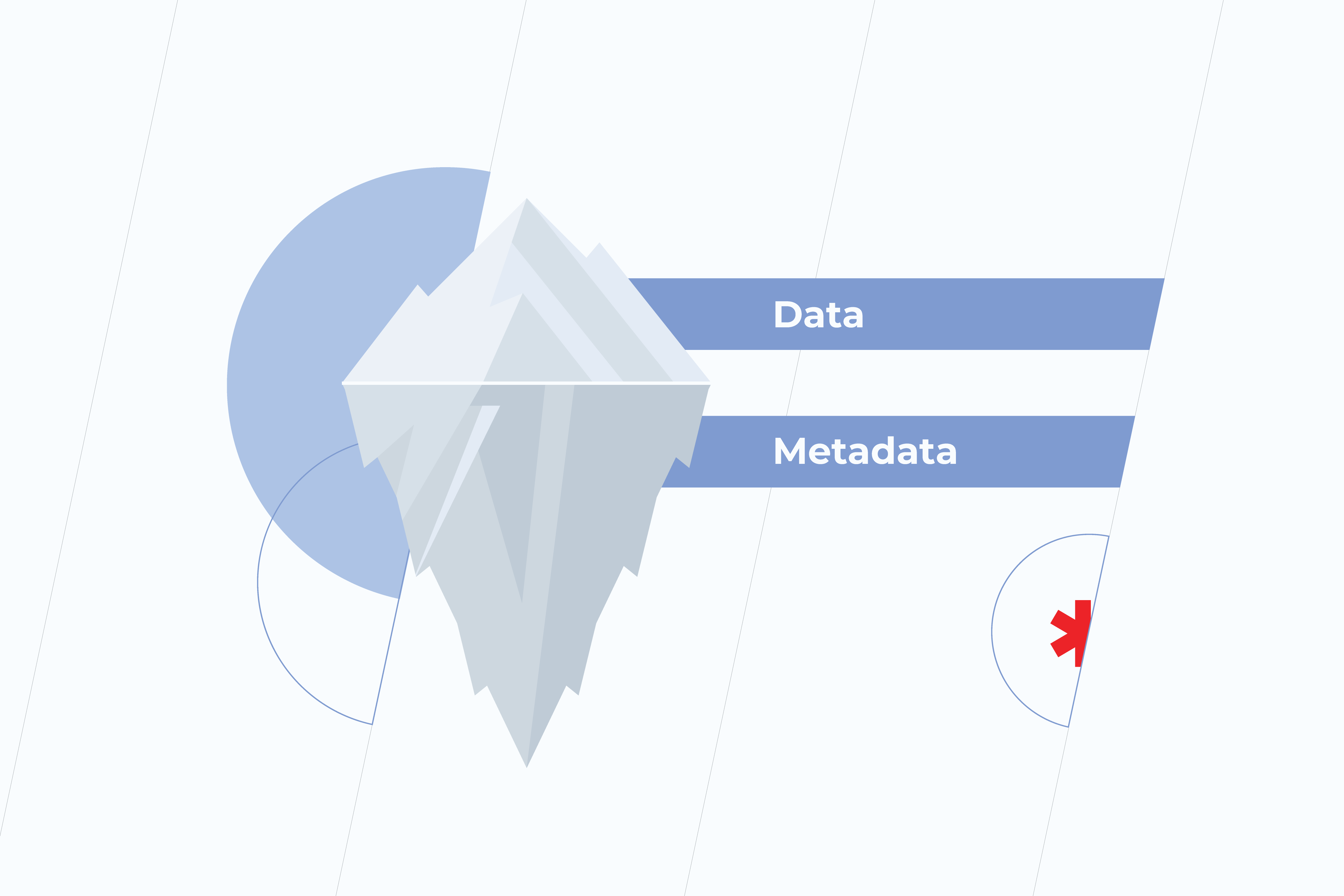
In a Big Data world, the best way to address this problem is using metadata, which, simply put, contains basic information about other data. It supports the validity, accuracy, and usability of related data. Metadata helps to harness the power of data, enabling your team to extract all the necessary information faster and more accurately, as a result, to speed up decision-making. Without metadata management, data initiatives can spiral out of control.

Data silos

integration issues

Data which is organized within individual departments might not be fully accessible for the rest of the organization. These separate sets of overlapping but inconsistent information turn out to be in silos. Doing nothing about it sounds like a bad plan since the quantity and diversity of data grows and so do silos.

This puts a huge barrier to a holistic view of enterprise data. When it comes to data analysis, data silos cause problems as the information is often stored in formats that are inconsistent with one another. Moreover, not having the shared data in one source often results in wasting time and effort on duplicated work.

The approach that addresses the aforementioned problems is called data harmonization. In a nutshell, it includes taking data from disparate sources, removing misleading or inaccurate items, and making all that cleaned and sorted data compatible.

Taking into account the size and complexity of data, smart data tools, Machine Learning, and Artificial Intelligence turn out to be the key part of the data harmonization process. They make it easier to prepare data from various sources, hence speeding up the adoption of big data techniques.

Data quality

Those, who at some point have analyzed data, understand the pain of discovering that it’s badly structured, incomplete or overflowed with inaccuracies. There might be several reasons for that to happen. First of all, human errors. Even such a seemingly insignificant mistake as spelling can bring about difficulties in data analysis. Secondly, storing data in disparate systems leads to the fields with the same meaning but different names occurred across systems. Finally, analysts might not be aware of the changes made to data by data administrators or engineers. Anyway, whatever the reasons may be, dirty data needs to be fixed. Otherwise, there’s a good chance to end up with inefficient analyses and distrust in organizational data.
A high level of data quality can be achieved by improving company culture and assigning certain roles responsible for accurate data, adopting best practices like the data quality cycle, and embracing technologies that support people in their processes via software features. Data quality cycle is made up of analyzing, cleansing, and monitoring data quality. Primarily, you have to define the data quality metrics that correlate with your business needs – you should understand what data to analyze and what makes data complete. Then, the data needs to be cleaned according to established business rules. And, certainly, to protect the quality of data, constant monitoring and checking of it is a must. 

Do the adjustments that have to be made seem complex? You can start with a few data optimization initiatives and gradually evolve. If they turn out to be successful you may continue launching other ones. With reliable data at hand, it can’t be long before you notice the improvements in your business processes.

Legacy systems

challenges in data integration

Legacy software is a double-edged sword for a company’s future development. On the one hand, it has proved to be reliable. On the other hand – it’s rarely compatible with newly bought systems. Anyway, it’s a long shot for legacy systems to fade away. They usually support a company’s mission-critical operations so replacing them becomes a daunting task.

A tremendous amount of business data and processes is tied up in legacy systems, but accessing that information and integrating it with other database systems can be very difficult. And, yet, no matter where your data resides, it’s a vital asset that must be leveraged to its fullest potential.

Fortunately for C-suites, who are not ready for major business transformations, a long-term software modernization project is not the only option. Another one is ETL (Extract, Transform, and Load) data integration. It’s a three-step process in which data is extracted from one or more data sources, converted into the required state, and loaded into a data warehouse. Being equipped with connectors that allow an enterprise to combine legacy data with data collected from new platforms and applications, ETL makes your legacy data available. This provides a historical context through which organizations can recognize long-term trends. Historical context helps companies to derive useful insights for better strategic decisions.  

Unoptimized data

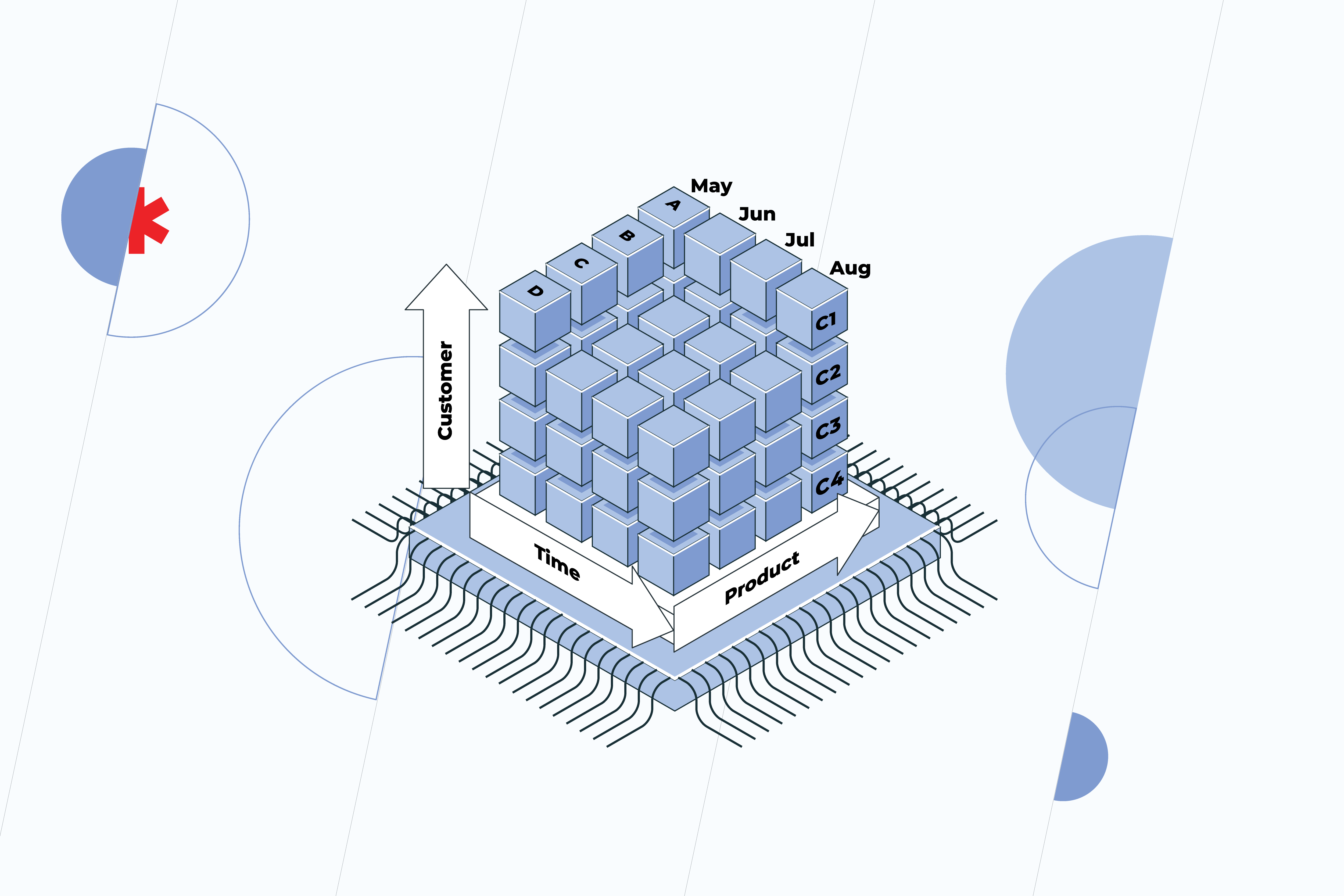
In a data-driven world, the more data is generated, the more important it becomes for organizations to be able to collect and analyze it. However, the question is how to get all the data together, translate it into a readable and clear format, and perform a holistic analysis without wasting tons of time? Querying data out of conventional relational database systems is quite difficult. Not only are queries slow, but they simply aren’t flexible enough to navigate the data. Thus, data analysis is a weak spot for many organizations. In contrast, analytic databases are specifically designed for users to easily find and extract the information they need. That’s why more and more companies are implementing Online Analytical Processing (OLAP) – software that allows users to examine data from multiple databases simultaneously. Its major value lies in a multidimensional approach to data organization and analysis. The OLAP system is represented by cubes – special data structures optimized for very fast data analysis. The cube is categorized by dimensions, such as location, time, customers, etc. Each dimension contains different levels that are organized hierarchically. For the location, these are countries and cities, for time – years, months, and days. Such an approach enables users to see information from different perspectives and quickly create adhoc reports. OLAP cubes are often pre-calculated and pre-aggregated across dimensions to drastically improve query time compared to relational databases. The data within the cube can be:

  • rolled up (summarized along the dimension, e.g. moving up from a city to a country)
  • drilled down (fragmented into smaller parts, e.g. moving down from a country to a city)
  • sliced (by selecting a single dimension, e.g. a “slice” for time)
  • diced (by selecting several dimensions, e.g. a “slice” for time and location)
  • pivoted (by rotating data axes to gain a new view of data) 

All in all, instead of collecting and validating the data using endless Excel sheets, OLAP technology allows users to enter the data directly into the multidimensional database, which significantly simplifies the analytical and reporting processes.

integration issues

Addressing the challenges of integration is the first but crucial step toward transforming your data from some random figures into information that actually works for you. Ready to take a step forward? Find out more about how we can help.

Website or Web App: Which Suits Your Business Better?

What is a Website?

Depending on how you want someone to engage with your product or service in the digital world, there are plenty of options available on the market. But to help you start, the first thing you want is to make your online presence apparent. That’s why you may want to build your own website.

A Website is about PR and Accountability 

A website is the best means of promotion. And it’s cost-effective to build and design a good website. It’s a great investment in the digitalization of your business. The main advantage of a website is that it gives the same experiences viewing it on any laptop or mobile browser. However, the main setback of a website is that it’s limited interaction-wise. It provides the minimum information about the client and her behavior. And you need a mobile device or a computer to be able to reach it.

Some websites are designed to last for two weeks, others – for years and years, creating leverage for your brand and gathering a community around it. Irrespective of if it’s going to be a temporary thing or not, a website is a storefront for any type of business or happening. It serves as a hub for all of your social networks’ audiences. It drives interest in what you are putting out there. But most importantly, it builds trust.

Website complexity depends on its purpose

Let’s say you are building an MVP for your startup’s first investment round, or you need just a landing page for your beauty salon, or you want to advertise an upcoming event. In all of these cases, various ready-made low-code tools and site-builders are going to come in hand. Their functionality is constantly improving. The technology is aimed at providing a cutting-edge user experience delivered at your door.

When choosing the right technical approach, look at the event horizon and see how scalable you want the website to be. This means you need to know whether your webpage will ever go beyond its informative function. In other words: 

Will your customer want to click a button to buy from you online? 

Is the nature of your business such that customers will come back to buy your product again?

If both of these answers are ‘yes’ for you, we are talking about PWA.

What is PWA

PWA

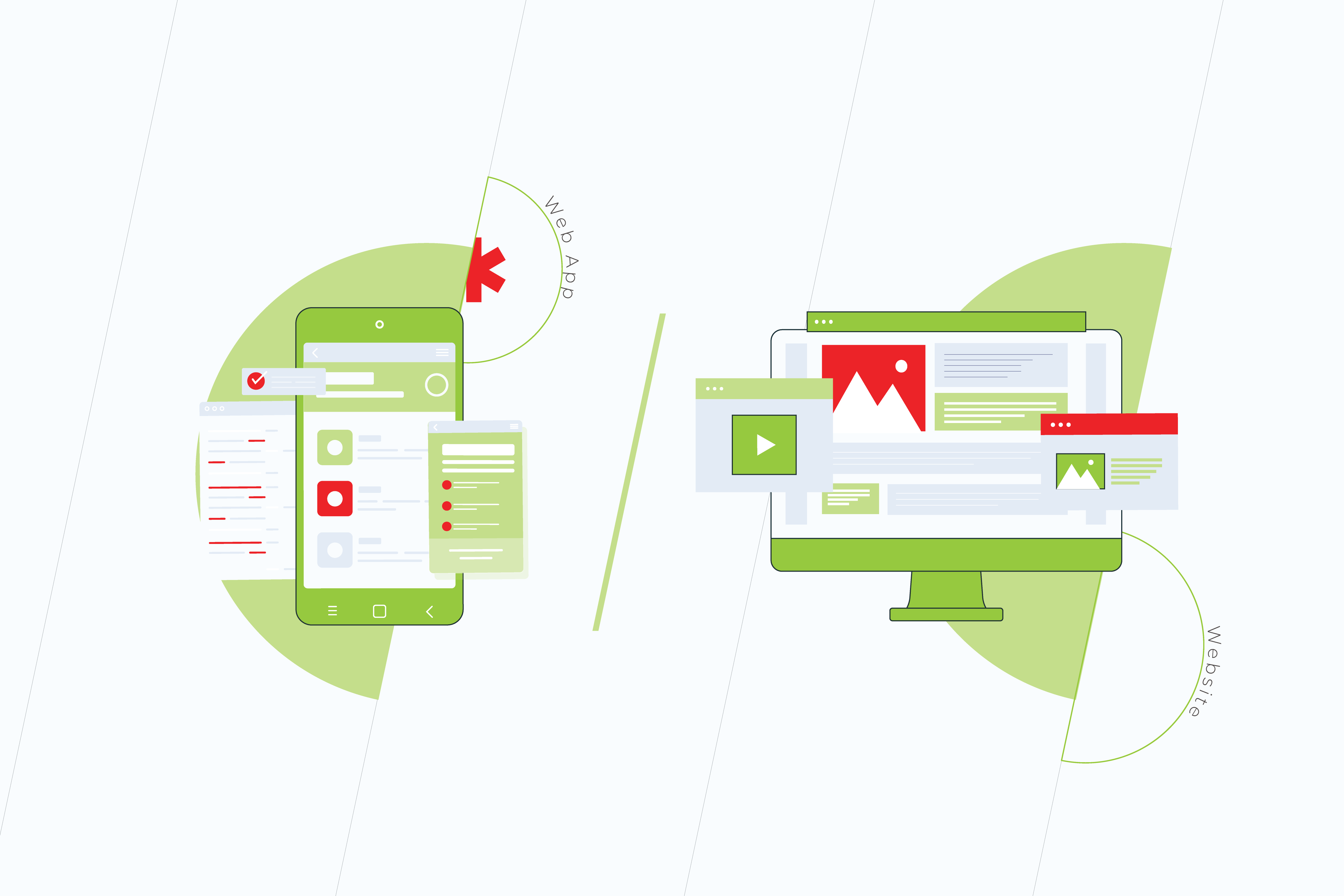
When your client returns to buy from you for the second time, it’s the next level of website building scenario – a Web App. In broad terms, a Web App can be anything built for more profound user interaction. 

You can find information that Web Apps are now being called Progressive Web Apps. This definition was introduced in 2015 to describe web applications that take advantage of modern browsers due to responsive design and a mobile-first approach. This has become a web app standard that is constantly evolving.

PWA is a website wrapped to be fast, interactive and mobile friendly

PWA is the technology that makes a boxed version of a website that is easy, adaptable, and costs less to build. A web app gives the shortcut to reach the parts of the service in no time. This means instant transition and interaction with the relevant part of the website functionality.

Since a mobile-first approach nowadays is a must, a website adapted for mobile may already be a PWA. At their core, PWAs are the Apps that use existing web strategies to provide a rich, native, and simplified application-like user experience. The main difference is the desire to imitate a mobile application, which does not affect anything from a business point of view. 

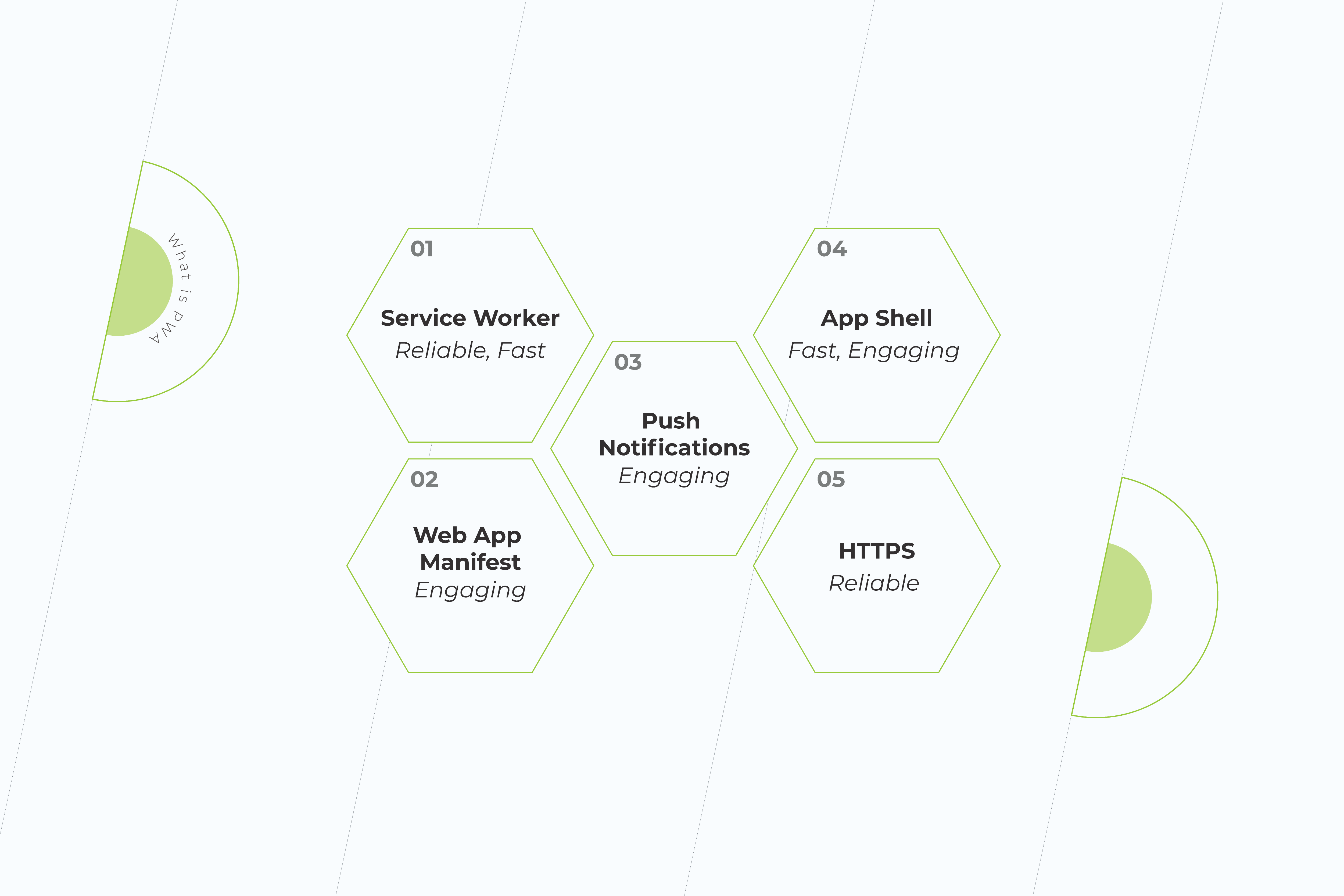
Speaking of what one can appreciate in a PWA as opposed to a website, is definitely its speed. PWAs are designed to include features, such as background sync, caching, and push notifications. They don’t require any space to be installed, despite their name. And they can work offline unlike websites. Google likes Web Apps and ranks them at the top of their search.

PWA works offline and is cheaper to build than website

If a web product passes PWA criteria, the browser on both Android and desktop is going to prompt it to be ‘Installed’, and there are icons representing app installation. Responsible for the icon and other basic parameters of the app is Web App Manifest.

  • Service Worker

Progressive Web Application development is based on a modern technology known as a Service Worker. These are special event-driven scripts with connections to different instances within the domain. These are programmable network proxy servers between the Internet and the page.

These proxies intercept and make or rewrite network requests, support the app offline and provide granular storage. They can be securely downloaded regardless of the network connection. As a result, it facilitates faster navigation and slows downloading speeds.
  • Shell

A Progressive Web Application demonstrates high performance due to the application Shell. It’s a kind of storage for content. Creating an application Shell is easier, it only takes a few lines of code. The two main elements are the header and the navigation bar. Since it is cached only once, the shell can be accessed by the user even when there is no Internet connection.

PWAs don’t require separate teams of coders to be developed. Given that your website is ready, a Web App is going to improve its performance for a relatively lower price as compared to the cost of building a website from scratch.

Web App takes a brand trust on another level

Progressive Web Apps are accessible through secured HTTPS links and sometimes have an “app.” extension before them. They are SEO-indexed and are compatible with multiple platforms. They provide push notifications and engage with users seamlessly, being updated in the background. A lot of companies use PWAs instead of websites and mobile applications. Think of Pinterest or Whatsapp Web, for example.

With PWA, a business is getting two products priced as one – a website and a mobile app engaging users with news, sales, or other important information via push notifications. Since PWA is designed to be like an application, the UX/UI, speed, and smoothness of such a product will be optimized for most kinds of desktop browsers automatically.

Web App vs Website

pros and cons of pwa

Cease inspiration with building your web product. Here’s a comparison of the main features of websites and web applications:

Pros and Cons of WebsitesPros and Cons of Web Apps
There are no requirements for the operating systemThey don’t require memory storage
Serve as business cards and first impression of a brandWork faster than websites and mobile applications
Compete with social networksProvide user interaction functionality
Cheaper than mobile applicationsDepend on the nature of a business
Easy to make amendments with a few lines of codeServe as a trust level for a company
Don’t require user trustCheaper than websites and mobile apps
Easier to compare and select the products on the website rather than in an appDon’t require downloads and manual upgrades
Don’t provide push notificationsProvide push notifications
Can be insecureFully protected
Available and tested on all browser kinds and versions Compatible with many browsers, since they are optimized for various desktops and smartphones
Online identifiers, including cookie identifiers, internet protocol addresses, and device identifiers cannot be seen by website owners.Face ID and Touch ID 
Can make money through affiliate marketing and pay-per-click advertisingAccess to geolocation
May be optimized for desktops but not for smartphonesWebOTP for SMS authentication
Short life-span if a business has a mobile applicationSafari and Mozilla are not prioritizing them
There are no general technical requirements to build a websiteDesktop PWAs locked to Chromium-based browsers only
Need Internet access to loadDon’t need Internet access
Cannot detect OS or other app functions. However, they can listen to key events via JavaScript.Cannot share resources or data within themselves because they are quite separate

Final Words

A lot of us are impatient with the actions, but we want to be patient with the results. Your website serves as a brand voice in the vast internet space. When choosing between a website and an app, take their purpose into consideration. While a website is great to get your potential customers acquainted with your product, a web app is a technology made for them to stay engaged. Both websites and web apps are the future of software development.

Read more on our blog. Subscribe to our social media and check the latest tips and tricks in making your business ready for digital. If you have any questions, get in touch with our expert team or fill in the form below to have your project estimated.

The Future of Software Development in 2021 and Beyond

The year 2020 stormed into our lives, bringing changes that most of us were not ready for. Businesses had to either take the path of overwhelmingly rapid digitalization or put their very existence at risk. We reached an unprecedented milestone when technologies were once and for all to become the heart of even very traditional businesses. 

While organizations were flying blind through the dark times of the lockdown, software development came under the spotlight – helping companies to embrace agility and resilience. Considering massive shifts that happened last year, a lot of which are going to stay with us forever, more software innovations are likely to be seen in the near future.

So what’s going to be in the software engineering news in the coming years? Let’s take a stab at it.

Digital skills will remain in high demand

The Covid-19 pandemic has accelerated digital transformation. It resulted in a rapid embrace of technologies and, in the meantime, revealed a shortage of people whose job it is to deliver them – software developers. 

According to the US Bureau of Labor Statistics (BLS), demand for this role is projected to grow 22% by 2029. Today, not only tech companies cry out for software engineers. Many organizations have shifted their business processes online and started to launch services on the Internet from scratch. They are in need of technical talent. As more and more companies want to renew their services and develop new technologies to meet their customers’ fast-evolving needs, the lack of specialists will get even bigger. Furthermore, the skills recruiters are expecting from the applicants now are different from those before the quarantine. 

All this is likely to put small and mid-sized businesses, looking for candidates with the right skill set, into a difficult position. No wonder 41% of organizations intend to increase their spending on software outsourcing, as a Harvey Nash/KPMG CIO survey shows. Not to lose in the race of constantly changing demands, partnering with software development experts sounds like a pretty wise plan – it’ll help businesses to be better equipped with new tools in the software industry to keep the pace of digitization.

Remote work is here to stay

remote work

For the past one and a half years, a number of companies have adopted – not by choice – unprecedented workplace flexibility with all the advantages and drawbacks it entails. What once seemed like a temporary situation is now clearly the new normal and won’t be going anywhere. Since the genie can’t be put back in the bottle, there’s nothing we can do but learn how to effectively deal with more people working remotely.

The Terminal-commissioned research finds the vast majority of employees love the benefits that remote work offers and don’t want to get back to the old ways. The top reported advantages of remote work for software engineers include a lack of a commute, enhanced work-life balance, and increased autonomy. 

At the same time, a lot of respondents admit that it’s become harder to collaborate or feel part of a team. Indeed, no matter how difficult it is to imagine developers’ work without over-the-shoulder reviews, yet here we are – this form of collaboration has become a thing of the past. But if code reviews can be completed through a specialized tool, unstructured, organic interactions that occur due to the physical proximity of employees in the office are difficult to recreate. 

The way software engineering has changed is especially tough for managers and new hires. The former are more likely to face burnout; the latter suffer from the lack of valuable team building and learning that takes place at natural moments of “collision.” New ways of encouraging team collaboration are likely to be found to build more inclusive remote environments for employees.

Proprietary software will be outnumbered by open-source 

Since its emergence in the ’90s and up until recently, open-source software has been disparaged as lower in quality and security than proprietary solutions. With time, these myths were dispelled though, and the situation has changed drastically. Today, business use of open-source software is soaring. 

Although proprietary software providers still dominate the market, open-source software plays an equally important role. Moreover, a number of factors show that more is yet to come for open-source development. The first one is that it’s fast. Increasing the speed of time-to-market and pushing out updates on a frequent basis are no longer issues. Secondly, open-source software is decentralized. As long as open-source projects have multiple backers and stakeholders, businesses won’t suffer from vendor lock-in. Finally, since the code is open, this software is easy to customize, which means that the solution can be tailored to meet customers’ specific needs.
A Red Hat report shows that about 80% of IT departments plan to increase their use of open-source software over the next year, with 95% of IT specialists saying that open-source has become strategically important to their business. While proprietary software use is expected to be down to 32%, the use of open-source, in contrast, will increase to 44%. Using open-source solutions is a software trend for a reason – they offer companies powerful capabilities without having to invest heavily straight away. 


Low-code platforms will be taken more seriously

low-code platforms

High demand for software solutions and the lack of qualified developers have brought low-code platforms to the forefront. These platforms help businesses quickly react to the changes and rapidly deploy new solutions due to the simplification of the development process. Instead of laboring over raw code forever and a day, engineers can focus on adding more value to the product.

Taking into account the growing gap between developer supply and demand, it’s expected that low-code tools will get even more popular as their adoption doesn’t require any special qualifications. Writing “everything” or “almost everything” from scratch is no longer relevant merely because “almost everything” is already there. Does it mean, however, that programming we got used to will vanish into thin air? Not at all. It’ll just transform from a kind of craft into an act of art. 

The significance of developers is still rising because they are not swamped with low-level programming and integration and have an opportunity to concentrate more on customers’ problems rather than snags in the code. For the past two years, a lot of companies across industries have optimized their business processes, cut development costs, and scaled fast with the help of low-code platforms. 

Because of the pandemic, businesses started massively switching to online operations and needed suitable instruments for that. Creating applications in a traditional way could lead customers to bankruptcy. Meanwhile, with low-code, development has become several times faster and cheaper. Solutions based on low-code are more flexible, which means that companies can effortlessly adapt their software to any changes.

Taking advantage of future software development technologies

The last year put us on a fast track to a completely new world. The future of software development turned into the present in the blink of an eye. Far from everybody was ready to keep afloat – the rest is history. 

Do you want to leverage the changes that the future holds? Contact us for a free consultation on choosing the best software development strategy for your business.

Anna Vasilevskaya
AI modified real photo
Anna Vasilevskaya
Account Executive

Get in touch

Drop us a line about your project at
[email protected] or via the contact
form below, and we will contact you soon.