MLOps vs DevOps: Evolution in Operational Excellence

Being good enough once doesn’t guarantee being good enough forever. This evolutionary idea also works for the DevOps methodology, which has long been the gold standard for streamlining software development and deployment, emphasizing collaboration. It was enough to tackle the challenges of the previous decade but hit the wall as machine learning (ML) gained momentum, bringing new challenges. 

The good news is that the methodology can be fine-tuned to keep up with advancing technologies. Imagine the same iterative approach, continuous integration, continuous delivery, continuous training, and continuous monitoring, but applied to ML models. Enter MLOps, designed to match the specifics of working within the machine learning domain.

The two approaches have a lot of overlaps, as you’ll see in our side-by-side MLOps vs. DevOps comparison. 

What is MLOps? Looking at the concept through the DevOps lenses

MLOps, short for machine learning operations, builds upon the foundational principles of DevOps, sharing the same goal of automating processes. But instead of optimizing software development and delivery pipeline, as DevOps does, MLOps extends beyond deploying code. It strives to automate and standardize processes across the entire ML lifecycle, allowing organizations to operationalize AI at scale. 
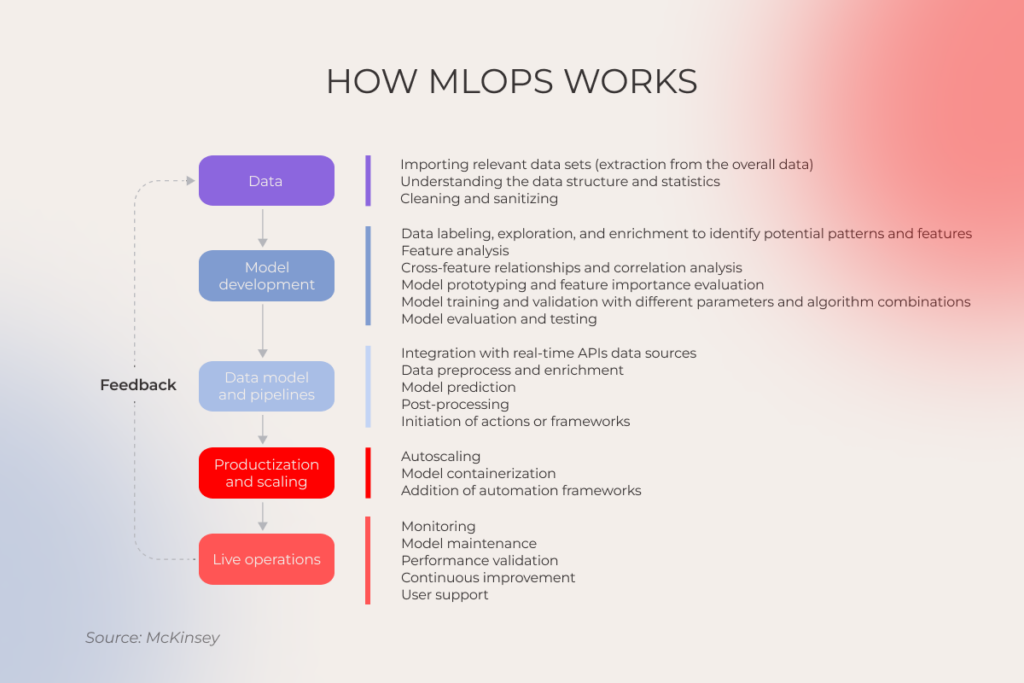
Flowchart showing how MLOps works

From data pipelines to model training and infrastructure management, MLOps tools align ML application development (Dev) with ML system deployment and operations (Ops), maximizing the value of your machine learning investments. 

Note: In the trio of AIOps vs MLOps vs DevOps, AIOps and MLOps also have different priorities. While MLOps is an extension of DevOps tailored to the machine learning domain, AIOps leverages AI and ML to automate IT operations.

DevOps walked so MLOps can run. How MLOps wins adopters’ minds

According to McKinsey, adopters of comprehensive MLOps practices shelve 30 percent fewer models and squeeze 60% more value out of their AI initiatives. These figures come off as hardly surprising, considering DevOps-inspired improvements machine learning operations usher into the AI development workflows. 

Automation and continuous processes

A hands-free approach to managing the software development life cycle is the bedrock of DevOps, powered by the implementation of automation tools that minimize human effort. Software development and operations also hinge on iterative, ongoing activities, all aimed at accelerating software delivery without reducing its reliability:

  • Continuous integration (CI),
  • Continuous delivery (CD),
  • Continuous deployment. 

MLOps takes these principles up a notch, laying them over the entire ML lifecycle. For example, automated model training kicks into action right after model training code updates or data changes, while automated testing allows AI teams to flag issues early in development and stop them in their tracks. Just like DevOps, MLOps adheres to an iterative approach where models are constantly monitored, evaluated, and refined through continuous integration, continuous delivery, continuous training, and continuous monitoring.

Version control systems and configuration management

Effective versioning of code and configuration changes are among other tenets that carry DevOps and enable development teams to collaborate effectively, perform experiment tracking, and manage code. 

In the same vein, MLOps applies version control to datasets, model code, and configurations, ensuring reproducibility, auditability, and consistency across artificial intelligence development flows.

Automated monitoring and feedback loops

DevOps is all about keeping a pulse on applications in production in case any issues come up, plus continuous monitoring helps track user interactions. 

In MLOps, continuous monitoring manifests in a slightly different way and applies mainly to model performance, data quality, and infrastructure health. Through feedback loops, AI and data science teams keep model performance in check and effortlessly spot issues like data drift, concept drift, or performance degradation.

Testing and validation

In DevOps, comprehensive testing and validation strategies revolve around automated testing, continuous integration, and continuous delivery (CI/CD) pipelines. This approach also entails a variety of testing scenarios, including unit testing, integration testing, performance testing, and other checks, integrated early in the development.

Here, MLOps follows suit, but extends testing to comprise tests for features and data, tests for model development, and tests for ML infrastructure. This holistic approach reduces the risk of deployment failures and allows engineers to tackle unique challenges like model drift and insufficient explainability.

Infrastructure scalability and flexibility

By adopting such DevOps practices as infrastructure-as-code, continuous delivery, microservices architecture, and others, companies can adapt to fluctuating workloads and rapid changes in application requirements.

Given the complexity of models and overwhelming data volumes, scalability also takes the central stage in MLOps. Along with scalability-friendly DevOps tools and practices, MLOps also employs containerization and orchestration to enable hassle-free application deployment and scaling across different environments.

Collaboration

At-scale automation and optimization of development workflows becomes a pipe dream without bridging the gaps between development and operations teams. That’s why a sync between the two is a central theme in DevOps.

MLOps expands the collaborative circle to include data scientists, ML engineers, and IT operations, streamlining the transition of machine learning models from development to production environments. Moreover, MLOps-inspired collaboration relies on model lifecycle management and governance.

Now you might think that DevOps alone can address the challenges brought about by ML workflows. But in reality, it falls short of providing a holistic ecosystem. With DevOps alone, all sides of the development process work in silos, dealing with unpredictable model experiments and manual model release processes. DevOps doesn’t imply result traceability or reproducibility so without MLOps, AI teams can’t deliver reliable, trustworthy, and compliant machine learning models.
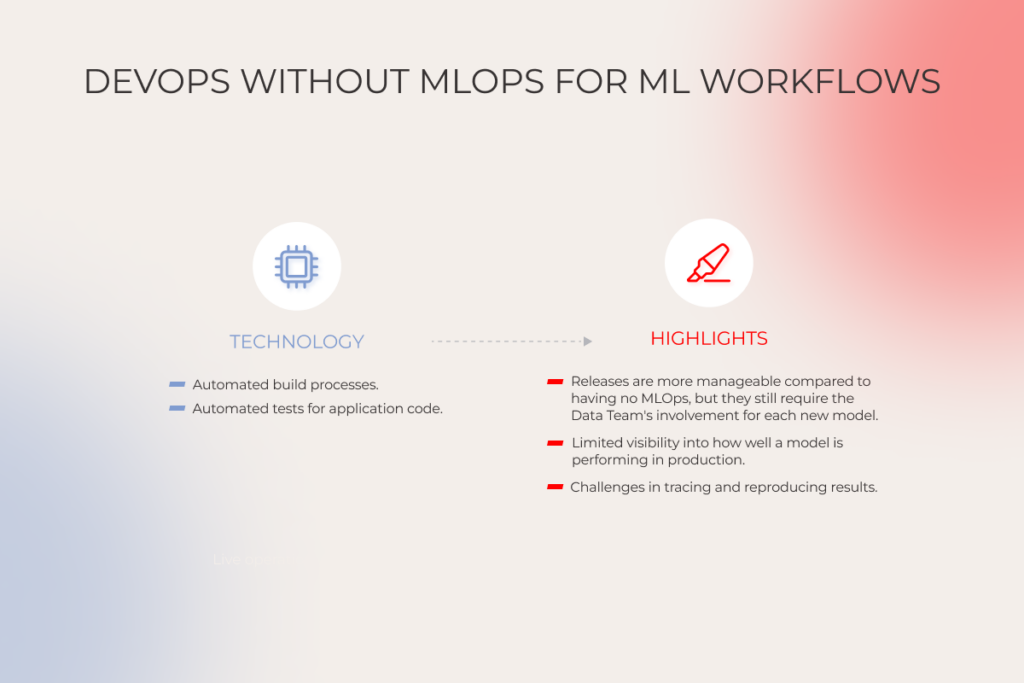
DevOps without MLOps for ML workflows

DevOps or MLOps, we can do it both

Reach out to our team

Comparing MLOps and DevOps workflows

Both DevOps and MLOps lifecycles circulate around automated deployment, quality control, and continuous feedback — with a common goal of automating and streamlining processes. However, the paths to value are different for each approach. 

DevOps starts as early as the development environment set-up and segues into the coding stage which is then followed by the CI stage and automated testing. This lifecycle stretches as far as post-deployment monitoring, allowing development teams to enhance incident response and implement continuous improvement.
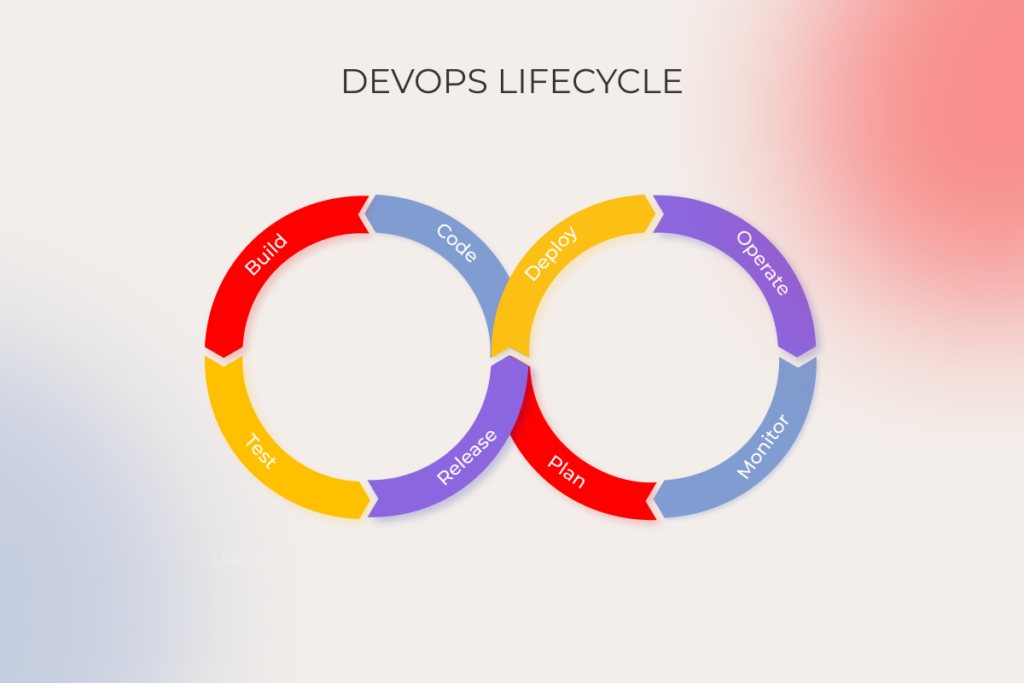
DevOps lifecycle

While the DevOps lifecycle consists of 8 steps, the MLOps one comprises five core stages, directly tied to model development, deployment, and management. The lifecycle unfolds with data preparation, supported by versioning, pipeline building, and data labeling. This step flows smoothly into model development and training, encompassing experiment tracking, training automation, and model versioning.  

MLOps also provides a structured approach to model deployment and post-deployment optimization, providing such automated capabilities as containerization, autoscaling, and more.
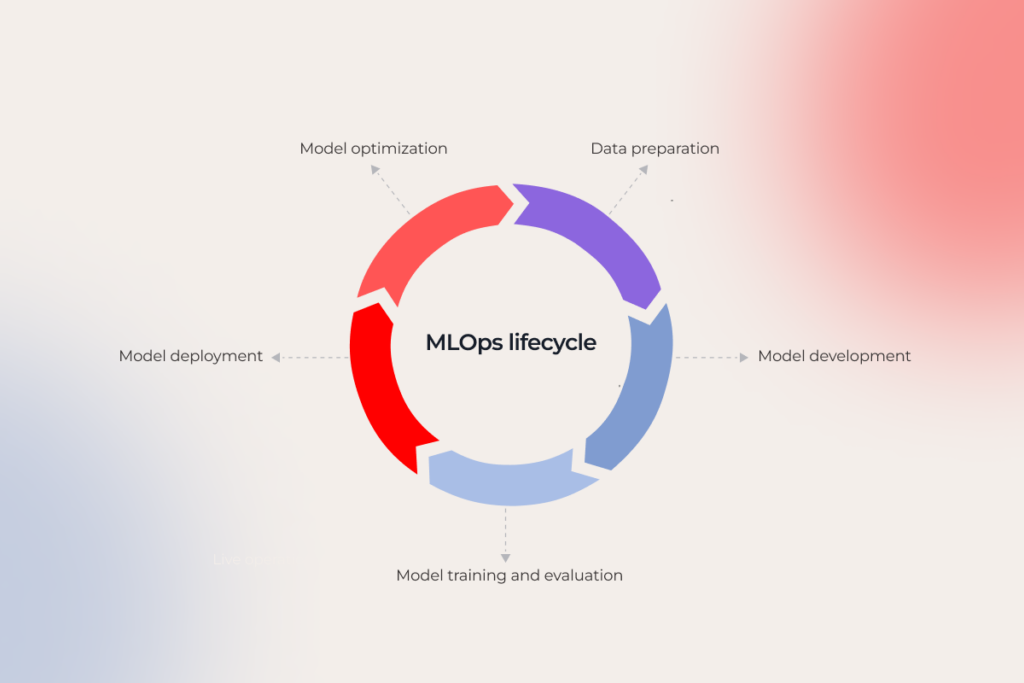
MLOps lifecycle

Adoption drivers for MLOps are the same for DevOps. Or are they?

While the rationale for introducing MLOps and DevOps practices may vary across organizations, common adoption drivers overlap. Both methodologies do a great job of reducing development cycle times, enhancing productivity, promoting system reliability, and last — but far from the least — fostering healthier collaborative practices. Here is a rundown of benefits that MLOps has brought to our clients’ table:

1. Accelerated scalability across business processes, workflows, and customer journeys

Executives often lament that the transition from AI solution idea to implementation can stretch up to over a year — and the progress remains sluggish, no matter how hefty their investments are. MLOps flips the script, allowing AI adopters to go from zero to hero in about 2 to 12 weeks with no additional talent or technical debt. 

This momentum stems from MLOps-induced standardization that is achieved through the creation of reusable components and workflow automation. Erstwhile time- and effort-consuming tasks like data ingestion, data management, and data integration become an easy lift, with little need for human oversight.

Modular pre-made components can lay the ground for creating a larger product or system — something that helped our client, a fintech company, deploy the solution five times faster and with fewer resources. By developing a central AI platform and layering modular pre-made components on top, they rapidly adapted their recommendation engine for different countries, improving customers’ access to relevant financial products and investments.

Along with reusable model training scripts and deployment infrastructure, MLOps allows organizations to diversify their portfolio of reusable assets to include ready-to-use data products. These artifacts consolidate a particular set of data according to common standards, facilitating its repurposing for multiple current and future use cases within a specific field.

2. Enhanced data acquisition and preprocessing

Traditional, manual-based workflows are known for time-consuming data workflows due to inconsistent data formats, data silos, and difficulties in tracking data changes. From data loading to data transformation, automated data pipelines — aimed at extracting, transforming, and loading data efficiently — relieve data professionals of manual tasks. 

Today, data pipelines can also be augmented by an LLM, besides other traditional MLOps tools, to automate data processing activities, such as data cleaning, anomaly detection, and data summarization.

Beyond maintaining data quality, data pipelines reduce errors, facilitate governance, and, of course, reduce the time it takes to collect and process data.

3. Easier dataset classification and management

Whether your data engineers are enhancing data security, ensuring compliance, or buckling up for an advanced data analytics solution, data classification is an essential building block for effective data management and protection. 

MLOps takes the inefficiency out of data classification and management by providing robust metadata management systems that group and tag datasets based on their source, type, and quality. Unified data repositories further facilitate consistent dataset management, making classification and timely access less of a struggle.

Moreover, MLOps processes seamlessly integrate with existing data governance frameworks, aligning data classification with the organizational policies of your company.

4. Closer insight into the effectiveness of dataset changes

In ML development, comparing different datasets allows data engineering teams to: 

  • keep tabs on the performance of a machine learning model,
  • spot data issues,
  • improve model interpretability. 

MLOps versioning tools facilitate tracking and managing changes made to various components of an ML solution over time.

This deep dive comparison is accompanied by experiment tracking — the process of jotting down all experiment-related information alongside model performance metrics and hyperparameters — to reveal patterns in the interplay of different experiments. Once AI teams have singled out two models with the highest accuracy, they can run A/B testing, which is another MLOps gismo for comparing model performance with different dataset versions.

Moreover, MLOps tools provide a venue for organized experimentation, allowing development teams to easily reproduce previous runs, compare different models or configurations, and recreate experiments for verification or debugging.  

Finally, built-in analytics and visualization tools enable engineers to keep a detailed lab notebook for how changes in datasets impact model accuracy, precision, recall, and other performance metrics.

5. Ensured regulatory compliance at scale

While a holistic risk management strategy is non-negotiable for all machine learning projects, the practical implementation of risk management strategies hinges on the practices used by AI teams. MLOps kits out teams with ample tools for comprehensive model governance, including metadata tracking, centralized repositories, model versioning, and other trackers. 

Reusable elements, equipped with detailed documentation on their structure, use, and risk considerations, also reduce error rates and allow for seamless, uniform component updates to filter down to dependent AI solutions.

One of our fintech clients who operates in a domain with a long tradition of strict regulations contacted our MLOps team to increase the auditability of their deployed models. By implementing CI/CD integration, metadata management, and pipeline orchestration, we empowered their team to maintain a comprehensive audit trail of model changes and associated compliance considerations.

6. Improved model quality at lower costs

Automation in itself is a powerful tool for cost-friendly quality improvement, but there’s a lot more to the cost-saving potential of machine learning operations. Thanks to continuous monitoring of model performance, MLOps tools detect issues early in development and trigger automated retraining, refining model quality over time with no overhead costs. Also, by continuously monitoring and reporting resource usage, MLOps tools reveal cost-saving opportunities.

Moreover, MLOps aligns resource allocation with actual needs, reducing idle times and costs and enabling dynamic scaling, which is essential for handling traffic spikes without compromising performance or incurring additional expenses.  

It’s not DevOps vs MLOps, it’s DevOps and MLOps

While DevOps focuses on accelerating software delivery and reliability, MLOps is more about improving ML model deployment and management. But despite seemingly different objectives, these methodologies do not cancel each other out. Instead, MLOps draws upon core DevOps principles, transcending the software development field and covering the unique needs and challenges of the ML development lifecycle. 

For this very reason, pure-play DevOps, although setting up a strong foundation for software development, is not enough for environments with data as a first-class citizen, making MLOps a backbone for all things machine learning.

Looking for an MLOps partner to join your AI project?

Let’s pool our efforts
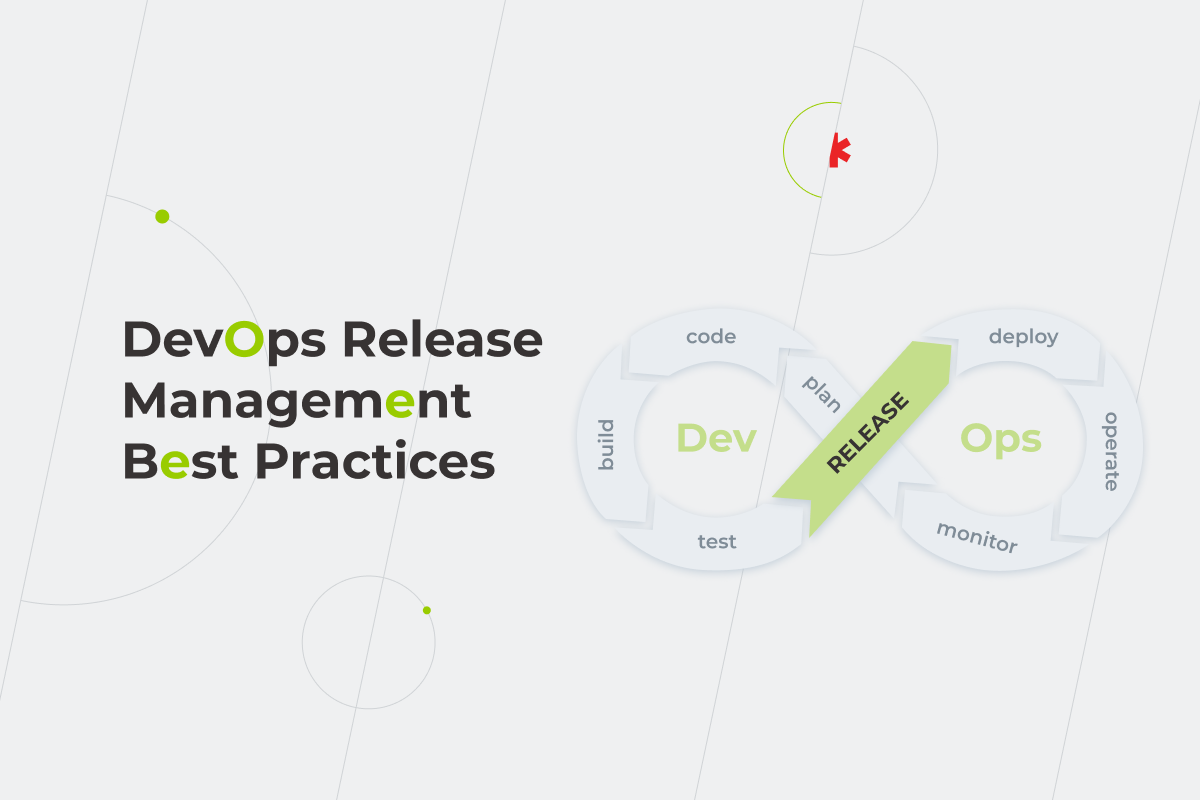
Remove stress from your software delivery lifecycle by following DevOps release management best practices

Producing secure and robust software at speed is an undeniable must-do for business success today. Whether a startup pivoting during the pandemic, or a tech company, keeping up with nimbler competitors — they all need the most advanced release management practices. This is where DevOps comes in. According to the latest statistics, the DevOps market is expected to grow at a CAGR of 21% during 2021-2026 — a significant amount.

We’ve already written about how to start leveraging DevOps, transforming it into a company’s best friend for when product owners and executives are trying to get stuff done and delivered on time. But what about DevOps release management? DevOps offers some great capabilities for interacting between teams, coordinating interdependencies, and helping people understand what they need to look for to get the release process smoother, making it just like breathing. How so? Let’s dive deeper to find out. 

Why is it important to manage your releases and deployments better?

DevOps release management

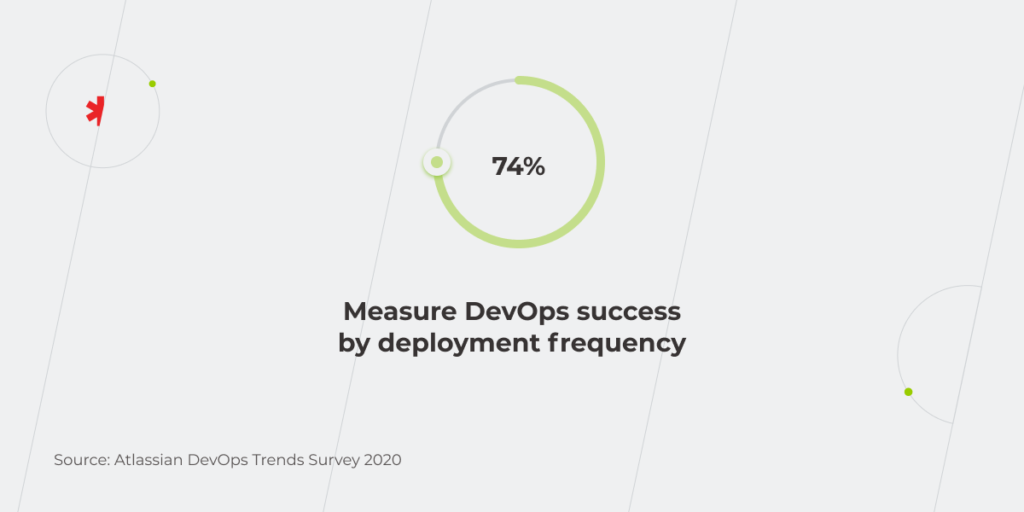
With a growing number of releases, deployment management becomes critical. According to the 2020 DevOps Trends Survey, 74% of companies consider the frequency of deployment as the best option to estimate DevOps efficiency. Here’s what DevOps release management offers: 

Increased deployment frequency

Developers don’t deliver one massive project. They release small improvements to their long-lived products all the time within a continuous integration phase. Also, there’s continuous testing, which allows to avoid regression prior to the production phase.

Reduced MTTR

The adopted Mean Time to Repair (MTTR) metric helps get a more comprehensive, accurate, and nuanced story of application and infrastructure productivity. For example, together with other metrics, such as the “error budget”, it can spot the true cost and impact of downtime. To identify the MTTR threshold and pinpoint the issues, you can use different alerting and monitoring tools. A well-organized DevOps process allows for quick deployment of fixes to reduce MTTR.

Decreased lead time for changes

Focusing on lead time allows developers to organize continuous delivery and reduce time to production. That’s why a product team is able to assure more frequent and smaller releases, which lets users realize new value faster.

Lower change failure rate

The team tests the product in a testing environment as they go. Doing that iteratively means the minimization of error issues upon the submission of a project on production. This results in fewer defects overall.

As part of release management, DevOps provides a holistic view of product delivery that everyone strives to have from the very beginning. It is about getting a deeper understanding of the end-to-end system, including value stream mapping and management. 

Apart from this, DevOps release management focuses on the constant optimization of value. This way, businesses become more product-centric, and the teams migrate from a project-oriented to product-oriented work culture.

How is the DevOps release process different from traditional release management?

Comparing traditional release management to DevOps release management is almost like comparing a horse and buggy against 21-century electric cars.

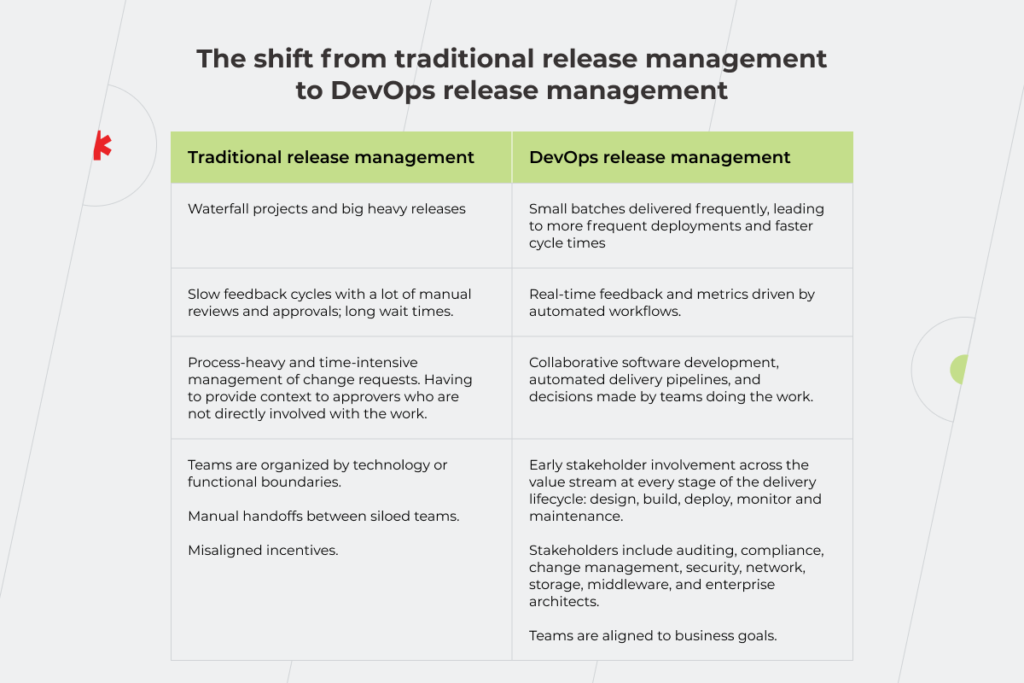
Traditional release management uses a waterfall framework known for big heavy releases. In this approach, the project is approved at the very end of the final delivery, despite months the development process took.

The efficient release management in DevOps enables frequent delivery of small batches, leading to more frequent deployments and faster cycle times. This results in decreased lead time, which means delivering value to end-users as soon as possible.

Manual work with manual reviews and approvals is ‘onerous and erroneous’. This is what sabotages feedback cycles in traditional release management. Also, long wait times, multiple discussions, and the burgeoning bureaucracy bog people down. DevOps practices, on the other hand, provide real-time feedback and metrics that are driven by automated workflows, including tracking, reporting, and data collection. 

Now, as for change requests, in traditional release management, the protocol implies process-heavy and time-intensive management of change requests. Product owners have to provide context to approvers who are not directly involved in the work. The DevOps scheme encourages collaborative software development, automated delivery pipelines, and change-advisory boards giving pre-approvals because they know all the steps to be managed. 

Last but not least, in traditional software development, teams are organized by functional boundaries. There are manual handoffs between siloed teams, which lead to misaligned incentives. DevOps addresses this by migrating from a control hierarchy to a place where leaders distribute authority to the teams. Developers get rid of all the handoffs and delays that come with these silos. As for core stakeholders, they are involved in every stage of the delivery lifecycle (design, build, deploy, monitor and maintenance). Therefore, teams are cross-functional, collaborative, and aligned to business goals.

The shift from traditional release management to DevOps release management

DevOps release management

Symptoms of a poor release management process:

Now, how to assess the current state of your release management against efficient DevOps release management? Let’s scan through the symptoms below. 

  • Releases are infrequent and happen whenever, usually, not during working hours. If your company needs to make a release schedule, notify all the employees about the new deployment in advance, or stop all the operations during the release. A failure to do so is the first sign your release management process requires enhancement.
  • Your release process is manually configured. Some release managers have to perform the same manual activities over and over again. They start to write a script, and then they write another script, and then another one. Also, they might be checking in a spreadsheet for calling someone and asking if they’ve done it. 
  • There’s only one person on your team that everyone relies on when it comes to deployment. Organizations have a release manager spread across 20 different teams. These teams are trying to cobble together a picture from lots of different sources.
  • You’re not sure that the feature/software will work, you just hope it will. This happens due to many reasons. One of them is making the production environment the source of truth. But it’s the version control system that is. To remind, the version control allows tracking changes and versioning data. Thus, the upcoming release stays compliant, and the teams can meet the business requirements of the auditors. 
  • New releases tend to negatively affect users if a team didn’t fix blind spots in deployments and proceeded to production. The latter is the result of the lack of actual data, metrics of delivery, metrics around flows, work in progress, defect rates, types of work that are being done, efficiency, cycle time, lead time, a lot of other value stream metrics.

DevOps techniques for release management:

Transitioning to DevOps release management best practices can be a game-changer. Here are the most effective techniques to implement.

  • Leverage Infrastructure as Code (IaC): Unlike manual configuration, IaC is not error-prone or hard to track. It suggests an automated process of installing and configuring software that leads to more reliable releases. Thus, deployments are well-tested and well-rehearsed, and the pipelines well-vetted. Release processes become more repeatable. Since the scripts are version-controlled, a manager can see how they’ve changed over time. 
  • Make disaster recovery a part of your normal operating procedure by exploiting phoenix servers. In software development, adding configuration updates is a common practice. Phoenix servers help the team run the configuration drifts smoothly. These immutable servers allow new infrastructure changes without breaking existing functionality.
  • Ensure no disruption in service thanks to a Blue-Green deployment strategy. It suggests running two similar production environments—Blue and Green. At some point, only one of them is live and serves all the production traffic. The other one is idle. When preparing a new version of an app, deployment and the final phase of testing are held in an idle environment. This helps tackle downtime that could happen because of software deployment and reduce the risk of damaging a new version of the app if something unexpected happens. 
  • Streamline CI/CD pipeline with “shifting left”, which enables quality assurance standards, continuous testing at all the phases of the development life cycle. DevOps claims to take over the traditional SDLC, mostly in terms of full automation.
  • Test, test, and then… test again. Developers, when building declaratively, make sure that what they build is right. To assure this, the team needs to have a testing plan. There’s an industry-standard guideline for implementing automated software testing, called the testing pyramid. It operates at three levels: unit tests, integration tests, and end-to-end tests. The bottom layer is presented by unit tests, the ones that need to happen most frequently. Intended to provide small units of code, they deliver value to the team multiple times a day, and are least expensive to write and maintain. This type of test is used to validate the functioning of individual components in isolated conditions. To check how this code interacts with other code, which forms the entire software, integration tests need to be done. They are slower than unit tests and require a pre-production environment. And, finally, to ensure that the entire application is working without a hitch, you need to run end-to-end tests. Beyond the testing pyramid, there are non-functional tests such as performance tests, load tests, stress tests, etc., which verify how well the software works. Having your testing strategy in place will help your team get the job done faster, achieve better results, and, consequently, increase ROI.
  • Don’t put quality over quantity. Businesses strive to release software as quickly as possible, yet Quality Assurance shouldn’t be an afterthought. It is still directly related to customer satisfaction. That’s why, to reach needed standards at the speed required, the team should embed QA in the specified requirements of any ongoing software development phase.
  • Automate release management processes. When release planning in DevOps, rating current pipelines based on their level of automation might be a game-changer. In DevOps, frequent releases are key, and enabling test automation throughout the pipeline can help significantly. Other types of automation include requirements, design, development, deployment, operations, etc. 
  • Be proactive in tracking changes and fixing the issues. In the context of DevOps best practices, the developers use version control as the source of truth. It allows managing changes to code versions, splitting them into different threads to be routinely tested prior to its release to a production environment. This is where all the amendments are tracked. Thus, developers can still remain agile, declaratively configure, build, test, and fix bugs, and release changes while it’s all being tracked. 

Best release management tools in DevOps according to *instinctools engineers:

The best tools for the DevOps methodology are business-critical, mission-critical, or, in other words, the lifeblood of your business to function. Here’s a shortlist provided by *instinctools experts.

  • Ansible allows teams to rapidly deploy, iterate, and test their systems in production. It also integrates with a large number of tools already used by DevOps teams.
  • Github Actions is all about optimizing workflows that are used to deploy code. It enhances continuous integration and release management and can be used for anything from triggering an alarm to orchestrating complex security test automations.
  • Octopus ensures reliable, secure and automated releases of your .NET applications into various environments of your software development no matter whether they are: on premises or in the public cloud. It provides audit information of all your past deployments which can further help in yearly audits for certificates and regulation.

How to get started with DevOps release management?

It takes a lot of work to put building blocks in place to effectively maintain the release management practice in an organization. Traditionally, IT companies have a business analyst or product owner who develops some large back-right PRDs handed off to a developer. Then they plan out the next six to eight months of development. But it doesn’t work well in today’s economic environment. 
Fortunately, there are agile release management frameworks you can use to deploy faster and quickly remediate any issues that arise on the way. DevOps release management breaks down work into small chunks. The methodology ensures frequent releases and further testing for defect elimination, optimized lead time, reduced MTTR, and a full scope of automation.

Want to know how to release valuable apps faster while maintaining the level of security and quality that makes sense for your business?

Book a call

DevSecOps: How to Integrate Security into DevOps

With data shaping the business landscape today more than ever before, security issues are at the forefront of everything a business does. Being ignorant about the risks of system vulnerability is detrimental no matter which industry you’re working in, but especially when you’re dealing with large amounts of consumer data. Financial, healthcare, and many other organizations are required to undergo obligatory security certification processes to prove they are compliant with all the necessary industry standards and regulations. 

However, security checks are often considered a bottleneck to deployment because they typically happen at the end of the delivery lifecycle or even after release. These checks are often manual; detecting issues means unplanned work for dev, test, and ops teams, causing delays and frustration.

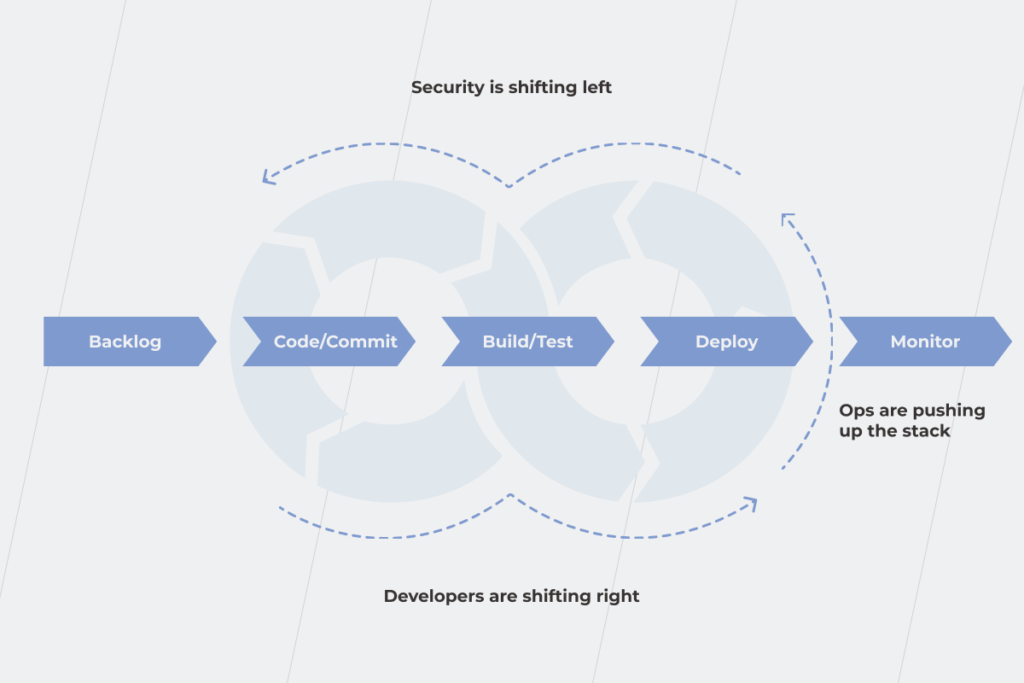
Fortunately, there’s a way to make security cheaper and, at the same time, avoid time-consuming processes and hindering system development. The solution is DevSecOps. It aims to achieve a secure SDLC and a CI/CD pipeline all the way through from start to finish by shifting security “left” to the earliest stages of the project so that the reliability of your system is no longer an area of concern.

DevSecOps vs DevOps: a fresh look at the security problem or the same thing with another name?

There are two opinions on the term DevSecOps and its place in DevOps.The first one is that to include security in the software development lifecycle from the very beginning, we need an explicit call to action. Many people take the “DevOps” label too literally and think that it encompasses only development and operations. Hence, creating “DevSecOps” looks like a good opportunity to highlight the importance of the security role.  

Good symbols, labels, and stories change the world. The pithiness of “DevOps” drove mass adoption and actual improvement far more than the “Agile System Administration” movement that preceded it. DevSecOps is fine.

— Nigel Kersten, Field CTO, Puppet  

The second view is that DevSecOps shouldn’t exist as a separate label because security is an integral part of DevOps already. 

If we keep putting every responsibility people should do in the name, we’ll run out of room for the hashtag. “DevSecOps” is dumb. #DevSecITSMTestAutomation­­MonitoringObservability­­­PeopleFinanceMarketingQAOps.

— Michael Stahnke, Director of Engineering, Puppet

Sometimes the idea of shifting security to the left may go as far as contradicting SecDevOps vs. DevSecOps. Perhaps you’re thinking: “What?! Are you kidding me?” No, we aren’t actually. Anyway, let’s not juggle the words and just agree with Bill, not Gates, but Shakespeare, “…that which we call a rose by any other name would smell as sweet.” The real issue to solve here is how to deal with the silos between security and DevOps teams? Because perhaps, only in a parallel universe could engineers and developers be okay with waiting for 48 hours while the security team runs their tests. So, then what are the middle ground solutions that DevSecOps practices can offer? 

Fighting against the deadly waterfall: why DevSecOps is a savior

With a traditional development method, such as the waterfall model, you usually can’t go back to the previous steps to modify a project. Security testing is tucked at the end of the SDLC. 

But, what are the consequences of such an approach? Significant security problems are detected only at the last stage of software development. Fixing them is painful for the team, and costly for the business owners as it results in delayed delivery. To deal with this problem, the agile methodology was invented. It allows businesses to minimize risk when adding new functionalities. And with an iterative method, it’s easier to be aware of security during the whole development process because you can go back to the previous stage and quickly fix a bug, monitor cost overruns, or change requirements earlier. With such an approach, you minimize the risk of a small mistake turning into a snowball that cripples the whole project, as it happened with SolarWinds. The company reported that up to 18,000 of its clients installed insecure updates and became vulnerable to hackers. Considering SolarWinds has many high-profile customers, such as agencies in the US government and Fortune 500 companies, the situation was quite critical for the organization and incredibly beneficial for its competitors. 

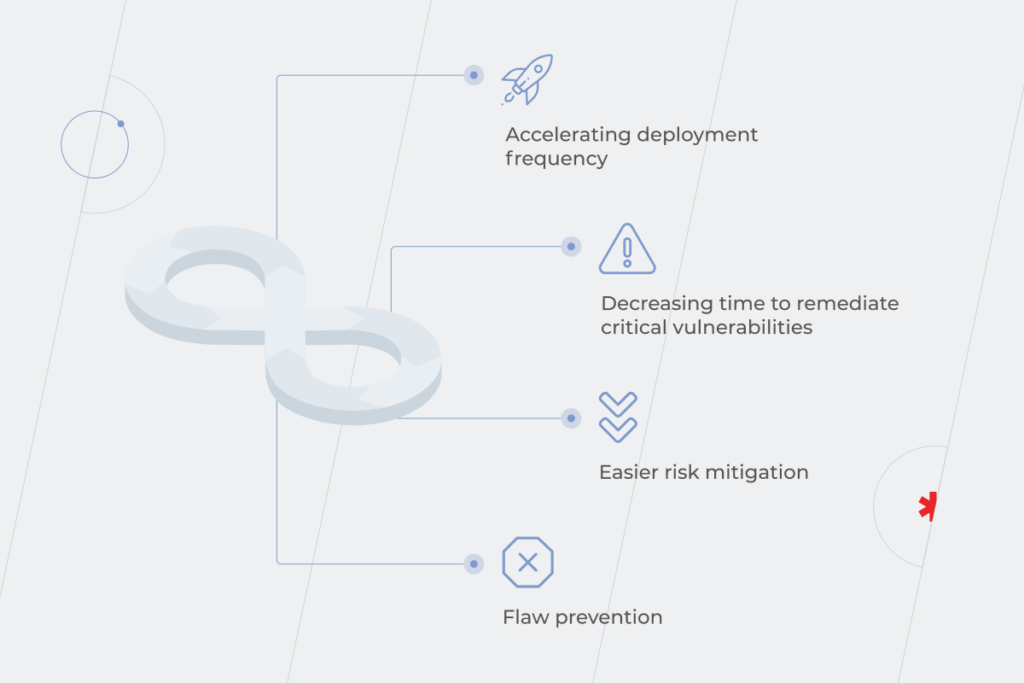
Outcomes of integrating security into DevOps in the long term:

  • Accelerating deployment frequency. Even if initially it doesn’t seem like that, the more you learn how to interact with security throughout the entire SDLC, the more frequent your deployments to production become. The case of NIAID proves that DevSecOps practices such as IaC (infrastructure-as-code) and automated testing are helpful in shortening the lead time to deliver software and patch critical defects. But as usual, when you’re changing how you work, things get worse before they get better. Early stages of integration are troublesome as security practices are introduced into stages where they weren’t before. Delivery speed takes a hit, too, and that’s frustrating for all involved. After all, who is happy about deployment time being increased by a third? These problems eventually go away as teams collaborate more smoothly to embed security in the delivery cycle, refine their processes, and see the positive outputs of their work. 

Do you need expert's advice on how to implement DevSecOps into your SDCL?

Let's talk
  • Decreasing time to remediate critical vulnerabilities thanks to DevSecOps automated security testing. Meanwhile, without DevOps or DevSecOps integrated into an organization’s development lifecycle, error fixing is manual or, at most, only semi-automated.
  • Easier risk mitigation and flaw prevention. You are more likely to stop a known-vulnerable code being pushed to production by giving this responsibility not to a centralized security team but to a delivery team. Thus, you make the process faster by removing a bureaucratic constituent and improve decision-making by relying on people from the delivery team who use their knowledge of both the technology and the business to do what is best for the company and the customer. When responsibility for security is shared across delivery teams, rather than siloed within one team, security issues are caught earlier — there are more eyes looking for potential security threats. It costs much more to fix a bug found during regular maintenance than to fix one identified during the design.
DevSecOps integration

Building a DevSecOps pipeline within a SDLC: theory and reality 

Efficient security implementation into the DevOps pipeline is a tricky task. According to the GitLab global survey results, 72% of 4,300 respondents described their security level as good or strong. Simultaneously, in almost a third of organizations (30.73%), only the security team is in charge of security. So, organizational silos are still a relevant problem.

There are two options for creating a DevOps security pipeline:

  • Using a traditional DevOps pipeline with security checking tools implemented at every stage: Plan – Code&Build – Test – Release – Deploy – Operate&Monitor.
  • Building a DevSecOps pipeline: Threat modeling – Scan – Analyze – Remediate – Monitor. 

In theory, it’s easier to create a pipeline with integrated security when you are only starting the project rather than implementing security checks into the existing DevOps pipeline as security becomes a matter of routine from the beginning. But let’s face the reality, the thing is that barely anyone truly cares about security before the preproduction stage.

According to the Sonatype survey, 48% of developers know security is important but don’t have enough time to spend on it. It doesn’t mean that it’s deemed unnecessary, but a lot of other issues with a high business priority and value are waiting to be resolved. So, then how does the process work?

When you start building a pipeline, you only have an idea of the final product. So you have to code and build something as fast as possible. It means, first of all, a business owner invests money in development, operational, and sales teams. DevOps security, at this stage, is only a rainbow unicorn perspective. Security implementation from the start is too costly for businesses. It requires specific tools and specialists to set them up. It’s hard to find additional thousands of dollars just for security when you don’t know if the product will be successful. 

The desire to turn a blind eye to security checks when you are caught in the crossfire of deadlines and frustrated employees is totally understandable. You may sleep well for many years with your software functioning just fine until one day you awaken to mind-boggling downtime instead of peace and quiet.

DevSecOps integration

Basic actions you can take for DevOps pipeline security in any case 

Underlining the obvious importance of integrating security into DevOps is a kind of “thanks, Captain Obvious” advice. It’s easy to say and hard to master. That’s why our goal is to show how to integrate security into the DevOps pipeline seamlessly without creating a drag in release times and hold up the deployment cycle, and, of course, without spending a huge part of the project’s budget on it. 

Do threat modeling and risk assessment

This practice will help you deepen the understanding of the weak points in your DevOps security, the types and sensitivities of your assets, and how to protect them. You can do threat modeling even before you shift to DevSecOps. It’ll provide you with:

  • Inventory of sensitive data
  • List of vulnerabilities with possible migration options
  • Summary of potential attack scenarios

With threat modeling, you kill two birds with one stone: eliminate vulnerabilities in the DevSecOps pipeline and improve the security knowledge within the development and operational teams. At first sight, threat modeling may seem quite a time-consuming process that affects the speed of deployment. But it won’t be an obstacle if you analyze which types of attacks are more likely to happen beforehand and choose the appropriate security checking tools. 

Tools to check how secure your SDLC and CI/CD pipeline

Automated security testing is a key component of the successful implementation of DevSecOps. With that, the speed of deployment will be affected minimally. Specially designed tools can provide you with static, dynamic, and interactive analysis of CI/CD pipeline’s security.

What are these tools specifically?

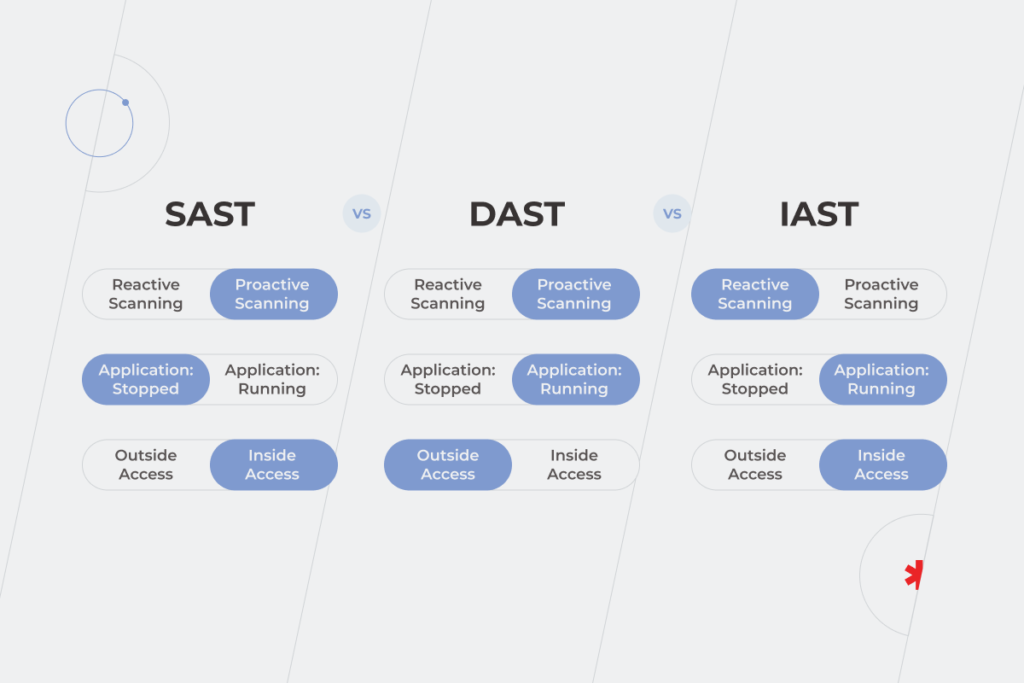
  1. SAST (static analysis security testing) software is used for white-box security testing (the “developer approach”) to check the security of the DevOps pipeline from the inside out during the building phase. You have access to the underlying framework, design, and implementation of the software. 
  2. DAST (dynamic analysis security testing) tools are needed for black-box security testing (the “hacker approach”) to prove the system’s security from external attacks outside its environment during the testing phase. In this case, you don’t have access to the underlying framework, design, and implementation of the software.
  3. IAST (interactive analysis security testing) works inside the product and analyzes code for security vulnerabilities in real-time during the QA or testing phase. It may seem like a win-win situation as far as you check security and don’t add extra time to your CI/CD pipeline. But remember that IAST tests aren’t always suitable for testing a codebase or an entire application. They only check whatever is exercised by the functional test, so you can select the activity that is a part of continuous integration, and check how secure it is. The best use for IAST tools is in combination with QA tests. 
SDLC pipeline

Define why your company needs continuous security monitoring for DevOps because security for security’s sake is a trap and a waste of time and money. First of all, specify your security priorities, choose testing tools accordingly, and decide on the phases of the DevOps pipeline where you’d like to implement them.

DevSecOps automated security testing is a heavy hitter in any sphere but there are three industries where security plays a crucial part: Finance, Healthcare, and Politics. The worst thing that can happen to a bank or a medical lab isn’t downtime. It’s data leakage. That’s why bank staff may not even have permission to install unrequired programs on computers. And if a database of a medical laboratory is attacked, executives are likely to shut down the whole infrastructure until the breach is found. It means that customers won’t get the results of their analyses or be able to book an appointment for 1-2 days minimum. But the risk of a hacker publishing customers’ data or using it against them is much worse than negative reviews.

Finding the middle ground between security level and deployment speed 

By putting speed-to-market on a pedestal while ignoring other DevSecOps objectives, you risk leaving a lot of value on the table and, more importantly, you imperil your entire business by jeopardizing customers’ data. Without security incorporated into your SDLC, users will suffer from repercussions caused by the unreliability of your system. That’s why prioritizing security is the key to better outcomes overall.

In theory, the ways of seamless integration security into the DevOps pipeline are clear and understandable. But once you start putting them into practice on your own, reality might kick in. If you have fallen into the trap of security implementation challenges, *instinctools security experts are ready to help.

FAQ:

What is a DevSecOps pipeline?

A DevSecOps pipeline is a set of security practices integrated into different stages of SDLC to recognize the security threats faster and earlier in the workflow and fix them straight away. The steps may differ according to your goals and the peculiarities of the industry. E.g., in healthcare, continuous security monitoring for DevOps is relevant, therefore security requirements are high and implemented from the very first stage. Meanwhile, some companies prefer completing penetration tests at the pre-production stage because security implementation at the very beginning might slow down deployment time.

How is DevSecOps implemented?

Integrating security into DevOps is not as easy as putting two and two together. Firstly, answer the question: “What do you expect from a secure SDLC and CI/CD pipeline?” Solutions will vary depending on the answer. You may build a DevSecOps pipeline from scratch or implement security into your existing DevOps pipeline. In both cases, you’ll need to unite dev, sec, and ops teams’ expertise and use specific tools for security checks.

SRE VS DevOps: Rivals or Allies?

The ever-accelerating business world has been obsessed for quite a while with the word “agility” when it comes to IT product development. And it’s not hard to see why: the prospect of getting the much-desired solution to fix your pain points ASAP is and always will be enticing. 

However, the COVID-19 pandemic has shown that simply being Agile may not be good enough anymore: ever since the world was forced to adopt a remote working model, MTTR (mean time to repair) has increased, while downtime rates have grown.  

Now, how does one ensure that agility will no longer hamper reliability? Meet DevOps and Site Reliability Engineering (SRE). These concepts that have been around for quite some time and, considering the challenges posed in the wake of the pandemic, are more relevant than ever. 

The difference between SRE and DevOps

SRE

DevOps and SRE were designed in the early 2000s to find an equilibrium between development agility and system stability. However, they are terms that are often misused: some think these are the same; some think they’re competing ideas. Most believe that a company always has to choose between them. So let’s dig deep into what DevOps and SRE are and whether a DevOps vs SRE debate even makes sense.

DevOps is, at its core, a methodology that reduces silos between development, testing, QA, and operations teams to accelerate application development, improve software quality, increase infrastructure availability, maximize application performance, and reduce costs. Now, all of this sounds awesome. There is one problem, though. DevOps is basically a set of abstract principles, some of which many companies struggled to put them into practice. And, to help everyone end this struggle, in 2016 Google published a book called “Site Reliability Engineering”, shedding light on their internal DevOps practices, but most importantly, giving easy-to-understand practical advice on how to make DevOps work.  

So, in a nutshell, while DevOps is a philosophy, SRE is one good way of implementing that philosophy.

How does SRE add to DevOps methodology?

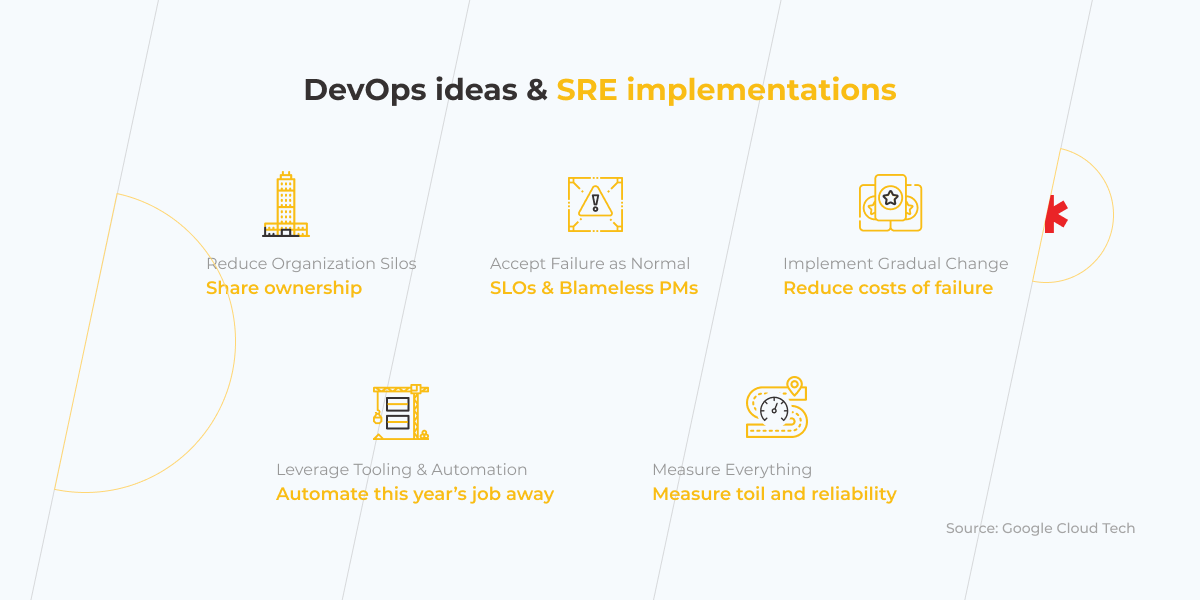
If you look at the DevOps manifesto, you’ll probably find that there are 5 key categories that DevOps is broken into, the methodology’s mantras, if you like, which could be put as: 

  • Removing organizational silos
  • Accepting failure as normal
  • Deploying small incremental changes
  • Benefiting from tooling and automation
  • Measuring everything

All of these are undoubtedly integral to a team’s success in finding a proper balance between agility and reliability, and we’re about to find out why. But, again, as neat as they sound, they don’t look like concrete instructions (“Measuring everything”? Well, of course!). So let’s go through these principles one by one and see where the difference between DevOps and SRE truly lies. 

DevOps ideas and SRE implementation

Removing organizational silos

DevOps idea: the communication between people who do coding (developers) and people who provide maintenance services (operators) must be seamless so as to prevent quick changes in code from damaging the infrastructure and creating major threats to the system’s stability. Initially aimed to break the wall between dev and ops teams, DevOps has rapidly spread beyond the software delivery pipeline to areas, such as security, finance, HR, marketing, sales, etc., where collaboration is vital.

SRE implementation: you need to build a tight-knit cross-functional team not only by bringing developers and operators together but also by expanding synergy-provoking practices to finance, human resources, executive leadership teams, and more. The culture of better communication and knowledge sharing, that DevOps and SRE inherently demands, can be created via frequent stand-ups, while integration and automation are to be deployed with special toolsets. 

Accepting failure as normal

DevOps idea: no man-made system can be 100% reliable, so a failure of the said system shouldn’t be perceived as a disaster by any company, but instead, should be treated as normality… as long as a lesson is learned in the process. 

SRE implementation: you need to internally agree on the amount of downtime that is acceptable in given circumstances and be prepared to swiftly deal with system failures (since they are inevitable and shouldn’t come as a surprise); one way to do that is to hold so-called “blameless post-mortems,” where time won’t be wasted on seeking whom to blame for the failure. Instead, the team, in a routine manner, figures out ways of improving the system, focusing on the future, not the past.

Deploying small incremental changes

DevOps idea: making frequent, but small changes to the code help react to issues faster and fix bugs easier. Why? It’s simple. Looking for a bug in 100 lines of code is far easier than in 100,000 lines of code. It also enables the development process to be generally much more flexible and alert to sudden changes. 

SRE implementation: you need to note that it’s not the actual number of deploys per day that matters. Striving for an inordinate amount of deploys just for the sake of them is wasted effort. You should indeed deploy often, but also make these deploys count—the more sensible the nature of the deploy is, the easier it is to fix a potential bug, thus reducing costs of failure. 

Benefiting from tooling and automation

DevOps idea: human nature doesn’t allow us to perform massive monotonous tasks efficiently. In the same way that it takes a lot of time and energy to manually address crucial workflows, companies that leverage tooling and automation can improve these processes exponentially.

SRE implementation: you should consider what long-term improvements to the system need to be made and automate the tasks that will be done regularly in a year or a couple of years’ time (SRE calls this “automating this year’s job away”). In doing so, you avoid investing in short-term gains and focus on long-term automation. 

Measuring everything

DevOps idea: having tangible metrics that measure different aspects of your development process not only helps to tell whether the company is working on a certain project successfully but also provides justification for this or that business decision. 

SRE implementation: you should adopt the use of Service-Level Agreement (SLA), Service-Level Objective (SLO), Service-Level Indicator (SLI), keep track of the system’s Mean Time Between Failures (MTBF) and Mean Time To Recovery (MTTR), and have a defined Error Budget. These will help your project run much more efficiently.

We’ll soon elaborate on what some of the notions in the paragraph above actually entail, but the rest of the picture should be more than clear by now. DevOps was created to make IT development better. Meanwhile, SRE was meant to show HOW exactly we should do that. As many SRE specialists like to say, “ SRE implements DevOps.”

SRE Metrics

SRE metrics

SRE, as a concept, is next to impossible to imagine without Service-Level Agreement (SLA), Service-Level Objective (SLO), Service-Level Indicator (SLI). As stated above, these are the core notions that relate to the measurement of your SRE implementation success in many ways. And, much like the names of these concepts, their natures are very similar to each other, yet with some crucial differences: 

  • SLA is referred to as an agreement between the service provider and the customer about such metrics as uptime, downtime, responsiveness, responsibilities, etc. In other words, it acts as a set of promises made to the customer and represented by various metrics, and a set of consequences if these promises are not lived up to;
  • SLO is, in turn, referred to as an agreement within an SLA about one specific metric i.e. uptime or response time. Basically, an SLO is an individual promise made to the customer. So, in this respect, it’s possible to see an SLA as a certain set of SLOs;
  • Lastly, SLI is an indicator that shows whether the system is functioning in compliance to this or that SLO.

A typical example of all these three notions working together would be something along these lines: an SLA you made with your customer states that the system will be available 99.9% of the time (the so-called “three nines of availability”), so it would have the SLO in it that would be 99.9% uptime, and the SLI would be the actual measurement of the system’s uptime.

Which types of companies need SRE and DevOps?

Considering that DevOps and SRE are there to assist development teams with securing great system stability whilst still being very agile, it’s relatively safe to say that any dev company should, to some extent, have a grasp of what DevOps/SRE techniques are and how to implement them. They’re modern software development essentials. 

In our previous pieces, we’ve already looked at how beneficial DevOps can be for large-scale manufacturing business and at the massive impact it had on financial services’ giants, but the sheer brilliance of DevOps and SRE is in their universal applicability — your business does NOT have to be a software development business to reap benefits from these practices; as long as you’re dealing with update roll-outs, infrastructural changes, growth and upscaling, feel free to delve into this philosophy.

And, effectively, there’s no team that’s too small for DevOps/SRE, either. You don’t even need to have a dedicated SRE specialist if you’re a small company. In this case, it may pay to train one of your team members to use the SRE methodology as the learning curve is not that massive.  

So taking all of that into account, we can easily make a case that the ideas and concepts behind DevOps and SRE are there for every business to relish — large enterprise or a small start-up, IT or non-IT, they’re for everyone.

DevOps or SRE? You can leverage them both

In an attempt to settle the Site Reliability Engineering vs. DevOps debate, we now can say for certain that there’s no point in either-or statement. In fact, how can we be talking about a debate here if the two things we are desperately trying to contrast are virtually the same, with one being a vital part of the other? 

If you say that you can do DevOps well, chances are you do that with the help of SRE principles. 

If you say that you can do SRE well, you should realize that we’re technically talking about DevOps.

So it’s not a “red pill–blue pill” scenario at all, both DevOps and SRE are to be embraced and we’re very excited to see how they both develop in years to come.

Excited about SRE and DevOps? Talk to our experts to find out how DevOps and SRE can help you uncover new business opportunities.

Some Reasons for DevOps failures. Based on Statistics, Real-World Cases, and Common Sense

Everyone wants to do DevOps, however, history proves that far from everyone is successful at it.  And although there’s nothing bad about failures – at least, that’s what DevOps philosophy advocates, they shouldn’t slip away unnoticed. We decided to delve deep into some statistics and DevOps failure case studies not to point fingers but to get to the bottom of the cause and let you learn from the mistakes of others. 

Why DevOps Doesn’t Work  

The consequences of DevOps failures might be so extreme that they immediately hit the headlines and are being discussed long afterward. Have you heard about Knight Capital that went bankrupt in 45 minutes because of a failed deployment? To be fair, there are only a handful of stories like that. And just because they are rare we tend to think that it’ll never happen to us. Indeed, there’s a long shot for that. However, DevOps fails not only when the damage is done, but when the organization can’t leverage it in the way it’s supposed to. According to Gartner, by 2023, staggering 90% of DevOps initiatives will have failed to meet expectations. Businesses that don’t want to become part of this statistic need to understand what they’re doing wrong and how to fix it.

Failing to identify the importance of organizational culture

Perhaps, one of the biggest misconceptions about DevOps is to think that it’s only an IT initiative. In fact, the problems organizations need to solve are a combination of culture and technology. Sometimes DevOps is equated with automation or cloud, but it’s so much more than either of those. While delivering a successful DevOps practice without using cloud technology or automating repetitive tasks would be difficult, it doesn’t automatically (pun intended) make you good at DevOps. Instead, good DevOps comes from a cultural shift toward better communication, collaboration, and integration across the company. In addition, companies need to address organizational and team concerns, including helping teams clarify their mission, primary customers, interfaces, and what makes for healthy interactions with others.

In the interview with InfoWorld, Bryan Dawson, DevOps evangelist, shared one of his first experiences in DevOps, which resulted in the failed application release. Working as a consultant for a U.S. government agency, he took part in the deployment of a new supportive DevOps platform, which was supposed to help with planning, coding, building, and releasing the app. At first, the project seemed promising, but soon it became clear that tooling alone is not enough to succeed. Being focused on tools, the team lost sight of the people and processes and literally supported legacy practices with modern instruments.

So one of the biggest blockers for the organizations to use DevOps to its full potential is failure to create an appropriate culture. As cheesy as it may sound, the best results are achieved when we start viewing DevOps as a cultural paradigm. However, simply talking about culture won’t help if it doesn’t evolve into certain actions. DevOps is a verb – it’s not something you have, it’s something you do.

According to Puppet State of DevOps 2021 Report, DevOps really works out when the leadership makes it a priority. In terms of DevOps evolutionary levels, 60% of highly evolved organizations say that the top management actively promotes DevOps. It’s both top-down and bottom-up work: the practices are set from above and are supported by the whole staff.

Apart from passive leadership, other cultural reasons for companies to be stuck in a rut with DevOps are risk management practices of infrequent deployments, unclear responsibilities, and limited knowledge sharing. So what can be done to change that?

Too many organizations, when seeking cultural change, focus too much on these surface elements—add a foosball table and a few bean bags in the office and suddenly everyone will start acting like we’re an innovative start-up, right? That’s not the way it works.

— Stephen Thair, CTO, DevOpsGroup

You may start with the following:

  • Change leadership behavior at every level by generating meaningful conversations with your team and enabling them to understand why the status quo is no longer good enough.
  • Hire new people with new ideas, for whom agile techniques is not an empty phrase.
  • Think about what you can do to nudge your staff in the right direction, such as rewarding the behaviors that move the company forward or challenging ones that don’t align with the direction you are trying to go.
  • Introduce agile ways of working, like Scrum or Kanban, to visualize workflow and speed up business value delivery. You may also try to apply the idea of “pair programming” to the areas besides programming – and if pairs are chosen right, not only will the quality of work increase, but also interpersonal skills will develop significantly and knowledge sharing will be established.

Trying to do a new thing in the old ways

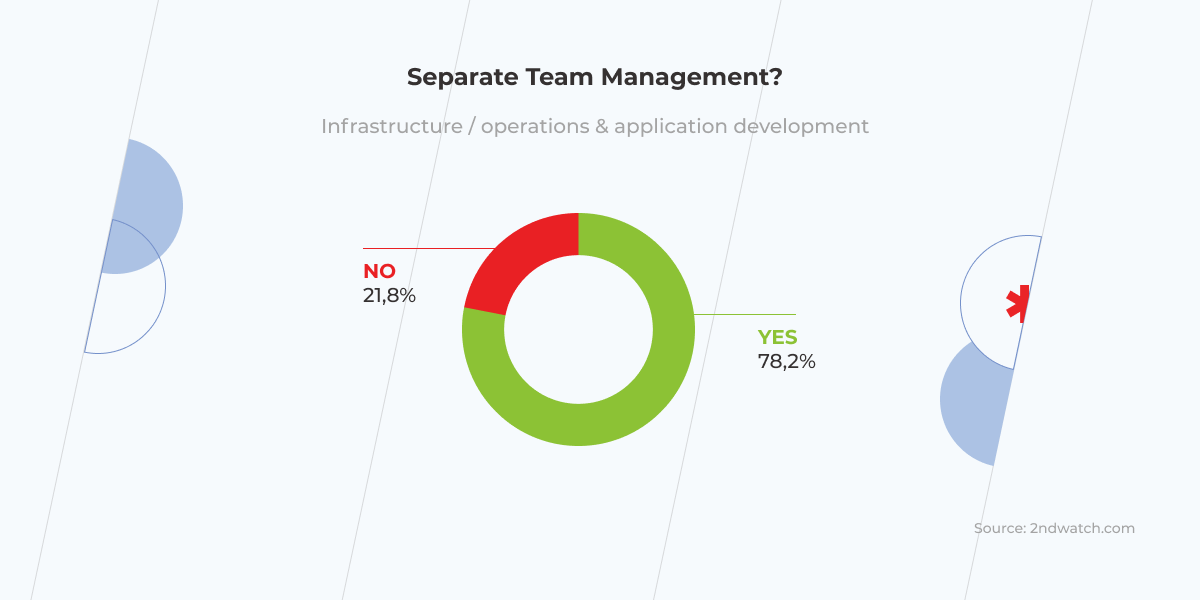
2nd Watch’s DevOps survey found that just 22% of organizations are engaged in DevOps in its purest form, while 78% of organizations, which are supposed to be doing DevOps, continue having separate management for infrastructure/operations and engineering teams. However, DevOps can’t exist without a truly collaborative environment, which breaks the silos across the whole organization. All the stakeholders, including business people, developers, operations teams, security teams, and QA must be engaged in creating the product and in getting it out of the door.

team management

Another thing the survey revealed is that more than a third of the respondents manage infrastructure manually. Besides contradicting the DevOps philosophy, this approach increases the risk of human errors, leading to wasted time that could, instead, be spent on generating compelling ideas. It also undermines the work of sysadmins turning them into angry burned-out folks ready to blow it all up. When infrastructure expands, the process slows down even more, while the risks of errors skyrockets. Moreover, companies can miss out on the most useful practices, like well-organized scaling. For instance, for an online store at night, when there are few if any customers, one server might be enough, otherwise the price for cloud infrastructure that you don’t even need will arise. Meanwhile, with an automatic approach, your cloud infrastructure will scale down by default whenever it’s needed.

One more blast from the past that holds Devops back in at least a quarter of companies is having little or no code testing processes in place. In today’s competitive market, where development and release cycles get shorter, winning the race of continuous delivery is impossible without making continuous testing an integral part of CI/CD pipelines. If testing isn’t run properly, it won’t be long before application crashes and customer service issues occur. As it was in the case with an already mentioned U.S. government agency, launching a web application. Right after the application was released it experienced critical and very public failures. That’s because it hadn’t been properly tested during the delivery process. It took the tech team multiple weeks to deal with the issue and get the site operational. Can you imagine how much cheaper it would have been for the agency if the bugs had been identified at an early stage of development?

To accelerate release cycles and, at the same time, ensure error-free outputs, testing must stop being a segregated stage at the end of delivery, but become an integral DevOps activity that covers development, integration, pre-release, production, delivery, and deployment.

The legacy of ‘legacy’

In this year’s State of DevOps survey, Puppet found out that for 28% of respondents, legacy architecture is one of the main barriers to better DevOps practiсes.

These legacy systems, they’re just like these hairballs that the cat coughed up.

— Charity Majors, CTO and Co-founder, Honeycomb.io

Working on things designed decades ago is arduous. Fortunately, they still can take advantage of modern practices and a pinch of agility. Sometimes simply moving an application into a virtualized environment allows for better test coverage, which enables faster and more confident changes.

Anyway, ‘leave it alone’ attitude only grows the gap between the current state of the organization and its future improvement, and paves the way for DevOps failures. As tough as modernization might be, the survival of the companies that were not born digital depends on it. But labeling your organizational dynamics problem as ‘legacy’ without identifying the specific issues is far from being useful. To make progress in modernizing obsolete systems, you need to analyze them, sort them into easily understood categories, and set explicit goals and action plans. 

Automation is a double-edged sword

automation

Anything that you do more than twice has to be automated.

— Adam Stone, CEO, D-Tools

Automation is key in the DevOps movement. There’s a lot of work, like installing packages, building docker containers, monitoring, logging, alerting, etc., that just shouldn’t be made manually, first of all, because they don’t scale, and another thing is that humans are not really good at doing the same things over and over again – that’s what computers are for. ‘So why not leverage them?’ – DevOps adherents ask rhetorically. No reason. Though such a powerful tool as automation must be treated with awe.

The fall of Knight Capital group can serve as a cautionary tale when it comes to automation. Knight was, at one point, the largest US-based equities trader. To send orders to the market for execution, Knight had been using an automated application, known as SMARS, which had many outdated parts in its codebase. Eventually, the company decided that one such part — old, unused code referred to as “Power Peg” — should be replaced. After the new code was written, it unintentionally activated the Power Peg functionality, which was still in the codebase. Because of the system that was sending automated, high-speed orders into the market and wasn’t being tracked, Knight experienced 45 minutes of hell. This time was quite enough for the app to make around 4 million transactions worth 3 billion dollars. Just like that, automation turned into a knightmare, resulting in a $460 million loss and bankruptcy. 

Anyone who has used Netflix has probably noticed that some streams (e.g. ‘Trending Now’ or ‘Popular or Netflix’ ) occasionally disappear. This happens because the instance group that serves this stream is down. Meanwhile, the app itself isn’t suffering any deterioration in performance and the company is not losing customers.

DevOps failure

Perhaps, the main lesson to be learned from this story is that you should automate not as much as possible, but as much as reasonable. In that case, it would have been reasonable to turn software releases into a repeatable and reliable process by implementing an automated deployment system. Had Knight known that, the fatal error could have been avoided.

Talk to one of our solutions experts to begin your DevOps journey the right way

Book a free consultation

Bonus: Netflix DevOps case study. If you can’t beat failure, automate it

For those who got tired of reading about DevOps failures, here’s an example of Netflix that shows how a fundamental understanding of DevOps can help make failure a friend rather than an enemy.

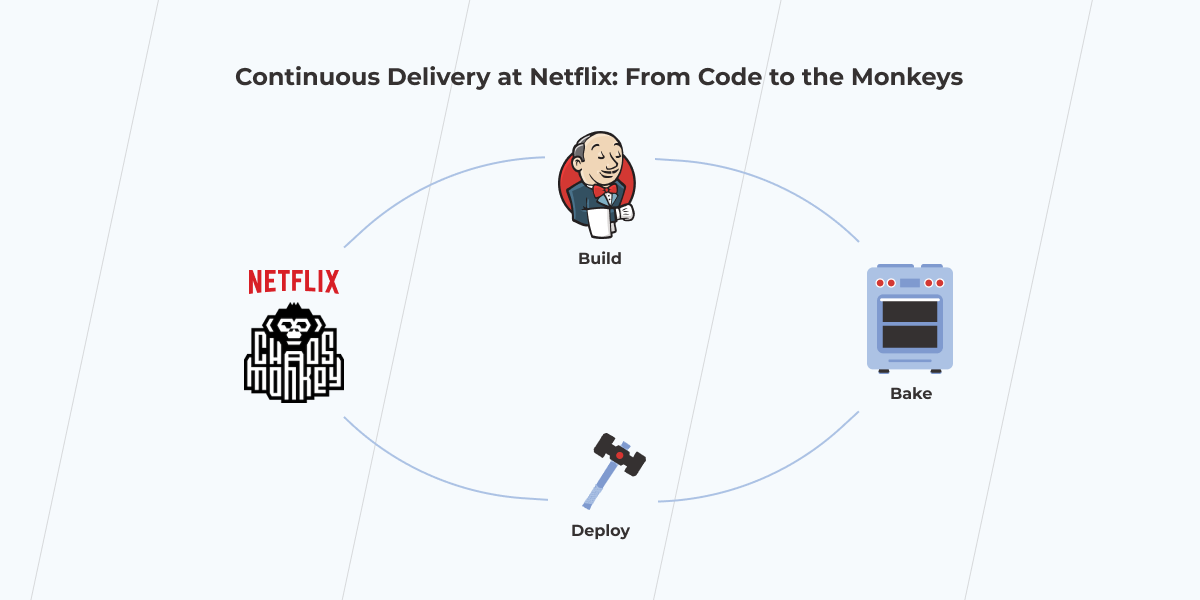
Netflix is made up of hundreds of microservices hosted on the cloud. To provide uninterrupted video streams for the customers across a wide array of devices, Netflix engineers have to ensure all the components are working together properly. Nonetheless, it’s barely possible to find a system that is 100% reliable. Instead of resisting the obvious, Netflix acted in a truly DevOps style – they accepted that failure was going to happen, planned it in advance, and went even further by automating it.

netflix devops

It’s possible thanks to the Chaos Monkey, a tool invented by Netflix to test the resilience of its infrastructure. The tool randomly shuts down server instance groups to check how remaining systems respond to the outage. The artificially created ‘chaos’ allows developers to better prepare for the real one rather than just waiting for a disaster to strike. Such an approach encourages engineers to design modular, testable, and highly resilient systems from the start.

Get prepared for your DevOps journey

Having a deep understanding of what DevOps is and being ready to make a shift to a new workflow, new mindset, and new culture are essential constituents of success in DevOps. What’s for failure, it’s not something to be terrified of. Despite a number of things that can go wrong you have a great chance to avoid them by planning recovery in advance and learning the lessons your predecessors have taught. 

The First Steps of DevOps Implementation

If you have ever wondered how to implement DevOps in your scale-up and don’t know where to start, this article will help. You will explore the difference between traditional development and DevOps, learn how to prepare for it, and investigate the first steps. So, let’s get started.

In short, DevOps is all about breaking down the barriers between people, technology, and delivery processes, and making these three work together effectively.

So you decided to adopt DevOps at your organization. To pull this off, you’d need to have all three critical elements (people, technology, and processes) prepared for the transformation changes to come. 

But how do you know you’ve reached a turning point where you can delay no longer?

When Is the Right Time?

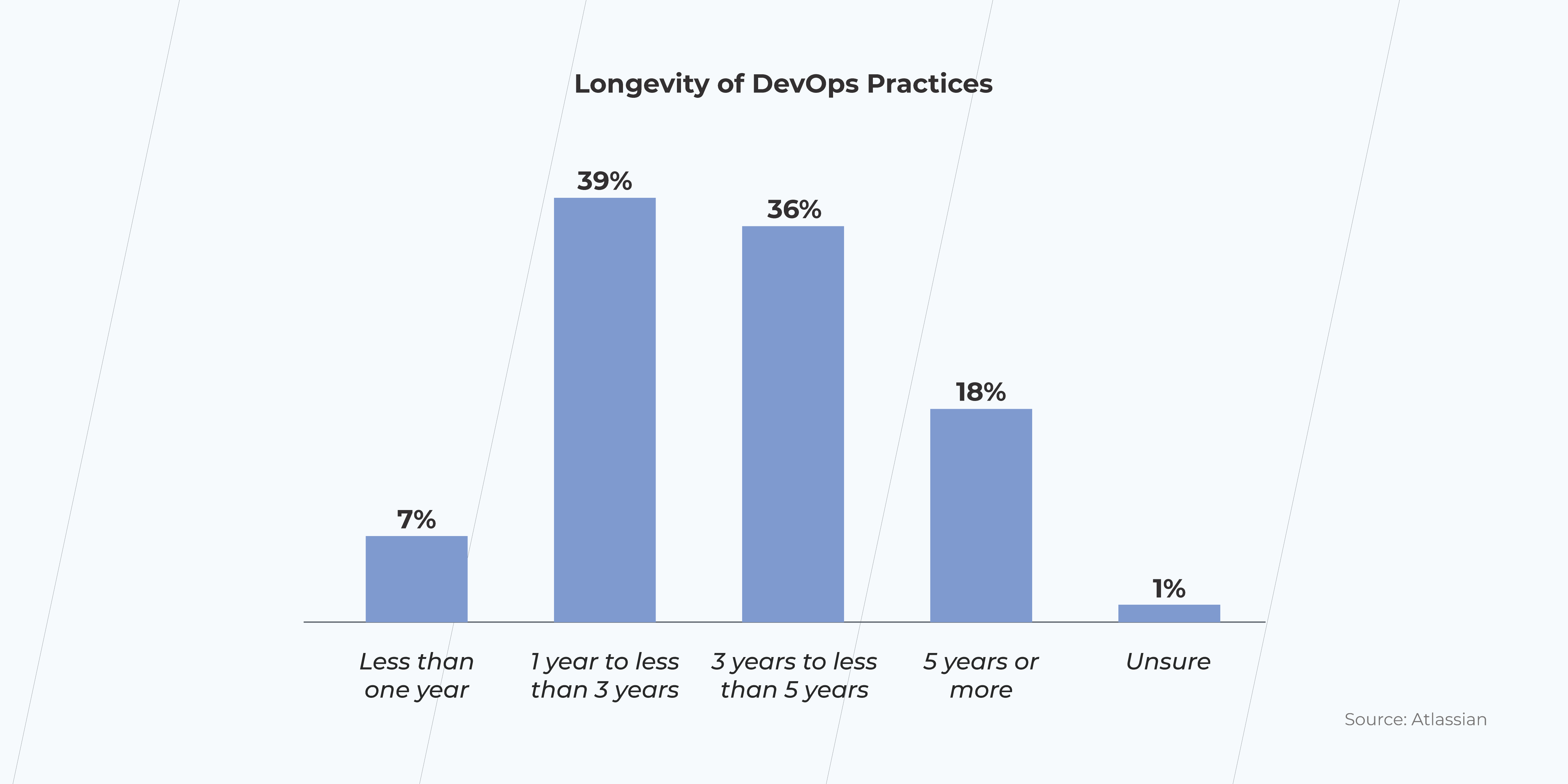
According to Atlassian, in 2020, there were almost twice as many companies enjoying the benefits of DevOps implementation in the last three years than those that have done so in the previous five years. Considering such a quick-paced increase in the DevOps adoption, the question “when” is clearly out of the debate. The time is now!

DevOps practices

Traditional Software Development vs. DevOps

How well does DevOps do when compared to the old way of doing things? As a matter of fact, pretty well. Atlassian says: 99% of respondents marked the positive impact on their organizations. 

DevOps is rising in popularity and hasn’t even reached its prime yet. In light of this, the traditional software development life-cycle (SDLC) might seem a little bit retro. Now let us explain why.

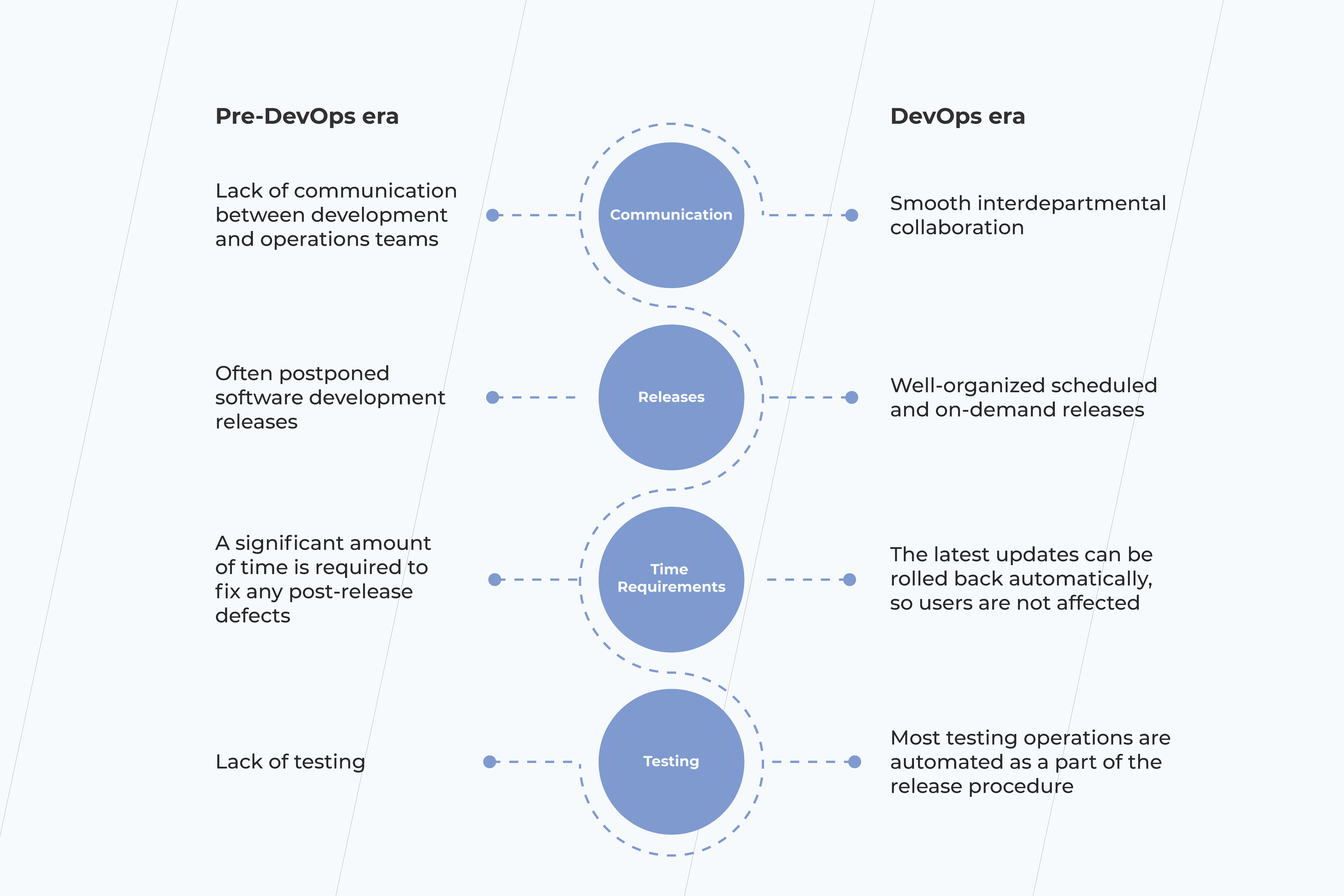
pre DevOps
Table 1. Old school SDLC vs. DevOps: the key differentiating points

The traditional SDLC

In the pre-DevOps era, you typically had separate departments responsible for developing, testing, and delivery. As a result, the successful project delivery heavily relied on effective interdepartmental collaboration. That could be particularly difficult to achieve if you outsourced some of your operations to third-party vendors.

You used to have a single staging environment where all pre-release preparations took place. After deployment to production, merge conflicts were far more likely to appear, resulting in irregular and long release cycles with a high probability of post-production defects. 

Here is a case that happened during the pre-DevOps times. In 2011, Facebook released the Timeline feature. Back then, the gradual release was not an option on the table, so the feature became available to all users at once. The result was that 500 million users tried a new functionality, causing a significant server breakdown. Had Facebook made their release steadily, they would have more time to gather feedback and predict a possible peak load. 

DevOps

In DevOps, all departments are responsible for the release procedure. It leads to an open collaboration culture, close interdepartmental ties, and better team spirit instead of an individual mindset. Dealing with third-party vendors can still be quite challenging; however, a relaxed environment tends to work more effectively than strict release guidelines and rules. 

A set of DevOps practices, known as continuous integration, deployment, and delivery, ensures that you have a ready-to-go deployment build. All software changes are automatically merged, tested, and deployed to a production environment with fewer efforts required to coordinate various departments.

The Agile mindset is the cornerstone of DevOps practitioners. Scrum methodology allows more frequent product releases, including unplanned ones. All changes are versioned and can be implemented as you go. 

A great example of a company that recently became a DevOps adept is Adobe. Back in 2016, they made a shift from on-premise software to a SaaS subscription model, dealing with issues they had never experienced before. To overcome such challenges, they started using a ​​CloudMunch platform which allowed them to increase the frequency of their releases. The result is astonishing: the app development demand is covered 60% more!

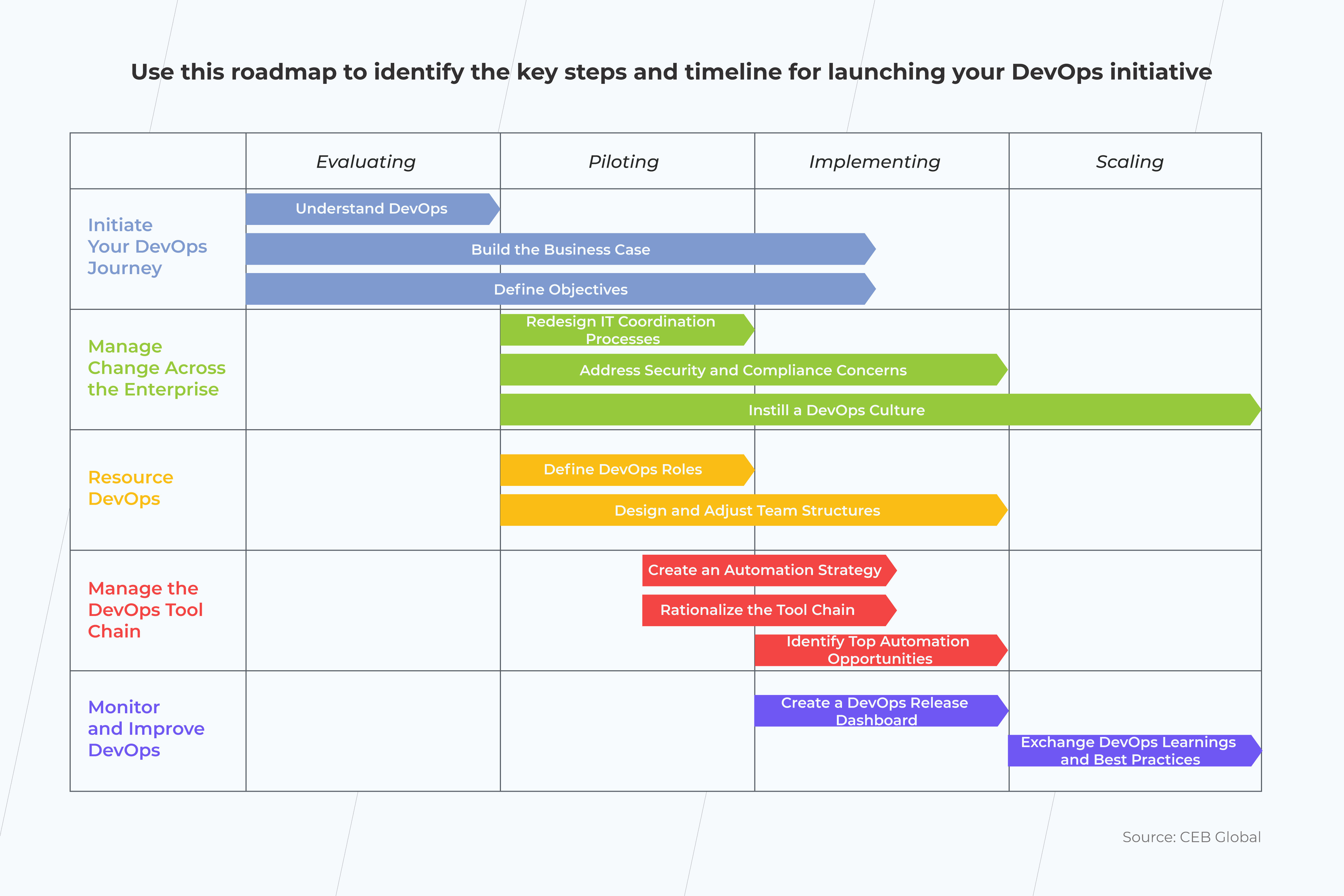
Roadmap for DevOps practices implementation

When you decide to incorporate DevOps in your business processes, the first step is to develop a roadmap of this procedure. You start with defining very high-quality actionable items, such as:

  • A general overview of the release pipeline; 
  • The team’s priorities and responsibilities; 
  • How results will be measured and shared;
roadmap for devops

The DevOps roadmap can be used as a reference point for stakeholders. It will also help you better judge how effective collaboration between the engineering and operations department is and whether the internal processes show clear indications of improvement.  

Embracing DevOps Culture: What Do You Need to Get Prepared for the First DevOps Implementation Steps?

Once you have developed a DevOps roadmap, assure your team is ready to implement the new approach.

The ultimate goal of any DevOps transformation is to change the established attitude and connect people. There are several ways you can go about doing this:

  • Encourage people to develop personal connections. People are more likely to cooperate if they know each other. So make sure to get people to socialize, and don’t limit your team-building activities only within separate departments. The more, the merrier.
  • Develop empathy and a knowledge-sharing process. When people understand each other’s jobs, they tend to value each other and develop mutual respect. 
  • Use the proper communication means. People don’t like to use low-quality tools. That can be another reason that leads to poor communication, as simple as that. Instead, invest in effective collaboration tools like Slack that open up great communication possibilities. 
  • Establish regular sync-ups and standup meetings. Again, there’s no need to involve all team members. Get each department’s representatives instead (engineering and operations team leads will do just fine). 
  • Mentor your employees on how to write business stories and tasks.  This has to do with something we discussed previously, effective communication between departments. Make sure your employees can write clear requirements. 
  • Idea meritocracy. Blame-free culture emperors collective responsibility and encourages people to express their ideas openly. After all, it’s good ideas that should win, regardless of personalities.

Now that you have established a DevOps implementation plan with clear values, it’s time to put them to good use. The DevOps pillars, outlined by the “The Phoenix Project” DevOps adoption book, suggest incorporating critical acceptance and continuous learning/improving as a part of your cultural DevOps transformation values. 

Final Thoughts

DevOps is gaining momentum, and it’s not too late to jump on that train.

Embracing DevOps means so much more than just changing a particular delivery pipeline. It’s the mindset that matters most. So we suggest starting your journey with DevOps implementation steps as essential yet straightforward cultural changes and a clear DevOps roadmap.

All in all, that might be too much to process all at once. Get in touch with us if you need some help with getting your head around it. Together, we’ll design the DevOps implementation strategy that will meet your needs.

Why DevOps is Essential for Today’s Manufacturing Business

Manufacturing is no longer all about sweat and steel. Innovation is at the center of the drive into the future. Increasingly manufacturers across all spheres are onboarding new technologies at a never-before-seen pace. From automated robotics to Industry 4.0 to the Internet of Things (IoT). DevOps is the latest in the line of sought-after technologies. But far from being just another fad, instead, DevOps rapid development potential could spell the future for the manufacturing industry. 

For more on DevOps, check out this article.

How DevOps in manufacturing works?

DevOps is a continuous development process that involves a number of technologies to meet a specific organizational goal. Using an ongoing approach means that a system or methodology is continuously updated and improved. It focuses on rapid development to be able to react quickly to industry changes. And nowhere could this be more important than manufacturing. 

DevOps is increasingly being employed in the manufacturing industry to quickly solve the challenges that the industry faces. From the need to create a new product quickly to analyzing supply-chain efficiency to automating processes, DevOps presents a solution that is able to be rapidly deployed with astounding efficiency. It can help to:

  • Manage applications.
  • Create and implement new technology features.
  • Update existing hardware.
  • Streamline and automate internal processes.
  • Make business more efficient overall.

3 reasons you need DevOps in your manufacturing business

In 2020, the world was hit by the COVID-19 crisis, which caused a drastic downturn in manufacturing across the board, with estimates of the drop looking as low as –16%. Almost all sectors and countries were hit. This highlights a significant industry risk – the current inability to adapt to adverse circumstances. 

As we enter 2021 and businesses are starting to recover. One thing is clear – things need to change. DevOps could be the solution that the manufacturing industry is looking for, and these are the three reasons why. 

Optimizing and automating processes

Social distancing requirements altered the way manufacturing could be done. No long could production lines be packed with human employees, at least not safely. COVID-19 posed a considerable risk to human health and the provision of essential products. 

Manufacturers had to react quickly and adapt new solutions that were previously unplanned for. DevOps was one way of doing so. Its rapid and ongoing development structure allows for processes to be optimized and quickly. From creating an app to manage a production line to monitoring supply chain efficiency, speed is of the essence. 

But of course, this is not the only reason to automate. Looking towards long-term growth is also essential. DevOps empowers businesses to adapt and explore solutions at a much faster pace. It also allows them to alter elements that might not work and add features that do without starting from scratch. 

Innovating and staying ahead of the game

In business, it’s vital to stay one step ahead of your competitors, and that applies in manufacturing too. Every day new processes and technologies are being invented to make our lives more efficient. DevOps deliver businesses the potential to innovate with their sphere and uncover a better way to do what they do.

For example, a company manufacturing plane parts could be rapidly adapted to develop respiratory equipment (an essential during the coronavirus crisis) or something else entirely. In doing so, the business has allowed itself to stay relevant (and productive) even in times of crisis. It is this flexibility that is key in staying ahead of the competition. DevOps could provide the technology to adapt internal processes to deliver on new manufacturing potential. 

It will become the norm

Now, it’s no longer a question of if it’s a good idea to use DevOps. It’s how quickly you can do it. Knowing how to make even seemingly minor adjustments in your business could be the key to impacting overall growth. From simply aligning your purchasing process with your supply chain or even adapting the feedback of clients into workable solutions, DevOps empowers fast development speeds. 

This rapid cycle of development will soon become the norm across all industries – not just manufacturing. Buyer demand will dictate pace and direction. And those who fail to learn from the challenges of the past will soon fall behind. Companies who place their value on moving forward and take note of market changes will thrive. 

DevOps and the future of manufacturing

Amid every crisis is an opportunity. While the effects of COVID-19 are devastating, it has delivered an enormous wake-up call to the world. We need to change how we do things. This applies whether we are talking about a business adapting their production line with automation that allows social distancing or a pharmaceutical company that needs to produce a large amount of a vaccine or something else entirely. DevOps is one way to get things done and fast. Rapid and continuous development helps a business adjust to the new normal and thrive in it. But the trick? That’s being prepared before a crisis happens. Employing a DevOps-focused strategy in your business promotes innovation and flexibility that allow your company to strive for future growth.

The Impact of DevOps on Financial Services

JPMorgan, Capital One, and America Express. These are just some of the big names adopting DevOps as an essential tool in their technology kit. Recently, Development Operations, or DevOps for short, has been trending in the financial world. Known for its speed and to-market time, it appears to answer financial organizations’ prayers, ensuring their products meet their clients’ rapidly developing demands. But why choose DevOps for your finance organization? And how does DevOps in finance keep a company up to date?

What is DevOps?

DevOps is the unification of software development and its operations, with a little bit of QA thrown in to ensure quality. It involves a circular set of processes and practices to get a solution on the market faster than ever before. With the Agile Development methodology at its core, the typical project development cycle is an ongoing infinity look which priorities forward-thinking tech. Essentially, DevOps is an ongoing software development process that involves continuous integration, continuous deployment, and continuous delivery at its core. 

5 Ways DevOps is changing the financial world

It’s clear that a faster-to-market time allows financial organizations to quickly capitalize on market gaps and address their clients’ changing demands. As a result of the pandemic in 2020, it’s estimated that the global usage of digital financial services is up somewhere between 5% and 20%. With an urgent need to access clients, combined with a reduction in brick and mortar branches, it’s vital that financial organizations are able to get their digital products to the market as fast as possible. DevOps for finance provides a potential solution. 

Here’s the five reasons why DevOps is leading the way. 

Modernizing outdated systems

Digital banking is nothing new. In fact, according to one source, it dates way back to 1994. However, technology has come a long way since then. Aside from some significant advancements, there’s one other thing that’s built up too – legacy tech. This is the outdated code that some essential services still hang on. While your old tech might be too outdated to work efficiently, it’s not always possible just to throw it out and start afresh. It’s integral to your operations. This is where DevOps comes in handy. It allows you to continuously work to modernize your systems while not jeopardizing taking your business offline to do so. 

Alternatively, if you are starting from scratch, DevOps allows you to modernize as you build, adapting to the latest trends without the feeling that your just-released solution is already out-of-date. 

Improving security and compliance

In recent years, many within the financial world viewed DevOps as a security risk. Surely, such rapid development left companies vulnerable to compliance and security errors. However, by 2020, this has definitely all changed. Contrastingly to being vulnerable, DevOps aids fintech in staying current and implementing the latest security solutions. Frequent releases address the latest security threats and help stay current with changing compliance regulations. This can be anything from implementing automated document checking processes to securing client details against data hacks.  

Increasing transparency

Previously, financial software was developed in isolation following a relatively strict hierarchical process. Participants were working essentially in silos, concerned only with their own area of the task and nothing else, which was great for information security, but created challenges in effectiveness. That has all changed. DevOps in finance requires teams from across the board – QA, engineering, content, compliance, legal, etc. – to participate and work together to ensure the software solution is up to scratch. By drawing expertise from all areas, the solution becomes more robust and effective. Meanwhile, with greater transparency, processes can occur faster and lead to a more successful outcome. 

Automating anything that can be automated

Automation is a growing trend. And that doesn’t just concern DevOps for finance technology. By automating repetitive processes, companies are finding themselves more efficient and better able to serve their clients. In the world of finance, automation processes can be developed more swiftly than ever before, allowing your staff to concentrate on delivering customer service, not paperwork. For example, Capital One is automating quality checks in their services and proving that essentially, anything that can be automated will be automated.  

Altering the financial industry culture forever

But it’s not just technological processes that are changing due to DevOps. In fact, the entire financial landscape is noticing a change. Industry culture itself is shifting, from top-down hierarchical processes to flexibility akin to Agile development’s adaptable working methodology. So, what does this mean in practice? 

Although like any cultural shift, it will take time, the dynamics of traditional finance are being altered in a big way. Overall, the industry is becoming more adaptable and adjusting its staunch approach to finance and exclusivity to greater inclusivity and client-focus. Considering the growth of digital-only banks and greater accessibility overall, and despite brick-and-mortar closures, the industry is surely but slowly shifting.

As DevOps and similar Agile methodologies penetrate the strict world of finance, what we will see is a sure but substantial transformation to a more fitting financial system, adjusted to the needs of the modern world. 

DevOps, finance and the future: What’s next?

As the financial world dives deeper into the realm of technology, we are likely to see more extensive usage of DevOps services and a greater connection with customer needs. Client demand will dictate the direction of changes and how quickly they will need to happen for an organization to stay relevant. With the rapid changes that occurred in 2020 due to the pandemic, it’s no surprise that the world is gripped by the potential of shorter software development cycles and the potential they hold for getting solutions out there when and where they are needed.

Role and functions of an architect in a software development project

In this article, we clear up some of the popular questions about the roles, functions, and responsibilities of an architect in a software development project. 

At the stage of a new software project evaluation, it is crucial to analyze and define the main technical characteristics of the future product and how well it achieves a customer’s business goals. In the IT industry, such functions are performed by the software architect, whose role may be distributed among different team members.

Who is an architect?

The architect in the IT-sphere is a person responsible for making technological decisions regarding the software solution and its compliance with customer business needs. Such an expert knows the systems and methodologies applied in the development process, the languages used for coding and the architecture building process as a whole. The architect plays an important role in the process of discussing, developing and implementing a technological product meeting the business needs of a customer.

Architect functions on a project

The architect’s work and decisions directly affect the activities at every stage of the project. Basically, a major part of the architect’s responsibilities relates to the early identification of the concerns regarding product delivery. The architect makes decisions to mitigate the detected risks for each process: business needs capturing, planning, implementation, testing and deployment.

In a nutshell, the architect’s activities include defining the results of each development stage to get the expected product. The following function set expresses such activities in more detail.

Understanding the purpose

The main interest of the architect is to understand the customers’ needs and the goals they want to achieve by implementing a new system (or reworking an existing one). For example, such needs or goals could be sales increasing, entering a new market, costs optimization, etc. While gathering this information, the architect focuses on finding potential failures in the technical aspects of the software.

Here at *instinctools, often a customer has an existing system that was developed considering only the functional requirements. The previous vendor (or in-house specialists) could have delivered all the required functionality, but the product doesn’t satisfy the customer anyway. Why? In most of the cases, the system wasn’t aimed to solve the business problem. No one validated that the required functionality provided the required solution.

To minimize such risks, we suggest that the architect be involved from the first clarification call. Together with business analysts, architects can identify the purpose and possible “pain points” at the earliest stages of the future project.

Defining quality attributes

From a customer or a user perspective, any software system can be defined by its functionality. But there is an aspect that is often omitted while considering the system requirements: the system’s quality, i.e. how well the functions are provided. Each quality aspect is expressed by the term quality attribute. Here are some examples of such attributes:

  • performance (response time, hardware resources required, max number of users working with the system at the moment, etc.)
  • usability (UI simplicity, easiness of operation, user error protection, etc.)
  • reliability (max possible downtime per year, fault tolerance, etc.)
  • maintainability (efforts for the system modification).

It’s a common wish to implement a system with ideal quality. But in reality, it would be quite costly, extremely time-consuming, and, in general, impossible. The good thing is that software, being in a specific environment, doesn’t need to be ideal in all aspects. For example, a CRM system in a 10,000-employee company doesn’t need the functionality for a billion users access as a worldwide social network do. But also the CRM requires much less human and hardware resources to support it.

That’s why it’s important to have clear quality attribute requirements during software development. And it’s the architect’s job to identify them. Understanding the purpose of the product and the customer’s goals, the architect prioritizes and emphasizes the crucial quality attributes for further product implementation.

Building a technical solution (architecture)

An architect deals with different technological aspects: existing programming practices, development frameworks, data storage engines, cloud technologies, testing strategies, etc. Such an expert uses this knowledge to compose a vision of the system that will solve the business problem. The common word for this vision is the solution or architecture.

Since a single problem can have multiple solutions, the architect has to validate each of them, test hypotheses, and build required prototypes. As a result of this work, the architect proposes the most suitable option. It implies the reasoning that includes:

  • cost estimates,
  • justification of the technologies used,
  • potential risks,
  • mitigation activities,
  • the number of teams required,
  • development stage priorities, and many other implementation details.

Bridging the communication gap

It’s no secret business people and IT specialists speak different languages. Both sides often complain that it’s difficult to communicate with each other. However, it’s crucial to have an unambiguous understanding of the developing system. That’s why there should be a person that will understand both sides and make a “communication bridge” between them. An architect is that person who can bring an understanding of the business domain aspects to engineers and explain to business people what the system really is.

Architect: Role vs. Job

Here at *instinctools, we have a strong belief that any software project requires someone responsible for the activities mentioned above. But it doesn’t mean that any development team must have a member with a special “badge” to make the architectural decisions.

For example, a lead software developer with deep expertise in the project domain who has already earned the customer trust can determine the solution for the product as a whole. It would be also more effective to delegate architectural decisions to a specialist in a specific technological stack if the solution is completely based on it.

Another common case is when the architect’s functions are distributed among other project participants. For instance, a project manager with a technical background defines the functional and quality attribute requirements. Meanwhile, a lead developer is responsible for building a technical solution. Both of them are capturing the business purpose and bridging the communication gap.

The distribution of an architect’s role among team members depends on the project itself. A system’s complexity, the developer’s background, the terms of cooperation, and other conditions can affect it. But in general, when the project has many unknowns and requires more technical engagement, the role is assigned to a solution architect, who is an expert in such tasks.


Within several years of delivering software solutions, *instinctools has gained certain experience in optimizing processes for achieving customer goals. That implies an understanding of technical requirements and how they correlate with customer business goals. Here at *instinctools, an architect performs such expertise at different stages of a software development project. Whether a person or a role, the architect uses their expertise to better analyze business problems or the current system’s drawbacks and suggest the best possible solutions for the future that we are ready to deliver. Now.

Anna Vasilevskaya
AI modified real photo
Anna Vasilevskaya
Account Executive

Get in touch

Drop us a line about your project at
[email protected] or via the contact
form below, and we will contact you soon.