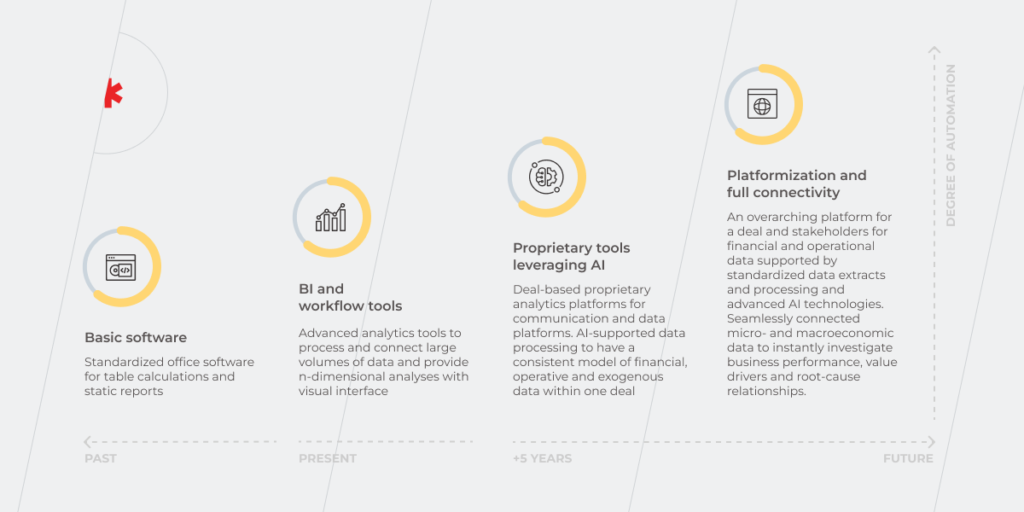
Integrated Business Planning: How to Pave Your Way to End-to-end Orchestration

“We plan, God laughs”. True. However, planning is not about knowing the exact outcome. It’s more about gearing up for what-if scenarios, in case something goes awry. 

To adapt successfully to evolving market needs and work around economic turbulence businesses need the collective effort of the whole organization — from finance to marketing.

But how can you align the mashup of a company’s strategy, operations, and financial performance? Enter an integrated business planning process.

Once a legacy of Fortune-500 companies, the IBP strategy can be leveraged to transform businesses of all sizes. IBP solutions help both industry giants and young companies manage growth-related risks and help establish disruption-tolerant processes.

What is integrated business planning?

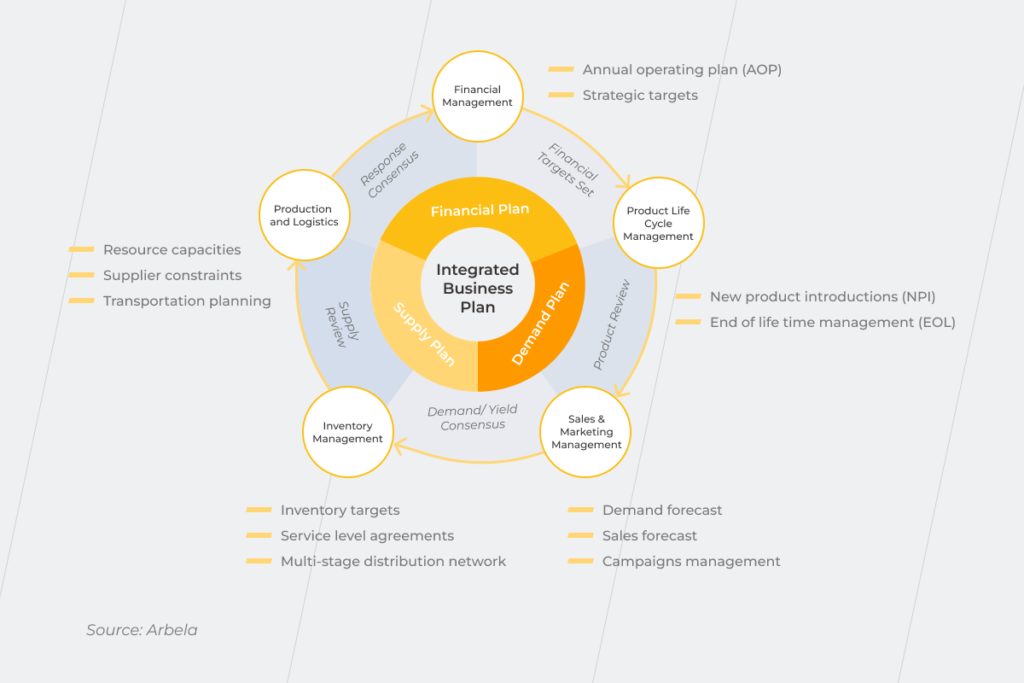
An integrated business planning (IBP) process refers to scaling and connecting the planning activities across each business function, silo, and department. Hailed as the enabler of an innovation-ready environment, IBP also syncs business targets, budgets, operations, and business units across the entire organization. At its core, IBP includes technology and applications that connect the planning and operational functions of the company.
Integrated Business Planning

Why put your planning processes in a broader perspective?

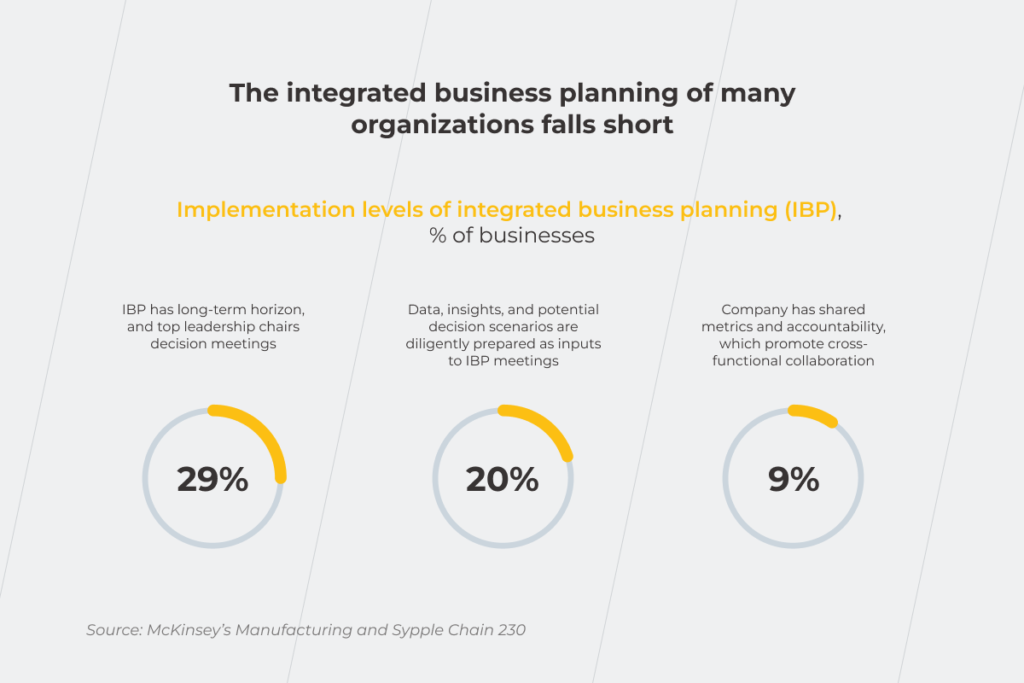
According to McKinsey, businesses that have fully integrated business management are in the minority, with only a handful of companies implementing IBP to its fullest. Two-thirds of companies confine unified strategic planning to occasional business reviews.

This means that most companies leave their business decisions to the mercy of siloed planning solutions with limited process visibility and one-sided insights. Conversely, integrated business planning solutions cast their nets wide to deliver value across the entire business and help battle ever-growing business challenges.

Market uncertainties

In a world of interconnected economies, each company can be affected by the overall market resonance. This is why the pandemic’s disruptions to logistics in China have echoed through global supply chain operations, resulting in a shortage of components. International political uncertainties can reduce the trade openness of a given country, destabilizing the whole world. It means that the success path of a single company depends on a whole lot of political and economic levers involved in internal management.

Holistic data analysis

At least 2.5 quintillion bytes of data are produced every day. However, instead of generating actionable insights, around 95% of companies are unable to make sense of unstructured data — a fundamental building block of business decision-making. The growing amount of big data and its complexity also prevents companies from landing new growth opportunities.

Customer centricity

Focus on a customer is a beacon for successful companies and higher profits with over 70% of consumers considering it a basic expectation. However, isolated planning doesn’t factor in all touchpoints. Unable to create a unified customer image, companies struggle to deliver personalized services and initiatives.

Short product life cycles

Along with granular offerings, customers expect new products to be released faster in regular cycles. However, rolling out new products like a conveyor belt is not enough. To keep up with quickly-changing customer preferences, companies require robust analytical capabilities that consider an entire landscape of opportunities and predict current demand areas.

Smaller margins

The world? Volatile, to say the least. Over the last few years, shrinking margins have made a comeback driven by cutthroat competition, market saturation, and inflated costs. Since 2020, margins have been falling down the curve with a negative of at least 0.04%.

As a result, the traditional supply and demand balancing has been rendered ineffective, jolting companies into optimization based on a patchwork of metrics, market trends, and forecasts.

Globalization

Despite ample opportunities, border-free supply chains have exposed businesses to the ripple effect of global bottlenecks and equipment availability. Differences in standards and regulations, harder planning, and budget constraints require unmatched agility from companies.

To pivot and flex, an organization requires an integrated business planning process flow that eliminates communication lags and steers the whole organization towards its goals despite global instability.

Unmatched benefits of integrated business planning

According to KPMG, integrated business planning best practices stand to increase ROE up to 14 points, reduce costs by up to 10%, and ramp up revenue by 4%. But besides core metrics, what is the true value of IBP solutions?

Being ready for ‘what-if’ scenarios

‘How would the pandemic affect my company? Can I slash the costs to battle the recession?’ Within traditional business management, the answer to your questions is left to guesswork and historical analysis at best.

Paired with robust data analysis, integrated business planning software enables you to simulate the effects of potential actions and changes across the whole organization — from capital expenditures to workforce availability.

You can also mold your growth objective into different market opportunities based on the resources owned or quickly re-allocate the current assets for any transformation with no ad hoc firefighting.

Collaborative and decentralized decision-making

With data sourced across all operations, the decision-making authority is distributed throughout a cross-functional team. Enterprise-wide activation of purpose promotes greater accountability and decision ownership where business units work collaboratively towards a general business goal.

At the same time, consolidated enterprise planning applications eliminate version control and spreadsheet complexity.

Enhanced customer experience

It is stated that agility improves customer experience by up to 30 points. A shared purpose and vision embodied across the organization are some of the qualities required to have agility. Besides enterprise adaptability, a bird’s-eye view and corporate alignment deliver a more unified customer image sourced from across the organization. As a result, customers are served more granular messages, desired products with on-time delivery, and customer-centered services.

Make your business future-proof

Contact our IBP experts

IBP vs S&OP: different names for the same process?

The difference between S&OP and IBP is challenging to spot as integrated business planning is generally considered an exercise of sales and operations planning. However, an integrated business planning framework makes evidence-based thinking more comprehensive, while S&OP prioritizes supply chain planning as the main benchmark.

Moreover, integrated business planning consultants devise a proactive plan that responds to challenges with the most benefits and least losses, while S&OP is more about satisfying customer needs at all costs.

Below, you’ll find the main differences between IBP and S&OP:

Comparison criteriaS&OPIBP
ObjectiveAchieve the right capacity and stock levelsMaximize profit with minimal risks
Focus areaBalancing demand and supply to align appropriate capacity and resources
Identify the connection between integrated plans and long-term business goals
Planning horizon6-12 months24+ Months
StakeholdersFinance, supply chain, sales and marketingThe entire organization
OwnerSupply chainBusiness leaders
ResultsBalanced supply plan, input for financial forecastsAn agile organization, where purchasing, production and inventory rally around sales and financials to meet the demand

How to create real value? Four pillars of fully integrated business management 

According to McKinsey, ineffective consolidated strategic planning is the collective result of three factors. First, if an organization doesn’t include IBP in its regular decision-making process, the added value of unified orchestration tapers off. Secondly, some companies delegate unified planning to junior staff, who, naturally, often lack vision and authority for the function. Lastly, if the executors do not have a single vision of critical decision enablers, they won’t be able to navigate business thinking as a whole.
Integrated Business Planning

Yet, despite common reasons, there is no ultimate integrated business planning template that caters to all businesses with unique needs. However, some practices can bring your organization closer to the desired outcome of SAP integrated business planning.

Prioritize the P&L owner

In most cases, the owners of P&L at your company have a great read of the existing drivers of revenue and spending. Unlike the supply chain or production management, a P&L-focused integrated process has the most practical requirements based on a broad outlook.

When designing your planning regimen, make sure the groundwork also includes input from upper management so that decisions can be made regularly. This way, the footprint of decisions can be checked against financial thresholds.

At the same time, this business plan allows the P&L owner to align the trade-offs between perils and prospects with the affected area, be it local or global. To unlock this level of visibility, companies should employ robust data governance practices and tools which enable real-time data processing.

Decide on the apt design and cadence

To make the most of unified strategizing, companies need to design an IBP flow with a focus on better visibility and critical data sourcing. The main objective of this fit-for-purpose IBP design is to equip the P&L owner with the right output that is clean, standardized, analysis-ready, and can be easily injected into templates. However, even industry-best design practices can fail if the initial input isn’t sifted through an established data infrastructure and effective processing systems.

Adopting the right reviewing rhythm is another salient part of a holistic IBP framework. Analysis-intensive initiatives, such as product releases, should be subject to regular reviews, while urgent issues such as material shortages or insufficient space should be resolved within a weekly agenda.

To facilitate regular feedback loops, companies also need to establish the right technology infrastructure that promotes seamless and real-time communication between business units.

Apply consequential thinking to facilitate decision making

The right integrated business planning example also stimulates an organizational shift within the company. Therefore, when adopting integrated planning, companies should factor in decision-making power, the value of the decision-making variable, and reporting hierarchy as well as giving key stakeholders more authority in the process.

In practice, collaborative and autonomous thinking can be supported with event classification and pre-defined troubleshooting guidelines based on the root cause approach. Also, the autonomous structure should dwell on the scope of operational thinking as well as the escalation mechanism to bring decisions to the appropriate level of responsibility for adequate resolution.

Support IBP with appropriate technology

The right technology infrastructure allows each business function to keep its language and still collaborate effectively with each other. Since the operational data becomes paramount in this case, the technology suites have to be easy-to-use interfaces that demonstrate digestible, real-time insights — all within one platform.
Integrated Business Planning

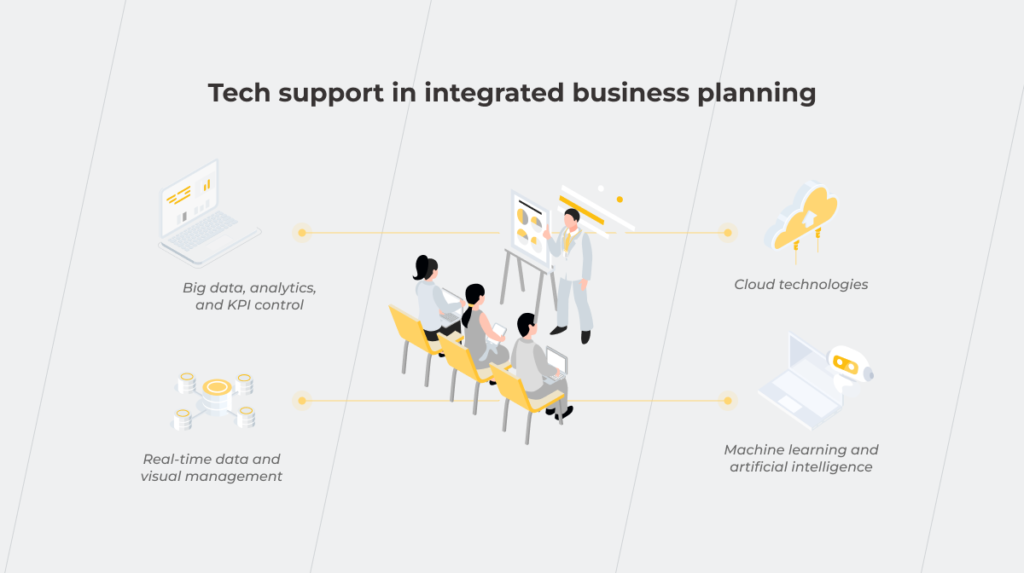
From a technology standpoint, the building blocks of an IBP-friendly ecosystem include but are not limited to:

  • Real-time data and visual management

Plotting the business course is impossible without seamless and real-time data flows. To enable collaborative thinking, your tech ecosystem should also support easy integrations among the modules and enable modeling of the supply chain in real time.

  • Big data, analytics, and KPI control

KPIs dashboards allow your departments to monitor the performance, report the number of open opportunities, and share insights for other business units. Robust analytics, in turn, allows your dedicated team to drill down into specific metrics and initiate corrective actions for those metrics. Predictive analytics also accelerates your planning by improving assessments of your capacity, generates dynamic forecasts as well as supports scenario planning and optimization.

  • Cloud technologies

By moving applications into the cloud, companies can more easily integrate them at a process level. Following a single data model, integrated business planning managers can cover all aspects of planning and arrive at the ‘single number’. Cloud technologies also enable better business continuity and drive down the costs of analytics.

  • Machine learning and artificial intelligence

Injected with expert systems, planning systems offer advanced optimization techniques. The latter, in turn, automatically generates replenishment strategies, inventory optimization, and other response measures needed to embrace the volatility of the market. AI-based stress test simulations also help organizations model the scenarios of combined workloads.

A framework for IBP success

A synergy of strategy and execution is what prevents companies from veering off the rails in chaotic times. This synergy is manifested in integrated planning and allows you to create a link between all business operations, uniting them into a cohesive whole driven by the same goal. Unlike traditional S&OP-enabled planning, IBP allows you to go beyond capacity levels and gain a broader foresight of possible business scenarios.

To achieve IBP excellence, you need to look beyond the internal processes and enable visibility into all pivots, from supply chain leaders to customers. Combined with agility, high visibility levels promote business resilience and maximized profits without low-risk exposure.

Data is also the pinnacle of this visibility, making a technology infrastructure critical to IBP success. That’s why the choice of the right technology partner can advance your planning and fine-tune the planning pathways to your unique business needs, making it a critical step in ensuring success.

Looking for the right IBP partner?

Reach out
Whenever, Wherever: Keep On Top of Your Data With Mobile BI

From tech-heavy reporting projects to dedicated analytics tools, business intelligence has come a long way to becoming an industry standard among companies. However, despite the present proliferation of BI, businesses still struggle to seek out analytics excellence. The isolation of traditional BI tools continues to pose challenges, resulting in a mere 24% of data-driven organizations.

But why limit business intelligence to a desktop version, when your employees can leverage advanced analytics literally in the palm of their hand? Just like fitness or financial trackers, mobile business intelligence can seamlessly support existing data pathways and produce actionable insights on the go.

What is mobile business intelligence?

Mobile BI is software that extends desktop business intelligence applications and makes analytics accessible on a mobile device. Mobile BI software allows users to access and evaluate business metrics, and reports from smartphones and tablets.

Stepping into the age of action: ultimate benefits of mobile BI

Driven by increasing Bring-Your-Own-Device workplace practices and mobile computing, mobile business intelligence has experienced unbelievable growth over the last few years. In 2021, the mobile BI market size stood at over $11 billion. By 2030, it is expected to rack up over $38 billion. Let’s see which advantages of mobile business intelligence have secured their pride of place among adopters.

Real-time data access on the go

Traditional business intelligence solutions tie BI users to tools that are specifically allocated to corporate environments. When away, decision-makers cannot access valuable data, which hampers proactive response. Conversely, mobile BI provides the ability to make fast, well-informed decisions even when you are away from your desk, which is especially vital in industries such as finance and healthcare.

Offline access to data is among other differentiating mobile business intelligence benefits. Since mobile devices have wide in-memory caching capabilities, all data visualizations can be explored with no internet connection provided it’s a native mobile app.

Increased team collaboration

Since mobile BI directly reaches the hands of BI users, it ensures easier knowledge-sharing. On-the-go data analytics also matches well with growing remote practices, making sure each employee is in sync with other remote team members. 

Mobile BI also allows for permanent, intermediary, or temporary access, which keeps your controls on par with desktop enterprise software.

Rich user experience

Supreme user experience is among other core benefits of mobile business intelligence. While smartphones come with inherent constraints such as small screens, tablets can pick up the slack as user-friendly mobile business intelligence solutions. Tablets make the best of both mobile design and desktop design, offering portable, always-on, and touch-capable analytics.

Compared to static desktop reports, portable BI solutions also usher in more interactivity, allowing the user to zoom, pinch, and swipe their way through insights. Moreover, native mobile applications can tap into device-specific features such as GPS, calendar integration, and QR-code scanning to expand analytical capabilities.

Maximized value of BI adoption

According to mobile business intelligence trends, CEOs that make data-driven decisions are 77% more likely to cultivate a company’s success. Cloud and big data mobile business intelligence confers accurate governing capabilities to other levels of the business hierarchy.

It means that a larger number of employees can have access to high-quality data, which facilitates the digital transformation of the company, gives the whole organization a vantage point, and increases operational efficiency.

Don't miss out on the benefits of mobile BI

Reach out

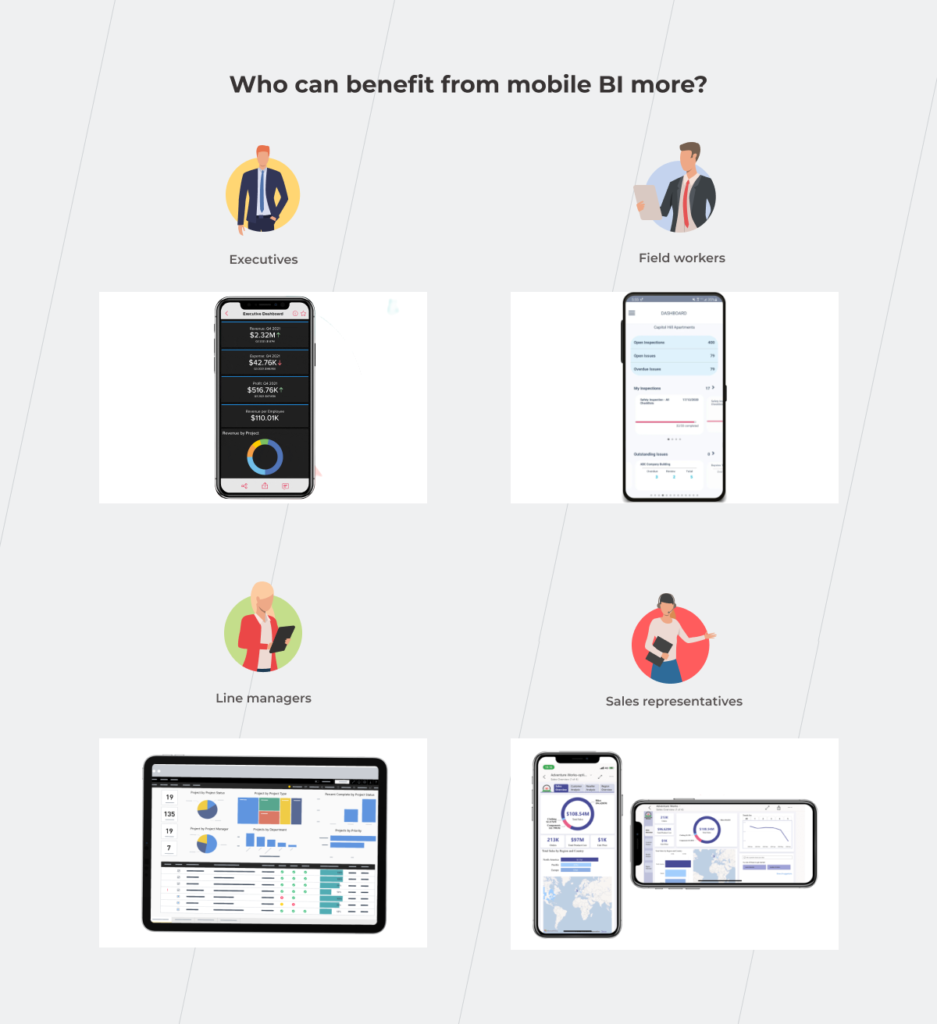
Who can benefit from mobile BI the most?

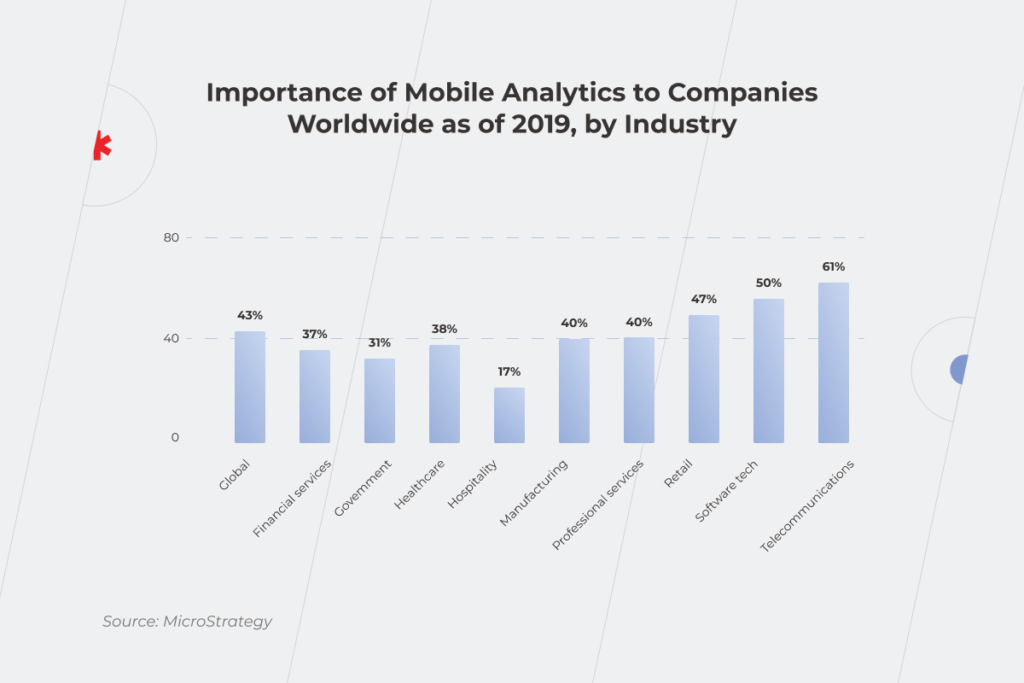
Businesses of all types and sizes can benefit from mobile business intelligence applications. However, according to the Mordor Intelligence report, the telecommunications and the software tech industries stand to gain the most benefits due to the presence of large corporations like Apple, Facebook, IBM, and Google.

Beyond the software market, retail, healthcare, and manufacturing are among other major players in the world of portable BI. Around 47% of retail respondents attest to the growing importance of mobile BI applications with 38% of healthcare providers sharing the enthusiasm. High adoption rates of mobile BI apps in these industries stem from increased demand for rapid data processing and high volumes of operational data.

 Statistics that shows importance of mobile business intelligence by industry

For example, retailers can use mobile augmented data analytics for on-the-move warehouse management, customer profiling, or store layout optimization. Healthcare providers use data analytics to support clinical decision-making, provide more personalized treatments, and increase healthcare accessibility for rural areas. Ultimately, a mobile BI strategy can both support the bottom line and boost customer satisfaction.

On a broader level, mobile analytics can support the following application matrix:

  • Fraud and security management;
  • Sales and marketing optimization;
  • Predictive asset maintenance;
  • Risk and compliance management;
  • Customer relationship management;
  • Supply chain analytics, and others. 

Which roles are among those likely to be adopters of mobile BI solutions?

As for corporate levels, each employee — from decision makers to employees — can leverage all the necessary data without the hassle of corporate back and forth.

  • Executives

Executives and senior-level managers spend a lot of time either in meetings or traveling for business, away from their desks and enterprise software. Having mission-critical information always on hand helps upper management explore data on business performance from any part of the world and make data-driven decisions, be it high-level forecasts or current business operations.

  • Field workers

Field engineers and technicians have lots of projects on their plates — from company infrastructures such as railways and utility stations to customer sites. On-demand and on-the-go access to unified data analytics from all facilities helps field workers better prioritize tasks and keep an eye on prospective and current customers. Moreover, mobile analytics can be amplified with sensor and GPS data to schedule predictive maintenance activities or optimize routes.

  • Line managers

Supervisors and team leaders can benefit from mobile data visualizations to get handy insights about staff, production lines, and ongoing operational activities. Lightweight visibility also helps first-line managers to respond proactively to any emergency and make important decisions faster and smarter.

  • Sales representatives

Equipped with decision management and predictive analytics capabilities, a mobile BI tool can provide the latest sales information such as deal status or prospects to help salespeople prepare for the meeting or run analyses in any setting. All-in-one business intelligence mobile can also give salespeople a head start in customer data before any sales call. 

Sales representatives in the retail sector, for example, can rely on a portable BI solution to predict the profitability of a new store without close supervision from the head management. In this case, the salesperson can calculate and select the correct location for new stores on the go, based on various parameters, including geography, demand, and others. If the input parameters meet the predefined benchmark, the BI solution greenlights the new location. Otherwise, the solution notifies the salesperson of the low profitability of the new sales point.

Executives, field workers, line managers, and sales representative using mobile BI to make well-informed decisions on the go

Any flies in the ointment? Yes, several. But they can be extracted.

Just like any technology, mobile business intelligence has a flip side. In this case, the core challenges of deploying portable analytics resonate with desktop BI. This is why accurate forecasting, data governance, and reporting need to be balanced against data security and quality followed by end-user training and cultural shifts.

However, mobile business intelligence software also poses some specific challenges that arise from the portable nature of analytics and mobile devices. With the right tech expertise though, you can make mobile work to your advantage and overcome general BI constraints.

Security issues

The smaller your device is, the easier it gets to misplace or forget it. Mobile devices also tend to get stolen or hacked, which increases the risk of a data breach. On average, hackers get their hands on 6.85 million accounts every day.

When away, mobile users can also expose their devices to data leaks through non-secure channels such as public Wi-Fi.

To keep hackers at bay, companies should embed robust data encryption, two-factor authentication, and biometrics-based access into portable enterprise devices. Mobile hardware should also meet both industry and internal security standards to ensure a consistent security policy on all company-owned devices.

Poor design

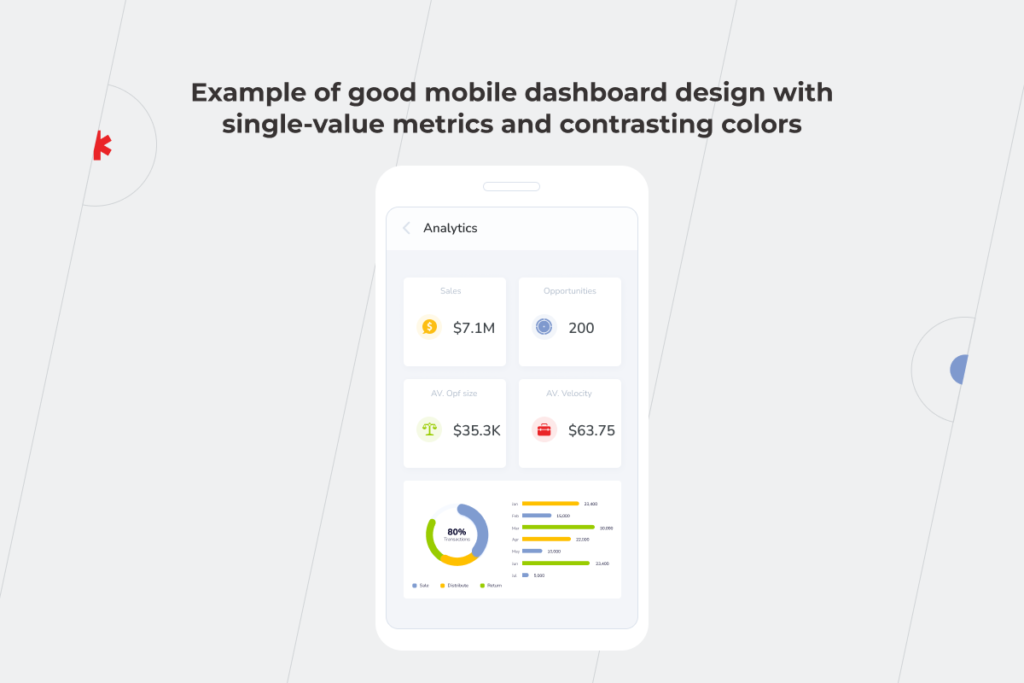
Although mobile BI is a natural extension of your desktop analytics software, a mobile version shouldn’t blindly replicate the desktop experience. You can keep the user experience consistent on both platforms, but wrap your solution into a mobile-focused experience.

Example of good mobile dashboard design with single-value metrics and contrasting colors

To recreate a typical mobile user flow, we recommend:

  • Including app notifications and alerts;
  • Employing voice recognition to access certain options hands-free;
  • Equipping your applications with in-app guidance prompts;
  • Tapping into native touch controls, including swiping, pinching, zooming, and others.
  • Integrating the application with other communication channels to boost team collaboration;
  • Embedding in-app analytics for further enhancements.

It might seem that achieving this kind of native-like user experience is a costly undertaking. However, a mobile BI version for a specific platform doesn’t require many resources compared to a standalone solution with multi-platform compatibility.

Neglecting the needs of your audience

By default, hand-held devices and desktop applications cannot deliver the same level of functionality. Therefore, you should adjust your mobile application according to the screen size and mobile constraints. While the main BI solution can provide visibility into data-rich charts and detailed reports, the portable solution should be optimized to display key metrics and alerts as well as share data via messages and emails.

Mobile BI apps: the power of BI, as and when it’s needed

As the world is quickly moving towards mobile, enterprise software also steps in to deliver better access and data visibility through mobile business intelligence. Mobile BI applications combine the analytical capabilities of desktop data processing and portability of mobile devices to equip companies with on-the-go data usage, risk management, and forecasting.

Although mobile business intelligence brings unique advantages to the table, its flexibility can play against you if handled irresponsibly. You should pay due diligence to necessary safeguards and user interfaces to eliminate risks and maximize mobile benefits.

Want us to take care of your mobile BI application? Get in touch.

Deal Closed: How to Take Advantage of Business Intelligence in M&A

Second to its people, data is one of the most powerful assets any company has, and this point becomes even more evident in merger and acquisition (M&A) deals. If you are running an organization and planning to undertake an M&A, how would you cope with it on the data level? You can struggle for accurate and reliable analytics in your organization, and this issue comes to the forefront when handling data from the two companies during an M&A deal. Complete integration often takes months or even years to accomplish, and you must take care of proper data integration throughout this period. 

Business Intelligence is one of the technologies that can help you handle tremendous amounts of information and turn it into fact-based business insights. We’ve talked to a financial expert who has been involved in M&A deals and knows the true value of BI in making them happen efficiently.

See the story behind the numbers

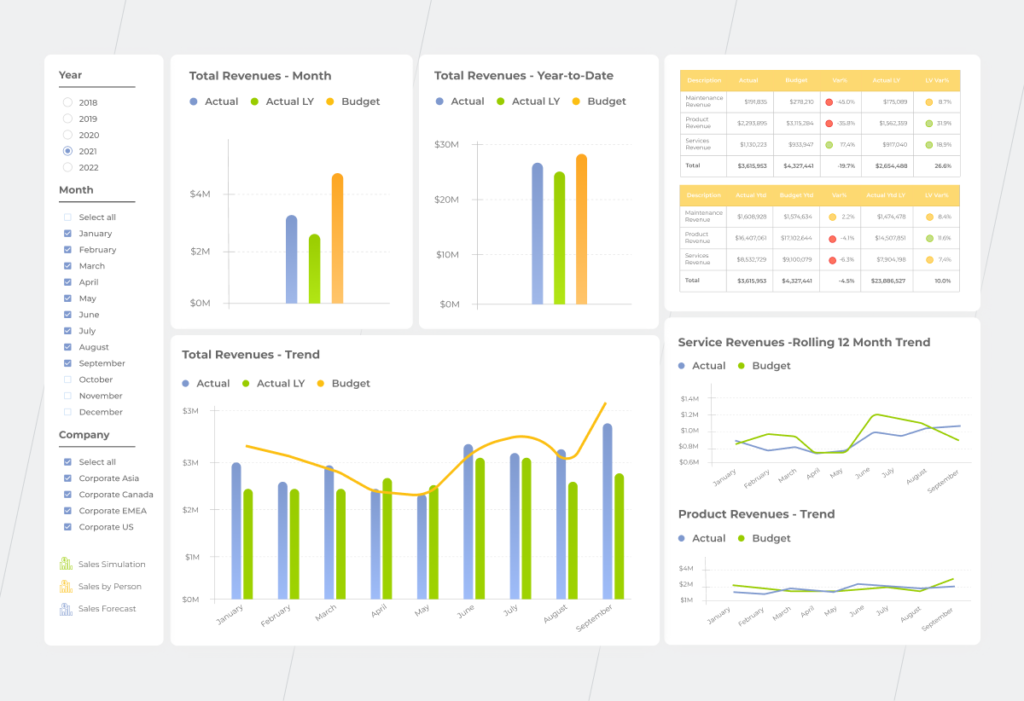
More than eight in ten directors or higher executives at firms with at least 10 million dollars in revenue see data analytics as becoming increasingly important to M&As in the coming years. How can technology-driven data change deal-making? Instead of raw monotonous Excel tables with numbers, you get easy-to-read visualizations based on these tables and gain deeper insights into the company’s real story. 

For starters, whether you are buying or selling a company, you need to know its fair price. To do this, you have to consider a number of indicators that are pretty tricky to get right, such as P/E Ratio, EV/Sales, DCF (Discounted Cash Flow), Replacement cost, etc. High-quality merger and acquisition data analytics, enabled by a BI solution, empowers you with a business vision that eventually impacts the value of a deal. The influence of the technology will only increase in the coming future, so hop on the BI train before your competitors leave you behind.

Pre-deal stage

One of the crucial functions of BI in M&A is the mitigation of risks, such as overpaying or, even, being deceived by fraud. In the pre-deal stage, you investigate companies that might be a good fit for you. However, at this point, you only have access to the public data of the target company. 

By building revenue growth trends, analyzing profit margins, and identifying profit and loss outliers for the company you’re interested in against the overall industry situation over the past few years, you can identify whether the data is true. Such visualizations help bring to the surface what is easy to miss behind endless rows of numbers and uncover cases when someone cooks the books. You can identify whether the company’s financial reports reflect a fair view of its actual financial and operational situation as well as measure the company’s earnings quality.

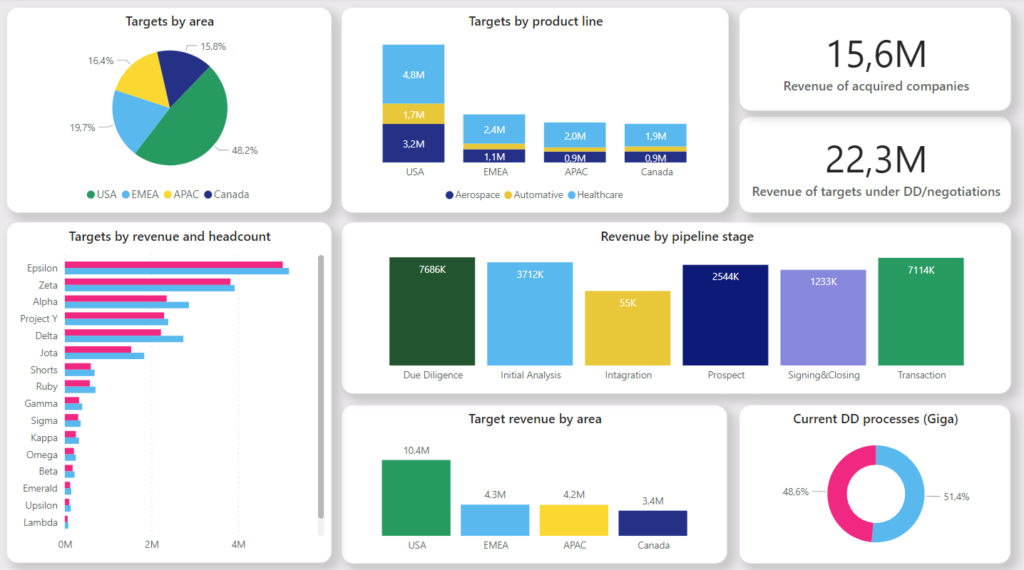
Business Intelligence in M&A dashboard

The pre-deal stage includes due diligence and negotiations phases. Let’s investigate them in detail to see how Business Intelligence can provide comprehensive and valuable analytics for acquisitions or mergers.

Due diligence 

When organizations are just stepping into the M&A process, there’s the Chinese wall between them — both parties have access only to public data. But still, with a BI solution you can: 

  • Compare targeted companies and the profitability of deals regarding what new market segments or markets you can enter. 
  • Gather and analyze actual targeted companies’ employees’ skills to identify the most beneficial option for merging in terms of social capital.

Negotiations 

At this stage, the Chinese wall is no longer as impregnable as it used to be at the due diligence phase. You can ask the targeted company for data that isn’t publicly available to protect yourself from a bubble deal. For instance, when you buy a company, you can request to see an aged receivables report and visualize this information with Power BI, Tableau, etc. to simplify and streamline its analysis. Knowing which payments are overdue (30/60/180, etc. days) is crucial as the more overdue the receivables are, the less chance of getting the money from the targeted company’s debtors is. In expert hands, BI helps to identify inconsistencies and cases related to data falsification.

Another example where a BI tool can be of much help is in identifying reversals of the sales revenue transactions registered in the previous financial periods.

 Business Intelligence In M&A

Beyond that, Business Intelligence for mergers and acquisitions allows you to analyze which employees you might lose. For instance, an automated BI solution can gather the information from the LinkedIn profiles of a targeted company’s employees. A dashboard graph based on such data can illustrate how many of them have recently updated their work experience and skills section or set an “open to work” status — most likely, these employees will leave the company. By combining information from profiles with KPI data on the dashboard, you’ll be able to identify key employees and monitor their readiness to leave the organization or stay. 

Armed with the right data, you can leverage the social capital inherited from another company to the fullest. Yes, there can’t be two CFOs in a company. But if the CFO from a targeted organization is one of the key employees who creates real value for the deal, you should consider how you can retain the talent.

 Business Intelligence In M&A

Deal stage

For all the merits of Business Intelligence, it needs to clearly state what it is and what it isn’t. BI is definitely not an almighty tool that will do the job for you. People are paramount. However, with BI, your employees can fully reveal their potential in choosing what’s best for your business. The technology helps to:

  • Identify the ways of increasing the asset effectiveness of a merged company. You can analyze the equipment’s performance to minimize the risk of downtime. When you check the condition of the targeted company’s equipment and choose the criteria by which you’ll track its wear and tear, you’ll be able to predict its possible failure in the initial stage and the length of its service life.
  • Determine the highest-priority products to launch and how much effort you can devote to developing new products. For example, you’ve absorbed a company that makes products similar to yours. In this case, a BI solution will help identify high-margin products to manufacture. This is crucial because as a result of the merging production facilities, the capacities of both companies may not be enough to produce all the goods you want. So until the merger or acquisition is over, the technology will help you reach a compromise.

With Business Intelligence, you can significantly facilitate data processing, especially if you are entering into international deal-making.

Don’t take a rain check on implementing BI solutions

Reach out

Post-deal stage

It may seem that when the most tricky part of the deal is settled, you can finally breathe out. But in reality, you still have to take care of post-deal integration as, at this stage, you get access to the Big Data of the target company. 

Big Data acquisitions are especially complex in highly regulated spheres such as finance and healthcare due to big data security concerns. For instance, if a pharmaceutical organization acquires a startup, the former receives data from laboratory studies. When it comes to medication research, the amount of information is genuinely overwhelming and the thing is that it can be manipulated. If you get tons of lab results in Excel, you have to be no less than a genius to uncover discrepancies. Business Intelligence in mergers and acquisitions makes such unusual points visible and trackable.

One of the undoubted advantages of using BI tools in M&A is the ability to rapidly amend data processing in order to absorb new units in your business framework smoothly.

Above all, at the post-deal stage, BI helps you analyze the corporate cultures of both organizations to blend them appropriately. It’s not referred though to some abstract culture but as particular manifestations of it. Business Intelligence allows you to unveil the difference in pay rates or perks systems between the two companies, and thanks to the visualization, evaluate the impact of these parameters on employees.

You can gain even more by combining BI for mergers and acquisitions and machine learning. The last one allows for reducing the workload for the employees of both organizations by automating processes or even helps to cover a staff shortage. According to KPMG, there will be mass adoption of AI in M&A is coming in the next five years, so it’s up to be at the forefront of your industry in the nearest future. 

Business Intelligence in M&A
Source: KPMG, Data Analytics in M&A

Discover the value you couldn’t even think of

Advanced data analytics fully reveals the professional potential of your employees and provides them with eloquent insights that can significantly impact your business during its M&A journey. Business Intelligence increases your confidence in the deal and influences its cost by giving you a deeper understanding of risk factors and points that drive valuations.

Book a call with our experts to determine how to create a custom BI solution that’ll speed up data processing throughout your M&A initiative.

FAQ

What is M&A intelligence?

Business Intelligence in mergers and acquisitions is your opportunity to back up your business hunches with facts. The technology protects you from the risk of merging with an untrustworthy organization, entering into an unprofitable deal, and experiencing a post-deal disaster by providing easy-to-grasp dashboards with targeted companies’ relevant KPIs. 

How is data analytics used in mergers and acquisitions?

Data is used at all the stages of the M&A process: pre-deal, deal, and post-deal. The thing is what information about a company you can access at each stage. At the pre-deal, you can load into your BI system only publicly available data about the targeted companies. During the deal phase, you can ask for some internal company reports to confirm the accuracy of public data. And at the final post-deal stage, you get access to the company’s Big Data.

How to Leverage Business Intelligence in Supply Chain Management: Find Real Meaning in Your Sea of Data

Can you drive if your car has problems with the engine, battery, brakes…? It’s unlikely and even if you do, there will be problems along the way. Moreover, ignoring signs of trouble might not only cost you a fortune but also put you at risk of an accident. Supply chain management, in some ways, is similar to this process, only instead of car parts, you are dealing with procurement, logistics, operations management, software, and you need to keep them running smoothly. But the reams of disparate data and the inability to process it in time is one of the reasons why your vehicle is not working in the way it’s supposed to.

As the supply chain is one of the core areas you should concentrate on during the digital transformation (DT), its intelligence can put your business on the fast track to success. Implementation of Business Intelligence in Supply Chain Management (SCM) is one of the ways to handle the mind-boggling amounts of data and turn it into meaningful information. With this technology at your fingertips, you can automatically track main KPIs such as cash to cycle time, fill rates, days of supply, inventory velocity, turnover, customer order cycle time, etc., and investigate this data in more detail to uncover some not-so-obvious details.

In this article, we dive deeper into the levels of supply chain management, uncover how BI solutions can improve your business outcomes, and provide you with a supply chain intelligence PDF checklist so that you can rate your company’s intelligence level by yourself. 

Use Business Intelligence in supply chain management to identify weak points in time

Providing you with the visibility of all your data and turning it into valuable information that you can check at any moment is the key benefit of Business Intelligence solutions for SCM.   

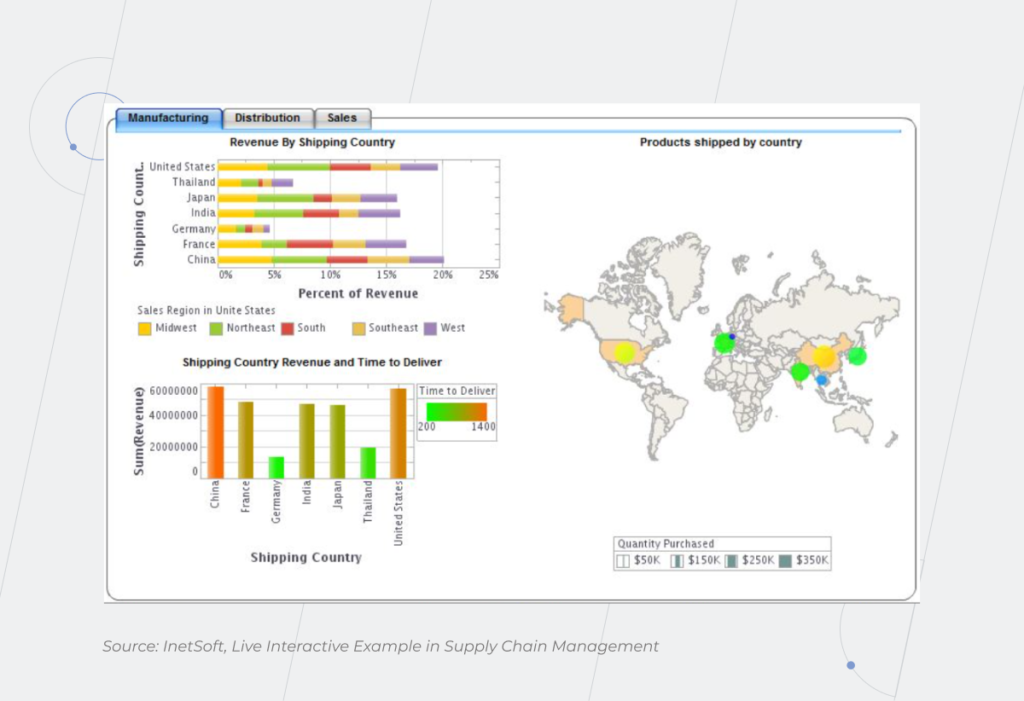
Imagine that you need to connect a plethora of indicators of freight traffic, rail transport, and the leading rail operators. Generating the graphical representations of them in Excel doesn’t sound too challenging, until you need to make changes to the data and, consequently, to the charts. In this case, business analysts have to correct the information in the spreadsheets manually. It gets even more puzzling if the organization doesn’t have a common data warehouse and the data that each employee works with can only be accessed by themselves. 

With Business Intelligence in the supply chain, such a situation doesn’t happen. Graphic representations of indicators of freight traffic, rail transport, and the leading rail operators are connected automatically and presented in easy-to-grasp real-time dashboards available in just one click. 

Moreover, BI empowers you with prescriptive analytics that enables you to predict future events and take action to achieve or prevent them. McKinsey reveals that prescriptive analytics can increase supply chain throughput by up to 15 percent in the short term and reduce costs by 10 percent in the long term.

Implementation of the technology can greatly impact the effectiveness and profits of your organization at all the levels of SCM – from strategic to tactical and operational. 

Business Intelligence for supply chain management: strategic level

The strategic level is about keeping track of market trends and overall planning of how your supply chain will function according to your organization’s goals, customers’ needs, suppliers’ demands, etc. It’s the cornerstone of successful supply chain management.

Changes at the lower levels without a common understanding of the company’s long-term BI strategy will be ineffective. It’s like trying to renovate a house after rain damage without realizing that the leaky roof needs to be repaired first. Here are strategic activities where BI solution implementation will be helpful:

1. Identifying priority areas of production

At the strategic level, using Business Intelligence in supply chain management helps you decide on your company’s global approach: will you focus on producing large volumes of low-margin goods solely or will it be more profitable for you to combine high- and low-margin goods? If you choose the latter option, what is the ideal ratio of production capacity for their production? BI helps you determine the optimal balance based on all the input data.

Selling items with low margins but high volumes that load your production line is like offering vanilla ice cream – it’s the most standard but sought-after product. And here’s the question to ask yourself: if your company can handle high-margin made-to-order products, how profitable is it for you to continue producing vanilla items?  

If you are planning to develop new products or modernize existing ones on a regular basis, BI technology can help you efficiently allocate the production workload. Take, for example, a manufacturer, who wants to reorient the company’s production based on trends for the new season. BI helps to identify low-margin items that should be dropped from production and the capacity needed to produce new items. In theory, it can all be done in Excel, but with BI it’s much faster and easier.

2. Allocating manufacturing facilities correctly

Where is it more beneficial to locate the factories? Countries such as Malaysia, Taiwan, China, and India may seem the best options at first sight. But if you consider other parameters, such as quality of labor, risks, infrastructure, etc., your choice won’t be as straightforward. 

If you distribute goods for various markets, another question arises. Which option is more profitable for you: manufacturing in one of the countries and delivering to others, or having a factory in each country to save on logistics and speed it up? There’s no one-size-fits-all solution, and Business Intelligence for supply chain management can confirm what your business sense tells you or prove it wrong with up-to-date and accurate data. 

Business Intelligence

Business Intelligence solutions for supply chain management: tactical level

When you’ve set the organization’s overall priorities, it’s time to dive deeper into your medium- and short-term activities in SCM. Which specific manufacturing processes should you identify to reach your big-picture goals? How do you minimize risks and control costs in practice? At this stage, you determine the means of achieving key deliverables – production efficiency at a balanced cost and high customer satisfaction. If your production facilities are located in different countries, tactical activities may differ, as you should take into account local resources, taxes, etc.

BI solutions help with:

1. Choosing the most beneficial transportation and warehousing solutions

Identifying if logistics should be managed in-house or by a third party is one of the top priorities on the tactical level of SCM that BI can help with.

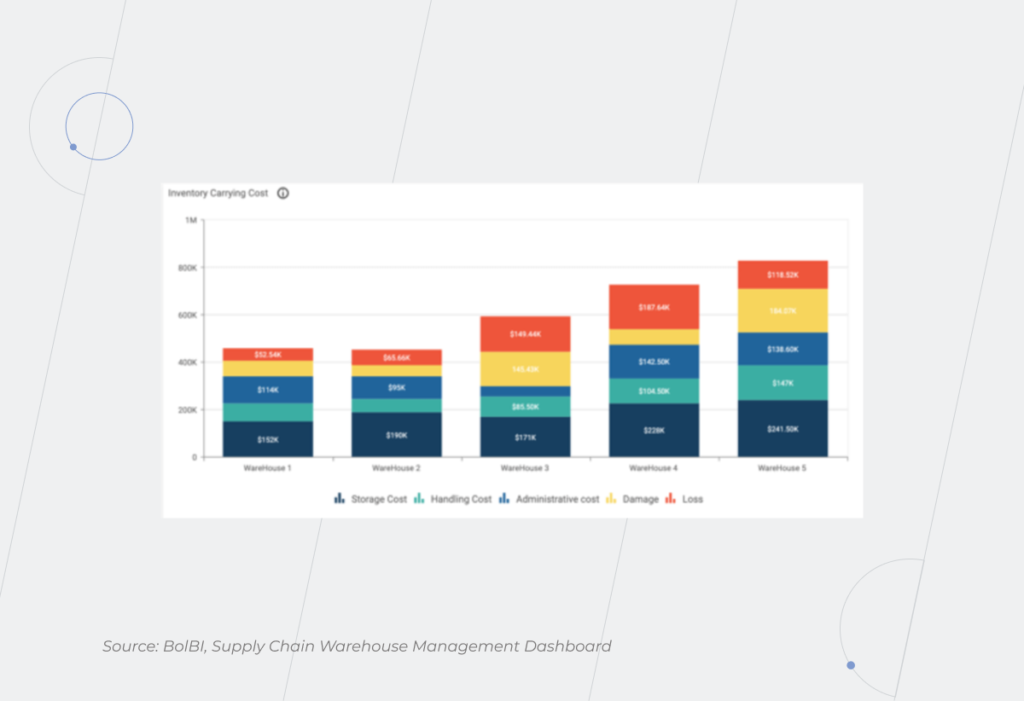
What about warehousing? Poor SCM can lead to a lack of materials and products and, in turn, failure to fulfill orders on time. On the other hand, every piece of inventory you store costs you money. The price will be exceptionally high if the storage space is located in a country with high cost of industrial rent, like the United Kingdom, Norway, or Ireland.

Supply Chain Management

2. Finding a balance between the discounts that different suppliers offer and their level of service

For example, you buy many components for products from different suppliers at the best prices. This may seem the most profitable solution as the cost of the final product is minimal. On the flip side, you need to coordinate your deliveries so that the production doesn’t stand idle while one of the components is being delivered. How important is the speed of production over the price? Can you sacrifice greater productivity and faster outcomes to save on costs or risk losing customers? That’s where the role of Business Intelligence in Supply Chain Management comes into play– the software enables quick visualization and comparisons of proposals from various suppliers. 

3. Creating schedules for suppliers and employees

How many urgent and non-urgent orders do you have? Such information is usually kept in mind of people, on paper, or in Outlook at best. But if you produce various types of one product, you should track the production run for each type as you first have to produce one type of goods, stop the line, reconfigure it to make another type of goods, and restart the line. It’s challenging to manage such a complex process efficiently without real-time data visibility. It’s one of the points where you can benefit most from the Supply chain management and business intelligence duo. Schedules for all employees who can track their actual status are the key to the timely execution of tasks.

4. Building an integrated and scalable KPI tracking system

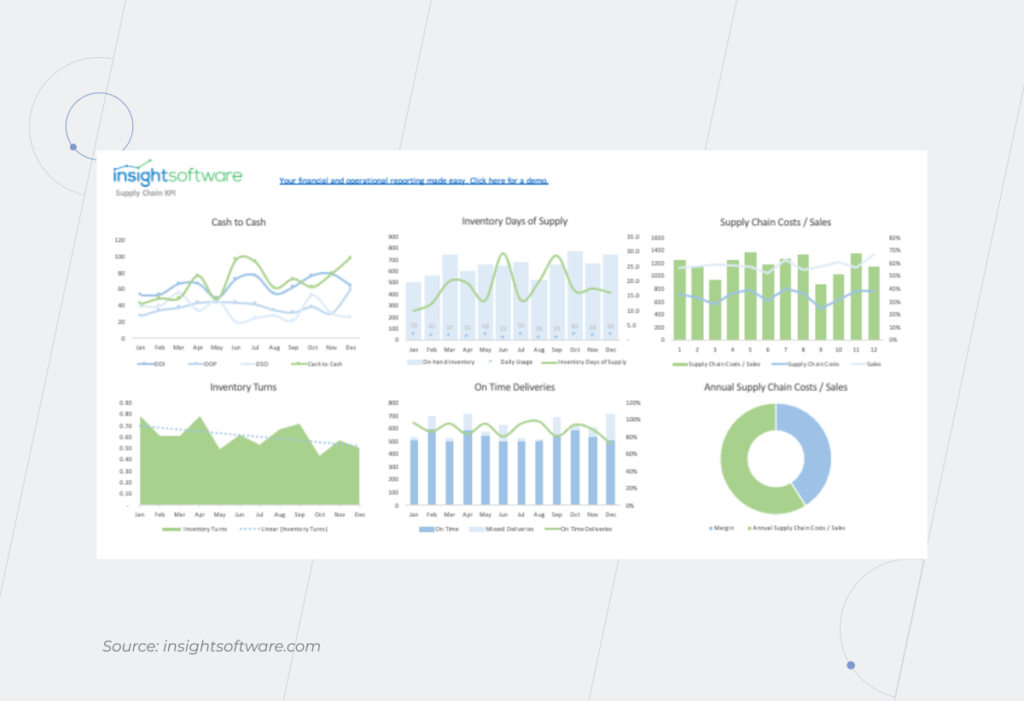
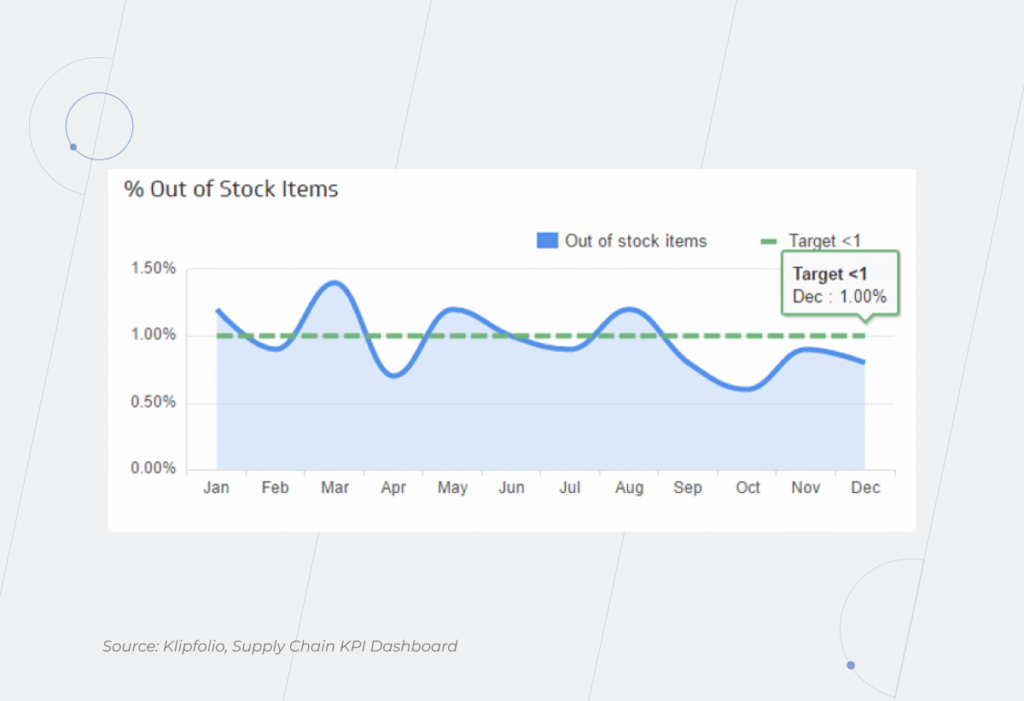
Without a proper analysis of your supply chain performance, it is impossible to understand whether you’re moving toward your goals and at what speed. And BI helps you conduct this task. Take advantage of creating a custom dashboard that contains both common KPIs, such as days of supply, fill rates, inventory velocity, turnover, etc., and your specific KPIs based on your organization’s areas of focus. 

For example, what if you’re concerned about data on the number of negative product reviews and returns? In this case, you can add the information on the number of defect cases to this data and create a unique KPI to track product quality. Moreover, the BI solution allows you to collect the information from different sources, both external (outside research, customers’ feedback, social media, etc.) and internal (ERP, IoT devices, logistics and transportation management systems, etc.) to get results.

Business Intelligence

Business Intelligence support for supply chain management: operational level

This level of SCM includes your daily routine tasks such as monitoring logistics, production scheduling, ensuring enough materials are available for production, etc. In the supply chain, you need to correlate the sales and procurement plan with production capabilities and maintenance service. You can plan everything… in theory. But what if there’s a shutdown at the factory? What is your plan B? How do you correctly relocate capacity to meet obligations to the customer on time?

Consider implementing Business Intelligence in supply chain management for:

1. Monitoring logistics activity

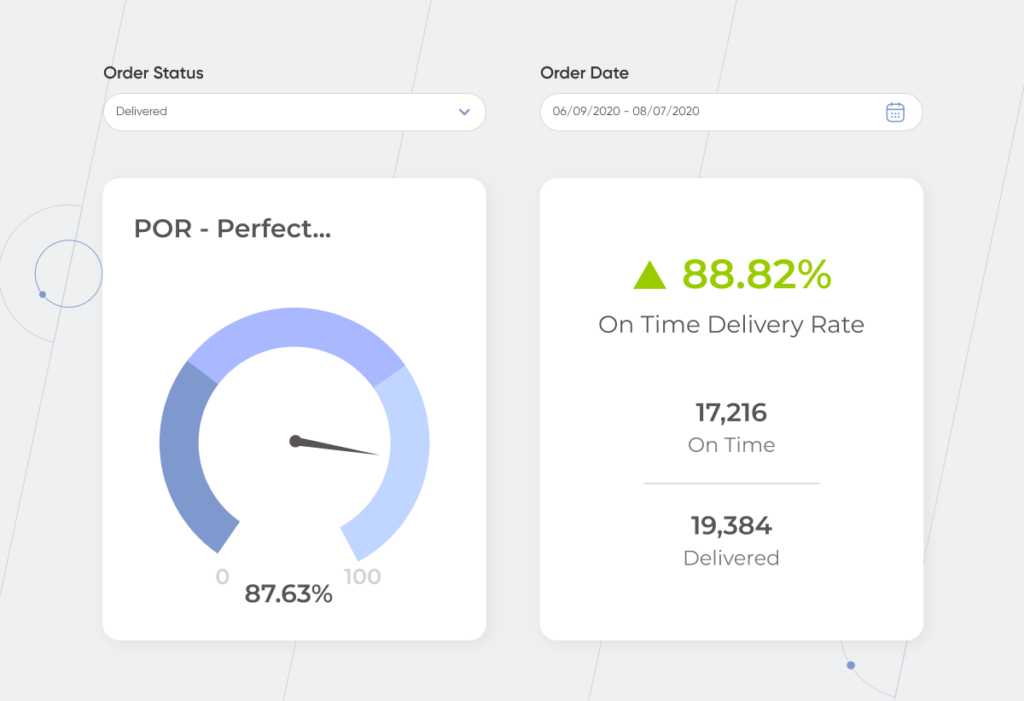
There’s no company with a 100% on-time delivery rate. At the same time, this indicator is of major importance for buyers – 73% of them are ready to cut off relations with suppliers if delivery problems take place. That’s why it’s no wonder that all organizations want to improve their service. In this case, Business Intelligence logistics can make it possible to determine the routes on which delays occur more often and uncover their possible causes. The technology helps to identify bottlenecks and minimize unnecessary delays and holdups.

 Business Intelligence

2. Managing incoming and outgoing materials and products

You should be ready to deal with unexpected issues that require a quick reaction at an operational level. For example, if you receive raw materials of poor quality, you have to settle the loss with the supplier and find another partner who can deliver you the materials of the desired quality. With BI, you have a dispatch console – a part of your real-time dashboard that shows available suppliers. The technology also provides you with other actionable information that helps answer a bunch of questions such as: Do you have enough raw materials? How many loads are supposed to be picked up tomorrow but haven’t been assigned yet? If you don’t have a tool to track this information, you can face the risks such as raw material shortages, cargo theft, failure to deliver products on time, etc. Leverage Business Intelligence for improving supply chain risk management. 

Supply Chain KPI

New legal requirements for the supply chain were introduced in 2022 in the EU. According to them, companies are obliged to check their suppliers for human rights violations, trade of conflict minerals, etc. Without a BI solution, the fulfillment of these conditions is time-consuming and almost impossible. Business Intelligence technology forms a digital twin of the chain, so you can easily check any supplier at any moment.

Following strict compliance requirements is especially important when dealing with dual-used substances. For example, precursors that can be used for producing paints as well as explosives. Registration of such substances is a prerequisite for their production. 

Where and for which product you’ve requested approvals, what stage you are at, and what documents still need to be prepared? You can spend tremendously long time running a table in Excel for such data, and naively believe that you’ll never make a mistake. Or you can create a database and leverage the BI system that provides access to the portals where there is information about the release of new precursors, and automatically sends you notifications about new or updated requirements for the paints you produce. 

Fuel your supply chain management with embedded BI to get through the digital transformation journey easier

The implementation of BI in supply chain management is an integral part of the DT, without which the normal functioning of a modern enterprise is not possible. 

One of the great things about BI solutions for supply chain management is that they are integrated into your everyday applications. Your employees can gain insights within their well-known app without changing their workflow. BI implementation in the SCM allows you to manage risks by raising transparency.

Get in touch with our BI experts to leverage your business data in supply chain management and get a robust Business Intelligence foundation.

Business Intelligence In Education: School Edition

Schools generate more data than they can handle and can effectively use. Surrounded by all this information, they are still starved for insights though. And it’s no wonder – manually dealing with tons of paper documents or, at best, Excel spreadsheets is a dubious pleasure that requires eons of already limited time.

Fortunately, today’s technology allows educational institutions to make a considerable shift in the way they work. At the same time, neglecting the EdTech trends results in lots of missed opportunities. While some schools are drowning in huge amounts of data, others navigate these waters easily thanks to Business Intelligence (BI). In this article, we investigate how exactly BI helps school administrators, teachers, students, and parents. 

Schools have a lot on their plates:

  • Allocation of available financial resources. Funding depends on a plethora of factors. The number of students and class sizes, student attendance and academic results, program offerings, and more — all this matters to sponsors. In a situation where schools have to do more with less, they’d better have a clear view of what they actually have. 
  • Limited resources of teachers. Preparing various learning materials, tracking students’ progress, meeting with parents, filling out reports, – it seems teachers need a time-turner to perform all these tasks. Coupled with the shortage of professionals, such a volume of work is impossible to be handled without the help of technology. Schools need technological support to monitor allocated workloads and provide teachers with a balanced work schedule and sufficient classes size.
 Business Intelligence In Education
  • Massive amounts of paperwork. McKinsey’s research uncovers that automation of 20-40% of teachers’ paper activities will result in freeing 13 hours per week. It would help reduce the teachers’ workload to a normal level, as it now stands at least at 50 hours per week. School administrators will also breathe easier after BI implementation because the technology simplifies administrative management and helps meet reporting requirements faster.
  • Standardization of the student experience. A one-size-fits-all approach demotivates students and negatively affects their engagement. It leads to poor performance and makes the school rating worse. Also, parents dissatisfied with their childs’ grades may think that the teachers are to blame and the relationship between them will become tense.
  • Parents’ insufficient involvement in the educational process. It’s not surprising, especially if both parents work and the time of the meetings with teachers doesn’t coincide with their free time. 
  • Lack of school data visibility for sponsors. When people invest in improvements, they obviously want to see where their money goes and how effectively the school is performing.

How is BI technology changing the performance of administrative tasks?

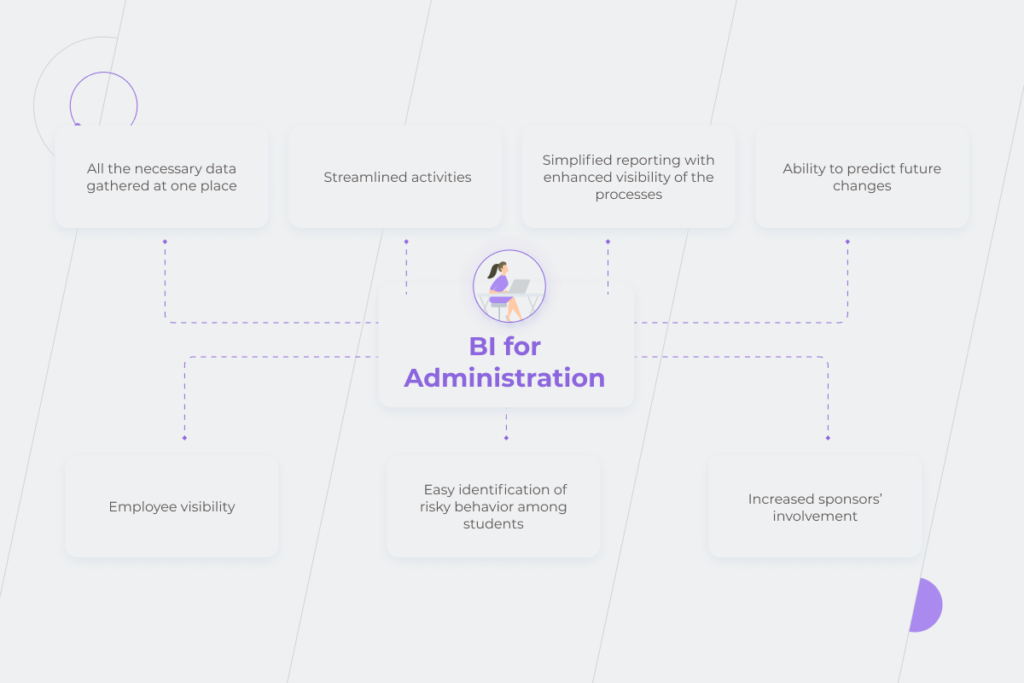
Application of Business Intelligence in education provides school administration with:

1) All the necessary data gathered at one place 

All the information is organized in a warehouse so that the school administration doesn’t have to pull data from multiple sources. At the last stages of data processing, the data is visualized in the form of intuitive and easy-to-analyze dashboards within special BI tools such as Power BI, Tableau, Qlik, etc. Let’s take the situation with grants as an example. Schools have to look for funding, but it’s too time-consuming to manually keep track of the grants your school can apply for. Thanks to BI all the information about them can be automatically gathered, analyzed, and then presented to the stakeholders.

2) Streamlined activities

Processes such as managing budgets, ordering resources, paying invoices, handling scheduling, ensuring the school’s compatibility with relevant laws and regulations, hiring staff, and others are time-consuming. Take scheduling, for example. It’s one of the most demanding administration tasks which is almost impossible to put into an algorithm. The planning is always done by a person – BI software won’t automatically create a schedule, but it’ll highlight gaps in a human-generated one. For instance, the Business Intelligence solution will focus your attention on the timetable lapses when the teacher has only the first and fourth lessons, and you’ll be able to manage your employees’ time more appropriately and effectively.

3) Simplified reporting with enhanced visibility of the processes

With BI, data for different kinds of reports, along with the key information for the sponsors is gathered automatically. Instead of numerous tables with text and numbers, it’s wrapped in easy-to-understand data visualizations. When reporting is based on the clear visibility of school processes, the administration can not just grasp information, but get truly valuable insights from it. The analysis of properly organized and presented data helps find new ways of saving money for the school. 

4) Ability to predict future changes

BI in education married with Machine Learning (ML) can be used to review where you’ll end up if you decide to make changes or stay on the current track. For example, the technology will help you monitor student enrollment and class size for resource planning and calculating state funding requirements and payments. It works the same way with extracurricular activities such as sporting events, cleaning, security, guest lectures, etc. BI solutions collect the data about them and, based on the spending in previous years, make assumptions about future spending so that you can allocate your budget wisely.

5) Employee visibility

The math teacher’s contract is up next month, the music teacher is going on maternity leave in two months… How many situations like these do you need to keep in mind in order to make decisions about contract extensions or hiring new teachers in time? BI will help you keep track of these dates. Also, Business Intelligence in education can be viewed as a possibility to monitor teachers’ state and workload to prevent their burnout. NEA survey revealed that 55% of teachers in the US are planning to leave education because of burnout. With BI, you’ll be able to notice if some teachers’ schedules are overloaded and reallocate the workload. If you avoid staff turnover, it’ll be an additional value for parents and students as no one is happy when teachers are constantly changing. 

6) Easy identification of risky behavior among students 

The technology also helps notice, collect, and analyze students’ behavior to conduct risk assessments. Such an approach contributes to making school a safer space. For instance, in a dashboard, teachers can leave notes about students’ behavior. BI solution will visualize the frequency of these comments and the degree of their importance. Using it, the school administration is able to highlight when an individual student’s behavior is disruptive to others, and take measures to prevent these risky behaviors from transforming into major accidents.

7) Increased sponsors’ involvement

Simple, clear analytics helps attract sponsors and keep them engaged in the school initiatives. There’s a long shot they will dig into spreadsheet reports, while informative, convenient dashboards have a higher chance of catching their attention. 

Moreover, Business Intelligence in education allows you to generate visuals for sponsors automatically. Without BI software, administration staff usually spend 2-3 weeks to gather and prepare all the necessary information. 

BI in education

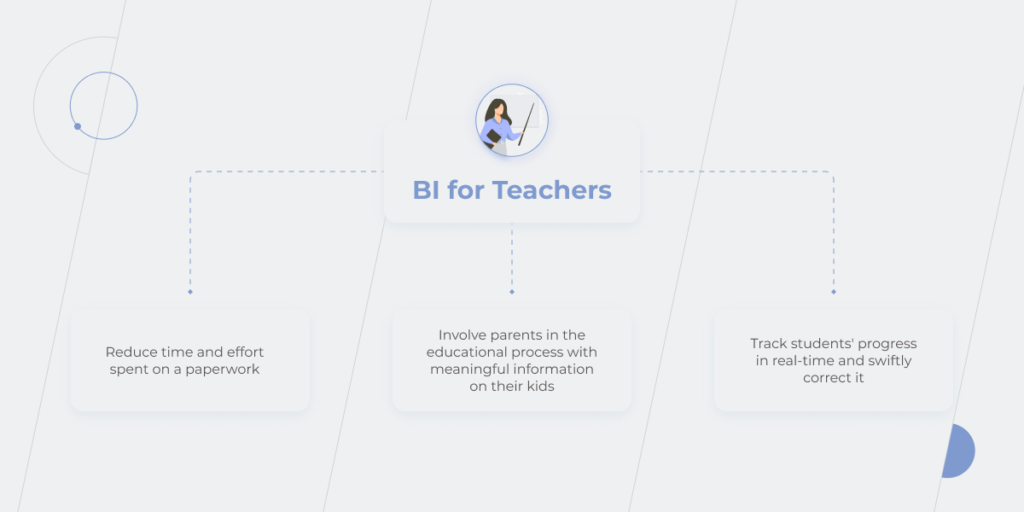
How does BI influence the educational landscape for teachers?

Teachers’ tasks are the ones that can be significantly changed for the better with BI solutions. Application of Business Intelligence in education helps:

1) Reduce time and effort spent on a paperwork

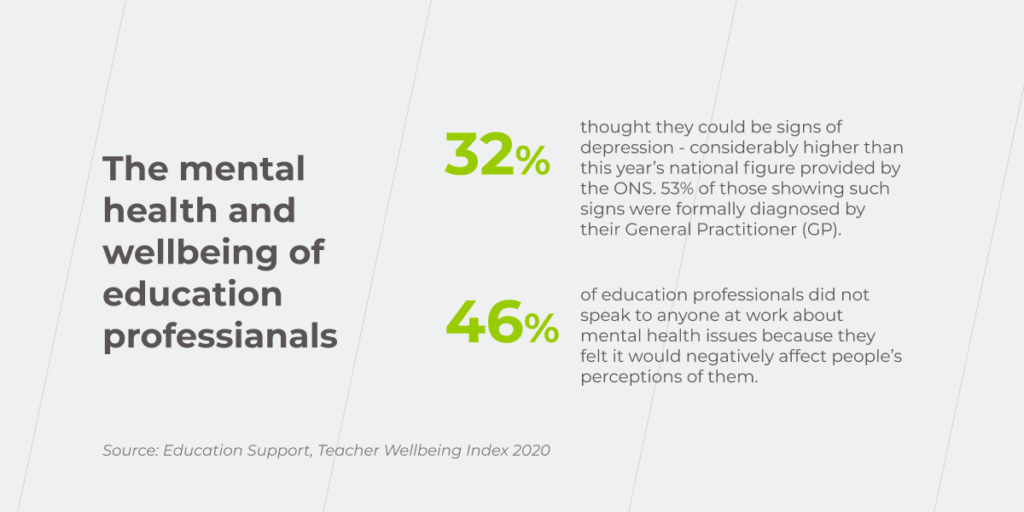
Full-time teachers work 51-57 hours per week and spend more than half of this time on non-teaching activities. It’s no wonder the level of depression among education professionals is much higher than among the general population – 32% vs. 19%. At the same time, almost half of the teachers don’t share their mental health issues with anyone at work as they are afraid of the stigmatization.

 Business Intelligence In Education

The application of Business Intelligence in education can save teachers from burning the midnight oil and minimize the negative impact on their mental and physical health. Along with taking proper care of your employees’ wellbeing, you can leverage the BI solution to free up teachers’ time so that they are able to catch up with underperforming students or improve their qualifications.

2) Track students’ progress in real-time and swiftly correct it

Having data on students’ performance practically on a silver platter allows teachers to assess their progress, spot talents in time, or identify problems and quickly find the ways to fix them. BI solution helps teachers track students’ learning path continuously instead of a post-factum analysis at the end of the term. 

Teachers may have a gut feeling about which students need more attention at some points, but BI software backs up this professional hunch with actual data in an easy-to-understand form. Building spreadsheets to analyze performance and attendance data is time-consuming even for one student, not to mention that the analysis has to be done for an average of 25+ students per class. 

Now, imagine that a teacher wants to add a third factor for analysis, for instance, welfare data or family factors such as divorce, single parents, violence, etc., that indicates that a student needs a little more help. This would usually mean the teacher has to start building a new spreadsheet, and it may look like she/he has to give up on their weekend plans to finish the project. 

Taking advantage of BI in education, you use teachers’ time more effectively by keeping them busy only analyzing automatically processed information. 

3) Involve parents in the educational process with meaningful information on their kids

Organized and structured data is also convenient to be shared with others. It saves teachers’ time to prepare for their meetings with the students’ parents. The freed-up time can be spent on a deeper and more thoughtful analysis of the automatically-collected information. 

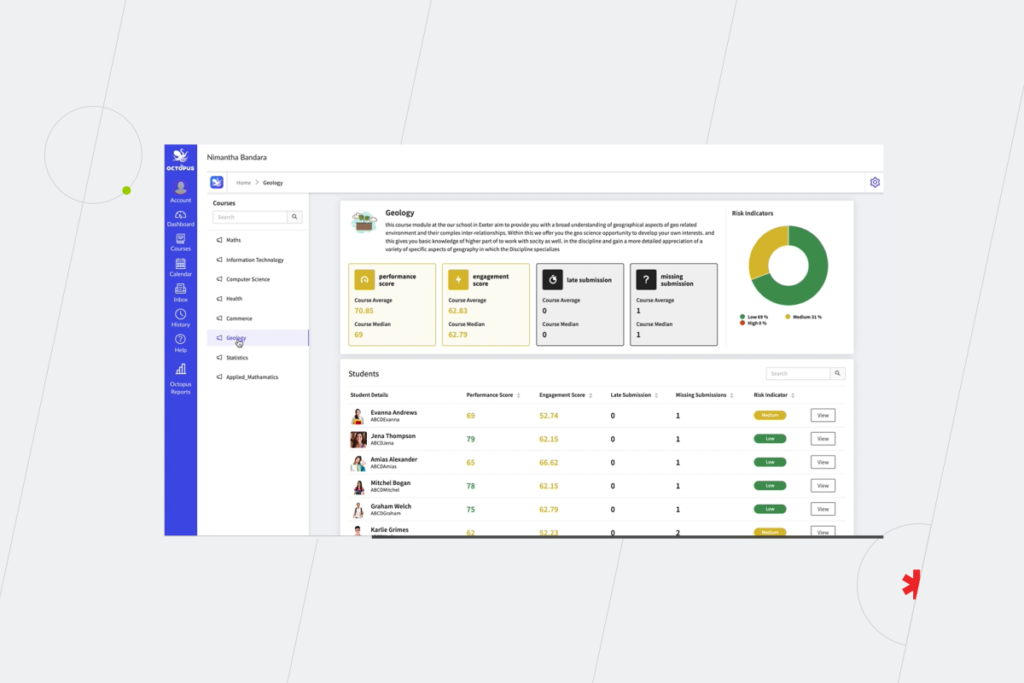
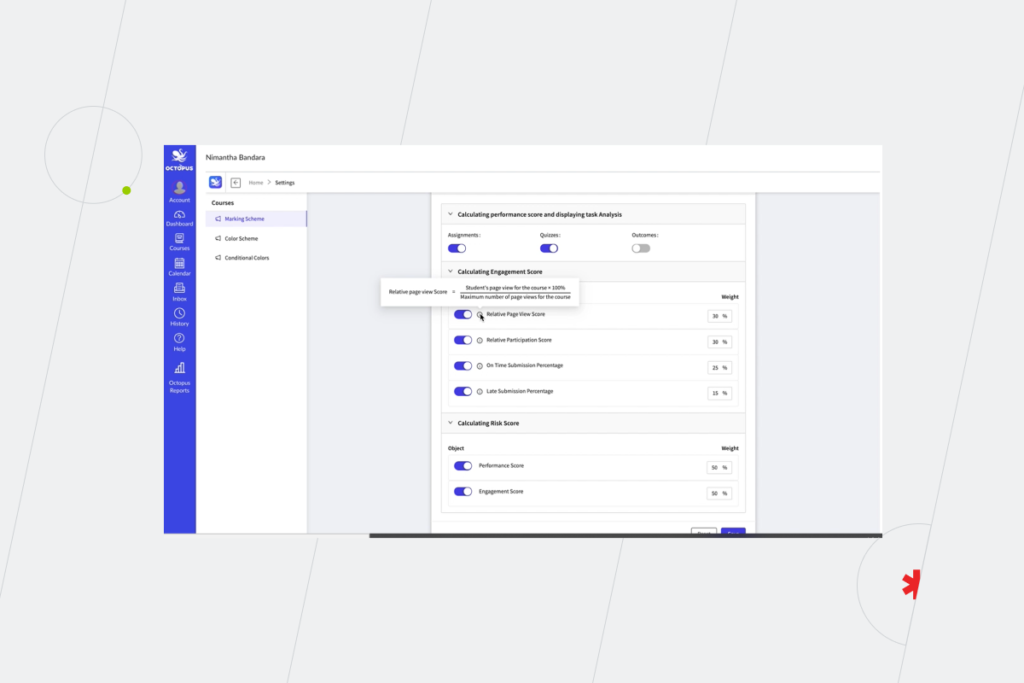
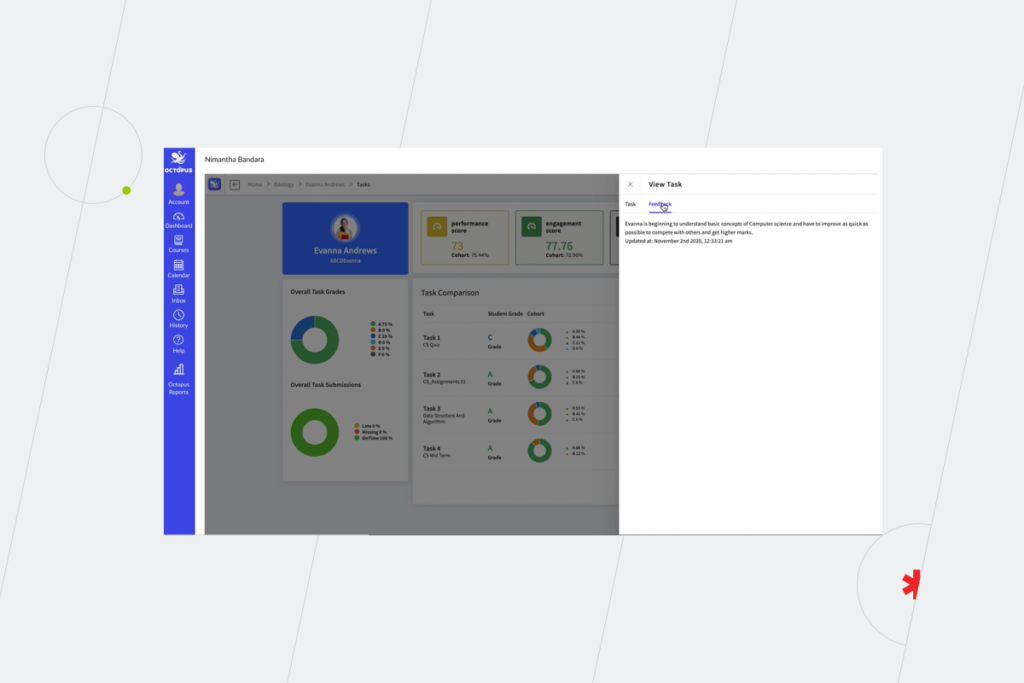
Here’s an example of a dashboard where classroom teachers can monitor their students’ engagement scores in different subjects, attendance, and performance level in all the disciplines and review these parameters in detail for particular students and subjects.

Business Intelligence In Education
 Business Intelligence In Education

Subject teachers can leave feedback to make it easier for classroom teachers and parents to fully understand students’ success in learning particular topics or the subject in general.

 Business Intelligence In Education
 Business Intelligence In Education

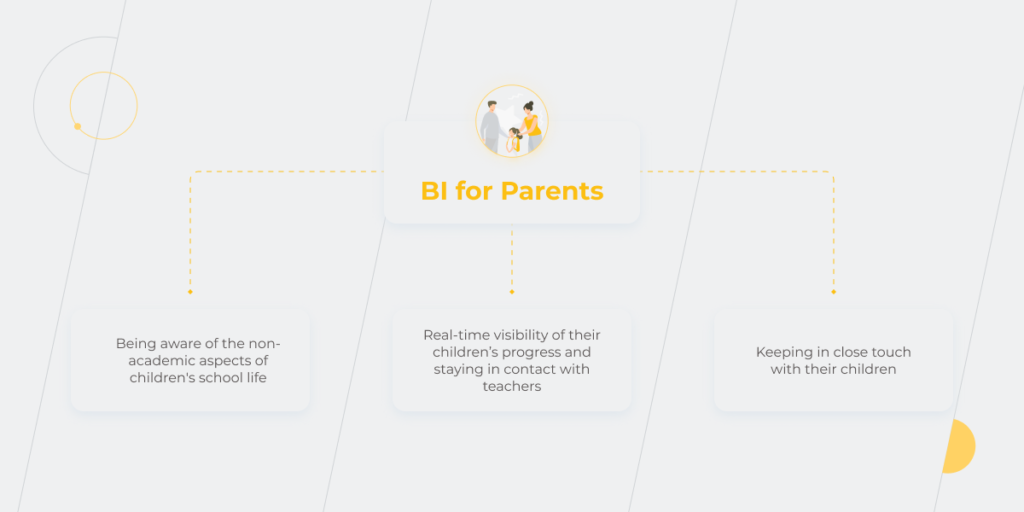
How Business Intelligence in the education sector is helping parents?

As children spend a significant part of their time studying, it’s naturally important for parents to be informed about their kid’s educational activities and wellbeing at school. BI solutions provide parents with:

1) Real-time visibility of their children’s progress and possibility to stay in contact with teachers

The most widespread reason why parents don’t attend school meetings is that they simply can’t do it because of their working schedule. In the US, the percentage of families with children under age 18 and with both parents working full-time is 59.8%, among the European countries the average rate is 61% but in some Scandinavian countries, it exceeds 80%. Technology that simplifies and speeds up conversations between teachers and parents is increasingly valuable in these circumstances.

BI technology allows parents to access data related to what their child is learning. It encourages them to connect with their child’s teacher and download learning materials if the student should do extra tasks to enhance their grades. Thanks to straightforward dashboards, parents can see the actual performance level of their children. The functionality of more complex dashboards gives parents the opportunity to ask teachers questions about the learning process and get their answers or advice. 

2) Keeping in close touch with their children

It’s usually easy to ask your elementary school children about how things are going at school – they tend to share how their day went. But getting an answer to the same question from teenagers may be quite tricky. This is where the BI solution can be of much help. By reviewing teachers’ comments in your child’s dashboard, you can better understand their interests and issues, and find the topics to discuss during breakfast or dinner. Such small talks aren’t a small thing. An OECD survey has investigated the relations between student performance and parental involvement in the educational process and showed that only 52% of parents worldwide discuss their children’s wellbeing at school every day or almost every day. Meanwhile, students whose parents do this at least once a week are more likely to declare a high level of life satisfaction and get higher scores.

So, for parents, BI in education makes their child’s school life just a click of a button away. 

3) Being aware of the non-academic aspects of children’s school life

Tracking the learning progress of children is essential, but there are also other things parents are interested in, for instance, school meals. With a BI solution, parents can see the breakfast and lunch menu for the month ahead and choose between alternative options such as meat or a vegetarian dish, fruit juice instead of milk, if the student has lactose intolerance. This is especially important for elementary school pupils who, because of their age, cannot always identify whether they can eat certain dishes. And when parents are given the opportunity to decide on a menu in advance, they can avoid the worry that their child will eat something wrong or not eat at all. 

If the school cafeteria supports wristband payment technology, parents can also monitor what their children buy and put a limit on the amount of purchases.

 Business Intelligence In Education

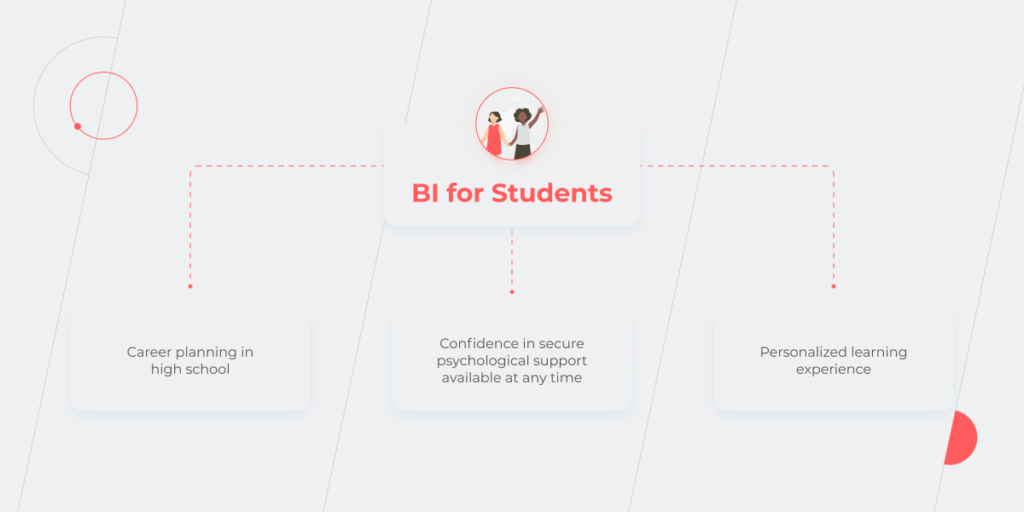
How does BI technology support students?

BI implementation in the education sector ensures better a studying experience, helps students develop their talents, and also creates a safe space for them. The technology offers students:

1) Personalized learning experience

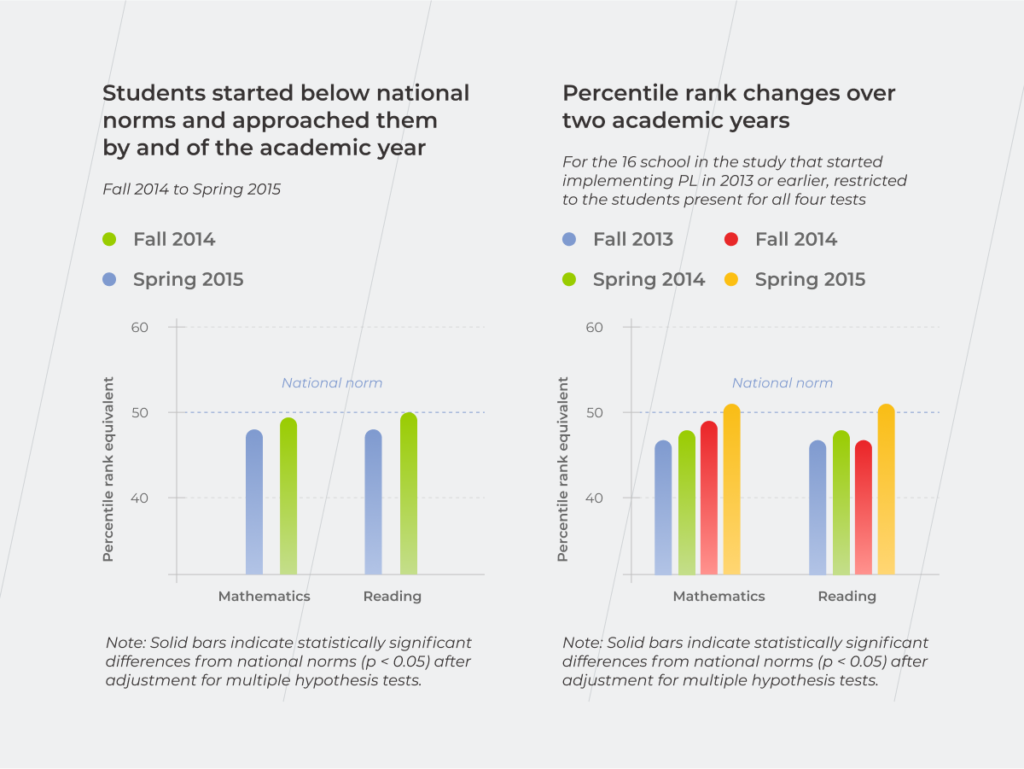
As teachers are able to constantly track the individual performance of each student, they can advise additional materials and personalized worksheets based on the topics the student is stuck with. RAND research shows that students who started below the national norm and then get a chance to leverage personalization in learning reached these norms by the academic year’s end and surpassed them in two years.

“Learners thrive on doing work that’s challenging but possible, and therefore rewarding when it clicks,” shared Brian Galvin, Chief Academic Officer at Varsity Tutors.

 Business Intelligence In Education

2) Confidence in secure psychological support available at any time

Many schools have a psychologist or counselor available, but just having one is not enough for students to seek help if they need it as they can’t be sure that their private data will be secure. Schools should give students the possibility to both ask for advice or help anonymously and provide them with an opportunity of a personal meeting with the specialist based on their consent. What does this have to do with BI in education? Business Intelligence software allows psychologists to collect the student’s requests and match them with the data about his/her attendance level for a deeper understanding of the situation if the student would like to disclose his/her identity. Such an approach helps schools take better care of the students’ psychological state, the emotional climate in the classes and, for instance, notice bullying cases at early stages.

3) Career planning in high school

Imagine how much easier it can be for students to choose their future profession if the data about their performance in different subjects is collected automatically throughout their whole school life and then presented in a clear dashboard. This way, students get full-fledged digital portraits of themselves reflecting all their strengths and weaknesses. Besides, these dashboards can show the most suitable colleges and universities for admission according to the student’s interests and scores analysis. It’s also possible to highlight subjects or areas where improvement is needed if the student wants to enroll in a particular uni and choose a specific major.

 Business Intelligence In Education

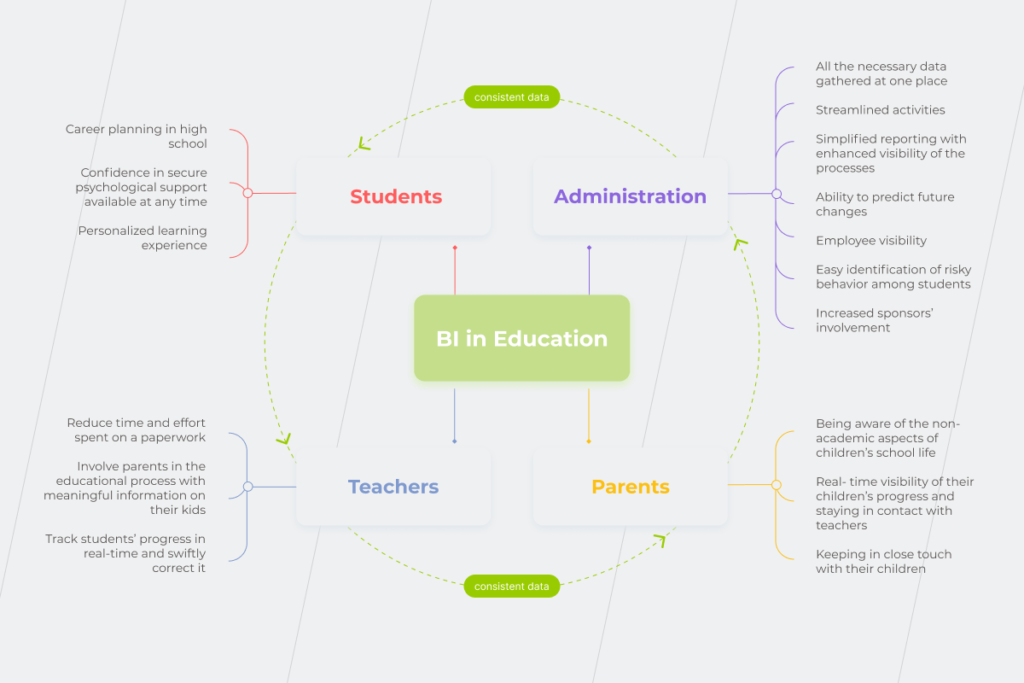
If we put together all the stakeholders whom BI helps in the educational process, we’ll get such a mindmap.

BI in education

Maximize your opportunities to analyze the data

The possibilities that come with the application of Business Intelligence in education are countless. However, it’s not without a fly in the ointment either. There is so much data to be collected and analyzed, that you may experience paralysis and data fatigue before even starting your Business Intelligence initiative. Therefore, it’s critical to develop a well-thought-out, incremental strategy for implementing BI software – to be determined about what you need is already half the battle. Finding the right technology partner, who can develop and implement either some BI components or a full-fledged solution, should be integral to your project planning. BI specialists with relevant industry experience will help identify all the possible pitfalls in advance and achieve the desired goals in the most efficient way, so that you only have to enjoy how Business Intelligence is changing the way you work for the better.

To find out what to start with, book a consultation with our BI experts.

FAQ

How is Business Intelligence used in education?

Just like in any other industry, Business Intelligence in the education sector helps provide all stakeholders with relevant data in an easy-to-understand form even for non-technical users. The specifics of BI in education are that there are many stakeholders in the educational process, so the technology helps them all at once to stay connected. At the elementary and secondary education levels, there are school administrators, teachers, students, and their parents who can leverage BI to collaborate, putting the child at the center of the education process.

Nine Benefits of Managed Cloud Services within OVHcloud

Over the last few years, cloud technology has felt a swell in demand due to increased awareness of its potential. Businesses move closer to the cloud and pass up bulky, on-site set-ups. But unless you’re a tech-savvy company, you may not be familiar with the nuts and bolts of running a cloud ecosystem. That’s when the experts of managed cloud services come in.

Managed cloud services allow companies to hand over (partially or completely) the responsibility for their cloud resources and operations to cloud managed service providers (MSPs). This way, any company can easily tap into the value of cloud computing without having to become an expert or hire a team of cloud pros.

Today, expertise-free access to cloud computing power is a growing field with an increasing number of businesses flocking to MSPs. In 2021, the cloud managed services market size stood at $86.1 billion. Driven by rapid digitization and tech innovation, it is expected to leap to $139.4 billion by 2026. According to other resources, the market will exceed $282 billion by 2023.

Despite the discrepancy in prediction numbers, one thing is certain, the managed cloud landscape will progress in leaps and bounds in the years to come. Today, we’ll lay out the managed cloud computing benefits and drawbacks by looking at one of the best European cloud providers — OVHcloud. 

Next-generation IT managed services for OVHcloud infrastructure

OVHcloud hardly needs an introduction. As the leading cloud provider in Europe, it operates 400,000 servers in 32 data centers across four continents. To simplify the management of this complex infrastructure for the customers, OVHcloud has a wide network of Advanced Partners — certified cloud managed services providers who assist customers in handling cloud challenges by administering various stages of their cloud journey. 

In particular, *instinctools as an Advanced OVHcloud Partner, helps users master the cloud technology by:

  • automating cloud infrastructure and providing built-in tools and services (e.g. managed Kubernetes services);
  • conducting database management and infrastructure, including set-up, backup, scalability, and security within the public cloud;
  • providing 24/7 business support, including critical incidents;
  • accessing turn-key managed infrastructure solutions among others.

This whole layer of governed cloud functions onboards cloud users, making cloud transformation pain-free and accelerated. However, there are more benefits, which prompt companies to leverage managed services within OVHcloud.

Cost reduction

When talking about the cloud advantages and disadvantages, cost concerns often come up as a controversial point.

There’s a common belief among customers that having in-house IT infrastructure is cheaper than leasing cloud capacity. The thing is that they often come to this conclusion by comparing the monthly fees for IaaS (Infrastructure-as-a-Service) against the price of buying the server. What’s the point of moving to the cloud, if the server costs, say, $10,000, and the cloud subscription over a three-year period exceeds that number? 

However, what slips through the cracks in this kind of reasoning is that the upfront purchase price of the server does not reflect its total cost of ownership. Even if you already have a data center to store your servers there are still ongoing operating costs to maintain it.

As a rule, problems with uncontrollable growth of cloud costs are caused by lack of expertise in cloud resource management. In order to maximize the benefits of the cloud and not to overpay, it is necessary to turn to a reliable vendor that delivers managed cloud services and helps optimize your budget.

Experienced MSPs provide you with a good grasp of your cloud efficiency by identifying excessive resources or applications. Moreover, they ensure unprecedented scalability of your cloud resources, enabling you to pay only for the capacity you use. That way, you can automatically scale up and down your infrastructure when the network usage, storage, or traffic is above or below the regular threshold. 

cloud managed services attachment

Round-the-clock support

Continuous support is also among the core cloud computing advantages. The importance of managed services lies in instant guiding and on-demand consulting. MSP support desk is manned 24 hours a day, 7 days a week, 365 days a year with a team of experienced system engineers ready to guide in the shortest time possible. Along with instant response times, users can also expect immediate issue resolution. 

Quick turnaround times are also achieved through constant remote assessment, monitoring, and rectification of your cloud infrastructure by the provider. As a result, you can avoid costly downtimes without dispatching an in-house cloud engineer.

Robust and flexible infrastructure

The lack of flexibility is inexcusable for forward-looking businesses who are looking to deliver great and next-gen user experiences, accelerate development cycles and operate in sync with evolving markets. To do that, enterprises require steadfast and adjustable infrastructure that can run any workload in hours with no forklift upgrades. 

Managed cloud computing enables users to make service changes within minutes, improving uptime and the efficiency of business systems. As-a-service billing, ubiquitous access as well as security compliance also contribute to enhanced flexibility for businesses.

Enhanced change management 

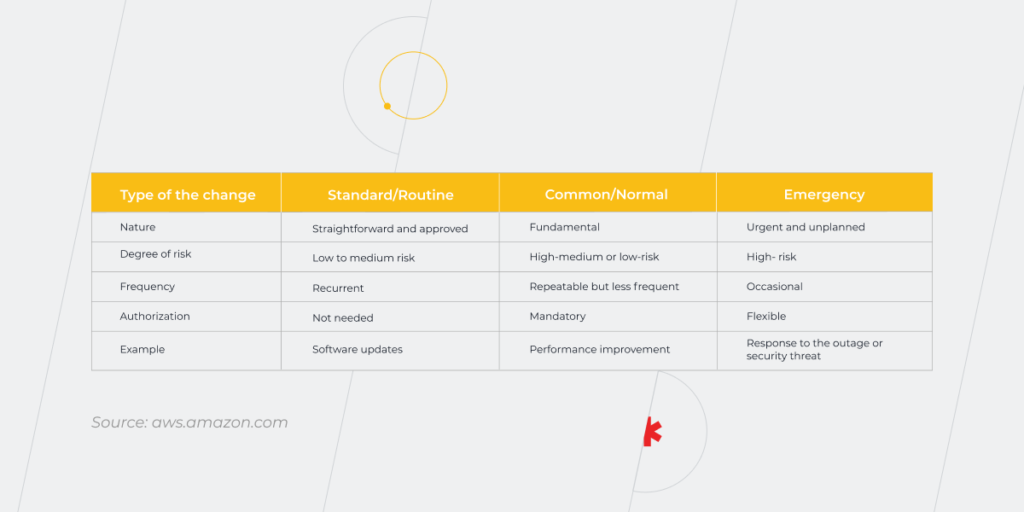
When talking about cloud server advantages and disadvantages, cloud change management is certainly on the bright side. Unlike traditional update management, MSPs promote agile-friendly change enablement thanks to higher transparency and accountability of changes made. Managed cloud changes also allow teams to avoid external authorization (which is often excessive), gaining more autonomy and reducing deployment time for regular changes.

Managed in the cloud, even complex updates like performance improvement can flow seamlessly thanks to a rich built-in selection of automation and deployment tools. MSPs also foster visibility across the infrastructure, which means that low- and medium-risk changes can be performed without lengthy and painstaking approval rounds. 

Automated updates and patch management

With the cloud environment constantly evolving, keeping your infrastructure up-to-date is among the toughest challenges. Managed service providers, however, eliminate the need to manually update your computing resources. Instead, they suggest timely automated system upgrades to prevent costly downtimes, security breaches, and other mishaps.

Speaking of other cloud computing benefits and drawbacks, MSPs also ensure automatic security patches to keep hackers at bay, fix performance issues, and avert other critical issues. Managed cloud computing lets users automate all phases of patch management – from scanning to reporting, offloading the work of on-prem patch management with no costly local patching servers.

This way, users avoid the complexities tied with manual patch management. Automated patch deployment also boosts the security of on- and off-network devices, minimizes downtime, and increases user productivity.

Cybersecurity support

Managed cloud hosting also helps safeguard sensitive and business-critical data by implementing a holistic cybersecurity system. Visibility of your IT infrastructure coupled with a robust set of in-built cybersecurity risk management features and practices allows MSPs to proactively spot malware attacks, API vulnerabilities, and others. Moreover, advanced security measures such as the latest antivirus software, encryption, and multi-factor authentication are also a traditional part of the MSP security ecosystem.

Disaster recovery-as-a-service

No company can remove all risks linked with possible outages and power failures. Instead, business owners need an effective disaster recovery strategy to restore data and get their computer systems back on track. The sooner your data is restored, the less compromised your business processes will be. Yet, the stats are discouraging — over 50% of small and medium-sized businesses don’t have an incident response plan.

Disaster recovery-as-a-service (DRaaS) enables business owners to secure business continuity by quickly eliminating mobility and portability challenges as well as rapidly recovering data in emergencies. Managed DRaaS is completely accountable for the implementation and management of data protection and recovery with no additional spending on software licenses or hardware. 

Automated backup is equally vital to recover your data quickly and without disruption. Sending a database copy to secondary servers further amplifies your cloud security with no additional workload for your tech staff. This way, fully managed cloud backup solutions eliminate the burden of deploying, operating, and maintaining an enterprise backup service every 24 hours with all assets being constantly protected and monitored. 

Comprehensive SLA

A Service Level Agreement (SLA) outlines the mutual responsibilities of both providers and users, while also ensuring availability of the system, latency, component reliability, and necessary warranties. SLAs facilitate a transparent bond between providers and users as well as protect your cloud assets and inform you about the associated risks. In the long run, a transparent level of service and anticipated expectations will save both parties money and drive satisfaction for not only the parties directly involved, but more importantly, the end-users.

Every vendor’s SLA is different. Managed cloud service providers tend to make an exhaustive list of specificities that cover all possible aspects of collaboration. The latter may include but is not limited to, data ownership, cloud hardware, and software, customer responsibilities as well as data recovery and backup, among others. This level of transparency sets your cloud journey up for success and addresses salient issues connected with your organization’s security.

Compliance support

Compliance audits send chills up the spines of online retailers, healthcare providers, financial institutions, and other highly regulated industries. Standards in data security, integrity, and privacy can be tedious to score and maintain in cloud deployments. But, according to IBM, businesses that embraced MSPs benefit from the enhanced capability to meet compliance requirements. That’s why 76% of respondents cite compliance reporting among the key benefits of managed cloud services.

A cloud managed service provider can help data-sensitive companies to define and manage their cloud processes in accordance with legislative regulations, including HIPAA, PCI-DSS, and others. Based on specific standards, MSPs put a range of compliance features in place to help business owners avoid costly regulatory fines. 

Leveraging the synergy of the right cloud provider and MSP

Due to the pandemic-associated impacts, businesses are now more willing than ever to streamline their operations and build a resilient IT infrastructure. The success of your cloud migration and use depends largely on cooperation with an experienced managed services partner certified by your cloud provider. 

Thus, instead of outsourcing emergency response, many companies hand over continuous cloud infrastructure optimization to MSPs. This allows executives to focus on mission-critical tasks while ensuring the safety and cost-efficiency of their cloud assets.

However, not all cloud providers are the same and neither are MSPs. To support your desired business outcome, you need to choose them carefully based on your objectives. Together with one of the best cloud providers in Europe, OVHcloud, *instinctools takes cloud computing services to the next, seamlessly automated level. As an Advanced OVHcloud Partner, we assist our customers in harnessing unrivaled OVHcloud potential and offer a winning price-value ratio, ensuring that you can make the most of managed cloud services. 

Cloud Change Management: How to Make Changes Work For You

Successful enterprise management goes hand in hand with change. The latter allows businesses to stay resilient and keep up with evolving customer and internal needs. However, if these changes are poorly managed, they can cripple your serene existence by incurring project delays, budget overruns, dips in productivity, customer dissatisfaction, and other painful mishaps. Alternatively, change management in a cloud environment can help you cope with the shifting landscape and blaze a trail of less worry and more success.

The problem isn’t change, per se, because change is going to happen; the problem, rather, is the inability to cope with the change when it comes.

Yet, cloud-based change management doesn’t make us immune to the common pitfalls of modifications. Therefore, careful planning for the possible changes is a mandate in any case.

According to McKinsey & Company, the failure rate of change management initiatives is around 70%. Today, the stakes are even higher as changes are occurring at a faster pace.

In this post, we’ll flesh out the difference between cloud change management and traditional change management in IT infrastructure, as well as share some actionable tips on making your cloud change management policy more effective.

But first, let’s discuss the types of changes each business has to deal with when modifying software applications.

Change management basics: types of changes

Change management has evolved into an incredibly important, but often misunderstood concept in the IT industry. Essentially, it refers to a set of policies and actions that ensure change is properly managed throughout every stage of the process. The importance of consistent change management is obvious as it helps you minimize the risks of change collisions and roll out updates without affecting your operations.

According to Prosci’s Best Practices in Change Management report, an effective change management strategy allows 93% of organizations to successfully achieve predefined objectives. But how to ensure this strategy works? That’s where cloud change management comes in.

Let’s see how cloud technologies can help you tackle the three types of updates that commonly occur.

Cloud Change Management

Within the traditional change management models, all three groups of modifications require resource-intensive manual input. In this case, the focus is placed on disruption and static plans with updates booked in a specific window. Therefore, business owners lack flexibility and are more susceptible to the human-error factor.

Conversely, common change management models in cloud computing bring more automation and make update roll-outs trouble-free. That said, let’s take a look at how different types of changes are addressed within the two approaches.

Traditional vs cloud change management

Launching continuous and reversible changes is core to driving agility. But do standard management practices pass muster at all nowadays? Let’s see.

Slow vs high speed of change implementation

Introducing any type of an update into a traditional setup can often be unnecessarily slow, process-heavy, and overburdened. Let’s not forget bureaucratic and painstaking planning related to the high risks of traditional change launches. Lengthy, manual approvals can take lots of time to document and include in a ticketing system. Also, changes have to be processed through a slew of committees, levels of management, and mandatory waiting periods. As a result, any type of change depends on the people with little to no awareness of change reasons, its impact, and the cost of delay.

However, it’s different for cloud environments where a built-in selection of automation and deployment software eliminates the need for robust tech infrastructure and related effort to introduce the update. The cloud also allows us to transform common changes into normal changes by removing complexities linked with the planning and implementation of such changes.

This advantage can be better illustrated by the hardware migration that is common in the traditional model. Without cloud capabilities, you have to perform rigorous upfront planning, including necessary investments, setup, and app migration, just to boost your computing resources. Within cloud management, you can step up your resources just by tweaking and executing your code. This way, the complex hardware overhaul is treated as the standard change performed virtually.

Change control vs change enablement

Once an innovation driver, traditional command-and-control practices are now considered a burden for modern DevOps-based philosophy. And, since Agile and DevOps are now the acknowledged benchmarks for cloud development, the control aspect must give way to an enabling mindset. The cloud, on the contrary, resets your perspective to the best practices of change enablement.

In this case, all innovations are effective, safe, and timely, while ensuring compliance and risk management. Cloud-based change enablement minimizes the risk linked with introducing changes by automating them and making them more visible. Less rigid control also means that low-risk models can be fully automated, while high-risk zones will be forwarded for approval.

Manual scaling vs autoscaling

Traffic spikes are one of the reasons why your digital assets may break down due to inefficiently scalable infrastructure. For an existing application, manual scaling is a daunting task that may require upfront planning, code changes, software updates, and a lot of monitoring.

However, scaling your application in the cloud factors in all the minute-by-minute changes in demand and traffic by automatically adjusting the app’s resources to avert performance problems or outages. This means you can scale up, down, and back in a few clicks on demand.

CAB change authorization vs greater autonomy

Traditionally, fundamental and costly changes are submitted to a Change Advisory Board  (CAB). The CAB acts as an advisory committee to help guide the change management process and to ensure the success of the project. This lengthy approval process is typically done in the name of increased quality and added scrutiny.

However, as demonstrated in Accelerate by Nicole Forsgren, external approvals take a toll on deployment frequency and restore time. In contrast, the cloud computing change management process allows for more autonomy by promoting peer reviews. When done in the cloud, all changes lean towards early and automated detection, visibility, and fast feedback. Besides, monitoring dashboards allow for greater autonomy for the teams since higher-level authorities have a holistic overview of regulation compliance, metrics, and others.

Manual risk assessment vs automatic risk management

According to IBM, changes are among the main reasons for service outages. And with more companies migrating to the cloud, the volume and rate of change have gained unprecedented heights. This shift makes manual risk assessment a dicey proposition. Moreover, manual rollback will require some hypothesis testing, which could stretch your outage for hours or days.

Automation, on the contrary, can dramatically minimize the business risk associated with change as most cloud services allow for auto-recovering from failure and instant rollbacks.

As you can see, cloud-based change management makes all the difference by allowing you to introduce all types of updates in an automated and agile-friendly way. Moreover, a record of change also acts as the main troubleshooting reference when dealing with emergency changes.

Now that we’ve compared two change management approaches, let’s see whether cloud migration is worth it for change management.

The objectives of cloud change management policy

An overriding goal of the change management process is to ensure all updates leave your critical processes and assets intact as well as meet internal guidelines. Cloud transition can take these expectations to the next level, while also providing added business value.

Cloud Change Management

More cost-efficiency

There are quite a few ways to optimize your cloud bills and reduce the total cost of ownership. You can leverage your cloud resource on a pay-as-you-go model. This computing billing method allows organizations to pay exclusively for the data they use each month (just like the electricity bill). Also, cloud environments help bring down the cost of on-prem infrastructure by taking it to virtual servers.

Enhanced security

Cloud infrastructure also has a positive impact on data security compared with local data centers. Thanks to a shared responsibility model, your cloud provider takes over infrastructure security, while your in-house team shoulders risks linked with policies, configurations, and data migration.

Cloud Change Management

Fast recovery

Your cloud space can be set up to provide alerts on the changes to the environment (e.g. monthly updates, one-off patches, etc.). More visibility can also be facilitated by keeping all configurations in version control. In both cases, your engineers won’t have to allocate time on tracking havoc-wreaking changes.

Performance efficiency and operational excellence

Although specific cloud efficiency yardsticks will vary by company. There’s one thing that holds true for all cloud infrastructures. And that is the luxury of more flexibility and scalability when it comes to your computing needs. In doing so, you can easily spin up your environment to accommodate increased business needs.

Better compliance

Almost every company now abides by some form of governmental regulation, be it healthcare or finance. Therefore, any update is subject to rigid requirements imposed by HIPAA, PCI-DSS, or others. Cloud change management is inherently compliance-friendly, easing the regulation strain on your organization. Thanks to authentication and access controls, data compliance, encryption, and other cloud practices, you can support industry-specific compliance easier than with on-site change management.

How to do cloud change management at top speed?

Change is a blessing… unless it takes an eternity. The hallmark of cloud change management is automation (and, ultimately, speed). But it takes a bit more to accelerate your automated change regimen. Here’s how you can speed up change management processes in the cloud without sacrificing testing or compliance:

  • Bring more automation for added speed

The more you can automate the validation flow and other tasks in the cloud-powered environment, the more transparency you get. Saving more time. Cloud tools that can handle configuration updates and follow the approval process can be tweaked to accept or reject new configuration changes. Automatic auto-approval of low-risk changes, for example, will minimize the effort and boost change management.

  • Leverage service catalogs to facilitate compliance, promote auto-approvals, and minimize exceptions

Service catalogs will amplify the alignment of your cloud infrastructure with your business requirements. They will allow you to manage your deployed IT services by implementing enterprise standards, introducing new technologies, and imposing default regulatory requirements. This service also provides consistent management and compliance, giving you the ability to quickly deploy only the approved IT services you need.

  • Connect changes back to a user story to prioritize the customer

A user-first mindset is a cornerstone for making the most of your changes. That is why those changes that aren’t fit for auto-approval should be retraced to a user story to assess the value it provides to the end-user. This practice will also help you achieve a complete audit trail, preventing added costs for shutdown resources and similar instances.

  • Have corporate policies in place and secure them with automation

Since some services might not be listed in your catalog, it’s important to ensure integrity and privacy. You can do that by establishing policies that will be set in motion automatically. This means the system can send notifications each time a specific error pattern is entered into the infrastructure (e.g., EC2 instance with no tag).

  • Adopt DevOps practices and tools to amplify change management

DevOps and fluid change management go hand in hand. Therefore, new changes should ideally be introduced through a stable flow of continuous integration and deployment to eliminate friction between team hand-offs. Then, a powerful combo of DevOps-minded teams and cloud automation tools will further bolster automated configuration management, making your change routine faster, more reliable, and enabled. But keep in mind that an ideal set of automation will vary from cloud provider to cloud provider.

On Cloud Nine

Cloud technologies have revolutionized the way businesses deliver services. Change management, in particular, has seen a makeover with the advent of cloud computing. From autoscaling to better enablement, effective cloud change management can eliminate the internal chaos of introducing standard modifications and nurture more agility across departments.

If you’re struggling with your cloud transition, *instinctools experts are ready to help you with change management implementation in the cloud.

ERP vs CRM: Which System Should You Bet On?

Trying to find the winner in the ERP vs CRM competition is challenging for many businesses. Understanding how each of these systems works and how it can benefit your company will help you decide which one is right for you.   

Enterprise Resource Planning (ERP) and Customer Relationship Management (CRM) are two types of powerful software that help businesses handle a number of important tasks, from taking care of back-office workflows — ERP — to customer life cycle management — that’s what CRM covers. Both systems have a lot in common and aim to boost business growth and success. Some of their features overlap, but there are also noticeable distinctions that shouldn’t be ignored when facing a CRM or ERP dilemma. To help you figure out what your business really needs, we will describe the central functions of each system, determine the cases that require CRM, in which ones you’ll need ERP, and when it’s time to adopt both.

CRM at a Glance 

The primary purpose of the Customer Relationship Management software, as the name implies, is to help customer-facing teams manage relationships with the company’s leads and customers. It includes, among others, automating and streamlining repetitive tasks such as tracking purchases and deals, managing tickets, scheduling regular meetings, and preparing customizable analytical reports. As your company grows, so does the complexity of data, making it increasingly difficult to keep track of all the ongoing processes. No wonder, human errors such as forgetting to update a spreadsheet or mistakingly duplicating customer data, become more habitual and can significantly impact businesses. CRM keeps all this information in one accessible place and provides organizations with a 360° customer view, connecting the dots between marketing and sales data, and facilitating collaboration between the customer-facing departments. 

According to Nucleus Research, CRM pays back $8.71 for every dollar spent, leading to impressive ROI with the CRM system. Most businesses view building and maintaining relationships with clients as the number one goal, which prioritizes investing in CRM during the first five years after a company is launched. Grand View Research indicates that around 82% of organizations use CRM systems for sales reporting and process automation. CRM has become an essential business software that enables companies to increase sales through improved customer service and retention. 

ERP at a Glance

While CRM focuses on customer interactions and boosting sales, Enterprise Resource Planning is usually heavy-duty software that unites different aspects of your business such as financial management and accounting, human resources, and supply chain management into one single database accessible to all departments. The main role of ERP is to provide data integrity by tying together all the functions and processes across your business, ultimately leading to a reduction in costs and an increase in the visibility of your operations. Just like CRM, ERP uses real-time information to help management respond to business needs more efficiently. 

According to the Panorama Consulting Group, 93% of businesses that implement ERP projects consider them a success, naming reduced process time, increased collaboration, and a centralized data system as the top benefits.

In order to make an informed decision between CRM and ERP software, let’s explore each system separately.

When do you need CRM?

benefits of CRM

The CRM platform is an excellent tool to nurture your interactions with the clientele. Without it, you are unlikely to sustain the relationships with your customers on an appropriate level. Here are the sure signs that your business cries out for a life preserver in the form of CRM.

  • You’re swamped with manual processes

Despite the digitalization that occurs in various types of business, many organizations still manage their data manually, wasting precious time on looking for a particular customer record, keying in new leads by hand, reformatting rows and columns, etc. Instead, they could use this time to convert leads into paying customers and let the CRM system do the job of organizing and pulling the necessary data. 

  • Your customer data is all over the place

Has your data ever been scattered around multiple spreadsheets, emails, or, maybe, post-it notes? Don’t say a word — the answer is probably, yes. The problem with it is that you might need to spend hours or even days looking for the necessary information. Furthermore, with manual data entry, you might encounter many duplicates, typos, and other human-caused mistakes. CRM software helps to avoid them by automating the processes related to entering the information and updating the records. Cloud-based CRM also allows you to share the data among employees in real time, saving you and your colleagues from unnecessary emails and phone calls. 

  • You lose track of your leads

When tracking your sales leads manually, you have fewer chances to turn them into loyal customers due to the lack of a unified, visible sales funnel. So what’s the point in increasing your lead flow, if you can’t keep up with it? Sorting, analyzing, and prioritizing your contacts have to become a priority. CRM is here to help. 

  • There’s little to no interdepartmental collaboration

When your clients and leads interact with your company, they may find themselves bounced around and misinformed because there is no clear vision within your department on how to handle their requests or inquiries. The clients become increasingly dissatisfied with the level of customer service leading to higher levels of complaints. 

Also, without a CRM, you don’t have visibility of what your sales team is doing, so it gets easier to miss out on the opportunities within a pipeline such as bid invitations, prospective sales deals, important new leads, and more. When all the stakeholders can share and exchange purchase history and other relevant customer data, it enables you to deal with customers in a united and cohesive fashion. 

  • You don’t know your clients the way you should

In many instances, customer data is not connected to a focal point, making it difficult to gather statistics and other relevant information on your customers. This results in considerable gaps in information on your leads and clients and misinterpretation of your customer’s preferences. CRM keeps track of all customer information, allowing you to better tailor your products or services to your clients’ needs. 

  • Customer service leaves a lot to be desired

Your customers might communicate with you via a myriad of channels — phone calls, chatbots, social media, messengers, surveys, etc., — and their requests can become increasingly harder to track. If you don’t get comprehensive information on time, it naturally leads to low retention rates. When your customer service lacks automation, response times increase, and service quality declines, irrespective of how intensely your sales department operates. Meanwhile, by getting your data organized and managed by a CRM platform, you have a more centralized and well-controlled two-way relationship with your customers. CRM helps to digitize and automate your company’s outreach, facilitating marketing efforts, sales, and product delivery speed. The system also provides important assistance with personalization – a critical method of keeping customer attention. 

When do you need ERP?

ERP implementation

Unlike CRM, an ERP system mostly focuses on your organization’s internal processes. For example, when you’re under a deadline to submit an accounting report and it takes ages to retrieve the required information, ERP can help. Here are some other issues that could indicate you need an ERP solution:

  • You’re using disparate systems

After your software has been updated, the disparate systems you have might not work well together. For instance, new accounting software isn’t compatible with an old HR system. ERP provides a platform that keeps all these systems under one umbrella, ensuring their full compatibility and easy coordination. 

  • Generating reports takes tons of time

Let us imagine a situation when you need to provide your stakeholders with an all-in-one report that includes your company’s spending, revenue, and the number of new customers for the last three months. Digging into each Excel spreadsheet and combining them into one report will take days.  This is too much effort and precious time wasted on something that could be done automatically. ERP gathers all this data in a single database with convenient and simple reporting options so that you can consolidate the necessary information into a beautiful report within minutes.

  • You’ve outgrown the existing software

If the software sets limits on your market expansion and ability to develop by making it increasingly hard for the staff to complete tasks, chances are that your business has outgrown your legacy software. The good news is that you don’t necessarily have to dump your outdated system. If done carefully, the integration of the existing databases and software with new ERP solutions will become a success — just make sure that you’ve analyzed your current software, discovered any flaws in the processes, and made the necessary fixes.

  • Inaccurate inventory

Keeping track of the inventory, especially in big companies with many remote warehouse locations can be a challenge. When your sales, customer, and inventory data is not synced, the situations wherein you have insufficient or excessive stock will become commonplace and can impact your company. ERP inventory management system keeps all items in one single easily managed database reducing human errors, eliminating guesswork, and helping efficiently manage available resources. 

  • Accounting management is tedious

As you watch your staff spending hours every week manually entering paper-based invoices and sales orders into different accounting and sales systems, you are probably wishing that there could be some system that could simplify and automate the process. Since an ERP keeps all information in a central database, there is no need to enter data into multiple systems. Moreover, with effective electronic document processing available through ERP, paper-based invoices and orders are quickly becoming a thing of the past. 

  • IT management is a nightmare

Managing multiple software systems simultaneously can be quite painful for your business. Customizing these systems, integrating them, and updating with patches and upgrades is complex, costly, and saps critical time. If your patchwork of systems includes on-premise legacy software, system upgrades can be more trouble than they’re worth, whereas having an ERP instead of multiple disparate systems requires way fewer resources spent on its enhancement. Not to mention a cloud-based ERP, which is updated automatically.

CRM or ERP dilemma: three things to consider while making a major business decision

Having explored different features and functionalities of both CRM and ERP software, let’s get back to the same question we posed at the beginning of this article: which one of these two to opt for? We recommend considering several factors:

Business needs. If your business is primarily customer-oriented and you need software that is designed to help your sales and marketing teams handle their work more efficiently, then you should consider CRM. If you are looking for a system with a diverse and broad set of capabilities to automate various processes within your business, such as financial management, accounting, inventory, etc., then you probably need an enterprise-wide solution. You can also integrate a customer relationship management module in your ERP. However, these modules are usually not as effective as an independent solution, so if you focus on sales, you’d better get a separate CRM.

Investment. The amount of money you are willing to pay for the software is another critical issue when hesitating between the two systems. CRM is usually cheaper while ERP needs a larger investment as it’s a bigger piece of software that serves the needs of the entire organization. However, with various solutions offered on the market today, sometimes a detailed, high-quality CRM costs more than a simplistic ERP. Besides, considering CRM and ERP in cloud computing, you need to take into account that the subscription price will rise in direct proportion to the amount of data stored in the system. So if the number of customers is estimated in tens of thousands, you will probably pay more for a CRM rather than an ERP. 

Scale. The size of your business also determines which system would be more beneficial to you: CRM is great at providing benefits to small and mid-size businesses, while ERP is more valuable to large, complex organizations where it can provide potentially huge ROI. For example, if the company’s focus is B2C, then a separate CRM system might be a better solution. For industrial factories, where the organization of internal processes is becoming too complex, ERP is definitely a better choice. If in doubt, you can start off with CRM and then purchase an ERP, integrating one into another. 

The chart below showcases the capabilities of both systems.

CRM vs ERP

If large organizations are equally interested in reducing costs and increasing sales, they can’t do without a high-quality CRM system. At the same time, ERP is not only limited to large-scale enterprises: if a small or medium business is rapidly growing, it most likely will need an ERP. While CRM is synonymous with growth, retention, and customer satisfaction, ERP is effective when it comes to optimizing the resources that you’ve already amassed. In many cases, it’s about growth to the same extent as it is about optimization. In such cases, you may want to consider deploying both systems.   

Even if you can’t implement them simultaneously, there’s always the option to start with the system that meets your major requirements first, and then combine it with another solution later. By CRM integration with ERP, you can exchange information through a single source and collect feedback simultaneously. With all data in one place, you can leverage it easier.

CRM and ERP software is beyond a versus question

As two different systems, CRM and ERP are not direct competition. Each of them performs its own functions and helps your business in its own way. To choose the right platform, you should investigate the issues that your company faces, examine the complexity of your internal processes, analyze the level of your company’s involvement in sales and marketing, and determine the amount of money you are willing to spend. If you think that you might make good use of both, there is no need to limit yourself to just one of the options. ERP and CRM systems can complement each other so that your company will save on costs and expand to new markets at the same time. Both systems can work in sync, and be fully integrated into each other helping your business grow and win more customers. 

Still not sure whether you need CRM or ERP, or even both?

Reach out

E-commerce Solutions: Out-of-the-Box vs Custom Software

As people were trapped indoors under COVID-19 lockdowns, the global monthly number of visits to retail websites rose from 16 billion in January 2020 to 22 billion in June 2020, and there’s no way back — shopping has entered a new era. We let our introvert genies out of the lamps during the pandemic. Although we still miss traveling or spontaneous get-togethers with friends in a bar, shopping has become a part of life that can be left to technology without regret. No wonder there are businesses that have managed to thrive in this environment. For example, Walmart invested in e-commerce to provide their customers with online grocery delivery and pickup, and in the second quarter of 2020 company’s sales were 97% up. So the question of whether or not to go online isn’t really a question anymore. What you really should think about is how you’re going to get there.

Implementing an e-commerce solution is one of the ways to meet your customers’ expectations. There are two options to choose from — custom or out-of-the-box software. What are the benefits and drawbacks of each? Is there an alternative that marries the advantages of these options? We’ll help you solve the build-or-buy dilemma and decide on the most suitable and profitable e-commerce solution for your business.

The key to finding the right answers is asking the right questions

Every business owner who decides to implement e-commerce software wants to get the best thing since sliced bread. But what solution should be considered as the best? Quick? Efficient? Secure? Certainly, but the answer will also depend on the type of your business, the functions you need, and so much more. Our experts have prepared a list of questions you should ask yourself when choosing an e-commerce system and provided unbiased advice according to your responses.

Do you have a solid business plan? How much could your business change or grow in the nearest future?

An out-of-the-box solution is a good way to test how beneficial e-commerce is if you’re only starting your business on the web. Figure out whether your customers are comfortable with ordering online and satisfied with the functionality that an out-of-the-box application offers. You don’t have to invest a fortune to find out how e-commerce software implementation will impact your business regarding the number of new customers and revenue increase. 

A custom solution may not seem as appealing as a ready-made option, due to the high initial costs of software development. It’s also risky if you aren’t sure how your business will develop in the next one or two years. You can benefit from a bespoke e-commerce solution if you’ve already tried an out-of-the-box one and understood that it doesn’t match your organization’s structure and your back-office requirements. For instance, your teams are located across various countries, or each team is responsible for a particular production stage. 

Do you need integrations with your in-house systems?

Out-of-the-box solutions allow integrations with widespread CRMs, ERPs, inventory management systems, etc. It’s critical as integration with an ERP system enables you to optimize your company on an operational level while CRM integration empowers your business to keep better track of customers and create personalized experiences for them to feel special. 

However, according to *instinctools VP of Engineering, Alexey Astakhov, there’s a fly in the off-the-shelf software ointment:

Using custom-made CRM, ERP, or other business systems might be a dealbreaker for their integration with an out-of-the box e-commerce solution. Whether the system is closed source and all the issues have to be handled via the tech support, or it is open source and you are supposed to deal with the code written by someone else. Such an integration will take you a lot of time, effort, and money either way.

A custom solution is unlimitedly flexible regarding integrations as you can adjust it to any of your in-house systems. 

Is time-to-market critical for you?

An out-of-the-box solution is easy and quick to implement. By going for it, you exclude research, development, and testing stages from the process and can enter the market within a few days or a couple of weeks max, depending on the number of goods to upload. This option looks especially attractive to startups that can’t wait to check whether their idea will take off. 

A custom solution usually requires more time since you have to build it from scratch according to your particular business processes and unique requirements. 51% of respondents of the Unilog annual B2B digital commerce report claimed that custom e-commerce solution implementation took them more than nine months. Nevertheless, time-to-market fades into the background if you need a unique solution or an integration with a custom ERP, CRM, BI system without which you can’t run your business efficiently. 

How important is it to create a unique design of the system?

Out-of-the-box solutions offer — surprise, surprise — run-of-the-mill design. It’ll work if your customers just need the product regardless of the UI your offering is wrapped in. Just make sure that the selected solution is good in terms of simplicity and usability. If your customers struggle to find the cart because of an incorrect or difficult-to-use layout, they won’t hesitate to switch to your competitors that give users the possibility to navigate through the online store without a hitch and make a purchase in one click.

A custom solution allows you to create software with unique UX/UI that would stand out from the crowd of similar stores and emphasize brand identity. This is critical, for instance, if you focus on the luxury segment. Targeted at a narrow audience, they can’t put their customers’ loyalty at risk with a sketchy design. So if your offer expands beyond just a product to a lifestyle, you might not find what your customers need among ready-made solutions.

Which payment and delivery solutions do you want to use?

Out-of-the-box solutions work for the territories with similar widespread delivery (FedEx, DPD, etc.) and payment services such as PayPal, Visa, Mastercard, etc.

A custom solution is your choice if you sell goods in countries with different payment and delivery services. For instance, payment via PayPal isn’t available in China and some Eastern European countries. If you don’t want to miss this market, you have to provide an alternative payment method for these regions and integrate it with your e-commerce software. The same works for shipping — there are countries where the delivery service offered within your ready-made solution isn’t available.  

What marketing solutions need to be included in the system? 

An out-of-the-box solution is a nice fit if you plan to use standard marketing activities such as running social media campaigns, giving discounts and coupons to your customers, sending them newsletters, creating promotions, etc. But even if your marketing solutions are more standardized, you have to consider your market. The success of your marketing effort depends on the possible compatibility of the ready-made e-commerce solution and, for instance, your social media. It means, if you sell products to Chinese customers, you should consider integrating your solution with WeChat, which is the most popular messaging app in China.

A custom solution is a better option if, in addition to the standard marketing activities, such as social media integrations, you use specific ones. For example, you may lack a journey builder that allows delivering personalized experiences at every step of the customer lifecycle. Then think of developing a custom solution or customizing a ready-made offer with the help of experienced developers.

Do you need a business intelligence solution to facilitate more informed decision-making? 

An out-of-the-box solution can have built-in BI such as Magento BI that allows you to run RFM (Recency, Frequency, Monetary) analysis for customer segmentation. Also, popular ready-made software such as Magento and Shopify can be easily integrated with the most popular BI tools such as Power BI, Tableau, Qlik, providing real-time information about your customers, marketing, and sales processes.

A custom solution is more favorable if the BI system you plan to incorporate into your e-commerce software is tailor-made. If you need custom dashboards with specific metrics to track or bespoke data analytics features, they might not comply with ready-made software. It doesn’t mean though that you have to give up on an idea of a one-of-a-kind business intelligence solution. Instead, consider the implementation of a made-to-order e-commerce platform. Compare two approaches: you can just track how many customers abandoned their carts or take advantage of full-fledged BI services with good data visualization tools to uncover the reasons for high abandonment rates. For example, if you check where the customers who tend to abandon their carts come from, you may find out in which regions your shipping costs are too high and implement other delivery options. 

Are you planning to offer special pricing for regular customers? 

An out-of-the-box solution is limited in personalizing customers’ experience. But at least you can personalize blocks such as product recommendations according to the customer’s age or based on the products in the same category and price range. 

A custom solution wins if you want to establish a category of regular customers and offer them special pricing and personal discounts or provide customers with extra services such as tracking the order and viewing a report of all their orders during a given period. Take this into account because 80% of consumers are more likely to buy from a company that treats them as individuals with their own needs.

How much support do you expect from the development partner? 

An out-of-the-box solution implies that you discuss a problem with call-center operators, not software developers. Besides, you depend on the speed of your vendor’s business processes, so tasks such as testing SEO-related aspects, website functionality for various user scenarios, security, performance under high loads, integrating an e-commerce solution with other company’s systems, and things like that may take more time because your request gets in a long line of similar requests from other companies that the vendor serves. 

A custom solution entails direct communication with the development team as part of your vendor’s maintenance and support services. If you intend to put the responsibility for the system maintenance and support on your in-house IT department, make sure that the vendor’s developers have transferred the knowledge to your staff and your employees have enough expertise to get the job done well. 

What does it all leave you with? If you still can’t wrap your mind around which option to go for, take a look at the comparative table that summarizes the benefits and drawbacks of ready-made and bespoke software. 

E-commerce solutions

A customized out-of-the-box solution: progressing from what it is to what it could be

You can combine a vendor-supplied solution with customization to make most of both options. Customized e-commerce solutions are popular as they allow you to finetune out-of-the-box software while staying on budget. But don’t confuse minor adjustments that you can make by yourself with real customization that requires professional support. Take Shopify as an example. You may not be satisfied with just changing a theme, which is limited to adding or removing different marketing and conversion blocks such as quick view, recommended products, product reviews, newsletter signup, etc. If you want to make some changes on the back-end side, hire experienced B2B ecommerce developers who will enhance a ready-made solution with a custom zest in terms of:

  • Design. Instead of relying on a standard theme, you can change the site’s visuals.
  • Functionality. Enrich your out-of-the-box solution with custom-built features such as personalized offerings.
  • Integration development. Implement trusted third-party plugins to enter new markets. For instance, you can integrate different shipping options to cover more regions.
  • Extension development. Create specific functionality extensions, for example, implement personalized loyalty campaigns. 

Figuring out the right way to a full-fledged e-business

Don’t let bright and inspiring statistics about e-commerce efficiency blind you. Any solution alone won’t put your business on the fast track to success. First, answer the questions we’ve listed above. Depending on the answers, you may lean towards out-of-the-box or custom software. If, for some reason, you need an e-commerce solution ‘right here right now,’ you’d better choose an out-of-the-box one. But if you are not ready to trade your unique requirements for swift implementation, a custom option will be the better fit.  

Are you still undecided whether to choose out-of-the-box software or a custom solution? Or you have made up your mind but don’t know where to start? In all cases, you can reach out to our software development experts to discuss the pros and cons of each e-commerce solution regarding your business’s needs.

OMG, ERP! Implementation Risks & Challenges You Hadn’t Thought About

Enterprise resource planning (ERP) implementation offerings are full of reassuring promises about improving the company’s productivity and efficiency, reducing operating and labor costs, getting a single source of truth for all departments and enhancing the customer experience. Computer Weekly study revealed that 53% of respondents consider ERP implementation one of the prime areas for investments. But ERP is a massive undertaking.  No wonder it’s associated with particular risks and challenges. But why do 55% to 75% of all projects fail to meet their objectives and how to avoid common risks of ERP implementation? Our experts in digital transformation provide you with hands-on guidance on how to minimize these risks and meet the challenges the new system brings. 

Selection challenge in implementing ERP

Keep in mind the specificities of your business and which functionalities your organization will need in at least the next couple of years. Being clear about your digital strategy, requirements to the system, and understanding your current and future business goals will help you choose the best fit for the company. You can opt for on-premise, cloud, or hybrid enterprise resource planning solutions depending on your business needs and possibilities. For instance, an organization’s size and its security demands are basic things to consider while choosing an ERP system. 

Cloud ERP

Solutions hosted in the cloud look attractive because you don’t have to spend a lot of money on your software from the start, not to mention that there’s no need for hardware investments. Patching, managing, and updating the software becomes your cloud provider’s business. That’s why the cloud is a good option for organizations that don’t want to freeze resources into servers and prefer a flexible approach in terms of users’ number and software functionality. However, if you decide in favor of a cloud ERP instead of an on-premise one, it still requires a team of experts in ERP consulting services that are aware of all the nuances of your cloud provider and know exactly how to optimize your cloud costs, so that your budget won’t be hit by unexpected costs. 

Thanks to the cloud ERP, your employees can shift their focus from managing IT to more meaningful tasks such as innovation and growth.

A cloud enterprise resource planning system can be secure enough if you choose a reliable cloud provider or a certified cloud partner that will put your cloud solution on the right track.

On-premise ERP

According to the Panorama ERP report, 46.9% of respondents still use on-premise software.

types of software

Companies seek these types of solutions because:

  • Enterprises need the highest level of security. Data-based businesses have very strict security and data storage requirements. They want to ensure only a certain group of employees will have access to the proprietary information. From that standpoint, time and resources spent on installation and maintenance of the on-premise ERP is something you have to put up with anyway.
  • Big organizations want to be confident that the system runs uninterrupted. There are industries, such as healthcare or finances, where information must be available 24/7. In this case, the choice between on-site and cloud solutions gravitates more towards the former option. 

On the one hand, if your software is hosted by a reliable cloud provider, you don’t have to deal with the technical consequences of downtime, system failures, and natural disasters by yourself. Delegating saves you tons of headaches, but on the flip side, if something bad happens in the cloud, all you can do is wait and see. With your own servers, the responsibility is all yours, which is overwhelming but also comforting as you can take action instead of just sitting around. The thing with implementing on-premise ERP is that you should have skilled IT staff to install, manage, and upgrade the system for it to run smoothly. The cost of ownership is also not the last detail that counts. And while on-premise ERPs are more budget-intensive systems than cloud ones, you still have options to choose from. For instance, in the Odoo vs. SAP stand-off, Odoo wins as it doesn’t require a license fee.

Hybrid ERP

The hybrid ERP, which combines the features of both the on-site and cloud software, can be either a destination or a transitional phase while switching between the two solutions. However, the latter option is costly in terms of development and setting up new processes, and it’s possible to get by with an intermediary solution for quite a long time. You can leave the basis as it is and bolster your ERP with some cloud-based integrations, for example, with CRM. It’s more justifiable than trying to modernize an on-premise resource planning with on-premise facilities, which requires additional hardware. Give a hybrid solution a try if your company needs to implement a new business process that can’t be supported by the existing system (you change a product or introduce a new product configuration), but other parts of the process, such as a customer database, remain the same.

Hybrid ERP

Since shifting from an on-premise ERP to the cloud is pricey, it’s important to choose the right technical contractors to ensure all your requirements to the system will be met and its implementation won’t be stretched out endlessly.

Still hesitant about the type of ERP to opt for?

Reach out
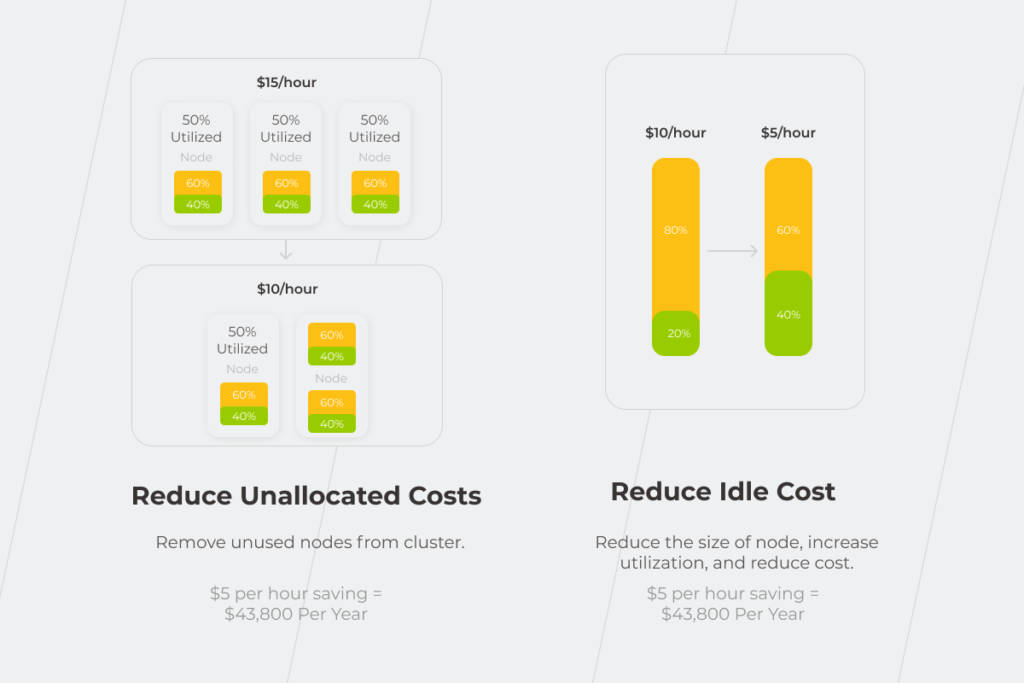
Three-headed dragon of ERP: implementation risks

Enterprise resource planning solutions can be deployed on-premise, in the cloud, or by uniting both options, but the risks they face during the implementation are, for the most part, the same for all the system types. These risks can be broken into three groups, namely: organizational, business-related, and technological ones. Let’s dig deeper into each of them. 

Organizational risks

Changing the company’s mindset is always the hardest part of any transformation. Processes and technologies follow people’s changes, not the other way around. You can build perfect technological solutions but if rejected by your employees, they will lead your company nowhere.

  • Unclear goals and unrealistic expectations

Enterprise resource planning isn’t a cure-all. Custom ERP 100% adjusted to your business needs can’t replace basic business logic. If you don’t have a clear idea about the exact business value and outcomes of a new system for your business, it won’t work out.
You’re likely to make quite a number of ERP implementation mistakes if your goals of the system’s adoption or modernization are unsettled. For instance, you risk choosing the wrong vendor or implementation partner or going with an inappropriate implementation approach. 

ERP implementation barriers

Lack of change management 

There is another serious organizational risk of ERP implementation, related to the employees’ desires, or, rather, reluctance, to absorb the associated changes. Naturally, staff would prefer to stay with the habitual system — people don’t understand why to replace or improve something that’s not broken. 

Thus, except for aligning project goals with the organization’s global business strategy and reviewing them through the implementation process, decision-makers have to explain the value of a system implementation or modernization to the employees. 

To persuade your staff that the new or modernized system will simplify their day-to-day tasks:

  • Inform your employees about the novelties and milestones as the project progresses and establish reliable feedback channels. By doing this, you’ll be able to turn the opponents of an ERP project into its strongest advocates. 
  • Give your employees a chance to test the system before the final implementation. Let them get used to the system and understand that switching to a new solution is not as inconvenient as it might initially seem. This approach can also help you uncover ERP implementation mistakes at the early stages.
  • Organize reskilling and role-based training on both systems and processes. That way, you’ll ensure end users can work effectively in the new environment and sustain the implemented changes.
ERP implementation risks

These risks of ERP implementation arise from organizational misunderstandings and lead to costly business consequences. Note them down so that you won’t repeat the story of the National Grid, a utility company that got into huge trouble when 15,000 invoices couldn’t be processed and financial reporting was so bad that the company couldn’t get short-term loans necessary for its cash flow.

  • Misleading cost analysis 

The total cost of ownership (TCO) isn’t equal to the purchase price of a system. Conduct a thorough TCO analysis in advance not to be appalled by overall expenditure. Don’t disregard: 

  • Testing. Putting untested software into production and, then, fixing issues in the already implemented system is more expensive than testing it throughout the entire software development lifecycle and handling problems as they arise. 
  • Employees’ training. The probability that your staff will accept the new system with ease on the first day of ERP implementation is close to zero. That’s why you shouldn’t skimp on your training budget.
  • ERP customization. The more you adjust an out-of-the-box system to your business needs, the more it costs in terms of maintenance and support. Panorama indicates that only 62% of organizations have completed their ERP implementation projects on or under budget. The others experienced overruns of 66% on average.
ERP
  • Over-customization 

Over-customization is a common risk of ERP implementation both for enterprises and mid-size organizations. It can seriously postpone the system’s go-live date and increase its maintenance costs. 

Customization is great as long as it focuses only on areas that are crucial for your business success and doesn’t contribute to the undue complexity of your system. For a manufacturer, such an area might be inventory management that allows tracking raw materials necessary for further work: which do you have on the shelf, how quickly can they be delivered to the manufacturer, and how long does it take to request a new material supply? 

  • Violations of regulatory compliance 

Your data may turn out to be inconsistent with regulatory compliance. For example, some regulations can prohibit storing data about your customers’ gender. In that case, you’ll lose some marketing opportunities, such as the possibility to send targeted letters to your customers.
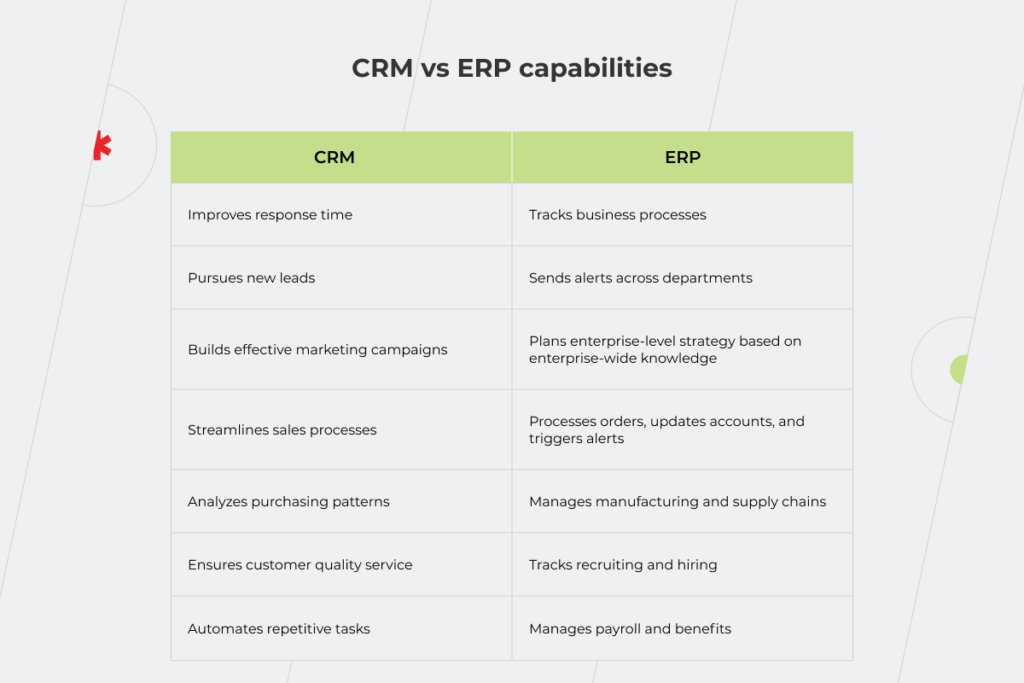
You’ll have to improve the system at a significant cost if it doesn’t align with all the required laws and obligations at the early stages of the ERP implementation as it happened with Woolworths. The company hadn’t been properly documenting its data for six years, and consequently, had no opportunity to verify whether the data complied with the regulations. What started as a promising $200 million ERP implementation ended a few years later as a tremendous failure that cost the company more than $766 million due to non-compliance with laws and regulations, and other business-related and technological issues. 

Technological risks

Along with operational and business-related risks of ERP implementation, you should pay attention to the technical part of the project. Don’t forget to properly organize the data migration process, set aside enough time for system’s testing, take care of security, and make sure you have experts to maintain the new solution.

  • Data migration issues

Data migration is one of the key things to consider during the ERP implementation process. The problem with it often occurs when the data stored in the source system is represented by both structured and unstructured information. If you transfer unstructured data from the source documents, this information will require additional processing and verification for accuracy and authenticity before being exported to an ERP software. And the more operations you have to perform, the higher the system’s maintenance cost is.

Sometimes the information can’t be transferred to the new ERP in the same format as it doesn’t fit into any category. In that case, the risk of data loss increases. To mitigate it, you should think ahead about the data categories you’ll need for the new system and the data categories you actually have. That’s why working with an experienced partner in enterprise software development is crucial for businesses that haven’t previously encountered the building or modernization of ERP systems.
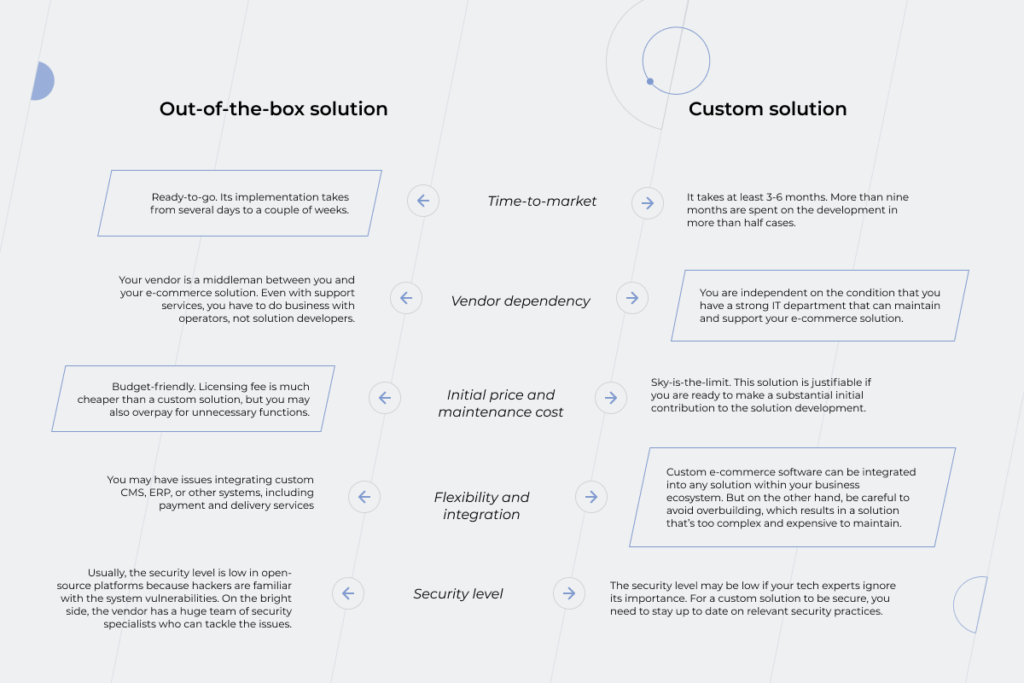
Another factor that undermines data quality is duplicated data from multiple sources, which is a serious productivity killer and the reason for potential inaccurate reports and wrong business decisions. If you’ve been using different CRMs for company-wide tasks and for the sales department and haven’t sorted out this issue before ERP implementation, the information on your customers can be transferred to the new system twice, badly affecting the accuracy of sales and marketing analysis. 

  • Lack of testing on the pre-production stage

Testing helps keep a finger on the pulse of the system’s workflow and technicalities to leave no room for a mishap and ensure the system is set in line with your company’s needs. Good testing happens when the QA engineer delves deep into your business processes and comes up with relevant tests. For an organization that sells goods, the testing team can check what the system does if a customer takes the product back or how it reacts if a purchase is returned to storage A instead of storage B, etc.

  • Poor security control

The major point about the security challenges in implementing ERP is that segregation of duties should lie at the heart of user access. Such an approach decreases the probability of data breaches because of employees’ ignorance and, as a result, the need for a costly system redesign. Furthermore, establishing strong authentication rules as weak authentication can cause open network shares and, thus, data leakage that might cost you a fortune in terms of money and reputation loss. 

  • Lack of skills 

Just as people become the primary concern when it comes to ERP implementation, they are also the cornerstone regarding the development process. If you are not sure about the technical mastery of your in-house tech team, then it’s worth reaching out to an experienced ERP software company. Working with business analysts and developers who have strong expertise in similar projects will spare you the risk of wasting the time figuring out the nuts and bolts of the system. Also, consider the level of employee turnover in the vendor’s company. The more people are replaced, the more expertise goes away. That’s why at least key team members should stay to guide the others through the challenges in implementing ERP. Even if a new specialist has the same level of expertise as the former team member, it takes time to sort out why the system works the way it does. 

ERP implementation mistakes to avoid from our *instinctools’ expert

The desire to complete the transformation quickly is understandable — organizations want to benefit from the new solution faster. But rush causes shortsightedness which, in its turn, leads to three common mistakes in ERP implementation:

  • Decision-makers are unable to prove the value of change to the staff. It’s always a business idea that drives ERP implementation. But if there’s no agreement between C-suites and other employees, you run the risk of getting a solution that won’t be viable. That’s why discussing the future ERP with the stakeholders throughout all the departments is paramount to succeed in this transformation. 
  • Desire to roll out the system straight into production. Before the ERP is launched, your employees should have the opportunity to get acquainted with the system and to give feedback about it. Is it convenient? Can some parts of it be designed in another way? Using the collective brain power of your team can save you time and money in the future. 
  • System’s inability to scale and change. Your business processes as well as the input data can change and so should your system. It will be more problematic and expensive to rebuild it in the pre-production stage if you don’t make the provision for changes at the beginning of the project. 

Top 3 questions for an ERP consultant

To minimize the number of ERP implementation challenges, ask your vendor the following questions:

  • Can the source code be provided and is it included in the price of ERP development? By having the system’s full source code, you’ll be free from dependency on the vendor that initially provided you with the software. 
  • What programming language is the ERP system written in? There might be two issues here: the first one is an outdated language that is no longer supported by the language developer or ERP system itself. Another problem is a language developed exclusively for the ERP system, so it’s difficult to find an alternative programmer, and chances are that the developed solution won’t be compatible with your software. 
  • How is the technical support organized? Choosing custom ERP development, you have the possibility to keep in touch with the project team as part of maintenance and support services even after the system implementation. Meanwhile, with a ready-made solution, you risk going through the circles of hell being kicked from one operator to another and explaining the essence of the problem multiple times to the people who have nothing to do with the ERP development. 

Start with the people and processes, then get to the  technical part, not the other way around

To get through all the challenges in implementing ERP and reap the benefits the system offers, first handle the issues around your employees’ awareness about the ERP implementation to ensure everyone within the company is on the same page. Then deal with the technical stuff such as security measures, data migration, quality issues, and so on.

If all this seems like too much to have on your plate, *instinctools experts are ready to take it from there — drop us a line.

FAQ

What could be the barriers to ERP implementation?

Challenges in implementing ERP refer to the three types of barriers: organizational, business-related, and technological. Without considering the ERP risks of all three types you won’t succeed in implementing enterprise resource planning. People-related issues are considered to be the most difficult to overcome, so fix them first and then move on to technological challenges.

What is the biggest challenge with ERP systems?

Selecting an ERP type suitable for your business is one of the serious challenges in implementing ERP. There are on-premise, cloud, and hybrid solutions. You should choose an option depending on your organization’s internal processes and the answers to the following questions: How important is data security to you? Can you manage your own server center? Do you have to build a totally new system or is the modernization of the old one enough?

Anna Vasilevskaya
AI modified real photo
Anna Vasilevskaya
Account Executive

Get in touch

Drop us a line about your project at
[email protected] or via the contact
form below, and we will contact you soon.