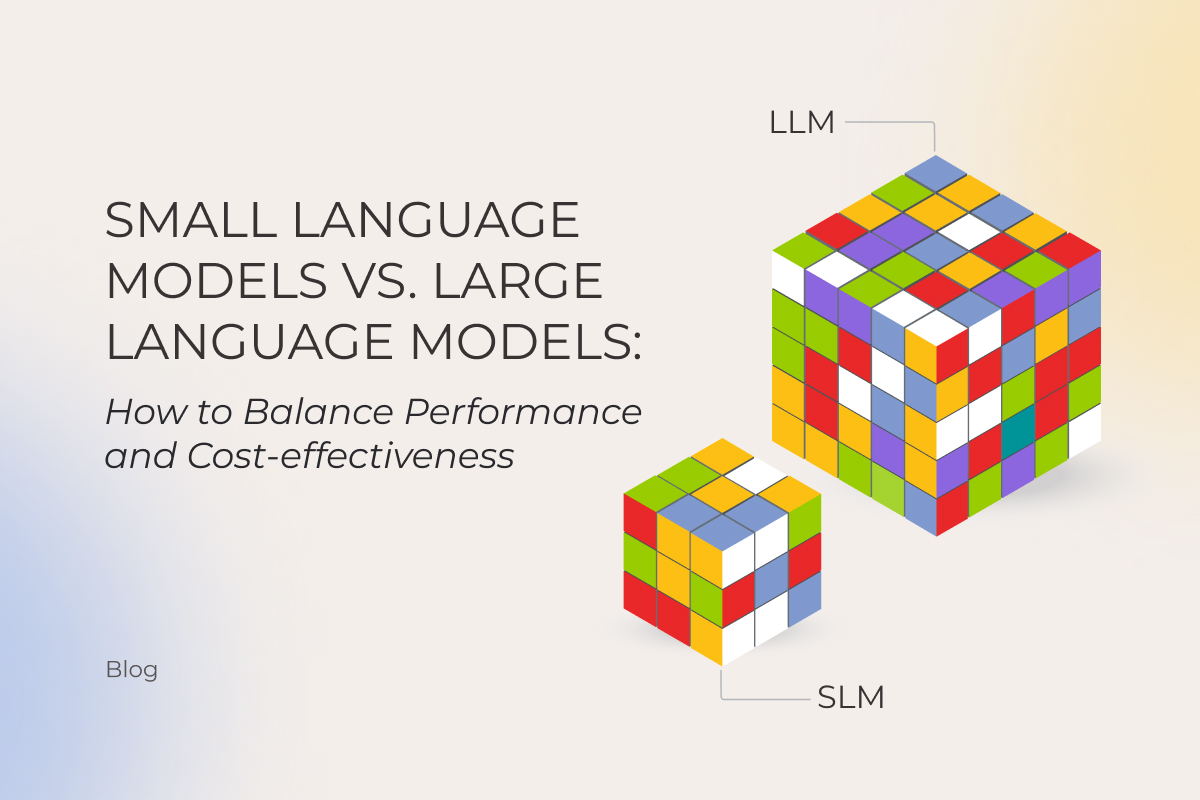
LLM vs. SLM: Key Differences, Advantages, and How to Choose the Right Language Model

Does size still matter? With AI, the default assumption used to be “yes.” More parameters, better results, end of story. That logic held until small language models (SLMs) started punching above their weight. Gartner’s prediction is that smaller, task-specific models will hit 3× the deployment volume of general-purpose LLMs by 2027, a signal that the LLM vs. SLM question has shapeshifted. Business owners who once asked “which model should I pick?” are now asking how to orchestrate both.

Instinctools’ AI engineers have mapped the SLM vs. LLM comparison as it stands today, underlining when it’s reasonable to downsize to an SLM, and when banking on an LLM pays off. 

What is an LLM and what is an SLM?

Both large and small language models (LLMs and SLMs) are artificial neural networks trained on vast amounts of data and built to process and understand natural language and perform a range of tasks from simple text summarization to taking actions on the user’s behalf. 

If all language models rest on the same foundation, what is the difference between LLMs and SLMs? Primarily, the number of parameters, which are the internal values a model learns during training. The more parameters it has, the more patterns it can usually capture. SLMs typically range from 1 billion to 15 billion. Phi-4-mini, Mistral 7B, and DistilBERT are some of the go-to picks in this range. LLMs start in the tens of billions and reach into the trillions, with GPT, Claude, and Gemini models leading the pack.

LLM vs. SLM: key differences at a glance

The SLM vs. LLM gap no longer boils down to “small versus powerful.” The tradeoffs stretch across infrastructure costs, latency, deployment flexibility, reasoning depth, and governance overhead. Here’s how both model families compare in production environments.

CriteriaSLMLLM
Resource requirementsRuns on consumer hardware, edge devices, or a single GPURequires high-end GPU infrastructure and large memory footprint
Cost of adoption and usageLower inference costs, but usually requires fine-tuningHigher inference costs, though broader out-of-the-box capabilities reduce customization work
Fine-tuning timeHours to weeks with LoRA/QLoRA on limited hardwareMonths (in rare cases when fine-tuning is necessary)
National specificityDiverse representation of alphabet-specific languages Broader multilingual coverage, but uneven cultural representation
Capabilities rangeStrong in narrow, repetitive, and latency-sensitive tasksBetter at broad reasoning, orchestration, and open-ended workflows
Inference speedFaster response times and lower latencySlower inference, though MoE architectures narrow the gap
Output qualityLower due to a smaller context window More reliable in complex reasoning and long-context tasks
SecurityMight present certain risks (API violation, prompt injection, training data poisoning, confidential data leakage, etc.) and requires clear AI governance

Advantages of SLMs over LLMs

SLMs have earned their spot as a practical alternative to large language models for businesses that want to adopt AI without investing a fortune into the technology. The core advantages of an SLM over an LLM include:

  • Lower inference cost (up to 100 times cheaper per query via API, and zero per query when deployed on-device).
  • Faster response times, especially for short, bounded tasks such as classification, routing, extraction, autocomplete, simple customer support, and local assistants.
  • Reduced vendor lock-in when using open-weight models, as businesses can self-host, fine-tune, quantize, and move models across different infrastructure stacks.
  • Deployable on consumer hardware, edge devices, and smartphones, particularly with quantized models such as Llama 3.2 1B/3B, Phi, and Gemma-family models.
  • Faster and cheaper customization (weeks and a single GPU vs. months and a cluster).
  • Lower energy consumption per inference, a smaller carbon footprint at scale.

When LLMs still win: strengths of large language models

LLMs are broad-spectrum AI language models built for complex tasks that require broad knowledge, multi-step reasoning, and deep contextual understanding. The LLM advantages over their smaller counterparts include:

  • Stronger multi-step reasoning across domains like legal analysis, financial modeling, and scientific research.
  • Much larger context windows, enabling the model to work with long documents, large research corpora, complex conversations, and sometimes substantial portions of codebases or document sets in one pass .
  • Multimodal capabilities covering text, image, audio, and video in a single model.
  • Lower need for task-specific fine-tuning, because frontier LLMs often perform well with prompting, retrieval-augmented generation, tools, and examples. However, production deployments still require evaluation, guardrails, monitoring, and workflow design.
  • The reasoning and planning depth that makes LLMs a natural fit for the orchestrator role in multi-agent systems, where a central model coordinates and routes tasks to specialized smaller models.

An SLM vs LLM comparison across 8 criteria

Building and training models from scratch requires significant investments, often beyond the reach of many businesses. That’s why, in this article, we focus exclusively on pre-trained models, comparing notable LLMs such as ChatGPT, Claude, and Gemini, with SLMs like Mistral, Phi, and Gemma. 

1, Resource requirements

When it comes to SLM vs LLM resource requirements, the gap remains wide. LLMs contain hundreds of billions to trillions of parameters, and high memory consumption makes them a resource-intensive technology. If you target the latest GPT, Claude, or Gemini models, you’ll need NVIDIA H100 or B200 GPUs, which cost $25,000-$35,000 per processor.

SLMs’ compact model size and lower computational power requirements enable them to run on a broader range of devices, including regular computers and smartphones. For instance, Microsoft’s Phi-4-mini needs just 4GB of RAM, so with an SLM as a resource-friendly alternative to LLM, companies can hop on the AI train without upgrading their hardware park.

Instinctools’ verdict: SLM.

2. Cost of adoption and usage

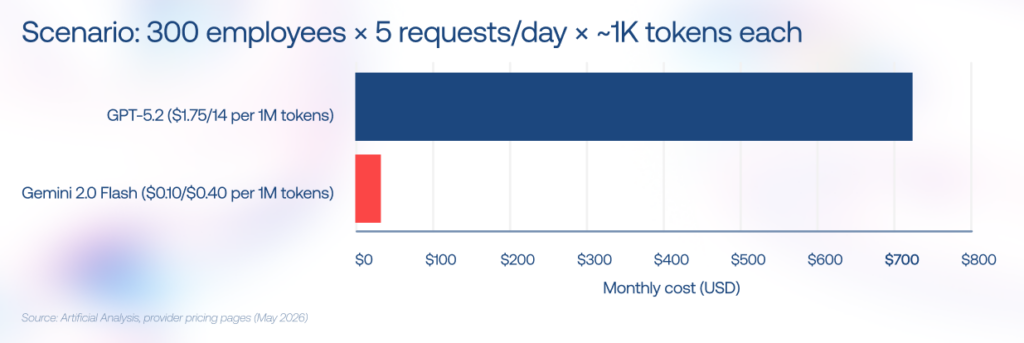
The cost coin has two sides: fine-tuning and inference. LLMs save on fine-tuning since they handle most tasks out of the box, but inference adds up quickly at scale. SLMs need fine-tuning, yet their day-to-day usage is far more affordable.

To feel the disparity, consider this scenario: you have 300 employees, each making five small 1K-token requests per day. At the time of writing, a frontier GPT model priced$1.75/$14.00 per 1M tokens, that adds up to around $720/month. Replace it with Gemini Flash at $0.10/$0.40 per 1M tokens, and the same workload drops to roughly $22.50/month. 
Cost of adoption and usage

Instinctools’ verdict: SLM.

3. Fine-tuning time

The logic behind the fine-tuning process is straightforward: the more parameters the model has, the longer it takes to calibrate it. In this regard, adjusting a large language model with trillions of parameters can take months, while fine-tuning an SLM can be completed in weeks.

Parameter-efficient methods like LoRA and QLoRA have shortened the process further. A 7B model can now be fine-tuned on a single GPU in hours, which is how our team compressed a full project with Mistral 7B at its core into just six weeks, stepping up the model’s precision rate from 10% to 75%.

Instinctools’ verdict: SLM.

4. National specificity

The lion’s share of the most well-known LLMs originates from the US and China and doesn’t adequately represent diverse languages and cultures. Studies unveil that LLMs’ outputs skew toward WEIRD societies (Western, Educated, Industrialized, Rich, and Democratic).

Sovereign AI has become a trend, with governments commissioning models trained on local-language datasets. If you compare small language models and LLMs on language coverage, SLMs lead the push with Jais for Arabic, Nanda for Hindi, Typhoon for Thai, and Viking for the Nordic languages. 

Instinctools’ verdict: SLM. 

5. Capabilities range

Both LLMs and SLMs emulate human intelligence but at different levels. LLMs remain the go-to for complex tasks requiring broad knowledge, multi-step reasoning, and deep contextual understanding. Once you move to multi-agent systems, LLMs carry the orchestration work, coordinating several agents, tracking long-horizon objectives, switching tools mid-process, and resolving conflicts between intermediate outputs.

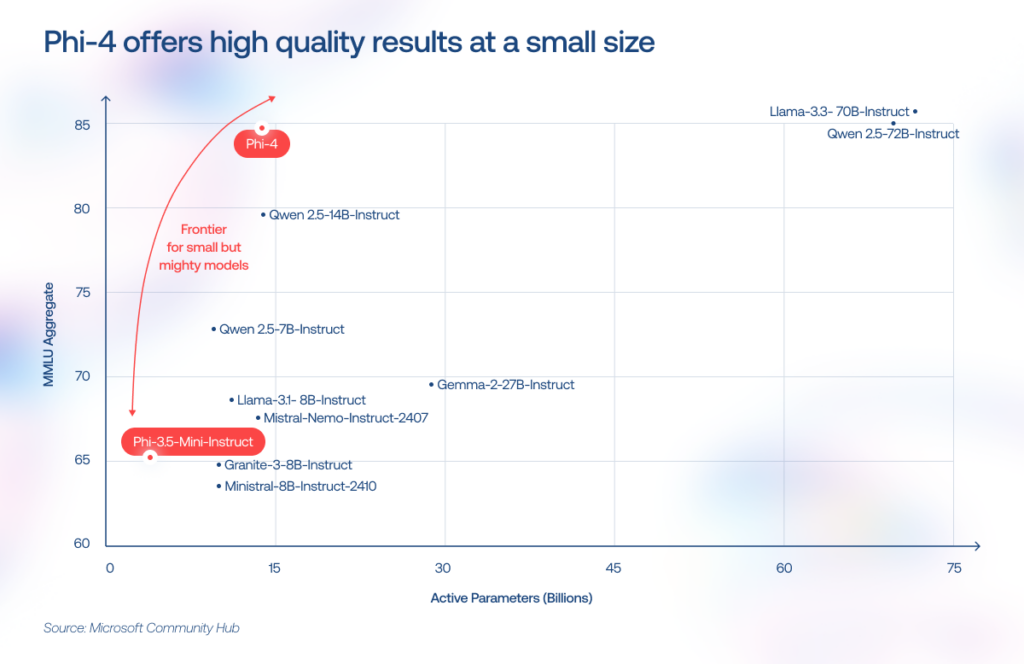
SLMs are narrow-focused models designed for specific tasks like text classification, summarization, and entity extraction. But the gap is narrowing. For example, Phi-4-mini (3.8B parameters) now matches models twice its size on reasoning benchmarks, a gap that would have been unthinkable two years ago. SLMs have also gained 128K context windows, function calling, and vision capabilities. So with strong context engineering, you can squeeze far more out of a compact model than raw parameter counts would suggest.
What we witness on the ground is that enterprise AI stacks now resemble a relay race, when an LLM acts as the planner and coordinator and passes the baton to lightweight SLMs to handle specialized subtasks at lower cost and latency.

— Pavel Klapatsiuk, AI Lead Engineer, Instinctools

Instinctools’ verdict: LLMs and SLMs to get the best of both worlds.

6. Inference speed

LLMs’ power as a broad-spectrum solution comes with performance trade-offs. In dense architectures, more parameters typically mean more computation per generated token, which can make large models slower and more expensive to serve than smaller models.

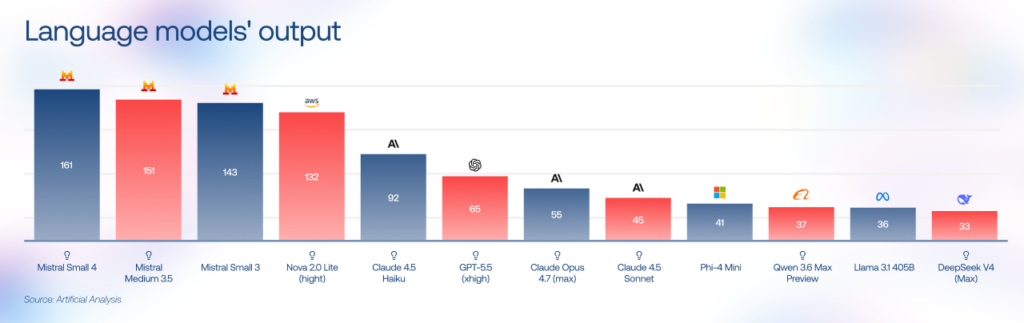
LLM providers address this by switching from dense architectures to sparse Mixture of Experts (MoE) patterns and by releasing their own lightweight tiers (GPT-5 nano, Gemini Flash). On the SLM side, Mistral Small 3 runs at 143 tokens/second on 16GB of RAM, and Gemma 4 (a 26B MoE model) also targets faster local inference with techniques such as multi-token prediction. 

For latency-sensitive SLM vs LLM decisions, smaller models often have the edge, especially for short, repetitive, on-device, or edge workloads.
Instinctools’ verdict: SLM.

7. Output quality

On general reasoning and coding benchmarks such as MMLU-Pro, GPQA, SWE-bench, LiveCodeBench, HumanEval, and MMMU, frontier LLMs outperform smaller models, especially in open-ended reasoning, advanced coding, and multilingual tasks. Their advantage comes not only from broader training data, but also from greater model capacity, stronger post-training, reasoning-focused optimization, tool use, and more mature long-context handling.

SLMs can achieve comparable accuracy on narrow enterprise tasks when the workflow is well-defined and supported by high-quality domain data, retrieval, prompt engineering, constrained outputs, or fine-tuning. But once the task moves beyond a tightly controlled scope, larger models tend to stay more stable and coherent under pressure.

Instinctools’ verdict: LLM.  

8. Security

While the cost and quality of AI solutions often make enterprise leaders scratch their heads, it’s the security concerns that really top the list of hurdles. Any production AI system needs clear governance around what data enters the model, where that data is processed, how long it is retained, who can access it, and how model outputs are logged, monitored, and audited.

For cloud-hosted LLMs, organizations should evaluate vendor terms, data-retention policies, training-data exclusions, API access controls, encryption, logging, data residency, and regulatory compliance before deployment. Many enterprise AI providers now offer strong privacy commitments (for example, API or enterprise customer data is commonly excluded from model training by default), but companies still should validate these guarantees against their own security, legal, and compliance requirements.

SLMs need robust governance just as much, but they give companies far more flexibility in where data gets processed and stored. Small models can run on-premises, on edge infrastructure, or directly on employee devices, giving businesses tighter control over where sensitive information is processed and stored. This setup is particularly attractive for industries handling regulated or proprietary data.

Instinctools’ verdict: SLM. 

When to choose an SLM vs. an LLM: decision framework

Choosing the best AI models in the SLM vs. LLM debate is like hiring a team. You don’t bring in a Nobel-level strategist to sort invoices, and you don’t hand a billion-dollar negotiation to an intern fresh out of onboarding. AI stacks work the same way, routing simple jobs to smaller models and reserving heavyweight reasoning for the few tasks that need it.

Use caseRecommended model typeWhyExample models
Customer support chatbotSLMHigh request volume, predictable workflows, low latency requirementsMistral Small 3, Phi-4-mini
Internal document Q&ASLMEasier on-prem deployment and domain fine-tuningLlama 3.3 8B, Gemma 3
Code copilotLLM or hybrid setupMulti-file reasoning and long-context understandingClaude Sonnet 4.6, GPT-5.2
Edge or IoT deviceSLMMinimal compute footprint and offline operationLlama 3.2 1B, Gemma 3n
Healthcare records processingSLMGreater control over sensitive data handlingFine-tuned Mistral, Phi-4
Multilingual content generationLLM or sovereign SLMBroad language coverage versus local cultural adaptationGemini 3.1 Pro, Qwen 3
Creative or long-form writingLLMBetter narrative consistency and contextual depthClaude Opus 4.6, GPT-5.2
Multi-agent enterprise workflowsBoth Balances cost, speed, and reasoning quality across tasksSLM workers + LLM orchestrator

Frontier LLM, compact SLM, or a hybrid setup?

Let’s talk

Examples of SLMs and LLMs in production for 2026

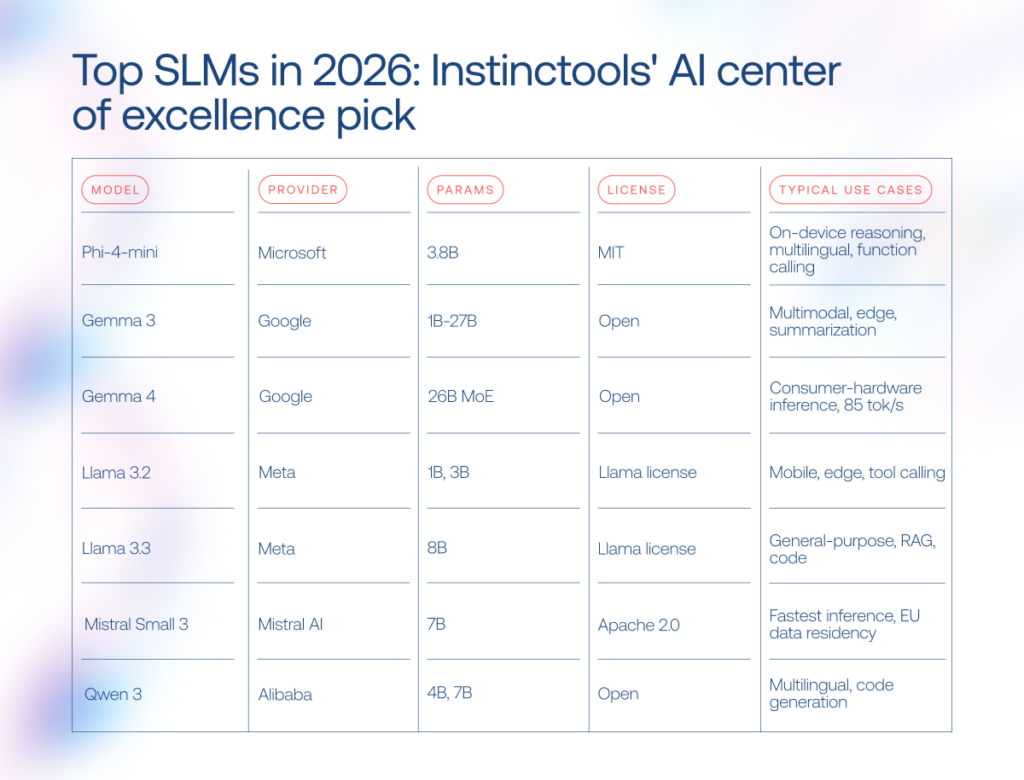
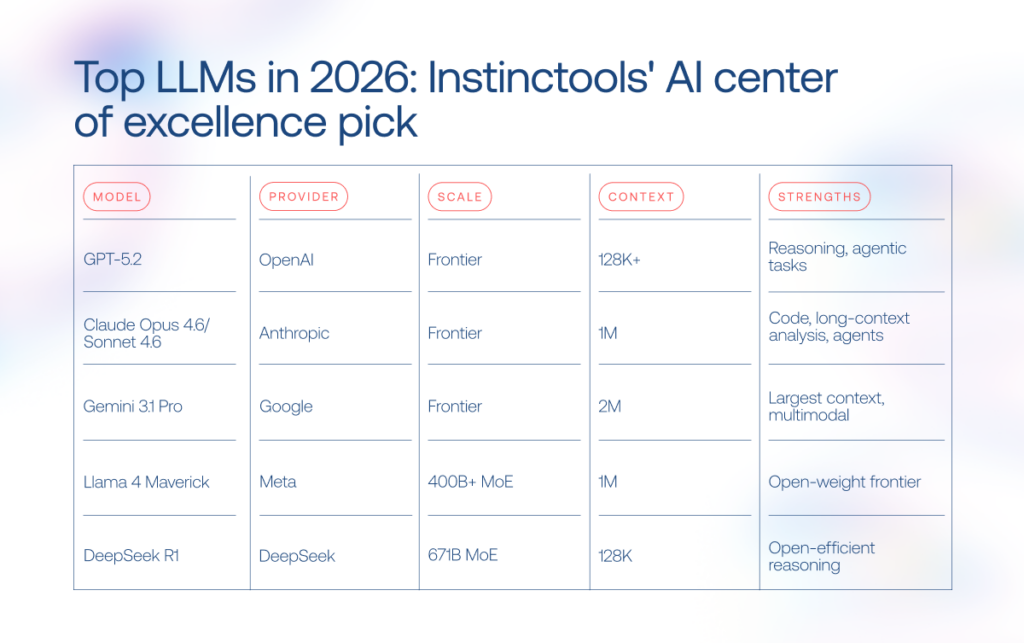
The AI language model market has become crowded fast. A couple of years ago, most discussions revolved around GPT-4-level systems. Now the field stretches from billion-parameter SLMs running on laptops to LLMs built for multi-agent reasoning and million-token context windows.
SLMs
LLMs

Custom LLM and SLM development with Instinctools

Now that you know where SLMs make sense and where LLMs still dominate, the harder part begins: turning that knowledge into an AI system that survives contact with real production workloads.

Our team helps businesses with custom LLM/SLM development, covering:

  • Model selection based on your business requirements and limitations
  • Fine-tuning on private data 
  • RAG pipeline integration
  • Goal-oriented context engineering to widen the range of AI capabilities
  • Agentic workflow design and orchestration
  • MLOps
  • Fully on-premises deployments

Sometimes the answer is a compact SLM running locally for privacy and latency reasons. Sometimes it’s a tiered architecture combining multiple models behind one orchestration layer.

Our AI engineers are a click away if you need expert advice

Reach out

The future belongs to hybrid AI stacks

After exploring what’s possible, determine what’s practical for your software needs. Both LLMs and SLMs are powerful tools, but they won’t bring the desired benefits on their own. It’s still essential to identify how to effectively integrate them into your business processes, considering industry and national specifics. 

If your resources are limited, you want to test your idea ASAP, or need a model for only a specific type of task, an SLM can help you hit it big without breaking the bank. For deeper reasoning, multi-agent orchestration, or long-context analysis, LLMs hold the advantage. In practice, though, the biggest gains come from combining both: smaller models handling high-volume routine work, larger ones stepping in for the hardest decisions.

Draw on the power of language models with a trusted tech partner

Book a call

FAQ

What is the difference between an LLM and an SLM?

The difference between an LLM and an SLM comes down to scale, training scope, and intended use. LLMs are trained on massive web-scale datasets and usually contain tens or hundreds of billions of parameters, making them better suited for broad reasoning and open-ended tasks. SLMs are smaller, often below 10B parameters, and optimized for focused workloads like classification, summarization, or on-device AI. For example, GPT-5.2 is built for broad reasoning, while Phi-4-mini (3.8B) is designed for efficient local inference. Still, the boundary is getting blurrier with each new model.

What are the advantages of an SLM over an LLM?

The biggest advantages of SLMs over LLMs are lower cost, faster inference, and easier deployment. Smaller models can run 10-50× cheaper than large-scale LLMs. They can also work fully on-premises or on edge devices, keeping sensitive data inside the company infrastructure. In narrow enterprise tasks, a well-trained SLM may also produce fewer hallucinations because its scope stays tightly controlled.

When should I choose an SLM instead of an LLM?

In the SLM vs. LLM standoff, SLMs make more sense when the task is narrow, repetitive, latency-sensitive, or privacy-critical. Common examples include entity extraction, summarization, customer-support routing, and edge AI systems. They also fit workloads with very high query volume, where large-model API costs spiral quickly. If your data cannot leave the company perimeter or the model needs to run locally on limited hardware, an SLM or hybrid setup is the safer bet.

What are examples of small language models?

Popular SLM examples in 2026 include Phi-4-mini (3.8B), Gemma 3, Mistral Small 3, Llama 3.2 1B/3B, TinyLlama 1.1B, and Apple OpenELM. Some focus on multilingual reasoning, others on edge deployment or fast inference on consumer hardware.

Are SLMs as accurate as LLMs?

SLM vs. LLM output quality depends heavily on the task. On broad reasoning benchmarks like MMLU or HellaSwag, larger models still outperform smaller ones, especially when the task requires open-ended reasoning, advanced coding, multilingual understanding, or cross-domain synthesis. But in narrow enterprise workflows, the gap can shrink dramatically after fine-tuning. A well-scoped SLM processing medical records or support tickets, bolstered by high-quality domain data, retrieval, constrained outputs, or fine-tuning can match and sometimes outperform a general-purpose LLM.

How much does it cost to develop a custom SLM or fine-tune an LLM?

The cost of custom LLM/SLM development varies mostly with data quality, infrastructure demands, and deployment complexity. Fine-tuning an open-source SLM like Mistral 7B or Phi-4 on private data usually starts around $15,000. Building a domain-specific model from scratch can reach $80,000-$250,000 or more. A production-grade RAG pipeline around an existing model often falls somewhere in between. If you want a realistic estimate, it’s worth discussing your use case with your AI engineering partner before locking into one architecture.

Can I run an SLM on-premises or on edge devices?

Yes. One of the main reasons companies adopt SLM on-premises setups is that compact models run comfortably on consumer hardware. Models below 7B parameters can work on a single RTX 4090 or even on CPUs with quantization. Lightweight options like Phi-4-mini or Llama 3.2 1B already run on laptops and smartphones. Common deployment tools include Ollama, llama.cpp, MLX, ONNX Runtime, and NVIDIA Triton.
Ascending New Heights of Coding with AI in Software Development

Today, every company, irrespective of their focus, is a tech-first company. When technology becomes an integral part of everything your organization does, having the means to master continuous delivery is instrumental to fuelling your business growth. In 2025, AI in software development is billed to become that growth engine.

As an AI-savvy company, we help our clients leverage the power of artificial intelligence in software development, applying it to specific tasks — and we’re sharing our battle-tested expertise and best practices in this guide.

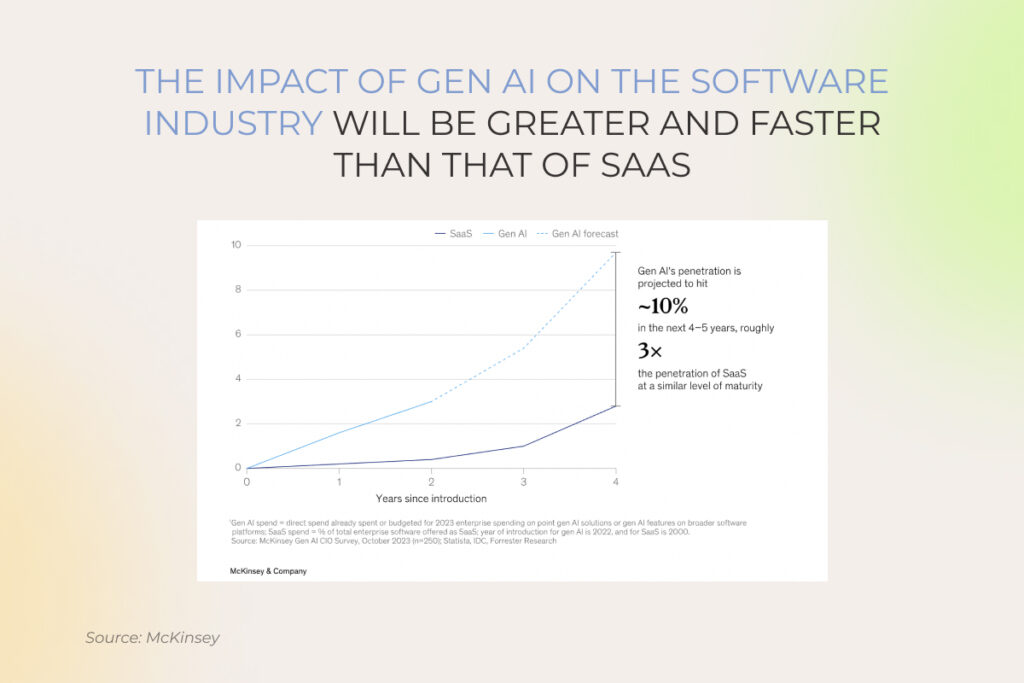
Gen AI and SaaS enterprise penetration rate, % of spending by year since introduction

Benefits of AI for software development go beyond automation

When AI made its debut into mainstream technology, organizations approached it with a cautious mindset. These days, IT-related use cases such as assisted code creation, testing automation, and others are already enjoying high adoption rates and are making the largest share (40%) of planned enterprise gen AI spending. Let’s see what benefits have turned AI software development from faddish to fundamental.

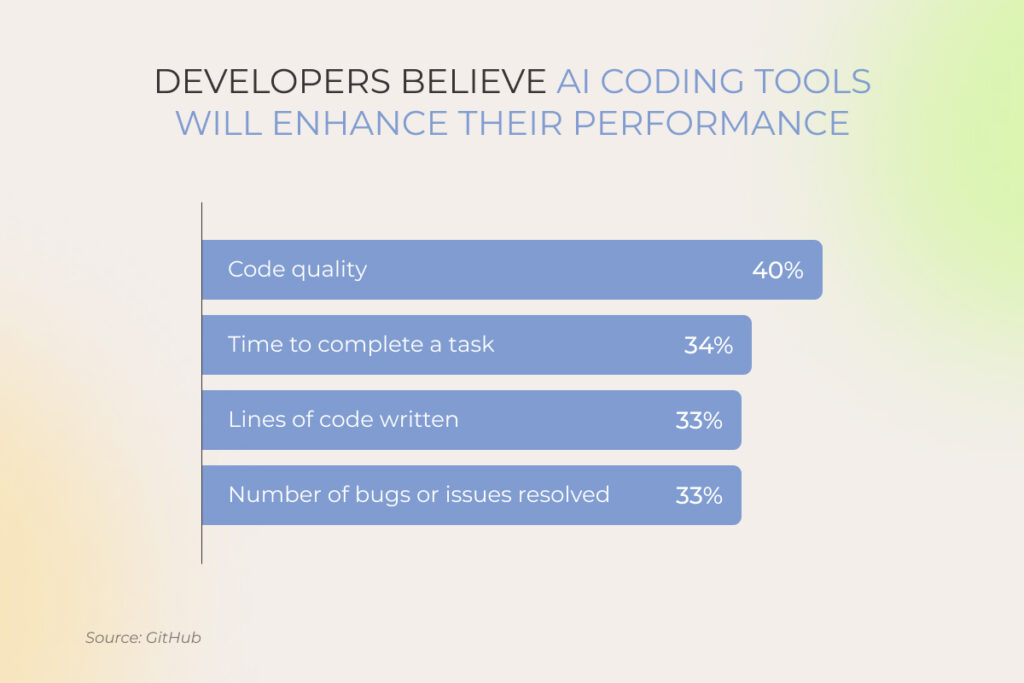
AI assistants' impact: developers' perspective

Cutting costs associated with development efforts

AI-powered software development is one free from time-consuming tasks, such as test cases, exploratory data analysis, small code updates, bug detection, and others. By automating away menial activities, AI tools bring down the number of labor hours, ultimately leading to a more cost-effective development process. Some of our clients wield the sword of machine intelligence to optimize maintenance costs for cloud infrastructure. 

Our client’s team automated repetitive tasks inherent in infrastructure maintenance by employing AI to produce a prewritten set of recommendations for the automated execution of tasks. Bundling the recommendations in a playbook, the team drew up blueprints for repetitive actions, cutting development efforts and associated costs by 30%.

Accelerating developers’ productivity and time-to-value

Software engineers can join forces with an AI pair programmer to tap auto-complete features like code recommendations and context-aware suggestions. The latter eliminates the need to manually search for code snippets or specific function syntax, minimizing context switching for developers.

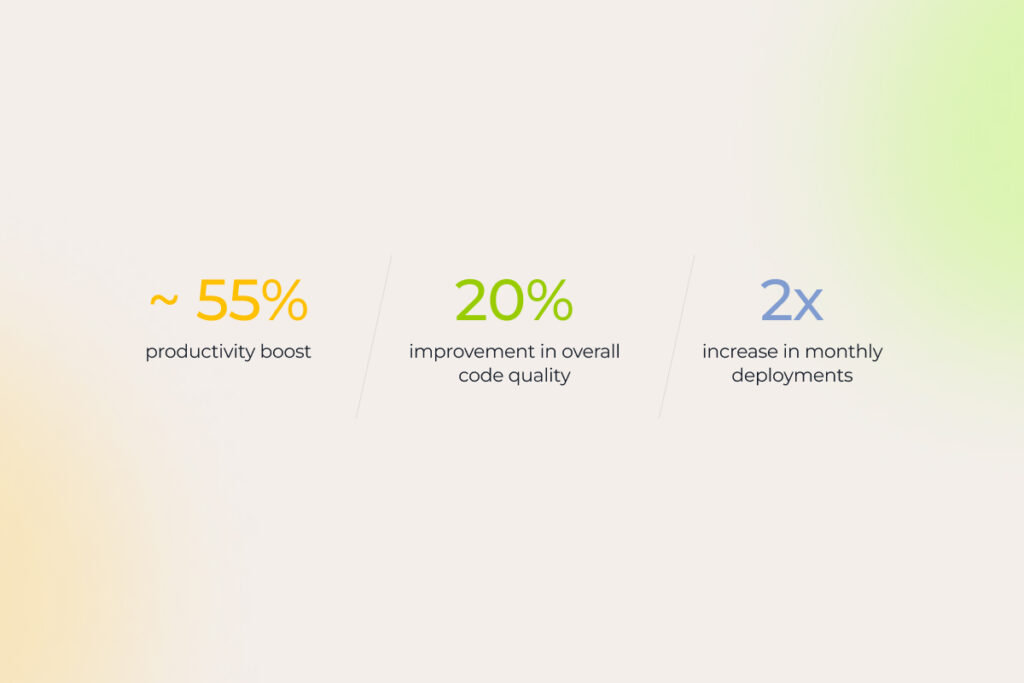
AI code assistant benefits

AI toolbelts like Github Copilot also keep developers in the zone by offering integrated development environments, summaries for pull requests, and explanations for code blocks.

The majority of professional developers — 82,7%, to be exact — cite increased productivity as the biggest benefit of AI-powered coding assistants.

We’ve seen this firsthand: on average, our clients have achieved a 25% improvement in their development velocity by introducing artificial intelligence into the software development process.

Our client, a prominent bank in the MENAT region, stated: “Embedding AI tools into the development workflows has changed the game for our developers. These tools can produce an entire script based on just a single comment, cutting coding time in half”.

Productivity gains also translate into swifter and more cost-efficient innovation cycles that allow companies to rapidly adapt to shifting customer needs and snap opportunities faster than their competitors.

Improving code quality

AI-powered developer tools leverage natural language processing to dissect context from a user’s existing code and suggest additional lines of code and functions. It means that smart assistants can identify the optimal approach or solution to the development challenge — based on the natural-language prompt from human software engineers. 

AI tools can also improve the debugging process by quickly identifying and rectifying errors, contributing to a higher quality of deliverables. AI-assisted code reviews and static code analysis minimize the code vulnerability surface and improve its consistency. For example, artificial intelligence puts edge cases, which might be hard to spot through manual testing, on sharp display, leading to a more reliable final product. 

Focusing on building and creating vs. repetitive tasks

Artificial intelligence in software engineering helps 25% of developers manage their workloads more effectively, freeing them up to focus on more creative and challenging tasks instead of grinding away at mind-numbing activities like code formatting or documentation updates. Developers then use this headroom to flex their problem solving skills, analyze feedback from end users, and hatch solutions to novel problems.

Speeding up the onboarding process and flattening the learning curve for new hires

Apart from being the wingman for experienced software developers, AI systems can also help junior specialists get up to speed. By training intelligent systems on the company’s software stack, dedicated software development teams can integrate new hires into the fold faster than usual, accelerating their modus operandi. 

Also, these tools can improve the availability of mentorship and support for junior developers. Unlike team leads, AI tools, with their never-ending bandwidth, can provide instant feedback or relevant suggestions 24/7 to lead rookie developers in the right direction. This creates a valuable tool — artificial intelligence is always there to support junior developers, while senior developers can leverage AI’s insights to provide targeted support when new hires need it most. 

Need AI software developers to set up smart coding assistants?

Reach out 

7 ways AI can supercharge your software development process

Name any software engineering task — and chances are good that, supercharged with artificial intelligence, it can be performed at least 50% faster and up to the highest quality standards.

Have no doubt: thanks to the powerful combo of artificial intelligence and software engineering your team can really speed things up, especially when it comes to these seven activities:

1. Writing boilerplate code

Boilerplate code is a developer’s long-time nemesis, forcing engineers to spend an eternity writing the same tedious sections of code over and over. Artificial intelligence software development can eliminate the associated drudgery by streamlining the process of boilerplate code generation:

  • Pattern recognition — once trained on the existing code base, large language models can identify patterns commonly used in boilerplate code, such as database connections, error handling blocks, and other structures.
  • Contextual awareness — intelligent teammates can figure out developers’ intent and fine-tune the boilerplate code to the unique needs of the project.
  • Code completion — AI-enabled virtual assistants can suggest code snippets based on the surrounding code and auto-complete the boilerplate structure for a specific function.

2. Code suggestions

Much like with boilerplate code, AI co-pilots can act as smart code whisperers for developers, offering semantically relevant code snippets based on their deep learning capabilities. These tools can also guide developers toward the right solution by directing them to the relevant libraries and common coding patterns. 

Besides accurate suggestions with comments, developers can pick the AI brains to get their code inline fixed. 

Source: GitHub

3. Code refactoring and modernization

Most codebases get messy over time due to constant fixes and changing project requirements. Generative AI models fed with well-refactored code can highlight code smells in your existing codebase and suggest refactoring techniques or alternative code structures for enhanced system performance. 

Developers can also ask AI tools to explain legacy code — and then feed this explanation, supplemented with additional information, back into the system to modernize the code and facilitate technical debt management.

4. Code translation

Old-school code translation tools fail to understand the underlying purpose of code due to their focus on the code structure. Conversely, AI-enabled models can discern the code semantics to suggest translations that preserve the original functionality. 

Development teams can capitalize on this superpower to streamline code conversion or app modernization projects, such as converting COBOL to Java.

5. Bug detection

Development teams can also harness the duo of software engineering and artificial intelligence to automatically catch bugs early in the software development lifecycle. Thanks to built-in pattern recognition and machine learning anomaly detection trained on historical data from similar codebases, AI coding tools can spot subtle anomalies in the existing code that might otherwise go unnoticed.

AI pair programmers can also perform code reviews in the background, bringing potential issues to the fore and suggesting areas for closer inspection. 

6. Testing

Quality assurance and testing have a significant scope for automation due to inherent redundancy. Although AI can’t take over testing tasks completely, it can significantly improve testing speed and coverage by enhancing the following aspects:

  • Test case generation and execution — following software specifications, generative AI can produce test cases to help testers cover a wider range of scenarios.
  • Data generation for testing — artificial intelligence proves effective in generating edge cases and corner scenarios that might be challenging to create manually.
  • Performance and load testing — AI-powered testing tools can produce load for performance and load testing.
  • Test planning — smart coding tools can suggest test cases based on historical data, identify missing test cases, and map out dependencies to identify the right order of test execution.

Artificial intelligence also acts as a collaborative assistant for visual testing, exploratory testing assistance, and maintenance of test cases.

“Before introducing AI in the testing workflow, our developers haven’t had enough time to create unit, functional, and performance tests for their code. Bug slipped through the cracks, causing issues in production with missing tests snowballing into tech debt. AI tools have tackled this problem by automating repetitive testing tasks and increasing test coverage without developers doubling the code’, — noted a representative from a consulting company, partnering with us on software development initiatives.

7. Preparing documentation

Code is never static — it evolves throughout development cycles, making it challenging for developers to keep up with documentation updates. Based on code comments and function signatures, machine learning models can automatically create a document that accurately outlines system behavior and its functionality. These tools can also account for the implemented tech stack and project-specific functionalities to generate comprehensive documentation aligned with the specific codebase.

Source: GitHub

Train AI on your data and get personalized insights you can’t find elsewhere

Contact our team
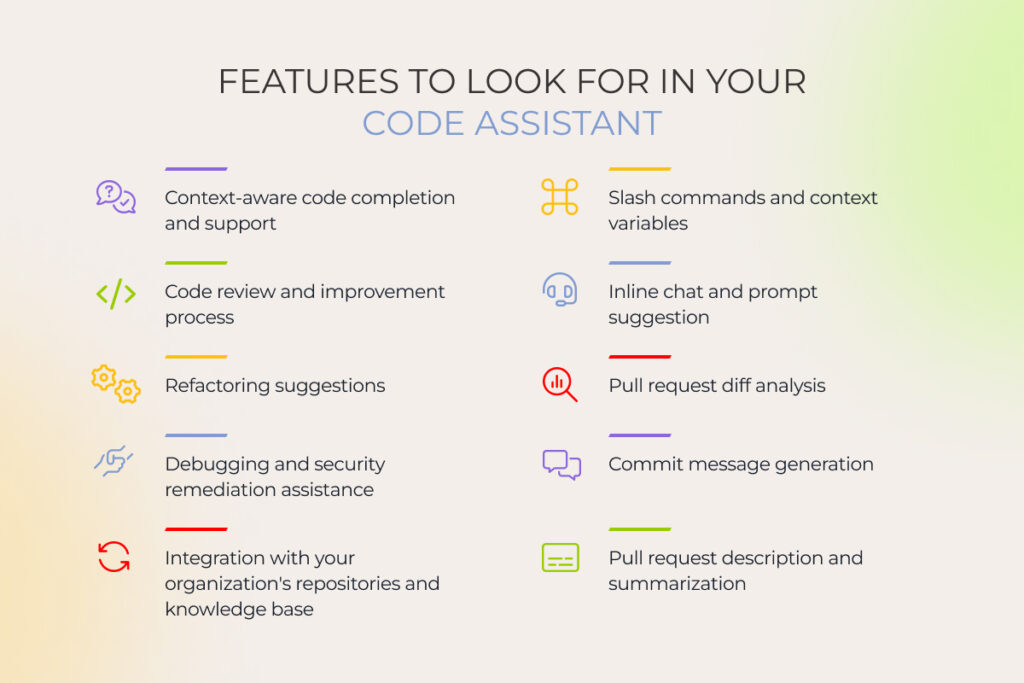
AI code assistant's key features

Which tasks AI for software development is failing at?

Now the main question is: can AI replace software engineers? Not in the foreseeable future. While AI and software development are a power couple, their duo is still a far cry from a fully automated software development process. Artificial intelligence development requires human oversight and collaboration to do its best.

1. Handling a combination of legacy and updated code

AI software solutions have a hard time clawing through a repository that contains both legacy and new code due to the fragmentation and incompatibility caused by the former. Legacy codebases may not integrate well with common frameworks or libraries and often lack structure and adherence to current best practices — which makes it challenging for AI to understand its functionality. 

2. Contributing to organizational and project context

Canned AI–based coding tools are know-it-alls, so they are not designed to consider the unique requirements of your project or your business context. It means that unless you train it on your proprietary data, AI output might not meet your specific performance or security needs. 

3. Non-generic architectures

Artificial intelligence coding tools are capable of mustering basic, high-level design blueprints, while more nuanced architectural solutions remain a near-impossible feat for these tools. Also, the innovative potential of AI is limited by the training data, which means that cutting-edge architectural solutions fall under the domain of human ingenuity, not machine intelligence.

4. Navigating tricky coding requirements

While AI coding tools are all for answering basic prompts, they hit a brick wall when faced with more complicated coding challenges. For example, AI-based tools wrestle with combining multiple frameworks with disparate code logic or generating a code suggestion based on the big picture.

Choosing an AI software development assistant: open-source vs proprietary tools

Standing at the AI crossroads, companies usually face two options. They can either leverage open-source tools such as OpenCV, PyTorch, and Codestral or invest in proprietary solutions such as Microsoft Github Copilot and IBM watsonx Code Assistant.

Open-source tools that put AI algorithms, pre-trained models, and data sets up for public use are favored by the community due to their transparency and limitless options for innovation. Proprietary tools hide the source code from the public eye, yet offer support from the vendor, and potentially more advanced features.

So which one should you opt for? Here’s a table from our experts that summarizes the key differences:

CriteriaOpen-source AI toolsProprietary AI tools
Source code accessFreely availableNot publicly available
CostLower upfront costs + potential hidden costs (additional infrastructure, feature development)Higher upfront costs, lower TCO due to pre-built features
SecurityHigher control over data, yet the vulnerability surface is largerLess transparent, vendor is responsible for security updates
CustomizationHighly customizable, can be fine-tuned to suggest code based on best practices in your repositoriesLimited customization with a few configuration options (custom extensions, plugins)

A new era of development empowerment is underway

As AI continues to push the boundaries of software development, it’s important to remember that it’s not a panacea. Artificial intelligence is an augmentation tool whose true potential lies in its ability to automate menial tasks, enable developers to spend more time on problem-solving and empower them to build high-quality software faster. You can’t expect it to work miracles, but you can embrace the technology to ship software solutions more efficiently than ever before.

Take your software development to the next level with AI

Schedule a consultation

MVP vs MMP: Choosing the Right Strategy for Your Product to Pan Out

MVP vs. MMP development – which is worth investing in? Stakeholders face this dilemma when coming up with the idea of a brand-new digital product or exploring ways to build on top of an existing solution.  

Where do a minimum viable product and a minimum marketable one fit in the software product development path? Can you leverage MMP and MVP concepts, or do you have to pick one option and stick to it as your North Star? And more importantly, let’s talk money — which approach can your business cash in on? Our experts’ battle-tested experience will help to make the right choice. 

Contrast or cohesion: what is the difference between MMP and MVP?

Right off the bat: MVP and MMP aren’t opposites. In the Agile approach, they represent consecutive phases of the software product development process. 

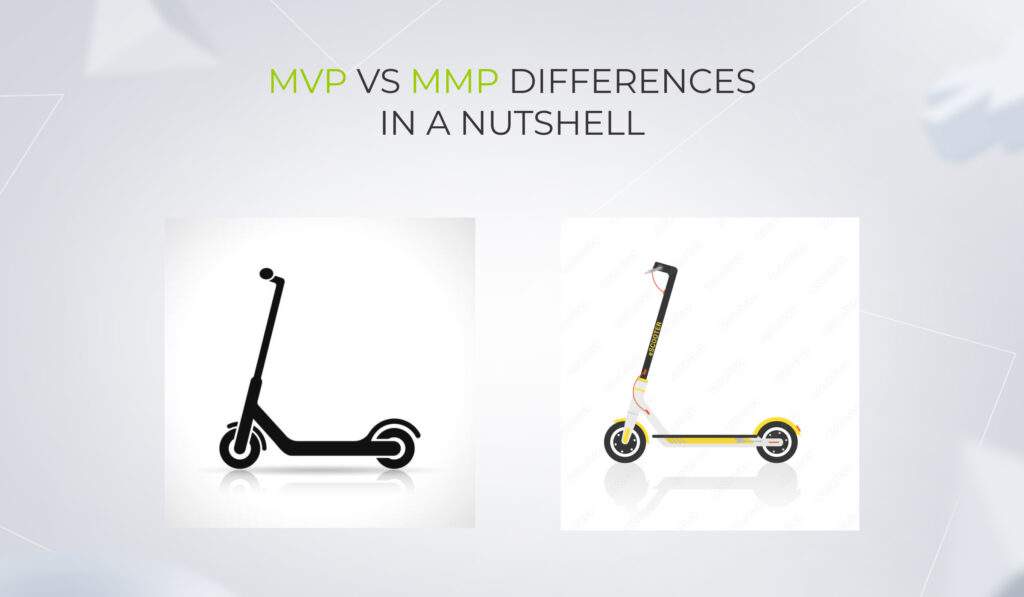
Imagine a basic self-riding scooter. Minimum features, no frills. That’s your MVP. It’s all about giving early adopters a taste, a hook — something they can’t resist even if it isn’t perfect and has limited functionality. It’s the spark that ignites their interest despite its raw design. MVP’s charm? It gets users moving through the city. And as a scooter innovator, it’s your golden ticket to leverage validated learning, gather real-world feedback from the product’s initial users, and evolve.

Now, let’s upgrade.

Enter the MMP. Think electric scooter: sleeker design, adjustable handlebars, and the thrill of choosing between multiple speeds. It’s not just about mobility anymore — it’s about zooming around town in style, tailored to target users’ individual preferences. The MMP isn’t a rough draft. It’s a polished piece with new features, primed to conquer the market and meet user needs with its enhanced value proposition. Plus, it tackles distribution challenges head-on.

In essence, while an MVP is the product’s early version with just enough features to capture initial interest, an MMP is the showstopper – refined, feature-rich, and ready for the spotlight.

Difference between MVP and MMP

Decoding MMP vs MVP: a face-to-face analysis

Even though MVP and MMP are rungs of the same product development ladder, it still makes sense to gauge them against various parameters. Consider that choosing one option over the other may have a knock-on effect on the desirable outcome.

1. Purpose and focus

MVP’s primary purpose is confirming your product’s viability, checking the product-market fit, gathering the first real feedback, and identifying areas for improvement. MVP also empowers companies in their startup phase, seeking investors’ financing support, to be more convincing.  

When crafting a minimum viable product, a dedicated team has a narrow focus on laying the groundwork for the future final version of full-fledged software.  

Generating revenue isn’t necessarily a goal at this stage. Yet, if your product is groundbreaking, odds are high for profits to roll in. Maybe you’ll be the next unicorn startup to join the ranks of successful minimum viable products that hit it big with no-frills MVPs, such as Spotify, Uber, and Airbnb.

As for MMP, its paramount purpose is a successful product launch and drawing customers’ attention to it. Along with product development, it focuses on marketing activities to promote the solution. 

2. Target audience

MVP is directed towards early adopters or potential investors if you’re looking for additional funding to develop your product idea. 

You can test the MVP concept on your established users if you run a company with a loyal customer base.

One of our clients – a healthcare corporation – developed MVPs to release to their devoted clients first. Not only did those clients gain access to the new products and features ahead of the rest, but the company reaped the rewards of detailed feedback from engaged users.

MMP aims to engage a broad audience of end users. Backed by blow-by-blow market research, you should know your target users better than anyone — what customer expectations have to be met, what pain points need to be addressed, etc., to enable surefire market entrance.

3. Feature set

You don’t need to build a penthouse if all your customers want is a camping tent. 

Keep this in mind when crafting your MVP, as its essence is in simplicity and precision. 

Our recent collaboration with our client, SpexAI, in developing the MVP of the frontline AgTech solution has once again proven it to be the right approach. We didn’t drown in features. Instead, we sharpened our focus on a singular game-changer: real-time monitoring of nutrient levels in crops.

When it comes to MVP vs. MMP comparison regarding their functional diversity, MMP truly shines. Packed with a richer array of features, minimum marketable product not only provides end-users with key features but also brilliantly caters to a wider spectrum of customer expectations and requirements, and tackles market demand more efficiently. 

For instance, here’s how PillPack – an online pharmacy – has rewired the shopping experience for elderly patients with an MMP. Pre-sorted packaging allows each client to receive their medicines arranged according to the individual intake schedule. PillPack’s MMP also covers home delivery, eliminating those pesky pharmacy visits. Add to that effortless collaboration with insurance companies, which simplifies purchasing drugs, and you’ll get the product that wins customers’ hearts and wallets.  

4. Development time & cost

Being built around a single killer feature, MVP development spans 2 to 6 months, making it a faster and often more cost-effective option compared to a full-blown MMP. However, the time frame can vary based on the project’s intricacies. For instance, if a company reuses its existing solution with legacy architecture for an MVP, the development process might take longer. 

With an MMP, which can take place after MVP rollout, you have to consider time for implementing should-have and could-have features. 

So, any way you slice it, crafting a minimum marketable product takes more time and money, than developing a minimum viable product.

5. Risks 

MVP and MMP are not just idle undertakings. Think of them as your protective shields against massive expenses and risky ventures. Instead of pouring heaps of money into a full-blown product, MVP and MMP offer a savvy path, ensuring you don’t break the bank or release something that doesn’t resonate with users and can’t generate revenue. 

But here’s the fun twist: an MVP, as a minimal offering, is like a sneak peek for early adopters. Even if it’s not perfect, you’ve got a golden opportunity to jazz it up based on the user feedback. It’s your solution’s debut, yet, with room for improvement.

But an MMP? It’s out there for a vast audience, and first impressions matter big time. No do-overs, no second acts to captivate users with your product.   

6. Monetization and revenue 

Even though the direct purpose of an MVP is to confirm the product’s viability and gather feedback from the early adopters for further development, it doesn’t mean it can’t bring you tangible value. Gartner warns against underpricing the MVP or positioning it as a freemium version of the product unless you use a freemium strategy.

If your solution with minimal features can be monetized and bring you ROI without investing a bundle of money in marketing promotion, such an opportunity shouldn’t be sniffed at. 

Unlike the MVP, which only lays the foundation for the future product, the MMP captivates a wider audience and is meticulously crafted to drive monetization and boost revenue. As MMP is closer to a full-fledged final product in terms of functionality and UX than MVP, its ROI potential is higher. 

7. Marketing investments 

MVP is the most cost-conscious option you can choose, as you invest only in software development. Banking on it in the MVP vs. MMP puzzle empowers you to keep the budget in check and save more of it for the upcoming feature releases and product fine-tuning.

There’s a reason for the second ‘M’ in the MMP — it stands for ‘marketable’, implying marketing investments. 

Odoo is a living example of a successful minimum marketable product that invested in marketing promotion ⅔ of the funds raised from investors and managed to get into high gear. Now it can compete with ERP titans. 

On the flip side, MMP’s expensive launch may consume budgets, leaving insufficient resources to launch the complex product later properly.

We’ve rounded up MMP vs. MVP key differences in a brief table to make it easier for you to grasp these two concepts.  

CriteriaMVPMMP
Purpose and focus– Confirming your product’s viability
– Checking the product-market fit
– Gathering the first real feedback
– Identifying areas for improvement 
– Checking if all the areas for improvement are covered, and primary should-have and could-have features are implemented alongside the must-have ones
– Gathering feedback from a wide range of actual customers
– Conquering the market 
Target audienceEarly adopters or potential investors for startups — a loyal customer base of midsize companies and enterprises.Any end user 
Feature setMust-have features onlyMust-have, should-have, and could-have features to ensure market success
Development time & costIt typically takes 2 to 6 months to craft an MVP and costs less compared to MMPRequires more time and investments as it involves developing more than the bare minimum features and planning marketing activities
RisksYou always have room for improvement based on the early adopters’ feedbackYou have to be quite sure that your product will pan out, as MMP is introduced to a wide audience and won’t have a second chance to reel in users
Monetization and revenueCan be monetized and bring ROI, but, in the first place, is designed to check the product’s viability Is designed for monetization and delivering quantifiable value and revenue
Marketing investmentsDoesn’t include marketing activities Requires marketing investment

Real-world examples of MVP vs MMP: when one approach works over another

McKinsey unveils that only 20% of start-ups reach product and market fit and can boast about hitting it big. Although each situation calls for unique approaches, not the standard playbook, you can learn from other established businesses’ experience. Here are two stories of the *instinctools’ clients.

  • Social media startup picks MMP over MVP to enter a highly competitive market  

That’s one of the projects we are currently working on. A client reached us with an idea of a new social media platform. At first, they wanted to develop an MVP. However, given that there are a lot of established players in this field, it would be challenging to entice users with just some basic features. 

Therefore, the client decided to craft a more advanced solution and up their game with marketing promotion to highlight the launch of a new social media platform to a broader audience. 

  • An innovative startup conquers the market with an MVP for aggregating EV charging points

Another client, Bonnet, considered going with an MMP from the start. However, as they were a trailblazer with a laser-focused mobile application for gathering EV charging points all over Europe, at first, there was no need for extensive functionality and a large-scale advertising campaign for the app. Therefore, they opted for MVP development and reallocated the funds earmarked for marketing activities for the product’s future versions and releases.

And it was a smart choice. Even the pilot version of the app turned out to be just what the market and users were hungry for. The MVP received support from prominent and influential investors like Lightspeed Venture Partners, Tier Mobility, Wise, etc., and from the product’s initial users, who were willing to participate in Bonnet’s crowdfunding campaign. The company exceeded the goal with 115% of capital raised and continues its thriving growth across the UK and Europe. 

Choosing between or going from MVP to MMP

While MVP and MMP aren’t the final versions of a product, they are key players when it comes to testing the market waters. 

An MVP allows you to pilot your idea, securing genuine feedback without breaking the bank.
On the other hand, an MMP is your ticket to rapidly wooing customers and accelerating your ROI.

If you aren’t tight on budget, why not let MMP use MVP as a launchpad for a double impact? 

The good thing is that you don’t have to deal with the MMP vs. MVP dilemma on your own either way. Partnering with an MVP development company in USA ensures you have the right expertise to navigate the transition smoothly. With a reliable tech ally by your side, you are doomed to succeed.   

Are you still in two minds?

Let’s discuss

FAQ

What is a minimum viable product (MVP)?

An MVP is a pilot version with a single killer feature that reflects an idea of a future final product and requires minimum investment. It’s a sneak peek at the solution to get feedback from early adopters and/or to attract investors and prove that your idea is worth their financial support.

What is a minimum marketable product (MMP)?

An MMP is a version of a product you can introduce to end users being sure that it will have a positive impression on them. MMP is more feature-rich than MVP and, along with investments in development, should include a budget for marketing promotion.

How does the development process of an MVP and MMP differ?

For an MVP, you have to identify must-have features and center on them, while with an MMP, you need to take care of should-have and could-have features on top of the core one. This difference in feature prioritization impacts the development process as well – you’ll need more sprints to develop and test the features above the bare minimum with the MMP.

How do MVP and MMP contribute to the success of a business?

Both an MVP and MMP can put your business on the fast track to success. In both cases, you start with a small feature set and move iteratively, staying in the loop of customers’ feedback. That way, you ensure crafting a product your target audience is hungry for.

How do MVP and MMP validate a product idea?

Validating the product’s idea is one of the primary purposes of an MVP. It’s designed to confirm the product’s viability by gathering and analyzing feedback from early adopters. And MMP aims to prove that end users will accept the product.

What is the role of user feedback in the MVP and MMP process?

For an MVP, feedback from the early adopters is a guiding star to unveil the areas for improvement before releasing your product to end users. And for an MMP, user feedback is the way to evaluate what kind of first impression the product has made and measure the product’s success.

How do you choose between MVP and MMP for your business?

The choice between MVP vs. MMP depends on a number of criteria — your target customers, purpose and focus of the product’s development, your budget, and if it can cover activities besides development, available time for crafting a software product, expectations of the product’s monetization, acceptable risk level, etc.

Can a product be both an MVP and an MMP?

Don’t bite off more than you can chew – this principle can be applied to software product development. MVP and MMP are close and related stages in the product’s SDLC but aren’t the same. You can craft a few MVPs that will later become an MMP’s components.

Building an MVP: an Expert Guide to Product Triumph

MVP development is all about providing a reality check for your business idea. You come up with a lofty ambition but don’t want to waste time and money on building something that nobody needs. That’s where developing an MVP can help. 

However, just building an MVP is not enough to make sure your idea pays off. There are a lot of prerequisites that define the outcome you get from your minimum viable product. In some cases, you don’t need an MVP at all. 

We address all your concerns about the MVP development process and share actionable advice on how to give your MVP its best chance, with real-world examples thrown in.

MVP development: a minimum viable product to solve an actual problem

A minimum viable product or MVP is a barebone version of your product with a minimum set of features that allow you to implement the critical functionality of your software. 

An MVP is not a polished or final product. It’s more about testing the market ground, getting feedback and data from early adopters, and learning what works and what doesn’t.

Although not a full-fledged product, an MVP can still generate value, whether it’s revenue or some other kind of pay-off if its business model is viable. Once the MVP gathers enough data to validate your idea, you can then iterate based on the findings and evolve your MVP into a fully marketable solution.

You should start with an MVP. Or should you?

Test it before you implement it — that’s what the golden rule of successful products says. But jumping right into testing is a sure path to draining your budget and bloating your feature scope. You and your product development team need to lay the groundwork and distill the must-have features that constitute the core of your minimum viable product. Here’s how you do it.

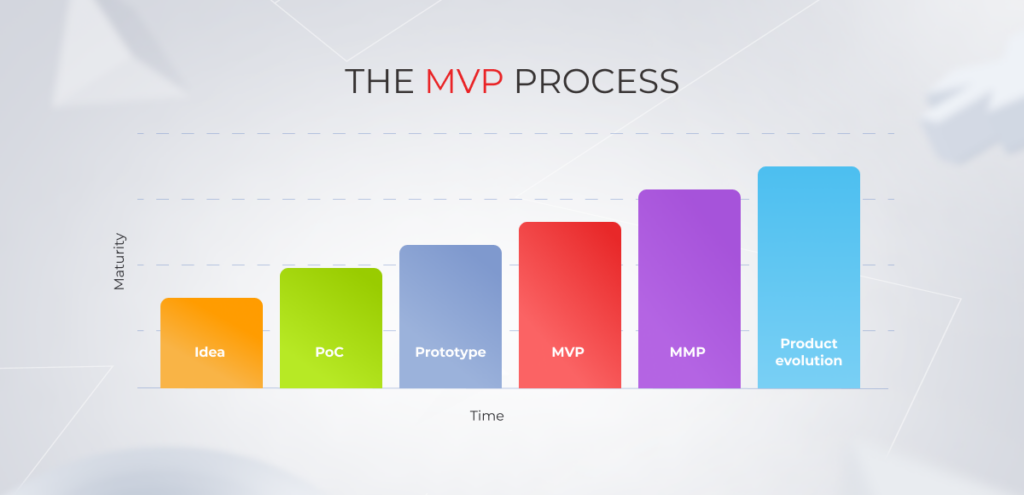
MVP Process

Idea

Every product starts with an idea, but 99% of ideas go through significant changes under the market’s impact. That is why your MVP development process kicks off with the Ideation or Discovery stage that helps de-risk your initiative, while also laying the foundation for a consistent, disruption-free development process. At this stage, your MVP development team sees whether your idea aligns with your budget and time requirements. 

To do that, the team strips down your concept to non-negotiables and transforms them into software requirements. The latter describes must-have features and functionalities of the end product. The features are then sized and prioritized to see how they lay out over the sprints.

Proof of Concept (PoC)

A Proof of Concept is essentially a model used to test everything from technical feasibility to market demand. PoCs reduce the risk of failure for new products and services by validating concepts early. 

You’ve got a one-of-a-kind, innovative solution and need to make sense of its technical complexity? PoC is the way to go. 

A Proof of Concept typically occurs during the late phase of the Ideation stage — before the team gets down to full-scale design and coding. A PoC usually consists of a small, basic, or undeveloped version of the product. At the end of the PoC phase, the team knows exactly how to create an MVP.

At one of our projects, the PoC stage helped our team to identify the most optimal library and backend framework for implementing the idea. The preliminary stages before the MVP also gave us more time to decide on the most cost-effective third-party integrations for our сlient.

Prototype

The MVP product development process usually starts with prototyping. A high-fidelity prototype looks like a real app, yet it’s still a pilot version of the MVP intended for internal use. It delivers a clear demonstration of how a product works so that stakeholders can decide whether it is ready for full production. 

The prototype also helps align the expectations and ensures that developers and stakeholders are on the same line. It can be used to test the solution and gather feedback from the end users.

Minimum Viable Product

After testing the technical viability of the solution and deciding on the look and feel of the product, your team continues with building a minimum viable product.

An MVP is a PoC and prototype combined in one — brushed up and brought to the production-ready state. 

Your team upgrades the UX as well as fine-tunes and expands the solution’s functionality. 

Minimum Marketable Product

While an MVP is the bare minimum, an MMP, or Minimum Marketable Product, is the minimum required to bring your solution to the market. An MMP includes one or a few killer features to make the product valuable for end users and put your company on track to high profit. It’s an upgraded version of an MVP that addresses user demands, delivers the intended user experience, and, as a result, can be easily sold.

The launch of an MMP is typically supported with a full-scale marketing campaign to attract more users from the get-go and improve the profitability of an MMP.

Product evolution

A digital product is never final and so is its development cycle. After releasing an MMP, the development team performs continuous maintenance and support as well as identifies the scope for future releases based on the user feedback or client’s preferences. Features are then prioritized and scheduled for release.

Check our all-encompassing guide on how to launch an app, crafted by engineers with 15+ years of experience.

The million-dollar question: why build an MVP?

Almost every great product we use today started its journey as an MVP. And the rationale behind this trend is simple: creating an MVP results in cost efficiency, minimal risks, product clarity, and some other benefits featured below.

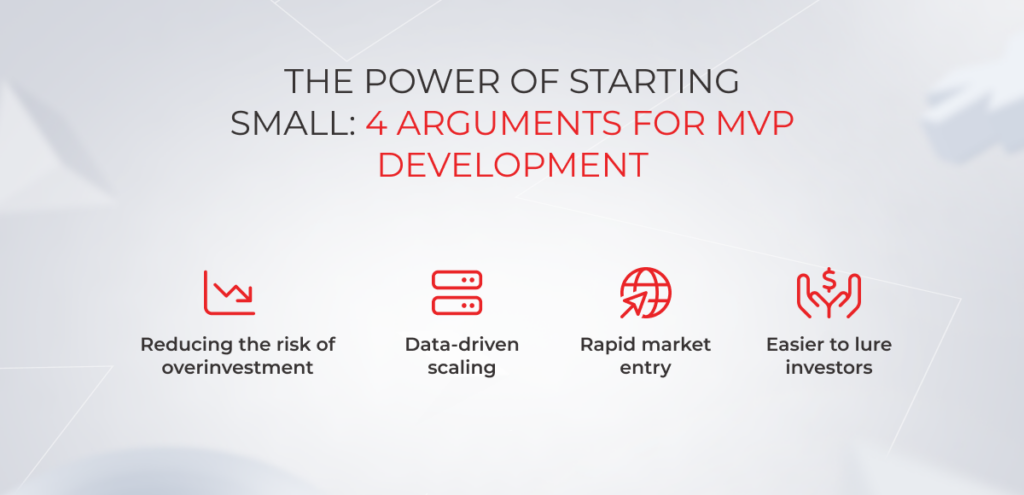
Reducing the risk of overinvestment

MVP Development

Building a minimum viable product means building it with minimum investment and in minimum time. Thanks to documented specifications and a clear understanding of the core functionalities, you and your development team can hop over to developing only the bare minimum of features with high utility. And less guessing means fewer resources spent on developing and testing.

Data-driven scaling

The first step to scaling your product is to get into the heads of your end users. What do they think about your product? What improvements and features do they want to see in the future? And the only way to get your hands on this information is to collect customer feedback through a minimum viable product. 

By tracking your user behavior and collecting their feedback, you can chart out your scaling strategy with a clear understanding of high-value features. An MVP release will also bear out an addressable market and validate that buyers will pay to solve their problem, in the first place.

Rapid market entry

The MVP approach allows you to get projects through your pipeline more quickly since you focus on developing only the core features and functionalities that are necessary for the product to be usable. 

By putting an early product in the hands of users as soon as possible, you can collate early feedback and use it for further iterations and improvements. As a result, you not only hit the market rapidly, but you also have a user-centered product to secure your place there.

Easier to lure investors

Getting investors on board from pitching an idea alone doesn’t work anymore. They need to see a tangible product that solves a real-world problem and has a good chance of gaining traction. So instead of going with a verbal pitch, you can use MVP to secure funding. 

A minimum viable product born and bred from a well-conceived idea is an indicator of high potential for investors, meaning they can get a profit from it.

Maximize the success of your product from day one

Hire our MVP team

Sometimes, MVP development is not worth the candle

MVP building is generally recommended for any new product with a poorly defined scope and market to minimize the risk of investing in capabilities that users may not need. However, MVP creation is not a silver bullet for all new products, and there are cases when companies can do without it.

MVP recommendedMVP not recommended
Initial product release based on an innovative ideaNew feature for an existing, well-established product
Product release for an emerging market whereby product features are not clearly definedA well-defined product with clear-cut requirements, validated product idea, and existing market
New product release from an established provider, based on the existing technology, but designed for untapped user base and use casesEnterprise products that are intended for internal use and are not meant for sale

Overall, a minimum viable product comes into the picture whenever one or all of the project variables (scope, market, or users) are not explicitly stated and are expected to evolve during product development. 

One of the reasons not to build an MVP is when the business owner knows exactly what kind of product they are going to implement. Specifically, all product requirements must be gathered and documented, the risks of a poor product-market fit must be low, and the product concept must be final.

As for new features launched in well-established products, providers usually skip the MVP development stage, knowing their users’ needs well. Also, in this case, MVPs with subpar user experience may result in reputational risks for an established provider. 

However, our expert provides a different perspective on the importance of MVP for well-established products:

Today, global businesses have shifted from long-term planning to a more adaptive and flexible approach in pursuing new initiatives. This applies to existing products and new feature releases, too. Whether it’s a brand-new product or a new feature for an existing solution, a Minimum Viable Product helps established companies to win the competition and be ahead of it as they implement new viable ideas.

Designed initially for startups, MVPs are now widely used in enterprise projects, too, as part of the agile methodology. Yet, if the product in question is designed to optimize internal business processes, enterprises can skip the MVP stage and move on to gathering product requirements, creating a roadmap, and executing the idea. In this case, a product can even be implemented according to a sequential model instead of an agile workflow.

How to build an MVP: 5 steps that make your idea go from raw to well-done

Minimum viable product development might come across as an anything-goes process, but there’s a defined framework involved. Here’s how to build a minimum viable product step-by-step.

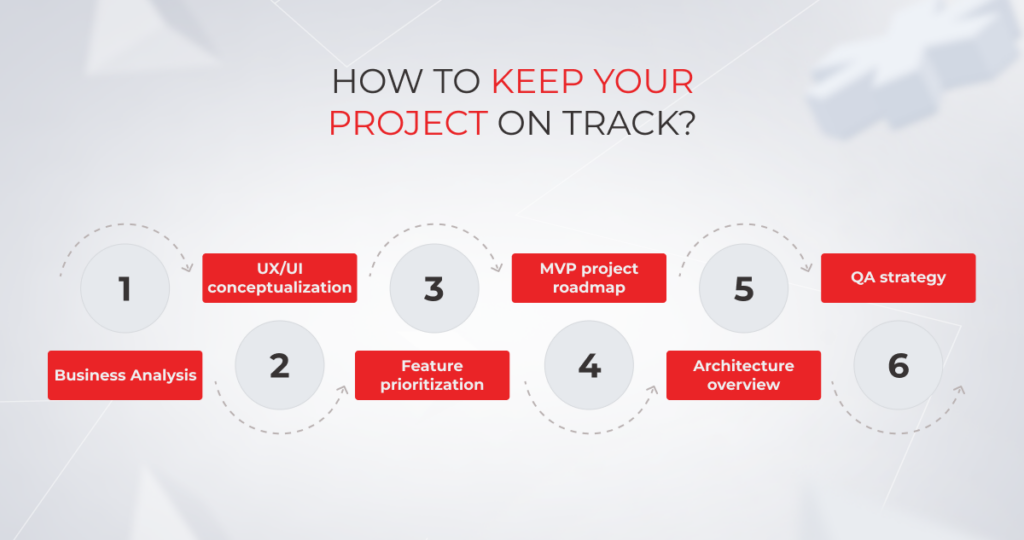
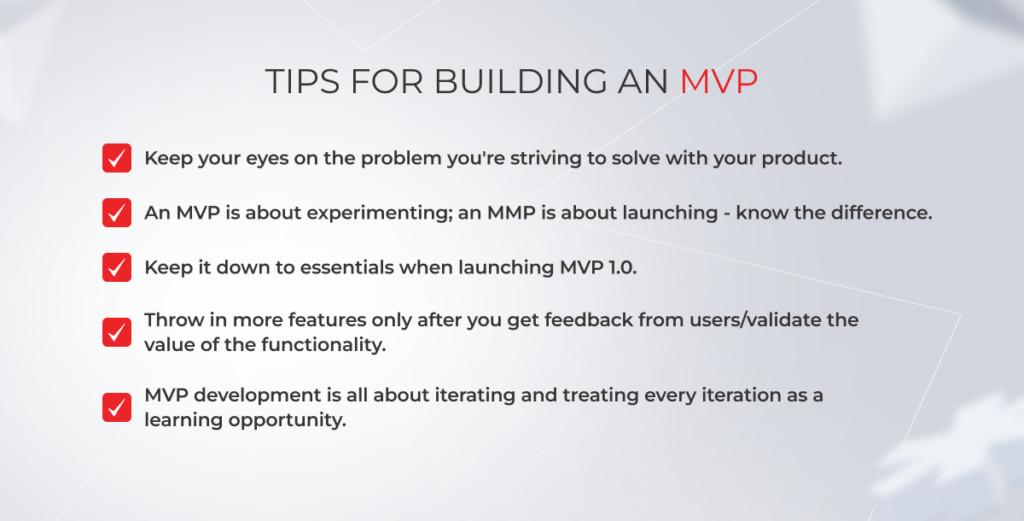
1. Define a problem your product will solve

An MVP development process kicks off with gaining a clear understanding of value addition to early adopters. To define value, start with identifying the problem your solution will solve and work on your product concept from there. Product goals, user personas, features — your product statement shapes all other building blocks of MVP development. 

2. Study the market

How to make a minimum viable product without an existing market for it? There’s no way, unless you want to run out of money. That’s why market research is one of the crucial steps to build an MVP. You need to thoroughly analyze the target market, see how your product idea stacks up against competitors, and identify your potential customers. For trail-blazing products, it’s also recommended to assess the market size. 

3. Run a Discovery phase

MVP

A Discovery phase sets the tone for the entire development process, saves your resources spent on MVP development, and makes sure your product delivery is on time, on point, and on budget. Basically, it ensures that every minute of development time, and every dollar of your budget goes into building a solution that people need.

Project discovery is an essential step for every brand-new venture. It helps the development team ease themselves into the business context, assess the organizational and infrastructure enablers, and estimate the product backlog. Without it, your developers will spend hours brainstorming ideas instead of implementing them.

  • Conduct Business Analysis

The value of business analysis is triple. First, business analysts help companies arrive at a clear understanding of the business idea by eliciting product requirements. Second, they dive deep into the user needs to identify relevant features for a solution like yours. And third, they prepare critical documentation that drives your development process to risk-free and cost-effective completion.

  • Conceptualize UX and design

The conceptualization process is an initial stage of the design-thinking approach that finalizes a user-centered picture of the final product design. Here, designers frame a problem, create user personas, and come up with scenarios and storyboards or a clickable prototype of a future product. The goal of this stage is to find a middle ground between user needs and the overall goals of the company. 

  • Prioritize features

The more features, the merrier is not exactly how you develop a minimum viable product. As it includes the bare minimum of features, your product development team first determines essential functionality that will make it into MVP 1.0. 

There are several approaches to point out the must-have features for a pilot version, feature prioritization being the most effective of them. At *instinctools, our experts favor the MoSCoW prioritization method as it’s a capable way of dividing features into must-haves, should-haves, could-haves, and won’t-haves. 

  • Create an MVP project roadmap

Once you decide on the deliverables, the product development team creates a plan of action that outlines the vision, priorities, and progress of a solution over time. It’s a shared source of truth that brings each stakeholder under one roof. The roadmap should reflect your product strategy and goals, while also remaining responsive to customer feedback and project changes. 

  • Describe Architecture overview

An Architecture overview is created to share the governing ideas of a future solution. The document communicates architectural decisions to the team, including technologies, system environment, and other building blocks of a solution’s architecture. As there may be multiple architectural approaches to implementing your product idea, an Architecture overview makes sure everyone in the team executes according to the pre-agreed approach.

  • Work out a QA strategy

During the Discovery stage, the QA team also sets the baseline for the quality assurance process, decides on the priorities, and selects tools that overlap with the developer tools. QA engineers also define the approach to test management and clarify software acceptance criteria. 

4. Build & release an MVP

A deployed product available to end users is the ultimate goal of this stage and the MVP development process in general. This stage is carried out according to the Incremental and Iterative approach whereby the project scope is sliced into pieces (increments), with each increment building on top of the previous deliverable. Product features are built through repeated cycles of iterations. The result of one iteration may be refined in subsequent iterations. 

  • Proceed with UX and design

Now, it’s time to flesh out your MVP look and feel with more details. While the Discovery stage helps designers establish a crystal-clear vision of what the target audience looks like and how they interact with similar products, during this phase, the UI/UX design team creates a few prototypes to demonstrate the look and feel of the future solution.

Once the client decides on the exterior of the product, UI/UX designers create layouts for each screen and share them with the developers.

  • Take care of the product’s back end and front end

Frontend developers transform layouts into user-facing features and make sure the visual and interactive aspects of a product are user-friendly and lightning-fast. While frontend development is concerned with a product’s appearance, backend developers set up all the behind-the-scenes processes. These include database interactions, user requests, APIs, architecture patterns, and other core units of your product.

  • Wrap it up with quality assurance

Within the Incremental and Iterative approach, quality assurance is not a phase, but rather a continuous activity that overlaps with the development. It means that QA specialists can check and validate a new functionality right from the oven, which accelerates development and speeds up the time-to-market.

DevOps approach makes sure your devs and QAs are on the same page. While employing DevOps, teams also take advantage of the CI/CD pipelines that bring automated testing to the table and allow QAs to spot critical bugs in the early stages.

  • Celebrate release

Finally, a production-ready solution is deployed into the target environment and made available to users. At this stage, your team also performs user acceptance testing and sets up software monitoring processes. 

  • Ensure easier adoption with post-release hyper-care

After a software launch, your product development team goes into hyper-care by providing application support to address your immediate post-implementation needs. Hyper-care may include minor fixes, software troubleshooting, employee training, and the production of manuals. 

Post-release support is essential to maintain the error-free performance of the product and maximize adoption among users.

5. Measure, learn, and optimize

A successful MVP is your first step to a high-impact full-fledged product. After your MVP is pushed out, the development team analyzes user feedback, behavior data, and other metrics to inform future releases and enhance your understanding of what an ideal product should look like. 

At this stage, you can either pivot your idea if you’ve misfired or persevere — either way, an MVP results in less effort wasted on things your target users don’t care about.

Go from concept to a full-fledged product

Schedule a call

Building an MVP is a slippery slope, keep away from these  mistakes

Emerging businesses have an incredibly high failure rate. More than two-thirds of them fail to live up to the lofty investor expectations when it comes to ROI. And although it’s startup flops that get the most airtime, established businesses aren’t immune to MVP failures as well. 

If you’re going at it for the first time, beware of the typical pitfalls that await your MVP on the way to a successful product.

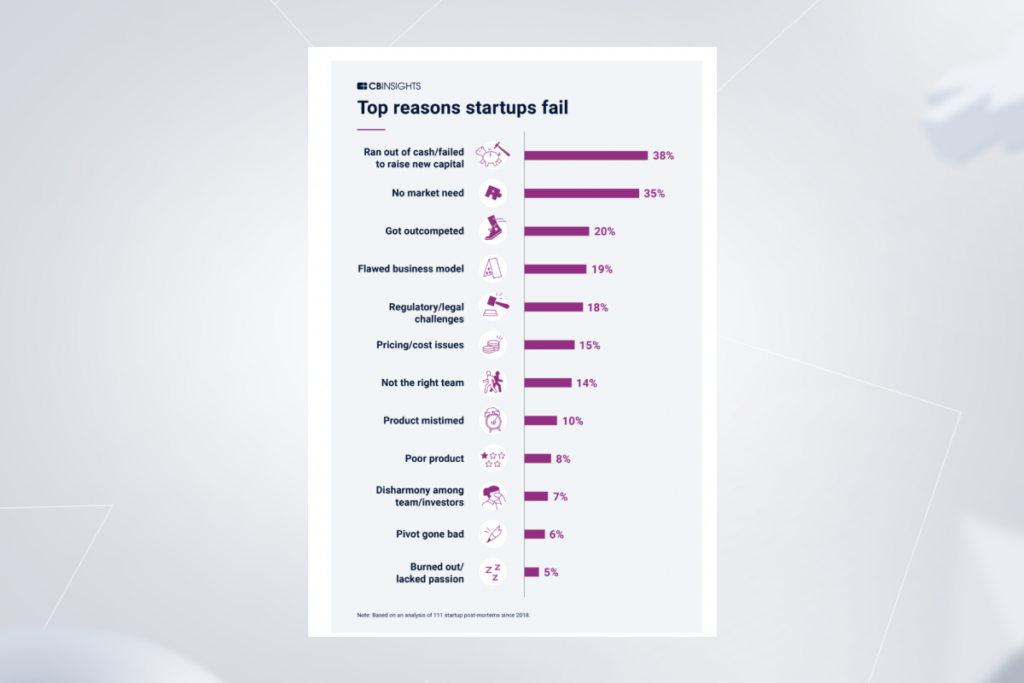
Market ignorance

According to CB Insights, the absence of an actual market need is what makes 35% of startups fall down the hill. Your belief in the idea needs to be backed by existing market demand, otherwise, your product won’t get traction. Also, the market evolves at a blistering pace at the moment, so the need for a particular service or product can vapor quicker than you think.

Reasons startups fail

One simple thing you can do to avoid this mistake is to run deep market research and analysis to identify the exact need of the target market. 

Not knowing your target audience

Finding an ideal product-market fit calls for a deep understanding of the target audience. Target audience research involves collating insights about the users who are most likely to adopt your product. You can get this information through focus groups, surveys, and independent research — whatever it is, make sure to paint a clear picture of your ideal user.

Lack of clarity regarding the problem that your product should solve

Your product cannot be everything to everyone, it has to be designed to solve a specific problem. Otherwise, you’ll end up with a bloated solution that lacks a utilitarian use case.

To reduce the odds of a crash, you must first identify the problem, then find a solution to it, and wrap the solution into a digital form. 

Haphazard Discovery phase

Around 38% of startups run out of budget even before they take off, and ill-considered ideation is why it happens. Let us hammer this point home: skimping on the Discovery phase is the shortcut to project mishaps, blown budgets, and ruined stakeholder expectations.

In particular, a jerry-rigged Discovery phase or lack thereof can lead to:

  • A software architecture conflicting with project requirements (you opt for a trendy microservices architecture, but your solution is better off with a monolithic architecture);
  • An exhausted project budget due to the absence of a prioritized feature backlog and constant switching between ideas and features;
  • The absence of a project roadmap, in turn, can result in a scattershot software development process ;
  • Lack of a well-designed CI/CD pipeline, which robs your product of an ongoing flow of new features and bug fixes.

Misalignment of expectations among the stakeholders

Product developers can implement the most ambitious dreams of business owners. The question here is: Do you know exactly what it takes to implement yours? Sometimes, building minimum viable products entails major transformations in the existing IT infrastructure, especially if we are talking about established businesses.

That’s why each expectation should be communicated and managed upfront, before jumping into the development process. This way, all stakeholders will know exactly what has to be done to implement a product idea.

Adding too many features

Overcomplicating a product is one of the biggest mistakes that budding entrepreneurs make. By adding too many features, they make the product harder to use, which hampers easy adoption among users. In other cases, companies’ budgets dry up even before they release the product into the wild as they spread themselves too thin.

To strike the right balance between features and their value, make sure to slim down your business idea and single out a minimum set of features to assess your product against real user needs.

Inexperienced team

There exist a hundred scenarios when an inexperienced product development team drives a project into the ground. Fail squads set the wrong priorities, allocating, already limited, resources to the wrong places. 

Teams that lack product development experience may bet on the wrong technical solutions, which results in a sub-par project with limited scaling. Whatever the team’s gray area is, the result will always be the same — and that’s a derailed project.

Your MVP is incomplete

Whether it’s because of execs or investors, companies may be pushed to release an undercooked product. You should postpone your MVP release if you nod to any of these points:

  • You struggle to identify the target custom, the problem, or your product’s USP (unique selling proposition).
  • Your MVP lacks critical functionality responsible for delivering value to the end user.
  • Insufficient security, performance, or scalability will take a toll on the user experience.
  • The product’s quality is not yet at the level users expect.
  • The current quality of a product can damage its profitability.

Overinvestment in sales and marketing

Pre-launch and launch campaigns are important to spread the word about your product and funnel in more lighthouse users. Except, a minimum viable product cannot be considered a full product launch. It’s more about testing your product idea and gathering market response. That’s why it’s better to hold the marketing dollars until you decide to go ahead with a minimum marketable product.

Don’t leave your MVP development to chance

Secure a reliable team
building an MVP

Key to MVP development success — hiring an experienced cross-functional team

In an attempt to slash the costs of MVP development, companies may opt for hiring low-skilled teams. In other cases, they take the word ‘minimum’ literally and hire a two-people team of developers that make bold promises of delivering a high-quality product in two months.

In reality, MVP development requires a collaborative approach that involves cross-functional dedicated teams, including business analysts, designers, product managers, and other experts. 

In-depth business analysis, competent project management, and well-balanced technological decisions will make up for your lack of expertise and increase the odds of your product going big.

You have two options when it comes to searching for an experienced team. You can do the heavy lifting on your own and scour the common habitats of bright minds, including freelance platforms, job boards, and industry events. The search may take an eternity, and there’s no guarantee that you’ll come across decent professionals.

Turning to a seasoned software development company with a track of projects is a smarter move that will save you money, time, and effort. A full-cycle product development partner can drive your idea from concept to growth — faster, more effectively, and expertly.

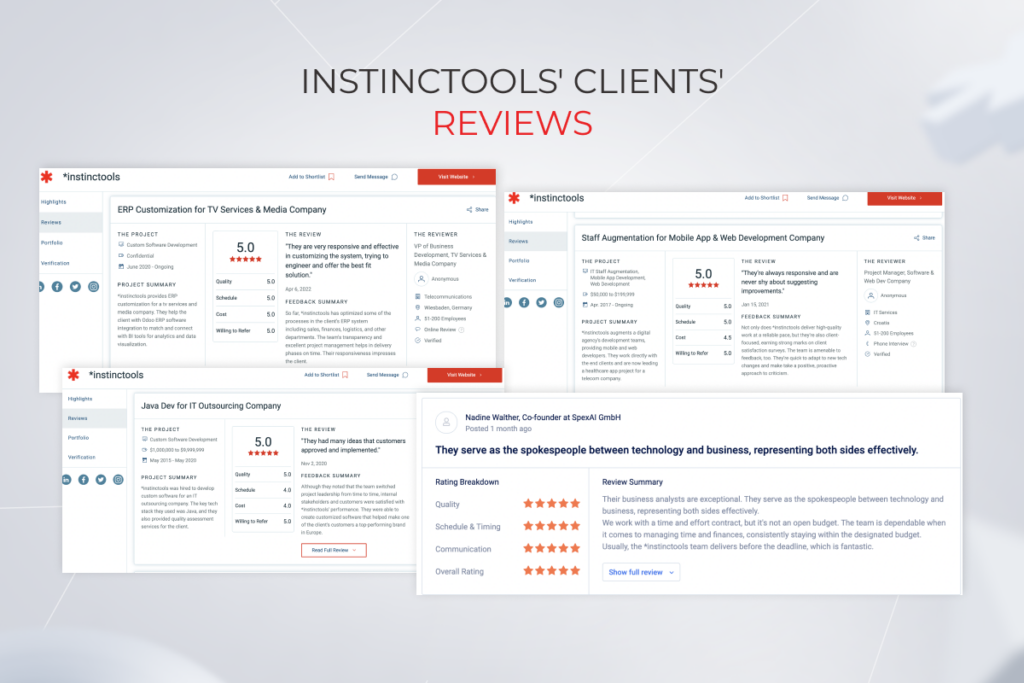
Clients' reviews

MVP app development: *instinctools’ experience

How to build an MVP app that can rewire modern farming? That’s the exact kind of challenge SpexAI faced. The company is a provider of automated AI-powered plant monitoring services and they were looking to develop an MVP for a flagship web application that can receive the data from the AI-powered robot and visualize it for end users. 

SpexAI reached out to *instinctools as they needed an experienced product development partner with a proven track record of projects and a vast portfolio of MVP solutions. Along with MVP development, the client hoped to minimize the risk inherent to new products launched. So we decided to move incrementally, from the proof of concept to the prototype to a robust MVP. With the company’s consent, we also went the extra mile by making the MVP more feature-rich and appealing to investors and users.  

Thanks to our solution the company sped up time to market and validated its business idea. Together, we’ve created the very first solution for harmless monitoring and analyzing the state of medical cannabis plants in greenhouses with 10,000–15,000 plants.

From a minimum viable product to maximum value

Having a well-thought-out MVP on your hands is a great start, but you should start earlier. To get the most out of your early product version, you need to see beyond the end result and into the problem you’re trying to solve with your solution. Partnering with an MVP development company in USA can help you lay the necessary groundwork, ensuring proper Discovery and planning phases. With comprehensive preparation, your product will be able to meet the needs of active users and help your business idea catch up with the market.

Secure a team of MVP development experts for your next project

Contact us

FAQ

What is an MVP?

An MVP is a stripped-down version of your product that bundles just enough features to satisfy early customers and gather feedback for future iterations. It usually focuses on delivering the core value proposition of the product.

How do I build an MVP?

The MVP development process starts with getting a good grasp of your product idea. You should research the market, identify your target audience, and analyze the competition. Based on your understanding, you then identify the must-have features for your MVP and start implementing them.

What is the purpose of an MVP?

An MVP is designed to test your business idea, validate it against real user needs, and attract investors.

What are the benefits of an MVP?

One of the main benefits of an MVP is that it allows companies to experiment with new initiatives, test their ideas, and vacuum up valuable feedback from real-world customers before fully developing a product. On the same note, building an MVP can save time and resources.

What is the development process for an MVP?

Ideally, a minimum viable product should be developed incrementally and iteratively. This way, your development team constructs and hones your MVP piece-by-piece by building on the previous deliverables to achieve high product quality.

How much does MVP development cost?

The costs differ based on the project scope and the complexity of your MVP.

How do I choose a development partner for my MVP?

You should choose a development partner with solid experience in delivering MVPs, time-tested domain knowledge, and a cross-functional team of experts. Industry platforms like Clutch and Glassdoor can aid you with selecting a partner.

What are the key features of an MVP?

Each MVP has its own key features. A key feature is the core functionality of your product that makes your solution valuable to the users.

How long does it take to build an MVP?

Based on our experience, developing an MVP may take up to 6 months depending on the complexity of your project.

16 SaaS Trends to Stay Relevant in 2025: Curated by Our Experts

The SaaS ecosystem  might not be growing at breakneck speed like it used to, but it’s nowhere near hitting the brakes. Valued at ~$273 billion in 2024, the SaaS industry drives a giant share of the overall tech landscape. Big forces are steering this ship: AI and machine learning are weaving into everything, major players are making strategic acquisition moves, and APIs are making it easier than ever to connect the dots. And that’s just scratching the surface (we’ll dig into more SaaS trends for 2025 and beyond soon).

In this blog post, our experts share their perspectives on the upcoming SaaS market trends and cut to the chase on where as-a-service companies should zero in to get a competitive edge.

SaaS industry trends can’t emerge from a vacuum. They stem from a range of important objective factors, which cause changes in how individuals and organizations perceive SaaS businesses.

Customer demand

As the SaaS landscape is maturing, user expectations are settling in. Today, SaaS users are adamant about the experiences they’re seeking, favoring dynamic pricing, personalization, and on-demand SaaS offerings. To fit the bill, SaaS market leaders engage on-demand experts to increase customer satisfaction and retention, revolutionize customer experience, gather user feedback, and iterate on it to release new features.

According to KPMG, SaaS vendors now have to balance personalization with generic features, demonstrate a clear stand on Environmental, Social, and Governance (ESG) issues, and develop a clear understanding of what value means for SaaS customers. It’s not about software anymore, it’s about a branded digital product with a personal, yet subtle touch.

Competitive environment

With market leaders such as Adobe, Salesforce, and Oracle accounting for $221 billion to $325 billion of total market value, it might seem challenging for new businesses to make a statement and try to thrive within a growing SaaS market consolidation trend. However, while certain segments are oversaturated, there is still a market entry for niche products, or vertical SaaS.

Worldwide public cloud services end-user spending forecast, 2020-2022

Concentrated categories with growth potential also include databases, artificial intelligence, and content management. A micro-SaaS model is another SaaS opportunity to hit it big. Similar to vertical SaaS, it’s tailored to a specific industry, but on a more granular level. Also, micro-SaaS solutions can be paired with existing as-a-service products, enriching their functionality.

Evolving regulatory conditions

A patchwork of compliance regulations and data security standards make it hard for SaaS providers to operate on both local and global scale. Along with well-known regulations such as HIPAA, GDPR, and others, new AI regulations have entered the scene. As a result, security and data governance audits have become more of a legal requirement rather than an optional state of checks and balances for as-a-service companies.

Providers have to comply with customer security requirements first, before any legal audits take place. SaaS clients demand a transparent data policy, records on IT security audits, root cause analysis, and other safeguards. Without thorough regulatory and data security knowledge, providers are likely to lose their grip on this tumultuous landscape.

Technology advancements

Organizations are looking to further their digital transformation agenda and experiment with cutting-edge technologies like generative AI, edge computing, and IoT. Offered over the SaaS model, these technologies become easily accessible, persuading global businesses to choose ready-made solutions over from-scratch software development.

To offer technological advancements as an a la carte option, SaaS companies have to make product design and development their top business priority to embrace cutting-edge tech and improve operational efficiency. By the same token, an impressive 90% of businesses adopt the DevSecOps methodology to create a continuous integration and delivery pipeline apt for fast and secure releases.

Economic factors

It hardly needs saying that the economic landscape has real clout in shaping opportunities and challenges faced by SaaS providers.

During economic upswings, they may have more room to maintain or even increase their prices due to higher demand and market stability. In the same way, favorable market conditions nudge investors to provide more funding to SaaS companies, enabling the latter to expand their operations and develop new features.

Conversely, in tough times of belt-tightening caused by economic shake-ups, SaaS businesses have to deal with difficulties in customer acquisition and retention as well as investors’ concerns.  

That’s why, to facilitate revenue recognition, SaaS providers should better define their offerings and value that comes with the cost of their solutions.

Investor expectations

Even though the VC landscape for SaaS in 2024 showed signs of recovery — reaching a five-quarter high of $79 billion in Q2 — after a downturn in previous years, it’s still challenging for SaaS startups to nab investor dollars. Yet, companies that generate profit at a sustainable rate and meet the bar of the Rule of 40 are still of interest to VCs.

According to The Rule of 40, the growth of a software company is deemed sustainable only when its combined revenue growth rate and profit margin equals or surpasses 40%. If the company isn’t able to beat the Rule of 40, then it doesn’t pass the health check and falls into the category of risky software investments.

Median enterprise value multiples for B2B SaaS companies, by Rule of 40 performance

To operate at the Rule of 40, budding businesses have to establish a predictive view of customer health via advanced data analytics and proactively identify cross and upsell opportunities through AI-based analysis.

Moreover, leading players operate at a higher speed-to-market, incubating new ventures faster than competitors. Available tech competence and IT talent are a must to grow fast and resiliently as companies are launching new features and business lines. 

Make the pivot to as-a-service business

Tell us about your project

Over 85% of organizations expect an unprecedented 80 percent of all of their apps to be SaaS in the upcoming years. Let’s see what else the future of SaaS holds and what technologies to adopt now to stay prepared for the times ahead.

1. Vertical SaaS

Being industry-specific, vertical SaaS solutions tackle the problems a generic, ready-made application can’t. As opposed to horizontal SaaS, vertical SaaS providers have a thorough understanding of your business challenges, just like an industry insider, and allow you to consume an off-the-shelf application without complicated customization and plugins.

According to research, the global market for these SaaS platforms is projected to reach $229,7 billion by 2030, at a CAGR of 17.7%. Since the availability of industry-based cloud services is still low, providers can take advantage of the young market and capture promising niches with their SaaS offerings. As for the vertical SaaS trends, healthcare, insurance, and finance are now one of the most popular industries being redefined by vertical as-a-service solutions.

2. Micro-SaaS

Akin to vertical software as a service, micro SaaS products are skewed towards a specific industry, audience, and even specific use case. This business model has emerged in recent years as a response to the overcrowded SaaS market dominated by recognized players. As smaller SaaS businesses have little chance of competing with established solutions, they build add-ons and plugins on the back of larger SaaS players.

Micro-SaaS businesses typically offer a single product or service, which is highly targeted to a specific market segment with unique business operations that are not being covered by more established players in the industry. One of the benefits of micro-SaaS companies is their ability to launch quickly, with minimal investment in time and resources.

Another advantage of micro-SaaS is the flexibility it offers. Because these businesses do not have the overhead costs of larger companies, they can be more agile and responsive to changes in the market, customer needs, and technological advancements.

3. RevOps

Amidst the dramatic shift in market dynamics, SaaS app companies struggle to grow while also maintaining profitability. The significant upfront investment, challenges of net retention, and competitors may take a toll on as-a-service companies unless they are strategic in managing their sales and marketing functions. 

RevOps, or revenue-operations tools, is hailed as the next evolution of sales forecasting, and marketing analytics software — all rolled into one. These platforms provide businesses with a holistic, end-to-end approach to everything related to sales, marketing, and customer success. To achieve that bird’s-eye view, RevOps tools should be weaved into the entire lifecycle of the aforementioned functions and be equipped with AI-powered capabilities.

the basics of RevOps (revenue-operations tools)

Along with the AI integration, the RevOps framework is predicated on the following enablers:

  • Focus on automation to scale demand generation
  • End-to-end visibility through the full sales funnel, marketing, and customer service
  • Equipping sellers and marketers with relevant collateral to boost conversion rates
  • Implementing a data-driven customer success program to measure the value and scale cross- and upselling opportunities 
  • Moving from siloed capabilities to a central hub of efficient solutions
  • Optimizing go-to-market spends through integrated data view

Advanced lead scoring system is one of the RevOps linchpins that leverages ML-based algorithms to evaluate leads based on a wide variety of data points and behavioral indicators. The goal of an advanced lead scoring system is to provide sales teams with a more targeted list of leads, allowing them to focus their efforts on those prospects who are most likely to engage and convert. 

Leading-edge sales funnel automation is another example of the RevOps approach. Using predictive analytics, sales funnel automation solutions offer personalized recommendations to the customer and upsell them on complimentary services or products. The trick here is to establish selling strategies around your product. To achieve that, you can integrate tracking mechanisms at almost every feature level in SaaS tools to identify what capabilities click with the customer the most. 

4. Prioritizing net retention

As consumers hold back on non-essential spending, customer retention becomes one of the strategically important trends in the SaaS industry. Top-performing SaaS businesses are paying due diligence to the existing customers, investing in marketing analytics and follow-up competencies. 

From a technical standpoint, median net retention rates can be increased with granular automation directed toward retention strategies. By relying on SaaS analytics and artificial intelligence, SaaS companies can execute a contextual net retention strategy, including:

  • Applying advanced customer segmentation
  • Identifying the right timeline for upselling or cross-selling maneuvers  
  • Preventing churn based on customer behavior
  • Making personalized offers to customers planning to cancel based on their usage dynamics
  • Promoting account expansion with contextual upgrade modals and in-app messages

Paired with dynamic pricing and product support, a contextual retention ecosystem can cut your churn to a minimum and set a win-win post sale construct in place to maximize revenue growth.

5. Building new products based on a deep understanding of customer personas

Building new offerings on the back of a company’s existing data is among other SaaS trends in 2025 that differentiate agile, resilient businesses. Market front-runners such as Google and Netflix have based their trending SaaS products around the available customer data, which leads to new revenue streams and more granular products.

Likewise, other companies, irrespective of the domain, can capitalize on the core data assets they already have and branch out into new data products.

data products of a medical device manufacturer

The trick here is to build new lines of business based on a thorough understanding of a customer. To do that, companies must develop and nurture cross-functional capabilities for in-house data product management, including data experts, DevOps engineers, and other skills. The data landscape of an organization should be integrated, interoperable, and transparent as opposed to fragmented, siloed data that sits within an isolated team.

6. SaaS with no exceptions

Although providers still offer a hybrid setup as an intermediate architecture for businesses, the future of SaaS is cloud-native. Born from the roots of cloud computing, this SaaS trend allows users to embrace all advantages of software as a service, including rapid scalability, high availability, and easy maintenance. Full-on SaaS also paves the way for a more holistic cloud migration that doesn’t require any in-between setups. 

We believe in “SaaS with no exceptions”, which means writing truly cloud-native software. Exceptions are the death of pure SaaS because they lead to issues with software maintenance and disrupt customer service.

For a provider, a cloud-native architecture means the independence of each service, which allows for rapid deployment cycles and horizontal scaling. This, in turn, translates into a more swift response to the shifting customer demand and reduced costs of rolling out new features. As a result, cloud-native architecture changes the anatomy of as-a-service solutions, both for a user and provider, supporting the change that comes with the digital transformation of a certain business.

7. Laying the groundwork for scalability from the get-go 

An innate capacity of a SaaS solution implies easier scaling compared to traditional software deployed on premises. However, providers can only seize this benefit when they plan for scalability in the early development stages of their SaaS applications.

In particular, a detailed roadmap should drift development toward flexible, rapid turnarounds focused on problem-solving as opposed to fixed, solution-oriented flows. Flexible product roadmaps don’t stifle product creativity, they are cut out for changing the trajectory of product development based on user feedback. 

Moreover, to achieve seamless growth in the future, you should have clear plans for feature innovation outlined in a roadmap. New releases should be based on explicit KPIs that align with how customers perceive value in your product.

A flexible architecture is also a crucial enabler of friction-free scalability that helps SaaS tools evolve. On the same line, a microservices-based architecture is one of the significant SaaS industry trends that breaks an application into separate components which are then loosely connected via APIs. This allows for high scalability, better fault isolation, and faster time to market.

8. Сontinuous innovation, delivery, and security

To win in a competitive market and over the customer, you need a quality product with the freedom of fast and continuous innovation. DevOps automation is what initiates uninterrupted product delivery, creates a resilient application environment, and brings customer-centered products to the table. By streamlining every environment build, DevOps allows providers to roll out new code as frequently as they need to instead of scheduled releases.

However, today, it’s not enough to combine software development with DevOps.

According to PwC’s 2025 Global Digital Trust Insights survey, 77% of companies are upping their cybersecurity budgets to guard against evolving threats better. Likewise, SaaS providers are bringing security back into DevOps, placing DevSecOps on top of the 2025 SaaS trends.

The DevSecOps approach introduces security testing at every stage of the development process. Bringing developers, security engineers, and operation teams together, this framework promotes product development that is both efficient and secure. Everyone involved in the SDLC has a role to play in building security into the DevOps continuous integration and continuous delivery (CI/CD) workflow.

9. Low-code and no-code platforms

Among other things, the imperative of data democratization also sets the tone for SaaS future trends, shifting the focus to easy access and distribution of SaaS products. More inclusive, accessible, and compatible SaaS products are top of mind for global companies, and providers are scrambling to meet the demand.

In doing so, SaaS businesses rely on microservice architecture that makes as-a-service platforms easily deployable and organized around business capabilities. In an attempt to make digital transformation more accessible, SaaS companies also center their offerings around low- and no-code platforms. The latter allows non-technical users (and businesses) to build and deploy applications without a coding background. 

Low-code products experience a lot of footfall today as they offer a more cost-effective way to innovate, satisfy the rising demand for excellent internal workflow apps, and enhance user experiences. By 2028, the low-code platform market is projected to reach a value of $94 billion.

10. Self-service and self-heal environments

As over 81% of customers are seeking more autonomy, self-service capabilities are becoming a fixture in SaaS trends for 2025. Being a non-intrusive support option, self-service capabilities in SaaS tools give users the freedom to learn, explore and solve issues at their convenience without the need for human agents.

Over the last few years, providers have been gravitating from traditional, static self-service options to more natural, AI-powered customer engagement methods. FAQs, customer portals, and tutorials made way for chatbots and voice-enabled conversational AI. 

AI-enabled self-healing platforms are one of the self-service innovations that help SaaS users navigate the complexity of platforms. Self-healing solutions are designed to automatically detect and fix problems within a system without human intervention. They leverage machine learning, artificial intelligence, and predictive analytics to quickly identify issues before they become major problems, and proactively repair them without any manual effort.

Based on a full-cycle Artificial Intelligence for IT operations (AIOps) process, self-healing environments also reduce downtime and increase productivity by automatically fixing issues, which means that employees can focus on core tasks instead of troubleshooting. 

11. API-first approach

The secret recipe of growth for SaaS companies lies in making their product compatible with the existing app portfolio of their customers. By combining different SaaS solutions, businesses can create a robust, integrated ecosystem that fits their unique requirements. And as companies are doubling down on as-a-service applications, integration has become one of the strategic software as a service trends for providers.

Open APIs play a crucial role in making a combination of compatible SaaS services possible for users. When providers make their offerings available via open APIs, they allow companies to fine-tune the offering and sync it with existing systems, reducing costs and increasing efficiency. A SaaS program with ample integration operational capabilities also eliminates the need for a third party, thus becoming another reason your potential customer can say “yes”.

Conversely, a lack of integrations in a SaaS product means that the adopters have to develop custom APIs and cover additional development costs. Without integration, your SaaS product also becomes another siloed asset for the company that keeps critical data under wraps for other applications.

12. Generative AI 

One of the SaaS opportunities that have got a big word of mouth lately is generative AI and its offshoot – large language models. While AI is not novel to SaaS providers, the introduction of ChatGPT and the like has widened the application area of artificial intelligence in the SaaS model. 

Due to the growing popularity of gen AI models, the global generative AI market size is expected to grow at an impressive CAGR of 35.6% from 2023 to 2030. Touted as a new AI frontier, generative AI brings unprecedented out-of-the-box capabilities to SaaS companies, including content generation, sentiment analysis, market research, customer support, and others. And providers don’t think twice to consume and customize gen AI tools, changing the game for their users.

For example, in October 2024, Salesforce announced the public release of Agentforce, a platform that lets companies develop and launch autonomous AI agents across all operational areas, including sales, customer relationship management, marketing, IT, finance and commerce.

Notion, another SaaS giant, has upgraded its Notion AI — it now can pull insights from lengthy PDF docs, suggest schedules based on a proposal, or describe any uploaded images.

Biggest SaaS vendors actively embrace generative AI capabilities

13. BI-powered SaaS 

Today, businesses across industry sectors are guided by big data to improve virtually every aspect of their operations. The increasing reliance on data-driven strategies in the business landscape is what drives the demand for SaaS-based business intelligence solutions. By 2030, the market of SaaS BI solutions is slated to hit over $35.71 billion, ushering in an opportunity with an untapped value for providers.

From a user standpoint, cloud-based analytics platforms, unlike on-premises analytics tools, enable businesses to uncover insights in their data right in the place where this data is generated. Supplemented with built-in AI and machine learning capabilities, SaaS BI platforms let decision-makers use those insights to automatically drive actions.

With cloud-based analytics tools, companies can access their data on the go, analyzing it from a single point of truth.

This trend is not limited to offering SaaS-based BI tools as a standalone tool, it’s more about enriching existing SaaS with analytics capabilities to deliver added value in the form of dashboards and reports to business users. 

14. Mobile first SaaS solutions

Given the nature of a hybrid environment, mobile is becoming the primary interface for many field employees all over the world. This makes mobile-first and mobile-native SaaS solutions pronounced B2B SaaS trends that help address the needs of flexible work settings.

By enabling employees to access business data and applications while on the go, mobile on-demand SaaS helps to improve accessibility and eliminate downtime, allowing employees to work more efficiently. Collaboration is facilitated as team members can access and share data in real time, no matter where they are located.

However, to bring SaaS on mobile, providers need to cover at least the minimum level of complexity necessary to meet their core business process roles. In a perfect case scenario, a mobile as-a-service application should boast unique features that are available on mobile only. In less-than-perfect cases, mobiles might serve as an extension for certain parts of an app or have limited functionality.

15. White-label SaaS

White-label SaaS is gaining traction for a simple reason: not every company needs to reinvent the wheel to offer great software. When the core functionality already exists, the real value often lies in strategic distribution, branding, and customer relationships.

This model gives niche players a fast track to market with fully functional, customizable products.

Ecommerce has become ground zero for the rise of white-label SaaS. Platforms like Shopify, and WooCommerce have shown that retailers don’t need to build their own infrastructure to launch a compelling digital storefront. Instead, they can rebrand and customize pre-packaged platforms to match their unique identity. And go live in days, not months.

16. Consumption-based pricing

The shift toward usage-based pricing in SaaS is a natural response to how modern software is built and consumed — dynamic, scalable, and tied to actual value. Flat subscription fees (like $X/user/month) made sense when software was a static product, but cloud infrastructure and API-driven tools operate differently.

Alternative pricing strategies, like AWS’s pay-as-you-go, Twilio’s per-message pricing, or OpenAI’s pay-per-token, remove upfront friction by letting customers start small and understand the product’s value. It’s a win for vendors too, as revenue naturally scales with customer success.

More and more SaaS companies are offering usage-based pricing

What makes a SaaS champion?

The share of the SaaS market is growing at a blistering pace driven by increasing cloud based solutions’ adoption and rising infrastructure costs. ​​But despite the glowing potential, launching and growing a software-as-a-service company is not an easy task. Stiff competition, complex regulations, and economic turbulence prevent providers from gaining ground.

But just like opportunities dim for some providers, other forward-looking SaaS businesses can effectively plot a course to success by taking advantage of the top SaaS trends. The proliferation of AI technologies, easily scalable architectures, resilient innovation, and a wealth of integrations will set the standard in the SaaS niche in the upcoming years. 

High performers will achieve business success by focusing on the detailed knowledge of the customer, pursuing high-value features, and adopting the latest tech comforts. To make it happen, SaaS providers should integrate advanced tools and develop tech expertise, supported by domain proficiency and always-on availability of the IT talent.

Let our company make you a SaaS champion

Contact our team today

FAQ

Is the SaaS industry growing?

According to statistics, the SaaS industry is expected to grow at a CAGR of 13.7% from 2023 to 2030. The rising adoption of cloud services, the added overhead of on-premise infrastructures, and the digital imperative of continuous innovation will secure the popularity of as-a-service solutions well into the future. Moreover, as vertical SaaS platforms are still scarce, companies can seize this opportunity to enter the market.

Is SaaS still relevant?

Thanks to advanced scalability, managed security and minimized management challenges, SaaS platforms remain a popular option for fast-growing companies.

What is the future of SaaS?

The next generation of SaaS is all about built-in compliance, plug-and-play adaptability, and seamless integration between apps through API-first design. And while generic platforms still chase scale, niche SaaS applications are pulling ahead by solving real problems, in the language each vertical speaks.

Remove stress from your software delivery lifecycle by following DevOps release management best practices

Producing secure and robust software at speed is an undeniable must-do for business success today. Whether a startup pivoting during the pandemic, or a tech company, keeping up with nimbler competitors — they all need the most advanced release management practices. This is where DevOps comes in. According to the latest statistics, the DevOps market is expected to grow at a CAGR of 21% during 2021-2026 — a significant amount.

We’ve already written about how to start leveraging DevOps, transforming it into a company’s best friend for when product owners and executives are trying to get stuff done and delivered on time. But what about DevOps release management? DevOps offers some great capabilities for interacting between teams, coordinating interdependencies, and helping people understand what they need to look for to get the release process smoother, making it just like breathing. How so? Let’s dive deeper to find out. 

Why is it important to manage your releases and deployments better?

DevOps release management

With a growing number of releases, deployment management becomes critical. According to the 2020 DevOps Trends Survey, 74% of companies consider the frequency of deployment as the best option to estimate DevOps efficiency. Here’s what DevOps release management offers: 

Increased deployment frequency

Developers don’t deliver one massive project. They release small improvements to their long-lived products all the time within a continuous integration phase. Also, there’s continuous testing, which allows to avoid regression prior to the production phase.

Reduced MTTR

The adopted Mean Time to Repair (MTTR) metric helps get a more comprehensive, accurate, and nuanced story of application and infrastructure productivity. For example, together with other metrics, such as the “error budget”, it can spot the true cost and impact of downtime. To identify the MTTR threshold and pinpoint the issues, you can use different alerting and monitoring tools. A well-organized DevOps process allows for quick deployment of fixes to reduce MTTR.

Decreased lead time for changes

Focusing on lead time allows developers to organize continuous delivery and reduce time to production. That’s why a product team is able to assure more frequent and smaller releases, which lets users realize new value faster.

Lower change failure rate

The team tests the product in a testing environment as they go. Doing that iteratively means the minimization of error issues upon the submission of a project on production. This results in fewer defects overall.

As part of release management, DevOps provides a holistic view of product delivery that everyone strives to have from the very beginning. It is about getting a deeper understanding of the end-to-end system, including value stream mapping and management. 

Apart from this, DevOps release management focuses on the constant optimization of value. This way, businesses become more product-centric, and the teams migrate from a project-oriented to product-oriented work culture.

How is the DevOps release process different from traditional release management?

Comparing traditional release management to DevOps release management is almost like comparing a horse and buggy against 21-century electric cars.

Traditional release management uses a waterfall framework known for big heavy releases. In this approach, the project is approved at the very end of the final delivery, despite months the development process took.

The efficient release management in DevOps enables frequent delivery of small batches, leading to more frequent deployments and faster cycle times. This results in decreased lead time, which means delivering value to end-users as soon as possible.

Manual work with manual reviews and approvals is ‘onerous and erroneous’. This is what sabotages feedback cycles in traditional release management. Also, long wait times, multiple discussions, and the burgeoning bureaucracy bog people down. DevOps practices, on the other hand, provide real-time feedback and metrics that are driven by automated workflows, including tracking, reporting, and data collection. 

Now, as for change requests, in traditional release management, the protocol implies process-heavy and time-intensive management of change requests. Product owners have to provide context to approvers who are not directly involved in the work. The DevOps scheme encourages collaborative software development, automated delivery pipelines, and change-advisory boards giving pre-approvals because they know all the steps to be managed. 

Last but not least, in traditional software development, teams are organized by functional boundaries. There are manual handoffs between siloed teams, which lead to misaligned incentives. DevOps addresses this by migrating from a control hierarchy to a place where leaders distribute authority to the teams. Developers get rid of all the handoffs and delays that come with these silos. As for core stakeholders, they are involved in every stage of the delivery lifecycle (design, build, deploy, monitor and maintenance). Therefore, teams are cross-functional, collaborative, and aligned to business goals.

The shift from traditional release management to DevOps release management

DevOps release management

Symptoms of a poor release management process:

Now, how to assess the current state of your release management against efficient DevOps release management? Let’s scan through the symptoms below. 

  • Releases are infrequent and happen whenever, usually, not during working hours. If your company needs to make a release schedule, notify all the employees about the new deployment in advance, or stop all the operations during the release. A failure to do so is the first sign your release management process requires enhancement.
  • Your release process is manually configured. Some release managers have to perform the same manual activities over and over again. They start to write a script, and then they write another script, and then another one. Also, they might be checking in a spreadsheet for calling someone and asking if they’ve done it. 
  • There’s only one person on your team that everyone relies on when it comes to deployment. Organizations have a release manager spread across 20 different teams. These teams are trying to cobble together a picture from lots of different sources.
  • You’re not sure that the feature/software will work, you just hope it will. This happens due to many reasons. One of them is making the production environment the source of truth. But it’s the version control system that is. To remind, the version control allows tracking changes and versioning data. Thus, the upcoming release stays compliant, and the teams can meet the business requirements of the auditors. 
  • New releases tend to negatively affect users if a team didn’t fix blind spots in deployments and proceeded to production. The latter is the result of the lack of actual data, metrics of delivery, metrics around flows, work in progress, defect rates, types of work that are being done, efficiency, cycle time, lead time, a lot of other value stream metrics.

DevOps techniques for release management:

Transitioning to DevOps release management best practices can be a game-changer. Here are the most effective techniques to implement.

  • Leverage Infrastructure as Code (IaC): Unlike manual configuration, IaC is not error-prone or hard to track. It suggests an automated process of installing and configuring software that leads to more reliable releases. Thus, deployments are well-tested and well-rehearsed, and the pipelines well-vetted. Release processes become more repeatable. Since the scripts are version-controlled, a manager can see how they’ve changed over time. 
  • Make disaster recovery a part of your normal operating procedure by exploiting phoenix servers. In software development, adding configuration updates is a common practice. Phoenix servers help the team run the configuration drifts smoothly. These immutable servers allow new infrastructure changes without breaking existing functionality.
  • Ensure no disruption in service thanks to a Blue-Green deployment strategy. It suggests running two similar production environments—Blue and Green. At some point, only one of them is live and serves all the production traffic. The other one is idle. When preparing a new version of an app, deployment and the final phase of testing are held in an idle environment. This helps tackle downtime that could happen because of software deployment and reduce the risk of damaging a new version of the app if something unexpected happens. 
  • Streamline CI/CD pipeline with “shifting left”, which enables quality assurance standards, continuous testing at all the phases of the development life cycle. DevOps claims to take over the traditional SDLC, mostly in terms of full automation.
  • Test, test, and then… test again. Developers, when building declaratively, make sure that what they build is right. To assure this, the team needs to have a testing plan. There’s an industry-standard guideline for implementing automated software testing, called the testing pyramid. It operates at three levels: unit tests, integration tests, and end-to-end tests. The bottom layer is presented by unit tests, the ones that need to happen most frequently. Intended to provide small units of code, they deliver value to the team multiple times a day, and are least expensive to write and maintain. This type of test is used to validate the functioning of individual components in isolated conditions. To check how this code interacts with other code, which forms the entire software, integration tests need to be done. They are slower than unit tests and require a pre-production environment. And, finally, to ensure that the entire application is working without a hitch, you need to run end-to-end tests. Beyond the testing pyramid, there are non-functional tests such as performance tests, load tests, stress tests, etc., which verify how well the software works. Having your testing strategy in place will help your team get the job done faster, achieve better results, and, consequently, increase ROI.
  • Don’t put quality over quantity. Businesses strive to release software as quickly as possible, yet Quality Assurance shouldn’t be an afterthought. It is still directly related to customer satisfaction. That’s why, to reach needed standards at the speed required, the team should embed QA in the specified requirements of any ongoing software development phase.
  • Automate release management processes. When release planning in DevOps, rating current pipelines based on their level of automation might be a game-changer. In DevOps, frequent releases are key, and enabling test automation throughout the pipeline can help significantly. Other types of automation include requirements, design, development, deployment, operations, etc. 
  • Be proactive in tracking changes and fixing the issues. In the context of DevOps best practices, the developers use version control as the source of truth. It allows managing changes to code versions, splitting them into different threads to be routinely tested prior to its release to a production environment. This is where all the amendments are tracked. Thus, developers can still remain agile, declaratively configure, build, test, and fix bugs, and release changes while it’s all being tracked. 

Best release management tools in DevOps according to *instinctools engineers:

The best tools for the DevOps methodology are business-critical, mission-critical, or, in other words, the lifeblood of your business to function. Here’s a shortlist provided by *instinctools experts.

  • Ansible allows teams to rapidly deploy, iterate, and test their systems in production. It also integrates with a large number of tools already used by DevOps teams.
  • Github Actions is all about optimizing workflows that are used to deploy code. It enhances continuous integration and release management and can be used for anything from triggering an alarm to orchestrating complex security test automations.
  • Octopus ensures reliable, secure and automated releases of your .NET applications into various environments of your software development no matter whether they are: on premises or in the public cloud. It provides audit information of all your past deployments which can further help in yearly audits for certificates and regulation.

How to get started with DevOps release management?

It takes a lot of work to put building blocks in place to effectively maintain the release management practice in an organization. Traditionally, IT companies have a business analyst or product owner who develops some large back-right PRDs handed off to a developer. Then they plan out the next six to eight months of development. But it doesn’t work well in today’s economic environment. 
Fortunately, there are agile release management frameworks you can use to deploy faster and quickly remediate any issues that arise on the way. DevOps release management breaks down work into small chunks. The methodology ensures frequent releases and further testing for defect elimination, optimized lead time, reduced MTTR, and a full scope of automation.

Want to know how to release valuable apps faster while maintaining the level of security and quality that makes sense for your business?

Book a call
Anna Vasilevskaya
AI modified real photo
Anna Vasilevskaya
Account Executive

Get in touch

Drop us a line about your project at
[email protected] or via the contact
form below, and we will contact you soon.