
Think Big! Create Your Own 3D World

Think Big!

Firstly, we would like to tell you a little bit about our team. We specialize in mobile projects, which consist of many modern features, including augmented reality, which we discovered and started to learn about some time ago.

And here’s our story about the greatest discovery we made within two days. No chance you will ever guess it! It’s all about creating an augmented reality on our own!

We are sure everyone knows about the latest achievements in such fields as computer graphics, virtual and augmented realities in video games, promo, demo versions of applications and so on. No doubt, today such things look very impressive, considering the fact that five years ago all of it seemed far away in the future. Sometimes it seems like a fantasy world has already come knocking on our door.

Nevertheless, we have to tell you that not all of these things are as simple as they seem.

In practice, all of these features are extremely difficult. Trust us, when you try to deliver them to our world, you are going to be faced with all kinds of insuperable problems. Eventually, it may just seem like too much of a hassle!

Think Big!

First steps on our way to success

As usually happens, we spent one evening in an attempt to solve all kinds of problems connected with studying and comprehending augmented reality. We didn’t know what to do, but we had to do something, since we needed to complete our task. Time went by…

We experienced only feelings of fatigue and hopelessness, wishing we were somewhere else. We remembered about Oculus Rift, Google Cardboard and other similar things. Once more, we were surprised about such a thing as Cardboard, which literally gives everyone the chance to see and feel another reality, and it costs so little.

At some point someone slipped in the thought: our real world looks different if we look at it by means of virtual reality. Then, as usually happens, there was lots of giggling and hours of discussion and counter-argument. Then we finally decided to check it out in practice.

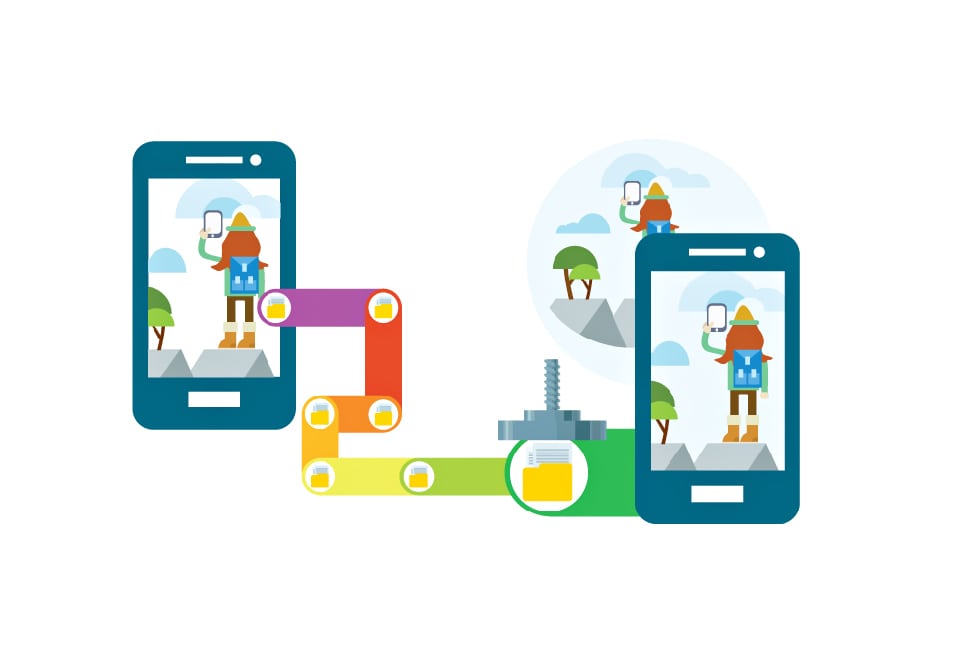
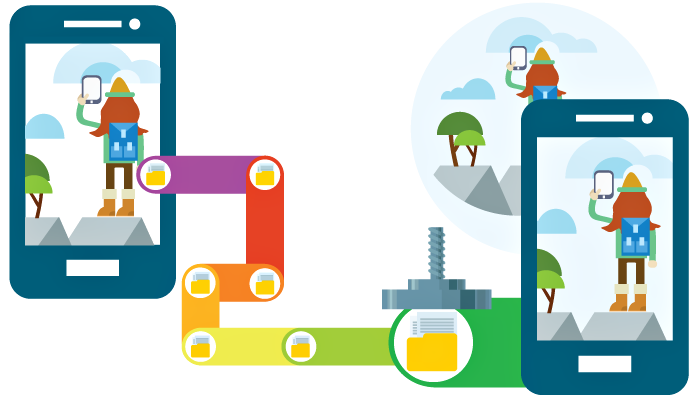
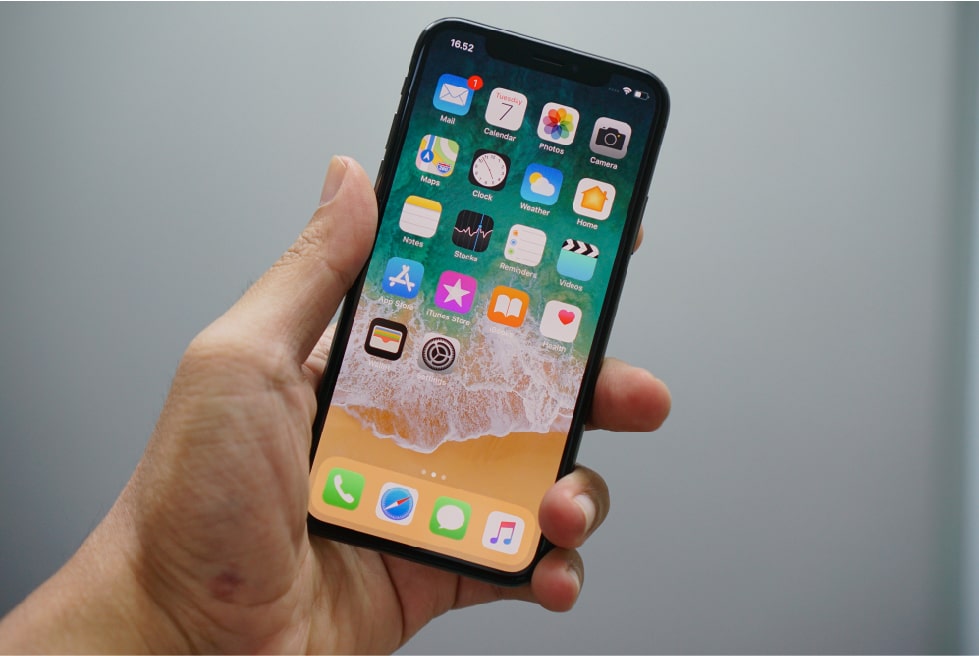
What a pity – we did not have a Cardboard but …. we had two iPhones instead! Two eyes, two cameras and two iPhones – what else did we need?

We decided to observe the world using an iPhone camera and to check if we were right. Then we remembered that we did need something, in the place between our eyes and the screen. In half an hour of frenzied discussion about virtual reality glasses, we concluded that Google Cardboard was the right choice, if we compare its price and quality. We did not want to reinvent the wheel and embarked upon the usual collection of lenses and a magnifying glass. Previously we had agreed that this would be more suitable for a prototype.

Sometimes we wonder how it happens that we badly need something but it is just not there. So, we went to the nearest shop and bought magnifying lenses. There were several options, which differed in size and optical power. You would not believe it, but we had a confab near the counter to decide what type of lenses would suit us best of all! As a result, we also bought some plasticine, which would be of great help as a fixing material.

Think Big!

It took us no more than five minutes to rush back to our office. Then we all in turn scrutinized our prototype, estimating nuances of perception. The world through iPhone cameras looked surprisingly complete, even a little cartoonish. The feeling was similar to what you get at a 3D movie theater; the only difference being that all actions happen in the immediate vicinity.

This could have been where the story ends…

Unusual thinking – the core of the success

However, we were really inspired by the results. We wanted to continue our search for what we wanted to achieve. Firstly, it became clear to all of us that we needed to create a more reliable construction since plasticine does not hold an iPhone really well, it is difficult to wipe off and the adjustments get constantly changed.

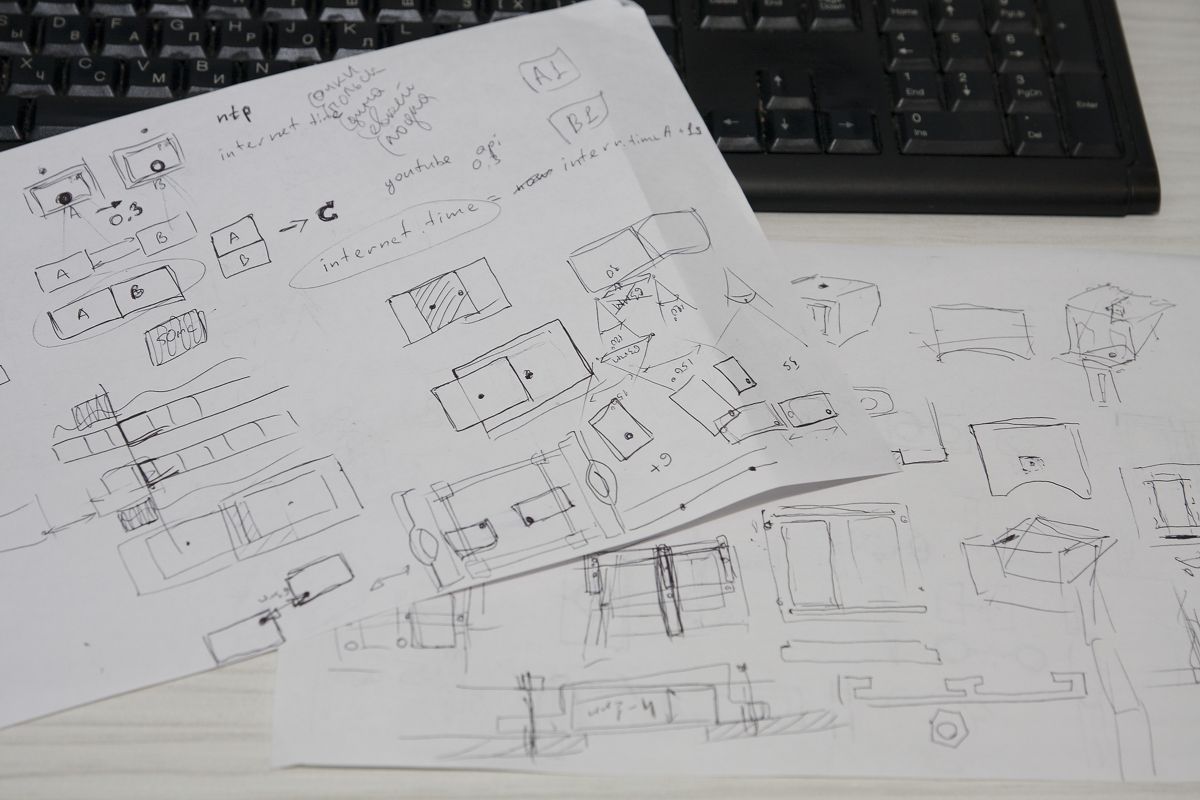
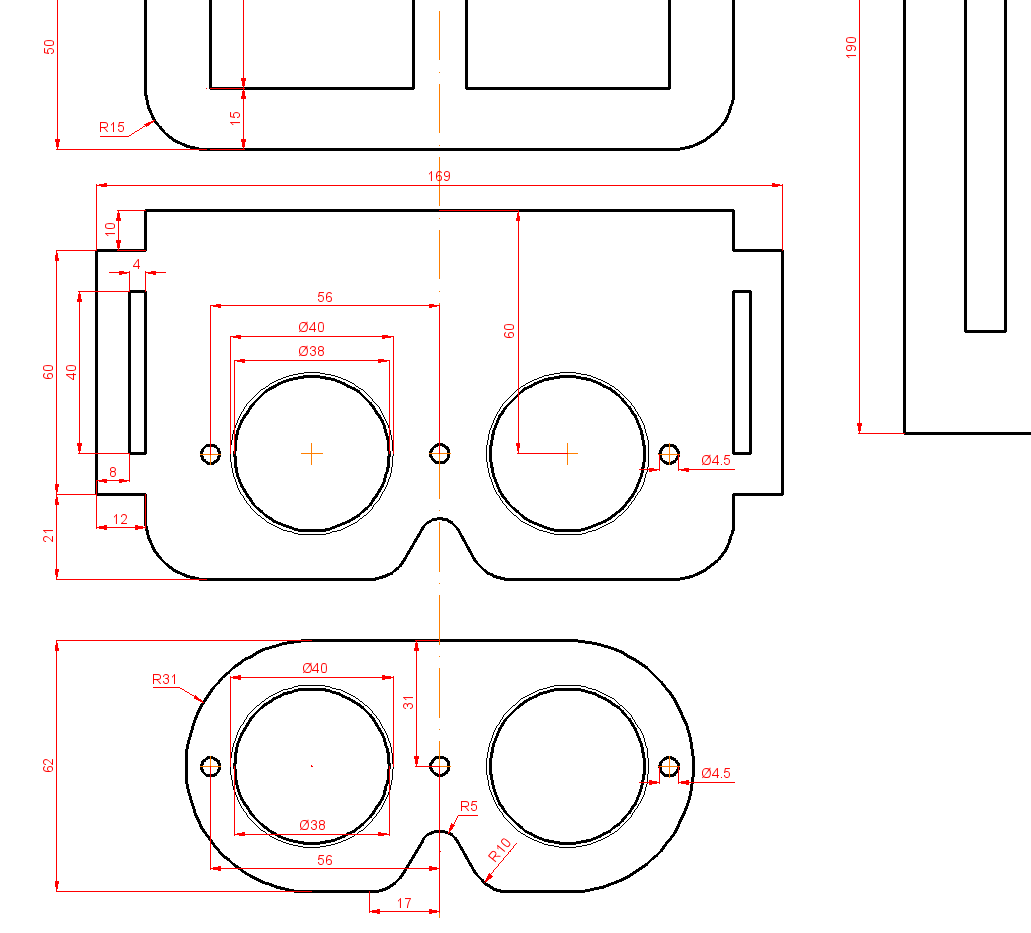
Also, some technical aspects of the future design had to be resolved, for example, the optimal distance between the eyepieces, the distance between the two iPhones, the required optical power of lenses, and the need to correct distortions.
Think Big!
Think Big!

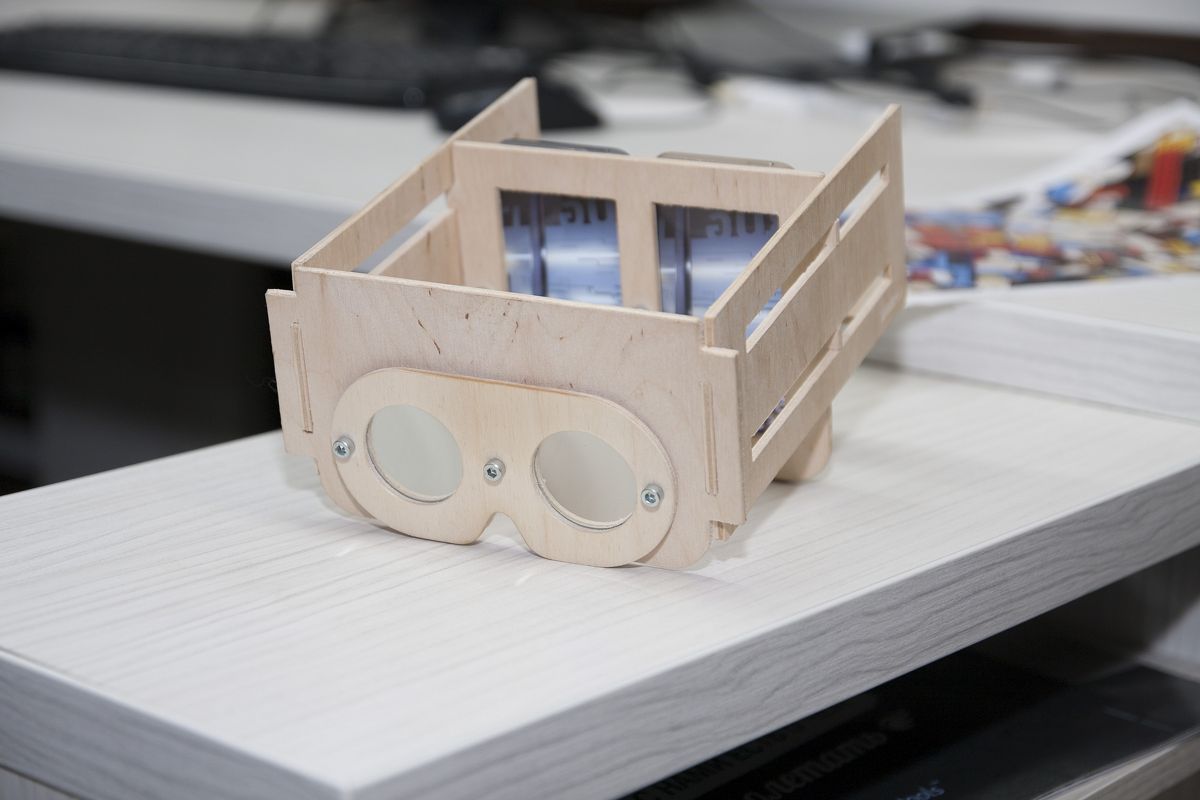
All that we needed was at hand: an AutoCAD application and the drawing. We did have some experience with these. The very next day we had a plywood model of a Cardboard, but only for two iPhones! The effect was even better. We began thinking more about what to do next. While it was still only a project, it was very cool to look at our own legs through this device!

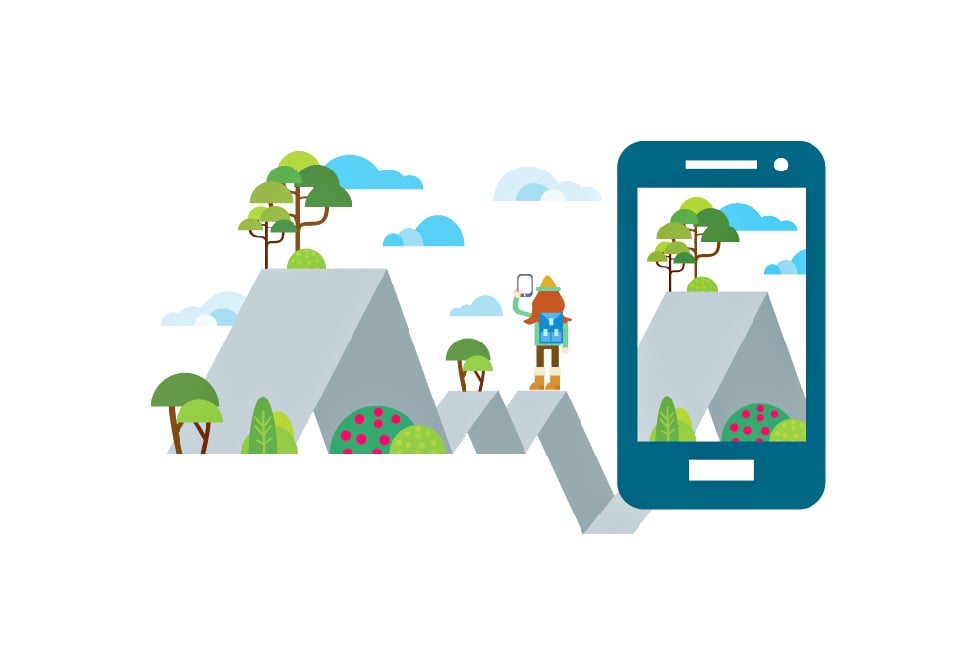
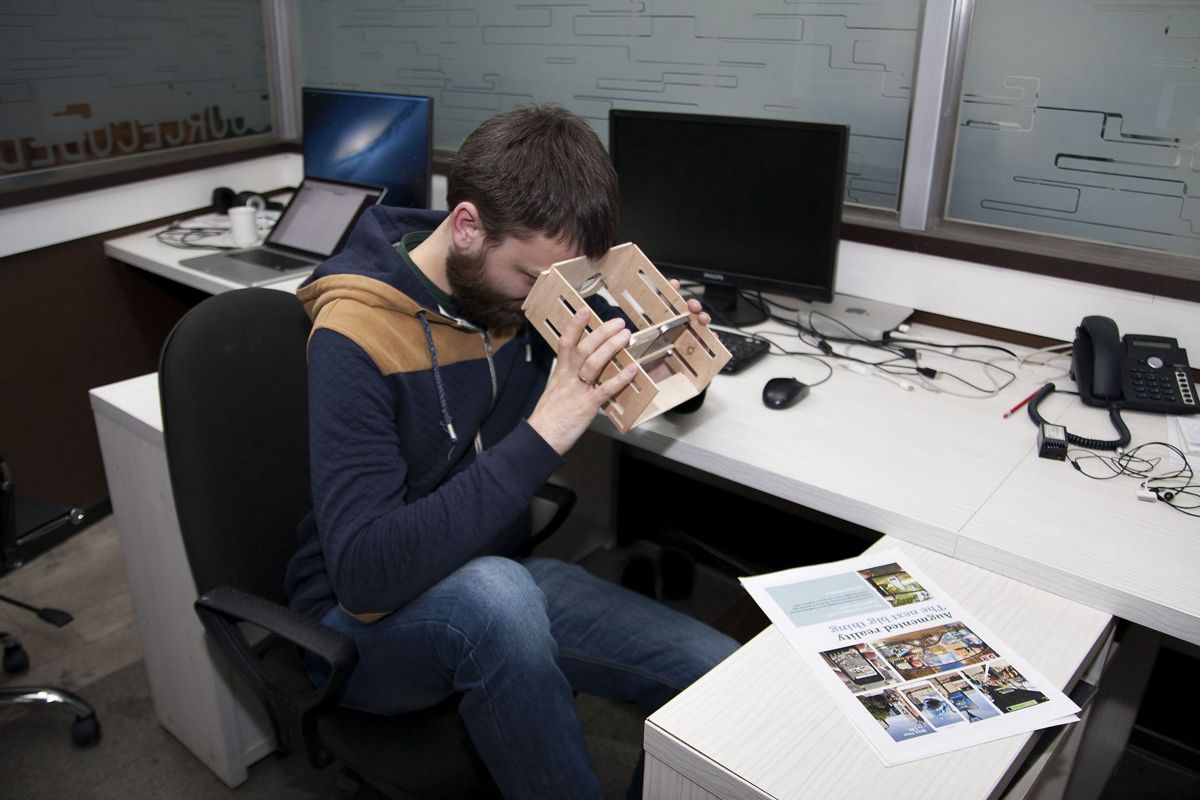
It did not take much time for the next idea to hit us. In fact, we were fully engaged in augmented reality, and, for example, were able to impose any pieces we liked on markers, pictures, video or three-dimensional models. After some time spent on the pros and cons of programming, we decided, for a start, to try to impose a three-dimensional model. Then, just like little kids, we watched the world through this invention and estimated the progress of humanity in the field of augmented reality.

All our assumptions, which we were afraid to voice out loud – have come true. Despite all the difficulties of imposing three-dimensional models over markers and never-ending problems with bad accuracy and stability, the world through two iPhones has turned out to be really complete.

Accuracy of definition of points and the plane of a marker have become sufficient to place any model on two iPhones in the correct position. The fact is that not only the actual model seems solid, but you can also walk around it, and get closer and examine all its details. It has become just like a part of the real world!
Think Big!
Think Big!
Think Big!
Think Big!

The greatest fruits of our labor!

We were blown away by the results. It was just like a revelation! On the one hand, it is a very obvious and simple piece of technology, which is literally available to everyone and is no more expensive than a Cardboard (of course, you need to have a second iPhone). On the other hand, the effect is much better than the usual augmented reality everyone can get via one camera.

Later it became clear that there is practically nothing comparable in real life to our creation!

Nevertheless, the most amazing thing in this story is that you do not need anything out of the ordinary in order to create a similar device. If you wish to make it, then you need just to have two identical mobile devices, for example, two iPhones.
Think Big! Create Your Own 3D World

We have an excellent device, but how do we use it?

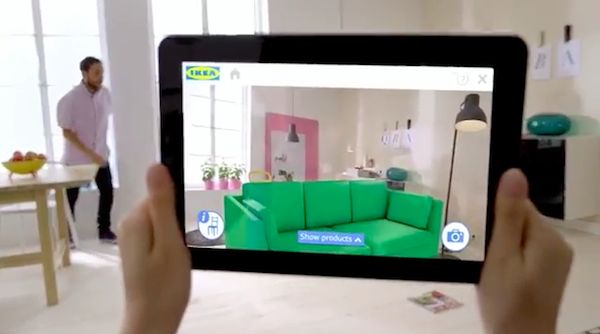
If we use our imagination, we can think of a number of situations for which this device would be useful. Let us look, for example, at the idea which came to IKEA Store management. This company has developed an application, which, thanks to augmented reality, makes it possible for you to place a 3D model of their furniture in your interior. Such a method helps you to understand the possibilities of buying particular items of furniture: by seeing them on a scale of 1:1 you can see whether their size will suit your interior.

The device we created is similar to this application, but it has already moved into the stereo. If we consider that the stereo effect provides the possibility of estimating the depth of space, then the potential of such device becomes even greater. In addition, in the long term, such an approach would be able to improve the quality of recognition of markers and the imposition of models.

We have also decided to make a demo version of this project for all visitors who come into our office. We are planning to prepare a set of markers and we will make a new design in our office so that everyone can see an alternative world through a similar device which delivers augmented reality.

Our plans for the future

We decided to make a plan for the immediate future and set the following tasks:

  • Synchronize applications on two iPhones so that animation and transformation of three-dimensional models will be synchronous;
  • Make a record and process a video stream on two different devices (iPhones) simultaneously in order to receive video in stereo;
  • Increase the frame rate of each layer. (It turns out that smooth display for a flat image lags while watching a video in stereo);
  • Design glasses from materials which are more available on the market and overcome the current deficiency.

In our view, our device should:

  • be smaller in size;
  • be more convenient for hands-free use;
  • allow the installation of various mobile devices.

It is important to add the possibility of adjustment for differences in people’s eyesight. In order to achieve that, we have to choose the most suitable lenses from those which are currently available on the market.

Now you can see that the model we have created can be compared to Oculus Rift and Cardboard technologies. However, if we try to look further, then we will understand that our creation can be much better than any technology on today’s market. But we need time…

Maybe you have something to share with us about your own views of this project?
How an IT Pro Makes His Life Easier Using TFS 2015

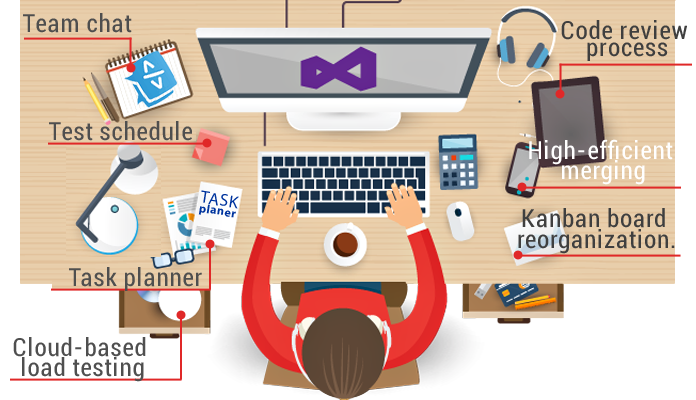
Team Foundation Server 2015 has a variety of options that very few know about. This article will tell you about operation nuances and settings of the product. You will see for yourself that TFS is not only for .NET developers.

Team Foundation Server 2015 is the newest version of platform for managing Microsoft’s applications life cycle.

It facilitates web development by:

  • team chat;

  • task planner;

  • test schedule;

  • code review process;

  • cloud-based load testing;

  • high-efficient merging;

  • kanban board reorganization.

Above all, no more need to build and deliver a new website version to the server manually. Just click one button and your new build is on the server!

Who uses TFS 2015?

The platform is integrated into the Visual Studio environment and has an intuitive interface. It is friendly to .NET teams, yet could it come in handy to others?

Many projects require using several languages and clearly separating responsibilities. You may have a back-end code in C# and a front-end code in Angular. The solution will be Visual Studio for Angular developers.

What about developing mobile applications, with one IDE for iOS and another for Android? Without VS you can only go for additional software to work with TFS. Yes, this means an extra cost, but it is worth it: look how easily you can use the platform now.

How can mobile app developers work with the build?

Let us use Android Application as an example.
To operate successfully you don’t need any additional software: Java, Gradle and Android SDK are already installed on an Android developer’s computer.

1. Creating a build

Click the icon Plus in the left menu. Templates appear in a new window. Choose Empty.
Press the OK button and you have a new build.
The build consists of consecutive steps.

2. Creating a new step

Choose Android Build, press the Add button and close the window. You will see a build step configuration window with self-explanatory fields.

SOLUTION. As you know, there is no direct tool for publishing applications after the Play Market build in TFS. You need to use your imagination and add a Command Line after the Android build. It executes the bit of code written in advance for Google Play publishing: the application will be built and published on a button click!

3. Build configuration

It pays to delve into the build configuration to make your life easier once and for all. The most interesting things are variables and triggers. You need triggers to configure a scheduled build, while variables can be used for tweaking. For instance, a variable responsible for choosing either Demo or Release build mode can be pushed to a build step.

TFS brings developers together and opens up more opportunities. Use your imagination: the platform will give you a tool to realize your idea. Automatize repetitive processes to make coding easier.

Have you used TFS in your projects, or your customers’ ideas in life? What did you think about this solution and workflow for your cases?

As always, your comments are very welcome. We will answer all your questions and suggestions about this topic.

Video Streaming (Part III). Knowledge Is Power!

In our First and Second parts we examined the topic of real-time video streaming, how it’s done on iOS and took to pieces the process itself. And now:

Let’s Compare The Results Of Video Encoding On Various iOS Devices!

Disclaimer

In order to convey an informative experiment in comparing various video encoding methods, we created a test environment, an application that allows us to measure the results properly.

The app uses three encoders:

  1. Hardware – accessible via VideoToolbox library.
  2. Hardware – accessible via AVAssetWriter. For this purpose the realization from kickFlip Library was used – OS broadcasting solution for your iOS applications.
  3. Software – compiled ffmpeg 3.0 library with compiled as dependency x264 library.

We wanted to find out the limits of each method and conducted research for multiple resolutions used by AVCaptureSession: 352×288, 640×480, 1280×720, 1920×1080, 3480×2160. The handheld devices chosen for the tests: iPhone 4S – the weakest iOS8 device, iPhone 6 plus, and iPad Air 2 – one of the most powerful devices in the market. During the tests we determined and measured the CPU usage and delays when encoding the video in H.264 format.

There is a certain margin of error and the results might differ from the results acquired during such tests in a different environment here. However, our results show the difference in encoding efficiency on various devices and show it quite well.

 ffmpeg with x264 (sw)AVAssetWriter
(kickflip realization)
VideoToolbox
352×288delay: ~ 0.60 s.
CPU Used: ~ 55%-60%
delay: ~ 0.39 – 0.46 s.
CPU Used: ~ 8% – 12%
delay: ~ 0.07 – 0.087s.
CPU Used: ~ 7% – 9%
640×480delay: ~ 0.75 – 0.85 s.
CPU Used: ~ 130% – 160%
delay: ~ 0.46 – 0.5 s.
CPU Used: ~ 8% – 12%
delay: ~ 0.067 – 0.087s.
CPU Used: ~ 7% – 9%
1280×720delay: ~ 1.55 – 1.63 s.
CPU Used: > 160%
delay: ~ 0.688 – 0.77 s.
CPU Used: ~ 8% – 12%
delay: ~ 0.114 – 0.118s.
CPU Used: ~ 7% – 9%
1920×1080delay: ~ 3.8s.
CPU Used: > 160%
delay: ~ 0.84 – 0.88s.
CPU Used: ~ 8% – 12%
delay: ~ 0.177 – 0.181s.
CPU Used: ~ 7% – 9%

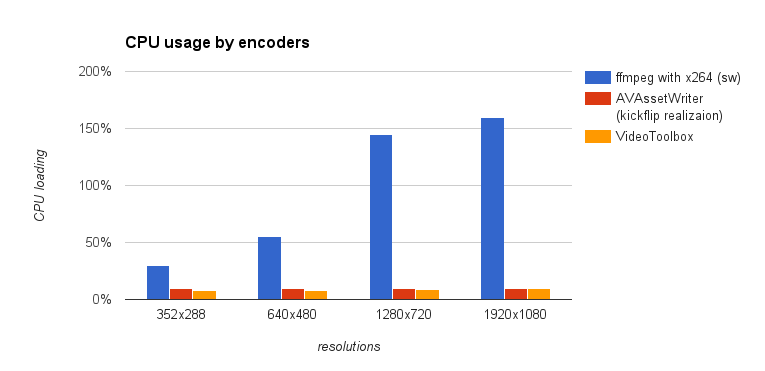
It is clear that the software encoder overloads the CPU and it fails to deliver reasonable results even working with 640×480 resolution. You can also notice that there is more than 100% load of CPU meaning that some frames will be left out as the CPU won’t be able to process them in time. Obviously, the device battery will die faster.

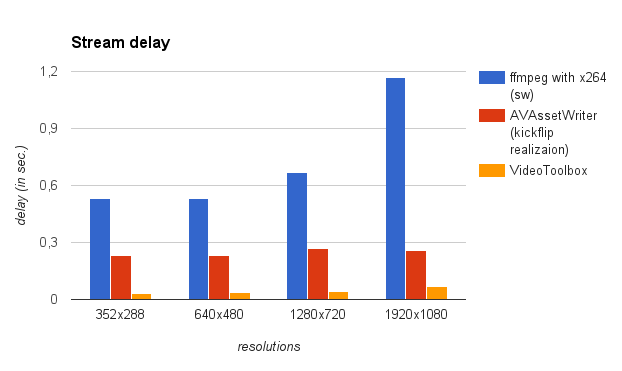
Hardware encoders work wonderfully and showed great results regardless of resolutions. The average CPU usage was kept within 7-12% limits. We found that AVAssetWriter has a longer delay and the difference is quite noticeable.

iPhone 6 Plus and iPad Air 2

Here are the results after testing the devices.

iPhone 6 Plus:

 ffmpeg with x264 (sw)AVAssetWriter
(kickflip realization)
VideoToolbox
352×288delay: ~ 0.49 – 0.57 s.
CPU Used: ~ 26%-37%
delay: ~ 0.21 – 0.276 s.
CPU Used: ~ 9% – 10%
delay: ~ 0.03 – 0.04s.
CPU Used: ~ 7% – 8%
640×480delay: ~ 0.49 – 0.57 s.
CPU Used: ~ 40% – 70%
delay: ~ 0.22 – 0.24 s.
CPU Used: ~ 9% – 10%
delay: ~ 0.035s.
CPU Used: ~ 7% – 8%
1280×720delay: ~ 0.64 – 0.70 s.
CPU Used: ~120% – 170%
delay: ~ 0.23 – 0.3 s.
CPU Used: ~ 9% – 10%
delay: ~ 0.044 – 0.045s.
CPU Used: ~ 8% – 9%
1920×1080delay: ~ 1.08 – 1.26s.
CPU Used: > 160%
delay: ~ 0.26s.
CPU Used: ~ 9% – 10%
delay: ~ 0.0615 – 0.069s.
CPU Used: ~ 9% – 10%

iPad Air 2:

 ffmpeg with x264 (sw)AVAssetWriter
(kickflip realization)
VideoToolbox
352×288delay: ~ 0.53 – 0.62 s.
CPU Used: ~ 40%-50%
delay: ~ 0.29s.
CPU Used: ~ 9% – 10%
delay: ~ 0.026s.
CPU Used: ~ 6% – 8%
640×480delay: ~ 0.53 – 0.58 s.
CPU Used: ~ 45% – 60%
delay: ~ 0.29 s.
CPU Used: ~ 9% – 10%
delay: ~ 0.029s.
CPU Used: ~ 7% – 10%
1280×720delay: ~ 0.57 – 0.61 s.
CPU Used: ~90% – 170%
delay: ~ 0.3 s.
CPU Used: ~ 9% – 10%
delay: ~ 0.03s.
CPU Used: ~ 9% – 11%
1920×1080delay: ~ 1.76s.
CPU Used: 180% – 270%
delay: ~ 0.32s.
CPU Used: ~ 9% – 12%
delay: ~ 0.038s.
CPU Used: ~ 10% – 12%

In order to make the data more comprehensible and easy-to-read, we decided to put them on a bar chart. On the charts below you can see how three encoding methods fare against each other.

Apparently, powerful CPUs handle software encoding much better than previous iterations, but such a high CPU load is unacceptable even for modern handheld devices with improved batteries. To top it all off, the software encoding efficiency is much lower than that of hardware encoders.

This small test shows the true advantage that hardware encoders have over the software solutions. VideoToolbox functionality is much more diverse and efficient when it comes to compressing and broadcasting videos.

It is important to note that the delay of AVAssetWriter solution may increase depending on the encoding method used by a developer. If the minimal delay is a goal then VideoToolbox is much more preferable.

Long Live The Battery!

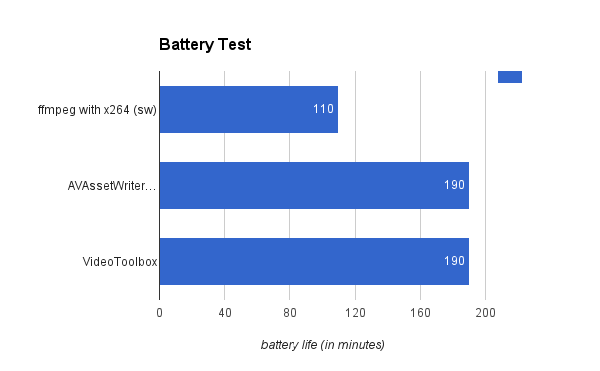
In order to show just how much impact encoding has on an end-user, we conduct a test on the batteries of the devices. We measured how long they can supply power to the device broadcasting a stream. The test was conducted using iPhone 5s with 100% battery and for 1080p resolution. Here’s the data.

The results show clearly that with software encoding the battery lasted less than 2 hours while hardware solutions extended this period to more than 3 hours.

Conclusion

The tests allowed us to determine whether the hardware encoders do their job better than software ones. Moreover, we successfully measure the effectiveness of popular encoding methods for iOS devices and now know exactly which methods to use when making a video broadcasting feature on a iOS device!

Read more about Video Streaming here:

Video Streaming (Part II). Get Ready To Rumble!

Preparing Files For Broadcasting On iOS Devices

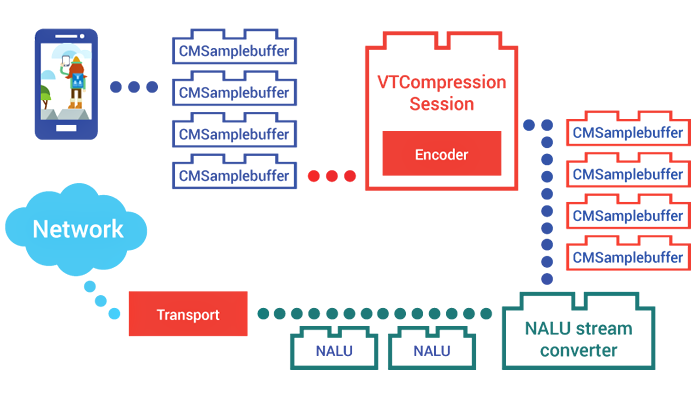
Previously, in our Part 1, we talked about devs struggling to get the broadcasting available from an iOS device. Now we have direct access to compressed files and this accessibility gave us the freedom we dreamt about. We came up with a qualitatively better method of preparing frames for subsequent broadcasting. In general, we can split this process into three steps.

Step 1. Video capturing. Сam catches the video and the device creates CMSamplebuffer packages with all the media samples and data.

Step 2. Video compressing. Received data is being compressed with the help of VideoToolbox. This process compresses the data within the CMSamplebuffer packages.

Step 3. Converting into NALUs to optimize online streaming.

Let’s Talk The Process Step By Step

We can refer to numerous documents and examples to explain how the first step is being done, but we want to focus your attention on the fact that during this first step process we receive CMSamplebuffer streamline containing uncompressed CMPixelBuffer data.

During the second stage we need to create and tune VTCompressionSessionRef. To compress an input frame we use VTCompressionSessionEncodeFrame function while using CMSampleBuffer as a parameter for the process. Upon finishing the operation the encoder uses a call-back function, which we set up during the initialization of the VTCompressionSessionRef. As a result of this complicated process we receive a new CMSampleBuffer package, that now contains compressed data. It is the very same CMSampleBuffer stream, but it contains CMBlockBuffer structures with a compressed video.

The following step requires us to convert the CMSampleBuffers’ stream into NALUs (Network Abstraction Layer Unit) stream. That is how it’s usually done when working with H.264 encoder. H.264 stream can be made in two different formats – Annex B and AVCC. Apple calls the format most commonly used for streaming Elementary Stream, we call it Annex B. iOS media libraries can work with H.264 stream in the AVCC format (MPEG-4 stream). Regardless of the format, there are 19 various types of NALUs and each NALU can store two types of data: VCL (Video Coding Layer) or meta. Each package can be easily parsed and processed as it has an appropriate descriptive header. The core difference between Annex B and AVCC formats lies in NALUs being splitted into the videostream.

Two Formats – One Way

Annex B doesn’t carry its own size, but starts with a start code. This code is usually 0x000001 or 0X0000001 (3 or 4 bytes). This allows splitting the whole stream into multiple NALUs.

AVCC defines the size of each NALU with a header that precedes the NALU itself. The header is about 4 bytes long, but might be lesser.

Each CMSampleBuffer package with compressed data contains the following:

  • Pts (CMTime) – presentation time stamp
  • Format description (CMVideoFormatDescription) that apparently carries the description of the format
  • Block Buffer (CMBlockBuffer) that contains parts of or a whole compressed frame

A CMSampleBuffer stream is a stream of I-, B-, and P-frames. Each stream may contain one or multiple AVCC format NALUs. Annex B, which is used for transmitting, is a sequence of PPS (Picture Parameter Set), SPS (Sequence Parameter Set), I-frames, B-frames, and P-frames NALUs. The amount of P- and B-frames may vary.

PPS and SPS contain parameters needed for encoding and must precede each I-frame.

For each NALU the length parameter is switched for the start code and then added to the stream. In order to correctly measure the length and amount of NALUs in a stream of CMBlockBuffer data, we use the length header coming forward each NALU.

The correct length is being coded in big-endian format and thus we need to swap its value in order to get correct NALU’s length. When a CMSampleBuffer contains an I-frame, we make PPS and SPS NALUs out of I-frame format description and put them before other NALUs from the CMBlockBuffer within the corresponding CMSampleBuffer.

All about results in a H.264 Annex B format stream that is ready to be broadcast and displayed on other devices!

Read more about Video Streaming here:

Video Streaming (Part I). Action!

Real-time Video Streaming And How It’s Done On iOS!

When you are watching a video on Youtube or enjoying a show on Netflix, you are using the video streaming technology. Since the beginning of the 20th century, the greatest minds have kept on developing new ways to deliver the media from a producer to an end-user. Both Youtube and Netflix are examples of the modern technology that requires uploaded video files in order to allow end-users to pause, stop or play the video at will. With this another technology co-exists one that we call “live-streaming”.

I heard that compression is important…

One of the core differences between these two types of media streaming is that during “live-streaming” everything happens in real-time. There are many examples out there: live broadcasts of events, concerts, and shows, Skype video calls, and, obviously, twitch.tv streams. Usually the video is being “streamed” from one device to another.

To ensure great viewer experience during live broadcasts, one thing must be reduced dramatically – latency. Latency is a delay that occurs between two users, sending and receiving. It is imperative that the end-user sees exactly what happens right instead of what happened a while ago. If the latency was too big during a Skype call, we would have had to wait for the data to reach your collocutor. The whole conversation would look more like a “video-mailing service”.

Live-streaming demands developers to be creative and use the latest technology in order to make viewer experience as rich as possible. It is important to reduce the delay, even if two users are separated by oceans. Generally, data flows through the Internet and that is why the size of data is important. Small files are delivered nearly instantly; big files travel a long time before they reach an end-user.

Media compression is very important. There is no need in streaming with the highest quality, modern compression methods allow us to compress the size of media multiple times and still get a high quality video. To put it simply, the better compression, the more viewers will be able to see the stream without delays and technical issues.

To compress a video, we need to use codecs. H.264 is a codec that is widely used to compress a video. There are software and hardware encoders, the latter is more convenient to use on handheld devices. Lesser CPU usage allows the device to work longer.

Modern iPhones and iPads support both video and audio coding on a hardware level. Up until recently, Apple has not allowed developers to use fully the potential of the hardware video encoder. The ways to implement live-streaming features in applications for iOS were limited. We, developers, had only two methods.

The first method is to use a software encoder from an external library; an encoder like ffmpeg, for example. This method has multiple downsides:

  • Huge CPU load;
  • Extensive power usage;
  • High hardware requirements.

Here is a simple example: to compress a video in 360p with such a method, you need 100% of the CPU resources on iPhone4.

The second method is based on accessing a hardware encoder. One of the biggest downsides of this method was that developers had no direct access to the encoded frames. In order to use this method, we have to work with several small encoded pieces. The whole process requires splitting and saving files as well as reading them right after. Such a complicated compression takes up for a while before streaming!.. It is unacceptable for live-streaming.

Glory to Apple!

After the release of iOS8, Apple presented Video Toolbox Framework, a set of tools that allows developers to directly access hardware video encoder. This instrument can encode video in real-time. This library allows us to improve video compression while lowering energy consumption and prolonging the battery life.

This library is easy-to-use yet creates some obstacles for a developer. Firstly, there is not enough information about the instrument. Secondly, video compression requires additional coding. Overall, making a live-streaming feature is still a tricky task.

One of the most important tasks of our team was to simplify the whole process of creating media streaming features for iOS applications. We wrapped together a couple of software solutions that will prepare videostreams for broadcasting and we want to take Video Toolbox Framework to its limits!

Read more about Video Streaming here:

How Not To Let Subcontractors Screw Up Your Project

“Mirror, mirror on the wall. How my project’s going on?”
Anna Vasilevskaya

Would you be calm and cool-hearted if you’d need to give your baby to completely unknown people for a couple of months? I don’t think so. You definitely would like to see your baby every day, know that it is healthy and talk to the hosts to know how your baby behaves. Similar thing with forwarding your project to a subcontracting company. Are the works properly done? Are they going to meet the deadlines? Don’t they hide anything from me? Those questions would appear in the mind of a new customer during the entire project.

Subcontractor may play a role of an experienced “adult” in IT for a customer who is new in the nearshoring business to ensure his work is in safe hands. In this article I’ll try to show you an approach that will help you to be independent from your and your subcontractor’s experience level. The only way to do that is to make the development process for the customer as transparent as possible. In this case provided information represents a base for a successfully managed and transparent project. How is it better to do that? For his own benefits a customer should always try to take care about the information to be SOLID, COMPLETE and WELL-TIMED.

If FixedPrice model is chosen – no problem, all the risks are on the side of a supplier i.e. subcontractor. But working on Time&Material basis implies that subcontractor makes available for the customer to observe and control the project being carried out. If a customer has no idea about the current status, if he/she doesn’t trust enough to the subcontractor, he/she feels the need to double check everything and that makes him distracted from his/her direct tasks.

So, when you come to an agreement about the information provided by the subcontractor, you have to consider it through the three main perspectives.

SOLID. It is one of the most important goals for a subcontractor – making customer sure you give him precise and true information. Speaking simply – that you don’t tell lies. If provided information is wrong, the customer is just misled. This easily can contribute to wrong interpretations and false decisions. To prevent those situations the customer definitely needs to crosscheck the information provided to him. Definitely not everything has to be checked all the time, it is too time and efforts consuming. It has to be found an efficient scheme to check the information from time to time and in various spots. In this way customer can find aсcidental, but sometimes even intentional misstatements by subcontractor. By no means you should try to stop him doing that. Again this is completely up to the customer how often and how firmly this will happen.

COMPLETE. Basically customer has to be sure that the subcontractor doesn’t hide anything unpleasant or vice versa anything important. Information hiding can be vital when any bottle necks appear. It is more efficient to inform customer on short notice and find solutions together than hide the details and then surprise him with a bunch of problems. Customer also has to decided how deep into details he would like to drop. Usually it depends on the subcontract level. If you see that subcontractor is quite weak, it is better to require more details: what was done? when? who did it? why? could we have done it in other way? The more experienced the subcontractor is, the less information you can demand from him. Depending on that you can choose among a couple of convenient tools, which allow doing that quite easy and productive:

  • Surface level. Weekly Status Report (WSR). It is prepared every week (surprise-surprise!) by a project manager and includes all the important points of works done during previous week, planned activities, new agreements, open questions and project milestones. WSR can be customized to each customer’s needs. By the way it also helps PM to keep all the significant information in one place.
  • A deeper level. Time and task tracking in customer’s systems. God bless the person who invented them! Jira, Redmine, Trello, Breeze and so on. Reporting into customer’s systems gives him the possibility to see how much time was spent on what tasks. This also gives the opportunity to harness subcontractor’s work attaching priorities.
  • The deepest level. Daily online meetings. An interactive addition to WSRs. They can be held via Skype, TeamViewer, Hangouts, Webex etc. They help to maintain direct two-way communication with developers and managers. Developers give an idea about what they’ve done, what they are planning to do, ask questions. Customer gets the latest information about how the project is going.

WELL-TIMED. In other words all solid and complete information has to be provided to customer in proper time. The earlier the problem is detected, the easier it can be solved. To react accurately and solve possible problems the most suitable way, perhaps together with the customer, it is needed to adjust some alerting mechanism, which could use above mentioned tools (WSR, meetings) to present the information. This feature is connected closely to the TRUTH feature, they complement each other. This is perhaps the most flexible feature, as the customer is free to choose how often he’d like to get the reports.

Based on the above I can mark out two general conclusions.

  1. Typically the customer has to spend more efforts on controlling information to be solid and complete as well as frequent double checking, if subcontractor isn’t experienced enough. The more experience, the less efforts for controling him.
  2. Both customer and subcontractor should aim to bring the balance among solid, complete and well-timed to the most suitable corellation for them. So customer needs to define how much effort each feature must take. If he feels that information is solid and comes in time, but it isn’t complete enough, he needs to discuss with subcontractor how to improve it. Perhaps WSRs are not accurate or meetings should be held more often.

Basically try to follow the Pareto principle – roughly 80% of the effects come from 20% of the causes.

In our turn, we’re curious, how do you manage your work with subcontractors? What kind of experience do you have: did you raise a bump or everything was on wheels? Or perhaps you have your own ideal recipe how to “prepare & cook” subcontracting workflow?

The Force Awakens: A Star Cluster of Meteor & Angular

meteor_vs_angular

A long time ago in a galaxy far, far away…the trends of web development inspired more and more developers to write real-time applications.

With the appearance of nodejs front-end, the developers got the possibility to create server & client ends on traditional javascript.

The notion “isomorphism” grew in popularity in 2015. In simple words, isomorphism is a possibility to use one and the same code either on server side or on the client one. Meteorjs has played the major role in the establishment of this approach.

Meteorjs is a framework which helps to create module client-server real-time applications.
Meteor allows to create isomorphic applications which means that your code will work on different platforms (client, server, ios, android).

This framework possesses outstanding tools to work with data thus allowing us to use one and the same interface on client as well as on server side. Meteor uses DDP protocol which supports the dual sided data transfer and works via WebSockets & SockJS.

Some people compare (or try to do it) Meteor & Angular, but it’s ultimately wrong. Frameworks pursue different aims and can (and must) work together.

AngularJS has lots of abstractions which help to make the development of client single-page application faster, easier & what is more important – more fun. All we need is to make AngularJS friends with meteorJs (what was already done by angular-meteor.com).

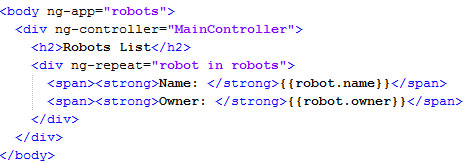
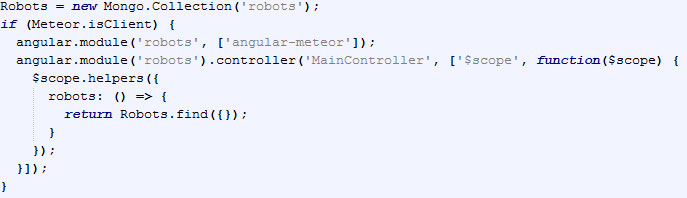
After angular-meteor installation, your simple application can look like:

app.js

Enter “meteor” in command line at your project folder. Meteor will collect your code & launch server.

Then lauhcn meteor mongo at your project folder & insert the string:

One can see that the data has been updated on the fly, though we didn’t use any additional approaches.

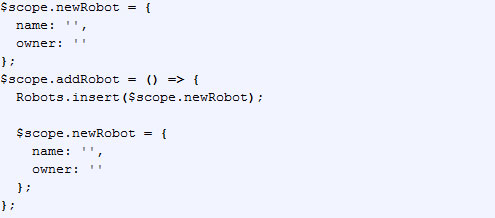
We can extend the existing code by adding a feature of new entity addition. Then add the further code into app.js file:

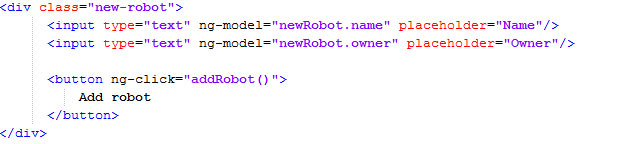
and into index.html this one:

Now we can add a new robot from client end. One should pay attention that a new record will be added not only into client end $scope, but also into server database.
All this happens due to DDP protocol: (https://github.com/meteor/meteor/blob/devel/packages/ddp/DDP.md).
Please, note that we request Robots.insert method, which can also be used on server.

It’s just a simple example showing the perks of combined use of angular & meteor. You should definitely try all the loveliness of both frameworks. Directives, filters, services – are strong points of angular and data binding, userfriendly deploy, isomorphism, build & minification systems are of meteor.

It’s worth noting, that using such binding, the developers have no need for setting up the environment.
It’s Meteor that provides all this from its box. One shouldn’t worry about your favorite build system installation (grunt, gulp, webpack). Meteor has its own tools of packaging & project minification, embedded into autoreload, convenient package management system and many other things.

The indispensible part of any technology is its dark side or drawbacks. Unfortunately, MeteorJs doesn’t support sql databases. The solution is to use additional meteor-packages, but it looks like Chewbacca after a shower of rain – quite a pitiful sight. So, to сreate a really good application, one should examine both frameworks thoroughly which can take long.

The very approach of development on meteor might seem unaccustomed for the fans of API-first approach and this might also take some time to get used to it. Without doubt, both frameworks (meteor & angular) come with auto-magic: it can frighten the developers, used to control all internal processes to the last detail. So, there’s no decisive answer.

In any case, both of them are open & their source codes are available for reading at Github.

In conclusion, it’s worth to point out that meteor & angular binding allows to create isomorphic real-time applications faster & easier than it was ever earlier.

May the Meteor be with you. The Angular is strong with this one.

P.S. So, what do you prefer for full-stack development?

Why Does Your Business Need NO Mobile Application?

wdyb
In 2014 Google Play & App Store were flooded with 2.5 mln of mobile applications.

If it goes further, this index number will double in 2017. That’s why it’s no wonder that with the market-share gain, there’s an increase in the number of the afflicted to invest in mobile apps development.  In this article we try to explain what one should know to avoid common mistakes when creating a mobile application.

wdyb-mob

Before starting to create an application, one should keep in mind the following points:

First Step: Assess risks

Last year Ebay sold goods on 5 bln dollars through mobile devices. Such tendency of mobile market impresses deeply, right?

No wonder that looking at this effort, many companies think about “go mobile”.  However, when lots of them do not see an immediate result, they feel a bitter disappointment & do not give a rat’s tail about its further development.

A mobile application costs money. If you’re not a large retailer as Ebay, the investments would be hardly fast justified. Perhaps, they would never be justified.

Many try to win( money back by running an advertisement inside the application.

But let’s keep it real: no normal user will experience joy observing from day to day a bawdy banner of as much as bawdy game.

Of course, one can make a paid mobile application or create a row of paid features inside an app. Such monetization measure is justified if you develop a mobile app as a standalone product, not as a supplement to your website.

Next Step: Ask yourself ‘Will my mobile application bring value to the user?’

Even if your application is an image of your website, it should bear a standalone value for the user: why the user should grant space at his device on your application?

A vivid example of this can be mobile applications of magazines. Let’s take ‘Popular Mechanics’ as an example. ‘Popular Mechanics’ has an iPad version which contains different additional materials (e.g.: videos) attached to the articles.

When talking about the value for the user, one should remember users themselves. Unfortunately, the level of smartphones penetration is not high. This is due to the fact that the price of mobile devices and mobile internet is quite high. Generally, this problem is strongly widely spread in regions.

Keep in mind: Trendy doesn’t mean profitable.

If your product is aimed on mass market with different tastes & preferences, if you’re one of the largest companies as Ebay, Ozone, Evernote or Youtube – in these cases you’re definitely in need of a mobile application. One should consider a mobile application not only as a tribute to fashion, but as a necessary tool for holding the most stable & active consumers in. Such consumers are sometimes called innovators who will pack you in if they do not get a comfortable mobile app.

Basing on our experience, we can say that a mobile application can pop if: 

  1. it’s a product for internal customers.
    In such case, mobile applications serve for automation of internal business processes of a company. Such products are not available for mainstream audience – they’re used exclusively by company’s personnel.
  2. it’s an additional product (service) for value engineering of the main business products. It’s a so called ‘branded application’. The major aim of these applications is to provide users with additional convenient services, e.g.: mobile banking, which allows to manage Customer’s accounts & cards.
  3. it’s a standalone product. It’s a mobile application on which the business will make profit. One example out of many applications which enables to manage personal finance – you pay 1$ for it & download from App Store there.

Don’t Miss The Bus

I want to clarify one thing — building an app isn’t a piece of cake. It takes a significant amount of time, money and energy to build an app that people want to download and use. Even after an app is up & done, it will need to be marketed and supported by your company.

wdyb-app

All these elements need to be figured out at some point and then planned for. It’s how companies stay competitive in today’s marketplace.
If you can’t set aside the budget and resources for an app today, will you be able to do so when your sales are declining because customers “all of a sudden” decided that they prefer using your competitor’s app over your old website?

This is a not a tactical decision about whether $10,000 in app development has a greater return than $10,000 in website improvements. It’s a strategic decision to invest in a platform that can support the business infrastructure of tomorrow’s generation in the same way your website has supported your business for the last generation.

The bus has already started off. It’s not that you can’t wait for the next one, but if you do, is it going to delay your business to the point where you can’t catch up with the competition when you really need to?

What’s your opinion?

Do you think web technologies will manage keeping up with native mobile apps, or will apps ultimately force the retirement of its older web friend?

Xamarin: the past and the future of a promising technology

xamarin_title
From an open source initiative to an integral part of Visual Studio 2015.
Although it may seem that Xamarin is still a new kid on the block, it has recently celebrated its 4th birthday (celebrated its 4th birthday), so it is about time that we looked at the history of its evolution from an innovative open-source project to its present state.

Xamarin’s foundation was laid in an attempt to create a .NET implementation for UNIX systems. However, as the development moved on, the project steered away from the initial direction to become an emerging industry standard for enterprise mobile development and eventually turn into an important component of the newest Visual Studio 2015.

Over these years, the people behind Xamarin have been pushing the envelope to sail away from the remnants of the not-so-commercially-successful Monotouch library, but the community is still divided over the question of whether Xamarin has really brought the much needed gulp of fresh air into the realm of enterprise mobile. Some say that it was just a lengthy experiment of renaming standard Monotouch components to create a seemingly new product. The traces of Monotouch are still found in Xamarin, so it may still have a long road ahead before it becomes truly unique. However, its role in today’s enterprise development world cannot be underestimated and the technology is definitely worth giving it a closer look.

Xamarin Forms – a promising, yet controversial product

xamarin_forms


Around a year ago, Xamarin introduced Xamarin.Forms, an all-new and highly promising cross-platform UI technology that was immediately spotted by the market and its key players, and in fact appeared to be so powerful that Microsoft included it into the standard Visual Studio 2015 package. The product is now being advertised and viewed by Microsoft itself as a comprehensive toolkit for building complex cross-platform and enterprise solutions. To gain even more exposure for the Forms, Xamarin went at great lengths to secure the support of the legendary Petsold who is currently involved in the further development and promotion of the product. The global development community has had ample time to study the platform and test-drive it in actual application development, and the reaction to its findings was not 100% positive and unanimously super-enthusiastic.

The first problem that seemed to be apparent was the dreadful performance of applications based on Forms (https://forums.xamarin.com/discussion/20092/critical-performance-issue-in-xamarin-forms-layouts) and the lack of an efficient workaround for this problem. JetBrains reported numerous problems while trying to implement the support of Xamarin.Forms into a new version of Resharper for Visual Studio 2015.

The product seemed to be unstable, slow and begging for optimization. Any non-standard component or element like a gesture or animation required a custom renderer to be created, and it was not an easy task. Development of any renderer with a more or less complex logic in most situations required deep analysis and reverse engineering of the forms that came with no source code. A decompiler in this case was of little to no use, since it didn’t reveal everything and wasn’t particularly convenient.

However, every cloud has a silver lining, and so does Xamarin. While working on various custom renderers, we encountered a great number of elegant and well thought-through architectural solutions that we couldn’t but admire.

A glimpse into the future

Despite the relative immaturity of the platform, we still believe that it’s got a very bright future. It is the only viable alternative for a great variety of projects, especially those that are based on a .NET server backend and shared code for clients, or cross-platform apps, or simply for developers with a .NET background looking to jump-start a new branch of their career in mobile development. It is also a perfect pick for building apps with great-looking animated UI’s. And the best thing about Xamarin is that all these blows and whistles, all this beauty and interactivity can be added fairly quickly and easily in comparison with other platforms or frameworks.

We surely hope that Xamarin’s alliance with the Redmond giant will allow the company to finish their work-in-progress and make the platform as reliable and convenient as it was supposed to be. Moreover, it may give them the leverage for solving problems in a more timely fashion – similar to the way they handled the recent issue with a ban on publishing Xamarin-based apps in the App Store. In a perfect scenario, we would like to never see anything like that happen again.

Developing you apps in Xamarin

xamarin_development


Now, if you’ve heard and read enough about Xamarin, and think that it’s the best pick for your next project, but don’t have this expertise in this area, it’s about time you started looking for a reliable vendor. Xamarin may be a relatively young technology, but there are companies out there that either know all about it or pretend to be know-all-all, universal type of developers. Apparently, we recommend doing business with teams that have been involved with Xamarin since its early days. This technology, with all of its growth issues, is far from being an industry standard adopted by every company and used by millions of developers, so working with a software development partner with a proven track record in developing Xamarin apps is invaluable. Newcomers may not know that, for instance, the choice of Xamarin forms over standard iOS/Android components is extremely important, just like the choice of PCL components that, if picked incorrectly, may cause considerable lags during the start of the app. If your developer does not know the minimum of Xamarin’s tips and hints, you may be facing a possibility of a very disappointing outcome for your project.

To sum up, we believe that Xamarin has humongous potential that is yet to become truly visible. It’s a powerful platform as is, but with all the support from Microsoft and other key players on the market, it has every chance to become a standard solution for cross-platform development very soon.

Who is the Boss in da House? The battle continues: FrontEnd vs BackEnd vs Fullstack

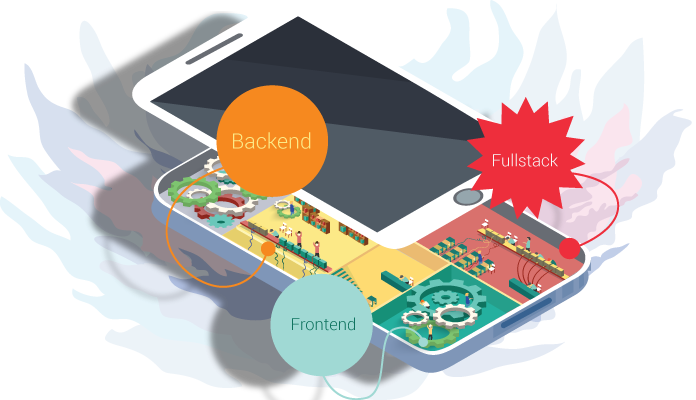
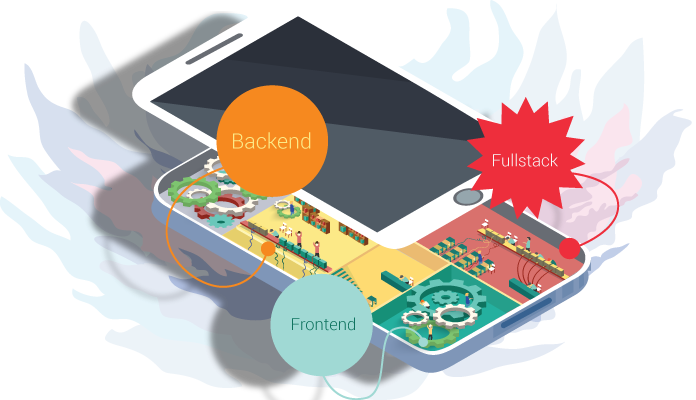
The development of a modern application might be compared with a house construction: one should hire a team of specialists – each master of his trade. As the builders lay foundation, erect the ossature and carry out all the necessary utility systems, so do the team of developers  with your web application. Backend Team think over the main application architecture, choose the necessary technologies and consider the means of communication and data processing. Frontend Team, in their turn, put into life the designer’s mock-up and implement the interaction between end user and backend.

Let’s have a look at each of them.

{ Frontend }

3-1

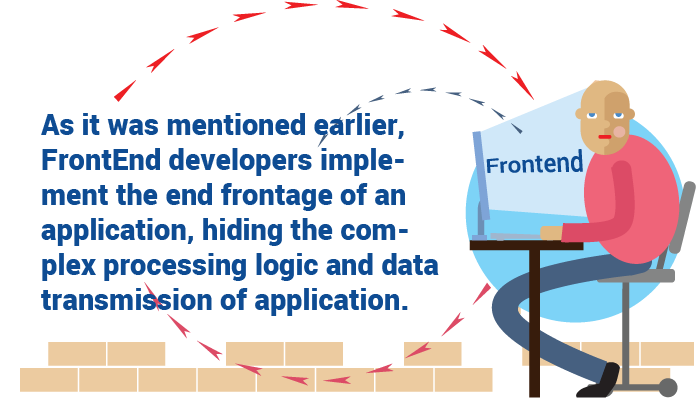
As it was mentioned earlier, Frontend developers implement the end frontage of an application, hiding the complex processing logic and data transmission of application. Reading this paragraph, one can convey the impression that easiest part of web-app development falls to Frontend developers’ lot: it’s a piece of cake to chuck together buttons and forms and to compose them in accordance to the designer’s mock-up. However, it’s an unsound opinion.

As a Backend developer, Frontend starts from choosing the stack of technologies on which the  client-end portion of architecture will be based. Nowadays, a great number of different frameworks exist, which allow to ease the process of creating the client-end portion and the task of prime importance is to choose the one that will give the best fit to the particular case: AngularJS, jsblock, EmberJS, BackboneJS or even crude Javascript.

One should keep in mind lots of nuances while choosing: whether the user will work with a great data flow at a time, whether the special components will be used: extensibility, modularization, etc.

To make a further step, one should think over the means of time optimization of client end load: to use means of code/ styles/ images and other data compression, because all that is written and used in client-end will be downloaded by end-user web browser and there one should pay attention to the traffic volume.

One more challenging task for a Frontend developer is to turn into reality the idea of the designer and the customer. The question is not about a tricky or flamboyant physical appearance and animation, but how to make it in such a way that it will look good in all browsers and mobile devices with different platforms, screen sizes and its restrictions.

For sure, today we have CSS Frameworks that have a set of ready-to-use styles for creation of responsive and adaptive web apps. However, they are often quite bulky or their usage makes no sense in view of the fact that one should remake them to get the desirable appearance or because of the giant framework that contains lots of styles where just several classes are used.

And finally, the most challenging task is for sure to implement the mediation between end user and backend portion. It’s really very important to application to be intuitive and evident for the user, that’s why a Frontend developer should have top skills and experience in so-called “human” interfaces even if your application is quite complex and have a set of its components which the user hasn’t faced before: every thing should still preserve its intuitivity, one should learn the user to use your application, to steer him and give him tips.

It’s a topical issue to make several things before the user does, i.e. to be like a ghost for him: to fill in the form with predictive data, scroll the page on the necessary blocks, imply why data didn’t passed a validation and to make error messages less frightening and more understandable. After chatting with the user and getting the necessary data, the client end sends it to backend and waits for the results to inform about them and display to the user.

{ Backend }

1

Backend developers work under the hidden part of frontispiece – main application logic, and you know, this problem is a beast: to process and store great volumes of data and to secure them.

To do that one should use a giant stack of technologies, each to a particular task. As an experienced builder, Backend developer should start from foundation placement for an application – it’s really a significant step, because if anything goes wrong, all the application will crash down. One should go over the ground each and every thing: to choose the appropriate framework keeping in mind the possible load on the app, choose the appropriate data base which will comply to app’s data.Though, here we have lots of nuances: different databases have different features either of storage technique or of speed of such parameters as reading, record, search.

One should think over the data transmission on the client end – to optimize the volume of transferred data and choose the most appropriate format. Oftentimes Backend developers face the necessity to bind an application with other external services which cause further hardships and peculiarities. The processing of all the data falls to their share: from importing small piece of excel table, image or video processing to making a complex calculation of flights to air-traffic controllers. All this should work as a duck takes to water as the users don’t get used to waiting.

{ Fullstack }

2

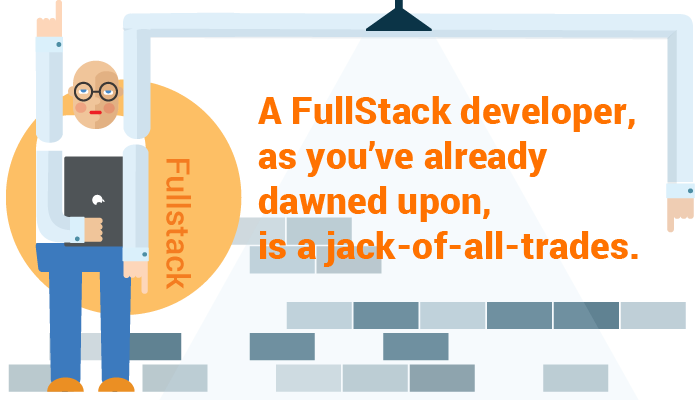
A Fullstack developer, as you’ve already dawned upon, is a jack-of-all-trades. He can materialize the idea of a designer, liven it up using any framework and will take care of its backend. On the one hand, it’s a perfect worker – he knows exactly what he should send and what he should get and return and there’s no ground for the battle between Frontend and Backend developers. Fullstack developer always knows where something might go wrong and fix it whether it might be on client or back end.
From the other side, a Fullstack developer is snowed under with too many things: everything depends on one human being. In such situation one can start to write a code from one’s point of view or to bury oneself under the back end thus not paying enough attention to other end. If you have a whole team of Fullstack developers, sooner or later they will split into Backend and Frontend. If it not happens, the code goes to squash from different approaches and methods of code writing. If one thinks, one person cannot be a know-it-all.

Fullstack developer won’t know so many twists and turns as a narrowly focused specialist does. But if you find such a person, hold onto him.

Anna Vasilevskaya
AI modified real photo
Anna Vasilevskaya
Account Executive

Get in touch

Drop us a line about your project at
[email protected] or via the contact
form below, and we will contact you soon.