Clash of the Titans: Angular VS Backbone VS Ember

1. [ Introduction ]

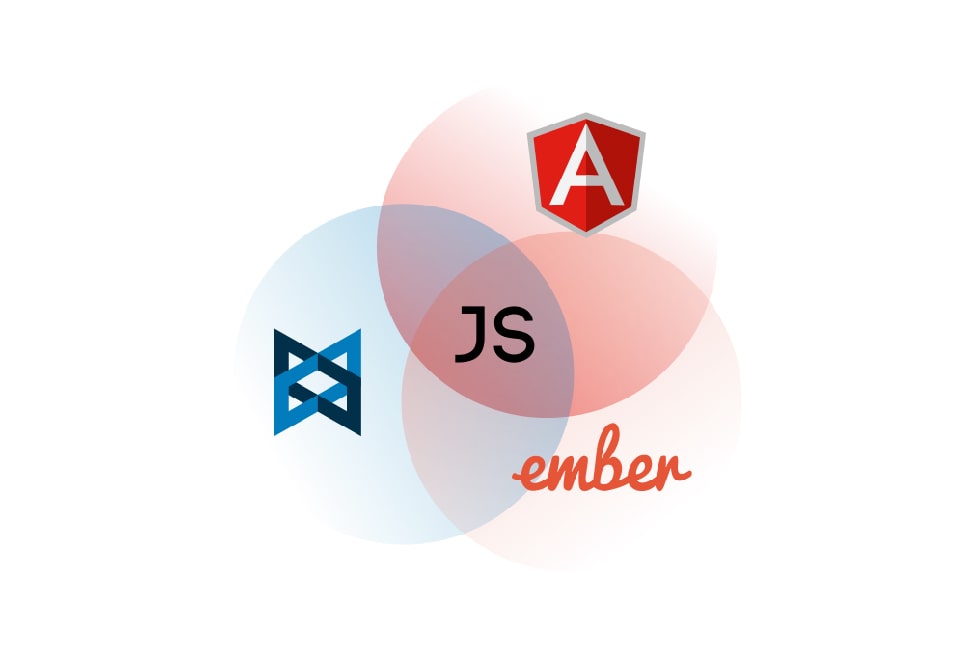
Nowadays a lot of different javascript frameworks have appeared. There’s even a joke that every day it’s a birthday of new framework. The choice of the most suitable for the project framework influences dramatically on your opportunity to perform tasks on time & to support your code in future. You need reliable, battle tested framework, but you don’t want to be bounded? So the question arises: which framework to choose? Let’s have a thorough look at 3 most popular frameworks of today. Please, meet AngularJS, BackboneJS and EmberJS.
AngularJS, BackboneJS and EmberJS

2. [ History ]

All the above mentioned frameworks have common features: their code is open, released under MIT license & they solve tasks of single-page web application creation with the help of MV* designing template. All of them have the concept of scene, event, data models & pathnames.

AngularJS was born in 2009 as part of the great commercial product known as GetAngular. Soon after that, Miško Hevery, one of GetAngular founders, managed to re-create with the help of this product the web application, which was comprised of 17.000 code lines & made in 6 months. Google was impressed by such a fact & started to support the project with an open code. Among its features are: two-way data binding, interaction injection, simple code for testing & extension of HTML possibilities through directives.

Backbone.js is a lightweight MVC-Framework, created in 2010. It has become popular as a good alternative to heavyweight Frameworks such as ExtJS.

Ember is originally from 2007. Its history began as SproutCore MVC Framework: initially it was developed by SproutIt & then by Apple. In 2011 it was forked by Yehuda Katz, one of the main programmers of jQuery & Ruby on Rails projects.

3. [ Communities ]

Community is one of the most important factors when choosing the Framework. Bigger community – more answers on questions and tutorials in Youtube. As we see from the grid, Angular wins by far.

4. [ Framework size ]

Page load time is a crucial thing in website success. The users are behindhand in patience, so it’s necessary to speed up the load as much as possible. There’re two factors influenced on: framework size & time, required for its launch.

AngularJS, BackboneJS and EmberJS

5. [ Templates ]

Angular & Ember include template engine. Backbone though leaves it to the developer’s discretion. The best way to test the templates is to take the code sample. We will take the sample of forming a list in HTML.

 5.1 AngularJS

AngularJS templates are represented by HTML with binded clauses. The clauses are hooped by double brace.

5.2 Backbone.js

Though Backbone.js can be integrated with several template engines, Underscore is used by default. The processing with its help templates are quite primitive & it is necessary to add code on JS.

5.3 Ember.js

Ember uses Handlebars, an extention of the popular Mustache engine. A new version of Handlebars is developing now, named HTMLBars. Handlebars doesn’t understand DOM – it just works with strings. In HTMLBars, DOM will be identified.

6. [ AngularJS ]
Angular

6.1 Advantages

Angular is considered to be quite powerful & more or less self-sufficient framework. It has a huge community and support from Google. GitHub contains a vast number of modules from external developers for all of life’s emergencies.

The main perks of AngularJS:

  • modularization: you can write particular parts of application by uniting them in individual modules & reuse them in your projects.
  • two-way data binding: the data once entered by the user appeared in your objects & vice versa.

html
  • Angular Expressions: expressions which allow to manipulate data directly in your template. You can perform functions inside the element or attribute & output data.
  • Templates support: you can break parts of the page into separate pieces, known as directives & bundle them when necessary. You can describe these pieces as individual HTML tags or attributes. Each template might be bound to a controller.
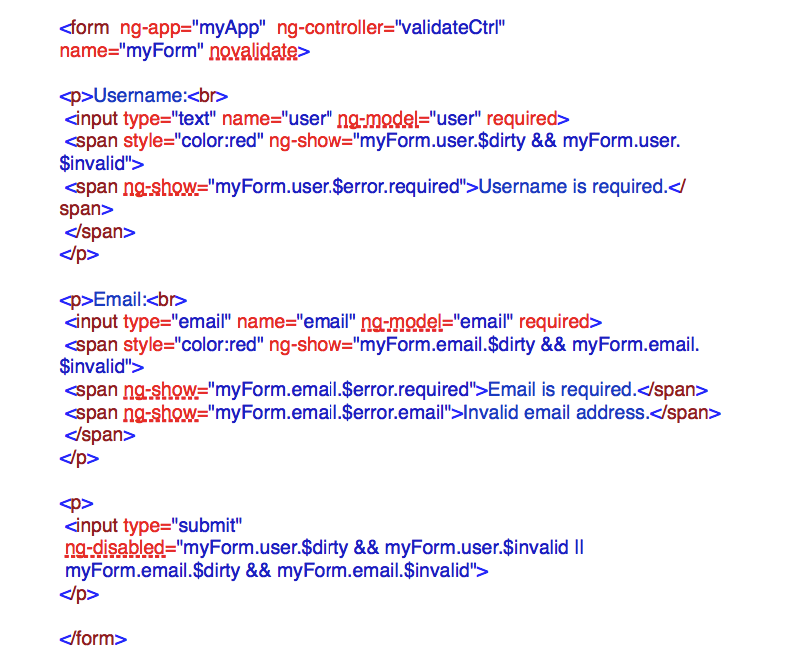
  • On-board forms validation: Angular possesses good & extensible on-board form validation. Without writing a code line, you can report the user about empty fields or wrongly entered email.
  • Single-page web application
  • Filters: An AngularJS Tool that allow to exclude & modify the data on display phase.  It might be selection, a kind of data exclusion, pagination as well as limitation of the text length or its transfer to the upper case. Angular possesses the ready-made useful filters and also allows to create your own.
  • Dependency injection: AngularJS possesses a kind of “include” feature. You can include in your module, controller, service, directive, etc. all the necessary modules, services, filters & even separate data through injector.
  • Interceptor. For purposes of global error handling, authentication, or any kind of synchronous or asynchronous pre-processing of request or post processing of responses, it is desirable to be able to intercept requests before they are handed to the server and responses before they are handed over to the application code that initiated these requests. The interceptors leverage the promise APIs to fulfill this need for both synchronous and asynchronous pre-processing.
  • In-built Support of AJAX
  • Unit tests Support

6.2 Disadvantages

  • Two-way data binding is implemented through digest cycle, which runs through your data, monitor all changes & update the output data. It’s quite comfortable from one side: one needn’t to write any evaluator & care about how to output data. But from the other side when you have a lot of data, they will be checked even by a slightest change. If you add here any complex angular expressions with functions, you understand the problem scale – the performance starts suffering.
  • Everything you do by using Angular, you should do inside Angular. If you use an exterior component on jQuery & try to change the data in view or in object which participates in data binding – nothing will happen. Because Angular doesn’t know that something has been changed until another digest cycle will pass on. In such a case, you should launch it manually.
  • It seems to me, it’s so great when the data and their displaying work independently and you just operate objects and all output Angular takes upon itself. However, that’s life, when such an independence backfires. For example, when you add a new object to the collection displayed as a set of inputs and it’s necessary to focus the insertion point on the appeared input field. One have to get fancy trying to find field using jQuery or built-in feature – angular.element or even to write a separate directive to do that.
  • one of the pain in the ass with which the developer faces is debugging. The thing is that exceptions are not thrown in angular expressions. And if you use a lot of complex expressions, it’s hard to understand where something goes wrong – it becomes a real pain in the ass. One should transform it into a function & then monitor where something goes wrong.

7. [ Backbone.js ]

Backbone.js

7.1 Advantages

Backbone is light & doesn’t take much space in data store: it has great documentation, its code is simple. You even can dip into a framework code & become aware of it in an hour.

On its basis one can build the frameworks. Some samples of ready-made frameworks: Backbone UI, Chaplin, Geppetto, Marionette, LayoutManager, Thorax, Vertebrae.

In case of Angular & Ember, you have to get along with what have been prepared by the developers. They promise to fix it in Angular 2.0, but that day is still far distant.

7.2 Disadvantages

Backbone is unstructured. It is represented by a set of simple tools for creating structure and you should fill in a lot of empty spaces. Of course, many of these spaces are filled with external plugins, but it doesn’t mean that you should make a lot of decisions while choosing them.

There’s no support of two-way data binding, so you will have to write a lot of code-behind to upgrade the scene when modifying the model & to upgrade the model when modifying the scene.

The Scenes in Backbone manipulate DOM directly, that’s why it’s hard to test them & to reuse.

8. [ Ember.js ]

Ember.js

8.1 Advantages

Ember.js works under the principle of “naming conventions instead of configurations”.

Ember doesn’t require the code-behind, it might itself tumble to an idea, for example to automatic determination of pathname & controller when determining the source. It can even create automatically a controller for the source, if you don’t jump ahead of it.

It includes a good evaluator of path names & optional layer for work with data named ember data. Unlike any of the other frameworks, Ember at once has a module for work with data, which integrates with Ruby-on-Rails Backend & other API with RESTful JSON.

While developing Ember, a great attention was payed to the speed of response. Your application more likely will be downloaded & work faster.

8.2 Disadvantages

API was booming that’s why it contains obsolete content & examples, which now don’t work out. Take a look at Ember Data Changelog & you’ll understand what I mean. Lots of questions at StackOverflow are outdated.

Handlebars pollutes DOM with <script> tags which not only add complexity to HTML, but can also break CSS or integration with other frameworks like jQuery UI Sortable.

9. [ Summary ]

We’ve examined advantages & disadvantages of the frameworks. The holistic approach of Ember to MVC installation will be appreciated by those developers, who try it in Ruby, Python, Java, C# & other OOP languages. It also suits for creation of fast working applications & release us from redundant code.

Backbone stands for minimalism. It is fast & simple in teaching & provides a minimal set of the necessary tools.

Angular is an innovator in extending HTML possibilities. It has a huge community & support from Google, it will have a constant growth & development. It suits well for fast and simple way to create a mockup as well as for huge projects.


Xamarin: One for All (Part I)

A well developed mobile application can help businesses increase customer satisfaction and engagement by allowing the company to be available to their target audience, generate revenue and create additional channels for marketing. It is unsurprising, given the widespread use of mobile devices, that Emarketer.com predicts that by 2017 more than one third of the population of the world will be smartphone users.

People use many different types of mobile hardware, and it is imperative to build a mobile application that flawlessly functions across a diverse set of operating systems.

Being experts at building cross-platform mobile applications for all major platforms, our software developers at *instinctools believe that today Xamarin is a cure-all for operating systems.

Launched in 2011, Xamarin is a tool used to develop cross-platform mobile applications. It works through the Mono framework to communicate with the Application Program Interface (API) of common mobile device functions including contacts, camera, and geo-location for popular iOS, Android, and Windows operating systems. It allows developers to build robust applications using the C# programming language that runs on the .NET Common Language Infrastructure (CLI).

Sure enough, Xamarin has its positives and negatives and in this article (part 1) we will go through 5 main perks of Xamarin platform.

1. Write once, run everywhere

Xamarin is integrated with SDKs of all of the different operating systems. You have the ability to utilize native controls that exist for the iPad, Android or Windows but only coded once. Linked files, conditional compilation, and portable class libraries make it possible for developers to share the code. The ability to reuse 60-80% of the code cuts the development time in half. That obviously saves time & money to both customers and service providing companies on the app’s multi-channel distribution. Additionally, a single codebase dramatically reduces costs for support and new features introduction.

2. Native API

Xamarin delivers high performance compiled code with full access to all the native APIs so you can create native apps with device-specific experiences. Anything you can do in Objective-C or Java, can be done in C# with Xamarin.

3. Native UI

Xamarin allows you to keep Native UI in all 3 platforms, therefore preserving Native Performance while enjoying full API coverage, shared codebase and application logic. It also allows to re-use skills, teams, tools and most importantly – the CODE! And as a result, it saves your time and resources.

4. Fewer bugs

The number one reason that Xamarin tends to result in fewer bugs: we write less code. As a general rule, the less code we write the fewer errors we’re likely to commit.
Xamarin also reduces errors by providing the opportunity for greater test coverage. Any given project has a finite amount of time available for testing. Rather than spending that time writing two sets of largely duplicate tests, we can write a single, more comprehensive set of tests that validate the code for both platforms.

5. Xamarin TestCloud:

Such program allows you to test automatically your iOS and Android apps on hundreds of devices. It offers continuous integration, beautiful reports, test for fragmentation, and object-based UI testing.

Xamarin is gaining more attention everyday and with good reason. Today, nearly 500,000 developers and such world-know companies as Microsoft, Bosch, Tesco, HP (and many others) are already taking their advantage of creating awesome apps on Xamarin.

And for real, in a world where a variety of mobile platforms coexist, we do need a toolset that allows us to support multiple platforms with minimal duplication of work. This just what we get with Xamarin.

Automated downfall check for the code. Quick SQL-injections search

SQL-injections (http://en.wikipedia.org/wiki/SQL_injection) represent a wonderful way to get external access to your database. This kind of injections can be left in the code by developers both because of lack of experience and on purpose. Is it possible to find them quickly and be sure your product is safe? Our developer Alexander shares his experience of automated search for such injections.

Once I had a task to develop a plugin prototype for IntelliJ IDEA within a short time. The plugin purpose was to analyze the code to search for SQL-injections according to a certain rule described in the given XML file.

To start plugin development for IDEA you just need to download the community version and create there a project for plugin development.

As a next step I had to realize the object representation of the rule described in XML. The main point of the rule is a listing of classes and their methods, their calling is SQL-injection. Nothing to explain here, everything is simple and has nothing to deal with specifics of plugin development.

After I had realized the object representation of the rule, I started exploring OpenAPI IDEA SDK with a view to code analysis possibilities. First of all I visited their documentation site: https://confluence.jetbrains.com/display/IDEADEV/PluginDevelopment. If I tell you the given information there was enough, I’ll probably tell you a lie…

It was clear that for code analysis I have to work with psi-elements and I made some investigations in this direction. I reviewed the interface of psi-element and its other descendants and it showed that for faster orientation it’s better to output all the structure from a Java file into the console and see what happens next. I call it exploratory attack. We need a UI action that can be called in the chosen project file in IDE. While activating the action we get AnActionEvent and then we take the element following way:

PsiElement element = event.getData(LangDataKeys.PSI_ELEMENT);

in case we called the action on the chosen element in the project tree, or:

PsiElement element = event.getData(LangDataKeys.PSI_FILE);

in case we called the action from the editor of the open file.

Back to psi-elements. Psi-element has a parent psi-element and subsidiary psi-elements.  So we can get deeper recursively and output all the elements with indentations into the console. In this way I found an important.

PsiMethodCallExpression element that includes necessary information, meaning which exactly method and where do we call it from. A bit more patience and I found a way to extract this information:

PsiReferenceExpression methodExpression = expression.getMethodExpression();
PsiReference reference = methodExpression.getReference();
PsiElement result = reference.resolve();
PsiClass methodClass = (PsiClass) result.getContext();
String methodClassName = methodClass.getQualifiedName();
PsiIdentifier methodIndentifier = methodExpression.getLastChild();
String methodName = methodIndentifier.getText();

In this way we get the whole class name this method belongs to and the name of called method. That’s enough to identify whether it is a potential SQL-injection. Besides we have the psi-element of method calling, so we know what place in the code it is.

The next task – marker saving.

I created a project level component and put the marker container in it to save markers. To make the component container persistable, the component has to realize the interface ProjectComponentState<Container type>

And the fields in the container have to be marked with relevant annotations, e.g.

@com.intellij.util.xmlb.annotations.AbstractCollection
code

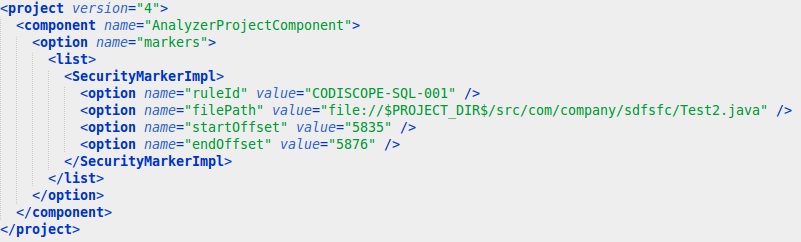
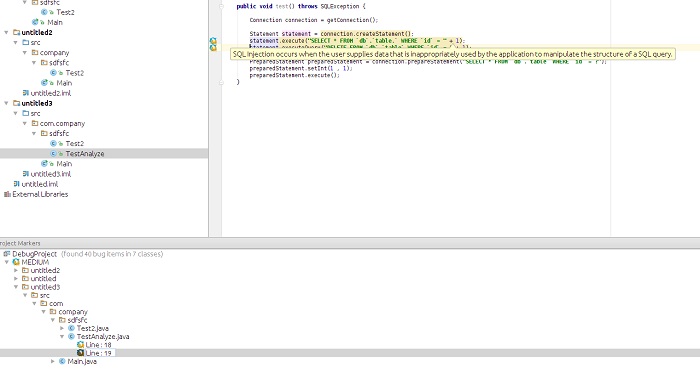
Displaying of markers and annotations was a sweaty piece of work. Everything was great, the way for realization of markers and annotations is easy, because you only have to realize your relevant providers and register them in the plugin. Some difficulties appeared, when I had to refresh them in the open editor. I couldn’t find the information about that on open access so quickly, so I had to use exploratory attack again. Debugging marker display mechanism I found out that it is possible to refresh SlowLineMarkersPass and it will refresh markers for the specified document. Anyway the issue with annotations highlighting the code remained. The same way I found the GeneralHighlightingPass. Class that dealt with annotations etc refreshing, but there was one hitch: to create and launch it you have to feed it with a plenty of different odd arguments and it already took the wind out of sails. Debugging didn’t help, so I had to ask for help my good old friend Google. After several cups of coffee I found an article where it was suggested to use this way

DaemonCodeAnalyzer codeAnalyzer = DaemonCodeAnalyzer.getInstance(project);
codeAnalyzer.restart();

Bingo! This approach solved my problem both with markers and with annotations. Warning! If you install developed plugin into the IDE where it is developed and then you launch debugging of the same plugin, IDE sees the code exactly from the installed plugin. As a result IDE doesn’t pick up code changes and debug falls off. Take this into account and do not install your plugin into the operational IDE, before you finish development process. Eventually I got this plugin

code_programm
  1. First of all this task doesn’t take much time. It took no more that 5 days for the whole plugin.
  2. We got more flexible while completing our tasks for code analysis. It isn’t always fully accessible in ready frameworks for static code analysis.
  3. The opportunity to use PSI elements instead of AST simplified our work.

As there is not so much information on the Internet on this topic, I hope this article might be helpful for other developers.

FP & TM Agreements: The Perks & Pitfalls

fixed-price-or-time-material-in-other-words-how-to-finalize-the-perfect-application
If you are planning to do remote software development, then you must have thought about which engagement model to use. We get asked this question a lot, and as you have heard before… the answer is, it depends. In this article we’d like to present you a detailed description of FP & TM Agreements, their perks & pitfalls:

1. Fixed-price (FP) Agreement

– is identified by the price for the determined workload, despite the actual cost of work performed.scope of work.

Such type of Agreement might cover financial benefits for a certain tasks achievement of the project. Fixed-price Agreement is divided into:

  1. FP Agreement with incentive fee (FPIF) – Fixed-price agreement where the Customer pays a specified bonus for the achievement of a particular criteria.
  2. FP Agreement with fixed price – I know, it sounds a little bit grotesque, but such type of Agreement deserves a fuller explanation: when the Customer choses FP Agreement, he bears in mind that according to such contract the work load shall be determined before work start & afterwards shall not be subjected to any changes.
  3. FP Agreement with a provision for possible price adjustment – quite comfortable in cases of terms stretch, during which any changes might occur.

2. Time & Materials (TM) Agreement

– is a mixed type of Agreement, according to which the Customer reimburse the Contractor all actual costs. The Customer pays for the time spent on the development by the hour rate.

From all existing diversity of agreements, TM & FP are the most popular ones. They both have their perks & pifalls. So let’s have a closer look at them:

  1. Risk Coverage:
    Fixed price Agreement covers risks that might arise during project performance. Risks might or might not occur, but the Customer shall always pay for them. The cost of risks is calculated from their probability to appear on the cost of their realization. For example, there’s one risk in performance of the project, with a cost of 50.000$. Its probability to occur is little – around 20%, but in case of its occurrence, the cost of the project will raise on 10.000$, i.e. the risk cost equals 2000$. Irrespective of the risk occurrence, the Customer pays for the project 52.000$. In case of TM agreement the Customer pays as much as the project performance will cost, i.e. without risk -50.000$ & in case of it occurrence– 60.000$.
  2. Project Scope Assignment:
    Since the Customer pays for the actual consumed time in case of TM Agreement, he can provide the content of the work gradually, as work progresses. Provided that, he is the person who takes responsibility for the final result.

When performing the project on the FP basis, the volume of performed works is provided and evaluated prior to the signing of the contract and afterwards can not be changed. Changes in the volume of works at FP Agreement leads to termination of the current contract, payment of performed works and to signing of a new contract for the new scope of work.

tm3

The peculiarities of TM Agreement

I’d like to draw your attention to the non-obvious feature of TM contract that might resulted in customer’s confusion.
Under TM agreement, the process of development is transparent: the customer sees the development process as it is, sees all the bugs appeared, defines the objectives and content of each version of the product.

If the customer doesn’t want to spend time on the elimination of bugs and focuses on adding functionality, the number of bugs increases from version to version. After a few months of such development, there’re so many bugs that the effectiveness of QA fails, so that the developers have to create new functionality basing on existing bugs functionality. The development of new functionalities goes slower and slower thus resulting the customer’s getting nervous and looking for the causes of problems. The reason for slow development – bugs. Who creates them? The developers. The cause and the offender are found.

On the customer’s opinion, the developers should present the code without bugs. I.e. the customer expects the quality of the developers’ work on TM project to be the same as on FP project. In this case, the customer ignores the fact that in FP project, the created code undergoes the quality control & the following fixing of all found bugs before presenting it to the customer.
On FP project all bugs without any exception are fixed & only after that the customer sees the result. The customer doesn’t point the bugs that a developer should fix. He even doesn’t know whether they be. The customer is granted with the final product of the required quality.

On TM project the customer sees the bugs & decides which of them should be fixed. As far as bug fixing doesn’t add value to the product, they have a tendency to pile up. When the number of bugs becomes critical, the development process stops & the project might be closed.
To avoid project crash, one should make sure that the customer understands that under TM project he sees the project, which includes the phases of creation, testing & fixing. Disregard of one of these phases, after all, would lead to the project failure.

Conclusion

So, which agreement should we choose: TM or FP? There’s no absolute answer. The closedness of the project from the moment of order placement till its final performance presupposes the dead certainty of the customer in the rectitude of his vision on the product.

Meanwhile, TM Agreement allows making the development process clear, effective & driven. And if the Customer notes the weak spots in the project, he can deviate from the ground-plan & do not waste time & money on performance of wrong approach.
However, some non-optimality of the product is allowed in contrast to the risk of missing the budget.
That’s why, while choosing between the types of agreements, one should keep in mind all the components – budget, time, final result.

Top 5 reasons to use Angular.js

Hard times, when we have to deal with the legacy code, that during its long existence in web, moved from developers without documentation, thus bringing with itself a bunch of complicated interfaces & making the code more & more complicated.

AngularJS

It’s a common knowledge, that a developer never built things keeping maintenance and support in mind. But now they are in search of the best way-out to fix these dents & restore the sanity in applications.

Developers who were looking for alternative ways to stack upcoming applications can use AngularJS to bring sanity to apps. AngularJS is a relatively new JavaScript framework from Google, designed to make front-end development a piece of cake. It possesses a wide range of frameworks and plugins.

But one should keep in mind, that while adding AngularJS to the web app, one needs some careful evaluation. It’s connected with the usage of JQuery or JQuery UI & other javaScript libraries in the app, because adding extra lines of code may slow down your own JavaScript execution. Anyway, for all that, we cannot ignore the following long-term benefits.

1. More close to MVVM Architecture:

AngularJS integrates original MVC software design pattern to build client-side web applications. However, AngularJS doesn’t implement MVC in the traditional sense, but rather something closer to MVVM (Model-View-ViewModel), where:

  • Model is the data in the application, a plain old JavaScript object (POJO). Users do not need to inherit from framework classes, wrap it in proxy objects, or use special getter/setter methods.
  • ViewModel – ViewModel helps to maintain specific views. ViewModel is the $scope object that lives within the AngularJS application. $scope is a simple JavaScript object comes with a simple API designed to detect and broadcast changes. Rather it is the specialized controller important to settle augmenting $scope in the initial state. It does not store states and neither interacts with remote services.
  • View – is the HTML that exists after AngularJS has parsed and compiled HTML to include markups and bindings. MVVM is a solid foundation to design applications. $scope shares reference to data, controller defines objects behavior and view handles the layout.

2. Have a Declarative User Interface

To define app’s user interface AngularJS uses HTML. HTML is less likely to break than an interface written in JavaScript. Special attributes in the HTML determine which controllers to use for the elements. With HTML, app development simplifies in a sort of WYSIWYG. So stop spending time on program flows and what loads first, simply define what you want, Angular will take care of the rest.

3. Two-Way Data Binding

Two-way binding is the most awesome concept in AngularJS. Not only visually pleasing feature, but also has a fascinating real-time concept. Data-binding directives provide a seamless projection of models to the application view. Because of its seamless, no efforts needed from developers. With Angular two-way binding, the view and model no longer require fresh cycles as they may be prone to bug or simply need a lot of redundant and tough to maintain the render code – it handles the synchronization between the DOM and the model, and vice versa.

4. Uses POJO Data Models

Data models in Angular are POJOs, so you no longer need the getter/setter functions. add or change properties directly on it and loop over objects and arrays. This makes the code look clean and intuitive.

5. Easy Adjustable Filters

Before any data reaches View, filters help to clean the data and involves in something simple such as formatting decimal places, reversing the order of an array, filtering an array based on certain parameter or making changes in pagination. Filters are similar to directives as it works as standalone functions that are separate from your app, but it only bothers about data transformations.

Conclusion

In this article, we’ve covered 5 features of AngularJS that our developers consider to be the most winning. These 5 features can help you to get an idea why nowadays AngularJS is trending. For sure, AngularJS is not a panacea for all web apps, but it can stand the generic apps in good stead.

To build them all…: cross-platform mobile development frameworks comparison

As one of the fastest growing markets in the IT industry mobile development area offers a lot of issues to discuss and be found of. Except pros and cons of various technologies there always is a business side. Cross platform development collides both with dev side and with business vision.

Good news for everyone who wants to increase their profits and keep quality on high level!

Cross platform development (CPD) is the solution. Visible business perks of CPD include:

  • Lower costs for development
  • You have to build the app only once
  • You have to employ specialists with one skill set
  • You can move developers from team to team without hiring new people
  • Shrinking of time-to-market
  • Growing developers community

There are several known and widely used tools for CPD. In the table below you can see three of them compared: Xamarin, Appcelerator Titanium Studio, Qt and PhoneGap. The criteria in the table are relevant both for developers and for managers. Some of criteria like license cost, speed and cost of development, distribution capabilities are highly important especially for startups.

Xamarin Appcelerator Titanium Studio Qt PhoneGap
Supported platforms iOS, Android, WindowsPhone iOS, Android, WindowsPhone, BlackBerry iOS, Android, WindowsPhone iOS, Android, Blackberry, Windows Phone 8, Ubuntu, Firefox OS
License&Costs 4 types: starter for free, then $25-$158 per month Dev for free, enterprise – $5000 per year 4 types, up to €6400 Apache License, Version 2.0
Distribution via different app stores No problem No problem Only with commercial license No problem
Access to platform-specific features 100% access Access to most of them Not fully, but the number is raised all the time Not fully (depend on platform)
Look and feel Everything works and looks perfectly Creates native UI elements, requires knowledge of Titanium’s JavaScript API Looks nice on desktop Analog of native UI
Development environment Xamarin Studio + plugin for Visual Studio Tightly integrated into Appcelerator’s IDE Titanium Studio based on Eclipse Qt creator, Qt designer Eclipse, Idea,command line tools,  etc.
Ease of development C# – feel right at home Documentation is good. Initial progress and accustomization relatively slow Qt has a lot of tools to help developers do their jobs best: compilers, rich documentation, helper tools and many other cookies Instrumentation tools, especially debugging and memory profiling are sorely missing.
Maintainability Like native apps Many lines of code, but can be easily modularized Great GUI layout system Like for web application
Scalability Great because of C# architecture Good scalability. Passing data or objects between windows is quite slow Easy to use Easy to use
Opportunities for further development Excellent Hardly can be used with other approaches Gets better and better. Translation system, testing library Excellent
Speed and cost of development Only one tool needed A lot of framework specific knowledge Easy and fast Easy and fast

As you can see all the technologies for CPD have their specific features and it’s important to choose the most convenient and suitable for your needs. There are a couple points that might help you while choosing.

In what cases you should go for cross-platform?

  • you have very limited development time
  • you already have skilled JavaScript or .NET developers
  • the application includes a lot of busy business logic that has to work equally in all the mobile applications

When you should decide for native development?

  • Performance and operation speed of the application matter the most
  • Not too much business logic
  • Multi platform operation isn’t required

If you’re lucky and made up your mind painlessly, it’s time to choose the right CPD framework. The selection of right tool depends on tasks your application has to solve and resources you have. Following hints can help you to reach a decision:

  • If you already have .NET developers and the application has to be done asap for several platforms, we recommend to use Xamarin. In this case you should pay attention to the license cost and its accordance with your budget. Bosch-Siemens, Tesco, Sennheiser appreciated Xamarin’s perks.
  • HTML5 solution fits for applications without high performance demands. Among HTML5 customers you can find Guardian, Burberry, Financial times.
  • If you have skilled JavaScript specialists, you can definitely try Appcelerator Titanium. This is also good choice for an application with native interface in all the platforms. Tried by Ebay, Mitsubishi Electric, VMware.
  • Game development is worth separate discussion. CPD solutions reviewed in this article cannot be used for games production.

In the next post we’ll go deeper into the frameworks indispensable for cross-platform development. To learn more from our experts visit http://instinctools.eu/. Stay tuned and share your thoughts in the comments.

Freelancers. A blessing or a curse? How to work with freelancers?

We often face different opinions on freelancers in our work. Some people fear them like plague, others hire them and сomplete the orders successfully. From time to time we hire freelancers if we require some specific expertise or need to expand the development team. And we dare to say that a freelancer will save your money as well as your nervous system. If you know how to deal with them.

freelance

Freelancers are children

A freelancer does not understand you. Just face it. It is not because they are bad, but because people in general do not understand each other. We speak the same language, but mean different things.

You can tell a freelance designer to “Draw a pretty website”, but none of you understands what it means. If you let a freelancer go after these words, he will not manage to do anything.

You may tell a freelance programmer to “Implement a payment gateway” on your website, but you do not specify whether you need e-money, order statistics, e-mail confirmation and storing the payment data. It seems obvious to you. However, it is not obvious to your freelancer.

You say that your mixing tap is leaky, but you do not specify that you do not want to replace it.

Always act on the premise that your executor did not understand the task. It will save your time in the future.

Of course, the executor is responsible for clearly understanding the task. An experienced freelancer will not let you go until you explain the task in all its details. A good executor requires a million clarifications, makes up a vision of the solution and finally makes you accept it. If you are not irritated by your freelancer delving into every detail, you are dealing with the inexperienced one.

That is why you should not wait until his lack of experience turns into your problem. Correct the situation.

  • Define the problem that a freelancer should solve. You don’t need a website, you need to sell the goods; you don’t need an article, you need to create reputation; you don’t need wedding photos, you need great memories. Allocate some time to think about the problem instead of the solution. Why do you need a website?
  • Discuss the problem with the freelancer. Ask how he would solve it. Maybe the freelancer suggests a better solution. However, this trick has a pleasant side effect: a freelancer realizes that you respect him as an expert. This will help in your further relationship.
  • Discuss the solution. Ask the freelancer to explain to you all the stages verbally. Be meticulous: “What will the user see here? How is it designed? What is the next step?” If a freelancer does not present the solution in detail, you will fail. Make him think about all the details before you discuss the price. Any hushed up question is an abyss that your project will fall into. Find these questions and clarify them.
  • Describe the solution. Ask the freelancer to make up tasks for himself, considering all discussed questions. This may seem unnecessary, the executor will be grizzling and saying “Oh, why do we need to do this? It is already obvious…” Treat him carefully, as a kid but do not stop proving your point: understanding the task should appear on paper. If there is no understanding – there is no project.
  • Reread the vision and make sure that everything looks the way you want. If something is blurred or does not even partially meet the expectations, correct this with the freelancer.

Conclusion: Some people say that a client should not think about his task since it is a job of a freelancer to clarify everything. This is nonsense. A project is a partnership. Everyone should work hard. If a client sees that the executor does not understand the task, he should step in and put things in order. Taking comfort and thinking that “it is not your responsibility” is an irresponsible approach.

Monitor the term

Freelancer will definitely fail to meet the deadline. If a freelancer meets the deadline, he might have already started his own agency and hired a couple of managers. Both young and experienced freelancers are a perfect example of irresponsibleness. But it is not personal qualities that matter, it is the way they organize their work.

Freelancer faces 3-4 parallel orders at any given moment. As soon as he finishes one project, there goes another one. This is how he provides himself with minimal earnings. A freelancer cannot but take several parallel projects – this is how he makes a living.

Then there goes another freelancer principle – the most pressing tasks are the most urgent ones.
To start making your task today, a freelancer should know that tomorrow is the time of delivery and if he fails to make a delivery – he will feel pain, shame and hunger. That is why today he puts all the orders aside and devotes his time to yours. And tomorrow (or on Monday at most ) you will have a great result.

To get a good result in time, you should keep the freelancer in the state of frantic rush. To do this you need to:

  • Set milestones with the freelancer. Preferably every 2-3 days. Suggest him to do this himself. It is important since a freelancer should make a promise. When you impose the terms on him, he will not be bound by moral obligations.
  • Follow the milestones and express your dissatisfaction openly if the freelancer is running out of time. The freelancer should be ashamed that he did not keep his promise.
  • Remind about the milestones. Accept the fact that freelancer has no time to control the terms – he has at least three clients like you. Act as a manager and calmly but insistently remind him that he is having a milestone in 2 days.
  • If the project is long, bind payments and work stages. But remember that in most cases a freelancer is not afraid of losing money: he thinks that he could have worked with 10 simple clients instead of the hard one. Do not mention money in your discussion.

Conclusion: accept the fact that a freelancer has no time to monitor the terms.

Stay connected

Treat your freelancer as a gifted child. He does his job perfectly, but he lacks discipline. Take it for granted.

This implies that:

If the freelancer does not call you during the day, he did nothing on your project today. If it’s bad for you – call him yourself.

If the freelancer says that “everything is almost done and he needs some time to stabilize the algorithm” – he probably hasn’t even started working. He’d better told it in the beginning instead of the day before the deadline.

Keep a constant contact with the freelancer, do not let him go. Project milestones should keep him fit, he should feel your constant presence.

Do not expect the freelancer to tell you that he is running out of time because of bad planning and ask to make up a new plan. If he did so – you managed to found a unique example and should always work with him. This is a grown-up, serious and smart freelancer that can hardly be even called a freelancer. This is a partner, professional and a very clever person. Such specialists are hard to find.

In most cases a freelancer will tell you about floods in his apartment, hospital visits, internet connection issues and funeral banquets. It’s a shame to put pressure on the worker when such things happen in his life, but you know that nothing has happened, don’t you?

Conclusion: If a freelancer uses “reasonable excuses”, he is definitely in deep crisis. Most likely he is busy working on other projects. Try to understand the situation and act as a grown-up – make up a new plan together and let the freelancer suggest new terms.

Try to ask him:

– Matt, what if you don’t manage to finish in time? What will we do?

Let him suggest his own punishment.

Be wiser

Freelancer is a gifted child. If he were more grown-up and concentrated, he would have already started his own business. Do not expect adult behavior from him, as well as admitting his fault or making a timely warning. He is busy surviving.

Lies, procrastination, turned off phone, elusion, excessive promises, wish to appear better than he really is can be considered as the essential elements of freelancer’s behavior and should not be taken seriously.

Just as every child, a freelancer can be influenced upon with the help of yelling and rudeness, pressure and threatening not to pay him. However, these measures won’t be effective for too long – it is easier for a freelancer to lay low than to deal with a tyrant. Be wiser – try to overwhelm him with your insistence, respect and attention. Set an example. Be respectable and the freelancer will not want to deceive you.

Drawing a final conclusion

Stick to the conviction that freelancer is a child in his profession. It is difficult for him not to let you down. Become a wise mentor and you will see how productive a freelancer can be.

Automated Testing ROI

Part 1. When is Automated Testing More Profitable Than Manual One?

What are the major objectives of automated testing? How can you bring the costs and number of running cycles down and coverage and effectiveness up? And finally, does automated testing always pay off better than manual testing?

When is Automated Testing More Profitable Than Manual One?

Automated testing is sure not a сure-all solution. It often implies considerable expenses in the beginning which should be considered rather as a long-term investment into your project under development. But at some point in this ballgame this investment will start covering the expenses spent on manual testing.

Where exactly is this very point? How can you catch it?

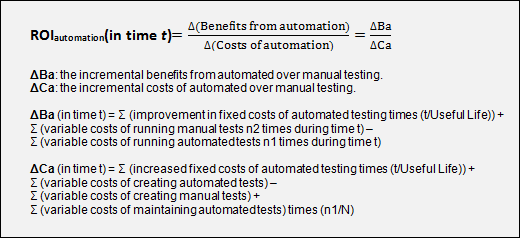
To get this question answered, we may compare ROI (return on investment) in automated and manual testing and make our mind what is better for us.

roi-formula

For starters, we should determine the crucial parameters of our project.

Example 1: Basic Test Set Usage

Let’s fancy we have a regular task to work out a set of basic tests which we are going to perform in every new product build. Our goal is a minimal quality assessment and Non-GUI tests running.

For instance, assumptions for our project are:

  • Daily builds and test runs (5 times a week)
  • Manual tests take 20 days to design, 8 hours to run
  • Only half the manual tests would be run on any given day (4 hours) with the other half run the following day
  • Automated tests take 60 days to design and implement, automatically run (zero cost)
  • Automation is done with batch scripts and integrated into the build process. Test server requires $1,500 in added hardware, with a useful life of 3 years
  • Automated tests need to be maintained every 20 runs, 3 days of work required
  • Periods of time (t) selected: 6 months (125 days) and 18 months (375 days)
  • Average instinctools QA engineer cost for our client $14 per hour = $112 per day = $26880 per year

ΔBa (in 6 months) = 0 + (4 hours * 125) – (0 * 125) = ($14 * 500) = $7000
ΔBa (in 18 months) =0 + (4 hours * 375) – (0 * 375) = ($14 * 1500) = $21000
ΔCa (in 6 months) =($1,500 * (6/36)) + (60 * $112) – (20 * $112) + (3 *$112 * (125/20)) =
= $250 + $6720 – $2240 + $2100
= $6830
ΔCa (in 18 months) =($1,500 * (18/36)) + (60 * $112) – (20 * $112) + (3*$112 * (375/20)) =
= $750 + $6720 – $2240 + $6048
= $11530

ROI (in 6 months) = $7000 / $6830 = 1.025 [about break even]
ROI (in 18 months) = $21000 / $11530 = 1.821 [~80% return]

As we see above, the investment made in an automated testing approach starts paying off already in the 6th month.

Example 2: the Full-Scale Set of GUI Tests

Let’s presume we have a goal to quality test the product functionality via GUI.

In this case our assumptions will look like the following:

  • A new product with all new tests
  • 1 people-years developing manual tests, 3 for automated tests
  • 1 person maintenance after 1st year for automated tests
  • 3 people full time running manual tests, 1 person for automated
  • Fixed costs for automated tests (new hardware, tools licenses) of $15,000 with useful life of 3 years
  • Periods of time (t) selected: 12 months (250 days) and 24 months (500 days)
  • People cost $14 per hour = $112 per day = $26880 per year
ΔBa (in 12 months) =0 + (3 people * $26880) – (1 person * $26880) =$53760
ΔBa (in 24 months) =0 + (3 people * 2 * $26880) – (1 person * 2 * $26880) = $107520
ΔCa (in 12 months) =($15000 * (1/3)) + (3 * $26880) – (1 * $26880) + $0 =
= $5000 + $80640 – $26880 =
$58760
ΔCa (in 24 months) =($15000 * (2/3)) + (3 * $26880) – (1 * $26880) + (1 * $26880) =
= $10,000 + $80640 – $26880 + $26880 =
$90640
ROI (in 12 months) = $53760 / $58760 = 0.915 [small loss]
ROI (in 24 months) = $107520 / $90640 = 1.186 [~20% return]

In this case, even one year later manual testing stays more profitable and effective.

The bottom line

We have specially reviewed 2 examples in order to show that sometimes ROI starts in the 6th month after the work went underway, sometimes even 1 year is not enough. The calculation above shows how much the assumptions and input parameters influence ROI.

We hope our examples and experience will help you calculate your ROI and build up more effective solutions.

Why is Node.js so popular for REST API?

Quick & easy development

You can construct REST API with Node.js really quickly.

Node.js has large and active community that contribute many useful and mature modules which can be easily included and used. For example, to construct REST API such known modules as express, restify and hapi fit perfectly. They provide easy way to declare API, handle incoming parameters, errors, transformation to JSON, streaming and sending response.

High performance

Traditional handling of requests is based on threads and blocking operations leading to CPU and memory consuming. For example, if API code reads something from a database, the code stands at that place and waits for operation to finish. In order to handle other requests while that thread is busy, server spawns more threads using more memory and processing time.

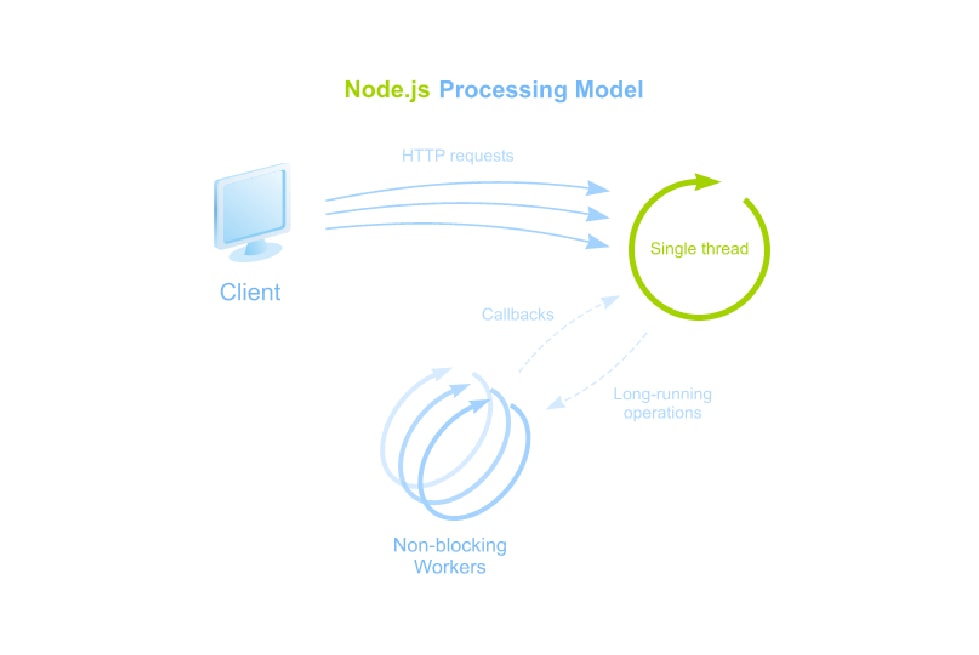
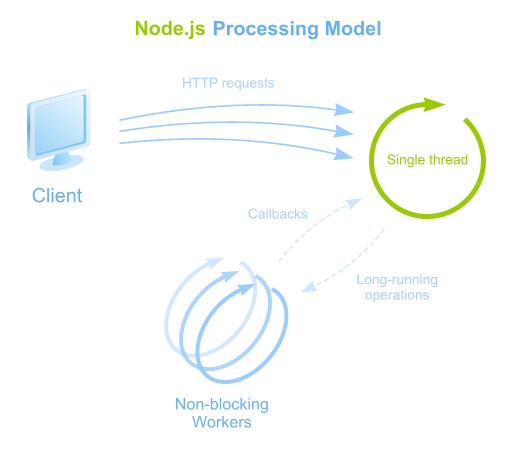
Node.js is different. It operates on a single-thread, uses an event-driven and a non-blocking I/O approach.

Node.js Processing Model

Advantages:

  • Single thread is used to handle multiple concurrent requests
  • All long-running tasks (data access, input/output) are always executed asynchronously on top of worker threads
  • Node.js makes this type of concurrent programming easier to utilize

This model is highly efficient and scalable as Node.js is basically always accepting requests because it’s not waiting for any read or write operations. That makes it lightweight and efficient to support hundreds of thousands of concurrent requests.

Great approach to construct API for existing applications

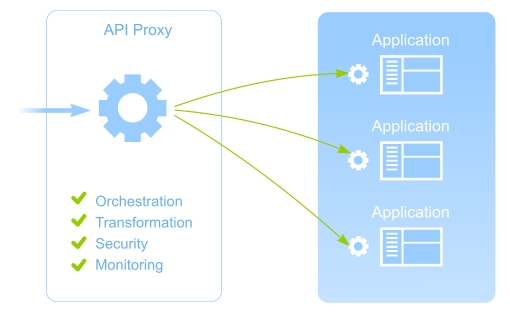
Often there is a need to construct a modern, well-structured API for existing application or a set of applications. To implement that it is better to use dedicated API Proxy that can provide:

  • orchestration of incoming requests to appropriate services
  • transformation of obtained results to result format
  • security applying authentication protocols
  • API usage monitoring

Also it is very important that API Proxy should comply with performance requirements:

  • minimal overhead on the interaction with existing applications
  • API Proxy should not be affected if one of the services of existing applications may work too slow or even get stuck
  • API Proxy should be lightweight and easy scalable if required
API Proxy

So why Node.js?

Node.js is a perfect approach to implement such REST API Proxy and to comply with all performance requirements:

Easy to write API and interaction code

There are a lot of ready and useful modules to work with pure HTTP(s), REST API, Web Services, Sockets, etc that can be used both to construct API and to implement interaction with existing applications.

Streaming support

Using event-driven and non-blocking I/O approach of Node.js it is easy to stream results back to the client of API as they are getting from existing applications.

Monitoring possibilities

It is easy to get events on request/connection life cycle and collect metrics on API usage in Node.js.

Authentication support

Authentication strategies like OAuth, OpenID, Basic and others are available through passport.js, everyauth and other modules and can be applied easily to API.

Node.js is lightweight, fast and scalable

Node.js allows you to build fast, scalable API Proxy capable of handling a huge number of simultaneous requests with high throughput.

Node.js is mature

Node.js is mature and it powers services for some huge companies like LinkedIn, Walmart, eBay, PayPal, Yahoo and others.

Finally, I’d like to say that our experience also proves that Node.js is a great choice to construct REST API. Also it would be great to hear your opinion and practical experience. What approach do you use to construct REST API and why?

To Node or not to Node?

The Internet nowadays is bursting with hundreds of opinions, cases and tips concerning node.js. Node.js community is growing rapidly. Amount of node.js applications is getting higher and higher. Names of companies using this software platform cannot be more convincing – LinkedIn, Walmart, eBay, PayPal, Yahoo. So why?

There are some perks both for developers and for management. There is no need in learning new language – JavaScript is always here for you. So as an employer you don’t have to search for and hire new professionals. Node.js is perfect for creating fast and scalable apps. I mean really fast. What if I tell you that more than a half of all traffic on Black Friday in Walmart went to Node servers?

Our partners as Trimet Aluminium AG, ThyssenKrupp AG and Initiativkreis Ruhr already appreciated advantages of software built on Node.js.

Your client can enjoy agile and easy to launch backend for mobile applications. No one needs heavyweight apps that get in your nerves by braking all the time and inability to deal with all the data.

Node.js allows creating cool streaming data applications. We know about this feature a lot – *instinctools’ product utrail.me is built using Node.js. It enables you to perform your own broadcasts directly to your social network accounts. Videos are saved on server and available 24h a day. You can also get live mobile TV channel or use utrail.me for covering events. As time has shown Node.js based tools carry out their mission in streaming big amounts of data, treating http requests and responses on really high level.

One more feature that can catch your interest. Node.js is worth your attention, if it comes to making a prototype. Creating a prototype is a good way to convince your boss of using exactly this software platform. It doesn’t need much time. You can make a prototype to a certain part of the application, to see yourself how it’s going on and to show your boss or/and your client, what you can do with Node.js.

Sure, it’s up to you, to use Node.js or not. Anyway the platform is really easy and at the same time it helps performing complex and essential tasks.

What is your Node.js experience? Or why haven’t you tried it yet?

Anna Vasilevskaya
AI modified real photo
Anna Vasilevskaya
Account Executive

Get in touch

Drop us a line about your project at
[email protected] or via the contact
form below, and we will contact you soon.