Conversational AI In Banking: Real-World Use Cases and Challenges

Key highlights

  • Over the decades conversational tools in banking went from reactive to proactive servicing, driving personalization and customer satisfaction while reducing cost-to-serve. 
  • There are numerous go-to conversational AI use cases for financial institutions to drive customer and employee experience, from the front to the back office and core banking products.
  • Data, cloud, and APIs are the tech basics you should cover to hit it big with conversational AI.

Conversational AI in banking holds the promise of transforming customer experiences by reducing Customer Effort Score (CES) while boosting Customer Lifetime Value (CLV) and Net Promoter Score (NPS). A clear win… on paper. Yet, for many banks, the road from potential to payoff is riddled with obstacles.

Capgemini highlights that 39% of banking institutions can’t get AI software development right and end up dissatisfied with adoption outcomes. In our guide, we’ll show you how to move beyond experimenting with conversational AI for banks to implementing it at scale — unlocking its capabilities and delivering real, lasting value. 

The evolution of human-free communication within the banking sector: from reactive servicing to proactive conversations 

The history of conversational tools used by financial institutions starts with inglorious automated voicemails, that left customers more annoyed than satisfied. But how far have we come since those days? Let’s dive through the three major eras of conversational banking:

  • Traditional script-based chatbots and automated voice assistants marked the rise of conversational banking. While they were supposed to make dealing with customer requests easier, their rule-based nature often left users frustrated and seeking help from customer service representatives. Those early solutions were characterized by inefficient communication, a lack of memory for past interactions, and limited personalization value.   
  • AI chatbots backed by machine learning algorithms made a breakthrough in addressing basic queries without involving human agents. Along with saving time (and headaches) for both customers and bank staff, AI-driven chatbots excel at gathering customer data. By analyzing user needs, spending habits, and behavior patterns, banks can level up personalization of their offerings and services. However, these chatbots serve mainly as trusted information sources and can’t act on the customer’s behalf.
  • Intelligent virtual assistants became the next frontier of banking conversational AI. Akin to large action models (LAM) that have been gaining momentum since 2024, their capabilities go beyond understanding natural language queries and providing instant, relevant responses. Powered by multiagent architectures, virtual assistants can execute tasks for users, like transferring funds, creating savings accounts, and setting up investments. With machine learning at their core, they deliver hyper-personalized experiences, proactively offering suggestions and solutions that align with individual financial goals. 
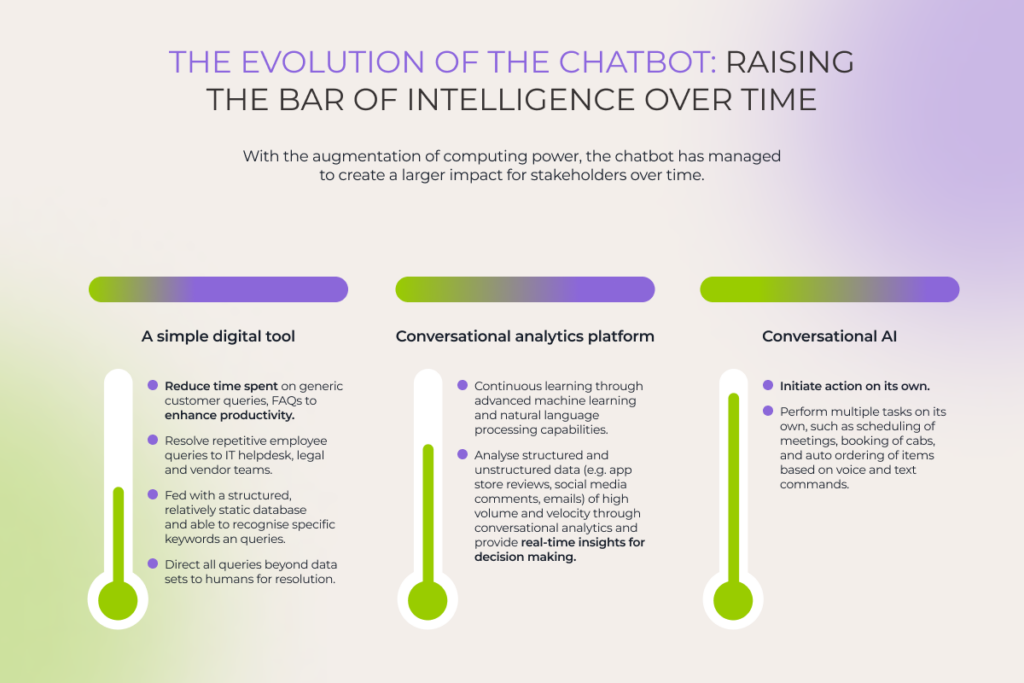
The evolution of conversational banking before the era of conversational AI and after it

From human-like chatting to ROI: top 5 conversational AI use cases in banking 

Initially, conversational AI usage in the banking sector was limited to front-office operations, covering customer support and personalized offerings for customers. However, since generative AI hit the mainstream in late 2022, the technology gradually made it to core banking services and back-office activities. 
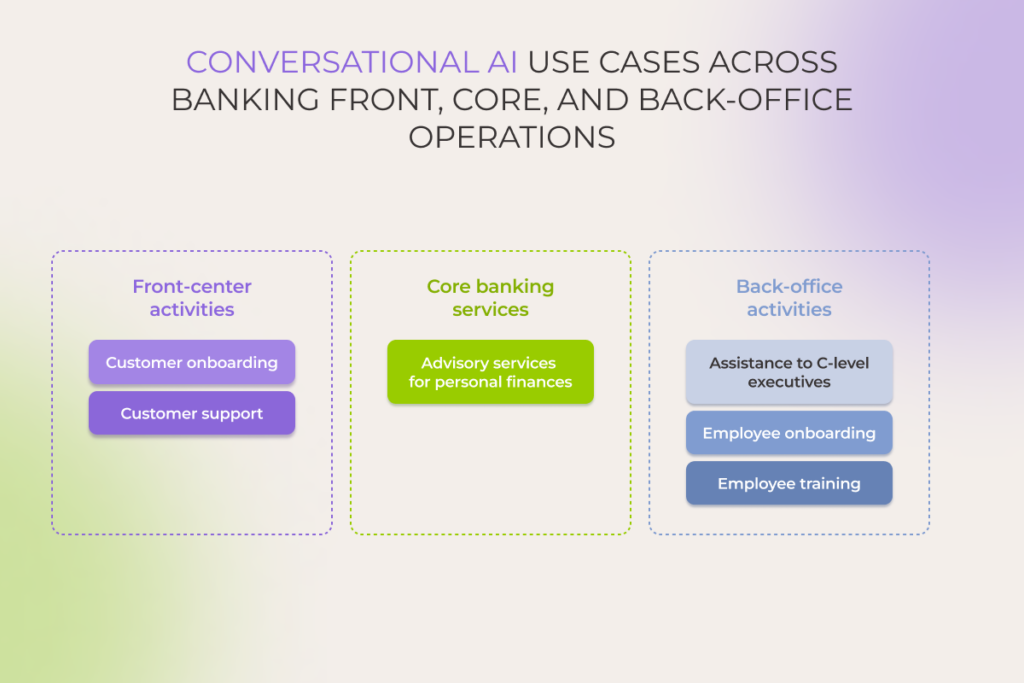
Conversational AI use cases across banking front, core, and back office operations

1. Customer onboarding 

You snooze, you lose — that’s how it works with customers who are getting harder to impress than ever. For banking institutions’ online services, customer engagement and retention are pressing challenges, especially since banks naturally lag behind other industries like, let’s say, ecommerce, where the average visit to an app lasts twice as long as to a banking app. 

Therefore, rethinking interactions with users at every touchpoint is vital, and conversational AI can improve your statistics. Harnessing the technology to guide users through the onboarding process is one of the scenarios. Be it opening a first bank account for a B2C user or registering an e-signature for a B2B customer, an AI-driven bot or virtual assistant ensures a smooth experience by: 

  • Requesting IDs for initial validity checks 
  • Walking customers through document submission step-by-step or submitting the documents by itself
  • Providing real-time updates on account setup progress     
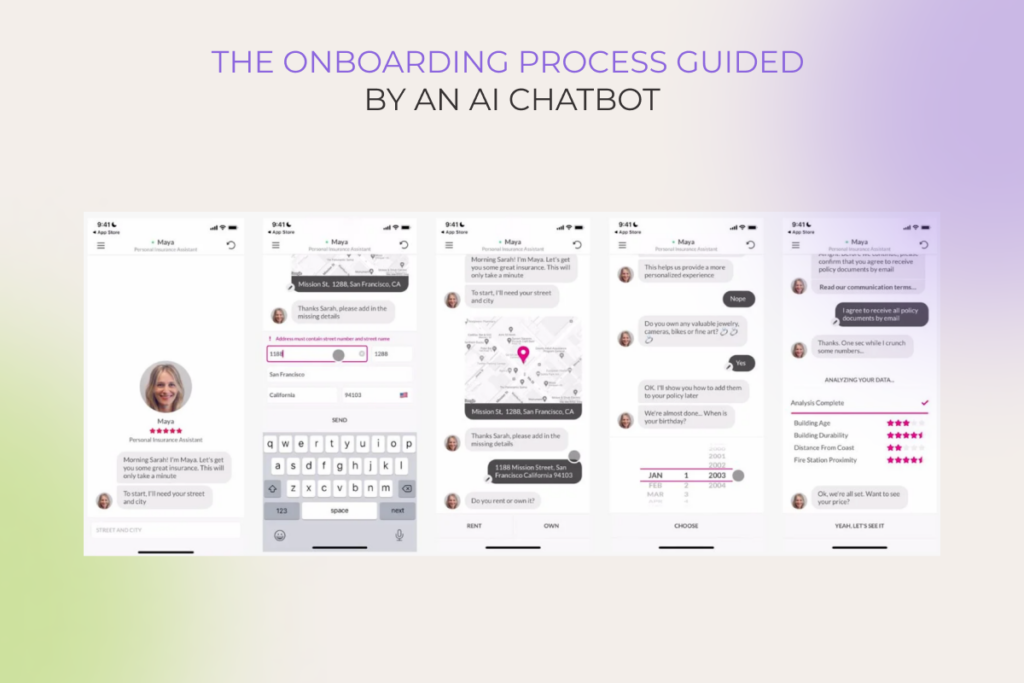
screenshots of a banking app with onboarding process guided by an AI chatbot

2. Customer support  

First-rate customer support is another pillar for ROI-boosting user retention and building consumer loyalty. Implementing AI-powered solutions on the front line of customer interactions benefits both sides:

  • Consumers get human-like, instant support 
  • Banking institutions cut costs by covering more requests with automated customer service 

Statistics indicate that up to 60% of customer interactions can be seamlessly handled by digital assistants. For instance, conversational AI tools shine in areas like account management and credit card services, freeing up your app support and call center specialists from dealing with numerous trivial inquiries, such as:

  • Updating account information
  • Transferring funds
  • Disputing transactions
  • Checking credit scores
  • Resetting account passwords
  • Activating card
  • Resetting PINs
  • Reporting lost or stolen cards

The more accurate the chatbot, the higher the ROI from the technology, and this approach applies to any industry. When crafting an AI-powered customer support solution for a mobile taxi app, we achieved 97% accuracy in answers thanks to training an underlying LLM on a dataset that also included user queries with foreseeable common typos.  

3. Advisory services for personal finances

In-depth, fulfilling individualization of customer experience with the help of financial assistants ignites the growth of customer engagement in two directions:

  • Longer sessions in a banking app
  • More interactions with the app

AI-powered assistants actively decode customer behavior, predicting their needs and making relevant, proactive nudges before they even ask. For example, if a customer has a deposit for traveling, a bot can initiate a conversation, offering a timely deal on travel insurance. This way,  the customer gets insurance on favorable terms, and the bank cross-sells their partner’s products. 

“Companies must establish a ‘responsible by design’ framework to maintain trust and compliance. Implementation should include robust user consent management systems and clear data retention and deletion policies,” – said Alexey Spas, Founder and CEO at Instinctools.

Another real-world example of how financial organizations drive greater value for users comes from Bank of America. They trained their chatbot to jump in when a customer’s credit score drops, offering tailored advice to improve it. 

While AI systems provide extensive opportunities for ordinary customers, they truly shine when it comes to enhancing investment experience. For instance, chatbots and virtual assistants can analyze market events and prepare risk profiles for traders. 

4. Assistance to C-level executives

Along with personal assistants stepping up customer convenience, conversational AI tools are changing the game for C-suites. Assistants to high-level managers empower them to make informed, error-free decisions faster.

Let’s take a virtual assistant to a chief experience officer (CXO) as an example. PwC survey highlights that a third of the time in this role is spent on operations, related routine tasks, and follow-ups. In fact, up to 60% of that time goes into chasing down metrics from the management information systems team. But with an AI assistant, all those hours could be saved for focusing on strategy, not on tracking down information.   

Instead of diving into endless reports or sifting through folders on the company drive, what if the CXO could just ask the AI for the latest insights on sales, partner performance, customer profitability, market benchmarks, customer lifecycle, or even the NPS across different channels? Now that’s what we call efficiency.

A summary of the customer feedback on the eKYC offering, highlighting strengths, improvement areas, and insights by channel

5. Employee onboarding and training

Onboarding just got a whole lot easier, thanks to conversational AI. Gone are the days of employees drowning in a sea of tabs and apps to find answers. Now, new hires can get up to speed on core banking systems and processes with a simple chat — no more endless searching. The AI chatbot becomes their go-to source for all things info-related, reducing mental load and making their transition smoother.  

Besides onboarding, banking conversational AI takes employee training to a whole new level. Let’s say you have established customer personas that require different communication styles and strategies. With an educational chatbot, you can simulate interactions with all these personas to train sales and customer service staff for high-stakes conversations beyond the reach of AI-powered customer support. 

Conversational AI in action: charting a new frontier for a Czech bank 

Financial institutions aim to rewire customer services by relying on advanced data analytics and technologies such as natural language processing and AI (be it generative AI, conversational AI, or both). Our client — a next-gen Czech bank — decided to transform their traditional in-app chatbot into a powerful text- and voice-based sidekick to boost customer retention and satisfaction. 

Instinctools’ team deployed a private instance of GPT-4 and worked on two features with different levels of access to banking and customer data:

1. By default, the chatbot has access only to a sanitized dataset of internal banking data, such as answers to the FAQs, information about bank offerings, instructions for performing various operations, etc. It’s enough to guide customers through basic card management, transactions, insurance claims, etc. 
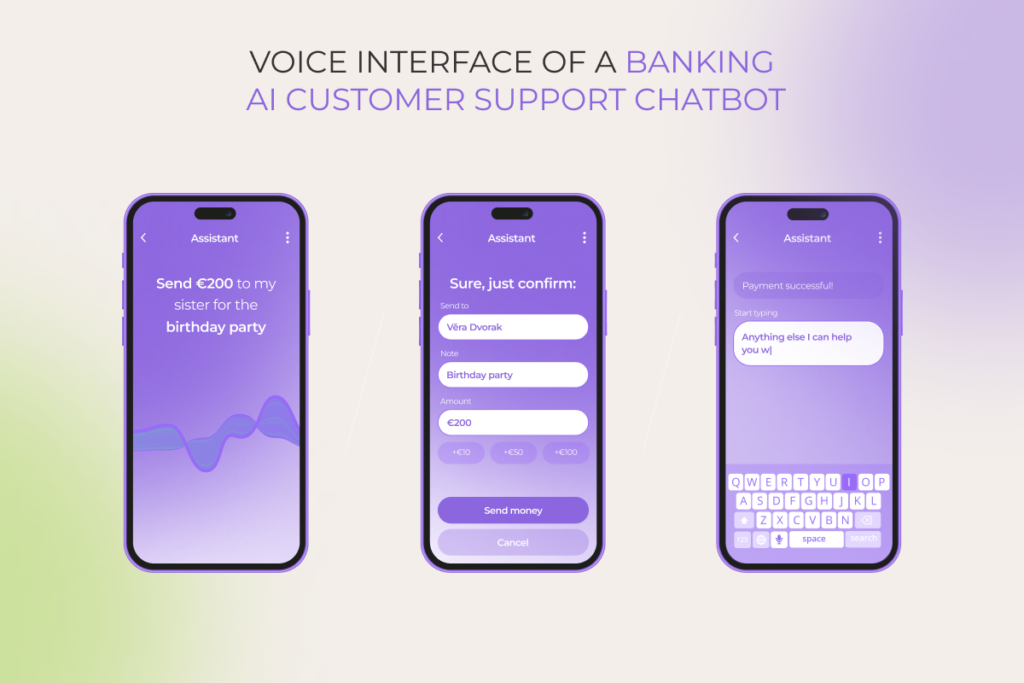
voice interface of a banking AI customer support chatbot

2. When the chatbot is given explicit customer consent to access some of their profile data, it turns into a full-scale personalized financial advisor ready to proactively help users and provide tailored insights on any banking topic. 
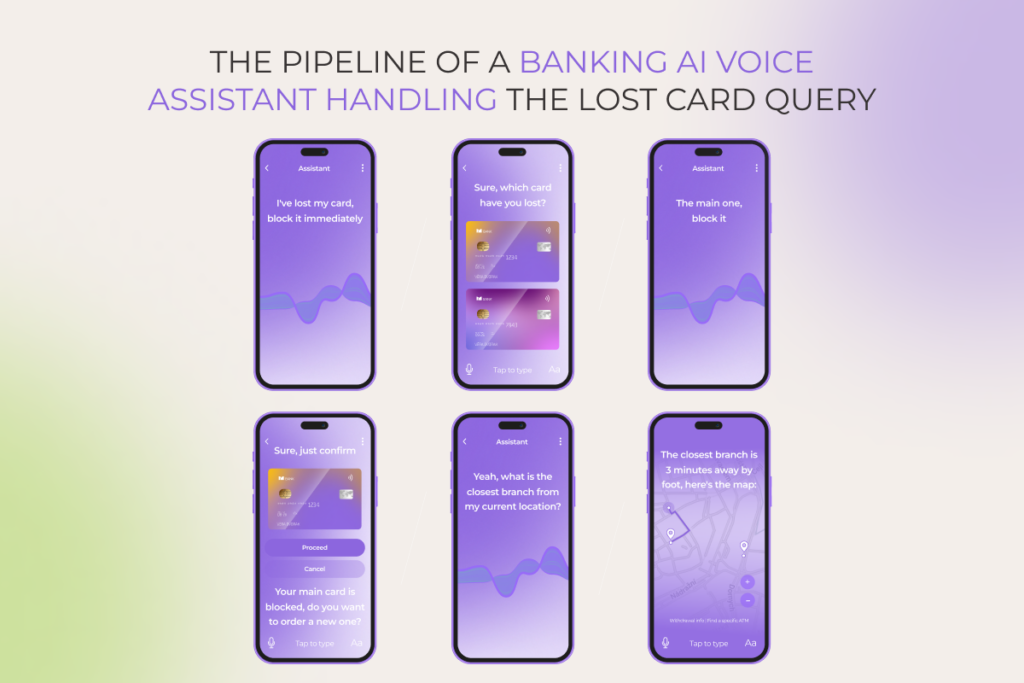
the pipeline of a banking AI voice assistant handling the lost card query

How has conversational AI implementation influenced our client’s FCR, NPC, retention rate, and other metrics?

See for yourself 

Risk it for a biscuit… But is the biscuit worth it? 

Can conversational AI deliver much-coveted ROI? A closer look into possible financial and operational benefits, backed by Deloitte and McKinsey surveys, indicates the benchmarks to look up to:  

  • Up to 35% increase in front-office staff productivity
  • Up to 15% improvement in the cost-income ratio over the five after conversational AI adoption
  • 40% to 50% reduction in service interactions
  • 20% to 30% lower incident rate 
  • 20% reduction in cost-to-serve

Tech foundation and challenges of adopting conversational AI in banking: remedies provided 

As you see, the rewards of implementing conversational AI are high. But so are the risks. You cannot magic away challenges such as source code deficiency, data security issues, LLMs’ bias, limited visibility into the AI system’s function, AI privacy concerns, inadequate scalability of legacy software, intellectual property violations, or maintenance difficulties. However, recognizing the perils upfront makes dealing with them easier. 

The core of most of these hurdles boils down to three pillars of software development: data, cloud, and APIs. Rewarding conversational AI adoption is off the table while this bottom line isn’t covered. 
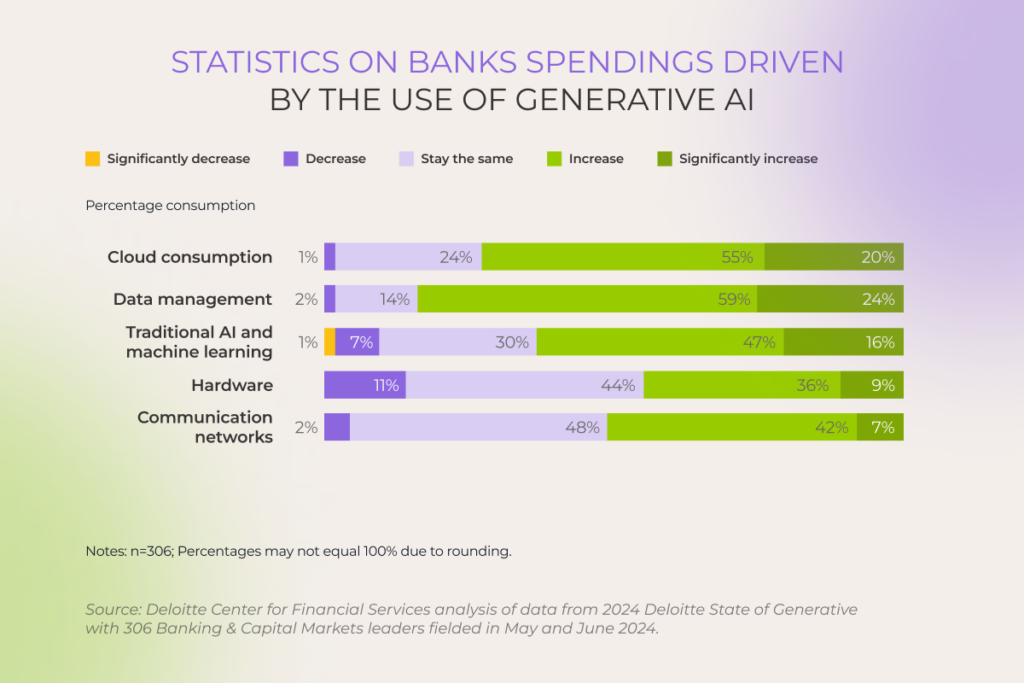
statistics on banks spendings driven by the use of generative AI

The good news is that the future of your solution is yours to shape: 

  • Data. Your AI engine is only as good as the data it’s trained on. Therefore, clean, comprehensive, and bias-free data is fundamental when it comes to crafting an accurate and trustworthy AI solution. Prioritize top-notch data management to create a single source of truth and provide role-based access that empowers every team member, from entry-level employees to the C-suite.
  • Cloud. There’s a reason why companies with the highest profit margins are the ones with 30+% of their workloads running in the cloud infrastructure. The resilience, scalability, and budget savings cloud computing offers are too enticing to ignore. 
    Imagine being able to set up a new environment for your AI-driven chatbot or assistant in minutes instead of days and how it may speed up time to market for your software. Not to mention cloud automation and the ease of maintenance when it’s delegated to a trusted cloud implementation partner. 
  • API. Well-documented APIs are easy to use and empower banks to seamlessly integrate conversational AI tools with their other products. 

When the baseline is covered, make sure to address other important aspects of your risk management plan. For instance, adopting a responsible AI (RAI) framework is one of the best practices for safeguarding your AI-powered banking software. This approach spans over six risk categories — put all of them on the front burner when implementing conversational AI. 

  • Set up a human feedback mechanism for reviewing automated decisions to ensure fruitful human-machine collaboration.
  • Keep documentation on implemented conversational AI tools in order to make their usage transparent and traceable.
  • Source and scrutinize training data properly and adopt a mechanism like Reinforcement Learning with Human Feedback (RLHF) to wipe out the probability of biased outcomes.
  • Safeguard end-user confidentiality by separating sensitive information from public data and anonymizing and/or encrypting it to ensure top-level privacy.
  • Organize your AI computational resources the way to impact the environment as little as possible. 
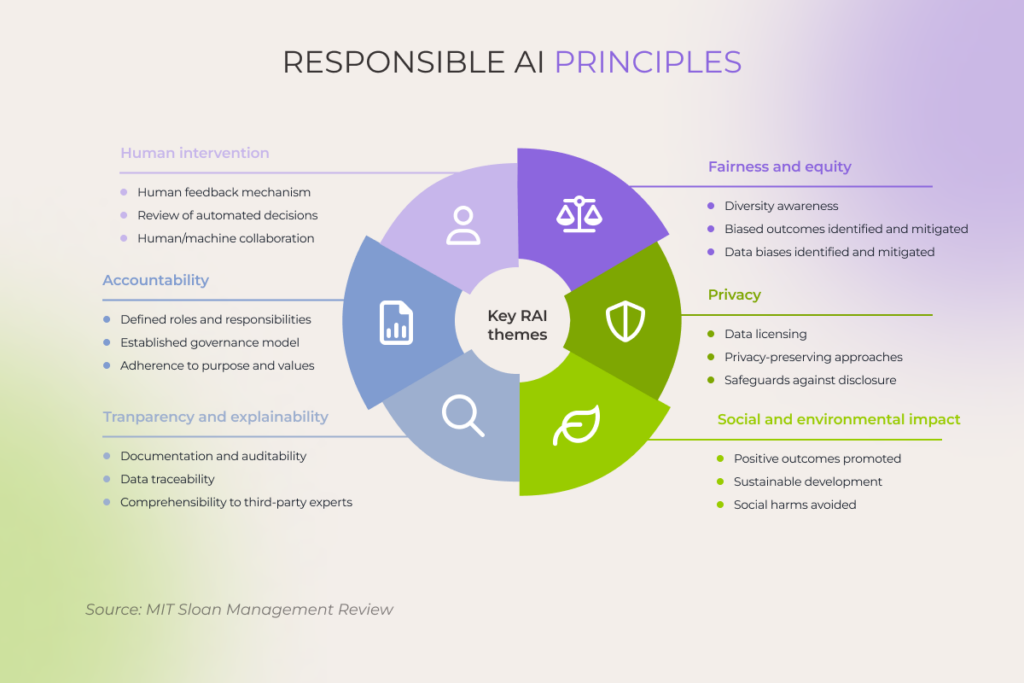
6 responsible AI principles for successful adoption of conversational AI in banking

Don’t miss the chance to hop on the conversational AI express – get your ticket to the future of banking 

The era of conversational AI in banking is here, and it’s moving fast. If you want to keep up and be truly customer-oriented, you cannot opt out of it. 

However, conversational AI isn’t a simple plug-and-play technology. You need subject matter experts with battle-proven experience to hit it big with a next-gen chatbot or digital assistant.  

No in-house AI expertise? No problem

Talk to our AI team

FAQ

What is conversational AI in banking?

Any artificial intelligence technology that enables financial institutions to communicate with customers falls under the conversational AI umbrella. The two most widespread examples are: 

– Chatbots focused on answering FAQs and providing accurate information about bank offerings for consumers and reports-based insights for bank employees.
– Proactive digital assistants that can take actions on the user’s behalf, such as transferring money in a customer-facing app or booking a meeting for the company’s top managers.

What are the benefits of AI chatbots in banking?

Conversational AI is the quickest and most successful way to deliver a highly personalized customer experience, deepen relationships with your consumers, and boost overall customer satisfaction and engagement while reducing the cost of user support.  

Besides enhancing the customer journey with round-the-clock availability of human-like assistance, conversational AI can reshape banks’ internal processes and routine tasks, such as employee onboarding and training. 

What is the future of conversational AI in banking?

The future of conversational AI in such a regulated industry as banking depends on the strictness of AI legislation in different countries and customers’ willingness to share their data with financial institutions. However, it’s already safe to say that AI will keep revolutionizing banking processes from front to back office. 

The capabilities of chatbots and virtual assistants with secure access to user personal and financial data are unlimited, with the potential to make AI tools a go-to conversation option for consumers and the ultimate player in service personalization. 
Conversational AI for Healthcare: 10 use cases and real-world examples

Key highlights

  • Conversational AI in healthcare provides a more natural, flexible user experience that can significantly expand areas of use for healthcare chatbots.
  • Conversational AI solutions can introduce gains in a raft of areas, both in the healthcare settings and outside hospitals.
  • To successfully implement the technology, healthcare organizations must tidy up the data, shore up tech foundations, and draw up a risk mitigation strategy.

If there’s one thing to be said about healthcare today, it’s that the healthcare system is buckling under the weight of increasing costs, staff shortages, and growing patient numbers. Against this challenging backdrop, the potential of conversational AI in healthcare is touted as a much-needed lifeline that offers a promising solution to healthcare’s toughest burdens.

However, as healthcare providers consider which conversational AI solution to bank on, it’s important to avoid the shiny object syndrome and invest in resilient tools. So, let’s see what conversational AI healthcare solutions are here to stay. 

What is conversational AI technology in healthcare?

Healthcare conversational AI relies on advanced natural language processing to interact with patients and other healthcare stakeholders in a natural way. The technology can manifest as text-based conversational chatbots, virtual assistants, or voice-enabled interfaces that act as co-pilots, automating various tasks.

Compared with traditional, rule-based chatbots, conversational AI interfaces offer a significant leap forward, providing a more natural, adaptable user experience.

FeatureRule-based chatbotsConversational AI interfaces
TaskNavigation-focusedDialog-focused
Type of input dataCannot directly process unstructured dataCan leverage unstructured data (e.g. purchasing and accounts payable data) to shape outputs 
Language understandingPre-determined and scripted with limited understanding of contextAdvanced natural language processing, understands nuances and context
Response generationPredefined responses, limited flexibilityDynamic response generation, can adapt to various queries
AdaptationLimited learning capabilities, requires explicit trainingContinuous learning, improves over time through machine learning
PersonalizationProvides generic responsesPersonalized responses based on user history and preferences
Complexity of interactionsHandles linear, predictable queriesCan handle complex, multi-turn conversations
Flexibility of deploymentTrained for a specific taskGeneralizable nature, can be integrated into multiple healthcare settings

Proven benefits of healthcare conversational AI

Over 70% of leading healthcare companies are experimenting with or planning to scale generative AI — a core conversational AI enabler — across the enterprise. Let’s probe into the gains they can already reap by implementing conversational AI solutions.

Bringing patient self-service into the practice

Whether it’s due to high costs, inherent stigma, or shortage of healthcare professionals, 29% of the US population choose not to seek needed medical care. Patient-facing conversational AI agents and chatbots can remove the obstacles in the path to healthcare services and give patients the autonomy to manage health on their own terms.

Conversational AI systems interact directly with patients to perform tasks that span from mental health support to appointment scheduling and medication management. With conversational interfaces in tow, individuals can get the necessary support and direction, even when the care organization’s resources are spread thin.

Looking to automate Rx management, a US-based healthcare provider reached out to *instinctools. Our team developed a custom virtual medical assistant that handles repeat prescription refills from patients autonomously and proactively notifies patients when the refill is due. The result was an estimated 120% increase in patient satisfaction and slashed admin costs.

Driving administrative cost-efficiency 

While evaluating the high-value areas lined up for gen AI disruption, 60% of healthcare leaders deem administrative efficiency to be one of them. From automated patient data extraction to medical record management, conversational agents can execute administrative tasks related to revenue cycle, reporting, and approval processes.

By automating these operations, healthcare organizations can potentially save up to 15% to 25% of total healthcare spending.

Making patients feel heard

Patients often waste hours on getting their issues resolved through IVRs and other systems. The lack of contextual understanding, long wait times, and inaccessible interfaces result in low first-call resolution percentages and leave patients feeling abandoned. 

Healthcare conversational AI can flip the script. By building on structured and unstructured patient data, past interactions, and real-time contextual cues, conversational AI interfaces can bring humanity back into the experience and share the workload with human agents.

One of our clients, a health insurance provider, implemented conversational AI to handle a growing volume of claims processing calls. By automating the initial intake, claim status updates, and document verification, our AI-powered solution helped the client decrease resolution time by 40%, increase deflection rate by 25%, and lower costs by 20%.

Enhancing health outcomes

Conversational AI in healthcare wears many hats — with each of them contributing to enhanced patient outcomes. Whether it’s through personalized medication reminders, symptom checking, or billing assistance, human-like AI interfaces can positively transform the way patients interact with existing healthcare systems.

More importantly, conversational AI healthcare solutions help clinicians fill the gaps in patient data — both directly and indirectly — by enabling proactive patient engagement and facilitating comprehensive data collection. Having more validated patient data on hand allows healthcare providers to make more informed decisions about diagnosis, treatment, and preventative measures.

More efficient assistance for patients and doctors, when it matters most

From code to cure: 10 applications of conversational AI in healthcare

While the storm is gathering in the healthcare sector, opportunities abound for private payers, hospitals, and labs to drive conversational AI innovation and usher in a brighter future. Let’s have a look at how conversational artificial intelligence can shake the healthcare status quo for the better.

1. Appointment scheduling

Conversational AI can not only make care easier to find but also easier to schedule. Available 24/7, AI appointment setters and schedulers align patients’ needs with provider-specific data to bring forth a speedier search and scheduling experience.

Along with scheduling appointments, conversational AI interfaces can:

  • Offer a self-reschedule path to patients and alternative time slots.
  • Update patients on the time and location of the upcoming appointment.
  • Automatically serve canceled appointments to other patients on the waitlist.
  • Sync online appointments, digital forms, insurance verification, payments, and patient interactions.
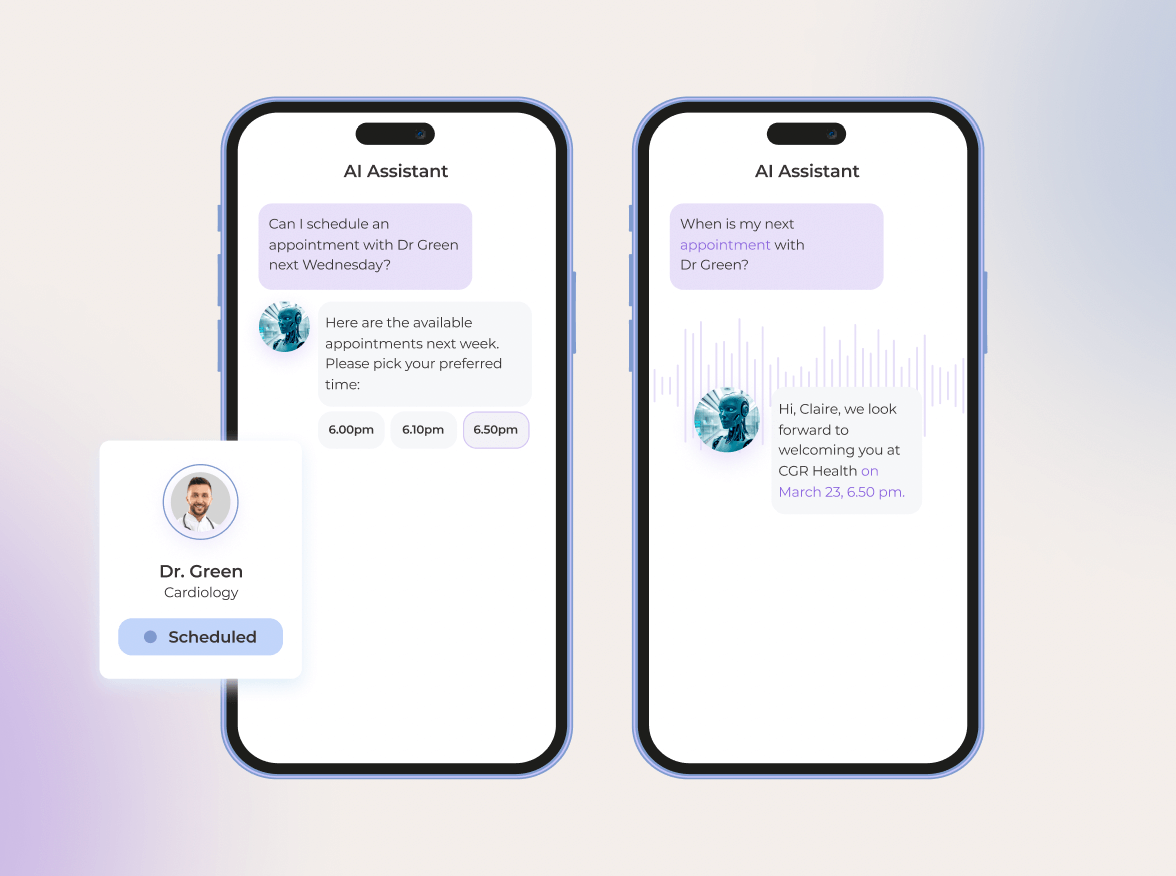
Appointment booking and confirmation with a scheduling AI assistant.

We made the strategic decision to invest in a conversational AI interface to reduce no-shows and keep calendars full without headaches. The solution allowed us to reduce missed appointments by 34 percent and streamline the process of pointing patients to the right care, at the right place and time.

2. Medical triaging 

In the US, primary care doctors deal with an average of 53 patient calls per day — and not all of those calls require immediate medical attention. Alleviating this burden is conversational AI that can streamline patient triage by assessing patient symptoms and determining the level of care they need. An AI chatbot can even defeat doctors at diagnosing illnesses — provided it’s properly prompted.

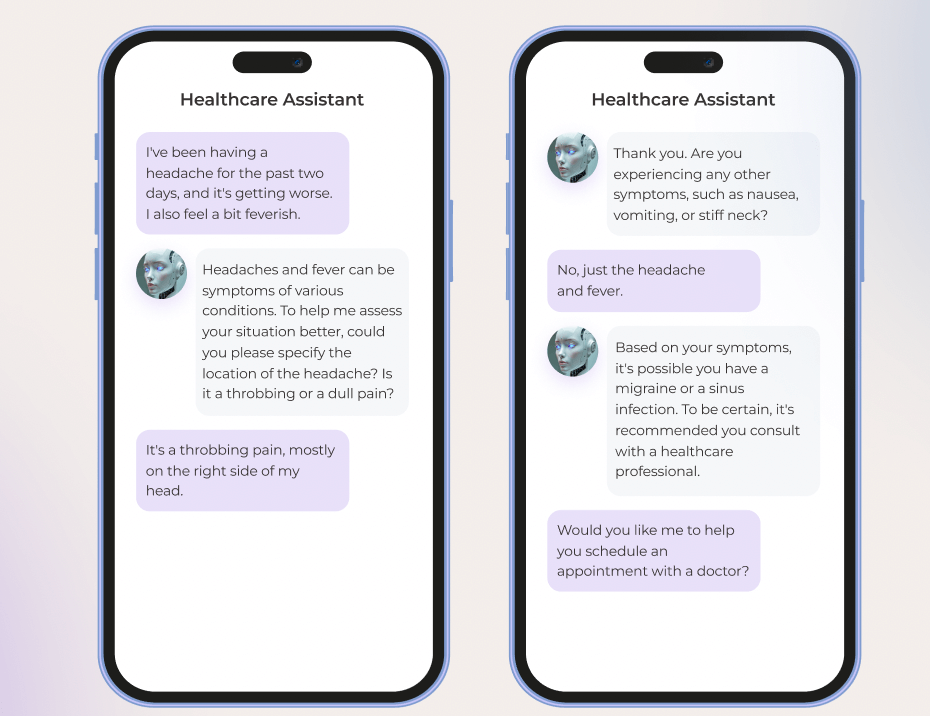
Discussing symptoms of a headache and fever with a healthcare conversational chatbot.

By integrating conversational AI into the triaging process, care providers can create autonomous patient entry points that:

  • Gather symptoms and identify potential diagnoses.
  • Provide patients with the most clinically appropriate care based on the symptoms.
  • Automate the referral process, including scheduling appointments and coordinating with other healthcare providers.
  • Integrate with internal systems, providing triaging nurses with access to relevant patient data.
  • Shift to an accelerated lane for assistance if the patient needs urgent help and/or requests it.

3. Clinical decision support

To give the right clinical recommendation, doctors have to factor in and analyze patient context, clinical guidelines, and research literature. This time-consuming process can take hours upon hours, holding back timely interventions and leading to inappropriate treatments, if any piece of the puzzle is missed. 

No wonder, 76% of doctors reported using general-purpose LLMs in clinical decision-making. While the safety of this very method is dubious, custom healthcare-specific conversational AI solutions can amplify the doctor’s expertise and intuition by delivering real-time, evidence-based insights at the point of care.

For example, AI-powered interfaces can aid doctors in making dosing decisions based on individual patients’ profiles, identify high-risk patients, and determine personalized treatment plans, based on factors such as age, comorbidities, and drug allergies.

Aiming to address the clinical evidence challenge, Atropos Health released ChatRWD, a specialized medical language model that combines chat-to-database capability and AI agents. The model reduces the time needed for high-quality publication-grade real-world evidence from months to 5.23 minutes.

4. Remote patient monitoring

Traditionally, remote patient monitoring is considered a challenging care delivery mode due to logistical hurdles and the amount of data generated. Multimodal conversational agents can minimize the complexity of RPM and aid in monitoring a patient’s health status beyond healthcare settings. 

With the human-in-the-loop, such agents can conduct on-demand automated screening interviews over the phone or web browser and deliver explicit insights into the patient’s progress, risk factors, and treatment adherence — invaluable data for effective chronic disease management.

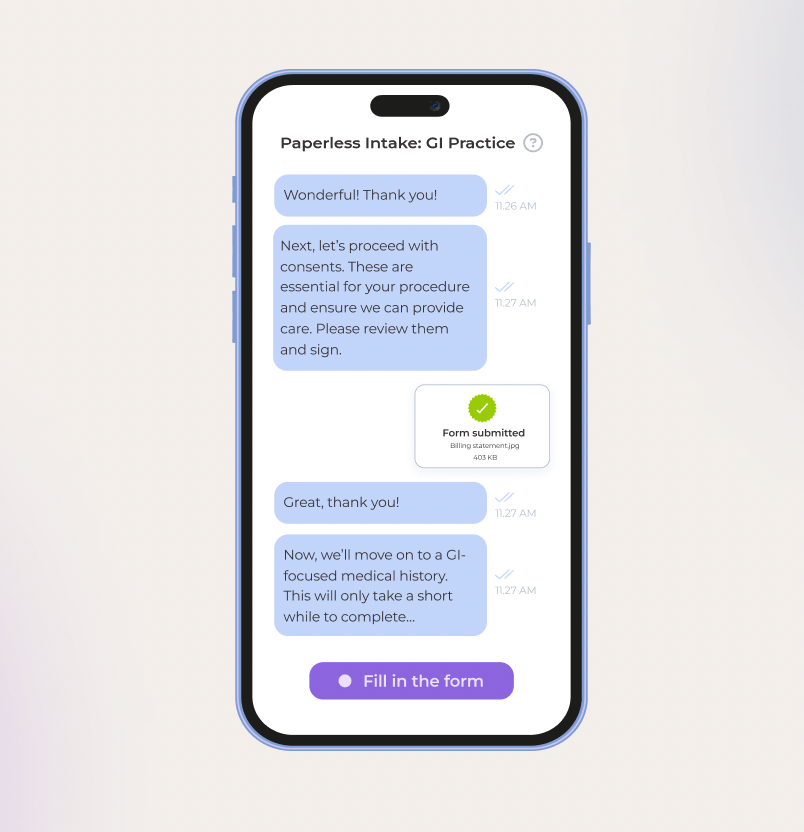
A medical conversational assistant guides a patient through consents, form submission, and medical history intake.

Along with assisted interviews, conversational AI can pitch in to support the following RPM activities:

  • Automated check-ins — conversational agents can check up on a patient’s medication adherence, symptoms, and well-being.
  • Wearable device data collection — AI-powered systems can team up with RPM devices to vacuum and analyze data on vital signs, activity levels, and sleep patterns.
  • Personalized health coaching — conversational AI interfaces can deliver clear, actionable advice tailored to the patient’s specific health conditions, reducing the need for emergency room visits.
  • Early intervention — by analyzing wearable devices, sensors, and patient-reported health data, agents can spot early signs of potential issues and notify care teams of such.
  • Telehealth stunts — smart agents can support patients in between remote consultations and assist doctors during telehealth sessions by jotting down patient interactions, summarizing key points, and updating EHRs.

A healthcare conversational chatbot discusses a patient’s blood sugar levels, diet, exercise, and fatigue concerns.

5. Post-visit patient support and engagement

Lots of patients leave doctor’s offices without understanding how to care for themselves once they get home and what comes next. Disjointed care pathways add to the information divide, making it challenging for patients to navigate further care.

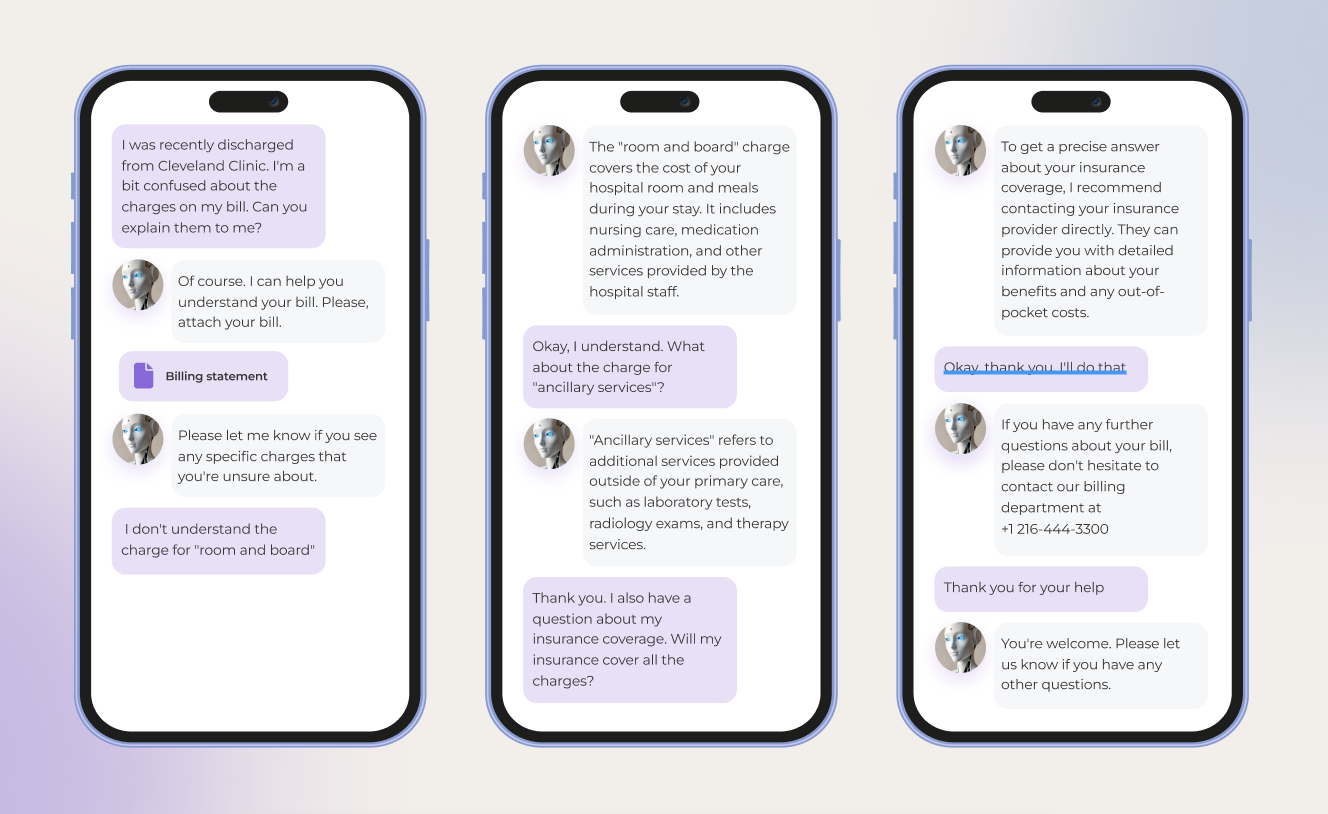
Advanced conversational AI systems can bridge this informational divide and enhance patient engagement post-visit and after discharge by:

  • Integrating visit notes and discharge summaries with insurance coverage information to generate clear action plans for patients.
  • Outlining care summaries for referrals and consolidating healthcare data such as medical records, lab results, and clinical notes.
  • Extracting key information from specialist notes for primary-care physician teams.
  • Estimating out-of-the-pocket costs for patients, including deductibles, copayments, and coinsurance.
  • Walking the patient through insurance coverage and billing process.

Kaiser Permanente reported that its AI-powered patient messaging system resolved 32% of patient messages with no manual intervention, freeing up physicians’ time and timely attending to patient queries. 

6. Medication management

Only about 50% of patients stick to their prescribed medication regimen, while the other 25% are unsure about their post-prescription next steps. Polypharmacy patients have it the hardest: they have to keep a mental note of multiple medications, dosages, and timing. 

Virtual assistants equipped with conversational AI capabilities can ease the medication management burden for all sides of care: 

  • They can serve as a personalized medication encyclopedia that breaks down information about prescriptions, including dosages, frequency, and potential side effects. 
  • Conversational AI solutions can also send refill reminders, cross-reference medications, and pull patient medical data right from EHRs.
  • They can help pharmacists reconcile medication lists to avoid medication errors.
  • For doctors, such interfaces can provide evidence-based recommendations for medication prescribing, dosage adjustments, and treatment plans.
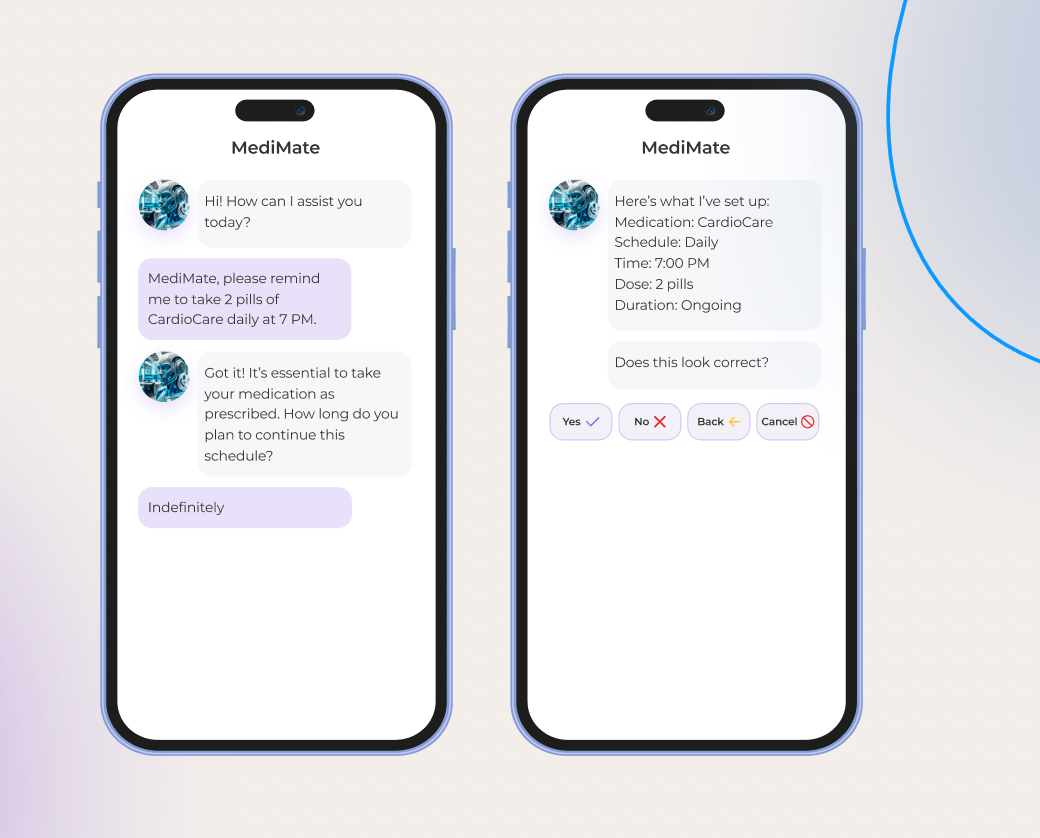
MediMate chatbot helps a user set a daily reminder to take medication, confirming the schedule details.

7. Reimbursement

In healthcare, reimbursement is a field full of speed bumps, with denied claims, complex coding, and inefficient billing processes being chief among them. No wonder this activity lends itself well to conversational AI and its unrivaled automation superpowers.

The technology can take over the following reimbursement tasks:

  • Prioritizing claims for payer follow-up and generating automated responses, using physician’s notes.
  • Automating the process of submitting claims to insurance providers and tracking their status.
  • Verifying codes to improve coding accuracy.
  • Identifying potential appeal opportunities by validating payer contracts.
  • Monitoring payments from insurance providers and updating on any delays.
  • Providing guidance on bills, insurance coverage, and payment options to patients.

8. Clinical operations

Today, doctors have to spend twice as much time on computers as they do with patients. Post-visit notes, patient forms, and other paperwork drain healthcare professionals and leave them with little time on their hands. Much of this paperwork is identical, and therefore redundant.

Clerical tasks are another strong suit for conversational AI in healthcare that can:

  • Churn out post-visit summaries, care summaries for referrals, standardized consent forms, utilization reports, and rate comparisons.
  • Create and organize clinical notes, EMR updates, dictations, and messages.
  • Outline workflow materials and schedules for processes.
  • Develop training materials and personalized learning plans for clinicians.
  • Create educational content on disease diagnosis and treatment.

Conversational solutions can also work alongside a clinician during a patient visit to transcribe the clinician’s dictation into a structured note and auto-populate notes with EHR data. 

9. Clinical trials

With decentralized clinical trials sloping upwards and traditional clinical research grappling with patient maintenance, there’s much on the plate for AI-driven conversational agents. 

Conversational AI can address many shortcomings of both conventional clinical trial execution and decentralized clinical trials:

  • Screening candidates based on eligibility criteria.
  • Handling incoming clinical trial data, marrying it with images and lab results, and adding missing data points.
  • Interacting with patients throughout the trial period to offer guidance on medication and prevent drop-outs.
  • Identifying the right combination of drugs for an indication or the right patients.
  • Fetching relevant data from clinical trial reports to prepare documentation for the FDA.

10. Back-office work and administrative functions

Finance, staffing, legal activities, and other picks and shovels of healthcare keep a hospital system running. However, the majority of healthcare operations in the industry are siloed and rely on manual inputs that lead to errors, gaps, and discrepancies.

Stepping up to the plate, conversational AI can shoulder the burden of repetitive tasks and introduce the following improvements across the board:

  • Automating the onboarding process, enabling self-serve HR functions, and streamlining feedback collection.
  • Optimizing staff schedules based on availability, skills, and workload.
  • Automating invoice processing, payment tracking, and account reconciliation.
  • Validating contracts for compliance with legal and regulatory requirements.
  • Updating on evolving compliance regulations and regulatory changes.

Create a healthier tomorrow, powered by conversational AI

Activate holistic healthcare conversational AI for your organization in 5 steps

Bringing conversational AI to healthcare can alleviate a slew of pressure points, provided HCPs deploy the right tech, operational, and talent resources to develop a robust conversational AI strategy.

Identify the right use case

A successful conversational AI project starts with prioritizing potential use cases based on six key areas, including its impact, function, measurability, permission space, time to market, and extensibility. After identifying promising automation areas, organizations should design AI solutions to implement high-value use cases and determine any functional and technical gaps.

Tackle the 70 percent problem of data readiness

Data wrangling makes up 70% of all AI development efforts. Although healthcare has an edge over other industries in terms of data volume, most of this data is buried across fragmented systems in varying formats. Along with consolidating clinical and patient data, organizations might also need other data points to develop conversational AI solutions, such as PGHD, retail purchases, and wearable data.

Specific use cases such as medication management and clinical decision support also require healthcare organizations to tap into literature and knowledge bases, pharmacy data, and clinical trial data.

Address risks and biases

If mishandled, conversational AI can exacerbate existing data risks in healthcare — as well as usher in new ones, such as its inclination to hallucinate. For example, if the training data skews towards certain patient populations, then the output of the conversational AI solution is likely to be biased, providing patients with inaccurate and potentially harmful insights. 

So, before making headway with the technology, make sure to outline risk and legal frameworks that will govern the use of conversational AI and account for its risks in organizations. 

Plan integrations

If your conversational AI solution needs to interface with other healthcare systems (and it probably does), you need to account for additional layers around it to integrate the solution with EHRs, CDSS, telehealth, and other platforms. Here, you need to identify the integration points, design integration architecture, and determine what types of connectors your solution needs.

Test and iterate

Instead of going all in and scaling your conversational AI solutions to adjacent use cases — test, evaluate, and refine the performance of your initial AI model. Make sure the output of the model is accurate, aligned with the healthcare domains, and performs well across multiple dimensions. If necessary, you can iterate to fine-tune the model performance and revisit your data management strategy.

Challenges of putting conversational AI to work in healthcare

Conversational AI might be one of the most potent technologies to address the gaps in healthcare, but it’s not the easiest to adopt. For example, a mere 10% of patient interactions with healthcare conversational AI turn out to be successful and self-served. The following barriers might be to blame.

Data management

Healthcare notably has a data problem: its data is unstructured, sprinkled across siloed systems, and stored in varying formats. Moreover, many healthcare organizations lack the data maturity muscle, falling behind in data completeness, availability, and governance frameworks. For conversational AI, this data slump is not an option as it demands sufficient data for effective learning and prediction.

To maximize the use of internal data, healthcare organizations must invest in a comprehensive data management strategy, including data standardization, data security, governance, and integration. 

Regulatory compliance

The healthcare sector is a regulation-heavy industry with strict AI compliance standards. To demonstrate commitment to PHI and PII security, your conversational AI solution must comply with HIPAA, GDPR, CCPA, and other applicable regulations. The majority of these regulations require your solutions to integrate specific data security measures, such as data minimization, data encryption at rest and in transit, and other mechanisms.

Technical limitations

Over 73% of healthcare providers still rely on legacy information systems and architectures, making AI scale-ups a tough nut to crack. Complex integrations, data migration challenges, and even staff adoption reluctance — all stem from the tech stone age in healthcare. To break out of the tech rut and effectively leverage any type of artificial intelligence, healthcare leaders require an AI-ready tech infrastructure that includes centralized data repositories, cloud computing set-ups, and data controls and guardrails.

Ethical considerations

When it comes to something as high-stakes as conversational AI in healthcare, consumer trust hangs in the balance. Not all patients are enthusiastic about trading clinician advice for AI wisdom — and you need to address that if you plan to dabble in the technology. To address the skepticism, you can engage clinicians as change agents to demonstrate the credibility and clinical utility of AI.

To warm up customers to the solution, your organization should also be explicit about how it uses conversational AI to assist doctors and what patient data it feeds on. The human-in-the-loop approach is essential in such critical areas as healthcare to mitigate the risks associated with AI and build trust with patients.

Conversational AI in healthcare, a new pill for the future

With the repetitive task burden and the imperative for value-based care, the healthcare industry could benefit from conversational AI implementation. The latter, thanks to its unmatched automation potential and human-like interactions, can revolutionize healthcare delivery, boost operational efficiency, and put patients where they belong — at the center of care.

Around 59% of healthcare leaders are already partnering with third-party vendors providing AI development services in USA to develop customized solutions. Those who succeed with scaling their conversational AI solutions past proof of concepts and to other use cases stand to gain early benefits that turn into long-term, flexible value.

Prescribe a dose of AI innovation to your healthcare organization

Contact our team

FAQ

How is conversational AI used in healthcare?

Conversational AI tools take many forms in healthcare. They can be used to enhance patient care, support clinical decision-making, improve patient experience, streamline insurance claims, analyze patient data, and supplement remote healthcare delivery.

Which is the best conversational AI?

The choice of the model for a conversational AI solution depends on your unique needs. The quantity of training data, computational resources, model complexity, and other variables impact the selection.

Which type of AI is currently being used in medical care?

Machine learning, natural language processing, generative AI, and conversational AI are some of the modalities currently in use in the healthcare industry.

Conversational AI Chatbots vs Virtual Assistants: Siblings or Distant Cousins?

Conversational AI has many faces, with virtual assistants and conversational AI chatbots being the most common kins. These two — and the dilemma of conversational AI chatbot vs assistants in particular — spark up the most debates. Some experts say conversational AI chatbots and virtual assistants in the same breath, while others pigeonhole AI chatbots as a rule-driven chat based interface that dates back to the pre-generative and pre-conversational AI era.

So which one is it? Instinctools’ AI experts believe that virtual assistants and AI chatbots are different after all, serving distinct purposes and functions.

Exhibit #1: What is a conversational AI chatbot?

Let’s start from the basics and gradually build up the term. A chatbot is a blanket definition used to describe any software that can simulate human conversation, from traditional rule-based systems to cutting-edge conversational AI. 

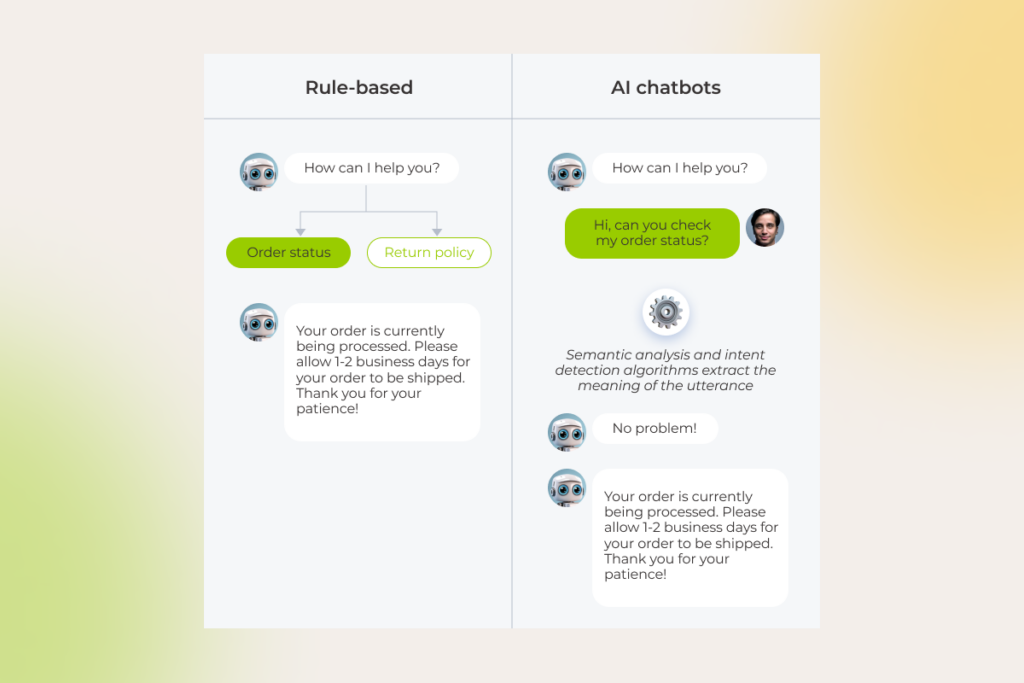
Traditional rule-based chatbots were our first move toward the world of advanced conversational technology we know today. These systems, represented by simple FAQ bots and basic customer support bots, draw on a decision tree structure, where each user input triggers a specific conversation flow, based on predefined rules. The rules may be determined by the keywords, phrases, or specific patterns — whichever is scripted by developers. 

As you might guess, rule-based chatbots are limited to simple tasks, such as notifying the users of the order status or redirecting the user to a menu list.

But once a chatbot is powered by conversational AI, it evolves into a problem solver, capable of cracking more complex tasks and getting to the bottom of user intent. Conversational AI chatbots are an advancement from rule-based systems as they leverage such AI technologies as machine learning and natural language processing to interact with users in a human-like manner. 

Unlike pre-programmed chatbots designed for scripted responses, a conversational chatbot’s user interface can respond to a wider range of out-of-scope user inputs, including complex questions and open-ended sentences, and infer subtle nuances in language.

The comparison between rule-based chatbots and AI chatbots, showing different approaches to processing order status queries

In the last few years, the democratization of large language models spurred a new generation of conversational interfaces. Built on the back of LLMs, generative AI chatbots can not only understand and respond organically to the input but are also capable of generating new content as the output. The output is not limited to high-quality text only as generative AI chatbots can also push out images, videos, and sounds.

Exhibit #2: What is a virtual assistant?

Both virtual assistants and cutting-edge conversational chatbots know who they’re talking to, predict where the conversation is headed, and self-improve over time. What differentiates intelligent virtual assistants from a text-oriented conversational user interface is their ability to act autonomously upon the user’s intent. To become active, virtual assistants use a combination of AI technologies and robotic process automation.

Let’s imagine you’re craving Italian food and looking for a nice Italian restaurant to enjoy your evening. With a traditional chatbot, a user needs to input a specific phrase “List Italian restaurants in the X area” to get the recommendations. With a conversational AI chatbot, the user can type in, “I’m in the mood for Italian food. Where’s a good restaurant nearby?” and the chatbot churns out a list of Italian restaurants in the user’s area. Virtual agents can check out online reviews, suggest five-star restaurants, and even make a reservation for the user.

The devil is in the differences: key functions of conversational AI chatbots vs assistants

If we contrast the two, we’ll find out that both conversational AI chatbots and virtual assistants are adept at processing complex queries due to cutting-edge NLP — hence the overlap in functions. However, the action-oriented nature of virtual assistants makes them well-positioned to address a wider range of functions, unattainable for AI chatbots.

Here’s what conversational AI chatbots are capable of

Conversational interfaces, powered by generative responses from LLMs, are perfect for information-oriented and data-driven tasks. Conversational AI chatbots excel at pulling targeted self-service solutions and tailored guidance to address a specific user query. Such systems comprehend natural language commands, retain context, interpret dynamic user inputs, and enhance their output based on previous user interactions.

As for their data-driven function, AI chatbots can also capture essential user data or feedback, analyze it in real time, and identify trends or patterns that companies can use to improve their services or products.

The core capabilities of virtual assistants

Just like conversational AI, virtual assistants can also take over tasks that require deep analysis capabilities and dynamic, context-based interaction. However, AI personal assistants can go the extra mile and adjust to transactional scenarios. 

Moreover, a virtual AI agent thrives in a setting that requires proactive intelligence whereby the system sets in motion particular mechanisms based on specific triggers or predictive analytics. For example, virtual assistants may automatically schedule maintenance appointments or tasks based on the maintenance history in a CMMS system.

Under the hood of conversational AI chatbots vs assistants

Custom conversational AI chatbots and virtual assistants are like fingerprints — they are unique in their complexity, training data, and industry focus. But what remains consistent is their multi-layered foundation that enables both to fly through the assigned task. 

The plumbing behind conversational AI chatbots

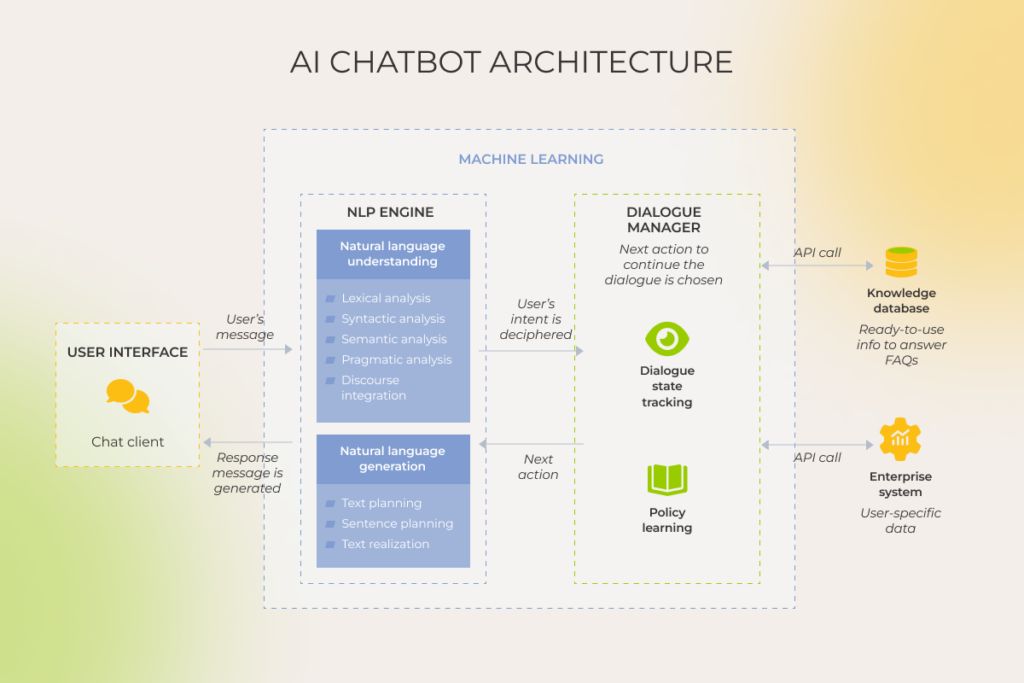
AI chatbots have two sides to them: the one visible to the user and the one hidden in the background. A user interface makes the client side of conversational systems, acting as a bridge and enabling users to communicate and interact with a chatbot. 

Core to the chatbot’s offstage architecture is the NLP engine that comprises advanced Natural Language Understanding (NLU) and Natural Language Generation (NLG) components to establish a free-flowing, two-way communication with the end user. The NLU part is focused on tokenization, part-of-speech tagging, semantic analysis, and other behind-the-scenes mechanisms that allow a chatbot to understand human language in every manifestation. 

The NLG layer builds on pre-trained language models to generate authentic text responses based on the input and the chatbot’s understanding of the context. It’s also where chatbots’ text summarization capabilities come from that allows for accurate and concise summaries from input documents.

The architecture of an AI chatbot, with components like the NLP engine, dialogue manager, and knowledge database

Once the user’s intent is deciphered by the system, an AI chatbot initiates a dialog manager to monitor and update the conversation context. A dialog manager is a building block in conversational interfaces that stores the current intent along with the identified entities throughout the conversation, asking for additional context from the user when needed.

To respond to user queries, intelligent chatbots connect to a dynamic knowledge or backend systems, sourcing relevant data and personalizing the response based on, say, integrated CRM data. Additionally, the conversational system is augmented with machine learning capabilities that allow for continuous learning based on textual data.

The underlying technology behind virtual assistants

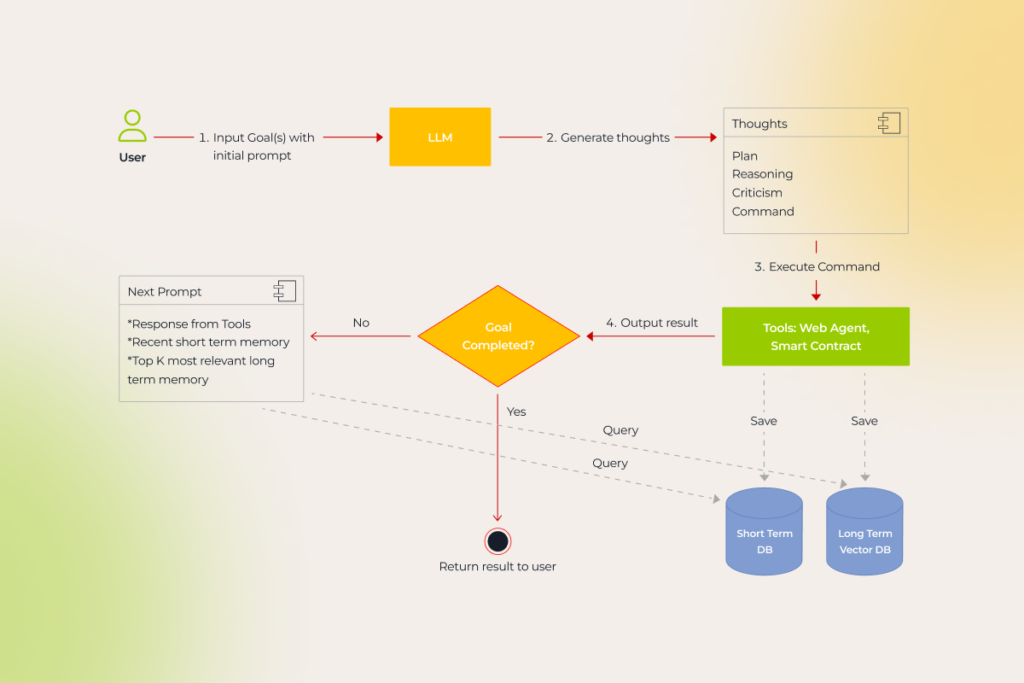
Virtual agents inherit the architecture of conversational AI chatbots, but extend it to the actionable realm with robotic process automation. Unlike talk-only AI chatbots, given a goal, virtual assistants walk the talk, breaking down the task into a sequence of subtasks and acting on them until the mission is completed. 

The process flow of goal completion in a virtual assistant, detailing steps from input to execution and memory management

Besides RPA and machine learning techs, many virtual assistants are also kitted out with reinforcement learning from human feedback (RHFL) and neuro-symbolic AI capabilities to level up their performance and supercharge their decision-making engine.

Unlike chatbots, virtual assistants can also interact with the real world to gather the necessary data and perform actions. For example, enterprise-grade virtual assistants are usually integrated with mission-critical systems, such as CRMs and ERPs, to orchestrate workflows inside and outside of these platforms. So once a new user signs up for a service,  an AI agent can collect their information and create a new contact in the CRM without further human intervention.

FeatureConversational AI chatbotsVirtual assistants
Core functionMainly focused on natural language understanding and generationDesigned to execute specific tasks and automate workflows
PurposeGeneral-purpose or tailored to a specific domainTargeted at specific tasks or industries
Level of autonomyMore limited in terms of decision-making and task executionCan perform autonomous actions on behalf of the user
Learning capabilityLimited to the LLM training dataCan interact with the real world and adapt in real-time
Task complexityResponds to complex input  with a deep understanding of context and user intentPerforms advanced tasks that require decision-making capabilities, proactive assistance, task automation, and/or integration with other systems
Input/output methodRequire a user interface to interact with the userCan function without an interface

Intelligent assistance in action: the difference between chatbots and virtual assistants reflected in five use cases

While both conversational AI chatbots and virtual assistants prove to be effective in the wild, the suitability of these co-pilot technologies for your project depends on the application.

Timely, always-on assistance for customer service

According to Gartner, in 2025, 80% of customer service and support organizations will be employing generative AI technology in some form to reduce the workload on agents and improve customer experience (CX). The surge in demand is predictable: both AI chatbots and virtual assistants allow companies to do more with less, delivering an estimated 94% in cost savings.

Purpose-built for specific use cases, grounded in company data and integrated with backend systems, both technologies can make sense of complex customer queries, enable customer self-service, and support intelligent routing and information capture. By scaling versatile conversational interfaces across all channels and touchpoints, companies can also make their heartfelt presence seen through and through.

But when it comes to specific use cases, these technologies hit different.

Conversational AI chatbots have a flair for customer service tasks that include:

  • Providing information — answering questions about different features, attributes, or plans, offering product recommendations based on customer preferences, sharing company/product/order updates, and redirecting to the company’s resources.
  • Handling routine inquiries — addressing customer concerns and issues, prioritizing queries and escalating them to human agents, and offering self-service solutions and specialized guidance.
  • Gathering feedback — collecting customer feedback and insights.
  • Integration with other systems — obtaining necessary data from the connected business systems.

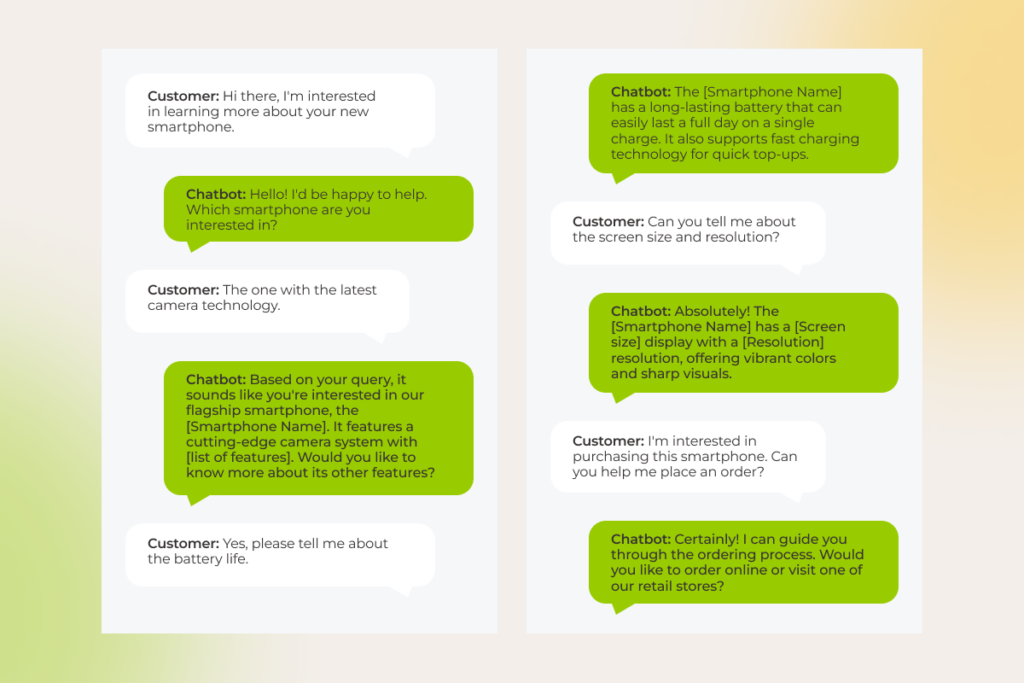
Example: A customer reaches out to a company via chatbot to get comprehensive information about one of their products. The chatbot quickly provides the necessary product specs, recommends alternatives if necessary, and references the customer to the ordering page.

The conversation shows a chatbot helping a customer with smartphone features, including camera tech, screen size, and order placement

As for virtual assistants, they operate in the actionable realm, assisting customers with tasks associated with:

  • Complex interactions — responding to in-depth textual-, audio- and video-based conversations with customers, recognizing the sentiment in customer input, predicting the conversation flow, and offering proactive guidance.
  • Task automation — completing tasks on behalf of the customer, such as placing orders, making appointments, or troubleshooting technical issues.
  • Integration with other systems — performing actions in the connected business systems and applications — either on the customer’s behalf or based on specific triggers. 

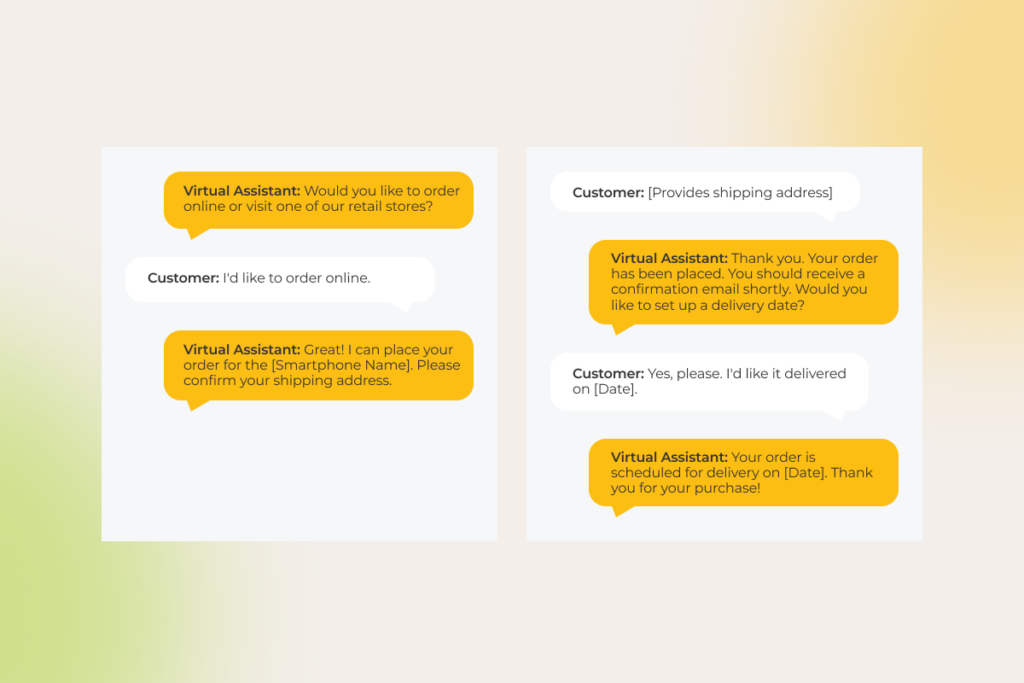
Example: A customer asks the company’s virtual assistant about one of their products. The assistant provides comprehensive product information, recommends alternatives if necessary, and proceeds with ordering the product on the customer’s behalf. 

The conversation shows a virtual assistant helping a customer place an online order, confirm the shipping address, and schedule delivery.

For one of our clients, an Italian transportation company looking to revolutionize their mobile taxi app, we combined natural language understanding with generative AI to build an intelligent virtual assistant. By training the bot on the client’s support manuals, we enabled it to tackle key issues like forgotten items, billing disputes, and ride cancellations — processing over 100 different ways users might phrase their requests. Just a month after launch, the assistant was handling 51% of customer support sessions without human intervention. As it continued to learn and adapt, that number skyrocketed to 78%, significantly cutting support costs while ensuring top-notch service quality.

Personalized recommendations in an ecommerce context

Over 71% of buyers want personalized experiences and companies are responding with personalized searches and product recommendations lined up at the bottom of the page. But what if a company could provide a dedicated shopping assistant that can tap into the customer’s mind? Customer satisfaction would go through the roof. That’s what both conversational AI chatbots and virtual assistants are made for.

By dispatching a conversational shopping assistant chatbot on their sales channels, companies can automate the following tasks: 

  • Product recommendations —  seamless integrations to backend systems enable AI chatbots to inform their recommendations with data on user preferences, search history, previous interactions, cart items, customer location, and purchase history.
  • Data collection — custom layers in conversational chatbots can analyze interactions with customers, gather insights on customer preferences, pain points, blockers, and feedback, and consolidate it in a dedicated system.
  • Action recommendation — after suggesting relevant items, conversational chatbots can list tasks or actions that are relevant to the user’s goals, such as placing an order.
  • Product comparisons — intelligent chatbots can make comparisons on the fly, resort to product databases, pricing information, and other systems to provide up-to-date product comparisons, and drone on specific characteristics.

An AI virtual assistant has no problem completing the same scope of tasks as AI chatbots do, but it also raises the bar, resembling a personal human assistant customers crave when shopping:

  • Actionable product recommendations — providing a hands-off shopping experience where an approved product recommendation is followed by automated order placement.

Personalized to a tee, scaled to the max

Build your AI agent

Marketing and sales automation

If there’s one match made in heaven for automation, it’s marketing and sales. However,  merging artificial intelligence with marketing and sales is a balancing act as teams have to keep it personalized, yet at scale. 

Equipped with unrivaled language understanding superpowers, conversational interfaces can subtly promote company products and services by integrating them into natural conversations with customers. In particular, AI chatbots can:

  • Clock in customer engagement stats and conversational history to inform granular marketing and sales activities.
  • Nurture potential leads by following with prompts about specific company’s offerings.
  • Qualify leads based on predetermined criteria and report this data to a connected system.
  • Support strategic upselling and cross-selling by recommending complementary products or services.

Virtual assistants take up where AI chatbots left off by directly contributing to marketing and sales goals. For example, virtual assistants can automate simple and repetitive tasks such as streamlining follow-ups based on lead quality, distributing campaigns across channels, adding new customers to a CRM, and more.

Example: A customer looking for additional product information is greeted by a virtual assistant on a company’s website. The assistant provides detailed product information, answers the customer’s questions, and offers to compare three products to help the customer make the right choice. The assistant then collects the customer’s email to send them comparison details along with personalized recommendations while also subscribing the customer to a newsletter. After a few days, the virtual assistant follows up with the customer.

Streamlining HR processes

Any company’s journey is peppered with challenges, many of which are rooted in managing human resources. Bringing conversational AI on board allows companies to ease the strain on HR workers and offload routine tasks to smart company based solutions.

Conversational AI chatbots can pick up the slack in a raft of HR areas, including:

  • Onboarding — providing information about company policies and functions, collecting necessary documents, and answering often-asked questions.
  • Employee support — providing round-the-clock assistance for inquiries related to benefits, time off requests, vacations, bank information, accounting data, coverage, and more.
  • Performance management — conducting surveys and helping employees track their milestones
  • Talent acquisition — vetting candidates and collecting basic information.

Following in the footsteps of chatbots, virtual assistants can not only provide and track HR data but also log the changes in the integrated HR and business systems. For example, along with informing employees about their PTO balance, virtual assistants can punch in PTO dates in a PTO tracking software and track the status of the PTO approval.

Tackling the data and task overload in banking and finance

No single industry provides a better foundation to demonstrate conversational AI success than the embattled banking and finance domain that’s grappling with thousands of transactions per month. 

Financial organizations bank on AI banking chatbots for capability building across more than 50 support functions, including:

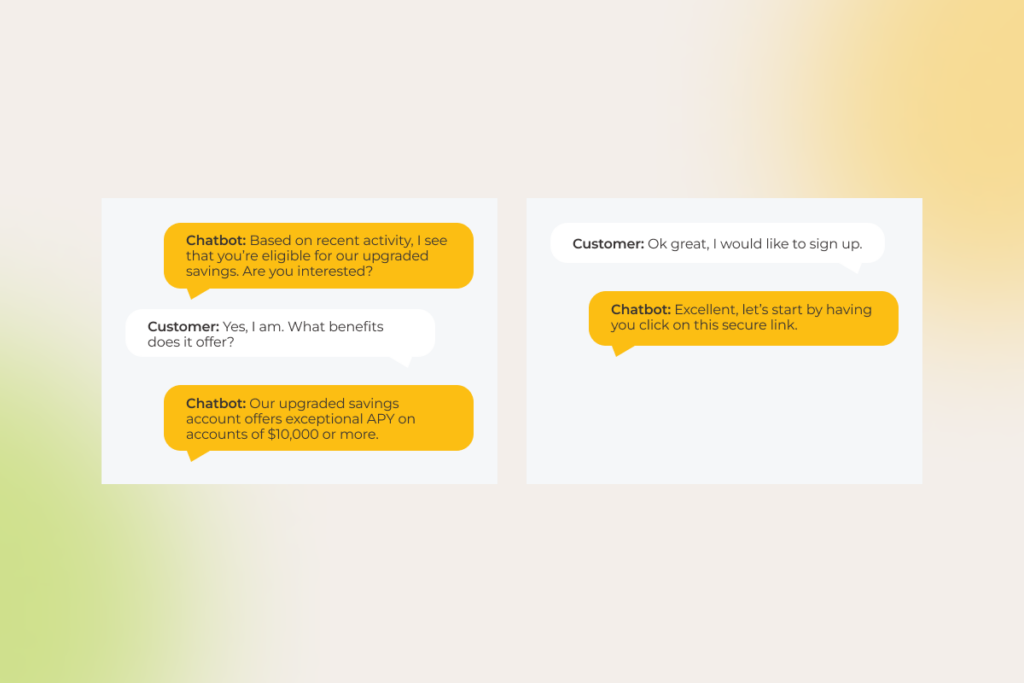
  • Account management services — empowering customer self-service by handling processes such as verifying and authenticating customers, reviewing account balances, and updating account information.
  • Customer support — handling routine help tasks, such as reporting lost or stolen cards, disputing transactions, checking credit scores, and more.
  • Mortgage and lending — pre-qualifying applicants, checking loan application status, and collecting documents.
  • Trading and investment — providing real-time market analysis, directing customers to educational resources, and offering personalized investment advice based on risk tolerance and other data points.
The conversation shows a chatbot helping a customer learn about upgraded savings benefits and guiding them to sign up

Working backward from the customer, virtual assistants can undertake a similar range of tasks, but besides coming back with a static response, they can also initiate actions on the customer’s behalf: 

  • Account management services — resetting account passwords/PIN, transferring funds, making payments, paying bills, and blocking lost or stolen cards.
  • Customer support — processing refunds and chargebacks, troubleshooting technical issues, and scheduling appointments with financial advisors.
  • Mortgage and lending — making a payment, submitting loan applications, and coordinating the closing process.
  • Trading and investment — placing buy or sell orders, rebalancing and adjusting asset allocation, and acting on investment strategies.
The conversation shows a virtual assistant helping a customer set up autopay by gathering information about frequency and payment amount.

Go from overwhelmed to empowered with smart automation. Tell us about your AI chatbot project

Get in touch 

Intaking and appointment scheduling for healthcare offices

Understaffed and overstretched, healthcare organizations have to reimagine care delivery ways, with conversational AI being a central piece in redefining patient experiences and boosting operational efficiency.

Dispatched across key digital channels such as websites, online portals, SMS, and email, gen AI-enabled chatbots can provide 24/7 patient support and take on the following critical functions:

  • Patient and symptom intake — jotting down initial patient information, such as symptoms, medical history, and contact details.
  • Triage — sorting and prioritizing patients based on the urgency and severity of their condition.
  • Appointment scheduling — suggesting appointment times based on patient availability and provider schedules
  • Information provision — tailoring treatment options and personalized self-care advice based on specific patient needs and EHR data.
  • Hand-off to medical professionals — referring a patient to a medical professional, when a patient’s condition requires medical evaluation, along with the data logged during the interaction.

Built to take action, rather than reflecting on it, autonomous virtual assistants ease even more burdens healthcare professionals have on their shoulders:

  • Сollecting patient information and recording it in the EHR system.
  • Allocating healthcare resources, such as staff and equipment to meet the needs of the urgent patients. 
  • Sending appointment confirmations to the patient and updating the HCP’s schedule, rescheduling or canceling appointments, if needed.
  • Referring a patient to a medical professional and booking appointments in the EHR appointment scheduling module.

So, who’s talking? It depends on your needs

Both conversational AI chatbots and virtual assistants allow companies to slash cost, improve customer satisfaction, simulate a high-touch experience, and be there for the customers at all times. But while conversational AI chatbots talk your customers through a problem, virtual assistants take direct action to tackle the problem head-on. 

Whichever type of automation you choose, it’s equally important for both solutions to build on precise prompt engineering to enable more human-like conversations. As for data security, we recommend deploying the solution and the LLM behind it on a local server to prevent data sharing with third parties. With data security best practices such as data minimization, encryption, data privacy compliance and others at the core of your software, you can also make sure your AI solution is both effective and secure.

As an ISO 27001:2022 certified artificial intelligence development company, *instinctools specializes in developing secure multimodal AI chatbots and virtual agents rooted in your company’s data and designed to meet your specific needs.

Build conversational AI solutions of any complexity with our AI team

Reach out 

AI Privacy Concerns: Profiling Through the Risks and Finding Solutions

Today, artificial intelligence is billed as a superpower that brings about unprecedented technological advancements in virtually every industry — and rightly so. The advent of gen AI and LLMs have put AI on an even higher pedestal, extending its applications and impact on modern organizations. But with this incredible progress comes a growing concern: is AI infringing on our privacy? AI privacy concerns have been the subject of many debates and news headlines lately, with one clear takeaway: protecting consumer privacy in AI solutions must be a top business priority.

Is your privacy governance ready for AI? Let’s find out.

A pulse check on AI and privacy in 2025

The heady growth of generative AI tools has revived concerns about the security of AI technology. The data chills it triggers have been long plaguing AI adopters — except they’re now exacerbated by unique gen AI capabilities. 

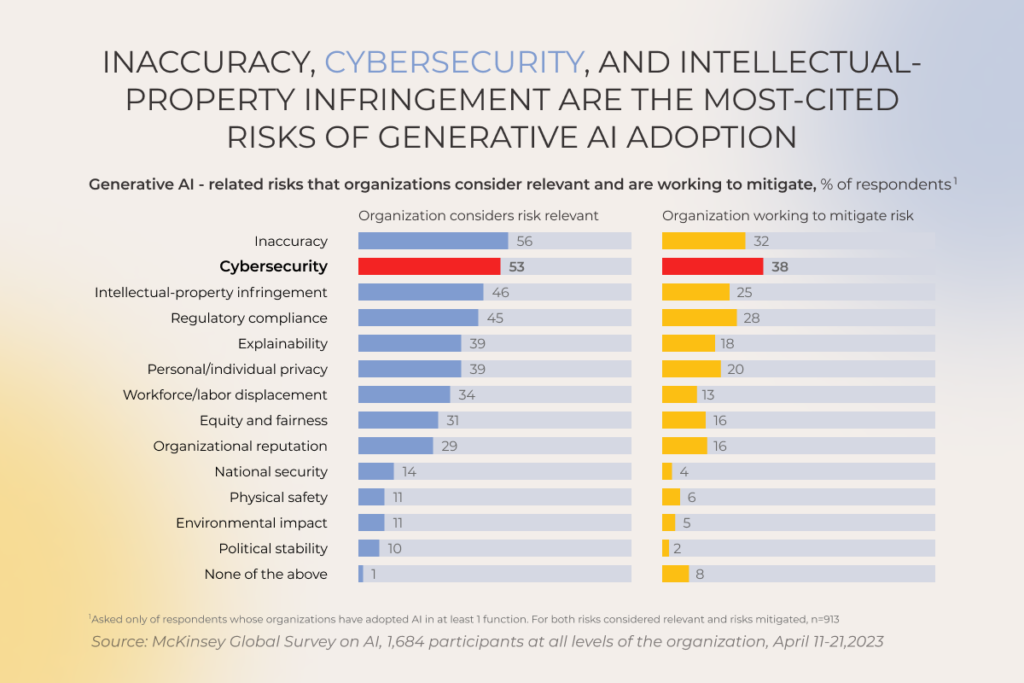
Inaccuracy, cybersecurity problems, intellectual property infringement, and lack of explainability are some of the most common generative AI privacy concerns that refrain 50% of organizations from scaling gen AI responsibly.

Generative AI-related risks firms consider relevant and are working to mitigate

The worldwide community is echoing a security-focused approach of AI leading players, with a sweeping set of new comprehensive regulations, national policies, focused legislations for specific use cases, etc., advocating for more responsible AI development. These global efforts are initiated by actors ranging from the European Commission to the Organization for Economic Co-operation and Development to consortia like the Global Partnership on AI.

For the first time in history we might be prioritizing security over innovativeness, as we should. Microsoft has finally sorted the wheat from the chaff and started to pay deserved attention to security:

“If you’re faced with the tradeoff between security and another priority, your answer is clear: Do security,” Microsoft CEO Satya Nadella said in a memo issued to his employees last month.

“In some cases, this will mean prioritizing security above other things we do, such as releasing new features or providing ongoing support for legacy systems.“

The dark side of AI: how can it jeopardize your organization’s data security?

No matter what type of AI solutions you are integrating into your business, prebuilt AI applications or self-built ones, the adoption of AI systems demands a heightened level of vigilance. When left unattended, AI-related privacy risks can metastasize, potentially causing a range of dire consequences, including regulatory fines, algorithmic bias, and other pitfalls.

Lack of control over what happens to the input data or who has access to it

Once an organization’s data enters the gen AI intelligence stream, it becomes extremely difficult to pinpoint how it is used and secured due to unclear ownership and access rights. Along with black box issues, reliance on third-party AI vendors places companies at the mercy of external data security practices that may not always live up to the company’s standards, potentially exposing business data to vulnerabilities.

Unclear data residency

An overwhelming majority of generative AI applications offer little oversight of data storage and processing destinations, which may be an inconvenient circumstance if your organization has strict requirements around data residency. Your company’s legal or regulatory obligations might conflict with relevant data privacy laws in your jurisdiction, potentially putting you at risk of hefty fines.

So unless you indicate a specific preference or turn to regionally hosted models, your AI solution places your data in the red zone. 

Reuse of your data for training the vendor’s model

When a company signs up for a vendor-owned AI system, they unknowingly consent to a hidden curriculum. Most third-party models collect data and reuse it to train vendor’s foundational models, not just your specific use case. This may raise significant privacy concerns associated with sensitive data. Data reuse also works in reverse, introducing biases into your model’s output. 

Dubious quality of data sources used to fine-tune the model

‘Garbage in, garbage out’ — this adage holds true even for the most advanced AI models. Poor quality of the source data used for fine-tuning can trigger inaccurate outputs. In most cases, there’s little a company can do to head off this pitfall since organizations have limited control over the origin and quality of data used by vendors during fine-tuning.

Personally Identifiable Information (PII) violations

You might think that data anonymization techniques place PII under wraps. In reality, even anonymized and scrubbed of all identifiers data can be effectively re-identified by AI based on users’ behavioral patterns. Not to mention, that some smart models struggle to anonymize information properly, leading to privacy violations and serious repercussions for organizations.

Also, the General Data Protection Regulation, California Consumer Privacy Act, and other bodies set a very high bar, unreachable for most AI models, when it comes to the effectiveness of anonymization.

Security in AI supply chains

Any AI infrastructure is a complex puzzle consisting of hardware, data sources, and the model itself. Ensuring all-around data privacy demands the vendor or the company to introduce safeguards and privacy protections into all components as any breach in the AI supply chain can have a far-flung effect on the entire ecosystem, including poisoned training data, biases, or derailed AI applications.

Leverage our expertise in responsible AI development

Schedule a call

Front-page data breaches involving AI: lessons learned?

If there’s one thing we can learn from the tech news is that even high-profile companies fail to effectively protect user data. And with AI technologies, this mission becomes even more formidable due to the expanded vulnerability surface.

Microsoft’s massive data exposure incident that took place in 2023 is one of the many stark reminders, highlighting AI and data privacy concerns. In this incident, Microsoft’s AI research team accidentally exposed 38 terabytes of data from employee workstations. As a result, a wide range of highly sensitive information slipped through the cracks, including personal computer backups, passwords, secret keys, and other data. Consequently, the attacker gained complete control over the system, including the ability to delete and manipulate existing files at will.

Foundational model owners aren’t immune to data bridges either. Recently, OpenAI faced scrutiny after its ChatGPT model made payment-related and other personal information of 1.2% of users visible to some users. This incident underscored concerns from industry experts who have previously criticized OpenAI’s insufficient data security practices.

Undoubtedly, every A-list company that has been exposed to any kind of data breach was quick to take crucial post-breach responses  — by patching, adjusting cloud configurations, or taking their applications offline. But considering the ever-high cost of data breaches, no measure is more effective than proactive prevention.

Tech players like Accenture, AWS, and IBM take prevention to a whole new level by shoring up capabilities and processes for responsible AI development and use. While specific points in their blueprints may differ, a common thread runs through their strategies — an unwavering commitment to compliance, data privacy, and cybersecurity.

Not all AI products are inherently flawed, some popular solutions like Simplifai, Glean, and Hippocratic AI demonstrate that success can be achieved while meeting privacy regulations and paying due diligence to privacy protection. But we get it: the regulatory landscape is changing fast, making AI development an uncharted territory for first-time technology adopters. 

The good news is there are key principles that can drift your development efforts in the right direction and save you a lot of headaches down the road.

Reducing data usage to the essential minimum

First and foremost, you can get a lion’s share of AI data privacy concerns out of the way by keeping the amount of training and operating data to the necessary minimum from the get-go. 

There’s a lot you can do to achieve minimal data usage in AI applications:

  • Give your data a good scrub — clean and filter the data to get rid of duplicated input, structural errors, and noisy information before training the model. 
  • Double down on the most relevant variables — leverage feature engineering and distill the most useful patterns from the data.
  • Piggyback pre-trained models with larger datasets — turn to transfer learning to train your data on a smaller, specialized dataset.
  • Artificially create new data points — use data augmentation techniques to increase the training dataset without collecting additional input.

Providing understandable explanations of how AI systems function and make decisions

A bad reputation associated with the lack of data privacy demonstrated by AI can be partly attributed to the black-box nature of the latter. Safeguarding data becomes a tall order when there’s little explainability in the decisions of machine learning algorithms and deep learning techniques. That’s why building a transparent and explainable system with clear underlying mechanisms and decision-making processes is crucial for an organization to build trust and confidence in emerging technologies.

Making your AI systems explainable boils down to the main three features, including prediction accuracy, traceability, and decision understanding. 

Incorporating human review mechanisms to oversee AI decisions

Different regulations, the GDPR and EU AI Act in particular, set out certain obligations for human intervention or human oversight as a means of preventing decision-making based solely on machine intelligence. To meet the requirement, organizations should employ robust review practices to avoid perpetual biases.

There are four main ways to put a rein on the outputs of the smart solution. The most common one is a human-in-the-loop system that is often used in high-risk applications. In this case, a human reviewer is directly involved in the decision-making process alongside AI algorithms. Organizations can also apply post-hoc reviews and exception-handling rules, to promote more accurate output and make sure the system doesn’t disclose any personal data.

Identifying and understanding different risk levels associated with AI systems

Just as the old saying goes ‘forewarned is forearmed’, knowing the risks and possible doomsday scenarios beforehand allows companies to devise effective mitigation strategies. 

While there is no one-size-fits-all for conducting a risk assessment for artificial intelligence tools, most frameworks require companies to assign a category of risk to the system and draw up a risk mitigation strategy based on the risk profile.

Ongoing monitoring and system refinement are other non-negotiables of a holistic risk assessment framework that can give you a heads-up about any emerging risks.

Paying special attention to profiling workloads

Some AI applications like facial recognition software or customer services chatbots scan personal user data to create audience profiles based on user’s behavior, preferences, and other criteria. As this exercise involves processing large amounts of personal information, US companies must make sure their profiling is conducted in line with the CCPA, GDPR, DPDP Act, or any other relevant regulation.

When building a conversational AI chatbot for a leading Czech bank, we needed an LLM capable of handling a flood of customer queries (the client’s app serves over 100,000 users). ChatGPT 4.0 was a go-to option, as it can process 12,000+ inquiries and transactions per second, even in peak hours. However, using the open-source model was off the table in such a heavily regulated banking industry.

To meet compliance standards, we deployed a private instance of GPT-4 within the client’s controllable Azure environment. By connecting their initial platform-based chatbot to the LLM through the API, we delivered a secure, high-performing solution fully aligned with GDPR requirements.

In reality, though, users might not be in the know about their data being used for profiling purposes, which is a hard no for ethical and responsible AI use. Also, profiling datasets may become an easy target for hackers, especially if the system has rickety security controls.

Robust safeguards such as anonymization or pseudonymisation as well as technical and organizational security controls are among the go-to safe nets when it comes to shielding profiling data. Also, transparency around profiling methods and data controls in place is important to alleviate users’ concerns.

Ensuring AI systems operate reliably and do not pose risks to users or the environment

According to ISO 42001:2023, AI systems must behave safely under any circumstances without putting human life, health, property, or the environment at risk. To meet these requirements, smart systems shouldn’t operate in silos — they must be weaved into a broader ethical framework that prevents biases in decision-making and mitigates environmental footprint stemming from resource-intensive model training.

Proactive risk management coupled with the explainability of algorithms and traceability in your workloads empowers organizations to shore up capabilities and safeguards instrumental to building trustworthy AI systems that benefit society as a whole.

De-risk your AI development, avoid regulatory roadblocks

Get a free consultation

6 practices to wipe out AI data privacy concerns

While some companies grapple with AI risk management, 68% of high performers address gen-AI-related concerns head-on by locking risk management best practices into their AI strategies.

Practices of mitigating generative AI-related risks: gen AI high performers vs other respondents

Standards and regulations provide a strong ground zero for data privacy in smart systems, but putting foundational principles in action also requires practical strategies. Below, our AI team has curated six battle-tested practices to effectively manage AI and privacy concerns. 

1. Establish AI vulnerability management strategy

Just like any tech solution, an AI tool can have technology-specific vulnerabilities that spawn biases, trigger security branches, and reveal sensitive data to the prying eyes. To prevent this havoc, you need a cyclical, comprehensive vulnerability management process in place that focuses on the three core components of any AI system, including its inputs, model, and outputs.

  • Input vulnerability management — by validating the input and implementing granular data access controls, you can minimize the risk of the input vulnerability. 
  • Model vulnerability management — threat modeling will help you harden your model by mitigating known documented threats. If you have commercial generative AI models in your infrastructure, make sure to perform close inspection of data sources, terms of use, and third-party libraries to prevent bias and vulnerabilities from permeating your systems.
  • Output vulnerability management — strip the output of sensitive data or hidden code to ensure it can’t be inferred and to mitigate cross-site vulnerabilities.

2. Take a hard stance on AI security governance

Along with vulnerability management, you need a secure foundation for your AI workloads, rooted in the wraparound security governance practices. Thus, your security policies, standards, and roles shouldn’t be confined to proprietary models but also extend to commercial and open-source models.

Water-tight security starts with a strong AI environment, amplified with encryption, multi-factor authentication, and alignment to best industry frameworks such as NIST AI RMF. Just like vulnerability management, effective security requires continuous attention to three components of an AI system:

  • Input security — check applicable data privacy regulations, validate data residency, and establish Privacy Impact Assessments (PIA) or similar processes for each use of regulated data.
  • Model security — make sure you have clear user consent or another reason allowed by law to process data. You can use the PIA framework to evaluate the privacy risks associated with your AI model.
  • Output security — revisit the regulations to see whether the regulated data is available for secondary processing. Your AI system should also have a way to erase data on request.

3. Build in a threat detection program

To defend your AI set-up against cyber attacks, you should apply a three-sided threat detection and mitigation strategy that addresses potential data threats, model weaknesses, and involuntary data leaks in the model’s outputs. Such practices as data sanitization, threat modeling, and automated security testing will help your AI team to pinpoint and neutralize potential security threats or unexpected behaviors in AI workloads.

4. Secure the infrastructure behind AI

Manual security practices might do the trick for small environments, but complex and ever-evolving AI workloads demand an MLOps approach. The latter provides a baseline and tools to automate security tasks, usher in best practices, and continuously improve the security posture of AI workloads.

Among other things, MLOps helps companies integrate a holistic API security management framework that solidifies authentication and authorization practices, input validation, and monitoring. You can also design MLOps workflows to encrypt data transfers between different parts of the AI system across networks and servers. Using CI/CD pipelines, you can securely transfer your data between development, testing, and production environments.

5. Keep your AI data safe and secure

Data that powers your machine learning models and algorithms is susceptible to a broader range of attacks and security breaches. That’s why end-to-end data protection is a critical priority that should be implemented throughout the entire AI development process — from initial data collection to model training and deployment.

Here are some of the data safeguarding techniques you can leverage for your AI projects:

  • Data tokenization — protect sensitive data by replacing it with non-sensitive data tokens as surrogates for the actual information. 
  • Holistic data security — make sure you secure all data used for AI development, including at-rest, in-transit and in-use data.
  • Documented data provenance — create verifiable mechanisms to confirm the origin and history of all data used by the models, especially inference data used for model training. Make sure data lineage and data access in non-production and development regions are in check to stave off data manipulation.
  • Loss prevention — apply data loss prevention (DLP) techniques to prevent sensitive or confidential data from being lost, stolen, or leaked outside the perimeter.
  • Security level assessment — continuously monitor the sensitivity of your model’s outputs and take corrective actions if the sensitivity level increases. Extra vigilance won’t hurt when using new input datasets for training or inference. 

And by no means, do not use data directly as input for commercial pre-trained gen AI models, unless you intend to put sensitive information into the limelight.

6. Emphasize security during AI software development lifecycle

Last but not least, your ML consulting and development team should create a safe, controllable engineering environment, complete with secure model storage, data auditability, and limited access to model and data backups. 

Security scans should be integrated into data and model pipelines throughout the entire process, from data pre-processing to model deployment. Model developers should also run prompt testing locally in their environment and also in the CI/CD pipelines to assess how the model responds to different user inputs and nip potential biases or unintended behavior in the bud.

Balancing innovation and privacy

To remain top of the game amidst the growing competition, companies in nearly every industry are venturing into AI development to tap its innovative potential. But with great power comes great responsibility. As they pioneer AI-driven innovation, organizations must also address the evolving risks associated with AI’s rapid development. 

Responsible AI development demands from organizations a holistic risk management and data privacy approach, paired with a mix of risk-specific controls. By partnering with an experienced AI development company and keeping privacy and ethics in AI development and deployment top of mind, you can enjoy the benefits of AI while prioritizing data privacy and promoting trust and accountability in the use of AI technologies.

Partner with us to build compliant, future-proof AI solutions

Contact our AI team

AI in the Oil and Gas Industry: 15+ Use Cases Across Upstream, Midstream, and Downstream

AI in the oil and gas industry is becoming critical to the sector’s resilience, even as concerns grow around the technology’s own energy demand. With margins tightening and growth under pressure, leading O&G firms are turning to generative and agentic AI to stabilize performance across extraction, refining, and sales. 

Recent market analysis of artificial intelligence in the oil and gas industry across the US companies points to increased spending on AI, gen AI, and agentic AI by 40% in 2025. The payoff case is equally strong: BCG estimates that those leaning hardest into AI could lift EBIT by 30-70% over five years, while also minimizing carbon footprint.

Instinctools’ AI CoE members have gathered some of the most notable applications of AI in the oil and gas industry across the value chain.

Key highlights

  • Beyond enhancing efficiency and driving cost savings, artificial intelligence in the oil and gas industry plays a central role in strengthening operational resilience and supply chain safety.
  • AI in the oil and gas industry spans the full value chain: upstream exploration and drilling, midstream logistics and leak detection, downstream refining and sales, plus cross-stream asset predictive maintenance and supply chain optimization.
  • Massive AI adoption in oil and gas is held back by fragmented, poorly governed data, legacy systems that resist integration, and uneven digital readiness across operations.

AI in all its forms to serve the needs of the oil and gas industry

Capturing value from massive amounts of data generated during hydrocarbon exploration and production is made possible with these forms of AI used in the oil and gas industry:

  • Machine learning: Identifies patterns in large operational and geological datasets to improve predictions and support better decision-making across the oil and gas value chain. Common AI & ML applications in oil and gas industry include reservoir exploration, drilling optimization, production forecasting, and predictive maintenance.
  • Deep learning: As a subset of machine learning based on multi-layer neural networks, deep learning is especially valuable for complex subsurface analysis. It is used in oil and gas to analyze seismic data, combine seismic insights with well logs and production data, detect subsurface structures, classify geological features, and predict reservoir properties for exploration decisions.
  • Generative AI: Learning from existing datasets, gen AI-powered systems can help create 3D reservoir models from sparse well data, produce synthetic data samples, map drilling trajectories with associated risks, create emergency response instructions, and summarize complex technical reports, field notes, or maintenance records.
  • Agentic AI: Grounded in LLM-based reasoning, planning, and tool-use capabilities, AI agents and multi-agent systems execute tasks across workflows. Maintenance triage, inspection planning, pipeline monitoring, supply chain, and finance workflows autonomous execution are just several examples of agentic AI in the oil and gas industry with the strongest near-term value.
  • Computer vision: Interprets visual data from cameras, drones, satellites, and sensors in real time to accelerate tasks such as equipment inspections and verifying workers’ PPE compliance.
  • Edge AI: Processes data locally on IoT devices without relying on cloud storage or internet connectivity. This greatly aids in adjusting machinery settings, tracking sensor readings, collecting seismic data, and continuously monitoring operations and safety conditions remotely.

The ways AI in oil and gas optimizes operations across the value chain

Permeating into each stage of the supply chain, AI adoption in the oil and gas industry enables companies to achieve operational efficiency, reduce costs, and come closer to sustainable development and net zero.

Upstream AI use cases in oil and gas exploration and production

Upstream

Top-tier oil and gas producers are claiming major gains from AI adoption in upstream operations, already compressing exploration timelines by weeks and saving billions in related spending.

Predicting reservoir’s exact location, quality, and size

Exploration budgets still account for the possibility of drilling dry holes. “That’s the game, and players know the risks,” as Andrew Latham, SVP Energy Research at Wood Mackenzie rightly points out. AI, however, is emerging as one of the tools helping reduce the odds of such costly surprises. Traditional, largely manual and error-prone analysis of vast volumes of electromagnetic and seismic data used to identify new hydrocarbon deposits is increasingly giving way to AI-powered capabilities:

  • Streamlined access to exploration data: With a single natural language query, explorationists can pull the needed insights from scattered surveys, well logs, images, subsurface analyses, maps, technical reports, and other sources. Chevron, for example, rolled out this concept through its in-house ApEX multi-agent framework, where specialized AI search agents comb through more than a million exploration files and generate recommendations, risk assessments, and next-step actions within seconds. The ApEX’s exploration review agent assesses a drill site’s success potential, while a geospatial agent executes map-related tasks.
  • Reservoir modeling: To guide the decision-making in the direction of achieving optimal development plans, engineers create geo-models of crude oil or natural gas reserves using generative AI-powered visualization tools. Such models help control fluid movement and predict the long-term performance of a well. Powered with sophisticated ML algorithms, they are constantly refreshed with newly acquired well drilling and production data. Striving to improve access to hydrocarbon resources, Aramco developed its reservoir and basin simulator TeraPOWERS to model the entire hydrocarbon system of the Arabian Peninsula. 
  • Seismic images interpretation: Geo- and data scientists can remove noise, improve resolution, detect subtle features, or even generate additional data samples with AI if imagery quality is poor or incomplete.

Increasing extraction rates with automated drilling

With hefty costs involved, no wonder oil and gas companies seek to hammer drilling operations home on the first try. A helping hand here is drilling optimization, another application of artificial intelligence in the oil and gas industry. It spans multiple stages of the workflow, from planning and execution to real-time risk management:

  • Pre-drilling layer: Predictive intelligence allows engineers to convert cross-sourced historical and real-time data into actionable insights for drilling preparation. 
  • Drilling parameter optimization: Armed with advanced ML algorithms, geosteering teams analyze terabytes of historical data to configure optimal parameters, such as weight on bit, rate of penetration, rotary speed, mud flow, torque, and drilling angle.
  • Real-time monitoring and safety intervention: AI in oil refinery leverages real-time drilling data to predict the likelihood of stuck pipe events, enabling proactive measures. 

As a result, AI and ML in the oil and gas industry reduce the risk of drill-bit failures and optimize extraction rates.

Proactively identifying and preventing equipment failures

Disruption risk tends to be more pronounced in legacy pipelines, offshore platforms, and refining facilities. And today, even short-lived outages can compress already thinning margins and destabilize supply in already constrained markets. The solution is automated equipment inspections carried out by “zero-touch” sensors, drones, and robots, as well as AI-enabled proactive, self-healing maintenance. Early adopters of these solutions have reported up to a 40% reduction in equipment failures and annual savings of up to $10M. Worth noting, predictive maintenance for heavy machinery has long remained one of the most beneficial use cases of AI in the oil industry, according to oil and gas leaders.

How does it work? Drones and robots with tiny sensors and cameras scan each equipment component with laser precision. Cracks, corrosion, and other potential signs of wear are identified by pre-trained ML models. Thus, AI systems perform 24/7 meticulous real-time inspection without human intervention, minimizing operational risks and expenses.

An example of AI-enabled asset maintenance in action can be found at Shell. They utilize an ML-based predictive analytics solution that helps avoid critical equipment outages and identify cases when maintenance is needed. Now, its staff have more time for engineering instead of analyzing mountains of data, while the company reduces production losses and maintenance costs.

Equipping field workers with AI assistants 

High pressures, heat, flammable substances, basic human error, and other factors have led to many tragic safety incidents during gas and oil exploration. With virtual field assistants, drilling rig crews, well operators, and technicians have quicker and easier access to critical information.

For field staff, bpx, bp’s nimble US onshore oil and gas business, is piloting an AI-powered agent called Perfect Lap Xecute or PLX. It can generate daily to-do checklists and summaries of key production insights, so nothing slips through the cracks, reducing the chance of missed steps in environments where small oversights can quickly become safety incidents.

— Ivan Dubouski, AI Lead Engineer, Instinctools

Voice-enabled AI assistants are easily integrated into field-friendly devices, guaranteeing round-the-clock availability and proving to be more effective for emergencies than human-staffed call centers.

Enabling the precision and safety of high-impact oil and gas exploration

As the industry faces a potential 300-billion-barrel supply gap by 2050, major oil companies are reviving investment in high-impact exploration. AI-related technologies are transforming ultra-deepwater drilling by enabling autonomous operations, enhancing safety, and optimizing efficiency in challenging environments exceeding 5,000 feet below the ocean surface.

AI-enabled deep-water reservoir development can be seen at operators such as Shell, which uses remotely operated vehicles (ROVs), advanced subsea systems, and state-of-the-art drilling techniques.

— Ivan Dubouski, AI Lead Engineer, Instinctools

Midstream use cases of AI in the oil and gas industry: storage and transportation

midstream

Here are practical applications of artificial intelligence in midstream oil and gas leaders should know.

Detecting leaks and emissions in storage facilities

Generative AI tools can sum up large amounts of data captured by optical gas imaging (OGI) cameras installed on inspecting robots or unmanned drones in natural language, saving hours that used to be spent on the manual review of the footage. Those AI-generated assistive summaries enhance the efficiency of oil & gas operations, especially in large industrial facilities or outdoor environments. Moreover, operators can take remedial actions without entering potentially dangerous areas.

With its AI-powered flare monitoring system, Aramco manages to maintain an industry-leading flare volume of below 1% of total raw gas production. It allows the petroleum leader to visualize the entire gas processing system at once and predict when a certain facility is going to exceed its flaring targets so that remedial action can be taken in advance.

— Ivan Dubouski, AI Lead Engineer, Instinctools

Planning the safest and fastest routes for logistics vessels

Advanced analytics help logistics specialists extract insights from vast amounts of data related to weather, route hazards, port congestions, vessel conditions, and other operational factors to plan the most cost-effective tank routes.

Not only do AI optimization algorithms ensure on-time delivery, but they also identify risks and adjust the route on the go without increasing the planned transit time.

A great example of using algorithmic shipping and maritime route optimization can also be observed at Shell. Their LNG Shipping Accelerator gathers all critical infrastructure data in a single place for freight operators to reduce waiting time at ports and fuel usage, resulting in timely and nature-positive energy delivery.

Downstream artificial intelligence applications in the oil and gas industry: refinery and distribution

downstream

By embracing AI, downstream firms achieve refinery & distribution cost reduction and reach regulatory compliance faster in several ways.

Honing the refinery process

The application of AI in downstream oil and gas companies involves real-time monitoring systems that optimize refineries. Those systems monitor operations and collect data during distillation, catalytic cracking, and hydrogenation. They also screen data from energy meters and equipment sensors.

All this contributes to boosting petrochemical throughput, minimizing energy consumption, and identifying potential safety hazards.

Meeting quality standards faster

Application of AI in the oil and gas industry aids refinery companies to meet key quality standards, including ISO, API, ASTM, and others.

Straight from the production lines, ML algorithms and predictive AI models analyze the produced diesel, lubricants, jet fuel, natural gas, liquefied petroleum gas, oil petrochemicals, etc., against the standards. 

By predicting deviations in product quality before they occur, production specialists can make corrections to minimize waste and ensure production reliability and environmental sustainability.

Furthermore, to turn ESG reporting from a yearly burden into a real-time strategic capability, agentic AI automates data capture, question answering, and other reporting tasks for compliance teams.

Reinforcing product research and development 

Generative AI in the oil and gas industry allows petrochemical engineers to accelerate the materials development process and bring down R&D costs by:

  • designing new chemical compounds with diverse compositions, simulating how these virtual assets behave under different conditions before actual physical production;
  • establishing the most efficient experimental procedures for probing or optimizing materials;
  • developing high-entropy alloys (HEAs) with excellent physical, chemical, and mechanical properties.

Boosting sales and distribution of refined products

Beyond pretty standard demand forecasting and pricing, cutting-edge AI in refined oil and gas distribution leverages autonomous agentic systems for real-time, multi-step decision-making across downstream chains. Autonomous AI sales agents streamline workflows such as personalized customer engagement, quote handling, order management, reporting, and documentation.

Besides, advanced analytics is actively used for data-driven sales decision support:

  • Refinery output optimization aligned with market conditions, adjusting production mix based on real-time crude pricing and margin signals
  • Integrated demand-supply matching across regions, coordinating fuel production, inventory levels, and downstream logistics to ensure timely delivery to retailers and industrial buyers

Cross-stream AI applications in the oil and gas industry

Some AI use cases in oil and gas are so versatile that they cover more than just one segment, functioning across multiple layers of the industry.

Planning asset maintenance proactively

AI-powered predictive maintenance goes beyond upstream. 

It forecasts failure in pipelines, pump stations, or processing plant equipment to prevent costly repairs. Casting their nets wide, predictive maintenance models optimize performance and extend the infrastructure life across the whole oil and gas supply chain. 

With agentic AI layered in, AI agents can autonomously analyze sensor anomalies to generate optimized maintenance schedules, factoring in crew availability, parts inventory, and production impact, then directly execute them through ERP integration, taking on tasks like dispatching work orders, adjusting equipment parameters, and confirming completions with real-time feedback loops.

Automating mission-critical supply chain processes

Apart from eliminating costly downtime and optimizing transits of crude oil or LNG via barges and tankers, advanced analytics algorithms enhance the following:

  • energy transition via other transportation methods, such as pipelines, trucks, and railroads,
  • distribution network configuration, including the number and locations of storage facilities, transportation routes, and inventory levels at each facility.

Using gen AI, oil and gas companies and logistics providers automate mission-critical supply chain processes:

  • procurement: materials demand forecasting, identifying the most suitable suppliers, handling price fluctuations;
  • on-shore and off-shore inventory management: improving asset tracking;
  • route planning: identifying current traffic conditions, tuning optimal delivery timing, vehicle tracking, fuel-efficient routing;
  • contingency planning: running what-if scenarios in a digital twin environment to develop custom multi-purpose mitigation strategies.
11 remarkable AI use cases in oil and gas industry

Overall, application of AI in the oil and gas industry improves planning resilience and helps keep supply chain operations more predictable.

Explore smarter, produce more efficiently, and predict end users needs’ like never before by wielding AI power

Rewire to win

AI for oil and gas: impact at a glance

Here’s a pack with all the examined AI use cases in the oil and gas industry to highlight the impact AI solutions make on different tasks of O&G professionals.

SegmentOperationsImpactTechnologies involved
UpstreamReservoir exploration– faster, more informed decision-making
– targeted wells placements
– reduced environmental impact
– enhanced energy efficiency
– extended oil field lifecycle
Agentic AI, neural networks, machine learning and AI algorithms, edge AI, generative AI
Drilling automation– minimized drilling costs
– increased extraction rates
Predictive analytics and decision trees, digital twins, machine learning
Automated fault detection– extended equipment lifetime
– minimized disruptions
– reduced expenses
– automated maintenance scheduling
Computer vision and convolutional neural networks
Field workers’ support– reduced operational costs
– 24/7 availability
– enhanced safety
NLP, generative AI
Ultra-deepwater exploration– automated operations
– enhanced safety
Computer vision, machine learning algorithms
MidstreamLeak/emission detection– accelerated anomaly detection
– automated safety measures
– reduced environmental impact
Computer vision, edge AI, generative AI
Routes planning– reduced delivery delays
– lower fuel usage
– enhanced safety
Optimization algorithms, ML, generative AI
DownstreamRefinery optimization– increased output
– minimized energy consumption
– enhanced safety
– improved risk management
AI-powered monitoring systems, IoT & smart sensors
Quality control– accelerated compliance 
– minimized waste
Agentic AI, ML algorithms, predictive models, IoT & smart sensors
Product R&D– reduced experiment consumables
– minimized guesswork
– greater scope for experimentation
Generative AI
Boosting sales and distribution of refined products– enhanced decision-making
– increased revenue
Agentic AI, generative AI, predictive algorithms, ML
Cross-streamAsset maintenance planning– extended equipment lifetime
– minimized disruptions
– reduced expenses
– automated maintenance scheduling
Agentic AI, Edge AI, predictive algorithms, generative AI
Supply chain optimization– reduced delivery delays
– lower fuel usage
– automated risk mitigation 
– enhanced operational efficiency
Optimization algorithms, digital twins, generative AI

A pAI in the sky? What’s holding O&G companies back in adopting artificial intelligence

AI adoption in oil and gas is partly slowed down by the industry’s own constraints: its heavy physical orientation, plus senior leadership often shaped by cautiousness toward digital technologies. On top of that sit the usual, industry-agnostic barriers to AI adoption:

  • Shaky data foundations. It’s not that oil and gas companies lack data across their various operations. Far from it. But what you do see all too often is a complete mess in how that data is managed and governed. AI-enabled outcomes are only as good as the data foundations beneath them, which makes data readiness a prerequisite for any serious AI initiative.
  • Legacy software infrastructure. No one wants to touch aging ERPs, CRMs, etc. because “if it ain’t broke, don’t fix it”, except they are broken, just not in ways that show up until you try to plug in a modern AI model. You can’t efficiently run sophisticated multi-agent workflow automation on a foundation of duct tape and despair. The challenge is even greater in oil and gas, where operations depend on close coordination across operators, service companies, suppliers, logistics partners, and regulators. Without integration-ready systems and shared data flows, AI remains trapped in isolated pilots instead of scaling across the value chain.
  • Safety monitoring and compliance. O&G companies have always adhered to a web of local rules, environmental regulations, and international treaties. Institutional pressures and enormous attention to safety make decision-makers slow to adopt flashy AI-driven tools.

These factors, flavored by geopolitical instability, shifting trade flows and route disruptions, slower production growth, and margin compression, account for decision-making inertia regarding AI use in the oil and gas industry.

Want to fast-track your AI readiness? Let’s start with a tailored, two-day AI adoption workshop

Request details

3 steps to start your AI project in the oil and gas sector

All the above challenges should not necessarily hold you back.

McKinsey partners state that to generate value post-2030, against the never-before-seen push to balance sustainability, affordability, and supply security, oil and gas companies need to answer a number of questions in their AI strategy, one of which is:

So what should oil and gas executives start with to achieve AI payoffs?

1. Address data quality issues

The most critical factor in laying the solid groundwork for driving AI adoption is high-quality data.

What can you do? 

  • Identify all your raw data sources (equipment, sensors, satellite imagery, etc.). 
  • Review the ways you collect and store geological data, historical maintenance records, etc.
  • Assess the state of your data pipelines (ingestion latency, schema consistency, transformation logic, orchestration layers, and end-to-end data lineage).
  • Enrich your data science and big data competencies, if needed, to facilitate security and quality.

2. Identify use cases

While artificial intelligence in the oil and gas industry can be a powerful tool, it won’t be a silver bullet that transforms every process overnight.

Forget the idea of a one-size-fits-all enterprise AI solution that magically fixes everything in your company.

Instead, start with pilot projects focused on business areas that rely on high volumes of raw data and directly impact revenue, costs, risk management, or other crucial aspects.

Quick wins from improving bit-sized processes will create room for larger AI initiatives.

3. Create an AI integration strategy

Deployment of artificial intelligence in oil and gas varies by the industry segment, but these five criteria are universal to consider in your AI strategy:

  • draw on a cost-benefit analysis 
  • consider the impact on people and operations 
  • create a responsible implementation framework 
  • ensure data integrity 
  • establish effective governance

These considerations help build a win-win deployment strategy for business growth and a sustainable future.

3 steps to start implementing artificial intelligence in oil and gas industry

If AI adoption seems a hassle, you can always rely on an experienced tech partner to make things easier and more predictable

Request a free consultation

FAQ

What is the role of AI in the oil and gas industry?

AI models analyze diverse data to predict key parameters and identify pre-configured events, ultimately shaping crucial decisions. Indeed, that’s a fundamental “engine” of nearly all Artificial Intelligence use cases in oil and gas, from reservoir exploration and drilling optimization to automated anomaly detection and supply chain management.

How is generative AI used in oil and gas?

Large language models’ capabilities in data analysis, modeling, reporting, and simulation enhance understanding of operations and provide instant access to actionable AI driven insights. This unlocks numerous generative AI use cases in the oil and gas industry, including seismic data analysis, reservoir characterization, virtual field assistance & safety, storage facilities inspection, materials R&D, asset maintenance planning, and supply chain optimization.

Which oil companies are using AI?

Among oil companies that leverage AI technologies for different needs are industry front-runners , such as Shell (materials discovery), BP (choosing spots for plants), TotalEnergies (conversational AI assistance), Chevron (reservoir images interpretation), ExxonMobil (drilling data collection, vessels tracking), Petronas (predicting equipment failures), and Saudi Aramco (reservoir modeling, oil spills detection).

What are the most common AI use cases in oil and gas?

AI, GenAI, and agentic AI are widely used for predictive maintenance, reservoir modeling, drilling optimization, leak detection, supply chain forecasting, refinery optimization, and ESG reporting automation.

What is agentic AI and how is it applied in oil and gas operations?

Agentic AI refers to systems that can plan, decide, and execute multi-step workflows using tools and enterprise systems. In oil and gas, it powers maintenance scheduling, field assistance, sales operations and compliance reporting automation.

What are the main challenges of AI adoption in oil and gas?

Key challenges of deploying AI for oil and gas infrastructure include legacy infrastructure, poor data quality and storage, weak governance, and integrating AI into safety-critical, physically grounded operations without disrupting existing workflows.

How does AI improve safety and predictive maintenance?

Predictive maintenance models forecast equipment failures before they happen, reducing downtime and accidents. AI also automates inspections in dangerous environments and supports field workers with real-time alerts and decision guidance.

What is the AI adoption rate in EPC oil and gas projects?

While an industry-revealed AI adoption rate in EPC oil and gas projects is not explicitly available, BCG revealed that 72% of O&G companies support adoption of GenAI tools, 47% redesign end-to-end workflows and processes to facilitate agent-led automation, and as much as 22% build new business models and products to drive growth (e.g. personalized AI agents that help retail energy clients optimize consumption, AI tools that support real-time adjustment of prices based on customer behavior and context, AI systems that propose new exploration targets using basin analogs and constraints).

How do oil and gas companies start implementing AI?

Implementation of AI in the petroleum industry unfolds in stages. Companies start by fixing their data foundations, then target high-impact use cases like maintenance, forecasting, or emissions tracking. Next come pilot projects with measurable ROI, followed by integration into core systems. Scaling requires governance, MLOps, and a gradual shift toward automated or agent-driven workflows.

Generative AI in Ecommerce Business: 11 Use Cases and Implementation Path

Key highlights

  • From customized product visualizations to conversational chatbots and at-scale content generation, generative AI in ecommerce has become a fixture.
  • Adopting AI solutions for ecommerce takes dedicated effort, scale-ready tech infrastructure, and a careful selection of training and deployment methods to keep sensitive data secure.
  • The path from LLM to ROI lies through specific use cases and point gen AI solutions that can later be scaled to fit broader business needs and functions.

Retail leaders act like pioneers, diving headfirst into cutting-edge technologies and innovative sales channels to satisfy discerning customers. Generative AI in ecommerce has quickly proved to be yet another powerful and cost-effective tool for them to woo loyal buyers, impress would-be customers, and master the three Rs of top-grade ecommerce — serving the right offer at the right time for the right person.

But despite its no-regret efficiency gains and broad appeal, machine learning and generative AI require careful navigation. There are still risks to consider, tech capabilities to embrace, and ethical considerations to take heed of.

So here we are, exploring the concept of AI in ecommerce, breaking down the latest proven use cases of gen AI in ecommerce, sharing the secrets of how to boost revenue growth with generative AI, and outlining an implementation roadmap for faster gen AI wins.

What is generative AI in ecommerce?

Where traditional AI finds insights in data, Generative AI acts on them, producing tailored marketing content from product descriptions and ad creatives to email campaigns and landing pages. It also aids in creating personalized product suggestions, real-time chat replies, and even new virtual experiences.

Benefits of adopting generative AI for your ecommerce business

For ecommerce high-performers (those growing at least 10% faster than the industry average) generative AI has become the number one priority. In fact, over a third plan to allocate up to 25% of their budgets toward incorporating generative AI across business operations by the end of 2025. The rationale behind this stems from tangible perks companies anticipate.

Higher customer satisfaction

Typically, retailers cover only three of the seven steps of the customer journey, leaving the rest of customer interactions unattended. Ecommerce AI solutions can pick up the slack by turning unstructured data into clear insights about what consumer expectations really are across the entire value chain. With these insights, brands can deliver personalized customer experiences from initial product discovery to after-sales support, helping shoppers:

  • find what they want faster with tailored product suggestions or detailed, adaptive descriptions based on their queries
  • easily compare options and choose the best fit thanks to review summarizations and feature-based comparisons
  • secure better deals as gen AI tools can adjust pricing on the fly based on competitor pricing and customer behavior data
  • resolve issues more efficiently or get on-point clarifications 24/7 with context-aware AI-powered chat assistance

Faster, error-free operations

Ecommerce businesses can also implement generative AI solutions to automate time-consuming routine tasks such as product data entry, sales reporting, customer assistance, and others. Not only do gen AI tools speed these tasks up, but they also complete them with near 100% precision.

Besides, with drudgery handed off to generative AI algorithms, companies unlock cost savings and shift their focus to perfecting marketing strategies, adding innovative product features, and other profit-driving areas that hinge on the creative process. 

Better efficiency

Another reason why businesses are rushing to employ generative AI is its potential to deliver both short- and long-term efficiency gains.

From delivery route planning and inventory management to the generation of product visuals at scale, gen AI-powered tasks execution brings substantial impact with fewer resources.

Before gen AI, running targeted marketing campaigns, for instance, required a full team and weeks of preparation. Now, a single FTE armed with a custom pre-trained generative transformer can ideate and launch a campaign in a day. Whether it’s creating unique concepts, running A/B tests, selecting optimal timing, or refining targeting strategies, generative AI tools handle every task, ensuring conversion rates are maximized.

— Chad West, Managing Director USA, *instinctools

Sharper decision making

Retailers often race against the clock, trying to analyze what caused sales dips, what market trends to gear up for, and what specific smart moves their competitors made to hit it big with their last marketing campaign. And not all of this data is easy and fast to measure and monitor.

Paired with a robust AI core and a comprehensive data engine, generative AI can deliver whatever insights your ecommerce company needs at the moment and do it in a straightforward, conversational, and actionable way.

Many faces of generative AI in ecommerce

According to Precedence Research, the generative AI for ecommerce is expected to grow by over 320% by 2034. The growth this rapid owes much to its cross-modal versatility.

Gen AI content can be delivered in text, images, videos, audio, and even 3D representations. Below, we’ve broken down specific use cases each representation targets in ecommerce.

ModalityApplicationUse case
TextContent production– Product descriptions
– Personalized AI ecommerce marketing
– Messaging and notifications
Chatbots– Ecommerce customer service tasks and support
– Personalized online shopping journey
Search– Personalized product search
– Product recommendations
Analysis– Supply chain and inventory management
– Fraud detection
– Sentiment analysis
– Social listening
– Customer and market analysis
– New product analysis
ImageImage generator– Product images and ads generation
AudioVoicebots– Voice search
– Voice-based product recommendations
– Voice-activated shopping carts
– Soundtrack generation for marketing purposes
VideoVideo creation– Video generation for marketing purposes
– Video product description
– Product tutorials and manuals
3D representationProduct representation– 3D product catalogs
– Virtual fashion design
– New product design
Product design– Turning text descriptions into 3D product models

Although multi-functional, a gen AI model’s application layer fine-tunes it to complete a specific task. 

11 generative AI use cases in ecommerce

Retailers juggle too much to boost margins and keep customers happy — inventory glut, fragile supply chains, ever-increasing number of distribution channels. But now, generative AI systems take the complexity and tedium off their plate.

1. Personalized product visualization

Hyper-personalization is the new status quo for the ecommerce industry, with the majority of customers favoring a curated shopping experience in online stores. Generative AI lives up to the demand and allows customers to customize and play with the styles, colors, and fabrics of the products.

  • Stitch Fix, an online personal styling service, uses its Outfit Creation Model (OCM) to compile and visualize personalized outfit suggestions based on a consumer’s previous purchases, customer preferences, size, budget, and style.

Sephora and Ulta Beauty are using generative AI to develop personalized skincare product recommendations.

Stitch Fix's gen AI-powered personalized outfit generator

2. Virtual try-ons

Around 19% of US beauty consumers say that virtual product try-ons would help them feel more confident purchasing products digitally. Generative AI brings the visual try-on experience to each screen, allowing consumers to create realistic representations of clothes and other products. 

Unlike traditional virtual try-on tools, generative AI applications make the fitting experience more mindful of a body shape, skin tone, and personal style. 

  • Google constantly enhances its virtual try-on feature that demonstrates how clothes look on real models with different hair types, body types, skin types, ethnicities, and sizes.
  • Ulta Beauty uses style transfer technique, another gen AI offshoot allowing the customer to take two images — a self-portrait and a style reference image — and blend them together to offer a virtual hair style and colour try-on experience.
Ulta Beauty's hair style try-on, built with generative AI

3. Human-like chatbots

Traditional ecommerce chatbots and virtual assistants guide customers through basic linear flows but have a hard time thinking outside the predefined boundaries. With generative AI chatbots, it’s all different. Retailers swap generic responses for human-like interactions and provide accurate 24/7 support to users, boosting customer service efficiency.  

Generative AI can also supplement chatbots with natural language processing capabilities, enabling the bots to process natural language inputs (voice or text) and serve up empathetic outputs for after-sales support and issue resolution.

4. Product discovery and search personalization

In product discovery, generative AI can analyze customer preferences, behavior, and past purchase history to offer personalized product suggestions. Helping customers find relevant new products led to higher spend in 69% of instances.

On the same line, gen AI tools reduce search time as they can anticipate user preferences and search intent.

a screenshot of Zalando's virtual assistant powered with ChatGPT

Besides, with more intuitive, conversational search, discovering products gets easier. Instead of browsing hundreds of product names, customers can describe what they are looking for in their own words, and the virtual assistant will make recommendations. Generative AI powered tools can also interpret uploaded images and process short videos.

5. Content generation assistant

Creating accurate product content for thousands of SKUs is not for the faint-hearted. That’s why AI-generated content was among the first use cases that picked up steam in ecommerce. Gen AI powered solutions have simplified content production for product descriptions, listings, tailored marketing messages, and even social media posts.

  • Amazon was among the first to bridge AI content and ecommerce, helping sellers write product descriptions at scale.
  • Heinz uses generative AI to create images for advertising.
  • Shoplazza, an ecommerce website builder, has implemented gen AI models to transform mannequin models into real models.
Heinz's AI-generated ketchup ad creatives

Whatever it is, AI development services reduce the cost of content creation and streamline manual tasks.

6. Market research

When testing the waters of new markets and customer cohorts, ecommerce businesses need to comb through vast amounts of data to inform their strategies. Customer feedback on social media platforms, extensive customer data, competitors’ ecommerce companies’ moves, and other valuable data have to be made sense of.

Here’s how generative AI can help with analysis-related tasks in ecommerce:

  • Market intelligence — gen AI can help simulate market scenarios, produce synthetic data to fill data gaps, and forecast customer responses based on historical data. 
  • Information summarization — instead of spending months on research, ecommerce brands can employ AI tools to read and analyze existing material.
  • Novel market and customer segmentation or product opportunities — gen AI algorithms can uncover untapped market and customer segments as well as identify new product niches within the target market. 

7. Planning for promotions and marketing campaigns

Generative AI can supercharge sales and marketing campaigns with personalized loyalty programs and discount structures. Smart generative AI algorithms analyze customer data to create tailored rewards and incentives. 

Additionally, gen AI tools can extract valuable insights from EPoS and transactional data using predictive analytics, informing promotional efforts, pricing strategies, and production processes based on expected demand.

8. Boosting retail media networks

Retail media networks rely on loyalty and transaction data to sell ad inventory to third-party brands. By analyzing and deriving insights from customer data, gen AI tools can tell ecommerce businesses what advertiser categories to draw to their RMNs.

Within the network, generative AI tools can help advertisers tie together and optimize their ad spend. Generative artificial intelligence can also

  • analyze the best-performing offerings of advertisers,
  • match them to relevant consumers,
  • and generate campaign configurations to replicate ad success.

It’s a win-win for both: advertisers get the bang for the buck, while retailers get to generate more RMN revenue.

9. Supply chain and inventory management

Out of all industries, retail supply chains are the most dynamic due to ever-evolving customer demand, a large number of products, and rapid product life cycles. Generative AI adds simplicity to supply chain management by taking over the analytics inherent in the process.

AI ecommerce startups today offer many Gen AI tools that can analyze historical and real-time sales data to predict demand, calculate safety stock levels, and identify slow-moving stock. These tools can also assist gen AI ecommerce businesses in:

  • Running what-if scenarios to get prepared for supply chain disruptions and fluctuations in demand
  • Evaluating suppliers by analyzing financial reports, performance metrics, and other data 
  • Optimizing logistics routes by analyzing warehouse locations, transport links, and demand patterns
  • Improving last-mile delivery by selecting the right delivery or pickup routes based on traffic conditions, weather, and other data.

10. Gen AI-driven pricing

Generative AI models support AI-driven tools in identifying the optimal path to a retailer’s sustainable financial health. To do that, AI tools perform price simulations where they create various market scenarios based on: historical data, competitors’ behavior, market trends, etc.

Price simulations also allow ecommerce businesses to locate key-value categories and items in their portfolio, refine their pricing strategy, and spot implicit cross-dependencies between products.

Moreover, with demand-based pricing, ecommerce owners can model demand curves based on seasonality, inflation rates, income levels, and other variables to optimize pricing during spikes or slowdowns in demand.

11. Fraud detection

Generative AI and ecommerce make a powerful combo when it comes to anomaly detection. Traditional methods don’t catch fast-changing fraud tactics. Conversely, generative AI stays adaptive to new fraud patterns by constantly vacuuming up consumer data and analyzing it with past customer interactions.

By understanding genuine past customer behavior and previously detected fraud patterns, generative AI can simulate fraudulent activities and train AI algorithms to detect and counteract them. Paired with a conversational interface, generative AI can also notify fraud engineers about risk flow and give reliable recommendations on what to do next.

Don’t miss a chance to uncover new opportunities with gen AI

Capture its value

Leveraging generative AI for ecommerce takes dedicated effort

The promise of generative AI is enticing. But it can only deliver on its promise if implemented with your unique business strategy, needs, and constraints accounted for.

Get ready for generative AI transformation

A convincing, measurable business case is the foundation for any AI-based adoption. It should define:

  • a specific business challenge
  • the outcomes to measure gen AI implementation’s effectiveness

Without a business case outlined, you won’t get a clear understanding of the data needed to train the model and the technical expertise required to set the AI infrastructure in place.

Choose the right model

The choice of a foundational model and the technologies powering it depends on:

  • your use case,
  • the type and quality of your data,
  • and the limitations of your infrastructure.

You might consider implementing Generative Adversarial Networks (GANs) models for image generation, while models like GPT are more suitable for text-only applications.

Gen AI tools aren’t automatically compliant with industry rules, so choose the right training and deployment method to keep customer and sales data safe.

Train, evaluate, and fine-tune the model

The training process begins after collecting and preprocessing data. A lot of back-and-forth  identifies the optimal model architecture, hyperparameters, and training algorithm to achieve stable and safe performance. Once the model is trained, you should consistently evaluate its performance and fine-tune the model based on periodic test results.

Deploy and monitor

When the model is up and running, it’s time to make it a part of your ecommerce architecture.  

Based on your objectives, you may need to deploy it to a cloud-based service, create a dedicated user interface, or integrate the documents and knowledge databases of your ecommerce business with the model. Once the model is deployed, it needs regular performance monitoring to make sure it lives up to expectations.

Maintain and improve

AI-based models are only as good as the data powering them. Therefore, make sure to refine data patterns to prevent model drifting and update the model as and when necessary. In some cases, your model may need retraining, in other times, new monitoring processes may keep your model up to date. As your ecommerce business grows, be sure to scale the model accordingly.

Keep in mind that AI adoption success goes beyond the pilot. You need to embrace a mature and calibrated practice supported by tailored tactics and hands-on advice from an experienced vendor.

Challenges to clear before gen AI implementation

To see value from generative AI solutions, ecommerce businesses have to take heed of the following considerations.

Data quality and bias

Your gen AI application is only as good as your data. To work effectively, it requires a rich palette of internal and external data that’s accurate, diverse, and representative of real-world scenarios and customer queries.

Internal and external data sources necessary for building generative AI-powered interfaces, according to McKinsey

If any of these boxes are left unchecked, your generative AI solution can perpetuate biases and churn out irrelevant outputs, hurting customer engagement and harming your bottom line.

Scale-ready adoption environment

You may already have a tech estate ready for gen AI adoption, but unless it’s scalable, you will end up with costly gen AI replications that will also be hard to upsize. The optimal gen AI architecture for retailers is function-agnostic and market-agnostic, meaning it can augment various business functions across different markets.

Techwise, an agile generative AI architecture requires the implementation of modular components that will allow for easy LLM swapping and scaling.

Data security and ethical considerations

As generative AI applications thrive on customer data, you must make sure they do it in a secure and responsible way. This includes adherence to relevant data privacy regulations such as GDPR, CCPA, PCI DSS, CalFIPA, and others.

Along with regulation-induced security measures, your gen AI applications must also have data encryption at rest and in transit, role-based access controls, network security, and other data security safeguards if you want your gen AI solutions to be ethically sound and good at maintaining customer trust.

Wrapping up

When powered with AI, an ecommerce business model is more efficient, customer-centric, and future-ready. AI can increase ecommerce sales, deliver unparalleled customer experiences, and more. Instead of getting carried away with the persuasive abilities of AI technologies, retailers should rely on a specific business case to spearhead their gen AI journey focused on fostering customer loyalty.

The right choice of a generative AI model, infrastructure readiness, and dedicated human expertise cracks the code of adoption and makes generative AI a low-risk investment for ecommerce businesses and commerce media professionals.

Let’s begin your gen AI journey together

Schedule a call

FAQ

What is the future of AI in ecommerce?

According to Precedence Research, the global artificial intelligence in ecommerce market size is expected to achieve $22.60 billion by 2032. We can assume that the ecommerce and AI duo will gain even more traction, ushering in new, competitive capabilities.

How is generative AI being used in ecommerce?

In ecommerce, generative AI has taken over a lot of repetitive tasks, including customer support, product descriptions, and ad generation. The technology also assists retailers in forecasting demand, maintaining optimal inventory levels, and providing novel shopping experiences.

How is AI transforming the ecommerce industry today?

Artificial intelligence elevates the customer experience, improves the accuracy of sales forecasts, amplifies marketing with personalized messaging, automates follow-up abandoned cart inquiries, and more.

How can AI boost sales in ecommerce?

Artificial intelligence improves lead retargeting, enhances customer experience, optimizes dynamic pricing strategies, and enables hyper-personalization in marketing. This increases conversion, leading to more sales.

What are the risks of AI in ecommerce?

Before adopting AI models, retailers need to make sure models are compliant with applicable regulations and have enough training data to prevent model bias.

BPM vs RPA: The Duet You Can’t Miss

When you have a huge goal in front of you, approaching it might seem challenging. With digital transformation as your top business concern, how should you start? 

Trying to refine processes you don’t quite understand is the path to nowhere. In other words, improving only certain activities is not enough; you need to see the entire picture behind them to understand how the workflow can be upgraded.

There are many ways to ensure better organizational performance. In this article, we’ll take a closer look at BPM (Business Process Management) and RPA (Robotic Process Automation) and what they mean for your business. 

As a process, BPM can be compared to life. There are a lot of tasks to do within this process. Some of them require your participation, but others can be delegated to a virtual assistant such as a smart house system that facilitates certain operations — just as RPA does. With some of the house system’s sensors, you can adjust the temperature and humidity in the rooms so you can sleep better, or synchronize turning on the electric coffee machine and the multicooker with your alarm clock and breakfast will already be prepared by the time you wake up. Doing these and many other things without manual effort streamlines your routine and helps you focus on more important stuff. The same goes for business. With BPM and RPA at its service, you’ll reap tons of benefits you’ve probably haven’t thought of, yet.

Business process management is a global process-focused approach that forms the skeleton of a procedural flow in a company. BPM establishes the game rules for a particular business — how its parts should perform to produce the right outcomes. Meanwhile, RPA is a task-focused form of automation. It focuses on decreasing the number of dull, repetitive operations. RPA is one of the technologies that put BPM’s ideas into practice. 

Implementing RPA alone won’t put your business on the fast track to success because it just enables processes to run faster and/or makes them frequent, even if the processes themselves are inefficient and need reengineering. On the other hand, BPM determines the processes that need to be streamlined and explains how it could be done to facilitate the whole workflow. 

Let’s investigate the relationships between those concepts. In the example, you can see the online appointment registration in a clinic. All the patients have to do is log in, and choose the doctor, date, and time slot. If there are no schedule changes, they’ll receive a pre-appointment reminder from the RPA bot. It’s easy to send notifications when everything goes as planned, you might think, but how to automate unplanned changes? That’s what BPM is for — it controls the whole process and uncovers possible bottlenecks. For instance, if the appointment before yours takes more time than expected, clinic staff has to notify you and other later patients about the schedule changes. However, managing it manually would be exceptionally time-consuming. Thanks to well-established BPM, an RPA bot takes into account several conditions such as patient’s data and available doctors to estimate appointment duration and remove relevant time slots from the doctor’s schedule on the online booking portal.

RPA and BPM

In 2020, the need for RPA technology in healthcare skyrocketed. When the pandemic hit, manual patient registration seemed like a chaotic deadlock that either had to be broken or could break everything else. The situation was remedied by the adoption of RPA bots that managed patient data registration in 14-16 seconds error-free. This is compared to the three minutes it used to take humans to perform the same task.

How do BPM and RPA influence your business?

Replacing tedious manual labor with automation and revamping business processes are crucial components of digital transformation. With 87% of senior business leaders saying digitalization is a priority, its successful completion becomes a predominant concern. You won’t achieve expected results without a holistic view of the company’s workflow and a clear understanding of how to make the best use of your employees’ talents. And here RPA and BPM come to the rescue. RPA helps solve the issue of automating similar actions without human intervention. Meanwhile, BPM provides you with a plethora of opportunities to enhance your organization’s efficiency.

Visualize your business processes and identify their productivity 

At this point, you can also benefit from Business Intelligence (BI) with its data visualization tools. Combine awareness with action – together with BPM, business intelligence increases processes transparency and provides you with analytics, and this is the pillar of prudent decision-making. BPM is a good choice for pinpointing drawbacks, and BI is a great opportunity to predict the potential outcomes after process adjustments. Take advantage of making your business process management more intelligent. 

Here’s an example of how BPM approach and BI tools can be united for a deeper understanding of such a healthcare process as a hospital treatment after CABG surgery. Thanks to up-to-date data from BI tools, doctors can predict the need for pain management using patients records and dividing them according to their age and other parameters.

data visualization tools

Find bottlenecks that are hampering the speed of the processes and reducing their efficiency 

Here’s an example of an operational bottleneck caused by people’s inability to match work volume during the multilayered approval process. Imagine that several stakeholders are interested in a set of reports. Employees who work directly on these reports can notify them when the work is done. Still, to avoid wasting employees’ time on minor mechanical tasks, it’s more profitable to set up an automatic notification to email — an RPA bot can easily do this task.

Redesign the processes

After defining the weak points, it’ll be easier to find ways to make them more results-oriented and effective. If we continue with the example from the previous paragraph, set up the RPA bot to resend the notification if the stakeholder didn’t open the email within a certain time period.

Execute automated processes 

Decrease the need for human involvement in drudge operations through robotic process automation. Respondents of the Deloitte RPA Survey Report estimate that RPA bots can deliver at least 20% of capacity in their operations. That said, this number could potentially reach up to 52% in different organizations. 

However, the real RPA benefits lie in improving organizational KPIs. According to the UiPath research, robotic automation significantly accelerates processing time (up to 78%), reduces operation cost (50-65%), ensures 100% compliance with regulations and the same level of accuracy.

RPA

Handle specific scenarios 

Robotic process automation can deal with repetitive tasks, but it relies on BPM to manage exceptions to RPA rules. If your RPA bot states that 900 employees should be fired because they worked less than they were supposed to, would you agree with this decision without thought? Or would you rather review the conditions for performance evaluation and set specific KPIs for employees from different departments as, for example, development and sales teams’ tasks can’t be measured in the same way, can they?

In a nutshell, BPM helps you to choose business processes that may be worth improvement, for instance, automating. And RPA is one of the most cost-effective possibilities to put it into action.

How difficult is it to adopt BPM and RPA?

The key issue of BPM implementation is the postponement of the result because it’s a heavyweight solution that should be integrated with the other systems — more than half of BPM projects fail to deliver the results hoped for. Indeed, BPM doesn’t produce an immediate payoff, but it’s never a useless task to understand your business processes clearly and find out how you can enhance them. Implementing RPA as part of your software development plan is easier because it’s a particular technology, but if you implement RPA without BPM, your digital transformation efforts might go down the drain as there is a possibility that you’ll just end up with poorly organized activities.

Another challenge when adopting RPA and BPM is the industry skill shortage. Even if you have an in-house IT department, the responsibilities of your staff may be limited to the system’s maintenance or your employees may think in terms of the tasks instead of processes. That’s why it makes sense to take advantage of a dedicated teams’ expertise.

One more indispensable condition for the success of BPM and RPA adoption is the involvement of all the stakeholders — from C-suite to general employees. You may face resistance to change at some level as employees will be afraid of losing their jobs to robots. So resolve this misunderstanding and turn your specialists from possible digital transformation bottlenecks into the supporters of new processes and technologies before starting your journey. 

When to use BPM and RPA? 

If the employees involved in the process are drowning in operations, this is the primary signal that BPM implementation is needed. Its adoption helps to figure out how effectively the team works, and pinpoint the weak spots.

Thanks to RPA software, you can decrease the overwhelming number of tedious operations. Automate repetitive parts leaving final decision-making to your employees if you don’t trust the robots enough to delegate some processes completely. 

Compare two approaches to the processes execution — without implementing RPA and with it. In the first case, your staff is buried under the workload of similar monotonous actions and eventually experiences burnout that causes slacking, job dissatisfaction, and even depression. The question about the performance level in this situation hardly needs to be asked. In the second case, employees don’t have to waste most of their working time on mundane operations. Thus, they can focus on dealing with higher-value tasks that require their talent and expertise.

RPA implementation

One of the reasons to consider implementing BPM is the necessity to connect your legacy and modern systems. Let’s take a look at an example from the fintech industry. When a person comes to the bank to open a deposit, basic banking legacy systems are sufficient. But what if he/she isn’t ready to waste time going to the bank and wants to open a deposit in a mobile app? In this case, outdated systems have to be connected with modern online banking. BPM uncovers this weak spot, and RPA can solve it by creating a bot that will enable legacy and modern systems to exchange data without a hitch. 

The fruitful partnership of BPM and RPA: a breakthrough in your digital transformation?

RPA and BPM differences don’t make them rivals. It’s cooperation, not competition. Implementing BPM ideas and RPA technologies together can lead you to advanced outcomes and much more profitable business processes with people involved only in activities that require their skills and expertise while the rest is automated. Adopting only RPA makes sense if you have the proper level of confidence in the machines. Going back to the example of firing a huge number of employees because of the automatic analysis of their activity during the working day — are you ready for this level of trust? It’s more advantageous to combine RPA technologies and BPM ideas so that you can supervise the results of the bots’ work. If you are still on the fence about implementing BPM and RPA solutions into your organization, schedule a consultation with our specialists and we’ll be happy to talk you through it.

5 Steps You Need to Take to Modernize Your Core Applications

Are you advancing your business using technology or simply trying to keep things chugging along smoothly? If you answered with the latter, then you’re part of the majority of companies whose IT investment primarily goes toward ensuring their services stay up and running. But what if there was a better way? A path to modernize your core applications while ensuring those essential components stay functional? There is, and below, we’ll tell you the ins and outs of why modernizing core applications is a business-need, challenges you may face along the way, and the five essential steps you need to take to do it right.

Challenges and roadblocks to modernizing applications

When faced with the question, “to modernize applications or not to modernize applications?” Many C-level executives and managers are reluctant to dive in and update, and rightfully so. There are a number of issues that should be considered before diving into any technology investment. Here are some of the challenges and roadblocks before even getting started.

Confusing information

Cloud or on-premises? DevOps or traditional software development? In-house or outsource? These are just some of the questions that executives face when venturing into the modernization of core applications. Conflicting approaches create confusion, and this can be a roadblock in and of itself. That’s why before setting off, it’s essential to research first and act later.  

Legacy software

No matter what area a business operates in, it’s likely to have some technology already in place. And it is this very legacy software that forms the basis of your organization’s technical debt. While right now, it may seem that your current solutions function properly, in the future, they will become outdated, and the longer you haven’t updated, the more technical debt you will have incurred, making it harder to deal with. That’s why the golden rule when it comes to legacy software is “out of sight should not mean out of mind.”

Fear of the unknown

Unknown future

This stems from technical debt. Often, heading into modernization of applications process, it can be difficult to estimate the costs and results that will occur. One small change to a core application could potentially lead to the need to change further software, and eventually, these costs add up. That’s not to mention the risk that one piece of code could be essential to something else. That said, failure to update means fear of progression, and this is crucial to business viability in the long-term. 

Why do you need to modernize core applications?

In 2021, global businesses are predicted to spend $3.8 trillion on their IT needs, a growth of 4% from 2020. And it’s no surprise that the market is growing. In the wake of the COVID-19 crisis, more businesses are considering how technology can improve the services they offer. However, many still find themselves battling outdated systems, legacy software, and other issues along the way. In spite of the challenges, there are some compelling reasons to start investing in your technology stack now. 

Shift to remote-first

The Global Workplace Analysis Survey suggests that between 25-30% of roles could stay remote, even after COVID-19 restrictions end. What this means for companies is the investment in IT will increase to ease the process of at-home working. However, this doesn’t mean a loss in profit overall. On the contrary, it is estimated that a business could save up to $11,000 per year for an at-home worker as compared to in-office staff.

Improvements in the cloud

Improvements

Migrating to the cloud can seem scary, but there are some great benefits to doing so, including increased capabilities to managing data, reduction in storage costs, efficiency, and scalability. In recent years, cloud technology has improved immensely, allowing businesses to complete more processes remotely and securely.

The competition

This isn’t about keeping up with the Joneses. It is about ensuring that your business is viable long-term. The fact is if your competition is updating their technology, then you will fall behind and quickly. Staying ahead and making your business efficient means embracing appropriate solutions for modernizing applications. And this is especially vital when it comes to core applications. These are the backbone of your business. 

5 Must-do steps to modernize your core applications

Starting out on the application modernization journey can be confusing. That’s why we’ve created these five must-do steps to get you started on the right foot.

1. Analyze the current situation

Just as you start out on any venture, when beginning to modernize core applications, it’s vital you analyze and evaluate both your current software, what your competitors are doing, and which solutions will be appropriate for your needs. If you lack the in-house staff, then, at this stage, it’s best to engage some outside specialists with expertise in modernizing core applications to advise which is the best route to take. Break down this enormous challenge into more manageable steps, as you would do with any project. By doing so, the process will not seem so insurmountable, and your team will be better able to tackle the modernization. 

2. Plan and ask the right questions

Now that you have some understanding of what needs to happen, it’s time to dive deeper and ask the right questions about your application modernization. If you are working in-house, these questions should be dealt with by your IT team, or if you have chosen to outsource, your provider will advise you. Start by considering:

  • What concrete results do I need from core application modernization?
  • Is cloud appropriate for my business needs?
  • How will data be managed?
  • How will we verify if the application modernization process has been successful?
  • What happens if the scope changes during the modernization process?
  • How will existing applications be integrated with the newer ones?
  • How will we balance the investment in new technologies while dealing with legacy software?

Setting concrete aims and objectives and how you will achieve them creates a manageable pathway to success. 

3. Deal with tech debt

Yes, tech debt is tedious, and it’s likely those who wrote the original code for your applications have long left your company. However, keeping legacy software is no way to go about it. Alongside your team, it’s essential that you identify which areas of legacy software should remain as they are and which you will update this time around. By taking a gradual approach, you are better equipped to upgrading your technology and lowering the risks of any converse effects, such as bugs, from appearing. This constant approach to modernization allows you to update software on a continuous basis without affecting the overall business which may still be using legacy software. Attempting to upgrade everything at once often runs the risk of unpredicted consequences, including application downtime, bugs, and other blockers.  

4. Deciding between cloud or on-premises infrastructure

Cloud

Both cloud-based and on-premises software infrastructures have their benefits. Before you decide how to modernise your core applications, you’ll need to decide which infrastructure they will have. On-premises services offer in-house security, so you are always aware of where your data is and when it’s being accessed. On-premises services are often robust, which is necessary for some core applications. On the other hand, you will need the physical space to store such systems and will bear the maintenance costs. Meanwhile, cloud systems are often flexible and suitable for many-core application functions. In this case, you won’t be responsible for maintenance or storage. As an added benefit, cloud services often offer subscription-based plans allowing you to expand as needed.

5. Choose an approach to suit your business

The world of technology is constantly changing, and it’s likely your needs as a business are too. Engaging in an agile approach from the very beginning gives you the power to rapidly adapt to changes you need as a company. The agile approach means you constantly develop, test, and release software, getting it to the market faster. 

However, it’s not suitable for everyone. Some businesses may benefit from the transparent and linear process of the waterfall method, especially if they have a clear view of which particular updates they need.

Bonus: Don’t neglect security

No matter how you approach your application modernization, there is one element you can’t afford to skimp on—and that’s security. Ensuring the security of your customer’s data and that of your business is a priority and should be top of your modernization checklist. No matter which method you choose to upgrade, it’s vital that you and your team take this into account at all stages.  

The time to modernize is now 

When it comes to modernizing core applications, there is no one-size-fits-all solution. Instead, you will find that the solution you require is unique to your business. While similar approaches and software tools can be used across many enterprises, it’s vital that before you begin modernizing your core applications, you take the time to plan for the long-term. Starting out might seem daunting, however, as they say, the proof is in the pudding (of customer satisfaction).

Ways of creating multi-threaded applications in .NET Part 3. TPL and PLINQ

This is the third part of the article dedicated to the methods of creating multi-threaded apps in .NET. If you are interested in this topic, then we invite you to read Part 1 and Part 2 first.

This third part is devoted to Task Parallel Library (TPL) and Parallel Language Integrated Query (PLINQ). Though they appeared relatively recently in .NET, they are fully capable of solving complex problems on multi-core processors.

Task Parallel Library (TPL)

Task Parallel Library (TPL) is designed for execution on multi-core processors. It appeared in .NET Framework 4.0 when it became obvious that standard .NET tools for working with threads were not enough to efficiently execute multithreaded programs on multi-core processors. To use TPL’s basic functionality, you only need to add the System.Threading.Tasks namespace to the project.

using System.Threading.Tasks;

This library allows you to perform computationally complex tasks on several processor cores at the same time. Task Parallel Library simplifies the process of creating and destroying threads. The library itself uses a thread pool in its operation. Although apart from TPL, .NET contains many tools for working with threads. But starting with .NET 4.0, Microsoft recommends using TPL for creating multi-threaded applications.

Task class

The Task class is designed to speed up execution of a single, long operation. A task job is executed asynchronously in a separate thread, although TPL supports synchronous execution in the current thread.

Action delegate is passed as a parameter to the Task constructor. This delegate points to a method (function) that has no parameters and does not return a value.

If you’re interested in more, read Microsoft Roslyn – using the compiler as a service

To run a task for execution, the Task.Start() method is used.

When a Task object is executed asynchronously, the method that launched that task does not wait for its completion. Here, you can have such a situation where the method, for example Main, which launched a Task object, has already ended, while the Task object is still executing. To wait until the task is completed in the method that invoked it, the task.Wait() function is invoked.

An array of tasks can be run using the Task.Factory.StartNew() method. Here, we also pass an Action delegate as a parameter. Like the Task constructor, this constructor can take a lambda expression instead of a pointer as a function.

The task.WaitAll() method ensures that the method that launched an array of tasks for execution waits until all tasks are completed.

The Task class supports a number of properties to obtain information about the state of a task being executed:

  • AsyncState – returns the state object supplied when the Task was created;
  • CurrentID – returns the identifier of the currently executing Task;
  • Exception – returns an exception object that occurred during execution of Task;
  • Status – returns the status of the Task.

Tasks can return results. For this purpose, you need to typify the Task class when invoking the constructor of this class.

Task int task1 = new Task int(action);

To get result, you need to invoke the Result property of the Task class object.

int i = task1.Result;

The Task class allows you to create continuation tasks. These tasks will be launched after the tasks that invoked them are completed. To create and run a continuation task, the ContinueWith method needs to be invoked from the task that you want to continue.

Task task2 = task1.ContinueWith(action2);

Thus, by invoking subsequent tasks as continuations of the previous ones, you can build a certain order of execution of tasks.

Parallel class
The Parallel class is a significant part of TPL. It allows you to strongly simplify code parallelization.

The Parallel class has three main methods:

  • Parallel.For
  • Parallel.ForEach
  • Parallel.Invoke

Parallel.Invoke method

The Parallel.Invoke method allows you to parallelize a block of consecutively executed operators.

using System;
using System.Threading.Tasks;
using Threading;

namespace TPLexample
{
class Program
{

static void Factorial(int x)
{
int result = 1;
for (int i = 1; i <= x; i++)
{
result *= i;
}
Console.WriteLine(“Running task {0}”, Task.CurrentId);
Thread.Sleep(5000);
Console.WriteLine(“Result {0}”, result);
}

static void Display()
{
Console.WriteLine(“Running task {0}”, Task.CurrentId);
Thread.Sleep(5000);
}

static void Main(string[] args)
{
Parallel.Invoke(Display,
() => {
Console.WriteLine(“Running task {0}”, Task.CurrentId);
Thread.Sleep(5000);
},
() => Factorial(10));

Console.ReadLine();
}
}
}

This method takes an array of Action delegates or lambda functions, separated by a semicolon (see example).

Parallel.Invoke(Display,
() => {
Console.WriteLine("Running task {0}", Task.CurrentId);
Thread.Sleep(5000);
},
() => Factorial(10));

These methods can be of any number. They will be automatically converted into Tasks and executed asynchronously and in parallel – based on the number of logical processor cores in the system.

Parallel.For method

The Parallel.For method allows you to execute parallel iterations of loops. The method takes three parameters.

The first parameter is int – the first value of loop.

The second parameter is int – the end value of the loop.

The third parameter is Action – a delegate pointing to a method (function) or lambda expressions, separated by a semicolon. The Action delegate will be executed once per iteration.
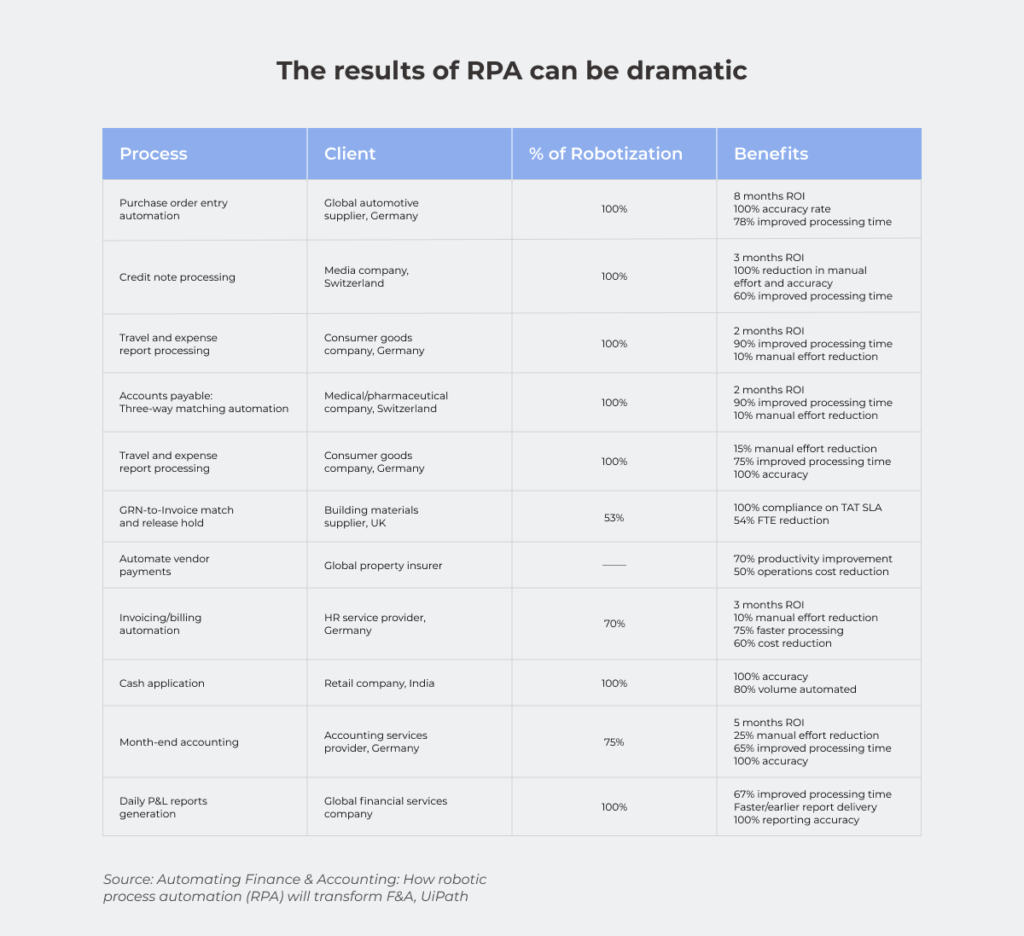
using System;
using Threading;
using System.Threading.Tasks;

namespace ForExample
{
class Program
{

static void Factorial(int x)
{
int result = 1;
for (int i = 1; i <= x; i++)
{
result *= i;
}
Console.WriteLine(“Running task {0}”, Task.CurrentId);
Console.WriteLine(“Factorial of number {0} = {1}”, x, result);
Thread.Sleep(3000);
}

static void Main(string[] args)
{
Parallel.For(1, 10, Factorial);

Console.ReadLine();
}
}
}

In the code given above, the factorials of numbers from 1 to 9 are calculated. In this case, factorial calculation operations are performed not sequentially, but in parallel. Therefore, the factorials of numbers are outputted chaotically as parallel factorial calculation operations are completed. The console output example illustrates this:

Figure 1 Calculating the factorials of different numbers in the Parallel.For loop.

Parallel.ForEach method

This method traverses the collection implementing the IEnumerable interface. Just like the foreach operator, but unlike the classical foreach, it performs parallel access to elements in this collection. This method is parameterized and has the following definition:
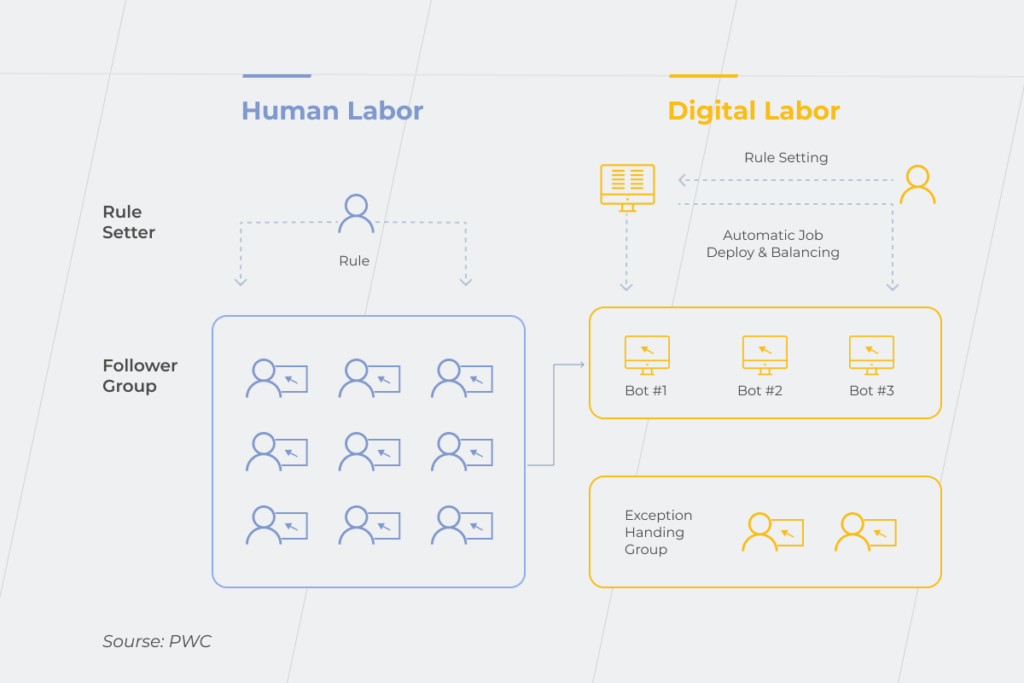
ParallelLoopResult ForEach<TSource>(IEnumerable<TSource> source, Action<TSource> body);

where the first parameter represents the collection in which enumeration will be made, the second parameter is an Action delegate (or lambda expression), executed once per iteration of the loop for each element of the IEnumerable collection. Parallel.ForEach returns a ParallelLoopResult structure that contains data about execution of a parallelized loop. The following example illustrates the use of Parallel.Foreach.

using System;
using System.Collections.Generic;
using System.Threading;
using System.Threading.Tasks;

namespace ForeachExample
{
class Program
{

static void Factorial(int x)
{
int result = 1;

for (int i = 1; i <= x; i++)
{
result *= i;
}

Console.WriteLine(“Running task {0}”, Task.CurrentId);
Console.WriteLine(“Factorial of {0} = {1}”, x, result);
Thread.Sleep(5000);
}

static void Main(string[] args)
{
ParallelLoopResult result = Parallel.ForEach<int>(
new List<int>() { 1, 2, 4, 8, 3, 9, 5, 25 },
Factorial);

Console.ReadLine();
}
}
}

Iterations of the Parallel.Foreach loop are terminated in an order different from the order the numbers in the initial sequence were found. The order of output in the console depends on the execution time of the next iteration of the parallel loop, number of concurrent iterations in the loop, and complexity of calculating the factorial of a number. The more complex the factorial calculation operation is, the longer execution of iteration of the loop as it is found will take, as evidenced by the console output:

Figure 2 Calculating the factorials of numbers in the Parallel.Foreach loop.

Early termination of loop

Just like in classical loops for and foreach, which provide for early exit from the loop using the break operator, the Parallel.For and Parallel.ForEach methods provide for early exit from a loop.

using System;
using System.Threading.Tasks;

namespace ParallelBreak
{
class Program
{
static void Factorial(int x, ParallelLoopState pls)
{
int result = 1;

for (int i = 1; i <= x; i++)
{
result *= i;
if (i == 6)
pls.Break();
}

Console.WriteLine(“Running task {0}”, Task.CurrentId);
Console.WriteLine(“Factorial of {0} = {1}”, x, result);
}

static void Main(string[] args)
{
ParallelLoopResult result = Parallel.For(1, 8, Factorial);

if (!result.IsCompleted)
{
Console.WriteLine("Loop ended on iteration number {0}", result.LowestBreakIteration);
}

Console.ReadLine();
}
}
}

To exit a loop ahead of time, you need to pass the ParallelLoopState class object as a second parameter to the Parallel.ForEach (or Parallel.For) method used as a second parameter (Action delegate). Then, the Break() method of the parallelLoopState object can be invoked anywhere in the code of the function wrapped in this delegate. When running Parallel.ForEach, once the system encounters the Break method, it will exit this loop at the first opportunity in all threads and return the ParallelLoopResult object.

If you’re interested in more, read .NET Core Framework Complete Review

The ParallelLoopResult object returned by the Parallel.For and Parallel.ForEach loops contains two important loop state properties:

  • bool IsCompleted – determines whether the loop completed its work or whether its work was interrupted prematurely;
  • int LowestBreakIteration – returns the smallest index (from the number of indices of iterations being processed in parallel) at which the loop was interrupted.
  • The result of this example is shown in the console output below.
Figure 3 Early termination of the Parallel loop by a command in the loop code.

There is also a way to abort a loop using CancellationToken. And this method works both with Parallel methods and with the tasks represented by Task objects. This is useful when you need to abort an operation that has taken too long or when the delegate passed to the parallel method (Task, TaskFactory, Parallel.For, Parallel.ForEach, Parallel.Invoke) is represented as a lambda function.

To cancel a parallel operation with CancellationToken, you need to:

  1. Connect the System.Threading namespace (in addition to those already existing in the System and System.Threading.Tasks namespaces in the project);
  2. Create an object of the CancellationTokenSource class;
    CancellationTokenSource CTS = new CancellationTokenSource();
  3. Obtain a CancellationToken token from the CancellationTokenSource object;
    CancellationToken token = CTS.Token;
  4. Catch token’s requestion using the following structure:

if (token.IsCancellationRequested)
{
Console.WriteLine("Operation interrupted");
return;
}

  1. Cancel the operation by invoking the Cancel() method of the CancellationTokenSource class object;
    CTS.Cancel();

The example below illustrates the use of CancellatrionToken.

using System;
using System.Threading;
using System.Threading.Tasks;

namespace ParallelToken
{
class Program
{
static void Main(string[] args)
{
CancellationTokenSource CTS = new CancellationTokenSource();
CancellationToken token = CTS.Token;
int number = 6;

Task task1 = new Task(() =>
{
int result = 1;
for (int i = 1; i <= number; i++)
{
if (token.IsCancellationRequested)
{
Console.WriteLine("Operation interrupted");
return;
}

result *= i;
Console.WriteLine("Factorial of {0} = {1}", i, result);
Thread.Sleep(5000);
}
});
task1.Start();

Console.WriteLine("Enter N to cancel the operation or wait for it to finish");
string s = Console.ReadLine();
if (s == "N")
{
CTS.Cancel();
Console.WriteLine("Cancelled by user. Press any key to exit");
Console.ReadKey();
}

Console.Read();
}
}
}

This example displays the following console output:

Figure 4 Early termination of the Parallel loop with CancellationToken.

CancellationToken can be passed to an external method as an argument:

static void Factorial(int x, CancellationToken token);

In the method itself, you only need to check whether there is already a request to cancel the operation and complete the parallel operation.

if (token.IsCancellationRequested)
{
Console.WriteLine("Operation interrupted");
return
}

You can override the Parallel.For() and Parallel.Foreach() methods by adding one more parameter to them – the ParallelOptions class object – in which you can install CancellationToken:

Parallel.ForEach<int>(new List<int>() { 1, 2, 3, 4, 5 }, new ParallelOptions { CancellationToken = token }, Factorial);

But in this case, it will be necessary to catch the operationCancelledException exception, which occurred when the operation was canceled – with the following construction:

try
{
Parallel.For(1, 5, new ParallelOptions { CancellationToken = token }, Factorial);
}
catch (OperationCanceledException ex)
{
Console.WriteLine("Operation interrupted");
}
finally
{
CTS.Dispose();
}

In this case, the parallel loop will be terminated, while the resulting exception will not stop the entire application.

Parallel LINQ (PLINQ)

LINQ was designed as a data query interface, which, based on the collection query results, processes them sequentially. Beginning with .NET 4.0, the ParallelEnumerable class appeared in the System.Linq namespace, allowing you to access the collection in parallel – using the capabilities of all the system’s processors.

However, by default, PLINQ processes data sequentially. Transition to parallel processing occurs if it really leads to faster query data processing.

But, as a rule, in parallel data query operations, there are additional costs. In this case, priority is given to sequential data processing. Therefore, PLINQ is usually applied in very large collections or in complex query operations, where it is really possible to achieve benefits when parallelizing operations.

It should also be taken into account that when sharing access to the same data from multiple threads, access blocking will be enabled, which will also have a big impact on PLINQ performance.

AsParallel() method

This method allows parallelizing a query to a data source. When this method is invoked, the data source is divided into parts (if possible) and then, operations are performed on each part as individual thread.

In fact, this is a normal LINQ query, but the AsParallel() method is also applied to the data source.

static int Factorial(int x)
{
int result = 1;
for (int i = 1; i <= x; i++)
{
result *= i;
}
Console.WriteLine("Factorial of {0} = {1}", x, result);
return result;
}

static void Main(string[] args)
{
int[] nums = new int[] { -6, -2, 0, 1, 2, 4, 3, 5, 6, 7, 8 };
var factorials = from n in nums.AsParallel()
select Factorial(n);
}

or

var factorials = nums.AsParallel().Select(x => Factorial(x));

ForAll() method

This method optimizes parallel queries even more. An algorithm like Parallel.Foreach is used to output results in this case. But at the same time, when the ForAll() method is used, delays increase during query execution due to assembly of data received from different threads into one set and enumeration of the data in a loop.

The ForAll() method takes an Action delegate or a lambda function as an argument.

int[] nums = new int[] { -6, -2, 0, 1, 2, 4, 3, 5, 6, 7, 8, };
(from n in nums.AsParallel()
where n > 0
select Factorial(n)).ForAll(n => Console.WriteLine(n));

When executing a parallel query, the resulting selection can be constructed as you like and will be unordered. You can apply the LINQ OrderBy() method or the orderby operator, but this method will sort the sample data in an alphabetical order.

var factorials = from n in nums.AsParallel()
where n > 0
orderby n
select Factorial(n);

However, this order will be different from the order in which they were located in the data source. If you want to organize the data according to the original sequence, then the AsOrdered() operator is used. In this case, this sorting will carry additional costs during query execution. If further manipulations on the set ordered by the AsOrdered() method are required, and the ordering itself is no longer required, the AsUnordered method is used.

var factorials = from n in nums.AsParallel().AsOrdered()
where n > 0
select Factorial(n);
var query = from n in factorials.AsUnordered()
where n > 100
select n;
query.ForAll(n => Console.WriteLine(n));

PLINQ error handling

When a parallel query is executed, the data source is divided into parts, and each part is processed in a separate thread. But if an error occurs in one of the threads, the system will interrupt execution of all threads. This will throw an AgregateException exception. The following code contains not only numbers but also a string in the data source (array). Therefore, an error occurs when you try to calculate the factorial from the row.

object[] nums2 = new object[] { 1, 2, 3, 4, 5, "oops" };


factorials = from n in nums2.AsParallel()
let x = (int )n
select Factorial(x);
try
{
factorials.ForAll(n => Console.WriteLine(n));
}
catch (AggregateException ex)
{
foreach (var e in ex.InnerExceptions)
{
Console.WriteLine(e.Message);
}
}

Here, the resulting exception is an AggregateException exception, as in the Parallel class methods. This exception should be caught and its InnerExceptions property should be accessed to determine the type of exceptions that occurred.

Early termination of PLINQ queries

In the event that you need to abort an operation being executed by PLINQ before it finishes (for example, by timeout), you can use the WithCancellation() method in the query, which you can pass to CancellationToken as in the example below.

using System;
using System.Linq;
using System.Threading;
using System.Threading.Tasks;

namespace PlinqCancel
{
class Program
{
static int Factorial(int x)
{
int result = 1;
for (int i = 1; i <= x; i++)
{
result *= i;
}
Console.WriteLine("Factorial of {0} = {1}", x, result);
Thread.Sleep(1000);
return result;
}

static void Main(string[] args)
{
CancellationTokenSource cts = new CancellationTokenSource();
new Task(() =>
{
Thread.Sleep(500);
cts.Cancel();
}).Start();

try
{
int[] numbers = new int[] { 1, 2, 3, 4, 5, 6, 7, 8, 9, 10 };
var factorials = from n in numbers.AsParallel().WithCancellation(cts.Token)
select Factorial(n);
foreach (var n in factorials)
Console.WriteLine(n);
}

catch (AggregateException ex)
{
if (ex.InnerExceptions != null)
{
foreach (Exception e in ex.InnerExceptions)
Console.WriteLine(e.Message);
}
}

finally
{
cts.Dispose();
}
Console.ReadLine();
}
}
}

In this example, two threads are started. In the main thread, there is a parallel query with possible early termination.

var factorials = from n in numbers.AsParallel().WithCancellation(cts.Token)
select Factorial(n);

A parallel query is interrupted (after a certain time has elapsed) as an additional thread created using the Task object.

new Task(() =>
{
Thread.Sleep(500);
cts.Cancel();
}).Start();

A console output of the example is shown below.

Figure 5 Early termination of parallel query using CancellationToken.

The cts.Cancel() method, as with the Parallel class, causes the OperationCancelledException exception to be thrown, which must be processed in the try { } catch block, otherwise it will crash the program. The AggregateException exception that will be thrown if any other exception occurs in one of the PLINQ threads should also be handled.

Conclusion

Despite the fact that TPL and PLINQ are relatively new in .NET, they are fully capable of solving complex problems on multi-core processors. TPL, for example, automatically parallelizes tasks between available processor cores, like ThreadPool.

The difference between TPL and ThreadPool is that TPL (like Thread objects) is designed to solve long computationally complex tasks. But if Thread objects need to be created and destroyed manually, then TPL creates threads automatically and exactly as much as is necessary for the most effective solution of the task.

The PLINQ library as a whole is similar to TPL. However, it is optimized for queries to data sources, which cannot always be effectively paralleled.
In the next part of the article, we’ll look at the thread synchronization mechanisms. Stay tuned!

If you are interested in ways of creating multi-threaded applications in .NET, we invite you to read Part 1 and Part 2.

Ways of creating multi-threaded applications in .NET (Part 2). ThreadPool Class

In Part 1 of this article, we talked about what threads are in .NET. Now, we want to dwell on the methods of background and asynchronous execution of threads in .NET apps.

These methods have advantages and disadvantages. They are not always convenient to use, but generally, background and asynchronous execution of threads offers wide opportunities in executing separate background threads for both small and long tasks.

Thread pool and its difference from the Thread class

Creation and destruction of threads are very resource-intensive processes. Performing them too often is not recommended. However, there are various small tasks that require asynchronous execution or with maximum utilization of all CPU cores. For such tasks, it is best to create a set of threads in advance and then distribute the tasks among these threads.

It would be quite good if the threads that had already completed their tasks could be re-used without wasting computational resources destroying them and creating new threads. It would also be nice if the program itself determines how many threads it would require to efficiently solve a problem.

Such a set of threads in .NET exists and is called a thread pool. It is implemented in the ThreadPool static class of the System. Threading namespace. You need not create a ThreadPool class object, and it will not work either. Such an object is created automatically when the application starts – provided the System. Threading namespace is connected in it.

If you’re interested in more, read Microsoft Roslyn – using the compiler as a service

ThreadPool can automatically increase or reduce the number of active threads to maximize task execution efficiency. The maximum allowed number of processing threads in a pool is 1023. The pool allocates a maximum of 1000 threads in an I/O operation.

To get maximum number of threads, you can use the GetMaxThreads method of the ThreadPool static class. The first parameter passed to this method returns the number of processing threads. The second parameter returns the number of I/O threads.

int nWorkers; // number of processing threads
int nCompletions; // number of I/O threads
ThreadPool.GetMaxThreads(out nWorkers, out nCompletions);

You can also specify the maximum and minimum number of threads in a pool. To set the maximum number of threads, you need to invoke the SetMaxThreads method.

ThreadPool.SetMaxThreads(int nWorkers, int nCompletions);

where nWorkers is the number of processing threads, nCompletions is the number of I/O threads. To set the minimum number of threads in a pool, use the SetMinTherads method.

ThreadPool.SetMinThreads(int nWorkers, int nCompletions);

The parameters here are exactly the same as in the SetMaxThreads method.

If, for some reason, the threads are not enough to perform the user’s tasks, the tasks will be automatically placed in a queue. As soon as at least one of the pool threads finishes its work, it will be redirected to execute tasks in the queue. If any of the threads completes its work before the rest, it will be sent back to the pool but not destroyed. This thread can be re-enabled at the first opportunity.

You can add a task to a thread pool’s queue in one of the following four ways:

  • Calling the QueueUserWorkItem method.
  • Calling asynchronous delegates BeginInvoke() and EndInvoke();
  • Using the BackgroundWorker class methods;
  • Using the Task Parallel Library (TPL) methods.

QueueUserWorkItem method

This method adds a task to the thread pool’s queue for execution and requests the required number of threads from the pool to perform this task. The name of the executable function, wrapped in a WaitCallBack delegate, is passed to the method as a parameter. The object of storing the task state data can be passed as the second parameter.

ThreadPool.QueueUserWorkItem(Job);

If the ThreadPool object does not exist at the time the method is invoked, it will be created. If the pool is already created and there is at least one free thread in it, then the task is passed to this thread. If several pool threads are free, then the pool will allocate these threads such that the task is executed as quickly as possible.

The following example uses all the basic methods of working with a thread pool – accessing a pool to display the maximum number of threads and sending a task to a pool for execution.

using System;
using System.Collections.Generic;
using System.Linq;
using System.Text;
using System.Threading;
namespace ThreadPoolTest
{
class Program
{
static void Main()
{
int nWorkers; // number of processing threads
int nIOs; // number of I/O threads
ThreadPool.GetMaxThreads(out nWorkers, out nIOs);
Console.WriteLine("Maximum threads: " + nWorkers
+ "nMaximum I/O Threads: " + nIOs);
for(int i = 0; i < 10; i++)
ThreadPool.QueueUserWorkItem(Job);
Thread.Sleep(3000);
Console.ReadLine();
}
static void Job(object state)
{
for (int i = 0; i < 3; i++)
{
Console.WriteLine("cycle {0}, is processing by thread {1}",
i, Thread.CurrentThread.ManagedThreadId);
Thread.Sleep(100);
}
}
}
}

The result of the example is shown in Figure 1. The program was executed on an Intel Core i7 4770K processor, which contains 4 physical and 8 logical processor cores.

Fig. 1 Result of program execution in a thread pool.

As can be seen from Figure 1, eight threads were allocated from the pool to the program – exactly the same number of logical processor cores available.

Features of a thread pool

Using a thread pool allows you to enhance the performance of a multithreaded application. A thread pool significantly reduces the cost of starting and stopping threads, increases the number of threads that are started and stopped, and can reuse completed threads.

However, a thread pool has a number of features that in certain situations can be considered as shortcomings:

  • All threads from a pool are background thread.
  • At the end of all the foreground threads of an application, the work of all threads from the pool will also be aborted, regardless of whether they have completed their tasks or not.
  • It is impossible to make a thread from a pool a foreground thread.
  • Threads in a pool do not have a name. The only thing you can get for a thread from a pool is its ID (using the ManagedThreadID property):

Thread.CurrentThread.ManagedThreadId

  • Threads from a pool cannot be assigned a name.
  • The priority of a thread in a pool can be changed, but once it finishes executing its task and is returned to the pool, its priority will be reset to the default value (normal).
  • When processing COM objects in a thread pool, there will be problems due to the fact that such objects require the use of single-threaded apartment (STA) threads, but all the threads of a thread pool are multi-threaded apartment (MTA) threads.
  • Threads in a pool are suitable for executing small tasks, but not for permanent work (such threads need to be created using the Thread class).
  • Blocking a thread from a pool will lead to the starting of additional pool threads; the pool will continue to execute the task but this will affect performance.

A thread pool is implicitly used in the following .NET constructs:

  • Windows Communication Foundation (WCF);
  • Interprocess communication component – .NET Remoting;
  • ASP.NET;
  • ASMX Web Services;
  • Event-based Asynchronous Pattern (EAP);
  • Timers: System.Timer and System.Windows.Timer;
  • Parallel LiNQ (PLINQ).

It should be remembered that all the features of a thread pool apply to the above constructs.

Do you need experts for your software development project? Contact us now

Asynchronous delegates

The C# function can be invoked for both synchronous and asynchronous execution. When the function is invoked synchronously, it is executed in the same thread as the main program. The synchronous function invocation itself occurs in the usual way – by specifying the function name and its arguments in brackets immediately after the name.

When a function is invoked asynchronously, the runtime environment CLR allocates for the function a separate thread from the thread pool and executes the function in this thread, while the master program continues to execute in the main thread. To execute a function asynchronously, it must be wrapped in an AsyncCallBack delegate. Next, this delegate must be invoked by calling the BeginInvoke method. You can use the EndInvoke method to get the value returned by the method and terminate the method.

The following example illustrates how to work with asynchronous delegates.

using System;
using System.Collections.Generic;
using System.Linq;
using System.Text;
using System.Threading;
using System.Runtime.Remoting.Messaging;
class Program
{
public delegate int MyDelegate(int x, int y);
static AutoResetEvent are = new AutoResetEvent(false);
static int WriteSum(int x, int y)
{
Console.WriteLine("Thread {0}: Sum = {1}",
Thread.CurrentThread.ManagedThreadId, x + y);
return x + y;
}
static void Summ(IAsyncResult async)
{
Thread.Sleep(3000);
// AsyncResult type from the System.Runtime.Remoting.Messaging namespace
MyDelegate func = ((AsyncResult)async).AsyncDelegate as MyDelegate;
int sum = func.EndInvoke(async);
are.Set(); // The Set method is used in thread synchronization and gives a signal to a thread to continue working
}
static void Main()
{
MyDelegate func = WriteSum;
// The C# compiler displays an AsyncCallback delegate to refer to the SumDone() method
IAsyncResult async = func.BeginInvoke(10, 10, Summ, null);
Console.WriteLine("Thread {0}: called throw BeginInvoke() waiting to complete SumDone()",
Thread.CurrentThread.ManagedThreadId);
are.WaitOne(); // The WaitOne method waits for a Set signal from at least one thread
Console.WriteLine("Thread {0}: finished his work",
Thread.CurrentThread.ManagedThreadId);
Console.ReadKey();
}
}

To run a function for asynchronous execution, you need to declare the delegate class first.

public delegate int MyDelegate(int x, int y);

where int written after the keyword delegate is the type of the value returned by the function. The arguments of the function are listed in brackets.

The AutoResetEvent class notifies the thread generated by the asynchronous delegate that an event has occurred by calling the Set method. The value false is passed to the event constructor if AutoResetEvent is not scheduled to be triggered immediately after it is created.

staticAutoResetEvent are = new AutoResetEvent(false);

Next, you need to create an asynchronous MyDelegate delegate, which was declared earlier. The created delegate will be named func.

MyDelegate func = ((AsyncResult)async).AsyncDelegate as MyDelegate;

The EndInvoke method of the func delegate is used to return the result of asynchronous function execution.

The Set method of the AutoResetEvent class gives a signal to a waiting thread that it can resume its work. The Set method works only with waiting threads. In any other state other than waiting, the method ignores the threads. The WaitOne method is used to enter a thread in a waiting state. The WaitOne method blocks the current thread until it receives a signal generated by the Set method.

The result of the example is shown in Figure 2.

Fig. 2 – Result of execution of an asynchronous delegate.

As can be seen from Figure 2, the asynchronous delegate is actually executed in a separate thread.

BackgroundWorker Class

The BackgroundWorker class is designed to start long-running tasks in a separate thread. This class is essentially a wrapper for the ThreadPool class and uses a thread pool in its implementation. BackgroundWorker is needed if there is only one task that needs to be executed in a background mode in a separate thread.

BackgroundWorker provides the following capabilities:

  • Implementation of the protocol for sending and receiving messages on task progress, completion or early termination.
  • Flag for cancellation of an operation without using the Abort method of the Thread class.
  • Can be placed as a component on a form in a Visual Studio form designer (implements the IComponent interface).
  • Can handle exception in the main thread of a NET app (without mandatory writing of the try {} catch block in the body of the delegate of the passed thread).
  • Can change the statuses of window controls without using InvokeRequired and Dispatcher.

How to use BackgroundWorker

You can take use the features of the BackgroundWorker class in two ways:

  1. To create an instance of the BackgroundWorker class.
  2. To create a class inherited from BackgroundWorker.

When creating an instance of the BackgroundWorker class, the following needs to be performed:

  1. Create this instance by invoking the constructor.
  2. Add a DoWork event handler.
  3. Invoke the RunWorkerAsync method and pass an instance of any class inherited from object to it as an argument.

Once the work is completed, BackgroundWorker will generate a RunWorkerCompleted event.

BackgroundWorker allows you to display the progress of an operation. To do this you need to:

  1. Set the value true for the WorkerReportsProgress property.
  2. In the DoWork event handler, periodically invoke ReportProgress, indicating the amount of work done and the remaining work.
  3. Process the ProgressChanged event by requesting the ProgressPercentage property of its argument.

Event handlers ProgressChanged and RunWorkerCompleted freely access the user interface elements.

If there is a need to cancel an operation being performed by BackgroundWorker, you need to:

  1. Set the WorkerSupportsCancellation property to true.
  2. Set the Cancel property of the DoWorkArgs argument to true.
  3. Request cancellation of the operation using the CancelAsync method of the BackgroundWorker class.

The example below illustrates all the common operations with BackgroundWorker:

using System;
using System.Threading;
using System.ComponentModel;
class Program
{
static BackgroundWorker bw;
static void Main()
{
bw = new BackgroundWorker(); // we create a new instance of the BackgroundWorker class
bw.WorkerReportsProgress = true; // we set support for progress of operations
bw.WorkerSupportsCancellation = true; // we set support for operation canceling
bw.DoWork += workfunc; // we add DoWork event handler
bw.ProgressChanged += Progress; // we add state change event handlers
bw.RunWorkerCompleted += Completed; // we add a shutdown event handler
bw.RunWorkerAsync(null); // We run BackgroundWorker
Console.WriteLine(
"Press Enter during five seconds to abort the process");
Console.ReadLine();
if (bw.IsBusy) // if the Enter button is pressed
{
bw.CancelAsync(); //cancel operation
Console.ReadLine(); //read Enter key pressing
}
}
static void workfunc(object sender, DoWorkEventArgs e)
{ // function executed by BackgroundWorker
for (int i = 0; i <= 100; i += 20)
{
if (bw.CancellationPending)
{ // here we process operation cancellation request
e.Cancel = true; // here we cancel the operation
return;
}
bw.ReportProgress(i); // here we declare the status of the operation
Thread.Sleep(1000); //and put the thread to sleep for a second
}
e.Result = 1989; // will be passed to RunWorkerComрleted
}
static void Completed(object sender, RunWorkerCompletedEventArgs e)
{ // BackgroundWorker completion event handler function
if (e.Cancelled) // if user aborted work
Console.WriteLine(
"Task processing by BackgroundWorker was aborted by user!");
else if (e.Error != null)
Console.WriteLine("Worker exception: " + e.Error); // if work was aborted due to exception
else // if work was executed completely
Console.WriteLine("Work is complete. Result is " + e.Result + ". ");
Console.WriteLine("Press Enter to exit...");
}
static void Progress(object sender, ProgressChangedEventArgs e)
{ // function that displays the status of work being performed
Console.WriteLine("Proceed " + e.ProgressPercentage + "%");
} //ProgressPercentage - method of the ProgressChangedEventArgs argument of the BackgroundWorker class
}

Display of the application when the Enter key is pressed (BackgroundWorker was aborted by the user) is shown in Figure 3.

Fig. 3 – Display of application when BackgroundWorker was interrupted.

Figure 4 shows the display of the application if the task that BackgroundWorker was performing was not interrupted.

Fig. 4 – Display of the application in the case when BackgroundWorker operation was not aborted.

BackgroundWorker inheritance

The BackgroundWorker class allows you to inherit user classes from it. This class provides the OnDoWork virtual method, which the developer can override in his own way.

using System.Collections.Generic;
using System.Threading;
using System.ComponentModel;
namespace BgWorkerInherit
{
public class Client
{
public Jamshut Tile (int foo, int bar)
{
return new Jamshut(foo, bar);
}
}
public class Jamshut : BackgroundWorker
{
//You can add typed fields.
public Dictionary<string, int> Result;
public volatile int Foo;
public volatile int Bar;
public Jamshut()
{
WorkerReportsProgress = true; //Jamshut will show the progress of its work
WorkerSupportsCancellation = true; //Jamshut can interrupt work
}
public Jamshut(int foo, int bar) : this()
{
Foo = foo;
Bar = bar;
}
protected override void OnDoWork(DoWorkEventArgs e)
{
ReportProgress(0, "Bossy, Jamshut begins to put tiles");
bool finished = false;
int percentage = 0;
//Jamshut begins to work
Thread.Sleep(1000);
while (!finished)
{
if (CancellationPending)
{ //If a request is received to cancel the operation, Jamshut will stop its work
e.Cancel = true;
return;
}
Thread.Sleep(1000);
if (percentage < 100) percentage += 10;
// Jamshut reports on the progress of work
ReportProgress(percentage, "Proceed "+percentage+" %");
}
ReportProgress(100, "Bossy, come to see. Jamshut finished his work...");
e.Result = Result;
}
}
class Program
{
static void Main(string[] args)
{
}
}
}

The code that created the Jamshut class object will have an already configured background operation handler that will report on the progress of its work and support its cancellation. In addition, the Jamshut class can update all the elements of the application’s graphical user interface without using Control.Invoke (in WinForms) and Dispatcher.Invoke (in WPF) methods.

Conclusion

In this part of the article, we have looked at the methods of background and asynchronous execution of threads in .NET apps. These methods have a number of advantages and disadvantages and that is why they are not always convenient to use. But in general, background and asynchronous execution of threads provides ample opportunities for execution in separate background threads of both short- and long-running tasks.

In part 3 of this article, we’ll look at .NET’s Task Parallel Library (TPL) and Parallel Language Integrated Query (PLINQ), which enables you to parallelize separate code snippets or database queries.

Anna Vasilevskaya
AI modified real photo
Anna Vasilevskaya
Account Executive

Get in touch

Drop us a line about your project at
[email protected] or via the contact
form below, and we will contact you soon.