Microsoft Roslyn – using the compiler as a service

.NET Compiler Platform from A to Z

One could encounter different situations where it becomes necessary to write one’s own code compiler, interpreter or analyzer for a programming language. Creation of compilers and interpreters is believed to be an “aerobatics” in programming, whilst the creation process itself is seen as very complicated and time consuming. However, the .NET platform has had tools existing quite for a long time, which greatly simplify this task.

What we had before Roslyn came

The .NET Framework can compile a source code without Visual Studio installed on the machine. The .NET Framework (starting with version 2.0) includes command line compilers csc.exe and vbc.exe. These compilers can be used to build .NET applications from any text file containing C# or Visual Basic source code. The compilers are run from the command line. The command line compiler parameters enable you to:

  • Set the name of the compiled file (/out);
  • Collect console applications (/target:exe);
  • Collect applications with graphical interface without using a console (/target:winexe);
  • Collect dynamically linked libraries (/target:library);
  • Add references to external assemblies (/r);
  • Write command-line arguments for the *.rsp file and specify the name of the rsp file as the command-line argument (@file.rsp).

The csc and vbc parameters perfectly handle the task of compiling a source code contained in one file. But MSBuild is used for the more complex tasks of compiling and assembling projects. Moreover, Visual Studio files *.csproj, *.vbproj and *.vcxproj serve as XML codes for MSBuild. Visual Studio uses MSBuild to build projects. In addition, MSBuild can be called from the command line or from a .NET application code via APIs.

It is also possible to generate a low-level MSIL code using System.Reflection.Emit. You can also go for dynamic code generation for .NET programming languages using CodeDOM, and then compile the generated code with the help of code providers (for example, CSharpCodeProvider, which is an add-in over the csc compiler).

All the approaches listed above were being used for code generation before the emergence of the .NET Compiler Platform, better known as Roslyn.

Roslyn is a collection of open-source compilers, code analysis and refactoring tools which work with C# and Visual Basic source codes. This set of compilers and tools can be used to create full-fledged compilers, including, first and foremost, source code analysis tools.

The History of Roslyn

The name “Roslyn”, the new platform for compiling a source code, was first written by Eric Lippert, a former Microsoft employee, when he started to recruit developers for a new project. Lippert named the compiler in honor of Roslyn, a suburb in Washington.

The first version of Roslyn was released in October 2011 as a part of Community Technology Preview (CTP) – an extension for Visual Studio 2010 SP1. The update of CTP in September 2012, despite the large scale, was not very successful. It had the so-called “breaking changes” – changes in Roslyn components, which could potentially crash other components. Besides, not all the features of the CTP APIs were implemented for C# and Visual Basic languages.

At its Build conference in April 2014, Microsoft announced Roslyn as an open source project, and also implemented a way to integrate Roslyn in Visual Studio 2013. Since then, Roslyn has been distributed under the Apache 2.0 license. However, even by then, not all Roslyn features were implemented – there were plans for deployment in C# 6.0 and Visual Basic 14.0.

Starting with 2015 version, Visual Studio uses Roslyn to compile and build its own projects. However, to date, Roslyn only supports two languages – C# and Visual Basic.

In January 2015, Microsoft moved Roslyn source code to GitHub.

Installing Roslyn

To date, Roslyn has remained a part of Visual Studio 2015 and is installed together with it. Roslyn is a part of Visual Studio 2017 as well. It has been released in March 2017.

However, Roslyn is not included in the .NET Framework. Even in the .NET Framework 4.6 version, the traditional csc.exe and vbc.exe compilers are included. This is done for it to be compatible with previous .NET Framework versions.

To install Roslyn compilers without installing Visual Studio, you need to download and install Microsoft Build Tools. Roslyn can also be downloaded from Github, then you can compile and get binary files csc.exe and vbc.exe, which can be accessed from the command line.

APIs for Roslyn compilers

Most of the existing traditional compilers come as “black boxes”, which “magically” convert the source code into an executable file or library. Unlike them, Roslyn allows you to access each stage of the code compilation and application creation process via its own APIs.

Together with compilers, other “black boxes” are often supplied – integrated development environments (IDEs) that can enable you to increase the development speed with convenient tools, such as code highlighting, Intellisense, refactoring tools, performance analysis tools (profilers) and other complex tools. Roslyn takes over these features and also provides an API to them. Moreover, with Roslyn, the developer can work with the compiler from his own application, using the compiler as a service to:

  • Generate code in C# and Visual Basic (like CodeDOM);
  • Analyze code;
  • Refactor code;
  • Use C# and Visual Basic as script languages, interpreting instead of compiling the code. Roslyn APIs are represented by three sets (Figure 1).
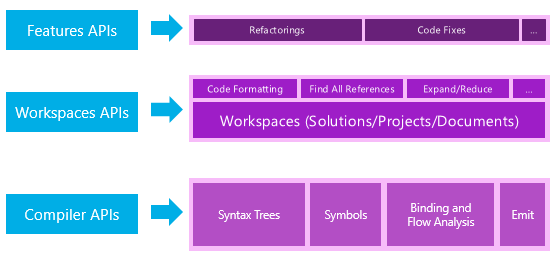
Fig. 1 – Roslyn APIs

The compiler APIs allow you to get an object model of processes that occur at each stage of the compilation process, regardless of the Visual Studio components installed (Figure 2).
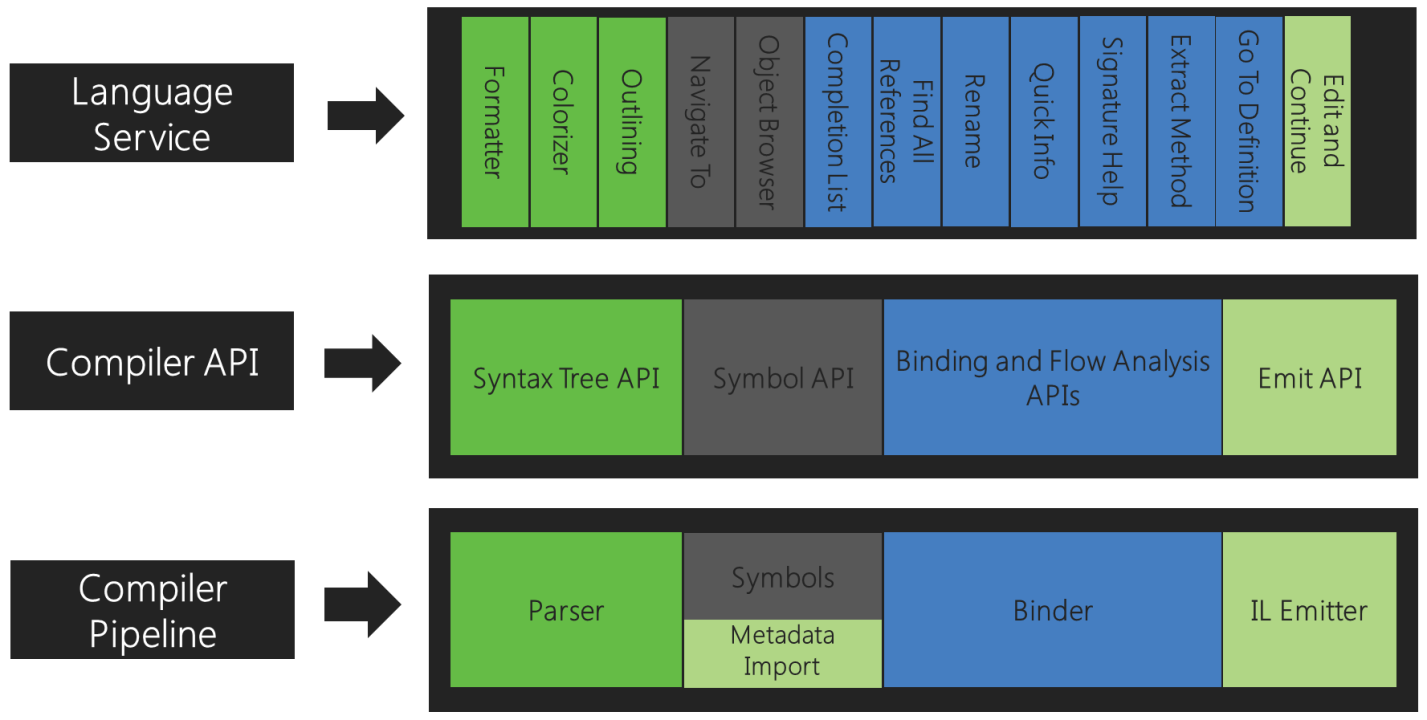
Fig. 2. Compiler APIs

The Roslyn compiler pipeline is represented by four phases, each of which has its own object representation:

  1. The parser displays information in the form of a syntax tree;
  2. The symbol declaration phase displays a hierarchical symbol table;
  3. The binding phase returns information in the form of semantic analysis results;
  4. The emitting phase provides APIs for generating low-level code in MSIL language (similar to what System.Reflection.Emit does).

Language services use these APIs to perform their own functions. For example, code highlighting uses a syntax tree, while an object browser uses a hierarchical symbol table.

Roslyn diagnostic APIs allow you to handle errors and warnings that occur at all the compilation stages. Roslyn also allows you to process errors through analysis tools written by the user.

Scripting APIs allow executing C# or Visual Basic code without compilation – something similar to the REPL interactive environment in Perl, Python, Haskell, Erlang, and others.

Workspace APIs gives direct access to the application’s object model in the compiler without parsing the source code files for the second time. The APIs also allow for projects tuning, management of project dependencies, source code generation without using Visual Studio components.

Syntax trees

The syntax tree is the basic structure used by Roslyn for compilation, code analysis, binding, refactoring, code generation and other operations. Roslyn syntax trees have three key properties:

  1. They contain all the source information, such as grammatical constructs, tokens, directives, comments and even whitespaces – all this information is contained in the syntax tree;
  2. The syntax tree or its part can be converted back to the source code – you can build syntax trees and generate code from them, you can edit the syntax tree and it will generate a corrected code;
  3. They are thread-safe and protected from changes. This means that you will not be able to directly change the data in the syntax tree. The tree completely reflects the state of the source code at the time of construction.

These three important attributes of the trees allow you to work with the syntactic structure of the source code, including in custom projects, accessing it through APIs. These properties have also greatly simplified complex refactoring operations, and this happens naturally without direct code editing but only by editing the syntax tree. Each syntax tree consists of the following elements:

  • Syntax Nodes – they represent complex syntactic constructs, such as declarations or expressions;
  • Syntax Tokens – they represent the simplest constructs for constructing syntax nodes. Syntax tokens consist of, for example, an identifier or operator;
  • Syntax Trivia – it represents parts of the source text that are mainly insignificant for the compiler, such as comments, directives or whitespace;
  • Spans display positions within the source text of each node, token or trivia, and its length;
  • Kinds identify the syntax unit in the tree;
  • Errors are processed in the syntax tree in two ways: either by inserting the expected token, or by adding a token that is unknown to the compiler as a trivia.

Semantic model and Workspace APIs

Unlike syntax trees that represent the structure of source code, semantics is the logic in the source code and all its constructs. It includes declarations of variables, classes, objects, fields, methods, function calls and passing parameters to them, types of operands and operation results, and operator priorities. Semantic analysis of source code checks the code (or syntax tree in Roslyn) for compliance with the rules of the language. Semantic model provides the following information about the source code:

  • Semantic symbols: source elements or elements imported from libraries (types, methods, properties, fields, events, etc.);
  • Resulting type of expression;
  • Diagnostic data: errors, warnings, exceptions, etc.

Workspace APIs represent the object model of solutions, projects in solutions and documents in projects. All the objects and methods listed above can be called from any .NET application working with Roslyn as a service and using Roslyn APIs.

Working with Roslyn: samples

There are so many examples of working with Roslyn. Here are some of them:

Future development of Roslyn

Roslyn will be developed further in two important areas: creation of new features and improving existing algorithms. The following are expected among the qualitative improvements of algorithms:

  • Increasing the performance and speed of algorithms in the compiler platform;
  • Creating a new implementation of PDB Writer with big parallelism when writing text to a PDB file;
  • Increasing the test coverage with the help of new testing tools;
  • Eliminating Roslyn’s dependence on the full version of .NET Framework so that Roslyn could be deployed, for example, on WinRT.

Some of the features of Roslyn compilers are still considered experimental and are being tested publicly. Others that have already been implemented can be improved – performance, speed and quality of work can be enhanced. Still others associated with the new functionality require a decision by Microsoft and the .NET Foundation community to be taken first before intensive development and implementation could start. Here are some of the ways to improve the following versions of Roslyn compilers:

  1. New features for programming languages ​​C# 6.0 and Visual Basic 14.0 (more);
  2. APIs for creating XML documentation from code comments;
  3. Improvement of diagnostic APIs for synchronous code analysis in the process of writing it. For example – identifying and indicating errors and warnings while writing code without running it for compilation;
  4. Increasing the performance of code analyzers via Roslyn APIs;
  5. Increasing the number of rules for static code analysis tool FxCop;
  6. Creating APIs for writing custom static code analyzers;
  7. Modifying the semantics of some expressions for scripting languages ​​(C# Script and VB Script);
  8. Improving REPL interface – interactive environment windows for programming within command line interface tools;
  9. Improving APIs for working with scripting languages ​​(C# Script and VB Script);
  10. Increasing the performance of FindAllReferences operation;
  11. Improving the algorithms for finding conflicts when renaming.

Some more piece about Roslyn

Despite the large number of flaws, the Microsoft’s new compiler platform Roslyn is gaining popularity, and it’s no accident. Roslyn is one of the few compilers that give you the opportunity to observe all the compilation and assembly stages, access any intermediate results and internal compiler constructs, as well as use various language services of the compiler, refactoring and diagnostics tools. Due to the wide interpretation options inherent in Roslyn, the C# and Visual Basic have become scripting languages. Despite its relatively small history, Roslyn is already being used in large projects, such as IDE Visual Studio 2015, static code analyzer PVS-Studio, and cross-platform framework .NET Core. It is also used as an alternative to script system Windows PowerShell. In the future, the number of such projects will only increase.

Some life hacks on the use of Roslyn

Roslyn provides a huge set of tools for building your own compilers, code analyzers, interpreters and scripting languages. A significant shortcoming of Roslyn is that it only works with two programming languages: C# and Visual Basic. However, Roslyn makes it easier to create your own language on the .NET platform. In this case, you only need to translate the code into C# or Visual Basic, or create a syntax tree, and then use Roslyn compiler APIs to build a full-fledged application on the .NET platform. Another option is to run the generated code for execution (interpretation) as a script. If you need to generate and compile a source code using C# as a scripting language, then the best solution is to use Roslyn compiler APIs. If you do not like the source code analyzers built into Visual Studio, then Roslyn APIs could enable you to create your own. You can even create your own IDE, using the features of this compiler platform and connecting it as a service to your project.

Roslyn is not just another Microsoft compiler – it is an off-the-shelf framework, which you can use to create your own source code tools. Roslyn gives .NET developers many new features. It is a great tool that helps you to write your own compiler, interpreter or analyzer for a programming language. We advise you to study how the compiler works for it would simplify your tasks. We are interested in Roslyn because it can be used to create your own programming language on the .NET platform.


Lean Software Development Using the React Ecosystem

Choosing the Right JavaScript Framework

In this article we’ll elaborate on how we use React and the ecosystem around it to enable lean software development. Several options for frontend development are presented. When there is need for a web app framework, businesses usually choose between Angular, Ember and React.

React

The decision to choose any of these frameworks is usually driven by a simple question: how easy would it be to hire a dedicated team and later gather the maintenance and support team. By easy staffing, we mean the availability and cost of developers.

Cost and availability are the reasons why non-mainstream frameworks are not even considered for a job.

Aurelia, Vue, Polymer and many other frameworks provide great technical ideas and they are good for special cases. However, these frameworks may lead to excessive costs if selected as a base for business. This is because there is shortage of readily available and qualified developers to do the job using these frameworks.

The use of one of the mainstream frameworks will enable businesses to control costs and manage projects predictably.

Why React?

There is no silver bullet or framework to solve all issues. Apart from technology, many other things should be agreed upon and communicated during a project.

From the prototype to design and implementation, product development requires the use of specialized tools at each production stage. These tools are usually not integrated. There is a person in between, who transforms the output from one tool to an artifact that is useful during later stages. An example is a UX researcher that gives the designs to a frontend engineer, who then manually transforms them into code. This process generates waste and slows down iterations, which is not lean.

Let’s assume that a proof of a concept confirmed our ability to implement some technology. A standard loop for creation of wireframe, prototyping, UX, design, and development should be iterated until there is confidence that MVP is ready for production.

This is the greatest discriminator of the project path that we are about to travel. Depending on team capabilities and the certainty in the path to be executed, we should make our choice from any point between two polar options:

  1. Employ a multi-talented team, where the product owner, UX researchers and designers would draw sketches, wireframes and interactive prototypes which are then handed over to the development team for implementation in a selected technological stack;
  2. Allow the product owner to iterate with the development team directly, while feedback on an artifact from one iteration is a direct input for the next one.

Option A is recommended when the product owner is certain on what is needed as the end result. This is usually the case for a business that is making an investment and the resulting product is expected to be an integral part of an existing system.

Option B would be more desirable for innovative products, startups, and research projects. This is because it allows for very rapid change in development direction while preserving speed. This is possible thanks to the application of lean software development principles and practices which could be enabled by a unified toolset built around a common framework.

React and the ecosystem around it are always in flux, but they are mature enough to cover a full cycle from the prototype to MVP and to production deployment both for web and mobile applications and soon for virtual reality apps.

There is no need to produce wasteful deliverables outside of the React ecosystem. Proof of concept, wireframes, interactive prototypes and MVP could be built from one another on each consecutive iteration. By reusing code between production stages, waste is eliminated and learning amplified.

Each team member could see the whole since the common stack is used throughout the project. It is all React and JavaScript. This helps them to build in integrity since they could refactor parts of a system as new feedback is collected.

Lean Toolset

Convention

The first thing to do on a new project is leveling the ground. Project time shouldn’t be spent on selecting tools, integrating them to work smoothly together and teaching team members to embrace them.

This is why tools should be ready, team members should have the skills and use these skills properly, and convention should be established by a lead. A convention over configuration approach increases certainty. This allows developers to think more about the product instead of arguing about non-significant details. These details should be resolved in advance. For this reason, tools are collected and integrated in a toolset.

Lean Toolset: create-react-app

create-react-app is a React project generator and toolset which allows bootstrapping a React project without configuring the build tools in advance. The convention over configuration approach used by the create-react-app saves time in most cases, while for advanced cases, it is not limiting.

When advanced setup is needed, we eject configuration using built-in react-scripts and extend it accordingly. However, the rule of thumb is to work with the idiomatic create-react-app since it simplifies the overall system and imposes best practices.

Lean Toolset: redux and common packages

create-react-app is good for bootstrapping, but not suitable for application development.

We always add redux for state management and react-router for routing to our applications. Other than simplifying state management and routing, those commonly known packages bring design patterns which would simplify application testing, allow code reuse and portability between different use cases and platforms.

Lean Toolset: Material-UI

React itself is a major enabler. Applications built on React and redux are composed of components with clear state and lifecycle management. They have capabilities which allow us to change composition, behavior and business rules on the fly, without breaking other parts.

Material UI

All of these technical capabilities should be accompanied by a solid UI kit, so the system has the look and feel of an integral whole by the customer. We selected Material-UI from a set of readily available UI kits to unify complex interfaces since it integrates with the create-react-app easily and can be customized.

Material-UI is a readily available UI kit that follows Google’s Material design guidelines. It allows for the quick creation of interactive prototypes. The look and feel are customizable, which is only needed in the later stages. For prototypes, we recommend focusing on user flows.

Lean Toolset: Storybook

Storybook is a tool for creating a living style guide comprising of React components. This means that at any point in time, you can change your components and immediately see how they look, feel and behave in different states. This shortens the feedback loop after each change and makes everyone confident that no look and feel regression was made.

Story Book

In addition to the usual benefits that a living style guide brings, Storybook enforces some useful design patterns, such as differentiation of container and presentational components.

The storybook is composed of presentational components that are shown in different states. Container components, which map presentational components to the rest of the application, are not needed and are not welcomed by a storybook. Therefore, we are forced to separate containers from presentational components.

The separation of concerns principle allows us to decide as late as possible and make architectural decisions on component interconnections, only when uncertainty is eliminated.

With Storybook, we could deliver the interactive look and feel as fast as possible.

Lean Toolset: Jest

While Storybook allows building confidence in the look and feel visually, automated testing empowers every team member to make bold changes with the assurance that no regression is introduced.

Unit Testing with Jest

There is a long list of benefits of automated testing. The key advantage here is the ability to build a robust continuous integration and delivery pipeline which allows fast and iterative delivery.

We selected Jest as a base tool because of its tight integration with React. The developer experience of testing JavaScript code with Jest is excellent. It enables rapid development by running only specific tests just in time when changes are made to units under test.

Pragmatic Development

There is considerable uncertainty in software development. That uncertainty should not block product development. The tools presented empower our team to deliver the known parts fast and to highlight the unknowns. This allows stakeholders to see and act on them early.

How To Start Your Product From Scratch

Minimum Viable Product

On a daily basis, we talk with clients who have a limited budget for their projects’ development. Almost every time they make the same “beginner’s mistake” – want everything at once. By “everything” they mean a full-time service/product that should immediately work smoothly as it is imagined in their heads. This is a catch that has to be avoided at any cost.

mvp-1

Below you will find a sort of a guide that explains how to protect your new project from the inevitable mistakes that most beginners make. You’ll learn what a Minimum Viable Product is and all development stages that have to be followed for achieving a successful result for your project.

What is your target audience?

While consulting a client, we often notice that most customers when are planning development of their projects don’t take into account the potential target audience and the market where their product has to compete with similar products. Often we have to fix scenarios when projects are already in the launch and their developers fail enormously because before the launch they hadn’t calculated the possible risks in the highly-competitive market.

To avoid such a scenario it is strongly recommended to ask yourself such questions at the stage of pre-development of a new product:

  1. Does your potential target audience understand how to benefit from your product (or even how to use it)? Will people actually need your project/service idea? Should you build your product at all?
  2. Is your target audience ready to pay for a new product?
  3. Measure how much you have to spend per one customer for buying your product? Is it lower/higher than your potential profit received from one customer using your product?
  4. Gather any other available statistical data about a target audience before releasing any new product.
  5. Learn from all this knowledge to get a better idea of how to develop and launch your product.
mvp-2

Ask yourself – can you actually develop product as you planned it?

The majority of customers wants to develop their project with as many features as possible.

However, it is important to understand that not all features implemented into your product will be useful for your target audience and won’t solve their problems/demands causing irritation and negative perception of the whole product.

Most of the startupers believe that the best is to develop an app with a crowd of features that won’t have any analogues. However, in their rush for the “perfect” product, they often forget to think about every feature being accepted by their potential customers.

For example, frequently customers ask us to develop a project so it could be used on all 3 mobile platforms – a “universal” app for iOS, Android, and WP. But in many cases, the launch of a product simply won’t make any sense. It is better to spend some time to find out which platform can deliver to the most of the potential customers and start the launch from a single platform. Besides, you can always expand your product/service and release it later on more platforms.

mvp-3

Minimum Viable Product is our solution to the efficient product development

To minimize risks with project development you can use a special approach. Instead of developing a product with multiple features, it is better to focus on Minimum Valuable Product a.k.a. MVP. Basically it is a simplified version of your project having the most critical features without which the product won’t simply make any sense. An MVP development company in USA can help you streamline this process and ensure that the most essential elements are developed and tested efficiently. Usually, the MVP is developed within 1.5 to 2 months.

The aim of the early launch of MVP is saving time and money on development of a full version of your project, to gather statistical data about its functions from real customers and in case of need to correct the further development process.

MVP: the launch stages

1. You need to figure out your target audience;

2. Define the major problems of your target audience that can be solved by means of your product;

3. Attract the first customers who ready to pay for your product;

4. Constantly seek, research and “sniff” what you can do for improving your service – what your customers want to add, read their reviews, requests, and complaints. Talk with your customers.

mvp-4

Important! MVP should be valuable for your potential customers – you need to value the problem that your full-time product is aimed to solve. You can get the right measurement only with the right early product like MVP.

The implementation of MVP

Start the first marketing research as soon as you release MVP after its development and launch. The research will help to gather the first audience for your product/project.

After getting the feedback from the first (usually the most loyal) customers you can make an assumption about the product’s future functionality development and how to promote your project in future.

Pay attention to the fact that you have invested little time and money and already received the first results from the market. This is the priceless information that you can rely on in your further development. And such data can be much closer to reality than you initial assumption.

mvp-5

Important! The major purpose of MVP is to get information, research it thoroughly in order to save time and money. Many entrepreneurs perceive MVP as a full-time product with a set of features. But it is not like that. MVP’s purpose is research and expansion of the product’s functions with minimal expenses. Also, remember that after the release your product shouldn’t be WOW at once! But it has to be a fully functional one.

Examples

Below you will find the examples of the developers who released the successful product thanks to the above-described scheme:

  • Dropbox. To explain its publically open data storage for potential customers the developers published a 3-minute video tutorial showing in action Dropbox’ functions. They received the feedback from users at once.
  • Zappos. The businessman behind this product simply took few photos of shoes offered in a regular street shop and downloaded these pics to his website. He immediately received a few orders, bought these shoes in the shop and sent the pairs to his clients. The value of his service was the ability to buy rare shoes via the Internet. He didn’t spend any money for the promotion of the product. One useful feature made the project successful.
  • Twitter. Maybe you remember that the fame of this social network started from a small internal SMS-service with the motto “What are you doing?” used in group communication. Hashtags, reposts, lists came much later according to the users’ demands.
  • Zipcar. is an online service where one can rent a car for a short period with an hourly rate. Its owner figured out that most people don’t drive cars too often and don’t want to spend money on their maintenance, parking, and insurance. It was easier for them to rent a car for a while than to buy one. His business started from one car.

Summary

The launch of MVP is a wise approach for project development. MVP allows saving money on the early stages of development and implementing the product on the market as soon as possible. By means of MVP, you can plan the further course of your project’s development.

mvp-6

If you are on a tight budget and have no money for complete development, then start with MVP. Prevent yourself from unnecessary expenditures and a waste of time. With successful MVP development, you can find more investors for your full-time project.

If you have enough money for the full project development, then MVP is also a good solution to get a successful product for your money receiving response from your target audience.

P.S. We are recognized as a top E-Commerce Design & Development Company on DesignRush.

Dangerous Dependence on One Supplier

“One” is the worst number for doing business – we all heard that a lot of times. Nevertheless, again and again, we see companies fall into the same trap while working with only 1 customer, 1 employee, 1 product, 1 supplier… It is always just a matter of time before one leg you stand on lets you down. For stability, you should always have more than one leg.

Dangerous Dependence on One Supplier

We have been working in the field of information technology for a long time and quite often meet a situation when firms need to take urgent measures because their ITO supplier quit on them at the most inopportune moment. Clients suffer from poor quality of a product, there are even dismissals in management of customer companies. What’s going down? Experience shows that such trouble is almost inevitable to happen to those who deal only with one supplier.

It should be noted that the search of a supplier of IT services, due to a number of reasons, is a tedious and time-consuming task. So inexperienced managers stop torturous searches and focus on other work as soon as they find the first suitable candidate. This is their strategic mistake. After all, diversification is extremely important to ensure stability.

Dangerous Dependence on One Supplier

If you have only one supplier, you become inevitably dependent on him. And this gives him an opportunity to raise prices and impose such conditions that may be not only unprofitable for you, but even onerous.

The situation can change

Usually a not very conscientious supplier forces a company to take decisive steps in finding a replacement. But the search for alternatives should be conducted even in case your supplier works perfectly. Unexpected troubles beset everyone, and your ideal supplier at any moment can stop working due to completely objective reasons. And this will immediately result in very painful problems for your company.

A good example of such a situation is a case with Indian service provider Satyam, which was admitted to the falsifying company accounts in 2009. All clients of Satyam who relied exclusively on the services of the provider suffered substantial losses.

We should not forget that any supplier can encounter difficulties with its staff and with conflicts in the management team. And between the jigs and the reels someone of the key top managers may suddenly drop everything and move to Tibet to experience Buddha’s legacy and to open the chakras. In this case it is hard to predict what will happen to motivation and general team support dedicated to help you.

Dangerous Dependence on One Supplier

After all it could be better

Even if you believe that you’re okay with one supplier, it means nothing. Even if you think that Honda Civic is a great car, it does not mean that you will not change your mind after driving a Mercedes E class for about three months. In a similar fashion the reason why companies often believe that they have a good outsourcing partner, is because they haven’t tried someone who provides a service or an expertise that is head and shoulders above the one they have.

Dangerous Dependence on One Supplier

Of course, you may find that your new ITO supplier is the same, or even worse than the one that you are working with, but that doesn’t mean you have to stop looking for some service supplier that would provide better quality, speed or price.

German IT Outsourcing Intelligence Report 2012 researched outsourcing activities of 764 German companies. When asked if they multisourced, 53.8% of the respondents answered they outsourced to more than 1 vendor. You may see the statistics in the chart below.

Dangerous Dependence on One Supplier

An alternative provides a positional advantage and the power

Having multiple suppliers gives you not only stability, but also provides positional advantage and strength. This is the most important postulate, which opens great perspectives for freedom of choice. When you have an alternative, you do not need to convince your only supplier that the quality of his work is not up to standards. You do not depend on the capacity of his team scaling. You don’t need to be some tough negotiator when you set the terms of the contract, the price, etc. You simply do have the freedom of choice.

So, alternatives are one of the main components that underpin a thriving business. Dear managers, keep this in mind and do not neglect this simple and important rule.

The Force Awakens: A Star Cluster of Meteor & Angular

meteor_vs_angular

A long time ago in a galaxy far, far away…the trends of web development inspired more and more developers to write real-time applications.

With the appearance of nodejs front-end, the developers got the possibility to create server & client ends on traditional javascript.

The notion “isomorphism” grew in popularity in 2015. In simple words, isomorphism is a possibility to use one and the same code either on server side or on the client one. Meteorjs has played the major role in the establishment of this approach.

Meteorjs is a framework which helps to create module client-server real-time applications.
Meteor allows to create isomorphic applications which means that your code will work on different platforms (client, server, ios, android).

This framework possesses outstanding tools to work with data thus allowing us to use one and the same interface on client as well as on server side. Meteor uses DDP protocol which supports the dual sided data transfer and works via WebSockets & SockJS.

Some people compare (or try to do it) Meteor & Angular, but it’s ultimately wrong. Frameworks pursue different aims and can (and must) work together.

AngularJS has lots of abstractions which help to make the development of client single-page application faster, easier & what is more important – more fun. All we need is to make AngularJS friends with meteorJs (what was already done by angular-meteor.com).

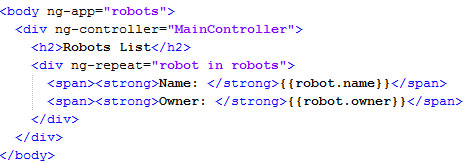
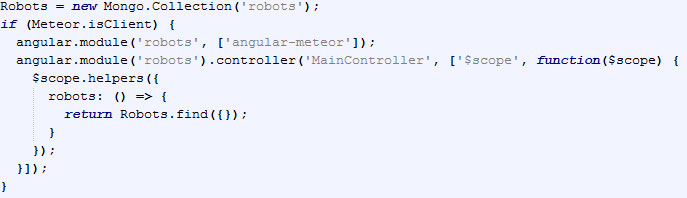
After angular-meteor installation, your simple application can look like:

app.js

Enter “meteor” in command line at your project folder. Meteor will collect your code & launch server.

Then lauhcn meteor mongo at your project folder & insert the string:

One can see that the data has been updated on the fly, though we didn’t use any additional approaches.

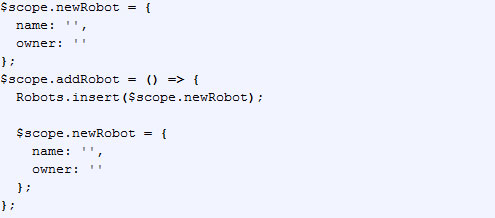
We can extend the existing code by adding a feature of new entity addition. Then add the further code into app.js file:

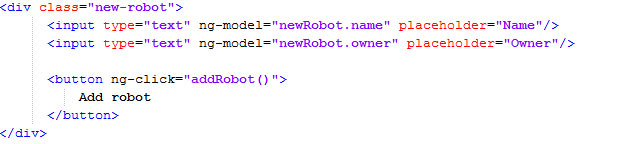
and into index.html this one:

Now we can add a new robot from client end. One should pay attention that a new record will be added not only into client end $scope, but also into server database.
All this happens due to DDP protocol: (https://github.com/meteor/meteor/blob/devel/packages/ddp/DDP.md).
Please, note that we request Robots.insert method, which can also be used on server.

It’s just a simple example showing the perks of combined use of angular & meteor. You should definitely try all the loveliness of both frameworks. Directives, filters, services – are strong points of angular and data binding, userfriendly deploy, isomorphism, build & minification systems are of meteor.

It’s worth noting, that using such binding, the developers have no need for setting up the environment.
It’s Meteor that provides all this from its box. One shouldn’t worry about your favorite build system installation (grunt, gulp, webpack). Meteor has its own tools of packaging & project minification, embedded into autoreload, convenient package management system and many other things.

The indispensible part of any technology is its dark side or drawbacks. Unfortunately, MeteorJs doesn’t support sql databases. The solution is to use additional meteor-packages, but it looks like Chewbacca after a shower of rain – quite a pitiful sight. So, to сreate a really good application, one should examine both frameworks thoroughly which can take long.

The very approach of development on meteor might seem unaccustomed for the fans of API-first approach and this might also take some time to get used to it. Without doubt, both frameworks (meteor & angular) come with auto-magic: it can frighten the developers, used to control all internal processes to the last detail. So, there’s no decisive answer.

In any case, both of them are open & their source codes are available for reading at Github.

In conclusion, it’s worth to point out that meteor & angular binding allows to create isomorphic real-time applications faster & easier than it was ever earlier.

May the Meteor be with you. The Angular is strong with this one.

P.S. So, what do you prefer for full-stack development?

Anna Vasilevskaya
AI modified real photo
Anna Vasilevskaya
Account Executive

Get in touch

Drop us a line about your project at
[email protected] or via the contact
form below, and we will contact you soon.