Flight Information Control System For a Top-10 Airport

Flight Information Control System For a Top-10 Airport

How automating flight information validation and correction helped a European airport eliminate human errors and speed up data checks by 57%.

Challenge

Our customer required a system for automatic flight information control with an option of manual information control by a person (flight operations officer) before it is reflected on the display.

The system needed to comply with the demands of consistency, partition tolerance, 24/7 availability and total data safety.

Solution

Our team developed a system that controls the input of information about flights in the airport, based on the defined rules. Based on these rules, the system decides if flight information is right or wrong and if right, it sends messages about flights on flight information display. If it is wrong, the system corrects it automatically, or allows manual correction by a flight operations officer, if automatic correction is impossible. Manual message correction is performed through a separate visual module that can run on any machine with access to this module that recognizes display messages with flight information.

Key features

Automatic handling of flight information input

Take decisions on flight info being right or wrong

Send messages about flights to flight information display

Automatic correction

Visual interface for manual correction

Get 24/7 access to the system

Protection against data loss

Technologies

Eclipselink
Spring
Hibernate
Oracle
JBoss
Corba

Security Analysis Tool For US Tech Company

Security Analysis Tool For US Tech Company

How running code refactoring of the Eclipse plugin at the heart of their vulnerability detection tools provided a US software company with an x50 faster code scanner.

About the Project

An analysis tool we had worked with is a client and server-side software, integrated into such development environments as Eclipse, Visual Studio and IntelliJ IDEA. Developers can be sure of building security from the very start and of detecting vulnerabilities as they appear, hence they can be fixed immediately. This analysis tool is a lightweight static analysis tool that detects vulnerabilities automatically and provides just-in-time security guidance to your developers in the process of coding. With this tool you can eliminate common security errors before they are committed to the code base or released to the public.

Challenge

  • Implement a plugin from the very beginning until the end with very strict deadlines of product delivery (5 months)
  • Creating plugins for IntelliJ IDEA was not a piece of cake, as it’s quite a narrow specialization area. It was new for us, but the challenge was handled successfully, meeting all customer objectives
  • We had to carry out a huge refactoring of the Eclipse plugin code to make the code scanner much faster than it was. And we’ve achieved magnificent improvements: about 50 times faster

Fast analysis

Analysis tool plugins can scan large projects with thousands of files in just a few seconds

Fits a Modern Agile Process

Sustain the tight feedback loops that you need for a modern agile environment

Builds Security Skills Every Day

Educate your developers about best practices in secure coding without leaving the coding environment

Customizes to your Organization

Create custom rules and guidance to support your enterprise-specific policies

Technologies

TeamCity
Java 7/8
Java Concurrency.
Java FX
Angular
Spring
Eclipse
Visual Studio
IntelliJ IDEA
MySQL

Video Platform Modernization For an Entertainment & Media Company

Video Platform Modernization For an Entertainment & Media Company

How migrating their existing video platform to React JS framework and enriching the solution’s functionality helped a UK entertainment and media company up their user base by 11%.

Challenge

The customer turned to us with a ready-made product that had to be transferred to a new modern technology that would be able to maintain the current functionality of the product and expand it.

Also, it was necessary to support MPV boxes to display the video on the basis of the new technology.

Solution

For this project, it was decided to develop a frontend based on a modern technology – React JS, which is currently the most suitable for this kind of task. The introduction of this technology has allowed us to significantly expand the functionality of the Video Platform.

Key features

Viewing of a video library

Video search within the library

Video filtering

Use of virtual keyboard

Program guide

The ability to set the filter parameters using the TV remote control

Support of input using the TV remote control

Technologies

JavaScript
Javascript
React JS
Redux.js

Real-Time Bidding Platform For an Advertising Company

Real-Time Bidding Platform For an Advertising Company

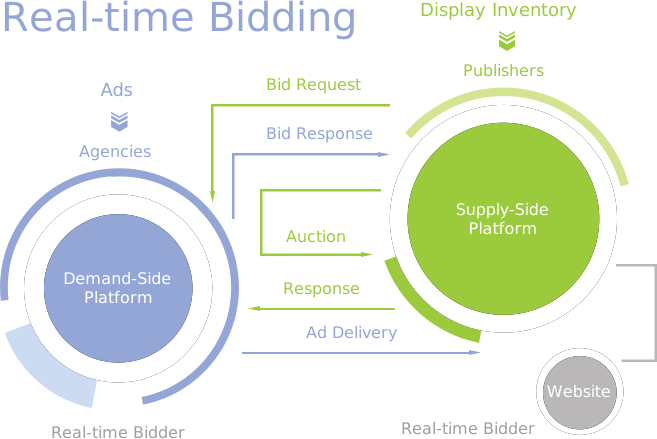
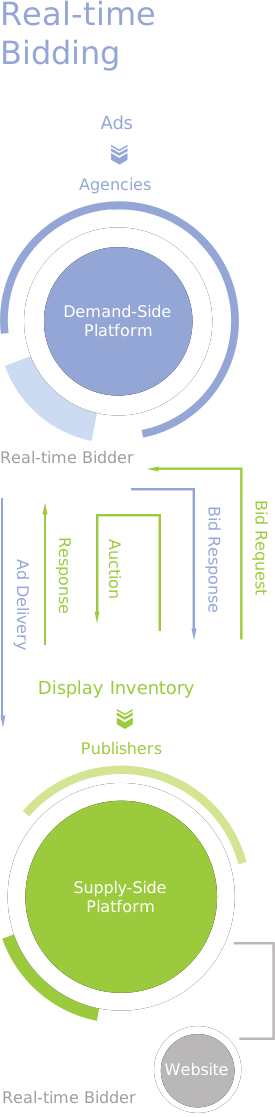
How redesigning the Demand-Side Platform and improving its real-time bidding component helped an advertising company gather valuable information on external user engagement and reach the latency level of less than 100 ms.

About the Project

*instinctools company was involved in the Real Time Bidding project that uses the Personal Retargeting technique. It is about showing ads to users, who have visited an advertiser’s site, however, failed to perform the conversion action. Personal Retargeting brings them back and shows each user a specific scenario,
depending on their previous action: viewing an item, comparing an item to other modifications etc.

DSP (Demand Side Platform) makes each 1 click cheaper. While using Trading Desk, advertisers adjust bids according to the value of their target audience, as well as to the desired impressions and clicks volume. The platform compares the data with the information on traders and bids, buying impressions as cheap as
possible and selecting the best matching audience. The whole process takes a split second: while the page is still loading.

Challenges

  • Support existing system functionality with lack of documentation and original developers’ knowledge.
  • Provide high-availability system to process a large amount of requests coming from SSP and advertiser sites. Each request should be executed with the lowest latency possible (less than 100ms).
  • Refactor and redesign the existing system in Microsevices manner. It provides scalability opportunities to process a large amount of requests. It also gives additional capabilities to optimize the costs of production environment usage and support.
  • Implement means of monitoring to measure system performance and track errors in real-time.

Solutions

The existing platform has been maintained and augmented with the Demand Side Platform, a system that organizes auctions for advertisers, and a user data management system. The platform has been integrated with the largest SSP platforms, such as Facebook Exchange and Taboola, employing HTTP cookies to gather information on users.

We have done an analysis of existing components and put together technical manuals. Having revealed and eliminated the failure caused in the course of maintenance, we achieved stable system’s operation.

We also have:

  • redesigned the system;
  • managed infrastructure hosting, data storage and data sharing using Amazon Cloud services developed components in the up-to-date programming languages;
  • gathered a huge amount of data using SSP and DMP components;
  • integrated several database management systems;
  • gathered valuable information on external user engagement;
  • Implemented a user metric processing system carried out continuous integration processes;

Technologies

The system design was based on wellknown Amazon cloud technologies like Elastic Compute Cloud, Elastic Load Balancer, Simple Storage Cloud, Elastic MapReduce, DynamoDB, etc.

Aggregated reporting included processing of huge data amounts received from SSP and DMP components. It was implemented using Hadoop jobs executed in Amazon EMR. The results were aggregated in Amazon Redshift databases.

As a part of asynchronous operation processing, the several messaging platforms were used. NSQ provided distributed queues for high amount data processing. Sidekiq was used to implement business logic messages processing through the set of components written in Ruby.

Application metrics were processed using Graphite and were shown by Grafana.

Continuous integration processes were implemented based on Gitflow by using Github + Travis services.

For the needs of infrastructure hosting, data storage, data sharing the following services were used: Amazon EC2, Amazon ELB, Amazon S3.

The components were developed in modern programming languages. Go language capabilities gave an opportunity to implement performance critical items. Scripting functionality which included component integration, configuration and deployment were completely implemented with Ruby and related technologies.

Multiple database management systems were used based on the required functionality: DynamoDB and Aerospike used to collect huge amount of data related to outside user activity, Redis databases satisfied the needs of temporary data keeping, PostgreSQL and Amazon Redshift provided strong consistency storage and processing of data related business activity and reporting.

Rollbar service was used to track errors occurred in a production environment.

Key Features

The client has obtained a stable version of the platform together with the build products, as well as an option to solve integration issues quickly and at a low cost in the future.

The augmented platform benefits are:

  • Tracking the system in a real-time mode
  • Integrating with other systems within its own framework
  • Performing the expected functions fast and accurately


The client was pleased with our fulfillment of the requirements and the recommendations of advertising partners. We are currently continuing to maintain the stable operation of the platform.

Technologies

Pre-Certification Testing Software of AC-Powered Electronic Devices

Pre-Certification Testing Software of AC-Powered Electronic Devices

How creating an application for testing AC-powered electronic devices helped a household appliances manufacturer speed up checks for conformity to IEC 61000-4-11:2004.

Development and deployment of any AC-powered electronic device are accompanied by one big step – device testing and certification for conformity to existing standards, including failure resistance, short interruptions and changes in power voltage. There is a special class of devices called “test generators” used for conformity testing and control.

Challenge

We had to develop a software solution that would be embedded into the client’s hardware devices. The app should cover testing electronic appliances with up to 600 W rated power for conformity to IEC 61000-4-11:2004.

Solutions

We created software that meets the specified requirements. Key features of the device: it is compact and has a communication interface for control from a computer.

Features

Portability

Possibility to test an electronic device for conformity to IEC 61000-4-11:2004

Communication interface for control from a computer

Modern hardware components

Technologies

Autocad
MicroCAP
p-cad
IGBT power modules
AVR
RTOS
PWM

Video-Sharing Platform For a Dutch Media Company

Video-Sharing Platform For a Dutch Media Company

How updating the UI and perfecting the architecture of their existing video-sharing platform helped a media company boost video quality for low-cost Internet connections and drive user satisfaction by 12%.

Challenge

The customer contacted *instinctools while looking for a contractor to help them implement several new features on their platform. The main challenge for our team was to implement:

  • New UI
  • A caching feature to increase the quality over the public Internet.

Solution

We have:

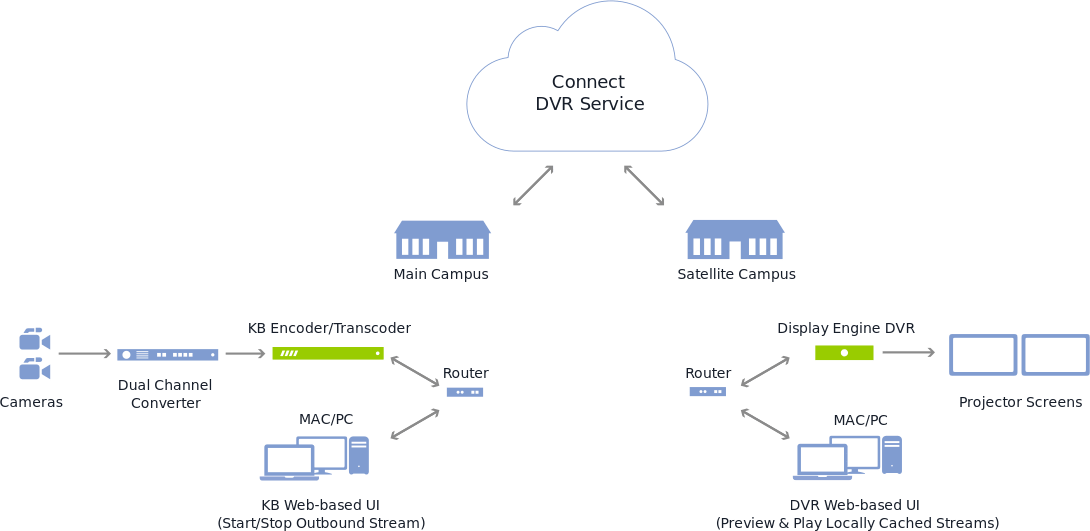
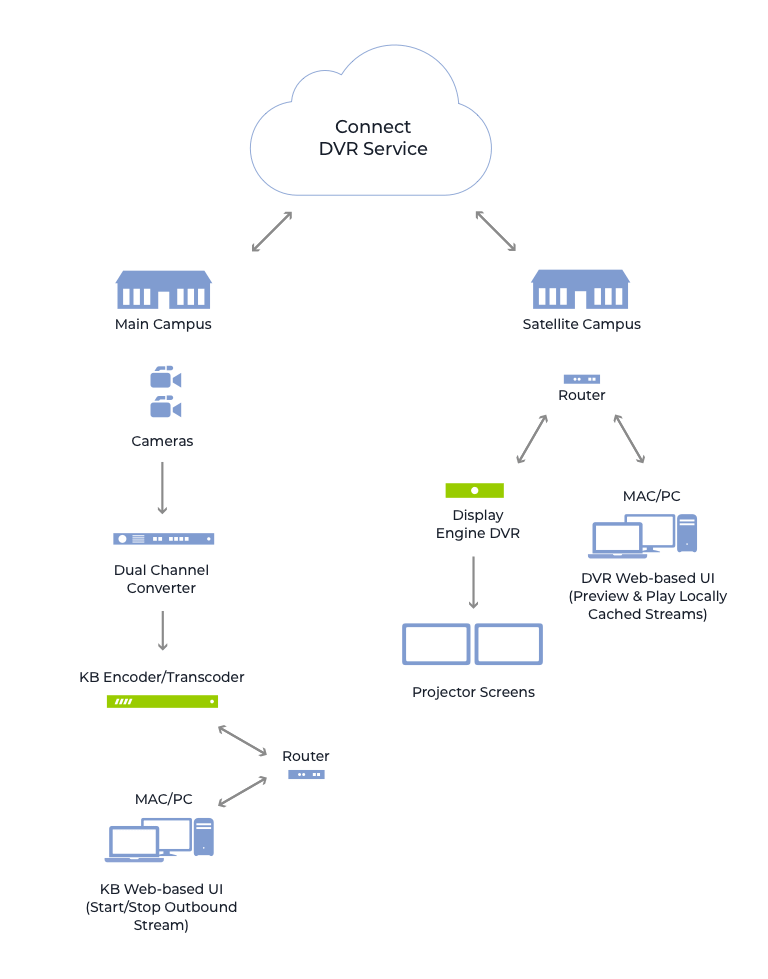
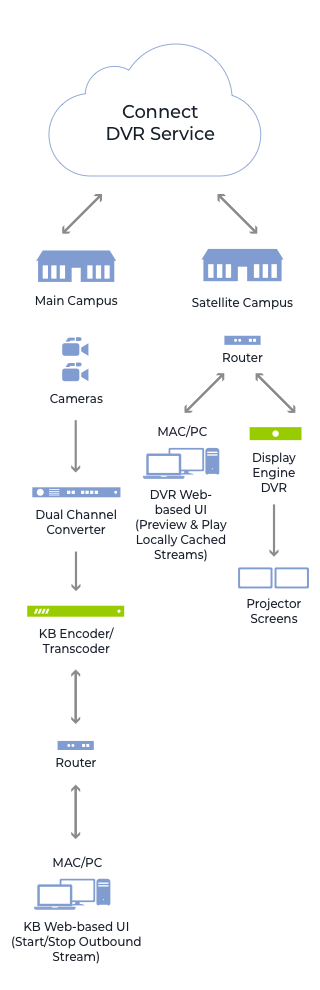
  • Integrated Haivision’s high-quality KB encoder, Akamai’s industry-leading Content Delivery Network (CDN), and the compact and powerful Display Engine DVR remote appliances.
  • Integrated KB Internet media encoder and local caching.
  • Provided synchronized dual video streams.
  • Implemented new UI.
  • Developed a caching function to increase public Internet quality.

Key Features

End-to-End Simplicity

  • The solution integrates customer’s high-quality KB encoder, Akamai’s industry-leading CDN (Content Delivery Network), and the compact and powerful Display Engine DVR remote appliances.
  • Staff and volunteers can easily connect to preview, play, and share inspirational messages from the main campus at remote locations.

The Highest Quality of Public Internet

  • Delivery of the highest quality HD experience to remote campuses.
  • Using low-cost Internet connections allows the distribution of streams, without sacrificing quality.
  • Low-cost Internet connections help save time and money.
  • Local caching makes sure new content is safe.

Complete Control, with Flexibility

  • Haivision Connect DVR gives remote campuses control and flexibility.
  • Remote campuses can preserve either the full stage and IMAG camera angles or the presenter and presentation, from the main campus.

Technologies

Backend

NodeJs

Frontend

Backbone.js

Enterprise Document Management System For an Atomic Energy Corporation

Enterprise Document Management System For an Atomic Energy Corporation

How replacing several feature-poor document management solutions with a single comprehensive user-friendly system accelerated document-related processes by 23% on average.

Object

Systems of electronic document management have been with large companies and state enterprises for quite some time now and are there to stay for a long time, too. It also requires more mobility from company managers who spend a lot of time out of office. Being outside the office they need to carry out their responsibilities and lose no time as well as to have a handy work interface with information systems, an easy possibility to solve problems in a fast and timely manner. In order to enable them to do so, a system interface has to be also informative and simple at its best – a manager is supposed to have on hand all the document operations possible.

What are the problems when running a document management system device with a web interface?

  • Mobility

When running a web interface a manager comes across a number of limitations on their freedom of movement – the manager needs to have constant access to the resources of his company and electronic document systems, i.e. he usually cannot handle his documents while on the road, up in the air or at sea.

  • Interface intuitivity

Web interfaces with access to electronic document
systems are often overloaded with functions and are meant for big screens with precise positioning of the mouse cursor. One needs to take his time to interact with the system as well.

  • Safety

When having access to electronic document systems via a mobile device it is needed to secure the proper keeping of the information received, transmitted and saved, which may be problematic in success-stories when running a mobile device outside the office.

  • One access interface

Having several systems of document management at your company, the manager needs to switch between various web interfaces and carry out single operations in each of the systems.

The main purpose for developing a mobile client device was finding solutions to the following problems.

Solution

How the mobile client solves the problems mentioned above.

  • Mobility

Application of the mobile client with offline work functions enables you to have access to documents and carry out all necessary operations with them while having limited access to electronic document management systems of the company. All operations done in the system by the user are kept in the application and if there is access to the document management system of the company, are synchronized automatically. Additionally the user is enabled to tune the synchronization intervals themselves.

  • One access interface

Mobile client enables you to unify tasks from several systems of document management, which allows running operations faster with volumes necessary for a manager in one application. In this case one interface is enough, i.e. the interface running tasks from different systems of document management.

  • Interface intuitivity

Interface adapted for use on mobile devices and the availability of just the operations needed enables to process documents in a faster manner and make the interface informative and simple at its best.

Interface adapted for use on mobile devices and the availability of just the operations needed enables to process documents in a faster manner and make the interface informative and simple at its best.

  • Safety

The mobile solutions as to the safety of information exchange with electronic document management systems and safe keeping the data disallow access to third parties to the information kept on the device, which is rather problematic when using a web interface. Application of different means of authentication of the user (login/password, authentication with smart cards) enables to secure reliable transmission of user data. Encrypting data bases and files of the user is fulfilled in accordance with GOST 28147-89 (State Standards).

When operating the mobile client, the additional advantages are guaranteed

  • Handy display and document task operation. The user is enabled to scroll and change documents in most office formats
  • A function to save marks on tasks. The user may leave their own marks which are not seen by other system users
  • Commenting the tasks to be done. The user may leave comments as per electronic document management system
  • Handy search and sorting user tasks/documents
  • Launch of new document management processes

What else can the system do

  • Several languages are available. Localization of forms and elements and their arrangement are kept on the server which allows changing their contents and arranging in a fast manner
  • Handy support to change the responsible person. If the user is outside the office and is not able to carry out their responsibilities at the moment, another user may be assigned to do the task at the push of a button
  • Launch of new secondary work processes and create new tasks either via interface or from a separate tab on processes
  • Keep selected tasks even after they have been carried out. The user may determine the volume in document management he/she needs by his/her own
  • The Drag & Drop handy mode enables the user to move the responsible per tasks. The expander system allows organizing work according to information on tasks providing the user with necessary information only

As a result, the manager’s main tasks have been successfully carried out for their superior, whose usual working place was out of reach, the transparency of all working processes was also observed.
This system may be integrated into different electronic document management systems, corporate calendars, task managers and other systems engaged in working processes.

Technologies

Tapestry 5
JQuery
Bootstrap
UI Spring,
Spring Data
Hibernate
PostgreSQL
Maven
Jenkins

Advanced Monitoring App For a Global Car Manufacturer

Advanced Monitoring App For a Global Car Manufacturer

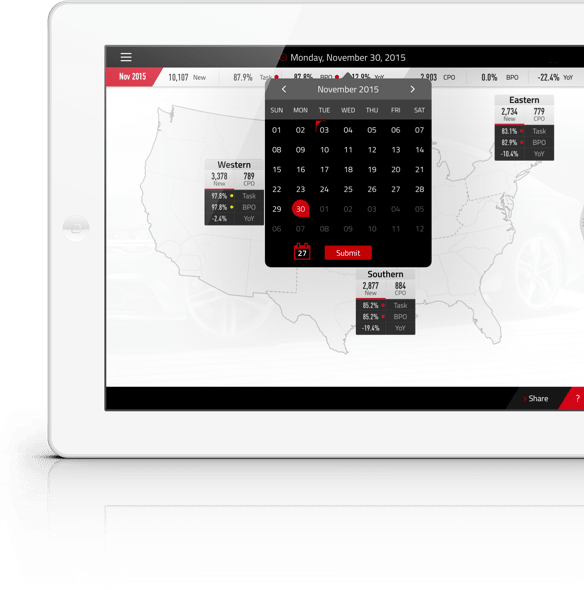
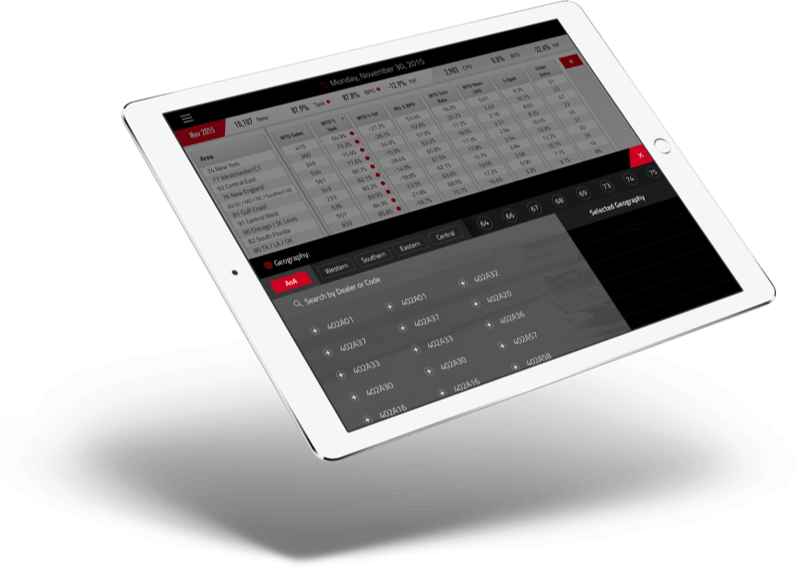
How building a sales monitoring app with custom operational, analytical, and strategic dashboards provided a car manufacturing corporation with a comprehensive real-time visualization of performance metrics in different units and enhanced annual business planning.

It is always very important for large corporations to monitor all stages of their activities, to study the objective information, and to review the metrics of performance efficiency. Thus, this company performs daily monitoring of car sales. It has created and has been improving over the years a complex business process which allows the management of the sales process on the basis of metrics.

However such a business process requires the extensive use of computers for various stages: analysis of collected data, calculation of metrics, and visual representation of metrics. Until recent times, it was impossible to receive new information in a mobile way. However, the current level of mobile technology provides the opportunity to create a system which will cope with the large amount of information and deliver a visual representation of performance metrics in the most user-friendly way.

Challenge

The main objectives in creating a mobile application for monitoring the performance metrics for the business was to:

implement the offline mode of the application. The consequence of this requirement was the necessity to handle large amount of data, based on which the various “cuts” of performance metrics should be created. In order to have flexibility and not to occupy the client application with processing a great amount of information, an unusual concept for preparing and delivering data to the client has been created


have the ability to compare data for different periods of time

implement the performance metrics in a visual presentation with the ability to display data in a variety of “cuts”

create a progressive mechanism for filtering and organizing data according to certain criteria

The vehicle manufacturer has one more vital business process – annual business planning. Managers and sale dealers used to meet each other in general meetings and discuss the sales plan for the upcoming year. This process took a lot of time, and the necessity of a multifunctional tool was obvious. As a solution, Business Planning Objective (BPO) was performed as a part of a sales app. BPO offers extensive possibilities for visual representation of plans, management of analytics, comparison of plans and many other features.

Key features

Daily monitoring of sales performance metrics

Management of analytics, tracking of the production process

Annual business planning for managers & sales dealers; coordination of plans

Wide possibilities for visual representation of plans and sales performance metrics, based on the various “cuts”

Advanced security and user access control

Operations with large amounts of information

Support of MobileIron MDM system

Full-featured offline mode

Technologies

  • Typhoon
  • Tolo
  • Mantle
  • Fabric
  • Masonry
  • Pop
  • VIPER
  • EasyMapping
AFNetworking
Localytics
CocoaPods
Realm

Consolidated Content Pool For a Venture Capital Company

Consolidated Content Pool For a Venture Capital Company

How adopting a robust content pool with advanced content reuse mechanisms empowered a venture capital company to publish their diverse content from a single source across various target media simultaneously.

*instinctools delivered a consolidated content pool to Burda Digital Systems based on single-source principles. Using the new generation of the GateOne Framework an allpurpose, future-proof platform for integration, standardization and distribution of information has been created.

Challenge

Hubert Burda Media ranks among the pioneers implementing cross-media strategies and consequently counts on connecting online and print media in order to profit from integrated information, synchronized multimedia offerings and clustered journalistic competency.

Such strategies rquire robust and flexible solutions ensuring cross-company storage and distribution of contents.

Approach

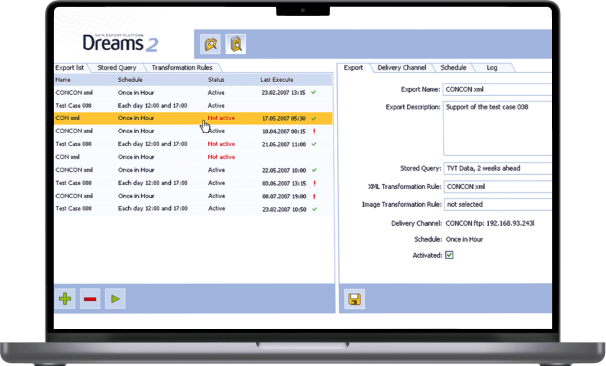
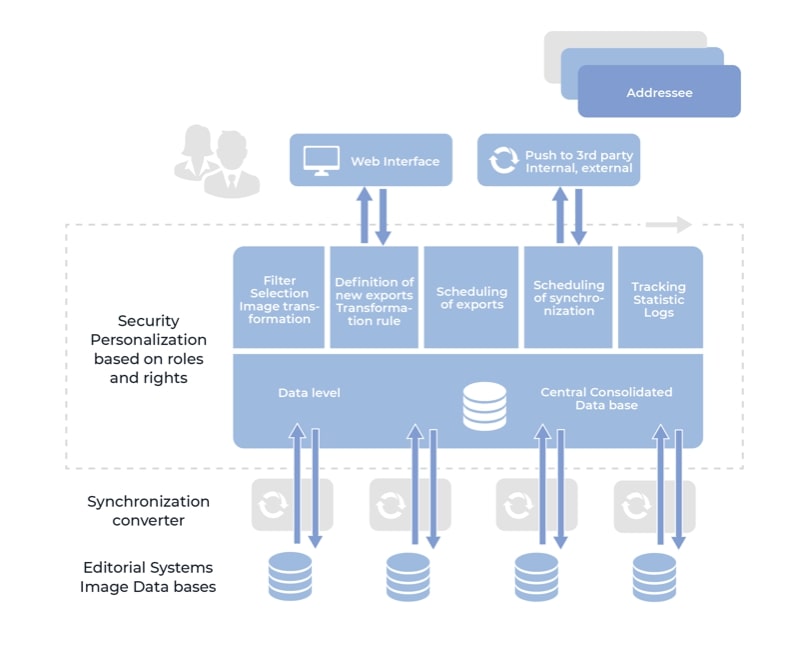
To put this strategy to action Burda Digital Systems decided for an Information Management solution provided by *instinctools, which consolidates data of diverse, customer specific software applications in a single data base without changing data structure or content inside the source systems.

This solution developed by *instinctools, an IT company based in Stuttgart, takes care of standarizationand integration of several media formats and offers a variety of interfaces for further distribution out of the consolidated content pool.

The system is suited for complex data integration and persues the principle of single-source publishing. This means publishing contents from a single source to various target media in different context. The same media element can simultaneously be used in online portals and printed magazines.

The system is freely expandable. Synchronisation and conversion interfaces facilitate flexible connection of additional data sources.

Technology

The project for Burda Digital Systems has been implemented by means of the latest generation of the GateOne framework. The modular application infrastructure of GateOne makes it a flexible, powerful and future-oriented platform for individual solutions.

Advantages

Consolidated data

Reuse

Fast reaction to new customers

Channel selection

Enhancements possible

No change in existing systems

New exports without programming

Supplying actual content to the portal TV Today (www.tvtoday.de) is the first mission for this solution. It is individually selected and prepared.

Thanks to its comfortable user interface content packages can easily and efficiently be defined. New customers can be served on the spot as development of specific extract- and conversion programs are rendered unnecessary. Delivery of information can be managed manually, on-demand or automated by scheduler.

Factory Monitoring App For a SaaS Automation Provider

Factory Monitoring App For a SaaS Automation Provider

How developing a mobile app for monitoring manufacturing equipment with the ability to control the whole factory and separate machines with a smartphone helped a SaaS automation provider win new customers.

About the Project

This is an iOS/Android application. It creates interfaces for plants and equipment on both smartphones and tablets. As a native app, this version offers an outstanding user experience in the everyday use and requires little effort to install.

The Modbus TCP industrial bus protocol allows the app to communicate with practically any machine. Users can learn the status of the plant at any time and send commands to its control unit.

Challenges

  • provide possibility to create HMI for plants and equipment on smartphones and tablets and share it with colleagues
  • allow to control directly plants and machines which support Modbus Protocol
  • provide stable work when data transmission is slow
  • create an outstanding user experience for daily use

User Features

  • get direct connection between your app and the plant or machine
  • learn the current status of the plant in one click
  • send commands to the plant directly via application

Technical Features

VPN connection between the app and your plant

encrypted file system within the app

interface to WeConnect (VPN service from Westermo Data Communications GmbH)

encrypted connection to the HMI portal

Technologies

Modbus
objective-c
c/c++
tcp/ip
Anna Vasilevskaya
AI modified real photo
Anna Vasilevskaya
Account Executive

Get in touch

Drop us a line about your project at
[email protected] or via the contact
form below, and we will contact you soon.