





Quality Management System

SaaS Quality Management App For a Leading Maritime Software Provider

How broadening their industry-specific software pool with a quality management system (QMS) for maritime companies allowed a world-class SaaS software provider to win new customers.

Industry:
Ecommerce

Web Development

SaaS Development

Software Product Development

Enterprise Automation

Business challenge

Is there a more common and widespread bottleneck than paper-based workflows? Despite the seemingly ubiquitous focus on technology-enabled business transformation, non-digital-born companies across industries still depend on paper documentation.

Such an approach leads to flawed records, delayed updates, etc., which overcomplicates the quality management process. When quality-related debacles take place at the enterprise scale, companies have to pay for them, not rarely with something more valuable than money — their reputation.

This was the weak spot our client aimed to tackle to help their customers move quickly and confidently down the digitalization path. A world-class maritime software provider with several solutions for streamlining industry-specific processes contacted *instinctools to widen their offering with a cloud-based SaaS quality management system (QMS).

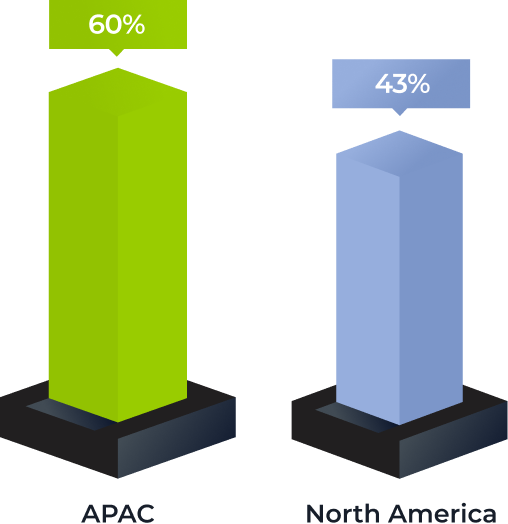
What percentage of organizations depend on paper-based processes?

*Source: Forrester, Digital Documents Necessity

What issues did maritime enterprises face while managing quality documents mostly manually?
Delays at all stages of working with documentation
Failure to keep quality management documents updated
Lack of traceability within quality management processes
Risk of overlooking updated standards and compliance requirements in time
Human error in full bloom

Our client wanted to fix these problems with robust software that spans quality, health, safety, and environment (QHSE) processes by:

Digitizing

and streamlining all document-related operations, including creation, editing, etc.

Ensuring

compliance with general and maritime-specific standards

Providing

a centralized repository with role-based access to allow users to work with quality documents anywhere, anytime, without compromising security

Automating

quality management workflows, such as authoring, reviewing, approving, notifying, etc., to free employees from mundane rule-based tasks and eliminate the possibility of human error

Fostering

transparency of quality management processes thanks to the detailed audit trail

Solution

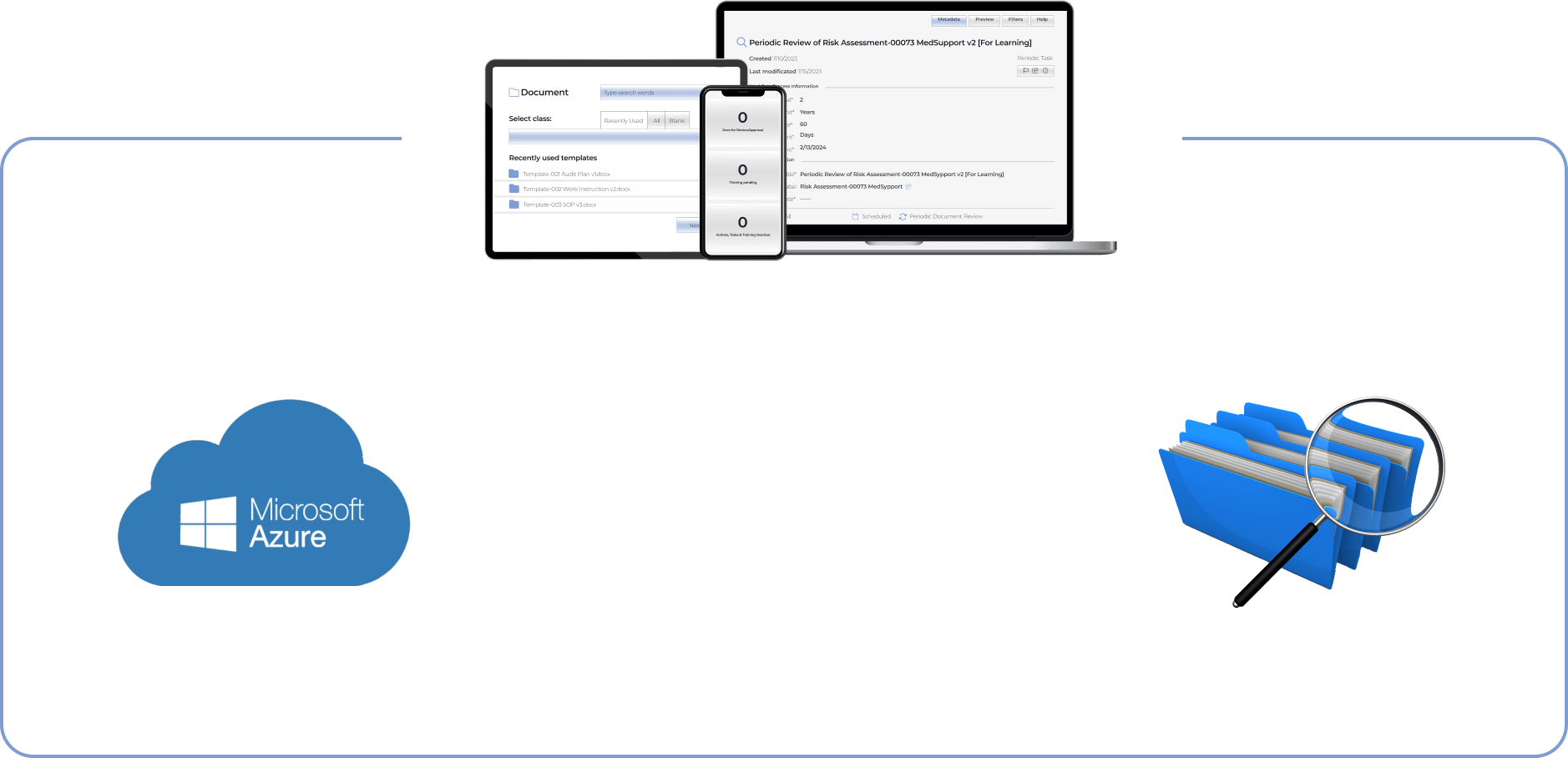
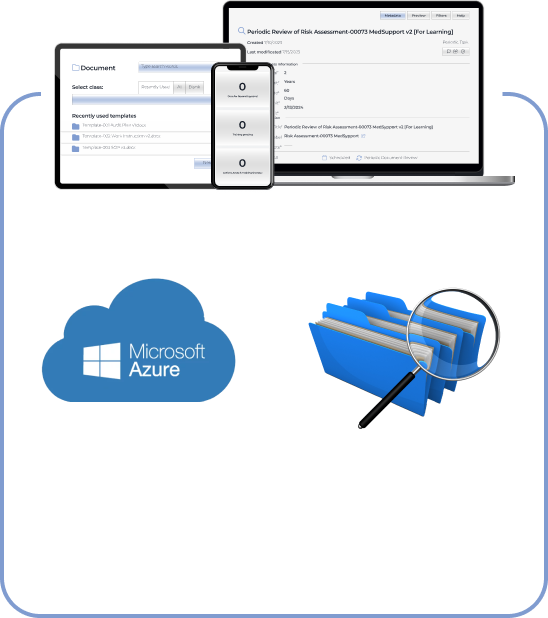
The client has been delivering solutions for enterprises using Microsoft 365 products. Therefore, our dedicated team went with Microsoft Azure as a cloud repository for the QMS. The system also needed a metadata-driven document management platform to automate document creation workflows. We’ve chosen M-Files with out-of-the-box integration with Microsoft Azure.

  1. Packing the QMS with broad functionality

Banking on the rich off-the-shelf functionality for their customers was at the core of the client’s strategy. Therefore, we’ve crafted the software with multiple out-of-the-box modules that go beyond simple document creation and review and cover regulatory compliance, audits, and risk management tasks.

Document creation module

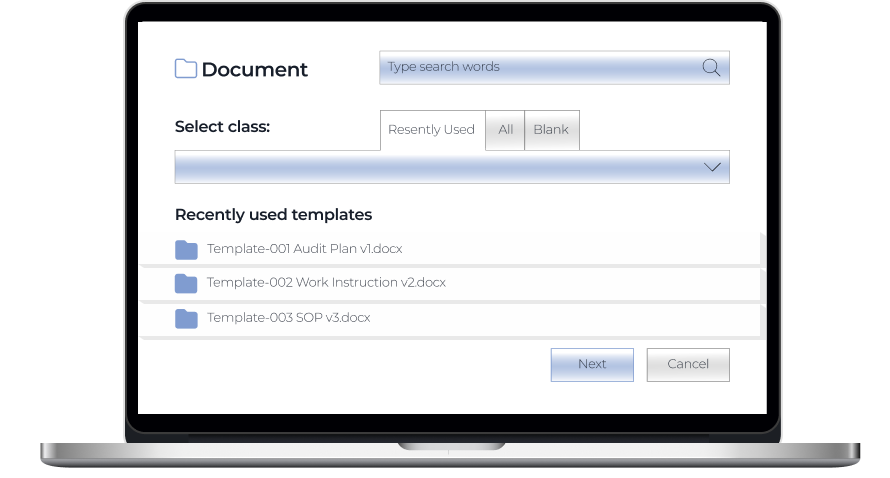
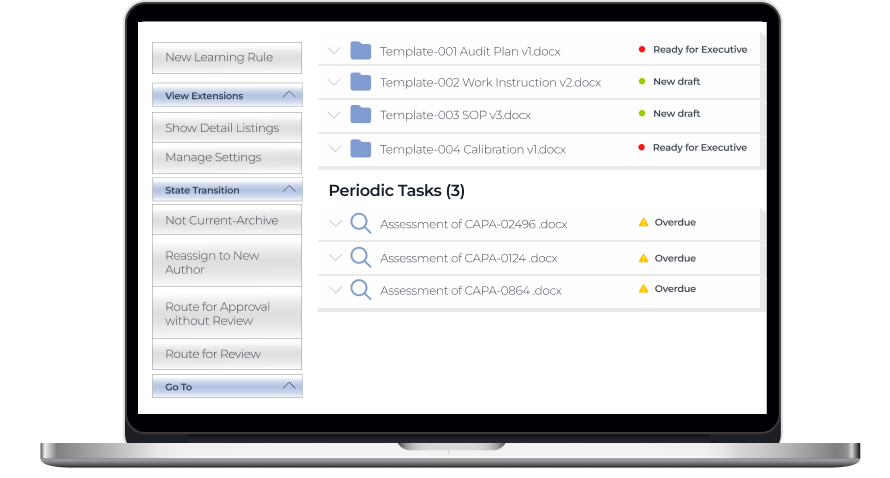
Users can create a document using templates or drag and drop existing Word, Excel, PPTX, HTML, and PDF files directly into the system.

Review and approval module

Drafted documents are sent for review or approval.

If there are several reviewers and approvers, they can collaborate on document editing using track changes.

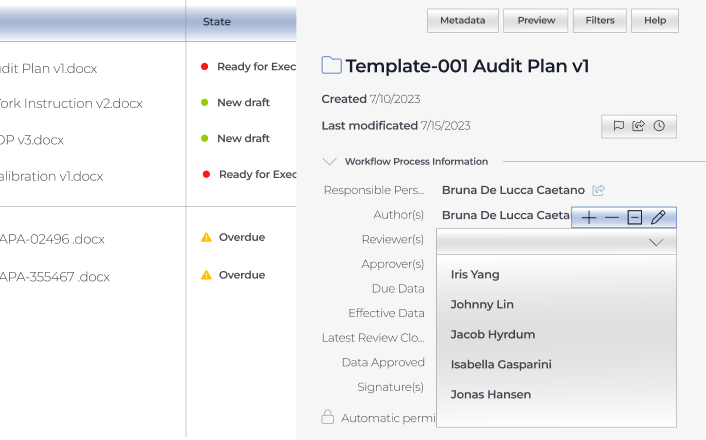
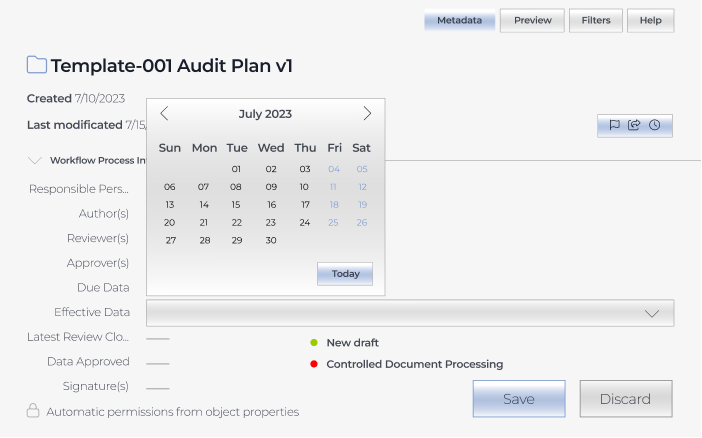
Authors can set a deadline for reviews or approvals.

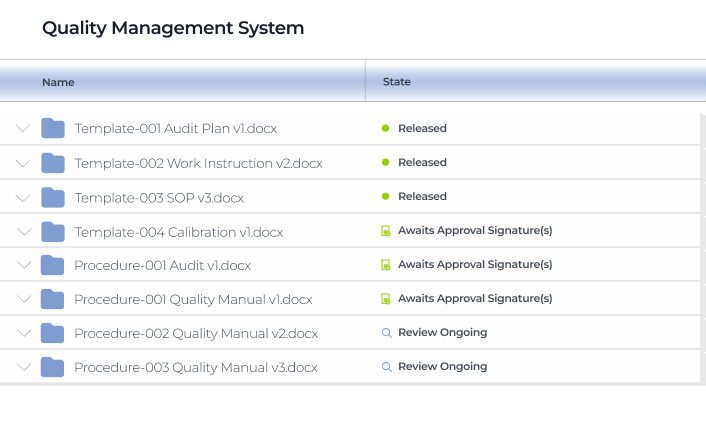
Assigners have real-time visibility into the state of reviews and approvals.

Assignees get email auto notifications about the documents waiting for their review or approval. Assigners also get auto alerts about suggestions and comments in the documents and when assignees mark them as reviewed or approved.

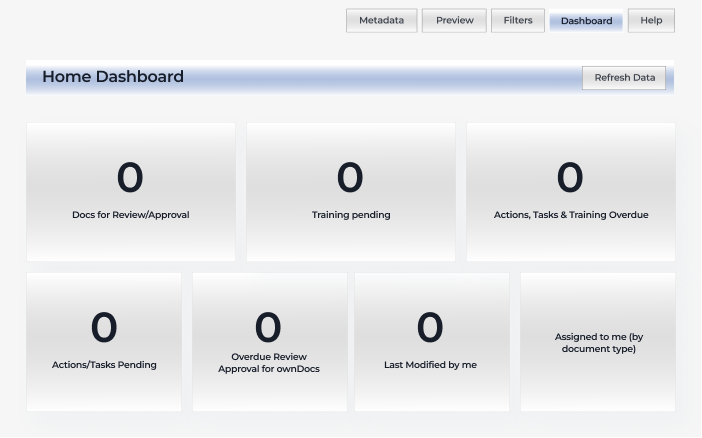
All users have personal dashboards as an easy way to access the files for review and approval, last modified documents, etc., just by clicking on the corresponding section.

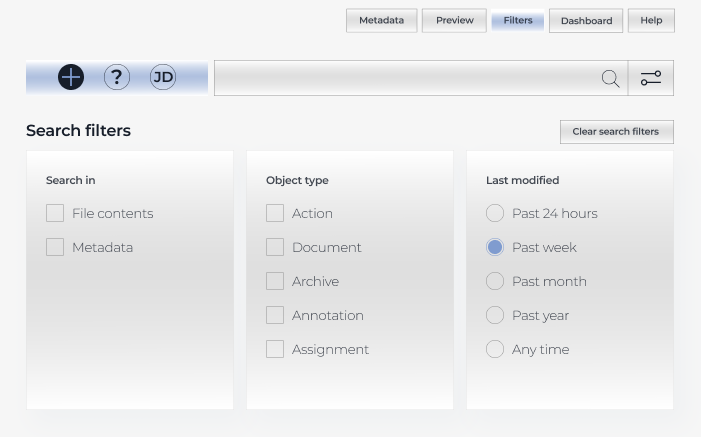
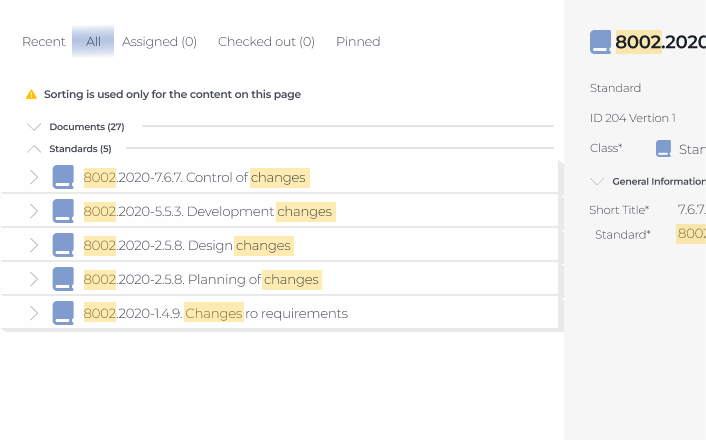
Also, all users can look for documents across the system with an intuitive search bar.

It provides the possibility to search for exact words matching the titles and content of the files.

Regulatory compliance module

This module is the heart of the whole system. The QMS is compliant with the following standards by default:

ISM (International Safety Management) guidelines define the safe operation of ships and address preventing pollution.

ISPS (International Ship and Port Facility Security) is designed to uncover and prevent criminal threats, such as piracy, acts of terrorism, etc.

ISO 9001 (Quality Management System) establishes requirements for a QMS

ISO 14001 (Environmental Management System) clarifies best practices that companies should follow to reduce their environmental footprint

ISO 45001 (Occupational Health and Safety Management System) determines physical, chemical, biological, ergonomic, and psychosocial hazards to minimize their impact on the employees’ health and safety
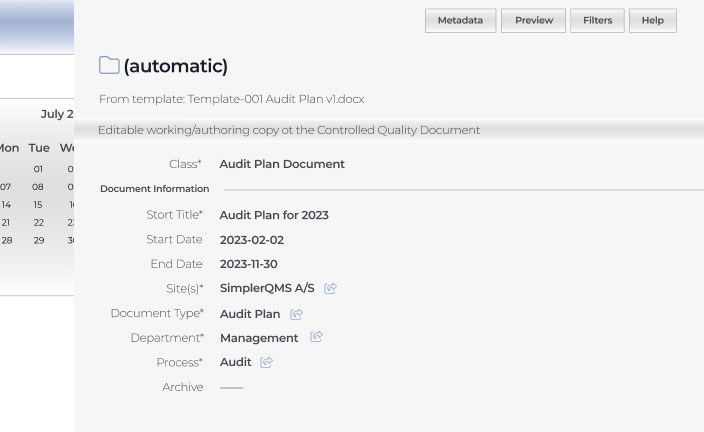
Audit module

The client wanted to ensure complete traceability across the system, as keeping the company’s documentation in order is one of the success factors contributing to smooth external audits. Therefore, we crafted a system where any document changes are recorded, and users have a time-stamped audit trail and the history of each document at their fingertips.

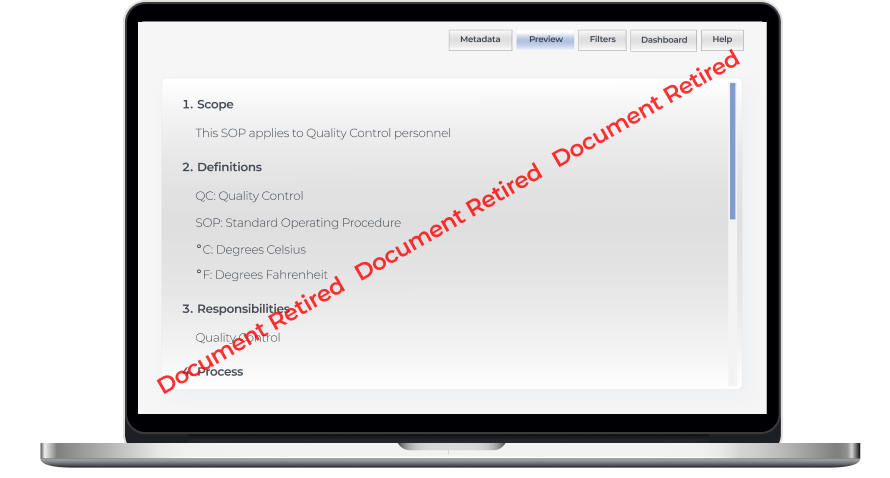
While the QMS always suggests the most recent file version, all roles have access to the previous ones. Document owners can set up auto retirement of the document’s previous versions when the new one is released.

Internal audits and regulatory checks also become a breeze for maritime organizations with this QMS. 

Our development team provided a complementary document template package for:

  • Creating audit plans
  • Scheduling internal audits
  • Assigning responsible personnel and reviewers

Both authors, assignees, and reviewers can attach evidence related to the audit findings, making it easier to unearth and fix alarming issues internally.

Risk management module

The QMS we’ve developed enables companies to foresee dangers and prevent or minimize their negative impact

  • Connect information within the quality management system

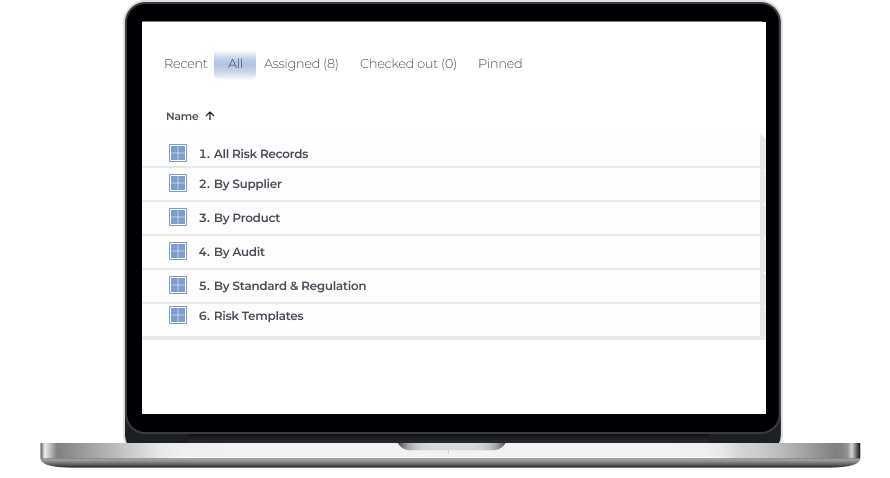
Users can connect risk management documents with audit data, records related to suppliers and products, and other items within the system to enhance traceability of potential hazards.

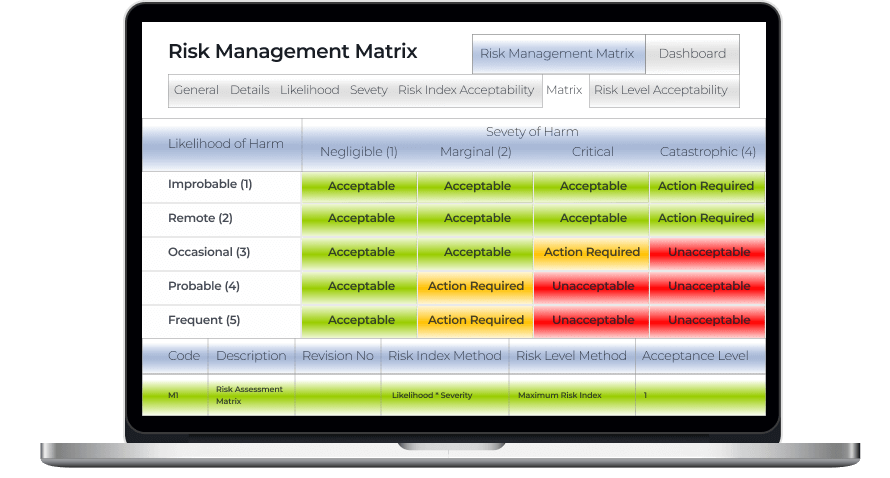
  • Identify possible hazards with a risk management matrix

Spotting risk-prone issues as early as possible helps cover them before they snowball into severe threats and cause noticeable accidents. The risk management matrix is color-coded so that users can immediately see if there are any catastrophic and critical events that have to be addressed ASAP.

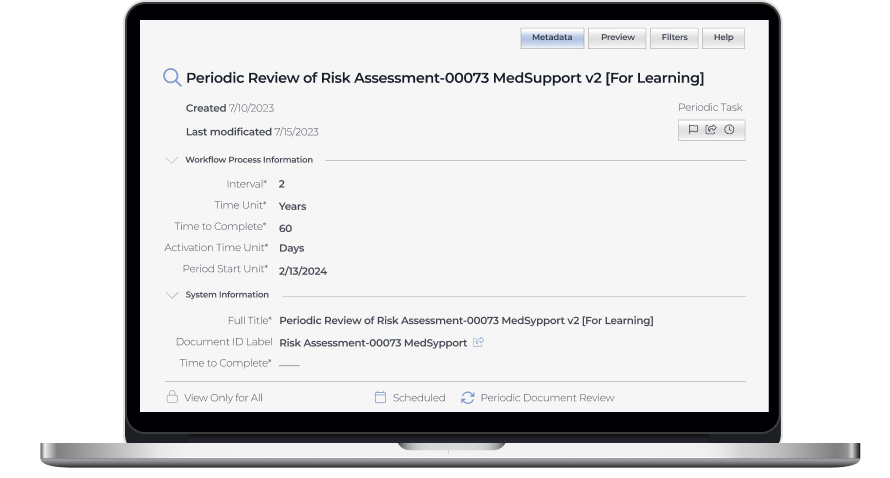
  • Schedule periodic risk assessments

Risk assessment is an area with high automation potential, and we didn’t miss the chance to take full advantage of it, empowering users to set periodic risk assessments within any time frame.

  1. Ensuring integrability with any corporate systems

Our software developers wrote APIs for data synchronization with external tools to allow the client’s customers to seamlessly incorporate the web app into their existing software landscape and facilitate efficient data flow between the QMS and other systems, such as ERP, CRM, IMS, etc.

Business value

Before

  • Underdigitized quality management workflow
  • Scattered quality management data
  • Non-automated workflows
  • Delays at all stages of working with documentation
  • Lack of visibility into quality management processes
  • High probability of human error

After

  • Fully digitized quality management processes
  • Single source of documentation
  • Minimized manual effort with automated workflows
  • Streamlined audit-related activities
  • Complete traceability thanks to time-stamped audit trail
  • Reduced human error

Client’s testimonial

Hear about the project’s progress and outcomes directly from its product owner:

Tim Rosenberger

Director, Global R&D at SpecTec

I was impressed by the developers’ skills and by the ability of *instinctools to extend the team on really short notice. I’m looking forward to the collaboration with *instinctools on our upcoming digital transportation projects

Custom Inventory Management System

Rewiring Inventory For an Eyewear Manufacturer
And Retailer

How replacing an overpriced SaaS inventory system with a custom, feature-rich IMS enabled a French eyewear manufacturer and retailer to double the RFID scanning speed and accelerate tag verification x3.

Industry:
Ecommerce

Enterprise Automation

Software Product Development

Data Visualization

Business challenge

Retail companies know better than anyone that inventory is a part that can make or break your business’s success. Understocking at critical times and locations can lead to dissatisfied customers. Meanwhile, maintaining a large stockpile brings its own challenges, including storage and insurance costs, the hazards of spoilage, theft, and damage. The ability to strike the balance between having ‘too much’ and ‘not enough’ hinges on inventory management. That’s why it’s critical to take care of its accuracy, transparency, and sustainability.

However, despite the abundance and diversity of ready-made inventory products, finding the one that fits your budget and completely fits your needs is still tricky. For companies that strive for flexibility and full control over the inventory management system (IMS), custom software development is more likely to be the best bet.

Getting inventory in order was the ultimate goal of our client – a French eyewear manufacturer and retailer. It was their fourth project with *instinctools – our team had previously developed several applications for the client’s ecommerce ecosystem.

Their inventory processes were already automated and relied on barcode and RFID scanners, but the SaaS software the client used was costly and feature-limited, failing to cover the company’s operational needs.

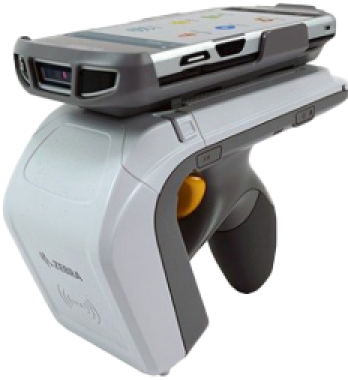
Barcode scanners

are designed for line-of-sight scanning within one to two feet; they’re a go-to option for individual product locating and tracking.

Radio frequency identification (RFID) scanners

read data with in an up-to-20-feet range and can near-simultaneously scan multiple tags, but they lack accuracy compared to barcodes. They’re the perfect fit for large-scale tasks such as warehouse management.

As their unmet requirements for IMS functionality kept snowballing, the client faced a dilemma, whether to pour money into adding new features to their current system or invest in a custom solution.

To escape the vendor lock, they decided to opt for their own feature-rich software with unlimited scalability potential.

Solution

The client needed a device-agnostic solution that wouldn’t cost a fortune. Therefore, we went with the idea of a cross-platform app. As other client’s applications were already written in React Native, there were no doubts about the tech stack for the inventory software.

What challenges did our dedicated team face and overcome while crafting a powerful app that fully covered the client’s inventory-related workflows?

  1. Stabilizing third-party libraries
    and writing custom ones

Robust libraries are the backbone of smooth integration with barcode and RFID scanners. There are plenty of ready-made options.; However, you should have a seasoned development team able to spot the relevant ones, and write custom libraries to cover your specific inventory functionality.

To provide the client with a stable and easy-to-maintain solution, we followed four key principles when working with the libraries:

  • Avoiding a cumbersome collection of libraries

The more libraries you have, the more challenging it is to keep them up to date, resolve conflicts between them, and manage a diverse set of dependencies.

  • Preventing solution architecture complexity

Tight coupling of the software modules and dependency conflicts contribute to crafting a jerry-rigged solution with poor performance and excessive memory consumption.

  • Stabilizing third-party libraries

Ready-made options can bring critical bugs to the production code, or they may join the ranks of neglected libraries that are no longer supported. In both cases, fine-tuning is a must.

  • Striking the balance between third-party and custom libraries

Writing custom libraries takes way more time than calibrating the ready-made ones, so for the sake of development speed, it’s better to build them only for highly specific functionality not covered by the existing elements.

With the aforementioned points in mind, our team selected suitable open-source libraries for barcode scanners:

  • Capture JS for Socket Mobile
  • React Native BLE (react-native-ble-plx) for Netum

Capture JS is a stable library with detailed documentation, so it was ready to use right away, while React Native BLE was in beta and, therefore, required debugging and stabilization. Since open-source libraries provide full access to their code, *instinctools’ developers fixed it, honing performance and minimizing the overall risk of a third-party element adoption.

Meanwhile, integration with RFID scanners requires custom native libraries. For this purpose, our team utilized React Native Bridge, which works as a communication layer between native modules in Java and the client’s app in React Native with JavaScript code.

  1. Incorporating tabletop RFID readers into the overall hardware ecosystem

Alongside handheld scanners, the client also has tabletop RFID readers. Those devices were much older than the rest of the client’s warehouse and in-store hardware.

Given their age, the tabletop RFID readers:

  • Lacked basic documentation
  • Worked with byte messages
  • Ran on a .NET library, while the rest of the client’s hardware used SDK libraries

The only artifact the client had for these readers was a configuration program. Due to this, *instinctools software engineers had to:

  • Decompile the configuration program
  • Investigate the code to understand the requests the program uses for communication with tabletop devices
  • Configure the same requests in JavaScript

These actions helped standardize the tech stack for all the client’s scanners.

  1. Fighting for the app’s speed

The client wanted to seize RFID scanners’ ability to read large amounts of data and accelerate tag processing. The previous software could handle 300 tags/sec, while their RFID scanners could read 600 tags/sec. Given 15,000+ tagged items in each of the 24 eyewear boutiques across France and Belgium, the client wanted to leverage the scanners’ full capacity.

*Instinctools’ team selected asynchronous caching with scheduled cache refresh to scan the maximum number of tags per second without data streaming hiccups, rendering lags, and other performance glitches. Here’s how it works:

Thanks to using the native Java cache, the app can seamlessly handle 600 elements per second, which is twice the capacity of the client’s previous solution.

Besides doubling tag scanning speed, we’ve accelerated the tag validation process. Our team tripled the speed of data reconciliation between the back end and brick-and-mortar stores by taking advantage of native Java code.

  1. Providing integration with RFID printers

The client decided to take the enhancement of their hardware ecosystem a step further and broaden it with RFID printers. This decision allowed the company to achieve independence from the suppliers of RFID tags and save on printing costs in the long run.

To ensure everything runs smoothly on the tech side, we designed the inventory app that could integrate seamlessly with various RFID printers, from Zebra and SATO to Toshiba, to name a few. That way, the client wasn’t limited in inventory equipment options and could print RFID tags entirely in-house.

  1. Achieving inventory transparency with custom dashboards

Before cooperating with *instinctools, the client didn’t have any dashboards to track inventory levels and, therefore, lacked transparency and traceability of the relevant processes.

Ensuring data tells a clear story is one of our areas of expertise, so the dedicated team bolstered the app’s functionality with a data visualization feature.

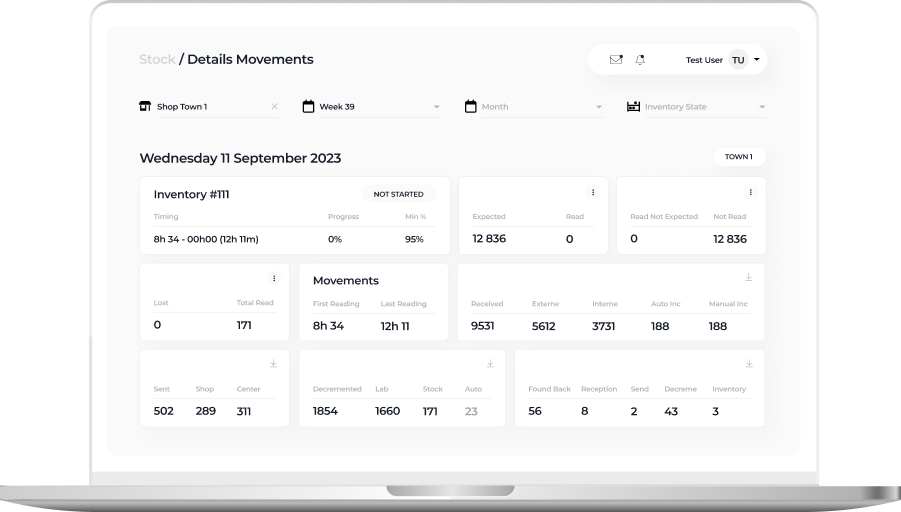
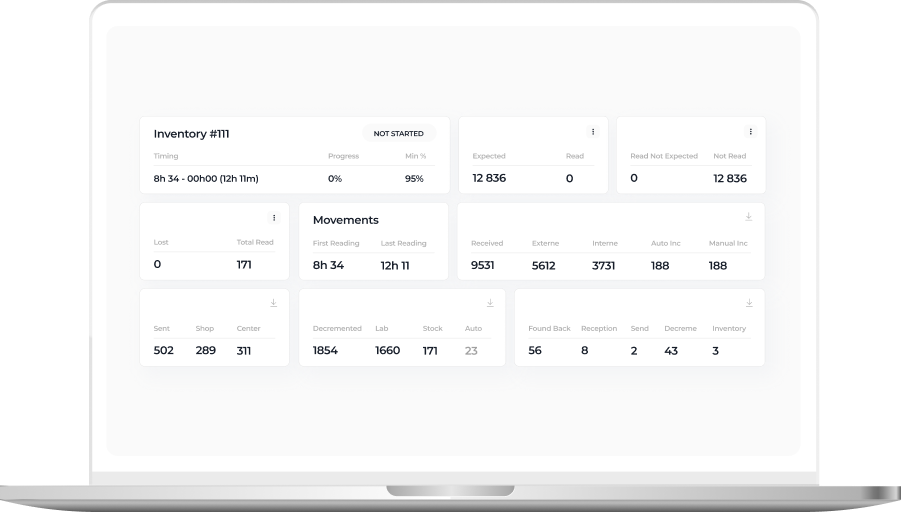
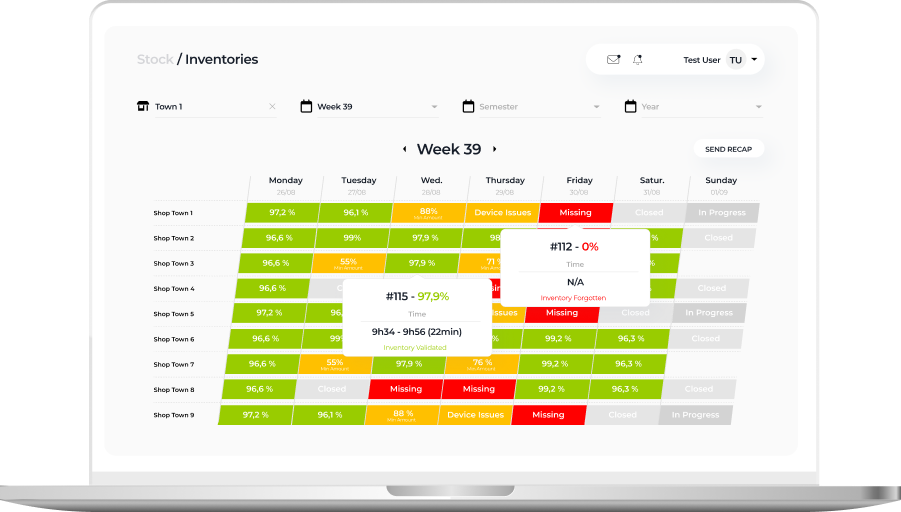
Detailed view of a daily inventory state within a particular eyewear shop

On this tab, in-store admins can check the status of inventories conducted in their store:

  • In progress
  • Closed
  • Device issues
  • Validated
  • Missing

The staff can also see the number of expected, received, lost, and found back items, and inventory time.

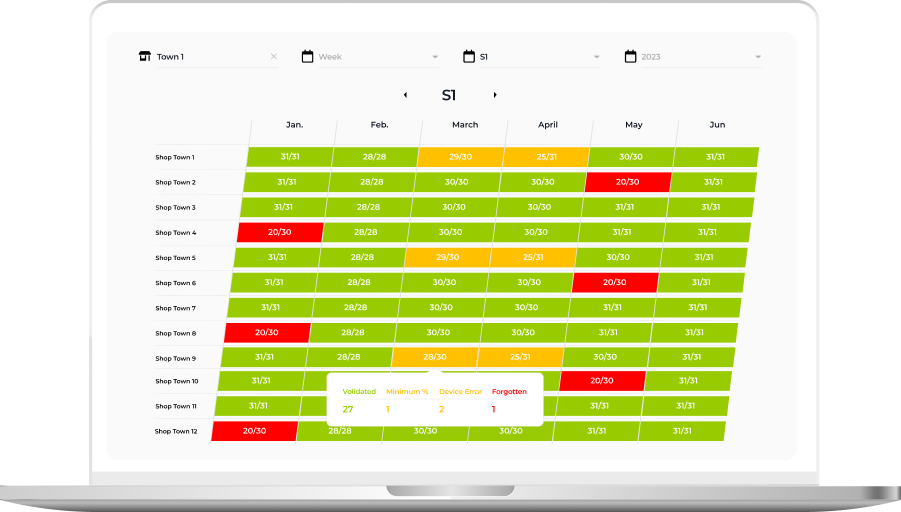
Week or Semester view with inventory state over a longer period

This tab provides higher-level information about inventory status in weeks and months. Thanks to intuitive UI with color-coded table cells, it’s easy to spot inventories calling for detailed analysis:

  • Successful inventories with more than 95% of items scanned and validated by the system are green
  • Processes with device issues are orange
  • Procedures with unidentified items are red
  • Inventory-free days are gray

These custom dashboards provided the client with much-coveted traceability of inventory processes and empowered them to uncover and nip alarming issues in the bud.

Business value

Before

  • Overpriced inventory software under the vendor lock-in
  • Tabletop RFID readers run on legacy software
  • Inability to use the full capacity of RFID readers
  • Low tag validation speed
  • Lack of visibility into the inventory flow

After

  • The budget-friendly and flexible app is fully tailored to the client’s manufacturing and inventory workflows
  • Standardized and easy-to-maintain tech stack
  • Boosted RFID scanners’ reading capacity from 300 to 600 tags per second
  • x3 tag validation speed
  • Full transparency and traceability of inventory-related processes thanks to custom dashboards

Client’s testimonial

Here’s how the client’s product manager evaluates the outcomes of collaboration with *instinctools:

Tech Documentation Management Product

Tech Documentation Management System For Manufacturing

How switching from an outdated DITA-based software to *instinctools’ feature-rich DITAworks helped a Danish enterprise fully digitize tech documentation management, speed up document-related operations by up to 14%, and reduce translation costs by 11%.

Industry:
Manufacturing, Energy

Software Product Development

Enterprise Software Development

Business challenge

Manufacturing organizations must ensure their products are accompanied by technical documentation and then keep an eye on its relevance and updates. At enterprise level, when the number of products and their variations grows to hundreds and even thousands, technical writing and its management become more challenging and the call for a specialized software solution becomes louder.

DITA is one of the well-known standards that can lighten this burden while speeding up the process at a wallet-friendly cost. However, finding ready-made software with suitable functionality among the diverse DITA-powered options out there is almost as unlikely as finding a needle in a haystack. That’s the struggle our client faced.

What is DITA?
DITA is an XML-based open standard to create, edit, manage, and publish large volumes of technical documentation in multiple formats and languages. Thanks to well-developed content reuse mechanisms, this standard facilitates all content-related tasks.
What is DITAworks Webtop?

DITAworks Webtop is a DITA-based multi-processor software product with a solid content reuse mechanism for authoring, managing, and publishing tech documentation. As an enterprise-oriented system with a modular architecture, it’s flexible and highly customizable to meet the needs of companies with mature content structures.

Learn more

A large Danish manufacturer of sophisticated control solutions for decentralized power production has already moved from non-specific software to a single DITA-powered environment for creating technical documentation. However, the client’s 50+ dedicated technical writers and translators quickly found the tool inadequate to cover their needs. What were the critical flaws of their current system?
  • Limited Content Map development functionality
  • Only basic metadata and conditional processing (CP) tags
  • Inflexible search options
  • Underdeveloped management of reusable content elements
  • Inability to work on a single piece of content in isolation without affecting its usage across the whole content system
  • No detailed history view
  • Absence of translation status analyzer

Driven by all these issues, the client started re-investigating the market for an advanced DITA-based software provider. To make sure their future partner could be on par with the highest quality and security standards, the client narrowed down their options to companies compliant with ISO 9001:2015 and ISO 27001:2022 standards. That’s how *instinctools and our DITAworks Webtop showed up on their radar.
Why did they see our product as a top option?
Provides
a safe space for tech writing as a standalone software with secure infrastructure
Remains
flexible and able to fit into the internal ecosystem of any enterprise
Offers
extensive functionality out-of-the-box
Brings
unlimited customization opportunities

What has our team done to turn DITA into a business asset worth investing in and obtain the full value this standard can bring?

Solution

As security is a top priority for enterprises, we provided the client with a standalone DITAworks Webtop application hosted on their own server in the Digital Ocean to ensure the Fort Knox safety of the company’s sensitive data.

The scheme of the app
  1. Advanced DITA content
    migration from the client’s
    former DITA CCMS

The first step our dedicated team took was writing migrators to move the client’s DITA content from their old solution to DITAworks. Simple data migration regardless of the specifics of content organization wasn’t a go-to option, as it requires manual re-sorting afterward.

  • Automated post-migrational content reorganization. We wrote migrators powerful enough to automate map formatting, grouping topics of different types into relevant folders, etc., to speed up the process and eliminate the possibility of human error.
  • Tailored DITAworks’ content hierarchy to the client’s current content structure. It helped smoothen transition to the new system for the staff.

This approach resulted in hurdle-free content migration between the systems.

  1. Out-of-the-box DITAworks’ features that bolstered tech documentation management right away

As DITAworks grants extensive functionality off the shelf, its adoption helped the client fine-tune their content-related processes right from the start even before tapping into bespoke advantages brought on by custom features.

Glitch-free topic editing

DITAworks uses an up-to-date oXygen™ XML editor whereas the client’s previous system ran on the obsolete and ill-performing oXygen™ Applet, leading to constant lags in topic editing. Switching to DITAworks solved this issue and unlocked flawless access to the editing functionality for authors and reviewers.

What is oXygen™ XML editor?

oXygen™ is a multi-platform collaborative tool for creating and editing XML files, validating their structure, etc. It supports single-source publishing and allows users to produce XML content in multiple formats (PDF, HTML, Web Help, XHTML, EPUB, etc.).

Rapid publishing speed

Unlike other single-processor DITA-based products, DITAworks supports various DITA processors for content publishing by default, empowering users to control the publishing speed. Our client leveraged two processors:

  • DITA Open Toolkit for 90% of their tech documentation, which didn’t require immediate publishing.
  • DITA XMLmind for the remaining 10% that had to be published in less than one second.

To set the processor for a particular piece of content, authors just need to choose one from the drop-down menu in the pre-publishing configuration.

Extensive range of reusable elements

Reusability is a linchpin of any DITA-based software, and the diversity of the reusable elements directly impacts the speed of creating, translating, and publishing tech documentation. In the client’s original system, there were only two basic types of reusable components – text block and text template.

After adopting DITAworks Webtop, authors and translators gained access to a plethora of reusable elements:

  • Keywords
  • Blocks of text
  • Text template
  • Topics
  • Map components
  • Context text block
  • Context variable

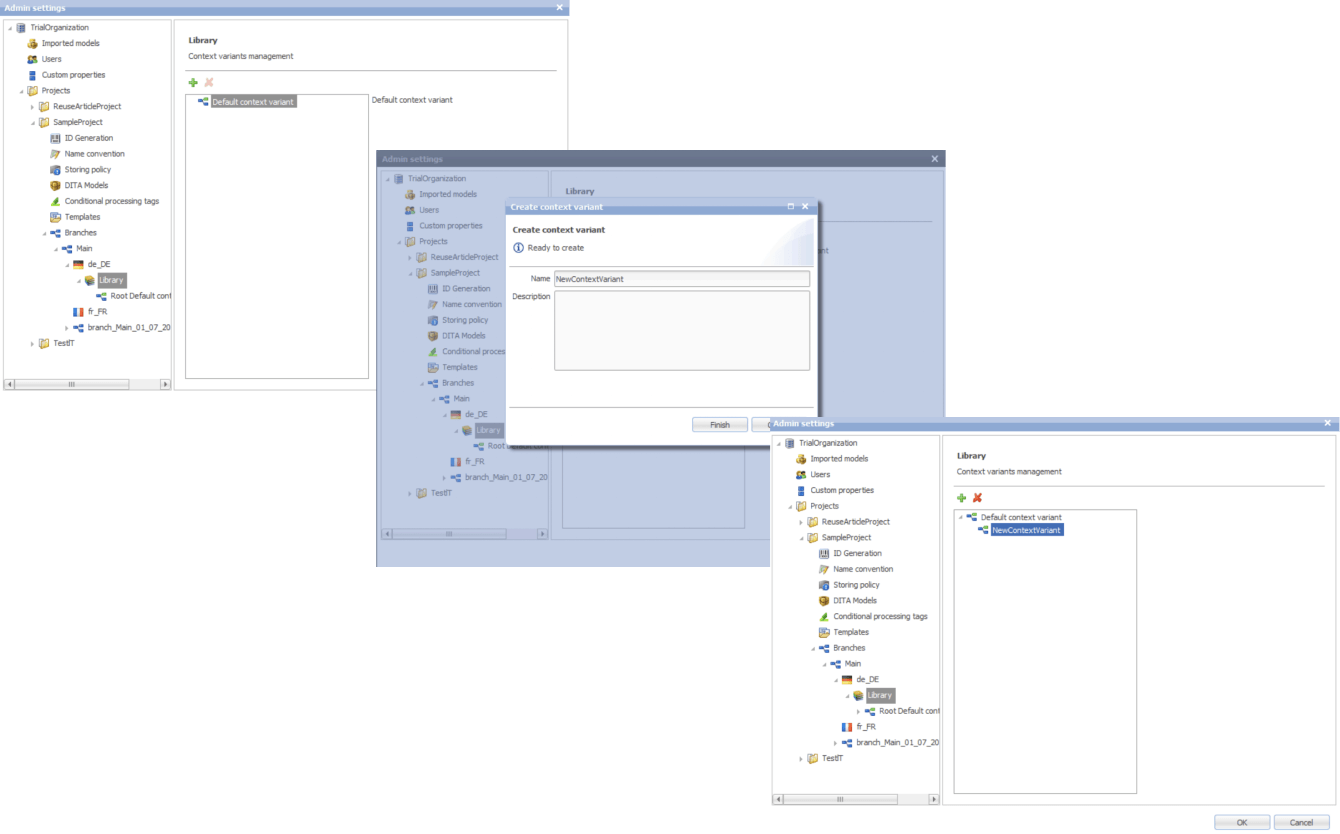
Moreover, we extended the range of actions users can take regarding the reusable entities. Besides adding new components, editing the existing ones, and deleting them, it became possible to redefine the meaning of the current context.

This feature comes in handy when the staff need to work on a specific piece of content without affecting its other use cases across the whole system.

Another detail about our reuse approach that made DITAworks a more user-friendly product than the client’s former system was using indirect links instead of relative ones to provide  a path not to an object, but to its key. This way, users don’t have to worry about the links’ integrity when moving objects.

Advanced search functionality and metadata customization

The full power of reusability can’t be achieved without comprehensive search features, and this was another weak point in the client’s old software – it didn’t allow a full-text search.

Conversely, DITAworks offered broad search capabilities out of the box:

  • By title
  • By full-text
  • By phrase
  • By CP tag
  • By metadata

The last point was a treasure trove for the client as it went beyond the basic topic title and type (concept, task, reference, etc.). DITAworks relies on the taxonomy framework and allows indexing any metadata and using it for search at any system level.

What is taxonomy?

In software product development, taxonomy is a hierarchical classification of the product elements that streamlines data organization in a logical order and, by doing that, levels up search capabilities within the system.

Our client applied this feature for tagging specific product-related topics, as the range of the solutions they produce varies from control devices for decentralized power production to the ones for marine and wind turbines. As the DITAworks’ search engine indexed all the custom meta tags, such an approach simplified finding data on thousands of products.

Unlimited customization of CP tags

Any DITA-based software has in-built conditional processing (CP) tags. However, not every solution makes them easy to use. For example, to operate on the client’s former system, users needed a basic knowledge of XML to create a custom CP tag. Moreover, as the process was manual and authors wrote tags by themselves, the likelihood of human error remained high, affecting the accuracy of tech documentation management.

DITAworks’ adoption helped the client: 

  • Create custom tags without XML knowledge
  • Automate tagging if a CP tag already exists in the system
  • Eliminate human-related errors
  1. Custom DITAworks’ features
    tailored to the client’s needs

Custom functionality is usually the point of the utmost importance, especially for enterprises. Therefore, DITAworks is designed around the idea of boundless adaptability of the product. The *instinctools team crafts various functionality sets to meet the needs of any enterprise client by connecting or disconnecting numerous plugins to the off-the-box DITAworks version. Let’s see how custom modifications have opened the door to a multitude of tailored benefits for the client’s tech documentation management.

Map development

Creating content maps and managing the content tree are tricky day-to-day tasks enterprises have to deal with. Therefore, extensive map development functionality is one of the vital criteria for companies choosing between different DITA-based products. That was the same for our client, who had a highly sophisticated content tree.

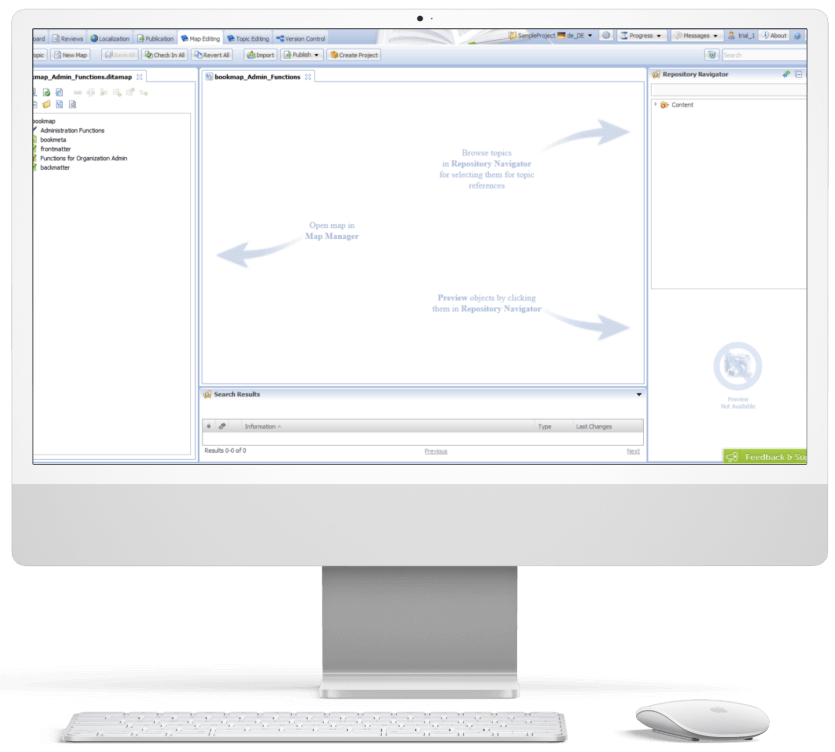
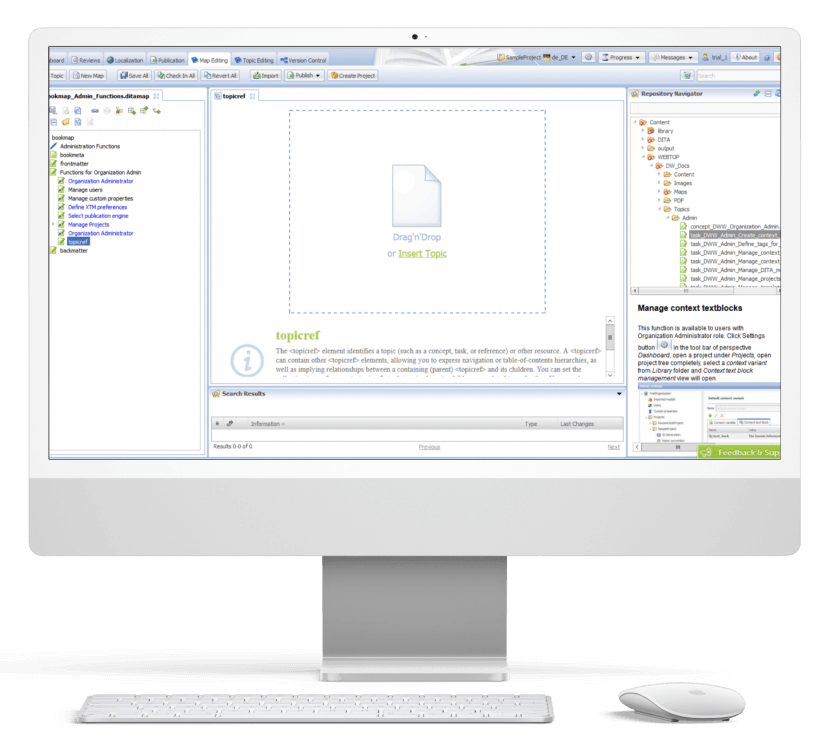
DITAworks Webtop enables multifunctional map creation and editing. Users can access different functions directly from the map editing menu instead of switching to a separate tab.

  • Map structure editing. Thanks to the interactive interface, the client’s employees can change the map structure quickly and easily in the left section with the content tree. They just need to drag any element and drop it wherever they want.
  • Topic editing is central. Here users can check the content in the preview and proceed to editing.
  • Search. On the right side, there is a repository navigator with a search bar to simplify browsing topics and linking them with the maps.
  • Conditional processing can be used on the level of the topic, map, or their units. For example, an author can assign a specific CP tag to a map unit and then leverage it for filtering.

Custom versioning

Transparency and the ability to dive deep into every piece of content were the client’s top requirements for the new system, so we honed DITAworks’ versioning functionality to match these needs.

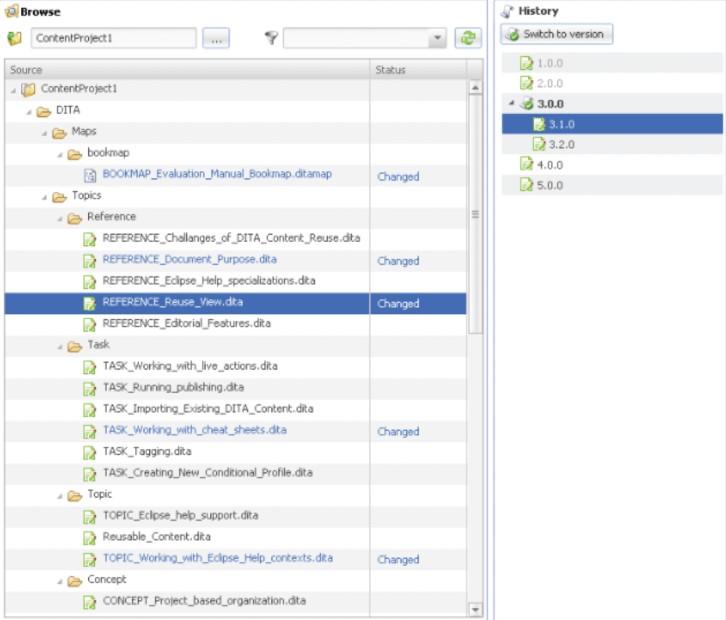
Advanced History View. In their former system, the client could see only the latest version of the documents, which failed to bring much-coveted visibility into the changes made to the files.

In DITAworks Webtop, every document check-in is tracked and leads to creating a new version (revision) of the file. Authors, translators, and administrators can:

  • See all the document versions
  • Compare the current version with any of the previous ones
  • Select any version of the document and restore it

Flexible current working context settings. One of our client’s specific requirements came from their mature content structure with its multi-level hierarchy. In addition, the company organized the work of authors, translators, and administrators in a way that aimed to collect topic-specific content in one place and reduce cross-linking between different levels, and DITAworks had to be tailored to this workflow.

Therefore, specifically for the client, we developed a ‘Dive into’ functionality that allowed users to set any folder as a root in the current working context, making folders outside this folder temporarily inaccessible through the search and repository navigator. This feature freed the staff from the constant hurdle of re-opening folder-in-a-folder-in-a-folder when operating in the same working context for a long period of time.

Ability to work on an isolated piece of content

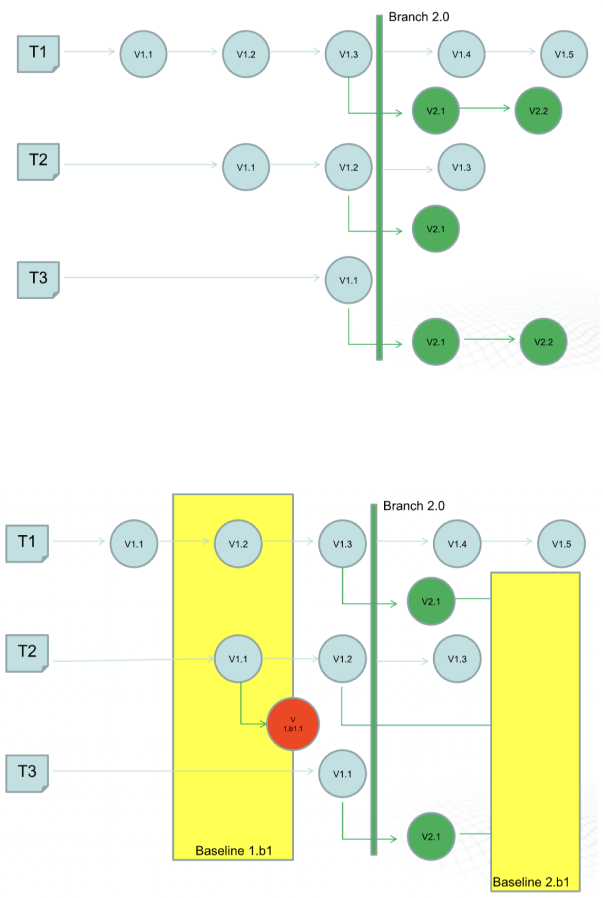
The next feature that was initially created for our Danish client and then became out-of-the-box was intelligent custom versioning with branch and baseline management. This functionality allowed users to work with an isolated piece of content without affecting the whole content structure.

  • Branching for parallel translation tasks. Our client supports tech documentation in multiple languages. The standard ones, aside from English, are French and the CKJ group (Chinese, Korean, Japanese). Working with a wide range of languages within one operating context would have been inconvenient for translators and could have caused unwanted changes in the root content.

    With branching, each user could work independently without affecting the root content. They could create a copy of a parent folder with all the documents in the master language with meta tags and after finishing the translation merge it with the initial folder.
  • Baseline for minor edits. As a lightweight version of a branch, the baseline offers users a copy of the content indexes. It is enough to make slight changes, such as correct misspellings.

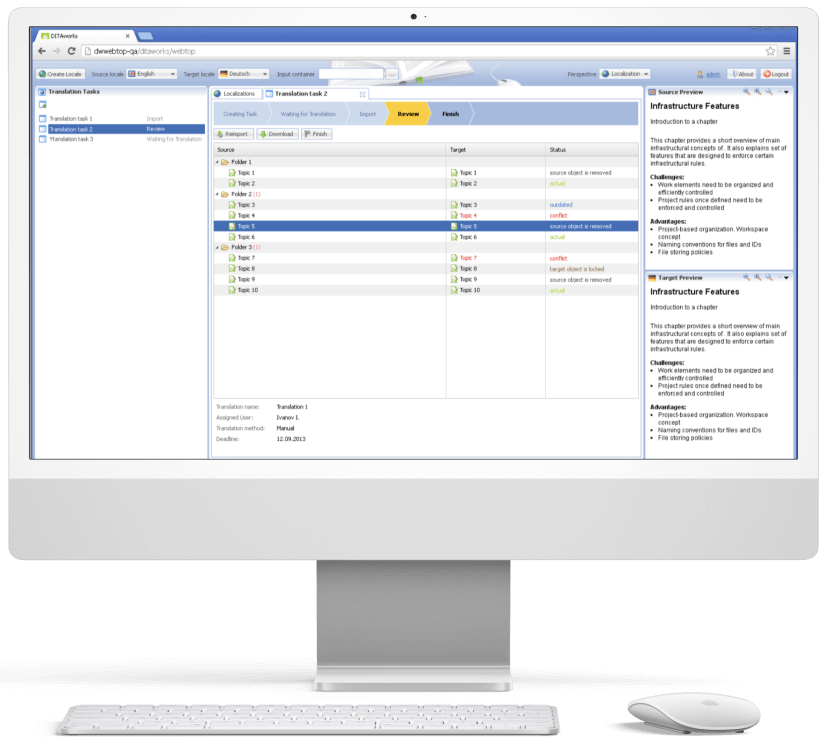
Translation analyzer

Tracking translations’ status is just as important as creating tech documentation, and the translation analyzer is the component of DITAworks that covers this task. It’s a table with checkboxes for selecting files for translation. For example, users can pick only one project and leave the rest untranslated.

When a user creates a translation, the system automatically links it with the document in the master language. It’s necessary for tracking content changes and getting translation status updates in near real-time.

  1. Release management

After enriching the out-of-the-box product with a range of custom features, the *instinctools team integrated DITAworks Webtop with the client’s website for direct content publishing. Such a connection allowed the client to provide their customers with the most relevant and accurate documentation.

  1. Conducting staff training

Before rolling out the DITAworks, our team ran training sessions for the client’s employees to ensure they could leverage the software’s capabilities to the fullest. All the sessions were recorded, laying the foundation for the client’s DITAworks knowledge base and nurturing in-house expertise.

The response to the new powerful product has been very positive, and many newly trained tech writers, translators, and managers have become advocates for the system.

Before

  • Underdigitized technical documentation creation and management process
  • Weak content reuse mechanisms
  • Lack of history view and in-depth version control
  • Poor search and conditional processing functionality
  • Impossibility to work on a piece of content without affecting the whole content ecosystem
  • Tight limitations of the working context
  • Human errors in CP tags due to manual input

After

  • Fully digitized technical documentation creation and management process
  • Advanced history view with transparent version control
  • Broad search capabilities
  • Limitless metadata and CP tags customization
  • Ability to work on an isolated piece of content
  • Flexible current working context settings
  • Automated management of CP tags

Client’s testimonial

Here’s how the company’s CTO evaluates the project outcomes:

Business value

  • Complete digitization of authoring, managing, and publishing tech documentation
  • Custom product tailored to the company’s specific document management workflow
  • Reduced document creation time by up to 14%
  • Cut back on translation costs by 11%
  • Minimized possibility of a human error

Multiplier effect

The adoption of DITA-based software attracts the companies thanks to well-honed, accelerated, and budget-friendly tech documentation management. However, according to our observations, many organizations still use non-specific software such as MS Word, and business owners tend to see switching to the dedicated tech documentation management system as a major head-scratcher. It’s truly one of the trickiest tasks.

Nevertheless, booming AI technologies play their part – converting Word content into a DITA-ready format no longer needs to be done manually. It can be covered by artificial intelligence. Instinctools is also leading the pack and constantly bolstering DITAworks’ functionality with forefront technologies to simplify and speed up the data migration process while perfecting its accuracy and security.

HubSpot For Consulting Company

HubSpot Implementation For a Mid-Size B2B Company

How HubSpot implementation helped a consulting company automate 30% of their business development team’s workflows and increase MQL-to-Deal conversion by 20%.

Industry:
Fintech

Business Challenge

No matter how hard-working and talented your business development team is, their efforts won’t yield the desired results if the information about leads and clients is stored across multiple spreadsheets or worse, jotted down on paper.

As any business grows, it becomes harder to keep track of all the data. Lack of visibility across sales and marketing processes brings mayhem to the management of these activities and has a negative impact on a company’s performance.

That’s exactly what happened to our client, a US consulting firm from Chicago that provides professional accounting services and what made them look for a technological remedy.
It used to be difficult for the client to navigate through tons of disparate data within their marketing and sales department, let alone use it for the company’s benefit. To do so, they needed a well-honed, calibrated CRM that would make the sales process transparent and traceable.

Prior to engaging with *instinctools, the company had been utilizing Zoho CRM, which focused solely on lead generation, leaving other aspects of the sales funnel unaddressed.
Meanwhile, the marketing department used the standard MS Office 365 package.

What were the consequences of such an approach?
  1. Poor customer experience. Personalized services are critical to sustaining customer loyalty in today’s business landscape. While attempting to gain insights into their clientele and tailor their services accordingly, our client relied mainly on intuition. However, without the aid of an up-to-date CRM system, it proved challenging to gather and manage the relevant data, and put it to use.
  2. Inefficiency. The Biz Dev team was struggling with the burden of repetitive and mundane administrative tasks, which were consuming a significant amount of their time. As a result, there was an urgent need for a solution that could automate these tasks and reduce the workload on the sales managers and lead generation team. Such a tool would enable them to focus on more critical activities, such as engaging with potential clients and lead nurturing.
  3. Lost opportunities. The absence of a systematic and automated approach to follow up on leads resulted in missed revenue opportunities. In this case, a robust CRM solution was a must to save the day.
  1. Misalignment between sales and marketing teams. Due to the lack of quality analytics, the sales team sometimes failed to deal with leads generated by the marketing department in time.
  2. Lack of consistency. With most data stored in disparate spreadsheets or on paper, customer information became sacred knowledge possessed by individual employees. This led to cumbersome transfers of document access and tons of effort spent on consuming the intricacies of particular files, when those ‘data custodians’ were off work or new staff needed onboarding.

All these circumstances hindered the development and growth of the client’s business.

Solution

Once the problem was identified, the client turned to *instinctools, a CRM consulting and implementation company, for a solution. As per our standard practice, we started with a deep dive into the client’s business processes to find a solution that can meet the customer’s requirements. 

Discovery

One of the client’s underlying requirements was to choose a CRM system that could grow with the company while not draining its budget.

The customization of the client’s existing CRM — Zoho — was not an on-the-table option. During the discussion of the system requirements, it became clear that fine-tuning Zoho couldn’t fully cover the client’s needs. That’s why, it was decided to implement a new, more powerful CRM.

For organizations of our client’s scale, Salesforce is usually a good fit. But despite the popularity of the platform, not every company can afford it. For our client, the price of implementing Salesforce didn’t make sense – the license fee was too high, considering that the client didn’t need all the platform’s features. With this in mind, we shifted to searching for more budget-friendly options.

Given the client’s company size, its business processes, and budget, HubSpot looked like an excellent choice. This platform provides all the necessary functionality while costing several times less than Salesforce.

The client strongly favored HubSpot CRM implementation after we presented its capabilities:

  • Functionality. HubSpot has an advantage over other CRMs regarding the features it offers. For example, our client used pay-per-click (PPC) advertising. The ability to create and manage it within the CRM and having this feature as part of the general package, rather than a separate offering at an additional cost, was crucial.
  • Scalability. To ensure that this CRM can meet the company’s evolving needs in the future, we prepared a roadmap for the next five years. HubSpot’s capabilities would be sufficient even with the most ambitious growth forecasts over that period.
  • Cost-efficiency. The client settled to implement the Marketing Professional and the Sales Professional Hubs. These packages were enough to provide omnichannel automation, email scheduling, and benefit from custom reports, dashboards, and data-backed forecasting.

Next, we decided on the team’s composition, which included a project manager, business analyst, designer, and two developers. The project also required the involvement of our business consultant, who was engaged in optimizing the client’s business processes.

Speeding up MQLs processing with HubSpot Marketing Hub implementation

Adopting CRM for the marketing department is a standard initial step in such projects, so we also started with the HubSpot Marketing Hub implementation.

Our web developers integrated all the lead generation forms and campaigns from the client’s website into HubSpot. Next, they worked with a designer to customize and connect the forms to the new CRM.
Now all requests coming from the website go straight to the CRM, so their processing is faster.

Among the challenges encountered during the HubSpot Marketing Hub implementation, the data migration from numerous Excel spreadsheets is the most noteworthy. This step was also relevant for the next phase of the HubSpot implementation process, so we’ll come back to some of the issues we’ve faced in detail later.

Automating workflows with HubSpot Sales Hub implementation

Although the client had been using another CRM for years, a considerable portion of the client’s mundane and repetitive operations continued to be handled manually, draining the sales representatives’ time.

We analyzed the client’s processes and uncovered that at least 30% of them can be optimized through automation, streamlining the sales department’s work. To capitalize on this potential, we automated lead scoring and email distribution as well as set up automatic reminders for sales managers to follow up with leads through the appropriate channel.

Data migration as the backbone of our HubSpot implementation project

When talking about how to implement HubSpot, we can’t but mention data migration. Its accuracy is paramount, as even minor errors can impede the creation of reliable analytics, compromising the system’s effectiveness in the long run. Given the importance of data migration, this stage demands meticulous planning and execution to ensure a smooth transition to the new CRM system.

During this HubSpot implementation project, we migrated over 700,000 contacts and 300,000 campaigns from the legacy systems to HubSpot. The process took six weeks to complete.

Before the data migration itself, we encountered the challenge of establishing a shared understanding of the data requirements, as marketing, sales, and lead generation teams lacked a unified source of truth, causing discrepancies in their respective data. As the key HubSpot implementation consultant, our business analyst took the lead in defining common criteria for migrating data from the spreadsheets and the old system to the new CRM.

Organizational enablement

We assembled a dedicated team of client employees who were most enthusiastic about implementing HubSpot. This team served as the system’s beta testers in the initial stages and later played a crucial role in promoting the solution within the business development team. This collaborative approach not only allowed us to gain valuable feedback on the system’s features and functionality but also helped mitigate any potential resistance to change within the company.

Before/After

The HubSpot implementation took six months, along with data migration and organizational enablement. The CRM started working at its full capacity only after the data migration was completed.

Before

  • Lack of a holistic view of the sales funnel
  • Inability to analyze any stage of the sales funnel in detail
  • Discoordinated work of sales, lead generation, and marketing departments
  • Absence of common understanding of data requirements
  • Manual performance of the repetitive day-to-day sales and marketing operations
  • Slow lead processing
  • Failure to identify high-priority leads
  • Low MQL-to SQL and SQL-to-Deal conversion rate
  • Devoting a lot of time to onboarding new employees

After

  • Transparency across the entire sales funnel
  • Establishment of clear and unified data requirements
  • Cohesive work of all teams within the business development unit
  • Boosting lead processing time by 37%
  • 30% of mundane everyday business development tasks are automated
  • Special workflow for accelerated lead processing
  • Speeding up the onboarding process by 45%
  • Increasing MQL-to-SQL conversion by 28% and SQL-to-Deal by 17%
  • Ability to analyze top, middle, and bottom stages of the sales funnel in detail thanks to comprehensive custom dashboards

Key features

Integrity

HubSpot has become a unified tool that works at all sales funnel stages, from dealing with leads generated through website forms to cross-selling and upselling to the existing customers. Thanks to HubSpot implementation, our client got not only end-to-end analytics but also the ability to interact with contacts, deals, and companies in various ways throughout the funnel. MDRs, SDRs, and sales managers can now send emails, make calls, transfer prospects from one sales rep to another, schedule meetings, and register all these changes in one place.

Mobile compatibility

HubSpot is mobile-friendly and available to client team members on any device. So even if sales managers, marketers, and lead generation team members are out of office, they still have full access to the CRM functionality on their phones.

Flexibility

HubSpot allows highly flexible configuration at the no-code level. For instance, the client doesn’t need to involve developers to configure access rights. The skills of a system administrator trained under our guidance are sufficient to cover these tasks.

Business Value

  • Full transparency of sales and marketing processes at all the stages of the sales funnel
  • Automating 30% of the business development workflows
  • Reducing time of lead processing by 37%
  • 28% increase in the MQL-to-SQL conversion rate
  • 17% increase in the SQL-to-Deal conversion rate
  • 45% decrease in onboarding time for new employees of the business development unit
  • Cutting the Biz Dev costs by 18%

Multiplier Effect​

Incorporating CRM software can prove highly advantageous for B2C and B2B companies across a diverse range of industries. In fact, in today’s business landscape, it has become a prerequisite for efficient customer management, rather than a whim.

Both B2C and B2B organizations need to gather, organize, and analyze mind-boggling volumes of data to enhance interactions with their clients and improve customer experience. With a proper CRM solution in place, you can streamline your workflows and capture lead-specific information at every available touchpoint across multiple channels to nurture more high-quality leads.

For growing mid-sized companies, HubSpot is one of the most profitable and advantageous options due to its functionality, scalability, and cost-effectiveness.

Odoo On-Premise Implementation For a European Streaming Platform

Odoo On-Premise Implementation For a European Streaming Platform

How replacing outdated software with Odoo ERP and custom BI tools allowed a streaming service provider to implement a monthly billing model, get a 360-degree view of their customer data, save 1000+ hours of manual operations on inventory management, and bring thousands of new customers to the platform all over the EU.

Industry:
Media and Telecommunications

Duration:
12 months

Team:
a project manager, two business analysts, a UX designer, a solution architect, four backend and four frontend developers, four quality assurance specialists, and a business intelligence consultant

Context

Any company’s growth brings opportunities for investment and new market outreach, and entails a transformation of business processes, operations, IT infrastructure, etc. Experiencing a significant rise in customers, our client decided to improve their subscription-based business model, allowing their end-users worldwide to be billed for IP television services on a monthly basis, not annually as it had been before.

The introduction of such a seemingly simple change in the subscription model required a significant transformation of current business processes, which also led to the implementation of a corporate ERP system. The company got in touch with *instinctools for IT consultancy to find a solution and for ERP system development to run their business more effectively and quickly adapt to ever-changing market needs.

The main goal for our team was to advise on and implement an ERP system that would match the company’s existing business processes, taking into account growth plans. Another essential requirement was choosing an ERP system that was easy to maintain and develop in terms of cost and availability of specialists.

During the Pre-Discovery workshop, our team analyzed a current client’s business model and suggested a best-fit solution. The customer’s key non-functional requirements for an ERP software were the following: an on-premise solution that can be managed on company servers, free licensing, fault tolerance, and customer support. Implementing the solution as soon as possible was vital, as they needed to handle an ever-increasing array of data.

*instinctools provided a detailed project estimate with a scope and vision of the future ERP solution as a primary output of the workshop. After a thorough analysis, our experts suggested implementing the Odoo ERP system. Here are a few reasons why we’ve chosen Odoo, alongside the fact that it ultimately met the client’s requirements mentioned above:

  • Multiple module integration. The Odoo system has a broad set of features and modules ready for customization according to any department’s needs.
  • Odoo is among the leading ERP solutions in the market with a huge community and app store.
  • Odoo fits small and medium businesses bringing them high flexibility and scalability.

Dedicated team

To successfully complete the project within the time frame set by the customer, *instinctools gathered a dedicated cross-functional self-managed team able to implement the project end-to-end. The project’s dedicated team consisted of: a project manager, two business analysts, a UX designer, a solution architect, four backend and four frontend developers, four quality assurance specialists, and a business intelligence consultant. The right composition and skill set made it possible to implement the project within the required timeframe.

Challenge

When implementing new IT solutions, companies usually face many challenges in operations and processes, not just purely tech issues. Our customer collaborated closely with the *instinctools dedicated team, allowing them to focus mainly on IT challenges and some organizational issues.

  • Data migration

    The data about users’ quantity was one of the unknowns in the first stages of the project estimate. It complicated the process of data migration to the new system, as the actual number of users (internal and external) was much bigger than the pre-estimated. As a result, we had hurdles with the performance of certain system operations and needed to react quickly to changing requirements and other issues.

  • Odoo modules integration and customization

    One of the benefits of the Odoo ERP system is the variety of modules for different units, operations, and management. The choice of the modules for particular business needs wasn’t as challenging as their integration into the current system. Most essential components needed customization and adjustments that our engineering team managed to implement.

  • Data visualization and reporting

    Companies not using an ERP system may lack data visualization and fast reporting available for different units. With the growing amount of data and the length of Excel spreadsheets, the implementation of Business Intelligence became a necessity for our client. The standard Odoo module didn’t meet the client’s data visualization and reporting requirements. We needed to build a BI tool and enable its connectivity and accessibility within different units.

  • Integration with third-party services

    The last but not the least important challenge for our dedicated team was integrating the Odoo ERP system with the services, enabling the sustainability and smooth operation of the whole business machine, from notifications and stock management to acquiring systems and legal resources.

Solution

Instinctools’ dedicated team, working closely with the customer’s IT and Operations departments, was able to implement a holistic ERP system, connect all the necessary integrations, and develop and set up the required Odoo modules. It fully met the demand for sustainable and scalable software solutions that are compatible with internal and external services, running on on-premise servers, having fast reporting and visualized analytics, and ensuring reduced costs on the maintenance and support side.

With this solution, we helped our client achieve its primary goal, the upgrade of a subscription model provided to their customers.

Key features

  • Customized Odoo modules for stock management, logistics, accounting, legal operations, and marketing analytics.
  • Internal integrations with Google Analytics, e-mail services, and notification systems.
  • Tableau business intelligence tool with distributed access for all units and fast reporting.
  • External integrations with DHL, Hermes, NevelNet, Stripe, and other services.
  • Sepa acquiring system.
  • DATEV-format reports compliant with the law for tax authorities.
  • Odoo Website SSO (Single Sign On) module.

Business Value

Thousands of new customers have tried the monthly subscription service offered by our client since the first project solution release. It allowed the company to understand their customer’s pains and needs better while interacting with the product and services. That, in turn, helped to deliver value and improve customer experience.

We revealed the hidden issues in our client’s company’s complex processes and operations during the project implementation. They noticed the flaws of the old system that had been holding the company back from innovations and opportunities to scale faster and increase clientele worldwide for a very long time.

The client’s digital transformation became the enabler of positive changes bringing their business more revenue, new market opportunities, and, most importantly – customer loyalty.

Technologies

React
Python
keycloak
Odoo Material UI
Tableau

Client-Facing Content Pool For a Consortium of 70+ Large Enterprises

Client-Facing Content Pool For a Consortium of 70+ Large Enterprises

How developing a user-friendly mobile content pool helped a Germany-based association of commercial companies and institutions to streamline the way their clients track the consortium’s news and activities in business, education, and culture areas.

Challenge

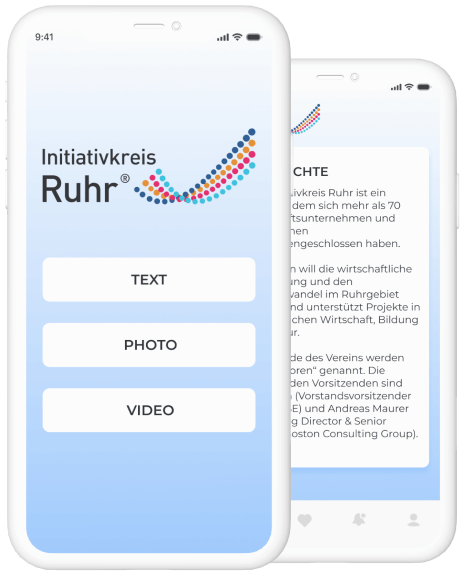
Association of the large enterprises, wanted to provide the software which would allow informing the clients on news of association and provide reference information about their activity.

The application should give opportunity of viewing of information of various formats, integration with one of content control systems.

Solution

We have developed the application meeting the set objectives, which allows looking through information of the following types: HTML pages, video, images, PDF. The mobile application is integrated with WordPress CMS.

Technologies

Custom BI Dashboards For The Sales Department Of a EU Corporation

Custom BI Dashboards For The Sales Department Of a EU Corporation

How the adoption of Tableau with six custom dashboards for sales analytics, planning, and forecasting empowered a manufacturing corporation to back up sales strategies with real-time data and increase the number of won deals by 54% and upselling deals by 16%.

Challenge

Our customer’s business has been expanding rapidly for the past decade: new brands have been launched, new chains have been opened, new offices have popped up. In these circumstances, without proper up-to-date instruments, following the company’s processes turned out to be a real problem. It was all the more obvious when came to the sales department. The existing methods of navigating through sales performance – with reports prepared on a monthly or quarterly basis – appeared to be ineffective and time-consuming.

Our customer wanted to improve the overall visibility of analysis and reporting activities across different business units and get a centralized view of the massive volumes of data.

Tasks

  • to bring all the business units together to have a single source of information in an integrated set of tools
  • the ability to “slice and dice” the information according to the user’s needs
  • to provide data security
  • the possibility to scale up the solution as the business grows

Solution

We’ve developed a sales performance management solution, which not only contains all the necessary data but also combines analytics, planning, and forecasting capabilities.

The complexity of the whole sales optimization process has been wrapped into 6 dashboards, integrated with different sources of information. Each dashboard fulfills its own functions.

  • A customer overview
    Contributes to building up a complete, explicit view of the customer by collecting data from contract billing, the CRM and ERP systems, so that the sales representatives can easily identify the information, which is useful for their daily sales processes and customer relationship management.
  • Sales Pipeline
    Brings visibility to all the stages of a sales process within different channels or lines of business and makes overseeing and directing future sales much more data-based than they used to be.
  • Sales process optimization
    Takes the data out of the CRM system, measures these data against the targets, showing what activities need to be done to achieve the assigned goals.
  • Salesperson focus
    Clusters the information on customer sales activity and converts it into a user-friendly format. It shows sales representatives their month-to-date and year-to-date results and how these results correlate with their objectives.
  • Account coverage
    Helps to stick to customer retention strategy through the analysis of certain KPIs.
  • Sales forecasting
    Estimates the accuracy of sales forecasts, comparing them against actual results for both individual sales representatives and the whole teams.

Key features

an integrated set of tools

self-service analysis and reporting

scalability

data security

cloud solution

Value

The BI solution allows our customer to explore the data without a hitch. Fragmented and disintegrated reports are replaced by one set of tools where all the necessary information is gathered. Thus, user groups get quick and easy access to real-time data and the analysis tailored to their needs, which increases the chances of the right decision making. The visibility that has been brought to each stage of the sales cycle along with end-to-end analytics helps managers identify blind spots and, therefore, improve the performance.

“With *instinctools solution, it’s become possible to get a complete and honest answer to the question: “How are things?” either on a unit level or on the level of the whole company. We’re happy to have accurate, up-to-date information on our sales processes and keep all our units in sync”.

Judging by enthusiastic reviews of our customer, data harmonization within the sales department was a giant step (but just the first one) on the way to digital transformation. Apparently, there’s more to come.

Technologies

React
NodeJS
Python
Tableau
AWS

User Support Platform For a World-Leading Premium Cars Manufacturer

User Support Platform For a World-Leading Premium Cars Manufacturer

How implementing a web-based support system with a single content repository and unlimited access to training materials enabled Mercedes-Benz Group AG to accelerate employee education and to improve overall procurement processes and accelerate employee education by 93%.

Challenge

Mercedes-Benz Group AG new global buying system GLOBUS has provided the company with an efficient organization of procurement processes all over the world.

In order to ensure fast and comprehensive education and ongoing support of the system users, Mercedes-Benz Group AG decided to develop and implement a special user support system. The main requirements to the system were its transparent structure and easy-touse interface which would allow users in various countries to use materials describing GLOBUS functioning. Besides, the system had to be compatible with the technology which GLOBUS itself was built.

When looking on the other side of the process, it was necessary to organize a proper environment for multiple global content creators and translators which would streamline timely, consistent and reliable creation and delivery of the information.

Approach

It was decided that the solution would be built on the pre-packaged CMS version of *instinctools’ GateOne framework which meets all the requirements in the best way:

  • Web-oriented which offers independence from time and place
  • J2EE compliant which makes it compatible with GLOBUS
  • DocBook or DITA standard which helps to properly structure and create documents according to international standards
  • WYSIWYG user interface which makes it easy-to-use for content editors, and at the same time it offers required flexibility and scalability to encounter future needs of a global roll-out.


The *instinctools team analyzed required document structures, discussed them with the Mercedes-Benz Group AG team to ensure proper understanding and implemented it in the selected CMS.

From the beginning it was clear that the system would have to serve a distributed international community, therefore analysis had to be focused on localization strategy in order to provide proper possibilities for content localization into multiple languages and in multi-country environment.

As Mercedes-Benz Group AG editors had already started creating documentation, *instinctools helped to migrate already existing parts of the user manual into the CMS-based help and support platform.

Results

After 5 months of the intense cooperation with Mercedes-Benz Group AG teams, *instinctools introduced the required Help and Support System to the GLOBUS user community. The final solution covered all main aspects of editing and authoring processes by providing an efficient and comfortable environment for the content creators, editors and publishers:

a single sourcing content repository and separationof the content from its layout and freed authors and editors from unnecessary activities

well structured workflows enhanced real-time collaboration of global teams and simplified processes of content creation and localization The new architecture insures that localized content is consistent and is conveyed the information as originally intended

transparent structure of the existing content decreased information redundancy and improved content consistency

appliance to corporate standards ensure the presentation of the information is similar in all types of published media

On the other hand, GLOBUS users were provided with a comfortable and easy-to-use help-system which streamlined efficiency of their operations:

training materials become easily accessible from any place at any time

easy and effective search functions offer easy search and retrieval of the existing information

web-based system allows asking questions on-line and getting fast replies

content-sensitive help functions provides users with complete and timely information by a simple F1 clicking

automated publishing allows converting the content into any preferable digital format without any sophisticated technical knowledge

easy search and decreases dependency on the availability of the system expert made users more willing to use available materials

E-Builder App For a Construction Company

E-Builder App For a Construction Company

How replacing a 15-year-old construction program management software with a user-friendly e-builder enabled an international construction company to overcome performance issues and triple employees’ productivity.

About the project

In modern digital world every construction company has its own software that helps manage all details related to project management, job estimating, materials takeoffs and other issues. Our client has been working with Construction Program Management Software for almost 15 years already. During this time the company developed and modernized the Software according to their growing needs and working potential. As a result they faced some problems connected with optimization of their software and integration with new modules.

Challenge

The team was aimed to not only fix bugs in the software, but provide smooth operation and make integration of different modules possible. In this regard the work was divided into several parts:

Fixing bugs and testing

Optimization of system processes

Prevention of possible errors and disruptions

Solution

As a result of effective cooperation between the *instinctools team and the client we’ve got an improved product with smooth operation, fixed bugs and streamlined system. As well our professionals hold a consultation with onsite tech team on identifying special aspects of system behaviour and any potential problems.

Technologies

Visual Basic
MS SQL

Healthcare Management System (HIPAA compliant)

Healthcare Management System (HIPAA compliant)

How transforming HMS’s MVP into a full-featured SaaS solution allowed a US company to automate 86% of manual processes, create monthly reports in a click, simplify HIPAA compliance checks, and streamline calculating NHSN reporting metrics while wiping out the possibility of a human error.

About the project

The customer is a U.S. based early-stage healthcare startup established at the beginning of 2016. Their main goal is to help healthcare organizations simplify and automate occupational healthcare management. The founders have years of experience working with large hospitals and healthcare systems.

They discovered a better way of getting rid of manual processes, streamlining data collection for immunizations, fitness tests, TB tests, and quickly rolling out reports for internal and external use.

Challenge

The main challenge for *instinctools was to transform the MVP into a full-featured product – a robust and easy-to-use tool that would efficiently reduce the administrative burden and workload.

Solution

In close communication with the customer, *instinctools team offered the following solutions to assist with achieving the company’s main goal:

  • Enterprise Hierarchical Adjustability
  • Full Configurability
  • All-round Monitoring
  • Cloud-based web + backend
  • Modern Technologies

Maximum Data Security:

  • Multi-tenancy
  • Isolated data
  • Encryption
  • Leakage protection
  • Role-based data access

The project is still in the development stage, but we’ve already successfully delivered many important features.

Result

The customer is pleased with the efficiency of communications and the quality of work delivered, and plans to take cooperation to the next level by entrusting more work to *instinctools in the coming months.

Key features

Full enterprise SaaS solution:

Monitors compliance at the enterprise level

Tracks and reports staff immunization requirements, tests, and health events

Standardizes immunization requirements by job code and title

Drills down immunization status from department to individual in one click

Flags compliance gaps and upcoming requirements

Automatically notifies staff when immunizations are about to expire

Complies with HIPAA

Integrates with existing HR systems to eliminate duplicate entries and automatically deactivate associates

Creates monthly reports instantaneously

Easily calculates NHSN reporting metrics that can be easily cut and pasted directly into reports

Technologies

ASP.NET
Web API, MVC
MS SQL
Entity Framework
Bootstrap
Angular JS
Azure
Anna Vasilevskaya
AI modified real photo
Anna Vasilevskaya
Account Executive

Get in touch

Drop us a line about your project at
[email protected] or via the contact
form below, and we will contact you soon.