How to Leverage Business Intelligence in Supply Chain Management: Find Real Meaning in Your Sea of Data

Can you drive if your car has problems with the engine, battery, brakes…? It’s unlikely and even if you do, there will be problems along the way. Moreover, ignoring signs of trouble might not only cost you a fortune but also put you at risk of an accident. Supply chain management, in some ways, is similar to this process, only instead of car parts, you are dealing with procurement, logistics, operations management, software, and you need to keep them running smoothly. But the reams of disparate data and the inability to process it in time is one of the reasons why your vehicle is not working in the way it’s supposed to.

As the supply chain is one of the core areas you should concentrate on during the digital transformation (DT), its intelligence can put your business on the fast track to success. Implementation of Business Intelligence in Supply Chain Management (SCM) is one of the ways to handle the mind-boggling amounts of data and turn it into meaningful information. With this technology at your fingertips, you can automatically track main KPIs such as cash to cycle time, fill rates, days of supply, inventory velocity, turnover, customer order cycle time, etc., and investigate this data in more detail to uncover some not-so-obvious details.

In this article, we dive deeper into the levels of supply chain management, uncover how BI solutions can improve your business outcomes, and provide you with a supply chain intelligence PDF checklist so that you can rate your company’s intelligence level by yourself. 

Use Business Intelligence in supply chain management to identify weak points in time

Providing you with the visibility of all your data and turning it into valuable information that you can check at any moment is the key benefit of Business Intelligence solutions for SCM.   

Imagine that you need to connect a plethora of indicators of freight traffic, rail transport, and the leading rail operators. Generating the graphical representations of them in Excel doesn’t sound too challenging, until you need to make changes to the data and, consequently, to the charts. In this case, business analysts have to correct the information in the spreadsheets manually. It gets even more puzzling if the organization doesn’t have a common data warehouse and the data that each employee works with can only be accessed by themselves. 

With Business Intelligence in the supply chain, such a situation doesn’t happen. Graphic representations of indicators of freight traffic, rail transport, and the leading rail operators are connected automatically and presented in easy-to-grasp real-time dashboards available in just one click. 

Moreover, BI empowers you with prescriptive analytics that enables you to predict future events and take action to achieve or prevent them. McKinsey reveals that prescriptive analytics can increase supply chain throughput by up to 15 percent in the short term and reduce costs by 10 percent in the long term.

Implementation of the technology can greatly impact the effectiveness and profits of your organization at all the levels of SCM – from strategic to tactical and operational. 

Business Intelligence for supply chain management: strategic level

The strategic level is about keeping track of market trends and overall planning of how your supply chain will function according to your organization’s goals, customers’ needs, suppliers’ demands, etc. It’s the cornerstone of successful supply chain management.

Changes at the lower levels without a common understanding of the company’s long-term BI strategy will be ineffective. It’s like trying to renovate a house after rain damage without realizing that the leaky roof needs to be repaired first. Here are strategic activities where BI solution implementation will be helpful:

1. Identifying priority areas of production

At the strategic level, using Business Intelligence in supply chain management helps you decide on your company’s global approach: will you focus on producing large volumes of low-margin goods solely or will it be more profitable for you to combine high- and low-margin goods? If you choose the latter option, what is the ideal ratio of production capacity for their production? BI helps you determine the optimal balance based on all the input data.

Selling items with low margins but high volumes that load your production line is like offering vanilla ice cream – it’s the most standard but sought-after product. And here’s the question to ask yourself: if your company can handle high-margin made-to-order products, how profitable is it for you to continue producing vanilla items?  

If you are planning to develop new products or modernize existing ones on a regular basis, BI technology can help you efficiently allocate the production workload. Take, for example, a manufacturer, who wants to reorient the company’s production based on trends for the new season. BI helps to identify low-margin items that should be dropped from production and the capacity needed to produce new items. In theory, it can all be done in Excel, but with BI it’s much faster and easier.

2. Allocating manufacturing facilities correctly

Where is it more beneficial to locate the factories? Countries such as Malaysia, Taiwan, China, and India may seem the best options at first sight. But if you consider other parameters, such as quality of labor, risks, infrastructure, etc., your choice won’t be as straightforward. 

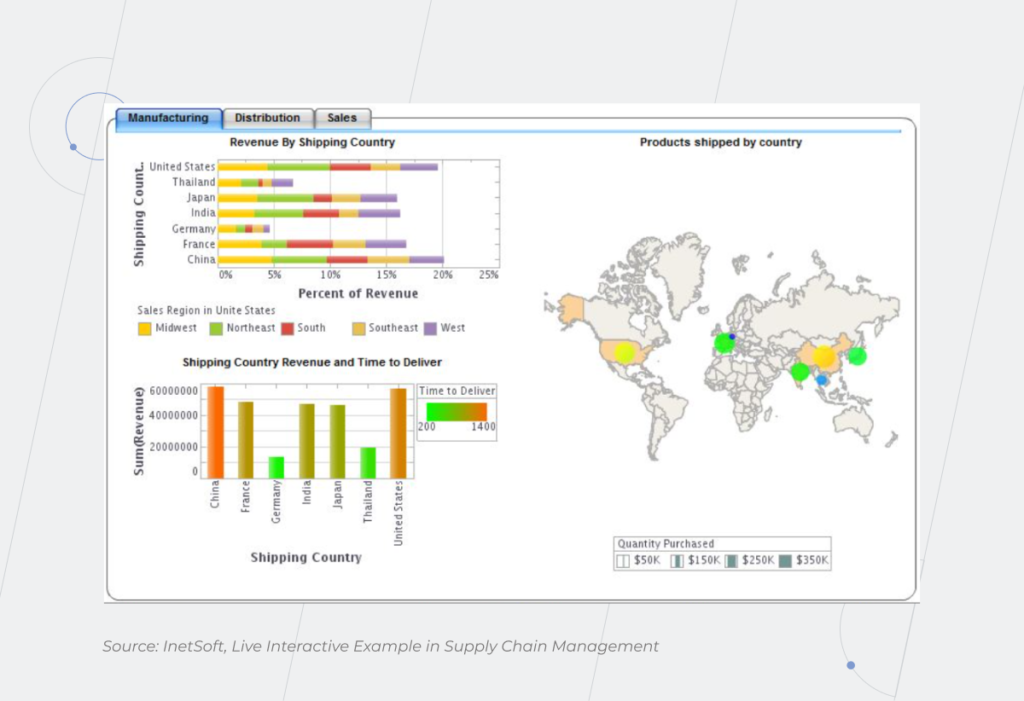
If you distribute goods for various markets, another question arises. Which option is more profitable for you: manufacturing in one of the countries and delivering to others, or having a factory in each country to save on logistics and speed it up? There’s no one-size-fits-all solution, and Business Intelligence for supply chain management can confirm what your business sense tells you or prove it wrong with up-to-date and accurate data. 
Business Intelligence

Business Intelligence solutions for supply chain management: tactical level

When you’ve set the organization’s overall priorities, it’s time to dive deeper into your medium- and short-term activities in SCM. Which specific manufacturing processes should you identify to reach your big-picture goals? How do you minimize risks and control costs in practice? At this stage, you determine the means of achieving key deliverables – production efficiency at a balanced cost and high customer satisfaction. If your production facilities are located in different countries, tactical activities may differ, as you should take into account local resources, taxes, etc.

BI solutions help with:

1. Choosing the most beneficial transportation and warehousing solutions

Identifying if logistics should be managed in-house or by a third party is one of the top priorities on the tactical level of SCM that BI can help with.

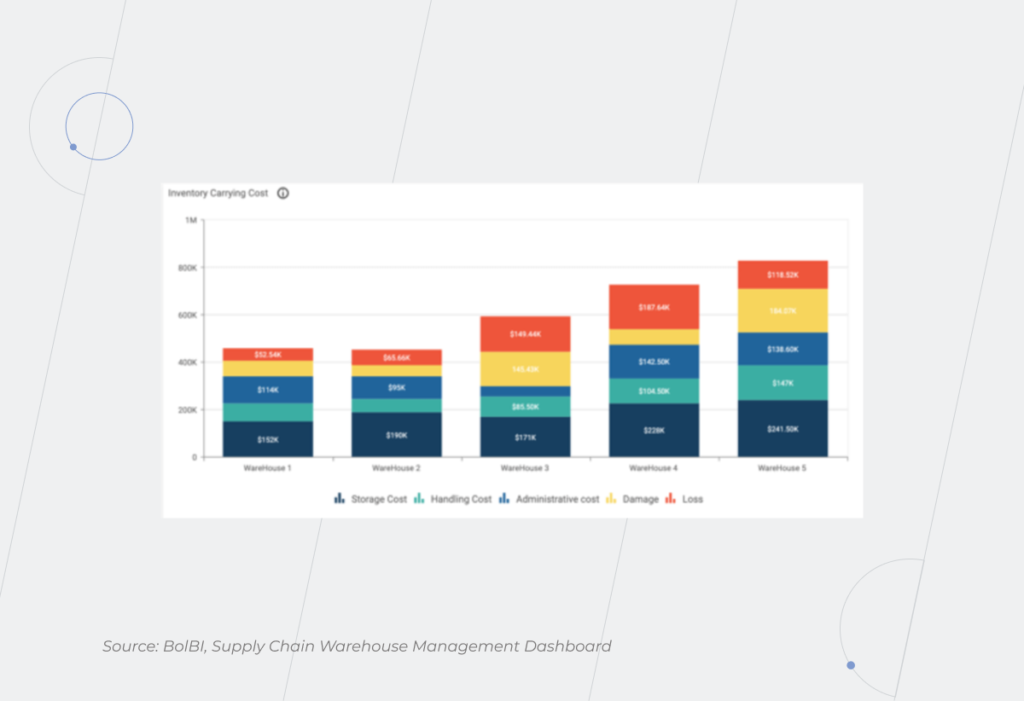
What about warehousing? Poor SCM can lead to a lack of materials and products and, in turn, failure to fulfill orders on time. On the other hand, every piece of inventory you store costs you money. The price will be exceptionally high if the storage space is located in a country with high cost of industrial rent, like the United Kingdom, Norway, or Ireland.
Supply Chain Management

2. Finding a balance between the discounts that different suppliers offer and their level of service

For example, you buy many components for products from different suppliers at the best prices. This may seem the most profitable solution as the cost of the final product is minimal. On the flip side, you need to coordinate your deliveries so that the production doesn’t stand idle while one of the components is being delivered. How important is the speed of production over the price? Can you sacrifice greater productivity and faster outcomes to save on costs or risk losing customers? That’s where the role of Business Intelligence in Supply Chain Management comes into play– the software enables quick visualization and comparisons of proposals from various suppliers. 

3. Creating schedules for suppliers and employees

How many urgent and non-urgent orders do you have? Such information is usually kept in mind of people, on paper, or in Outlook at best. But if you produce various types of one product, you should track the production run for each type as you first have to produce one type of goods, stop the line, reconfigure it to make another type of goods, and restart the line. It’s challenging to manage such a complex process efficiently without real-time data visibility. It’s one of the points where you can benefit most from the Supply chain management and business intelligence duo. Schedules for all employees who can track their actual status are the key to the timely execution of tasks.

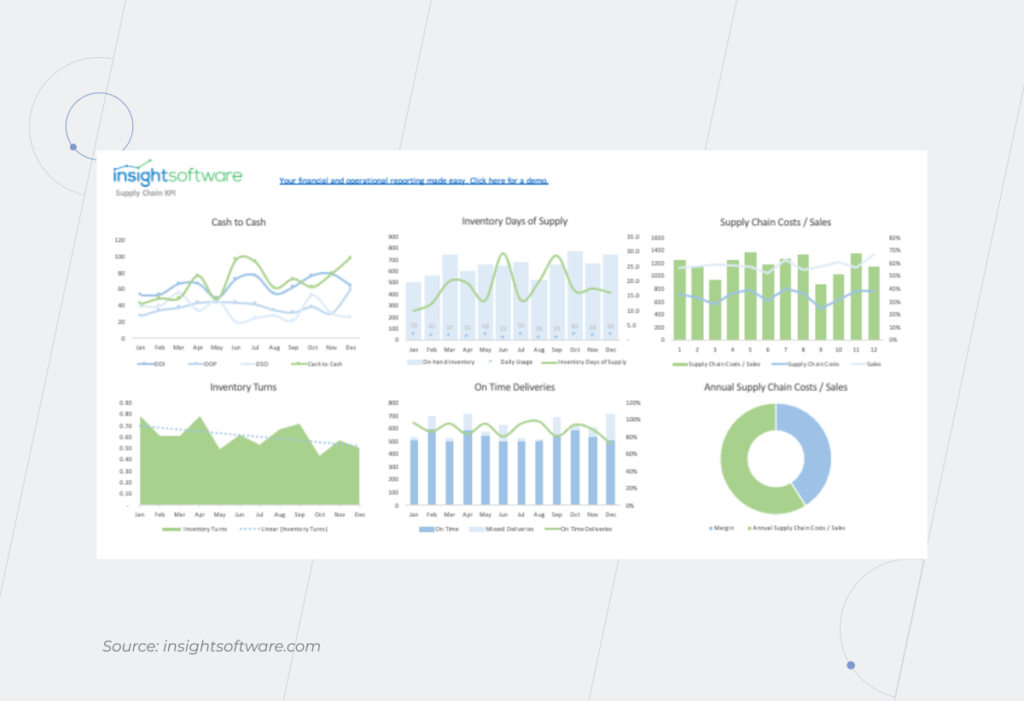
4. Building an integrated and scalable KPI tracking system

Without a proper analysis of your supply chain performance, it is impossible to understand whether you’re moving toward your goals and at what speed. And BI helps you conduct this task. Take advantage of creating a custom dashboard that contains both common KPIs, such as days of supply, fill rates, inventory velocity, turnover, etc., and your specific KPIs based on your organization’s areas of focus. 

For example, what if you’re concerned about data on the number of negative product reviews and returns? In this case, you can add the information on the number of defect cases to this data and create a unique KPI to track product quality. Moreover, the BI solution allows you to collect the information from different sources, both external (outside research, customers’ feedback, social media, etc.) and internal (ERP, IoT devices, logistics and transportation management systems, etc.) to get results.
Business Intelligence

Business Intelligence support for supply chain management: operational level

This level of SCM includes your daily routine tasks such as monitoring logistics, production scheduling, ensuring enough materials are available for production, etc. In the supply chain, you need to correlate the sales and procurement plan with production capabilities and maintenance service. You can plan everything… in theory. But what if there’s a shutdown at the factory? What is your plan B? How do you correctly relocate capacity to meet obligations to the customer on time?

Consider implementing Business Intelligence in supply chain management for:

1. Monitoring logistics activity

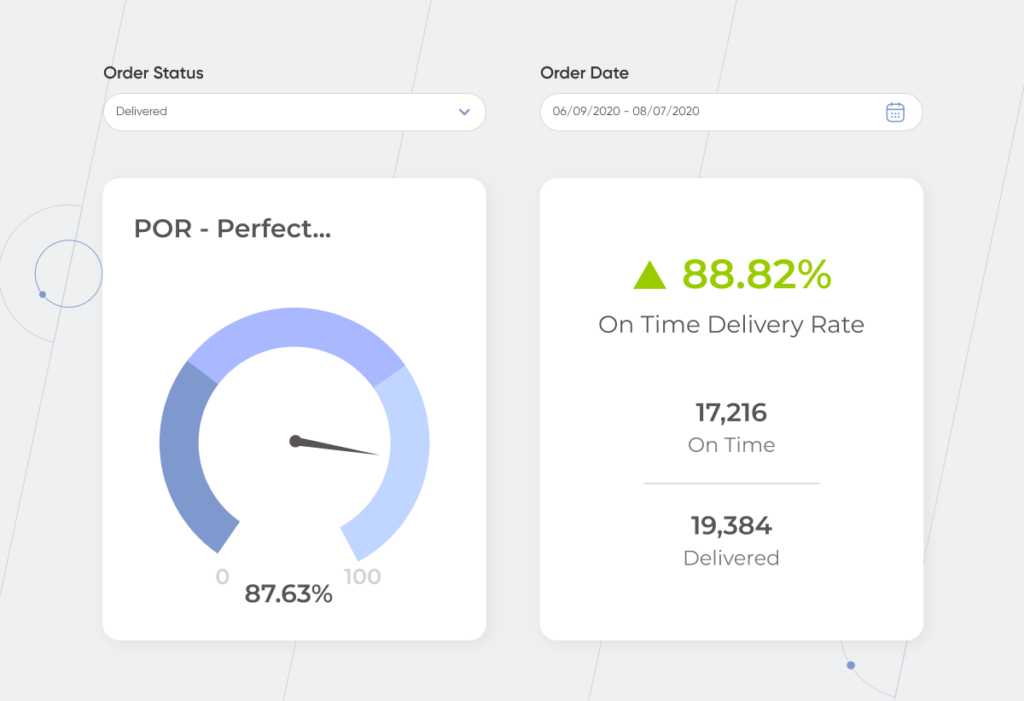
There’s no company with a 100% on-time delivery rate. At the same time, this indicator is of major importance for buyers – 73% of them are ready to cut off relations with suppliers if delivery problems take place. That’s why it’s no wonder that all organizations want to improve their service. In this case, Business Intelligence logistics can make it possible to determine the routes on which delays occur more often and uncover their possible causes. The technology helps to identify bottlenecks and minimize unnecessary delays and holdups.
 Business Intelligence

2. Managing incoming and outgoing materials and products

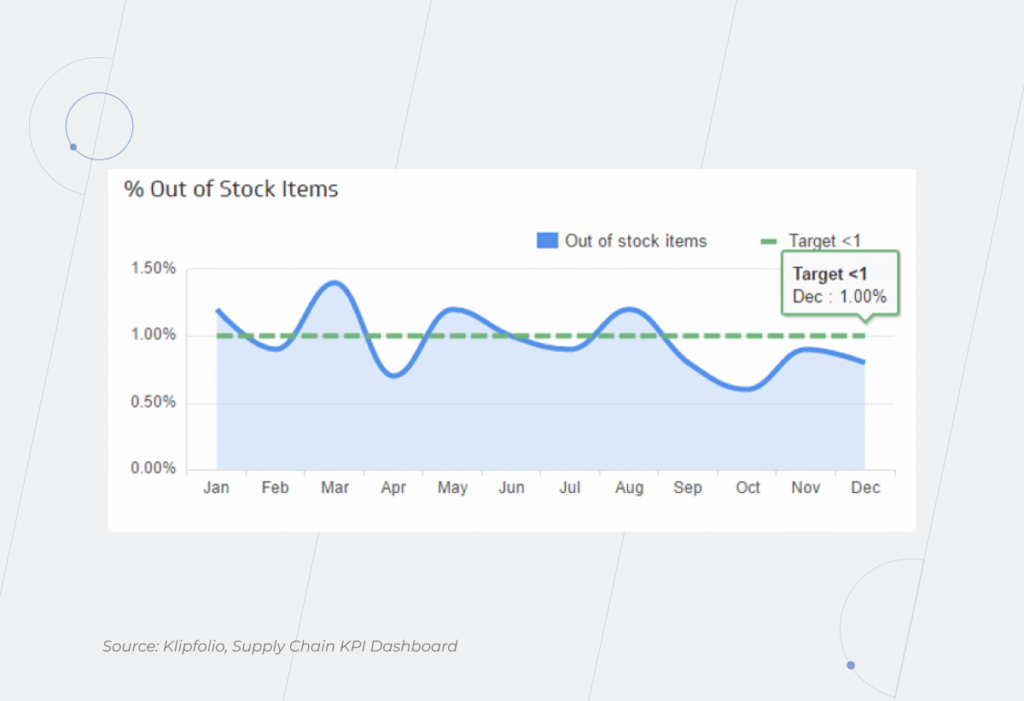
You should be ready to deal with unexpected issues that require a quick reaction at an operational level. For example, if you receive raw materials of poor quality, you have to settle the loss with the supplier and find another partner who can deliver you the materials of the desired quality. With BI, you have a dispatch console – a part of your real-time dashboard that shows available suppliers. The technology also provides you with other actionable information that helps answer a bunch of questions such as: Do you have enough raw materials? How many loads are supposed to be picked up tomorrow but haven’t been assigned yet? If you don’t have a tool to track this information, you can face the risks such as raw material shortages, cargo theft, failure to deliver products on time, etc. Leverage Business Intelligence for improving supply chain risk management. 
Supply Chain KPI

New legal requirements for the supply chain were introduced in 2022 in the EU. According to them, companies are obliged to check their suppliers for human rights violations, trade of conflict minerals, etc. Without a BI solution, the fulfillment of these conditions is time-consuming and almost impossible. Business Intelligence technology forms a digital twin of the chain, so you can easily check any supplier at any moment.

Following strict compliance requirements is especially important when dealing with dual-used substances. For example, precursors that can be used for producing paints as well as explosives. Registration of such substances is a prerequisite for their production. 

Where and for which product you’ve requested approvals, what stage you are at, and what documents still need to be prepared? You can spend tremendously long time running a table in Excel for such data, and naively believe that you’ll never make a mistake. Or you can create a database and leverage the BI system that provides access to the portals where there is information about the release of new precursors, and automatically sends you notifications about new or updated requirements for the paints you produce. 

Fuel your supply chain management with embedded BI to get through the digital transformation journey easier

The implementation of BI in supply chain management is an integral part of the DT, without which the normal functioning of a modern enterprise is not possible. 

One of the great things about BI solutions for supply chain management is that they are integrated into your everyday applications. Your employees can gain insights within their well-known app without changing their workflow. BI implementation in the SCM allows you to manage risks by raising transparency.

Get in touch with our BI experts to leverage your business data in supply chain management and get a robust Business Intelligence foundation.
Nine Benefits of Managed Cloud Services within OVHcloud

Over the last few years, cloud technology has felt a swell in demand due to increased awareness of its potential. Businesses move closer to the cloud and pass up bulky, on-site set-ups. But unless you’re a tech-savvy company, you may not be familiar with the nuts and bolts of running a cloud ecosystem. That’s when the experts of managed cloud services come in.

Managed cloud services allow companies to hand over (partially or completely) the responsibility for their cloud resources and operations to cloud managed service providers (MSPs). This way, any company can easily tap into the value of cloud computing without having to become an expert or hire a team of cloud pros.

Today, expertise-free access to cloud computing power is a growing field with an increasing number of businesses flocking to MSPs. In 2021, the cloud managed services market size stood at $86.1 billion. Driven by rapid digitization and tech innovation, it is expected to leap to $139.4 billion by 2026. According to other resources, the market will exceed $282 billion by 2023.

Despite the discrepancy in prediction numbers, one thing is certain, the managed cloud landscape will progress in leaps and bounds in the years to come. Today, we’ll lay out the managed cloud computing benefits and drawbacks by looking at one of the best European cloud providers — OVHcloud. 

Next-generation IT managed services for OVHcloud infrastructure

OVHcloud hardly needs an introduction. As the leading cloud provider in Europe, it operates 400,000 servers in 32 data centers across four continents. To simplify the management of this complex infrastructure for the customers, OVHcloud has a wide network of Advanced Partners — certified cloud managed services providers who assist customers in handling cloud challenges by administering various stages of their cloud journey. 

In particular, *instinctools as an Advanced OVHcloud Partner, helps users master the cloud technology by:

  • automating cloud infrastructure and providing built-in tools and services (e.g. managed Kubernetes services);
  • conducting database management and infrastructure, including set-up, backup, scalability, and security within the public cloud;
  • providing 24/7 business support, including critical incidents;
  • accessing turn-key managed infrastructure solutions among others.

This whole layer of governed cloud functions onboards cloud users, making cloud transformation pain-free and accelerated. However, there are more benefits, which prompt companies to leverage managed services within OVHcloud.

Cost reduction

When talking about the cloud advantages and disadvantages, cost concerns often come up as a controversial point.

There’s a common belief among customers that having in-house IT infrastructure is cheaper than leasing cloud capacity. The thing is that they often come to this conclusion by comparing the monthly fees for IaaS (Infrastructure-as-a-Service) against the price of buying the server. What’s the point of moving to the cloud, if the server costs, say, $10,000, and the cloud subscription over a three-year period exceeds that number? 

However, what slips through the cracks in this kind of reasoning is that the upfront purchase price of the server does not reflect its total cost of ownership. Even if you already have a data center to store your servers there are still ongoing operating costs to maintain it.

As a rule, problems with uncontrollable growth of cloud costs are caused by lack of expertise in cloud resource management. In order to maximize the benefits of the cloud and not to overpay, it is necessary to turn to a reliable vendor that delivers managed cloud services and helps optimize your budget.

Experienced MSPs provide you with a good grasp of your cloud efficiency by identifying excessive resources or applications. Moreover, they ensure unprecedented scalability of your cloud resources, enabling you to pay only for the capacity you use. That way, you can automatically scale up and down your infrastructure when the network usage, storage, or traffic is above or below the regular threshold. 

cloud managed services attachment

Round-the-clock support

Continuous support is also among the core cloud computing advantages. The importance of managed services lies in instant guiding and on-demand consulting. MSP support desk is manned 24 hours a day, 7 days a week, 365 days a year with a team of experienced system engineers ready to guide in the shortest time possible. Along with instant response times, users can also expect immediate issue resolution. 

Quick turnaround times are also achieved through constant remote assessment, monitoring, and rectification of your cloud infrastructure by the provider. As a result, you can avoid costly downtimes without dispatching an in-house cloud engineer.

Robust and flexible infrastructure

The lack of flexibility is inexcusable for forward-looking businesses who are looking to deliver great and next-gen user experiences, accelerate development cycles and operate in sync with evolving markets. To do that, enterprises require steadfast and adjustable infrastructure that can run any workload in hours with no forklift upgrades. 

Managed cloud computing enables users to make service changes within minutes, improving uptime and the efficiency of business systems. As-a-service billing, ubiquitous access as well as security compliance also contribute to enhanced flexibility for businesses.

Enhanced change management 

When talking about cloud server advantages and disadvantages, cloud change management is certainly on the bright side. Unlike traditional update management, MSPs promote agile-friendly change enablement thanks to higher transparency and accountability of changes made. Managed cloud changes also allow teams to avoid external authorization (which is often excessive), gaining more autonomy and reducing deployment time for regular changes.

Managed in the cloud, even complex updates like performance improvement can flow seamlessly thanks to a rich built-in selection of automation and deployment tools. MSPs also foster visibility across the infrastructure, which means that low- and medium-risk changes can be performed without lengthy and painstaking approval rounds. 

Automated updates and patch management

With the cloud environment constantly evolving, keeping your infrastructure up-to-date is among the toughest challenges. Managed service providers, however, eliminate the need to manually update your computing resources. Instead, they suggest timely automated system upgrades to prevent costly downtimes, security breaches, and other mishaps.

Speaking of other cloud computing benefits and drawbacks, MSPs also ensure automatic security patches to keep hackers at bay, fix performance issues, and avert other critical issues. Managed cloud computing lets users automate all phases of patch management – from scanning to reporting, offloading the work of on-prem patch management with no costly local patching servers.

This way, users avoid the complexities tied with manual patch management. Automated patch deployment also boosts the security of on- and off-network devices, minimizes downtime, and increases user productivity.

Cybersecurity support

Managed cloud hosting also helps safeguard sensitive and business-critical data by implementing a holistic cybersecurity system. Visibility of your IT infrastructure coupled with a robust set of in-built cybersecurity risk management features and practices allows MSPs to proactively spot malware attacks, API vulnerabilities, and others. Moreover, advanced security measures such as the latest antivirus software, encryption, and multi-factor authentication are also a traditional part of the MSP security ecosystem.

Disaster recovery-as-a-service

No company can remove all risks linked with possible outages and power failures. Instead, business owners need an effective disaster recovery strategy to restore data and get their computer systems back on track. The sooner your data is restored, the less compromised your business processes will be. Yet, the stats are discouraging — over 50% of small and medium-sized businesses don’t have an incident response plan.

Disaster recovery-as-a-service (DRaaS) enables business owners to secure business continuity by quickly eliminating mobility and portability challenges as well as rapidly recovering data in emergencies. Managed DRaaS is completely accountable for the implementation and management of data protection and recovery with no additional spending on software licenses or hardware. 

Automated backup is equally vital to recover your data quickly and without disruption. Sending a database copy to secondary servers further amplifies your cloud security with no additional workload for your tech staff. This way, fully managed cloud backup solutions eliminate the burden of deploying, operating, and maintaining an enterprise backup service every 24 hours with all assets being constantly protected and monitored. 

Comprehensive SLA

A Service Level Agreement (SLA) outlines the mutual responsibilities of both providers and users, while also ensuring availability of the system, latency, component reliability, and necessary warranties. SLAs facilitate a transparent bond between providers and users as well as protect your cloud assets and inform you about the associated risks. In the long run, a transparent level of service and anticipated expectations will save both parties money and drive satisfaction for not only the parties directly involved, but more importantly, the end-users.

Every vendor’s SLA is different. Managed cloud service providers tend to make an exhaustive list of specificities that cover all possible aspects of collaboration. The latter may include but is not limited to, data ownership, cloud hardware, and software, customer responsibilities as well as data recovery and backup, among others. This level of transparency sets your cloud journey up for success and addresses salient issues connected with your organization’s security.

Compliance support

Compliance audits send chills up the spines of online retailers, healthcare providers, financial institutions, and other highly regulated industries. Standards in data security, integrity, and privacy can be tedious to score and maintain in cloud deployments. But, according to IBM, businesses that embraced MSPs benefit from the enhanced capability to meet compliance requirements. That’s why 76% of respondents cite compliance reporting among the key benefits of managed cloud services.

A cloud managed service provider can help data-sensitive companies to define and manage their cloud processes in accordance with legislative regulations, including HIPAA, PCI-DSS, and others. Based on specific standards, MSPs put a range of compliance features in place to help business owners avoid costly regulatory fines. 

Leveraging the synergy of the right cloud provider and MSP

Due to the pandemic-associated impacts, businesses are now more willing than ever to streamline their operations and build a resilient IT infrastructure. The success of your cloud migration and use depends largely on cooperation with an experienced managed services partner certified by your cloud provider. 

Thus, instead of outsourcing emergency response, many companies hand over continuous cloud infrastructure optimization to MSPs. This allows executives to focus on mission-critical tasks while ensuring the safety and cost-efficiency of their cloud assets.

However, not all cloud providers are the same and neither are MSPs. To support your desired business outcome, you need to choose them carefully based on your objectives. Together with one of the best cloud providers in Europe, OVHcloud, *instinctools takes cloud computing services to the next, seamlessly automated level. As an Advanced OVHcloud Partner, we assist our customers in harnessing unrivaled OVHcloud potential and offer a winning price-value ratio, ensuring that you can make the most of managed cloud services. 

Cloud Change Management: How to Make Changes Work For You

Successful enterprise management goes hand in hand with change. The latter allows businesses to stay resilient and keep up with evolving customer and internal needs. However, if these changes are poorly managed, they can cripple your serene existence by incurring project delays, budget overruns, dips in productivity, customer dissatisfaction, and other painful mishaps. Alternatively, change management in a cloud environment can help you cope with the shifting landscape and blaze a trail of less worry and more success.

The problem isn’t change, per se, because change is going to happen; the problem, rather, is the inability to cope with the change when it comes.

Yet, cloud-based change management doesn’t make us immune to the common pitfalls of modifications. Therefore, careful planning for the possible changes is a mandate in any case.

According to McKinsey & Company, the failure rate of change management initiatives is around 70%. Today, the stakes are even higher as changes are occurring at a faster pace.

In this post, we’ll flesh out the difference between cloud change management and traditional change management in IT infrastructure, as well as share some actionable tips on making your cloud change management policy more effective.

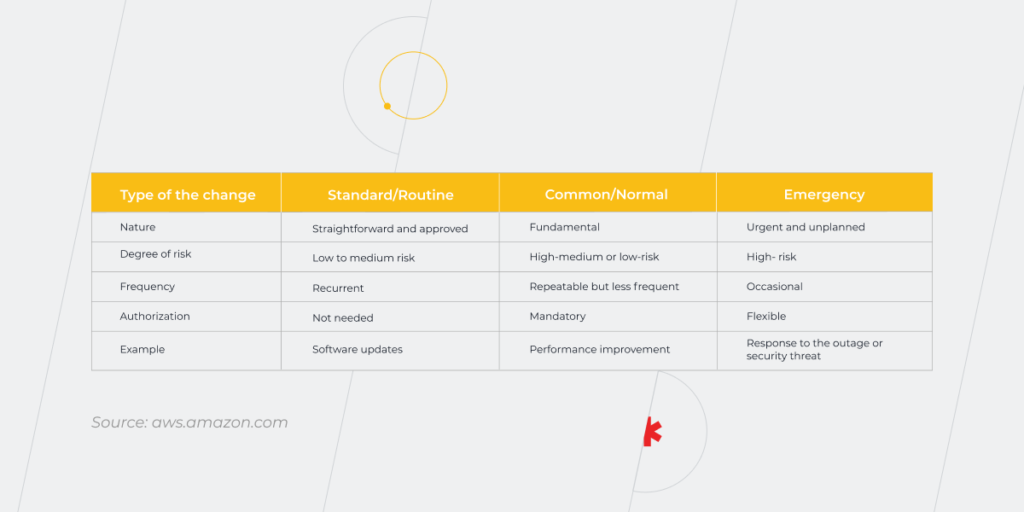
But first, let’s discuss the types of changes each business has to deal with when modifying software applications.

Change management basics: types of changes

Change management has evolved into an incredibly important, but often misunderstood concept in the IT industry. Essentially, it refers to a set of policies and actions that ensure change is properly managed throughout every stage of the process. The importance of consistent change management is obvious as it helps you minimize the risks of change collisions and roll out updates without affecting your operations.

According to Prosci’s Best Practices in Change Management report, an effective change management strategy allows 93% of organizations to successfully achieve predefined objectives. But how to ensure this strategy works? That’s where cloud change management comes in.

Let’s see how cloud technologies can help you tackle the three types of updates that commonly occur.

Cloud Change Management

Within the traditional change management models, all three groups of modifications require resource-intensive manual input. In this case, the focus is placed on disruption and static plans with updates booked in a specific window. Therefore, business owners lack flexibility and are more susceptible to the human-error factor.

Conversely, common change management models in cloud computing bring more automation and make update roll-outs trouble-free. That said, let’s take a look at how different types of changes are addressed within the two approaches.

Traditional vs cloud change management

Launching continuous and reversible changes is core to driving agility. But do standard management practices pass muster at all nowadays? Let’s see.

Slow vs high speed of change implementation

Introducing any type of an update into a traditional setup can often be unnecessarily slow, process-heavy, and overburdened. Let’s not forget bureaucratic and painstaking planning related to the high risks of traditional change launches. Lengthy, manual approvals can take lots of time to document and include in a ticketing system. Also, changes have to be processed through a slew of committees, levels of management, and mandatory waiting periods. As a result, any type of change depends on the people with little to no awareness of change reasons, its impact, and the cost of delay.

However, it’s different for cloud environments where a built-in selection of automation and deployment software eliminates the need for robust tech infrastructure and related effort to introduce the update. The cloud also allows us to transform common changes into normal changes by removing complexities linked with the planning and implementation of such changes.

This advantage can be better illustrated by the hardware migration that is common in the traditional model. Without cloud capabilities, you have to perform rigorous upfront planning, including necessary investments, setup, and app migration, just to boost your computing resources. Within cloud management, you can step up your resources just by tweaking and executing your code. This way, the complex hardware overhaul is treated as the standard change performed virtually.

Change control vs change enablement

Once an innovation driver, traditional command-and-control practices are now considered a burden for modern DevOps-based philosophy. And, since Agile and DevOps are now the acknowledged benchmarks for cloud development, the control aspect must give way to an enabling mindset. The cloud, on the contrary, resets your perspective to the best practices of change enablement.

In this case, all innovations are effective, safe, and timely, while ensuring compliance and risk management. Cloud-based change enablement minimizes the risk linked with introducing changes by automating them and making them more visible. Less rigid control also means that low-risk models can be fully automated, while high-risk zones will be forwarded for approval.

Manual scaling vs autoscaling

Traffic spikes are one of the reasons why your digital assets may break down due to inefficiently scalable infrastructure. For an existing application, manual scaling is a daunting task that may require upfront planning, code changes, software updates, and a lot of monitoring.

However, scaling your application in the cloud factors in all the minute-by-minute changes in demand and traffic by automatically adjusting the app’s resources to avert performance problems or outages. This means you can scale up, down, and back in a few clicks on demand.

CAB change authorization vs greater autonomy

Traditionally, fundamental and costly changes are submitted to a Change Advisory Board  (CAB). The CAB acts as an advisory committee to help guide the change management process and to ensure the success of the project. This lengthy approval process is typically done in the name of increased quality and added scrutiny.

However, as demonstrated in Accelerate by Nicole Forsgren, external approvals take a toll on deployment frequency and restore time. In contrast, the cloud computing change management process allows for more autonomy by promoting peer reviews. When done in the cloud, all changes lean towards early and automated detection, visibility, and fast feedback. Besides, monitoring dashboards allow for greater autonomy for the teams since higher-level authorities have a holistic overview of regulation compliance, metrics, and others.

Manual risk assessment vs automatic risk management

According to IBM, changes are among the main reasons for service outages. And with more companies migrating to the cloud, the volume and rate of change have gained unprecedented heights. This shift makes manual risk assessment a dicey proposition. Moreover, manual rollback will require some hypothesis testing, which could stretch your outage for hours or days.

Automation, on the contrary, can dramatically minimize the business risk associated with change as most cloud services allow for auto-recovering from failure and instant rollbacks.

As you can see, cloud-based change management makes all the difference by allowing you to introduce all types of updates in an automated and agile-friendly way. Moreover, a record of change also acts as the main troubleshooting reference when dealing with emergency changes.

Now that we’ve compared two change management approaches, let’s see whether cloud migration is worth it for change management.

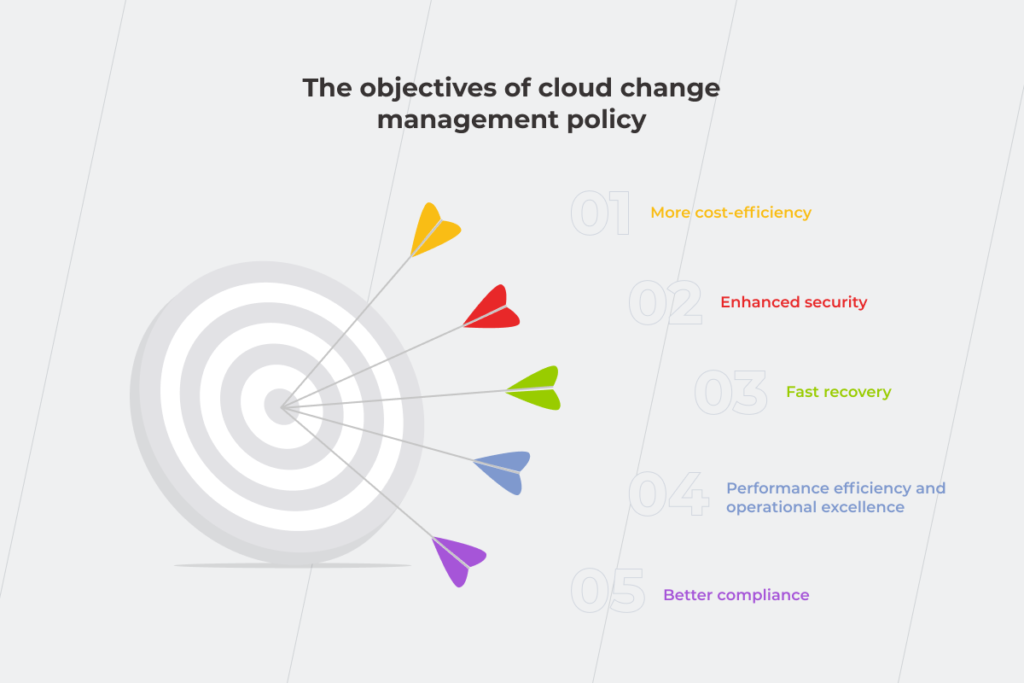
The objectives of cloud change management policy

An overriding goal of the change management process is to ensure all updates leave your critical processes and assets intact as well as meet internal guidelines. Cloud transition can take these expectations to the next level, while also providing added business value.

Cloud Change Management

More cost-efficiency

There are quite a few ways to optimize your cloud bills and reduce the total cost of ownership. You can leverage your cloud resource on a pay-as-you-go model. This computing billing method allows organizations to pay exclusively for the data they use each month (just like the electricity bill). Also, cloud environments help bring down the cost of on-prem infrastructure by taking it to virtual servers.

Enhanced security

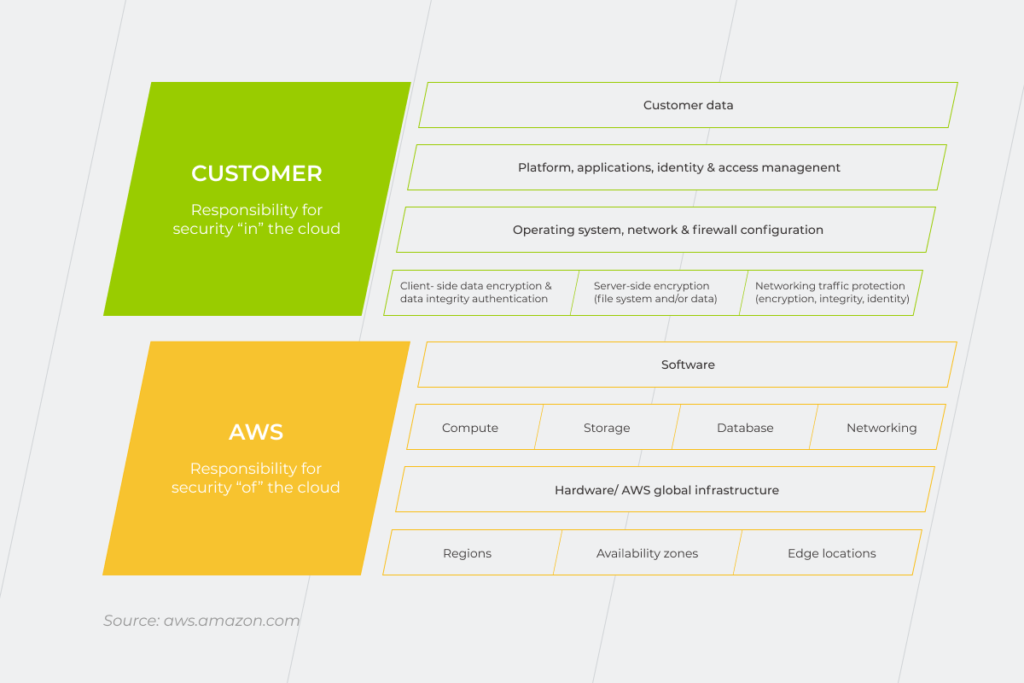
Cloud infrastructure also has a positive impact on data security compared with local data centers. Thanks to a shared responsibility model, your cloud provider takes over infrastructure security, while your in-house team shoulders risks linked with policies, configurations, and data migration.

Cloud Change Management

Fast recovery

Your cloud space can be set up to provide alerts on the changes to the environment (e.g. monthly updates, one-off patches, etc.). More visibility can also be facilitated by keeping all configurations in version control. In both cases, your engineers won’t have to allocate time on tracking havoc-wreaking changes.

Performance efficiency and operational excellence

Although specific cloud efficiency yardsticks will vary by company. There’s one thing that holds true for all cloud infrastructures. And that is the luxury of more flexibility and scalability when it comes to your computing needs. In doing so, you can easily spin up your environment to accommodate increased business needs.

Better compliance

Almost every company now abides by some form of governmental regulation, be it healthcare or finance. Therefore, any update is subject to rigid requirements imposed by HIPAA, PCI-DSS, or others. Cloud change management is inherently compliance-friendly, easing the regulation strain on your organization. Thanks to authentication and access controls, data compliance, encryption, and other cloud practices, you can support industry-specific compliance easier than with on-site change management.

How to do cloud change management at top speed?

Change is a blessing… unless it takes an eternity. The hallmark of cloud change management is automation (and, ultimately, speed). But it takes a bit more to accelerate your automated change regimen. Here’s how you can speed up change management processes in the cloud without sacrificing testing or compliance:

  • Bring more automation for added speed

The more you can automate the validation flow and other tasks in the cloud-powered environment, the more transparency you get. Saving more time. Cloud tools that can handle configuration updates and follow the approval process can be tweaked to accept or reject new configuration changes. Automatic auto-approval of low-risk changes, for example, will minimize the effort and boost change management.

  • Leverage service catalogs to facilitate compliance, promote auto-approvals, and minimize exceptions

Service catalogs will amplify the alignment of your cloud infrastructure with your business requirements. They will allow you to manage your deployed IT services by implementing enterprise standards, introducing new technologies, and imposing default regulatory requirements. This service also provides consistent management and compliance, giving you the ability to quickly deploy only the approved IT services you need.

  • Connect changes back to a user story to prioritize the customer

A user-first mindset is a cornerstone for making the most of your changes. That is why those changes that aren’t fit for auto-approval should be retraced to a user story to assess the value it provides to the end-user. This practice will also help you achieve a complete audit trail, preventing added costs for shutdown resources and similar instances.

  • Have corporate policies in place and secure them with automation

Since some services might not be listed in your catalog, it’s important to ensure integrity and privacy. You can do that by establishing policies that will be set in motion automatically. This means the system can send notifications each time a specific error pattern is entered into the infrastructure (e.g., EC2 instance with no tag).

  • Adopt DevOps practices and tools to amplify change management

DevOps and fluid change management go hand in hand. Therefore, new changes should ideally be introduced through a stable flow of continuous integration and deployment to eliminate friction between team hand-offs. Then, a powerful combo of DevOps-minded teams and cloud automation tools will further bolster automated configuration management, making your change routine faster, more reliable, and enabled. But keep in mind that an ideal set of automation will vary from cloud provider to cloud provider.

On Cloud Nine

Cloud technologies have revolutionized the way businesses deliver services. Change management, in particular, has seen a makeover with the advent of cloud computing. From autoscaling to better enablement, effective cloud change management can eliminate the internal chaos of introducing standard modifications and nurture more agility across departments.

If you’re struggling with your cloud transition, *instinctools experts are ready to help you with change management implementation in the cloud.

6 Hidden Costs Of Cloud Migration

Control over expenses has always been one of the main promises of cloud computing. Unfortunately, cloud migration is far from a simple process. Without rigorous planning and an in-depth understanding of how it should be done, companies may run into pitfalls they didn’t initially expect. 

According to Capita, 56% of the surveyed IT decision-makers admit the cloud is more costly than they thought. Yet, the majority (86%) of respondents are satisfied with cloud computing. For more than three-quarters (76%) of organizations, moving to the cloud has led to an improvement in IT service levels, while two-thirds (67%) report the cloud has proven more secure than on-premise.

These numbers clearly indicate two things. The first is that the benefits of cloud migration are compelling enough to outweigh its downsides. The other one – enterprises should know exactly what to get ready for.

Cloud migration issues you haven’t been aware of

Vendor lock-in

There are situations where the cost of changing a vendor is so high that the customer is unwillingly stuck with the original vendor. Remember the early days of iTunes when Apple locked consumers into using the service because music bought via iTunes could only be played within the iTunes App?

The same ‘lock-in’ can take place when it comes to cloud service providers. There are good reasons to prove why this is bad. It might be the inability of the current provider to meet the new requirements of your growing business. Or, if your cloud provider goes out of business, your servers are gone too.

The truth is that most cloud migrations if planned and executed diligently, go pretty smoothly. However, if something goes wrong, cloud-to-cloud migration has become quite big of an issue. Here are some tips to mitigate vendor lock-in risks:

  • do your homework: figure out your cloud migration goals, assess your current IT situation, determine necessary cloud components;
  • make an ‘exit’ plan: no matter how weird planning to quit may seem at the beginning of your cloud journey, it’s an important step to protect your company in case your ‘plan A’ goes adrift;
  • maximize the portability of your data by avoiding proprietary formatting and make sure that your cloud vendor provides a way to extract data without difficulty;
  • consider a multi-cloud strategy to be able to choose the best offering from each cloud provider;
  • implement DevOps tools to maximize code portability.  

Overprovisioning

The word “provisioning” speaks for itself. As much as stocking up with essentials works for camping, it can also be perfectly applied to cloud computing, except the essentials in this case are not thermoses, sleeping bags, or tents. Provisioning is equipping cloud instances with everything it needs to run IT services.The problem is  there’s always a risk to either overestimating your needs or underestimating them.

Overprovisioning is buying more of something than you need and paying for power you don’t use. Meanwhile, the price of what you really need and what you pay for may differ significantly. There are a couple of things you can do to avoid this expensive mistake. First of all, size up your servers correctly. It’s a good idea to set up a baseline of how much power you use and start from there, monitoring and sizing up the resources as you go. Secondly, terminate idle instances. To lower the cost of your monthly cloud bill, don’t leave underutilized servers switched on. With IaaS, you don’t pay for instances that are turned off.

A fragmented approach to the migration process

Sometimes companies view migration from the bottom up when each department manages it in a vacuum. Such a strategy impedes the transformational process and causes the duplication of effort, which, at the end of the day, increases the cost of migration. To lessen the struggle with individual departments pulling time and resources in opposite directions, you need to unify your cloud migration strategy.

We have 20+ years of experience in performing digital transformations

Straight lift-and-shift approach 

Moving to the cloud will only save you money, if you know how your applications need to be changed, that is. As tempting as it may initially seem, the lift-and-shift approach doesn’t work as you expect it to with applications that are not cloud-friendly. It usually brings about degraded performance or operational issues. Moreover, without code optimization, configuration, or refactoring there’s little chance to maximize long-term cloud cost savings. Thus, identifying the critical features of the application is the crucial thing to do before the migration. Otherwise, it’ll be impossible to take full advantage of cloud implementation.

Support issues

If an online presence is critical for your business to operate smoothly, support issues should be of primary concern. If something goes wrong with your applications in the cloud, you can’t speak directly to the engineer or expect that your problem will be resolved in no time – cloud providers have their workforce limitations and expanding customer-base. Having to wait for the issue to be resolved takes its toll in terms of downtime and inability to serve end-users.

As long as customers can’t control infrastructure from their end, they have to be really careful about choosing a trusted cloud vendor that is capable of providing the level of support and protection you need. 

Lack of extra skills

Without a doubt, a team with a strong technical background is a must for carrying out cloud migration. But it’s not only your staff’s tech knowledge that can save you money. Non-technical skills are of equal importance:

  • proper project management

Planning and tracking, organizing and overseeing a lot of moving parts are essential when it comes to cloud computing success. So these are the abilities a good project manager should possess.

  • business knowledge

Understanding core business processes and being able to explain them to programmers ensures all the necessary business requirements will be met in the course of the cloud project.

  • understanding legal implications

Employees who can provide legal advice on cloud computing are invaluable for the company. Having some knowledge of rules and regulations around cloud providers can significantly improve decision-making.

Every migration journey is unique. For some companies that were ‘born digital,’ it’s likely to be short and easy, for others – longer and more complex.

Whichever path you’re meant to take, the destination can be reached with the help of partners who embrace your uniqueness. We lead and support companies in their cloud migration journey providing IT consulting and cloud computing services. Drop us a line if you have challenges with your cloud migration project.

5 Major Benefits of Self-Service BI

IT departments crave freedom from the monotonous work of non-stop report generation. Not to mention that many employees appreciate the idea of self-sufficiency when addressing their information needs. Besides, data continues to grow dramatically and businesses have to make important decisions in an instant. Decision-makers can no longer wait around the IT department to get the latest reports. That’s when the time comes for Self-Service BI (SSBI). It requires no coding expertise, which makes it simple to run queries and create reports, enabling everyone to benefit.

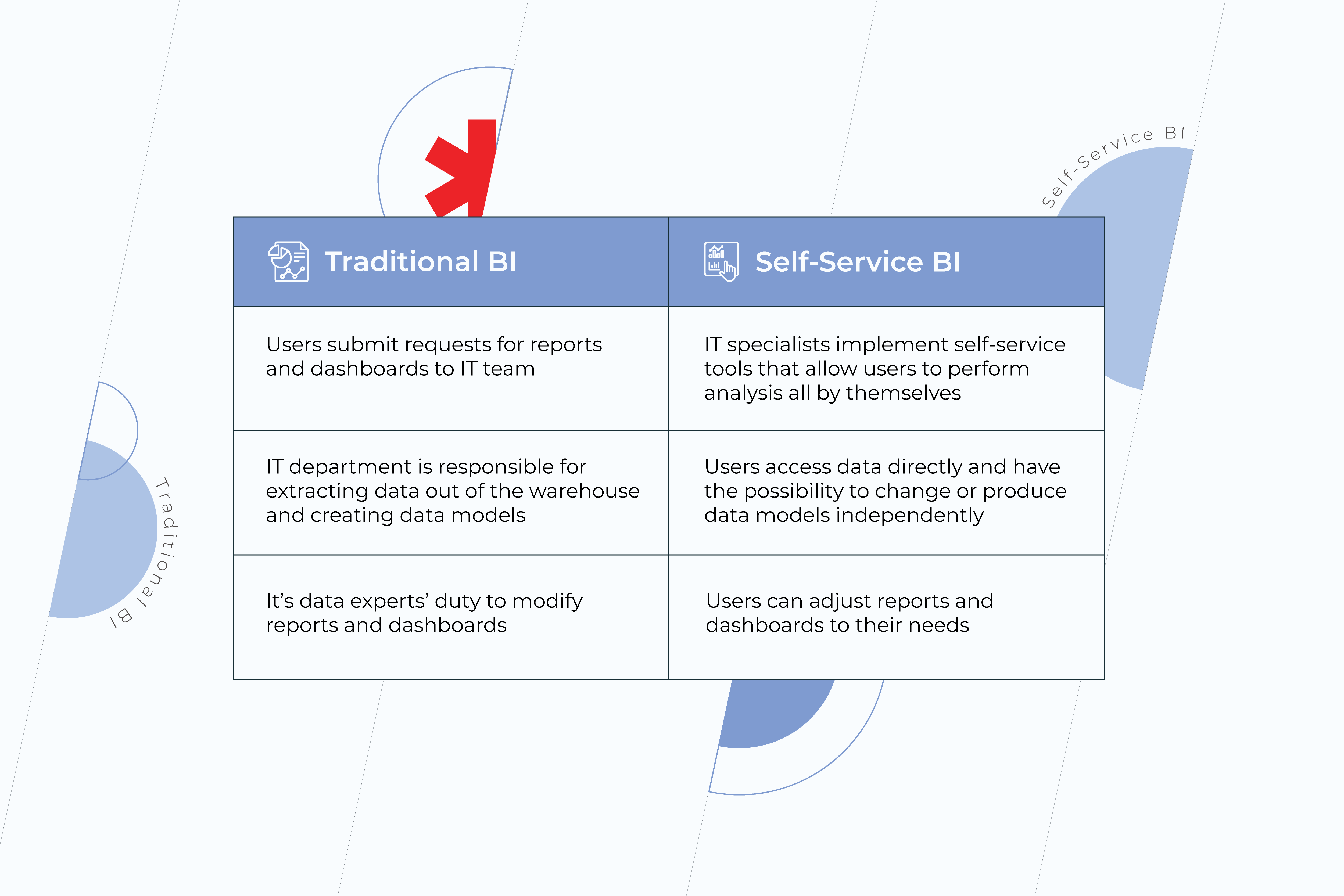
Traditional BI VS Self-Service BI

Traditional Business Intelligence services count on IT teams to reveal insights from data. For a person who doesn’t know SQL and has no experience in data engineering, it becomes impossible to benefit from business analytics and business intelligence solutions to the full extent. Since there are only a few people in a company who have control over data, business users often have to wait for ages for their reports to be done or settle for less with spreadsheets and static presentations. In contrast, self-service BI tools make the process of running queries and creating reports much easier. These are platforms that let people with no-matter-what technical background explore and make use of data on their own. Here are the major differences between traditional and self-service approaches:

traditional bi

Benefits of Self-Service BI

1. Independence from IT departments 

The main advantage of self-service BI is freedom from the problems of traditional IT reporting. From the moment SSBI is implemented in a company, users can create their own reports without involving IT staff in the process. However, the notion of independence may seem pretty generic and overly abstract. Let’s take a look at what it entails:

  • increased agility and flexibility 

When it comes to self-service, business users gain the level of agility they’ve never had before. With self-service BI intuitive tools, predefined templates, and dashboard objects, ordinary users get the possibility – unprecedented until recently – to create ad-hoc reports by themselves and share them among other employees. Yet, SSBI functionality is not limited to the creation of reports only. Users can also adapt the reports to their own needs, changing the information and visualizing key indicators in the most relevant way. Besides, self-service functions help users with data integration. When data from external sources, such as Excel spreadsheets, flat files, etc., needs to be integrated into reports, it can be done easily and swiftly.

  • improved and faster decision-making 

Efficient decision-making is impossible without understanding the story behind the numbers. Dashboards full of analytics that is hardly relevant to your question can’t be of much help. Meanwhile, SSBI software encourages end-users to better understand the underlying data and interact with it more effectively.

Your business can only benefit from timely decisions, whereas problems that aren’t handled in time can cost notably for the company. Unfortunately, a good number of employees get the required reports from IT departments behind schedule. With self-service BI, users no longer have to wait for data teams to deal with their requests. Instead, they can get all the necessary information whenever they need it and make accurate decisions, based on that information.

  • reduction of IT workload 

Data experts’ special skills and experience shouldn’t be spent on routine tasks over important projects. Thanks to SSBI, things like ad-hoc reports can be easily generated by business users themselves, while an IT team can finally allocate time for company’s pivotal issues. To sustain steady development, it’s necessary to not only answer immediate questions but be able to find the answers to big-picture questions. Thus, improve the company’s overall strategy because that’s what moves business forward. 

2. Expanded access to data

traditional bi

With the emergence of self-service BI, data stopped being the exceptional prerogative of technical elites. Providing non-technical users with an opportunity to analyze data and make decisions based on it is a huge step in the direction of a data-driven culture. It’s natural that the more employees have access to accurate and precise information – often referred to as a single source of truth – the lower are the odds of making bad decisions on all the company’s levels. And bad decisions can cost you the game.

3. Ease of use

As long as the aim of self-service BI is meeting business users’ requirements – and technical skills, let’s be honest, are not their strong suit – the solution must be truly intuitive and feasible. A good solution empowers your employees to easily query data relevant to their job role and navigate its features without extensive business intelligence and analytics training.  

4. Collaboration 

Having a single source of truth and easy access to data for all the employees inspires collaboration, which results in a powerful synergy. It happens because when representatives of different units come together they see the big picture and address the issues holistically. Indeed, context brings more accuracy to problem-solving and allows teams to make decisions faster than they used to when staying focused solely on their individual segments. In addition, efficient collaboration strengthens your teams. People become more invested as they see the impact of their individual contributions to a common success.

5. Lower costs 

As long as the cost of BI software licenses and related hardware is easy to count, it tends to be the primary focus for business people who are thinking about its implementation. At the same time, the expenditure on IT staff to maintain traditional business intelligence systems might be overlooked. Organizations that use a self-service approach in delivering analytics spend way less on IT support per BI user than those who do without self-service. Such cost reduction is possible thanks to the balance of duties. Shifting the responsibilities for simple analytics tasks from technical specialists to business users is beneficial for both. It allows the IT team to concentrate on more important areas and improve the overall efficiency by doing the things they’ve always been meant to. Whereas business users feel more committed to the projects they work on.

Moreover, self-service BI platforms can be easily scaled without major IT help, which contributes to cost savings as well.

Strengthen Your Company’s Data Culture

Self-service tools alone meet only half of the analytics challenge. At the end of the day, it’s about the people who use them. However, smart business intelligence and data analytics practices encourage people within the organization to better utilize their skills and experience, align their decisions with the company’s goals, and prevent them from making bad choices.

Don’t delay your journey towards a data driven culture! Reach out to our BI experts.

How to cut project costs: Business Intelligence VS cost overruns in construction

Cost overruns have always been one of the major issues for the construction industry. The main reasons are weak management, inaccurate estimates, design flaws, and changing orders. Ignoring these problems is definitely a dead end while addressing them is your chance to take the lead in a highly competitive market. 

Plainly put, going over budget is a direct cause of ineffective processes. Less reworking means savings, more productivity means savings, truly efficient decision making means… guess what? Right. Savings as well. Technological advancements make it possible to have real-time data that accelerate the decision-making pace, lowers the likelihood of redoing a design, and boost the productivity of a team.

So, if the first thing that crosses your mind when you think about your project budget is an “OMG” abbreviation, it’s time to use another one – BI. Business Intelligence is changing the construction industry helping companies to effectively handle managing equipment and manpower, which are pivotal for profit margins increase.

Let’s take a closer look at how it works.

Meticulous design 

Predictability becomes a critical notion when it comes to construction. It’s far easier for the team and less painful for the budget to deal with the changes at the pre-construction phase. BI dashboards provide users with the capacity to quickly evaluate the metrics of design development. If you can better track the design progress, then there will be little-to-no surprises in design deliverables.

The pre-construction teams can leverage real-time design data, tracking design progression in real-time. It empowers all parties to have the most current design information, allowing everyone to do their best work.

Moreover, with dashboard data readily available, the pre-construction team can suggest alternative solutions reducing material costs during the construction phase.

Besides, complete and detailed designs will also prevent you from major change orders, which entail substantial spendings as well.

Keeping an eye on KPIs

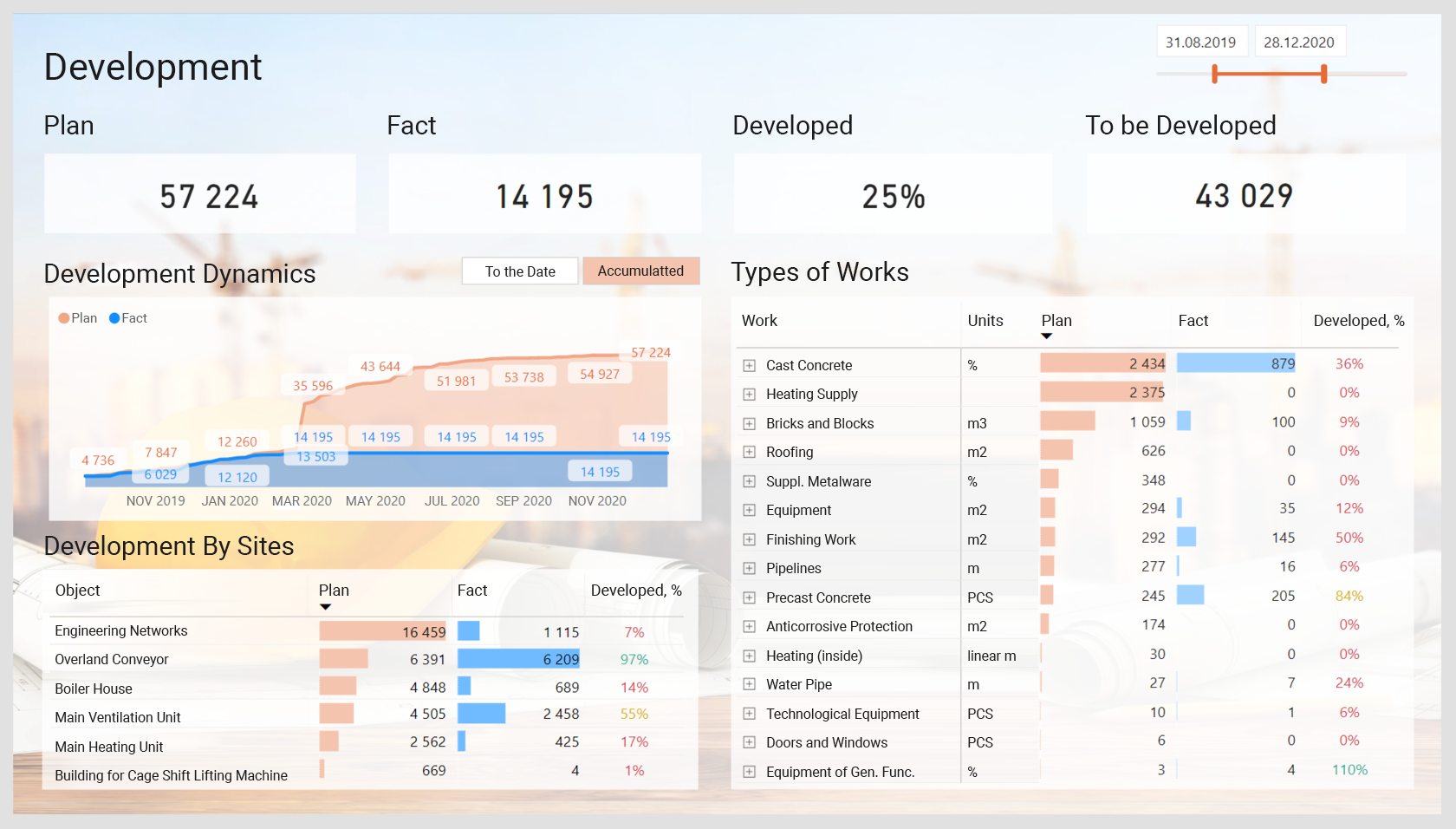
Key performance indicators (KPIs) help to measure the current state of the project and what your team needs to meet the goals. Does your project run on time? What’s your actual project cost to date? Are you keeping to your budget? What’s your current reworking cost? Are your labor costs steady? You can find answers to these and many other questions on BI dashboards. They are proved to be indispensable to control completion time, costs, and support executives in their decisions.

Development report on a Business intelligence dashboard
Development report on business intelligence dashboard.

Automation of some aspects of the job and interconnection of the office, trailer, and the field

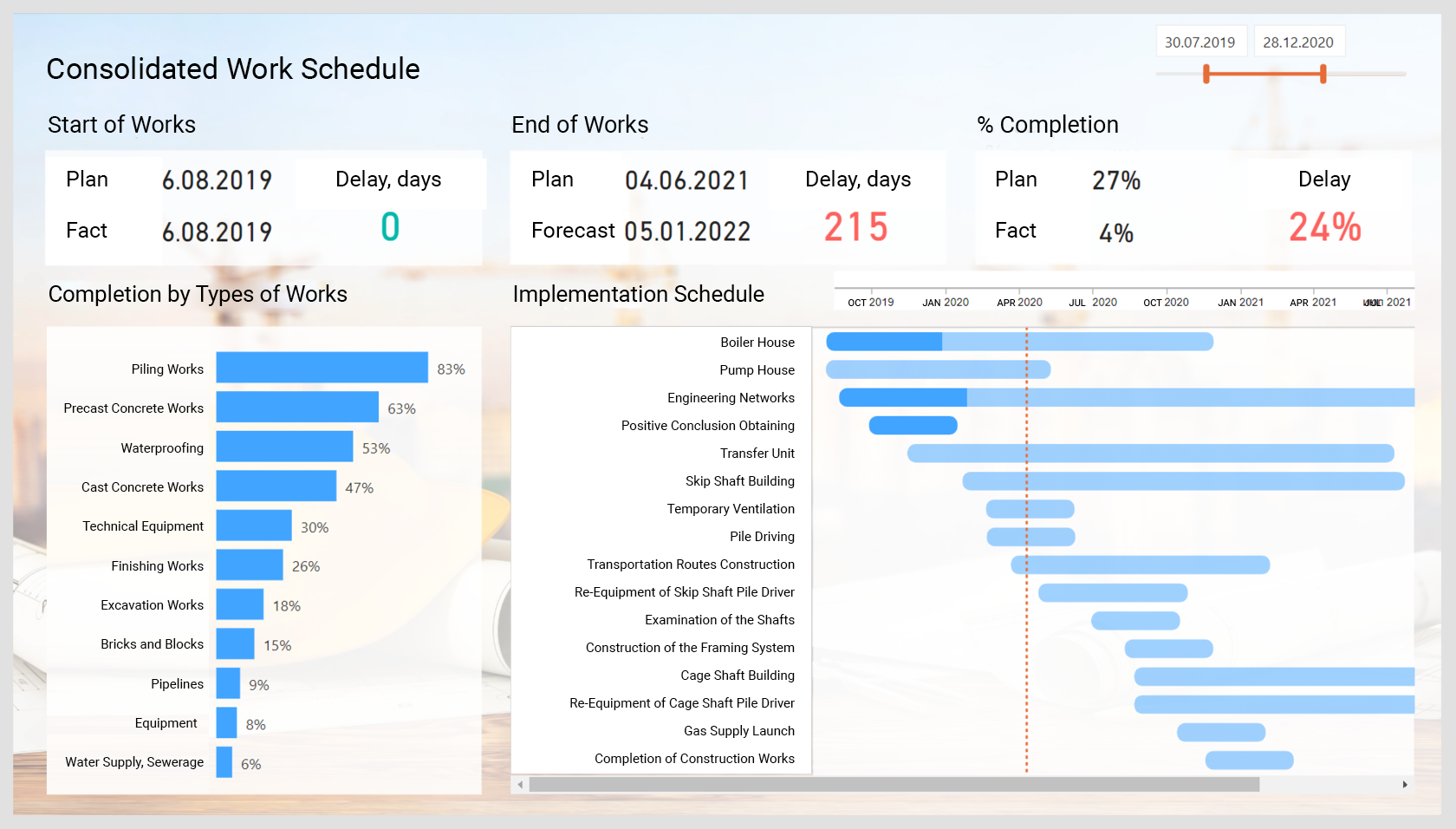
BI software can reduce time spent on the most tedious tasks, like daily reporting, unleashing human resources for actual work. Moreover, when all your data is in a single place and is available for all your team members – no matter where they are, it becomes easier to keep up with the immediate changes and turn lagging indicators into leading ones. As a result, teams will complete projects faster – reducing your labor costs not to mention the need for rework.

Work Schedule report on business intelligence dashboard
Work Schedule report on business intelligence dashboard.

Reducing downtime

Relying on manual monitoring methods of the machines increases the probability of downtime occurring. As a consequence, your project activities cease owing to the backlog in tasks that can’t be executed until the machines are back in working order. Meanwhile, monitoring heavy-duty construction equipment digitally prepares you to schedule repair in real-time. Besides, detecting faults in the line, BI tools can predict and diagnose issues early on and optimize the performance of equipment.

Site Safety

Although the connection between site safety and BI might seem less than obvious, it still exists. Real-time updates on the state of the equipment can prevent your project from damage and, more importantly, protect your staff from injures. Needless to say, timely security measures will keep your project assets where they belong.

Tracking materials

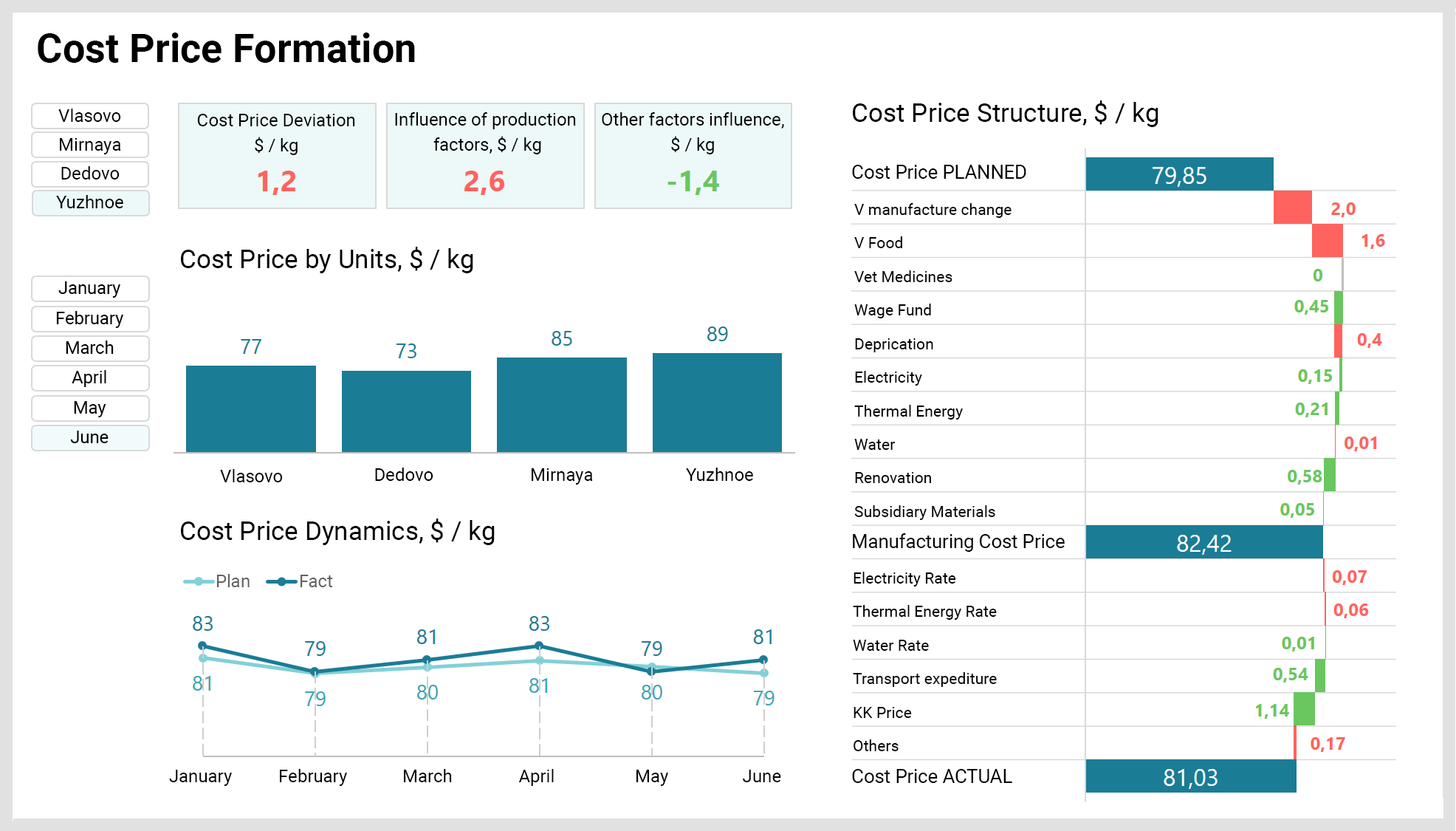
Failing to have proper insight and control on how you’re using materials could create a huge waste of resources. Up-to-date technologies help to track, manage, and control your inventories in real-time, keeping material waste to a minimum and reducing costs.

Cost price formation on business intelligence dashboard
Cost price formation on business intelligence dashboard.

Risk estimation

Retaining a risk management strategy through all construction project phases is crucial if you want to avoid serious cost overruns and stay ahead of potential problems and change orders. Having the data at hand, you can manage risk effectively and experience financial savings from all the improved productivity and enhanced decision making. 

To be continued… by you

Although there are plenty of ideas for cost-cutting in construction, that’s not all. Having deep insight into your data, you’ll definitely come up with so many more. Also, historical data from other projects will help you identify and gain efficiencies in current work and displace over-the-top spendings by increased productivity step-by-step, project-by-project.

A total makeover: how business intelligence changes the construction industry

Have you ever had a problem you couldn’t handle until after endless hours of work? The equation you’d been banging your head against the wall trying to solve and then finally realized that one of the variables was missing… So here’s the big reveal. BI is that variable for the construction industry. It glues all the data together and turns it into a seamless plan for achieving business goals, steadily paving the way from flaws to strengths.

From putting a lot at stake to minimizing risks

Construction projects go hand in hand with a high level of uncertainty both on the client’s and the contractor’s sides. And this has been typical for the industry for a long time. This uncertainty comes from clients’ unrealistic expectations and contractors’ inability to quantify the risks before trying to meet them. Contractors frequently bid on work they can’t deliver. These bids have a low likelihood of winning. Meanwhile, the effort spent on winning the bid can cost a fortune. In this case, even if the contractor is lucky enough to seal the deal, there’s little chance to meet the client’s expectations. This will eventually result in a lack of trust in the contractor.

However, the BI implementation in construction business can change it for the better. Contractors get an opportunity to make a precise and error-free scope of work assessment, balancing engineering effort with the odds of not winning the bid. They have a chance to determine the risks and apportion them fairly, involving early-stage financiers and insurers.

At the same time, clients get the amount of certainty they need and can make smarter and more informed decisions. At the end of the day, it ensures the validity of the project’s business case. Knowing the risks and being able to quantify them, clients also feel more confident about their further investments.

From delays and over-the-top spendings to delivering on time & budget

Breaking up a project into smaller, workable plans can lower the odds of missed deadlines and overspendings. BI helps construction businesses to track the pipelines of the projects and their associated budget to plan and allocate resources effectively and identify focus areas for future growth and revenue.

Besides, seeing a project in various stages of completion allows to nip problems in the bud. 

Software remains impartial and humble about the known and unknown. It means that data analysis within a BI system estimates the costs, time, and resources way more accurately than a person will ever be able to.

From backbreaking tasks to challenging ones

Vast amounts of data used to be kept in autonomous systems and not formatted for integrated use. BI makes it possible to integrate and analyze all data together. You no longer need to waste time and effort on pulling the data from multiple sources and drawing it together. If to take away this huge amount of workload from your employees they can focus on more challenging tasks.

Moreover, centralized data can be, simultaneously, sliced and diced in the most coherent manner and distributed to the relevant decision-makers. This will allow them to react in no time to the information provided. All this information can now be accessible to the team at a click both on construction sites and in meetings.

From fragmented variety to a single truth

A centralized source of data helps to avoid differences in the core information and sync the team on the business processes. It eliminates finger-pointing by making the work of the company’s units and the dataflow more transparent and clearly visible. BI custom dashboards for construction company demonstrate the impact of each party involved in the process. Architects, site managers, craftsmen, etc. get an opportunity to easily document their services in the system.  

Any combined items of information, from vendor agreements to architectural wishes, can build a single version of the truth. 

From losses of profit to staying within profitable margins

The ability to identify strengths and weaknesses allows businesses to readily define where to reproduce successful aspects or employ corrective actions before it’s too late. This is crucial to those companies that have projects with mostly small profit margins. There are many aspects where intelligent software can make a difference with better data and budget tracking, analysis of materials, inventories and equipment, collaborative working environments, and cost management.

From past data to future success

Another advantage of BI is that it allows construction companies to analyze their past projects, and make a decision about whether a new project is suitable and potentially profitable. You can track the types of contracts, employees’ performance, and see trends by area, timeframe, and job type.

Contractors can leverage the insights derived from past data to negotiate with clients and provide them with a highly probable outcome for the project. At this point, it’s much easier for both contractors and clients to come to an agreement of the most realistic deliverables of the project. So if you’re looking for a win-win situation, that’s exactly what it looks like.

Skepticism aside, Business Intelligence creates a new face of the industry, based on trust rather than subjective opinions of a few. And all the aforementioned transformations are nothing less, but components of a gigantic breakthrough the construction industry is about to make: from breaking promises to keeping them.

∞ Virtues of business intelligence that make your business smarter

Today’s business world is increasingly (and dizzyingly) complex. Traditional methods of navigation through this complexity are obsolete. C-suites admit that they don’t have enough of the right information at the right time, because their inner reports are no longer reliable.

Indeed, having data is key. But a blessing turns into a curse, if this data is not accurate or timely. Business Intelligence (BI) makes all the difference. And here is how.

1. HELPING TO MAKE DATA-DRIVEN AND FORWARD-LOOKING DECISIONS

Smart appliances and devices tell us more about consumer behavior than we could have ever imagined. The Internet of Things (IoT) has conditioned the rise and the availability of global data, which not just can, but must, be used for business purposes. Due to the power and scalability of cloud computing, we can harness and process millions of signals and clues in minutes to state what really matters. The thing is, to not only have this information, but to be able to convert it into structured and analyzable insights.
Using the data, based on customers’ own experience rather than on abstractions or mere assumptions, leads to smarter business decisions. This can’t but contribute to better financial performance. CRM (Customer Relationship Management) solutions play a crucial part in intelligent decision-making. By delivering a wide variety of business metrics they make it possible to highlight hotspots, detect processes that can be reproduced in other parts of the business and identify where there’s a need for adjustments.

2. BOOSTING SALES

It’s a fact: who owns the information… earns more. When it comes to sales, the tools that measure customers’ activity and reveal behavioral trends are priceless. They provide information that helps to make perfectly calibrated, strategically correct business decisions. BI solutions shed light on the sales process, analysis and forecasting.

3. GETTING TO KNOW YOUR CUSTOMER. FOR REAL

It’s difficult, not to say impossible, to reach customers without understanding how they interact with you. Failing to understand it means you lose a competitive advantage to your rivals. Customers don’t want to be sold to, they want their needs to be met. Constantly updating info, which is available thanks to BI technologies, helps to achieve this.

4. DELIVERING CUSTOMER-TAILORED EXPERIENCE

All the information about your customers is gathered not just to ‘be there,’ but to raise your customers’ satisfaction and improve their experience. Customer Experience is nowadays considered to be a new marketing battlefront since a lot of companies compete primarily on this basis. Being unable to give the consumer a unique product is not the end of the world, as long as you can provide them with a unique experience.
Having instant access to the information within the sales cycle encourages more advanced service responses and allows it to handle those situations where customer experience can be put at risk. Also, you can pinpoint the typical profile of your most profitable customers and see whether the resources you spend contribute to your business growth.

5. SPEEDING UP THE PROCESS OF ANALYSIS AND SKYROCKETING PRODUCTIVITY

With the help of BI technologies, real-time reports and dashboards are at hand, making the process of analysis much faster than it used to be. Routine tasks become automated, customer service is more responsive, salespeople use their time better. All of this directly leads to increased productivity.

6. RAISING RETURN-ON-INVESTMENT

As soon as you incorporate BI tools in your company, the maximization of your ROI will not be long in coming. Deepening the actual knowledge about your customers (not just making unfounded predictions or hypotheses), improving and accelerating the process of marketing analysis, increasing the efficiency of the employees contribute not only to revenue growth but also to investment optimization. Take marketing. Each campaign is tracked and measured thoroughly, which makes future marketing initiatives more effective and profitable. In other words, due to careful analysis of the information and the visibility of it, marketers will know for sure how to allocate the budget.

7. CUTTING DOWN ON EXCESS INVENTORY

Usually, companies carry a lot of excess inventory, which is costly. They carry more than needed, being afraid to lose their customers’ loyalty in case they’re out of stock. But with the help of BI solutions, you can get more accurate on demand for inventory and, thus, erase millions of bottom-line costs to help the profitability.

8. PREVENTING TEAM BURNOUT

Trying to squeeze your employees like lemons to gain more is a dead end. Nobody is really productive under constant stress. Luckily, today you can decrease the stress level of your employees by bringing intelligence to your business. They will no longer waste time on tasks that can be automated and will be able to remain focused on impactful things that require their skills, knowledge, and experience. The first step in this direction can be a set-up of a collaborative work management (CWM) platform. It brings your teams together to optimize the work processes. It’s possible to connect the data collected within the CWM to a BI solution where it can be transformed into applicable insights on project efficiency and ROI.

Business Intelligence technology does what people don’t have the capacity to do – it brings a lot of data together to deliver a personalized message to your customer. In the age of convenience when everything is available in a click, if you can’t forecast your customers’ desires, they’ll go with someone who can. In letting BI contribute to your business, you’re making the right decision. All it takes is just one. And then it opens up doors for so many.

Anna Vasilevskaya
AI modified real photo
Anna Vasilevskaya
Account Executive

Get in touch

Drop us a line about your project at
[email protected] or via the contact
form below, and we will contact you soon.