How an IT Pro Makes His Life Easier Using TFS 2015

Team Foundation Server 2015 has a variety of options that very few know about. This article will tell you about operation nuances and settings of the product. You will see for yourself that TFS is not only for .NET developers.

Team Foundation Server 2015 is the newest version of platform for managing Microsoft’s applications life cycle.

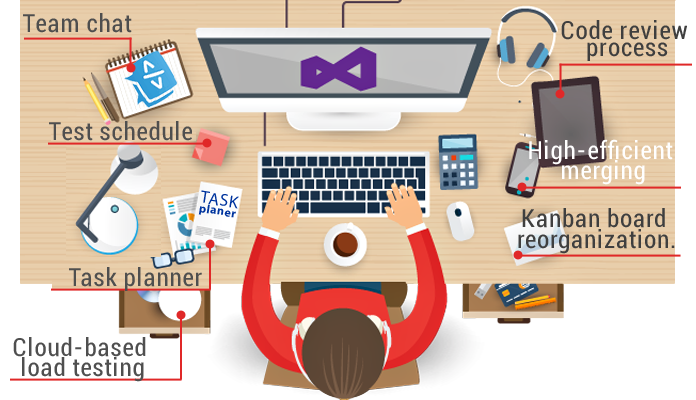
It facilitates web development by:

  • team chat;

  • task planner;

  • test schedule;

  • code review process;

  • cloud-based load testing;

  • high-efficient merging;

  • kanban board reorganization.

Above all, no more need to build and deliver a new website version to the server manually. Just click one button and your new build is on the server!

Who uses TFS 2015?

The platform is integrated into the Visual Studio environment and has an intuitive interface. It is friendly to .NET teams, yet could it come in handy to others?

Many projects require using several languages and clearly separating responsibilities. You may have a back-end code in C# and a front-end code in Angular. The solution will be Visual Studio for Angular developers.

What about developing mobile applications, with one IDE for iOS and another for Android? Without VS you can only go for additional software to work with TFS. Yes, this means an extra cost, but it is worth it: look how easily you can use the platform now.

How can mobile app developers work with the build?

Let us use Android Application as an example.
To operate successfully you don’t need any additional software: Java, Gradle and Android SDK are already installed on an Android developer’s computer.

1. Creating a build

Click the icon Plus in the left menu. Templates appear in a new window. Choose Empty.
Press the OK button and you have a new build.
The build consists of consecutive steps.

2. Creating a new step

Choose Android Build, press the Add button and close the window. You will see a build step configuration window with self-explanatory fields.

SOLUTION. As you know, there is no direct tool for publishing applications after the Play Market build in TFS. You need to use your imagination and add a Command Line after the Android build. It executes the bit of code written in advance for Google Play publishing: the application will be built and published on a button click!

3. Build configuration

It pays to delve into the build configuration to make your life easier once and for all. The most interesting things are variables and triggers. You need triggers to configure a scheduled build, while variables can be used for tweaking. For instance, a variable responsible for choosing either Demo or Release build mode can be pushed to a build step.

TFS brings developers together and opens up more opportunities. Use your imagination: the platform will give you a tool to realize your idea. Automatize repetitive processes to make coding easier.

Have you used TFS in your projects, or your customers’ ideas in life? What did you think about this solution and workflow for your cases?

As always, your comments are very welcome. We will answer all your questions and suggestions about this topic.


Video Streaming (Part III). Knowledge Is Power!

In our First and Second parts we examined the topic of real-time video streaming, how it’s done on iOS and took to pieces the process itself. And now:

Let’s Compare The Results Of Video Encoding On Various iOS Devices!

Disclaimer

In order to convey an informative experiment in comparing various video encoding methods, we created a test environment, an application that allows us to measure the results properly.

The app uses three encoders:

  1. Hardware – accessible via VideoToolbox library.
  2. Hardware – accessible via AVAssetWriter. For this purpose the realization from kickFlip Library was used – OS broadcasting solution for your iOS applications.
  3. Software – compiled ffmpeg 3.0 library with compiled as dependency x264 library.

We wanted to find out the limits of each method and conducted research for multiple resolutions used by AVCaptureSession: 352×288, 640×480, 1280×720, 1920×1080, 3480×2160. The handheld devices chosen for the tests: iPhone 4S – the weakest iOS8 device, iPhone 6 plus, and iPad Air 2 – one of the most powerful devices in the market. During the tests we determined and measured the CPU usage and delays when encoding the video in H.264 format.

There is a certain margin of error and the results might differ from the results acquired during such tests in a different environment here. However, our results show the difference in encoding efficiency on various devices and show it quite well.

 ffmpeg with x264 (sw)AVAssetWriter
(kickflip realization)
VideoToolbox
352×288delay: ~ 0.60 s.
CPU Used: ~ 55%-60%
delay: ~ 0.39 – 0.46 s.
CPU Used: ~ 8% – 12%
delay: ~ 0.07 – 0.087s.
CPU Used: ~ 7% – 9%
640×480delay: ~ 0.75 – 0.85 s.
CPU Used: ~ 130% – 160%
delay: ~ 0.46 – 0.5 s.
CPU Used: ~ 8% – 12%
delay: ~ 0.067 – 0.087s.
CPU Used: ~ 7% – 9%
1280×720delay: ~ 1.55 – 1.63 s.
CPU Used: > 160%
delay: ~ 0.688 – 0.77 s.
CPU Used: ~ 8% – 12%
delay: ~ 0.114 – 0.118s.
CPU Used: ~ 7% – 9%
1920×1080delay: ~ 3.8s.
CPU Used: > 160%
delay: ~ 0.84 – 0.88s.
CPU Used: ~ 8% – 12%
delay: ~ 0.177 – 0.181s.
CPU Used: ~ 7% – 9%

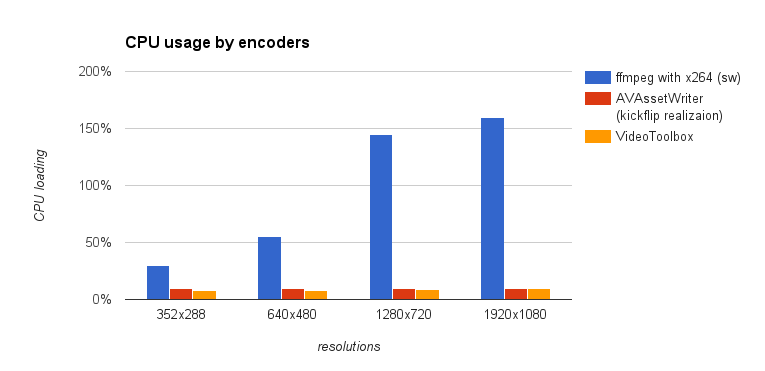
It is clear that the software encoder overloads the CPU and it fails to deliver reasonable results even working with 640×480 resolution. You can also notice that there is more than 100% load of CPU meaning that some frames will be left out as the CPU won’t be able to process them in time. Obviously, the device battery will die faster.

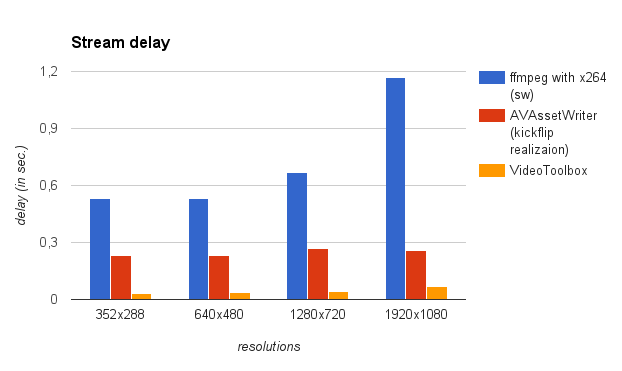
Hardware encoders work wonderfully and showed great results regardless of resolutions. The average CPU usage was kept within 7-12% limits. We found that AVAssetWriter has a longer delay and the difference is quite noticeable.

iPhone 6 Plus and iPad Air 2

Here are the results after testing the devices.

iPhone 6 Plus:

 ffmpeg with x264 (sw)AVAssetWriter
(kickflip realization)
VideoToolbox
352×288delay: ~ 0.49 – 0.57 s.
CPU Used: ~ 26%-37%
delay: ~ 0.21 – 0.276 s.
CPU Used: ~ 9% – 10%
delay: ~ 0.03 – 0.04s.
CPU Used: ~ 7% – 8%
640×480delay: ~ 0.49 – 0.57 s.
CPU Used: ~ 40% – 70%
delay: ~ 0.22 – 0.24 s.
CPU Used: ~ 9% – 10%
delay: ~ 0.035s.
CPU Used: ~ 7% – 8%
1280×720delay: ~ 0.64 – 0.70 s.
CPU Used: ~120% – 170%
delay: ~ 0.23 – 0.3 s.
CPU Used: ~ 9% – 10%
delay: ~ 0.044 – 0.045s.
CPU Used: ~ 8% – 9%
1920×1080delay: ~ 1.08 – 1.26s.
CPU Used: > 160%
delay: ~ 0.26s.
CPU Used: ~ 9% – 10%
delay: ~ 0.0615 – 0.069s.
CPU Used: ~ 9% – 10%

iPad Air 2:

 ffmpeg with x264 (sw)AVAssetWriter
(kickflip realization)
VideoToolbox
352×288delay: ~ 0.53 – 0.62 s.
CPU Used: ~ 40%-50%
delay: ~ 0.29s.
CPU Used: ~ 9% – 10%
delay: ~ 0.026s.
CPU Used: ~ 6% – 8%
640×480delay: ~ 0.53 – 0.58 s.
CPU Used: ~ 45% – 60%
delay: ~ 0.29 s.
CPU Used: ~ 9% – 10%
delay: ~ 0.029s.
CPU Used: ~ 7% – 10%
1280×720delay: ~ 0.57 – 0.61 s.
CPU Used: ~90% – 170%
delay: ~ 0.3 s.
CPU Used: ~ 9% – 10%
delay: ~ 0.03s.
CPU Used: ~ 9% – 11%
1920×1080delay: ~ 1.76s.
CPU Used: 180% – 270%
delay: ~ 0.32s.
CPU Used: ~ 9% – 12%
delay: ~ 0.038s.
CPU Used: ~ 10% – 12%

In order to make the data more comprehensible and easy-to-read, we decided to put them on a bar chart. On the charts below you can see how three encoding methods fare against each other.

Apparently, powerful CPUs handle software encoding much better than previous iterations, but such a high CPU load is unacceptable even for modern handheld devices with improved batteries. To top it all off, the software encoding efficiency is much lower than that of hardware encoders.

This small test shows the true advantage that hardware encoders have over the software solutions. VideoToolbox functionality is much more diverse and efficient when it comes to compressing and broadcasting videos.

It is important to note that the delay of AVAssetWriter solution may increase depending on the encoding method used by a developer. If the minimal delay is a goal then VideoToolbox is much more preferable.

Long Live The Battery!

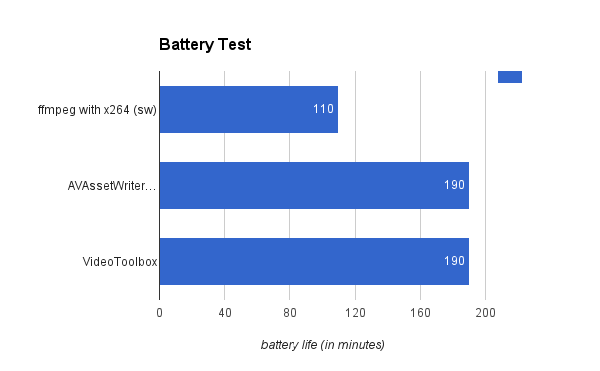
In order to show just how much impact encoding has on an end-user, we conduct a test on the batteries of the devices. We measured how long they can supply power to the device broadcasting a stream. The test was conducted using iPhone 5s with 100% battery and for 1080p resolution. Here’s the data.

The results show clearly that with software encoding the battery lasted less than 2 hours while hardware solutions extended this period to more than 3 hours.

Conclusion

The tests allowed us to determine whether the hardware encoders do their job better than software ones. Moreover, we successfully measure the effectiveness of popular encoding methods for iOS devices and now know exactly which methods to use when making a video broadcasting feature on a iOS device!

Read more about Video Streaming here:

Video Streaming (Part II). Get Ready To Rumble!

Preparing Files For Broadcasting On iOS Devices

Previously, in our Part 1, we talked about devs struggling to get the broadcasting available from an iOS device. Now we have direct access to compressed files and this accessibility gave us the freedom we dreamt about. We came up with a qualitatively better method of preparing frames for subsequent broadcasting. In general, we can split this process into three steps.

Step 1. Video capturing. Сam catches the video and the device creates CMSamplebuffer packages with all the media samples and data.

Step 2. Video compressing. Received data is being compressed with the help of VideoToolbox. This process compresses the data within the CMSamplebuffer packages.

Step 3. Converting into NALUs to optimize online streaming.

Let’s Talk The Process Step By Step

We can refer to numerous documents and examples to explain how the first step is being done, but we want to focus your attention on the fact that during this first step process we receive CMSamplebuffer streamline containing uncompressed CMPixelBuffer data.

During the second stage we need to create and tune VTCompressionSessionRef. To compress an input frame we use VTCompressionSessionEncodeFrame function while using CMSampleBuffer as a parameter for the process. Upon finishing the operation the encoder uses a call-back function, which we set up during the initialization of the VTCompressionSessionRef. As a result of this complicated process we receive a new CMSampleBuffer package, that now contains compressed data. It is the very same CMSampleBuffer stream, but it contains CMBlockBuffer structures with a compressed video.

The following step requires us to convert the CMSampleBuffers’ stream into NALUs (Network Abstraction Layer Unit) stream. That is how it’s usually done when working with H.264 encoder. H.264 stream can be made in two different formats – Annex B and AVCC. Apple calls the format most commonly used for streaming Elementary Stream, we call it Annex B. iOS media libraries can work with H.264 stream in the AVCC format (MPEG-4 stream). Regardless of the format, there are 19 various types of NALUs and each NALU can store two types of data: VCL (Video Coding Layer) or meta. Each package can be easily parsed and processed as it has an appropriate descriptive header. The core difference between Annex B and AVCC formats lies in NALUs being splitted into the videostream.

Two Formats – One Way

Annex B doesn’t carry its own size, but starts with a start code. This code is usually 0x000001 or 0X0000001 (3 or 4 bytes). This allows splitting the whole stream into multiple NALUs.

AVCC defines the size of each NALU with a header that precedes the NALU itself. The header is about 4 bytes long, but might be lesser.

Each CMSampleBuffer package with compressed data contains the following:

  • Pts (CMTime) – presentation time stamp
  • Format description (CMVideoFormatDescription) that apparently carries the description of the format
  • Block Buffer (CMBlockBuffer) that contains parts of or a whole compressed frame

A CMSampleBuffer stream is a stream of I-, B-, and P-frames. Each stream may contain one or multiple AVCC format NALUs. Annex B, which is used for transmitting, is a sequence of PPS (Picture Parameter Set), SPS (Sequence Parameter Set), I-frames, B-frames, and P-frames NALUs. The amount of P- and B-frames may vary.

PPS and SPS contain parameters needed for encoding and must precede each I-frame.

For each NALU the length parameter is switched for the start code and then added to the stream. In order to correctly measure the length and amount of NALUs in a stream of CMBlockBuffer data, we use the length header coming forward each NALU.

The correct length is being coded in big-endian format and thus we need to swap its value in order to get correct NALU’s length. When a CMSampleBuffer contains an I-frame, we make PPS and SPS NALUs out of I-frame format description and put them before other NALUs from the CMBlockBuffer within the corresponding CMSampleBuffer.

All about results in a H.264 Annex B format stream that is ready to be broadcast and displayed on other devices!

Read more about Video Streaming here:

Video Streaming (Part I). Action!

Real-time Video Streaming And How It’s Done On iOS!

When you are watching a video on Youtube or enjoying a show on Netflix, you are using the video streaming technology. Since the beginning of the 20th century, the greatest minds have kept on developing new ways to deliver the media from a producer to an end-user. Both Youtube and Netflix are examples of the modern technology that requires uploaded video files in order to allow end-users to pause, stop or play the video at will. With this another technology co-exists one that we call “live-streaming”.

I heard that compression is important…

One of the core differences between these two types of media streaming is that during “live-streaming” everything happens in real-time. There are many examples out there: live broadcasts of events, concerts, and shows, Skype video calls, and, obviously, twitch.tv streams. Usually the video is being “streamed” from one device to another.

To ensure great viewer experience during live broadcasts, one thing must be reduced dramatically – latency. Latency is a delay that occurs between two users, sending and receiving. It is imperative that the end-user sees exactly what happens right instead of what happened a while ago. If the latency was too big during a Skype call, we would have had to wait for the data to reach your collocutor. The whole conversation would look more like a “video-mailing service”.

Live-streaming demands developers to be creative and use the latest technology in order to make viewer experience as rich as possible. It is important to reduce the delay, even if two users are separated by oceans. Generally, data flows through the Internet and that is why the size of data is important. Small files are delivered nearly instantly; big files travel a long time before they reach an end-user.

Media compression is very important. There is no need in streaming with the highest quality, modern compression methods allow us to compress the size of media multiple times and still get a high quality video. To put it simply, the better compression, the more viewers will be able to see the stream without delays and technical issues.

To compress a video, we need to use codecs. H.264 is a codec that is widely used to compress a video. There are software and hardware encoders, the latter is more convenient to use on handheld devices. Lesser CPU usage allows the device to work longer.

Modern iPhones and iPads support both video and audio coding on a hardware level. Up until recently, Apple has not allowed developers to use fully the potential of the hardware video encoder. The ways to implement live-streaming features in applications for iOS were limited. We, developers, had only two methods.

The first method is to use a software encoder from an external library; an encoder like ffmpeg, for example. This method has multiple downsides:

  • Huge CPU load;
  • Extensive power usage;
  • High hardware requirements.

Here is a simple example: to compress a video in 360p with such a method, you need 100% of the CPU resources on iPhone4.

The second method is based on accessing a hardware encoder. One of the biggest downsides of this method was that developers had no direct access to the encoded frames. In order to use this method, we have to work with several small encoded pieces. The whole process requires splitting and saving files as well as reading them right after. Such a complicated compression takes up for a while before streaming!.. It is unacceptable for live-streaming.

Glory to Apple!

After the release of iOS8, Apple presented Video Toolbox Framework, a set of tools that allows developers to directly access hardware video encoder. This instrument can encode video in real-time. This library allows us to improve video compression while lowering energy consumption and prolonging the battery life.

This library is easy-to-use yet creates some obstacles for a developer. Firstly, there is not enough information about the instrument. Secondly, video compression requires additional coding. Overall, making a live-streaming feature is still a tricky task.

One of the most important tasks of our team was to simplify the whole process of creating media streaming features for iOS applications. We wrapped together a couple of software solutions that will prepare videostreams for broadcasting and we want to take Video Toolbox Framework to its limits!

Read more about Video Streaming here:

Why Does Your Business Need NO Mobile Application?

wdyb
In 2014 Google Play & App Store were flooded with 2.5 mln of mobile applications.

If it goes further, this index number will double in 2017. That’s why it’s no wonder that with the market-share gain, there’s an increase in the number of the afflicted to invest in mobile apps development.  In this article we try to explain what one should know to avoid common mistakes when creating a mobile application.

wdyb-mob

Before starting to create an application, one should keep in mind the following points:

First Step: Assess risks

Last year Ebay sold goods on 5 bln dollars through mobile devices. Such tendency of mobile market impresses deeply, right?

No wonder that looking at this effort, many companies think about “go mobile”.  However, when lots of them do not see an immediate result, they feel a bitter disappointment & do not give a rat’s tail about its further development.

A mobile application costs money. If you’re not a large retailer as Ebay, the investments would be hardly fast justified. Perhaps, they would never be justified.

Many try to win( money back by running an advertisement inside the application.

But let’s keep it real: no normal user will experience joy observing from day to day a bawdy banner of as much as bawdy game.

Of course, one can make a paid mobile application or create a row of paid features inside an app. Such monetization measure is justified if you develop a mobile app as a standalone product, not as a supplement to your website.

Next Step: Ask yourself ‘Will my mobile application bring value to the user?’

Even if your application is an image of your website, it should bear a standalone value for the user: why the user should grant space at his device on your application?

A vivid example of this can be mobile applications of magazines. Let’s take ‘Popular Mechanics’ as an example. ‘Popular Mechanics’ has an iPad version which contains different additional materials (e.g.: videos) attached to the articles.

When talking about the value for the user, one should remember users themselves. Unfortunately, the level of smartphones penetration is not high. This is due to the fact that the price of mobile devices and mobile internet is quite high. Generally, this problem is strongly widely spread in regions.

Keep in mind: Trendy doesn’t mean profitable.

If your product is aimed on mass market with different tastes & preferences, if you’re one of the largest companies as Ebay, Ozone, Evernote or Youtube – in these cases you’re definitely in need of a mobile application. One should consider a mobile application not only as a tribute to fashion, but as a necessary tool for holding the most stable & active consumers in. Such consumers are sometimes called innovators who will pack you in if they do not get a comfortable mobile app.

Basing on our experience, we can say that a mobile application can pop if: 

  1. it’s a product for internal customers.
    In such case, mobile applications serve for automation of internal business processes of a company. Such products are not available for mainstream audience – they’re used exclusively by company’s personnel.
  2. it’s an additional product (service) for value engineering of the main business products. It’s a so called ‘branded application’. The major aim of these applications is to provide users with additional convenient services, e.g.: mobile banking, which allows to manage Customer’s accounts & cards.
  3. it’s a standalone product. It’s a mobile application on which the business will make profit. One example out of many applications which enables to manage personal finance – you pay 1$ for it & download from App Store there.

Don’t Miss The Bus

I want to clarify one thing — building an app isn’t a piece of cake. It takes a significant amount of time, money and energy to build an app that people want to download and use. Even after an app is up & done, it will need to be marketed and supported by your company.

wdyb-app

All these elements need to be figured out at some point and then planned for. It’s how companies stay competitive in today’s marketplace.
If you can’t set aside the budget and resources for an app today, will you be able to do so when your sales are declining because customers “all of a sudden” decided that they prefer using your competitor’s app over your old website?

This is a not a tactical decision about whether $10,000 in app development has a greater return than $10,000 in website improvements. It’s a strategic decision to invest in a platform that can support the business infrastructure of tomorrow’s generation in the same way your website has supported your business for the last generation.

The bus has already started off. It’s not that you can’t wait for the next one, but if you do, is it going to delay your business to the point where you can’t catch up with the competition when you really need to?

What’s your opinion?

Do you think web technologies will manage keeping up with native mobile apps, or will apps ultimately force the retirement of its older web friend?

Xamarin: One for All (Part I)

A well developed mobile application can help businesses increase customer satisfaction and engagement by allowing the company to be available to their target audience, generate revenue and create additional channels for marketing. It is unsurprising, given the widespread use of mobile devices, that Emarketer.com predicts that by 2017 more than one third of the population of the world will be smartphone users.

People use many different types of mobile hardware, and it is imperative to build a mobile application that flawlessly functions across a diverse set of operating systems.

Being experts at building cross-platform mobile applications for all major platforms, our software developers at *instinctools believe that today Xamarin is a cure-all for operating systems.

Launched in 2011, Xamarin is a tool used to develop cross-platform mobile applications. It works through the Mono framework to communicate with the Application Program Interface (API) of common mobile device functions including contacts, camera, and geo-location for popular iOS, Android, and Windows operating systems. It allows developers to build robust applications using the C# programming language that runs on the .NET Common Language Infrastructure (CLI).

Sure enough, Xamarin has its positives and negatives and in this article (part 1) we will go through 5 main perks of Xamarin platform.

1. Write once, run everywhere

Xamarin is integrated with SDKs of all of the different operating systems. You have the ability to utilize native controls that exist for the iPad, Android or Windows but only coded once. Linked files, conditional compilation, and portable class libraries make it possible for developers to share the code. The ability to reuse 60-80% of the code cuts the development time in half. That obviously saves time & money to both customers and service providing companies on the app’s multi-channel distribution. Additionally, a single codebase dramatically reduces costs for support and new features introduction.

2. Native API

Xamarin delivers high performance compiled code with full access to all the native APIs so you can create native apps with device-specific experiences. Anything you can do in Objective-C or Java, can be done in C# with Xamarin.

3. Native UI

Xamarin allows you to keep Native UI in all 3 platforms, therefore preserving Native Performance while enjoying full API coverage, shared codebase and application logic. It also allows to re-use skills, teams, tools and most importantly – the CODE! And as a result, it saves your time and resources.

4. Fewer bugs

The number one reason that Xamarin tends to result in fewer bugs: we write less code. As a general rule, the less code we write the fewer errors we’re likely to commit.
Xamarin also reduces errors by providing the opportunity for greater test coverage. Any given project has a finite amount of time available for testing. Rather than spending that time writing two sets of largely duplicate tests, we can write a single, more comprehensive set of tests that validate the code for both platforms.

5. Xamarin TestCloud:

Such program allows you to test automatically your iOS and Android apps on hundreds of devices. It offers continuous integration, beautiful reports, test for fragmentation, and object-based UI testing.

Xamarin is gaining more attention everyday and with good reason. Today, nearly 500,000 developers and such world-know companies as Microsoft, Bosch, Tesco, HP (and many others) are already taking their advantage of creating awesome apps on Xamarin.

And for real, in a world where a variety of mobile platforms coexist, we do need a toolset that allows us to support multiple platforms with minimal duplication of work. This just what we get with Xamarin.

Anna Vasilevskaya
AI modified real photo
Anna Vasilevskaya
Account Executive

Get in touch

Drop us a line about your project at
[email protected] or via the contact
form below, and we will contact you soon.