
AI agent SDKs have become one of the shortest routes from an agent idea to a working prototype. They package many of the building blocks teams would otherwise have to assemble themselves: from tool integration and orchestration to tracing, sessions and guardrails. For enterprise teams, that makes them an increasingly practical place to start.
The harder part is choosing the right AI agent SDK. The options from major model providers, such as OpenAI, Google and Anthropic, seem to check the same boxes: getting an agent running fast, connecting it to tools, and supporting more complex workflows as the application grows. On paper, the overlap is substantial.
But then the prototype meets production. That is where the differences start to pop out.
We compared OpenAI Agents SDK, Google ADK, and Claude Agent SDK through the lens of real-world deployment. Drawing on our AI engineers’ hands-on experience with all three, this article looks beyond the feature checklist to the architectural choices and production nuances that are much harder to spot in a quickstart guide.
Key highlights
- OpenAI Agents SDK, Google ADK, and Claude Agent SDK solve similar problems but take different architectural approaches.
- What looks interchangeable in a prototype can behave very differently in production<strong>.</strong> Model portability, tool permissions, orchestration, deployment, state recovery, and observability vary across the three SDKs.
- The SDK itself is rarely the biggest cost of building AI agents. All three frameworks come without per-run SDK fees, but production expenses extend to model usage, tools, infrastructure, persistent memory, monitoring, and engineering overhead.
A quick summary of AI agent frameworks: OpenAI Agents SDK vs Google ADK vs Claude Agent SDK
At a high level, all three SDKs solve the same problem. They give developers a runtime for agents that can reason, use tools and work through multi-step tasks. The differences emerge in what each framework expects to control around that loop.
OpenAI Agents SDK: lightweight building blocks, more control in the application
OpenAI Agents SDK gives developers a compact set of primitives for agents, tools, handoffs, guardrails, sessions and execution. The SDK manages the agent loop, while broader application logic can stay in ordinary code. That makes it flexible for teams that want agentic behavior without handing the framework control over the entire application architecture.
Example: an IT service desk agent can triage an incoming request, look up information in internal systems, and hand the conversation to a specialist agent when needed. A sales assistant could similarly qualify a lead, query a CRM, draft a response, and call a pricing agent for a specific calculation. In both cases, your application code handles the top-level logic, calling individual agents as needed and integrating their outputs into your existing system.
Google ADK: predefined workflows for structured agent execution
Google ADK brings orchestration, state and execution control much closer to the framework itself. Developers can define sequential, parallel, branching and looping paths while still using LLM-driven agents where judgment is required. This makes ADK a strong fit for structured, multi-step systems where process flow and recovery need to be clearly defined rather than largely model-driven.
Example: In an insurance claims process, after a claim is received, the workflow can validate the submitted data, run fraud analysis and document checks, route the claim based on their results, invoke an LLM agent only where judgment or unstructured-data analysis is required, and send exceptional cases to human review. The order of these steps, the branches between them, and the conditions for repeating or escalating work can be defined explicitly rather than left entirely to an LLM.
Claude Agent SDK: an autonomous agent engine for tool-rich environments
Claude Agent SDK exposes the autonomous runtime behind Claude Code, with file operations, shell commands, sessions, permissions and subagents built into its execution model. Instead of assembling the agent loop piece by piece, developers configure the environment and boundaries within which Claude operates. It is especially natural for coding, maintenance and other tool-heavy tasks that require the agent to act directly inside a working environment.
Example: A software maintenance agent can inspect the repository, search for the relevant code, read configuration files, edit several files, run tests or diagnostic commands, examine failures, and iterate until it has produced a validated patch. For larger tasks, it can delegate independent investigations to subagents while keeping their working contexts separate.
What are you actually choosing when you choose an agent framework?
Choosing an agent development kit means choosing far more than a convenient way to call an LLM. You are also choosing a runtime model: how the agent loop executes, how tools are invoked, where control lives, how work moves between agents or process steps, and how execution state survives along the way. These architectural decisions also shape the engineering effort involved in turning an agent prototype into a production system, which is where AI development services can add value. Let’s see how that plays out across the three SDKs compared in this article.
OpenAI Agents SDK: a standard agent loop, composed in your own code
Two central concepts form the foundation of OpenAI Agents SDK: an Agent and a Runner. An Agent packages a model together with its instructions, tools, output configuration, and optional behavior such as handoffs and guardrails. The Runner executes that definition through the SDK’s built-in agent loop. On each turn, the active agent can produce a final output, request tool calls, or hand control to another agent. The Runner executes the requested tools or follows the handoff and then continues the same run until it terminates.
Other capabilities extend that basic execution model. Sessions can carry conversation state across runs, agents can be exposed as tools to other agents, and SandboxAgent can attach an agent to a persistent workspace for file and command execution. In the sandbox case, the Agents runtime still manages the surrounding run while the configured sandbox backend manages the workspace and determines its isolation guarantees.
So the SDK primarily gives developers a standardized agent loop and a set of primitives that can be composed inside ordinary Python or TypeScript application code.
Google ADK: execution modeled as a framework-level workflow
Google ADK models execution more explicitly as part of the framework. In ADK 2.0, the runtime is built around graph-based workflows, where agents, tools, and functions can participate as nodes and developers can define how execution moves between them. Dynamic workflows add code-driven control for cases where routing, loops, or branching need to be determined programmatically. LlmAgent remains the model-driven agent abstraction, while deterministic workflow logic can be expressed separately from model reasoning.
ADK also treats execution as an event-driven process. A user request creates an invocation, and agents, model calls, tool calls, state changes, and other actions produce Events as execution progresses. A Session stores the state and event history associated with a conversation, while the SessionService is responsible for persisting those changes. Longer-lived memory and binary or file-based outputs are handled through separate Memory and Artifact services.
Earlier ADK versions expressed deterministic workflows through SequentialAgent, ParallelAgent, and LoopAgent. These abstractions still exist for compatibility, but ADK 2.0 has superseded them with graph and dynamic workflows for new development.
In other words, ADK provides not only agent abstractions but also a framework-level representation of how a stateful agent workflow progresses through its execution.
Claude Agent SDK: prebuilt agentic harness with local session and environment controls
Built on the autonomous runtime behind Claude Code, Claude Agent SDK makes that runtime available through Python and TypeScript APIs. Instead of requiring the application to implement the recurring model → tool → result → model loop itself, the SDK drives that loop through the Claude Code runtime. The surrounding application configures the run and consumes its events while Claude can inspect information, invoke tools, process their results, and continue working through the task.
That runtime comes with built-in capabilities inherited from Claude Code, including file operations, search, shell execution, and a permission model for controlling what the agent can do. Applications can extend it with custom tools and MCP servers, use hooks around tool execution, configure the working environment, and delegate work to subagents. More recent versions also support scripted dynamic workflows that can coordinate multiple subagents inside the same runtime.
The SDK also maintains local session transcripts that can be resumed or forked. Resuming loads an existing transcript back into a live agent run, while forking creates a separate branch of that history that can continue independently. These session primitives are part of the SDK’s local runtime model rather than the separate server-side Sessions API used by Claude Managed Agents.
In practical terms, the Claude Agent SDK gives the application a prebuilt autonomous execution harness and programmatic control over the environment in which that harness operates.
Access to models
Model portability differs significantly across the three SDKs. OpenAI Agents SDK and Google ADK both provide ways to work across multiple providers. Claude Agent SDK takes a narrower path: its model layer is built around Claude, even though Claude itself can run through several infrastructure providers. And in all three cases, portability goes beyond simply getting another model to answer. Tool use, structured outputs, streaming, reasoning controls, and provider-specific features may behave differently once you move away from the framework’s default path.
OpenAI Agents SDK: flexible, but OpenAI remains the default path
By default, the OpenAI Agents SDK uses the standard OpenAI provider path, with the model configurable per agent, at the run level, or as an environment-wide setting. This lets different agents in the same workflow use different OpenAI models. For non-OpenAI models, the SDK supports custom model/provider implementations and OpenAI-compatible endpoints, as well as third-party adapters that differ between the Python and TypeScript SDKs. Python includes beta integrations for LiteLLM and Any-LLM, while TypeScript provides an adapter for models supported by Vercel AI SDK.
That flexibility comes with an important caveat: changing the model does not guarantee feature parity. Capabilities tied to the Responses API or OpenAI-hosted tools may disappear when the alternative provider cannot support them.
Google ADK: the broadest provider-oriented approach
Model access is handled in a more plug-in style way by Google’s Agent Development Kit. For anything tightly tied to Google’s own ecosystem, like Gemini or Claude accessed through Google Cloud, or models hosted on Google’s Gemini Enterprise Agent Platform, you just give the agent a plain model name or endpoint string, and ADK’s internal registry figures out which backend to connect to. For models outside that ecosystem, like ones reached through Apigee or LiteLLM, or self-hosted setups like Ollama or vLLM, you instead create a small connector/wrapper object for that specific model and pass it in directly instead of a plain string.
The exact experience depends on the language and provider. ADK also goes a step further in its TypeScript SDK with experimental runtime routing, allowing application logic to choose between models and, when configured, fall back to another one if the first fails before returning output.
Claude Agent SDK: multiple provider paths, but one model family
Claude Agent SDK draws the boundary differently. Developers can switch between Claude models such as Sonnet, Opus, and Haiku, or even change the active model during a running session, but the supported model layer remains centered on Claude.
Where those Claude models run is more flexible. The SDK can use the provider paths supported by Claude Code, including Anthropic’s API and supported cloud platforms, while an Anthropic-compatible gateway can sit in front for centralized authentication, routing, usage tracking, or provider management.
The distinction is worth keeping clear: infrastructure portability is not the same as model portability. Running Claude through different providers does not turn Claude Agent SDK into a general-purpose multi-model framework. Teams can still lock in to Claude’s model family, even when the underlying infrastructure is portable.
Tools usage and integration capabilities
While model selection defines an agent’s reasoning capability, its ability to take action depends on how it interacts with external tools. Although all three frameworks embrace protocol standards such as MCP, they diverge significantly in how they handle tool execution, developer control, and runtime permissions.
OpenAI Agents SDK: a broad tool surface with flexible control
OpenAI Agents SDK supports a wide range of tools, from web and file search to function tools, code execution, image generation, tool search, MCP servers, and other agents exposed as callable tools. Tools can sit directly on an agent, or a specialist agent can be called as a tool when the parent agent should remain in control.
MCP is handled in two ways. OpenAI’s Responses API can call a publicly reachable remote server on the model’s behalf, or the SDK can manage connections over stdio or Streamable HTTP when the application needs tighter control over connectivity and execution. Developers can also filter tools and introduce approval policies, while built-in tracing records model calls, tool calls, handoffs, and guardrails for debugging and evaluation.
Google ADK: tools that can influence the process itself
Tools are closely tied to runtime context and state in Google ADK. Alongside built-in capabilities such as Google Search, code execution, retrieval and RAG, it supports custom function tools, MCP integrations, and other external providers.
A custom tool can receive ToolContext, giving it access to session state, artifacts, authentication, and execution controls. More importantly, the tool can influence what happens next: transfer control to another agent, escalate to a parent agent, or skip the extra LLM call normally used to summarize its result. ADK also uses Toolsets to group tools and expose them dynamically based on context, such as session state or user-specific conditions.
Claude Agent SDK: govern the tools around an autonomous loop
Tool execution in Claude Agent SDK is built around the autonomous runtime inherited from Claude Code. The SDK provides built-in tools for capabilities such as reading and editing files, searching a project, running shell commands, and searching the web, while external capabilities can be added through MCP server integrations and custom tools.
Developers can control the tool surface and execution policy through options such as available and allowed tools, permission modes, and hooks that run around tool execution. This allows applications to automatically approve trusted operations, deny others, or introduce approval logic around higher-impact actions rather than giving the autonomous loop unrestricted access.
Additionally, complex multi-step workflows are handled through subagents, which run specialized tasks with separate working contexts and can be given their own instructions and tool access. For larger orchestration tasks, dynamic workflows can coordinate multiple subagents while keeping intermediate work outside the parent agent’s immediate context.
Orchestration approach
The three frameworks differ in how orchestration is structured and controlled. OpenAI Agents SDK lets agents either transfer control to a specialist or call one while retaining control. Google ADK gives developers explicit control over the workflow and its execution paths. Claude Agent SDK keeps a main agent at the center and delegates focused tasks to specialized subagents. These differences shape how much of a multi-agent workflow is decided by the agents and how much is defined by the developer.
OpenAI Agents SDK: hand off control or keep it, per task
Two main orchestration patterns are available in OpenAI Agents SDK: handoffs and agents as tools. With a handoff, control moves to a specialist agent, which becomes responsible for the next response. With agents as tools, the main agent stays in control and calls another agent for a bounded task, then uses its result to continue. The distinction lets developers choose whether a specialist should take ownership of a branch or work behind a central agent.
Google ADK: orchestration as an explicit, developer-defined workflow
Google ADK treats orchestration as an explicit workflow. Its graph-based workflows let developers define sequential execution, conditional branches, parallel paths with join points, and loops. Routing can determine which node runs next, and dynamic workflows allow execution paths to be constructed programmatically when they cannot be fully defined upfront. This gives developers direct control over how agents and other workflow nodes are arranged and executed.
Claude Agent SDK: one main agent delegating to subagents
Multi-agent orchestration in Claude Agent SDK centers on a main agent that delegates focused tasks to subagents. Subagents are separate agent instances with their own context and specialized instructions, and can be invoked automatically or explicitly. Multiple subagents can run in parallel, with their intermediate work remaining isolated from the parent and their final results returned to it. This makes delegation, specialization, and context isolation the core of Claude’s multi-agent orchestration model.
Deployment
Deployment is largely about where the agent runtime runs and what deployment options the framework supports around it. OpenAI Agents SDK is designed to run within your application, Google ADK provides a range of managed and self-managed deployment targets, and Claude Agent SDK uses a process-oriented runtime that developers typically package and operate as part of their own infrastructure.
OpenAI Agents SDK: an open deployment model, with hosting left to you
OpenAI Agents SDK is designed to run as part of your application, with the SDK’s runner managing the agent loop, tool calls, handoffs, approvals, and streaming. Developers choose how and where that application runs and how conversation state is persisted, with options ranging from application-managed history and SDK sessions to OpenAI-managed conversation state. This keeps deployment architecture relatively open, but also means infrastructure concerns such as hosting, scaling, and persistent state remain part of the application design.
Google ADK: from fully managed to self-hosted, the choice is yours
Several deployment paths are available with Google ADK, from a fully managed, auto-scaling Agent Runtime on Gemini Enterprise Agent Platform to Cloud Run and Google Kubernetes Engine. Agents can also be packaged as containers and deployed to other container-compatible infrastructure, including disconnected or non-Google environments. This gives teams a choice between a managed runtime and greater infrastructure control rather than tying deployment to a single hosting model.
Claude Agent SDK: self-hosted by default, with state and isolation to plan for
When it comes to AI agent deployment, Claude Agent SDK offers a more infrastructure-aware approach. It maintains its own working environment and session data, so production deployments need to account for state persistence, resource allocation, concurrency, networking, and isolation. The SDK can be self-hosted with Docker, Kubernetes, or other container-based infrastructure. Anthropic also offers Claude Managed Agents for teams that do not want to operate the agent runtime and session infrastructure themselves, although this is a separate managed product rather than a deployment mode of the Agent SDK.
State, persistence, and failure recovery
OpenAI’s Agents SDK, Google’s ADK, and the Claude Agent SDK each manage AI agent memory, state, persistence, and recovery differently. OpenAI distinguishes “session” (app-managed) vs “conversation” (OpenAI-managed) state. Google ADK makes state an explicit part of its runtime, with separate session, user, and application scopes plus a rewind mechanism. Claude uses locally persisted session transcripts as the basis for resuming conversations, with additional mechanisms for longer-lived project context.
For production deployments, all three require a strategy for preserving the agent’s state across application restarts or infrastructure failures.
OpenAI Agents SDK: flexible state ownership with serializable execution checkpoints
Developers can choose who owns conversation continuity. History can stay under application control through SDK sessions, or OpenAI can carry the thread forward through conversation_id or previous_response_id. The first option leaves teams free to choose durable backends. In Python, for example, that can mean SQLite, SQLAlchemy, Redis, or another implementation, while the second keeps continuation on the OpenAI side. TypeScript follows the same basic split: MemorySession works for process-local development, while custom stores or OpenAIConversationsSession provide persistence beyond it. And when execution stops halfway through, say for an approval, a serializable RunState lets the application pick the run back up rather than start it over.
Google ADK: scoped state, persisted sessions, bounded rewind
State in Google ADK is treated less like conversation history and more like part of the execution model itself. A Session keeps the chronological record of what happened, while a separate key-value state can belong to that session, follow a user across sessions, or apply across the application. SessionService is what keeps those sessions, events, and state around, with in-memory storage for development and database or managed implementations when durability matters. ADK also introduces rewind, but with a clear boundary: it can take session-level state and artifacts back to an earlier point, while user-level or application-level state, as well as anything that already happened in an external system, stays where it is.
Claude Agent SDK: transcript-based sessions that need shared storage at scale
Claude Agent SDK takes a more transcript-centered approach. A conversation is written to a local JSON transcript, and that transcript becomes the point from which a later process can resume the session using its session_id. The same session can also be forked into a separate branch. That works neatly on one machine; production becomes more interesting once sessions need to survive a host change or move across machines. In that case, the transcript needs shared durable storage, with Anthropic’s guidance pointing to a SessionStore that can mirror it to systems such as S3, Postgres, or Redis.
Control and observability
Once agents start doing real work, two questions quickly become unavoidable: How much control do you have over what they can do, and how clearly can you see what happened afterward?
All three frameworks address both, but from slightly different angles. OpenAI puts guardrails, approvals, and tracing directly into the SDK. Google ADK spreads control across workflows, callbacks, and plugins, with observability built around logs, metrics, and distributed traces. Claude Agent SDK puts more emphasis on permissions, execution hooks, and a direct stream of what the agent is doing as it runs.
OpenAI Agents SDK: built-in guardrails, human approvals, and default execution tracing
Within OpenAI Agents SDK, control stays close to the agent run itself. Guardrails can check inputs and outputs, while approval policies can stop a sensitive tool call before it goes any further and resume execution once a human has made the decision. Observability follows the same philosophy: tracing is built in and, in standard configurations, enabled by default, capturing model calls, tool use, handoffs, guardrails, and other execution events. The result is a fairly direct view of both where the agent was constrained and what happened inside the run.
Google ADK: lifecycle-wide control with distributed observability
Google ADK takes a broader lifecycle view. Control can live in the workflow itself, but callbacks and plugins can also watch, change, or interrupt execution at different stages. On the observability side, ADK combines logs and metrics with distributed tracing built around OpenTelemetry conventions and OTLP. Those traces can then be sent to Google Cloud Trace or another compatible backend. In other words, control and visibility are designed to span the wider execution flow, not just individual model or tool calls.
Claude Agent SDK: granular tool permissions, execution hooks, and live event streaming
Permissions and intervention points form the basis of the control and observability approach in Claude Agent SDK. The framework’s layered permission model defines what tools the agent can access, while hooks give the application opportunities to inspect or step into execution at different moments. At the same time, the event stream exposes model output, tool activity, and execution results as they happen, with result messages also reporting usage and cost. OpenTelemetry metrics and events are available as well when telemetry is explicitly enabled.
Learning curve
Choosing among these three frameworks is less about raw capability than about where you want the friction to live.
OpenAI Agents SDK keeps the abstraction layer thin and the set of core concepts relatively small. Google ADK introduces more framework-level structure, especially as applications move into workflows, state, evaluation, and Google Cloud. Claude Agent SDK takes a more tool-centric approach that may feel particularly natural to developers already comfortable with files, commands, and environment-level operations.
OpenAI Agents SDK: low initial complexity with potential application-level trade-offs at scale
OpenAI Agents SDK is built for a fast start. Installation takes a single command, and the official quickstart reaches a working agent with very little code. The framework revolves around a compact set of concepts – agents, tools, handoffs, guardrails, and the Runner – and maps them directly onto ordinary Python or TypeScript rather than introducing a separate orchestration DSL. That keeps the initial learning curve shallow for both single-agent and multi-agent applications. The trade-off is that, as workflows become more sophisticated, more orchestration logic may remain in the application code rather than move into a dedicated workflow layer.
Google ADK: an easy start, a steeper curve as the agentic system grows
As with OpenAI Agents SDK, Google ADK is relatively approachable at first, but its conceptual surface expands as the application grows. A basic Python agent can start with pip install google-adk and a Gemini API key from Google AI Studio; a Google Cloud project only becomes necessary when teams move into Google Cloud or Agent Platform services. From there, ADK adds abstractions for workflows, sessions, state, evaluation, and deployment. That broader framework can be useful for teams that want those capabilities, but it also makes the learning curve steeper once graph-based workflows, advanced state management, and deeper cloud integration enter the picture.
Claude Agent SDK: immediate productivity for tool-centric agents, deeper environment mastery required later
Claude Agent SDK offers a similarly direct entry point, especially for developers who already think in terms of command-line tools, file operations, and tool-driven workflows. Installation is straightforward, and current releases bundle the Claude Code CLI that the SDK drives, avoiding a separate CLI setup in the standard path. The SDK also provides the agent loop, built-in tools, permissions, sessions, and context management rather than asking developers to build the tool-use cycle themselves. That can make tool-heavy agents quick to get off the ground. As applications grow more complex, however, developers still need to understand permissions, session lifecycle, working environments, and deployment behavior, particularly for long-running or stateful agents.
What will each agentic framework cost you in production?
The SDK itself is rarely the line item that matters. OpenAI Agents SDK, Google ADK, and Claude Agent SDK do not add a metered per-run framework fee. Production cost comes from everything around them: model APIs, tools, runtime infrastructure, storage, observability, and the services needed to keep the system running.
- Model usage is the most visible and usually the largest. All three providers can reduce repeated-input costs through prompt or context caching, but they expose it differently. OpenAI automatically reuses matching prompt prefixes on supported models and, on newer models, also lets developers control cache breakpoints. Google Gemini supports both automatic implicit caching and explicit caches that developers create with a defined lifetime and reuse across requests. Claude similarly discounts cached input, but charges separately for writing and reading the cache. For example, with Claude Sonnet 5.5, a 5-minute cache write costs $2.50 per 1M tokens, compared with $0.20 per 1M for a cache read.
- Tool usage introduces another layer of cost, particularly when agents rely heavily on server-hosted tools. OpenAI currently charges $10 per 1,000 web searches and $2.50 per 1,000 file-search calls. Hosted container sessions range from $0.03 to $1.92 per 20 minutes depending on memory, while file-search storage costs $0.10 per GB per day after the first free GB. Tokens consumed by built-in tools are still charged at the selected model’s token rates. Google ADK does not add a universal per-tool-call fee of its own, but the Google Cloud services or external APIs an agent uses may. Claude follows a similar pattern: web search costs $10 per 1,000 searches, code execution has separate container-runtime pricing, and client-side or MCP tools can shift the cost into infrastructure or third-party services.
- Sandbox/runtime costs depend entirely on where the agent executes. OpenAI Agents SDK runs inside the application and can use application-managed or external sandbox infrastructure, while OpenAI-hosted execution tools carry their own container charges. Google gives teams several options, including managed Agent Runtime, Cloud Run, GKE, and self-managed deployment. Under current Agent Platform pricing, managed runtime resources are billed through Agent Compute and Agent Memory, with usage-based free tiers and paid usage beyond them. Cloud Run and GKE are harder to reduce to a single monthly figure because cost varies with resource allocation, concurrency, region, and configuration. Claude Agent SDK is self-hosted by default, so runtime compute becomes part of the application’s own infrastructure bill. Claude Managed Agents is a separate hosted option, priced at $0.08 per running session-hour on top of model usage.
- Persistence and memory follow the same pattern: the price depends on where you choose to keep state. OpenAI SDK sessions can use application-managed databases or other storage backends, so the expense is generally the underlying infrastructure rather than an Agents SDK storage charge. Google ADK behaves similarly when session services are self-managed, while Google’s managed Agent Platform separately prices Sessions, Memory Bank storage, and related operations. Claude Agent SDK keeps sessions locally by default, which means durable or distributed persistence becomes part of the application’s own storage design. If Claude Managed Agents is used instead, that managed infrastructure is priced separately.
- Observability is often the quietest line item, but trace volume scales linearly with agent activity and can become material at production throughput. Here the three invert their usual positions. OpenAI ships tracing on by default with 10,000 free traces per month, then roughly $2.50-$5.00 per 1,000. Google folds agent observability into the Cloud bill via OpenTelemetry GenAI metrics and OTLP export, with documentation explicitly favoring metrics over logs and traces at volume. Claude offers the richest observability, supporting OpenTelemetry traces, metrics, and logs. However, telemetry is disabled by default, and its built-in cost and usage metrics are only estimates, meaning you still need the Usage and Cost API for accurate billing.
- Infrastructure is the broader bill around the agent: compute, storage, networking, databases, queues, and the other services the application depends on. These costs depend more on deployment architecture than on the SDK itself: OpenAI Agents SDK, Google ADK, and Claude Agent SDK can all leave substantial infrastructure under application control, while their respective managed services can shift some of those costs onto vendor-specific runtime and storage SKUs.
- Engineering overhead is the cost of maintaining integrations, security controls, state and recovery mechanisms, observability, deployment infrastructure, and cost attribution across the services involved. It is workload- and architecture-dependent, but it can become a substantial part of total production cost as an agent system grows beyond a prototype.
Want to deliver agentic solutions 2X faster than you can with these SDKs?
Try GENiEAt-a-glance comparison of AI agent frameworks
Seen one feature at a time, the three frameworks can look surprisingly similar. The table below puts them side by side across the areas covered above, making the differences between the SDKs easier to see.
| OpenAI Agents SDK | Google ADK | Claude Agent SDK | |
| Access to models | Built for OpenAI models, but supports others via adapters. Swapping away from OpenAI may break advanced built-in features | Direct access to Google models. Uses connectors such as LiteLLM, Apigee, Ollama, and vLLM for external or self-hosted LLMs | Restricted to Claude models (Sonnet, Opus, Haiku), but flexible on where they run |
| Tools and integrations | Tools are explicit agent capabilities; supports hosted tools, function tools, MCP, and agents as tools | Tools are integrated with the agent runtime through ToolContext and Toolsets, enabling state-aware and dynamically selected tools | Tools are part of an autonomous execution loop inherited from Claude Code, with permissions governing access to the environment |
| Orchestration | Handoffs or agents as tools: specialists can take control or return results to a central agent | Developer-defined workflows: sequential, parallel, conditional, and loop-based execution paths | Main agent + subagents: a central agent delegates isolated tasks to specialized subagents. |
| Deployment | Runs inside your application; hosting, scaling, and state persistence are application-managed | Managed Agent Runtime, Cloud Run, GKE, or self-hosted containers | Self-hosted agent runtime with state, resource, and isolation requirements; managed option available separately |
| State and recovery | State can be stored by the application or OpenAI; interrupted runs can be resumed from saved execution state. | State is scoped to sessions, users, or the application; persisted sessions can be rewound to an earlier point | Session state lives in transcripts; cross-process or cross-machine recovery requires shared transcript storage |
| Agent observability and control | Guardrails and human approvals control execution; built-in tracing records agent runs, tool calls, and handoffs | Workflows, callbacks, and plugins control execution; logs, metrics, and OpenTelemetry traces cover the wider workflow | Permissions and hooks control tool execution; live event streaming shows agent activity as it happens |
| Learning curve | Minimal abstractions make the basic agent quick to build | Easy to start, but more involved as workflows and integrations grow | Quick start, especially for coding and file-operation agents |
| Production cost | No per-run SDK fee for any of the three; cost comes from the stack around the implementation: model usage, tools, sandbox/runtime, persistence and memory, observability, infrastructure, and engineering overhead | ||
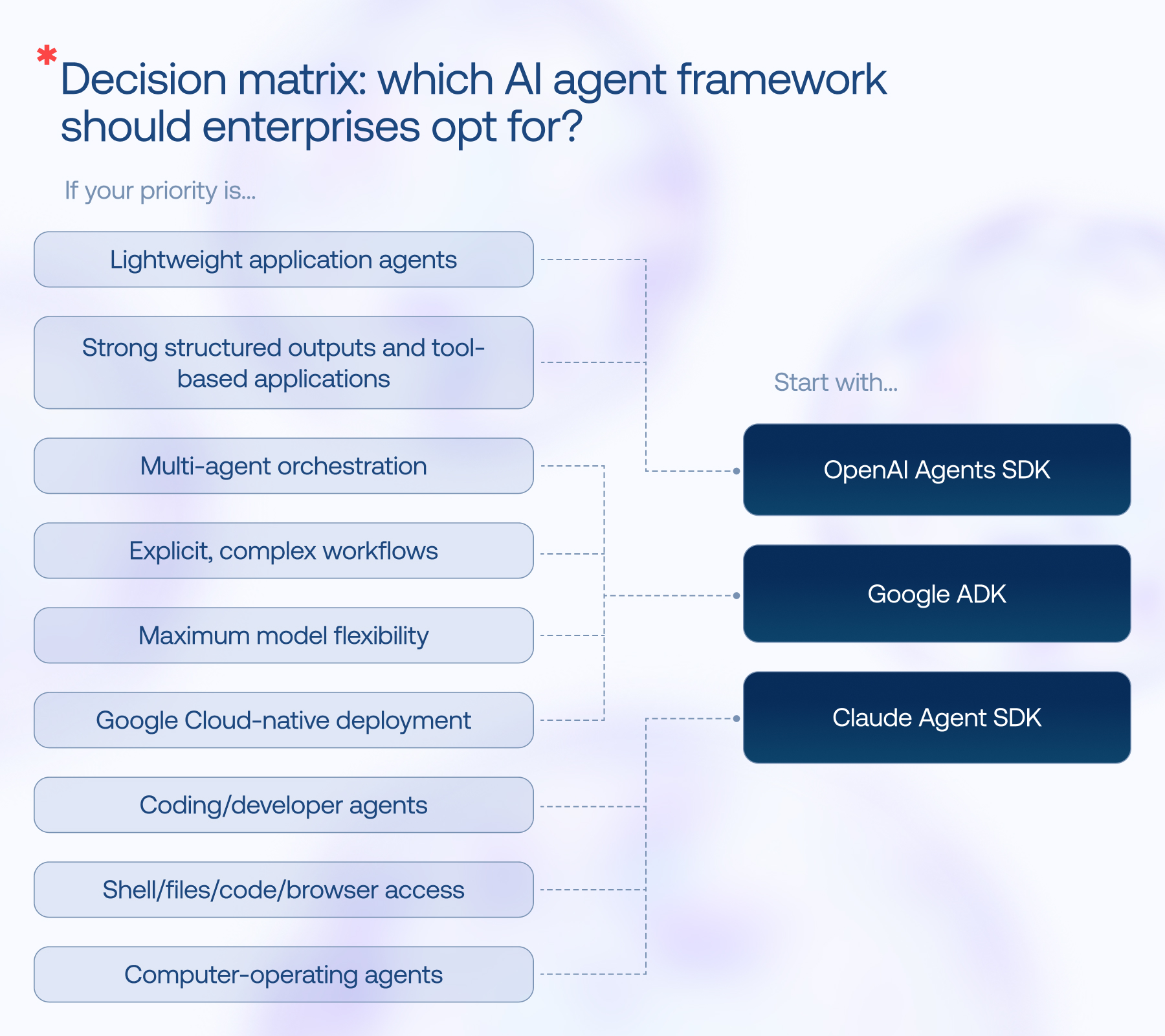
Decision matrix: which AI agent framework should enterprises opt for?
There’s no universal winner in the OpenAI-Google-Claude matchup. Each framework is built around a different idea of how agentic systems should be structured and controlled, so the better fit depends on the kind of agent you’re building, the orchestration it needs, the models and infrastructure it must work with, and how much control you want over execution.
Use the matrix below as a starting point: match your priority to the SDK whose architecture and built-in capabilities fit it most closely.
What the docs don’t tell you: field notes from our AI engineers
Agentic AI framework documentation explains how to define agents, connect tools, persist sessions, and add guardrails. The difficult work begins when those agents meet real users, imperfect data, unreliable APIs, sensitive systems, and production-scale traffic. Across OpenAI Agents SDK, Google ADK, and Claude Agent SDK, Instinctools’ engineers keep coming back to a few practices that matter in production.
- Make retries safe with repeatable operations. If an agent can trigger an external action, assume the request may be retried. Use stable operation/event IDs so a retry cannot accidentally create a second side effect. OpenAI explicitly documents deduplication keys for safely retrying agent trigger events.
- Keep workflow state separate from conversation history. A transcript may tell you what was said, but it should not be the only record of where a long-running process stands. We recommend using explicit state machines, persistent sessions, checkpoints, and event-driven resume for workflows that span days or weeks.
- Use deterministic code for deterministic parts of the workflow. Don’t make the LLM responsible for routing, sequencing, scheduling, or error handling when ordinary application logic can do it.
- Keep the model’s working context smaller than the system’s total state. A large context window isn’t a substitute for context management. In production AI agent architecture, we separate durable sessions, memory, artifacts, and the smaller “working context” actually sent to the model. Large files and stale history should be kept out of the prompt unless needed.
- Evaluate the journey, not just answers. Test whether the agent chose the right tools, followed the intended path, handled interruptions, preserved state, and recovered from failures. A correct final answer can still hide a bad production workflow.
- Treat cost as an engineering variable. Track token usage and spend at the project level. Model choice, shorter prompts, caching where applicable, fewer unnecessary agent steps, and less generated output can all change the cost profile.
- Build safety into the architecture, not around it. Validate inputs, handle errors explicitly, protect sensitive data, and limit what the agent and its tools are authorized to do. Test the application extensively against misuse and unexpected inputs.
- Keep untrusted data away from the steering wheel. Retrieved documents, web pages, emails, tool results, and user-supplied text can contain instructions that the agent may mistake for instructions from your system. Treat external content as data, not authority. Extract and validate structured fields where possible, isolate execution environments, and put AI agent security checks around tools rather than assuming a prompt will reliably protect them.
- Start with one focused agent and add complexity only when the workflow demands it. Multi-agent system architecture is easy to build and surprisingly easy to overbuild. Give one agent a clear responsibility and tool surface first. Split it only when you need genuinely different ownership, instructions, capabilities, or approval policies.
Putting these practices into action is easier with the right engineering expertise. If you’re launching an agentic solution for production, working with an experienced AI agent development company helps ensure these principles are integrated from the start, regardless of which SDK you choose to build on.
You focus on what your AI agents should do. Our engineers handle the heavy lifting under the hood
Let’s buildFAQ
Google ADK (Agent Development Kit) is an open-source, code-first framework for building, evaluating, and deploying AI agents. Released under Apache 2.0, it natively supports multi-agent systems and can be deployed via Gemini Enterprise Agent Platform. It is available in Python, TypeScript, Go, and Java.
Yes, the ADK itself is free under Apache 2.0 license. However, production runtime on Google’s agent platform is billed per vCPU-hour and GB-hour.
Both are open protocols. It is useful to distinguish MCP vs A2A, since both address different layers of agentic systems. MCP (Model Context Protocol) is a client-server protocol connecting a single agent to tools and data sources. A2A (agent2agent) is a peer-to-peer protocol connecting agents to each other as peers. Google ADK, OpenAI Agents SDK, and Claude Agent SDK support MCP, but only Google ADK supports A2A natively.
Yes. The SDK works with any model exposing a Chat Completions-compatible endpoint, enabling 100+ non-OpenAI LLMs via third-party adapters like LiteLLM. However, first-class support is optimized for OpenAI models.
Officially, no. The Claude Agent SDK is built exclusively for Anthropic’s Claude models. Unofficially, yes, but it takes a hacky workaround. Some developers route the SDK through a proxy or gateway to use non-Claude models.
We selected OpenAI Agents SDK, Google ADK, and Claude Agent SDK to examine how the major model providers approach agent development through their own SDKs and how those approaches differ in areas such as model access, tool integration, orchestration, state management, deployment, and production control.
LangGraph and Microsoft Agent Framework are also significant options and could be evaluated using many of the same criteria. They are outside the scope of this particular comparison rather than being excluded because they are technically unsuitable for comparison.
Subscribe to
Instinctools blog