Odoo-based Ecommerce Ecosystem

Odoo-based Ecommerce Ecosystem for a Luxury Furniture Retailer

How a high-end furniture retailer grew online sales by 20% and improved CSAT by 25% by launching an Odoo-based ecommerce ecosystem.

Business challenge

Hardly a surprise, purchasing habits are drifting online. By most metrics, luxury retail is already there. Online sales of premium furniture, for instance, have been climbing by roughly 30%* year over year.

At the same time, many high-end buyers remain charmingly old-school, insisting on touching fabrics and performing a slow lap around the showroom before committing to a five-figure sofa. But even when the final transaction happens offline, the decision rarely does. Nearly 80%** of luxury sales today are digitally influenced: shoppers engage with one or more digital touchpoints before they buy.

*McKinsey

**Grand Research Store

This leaves established luxury brands in a constant balancing act: preserving their heritage and boutique experience while adapting to modern ecommerce expectations.

That omnichannel tension was at the core of our client’s concerns, a high-end furniture and housewares retailer. They sought a robust ecommerce solution that could complement their boutique sales and digitize operations across multiple premium manufacturers, including those offering made-to-order furniture.

Impressed by the portfolio of completed ecommerce implementations by Instinctools, the retailer secured a dedicated team for the end-to-end development of their own ecosystem.

Solution

We proposed an ecommerce solution built on ready-made, specialized components, while fully tailored to the client’s business specifics. As a foundation, we picked up the Odoo platform, which best met the client’s requirements in terms of cost and functionality. To accelerate delivery and keep costs under control, we assembled the system from proven, ready-made building blocks: ERP, CRM, CMS, etc, allowing us to move fast without compromising reliability.

  • An online storefront with an exquisite, minimalist interface that highlights high-resolution, artistic product imagery, paired with a purchasing journey that feels exclusive, polished, and perfectly on-brand.
  • A centralized ERP system uniting a CRM module, order management, quality control panel, and logistics module under its hood for synchronized, hitch-free back-office processes orchestration.
  • A dedicated manufacturing portal for seamless communication and collaboration with external production partners.
  • A mobile room scanning app powered with an intelligent size-matching algorithm for calculating optimal furniture dimensions and suggesting either in-stock or Made-to-Order options.
  • A custom web-based holographic app for immersive in-store product showcase.
  1. Core system components in detail

Below is a closer look at the key components of the solution and how they work together across commerce, operations, and fulfillment.

Equipping internal users with feature-rich functionality to deliver a premier shopping experience

Our team developed a Next.js-based ecommerce frontend that supports customer optional sign-up, appointment booking, and end-to-end purchasing in one consistent customer journey across both online and in-store touchpoints.

Operational capabilities covered in the storefront:

  • Catalog management
    • Creating and structuring product categories
    • Configuring main-menu navigation
    • Creating, updating, and assigning products to categories
    • Building and publishing collections, including product videos
    • Managing product attributes (e.g., size, color) to support complex configurations
  • Pricing, regions, and promotions
    • Creating and managing price lists
    • Setting region-specific pricing and mapping it to country groups
    • Configuring and maintaining discount and loyalty programs
  • Order management
    • Searching and reviewing online orders with full visibility into key sales-order data (customer, order lines, pricing, taxes, totals, statuses, delivery and invoicing details, payment terms, and shipping method)
    • Updating order details when business rules allow
    • Linking historical orders made by guest users to a newly created customer account
    • Creating orders manually (for assisted sales), generating payment links, and triggering transactional emails when an order is posted

By bringing online and in-store shopping into a single system and keeping catalog, pricing, and customer data connected, the storefront simplifies day-to-day operations, improves the buying experience, and gives the business tighter control over regional pricing and promotions while remaining flexible for future growth.

Orchestrating back-office operations within a centralized ERP system

Before embarking on a full-scale retail digital transformation, the client’s online presence was limited to a basic Shopify storefront. Behind the scenes, almost everything that happened after checkout was handled manually, making fulfillment slow, error-prone, and largely opaque, with no real-time visibility into production. Within the Odoo-based ERP portal we designed, teams can now manage the full back-office cycle from customer data and order orchestration to production control, quality gates, and delivery coordination.

  1. Customer relationship management

    A CRM module consolidates all customer data in a centralized repository. Here, the team can view detailed customer profiles, including purchase history and preferences, create new customer entries, update contact information and account status in real time, and add private internal notes to track specific client requirements or conversations.

  1. Orders processing and production handoff

    Once the quotation is confirmed either by a customer completing payment online, or by a sales representative confirming it on behalf of a customer in-store, it becomes a Sales Order (SO). SO contains a series of attributes that provide comprehensive details about the order, including the item name, its manufacturer, optional product details, quantity, unit price, taxes, delivery option, etc.

Sales order workflow

Quotation

The initial draft is created, sent for approval, or shared with the customer.

  • generated automatically (when a customer places an order online)
  • Created manually by the Admin for specific customer requests
Confirmation

Once confirmed, the order moves to Sales order status.

Invoicing

Invoices are generated and payments are recorded.

Delivery

The furniture item is prepared, shipped, and marked as delivered.

Once the Sales Order is confirmed and payment is received, the workflow automatically shifts into production. If the item is out of stock or requires customization, the system generates a corresponding Purchase Order (PO). Before it’s sent to the manufacturer linked to the product, a sales manager validates that the PO meets production standards by:

  • Checking that the Purchase Order contains all the necessary details about the piece of furniture to be manufactured, including product specifications, sizes.
  • Checking that the purchase order contains all the necessary production files (e.g. CAD, renderings, assembly instructions, etc.)

If a sales manager thinks that files or notes for the manufacturer are needed, they can add a message to the purchase order.

After all the checks and PO confirmation, the status of the purchase order changes to “Awaiting Manufacturer” and becomes available to the manufacturer in a Manufacturer portal.

The order processing module gives sales and production managers a dedicated workspace to:

  • View all pending orders in a prioritized queue
  • Break down orders into manufacturing requirements (materials, dimensions, finishes).
  • Assign jobs to specific manufacturers
  • Track the progress of each order through the production lifecycle
  1. The quality control
    of the manufactured products

    Since quality is central to the client’s brand, we embedded quality control (QC) directly into the production workflow. For each manufactured item, designated quality controllers can:

  • Log inspection results against predefined quality checklists
  • Capture and attach photos of finished items for visual verification and auditability
  • Flag defects or non-conformities and automatically trigger rework, where needed
  • Approve products for delivery only after they meet the required standards

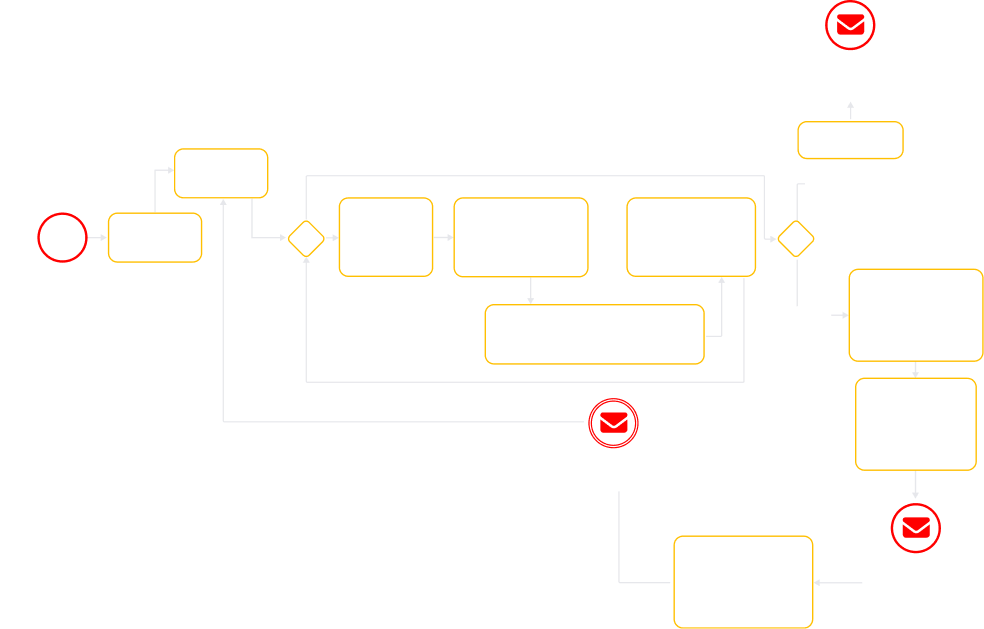
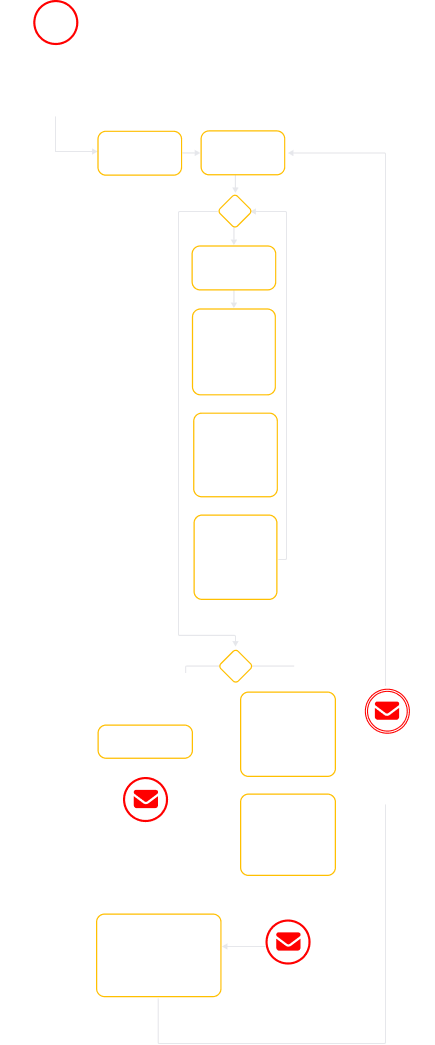
Quality control workflow
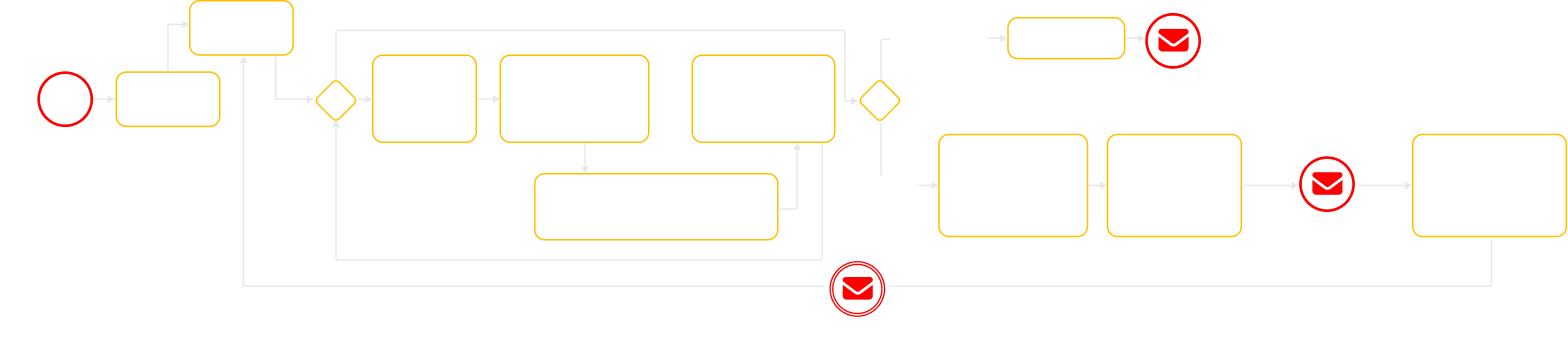
A flowchart outlines an order process. Key actions include logging in, viewing orders, selecting items, conducting checks, attaching images, submitting for QA, adding rejection reasons, and communicating issues. Red envelope icons mark communication steps.
Faded flowchart with yellow and white boxes connected by arrows. Red icons with envelopes highlight three steps: Click on the Link in Email Notification, Review notification that order is assembled, and System sends instructions to Manufacturer.
A vertical flowchart with yellow boxes and diamond shapes outlines a process that includes steps like Log in, View the order, and other subsequent tasks. Several red envelope icons are overlaid at decision points. The flowchart fades towards the bottom.
  1. Product delivery management

    The delivery module ensures that approved products leave the manufacturing facility and arrive at the customer’s doorstep on-time. Logistics coordinators begin by confirming the shipping address and verifying key order details, such as order lines, delivery dates, or pricing, making manual adjustments if needed. This blend of automation and manual flexibility ensures timely, accurate deliveries while handling real-world logistics exceptions.

Empowering production partners through an easy-to-use and secure manufacturer portal

To close the loop between sales and production, we built a dedicated web interface for the client’s manufacturing partners. Just as registered customers have their own personal account with the history of purchases, each manufacturer is invited to the system via a secure login, gaining access to a tailored portal that connects them directly to the orders they need to fulfill.

Secure, role-based access

When a manufacturer is onboarded, they receive an invitation to create their account. Upon login, they see only the data relevant to them, namely, the purchase orders assigned to their workshop. This role-based access ensures that sensitive customer or business information remains protected while giving manufacturing partners exactly what they need to do their jobs.

Order management at their fingertips

Once inside, the manufacturer is presented with a clear, intuitive interface for managing their workload. Key capabilities include:

  • Viewing purchase order lists. A comprehensive list of all assigned orders, providing a snapshot of current and upcoming work.
  • Viewing purchase order details. Deep visibility into each order, including product specifications, materials, dimensions, and customer notes.
  • Searching for purchase orders. A robust search function to quickly locate specific orders by ID, customer name, or date.
  • Sorting purchase order lists. Flexible sorting options to prioritize orders by deadline, status, or value.
  • Processing purchase orders. The ability to accept new orders and move them through production stages, updating the status in real time, from “Accepted” to “In Production” to “Completed.”
  • Downloading furniture unique code. Access to unique identifiers for each piece of furniture, which can be printed or scanned to track items through production and delivery.
Profile management

Manufacturers can also manage their own profile settings within the portal, keeping their contact information, business details, and preferences up to date.

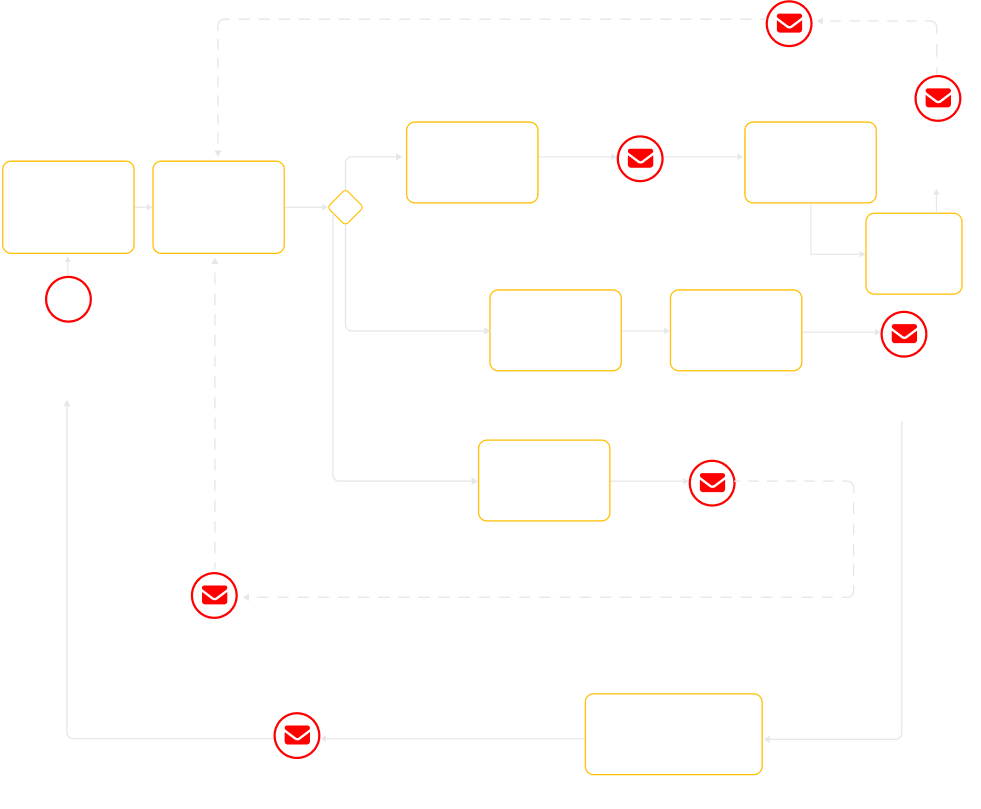
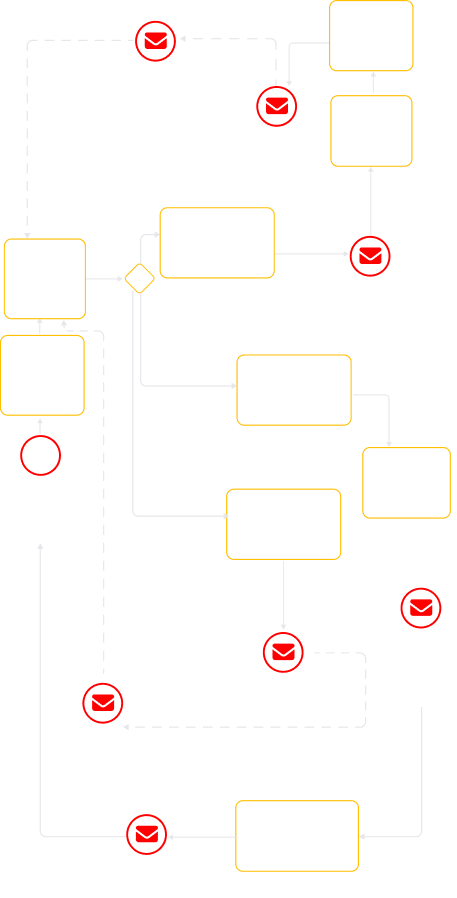
User story within the Manufacturer portal
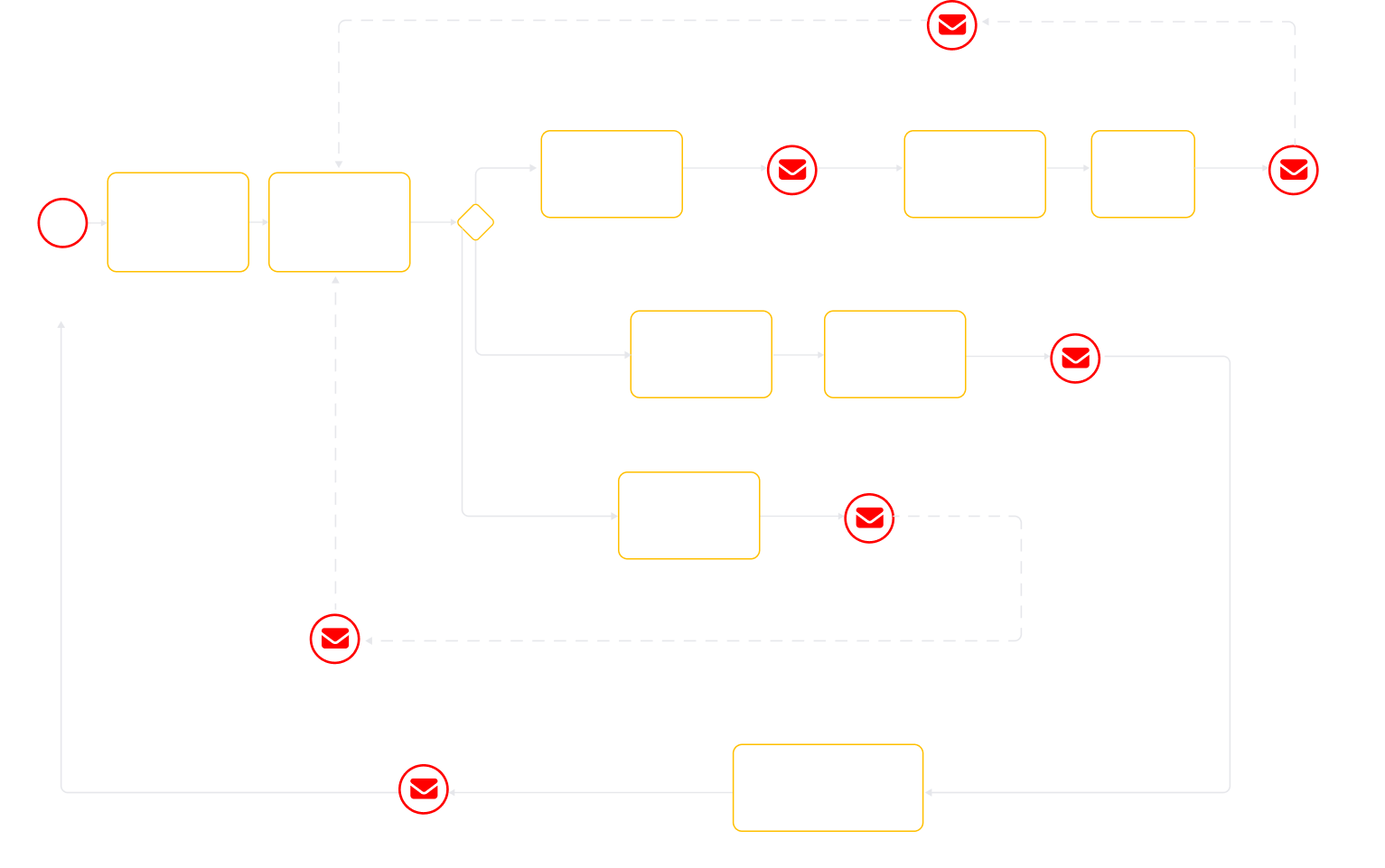
A flowchart with yellow boxes and arrows on a light background, showing steps like “Authorize at Manufacturer Portal,” “View the Order,” “Accept the Order,” and “Download outlook for every item,” with red email icons marking communication steps.
A flowchart showing order processing steps with rectangles outlined in yellow. Red mail icons appear at steps like View the Order, Authorize at the Manufacturing Portal, Accept the Order, and Reject the Order. Some paths and text are faded gray.
A vertical flowchart with yellow-outlined boxes and diamond shapes, red mail icons marking steps. Boxes describe steps like Accept the Order, View the Order, Reject the Order, and Offline communication with Admin.” Lines connect steps.

Enriching the client’s ecommerce ecosystem with room scanning and holographic apps

Alongside ecommerce development, our engineers built a suite of complementary digital solutions to support the client’s non-standard ecommerce workflows:

  • A mobile app that analyzes a room’s dimensions, recommends catalog items that fit perfectly, and suggests size customizations.
  • A web app for Holobox displays, letting customers view products in 3D, rotate them, and change colors via a paired tablet.
  1. The technical choices behind speed, savings, and long-term resilience

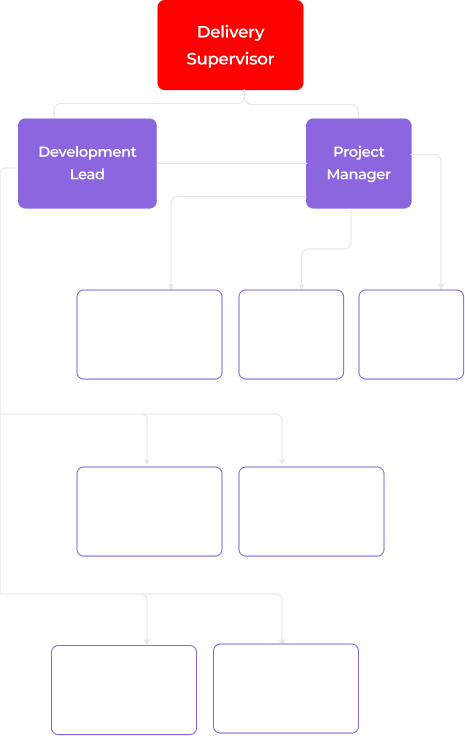
During a thorough discovery phase, led by our Business Analyst and supported by key team members, we investigated requirements, constraints, design, and technical architecture to shape the budget and development roadmap. With this foundation, we then assembled a cross-functional team of 8 specialists.
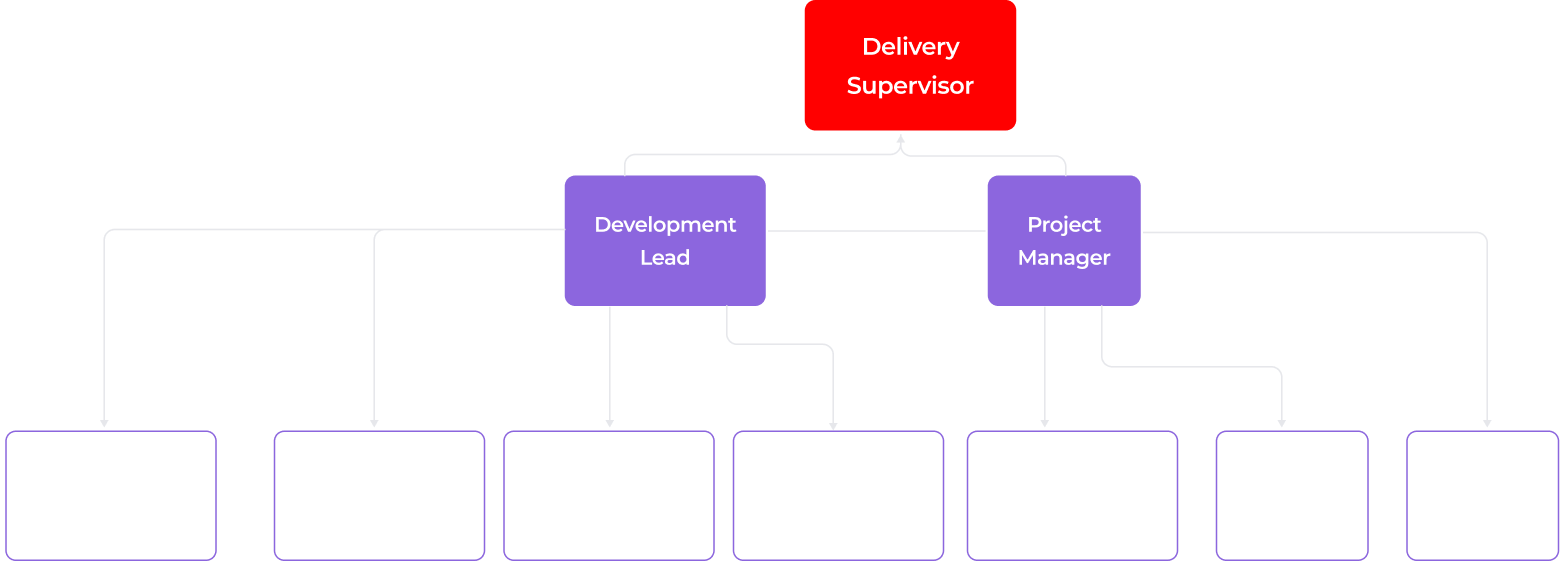
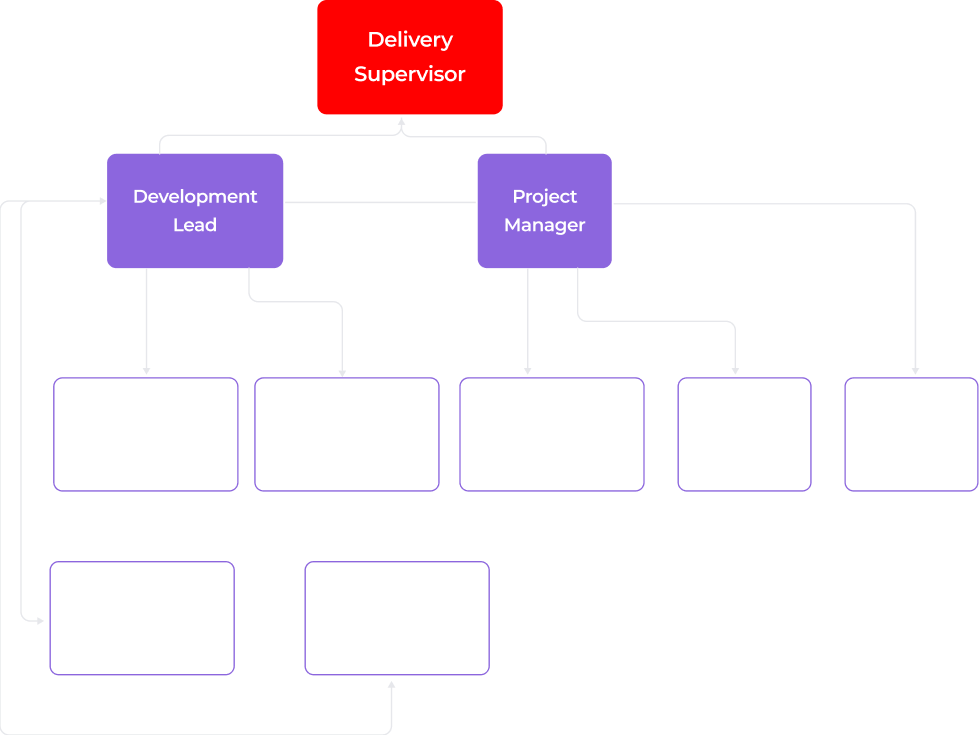
An organizational chart shows a red box labeled Delivery Supervisor at the top, connected to two purple boxes: Development Lead and Project Manager. Below, six faded boxes list various developer and analyst roles, connected under the purple boxes.
An organizational chart with a red box labeled “Delivery Supervisor” at the top. Below it, two purple boxes read “Development Lead” and “Project Manager.” Under them are faint, linked roles such as Developer, Engineer, Analyst, and Designer in lighter purple boxes.
An organizational chart with Delivery Supervisor in a red box at the top. Below are Development Lead and Project Manager in purple boxes, each branching to faded boxes for roles: Business Analyst, QA Engineer, UX/UI Designer, DevOps, React Native, Frontend, Backend.

Deciding on the software linchpin

To define a scalable, delivery-ready architecture, we aligned on several core technology decisions early in the project:

  1. Choosing platforms capable of supporting both ecommerce and manufacturing workflows as a unified foundation. The solution needed to go beyond standard ecommerce flows and involve manufacturers, QA, and production logic, so we extended the architecture to include ERP- and CRM-like capabilities, rather than treating manufacturing as a bolt-on.

Non-standard ecommerce flows to support high-end customer experience:

A white icon of two overlapping rectangles, one above the other, is centered on a red square background with rounded corners. The design is simple and geometric, suggesting layers or stacking.
Selective access
to collections

The platform must dynamically manage access to some collections or limited-edition pieces available only to specific clients, without creating friction for other users.

A white dollar sign is centered inside a scalloped circular badge on a bright yellow background. The badge and icon are simple, with clean lines, conveying a money or price symbol.
Payment before
final customizations

The system should secure payments for made-to-order products in advance, allowing for post-purchase adjustments without overcommitting manufacturing or violating accounting rules.

A white gear icon with six teeth is centered on a bright green square background with rounded corners, symbolizing settings or configuration options.
Post-purchase configuration adjustments

The ability to adjust selections, such as fabric or finish after purchase, while staying within production constraints and maintaining accurate invoicing and inventory management.

  1. Prioritizing existing platforms, services, and infrastructure to accelerate delivery. With strict deadlines, reusing proven components reduced engineering effort and compressed the time to market without sacrificing reliability.
  1. Building the solution on open-source software with a custom service layer to ensure long-term scalability. This approach keeps the system flexible for post-MVP scaling, letting us expand workflows and functionality without being constrained by rigid platform limits.

To meet the client’s ambitious quality objectives and accommodate the unique demands of non-standard ecommerce flows, we selected Odoo as the foundation for the solution.

Odoo is a Python-based open-source platform that supports multiple business domains, including ecommerce, ERP, CRM, accounting, and more. This makes it the perfect choice for a hybrid commerce-manufacturing system.
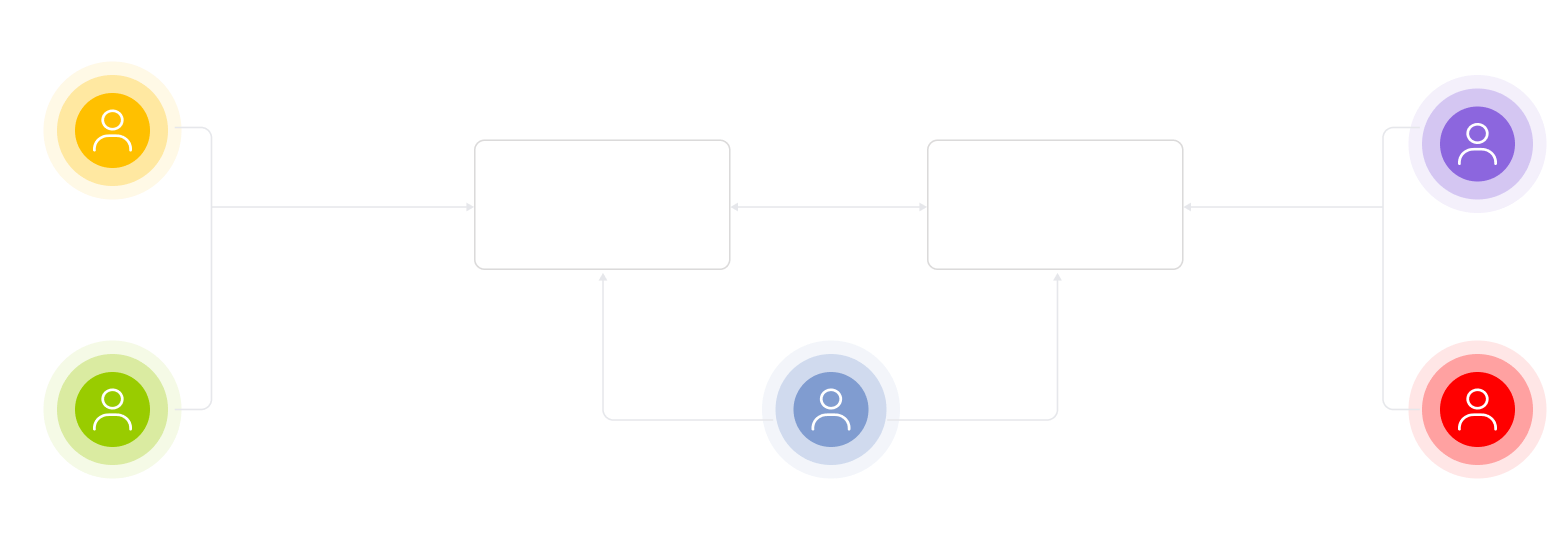
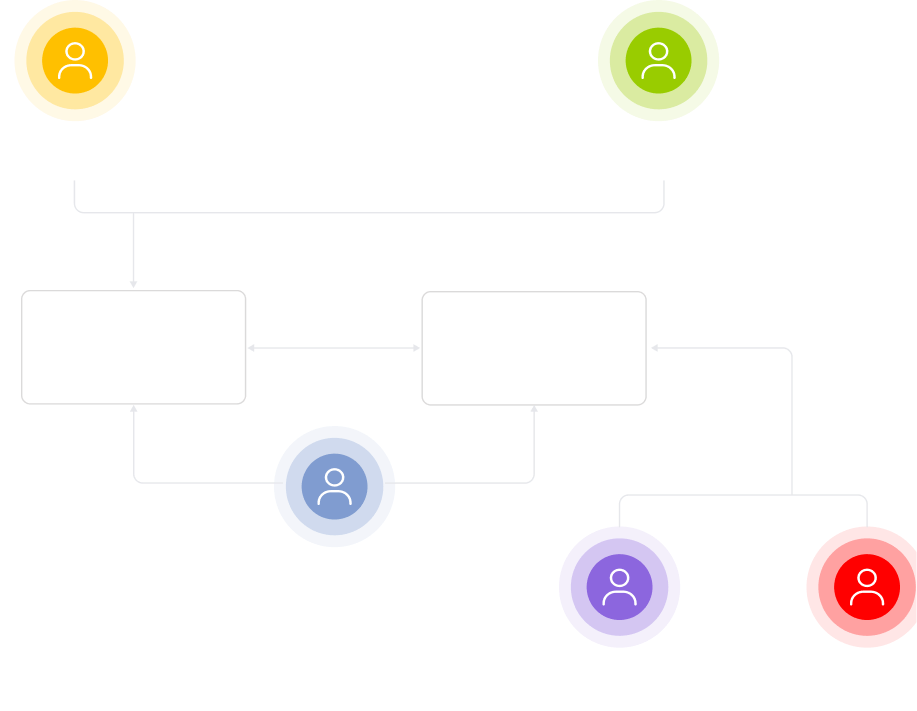
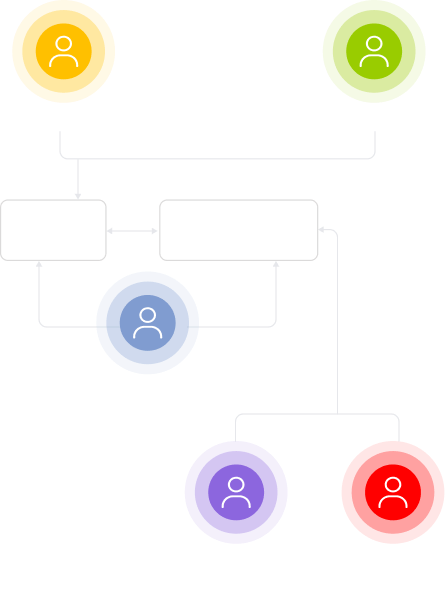
High-level solution architecture
A flowchart with six colored circles labeled: Customer (yellow), Sales assistant (green), Admin (blue), Manufacturer (purple), Quality controller (red). Central boxes “E-store” and “Manufacturer portal” connect these roles, illustrating an interaction process.
A flowchart with six colored circles labeled: Customer (yellow), Sales assistant (green), Admin (blue), Manufacturer (purple), and Quality controller (red). E-store and Manufacturer portal boxes connect these roles with arrows, showing workflow steps.
A flowchart with six colored circles labeled: Customer (yellow), Sales assistant (green), Admin (blue), Manufacturer (purple), Quality controller (red). Faded boxes labeled E-store and Manufacturer portal connect some roles.

Migrating the commerce stack from Shopify to Odoo

At first, we considered retaining the client’s existing Shopify setup for ecommerce and integrating Odoo as a manufacturing portal. Shopify’s SaaS model offered straightforward, out-of-the-box ecommerce features and its POS offline capabilities seemed ideal too, minimizing the need for a custom POS layer.

However, it soon became clear that the project’s non-standard ecommerce flows would have required heavy customization around Shopify:

  • Customer access control: Shopify POS lacks granular control over customer visibility, meaning sales assistants could view all customer profiles, which is an unacceptable limitation for privacy and security.
  • Appointment booking: The existing Shopify plugins did not cover the required appointment booking logic, making custom development unavoidable.
  • User limits: The client’s Shopify plan supported only 15 users, which would quickly become a bottleneck as new boutiques were onboarded.
  • Payment and measurement flow: Shopify’s order model didn’t support the required process of ‘pay first, finalize measurements later’, preventing updates to paid orders with actual measurements.

With all those constraints, we determined that the benefits of maintaining Shopify for a limited set of functions, such as catalog, orders, and customer management, didn’t outweigh the potential complexity and risks of extensive customizations. Instead, together with the client, we made the strategic decision to migrate fully to Odoo, leveraging its flexibility to build a tailored, scalable solution that better aligned with the company’s long-term needs.

Handling integration quirks

Since the client was on Odoo Community (vs. Enterprise), we were working with a pretty limited feature set out of the box. To deliver a seamless experience, we had to extend, modify, and sometimes completely rebuild standard connectors.

Twilio: predictable messaging without platform constraints

Odoo’s native integration with Twilio required purchasing additional tokens just to send SMS messages, which added recurring costs and limited flexibility.

We eliminated this dependency by building a custom integration that communicates directly with Twilio’s API. This gave the client full control over messaging costs and functionality, from order confirmations to delivery alerts.

DHL Express: making shipping rates and validation resilient

The DHL integration presented the most challenges, requiring numerous adjustments to make it reliable.

  • Rate calculation on holidays. DHL could return no live rates during non-business days. We adjusted the logic to automatically check the next available business day, so shipping costs are always available at checkout and in back-office flows.
  • Address validation discrepancies. DHL’s location data sometimes differed from common sources like Google Maps or Wikipedia, causing validation failures. We implemented more tolerant matching to prevent unnecessary customer friction.
  • Verification and compliance. We went through an extensive verification process because DHL requires strict data accuracy for international shipments. Even minor errors in customs declarations can result in fines, holds, or delivery delays. To address this, we implemented an API-driven declaration flow: customs declarations are generated via DHL’s API only after our system pre-validates all line items and required shipment data, ensuring everything passes DHL’s checks before submission.
Stripe: modern checkout with multiple payment methods

Odoo’s default Stripe component was outdated, exposing too few payment options in the UI. The business needed credit cards, digital wallets, and local payment methods to maximize conversion.

We developed a custom express checkout component from scratch, creating a modern, flexible interface that met the client’s requirements and improved the user experience.

Decoupling the storefront UI for enhanced performance and flexibility

Although Odoo offers an out-of-the-box storefront builder for easy customization, relying on it introduces potential performance risks. Since Odoo renders pages on the server, page load speed directly depends on its current resource utilization and processing capacity.

To avoid future performance constraints, we suggested implementing the ecommerce application as a standalone Next.js (React) application integrated with Odoo via REST API. While Next.js uses server-side rendering, hosting it as a separate storefront keeps site speed independent of Odoo’s workload and lets use prerendering and caching to deliver pages faster.

Besides, the client was not satisfied with the built-in builder’s limited customization options for style, fonts, colors, and layout. To ensure every page matched the client’s vision, our UX/UI designer reworked each of them, and, once approved, our frontend engineer turned the static mockups into functional, performant, and accessible user interfaces. Some elements, such as the booking calendar and the customer address section in the user account were built completely from scratch because they were not supported natively in Odoo.

Mitigating long-term architectural and delivery risks

A monolithic approach (combining ecommerce and manufacturing portal into a single service) accelerates development speed but increases long-term risks, such as architectural complexity, codebase entropy, and scalability constraints. To tackle these risks, the team followed best engineering and architectural practices:

  • Source control (Git). All source code was hosted in a Git-based repository. While Instinctools could run a dedicated GitLab environment for the project, we recommended the client maintain its own repository on GitHub, GitLab, or another Git platform to retain long-term ownership and access control.
  • Code review. All merges into the main branch were reviewed by at least one of our engineers. By keeping merge requests small and focused, we minimized review complexity and reduced the risk of overlooking important issues.
  • Automated testing. Although there was no mandatory test coverage requirement, we recommended that automated testing be considered for critical features, provided the timeline and scope allowed, to ensure the highest level of functionality and stability.
  • Coding standards. The solution was built on Odoo (Python) and React (JavaScript). Our team followed internal coding standards for both Python and JavaScript.

Deploying infrastructure on AWS

Leaning on native AWS services allowed us to obtain core infrastructure features, such as autoscaling, backups and recovery, observability, and security controls, out of the box, reducing operational complexity and long-term maintenance overhead.

  • ECS Fargate runs application containers and enables seamless horizontal scaling without the burden of managing servers.
  • Amazon Aurora PostgreSQL is used as a fully managed relational database, providing high availability and scaling capabilities.
  • The solution is deployed within a Virtual Private Cloud (VPC) with isolated public and private subnets to enforce security boundaries and controlled exposure.
  • Amazon EFS provides shared, multi-AZ file storage to ensure durable and scalable application workloads.
  • Amazon ECR stores and distributes private container images securely and efficiently.
  • Sensitive credentials are protected by AWS Secrets Manager. Administrative access is controlled via a bastion host deployed in a private subnet.
  • All infrastructure is provisioned and managed using Terraform to ensure reproducibility and controlled change management.
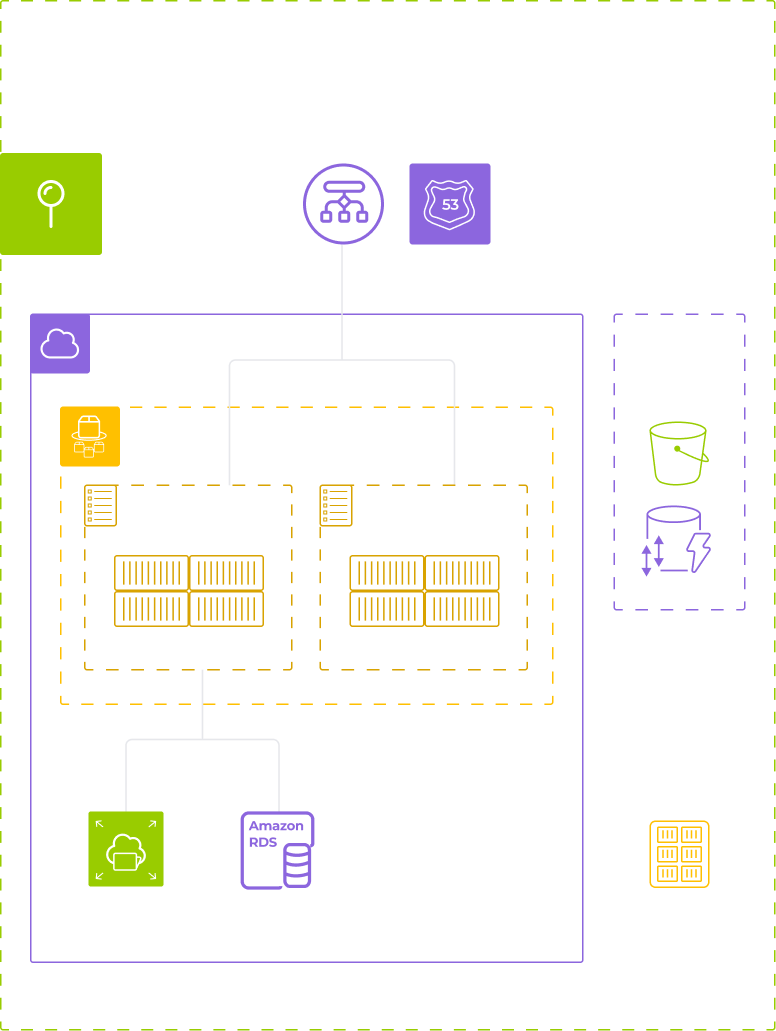
Diagram of AWS-based infrastructure deployment view: shows components like VPC, ECS Fargate (running Odoo and a frontend SPA), Amazon RDS, EFS, S3, ECR, and Terraform state, organized in colored outlined boxes with icons representing each service.

Roles overview

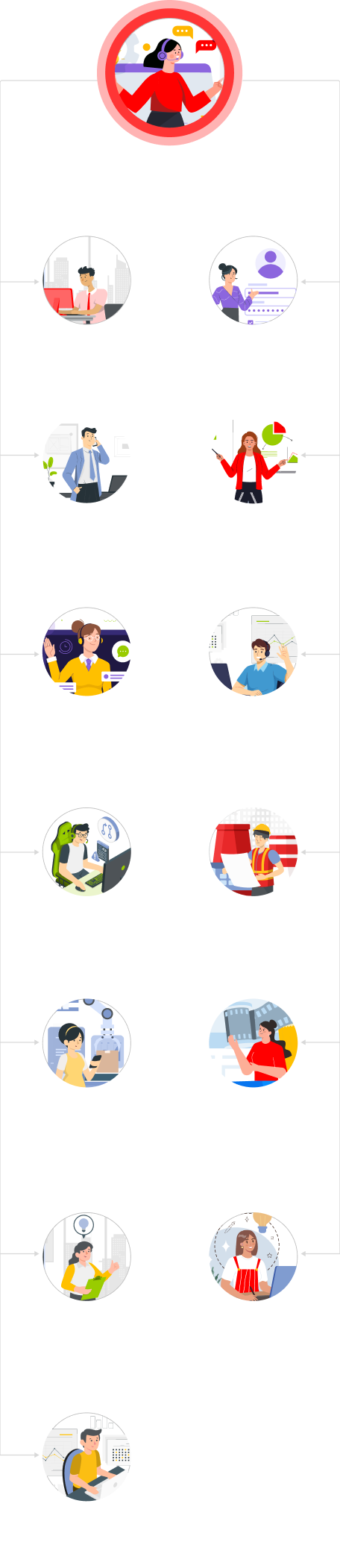
Every function and workflow of the client’s business finds its place in the ecommerce ecosystem. Here’s the full picture:
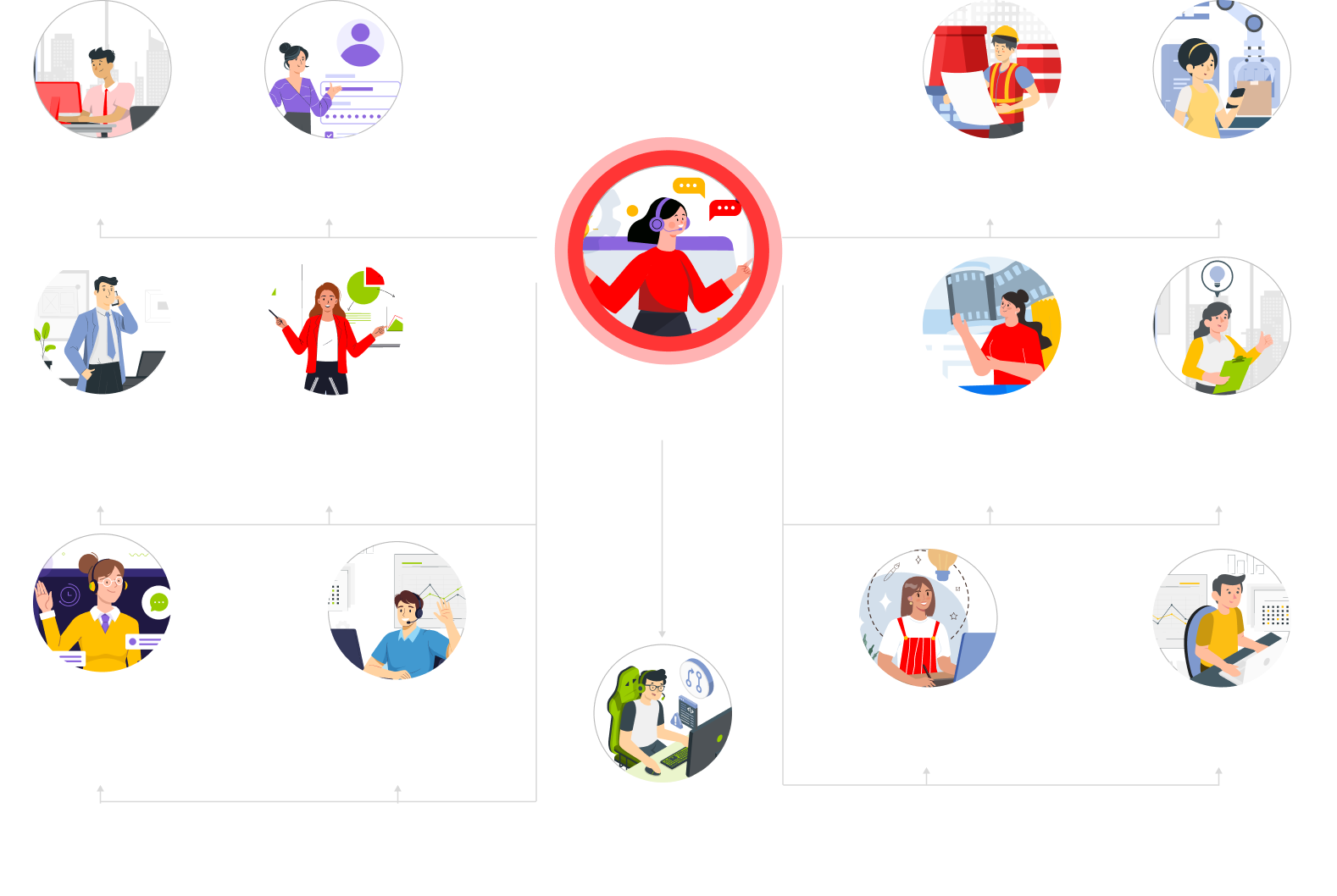
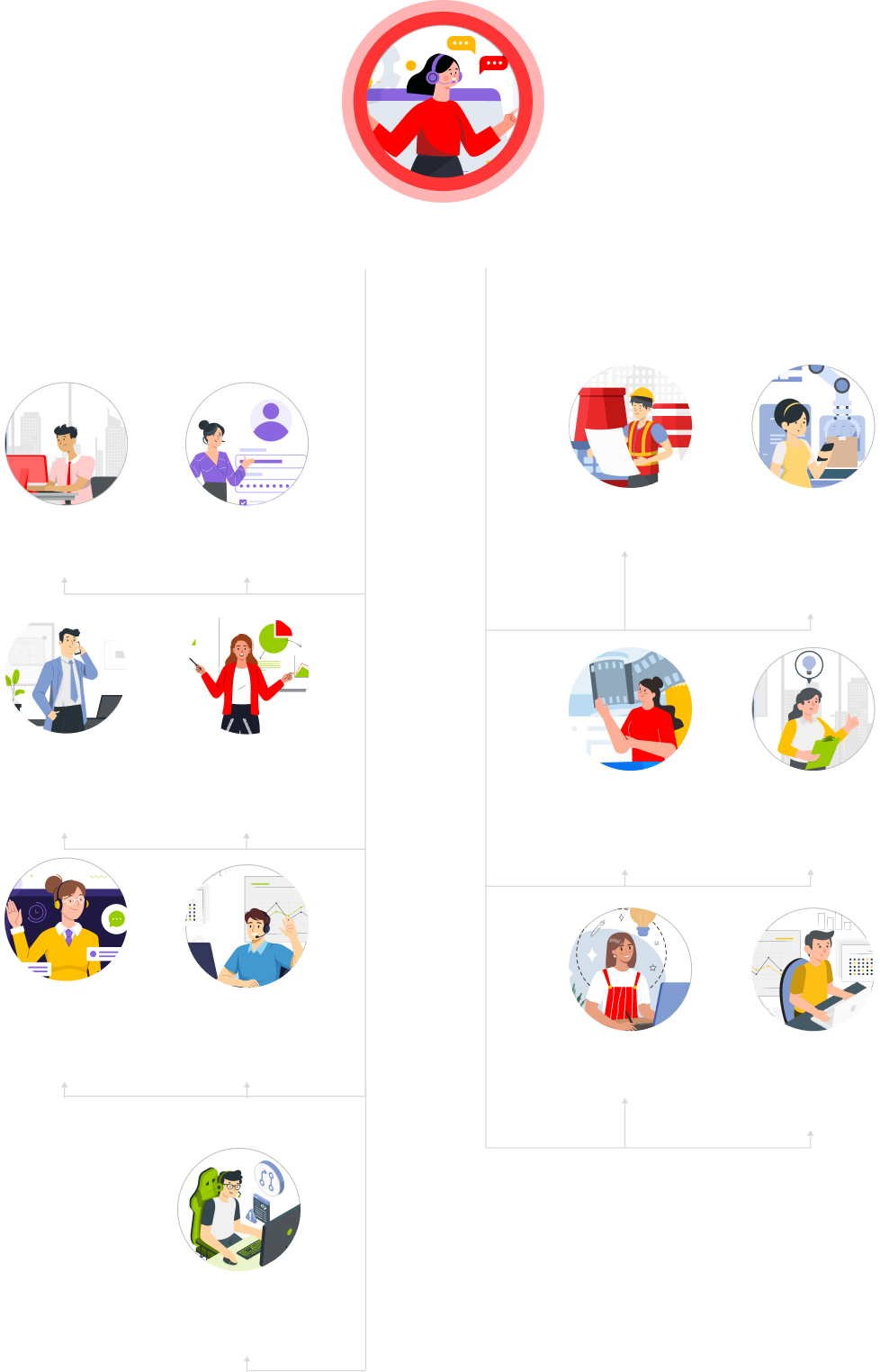
A hierarchical chart showing roles in a system. At the center is a Super admin with full access, highlighted in red. Surrounding roles include Guest, Registered user, Manufacturer, Manager, Sales, Ecommerce, Quality controller, Customer service, Store manager, Designer, and Accountant.
Organizational chart with illustrated icons for roles: super admin (center top), branching to guest, registered user, admin, sales, store, customer service managers, sales rep, sales director, manufacturer, production manager, e-commerce manager, designer, accounting, and quality controller.
A top red circle with a crossed line overlays a woman holding many items, symbolizing multitasking. Below are icons of individual roles: project manager, recruiter, researcher, marketer, client manager, and accountant, each illustrated by a separate person at work.

Before

  • A basic Shopify storefront handling standard catalog and checkout flows
  • Disconnected ecommerce and production processes
  • No structured quality control before shipment
  • Manufacturers operating outside the client’s visibility, with fragmented and reactive communication

After

  • A fully integrated Odoo ecommerce ecosystem, built to reflect the prestige of the brand online
  • Automated purchasing flow linking sales orders to purchase orders, manufacturers, QA, and logistics in a single system
  • Embedded quality control workflow with digital checklists, defect-triggered rework
  • A dedicated manufacturer portal with secure role-based access and real-time production status updates

Business value

  • +20% online sales growth
  • +25% CSAT increase
  • Operational unification across ecommerce, production, and logistics

Ecommerce Ecosystem Development

Ecommerce Ecosystem For an Eyewear Company

How developing a comprehensive ecommerce ecosystem helped an optical company withstand severe economic headwinds and grow their store chain from 8 to 24 eyewear boutiques across France. 

Industry:
Manufacturing

Mobile App Development

Software Product Development

Web Development

Data Visualization

Business challenge

For highly competitive industries, such as ecommerce, being able to adjust to ever-changing market conditions in a blink of an eye is the only way to retain customers and win new ones. In this respect, COVID-19 became an inflection point at which only the most resilient companies could stay in the saddle, while others had no other choice than to ride off into the sunset.

When the pandemic began, companies were forced to rethink their business vision, look for new value and revenue-creation opportunities, and find ways to satiate consumers’ needs in unanticipated circumstances. The situation was the same for our client – an eyewear company with its own production and a chain of physical stores across France.

The client first reached out to *instinctools to create a mobile app for sales assistants. However, the coronavirus meddled in their business strategy, forcing them to move at a rapid clip and develop an additional sales channel aimed directly at consumers. That’s how the idea of a shopping app for customers arose.

When a company wants to drive revenue growth, banking only on a customer-facing solution isn’t enough. Internal processes also have to be enhanced. In the case of our client, the necessity to adapt to the changing ecommerce realm unveiled issues with order registration and processing, stock inventory, and logistics.

After analyzing the market and gathering the client’s requirements, we proposed developing a comprehensive ecommerce ecosystem of mobile and web solutions with a shared back end and multiple front ends.

Solution

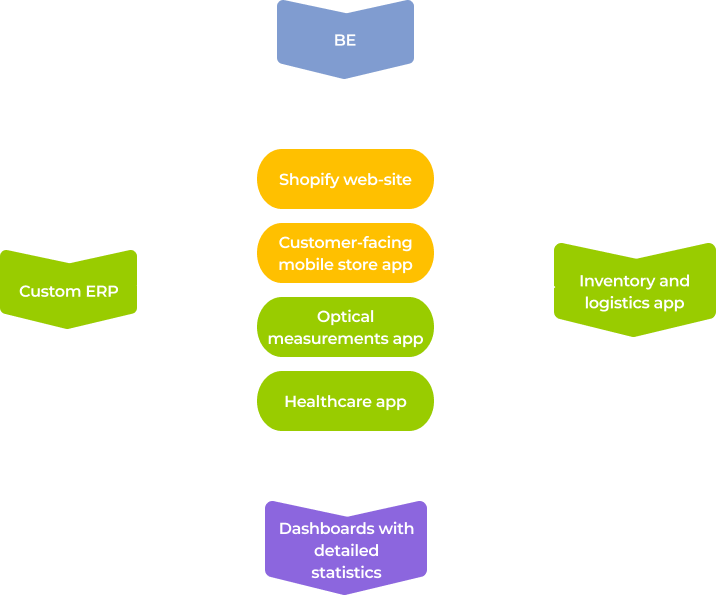
As we’ve mentioned, the client initially approached *instinctools to craft one small application for internal usage. However, the retail industry upheaval, along with evolving consumer needs, forced them to reconsider an erstwhile firm view of ecommerce as a bolt-on to the main business. For over six years of cooperation, our dedicated team has developed four apps for the company’s staff, one customer-facing application, and a new website on Shopify.

Why did we develop niche applications one by one instead of crafting one multipurpose solution? Such an approach provided several benefits:

  • Maintaining and updating several small apps is much easier

than taking care of a large-scale solution with complex business logic.

  • Ensuring ease of use for the client’s staff

as each mobile or web solution is tailored to a specific role within the company.

  • Rolling out new functions apace

to attract new customers and retain existing ones.

All the applications, except for the one related to the local insurance system, are written in React Native. That way, our client isn’t limited to devices with a particular OS and can reach a larger pool of potential buyers.

Let’s zoom in on each of the solutions in the order of their occurrence.

  1. Eyewear measurements app for consultants in physical stores

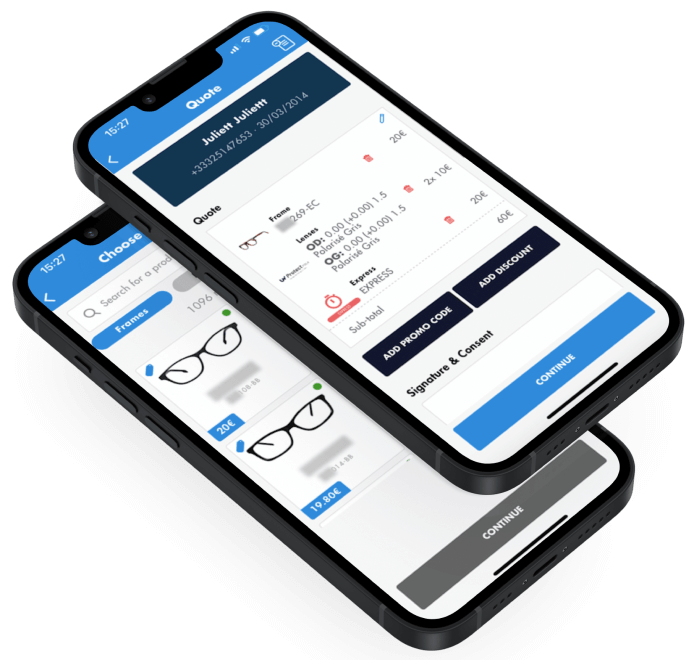
When the client started the business, far from all processes were digitized. For instance, the in-store consultants used to mark out an eyeglasses frame for a buyer and then manually calculate the lens diameter and fitting distance to ensure that the glasses had the lenses at the correct distance from the customer’s pupil.

With such an approach, the probability of an error caused by the human factor increases manifold. The problem became more evident as the client’s store chain was expanding. Therefore, they decided to digitize and automate this task with a simple mobile application for internal usage. 

Developing the app in React Native became the starting point of our cooperation with the client. How does it work?

After a customer chooses a frame in the store, a consultant finds it in the catalog in the app.

Then, the consultant opens the camera on the device and points it at the customer’s face to determine control points – the center of the pupils, considering their vertical position.

Finally, the app automatically calculates the position of the optical center so that the geometrical center of the frame and the buyer’s pupil coincide to ensure the glasses are comfortable to wear.

After a customer chooses a frame in the store, a consultant finds it in the catalog in the app.

Then, the consultant opens the camera on the device and points it at the customer’s face to determine control points – the center of the pupils, considering their vertical position.

Finally, the app automatically calculates the position of the optical center so that the geometrical center of the frame and the buyer’s pupil coincide to ensure the glasses are comfortable to wear.

Besides eliminating the possibility of calculation errors, such automation has speeded up order processing by five minutes per order. It turned out to be a real breakthrough, as the client’s business model focuses on serving many visitors in a short time – the speed of order-making is even mentioned in their slogan. Therefore, at the client’s scale, even such a seemingly small improvement meant a 33% acceleration of order processing.

  1. Customer-facing mobile store app

Before 2020, the client launched new stores in several French cities and planned to develop new applications specifically for physical locations, such as kiosks for self-ordering of glasses.

However, the pandemic and the following quarantine with a strict ban on leaving home drastically changed the client’s business strategy. Magnifying their digital presence and providing customers with an app where they can select, order, and pay for the glasses became the client’s primary focus. That’s why our team switched from developing software solutions for internal usage to crafting a mobile ecommerce eyewear store for customers. It was also written in React Native to be apt consumers with iOS and Android devices. 

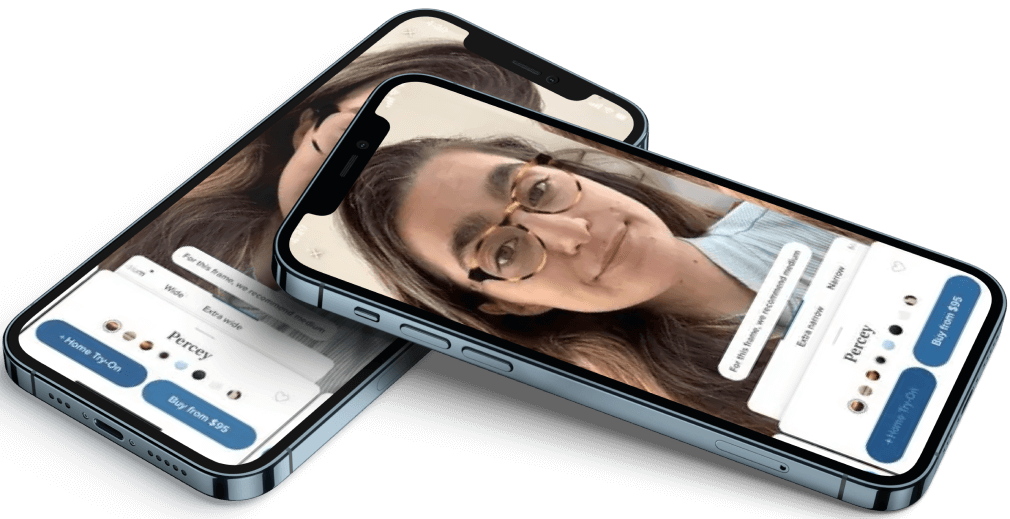
Given the impossibility of physical presence in the store, we added a feature of a virtual frame fitting. It gives a rough idea of how different frames would look on a person’s face. Even long after the lockdown, this function remains popular among the app’s users. 

  1. Custom ERP for internal usage

We inherited the enterprise resource planning project from the client’s previous tech partner who hadn’t been able to provide a no-fuss hiring process and unlimited scalability on demand.

After discussions with the client, it was decided to finalize the custom solution another team had been working on instead of adopting and customizing a ready-made ERP such as Odoo, SAP, etc., for two reasons:

  • The client didn’t need all the features that off-the-rack software provides, so it would have been unwise to overpay for it.
  • Only a bespoke system could guarantee perfect alignment with the client’s processes.

What roles does the web app cover within the company, and what functionality does it provide?

  • Sales person

has access to the customers’ database to create and edit consumer information.

  • HR

can create and edit staff accounts to make managing employees whole-company scale easier.

  • C-suite

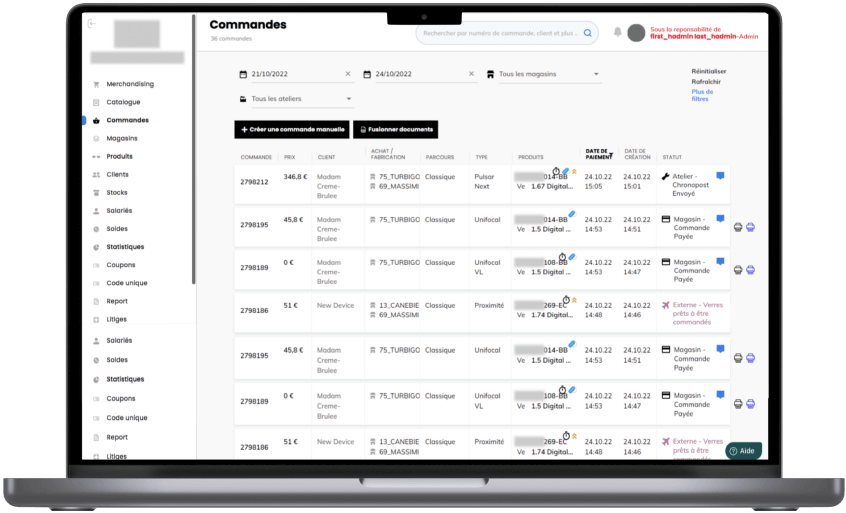
can leverage advanced statistics to back up their decisions with up-to-the-minute data. We created dashboards to visualize the data about the number of orders in general and by cities, customers’ gender and age, lens type, and a raft of other parameters.

  • Technician

the employee responsible for assembling glasses — signs in the ERP to see the list of orders to be produced, delivered, etc. Moreover, each technician is assigned to a certain store and can see only the data related to their location.

  • In-store consultant

registers orders made by customers in the physical stores.

As the ERP automatically records status changes after each operation with an order, the client obtains a fully-transparent production and delivery process. And easy-to-grasp dashboards empowered them to make well-informed decisions based on vast amounts of data and keep a laser-sharp focus on the changing customer demands to adjust production accordingly as fast as possible.

  1. Mobile app for inventory and logistics

As the number of the chain stores was growing, our client faced the palpable need for a solution that would ensure centralized and automated stock monitoring, logistics, and inventory. That’s what became a driving force in launching a new project – a mobile application on React Native integrated with RF and RFID scanners, used for inventory, goods receipt, and shipping.

The app we developed simplifies the tasks for employees involved in inventory management and in-store consultants who receive orders.

It allowed the client to:

  • Digitize inventory management and logistics and therefore speed up related tasks, such as order picking
  • Automate stock and inventory management
  • Get a detailed view of the stocks in near real-time
  1. Healthcare software for simplified cooperation with insurance companies

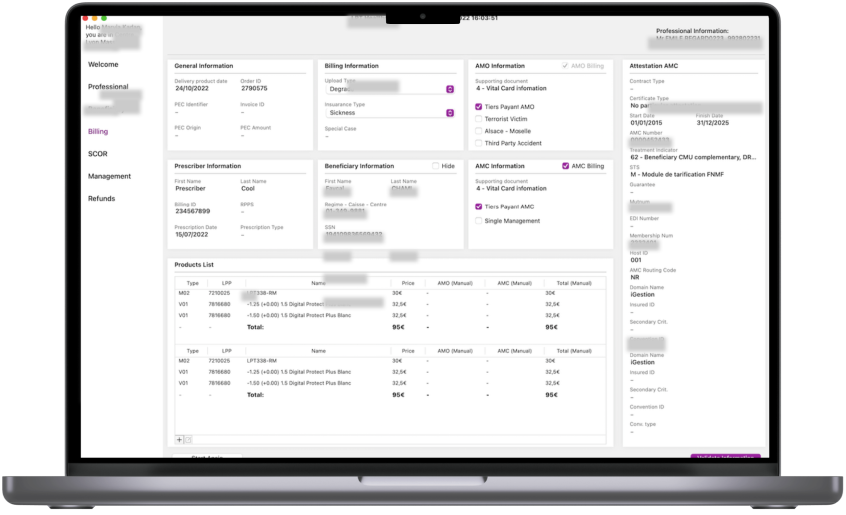
One of the hallmarks of the client’s business is the direct cooperation with public and private insurance companies in France. It’s convenient for the consumers, but the client also wanted to facilitate the process for their employees. Therefore, our dedicated team developed an insurance processing application for internal usage.

There are physical terminals in the client’s stores where consultants swipe customers’ insurance cards. The terminal reads the data and sends it to the app, which automatically matches this information with the data the insurance companies provide and displays:

  • what type of order the consultant can create for a client
  • how much of the order’s cost can be covered by insurance

Insurance regulations in France require choosing one OS for insurance processing with mandatory certification of the software before its rollout. As the client had already bought iMacs for their brick-and-mortar stores, we designed the healthcare solution for MacOS.

The app’s implementation allowed the client to automate the routine task of insurance processing and completely cut out the possibility of human error.

  1. Website on Shopify

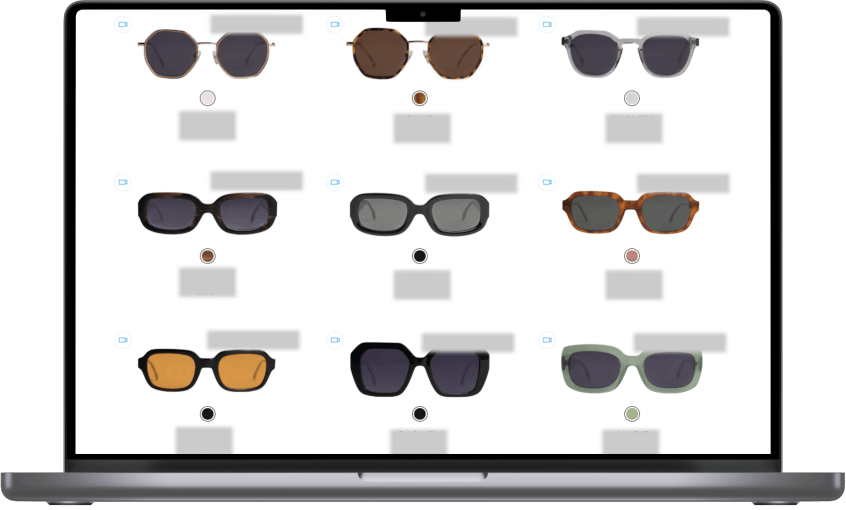
The client’s former website used to run on WordPress, bolstered with the WooCommerce plugin. The problem was that as the website was expanding and new plugins were being added, the solution became overly complicated to be managed efficiently.

Tons of spaghetti code slowed down the pages’ loading speed — it could take up to six seconds — a parameter that, in 70% of cases, influences consumers’ willingness to buy from an online retailer*.

*Source: Unbounce, Think Fast: The Page Speed Report

Redesign and modernization of the old website would have taken too much time, so the client decided to switch to Shopify – a hosted SaaS solution — so that the provider would handle most of the technical issues and it would be easier to scale further.

Moreover, the out-of-the-box Shopify solution offers functionality that is missing in the off-the-shelf WooCommerce module:

  • a multi-currency plugin
  • a wide range of payment options
  • an automatic country-by-country tax calculator

With the former website, all of that had to be either coded manually or achieved through installing additional modules, which slowed down the solution.

Shopify adoption has also allowed the client to gather more detailed customer analytics thanks to the connection with Google Analytics, Google Tag Manager, and Meta Ads.

However, despite Shopify being an all-in-one ecommerce platform, our team had to work through some of its limitations. For example, it was impossible to specify more than three product options in a description. Check how we solved these issues in a detailed case study.

By switching to Shopify, the client got a user-friendly and easy-to-manage online store with 6x higher loading speed and access to detailed analytics.

Here’s the client’s final ecommerce ecosystem with all the mobile and web applications we’ve developed for internal and external usage.

Before

  • Unoptimized business operations
  • Manual processes
  • High influence of human factor
  • Absence of an online ecommerce eyewear store for customers
  • Lack of tools for efficient data collection, analysis, and visualization
  • Draft version of a custom ERP that wasn’t released
  • Heavyweight and slow WordPress website with loads of spaghetti code

After

  • Digitized order processing, inventory, and logistics
  • Automated optical measurements and insurance-related tasks
  • Minimized possibility of human error
  • Eye-catching and user-friendly mobile app for online consumers
  • Insightful dashboards with detailed statistics
  • Full-fledged custom ERP 
  • Speedy and easy-to-maintain website on Shopify
  • Transparent and flexible ecosystem of lightweight software solutions

Key features

Adaptability

A comprehensible suite of lightweight applications allows the client to remain flexible and swiftly respond to any market changes. Such an approach also simplifies apps’ maintenance and support, not to mention the ease of use for the client’s employees.

Extensiveness

The custom B2B ecommerce ecosystem we’ve created encompasses software solutions that provide a seamless customer experience and streamline the client’s internal processes.

Customizability

Custom software aligns with the client’s business needs perfectly. Moreover, each solution for internal usage is targeted to a specific role within the company to simplify its management for the client’s employees.

Business value

  • 33% faster order processing
  • 6x boost in page loading speed on the website
  • Fully digital inventory management and logistics

  • Complete transparency of the operations within the company
  • Automated insurance processing
  • Eliminated possibility of a human error

Multiplier effect

A well-designed ecommerce ecosystem enhances your customers’ experience and turns them into regulars. 

Any B2C or B2B software solution is often a part of a larger ecosystem that includes internal business tools and external channels of interaction with potential customers. To hit it big down the line, you should adhere to a holistic approach to building software for your company’s needs. 

This principle plays out in any industry, from ecommerce, entertainment and media to healthcare, fintech, and manufacturing. Bank on comprehensive strategic solutions instead of one-off fixes to stay ahead of the pack and win over more customers.

Odoo On-Premise Implementation For a European Streaming Platform

Odoo On-Premise Implementation For a European Streaming Platform

How replacing outdated software with Odoo ERP and custom BI tools allowed a streaming service provider to implement a monthly billing model, get a 360-degree view of their customer data, save 1000+ hours of manual operations on inventory management, and bring thousands of new customers to the platform all over the EU.

Industry:
Media and Telecommunications

Duration:
12 months

Team:
a project manager, two business analysts, a UX designer, a solution architect, four backend and four frontend developers, four quality assurance specialists, and a business intelligence consultant

Context

Any company’s growth brings opportunities for investment and new market outreach, and entails a transformation of business processes, operations, IT infrastructure, etc. Experiencing a significant rise in customers, our client decided to improve their subscription-based business model, allowing their end-users worldwide to be billed for IP television services on a monthly basis, not annually as it had been before.

The introduction of such a seemingly simple change in the subscription model required a significant transformation of current business processes, which also led to the implementation of a corporate ERP system. The company got in touch with *instinctools for IT consultancy to find a solution and for ERP system development to run their business more effectively and quickly adapt to ever-changing market needs.

The main goal for our team was to advise on and implement an ERP system that would match the company’s existing business processes, taking into account growth plans. Another essential requirement was choosing an ERP system that was easy to maintain and develop in terms of cost and availability of specialists.

During the Pre-Discovery workshop, our team analyzed a current client’s business model and suggested a best-fit solution. The customer’s key non-functional requirements for an ERP software were the following: an on-premise solution that can be managed on company servers, free licensing, fault tolerance, and customer support. Implementing the solution as soon as possible was vital, as they needed to handle an ever-increasing array of data.

*instinctools provided a detailed project estimate with a scope and vision of the future ERP solution as a primary output of the workshop. After a thorough analysis, our experts suggested implementing the Odoo ERP system. Here are a few reasons why we’ve chosen Odoo, alongside the fact that it ultimately met the client’s requirements mentioned above:

  • Multiple module integration. The Odoo system has a broad set of features and modules ready for customization according to any department’s needs.
  • Odoo is among the leading ERP solutions in the market with a huge community and app store.
  • Odoo fits small and medium businesses bringing them high flexibility and scalability.

Dedicated team

To successfully complete the project within the time frame set by the customer, *instinctools gathered a dedicated cross-functional self-managed team able to implement the project end-to-end. The project’s dedicated team consisted of: a project manager, two business analysts, a UX designer, a solution architect, four backend and four frontend developers, four quality assurance specialists, and a business intelligence consultant. The right composition and skill set made it possible to implement the project within the required timeframe.

Challenge

When implementing new IT solutions, companies usually face many challenges in operations and processes, not just purely tech issues. Our customer collaborated closely with the *instinctools dedicated team, allowing them to focus mainly on IT challenges and some organizational issues.

  • Data migration

    The data about users’ quantity was one of the unknowns in the first stages of the project estimate. It complicated the process of data migration to the new system, as the actual number of users (internal and external) was much bigger than the pre-estimated. As a result, we had hurdles with the performance of certain system operations and needed to react quickly to changing requirements and other issues.

  • Odoo modules integration and customization

    One of the benefits of the Odoo ERP system is the variety of modules for different units, operations, and management. The choice of the modules for particular business needs wasn’t as challenging as their integration into the current system. Most essential components needed customization and adjustments that our engineering team managed to implement.

  • Data visualization and reporting

    Companies not using an ERP system may lack data visualization and fast reporting available for different units. With the growing amount of data and the length of Excel spreadsheets, the implementation of Business Intelligence became a necessity for our client. The standard Odoo module didn’t meet the client’s data visualization and reporting requirements. We needed to build a BI tool and enable its connectivity and accessibility within different units.

  • Integration with third-party services

    The last but not the least important challenge for our dedicated team was integrating the Odoo ERP system with the services, enabling the sustainability and smooth operation of the whole business machine, from notifications and stock management to acquiring systems and legal resources.

Solution

Instinctools’ dedicated team, working closely with the customer’s IT and Operations departments, was able to implement a holistic ERP system, connect all the necessary integrations, and develop and set up the required Odoo modules. It fully met the demand for sustainable and scalable software solutions that are compatible with internal and external services, running on on-premise servers, having fast reporting and visualized analytics, and ensuring reduced costs on the maintenance and support side.

With this solution, we helped our client achieve its primary goal, the upgrade of a subscription model provided to their customers.

Key features

  • Customized Odoo modules for stock management, logistics, accounting, legal operations, and marketing analytics.
  • Internal integrations with Google Analytics, e-mail services, and notification systems.
  • Tableau business intelligence tool with distributed access for all units and fast reporting.
  • External integrations with DHL, Hermes, NevelNet, Stripe, and other services.
  • Sepa acquiring system.
  • DATEV-format reports compliant with the law for tax authorities.
  • Odoo Website SSO (Single Sign On) module.

Business Value

Thousands of new customers have tried the monthly subscription service offered by our client since the first project solution release. It allowed the company to understand their customer’s pains and needs better while interacting with the product and services. That, in turn, helped to deliver value and improve customer experience.

We revealed the hidden issues in our client’s company’s complex processes and operations during the project implementation. They noticed the flaws of the old system that had been holding the company back from innovations and opportunities to scale faster and increase clientele worldwide for a very long time.

The client’s digital transformation became the enabler of positive changes bringing their business more revenue, new market opportunities, and, most importantly – customer loyalty.

Technologies

React
Python
keycloak
Odoo Material UI
Tableau

Video Platform Modernization For an Entertainment & Media Company

Video Platform Modernization For an Entertainment & Media Company

How migrating their existing video platform to React JS framework and enriching the solution’s functionality helped a UK entertainment and media company up their user base by 11%.

Challenge

The customer turned to us with a ready-made product that had to be transferred to a new modern technology that would be able to maintain the current functionality of the product and expand it.

Also, it was necessary to support MPV boxes to display the video on the basis of the new technology.

Solution

For this project, it was decided to develop a frontend based on a modern technology – React JS, which is currently the most suitable for this kind of task. The introduction of this technology has allowed us to significantly expand the functionality of the Video Platform.

Key features

Viewing of a video library

Video search within the library

Video filtering

Use of virtual keyboard

Program guide

The ability to set the filter parameters using the TV remote control

Support of input using the TV remote control

Technologies

JavaScript
Javascript
React JS
Redux.js

Video-Sharing Platform For a Dutch Media Company

Video-Sharing Platform For a Dutch Media Company

How updating the UI and perfecting the architecture of their existing video-sharing platform helped a media company boost video quality for low-cost Internet connections and drive user satisfaction by 12%.

Challenge

The customer contacted *instinctools while looking for a contractor to help them implement several new features on their platform. The main challenge for our team was to implement:

  • New UI
  • A caching feature to increase the quality over the public Internet.

Solution

We have:

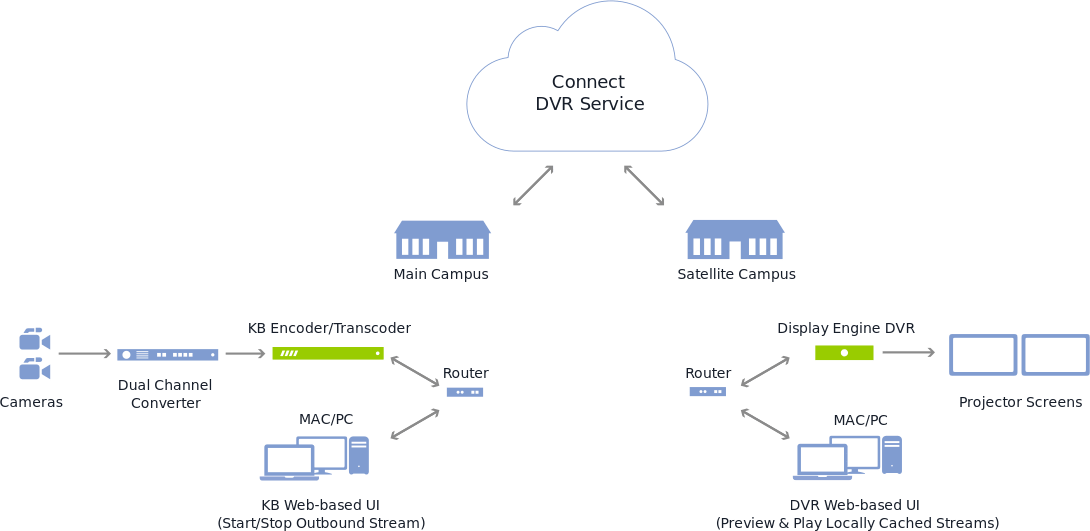
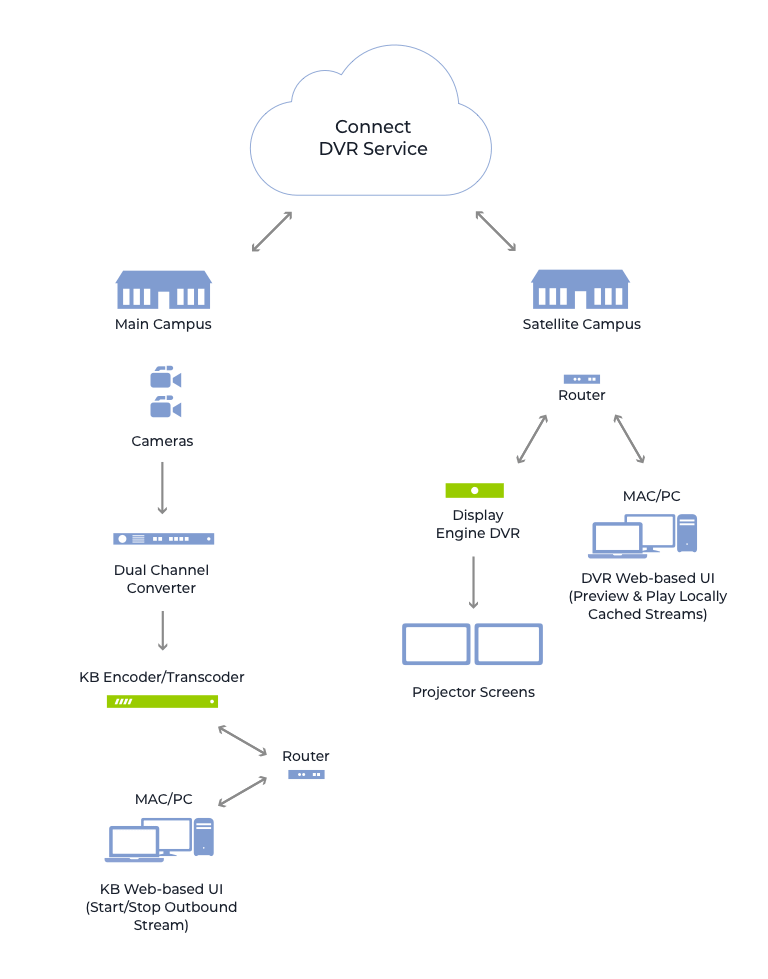
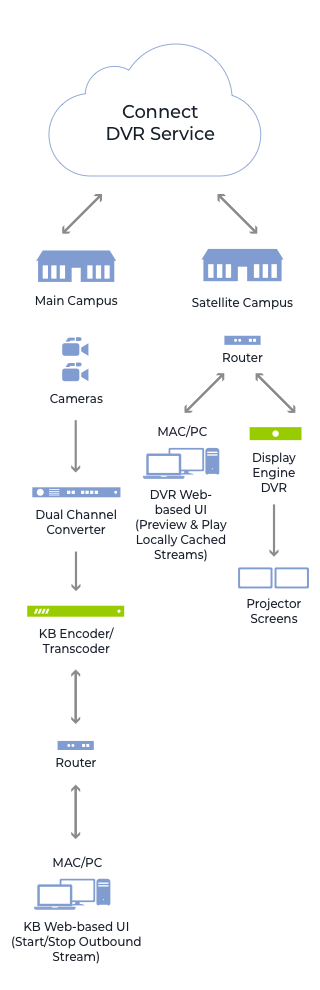
  • Integrated Haivision’s high-quality KB encoder, Akamai’s industry-leading Content Delivery Network (CDN), and the compact and powerful Display Engine DVR remote appliances.
  • Integrated KB Internet media encoder and local caching.
  • Provided synchronized dual video streams.
  • Implemented new UI.
  • Developed a caching function to increase public Internet quality.

Key Features

End-to-End Simplicity

  • The solution integrates customer’s high-quality KB encoder, Akamai’s industry-leading CDN (Content Delivery Network), and the compact and powerful Display Engine DVR remote appliances.
  • Staff and volunteers can easily connect to preview, play, and share inspirational messages from the main campus at remote locations.

The Highest Quality of Public Internet

  • Delivery of the highest quality HD experience to remote campuses.
  • Using low-cost Internet connections allows the distribution of streams, without sacrificing quality.
  • Low-cost Internet connections help save time and money.
  • Local caching makes sure new content is safe.

Complete Control, with Flexibility

  • Haivision Connect DVR gives remote campuses control and flexibility.
  • Remote campuses can preserve either the full stage and IMAG camera angles or the presenter and presentation, from the main campus.

Technologies

Backend

NodeJs

Frontend

Backbone.js

Enterprise Document Management System For an Atomic Energy Corporation

Enterprise Document Management System For an Atomic Energy Corporation

How replacing several feature-poor document management solutions with a single comprehensive user-friendly system accelerated document-related processes by 23% on average.

Object

Systems of electronic document management have been with large companies and state enterprises for quite some time now and are there to stay for a long time, too. It also requires more mobility from company managers who spend a lot of time out of office. Being outside the office they need to carry out their responsibilities and lose no time as well as to have a handy work interface with information systems, an easy possibility to solve problems in a fast and timely manner. In order to enable them to do so, a system interface has to be also informative and simple at its best – a manager is supposed to have on hand all the document operations possible.

What are the problems when running a document management system device with a web interface?

  • Mobility

When running a web interface a manager comes across a number of limitations on their freedom of movement – the manager needs to have constant access to the resources of his company and electronic document systems, i.e. he usually cannot handle his documents while on the road, up in the air or at sea.

  • Interface intuitivity

Web interfaces with access to electronic document
systems are often overloaded with functions and are meant for big screens with precise positioning of the mouse cursor. One needs to take his time to interact with the system as well.

  • Safety

When having access to electronic document systems via a mobile device it is needed to secure the proper keeping of the information received, transmitted and saved, which may be problematic in success-stories when running a mobile device outside the office.

  • One access interface

Having several systems of document management at your company, the manager needs to switch between various web interfaces and carry out single operations in each of the systems.

The main purpose for developing a mobile client device was finding solutions to the following problems.

Solution

How the mobile client solves the problems mentioned above.

  • Mobility

Application of the mobile client with offline work functions enables you to have access to documents and carry out all necessary operations with them while having limited access to electronic document management systems of the company. All operations done in the system by the user are kept in the application and if there is access to the document management system of the company, are synchronized automatically. Additionally the user is enabled to tune the synchronization intervals themselves.

  • One access interface

Mobile client enables you to unify tasks from several systems of document management, which allows running operations faster with volumes necessary for a manager in one application. In this case one interface is enough, i.e. the interface running tasks from different systems of document management.

  • Interface intuitivity

Interface adapted for use on mobile devices and the availability of just the operations needed enables to process documents in a faster manner and make the interface informative and simple at its best.

Interface adapted for use on mobile devices and the availability of just the operations needed enables to process documents in a faster manner and make the interface informative and simple at its best.

  • Safety

The mobile solutions as to the safety of information exchange with electronic document management systems and safe keeping the data disallow access to third parties to the information kept on the device, which is rather problematic when using a web interface. Application of different means of authentication of the user (login/password, authentication with smart cards) enables to secure reliable transmission of user data. Encrypting data bases and files of the user is fulfilled in accordance with GOST 28147-89 (State Standards).

When operating the mobile client, the additional advantages are guaranteed

  • Handy display and document task operation. The user is enabled to scroll and change documents in most office formats
  • A function to save marks on tasks. The user may leave their own marks which are not seen by other system users
  • Commenting the tasks to be done. The user may leave comments as per electronic document management system
  • Handy search and sorting user tasks/documents
  • Launch of new document management processes

What else can the system do

  • Several languages are available. Localization of forms and elements and their arrangement are kept on the server which allows changing their contents and arranging in a fast manner
  • Handy support to change the responsible person. If the user is outside the office and is not able to carry out their responsibilities at the moment, another user may be assigned to do the task at the push of a button
  • Launch of new secondary work processes and create new tasks either via interface or from a separate tab on processes
  • Keep selected tasks even after they have been carried out. The user may determine the volume in document management he/she needs by his/her own
  • The Drag & Drop handy mode enables the user to move the responsible per tasks. The expander system allows organizing work according to information on tasks providing the user with necessary information only

As a result, the manager’s main tasks have been successfully carried out for their superior, whose usual working place was out of reach, the transparency of all working processes was also observed.
This system may be integrated into different electronic document management systems, corporate calendars, task managers and other systems engaged in working processes.

Technologies

Tapestry 5
JQuery
Bootstrap
UI Spring,
Spring Data
Hibernate
PostgreSQL
Maven
Jenkins
Anna Vasilevskaya
AI modified real photo
Anna Vasilevskaya
Account Executive

Get in touch

Drop us a line about your project at
[email protected] or via the contact
form below, and we will contact you soon.