How website modernization enabled a Canadian cleaning services provider to expand its customer base and increase its customer satisfaction score (CSAT).
Citrus Cleaning, a Canadian cleaning services provider, had earned recognition among local customers in Calgary, largely through referrals. But as more prospects began discovering and comparing cleaning providers online, the company’s website was not strong enough to capture that demand, guide visitors toward quote requests, or support the speed of response expected in a competitive service market.
The first issue was visibility. While the website existed, it performed almost exclusively as a branded destination for people already familiar with the company. It had little presence in local, high-intent search results where potential customers actively compare providers and request services. Competitors with stronger SEO foundations were consistently capturing that traffic first, limiting Citrus Cleaning’s ability to expand its inbound pipeline.
The second challenge was conversion friction. Quote requests were handled through fragmented phone conversations and manual follow-ups, which slowed response times and introduced friction at the earliest stage of the customer journey. For a service business where speed and convenience heavily influence conversion, the process created unnecessary drop-off at the most critical point of the customer journey, when a visitor was ready to become a lead.
On top of that, the outdated website design didn’t fully communicate the company’s quality, reliability, or customer-first service model. For new visitors evaluating cleaning providers online, that gap was weakening trust before the first interaction even happened.
Citrus Cleaning wanted to turn its existing website into a performance-driven acquisition channel, capable of improving discoverability, reducing lead handling friction, and presenting the brand with the same level of quality customers experienced offline. To secure more online business opportunities, the company partnered with Instinctools’ development team on a website modernization initiative.
Solution
Instead of recommending a costly, ground-up rebuild, Instinctools took a more targeted approach. We reengineered the existing website around the factors that mattered most for a local service business:
a new, distinctive brand identity aligned with the client’s requirements and market needs
a conversion-focused user journey for quote requests
mobile-first performance improvements
a scalable SEO framework
automated integrations between website forms and internal operations
The result was a modern, fast, and scalable website that worked not only as a digital storefront, but as a growth channel.
Building a distinctive visual language that stands out in a crowded local market
Cleaning services are often marketed through predictable visual patterns: blue for trust, white for cleanliness, and generic imagery that makes providers difficult to tell apart. Citrus Cleaning needed a brand experience that felt cleaner, fresher, and more memorable without losing professionalism.
In updating the visual identity, our UX designer built on the client’s established brand and introduced a palette of crisp whites, lime green, and orange accents, grounded in research on how colors shape customer perception.
The visual identity mirrors the company’s name, using a citrus-inspired palette to create an immediate link between the brand and its fresh, clean image.
Green communicates eco-friendliness, sanitation, and a non-toxic home environment, while vibrant orange injects optimism and cheer, suggesting that the client’s service brings brightness and joy back into customers’ homes.
Orange CTA buttons provide a clear visual cue, guiding users toward engagement.
Meanwhile, dark gray text maintains a professional and trustworthy tone for both residential and commercial clients.
Engineering a frictionless, conversion-driven UX
We redesigned the user journey around a simple conversion logic: understand the problem, match it with the right service, and make the next step obvious.
To reduce the friction in users’ decision-making process, we introduced:
clear service-page structures built around user intent
repeated but unobtrusive “Get a Free Quote” calls to action
short paths from service pages to the booking form
trust-building testimonials placed close to decision points
homepage sections designed to quickly communicate credibility and service quality
Optimizing mobile-first performance for on-the-go users
Since many local service searches happen on mobile devices, mobile performance is closely tied to customer acquisition. If the experience feels slow, unstable, or difficult to navigate, the business can lose high-intent visitors. In that context, mobile-first optimization became a key part of the redesign.
The engineering team focused heavily on lightweight asset delivery, faster image loading, and rapid script execution. By minimizing asset overhead and prioritizing critical rendering paths, we ensured minimal latency and zero layout shifts (CLS).
As a result, the client received a lightning-fast mobile experience that safeguards mobile search rankings and prevents bounce rates driven by slow loading times.
Architecting a highly scalable content framework built around localized search intent
To compete for neighborhood-specific, high-intent search demand, Instinctools built a programmatic semantic architecture designed around service relevance and geographic intent.
Localized schema injection: The site utilizes strict semantic HTML5 coupled with LocalBusiness structured data markers. This helps search engines better understand what Citrus Cleaning offers and where it operates.
Scalable content expansion: A programmatic semantic architecture we implemented enables the rapid rollout of neighborhood-specific landing pages and service-focused content, expanding the website’s coverage across relevant local search terms.
Automating back-office workflows and CRM syncing
The previous quote process depended heavily on manual communication. That created delays at exactly the moment when speed mattered most.
To reduce this operational bottleneck, Instinctools connected frontend quote submissions with the client’s internal dispatch and CRM workflows.
We engineered secure API endpoints and webhook integrations so that once a prospect submitted a quote request online, the data could flow directly into the client’s internal systems.
This reduced manual data entry, helped the operations team act faster, and made the lead handling process more consistent.
For Citrus Cleaning, this meant the website was no longer just collecting inquiries, but became part of the company’s service operations, reducing the risk of losing ready-to-book customers.
Business value
30% growth in the active local customer base within the first two quarters after the redesign.
Up to 20% increase in CSAT, thanks to a streamlined and optimized digital experience.
Faster lead response times: by reaching customers within the critical 5-minute window, where close rates are up to 8× higher than delayed manual replies, the client captured opportunities that previously slipped away.
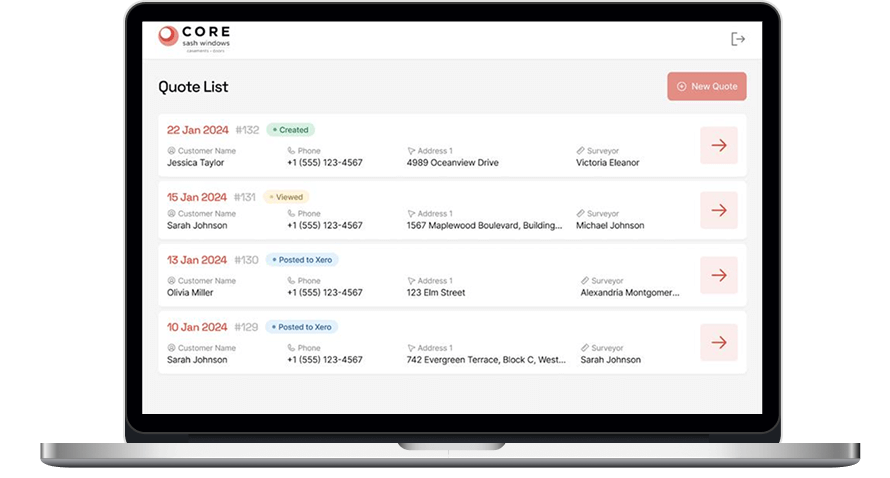
Constantly rising consumer expectations are a perpetual driver of delivering digital products that are fast, transparent, and easy to use. Core Sash Windows — a British window and door construction company — identified gaps in its customer experience, from first interactions to post-purchase service, and sought to address them with a strategic software overhaul.
The company’s challenges spanned multiple stages of the sales and fulfillment process.
A measurement system that lacked essential features
Core Sash Windows’ internal application for taking measurements had been developed when the company operated on a much smaller scale. Over time, its limitations became increasingly apparent.
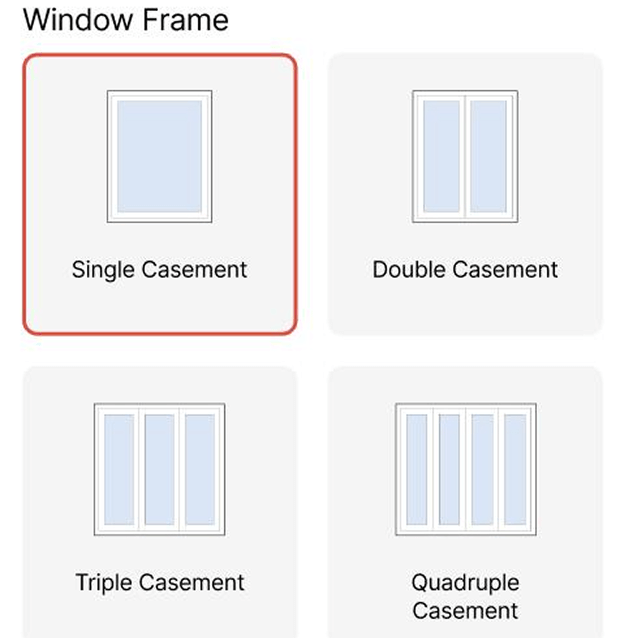
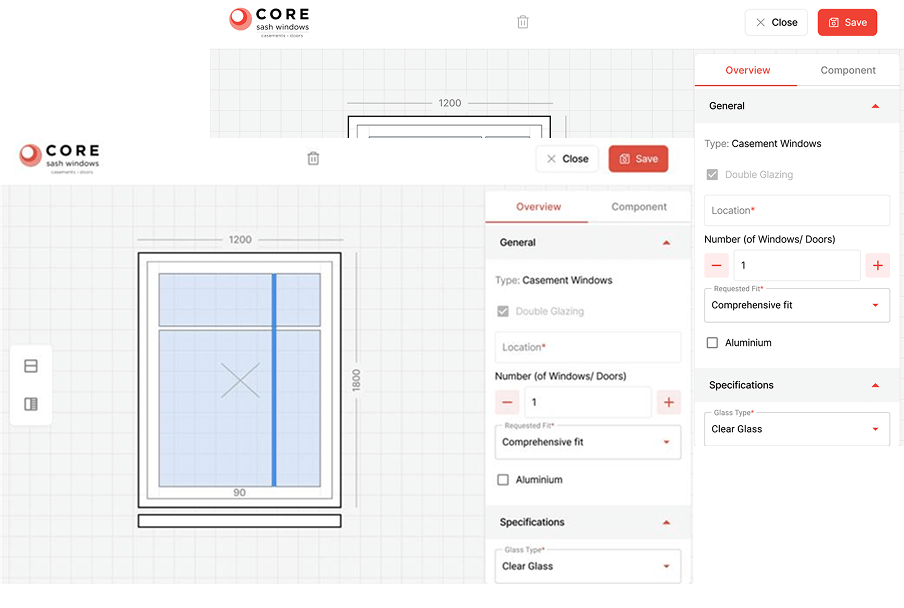
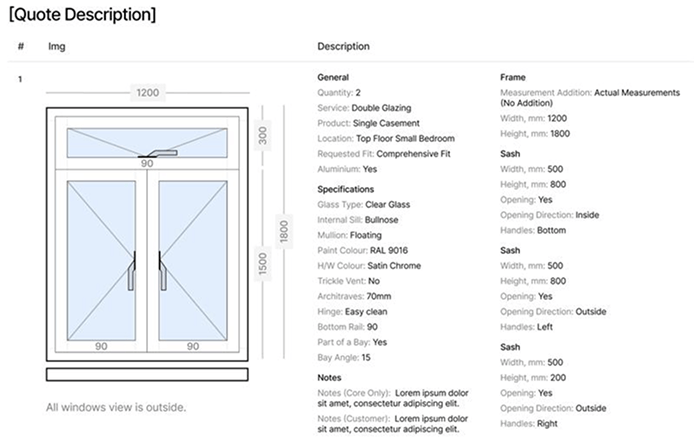
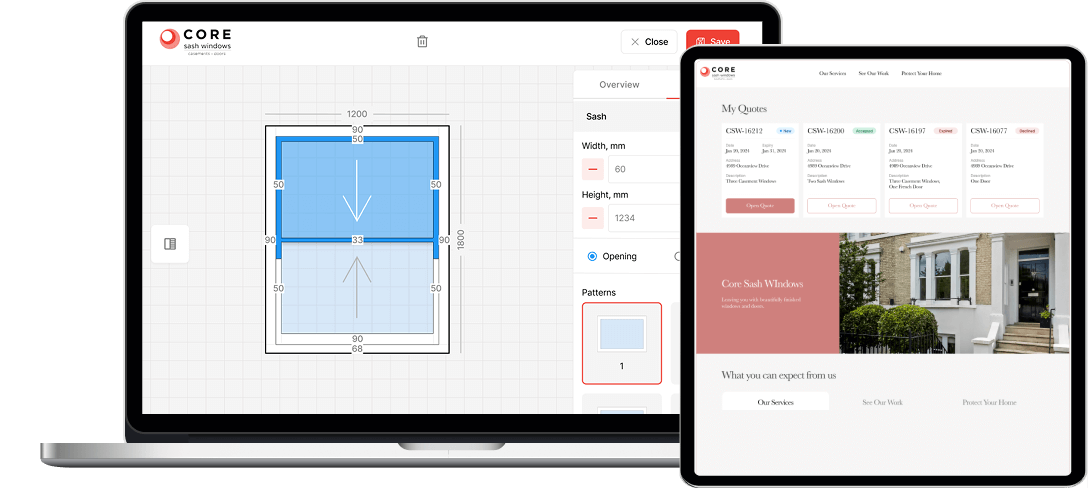
The system didn’t provide drawing functionality, relying entirely on text-based descriptions, which managers could interpret, but customers found difficult to visualize. Rather than seeing a technical sketch, they were presented with descriptions such as “a single casement window with maximum glass and one fixed fanlight.”
To compensate, managers used third-party design tools like Paint, Krita, and Canva to create rudimentary sketches. As a result, customers received two separate PDFs — one with measurements and another with a sketch — leading to confusion and delays.
Slow and manual price estimates
Mostly manual and, therefore, drawn-out price calculation was another major bottleneck affecting customer experience. Prospective buyers often faced delays while managers referenced product catalogs to provide even a rough estimate.
Limited visibility into order processing
Opaque order processing affected both internal teams and customers:
After the quote was submitted and transferred to the accounting software, managers couldn’t track its status. Meanwhile, accountants struggled to sift through a slew of both accepted and rejected orders.
Customers received the order details via email and had no way to check the progress of their purchases. Without an online portal, they were left to rely on direct communication with company representatives for updates.
With no in-house team to act on these issues, the company partnered with *instinctools to build integrated software that could improve both internal workflows and customer interactions. We assembled a dedicated team of a business analyst, web developers, QA and DevOps engineers, and a UX/UI designer, and set to work.
Solution
To ensure that the new solution aligned with the needs of multiple stakeholders, *instinctools’ business analyst conducted interviews with measurement specialists before structuring the project backlog.
Deciding on the software linchpin
We translated the client’s need for speed, transparency, and scalability into a custom web app with three interrelated components:
An internal portal with seamless drawing functionality and instant price calculation.
A customer-facing portal for transparent order tracking.
An admin panel for managing both portals.
The team recommended building the new system with an open-source React.js library for several reasons:
Ease of creating an interactive interface
Reusable UI components
Fast UI rendering
Smooth integration with libraries needed for the project (e.g. Konva.js, Firebase, etc.)
Upon setting up the development environment and infrastructure, our team adhered to biweekly sprints and demos to keep the client in the loop.
Refining the client’s order processing and tracking
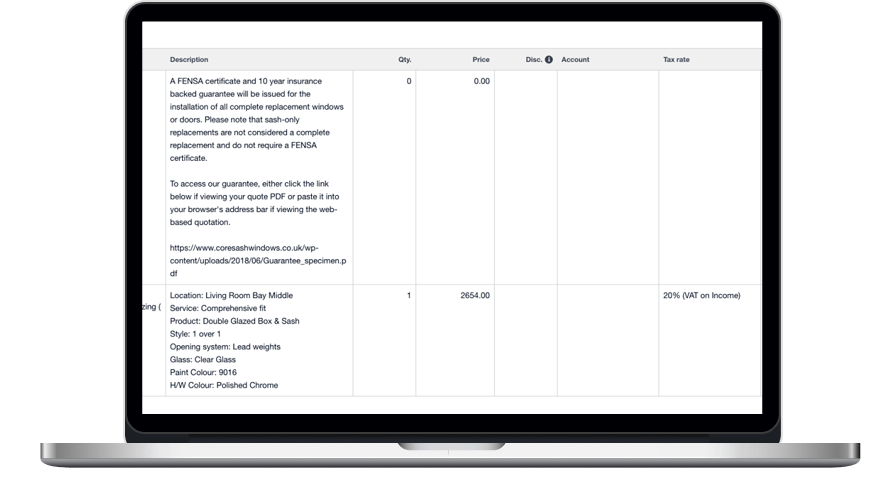
To reduce inefficiencies, the system was modified so that only accepted quotes were sent to the accounting software. That way, accountants could focus only on active transactions without getting sidetracked by irrelevant orders.
Our team also made it possible to track the order status within the internal portal to keep the managers updated on the order progress.
Crafting an internal portal with built-in drawing functionality
Replacing the company’s outdated measurements app required a solution that was both intuitive and functional offline. Our team implemented:
Integrated drawing capabilities Powered by the Konva.js library, the drawing tool allowed managers to create detailed window and door sketches directly within the system.
Offline accessibility With support from Firebase, managers could use the tool even in areas with limited internet connectivity.
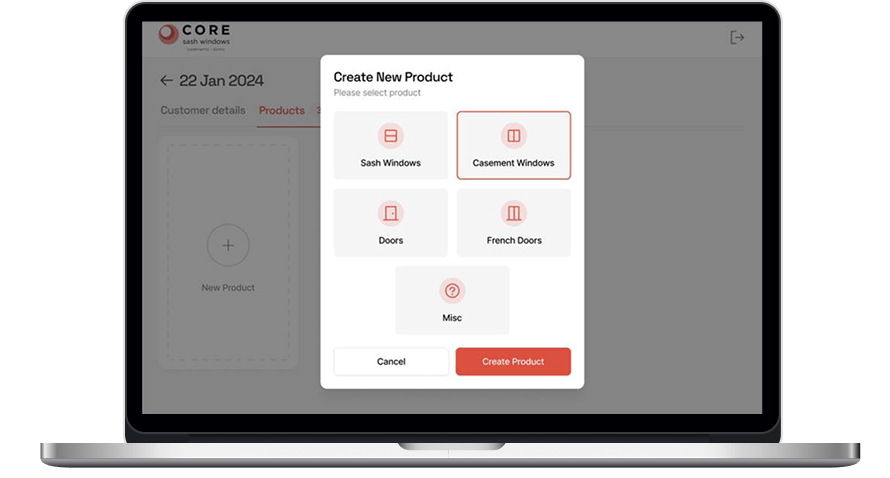
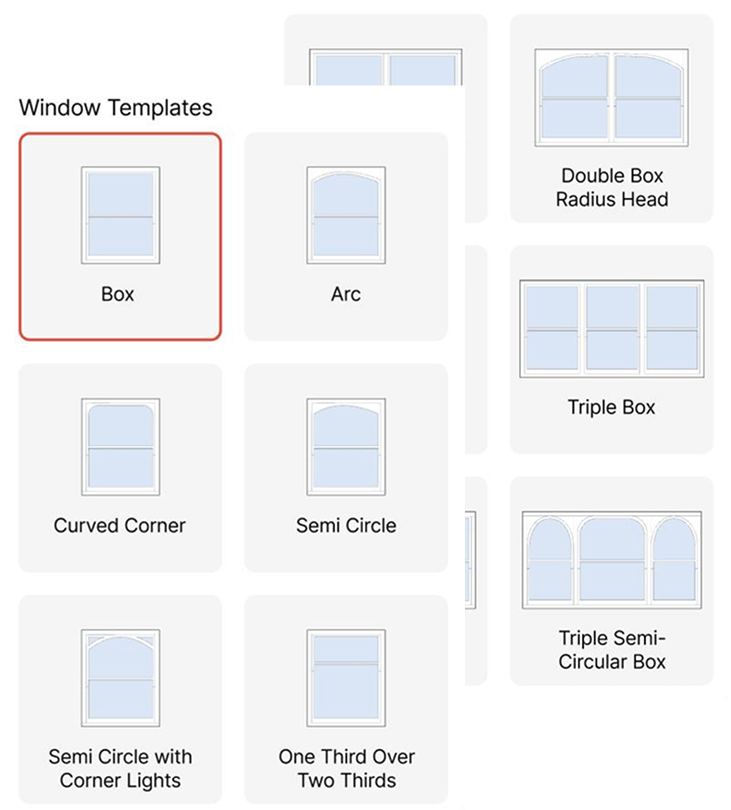
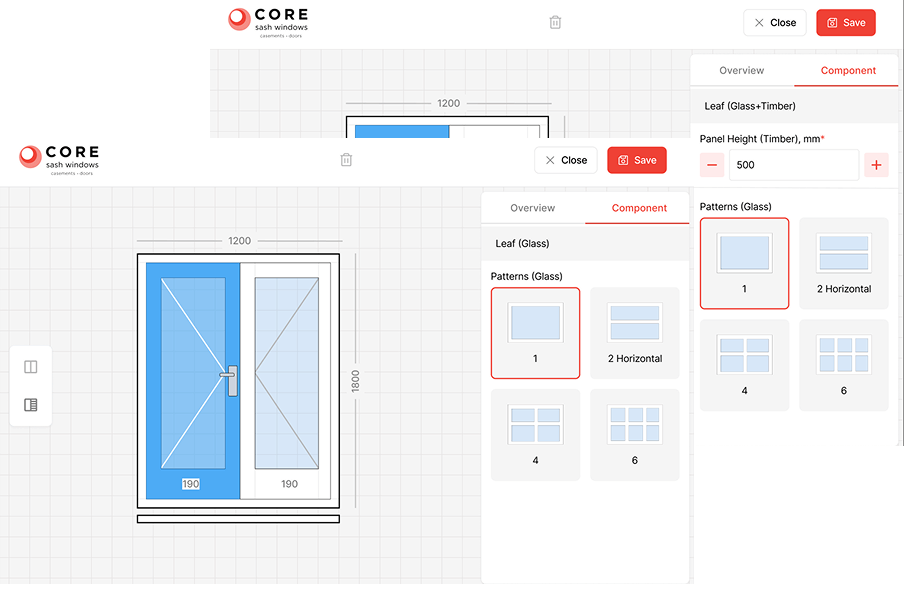
A more efficient product catalog The previous method, which required navigating thousands of catalog items, was replaced with modular templates for different product types.
Casement windows were consolidated into four base templates.
Sash windows required 12 templates due to variations in glazing patterns.
Any details can be added or changed at a later stage.
Doors shared attributes with casement windows, so they required only minor modifications, such as adding styles for the door leaf.
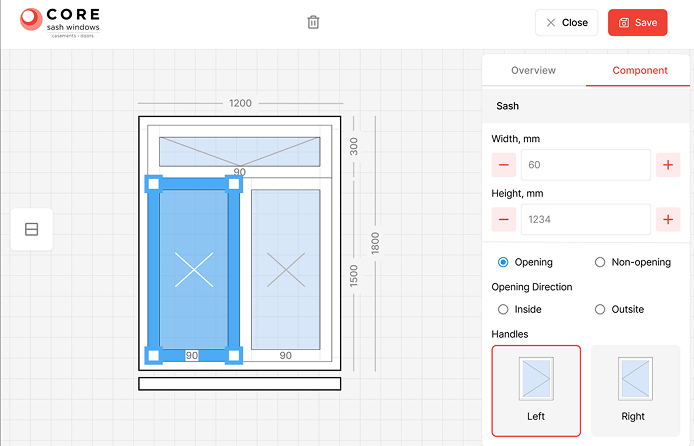
Our UX/UI designersperfected the templates down to the last detail. For instance, thanks to varying line transparency, customers can see the difference between the joints of the window parts.
We also provided the option to apply specific parameters, like openability, to individual window components rather than the entire unit.
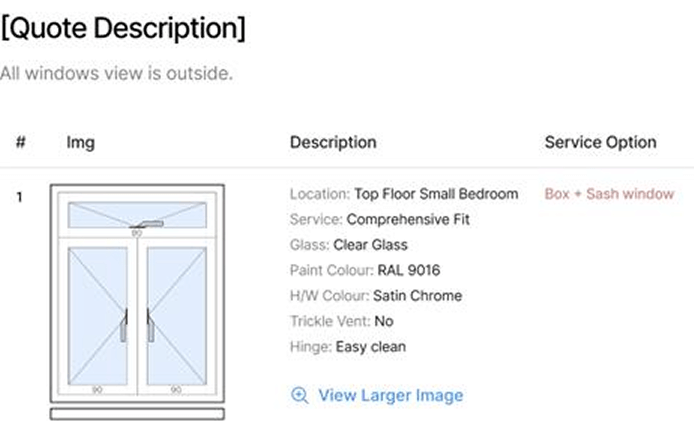
When the measurements are done, customers receive a concise, easy-to-read PDF, while manufacturers get a version containing detailed technical specifications.
Automating price calculation
By integrating the internal portal with the company’s accounting system, pricing became automated. This change allowed managers to provide customers with an immediate cost estimate during measurement appointments, eliminating unnecessary wait times.
Building a personalized customer portal
To enhance post-purchase communication and provide customers with a simple way to check their orders, we developed a customer-facing web app.
How it works:
After a measurement appointment, customers receive a personalized link to their portal.
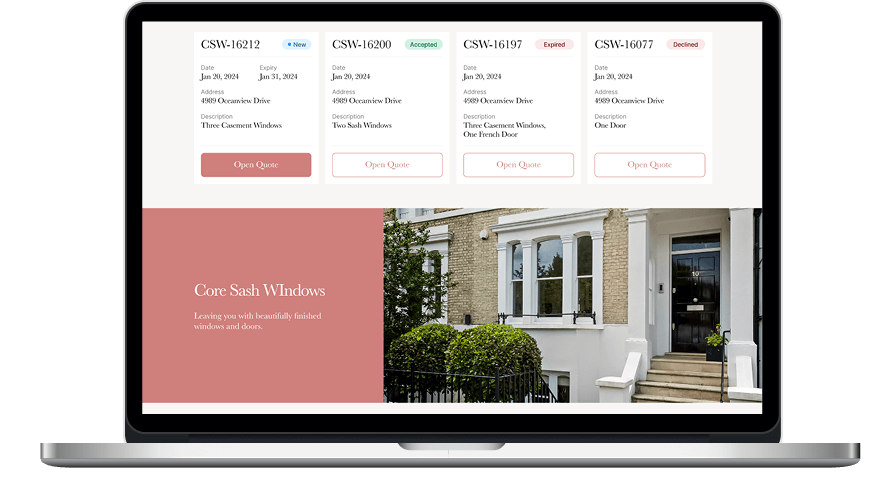
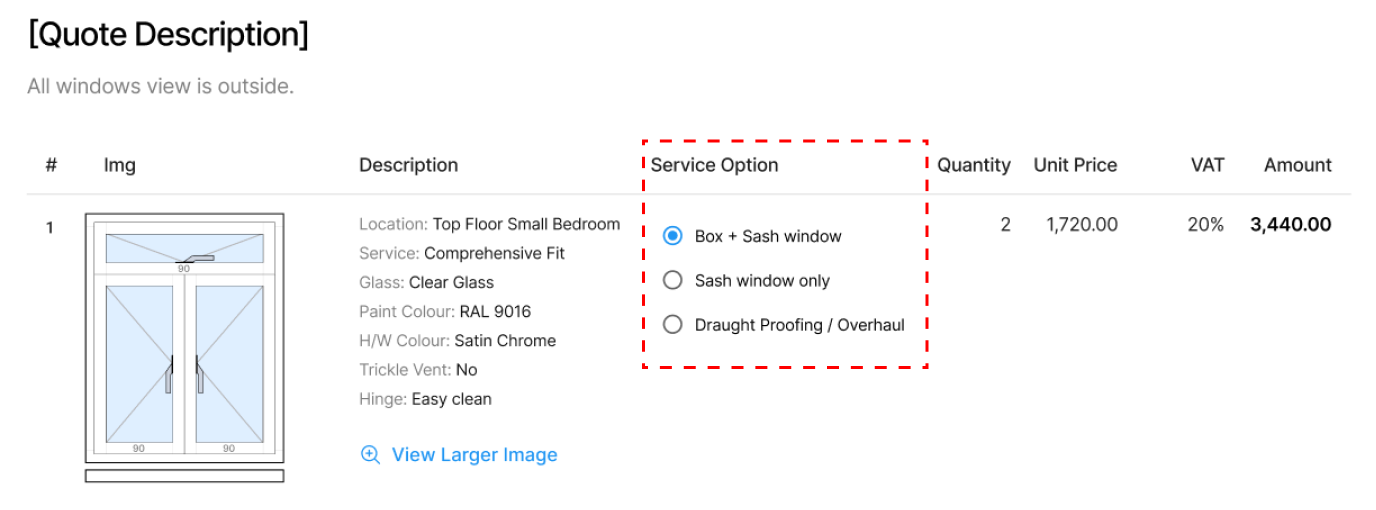
The portal includes a “My Quotes” section where customers can review their past and current orders.
A dynamic pricing module allows users to explore in real time how different service options affect the total cost.
Developing a centralized admin panel
To manage both the internal and customer portals, the development team built a React-based admin panel using an open-source AdminJS, which consolidated all data and system settings into a single interface.
Before
Sketches stored separately from the order’s text description
Manual pricing
Clumsy product selection among thousands of catalog items
Customer PDFs overloaded with excessive technical details
Declined orders have to be filtered out in the accounting software
Limited order tracking capabilities
After
Integrated web app with built-in drawing functionality
Automated price calculation
Flexible product templates for easier customization
Two separate PDFs: simplified quotes for customers and detailed specs for manufacturers
Only accepted orders are transferred to the accounting software
Convenient order tracking for both customers and managers
Business value
An up-to-date and cohesive web application with interconnected components designed to support internal teams and customers
A step up in customer service at consideration and post-purchase stages, including more intuitive product selection and faster response times
Full transparency of order tracking for both customers and the client’s employees
Improved order management efficiency thanks to reduced manual processes, faster pricing, and clear, organized workflows for accountants, managers, and customers
Multiplier effect
Perfecting customer experience at all touchpoints is vital for any business, especially in B2C. As tech evolves so do your customers’ expectations — and most businesses aren’t keeping up. In fact, ⅔ of customers* feel brands are too slow to adapt. The good news is that there’s always a way to automate operations, increase process transparency, and simplify workflows to turn frustrating service into service excellence.
How crafting a web app with an easy-to-grasp interface and flexible architecture empowered a manufacturer of warehouse driverless forklift systems to unlock new value-creation opportunities and reach SMB customers.
Under-automated or under-digitized intralogistics inevitably affects a company’s profits. However, sometimes the bottlenecks aren’t that obvious, and even organizations with warehouse-specific software and robotics in place struggle to achieve the much-coveted outcomes of intelligent automation.
The issue may lie in having overcomplicated software designed for tech-savvy users that holds down the company’s capabilities in efficient control and optimization of the goods flow within a manufacturing facility, warehouse, or distribution center.
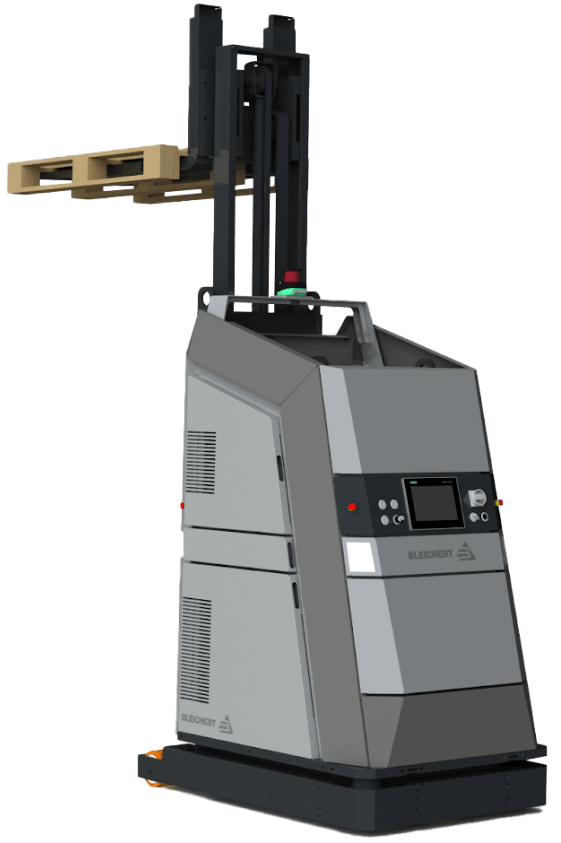
For example, navigating the driverless forklift systems in small spaces is quite a challenge, as such robots are usually designed for large warehouses. The equipment can neither go near fire exits nor stop near them by default. However, following these settings is tricky in small spaces with little room for maneuvering. Hence, when the robot has no other way than to make a path near the fire exit, it stops before reaching it. Such cases require manual human input to restart the system with an updated route.
Our client, Bleichert, an automation machinery manufacturer, wanted to address two pain points of their customers seeking warehouse robotics:
‘By engineers, for engineers’ approach in designing the software
Lack of targeted solutions for small and midsize businesses (SMB) in the market overloaded with enterprise-grade products
To reach SMB customers and provide them with user-friendly software for warehouse robotics, they decided to broaden their offering with an innovative model of their driverless forklift systems that move loads autonomously by following a pre-configured circuit. Bleichert partnered with NODE Robotics and integrated their software modules into the experimental forklift. However, they needed a reliable tech ally to create a web app with an easy-to-grasp interface for warehouse operators and managers.
Instinctools, with its comprehensive expertise shored up by a set of ISO certifications, filled the bill perfectly. Our dedicated team created an MVP with interactive features for the demo presentation at LogiMat – the International trade show for intralogistics solutions – in just seven weeks.
Solution
When reaching out to *instinctools, the client specified their requirements for the future application.
Accessibility via common browsers, such as Google Chrome, Safari, Microsoft Edge, etc. with an identical look and feel
Flexible architecture to support and manage multiple robots in the future
Real-time updates of a robot mission
Non-functional requirements (NFRs) encompassed:
Quick and easy navigation with the rule of thumb “max three levels to reach the goal”
Less than 0.4 sec response to the user input
Color-coded interface to simplify operators’ work and avoid any possible costly mistakes
Detailed documentation empowered us to jump into development right away. Our software architects started with establishing a robust tech stack.
Deciding on a tech stack
We zeroed in on the client’s requirements to shape an easy-to-maintain tech stack for the web app development.
Seamless compatibility with NODE OS. Bleichert already installed the autonomy OS for mobile robots on the experimental forklift system to handle map management and interact with the robot’s systems and sensors. Since the operational system with related plugins uses Python, we suggested sticking to this programming language and FastAPI framework for server development for the sake of tech stack consistency.
Fast user interface response times. Besides ensuring the mandatory ease of use for the warehouse operators, we had to take care of the app’s interface speed. Our frontend developers suggested going with a single-page application (SPA) using React JS for user interface development, as the framework’s component-based architecture and virtual DOM allow crafting UI with lightning-fast render times. By leveraging React JS development services, we ensured optimal performance and a seamless user experience.
Here’s the high-level scheme of the future web app.
Taking into account long-term usage scenarios from the onset
The MVP was tailored to user interaction with one robot (Master Robot) within a pre-configured environment. However, outlining the long-term project vision at the early stages is a best practice our team follows to eliminate head-scratchers in the future and enable a hitch-free development process.
Therefore, in our conversations with the client, we discussed two strategies their customers can choose from in the future when the app will operate multiple robots (Master Robots and Servant Robots).
Seamless compatibility with NODE OS
Such an approach provides end users with a single point of control for all forklift systems within the warehouse. However, the main drawback of this method is its high dependence on the Master robot. In case of its malfunctions, Servant robots won’t be able to perform their tasks.
The app runs on each of the Servant robots with one Master robot for covering managing tasks
In this case, Servant robots are highly independent, eliminating the risk of a work stoppage due to the issues with the Master robot, but high-level management becomes trickier.
The bone of the architecture at the heart of the web app is its flexibility. It can be tailored to either of these two options, depending on the client’s customers’ feedback on the innovative forklift model.
Engineering and designing a user-friendly web app
Moving forward according to our Delivery Framework, we proceeded with iterative development, covering user roles, robot management, and more.
User roles within the app
The system has authorization and authentication mechanisms, but they aren’t mandatory, and non-authorized users can access the web app. Thus, we provided two modes within the system:
Basic user, designed for the rank-and-file warehouse operators with no authorization required
Key user, accessible only by authorized employees, for high-level warehouse operators and managers
However, the capabilities of authorized and unauthorized users greatly vary. As you can see on a high-level app vision, Basic users can only view the list of existing robot missions and launch them, while Key users are allowed to create new routes and missions, add restrictions, view the history, check the robot’s status, etc.
Now, let’s dive deeper into the robot-related features.
Robot mission management
Each mission has the following attributes:
Name
Starting point of interest (POI)
Destination POI
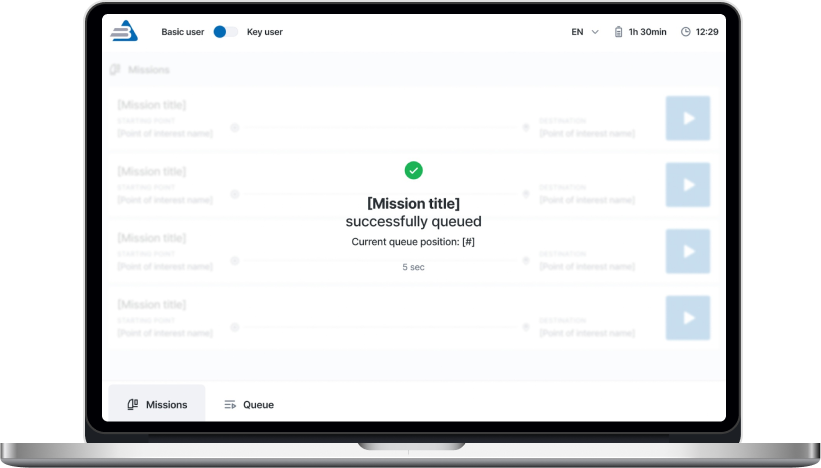
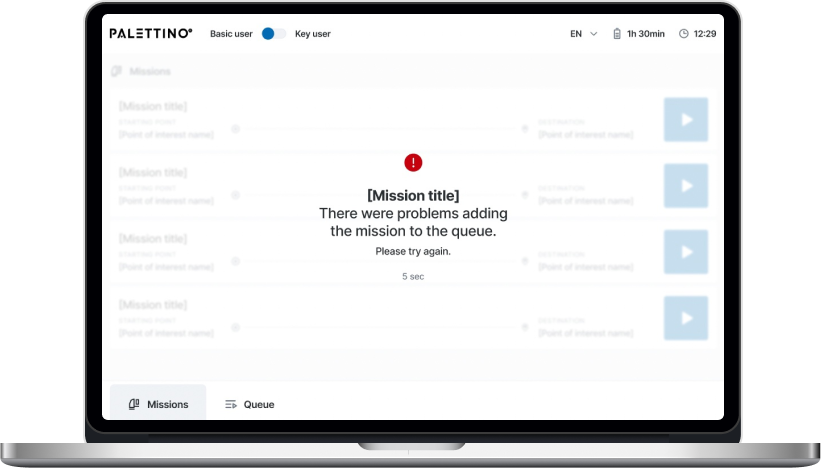
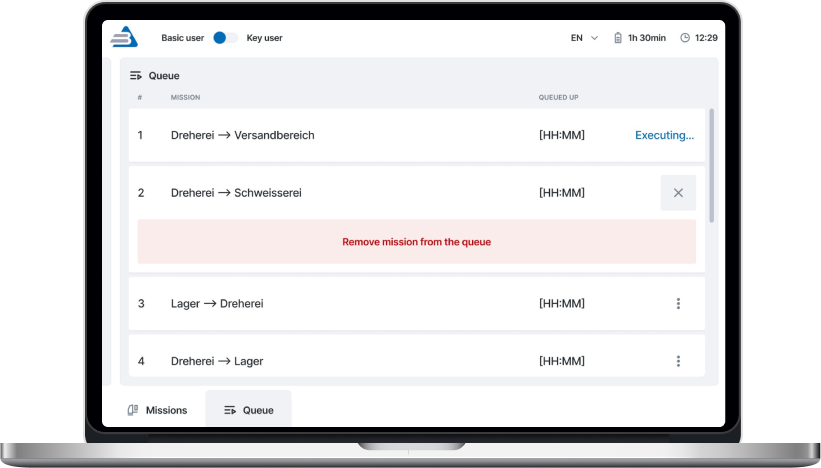
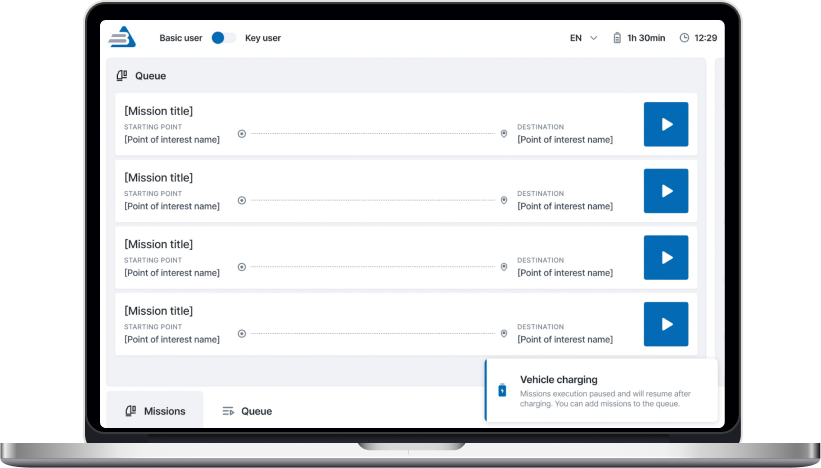
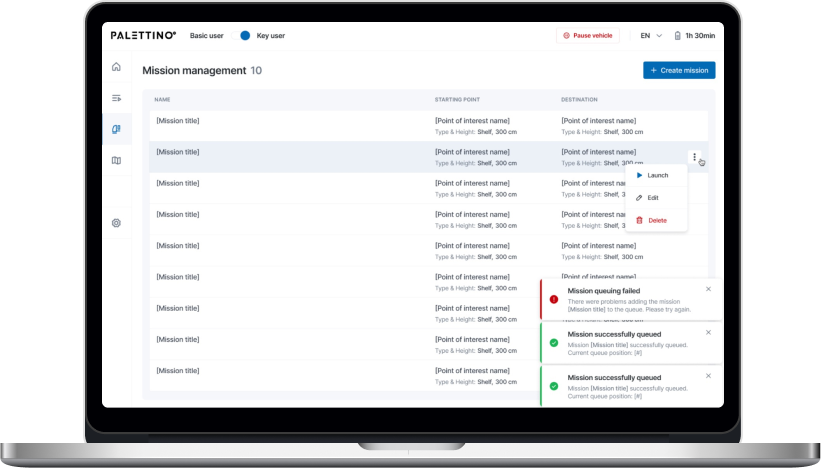
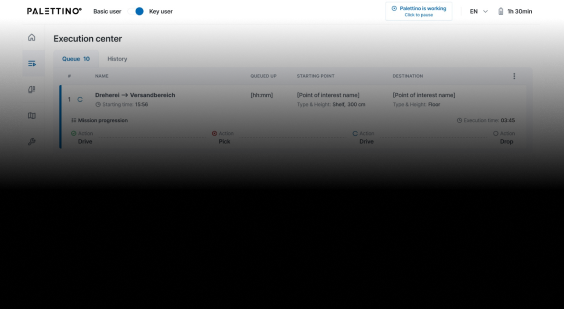
A Key user can add any mission from the list to the queue by clicking the “Play” button. The mission will appear at the last position after a five-second pause, during which the list of missions is locked. Then, the operator will be notified whether queuing the mission was successful or failed.
There are four mission statuses:
Active
Queued
Completed
Deleted
A Key user can remove any missions in the queue except the active ones.
Both Basic and Key users get toast notifications about events related to the robot’s operation. The alert about the robot charging is shown until the process is completed.
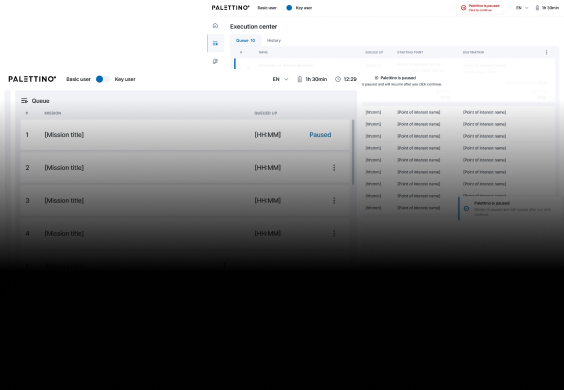
The opportunity to pause the robot is available from any application page for both roles.
One of the client’s fundamental requirements was tracking a robot mission in real time, so we set the execution time to update every second.
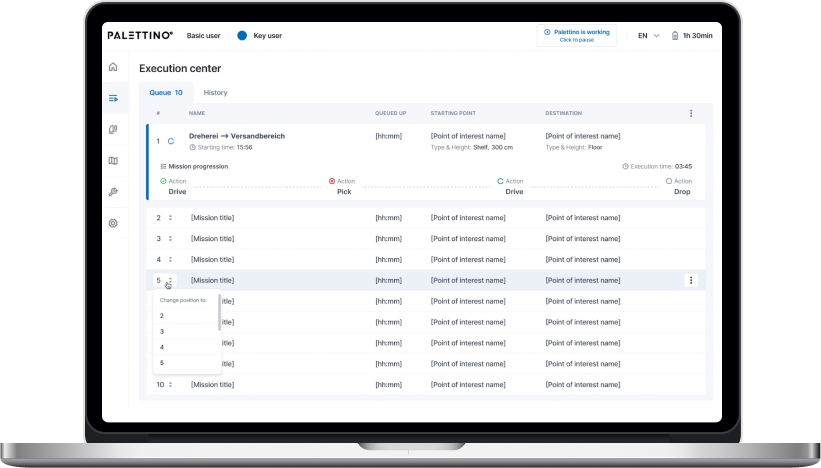
A Key user can change the order of queued missions.
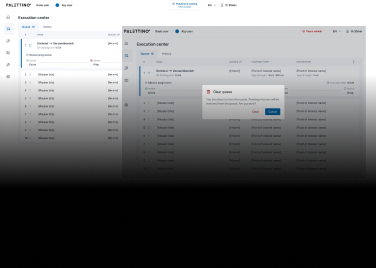
Mission removal is available for a Key user. They need to click the appropriate menu item and follow the additional action confirmation.
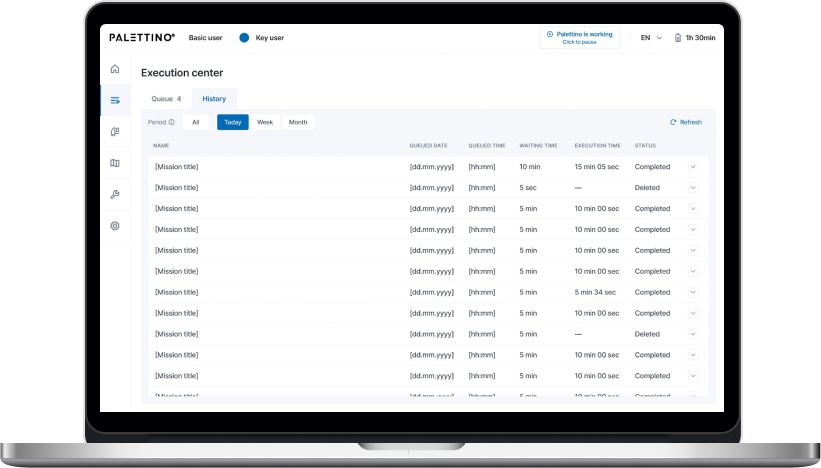
Only a Key user can access the History of missions and filter them by date:
Today
Week
Month
All missions are shown by default.
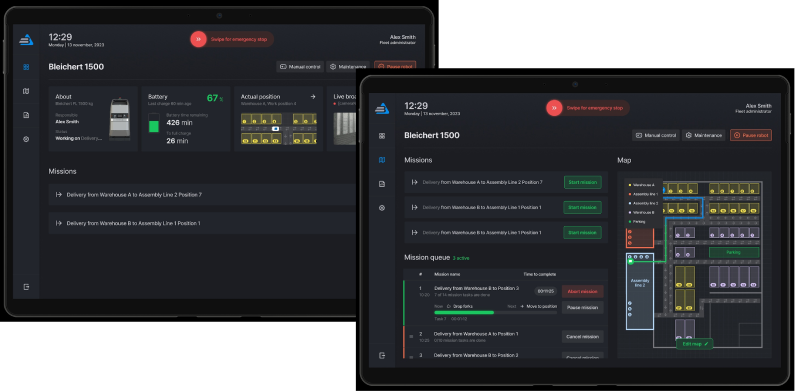
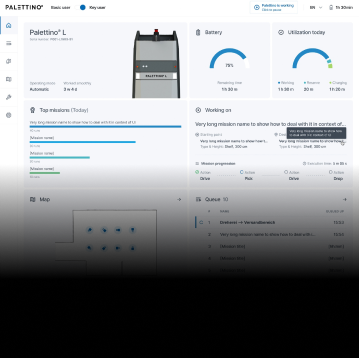
That’s what the clickable prototype looks like.
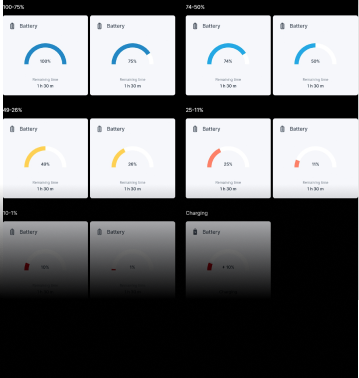
Dashboard for monitoring robot condition
The complex interface wasn’t the only reason the client’s customers considered previous forklift systems not user-friendly enough. They also strived to have simple visualizations of the robot’s status to detect and fix machine maintenance issues before they snowball.
A dashboard with widgets and actual information about the robot’s state empowered users to switch to the ‘danger foreseen is half avoided’ principle and, thus, decrease machinery maintenance costs.
Writing a test emulator for the app
The client’s web app is an example of an embedded solution that strongly depends on the hardware. In such cases, software testing takes a special place in SDLC. There are two ways to perform it:
Running the app directly on the robot. However, this was a no-go option, as the client wanted to fine-tune the new model’s sensors before the trade show. Transporting the forklift back and forth between their headquarters in Osterburken and our development hub in Warsaw would totally mess up the project’s timeline.
Testing software on an emulator. The client didn’t have an emulated environment that imitates the robot’s behavior, so we offered our help and built it.
As we were working on the emulator ourselves, the increased project scope could have put the *instinctools team in a tight spot, given the strict deadline. However, we managed to deliver the robust version of the app on the dot. Moreover, our emulator served as a temporary substitute for the solution’s service for the robot coordination, making it possible for the client to showcase the trailblazing forklift model at the trade show.
Shaping the post-MVP backlog
Satisfied with the MVP results, the client decided to proceed with our partnership at the post-MVP stage, during which our team will broaden the functionality related to these three areas:
User management
Mission improvements
Mission assignment
Before
Complicated app meant for employees with an engineering background
Lack of visualization
Partly manual control over a forklift robot on-site
After
Intuitive app sets new standards in user-friendliness of robotics management software
Easy-to-grasp dashboards
Fully remote control of the forklift robots
Business value
Trailblazing warehouse solution for the SMB segment
Highly user-friendly UI suitable for non-technical staff makes the software stand up from the crowd of solutions designed for tech-savvy employees
Simplified software support due to a homogeneous tech stack
Interface with no more than three clicks to reach any feature
Less than 0.4 sec response to the user input
Real-time updates of the robot missions
Easy-to-use dashboards for tracking a robot’s state
Decreased robot maintenance cost thanks to detecting malfunctions before they turn into serious issues
Rewiring Inventory For an Eyewear Manufacturer And Retailer
How replacing an overpriced SaaS inventory system with a custom, feature-rich IMS enabled a French eyewear manufacturer and retailer to double the RFID scanning speed and accelerate tag verification x3.
Retail companies know better than anyone that inventory is a part that can make or break your business’s success. Understocking at critical times and locations can lead to dissatisfied customers. Meanwhile, maintaining a large stockpile brings its own challenges, including storage and insurance costs, the hazards of spoilage, theft, and damage. The ability to strike the balance between having ‘too much’ and ‘not enough’ hinges on inventory management. That’s why it’s critical to take care of its accuracy, transparency, and sustainability.
However, despite the abundance and diversity of ready-made inventory products, finding the one that fits your budget and completely fits your needs is still tricky. For companies that strive for flexibility and full control over the inventory management system (IMS), custom software development is more likely to be the best bet.
Getting inventory in order was the ultimate goal of our client – a French eyewear manufacturer and retailer. It was their fourth project with *instinctools – our team had previously developed several applications for the client’s ecommerce ecosystem.
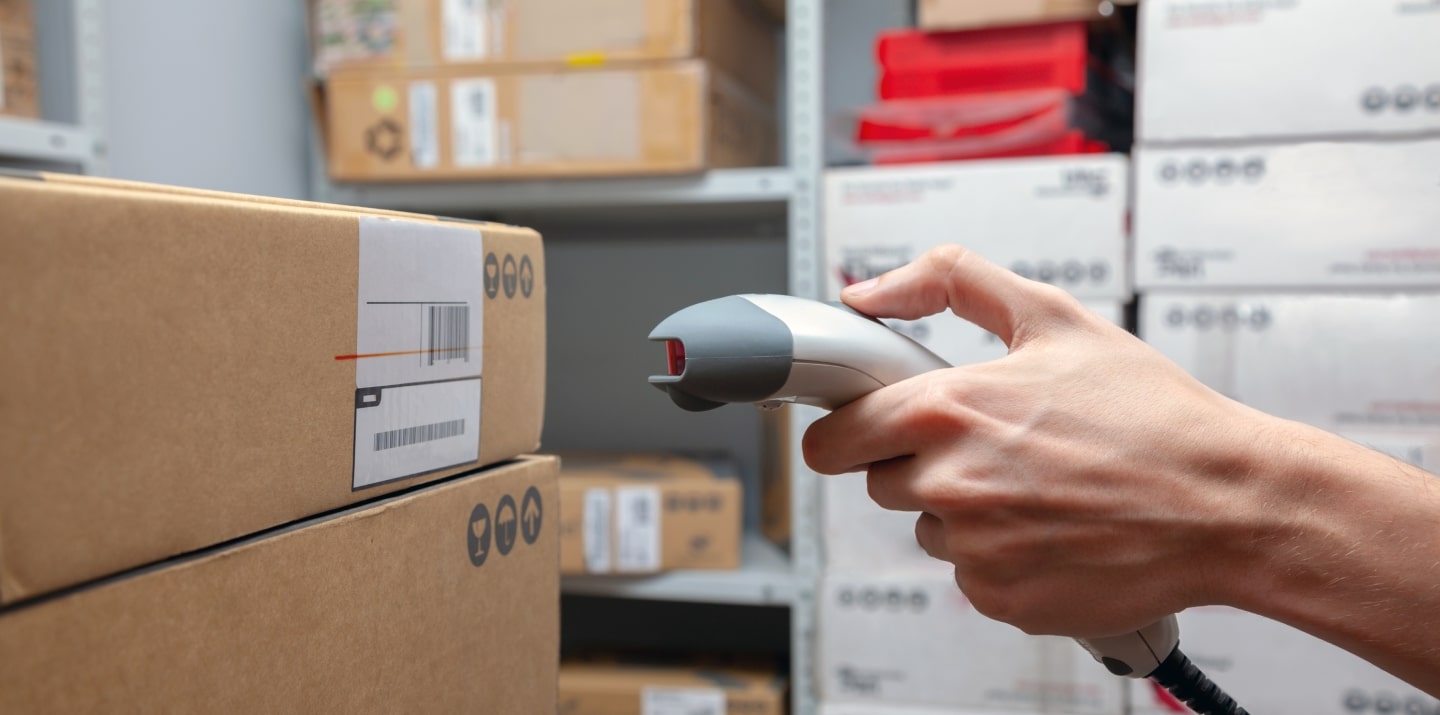
Their inventory processes were already automated and relied on barcode and RFID scanners, but the SaaS software the client used was costly and feature-limited, failing to cover the company’s operational needs.
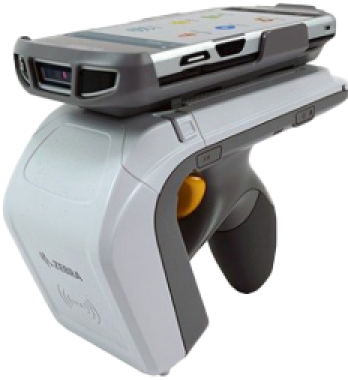
Barcode scanners
are designed for line-of-sight scanning within one to two feet; they’re a go-to option for individual product locating and tracking.
Radio frequency identification (RFID) scanners
read data with in an up-to-20-feet range and can near-simultaneously scan multiple tags, but they lack accuracy compared to barcodes. They’re the perfect fit for large-scale tasks such as warehouse management.
As their unmet requirements for IMS functionality kept snowballing, the client faced a dilemma, whether to pour money into adding new features to their current system or invest in a custom solution.
To escape the vendor lock, they decided to opt for their own feature-rich software with unlimited scalability potential.
Solution
The client needed a device-agnostic solution that wouldn’t cost a fortune. Therefore, we went with the idea of a cross-platform app. As other client’s applications were already written in React Native, there were no doubts about the tech stack for the inventory software.
What challenges did our dedicated team face and overcome while crafting a powerful app that fully covered the client’s inventory-related workflows?
Stabilizing third-party libraries and writing custom ones
Robust libraries are the backbone of smooth integration with barcode and RFID scanners. There are plenty of ready-made options.; However, you should have a seasoned development team able to spot the relevant ones, and write custom libraries to cover your specific inventory functionality.
To provide the client with a stable and easy-to-maintain solution, we followed four key principles when working with the libraries:
Avoiding a cumbersome collection of libraries
The more libraries you have, the more challenging it is to keep them up to date, resolve conflicts between them, and manage a diverse set of dependencies.
Preventing solution architecture complexity
Tight coupling of the software modules and dependency conflicts contribute to crafting a jerry-rigged solution with poor performance and excessive memory consumption.
Stabilizing third-party libraries
Ready-made options can bring critical bugs to the production code, or they may join the ranks of neglected libraries that are no longer supported. In both cases, fine-tuning is a must.
Striking the balance between third-party and custom libraries
Writing custom libraries takes way more time than calibrating the ready-made ones, so for the sake of development speed, it’s better to build them only for highly specific functionality not covered by the existing elements.
With the aforementioned points in mind, our team selected suitable open-source libraries for barcode scanners:
Capture JS for Socket Mobile
React Native BLE (react-native-ble-plx) for Netum
Capture JS is a stable library with detailed documentation, so it was ready to use right away, while React Native BLE was in beta and, therefore, required debugging and stabilization. Since open-source libraries provide full access to their code, *instinctools’ developers fixed it, honing performance and minimizing the overall risk of a third-party element adoption.
Meanwhile, integration with RFID scanners requires custom native libraries. For this purpose, our team utilized React Native Bridge, which works as a communication layer between native modules in Java and the client’s app in React Native with JavaScript code.
Incorporating tabletop RFID readers into the overall hardware ecosystem
Alongside handheld scanners, the client also has tabletop RFID readers. Those devices were much older than the rest of the client’s warehouse and in-store hardware.
Given their age, the tabletop RFID readers:
Lacked basic documentation
Worked with byte messages
Ran on a .NET library, while the rest of the client’s hardware used SDK libraries
The only artifact the client had for these readers was a configuration program. Due to this, *instinctools software engineers had to:
Decompile the configuration program
Investigate the code to understand the requests the program uses for communication with tabletop devices
Configure the same requests in JavaScript
These actions helped standardize the tech stack for all the client’s scanners.
Fighting for the app’s speed
The client wanted to seize RFID scanners’ ability to read large amounts of data and accelerate tag processing. The previous software could handle 300 tags/sec, while their RFID scanners could read 600 tags/sec. Given 15,000+ tagged items in each of the 24 eyewear boutiques across France and Belgium, the client wanted to leverage the scanners’ full capacity.
*Instinctools’ team selected asynchronous caching with scheduled cache refresh to scan the maximum number of tags per second without data streaming hiccups, rendering lags, and other performance glitches. Here’s how it works:
Thanks to using the native Java cache, the app can seamlessly handle 600 elements per second, which is twice the capacity of the client’s previous solution.
Besides doubling tag scanning speed, we’ve accelerated the tag validation process. Our team tripled the speed of data reconciliation between the back end and brick-and-mortar stores by taking advantage of native Java code.
Providing integration with RFID printers
The client decided to take the enhancement of their hardware ecosystem a step further and broaden it with RFID printers. This decision allowed the company to achieve independence from the suppliers of RFID tags and save on printing costs in the long run.
To ensure everything runs smoothly on the tech side, we designed the inventory app that could integrate seamlessly with various RFID printers, from Zebra and SATO to Toshiba, to name a few. That way, the client wasn’t limited in inventory equipment options and could print RFID tags entirely in-house.
Achieving inventory transparency with custom dashboards
Before cooperating with *instinctools, the client didn’t have any dashboards to track inventory levels and, therefore, lacked transparency and traceability of the relevant processes.
Ensuring data tells a clear story is one of our areas of expertise, so the dedicated team bolstered the app’s functionality with a data visualization feature.
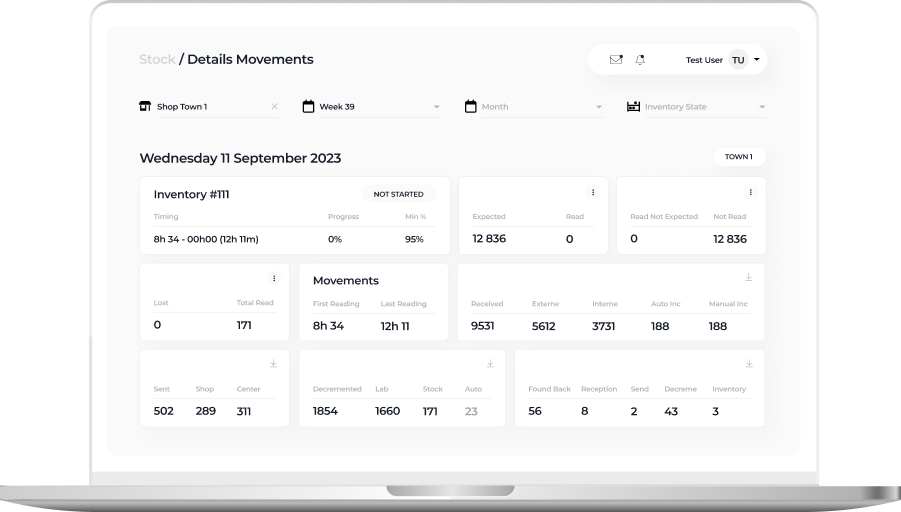
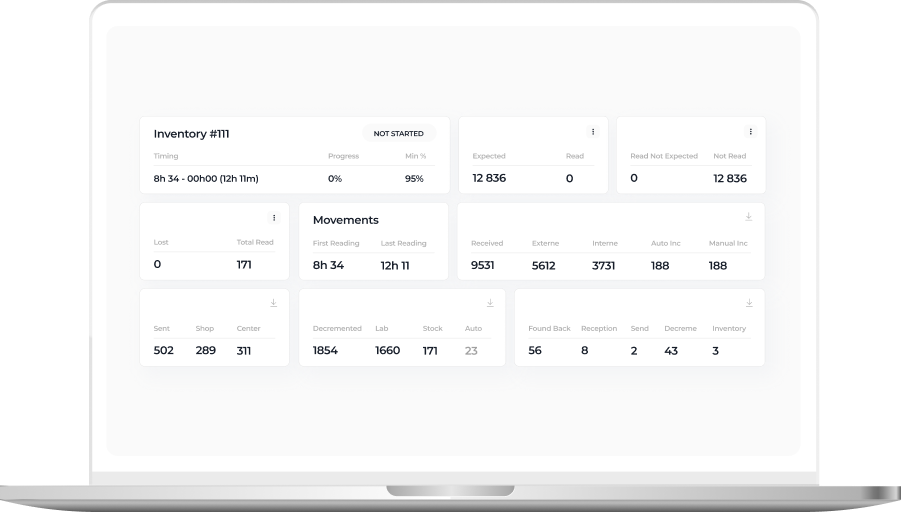
Detailed view of a daily inventory state within a particular eyewear shop
On this tab, in-store admins can check the status of inventories conducted in their store:
In progress
Closed
Device issues
Validated
Missing
The staff can also see the number of expected, received, lost, and found back items, and inventory time.
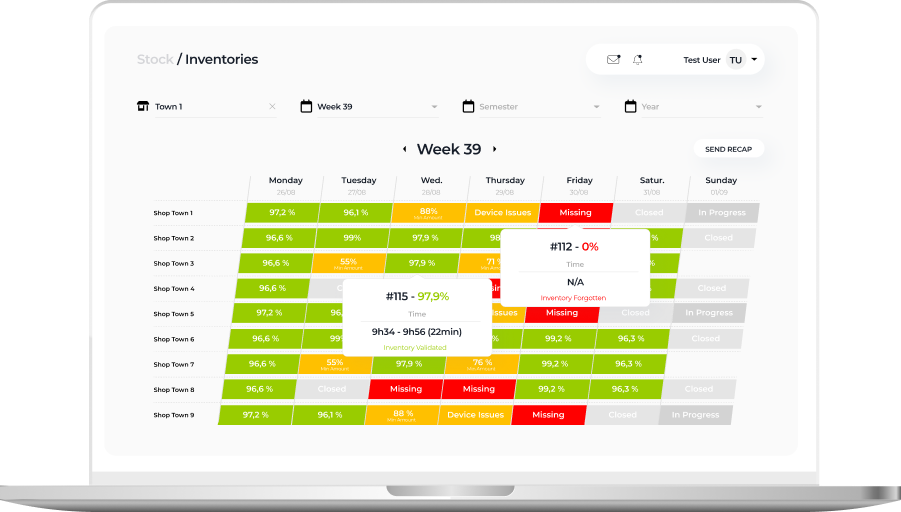
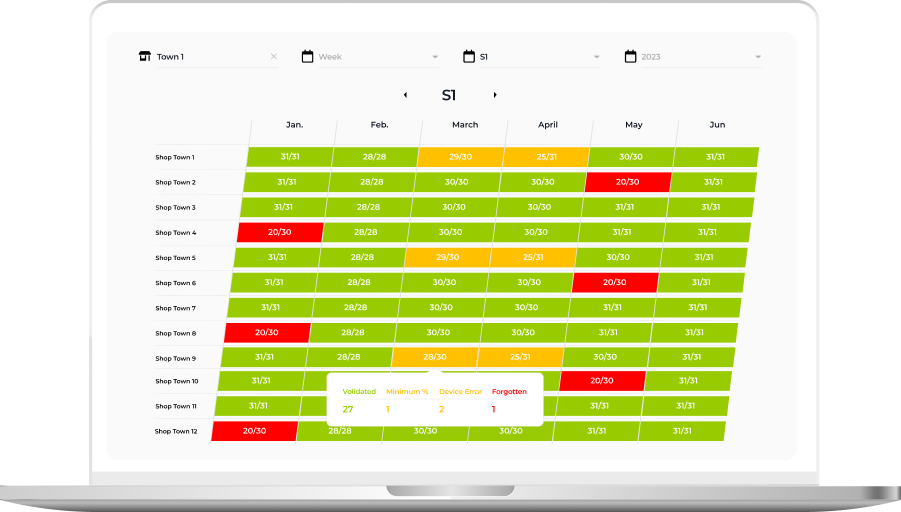
Week or Semester view with inventory state over a longer period
This tab provides higher-level information about inventory status in weeks and months. Thanks to intuitive UI with color-coded table cells, it’s easy to spot inventories calling for detailed analysis:
Successful inventories with more than 95% of items scanned and validated by the system are green
Processes with device issues are orange
Procedures with unidentified items are red
Inventory-free days are gray
These custom dashboards provided the client with much-coveted traceability of inventory processes and empowered them to uncover and nip alarming issues in the bud.
Business value
Before
Overpriced inventory software under the vendor lock-in
Tabletop RFID readers run on legacy software
Inability to use the full capacity of RFID readers
Low tag validation speed
Lack of visibility into the inventory flow
After
The budget-friendly and flexible app is fully tailored to the client’s manufacturing and inventory workflows
Standardized and easy-to-maintain tech stack
Boosted RFID scanners’ reading capacity from 300 to 600 tags per second
x3 tag validation speed
Full transparency and traceability of inventory-related processes thanks to custom dashboards
Client’s testimonial
Here’s how the client’s product manager evaluates the outcomes of collaboration with *instinctools:
Custom OKR Application For a European Retailer With $700 Million Revenue
How switching from manual and time-consuming Google spreadsheets to a custom Objectives and Key Results (OKR) framework empowered a retailer with 1,400+ stores in 12 countries to get a hassle-free and fully transparent OKR progress tracking, boosted staff engagement rate from 15% to 59%, and increased employee productivity by 33%.
Setting goals and keeping employees in sync in terms of accomplishing them is essential for every company. That’s exactly what the OKR (Objectives and Key Results) framework is for. It helps employees to focus on a certain goal and measure the progress toward it.
Before turning to *instinctools, our customer had been using Google spreadsheets to track their OKR progress. However, it was a manual, time consuming, not-at-all engaging process that was difficult to manage and keep track of. As a result, teams used to lose interest in keeping the spreadsheets updated.
Having considered a bunch of out-of-the box solutions, the customer realized that it’s difficult to find “the one”, that would be a perfect fit for their business. Some lack certain features, others cost too much.
That’s why we suggested the most efficient option: to design a decent OKR app, which would help the company to accommodate all their needs and stay away from any problems the teams might face while setting and tracking OKRs.
Tasks
to let the employees know the business goals so that they can work together in achieving these goals
to enable the teams to integrate goals with everything they do and allow employees to align their individual achievements along with business success
to track the progress towards goals instantly to see if you are going in the right direction
to share the feedback on the goals and the process of achieving them
Solutions
We’ve developed a flexible product that offers a wide range of features, making the process of creating and tracking OKRs easier and faster.
quick and intuitive creation of objectives
possibility to assign users, add duration, description, and name for each OKR
setting the deadlines of objectives so that everyone can see them
grading the OKRs mid-term which helps to highlight areas where the team is falling behind so that appropriate measures can be taken
cascading OKR implementation with the possibility for individuals and teams to set their own goals and align them with company’s goals via measurable results
real-time dashboards to display the dynamics and monitor the progress of goals
charts that contain description for each task
graphs that show information about goal contributors
collecting and giving feedback to identify bottlenecks before they occur
integration with other communication and business apps – such as Gmail, Jira, etc. – to make updating the OKR progress hassle-free
Value
According to the customer, the implemented OKR application has become, abstractly speaking, a compass which shows what to focus on to help the team and company to be successful. Specifically, it resulted in:
being more effective and clear in setting goals
boosting engagement and empowerment through goal-setting
defining and measuring team performance against clear objectives
increasing transparency between management and teams and, thus, preventing ambiguity
creating a greater sense of shared accountability, transparency and purpose
Cross-Browser Website Development For a US Marketing Agency
How developing and launching three websites on WordPress, Shopify, and Squarespace for a US-based marketing company led to a 46% boost in web traffic and a 22% ramp-up in loyal customer base, all while maintaining seamless operational continuity.
Our customer is a typical problem-solver. Their team primarily deals with clients who have already tried digital marketing…but nothing magical happened – no leads, no sales – except for the marketing budget that ran out wondrously fast. Our customer’s team does a thorough research on the peculiarities of their client’s business, analyzes the arising problems and, finally, comes up with a perfectly calibrated plan on how to upgrade their client’s digital strategy. The next equally important step is to make this plan work. That’s why they were looking for a technical partner who would work as part of a large team of marketers and designers and whose expertise would make a substantial contribution to the common goal.
Task
The task was to create adaptive cross-browser websites using completely different CMS platforms according to clients’ specific needs.
Solution
When you are building a site using a CMS, you are effectively creating Lego pieces that editors then use to piece together their pages. This also forces developers to think about how to support different use success-stories and placements of functionality and content.
The main complexity of the project lay in the necessity to adapt really quickly to the constantly changing circumstances, which meant jumping from platform to platform, keeping pace and high quality. The use of different platforms [in its turn] was conditioned by a wide variety of sites and their specific features.
While working on the project we were dealing not only with well-known platforms but also with less popular ones, which had just started to compete with big players. However tempting it might be to follow the beaten track, you need to take the path that will lead you to your goal. And that’s exactly what we did, exploring the possibilities of different CMS.
Squarespace turned out to be definitely the best option in terms of templates. It caters to small or mid-sized businesses. It is not as customizable as, for example, WordPress, but it’s not lacking in any important functionalities.
For sure, WordPress is the leader for the online site builders. Around the world, countless companies rely on WordPress to keep their business up and running. The open-source nature of WordPress makes it a lot more flexible than Squarespace, but it can be a lot harder to use too.
Shopify is clearly one of the biggest and most popular platforms for ecommerce site building in the digital world. This elegant and easy-to-use platform comes with a range of customizable templates in both free and premium formats. There’s also plenty of easy integration with third-party apps. Shopify is particularly good for companies that want access to advanced functionality, like social media, customer service, dropshipping, and inventory management.
Our team’s slogan for this project was “we code what you need and even more”. Meticulously meeting all the customer’s requirements, we, nevertheless, didn’t miss a chance to see the room for improvement and offered more suitable options, such as using another slider or library.
At the end of the day, it was up to the customer whether to agree to the changes or not. But we always had an ace up our sleeve and were happy to use it.
Value
Thanks to this project, we proved to the customer and once again to ourselves that we can perform the task by one hundred percent. Some of the CMS we had to work with were completely unknown to us, but being proactive and navigating swiftly in a new environment is our jam. So we didn’t wallow on the surface and dived deep in the context straightaway. As a result, we created the websites that allow our customer’s clients to get maximum ROI from their sales strategy: impersonal “clicks” and “likes” turned into loyal customers that keep coming back.
Business Intelligence Solution With 14 Real-Time Dashboards For a US Software Company
How adopting Power BI and crafting 14 custom company-wide and unit-specific dashboards empowered an IT company to fully automate data collection operations, save up to three days per month on report preparation, uncover and fix blind spots in their sales pipeline, increase post-clarification call conversions by 44%, and drive sales by 9,6% within just six months.
Domain: Service Company (Software Engineering)
Team: Power BI developers, DevOps engineers, QA engineers, Business Analyst, Software Architect, Project Manager
An IT provider is expected to be digital by default. But it’s impossible to become digital once and for all. The best thing you can do is to keep up with a rapidly changing world by constantly developing new solutions and improving the existing ones.
Our customer’s company was growing very fast (+30% annually) and their methods of data management and analysis were getting outdated and were no longer meeting their needs. The heads of the company felt that they did not possess the entire information about the company’s state which made the management and coordination more difficult. Such a situation could slow down the company’s growth.
The management team was really fragmented in terms of understanding the current business state. Lack of up-to-date information entailed the inability to make qualitative decisions. The company’s managers needed valuable insights on how the business was functioning, what was perfectly working, and what had to be improved. It meant quick access to real-time metrics about various aspects of the company’s state and life. It included but was not limited to project metrics, engineering power (e.g. seniority levels, the number of the developers on projects, bench status if there was any), the company’s money flow, various kinds of sales order statistics, etc.
Our customer understood that Business Intelligence is not just about using technology to bring people and information together, it’s about flexible experimentation at a rapid pace and fast decisions.
Business Tasks
to get real-time information, which is 3 hours’ old at most
to speed up the decision-making process
to be able to analyze the work of the company’s departments
to change the approach to holding meetings by cutting out the part dedicated to gathering the information from the employees and sharing it among them
Technical Tasks
to transform and place into one storage all the business information gathered from a variety of data sources the company was used to work with. The sources were the following:
Jira Atlassian
Service Desk Atlassian
Confluence Atlassian
QuickBooks
Zoho Recruit
Zoho CRM
Closeweek
Google Sheets
to prepare the transformed information for the analysis: to convert it into the readable format for the system
to visualize data according to the rules defined by the requests of each particular dashboard and report
to create dashboards with a variety of visualized reports of the working processes of the following business units:
Sales & Marketing
Finance
Technical production
Human resources
Office Management
to implement the function of adding new metrics and reports and editing the existing ones
to realize the function of reports generation on schedule with notifications
to collaborate on and share customized dashboards and interactive reports
to keep data secure while giving user groups access to the insights they need
Solution
Using Power BI and cloud technologies, we’ve scaled them according to the customer’s needs. The relevant data is collected from sources, such as Jira Atlassian, Service Desk Atlassian, Confluence Atlassian, HQuickBooks, Zoho Recruit, ZOHO CRM, Closeweek, Google Sheets. Some part of this data goes straight to datasets, the other – to Azure Data Lake Storage, where all the actions described by a particular model are performed. After that, the information is presented in the dashboards. We’ve created 14 of them, which is not the final number, as, according to particular needs, the dashboards can be scaled up and down, grouped, and some derivatives can be added. Each dashboard represents an interactive analytical system and creates dozens of coherent reports with a variety of visualizations.
Our solution unifies real-time data from many sources and provides interactive, immersive dashboards for all the departments of the company: Finance, HR, Recruiting, Sales Management, Project Management, Development Units, BackOffice. Employees can easily integrate data, transform it into rich visualizations and reports, and then share those reports with stakeholders.
Key features
self-service for enterprise analytics
Azure cloud solution
AI integration for quick insights finding
Integration with in-house software
Value
With this BI solution, individual employees have self-service access to intelligence that they can slice and dice in whatever ways are most helpful to them. They’ve also got an easy way to view and share their insights through interactive visualizations. It’s become possible to automate a lot of the preparation and reporting.
We have provided the decision-makers with all the metrics they need – gathered in one place – to do their job more efficiently and not have to wrangle the data to get the answers. The company’s stakeholders, managers, and decision-makers have got an opportunity to evaluate the current state of their business in a quick and reliable way.
The company got several levels of just-in-time analytics:
Project reports enable Project managers to analyze different aspects of their projects and get real-time metrics. This saves days of work on preparing data.
Production Unit reports provide live info on metrics, KPIs, and plan/fact analysis to unit managers. This also saves 2-3 days of work per month and ensures data consistency and accuracy.
Top-level company reporting provides thorough analytics for main company processes. This saves months of manual work and enables data collection and analysis in a weekly cycle.
Benefits
Each Unit got their own benefits of BI introduction into business processes.
Sales department:
Due to continuous visualization of the sales pipeline it was defined that after the stage of “a clarification call”, a pretty big number of potential clients “go dark”. It took two months to prepare a fully new and unique methodology of “clarification calls” which brought the increase of conversion from this stage to the next sales step by 44%.
The real-time visualization of each sales manager’s KPIs allowed to identify weak points in the process of deal closing for every manager. The following actions were taken to strengthen the Sales Team:
1 / young sales managers were mentored by the experienced ones in customly defined complicated spheres;
2 / special sales courses were offered to some managers.
These measures allowed us to increase sales by 9,6% in the next 6 months.
Human Resources department:
Alignment of financial statement reporting, statutory reporting, and managerial reporting allowed to find out that the specialist of a certain proficiency level brings almost 11% less profit then specialists of other proficiency levels. It was decided to increase the amount of hiring of those specialists who bring 11% more profit to the company, rather than those who do not.
PMO:
Detailed project analytics enabled a lot of optimizations of the project management practices resulting in ~4% project profitability increase.
Finance department:
Systematic keeping control on KPIs and the ability to deliver quick financial reports to stakeholders, managers, and decision-makers allowed to identify undesirable financial expenses. The improvements made to avoid the expenses helped the company to save 84K within the next 6 months.
Office Management:
The continuous visibility of the department processes allowed to redistribute the forces of the existing staff and avoid hiring more people, which helped to save about 17K of potential expenses within the following half a year.
Digital Transport Booking Platform To Rewire Last Mile Delivery
How *instinctools put the project back on track and developed both web and mobile solutions that directly connect haulers and transport buyers, allowing the client to double the number of new users.
Before the company turned to *instinctools, they had already begun a project involving website and mobile app creation. But their contractors had coped badly with the tasks assigned, so the company asked *instinctools for help. We had to complete functionality which had already begun to be developed, and develop new functions.
The customer turned to us for the finalization of modules for an already existing web application. It was necessary to develop the frontend part. We were asked to complete the website sections that involved order execution, transport search, planning, price-list and settings.
We were asked to complete the mobile app development for the project. Three developers for iOS and Android had already worked on the development, but the code which was written for the app was of very bad quality. That is why the *instinctools team had completed the basic functionality and corrected the bugs.
We completed the functionality in the same way for both the mobile application and the website.
Solution
We developed all requested functionality on the website with clean and valid code, and a sophisticated look and modern style.
As for the mobile application, after the code was corrected and the functionality was improved, our developers began to add new functions to it.
Our developers created large code refactoring for both the Android and iOS versions of app. Thanks to this, we reduced the time for new functional implementation and improved the quality of the code.
Now when a new developer works with the project, much less time will be needed for implementation because the code has become clean and understandable.
How broadening their offering with a crypto platform bolstered by smart contracts allowed a fintech company to expand its customer base by 14% in a couple of months.
Being in need for a special Platform for Tokenized Investment Fund the representatives of Blackmoon Financial Group addressed *instinctools with the request of help in creating a special Crypto Platform, which allows to create, develop, and manage investment funds on providing management tools to users.
Challenge
Having collected the needed data from the customer about the project and all the requirements to the platform our specialists provided a detailed consultation to the customer about the smart contracts that were to be implemented.
It was decided that for the successful implementation of the platform the following ATx smart-contracts were to be created:
ATx Token / Proxy
Profiterole Contract
EmissionProvider Contract
BurningMan_FixedPrice Contract
Treasury Contract
Solution
*instinctools team created smart contracts for the project which help to fill in the following features:
implement ERC20 interface, linking to Service contracts and additional holders management;
collect and distribute for creation and redemption fees;
provide participation registration and token volume issuance called Emission Event;
provide ATx buyback – its organization and execution;
accept BMC deposits from Continuous Contributors via oracle and calculates bmc-days metric for each CC’s role.
Every smart contract was properly tested by our specialists to be aware that the smart contracts are delivered correctly.
Profit
Investors received powerful and sharp instrument for their funds to be managed and connected with digital cryptocurrency economy which has the following Key Features:
asset token issuance that are backed by fiat investments;
Document Management System For a Healthcare Company
How adopting new features empowered a HealthTech company to take their DMS software to the next level, fully automate document management, and put an extra coat on personal information protection.