Custom API Integration Platform For a Real Estate Startup

Custom API Integration Platform For a Real Estate Unicorn Startup

How automating everyday interactions between key applications enabled a real estate startup to slash data processing costs by 60% and save up to 30 hours per employee monthly.

Industry:
Real estate

Web Development

Enterprise Automation

Business challenge

According to McKinsey, up to 69%* of data collection and processing tasks can be fully automated. Meanwhile, without automation, they become significant drains on time and resources.

A rapidly growing US-based real estate startup, discovered it firsthand. Doubling down on scaling their single-family rental (SFR) service platform, they put process automation on the back burner until it began to impact productivity.

Manual data checks, follow-ups, and the constant back-and-forth between different tools ended up wasting employees’ time — 20 to 30 hours each month per person. But the time loss was just the tip of the iceberg. The manual operations:

  • Created delays due to lack of real-time data exchange between the systems
  • Led to inconsistent, error-prone data
  • Increased complexity for the staff, forcing them to juggle several tools constantly

All these problems arose from the lack of seamless, automated communication between the client’s most-used tools, including Monday.com, Box.com, SiteCapture, Spruce, and Qualia.

Given their AWS-based event-driven architecture, choosing event-driven automation and connecting disparate apps through a custom multi-tool API integration was a quick-win option. Nevertheless, this win was not easy to achieve due to other challenges:

No in-house personnel

to take on this side project without trade-offs in product development.

No time

to hire new specialists on the core team, as automation needed to be done ASAP.

Expanding their in-house team with external experts was the fastest way to get things moving.

Solution

Our approach was simple yet powerful. The client’s AWS-heavy tech stack (including S3, Lambda, and DynamoDB) provided a solid foundation. We enhanced it with:

  • AWS Step Functions to orchestrate automated data exchange within the client’s software ecosystem
  • AWS EventBridge to route events between Monday.com, Box, SiteCapture, Spruce, Qualia, etc.
  • Elasticsearch for fast document indexing and company-wide search
  • Smarty API for address validation
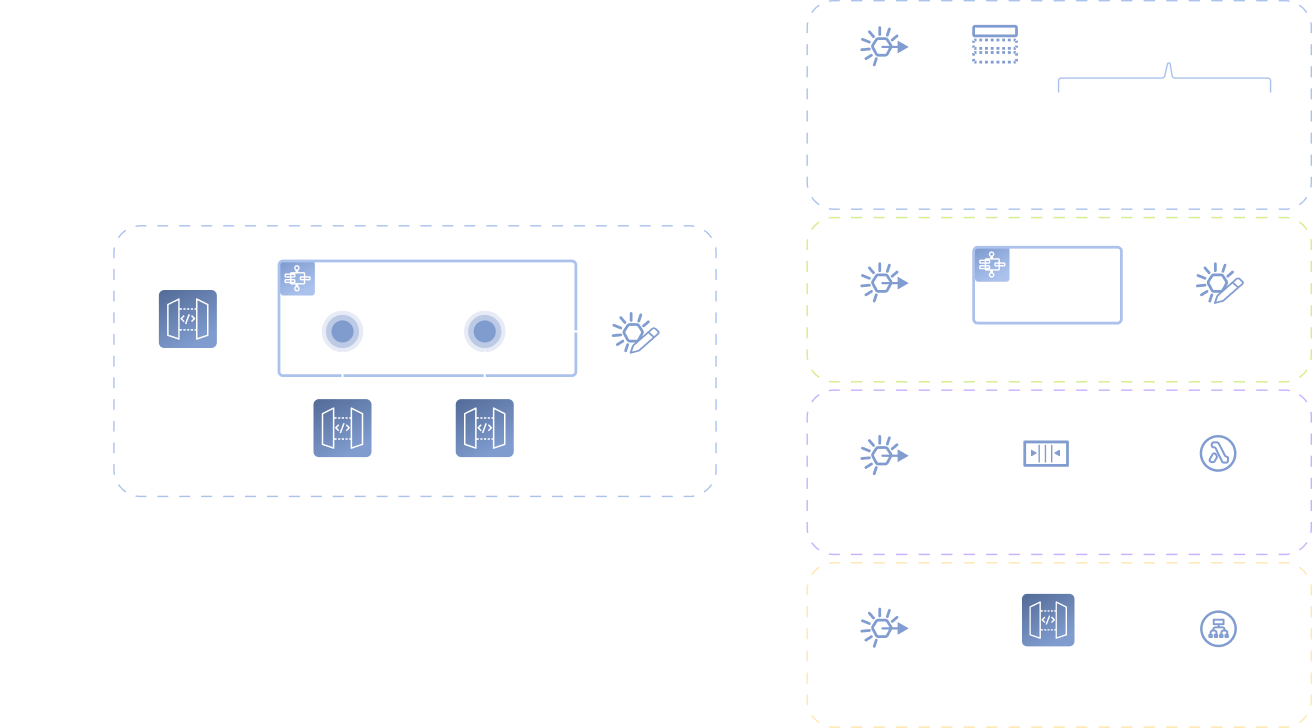
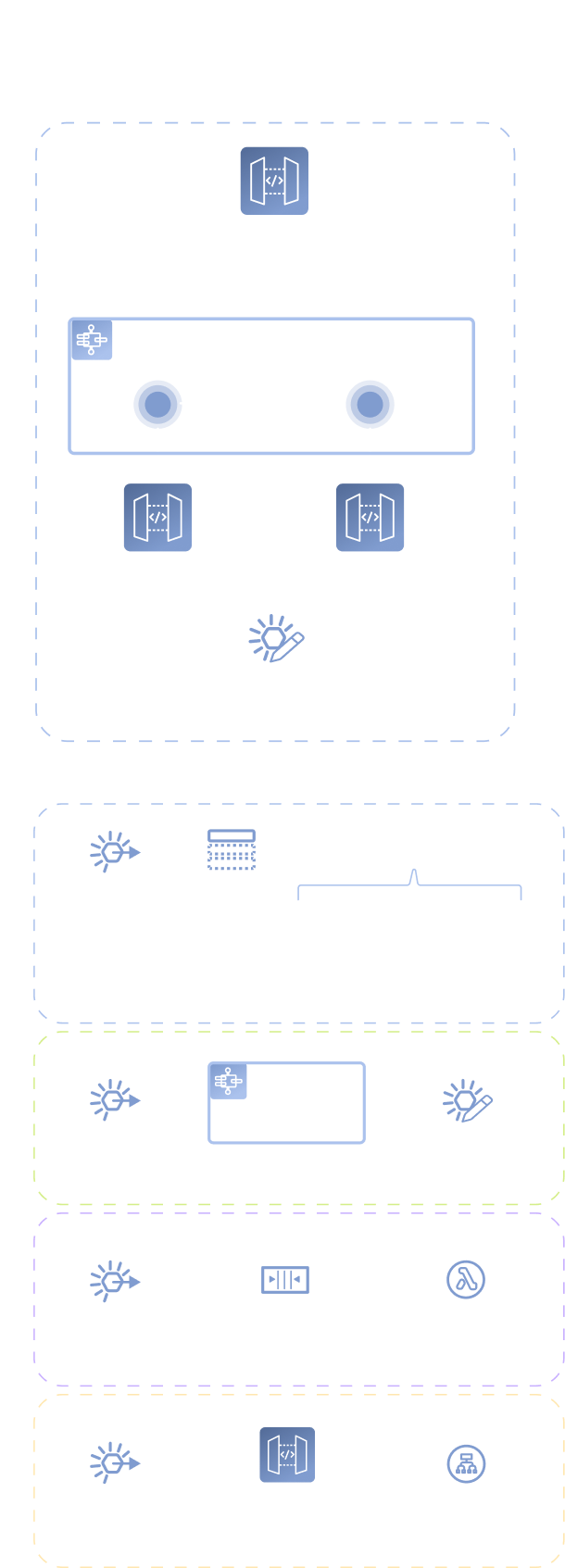
A flowchart shows an API Gateway triggering a Step Functions workflow, which sends events to an EventBridge event bus. The event bus routes events via rules to Amazon SNS topics, SQS queues, workflows, Lambda functions, and an Application Load Balancer.
A diagram shows API Gateway sending requests to a Step Functions workflow, which triggers an EventBridge event bus. The bus routes events to SNS topics for clients, workflows, SQS queues with Lambda, and an Application Load Balancer.
A vertical diagram shows an API Gateway triggering a Step Functions workflow, which communicates with two APIs. Events flow into an EventBridge event bus, then trigger rules connecting to SNS, SQS, Lambda, API Gateway, and a Load Balancer for mobile clients.

In just 2.5 weeks our backend engineers created a consolidated software ecosystem with automated workflows by designing 100+ events and setting up routes for them.

Well-orchestrated automation also granted seamless scalability to the client’s software ecosystem. New tools can be easily added to established workflows.

  1. How our custom multi-tool API integration works in practice

The new solution connects the client’s project and document management, on-site operations, logistics, and title & closing services. Now, tedious tasks that once bogged down employees are handled automatically. Staff can focus on real problem-solving and strategic decision-making.

Here is how the automation powers several key workflows across the client’s business functions.

Project management

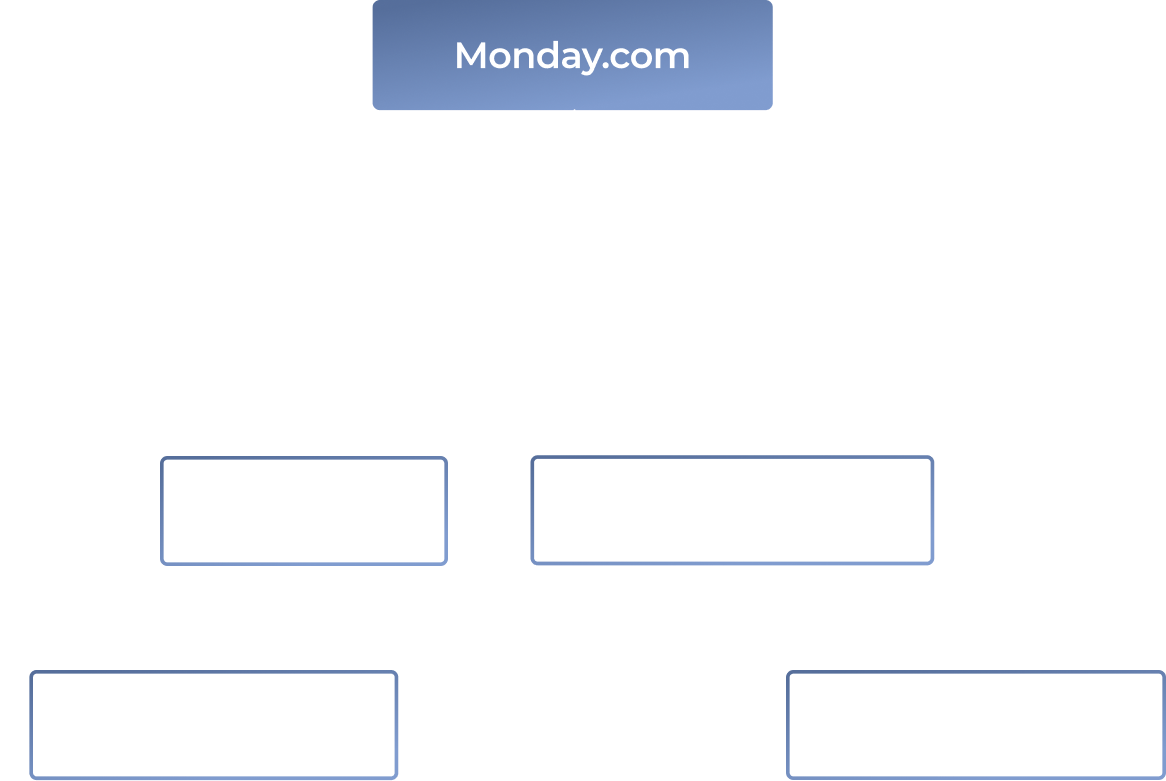
The creation of a project item with a new property in Monday.com triggers several parallel routes:

  • Lambda validates the address via Smarty API and updates the property’s entry
  • A new project folder is created in Box.com for all related documents
  • A corresponding new project entry is created in SiteCapture for on-site inspectors
  • Key property’s data is indexed in Elasticsearch for immediate searchability

That way, staff from different departments can access error-free data on the new project within seconds.

A flowchart showing Monday.com at the top, splitting into two paths: one leads to Box.com (then Smarty API), and the other to Elasticsearch (then SiteCapture). Labels indicate actions: Validate address, Create site project, Create folder, and Index data.
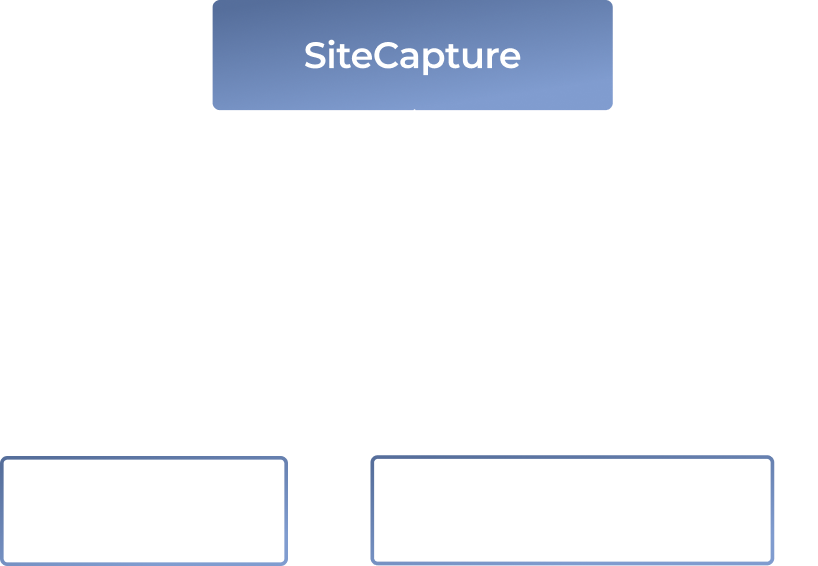
A flowchart with SiteCapture at the top connects by arrows labeled Photo uploaded to two boxes below: Box.com on the left and Monday.com on the right, showing photo uploads from SiteCapture to both platforms.
On-site operations

When an on-site inspector uploads the property’s photos ​​in SiteCapture, this event sets off two parallel routes:

  • The photos are copied to Box.com to ensure all project files are backed up in the cloud
  • A corresponding item in Monday.com is updated with a link to the photos (from Box.com or SiteCapture)

That way, essential information on the project is never lost, and on-site workers and office personnel always stay on the same page.

Logistics

An update of a property’s address in Monday.com starts a sequence of actions:

  • Lambda verifies the address through the Smarty API
  • The validated address is then updated in Monday.com, with incorrect addresses flagged for review

That way, all addresses are correct from the onset, eliminating the risk of transaction delays.

Flowchart with two boxes: Monday.com above Smarty API. Arrows show: from Monday.com to Smarty API (New address); from Smarty API to Monday.com (Tag the item for staff review); from Smarty API down (Can verify the address → Validated address, Cannot verify the address).
A flowchart shows Box.com at the top, with arrows pointing to Monday.com (labeled “Update info”) on the left and Elasticsearch (labeled “Index content”) on the right, illustrating data flow from Box.com to both platforms.
Document management

An upload of a new contract, inspection report, etc., to Box.com kicks off a route for automatic document indexing:

  • Amazon Textract extracts text​ from documents
  • The document and its metadata are indexed in Elasticsearch for fast company-wide search

That way, new documents become searchable company-wide within seconds after they’ve been uploaded into any of the apps.

Title tasks

Moving a deal’s status in Monday.com to “Ready for Title” sets in motion a multi-step route:

  • The Spruce API runs a title search, validating address and buyer/seller info
  • When Spruce completes the title work, it triggers two more routes:
    • Title commitment documents are automatically saved to Box.com
    • The corresponding deal status in Monday.com is marked “Title Completed”

That way, vital real-estate documents are processed immediately and stay safe from human error.

A flowchart with three rectangles labeled Monday.com, Box.com, and Spruce. Arrows show: Order title search from Monday.com to Spruce, Update status from Spruce to Monday.com, and Save docs from Spruce to Box.com.
  1. Here’s how API integration streamlined our client’s daily workflows

10 minutes here and 15 minutes there don’t look like a big deal. Until you do the math: 10 min × number of times an employee repeats this action throughout the day × number of employees.

That’s how our client wasted hours on repetitive mundane tasks daily. Now all these actions are done in milliseconds without human input.

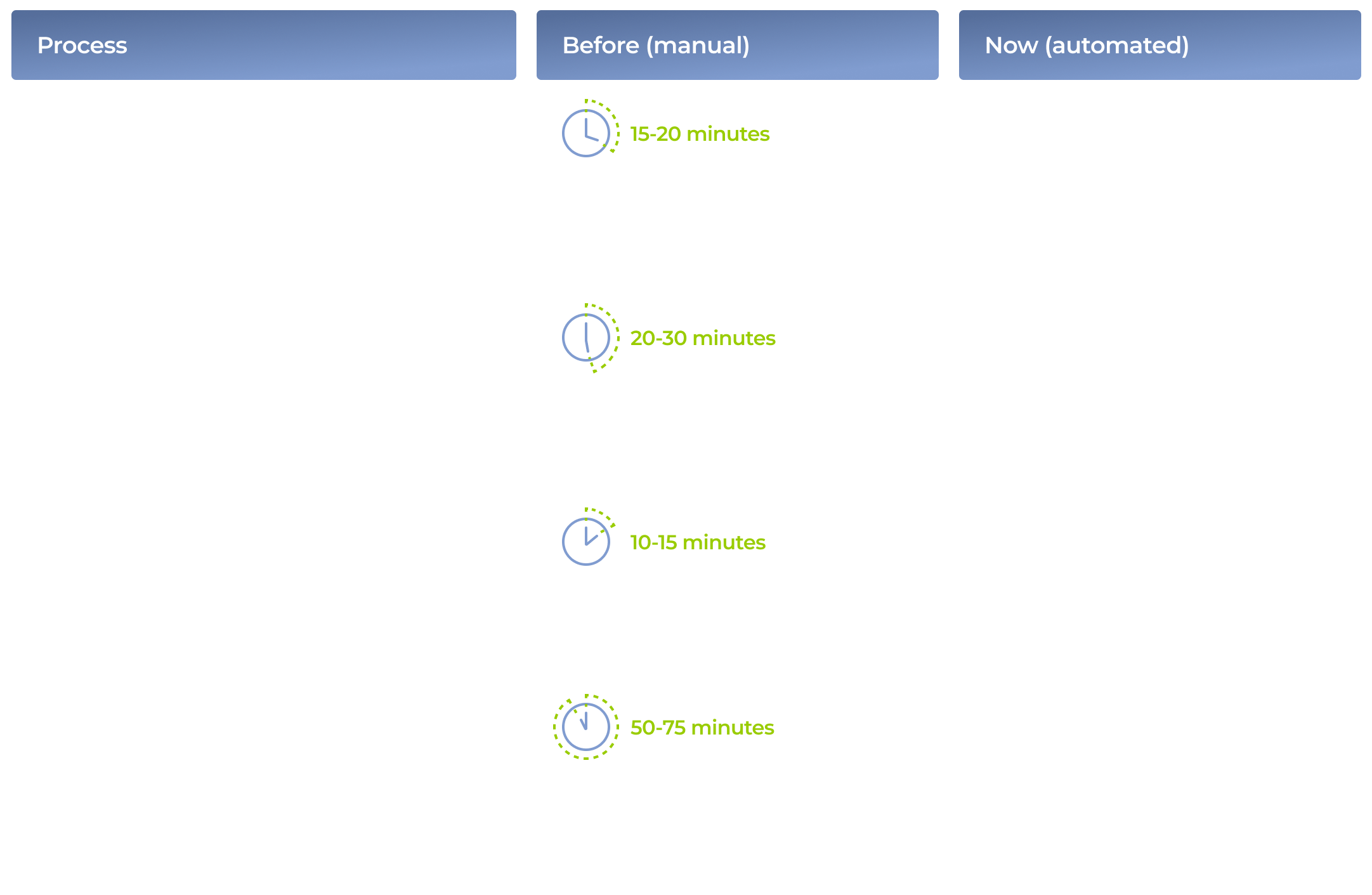
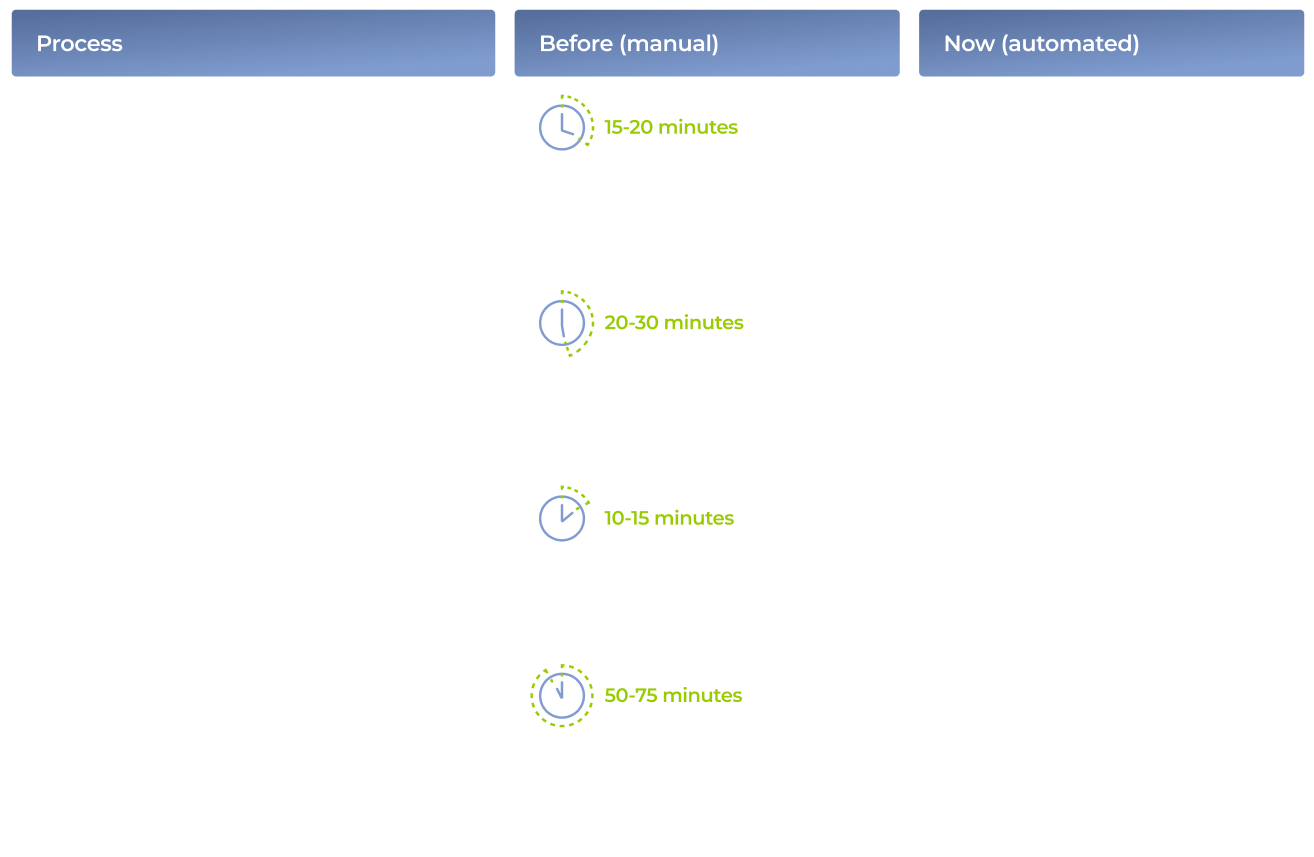
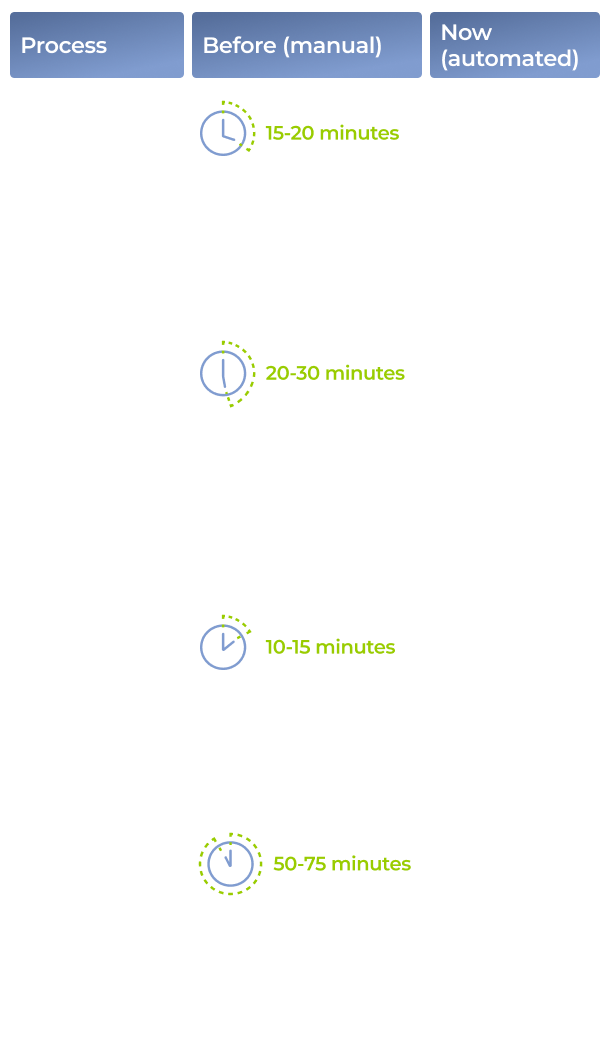
A comparison table showing four business processes: adding photos, uploading documents, address validation, and reporting—contrasting manual methods (with time estimates) to automated solutions using various software tools, highlighting improved efficiency.
Side-by-side comparison table of manual vs automated work for four tasks: photo uploads, document uploads, address validation, and report generation. Steps, tools, and time for each process are listed in color-coded rows and columns.
A comparison chart with four rows showing manual vs. automated steps for real estate tasks: adding photos, uploading title documents, address validation, and reports. Each row lists process, manual time, automated tools, and automated time savings.

Before

  • Data siloed across disconnected apps
  • Manual, error-prone updates across platforms
  • Slow deal processing due to manual checks and data transfers
  • Employees overloaded with repetitive tasks

After

  • Disparate apps are united into a cohesive ecosystem
  • Real-time, automated data exchange across systems
  • Immediate actions triggered by changes in any app
  • Employees freed from mundane tasks, focusing on higher-level decision-making

Business value

  • A completely unified and highly scalable software ecosystem that adapts to new tools and processes
  • Real-time data exchange across platforms
  • 60% reduction in data processing cost
  • Up to 30 hours saved per employee monthly
  • Minimized risk of human error

Client’s testimonial

Multiplier effect

The problem of wasting employees’ potential on dull work refers to industries across the board. It’s easy to overlook the time spent on small tasks, but when you add it all up over weeks or months, the cost becomes significant.

Luckily, process automation, in all its forms — from API integrations to AI agentic solutions — offers an opportunity to save time, reduce costs, and improve accuracy, unlocking your team’s full potential and elevating your business to new heights.

A hand reaches toward a glowing digital interface labeled AUTOMATION at the center, surrounded by icons representing charts, documents, gears, people, and graphs, symbolizing various business automation processes on a dark tech-inspired background.

Web App For Robotics Manufacturer

Intuitive Web App For Robotics Manufacturer

How crafting a web app with an easy-to-grasp interface and flexible architecture empowered a manufacturer of warehouse driverless forklift systems to unlock new value-creation opportunities and reach SMB customers.

Industry:
Logistics, Manufacturing

Enterprise Automation

UX and Design

Web Development

MVP Development

Software Product Development

Business challenge

Under-automated or under-digitized intralogistics inevitably affects a company’s profits. However, sometimes the bottlenecks aren’t that obvious, and even organizations with warehouse-specific software and robotics in place struggle to achieve the much-coveted outcomes of intelligent automation.

The issue may lie in having overcomplicated software designed for tech-savvy users that holds down the company’s capabilities in efficient control and optimization of the goods flow within a manufacturing facility, warehouse, or distribution center.

For example, navigating the driverless forklift systems in small spaces is quite a challenge, as such robots are usually designed for large warehouses. The equipment can neither go near fire exits nor stop near them by default. However, following these settings is tricky in small spaces with little room for maneuvering. Hence, when the robot has no other way than to make a path near the fire exit, it stops before reaching it. Such cases require manual human input to restart the system with an updated route.

Our client, Bleichert, an automation machinery manufacturer, wanted to address two pain points of their customers seeking warehouse robotics:

‘By engineers, for engineers’ approach in designing the software

Lack of targeted solutions for small and midsize businesses (SMB) in the market overloaded with enterprise-grade products

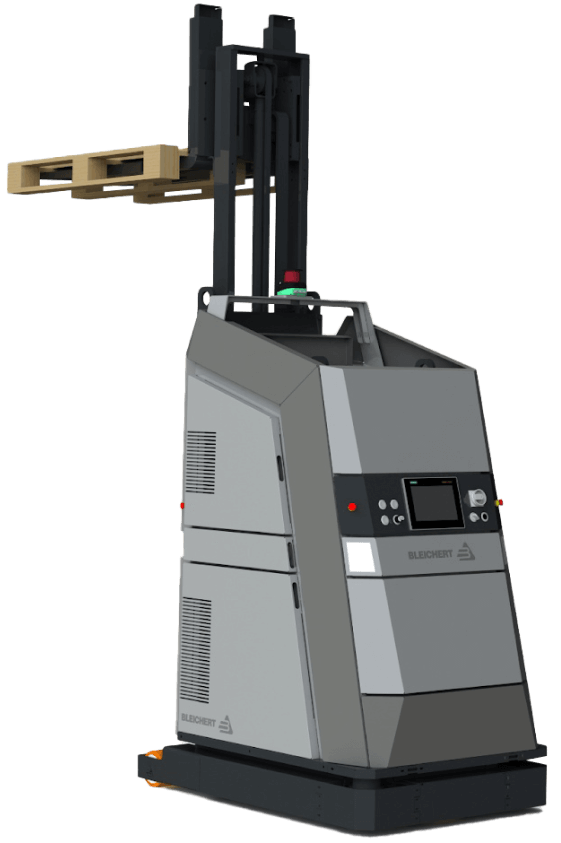
To reach SMB customers and provide them with user-friendly software for warehouse robotics, they decided to broaden their offering with an innovative model of their driverless forklift systems that move loads autonomously by following a pre-configured circuit. Bleichert partnered with NODE Robotics and integrated their software modules into the experimental forklift. However, they needed a reliable tech ally to create a web app with an easy-to-grasp interface for warehouse operators and managers.

Instinctools, with its comprehensive expertise shored up by a set of ISO certifications, filled the bill perfectly. Our dedicated team created an MVP with interactive features for the demo presentation at LogiMat – the International trade show for intralogistics solutions – in just seven weeks.

Solution

When reaching out to *instinctools, the client specified their requirements for the future application.

Architecturally significant requirements (ASRs) included:

  • Accessibility via common browsers, such as Google Chrome, Safari, Microsoft Edge, etc. with an identical look and feel
  • Flexible architecture to support and manage multiple robots in the future
  • Real-time updates of a robot mission

Non-functional requirements (NFRs) encompassed:

  • Quick and easy navigation with the rule of thumb “max three levels to reach the goal”
  • Less than 0.4 sec response to the user input
  • Color-coded interface to simplify operators’ work and avoid any possible costly mistakes

Detailed documentation empowered us to jump into development right away. Our software architects started with establishing a robust tech stack.

  1. Deciding on a tech stack

We zeroed in on the client’s requirements to shape an easy-to-maintain tech stack for the web app development.

  • Seamless compatibility with NODE OS. Bleichert already installed the autonomy OS for mobile robots on the experimental forklift system to handle map management and interact with the robot’s systems and sensors. Since the operational system with related plugins uses Python, we suggested sticking to this programming language and FastAPI framework for server development for the sake of tech stack consistency.
  • Fast user interface response times. Besides ensuring the mandatory ease of use for the warehouse operators, we had to take care of the app’s interface speed. Our frontend developers suggested going with a single-page application (SPA) using React JS for user interface development, as the framework’s component-based architecture and virtual DOM allow crafting UI with lightning-fast render times. By leveraging React JS development services, we ensured optimal performance and a seamless user experience.

Here’s the high-level scheme of the future web app.

  1. Taking into account long-term usage scenarios from the onset

The MVP was tailored to user interaction with one robot (Master Robot) within a pre-configured environment. However, outlining the long-term project vision at the early stages is a best practice our team follows to eliminate head-scratchers in the future and enable a hitch-free development process.

Therefore, in our conversations with the client, we discussed two strategies their customers can choose from in the future when the app will operate multiple robots (Master Robots and Servant Robots).

  • Seamless compatibility with NODE OS

Such an approach provides end users with a single point of control for all forklift systems within the warehouse. However, the main drawback of this method is its high dependence on the Master robot. In case of its malfunctions, Servant robots won’t be able to perform their tasks.

  • The app runs on each of the Servant robots with one Master robot for covering managing tasks

In this case, Servant robots are highly independent, eliminating the risk of a work stoppage due to the issues with the Master robot, but high-level management becomes trickier.

The bone of the architecture at the heart of the web app is its flexibility. It can be tailored to either of these two options, depending on the client’s customers’ feedback on the innovative forklift model.

  1. Engineering and designing a user-friendly web app

Moving forward according to our Delivery Framework, we proceeded with iterative development, covering user roles, robot management, and more.

User roles within the app

The system has authorization and authentication mechanisms, but they aren’t mandatory, and non-authorized users can access the web app. Thus, we provided two modes within the system:

  • Basic user, designed for the rank-and-file warehouse operators with no authorization required
  • Key user, accessible only by authorized employees, for high-level warehouse operators and managers

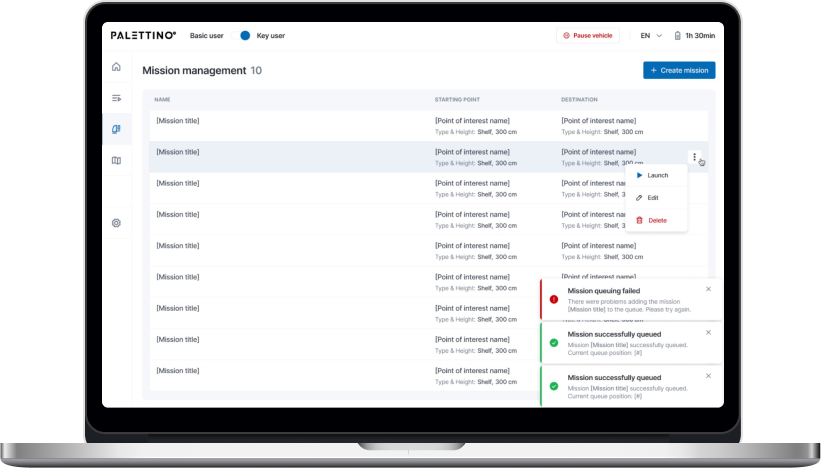
However, the capabilities of authorized and unauthorized users greatly vary. As you can see on a high-level app vision, Basic users can only view the list of existing robot missions and launch them, while Key users are allowed to create new routes and missions, add restrictions, view the history, check the robot’s status, etc.

Now, let’s dive deeper into the robot-related features.

Robot mission management

Each mission has the following attributes:

  • Name
  • Starting point of interest (POI)
  • Destination POI

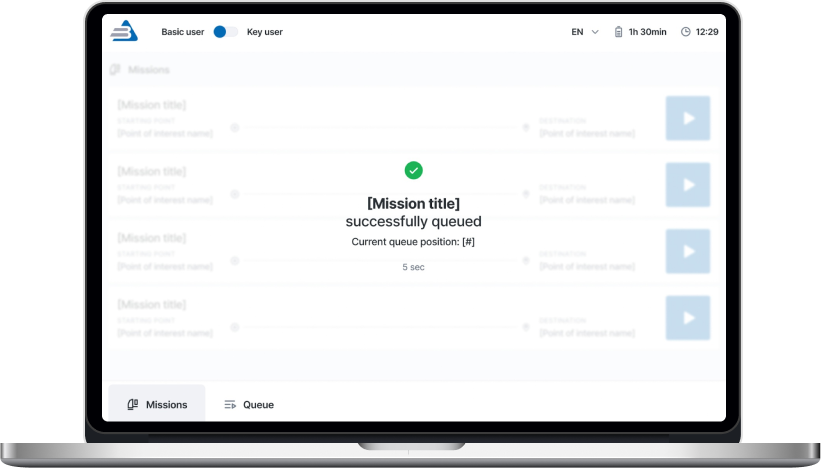
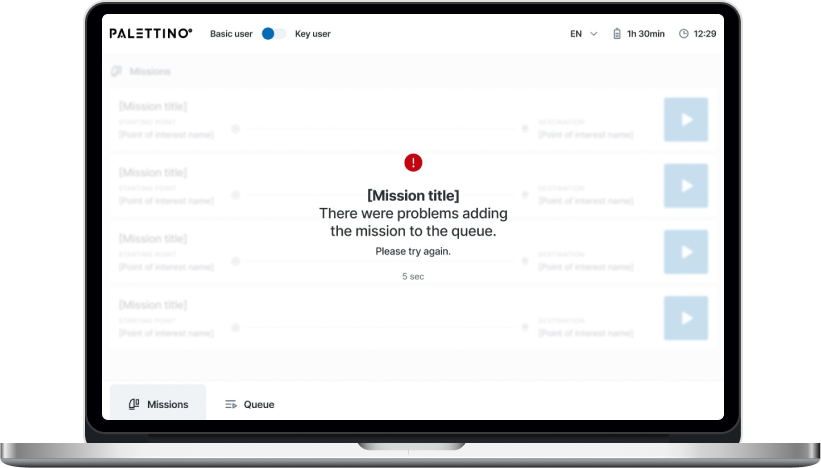
A Key user can add any mission from the list to the queue by clicking the “Play” button. The mission will appear at the last position after a five-second pause, during which the list of missions is locked. Then, the operator will be notified whether queuing the mission was successful or failed.

There are four mission statuses:

  • Active
  • Queued
  • Completed
  • Deleted

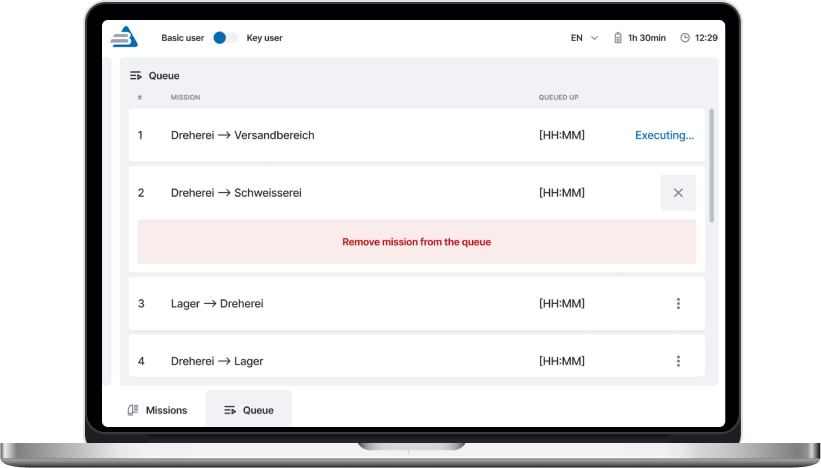
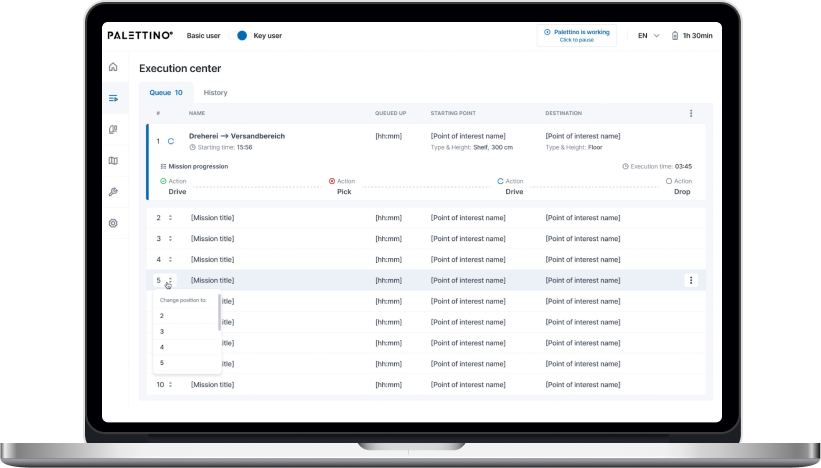
A Key user can remove any missions in the queue except the active ones.

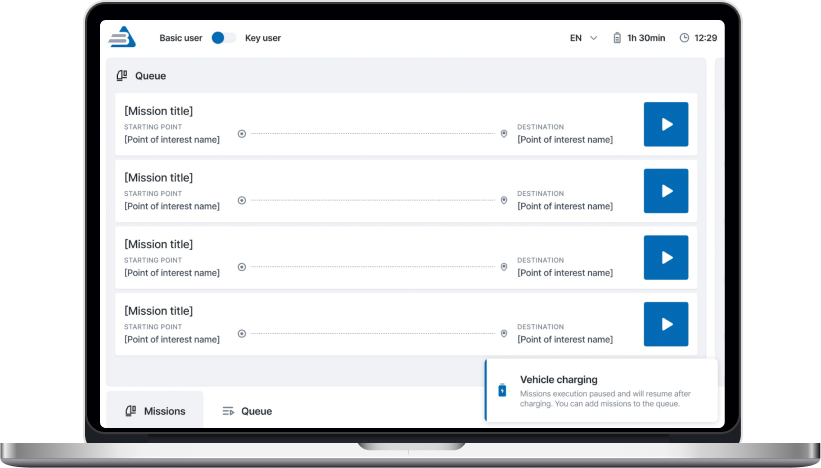
Both Basic and Key users get toast notifications about events related to the robot’s operation. The alert about the robot charging is shown until the process is completed.

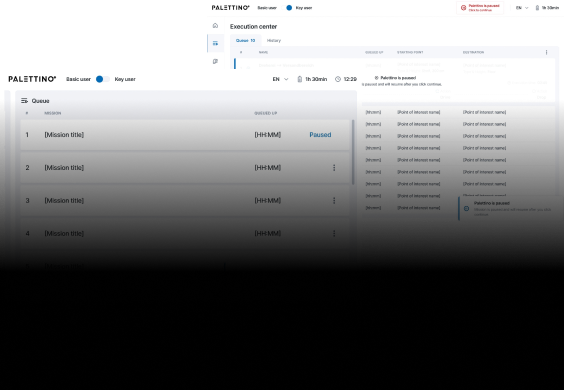
The opportunity to pause the robot is available from any application page for both roles.

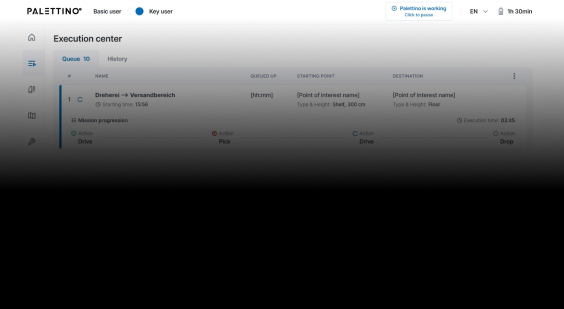
One of the client’s fundamental requirements was tracking a robot mission in real time, so we set the execution time to update every second.

A Key user can change the order of queued missions.

Mission removal is available for a Key user. They need to click the appropriate menu item and follow the additional action confirmation.

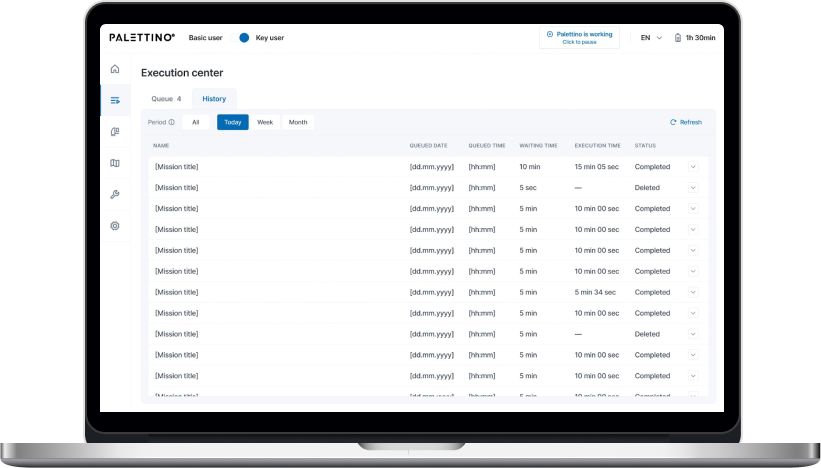
Only a Key user can access the History of missions and filter them by date:

  • Today
  • Week
  • Month

All missions are shown by default.

That’s what the clickable prototype looks like.

Dashboard for monitoring robot condition

The complex interface wasn’t the only reason the client’s customers considered previous forklift systems not user-friendly enough. They also strived to have simple visualizations of the robot’s status to detect and fix machine maintenance issues before they snowball.

A dashboard with widgets and actual information about the robot’s state empowered users to switch to the ‘danger foreseen is half avoided’ principle and, thus, decrease machinery maintenance costs.

  1. Writing a test emulator for the app

The client’s web app is an example of an embedded solution that strongly depends on the hardware. In such cases, software testing takes a special place in SDLC. There are two ways to perform it:

  • Running the app directly on the robot. However, this was a no-go option, as the client wanted to fine-tune the new model’s sensors before the trade show. Transporting the forklift back and forth between their headquarters in Osterburken and our development hub in Warsaw would totally mess up the project’s timeline.
  • Testing software on an emulator. The client didn’t have an emulated environment that imitates the robot’s behavior, so we offered our help and built it.

As we were working on the emulator ourselves, the increased project scope could have put the *instinctools team in a tight spot, given the strict deadline. However, we managed to deliver the robust version of the app on the dot. Moreover, our emulator served as a temporary substitute for the solution’s service for the robot coordination, making it possible for the client to showcase the trailblazing forklift model at the trade show.

  1. Shaping the post-MVP backlog

Satisfied with the MVP results, the client decided to proceed with our partnership at the post-MVP stage, during which our team will broaden the functionality related to these three areas:

  • User management
  • Mission improvements
  • Mission assignment

Before

  • Complicated app meant for employees with an engineering background
  • Lack of visualization
  • Partly manual control over a forklift robot on-site

After

  • Intuitive app sets new standards in user-friendliness of robotics management software
  • Easy-to-grasp dashboards
  • Fully remote control of the forklift robots

Business value

  • Trailblazing warehouse solution for the SMB segment
  • Highly user-friendly UI suitable for non-technical staff makes the software stand up from the crowd of solutions designed for tech-savvy employees
  • Simplified software support due to a homogeneous tech stack
  • Interface with no more than three clicks to reach any feature
  • Less than 0.4 sec response to the user input
  • Real-time updates of the robot missions
  • Easy-to-use dashboards for tracking a robot’s state
  • Decreased robot maintenance cost thanks to detecting malfunctions before they turn into serious issues

Client’s testimonial

CANet healthcare platform

E-Health Product —
a Revolution for Canadian Cardiac Care

How crafting a virtual healthcare platform for clinics, research centers, and patients empowered a pan-Canadian healthcare association to rewire research and monitoring of high-risk cardiac patients with ICDs (implantable cardiac defibrillators), run 78% of check-ups remotely, and reduce the number of cardiac-related emergency hospitalizations by 21%.

Industry:
Healthcare

Software Product Development

Mobile App Development

Web Development

Business challenge

Establishing robust, consistent communication has its sway in any industry. However, in healthcare, this becomes a life-and-death matter. The regular collection of patient data enhances scientific knowledge about diseases, and constant health status monitoring of high-risk patients can literally save their lives.

Nevertheless, even though patients, clinics, and research labs are parts of the healthcare ecosystem, they are still very siloed, and so is their data. Moreover, healthcare institutions can’t keep up with the growth of medical-related data, often failing to process it effectively to get the valuable insights needed for treatment and research.

Under-digitalization and under-communication within the Canadian healthcare system were in the spotlight of our client – the Cardiac Arrhythmia Network of Canada (CANet). The association wanted to address the hurdles faced by various parties within the healthcare ecosystem.

Patients:
  • Aren’t in control of their personal health data
  • Need a budget-friendly remote alternative to costly and time-consuming post-surgery follow-ups at the clinic
  • Don’t have a credible and easy-to-access source of up-to-date information related to their diseases
Clinics:
  • Lack of systematization in electronic record-sharing when collecting patient data from other healthcare facilities
  • Unable to keep up with the current workload without remote monitoring and a specialized digital solution for it
Research centers:
  • Don’t have access to a regular source of relevant data
  • Waste employees’ time processing heterogeneous data to find valuable information

Our client intended to rewire the state of the Canadian healthcare system and decided to test the waters with a product for a specific patient group, clinics, and research centers (RC). It was planned that the project would have these elements:

  • Android and iOS apps for the patients
  • Web apps for healthcare providers and research centers

After evaluating several potential tech partners, CANet opted for *instinctools because of our proven expertise, European-based location, and readiness to set up a 13-person project team in less than three days.

Client’s goals

Facilitate communication between the patients, clinics, and research centers within a cohesive healthcare platform.

“We wanted to create a constant feedback loop between the patients, clinics, and research centers.”

Dr. Anthony Tang, CEO and Scientific Director, CANet

“Our platform – VIRTUES® – utilizes state-of-the-art diagnostics with advanced analytics and wireless connectivity to provide cardiac patients access to affordable on-demand virtual care.”

Dr. Anthony Tang, CEO and Scientific Director, CANet

Create a trailblazing patient-centered healthcare solution in Canada.

Reduce the number of non-mandatory visits to the clinics by up to 80%.

Minimize hospitalizations and emergency department visits by up to 20%.

“Another milestone we’ve set for VIRTUES® was reducing cardiac-related workload on clinics.”

Dimitri Popolov, Research Data & Systems Manager, CANet

Solution

As time-to-market was critical for the client, we suggested banking on cross-platform options. Flutter and React Native were top choices, but as CANet also needed web apps, our team decided to leverage React Native for mobile apps and React JS development for web apps.

This combo yielded triple wins:

  • Budget-friendly cost

As React Native is a React JS-based framework, the client didn’t need two separate teams to create mobile and web applications.

  • Fast-track development

Core React concepts are the same, which empowers the dedicated team to move through the whole process faster.

  • Simplified maintenance of all solutions

Relying on programming languages of the same type, with similar development approaches and code styles, makes software support a walk in the park.

  1. The tech groundwork
    of the platform

Before getting into the look and feel of the applications, we had to check all the boxes regarding regulatory compliance to ensure a smooth launch for VIRTUES®.

Every healthcare-related software product targeted at the Canadian market has to comply with the Personal Health Information Protection Act (PHIPA) and Privacy Impact Assessment (PIA) regulations.

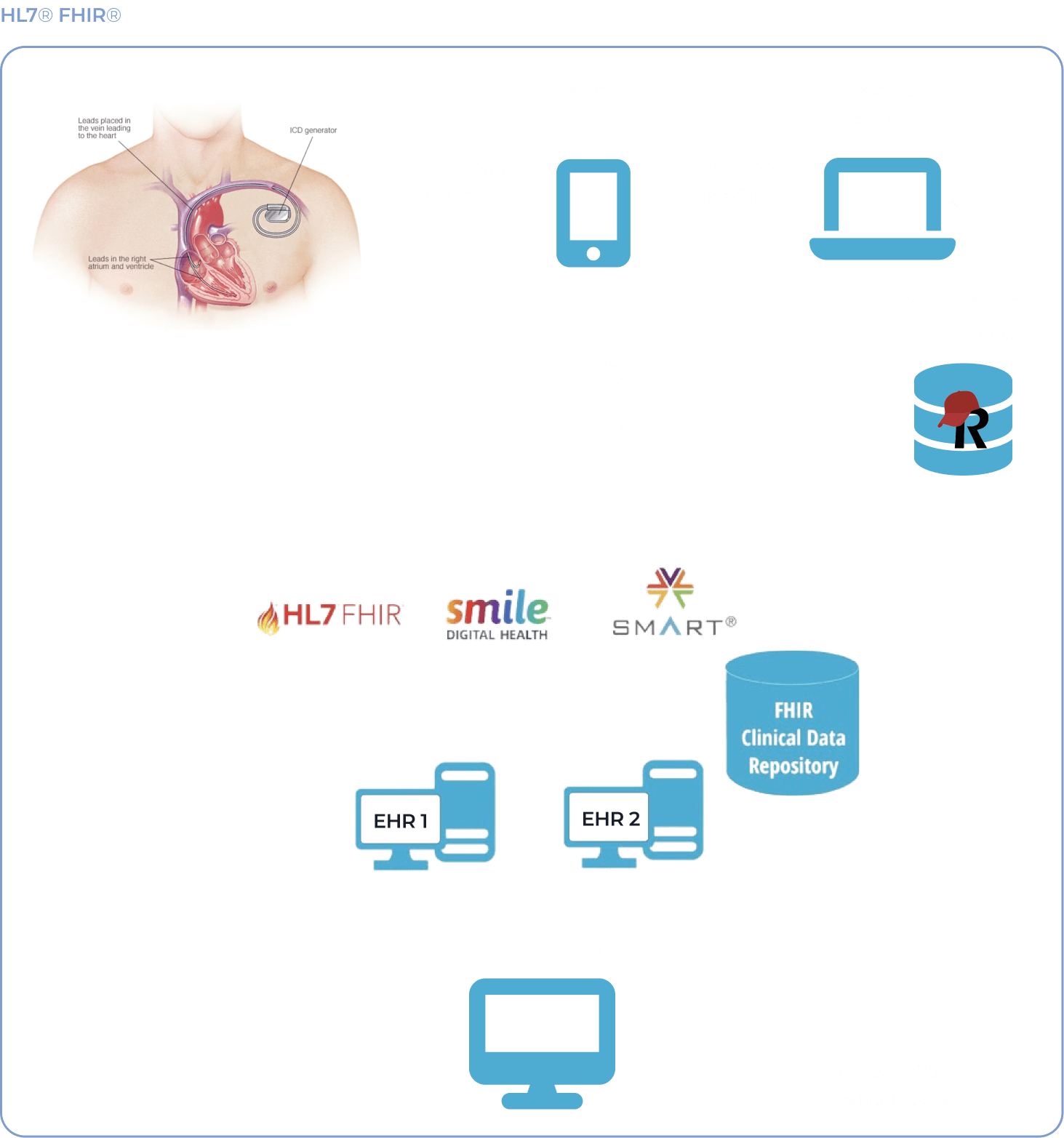
Moreover, CANet wanted to take into account the HL7® FHIR® (Fast Healthcare Interoperability Resources) standard that has become a global best practice for a fast and secure health data exchange between healthcare applications.

These compliance goals required the selection of a relevant tech stack for the VIRTUES® data architecture. As all the components had to be FHIR-compliant by design, CANet ended with this set of software solutions:

  • SMART on FHIR as a healthcare-oriented platform with a plethora of open-source tools for crafting robust and secure clinical and patient-facing apps. It helps easily integrate apps with electronic health records (EHRs) and other healthcare software and standardizes data access.
  • Smile Clinical Data Repository (CDR) as a data repository for managing and maintaining the HAPI-FHIR Library that enables faster development cycles and allows the running of multiple clinical and research studies.

The system has an in-built OAuth2/OpenID Connect server, providing the client with the possibility to hone PHI safety while leveraging ready-made SMART applications instead of building their own solutions from scratch.  

  • Research Electronic Data Capture (REDCap) with the module Clinical Data Interoperability Services (CDIS) as a tool for collecting data from EHRs. It’s a standard for healthcare research programs that ensures top-level security of databases with Protected Health Information (PHI).

CDIS module supports batch data pulls from the EHRs and internal CANet clinical studies, providing research centers with data processing speed that was beyond the reach before.

Instinctools’ team was in charge of VIRTUES® integration with REDCap and Smile on the clients’ way to building an all-encompassing healthcare ecosystem with adequate engagement of all the parties:

  1. Mobile applications for patients’ monitoring

VIRTUES® is targeted at patients with an increased risk of sudden cardiac death (SCD). All the patients have cardiac implantable electronic devices (CIED) that require constant performance monitoring.

However, regular check-ups at the clinic are time-consuming and costly. Offering patients a solid healthcare digital solution for remote self-monitoring could have ensured high-level, affordable healthcare services for Canadians. This idea became the foundation for the patient-targeted iOS and Android apps developed by our dedicated team.

Implantable cardioverter defibrillator (ICD) performance monitoring

Aside from having Medrtonic’s cardioverter defibrillators implanted in their body, patients are given a specialized device reader to capture the data ICD produces. Then, the Bluetooth-powered reader transfers data to the mobile and web apps.

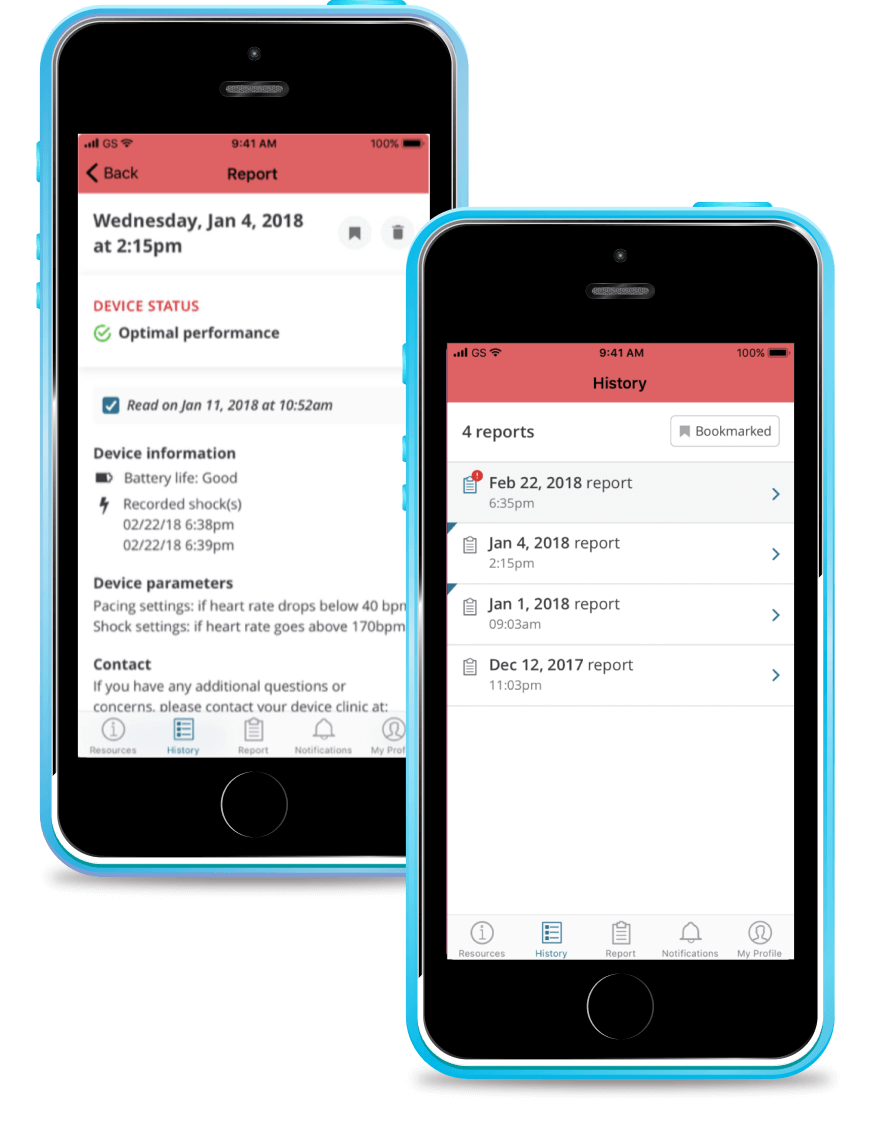
To ensure patients were able to take agency over their own healthcare when communicating with their physician, we designed mobile app reports in an easy-to-understand way. They contain:

  • Basic ICD information, such as current battery life, pacing and shock settings
  • Timesheet of recorded shocks, if any where delivered to a patient

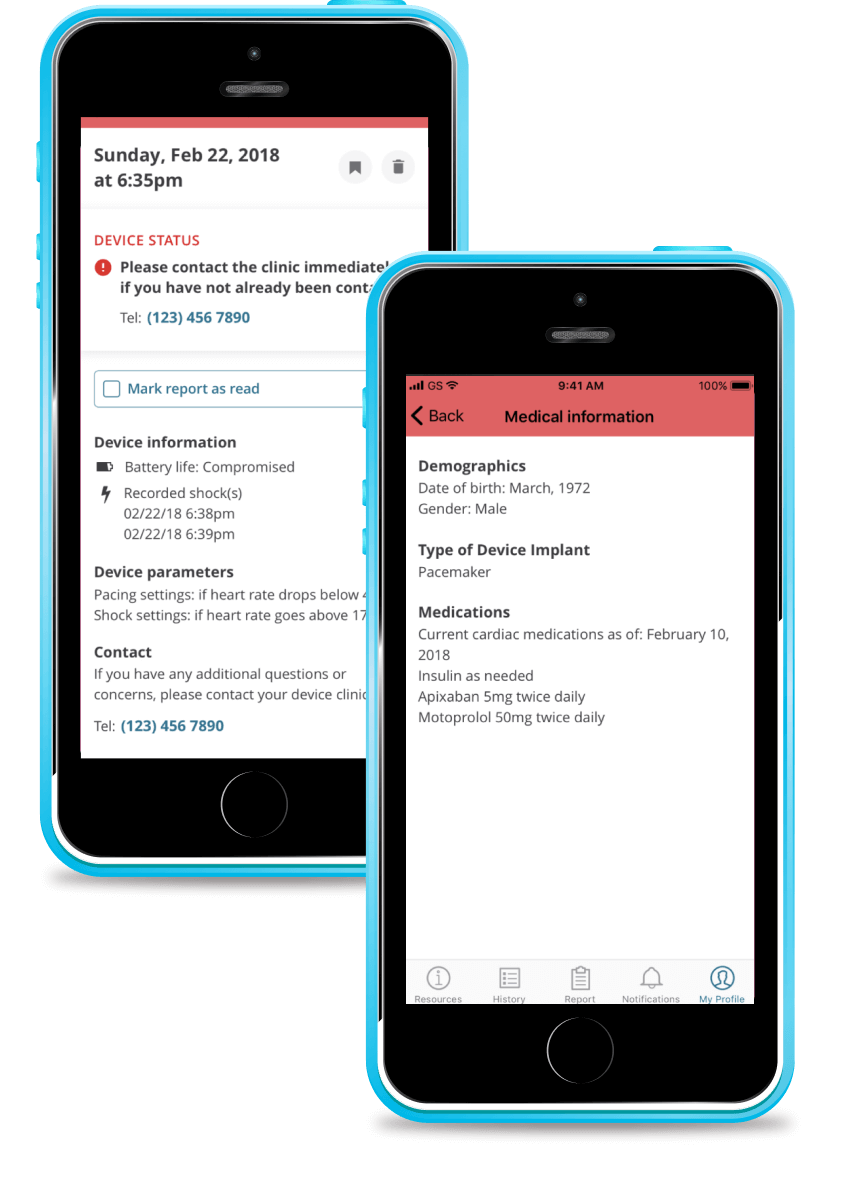
As all the trial patients belong to a high-risk group, we added a notification function, enabling the patient to contact the clinic immediately, especially if there are any issues with a person’s ICD status. As the clinic receives the same report automatically, they are also able to get in touch with the patient without delay.

Our business analyst also suggested adding the category “Medications” to a section with medical information, so that users always have their current prescriptions on hand.

Library with expert-directed materials about cardiac diseases

Additional patients’ pain point VIRTUES® addresses is a lack of a credible and easy-to-access source of up-to-date information related to cardiac diseases. The mobile app has a library of educational materials in various formats — images, videos, PDFs — all verified by unbiased CANet experts.

  1. Web app for clinics

According to CANet, there are over 97,000 cardiac patients across Canada. Daily tracking of each individual’s overall health status and ensuring their implants work hassle-free was beyond the reach, given the 1,000+ emergency departments in Canada. Therefore, they needed a digital health solution to ensure adequate care for all the patients.

VIRTUES® web app aimed to cover this gap. The pilot trial involved 1,400 patients across 15 clinical sites throughout Canada.

As mentioned earlier, healthcare providers automatically receive reports about the patient’s ICD status. They include:

  • Patient’s personal data, such as name and date of birth
  • ICD data, such as its type and model, battery longevity, and patient-specific settings

Unlike summaries in patient-facing mobile apps, these reports are more detailed and contain cardiograms recorded by the reading device. Here are several examples:

Moreover, this data is coupled with the patient’s health information from the EMRs, allowing for a broader picture of the individual’s current health condition and enabling doctors to spot the problem areas faster.

On-field tests proved this digital solution is highly scalable. Before VIRTUES®, clinicians spent at least 45 minutes per patient for a standard intracardiac electrogram (EGM). Given the high number of patients, cardiologists across the 15 trial clinics had a 57-hour workweek on average.

With the VIRTUES® web app, they don’t have to invest their time in the EGM procedure, as data is recorded remotely and automatically. All the doctors need to do is interpret the EGM results and contact the patient in case of abnormal patterns. The digital platform made it possible to relieve healthcare professionals of excessive workload.

Now, one cardiologist can easily manage 25+ remote patients daily without compromising the healthcare quality, while earlier, the maximum per doctor was seven high-risk individuals.

  1. Web application for research centers

As the ongoing research of cardiac diseases helps to hone overall healthcare, CANet invested efforts into developing a solution for the research centers (RC) within the VIRTUES® platform.

Instinctools’ team created a web application that receives the data from the patients’ app and EMRs’ records and transforms this information into reports for research purposes.

RCs get de-identified files, where patients only have study IDs. Here’s an example of an anonymized report header:

Cardiovascular reports include:

  • Patient’s date of birth and study ID.
  • Individual’s type of heart disease, CABG, NYHA class, etc.
  • Information about their current cardiac medication, recent cardiovascular investigations, and hospitalizations.

Paired with data from the other studies conducted by the CANet association, this information has become the backbone of this leading-edge cardiac research in Canada.

Before

  • Patients, clinics, and research centers are separate entities of the healthcare system
  • Inability of the healthcare providers to ensure all the patients get timely and more accessible medical care
  • Patients with ICDs have to visit clinics for monthly check-ups
  • Scarcity of expert educational materials for patients
  • Сardiologists suffer from excessive workload
  • Lack of a constant source of relevant data about cardiac patients

After

  • Consistent communication between patients and healthcare providers
  • User-friendly platform for remote patient self-monitoring
  • Patients need to visit their healthcare provider only when unusual patterns are spotted instead of regular monthly check-ups
  • Scientifically credible educational materials about cardiac diseases at the patients’ fingertips
  • Precautionary approach to managing health status of high-risk cardiac patients
  • Decreased workload
  • Ever-flowing stream of research-valuable data to the RCs

Business value

  • Remote patient monitoring capabilities for the patients and healthcare providers
  • Decrease in the amount of cardiac-related emergency hospitalizations by 21% thanks to a precautionary approach to health management
  • The number of mandatory in-clinic visits reduced by 78%
  • Cardiologists’ working week has been shortened from 57 to 42 hours
  • Increase in the number of patients a cardiologist manages daily from 7 to 25+ thanks to remote monitoring

Client’s testimonial

Here’s how the company’s CTO evaluates the project outcomes:

Tech Documentation Management Product

Tech Documentation Management System For Manufacturing

How switching from an outdated DITA-based software to *instinctools’ feature-rich DITAworks helped a Danish enterprise fully digitize tech documentation management, speed up document-related operations by up to 14%, and reduce translation costs by 11%.

Industry:
Manufacturing, Energy

Software Product Development

Enterprise Software Development

Business challenge

Manufacturing organizations must ensure their products are accompanied by technical documentation and then keep an eye on its relevance and updates. At enterprise level, when the number of products and their variations grows to hundreds and even thousands, technical writing and its management become more challenging and the call for a specialized software solution becomes louder.

DITA is one of the well-known standards that can lighten this burden while speeding up the process at a wallet-friendly cost. However, finding ready-made software with suitable functionality among the diverse DITA-powered options out there is almost as unlikely as finding a needle in a haystack. That’s the struggle our client faced.

What is DITA?
DITA is an XML-based open standard to create, edit, manage, and publish large volumes of technical documentation in multiple formats and languages. Thanks to well-developed content reuse mechanisms, this standard facilitates all content-related tasks.
What is DITAworks Webtop?

DITAworks Webtop is a DITA-based multi-processor software product with a solid content reuse mechanism for authoring, managing, and publishing tech documentation. As an enterprise-oriented system with a modular architecture, it’s flexible and highly customizable to meet the needs of companies with mature content structures.

Learn more

A large Danish manufacturer of sophisticated control solutions for decentralized power production has already moved from non-specific software to a single DITA-powered environment for creating technical documentation. However, the client’s 50+ dedicated technical writers and translators quickly found the tool inadequate to cover their needs. What were the critical flaws of their current system?
  • Limited Content Map development functionality
  • Only basic metadata and conditional processing (CP) tags
  • Inflexible search options
  • Underdeveloped management of reusable content elements
  • Inability to work on a single piece of content in isolation without affecting its usage across the whole content system
  • No detailed history view
  • Absence of translation status analyzer

Driven by all these issues, the client started re-investigating the market for an advanced DITA-based software provider. To make sure their future partner could be on par with the highest quality and security standards, the client narrowed down their options to companies compliant with ISO 9001:2015 and ISO 27001:2022 standards. That’s how *instinctools and our DITAworks Webtop showed up on their radar.
Why did they see our product as a top option?
Provides
a safe space for tech writing as a standalone software with secure infrastructure
Remains
flexible and able to fit into the internal ecosystem of any enterprise
Offers
extensive functionality out-of-the-box
Brings
unlimited customization opportunities

What has our team done to turn DITA into a business asset worth investing in and obtain the full value this standard can bring?

Solution

As security is a top priority for enterprises, we provided the client with a standalone DITAworks Webtop application hosted on their own server in the Digital Ocean to ensure the Fort Knox safety of the company’s sensitive data.

The scheme of the app
  1. Advanced DITA content
    migration from the client’s
    former DITA CCMS

The first step our dedicated team took was writing migrators to move the client’s DITA content from their old solution to DITAworks. Simple data migration regardless of the specifics of content organization wasn’t a go-to option, as it requires manual re-sorting afterward.

  • Automated post-migrational content reorganization. We wrote migrators powerful enough to automate map formatting, grouping topics of different types into relevant folders, etc., to speed up the process and eliminate the possibility of human error.
  • Tailored DITAworks’ content hierarchy to the client’s current content structure. It helped smoothen transition to the new system for the staff.

This approach resulted in hurdle-free content migration between the systems.

  1. Out-of-the-box DITAworks’ features that bolstered tech documentation management right away

As DITAworks grants extensive functionality off the shelf, its adoption helped the client fine-tune their content-related processes right from the start even before tapping into bespoke advantages brought on by custom features.

Glitch-free topic editing

DITAworks uses an up-to-date oXygen™ XML editor whereas the client’s previous system ran on the obsolete and ill-performing oXygen™ Applet, leading to constant lags in topic editing. Switching to DITAworks solved this issue and unlocked flawless access to the editing functionality for authors and reviewers.

What is oXygen™ XML editor?

oXygen™ is a multi-platform collaborative tool for creating and editing XML files, validating their structure, etc. It supports single-source publishing and allows users to produce XML content in multiple formats (PDF, HTML, Web Help, XHTML, EPUB, etc.).

Rapid publishing speed

Unlike other single-processor DITA-based products, DITAworks supports various DITA processors for content publishing by default, empowering users to control the publishing speed. Our client leveraged two processors:

  • DITA Open Toolkit for 90% of their tech documentation, which didn’t require immediate publishing.
  • DITA XMLmind for the remaining 10% that had to be published in less than one second.

To set the processor for a particular piece of content, authors just need to choose one from the drop-down menu in the pre-publishing configuration.

Extensive range of reusable elements

Reusability is a linchpin of any DITA-based software, and the diversity of the reusable elements directly impacts the speed of creating, translating, and publishing tech documentation. In the client’s original system, there were only two basic types of reusable components – text block and text template.

After adopting DITAworks Webtop, authors and translators gained access to a plethora of reusable elements:

  • Keywords
  • Blocks of text
  • Text template
  • Topics
  • Map components
  • Context text block
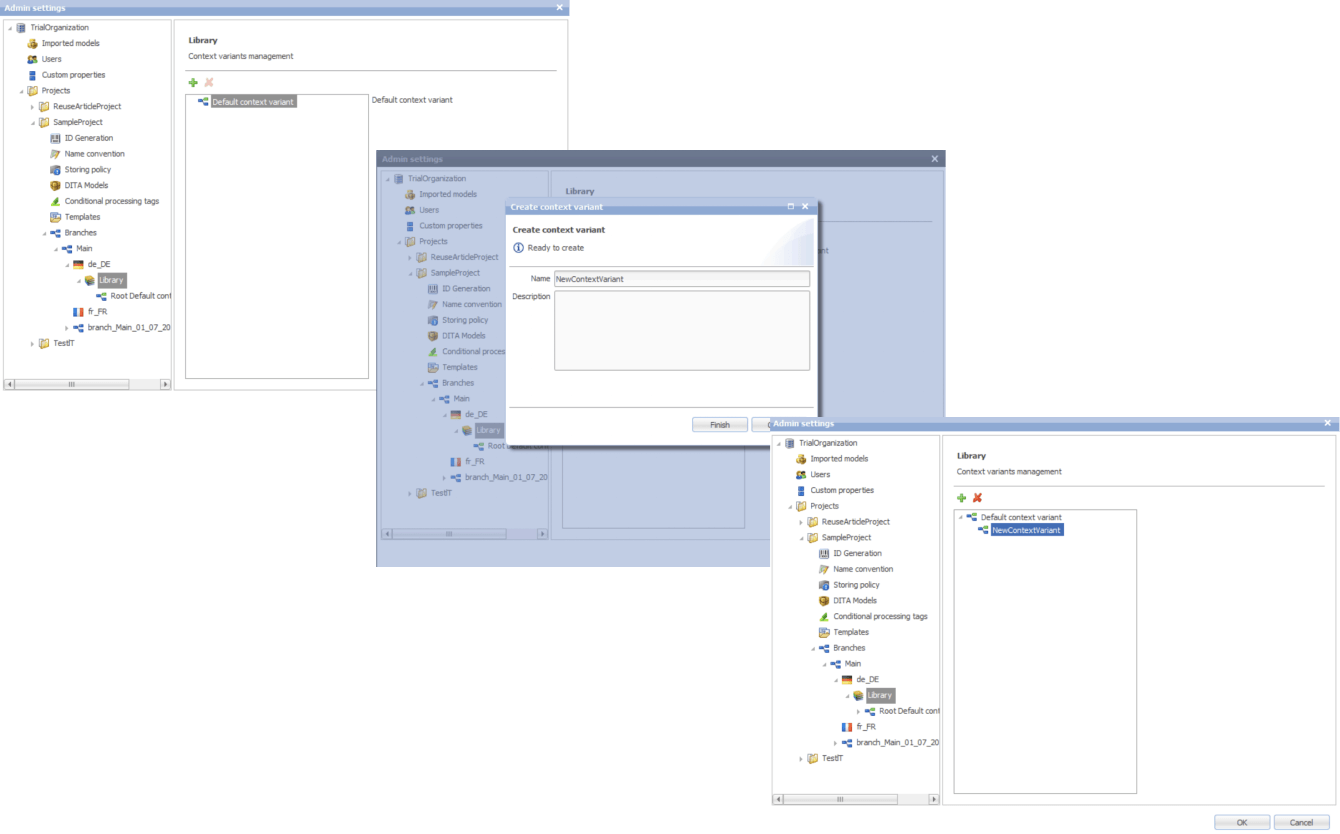
  • Context variable

Moreover, we extended the range of actions users can take regarding the reusable entities. Besides adding new components, editing the existing ones, and deleting them, it became possible to redefine the meaning of the current context.

This feature comes in handy when the staff need to work on a specific piece of content without affecting its other use cases across the whole system.

Another detail about our reuse approach that made DITAworks a more user-friendly product than the client’s former system was using indirect links instead of relative ones to provide  a path not to an object, but to its key. This way, users don’t have to worry about the links’ integrity when moving objects.

Advanced search functionality and metadata customization

The full power of reusability can’t be achieved without comprehensive search features, and this was another weak point in the client’s old software – it didn’t allow a full-text search.

Conversely, DITAworks offered broad search capabilities out of the box:

  • By title
  • By full-text
  • By phrase
  • By CP tag
  • By metadata

The last point was a treasure trove for the client as it went beyond the basic topic title and type (concept, task, reference, etc.). DITAworks relies on the taxonomy framework and allows indexing any metadata and using it for search at any system level.

What is taxonomy?

In software product development, taxonomy is a hierarchical classification of the product elements that streamlines data organization in a logical order and, by doing that, levels up search capabilities within the system.

Our client applied this feature for tagging specific product-related topics, as the range of the solutions they produce varies from control devices for decentralized power production to the ones for marine and wind turbines. As the DITAworks’ search engine indexed all the custom meta tags, such an approach simplified finding data on thousands of products.

Unlimited customization of CP tags

Any DITA-based software has in-built conditional processing (CP) tags. However, not every solution makes them easy to use. For example, to operate on the client’s former system, users needed a basic knowledge of XML to create a custom CP tag. Moreover, as the process was manual and authors wrote tags by themselves, the likelihood of human error remained high, affecting the accuracy of tech documentation management.

DITAworks’ adoption helped the client: 

  • Create custom tags without XML knowledge
  • Automate tagging if a CP tag already exists in the system
  • Eliminate human-related errors
  1. Custom DITAworks’ features
    tailored to the client’s needs

Custom functionality is usually the point of the utmost importance, especially for enterprises. Therefore, DITAworks is designed around the idea of boundless adaptability of the product. The *instinctools team crafts various functionality sets to meet the needs of any enterprise client by connecting or disconnecting numerous plugins to the off-the-box DITAworks version. Let’s see how custom modifications have opened the door to a multitude of tailored benefits for the client’s tech documentation management.

Map development

Creating content maps and managing the content tree are tricky day-to-day tasks enterprises have to deal with. Therefore, extensive map development functionality is one of the vital criteria for companies choosing between different DITA-based products. That was the same for our client, who had a highly sophisticated content tree.

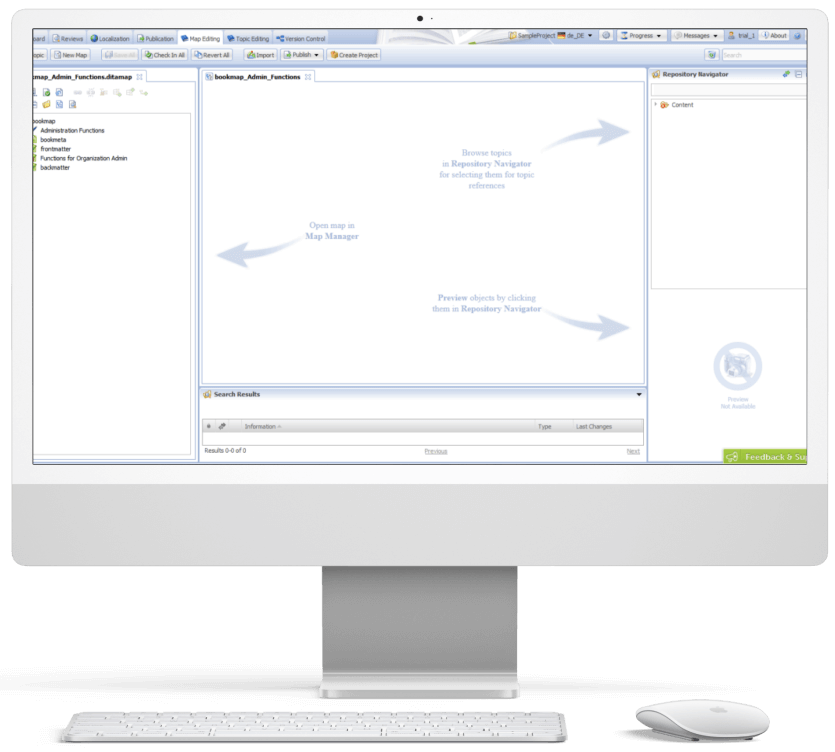
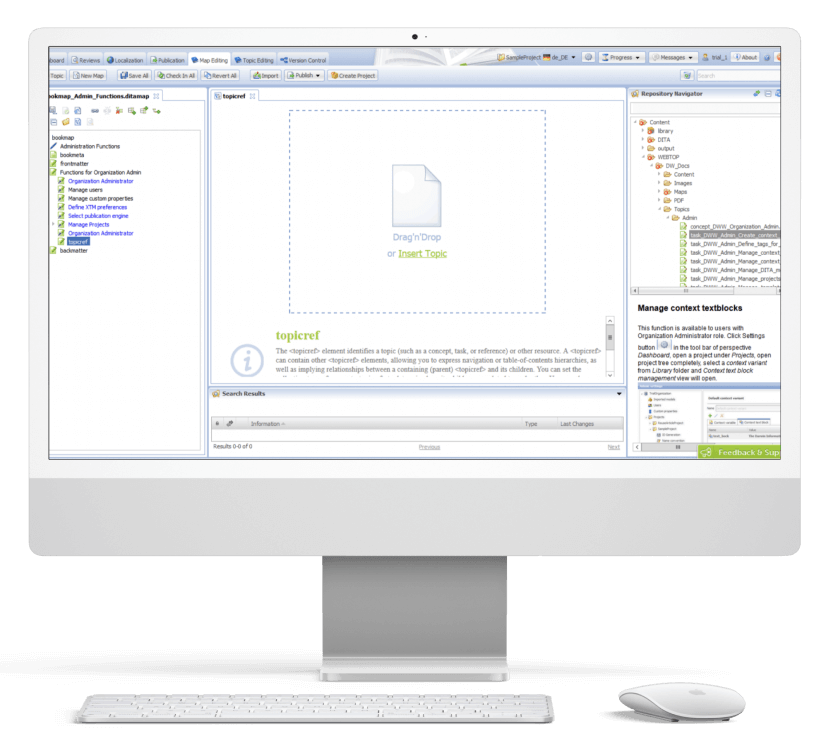
DITAworks Webtop enables multifunctional map creation and editing. Users can access different functions directly from the map editing menu instead of switching to a separate tab.

  • Map structure editing. Thanks to the interactive interface, the client’s employees can change the map structure quickly and easily in the left section with the content tree. They just need to drag any element and drop it wherever they want.
  • Topic editing is central. Here users can check the content in the preview and proceed to editing.
  • Search. On the right side, there is a repository navigator with a search bar to simplify browsing topics and linking them with the maps.
  • Conditional processing can be used on the level of the topic, map, or their units. For example, an author can assign a specific CP tag to a map unit and then leverage it for filtering.

Custom versioning

Transparency and the ability to dive deep into every piece of content were the client’s top requirements for the new system, so we honed DITAworks’ versioning functionality to match these needs.

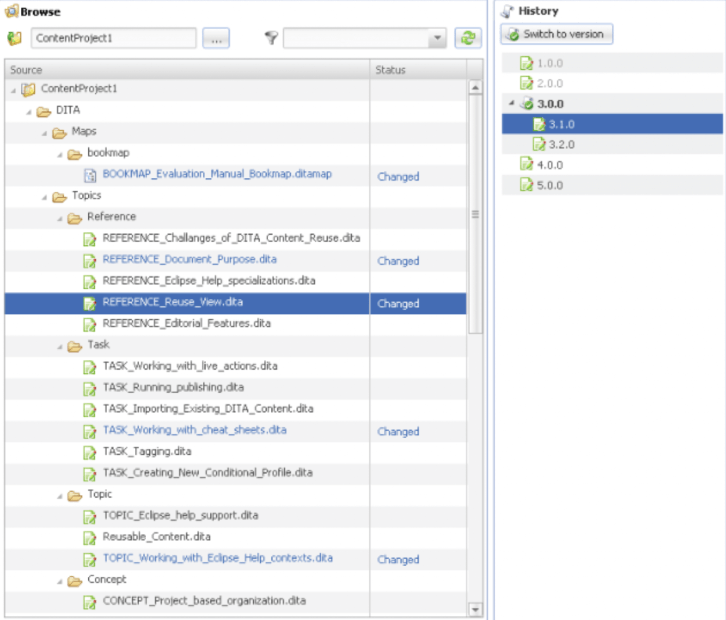
Advanced History View. In their former system, the client could see only the latest version of the documents, which failed to bring much-coveted visibility into the changes made to the files.

In DITAworks Webtop, every document check-in is tracked and leads to creating a new version (revision) of the file. Authors, translators, and administrators can:

  • See all the document versions
  • Compare the current version with any of the previous ones
  • Select any version of the document and restore it

Flexible current working context settings. One of our client’s specific requirements came from their mature content structure with its multi-level hierarchy. In addition, the company organized the work of authors, translators, and administrators in a way that aimed to collect topic-specific content in one place and reduce cross-linking between different levels, and DITAworks had to be tailored to this workflow.

Therefore, specifically for the client, we developed a ‘Dive into’ functionality that allowed users to set any folder as a root in the current working context, making folders outside this folder temporarily inaccessible through the search and repository navigator. This feature freed the staff from the constant hurdle of re-opening folder-in-a-folder-in-a-folder when operating in the same working context for a long period of time.

Ability to work on an isolated piece of content

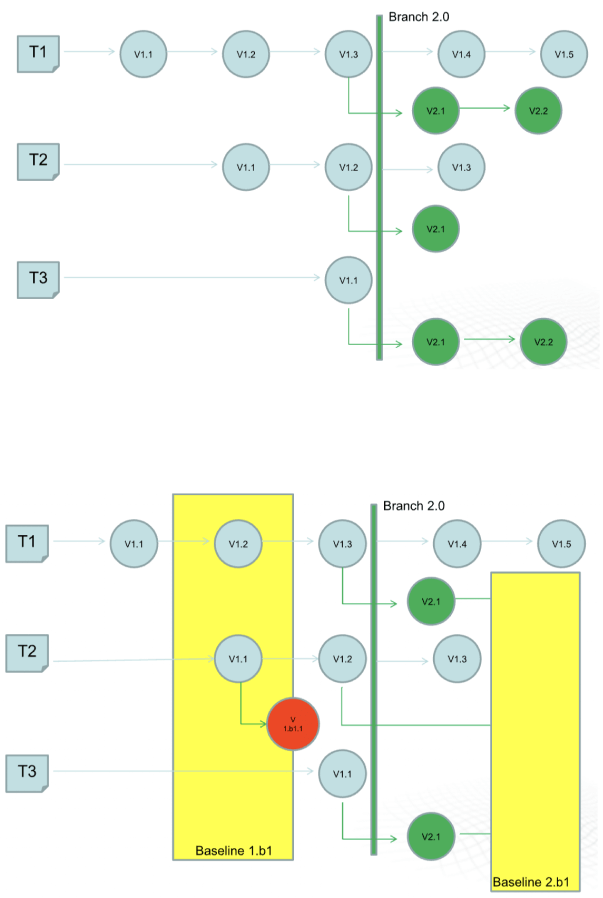
The next feature that was initially created for our Danish client and then became out-of-the-box was intelligent custom versioning with branch and baseline management. This functionality allowed users to work with an isolated piece of content without affecting the whole content structure.

  • Branching for parallel translation tasks. Our client supports tech documentation in multiple languages. The standard ones, aside from English, are French and the CKJ group (Chinese, Korean, Japanese). Working with a wide range of languages within one operating context would have been inconvenient for translators and could have caused unwanted changes in the root content.

    With branching, each user could work independently without affecting the root content. They could create a copy of a parent folder with all the documents in the master language with meta tags and after finishing the translation merge it with the initial folder.
  • Baseline for minor edits. As a lightweight version of a branch, the baseline offers users a copy of the content indexes. It is enough to make slight changes, such as correct misspellings.

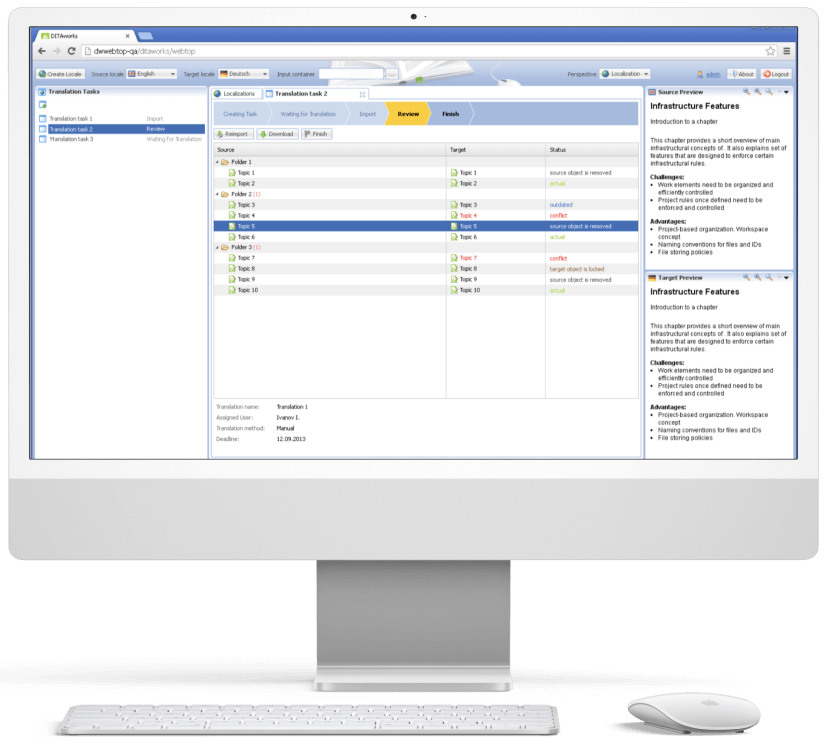
Translation analyzer

Tracking translations’ status is just as important as creating tech documentation, and the translation analyzer is the component of DITAworks that covers this task. It’s a table with checkboxes for selecting files for translation. For example, users can pick only one project and leave the rest untranslated.

When a user creates a translation, the system automatically links it with the document in the master language. It’s necessary for tracking content changes and getting translation status updates in near real-time.

  1. Release management

After enriching the out-of-the-box product with a range of custom features, the *instinctools team integrated DITAworks Webtop with the client’s website for direct content publishing. Such a connection allowed the client to provide their customers with the most relevant and accurate documentation.

  1. Conducting staff training

Before rolling out the DITAworks, our team ran training sessions for the client’s employees to ensure they could leverage the software’s capabilities to the fullest. All the sessions were recorded, laying the foundation for the client’s DITAworks knowledge base and nurturing in-house expertise.

The response to the new powerful product has been very positive, and many newly trained tech writers, translators, and managers have become advocates for the system.

Before

  • Underdigitized technical documentation creation and management process
  • Weak content reuse mechanisms
  • Lack of history view and in-depth version control
  • Poor search and conditional processing functionality
  • Impossibility to work on a piece of content without affecting the whole content ecosystem
  • Tight limitations of the working context
  • Human errors in CP tags due to manual input

After

  • Fully digitized technical documentation creation and management process
  • Advanced history view with transparent version control
  • Broad search capabilities
  • Limitless metadata and CP tags customization
  • Ability to work on an isolated piece of content
  • Flexible current working context settings
  • Automated management of CP tags

Client’s testimonial

Here’s how the company’s CTO evaluates the project outcomes:

Business value

  • Complete digitization of authoring, managing, and publishing tech documentation
  • Custom product tailored to the company’s specific document management workflow
  • Reduced document creation time by up to 14%
  • Cut back on translation costs by 11%
  • Minimized possibility of a human error

Multiplier effect

The adoption of DITA-based software attracts the companies thanks to well-honed, accelerated, and budget-friendly tech documentation management. However, according to our observations, many organizations still use non-specific software such as MS Word, and business owners tend to see switching to the dedicated tech documentation management system as a major head-scratcher. It’s truly one of the trickiest tasks.

Nevertheless, booming AI technologies play their part – converting Word content into a DITA-ready format no longer needs to be done manually. It can be covered by artificial intelligence. Instinctools is also leading the pack and constantly bolstering DITAworks’ functionality with forefront technologies to simplify and speed up the data migration process while perfecting its accuracy and security.

HubSpot For Consulting Company

HubSpot Implementation For a Mid-Size B2B Company

How HubSpot implementation helped a consulting company automate 30% of their business development team’s workflows and increase MQL-to-Deal conversion by 20%.

Industry:
Fintech

Business Challenge

No matter how hard-working and talented your business development team is, their efforts won’t yield the desired results if the information about leads and clients is stored across multiple spreadsheets or worse, jotted down on paper.

As any business grows, it becomes harder to keep track of all the data. Lack of visibility across sales and marketing processes brings mayhem to the management of these activities and has a negative impact on a company’s performance.

That’s exactly what happened to our client, a US consulting firm from Chicago that provides professional accounting services and what made them look for a technological remedy.
It used to be difficult for the client to navigate through tons of disparate data within their marketing and sales department, let alone use it for the company’s benefit. To do so, they needed a well-honed, calibrated CRM that would make the sales process transparent and traceable.

Prior to engaging with *instinctools, the company had been utilizing Zoho CRM, which focused solely on lead generation, leaving other aspects of the sales funnel unaddressed.
Meanwhile, the marketing department used the standard MS Office 365 package.

What were the consequences of such an approach?
  1. Poor customer experience. Personalized services are critical to sustaining customer loyalty in today’s business landscape. While attempting to gain insights into their clientele and tailor their services accordingly, our client relied mainly on intuition. However, without the aid of an up-to-date CRM system, it proved challenging to gather and manage the relevant data, and put it to use.
  2. Inefficiency. The Biz Dev team was struggling with the burden of repetitive and mundane administrative tasks, which were consuming a significant amount of their time. As a result, there was an urgent need for a solution that could automate these tasks and reduce the workload on the sales managers and lead generation team. Such a tool would enable them to focus on more critical activities, such as engaging with potential clients and lead nurturing.
  3. Lost opportunities. The absence of a systematic and automated approach to follow up on leads resulted in missed revenue opportunities. In this case, a robust CRM solution was a must to save the day.
  1. Misalignment between sales and marketing teams. Due to the lack of quality analytics, the sales team sometimes failed to deal with leads generated by the marketing department in time.
  2. Lack of consistency. With most data stored in disparate spreadsheets or on paper, customer information became sacred knowledge possessed by individual employees. This led to cumbersome transfers of document access and tons of effort spent on consuming the intricacies of particular files, when those ‘data custodians’ were off work or new staff needed onboarding.

All these circumstances hindered the development and growth of the client’s business.

Solution

Once the problem was identified, the client turned to *instinctools, a CRM consulting and implementation company, for a solution. As per our standard practice, we started with a deep dive into the client’s business processes to find a solution that can meet the customer’s requirements. 

Discovery

One of the client’s underlying requirements was to choose a CRM system that could grow with the company while not draining its budget.

The customization of the client’s existing CRM — Zoho — was not an on-the-table option. During the discussion of the system requirements, it became clear that fine-tuning Zoho couldn’t fully cover the client’s needs. That’s why, it was decided to implement a new, more powerful CRM.

For organizations of our client’s scale, Salesforce is usually a good fit. But despite the popularity of the platform, not every company can afford it. For our client, the price of implementing Salesforce didn’t make sense – the license fee was too high, considering that the client didn’t need all the platform’s features. With this in mind, we shifted to searching for more budget-friendly options.

Given the client’s company size, its business processes, and budget, HubSpot looked like an excellent choice. This platform provides all the necessary functionality while costing several times less than Salesforce.

The client strongly favored HubSpot CRM implementation after we presented its capabilities:

  • Functionality. HubSpot has an advantage over other CRMs regarding the features it offers. For example, our client used pay-per-click (PPC) advertising. The ability to create and manage it within the CRM and having this feature as part of the general package, rather than a separate offering at an additional cost, was crucial.
  • Scalability. To ensure that this CRM can meet the company’s evolving needs in the future, we prepared a roadmap for the next five years. HubSpot’s capabilities would be sufficient even with the most ambitious growth forecasts over that period.
  • Cost-efficiency. The client settled to implement the Marketing Professional and the Sales Professional Hubs. These packages were enough to provide omnichannel automation, email scheduling, and benefit from custom reports, dashboards, and data-backed forecasting.

Next, we decided on the team’s composition, which included a project manager, business analyst, designer, and two developers. The project also required the involvement of our business consultant, who was engaged in optimizing the client’s business processes.

Speeding up MQLs processing with HubSpot Marketing Hub implementation

Adopting CRM for the marketing department is a standard initial step in such projects, so we also started with the HubSpot Marketing Hub implementation.

Our web developers integrated all the lead generation forms and campaigns from the client’s website into HubSpot. Next, they worked with a designer to customize and connect the forms to the new CRM.
Now all requests coming from the website go straight to the CRM, so their processing is faster.

Among the challenges encountered during the HubSpot Marketing Hub implementation, the data migration from numerous Excel spreadsheets is the most noteworthy. This step was also relevant for the next phase of the HubSpot implementation process, so we’ll come back to some of the issues we’ve faced in detail later.

Automating workflows with HubSpot Sales Hub implementation

Although the client had been using another CRM for years, a considerable portion of the client’s mundane and repetitive operations continued to be handled manually, draining the sales representatives’ time.

We analyzed the client’s processes and uncovered that at least 30% of them can be optimized through automation, streamlining the sales department’s work. To capitalize on this potential, we automated lead scoring and email distribution as well as set up automatic reminders for sales managers to follow up with leads through the appropriate channel.

Data migration as the backbone of our HubSpot implementation project

When talking about how to implement HubSpot, we can’t but mention data migration. Its accuracy is paramount, as even minor errors can impede the creation of reliable analytics, compromising the system’s effectiveness in the long run. Given the importance of data migration, this stage demands meticulous planning and execution to ensure a smooth transition to the new CRM system.

During this HubSpot implementation project, we migrated over 700,000 contacts and 300,000 campaigns from the legacy systems to HubSpot. The process took six weeks to complete.

Before the data migration itself, we encountered the challenge of establishing a shared understanding of the data requirements, as marketing, sales, and lead generation teams lacked a unified source of truth, causing discrepancies in their respective data. As the key HubSpot implementation consultant, our business analyst took the lead in defining common criteria for migrating data from the spreadsheets and the old system to the new CRM.

Organizational enablement

We assembled a dedicated team of client employees who were most enthusiastic about implementing HubSpot. This team served as the system’s beta testers in the initial stages and later played a crucial role in promoting the solution within the business development team. This collaborative approach not only allowed us to gain valuable feedback on the system’s features and functionality but also helped mitigate any potential resistance to change within the company.

Before/After

The HubSpot implementation took six months, along with data migration and organizational enablement. The CRM started working at its full capacity only after the data migration was completed.

Before

  • Lack of a holistic view of the sales funnel
  • Inability to analyze any stage of the sales funnel in detail
  • Discoordinated work of sales, lead generation, and marketing departments
  • Absence of common understanding of data requirements
  • Manual performance of the repetitive day-to-day sales and marketing operations
  • Slow lead processing
  • Failure to identify high-priority leads
  • Low MQL-to SQL and SQL-to-Deal conversion rate
  • Devoting a lot of time to onboarding new employees

After

  • Transparency across the entire sales funnel
  • Establishment of clear and unified data requirements
  • Cohesive work of all teams within the business development unit
  • Boosting lead processing time by 37%
  • 30% of mundane everyday business development tasks are automated
  • Special workflow for accelerated lead processing
  • Speeding up the onboarding process by 45%
  • Increasing MQL-to-SQL conversion by 28% and SQL-to-Deal by 17%
  • Ability to analyze top, middle, and bottom stages of the sales funnel in detail thanks to comprehensive custom dashboards

Key features

Integrity

HubSpot has become a unified tool that works at all sales funnel stages, from dealing with leads generated through website forms to cross-selling and upselling to the existing customers. Thanks to HubSpot implementation, our client got not only end-to-end analytics but also the ability to interact with contacts, deals, and companies in various ways throughout the funnel. MDRs, SDRs, and sales managers can now send emails, make calls, transfer prospects from one sales rep to another, schedule meetings, and register all these changes in one place.

Mobile compatibility

HubSpot is mobile-friendly and available to client team members on any device. So even if sales managers, marketers, and lead generation team members are out of office, they still have full access to the CRM functionality on their phones.

Flexibility

HubSpot allows highly flexible configuration at the no-code level. For instance, the client doesn’t need to involve developers to configure access rights. The skills of a system administrator trained under our guidance are sufficient to cover these tasks.

Business Value

  • Full transparency of sales and marketing processes at all the stages of the sales funnel
  • Automating 30% of the business development workflows
  • Reducing time of lead processing by 37%
  • 28% increase in the MQL-to-SQL conversion rate
  • 17% increase in the SQL-to-Deal conversion rate
  • 45% decrease in onboarding time for new employees of the business development unit
  • Cutting the Biz Dev costs by 18%

Multiplier Effect​

Incorporating CRM software can prove highly advantageous for B2C and B2B companies across a diverse range of industries. In fact, in today’s business landscape, it has become a prerequisite for efficient customer management, rather than a whim.

Both B2C and B2B organizations need to gather, organize, and analyze mind-boggling volumes of data to enhance interactions with their clients and improve customer experience. With a proper CRM solution in place, you can streamline your workflows and capture lead-specific information at every available touchpoint across multiple channels to nurture more high-quality leads.

For growing mid-sized companies, HubSpot is one of the most profitable and advantageous options due to its functionality, scalability, and cost-effectiveness.

MVP Development For an EV Charging Startup

MVP Development For an EV Charging Startup

How crafting an MVP of a mobile app for 16 EV car models and 65,000 charging points across Europe empowered the UK-based startup to conquer the European EV charging market on the first try, connect 17+ charging networks, and raise funds for further development from prominent and influential investors – Lightspeed Venture Partners, Tier Mobility, and Wise.

Industry:
Technology

Expertise:
Mobile App Development

Context

Bonnet founder and CEO, Patrick Reich, entrusted us with the implementation of his start-up idea in 2020. His vision and belief, empowered by *instinctools product development expertise, served as the basis for the creation of a unique tech solution for millions of EV drivers all around Europe.

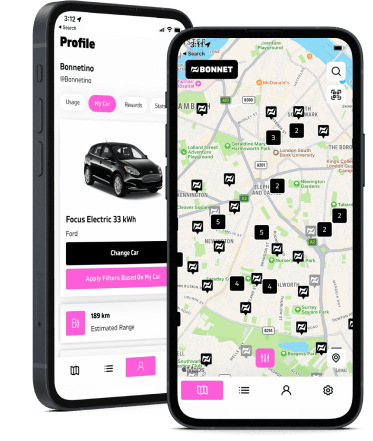
The application for iOS and Android devices aimed at aggregating all the local EV charging points and allowing its users to smoothly find and drive to the nearest spot and instantly pay for the charge.

Challenge

Despite a few core features and the app itself, that we needed to build together with our client, there were some technical challenges and decisions to be made to ensure the solution was properly implemented and to make sure further performance was stable.

01. The synchronization of the app’s front end, back end and charging points servers.

The communication between “applications” is no less important than communication between people. Our first major task was to enable the proper connection between the main parts of the application and the charging points servers to get a real-time status of the charging process, even in background mode. Together with our client’s development team, we analyzed the algorithms and work logic of each charging spot provider and enabled its unhindered synchronization with the Bonnet application.

02. Payment service integration.

The integration of the Stripe payment service required efficient communication with the back end of the application. Together with our client, we thought over the development of technical algorithms for various scenarios related to the user’s bank account, withdrawals, including repeated transactions, etc. Our senior backend developer dived into Stripe’s operation system to bring more value and help create secure connectivity between the systems.

Solution

We developed an Android application which became the basis for the development of an iOS app. It provides EV drivers with smooth access to the public charging infrastructure.

The Bonnet app has an extended functionality for customer service, instant payments, bonuses, and useful analytics about recent charges.

The implemented subscription model, in addition to a pay-as-you-go service, is defined by the charge type (all points or the cheapest only) or user type (individual or corporate client).

Key features

  • In-app analytics and history of all the charges.
  • Online chat Intercom with FAQ and real-time support functionality.
  • QR-code on charging points for quick access and charge start.
  • Map with available charging points and search functionality.
  • Authorization via Google or Apple accounts for different applications.
  • Payment account with an integrated coupon system
  • Push-notifications

Client’s testimonial

“The expectations for the quality of the initial product were very high. I think *instinctools did a great job ensuring those expectations are met. We met the developers we were going to be working with and it quickly became apparent that they are very qualified and were able to deliver the vision that we had from our side for the product. They clearly told us what they were going to do, and if there were questions or problems along the way, they clarified them really quickly thanks to transparent communication.”

– Patrick Reich, CEO and Founder at Bonnet

Business Value

Software product development mindset — this is what start-up founders look for when selecting the right technology partner for their business. This is the approach that allows the tech team to be on the same page as the customer and deliver the MVP in a short time. *instinctools work helped Bonnet enter the market promptly and form the basis of a successful fast-growing tech business.

Technologies

RX Java
Kotlin
Google Maps API
Firebase Cloud Messaging
Pusher
Socket.io
Stripe

NFT Marketplace Development For a Fintech Company

NFT Marketplace Development For a Fintech Company

ipwe white

How developing an NFT platform allowed a global Fintech company to increase its annual revenue by 34%, rack up the number of B2B clients by 47%, and wipe out the risks related to intellectual property when selling and buying patents all over the world.

Industry:
Fintech, Intellectual property

Team:
team lead, BE engineers, FE engineers, business analyst, project manager, QA specialist, UI designer

Context

*instinctools was approached by IPwe for assistance in revamping their marketplace for monetizing patents encased in non-fungible tokens or NFTs. Their goal was to make the intellectual property market more transparent, liquid, and accessible to every stakeholder interested in patent acquisitions or sales. The key requirements for the IPwe Platform were the following:

  • a clear and transparent structure
  • information accessibility with equal opportunities for both patent licensors and licensees
  • an intuitive interface for fast and easy transactions.

Challenge

The primary purpose of the project’s first stage was to construct the core application for market launch, allowing new users, customers, stakeholders, and investors to gain a better understanding of IPwe’s products and their features. The *instinctools team was challenged to cover the following tasks:

  • Designing a web interface with an intuitive user experience.
  • Developing a web application with extended functionality, including secure transactions, real-time dashboard visualization, and personal user accounts.
  • Creating an interlayer for efficient blockchain operation and enabling smooth connectivity between the front-end and back-end.

Solution

The key component of the project was finished and released on time thanks to the smooth collaboration of *instinctools professionals working alongside IPwe’s team.

“We have delivered the core web application functionality meeting all client’s requirements for the platform, and now we actively continue to bolster it with new features. The IPwe team clearly knows what they want, and we always have ideas in our stash on how to meet their needs.” – Alesia V., Account Executive at *instinctools.

The NFT marketplace platform is a complex solution consisting of several components delivered by the *instinctools dedicated team: web app, user account, and a Smart Pool system.

  • A web application with an admin role on the backend allows for controlling and managing user activity and operations with tokens. In particular, a database administrator can manage and optimize requests coming from IPwe Platform users to add new assets as well as the structure and aggregate databases for further processing with an inbuilt artificial intelligence tool.
  • A user account with a dashboard view of various assets, patents, and trade secrets with issued tokens (NFT). The total number of active licenses the company bought or is currently selling, transaction status feed, and notifications.
  • Smart Pool system for a group of patents united by one technology and establishing a pool with members and patent owners. Through IPwe’s Smart Pool technology, members can access the tools they need to improve their patent portfolio.

Patent owners can add their assets to the IPwe Platform according to the privacy levels they wish to apply to their tokens. There are two types of privacy for the assets: “private capture” and “strictly confidential.” Private capture allows users to add trade secrets with related documents and send them to the blockchain. Strictly confidential implies the same procedure except that the files that a particular person signs are hashed and not stored in our backend. Though the user still can save the original file name or hash it.

Currently, the *instinctools’ team is enriching the application with new functionality and maintaining the stable operability and security of the platform.

Key features

  • Stable and secure platform providing different levels of access and personal accounts functionality
  • Smart dashboards that visualize all the user’s data and assets
  • Reach and fine-tune notification functionality
  • Smart Pools that unite assets with similar technology and reduce transactions costs

Business Value

The NFT marketplace for selling and buying patents helps businesses increase the value of their assets, establish new partnerships, and mitigate risks related to intellectual property. With this solution enriched with new functionality, our client is expanding their B2B service offering, bringing revenue and added value to the business.

Technologies

React
Node.js

IOS Application For Online Ticket Sale in the US

IOS Application For Online Ticket Sale in the US

How building a mobile app for ticket sales allowed the US retail company to increase its user base by 56%.

Challenge

The task was to create a mobile application for ticket sales. The challenge of this project was to develop a graphic imaging of a map and a scheme of a stadium or hall to give a spectator a chance to select the desired seat. In addition to this, the task was complicated by the need to fit a large amount of information in graphical form on the small screen of mobile devices.

Solution

Our Xamarin developers created a mobile application for iOS devices. The complexity problem was solved by using SvgKit library, which made the task a little easier and accelerated the development process. This solution also made it possible to develop the application compatible with iPhone, iPad, and iPod touch

Key features

With this online marketplace you can:

See every ticket available in your price range

Make an offer and get an instant answer

See the best deals in the building, due to our interactive maps

Spend less, go out more: the customers save an average of 33%

Get the best seats for the greatest events at unpublished prices due to close cooperation of the platform with the biggest names in sports and entertainment

Buy tickets days, weeks, even months in advance

Never miss a great event: get alerts about upcoming live events within your range of interests

Technologies Used

Business Intelligence Solution With 14 Real-Time Dashboards For a US Software Company

Business Intelligence Solution With 14 Real-Time Dashboards For a US Software Company

How adopting Power BI and crafting 14 custom company-wide and unit-specific dashboards empowered an IT company to fully automate data collection operations, save up to three days per month on report preparation, uncover and fix blind spots in their sales pipeline, increase post-clarification call conversions by 44%, and drive sales by 9,6% within just six months.

Domain:
Service Company (Software Engineering)

Team:
Power BI developers, DevOps engineers, QA engineers, Business Analyst, Software Architect, Project Manager

Challenge

An IT provider is expected to be digital by default. But it’s impossible to become digital once and for all. The best thing you can do is to keep up with a rapidly changing world by constantly developing new solutions and improving the existing ones.

Our customer’s company was growing very fast (+30% annually) and their methods of data management and analysis were getting outdated and were no longer meeting their needs. The heads of the company felt that they did not possess the entire information about the company’s state which made the management and coordination more difficult. Such a situation could slow down the company’s growth.

The management team was really fragmented in terms of understanding the current business state. Lack of up-to-date information entailed the inability to make qualitative decisions. The company’s managers needed valuable insights on how the business was functioning, what was perfectly working, and what had to be improved. It meant quick access to real-time metrics about various aspects of the company’s state and life. It included but was not limited to project metrics, engineering power (e.g. seniority levels, the number of the developers on projects, bench status if there was any), the company’s money flow, various kinds of sales order statistics, etc.

Our customer understood that Business Intelligence is not just about using technology to bring people and information together, it’s about flexible experimentation at a rapid pace and fast decisions.

Business Tasks

  • to get real-time information, which is 3 hours’ old at most
  • to speed up the decision-making process
  • to be able to analyze the work of the company’s departments
  • to change the approach to holding meetings by cutting out the part dedicated to gathering the information from the employees and sharing it among them

Technical Tasks

  • to transform and place into one storage all the business information gathered from a variety of data sources the company was used to work with. The sources were the following:
Jira Atlassian
Service Desk Atlassian
Confluence Atlassian
QuickBooks
Zoho Recruit
Zoho CRM
Closeweek
Google Sheets
  • to prepare the transformed information for the analysis: to convert it into the readable format for the system
  • to visualize data according to the rules defined by the requests of each particular dashboard and report
  • to create dashboards with a variety of visualized reports of the working processes of the following business units:

Sales & Marketing

Finance

Technical production

Human resources

Office Management

  • to implement the function of adding new metrics and reports and editing the existing ones
  • to realize the function of reports generation on schedule with notifications
  • to collaborate on and share customized dashboards and interactive reports
  • to keep data secure while giving user groups access to the insights they need

Solution

Using Power BI and cloud technologies, we’ve scaled them according to the customer’s needs. The relevant data is collected from sources, such as Jira Atlassian, Service Desk Atlassian, Confluence Atlassian, HQuickBooks, Zoho Recruit, ZOHO CRM, Closeweek, Google Sheets. Some part of this data goes straight to datasets, the other – to Azure Data Lake Storage, where all the actions described by a particular model are performed. After that, the information is presented in the dashboards. We’ve created 14 of them, which is not the final number, as, according to particular needs, the dashboards can be scaled up and down, grouped, and some derivatives can be added. Each dashboard represents an interactive analytical system and creates dozens of coherent reports with a variety of visualizations.

Our solution unifies real-time data from many sources and provides interactive, immersive dashboards for all the departments of the company: Finance, HR, Recruiting, Sales Management, Project Management, Development Units, BackOffice. Employees can easily integrate data, transform it into rich visualizations and reports, and then share those reports with stakeholders.

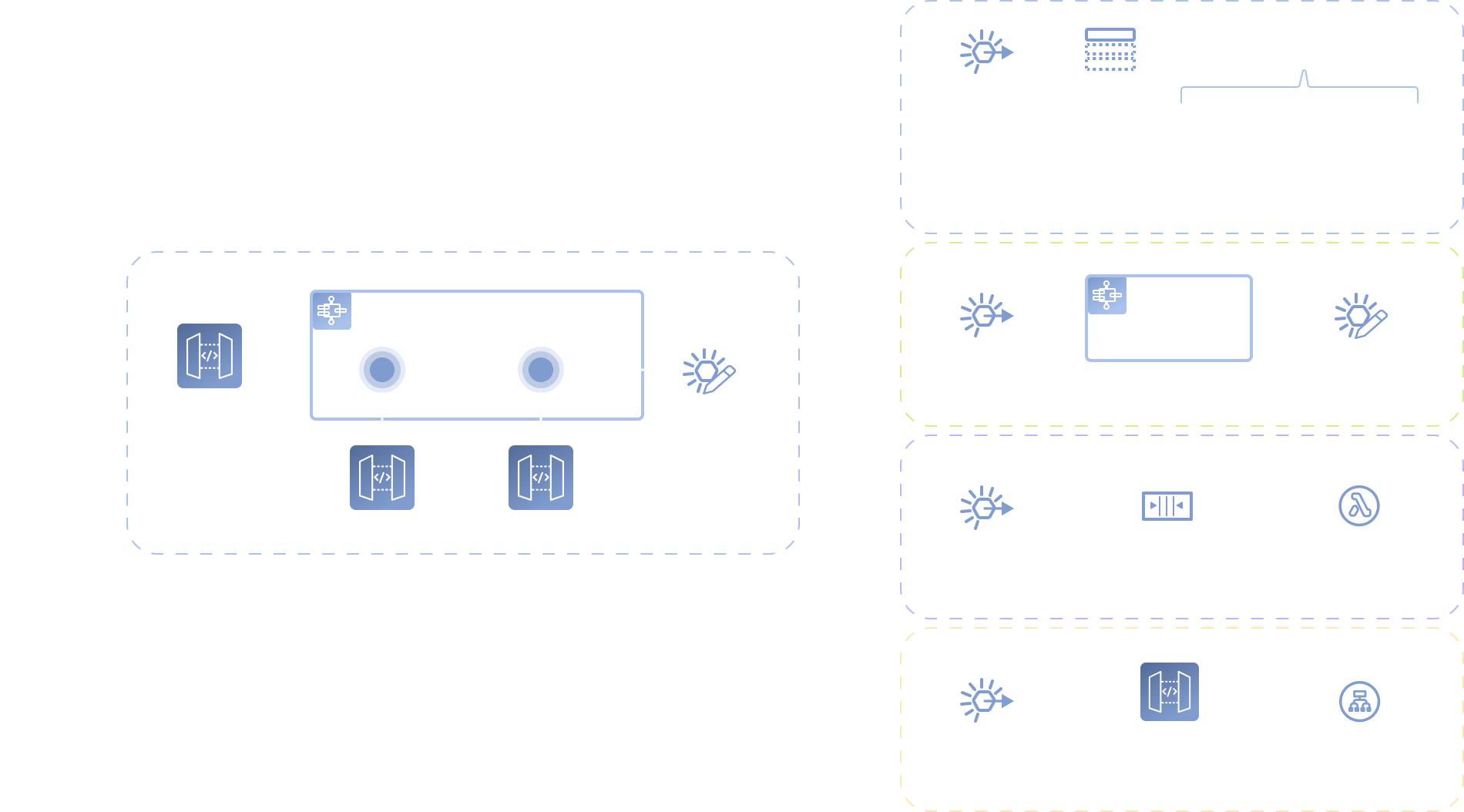
Key features

  • self-service for enterprise analytics
  • Azure cloud solution
  • AI integration for quick insights finding
  • Integration with in-house software

Value

With this BI solution, individual employees have self-service access to intelligence that they can slice and dice in whatever ways are most helpful to them. They’ve also got an easy way to view and share their insights through interactive visualizations. It’s become possible to automate a lot of the preparation and reporting.

We have provided the decision-makers with all the metrics they need – gathered in one place – to do their job more efficiently and not have to wrangle the data to get the answers. The company’s stakeholders, managers, and decision-makers have got an opportunity to evaluate the current state of their business in a quick and reliable way.
The company got several levels of just-in-time analytics:

  • Project reports enable Project managers to analyze different aspects of their projects and get real-time metrics. This saves days of work on preparing data.
  • Production Unit reports provide live info on metrics, KPIs, and plan/fact analysis to unit managers. This also saves 2-3 days of work per month and ensures data consistency and accuracy.
  • Top-level company reporting provides thorough analytics for main company processes. This saves months of manual work and enables data collection and analysis in a weekly cycle.
Benefits

Each Unit got their own benefits of BI introduction into business processes.

Sales department:

  • Due to continuous visualization of the sales pipeline it was defined that after the stage of “a clarification call”, a pretty big number of potential clients “go dark”.
    It took two months to prepare a fully new and unique methodology of “clarification calls” which brought the increase of conversion from this stage to the next sales step by 44%.
  • The real-time visualization of each sales manager’s KPIs allowed to identify weak points in the process of deal closing for every manager. The following actions were taken to strengthen the Sales Team:

1 /  young sales managers were mentored by the experienced ones in customly defined complicated spheres;

2 /  special sales courses were offered to some managers.

These measures allowed us to increase sales by 9,6% in the next 6 months.

Human Resources department:

  • Alignment of financial statement reporting, statutory reporting, and managerial reporting allowed to find out that the specialist of a certain proficiency level brings almost 11% less profit then specialists of other proficiency levels. It was decided to increase the amount of hiring of those specialists who bring 11% more profit to the company, rather than those who do not.

PMO:

  • Detailed project analytics enabled a lot of optimizations of the project management practices resulting in ~4% project profitability increase.

Finance department:

  • Systematic keeping control on KPIs and the ability to deliver quick financial reports to stakeholders, managers, and decision-makers allowed to identify undesirable financial expenses. The improvements made to avoid the expenses helped the company to save 84K within the next 6 months.

Office Management:

  • The continuous visibility of the department processes allowed to redistribute the forces of the existing staff and avoid hiring more people, which helped to save about 17K of potential expenses within the following half a year.

Technologies

Recommendation System For A Streaming Service Provider

Recommendation System For a Streaming Service Provider

How taking personalization to the next level by introducing an ML-powered recommendation engine allowed a European streaming provider to upsurge the number of their premium subscribers by a third in just six months.

Domain:
Media and Telecommunications

Duration:
6 months

Team:
BE Team, FE Team, QA Team, Data Scientist, SA, BA, UX/UI Designer, PM

Challenge

Navigating through an endless stream of options is insanely difficult and time-consuming. Being far too jaded, people are unlikely to pay attention to anything that doesn’t captivate them instantly. This gives entertainment businesses a hard time when ‘living up to expectations’ and ‘anticipating the desires’ are not just advertising overstatements but a real must.

Our customer understood that the only way to make their subscribers keep using the service is to whip up their interest by offering the content which appeals specifically to them.

As quality and taste are barely the same things, one-size-fits-all recommendation services seemed useless and even harmful – a couple of mistakes are enough to lose a subscriber. That’s why it was decided to create a system that would provide users with recommendations tailored to each individual.

Task

  • to identify user’s activity patterns and preferences based on their viewing experience;
  • to create algorithms that would guide the users through a vast selection of movies and TV-shows the provider offers to something that meets their individual needs.

Solution

How to deal with giving worthwhile recommendations to millions of subscribers? The answer is machine learning (ML) and algorithms.

*instinctools team has developed a system that learns from its users. It processes users’ data, for instance, the genre of a program a user is watching and adapts recommendations to his or her contemporary viewing habits.

An ML model identifies viewers’ preferences, using the statistics of their content consumption. It is based on particular algorithms – sets of databased instructions – that tell the service which content to offer.

We’ve also applied a collaborative filtering mechanism to our solution. It means that each viewer fits into certain taste groups, which are identified by plenty of factors coming together (the number of views, genre peculiarities, etc.), and this influences what recommendations are displayed. If a user’s viewing patterns are similar to another user, the system will give recommendations based on the behavior of that other user as well.

Value

The problem of choosing what to watch is no longer relevant. The system that we’ve made can sustain not only users’ current interests but also the evolution of their tastes.

The trick is that now the viewers can find captivating shows that they might not have initially thought of watching. As long as there’s no chance for the users to get bored they’ll hardly stop binging and cancel the subscription.

Furthermore, the number of subscribers is constantly increasing as people want to pay for TV-shows and movies that ‘fit in’ their vision of great content and not waste money – not to say time – on something that doesn’t.

Technologies

Python
Flask
MySQL
ML libraries
Anna Vasilevskaya
AI modified real photo
Anna Vasilevskaya
Account Executive

Get in touch

Drop us a line about your project at
[email protected] or via the contact
form below, and we will contact you soon.