Custom LMS development and design

Custom LMS development for an energy corporation

How implementing a custom LMS helped an oil and gas enterprise automate 84% of training management tasks while increasing employee engagement by 45% and saving 41% of the education budget by moving online.

Industry:
Education, Oil and Gas

UX and Design

Web Development

Enterprise Software Development

Software Product Development

Business challenge

An efficient learning culture within an organization is one of the key ingredients that drive business forward. Statistics unveil that in 2022, 100% of enterprises, 95% of midsize organizations, and 76% of small companies used LMS software to deliver training.

It’s also worth saying that for some industries, continuous staff training is not a nice-to-have option but a requirement that has to be met unequivocally. Just as it was for our client — a UK-headquartered oil and gas company with a production and operations center in the Middle East, which needed an LMS for internal usage.

Before reaching out to us as an LMS development company, the client used to have only offline training programs.

What percentage of companies bank on LMS?
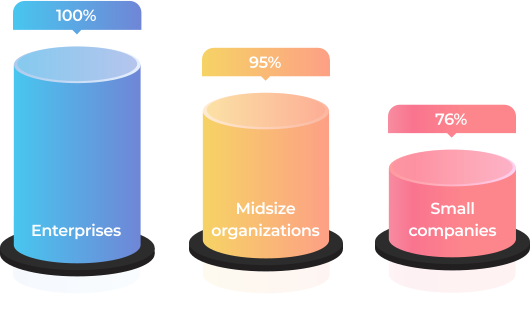
Source: Training magazine, Training Industry Report 2022

What problems did such an approach bring?
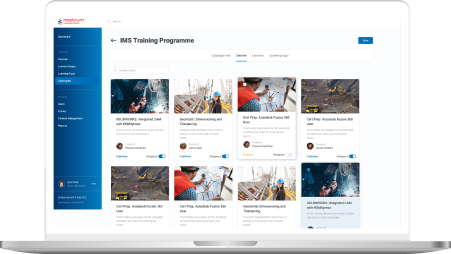
No single point
for gathering and storing learning materials
As courses were scattered across HRs’ devices, notes, etc., it was impossible to efficiently organize and reuse them to save time on curriculum preparation. The absence of well-established and consistent management of learning materials was also deteriorating learner engagement and led to employee resistance to education. 
Hardships
with controlling timely staff certification
The client’s HR team was having a bumpy ride with managing employee certification, which is vital in the oil and gas industry. Therefore, HRs had to manually track each worker certificates’ due dates to set required training so it was on the dot.
Manual performance
of mundane, repetitive tasks
As the client’s production center was based in the Middle East, they had to regularly submit a report on the staff certification to the local Ministry of Oil and Gas. The data for it was also gathered manually, which ate a sizable chunk of the HRs’ working hours. 
Inflexible
educational process
The training was available only at the corporate training centers and, therefore, required time commuting for the staff who worked on oil and gas production sites or from home.
Lack of transparency
in training
Teachers and learners didn’t have tools to track real learning progress, and, thus, measure it.

As the company kept growing, the problems were snowballing. At some point, it became clear that the situation had to be fixed urgently. The Head of the HR department proposed switching from in-face education to e-learning. This idea implied LMS development to go from training management turmoil to a single point for storing and organizing educational materials as well as tracking the learning process.

LMS can empower the client's business with a list of benefits

Automation
By automating repetitive tasks, such as grouping, adding, and deactivating users, handling group enrollments, etc., the client can lighten the burden for HRs. Moreover, LMS software allows for creating PDF certificates for employees when they finish a course.
Time optimization
Thanks to storing all the learning programs and materials in one place, teachers can efficiently reuse them. For instance, before creating a new course from scratch, they can check the LMS’s repository for data on the same topic, combine old courses, or just finetune them.
Regulation compliance
A powerful learning management system provides an opportunity to make keeping all staff aligned with the industry regulations a breeze. You have a centralized way to deliver the same information to all of your employees.
Security
With an LMS limited to internal usage, the client can assure the inaccessibility of the company’s sensitive data from the outside.
Cost reduction
Putting a premium on automation and a time-saving approach decreases the cost of training in the long run. 
Flexibility
After switching to digital learning, employees can attend courses anywhere, anytime.
Transparency
Both teachers and learners can track training progress. In a nutshell, LMS offers a competency matrix for each employee in the corporation.
Higher employee retention
3 out of 4 employees are more likely to stay with a company that offers continuous training and a rich learning experience.

Source: Society for Human Resources Management, The State of L&D in 2022

Also, the client considered that they would need a software solution adjustable to the specifics of the oil and gas industry and their enterprise-scale multinational company, including:

Opportunity
to create, gather, and store learning materials and courses on a plethora of topics
The flexibility of the LMS solution regarding the diversity of topics to cover — from technically specific courses to programs on finance management.
High resilience
of the system
The LMS software was supposed to accommodate a simultaneous workload of 1,000+ users during standard working hours.
Ability
to generate custom reports
As mentioned, the client had to provide a specific report to the Ministry of Oil and Gas. This task also had to be automated.
Localization
options
For the multinational corporation, the possibility to provide training in many languages (including  Arabic) was an essential feature. Where the top management could study in English, but rank-and-file employees needed materials and the LMS’s interface in localized languages.

The off-the-shelf LMS platforms won’t cover these requirements. Therefore, it was decided to develop a custom LMS software. This option also suited the client better from the business perspective as they had an in-house IT department, and maintaining their own system was more cost-effective than constantly investing in a ready-made software license.

Our business analysts clarified what devices should be used for the learning process. As the customer planned to provide access to the learning system only on the desktop, we ended up with the idea of a web application hosted in the client’s cloud.
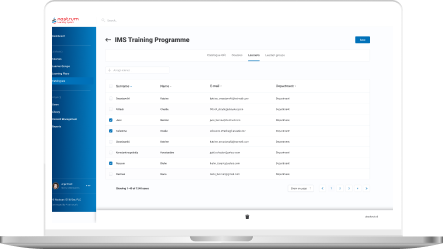
Solution

At the product ideation stage it became clear that the client didn’t have a clear understanding of custom learning management system capabilities and what LMS features they needed. The only well-defined requirement was related to the LMS’s visual design — the platform had to match the company’s corporate colors.

However, our extensive expertise in bespoke software product development allowed us to sprint ahead without getting stuck at the starting line. Instinctools’ business analysts took the initiative during the collection and elaboration of requirements.

After finishing this stage in three weeks, we outlined the vision of the roles within the LMS, its architecture, components, functionality, and management.
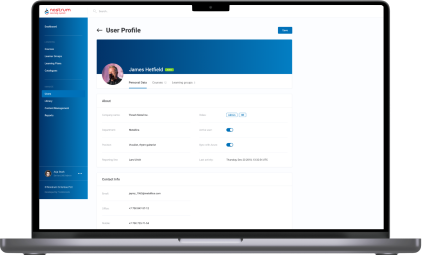
  1. LMS functionality

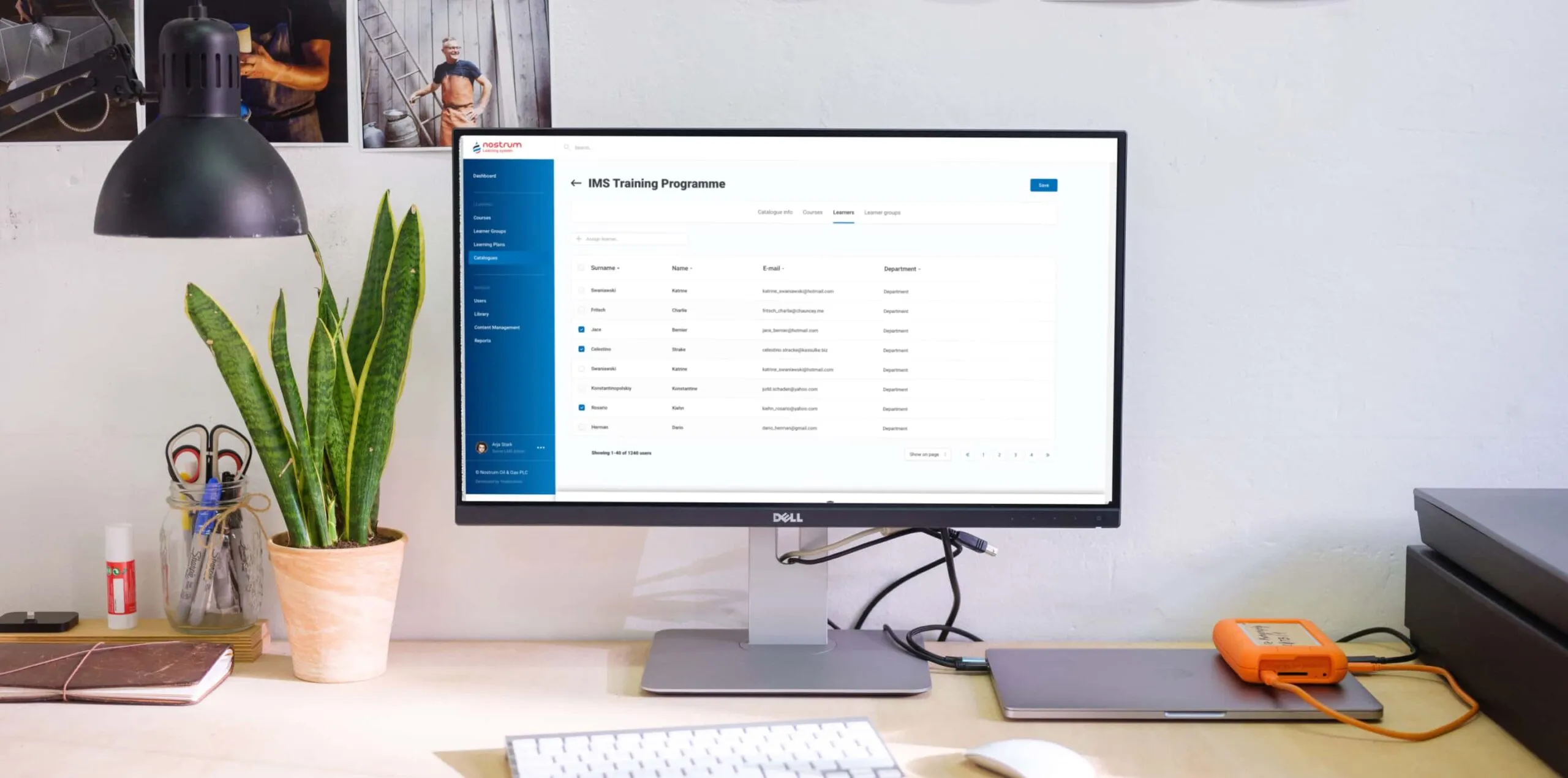
As a custom LMS development company, we aimed to provide the client with a feature-reach and user-friendly software product. Therefore, our dedicated team devoted special attention to crafting an easy-to-use materials repository, clear course structure, simple course management, detailed progress tracking, diverse testing programs, and in-depth reporting.
Roles

After analyzing the structure of the client’s training process, we suggested the following roles within the learning management system:

  • Admin for their in-house IT department
  • Teacher for HRs
  • Learner for employees

Content Library

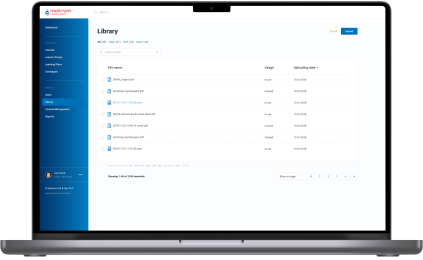
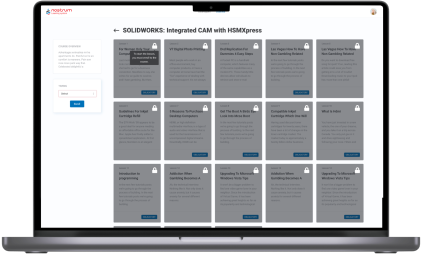
Storage for courses and educational materials is a basic component of any LMS. Speaking of the client’s Content Library, they planned to use it to collect both their in-house courses and learning programs they acquire from other training centers.

Considering the requirements of the oil and gas industry, all the data can be sorted out in various ways. For instance, general or industry-specific, by topics, available language, etc.

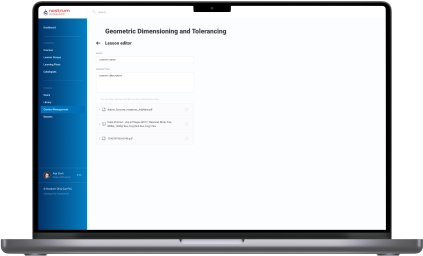
Content formats also vary. In the era of offline training, the client offered employees only text and illustrations. Our BAs proposed adding videos to increase learner engagement and enhance educational outcomes by diversifying learning activities.
Course structure and management

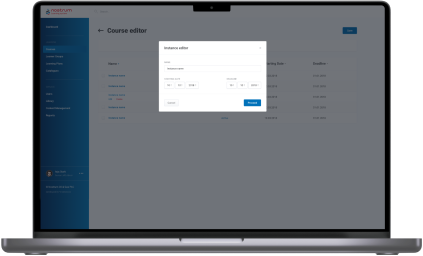
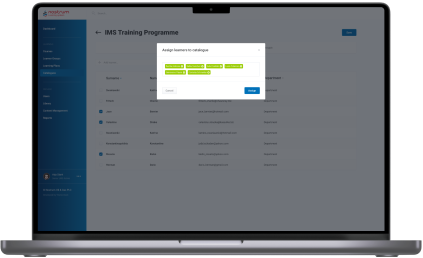
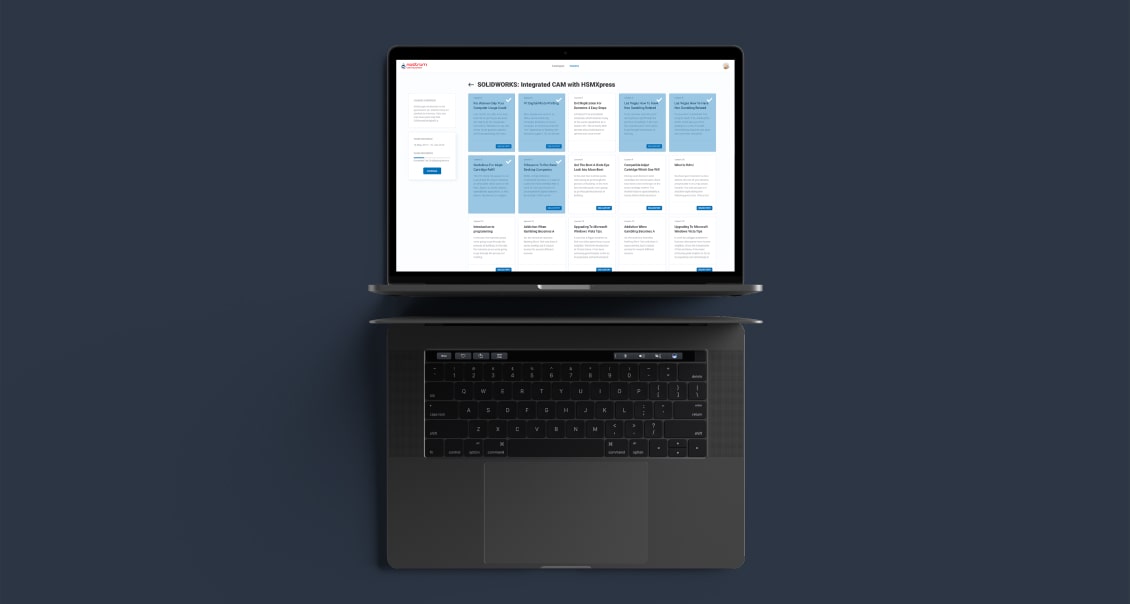
Learners can’t choose a course by themselves; training is always assigned by the Teacher or Admin to an employee or a group of employees. Also, educational materials are categorized according to the staff’s specialization and their level within the corporation. For instance, materials for rank-and-file workers and top managers will be in different categories, as well as courses on specific topics, such as risk management in finance and safety in oil production.

Progress tracking and analytics 

The success of training programs is measured by their influence on the staff. To estimate this impact, we visualized students’ progress with data analytics tools.

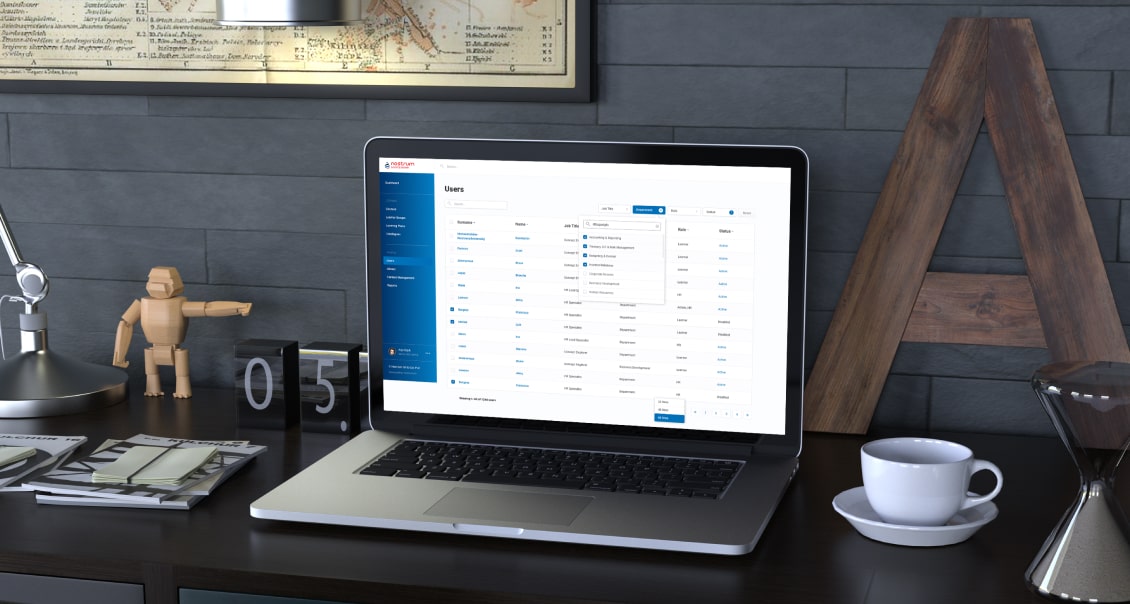
Custom LMS development implied offering dashboards on both sides:

  • Admin/Teacher’s
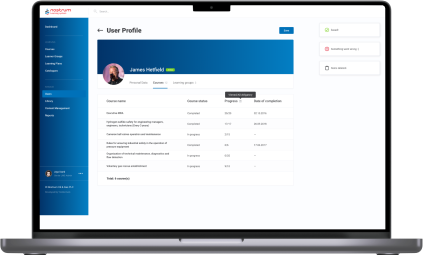
functionality includes tracking percentage of Learners completed a group course. Furthermore, as they can set a deadline for a course or test, there is a statistic on how many employees managed to meet the deadline. Teachers and Admins can also look for detailed analytics for each employee – what percentage of assigned courses and tests they have already passed, the number of failed tests, if there are any, etc.
  • Learner’s

functionality is not that extensive, but each employee can check their training performance and monitor deadlines to make it on time. All reports can be downloaded as Excel, CSV, or PDF files.
Communication within the LMS 

Having a single point of communication is also significant in ensuring personalized learning experience and high-quality training. Learners can leave comments on the courses, tag their Teachers or other participants if there is a group training, and Admins if they can’t sort out some technical issues. 

The same goes for Teachers. For example, they can tag Learners in the courses where the deadline is around the corner.

Notifications

Communication goes hand in hand with automated notifications to simplify time management for both Teachers and Learners. Within the custom LMS development, we recommended and implemented email notifications with ready-made templates for five cases:
  • A Teacher assigned a course to the employee
  • The Learner was tagged by a Teacher, Admin, or other Learner from a group
  • A course has a deadline, and the Learner receives auto reminders ten, five, and two days before
  • The Learner missed the deadline for a mandatory course
  • Admin also receives a message about the readiness of auto-generated reports for the Ministry of Oil and Gas
Tests

This feature became a new helpful add-on in the certification process to ensure a high level of expertise across the company. Now, employees can only be certified after passing tests following the course.

Here are some features of the testing process we suggested and implemented during the custom LMS development:

  • Tests can include open, single-answer, and multiple-answer questions
  • There may be text, illustrations, and videos in the tests
  • New hires have to complete an initial test to assess what skills they may lack for their specialty or position. Based on the results, Teachers can create fully personalized learning for these employees
  • Teachers and Admins can set a deadline for the course.
  • Teachers and Admins can set a course’s completion as a prerequisite for access to the next one

Reporting

As we’ve mentioned, the automated report preparation for the Ministry of Oil and Gas was one of the reasons that tipped the scales in favor of the custom LMS development services. We relieved people from a manual collection of data on employees’ courses completion, putting that data together in a list, and entering it into the report template.
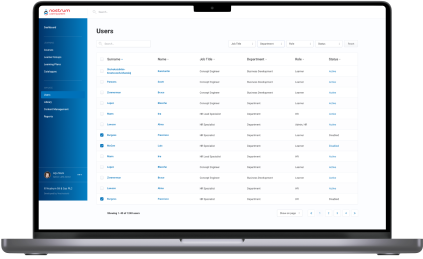
All these operations were automated. The LMS generated an Excel file with all the necessary information according to the Ministry of Oil and Gas template. HRs had only to download it and send the document to the ministry.

Since the project scope was quite substantial, we divided the work into two parts — MVP (Minimum Viable Product) and post MVP. The MVP incorporated the Admin’s and Teacher’s functionality – Authorization/Login, Course Catalog Management, Course Management, Content Management, and Content Library. It took our LMS developers three months to finish this part. 

  1. Integrations and security

The client used Microsoft Azure as their corporate cloud platform, which influenced the LMS integration they needed and the way we took care of security:

  • Integration with Azure Active Directory

All employees already had profiles in the Active Directory. We took advantage of this to avoid creating the staff profiles in the learning management system from scratch.

All employees already had profiles in the Active Directory. We took advantage of this to avoid creating the staff profiles in the learning management system from scratch.

  • LMS authentication through Azure OAuth 2
We suggested using this up-to-date standard authentication protocol to allow users to sign in to the LMS through their profile in the Active Directory. 

Besides saving personnel’s time, such an approach is beneficial from a security standpoint. As you can guess, employees rarely come up with new passwords and use the same one for multiple systems, which increases software vulnerability drastically. A single point of authentication (SSO) means fewer scattered logins into various corporate apps and minimizes the possibility of external attacks and data theft. 
Within the project, our LMS developers worked only with the API addresses of specific servers provided by the clients for the web app. The software’s maintenance and support were supposed to be provided by their in-house IT department. 

However, we went the extra mile to optimize the task for the client. Our DevOps has automated the web app’s installation and deployment on the server side. Thus, all the LMS services located in Docker containers were automatically brought up on the server via Docker Compose.

  1. Visual design

Good design emphasizes the product’s functionality. Our product designer had to translate custom LMS software’s versatile capabilities into a dynamic and feature-filled interface. As we were strapped for time, there was no wireframing. We went straight to visual design. Our UX/UI designer took the risk and prepared a lot of screens for a future web app at once and reached the client for approval. Thanks to our product-first mindset and battle-tested expertise of the LMS development company, it worked out.

Here are a few examples of our initiatives regarding learning management system design and usability:
  • Nesting levels
As we were in charge of the solution’s architecture, we also proposed the components hierarchy. For example, we suggested creating All, Video, Text, and Cover sections within the Content Library and All, For review, Declined, and Published tabs in the Courses Catalog. 
  • Quick access tab
Learners can be overwhelmed with the number of courses they need to complete. Therefore, we offered to add a “Quick access” menu, where each employee can check assigned materials, which are obligatory, which are in progress, etc.
  • Intuitive and handy file uploading
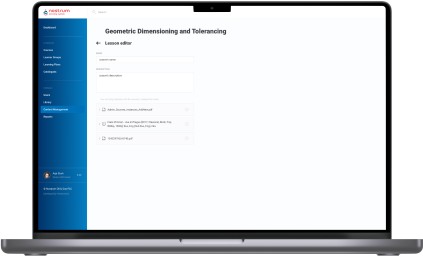
With the drag-and-drop interface, Admins and Teachers can easily download materials of any type to the Content Library and change their order in the Course Editor.
  1. Post-implementation stage

After the LMS rollout, our business analysts trained HRs to familiarize them with the system and show them how to take advantage of it to the fullest.

Next, we moved to working on the post-MVP features and added them in four iterations:
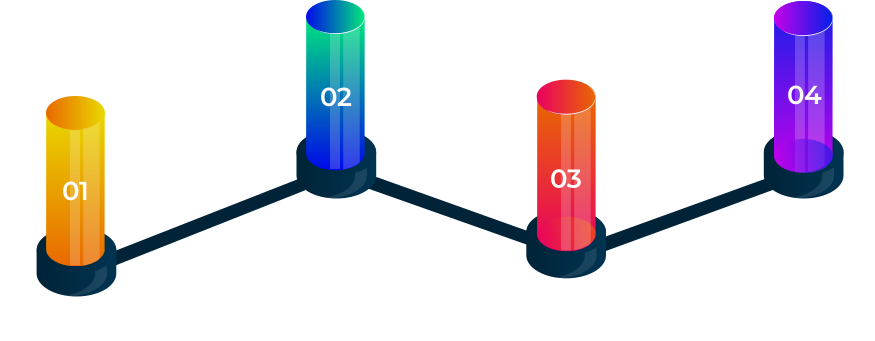
Iteration 1 User Accounts management, Learning groups management.
Iteration 2 Courses, Catalog, Admin/Learner modules architecture.
Iteration 3 Lessons (Learner module), Course listing (User management).
Iteration 4 Enhancements (improve UX), Report (Course completion), Course management (selection material from Library, material sequence).

This part of the custom LMS development took another four months of the full-fledged team work.

Before

  • Training materials and courses are scattered across teachers’ devices and hand-written notes
  • Manual performance of management tasks that could be easily automated
  • Lack of personalized learning
  • Inability to measure the effectiveness of corporate training materials
  • Absence of educational analytics
  • Slow delivery of the educational programs
  • Difficulties with tracking learners’ progress
  • Manual preparation of obligatory reports

After

  • Transparent measurement of corporate educational programs’ success and learner’s progress
  • Simplified and mostly automated preparation of industry-specific reports
  • Speeded up courses delivery
  • Automation and facilitation of all the learning management operations
  • Centralized learning data storage
  • Unlimited ability to personalize the learning experience
  • Detailed visualization of each employee’s training progress and a bird’s eye view of the staff certificates across all company

Key features

Inclusiveness
The biggest gain of custom LMS software is its adaptability to the various staff’s specialties and flexibility in providing access to the courses regardless of the employees’ time and location.
Resilience
Besides the ability to withstand the simultaneous workload of 1,000+ employees, custom LMS development has become a harbinger of opportunities for the client to ensure stability and consistency of training programs.
Customizability
With a custom LMS solution, the client can uncover the areas of improvement and tailor a curriculum to the company’s needs and employees’ ambitions.

Business value

  • Provide a single point of control over the training programs to ensure ongoing improvement of employees’ knowledge and expertise
  • Automate 84% of teachers’ tasks related to managing the educational process
  • Save up to 4 hours of teachers’ working time weekly and relocate their efforts to developing personalized curriculums
  • Save 41% of the education budget thanks to moving online
  • Speed up new staff onboarding from 1–3 days to 4–10 hours, depending on the employee’s position
  • 45% increase in employee engagement
  • Securing the company’s education materials with single sign-on (SSO) authentication

Multiplier effect

Any way you slice it, even small companies can no longer afford to put off the question of consistent and centralized employee training until later, not to mention medium-scale companies and enterprises.

The absence of a robust learning management system can slow the roll of a company in any industry, from education and healthcare to manufacturing, automotive, and fintech. Creating a powerful LMS can help you rise from a dizzying array of unsorted educational materials and courses and make your employees’ progress traceable.
Furthermore, experts in any field are a hot commodity nowadays, given the world-scale talent crunch, and hunting them can cost you a pretty cent. Therefore, you should bank on the LMS software for internal usage and cultivate experienced professionals within your company.

Effective training helps companies to fill skill gaps by leveraging staff they already know and trust and foster long-tenured relationships with their employees. Moreover, by putting talent management first, companies of all sizes can improve organizational performance and potentially gain a competitive advantage over their peers.


Data Analytics and Visualization for Insurance

Reimagining Claims and Operational Reporting For a Global Insurance Corporation

How adopting Oracle BI with dynamic data visualization templates allowed a global insurance corporation with 150,000+ docs turnover to automate 92% of its claims reporting and operational analytics workflows, decrease flaw detection time from several days
to 2–4 hours, and leave no room for human error.

Domain:
Enterprise Content Management

Budget:
$2.000.000 +

Team:
13 developers, 4 QA engineers, 2 Team Leads, a Project Manager

Duration:
4 years

Challenge

About 150,000 documents, such as claims files, policy documents, underwriting dossiers, and related records, are created annually within our client’s organization. Their lifecycle spans claim registration, assessment, approval, payout, compliance review, and long-term archiving. Although the company had already moved away from fully paper-based processes, many workflows remained fragmented across legacy systems, leading to delays, duplicated efforts, and limited transparency into ongoing operations.

As the organization scaled beyond thousands of employees, these inefficiencies manifested as major bottlenecks, hindering core insurance processes:

  • Claims approvals and policy-related workflows were frequently slowed down by manual coordination, while operational data remained scattered across departments.
  • Executives lacked a consolidated view of operational performance, making it difficult to detect bottlenecks early, manage service levels, or prioritize actions based on real-time insights.

At the same time, increasing regulatory pressure required consistent, traceable reporting supported by reliable data. Without automation and end-to-end visibility into claims and workflows, the company faced growing operational risk and limited ability to improve performance at scale.

Under these conditions, implementing a BI-driven approach to reporting and analysis became vital for ensuring transparency, efficiency, and sustainable growth.

Task

The Instinctools team took over rewiring the existing document workflow system and turning it into a practical reporting tool for insurance operations. The goal was to give teams a clear view of claims and operational processes, make reporting faster and easier, and enable near real-time analytical visibility across departments and business units instead of semi-manual tracking.

Solution

Working on the project, our team:

  • Rebuilt and optimized the reporting system so reports could be generated faster and used more effectively in day-to-day operations
  • Added deferred reporting, allowing heavy reports to run in the background without interrupting ongoing work
  • Introduced dynamic reporting, where dashboards and visualizations automatically update as claims-related and operational data changes
  • Enabled on-demand reporting and processing for large datasets, helping teams work with high volumes of claims and policy data without delays
  • Designed a view-based Oracle DB data model (dynamic and materialized views) to ensure stable, consistent access to operational data
  • Created reusable visualization templates to simplify reporting and keep analytics consistent across teams
  • Improved the system interface to make reporting workflows more intuitive for business and operational users

As a result, most reporting steps that previously required manual data collection, preparation, and formatting were automated, removing repetitive work from claims and operational teams.

Key features

Improved UI/UX design for faster navigation across claims and operational reports

Flexible data analysis with the ability to slice and dice large volumes of claims and policy data

Historical data preservation for tracking trends and comparing past and current performance

Access Control List (ACL) integration to manage report visibility based on user roles and responsibilities

Benefits

  • Clear visibility into current and historical claims and operational processes
  • More informative reports that support faster decision-making
  • Easier identification of bottlenecks and problem areas requiring immediate attention
  • Reduced time needed to detect issues and inconsistencies in operational workflows
  • Role-based access to reports, ensuring teams see the data relevant to their responsibilities
  • Improved end-to-end transparency, allowing executives to monitor operational execution across departments
  • Data export in multiple formats for deeper analysis in third-party tools

Technologies

Legacy Software Modernization For a Global Heat Exchanger Manufacturer

Legacy Software Modernization For a Global Heat Exchanger Manufacturer

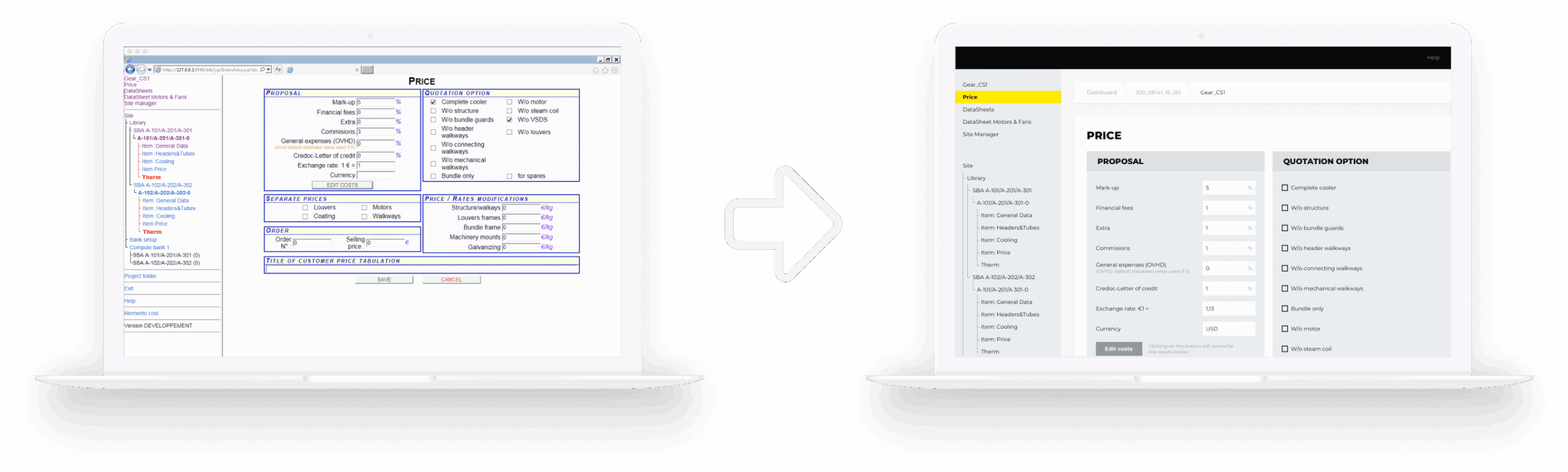
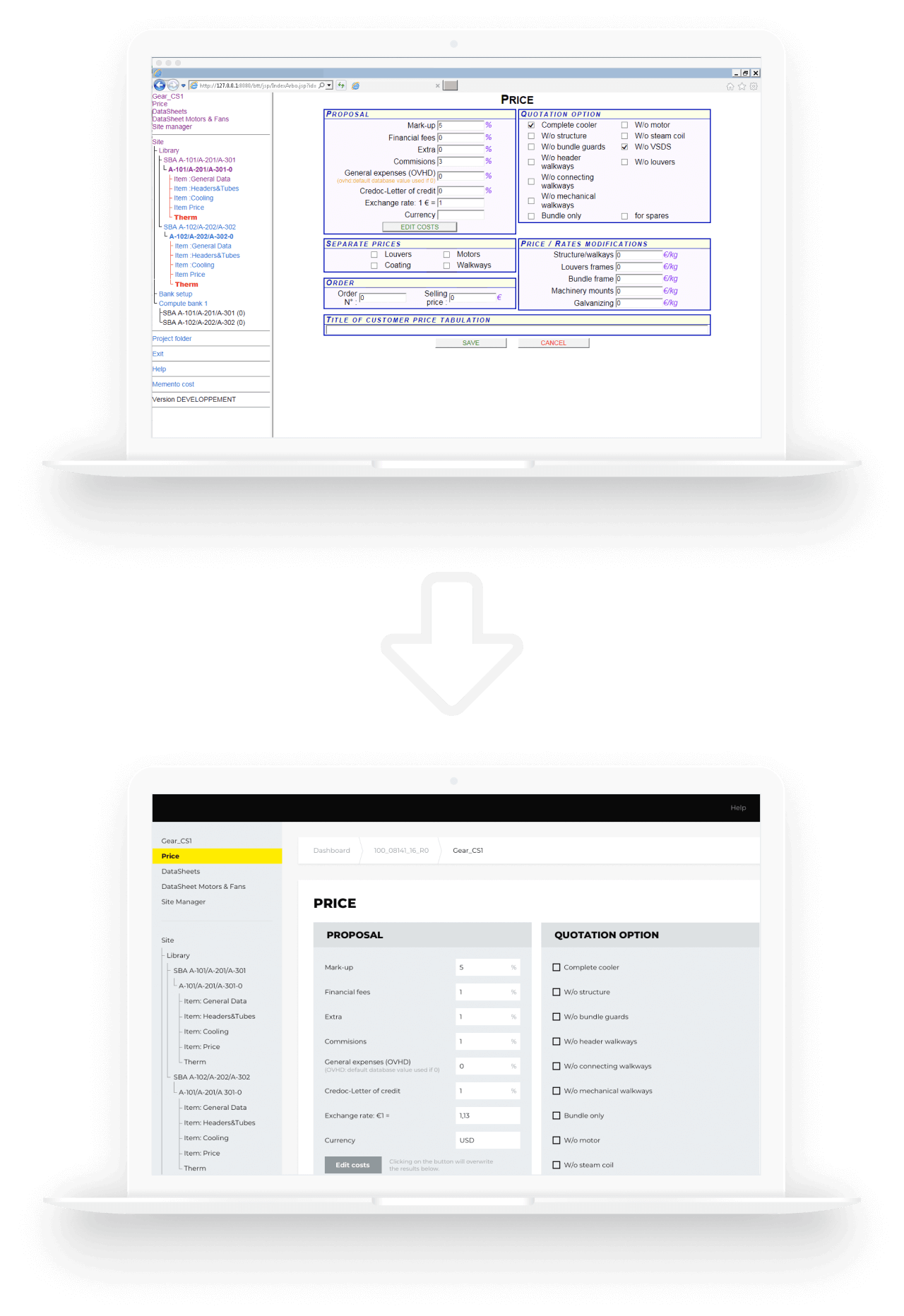
How switching from legacy, head-office dependent software to a cutting-edge solution, featuring a modern toolset and intuitive UX, helped the leading heat exchanger manufacturer eliminate manual maintenance tasks and lower software upkeep cost by 27%.

Domain:
engineering, heat exchanger manufacturing,
heating & cooling systems

Budget:
>200.000$

Duration:
1 year

Challenge

The engineering toolset, which the customer had been using for more than two decades, had become complex and outdated. The problem was that the software was based on old technologies and was developed by people who were no longer with the company. Its maintenance required added manual effort which led to higher process costs.
“We need a state-of-the-art solution” – that’s what our customer emphasized on during the Clarification Call with us. The customer wanted to have a modern software that would provide calculation results in a quick and easy way, as it is one of the key factors in heat exchange industry which affects the client’s decision in choosing the supplier.

The customer’s pain points:

  • slow and poor performance
  • strong dependency (if the system stopped working in the head office, it stopped working everywhere)
  • outdated approaches to user identification and authorization
  • the necessity to maintain their own environment, which took a lot of effort and was risk-prone
  • the problem of data backup and storage (local installations are not the most optimal backup solutions)
  • old-fashioned design and unintuitive functionality

Tasks:

  • to improve the efficiency of Sales / Order management process including further development of the tools and applications used by the customer
  • to integrate the tools with the customer’s authentication system
  • to use SharePoint as a document management and storage system
  • to stabilize the current system, retaining all of the system’s components and business logic
  • to upgrade UI by making it more current while minimizing changes in UX, thereby lowering the barrier to entry

Solution

The volume of work was quite substantial. It required a thorough analysis phase. At the start, the stakeholders in the customer company couldn’t come to a common understanding of what the project goals were. To make sure that the project implementation result will reflect what the customer really needed, it was decided to start with the Pre-Discovery workshop: we clarified all the details, discussed the customer’s pain points and chose the direction for further analysis. It prevented the project from going in the wrong direction from the very beginning and created a proper base for the Discovery phase

In this phase, we defined the tasks, planned the resources and the stages for implementation, and made the estimation of the project. This approach helped avoid wrong strategic decision-making and contributed to a successful project implementation: migration of the legacy system to Azure Cloud (fulfilling all the customer’s requirements) and implementation of the new UI.

Deliverables of *instinctools team:

  • Architecture improvements and technical solutions compatible with Azure Cloud
  • Project Charter with settled release processes and communication plan
  • CI/CD
  • UX/UI strategy and the implementation of new designs

Benefits for the customer:

minimizing errors and efforts for testing

making the maintenance process easier

lowering maintenance process costs to a minimum

reducing the workload (less time spent on requirements engineering and easy reuse of working modules)

unifying the whole process of equipment configuration

getting their software up to modern standards which makes addition of new features and upgradation of the existing ones cost and time effective

Technologies

Cloud:

Software Modernization For a Canadian Machinery Manufacturer

Software Modernization For a Canadian Machinery Manufacturer

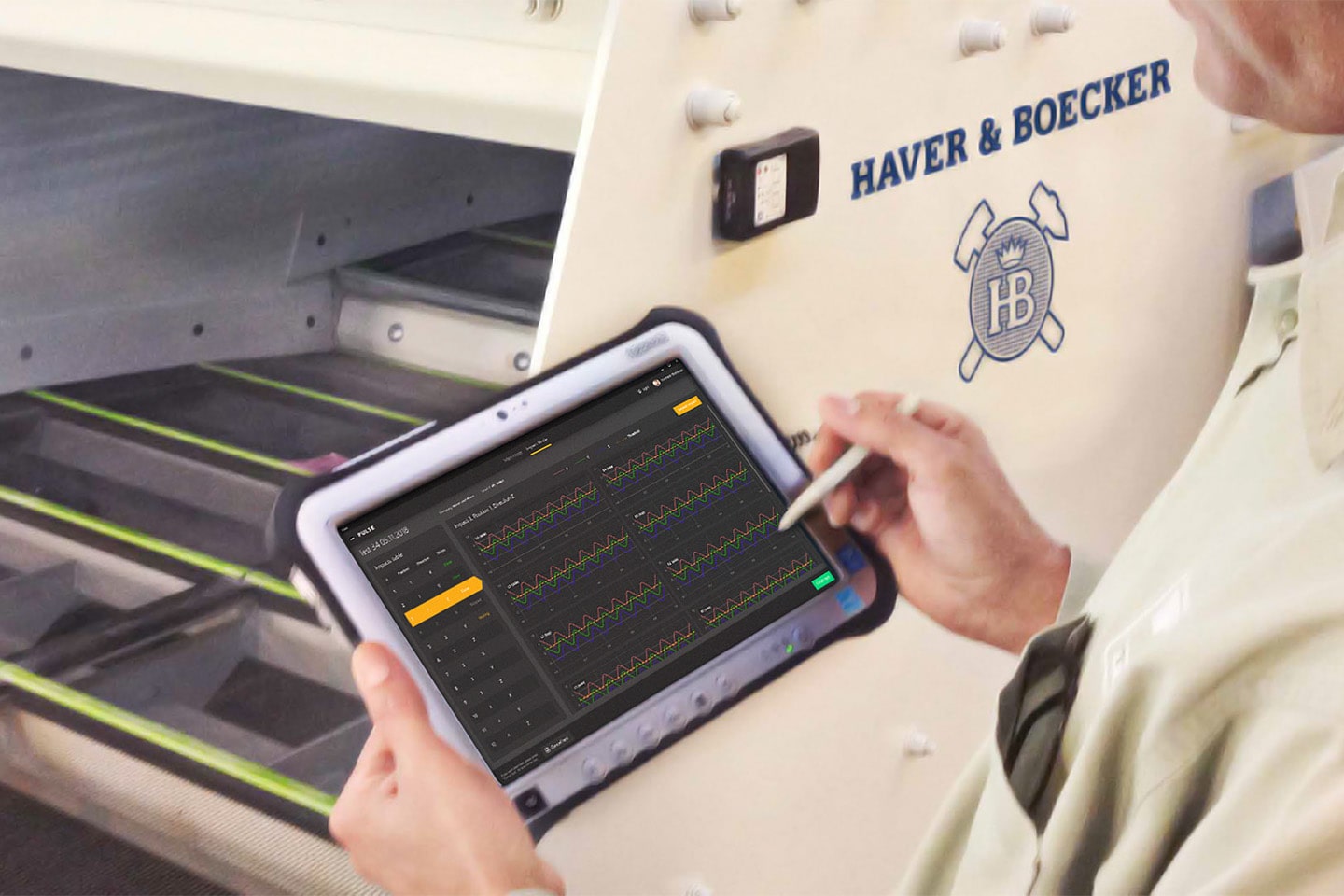
How redesigning and enriching their existing app with new features armed a machinery manufacturer with a leading-edge mining equipment monitoring system, allowed them to spot maintenance issues on average three months earlier than they used to and decrease machines upkeep costs by 23%.

Challenge

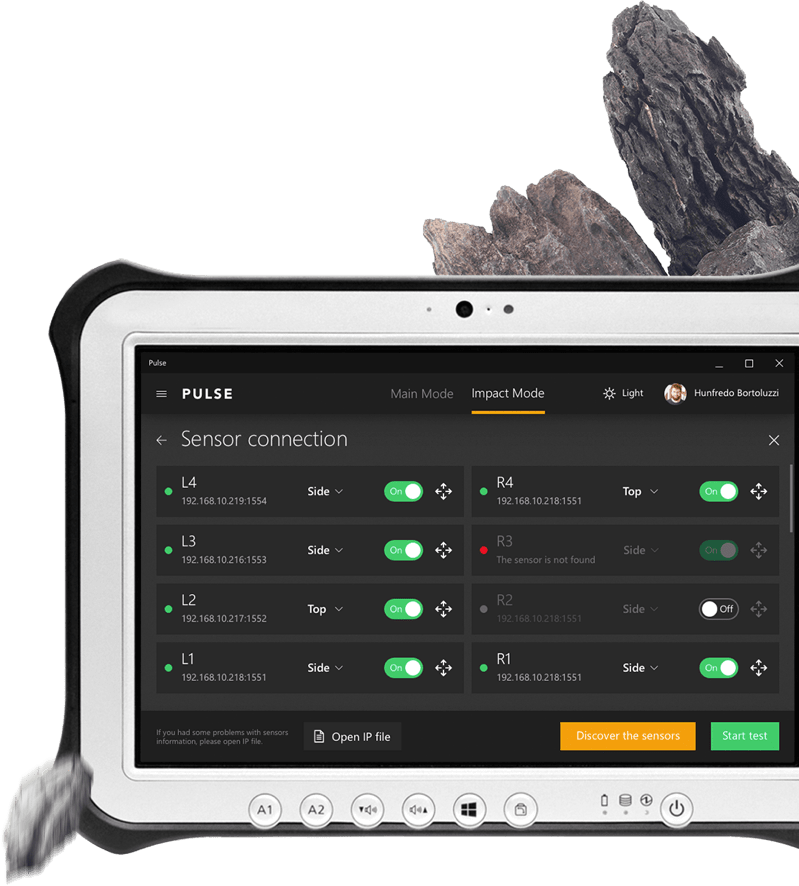
The company needed a modern and an easy-to-use application to execute tests and to monitor condition of mining equipment – vibrating screens for segmentation of friable material by particle size.
Thus, the following tasks were set for *instinctools team:

  • Existing application code refactoring;
  • Full redesign of the application;
  • New test mode development and integration.

Solution

To meet the tight deadline and client’s needs, we chose Kanban approach for Agile application development, which implies full transparency of working processes and real time discussion of production.

The Spring Framework with C library was used for application implementation on Java.

Key features

Final result from good teamwork exceeded all customer’s expectations.
The client received a fully renewed application with the following features:

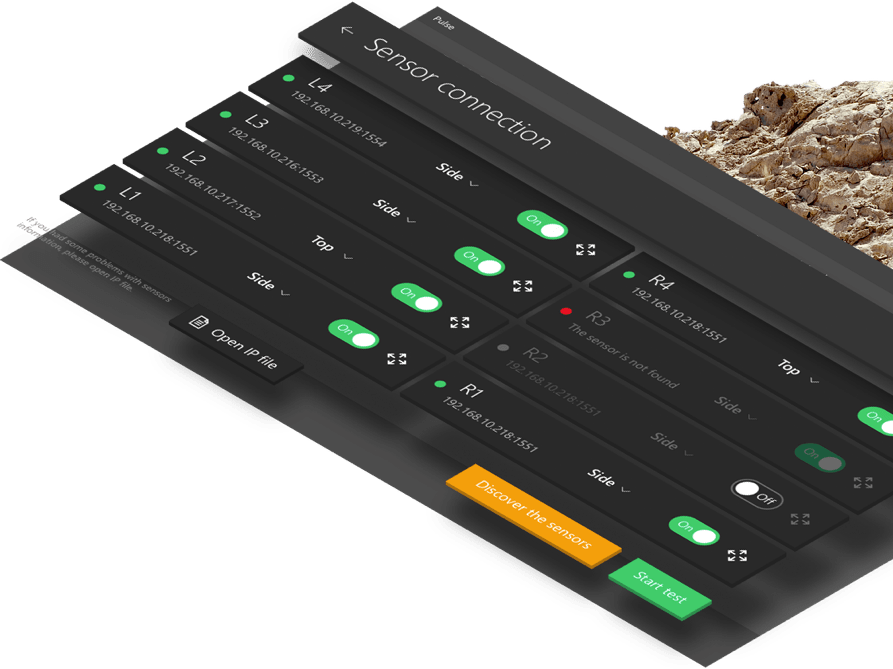
  • Impact mode — testing of vibrating screen elements from exposure to them at rest;

  • Orbit mode — testing of vibrating screen elements at work;

  • Reports generation with cloud storage;

  • New application design with user-friendly interface;

  • Application management system.

Value

Data for research

In addition to usability and two modes of testing the app provides information about the condition of machines owned by the company and company’s clients in order to conduct further research.

Cost saving

Real time monitoring of vibrating screen at work cuts costs on maintenance and shortens wait time in case of unexpected vehicle breakdown.

Further improvement

All data and research conducted through this application will help the company improve other products.

Technologies

Spring Framework
Java

SAP Commerce Cloud (Hybris) Migration For a Retail Company

SAP Commerce Cloud (Hybris) Migration For a Retail Company

How switching from their outdated ecommerce software to SAP Commerce Cloud helped a European company improve scalability and integration potential of the system, hone personalization, and level up customer satisfaction by 13%.

Challenge

At some point shop’s management became too difficult, so demand for a customization based on customers geo location has greatly risen. The work was unproductive without centralized management system.

The key requirement for our development team was the ability to deliver across a wide amount of technologies and platforms, including desktop and mobile, and offer a complete set of services, from business analysis and development to quality assurance, support and creation of comprehensive project documentation of new features. The major dev task was to move PHP written code to a new platform, keeping old design and preserving extended functionality.

Solution

We were asked by our client to make a switch from PHP to SAP Commerce Cloud, a Java based ecommerce engine. As part of our PHP development services, we analyzed the PHP code and the old system functionality. Some of functionality was refactored and redesigned. Missing functionality was developed according to business needs and new rules.

Key features

Single codebase for many shops

Easy extendibility/flexibility

Ecommerce solution “from top to toe”

Channel selection

User Features

Easier for workers to control the operations of new shops

Easier to scale up the business

Shop assistants spend less time on shop’s сare-about and get more flexible pricing system

Easy integration with a third-party applications provide further customer company expansion

Wide range of payment & delivery options

Flexible progress hop: after successful implementation of innovation in one shop - diffused on the rest of other client shops

Technologies

Java
Spring
Framework
Apache
Tomcat
Apache
Solr
MySQL
Web
Services
HTML
Javascript
CSS

Flight Information Control System For a Top-10 Airport

Flight Information Control System For a Top-10 Airport

How automating flight information validation and correction helped a European airport eliminate human errors and speed up data checks by 57%.

Challenge

Our customer required a system for automatic flight information control with an option of manual information control by a person (flight operations officer) before it is reflected on the display.

The system needed to comply with the demands of consistency, partition tolerance, 24/7 availability and total data safety.

Solution

Our team developed a system that controls the input of information about flights in the airport, based on the defined rules. Based on these rules, the system decides if flight information is right or wrong and if right, it sends messages about flights on flight information display. If it is wrong, the system corrects it automatically, or allows manual correction by a flight operations officer, if automatic correction is impossible. Manual message correction is performed through a separate visual module that can run on any machine with access to this module that recognizes display messages with flight information.

Key features

Automatic handling of flight information input

Take decisions on flight info being right or wrong

Send messages about flights to flight information display

Automatic correction

Visual interface for manual correction

Get 24/7 access to the system

Protection against data loss

Technologies

Eclipselink
Spring
Hibernate
Oracle
JBoss
Corba

Security Analysis Tool For US Tech Company

Security Analysis Tool For US Tech Company

How running code refactoring of the Eclipse plugin at the heart of their vulnerability detection tools provided a US software company with an x50 faster code scanner.

About the Project

An analysis tool we had worked with is a client and server-side software, integrated into such development environments as Eclipse, Visual Studio and IntelliJ IDEA. Developers can be sure of building security from the very start and of detecting vulnerabilities as they appear, hence they can be fixed immediately. This analysis tool is a lightweight static analysis tool that detects vulnerabilities automatically and provides just-in-time security guidance to your developers in the process of coding. With this tool you can eliminate common security errors before they are committed to the code base or released to the public.

Challenge

  • Implement a plugin from the very beginning until the end with very strict deadlines of product delivery (5 months)
  • Creating plugins for IntelliJ IDEA was not a piece of cake, as it’s quite a narrow specialization area. It was new for us, but the challenge was handled successfully, meeting all customer objectives
  • We had to carry out a huge refactoring of the Eclipse plugin code to make the code scanner much faster than it was. And we’ve achieved magnificent improvements: about 50 times faster

Fast analysis

Analysis tool plugins can scan large projects with thousands of files in just a few seconds

Fits a Modern Agile Process

Sustain the tight feedback loops that you need for a modern agile environment

Builds Security Skills Every Day

Educate your developers about best practices in secure coding without leaving the coding environment

Customizes to your Organization

Create custom rules and guidance to support your enterprise-specific policies

Technologies

TeamCity
Java 7/8
Java Concurrency.
Java FX
Angular
Spring
Eclipse
Visual Studio
IntelliJ IDEA
MySQL

Enterprise Document Management System For an Atomic Energy Corporation

Enterprise Document Management System For an Atomic Energy Corporation

How replacing several feature-poor document management solutions with a single comprehensive user-friendly system accelerated document-related processes by 23% on average.

Object

Systems of electronic document management have been with large companies and state enterprises for quite some time now and are there to stay for a long time, too. It also requires more mobility from company managers who spend a lot of time out of office. Being outside the office they need to carry out their responsibilities and lose no time as well as to have a handy work interface with information systems, an easy possibility to solve problems in a fast and timely manner. In order to enable them to do so, a system interface has to be also informative and simple at its best – a manager is supposed to have on hand all the document operations possible.

What are the problems when running a document management system device with a web interface?

  • Mobility

When running a web interface a manager comes across a number of limitations on their freedom of movement – the manager needs to have constant access to the resources of his company and electronic document systems, i.e. he usually cannot handle his documents while on the road, up in the air or at sea.

  • Interface intuitivity

Web interfaces with access to electronic document
systems are often overloaded with functions and are meant for big screens with precise positioning of the mouse cursor. One needs to take his time to interact with the system as well.

  • Safety

When having access to electronic document systems via a mobile device it is needed to secure the proper keeping of the information received, transmitted and saved, which may be problematic in success-stories when running a mobile device outside the office.

  • One access interface

Having several systems of document management at your company, the manager needs to switch between various web interfaces and carry out single operations in each of the systems.

The main purpose for developing a mobile client device was finding solutions to the following problems.

Solution

How the mobile client solves the problems mentioned above.

  • Mobility

Application of the mobile client with offline work functions enables you to have access to documents and carry out all necessary operations with them while having limited access to electronic document management systems of the company. All operations done in the system by the user are kept in the application and if there is access to the document management system of the company, are synchronized automatically. Additionally the user is enabled to tune the synchronization intervals themselves.

  • One access interface

Mobile client enables you to unify tasks from several systems of document management, which allows running operations faster with volumes necessary for a manager in one application. In this case one interface is enough, i.e. the interface running tasks from different systems of document management.

  • Interface intuitivity

Interface adapted for use on mobile devices and the availability of just the operations needed enables to process documents in a faster manner and make the interface informative and simple at its best.

Interface adapted for use on mobile devices and the availability of just the operations needed enables to process documents in a faster manner and make the interface informative and simple at its best.

  • Safety

The mobile solutions as to the safety of information exchange with electronic document management systems and safe keeping the data disallow access to third parties to the information kept on the device, which is rather problematic when using a web interface. Application of different means of authentication of the user (login/password, authentication with smart cards) enables to secure reliable transmission of user data. Encrypting data bases and files of the user is fulfilled in accordance with GOST 28147-89 (State Standards).

When operating the mobile client, the additional advantages are guaranteed

  • Handy display and document task operation. The user is enabled to scroll and change documents in most office formats
  • A function to save marks on tasks. The user may leave their own marks which are not seen by other system users
  • Commenting the tasks to be done. The user may leave comments as per electronic document management system
  • Handy search and sorting user tasks/documents
  • Launch of new document management processes

What else can the system do

  • Several languages are available. Localization of forms and elements and their arrangement are kept on the server which allows changing their contents and arranging in a fast manner
  • Handy support to change the responsible person. If the user is outside the office and is not able to carry out their responsibilities at the moment, another user may be assigned to do the task at the push of a button
  • Launch of new secondary work processes and create new tasks either via interface or from a separate tab on processes
  • Keep selected tasks even after they have been carried out. The user may determine the volume in document management he/she needs by his/her own
  • The Drag & Drop handy mode enables the user to move the responsible per tasks. The expander system allows organizing work according to information on tasks providing the user with necessary information only

As a result, the manager’s main tasks have been successfully carried out for their superior, whose usual working place was out of reach, the transparency of all working processes was also observed.
This system may be integrated into different electronic document management systems, corporate calendars, task managers and other systems engaged in working processes.

Technologies

Tapestry 5
JQuery
Bootstrap
UI Spring,
Spring Data
Hibernate
PostgreSQL
Maven
Jenkins

Legacy System Modernization For an Environmental Company

Legacy System Modernization For an Environmental Company

How migrating from no longer supported VB6 to Java provided an environmental company with an app that seamlessly handles multiple customer requests at a time.

Challenge

Customers turned to us with the following problems:

  • They needed a convenient way to build complex queries in the database.
  • There were some performance problems with the client’s site. The system was running slowly in the case of multiple requests.
  • Customers needed to restrict access to the application using a White IP List where access would be allowed only to certain IP addresses.
  • There was a need to synchronize data with other databases.
  • It was necessary to construct graphs based on the processed data (e.g., “Number of bags per hour,” “Number of shipments per hour,” etc.).
  • Customers needed improvement of TimeSlot overview and scheduling. It was necessary to develop an electronic schedule (organizer) enabling the reserving of time for unloading and servicing of trucks with bottles.
  • They needed the ability to obtain additional user data from LDAP.

Solution

The problem was solved in the following way:

  • To enable easy construction of complex queries in the database, we suggested and implemented the use of Querydsl.
  • We optimized and used cache data to solve the performance problem and improve the operation speed when there are multiple requests.
  • To restrict access to the application, we implemented Interceptor for requests intercepting and filtering (White IP List and Whitelist for paths).
  • We implemented a file manager based on Qdrive.
  • To construct graphs on the basis of processed data, we used an additional module of chart.js.
  • We developed a data model and implemented basic logic for CRUD operations in accordance with business requirements (frontend and backend sides).
  • We developed Time Slots Overview – an electronic schedule (organizer) to reserve the unloading time of the machine with bottles, featuring marking of fields “reserved time” / “available for reservation time” / “unavailable for reservation time” by different colors. The mechanism takes into account the overlap of reserved periods, and automatically suggests the nearest free time, if the time the customer has chosen for reservation is already taken. After reservation, the customer can view its details at any time.
  • We created jobs or scheduling tasks for processing the scheduled data.
  • We developed a variety of services for the system, for example, MailService – a shared service to send e-mails.

Key features

Access by roles

Sending e-mails

History of the entities’ changes

Report generation

Display of the data in graphs

Receiving and sending data to external terminals and databases

Imitation of logging in as a different user for the administrator

Tasks that process data in manual or automated mode

Technologies

MySQL
AngularJS
Autocad
Gradle
JasperReports
Anna Vasilevskaya
AI modified real photo
Anna Vasilevskaya
Account Executive

Get in touch

Drop us a line about your project at
[email protected] or via the contact
form below, and we will contact you soon.