






Quality Management System

SaaS Quality Management App For a Leading Maritime Software Provider

How broadening their industry-specific software pool with a quality management system (QMS) for maritime companies allowed a world-class SaaS software provider to win new customers.

Industry:
Ecommerce

Web Development

SaaS Development

Software Product Development

Enterprise Automation

Business challenge

Is there a more common and widespread bottleneck than paper-based workflows? Despite the seemingly ubiquitous focus on technology-enabled business transformation, non-digital-born companies across industries still depend on paper documentation.

Such an approach leads to flawed records, delayed updates, etc., which overcomplicates the quality management process. When quality-related debacles take place at the enterprise scale, companies have to pay for them, not rarely with something more valuable than money — their reputation.

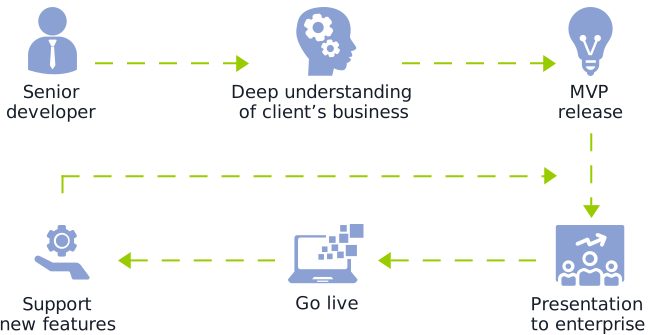
This was the weak spot our client aimed to tackle to help their customers move quickly and confidently down the digitalization path. A world-class maritime software provider with several solutions for streamlining industry-specific processes contacted *instinctools to widen their offering with a cloud-based SaaS quality management system (QMS).

What percentage of organizations depend on paper-based processes?

*Source: Forrester, Digital Documents Necessity

What issues did maritime enterprises face while managing quality documents mostly manually?
Delays at all stages of working with documentation
Failure to keep quality management documents updated
Lack of traceability within quality management processes
Risk of overlooking updated standards and compliance requirements in time
Human error in full bloom

Our client wanted to fix these problems with robust software that spans quality, health, safety, and environment (QHSE) processes by:

Digitizing

and streamlining all document-related operations, including creation, editing, etc.

Ensuring

compliance with general and maritime-specific standards

Providing

a centralized repository with role-based access to allow users to work with quality documents anywhere, anytime, without compromising security

Automating

quality management workflows, such as authoring, reviewing, approving, notifying, etc., to free employees from mundane rule-based tasks and eliminate the possibility of human error

Fostering

transparency of quality management processes thanks to the detailed audit trail

Solution

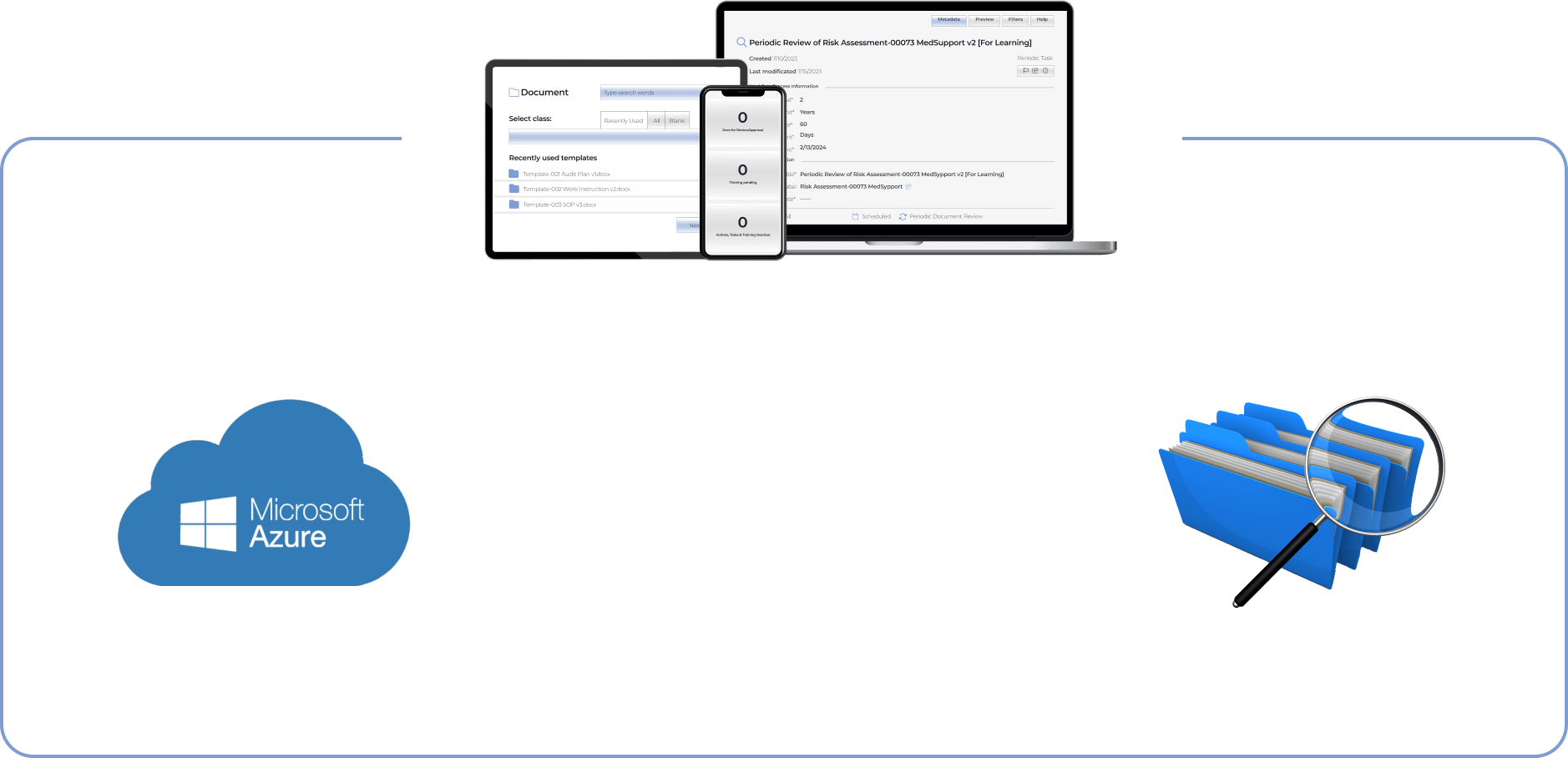
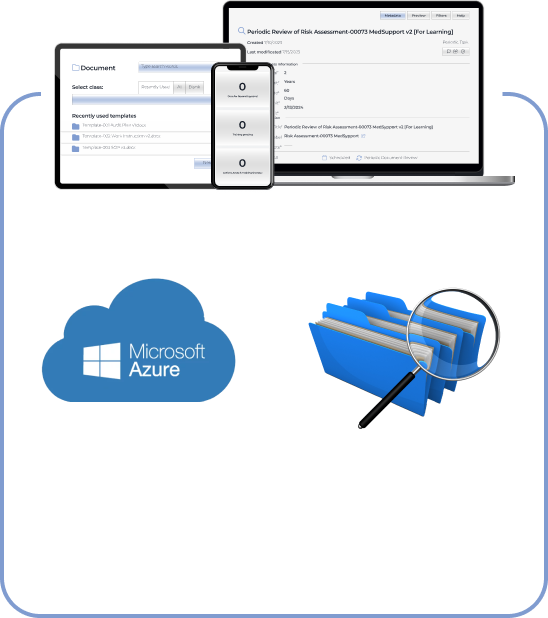
The client has been delivering solutions for enterprises using Microsoft 365 products. Therefore, our dedicated team went with Microsoft Azure as a cloud repository for the QMS. The system also needed a metadata-driven document management platform to automate document creation workflows. We’ve chosen M-Files with out-of-the-box integration with Microsoft Azure.

  1. Packing the QMS with broad functionality

Banking on the rich off-the-shelf functionality for their customers was at the core of the client’s strategy. Therefore, we’ve crafted the software with multiple out-of-the-box modules that go beyond simple document creation and review and cover regulatory compliance, audits, and risk management tasks.

Document creation module

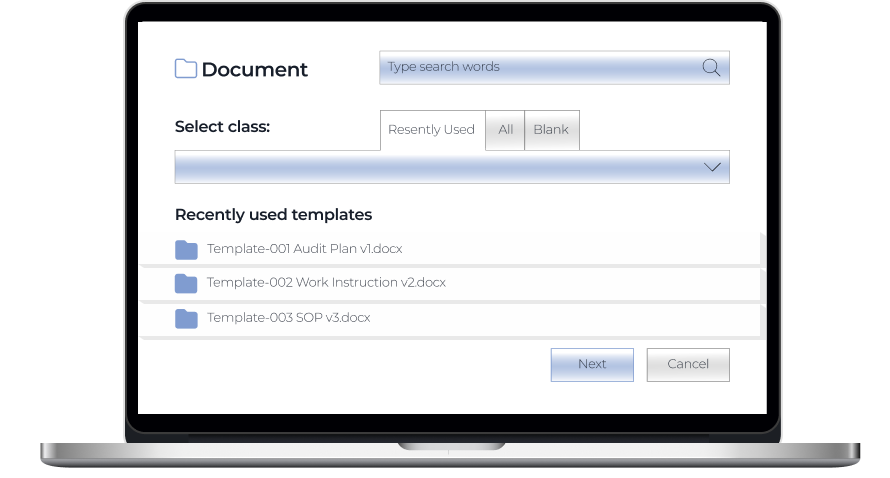
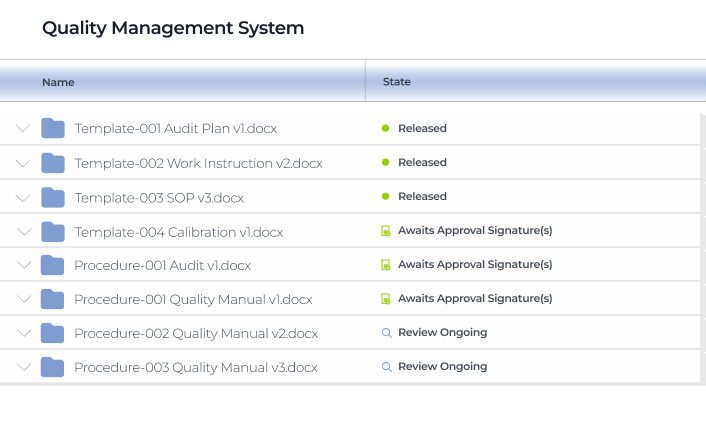
Users can create a document using templates or drag and drop existing Word, Excel, PPTX, HTML, and PDF files directly into the system.

Review and approval module

Drafted documents are sent for review or approval.

If there are several reviewers and approvers, they can collaborate on document editing using track changes.

Authors can set a deadline for reviews or approvals.

Assigners have real-time visibility into the state of reviews and approvals.

Assignees get email auto notifications about the documents waiting for their review or approval. Assigners also get auto alerts about suggestions and comments in the documents and when assignees mark them as reviewed or approved.

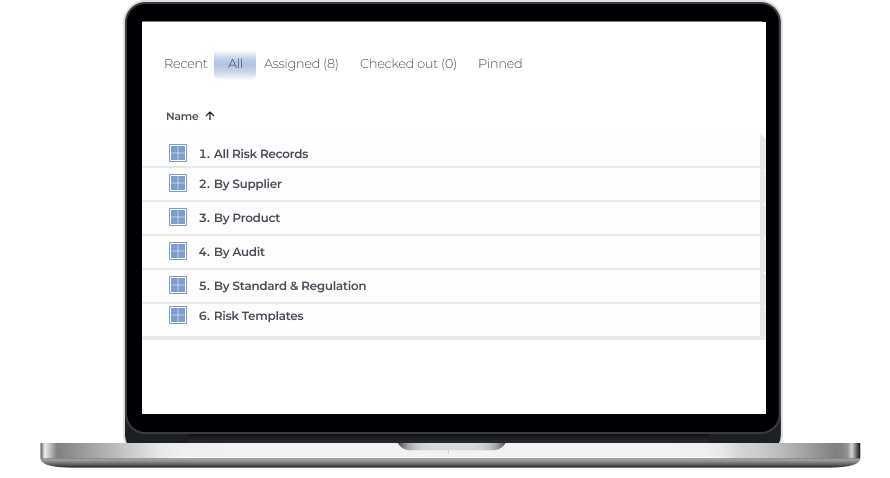
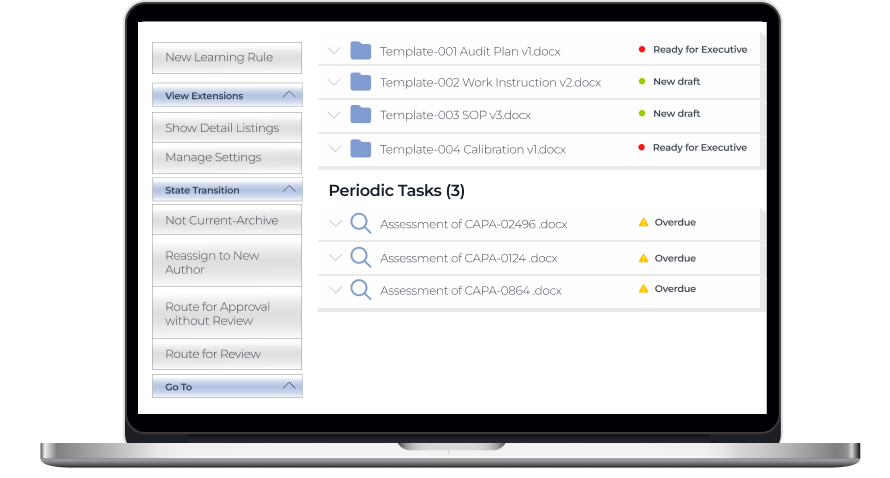
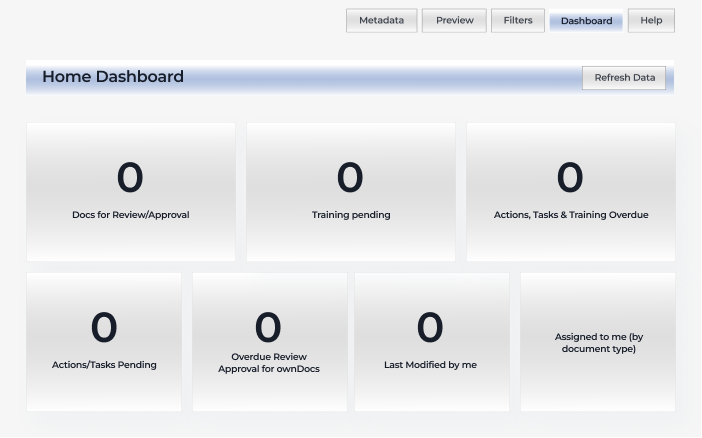
All users have personal dashboards as an easy way to access the files for review and approval, last modified documents, etc., just by clicking on the corresponding section.

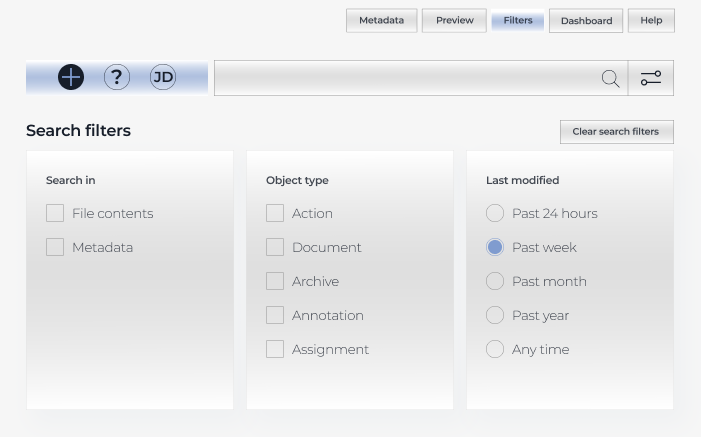
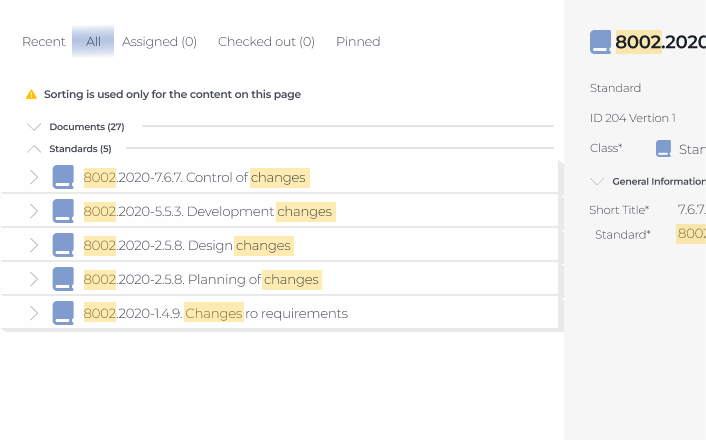
Also, all users can look for documents across the system with an intuitive search bar.

It provides the possibility to search for exact words matching the titles and content of the files.

Regulatory compliance module

This module is the heart of the whole system. The QMS is compliant with the following standards by default:

ISM (International Safety Management) guidelines define the safe operation of ships and address preventing pollution.

ISPS (International Ship and Port Facility Security) is designed to uncover and prevent criminal threats, such as piracy, acts of terrorism, etc.

ISO 9001 (Quality Management System) establishes requirements for a QMS

ISO 14001 (Environmental Management System) clarifies best practices that companies should follow to reduce their environmental footprint

ISO 45001 (Occupational Health and Safety Management System) determines physical, chemical, biological, ergonomic, and psychosocial hazards to minimize their impact on the employees’ health and safety
Audit module

The client wanted to ensure complete traceability across the system, as keeping the company’s documentation in order is one of the success factors contributing to smooth external audits. Therefore, we crafted a system where any document changes are recorded, and users have a time-stamped audit trail and the history of each document at their fingertips.

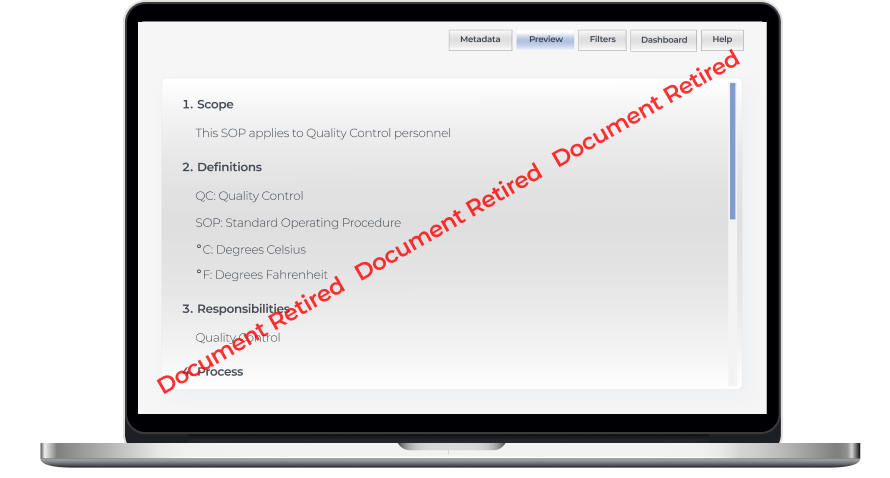
While the QMS always suggests the most recent file version, all roles have access to the previous ones. Document owners can set up auto retirement of the document’s previous versions when the new one is released.

Internal audits and regulatory checks also become a breeze for maritime organizations with this QMS. 

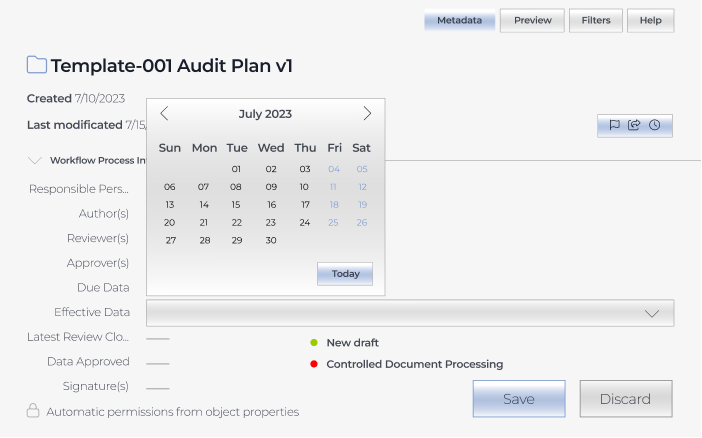
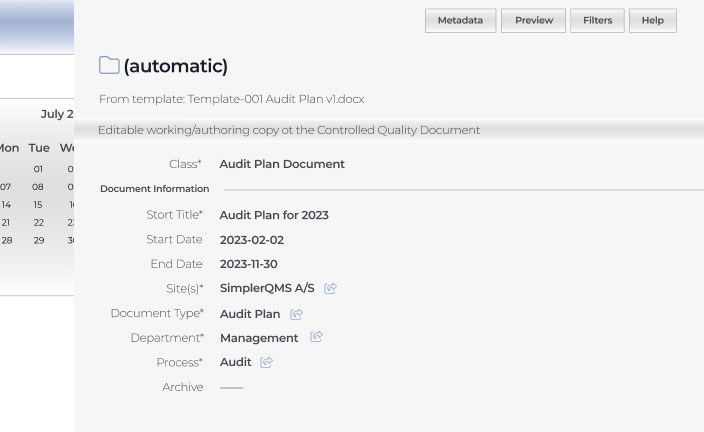
Our development team provided a complementary document template package for:

  • Creating audit plans
  • Scheduling internal audits
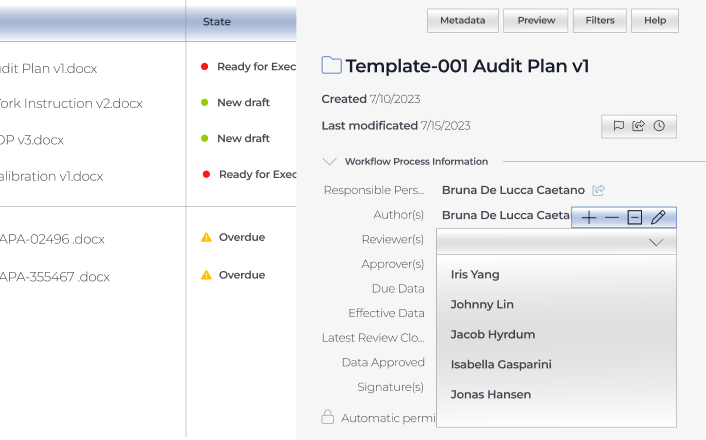
  • Assigning responsible personnel and reviewers

Both authors, assignees, and reviewers can attach evidence related to the audit findings, making it easier to unearth and fix alarming issues internally.

Risk management module

The QMS we’ve developed enables companies to foresee dangers and prevent or minimize their negative impact

  • Connect information within the quality management system

Users can connect risk management documents with audit data, records related to suppliers and products, and other items within the system to enhance traceability of potential hazards.

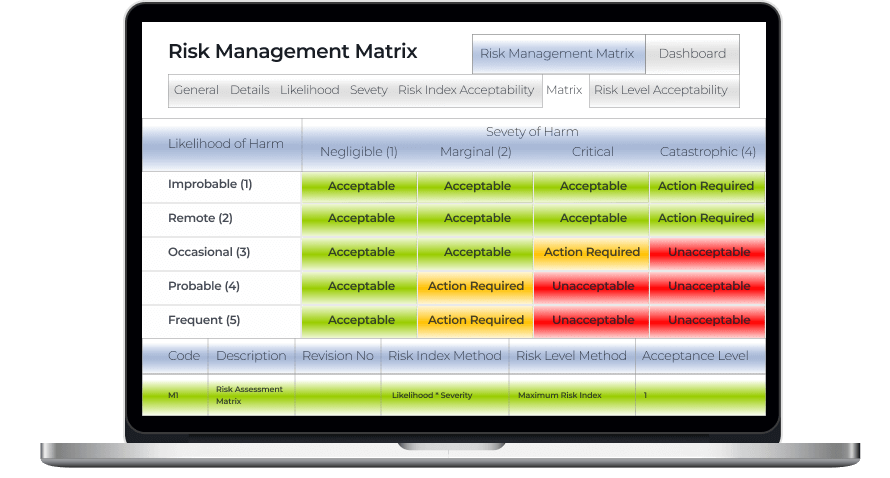
  • Identify possible hazards with a risk management matrix

Spotting risk-prone issues as early as possible helps cover them before they snowball into severe threats and cause noticeable accidents. The risk management matrix is color-coded so that users can immediately see if there are any catastrophic and critical events that have to be addressed ASAP.

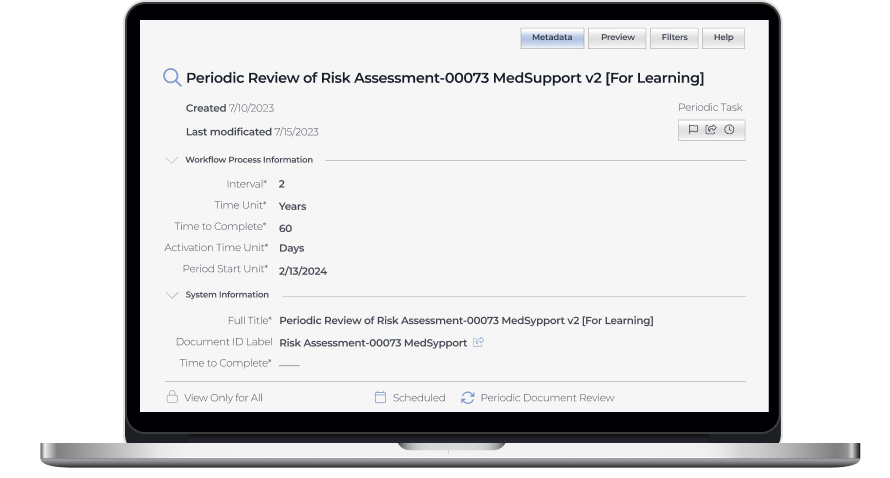
  • Schedule periodic risk assessments

Risk assessment is an area with high automation potential, and we didn’t miss the chance to take full advantage of it, empowering users to set periodic risk assessments within any time frame.

  1. Ensuring integrability with any corporate systems

Our software developers wrote APIs for data synchronization with external tools to allow the client’s customers to seamlessly incorporate the web app into their existing software landscape and facilitate efficient data flow between the QMS and other systems, such as ERP, CRM, IMS, etc.

Business value

Before

  • Underdigitized quality management workflow
  • Scattered quality management data
  • Non-automated workflows
  • Delays at all stages of working with documentation
  • Lack of visibility into quality management processes
  • High probability of human error

After

  • Fully digitized quality management processes
  • Single source of documentation
  • Minimized manual effort with automated workflows
  • Streamlined audit-related activities
  • Complete traceability thanks to time-stamped audit trail
  • Reduced human error

Client’s testimonial

Hear about the project’s progress and outcomes directly from its product owner:

Tim Rosenberger

Director, Global R&D at SpecTec

I was impressed by the developers’ skills and by the ability of *instinctools to extend the team on really short notice. I’m looking forward to the collaboration with *instinctools on our upcoming digital transportation projects

Custom Inventory Management System

Rewiring Inventory For an Eyewear Manufacturer
And Retailer

How replacing an overpriced SaaS inventory system with a custom, feature-rich IMS enabled a French eyewear manufacturer and retailer to double the RFID scanning speed and accelerate tag verification x3.

Industry:
Ecommerce

Enterprise Automation

Software Product Development

Data Visualization

Business challenge

Retail companies know better than anyone that inventory is a part that can make or break your business’s success. Understocking at critical times and locations can lead to dissatisfied customers. Meanwhile, maintaining a large stockpile brings its own challenges, including storage and insurance costs, the hazards of spoilage, theft, and damage. The ability to strike the balance between having ‘too much’ and ‘not enough’ hinges on inventory management. That’s why it’s critical to take care of its accuracy, transparency, and sustainability.

However, despite the abundance and diversity of ready-made inventory products, finding the one that fits your budget and completely fits your needs is still tricky. For companies that strive for flexibility and full control over the inventory management system (IMS), custom software development is more likely to be the best bet.

Getting inventory in order was the ultimate goal of our client – a French eyewear manufacturer and retailer. It was their fourth project with *instinctools – our team had previously developed several applications for the client’s ecommerce ecosystem.

Their inventory processes were already automated and relied on barcode and RFID scanners, but the SaaS software the client used was costly and feature-limited, failing to cover the company’s operational needs.

Barcode scanners

are designed for line-of-sight scanning within one to two feet; they’re a go-to option for individual product locating and tracking.

Radio frequency identification (RFID) scanners

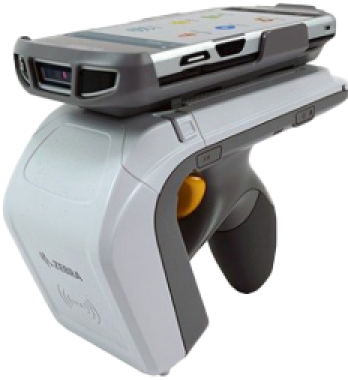
read data with in an up-to-20-feet range and can near-simultaneously scan multiple tags, but they lack accuracy compared to barcodes. They’re the perfect fit for large-scale tasks such as warehouse management.

As their unmet requirements for IMS functionality kept snowballing, the client faced a dilemma, whether to pour money into adding new features to their current system or invest in a custom solution.

To escape the vendor lock, they decided to opt for their own feature-rich software with unlimited scalability potential.

Solution

The client needed a device-agnostic solution that wouldn’t cost a fortune. Therefore, we went with the idea of a cross-platform app. As other client’s applications were already written in React Native, there were no doubts about the tech stack for the inventory software.

What challenges did our dedicated team face and overcome while crafting a powerful app that fully covered the client’s inventory-related workflows?

  1. Stabilizing third-party libraries
    and writing custom ones

Robust libraries are the backbone of smooth integration with barcode and RFID scanners. There are plenty of ready-made options.; However, you should have a seasoned development team able to spot the relevant ones, and write custom libraries to cover your specific inventory functionality.

To provide the client with a stable and easy-to-maintain solution, we followed four key principles when working with the libraries:

  • Avoiding a cumbersome collection of libraries

The more libraries you have, the more challenging it is to keep them up to date, resolve conflicts between them, and manage a diverse set of dependencies.

  • Preventing solution architecture complexity

Tight coupling of the software modules and dependency conflicts contribute to crafting a jerry-rigged solution with poor performance and excessive memory consumption.

  • Stabilizing third-party libraries

Ready-made options can bring critical bugs to the production code, or they may join the ranks of neglected libraries that are no longer supported. In both cases, fine-tuning is a must.

  • Striking the balance between third-party and custom libraries

Writing custom libraries takes way more time than calibrating the ready-made ones, so for the sake of development speed, it’s better to build them only for highly specific functionality not covered by the existing elements.

With the aforementioned points in mind, our team selected suitable open-source libraries for barcode scanners:

  • Capture JS for Socket Mobile
  • React Native BLE (react-native-ble-plx) for Netum

Capture JS is a stable library with detailed documentation, so it was ready to use right away, while React Native BLE was in beta and, therefore, required debugging and stabilization. Since open-source libraries provide full access to their code, *instinctools’ developers fixed it, honing performance and minimizing the overall risk of a third-party element adoption.

Meanwhile, integration with RFID scanners requires custom native libraries. For this purpose, our team utilized React Native Bridge, which works as a communication layer between native modules in Java and the client’s app in React Native with JavaScript code.

  1. Incorporating tabletop RFID readers into the overall hardware ecosystem

Alongside handheld scanners, the client also has tabletop RFID readers. Those devices were much older than the rest of the client’s warehouse and in-store hardware.

Given their age, the tabletop RFID readers:

  • Lacked basic documentation
  • Worked with byte messages
  • Ran on a .NET library, while the rest of the client’s hardware used SDK libraries

The only artifact the client had for these readers was a configuration program. Due to this, *instinctools software engineers had to:

  • Decompile the configuration program
  • Investigate the code to understand the requests the program uses for communication with tabletop devices
  • Configure the same requests in JavaScript

These actions helped standardize the tech stack for all the client’s scanners.

  1. Fighting for the app’s speed

The client wanted to seize RFID scanners’ ability to read large amounts of data and accelerate tag processing. The previous software could handle 300 tags/sec, while their RFID scanners could read 600 tags/sec. Given 15,000+ tagged items in each of the 24 eyewear boutiques across France and Belgium, the client wanted to leverage the scanners’ full capacity.

*Instinctools’ team selected asynchronous caching with scheduled cache refresh to scan the maximum number of tags per second without data streaming hiccups, rendering lags, and other performance glitches. Here’s how it works:

Thanks to using the native Java cache, the app can seamlessly handle 600 elements per second, which is twice the capacity of the client’s previous solution.

Besides doubling tag scanning speed, we’ve accelerated the tag validation process. Our team tripled the speed of data reconciliation between the back end and brick-and-mortar stores by taking advantage of native Java code.

  1. Providing integration with RFID printers

The client decided to take the enhancement of their hardware ecosystem a step further and broaden it with RFID printers. This decision allowed the company to achieve independence from the suppliers of RFID tags and save on printing costs in the long run.

To ensure everything runs smoothly on the tech side, we designed the inventory app that could integrate seamlessly with various RFID printers, from Zebra and SATO to Toshiba, to name a few. That way, the client wasn’t limited in inventory equipment options and could print RFID tags entirely in-house.

  1. Achieving inventory transparency with custom dashboards

Before cooperating with *instinctools, the client didn’t have any dashboards to track inventory levels and, therefore, lacked transparency and traceability of the relevant processes.

Ensuring data tells a clear story is one of our areas of expertise, so the dedicated team bolstered the app’s functionality with a data visualization feature.

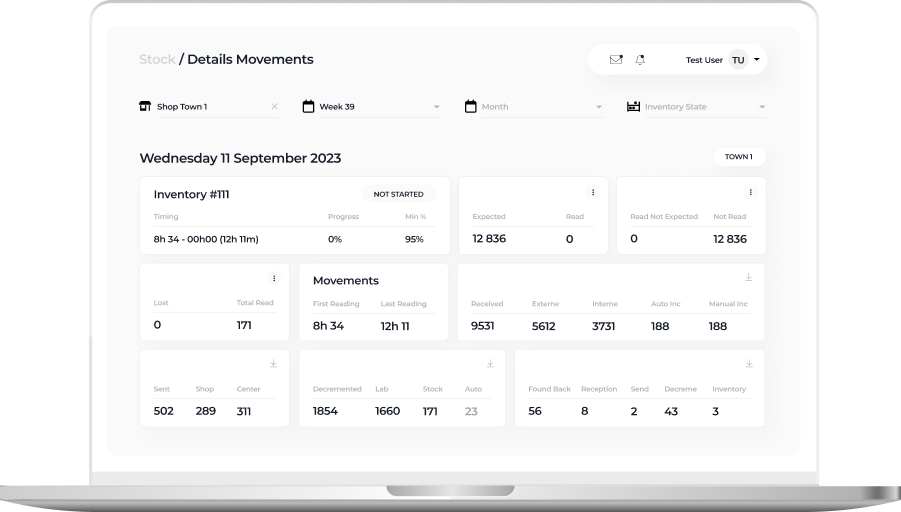
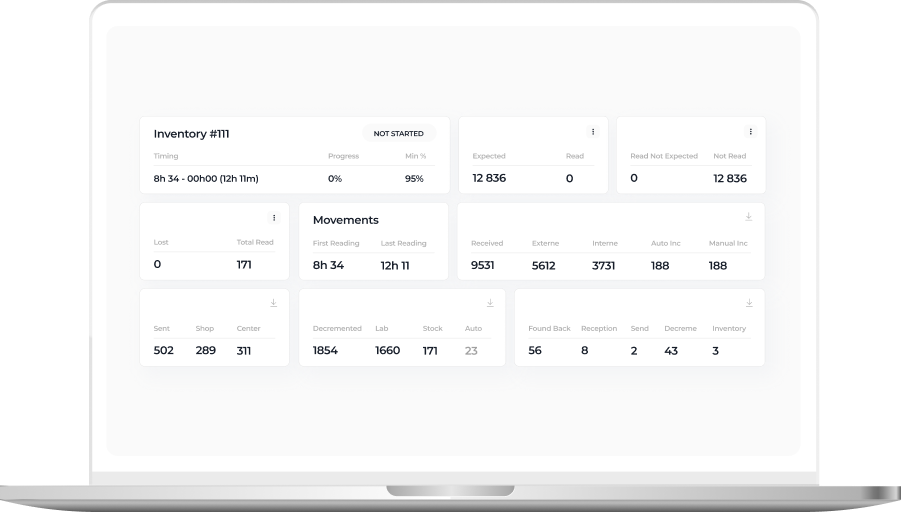
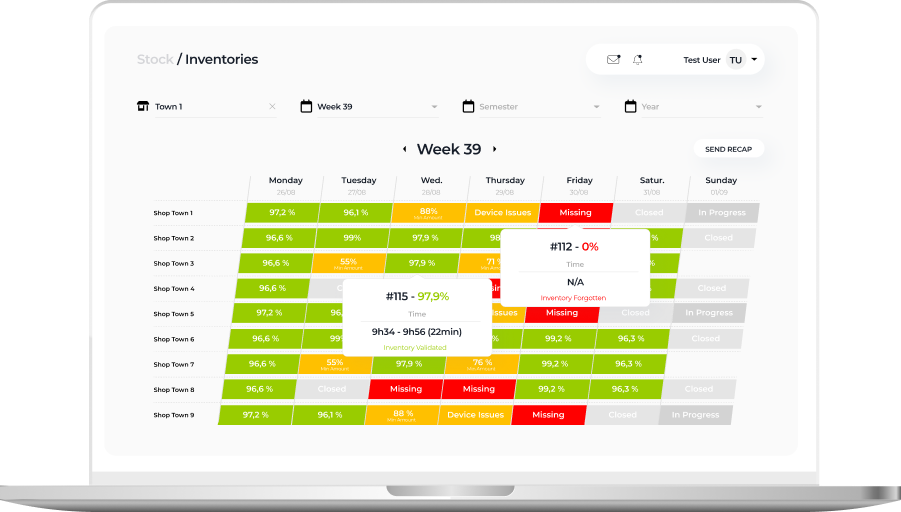
Detailed view of a daily inventory state within a particular eyewear shop

On this tab, in-store admins can check the status of inventories conducted in their store:

  • In progress
  • Closed
  • Device issues
  • Validated
  • Missing

The staff can also see the number of expected, received, lost, and found back items, and inventory time.

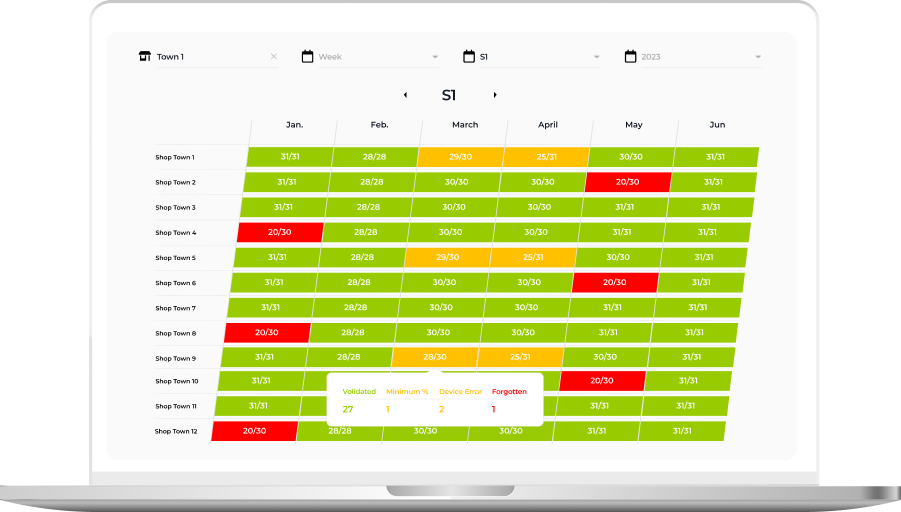
Week or Semester view with inventory state over a longer period

This tab provides higher-level information about inventory status in weeks and months. Thanks to intuitive UI with color-coded table cells, it’s easy to spot inventories calling for detailed analysis:

  • Successful inventories with more than 95% of items scanned and validated by the system are green
  • Processes with device issues are orange
  • Procedures with unidentified items are red
  • Inventory-free days are gray

These custom dashboards provided the client with much-coveted traceability of inventory processes and empowered them to uncover and nip alarming issues in the bud.

Business value

Before

  • Overpriced inventory software under the vendor lock-in
  • Tabletop RFID readers run on legacy software
  • Inability to use the full capacity of RFID readers
  • Low tag validation speed
  • Lack of visibility into the inventory flow

After

  • The budget-friendly and flexible app is fully tailored to the client’s manufacturing and inventory workflows
  • Standardized and easy-to-maintain tech stack
  • Boosted RFID scanners’ reading capacity from 300 to 600 tags per second
  • x3 tag validation speed
  • Full transparency and traceability of inventory-related processes thanks to custom dashboards

Client’s testimonial

Here’s how the client’s product manager evaluates the outcomes of collaboration with *instinctools:

IOS Application For Online Ticket Sale in the US

IOS Application For Online Ticket Sale in the US

How building a mobile app for ticket sales allowed the US retail company to increase its user base by 56%.

Challenge

The task was to create a mobile application for ticket sales. The challenge of this project was to develop a graphic imaging of a map and a scheme of a stadium or hall to give a spectator a chance to select the desired seat. In addition to this, the task was complicated by the need to fit a large amount of information in graphical form on the small screen of mobile devices.

Solution

Our Xamarin developers created a mobile application for iOS devices. The complexity problem was solved by using SvgKit library, which made the task a little easier and accelerated the development process. This solution also made it possible to develop the application compatible with iPhone, iPad, and iPod touch

Key features

With this online marketplace you can:

See every ticket available in your price range

Make an offer and get an instant answer

See the best deals in the building, due to our interactive maps

Spend less, go out more: the customers save an average of 33%

Get the best seats for the greatest events at unpublished prices due to close cooperation of the platform with the biggest names in sports and entertainment

Buy tickets days, weeks, even months in advance

Never miss a great event: get alerts about upcoming live events within your range of interests

Technologies Used

Presentation Platform For a World-Leading Chemicals Manufacturer

Presentation Platform For a World-Leading Chemicals Manufacturer

How crafting a mobile app for multitouch devices allowed a leading specialty chemicals corporation to provide their clients with full transparency in the company’s offerings in the easy-to-grasp visual format.

Challenge

It was required to create a presentation platform for launch of Evonik group of companies to IPO. The platform must represent the company in vivid and dynamic form using multitouch devices.

Solution

The platform consisting of several components has been developed:

  • the application for editing, storage and distribution of presentation data;
  • the application for iPad for viewing infographic, images, video of files and other data;
  • the application for Polytouch tables for information viewing.

The solution has impressive dynamic UI which widely uses possibilities of multitouch devices.

Technologies

Cocoa Touch API,
UIKit framework
NET 4.0, WPF
Eclipse RAP
Java
HTML5

Healthcare Management System (HIPAA compliant)

Healthcare Management System (HIPAA compliant)

How transforming HMS’s MVP into a full-featured SaaS solution allowed a US company to automate 86% of manual processes, create monthly reports in a click, simplify HIPAA compliance checks, and streamline calculating NHSN reporting metrics while wiping out the possibility of a human error.

About the project

The customer is a U.S. based early-stage healthcare startup established at the beginning of 2016. Their main goal is to help healthcare organizations simplify and automate occupational healthcare management. The founders have years of experience working with large hospitals and healthcare systems.

They discovered a better way of getting rid of manual processes, streamlining data collection for immunizations, fitness tests, TB tests, and quickly rolling out reports for internal and external use.

Challenge

The main challenge for *instinctools was to transform the MVP into a full-featured product – a robust and easy-to-use tool that would efficiently reduce the administrative burden and workload.

Solution

In close communication with the customer, *instinctools team offered the following solutions to assist with achieving the company’s main goal:

  • Enterprise Hierarchical Adjustability
  • Full Configurability
  • All-round Monitoring
  • Cloud-based web + backend
  • Modern Technologies

Maximum Data Security:

  • Multi-tenancy
  • Isolated data
  • Encryption
  • Leakage protection
  • Role-based data access

The project is still in the development stage, but we’ve already successfully delivered many important features.

Result

The customer is pleased with the efficiency of communications and the quality of work delivered, and plans to take cooperation to the next level by entrusting more work to *instinctools in the coming months.

Key features

Full enterprise SaaS solution:

Monitors compliance at the enterprise level

Tracks and reports staff immunization requirements, tests, and health events

Standardizes immunization requirements by job code and title

Drills down immunization status from department to individual in one click

Flags compliance gaps and upcoming requirements

Automatically notifies staff when immunizations are about to expire

Complies with HIPAA

Integrates with existing HR systems to eliminate duplicate entries and automatically deactivate associates

Creates monthly reports instantaneously

Easily calculates NHSN reporting metrics that can be easily cut and pasted directly into reports

Technologies

ASP.NET
Web API, MVC
MS SQL
Entity Framework
Bootstrap
Angular JS
Azure
Anna Vasilevskaya
AI modified real photo
Anna Vasilevskaya
Account Executive

Get in touch

Drop us a line about your project at
[email protected] or via the contact
form below, and we will contact you soon.