3D Room Scanning and AR Visualization

3D Room Scanning and AR Visualization Solution

How a luxury furniture retailer enhanced both the online and offline shopping experience by letting customers preview furniture in their own rooms, capture precise measurements automatically, and explore products in immersive 3D showrooms, ultimately raising the customer satisfaction score by 25%.

Business challenge

When it comes to luxury shopping, customers expect more than polished web pages and more than white-glove service in-store. That is the entry ticket. When every serious competitor delivers excellence by default, the real challenge is differentiation.

One lever not every luxury brand has mastered is innovation through technology. Applied correctly, they can strengthen both digital and physical customer touchpoints.

A high-end furniture retailer for whom we’ve already built a tailored ecommerce ecosystem, chose to lean into that opportunity.

The goals were to:

  1. Help customers visualize furniture in their own homes, so they can understand how pieces will fit and look in real spaces.
  2. Recommend optimal furniture dimensions for each room using an intelligent matching algorithm, reducing uncertainty about scale and fit.
  3. Handle cases where no catalog item fits perfectly by suggesting safe and feasible size customizations of existing models.
  4. Enable 3D exploration in showrooms for visitors to experience items that cannot be physically displayed due to space constraints.

To meet those objectives, Instinctools’ dedicated team was brought in to design a suite of innovative solutions that could remove friction from both online and in-store shopping experiences.

Solution

Our team designed and implemented the scanning app, matching algorithm, and holographic web application. Each solution was built to integrate seamlessly with the client’s existing workflows and data structures, ensuring a smooth end-to-end customer journey from scanning a room to selecting the right configuration and completing a purchase.

  1. Building a mobile app for room scanning 

We built a mobile app that reconstructs a room as a dimensionally accurate 3D model from LiDAR depth data. Computer vision algorithms detect structural elements such as walls, doors, and windows, while AR technology is used to visualize the reconstructed space in real time.

Once a user scans the room, the app analyzes the available space and generates optimal furniture recommendations from a catalog. Users can further customize items to match their personal preferences. The matching algorithm ensures that every suggested piece is compatible with the room’s exact dimensions, avoiding guesswork or manual measurements.

To keep the experience truly frictionless, our team integrated the app with the client’s Odoo-based ecommerce ecosystem so scan results and calculated dimensions flow directly into it. 

We’ve enabled real-time product selection and faster purchasing through creating a continuous path:
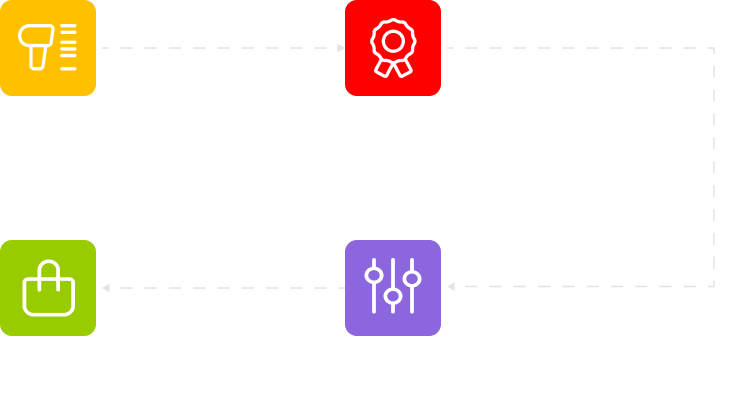
A flowchart with four colored boxes: yellow Scan with a barcode icon, red Recommendation with a ribbon icon, green Checkout with a shopping bag icon, and purple Configuration with a sliders icon. Text and icons are on a light gray background.

By combining AR visualization, precise spatial analysis, and automated product matching, the app delivers a frictionless experience for users and a data-driven tool for the retailer, enhancing both engagement and conversion.
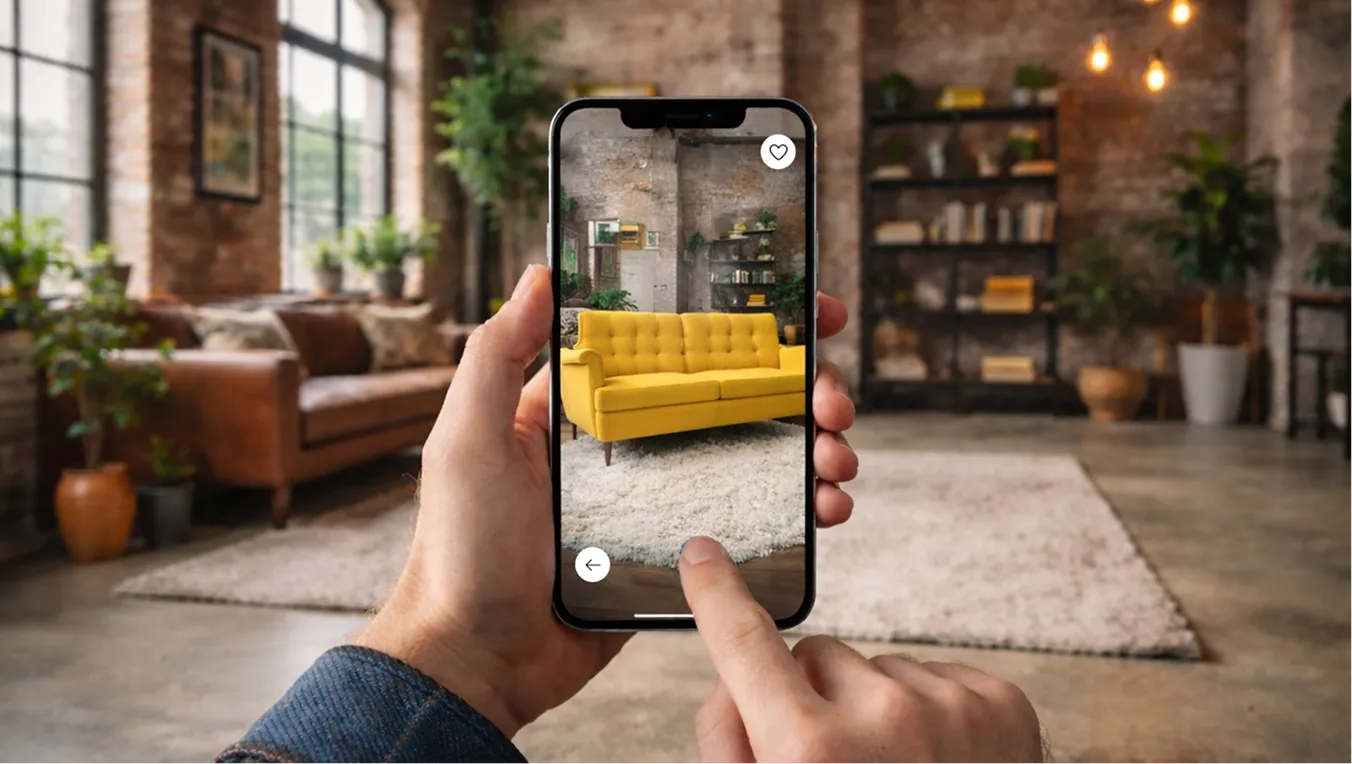
A person holds a smartphone, using an app to preview a yellow sofa in a living room. The real room has brown leather furniture, shelves, plants, and large windows. The phone screen shows the yellow sofa on a rug in the same space.

Calculating optimal furniture dimensions from scanned spatial data to suggest in-stock items or custom-sized/MTO options

At the core of the room scanning app is a purpose-built matching engine designed to bridge the gap between a customer’s space and their desired furniture. The system starts with processing the room’s dimensions, captured through a 3D scanning feature.

The algorithm’s logic is built around dimensional compatibility. For each furniture category, such as sofas, tables, or armchairs, the system calculates an optimal size range based on the  room’s proportions and available space. It then filters the catalogue accordingly, showing only the items that fall within those parameters, so customers see options that actually fit rather than a generic product grid.

Where it gets especially valuable is in situations when no standard catalog item matches the room. In these cases, the algorithm identifies the customer’s preferred model and proposes a feasible, custom-sized option, suggesting adjusted dimensions to achieve a perfect fit and preserve design integrity.

From concept to client-ready solution

This feature started as a client’s Proof of Concept for how a size-aware recommendation engine should work. Using it as a blueprint, our backend developer delivered the first working version. After the demo, the client requested several modifications and provided additional requirements to align the logic more closely with their specific workflow. Following the update, the client’s subsequent testing confirmed that the final implementation matched their expectations perfectly, validating both the concept and its execution.

  1. Enabling immersive in-store product showcase through a holographic application

To make the showroom visit as premium and memorable as the products themselves, we developed an integrated solution that pairs a custom web application with Holobox holographic displays. The client acquired two Holobox units from Holoconnects – specialized hardware that uses a strategically positioned high-definition screen to create the illusion of a floating, three-dimensional image from 2D content, delivering a striking ‘hologram-like’ effect.

Technology foundation

Holobox runs on a proprietary operating system that boots directly into a full-screen Chromium instance. This setup effectively turns the entire holographic display into a web-rendering engine: any content loaded in the browser is instantly broadcast as a hologram.

We built a dedicated web application that serves as the brain of this experience. The app is designed to respond to user interactions in real-time, creating a seamless bridge between a handheld device and the large-format display.

Interactive workflow

In-store, customers can explore pieces that aren’t physically on the floor due to space constraints. For example, they can rotate a sofa, switch colors/finishes, and evaluate the look and presence of the product before committing.

The user journey is simple but powerful:

  1. A customer approaches the Holobox in the store and picks up a paired tablet.
  2. The web application loads on the tablet, presenting a browsable product catalog.
  3. As the user scrolls or selects an item on the tablet, the app transmits a signal to Holobox.
  4. The Chromium browser on the Holobox  updates instantly, displaying a high-resolution, holographic visualization of the selected product.

From a technical standpoint, this required implementing a robust, low-latency communication channel (using WebSockets) to ensure the holographic display feels like a direct extension of the tablet. The result is an immersive, interactive experience which also helps customers make more informed decisions.

Before

  • Inability to picture furniture at home
  • Manual guesswork about furniture fit
  • Physical showroom space limitations

After

  • Realistic AR visualizations for confident decisions
  • Intelligent matching algorithm calculating optimal size ranges per room and proposing safe customization when no SKU fits perfectly
  • Immersive holographic product display via Holobox hardware, powered by a dedicated web app

Business value

  • Premier buying experience offline and online
  • +20% online sales growth
  • +25% CSAT increase
Taxi App For a Transportation Company

Mobile Taxi Booking App For a Transportation Company

How launching a feature-packed, AI-driven mobile taxi app put an Italian transportation company in the driver’s seat of their local market, with 78% of customer support requests resolved without human intervention and operational costs plummeting 24% below the industry average.

Industry:
Taxi

Mobile App Development

Software Product Development

UX and Design

AI Development

Business challenge

Uber, Lyft, Bolt, Cabify, Gett, DiDi, etc. — the market for mobile taxi booking apps is competitive. Still, new solutions keep emerging in response to the upsurge in the number of taxi app users. 

But how do you make your software stand out from the crowd when the market seems littered with a plethora of similar apps? You have to put a premium on user-friendliness and engaging customer experience.

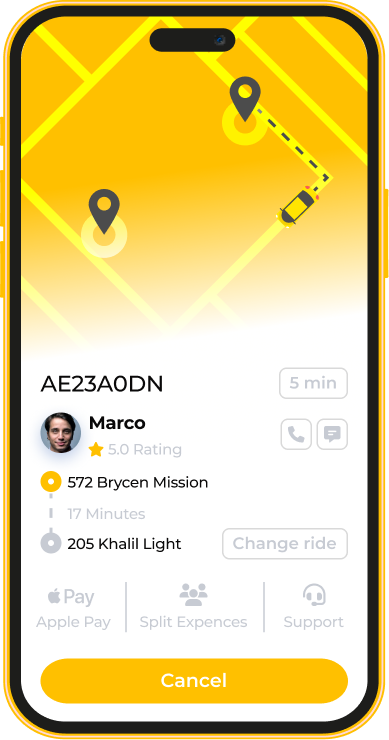
Our client – an Italian transportation company – decided to win local customers with a taxi booking app that enables riders to choose a cab or a cargo van on the one hand and drivers to receive requests from customers on their mobile devices on the other hand.

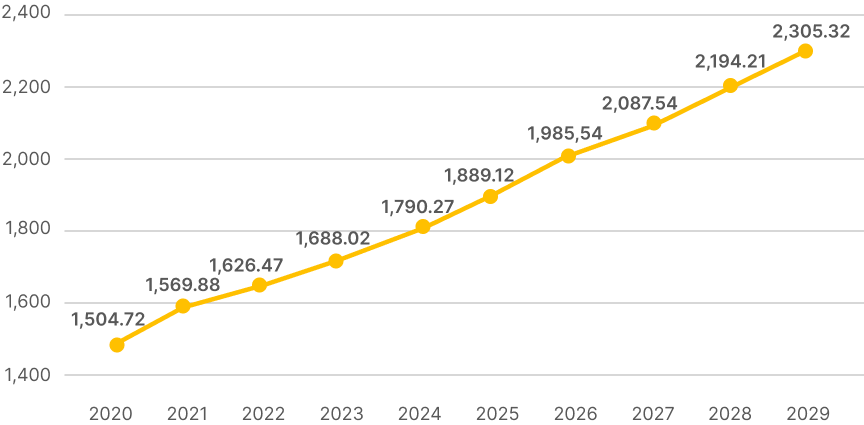
Number of users of mobile taxi apps worldwide from 2020 to 2029 (in millions)

Source: Statista

When the client approached us, they had a clear vision for their app. It needed to: 

  • Cover all the must-have features relevant for this type of software, such as demand-driven fare calculation, real-time driver and customer location tracking, and a solid rating system
  • Provide users with sought-after features, such as customizable ride options (child seat, pet-friendly drivers, and others)
  • Have a sleek, intuitive, and consistent interface

They also set out to transform what most taxi apps get wrong: clunky, rule-based chatbots, which are of not much help for users when it comes to customer support. To break the mold, it was decided to provide a smarter, more human-like experience with conversational and generative AI.

The client turned to *instinctools for a team of mobile developers and AI engineers. Our experts got to work, building a performant, high-ROI, and easy-to-maintain solution that would raise the bar on what a taxi app can be.

Solution

With GPS access and smartphone hardware integration being pivotal for taxi apps, we crafted native iOS and Android apps, bypassing the limitations of cross-platform development. This choice also allowed us to stay within platform-specific design, aligning with Human Interface Guidelines for iOS and Material Design principles for Android — ensuring a familiar and intuitive experience for every user.

  1. Deciding on the app’s functionality and crafting wireframes

Given high competition in today’s mobile taxi-booking market, the client opted for a bold strategy: investing upfront to perfect the customer experience and deliver a full-scale product that could truly stand out.

Sticking to *instinctools’ tried-and-true product design framework, our business analyst, product designer, and solution architect collaborated from the onset to ensure first-rate customer experience and speed up the development process.

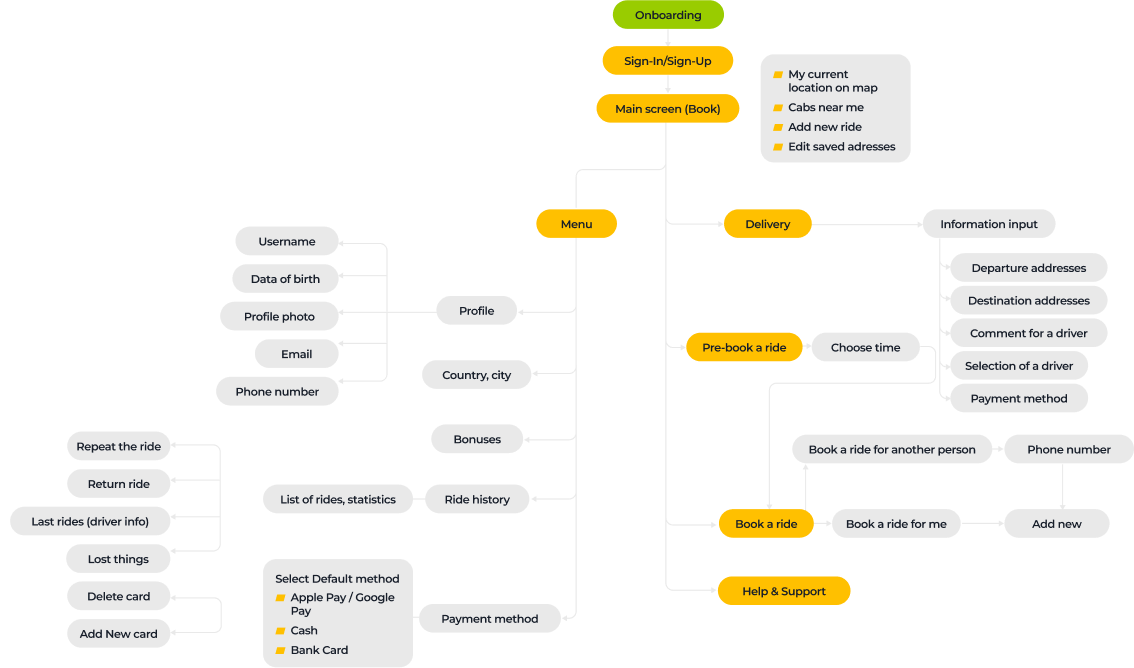
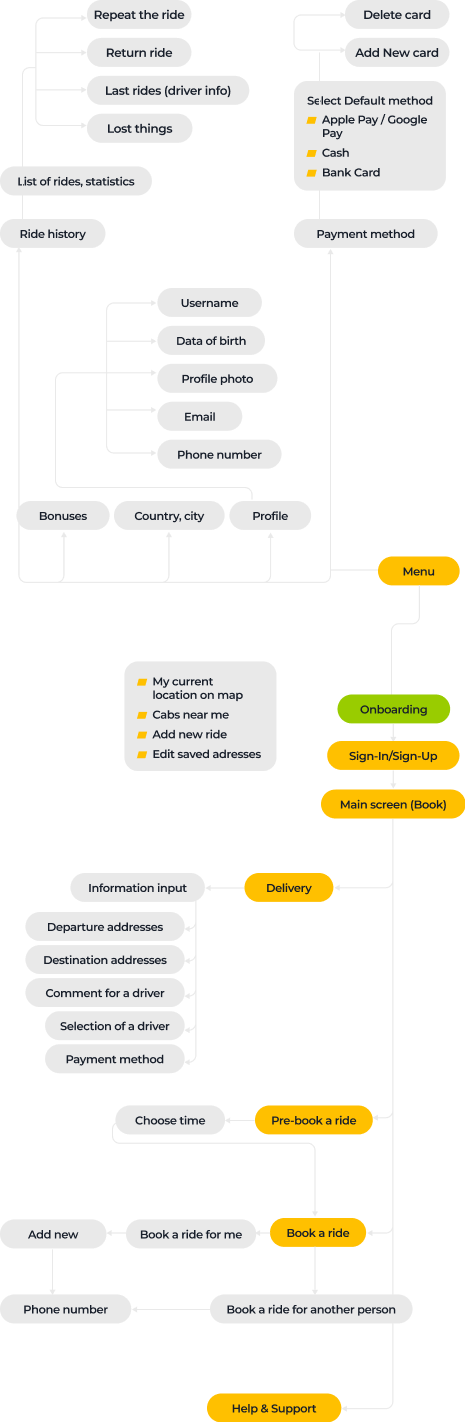
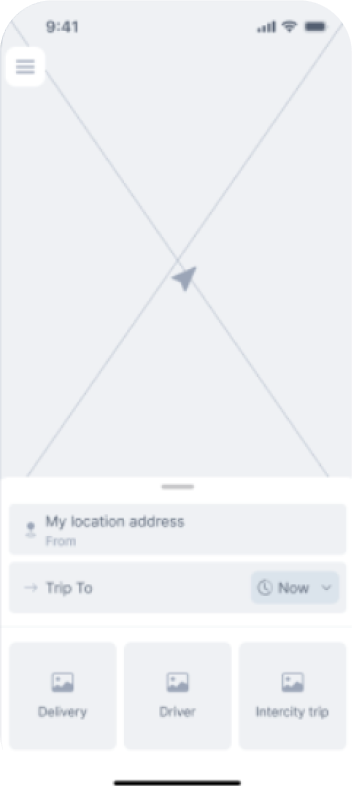
After gathering client requirements for app functionality and outlining its information architecture, we transformed the product vision into clear, actionable wireframes.

Both drivers and riders have been provided with the following shared features:

  • Registration via Google or Apple accounts, followed by phone verification for higher security
  • Profile management for easy updates and personalization
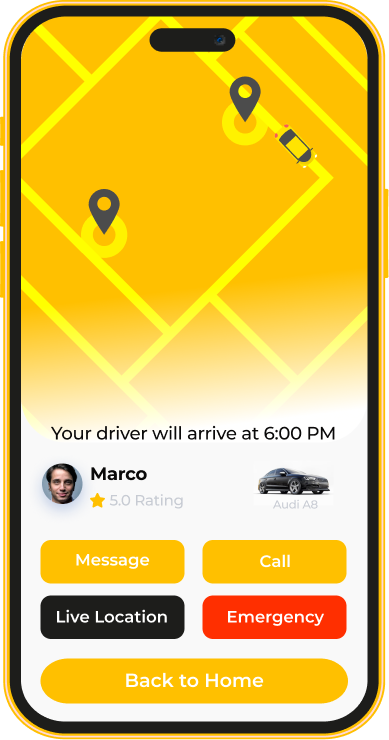
  • Real-time location tracking
  • In-app chat for seamless communication when needed

An additional set of features for riders includes:

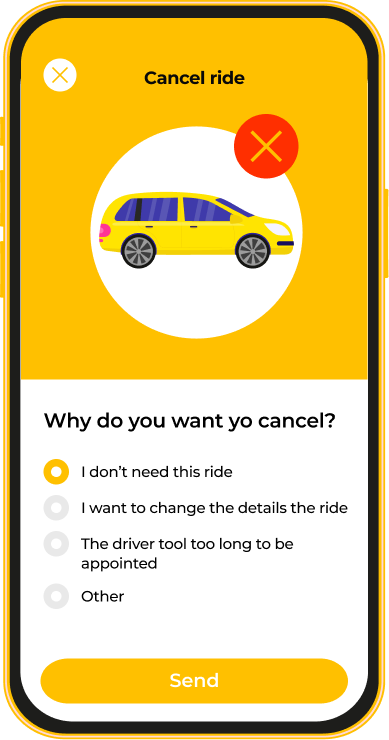
  • Ride scheduling, booking, canceling
  • Options for ride customization, such as child seats, pet-friendly cars, XL vehicles, electric cars, and others
  • Saving favorite locations like home or office
  • A driver rating and review system
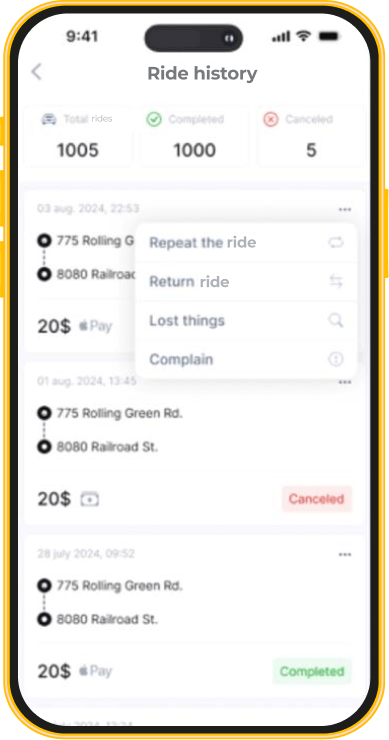
  • Ride history
  • A dynamic discount program
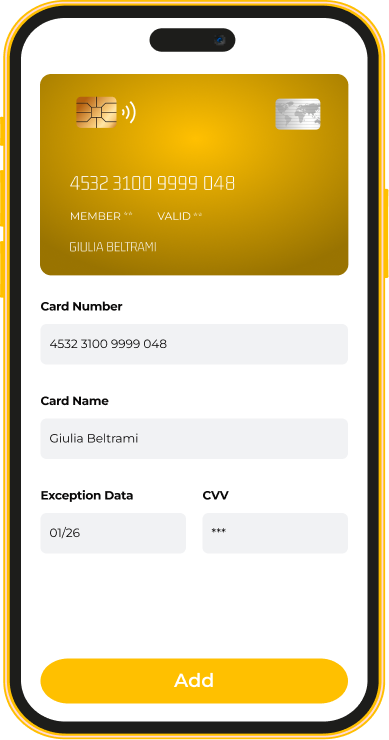
  • Multiple payment methods, including cards, Apple and Google Pay, or cash
  • Push notifications and alerts
  1. Transforming wireframes into a simple and user-friendly interface

Moving forward with product design, our team got to work on high-fidelity clickable prototypes. Most ideas represented in the wireframes made it through to the final app version without a hitch.

That doesn’t mean though we were locked into a strict plan. Throughout the project, our design team had plenty of “aha” moments” and pitched them to a client. For example, we recommended adding emergency assistance as a must-have feature. The client was all in. Now, with just one tap, users can send an instant alert with their location to local emergency services, which is a big win for passenger safety and an easy way to build trust and loyalty.

We also reimagined the functionality of a “Ride history” feature. In a released app, users can easily repeat a past ride in one click.

  1. Transforming customer support with an AI-driven chatbot

Rudimentary, rule-based chatbots with pre-written responses feel more like talking to a wall than getting real help, leaving customers frustrated and craving human intervention. No wonder 86% of users prefer chatting with human agents.

But we knew it didn’t have to be that way. With natural language understanding and processing capabilities paired with generative AI to analyze customer queries and answer them, we could flip the script. By empowering the chatbot to understand and respond like a pro, our AI team helped cut down human agent sessions, slash support costs, and still deliver top-notch communication.

Choosing an LLM engine for the client’s conversational agent, we opted for an open-source Llama 2 that is free for commercial use. After connecting it to the in-app chatbot through API, our AI engineers trained it on the client’s customer support manuals to cover the top three common scenarios:

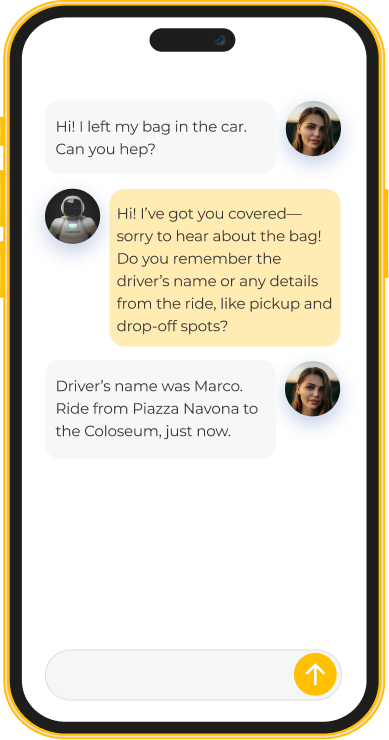
  • Belongings forgotten in a car and ways to retrieve them
  • Billing issues like being mischarged
  • Ride cancellations and associated problems

We accounted for over 100 variations of how users might phrase their requests, even with typos and misprints. Such a meticulous approach ensured highly accurate intent recognition – 97%.

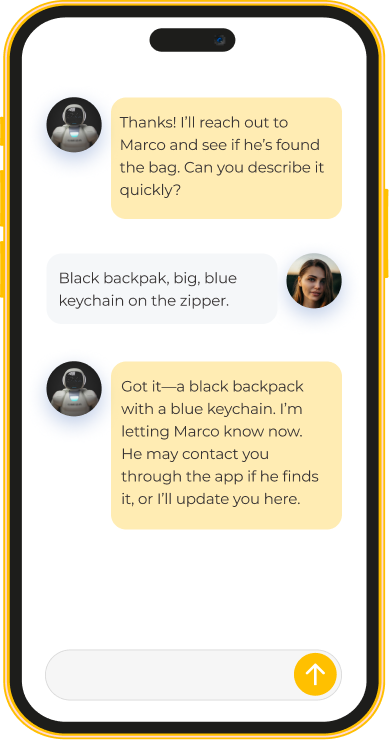
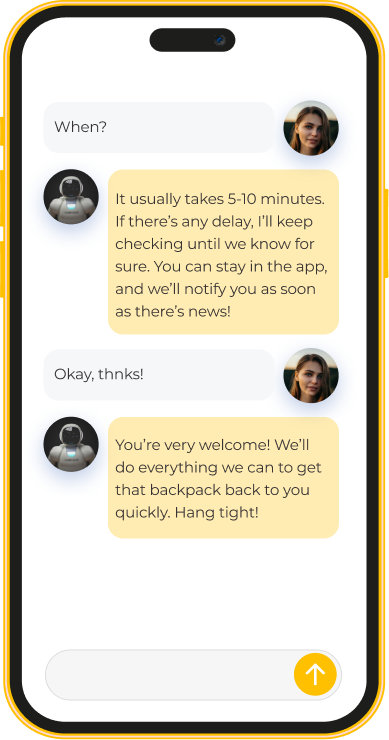
Here’s an example of a conversation with Giulia, who forgot her things in a taxi and needed help. The chatbot easily understands the user’s queries despite some misprints in her input and provides clear, actionable guidance.

A month after the app rollout, the chatbot covered 51% of support sessions without human intervention. After training the bot on less widespread user queries, we hit a new mark – 78% of customer support sessions were resolved without involving human agents.

Client’s testimonial

Here’s how the client’s VP of Engineering describes *instinctools’ contribution to the project:

Business value

  • An outstanding user-friendly and feature-rich solution in a market of generic mobile taxi booking apps
  • 97% accuracy in recognizing customer intent thanks to AI-powered chatbot for customer support
  • Operational costs are 24% below the industry average due to intelligent automation
  • 78% of customer support requests are resolved without human intervention
  • 4,8 ⭐ rating on the App Store and Google Play with frequent mentions of a high level of personalization

Custom Inventory Management System

Rewiring Inventory For an Eyewear Manufacturer
And Retailer

How replacing an overpriced SaaS inventory system with a custom, feature-rich IMS enabled a French eyewear manufacturer and retailer to double the RFID scanning speed and accelerate tag verification x3.

Industry:
Ecommerce

Enterprise Automation

Software Product Development

Data Visualization

Business challenge

Retail companies know better than anyone that inventory is a part that can make or break your business’s success. Understocking at critical times and locations can lead to dissatisfied customers. Meanwhile, maintaining a large stockpile brings its own challenges, including storage and insurance costs, the hazards of spoilage, theft, and damage. The ability to strike the balance between having ‘too much’ and ‘not enough’ hinges on inventory management. That’s why it’s critical to take care of its accuracy, transparency, and sustainability.

However, despite the abundance and diversity of ready-made inventory products, finding the one that fits your budget and completely fits your needs is still tricky. For companies that strive for flexibility and full control over the inventory management system (IMS), custom software development is more likely to be the best bet.

Getting inventory in order was the ultimate goal of our client – a French eyewear manufacturer and retailer. It was their fourth project with *instinctools – our team had previously developed several applications for the client’s ecommerce ecosystem.

Their inventory processes were already automated and relied on barcode and RFID scanners, but the SaaS software the client used was costly and feature-limited, failing to cover the company’s operational needs.

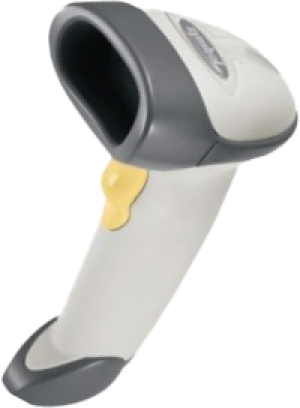
Barcode scanners

are designed for line-of-sight scanning within one to two feet; they’re a go-to option for individual product locating and tracking.

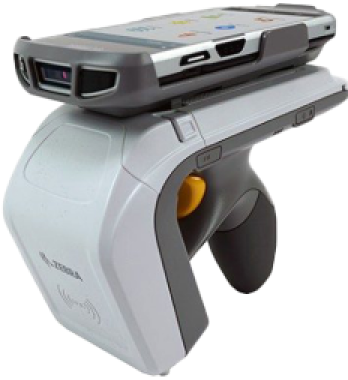
Radio frequency identification (RFID) scanners

read data with in an up-to-20-feet range and can near-simultaneously scan multiple tags, but they lack accuracy compared to barcodes. They’re the perfect fit for large-scale tasks such as warehouse management.

As their unmet requirements for IMS functionality kept snowballing, the client faced a dilemma, whether to pour money into adding new features to their current system or invest in a custom solution.

To escape the vendor lock, they decided to opt for their own feature-rich software with unlimited scalability potential.

Solution

The client needed a device-agnostic solution that wouldn’t cost a fortune. Therefore, we went with the idea of a cross-platform app. As other client’s applications were already written in React Native, there were no doubts about the tech stack for the inventory software.

What challenges did our dedicated team face and overcome while crafting a powerful app that fully covered the client’s inventory-related workflows?

  1. Stabilizing third-party libraries
    and writing custom ones

Robust libraries are the backbone of smooth integration with barcode and RFID scanners. There are plenty of ready-made options.; However, you should have a seasoned development team able to spot the relevant ones, and write custom libraries to cover your specific inventory functionality.

To provide the client with a stable and easy-to-maintain solution, we followed four key principles when working with the libraries:

  • Avoiding a cumbersome collection of libraries

The more libraries you have, the more challenging it is to keep them up to date, resolve conflicts between them, and manage a diverse set of dependencies.

  • Preventing solution architecture complexity

Tight coupling of the software modules and dependency conflicts contribute to crafting a jerry-rigged solution with poor performance and excessive memory consumption.

  • Stabilizing third-party libraries

Ready-made options can bring critical bugs to the production code, or they may join the ranks of neglected libraries that are no longer supported. In both cases, fine-tuning is a must.

  • Striking the balance between third-party and custom libraries

Writing custom libraries takes way more time than calibrating the ready-made ones, so for the sake of development speed, it’s better to build them only for highly specific functionality not covered by the existing elements.

With the aforementioned points in mind, our team selected suitable open-source libraries for barcode scanners:

  • Capture JS for Socket Mobile
  • React Native BLE (react-native-ble-plx) for Netum

Capture JS is a stable library with detailed documentation, so it was ready to use right away, while React Native BLE was in beta and, therefore, required debugging and stabilization. Since open-source libraries provide full access to their code, *instinctools’ developers fixed it, honing performance and minimizing the overall risk of a third-party element adoption.

Meanwhile, integration with RFID scanners requires custom native libraries. For this purpose, our team utilized React Native Bridge, which works as a communication layer between native modules in Java and the client’s app in React Native with JavaScript code.

  1. Incorporating tabletop RFID readers into the overall hardware ecosystem

Alongside handheld scanners, the client also has tabletop RFID readers. Those devices were much older than the rest of the client’s warehouse and in-store hardware.

Given their age, the tabletop RFID readers:

  • Lacked basic documentation
  • Worked with byte messages
  • Ran on a .NET library, while the rest of the client’s hardware used SDK libraries

The only artifact the client had for these readers was a configuration program. Due to this, *instinctools software engineers had to:

  • Decompile the configuration program
  • Investigate the code to understand the requests the program uses for communication with tabletop devices
  • Configure the same requests in JavaScript

These actions helped standardize the tech stack for all the client’s scanners.

  1. Fighting for the app’s speed

The client wanted to seize RFID scanners’ ability to read large amounts of data and accelerate tag processing. The previous software could handle 300 tags/sec, while their RFID scanners could read 600 tags/sec. Given 15,000+ tagged items in each of the 24 eyewear boutiques across France and Belgium, the client wanted to leverage the scanners’ full capacity.

*Instinctools’ team selected asynchronous caching with scheduled cache refresh to scan the maximum number of tags per second without data streaming hiccups, rendering lags, and other performance glitches. Here’s how it works:

Thanks to using the native Java cache, the app can seamlessly handle 600 elements per second, which is twice the capacity of the client’s previous solution.

Besides doubling tag scanning speed, we’ve accelerated the tag validation process. Our team tripled the speed of data reconciliation between the back end and brick-and-mortar stores by taking advantage of native Java code.

  1. Providing integration with RFID printers

The client decided to take the enhancement of their hardware ecosystem a step further and broaden it with RFID printers. This decision allowed the company to achieve independence from the suppliers of RFID tags and save on printing costs in the long run.

To ensure everything runs smoothly on the tech side, we designed the inventory app that could integrate seamlessly with various RFID printers, from Zebra and SATO to Toshiba, to name a few. That way, the client wasn’t limited in inventory equipment options and could print RFID tags entirely in-house.

  1. Achieving inventory transparency with custom dashboards

Before cooperating with *instinctools, the client didn’t have any dashboards to track inventory levels and, therefore, lacked transparency and traceability of the relevant processes.

Ensuring data tells a clear story is one of our areas of expertise, so the dedicated team bolstered the app’s functionality with a data visualization feature.

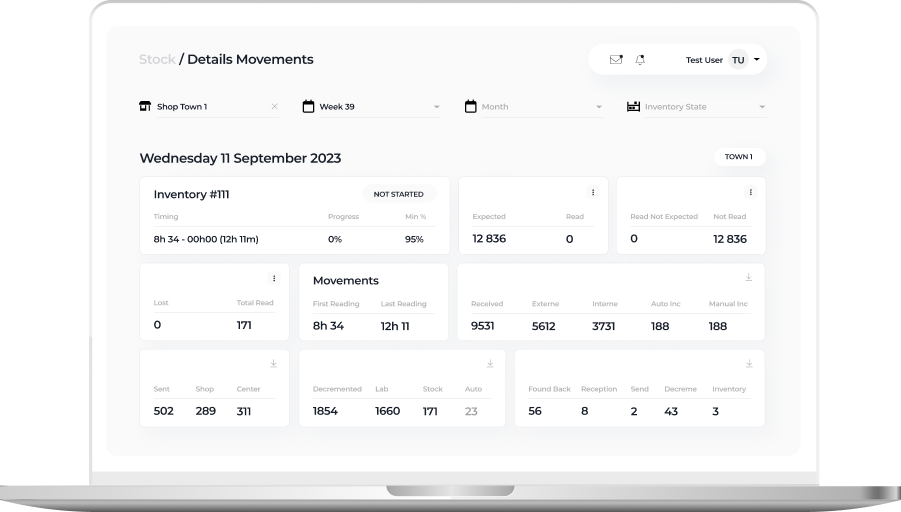
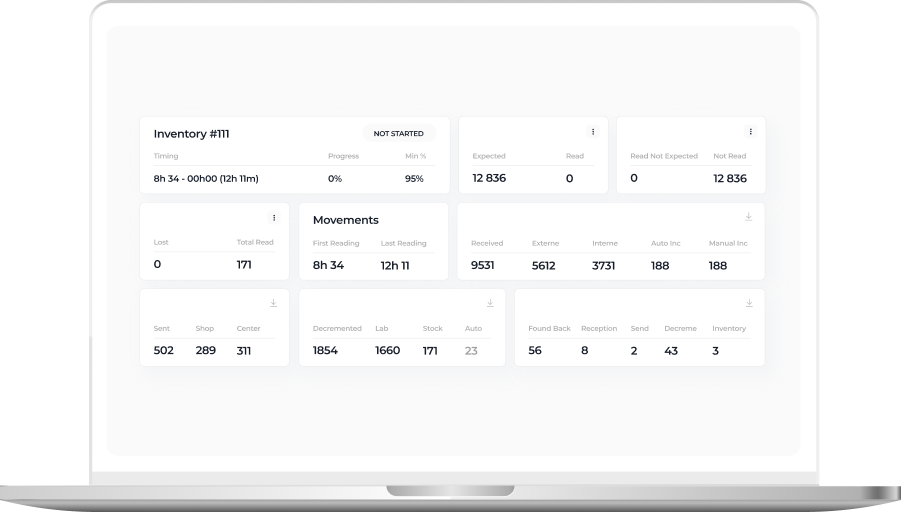
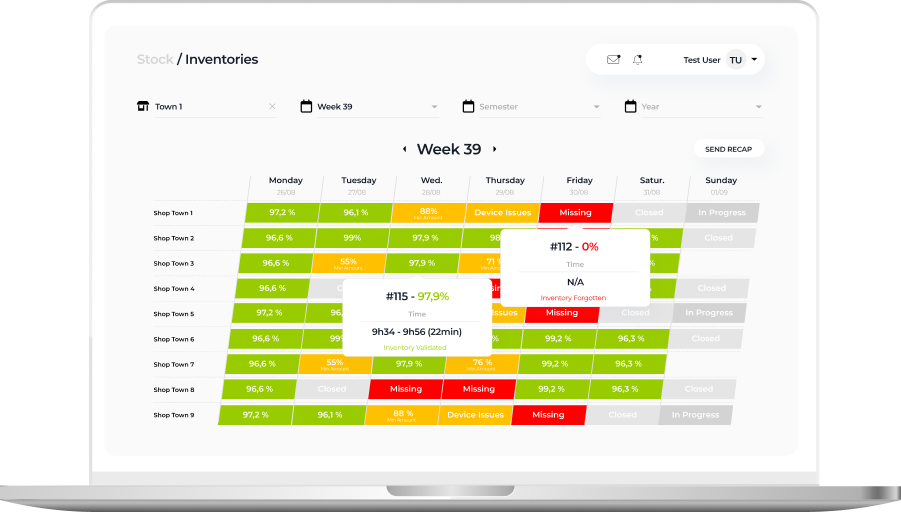
Detailed view of a daily inventory state within a particular eyewear shop

On this tab, in-store admins can check the status of inventories conducted in their store:

  • In progress
  • Closed
  • Device issues
  • Validated
  • Missing

The staff can also see the number of expected, received, lost, and found back items, and inventory time.

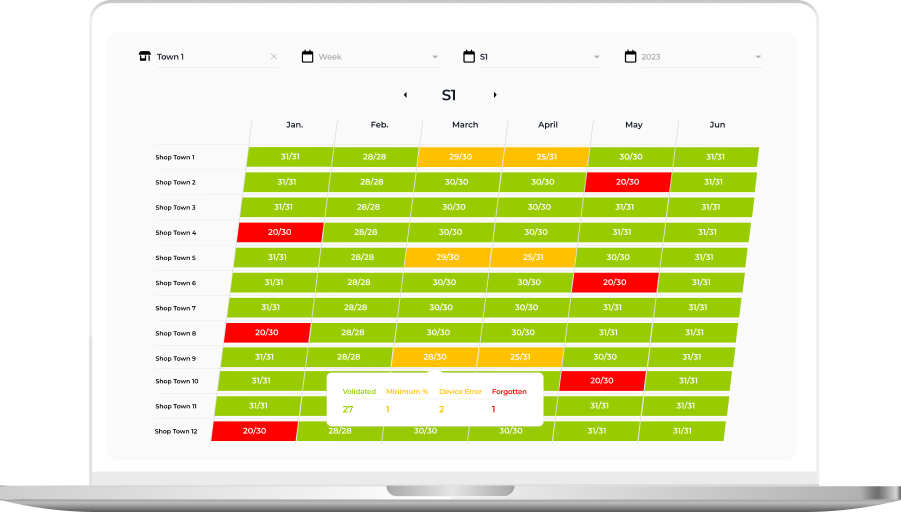
Week or Semester view with inventory state over a longer period

This tab provides higher-level information about inventory status in weeks and months. Thanks to intuitive UI with color-coded table cells, it’s easy to spot inventories calling for detailed analysis:

  • Successful inventories with more than 95% of items scanned and validated by the system are green
  • Processes with device issues are orange
  • Procedures with unidentified items are red
  • Inventory-free days are gray

These custom dashboards provided the client with much-coveted traceability of inventory processes and empowered them to uncover and nip alarming issues in the bud.

Business value

Before

  • Overpriced inventory software under the vendor lock-in
  • Tabletop RFID readers run on legacy software
  • Inability to use the full capacity of RFID readers
  • Low tag validation speed
  • Lack of visibility into the inventory flow

After

  • The budget-friendly and flexible app is fully tailored to the client’s manufacturing and inventory workflows
  • Standardized and easy-to-maintain tech stack
  • Boosted RFID scanners’ reading capacity from 300 to 600 tags per second
  • x3 tag validation speed
  • Full transparency and traceability of inventory-related processes thanks to custom dashboards

Client’s testimonial

Here’s how the client’s product manager evaluates the outcomes of collaboration with *instinctools:

Product Design For Intelligent Lighting

Two iridescent hands reaching toward each other against a white background.

Product Design For a World Class Leader In Intelligent Lighting

How replacing an outdated 924 touch panel with a brand-new digital lighting control in just three months helped a manufacturing company expand its market reach.

Badge with a border of stars reading: Verified reviews 100+.
CSI rating badge of 9.1/10 for 2025.
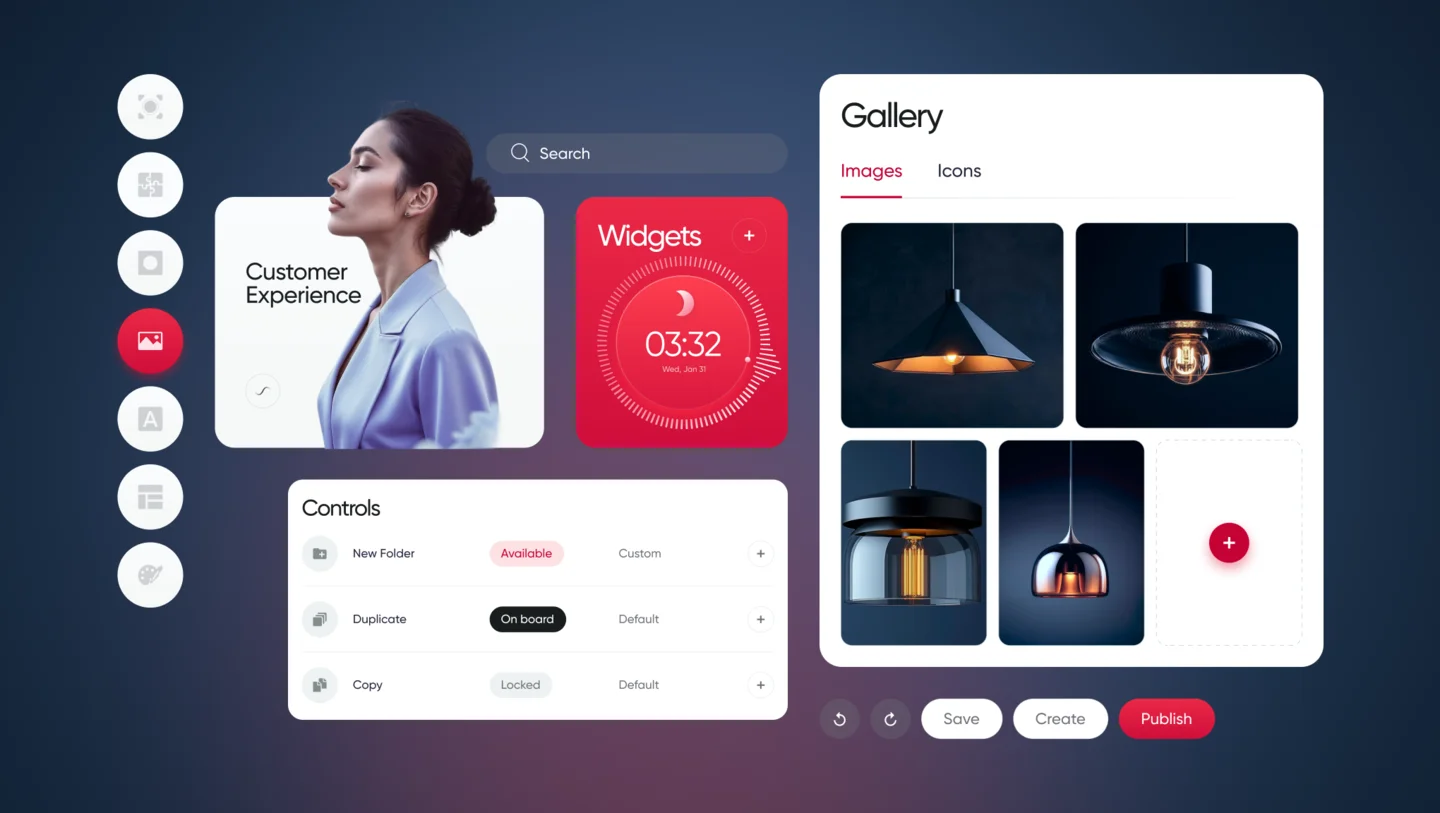
Dashboard interface showing a customer experience profile, widgets, and a photo gallery management panel.

Business
challenge

Being among the industry leaders doesn’t mean resting on your laurels is an option. On the contrary, it goes hand in hand with the necessity to keep looking for new paths and rapidly providing innovations to secure the top position. That’s why we were approached by Helvar — a company that crafts smart and sustainable environments with AI-powered energy-saving lighting control solutions.

They already had physical controllers for intelligent lighting with pre-configured and adjustable lighting scenes and software for lighting management in a particular room. Even with this, Helvar wanted to raise the bar higher and create a product that had never been on the global market before.

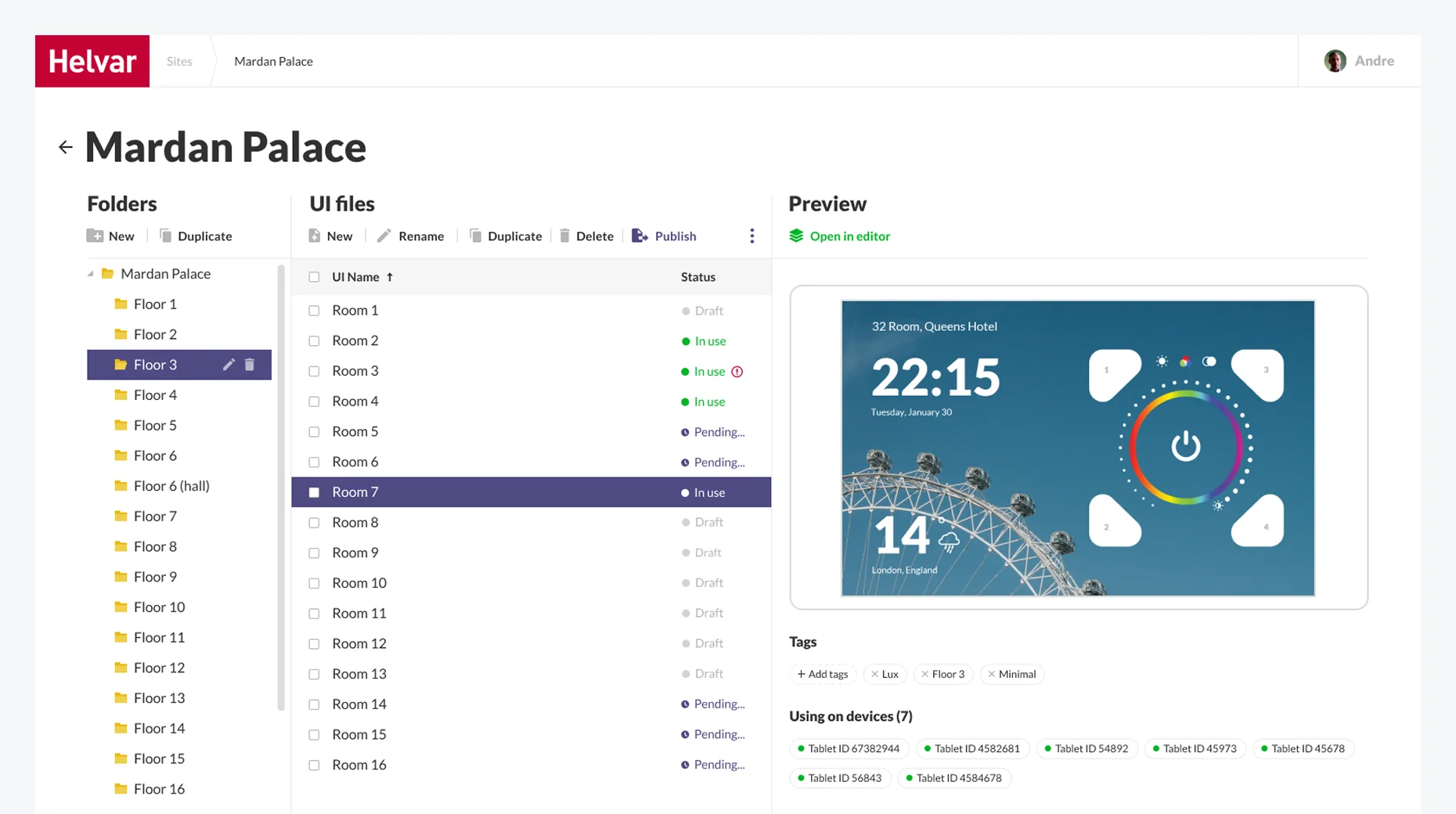
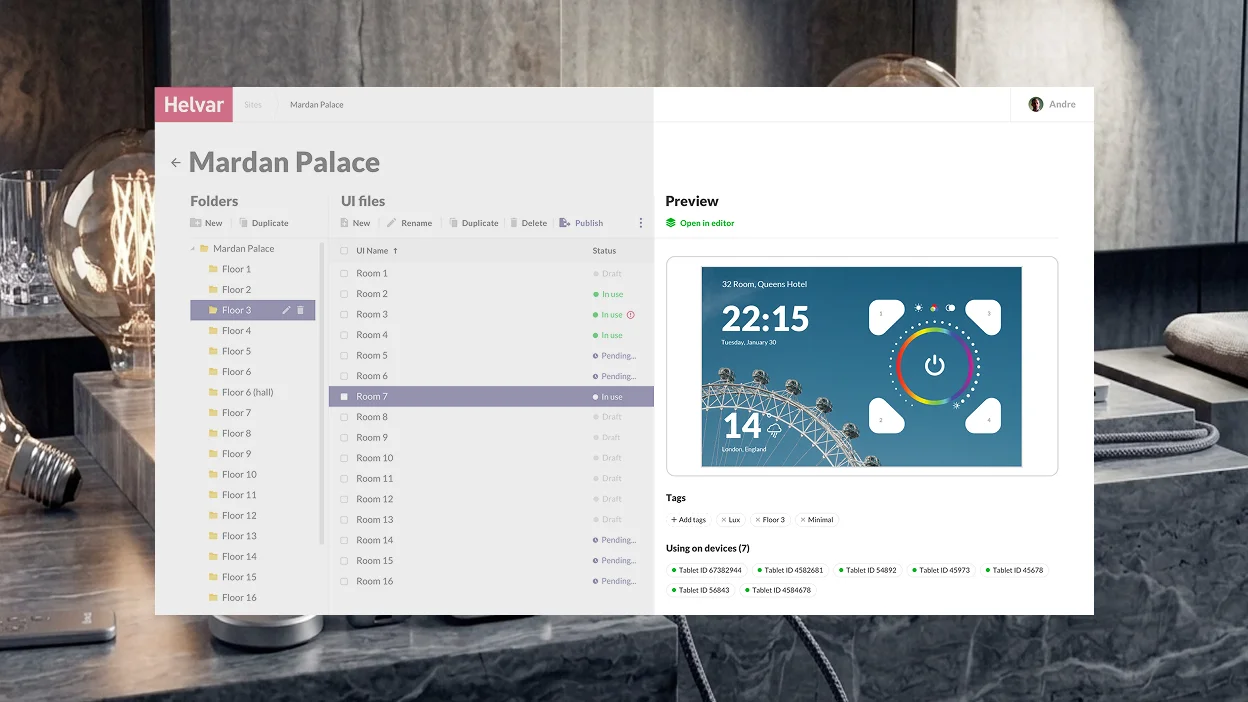
Helvar dashboard interface showing a file list for Mardan Palace with a preview of a room control interface.

The client had an idea of a digital solution for centralized and local lighting that could be controlled and configured from a tablet. Moreover, the application interface on the device had to allow for unlimited customization in functions and looks.

Such a product would enable enterprises with large-scale physical facilities to step away from the traditional smart lighting with cables and switches. The digital approach would help reduce lighting wiring and maintenance costs that can become a sizable chunk of the budget for facilities with 100+ rooms.

For Helvar, the new product would strengthen the company’s leading position in the market and will help attract businesses with sizable physical facilities, such as hotels, hospitals, etc. to more efficiently fulfill their lighting needs.

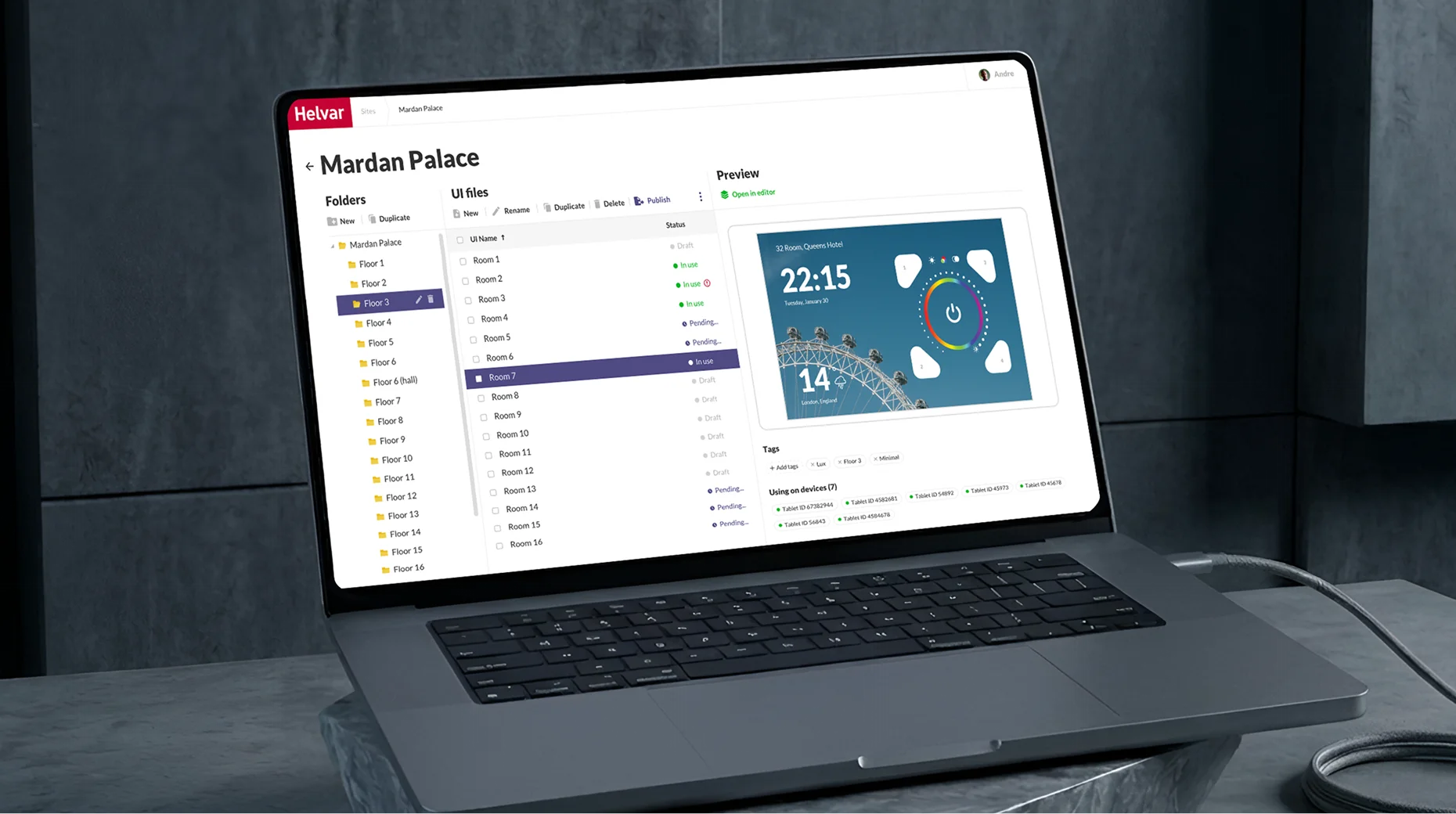
Laptop displaying the Helvar Mardan Palace software interface for managing room floor plans and device settings.

What products did Helvar use to leverage, and why were they insufficient?

Illustris

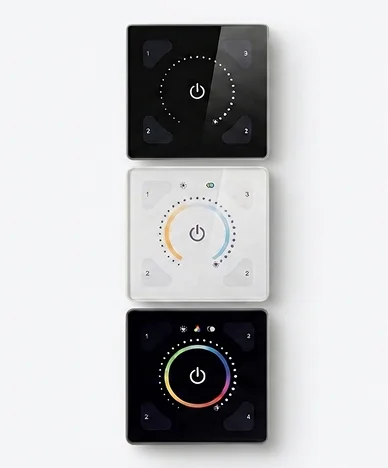
It’s a physical controller for individual room lighting control managed from a mobile application. However, its functionality was limited to changing light temperature, color, and intensity.

Three square smart home wall switches with touch-sensitive circular control dials.

924 touch panel

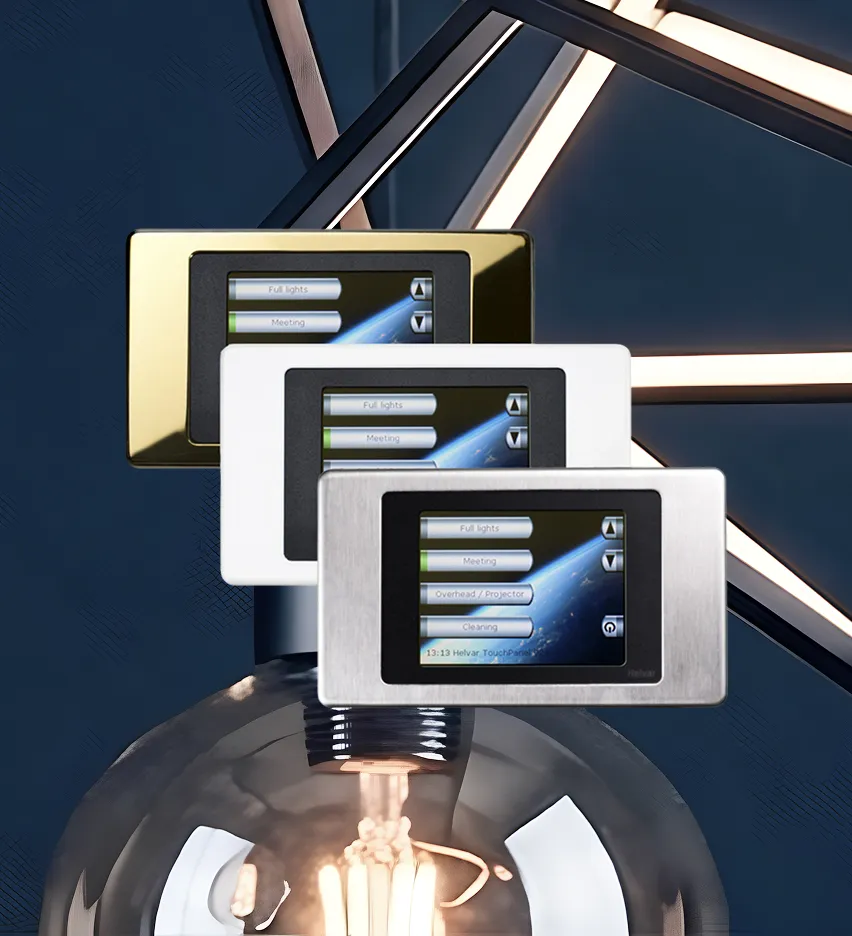
A solution for advanced lighting control with pre-configured and adjustable lighting scenes sounds great, but there was a nuance. It was released in 2013 and had outdated UX/UI and needed to be managed by remote control.

Three rectangular wall-mounted touchscreen light control panels in gold, white, and silver finishes.

Even if the client married the Illustris design with the 924 touch panel’s functionality, they wouldn’t get the product they had on their mind. Helvar was after a brand-new solution and already had a vision of its parts:

  1. A web application to generate a building plan and create a library of interfaces for lighting control in each room of a building (selecting button functions, widgets, etc.). This data becomes UI files, which are then used in an Android application.
  2. The Android app for a tablet placed in each room to allow end users to fine-tune the lighting to their needs.

The client had only an idea of the lighting control applications, and they needed our comprehensive software product design services to build a truly resilient solution with an intuitive, yet feature-rich interface and unlimited customization options.

What head-
scratchers did
we face?

Two overlapping rectangles, one with a solid outline and one with a dotted outline.

Designing
two separate applications for
different groups of end users

The client needed the web application for Helvar employees (“Engineers”) to create interfaces for high-level lighting control and switching between various lighting scenarios, and the Android app for Helvar’s clients (“End users”) to customize the lighting in a separate location.

Three overlapping circles arranged in a horizontal row.

Creating
a well-thought-out UI manager and
UI editor to make lighting control a
breeze

Providing customers with what they are hungry for is a cornerstone of any app’s success. The product owner wanted to hone the user-friendly design, so we had to craft first-rate tools with enhanced UX to efficiently manage smart lighting at the level of the whole building and spaces within it.

Three stacked horizontal crescents connected by a vertical dashed arrow pointing upward.

Striking the balance
between user-friendliness and
cost efficiency when mapping a building plan in the apps

The client had only an upper-level idea of the solution’s design. Our task was pinpointing the most efficient way to implement it without breaking the bank.

Two cylindrical shapes with circular arrows indicating rotation.

Working
at speed added another layer
of complexity

The client has pointed out that the solution has to be ready in 3–4 months. Therefore, our team of UX/UI designers, a product designer, business analyst, web and Android application developers jumped in right away.

Solution

As with any product design project, we moved according to our battle-tested software product design process to make Helvar’s solution a market success. Here is what we encountered at each stage.

01
Project setup

Instinctools is praised by its customers for a methodology-agnostic approach and the ability to adjust to any client’s requirements. In the case of Helvar, the product owner insisted on daily syncs to ensure all the stakeholders and the design team were kept in the loop. 

We readily met this condition and worked in small iterations providing the client with fully functional interactive prototypes to address any concerns straight away and ensure the final design would pass the validation seamlessly. Speaking about the amount of work we’ve carried out, our design team prepared 40+ layouts in InVision.

During the project setup, we discussed the initial design concept the client had beforehand and determined the app’s usage contexts: 

  • Boardrooms and a reception area in an office building
  • Patient rooms and a reception area in a hospital
  • Suites and a reception area in a hotel or cruise ship

As Helvar's engineers were supposed to create UI files in the web application and then send them to the Android app where end users could operate with them, we started with the web solution. 

02
Research
and concept

At this stage, we reviewed the groundwork the client has done before reaching out to *instinctools.
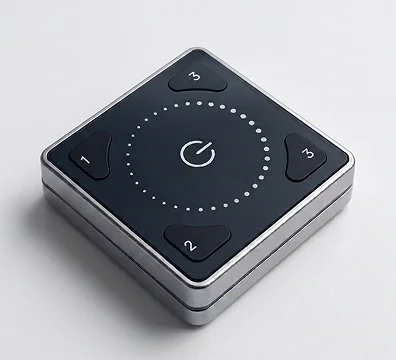
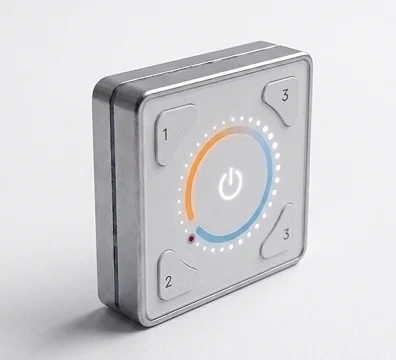
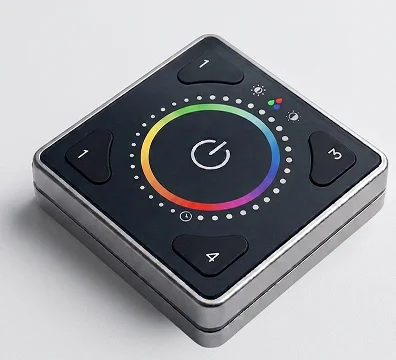
For instance, they’d already had early design concepts based on the design of their other product — Illustris.

Square remote control with a center power button and four numbered buttons.
A square smart home controller with a central power button, a circular status ring, and numbered buttons.
Square lighting remote with a central power button surrounded by a color-selection ring and numbered preset buttons.

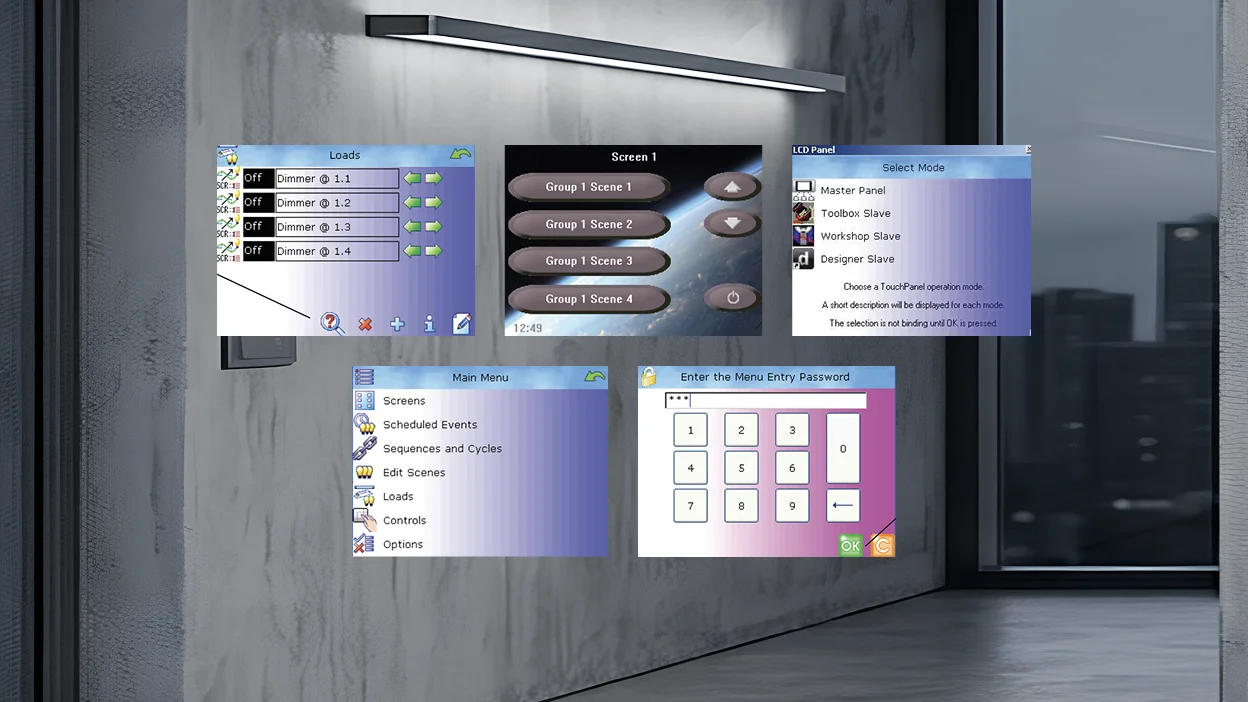
The client wanted to reuse the logic of the existing solution when crafting a future-proof digital touch panel with top-notch UX.

Digital control panel interfaces displaying menus for lighting scenes, device selection, and password entry.

Still, the new lighting control solution required a more up-to-date design and customizable functionality to serve in buildings with hundreds of various spaces.

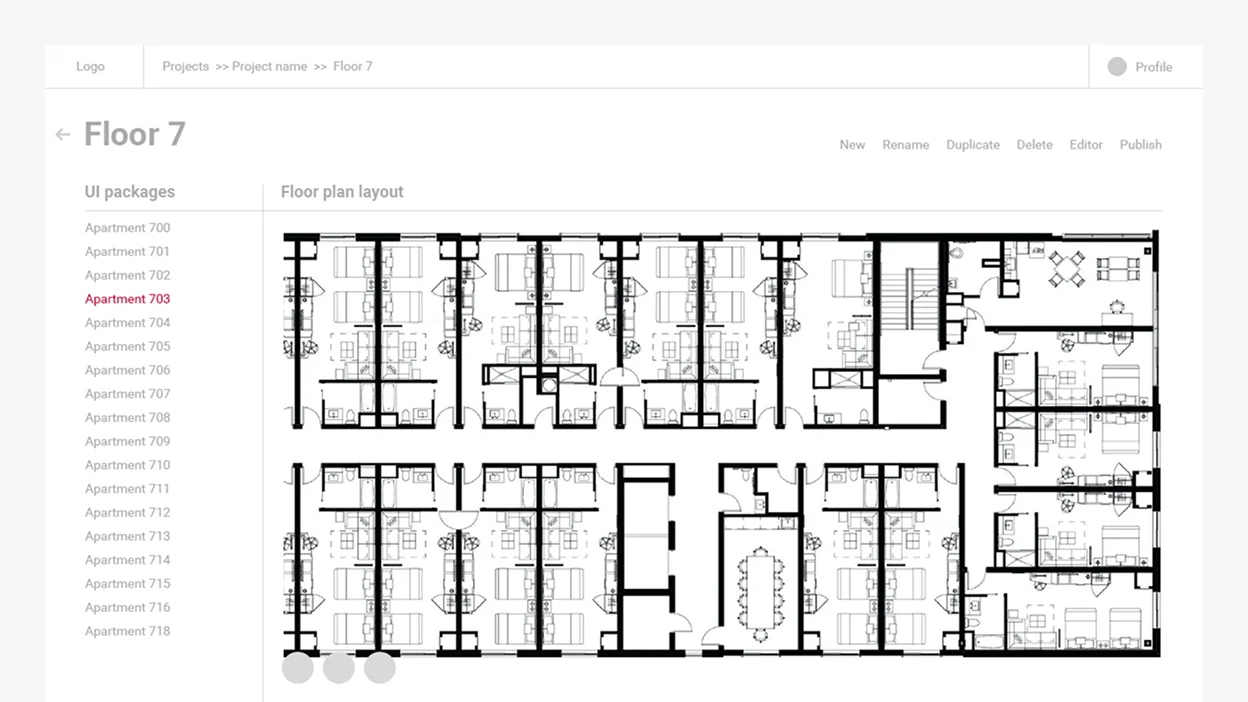
Implementing a building plan was a prerequisite for providing an easy-to-grasp lighting control. Because of this, we had to figure out the best way to put it in the application’s interface. At first, our team discussed making a detailed plan for the whole building. 

Floor plan interface showing a list of apartment units on the left and a building layout on the right.

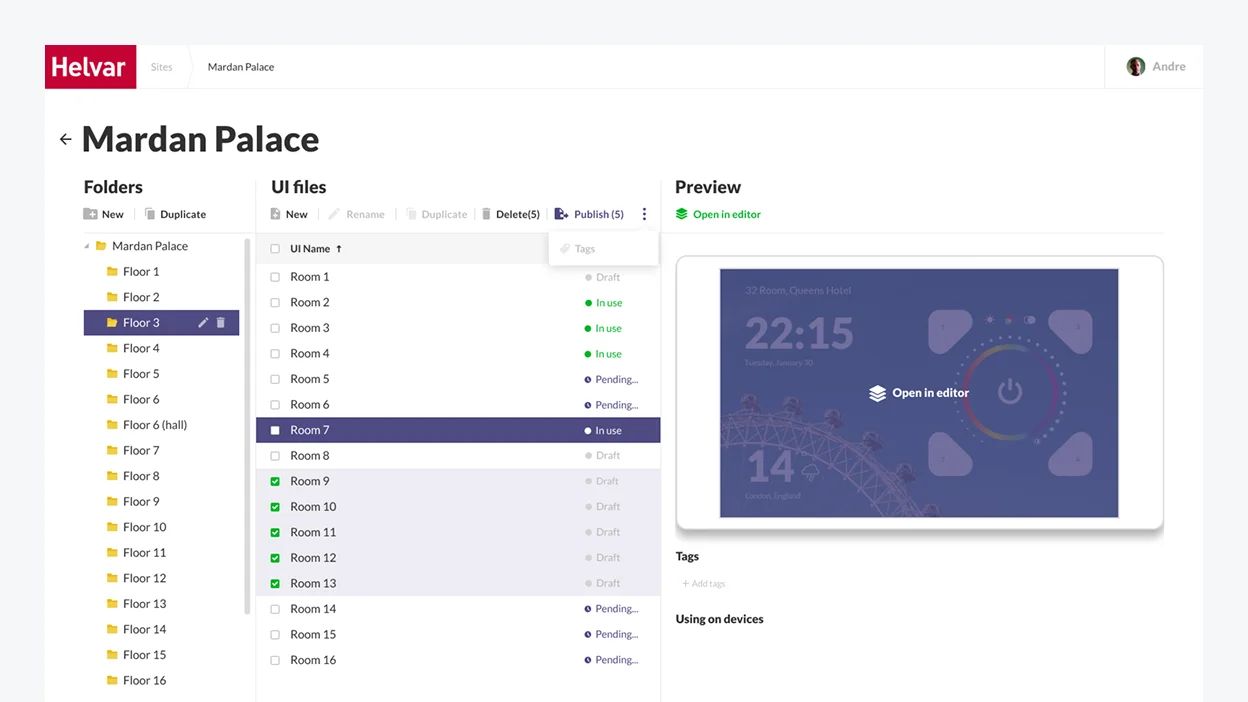
Nonetheless, such an over-elaborate scheme required more time, effort, and investment from the development standpoint. So we devised a more sleek solution and suggested organizing a building into folders by floor and individual room with UI files for each locale.

Helvar software dashboard showing a file management interface with a room list and a preview of a display interface.
03
Wireframing

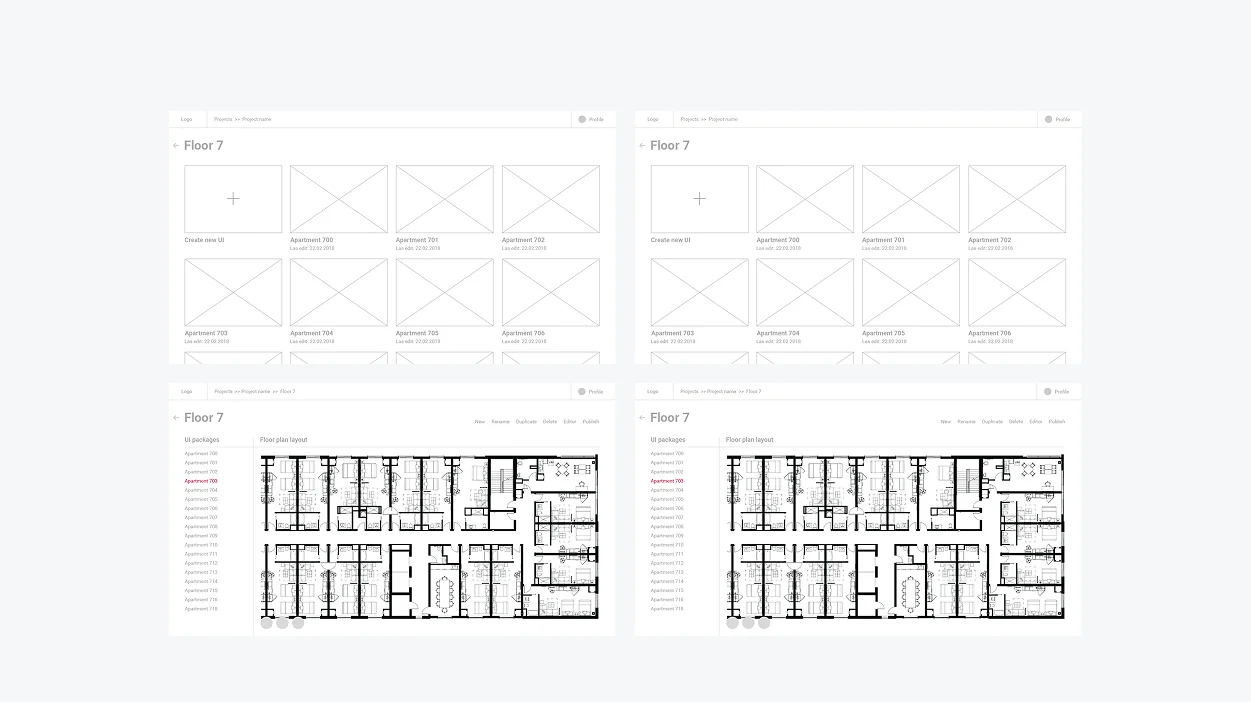
Here is an illustration of how the idea of folders was implemented at the wireframing stage.

Next, we moved to designing solution components – UI manager and UI editor.

Wireframe and floor plan layouts for an apartment building, shown in two side-by-side design views.
04
Visual design
and development

We had to provide Helvar’s employees and end users of the lighting solution with clear and customizable digital tools. So our team came up with the idea of a UI Manager and UI Editor. But while we could leverage Helvar’s existing products, such as Illustris and the 924 touch panel for the Editor, the UI Manager had to be designed from scratch.

UI Manager

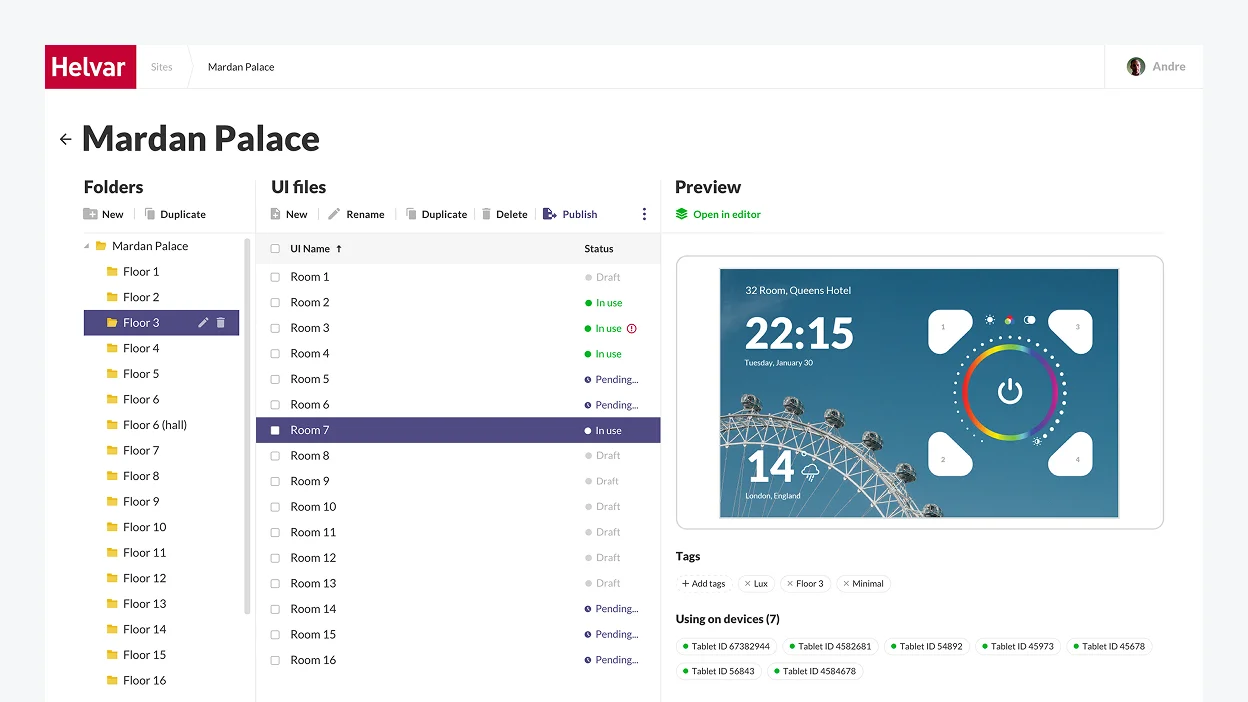
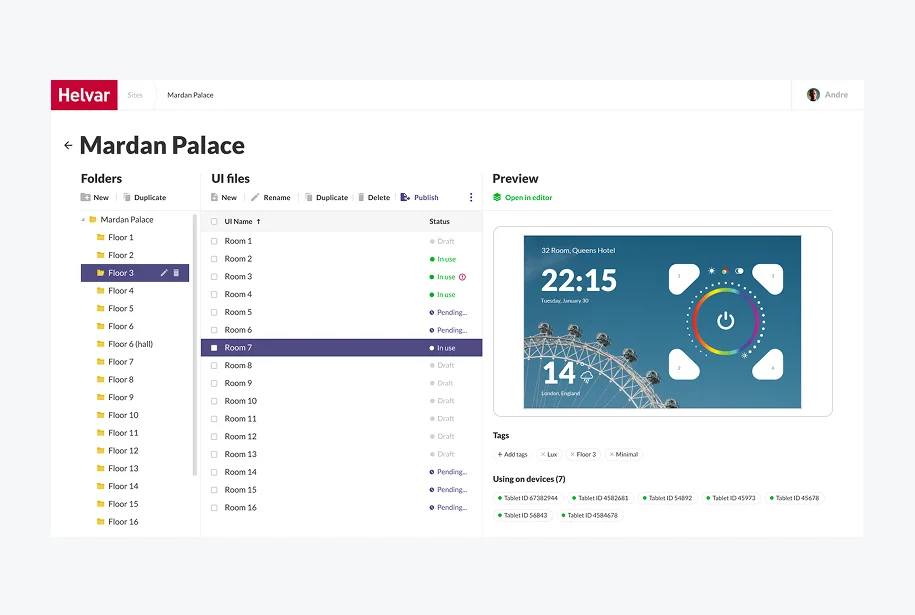
The UI Manager is a part of the web application for engineers where Helvar’s staff creates a folder structure corresponding to a real building.

Dashboard interface for Mardan Palace displaying a list of room files and a device preview screen.

We suggested adding a Preview area so that engineers could easily pick a theme that would fit in with the interior of a particular room.

Software interface showing a file directory for Mardan Palace with a room control panel preview.

UI Editor

The UI Editor is a part of the Android application targeted at end users (office workers, hospital patients, tourists in hotel rooms, etc.). Its interface had to remain clear and concise despite the immense number of functions it provides users with. 

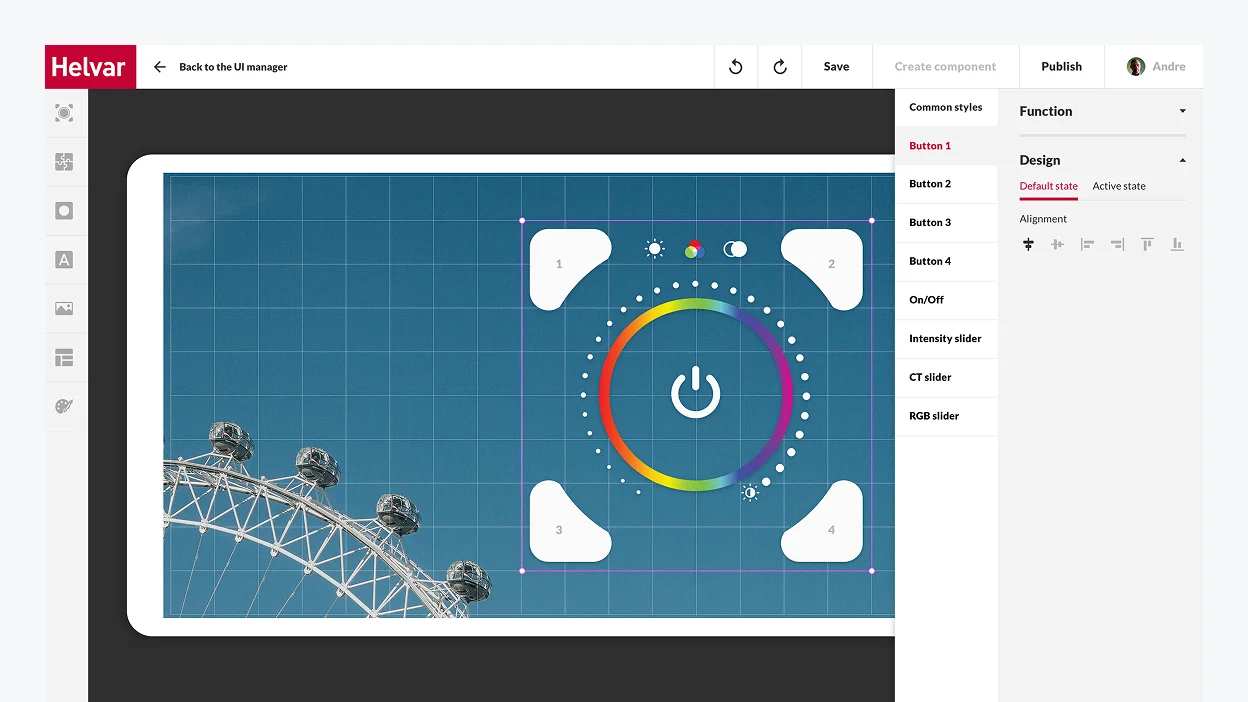
Helvar UI manager interface showing a custom lighting control button design over a ferris wheel background image.

The trickiest part of working on the UI Editor’s design was that it had to be a fully customizable tool. We made it possible for users to edit, modify, and change everything, from the general style of the controller, the background, and font styles to fine-tuning each button’s function and look.

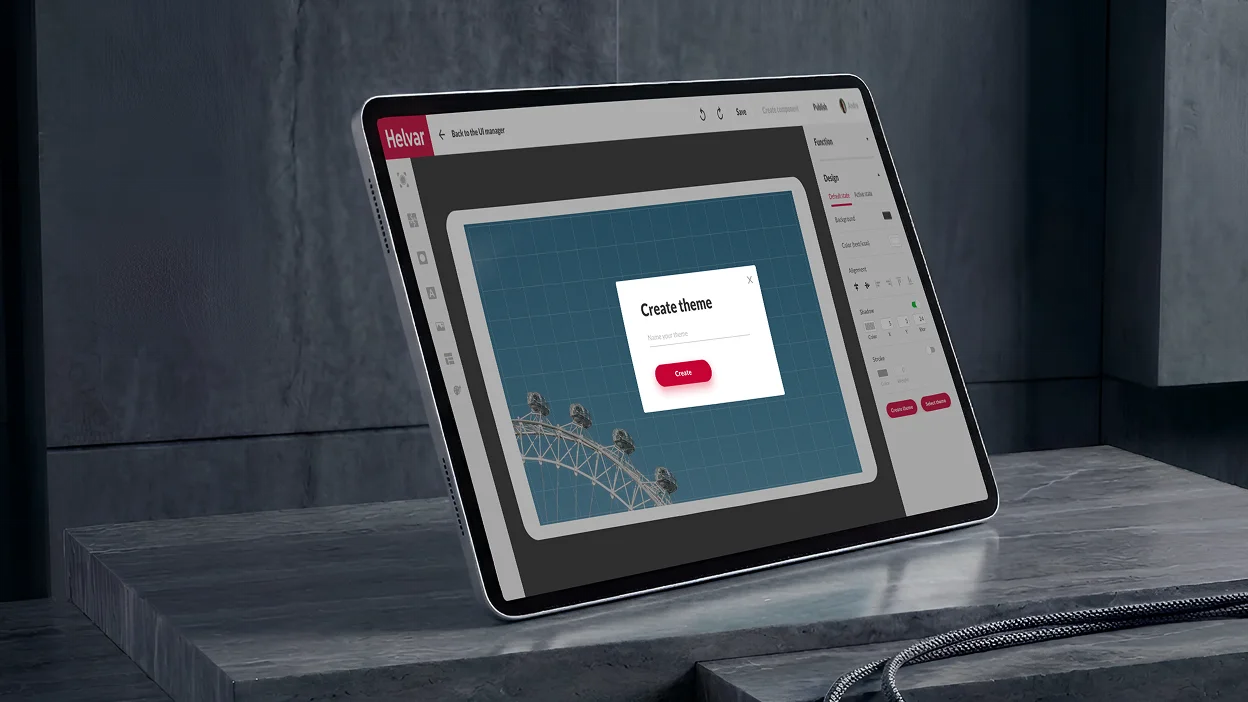
A tablet screen displaying a design interface with a Create theme pop-up window.

We stipulated different access levels for the Editor: 

A large horizontal oval containing three overlapping vertical ellipses.
Basic mode
for actual end users
It allows customers to switch between themes freely and add standard controllers and widgets from the library.
Two overlapping rectangles, one with a solid outline and one with a dotted outline.
Advanced mode
for building managers
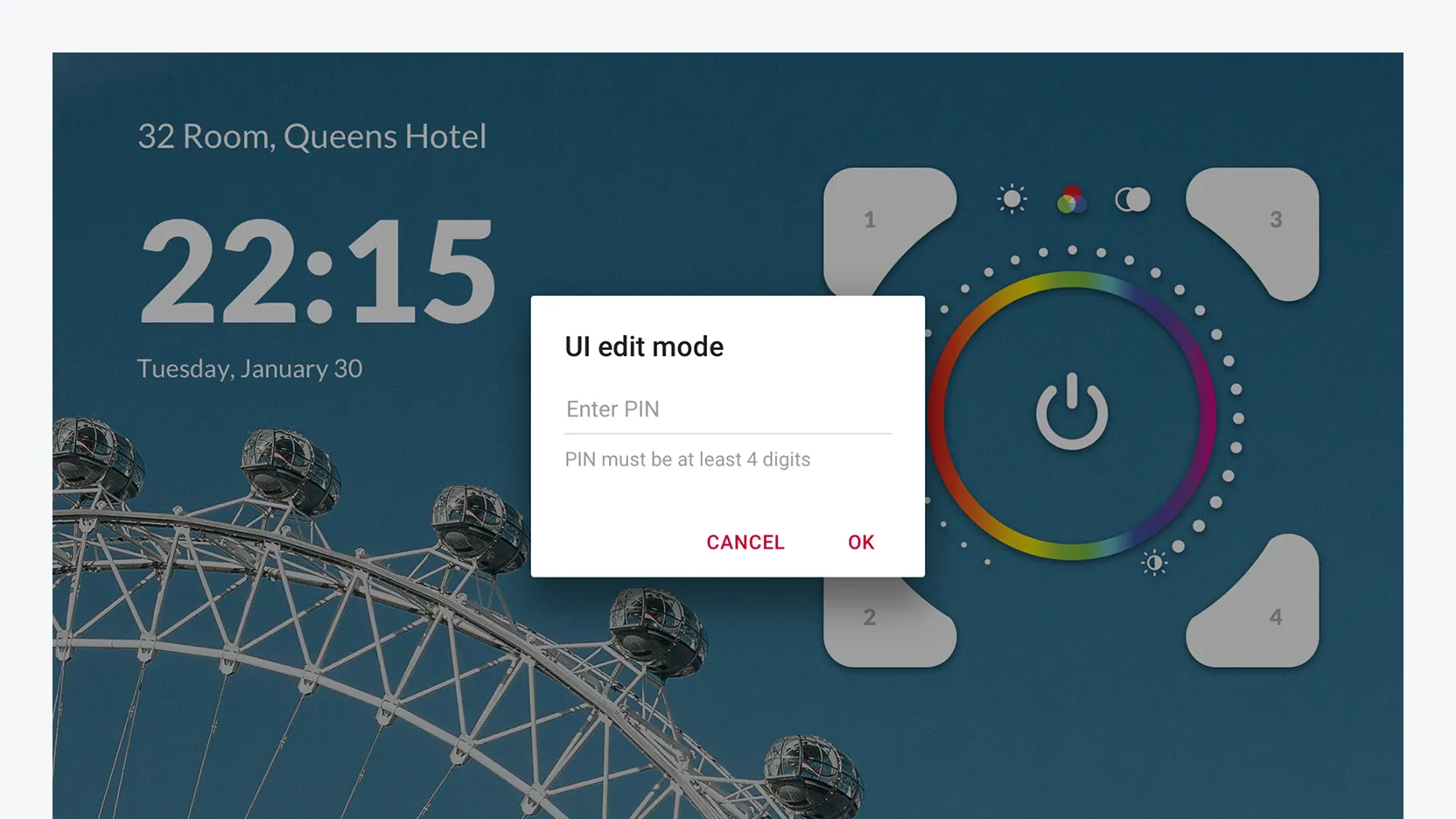
Receptionists in hotels and hospitals, office managers, etc., can modify Editor’s interface and change the buttons’ layout directly on the tablet. The mode is password-protected, and edits are accepted locally on a specific device.
A PIN entry dialog box labeled UI edit mode centered over a room control interface.

We designed software with unlimited customization options to satisfy the desire of Helvar’s clients for stronger brand awareness. For instance, despite providing a plethora of in-built templates that cover various usage scenarios, we went the extra mile to bring boundless customization opportunities to users.

With a tablet in each room, users can not only create their unique theme (e.g., in the hotel colors and with its logo) but also put any buttons needed on the tablet screen and bind functions to them in the way they find the most convenient setup.

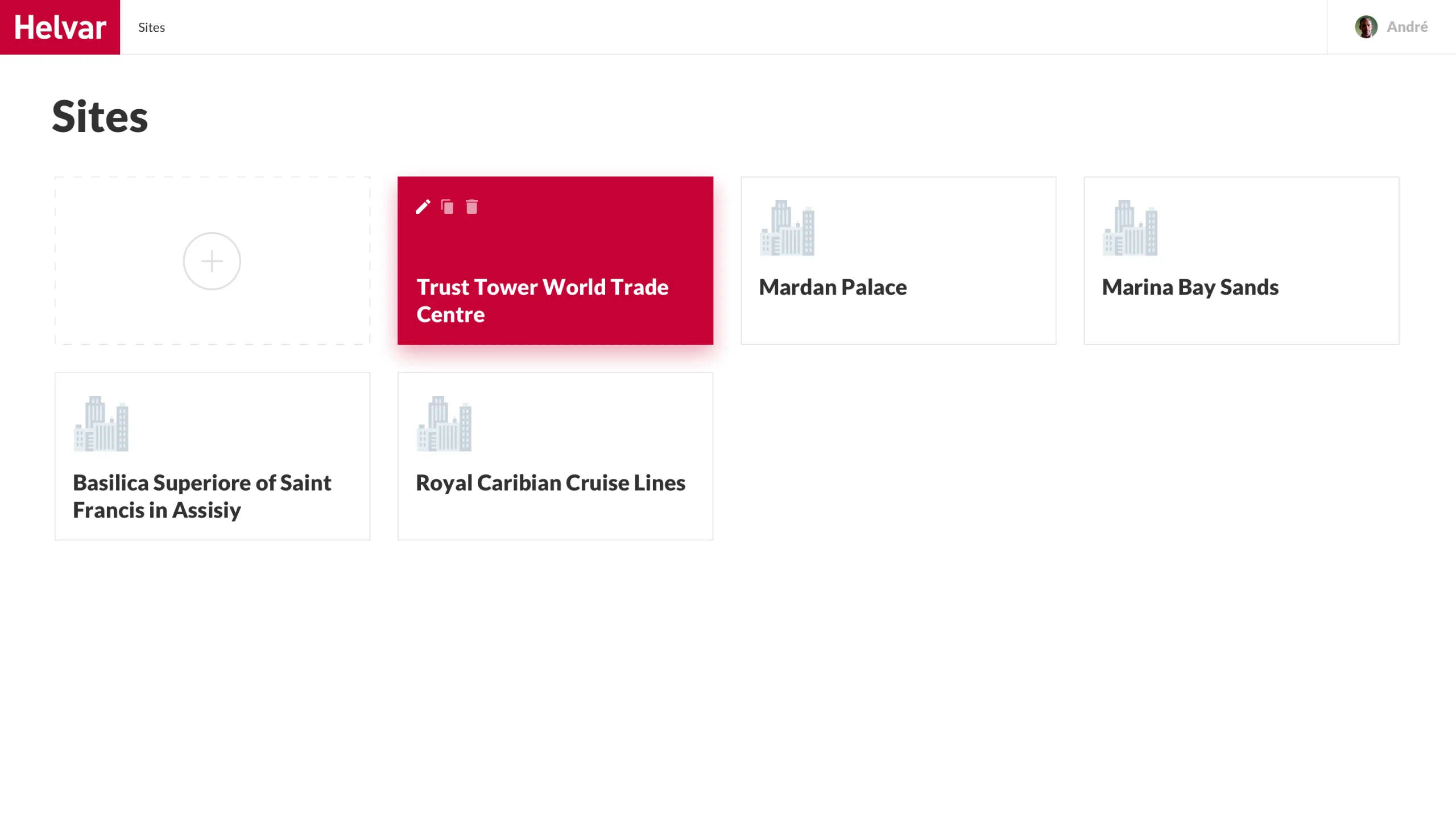
Here is a detailed video presentation of the final product

Dashboard showing a grid of site location cards, with Trust Tower World Trade Centre selected.

Our product design and development team kept firing on all cylinders to ensure on-the-dot delivery of both web and Android applications, and we made it.

The web application was ready in two months, and the Android app took one month to build.

The client was impressed by *instinctools’ businesslike expertise and keen awareness of the latest trends in software product design. Due to this early success, Helvar felt confident in working with our team for further three projects.

Business value

  • The very first solution on the market for large facilities to digitally control intelligent lighting in a room, on a floor space, or in a whole building
  • Reduced installation and maintenance costs thanks to wireless lighting management
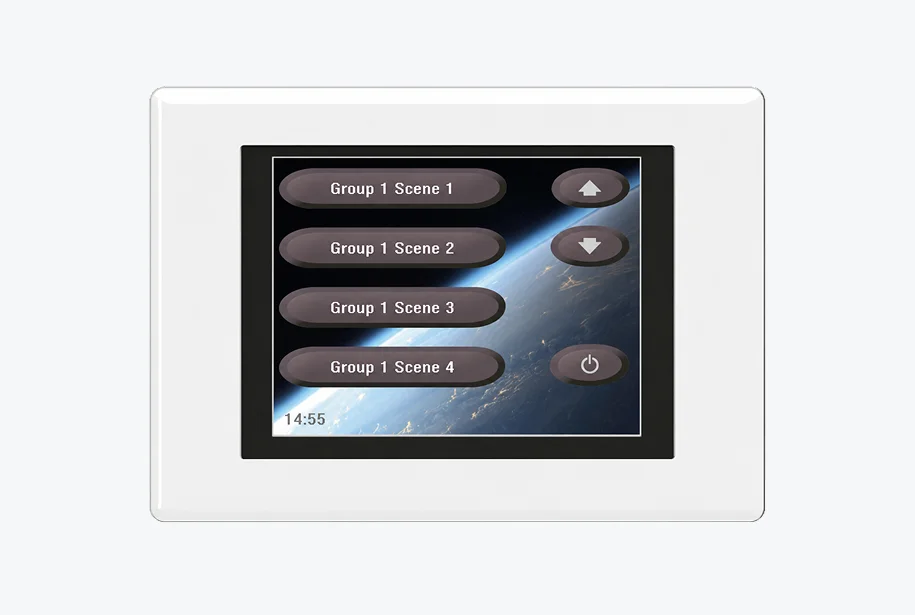
  • User-friendly replacement of an outdated 924 touch panel
  • 90% of the UI can be configured for the specific application and end user
  • Unique branding capabilities to bolster brand awareness

Before / after

Wall-mounted smart home control panel displaying four scene buttons, navigation arrows, and a power icon.
Helvar software dashboard showing a file management interface for a buildings room control tablets.

Key features

A translucent, iridescent globe showing the continents.

Scalability 

We helped create a frontier solution that enables easy digital control over lighting in huge facilities like hotels, hospitals, offices, etc.

Three stacked, translucent rectangular blocks with a soft iridescent glow.

Resilience

Crafting such a product allows Helvar to maintain its leadership in the industry. Despite the large scale of the solution, we managed to craft a clear and concise interface to ensure the product will stay robust and relevant down the road.

Iridescent, translucent gear-shaped plastic component.

Customizability

The more end-users the product has, the more configuration options are needed. Helvar’s solution provides boundless customization capabilities and the possibility to adjust lighting to each user’s needs.

Client’s
testimonial

The quality has been good. It’s been on the expected level: things come on time, we have a good visibility on the things that *instinctools developers are doing and performing for us, communication is good. Wherever we see that we need some more extra resources, we have found *instinctools to be a good partner in helping us out on those areas.

Matti Vesterinen

Multiplier
effect

Putting a premium on a well-thought-out design is a prerequisite for a fruitful outcome in software product development. That’s how it works for product companies whose profit depends on customer satisfaction. Design quality directly impacts user experience and, as a result, product demand on the market.

Businesses in any industry, from manufacturing and ecommerce to healthcare, fintech, education and more, benefit from centering around a customer experience. Putting your end users first empowers you to solve complex design strategic tasks and confidently withstand market disruptions driven by user behavior changes.

Shopping Guide App For a Retail Chain With 60+ Supermarkets

Shopping Guide App For a Retail Chain With 60+ Supermarkets

How enriching the existing Android app’s functionality with the ability to create a shopping list using voice allowed the supermarket chain add 640.000 new loyalty cardholders to their four-million base.

This app offers the following features:

  • browse through e-catalogs of the products
  • track seasonal and weekly offers, as well as the company’s current sales
  • fill a shopping list by adding items from the catalog or by creating custom entries
  • create a shopping list using voice (for android device owners)
  • make shopping lists through the web portal at home and send them to mobile devices
  • view a list of all store locations and easily find the nearest one on the integrated map

Challenges

Our client had two different applications for iOS and Android platforms, as presented in AppStore and GooglePlay, respectively. The decision was made to significantly extend their functionality and to release a new version of the app for iOS and Android, and to create a version compatible with Windows Phone.

Solutions

With Xamarin we were able to use existing layouts and resources for UI. We could focus exclusively on how to implement the app’s functionality in the best way possible. The aim was to meet tight deadlines and stay within the prescribed budget. As a result, the new version of the application was made for both iOS and Android platforms. Thus, the customer’s desire was fulfilled. Now we’re working on the user interface for the Windows Phone platform, and the logic has been already implemented.

Technologies

Multi-Module School Transportation Solution

Multi-Module School Transportation Solution

How developing a multifunctional app for students’ safety with real-time location tracking, notification system, in-app messages and voice calls, and other top-tier capabilities improved security and efficiency of school transportation management.

Domain:
Education, Automotive

Expertise:
Web/Mobile development

Team:
30 specialists

Duration:
approx. 2 years

Project description

A multifunctional application (Web/iOS/Android) for school enabling communication between several stakeholders: staff members, students, parents and external transportation service providers (bus drivers and transportation managers).

Challenge

Understanding customer’s pains and goals we defined the following objectives that the final product should solve:

Optimize and simplify the process of students’ transportation

Provide information sharing and communication between stakeholders in a more fast and convenient way

Thus the main requirements to the multi-module application were set:

Mobile notifications of multiple school events via location

Possibility of planning and tracking the transportation of students

Communication between the staff members and other stakeholders like students, parents and contracted external service providers

Dedicated Apps for mobile phones (Android and iOS), the corresponding web interfaces and the needed backend service logic

Task

The main task set for the *instinctools team was to design and develop multipurpose management system with applications integrated with iSAMS, DAKS systems. 30 specialists in the software development, the architecture and the project management were employed in a turnkey project development.

Solution

The final result was delivered as cloud solution including a web part for staff members and mobile apps for students, parents and drivers with the set of features based on logged in user role. It also includes third-party systems integration and has a range of functional features:

Key features

iOS/Android applications for students, parents, school staff and drivers

In-app messages and voice calls with several parties involved

Transportation Web-dashboard (routes, drivers and buses management and communication)

Events/actions history accessible anytime

One-click check-in/out for users

Map localization of students

Data storage & synchronization (The app can be used in an offline mode and the data will be saved and synched after connection is back)

Alarm system sending fire/lockdown alarm signals to recipients

Assistance request option in case of emergency

Notification system (personal and mass-notifications of bus delays, accidents, student absence, and other events/actions)

Value

The final solution brings special value to every participant and system as a whole.

  • Drivers now can manage their routes and notify Transportation Managers about breakdowns or incidents through delay announcements, alarms and voice calls.
  • Any user in case of emergency situations can quickly communicate via voice calls to get some help.
  • Since the security of children is one of the most important points, the parents now have the ability to track their children location and receive notifications of any emergencies.
  • All school updates, changes in the schedule, delays in transportations, emergency signals and other options available in these apps facilitate communication and information exchange between parties.

Technologies

Front-End:

IOS:

Integrations with external systems:

Android:

Front-End:

Mobile Weight Tracker For a HealthTech Company

Mobile Weight Tracker For a HealthTech Company

How expanding the offering with iOS and Android mobile applications helped a HealthTech company grow its user base by 24%, stabilize its position among the peers, and increase profits through premium functions by 32%.

Challenge

The Customer approached *instinctools with the request to improve the existing web application to bring a competitive mobile product for weight tracking to the market in the shortest time possible.

Project’s goals

  • Deliver simple, user-friendly mobile application for both iOS and Android
  • Upgrade functionality with new features
  • Improve product quality

Solution

Agile approach allowed our team to develop and deploy a high-quality product within 1 month.

Key features

Detailed graphs showing weight history:
  • Body Mass Index calculator
  • Daily Calorie Intake calculator
  • Total Weight Loss/ Gaining calculator
  • Average Daily/ Weekly Loss/ Gaining calculator
Monetization through premium functions:
  • online consultations from a certified coach
  • personal diet system management

PIN lock to secure your privacy

Multiple language localization

Time-to-goal estimate

Track body measurements

Community Chat

Technologies

IOS
NodeJsAndroid
Java
Swift

EMR Platform For a European Hospital

EMR Platform For a European Hospital

How refining the electronic medical records system and developing iOS and Android mobile apps allowed an Israeli hospital to put an extra coat on sensitive data security, ensure real-time patient-doctor communication, and provide personalized health records.

Challenge

The main challenge was to design digital records the way that they could be securely and safely accessed by both medical practitioners across the institution and patients. The system should comply with the demands of consistency and guarantee total data safety.

The existing version of the EMR didn’t comply with all hospital practitioners’ needs. They lacked quick and convenient access to the patients’ data, effective patient-doctor communication.

Solution

Along with upgrading the existing record system, *instinctools offered to create a mobile app and integrate it with EMR system. The main goal was to make a space for doctor-patient real-time communication and give the patients full access to their health data. Security level was achieved through QR-code scanning for patient identification. UX designers simplified system’s interface to make user interaction more intuitive and enjoyable.

Technologies

Key features

The client has obtained a stable version of the platform together with the build products, as well as an option to solve integration issues quickly and at a low cost in the future.

Quick operations with large volumes of information

Integration with the client’s server to establish an automatic match to the local records at the institution

Advanced security and user access control

Patients’ full access to their health information 24/7 through mobile app

Personal health notes: daily sleep duration, physical activity, stress, alcohol consumption, weight

Patients’ easier making an appointment with the doctor

Reminders of taking pills according to doctor’s prescription

Effective real-time patient-doctor communication

Daily health insights according to personal health notes

Scan a verification QR-code from smartphone

User-friendly interface

Patient Identification Software For a US Healthcare Company

Patient Identification Software For a US Healthcare Company

How developing a wallet-friendly, BioTech-based patient identification software for healthcare institutions (HI) allowed an HDM company to cut out identification errors and record duplicates and grow its HI-base by 32%.
About the project

The idea to develop the product for patient identification came to our customer because of the acute problem of personal identification in the field of healthcare.


The fact is that there occur different problems in the registry during identification of a person: inaccuracies, identification errors, and duplication of registration details. In such cases, employees spend a lot of time looking for the correct patient records.

There are more accurate ways of personal identification. These are biometric technologies, such as fingerprint scanners or vein scanners. However, such methods are poorly distributed because of their high cost.

The product for patient identification solves the problem of identification efficiently and relatively cheaply: with the help of face identification technology. This requires the use of cheap devices, such as smartphones and tablets.

Challenge

The customer tasked our company with the development of this patient identification software. The company required us to develop an application that could be further distributed to healthcare institutions (HI).

The structure of the application should be as follows:

  • Using the application, the patient registers for an appointment with the doctor.
  • After registration, a message with a QR code comes to their phone. This code is used to verify the patient’s identity before the appointment.
  • When the patient comes to the HI, they need to scan the QR code on the device provided by the HI for verification (for example, an info kiosk or tablet).
  • Then the patient needs to approach the camera and pass face recognition.
  • After such verification, the device shows the number of the room where the patient’s appointment will take place, or an invitation to go to the registry.

Solution

We suggested developing a web and a mobile application.

We developed a mobile application (on iOS and Android platforms) for patients. It can be installed via a QR code. After installing the application, one has to enter their personal data and upload a photo. This application helps to make an appointment and receives notifications and QR codes for verification at the HI.

We have developed a web-based face recognition app for use in an HI. It is installed on the device the patient passes through during identification. The web application serves to read the QR code and recognize the patient’s face. After verification is completed, the web application shows the patient what room to go to. If the QR code does not work, the application notifies the patient of the need to approach the registry.

Moreover, a part of our work was the development of a UX/UI design.

Solution

The web-based face recognition app allows the user to:

Shoot a photo via the device camera

Enter confirmation information

Read a verification pass QR code from a smartphone

Use the app on a tablet

The mobile app allows the user to:

Sign up

Enter a set of required personal data, including a series of selfie images

Edit content entered

Keep information about appointments and other events

Save pass QR codes for each event

Integrate with a client’s server

Technologies

Web technologies:

Mobile technologies:

Nutrition Monitoring Apps For a US Fitness Centers Chain

Nutrition Monitoring Apps For a US Fitness Centers Chain

How introducing iOS and Android apps for seamless diet monitoring with a personalized recommendation system helped a Californian fitness chain attract 16% new customers to their gyms.

About the project

Famous coaches from customer’s fitness centers have worked out their own low-calorie diet plan to help clients stick to healthy nutrition. Though it proved to be effective, it wasn’t quite convenient to follow as people had to address their notes all the time to count the eaten calories. Therefore *instinctools team got the task to create a user-friendly app (on iOS and Android platforms) that would simplify the process of counting calories.

Challenge

The main goal was to create an application that would digitalize the process of how users follow the diet plan by counting calories and weight tracking using their smartphone.

Solution

*instinctools team developed mobile apps for iOS and Android platforms that would meet customer’s business objectives under a PM’s supervision.

  • Show energy value and characteristics of a vast list of products;
  • Organize quick search within the products list;
  • Indicate the exact quantity of the eaten product and count its energetic value;
  • Deploy an intuitive and user-friendly interface;
  • Combine the calorie counting process with the product nutritional value estimating.

Solution

Close collaboration of our development team, UX designers, QA and PM with the medical coordinators and coaches on customer’s side let us deliver a high-quality product within 2 months.

Get access to a huge database of products including both raw food & cooked meals

Track personal weight changes

Search quickly within the products list

Set reminders to follow the diet

Receive recommendations on what to eat next and how to cook it best way

Being motivated to stick to the diet through gamification elements

Business profit

Coaches presented their diet plan to a wide range of people and proved its effectiveness with the help of Calorie Calculator. It helped to raise the number of visitors interested in diet implementation by 16% what significantly affected the income of the organization.

Technologies

Anna Vasilevskaya
AI modified real photo
Anna Vasilevskaya
Account Executive

Get in touch

Drop us a line about your project at
[email protected] or via the contact
form below, and we will contact you soon.