AI Operational Platform for a Professional Services Firm

A Modular AI Operational Platform for a Multi-Entity Professional Services Firm

How creating a company-wide AI operational layer with several AI agents and governance by design enabled a German professional services group to accelerate request processing by 72%, cut fee proposal preparation time by 65%, and free each employee from 6 hours of repetitive administrative work weekly.

Business challenge

Professional services firms in law, finance, and consulting run on trust, context, and responsiveness. In legal, tax, and accounting, the difference between a good client experience and a missed opportunity often comes down to how quickly the right person understands the request, connects it to the right matter, and moves it forward.

But as such companies grow beyond a single practice, the operating model often becomes harder to control. What works for a compact law firm starts to strain when several business units share clients, brand equity, and expertise, but not the same workflows, systems, or view of client history.

Our client, a Germany-based professional services group with assurance, tax, legal, and management consulting business units, had reached that inflection point. Around 100 full-time professionals and part-time consultants across the country supported a shared client base, while customer tracking and project management remained fragmented across business units.

The friction showed up in several places at once:

  • Email as the de facto operating system. Client requests, project updates, document exchanges, internal coordination, and cross-unit referrals all originated and evolved inside email conversations. What they lacked was structured intake, routing logic, and a quick, unified way to track what came in, who owned it, or what happened next.
  • Manual operations. Even routine requests required attention from senior lawyers, tax advisors, auditors, and consultants, pulling highly qualified professionals into administrative work. Moreover, with most of the proposal fee preparation done by hand, the client’s customers waited for days for what competitors with proper automation delivered in hours.
  • Informal and under-structured workflows across business entities. Cross-unit coordination happened ad hoc rather than through structured processes. A legal client asking a tax-related question would trigger a phone call or a forwarded email, as there was no controlled workflow.
  • Low visibility into projects and matters. Each team maintained its own matter records in simplified Excel sheets and DMS templates, leaving the company without a unified view of active matters, ownership, and status.
  • AI adoption lagging behind. While aware that incorporating artificial intelligence into their daily operations was no longer a nice-to-have, the client still lacked a cohesive plan for implementing it.

With these problems snowballing and no in-house expertise to tackle them, the client turned to Instinctools’ AI Center of Excellence.

Solution

From the beginning, the project was not treated as a chatbot implementation, where another isolated AI tool sits on top of already fragmented workflows. The client needed a controlled AI operating layer that could connect inboxes, documents, matter data, internal systems, and human decision-making into one governed workflow.

For law firms, confidential AI solutions with data privacy and compliance built in aren’t optional, as lawyers, auditors, tax advisors, and consultants work with sensitive client data and carry personal responsibility for the advice they provide. AI could help reduce repetitive operational work, but only if every output remained traceable and reviewable.

Considering that context, Instinctools designed the solution around three principles:

  • Sensitive client data must remain under the client’s control
  • AI outputs must be auditable and explainable enough for professional review
  • Every AI-assisted workflow must keep a qualified human in the loop

The platform was built to support four core capabilities from the start:

  • Email intake and matter management 
  • Employee support
  • Quoting support
  • Advisory document analysis
  1. Choosing a platform approach over one-off AI tools

The client wanted to move quickly, but they also needed the solution to scale across several business units. Building one AI tool at a time would have solved individual problems, but it would also have recreated the same fragmentation the company was trying to overcome.

Instinctools proposed a platform-based approach powered by GENiE, our proprietary agentic AI framework. The idea was to build the foundation once (integrations, context layer, agent orchestration, governance, auditability, and data access) and then reuse it across every subsequent AI module.

What exactly did this approach bring to the table?

  • Centralized AI governance inheritance. With governance, auditability, and compliance controls embedded at the platform level, every new AI solution inherited them automatically.
  • Data platform with adapters. Pre-built connectors unified the company’s DMS, accounting platform, time-tracking tool, and Microsoft 365 services into a single queryable layer.
  • Cross-agent context synchronization. It is what makes agentic AI for law firms workable in practice: all AI agents operate within a shared context that connects customers, matters, relationships, and services. Besides eliminating duplicate data entry, this approach enables richer operational intelligence over time.
  1. Starting with what hurt most: email intake and matter management

The first of the AI agents for the law firm’s operational layer our team developed was the email intake and matter management agent.

Much of the company’s work began in Microsoft 365 inboxes: new client requests, follow-ups, internal referrals, document exchanges, administrative questions, and updates on existing matters. Our team connected the platform to the client’s mailboxes and built a processing pipeline that frees lawyers, tax advisors, auditors, and consultants from repetitive triage work.

When an email comes in, the agent:

  • Classifies the intent (new engagement, follow-up, internal referral, or administrative request)
  • Identifies whether the sender is an existing client or a new prospect
  • Determines which business unit should handle the request
  • Checks whether the email relates to an active matter or suggests creating a new matter record when no match is found
  • Surfaces deadlines, obligations, and required next steps for professional review

The agent processes emails in German and English.

Getting the classification right across four business units with different vocabularies was one of the project’s tough puzzles. Tax advisors, lawyers, consultants, and assurance specialists may describe similar work differently or use the same term to mean different things. To address this, our business analyst collaborated with domain experts from each unit to map service categories, routing rules, and matter hierarchies. Where the business units adhere to common logic, the system uses shared classifications. Where they diverge, it maintains unit-specific configurations.

The agent was first tested with a champion group of 10 users. Initial classification accuracy reached around 74%. Through few-shot tuning with real company emails and structured feedback from the early adopters, we raised the accuracy to 87%, exceeding the client’s initial 85% target.

After validation, the email intake and matter management agent was rolled out across all business units. This gave the client a structured intake mechanism and created the foundation for a big-picture dashboard showing active matters, task ownership, and engagement status across the entire company. That way, the AI platform brings multiple practice areas into a single workspace, saving managing partners from calling around or digging through email threads to find out what’s happening.

  1. Broadening AI usage across the company

After the email intake and matter management agent proved stable in production, we began extending the AI systems across the professional services firm’s law, consulting, and finance operations.

Employee assistant chatbot in 2 weeks

Before rolling out AI agents for higher-stakes operations like quoting or advising, we wanted the company’s staff to get comfortable with AI-assisted workflows in a low-risk setting.

We designed and deployed an assistant chatbot that gave employees a controlled environment to interact with AI in everyday scenarios. It operates in German and English, matching the company’s working languages, and answers routine internal questions about leave policies, expense procedures, onboarding steps, IT access, and more, drawing from the company’s HR documentation and operational FAQs. When it can’t answer with sufficient confidence, it routes the query to the right person with context already attached, so nobody has to re-explain the question.

A dashboard shows a chat with a knowledge assistant about travel and business expenses. The left menu lists Dashboard, Names, Requests, Messages, and Knowledge Assistant. The right panel highlights “Travel and Expenses” with statuses: Awaiting response and Answered.

Beyond building trust in AI across the workforce, the chatbot absorbed the stream of repetitive questions that used to land on managers and office admins, freeing each for up to 6 hours of meaningful work a week.

Quoting agent in 3 weeks

Next, Instinctools’ team built an enterprise AI agent for the law firm’s quoting process, turning manual fee proposal preparation into a structured, step-by-step workflow. When a new client request is confirmed through the email intake agent, the quoting agent takes over:

  • Reading the client request and mapping it to the company’s services (tax structuring, legal review, due diligence, etc.)
  • Finding the right people for the job based on skills and experience
  • Checking who’s free through the client’s time-tracking system
  • Drafting a fee proposal based on the company’s rate cards for manager review

What used to be an email back-and-forth across partners, associates, and office admins now runs through a single structured workflow, with AI laying the groundwork and the professionals making the final call.

Advisory agent in 4 weeks

Due diligence packages, regulatory filings, and contract portfolios are the kind of high-stakes documents where volume makes manual review unacceptably slow. To ease the daily burden of the client’s advisory and assurance teams, we built an agent that took on the heavy lifting. It runs within the AI platform built specifically for law firm operations:
  • Ingesting PDF, DOCX, and XLSX documents up to 200 pages long
  • Producing summaries at the level of detail the professional needs, from a quick overview to a section-by-section breakdown
  • Cross-referencing findings across multiple documents to surface non-obvious patterns, contradictions, and gaps

Every AI-generated finding links back to the exact source document, page, and section, so advisory and assurance staff can verify the evidence in seconds.

On the data handling side, the agent classifies documents by sensitivity level:

  • Publicly available materials like regulatory filings, published financial statements, and industry reports are processed through the cloud inference layer under the existing no-retention agreement.
  • Highly sensitive documents, such as materials covered by attorney-client privilege or pre-announcement M&A data, are processed entirely on-premises and never leave the client’s servers.

Setting up the governance framework and platform foundation took six weeks. The multi-agent system with the assistant chatbot, email intake, quoting, and advisory agents was ready in 14 weeks, bringing the entire delivery timeline down to five months, well ahead of the client’s original 8-10-month estimate.

Banking on GENiE showed in the numbers
  1. Cost-effective governance by design

For the platform to operate safely across all business units, we set up a robust AI governance framework from the get-go. 

  • All application servers, databases, and data pipelines run on the company’s own infrastructure. Customer data, matter records, and document embeddings never leave the premises.
  • Only anonymized, tokenized fragments are sent to Azure OpenAI EU West for inference, under an enterprise agreement that guarantees no retention or training on the company’s data.
  • The framework defines how AI document review works for law firms operating under strict confidentiality: AI outputs are treated as working drafts until reviewed and approved by a qualified professional. This keeps human oversight built into the workflow and reflects professional liability requirements under German laws such as BRAO, StBerG, and WPO, as well as the EU AI Act’s human-oversight expectations.
  • Every action any AI component takes is captured in a mandatory audit trail with a 12-month retention period: what decision was suggested, how confident the model was, and whether a professional approved or overrode it. This data can be pulled at any time in a format ready for regulators and auditors.

Here’s how NDAs, engagement letters, and service agreements are handled within the AI operational layer.

Flowchart with two faded boxes on top labeled “Matter record” and “Company templates.” The center green box says, “AI generates first draft. Flags missing or inconsistent fields.” Below is a purple box, “Professional review. Tracked-changes interface.”.

For a company that bills by the hour and watches margins closely, AI spend transparency was a practical concern from day one. To keep inference costs predictable and deliver robust governance without breaking the bank, our team built a cost-tiered AI gateway that routes routine classification to small, lightweight models and assigns complex analysis and document generation to larger models.

The client’s priority wasn’t “governance at any cost”

Before

  • Email inboxes as the company’s informal operating system led to transparency and coordination challenges
  • Manual customer intake, matter handling, and quoting wasted senior professionals’ billable time
  • Client history, matter context, and referral opportunities stayed fragmented across teams and individuals
  • No real-time visibility into active matters, ownership, workloads, and engagement status

After

  • An AI operational layer with strong governance unlocked transparency and seamless cross-unit coordination
  • AI agents took over administrative groundwork, freeing professionals for higher-value expert work
  • Shared operational context unified customer and matter knowledge across business units
  • Managing partners gained real-time visibility into workloads, matter ownership, active engagements, and cross-unit coordination

Business value

  • Real-time cross-unit visibility thanks to a company-wide AI operational layer
  • + 72% in request processing speed
  • – 65% in fee proposal preparation time
  • – 6 hours/week of repetitive administrative work per employee

Multiplier effect

The productivity loss this project addressed goes far beyond legal, tax, and finance. In any knowledge-intensive business, highly qualified people spend too much time on coordination work: routing requests, reconstructing context, chasing updates, preparing drafts, and pulling information from scattered systems.

An AI operational layer with governed multi-agent systems is a way of automating those tasks without sacrificing visibility or control. AI agents take on the groundwork, so your staff spends less time chasing information and more time on the work you hired them for. Companies can start with the biggest time sink and, then, expand gradually as each use case proves its value.

Overhead view of people working at a table with laptops, tablets, charts, and notebooks. A glowing “AI” graphic and digital icons are superimposed, symbolizing artificial intelligence and data analysis. Hands are busy typing or writing.

AI Adoption Workshop for a B2B SaaS Company

AI Adoption 
Workshop for a B2B SaaS Company

How Instinctools helped a data-intensive enterprise software provider turn scattered AI ideas into a structured and balanced adoption plan with 16 opportunities narrowed into a prioritized, connected shortlist, specific usage scenarios to show how the recommended capabilities would work in practice, and governance foundations needed to scale AI securely.

Business challenge

For many B2B SaaS companies, the main barrier to AI adoption is turning scattered AI enthusiasm into a focused, executable roadmap.

Without a clear adoption strategy, AI initiatives can easily fragment across the organization: engineering is busy automating parts of the software lifecycle, product teams chase sticky client-facing AI features, sales look for pipeline intelligence, and customer success teams try to make onboarding and support faster. On top of all that, leadership wants speed, but also governance, data protection, and proof that their investments will create measurable business value.

That was the point our client, a SaaS company providing data-intensive workflow and analytics software for enterprises, had reached. From our early conversations with the client, it became clear that the company was eager – urgent, even – to adopt AI. The pressure came from two sides. Externally, the market was moving fast: competitors were actively rolling out AI-powered features and every month spent experimenting without a plan increased the risk of falling behind. Internally, teams were already using and testing AI tools but struggling to turn that activity into a shared direction.

The organization had not yet agreed on what AI should mean for the business first: internal productivity, product differentiation, sales acceleration, or all three. This lack of alignment created a risk of moving too fast in too many directions at the same time.

There were four critical questions hanging in the air:

  • What are the highest-value AI opportunities for our business?
  • Which initiatives should we start with and why?
  • Which foundational capabilities must be in place before client-facing AI becomes safe?
  • How do we move quickly without creating duplicated pilots, governance gaps, or new technical debt?

Struggling to find a way through that uncertainty by themselves, the client turned to Instinctools for an AI adoption workshop.

Solution

To help the client move from an open-ended AI exploration to a structured, actionable roadmap, Instinctools ran a custom AI adoption workshop, designed as a phased engagement. It combined pre-workshop discovery, two intensive live workshop sessions, the synthesis stage, executive pre-read, feedback-driven polishing, and a final team readout.

A horizontal flowchart with six color-coded steps: Pre-workshop discovery (purple, microphone icon), Live session (Day 1) (red, speech bubble), Live session (Day 2) (yellow, car), Synthesis (blue, lightbulb), Executive pre-read (green, document), and Polishing (orange, sliders), ending with Final demo (red, presenter). Dashed arrows connect the steps, showing the process flow.
Flowchart showing: Pre-workshop discovery (microphone icon), Live session Day 1 (chat icon), Live session Day 2 (people icon), Final demo (person presenting icon), Polishing (sliders icon), Executive pre-read (clipboard icon), Synthesis (lightbulb icon).
A vertical timeline shows seven stages: Pre-workshop discovery (purple mic icon), Live session Day 1 (red monitor icon), Live session Day 2 (blue monitor icon), Synthesis (green lightbulb icon), Executive pre-read (light green clipboard icon), Polishing (yellow sliders icon), Final demo (red screen icon).

Each phase was built on the results of the previous one. First, we captured the client’s current state, then mapped the opportunity space. From there, our experts pressure-tested the first prioritization signals instead of just accepting them. And, finally, we converted workshop inputs into a practical roadmap.

The engagement was intentionally not positioned as a technical architecture project or implementation plan. Its purpose was to help the client make better AI adoption decisions: where to begin, which initiatives depended on shared foundations, and what guardrails were needed before moving into more sensitive product-facing AI.

By the end of the workshop, the client received eight core deliverables:

  • Strategic recommendations
  • AI opportunity map
  • Prioritized initiative shortlist
  • Reusable context-to-action model
  • Examples of usage scenarios
  • Tailored adoption paths
  • AI policy guidance
  • AI training and best practices framework
  1. Using a tailored survey 
as the entry point instead of a generic AI agenda

The workshop began before the live sessions and was grounded in the client’s real operating environment. We prepared a pre-workshop survey – a questionnaire that was sent to the client’s team in advance – to understand how people were already using AI, where they saw the biggest operational pain, what they expected from AI adoption, and which risks they considered most important. The survey included client-specific questions informed by the company’s products, workflows, industry context, and previous conversations with stakeholders.

A digital pre-workshop questionnaire form titled “AI Adoption Workshop – Pre-Workshop Questionnaire” is displayed on a tablet. The form includes sections for business priorities, urgency, current AI usage, top tools, pain points, desired outcomes, and a purple Submit questionnaire button.

The survey revealed that many employees were actively experimenting with AI tools, but adoption was uneven and not governed by one shared playbook.

It also showed where the pain was most concentrated:

  • Product documentation was often stale or incomplete, creating onboarding friction and repeated rework.
  • Communication and coordination: email overload made it harder to track open items, owners, and follow-ups.
  • Sales and customer workflows, such as sales pipeline tracking, client onboarding, and customer feedback synthesis, also emerged as opportunities for AI-enabled support.

Thanks to this pre-work, by the time the live workshop started, our team was not walking in empty-handed. We had already shaped stakeholder input into a working hypothesis: the client’s biggest opportunity was found in a connected set of use cases around knowledge work, distributed context, and governed execution.

  1. Mapping AI opportunities across the business on Day 1

The first day of the live strategy session started with us presenting the survey findings back to the client’s team. We used it as a way for stakeholders to see where the organization was aligned, where opinions diverged, and which operational pains had the strongest signal.

From there, we moved to the AI opportunity map.

During the session, Instinctools’ AI experts introduced a set of potential initiatives grouped into four families:

A flowchart on a grid background shows four colored boxes. The top yellow box, titled Essential AI enablers (parallel track), lists AI governance, monitoring, training, and platform capability. Three lower blue boxes list SDLC, business operations, and customer experience AI uses.
A grid background with four colored boxes containing text. The top yellow box is titled “Essential AI enablers (parallel track)” and lists four items. Below, three blue boxes list items for “SDLC,” “Business operations,” and “Product and customer experience.”.
A vertical flowchart shows four colored boxes labeled: Essential AI enablers (parallel track), SDLC, Business operations, and Product and customer experience. Each box lists related tasks like AI governance, onboarding, requirements writing, and explanations.

The team then reviewed, discussed, and voted on the opportunities using practical decision lenses: value, effort, feasibility, risk, business relevance, and dependency on other capabilities.

This way, stakeholders could see where ideas clustered, where opinions diverged, and where certain opportunities depended on others.

For example, specification writing initially looked like a standalone AI use case. But as discussions progressed, it became clear that specification quality was tightly connected to product documentation, context gathering, QA, onboarding, and support. A narrow AI spec-writing tool would not solve the broader issue unless it could access current, trusted product and workflow context.

  1. Uncovering the shared pattern on Day 2

One of the most important outcomes of the workshop was the realization that several high-interest initiatives were symptoms of the same underlying problem.

Specification writing, customer onboarding, support triage, sales follow-up, retention signal interpretation, and product assistance all depended on the same capability: the ability to assemble trusted context from distributed systems and turn it into useful, reviewable action.

If the company built separate AI tools for each workflow, it would likely duplicate effort, create inconsistent governance, and rebuild the same context layer multiple times.

To avoid that, Instinctools reframed the shortlist of initiatives around three reusable solution layers:

  1. The AI Data Platform capability to provide governed, permission-aware access to approved data sources and separate operational and product data planes.
  2. The cross-functional Context Layer to organize distributed information into structured, source-backed briefs with assumptions and decision points.
  3. The cross-functional Execution Layer to turn those briefs into fully managed workflow actions, including routing them to the appropriate people, tracking progress, issuing notifications and reminders, handling escalations, managing approvals, and maintaining a complete audit trail of changes.
A flowchart showing AI capability blocks. Two top blocks: In-Product Assistant and Pipeline Support Assistant (purple). A bottom row features AI Data Platform (blue) and Live Product Docs. (green), connected by arrows, with faded surrounding text and blocks.
Diagram showing a reusable AI capability stack with highlighted sections: “In-Product Assistant” and “Pipeline Support Assistant” (top layer), “AI Data Platform” and “Live Product Docs” (bottom layer), connected by green arrows, with other elements faded out.
Infographic showing Work AI assistants for product, support, and engineering, integrating with tools like Slack, GitHub, Jira, and more. Highlights AI data platform, live product docs, and the advantages of these AI solutions for workflows and knowledge sharing.

With those layers in place, the shortlist expanded with two higher-level interfaces: an In-Product Assistant for controlled customer-facing guidance and a Pipeline Support Assistant as an internal-facing application for pipeline intelligence, follow-up, and sales action queues.

  1. Synthesizing workshop inputs into tailored adoption paths

After the two live sessions, Instinctools moved into synthesis. Our team consolidated survey findings, Miro board activity, workshop discussions, voting results, initiative feedback, risks, dependencies, and adoption logic into a coherent roadmap.

A major part of the synthesis was translating a broad set of possible initiatives into adoption paths leadership could compare. The client had several valid directions:

  • Delivery covered product documentation, specification gathering, delivery readiness, and fewer clarification loops between product, engineering, QA, and customer-facing teams.
  • Operations focused on customer onboarding, support, sales follow-up, and process execution across operational systems.
  • Product captured the workflows around the product customer-visible AI features inside the company’s SaaS products, such as natural-language explanation, guided workflows, and stronger demo or trial differentiation.

The recommended route combined Delivery and Product and here is why. Starting with delivery would give the client a faster path to internal proof of value through product documentation, specification gathering, and context assembly. Meanwhile, extending toward product would create a credible path to customer-facing differentiation, but only after trusted product knowledge, governance rules, and human review patterns were in place.

This sequencing balanced speed with control and allowed the client to move quickly where risk was lower and prepare carefully where AI outputs could affect customer trust.

  1. Aligning C-level stakeholders through a pre-read and polishing the deliverables

Before the broader final readout, Instinctools prepared a pre-read for senior stakeholders. This was a crucial part of the engagement, as it helped decision-makers to fully understand a suggested AI roadmap, challenge it, and align owners, budgets, data boundaries, and governance expectations.

After the executive pre-read, we refined the materials further.

One of the client’s main concerns was that parts of the roadmap still felt too abstract. The recommendation made sense at the capability level, but stakeholders wanted to see how the proposed layers would work in practice.

To address this, our AI engineers added usage scenarios showing how the Data Platform capability, Context Layer, and Execution Layer could work together in real workflows.

For example, in a client support scenario, a support specialist needs to answer why a client cannot perform a specific product action. The workflow using Instinctools’ layered approach works as follows:

Trigger:

"Investigate a customer issue”

Template selection:

The Context Layer uses a Client / Service Context Brief template specifying what data is needed.

Data Platform retrieves approved data:

  • Client account record from CRM / Salesforce
  • Relevant support ticket history
  • Permitted email or Teams context
  • Product Documentation
  • Release notes
  • Known-behavior entries
  • Product setup or permissions data (as allowed)

Context Layer prepares structured brief:

  • Summarizes what is known (e.g., conditions for the action, recent release changes, previous client questions, documented limitations)
  • Highlights what is unclear (e.g., current client setup, workflow configuration)
  • Lists sources supporting the information
  • Suggests next questions to ask

Execution Layer creates an action workflow:

  • Assigns client services to confirm missing setup details with the client
  • Directs support to check workflow configuration
  • Creates a task to review/update product documentation if needed
  • Prepares final client response after dependencies are complete
  • Escalates unresolved issues according to rules (e.g., notify support lead if not resolved in 2 business days)

These scenarios made the final outputs more practical. The client could see not only what Instinctools recommended, but how the recommendation could operate across different workflows.

  1. Making governance an essential part of the adoption path

As the client’s software operated in a trust-sensitive enterprise environment, a wrong or unsupported AI answer could create reputational consequences, even when the underlying workflow was not legally regulated. So before AI could safely show up in the product, the company needed rules that were practical enough to use and strong enough to trust.

Instinctools advised the client to formalize how AI would be managed across the organization. That included internal rules for employee AI use, external policies for product-facing AI features, guardrails around prompts and data access, and monitoring for AI activity once adoption started to scale.

The workshop identified several non-negotiable guardrails:

  • separating operational and product data planes;
  • requiring human confirmation for customer-facing actions or business-critical outputs;
  • making sources traceable and uncertainty visible;
  • applying role-based access control and tenant isolation before AI retrieval touches client data;
  • monitoring accuracy, drift, latency, token cost, usage patterns, and adoption;
  • assigning clear owners for AI policies, approvals, and ongoing review.

At the same time, Instinctools avoided turning governance into a heavy upfront program. The recommendation was to start with lower-risk internal pilots, learn from them, and only then move into more sensitive customer-facing AI scenarios with the right safeguards already in place.

Before

  • AI adoption was active but uneven. There was no shared playbook for where AI should be applied, how outputs should be reviewed, or which initiatives should be invested in.
  • AI ideas were scattered across delivery, product, operations, and sales.
  • High-impact pains looked separate. Specification writing, documentation, onboarding, QA, support triage, and sales follow-up appeared to be different problems.
  • Without reviewed product knowledge, source traceability, monitoring, and human review rules, product AI created trust and reputational risks.

After

  • The client received a structured AI roadmap with concrete usage scenarios tied to business value, dependencies, governance, and adoption paths.
  • The company had a prioritized shortlist of connected initiatives.
  • The roadmap identified the shared root problem behind many workflow pains: employees manually assembling distributed context across systems, documents, teams, and tenants.
  • Governance became a practical adoption enabler, with recommendations around data separation, human confirmation, source traceability, role-based access, monitoring, and AI use policies.

Business value

  • 16 AI initiatives mapped into a shared opportunity map, giving the client a clear view of where AI could create value across delivery, product, operations, and governance.
  • 5 connected priorities shaped into a coherent adoption model
  • An adoption path balancing fast internal value with future customer-facing differentiation
  • Concrete usage scenarios showing how the recommended capabilities support real workflows
  • Practical governance recommendations for scaling AI without undermining customer trust.
  • Avoiding a common AI adoption trap of launching visible pilots before the knowledge, context, and governance foundations are strong enough to support them

Multiplier effect

The workshop value lies in separating attractive ideas from executable initiatives, identifying the foundations multiple use cases depend on and giving leadership a defensible sequence for action. Without a structured adoption process, teams can easily launch disconnected pilots, duplicate data work, underestimate governance needs, or chase customer-facing features before the underlying knowledge base is ready.

A well-run AI adoption workshop gives companies under pressure to “do something with AI” a shared view of where AI can be truly useful, what should be built first, what should wait, and how to move from experimentation to responsible execution.

A large audience of people sits facing a stage with two speakers, one standing and one seated. The scene is lit with blue lighting, creating a professional atmosphere typical of a conference or seminar. The speakers appear blurred in the background.

AI-Powered Knowledge Platform For a Wind Turbine Manufacturer

AI-Powered Knowledge Platform For a Wind Turbine Manufacturer

How developing a conversational AI knowledge platform with offline access and peer-to-peer expertise sharing enabled a European wind turbine manufacturer to turn post-sale field support into a product differentiator and reduce support queries by 37%.

Business challenge

When a turbine stops or triggers an alarm miles from the nearest office, the repair depends on how fast the technician on site can find the right answer. For field workers servicing wind turbines offshore and over sprawling onshore locations, that process is riddled with friction.

  • No single source of truth. Maintenance manuals, monitoring guides, technical bulletins, and troubleshooting references exist, but are scattered across multiple portals and PDF libraries with no unified entry point. A technician looking for a specific calibration procedure might find it in three clicks or thirty, depending on which system they open first and whether they guess the right keywords.
  • Documentation built for desks, used on turbines. The materials are authored for screen-and-keyboard reading, but real-life wind turbine servicing conditions look nothing like that. Technicians access documents on phones or tablets, often one-handed, in rain or wind. Dense PDF layouts with no mobile optimization turn a two-minute lookup into a scrolling exercise.
  • Peer knowledge without a peer network. When documentation falls short, experienced technicians fill the gap. But that expertise is shared through phone calls, ad hoc messages, or chance conversations rather than through a structured channel. Two technicians in the North Sea and Andalusia might independently solve the same fault, weeks apart, with no way to learn from each other.

Our client, a major European wind turbine manufacturer, saw these hurdles as a product opportunity. As their relationship with every buyer extends into years of customer support, an application that would consolidate the company’s product maintenance knowledge into a single, searchable hub could not only ease post-sale support overhead but become a selling point in its own right.

They approached Instinctools with a vision for a companion app built around conversational AI: a tool, offered alongside the turbines themselves, giving field technicians a way to describe a problem in plain language and get an actionable, source-verified answer on the spot, with clear traceability back to the original material.

Solution

Some opportunities can’t wait for paperwork. While the project was still in the proposal stage, Instinctools built a working prototype that gave the client an early view of the product vision in action. It allowed their team to test assumptions, gather internal feedback, and validate the concept before committing to a vendor, budget, or full-scale delivery plan.

  1. Crafting a clickable prototype at the pre-sales stage

The client’s original brief centered on a searchable knowledge base with a conversational AI interface. Field technicians would type a question in their native language, and the system would return a plain-language answer drawn from the manufacturer’s documentation, with a citation trail pointing back to the source. Multilingualism was essential as the client’s install base spans dozens of countries.

Our AI developers and UX/UI designers translated the brief into a clickable prototype covering the core user journey:

Every screen was designed with field conditions in mind, as a technician may be using the app with one hand on the device and the other on a railing, tool, or flashlight. So the interface had to be simple, readable, and usable without desk-bound assumptions.

Still, documentation alone, however well-organized, can’t cover every edge case. Sometimes the answer can come from another technician who has already wrestled with the same fault on the same turbine model, somewhere else. So we went the extra mile to give this tribal knowledge a place inside the app by including something the client hadn’t asked for: a peer-to-peer knowledge sharing layer where technicians register which equipment they service, find colleagues working with the same wind turbines, and exchange solutions to tricky operation and maintenance issues through in-app messaging. 

What started as Instinctools’ suggestion, by the end of the prototype review landed in the MVP scope, transforming a knowledge base app into a broader AI-assisted field support platform grounded in source documentation and strengthened by a technician network.

  1. Laying the technical foundation for full-scale development

With the prototype approved and the scope expanded, Instinctools moved into architectural planning. Several technical decisions shaped the project from the start:

  • Single-vendor cloud and AI setup. We hosted the platform on AWS, picking the eu-central-1 region in Frankfurt to keep data physically inside the EU. AWS Bedrock handles the AI layer, providing access to Anthropic’s Claude within the same compliance boundary as the rest of the infrastructure.
  • Search architecture. The accuracy of a conversational AI assistant is rooted in the quality of the retrieval layer feeding it. Instinctools chose pgvector to combine semantic search with automatic profile-based hard filters in a single query, so when a technician asks about pitch system calibration, the results are already scoped to a particular turbine model. For a knowledge base sized at around 10,000 content chunks, this vector similarity search keeps the infrastructure lean without cutting corners on retrieval accuracy.
  • Zero-signal mode. Because technicians may work offshore or in low-connectivity environments, the app needed to stay useful even without a stable connection. We paired Workbox and IndexedDB to cache the app interface and store bookmarked documents locally within the app. Features that rely on live services, like AI search and community messaging, stay online-only.
  • Access control. For authentication, Instinctools went with Auth0, starting with invite-only registration during the MVP, so the client could control early access before opening to self-service registration. Password policies, account lockout, email verification, and recovery flows were handled through Auth0’s built-in identity-management capabilities.
  • Autotranslation layer. The client’s turbines operate across a multilingual EU market and beyond. The team chose DeepL’s API for on-demand translation, favoring it over alternatives for its stronger handling of technical content in European languages.
  1. Refining the prototype with field feedback

The prototype looked right on screen. To see if it’ll be of any help for end users, we shared it with a group of roughly 20 early testers the client gathered from its European customer base.

Several assumptions didn’t survive first contact with the field, but caught early, they became opportunities for improvement before full-scale development:

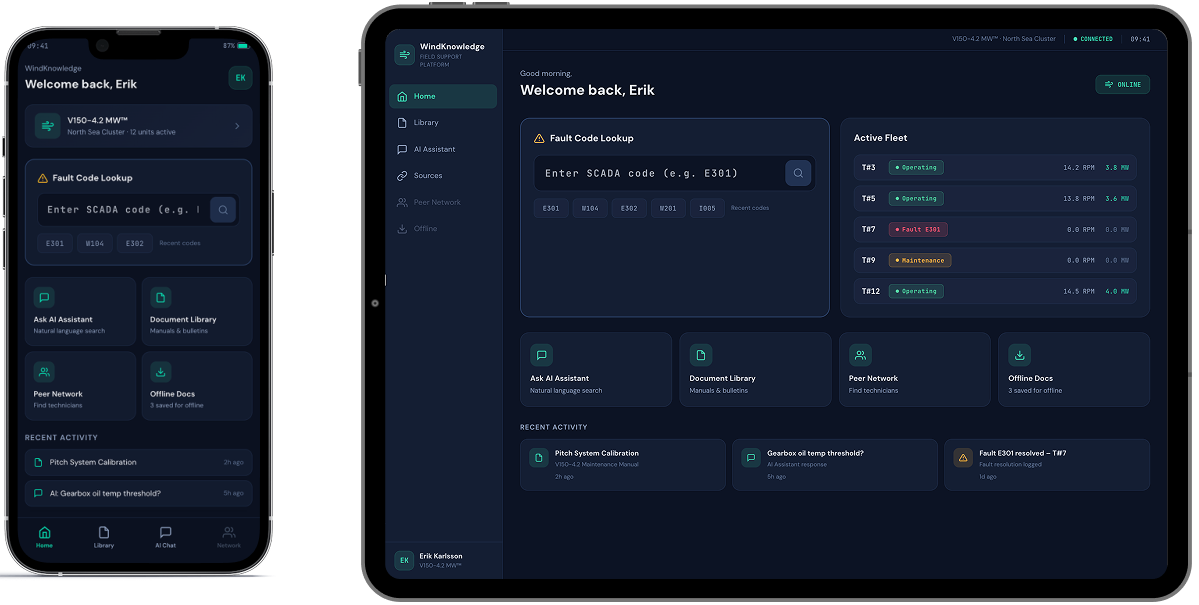
  • Fault-code workflow. The AI search handled natural language and fault codes equally well, but testers revealed that the vast majority of their queries start with a SCADA status code. This prompted us to update the home screen design by adding a dedicated fault-code entry field with auto-recognition, so the most common interaction pattern gets the shortest path.
  • Minimum taps to target. In the initial prototype, users had to open a document before saving it for offline access. Testers pointed out that before going offshore, they often need to save several guides at once. We redesigned the flow so documents could be saved directly from search results, without opening each one individually.
  • Expert knowledge sharing priorities. The prototype included a location-based map showing where other technicians were working, but users made it clear that proximity was not their top priority. They wanted to filter peers by turbine model and specialization first, and by location second. For a technician troubleshooting a specific gearbox issue, the right match was not the nearest colleague, but the one with relevant hands-on experience.
A smartphone and tablet display a dark-themed dashboard interface. Both screens show a welcome message, a fault code lookup bar, system status cards, and recent activity modules, with similar layout but resized for each device.

This feedback reshuffled the development backlog. We moved features like fault-code-driven search and single-tap document access from “could have” to “should have” status, ensuring the MVP reflected how technicians actually work, not just how the workflow looked in a prototype.

  1. Developing and rolling out an MVP

The MVP scope was deliberately focused: one turbine product line, one content library, and an upscale from 20 to 100 technicians. The goal was to prove the full end-to-end experience with a larger, controlled user group before replicating it across the client’s entire equipment catalog.

Here’s how the flow goes:

  1. During onboarding, the early adopters select the turbine models they service
  2. From that point on, the app personalizes search results, document recommendations, and community connections, so that a technician working with a specific model sees materials and peers’contacts relevant to that model, noise-free
  3. Every answer the AI assistant returns includes citations to the source document and section, so a technician can verify the guidance before acting on it.

This personalization engine sits on a knowledge base of hundreds of maintenance manuals, monitoring guides, technical bulletins, etc. Since it’s updated once a month at most, a real-time content synchronization would have added unnecessary complexity. A monthly content ingestion pipeline was enough to keep the knowledge base current without overengineering the backend.

Once rolled out to the full 100-technician group, the app saw steady organic adoption.

Before

  • Technical documentation scattered across multiple portals and PDF libraries
  • Only basic, document-level search capabilities
  • A multi-tap user journey to reach a single document, with no shortcut for the most common queries
  • Peer expertise shared informally through phone calls and personal contacts, if at all

After

  • A single AI-powered conversational app consolidating the wind turbines’ maintenance library
  • Advanced semantic search with optional hard filters across the whole knowledge base
  • One tap to target and fault-code auto-recognition field on the home screen
  • A structured peer network connecting technicians by turbine model, specialization, and relevant field experience

Business value

  • Post-sale support transformed into a product feature
  • – 37% requests escalated to the client’s customer support team
  • < 30 seconds from query to cited, source-verified answer
  • x2.5 faster troubleshooting of field incidents

Multiplier effect

The pattern behind this platform – consolidating scattered documentation into a conversational AI interface and pairing it with a peer network – is not limited to the energy sector. Any industry where field professionals work with dense technical libraries under time pressure faces similar friction: heavy machinery, medical devices, industrial automation, telecom infrastructure, and more. The infrastructure we built is modular to be useful for a different knowledge base and equipment catalog without being redesigned from scratch.

A person in a dark blue shirt holds a smartphone in one hand and types on a laptop with the other. Digital facial recognition icons and a checkmark appear, indicating successful facial authentication on the phone. The background is blurred.

Quoting System Modernization

Quoting System Modernization
For a Global Industrial Manufacturer

RENOLD logo
How rewriting the quoting functionality and embedding it into a customer-facing 3D visualizer enabled a German subsidiary of the Renold Group to accelerate overall order processing from 1-2 days to under 30 minutes and boost quote-to-order conversion by 17%.

Industry:
Manufacturing

Legacy Software Modernization

Enterprise Automation

Custom Software Development 

Business challenge

Having half of your tech ecosystem up-to-date and the other half reliant on legacy software created significant performance and scalability constraints for our client. Renold GmbH, a global manufacturer of industrial conveyor chains, gears, and couplings, faced operational inefficiencies due to outdated quoting practices. Although they already had a modern, customer-oriented 3D configurator, its functionality was limited to checking the compatibility of details produced by Renold and visualizing them. To place an order, customers had to manually compile a list and send it to the sales team, who then processed it using an Excel spreadsheet with quoting logic written in a legacy VBA language. 

The tech gap between the 3D configurator and the quoting system led to a range of operational problems:

  • Slow order processing, as quoting alone used to take 1-2 working days
  • Time-consuming manual steps that could be easily automated if both systems were written in the same programming language
  • The headache of aligning updates across the two separate systems
  • Scaling limitations of the legacy quoting system, which capacity is directly tied to the number of employees processing quotes

Renold wanted to simplify and fast-track the quoting process by integrating quoting functionality into the 3D configurator.

Solution

As the 3D configurator was written in JavaScript (JS), the main task of *instinctools’ legacy modernization team was to rewrite the quoting functionality in JS and embed it into the configurator.
  1. Deconstructing VBA Excel workflows

VBA is a specific language designed to work hand-in-hand with Excel, so its operational logic is tightly interlinked. Re-creating it in another programming language couldn’t be done by simply converting VBA code to JS.

Our team needed to thoroughly analyze and reverse-engineer the VBA workflows to fully understand their logic before translating them into JavaScript. Key tasks included:

  • Manually re-creating out-of-the-box VBA Excel capabilities, such as drag-to-fill and pattern-based formula propagation, in JavaScript
  • Designing custom logic for handling dynamic rows
  • Rewriting complex fill patterns into explicit index math

Instinctools’ engineers collaborated closely with Renold’s team to ensure the new system mirrored the component matchability logic from the legacy system down to the last detail.

  1. Integrating the newly written quoting feature into the 3D configurator

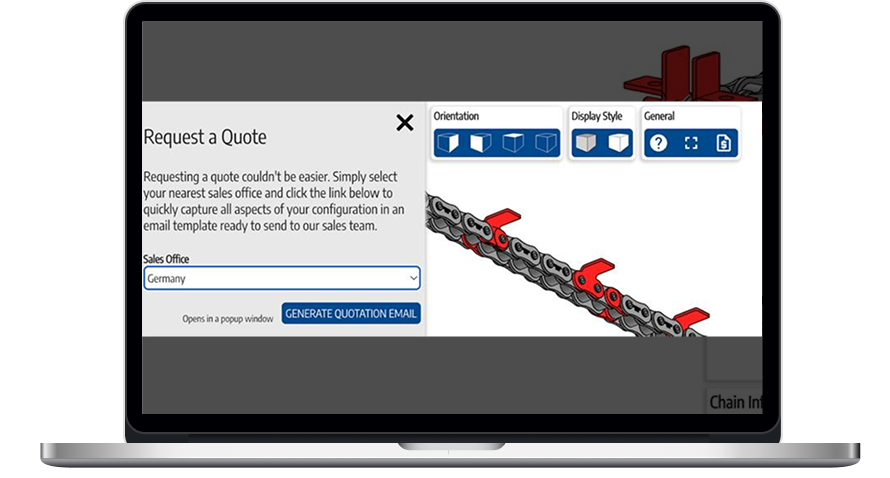
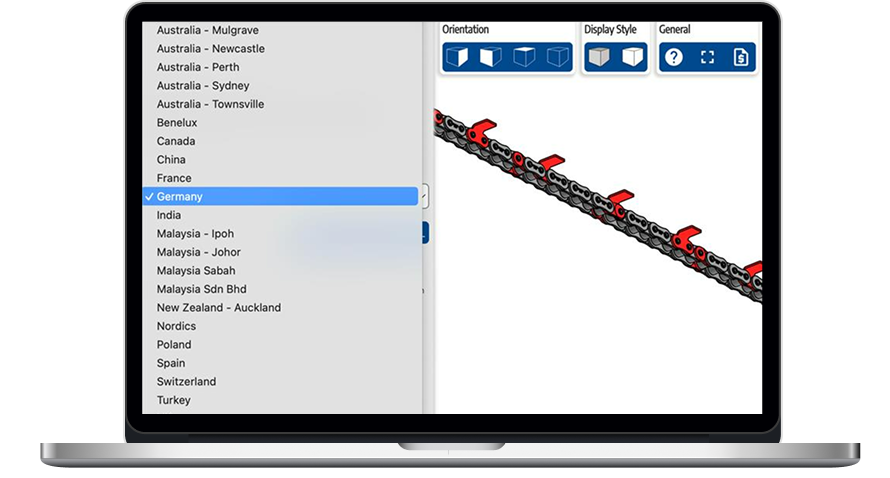
We incorporated the new quoting engine as a standalone module into the existing 3D visualizer. With design and pricing being merged into one fluid experience, users can now assemble complex mechanisms by themselves and request a quote from the relevant Renold sales office right away.

A laptop screen displays a Request a Quote form with a dropdown menu for selecting a sales office (Germany selected), a blue Generate Quotation Email button, and a technical diagram with orientation and style options above.
A laptop screen shows a dropdown menu with countries and cities selected over a 3D model of a conveyor system. Germany is highlighted in the menu. The right side displays blue buttons for orientation and style above the conveyor model.
  1. Simplifying price updates

Automating quote generation was a significant step forward that accelerated the workflow from 1-2 days to under 30 minutes. However, there was another order processing bottleneck the client wanted to address. In the previous setup, whenever the prices of the chains, gears, and couplings were changed, Renold employees had to manually adjust them in the VBA code.

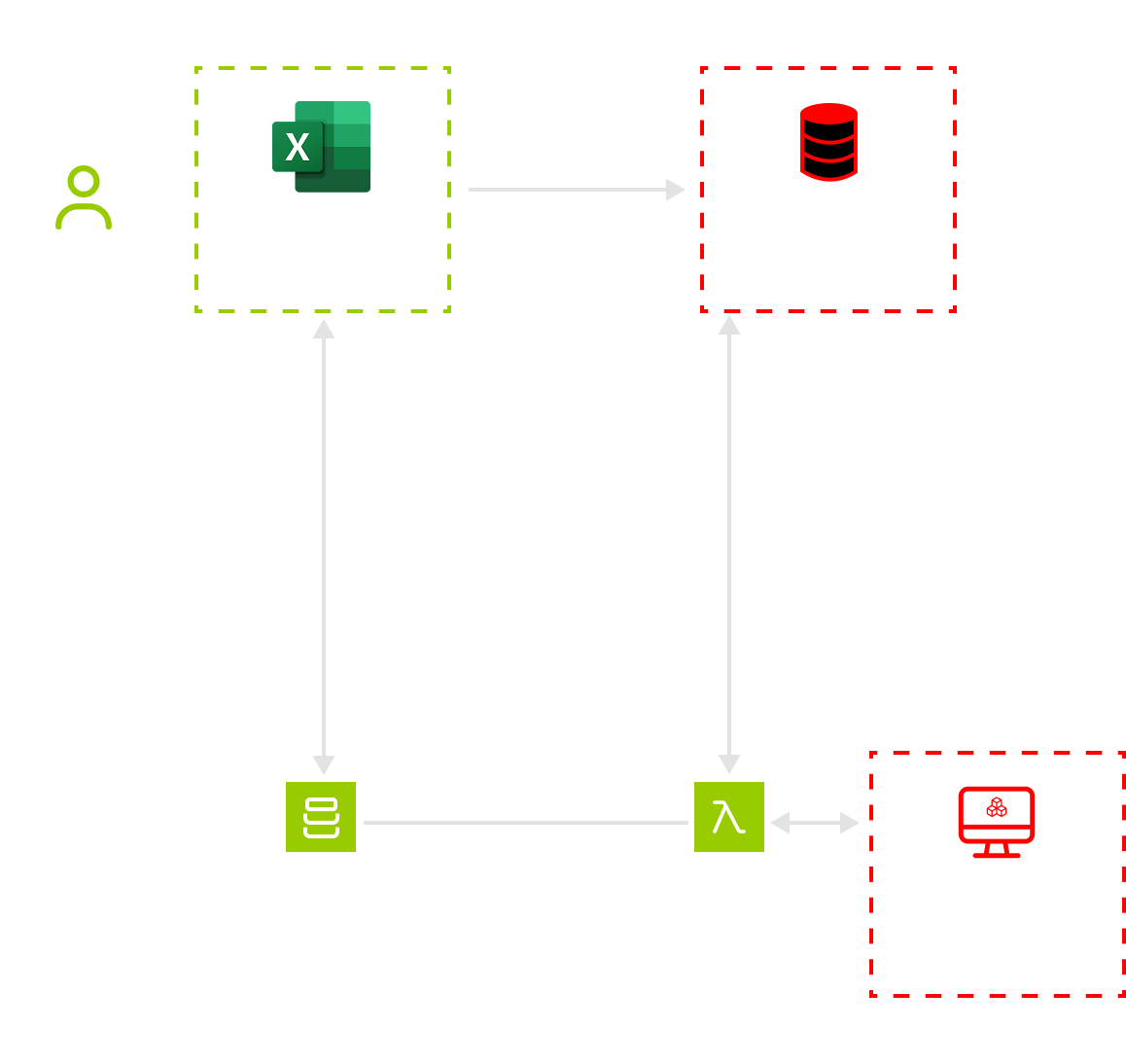
Our dedicated team reorganized the workflow so that prices inside the quoting module update automatically. Here’s how it works now:

  1. The client’s staff updates prices in an Excel file and uploads it to AWS S3.
  2. AWS Lambda reads the file and transforms it into JSON data, storing it in the same folder.
  3. AWS Lambda keeps the parsed JSON in fast memory to serve repeated requests faster.
  4. The 3D configurator retrieves prices by sending requests to Lambda.
A flowchart segment shows “Client staff” sending data to an “Excel price list.” From there, arrows lead to “High-speed cache,” “AWS S3,” and “AWS Lambda.” A dashed box contains the “3D configurator,” connected to the rest by an arrow.

This approach also helped keep CPU load low and performance high, with price checking done in under 10 milliseconds.

Before

  • Mostly manual, Excel-based quoting
  • Mechanism visualization and quoting exist separately
  • Quoting takes hours or even days
  • Price updates require VBA code modification
  • Two separate codebases to maintain
  • Scaling required more staff

After

  • Fully automated quote generation
  • The quoting feature is embedded into a 3D visualizer
  • Quoting is completed in under 30 minutes
  • Price updates are handled automatically
  • One unified codebase
  • System scalability without increasing headcount

Business value

  • Automated quote generation and price updates
  • x32 faster order request processing
  • – 60% of man-hours spent on quoting
  • + 17% in quote-to-order conversion

Client’s testimonial

AI Agents for Insurance

AI Agents for Partner Onboarding in Insurance

How a conversational, UI-driven multi-agent system helped a global insurance aggregator cut partner onboarding from 3-6 months to 2 weeks, enable multilingual self-service for carriers and brokers, and keep quality high at optimal cost through governed model selection.

Industry:
Fintech

Multi-agent AI

Enterprise Automation

Business challenge

Our client, a global insurance aggregator, scales by adding new partners (carriers, MGAs, regional brokers) across dozens of countries. Each partner comes with different APIs, schemas, languages (including non-Latin scripts and right-to-left layouts), and regulatory constraints.

Historically, onboarding a single partner took 3-6 months of cross-functional effort: clarifying requirements, interpreting sparse and heterogeneous documents, writing adapter code, preparing test data, iterating through compliance checks. Multiplied by hundreds of partners, the cost ballooned and timelines stretched.

The client needed to:

  1. Compress time-to-integration from months to weeks without compromising compliance or auditability;
  2. Accommodate variability in partner maturity: from bringing different API protocols (REST, SOAP, etc.) to a common denominator to handling multiple document types (PDFs, spreadsheets, or even email samples);
  3. Let non-technical partner representatives self-serve in their native language, with a guided, transparent flow;
  4. Stay model-agnostic and cost-efficient as the LLM landscape evolves.

Instinctools’ dedicated AI team took on creating a faster and smoother partner onboarding workflow.

Solution

We delivered a production-ready, UI-first, multi-agent system that turns partner inputs (documents, answers, samples) into working adapters and automated tests, finishing with a GitHub pull request. The solution combines a structured AI adoption process, an orchestration pipeline that thinks before it codes, and model governance from our AI Center of Excellence.

  1. Running an AI adoption workshop

To de-risk the initiative and align on outcomes, we started with the AI adoption workshop. Within it, our team:

  • Conducted business discovery, mapping the core flows (Quote → Bind → Endorsement → Cancellation → Claims/FNOL), the country-specific nuances, and the compliance checkpoints;

  • Identified process bottlenecks and time sinks, including document triage, field mapping, eligibility rules, error semantics, and under-specified specifications;

  • Defined clear success criteria and guardrails with a target of ~2 weeks per partner, compile-clean builds, minimum test-coverage thresholds, and audit-ready artifacts;

  • Produced solution blueprint around a three-phase agentic pipeline (Analyze → Plan → Generate) with human-in-the-loop validation.


  1. Selecting the right model

Before designing the agentic pipeline, our AI engineers tested multiple LLMs using reverse-engineered samples from existing API adapters to see which fits the client’s needs best. Among GPT, Gemini, Grok, and Anthropic (Opus and Sonnet), Claude Opus 4.1 delivered the most stable and production-ready output, especially when guided by structured prompts and incremental checkpoints.

Model governance by our AI Center
of Excellence
 
Choosing and re-choosing models is integral to value. Instinctools’ very own AI CoE runs a repeatable framework that evaluates models by code-gen accuracy, context window, speed, modality coverage, hosting options, API availability, cost per token, language coverage, and deployment constraints. Our experts continuously benchmark new releases and propose controlled switches (with cost deltas and risk notes), so the client benefits as the market shifts.

  1. Building an agentic pipeline

Agents don’t jump to code. They analyze inputs, plan the work with acceptance checks, then generate code and tests, looping until the build is clean.

Each adapter runs through a 13-step playbook where every output becomes the next input, while the agent distills patterns from the prior implementations into a consolidated guide for what to build. A short intake questionnaire captures the business rules the docs miss, and we seed the workspace with curated reference repos so the agent can “look up” proven approaches.

With an agentic approach, a large endpoint is typically completed in 2-3 hours for roughly $50-100 of model spend.

  1. Ensuring quality and auditability

Every step is pinned to hard checks, such as unit, contract (schema), and integration tests, a compile-fix loop, and smoke/HTTP probes that prove the service actually runs. Humans step in only at high-leverage moments, dedicating, on average, up to 20 minutes to polishing the output. 

Under the hood, we trace prompts, tool calls, inputs/​outputs, latencies, and token spend with Langfuse. That observability makes audits boring in the best way: each decision and artifact is tied to a PR with change logs and test evidence, ready for reviewers and regulators. 

Following our AI in SDLC practices, we’ve also baked drift controls into prompts (“out of scope” rules), keeping models focused on what’s required and nothing more. And when something slips, those traces collapse time-to-root-cause from hours to minutes, so the next run captures the fix by design.

  1. Putting a premium on AI security controls

For AI-powered onboarding to be safe and sound, we had to ensure compliance with a plethora of security policies by design:

  • Core security and privacy baselines, such as NIST and OWASP
  • Insurance and financial-sector cybersecurity regulations by region, such as the NYDFS 23 NYCRR 500 and the NAIC Insurance Data Security Model Law for the US, the DORA for the EU, the FCA/PRA Operational Resilience for the UK, and the APRA CPS 234 for Australia, among others
  • Data privacy laws, such as CCPA, PIPEDA, GDPR, PDPA, APPI, etc.
  • AI governance regulations, including NIST AI RMF and EU AI Act

To check all the boxes, our team zeroed in on:

  • Regional hosting options to store EU data within the EU, US data within the US, etc.
  • Role-based data access 
  • PII protection measures like field-level masking to ensure no sensitive data is fed to the model
  • Prompt “guardrails” to prevent the model from going off-scope or fabricating logic
  • Human-in-the-loop reviews of AI artifacts, with all of them linked to a GitHub PR for audit trails
  1. Designing self-service UI

Once the agentic approach proved consistent across 10 API adapters, our AI team wrapped the workflow in a simple web UI.

  • Partner-facing portal. Secure onboarding wizard and chat. Partners drag-and-drop PDFs/Swagger/​Postman/XLSX or describe their process in free text.
  • Multilingual by default. The agent converses in the partner’s language and normalizes vocabulary into the platform’s canonical model.
  • Progress and transparency. Step-by-step status, logs, downloadable reports, and validation results.

Human expertise still guides quality and regulatory soundness. The agent automates the mechanical steps, delivering a compile-clean adapter with unit tests and CI checks, which used to consume months of execution time.

Agent-powered partner onboarding with a human in the loop

At the end of each step of the workflow, a developer reviews the output before the model proceeds. Such application of human judgment where it matters most makes the agentic onboarding approach predictable and trustworthy, not a “black box”.

Stage Automated by agents Human touch
Partner intake and registration Self-service sign-up, chat onboarding in any language, guided file upload Provide access keys if required
Documentation ingestion Parses PDFs/​Postman collections, extracts relevant sections per step/​endpoint Upload docs, remove obviously irrelevant pages if flagged
Contract and reference analysis Builds reports on aggregator API contract; mines patterns from prior adapters Launch a quick sanity check for hallucinations on big reports
Implementation plan Scans repo, identifies existing services/​DTOs, proposes what to add/​change Approve/​adjust plan if edge cases
Code generation (per endpoint) Generates services/​DTOs/​mappers/​tests aligned to contract ––
Build and self-fix loop Compiles project, iterates on compile errors until green, starts app ––
Smoke checks and PR Optional HTTP smoke tests, opens a GitHub PR with artifacts Review PR, merge
Orchestration and audit One-click run from UI, step-by-step logs/​metrics (LangFuse) Monitor runs, rerun if a step stalls
Compliance and escalation Routes ambiguity/​questions via chat, escalates to legal/​SME when needed Answer a short checklist (e.g., coverage limits, exclusions, etc.)

Before

  • 3-6 months to onboard a new partner
  • Fragmented documentation in multiple languages and formats
  • Slow feedback loops and unclear ownership of quality gates
  • Client’s software engineers do all the groundwork manually 
  • Each adapter is treated as a one-off build

After

  • 2 weeks of onboarding time per partner, end-to-end, including review and PR
  • Governed model policy that keeps quality up and token costs down
  • Client’s engineers take on the human-in-the-loop role while agentic AI carries on the integration process step-by-step
  • Knowledge now compounds: the more adapters are built, the easier it is to build the next ones

Business value

  • Up to 12× faster partner onboarding
  • 10× decrease in operational costs
  • 80–90% less repetitive development work
  • Near-zero rework on recurring issues
  • Full auditability of AI actions for compliance

Multiplier effect

With the hard parts of partner onboarding automated and a model strategy that evolves with the market, the platform can expand faster into new countries and niches. As the library of reference adapters grows, each subsequent integration benefits from pattern reuse, shrinking effort even further.

A vibrant digital landscape with 3D grid waves in pink and blue, forming peaks and valleys on a dark background. Small dots and data points scatter around, evoking a sense of futuristic data visualization or network analysis.

Odoo Migration For a Furniture Manufacturer and Retailer

Odoo Migration For a Built-in Furniture Manufacturer and Retailer

How replacing a home-grown, feature-poor CRM with Odoo CRM and Loyalty & Rewards functionality enabled a Polish built-in furniture manufacturer and retailer to save ≈ $600,000, increase lead-to-order conversion from 1.4% to 3%, and boost customer retention by 10%.

Industry:
Retail, Ecommerce

Legacy Software Modernization

Enterprise Automation

Business challenge

When your core business systems fall behind the pace of your company’s growth, the gap between potential and performance tears open so wide that it becomes impossible to ignore.

Our client, a Polish furniture retail company, reached that 
point. Their legacy self-written CRM, tightly coupled to their ecommerce platform, had become a growth blocker.

Staff
used to face CRM freezes every morning when all employees logged in at once

Loading a customer profile or order history could take up to 25 seconds. For a company operating in three cities, it caused delays in order processing even outside peak seasons.

Customers’
website experience suffered, too

If product or checkout pages took more than 4-5 seconds to load (a frequent occurrence due to real-time CRM calls), visitors bounced and carts were abandoned.

Besides poor performance, outgrowing their existing system manifested in the lack of functionality and limited scalability:
  • No lead tracking

The client used many different channels for customer acquisition, including paper flyers, SMS campaigns, cold and hot calls, and several websites. But without solid tracking mechanisms in place, they couldn’t tell where and when a lead arrived, and see which lead generation strategies made the most impact.

  • Slow feature development

As all the functionality was hard-coded, adding new features such as lead tracking (or even minor tasks like adding new fields) required code changes and complex database schema redesigns. But the client’s in-house team was already swamped by technical debt and had no bandwidth for new feature development.

  • No multi-language support

The client planned to expand into neighboring countries, starting with the Czech Republic and Slovakia, and had to ensure the CRM could be localized for future on-site teams.

  • No system for tracking repeat customers

It was vital to boost hyper-personalization, reward loyal customers, and encourage repeat purchases at scale through a targeted discount system.

To top it all off, the old system was largely undocumented, with the CRM creator as its sole knowledge keeper. This put core business processes like customer and order management at risk of being bottlenecked by a single individual.  

Caught between either squeezing more out of their existing CRM or replacing it with a more feature-rich, scalable system, the client needed a seasoned CRM partner to estimate the budget for both paths and implement the winning option. Instinctools brought the hands-on experience needed to navigate the decision and act on it. 

Solution

First, to address the “stay vs. migrate” dilemma, our business analyst modeled both options over a three-year perspective.

  • Modernizing the legacy CRM

to make it more scalable, crafting a loyalty module from scratch would have cost the client around $300,000, and then just as much yearly to maintain this house of cards.

Three-year TCO ≈ $900,000 at the very least
  • Switching to an up-to-date SaaS CRM

with a ready-made loyalty module would have required up to $150,000-250,000 for initial migration and then $60,000-120,000 yearly for licenses and software upkeep 

Three-year TCO ≈ $330,000-600,000

With the possibility of nearly triple cost savings over three years, combined with all vital functionality and unlimited scalability, the direction was clear: migrate. Next, we had to decide on the SaaS CRM best aligned with the client’s needs. 

There were three options on the table: Odoo, Salesforce, and SAP. Considering the client’s time, budget, and flexibility constraints, Odoo, with its CRM module and Loyalty & Rewards functionality, spoke directly to their needs:  

  • All the requirements covered out of the box, without costly add-ons, integrations, or heavy customization 
  • Faster time-to-value thanks to pre-built modules
  • Lower vendor-lock-in and higher flexibility due to the system’s open-source foundation

We followed a master-replica switch strategy to achieve the industry’s below-5-second downtime gold standard. Instinctools’ dedicated team had to do a lot of the groundwork to ensure a smooth transition from the old environment to the new one.

  1. Pre-migration

Since the client’s self-written custom CRM was riddled with numerous undocumented customizations that could make things trickier down the road, we began by reverse-engineering and documenting the old system. With our AI-powered practices in SDLC, the task took only two days instead of the usual three weeks it would have required if done entirely by humans. 

The team also used AI tools for data-related operations for data quality checks, its cleansing, mapping, and backup, as well as archiving outdated and unnecessary data. That way, we sped up the tasks by 60% while cutting their cost by 35%.

At this stage, we also reviewed data encryption mechanisms to ensure they won’t slow down software performance. To strike the right balance between speed and security, we chose selective encryption for database fields, rows, and columns containing PII instead of encrypting the entire dataset.

  1. Legacy CRM
    to Odoo migration

Our Odoo implementation team moved in iterations. First, we defined a migration framework – a clear, structured plan for moving data from the 
old CRM to Odoo, which included: 

  • Transformation rules, such as merging duplicates, standardizing formats, etc.
  • Entity migration order with a dependency-aware sequence for tables, transactions, and related objects to ensure their interrelationships don’t break downstream
  • Error-handling procedures with the rollback-and-retry strategies, if any issues arise during migration
  • Data integrity checks to confirm that no inconsistencies or errors slip through 

With the framework in place, we ran a small-scale test migration to spot and fix edge cases. After refining the playbook, we proceeded with the full migration, which kept business operations uninterrupted, staying well within the below-5-second downtime standard.

  1. Odoo Loyalty & Rewards module adoption

Odoo modules are designed to click together like LEGO, so we implemented the loyalty module and wired it to the CRM for a continuous data flow of customer info, purchase history, and more. With promotions fully digitized, the client gained two immediate wins: 

  • Automated calculation of loyalty percentages and customer recognition across different channels 
  • Advanced personalization thanks to tailored recommendations of additional products

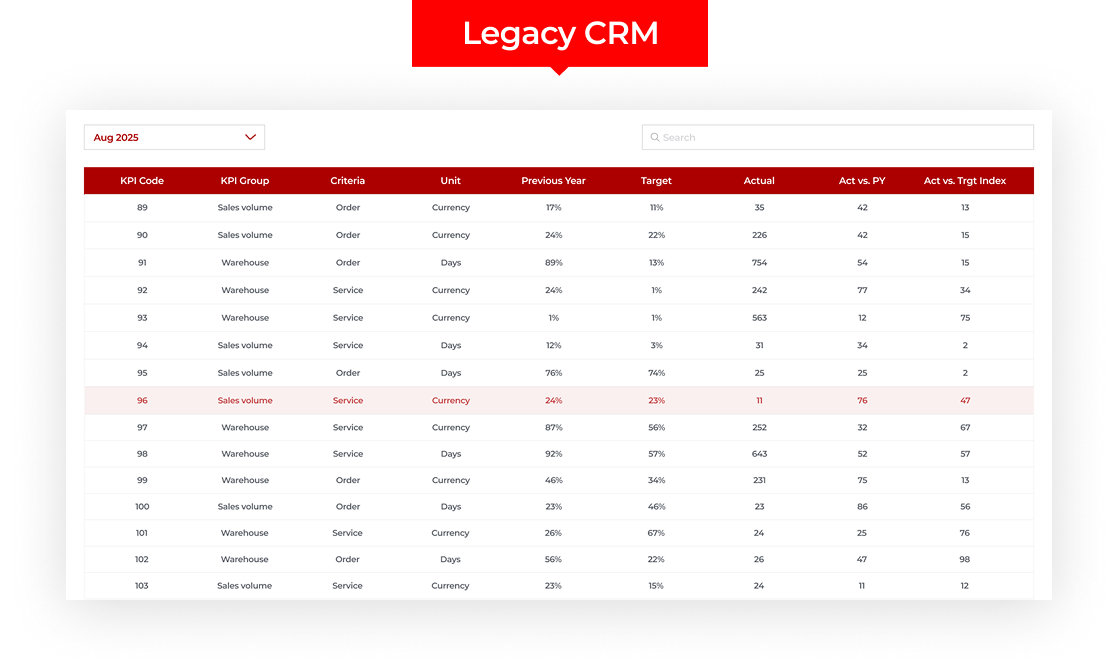
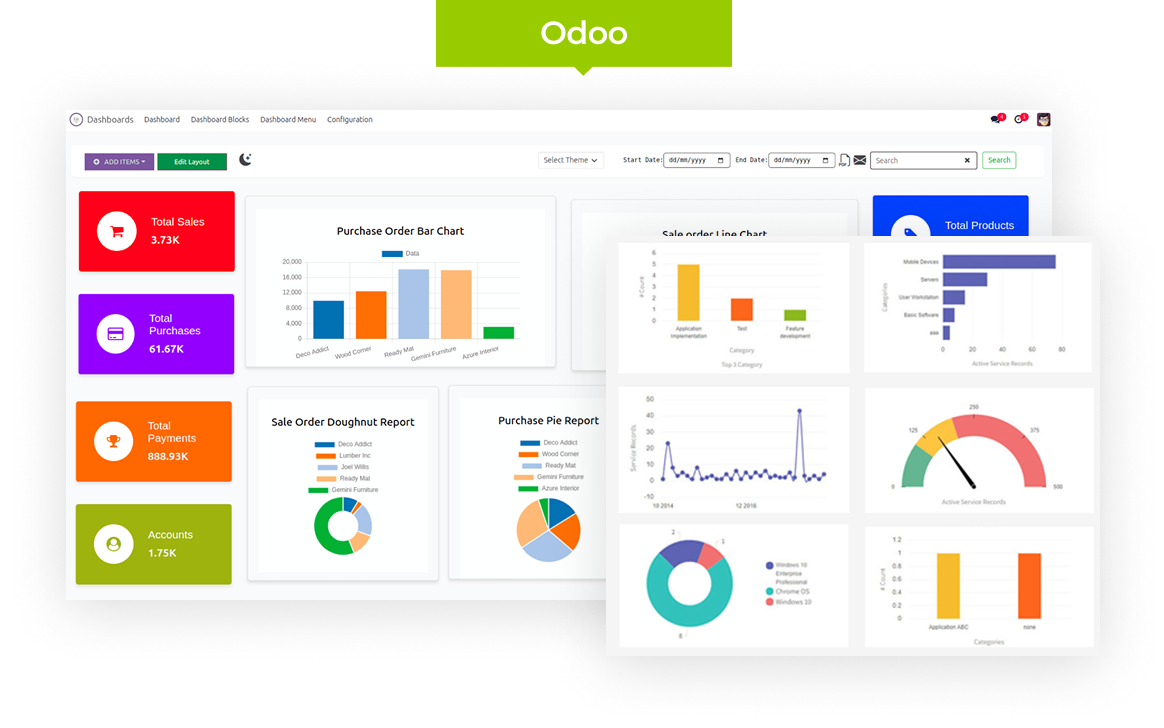
Both the CRM and loyalty modules provide built-in analytical dashboards, which we customized to track the client’s key metrics. New easy-to-grasp visualizations replaced clunky Excel tables.

A dashboard titled Legacy CRM displays a table for August 2025, showing various KPIs with columns for code, group, criteria, unit, previous year, target, actual, percentage against previous year, and target index. A search bar is at the top right.
A digital dashboard interface with colorful widgets on the left showing sales, purchases, payments, and accounts data. Two overlaid panels display various charts and graphs, including bar, line, and pie charts, under the Odoo label at the top.
  1. Post-migration

To make sure the system was fully prepared for daily use, we: 

  • Tested performance under real-world load

The dedicated team checked the system for speed and stability to verify that the user experience is hitch-free. 

  • Enabled end-users

We ran online training sessions to help staff quickly adapt to the new software and shared recordings for ongoing self-training and easy refreshers. 

  1. Extra-mile website performance optimization

Since the CRM is tightly integrated with the client’s ecommerce platform, improving website performance and customer experience was a strategic part of our migration efforts. Instinctools’ team:

  • Implemented Nginx as a load balancer to distribute requests across multiple application servers, ensuring higher availability and smoother performance during traffic spikes.
  • Added Redis as a smart caching layer for frequently accessed data, reducing response times and improving overall system performance.

Those efforts resulted in faster page loading speed and a 20% drop in cart abandonment rate.

Before

  • Legacy, feature-limited CRM with poor performance
  • Largely undocumented software reliant on a single knowledge keeper
  • Costly to scale and maintain

After

  • Up-to-date, feature-rich, customizable CRM
  • SaaS software with detailed documentation
  • Easy to operate and scale across regions

Business value

  • ≈ $600,000 TCO savings
  • < 5-second downtime during the transition from one system to another
  • x 2 in lead-to-order conversion via automated conversion pipelines and timely follow-ups
  • + 10% in customer retention thanks to the adoption of a trackable loyalty program and targeted offers
  • + 15% in marketing ROI through clarity on high‑ROI channels and wise budget reallocation

Multiplier effect

The desire to stick to legacy software that still works is perfectly rational, especially when the sticker price of modernization looks higher than patching holes and creating temporary crutches. But there’s always a tipping point when outdated software starts working against you more than for you.

Weighing different options of dealing with legacy systems, you may need expert guidance. That’s when seasoned software consultants can step in with proven strategies to address the challenges in your CRM, ERP, or other systems.  

Two people work at a desk covered with architectural blueprints, a calculator, eyeglasses, and a laptop. One person writes with a pencil on a document, while another stands nearby holding a notebook. The scene suggests collaboration and planning.

Autonomous AI Sales Representative

Autonomous AI Sales Representative For an Australian Consulting Company

How building an autonomous AI virtual worker enabled an Australian consulting firm to process 20% more leads and boost upselling/cross-selling by 19% while reducing cost per lead by 15%.

Industry:
Technology

AI Development

Enterprise Automation

Business challenge

With AI agents being marketed as a magic wand to wave away employees’ daily grind, businesses have quite high expectations of their potential value. Low-code platforms make it look like building AI agents that automate entire workflows is a matter of a few prompts and several clicks. In reality, platform constraints often block the integration required for those much-coveted outcomes. That’s where our client got stuck.

An Australian consulting company with an in-house IT team but no solid internal AI expertise tried experimenting with Microsoft Copilot Studio to fit their mostly MS-first software environment. Yet, the devil turned out to be in those non-Microsoft integration details. Copilot Studio’s native connectors covered MS apps only, so anything outside the stack called for custom builds the in-house team didn’t have the expertise to deliver.

Microsoft-bound agents made little sense, as a typical day of the client’s sales representatives meant bouncing between Outlook and Teams for communication, HubSpot for client and deal records, OneDrive for shared documents, Jira for project tracking, Miro for brainstorming, Power BI for reporting, and LinkedIn for prospecting and messaging.

Three dead ends of Microsoft-centric agents in a heterogeneous stack were:
Static context

As agents couldn’t track changes across the full toolset and refresh memory on their own, staff members had to manually collect updates from multiple apps and feed the agents.

Prompt sensitivity

Sales reps had to remember which prompts triggered the right responses, adding another layer of mental burden on top of managing pipelines.

Passive mode

Initiating the communication was always the humans’ duty, which also took its toll on the mental workload and became exhausting for sales reps.

While the promise of AI agents was powerful, the reality looked more like AI crutches that only added to the employees’ cognitive load.

Time went by, but the much-anticipated productivity boost never showed. Still, that setback helped the client solidify their vision of a helpful AI agent as one that can:

  • “Walk” within their multi-vendor software ecosystem freely to pull together fragmented information into a dynamic, up-to-date project context
  • Join the conversations of their core human team to make proactive suggestions and then act on them

With this idea in mind, they started looking for a tech partner to build a sales-focused AI agent. The bar was high: the client expected more from an AI vendor than acquaintance with popular AI frameworks, they wanted deep, hands-on experience. Instinctools, with their own agent-building platform, proved to be the right match.

Solution

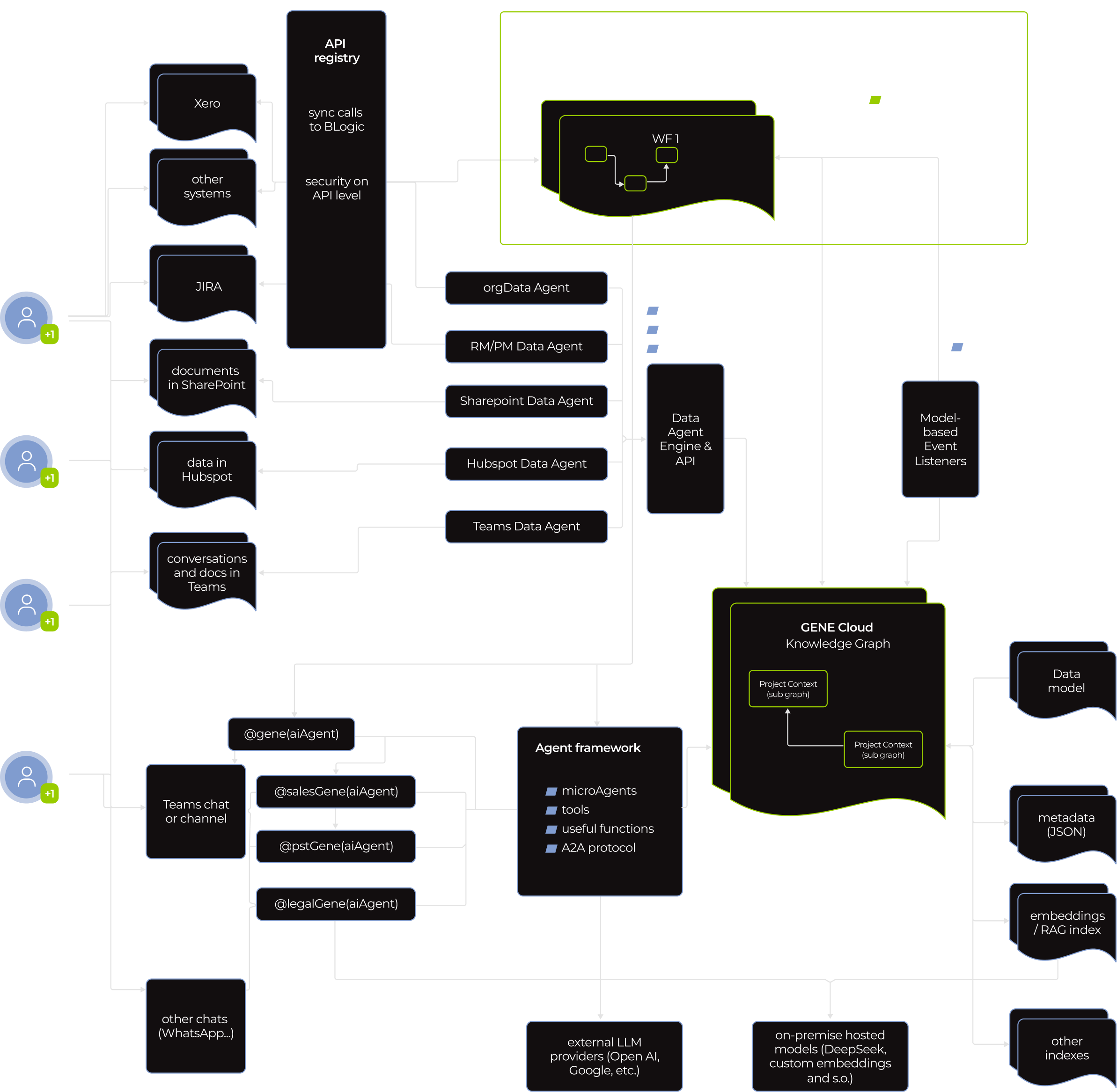
Instead of forcing a client to adapt to a rigid AI framework, we used our very own technology-agnostic GENE platform to build a truly adaptive autonomous sales representative that each team member can configure to match their personal workflow.

  • By default, the virtual worker is connected to the company’s Confluence, Jira, HubSpot, Power BI, Miro, and OneDrive. 
  • Additionally, employees could drop the AI worker into any Teams chats and channels and give it access to their LinkedIn profile.

Once connected, the AI sales representative kept project context fresh and proactively suggested next steps, or took them, at any stage of the pipeline, from triaging inbound leads to post-project follow-ups. 

The virtual worker reduced staff’s mental strain, freeing them up for complex tasks and high-touch client interactions. The payoff was almost immediate. Within the first month, the client saw measurable improvements in the number of leads processed, cost per lead, upselling/cross-selling, and hours saved.

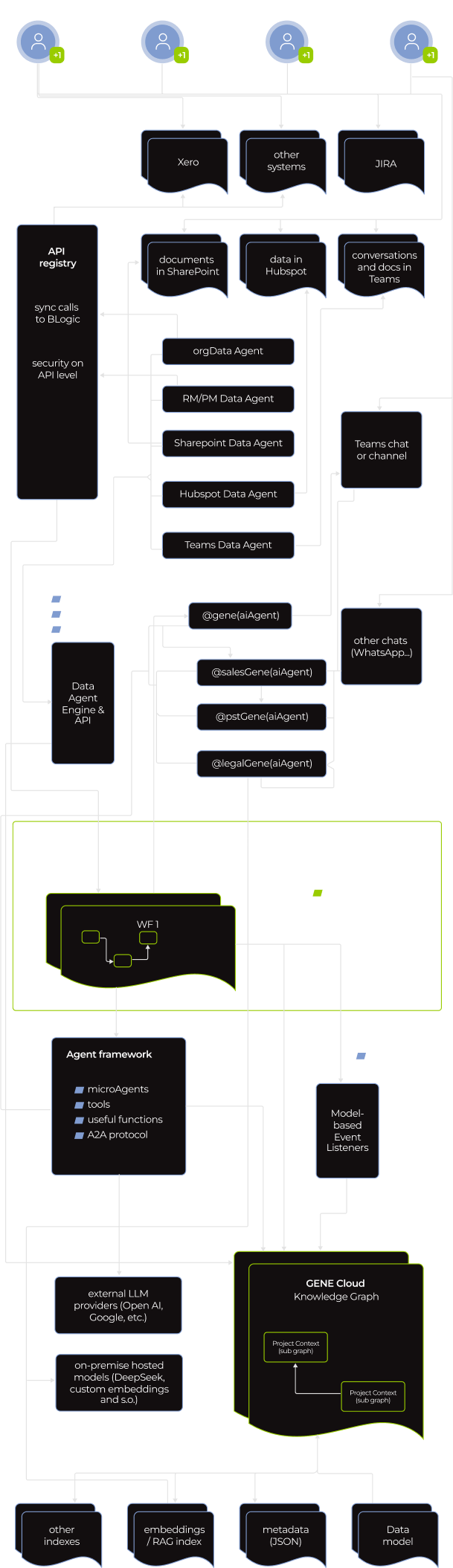
What is Gene?

GENE is *instinctools infrastructure middleware for building secure-by-design AI agents and multi-agent systems faster than with bare-bones AI frameworks.

What did we leverage in GENE to 
build a better agent?
  1. A single workspace for open-source AI frameworks like crewAI, LangGraph, LangChain, and others.
  2. Built-in responsible AI mechanisms, including bias detection and mitigation, AI governance, and AI regulation compliance.
  3. A library of pre-vetted APIs for a hitch-free agent integration into the client’s software ecosystem.

Compared to building AI agents from scratch, GENE enabled our AI engineers to develop and integrate reliable, scalable agents 70% faster. What typically requires 8–12 weeks with just frameworks alone, was condensed into 2–3 weeks with GENE. 

Here’s how GENE addressed the client’s past frustrations with a constrained low-code platform:
  1. Providing built-in agents that automatically maintain tasks, workflows, and project context up to date, so users don’t have to.
  2. Eliminating repetitive prompting thanks to pre-configured workflows and agents’ ability to “listen” to connected tools, allowing for context-aware actions before being asked.  
  3. Presenting a wide range of whitelisted APIs for AI agents to solve problems independently. 

Under the hood of the virtual worker there is a multi-agent system. 

A flowchart showing data integration and workflow orchestration: Sources (e.g., Xero, Jira, SharePoint, email, Teams) connect via agents to a central GenAI Cloud Knowledge Graph, managed by a WF orchestrator. Paths include API calls, data pipelines, and external LLM endpoints.
A complex flowchart showing data integration between various agents (ERP, Sharepoint, Hubspot, Teams, JIRA, etc.), a WF orchestrator, and a knowledge graph. Lines represent data flow; black and green boxes detail agents and system functions.
A flowchart displays data flow from various SaaS platforms (e.g., Xero, Jira, GitHub) into multiple data agents (e.g., SynData, Hybrid, Transparent, Rulepack, AI agents). These feed into a WR connector, agent framework, and further into cloud integration.

Knowing the stakes, the client put data safety and overall software security front and center. Our dedicated team did too.

Standard measures, such as mandatory user authentication, access control, activity tracking, and data encryption at rest and in motion, were table stakes. We built on that with GENE’s AI-specific safeguards, aligned with NIST AI RMF, Google’s SAIF, OWASP AI, and other AI regulation frameworks. 

  • Robust secret management

OAuth tokens, database credentials, API keys, and other secrets are stored in an isolated vault inaccessible to agents themselves. We implemented automated credential rotation, with a standard 30-day cycle that can be tightened to daily for highly regulated industries.

  • Agent-to-agent (A2A) communication protocol

It allowed agents to work together without exposing their memory, proprietary logic, or tools to each other.

  • Whitelisted AI tools

We strictly supervise which tools agents can use and what they can do. For example, the virtual worker can create a Jira ticket based on a conversation in Teams, but only human reps can delete it.

Before

  • Microsoft Copilot Studio couldn’t deliver the tangible value the client was after
  • Agents rely on a static, manually updated context 
  • Agents add to the sales reps’ cognitive load
  • Passive AI is overreliant on humans to push it along

After

  • Instinctools’ technology-agnostic GENE platform made it possible to develop an autonomous sales representative that covered all the client’s needs
  • The AI sales representative keeps a living, self-updating context
  • The autonomous virtual worker offloads routine tasks from humans
  • Proactive AI agent acts on context and gets things done without interrupting human sales reps

Business value

  • Faster agent development without security trade-offs thanks to reliance on a solid infrastructure middleware instead of bare-bones AI frameworks
  • + 20%  leads processed per sales representative
  • + 19% more upsell/cross-sell initiatives
  • – 15% in cost per lead
  • – 10 hours of manual work per employee weekly

Multiplier effect

This success story points to a not-so-distant future where AI workers are graduating from assistants to full-scale teammates operating within your workflows. You can start with AI virtual workers as personal secretaries for staff members to ease their mental load. And then scale with autonomous AI employees contributing to the projects’ progress on par with your human team. Best of all, you get reliable employees on board right when you need them, omitting a time- and budget-draining hiring process. 

A person’s hand points at a glowing AI icon on a digital network overlay above a laptop keyboard. Futuristic data charts, chat bubbles, and circuit lines suggest artificial intelligence technology and data processing.

Google Workspace to Microsoft 365 Migration For a Medtech Company

Google Workspace to Microsoft 365 Migration For a Swiss Medtech Company

Neo beyond the expected white logo

How migrating from Google Workspace to the Microsoft 365 suite enabled a medtech company to establish a secure and scalable enterprise-wide collaboration environment without missing a beat in their everyday operations and reduce operating expenses by 50%.

Industry:
Healthcare, Technology

Enterprise Automation

Legacy Software Modernization

Business challenge

As companies expand, they often outgrow the tools and services they relied on in the early days of their existence. What once worked for a lean team of 20–30 employees can quickly become a bottleneck as headcount climbs past 100.

Our client, Neo Medical, is a medtech company that started with Google Workspace tools. At some point, they broadened their toolset with Microsoft products, namely, Entra ID (former Azure AD) as an identity and access management solution, and Office 365 package.

Still, most of their daily tasks, including drafting documents, preparing reports, and handling internal communication, remained heavily tied to Google Workspace, coupled with other SaaS tools, like Tresorit as a cloud storage and Skype for communication.

This setup had several drawbacks:

  • Doubled operational expenses as the client had to cover the fees for both Google and Microsoft products.
  • Compromised security, even with Microsoft’s Entra ID providing fine-grained access control. The Google Workspace-centered environment lacked deep threat analysis capabilities, built-in data loss prevention measures, and highly configurable software security monitoring tools.
  • Integration friction due to the reliance on tools from different SaaS vendors. While some tools, like Tresorit, provided integration with the Google platform by design, others, like Skype, didn’t, introducing extra integration complexity.
  • Lack of seamless collaborative experience for employees who had to juggle separate tools.

As the company grew and more of their clients expected enterprise-grade security and seamless data protection by default, the need for a unified, secure, and scalable IT environment became urgent. Though the idea had been on their radar for months, Microsoft’s February 2025 announcement to retire Skype within three months made it clear that it was time to act.

Neo Medical decided to move from Google Workspace to Microsoft 365 and started looking for a tech partner who could migrate them from one suite to another with zero downtime. Even 10 minutes without access to email servers meant the client could potentially miss high-priority external emails. Having extensive experience in carrying out such migrations, Instinctools stepped in.

Solution

In this case, our business analyst played a crucial role in gathering and documenting all the nuanced requirements the client had. With such a precise approach, every crucial detail was factored in, preventing data loss, jerry-built integrations, security gaps, undisabled licenses, and performance issues in the new software ecosystem.

Meanwhile, the dev team automated the assessment of their current environment. They used MigrationWiz to scan and catalogue mailboxes, Drive shares, and Skype workspaces.

Choosing between a one-time switch and approaching things gradually, we opted for migrating in stages to ensure a smooth transition, catch and resolve potential hiccups in the bud, and minimize the employees’ resistance to change.

Since the client’s staff was already using Entra ID for identity and access management, we didn’t have to onboard their accounts and devices into MS365 systems and went straight to migrating data from one tool to the corresponding one in the Microsoft suite. Given that mail and calendar were vital for the client’s everyday operations, we decided to start with these systems and then take care of the secondary services.

  1. Gmail and Google Calendar to Outlook Mail and Calendar migration

To ensure zero downtime, our team started pre-staging migration activities while Google services were still live. Here’s how we handled the whole endeavor.

  1. Two weeks before cut-over, we set up MigrationWiz to do a background sync and copy all Gmail messages, labels, user-created folders with filtering rules, and calendar events to Exchange Online. By doing this in advance, we had to copy only the most recent emails and last-minute calendar updates during the final switch, when we planned to fully transition from Google Workspace to Microsoft 365.

  2. Four days before the final shift, we reduced the mail-exchange (MX) record’s time to live (TTL) from its default 3,600 seconds down to 300 seconds. This ensured that, during the final Friday-night switch, the change would spread almost instantly, with external mail servers learning the new delivery route within about 5 minutes instead of an hour.

    By finishing 99% of the data migration beforehand, we minimized a coexistence phase where two inboxes and calendars must be monitored and protected simultaneously. This prevented downtime and significantly reduced the window for potential interception-based threats.

  1. From Friday, 6 PM, with all users logged out, Google kept accepting new mail and instantly forwarded it to Exchange. All inbound messages landed in the new mailbox.

  2. Simultaneously, Outlook began publishing free/busy information into Exchange, and Google Calendar was switched to “forward-only” mode to redirect any new calendar events sent over the weekend to Exchange Online.

On Monday next week, the client’s staff logged into a new environment with their existing sign-in data. Only this single “hello, Microsoft” moment greatly contributed to minimizing end users’ resistance to change.

We kept Gmail and Google Calendar in forward-only mode for four days after the cut-over. Any mail reply or meeting update sent from an old Google tab was automatically forwarded to Exchange Online, so conversations and invites flowed on without interruption.

A Google Calendar interface shows the “Tasks” checkbox in the left sidebar being unchecked, with a green arrow pointing to its new status—unchecked and grayed out—causing the purple “Tasks” events to disappear from the main calendar view on the right.
  1. Skype to MS Teams migration

Since Skype and Teams organize group communication differently (channel groups vs. private teams), we could only transfer contacts from one tool to another. As with other migration steps, we planned the final move for Friday evening, but started preparations in advance:

  1. A week before the company-wide switch, we launched Teams in parallel mode and installed it on department managers’ laptops. These seven people became pilot users, gaining instant access to the new communication tool without having to download or set up anything themselves.

  2. Five days before the final shift, we moved these seven pilot users to Teams-only mode so that they could create relevant core Teams and channels and add users from Entra ID. As a result, when the rest of the employees logged into the new tool, they were automatically added to all the necessary teams and channels, ready to start working without any setup delays.

    At this stage, department managers had two systems running simultaneously, but this arrangement remained invisible to other employees still using Skype and had no impact on the ease of communication. For example, if  C-level manager Alice sent a direct message to employee Bob, Bob saw a standard Skype pop-up. And if Bob sent the message, it appeared in Alece’s Teams client inside a special “Skype user” chat tab. 

  3. On Friday, at 6 PM, we moved the rest of the employees to a Teams-only mode and set Skype to read-only.

On Monday, staff logged into Teams with their existing credentials and kept working as usual. The only noticeable change was the ability to integrate third-party apps like HubSpot, Jira, Miro, etc., to Teams to streamline daily routines with simple automation. We whitelisted trusted applications to ensure the client stays on the safe side.

As with mail and calendar, we left Skype available only for data verification purposes for four days post-migration and disabled Skype licenses after this period.

Migration from Skype to Teams not only provided the client’s staff with a feature-rich communication tool, but also contributed to tighter access control and security. In the new environment, collaboration is structured around private teams only, with no public teams allowed. For example, a BizDev or a LeadGen team includes only the users who need to collaborate on those workflows. If someone needs access to another team, they must request permission from the team owner. Such an approach reduces the risk of data exposure and keeps sensitive information confined to appropriate circles.

A split-screen shows two chat applications: WhatsApp Web on the left in dark mode with blue chat bubbles, and Microsoft Teams on the right in light mode with a list of contacts and an open chat. Both display blurred-out messages for privacy.
  1. Tresorit to Microsoft’s OneDrive migration

Along with the shift from Skype to Teams, we transferred the client’s data from Tresorit to OneDrive using a similar approach. However, there were two cloud storage-specific requirements to keep in mind:

  • The client didn’t need all the history data migrated, as keeping all versions would be time-consuming and costly. We agreed on moving only the latest versions but keeping their Tresorit subscription for another 90 days in case auditors or R&D staff need to check any old version that wasn’t imported.
  • They wanted the new system to mirror the old one in structure and permissions to make the transition as seamless to the employees as possible. To achieve that, our team replicated the whole folder hierarchy and named the new OneDrive folders the same way they were in Tresorit. The only thing that changed for the end users was the cloud storage icon.

How did this shift elevate security? Previously, Tresorit’s file vault and the company’s device‐security controls worked in silos, and a user could still open or edit corporate files even if their laptop was out of compliance, say, running an unpatched OS. Now, with OneDrive, the client has a single entry checkpoint, when access to the company data is granted only after both multi-factor authentication and device-compliance checks are passed. If either gate fails, the files stay locked.

  1. Staff training

Besides ensuring a stress-free migration from one software suite to another, our best practice is to offer hands-on staff training. In the client’s case, our team:

  • Held an online adoption workshop (two 2-hour sessions) on working with Microsoft 365 tools
  • Provided ongoing support to employees for a whole month following the migration by answering their questions in a dedicated Teams channel

Before

  • A set of fragmented tools
  • Compromised security
  • Disjointed user experience due to a tool sprawl
  • High operational expenses

After

  • A single feature-rich collaboration platform
  • Perfected security measures
  • Unified user experience across the entire software ecosystem
  • Optimized expenses thanks to replacing several different tools with a single communication platform

Business value

  • 50% drop in software operating expenses
  • 70% of security incidents are intercepted at an early stage when they’re less costly to fix
  • 1.5 hours more of usable time per employee weekly, thanks to operating within an end-to-end collaboration platform

Client’s testimonial

Here’s how a transformation lead on the Neo Medical side describes the project’s flow and results:

Multiplier effect

Whether it’s moving from one collaboration platform to another, switching CRMs, or replacing spreadsheets with an advanced analytics tool, there’s always room to evolve for the sake of stronger security, more scalable workflows, and higher efficiency. Having a seasoned tech partner by your side can make the shift stress-free.

A person uses a laptop while touching a virtual screen with glowing digital icons, including lists, cloud upload/download symbols, documents, and an 80% progress indicator, suggesting data transfer or cloud computing activity.

Custom API Integration Platform For a Real Estate Startup

Custom API Integration Platform For a Real Estate Unicorn Startup

How automating everyday interactions between key applications enabled a real estate startup to slash data processing costs by 60% and save up to 30 hours per employee monthly.

Industry:
Real estate

Web Development

Enterprise Automation

Business challenge

According to McKinsey, up to 69%* of data collection and processing tasks can be fully automated. Meanwhile, without automation, they become significant drains on time and resources.

A rapidly growing US-based real estate startup, discovered it firsthand. Doubling down on scaling their single-family rental (SFR) service platform, they put process automation on the back burner until it began to impact productivity.

Manual data checks, follow-ups, and the constant back-and-forth between different tools ended up wasting employees’ time — 20 to 30 hours each month per person. But the time loss was just the tip of the iceberg. The manual operations:

  • Created delays due to lack of real-time data exchange between the systems
  • Led to inconsistent, error-prone data
  • Increased complexity for the staff, forcing them to juggle several tools constantly

All these problems arose from the lack of seamless, automated communication between the client’s most-used tools, including Monday.com, Box.com, SiteCapture, Spruce, and Qualia.

Given their AWS-based event-driven architecture, choosing event-driven automation and connecting disparate apps through a custom multi-tool API integration was a quick-win option. Nevertheless, this win was not easy to achieve due to other challenges:

No in-house personnel

to take on this side project without trade-offs in product development.

No time

to hire new specialists on the core team, as automation needed to be done ASAP.

Expanding their in-house team with external experts was the fastest way to get things moving.

Solution

Our approach was simple yet powerful. The client’s AWS-heavy tech stack (including S3, Lambda, and DynamoDB) provided a solid foundation. We enhanced it with:

  • AWS Step Functions to orchestrate automated data exchange within the client’s software ecosystem
  • AWS EventBridge to route events between Monday.com, Box, SiteCapture, Spruce, Qualia, etc.
  • Elasticsearch for fast document indexing and company-wide search
  • Smarty API for address validation
A flowchart shows an API Gateway triggering a Step Functions workflow, which sends events to an EventBridge event bus. The event bus routes events via rules to Amazon SNS topics, SQS queues, workflows, Lambda functions, and an Application Load Balancer.
A diagram shows API Gateway sending requests to a Step Functions workflow, which triggers an EventBridge event bus. The bus routes events to SNS topics for clients, workflows, SQS queues with Lambda, and an Application Load Balancer.
A vertical diagram shows an API Gateway triggering a Step Functions workflow, which communicates with two APIs. Events flow into an EventBridge event bus, then trigger rules connecting to SNS, SQS, Lambda, API Gateway, and a Load Balancer for mobile clients.

In just 2.5 weeks our backend engineers created a consolidated software ecosystem with automated workflows by designing 100+ events and setting up routes for them.

Well-orchestrated automation also granted seamless scalability to the client’s software ecosystem. New tools can be easily added to established workflows.

  1. How our custom multi-tool API integration works in practice

The new solution connects the client’s project and document management, on-site operations, logistics, and title & closing services. Now, tedious tasks that once bogged down employees are handled automatically. Staff can focus on real problem-solving and strategic decision-making.

Here is how the automation powers several key workflows across the client’s business functions.

Project management

The creation of a project item with a new property in Monday.com triggers several parallel routes:

  • Lambda validates the address via Smarty API and updates the property’s entry
  • A new project folder is created in Box.com for all related documents
  • A corresponding new project entry is created in SiteCapture for on-site inspectors
  • Key property’s data is indexed in Elasticsearch for immediate searchability

That way, staff from different departments can access error-free data on the new project within seconds.

A flowchart showing Monday.com at the top, splitting into two paths: one leads to Box.com (then Smarty API), and the other to Elasticsearch (then SiteCapture). Labels indicate actions: Validate address, Create site project, Create folder, and Index data.
A flowchart with SiteCapture at the top connects by arrows labeled Photo uploaded to two boxes below: Box.com on the left and Monday.com on the right, showing photo uploads from SiteCapture to both platforms.
On-site operations

When an on-site inspector uploads the property’s photos ​​in SiteCapture, this event sets off two parallel routes:

  • The photos are copied to Box.com to ensure all project files are backed up in the cloud
  • A corresponding item in Monday.com is updated with a link to the photos (from Box.com or SiteCapture)

That way, essential information on the project is never lost, and on-site workers and office personnel always stay on the same page.

Logistics

An update of a property’s address in Monday.com starts a sequence of actions:

  • Lambda verifies the address through the Smarty API
  • The validated address is then updated in Monday.com, with incorrect addresses flagged for review

That way, all addresses are correct from the onset, eliminating the risk of transaction delays.

Flowchart with two boxes: Monday.com above Smarty API. Arrows show: from Monday.com to Smarty API (New address); from Smarty API to Monday.com (Tag the item for staff review); from Smarty API down (Can verify the address → Validated address, Cannot verify the address).
A flowchart shows Box.com at the top, with arrows pointing to Monday.com (labeled “Update info”) on the left and Elasticsearch (labeled “Index content”) on the right, illustrating data flow from Box.com to both platforms.
Document management

An upload of a new contract, inspection report, etc., to Box.com kicks off a route for automatic document indexing:

  • Amazon Textract extracts text​ from documents
  • The document and its metadata are indexed in Elasticsearch for fast company-wide search

That way, new documents become searchable company-wide within seconds after they’ve been uploaded into any of the apps.

Title tasks

Moving a deal’s status in Monday.com to “Ready for Title” sets in motion a multi-step route:

  • The Spruce API runs a title search, validating address and buyer/seller info
  • When Spruce completes the title work, it triggers two more routes:
    • Title commitment documents are automatically saved to Box.com
    • The corresponding deal status in Monday.com is marked “Title Completed”

That way, vital real-estate documents are processed immediately and stay safe from human error.

A flowchart with three rectangles labeled Monday.com, Box.com, and Spruce. Arrows show: Order title search from Monday.com to Spruce, Update status from Spruce to Monday.com, and Save docs from Spruce to Box.com.
  1. Here’s how API integration streamlined our client’s daily workflows

10 minutes here and 15 minutes there don’t look like a big deal. Until you do the math: 10 min × number of times an employee repeats this action throughout the day × number of employees.

That’s how our client wasted hours on repetitive mundane tasks daily. Now all these actions are done in milliseconds without human input.

A comparison table showing four business processes: adding photos, uploading documents, address validation, and reporting—contrasting manual methods (with time estimates) to automated solutions using various software tools, highlighting improved efficiency.
Side-by-side comparison table of manual vs automated work for four tasks: photo uploads, document uploads, address validation, and report generation. Steps, tools, and time for each process are listed in color-coded rows and columns.
A comparison chart with four rows showing manual vs. automated steps for real estate tasks: adding photos, uploading title documents, address validation, and reports. Each row lists process, manual time, automated tools, and automated time savings.

Before

  • Data siloed across disconnected apps
  • Manual, error-prone updates across platforms
  • Slow deal processing due to manual checks and data transfers
  • Employees overloaded with repetitive tasks

After

  • Disparate apps are united into a cohesive ecosystem
  • Real-time, automated data exchange across systems
  • Immediate actions triggered by changes in any app
  • Employees freed from mundane tasks, focusing on higher-level decision-making

Business value

  • A completely unified and highly scalable software ecosystem that adapts to new tools and processes
  • Real-time data exchange across platforms
  • 60% reduction in data processing cost
  • Up to 30 hours saved per employee monthly
  • Minimized risk of human error

Client’s testimonial

Multiplier effect

The problem of wasting employees’ potential on dull work refers to industries across the board. It’s easy to overlook the time spent on small tasks, but when you add it all up over weeks or months, the cost becomes significant.

Luckily, process automation, in all its forms — from API integrations to AI agentic solutions — offers an opportunity to save time, reduce costs, and improve accuracy, unlocking your team’s full potential and elevating your business to new heights.

A hand reaches toward a glowing digital interface labeled AUTOMATION at the center, surrounded by icons representing charts, documents, gears, people, and graphs, symbolizing various business automation processes on a dark tech-inspired background.

Web App For Robotics Manufacturer

Intuitive Web App For Robotics Manufacturer

How crafting a web app with an easy-to-grasp interface and flexible architecture empowered a manufacturer of warehouse driverless forklift systems to unlock new value-creation opportunities and reach SMB customers.

Industry:
Logistics, Manufacturing

Enterprise Automation

UX and Design

Web Development

MVP Development

Software Product Development

Business challenge

Under-automated or under-digitized intralogistics inevitably affects a company’s profits. However, sometimes the bottlenecks aren’t that obvious, and even organizations with warehouse-specific software and robotics in place struggle to achieve the much-coveted outcomes of intelligent automation.

The issue may lie in having overcomplicated software designed for tech-savvy users that holds down the company’s capabilities in efficient control and optimization of the goods flow within a manufacturing facility, warehouse, or distribution center.

For example, navigating the driverless forklift systems in small spaces is quite a challenge, as such robots are usually designed for large warehouses. The equipment can neither go near fire exits nor stop near them by default. However, following these settings is tricky in small spaces with little room for maneuvering. Hence, when the robot has no other way than to make a path near the fire exit, it stops before reaching it. Such cases require manual human input to restart the system with an updated route.

Our client, Bleichert, an automation machinery manufacturer, wanted to address two pain points of their customers seeking warehouse robotics:

‘By engineers, for engineers’ approach in designing the software

Lack of targeted solutions for small and midsize businesses (SMB) in the market overloaded with enterprise-grade products

To reach SMB customers and provide them with user-friendly software for warehouse robotics, they decided to broaden their offering with an innovative model of their driverless forklift systems that move loads autonomously by following a pre-configured circuit. Bleichert partnered with NODE Robotics and integrated their software modules into the experimental forklift. However, they needed a reliable tech ally to create a web app with an easy-to-grasp interface for warehouse operators and managers.

Instinctools, with its comprehensive expertise shored up by a set of ISO certifications, filled the bill perfectly. Our dedicated team created an MVP with interactive features for the demo presentation at LogiMat – the International trade show for intralogistics solutions – in just seven weeks.

Solution

When reaching out to *instinctools, the client specified their requirements for the future application.

Architecturally significant requirements (ASRs) included:

  • Accessibility via common browsers, such as Google Chrome, Safari, Microsoft Edge, etc. with an identical look and feel
  • Flexible architecture to support and manage multiple robots in the future
  • Real-time updates of a robot mission

Non-functional requirements (NFRs) encompassed:

  • Quick and easy navigation with the rule of thumb “max three levels to reach the goal”
  • Less than 0.4 sec response to the user input
  • Color-coded interface to simplify operators’ work and avoid any possible costly mistakes

Detailed documentation empowered us to jump into development right away. Our software architects started with establishing a robust tech stack.

  1. Deciding on a tech stack

We zeroed in on the client’s requirements to shape an easy-to-maintain tech stack for the web app development.

  • Seamless compatibility with NODE OS. Bleichert already installed the autonomy OS for mobile robots on the experimental forklift system to handle map management and interact with the robot’s systems and sensors. Since the operational system with related plugins uses Python, we suggested sticking to this programming language and FastAPI framework for server development for the sake of tech stack consistency.
  • Fast user interface response times. Besides ensuring the mandatory ease of use for the warehouse operators, we had to take care of the app’s interface speed. Our frontend developers suggested going with a single-page application (SPA) using React JS for user interface development, as the framework’s component-based architecture and virtual DOM allow crafting UI with lightning-fast render times. By leveraging React JS development services, we ensured optimal performance and a seamless user experience.

Here’s the high-level scheme of the future web app.

  1. Taking into account long-term usage scenarios from the onset

The MVP was tailored to user interaction with one robot (Master Robot) within a pre-configured environment. However, outlining the long-term project vision at the early stages is a best practice our team follows to eliminate head-scratchers in the future and enable a hitch-free development process.

Therefore, in our conversations with the client, we discussed two strategies their customers can choose from in the future when the app will operate multiple robots (Master Robots and Servant Robots).

  • Seamless compatibility with NODE OS

Such an approach provides end users with a single point of control for all forklift systems within the warehouse. However, the main drawback of this method is its high dependence on the Master robot. In case of its malfunctions, Servant robots won’t be able to perform their tasks.

  • The app runs on each of the Servant robots with one Master robot for covering managing tasks

In this case, Servant robots are highly independent, eliminating the risk of a work stoppage due to the issues with the Master robot, but high-level management becomes trickier.

The bone of the architecture at the heart of the web app is its flexibility. It can be tailored to either of these two options, depending on the client’s customers’ feedback on the innovative forklift model.

  1. Engineering and designing a user-friendly web app

Moving forward according to our Delivery Framework, we proceeded with iterative development, covering user roles, robot management, and more.

User roles within the app

The system has authorization and authentication mechanisms, but they aren’t mandatory, and non-authorized users can access the web app. Thus, we provided two modes within the system:

  • Basic user, designed for the rank-and-file warehouse operators with no authorization required
  • Key user, accessible only by authorized employees, for high-level warehouse operators and managers

However, the capabilities of authorized and unauthorized users greatly vary. As you can see on a high-level app vision, Basic users can only view the list of existing robot missions and launch them, while Key users are allowed to create new routes and missions, add restrictions, view the history, check the robot’s status, etc.

Now, let’s dive deeper into the robot-related features.

Robot mission management

Each mission has the following attributes:

  • Name
  • Starting point of interest (POI)
  • Destination POI

A Key user can add any mission from the list to the queue by clicking the “Play” button. The mission will appear at the last position after a five-second pause, during which the list of missions is locked. Then, the operator will be notified whether queuing the mission was successful or failed.

There are four mission statuses:

  • Active
  • Queued
  • Completed
  • Deleted

A Key user can remove any missions in the queue except the active ones.

Both Basic and Key users get toast notifications about events related to the robot’s operation. The alert about the robot charging is shown until the process is completed.

The opportunity to pause the robot is available from any application page for both roles.

One of the client’s fundamental requirements was tracking a robot mission in real time, so we set the execution time to update every second.

A Key user can change the order of queued missions.

Mission removal is available for a Key user. They need to click the appropriate menu item and follow the additional action confirmation.

Only a Key user can access the History of missions and filter them by date:

  • Today
  • Week
  • Month

All missions are shown by default.

That’s what the clickable prototype looks like.

Dashboard for monitoring robot condition

The complex interface wasn’t the only reason the client’s customers considered previous forklift systems not user-friendly enough. They also strived to have simple visualizations of the robot’s status to detect and fix machine maintenance issues before they snowball.

A dashboard with widgets and actual information about the robot’s state empowered users to switch to the ‘danger foreseen is half avoided’ principle and, thus, decrease machinery maintenance costs.

  1. Writing a test emulator for the app

The client’s web app is an example of an embedded solution that strongly depends on the hardware. In such cases, software testing takes a special place in SDLC. There are two ways to perform it:

  • Running the app directly on the robot. However, this was a no-go option, as the client wanted to fine-tune the new model’s sensors before the trade show. Transporting the forklift back and forth between their headquarters in Osterburken and our development hub in Warsaw would totally mess up the project’s timeline.
  • Testing software on an emulator. The client didn’t have an emulated environment that imitates the robot’s behavior, so we offered our help and built it.

As we were working on the emulator ourselves, the increased project scope could have put the *instinctools team in a tight spot, given the strict deadline. However, we managed to deliver the robust version of the app on the dot. Moreover, our emulator served as a temporary substitute for the solution’s service for the robot coordination, making it possible for the client to showcase the trailblazing forklift model at the trade show.

  1. Shaping the post-MVP backlog

Satisfied with the MVP results, the client decided to proceed with our partnership at the post-MVP stage, during which our team will broaden the functionality related to these three areas:

  • User management
  • Mission improvements
  • Mission assignment

Before

  • Complicated app meant for employees with an engineering background
  • Lack of visualization
  • Partly manual control over a forklift robot on-site

After

  • Intuitive app sets new standards in user-friendliness of robotics management software
  • Easy-to-grasp dashboards
  • Fully remote control of the forklift robots

Business value

  • Trailblazing warehouse solution for the SMB segment
  • Highly user-friendly UI suitable for non-technical staff makes the software stand up from the crowd of solutions designed for tech-savvy employees
  • Simplified software support due to a homogeneous tech stack
  • Interface with no more than three clicks to reach any feature
  • Less than 0.4 sec response to the user input
  • Real-time updates of the robot missions
  • Easy-to-use dashboards for tracking a robot’s state
  • Decreased robot maintenance cost thanks to detecting malfunctions before they turn into serious issues

Client’s testimonial

Anna Vasilevskaya
AI modified real photo
Anna Vasilevskaya
Account Executive

Get in touch

Drop us a line about your project at
[email protected] or via the contact
form below, and we will contact you soon.