AI Operational Platform for a Professional Services Firm

A Modular AI Operational Platform for a Multi-Entity Professional Services Firm

How creating a company-wide AI operational layer with several AI agents and governance by design enabled a German professional services group to accelerate request processing by 72%, cut fee proposal preparation time by 65%, and free each employee from 6 hours of repetitive administrative work weekly.

Business challenge

Professional services firms in law, finance, and consulting run on trust, context, and responsiveness. In legal, tax, and accounting, the difference between a good client experience and a missed opportunity often comes down to how quickly the right person understands the request, connects it to the right matter, and moves it forward.

But as such companies grow beyond a single practice, the operating model often becomes harder to control. What works for a compact law firm starts to strain when several business units share clients, brand equity, and expertise, but not the same workflows, systems, or view of client history.

Our client, a Germany-based professional services group with assurance, tax, legal, and management consulting business units, had reached that inflection point. Around 100 full-time professionals and part-time consultants across the country supported a shared client base, while customer tracking and project management remained fragmented across business units.

The friction showed up in several places at once:

  • Email as the de facto operating system. Client requests, project updates, document exchanges, internal coordination, and cross-unit referrals all originated and evolved inside email conversations. What they lacked was structured intake, routing logic, and a quick, unified way to track what came in, who owned it, or what happened next.
  • Manual operations. Even routine requests required attention from senior lawyers, tax advisors, auditors, and consultants, pulling highly qualified professionals into administrative work. Moreover, with most of the proposal fee preparation done by hand, the client’s customers waited for days for what competitors with proper automation delivered in hours.
  • Informal and under-structured workflows across business entities. Cross-unit coordination happened ad hoc rather than through structured processes. A legal client asking a tax-related question would trigger a phone call or a forwarded email, as there was no controlled workflow.
  • Low visibility into projects and matters. Each team maintained its own matter records in simplified Excel sheets and DMS templates, leaving the company without a unified view of active matters, ownership, and status.
  • AI adoption lagging behind. While aware that incorporating artificial intelligence into their daily operations was no longer a nice-to-have, the client still lacked a cohesive plan for implementing it.

With these problems snowballing and no in-house expertise to tackle them, the client turned to Instinctools’ AI Center of Excellence.

Solution

From the beginning, the project was not treated as a chatbot implementation, where another isolated AI tool sits on top of already fragmented workflows. The client needed a controlled AI operating layer that could connect inboxes, documents, matter data, internal systems, and human decision-making into one governed workflow.

For law firms, confidential AI solutions with data privacy and compliance built in aren’t optional, as lawyers, auditors, tax advisors, and consultants work with sensitive client data and carry personal responsibility for the advice they provide. AI could help reduce repetitive operational work, but only if every output remained traceable and reviewable.

Considering that context, Instinctools designed the solution around three principles:

  • Sensitive client data must remain under the client’s control
  • AI outputs must be auditable and explainable enough for professional review
  • Every AI-assisted workflow must keep a qualified human in the loop

The platform was built to support four core capabilities from the start:

  • Email intake and matter management 
  • Employee support
  • Quoting support
  • Advisory document analysis
  1. Choosing a platform approach over one-off AI tools

The client wanted to move quickly, but they also needed the solution to scale across several business units. Building one AI tool at a time would have solved individual problems, but it would also have recreated the same fragmentation the company was trying to overcome.

Instinctools proposed a platform-based approach powered by GENiE, our proprietary agentic AI framework. The idea was to build the foundation once (integrations, context layer, agent orchestration, governance, auditability, and data access) and then reuse it across every subsequent AI module.

What exactly did this approach bring to the table?

  • Centralized AI governance inheritance. With governance, auditability, and compliance controls embedded at the platform level, every new AI solution inherited them automatically.
  • Data platform with adapters. Pre-built connectors unified the company’s DMS, accounting platform, time-tracking tool, and Microsoft 365 services into a single queryable layer.
  • Cross-agent context synchronization. It is what makes agentic AI for law firms workable in practice: all AI agents operate within a shared context that connects customers, matters, relationships, and services. Besides eliminating duplicate data entry, this approach enables richer operational intelligence over time.
  1. Starting with what hurt most: email intake and matter management

The first of the AI agents for the law firm’s operational layer our team developed was the email intake and matter management agent.

Much of the company’s work began in Microsoft 365 inboxes: new client requests, follow-ups, internal referrals, document exchanges, administrative questions, and updates on existing matters. Our team connected the platform to the client’s mailboxes and built a processing pipeline that frees lawyers, tax advisors, auditors, and consultants from repetitive triage work.

When an email comes in, the agent:

  • Classifies the intent (new engagement, follow-up, internal referral, or administrative request)
  • Identifies whether the sender is an existing client or a new prospect
  • Determines which business unit should handle the request
  • Checks whether the email relates to an active matter or suggests creating a new matter record when no match is found
  • Surfaces deadlines, obligations, and required next steps for professional review

The agent processes emails in German and English.

Getting the classification right across four business units with different vocabularies was one of the project’s tough puzzles. Tax advisors, lawyers, consultants, and assurance specialists may describe similar work differently or use the same term to mean different things. To address this, our business analyst collaborated with domain experts from each unit to map service categories, routing rules, and matter hierarchies. Where the business units adhere to common logic, the system uses shared classifications. Where they diverge, it maintains unit-specific configurations.

The agent was first tested with a champion group of 10 users. Initial classification accuracy reached around 74%. Through few-shot tuning with real company emails and structured feedback from the early adopters, we raised the accuracy to 87%, exceeding the client’s initial 85% target.

After validation, the email intake and matter management agent was rolled out across all business units. This gave the client a structured intake mechanism and created the foundation for a big-picture dashboard showing active matters, task ownership, and engagement status across the entire company. That way, the AI platform brings multiple practice areas into a single workspace, saving managing partners from calling around or digging through email threads to find out what’s happening.

  1. Broadening AI usage across the company

After the email intake and matter management agent proved stable in production, we began extending the AI systems across the professional services firm’s law, consulting, and finance operations.

Employee assistant chatbot in 2 weeks

Before rolling out AI agents for higher-stakes operations like quoting or advising, we wanted the company’s staff to get comfortable with AI-assisted workflows in a low-risk setting.

We designed and deployed an assistant chatbot that gave employees a controlled environment to interact with AI in everyday scenarios. It operates in German and English, matching the company’s working languages, and answers routine internal questions about leave policies, expense procedures, onboarding steps, IT access, and more, drawing from the company’s HR documentation and operational FAQs. When it can’t answer with sufficient confidence, it routes the query to the right person with context already attached, so nobody has to re-explain the question.

A dashboard shows a chat with a knowledge assistant about travel and business expenses. The left menu lists Dashboard, Names, Requests, Messages, and Knowledge Assistant. The right panel highlights “Travel and Expenses” with statuses: Awaiting response and Answered.

Beyond building trust in AI across the workforce, the chatbot absorbed the stream of repetitive questions that used to land on managers and office admins, freeing each for up to 6 hours of meaningful work a week.

Quoting agent in 3 weeks

Next, Instinctools’ team built an enterprise AI agent for the law firm’s quoting process, turning manual fee proposal preparation into a structured, step-by-step workflow. When a new client request is confirmed through the email intake agent, the quoting agent takes over:

  • Reading the client request and mapping it to the company’s services (tax structuring, legal review, due diligence, etc.)
  • Finding the right people for the job based on skills and experience
  • Checking who’s free through the client’s time-tracking system
  • Drafting a fee proposal based on the company’s rate cards for manager review

What used to be an email back-and-forth across partners, associates, and office admins now runs through a single structured workflow, with AI laying the groundwork and the professionals making the final call.

Advisory agent in 4 weeks

Due diligence packages, regulatory filings, and contract portfolios are the kind of high-stakes documents where volume makes manual review unacceptably slow. To ease the daily burden of the client’s advisory and assurance teams, we built an agent that took on the heavy lifting. It runs within the AI platform built specifically for law firm operations:
  • Ingesting PDF, DOCX, and XLSX documents up to 200 pages long
  • Producing summaries at the level of detail the professional needs, from a quick overview to a section-by-section breakdown
  • Cross-referencing findings across multiple documents to surface non-obvious patterns, contradictions, and gaps

Every AI-generated finding links back to the exact source document, page, and section, so advisory and assurance staff can verify the evidence in seconds.

On the data handling side, the agent classifies documents by sensitivity level:

  • Publicly available materials like regulatory filings, published financial statements, and industry reports are processed through the cloud inference layer under the existing no-retention agreement.
  • Highly sensitive documents, such as materials covered by attorney-client privilege or pre-announcement M&A data, are processed entirely on-premises and never leave the client’s servers.

Setting up the governance framework and platform foundation took six weeks. The multi-agent system with the assistant chatbot, email intake, quoting, and advisory agents was ready in 14 weeks, bringing the entire delivery timeline down to five months, well ahead of the client’s original 8-10-month estimate.

Banking on GENiE showed in the numbers
  1. Cost-effective governance by design

For the platform to operate safely across all business units, we set up a robust AI governance framework from the get-go. 

  • All application servers, databases, and data pipelines run on the company’s own infrastructure. Customer data, matter records, and document embeddings never leave the premises.
  • Only anonymized, tokenized fragments are sent to Azure OpenAI EU West for inference, under an enterprise agreement that guarantees no retention or training on the company’s data.
  • The framework defines how AI document review works for law firms operating under strict confidentiality: AI outputs are treated as working drafts until reviewed and approved by a qualified professional. This keeps human oversight built into the workflow and reflects professional liability requirements under German laws such as BRAO, StBerG, and WPO, as well as the EU AI Act’s human-oversight expectations.
  • Every action any AI component takes is captured in a mandatory audit trail with a 12-month retention period: what decision was suggested, how confident the model was, and whether a professional approved or overrode it. This data can be pulled at any time in a format ready for regulators and auditors.

Here’s how NDAs, engagement letters, and service agreements are handled within the AI operational layer.

Flowchart with two faded boxes on top labeled “Matter record” and “Company templates.” The center green box says, “AI generates first draft. Flags missing or inconsistent fields.” Below is a purple box, “Professional review. Tracked-changes interface.”.

For a company that bills by the hour and watches margins closely, AI spend transparency was a practical concern from day one. To keep inference costs predictable and deliver robust governance without breaking the bank, our team built a cost-tiered AI gateway that routes routine classification to small, lightweight models and assigns complex analysis and document generation to larger models.

The client’s priority wasn’t “governance at any cost”

Before

  • Email inboxes as the company’s informal operating system led to transparency and coordination challenges
  • Manual customer intake, matter handling, and quoting wasted senior professionals’ billable time
  • Client history, matter context, and referral opportunities stayed fragmented across teams and individuals
  • No real-time visibility into active matters, ownership, workloads, and engagement status

After

  • An AI operational layer with strong governance unlocked transparency and seamless cross-unit coordination
  • AI agents took over administrative groundwork, freeing professionals for higher-value expert work
  • Shared operational context unified customer and matter knowledge across business units
  • Managing partners gained real-time visibility into workloads, matter ownership, active engagements, and cross-unit coordination

Business value

  • Real-time cross-unit visibility thanks to a company-wide AI operational layer
  • + 72% in request processing speed
  • – 65% in fee proposal preparation time
  • – 6 hours/week of repetitive administrative work per employee

Multiplier effect

The productivity loss this project addressed goes far beyond legal, tax, and finance. In any knowledge-intensive business, highly qualified people spend too much time on coordination work: routing requests, reconstructing context, chasing updates, preparing drafts, and pulling information from scattered systems.

An AI operational layer with governed multi-agent systems is a way of automating those tasks without sacrificing visibility or control. AI agents take on the groundwork, so your staff spends less time chasing information and more time on the work you hired them for. Companies can start with the biggest time sink and, then, expand gradually as each use case proves its value.

Overhead view of people working at a table with laptops, tablets, charts, and notebooks. A glowing “AI” graphic and digital icons are superimposed, symbolizing artificial intelligence and data analysis. Hands are busy typing or writing.

AI Agents for Insurance

AI Agents for Partner Onboarding in Insurance

How a conversational, UI-driven multi-agent system helped a global insurance aggregator cut partner onboarding from 3-6 months to 2 weeks, enable multilingual self-service for carriers and brokers, and keep quality high at optimal cost through governed model selection.

Industry:
Fintech

Multi-agent AI

Enterprise Automation

Business challenge

Our client, a global insurance aggregator, scales by adding new partners (carriers, MGAs, regional brokers) across dozens of countries. Each partner comes with different APIs, schemas, languages (including non-Latin scripts and right-to-left layouts), and regulatory constraints.

Historically, onboarding a single partner took 3-6 months of cross-functional effort: clarifying requirements, interpreting sparse and heterogeneous documents, writing adapter code, preparing test data, iterating through compliance checks. Multiplied by hundreds of partners, the cost ballooned and timelines stretched.

The client needed to:

  1. Compress time-to-integration from months to weeks without compromising compliance or auditability;
  2. Accommodate variability in partner maturity: from bringing different API protocols (REST, SOAP, etc.) to a common denominator to handling multiple document types (PDFs, spreadsheets, or even email samples);
  3. Let non-technical partner representatives self-serve in their native language, with a guided, transparent flow;
  4. Stay model-agnostic and cost-efficient as the LLM landscape evolves.

Instinctools’ dedicated AI team took on creating a faster and smoother partner onboarding workflow.

Solution

We delivered a production-ready, UI-first, multi-agent system that turns partner inputs (documents, answers, samples) into working adapters and automated tests, finishing with a GitHub pull request. The solution combines a structured AI adoption process, an orchestration pipeline that thinks before it codes, and model governance from our AI Center of Excellence.

  1. Running an AI adoption workshop

To de-risk the initiative and align on outcomes, we started with the AI adoption workshop. Within it, our team:

  • Conducted business discovery, mapping the core flows (Quote → Bind → Endorsement → Cancellation → Claims/FNOL), the country-specific nuances, and the compliance checkpoints;

  • Identified process bottlenecks and time sinks, including document triage, field mapping, eligibility rules, error semantics, and under-specified specifications;

  • Defined clear success criteria and guardrails with a target of ~2 weeks per partner, compile-clean builds, minimum test-coverage thresholds, and audit-ready artifacts;

  • Produced solution blueprint around a three-phase agentic pipeline (Analyze → Plan → Generate) with human-in-the-loop validation.


  1. Selecting the right model

Before designing the agentic pipeline, our AI engineers tested multiple LLMs using reverse-engineered samples from existing API adapters to see which fits the client’s needs best. Among GPT, Gemini, Grok, and Anthropic (Opus and Sonnet), Claude Opus 4.1 delivered the most stable and production-ready output, especially when guided by structured prompts and incremental checkpoints.

Model governance by our AI Center
of Excellence
 
Choosing and re-choosing models is integral to value. Instinctools’ very own AI CoE runs a repeatable framework that evaluates models by code-gen accuracy, context window, speed, modality coverage, hosting options, API availability, cost per token, language coverage, and deployment constraints. Our experts continuously benchmark new releases and propose controlled switches (with cost deltas and risk notes), so the client benefits as the market shifts.
  1. Building an agentic pipeline

Agents don’t jump to code. They analyze inputs, plan the work with acceptance checks, then generate code and tests, looping until the build is clean.

Each adapter runs through a 13-step playbook where every output becomes the next input, while the agent distills patterns from the prior implementations into a consolidated guide for what to build. A short intake questionnaire captures the business rules the docs miss, and we seed the workspace with curated reference repos so the agent can “look up” proven approaches.

With an agentic approach, a large endpoint is typically completed in 2-3 hours for roughly $50-100 of model spend.

  1. Ensuring quality and auditability

Every step is pinned to hard checks, such as unit, contract (schema), and integration tests, a compile-fix loop, and smoke/HTTP probes that prove the service actually runs. Humans step in only at high-leverage moments, dedicating, on average, up to 20 minutes to polishing the output. 

Under the hood, we trace prompts, tool calls, inputs/​outputs, latencies, and token spend with Langfuse. That observability makes audits boring in the best way: each decision and artifact is tied to a PR with change logs and test evidence, ready for reviewers and regulators. 

Following our AI in SDLC practices, we’ve also baked drift controls into prompts (“out of scope” rules), keeping models focused on what’s required and nothing more. And when something slips, those traces collapse time-to-root-cause from hours to minutes, so the next run captures the fix by design.

  1. Putting a premium on AI security controls

For AI-powered onboarding to be safe and sound, we had to ensure compliance with a plethora of security policies by design:

  • Core security and privacy baselines, such as NIST and OWASP
  • Insurance and financial-sector cybersecurity regulations by region, such as the NYDFS 23 NYCRR 500 and the NAIC Insurance Data Security Model Law for the US, the DORA for the EU, the FCA/PRA Operational Resilience for the UK, and the APRA CPS 234 for Australia, among others
  • Data privacy laws, such as CCPA, PIPEDA, GDPR, PDPA, APPI, etc.
  • AI governance regulations, including NIST AI RMF and EU AI Act

To check all the boxes, our team zeroed in on:

  • Regional hosting options to store EU data within the EU, US data within the US, etc.
  • Role-based data access 
  • PII protection measures like field-level masking to ensure no sensitive data is fed to the model
  • Prompt “guardrails” to prevent the model from going off-scope or fabricating logic
  • Human-in-the-loop reviews of AI artifacts, with all of them linked to a GitHub PR for audit trails
  1. Designing self-service UI

Once the agentic approach proved consistent across 10 API adapters, our AI team wrapped the workflow in a simple web UI.

  • Partner-facing portal. Secure onboarding wizard and chat. Partners drag-and-drop PDFs/Swagger/​Postman/XLSX or describe their process in free text.
  • Multilingual by default. The agent converses in the partner’s language and normalizes vocabulary into the platform’s canonical model.
  • Progress and transparency. Step-by-step status, logs, downloadable reports, and validation results.

Human expertise still guides quality and regulatory soundness. The agent automates the mechanical steps, delivering a compile-clean adapter with unit tests and CI checks, which used to consume months of execution time.

Agent-powered partner onboarding with a human in the loop

At the end of each step of the workflow, a developer reviews the output before the model proceeds. Such application of human judgment where it matters most makes the agentic onboarding approach predictable and trustworthy, not a “black box”.

Stage Automated by agents Human touch
Partner intake and registration Self-service sign-up, chat onboarding in any language, guided file upload Provide access keys if required
Documentation ingestion Parses PDFs/​Postman collections, extracts relevant sections per step/​endpoint Upload docs, remove obviously irrelevant pages if flagged
Contract and reference analysis Builds reports on aggregator API contract; mines patterns from prior adapters Launch a quick sanity check for hallucinations on big reports
Implementation plan Scans repo, identifies existing services/​DTOs, proposes what to add/​change Approve/​adjust plan if edge cases
Code generation (per endpoint) Generates services/​DTOs/​mappers/​tests aligned to contract ––
Build and self-fix loop Compiles project, iterates on compile errors until green, starts app ––
Smoke checks and PR Optional HTTP smoke tests, opens a GitHub PR with artifacts Review PR, merge
Orchestration and audit One-click run from UI, step-by-step logs/​metrics (LangFuse) Monitor runs, rerun if a step stalls
Compliance and escalation Routes ambiguity/​questions via chat, escalates to legal/​SME when needed Answer a short checklist (e.g., coverage limits, exclusions, etc.)

Before

  • 3-6 months to onboard a new partner
  • Fragmented documentation in multiple languages and formats
  • Slow feedback loops and unclear ownership of quality gates
  • Client’s software engineers do all the groundwork manually 
  • Each adapter is treated as a one-off build

After

  • 2 weeks of onboarding time per partner, end-to-end, including review and PR
  • Governed model policy that keeps quality up and token costs down
  • Client’s engineers take on the human-in-the-loop role while agentic AI carries on the integration process step-by-step
  • Knowledge now compounds: the more adapters are built, the easier it is to build the next ones

Business value

  • Up to 12× faster partner onboarding
  • 10× decrease in operational costs
  • 80–90% less repetitive development work
  • Near-zero rework on recurring issues
  • Full auditability of AI actions for compliance

Multiplier effect

With the hard parts of partner onboarding automated and a model strategy that evolves with the market, the platform can expand faster into new countries and niches. As the library of reference adapters grows, each subsequent integration benefits from pattern reuse, shrinking effort even further.

A vibrant digital landscape with 3D grid waves in pink and blue, forming peaks and valleys on a dark background. Small dots and data points scatter around, evoking a sense of futuristic data visualization or network analysis.

Autonomous AI Sales Representative

Autonomous AI Sales Representative For an Australian Consulting Company

How building an autonomous AI virtual worker enabled an Australian consulting firm to process 20% more leads and boost upselling/cross-selling by 19% while reducing cost per lead by 15%.

Industry:
Technology

AI Development

Enterprise Automation

Business challenge

With AI agents being marketed as a magic wand to wave away employees’ daily grind, businesses have quite high expectations of their potential value. Low-code platforms make it look like building AI agents that automate entire workflows is a matter of a few prompts and several clicks. In reality, platform constraints often block the integration required for those much-coveted outcomes. That’s where our client got stuck.

An Australian consulting company with an in-house IT team but no solid internal AI expertise tried experimenting with Microsoft Copilot Studio to fit their mostly MS-first software environment. Yet, the devil turned out to be in those non-Microsoft integration details. Copilot Studio’s native connectors covered MS apps only, so anything outside the stack called for custom builds the in-house team didn’t have the expertise to deliver.

Microsoft-bound agents made little sense, as a typical day of the client’s sales representatives meant bouncing between Outlook and Teams for communication, HubSpot for client and deal records, OneDrive for shared documents, Jira for project tracking, Miro for brainstorming, Power BI for reporting, and LinkedIn for prospecting and messaging.

Three dead ends of Microsoft-centric agents in a heterogeneous stack were:
Static context

As agents couldn’t track changes across the full toolset and refresh memory on their own, staff members had to manually collect updates from multiple apps and feed the agents.

Prompt sensitivity

Sales reps had to remember which prompts triggered the right responses, adding another layer of mental burden on top of managing pipelines.

Passive mode

Initiating the communication was always the humans’ duty, which also took its toll on the mental workload and became exhausting for sales reps.

While the promise of AI agents was powerful, the reality looked more like AI crutches that only added to the employees’ cognitive load.

Time went by, but the much-anticipated productivity boost never showed. Still, that setback helped the client solidify their vision of a helpful AI agent as one that can:

  • “Walk” within their multi-vendor software ecosystem freely to pull together fragmented information into a dynamic, up-to-date project context
  • Join the conversations of their core human team to make proactive suggestions and then act on them

With this idea in mind, they started looking for a tech partner to build a sales-focused AI agent. The bar was high: the client expected more from an AI vendor than acquaintance with popular AI frameworks, they wanted deep, hands-on experience. Instinctools, with their own agent-building platform, proved to be the right match.

Solution

Instead of forcing a client to adapt to a rigid AI framework, we used our very own technology-agnostic GENE platform to build a truly adaptive autonomous sales representative that each team member can configure to match their personal workflow.

  • By default, the virtual worker is connected to the company’s Confluence, Jira, HubSpot, Power BI, Miro, and OneDrive. 
  • Additionally, employees could drop the AI worker into any Teams chats and channels and give it access to their LinkedIn profile.

Once connected, the AI sales representative kept project context fresh and proactively suggested next steps, or took them, at any stage of the pipeline, from triaging inbound leads to post-project follow-ups. 

The virtual worker reduced staff’s mental strain, freeing them up for complex tasks and high-touch client interactions. The payoff was almost immediate. Within the first month, the client saw measurable improvements in the number of leads processed, cost per lead, upselling/cross-selling, and hours saved.

What is Gene?

GENE is *instinctools infrastructure middleware for building secure-by-design AI agents and multi-agent systems faster than with bare-bones AI frameworks.

What did we leverage in GENE to 
build a better agent?
  1. A single workspace for open-source AI frameworks like crewAI, LangGraph, LangChain, and others.
  2. Built-in responsible AI mechanisms, including bias detection and mitigation, AI governance, and AI regulation compliance.
  3. A library of pre-vetted APIs for a hitch-free agent integration into the client’s software ecosystem.

Compared to building AI agents from scratch, GENE enabled our AI engineers to develop and integrate reliable, scalable agents 70% faster. What typically requires 8–12 weeks with just frameworks alone, was condensed into 2–3 weeks with GENE

Here’s how GENE addressed the client’s past frustrations with a constrained low-code platform:
  1. Providing built-in agents that automatically maintain tasks, workflows, and project context up to date, so users don’t have to.
  2. Eliminating repetitive prompting thanks to pre-configured workflows and agents’ ability to “listen” to connected tools, allowing for context-aware actions before being asked.  
  3. Presenting a wide range of whitelisted APIs for AI agents to solve problems independently. 

Under the hood of the virtual worker there is a multi-agent system. 

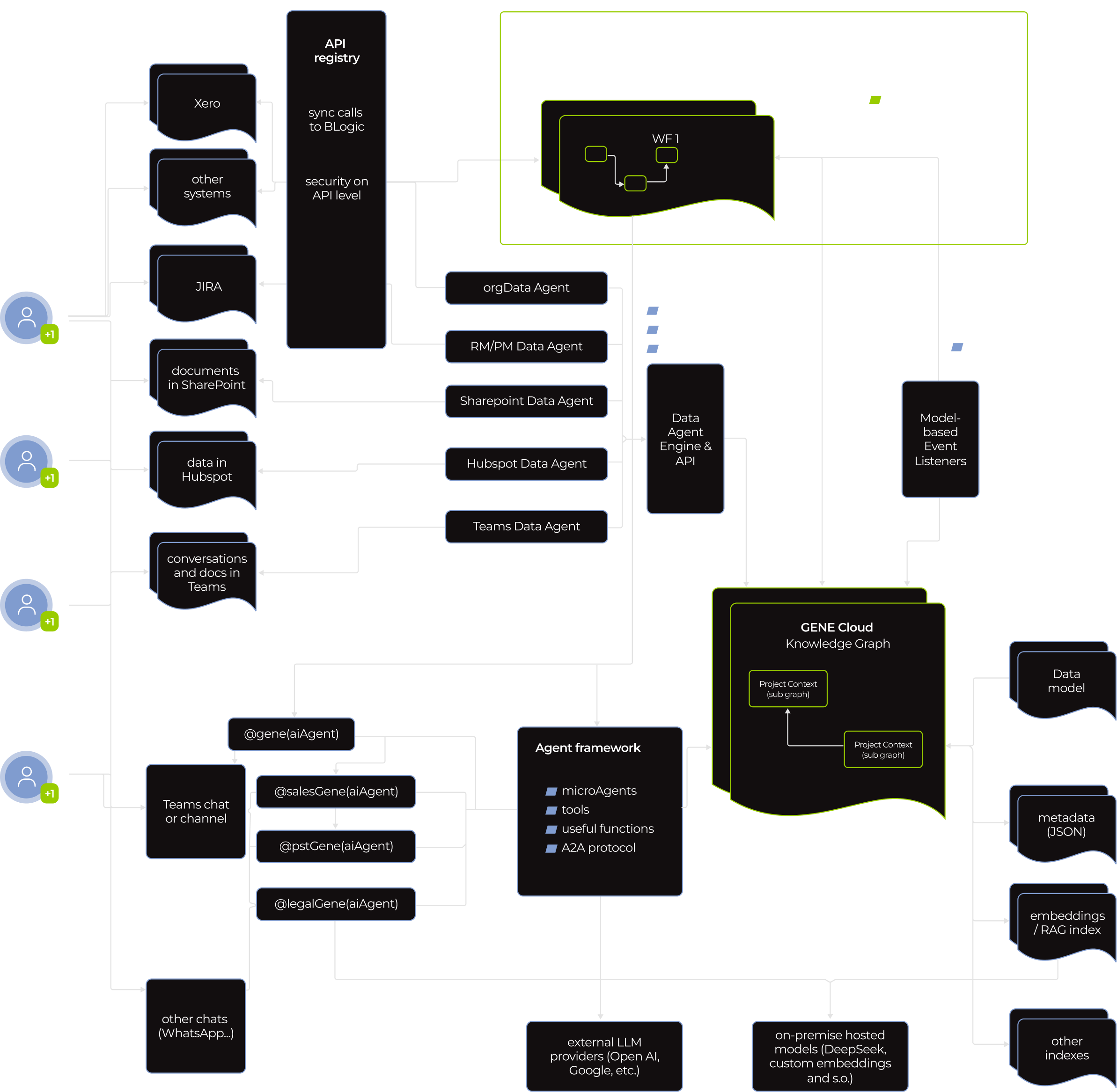
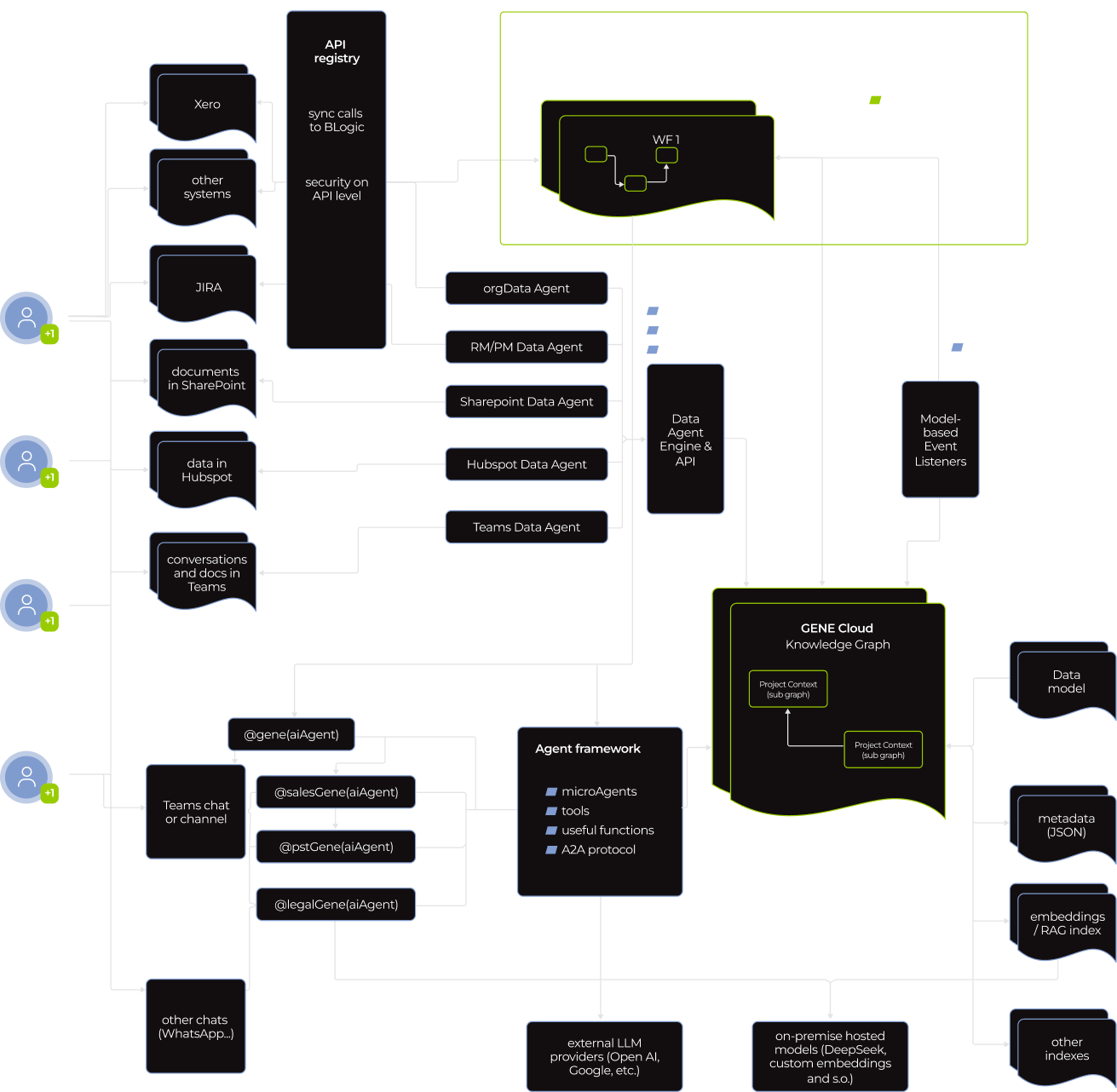
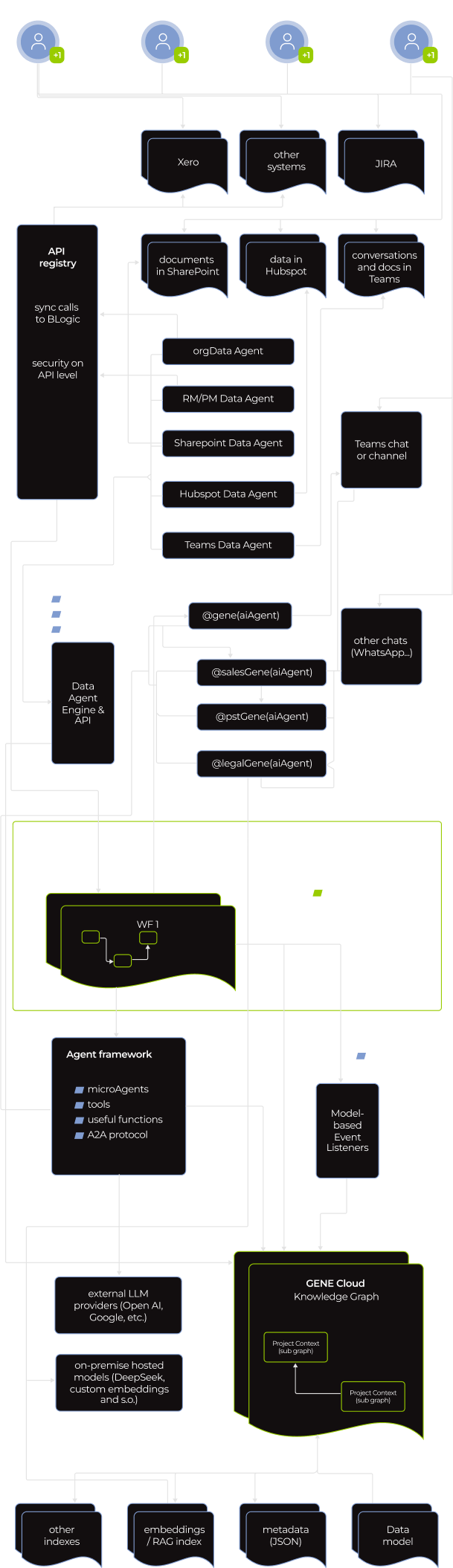
A flowchart showing data integration and workflow orchestration: Sources (e.g., Xero, Jira, SharePoint, email, Teams) connect via agents to a central GenAI Cloud Knowledge Graph, managed by a WF orchestrator. Paths include API calls, data pipelines, and external LLM endpoints.
A complex flowchart showing data integration between various agents (ERP, Sharepoint, Hubspot, Teams, JIRA, etc.), a WF orchestrator, and a knowledge graph. Lines represent data flow; black and green boxes detail agents and system functions.
A flowchart displays data flow from various SaaS platforms (e.g., Xero, Jira, GitHub) into multiple data agents (e.g., SynData, Hybrid, Transparent, Rulepack, AI agents). These feed into a WR connector, agent framework, and further into cloud integration.

Knowing the stakes, the client put data safety and overall software security front and center. Our dedicated team did too.

Standard measures, such as mandatory user authentication, access control, activity tracking, and data encryption at rest and in motion, were table stakes. We built on that with GENE’s AI-specific safeguards, aligned with NIST AI RMF, Google’s SAIF, OWASP AI, and other AI regulation frameworks. 

  • Robust secret management

OAuth tokens, database credentials, API keys, and other secrets are stored in an isolated vault inaccessible to agents themselves. We implemented automated credential rotation, with a standard 30-day cycle that can be tightened to daily for highly regulated industries.

  • Agent-to-agent (A2A) communication protocol

It allowed agents to work together without exposing their memory, proprietary logic, or tools to each other.

  • Whitelisted AI tools

We strictly supervise which tools agents can use and what they can do. For example, the virtual worker can create a Jira ticket based on a conversation in Teams, but only human reps can delete it.

Before

  • Microsoft Copilot Studio couldn’t deliver the tangible value the client was after
  • Agents rely on a static, manually updated context 
  • Agents add to the sales reps’ cognitive load
  • Passive AI is overreliant on humans to push it along

After

  • Instinctools’ technology-agnostic GENE platform made it possible to develop an autonomous sales representative that covered all the client’s needs
  • The AI sales representative keeps a living, self-updating context
  • The autonomous virtual worker offloads routine tasks from humans
  • Proactive AI agent acts on context and gets things done without interrupting human sales reps

Business value

  • Faster agent development without security trade-offs thanks to reliance on a solid infrastructure middleware instead of bare-bones AI frameworks
  • + 20%  leads processed per sales representative
  • + 19% more upsell/cross-sell initiatives
  • – 15% in cost per lead
  • – 10 hours of manual work per employee weekly

Multiplier effect

This success story points to a not-so-distant future where AI workers are graduating from assistants to full-scale teammates operating within your workflows. You can start with AI virtual workers as personal secretaries for staff members to ease their mental load. And then scale with autonomous AI employees contributing to the projects’ progress on par with your human team. Best of all, you get reliable employees on board right when you need them, omitting a time- and budget-draining hiring process. 

A person’s hand points at a glowing AI icon on a digital network overlay above a laptop keyboard. Futuristic data charts, chat bubbles, and circuit lines suggest artificial intelligence technology and data processing.

Business Intelligence Solution With 14 Real-Time Dashboards For a US Software Company

Business Intelligence Solution With 14 Real-Time Dashboards For a US Software Company

How adopting Power BI and crafting 14 custom company-wide and unit-specific dashboards empowered an IT company to fully automate data collection operations, save up to three days per month on report preparation, uncover and fix blind spots in their sales pipeline, increase post-clarification call conversions by 44%, and drive sales by 9,6% within just six months.

Domain:
Service Company (Software Engineering)

Team:
Power BI developers, DevOps engineers, QA engineers, Business Analyst, Software Architect, Project Manager

Challenge

An IT provider is expected to be digital by default. But it’s impossible to become digital once and for all. The best thing you can do is to keep up with a rapidly changing world by constantly developing new solutions and improving the existing ones.

Our customer’s company was growing very fast (+30% annually) and their methods of data management and analysis were getting outdated and were no longer meeting their needs. The heads of the company felt that they did not possess the entire information about the company’s state which made the management and coordination more difficult. Such a situation could slow down the company’s growth.

The management team was really fragmented in terms of understanding the current business state. Lack of up-to-date information entailed the inability to make qualitative decisions. The company’s managers needed valuable insights on how the business was functioning, what was perfectly working, and what had to be improved. It meant quick access to real-time metrics about various aspects of the company’s state and life. It included but was not limited to project metrics, engineering power (e.g. seniority levels, the number of the developers on projects, bench status if there was any), the company’s money flow, various kinds of sales order statistics, etc.

Our customer understood that Business Intelligence is not just about using technology to bring people and information together, it’s about flexible experimentation at a rapid pace and fast decisions.

Business Tasks

  • to get real-time information, which is 3 hours’ old at most
  • to speed up the decision-making process
  • to be able to analyze the work of the company’s departments
  • to change the approach to holding meetings by cutting out the part dedicated to gathering the information from the employees and sharing it among them

Technical Tasks

  • to transform and place into one storage all the business information gathered from a variety of data sources the company was used to work with. The sources were the following:
Jira Atlassian
Service Desk Atlassian
Confluence Atlassian
QuickBooks
Zoho Recruit
Zoho CRM
Closeweek
Google Sheets
  • to prepare the transformed information for the analysis: to convert it into the readable format for the system
  • to visualize data according to the rules defined by the requests of each particular dashboard and report
  • to create dashboards with a variety of visualized reports of the working processes of the following business units:

Sales & Marketing

Finance

Technical production

Human resources

Office Management

  • to implement the function of adding new metrics and reports and editing the existing ones
  • to realize the function of reports generation on schedule with notifications
  • to collaborate on and share customized dashboards and interactive reports
  • to keep data secure while giving user groups access to the insights they need

Solution

Using Power BI and cloud technologies, we’ve scaled them according to the customer’s needs. The relevant data is collected from sources, such as Jira Atlassian, Service Desk Atlassian, Confluence Atlassian, HQuickBooks, Zoho Recruit, ZOHO CRM, Closeweek, Google Sheets. Some part of this data goes straight to datasets, the other – to Azure Data Lake Storage, where all the actions described by a particular model are performed. After that, the information is presented in the dashboards. We’ve created 14 of them, which is not the final number, as, according to particular needs, the dashboards can be scaled up and down, grouped, and some derivatives can be added. Each dashboard represents an interactive analytical system and creates dozens of coherent reports with a variety of visualizations.

Our solution unifies real-time data from many sources and provides interactive, immersive dashboards for all the departments of the company: Finance, HR, Recruiting, Sales Management, Project Management, Development Units, BackOffice. Employees can easily integrate data, transform it into rich visualizations and reports, and then share those reports with stakeholders.

Key features

  • self-service for enterprise analytics
  • Azure cloud solution
  • AI integration for quick insights finding
  • Integration with in-house software

Value

With this BI solution, individual employees have self-service access to intelligence that they can slice and dice in whatever ways are most helpful to them. They’ve also got an easy way to view and share their insights through interactive visualizations. It’s become possible to automate a lot of the preparation and reporting.

We have provided the decision-makers with all the metrics they need – gathered in one place – to do their job more efficiently and not have to wrangle the data to get the answers. The company’s stakeholders, managers, and decision-makers have got an opportunity to evaluate the current state of their business in a quick and reliable way.

The company got several levels of just-in-time analytics:

  • Project reports enable Project managers to analyze different aspects of their projects and get real-time metrics. This saves days of work on preparing data.
  • Production Unit reports provide live info on metrics, KPIs, and plan/fact analysis to unit managers. This also saves 2-3 days of work per month and ensures data consistency and accuracy.
  • Top-level company reporting provides thorough analytics for main company processes. This saves months of manual work and enables data collection and analysis in a weekly cycle.

Benefits

Each Unit got their own benefits of BI introduction into business processes.

Sales department:

  • Due to continuous visualization of the sales pipeline it was defined that after the stage of “a clarification call”, a pretty big number of potential clients “go dark”.
    It took two months to prepare a fully new and unique methodology of “clarification calls” which brought the increase of conversion from this stage to the next sales step by 44%.
  • The real-time visualization of each sales manager’s KPIs allowed to identify weak points in the process of deal closing for every manager. The following actions were taken to strengthen the Sales Team:

1 /  young sales managers were mentored by the experienced ones in customly defined complicated spheres;

2 /  special sales courses were offered to some managers.

These measures allowed us to increase sales by 9,6% in the next 6 months.

Human Resources department:

  • Alignment of financial statement reporting, statutory reporting, and managerial reporting allowed to find out that the specialist of a certain proficiency level brings almost 11% less profit then specialists of other proficiency levels. It was decided to increase the amount of hiring of those specialists who bring 11% more profit to the company, rather than those who do not.

PMO:

  • Detailed project analytics enabled a lot of optimizations of the project management practices resulting in ~4% project profitability increase.

Finance department:

  • Systematic keeping control on KPIs and the ability to deliver quick financial reports to stakeholders, managers, and decision-makers allowed to identify undesirable financial expenses. The improvements made to avoid the expenses helped the company to save 84K within the next 6 months.

Office Management:

  • The continuous visibility of the department processes allowed to redistribute the forces of the existing staff and avoid hiring more people, which helped to save about 17K of potential expenses within the following half a year.

Technologies

Anna Vasilevskaya
AI modified real photo
Anna Vasilevskaya
Account Executive

Get in touch

Drop us a line about your project at
[email protected] or via the contact
form below, and we will contact you soon.