AI Operational Platform for a Professional Services Firm

A Modular AI Operational Platform for a Multi-Entity Professional Services Firm

How creating a company-wide AI operational layer with several AI agents and governance by design enabled a German professional services group to accelerate request processing by 72%, cut fee proposal preparation time by 65%, and free each employee from 6 hours of repetitive administrative work weekly.

Business challenge

Professional services firms in law, finance, and consulting run on trust, context, and responsiveness. In legal, tax, and accounting, the difference between a good client experience and a missed opportunity often comes down to how quickly the right person understands the request, connects it to the right matter, and moves it forward.

But as such companies grow beyond a single practice, the operating model often becomes harder to control. What works for a compact law firm starts to strain when several business units share clients, brand equity, and expertise, but not the same workflows, systems, or view of client history.

Our client, a Germany-based professional services group with assurance, tax, legal, and management consulting business units, had reached that inflection point. Around 100 full-time professionals and part-time consultants across the country supported a shared client base, while customer tracking and project management remained fragmented across business units.

The friction showed up in several places at once:

  • Email as the de facto operating system. Client requests, project updates, document exchanges, internal coordination, and cross-unit referrals all originated and evolved inside email conversations. What they lacked was structured intake, routing logic, and a quick, unified way to track what came in, who owned it, or what happened next.
  • Manual operations. Even routine requests required attention from senior lawyers, tax advisors, auditors, and consultants, pulling highly qualified professionals into administrative work. Moreover, with most of the proposal fee preparation done by hand, the client’s customers waited for days for what competitors with proper automation delivered in hours.
  • Informal and under-structured workflows across business entities. Cross-unit coordination happened ad hoc rather than through structured processes. A legal client asking a tax-related question would trigger a phone call or a forwarded email, as there was no controlled workflow.
  • Low visibility into projects and matters. Each team maintained its own matter records in simplified Excel sheets and DMS templates, leaving the company without a unified view of active matters, ownership, and status.
  • AI adoption lagging behind. While aware that incorporating artificial intelligence into their daily operations was no longer a nice-to-have, the client still lacked a cohesive plan for implementing it.

With these problems snowballing and no in-house expertise to tackle them, the client turned to Instinctools’ AI Center of Excellence.

Solution

From the beginning, the project was not treated as a chatbot implementation, where another isolated AI tool sits on top of already fragmented workflows. The client needed a controlled AI operating layer that could connect inboxes, documents, matter data, internal systems, and human decision-making into one governed workflow.

For law firms, confidential AI solutions with data privacy and compliance built in aren’t optional, as lawyers, auditors, tax advisors, and consultants work with sensitive client data and carry personal responsibility for the advice they provide. AI could help reduce repetitive operational work, but only if every output remained traceable and reviewable.

Considering that context, Instinctools designed the solution around three principles:

  • Sensitive client data must remain under the client’s control
  • AI outputs must be auditable and explainable enough for professional review
  • Every AI-assisted workflow must keep a qualified human in the loop

The platform was built to support four core capabilities from the start:

  • Email intake and matter management 
  • Employee support
  • Quoting support
  • Advisory document analysis
  1. Choosing a platform approach over one-off AI tools

The client wanted to move quickly, but they also needed the solution to scale across several business units. Building one AI tool at a time would have solved individual problems, but it would also have recreated the same fragmentation the company was trying to overcome.

Instinctools proposed a platform-based approach powered by GENiE, our proprietary agentic AI framework. The idea was to build the foundation once (integrations, context layer, agent orchestration, governance, auditability, and data access) and then reuse it across every subsequent AI module.

What exactly did this approach bring to the table?

  • Centralized AI governance inheritance. With governance, auditability, and compliance controls embedded at the platform level, every new AI solution inherited them automatically.
  • Data platform with adapters. Pre-built connectors unified the company’s DMS, accounting platform, time-tracking tool, and Microsoft 365 services into a single queryable layer.
  • Cross-agent context synchronization. It is what makes agentic AI for law firms workable in practice: all AI agents operate within a shared context that connects customers, matters, relationships, and services. Besides eliminating duplicate data entry, this approach enables richer operational intelligence over time.
  1. Starting with what hurt most: email intake and matter management

The first of the AI agents for the law firm’s operational layer our team developed was the email intake and matter management agent.

Much of the company’s work began in Microsoft 365 inboxes: new client requests, follow-ups, internal referrals, document exchanges, administrative questions, and updates on existing matters. Our team connected the platform to the client’s mailboxes and built a processing pipeline that frees lawyers, tax advisors, auditors, and consultants from repetitive triage work.

When an email comes in, the agent:

  • Classifies the intent (new engagement, follow-up, internal referral, or administrative request)
  • Identifies whether the sender is an existing client or a new prospect
  • Determines which business unit should handle the request
  • Checks whether the email relates to an active matter or suggests creating a new matter record when no match is found
  • Surfaces deadlines, obligations, and required next steps for professional review

The agent processes emails in German and English.

Getting the classification right across four business units with different vocabularies was one of the project’s tough puzzles. Tax advisors, lawyers, consultants, and assurance specialists may describe similar work differently or use the same term to mean different things. To address this, our business analyst collaborated with domain experts from each unit to map service categories, routing rules, and matter hierarchies. Where the business units adhere to common logic, the system uses shared classifications. Where they diverge, it maintains unit-specific configurations.

The agent was first tested with a champion group of 10 users. Initial classification accuracy reached around 74%. Through few-shot tuning with real company emails and structured feedback from the early adopters, we raised the accuracy to 87%, exceeding the client’s initial 85% target.

After validation, the email intake and matter management agent was rolled out across all business units. This gave the client a structured intake mechanism and created the foundation for a big-picture dashboard showing active matters, task ownership, and engagement status across the entire company. That way, the AI platform brings multiple practice areas into a single workspace, saving managing partners from calling around or digging through email threads to find out what’s happening.

  1. Broadening AI usage across the company

After the email intake and matter management agent proved stable in production, we began extending the AI systems across the professional services firm’s law, consulting, and finance operations.

Employee assistant chatbot in 2 weeks

Before rolling out AI agents for higher-stakes operations like quoting or advising, we wanted the company’s staff to get comfortable with AI-assisted workflows in a low-risk setting.

We designed and deployed an assistant chatbot that gave employees a controlled environment to interact with AI in everyday scenarios. It operates in German and English, matching the company’s working languages, and answers routine internal questions about leave policies, expense procedures, onboarding steps, IT access, and more, drawing from the company’s HR documentation and operational FAQs. When it can’t answer with sufficient confidence, it routes the query to the right person with context already attached, so nobody has to re-explain the question.

A dashboard shows a chat with a knowledge assistant about travel and business expenses. The left menu lists Dashboard, Names, Requests, Messages, and Knowledge Assistant. The right panel highlights “Travel and Expenses” with statuses: Awaiting response and Answered.

Beyond building trust in AI across the workforce, the chatbot absorbed the stream of repetitive questions that used to land on managers and office admins, freeing each for up to 6 hours of meaningful work a week.

Quoting agent in 3 weeks

Next, Instinctools’ team built an enterprise AI agent for the law firm’s quoting process, turning manual fee proposal preparation into a structured, step-by-step workflow. When a new client request is confirmed through the email intake agent, the quoting agent takes over:

  • Reading the client request and mapping it to the company’s services (tax structuring, legal review, due diligence, etc.)
  • Finding the right people for the job based on skills and experience
  • Checking who’s free through the client’s time-tracking system
  • Drafting a fee proposal based on the company’s rate cards for manager review

What used to be an email back-and-forth across partners, associates, and office admins now runs through a single structured workflow, with AI laying the groundwork and the professionals making the final call.

Advisory agent in 4 weeks

Due diligence packages, regulatory filings, and contract portfolios are the kind of high-stakes documents where volume makes manual review unacceptably slow. To ease the daily burden of the client’s advisory and assurance teams, we built an agent that took on the heavy lifting. It runs within the AI platform built specifically for law firm operations:
  • Ingesting PDF, DOCX, and XLSX documents up to 200 pages long
  • Producing summaries at the level of detail the professional needs, from a quick overview to a section-by-section breakdown
  • Cross-referencing findings across multiple documents to surface non-obvious patterns, contradictions, and gaps

Every AI-generated finding links back to the exact source document, page, and section, so advisory and assurance staff can verify the evidence in seconds.

On the data handling side, the agent classifies documents by sensitivity level:

  • Publicly available materials like regulatory filings, published financial statements, and industry reports are processed through the cloud inference layer under the existing no-retention agreement.
  • Highly sensitive documents, such as materials covered by attorney-client privilege or pre-announcement M&A data, are processed entirely on-premises and never leave the client’s servers.

Setting up the governance framework and platform foundation took six weeks. The multi-agent system with the assistant chatbot, email intake, quoting, and advisory agents was ready in 14 weeks, bringing the entire delivery timeline down to five months, well ahead of the client’s original 8-10-month estimate.

Banking on GENiE showed in the numbers
  1. Cost-effective governance by design

For the platform to operate safely across all business units, we set up a robust AI governance framework from the get-go. 

  • All application servers, databases, and data pipelines run on the company’s own infrastructure. Customer data, matter records, and document embeddings never leave the premises.
  • Only anonymized, tokenized fragments are sent to Azure OpenAI EU West for inference, under an enterprise agreement that guarantees no retention or training on the company’s data.
  • The framework defines how AI document review works for law firms operating under strict confidentiality: AI outputs are treated as working drafts until reviewed and approved by a qualified professional. This keeps human oversight built into the workflow and reflects professional liability requirements under German laws such as BRAO, StBerG, and WPO, as well as the EU AI Act’s human-oversight expectations.
  • Every action any AI component takes is captured in a mandatory audit trail with a 12-month retention period: what decision was suggested, how confident the model was, and whether a professional approved or overrode it. This data can be pulled at any time in a format ready for regulators and auditors.

Here’s how NDAs, engagement letters, and service agreements are handled within the AI operational layer.

Flowchart with two faded boxes on top labeled “Matter record” and “Company templates.” The center green box says, “AI generates first draft. Flags missing or inconsistent fields.” Below is a purple box, “Professional review. Tracked-changes interface.”.

For a company that bills by the hour and watches margins closely, AI spend transparency was a practical concern from day one. To keep inference costs predictable and deliver robust governance without breaking the bank, our team built a cost-tiered AI gateway that routes routine classification to small, lightweight models and assigns complex analysis and document generation to larger models.

The client’s priority wasn’t “governance at any cost”

Before

  • Email inboxes as the company’s informal operating system led to transparency and coordination challenges
  • Manual customer intake, matter handling, and quoting wasted senior professionals’ billable time
  • Client history, matter context, and referral opportunities stayed fragmented across teams and individuals
  • No real-time visibility into active matters, ownership, workloads, and engagement status

After

  • An AI operational layer with strong governance unlocked transparency and seamless cross-unit coordination
  • AI agents took over administrative groundwork, freeing professionals for higher-value expert work
  • Shared operational context unified customer and matter knowledge across business units
  • Managing partners gained real-time visibility into workloads, matter ownership, active engagements, and cross-unit coordination

Business value

  • Real-time cross-unit visibility thanks to a company-wide AI operational layer
  • + 72% in request processing speed
  • – 65% in fee proposal preparation time
  • – 6 hours/week of repetitive administrative work per employee

Multiplier effect

The productivity loss this project addressed goes far beyond legal, tax, and finance. In any knowledge-intensive business, highly qualified people spend too much time on coordination work: routing requests, reconstructing context, chasing updates, preparing drafts, and pulling information from scattered systems.

An AI operational layer with governed multi-agent systems is a way of automating those tasks without sacrificing visibility or control. AI agents take on the groundwork, so your staff spends less time chasing information and more time on the work you hired them for. Companies can start with the biggest time sink and, then, expand gradually as each use case proves its value.

Overhead view of people working at a table with laptops, tablets, charts, and notebooks. A glowing “AI” graphic and digital icons are superimposed, symbolizing artificial intelligence and data analysis. Hands are busy typing or writing.

AI-Powered Knowledge Platform For a Wind Turbine Manufacturer

AI-Powered Knowledge Platform For a Wind Turbine Manufacturer

How developing a conversational AI knowledge platform with offline access and peer-to-peer expertise sharing enabled a European wind turbine manufacturer to turn post-sale field support into a product differentiator and reduce support queries by 37%.

Business challenge

When a turbine stops or triggers an alarm miles from the nearest office, the repair depends on how fast the technician on site can find the right answer. For field workers servicing wind turbines offshore and over sprawling onshore locations, that process is riddled with friction.

  • No single source of truth. Maintenance manuals, monitoring guides, technical bulletins, and troubleshooting references exist, but are scattered across multiple portals and PDF libraries with no unified entry point. A technician looking for a specific calibration procedure might find it in three clicks or thirty, depending on which system they open first and whether they guess the right keywords.
  • Documentation built for desks, used on turbines. The materials are authored for screen-and-keyboard reading, but real-life wind turbine servicing conditions look nothing like that. Technicians access documents on phones or tablets, often one-handed, in rain or wind. Dense PDF layouts with no mobile optimization turn a two-minute lookup into a scrolling exercise.
  • Peer knowledge without a peer network. When documentation falls short, experienced technicians fill the gap. But that expertise is shared through phone calls, ad hoc messages, or chance conversations rather than through a structured channel. Two technicians in the North Sea and Andalusia might independently solve the same fault, weeks apart, with no way to learn from each other.

Our client, a major European wind turbine manufacturer, saw these hurdles as a product opportunity. As their relationship with every buyer extends into years of customer support, an application that would consolidate the company’s product maintenance knowledge into a single, searchable hub could not only ease post-sale support overhead but become a selling point in its own right.

They approached Instinctools with a vision for a companion app built around conversational AI: a tool, offered alongside the turbines themselves, giving field technicians a way to describe a problem in plain language and get an actionable, source-verified answer on the spot, with clear traceability back to the original material.

Solution

Some opportunities can’t wait for paperwork. While the project was still in the proposal stage, Instinctools built a working prototype that gave the client an early view of the product vision in action. It allowed their team to test assumptions, gather internal feedback, and validate the concept before committing to a vendor, budget, or full-scale delivery plan.

  1. Crafting a clickable prototype at the pre-sales stage

The client’s original brief centered on a searchable knowledge base with a conversational AI interface. Field technicians would type a question in their native language, and the system would return a plain-language answer drawn from the manufacturer’s documentation, with a citation trail pointing back to the source. Multilingualism was essential as the client’s install base spans dozens of countries.

Our AI developers and UX/UI designers translated the brief into a clickable prototype covering the core user journey:

Every screen was designed with field conditions in mind, as a technician may be using the app with one hand on the device and the other on a railing, tool, or flashlight. So the interface had to be simple, readable, and usable without desk-bound assumptions.

Still, documentation alone, however well-organized, can’t cover every edge case. Sometimes the answer can come from another technician who has already wrestled with the same fault on the same turbine model, somewhere else. So we went the extra mile to give this tribal knowledge a place inside the app by including something the client hadn’t asked for: a peer-to-peer knowledge sharing layer where technicians register which equipment they service, find colleagues working with the same wind turbines, and exchange solutions to tricky operation and maintenance issues through in-app messaging. 

What started as Instinctools’ suggestion, by the end of the prototype review landed in the MVP scope, transforming a knowledge base app into a broader AI-assisted field support platform grounded in source documentation and strengthened by a technician network.

  1. Laying the technical foundation for full-scale development

With the prototype approved and the scope expanded, Instinctools moved into architectural planning. Several technical decisions shaped the project from the start:

  • Single-vendor cloud and AI setup. We hosted the platform on AWS, picking the eu-central-1 region in Frankfurt to keep data physically inside the EU. AWS Bedrock handles the AI layer, providing access to Anthropic’s Claude within the same compliance boundary as the rest of the infrastructure.
  • Search architecture. The accuracy of a conversational AI assistant is rooted in the quality of the retrieval layer feeding it. Instinctools chose pgvector to combine semantic search with automatic profile-based hard filters in a single query, so when a technician asks about pitch system calibration, the results are already scoped to a particular turbine model. For a knowledge base sized at around 10,000 content chunks, this vector similarity search keeps the infrastructure lean without cutting corners on retrieval accuracy.
  • Zero-signal mode. Because technicians may work offshore or in low-connectivity environments, the app needed to stay useful even without a stable connection. We paired Workbox and IndexedDB to cache the app interface and store bookmarked documents locally within the app. Features that rely on live services, like AI search and community messaging, stay online-only.
  • Access control. For authentication, Instinctools went with Auth0, starting with invite-only registration during the MVP, so the client could control early access before opening to self-service registration. Password policies, account lockout, email verification, and recovery flows were handled through Auth0’s built-in identity-management capabilities.
  • Autotranslation layer. The client’s turbines operate across a multilingual EU market and beyond. The team chose DeepL’s API for on-demand translation, favoring it over alternatives for its stronger handling of technical content in European languages.
  1. Refining the prototype with field feedback

The prototype looked right on screen. To see if it’ll be of any help for end users, we shared it with a group of roughly 20 early testers the client gathered from its European customer base.

Several assumptions didn’t survive first contact with the field, but caught early, they became opportunities for improvement before full-scale development:

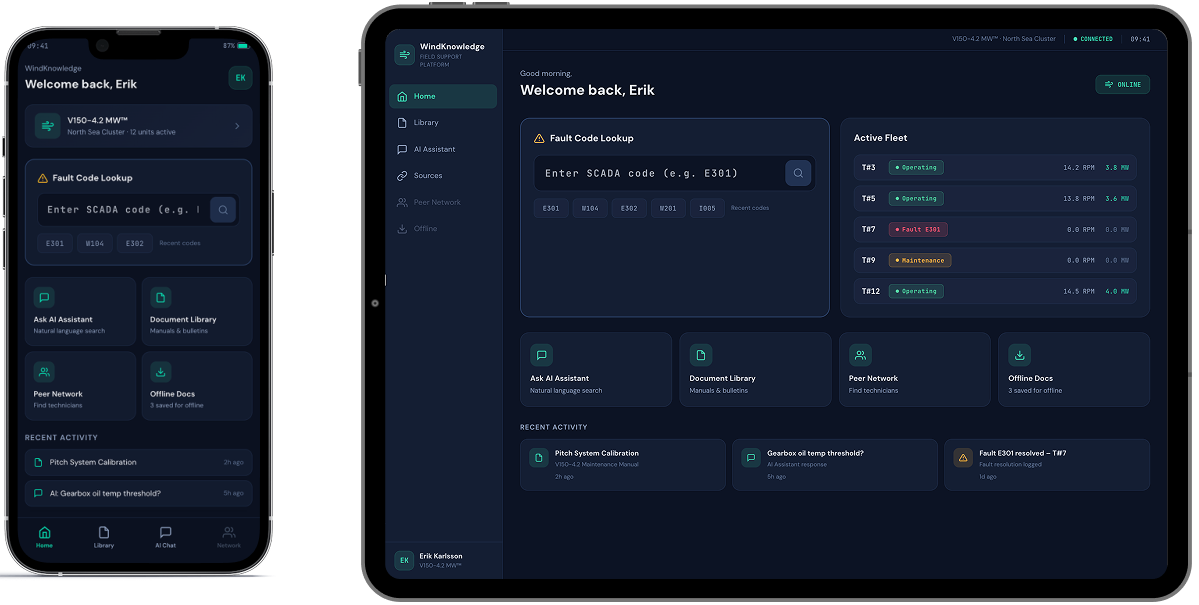
  • Fault-code workflow. The AI search handled natural language and fault codes equally well, but testers revealed that the vast majority of their queries start with a SCADA status code. This prompted us to update the home screen design by adding a dedicated fault-code entry field with auto-recognition, so the most common interaction pattern gets the shortest path.
  • Minimum taps to target. In the initial prototype, users had to open a document before saving it for offline access. Testers pointed out that before going offshore, they often need to save several guides at once. We redesigned the flow so documents could be saved directly from search results, without opening each one individually.
  • Expert knowledge sharing priorities. The prototype included a location-based map showing where other technicians were working, but users made it clear that proximity was not their top priority. They wanted to filter peers by turbine model and specialization first, and by location second. For a technician troubleshooting a specific gearbox issue, the right match was not the nearest colleague, but the one with relevant hands-on experience.
A smartphone and tablet display a dark-themed dashboard interface. Both screens show a welcome message, a fault code lookup bar, system status cards, and recent activity modules, with similar layout but resized for each device.

This feedback reshuffled the development backlog. We moved features like fault-code-driven search and single-tap document access from “could have” to “should have” status, ensuring the MVP reflected how technicians actually work, not just how the workflow looked in a prototype.

  1. Developing and rolling out an MVP

The MVP scope was deliberately focused: one turbine product line, one content library, and an upscale from 20 to 100 technicians. The goal was to prove the full end-to-end experience with a larger, controlled user group before replicating it across the client’s entire equipment catalog.

Here’s how the flow goes:

  1. During onboarding, the early adopters select the turbine models they service
  2. From that point on, the app personalizes search results, document recommendations, and community connections, so that a technician working with a specific model sees materials and peers’contacts relevant to that model, noise-free
  3. Every answer the AI assistant returns includes citations to the source document and section, so a technician can verify the guidance before acting on it.

This personalization engine sits on a knowledge base of hundreds of maintenance manuals, monitoring guides, technical bulletins, etc. Since it’s updated once a month at most, a real-time content synchronization would have added unnecessary complexity. A monthly content ingestion pipeline was enough to keep the knowledge base current without overengineering the backend.

Once rolled out to the full 100-technician group, the app saw steady organic adoption.

Before

  • Technical documentation scattered across multiple portals and PDF libraries
  • Only basic, document-level search capabilities
  • A multi-tap user journey to reach a single document, with no shortcut for the most common queries
  • Peer expertise shared informally through phone calls and personal contacts, if at all

After

  • A single AI-powered conversational app consolidating the wind turbines’ maintenance library
  • Advanced semantic search with optional hard filters across the whole knowledge base
  • One tap to target and fault-code auto-recognition field on the home screen
  • A structured peer network connecting technicians by turbine model, specialization, and relevant field experience

Business value

  • Post-sale support transformed into a product feature
  • – 37% requests escalated to the client’s customer support team
  • < 30 seconds from query to cited, source-verified answer
  • x2.5 faster troubleshooting of field incidents

Multiplier effect

The pattern behind this platform – consolidating scattered documentation into a conversational AI interface and pairing it with a peer network – is not limited to the energy sector. Any industry where field professionals work with dense technical libraries under time pressure faces similar friction: heavy machinery, medical devices, industrial automation, telecom infrastructure, and more. The infrastructure we built is modular to be useful for a different knowledge base and equipment catalog without being redesigned from scratch.

A person in a dark blue shirt holds a smartphone in one hand and types on a laptop with the other. Digital facial recognition icons and a checkmark appear, indicating successful facial authentication on the phone. The background is blurred.

Automated Infrastructure Management System

Automated Infrastructure Management System for a Network Hardware Manufacturer

How creating a modular, user-friendly network controller platform allowed a telecom equipment manufacturer to complement its core hardware products with commercial software, enabling end users to save up to 35% on network infrastructure management, while also positioning the company for new revenue streams and future Data Center Infrastructure Management (DCIM) capabilities.

Industry:
Telecom

Digital Product Engineering

Software Development Consulting

Business challenge

In many organizations outside safety-critical environments, network management remains largely unautomated. Enterprises with small networks often tolerate manual methods, turning a blind eye to the human errors and wasted hours they introduce.

However, when networks scale, growing with more employees, devices, and higher demands for load balancing and availability, the operational burden becomes impossible to ignore. Once the infrastructure racks up more ports, the illusion of control once provided by a neat Excel tab fades fast.

After outgrowing spreadsheets, organizations switch to automated infrastructure management solutions that consolidate real-time network monitoring and configuration into one coherent system.

The problem is that while many solid enterprise-grade remote network management platforms are available, none are easy to get started with. Network administrators and technicians new to these tools can spend months struggling through the documentation.

Our client, a network hardware manufacturer from Germany, saw an opportunity here and decided to create a new solution with a low entry barrier even small and mid-sized facilities can take advantage of.

They were looking for a reliable engineering partner to develop an on-premises, web-based automated infrastructure management (AIM) system with an intuitive UI. The system was meant to serve as the software component of the client’s hardware, which included their own intelligent patch panel and port plugs. It had to deliver the robust functionality of existing platforms, but with a user-friendly interface that simplified adoption. Additionally, it needed a clear roadmap for evolving into a full-fledged data center infrastructure management (DCIM) platform.

Instinctools was up to the task, crafting a safe, scalable, market-ready solution, seamlessly fitting it into the client’s hardware product ecosystem, and ensuring ISO 9001:2015 compliance.

AIM is an integrated hardware and software system that automatically detects the insertion or removal of cords, documents the cabling infrastructure including connected equipment, enabling management of the infrastructure and data exchange with other systems.

DCIM tools monitor, measure, manage and/or control data‑center utilization and energy consumption of all IT‑related equipment, such as servers, storage and network switches, and facility infrastructure components, such as power distribution units and computer‑room air‑conditioners.

Solution

The project began with an in-depth discovery phase, where we identified the client’s initial requirements and collaborated with domain experts to bring clarity and order to the specification draft. Once priorities were set, we mapped out the MVP roadmap, release plan, and detailed technical specification to guide development.

Out of that groundwork grew a full-scale team consisting of an Account Manager, Tech Lead, Project Manager, Business Analyst, UI/UX Designer, DevOps Engineer, System Architect, Backend and Frontend Engineers, and QA specialists.

  1. Deciding on a tech stack

As part of the discovery phase, the team weighed several technology options. From the client’s shortlist, which included C++, C#, .NET, Java, Python, and React, the project moved forward with the following stack:

  • React was chosen for the frontend due to the client’s existing experience with it, its efficient rendering, and its component reusability across other corporate products.
  • C++ was reserved for modules requiring low-level integration and fast, lightweight operation.
  • Java was picked for the backend for its high performance, strong security, and scalability. Compared with interpreted languages like PHP or Python, Java handles high-concurrency, enterprise-scale workloads more efficiently, making it a strong choice for complex backend systems.
  • PostgreSQL was selected as the primary database management system for its robustness and advanced feature set.
  1. Making core solution architecture decisions

To ensure the system met the client’s expectations, our system architect suggested several strategic decisions that shaped its core architecture.

Modular design

As the client wanted to give customers the freedom to select only the functionality they needed, we opted for a microservices architecture. Each microservice operates independently with its own database, ensuring scalability and ease of use.

Apart from aligning with the client’s t business goal, this approach smoothed things out on the development side as well:

  • With interchangeable components, individual parts of the system can be swapped or updated without disrupting the whole, making future enhancements effortless.
  • Independent modules allowed multiple teams to work on different components at the same time, eliminating bottlenecks, and, thus, speeding up development.
  • Each module was free to run on the technology best suited for its specific function, without being tied to a rigid, monolithic stack.

Integration readiness

For enterprises to effortlessly plug the solution into their IT ecosystems, our project team implemented a RESTful API and provided OpenAPI documentation. As a result, the system can be easily integrated with external tools such as service desk systems, enterprise asset management software, and various monitoring platforms.

Ease of data migration

Whether transitioning from manual workflows or legacy AIM systems, customers can easily onboard the platform, with support for importing data from CSV, Excel, or other formats.

  1. Allowing for flexible work order handling

Beyond real-time network monitoring, the AIM system delivered by the *instinctools team simplifies day-to-day network infrastructure management with built-in work orders that guide IT technicians through step-by-step tasks and automatically verify each completed action.

Compared to many solutions on the market, this AIM system supports a broader range of operational scope, from adding new network racks and connecting patch panels to re-cabling segments, relocating equipment, or replacing failed components.

In addition, system administrators can choose between two modes for work handling:

  • Through work orders: every task follows a defined, controlled workflow that ensures order, accountability, and traceability, which is ideal for environments where strict oversight and standardization are necessary.
  • Without work orders: this mode increases flexibility and speed for smaller organizations by removing formalized approval flows, ticket assignments, and status tracking. Teams can quickly add or update equipment instantly, without waiting for administrative steps to complete.
  1. Designing user-friendly UI

The system’s UI stands out for being clear and approachable.

At-a-glance clarity

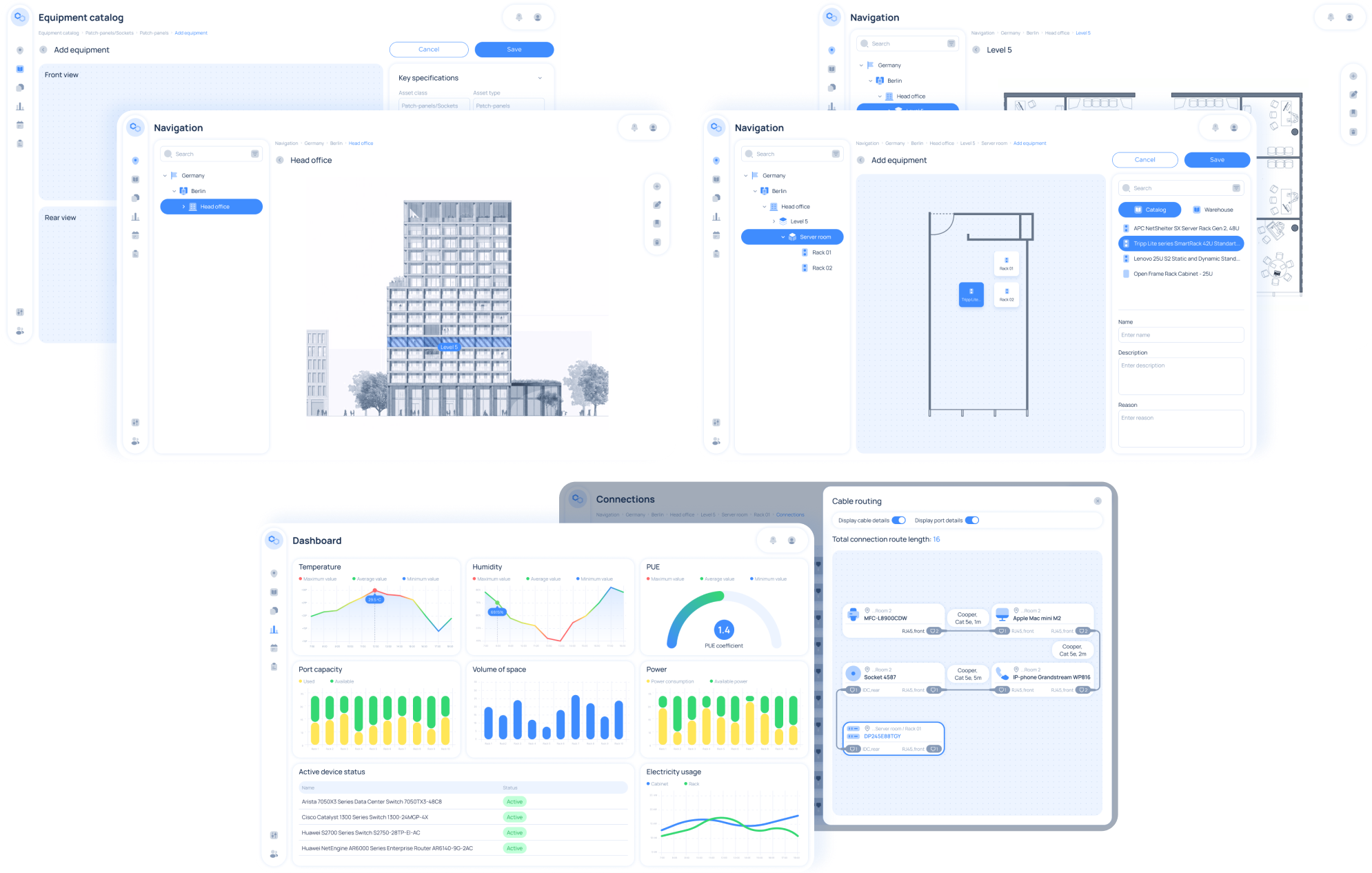
Engineers can instantly grasp room layouts, racks, and network connections through intuitive visualizations and contextual hints.

Low learning curve

Even team members with little to no IT background can onboard quickly, making it a perfect fit for small companies and startups.

A collage of five software dashboard screens shows blue-and-white UI elements, including a building diagram, equipment catalog, floor plan, charts for temperature and humidity, bar and line graphs, and a connection flowchart. Various side navigation menus are visible.

Early testers described it as “more human-friendly and straightforward” than other established network infrastructure tools.

For added comfort, users can tailor the interface by switching between light and dark themes.

  1. Doubling down on security

Security has been addressed comprehensively to ensure the system’s integrity:

  • Licensed access control

    Prevents unauthorized use and protects the software from piracy.

  • Service registry

    Keeps track of all application services for reliable communication and scalability, implemented with Java and Eureka.

  • Encrypted data transfer

    All data exchanged between middleware and firmware is transmitted securely using encryption.

  • Authentication and authorization

    Secure login via username/password or SSO, fully integrated with corporate identity systems using Java and Spring Security.

  • Syslog monitoring

    Captures system logs in compliance with OWASP best practices, ensuring secure and auditable logging across the infrastructure.

  • Role-based access control

    Flexible user and group management with granular permissions and safeguards against conflicting edits.

Flexible licensing model

The AIM system is licensed based on the number of managed ports

small setups

up to 2000 ports

large enterprise installations

2000-10000 ports

  1. Planning for DCIM expansion

Following the successful launch, the client is preparing to evolve the AIM system into a full-fledged data center infrastructure management (DCIM) platform. The expanded system will provide real-time insights into power consumption, efficiency metrics, environmental conditions, and the operational status of all data center resources.

Key capabilities under development:

  • Real-time monitoring of energy consumption and cooling systems
  • Comprehensive management of equipment and resources, including servers, racks, and power distribution
  • Optimization of data center resource utilization
  • Continuous tracking of equipment performance and operational health

Product benefits

  • Easy, reliable management of network connections
  • Real-time monitoring of the entire network infrastructure and alerts for issues and unauthorized actions
  • Streamlined inventory management
  • Data-driven planning for equipment modernization
  • Up to 35% cost savings through reduced manual work

Business value

  • By complementing its hardware portfolio with commercial software solutions, the client unlocked additional revenue opportunities.
  • The integrated, end-to-end infrastructure management system strengthened the client’s position as a trusted provider.
  • The client is now seen as a leader in automated infrastructure management.

Software Modernization For a CX Company

Software Modernization For an Ultimate Market Leader Among Personalization Engines

How switching from deprecated AngularJS to up-to-date React and crafting a custom UI kit helped a global SaaS customer experience (CX) company facilitate maintenance of their personalization engine and speed up design-related tasks.

Industry:
Technology

Legacy Software Modernization

Business challenge

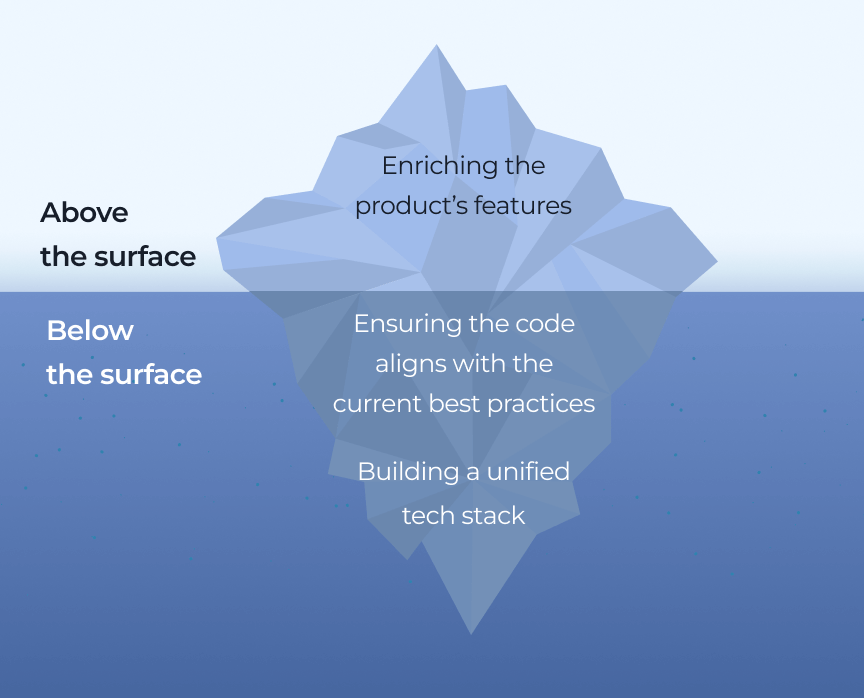
Understanding that nothing lasts forever helps ambitious SaaS companies truly excel. Organizations pushing their field’s boundaries can’t peacefully rest on laurels. They have to put a premium on constant product evolution, spanning three areas:

  • Building a unified tech stack
  • Ensuring the code aligns with the current best practices
  • Enriching the product’s features


Focusing on the above-the-surface part, or implementing new features, to win and retain customers, companies tend to neglect the technical foundation that can spell significant trouble without essential upkeep.

The aging heterogeneous tech stack was the only vulnerable spot of our client – an unbeatable market leader among SaaS personalization engines. They have already blazed a trail in customer experience (CX) solutions with their cutting-edge personalization engine, which empowers B2B and B2C companies to reach their potential customers across any channel and device with highly targeted offerings. However, their core products’ front end in AngularJS:

  • Didn’t match the client’s current tech stack in React
  • Complicated software maintenance as support from Google ceased in 2018

To eliminate these hindrances, the client decided to migrate legacy AngularJS code to cutting-edge React.

Additional benefits of switching from AngularJS to React included:

  • Flexibility in organizing the software code as React is a UI-focused library, while AngularJS is a model-view-controller (MVC) framework with a set of predefined design patterns.
  • Accelerated performance thanks to React’s reliance on the virtual document object model (DOM), which allows changes without updating the entire page.

The client has already started code migration from AngularJS to React but soon hit a roadblock: their in-house team has neither time nor capacity to juggle both feature development and legacy modernization. Therefore, the client decided to hand over the migration part to a tech partner.

However, finding an ally they could trust wasn’t a walk in the park, as the client previously had a negative experience with an outsourcing company, making them cautious this time around. Determined to avoid the same pitfalls, they came up with strict technical and soft skills-related requirements for the future partner so that only the best would make the cut:

Battle-proven expertise

in both AngularJS and React

Accurate planning

and sticking to the outlined timeline

Proactiveness

in decision-making to strengthen their core team

Top-level soft skills

for swift communication and synergy with their in-house team

ISO certifications

namely ISO 9001:2015 and ISO 27001:2022

According to the client, *instinctools turned out to be the perfect fit. How did the migration go and what were the extra efforts we put in?

Solution

The client had already outlined an overall migration strategy and prepared the infrastructure, so our team picked up the code migration while perfecting existing functionality and fixing bugs.

  1. Replacing a rigid legacy tech stack

We were responsible for rewriting several solutions within the client’s software ecosystem. Some of them raised notable challenges, such as their legacy customer journey mapping platform.

The client’s system was a sore spot because of its:

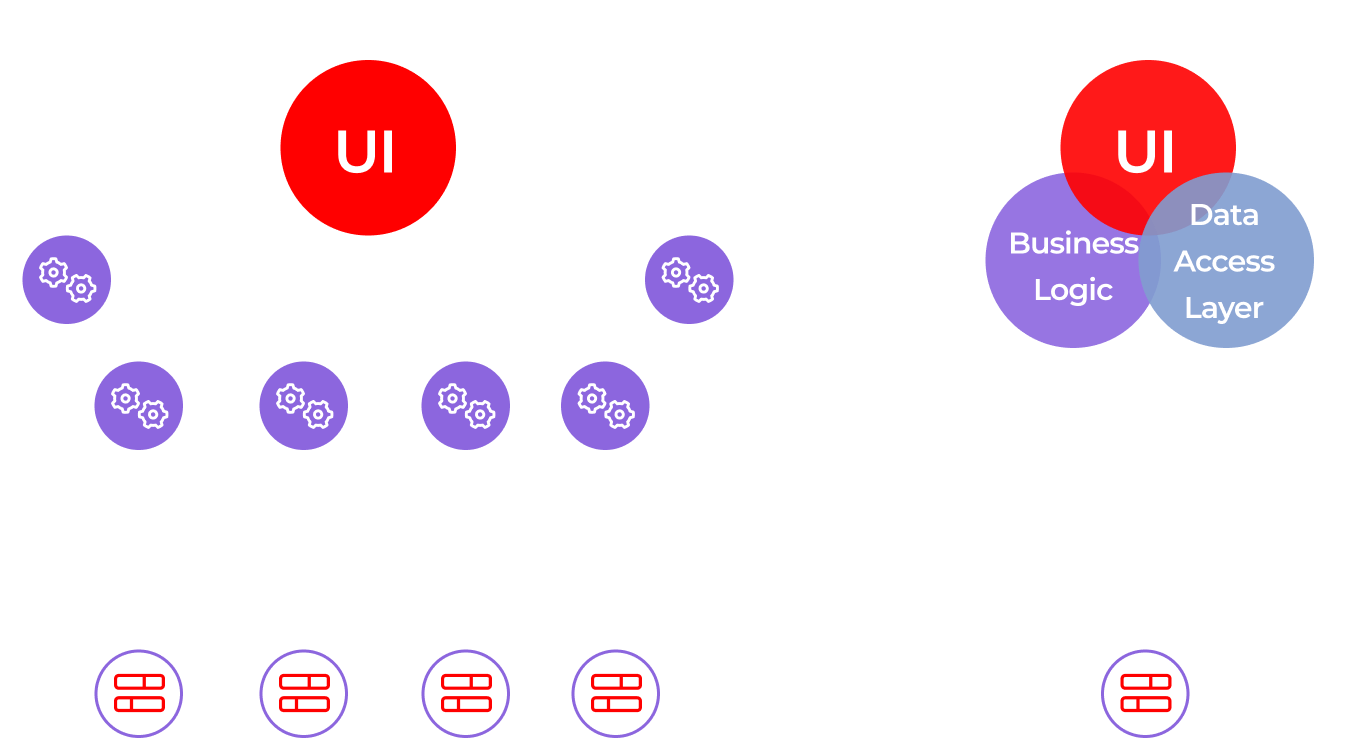
  • Fragmentation. The platform consisted of six sub-systems, each written by different developers at different times.
  • Documentation void. Without system documentation or knowledge keepers left in the company, rewriting the solution became a daunting task.

We had to replace this ticking time bomb with a single user-friendly React solution. To achieve this goal, our team:

  • Analyzed the platform’s code to figure out the best way to rewrite it
  • Prepared updated software architecture from scratch
  • Selected Nx library for collecting code from different microservices and a Vite bundler to set up a development environment for React
  • Replaced six disconnected microservices with a monolith
  • Migrated libraries from AngularJS to React
  1. On to new challenges

Six months after the start of our cooperation, the client trusted our team enough to delegate the tasks beyond the migration. That’s how we started working through their overall backlog and participating in R&D activities.

Taking on the primary stage of their research efforts

The client wanted our team to join their ongoing in-house research dedicated to creating a custom UI kit:

  • Explore and examine current best practices in crafting compilations of UI components
  • Draw up suggestions for their custom UI kit

Impressed with the proactiveness of our team, the client asked us to join the UI kit development.

Assisting in crafting a custom UI kit

Just as with the AngularJS to React migration, the client had already invested efforts in building UI components in line with the company’s brand book. And much like switching to the more up-to-date tech stack, they also needed reliable, high-qualified partners to carry out the UI kit development.

Before our team knuckled down, the client got tangled up in their existing visual components, such as buttons, checkboxes, widgets, etc., scattered across various sources.

Here’s what we did to help the company stop wasting their time and effort:

  • Created a single library for all UI components to enable simple reuse across all the client’s current and future products
  • Collaborated with their in-house design team to create and implement a multitude of UI elements, enhancing consistency and efficiency

Before

  • Heterogeneous tech stack of their SaaS CX solution
  • Challenging product maintenance because of six siloed microservices
  • Absence of a robust UI kit
  • Massive backlog
  • Lack of experts to run technical research

After

  • Unified tech stack for the client’s SaaS personalization engine
  • Simplified product maintenance thanks to monolith architecture
  • Solid custom UI kit
  • Reduced backlog
  • Support of dedicated experts in R&D activities

In our client’s words

Frontend Guild Manager on the client’s side outlines their impressions of cooperation with *instinctools:

MVP Development For a Fintech Startup

Full-scale MVP Development For a Fintech Startup

How running a discovery workshop saved a fintech startup tens of thousands of dollars on needless software development and enabled the company to craft a trailblazing MVP for venture funds and investors. 

Industry:
Fintech

DevOps Services

UX and design

Web Development

Software Product Development

Business challenge

Securing a top-notch development team when building a software product is only one part of the equation. The key lies in defining what kind of product you want to create, who for, and what problems of the target audience it will address. For those operating in highly demanding niches, like our client, this precision represents both a challenge and an opportunity.

Instinctools was approached by a European venture capital company with €800m+ in assets under management. They planned to launch a fintech startup and develop a web platform to consolidate information for VC investors and funds. 

The envisioned solution was supposed to:

Present investors with concise, visually appealing information about potential investment opportunities and their terms, rather than extensive 50-page reports

Provide a secure space for communication between funds and investors moving away from traditional emailing

Offer a comprehensive experience for investors, eliminating the need to switch between several systems

Empower funds with automated back-office functions, significantly reducing staff hours.

This innovative and far-reaching B2B2C solution had the potential to take the market by storm even as an MVP. However, the haphazard approach to its implementation put the whole project at stake.

Initially, the client worked with another tech partner who had offered to set up a developers-only team for the project. Specifying the requirements and prioritizing features fell under the client’s purview.

Here is how it played out. The client outlined the platform’s core idea to their contractor and continued to pile up features throughout the development process. Not surprisingly, those efforts didn’t hit the mark the client was aiming for.

It turned out the client had been draining their budget crafting a solution that veered far from their original vision. Letting multiple stakeholders from different departments define the project requirements on a whim and the lack of a unified product vision between the product owners and dedicated team resulted in a deep chasm between expectations and reality. The developed solution looked like a nice visualized Excel spreadsheet instead of being a 
top⁠-⁠of⁠-⁠the⁠-⁠line digital fundraising platform.

Despite developing some of the intended features, the team couldn’t pull the whole solution together, and the situation was being exacerbated with each new feature implementation. The web platform benefited no one: not funds and investors, not the client. 

The problem required input from a skilled Product development consultant, and since the previous contractor couldn’t provide one, the client started to look for a new tech ally. This time, they decided to search among vendors whose expertise in information security and quality management was backed with ISO 27001:2022 and ISO 9001:2015 certificates. And that’s how *instinctools entered the scene. 

In the project, the main puzzles were lurking at the pre-development stage. Our team had to:
Process the information

received from the client and create the project’s Vision&Scope documentation

Gather and clear up

business requirements along with technical and non-technical constraints

Prioritize

the solution’s features

Shape the project’s

iterations in line with the features it should have

Evaluate

the current product against the updated requirements

Solution

At *instinctools, we know how to address the problems of clients who turn to us after dismal cooperation with other tech partners. Sometimes, the situation can be completely muddled. There may be no basic documentation on the project, and it can be challenging for the stakeholders to define how they see the final product. In such cases, we suggest conducting a discovery workshop before diving into the development to frame the product vision into a set of specific actions that would ensure the project’s success. 

What was the value of a discovery workshop for the client?
  • Clearly defined business requirements and product vision

The client obtained a Vision&Scope document, where all functional and non-functional requirements for the project were captured. That information ensured all the participants involved in the development process were on the same line and had similar expectations regarding the final product. 

Additionally, with Vision&Scope in hand, the client could seamlessly transition to another tech partner — if they felt the need to do so — without going back to square one.

  • Balanced development scope and business value

Following the here-and-now principle in developing product features, trying to implement every single idea you come up with is a sure way to oversaturate your product with flashy components at the expense of vital ones. It’s a slippery slope, especially for an MVP. By chasing excessive functionality, it’s easy to lose the crux of the MVP, resulting in missed deadlines, and wasted budget.

A proper evaluation and prioritization of features with the solution architect empowered the client to balance business value, development cost, and time.

  • Potential for product enhancement

All artifacts created at the discovery workshop were documented. And anything that didn’t make it into the MVP could be put into the subsequent product releases. That way, the client got a backlog primed for future development after the minimum viable product rollout.

  • Aligned product vision between the client and the dedicated team

Cooperating closely with our stakeholders empowered us to sculpt the product seamlessly within the projected time and budget.

  • Decreased time to market

Although a discovery workshop took some time, working out requirements, prioritizing features, and developing a common vision of the project paid off. It allowed the team to move at a rapid pace through the development phase as they had a well-defined action plan and could fully focus on product development and testing.

  1. Behind the scenes: how did the discovery workshop go?

The number and duration of workshop sessions depends on the project’s complexity and the scope of issues that need to be clarified before starting development. In our client’s case, we proposed two three-hour sessions. 

What did they cover?

Examining the existing solution with the product owners and gathering up-to-date business requirements and constraints
of the product

Within the first workshop, our dedicated team collected and analyzed the information about:

  • Problem, task, and business opportunity
  • As-is state of the product
  • Success criteria
  • Stakeholders
  • Our product
  • Risks
  • Functional and non-functional requirements
  • Target audience
  • Competitors
  • Unique value proposition
  • Constraints

For example, one of the client’s concerns was that the solution wouldn’t be secure enough to manage documents with sensitive financial data from venture funds and investors. 

To guarantee that Fort-Knox security level, we offered to tighten requirements for authorization on the platform and offered to conduct training on using and managing the solution for the client’s employees.

After an in-depth discussion, our team spent a week processing the collected data, brainstorming possible strategies to put the project back on the right track, and preparing a Vision&Scope document for the second workshop.

Vision&Scope presentation to highlight our idea of revamping the existing solution according to the updated requirements

Instead of scrapping the existing software we decided to breathe new life into it, moving gradually:

Transition phase to take on the project

Alpha release of the product’s demo version to fix already implemented linchpin features

MVP Block 1 release to develop mandatory core features for the fund user (investor) role within the platform

MVP Block 2 release to add secondary core features for the fund admin role within the solution

Future releases to hone the product functionality

After their previous tech partner delivered a final solution that deviated significantly from the initial idea, the client appreciated our iterative and incremental approach.

Furthermore, that strategy allowed the client to use the product’s beta version to reel in future platform users – investors and funds. Engaging customers is way easier if you have a demo version they can click through to get an idea of the platform’s functionality.

During the second workshop, we also introduced to the client how we see the product’s:

  • Business goals
  • Scope decomposition
  • Milestones
  • Timeline

The scope decomposition discussion allowed us to prioritize the order of the features’ implementation. Some of them, such as two-factor authentication (2FA), were moved to the Alpha release, while others were postponed for later stages. For example, the client wanted to include integrated analytics for the Opportunities page in the Alpha release, but they needed integration with Tableau to do so. Therefore, this functionality was shifted to future releases.

We also suggested reconsidering the team composition and strengthening it with our classic triad of a business analyst, solution architect, and UX/UI designer, typical for an *instinctools’ product approach. That way, our experts ensured creating the product centered around customer experience. 

The client appreciated the businesslike approach of the *instinctools team. They approved our ideas, and so we jumped right into work on the next stage.

  1. Transition phase

At this stage, we focused on:

  • Auditing the current platform. We reviewed the client’s functionality as the Fund admin and end-user’s functions for the Fund user (Investor) role implemented on the platform before cooperation with *instinctools. That way, we determined which of the already developed features to include in the Alpha release.
  • Troubleshooting and bug fixing. We evaluated bug fixing priorities. For example, authentication, notification system, and chat had to be fixed first.

The transition phase resulted in creating a joint value-based development model with described stages, milestones, and releases. As we’ve elaborated the scope for the Alpha release, we moved on to it. 

  1. Alpha release

Our primary goal was to establish a base for future development. The Alpha release included a limited set of core features to speed up the product’s time to market and provide maximum business value with minimum effort and cost.

Instinctools’ team covered:

  • Conducting code refactoring. We eliminated the spaghetti code inherited from the client’s former tech partner to simplify the process of uncovering bugs and vulnerabilities and hone the product’s efficiency and maintainability.
  • Implementing necessary fixes to current features. Only manual logout had been available earlier, so we added auto logout for the Fund User (Investor) role.
  • Reviewing UX/UI. The current platform looked more like a visually appealing Excel spreadsheet, while the client wanted to put a premium on innovation and make the product up-to-the-minute in look and feel.

The Alpha release led to crafting the product’s version with updated core features and design ready to be tested by early adopters.

  1. MVP release

The client showcased the demo from the Alpha release to one of the funds. It was a sort of validation milestone for our client, which they passed. Therefore, we moved to fine-tuning the product, considering feedback from the early adopter, and added new features to the platform to provide more tangible value to customers.

First, we extended the functionality for the Fund user role. The following features were included in MVP Block 1:

  • 2FA. In line with best practices and the client’s desire to raise the bar on the platform’s security, we implemented two-factor authentication for fund users.
  • Manage documentation. Fund users can open, read, and download docs in various formats unlike in the platform’s version, provided by the previous contractor, where users could only see the list of documents.
  • See the full picture of investment activity. Fund users can check the invested money and the remaining amount they can invest.

At the MVP Block 2 stage, we enhanced the functionality for the Fund admin role:

  • Oversee investor organizations users. Fund admin can delete the investor organization users, activate, and deactivate user accounts. In the past version, the admin could only create and edit users.
  • Manage Opportunities. Fund admin is allowed to add new Opportunities, set their visibility, edit, or deactivate them. Previously, admins could only view the Opportunities the platform owner published.
  • Handle documentation. Fund admin can search and filter docs, while they could only view a list of documents earlier.

The main deliverable of the MVP stage was launching the product to the public.

  1. Future releases

Based on the feedback from end users, we’ve planned updates that are sure to captivate both funds and investors:

  • Benefit from third-party integrations

IIntegration with Tableau is at the top of the list to provide end users with embedded analytics within the platform.

  • Prepare the data for internal and external purposes

Summarize investments and generate reports to make back-office tasks a breeze.

  • Manage Opportunities

Automated notifications for investors about changes in Opportunities to help them keep an eye on the offers they are interested in.

  • Communicate with investors

Secure in-app messaging instead of emailing.

Before

  • Confusion about where the project is going and when it will be finished
  • Doubts about whether the goal is worth pursuing any further
  • Lack of understanding between the development team and product stakeholders
  • Random order of the features’ implementation
  • Budget drained on the creation of an undercooked product
  • Half-finished product with no value for the client or end users

After

  • Clear project roadmap with a blow-by-blow description of each stage
  • Shared vision of the future product
  • Step-by-step feature rollout, prioritizing what matters most
  • A robust MVP that not only fits the bill but also turn heads of user

Client’s testimonial

The product owner says how expectations align with reality when partnering with the *instinctools team:

Key features

Consistency

Laser-focused strategy adherence.

Cohesion

Continuous collaboration between the stakeholders and the dedicated team. 

Efficiency

Delivering the solution that is profitable even as an MVP.

Business value

  • Balanced development scope to provide maximum value with minimum investment
  • Decreased time to market
  • Fail-safe MVP, ready to conquer the venture capital market

Vending Machine Software For a Multinational Company

Vending Machine Software for a Multinational Company

How developing a web app MVP for seamless remote management of 1000+ vending machines enabled a global retail company to prove the viability of the new product in the German market and expand their customer base by 14%.

Industry:
Retail and E-commerce

Duration:
Eight months

Budget:
$300 000

Context

In the face of ever-changing market needs, especially during the pandemic, our client was looking for opportunities to expand their niche in cash processing to other industry areas.


One of the ideas was creating a vending machine which sells locally sourced organic food. This solution allows local farmers to access additional space to sell their fresh produce, while city residents can buy their favorite items at any time of the day, particularly on weekends and holidays when grocery stores are usually closed.

Challenge

The vending solution developed for our client consists of several parts, including IoT-enabled hardware, vending machine software based on cloud technology, and an online store.

Our main task as a technology partner was to develop software that would enable the fast and smooth operation of vending machines in terms of orders, delivery, stock control, payments, and other essential processes.

In the first stage of our cooperation, we conducted a discovery workshop to identify the product’s technical requirements and the expected outcomes the client wanted to achieve. After thorough research and gathering the requirements, we provided an elaborate project plan that included the software architecture, development approach, team composition, and a clear timeline.

We aimed to build a scalable solution architecture that could handle up to thousands of machines, ensuring minimal software disruption as the client’s business grows.

Solution

An automated vending machine provides customers with fresh produce from local suppliers 24/7, without days off and closed hours. But what’s under the hood of this solution and the entire process from product supply to customer purchase?

Each component ensures consistent and smooth operations and interactions between all participants. Each user has a tailored experience with the software solution built by *instinctools’ dedicated team.

  • Vending machine administrators
  • The farmers or grocery store owners
  • Delivery managers (or refillers)
  • End customers

The machine administrators operate as though they are managing a small plant, with a full-fledged management system that allows them to import suppliers, grant or revoke access, book slots for future products, and organize the delivery process. They have access to all data and can remotely manage vending machines, warehouses, product turnover, and suppliers.

With IoT-enabled hardware, vending machine administrators can monitor the refrigerator’s temperature remotely and check the products’ sell-by dates to ensure freshness.

Farmers and grocery stores can book available slots in the vending machine for future deliveries of organic food, based on a flexible schedule.

Customers can visit the nearest vending machine or an online store to find, book, and purchase fresh organic products 24/7. Users can access product and producer information and pay for their orders online or via the vending machine.

Key features

Refill process management of perishable goods with sell-by dates

IoT solution for remote temperature monitoring

Warehouse logistics and product turnover management

Flexible schedule for booking slots in the vending machine

Convenient payment system via the web app or a vending machine

Modern and intuitive client interface for all the stakeholders

Business value

With a limited budget and timeline, the MVP we developed enabled our customer to successfully launch the project and test it on the local German market.

The solution provided value to local producers by offering an additional channel for selling organic products, while city residents benefited from the availability of fresh food at any time.

Our customer is now able to scale this vending solution for various regional markets, partnering with local producers for safe and efficient product sales.

Technologies

Front-End:

React
Apollo GraphQl client
Styled Components
MaterialUI

Back-End:

GraphQL
NodeJs
MongoDB
VPC
Compute Engine
Pub/Sub
Google Cloud
Cloud Storage
IMC

Multiplier effect​

Our expertise in developing this solution can be beneficial for businesses dealing with the storage, management, and delivery of perishable goods, as well as vending or parcel machine providers. Contact us if you have a similar project idea and are interested in implementing it in your region. We are committed to delivering high-quality solutions for improved business outcomes.

WordPress To Shopify Migration

WordPress To Shopify Migration For a European Eyewear Retailer

How switching from an outdated WordPress website with a WooCommerce plugin to a sleek Shopify platform with a tailored theme empowered the French eyewear retailer to accelerate loading speed x6, lower bounce rate twice, increase session durations fourfold, and boost page visits per session by 64% — all without missing a beat in their operations.

Web Development

Software Product Development

Business сhallenge

Grappling with fierce competition, o​​wners of ecommerce businesses know better than anyone how tough it is to win customers and turn them into regulars. Especially, when a raft of external factors have already been preventing ecom companies from capturing buyers’ attention. 

While environmental, economic, and political hurdles are something that you can’t fend off, there are areas within your control – and technical prowess of your ecommerce solution is definitely among them.

Facing the challenge of revamping their tech foundation, our client — a leading French eyewear brand with a production hub and a network of over 20 retail stores — sought to elevate their three-year-old ecommerce solution, crafted on WordPress with WooCommerce integration.

Why did the existing online store with the WooCommerce plugin become a pain in the neck for the client?
  1. Due to a slew of plugins and underlying spaghetti code, their website’s loading time increased to a concerning 6 seconds. While this didn’t impact its visual appeal, it significantly affected user experience, leading to brief average use sessions of under 30 seconds and a 70% bounce rate. It’s an urgent matter we can’t overlook.
  2. There were problems with updating and maintaining of the current ecommerce entity as updates for plugins and WordPress versions aren’t synchronized. Situations where the update was available for WordPress but not plugins were far from rare.

    This left our client in a tight spot: prioritize security by upgrading WordPress and risk plugin functionality, or patiently wait for a full alignment of updates? As you can probably guess, neither of which seemed an attractive option.
  1. Considering its outdated nature and maintenance challenges, the existing store was exposed to security vulnerabilities. Notably, the client’s previous system leaned heavily on the jQuery library, deemed unsafe by modern security standards.
  2. There was no easy — or even remotely acceptable — way to add localization for Belgium, where the client was going to open new brick-and-mortar stores. With WordPress, they would have had to invest a sizable chunk of time and budget in adding a new language version by installing another plugin, which would have slowed down the loading speed even more.

The client has investigated available options and reached out to *instinctools with a request for WordPress to Shopify migration services.

As an all-in-one ecommerce platform, Shopify was expected to meet their current and future needs since it:

  • Can handle up to 10,000 requests per minute
  • Eliminates the need to deal with website updates and maintenance, which are the responsibility of the platform’s tech support
  • Simplifies content management thanks to the isolated fields in the admin panel so that employees can easily update the content without the risk of breaking the system
  • Keeps the security bar high
  • Offers free localizations for additional markets with a built-in auto-redirect without affecting the client’s search engine ranking
  • Provides vital ecommerce functionality, such as a multi-currency plugin, an automatic country-by-country tax calculator, analytics section, etc., right out of the box

How to migrate from WordPress to Shopify seamlessly and provide a client with a soaped-up new ecommerce solution, and what Shopify nuances did we have to deal with?

Solution

WordPress to Shopify migration wasn’t the client’s first project with *instinctools. The new Shopify store was supposed to become a part of a comprehensive ecommerce ecosystem, crafted by our dedicated team within our long-term cooperation with the client. 

We didn’t need to deal with the hassle of WordPress data migration to Shopify thanks to our team’s prior work, which included developing an inventory and logistics app and an ERP system for the client. All the required data was extracted from the shared back end of these solutions.

However, there still were issues that we had to sort out to successfully migrate from WordPress to Shopify.

Matching Shopify’s capabilities with the specifics of eyewear products

Although Shopify provides a plethora of vital ecommerce features out of the box, such as a multi-currency plugin, an automatic country-by-country tax calculator, an analytics section, etc., our dedicated team developed a custom theme in line with the client’s corporate style, and fine-tuned the solution’s initial setup considering the specifics of the client’s business and products.

  • Chose a pricing plan based on product variation limits

Glasses can be of different sizes and colors, yet it’s still one product available in multiple variations, with different prices and quantities in stock. Shopify’s standard plan has a limitation – the total amount of variations of a single product can’t exceed 100.

As for the moment of WordPress to Shopify product migration, the client had a maximum of 60 variations of one product. We’ve negotiated that until the next solution upgrade (in nearly three years), the basic version of Shopify is enough to cover their needs. 

When the number of variations approaches 100, the client will need to upgrade to Shopify+, but until then, there’s no need to overpay for a high-tier plan.

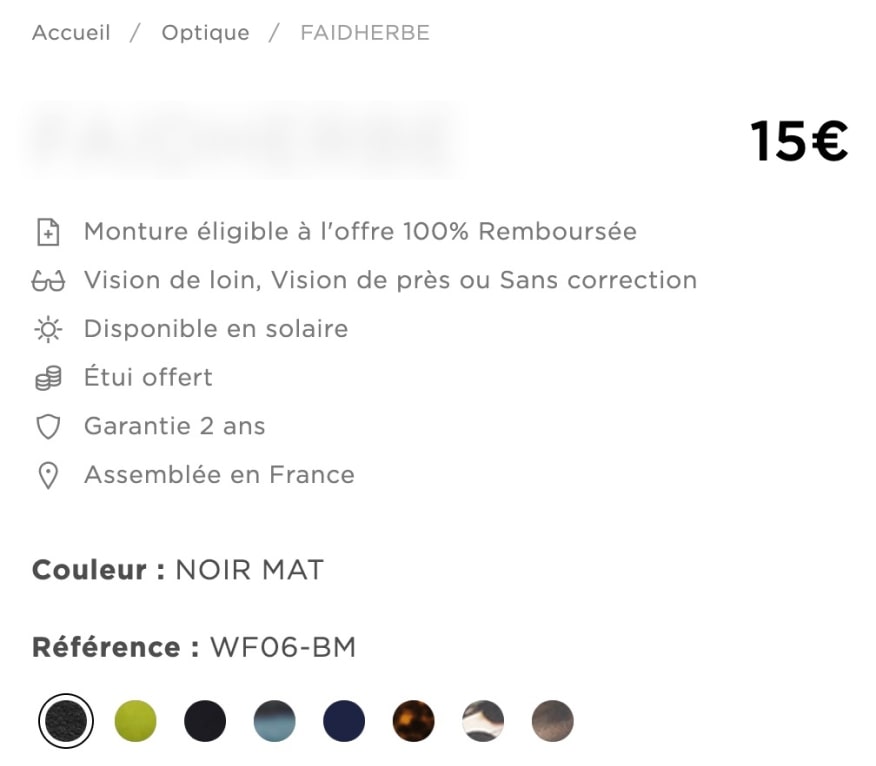
* For example, these glasses have 40 variations due to the combination of colors with parameters, such as diopters for near and far sight or without diopters, transparent or sun lenses.

  • Found a way to add more than three parameters in the product descriptions

Every product has a set of different attributes – size, color, width, etc. There are many more parameters for eyeglasses – weight, lenses, dioptres, interpupillary distance (PD), etc.

However, in Shopify, the maximum number of product characteristics is three, and it can’t be changed even by writing custom code. However, the platform has numerous custom fields that can be tailored to the product’s specifics. To solve this, our experts offered to leverage this opportunity to solve the issue and made a template for all the extra parameters.

  • Honed SEO functionality

Based on the client’s request to enhance SEO capabilities of a new Shopify store, we’ve bolstered it with two additional paid SEO modules. One of them allowed the client to swiftly generate titles and descriptions for multiple dynamic pages using adaptable variables. For example, a variable  “buy in France” following a product name in the admin panel, can be integrated across all or chosen pages automatically.

The other SEO module speeds up caching, preloading pages, etc., based on the analysis of user behavior.

Thanks to this upgrade, our client elevated their search engines’ rankings by three to five positions on average. 

Going extra mile without upping the project’s budget

The client was interested in Shopify’s analytics capabilities. They could have chosen Shopify+ to get access to this functionality. Still, our development team came up with a more budget-friendly option – they found and installed a free sales and analytics module that provides the same ability to collect detailed data from Google Tag Manager, GA4, and Facebook.

Before

  • 6-second website loading speed
  • Average session duration below 30 seconds
  • 70% bounce rate
  • A mind-boggling amount of plugins to ensure basic ecommerce functionality
  • Difficulties of maintaining an outdated ecommerce Frankenstein

After

  • 1-second website loading speed
  • Average session duration over two minutes
  • 35% bounce rate
  • Off-the-shelf budget-friendly solution fine-tuned to meet the client’s requirements
  • Free access to detailed customer analytics
  • Seamless solution updates and maintenance covered by the platform’s support

Key features

Continuity

WordPress to Shopify migration and revamping the whole ecommerce solution didn’t cause any disruption to the client’s business operation flow.

Scalability

The new store, based on the specialized ecommerce platform, supports the client’s plans to scale beyond France.

Reliability

The client always has the latest vulnerability-free version of the solution without lifting their finger, all thanks to delegating the maintenance hassle to the ecommerce vendor.

Business value

  • x6 higher loading speed
  • Halved bounce rate
  • x4 longer time spent on page
  • 64% boost in the number of pages visited per session
  • Free detailed analytics into customer behavior
  • Three to five positions higher search engine rankings

Client’s testimonial

Now, let’s here how the product owner talks the project’s results and the expected outcomes:

Product Engineering For AgTech

Product Engineering For an AgTech Manufacturer

Logo SpexAI

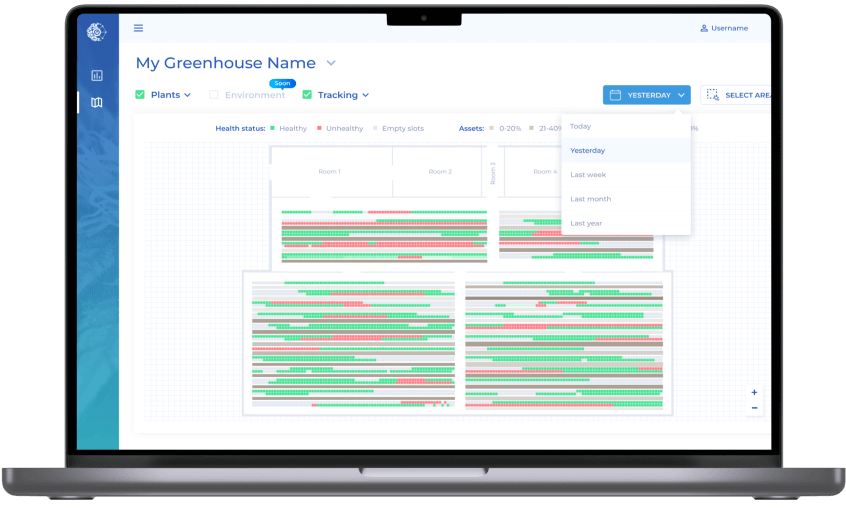
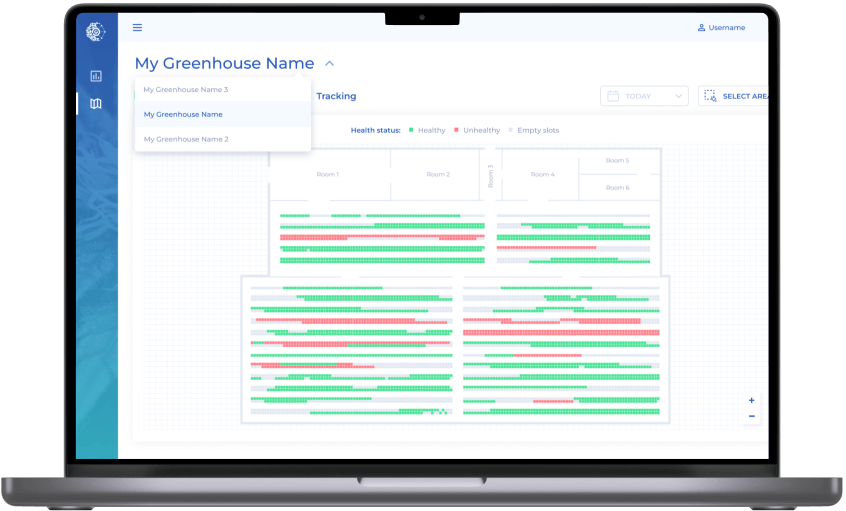
How developing a frictionless web app empowered an agricultural startup to bring the idea of a real-time AI-powered monitoring system to life and serve farms with 10,000–15,000 plants.

Industry:
AgTech

UX and Design

Web Development

Software Product Development

Product Design

Business challenge

There are industries, such as agriculture, that alongside tough market conditions, have to grapple with the pressure of an extreme qualified labor shortage*.

*Source: National Agricultural Statistics Services Farm Labor Survey (NASS FLS)

Our client is an example of an innovative AgTech startup that is rewiring modern farming — SpexAI offers automated AI-powered plant monitoring services for large US and Canadian greenhouses specializing in medical cannabis* production.

*It’s used for medical purposes only and contains no more that 0.3% of THC according to USDA-ARS, 2021 (US) and Cannabis Act, 2018 (Canada)

The client’s goal was to streamline the plant care process in several aspects:

  • Replace manual labor with automation to save a sizable chunk of farm employees’ time.
  • Substitute a lack of workforce for intelligent sensors.
  • Spot problem plants in the early stages of mildew, botrytis, or pest infestation through accurate and detailed real-time health tracking.
  • Detect plants with unsafe levels of THC due to hyperspectral imaging analysis, as in the US and Canada, plants exceeding the 0.3% total THC level must be destroyed, causing tremendous financial loss to farmers.
  • Back up harvest predictions and decision-making with accurate up-to-date analytics instead of guesswork to avoid year-end surprises.

Before reaching out to us, the client had already had:

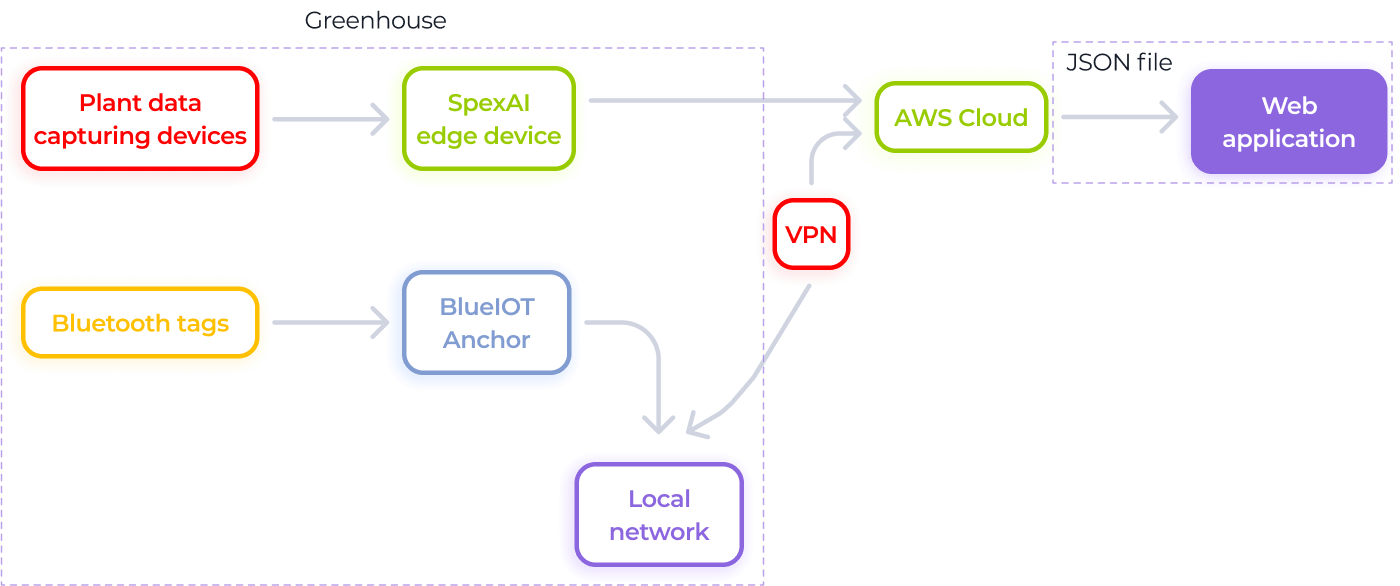
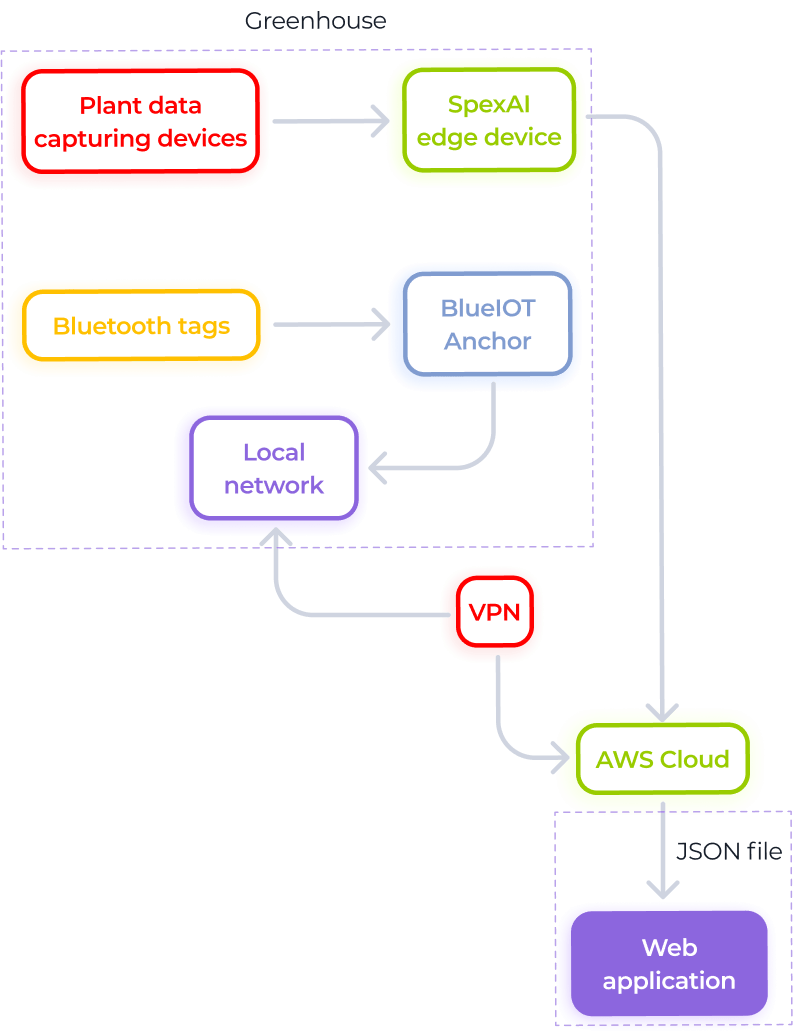
  • BlueIOT® tags that identify each plant
  • A robot – Hugin, harmlessly collecting data from the plants
  • AI – Odin – for analyzing the data

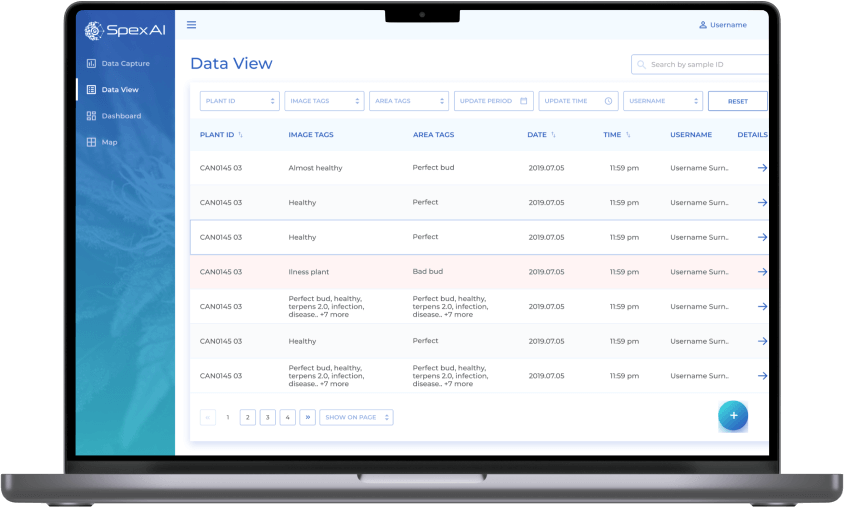
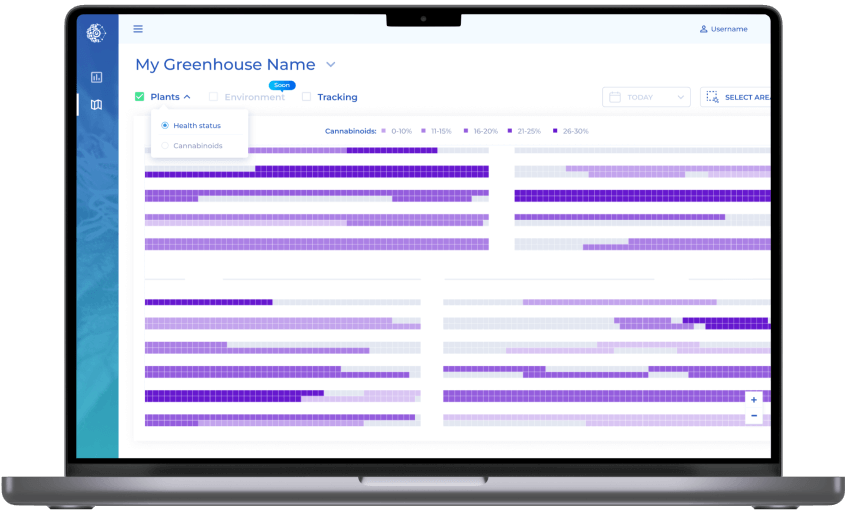
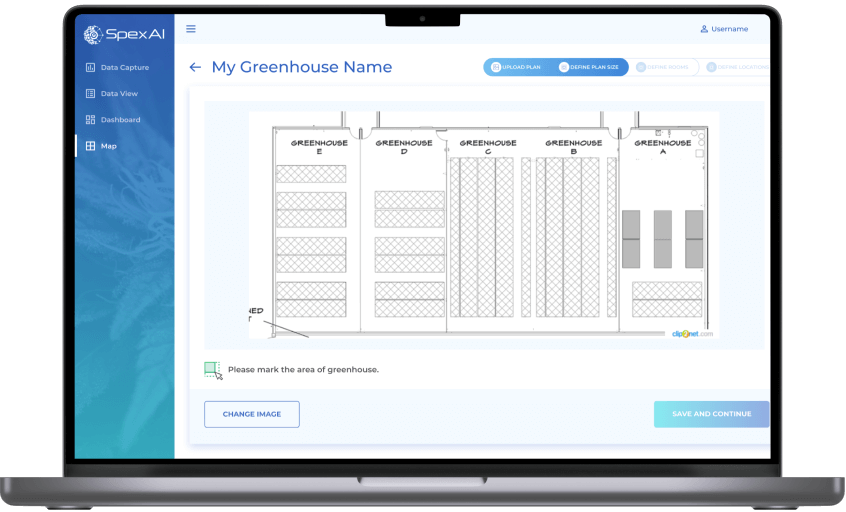
However, there was no software that would receive the data from the AI-powered robot and visualize it in a detailed yet easy-to-grasp form for the end users – farmers. The client needed a web app, and creating such a solution became the purpose of our project. 

How does the client's solution work?

Instinctools’ dedicated team had to craft:

Frontend

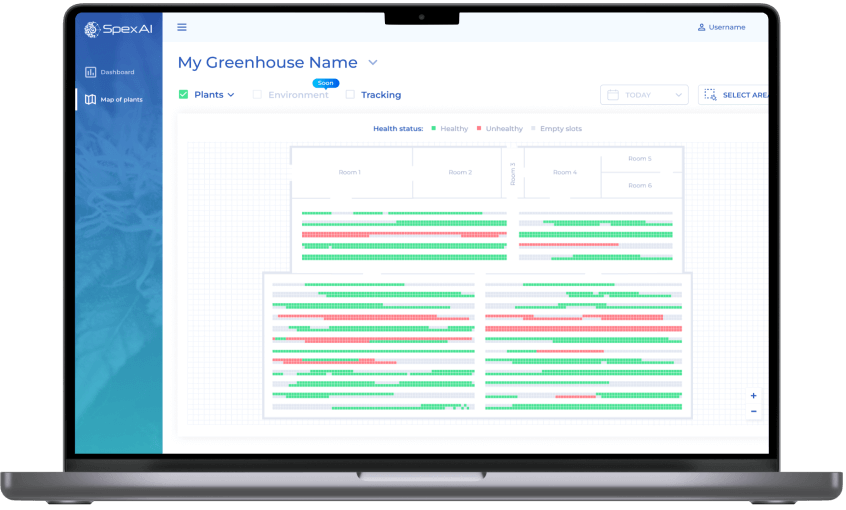
capable of displaying maps of farms with 2,000+ plants.

Backend

able to process up to 1,000 requests from the frontend in a second.

Visualization

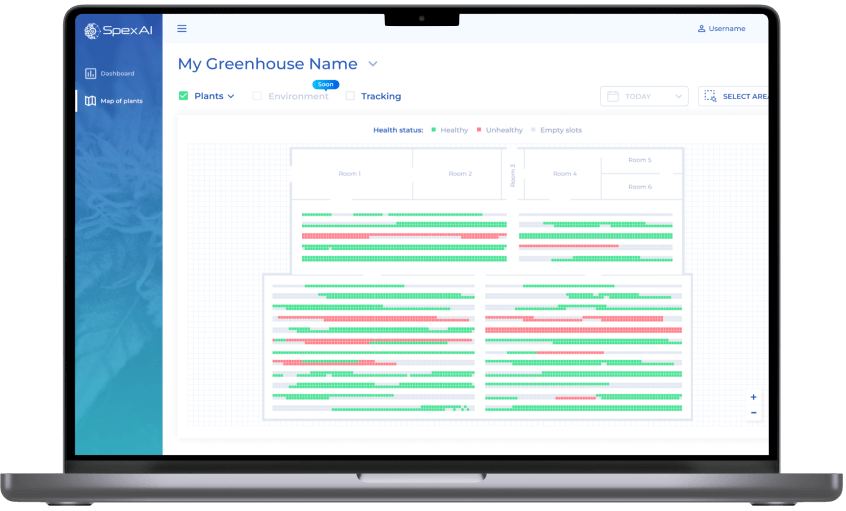
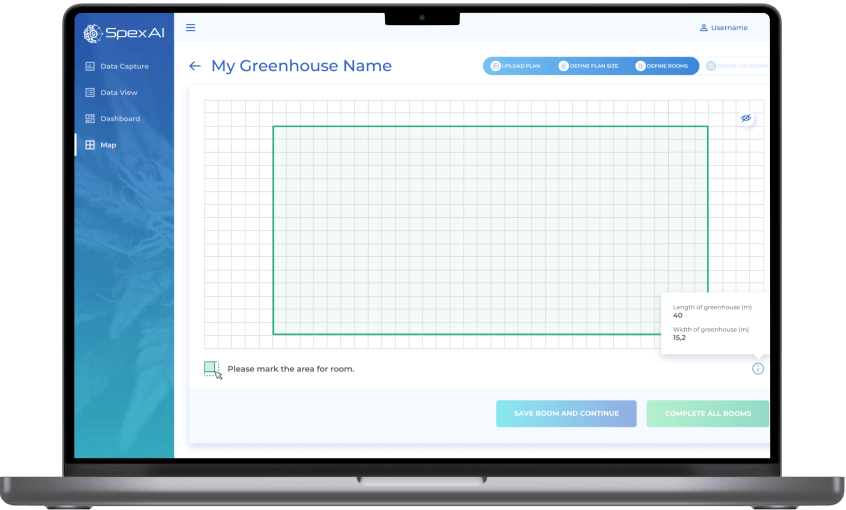
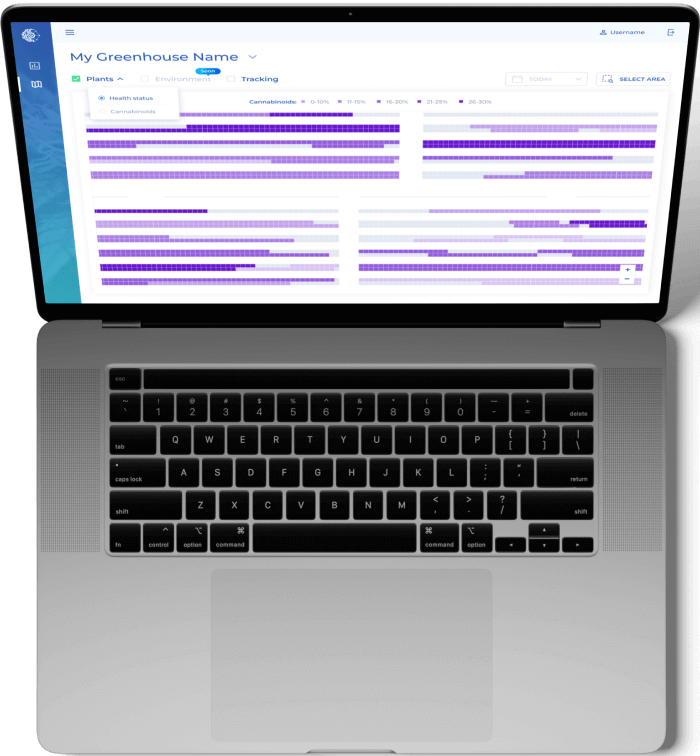
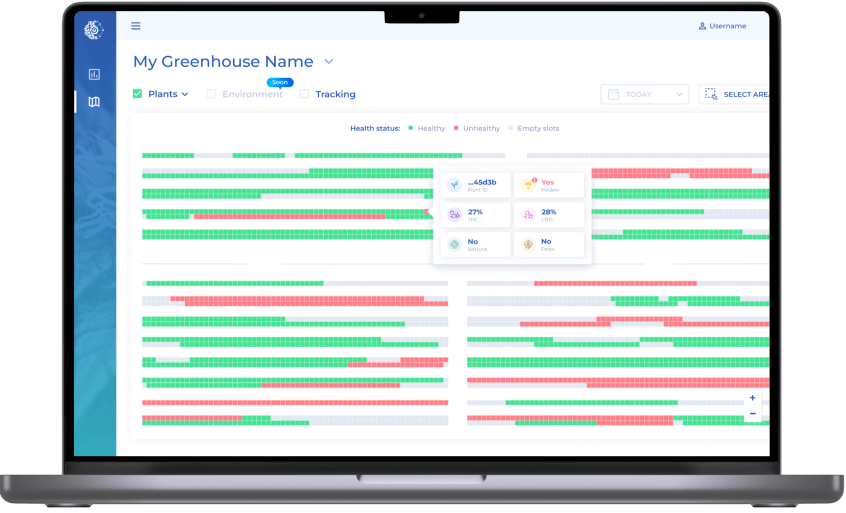
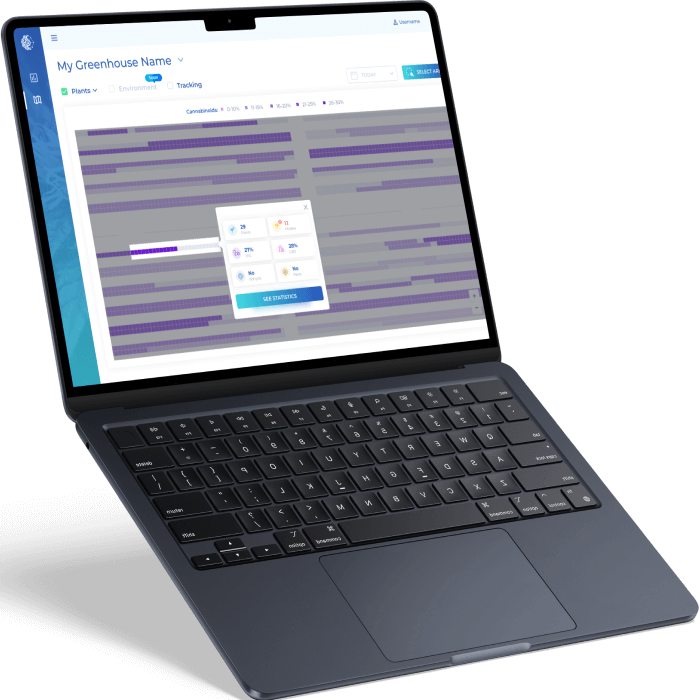
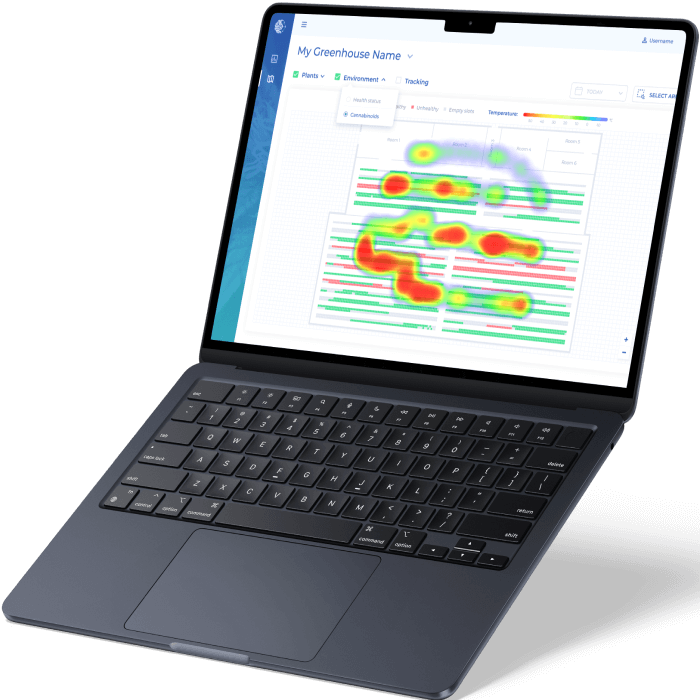
of the map itself to see the data collected by Hugin (smart sensor) and analyzed by Odin (AI) in a simple and intuitive format.

User-friendly visual design

for the web app.

Solution

The client’s end goal was not just to get a Minimum Viable Product (MVP) but also to de-risk the product launch as much as possible. They decided to move incrementally, from the proof of concept (PoC) to prototype to a robust MVP. 

Besides implementing the changes driven by the farmers’ feedback on the prototype, we went the extra mile by crafting a solid MVP and making the app more feature-rich and appealing to investors and users.

  1. PoC and prototype

We assembled a core team consisting of a business analyst, product designer, and software architect to more effectively deal with the project requirements and limitations from the get-go.

Puzzling over the map of plants

Identifying the best way to visualize a farm’s map and finding the most suitable library to implement this concept on a technical level was the major head-scratcher of the whole project.

Since access to every plant was a prerequisite, our dedicated team devised a grid map with large cells, where a cell equals a plant.

For the technical implementation of the project, we chose D3.js — a JavaScript library for bespoke data visualization, as it allows:

  • Drawing a map with 10,000–15,000* cells quickly
  • Painting cells in specific colors
  • Illustrating different parameters (Health status, Cannabinoids, Environment) in layers
  • Showing pop-ups with detailed information about plants

* It was the amount we needed for the MVP.

Looking for the best way to transfer the original farm map structure to the app

At this stage, we faced another question — what is the best way for our frontend and backend developers to receive the configuration of the farm? This issue could be solved by using a tool for software solution structure visualization. The client entrusted us with finding the most beneficial option available.

In Visio, Miro, Lucidchart, and other popular tools, monthly subscription costs $5–8 for a user. We managed to find a more affordable solution – draw.io – that costs $5 per month for ten users.

Identifying the most appropriate framework for the back end

According to the client’s requirements, the web app’s back end had to handle up to 1,000 requests from the front end per second. Therefore, we suggested using the asynchronous framework FastAPI, designed specifically for building high-performing web applications. FastAPI was also the best bet, as it is:

  • Fast to code*
  • Fully compatible with the declarative language JSON Schema, which allows for confident validation and annotation of JSON files, understandable for our web app’s front end
  • Compatible with OAuth 2.0 protocol, which simplifies signing in for the end users while ensuring the security of the process

* According to the FastAPI documentation, the framework provides developers with the possibility to speed up the features development process by about 200% to 300%.

What user functionality was provided in the prototype?

Ability to log in and sign in with Google and Microsoft credentials.

Digital twin of a greenhouse.

Access to key data on each plant.

Information visualization on the plants’ health status and their cannabinoids level at the scale of a whole greenhouse, updated once a day.

  1. MVP

The app’s prototype was successfully tested on a Canadian farmer’s greenhouse. Farm employees’ feedback unveiled how to improve the application, which we did at the MVP development stage. Instinctools’ team upgraded the UX, fine-tuned and expanded the solution’s functionality. What has been enhanced?

The scale and view of the map and the ability to zoom it

As having a top-level view was mandatory for managing the whole greenhouse, we suggested reducing the map’s scale and adding the ability to zoom it up to 500%, considering the client’s ambition to cover the farms with 10,000–15,000 plants and several greenhouses.

As you can see on the mock-up, we’ve added gray cells to show free spots. If a plant is transplanted, the system automatically reflects it in a new cell as Hugin (a smart sensor) reads its BlueIOT tag at the new location, and the former cell of this plant becomes gray indicating a vacant place.

Enhanced UX

Whereas in the prototype users could only see cannabinoid levels for a single plant, now this parameter is visible at the scale of an entire farm.

Broader amount of data collected about plants

We’ve added tracking of mildew, botrytis, and pests that affect plants’ health status and updated the logic for determining healthy/diseased plants. Now, if a plant has at least one of the problematic parameters, it will be marked by the system as unhealthy.

In a nutshell, when a user moves the cursor over the plant, they now see a hover with the following data:

  • Last numbers of the Plant ID
  • TCH index
  • CBD index
  • Botrytis presence
  • Mildew presence
  • Pest presence

Select mode on the map with the ability to see statistics for the chosen area

While in the prototype, it was possible to view statistics only for individual plants by clicking on them, in MVP, users can select any area on the map and check up-to-the-minute data about it. This functionality works in the same way for all map layers.

More detailed filtering with the option to set check-boxes on several tracking layers simultaneously

With multiple filters required, setting the filtering was one of the project’s tough calls. Partially, this was solved simply by colors. But the client wanted to add another layer – ‘Environment’ – to check how humidity and temperature influence plants’ health status and cannabinoids level. 

They also wanted to allow end users to visualize a combination of parameters from the different map layers. This was tricky both in terms of graphics and technical implementation. We solved the issue using heat maps overlaid on the farm’s map.

Now the map has two layers:

Plants
Environment

Real-time data updates

As the temperature and humidity in the greenhouse can change more than once during a day and influence the plant’s condition, updating data once a day carries a probability of inaccuracy in analytics. Therefore, we ensured that Hugin (the smart sensor) was constantly collecting data and Odin (AI) analyzing it so employees could access up-to-date data any time.

  1. MVP evolution

The MVP version of the app was successfully tested on the Canadian investor’s farm. Yet, we went the extra mile and suggested several features to make the software even more beneficial for farmers and put SpexAI on track to high profit.

Ability to view the greenhouse history

Users can access retrospectives of an entire farm, its highlighted area, or an individual plant to check how its health status and cannabinoids level changed over time. With data from previous periods, farmers can better plan the following season.

Leaving notes on the map

Farm staff who tested the app’s prototype mentioned that leaving notes about plants on the map would be convenient. With such an approach, if an employee working during one shift discovers that certain plants require special attention, they can leave notes for employees working during other shifts to notice deviations straight away.

Multiple greenhouses within one account

Although the solution was tested on a farm with one large greenhouse, the client expected that in the future, the application would be used by farmers with multiple greenhouses, so we built in such functionality. 

This feature came in very handy as, thanks to the elaborated MVP, the client has found farmers with several greenhouses for 10,000 and 15,000 plants.

Different roles within the app

There were no different roles in the app’s prototype version. However, its architecture allowed implementing this logic down the road. Therefore, we designed two initial roles for MVP — greenhouse managers and farm owners with different levels of access to data and depth of the reports:

  • Greenhouse managers can only check the greenhouse they are responsible for, but they have highly granular reports.
  • Farm owners can view all greenhouses and all farms, but they have top-level data in their reports.

Before

  • Absence of a specialized tech solution for the safe monitoring and analysis of the plants’ state in greenhouses
  • Lack of top-level view of a whole farm and ability to drill down into greenhouses areas and separate plants
  • Inability to provide real-time monitoring of the farm
  • Decision-making based on personal insights and guesswork
  • Failure to spot plants with non-safe THC levels before they have to be disposed of
  • Incapability to track the history of plants’ condition to predict future changes 

After

  • Easy-to-grasp actionable insights based on leaf-level images from crop monitoring
  • The very first solution for harmless monitoring and analyzing the state of medical cannabis plants in greenhouses
  • Interactive multi-layered greenhouse map
  • Holistic data about plants’ condition in real-time
  • Decreased number of plants requiring eradication due to THC exceedances thanks to predicting the cannabinoid level during growth
  • Greenhouse history at the fingertips empowers farmers to make accurate hypotheses about possible changes ahead

Key features

Innovation

SpexAI is a trailblazer for intelligent and harmless solutions for medical cannabis monitoring and analysis.

Profitability

The software unleashes new profit prospects for farmers by fundamentally reducing the number of plants that had to be disposed of due to non-safe THC levels.

Scalability

The web application can be used both for relatively small greenhouses with 2,000 plants or huge farms with tens of thousands of plants.

Business value

  • The very first solution for harmless monitoring and analyzing the state of medical cannabis plants in greenhouses
  • 100% automated plant monitoring and analysis
  • Interactive health trends at the scale of one or multiple greenhouses
  • Detailed data about each plant available at the click of a button
  • Minimized cases of plant eradication because of the exceeded THC level
  • Decision-making backed up with up-to-the-minute information and historical data

Client’s testimonial

Custom LMS development and design

Custom LMS development for an energy corporation

How implementing a custom LMS helped an oil and gas enterprise automate 84% of training management tasks while increasing employee engagement by 45% and saving 41% of the education budget by moving online.

Industry:
Education, Oil and Gas

UX and Design

Web Development

Enterprise Software Development

Software Product Development

Business challenge

An efficient learning culture within an organization is one of the key ingredients that drive business forward. Statistics unveil that in 2022, 100% of enterprises, 95% of midsize organizations, and 76% of small companies used LMS software to deliver training.

It’s also worth saying that for some industries, continuous staff training is not a nice-to-have option but a requirement that has to be met unequivocally. Just as it was for our client — a UK-headquartered oil and gas company with a production and operations center in the Middle East, which needed an LMS for internal usage.

Before reaching out to us as an LMS development company, the client used to have only offline training programs.

What percentage of companies bank on LMS?

Source: Training magazine, Training Industry Report 2022

What problems did such an approach bring?

No single point
for gathering and storing learning materials
As courses were scattered across HRs’ devices, notes, etc., it was impossible to efficiently organize and reuse them to save time on curriculum preparation. The absence of well-established and consistent management of learning materials was also deteriorating learner engagement and led to employee resistance to education. 
Hardships
with controlling timely staff certification
The client’s HR team was having a bumpy ride with managing employee certification, which is vital in the oil and gas industry. Therefore, HRs had to manually track each worker certificates’ due dates to set required training so it was on the dot.
Manual performance
of mundane, repetitive tasks
As the client’s production center was based in the Middle East, they had to regularly submit a report on the staff certification to the local Ministry of Oil and Gas. The data for it was also gathered manually, which ate a sizable chunk of the HRs’ working hours. 
Inflexible
educational process
The training was available only at the corporate training centers and, therefore, required time commuting for the staff who worked on oil and gas production sites or from home.
Lack of transparency
in training
Teachers and learners didn’t have tools to track real learning progress, and, thus, measure it.

As the company kept growing, the problems were snowballing. At some point, it became clear that the situation had to be fixed urgently. The Head of the HR department proposed switching from in-face education to e-learning. This idea implied LMS development to go from training management turmoil to a single point for storing and organizing educational materials as well as tracking the learning process.

LMS can empower the client's business with a list of benefits

Automation
By automating repetitive tasks, such as grouping, adding, and deactivating users, handling group enrollments, etc., the client can lighten the burden for HRs. Moreover, LMS software allows for creating PDF certificates for employees when they finish a course.
Time optimization
Thanks to storing all the learning programs and materials in one place, teachers can efficiently reuse them. For instance, before creating a new course from scratch, they can check the LMS’s repository for data on the same topic, combine old courses, or just finetune them.
Regulation compliance
A powerful learning management system provides an opportunity to make keeping all staff aligned with the industry regulations a breeze. You have a centralized way to deliver the same information to all of your employees.
Security
With an LMS limited to internal usage, the client can assure the inaccessibility of the company’s sensitive data from the outside.
Cost reduction
Putting a premium on automation and a time-saving approach decreases the cost of training in the long run. 
Flexibility
After switching to digital learning, employees can attend courses anywhere, anytime.
Transparency
Both teachers and learners can track training progress. In a nutshell, LMS offers a competency matrix for each employee in the corporation.
Higher employee retention
3 out of 4 employees are more likely to stay with a company that offers continuous training and a rich learning experience.

Source: Society for Human Resources Management, The State of L&D in 2022

Also, the client considered that they would need a software solution adjustable to the specifics of the oil and gas industry and their enterprise-scale multinational company, including:

Opportunity
to create, gather, and store learning materials and courses on a plethora of topics
The flexibility of the LMS solution regarding the diversity of topics to cover — from technically specific courses to programs on finance management.
High resilience
of the system
The LMS software was supposed to accommodate a simultaneous workload of 1,000+ users during standard working hours.
Ability
to generate custom reports
As mentioned, the client had to provide a specific report to the Ministry of Oil and Gas. This task also had to be automated.
Localization
options
For the multinational corporation, the possibility to provide training in many languages (including  Arabic) was an essential feature. Where the top management could study in English, but rank-and-file employees needed materials and the LMS’s interface in localized languages.

The off-the-shelf LMS platforms won’t cover these requirements. Therefore, it was decided to develop a custom LMS software. This option also suited the client better from the business perspective as they had an in-house IT department, and maintaining their own system was more cost-effective than constantly investing in a ready-made software license.

Our business analysts clarified what devices should be used for the learning process. As the customer planned to provide access to the learning system only on the desktop, we ended up with the idea of a web application hosted in the client’s cloud.

Solution

At the product ideation stage it became clear that the client didn’t have a clear understanding of custom learning management system capabilities and what LMS features they needed. The only well-defined requirement was related to the LMS’s visual design — the platform had to match the company’s corporate colors.

However, our extensive expertise in bespoke software product development allowed us to sprint ahead without getting stuck at the starting line. Instinctools’ business analysts took the initiative during the collection and elaboration of requirements.

After finishing this stage in three weeks, we outlined the vision of the roles within the LMS, its architecture, components, functionality, and management.

  1. LMS functionality

As a custom LMS development company, we aimed to provide the client with a feature-reach and user-friendly software product. Therefore, our dedicated team devoted special attention to crafting an easy-to-use materials repository, clear course structure, simple course management, detailed progress tracking, diverse testing programs, and in-depth reporting.

Roles

After analyzing the structure of the client’s training process, we suggested the following roles within the learning management system:

  • Admin for their in-house IT department
  • Teacher for HRs
  • Learner for employees

Content Library

Storage for courses and educational materials is a basic component of any LMS. Speaking of the client’s Content Library, they planned to use it to collect both their in-house courses and learning programs they acquire from other training centers.

Considering the requirements of the oil and gas industry, all the data can be sorted out in various ways. For instance, general or industry-specific, by topics, available language, etc.

Content formats also vary. In the era of offline training, the client offered employees only text and illustrations. Our BAs proposed adding videos to increase learner engagement and enhance educational outcomes by diversifying learning activities.

Course structure and management

Learners can’t choose a course by themselves; training is always assigned by the Teacher or Admin to an employee or a group of employees. Also, educational materials are categorized according to the staff’s specialization and their level within the corporation. For instance, materials for rank-and-file workers and top managers will be in different categories, as well as courses on specific topics, such as risk management in finance and safety in oil production.

Progress tracking and analytics 

The success of training programs is measured by their influence on the staff. To estimate this impact, we visualized students’ progress with data analytics tools.

Custom LMS development implied offering dashboards on both sides:

  • Admin/Teacher’s
functionality includes tracking percentage of Learners completed a group course. Furthermore, as they can set a deadline for a course or test, there is a statistic on how many employees managed to meet the deadline. Teachers and Admins can also look for detailed analytics for each employee – what percentage of assigned courses and tests they have already passed, the number of failed tests, if there are any, etc.
  • Learner’s

functionality is not that extensive, but each employee can check their training performance and monitor deadlines to make it on time. All reports can be downloaded as Excel, CSV, or PDF files.

Communication within the LMS 

Having a single point of communication is also significant in ensuring personalized learning experience and high-quality training. Learners can leave comments on the courses, tag their Teachers or other participants if there is a group training, and Admins if they can’t sort out some technical issues. 

The same goes for Teachers. For example, they can tag Learners in the courses where the deadline is around the corner.

Notifications

Communication goes hand in hand with automated notifications to simplify time management for both Teachers and Learners. Within the custom LMS development, we recommended and implemented email notifications with ready-made templates for five cases:
  • A Teacher assigned a course to the employee
  • The Learner was tagged by a Teacher, Admin, or other Learner from a group
  • A course has a deadline, and the Learner receives auto reminders ten, five, and two days before
  • The Learner missed the deadline for a mandatory course
  • Admin also receives a message about the readiness of auto-generated reports for the Ministry of Oil and Gas

Tests

This feature became a new helpful add-on in the certification process to ensure a high level of expertise across the company. Now, employees can only be certified after passing tests following the course.

Here are some features of the testing process we suggested and implemented during the custom LMS development:

  • Tests can include open, single-answer, and multiple-answer questions
  • There may be text, illustrations, and videos in the tests
  • New hires have to complete an initial test to assess what skills they may lack for their specialty or position. Based on the results, Teachers can create fully personalized learning for these employees
  • Teachers and Admins can set a deadline for the course.
  • Teachers and Admins can set a course’s completion as a prerequisite for access to the next one

Reporting

As we’ve mentioned, the automated report preparation for the Ministry of Oil and Gas was one of the reasons that tipped the scales in favor of the custom LMS development services. We relieved people from a manual collection of data on employees’ courses completion, putting that data together in a list, and entering it into the report template.

All these operations were automated. The LMS generated an Excel file with all the necessary information according to the Ministry of Oil and Gas template. HRs had only to download it and send the document to the ministry.

Since the project scope was quite substantial, we divided the work into two parts — MVP (Minimum Viable Product) and post MVP. The MVP incorporated the Admin’s and Teacher’s functionality – Authorization/Login, Course Catalog Management, Course Management, Content Management, and Content Library. It took our LMS developers three months to finish this part. 

  1. Integrations and security

The client used Microsoft Azure as their corporate cloud platform, which influenced the LMS integration they needed and the way we took care of security:

  • Integration with Azure Active Directory

All employees already had profiles in the Active Directory. We took advantage of this to avoid creating the staff profiles in the learning management system from scratch.

All employees already had profiles in the Active Directory. We took advantage of this to avoid creating the staff profiles in the learning management system from scratch.

  • LMS authentication through Azure OAuth 2
We suggested using this up-to-date standard authentication protocol to allow users to sign in to the LMS through their profile in the Active Directory. 

Besides saving personnel’s time, such an approach is beneficial from a security standpoint. As you can guess, employees rarely come up with new passwords and use the same one for multiple systems, which increases software vulnerability drastically. A single point of authentication (SSO) means fewer scattered logins into various corporate apps and minimizes the possibility of external attacks and data theft. 

Within the project, our LMS developers worked only with the API addresses of specific servers provided by the clients for the web app. The software’s maintenance and support were supposed to be provided by their in-house IT department. 

However, we went the extra mile to optimize the task for the client. Our DevOps has automated the web app’s installation and deployment on the server side. Thus, all the LMS services located in Docker containers were automatically brought up on the server via Docker Compose.

  1. Visual design

Good design emphasizes the product’s functionality. Our product designer had to translate custom LMS software’s versatile capabilities into a dynamic and feature-filled interface. As we were strapped for time, there was no wireframing. We went straight to visual design. Our UX/UI designer took the risk and prepared a lot of screens for a future web app at once and reached the client for approval. Thanks to our product-first mindset and battle-tested expertise of the LMS development company, it worked out.

Here are a few examples of our initiatives regarding learning management system design and usability:
  • Nesting levels
As we were in charge of the solution’s architecture, we also proposed the components hierarchy. For example, we suggested creating All, Video, Text, and Cover sections within the Content Library and All, For review, Declined, and Published tabs in the Courses Catalog. 
  • Quick access tab
Learners can be overwhelmed with the number of courses they need to complete. Therefore, we offered to add a “Quick access” menu, where each employee can check assigned materials, which are obligatory, which are in progress, etc.
  • Intuitive and handy file uploading
With the drag-and-drop interface, Admins and Teachers can easily download materials of any type to the Content Library and change their order in the Course Editor.
  1. Post-implementation stage

After the LMS rollout, our business analysts trained HRs to familiarize them with the system and show them how to take advantage of it to the fullest.

Next, we moved to working on the post-MVP features and added them in four iterations:

Iteration 1 User Accounts management, Learning groups management.
Iteration 2 Courses, Catalog, Admin/Learner modules architecture.
Iteration 3 Lessons (Learner module), Course listing (User management).
Iteration 4 Enhancements (improve UX), Report (Course completion), Course management (selection material from Library, material sequence).

This part of the custom LMS development took another four months of the full-fledged team work.

Before

  • Training materials and courses are scattered across teachers’ devices and hand-written notes
  • Manual performance of management tasks that could be easily automated
  • Lack of personalized learning
  • Inability to measure the effectiveness of corporate training materials
  • Absence of educational analytics
  • Slow delivery of the educational programs
  • Difficulties with tracking learners’ progress
  • Manual preparation of obligatory reports

After

  • Transparent measurement of corporate educational programs’ success and learner’s progress
  • Simplified and mostly automated preparation of industry-specific reports
  • Speeded up courses delivery
  • Automation and facilitation of all the learning management operations
  • Centralized learning data storage
  • Unlimited ability to personalize the learning experience
  • Detailed visualization of each employee’s training progress and a bird’s eye view of the staff certificates across all company

Key features

Inclusiveness
The biggest gain of custom LMS software is its adaptability to the various staff’s specialties and flexibility in providing access to the courses regardless of the employees’ time and location.
Resilience
Besides the ability to withstand the simultaneous workload of 1,000+ employees, custom LMS development has become a harbinger of opportunities for the client to ensure stability and consistency of training programs.
Customizability
With a custom LMS solution, the client can uncover the areas of improvement and tailor a curriculum to the company’s needs and employees’ ambitions.

Business value

  • Provide a single point of control over the training programs to ensure ongoing improvement of employees’ knowledge and expertise
  • Automate 84% of teachers’ tasks related to managing the educational process
  • Save up to 4 hours of teachers’ working time weekly and relocate their efforts to developing personalized curriculums
  • Save 41% of the education budget thanks to moving online
  • Speed up new staff onboarding from 1–3 days to 4–10 hours, depending on the employee’s position
  • 45% increase in employee engagement
  • Securing the company’s education materials with single sign-on (SSO) authentication

Multiplier effect

Any way you slice it, even small companies can no longer afford to put off the question of consistent and centralized employee training until later, not to mention medium-scale companies and enterprises.

The absence of a robust learning management system can slow the roll of a company in any industry, from education and healthcare to manufacturing, automotive, and fintech. Creating a powerful LMS can help you rise from a dizzying array of unsorted educational materials and courses and make your employees’ progress traceable.

Furthermore, experts in any field are a hot commodity nowadays, given the world-scale talent crunch, and hunting them can cost you a pretty cent. Therefore, you should bank on the LMS software for internal usage and cultivate experienced professionals within your company.

Effective training helps companies to fill skill gaps by leveraging staff they already know and trust and foster long-tenured relationships with their employees. Moreover, by putting talent management first, companies of all sizes can improve organizational performance and potentially gain a competitive advantage over their peers.

Legacy Software Modernization For BioTech

Legacy Software Modernization For BioTech

How modernization of a legacy system and implementation of real-time dashboards empowered a leading BioTech manufacturer to accelerate drug development by 100+ days, enabled remote monitoring and control of pharmaceutical production, and cut down onboarding of new hires from three days to six hours.

Industry:
Biotech

Duration:
6 months

Team:
four web-developers, UX engineer, QA engineer, and a project manager

Challenge

Market leaders need to continuously advance and innovate their products’ software using modern technologies. Otherwise, their achievements can be ruined due to the high level of competition.

The software our client, a global biopharmaceutical manufacturer, uses for controlling the production process of medical treatments has a particular control module for administration, monitoring, and analysis. The problem was that this complex three-component module only had a desktop version. Old legacy code added even more complexity to the project and hindered software modernization and the implementation of new features.

At first sight, the requirements set for the project development team were quite clear, and the estimated time for the deployment was pretty short. The *instinctools team organized a Discovery Workshop with customers’ representatives to prevent surprises. When diving deeper into the technology stack, the datasets the customer used, and other software details, our engineering team discovered new challenges that implied a different approach to solution delivery was needed.

First of all, the architectural approach of using NATS as a messaging system, selected for the existing solution, complicated and slowed down the development process and couldn’t enable fast and real-time access to the data via web browser apps.

The challenge was related to the Pathfinding algorithm that wasn’t appropriately described to repeat the work of the outdated application.

Solution

*instinctools engineering team of four web-developers, UX engineer, QA engineer, and a project manager were working on the project for six months. They managed to reverse-engineer the legacy code, going through more than 1,000 rows from XML files manually to understand the actual logic of the module and how the graphs and tables were built and organized.

In coordination with the back-end development team, *instinctools’ engineers built the front-end part of the web application from scratch. We also implemented a modified Pathfinding algorithm that enabled us to embody the look and feel of the old application in the new one. Our experts compiled the NATS library using alpha source code from the repository and implemented numerous fixes to ensure everything worked as expected.

According to the project requirements, the *instinctools team enabled smooth application updates in real time using WebSocket and crafted a user-friendly design following the customers’ brand book guidelines and tech specs.

The web application we built for a controlling module allowed its users to seamlessly monitor and control the process of medical treatments production on the manufacturing device directly or remotely. The user-friendly interface with real-time information updates helped administrators smoothly track and manage module operations and quickly react to potential issues.

With a new code written to modern standards, our customer will implement new features and modernize the application faster.

Key features

  • Real-time updates on the dashboards in controlling, monitoring, and analysis components of the module;
  • Visualized and structured data;
  • Web access via a compatible browser;
  • Responsive user interface and renewed corporate design.

Business Value

The newly modernized process visualization module with increased performance and quality allowed our client to reduce employee training time and improve their workload efficiency. The final solution gave the company’s customers the ability to easily integrate the visualization into any hardware capable of showing web applications.

Real-time dashboards and visualizations, accompanied by an intuitive user interface, allowed system managers to control the manufacturing process, reducing industrial incidents effectively.

The updated product, complete with the new functionality implemented by the *instinctools team, allowed our client to innovate faster and remain a market leader in its niche.

Technologies

React
Nats.io
Microsoft Azure DevOps
Figma
Anna Vasilevskaya
AI modified real photo
Anna Vasilevskaya
Account Executive

Get in touch

Drop us a line about your project at
[email protected] or via the contact
form below, and we will contact you soon.