Automated Infrastructure Management System

Automated Infrastructure Management System for a Network Hardware Manufacturer

How creating a modular, user-friendly network controller platform allowed a telecom equipment manufacturer to complement its core hardware products with commercial software, enabling end users to save up to 35% on network infrastructure management, while also positioning the company for new revenue streams and future Data Center Infrastructure Management (DCIM) capabilities.

Industry:
Telecom

Digital Product Engineering

Software Development Consulting

Business challenge

In many organizations outside safety-critical environments, network management remains largely unautomated. Enterprises with small networks often tolerate manual methods, turning a blind eye to the human errors and wasted hours they introduce.

However, when networks scale, growing with more employees, devices, and higher demands for load balancing and availability, the operational burden becomes impossible to ignore. Once the infrastructure racks up more ports, the illusion of control once provided by a neat Excel tab fades fast.

After outgrowing spreadsheets, organizations switch to automated infrastructure management solutions that consolidate real-time network monitoring and configuration into one coherent system.

The problem is that while many solid enterprise-grade remote network management platforms are available, none are easy to get started with. Network administrators and technicians new to these tools can spend months struggling through the documentation.

Our client, a network hardware manufacturer from Germany, saw an opportunity here and decided to create a new solution with a low entry barrier even small and mid-sized facilities can take advantage of.

They were looking for a reliable engineering partner to develop an on-premises, web-based automated infrastructure management (AIM) system with an intuitive UI. The system was meant to serve as the software component of the client’s hardware, which included their own intelligent patch panel and port plugs. It had to deliver the robust functionality of existing platforms, but with a user-friendly interface that simplified adoption. Additionally, it needed a clear roadmap for evolving into a full-fledged data center infrastructure management (DCIM) platform.

Instinctools was up to the task, crafting a safe, scalable, market-ready solution, seamlessly fitting it into the client’s hardware product ecosystem, and ensuring ISO 9001:2015 compliance.

AIM is an integrated hardware and software system that automatically detects the insertion or removal of cords, documents the cabling infrastructure including connected equipment, enabling management of the infrastructure and data exchange with other systems.

DCIM tools monitor, measure, manage and/or control data‑center utilization and energy consumption of all IT‑related equipment, such as servers, storage and network switches, and facility infrastructure components, such as power distribution units and computer‑room air‑conditioners.

Solution

The project began with an in-depth discovery phase, where we identified the client’s initial requirements and collaborated with domain experts to bring clarity and order to the specification draft. Once priorities were set, we mapped out the MVP roadmap, release plan, and detailed technical specification to guide development.

Out of that groundwork grew a full-scale team consisting of an Account Manager, Tech Lead, Project Manager, Business Analyst, UI/UX Designer, DevOps Engineer, System Architect, Backend and Frontend Engineers, and QA specialists.

  1. Deciding on a tech stack

As part of the discovery phase, the team weighed several technology options. From the client’s shortlist, which included C++, C#, .NET, Java, Python, and React, the project moved forward with the following stack:

  • React was chosen for the frontend due to the client’s existing experience with it, its efficient rendering, and its component reusability across other corporate products.
  • C++ was reserved for modules requiring low-level integration and fast, lightweight operation.
  • Java was picked for the backend for its high performance, strong security, and scalability. Compared with interpreted languages like PHP or Python, Java handles high-concurrency, enterprise-scale workloads more efficiently, making it a strong choice for complex backend systems.
  • PostgreSQL was selected as the primary database management system for its robustness and advanced feature set.
  1. Making core solution architecture decisions

To ensure the system met the client’s expectations, our system architect suggested several strategic decisions that shaped its core architecture.

Modular design

As the client wanted to give customers the freedom to select only the functionality they needed, we opted for a microservices architecture. Each microservice operates independently with its own database, ensuring scalability and ease of use.

Apart from aligning with the client’s t business goal, this approach smoothed things out on the development side as well:

  • With interchangeable components, individual parts of the system can be swapped or updated without disrupting the whole, making future enhancements effortless.
  • Independent modules allowed multiple teams to work on different components at the same time, eliminating bottlenecks, and, thus, speeding up development.
  • Each module was free to run on the technology best suited for its specific function, without being tied to a rigid, monolithic stack.

Integration readiness

For enterprises to effortlessly plug the solution into their IT ecosystems, our project team implemented a RESTful API and provided OpenAPI documentation. As a result, the system can be easily integrated with external tools such as service desk systems, enterprise asset management software, and various monitoring platforms.

Ease of data migration

Whether transitioning from manual workflows or legacy AIM systems, customers can easily onboard the platform, with support for importing data from CSV, Excel, or other formats.

  1. Allowing for flexible work order handling

Beyond real-time network monitoring, the AIM system delivered by the *instinctools team simplifies day-to-day network infrastructure management with built-in work orders that guide IT technicians through step-by-step tasks and automatically verify each completed action.

Compared to many solutions on the market, this AIM system supports a broader range of operational scope, from adding new network racks and connecting patch panels to re-cabling segments, relocating equipment, or replacing failed components.

In addition, system administrators can choose between two modes for work handling:

  • Through work orders: every task follows a defined, controlled workflow that ensures order, accountability, and traceability, which is ideal for environments where strict oversight and standardization are necessary.
  • Without work orders: this mode increases flexibility and speed for smaller organizations by removing formalized approval flows, ticket assignments, and status tracking. Teams can quickly add or update equipment instantly, without waiting for administrative steps to complete.
  1. Designing user-friendly UI

The system’s UI stands out for being clear and approachable.

At-a-glance clarity

Engineers can instantly grasp room layouts, racks, and network connections through intuitive visualizations and contextual hints.

Low learning curve

Even team members with little to no IT background can onboard quickly, making it a perfect fit for small companies and startups.
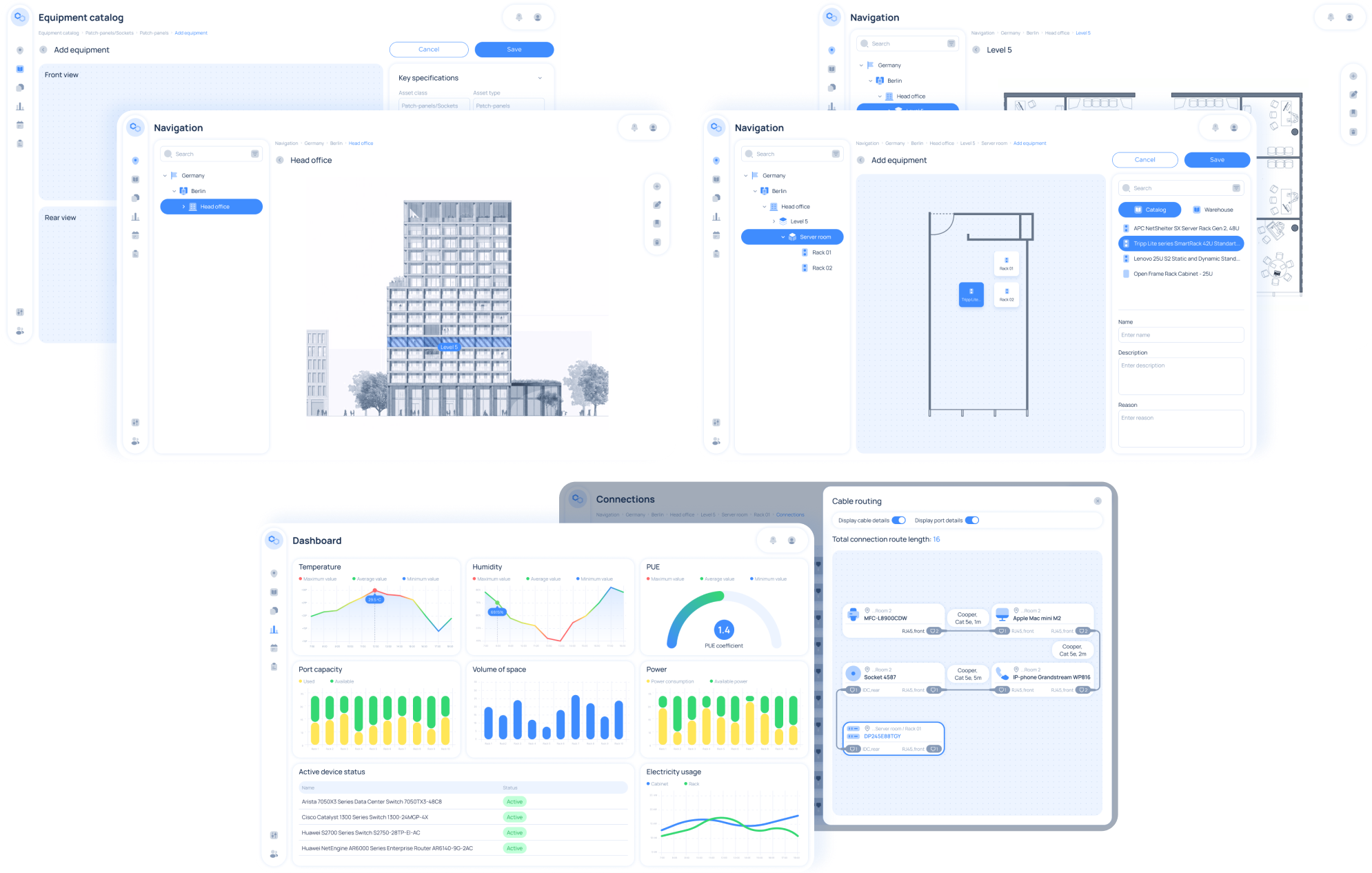
A collage of five software dashboard screens shows blue-and-white UI elements, including a building diagram, equipment catalog, floor plan, charts for temperature and humidity, bar and line graphs, and a connection flowchart. Various side navigation menus are visible.

Early testers described it as “more human-friendly and straightforward” than other established network infrastructure tools.

For added comfort, users can tailor the interface by switching between light and dark themes.

  1. Doubling down on security

Security has been addressed comprehensively to ensure the system’s integrity:

  • Licensed access control

    Prevents unauthorized use and protects the software from piracy.

  • Service registry

    Keeps track of all application services for reliable communication and scalability, implemented with Java and Eureka.

  • Encrypted data transfer

    All data exchanged between middleware and firmware is transmitted securely using encryption.

  • Authentication and authorization

    Secure login via username/password or SSO, fully integrated with corporate identity systems using Java and Spring Security.

  • Syslog monitoring

    Captures system logs in compliance with OWASP best practices, ensuring secure and auditable logging across the infrastructure.

  • Role-based access control

    Flexible user and group management with granular permissions and safeguards against conflicting edits.

Flexible licensing model

The AIM system is licensed based on the number of managed ports

small setups

up to 2000 ports

large enterprise installations

2000-10000 ports

  1. Planning for DCIM expansion

Following the successful launch, the client is preparing to evolve the AIM system into a full-fledged data center infrastructure management (DCIM) platform. The expanded system will provide real-time insights into power consumption, efficiency metrics, environmental conditions, and the operational status of all data center resources.

Key capabilities under development:

  • Real-time monitoring of energy consumption and cooling systems
  • Comprehensive management of equipment and resources, including servers, racks, and power distribution
  • Optimization of data center resource utilization
  • Continuous tracking of equipment performance and operational health

Product benefits

  • Easy, reliable management of network connections
  • Real-time monitoring of the entire network infrastructure and alerts for issues and unauthorized actions
  • Streamlined inventory management
  • Data-driven planning for equipment modernization
  • Up to 35% cost savings through reduced manual work

Business value

  • By complementing its hardware portfolio with commercial software solutions, the client unlocked additional revenue opportunities.
  • The integrated, end-to-end infrastructure management system strengthened the client’s position as a trusted provider.
  • The client is now seen as a leader in automated infrastructure management.
Custom Inventory Management System

Rewiring Inventory For an Eyewear Manufacturer
And Retailer

How replacing an overpriced SaaS inventory system with a custom, feature-rich IMS enabled a French eyewear manufacturer and retailer to double the RFID scanning speed and accelerate tag verification x3.

Industry:
Ecommerce

Enterprise Automation

Software Product Development

Data Visualization

Business challenge

Retail companies know better than anyone that inventory is a part that can make or break your business’s success. Understocking at critical times and locations can lead to dissatisfied customers. Meanwhile, maintaining a large stockpile brings its own challenges, including storage and insurance costs, the hazards of spoilage, theft, and damage. The ability to strike the balance between having ‘too much’ and ‘not enough’ hinges on inventory management. That’s why it’s critical to take care of its accuracy, transparency, and sustainability.

However, despite the abundance and diversity of ready-made inventory products, finding the one that fits your budget and completely fits your needs is still tricky. For companies that strive for flexibility and full control over the inventory management system (IMS), custom software development is more likely to be the best bet.

Getting inventory in order was the ultimate goal of our client – a French eyewear manufacturer and retailer. It was their fourth project with *instinctools – our team had previously developed several applications for the client’s ecommerce ecosystem.

Their inventory processes were already automated and relied on barcode and RFID scanners, but the SaaS software the client used was costly and feature-limited, failing to cover the company’s operational needs.

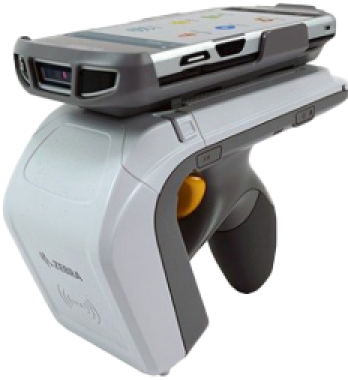
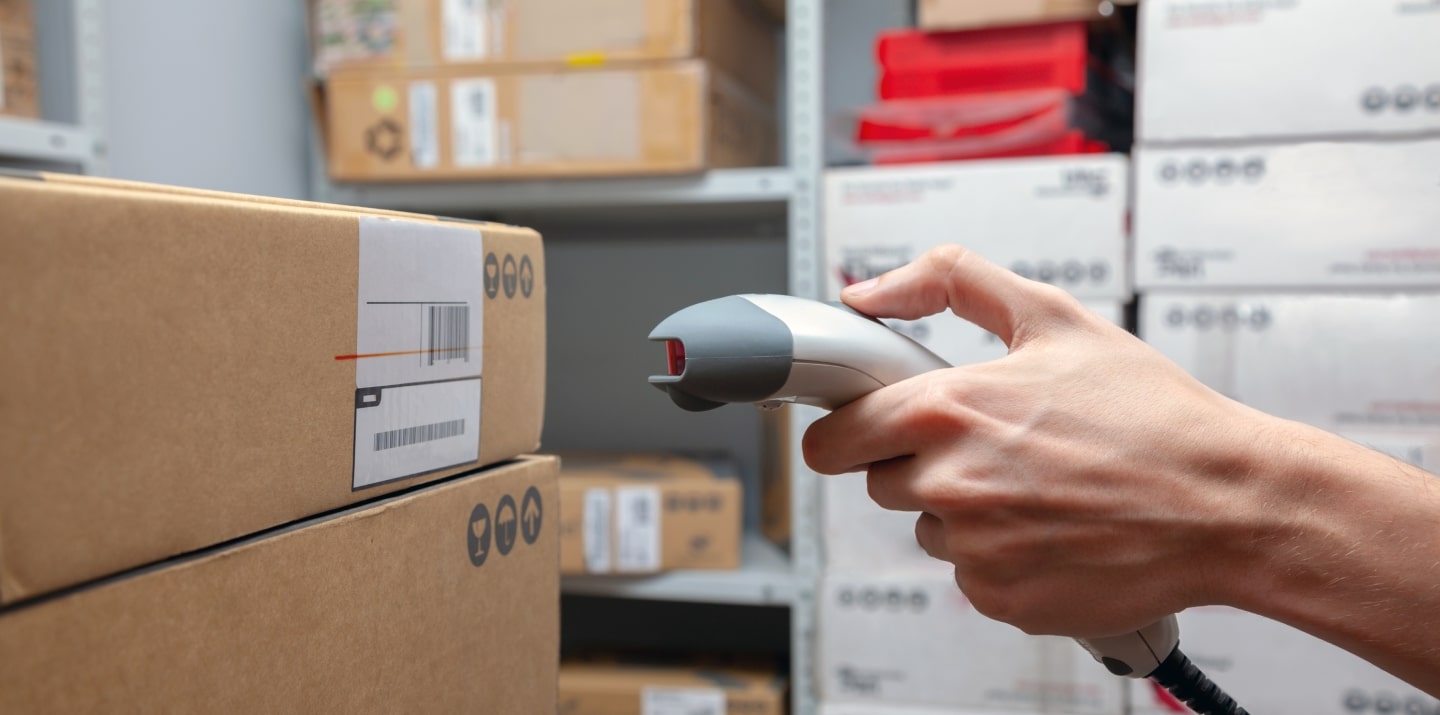
Barcode scanners

are designed for line-of-sight scanning within one to two feet; they’re a go-to option for individual product locating and tracking.

Radio frequency identification (RFID) scanners

read data with in an up-to-20-feet range and can near-simultaneously scan multiple tags, but they lack accuracy compared to barcodes. They’re the perfect fit for large-scale tasks such as warehouse management.

As their unmet requirements for IMS functionality kept snowballing, the client faced a dilemma, whether to pour money into adding new features to their current system or invest in a custom solution.

To escape the vendor lock, they decided to opt for their own feature-rich software with unlimited scalability potential.

Solution

The client needed a device-agnostic solution that wouldn’t cost a fortune. Therefore, we went with the idea of a cross-platform app. As other client’s applications were already written in React Native, there were no doubts about the tech stack for the inventory software.

What challenges did our dedicated team face and overcome while crafting a powerful app that fully covered the client’s inventory-related workflows?

  1. Stabilizing third-party libraries
    and writing custom ones

Robust libraries are the backbone of smooth integration with barcode and RFID scanners. There are plenty of ready-made options.; However, you should have a seasoned development team able to spot the relevant ones, and write custom libraries to cover your specific inventory functionality.

To provide the client with a stable and easy-to-maintain solution, we followed four key principles when working with the libraries:

  • Avoiding a cumbersome collection of libraries

The more libraries you have, the more challenging it is to keep them up to date, resolve conflicts between them, and manage a diverse set of dependencies.

  • Preventing solution architecture complexity

Tight coupling of the software modules and dependency conflicts contribute to crafting a jerry-rigged solution with poor performance and excessive memory consumption.

  • Stabilizing third-party libraries

Ready-made options can bring critical bugs to the production code, or they may join the ranks of neglected libraries that are no longer supported. In both cases, fine-tuning is a must.

  • Striking the balance between third-party and custom libraries

Writing custom libraries takes way more time than calibrating the ready-made ones, so for the sake of development speed, it’s better to build them only for highly specific functionality not covered by the existing elements.

With the aforementioned points in mind, our team selected suitable open-source libraries for barcode scanners:

  • Capture JS for Socket Mobile
  • React Native BLE (react-native-ble-plx) for Netum

Capture JS is a stable library with detailed documentation, so it was ready to use right away, while React Native BLE was in beta and, therefore, required debugging and stabilization. Since open-source libraries provide full access to their code, *instinctools’ developers fixed it, honing performance and minimizing the overall risk of a third-party element adoption.

Meanwhile, integration with RFID scanners requires custom native libraries. For this purpose, our team utilized React Native Bridge, which works as a communication layer between native modules in Java and the client’s app in React Native with JavaScript code.

  1. Incorporating tabletop RFID readers into the overall hardware ecosystem

Alongside handheld scanners, the client also has tabletop RFID readers. Those devices were much older than the rest of the client’s warehouse and in-store hardware.

Given their age, the tabletop RFID readers:

  • Lacked basic documentation
  • Worked with byte messages
  • Ran on a .NET library, while the rest of the client’s hardware used SDK libraries

The only artifact the client had for these readers was a configuration program. Due to this, *instinctools software engineers had to:

  • Decompile the configuration program
  • Investigate the code to understand the requests the program uses for communication with tabletop devices
  • Configure the same requests in JavaScript

These actions helped standardize the tech stack for all the client’s scanners.

  1. Fighting for the app’s speed

The client wanted to seize RFID scanners’ ability to read large amounts of data and accelerate tag processing. The previous software could handle 300 tags/sec, while their RFID scanners could read 600 tags/sec. Given 15,000+ tagged items in each of the 24 eyewear boutiques across France and Belgium, the client wanted to leverage the scanners’ full capacity.

*Instinctools’ team selected asynchronous caching with scheduled cache refresh to scan the maximum number of tags per second without data streaming hiccups, rendering lags, and other performance glitches. Here’s how it works:

Thanks to using the native Java cache, the app can seamlessly handle 600 elements per second, which is twice the capacity of the client’s previous solution.

Besides doubling tag scanning speed, we’ve accelerated the tag validation process. Our team tripled the speed of data reconciliation between the back end and brick-and-mortar stores by taking advantage of native Java code.

  1. Providing integration with RFID printers

The client decided to take the enhancement of their hardware ecosystem a step further and broaden it with RFID printers. This decision allowed the company to achieve independence from the suppliers of RFID tags and save on printing costs in the long run.

To ensure everything runs smoothly on the tech side, we designed the inventory app that could integrate seamlessly with various RFID printers, from Zebra and SATO to Toshiba, to name a few. That way, the client wasn’t limited in inventory equipment options and could print RFID tags entirely in-house.

  1. Achieving inventory transparency with custom dashboards

Before cooperating with *instinctools, the client didn’t have any dashboards to track inventory levels and, therefore, lacked transparency and traceability of the relevant processes.

Ensuring data tells a clear story is one of our areas of expertise, so the dedicated team bolstered the app’s functionality with a data visualization feature.

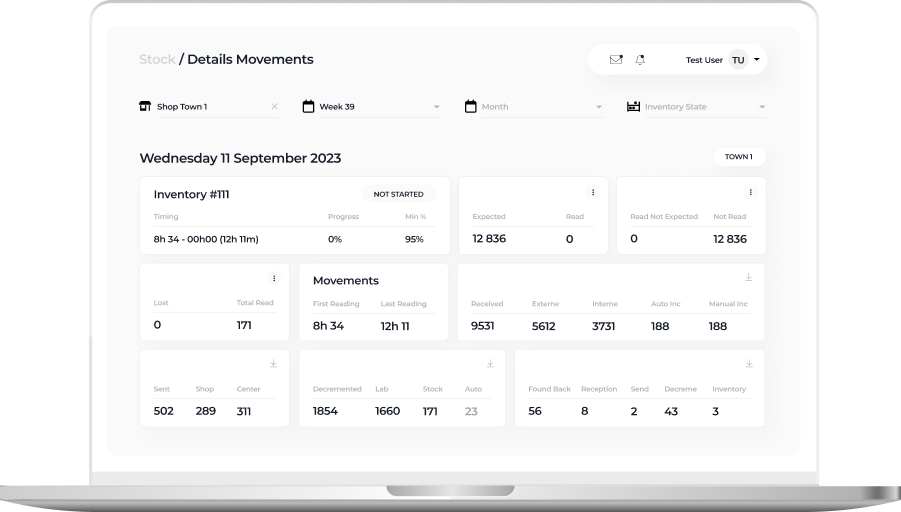
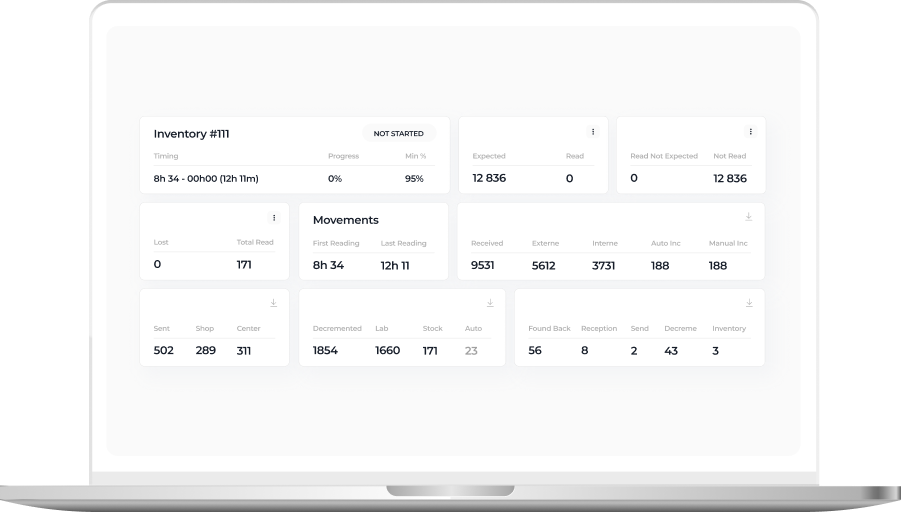
Detailed view of a daily inventory state within a particular eyewear shop

On this tab, in-store admins can check the status of inventories conducted in their store:

  • In progress
  • Closed
  • Device issues
  • Validated
  • Missing

The staff can also see the number of expected, received, lost, and found back items, and inventory time.

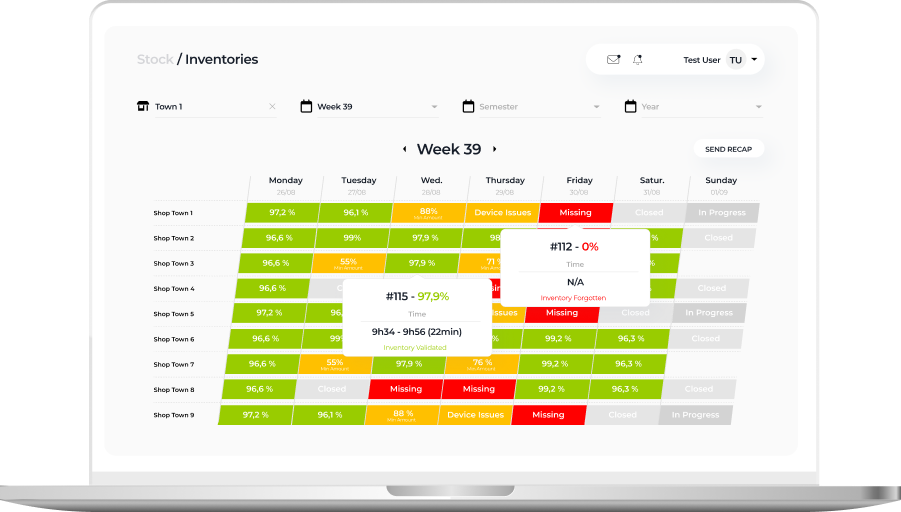
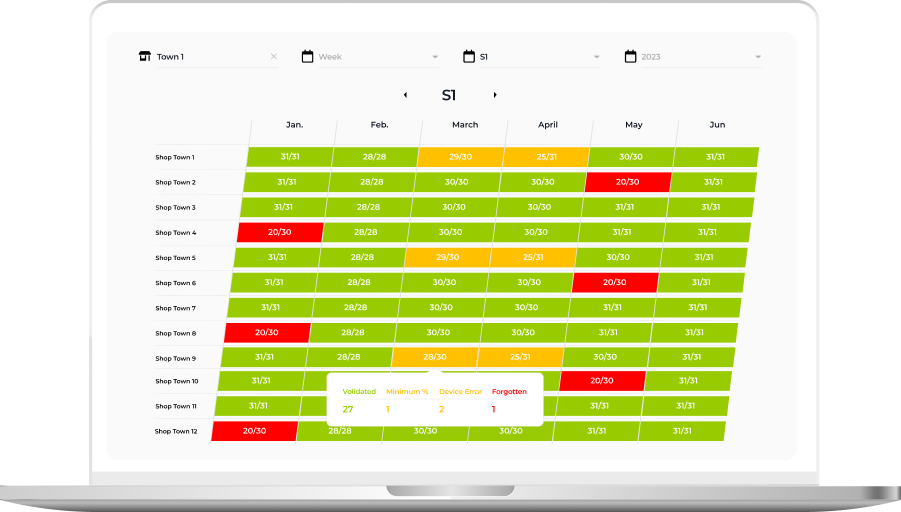
Week or Semester view with inventory state over a longer period

This tab provides higher-level information about inventory status in weeks and months. Thanks to intuitive UI with color-coded table cells, it’s easy to spot inventories calling for detailed analysis:

  • Successful inventories with more than 95% of items scanned and validated by the system are green
  • Processes with device issues are orange
  • Procedures with unidentified items are red
  • Inventory-free days are gray

These custom dashboards provided the client with much-coveted traceability of inventory processes and empowered them to uncover and nip alarming issues in the bud.

Business value

Before

  • Overpriced inventory software under the vendor lock-in
  • Tabletop RFID readers run on legacy software
  • Inability to use the full capacity of RFID readers
  • Low tag validation speed
  • Lack of visibility into the inventory flow

After

  • The budget-friendly and flexible app is fully tailored to the client’s manufacturing and inventory workflows
  • Standardized and easy-to-maintain tech stack
  • Boosted RFID scanners’ reading capacity from 300 to 600 tags per second
  • x3 tag validation speed
  • Full transparency and traceability of inventory-related processes thanks to custom dashboards

Client’s testimonial

Here’s how the client’s product manager evaluates the outcomes of collaboration with *instinctools:

Tech Documentation Management Product

Tech Documentation Management System For Manufacturing

How switching from an outdated DITA-based software to *instinctools’ feature-rich DITAworks helped a Danish enterprise fully digitize tech documentation management, speed up document-related operations by up to 14%, and reduce translation costs by 11%.

Industry:
Manufacturing, Energy

Software Product Development

Enterprise Software Development

Business challenge

Manufacturing organizations must ensure their products are accompanied by technical documentation and then keep an eye on its relevance and updates. At enterprise level, when the number of products and their variations grows to hundreds and even thousands, technical writing and its management become more challenging and the call for a specialized software solution becomes louder.

DITA is one of the well-known standards that can lighten this burden while speeding up the process at a wallet-friendly cost. However, finding ready-made software with suitable functionality among the diverse DITA-powered options out there is almost as unlikely as finding a needle in a haystack. That’s the struggle our client faced.

What is DITA?
DITA is an XML-based open standard to create, edit, manage, and publish large volumes of technical documentation in multiple formats and languages. Thanks to well-developed content reuse mechanisms, this standard facilitates all content-related tasks.
What is DITAworks Webtop?

DITAworks Webtop is a DITA-based multi-processor software product with a solid content reuse mechanism for authoring, managing, and publishing tech documentation. As an enterprise-oriented system with a modular architecture, it’s flexible and highly customizable to meet the needs of companies with mature content structures.

Learn more

A large Danish manufacturer of sophisticated control solutions for decentralized power production has already moved from non-specific software to a single DITA-powered environment for creating technical documentation. However, the client’s 50+ dedicated technical writers and translators quickly found the tool inadequate to cover their needs. What were the critical flaws of their current system?
  • Limited Content Map development functionality
  • Only basic metadata and conditional processing (CP) tags
  • Inflexible search options
  • Underdeveloped management of reusable content elements
  • Inability to work on a single piece of content in isolation without affecting its usage across the whole content system
  • No detailed history view
  • Absence of translation status analyzer

Driven by all these issues, the client started re-investigating the market for an advanced DITA-based software provider. To make sure their future partner could be on par with the highest quality and security standards, the client narrowed down their options to companies compliant with ISO 9001:2015 and ISO 27001:2022 standards. That’s how *instinctools and our DITAworks Webtop showed up on their radar.
Why did they see our product as a top option?
Provides
a safe space for tech writing as a standalone software with secure infrastructure
Remains
flexible and able to fit into the internal ecosystem of any enterprise
Offers
extensive functionality out-of-the-box
Brings
unlimited customization opportunities

What has our team done to turn DITA into a business asset worth investing in and obtain the full value this standard can bring?

Solution

As security is a top priority for enterprises, we provided the client with a standalone DITAworks Webtop application hosted on their own server in the Digital Ocean to ensure the Fort Knox safety of the company’s sensitive data.

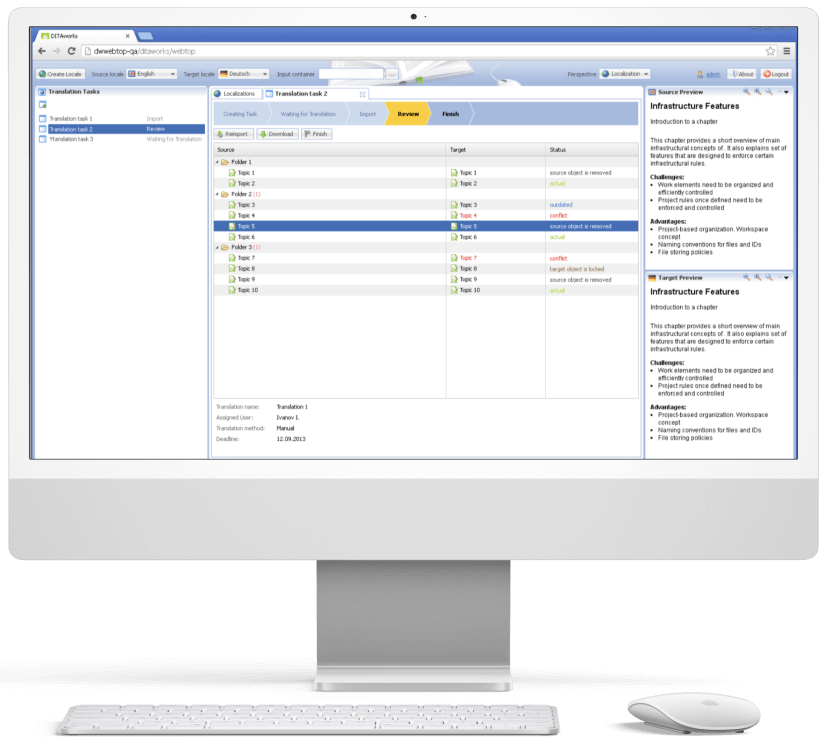
The scheme of the app
  1. Advanced DITA content
    migration from the client’s
    former DITA CCMS

The first step our dedicated team took was writing migrators to move the client’s DITA content from their old solution to DITAworks. Simple data migration regardless of the specifics of content organization wasn’t a go-to option, as it requires manual re-sorting afterward.

  • Automated post-migrational content reorganization. We wrote migrators powerful enough to automate map formatting, grouping topics of different types into relevant folders, etc., to speed up the process and eliminate the possibility of human error.
  • Tailored DITAworks’ content hierarchy to the client’s current content structure. It helped smoothen transition to the new system for the staff.

This approach resulted in hurdle-free content migration between the systems.

  1. Out-of-the-box DITAworks’ features that bolstered tech documentation management right away

As DITAworks grants extensive functionality off the shelf, its adoption helped the client fine-tune their content-related processes right from the start even before tapping into bespoke advantages brought on by custom features.

Glitch-free topic editing

DITAworks uses an up-to-date oXygen™ XML editor whereas the client’s previous system ran on the obsolete and ill-performing oXygen™ Applet, leading to constant lags in topic editing. Switching to DITAworks solved this issue and unlocked flawless access to the editing functionality for authors and reviewers.

What is oXygen™ XML editor?

oXygen™ is a multi-platform collaborative tool for creating and editing XML files, validating their structure, etc. It supports single-source publishing and allows users to produce XML content in multiple formats (PDF, HTML, Web Help, XHTML, EPUB, etc.).

Rapid publishing speed

Unlike other single-processor DITA-based products, DITAworks supports various DITA processors for content publishing by default, empowering users to control the publishing speed. Our client leveraged two processors:

  • DITA Open Toolkit for 90% of their tech documentation, which didn’t require immediate publishing.
  • DITA XMLmind for the remaining 10% that had to be published in less than one second.

To set the processor for a particular piece of content, authors just need to choose one from the drop-down menu in the pre-publishing configuration.

Extensive range of reusable elements

Reusability is a linchpin of any DITA-based software, and the diversity of the reusable elements directly impacts the speed of creating, translating, and publishing tech documentation. In the client’s original system, there were only two basic types of reusable components – text block and text template.

After adopting DITAworks Webtop, authors and translators gained access to a plethora of reusable elements:

  • Keywords
  • Blocks of text
  • Text template
  • Topics
  • Map components
  • Context text block
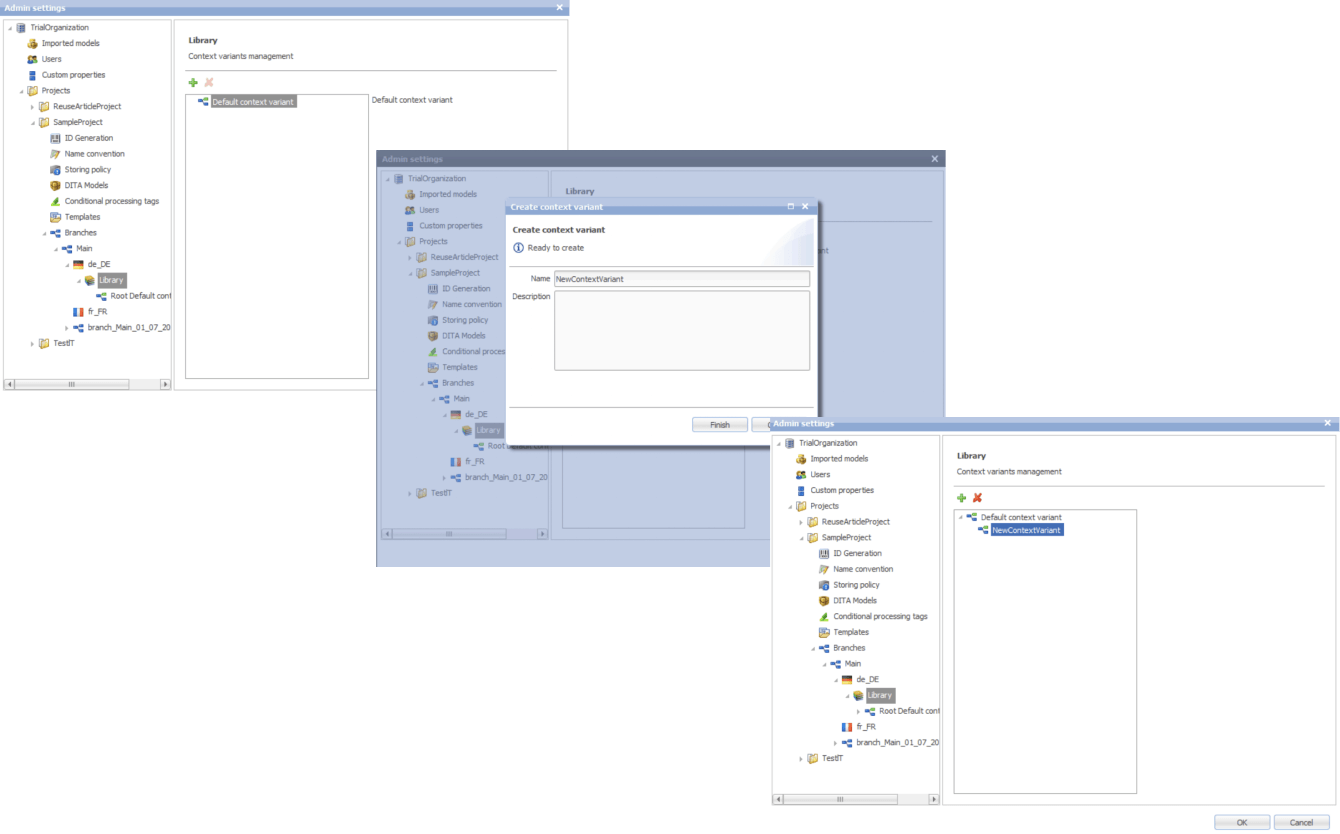
  • Context variable

Moreover, we extended the range of actions users can take regarding the reusable entities. Besides adding new components, editing the existing ones, and deleting them, it became possible to redefine the meaning of the current context.

This feature comes in handy when the staff need to work on a specific piece of content without affecting its other use cases across the whole system.

Another detail about our reuse approach that made DITAworks a more user-friendly product than the client’s former system was using indirect links instead of relative ones to provide  a path not to an object, but to its key. This way, users don’t have to worry about the links’ integrity when moving objects.

Advanced search functionality and metadata customization

The full power of reusability can’t be achieved without comprehensive search features, and this was another weak point in the client’s old software – it didn’t allow a full-text search.

Conversely, DITAworks offered broad search capabilities out of the box:

  • By title
  • By full-text
  • By phrase
  • By CP tag
  • By metadata

The last point was a treasure trove for the client as it went beyond the basic topic title and type (concept, task, reference, etc.). DITAworks relies on the taxonomy framework and allows indexing any metadata and using it for search at any system level.

What is taxonomy?

In software product development, taxonomy is a hierarchical classification of the product elements that streamlines data organization in a logical order and, by doing that, levels up search capabilities within the system.

Our client applied this feature for tagging specific product-related topics, as the range of the solutions they produce varies from control devices for decentralized power production to the ones for marine and wind turbines. As the DITAworks’ search engine indexed all the custom meta tags, such an approach simplified finding data on thousands of products.

Unlimited customization of CP tags

Any DITA-based software has in-built conditional processing (CP) tags. However, not every solution makes them easy to use. For example, to operate on the client’s former system, users needed a basic knowledge of XML to create a custom CP tag. Moreover, as the process was manual and authors wrote tags by themselves, the likelihood of human error remained high, affecting the accuracy of tech documentation management.

DITAworks’ adoption helped the client: 

  • Create custom tags without XML knowledge
  • Automate tagging if a CP tag already exists in the system
  • Eliminate human-related errors
  1. Custom DITAworks’ features
    tailored to the client’s needs

Custom functionality is usually the point of the utmost importance, especially for enterprises. Therefore, DITAworks is designed around the idea of boundless adaptability of the product. The *instinctools team crafts various functionality sets to meet the needs of any enterprise client by connecting or disconnecting numerous plugins to the off-the-box DITAworks version. Let’s see how custom modifications have opened the door to a multitude of tailored benefits for the client’s tech documentation management.
Map development

Creating content maps and managing the content tree are tricky day-to-day tasks enterprises have to deal with. Therefore, extensive map development functionality is one of the vital criteria for companies choosing between different DITA-based products. That was the same for our client, who had a highly sophisticated content tree.

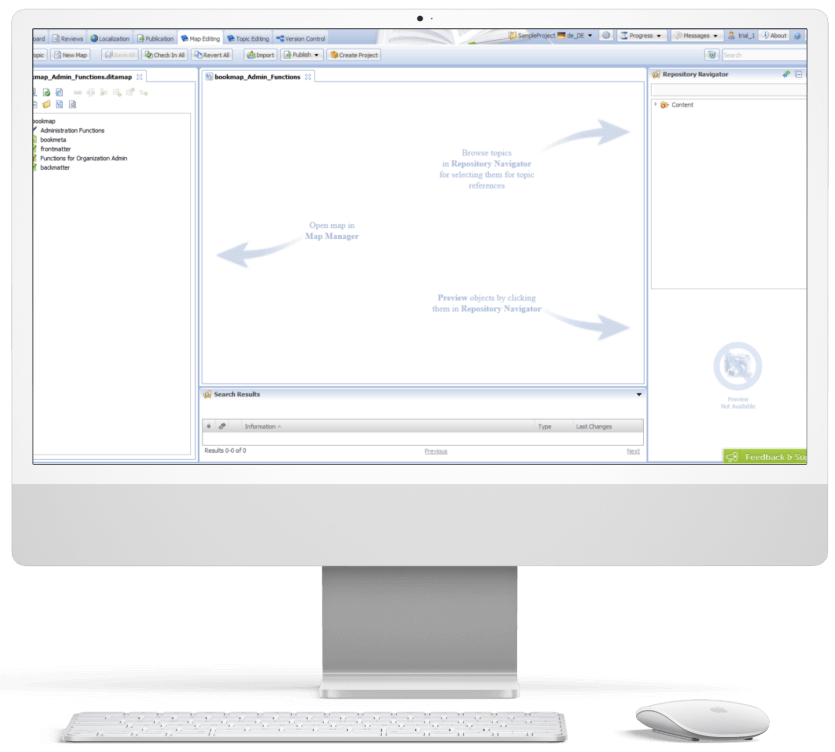
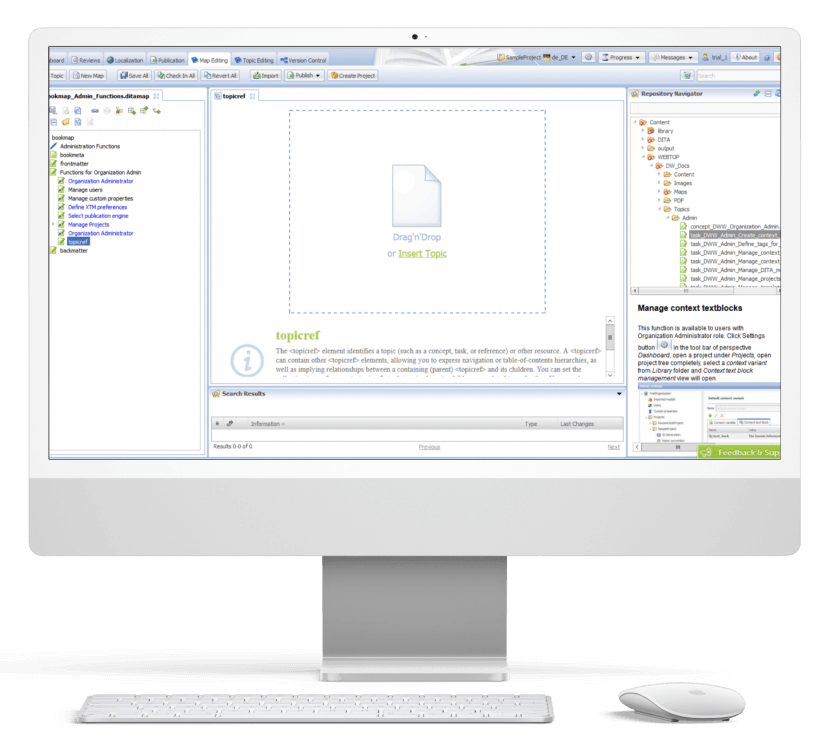
DITAworks Webtop enables multifunctional map creation and editing. Users can access different functions directly from the map editing menu instead of switching to a separate tab.

  • Map structure editing. Thanks to the interactive interface, the client’s employees can change the map structure quickly and easily in the left section with the content tree. They just need to drag any element and drop it wherever they want.
  • Topic editing is central. Here users can check the content in the preview and proceed to editing.
  • Search. On the right side, there is a repository navigator with a search bar to simplify browsing topics and linking them with the maps.
  • Conditional processing can be used on the level of the topic, map, or their units. For example, an author can assign a specific CP tag to a map unit and then leverage it for filtering.

Custom versioning

Transparency and the ability to dive deep into every piece of content were the client’s top requirements for the new system, so we honed DITAworks’ versioning functionality to match these needs.

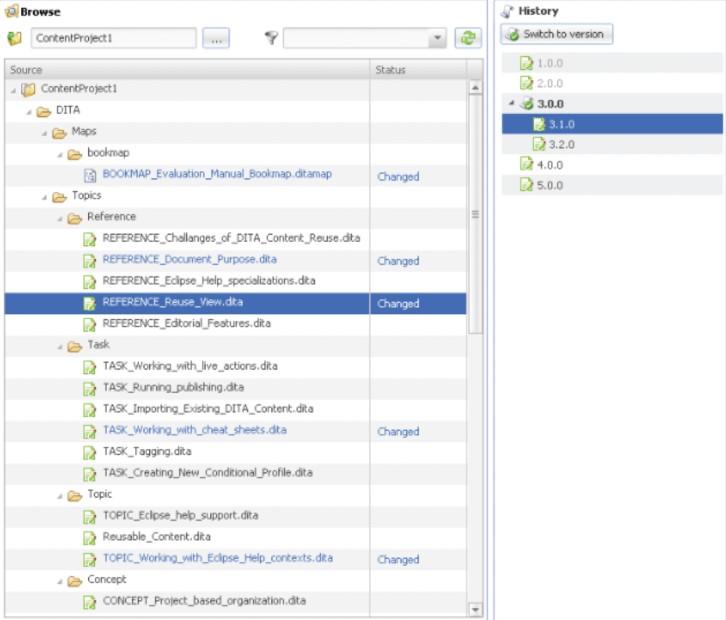
Advanced History View. In their former system, the client could see only the latest version of the documents, which failed to bring much-coveted visibility into the changes made to the files.

In DITAworks Webtop, every document check-in is tracked and leads to creating a new version (revision) of the file. Authors, translators, and administrators can:

  • See all the document versions
  • Compare the current version with any of the previous ones
  • Select any version of the document and restore it

Flexible current working context settings. One of our client’s specific requirements came from their mature content structure with its multi-level hierarchy. In addition, the company organized the work of authors, translators, and administrators in a way that aimed to collect topic-specific content in one place and reduce cross-linking between different levels, and DITAworks had to be tailored to this workflow.

Therefore, specifically for the client, we developed a ‘Dive into’ functionality that allowed users to set any folder as a root in the current working context, making folders outside this folder temporarily inaccessible through the search and repository navigator. This feature freed the staff from the constant hurdle of re-opening folder-in-a-folder-in-a-folder when operating in the same working context for a long period of time.

Ability to work on an isolated piece of content

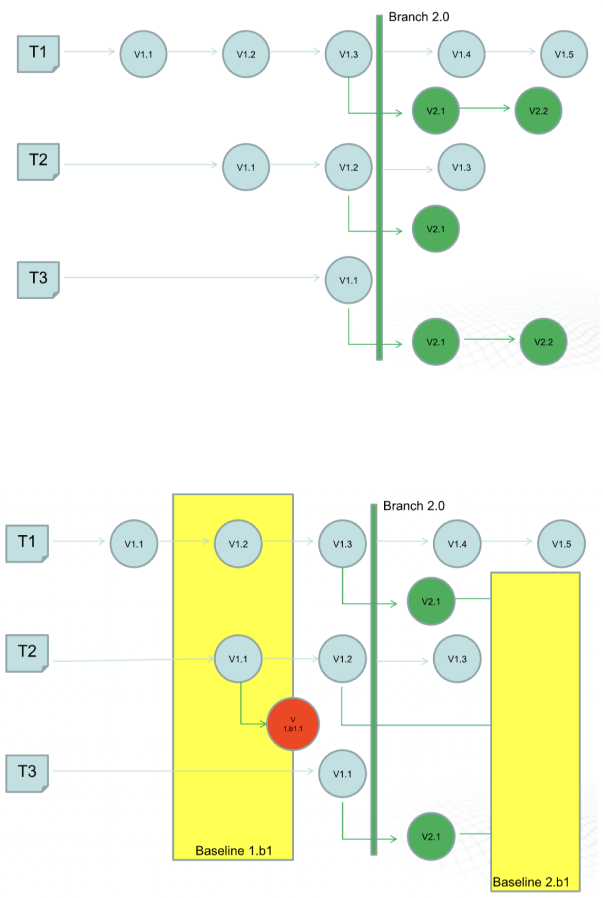
The next feature that was initially created for our Danish client and then became out-of-the-box was intelligent custom versioning with branch and baseline management. This functionality allowed users to work with an isolated piece of content without affecting the whole content structure.
  • Branching for parallel translation tasks. Our client supports tech documentation in multiple languages. The standard ones, aside from English, are French and the CKJ group (Chinese, Korean, Japanese). Working with a wide range of languages within one operating context would have been inconvenient for translators and could have caused unwanted changes in the root content.

    With branching, each user could work independently without affecting the root content. They could create a copy of a parent folder with all the documents in the master language with meta tags and after finishing the translation merge it with the initial folder.
  • Baseline for minor edits. As a lightweight version of a branch, the baseline offers users a copy of the content indexes. It is enough to make slight changes, such as correct misspellings.

Translation analyzer

Tracking translations’ status is just as important as creating tech documentation, and the translation analyzer is the component of DITAworks that covers this task. It’s a table with checkboxes for selecting files for translation. For example, users can pick only one project and leave the rest untranslated.

When a user creates a translation, the system automatically links it with the document in the master language. It’s necessary for tracking content changes and getting translation status updates in near real-time.

  1. Release management

After enriching the out-of-the-box product with a range of custom features, the *instinctools team integrated DITAworks Webtop with the client’s website for direct content publishing. Such a connection allowed the client to provide their customers with the most relevant and accurate documentation.

  1. Conducting staff training

Before rolling out the DITAworks, our team ran training sessions for the client’s employees to ensure they could leverage the software’s capabilities to the fullest. All the sessions were recorded, laying the foundation for the client’s DITAworks knowledge base and nurturing in-house expertise.

The response to the new powerful product has been very positive, and many newly trained tech writers, translators, and managers have become advocates for the system.

Before

  • Underdigitized technical documentation creation and management process
  • Weak content reuse mechanisms
  • Lack of history view and in-depth version control
  • Poor search and conditional processing functionality
  • Impossibility to work on a piece of content without affecting the whole content ecosystem
  • Tight limitations of the working context
  • Human errors in CP tags due to manual input

After

  • Fully digitized technical documentation creation and management process
  • Advanced history view with transparent version control
  • Broad search capabilities
  • Limitless metadata and CP tags customization
  • Ability to work on an isolated piece of content
  • Flexible current working context settings
  • Automated management of CP tags

Client’s testimonial

Here’s how the company’s CTO evaluates the project outcomes:

Business value

  • Complete digitization of authoring, managing, and publishing tech documentation
  • Custom product tailored to the company’s specific document management workflow
  • Reduced document creation time by up to 14%
  • Cut back on translation costs by 11%
  • Minimized possibility of a human error

Multiplier effect

The adoption of DITA-based software attracts the companies thanks to well-honed, accelerated, and budget-friendly tech documentation management. However, according to our observations, many organizations still use non-specific software such as MS Word, and business owners tend to see switching to the dedicated tech documentation management system as a major head-scratcher. It’s truly one of the trickiest tasks.
Nevertheless, booming AI technologies play their part – converting Word content into a DITA-ready format no longer needs to be done manually. It can be covered by artificial intelligence. Instinctools is also leading the pack and constantly bolstering DITAworks’ functionality with forefront technologies to simplify and speed up the data migration process while perfecting its accuracy and security.

Product Design For Intelligent Lighting

Product Design For a World Class Leader In Intelligent Lighting

How replacing an outdated 924 touch panel with a brand-new digital lighting control in just three months helped a manufacturing company expand its market reach.

Business
challenge

Being among the industry leaders doesn’t mean resting on your laurels is an option. On the contrary, it goes hand in hand with the necessity to keep looking for new paths and rapidly providing innovations to secure the top position. That’s why we were approached by Helvar — a company that crafts smart and sustainable environments with AI-powered energy-saving lighting control solutions.

They already had physical controllers for intelligent lighting with pre-configured and adjustable lighting scenes and software for lighting management in a particular room. Even with this, Helvar wanted to raise the bar higher and create a product that had never been on the global market before.

The client had an idea of a digital solution for centralized and local lighting that could be controlled and configured from a tablet. Moreover, the application interface on the device had to allow for unlimited customization in functions and looks.

Such a product would enable enterprises with large-scale physical facilities to step away from the traditional smart lighting with cables and switches. The digital approach would help reduce lighting wiring and maintenance costs that can become a sizable chunk of the budget for facilities with 100+ rooms.

For Helvar, the new product would strengthen the company’s leading position in the market and will help attract businesses with sizable physical facilities, such as hotels, hospitals, etc. to more efficiently fulfill their lighting needs.

What products did Helvar use to leverage, and why were they insufficient?

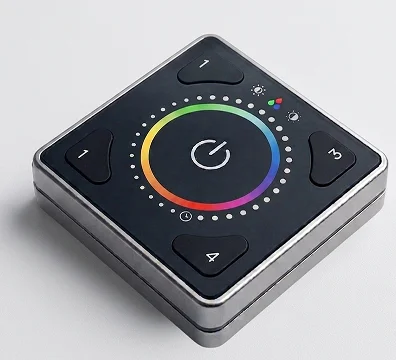
Illustris

It’s a physical controller for individual room lighting control managed from a mobile application. However, its functionality was limited to changing light temperature, color, and intensity.

924 touch panel

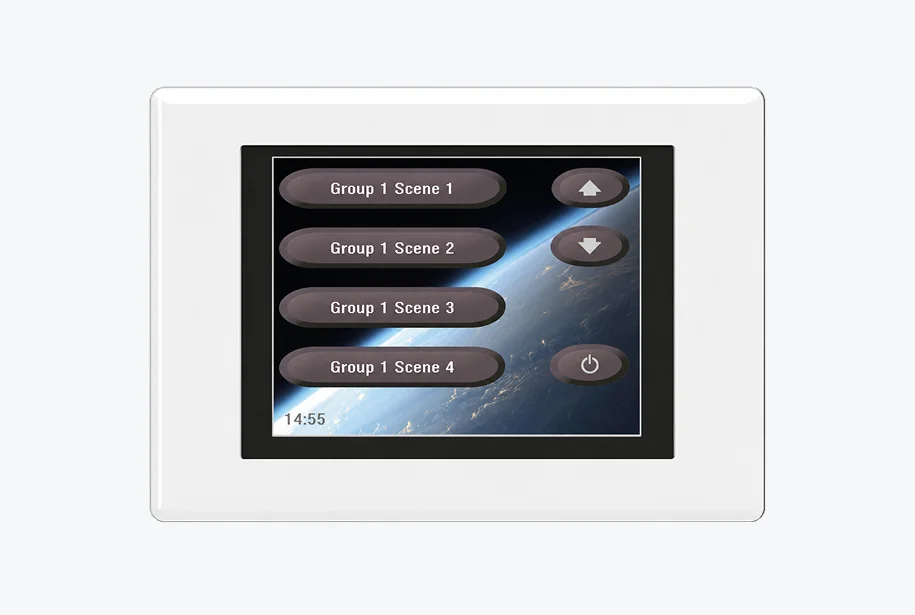
A solution for advanced lighting control with pre-configured and adjustable lighting scenes sounds great, but there was a nuance. It was released in 2013 and had outdated UX/UI and needed to be managed by remote control.

Even if the client married the Illustris design with the 924 touch panel’s functionality, they wouldn’t get the product they had on their mind. Helvar was after a brand-new solution and already had a vision of its parts:

  1. A web application to generate a building plan and create a library of interfaces for lighting control in each room of a building (selecting button functions, widgets, etc.). This data becomes UI files, which are then used in an Android application.
  2. The Android app for a tablet placed in each room to allow end users to fine-tune the lighting to their needs.

The client had only an idea of the lighting control applications, and they needed our comprehensive software product design services to build a truly resilient solution with an intuitive, yet feature-rich interface and unlimited customization options.

What head-
scratchers did
we face?

Designing
two separate applications for
different groups of end users

The client needed the web application for Helvar employees (“Engineers”) to create interfaces for high-level lighting control and switching between various lighting scenarios, and the Android app for Helvar’s clients (“End users”) to customize the lighting in a separate location.

Creating
a well-thought-out UI manager and
UI editor to make lighting control a
breeze

Providing customers with what they are hungry for is a cornerstone of any app’s success. The product owner wanted to hone the user-friendly design, so we had to craft first-rate tools with enhanced UX to efficiently manage smart lighting at the level of the whole building and spaces within it.

Striking the balance
between user-friendliness and
cost efficiency when mapping a building plan in the apps

The client had only an upper-level idea of the solution’s design. Our task was pinpointing the most efficient way to implement it without breaking the bank.

Working
at speed added another layer
of complexity

The client has pointed out that the solution has to be ready in 3–4 months. Therefore, our team of UX/UI designers, a product designer, business analyst, web and Android application developers jumped in right away.

Solution

As with any product design project, we moved according to our battle-tested software product design process to make Helvar’s solution a market success. Here is what we encountered at each stage.

01
Project setup

Instinctools is praised by its customers for a methodology-agnostic approach and the ability to adjust to any client’s requirements. In the case of Helvar, the product owner insisted on daily syncs to ensure all the stakeholders and the design team were kept in the loop. 

We readily met this condition and worked in small iterations providing the client with fully functional interactive prototypes to address any concerns straight away and ensure the final design would pass the validation seamlessly. Speaking about the amount of work we’ve carried out, our design team prepared 40+ layouts in InVision.

During the project setup, we discussed the initial design concept the client had beforehand and determined the app’s usage contexts: 

  • Boardrooms and a reception area in an office building
  • Patient rooms and a reception area in a hospital
  • Suites and a reception area in a hotel or cruise ship

As Helvar's engineers were supposed to create UI files in the web application and then send them to the Android app where end users could operate with them, we started with the web solution. 

02
Research
and concept

At this stage, we reviewed the groundwork the client has done before reaching out to *instinctools.
For instance, they’d already had early design concepts based on the design of their other product — Illustris.

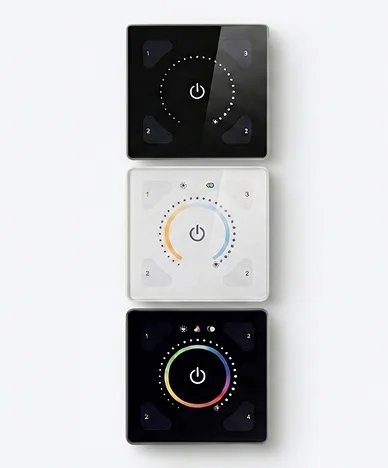
ILLUSTRIS 191GB
ILLUSTRIS 192PW
ILLUSTRIS 193PB

The client wanted to reuse the logic of the existing solution when crafting a future-proof digital touch panel with top-notch UX.

Still, the new lighting control solution required a more up-to-date design and customizable functionality to serve in buildings with hundreds of various spaces.

Implementing a building plan was a prerequisite for providing an easy-to-grasp lighting control. Because of this, we had to figure out the best way to put it in the application’s interface. At first, our team discussed making a detailed plan for the whole building. 

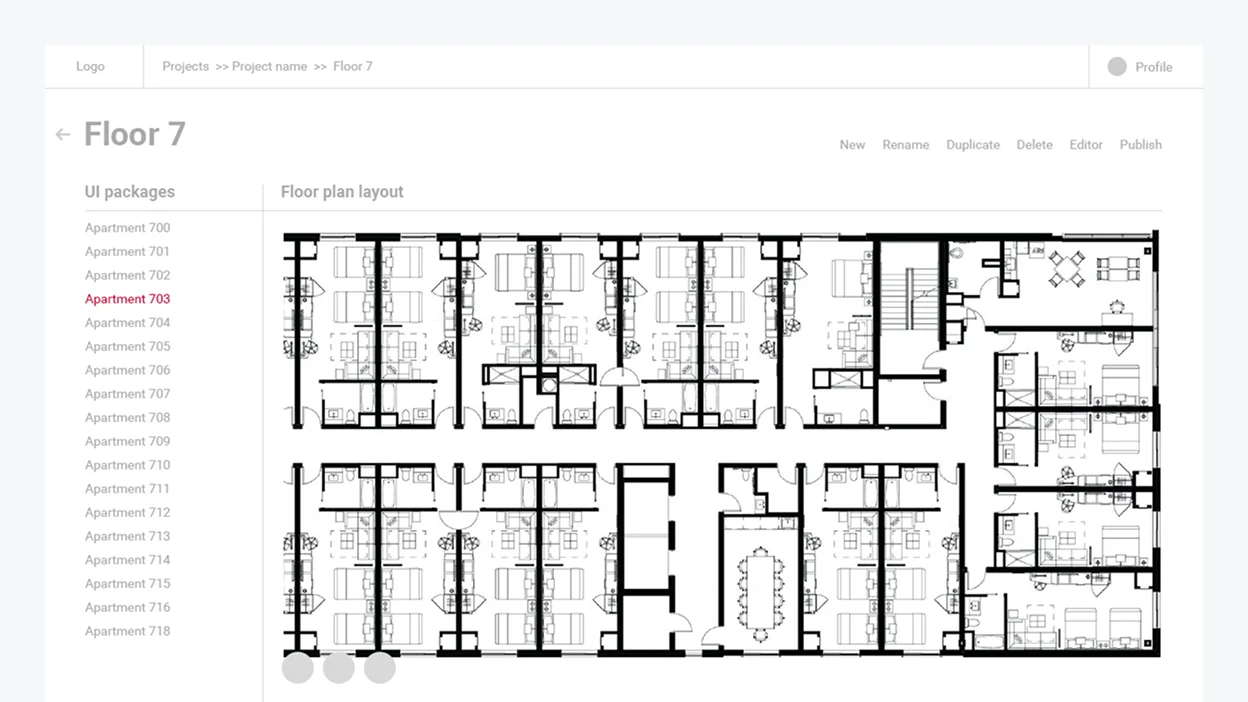
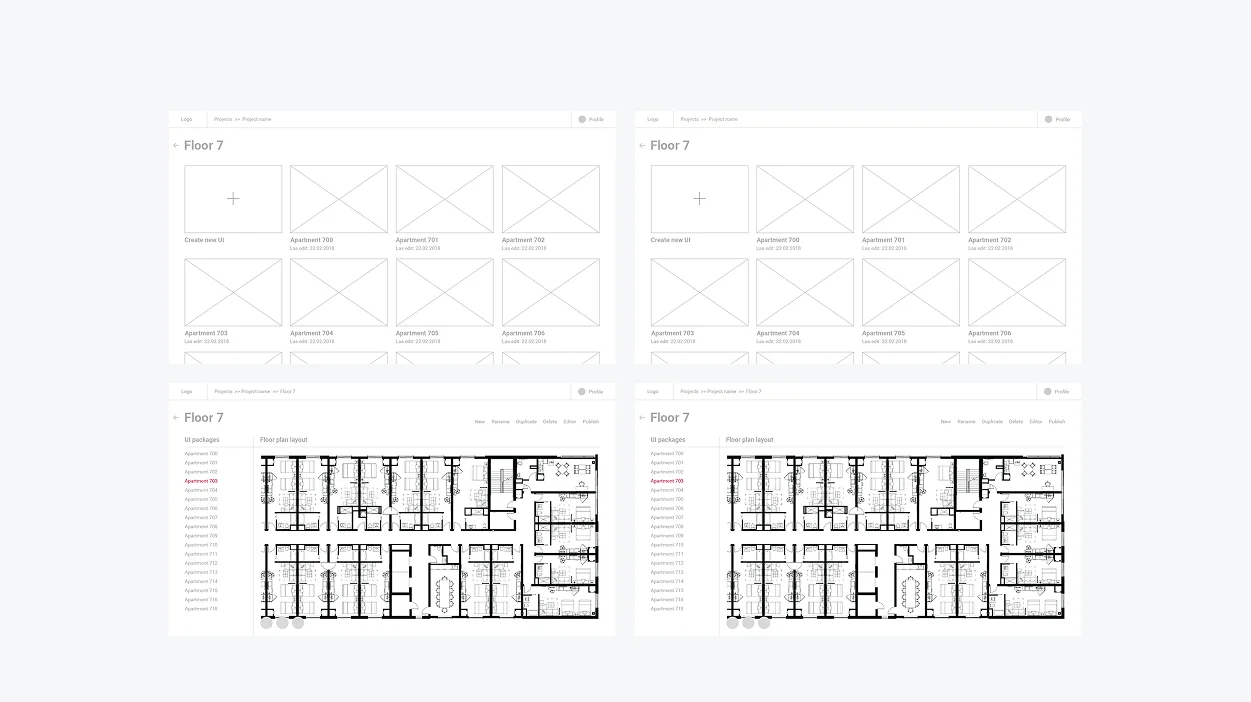
Nonetheless, such an over-elaborate scheme required more time, effort, and investment from the development standpoint. So we devised a more sleek solution and suggested organizing a building into folders by floor and individual room with UI files for each locale.

03
Wireframing

Here is an illustration of how the idea of folders was implemented at the wireframing stage.

Next, we moved to designing solution components – UI manager and UI editor.

04
Visual design
and development

We had to provide Helvar’s employees and end users of the lighting solution with clear and customizable digital tools. So our team came up with the idea of a UI Manager and UI Editor. But while we could leverage Helvar’s existing products, such as Illustris and the 924 touch panel for the Editor, the UI Manager had to be designed from scratch.

UI Manager

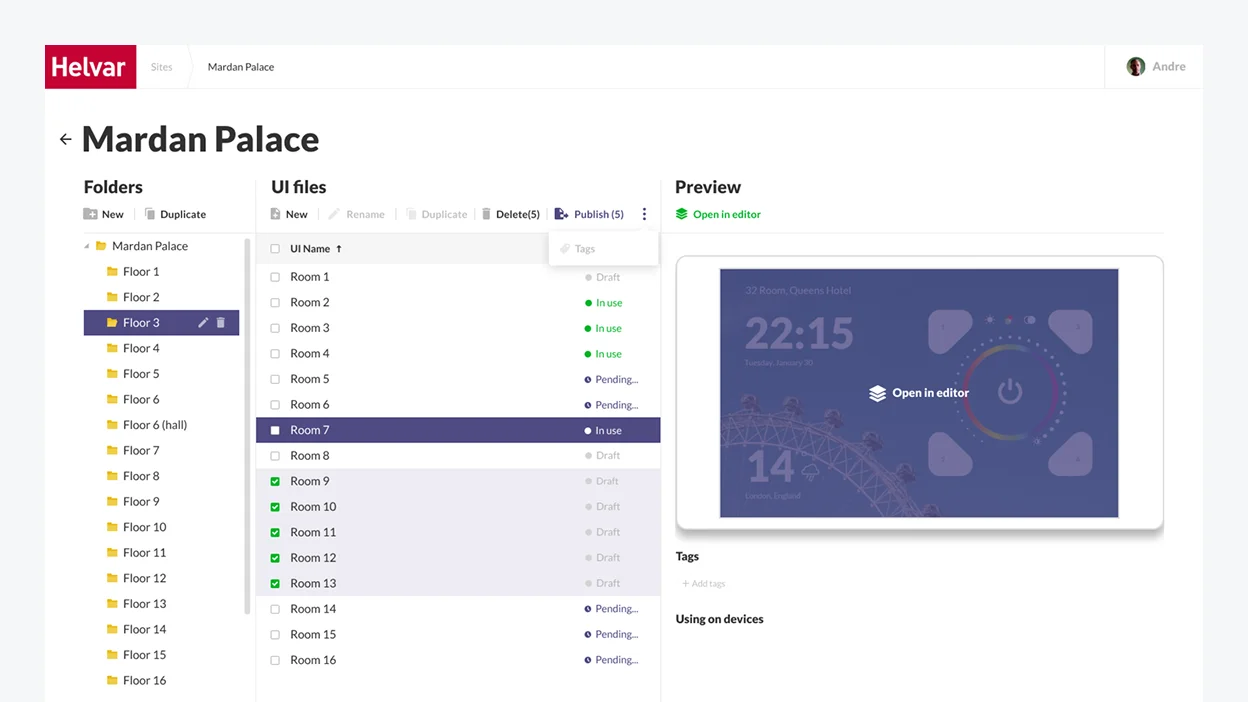
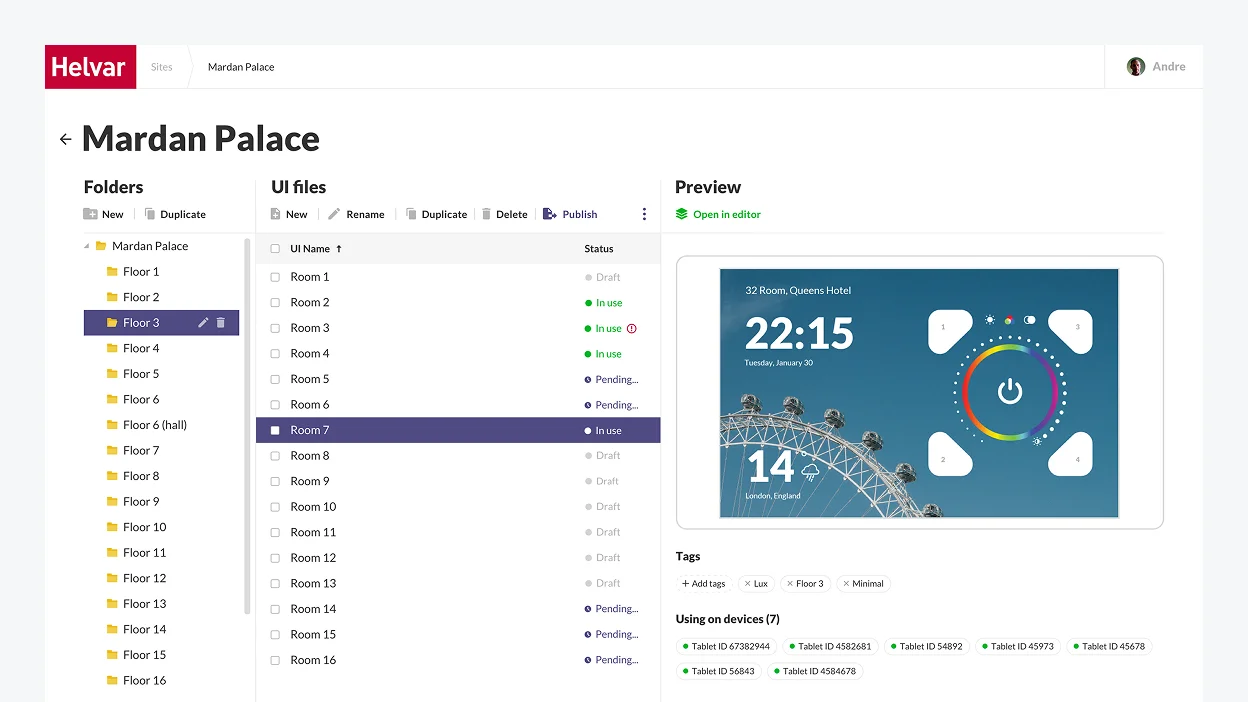
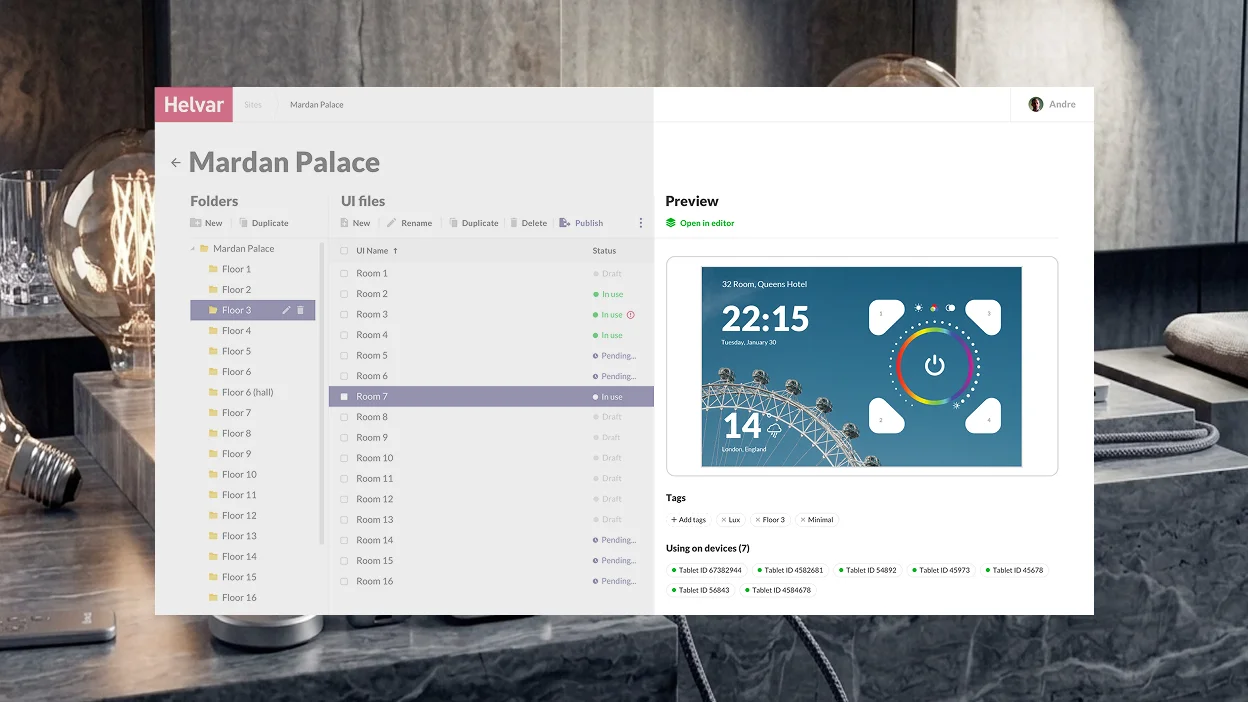
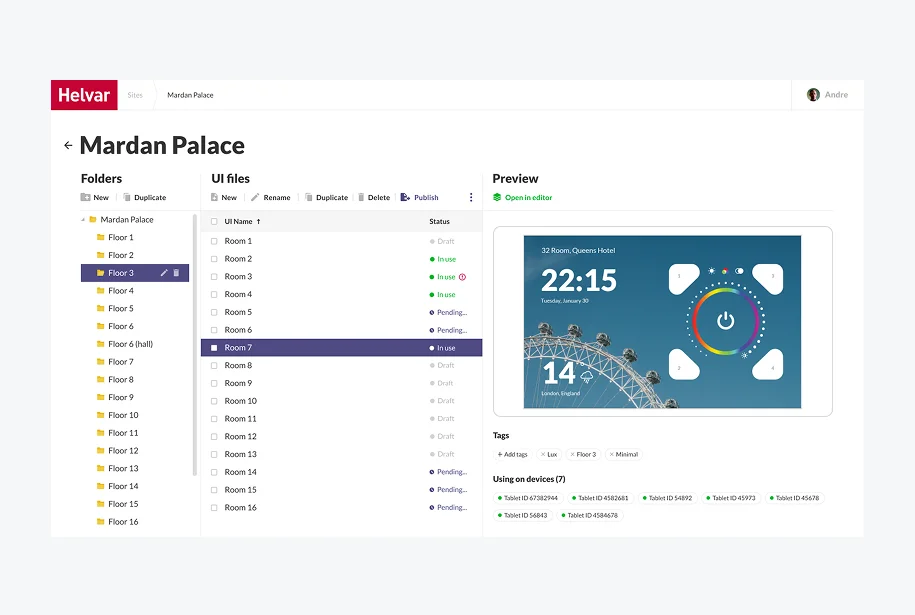
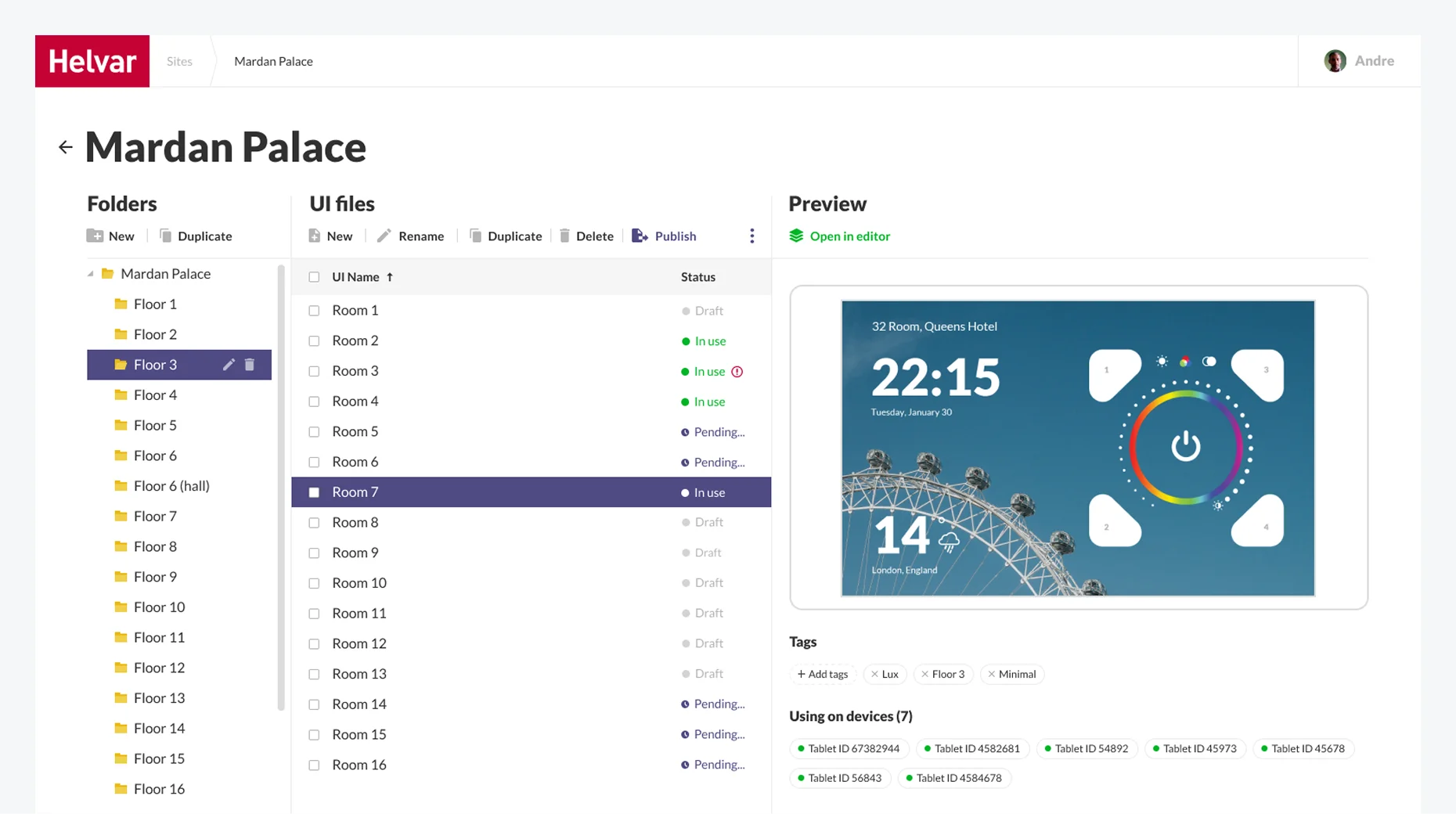
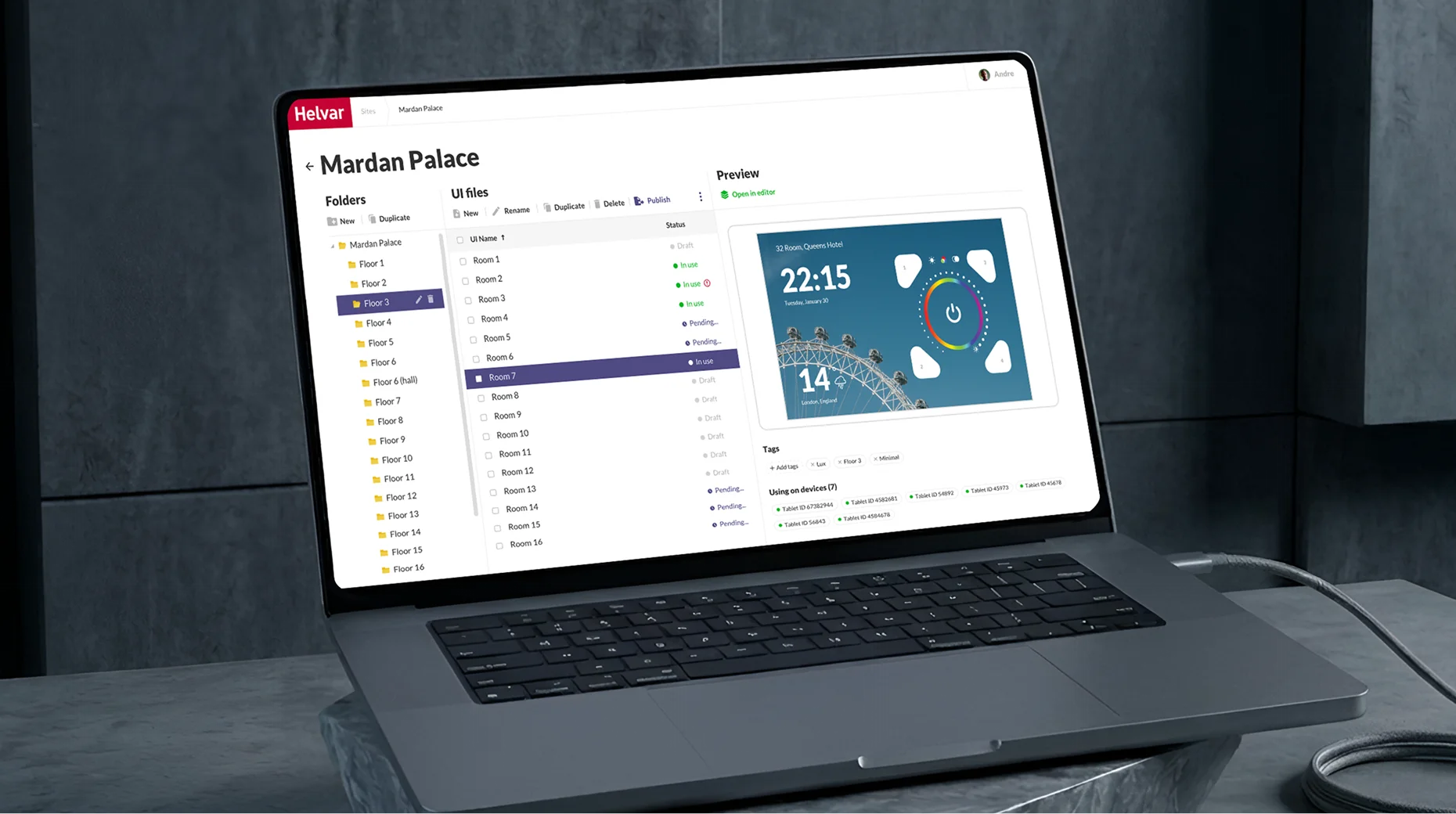
The UI Manager is a part of the web application for engineers where Helvar’s staff creates a folder structure corresponding to a real building.

We suggested adding a Preview area so that engineers could easily pick a theme that would fit in with the interior of a particular room.

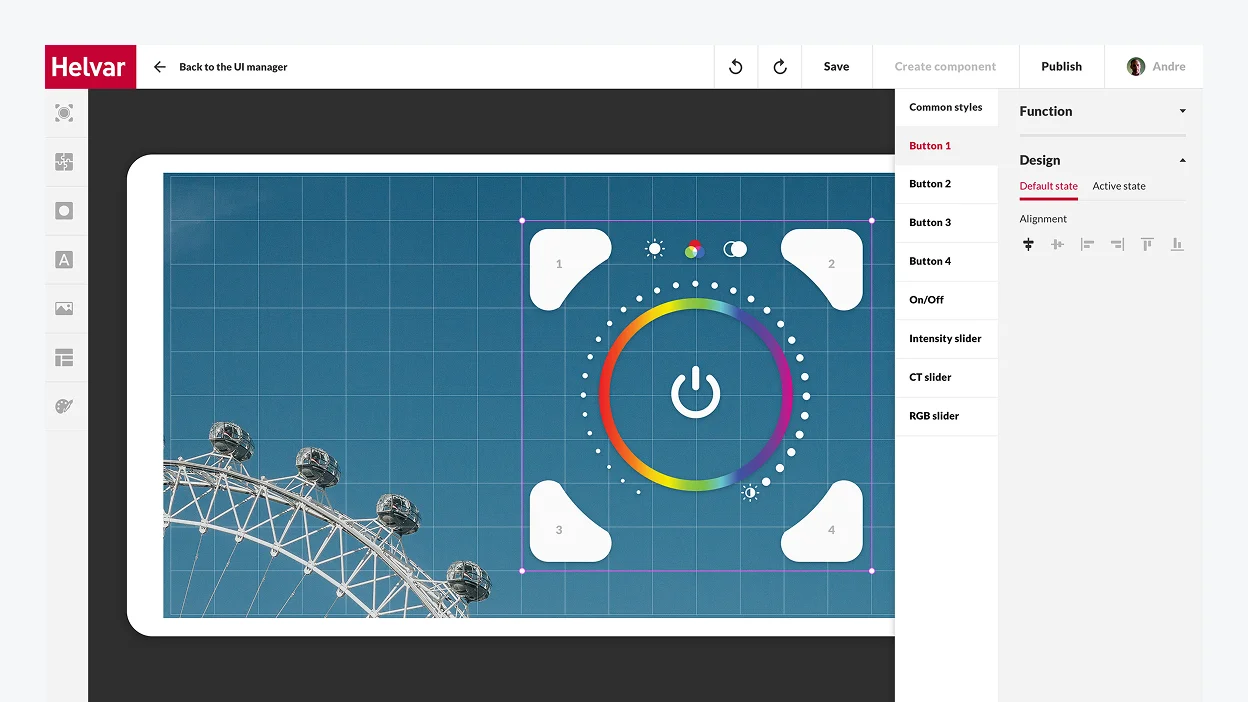
UI Editor

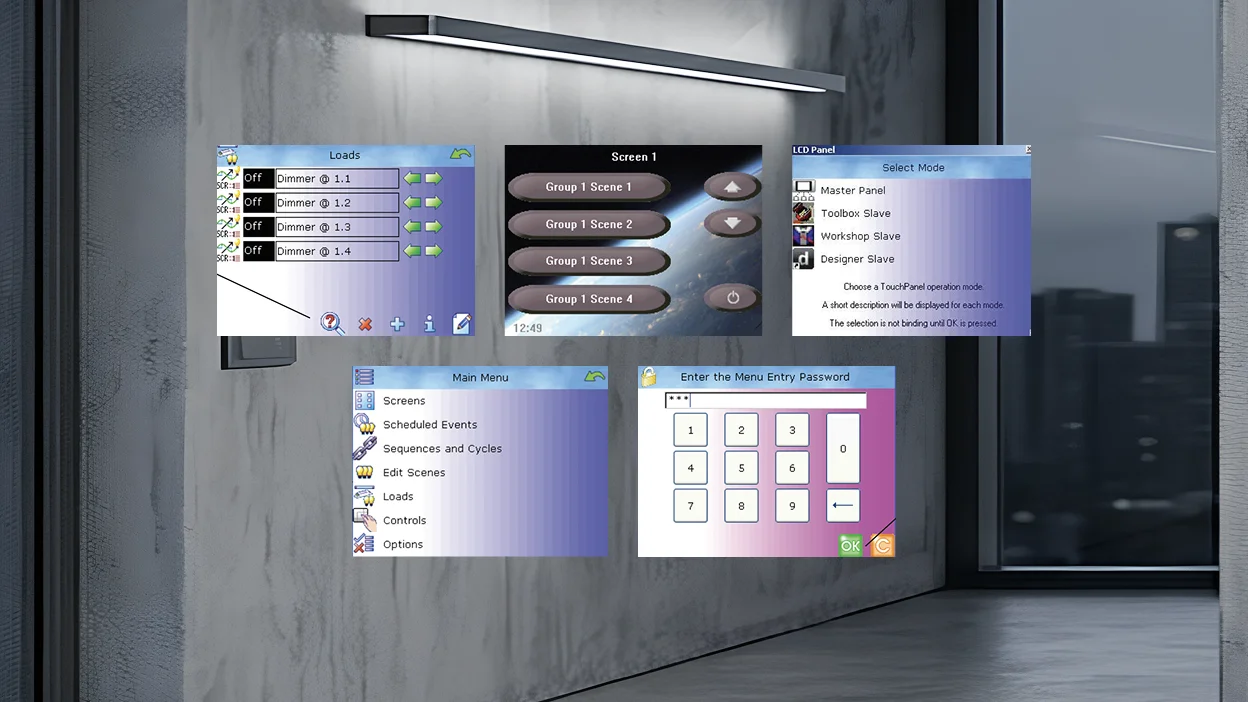
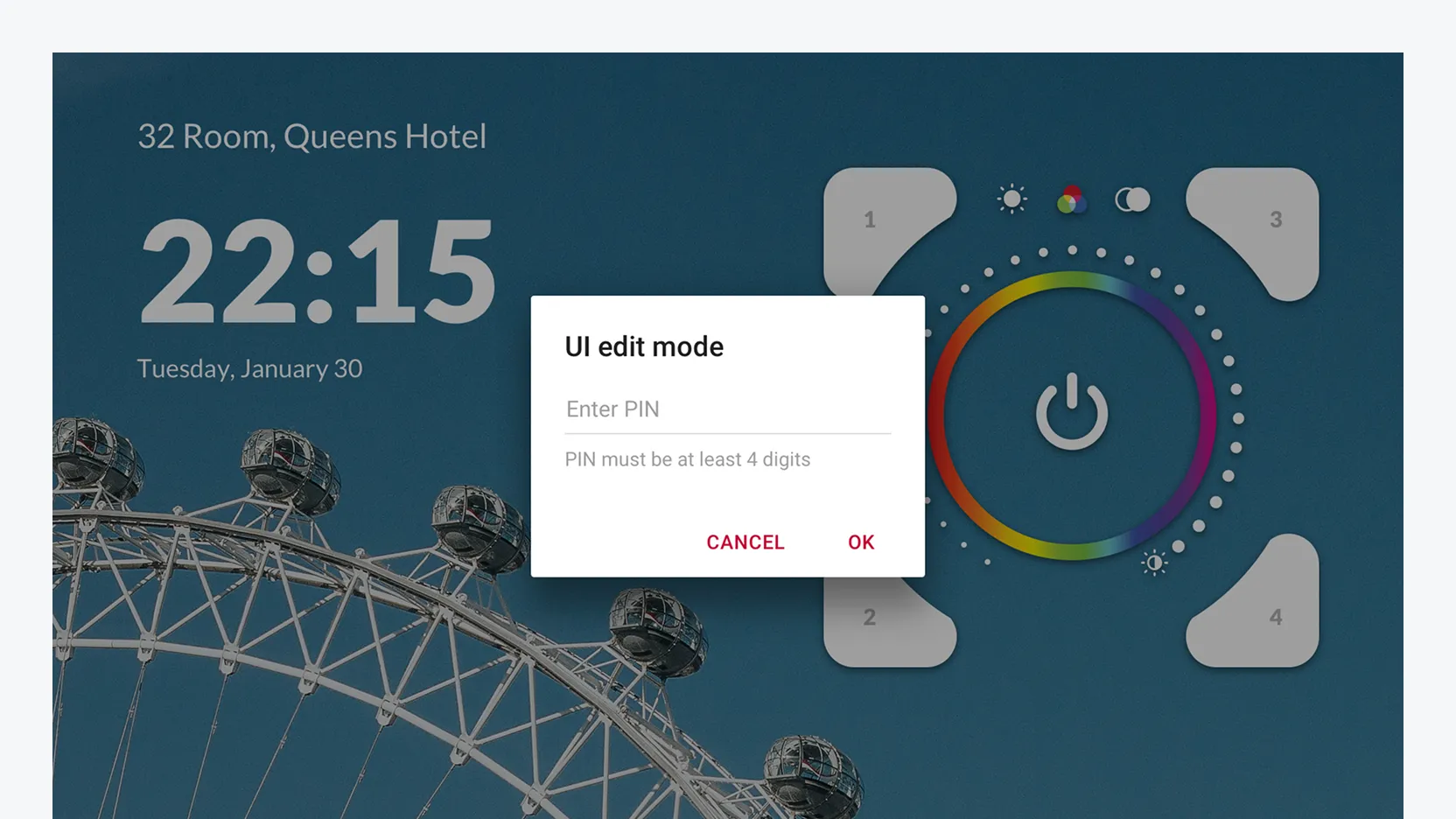
The UI Editor is a part of the Android application targeted at end users (office workers, hospital patients, tourists in hotel rooms, etc.). Its interface had to remain clear and concise despite the immense number of functions it provides users with. 

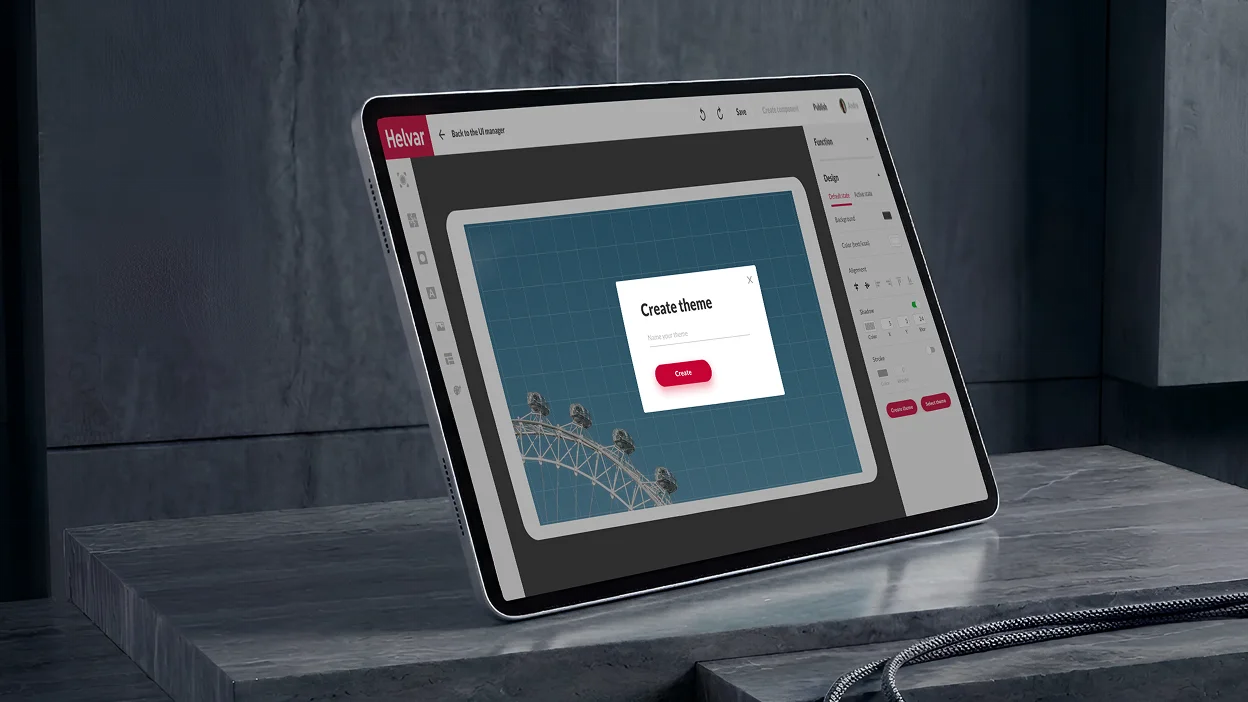
The trickiest part of working on the UI Editor’s design was that it had to be a fully customizable tool. We made it possible for users to edit, modify, and change everything, from the general style of the controller, the background, and font styles to fine-tuning each button’s function and look.

We stipulated different access levels for the Editor: 

Basic mode
for actual end users
It allows customers to switch between themes freely and add standard controllers and widgets from the library.
Advanced mode
for building managers
Receptionists in hotels and hospitals, office managers, etc., can modify Editor’s interface and change the buttons’ layout directly on the tablet. The mode is password-protected, and edits are accepted locally on a specific device.

We designed software with unlimited customization options to satisfy the desire of Helvar’s clients for stronger brand awareness. For instance, despite providing a plethora of in-built templates that cover various usage scenarios, we went the extra mile to bring boundless customization opportunities to users.

With a tablet in each room, users can not only create their unique theme (e.g., in the hotel colors and with its logo) but also put any buttons needed on the tablet screen and bind functions to them in the way they find the most convenient setup.

Here is a detailed video presentation of the final product

Our product design and development team kept firing on all cylinders to ensure on-the-dot delivery of both web and Android applications, and we made it.

The web application was ready in two months, and the Android app took one month to build.

The client was impressed by *instinctools’ businesslike expertise and keen awareness of the latest trends in software product design. Due to this early success, Helvar felt confident in working with our team for further three projects.

Business value

  • The very first solution on the market for large facilities to digitally control intelligent lighting in a room, on a floor space, or in a whole building
  • Reduced installation and maintenance costs thanks to wireless lighting management
  • User-friendly replacement of an outdated 924 touch panel
  • 90% of the UI can be configured for the specific application and end user
  • Unique branding capabilities to bolster brand awareness

Before / after

Key features

Scalability 

We helped create a frontier solution that enables easy digital control over lighting in huge facilities like hotels, hospitals, offices, etc.

Resilience

Crafting such a product allows Helvar to maintain its leadership in the industry. Despite the large scale of the solution, we managed to craft a clear and concise interface to ensure the product will stay robust and relevant down the road.

Customizability

The more end-users the product has, the more configuration options are needed. Helvar’s solution provides boundless customization capabilities and the possibility to adjust lighting to each user’s needs.

Client’s
testimonial

The quality has been good. It’s been on the expected level: things come on time, we have a good visibility on the things that *instinctools developers are doing and performing for us, communication is good. Wherever we see that we need some more extra resources, we have found *instinctools to be a good partner in helping us out on those areas.

Matti Vesterinen

Multiplier
effect

Putting a premium on a well-thought-out design is a prerequisite for a fruitful outcome in software product development. That’s how it works for product companies whose profit depends on customer satisfaction. Design quality directly impacts user experience and, as a result, product demand on the market.

Businesses in any industry, from manufacturing and ecommerce to healthcare, fintech, education and more, benefit from centering around a customer experience. Putting your end users first empowers you to solve complex design strategic tasks and confidently withstand market disruptions driven by user behavior changes.

Software Licensing System Modernization

Legacy Modernization For a Software Licensing Company

How a security tech manufacturer cut costs on the system maintenance and gained ISO 27001:2013 certification

Industry:
Technology

Java development

Legacy software modernization

Business Challenge

What issues were restraining our client?

When it comes to modernizing legacy systems, companies tend to put it off until the very last minute. The reasons for that might be different: additional expenses, difficult orchestration of the initiative, resistance to change… However, the risks arising from doing nothing are equally high for everyone and there usually comes the point when hanging on to the old software is no longer possible.

That’s what happened to our client, a global licensing software developer. They delayed updating their back-end software until they had an urgent need for ISO27001:2013 certification. And it hit in 2022 when the updated certificate version, ISO27001:2022, came out.

That was where our client needed expert support. They created their licensing software in the early 2000s. Those were unique, state-of-the-art solutions, which worked securely even 15 years after the release. When the client held a hacking contest to test and evaluate the system’s reliability, none of the participants succeeded.

However, with time, some technologies tend to be replaced by others, and legacy software is no longer supported by the provider and doesn’t receive security updates, becoming your Achilles heel. The same situation became the main driver for legacy system modernization at our client’s organization. 

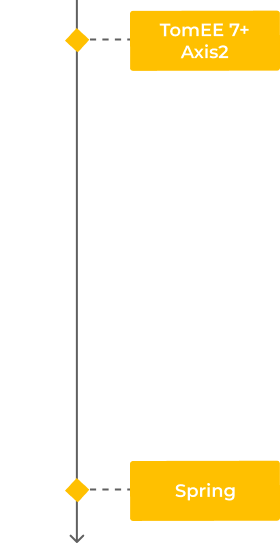
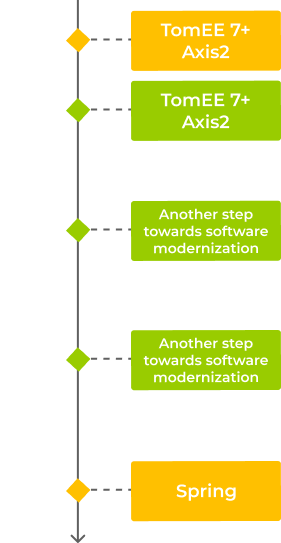
The client product was based on the outdated SOAP API and legacy Apache products, such as the Axis2 framework and the TomEE 7 application server. TomEE 7 stopped receiving security updates in 2021, so the client updated it to the next version to get ISO 27001 certification. However, this change led to other ones, as TomEE 8 wasn’t compatible with the Axis2 framework they used. 

At this point, the client realized that dealing with those changes would be beyond their capacity and capabilities. Hence, they started looking for a company with expertise in legacy system modernization. 

The task was complicated, as they had never outsourced software development and finding a software company that would fully meet their requirements was problematic. 

What were the client’s mandatory requirements for the future tech partner?

  1. Location in Europe and compliance with European security regulations. The client was looking for a technical partner among European companies that follow strict data security regulations and hold ISO 27001:2022 and ISO 9001:2015 certifications. It was also crucial to be in the same time zone to quickly resolve working issues.
  2. Expertise in both legacy and up-to-date software. Finding a developer who can work with Axis2, as this framework is obsolete and rarely used, was a tough legacy system modernization challenge.
  1. High security demands to the development team. The client was looking for a team that would work with their software on-site by using keys (dongles) that would be sent to a flash drive.

Having a wide array of strict requirements, the client chose to entrust their fulfillment to *instinctools as a global software development company with extensive expertise in delivering innovative solutions since 2000. Over this time, we’ve built a skillset based on a diversity of technologies ranging from PHP to Python and React. Given the talent crunch in the modern IT industry, such an extensive expertise is truly appealing to our clients. 

Moreover, our headquarters is located in Germany, and we follow strict European regulatory requirements for data security, such as GDPR, EDPB, DPLE directive, etc.

Our team can also work as an offshore development center providing a secure physical perimeter for the project.

Thanks to competitive advantages of our company, we passed the client’s rigorous selection process.

To enable the client to get ISO 27001 certification, we needed to modernize legacy systems, for instance, the SOAP API through which the requests such as license creation were sent. For this purpose, we decided to upgrade the existing back-end system under the SOAP API to receive regular security updates.

Solution

Moving fast but radically or slowly but surely?

After evaluating the project, we offered the client two legacy system modernization strategies to choose from.

Renovating the existing software to the most up-to-date solution.

The most advanced option would be Spring. It’s an open-source Java-based framework that empowers developers to build high-performing applications. It is currently the standard of enterprise software development, with no analogs, as Spring can cover all the needs of enterprise out of the box. Moreover, it’s an actively developing framework, which implies the constant contribution of new features and security checks.

Going step by step by upgrading the versions of existing software and, eventually, coming to Spring.

If a client isn’t ready for substantial infrastructure changes (which, for instance, Spring requires), they can move gradually.

With this approach, they could pass ISO 27001:2013 certification, and while it’s valid, deal with the rest of the innovations and implement Spring at a comfortable pace. And with the updated technology stack, they’ll be able to go through ISO 27001:2022 certification later.

Since this was the client’s first experience with an outsourcing company, they wanted to move in small iterations and decided to follow an incremental legacy system modernization approach.

It’s also important to note that our client has been creating IT solutions for software licensing for over 30 years, and their development team has stayed the same from the moment of the product release. On the one hand, it was helpful because the client’s team knew the product down to the last detail. On the other hand, they got used to relying on outdated technology stacks and approaches. To switch straight to a cutting-edge solution, the client would have to invest a lot of time in knowledge transfer to their specialists. 

Therefore, the client chose a more granular change so that they could reap the benefits of modernizing legacy systems, with the team gradually adapting to the new environment and gaining knowledge about working with state-of-the-art technologies.

Before turning to *instinctools, the client had already upgraded TomEE 7 to the 8th version. However, it was later discovered that TomEE 8 couldn’t work with Axis2 and requires another framework. Since Axis2 is an Apache product, we offered to switch to another Apache framework – CXF that has replaced Axis2 as a more present-date solution.

Nevertheless, code migration from Axis2 to CXF without changes is impossible as these frameworks have dissimilar approaches to code writing. Axis2 works with abstractions and classes, while CXF works with data models. Therefore, besides code migration, we tailored the code to the new framework. 

We did code refactoring and uncovered parts of the code for which more elegant solutions could be used. 

Going beyond expectations

If we see an opportunity to do more for the client, we never hesitate to go for it. In the case of legacy system modernization for our client, we provided them with a few extra-mile solutions.

  • Updating Java

    The client had Java 8, which was compatible with TomEE 8 and CXF. However, Java 11 contains an updated encryption protocol (TLS 1.3 instead of TLS 1.2), which is faster and ensures a higher security level, so we installed Java 11.
  • Implementing annotations for authorization service

    The legacy client authorization model was based on roles, where each user had their own role with specific access rights. We switched it to a new model based on annotations. This legacy system modernization approach significantly reduces the amount of code and simplifies maintenance, as clear code written according to modern standards is easier to maintain.Moreover, familiarity with annotations is another small step toward Spring implementation in the future. This framework extensively uses annotations, and if you haven’t encountered them before, it’s hard to figure them out.
  • Detecting bugs in the client’s testing system

    For the client, one of the criteria that the legacy system modernization project was done correctly was to pass their tests. They provided us with their test infrastructure. However, we found bugs in those tests, such as PHP clients connected to an outdated framework. We reported them to the client so that they could fix them.

Along with upgrading legacy systems, we trained employees on the client side to ensure knowledge transfer so that they could feel confident working with CXF and TomEE 8.

Investing in the future: what’s next?

We’ve carried out legacy system modernization for the client considering upcoming ISO27001 certification and the switch to Spring in the future.

The client was successfully certified and received ISO 27001:2013 in November 2022. 

By that point, our project had been over, but we consulted the client on the next steps of their legacy software modernization. As they were totally satisfied with our collaboration, they decided to keep working with *instinctools in the offshore development center format and gradually move toward Spring to adopt it by 2025. By that time, the ISO 27001:2013 certification will have expired, and with the updated software, they will be able to obtain ISO 27001:2022 certification. So at the moment, we have two more legacy system modernization projects with the client and look forward to bringing them the same value as in the first project.

Key features

Flexibility

Refactoring the code according to modern standards allows the client to expand the range of specialists they can hire as more developers can work with clean code.

Scalability

Switching to an up-to-date framework and application server has made our client more adaptable and prepared for subsequent steps of their legacy system modernization journey.

Modernization

Transition to an authorization model based on annotations has made the upkeep of the system easier and minimized the codebase.

Business Value

  • Software modernization for ISO 27001:2013 certification obtainment
  • The backbone for future Spring adoption
  • Simplification and cost reduction for staffing and maintenance

Multiplier Effect​

Legacy system modernization is valid for any industry. However, the SOAP API, which is the basis of the legacy system in the case of our client, is prevalent in banking. For banks that have existed for more than a couple of decades, an abrupt transition to up-to-date software is also challenging because of drastic infrastructural changes and time for knowledge transfer.

And that’s ok! Switching to a cutting-edge REST protocol just because now it’s considered a standard is not the only option available. We don’t swing to the buzzwords and choose the most appropriate solution considering your requirements and limitations. As in the case of our client, you can stay on SOAP but upgrade your backend software to meet your actual needs and ambitions. Partnering with a PHP development company experienced in legacy system modernization will ensure you a smooth transition while maintaining compatibility with existing frameworks and infrastructure.

MVP Development For an EV Charging Startup

MVP Development For an EV Charging Startup

How crafting an MVP of a mobile app for 16 EV car models and 65,000 charging points across Europe empowered the UK-based startup to conquer the European EV charging market on the first try, connect 17+ charging networks, and raise funds for further development from prominent and influential investors – Lightspeed Venture Partners, Tier Mobility, and Wise.

Industry:
Technology

Expertise:
Mobile App Development

Context

Bonnet founder and CEO, Patrick Reich, entrusted us with the implementation of his start-up idea in 2020. His vision and belief, empowered by *instinctools product development expertise, served as the basis for the creation of a unique tech solution for millions of EV drivers all around Europe.

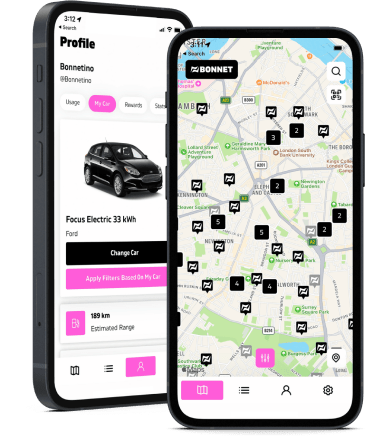
The application for iOS and Android devices aimed at aggregating all the local EV charging points and allowing its users to smoothly find and drive to the nearest spot and instantly pay for the charge.

Challenge

Despite a few core features and the app itself, that we needed to build together with our client, there were some technical challenges and decisions to be made to ensure the solution was properly implemented and to make sure further performance was stable.

01. The synchronization of the app’s front end, back end and charging points servers.

The communication between “applications” is no less important than communication between people. Our first major task was to enable the proper connection between the main parts of the application and the charging points servers to get a real-time status of the charging process, even in background mode. Together with our client’s development team, we analyzed the algorithms and work logic of each charging spot provider and enabled its unhindered synchronization with the Bonnet application.

02. Payment service integration.

The integration of the Stripe payment service required efficient communication with the back end of the application. Together with our client, we thought over the development of technical algorithms for various scenarios related to the user’s bank account, withdrawals, including repeated transactions, etc. Our senior backend developer dived into Stripe’s operation system to bring more value and help create secure connectivity between the systems.

Solution

We developed an Android application which became the basis for the development of an iOS app. It provides EV drivers with smooth access to the public charging infrastructure.

The Bonnet app has an extended functionality for customer service, instant payments, bonuses, and useful analytics about recent charges.

The implemented subscription model, in addition to a pay-as-you-go service, is defined by the charge type (all points or the cheapest only) or user type (individual or corporate client).

Key features

  • In-app analytics and history of all the charges.
  • Online chat Intercom with FAQ and real-time support functionality.
  • QR-code on charging points for quick access and charge start.
  • Map with available charging points and search functionality.
  • Authorization via Google or Apple accounts for different applications.
  • Payment account with an integrated coupon system
  • Push-notifications

Client’s testimonial

“The expectations for the quality of the initial product were very high. I think *instinctools did a great job ensuring those expectations are met. We met the developers we were going to be working with and it quickly became apparent that they are very qualified and were able to deliver the vision that we had from our side for the product. They clearly told us what they were going to do, and if there were questions or problems along the way, they clarified them really quickly thanks to transparent communication.”

– Patrick Reich, CEO and Founder at Bonnet

Business Value

Software product development mindset — this is what start-up founders look for when selecting the right technology partner for their business. This is the approach that allows the tech team to be on the same page as the customer and deliver the MVP in a short time. *instinctools work helped Bonnet enter the market promptly and form the basis of a successful fast-growing tech business.

Technologies

RX Java
Kotlin
Google Maps API
Firebase Cloud Messaging
Pusher
Socket.io
Stripe

Data Analytics and Visualization for Insurance

Reimagining Claims and Operational Reporting For a Global Insurance Corporation

How adopting Oracle BI with dynamic data visualization templates allowed a global insurance corporation with 150,000+ docs turnover to automate 92% of its claims reporting and operational analytics workflows, decrease flaw detection time from several days
to 2–4 hours, and leave no room for human error.

Domain:
Enterprise Content Management

Budget:
$2.000.000 +

Team:
13 developers, 4 QA engineers, 2 Team Leads, a Project Manager

Duration:
4 years

Challenge

About 150,000 documents, such as claims files, policy documents, underwriting dossiers, and related records, are created annually within our client’s organization. Their lifecycle spans claim registration, assessment, approval, payout, compliance review, and long-term archiving. Although the company had already moved away from fully paper-based processes, many workflows remained fragmented across legacy systems, leading to delays, duplicated efforts, and limited transparency into ongoing operations.

As the organization scaled beyond thousands of employees, these inefficiencies manifested as major bottlenecks, hindering core insurance processes:

  • Claims approvals and policy-related workflows were frequently slowed down by manual coordination, while operational data remained scattered across departments.
  • Executives lacked a consolidated view of operational performance, making it difficult to detect bottlenecks early, manage service levels, or prioritize actions based on real-time insights.

At the same time, increasing regulatory pressure required consistent, traceable reporting supported by reliable data. Without automation and end-to-end visibility into claims and workflows, the company faced growing operational risk and limited ability to improve performance at scale.

Under these conditions, implementing a BI-driven approach to reporting and analysis became vital for ensuring transparency, efficiency, and sustainable growth.

Task

The Instinctools team took over rewiring the existing document workflow system and turning it into a practical reporting tool for insurance operations. The goal was to give teams a clear view of claims and operational processes, make reporting faster and easier, and enable near real-time analytical visibility across departments and business units instead of semi-manual tracking.

Solution

Working on the project, our team:

  • Rebuilt and optimized the reporting system so reports could be generated faster and used more effectively in day-to-day operations
  • Added deferred reporting, allowing heavy reports to run in the background without interrupting ongoing work
  • Introduced dynamic reporting, where dashboards and visualizations automatically update as claims-related and operational data changes
  • Enabled on-demand reporting and processing for large datasets, helping teams work with high volumes of claims and policy data without delays
  • Designed a view-based Oracle DB data model (dynamic and materialized views) to ensure stable, consistent access to operational data
  • Created reusable visualization templates to simplify reporting and keep analytics consistent across teams
  • Improved the system interface to make reporting workflows more intuitive for business and operational users

As a result, most reporting steps that previously required manual data collection, preparation, and formatting were automated, removing repetitive work from claims and operational teams.

Key features

Improved UI/UX design for faster navigation across claims and operational reports

Flexible data analysis with the ability to slice and dice large volumes of claims and policy data

Historical data preservation for tracking trends and comparing past and current performance

Access Control List (ACL) integration to manage report visibility based on user roles and responsibilities

Benefits

  • Clear visibility into current and historical claims and operational processes
  • More informative reports that support faster decision-making
  • Easier identification of bottlenecks and problem areas requiring immediate attention
  • Reduced time needed to detect issues and inconsistencies in operational workflows
  • Role-based access to reports, ensuring teams see the data relevant to their responsibilities
  • Improved end-to-end transparency, allowing executives to monitor operational execution across departments
  • Data export in multiple formats for deeper analysis in third-party tools

Technologies

Legacy Software Modernization For a Global Heat Exchanger Manufacturer

Legacy Software Modernization For a Global Heat Exchanger Manufacturer

How switching from legacy, head-office dependent software to a cutting-edge solution, featuring a modern toolset and intuitive UX, helped the leading heat exchanger manufacturer eliminate manual maintenance tasks and lower software upkeep cost by 27%.

Domain:
engineering, heat exchanger manufacturing,
heating & cooling systems

Budget:
>200.000$

Duration:
1 year

Challenge

The engineering toolset, which the customer had been using for more than two decades, had become complex and outdated. The problem was that the software was based on old technologies and was developed by people who were no longer with the company. Its maintenance required added manual effort which led to higher process costs.
“We need a state-of-the-art solution” – that’s what our customer emphasized on during the Clarification Call with us. The customer wanted to have a modern software that would provide calculation results in a quick and easy way, as it is one of the key factors in heat exchange industry which affects the client’s decision in choosing the supplier.

The customer’s pain points:

  • slow and poor performance
  • strong dependency (if the system stopped working in the head office, it stopped working everywhere)
  • outdated approaches to user identification and authorization
  • the necessity to maintain their own environment, which took a lot of effort and was risk-prone
  • the problem of data backup and storage (local installations are not the most optimal backup solutions)
  • old-fashioned design and unintuitive functionality

Tasks:

  • to improve the efficiency of Sales / Order management process including further development of the tools and applications used by the customer
  • to integrate the tools with the customer’s authentication system
  • to use SharePoint as a document management and storage system
  • to stabilize the current system, retaining all of the system’s components and business logic
  • to upgrade UI by making it more current while minimizing changes in UX, thereby lowering the barrier to entry

Solution

The volume of work was quite substantial. It required a thorough analysis phase. At the start, the stakeholders in the customer company couldn’t come to a common understanding of what the project goals were. To make sure that the project implementation result will reflect what the customer really needed, it was decided to start with the Pre-Discovery workshop: we clarified all the details, discussed the customer’s pain points and chose the direction for further analysis. It prevented the project from going in the wrong direction from the very beginning and created a proper base for the Discovery phase

In this phase, we defined the tasks, planned the resources and the stages for implementation, and made the estimation of the project. This approach helped avoid wrong strategic decision-making and contributed to a successful project implementation: migration of the legacy system to Azure Cloud (fulfilling all the customer’s requirements) and implementation of the new UI.

Deliverables of *instinctools team:

  • Architecture improvements and technical solutions compatible with Azure Cloud
  • Project Charter with settled release processes and communication plan
  • CI/CD
  • UX/UI strategy and the implementation of new designs

Benefits for the customer:

minimizing errors and efforts for testing

making the maintenance process easier

lowering maintenance process costs to a minimum

reducing the workload (less time spent on requirements engineering and easy reuse of working modules)

unifying the whole process of equipment configuration

getting their software up to modern standards which makes addition of new features and upgradation of the existing ones cost and time effective

Technologies

Cloud:

EdTech Mobile App

EdTech Mobile App

How developing a mobile learning app with an ML-powered recommendation engine to provide each student with a relevant mentor empowered a US startup to set a foundation for a future educational ecosystem and increase students’ engagement by 43%.

Challenge

The customer was looking for an IT partner – a technological and methodological expert who could help not only to create the product but also would assist in its market entry strategy. The idea was to develop an ecosystem which would fulfil the following functions:

  • giving everyone an opportunity to get a full-fledged academic education;
  • giving a possibility to get competencies that are in demand through the concept of bite-sized learning;
  • providing recruiters with access to the app so that they could estimate students’ competencies and soft skills at an early stage and make a decision about interviewing the candidates.

Tasks

Having a good idea, the customer, however, didn’t have any preliminary developments or a mere vision of how this idea can be embodied. The project was vague in terms of the interim goals, requirements, and technologies. Therefore, our team got a vast area of responsibility: we had to work out the vision and the business case of the product, deliver the design and, all in all, take part in the development as product owners.

As a part of a 3-day Pre-Discovery Workshop, our team dealt with the customer’s questions that had been piling up, plunged into their business context and aims, and, thus, together with the customer we prioritized the queries, built the plan and defined the scope of work for the next stages.

The app was supposed to be the first fragment of the future ecosystem and was expected to:

  • help the students get the necessary information in a particular domain;
  • help the students choose people who might become their mentors;
  • have a motivational constituent for the users who can be mentors.

Team

A line-up always matters but it becomes of vital importance on projects characterized by a high level of ambiguity. In order to ensure the optimal communication from the very beginning, we provided the customer with a wide range of team roles who are highly qualified experts specialized in solving particular classes of tasks: Business Analyst, UX/UI designers, Backend Tech Lead, Data Scientist, Solution Architect and Project Manager.

Solution

During the Discovery Phase we developed the solution which implied:

  • the possibility to publish the materials on the app and share them with other students;
  • chat functions, enabling students to interact with each other;
  • a machine-learning model which takes into account the views of learning materials, other users, “likes”, etc. and, based on this information, recommends the most relevant mentors;
  • the content management functionality;
  • the system of rewards with gamification elements and a gradual immersion of the user into the platform.

Key features

machine-learning module

chat functionality

Value

In the result of close collaboration with the customer, *instinctools team has created a mobile application which provides access to all sorts of educational materials and allows to get consultations from people, whose career is a matter of interest for the users. Moreover, our company has gained excellent experience in developing recommendation systems that seek to predict the “rating” or “preference” a user would give to an item. Being welcomed in a variety of areas by giants such as Netflix, YouTube, Amazon etc., the benefits of these systems are now available for *instinctools clients.

Technologies

Presentation Platform For a World-Leading Chemicals Manufacturer

Presentation Platform For a World-Leading Chemicals Manufacturer

How crafting a mobile app for multitouch devices allowed a leading specialty chemicals corporation to provide their clients with full transparency in the company’s offerings in the easy-to-grasp visual format.

Challenge

It was required to create a presentation platform for launch of Evonik group of companies to IPO. The platform must represent the company in vivid and dynamic form using multitouch devices.

Solution

The platform consisting of several components has been developed:

  • the application for editing, storage and distribution of presentation data;
  • the application for iPad for viewing infographic, images, video of files and other data;
  • the application for Polytouch tables for information viewing.

The solution has impressive dynamic UI which widely uses possibilities of multitouch devices.

Technologies

Cocoa Touch API,
UIKit framework
NET 4.0, WPF
Eclipse RAP
Java
HTML5
Anna Vasilevskaya
AI modified real photo
Anna Vasilevskaya
Account Executive

Get in touch

Drop us a line about your project at
[email protected] or via the contact
form below, and we will contact you soon.