AI Operational Platform for a Professional Services Firm

A Modular AI Operational Platform for a Multi-Entity Professional Services Firm

How creating a company-wide AI operational layer with several AI agents and governance by design enabled a German professional services group to accelerate request processing by 72%, cut fee proposal preparation time by 65%, and free each employee from 6 hours of repetitive administrative work weekly.

Business challenge

Professional services firms in law, finance, and consulting run on trust, context, and responsiveness. In legal, tax, and accounting, the difference between a good client experience and a missed opportunity often comes down to how quickly the right person understands the request, connects it to the right matter, and moves it forward.

But as such companies grow beyond a single practice, the operating model often becomes harder to control. What works for a compact law firm starts to strain when several business units share clients, brand equity, and expertise, but not the same workflows, systems, or view of client history.

Our client, a Germany-based professional services group with assurance, tax, legal, and management consulting business units, had reached that inflection point. Around 100 full-time professionals and part-time consultants across the country supported a shared client base, while customer tracking and project management remained fragmented across business units.

The friction showed up in several places at once:

  • Email as the de facto operating system. Client requests, project updates, document exchanges, internal coordination, and cross-unit referrals all originated and evolved inside email conversations. What they lacked was structured intake, routing logic, and a quick, unified way to track what came in, who owned it, or what happened next.
  • Manual operations. Even routine requests required attention from senior lawyers, tax advisors, auditors, and consultants, pulling highly qualified professionals into administrative work. Moreover, with most of the proposal fee preparation done by hand, the client’s customers waited for days for what competitors with proper automation delivered in hours.
  • Informal and under-structured workflows across business entities. Cross-unit coordination happened ad hoc rather than through structured processes. A legal client asking a tax-related question would trigger a phone call or a forwarded email, as there was no controlled workflow.
  • Low visibility into projects and matters. Each team maintained its own matter records in simplified Excel sheets and DMS templates, leaving the company without a unified view of active matters, ownership, and status.
  • AI adoption lagging behind. While aware that incorporating artificial intelligence into their daily operations was no longer a nice-to-have, the client still lacked a cohesive plan for implementing it.

With these problems snowballing and no in-house expertise to tackle them, the client turned to Instinctools’ AI Center of Excellence.

Solution

From the beginning, the project was not treated as a chatbot implementation, where another isolated AI tool sits on top of already fragmented workflows. The client needed a controlled AI operating layer that could connect inboxes, documents, matter data, internal systems, and human decision-making into one governed workflow.

For law firms, confidential AI solutions with data privacy and compliance built in aren’t optional, as lawyers, auditors, tax advisors, and consultants work with sensitive client data and carry personal responsibility for the advice they provide. AI could help reduce repetitive operational work, but only if every output remained traceable and reviewable.

Considering that context, Instinctools designed the solution around three principles:

  • Sensitive client data must remain under the client’s control
  • AI outputs must be auditable and explainable enough for professional review
  • Every AI-assisted workflow must keep a qualified human in the loop

The platform was built to support four core capabilities from the start:

  • Email intake and matter management 
  • Employee support
  • Quoting support
  • Advisory document analysis
  1. Choosing a platform approach over one-off AI tools

The client wanted to move quickly, but they also needed the solution to scale across several business units. Building one AI tool at a time would have solved individual problems, but it would also have recreated the same fragmentation the company was trying to overcome.

Instinctools proposed a platform-based approach powered by GENiE, our proprietary agentic AI framework. The idea was to build the foundation once (integrations, context layer, agent orchestration, governance, auditability, and data access) and then reuse it across every subsequent AI module.

What exactly did this approach bring to the table?

  • Centralized AI governance inheritance. With governance, auditability, and compliance controls embedded at the platform level, every new AI solution inherited them automatically.
  • Data platform with adapters. Pre-built connectors unified the company’s DMS, accounting platform, time-tracking tool, and Microsoft 365 services into a single queryable layer.
  • Cross-agent context synchronization. It is what makes agentic AI for law firms workable in practice: all AI agents operate within a shared context that connects customers, matters, relationships, and services. Besides eliminating duplicate data entry, this approach enables richer operational intelligence over time.
  1. Starting with what hurt most: email intake and matter management

The first of the AI agents for the law firm’s operational layer our team developed was the email intake and matter management agent.

Much of the company’s work began in Microsoft 365 inboxes: new client requests, follow-ups, internal referrals, document exchanges, administrative questions, and updates on existing matters. Our team connected the platform to the client’s mailboxes and built a processing pipeline that frees lawyers, tax advisors, auditors, and consultants from repetitive triage work.

When an email comes in, the agent:

  • Classifies the intent (new engagement, follow-up, internal referral, or administrative request)
  • Identifies whether the sender is an existing client or a new prospect
  • Determines which business unit should handle the request
  • Checks whether the email relates to an active matter or suggests creating a new matter record when no match is found
  • Surfaces deadlines, obligations, and required next steps for professional review

The agent processes emails in German and English.

Getting the classification right across four business units with different vocabularies was one of the project’s tough puzzles. Tax advisors, lawyers, consultants, and assurance specialists may describe similar work differently or use the same term to mean different things. To address this, our business analyst collaborated with domain experts from each unit to map service categories, routing rules, and matter hierarchies. Where the business units adhere to common logic, the system uses shared classifications. Where they diverge, it maintains unit-specific configurations.

The agent was first tested with a champion group of 10 users. Initial classification accuracy reached around 74%. Through few-shot tuning with real company emails and structured feedback from the early adopters, we raised the accuracy to 87%, exceeding the client’s initial 85% target.

After validation, the email intake and matter management agent was rolled out across all business units. This gave the client a structured intake mechanism and created the foundation for a big-picture dashboard showing active matters, task ownership, and engagement status across the entire company. That way, the AI platform brings multiple practice areas into a single workspace, saving managing partners from calling around or digging through email threads to find out what’s happening.

  1. Broadening AI usage across the company

After the email intake and matter management agent proved stable in production, we began extending the AI systems across the professional services firm’s law, consulting, and finance operations.

Employee assistant chatbot in 2 weeks

Before rolling out AI agents for higher-stakes operations like quoting or advising, we wanted the company’s staff to get comfortable with AI-assisted workflows in a low-risk setting.

We designed and deployed an assistant chatbot that gave employees a controlled environment to interact with AI in everyday scenarios. It operates in German and English, matching the company’s working languages, and answers routine internal questions about leave policies, expense procedures, onboarding steps, IT access, and more, drawing from the company’s HR documentation and operational FAQs. When it can’t answer with sufficient confidence, it routes the query to the right person with context already attached, so nobody has to re-explain the question.

A dashboard shows a chat with a knowledge assistant about travel and business expenses. The left menu lists Dashboard, Names, Requests, Messages, and Knowledge Assistant. The right panel highlights “Travel and Expenses” with statuses: Awaiting response and Answered.

Beyond building trust in AI across the workforce, the chatbot absorbed the stream of repetitive questions that used to land on managers and office admins, freeing each for up to 6 hours of meaningful work a week.

Quoting agent in 3 weeks

Next, Instinctools’ team built an enterprise AI agent for the law firm’s quoting process, turning manual fee proposal preparation into a structured, step-by-step workflow. When a new client request is confirmed through the email intake agent, the quoting agent takes over:

  • Reading the client request and mapping it to the company’s services (tax structuring, legal review, due diligence, etc.)
  • Finding the right people for the job based on skills and experience
  • Checking who’s free through the client’s time-tracking system
  • Drafting a fee proposal based on the company’s rate cards for manager review

What used to be an email back-and-forth across partners, associates, and office admins now runs through a single structured workflow, with AI laying the groundwork and the professionals making the final call.

Advisory agent in 4 weeks

Due diligence packages, regulatory filings, and contract portfolios are the kind of high-stakes documents where volume makes manual review unacceptably slow. To ease the daily burden of the client’s advisory and assurance teams, we built an agent that took on the heavy lifting. It runs within the AI platform built specifically for law firm operations:
  • Ingesting PDF, DOCX, and XLSX documents up to 200 pages long
  • Producing summaries at the level of detail the professional needs, from a quick overview to a section-by-section breakdown
  • Cross-referencing findings across multiple documents to surface non-obvious patterns, contradictions, and gaps

Every AI-generated finding links back to the exact source document, page, and section, so advisory and assurance staff can verify the evidence in seconds.

On the data handling side, the agent classifies documents by sensitivity level:

  • Publicly available materials like regulatory filings, published financial statements, and industry reports are processed through the cloud inference layer under the existing no-retention agreement.
  • Highly sensitive documents, such as materials covered by attorney-client privilege or pre-announcement M&A data, are processed entirely on-premises and never leave the client’s servers.

Setting up the governance framework and platform foundation took six weeks. The multi-agent system with the assistant chatbot, email intake, quoting, and advisory agents was ready in 14 weeks, bringing the entire delivery timeline down to five months, well ahead of the client’s original 8-10-month estimate.

Banking on GENiE showed in the numbers
  1. Cost-effective governance by design

For the platform to operate safely across all business units, we set up a robust AI governance framework from the get-go. 

  • All application servers, databases, and data pipelines run on the company’s own infrastructure. Customer data, matter records, and document embeddings never leave the premises.
  • Only anonymized, tokenized fragments are sent to Azure OpenAI EU West for inference, under an enterprise agreement that guarantees no retention or training on the company’s data.
  • The framework defines how AI document review works for law firms operating under strict confidentiality: AI outputs are treated as working drafts until reviewed and approved by a qualified professional. This keeps human oversight built into the workflow and reflects professional liability requirements under German laws such as BRAO, StBerG, and WPO, as well as the EU AI Act’s human-oversight expectations.
  • Every action any AI component takes is captured in a mandatory audit trail with a 12-month retention period: what decision was suggested, how confident the model was, and whether a professional approved or overrode it. This data can be pulled at any time in a format ready for regulators and auditors.

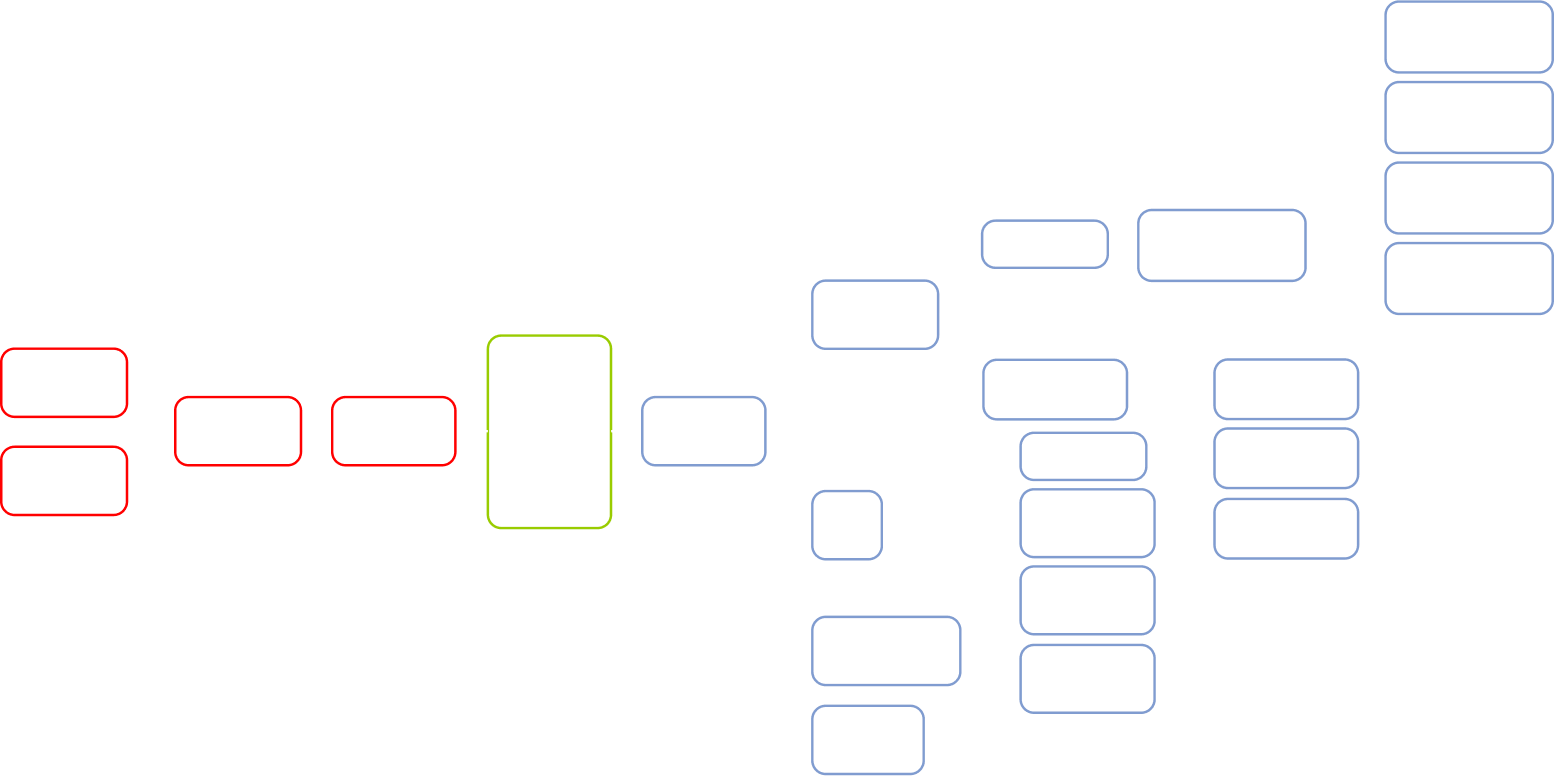
Here’s how NDAs, engagement letters, and service agreements are handled within the AI operational layer.

Flowchart with two faded boxes on top labeled “Matter record” and “Company templates.” The center green box says, “AI generates first draft. Flags missing or inconsistent fields.” Below is a purple box, “Professional review. Tracked-changes interface.”.

For a company that bills by the hour and watches margins closely, AI spend transparency was a practical concern from day one. To keep inference costs predictable and deliver robust governance without breaking the bank, our team built a cost-tiered AI gateway that routes routine classification to small, lightweight models and assigns complex analysis and document generation to larger models.

The client’s priority wasn’t “governance at any cost”

Before

  • Email inboxes as the company’s informal operating system led to transparency and coordination challenges
  • Manual customer intake, matter handling, and quoting wasted senior professionals’ billable time
  • Client history, matter context, and referral opportunities stayed fragmented across teams and individuals
  • No real-time visibility into active matters, ownership, workloads, and engagement status

After

  • An AI operational layer with strong governance unlocked transparency and seamless cross-unit coordination
  • AI agents took over administrative groundwork, freeing professionals for higher-value expert work
  • Shared operational context unified customer and matter knowledge across business units
  • Managing partners gained real-time visibility into workloads, matter ownership, active engagements, and cross-unit coordination

Business value

  • Real-time cross-unit visibility thanks to a company-wide AI operational layer
  • + 72% in request processing speed
  • – 65% in fee proposal preparation time
  • – 6 hours/week of repetitive administrative work per employee

Multiplier effect

The productivity loss this project addressed goes far beyond legal, tax, and finance. In any knowledge-intensive business, highly qualified people spend too much time on coordination work: routing requests, reconstructing context, chasing updates, preparing drafts, and pulling information from scattered systems.

An AI operational layer with governed multi-agent systems is a way of automating those tasks without sacrificing visibility or control. AI agents take on the groundwork, so your staff spends less time chasing information and more time on the work you hired them for. Companies can start with the biggest time sink and, then, expand gradually as each use case proves its value.

Overhead view of people working at a table with laptops, tablets, charts, and notebooks. A glowing “AI” graphic and digital icons are superimposed, symbolizing artificial intelligence and data analysis. Hands are busy typing or writing.

Computer Vision Deepfake ID Detection

Computer Vision Deepfake ID Detection For a Dutch Digital Bank

How adding a custom computer vision layer to the existing SaaS ID verification platform empowered a Dutch digital bank to keep up with the evolving threat landscape and stop 30% more AI-generated identity fraud, while reducing false positives for real users by 60% and decreasing manual document review workload by 40%.

Business challenge

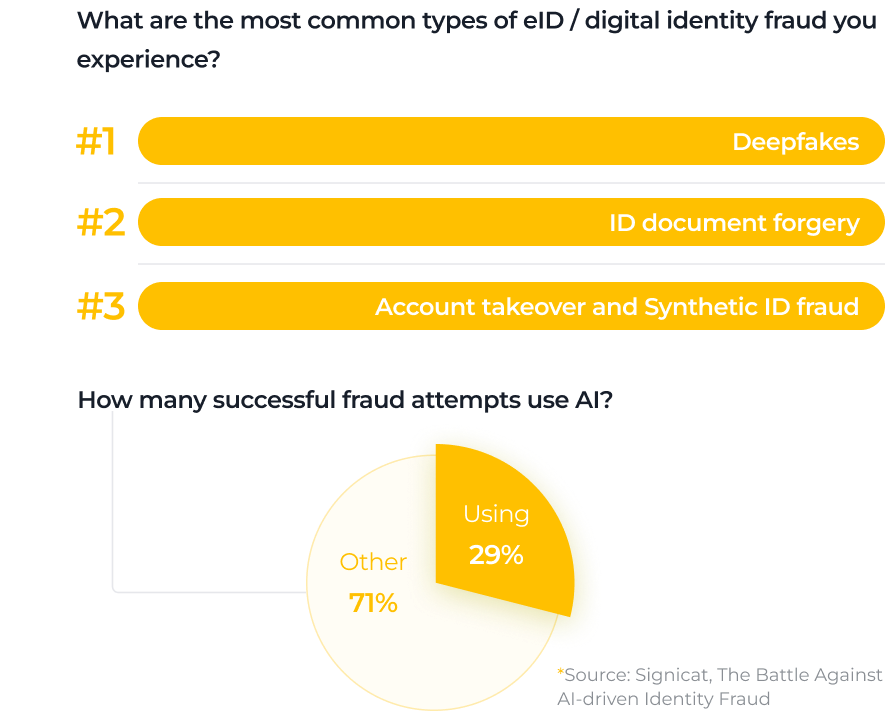
Bar chart listing common types of digital identity fraud: 1. Deepfakes, 2. ID document forgery, 3. Account takeover & synthetic ID fraud. Pie chart: 29% of successful fraud uses AI, 71% uses other methods. Source: Syntiant.
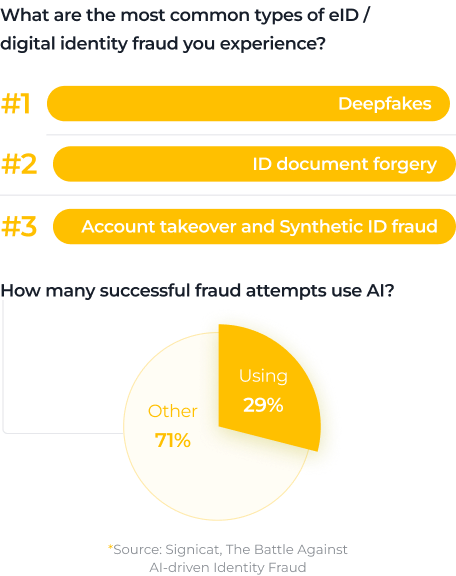
A graphic showing the top three eID/digital identity fraud types: #1 Deepfakes, #2 ID document forgery, #3 Account takeover and synthetic ID fraud. A pie chart shows 29% of successful fraud uses AI, while 71% is categorized as “Other.”.
A graphic lists the top three eID/digital identity fraud types: #1 Deepfakes, #2 ID document forgery, #3 Account takeover and Synthetic ID fraud. A pie chart shows 29% of successful fraud attempts use AI, while 71% are other types. Source: Signicat.

When GenAI emerged as a viable tech capability, businesses weren’t the only ones who went for it. So did cybercriminals who used the technology to create highly realistic deepfakes and pass Know Your Customer (KYC) onboarding at digital banks. Since the mass adoption of artificial intelligence, the number of AI-generated identity fraud cases in fintech has increased by 2137%. Now, 1 in 15 attacks involves deepfakes, and 29% of them succeed.

Our client, a Netherlands-based digital bank serving customers across the European Economic Area, chose to be one step ahead of fraudsters. As the bank onboards 4-5 million new users annually, they must protect real customers from account takeover, not to mention safeguarding brand trust in a highly competitive digital banking market.

At the time, the client relied on a third-party SaaS identity verification (IDV) platform with OCR and NFC/RFID technologies at its core, which fell short on several fronts:

  1. Failures in detecting AI-generated identity documents. Passports with AI-altered images or completely fake documents could pass through the checks if they visually match the templates of authentic IDs.
  2. Slow speed of adaptation to fraud patterns. The SaaS IDV was tied to the vendor’s release cycles, meaning weeks of waiting for new reported fraud cases to be updated in the system’s detection logic, while the new attack patterns kept snowballing.
  3. Limited control over the deepfake detection mechanism. The client’s team didn’t have direct access to the underlying algorithm and couldn’t strengthen the SaaS IDV’s forgery detection and analysis by training it on their own fraud samples.

For a bank operating at a multi-million-user scale, the gap between their needs and software capabilities posed significant financial and reputational risk. They needed a tech partner with proven expertise in finance to address the issue.

Solution

Instinctools’ dedicated team looked into ways to strengthen the client’s identity verification algorithm. Investing in a custom computer vision-based deepfake detection to run alongside the SaaS IDV proved to be the most beneficial option, as it enabled hotfixes and retraining on confirmed internal fraud cases within days.

Our computer vision experts took full ownership of the system’s design, training, calibration, and production rollout.

  1. Assembling a fraud-realistic dataset

The effectiveness of the custom CV detection mechanism hinged on the quality of the training data. Generic examples of ID fraud, that the off-the-shelf IDV platform had covered, were not enough. Therefore, our team prioritized assembling a solid dataset.

  • Doubling down on data preparation (exploration, cross-source collection, cleanup) to reduce training time.
  • Defining attack taxonomy that reflected the most relevant fraud patterns, from partial manipulations of photos, textual and numerical data to fully AI-generated documents.
  • Building a dataset that included the fake IDs the staff caught during KYC checks, partly and completely synthetic documents, and legitimate but low-quality photos and scans of passports.
  • Increasing the share of hard negatives in the dataset through data augmentation. Valid documents with blur, glare, or perspective distortion often triggered false alarms in the SaaS IDV platform, and we wanted to avoid this issue by training the custom CV algorithm to accurately distinguish poor capture quality from actual manipulation.
  • Labeling the data based on different criteria (real document vs. fake, fraud location, etc.).
  1. Designing an ID-focused CV pipeline

What is YOLO?

YOLO (You Only Look Once) is a computer vision object detection model. It’s an example of a leading-edge single-stage detector, known for its ability to locate and classify objects in a single pass through the network and, therefore, a go-to option for real-time object detection.

Our team built the solution around a single, well-controlled YOLO-based computer vision pipeline, tailored for identity document analysis. The model excels at:

  • Detecting the presence of a document
  • Localizing and analyzing in a single pass critical document regions, such as the data page, portrait area, and MRZ code
  • Highlighting suspicious area(s) of the document
  • Providing a risk score for each problematic element to simplify and speed up the review process

This approach ensured consistency while keeping inference fast enough for real-time KYC flows.

A sample Dutch passport shows personal details: a blurred photo, name “WiIieke Liselotte De Bruijn,” date of birth 10 March 1965, height 1.75m, and expiry date 15 January 2024. Text is in Dutch and English with blue and orange highlights.
A Dutch passport for Willeke Liselotte de Bruijn with personal details, passport photo, and security features. The passport text is in Dutch and English, and highlighted sections include name, birth date, height, gender, and document number.
  1. Ensuring the detection is reliable beyond known fraud patterns

To avoid building a system that works only for already known fraud tricks, we focused on how well the solution would hold up when attackers change their techniques and tools. Therefore, we deliberately checked it against document manipulations and generation methods it hadn’t seen before.

The test dataset included:

  • Data created by the same top 10 deepfake generation tools we used when assembling the training dataset, but with different faces and parameters
  • Data generated by other tools that weren’t used for creating the training dataset

This approach ensured the detection logic wasn’t tied to a specific deepfake tool or editing technique, but rather to the visual inconsistencies that tend to appear across AI-generated and manipulated documents, so the custom CV system remains effective even if fraudsters switch to new image generators.

  1. Decision threshold calibration

One of the key challenges with the SaaS IDV platform was the sensitivity of its fraud calibrator, which sometimes caused it to reject legitimate customers due to minor issues (like glare in a photo) while overlooking more serious fraud attempts. To address this problem, we linked the decision thresholds to the risk scores.

The custom CV layer now follows a tiered decision logic:

  • Low-risk cases continue through onboarding automatically, without any additional steps
  • Middle-risk cases trigger targeted step-ups, such as an NFC scan, requesting  an extra selfie or a short video
  • High-risk cases are flagged for manual review or outright rejection

This approach helped the client strengthen fraud controls and decrease the workload of human reviewers while ensuring fast onboarding for legitimate users.

  1. Seamless integration
of the CV layer into the client’s KYC flow

To keep the onboarding experience unchanged for customers, we deployed the custom computer vision system as a decision microservice within the existing onboarding pipeline. 

Still, before letting it influence real onboarding decisions, the team ran the custom CV system in observation mode. At this stage, it processed live KYC traffic alongside the existing systems, but its outputs were not used to approve or reject customers. 

Once we validated that the model behaved as expected with real-world data, we rolled it out gradually by feeding it controlled portions of traffic, expanding coverage step by step. This phased approach ensured that the new detection layer strengthened fraud controls without unintended consequences, such as over-flagging legitimate users or missing edge cases.

Here’s how the client’s updated KYC flow works:

  1. A user submits their documents (and, if required, a selfie or short video)
  2. The existing SaaS IDV platform performs its standard checks, such as OCR, MRZ reading, and NFC validation
  3. The custom computer vision system analyzes the same inputs in parallel
  4. The higher-level KYC orchestrator then collects and combines the results from both systems and applies the bank’s decision logic to determine the next action (approval, step-up verification, or manual review)

Since all checks run behind the scenes and in parallel, customer experience stays the same, with no extra waiting time or redundant requests. Meanwhile, under the hood, confirmed fraud cases are auto-labeled and folded into retraining cycles within days, enabling hotfixes. As a result, deepfake document detection had shifted from a static vendor capability to a living, bank-owned system evolving at the same pace as the threat landscape.

Before

  • Deepfake document detection depends entirely on a third-party SaaS IDV platform
  • AI-generated or partially manipulated documents highly resembling valid ID templates the SaaS platform was trained on could pass checks, while low-quality documents from real customers could have been rejected as synthetic
  • Time-intensive manual reviews due to the software’s unreliability
  • Weeks-long response to new deepfake techniques due to vendor-controlled update cycles

After

  • Custom, bank-owned computer vision layer added on top of the existing SaaS IDV platform
  • The CV system is trained on a high-quality dataset and follows tiered decision logic to perfect deepfake detection without affecting legitimate customers
  • Reduced review workload on the humans in the loop thanks to the well-calibrated decision logic
  • Adaptation to new deepfake patterns within days thanks to hotfixes

Business value

  • + 30% in detected synthetic document fraud
  • – 60% falsely flagged legitimate users
  • – 40% in manual review workload

Client’s testimonial

Multiplier effect

Computer vision threat detection use cases extend far beyond digital banking. Any company that relies on document checks or user verification, from insurance and healthcare to travel and ecommerce, faces the same growing risk from AI-generated identities and forged documents. A custom computer vision system trained on real-world fraud patterns can help businesses react faster than when relying on generic vendor tools.

A person in a dark blue shirt holds a smartphone in one hand and types on a laptop with the other. Digital facial recognition icons and a checkmark appear, indicating successful facial authentication on the phone. The background is blurred.

Computer Vision Defect Detection

Computer Vision Defect Detection For an Electronics Manufacturer

How switching from a rule-based machine vision system to an advanced computer vision solution for early-stage defect detection on the production line helped an electronics manufacturer reach 97,4% accuracy in identifying flaws and save $2.4 million annually thanks to a drop in warranty claims.

Business challenge

Our client is a Saudi-based electronics manufacturer producing laptops for the MEA region in partnership with one of the global tech leaders. Years earlier, we had created digital twins of their factories, so when new challenges surfaced, the client turned to us again. 

The company had long moved from fully manual defect detection on the production line to an automated, non-contact product quality inspection. However, their automated optical inspection (AOI) in the conveyor video surveillance system was too demanding, rigid, and costly, posing numerous limitations. 

  • Overdependence on consistent imaging. The system cannot function efficiently if lighting and camera positioning aren’t stable.
  • Inflexibility. AOI operated on strict “if-else” rules, making the system unable to perform continuous trend analysis and adjust dynamically to enhance both speed and accuracy of defect detection. 
  • Slow adaptability. Every time the component configuration, size, or color changed, the system required recalibration. 
  • Low scalability. One AOI system couldn’t simply be replicated across multiple factories. Each production line will require extensive manual parameter tuning. 
  • Costly maintenance. Traditional machine vision systems like AOI require highly specialized experts to take over routine manual inspections, regular calibrations, software updates, and hardware repairs. 

The client needed a more flexible, scalable, and budget-wise form of computer vision at the core of their conveyor video surveillance system.

Solution

Our development team ensured the smooth shift from basic AOI to advanced computer vision.

  1. Shaping up the tech stack

We decided to rely on a pre-trained object detection and image classification model. Then, we had to choose between single- and two-stage detectors to perform object detection. The scale was tipped in favor of a single-stage algorithm due to its several advantages:

  • Faster inference
  • Lower computational demand
  • Easier maintenance

Having experience with various single-stage detectors, we settled on YOLO over CenterNet, SSD, RetinaNet, and FCOS, as it offers superior inference speed, ensuring truly real-time performance. Despite YOLOv10 being available, we used YOLOv8, as it was the most tested and stable version at the moment.

  1. Optimizing the training dataset

The client’s previous pre-computer vision system relied on a three-tier defect classification framework: “definitely defective,” “borderline,” and “definitely non-defective”. Rather than discarding the existing dataset, we capitalized on it by strengthening defect coverage and enforcing consistent, high-quality labeling.

Augmenting data to address the class imbalance issue

The original dataset was limited in size, with a maximum of 200 images per defect category. In addition, different defect types weren’t represented equally. For example, issues such as missing components and incorrect placement appeared far more frequently than subtler issues like misalignment, solder defects, open circuits, or lifted leads.

To address both the small dataset size and class imbalance, we applied data augmentation techniques:

  • Random photo cropping and flipping
  • Controlled blurring and noise injection
  • Tweaking lighting
  • Changing the background

That way, we multiplied the dataset tenfold while ensuring balanced representation across all defect categories.

Improving labeling consistency and reliability

Given the diversity of subtle defects, high-quality labeling was a must-have. Our AI engineers focused on refining the labeling process to: 

  • Reduce annotation noise
  • Improve consistency across classes
  • Enable more statistically reliable quality assessments

In addition, we ensured the dataset included images both with and without the target object, improving the model’s ability to distinguish true defects from background artifacts and, thus, reducing the false positive rate.

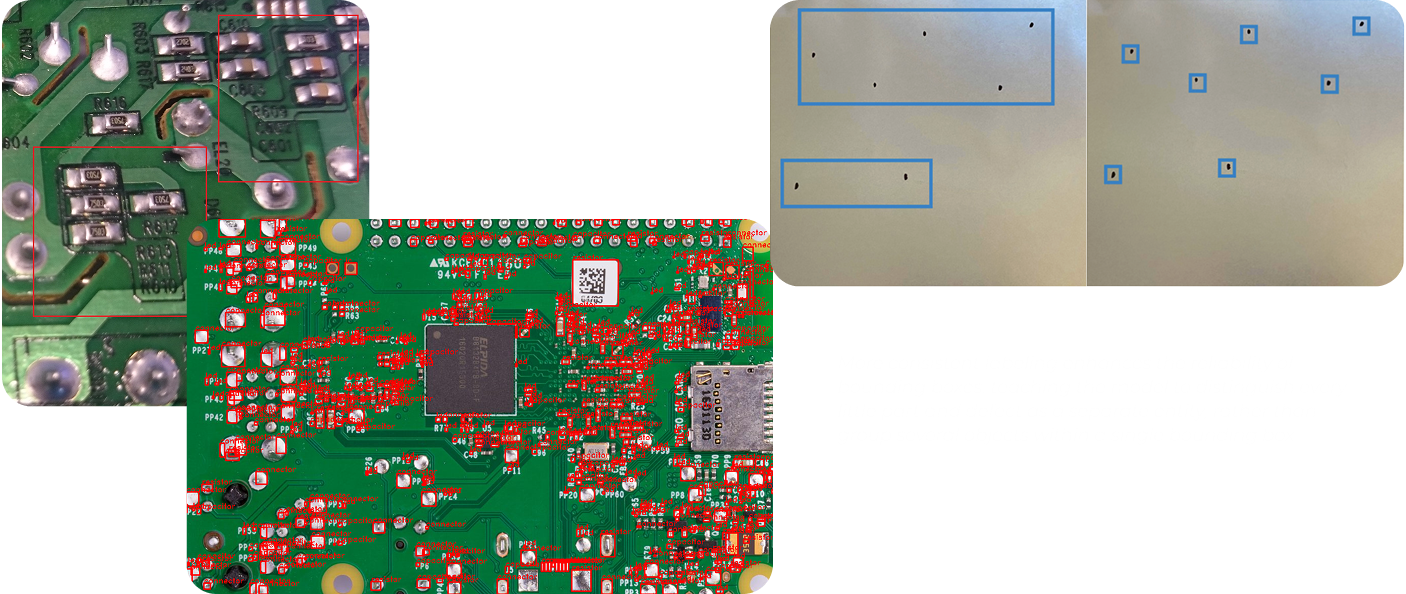
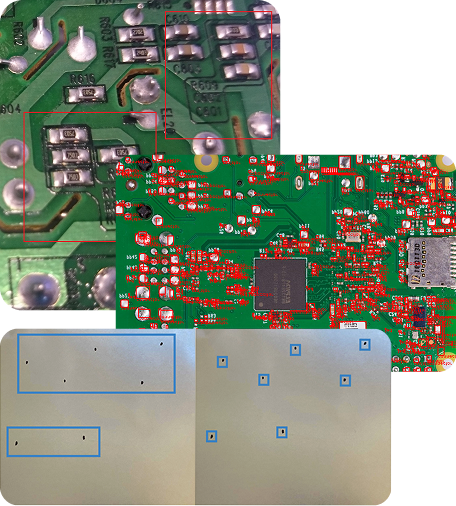
A collage showing two close-up images of green circuit boards with various electronic components and solder points, and one image of a metallic surface with blue rectangular and square outlines marking different areas. Text is faintly visible in the bottom right corner.
Three images: a close-up of a green circuit board showing silver solder joints; a larger green circuit board with many red and silver components and a central microchip; and a metallic panel with blue-outlined rectangular and square cutouts.

More consistent labeling enhances the reliability of bounding boxes, teaching the model to distinguish every little part and defect as a separate entity, rather than group several objects within a single bounding box.

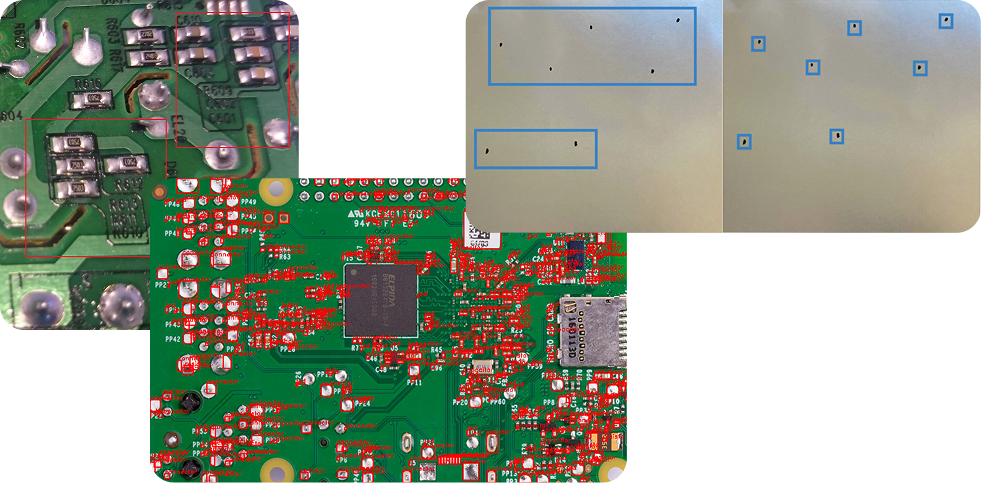
A collage of three images shows close-ups of green circuit boards with red components and microchips, overlaid with a photo of a metal plate featuring multiple cutouts and small square and rectangular holes highlighted in blue.

More consistent labeling enhances the reliability of bounding boxes, teaching the model to distinguish every little part and defect as a separate entity, rather than group several objects within a single bounding box.

  1. Running model transfer learning on the enhanced dataset

Models for object detection and classification like YOLO are already trained on hundreds of millions of general images. However, to accurately address the client’s specific needs, it had to undergo additional training on the updated dataset.

Instinctools’ AI engineers took an efficient approach to tackle this challenge. They resorted to transfer learning as an ML training technique to improve the model’s performance:

  1. Started with a pretrained YOLO model
  2. Used PyTorch to remove the default classifier head
  3. Replaced the model’s classifier head with the enhanced dataset

After that, YOLO was able to instantly detect and classify all the specific defects relevant to the client’s production line.

What is transfer learning in computer vision?
 
Transfer learning is a machine learning training technique, which capitalizes on the pre-trained model’s general knowledge (the ability to detect different defects on various surfaces) instead of training the model from scratch.
 
With transfer learning, you only retrain the model on your task-specific dataset (examples of external and internal defects of the client’s laptops), enabling the model to adapt its existing knowledge to your reality. This method significantly reduces training time and computational resource consumption.
Three images show a circuit board section. The first has a red “Defect Detected” label, the second outlines a component in red, and the third highlights the component with a red overlay, indicating the defect’s location. Purple arrows separate each step.
Three stacked images of a circuit board: 1. Top image highlights a component with a red “Defect Detected” banner above. 2. Middle image shows the same area outlined with a red box. 3. Bottom image shades the component in red, marking it as defective.
  1. Calibrating defect inspection thresholds 

Defining a defect is only part of the process. Next, our dedicated team helped minimize the number of items wrongly discarded at the production stage through:

  • Raising a confidence threshold ratio from 0.5 to 0.85 to prevent the model from flagging low-certainty cases as sure defects 
  • Setting up detailed defect severity scoring to minimize false positives while not letting critical defects slip further
  • Adjusting NMS (Non-Maximum Suppression) parameters so that the model always chooses one clean, highest-confidence box per object instead of overlapping bounding boxes
  1. Going the extra mile for near-100% defect detection accuracy 

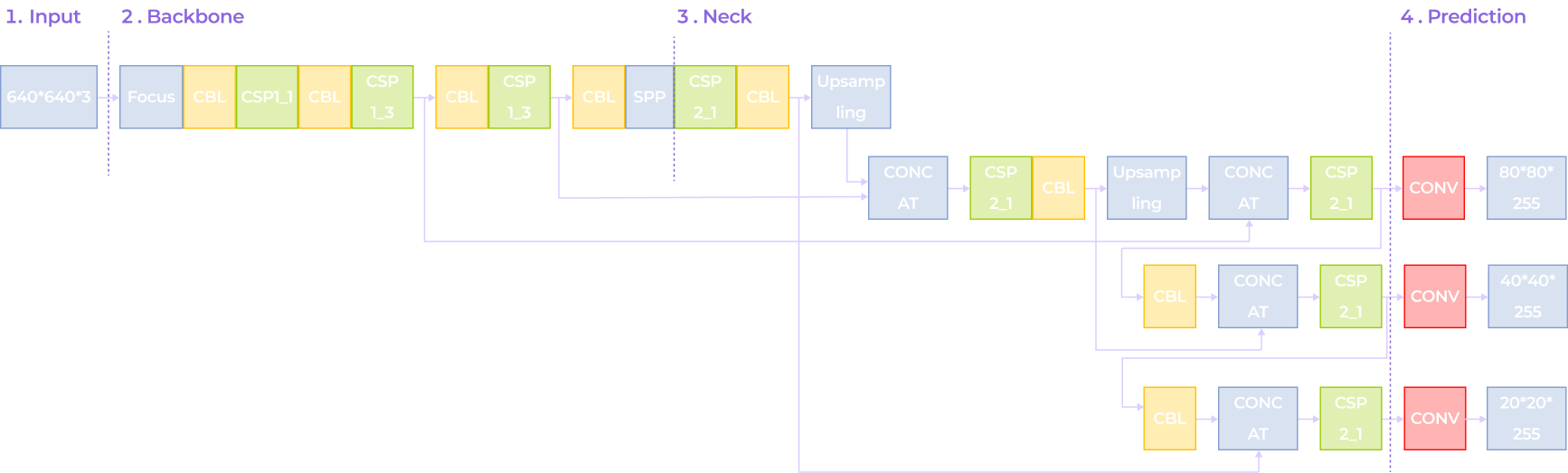
After transfer learning and threshold calibration, the model’s accuracy reached 86,5% which was already more than 15% higher than with the previous AOI system. Still, our team aimed for as close to 100% accuracy as possible.

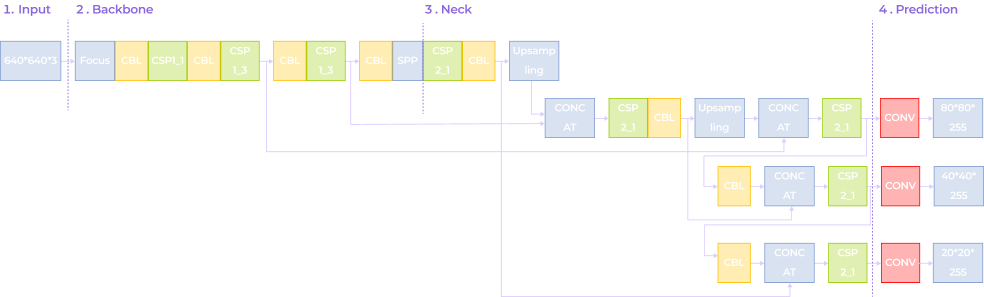
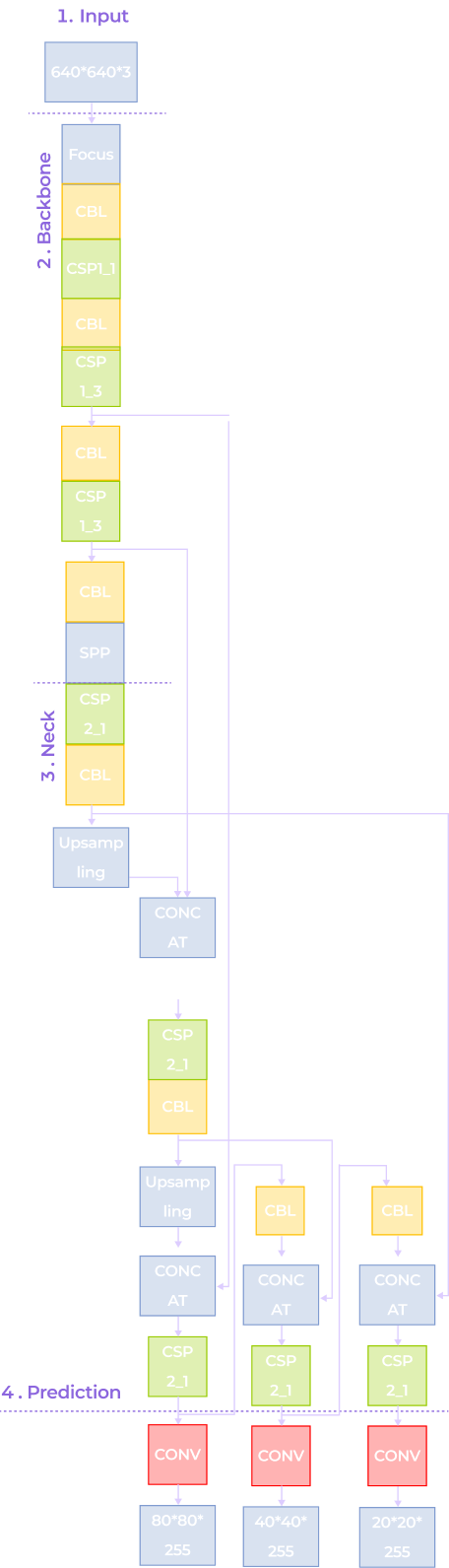
Instinctools’ AI experts enhanced YOLO-based defect detection capabilities by applying:

A flowchart showing a neural network architecture with four stages: Input (640x640x3), Backbone, Neck, and Prediction. Colored blocks represent layers like Focus, CBL, CSP, SPP, and CONV, with branching paths for multi-scale predictions.
A flowchart of a neural network architecture with four sections: Input (640x640/3), Backbone (Focus, CBL, CSP, SPP), Neck (CSP, Upsampling), and Prediction (Conv layers with outputs: 80*80/255, 40*40/255, 20*20/255).
A vertical neural network diagram with four labeled sections: Input (640×640×3), Backbone (Focus, Conv, CSP1, SPP), Neck (Upsampling, Concat, CSP2), and Prediction (Conv layers with outputs: 80×80×255, 40×40×255, 20×20×255).
  • Depthwise Separable Convolution (DSConv) to accelerate the model’s inference speed
  • The Cross-Stage Partial Network (C3 module) to combine low-level detailed information with high-level semantic data, enhancing the model’s adaptability to target scale variations and improving detection accuracy
  • The Bidirectional Feature Pyramid Network (BiFPN) to enable the model to identify fine features of small targets, improving its recognition capability
  • The DySample upsampling operator to minimize detail loss and boost accuracy for small targets

With these enhancements, the new CV defect detection system consistently hits the 97,4% accuracy benchmark.

  1. Integrating the CV mechanism into the client’s manufacturing execution systems (MES)

The computer vision solution was installed at one of the client’s facilities. There, it underwent further model training based on collected metadata and outputs generated by the system during operation. Those adjustments helped align the system with real-world production conditions and replaced AOI at each critical juncture:

  • Post-solder paste application. The system verifies if paste volumes are adequate and properly aligned.
  • Post-component placement. The solution validates whether each component is present, oriented correctly, and positioned within acceptable tolerances.
  • Post-reflow. Software runs a final check for defects such as tombstoning, bridging, and cold solder joints.
The result is an all-encompassing, multi-class defect classification, with all defects categorized by type and severity.
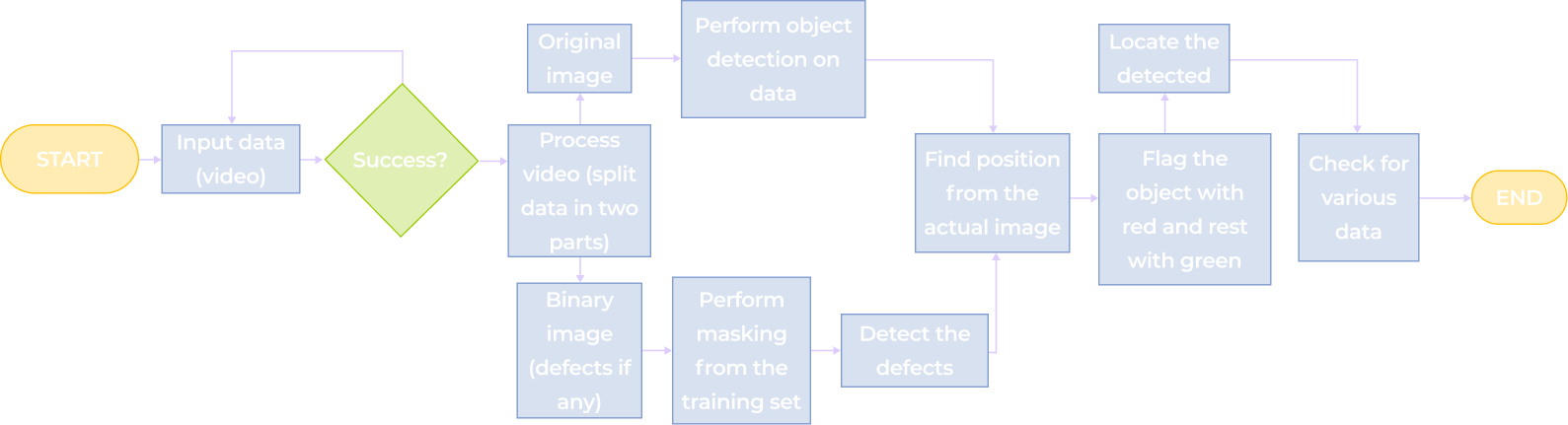
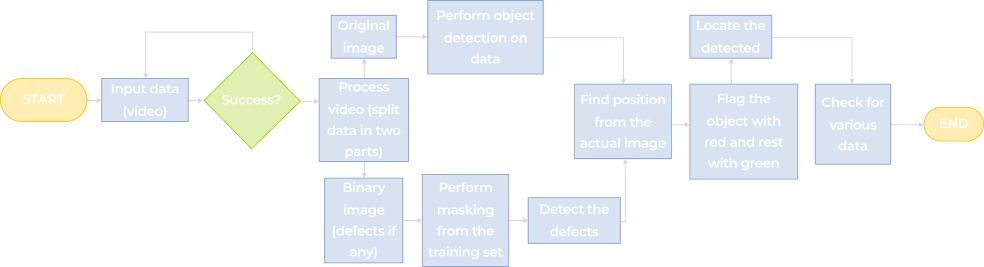
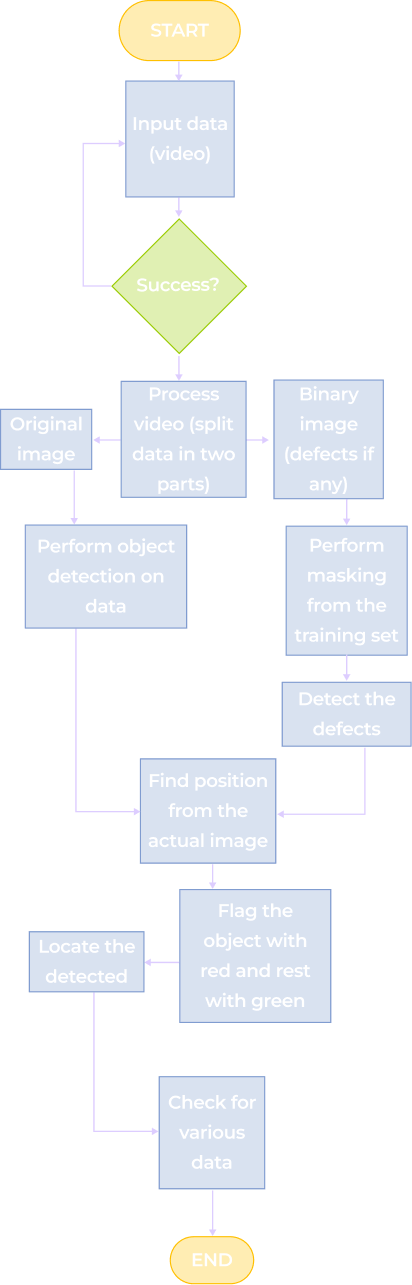
A flowchart for video object detection: Starts with Input data (video), checks Success?, then branches to process the image or video, detects defects, locates them, flags with red and green, checks for various actions, and ends the process.
A flowchart for object detection in video: start with video input, check for success; if yes, process original image and video; create binary image, mask defects, then perform object detection, locate defects, flag objects, and check results to end.
A vertical flowchart shows steps from inputting video data, processing and splitting the video, detecting objects and defects, flagging objects, checking data, and ending. Steps are in colored rectangles with directional arrows connecting them.

As the solution features cloud connectivity, our team can remotely perform model updates, configuration changes, and CV algorithm optimizations. 

Before

  • A rigid and costly machine vision system that has to be configured for each production line
  • Real-time defect detection is only possible under perfectly stable lighting 
  • 70% accuracy of defect detection
  • Items falsely discarded as defective

After

  • Flexible and highly scalable computer vision system that can be reused across production lines
  • Real-time defect detecting under any lighting conditions
  • 97,4% accuracy of defect detection
  • < 0,5% discarded items

Business value

Operational impact:
  • + 27,4% accuracy of production line inspections 
  • + 24% in production throughput due to immediate defect detection
  • < 2% false positive rate
  • < 0,5% discarded items 
  • – 67% defect-related warranty claims
Financial impact:
  • – $1.2 million in waste-related costs
  • + $2.4 million annually due to the drop in warranty claims 
  • – 26% in quality control labor costs

Client’s testimonial

Multiplier effect

Stronger quality-control systems on a production line lead to fewer defective products reaching customers and ruining their experience. With the stakes as high as one in three customers* leaving a brand after a single bad experience involving defective products, playing it safe becomes essential for business survival.

Computer vision can be the key to achieving higher-quality products and improved customer satisfaction. 

*According to PwC

A diverse group of six people sit around a table with papers, coffee, and devices, engaged in discussion. Overlaid text reads Customer Feedback: Connect with your friends. Notification icons and messages appear around the image.

WordPress Modernization For a Marketing Agency

WordPress Modernization For a Marketing Agency

How modernizing their WordPress website enabled a UAE marketing agency to slash the speed of web page creation by half and level up Google PageSpeed Insights score from 32 to 92 on average, significantly improving Core Web Vitals for desktop, such as LCP (from 4.5 to 2 seconds), INP (from 600 to 200 milliseconds), and CLS (from 0.3 to 0.1).

Industry:
Entertainment and Media

Web Development

Business challenge

“Set it and forget it” isn’t something you can hope for in the digital world. Websites need updates every few years, or they become slow, clunky, and vulnerable.

Our client, a UAE marketing agency, learned this the hard way. Their WordPress website hadn’t seen an update for almost a decade. A newly set solution coped with 3.000 users per day glitch-free. However, over the years, traffic quadrupled, bringing performance, efficiency, and security concerns to the surface.

  • Performance was tanking, with Core Web Vitals way below acceptable standards. There was no way to enhance them while maintaining the current WordPress version.
  • The website team was overloaded with manual workflows, such as software testing, marking up every page from scratch, and managing redirects across 500+ pages to avoid conflicts between the plugins they rely on.
  • The website’s security was jeopardized because of compatibility issues between multiple third-party plugins and the old WordPress version.

Considering all that, the client had a decision to make — modernize their existing website on WordPress or switch to another CMS. With no in-house expertise to weigh their options, they contacted *instinctools.

Solution

Our team started by assessing the as-is state and communicating with the stakeholders to clarify their overall project priorities to map out the most efficient route to the spot-on, well-performing website.

A deep-dive tech assessment uncovered that website modernization would be enough to tick all the boxes — no need for a CMS migration. We suggested:

  • Fixing performance issues by updating the WordPress version, integrating specific plugins to boost website speed, and replacing their current server with one that can handle high loads with minimal resource consumption.
  • Implementing CI/CD and automating UI tasks with the help of Docker and a WordPress website builder.
  • Honing website security by reviewing third-party plugins they used and keeping only the ones with regular updates to close security gaps.

With a clear roadmap in place, our team of software and system engineers got to work.

Unlocking quick-wins

The first step was to upgrade the client’s WordPress from 4.1 to the latest version, 6.4.2.

This upgrade alone made an instant impact:

  • Automated redirects instead of manual fixes for every 404 error.
  • New performance-focused plugins, such as NitroPack, became available.
  • Enhanced security — a modern WordPress core meant better compatibility with third-party plugins.

Boosting website performance

Moving forward, we took on removing architectural roadblocks on the way to faster page loading time.

  • Implementing NitroPack plugin

With the latest version of WordPress, NitroPack was finally up for grabs. By enabling smart caching, a built-in content delivery network (CDN), and image optimization, NitroPack gave the site a massive speed boost.

Based on PageSpeed Insights data, our team also optimized the script and style sheets, which had previously contributed to poor performance.

  • Switching from Apache to Nginx

The client’s website initially relied on the Apache server. Its synchronous, process-driven architecture, which implies creating a thread for each connection request, suits smaller sites but becomes an obstacle when they grow.

Therefore, we recommended shifting to Nginx, a server with asynchronous, event-driven architecture that enables multiple connections to be handled within a single process. This server was designed to manage high loads with minimal memory and CPU consumption, making it a perfect fit for enterprise-grade corporate websites.

We also integrated NitroPack with the Nginx Helper plugin to additionally increase caching efficiency.

Doubling down on automation

While the WordPress upgrade enabled some automation, it wasn’t enough to lessen the burden of day-to-day manual tasks. During the tech assessment, the *instinctools team identified two major areas with the highest potential for automation.

  • CI/CD implementation

Previously, developers had to manually push every code change from local repositories to GitLab, then deploy it to staging and production.

Our system engineers enabled faster development cycles by establishing a solid and consistent CI/CD pipeline and adopting Docker.

  • UI automation

There’re numerous WordPress website builders, such as Elementor, Divi, Brizy, Beaver, Visual Composer, SeedProd, etc., to leverage and simplify creating, editing, and customizing the website pages. We opted for Elementor Pro for its high intuitiveness and customizability paired with the broadest range of features.

We accelerated the web page markup process from 8 to 4 hours on average by introducing reusable generic blocks, widgets, and shortcodes.

Ensuring smooth integration with the client’s software ecosystem

The client’s website integrates with various SEO and marketing tools, so we ensured everything stayed intact post-upgrade. The only minor hiccup we had to deal with was caused by NitroPack, which blocked the HubSpot forms from displaying on the website. We resolved it by configuring NitroPack bypass caching for HubSpot-related scripts.

Before

  • Overreliance on manual workflows
  • Apache server failed to keep up with the growing amount of traffic
  • Outdated WordPress version caused security risks
  • Limited plugin choices

After

  • CI/CD implementation and automation of UI-related tasks
  • Nginx server efficiently handles high loads with minimal resource consumption
  • Regular updates keep security tight
  • Access to a vast pool of plugins compatible with the newest WordPress version

Business value

  • Stable and scalable CI/CD pipeline
  • Fewer manual operations
  • Core Web Vitals for desktop were significantly improved: LCP from 4.5 to 2 seconds, INP from 600 to 200 milliseconds, and CLS from 0.3 to 0.1
  • Google PageSpeed Insights score raised from 32 to 92
  • Reduce the speed of web page creation by half

Multiplier effect

When performance and security degrade, many businesses assume they need to switch platforms. But in reality, modernization often delivers the same results with lower costs and fewer disruptions.

However, this option is not a one-time fix — your solution requires regular health checks anyway. We suggest running a tech assessment every three years to ensure your website or app stays future-proof and high-performing, on your terms.

The importance of regular tech assessments

Conversational AI Chatbot For a Bank

Conversational AI Chatbot For a European Bank

How strengthening their existing chatbot for customer support with GPT-4 capabilities and voice assistance empowered a Czech bank to boost their 30-day retention rate by 7%, Net Promoter Score (NPS) by 34%, and First Contact Resolution (FCR) by 60%.

Industry:
Finance

Software Product Development

AI Development

Business challenge

The worldwide shift from brick-and-mortar banks with face-to-face interactions to online banking in the 1990s was a major disruption of the banking industry. Since then, it has been one of the technologies shaping the future of finance.

However, customer expectations have evolved over the decades. Customers of all generations shifted towards resolving their queries through a chatbot in a banking app rather than making a call, emailing, or visiting a physical location.

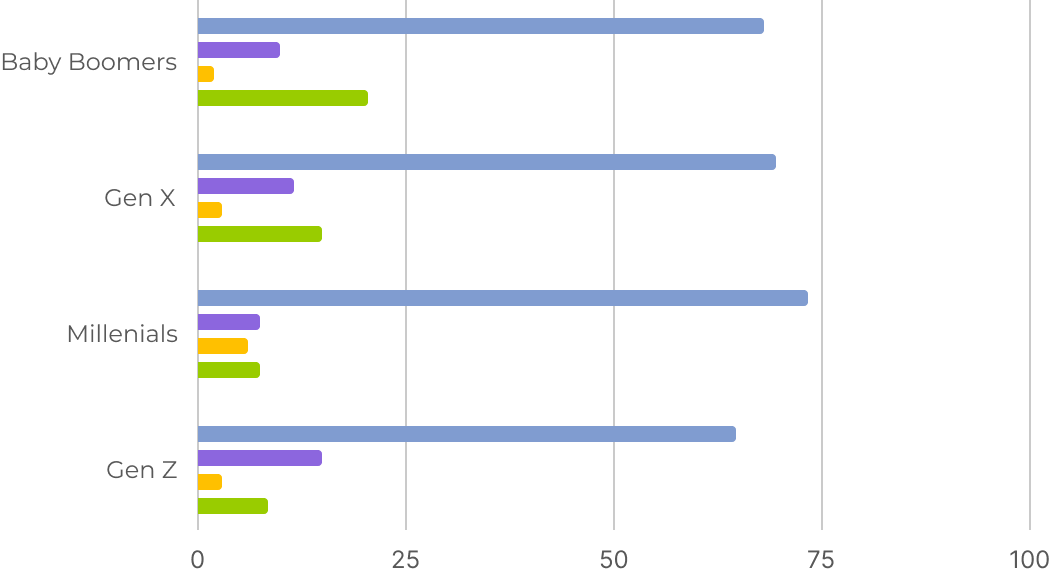
Most-used banking communication channels among different generations

Source: American Bankers Association, 2023

The gen AI boom became one of the main contributors to the rise of customer demands. End users were starving for more human-like, efficient, and fast communication in mobile banking, especially with chatbots as a leading communication channel. And banks had to shape up or ship out.

Our client – a trailblazing Czech bank – saw it as a golden opportunity and didn’t miss the chance to capitalize on it. They have been pushing the frontiers of local banking since 2015, and when the gen AI spike started, the client’s center of excellence immediately concentrated on quick-win strategies of implementing conversational AI in finance services. Enriching their existing chatbot functionality with natural language processing (NLP) and generative AI capabilities became one of the projects at the top of their priority list.

To undertake the initiative, the client needed an AI-savvy tech partner by their side to confidently and safely integrate the new tech. With data security being a high-stakes issue, they were looking for a vendor conformed to the ISO 27001:2022 standard. Instinctools’ data scientists and software engineers took the lead in crafting a stable and secure conversational AI chatbot.

Solution

The client envisioned a gen AI-powered chatbot with an intelligent Siri-like voice assistant. Such an ambitious solution required in-depth knowledge of large language models (LLMs), pattern and speech recognition, and other frontier technologies.

  1. Choosing the project’s AI linchpin

The client’s app has over 100,000 users, and they needed an LLM capable of handling a large volume of customer queries simultaneously. ChatGPT 4.0 was a go-to option, as it can process 12,000+ inquiries and transactions per second even in peak hours. Moreover, this pre-trained language model is well-versed in basic banking concepts and doesn’t require extensive fine-tuning, enabling swift project development.

However, finance institutions can’t hop on the open-source large language model right away due to restrictions of compliance regulations, such as GDPR, CCPA, etc. Banks had to use private models running in a controlled environment.

Hence, we deployed a private instance of GPT-4 within the client’s Azure tenant, connected their initial platform-based chatbot to the LLM through the API, and proceeded with rewiring the banking chatbot’s functionality.

  1. Stepping up text chatting patterns

Moving forward, we provided the LLM access to a sanitized dataset of internal banking data, such 
as answers to the FAQs, information about bank offerings, user guidelines for performing various operations, etc. As a result, human-like conversations have covered finance and card management, transactions, loan management, investing, savings account creation, credit score monitoring, filing insurance claims — the list can go on and on.

Here’s a high-level scheme of how GPT-powered banking chatbot works:

Integrating GPT-4 capabilities for customer support enabled the bank to solve user queries at least four minutes faster than with their previous middling chatbot. LLM implementation also helped decrease the number of requests that escalated to human support from 37% to 2% and step up First Contact Resolution (FCR) by 60%.

  1. Enabling full digital banking capabilities at the tip of a finger… and tongue

Motivated by their rapid gains, the client doubled down on reimagining user experience with conversational AI for finance. They announced pre-subscription to the new trailblazing features for their existing customers, who give explicit consent to access some of their profile data. In exchange, users were offered to be the first testers of a highly intelligent feature, a personalized virtual financial advisor. By analyzing customer data, their saving and expense patterns, the chatbot provides tailored insights, proactively helping users reach their financial goals.

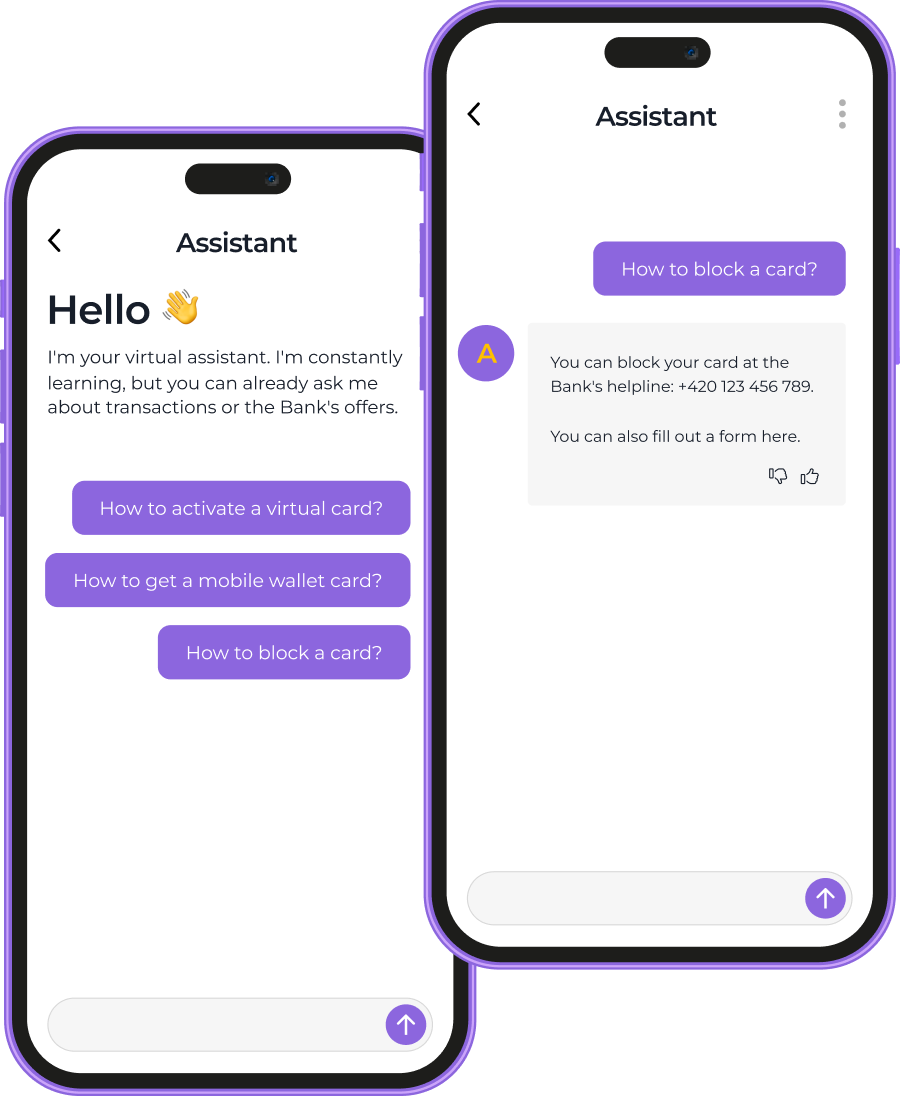
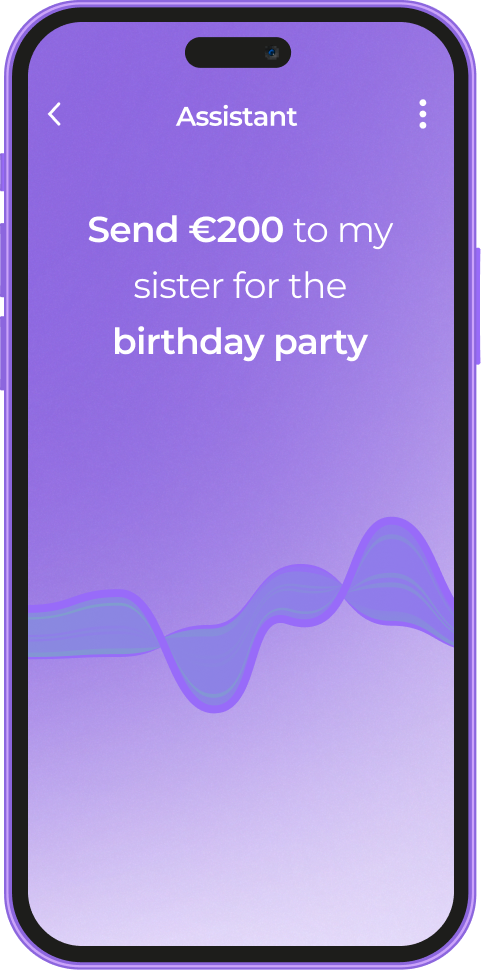
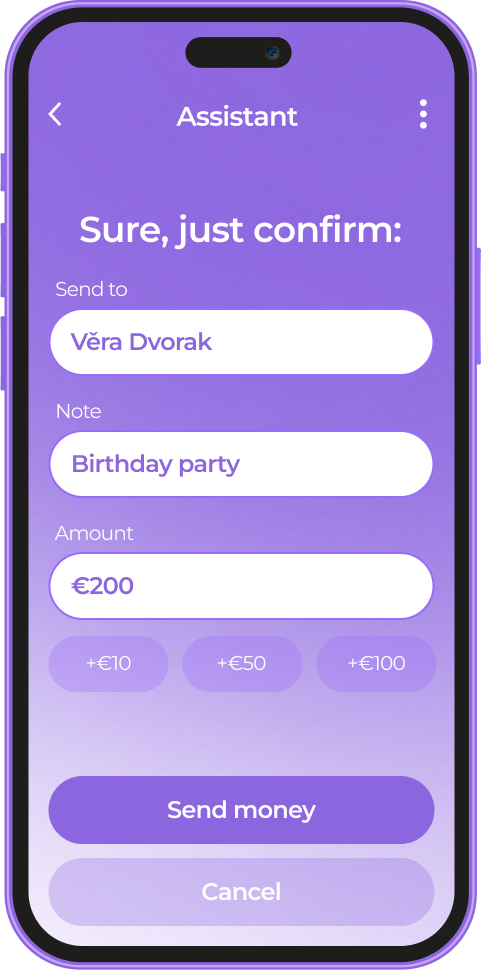
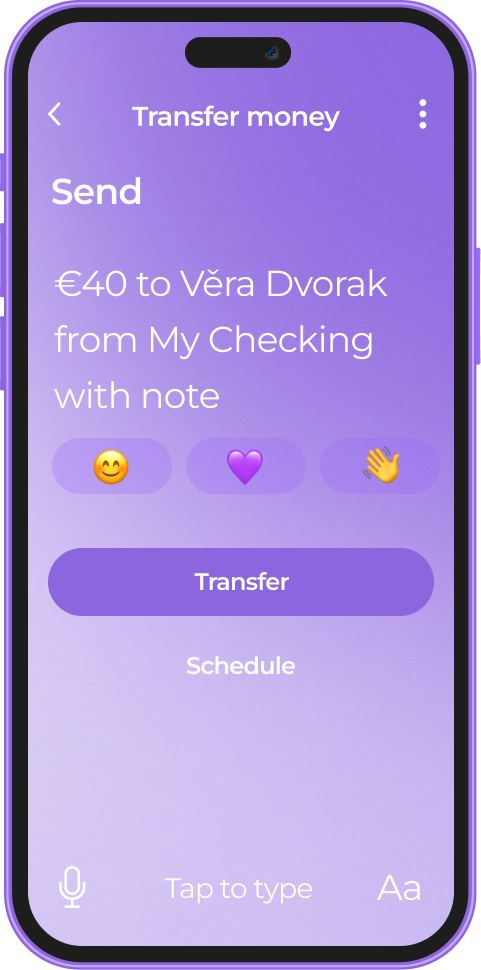
Another grand step was the adoption of automatic speech recognition (ASR). Customers can now effortlessly manage their finances with simple, conversational commands. With voice-activated banking, users can send money, check balances, and more, all with the ease of a casual conversation. For example, if a user says, “Send €150 to my mom,” the bot will immediately generate a confirmation form for this request.

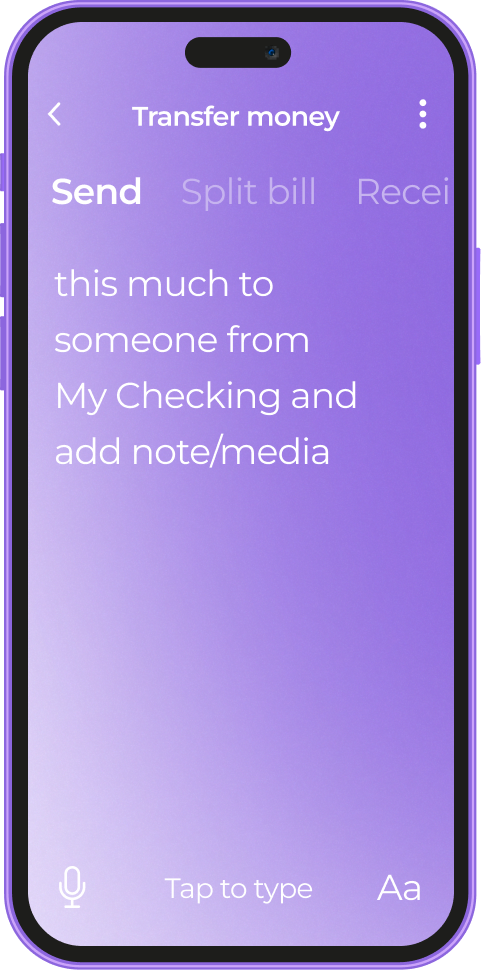
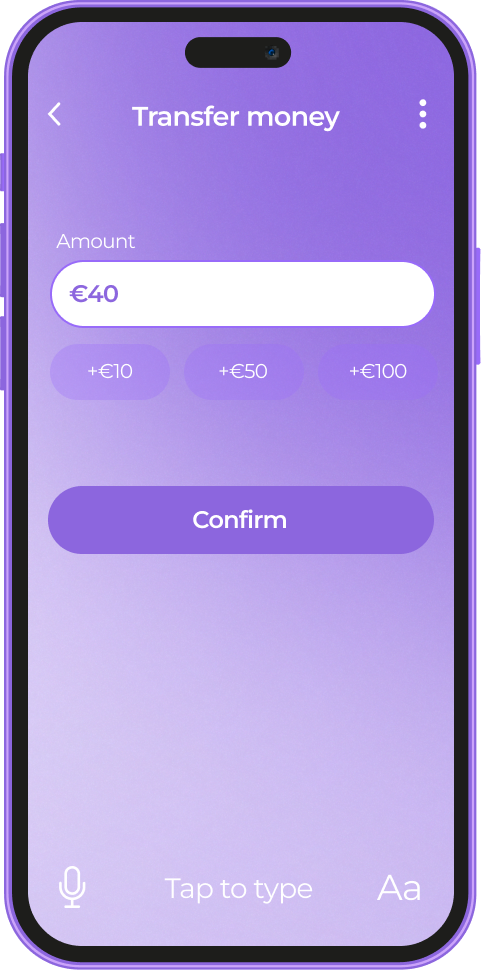
Pattern recognition under the hood of the chatbot enables it to anticipate the user’s needs, spotting keywords, such as “pay”, “send”, “transfer”, etc.

Here’s, for instance, how the software reacts to the word “send” based on the user’s spending habits.

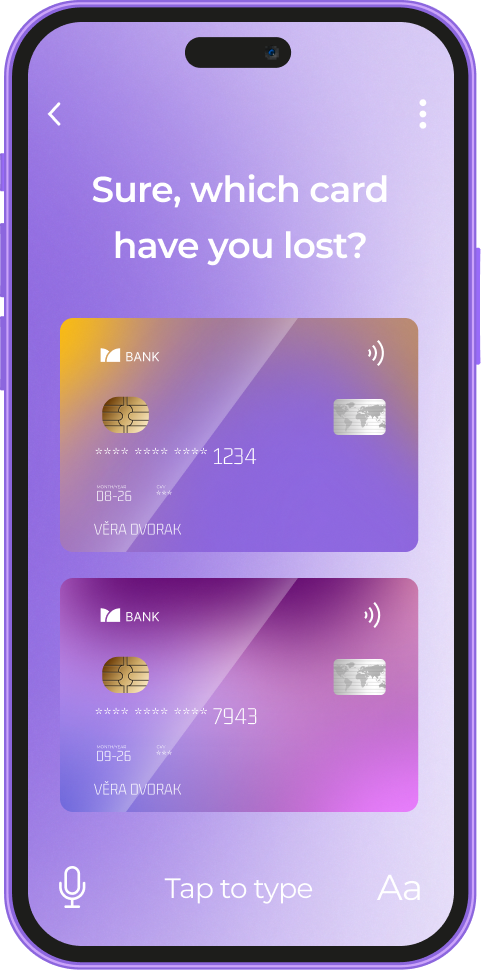
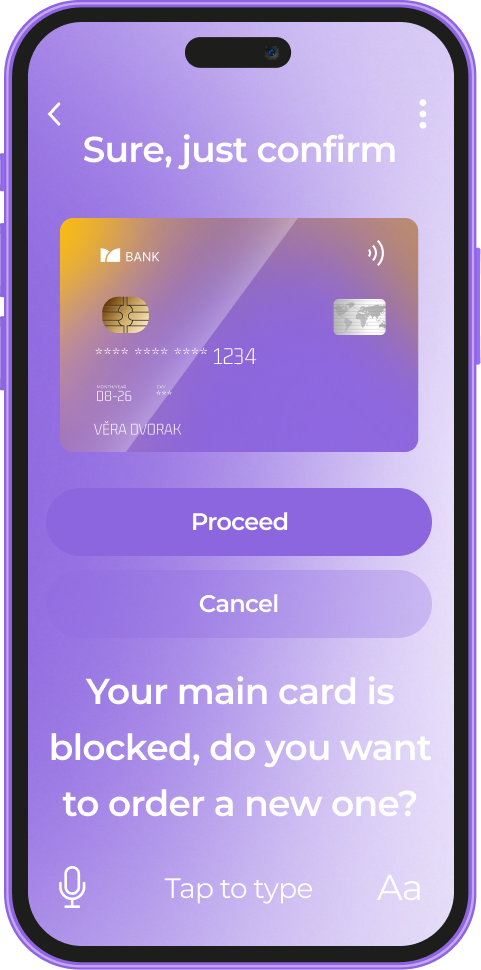
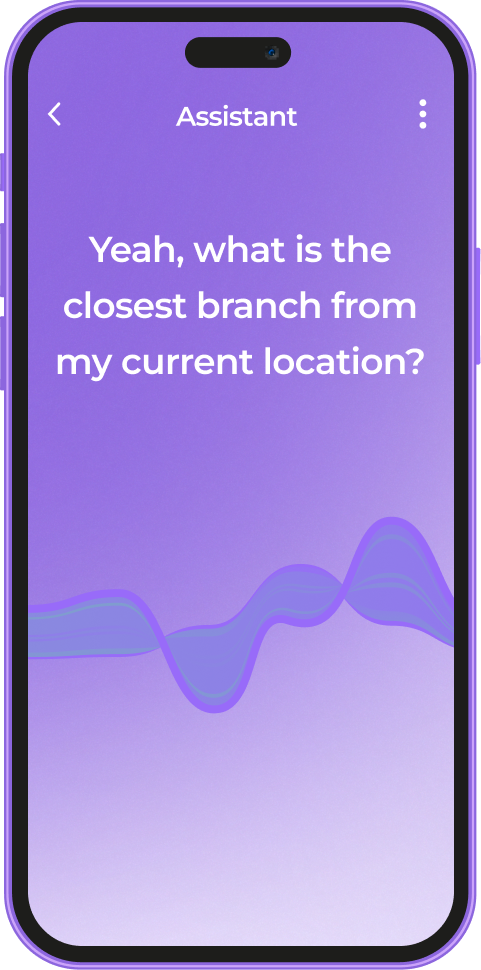
Other examples of operations the voice assistant covers include managing users’ cards, monthly budgeting, creating savings accounts with goal setting, making investments, and much more, all directly from the dialog box.

Here’s an example of a conversation for reporting and blocking a lost card. The assistant guides a user through identifying the missing card and provides information for the next steps, including ordering a new card at the nearest branch.

An experimental AI-driven chatbot has been a resounding success with users, resulting in a 7% boost in a 30-day retention rate. After making this feature available for all the users, our client also saw a noticeable increase in customer loyalty and satisfaction, measured in Net Promoter Score (NPS), which went up by 34%.

Before

  • Old chatbot could cover only the most rudimentary user queries
  • 37% of queries escalated to human support
  • Text-based communication with the application

After

  • Advanced demand forecasting with a deep learning engine at its core
  • New chatbot can serve as a personal financial advisor
  • 2% of user queries get to the client’s call center
  • Interaction with the app through a voice assistant

Business value

  • The first gen AI-driven personal financial advisor in the Czech mobile banking market
  • 60% step-up in First Contact Resolution (FCR)
  • 75% increase in Query Deflection Rate
  • 7% boost in a 30-day retention rate
  • 34% rise in Net Promoter Score (NPS)

Multiplier effect

As much as conversational AI in finance is reshaping the banking sector, it’s also changing the game for other domains, from healthcare and ecommerce to manufacturing and logistics. If your app implies communicating with end users, it has room for gen AI adoption.

Conversational AI enables your app to intelligently process users’ needs on the fly. Just like saying “I’ve lost my card” initiates a card-blocking procedure, AI streamlines critical processes in other industries.

Web App For Robotics Manufacturer

Intuitive Web App For Robotics Manufacturer

How crafting a web app with an easy-to-grasp interface and flexible architecture empowered a manufacturer of warehouse driverless forklift systems to unlock new value-creation opportunities and reach SMB customers.

Industry:
Logistics, Manufacturing

Enterprise Automation

UX and Design

Web Development

MVP Development

Software Product Development

Business challenge

Under-automated or under-digitized intralogistics inevitably affects a company’s profits. However, sometimes the bottlenecks aren’t that obvious, and even organizations with warehouse-specific software and robotics in place struggle to achieve the much-coveted outcomes of intelligent automation.

The issue may lie in having overcomplicated software designed for tech-savvy users that holds down the company’s capabilities in efficient control and optimization of the goods flow within a manufacturing facility, warehouse, or distribution center.

For example, navigating the driverless forklift systems in small spaces is quite a challenge, as such robots are usually designed for large warehouses. The equipment can neither go near fire exits nor stop near them by default. However, following these settings is tricky in small spaces with little room for maneuvering. Hence, when the robot has no other way than to make a path near the fire exit, it stops before reaching it. Such cases require manual human input to restart the system with an updated route.

Our client, Bleichert, an automation machinery manufacturer, wanted to address two pain points of their customers seeking warehouse robotics:

‘By engineers, for engineers’ approach in designing the software

Lack of targeted solutions for small and midsize businesses (SMB) in the market overloaded with enterprise-grade products

To reach SMB customers and provide them with user-friendly software for warehouse robotics, they decided to broaden their offering with an innovative model of their driverless forklift systems that move loads autonomously by following a pre-configured circuit. Bleichert partnered with NODE Robotics and integrated their software modules into the experimental forklift. However, they needed a reliable tech ally to create a web app with an easy-to-grasp interface for warehouse operators and managers.

Instinctools, with its comprehensive expertise shored up by a set of ISO certifications, filled the bill perfectly. Our dedicated team created an MVP with interactive features for the demo presentation at LogiMat – the International trade show for intralogistics solutions – in just seven weeks.

Solution

When reaching out to *instinctools, the client specified their requirements for the future application.

Architecturally significant requirements (ASRs) included:

  • Accessibility via common browsers, such as Google Chrome, Safari, Microsoft Edge, etc. with an identical look and feel
  • Flexible architecture to support and manage multiple robots in the future
  • Real-time updates of a robot mission

Non-functional requirements (NFRs) encompassed:

  • Quick and easy navigation with the rule of thumb “max three levels to reach the goal”
  • Less than 0.4 sec response to the user input
  • Color-coded interface to simplify operators’ work and avoid any possible costly mistakes

Detailed documentation empowered us to jump into development right away. Our software architects started with establishing a robust tech stack.

  1. Deciding on a tech stack

We zeroed in on the client’s requirements to shape an easy-to-maintain tech stack for the web app development.

  • Seamless compatibility with NODE OS. Bleichert already installed the autonomy OS for mobile robots on the experimental forklift system to handle map management and interact with the robot’s systems and sensors. Since the operational system with related plugins uses Python, we suggested sticking to this programming language and FastAPI framework for server development for the sake of tech stack consistency.
  • Fast user interface response times. Besides ensuring the mandatory ease of use for the warehouse operators, we had to take care of the app’s interface speed. Our frontend developers suggested going with a single-page application (SPA) using React JS for user interface development, as the framework’s component-based architecture and virtual DOM allow crafting UI with lightning-fast render times. By leveraging React JS development services, we ensured optimal performance and a seamless user experience.

Here’s the high-level scheme of the future web app.

  1. Taking into account long-term usage scenarios from the onset

The MVP was tailored to user interaction with one robot (Master Robot) within a pre-configured environment. However, outlining the long-term project vision at the early stages is a best practice our team follows to eliminate head-scratchers in the future and enable a hitch-free development process.

Therefore, in our conversations with the client, we discussed two strategies their customers can choose from in the future when the app will operate multiple robots (Master Robots and Servant Robots).

  • Seamless compatibility with NODE OS

Such an approach provides end users with a single point of control for all forklift systems within the warehouse. However, the main drawback of this method is its high dependence on the Master robot. In case of its malfunctions, Servant robots won’t be able to perform their tasks.

  • The app runs on each of the Servant robots with one Master robot for covering managing tasks

In this case, Servant robots are highly independent, eliminating the risk of a work stoppage due to the issues with the Master robot, but high-level management becomes trickier.

The bone of the architecture at the heart of the web app is its flexibility. It can be tailored to either of these two options, depending on the client’s customers’ feedback on the innovative forklift model.

  1. Engineering and designing a user-friendly web app

Moving forward according to our Delivery Framework, we proceeded with iterative development, covering user roles, robot management, and more.

User roles within the app

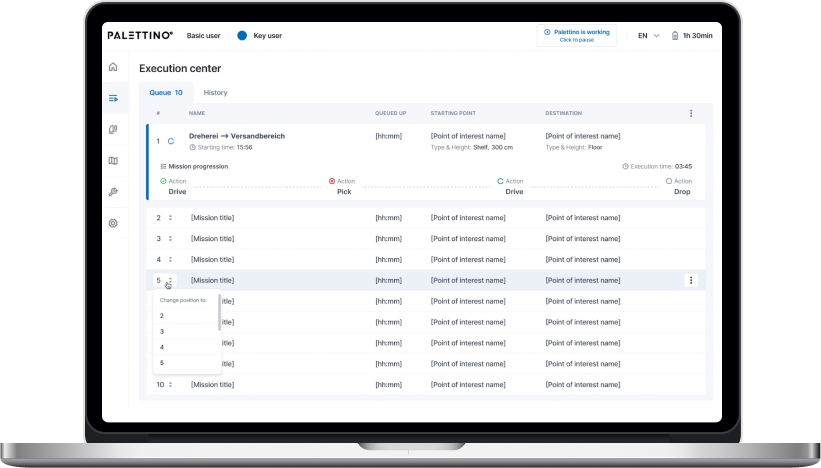
The system has authorization and authentication mechanisms, but they aren’t mandatory, and non-authorized users can access the web app. Thus, we provided two modes within the system:

  • Basic user, designed for the rank-and-file warehouse operators with no authorization required
  • Key user, accessible only by authorized employees, for high-level warehouse operators and managers

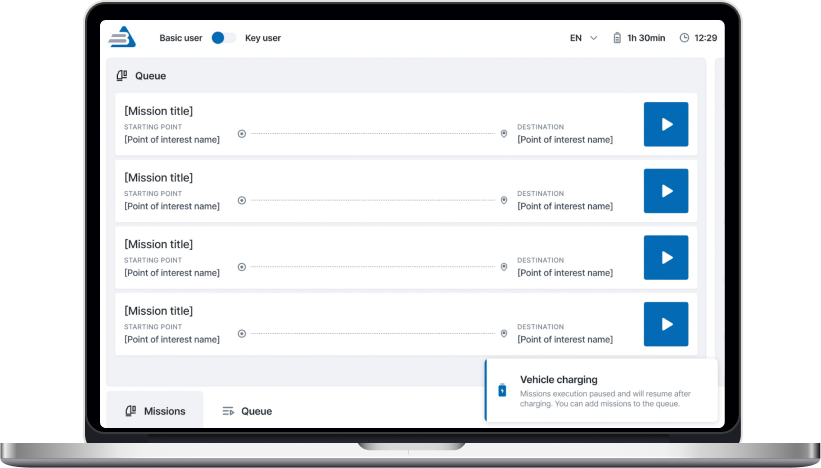
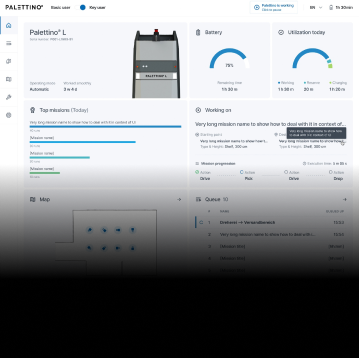
However, the capabilities of authorized and unauthorized users greatly vary. As you can see on a high-level app vision, Basic users can only view the list of existing robot missions and launch them, while Key users are allowed to create new routes and missions, add restrictions, view the history, check the robot’s status, etc.

Now, let’s dive deeper into the robot-related features.

Robot mission management

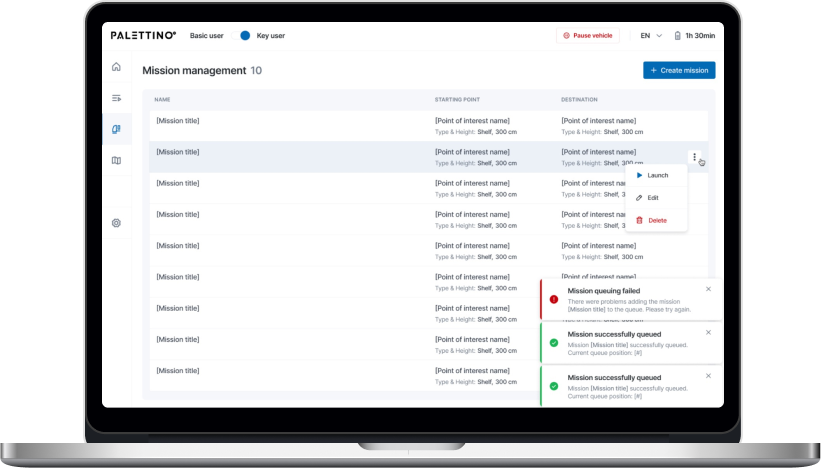
Each mission has the following attributes:

  • Name
  • Starting point of interest (POI)
  • Destination POI

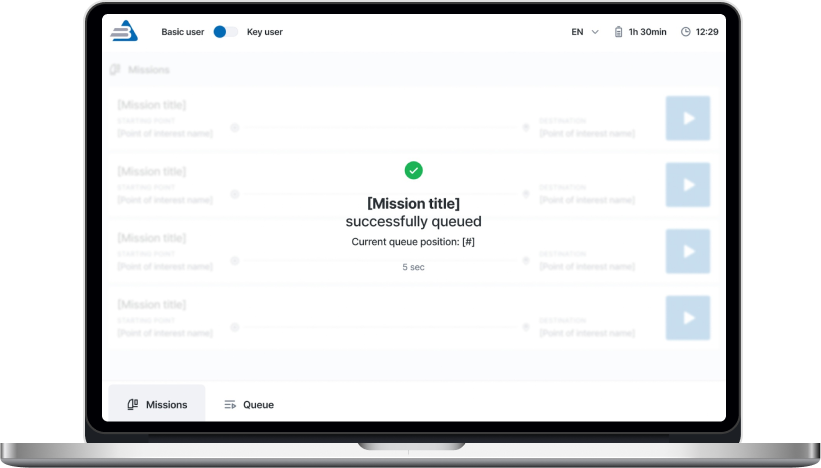
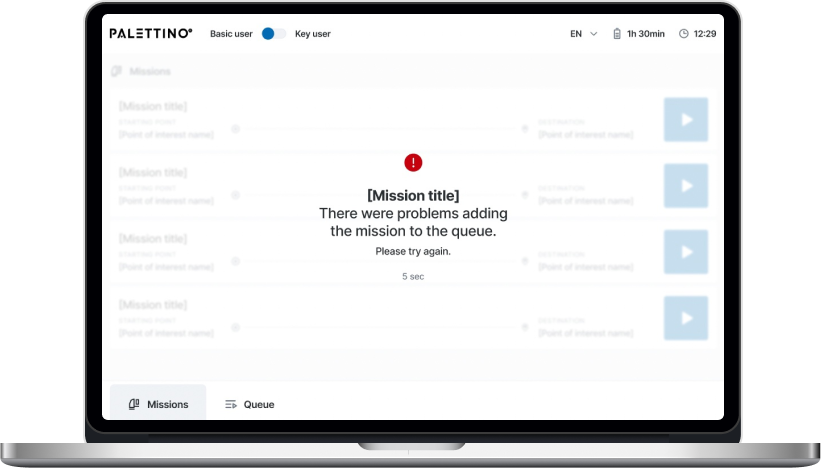
A Key user can add any mission from the list to the queue by clicking the “Play” button. The mission will appear at the last position after a five-second pause, during which the list of missions is locked. Then, the operator will be notified whether queuing the mission was successful or failed.

There are four mission statuses:

  • Active
  • Queued
  • Completed
  • Deleted

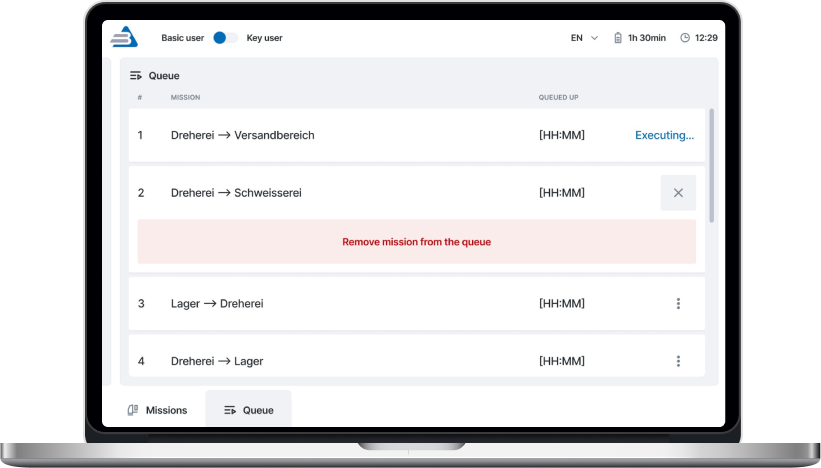
A Key user can remove any missions in the queue except the active ones.

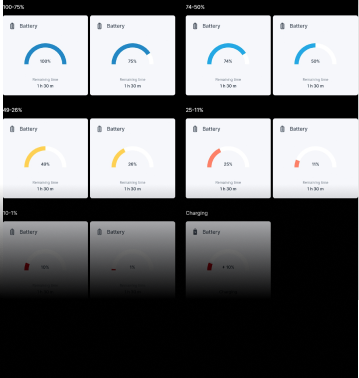
Both Basic and Key users get toast notifications about events related to the robot’s operation. The alert about the robot charging is shown until the process is completed.

The opportunity to pause the robot is available from any application page for both roles.

One of the client’s fundamental requirements was tracking a robot mission in real time, so we set the execution time to update every second.

A Key user can change the order of queued missions.

Mission removal is available for a Key user. They need to click the appropriate menu item and follow the additional action confirmation.

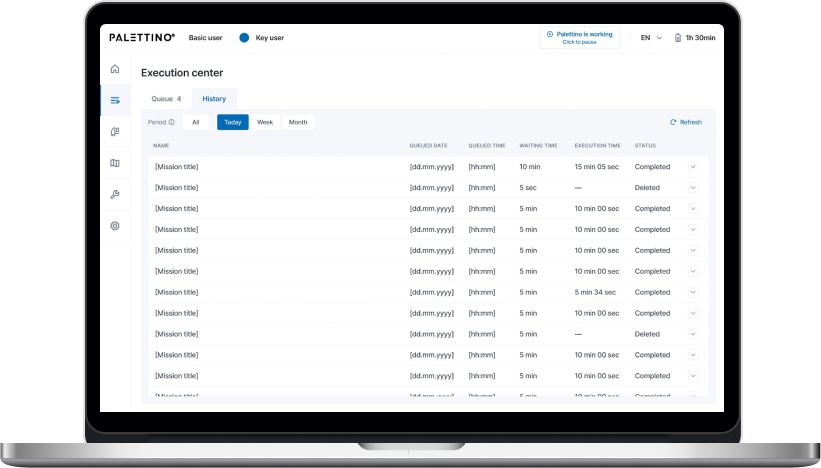
Only a Key user can access the History of missions and filter them by date:

  • Today
  • Week
  • Month

All missions are shown by default.

That’s what the clickable prototype looks like.

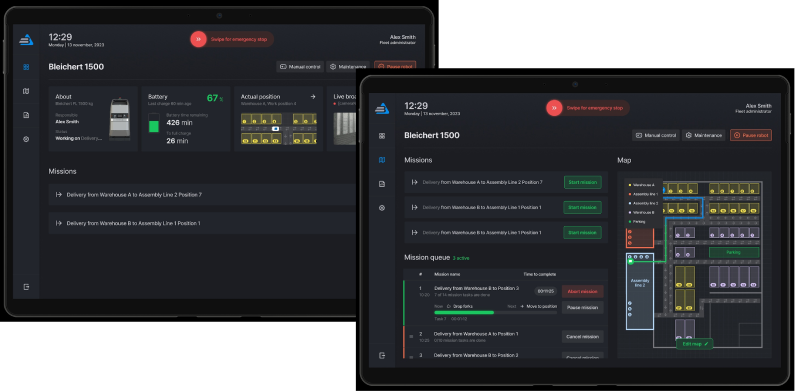
Dashboard for monitoring robot condition

The complex interface wasn’t the only reason the client’s customers considered previous forklift systems not user-friendly enough. They also strived to have simple visualizations of the robot’s status to detect and fix machine maintenance issues before they snowball.

A dashboard with widgets and actual information about the robot’s state empowered users to switch to the ‘danger foreseen is half avoided’ principle and, thus, decrease machinery maintenance costs.

  1. Writing a test emulator for the app

The client’s web app is an example of an embedded solution that strongly depends on the hardware. In such cases, software testing takes a special place in SDLC. There are two ways to perform it:

  • Running the app directly on the robot. However, this was a no-go option, as the client wanted to fine-tune the new model’s sensors before the trade show. Transporting the forklift back and forth between their headquarters in Osterburken and our development hub in Warsaw would totally mess up the project’s timeline.
  • Testing software on an emulator. The client didn’t have an emulated environment that imitates the robot’s behavior, so we offered our help and built it.

As we were working on the emulator ourselves, the increased project scope could have put the *instinctools team in a tight spot, given the strict deadline. However, we managed to deliver the robust version of the app on the dot. Moreover, our emulator served as a temporary substitute for the solution’s service for the robot coordination, making it possible for the client to showcase the trailblazing forklift model at the trade show.

  1. Shaping the post-MVP backlog

Satisfied with the MVP results, the client decided to proceed with our partnership at the post-MVP stage, during which our team will broaden the functionality related to these three areas:

  • User management
  • Mission improvements
  • Mission assignment

Before

  • Complicated app meant for employees with an engineering background
  • Lack of visualization
  • Partly manual control over a forklift robot on-site

After

  • Intuitive app sets new standards in user-friendliness of robotics management software
  • Easy-to-grasp dashboards
  • Fully remote control of the forklift robots

Business value

  • Trailblazing warehouse solution for the SMB segment
  • Highly user-friendly UI suitable for non-technical staff makes the software stand up from the crowd of solutions designed for tech-savvy employees
  • Simplified software support due to a homogeneous tech stack
  • Interface with no more than three clicks to reach any feature
  • Less than 0.4 sec response to the user input
  • Real-time updates of the robot missions
  • Easy-to-use dashboards for tracking a robot’s state
  • Decreased robot maintenance cost thanks to detecting malfunctions before they turn into serious issues

Client’s testimonial

MVP Development For a Fintech Startup

Full-scale MVP Development For a Fintech Startup

How running a discovery workshop saved a fintech startup tens of thousands of dollars on needless software development and enabled the company to craft a trailblazing MVP for venture funds and investors. 

Industry:
Fintech

DevOps Services

UX and design

Web Development

Software Product Development

Business challenge

Securing a top-notch development team when building a software product is only one part of the equation. The key lies in defining what kind of product you want to create, who for, and what problems of the target audience it will address. For those operating in highly demanding niches, like our client, this precision represents both a challenge and an opportunity.

Instinctools was approached by a European venture capital company with €800m+ in assets under management. They planned to launch a fintech startup and develop a web platform to consolidate information for VC investors and funds. 

The envisioned solution was supposed to:

Present investors with concise, visually appealing information about potential investment opportunities and their terms, rather than extensive 50-page reports

Provide a secure space for communication between funds and investors moving away from traditional emailing

Offer a comprehensive experience for investors, eliminating the need to switch between several systems

Empower funds with automated back-office functions, significantly reducing staff hours.

This innovative and far-reaching B2B2C solution had the potential to take the market by storm even as an MVP. However, the haphazard approach to its implementation put the whole project at stake.

Initially, the client worked with another tech partner who had offered to set up a developers-only team for the project. Specifying the requirements and prioritizing features fell under the client’s purview.

Here is how it played out. The client outlined the platform’s core idea to their contractor and continued to pile up features throughout the development process. Not surprisingly, those efforts didn’t hit the mark the client was aiming for.

It turned out the client had been draining their budget crafting a solution that veered far from their original vision. Letting multiple stakeholders from different departments define the project requirements on a whim and the lack of a unified product vision between the product owners and dedicated team resulted in a deep chasm between expectations and reality. The developed solution looked like a nice visualized Excel spreadsheet instead of being a 
top⁠-⁠of⁠-⁠the⁠-⁠line digital fundraising platform.

Despite developing some of the intended features, the team couldn’t pull the whole solution together, and the situation was being exacerbated with each new feature implementation. The web platform benefited no one: not funds and investors, not the client. 

The problem required input from a skilled Product development consultant, and since the previous contractor couldn’t provide one, the client started to look for a new tech ally. This time, they decided to search among vendors whose expertise in information security and quality management was backed with ISO 27001:2022 and ISO 9001:2015 certificates. And that’s how *instinctools entered the scene. 

In the project, the main puzzles were lurking at the pre-development stage. Our team had to:
Process the information

received from the client and create the project’s Vision&Scope documentation

Gather and clear up

business requirements along with technical and non-technical constraints

Prioritize

the solution’s features

Shape the project’s

iterations in line with the features it should have

Evaluate

the current product against the updated requirements

Solution

At *instinctools, we know how to address the problems of clients who turn to us after dismal cooperation with other tech partners. Sometimes, the situation can be completely muddled. There may be no basic documentation on the project, and it can be challenging for the stakeholders to define how they see the final product. In such cases, we suggest conducting a discovery workshop before diving into the development to frame the product vision into a set of specific actions that would ensure the project’s success. 

What was the value of a discovery workshop for the client?
  • Clearly defined business requirements and product vision

The client obtained a Vision&Scope document, where all functional and non-functional requirements for the project were captured. That information ensured all the participants involved in the development process were on the same line and had similar expectations regarding the final product. 

Additionally, with Vision&Scope in hand, the client could seamlessly transition to another tech partner — if they felt the need to do so — without going back to square one.

  • Balanced development scope and business value

Following the here-and-now principle in developing product features, trying to implement every single idea you come up with is a sure way to oversaturate your product with flashy components at the expense of vital ones. It’s a slippery slope, especially for an MVP. By chasing excessive functionality, it’s easy to lose the crux of the MVP, resulting in missed deadlines, and wasted budget.

A proper evaluation and prioritization of features with the solution architect empowered the client to balance business value, development cost, and time.

  • Potential for product enhancement

All artifacts created at the discovery workshop were documented. And anything that didn’t make it into the MVP could be put into the subsequent product releases. That way, the client got a backlog primed for future development after the minimum viable product rollout.

  • Aligned product vision between the client and the dedicated team

Cooperating closely with our stakeholders empowered us to sculpt the product seamlessly within the projected time and budget.

  • Decreased time to market

Although a discovery workshop took some time, working out requirements, prioritizing features, and developing a common vision of the project paid off. It allowed the team to move at a rapid pace through the development phase as they had a well-defined action plan and could fully focus on product development and testing.

  1. Behind the scenes: how did the discovery workshop go?

The number and duration of workshop sessions depends on the project’s complexity and the scope of issues that need to be clarified before starting development. In our client’s case, we proposed two three-hour sessions. 

What did they cover?

Examining the existing solution with the product owners and gathering up-to-date business requirements and constraints
of the product

Within the first workshop, our dedicated team collected and analyzed the information about:

  • Problem, task, and business opportunity
  • As-is state of the product
  • Success criteria
  • Stakeholders
  • Our product
  • Risks
  • Functional and non-functional requirements
  • Target audience
  • Competitors
  • Unique value proposition
  • Constraints

For example, one of the client’s concerns was that the solution wouldn’t be secure enough to manage documents with sensitive financial data from venture funds and investors. 

To guarantee that Fort-Knox security level, we offered to tighten requirements for authorization on the platform and offered to conduct training on using and managing the solution for the client’s employees.

After an in-depth discussion, our team spent a week processing the collected data, brainstorming possible strategies to put the project back on the right track, and preparing a Vision&Scope document for the second workshop.

Vision&Scope presentation to highlight our idea of revamping the existing solution according to the updated requirements

Instead of scrapping the existing software we decided to breathe new life into it, moving gradually:

Transition phase to take on the project

Alpha release of the product’s demo version to fix already implemented linchpin features

MVP Block 1 release to develop mandatory core features for the fund user (investor) role within the platform

MVP Block 2 release to add secondary core features for the fund admin role within the solution

Future releases to hone the product functionality

After their previous tech partner delivered a final solution that deviated significantly from the initial idea, the client appreciated our iterative and incremental approach.

Furthermore, that strategy allowed the client to use the product’s beta version to reel in future platform users – investors and funds. Engaging customers is way easier if you have a demo version they can click through to get an idea of the platform’s functionality.

During the second workshop, we also introduced to the client how we see the product’s:

  • Business goals
  • Scope decomposition
  • Milestones
  • Timeline

The scope decomposition discussion allowed us to prioritize the order of the features’ implementation. Some of them, such as two-factor authentication (2FA), were moved to the Alpha release, while others were postponed for later stages. For example, the client wanted to include integrated analytics for the Opportunities page in the Alpha release, but they needed integration with Tableau to do so. Therefore, this functionality was shifted to future releases.

We also suggested reconsidering the team composition and strengthening it with our classic triad of a business analyst, solution architect, and UX/UI designer, typical for an *instinctools’ product approach. That way, our experts ensured creating the product centered around customer experience. 

The client appreciated the businesslike approach of the *instinctools team. They approved our ideas, and so we jumped right into work on the next stage.

  1. Transition phase

At this stage, we focused on:

  • Auditing the current platform. We reviewed the client’s functionality as the Fund admin and end-user’s functions for the Fund user (Investor) role implemented on the platform before cooperation with *instinctools. That way, we determined which of the already developed features to include in the Alpha release.
  • Troubleshooting and bug fixing. We evaluated bug fixing priorities. For example, authentication, notification system, and chat had to be fixed first.

The transition phase resulted in creating a joint value-based development model with described stages, milestones, and releases. As we’ve elaborated the scope for the Alpha release, we moved on to it. 

  1. Alpha release

Our primary goal was to establish a base for future development. The Alpha release included a limited set of core features to speed up the product’s time to market and provide maximum business value with minimum effort and cost.

Instinctools’ team covered:

  • Conducting code refactoring. We eliminated the spaghetti code inherited from the client’s former tech partner to simplify the process of uncovering bugs and vulnerabilities and hone the product’s efficiency and maintainability.
  • Implementing necessary fixes to current features. Only manual logout had been available earlier, so we added auto logout for the Fund User (Investor) role.
  • Reviewing UX/UI. The current platform looked more like a visually appealing Excel spreadsheet, while the client wanted to put a premium on innovation and make the product up-to-the-minute in look and feel.

The Alpha release led to crafting the product’s version with updated core features and design ready to be tested by early adopters.

  1. MVP release

The client showcased the demo from the Alpha release to one of the funds. It was a sort of validation milestone for our client, which they passed. Therefore, we moved to fine-tuning the product, considering feedback from the early adopter, and added new features to the platform to provide more tangible value to customers.

First, we extended the functionality for the Fund user role. The following features were included in MVP Block 1:

  • 2FA. In line with best practices and the client’s desire to raise the bar on the platform’s security, we implemented two-factor authentication for fund users.
  • Manage documentation. Fund users can open, read, and download docs in various formats unlike in the platform’s version, provided by the previous contractor, where users could only see the list of documents.
  • See the full picture of investment activity. Fund users can check the invested money and the remaining amount they can invest.

At the MVP Block 2 stage, we enhanced the functionality for the Fund admin role:

  • Oversee investor organizations users. Fund admin can delete the investor organization users, activate, and deactivate user accounts. In the past version, the admin could only create and edit users.
  • Manage Opportunities. Fund admin is allowed to add new Opportunities, set their visibility, edit, or deactivate them. Previously, admins could only view the Opportunities the platform owner published.
  • Handle documentation. Fund admin can search and filter docs, while they could only view a list of documents earlier.

The main deliverable of the MVP stage was launching the product to the public.

  1. Future releases

Based on the feedback from end users, we’ve planned updates that are sure to captivate both funds and investors:

  • Benefit from third-party integrations

IIntegration with Tableau is at the top of the list to provide end users with embedded analytics within the platform.

  • Prepare the data for internal and external purposes

Summarize investments and generate reports to make back-office tasks a breeze.

  • Manage Opportunities

Automated notifications for investors about changes in Opportunities to help them keep an eye on the offers they are interested in.

  • Communicate with investors

Secure in-app messaging instead of emailing.

Before

  • Confusion about where the project is going and when it will be finished
  • Doubts about whether the goal is worth pursuing any further
  • Lack of understanding between the development team and product stakeholders
  • Random order of the features’ implementation
  • Budget drained on the creation of an undercooked product
  • Half-finished product with no value for the client or end users

After

  • Clear project roadmap with a blow-by-blow description of each stage
  • Shared vision of the future product
  • Step-by-step feature rollout, prioritizing what matters most
  • A robust MVP that not only fits the bill but also turn heads of user

Client’s testimonial

The product owner says how expectations align with reality when partnering with the *instinctools team:

Key features

Consistency

Laser-focused strategy adherence.

Cohesion

Continuous collaboration between the stakeholders and the dedicated team. 

Efficiency

Delivering the solution that is profitable even as an MVP.

Business value

  • Balanced development scope to provide maximum value with minimum investment
  • Decreased time to market
  • Fail-safe MVP, ready to conquer the venture capital market

Custom LMS development and design

Custom LMS development for an energy corporation

How implementing a custom LMS helped an oil and gas enterprise automate 84% of training management tasks while increasing employee engagement by 45% and saving 41% of the education budget by moving online.

Industry:
Education, Oil and Gas

UX and Design

Web Development

Enterprise Software Development

Software Product Development

Business challenge

An efficient learning culture within an organization is one of the key ingredients that drive business forward. Statistics unveil that in 2022, 100% of enterprises, 95% of midsize organizations, and 76% of small companies used LMS software to deliver training.

It’s also worth saying that for some industries, continuous staff training is not a nice-to-have option but a requirement that has to be met unequivocally. Just as it was for our client — a UK-headquartered oil and gas company with a production and operations center in the Middle East, which needed an LMS for internal usage.

Before reaching out to us as an LMS development company, the client used to have only offline training programs.

What percentage of companies bank on LMS?

Source: Training magazine, Training Industry Report 2022

What problems did such an approach bring?

No single point
for gathering and storing learning materials
As courses were scattered across HRs’ devices, notes, etc., it was impossible to efficiently organize and reuse them to save time on curriculum preparation. The absence of well-established and consistent management of learning materials was also deteriorating learner engagement and led to employee resistance to education. 
Hardships
with controlling timely staff certification
The client’s HR team was having a bumpy ride with managing employee certification, which is vital in the oil and gas industry. Therefore, HRs had to manually track each worker certificates’ due dates to set required training so it was on the dot.
Manual performance
of mundane, repetitive tasks
As the client’s production center was based in the Middle East, they had to regularly submit a report on the staff certification to the local Ministry of Oil and Gas. The data for it was also gathered manually, which ate a sizable chunk of the HRs’ working hours. 
Inflexible
educational process
The training was available only at the corporate training centers and, therefore, required time commuting for the staff who worked on oil and gas production sites or from home.
Lack of transparency
in training
Teachers and learners didn’t have tools to track real learning progress, and, thus, measure it.

As the company kept growing, the problems were snowballing. At some point, it became clear that the situation had to be fixed urgently. The Head of the HR department proposed switching from in-face education to e-learning. This idea implied LMS development to go from training management turmoil to a single point for storing and organizing educational materials as well as tracking the learning process.

LMS can empower the client's business with a list of benefits

Automation
By automating repetitive tasks, such as grouping, adding, and deactivating users, handling group enrollments, etc., the client can lighten the burden for HRs. Moreover, LMS software allows for creating PDF certificates for employees when they finish a course.
Time optimization
Thanks to storing all the learning programs and materials in one place, teachers can efficiently reuse them. For instance, before creating a new course from scratch, they can check the LMS’s repository for data on the same topic, combine old courses, or just finetune them.
Regulation compliance
A powerful learning management system provides an opportunity to make keeping all staff aligned with the industry regulations a breeze. You have a centralized way to deliver the same information to all of your employees.
Security
With an LMS limited to internal usage, the client can assure the inaccessibility of the company’s sensitive data from the outside.
Cost reduction
Putting a premium on automation and a time-saving approach decreases the cost of training in the long run. 
Flexibility
After switching to digital learning, employees can attend courses anywhere, anytime.
Transparency
Both teachers and learners can track training progress. In a nutshell, LMS offers a competency matrix for each employee in the corporation.
Higher employee retention
3 out of 4 employees are more likely to stay with a company that offers continuous training and a rich learning experience.

Source: Society for Human Resources Management, The State of L&D in 2022

Also, the client considered that they would need a software solution adjustable to the specifics of the oil and gas industry and their enterprise-scale multinational company, including:

Opportunity
to create, gather, and store learning materials and courses on a plethora of topics
The flexibility of the LMS solution regarding the diversity of topics to cover — from technically specific courses to programs on finance management.
High resilience
of the system
The LMS software was supposed to accommodate a simultaneous workload of 1,000+ users during standard working hours.
Ability
to generate custom reports
As mentioned, the client had to provide a specific report to the Ministry of Oil and Gas. This task also had to be automated.
Localization
options
For the multinational corporation, the possibility to provide training in many languages (including  Arabic) was an essential feature. Where the top management could study in English, but rank-and-file employees needed materials and the LMS’s interface in localized languages.

The off-the-shelf LMS platforms won’t cover these requirements. Therefore, it was decided to develop a custom LMS software. This option also suited the client better from the business perspective as they had an in-house IT department, and maintaining their own system was more cost-effective than constantly investing in a ready-made software license.

Our business analysts clarified what devices should be used for the learning process. As the customer planned to provide access to the learning system only on the desktop, we ended up with the idea of a web application hosted in the client’s cloud.

Solution

At the product ideation stage it became clear that the client didn’t have a clear understanding of custom learning management system capabilities and what LMS features they needed. The only well-defined requirement was related to the LMS’s visual design — the platform had to match the company’s corporate colors.

However, our extensive expertise in bespoke software product development allowed us to sprint ahead without getting stuck at the starting line. Instinctools’ business analysts took the initiative during the collection and elaboration of requirements.

After finishing this stage in three weeks, we outlined the vision of the roles within the LMS, its architecture, components, functionality, and management.

  1. LMS functionality

As a custom LMS development company, we aimed to provide the client with a feature-reach and user-friendly software product. Therefore, our dedicated team devoted special attention to crafting an easy-to-use materials repository, clear course structure, simple course management, detailed progress tracking, diverse testing programs, and in-depth reporting.

Roles

After analyzing the structure of the client’s training process, we suggested the following roles within the learning management system:

  • Admin for their in-house IT department
  • Teacher for HRs
  • Learner for employees

Content Library

Storage for courses and educational materials is a basic component of any LMS. Speaking of the client’s Content Library, they planned to use it to collect both their in-house courses and learning programs they acquire from other training centers.

Considering the requirements of the oil and gas industry, all the data can be sorted out in various ways. For instance, general or industry-specific, by topics, available language, etc.

Content formats also vary. In the era of offline training, the client offered employees only text and illustrations. Our BAs proposed adding videos to increase learner engagement and enhance educational outcomes by diversifying learning activities.

Course structure and management

Learners can’t choose a course by themselves; training is always assigned by the Teacher or Admin to an employee or a group of employees. Also, educational materials are categorized according to the staff’s specialization and their level within the corporation. For instance, materials for rank-and-file workers and top managers will be in different categories, as well as courses on specific topics, such as risk management in finance and safety in oil production.

Progress tracking and analytics 

The success of training programs is measured by their influence on the staff. To estimate this impact, we visualized students’ progress with data analytics tools.

Custom LMS development implied offering dashboards on both sides:

  • Admin/Teacher’s
functionality includes tracking percentage of Learners completed a group course. Furthermore, as they can set a deadline for a course or test, there is a statistic on how many employees managed to meet the deadline. Teachers and Admins can also look for detailed analytics for each employee – what percentage of assigned courses and tests they have already passed, the number of failed tests, if there are any, etc.
  • Learner’s

functionality is not that extensive, but each employee can check their training performance and monitor deadlines to make it on time. All reports can be downloaded as Excel, CSV, or PDF files.

Communication within the LMS 

Having a single point of communication is also significant in ensuring personalized learning experience and high-quality training. Learners can leave comments on the courses, tag their Teachers or other participants if there is a group training, and Admins if they can’t sort out some technical issues. 

The same goes for Teachers. For example, they can tag Learners in the courses where the deadline is around the corner.

Notifications

Communication goes hand in hand with automated notifications to simplify time management for both Teachers and Learners. Within the custom LMS development, we recommended and implemented email notifications with ready-made templates for five cases:
  • A Teacher assigned a course to the employee
  • The Learner was tagged by a Teacher, Admin, or other Learner from a group
  • A course has a deadline, and the Learner receives auto reminders ten, five, and two days before
  • The Learner missed the deadline for a mandatory course
  • Admin also receives a message about the readiness of auto-generated reports for the Ministry of Oil and Gas

Tests

This feature became a new helpful add-on in the certification process to ensure a high level of expertise across the company. Now, employees can only be certified after passing tests following the course.

Here are some features of the testing process we suggested and implemented during the custom LMS development:

  • Tests can include open, single-answer, and multiple-answer questions
  • There may be text, illustrations, and videos in the tests
  • New hires have to complete an initial test to assess what skills they may lack for their specialty or position. Based on the results, Teachers can create fully personalized learning for these employees
  • Teachers and Admins can set a deadline for the course.
  • Teachers and Admins can set a course’s completion as a prerequisite for access to the next one

Reporting

As we’ve mentioned, the automated report preparation for the Ministry of Oil and Gas was one of the reasons that tipped the scales in favor of the custom LMS development services. We relieved people from a manual collection of data on employees’ courses completion, putting that data together in a list, and entering it into the report template.

All these operations were automated. The LMS generated an Excel file with all the necessary information according to the Ministry of Oil and Gas template. HRs had only to download it and send the document to the ministry.

Since the project scope was quite substantial, we divided the work into two parts — MVP (Minimum Viable Product) and post MVP. The MVP incorporated the Admin’s and Teacher’s functionality – Authorization/Login, Course Catalog Management, Course Management, Content Management, and Content Library. It took our LMS developers three months to finish this part. 

  1. Integrations and security

The client used Microsoft Azure as their corporate cloud platform, which influenced the LMS integration they needed and the way we took care of security:

  • Integration with Azure Active Directory

All employees already had profiles in the Active Directory. We took advantage of this to avoid creating the staff profiles in the learning management system from scratch.

All employees already had profiles in the Active Directory. We took advantage of this to avoid creating the staff profiles in the learning management system from scratch.

  • LMS authentication through Azure OAuth 2
We suggested using this up-to-date standard authentication protocol to allow users to sign in to the LMS through their profile in the Active Directory. 

Besides saving personnel’s time, such an approach is beneficial from a security standpoint. As you can guess, employees rarely come up with new passwords and use the same one for multiple systems, which increases software vulnerability drastically. A single point of authentication (SSO) means fewer scattered logins into various corporate apps and minimizes the possibility of external attacks and data theft. 

Within the project, our LMS developers worked only with the API addresses of specific servers provided by the clients for the web app. The software’s maintenance and support were supposed to be provided by their in-house IT department. 

However, we went the extra mile to optimize the task for the client. Our DevOps has automated the web app’s installation and deployment on the server side. Thus, all the LMS services located in Docker containers were automatically brought up on the server via Docker Compose.

  1. Visual design

Good design emphasizes the product’s functionality. Our product designer had to translate custom LMS software’s versatile capabilities into a dynamic and feature-filled interface. As we were strapped for time, there was no wireframing. We went straight to visual design. Our UX/UI designer took the risk and prepared a lot of screens for a future web app at once and reached the client for approval. Thanks to our product-first mindset and battle-tested expertise of the LMS development company, it worked out.

Here are a few examples of our initiatives regarding learning management system design and usability:
  • Nesting levels
As we were in charge of the solution’s architecture, we also proposed the components hierarchy. For example, we suggested creating All, Video, Text, and Cover sections within the Content Library and All, For review, Declined, and Published tabs in the Courses Catalog. 
  • Quick access tab
Learners can be overwhelmed with the number of courses they need to complete. Therefore, we offered to add a “Quick access” menu, where each employee can check assigned materials, which are obligatory, which are in progress, etc.
  • Intuitive and handy file uploading
With the drag-and-drop interface, Admins and Teachers can easily download materials of any type to the Content Library and change their order in the Course Editor.
  1. Post-implementation stage

After the LMS rollout, our business analysts trained HRs to familiarize them with the system and show them how to take advantage of it to the fullest.

Next, we moved to working on the post-MVP features and added them in four iterations:

Iteration 1 User Accounts management, Learning groups management.
Iteration 2 Courses, Catalog, Admin/Learner modules architecture.
Iteration 3 Lessons (Learner module), Course listing (User management).
Iteration 4 Enhancements (improve UX), Report (Course completion), Course management (selection material from Library, material sequence).

This part of the custom LMS development took another four months of the full-fledged team work.

Before

  • Training materials and courses are scattered across teachers’ devices and hand-written notes
  • Manual performance of management tasks that could be easily automated
  • Lack of personalized learning
  • Inability to measure the effectiveness of corporate training materials
  • Absence of educational analytics
  • Slow delivery of the educational programs
  • Difficulties with tracking learners’ progress
  • Manual preparation of obligatory reports

After

  • Transparent measurement of corporate educational programs’ success and learner’s progress
  • Simplified and mostly automated preparation of industry-specific reports
  • Speeded up courses delivery
  • Automation and facilitation of all the learning management operations
  • Centralized learning data storage
  • Unlimited ability to personalize the learning experience
  • Detailed visualization of each employee’s training progress and a bird’s eye view of the staff certificates across all company

Key features

Inclusiveness
The biggest gain of custom LMS software is its adaptability to the various staff’s specialties and flexibility in providing access to the courses regardless of the employees’ time and location.
Resilience
Besides the ability to withstand the simultaneous workload of 1,000+ employees, custom LMS development has become a harbinger of opportunities for the client to ensure stability and consistency of training programs.
Customizability
With a custom LMS solution, the client can uncover the areas of improvement and tailor a curriculum to the company’s needs and employees’ ambitions.

Business value

  • Provide a single point of control over the training programs to ensure ongoing improvement of employees’ knowledge and expertise
  • Automate 84% of teachers’ tasks related to managing the educational process
  • Save up to 4 hours of teachers’ working time weekly and relocate their efforts to developing personalized curriculums
  • Save 41% of the education budget thanks to moving online
  • Speed up new staff onboarding from 1–3 days to 4–10 hours, depending on the employee’s position
  • 45% increase in employee engagement
  • Securing the company’s education materials with single sign-on (SSO) authentication

Multiplier effect

Any way you slice it, even small companies can no longer afford to put off the question of consistent and centralized employee training until later, not to mention medium-scale companies and enterprises.

The absence of a robust learning management system can slow the roll of a company in any industry, from education and healthcare to manufacturing, automotive, and fintech. Creating a powerful LMS can help you rise from a dizzying array of unsorted educational materials and courses and make your employees’ progress traceable.

Furthermore, experts in any field are a hot commodity nowadays, given the world-scale talent crunch, and hunting them can cost you a pretty cent. Therefore, you should bank on the LMS software for internal usage and cultivate experienced professionals within your company.

Effective training helps companies to fill skill gaps by leveraging staff they already know and trust and foster long-tenured relationships with their employees. Moreover, by putting talent management first, companies of all sizes can improve organizational performance and potentially gain a competitive advantage over their peers.

Document Management System For a Healthcare Company

Document Management System For a Healthcare Company

How adopting new features empowered a HealthTech company to take their DMS software to the next level, fully automate document management, and put an extra coat on personal information protection.

Challenge

The company’s app was under active development. The client wished to extend the app functionality with these features:

  • Editing Microsoft Office documents
  • Upload / download file structure
  • Uploading files to the system using e-mail
  • DevOps services
  • Protection of personal information (POPI)
  • Printing / faxing documents
  • Implementing pass-through authentication (Single Sign-On)
[arrowsection-dmhealthcare]

Solution

This is what we introduced to reach the client’s goals:

  • Integration with Microsoft Office 365 (WOPI)
  • POPI: converting documents (including both pdf and rtf) to a tuple of images
  • POPI: option for editing images and downloading them as a pdf file)
  • Upload / download file structure module (node fs, zlib)
  • Integration with the Scrypt Sfax service (for printing / faxing)
  • Integration with MailGun (uploading files via e-mail)
  • End user authentication (SAML)
  • Continuous integration: Jenkins + Docker + AWS infrastructure

Key features

As a result, the application now has a number of advantages:

Automated workflow for an institution’s documents (editing, uploading & downloading, printing & faxing and implementing pass through authentication (Single Sign On))

Personal information protection

Possibility of converting files to a tuple of images

Integration with Microsoft Office 365, the Scrypt Sfax service and MailGun

Possibility of editing images and downloading them as a pdf file

Technologies

Server Side:
DB:
Front Side:
Other:

Price Comparison and Purchasing Platform For a SaaS Company

Price Comparison and Purchasing Platform For a SaaS Company

How modernizing the price comparison web platform and bolstering it with online and offline deal-making decreased the software maintenance costs by 23% and expanded the customer pool by 14%.

The Price Comparison and Personal Offers platform instantly provides an overview of all shops and their offers for a product that a customer is looking for. Personalized offers can be made just-in-time taking into account a customer’s profile and market data.

About the Project

The *instinctools Company was involved in a price comparison project with a unique capability to make personal offers to customers based on their profile and current market conditions. The Price Comparison platform aggregates offers from all shops, and shows them to the customer using a browser add-on and mobile application while the user is looking for the product.

The Personal Offers platform allows shops to offer personalized deals using a rule engine, taking into account a customer’s profile and competitor’s offers. This allows shops to implement a loyalty program and compete for best offer in terms of price, delivery terms or additional value.
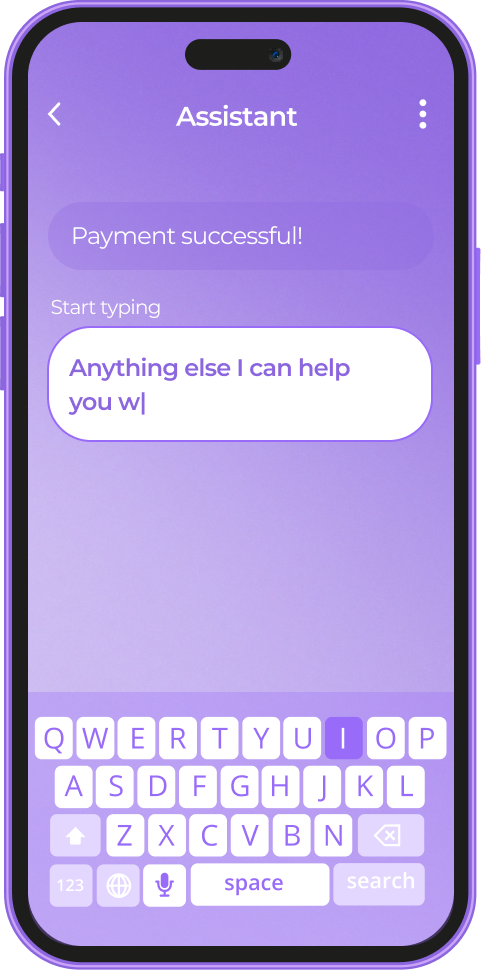
The whole process takes a split second. Therefore, the best deals are presented to a customer while rhey are looking into a product and are ready to buy it right away.

Challenges

  • Redesign and refactor existing system, going from a monolith application to micro-services architecture to support growing number of offers and impressions.
  • Monitor and orchestrate micro-services to provide high availability and low latency service to customers.
  • Implement online and offline deal making process, reliable tracking transactions and accounting commissions.
  • Support existing system functionality lacking original developers’ knowledge.

Solution

We delivered online and offline deal-making process by collecting requirements, designing a new system, planning a change to the existing product and successfully integrating it together. The existing functionality has been maintained throughout the process. It was covered with automatic tests and redesigned to support a growing number of requests.

To support operations, we implemented monitoring of backend services while providing reliable tracking of transactions and making user’s behavioral data available for data analytics.

We have done major refactoring to unify approaches used throughout the micro-services, which lowered costs for operations and maintenance.

We also have:

  • fixed existing security issues and implemented best practices to protect the business from common security threats, which was confirmed by penetration testing done by an independent contractor;
  • implemented event tracking for behavioral analytics;
  • managed cloud resources and implemented automation which reduced operating costs;
  • set up DevOps practices and implemented continuous integration and delivery;
  • redesigned a system to enable horizontal scaling.

Key features

The client has obtained the desired functionality in time to run partnership programs with online and offline shops. The delivered platform was cloud-ready and modular, allowing the scaling of hot spots and handling business growth and peak load.

The benefits of the delivered platform are:

Ability to handle increasing traffic

Monitoring the system in a real-time mode

Gathering of customer behavioral data for analytics purposes

Integration with third-party analytics products

Vendor-free deployment to cloud, no lock-in to AWS

Performing the expected functions fast and accurately

The client was pleased with our fulfillment of the requirements and the recommendations of the affiliate partners. We are currently continuing to maintain the stable operation of the platform.

Technologies

JavaScript was chosen as a common language for the platform. The existing system used a mixture of CoffeeScript and pre-ES5 code. We used Babel to bring the expressiveness of ECMAScript 2016 to every service.

The system was deployed to Amazon EC2 using Terraform, Ansible and Docker, with core components independent from AWS platform offerings. The delivered solution is not locked to AWS.

MongoDB, Elasticsearch and Redis were used as operational data storages.

Continuous integration and delivery were implemented around Git repositories using the Gitflow model. The integrated setup of Jenkins, Docker, Slack and GitHub Status API was used to implement DevOps practices.

Prometheus and Graphana were used to build a backbone for backend monitoring. Sentry was used on both the frontend and backend to catch runtime errors from all environments.

Node.js and React were chosen as two pillars to establish a common ground and allow, among other things, server-side rendering and code reuse between web application, browser add-ons and mobile application created in React Native.

Amazon Kinesis, Redshift and S3 were used to build analytics platform open to third-party analytics products, e.g. Tableau and Amazon Quicksight.

An increasing number of offers and data crunching tasks were gracefully handled by a scalable pool of workers getting jobs from the RabbitMQ queue.
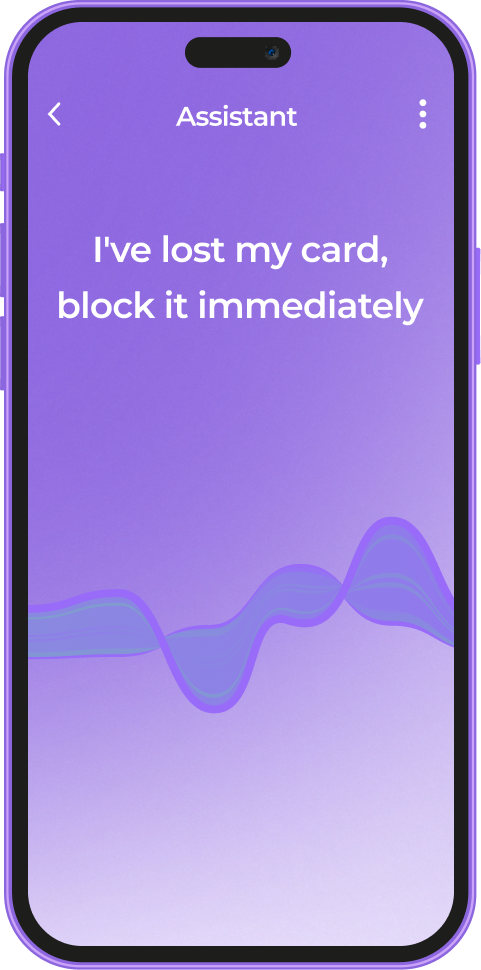
npm was used for public and private package registry. The combination of semantic versioning, GitHub Releases and private npm registry allowed the sharing of knowledge inside a distributed team.
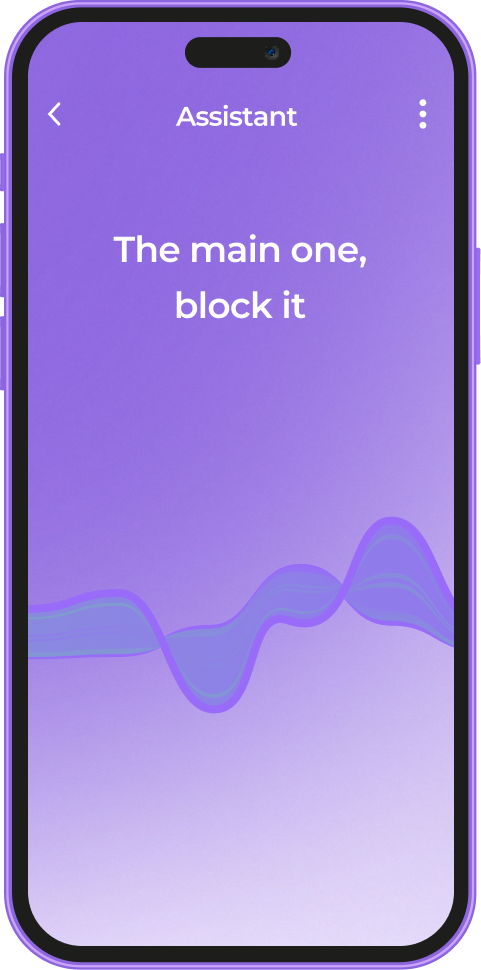

NodeJs
Github
React Native
RabbitMQ
npm
Elasticsearch
Redis
Prometheus
Grafana
Sentry
Docker
Babel
Webpack
Ansible
Jenkins
Terraform
MongoDB
Amazon Web Services
Anna Vasilevskaya
AI modified real photo
Anna Vasilevskaya
Account Executive

Get in touch

Drop us a line about your project at
[email protected] or via the contact
form below, and we will contact you soon.