AI Adoption Workshop for a B2B SaaS Company

AI Adoption 
Workshop for a B2B SaaS Company

How Instinctools helped a data-intensive enterprise software provider turn scattered AI ideas into a structured and balanced adoption plan with 16 opportunities narrowed into a prioritized, connected shortlist, specific usage scenarios to show how the recommended capabilities would work in practice, and governance foundations needed to scale AI securely.

Business challenge

For many B2B SaaS companies, the main barrier to AI adoption is turning scattered AI enthusiasm into a focused, executable roadmap.

Without a clear adoption strategy, AI initiatives can easily fragment across the organization: engineering is busy automating parts of the software lifecycle, product teams chase sticky client-facing AI features, sales look for pipeline intelligence, and customer success teams try to make onboarding and support faster. On top of all that, leadership wants speed, but also governance, data protection, and proof that their investments will create measurable business value.

That was the point our client, a SaaS company providing data-intensive workflow and analytics software for enterprises, had reached. From our early conversations with the client, it became clear that the company was eager – urgent, even – to adopt AI. The pressure came from two sides. Externally, the market was moving fast: competitors were actively rolling out AI-powered features and every month spent experimenting without a plan increased the risk of falling behind. Internally, teams were already using and testing AI tools but struggling to turn that activity into a shared direction.

The organization had not yet agreed on what AI should mean for the business first: internal productivity, product differentiation, sales acceleration, or all three. This lack of alignment created a risk of moving too fast in too many directions at the same time.

There were four critical questions hanging in the air:

  • What are the highest-value AI opportunities for our business?
  • Which initiatives should we start with and why?
  • Which foundational capabilities must be in place before client-facing AI becomes safe?
  • How do we move quickly without creating duplicated pilots, governance gaps, or new technical debt?

Struggling to find a way through that uncertainty by themselves, the client turned to Instinctools for an AI adoption workshop.

Solution

To help the client move from an open-ended AI exploration to a structured, actionable roadmap, Instinctools ran a custom AI adoption workshop, designed as a phased engagement. It combined pre-workshop discovery, two intensive live workshop sessions, the synthesis stage, executive pre-read, feedback-driven polishing, and a final team readout.

A horizontal flowchart with six color-coded steps: Pre-workshop discovery (purple, microphone icon), Live session (Day 1) (red, speech bubble), Live session (Day 2) (yellow, car), Synthesis (blue, lightbulb), Executive pre-read (green, document), and Polishing (orange, sliders), ending with Final demo (red, presenter). Dashed arrows connect the steps, showing the process flow.
Flowchart showing: Pre-workshop discovery (microphone icon), Live session Day 1 (chat icon), Live session Day 2 (people icon), Final demo (person presenting icon), Polishing (sliders icon), Executive pre-read (clipboard icon), Synthesis (lightbulb icon).
A vertical timeline shows seven stages: Pre-workshop discovery (purple mic icon), Live session Day 1 (red monitor icon), Live session Day 2 (blue monitor icon), Synthesis (green lightbulb icon), Executive pre-read (light green clipboard icon), Polishing (yellow sliders icon), Final demo (red screen icon).

Each phase was built on the results of the previous one. First, we captured the client’s current state, then mapped the opportunity space. From there, our experts pressure-tested the first prioritization signals instead of just accepting them. And, finally, we converted workshop inputs into a practical roadmap.

The engagement was intentionally not positioned as a technical architecture project or implementation plan. Its purpose was to help the client make better AI adoption decisions: where to begin, which initiatives depended on shared foundations, and what guardrails were needed before moving into more sensitive product-facing AI.

By the end of the workshop, the client received eight core deliverables:

  • Strategic recommendations
  • AI opportunity map
  • Prioritized initiative shortlist
  • Reusable context-to-action model
  • Examples of usage scenarios
  • Tailored adoption paths
  • AI policy guidance
  • AI training and best practices framework
  1. Using a tailored survey 
as the entry point instead of a generic AI agenda

The workshop began before the live sessions and was grounded in the client’s real operating environment. We prepared a pre-workshop survey – a questionnaire that was sent to the client’s team in advance – to understand how people were already using AI, where they saw the biggest operational pain, what they expected from AI adoption, and which risks they considered most important. The survey included client-specific questions informed by the company’s products, workflows, industry context, and previous conversations with stakeholders.

A digital pre-workshop questionnaire form titled “AI Adoption Workshop – Pre-Workshop Questionnaire” is displayed on a tablet. The form includes sections for business priorities, urgency, current AI usage, top tools, pain points, desired outcomes, and a purple Submit questionnaire button.

The survey revealed that many employees were actively experimenting with AI tools, but adoption was uneven and not governed by one shared playbook.

It also showed where the pain was most concentrated:

  • Product documentation was often stale or incomplete, creating onboarding friction and repeated rework.
  • Communication and coordination: email overload made it harder to track open items, owners, and follow-ups.
  • Sales and customer workflows, such as sales pipeline tracking, client onboarding, and customer feedback synthesis, also emerged as opportunities for AI-enabled support.

Thanks to this pre-work, by the time the live workshop started, our team was not walking in empty-handed. We had already shaped stakeholder input into a working hypothesis: the client’s biggest opportunity was found in a connected set of use cases around knowledge work, distributed context, and governed execution.

  1. Mapping AI opportunities across the business on Day 1

The first day of the live strategy session started with us presenting the survey findings back to the client’s team. We used it as a way for stakeholders to see where the organization was aligned, where opinions diverged, and which operational pains had the strongest signal.

From there, we moved to the AI opportunity map.

During the session, Instinctools’ AI experts introduced a set of potential initiatives grouped into four families:

A flowchart on a grid background shows four colored boxes. The top yellow box, titled Essential AI enablers (parallel track), lists AI governance, monitoring, training, and platform capability. Three lower blue boxes list SDLC, business operations, and customer experience AI uses.
A grid background with four colored boxes containing text. The top yellow box is titled “Essential AI enablers (parallel track)” and lists four items. Below, three blue boxes list items for “SDLC,” “Business operations,” and “Product and customer experience.”.
A vertical flowchart shows four colored boxes labeled: Essential AI enablers (parallel track), SDLC, Business operations, and Product and customer experience. Each box lists related tasks like AI governance, onboarding, requirements writing, and explanations.

The team then reviewed, discussed, and voted on the opportunities using practical decision lenses: value, effort, feasibility, risk, business relevance, and dependency on other capabilities.

This way, stakeholders could see where ideas clustered, where opinions diverged, and where certain opportunities depended on others.

For example, specification writing initially looked like a standalone AI use case. But as discussions progressed, it became clear that specification quality was tightly connected to product documentation, context gathering, QA, onboarding, and support. A narrow AI spec-writing tool would not solve the broader issue unless it could access current, trusted product and workflow context.

  1. Uncovering the shared pattern on Day 2

One of the most important outcomes of the workshop was the realization that several high-interest initiatives were symptoms of the same underlying problem.

Specification writing, customer onboarding, support triage, sales follow-up, retention signal interpretation, and product assistance all depended on the same capability: the ability to assemble trusted context from distributed systems and turn it into useful, reviewable action.

If the company built separate AI tools for each workflow, it would likely duplicate effort, create inconsistent governance, and rebuild the same context layer multiple times.

To avoid that, Instinctools reframed the shortlist of initiatives around three reusable solution layers:

  1. The AI Data Platform capability to provide governed, permission-aware access to approved data sources and separate operational and product data planes.
  2. The cross-functional Context Layer to organize distributed information into structured, source-backed briefs with assumptions and decision points.
  3. The cross-functional Execution Layer to turn those briefs into fully managed workflow actions, including routing them to the appropriate people, tracking progress, issuing notifications and reminders, handling escalations, managing approvals, and maintaining a complete audit trail of changes.
A flowchart showing AI capability blocks. Two top blocks: In-Product Assistant and Pipeline Support Assistant (purple). A bottom row features AI Data Platform (blue) and Live Product Docs. (green), connected by arrows, with faded surrounding text and blocks.
Diagram showing a reusable AI capability stack with highlighted sections: “In-Product Assistant” and “Pipeline Support Assistant” (top layer), “AI Data Platform” and “Live Product Docs” (bottom layer), connected by green arrows, with other elements faded out.
Infographic showing Work AI assistants for product, support, and engineering, integrating with tools like Slack, GitHub, Jira, and more. Highlights AI data platform, live product docs, and the advantages of these AI solutions for workflows and knowledge sharing.

With those layers in place, the shortlist expanded with two higher-level interfaces: an In-Product Assistant for controlled customer-facing guidance and a Pipeline Support Assistant as an internal-facing application for pipeline intelligence, follow-up, and sales action queues.

  1. Synthesizing workshop inputs into tailored adoption paths

After the two live sessions, Instinctools moved into synthesis. Our team consolidated survey findings, Miro board activity, workshop discussions, voting results, initiative feedback, risks, dependencies, and adoption logic into a coherent roadmap.

A major part of the synthesis was translating a broad set of possible initiatives into adoption paths leadership could compare. The client had several valid directions:

  • Delivery covered product documentation, specification gathering, delivery readiness, and fewer clarification loops between product, engineering, QA, and customer-facing teams.
  • Operations focused on customer onboarding, support, sales follow-up, and process execution across operational systems.
  • Product captured the workflows around the product customer-visible AI features inside the company’s SaaS products, such as natural-language explanation, guided workflows, and stronger demo or trial differentiation.

The recommended route combined Delivery and Product and here is why. Starting with delivery would give the client a faster path to internal proof of value through product documentation, specification gathering, and context assembly. Meanwhile, extending toward product would create a credible path to customer-facing differentiation, but only after trusted product knowledge, governance rules, and human review patterns were in place.

This sequencing balanced speed with control and allowed the client to move quickly where risk was lower and prepare carefully where AI outputs could affect customer trust.

  1. Aligning C-level stakeholders through a pre-read and polishing the deliverables

Before the broader final readout, Instinctools prepared a pre-read for senior stakeholders. This was a crucial part of the engagement, as it helped decision-makers to fully understand a suggested AI roadmap, challenge it, and align owners, budgets, data boundaries, and governance expectations.

After the executive pre-read, we refined the materials further.

One of the client’s main concerns was that parts of the roadmap still felt too abstract. The recommendation made sense at the capability level, but stakeholders wanted to see how the proposed layers would work in practice.

To address this, our AI engineers added usage scenarios showing how the Data Platform capability, Context Layer, and Execution Layer could work together in real workflows.

For example, in a client support scenario, a support specialist needs to answer why a client cannot perform a specific product action. The workflow using Instinctools’ layered approach works as follows:

Trigger:

"Investigate a customer issue”

Template selection:

The Context Layer uses a Client / Service Context Brief template specifying what data is needed.

Data Platform retrieves approved data:

  • Client account record from CRM / Salesforce
  • Relevant support ticket history
  • Permitted email or Teams context
  • Product Documentation
  • Release notes
  • Known-behavior entries
  • Product setup or permissions data (as allowed)

Context Layer prepares structured brief:

  • Summarizes what is known (e.g., conditions for the action, recent release changes, previous client questions, documented limitations)
  • Highlights what is unclear (e.g., current client setup, workflow configuration)
  • Lists sources supporting the information
  • Suggests next questions to ask

Execution Layer creates an action workflow:

  • Assigns client services to confirm missing setup details with the client
  • Directs support to check workflow configuration
  • Creates a task to review/update product documentation if needed
  • Prepares final client response after dependencies are complete
  • Escalates unresolved issues according to rules (e.g., notify support lead if not resolved in 2 business days)

These scenarios made the final outputs more practical. The client could see not only what Instinctools recommended, but how the recommendation could operate across different workflows.

  1. Making governance an essential part of the adoption path

As the client’s software operated in a trust-sensitive enterprise environment, a wrong or unsupported AI answer could create reputational consequences, even when the underlying workflow was not legally regulated. So before AI could safely show up in the product, the company needed rules that were practical enough to use and strong enough to trust.

Instinctools advised the client to formalize how AI would be managed across the organization. That included internal rules for employee AI use, external policies for product-facing AI features, guardrails around prompts and data access, and monitoring for AI activity once adoption started to scale.

The workshop identified several non-negotiable guardrails:

  • separating operational and product data planes;
  • requiring human confirmation for customer-facing actions or business-critical outputs;
  • making sources traceable and uncertainty visible;
  • applying role-based access control and tenant isolation before AI retrieval touches client data;
  • monitoring accuracy, drift, latency, token cost, usage patterns, and adoption;
  • assigning clear owners for AI policies, approvals, and ongoing review.

At the same time, Instinctools avoided turning governance into a heavy upfront program. The recommendation was to start with lower-risk internal pilots, learn from them, and only then move into more sensitive customer-facing AI scenarios with the right safeguards already in place.

Before

  • AI adoption was active but uneven. There was no shared playbook for where AI should be applied, how outputs should be reviewed, or which initiatives should be invested in.
  • AI ideas were scattered across delivery, product, operations, and sales.
  • High-impact pains looked separate. Specification writing, documentation, onboarding, QA, support triage, and sales follow-up appeared to be different problems.
  • Without reviewed product knowledge, source traceability, monitoring, and human review rules, product AI created trust and reputational risks.

After

  • The client received a structured AI roadmap with concrete usage scenarios tied to business value, dependencies, governance, and adoption paths.
  • The company had a prioritized shortlist of connected initiatives.
  • The roadmap identified the shared root problem behind many workflow pains: employees manually assembling distributed context across systems, documents, teams, and tenants.
  • Governance became a practical adoption enabler, with recommendations around data separation, human confirmation, source traceability, role-based access, monitoring, and AI use policies.

Business value

  • 16 AI initiatives mapped into a shared opportunity map, giving the client a clear view of where AI could create value across delivery, product, operations, and governance.
  • 5 connected priorities shaped into a coherent adoption model
  • An adoption path balancing fast internal value with future customer-facing differentiation
  • Concrete usage scenarios showing how the recommended capabilities support real workflows
  • Practical governance recommendations for scaling AI without undermining customer trust.
  • Avoiding a common AI adoption trap of launching visible pilots before the knowledge, context, and governance foundations are strong enough to support them

Multiplier effect

The workshop value lies in separating attractive ideas from executable initiatives, identifying the foundations multiple use cases depend on and giving leadership a defensible sequence for action. Without a structured adoption process, teams can easily launch disconnected pilots, duplicate data work, underestimate governance needs, or chase customer-facing features before the underlying knowledge base is ready.

A well-run AI adoption workshop gives companies under pressure to “do something with AI” a shared view of where AI can be truly useful, what should be built first, what should wait, and how to move from experimentation to responsible execution.

A large audience of people sits facing a stage with two speakers, one standing and one seated. The scene is lit with blue lighting, creating a professional atmosphere typical of a conference or seminar. The speakers appear blurred in the background.

Ticketing Platform

Full Revamp of a Ticketing Platform for Officina

Nowr

How rebuilding a flawed ticketing platform’s prototype from scratch helped an Italian startup accelerate software development by 40%, reduce infrastructure and DevOps overhead by 25%, 
and get a production-ready solution.

Business challenge

Every growing product carries the weight of early-stage decisions. What accelerates launch in year one can quietly constrain scalability by year two. Our client, Officina s.r.l., an Italian startup, was no exception.

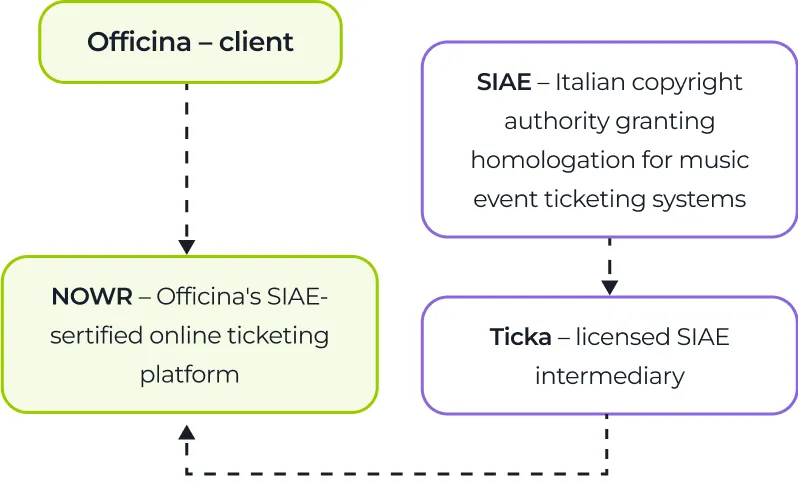
After launching as an offline event platform, the company decided to enter the regulated online ticketing market by obtaining SIAE certification, a mandatory requirement for selling tickets to music events online in Italy.

To move fast with this new project – NOWR – and reduce certification time, they made some tradeoffs that later shaped the platform’s operational and technical constraints and became hard to ignore.

A flowchart with four labeled boxes: Officina – client at top, NOWR – Officina’s SIAE-certifed online ticketing platform below it, SIAE – Italian copyright authority granting homologation for music event ticketing systems to the right, and Ticka – licensed SIAE intermediary below SIAE. Dashed arrows connect the boxes.

Ticka-imposed limitations

Instead of pursuing direct SIAE regulatory approval of their own ticketing infrastructure, Officina chose to operate through Ticka, a licensed SIAE intermediary. While this decision reduced time-to-market, it also meant a few technical bottlenecks:

  • No smooth integration path. Connecting the platform via API simply wasn’t on the list. Operations had to rely on export/import files and manual copy-paste.
  • No built-in booking or refund logic. Critical safeguards had to be implemented outside Ticka.

Rigid architecture and self-contradictory infrastructure

Although outsourcing software development has numerous benefits, you reap none of them if you partner with an unreliable company. That’s what initially happened to Officina. Their previous contractor walked away leaving:

  • A monolithic, hard-to-scale architecture
  • A mix of Google Cloud and AWS infrastructure
  • Three separate backends
  • Fragmented frontend drafts
  • No CI/CD pipeline
  • Multiple code repositories

Torn between operational constraints and a brittle technical foundation, the client needed a trusted tech partner to assess what could be preserved, what required rebuilding, and how to work around Ticka-related limitations. Instinctools’ dedicated team proved to be up to the task.

Solution

After evaluating the development artifacts, it became clear that rewriting the platform from scratch would be faster, safer, and more future-proof than continuing to patch up and reuse the legacy core.

  1. Replacing a rigid monolith with flexible and secure microservices

Once the decision to rebuild was made, the question was how to design a platform that would not collapse under its own growth again. That’s why, we deliberately chose a microservices architecture as the structural backbone of the new NOWR platform.

What it meant in practice:

  • Clear function boundaries
  • A dedicated database per service
  • No shared internal logic
  • Service-to-service communication via REST and message queues

As Officina’s business model depends on third-party providers, including SIAE intermediaries like Ticka and payment operators like Stripe, staying flexible is a tough call. We designed every external integration as an isolated microservice, so that if the client’s providers change, the platform can adapt without undergoing another full rewrite.

Our delivery stack included:

  • NestJS to structure scalable backend services
  • Nx mono repository to maintain development speed without sacrificing modular boundaries
  • REST for fast frontend iteration
  • Message queues for asynchronous service coordination
  • Separate databases per microservice to prevent tight coupling

The outcome was strategic optionality. NOWR is no longer locked into architectural decisions made under time pressure years ago. The new foundation supports experimentation, provider replacement, and controlled scaling, all without destabilizing the entire system.

  1. Moving from two clouds to one

Ticket sales, especially for SIAE-regulated events, require strict ordering. Any inconsistency brings the risk of customer disputes, compliance violations, and revenue loss. Officina’s fragmented infrastructure simply wasn’t built for that level of rigor.

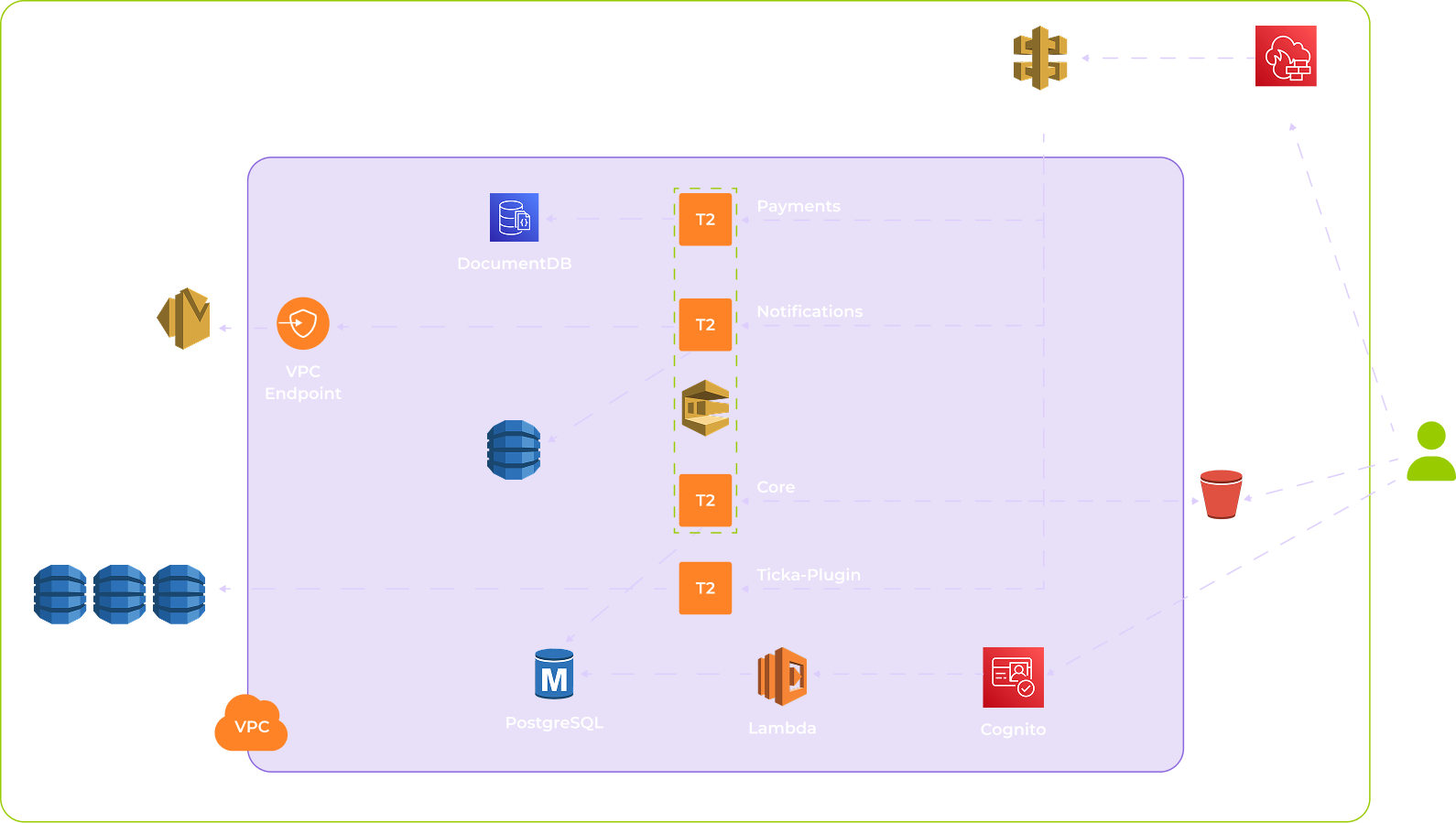
With some components running on Google Cloud and others on AWS, it caused operational inconsistencies and hindered scaling initiatives, not to mention the cost of maintaining two setups. As Officina already used AWS S3 as their primary cloud storage, we consolidated the rest of the stack on AWS to standardize operations and ensure correct processing order and resilience under load:

  • Amazon SQS/SNS for queued workflows and event notifications
  • EC2 with Elastic Load Balancing (ELB) to seamlessly scale server performance
  • Asynchronous processing for non-blocking operations

As part of the consolidation, we migrated operational services and related datasets from Google Cloud to AWS S3. This included transferring application data, reconfiguring storage, and aligning networking and access policies.

Operationally, shifting to a single cloud environment instead of juggling two partially integrated ecosystems also simplified DevOps activities, from monitoring deployment pipelines to managing cloud permissions and handling incident response.

A cloud architecture diagram showing AWS services: DynamoDB, SES, DocumentDB, PostgreSQL, Lambda, Cognito, API Gateway, WAF Captcha, S3, and a VPC. Services are grouped in a purple box with labeled components: Payments, Notifications, Core, and Tickla Plugin.
  1. Building a Ticka synchronization plugin to ease regulatory constraints

Fast SIAE certification with Ticka without full direct regulatory approval came at the price of tooling restrictions  For instance, our dedicated team had to bypass the lack of flexible APIs and limited automation capabilities. Since full API-level automation was off the table, we designed a viable workaround that eliminated the majority of manual steps, reduced copy-paste errors, and caught inconsistencies before they could affect ticket sales. 

Instead of embedding Ticka logic directly into the business core, we isolated it behind a dedicated Ticka synchronization plugin that serves as a controlled integration layer:

  • Pulls SIAE-certified events and tickets from Ticka
  • Synchronizes them with NOWR’s internal data structures
  • Automates export/import routines wherever technically possible
  • Validates incoming data before it enters the core system

That way, Ticka is encapsulated within its own service boundary and can’t leak constraints into the rest of the NOWR’s architecture.

  1. Ensuring compliant fiscal flows across the NOWR platform

Operating within a restricted certification scope meant that fiscal and commission handling required logic beyond Ticka’s approved tooling could support. To keep the platform compliant without slowing down ticket sales, we engineered safeguards around fiscal and payment workflows.

One of the critical challenges was monetizing ticket commissions in a tightly regulated environment while maintaining clear separation between organizer revenue and platform fees. To address it, we built a compliant fiscal backbone through integration with fiscal.com.

  • Real-time fiscalization of transactions, with compliant fiscal records generated automatically
  • Separate fiscal treatment of platform commissions, ensuring intermediary revenues were handled correctly
  • Clear audit trails for full transaction reconciliation
  • End-to-end traceability connecting each ticket sale to its fiscal record
  1. Derisking ticket purchase flow

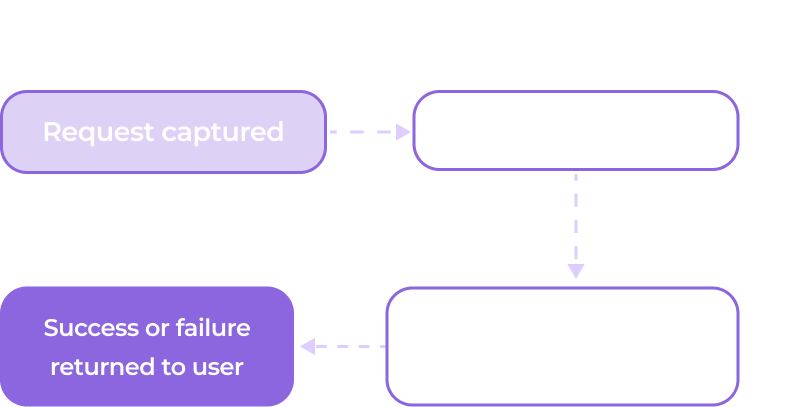
When moving to a unified AWS-based infrastructure, we also reworked the ticket purchase flow. Previously, it ran synchronously: meaning, if any downstream component stalled or failed, the entire transaction was exposed to errors and duplication.

A simple flowchart titled Legacy flow in light gray. It has four boxes: Request captured, Direct call to provider, Immediate processing attempt, and Success or failure returned to user. Purple lines show the process sequence between boxes.

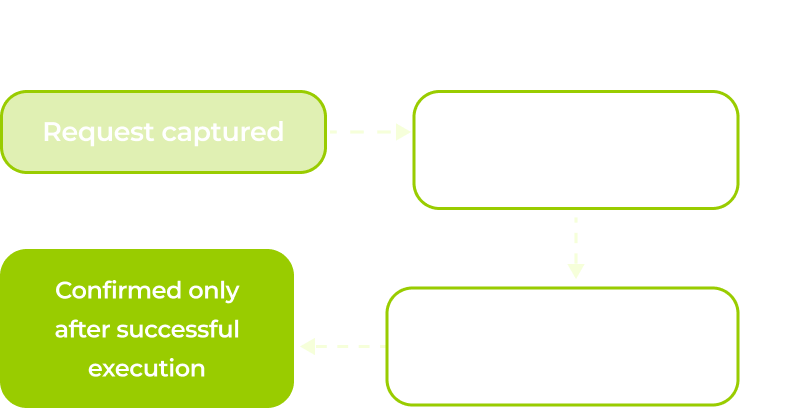
To minimize failed or duplicated transactions, we replaced direct synchronous calls with queued workflows.

A flowchart with three boxes connected by dotted arrows. The first box, highlighted, says Request captured. The second, faded, says Placed in a controlled queue. The third, faded, says Processed in strict sequence. Below the first is Confirmed only after successful execution.
  1. Orchestrating multi-party payments

As NOWR evolved into a platform that connects ticket buyers with event organizers, one challenge became central: moving money reliably between multiple parties without adding friction to checkout.

Since the market of software systems purpose-built for such transactions is broad, there was no need to hardcode financial logic into the platform. We implemented Stripe Connect, purpose-built exactly for multi-party payment flows.

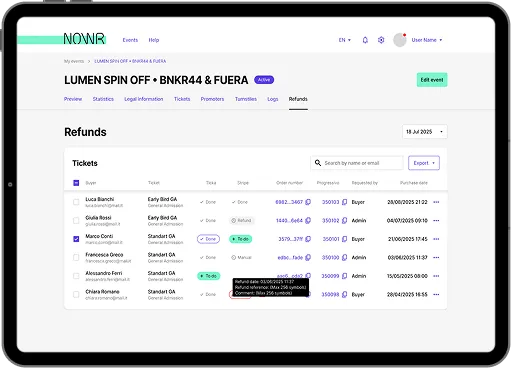
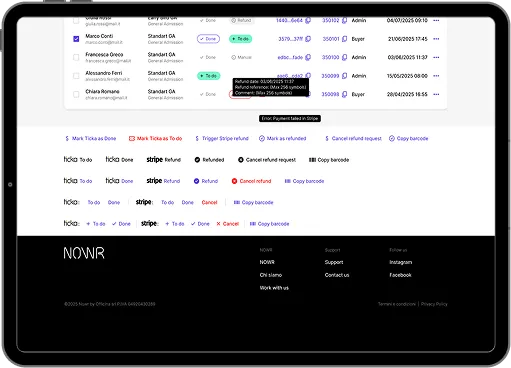
A tablet displays a ticket refund management dashboard for an event. The screen shows a table listing ticket holders, ticket types, status, refund amounts, and admin notes, with search and export options at the top right.
A tablet screen displays an admin dashboard with a list of user transactions, including names, status, dates, and roles. Below, there are buttons for various actions like Refund, Copy barcode, and Stripe refund. The NOONR logo and footer links are at the bottom.

But this isn’t just “accepting payments via Stripe.” Each organizer is onboarded as a separate sub-entity within Stripe that is guided through KYC verification and configured for controlled payout flows. Revenues are automatically split between organizers and the platform, with Stripe handling fund routing and regulatory checks on its end.

Such an approach allowed the client to:

  • Manage multiple organizers within a single infrastructure
  • Automate commission distribution
  • Maintain full financial transparency and traceability
  1. Delivering advanced ticketing mechanics

Once compliance and payment flows were in place, we focused on what makes a ticketing platform truly competitive: flexible, intuitive ticketing built for the operational complexity of real-world events.

To stand out against long-established players and give organizers real reasons to switch to NOWR, our team introduced:

  • Event scheduling

    An event is no longer limited to a single calendar entry. It can now include multiple schedules, allowing organizers to offer tickets for the same event across dozens of dates and time slots.

  • Event grouping

    Separate events can be brought together into a logical collection, for example, a three-day festival where each day is managed independently but presented as a single, cohesive experience.

  • Subscriptions and multi-event passes

    Multiple schedules, including those across grouped events, can be bundled into a single discounted pass, making it possible for users to purchase access to several dates in one transaction.

  • Promo code functionality

    Public and personalized discounts give organizers more room to experiment with pricing strategies and tailored ad campaigns.

  1. Building a solid admin panel

While building an MVP, we kept thinking strategically and planning for the time when NOWR will grow into a full-scale ticketing platform and compete with Italian market leaders like Ticketmaster and TicketOne.

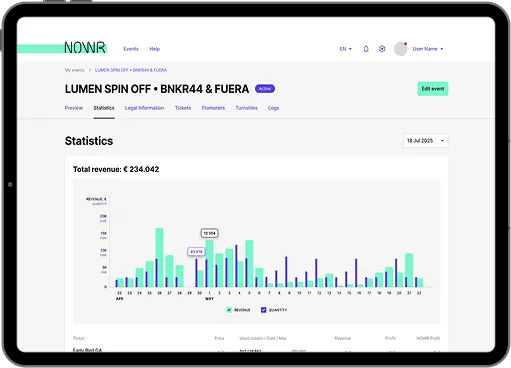
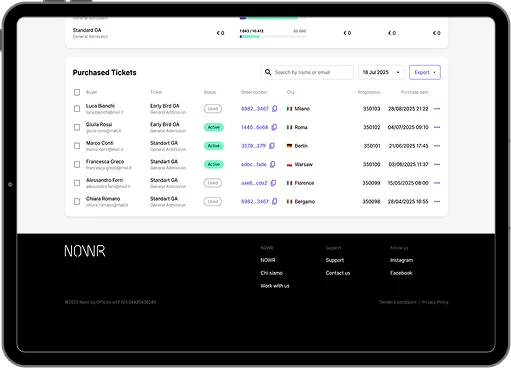
To head off future bottlenecks, we focused on the back-office part of the platform, delivering a full-featured admin panel. At its core is a two-step moderation framework applied both to organizer onboarding and event creation. New organizers require approval before activation, and newly created events don’t go live automatically, but are routed to moderation first, where admins can edit, approve, or reject them.

A tablet displays a statistics dashboard for the event “LUMEN SPIN OFF + BNKR44 & FUERA.” A bar chart below shows monthly revenue and quantity data, with a total revenue of €234,042 highlighted at the top.
A tablet screen displays a ticket management page showing a list of purchased tickets with buyer names, ticket types, status, order numbers, cities, issue dates, and event dates. The interface also includes filter options, export button, and a navigation menu at the bottom.

This ensures tight operational control and strong platform governance, supported by:

  • Centralized management of accounts and event entities
  • Structured event editing and publishing
  • Real-time oversight of ticket availability and sales performance
  1. Refining brand identity alongside product development

Having contributed to the rollout of hundreds of digital products, we know that functionality alone is not enough to win users. A feature-rich, intuitive platform is only half a solution, but first, it has to catch the customer’s eye.

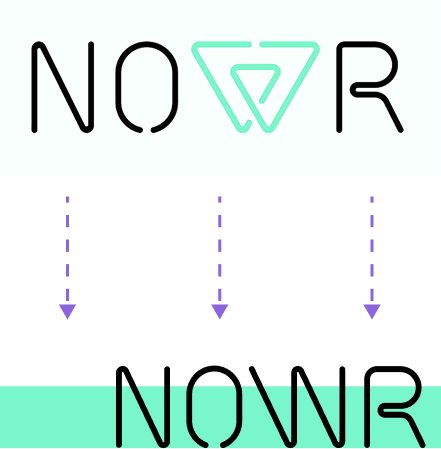
Going beyond engineering, we conducted a brand audit and proposed enhancing the platform’s logo and overall visual language to make it clearer and more cohesive:

  • Modernized the logo for better readability and responsive use
  • Standardized typography, spacing, and color usage across the interface
The image shows NOWR with the W as a turquoise geometric triangle. Below, three dashed arrows point down to a second NOWR, this time with a standard black W. The background has white and turquoise bands.

Before

  • Jerry-built prototype
  • Monolithic architecture with three separate backends and fragmented frontends
  • Mixed Google Cloud and AWS infrastructure
  • No CI/CD and code scattered across multiple repositories
  • Synchronous ticket purchase flow vulnerable to duplication and failures
  • Lack of foundation for compliant fiscal flows
  • No multi-party payments
  • Manual export/import workflows with Ticka
  • Baseline ticketing mechanics

After

  • Solid product
  • Microservices-based architecture with clear service boundaries
  • Fully consolidated AWS infrastructure
  • Structured mono repository with CI/CD pipelines
  • Queue-driven, asynchronous ticket purchase flow
  • Compliant fiscal flows
  • Smooth multi-party payments
  • Custom Ticka synchronization plugin acting as a controlled integration layer
  • Advanced ticketing mechanics

Business value

  • Scalable foundation for growth in a regulated EU ticketing market
  • Stronger platform governance thanks to a centralized admin panel with advanced moderation capabilities
  • + 40% in feature delivery speed thanks to independent microservice deployments
  • – 25% in infrastructure costs after shifting to a single AWS ecosystem

Multiplier effect

The constraints Officina faced, such as rigid legacy architecture, fragmented cloud infrastructure, and dependence on third-party providers with legacy integration options, are far from unique to the entertainment and media industry. Similar bottlenecks emerge in fintech, ecommerce, logistics, healthcare, and any integration-heavy domain where early technical shortcuts collide with long-term growth. If your team lacks the time or perspective to surface and fix them early, an experienced tech partner can step in before technical debt compounds.

Four young adults in a modern office work on laptops displaying code. One person stands, leaning over with a laptop, discussing something with the others, who are seated and listening attentively. Large monitors with code fill the background.

Product Design for Fileverse

Product Design for Fileverse: A Decentralized Collaboration Platform

Fileverse

How a robust product design strategy and its flawless execution helped Fileverse impress users and investors with a feature-rich, decentralized collaboration platform, enabling it to confidently compete with market leaders like Google and Microsoft and secure $1.5 million for further product evolution.

Business challenge

Centralized collaboration platforms are widely adopted for their ease of use. Still, alongside the perks, there’re some inherent drawbacks tied to their architecture, including:

  • Centralized server control

    A vendor controls storage, access, and governance. Users do not truly own their data; instead, they are granted conditional access under the provider’s policies, which can change unilaterally.

  • Data lock-in

    When a vendor updates their data usage or privacy policy, users’ only practical opt-out is to leave the platform entirely, often at the cost of complex, incomplete, or disruptive data migration.
  • Default-enabled AI integrations

    User data may be processed for secondary purposes such as LLM training, pattern extraction, or automated analysis without explicit, informed opt-in. Even when raw data is deleted, derived data or model artifacts may persist.

These and other features create privacy trade-offs around data ownership and user autonomy.

Fileverse, a UK startup operating in the Web3 space, spotted this gap in a market dominated by a few established platforms, such as Google Workspace, Notion, and Microsoft 365, and set out to fill it with a privacy-first alternative. Their aim was to deliver a comparable user experience while fundamentally rethinking the underlying architecture by replacing centralized servers with local and decentralized storage.

That’s how they came up with the idea of the Fileverse Portal – a blockchain-backed space for peer-to-peer file sharing and storage, featuring tools like dDocs for collaborative document editing and dSheets for spreadsheets.

However, the blockchain technology alone wasn’t enough to win customer trust and encourage users to switch from the tools they’d been using for decades. Fileverse had to put a premium on product design to ensure the platform was easy to understand and more comfortable to use from the very first click. To achieve this, the client brought in our product design squad to lead the UX/UI strategy within their development team.

Solution

Designing the Web3 solution meant working in an environment where no user data could be stored due to the product’s decentralized, end-to-end encrypted model. As the platform wasn’t integrated with conventional analytics tools like Google Analytics or Hotjar, we relied solely on user feedback to refine the platform’s interface and functionality.

  1. Laying the foundation: 
a scalable design system

We began by establishing a robust design system, comprising a set of guidelines, reusable design elements, and tools that enable a consistent, scalable, and user-friendly experience. While time-intensive upfront, this investment significantly sped up all design-related tasks later in the process.

  • Design principles that defined the product’s overarching design philosophy and goals, such as “Design with simplicity and clarity”.
  • Style guide detailing the dDocs’s visual identity, including typography, color palette, and spacing rules
  • Component library of reusable UI elements built to maintain consistent styles and behaviors
  • Interaction patterns to ensure a predictable and intuitive user experience
  • Iconography to enhance visual communication
  • Motion and animation guidelines to elevate UX where it matters without overwhelming the interface
  • Accessibility guidelines to make dDocs available to the widest possible range of users
  1. Designing for
blockchain-native workflows

By embracing Web3-native patterns, we introduced several blockchain-specific features that tackled user experience constraints and directly improved usability.

  • ENS-based login option for Web3 users

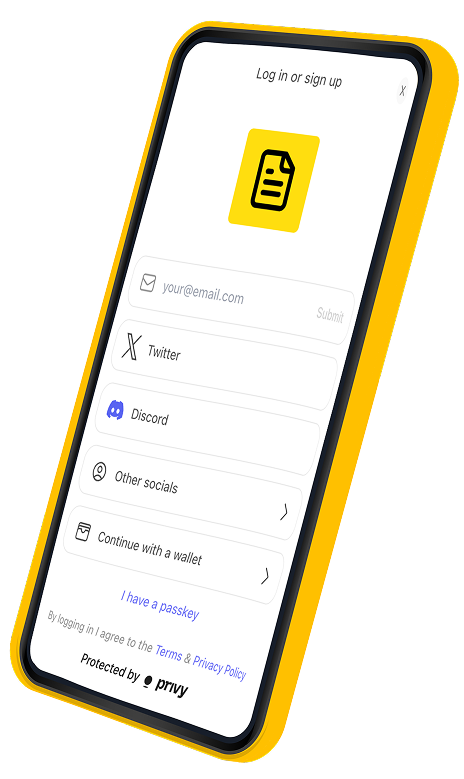
    Along with the standard log/sign-in options like email and socials, we allowed users to enter the system under their ENS (Ethereum Name Service) names linked to their blockchain wallet addresses. This lets users verify their identity without relying on centralized accounts.

  • Refined publishing logic

    We added a dedicated “Draft” state for files not yet published on-chain, giving users the flexibility to edit content before committing it to the blockchain network.

  • Real-time collaboration on top
    of blockchain infrastructure

    Despite relying on the decentralized backend, the platform supports real-time editing. Up to 15 users can collaborate on a single document simultaneously, with suggestions and comments processed without delay.

A smartphone screen displays a login or sign-up page with options for email, Twitter, Discord, other socials, and wallet login. A yellow icon with a document is at the top. Protected by privy is shown at the bottom. The phone has a yellow border.
  1. Offering near-unlimited customizability and workspace control

Earning early user trust required more than strong privacy guarantees. We made customizability a core pillar of the product, giving users complete control over collaboration structure and access.

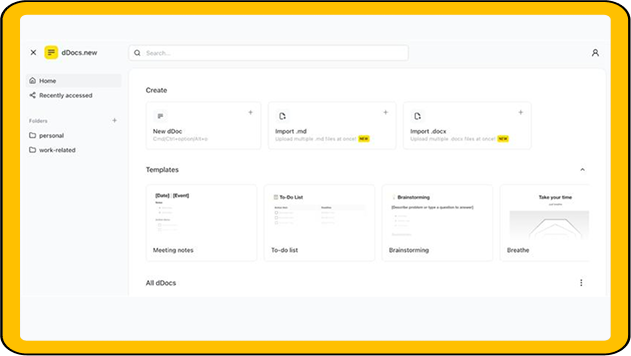
A screenshot of a document creation web interface. The sidebar has options for Home, Recently accessed, and two folders: personal and work-related. The main section shows options to create new documents or import .md/.docx files, and templates for meetings, to-do lists, and brainstorming.
  • Supporting multiple workspaces
    per user

    The platform’s architecture allows a single user to manage multiple workspaces. Within each workspace, users can create teams with custom access rights, while also maintaining a private space for individual work.

  • Introducing internal and public spaces within workspaces

    Users can control the visibility and access of files and folders. When sharing materials publicly, they can customize the public space’s banners and descriptions, reorder sections, adjust card sizes, and more.

  1. Banking on the features that other collaboration platforms don’t have

So we analyzed user reviews of competing collaboration tools to identify small but persistent friction points and addressed them directly in the dDocs and dSheets product experience.

The devil is in the details
  • Slash menu

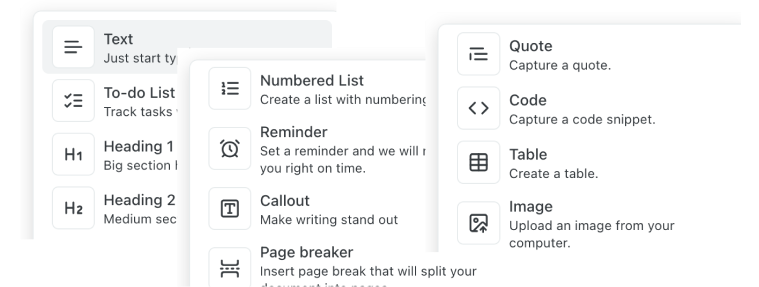
    To improve workflow efficiency, our team introduced a slash menu that enables users to quickly format the document or add new elements.

A cropped menu displays options like Text, To-do List, Heading 1, Heading 2, Numbered List, Reminder, Callout, Page breaker, Quote, Code, Table, and Image, each with a brief description and an icon on a white background.
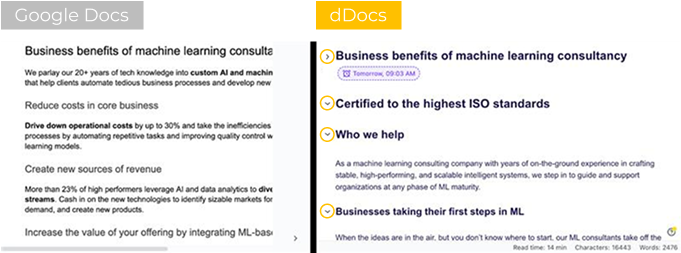
A side-by-side comparison of two machine learning consultancy web pages. The left page, labeled Google Docs, uses plain formatting with black text on white. The right page, labeled dDocs, uses bold headings, bullet points, and colored icons for a more structured, visually engaging layout.
  • Flexible document structure

    We also added foldable headings, allowing users to collapse all content under a heading, simplifying the navigation of large documents.

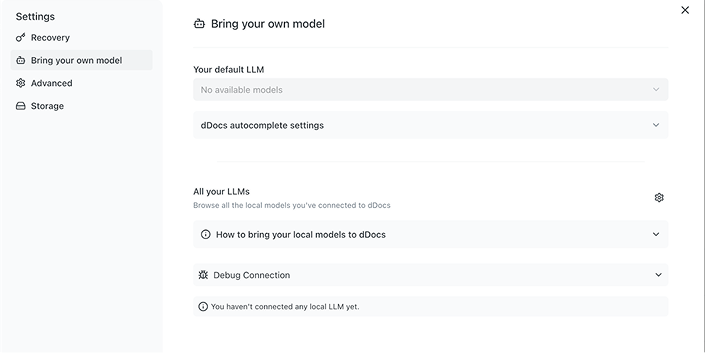
  • Support for local LLM integrations

    Thanks to a ‘bring your own model’ feature, users can connect local LLM providers like Ollama and delegate document writing and editing tasks to the LLMs they have installed on their hardware. That way, users reap the productivity benefits of GenAI keeping their data off external servers and avoiding the costs of third-party subscriptions.

Screenshot of a settings page titled Bring your own model. The menu on the left lists options like Recovery, Bring your own model, Advanced, and Storage. The main section shows dropdowns for LLM settings and messages about no available models.
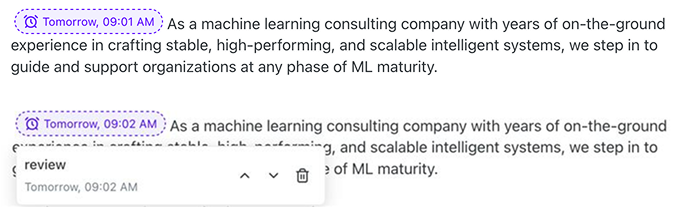
Screenshot showing a text box with a message about a machine learning consulting company. Below, a comment labeled review appears, showing the time Tomorrow, 09:02 AM, with a dotted outline connecting it to highlighted text in the message above.
  • In-document reminders

    Users can set timers directly within the document canvas to manage focus and stay on task without leaving the workspace or relying on external tools.

  • One-click presentation generation

    We empowered users to instantly convert a document into a presentation based on common formatting rules (e.g., H1 becomes an intro slide), making it easy to create event-ready materials from simple notes. These presentations can be viewed in full-screen mode, commented on, or exported as PDF or Markdown files.

Screenshot of a toolbar with icons including a monitor labeled Slides Mode, a share button, and a black Log in / Sign up button. Below are formatting icons for text alignment and exponentiation.
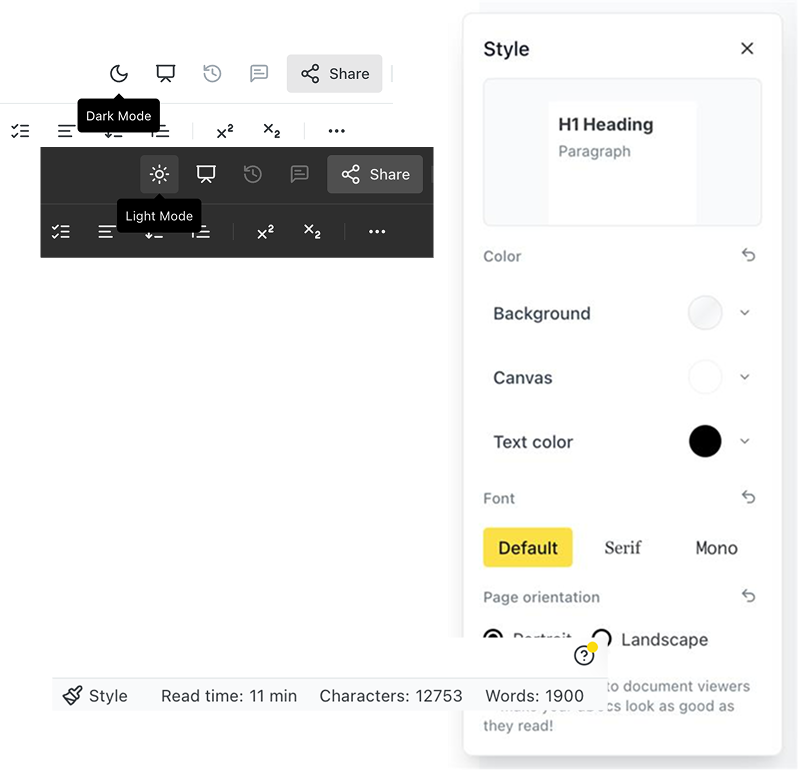
Screenshot showing a text editor interface with style options. Dark Mode and Light Mode toggles are visible. The Style panel on the right shows font, color, and page orientation settings. A toolbar and a status bar with word and character counts are also shown.
  • Interface visual customization

    Our designers added dark mode alongside document-level customization options, such as adjustable colors, fonts, and backgrounds. We also surfaced word count, character count, and estimated reading time directly in the UI to provide immediate utility instead of navigating through sub-menus.

For a seed-stage startup like Fileverse, rolling out such a feature-rich MVP was crucial for securing the interest of both users and investors. With our support, they delivered on both fronts.

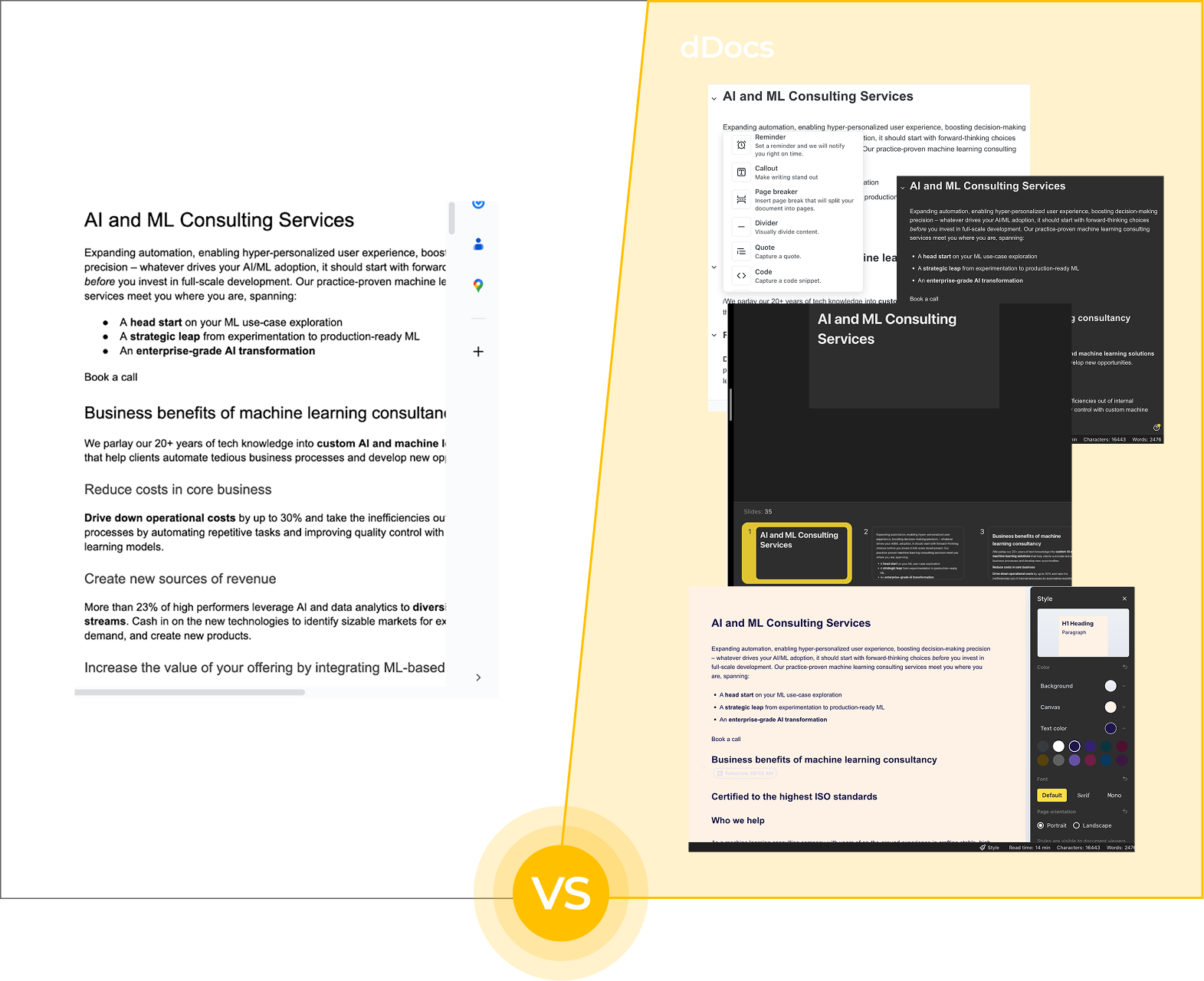
See for yourself how diverse dDocs’ functionality is compared to widely adopted Google Docs.

Split image comparing Google Docs (left, white interface with AI consulting text) and multiple dDocs screens (right, dark and light interfaces showing the same content). Bottom center shows a yellow “VS” circle, dividing the two sides.

Business value

  • Feature-rich collaboration platform built to rival market leaders
  • $1.5 million raised after successful MVP rollout
  • Proactive user community contributing feedback for further product evolution

Multiplier effect

When aiming for a place in a market dominated by several big players, matching the competition is rarely enough. A killer feature can spark interest, but it won’t carry the product on its own. User-centered design is the second card that convinces people to stay. If both are played well, the adoption rate stops being a gamble. This is the kind of impact strong product design delivers.

Client’s testimonial

Rapid Prototyping Services for SaaS

Rapid Prototyping of a Recruitment-Focused Software For a French SaaS Startup

How banking on AI-driven rapid prototyping instead of the traditional approach enabled a French startup to validate their business idea in 4 days instead of several weeks and cut down the cost of developing a product demo by 60%.

Industry:
Technology

AI Development

UX and Design

SaaS Development

Business challenge

“Take your time” doesn’t apply to testing business ideas. If companies aim to get ahead of competitors, they need to test their hypotheses fast. And the timeframe for “fast” has shrunk over the past years. Back in the pre-GenAI era, it was fine to spend up to 8 weeks working on the wireframes, low-fidelity prototypes, and then high-fidelity ones. In 2025, with all AI capabilities available, even two weeks is a luxury. 

For our client, a French SaaS startup, speed to proof could make or break their fundraising efforts. They had an idea of an applicant tracking system (ATS) with the workflows tailored to French labor laws, local data regulations, equal opportunity compliance, etc.

A solid product demo was a must-have to achieve two goals in one go:  

  1. Validate the idea’s viability
  2. Get a tangible asset to “show, not tell” investors to win their financial support

To make it happen, the client needed a software partner well-versed in AI-driven SDLC practices who could deliver a clickable prototype of a future product ASAP. That’s when *instinctools entered the picture.  

Solution

One of the practices our teams lean on to speed up the development process is rapid prototyping with workflow automation platforms. For this project, we used n8n, where software engineers can orchestrate complex workflows with a visual workflow builder instead of hard-coding.

Beyond ease of use, n8n stood out for being:

  • Open-source. With full control over the data, it’s easier for the team to ensure air-tight safety of sensitive information.

  • Scalable. n8n is useful for more than prototypes, as the platform can seamlessly handle up to 220 workflow executions per second.
  • Secure. It’s a SOC 2 audited software with strong access control, debugging, and monitoring mechanisms out of the box.
  • Budget-friendly. With the self-hostable approach, the tool is free to use if you run it on your cloud or hardware.

We started with backend prototyping to ensure the product demo checks all functionality and compliance boxes from the get-go:

  • Integration with Pôle Emploi (French national employment agency), where all job openings have to be posted
  • Integration with the URSSAF portal to submit the DPAE (Déclaration Préalable à l’Embauche) directly without separate logging into the system
  • Integration with local payroll and HRIS vendors, such as Cegid, ADP France, and PayFit, for hitch-free compliance audits and downstream processing
  • Alignment with CNIL (Commission nationale de l’informatique et des libertés), as it enforces French-specific laws on data privacy, such as a 24-month limit for storing the candidates’ CVs

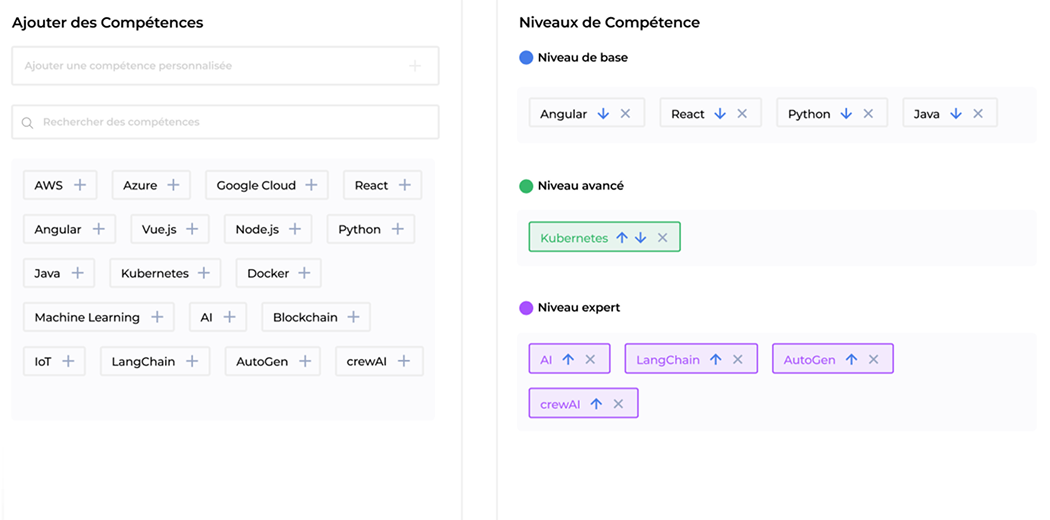
With all the integrations wired up, our UX/UI designers created a clickable product demo. Here’s an example of a drag-and-drop interface that lets HR managers select an applicant’s hard skills.

A user interface in French for adding and categorizing skills. On the left, selectable skill tags like AWS, Python, Java, and Docker. On the right, skills are sorted into “Niveau de base,” “Niveau avancé,” and “Niveau expert” with colored tags.

Four days after the start of the cooperation, the client had a working demo in hand. Not only did it prove the idea to be valid, it also became the centerpiece of their administrative, technical, and financial materials for investor pitches. Within six months, they raised €1 million to accelerate the next stage of development. 

Multiplier effect

Alongside startups in need of financial support from investors, rapid prototyping is a game-changer for established companies wanting to test their hypotheses faster. Earlier, business ideas used to pile up in the backlog, waiting for the team to catch up. 

With AI-powered rapid prototyping, idea verification becomes far less resource-intensive. Development teams no longer need weeks to create a high-fidelity, clickable product prototype – several days are enough. Testing the viability of new features takes even less time and can be done within hours. 

Six hands, each wearing differently colored sleeves, work together to connect four white puzzle pieces over a black tablet on a white table, symbolizing teamwork and collaboration.

Business value

  • Solid product demo ready in 4 days
  • – 60% in the product prototype development cost
  • Prototype features can be reused for full-scale product development

Autonomous AI Sales Representative

Autonomous AI Sales Representative For an Australian Consulting Company

How building an autonomous AI virtual worker enabled an Australian consulting firm to process 20% more leads and boost upselling/cross-selling by 19% while reducing cost per lead by 15%.
Industry:
Technology

AI Development

Enterprise Automation

Business challenge

With AI agents being marketed as a magic wand to wave away employees’ daily grind, businesses have quite high expectations of their potential value. Low-code platforms make it look like building AI agents that automate entire workflows is a matter of a few prompts and several clicks. In reality, platform constraints often block the integration required for those much-coveted outcomes. That’s where our client got stuck.

An Australian consulting company with an in-house IT team but no solid internal AI expertise tried experimenting with Microsoft Copilot Studio to fit their mostly MS-first software environment. Yet, the devil turned out to be in those non-Microsoft integration details. Copilot Studio’s native connectors covered MS apps only, so anything outside the stack called for custom builds the in-house team didn’t have the expertise to deliver.

Microsoft-bound agents made little sense, as a typical day of the client’s sales representatives meant bouncing between Outlook and Teams for communication, HubSpot for client and deal records, OneDrive for shared documents, Jira for project tracking, Miro for brainstorming, Power BI for reporting, and LinkedIn for prospecting and messaging.

Three dead ends of Microsoft-centric agents in a heterogeneous stack were:
Static context

As agents couldn’t track changes across the full toolset and refresh memory on their own, staff members had to manually collect updates from multiple apps and feed the agents.

Prompt sensitivity

Sales reps had to remember which prompts triggered the right responses, adding another layer of mental burden on top of managing pipelines.

Passive mode

Initiating the communication was always the humans’ duty, which also took its toll on the mental workload and became exhausting for sales reps.

While the promise of AI agents was powerful, the reality looked more like AI crutches that only added to the employees’ cognitive load.

Time went by, but the much-anticipated productivity boost never showed. Still, that setback helped the client solidify their vision of a helpful AI agent as one that can:

  • “Walk” within their multi-vendor software ecosystem freely to pull together fragmented information into a dynamic, up-to-date project context
  • Join the conversations of their core human team to make proactive suggestions and then act on them

With this idea in mind, they started looking for a tech partner to build a sales-focused AI agent. The bar was high: the client expected more from an AI vendor than acquaintance with popular AI frameworks, they wanted deep, hands-on experience. Instinctools, with their own agent-building platform, proved to be the right match.

Solution

Instead of forcing a client to adapt to a rigid AI framework, we used our very own technology-agnostic GENE platform to build a truly adaptive autonomous sales representative that each team member can configure to match their personal workflow.

  • By default, the virtual worker is connected to the company’s Confluence, Jira, HubSpot, Power BI, Miro, and OneDrive. 
  • Additionally, employees could drop the AI worker into any Teams chats and channels and give it access to their LinkedIn profile.

Once connected, the AI sales representative kept project context fresh and proactively suggested next steps, or took them, at any stage of the pipeline, from triaging inbound leads to post-project follow-ups. 

The virtual worker reduced staff’s mental strain, freeing them up for complex tasks and high-touch client interactions. The payoff was almost immediate. Within the first month, the client saw measurable improvements in the number of leads processed, cost per lead, upselling/cross-selling, and hours saved.

What is Gene?

GENE is *instinctools infrastructure middleware for building secure-by-design AI agents and multi-agent systems faster than with bare-bones AI frameworks.

What did we leverage in GENE to 
build a better agent?
  1. A single workspace for open-source AI frameworks like crewAI, LangGraph, LangChain, and others.
  2. Built-in responsible AI mechanisms, including bias detection and mitigation, AI governance, and AI regulation compliance.
  3. A library of pre-vetted APIs for a hitch-free agent integration into the client’s software ecosystem.

Compared to building AI agents from scratch, GENE enabled our AI engineers to develop and integrate reliable, scalable agents 70% faster. What typically requires 8–12 weeks with just frameworks alone, was condensed into 2–3 weeks with GENE. 

Here’s how GENE addressed the client’s past frustrations with a constrained low-code platform:
  1. Providing built-in agents that automatically maintain tasks, workflows, and project context up to date, so users don’t have to.
  2. Eliminating repetitive prompting thanks to pre-configured workflows and agents’ ability to “listen” to connected tools, allowing for context-aware actions before being asked.  
  3. Presenting a wide range of whitelisted APIs for AI agents to solve problems independently. 

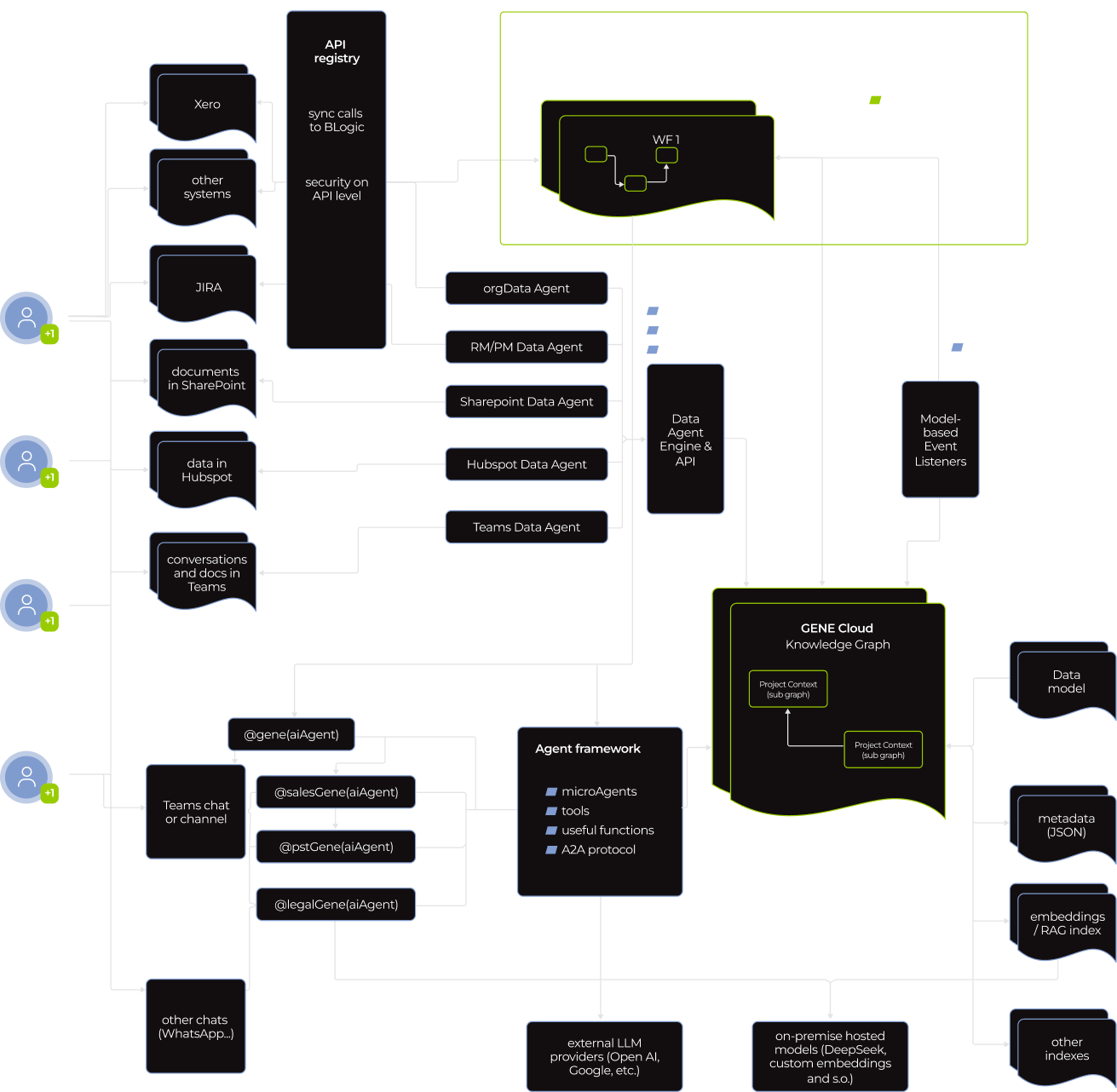
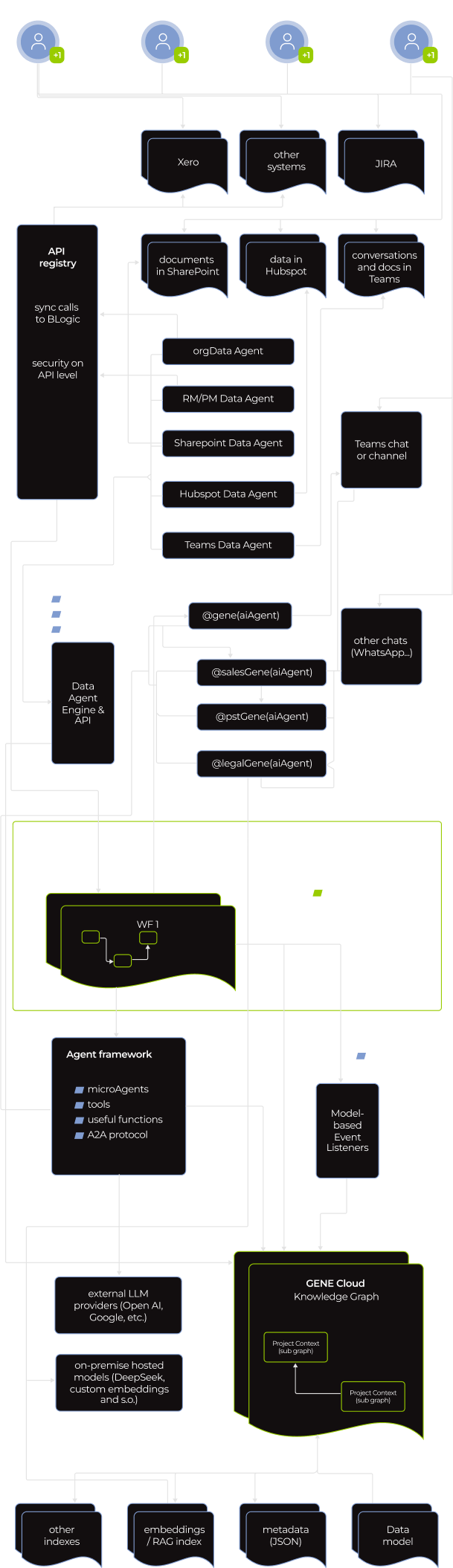
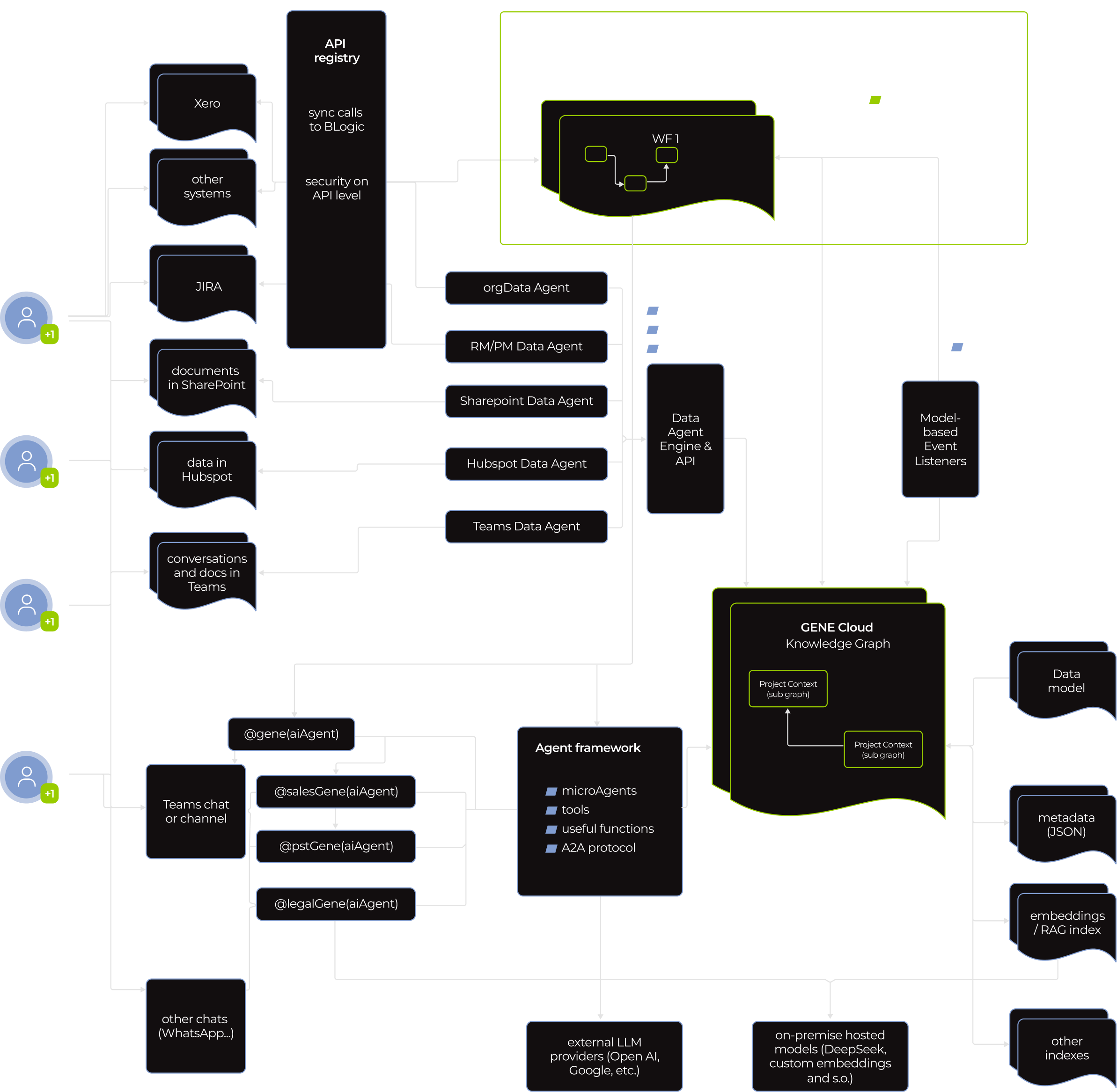
Under the hood of the virtual worker there is a multi-agent system. 

A flowchart showing data integration and workflow orchestration: Sources (e.g., Xero, Jira, SharePoint, email, Teams) connect via agents to a central GenAI Cloud Knowledge Graph, managed by a WF orchestrator. Paths include API calls, data pipelines, and external LLM endpoints.
A complex flowchart showing data integration between various agents (ERP, Sharepoint, Hubspot, Teams, JIRA, etc.), a WF orchestrator, and a knowledge graph. Lines represent data flow; black and green boxes detail agents and system functions.
A flowchart displays data flow from various SaaS platforms (e.g., Xero, Jira, GitHub) into multiple data agents (e.g., SynData, Hybrid, Transparent, Rulepack, AI agents). These feed into a WR connector, agent framework, and further into cloud integration.

Knowing the stakes, the client put data safety and overall software security front and center. Our dedicated team did too.

Standard measures, such as mandatory user authentication, access control, activity tracking, and data encryption at rest and in motion, were table stakes. We built on that with GENE’s AI-specific safeguards, aligned with NIST AI RMF, Google’s SAIF, OWASP AI, and other AI regulation frameworks. 

  • Robust secret management

OAuth tokens, database credentials, API keys, and other secrets are stored in an isolated vault inaccessible to agents themselves. We implemented automated credential rotation, with a standard 30-day cycle that can be tightened to daily for highly regulated industries.

  • Agent-to-agent (A2A) communication protocol

It allowed agents to work together without exposing their memory, proprietary logic, or tools to each other.

  • Whitelisted AI tools

We strictly supervise which tools agents can use and what they can do. For example, the virtual worker can create a Jira ticket based on a conversation in Teams, but only human reps can delete it.

Before

  • Microsoft Copilot Studio couldn’t deliver the tangible value the client was after
  • Agents rely on a static, manually updated context 
  • Agents add to the sales reps’ cognitive load
  • Passive AI is overreliant on humans to push it along

After

  • Instinctools’ technology-agnostic GENE platform made it possible to develop an autonomous sales representative that covered all the client’s needs
  • The AI sales representative keeps a living, self-updating context
  • The autonomous virtual worker offloads routine tasks from humans
  • Proactive AI agent acts on context and gets things done without interrupting human sales reps

Business value

  • Faster agent development without security trade-offs thanks to reliance on a solid infrastructure middleware instead of bare-bones AI frameworks
  • + 20%  leads processed per sales representative
  • + 19% more upsell/cross-sell initiatives
  • – 15% in cost per lead
  • – 10 hours of manual work per employee weekly

Multiplier effect

This success story points to a not-so-distant future where AI workers are graduating from assistants to full-scale teammates operating within your workflows. You can start with AI virtual workers as personal secretaries for staff members to ease their mental load. And then scale with autonomous AI employees contributing to the projects’ progress on par with your human team. Best of all, you get reliable employees on board right when you need them, omitting a time- and budget-draining hiring process. 

A person’s hand points at a glowing AI icon on a digital network overlay above a laptop keyboard. Futuristic data charts, chat bubbles, and circuit lines suggest artificial intelligence technology and data processing.

Google Workspace to Microsoft 365 Migration For a Medtech Company

Google Workspace to Microsoft 365 Migration For a Swiss Medtech Company

Neo beyond the expected white logo

How migrating from Google Workspace to the Microsoft 365 suite enabled a medtech company to establish a secure and scalable enterprise-wide collaboration environment without missing a beat in their everyday operations and reduce operating expenses by 50%.

Industry:
Healthcare, Technology

Enterprise Automation

Legacy Software Modernization

Business challenge

As companies expand, they often outgrow the tools and services they relied on in the early days of their existence. What once worked for a lean team of 20–30 employees can quickly become a bottleneck as headcount climbs past 100.

Our client, Neo Medical, is a medtech company that started with Google Workspace tools. At some point, they broadened their toolset with Microsoft products, namely, Entra ID (former Azure AD) as an identity and access management solution, and Office 365 package.

Still, most of their daily tasks, including drafting documents, preparing reports, and handling internal communication, remained heavily tied to Google Workspace, coupled with other SaaS tools, like Tresorit as a cloud storage and Skype for communication.

This setup had several drawbacks:

  • Doubled operational expenses as the client had to cover the fees for both Google and Microsoft products.
  • Compromised security, even with Microsoft’s Entra ID providing fine-grained access control. The Google Workspace-centered environment lacked deep threat analysis capabilities, built-in data loss prevention measures, and highly configurable software security monitoring tools.
  • Integration friction due to the reliance on tools from different SaaS vendors. While some tools, like Tresorit, provided integration with the Google platform by design, others, like Skype, didn’t, introducing extra integration complexity.
  • Lack of seamless collaborative experience for employees who had to juggle separate tools.

As the company grew and more of their clients expected enterprise-grade security and seamless data protection by default, the need for a unified, secure, and scalable IT environment became urgent. Though the idea had been on their radar for months, Microsoft’s February 2025 announcement to retire Skype within three months made it clear that it was time to act.

Neo Medical decided to move from Google Workspace to Microsoft 365 and started looking for a tech partner who could migrate them from one suite to another with zero downtime. Even 10 minutes without access to email servers meant the client could potentially miss high-priority external emails. Having extensive experience in carrying out such migrations, Instinctools stepped in.

Solution

In this case, our business analyst played a crucial role in gathering and documenting all the nuanced requirements the client had. With such a precise approach, every crucial detail was factored in, preventing data loss, jerry-built integrations, security gaps, undisabled licenses, and performance issues in the new software ecosystem.

Meanwhile, the dev team automated the assessment of their current environment. They used MigrationWiz to scan and catalogue mailboxes, Drive shares, and Skype workspaces.

Choosing between a one-time switch and approaching things gradually, we opted for migrating in stages to ensure a smooth transition, catch and resolve potential hiccups in the bud, and minimize the employees’ resistance to change.

Since the client’s staff was already using Entra ID for identity and access management, we didn’t have to onboard their accounts and devices into MS365 systems and went straight to migrating data from one tool to the corresponding one in the Microsoft suite. Given that mail and calendar were vital for the client’s everyday operations, we decided to start with these systems and then take care of the secondary services.

  1. Gmail and Google Calendar to Outlook Mail and Calendar migration

To ensure zero downtime, our team started pre-staging migration activities while Google services were still live. Here’s how we handled the whole endeavor.

  1. Two weeks before cut-over, we set up MigrationWiz to do a background sync and copy all Gmail messages, labels, user-created folders with filtering rules, and calendar events to Exchange Online. By doing this in advance, we had to copy only the most recent emails and last-minute calendar updates during the final switch, when we planned to fully transition from Google Workspace to Microsoft 365.

  2. Four days before the final shift, we reduced the mail-exchange (MX) record’s time to live (TTL) from its default 3,600 seconds down to 300 seconds. This ensured that, during the final Friday-night switch, the change would spread almost instantly, with external mail servers learning the new delivery route within about 5 minutes instead of an hour.

    By finishing 99% of the data migration beforehand, we minimized a coexistence phase where two inboxes and calendars must be monitored and protected simultaneously. This prevented downtime and significantly reduced the window for potential interception-based threats.

  1. From Friday, 6 PM, with all users logged out, Google kept accepting new mail and instantly forwarded it to Exchange. All inbound messages landed in the new mailbox.

  2. Simultaneously, Outlook began publishing free/busy information into Exchange, and Google Calendar was switched to “forward-only” mode to redirect any new calendar events sent over the weekend to Exchange Online.

On Monday next week, the client’s staff logged into a new environment with their existing sign-in data. Only this single “hello, Microsoft” moment greatly contributed to minimizing end users’ resistance to change.

We kept Gmail and Google Calendar in forward-only mode for four days after the cut-over. Any mail reply or meeting update sent from an old Google tab was automatically forwarded to Exchange Online, so conversations and invites flowed on without interruption.

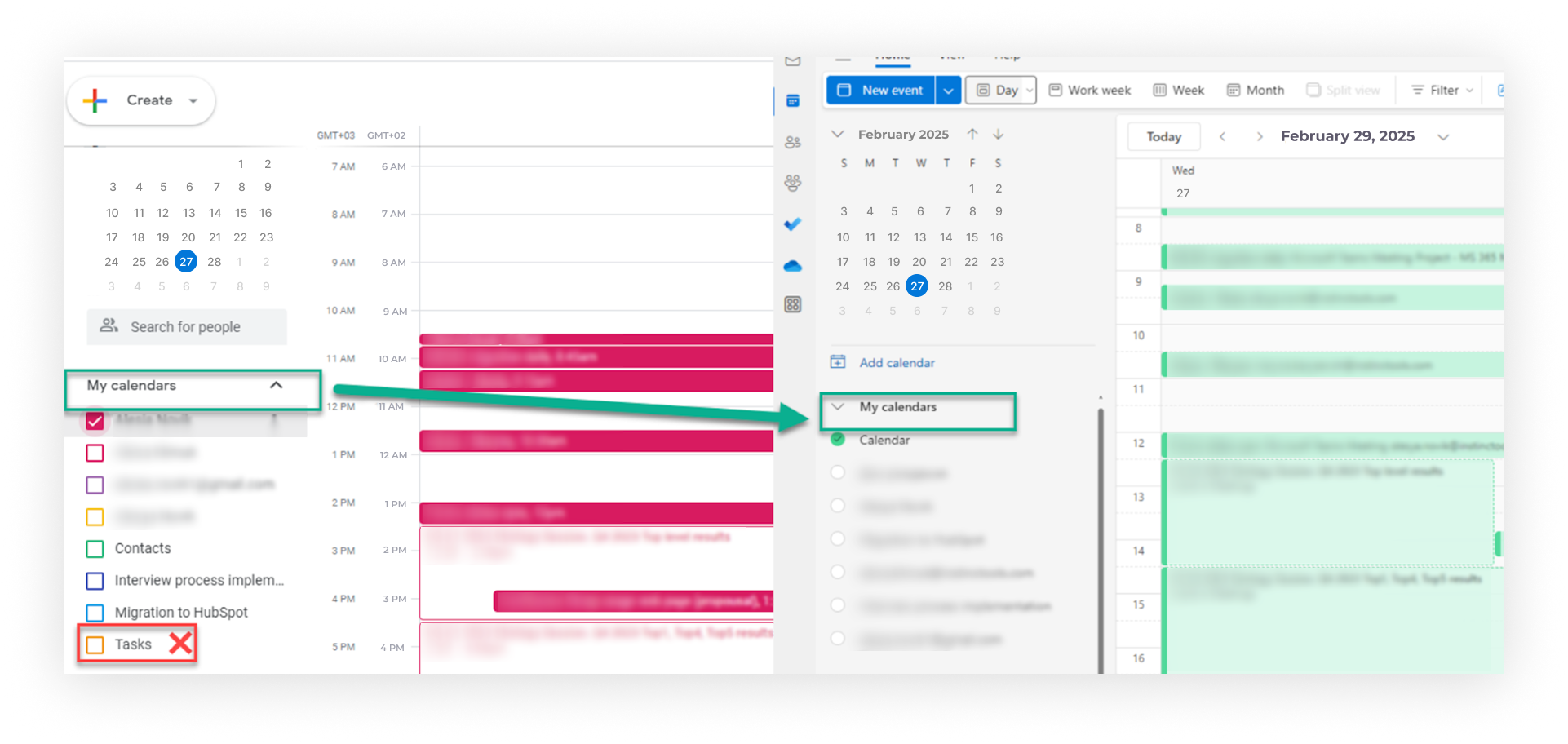
A Google Calendar interface shows the “Tasks” checkbox in the left sidebar being unchecked, with a green arrow pointing to its new status—unchecked and grayed out—causing the purple “Tasks” events to disappear from the main calendar view on the right.
  1. Skype to MS Teams migration

Since Skype and Teams organize group communication differently (channel groups vs. private teams), we could only transfer contacts from one tool to another. As with other migration steps, we planned the final move for Friday evening, but started preparations in advance:

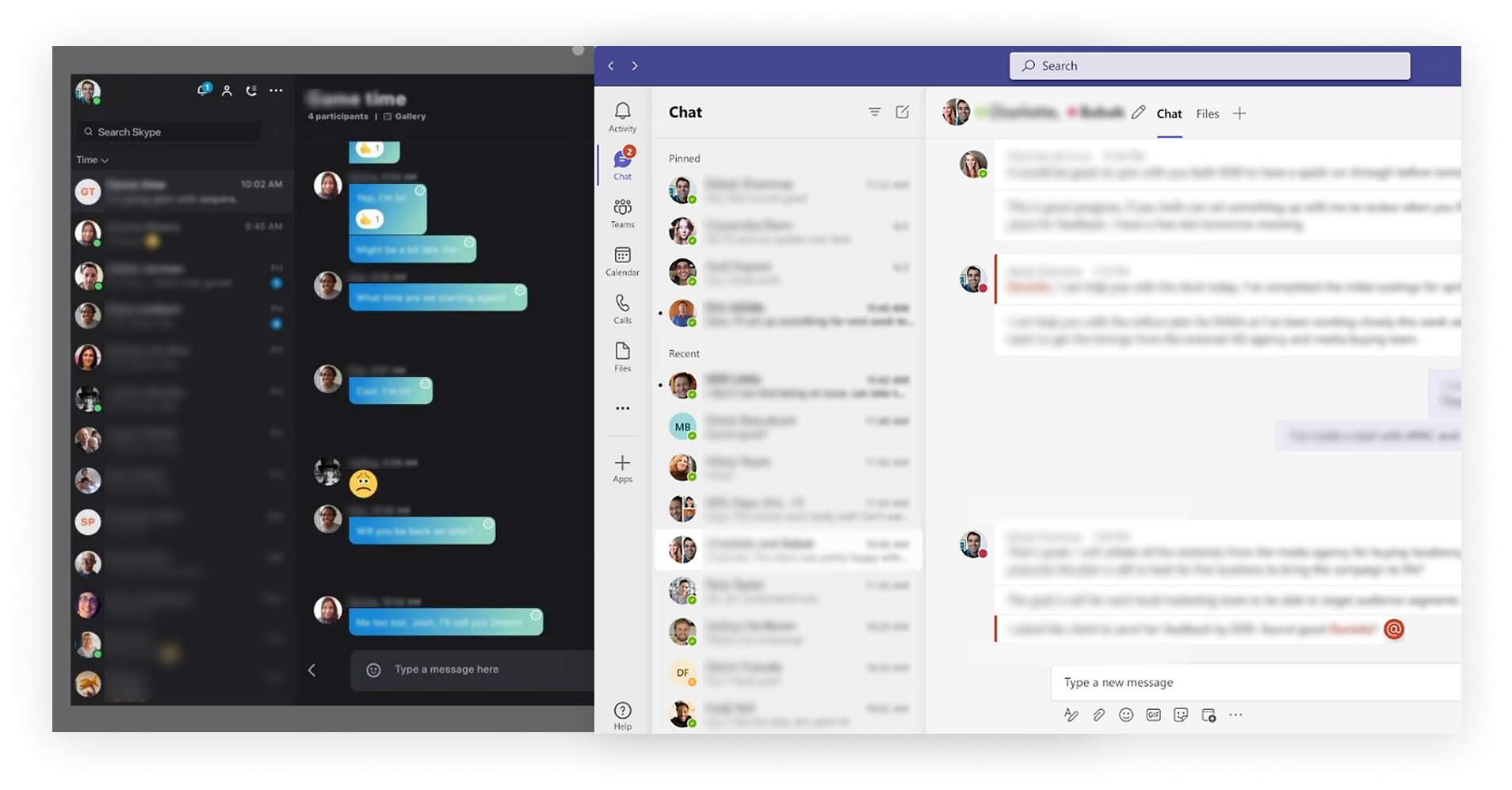
  1. A week before the company-wide switch, we launched Teams in parallel mode and installed it on department managers’ laptops. These seven people became pilot users, gaining instant access to the new communication tool without having to download or set up anything themselves.

  2. Five days before the final shift, we moved these seven pilot users to Teams-only mode so that they could create relevant core Teams and channels and add users from Entra ID. As a result, when the rest of the employees logged into the new tool, they were automatically added to all the necessary teams and channels, ready to start working without any setup delays.

    At this stage, department managers had two systems running simultaneously, but this arrangement remained invisible to other employees still using Skype and had no impact on the ease of communication. For example, if  C-level manager Alice sent a direct message to employee Bob, Bob saw a standard Skype pop-up. And if Bob sent the message, it appeared in Alece’s Teams client inside a special “Skype user” chat tab. 

  3. On Friday, at 6 PM, we moved the rest of the employees to a Teams-only mode and set Skype to read-only.

On Monday, staff logged into Teams with their existing credentials and kept working as usual. The only noticeable change was the ability to integrate third-party apps like HubSpot, Jira, Miro, etc., to Teams to streamline daily routines with simple automation. We whitelisted trusted applications to ensure the client stays on the safe side.

As with mail and calendar, we left Skype available only for data verification purposes for four days post-migration and disabled Skype licenses after this period.

Migration from Skype to Teams not only provided the client’s staff with a feature-rich communication tool, but also contributed to tighter access control and security. In the new environment, collaboration is structured around private teams only, with no public teams allowed. For example, a BizDev or a LeadGen team includes only the users who need to collaborate on those workflows. If someone needs access to another team, they must request permission from the team owner. Such an approach reduces the risk of data exposure and keeps sensitive information confined to appropriate circles.

A split-screen shows two chat applications: WhatsApp Web on the left in dark mode with blue chat bubbles, and Microsoft Teams on the right in light mode with a list of contacts and an open chat. Both display blurred-out messages for privacy.
  1. Tresorit to Microsoft’s OneDrive migration

Along with the shift from Skype to Teams, we transferred the client’s data from Tresorit to OneDrive using a similar approach. However, there were two cloud storage-specific requirements to keep in mind:

  • The client didn’t need all the history data migrated, as keeping all versions would be time-consuming and costly. We agreed on moving only the latest versions but keeping their Tresorit subscription for another 90 days in case auditors or R&D staff need to check any old version that wasn’t imported.
  • They wanted the new system to mirror the old one in structure and permissions to make the transition as seamless to the employees as possible. To achieve that, our team replicated the whole folder hierarchy and named the new OneDrive folders the same way they were in Tresorit. The only thing that changed for the end users was the cloud storage icon.

How did this shift elevate security? Previously, Tresorit’s file vault and the company’s device‐security controls worked in silos, and a user could still open or edit corporate files even if their laptop was out of compliance, say, running an unpatched OS. Now, with OneDrive, the client has a single entry checkpoint, when access to the company data is granted only after both multi-factor authentication and device-compliance checks are passed. If either gate fails, the files stay locked.

  1. Staff training

Besides ensuring a stress-free migration from one software suite to another, our best practice is to offer hands-on staff training. In the client’s case, our team:

  • Held an online adoption workshop (two 2-hour sessions) on working with Microsoft 365 tools
  • Provided ongoing support to employees for a whole month following the migration by answering their questions in a dedicated Teams channel

Before

  • A set of fragmented tools
  • Compromised security
  • Disjointed user experience due to a tool sprawl
  • High operational expenses

After

  • A single feature-rich collaboration platform
  • Perfected security measures
  • Unified user experience across the entire software ecosystem
  • Optimized expenses thanks to replacing several different tools with a single communication platform

Business value

  • 50% drop in software operating expenses
  • 70% of security incidents are intercepted at an early stage when they’re less costly to fix
  • 1.5 hours more of usable time per employee weekly, thanks to operating within an end-to-end collaboration platform

Client’s testimonial

Here’s how a transformation lead on the Neo Medical side describes the project’s flow and results:

Multiplier effect

Whether it’s moving from one collaboration platform to another, switching CRMs, or replacing spreadsheets with an advanced analytics tool, there’s always room to evolve for the sake of stronger security, more scalable workflows, and higher efficiency. Having a seasoned tech partner by your side can make the shift stress-free.

A person uses a laptop while touching a virtual screen with glowing digital icons, including lists, cloud upload/download symbols, documents, and an 80% progress indicator, suggesting data transfer or cloud computing activity.

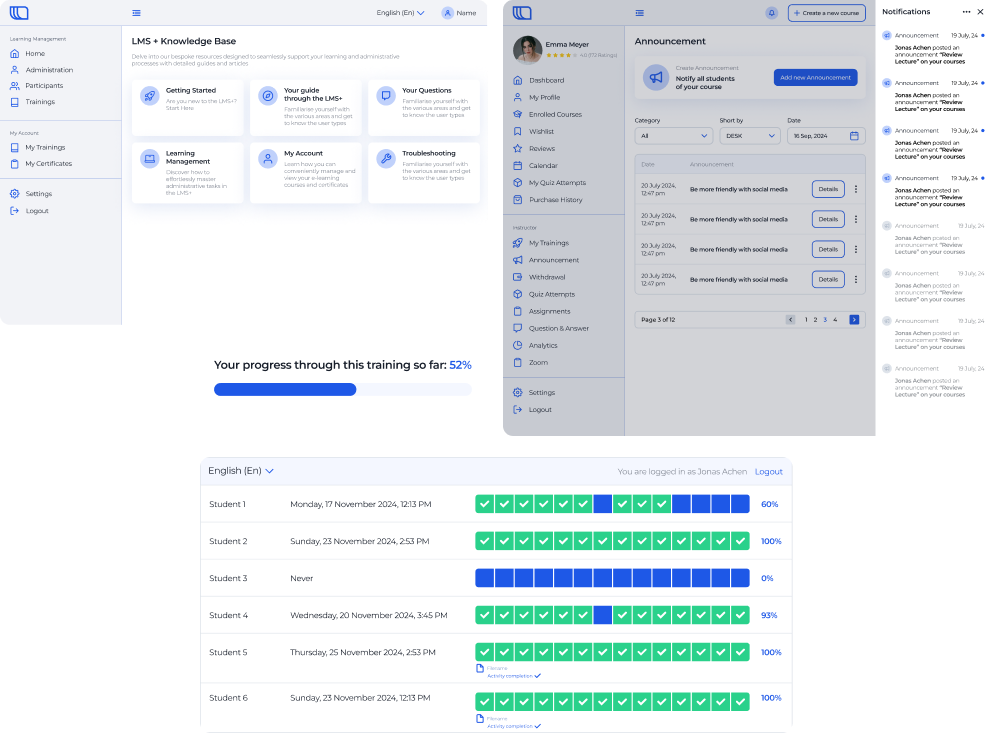
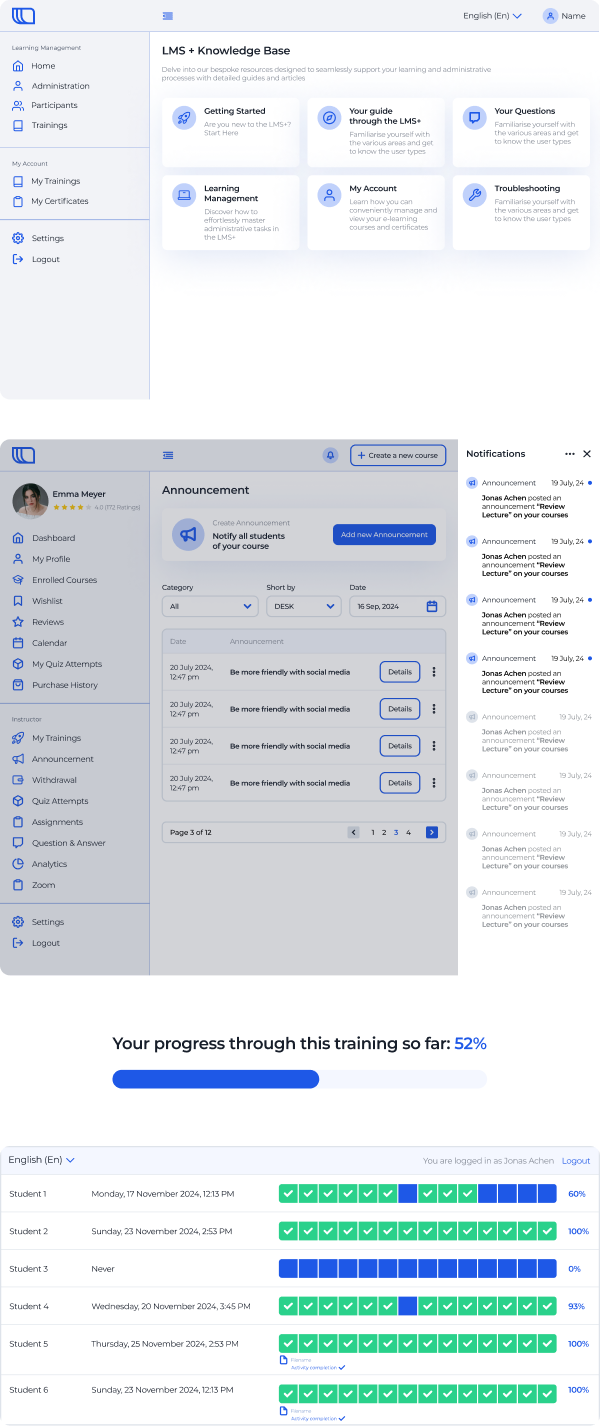
Quality Assurance for a Custom LMS

Top-Notch Quality Assurance for a Custom LMS

How implementing end-to-end manual and automated testing enabled an EdTech company to detect x40 more bugs at the early stage, speed up development cycles x5, cut down the cost of fixing errors and bugs x160, and bring down overall software maintenance costs by 16%.

Industry:
Education, Technology

Software Product Development

SaaS Development

Business challenge

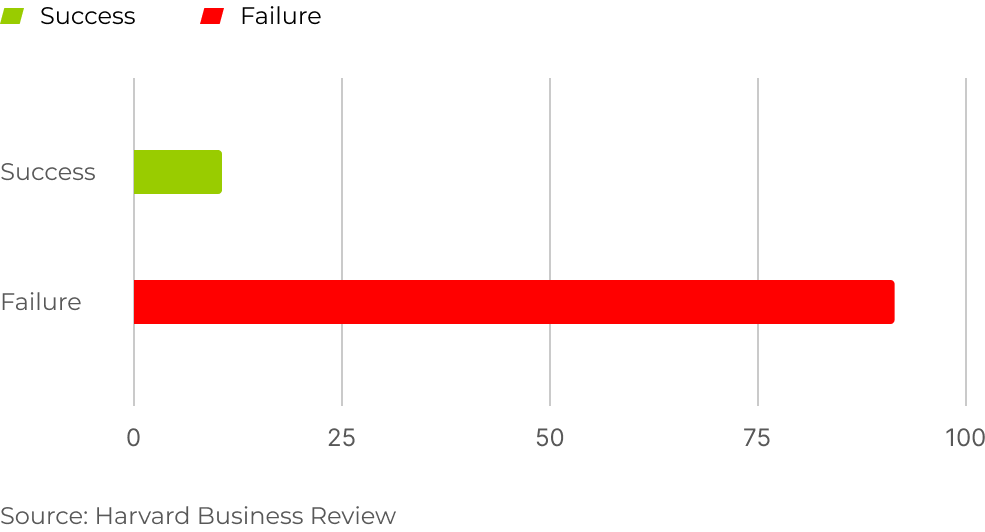
Only 10% of startups can keep up with a current highly competitive market — and there’s a reason for that. Newcomers tend to adopt a ‘we can take care of it later’ mindset, often skimping on crucial areas of SDLC, such as requirements analysis, project documentation management, software testing, etc.

Startup succes & failure rate

Nevertheless, as your solution evolves, these shortcuts inevitably stab you in the back, sometimes putting at risk the overall success of your product.

That’s exactly where our client found themselves. An EdTech company providing a custom SaaS LMS with gamified courses had put software testing and project documentation on the back burner at the outset. Several years after the rollout, their e-learning library had ballooned to 40+ courses in 30+ languages, and their initial issues started to backfire. The client’s LMS became unstable, underperforming, plagued with errors and bugs, and expensive to maintain.

A closer look revealed even more issues:

  • The system was overcomplicated and non-transparent, even for the admins. Managers, not engineers, were steering the project regarding all technical decisions, including tech stack and architecture planning.
  • The platform lacked standard LMS UI elements like notifications and progress bars to easily track user progress.

Realizing that doing nothing would lead to losing customers, the client decided to turn things around by adopting software testing, documenting their projects, and enhancing the platform’s UX/UI.

The benefits they aimed to achieve included:

  • More user-friendly LMS, both for admins and end users
  • Greater customer satisfaction from enhanced UX/UI
  • Transparent SDLC processes
  • Higher software quality due to making QA a mandatory pre-release step
  • Faster development cycles through automated testing

However, the client’s internal team couldn’t carry out these tasks on their own due to the lack of top-tier QA expertise and their already heavy workload. Therefore, they opted for IT staff augmentation services and partnered with *instinctools. We provided them with a senior-level QA engineers and frontend developers.

Solution

Before getting to user experience setbacks, we focused on adequate functional testing as a straight way to boost the LMS’s quality and accelerate development cycles.

  1. Setting up manual functional testing

For the client to fully cash in on the perks of automation, it was necessary to make sure that their manual processes run like clockwork.

Therefore, starting with the basics, our QA engineers mapped out a clear workflow for various types of manual functional testing, including unit, integration, interface, system, smoke, sanity, acceptance, and regression tests.

We’ve hit the ground running with the Cucumber testing framework as one of the leading options in the market, and during the first two months of cooperation, our QA specialists covered:

  1. Extending QA capabilities by adding automated functional testing

With manual testing paving the way, automation was the next natural step.

We blended the Cucumber framework with the WebDriverIO automation framework as this combo is not only powerful enough for large and technically sophisticated projects but also free of charge.

Thanks to our dedication during the manual testing phase, the transition to automation was hitch-free. Our automated functional testing now covers:

  • LMS database
  • APIs
  • User interface
  • Communication between the server and clients

We blew past the client’s expectations — automated tests now handle 85% of the LMS functionality, 25% more than the initial 60% target.

  1. Leveling up UX/UI

Our developers teamed up with the client’s UX/UI designers to upgrade the platform’s interface and functionality. The revamped LMS now boasts intuitive notifications and progress bars for users and admins.

We continue working on test automation, implementing non-functional tests, and supporting the client’s in-house team in handling the rising scope of the platform’s interface makeover tasks.

Before

  • Overcomplicated system
  • Absence of adequate software testing
  • Inability to fix defects
  • Lack of project documentation
  • Questionable software quality
  • Skyrocketing maintenance cost

After

  • Well-thought-out and user-friendly system
  • End-to-end manual and automated functional testing
  • Clear workflow for fixing any issues that arise
  • Documented test cases
  • Enhanced software quality
  • Decreased maintenance cost

Business value

  • Catching defects x40 earlier in the SDLC before they play havoc on the bottom line
  • Slashing bug repair costs x160
  • Speeding up development cycles x5 to get features to market quicker
  • Bringing down LMS maintenance expenditures by 16%
  • Minimizing the possibility of costly human error

Client’s testimonial

The client’s VP of Engineering highlights cooperation with *instinctools:

Multiplier effect

Cutting corners on quality assurance is like setting yourself up for a sure failure. In 2024, businesses can’t afford bad software.

It’s never too late to bridge the gaps in your existing software testing with a comprehensive QA strategy and add powerful automation to your manual testing for maximum impact.

Software Modernization For a CX Company

Software Modernization For an Ultimate Market Leader Among Personalization Engines

How switching from deprecated AngularJS to up-to-date React and crafting a custom UI kit helped a global SaaS customer experience (CX) company facilitate maintenance of their personalization engine and speed up design-related tasks.

Industry:
Technology

Legacy Software Modernization

Business challenge

Understanding that nothing lasts forever helps ambitious SaaS companies truly excel. Organizations pushing their field’s boundaries can’t peacefully rest on laurels. They have to put a premium on constant product evolution, spanning three areas:

  • Building a unified tech stack
  • Ensuring the code aligns with the current best practices
  • Enriching the product’s features


Focusing on the above-the-surface part, or implementing new features, to win and retain customers, companies tend to neglect the technical foundation that can spell significant trouble without essential upkeep.

The aging heterogeneous tech stack was the only vulnerable spot of our client – an unbeatable market leader among SaaS personalization engines. They have already blazed a trail in customer experience (CX) solutions with their cutting-edge personalization engine, which empowers B2B and B2C companies to reach their potential customers across any channel and device with highly targeted offerings. However, their core products’ front end in AngularJS:

  • Didn’t match the client’s current tech stack in React
  • Complicated software maintenance as support from Google ceased in 2018

To eliminate these hindrances, the client decided to migrate legacy AngularJS code to cutting-edge React.

Additional benefits of switching from AngularJS to React included:

  • Flexibility in organizing the software code as React is a UI-focused library, while AngularJS is a model-view-controller (MVC) framework with a set of predefined design patterns.
  • Accelerated performance thanks to React’s reliance on the virtual document object model (DOM), which allows changes without updating the entire page.

The client has already started code migration from AngularJS to React but soon hit a roadblock: their in-house team has neither time nor capacity to juggle both feature development and legacy modernization. Therefore, the client decided to hand over the migration part to a tech partner.

However, finding an ally they could trust wasn’t a walk in the park, as the client previously had a negative experience with an outsourcing company, making them cautious this time around. Determined to avoid the same pitfalls, they came up with strict technical and soft skills-related requirements for the future partner so that only the best would make the cut:

Battle-proven expertise

in both AngularJS and React

Accurate planning

and sticking to the outlined timeline

Proactiveness

in decision-making to strengthen their core team

Top-level soft skills

for swift communication and synergy with their in-house team

ISO certifications

namely ISO 9001:2015 and ISO 27001:2022

According to the client, *instinctools turned out to be the perfect fit. How did the migration go and what were the extra efforts we put in?

Solution

The client had already outlined an overall migration strategy and prepared the infrastructure, so our team picked up the code migration while perfecting existing functionality and fixing bugs.

  1. Replacing a rigid legacy tech stack

We were responsible for rewriting several solutions within the client’s software ecosystem. Some of them raised notable challenges, such as their legacy customer journey mapping platform.

The client’s system was a sore spot because of its:

  • Fragmentation. The platform consisted of six sub-systems, each written by different developers at different times.
  • Documentation void. Without system documentation or knowledge keepers left in the company, rewriting the solution became a daunting task.

We had to replace this ticking time bomb with a single user-friendly React solution. To achieve this goal, our team:

  • Analyzed the platform’s code to figure out the best way to rewrite it
  • Prepared updated software architecture from scratch
  • Selected Nx library for collecting code from different microservices and a Vite bundler to set up a development environment for React
  • Replaced six disconnected microservices with a monolith
  • Migrated libraries from AngularJS to React
  1. On to new challenges

Six months after the start of our cooperation, the client trusted our team enough to delegate the tasks beyond the migration. That’s how we started working through their overall backlog and participating in R&D activities.

Taking on the primary stage of their research efforts

The client wanted our team to join their ongoing in-house research dedicated to creating a custom UI kit:

  • Explore and examine current best practices in crafting compilations of UI components
  • Draw up suggestions for their custom UI kit

Impressed with the proactiveness of our team, the client asked us to join the UI kit development.

Assisting in crafting a custom UI kit

Just as with the AngularJS to React migration, the client had already invested efforts in building UI components in line with the company’s brand book. And much like switching to the more up-to-date tech stack, they also needed reliable, high-qualified partners to carry out the UI kit development.

Before our team knuckled down, the client got tangled up in their existing visual components, such as buttons, checkboxes, widgets, etc., scattered across various sources.

Here’s what we did to help the company stop wasting their time and effort:

  • Created a single library for all UI components to enable simple reuse across all the client’s current and future products
  • Collaborated with their in-house design team to create and implement a multitude of UI elements, enhancing consistency and efficiency

Before

  • Heterogeneous tech stack of their SaaS CX solution
  • Challenging product maintenance because of six siloed microservices
  • Absence of a robust UI kit
  • Massive backlog
  • Lack of experts to run technical research

After

  • Unified tech stack for the client’s SaaS personalization engine
  • Simplified product maintenance thanks to monolith architecture
  • Solid custom UI kit
  • Reduced backlog
  • Support of dedicated experts in R&D activities

In our client’s words

Frontend Guild Manager on the client’s side outlines their impressions of cooperation with *instinctools:

Quality Management System

SaaS Quality Management App For a Leading Maritime Software Provider

How broadening their industry-specific software pool with a quality management system (QMS) for maritime companies allowed a world-class SaaS software provider to win new customers.

Industry:
Ecommerce

Web Development

SaaS Development

Software Product Development

Enterprise Automation

Business challenge

Is there a more common and widespread bottleneck than paper-based workflows? Despite the seemingly ubiquitous focus on technology-enabled business transformation, non-digital-born companies across industries still depend on paper documentation.

Such an approach leads to flawed records, delayed updates, etc., which overcomplicates the quality management process. When quality-related debacles take place at the enterprise scale, companies have to pay for them, not rarely with something more valuable than money — their reputation.

This was the weak spot our client aimed to tackle to help their customers move quickly and confidently down the digitalization path. A world-class maritime software provider with several solutions for streamlining industry-specific processes contacted *instinctools to widen their offering with a cloud-based SaaS quality management system (QMS).

What percentage of organizations depend on paper-based processes?

*Source: Forrester, Digital Documents Necessity

What issues did maritime enterprises face while managing quality documents mostly manually?
Delays at all stages of working with documentation
Failure to keep quality management documents updated
Lack of traceability within quality management processes
Risk of overlooking updated standards and compliance requirements in time
Human error in full bloom

Our client wanted to fix these problems with robust software that spans quality, health, safety, and environment (QHSE) processes by:

Digitizing

and streamlining all document-related operations, including creation, editing, etc.

Ensuring

compliance with general and maritime-specific standards

Providing

a centralized repository with role-based access to allow users to work with quality documents anywhere, anytime, without compromising security

Automating

quality management workflows, such as authoring, reviewing, approving, notifying, etc., to free employees from mundane rule-based tasks and eliminate the possibility of human error

Fostering

transparency of quality management processes thanks to the detailed audit trail

Solution

The client has been delivering solutions for enterprises using Microsoft 365 products. Therefore, our dedicated team went with Microsoft Azure as a cloud repository for the QMS. The system also needed a metadata-driven document management platform to automate document creation workflows. We’ve chosen M-Files with out-of-the-box integration with Microsoft Azure.

  1. Packing the QMS with broad functionality

Banking on the rich off-the-shelf functionality for their customers was at the core of the client’s strategy. Therefore, we’ve crafted the software with multiple out-of-the-box modules that go beyond simple document creation and review and cover regulatory compliance, audits, and risk management tasks.

Document creation module

Users can create a document using templates or drag and drop existing Word, Excel, PPTX, HTML, and PDF files directly into the system.

Review and approval module

Drafted documents are sent for review or approval.

If there are several reviewers and approvers, they can collaborate on document editing using track changes.

Authors can set a deadline for reviews or approvals.

Assigners have real-time visibility into the state of reviews and approvals.

Assignees get email auto notifications about the documents waiting for their review or approval. Assigners also get auto alerts about suggestions and comments in the documents and when assignees mark them as reviewed or approved.

All users have personal dashboards as an easy way to access the files for review and approval, last modified documents, etc., just by clicking on the corresponding section.

Also, all users can look for documents across the system with an intuitive search bar.

It provides the possibility to search for exact words matching the titles and content of the files.

Regulatory compliance module

This module is the heart of the whole system. The QMS is compliant with the following standards by default:

ISM (International Safety Management) guidelines define the safe operation of ships and address preventing pollution.

ISPS (International Ship and Port Facility Security) is designed to uncover and prevent criminal threats, such as piracy, acts of terrorism, etc.

ISO 9001 (Quality Management System) establishes requirements for a QMS

ISO 14001 (Environmental Management System) clarifies best practices that companies should follow to reduce their environmental footprint

ISO 45001 (Occupational Health and Safety Management System) determines physical, chemical, biological, ergonomic, and psychosocial hazards to minimize their impact on the employees’ health and safety

Audit module

The client wanted to ensure complete traceability across the system, as keeping the company’s documentation in order is one of the success factors contributing to smooth external audits. Therefore, we crafted a system where any document changes are recorded, and users have a time-stamped audit trail and the history of each document at their fingertips.

While the QMS always suggests the most recent file version, all roles have access to the previous ones. Document owners can set up auto retirement of the document’s previous versions when the new one is released.

Internal audits and regulatory checks also become a breeze for maritime organizations with this QMS. 

Our development team provided a complementary document template package for:

  • Creating audit plans
  • Scheduling internal audits
  • Assigning responsible personnel and reviewers

Both authors, assignees, and reviewers can attach evidence related to the audit findings, making it easier to unearth and fix alarming issues internally.

Risk management module

The QMS we’ve developed enables companies to foresee dangers and prevent or minimize their negative impact

  • Connect information within the quality management system

Users can connect risk management documents with audit data, records related to suppliers and products, and other items within the system to enhance traceability of potential hazards.

  • Identify possible hazards with a risk management matrix

Spotting risk-prone issues as early as possible helps cover them before they snowball into severe threats and cause noticeable accidents. The risk management matrix is color-coded so that users can immediately see if there are any catastrophic and critical events that have to be addressed ASAP.

  • Schedule periodic risk assessments

Risk assessment is an area with high automation potential, and we didn’t miss the chance to take full advantage of it, empowering users to set periodic risk assessments within any time frame.

  1. Ensuring integrability with any corporate systems

Our software developers wrote APIs for data synchronization with external tools to allow the client’s customers to seamlessly incorporate the web app into their existing software landscape and facilitate efficient data flow between the QMS and other systems, such as ERP, CRM, IMS, etc.

Business value

Before

  • Underdigitized quality management workflow
  • Scattered quality management data
  • Non-automated workflows
  • Delays at all stages of working with documentation
  • Lack of visibility into quality management processes
  • High probability of human error

After

  • Fully digitized quality management processes
  • Single source of documentation
  • Minimized manual effort with automated workflows
  • Streamlined audit-related activities
  • Complete traceability thanks to time-stamped audit trail
  • Reduced human error

Client’s testimonial

Hear about the project’s progress and outcomes directly from its product owner:

Tim Rosenberger

Director, Global R&D at SpecTec

I was impressed by the developers’ skills and by the ability of *instinctools to extend the team on really short notice. I’m looking forward to the collaboration with *instinctools on our upcoming digital transportation projects

Software Licensing System Modernization

Legacy Modernization For a Software Licensing Company

How a security tech manufacturer cut costs on the system maintenance and gained ISO 27001:2013 certification

Industry:
Technology

Java development

Legacy software modernization

Business Challenge

What issues were restraining our client?

When it comes to modernizing legacy systems, companies tend to put it off until the very last minute. The reasons for that might be different: additional expenses, difficult orchestration of the initiative, resistance to change… However, the risks arising from doing nothing are equally high for everyone and there usually comes the point when hanging on to the old software is no longer possible.

That’s what happened to our client, a global licensing software developer. They delayed updating their back-end software until they had an urgent need for ISO27001:2013 certification. And it hit in 2022 when the updated certificate version, ISO27001:2022, came out.

That was where our client needed expert support. They created their licensing software in the early 2000s. Those were unique, state-of-the-art solutions, which worked securely even 15 years after the release. When the client held a hacking contest to test and evaluate the system’s reliability, none of the participants succeeded.

However, with time, some technologies tend to be replaced by others, and legacy software is no longer supported by the provider and doesn’t receive security updates, becoming your Achilles heel. The same situation became the main driver for legacy system modernization at our client’s organization. 

The client product was based on the outdated SOAP API and legacy Apache products, such as the Axis2 framework and the TomEE 7 application server. TomEE 7 stopped receiving security updates in 2021, so the client updated it to the next version to get ISO 27001 certification. However, this change led to other ones, as TomEE 8 wasn’t compatible with the Axis2 framework they used. 

At this point, the client realized that dealing with those changes would be beyond their capacity and capabilities. Hence, they started looking for a company with expertise in legacy system modernization. 

The task was complicated, as they had never outsourced software development and finding a software company that would fully meet their requirements was problematic. 

What were the client’s mandatory requirements for the future tech partner?

  1. Location in Europe and compliance with European security regulations. The client was looking for a technical partner among European companies that follow strict data security regulations and hold ISO 27001:2022 and ISO 9001:2015 certifications. It was also crucial to be in the same time zone to quickly resolve working issues.
  2. Expertise in both legacy and up-to-date software. Finding a developer who can work with Axis2, as this framework is obsolete and rarely used, was a tough legacy system modernization challenge.
  1. High security demands to the development team. The client was looking for a team that would work with their software on-site by using keys (dongles) that would be sent to a flash drive.

Having a wide array of strict requirements, the client chose to entrust their fulfillment to *instinctools as a global software development company with extensive expertise in delivering innovative solutions since 2000. Over this time, we’ve built a skillset based on a diversity of technologies ranging from PHP to Python and React. Given the talent crunch in the modern IT industry, such an extensive expertise is truly appealing to our clients. 

Moreover, our headquarters is located in Germany, and we follow strict European regulatory requirements for data security, such as GDPR, EDPB, DPLE directive, etc.

Our team can also work as an offshore development center providing a secure physical perimeter for the project.

Thanks to competitive advantages of our company, we passed the client’s rigorous selection process.

To enable the client to get ISO 27001 certification, we needed to modernize legacy systems, for instance, the SOAP API through which the requests such as license creation were sent. For this purpose, we decided to upgrade the existing back-end system under the SOAP API to receive regular security updates.

Solution

Moving fast but radically or slowly but surely?

After evaluating the project, we offered the client two legacy system modernization strategies to choose from.

Renovating the existing software to the most up-to-date solution.

The most advanced option would be Spring. It’s an open-source Java-based framework that empowers developers to build high-performing applications. It is currently the standard of enterprise software development, with no analogs, as Spring can cover all the needs of enterprise out of the box. Moreover, it’s an actively developing framework, which implies the constant contribution of new features and security checks.

Going step by step by upgrading the versions of existing software and, eventually, coming to Spring.

If a client isn’t ready for substantial infrastructure changes (which, for instance, Spring requires), they can move gradually.

With this approach, they could pass ISO 27001:2013 certification, and while it’s valid, deal with the rest of the innovations and implement Spring at a comfortable pace. And with the updated technology stack, they’ll be able to go through ISO 27001:2022 certification later.

Since this was the client’s first experience with an outsourcing company, they wanted to move in small iterations and decided to follow an incremental legacy system modernization approach.

It’s also important to note that our client has been creating IT solutions for software licensing for over 30 years, and their development team has stayed the same from the moment of the product release. On the one hand, it was helpful because the client’s team knew the product down to the last detail. On the other hand, they got used to relying on outdated technology stacks and approaches. To switch straight to a cutting-edge solution, the client would have to invest a lot of time in knowledge transfer to their specialists. 

Therefore, the client chose a more granular change so that they could reap the benefits of modernizing legacy systems, with the team gradually adapting to the new environment and gaining knowledge about working with state-of-the-art technologies.

Before turning to *instinctools, the client had already upgraded TomEE 7 to the 8th version. However, it was later discovered that TomEE 8 couldn’t work with Axis2 and requires another framework. Since Axis2 is an Apache product, we offered to switch to another Apache framework – CXF that has replaced Axis2 as a more present-date solution.

Nevertheless, code migration from Axis2 to CXF without changes is impossible as these frameworks have dissimilar approaches to code writing. Axis2 works with abstractions and classes, while CXF works with data models. Therefore, besides code migration, we tailored the code to the new framework. 

We did code refactoring and uncovered parts of the code for which more elegant solutions could be used. 

Going beyond expectations

If we see an opportunity to do more for the client, we never hesitate to go for it. In the case of legacy system modernization for our client, we provided them with a few extra-mile solutions.

  • Updating Java

    The client had Java 8, which was compatible with TomEE 8 and CXF. However, Java 11 contains an updated encryption protocol (TLS 1.3 instead of TLS 1.2), which is faster and ensures a higher security level, so we installed Java 11.
  • Implementing annotations for authorization service

    The legacy client authorization model was based on roles, where each user had their own role with specific access rights. We switched it to a new model based on annotations. This legacy system modernization approach significantly reduces the amount of code and simplifies maintenance, as clear code written according to modern standards is easier to maintain.Moreover, familiarity with annotations is another small step toward Spring implementation in the future. This framework extensively uses annotations, and if you haven’t encountered them before, it’s hard to figure them out.
  • Detecting bugs in the client’s testing system

    For the client, one of the criteria that the legacy system modernization project was done correctly was to pass their tests. They provided us with their test infrastructure. However, we found bugs in those tests, such as PHP clients connected to an outdated framework. We reported them to the client so that they could fix them.

Along with upgrading legacy systems, we trained employees on the client side to ensure knowledge transfer so that they could feel confident working with CXF and TomEE 8.

Investing in the future: what’s next?

We’ve carried out legacy system modernization for the client considering upcoming ISO27001 certification and the switch to Spring in the future.

The client was successfully certified and received ISO 27001:2013 in November 2022. 

By that point, our project had been over, but we consulted the client on the next steps of their legacy software modernization. As they were totally satisfied with our collaboration, they decided to keep working with *instinctools in the offshore development center format and gradually move toward Spring to adopt it by 2025. By that time, the ISO 27001:2013 certification will have expired, and with the updated software, they will be able to obtain ISO 27001:2022 certification. So at the moment, we have two more legacy system modernization projects with the client and look forward to bringing them the same value as in the first project.

Key features

Flexibility

Refactoring the code according to modern standards allows the client to expand the range of specialists they can hire as more developers can work with clean code.

Scalability

Switching to an up-to-date framework and application server has made our client more adaptable and prepared for subsequent steps of their legacy system modernization journey.

Modernization

Transition to an authorization model based on annotations has made the upkeep of the system easier and minimized the codebase.

Business Value

  • Software modernization for ISO 27001:2013 certification obtainment
  • The backbone for future Spring adoption
  • Simplification and cost reduction for staffing and maintenance

Multiplier Effect​

Legacy system modernization is valid for any industry. However, the SOAP API, which is the basis of the legacy system in the case of our client, is prevalent in banking. For banks that have existed for more than a couple of decades, an abrupt transition to up-to-date software is also challenging because of drastic infrastructural changes and time for knowledge transfer.

And that’s ok! Switching to a cutting-edge REST protocol just because now it’s considered a standard is not the only option available. We don’t swing to the buzzwords and choose the most appropriate solution considering your requirements and limitations. As in the case of our client, you can stay on SOAP but upgrade your backend software to meet your actual needs and ambitions. Partnering with a PHP development company experienced in legacy system modernization will ensure you a smooth transition while maintaining compatibility with existing frameworks and infrastructure.

Anna Vasilevskaya
AI modified real photo
Anna Vasilevskaya
Account Executive

Get in touch

Drop us a line about your project at
[email protected] or via the contact
form below, and we will contact you soon.