AI-Powered Knowledge Platform For a Wind Turbine Manufacturer

AI-Powered Knowledge Platform For a Wind Turbine Manufacturer

How developing a conversational AI knowledge platform with offline access and peer-to-peer expertise sharing enabled a European wind turbine manufacturer to turn post-sale field support into a product differentiator and reduce support queries by 37%.

Business challenge

When a turbine stops or triggers an alarm miles from the nearest office, the repair depends on how fast the technician on site can find the right answer. For field workers servicing wind turbines offshore and over sprawling onshore locations, that process is riddled with friction.

  • No single source of truth. Maintenance manuals, monitoring guides, technical bulletins, and troubleshooting references exist, but are scattered across multiple portals and PDF libraries with no unified entry point. A technician looking for a specific calibration procedure might find it in three clicks or thirty, depending on which system they open first and whether they guess the right keywords.
  • Documentation built for desks, used on turbines. The materials are authored for screen-and-keyboard reading, but real-life wind turbine servicing conditions look nothing like that. Technicians access documents on phones or tablets, often one-handed, in rain or wind. Dense PDF layouts with no mobile optimization turn a two-minute lookup into a scrolling exercise.
  • Peer knowledge without a peer network. When documentation falls short, experienced technicians fill the gap. But that expertise is shared through phone calls, ad hoc messages, or chance conversations rather than through a structured channel. Two technicians in the North Sea and Andalusia might independently solve the same fault, weeks apart, with no way to learn from each other.

Our client, a major European wind turbine manufacturer, saw these hurdles as a product opportunity. As their relationship with every buyer extends into years of customer support, an application that would consolidate the company’s product maintenance knowledge into a single, searchable hub could not only ease post-sale support overhead but become a selling point in its own right.

They approached Instinctools with a vision for a companion app built around conversational AI: a tool, offered alongside the turbines themselves, giving field technicians a way to describe a problem in plain language and get an actionable, source-verified answer on the spot, with clear traceability back to the original material.

Solution

Some opportunities can’t wait for paperwork. While the project was still in the proposal stage, Instinctools built a working prototype that gave the client an early view of the product vision in action. It allowed their team to test assumptions, gather internal feedback, and validate the concept before committing to a vendor, budget, or full-scale delivery plan.

  1. Crafting a clickable prototype at the pre-sales stage

The client’s original brief centered on a searchable knowledge base with a conversational AI interface. Field technicians would type a question in their native language, and the system would return a plain-language answer drawn from the manufacturer’s documentation, with a citation trail pointing back to the source. Multilingualism was essential as the client’s install base spans dozens of countries.

Our AI developers and UX/UI designers translated the brief into a clickable prototype covering the core user journey:

Every screen was designed with field conditions in mind, as a technician may be using the app with one hand on the device and the other on a railing, tool, or flashlight. So the interface had to be simple, readable, and usable without desk-bound assumptions.

Still, documentation alone, however well-organized, can’t cover every edge case. Sometimes the answer can come from another technician who has already wrestled with the same fault on the same turbine model, somewhere else. So we went the extra mile to give this tribal knowledge a place inside the app by including something the client hadn’t asked for: a peer-to-peer knowledge sharing layer where technicians register which equipment they service, find colleagues working with the same wind turbines, and exchange solutions to tricky operation and maintenance issues through in-app messaging. 

What started as Instinctools’ suggestion, by the end of the prototype review landed in the MVP scope, transforming a knowledge base app into a broader AI-assisted field support platform grounded in source documentation and strengthened by a technician network.

  1. Laying the technical foundation for full-scale development

With the prototype approved and the scope expanded, Instinctools moved into architectural planning. Several technical decisions shaped the project from the start:

  • Single-vendor cloud and AI setup. We hosted the platform on AWS, picking the eu-central-1 region in Frankfurt to keep data physically inside the EU. AWS Bedrock handles the AI layer, providing access to Anthropic’s Claude within the same compliance boundary as the rest of the infrastructure.
  • Search architecture. The accuracy of a conversational AI assistant is rooted in the quality of the retrieval layer feeding it. Instinctools chose pgvector to combine semantic search with automatic profile-based hard filters in a single query, so when a technician asks about pitch system calibration, the results are already scoped to a particular turbine model. For a knowledge base sized at around 10,000 content chunks, this vector similarity search keeps the infrastructure lean without cutting corners on retrieval accuracy.
  • Zero-signal mode. Because technicians may work offshore or in low-connectivity environments, the app needed to stay useful even without a stable connection. We paired Workbox and IndexedDB to cache the app interface and store bookmarked documents locally within the app. Features that rely on live services, like AI search and community messaging, stay online-only.
  • Access control. For authentication, Instinctools went with Auth0, starting with invite-only registration during the MVP, so the client could control early access before opening to self-service registration. Password policies, account lockout, email verification, and recovery flows were handled through Auth0’s built-in identity-management capabilities.
  • Autotranslation layer. The client’s turbines operate across a multilingual EU market and beyond. The team chose DeepL’s API for on-demand translation, favoring it over alternatives for its stronger handling of technical content in European languages.
  1. Refining the prototype with field feedback

The prototype looked right on screen. To see if it’ll be of any help for end users, we shared it with a group of roughly 20 early testers the client gathered from its European customer base.

Several assumptions didn’t survive first contact with the field, but caught early, they became opportunities for improvement before full-scale development:

  • Fault-code workflow. The AI search handled natural language and fault codes equally well, but testers revealed that the vast majority of their queries start with a SCADA status code. This prompted us to update the home screen design by adding a dedicated fault-code entry field with auto-recognition, so the most common interaction pattern gets the shortest path.
  • Minimum taps to target. In the initial prototype, users had to open a document before saving it for offline access. Testers pointed out that before going offshore, they often need to save several guides at once. We redesigned the flow so documents could be saved directly from search results, without opening each one individually.
  • Expert knowledge sharing priorities. The prototype included a location-based map showing where other technicians were working, but users made it clear that proximity was not their top priority. They wanted to filter peers by turbine model and specialization first, and by location second. For a technician troubleshooting a specific gearbox issue, the right match was not the nearest colleague, but the one with relevant hands-on experience.
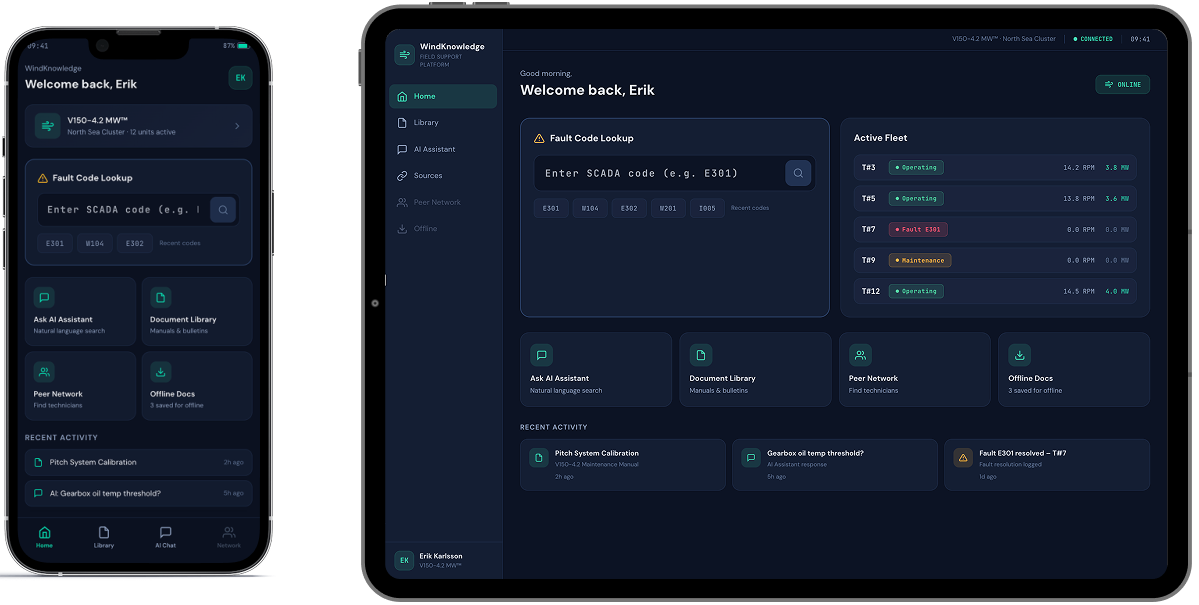
A smartphone and tablet display a dark-themed dashboard interface. Both screens show a welcome message, a fault code lookup bar, system status cards, and recent activity modules, with similar layout but resized for each device.

This feedback reshuffled the development backlog. We moved features like fault-code-driven search and single-tap document access from “could have” to “should have” status, ensuring the MVP reflected how technicians actually work, not just how the workflow looked in a prototype.

  1. Developing and rolling out an MVP

The MVP scope was deliberately focused: one turbine product line, one content library, and an upscale from 20 to 100 technicians. The goal was to prove the full end-to-end experience with a larger, controlled user group before replicating it across the client’s entire equipment catalog.

Here’s how the flow goes:

  1. During onboarding, the early adopters select the turbine models they service
  2. From that point on, the app personalizes search results, document recommendations, and community connections, so that a technician working with a specific model sees materials and peers’contacts relevant to that model, noise-free
  3. Every answer the AI assistant returns includes citations to the source document and section, so a technician can verify the guidance before acting on it.

This personalization engine sits on a knowledge base of hundreds of maintenance manuals, monitoring guides, technical bulletins, etc. Since it’s updated once a month at most, a real-time content synchronization would have added unnecessary complexity. A monthly content ingestion pipeline was enough to keep the knowledge base current without overengineering the backend.

Once rolled out to the full 100-technician group, the app saw steady organic adoption.

Before

  • Technical documentation scattered across multiple portals and PDF libraries
  • Only basic, document-level search capabilities
  • A multi-tap user journey to reach a single document, with no shortcut for the most common queries
  • Peer expertise shared informally through phone calls and personal contacts, if at all

After

  • A single AI-powered conversational app consolidating the wind turbines’ maintenance library
  • Advanced semantic search with optional hard filters across the whole knowledge base
  • One tap to target and fault-code auto-recognition field on the home screen
  • A structured peer network connecting technicians by turbine model, specialization, and relevant field experience

Business value

  • Post-sale support transformed into a product feature
  • – 37% requests escalated to the client’s customer support team
  • < 30 seconds from query to cited, source-verified answer
  • x2.5 faster troubleshooting of field incidents

Multiplier effect

The pattern behind this platform – consolidating scattered documentation into a conversational AI interface and pairing it with a peer network – is not limited to the energy sector. Any industry where field professionals work with dense technical libraries under time pressure faces similar friction: heavy machinery, medical devices, industrial automation, telecom infrastructure, and more. The infrastructure we built is modular to be useful for a different knowledge base and equipment catalog without being redesigned from scratch.


A person in a dark blue shirt holds a smartphone in one hand and types on a laptop with the other. Digital facial recognition icons and a checkmark appear, indicating successful facial authentication on the phone. The background is blurred.

Tech Documentation Management Product

Tech Documentation Management System For Manufacturing

How switching from an outdated DITA-based software to *instinctools’ feature-rich DITAworks helped a Danish enterprise fully digitize tech documentation management, speed up document-related operations by up to 14%, and reduce translation costs by 11%.

Industry:
Manufacturing, Energy

Software Product Development

Enterprise Software Development

Business challenge

Manufacturing organizations must ensure their products are accompanied by technical documentation and then keep an eye on its relevance and updates. At enterprise level, when the number of products and their variations grows to hundreds and even thousands, technical writing and its management become more challenging and the call for a specialized software solution becomes louder.

DITA is one of the well-known standards that can lighten this burden while speeding up the process at a wallet-friendly cost. However, finding ready-made software with suitable functionality among the diverse DITA-powered options out there is almost as unlikely as finding a needle in a haystack. That’s the struggle our client faced.

What is DITA?
DITA is an XML-based open standard to create, edit, manage, and publish large volumes of technical documentation in multiple formats and languages. Thanks to well-developed content reuse mechanisms, this standard facilitates all content-related tasks.
What is DITAworks Webtop?

DITAworks Webtop is a DITA-based multi-processor software product with a solid content reuse mechanism for authoring, managing, and publishing tech documentation. As an enterprise-oriented system with a modular architecture, it’s flexible and highly customizable to meet the needs of companies with mature content structures.

Learn more

A large Danish manufacturer of sophisticated control solutions for decentralized power production has already moved from non-specific software to a single DITA-powered environment for creating technical documentation. However, the client’s 50+ dedicated technical writers and translators quickly found the tool inadequate to cover their needs. What were the critical flaws of their current system?
  • Limited Content Map development functionality
  • Only basic metadata and conditional processing (CP) tags
  • Inflexible search options
  • Underdeveloped management of reusable content elements
  • Inability to work on a single piece of content in isolation without affecting its usage across the whole content system
  • No detailed history view
  • Absence of translation status analyzer

Driven by all these issues, the client started re-investigating the market for an advanced DITA-based software provider. To make sure their future partner could be on par with the highest quality and security standards, the client narrowed down their options to companies compliant with ISO 9001:2015 and ISO 27001:2022 standards. That’s how *instinctools and our DITAworks Webtop showed up on their radar.
Why did they see our product as a top option?
Provides
a safe space for tech writing as a standalone software with secure infrastructure
Remains
flexible and able to fit into the internal ecosystem of any enterprise
Offers
extensive functionality out-of-the-box
Brings
unlimited customization opportunities

What has our team done to turn DITA into a business asset worth investing in and obtain the full value this standard can bring?

Solution

As security is a top priority for enterprises, we provided the client with a standalone DITAworks Webtop application hosted on their own server in the Digital Ocean to ensure the Fort Knox safety of the company’s sensitive data.

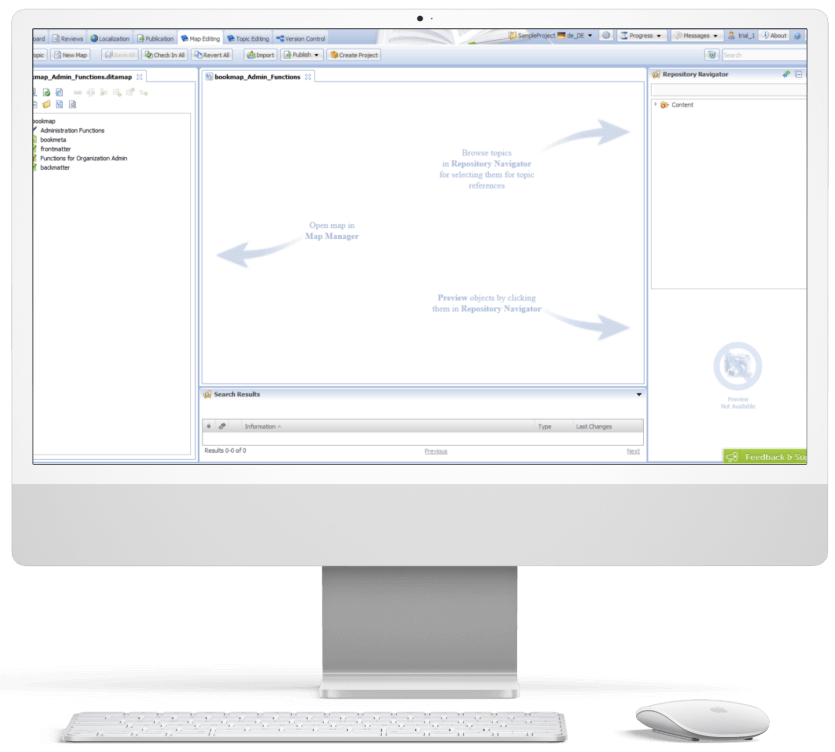
The scheme of the app
  1. Advanced DITA content
    migration from the client’s
    former DITA CCMS

The first step our dedicated team took was writing migrators to move the client’s DITA content from their old solution to DITAworks. Simple data migration regardless of the specifics of content organization wasn’t a go-to option, as it requires manual re-sorting afterward.

  • Automated post-migrational content reorganization. We wrote migrators powerful enough to automate map formatting, grouping topics of different types into relevant folders, etc., to speed up the process and eliminate the possibility of human error.
  • Tailored DITAworks’ content hierarchy to the client’s current content structure. It helped smoothen transition to the new system for the staff.

This approach resulted in hurdle-free content migration between the systems.

  1. Out-of-the-box DITAworks’ features that bolstered tech documentation management right away

As DITAworks grants extensive functionality off the shelf, its adoption helped the client fine-tune their content-related processes right from the start even before tapping into bespoke advantages brought on by custom features.

Glitch-free topic editing

DITAworks uses an up-to-date oXygen™ XML editor whereas the client’s previous system ran on the obsolete and ill-performing oXygen™ Applet, leading to constant lags in topic editing. Switching to DITAworks solved this issue and unlocked flawless access to the editing functionality for authors and reviewers.

What is oXygen™ XML editor?

oXygen™ is a multi-platform collaborative tool for creating and editing XML files, validating their structure, etc. It supports single-source publishing and allows users to produce XML content in multiple formats (PDF, HTML, Web Help, XHTML, EPUB, etc.).

Rapid publishing speed

Unlike other single-processor DITA-based products, DITAworks supports various DITA processors for content publishing by default, empowering users to control the publishing speed. Our client leveraged two processors:

  • DITA Open Toolkit for 90% of their tech documentation, which didn’t require immediate publishing.
  • DITA XMLmind for the remaining 10% that had to be published in less than one second.

To set the processor for a particular piece of content, authors just need to choose one from the drop-down menu in the pre-publishing configuration.

Extensive range of reusable elements

Reusability is a linchpin of any DITA-based software, and the diversity of the reusable elements directly impacts the speed of creating, translating, and publishing tech documentation. In the client’s original system, there were only two basic types of reusable components – text block and text template.

After adopting DITAworks Webtop, authors and translators gained access to a plethora of reusable elements:

  • Keywords
  • Blocks of text
  • Text template
  • Topics
  • Map components
  • Context text block
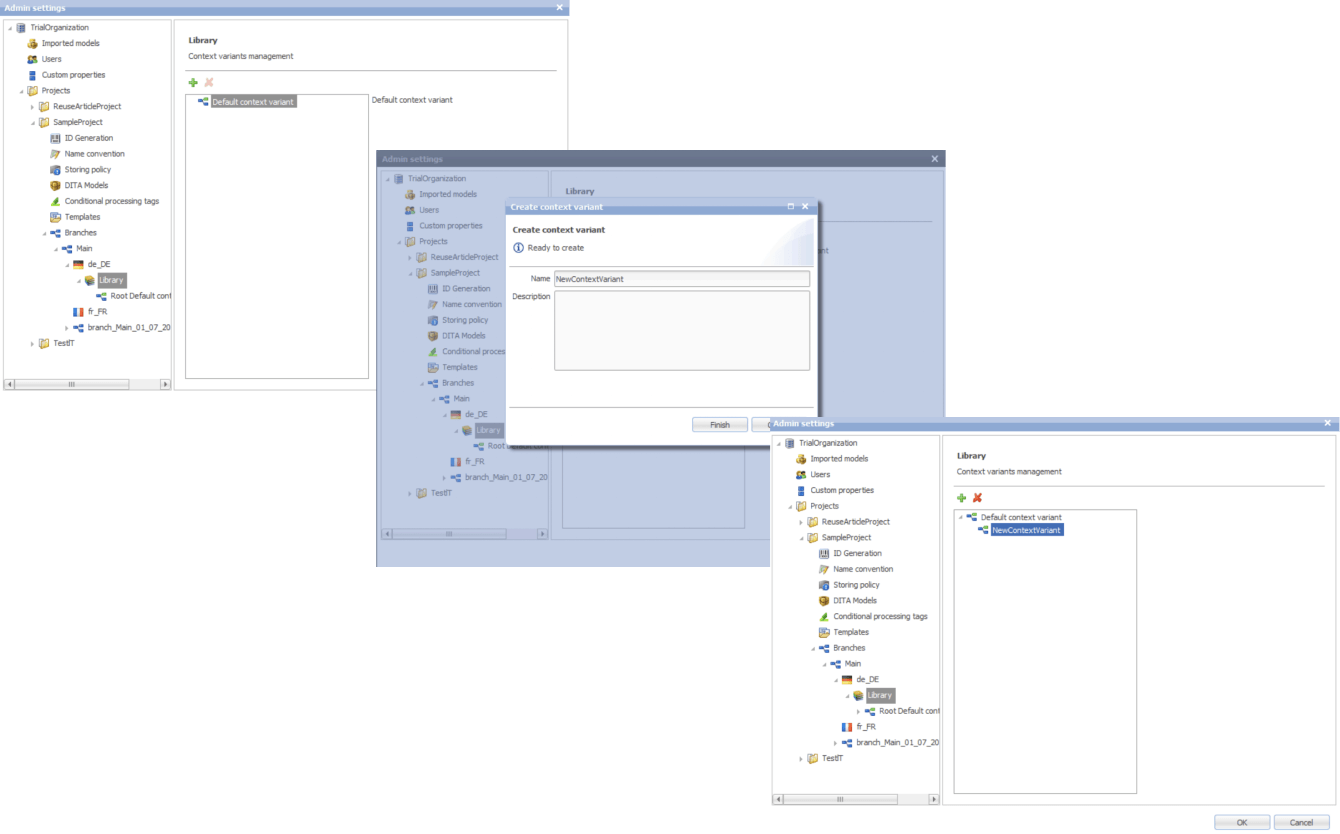
  • Context variable

Moreover, we extended the range of actions users can take regarding the reusable entities. Besides adding new components, editing the existing ones, and deleting them, it became possible to redefine the meaning of the current context.

This feature comes in handy when the staff need to work on a specific piece of content without affecting its other use cases across the whole system.

Another detail about our reuse approach that made DITAworks a more user-friendly product than the client’s former system was using indirect links instead of relative ones to provide  a path not to an object, but to its key. This way, users don’t have to worry about the links’ integrity when moving objects.

Advanced search functionality and metadata customization

The full power of reusability can’t be achieved without comprehensive search features, and this was another weak point in the client’s old software – it didn’t allow a full-text search.

Conversely, DITAworks offered broad search capabilities out of the box:

  • By title
  • By full-text
  • By phrase
  • By CP tag
  • By metadata

The last point was a treasure trove for the client as it went beyond the basic topic title and type (concept, task, reference, etc.). DITAworks relies on the taxonomy framework and allows indexing any metadata and using it for search at any system level.

What is taxonomy?

In software product development, taxonomy is a hierarchical classification of the product elements that streamlines data organization in a logical order and, by doing that, levels up search capabilities within the system.

Our client applied this feature for tagging specific product-related topics, as the range of the solutions they produce varies from control devices for decentralized power production to the ones for marine and wind turbines. As the DITAworks’ search engine indexed all the custom meta tags, such an approach simplified finding data on thousands of products.

Unlimited customization of CP tags

Any DITA-based software has in-built conditional processing (CP) tags. However, not every solution makes them easy to use. For example, to operate on the client’s former system, users needed a basic knowledge of XML to create a custom CP tag. Moreover, as the process was manual and authors wrote tags by themselves, the likelihood of human error remained high, affecting the accuracy of tech documentation management.

DITAworks’ adoption helped the client: 

  • Create custom tags without XML knowledge
  • Automate tagging if a CP tag already exists in the system
  • Eliminate human-related errors
  1. Custom DITAworks’ features
    tailored to the client’s needs

Custom functionality is usually the point of the utmost importance, especially for enterprises. Therefore, DITAworks is designed around the idea of boundless adaptability of the product. The *instinctools team crafts various functionality sets to meet the needs of any enterprise client by connecting or disconnecting numerous plugins to the off-the-box DITAworks version. Let’s see how custom modifications have opened the door to a multitude of tailored benefits for the client’s tech documentation management.

Map development

Creating content maps and managing the content tree are tricky day-to-day tasks enterprises have to deal with. Therefore, extensive map development functionality is one of the vital criteria for companies choosing between different DITA-based products. That was the same for our client, who had a highly sophisticated content tree.

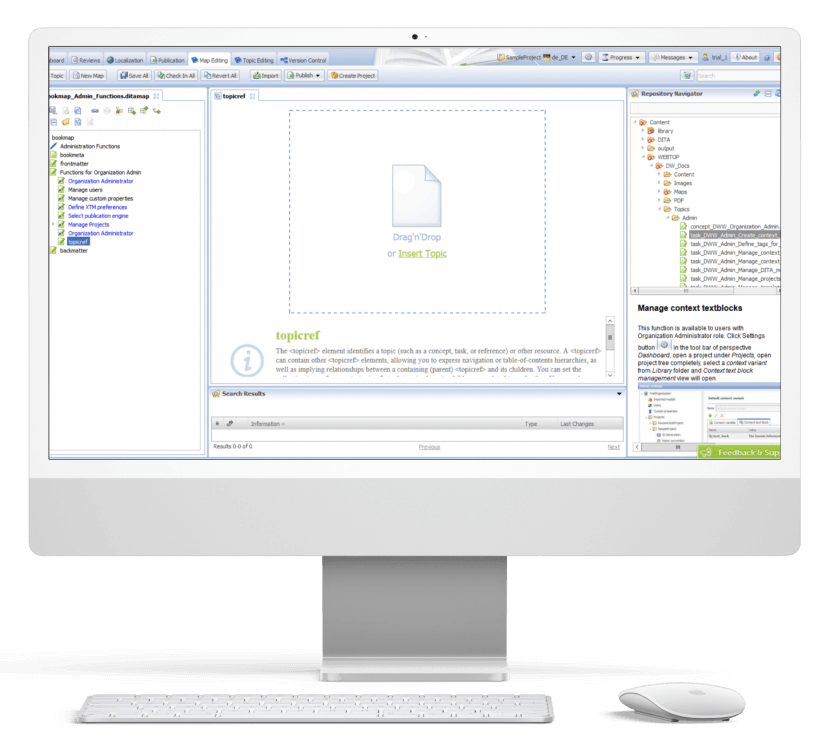
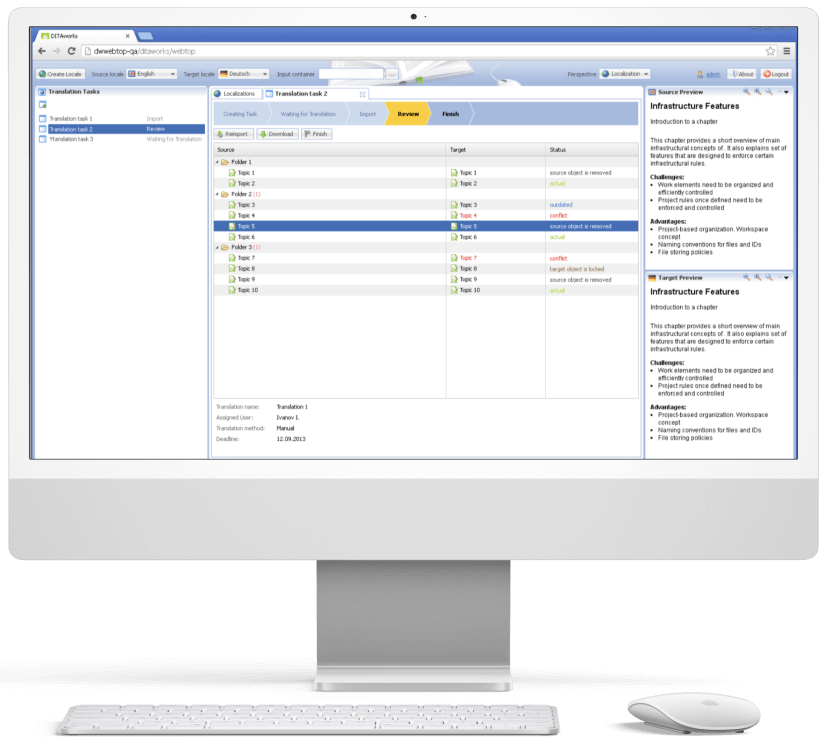
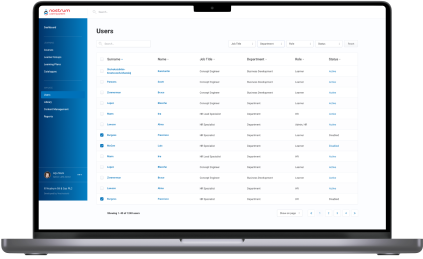
DITAworks Webtop enables multifunctional map creation and editing. Users can access different functions directly from the map editing menu instead of switching to a separate tab.

  • Map structure editing. Thanks to the interactive interface, the client’s employees can change the map structure quickly and easily in the left section with the content tree. They just need to drag any element and drop it wherever they want.
  • Topic editing is central. Here users can check the content in the preview and proceed to editing.
  • Search. On the right side, there is a repository navigator with a search bar to simplify browsing topics and linking them with the maps.
  • Conditional processing can be used on the level of the topic, map, or their units. For example, an author can assign a specific CP tag to a map unit and then leverage it for filtering.

Custom versioning

Transparency and the ability to dive deep into every piece of content were the client’s top requirements for the new system, so we honed DITAworks’ versioning functionality to match these needs.

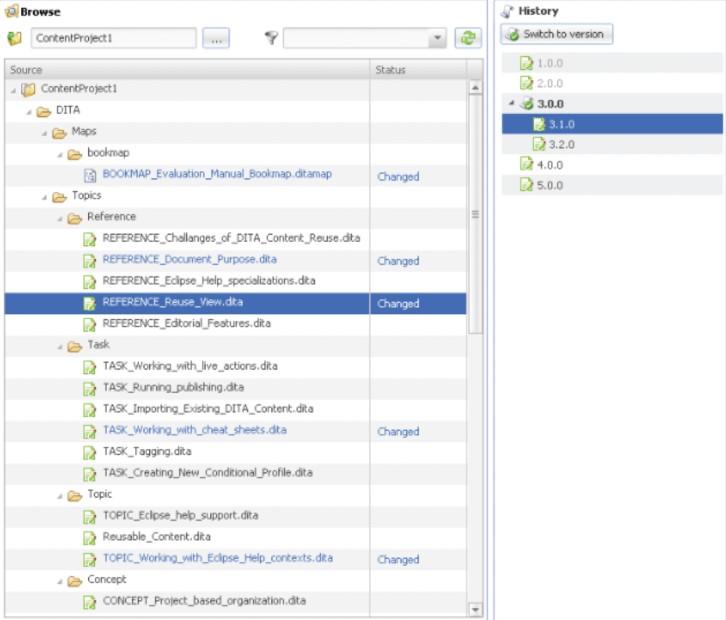
Advanced History View. In their former system, the client could see only the latest version of the documents, which failed to bring much-coveted visibility into the changes made to the files.

In DITAworks Webtop, every document check-in is tracked and leads to creating a new version (revision) of the file. Authors, translators, and administrators can:

  • See all the document versions
  • Compare the current version with any of the previous ones
  • Select any version of the document and restore it

Flexible current working context settings. One of our client’s specific requirements came from their mature content structure with its multi-level hierarchy. In addition, the company organized the work of authors, translators, and administrators in a way that aimed to collect topic-specific content in one place and reduce cross-linking between different levels, and DITAworks had to be tailored to this workflow.

Therefore, specifically for the client, we developed a ‘Dive into’ functionality that allowed users to set any folder as a root in the current working context, making folders outside this folder temporarily inaccessible through the search and repository navigator. This feature freed the staff from the constant hurdle of re-opening folder-in-a-folder-in-a-folder when operating in the same working context for a long period of time.

Ability to work on an isolated piece of content

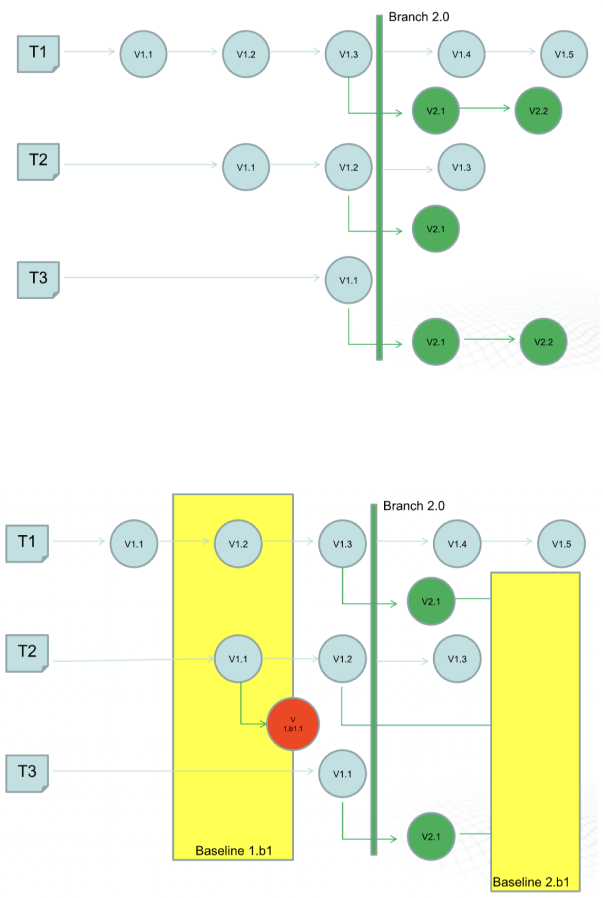
The next feature that was initially created for our Danish client and then became out-of-the-box was intelligent custom versioning with branch and baseline management. This functionality allowed users to work with an isolated piece of content without affecting the whole content structure.

  • Branching for parallel translation tasks. Our client supports tech documentation in multiple languages. The standard ones, aside from English, are French and the CKJ group (Chinese, Korean, Japanese). Working with a wide range of languages within one operating context would have been inconvenient for translators and could have caused unwanted changes in the root content.

    With branching, each user could work independently without affecting the root content. They could create a copy of a parent folder with all the documents in the master language with meta tags and after finishing the translation merge it with the initial folder.
  • Baseline for minor edits. As a lightweight version of a branch, the baseline offers users a copy of the content indexes. It is enough to make slight changes, such as correct misspellings.

Translation analyzer

Tracking translations’ status is just as important as creating tech documentation, and the translation analyzer is the component of DITAworks that covers this task. It’s a table with checkboxes for selecting files for translation. For example, users can pick only one project and leave the rest untranslated.

When a user creates a translation, the system automatically links it with the document in the master language. It’s necessary for tracking content changes and getting translation status updates in near real-time.

  1. Release management

After enriching the out-of-the-box product with a range of custom features, the *instinctools team integrated DITAworks Webtop with the client’s website for direct content publishing. Such a connection allowed the client to provide their customers with the most relevant and accurate documentation.

  1. Conducting staff training

Before rolling out the DITAworks, our team ran training sessions for the client’s employees to ensure they could leverage the software’s capabilities to the fullest. All the sessions were recorded, laying the foundation for the client’s DITAworks knowledge base and nurturing in-house expertise.

The response to the new powerful product has been very positive, and many newly trained tech writers, translators, and managers have become advocates for the system.

Before

  • Underdigitized technical documentation creation and management process
  • Weak content reuse mechanisms
  • Lack of history view and in-depth version control
  • Poor search and conditional processing functionality
  • Impossibility to work on a piece of content without affecting the whole content ecosystem
  • Tight limitations of the working context
  • Human errors in CP tags due to manual input

After

  • Fully digitized technical documentation creation and management process
  • Advanced history view with transparent version control
  • Broad search capabilities
  • Limitless metadata and CP tags customization
  • Ability to work on an isolated piece of content
  • Flexible current working context settings
  • Automated management of CP tags

Client’s testimonial

Here’s how the company’s CTO evaluates the project outcomes:

Business value

  • Complete digitization of authoring, managing, and publishing tech documentation
  • Custom product tailored to the company’s specific document management workflow
  • Reduced document creation time by up to 14%
  • Cut back on translation costs by 11%
  • Minimized possibility of a human error

Multiplier effect

The adoption of DITA-based software attracts the companies thanks to well-honed, accelerated, and budget-friendly tech documentation management. However, according to our observations, many organizations still use non-specific software such as MS Word, and business owners tend to see switching to the dedicated tech documentation management system as a major head-scratcher. It’s truly one of the trickiest tasks.

Nevertheless, booming AI technologies play their part – converting Word content into a DITA-ready format no longer needs to be done manually. It can be covered by artificial intelligence. Instinctools is also leading the pack and constantly bolstering DITAworks’ functionality with forefront technologies to simplify and speed up the data migration process while perfecting its accuracy and security.

Custom LMS development and design

Custom LMS development for an energy corporation

How implementing a custom LMS helped an oil and gas enterprise automate 84% of training management tasks while increasing employee engagement by 45% and saving 41% of the education budget by moving online.

Industry:
Education, Oil and Gas

UX and Design

Web Development

Enterprise Software Development

Software Product Development

Business challenge

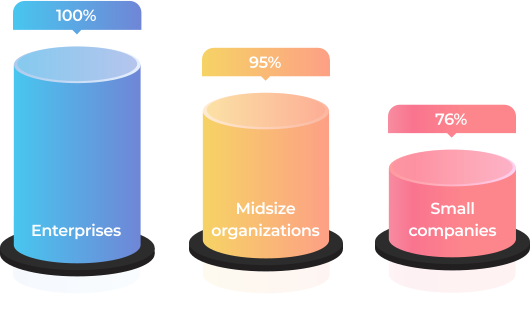
An efficient learning culture within an organization is one of the key ingredients that drive business forward. Statistics unveil that in 2022, 100% of enterprises, 95% of midsize organizations, and 76% of small companies used LMS software to deliver training.

It’s also worth saying that for some industries, continuous staff training is not a nice-to-have option but a requirement that has to be met unequivocally. Just as it was for our client — a UK-headquartered oil and gas company with a production and operations center in the Middle East, which needed an LMS for internal usage.

Before reaching out to us as an LMS development company, the client used to have only offline training programs.

What percentage of companies bank on LMS?

Source: Training magazine, Training Industry Report 2022

What problems did such an approach bring?

No single point
for gathering and storing learning materials
As courses were scattered across HRs’ devices, notes, etc., it was impossible to efficiently organize and reuse them to save time on curriculum preparation. The absence of well-established and consistent management of learning materials was also deteriorating learner engagement and led to employee resistance to education. 
Hardships
with controlling timely staff certification
The client’s HR team was having a bumpy ride with managing employee certification, which is vital in the oil and gas industry. Therefore, HRs had to manually track each worker certificates’ due dates to set required training so it was on the dot.
Manual performance
of mundane, repetitive tasks
As the client’s production center was based in the Middle East, they had to regularly submit a report on the staff certification to the local Ministry of Oil and Gas. The data for it was also gathered manually, which ate a sizable chunk of the HRs’ working hours. 
Inflexible
educational process
The training was available only at the corporate training centers and, therefore, required time commuting for the staff who worked on oil and gas production sites or from home.
Lack of transparency
in training
Teachers and learners didn’t have tools to track real learning progress, and, thus, measure it.

As the company kept growing, the problems were snowballing. At some point, it became clear that the situation had to be fixed urgently. The Head of the HR department proposed switching from in-face education to e-learning. This idea implied LMS development to go from training management turmoil to a single point for storing and organizing educational materials as well as tracking the learning process.

LMS can empower the client's business with a list of benefits

Automation
By automating repetitive tasks, such as grouping, adding, and deactivating users, handling group enrollments, etc., the client can lighten the burden for HRs. Moreover, LMS software allows for creating PDF certificates for employees when they finish a course.
Time optimization
Thanks to storing all the learning programs and materials in one place, teachers can efficiently reuse them. For instance, before creating a new course from scratch, they can check the LMS’s repository for data on the same topic, combine old courses, or just finetune them.
Regulation compliance
A powerful learning management system provides an opportunity to make keeping all staff aligned with the industry regulations a breeze. You have a centralized way to deliver the same information to all of your employees.
Security
With an LMS limited to internal usage, the client can assure the inaccessibility of the company’s sensitive data from the outside.
Cost reduction
Putting a premium on automation and a time-saving approach decreases the cost of training in the long run. 
Flexibility
After switching to digital learning, employees can attend courses anywhere, anytime.
Transparency
Both teachers and learners can track training progress. In a nutshell, LMS offers a competency matrix for each employee in the corporation.
Higher employee retention
3 out of 4 employees are more likely to stay with a company that offers continuous training and a rich learning experience.

Source: Society for Human Resources Management, The State of L&D in 2022

Also, the client considered that they would need a software solution adjustable to the specifics of the oil and gas industry and their enterprise-scale multinational company, including:

Opportunity
to create, gather, and store learning materials and courses on a plethora of topics
The flexibility of the LMS solution regarding the diversity of topics to cover — from technically specific courses to programs on finance management.
High resilience
of the system
The LMS software was supposed to accommodate a simultaneous workload of 1,000+ users during standard working hours.
Ability
to generate custom reports
As mentioned, the client had to provide a specific report to the Ministry of Oil and Gas. This task also had to be automated.
Localization
options
For the multinational corporation, the possibility to provide training in many languages (including  Arabic) was an essential feature. Where the top management could study in English, but rank-and-file employees needed materials and the LMS’s interface in localized languages.

The off-the-shelf LMS platforms won’t cover these requirements. Therefore, it was decided to develop a custom LMS software. This option also suited the client better from the business perspective as they had an in-house IT department, and maintaining their own system was more cost-effective than constantly investing in a ready-made software license.

Our business analysts clarified what devices should be used for the learning process. As the customer planned to provide access to the learning system only on the desktop, we ended up with the idea of a web application hosted in the client’s cloud.

Solution

At the product ideation stage it became clear that the client didn’t have a clear understanding of custom learning management system capabilities and what LMS features they needed. The only well-defined requirement was related to the LMS’s visual design — the platform had to match the company’s corporate colors.

However, our extensive expertise in bespoke software product development allowed us to sprint ahead without getting stuck at the starting line. Instinctools’ business analysts took the initiative during the collection and elaboration of requirements.

After finishing this stage in three weeks, we outlined the vision of the roles within the LMS, its architecture, components, functionality, and management.

  1. LMS functionality

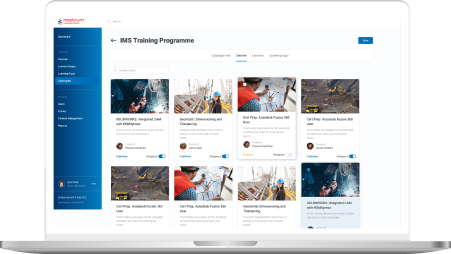
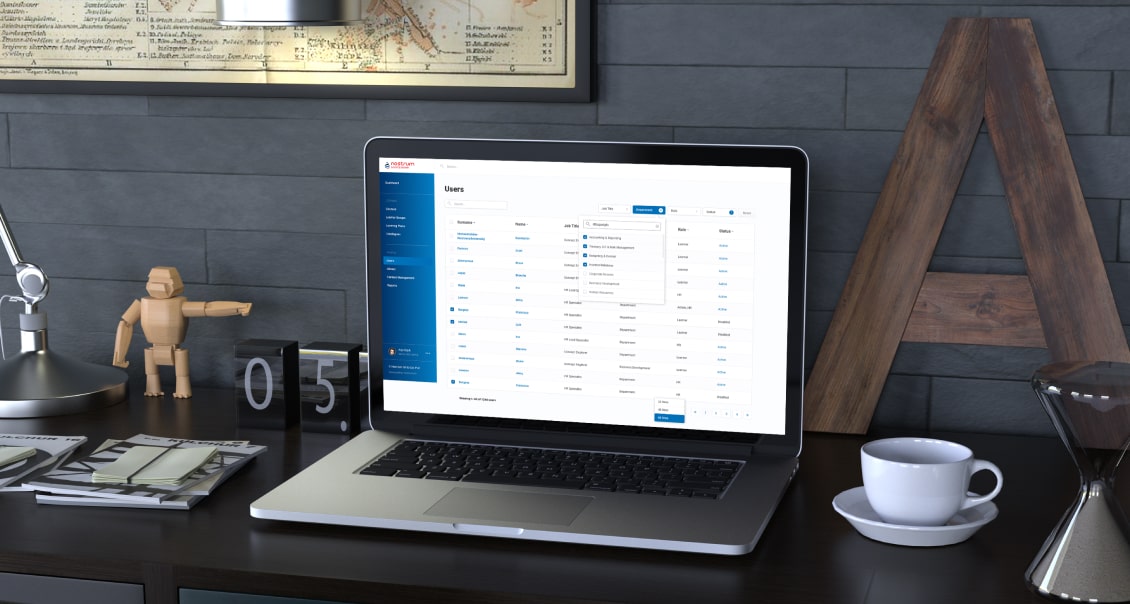
As a custom LMS development company, we aimed to provide the client with a feature-reach and user-friendly software product. Therefore, our dedicated team devoted special attention to crafting an easy-to-use materials repository, clear course structure, simple course management, detailed progress tracking, diverse testing programs, and in-depth reporting.

Roles

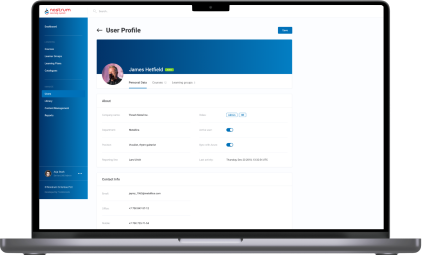
After analyzing the structure of the client’s training process, we suggested the following roles within the learning management system:

  • Admin for their in-house IT department
  • Teacher for HRs
  • Learner for employees

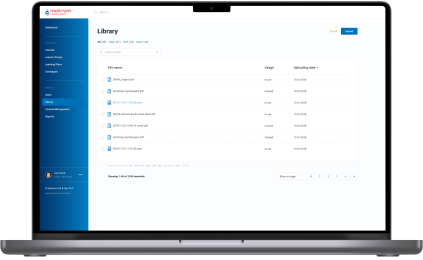
Content Library

Storage for courses and educational materials is a basic component of any LMS. Speaking of the client’s Content Library, they planned to use it to collect both their in-house courses and learning programs they acquire from other training centers.

Considering the requirements of the oil and gas industry, all the data can be sorted out in various ways. For instance, general or industry-specific, by topics, available language, etc.

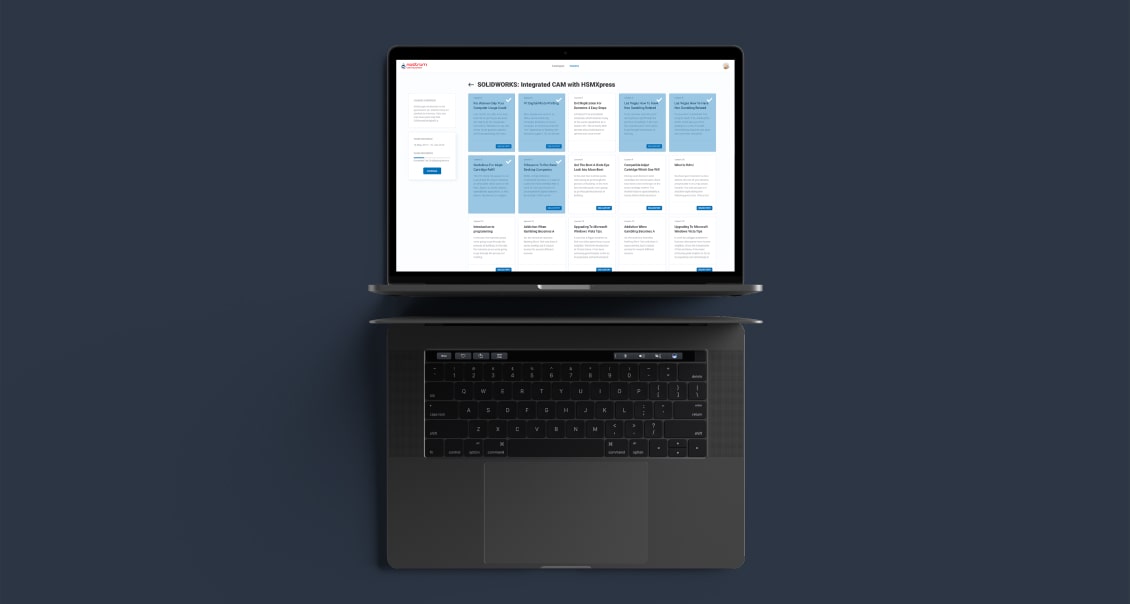
Content formats also vary. In the era of offline training, the client offered employees only text and illustrations. Our BAs proposed adding videos to increase learner engagement and enhance educational outcomes by diversifying learning activities.

Course structure and management

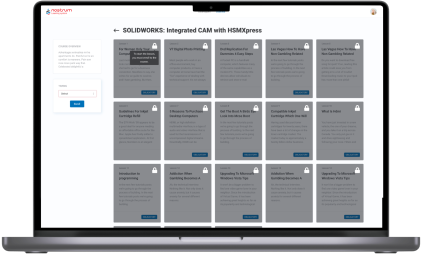
Learners can’t choose a course by themselves; training is always assigned by the Teacher or Admin to an employee or a group of employees. Also, educational materials are categorized according to the staff’s specialization and their level within the corporation. For instance, materials for rank-and-file workers and top managers will be in different categories, as well as courses on specific topics, such as risk management in finance and safety in oil production.

Progress tracking and analytics 

The success of training programs is measured by their influence on the staff. To estimate this impact, we visualized students’ progress with data analytics tools.

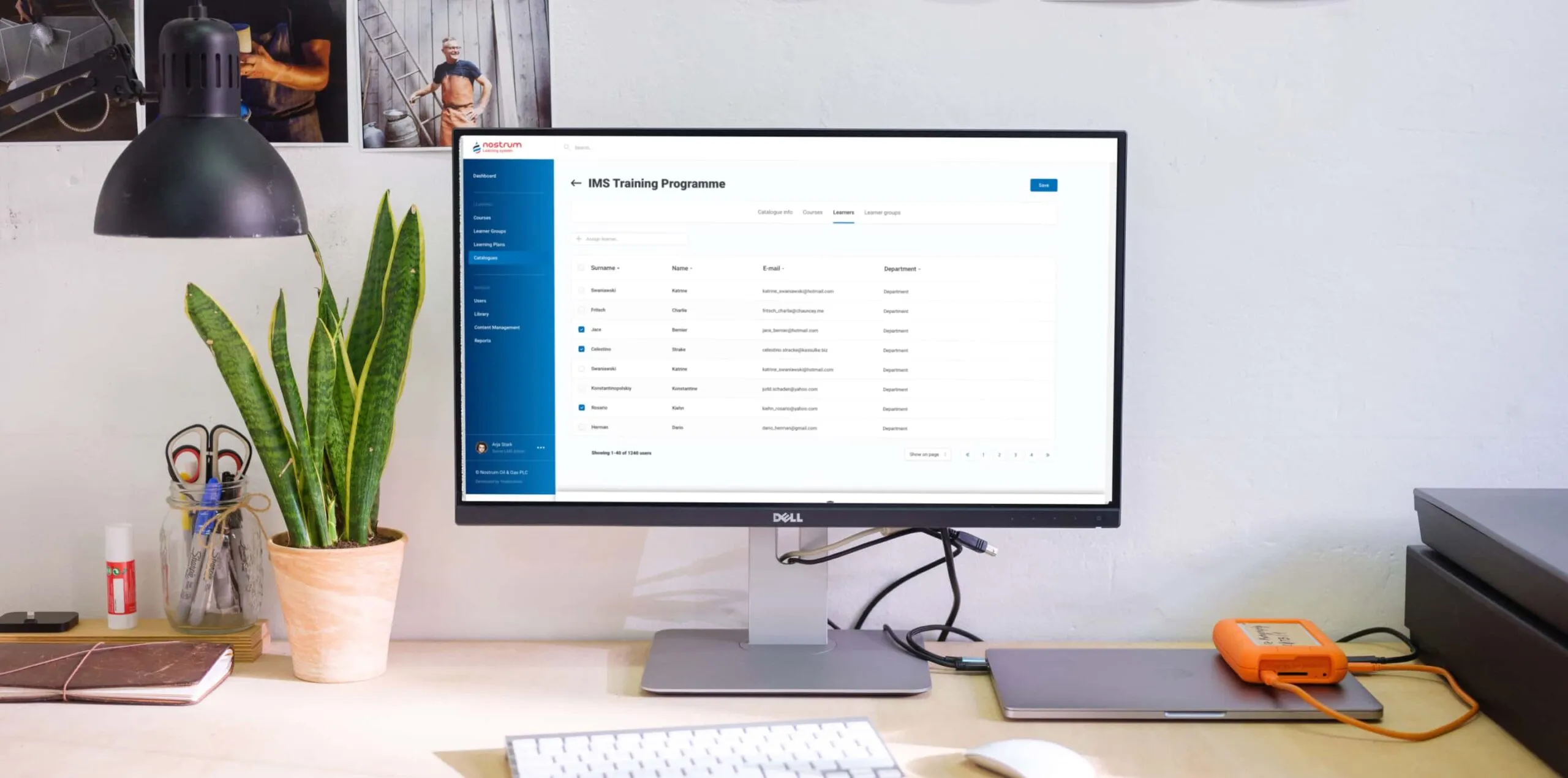
Custom LMS development implied offering dashboards on both sides:

  • Admin/Teacher’s
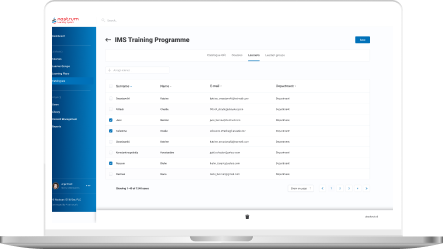
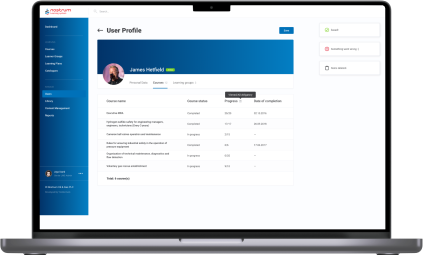
functionality includes tracking percentage of Learners completed a group course. Furthermore, as they can set a deadline for a course or test, there is a statistic on how many employees managed to meet the deadline. Teachers and Admins can also look for detailed analytics for each employee – what percentage of assigned courses and tests they have already passed, the number of failed tests, if there are any, etc.
  • Learner’s

functionality is not that extensive, but each employee can check their training performance and monitor deadlines to make it on time. All reports can be downloaded as Excel, CSV, or PDF files.

Communication within the LMS 

Having a single point of communication is also significant in ensuring personalized learning experience and high-quality training. Learners can leave comments on the courses, tag their Teachers or other participants if there is a group training, and Admins if they can’t sort out some technical issues. 

The same goes for Teachers. For example, they can tag Learners in the courses where the deadline is around the corner.

Notifications

Communication goes hand in hand with automated notifications to simplify time management for both Teachers and Learners. Within the custom LMS development, we recommended and implemented email notifications with ready-made templates for five cases:
  • A Teacher assigned a course to the employee
  • The Learner was tagged by a Teacher, Admin, or other Learner from a group
  • A course has a deadline, and the Learner receives auto reminders ten, five, and two days before
  • The Learner missed the deadline for a mandatory course
  • Admin also receives a message about the readiness of auto-generated reports for the Ministry of Oil and Gas

Tests

This feature became a new helpful add-on in the certification process to ensure a high level of expertise across the company. Now, employees can only be certified after passing tests following the course.

Here are some features of the testing process we suggested and implemented during the custom LMS development:

  • Tests can include open, single-answer, and multiple-answer questions
  • There may be text, illustrations, and videos in the tests
  • New hires have to complete an initial test to assess what skills they may lack for their specialty or position. Based on the results, Teachers can create fully personalized learning for these employees
  • Teachers and Admins can set a deadline for the course.
  • Teachers and Admins can set a course’s completion as a prerequisite for access to the next one

Reporting

As we’ve mentioned, the automated report preparation for the Ministry of Oil and Gas was one of the reasons that tipped the scales in favor of the custom LMS development services. We relieved people from a manual collection of data on employees’ courses completion, putting that data together in a list, and entering it into the report template.

All these operations were automated. The LMS generated an Excel file with all the necessary information according to the Ministry of Oil and Gas template. HRs had only to download it and send the document to the ministry.

Since the project scope was quite substantial, we divided the work into two parts — MVP (Minimum Viable Product) and post MVP. The MVP incorporated the Admin’s and Teacher’s functionality – Authorization/Login, Course Catalog Management, Course Management, Content Management, and Content Library. It took our LMS developers three months to finish this part. 

  1. Integrations and security

The client used Microsoft Azure as their corporate cloud platform, which influenced the LMS integration they needed and the way we took care of security:

  • Integration with Azure Active Directory

All employees already had profiles in the Active Directory. We took advantage of this to avoid creating the staff profiles in the learning management system from scratch.
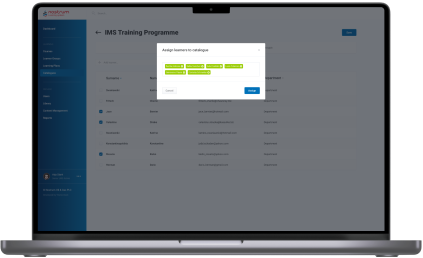
All employees already had profiles in the Active Directory. We took advantage of this to avoid creating the staff profiles in the learning management system from scratch.
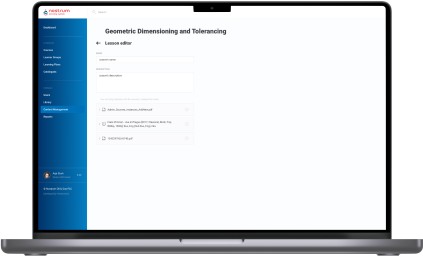
  • LMS authentication through Azure OAuth 2
We suggested using this up-to-date standard authentication protocol to allow users to sign in to the LMS through their profile in the Active Directory. 

Besides saving personnel’s time, such an approach is beneficial from a security standpoint. As you can guess, employees rarely come up with new passwords and use the same one for multiple systems, which increases software vulnerability drastically. A single point of authentication (SSO) means fewer scattered logins into various corporate apps and minimizes the possibility of external attacks and data theft. 

Within the project, our LMS developers worked only with the API addresses of specific servers provided by the clients for the web app. The software’s maintenance and support were supposed to be provided by their in-house IT department. 

However, we went the extra mile to optimize the task for the client. Our DevOps has automated the web app’s installation and deployment on the server side. Thus, all the LMS services located in Docker containers were automatically brought up on the server via Docker Compose.

  1. Visual design

Good design emphasizes the product’s functionality. Our product designer had to translate custom LMS software’s versatile capabilities into a dynamic and feature-filled interface. As we were strapped for time, there was no wireframing. We went straight to visual design. Our UX/UI designer took the risk and prepared a lot of screens for a future web app at once and reached the client for approval. Thanks to our product-first mindset and battle-tested expertise of the LMS development company, it worked out.

Here are a few examples of our initiatives regarding learning management system design and usability:
  • Nesting levels
As we were in charge of the solution’s architecture, we also proposed the components hierarchy. For example, we suggested creating All, Video, Text, and Cover sections within the Content Library and All, For review, Declined, and Published tabs in the Courses Catalog. 
  • Quick access tab
Learners can be overwhelmed with the number of courses they need to complete. Therefore, we offered to add a “Quick access” menu, where each employee can check assigned materials, which are obligatory, which are in progress, etc.
  • Intuitive and handy file uploading
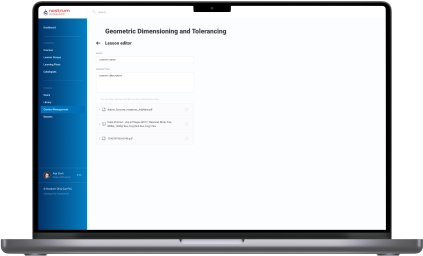
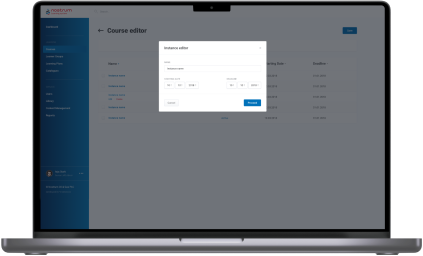
With the drag-and-drop interface, Admins and Teachers can easily download materials of any type to the Content Library and change their order in the Course Editor.
  1. Post-implementation stage

After the LMS rollout, our business analysts trained HRs to familiarize them with the system and show them how to take advantage of it to the fullest.

Next, we moved to working on the post-MVP features and added them in four iterations:

Iteration 1 User Accounts management, Learning groups management.
Iteration 2 Courses, Catalog, Admin/Learner modules architecture.
Iteration 3 Lessons (Learner module), Course listing (User management).
Iteration 4 Enhancements (improve UX), Report (Course completion), Course management (selection material from Library, material sequence).

This part of the custom LMS development took another four months of the full-fledged team work.

Before

  • Training materials and courses are scattered across teachers’ devices and hand-written notes
  • Manual performance of management tasks that could be easily automated
  • Lack of personalized learning
  • Inability to measure the effectiveness of corporate training materials
  • Absence of educational analytics
  • Slow delivery of the educational programs
  • Difficulties with tracking learners’ progress
  • Manual preparation of obligatory reports

After

  • Transparent measurement of corporate educational programs’ success and learner’s progress
  • Simplified and mostly automated preparation of industry-specific reports
  • Speeded up courses delivery
  • Automation and facilitation of all the learning management operations
  • Centralized learning data storage
  • Unlimited ability to personalize the learning experience
  • Detailed visualization of each employee’s training progress and a bird’s eye view of the staff certificates across all company

Key features

Inclusiveness
The biggest gain of custom LMS software is its adaptability to the various staff’s specialties and flexibility in providing access to the courses regardless of the employees’ time and location.
Resilience
Besides the ability to withstand the simultaneous workload of 1,000+ employees, custom LMS development has become a harbinger of opportunities for the client to ensure stability and consistency of training programs.
Customizability
With a custom LMS solution, the client can uncover the areas of improvement and tailor a curriculum to the company’s needs and employees’ ambitions.

Business value

  • Provide a single point of control over the training programs to ensure ongoing improvement of employees’ knowledge and expertise
  • Automate 84% of teachers’ tasks related to managing the educational process
  • Save up to 4 hours of teachers’ working time weekly and relocate their efforts to developing personalized curriculums
  • Save 41% of the education budget thanks to moving online
  • Speed up new staff onboarding from 1–3 days to 4–10 hours, depending on the employee’s position
  • 45% increase in employee engagement
  • Securing the company’s education materials with single sign-on (SSO) authentication

Multiplier effect

Any way you slice it, even small companies can no longer afford to put off the question of consistent and centralized employee training until later, not to mention medium-scale companies and enterprises.

The absence of a robust learning management system can slow the roll of a company in any industry, from education and healthcare to manufacturing, automotive, and fintech. Creating a powerful LMS can help you rise from a dizzying array of unsorted educational materials and courses and make your employees’ progress traceable.

Furthermore, experts in any field are a hot commodity nowadays, given the world-scale talent crunch, and hunting them can cost you a pretty cent. Therefore, you should bank on the LMS software for internal usage and cultivate experienced professionals within your company.

Effective training helps companies to fill skill gaps by leveraging staff they already know and trust and foster long-tenured relationships with their employees. Moreover, by putting talent management first, companies of all sizes can improve organizational performance and potentially gain a competitive advantage over their peers.

Enterprise Document Management System For an Atomic Energy Corporation

Enterprise Document Management System For an Atomic Energy Corporation

How replacing several feature-poor document management solutions with a single comprehensive user-friendly system accelerated document-related processes by 23% on average.

Object

Systems of electronic document management have been with large companies and state enterprises for quite some time now and are there to stay for a long time, too. It also requires more mobility from company managers who spend a lot of time out of office. Being outside the office they need to carry out their responsibilities and lose no time as well as to have a handy work interface with information systems, an easy possibility to solve problems in a fast and timely manner. In order to enable them to do so, a system interface has to be also informative and simple at its best – a manager is supposed to have on hand all the document operations possible.

What are the problems when running a document management system device with a web interface?

  • Mobility

When running a web interface a manager comes across a number of limitations on their freedom of movement – the manager needs to have constant access to the resources of his company and electronic document systems, i.e. he usually cannot handle his documents while on the road, up in the air or at sea.

  • Interface intuitivity

Web interfaces with access to electronic document
systems are often overloaded with functions and are meant for big screens with precise positioning of the mouse cursor. One needs to take his time to interact with the system as well.

  • Safety

When having access to electronic document systems via a mobile device it is needed to secure the proper keeping of the information received, transmitted and saved, which may be problematic in success-stories when running a mobile device outside the office.

  • One access interface

Having several systems of document management at your company, the manager needs to switch between various web interfaces and carry out single operations in each of the systems.

The main purpose for developing a mobile client device was finding solutions to the following problems.

Solution

How the mobile client solves the problems mentioned above.

  • Mobility

Application of the mobile client with offline work functions enables you to have access to documents and carry out all necessary operations with them while having limited access to electronic document management systems of the company. All operations done in the system by the user are kept in the application and if there is access to the document management system of the company, are synchronized automatically. Additionally the user is enabled to tune the synchronization intervals themselves.

  • One access interface

Mobile client enables you to unify tasks from several systems of document management, which allows running operations faster with volumes necessary for a manager in one application. In this case one interface is enough, i.e. the interface running tasks from different systems of document management.

  • Interface intuitivity

Interface adapted for use on mobile devices and the availability of just the operations needed enables to process documents in a faster manner and make the interface informative and simple at its best.

Interface adapted for use on mobile devices and the availability of just the operations needed enables to process documents in a faster manner and make the interface informative and simple at its best.

  • Safety

The mobile solutions as to the safety of information exchange with electronic document management systems and safe keeping the data disallow access to third parties to the information kept on the device, which is rather problematic when using a web interface. Application of different means of authentication of the user (login/password, authentication with smart cards) enables to secure reliable transmission of user data. Encrypting data bases and files of the user is fulfilled in accordance with GOST 28147-89 (State Standards).

When operating the mobile client, the additional advantages are guaranteed

  • Handy display and document task operation. The user is enabled to scroll and change documents in most office formats
  • A function to save marks on tasks. The user may leave their own marks which are not seen by other system users
  • Commenting the tasks to be done. The user may leave comments as per electronic document management system
  • Handy search and sorting user tasks/documents
  • Launch of new document management processes

What else can the system do

  • Several languages are available. Localization of forms and elements and their arrangement are kept on the server which allows changing their contents and arranging in a fast manner
  • Handy support to change the responsible person. If the user is outside the office and is not able to carry out their responsibilities at the moment, another user may be assigned to do the task at the push of a button
  • Launch of new secondary work processes and create new tasks either via interface or from a separate tab on processes
  • Keep selected tasks even after they have been carried out. The user may determine the volume in document management he/she needs by his/her own
  • The Drag & Drop handy mode enables the user to move the responsible per tasks. The expander system allows organizing work according to information on tasks providing the user with necessary information only

As a result, the manager’s main tasks have been successfully carried out for their superior, whose usual working place was out of reach, the transparency of all working processes was also observed.
This system may be integrated into different electronic document management systems, corporate calendars, task managers and other systems engaged in working processes.

Technologies

Tapestry 5
JQuery
Bootstrap
UI Spring,
Spring Data
Hibernate
PostgreSQL
Maven
Jenkins
Anna Vasilevskaya
AI modified real photo
Anna Vasilevskaya
Account Executive

Get in touch

Drop us a line about your project at
[email protected] or via the contact
form below, and we will contact you soon.